#windows-ios
1 messages · Page 13 of 1
 spark dove
 onyx mica
has anyone tried the 0patch for windows 10?
 frank stratus
this has been happening for months now and i cant seem to fix it. any time i play a game for example val or fortnite my audio everywhere else lessens, the call im in gets lower, and when i click the windows button off off the game into a different application the audio increases again but so does the game audio. And then when i enter the game again the audio lowers on both applications. I've went into sounds and sound settings but it doesn't help. I finally wanted to ask after trying to fix it myself
 neat wadi
frank stratus
this has been happening for months now and i cant seem to fix it. any time i pla...
neat wadi
frank stratus
this has been happening for months now and i cant seem to fix it. any time i pla...
what call application are you using?
Discord?
some call apps have a "lower audio on activity" setting
 arctic verge
make sure this is set to nothing just in case

im not sure if whatever game you're playing is causing this or what
oh yeah
another cause may be bluetooth headphones
make sure you disable the "hands free audio" in the recording tab
frank stratus
arctic verge
make sure this is set to nothing just in case
I’m pretty sure I’ve done this when tryna fix it but I’ll check again
frank stratus
yee i had arleady done this
frank stratus
arctic verge
another cause may be bluetooth headphones
im using wired so idk if that matters
arctic verge
then not in that case
hmm
maybe try disablin like windows sonic or dolby atmos for headphones? it has to be some software related thing causing this
frank stratus
Kill when I get home
 unique basin
Does anyone know where to get a windows 11 key? Not for free like pirating, but where i don't have to pay $100+ for it
 viral eagle
some sites may have OEM keys for more like $30 but tbh it's hard to tell if it's really an OEM key or just greymarket
arctic verge
unique basin
Does anyone know where to get a windows 11 key? Not for free like pirating, but ...
most keys that aren't direct from microsoft nowadays are not people reselling keys they obtained legally or in ways that break microsoft's terms of service
whether you spend $5 or $30 on a key site, 99% of the time it's likely to be a stolen key (if it says "OEM" key at least. if it is a retail key, then it might be somebody selling their key that they bought)
viral eagle
Uuuuuuugghhhh think my windows install borked itself
neat wadi
viral eagle
Uuuuuuugghhhh think my windows install borked itself
nooooooo
D:
symptoms?
viral eagle
Was getting a handful of bsods and now can't boot into os
Windows repair isn't working either
 tall wraith
iOS is being merged with this chat, due to inactivity.
So if you’d like to talk about windows, or if you’re an iOS fan, you’re in the right place!
viral eagle
Hmm
Ok I guess last time we were talking about mac it wasn't in Mac/iOS chat anyways
Technically Mac and iOS are unix so they should be grouped with linux/android chat 🤓☝️
tall wraith
viral eagle
Technically Mac and iOS are unix so they should be grouped with linux/android ch...

 small drum
I need a new Dell Inspiron 7706 2in1 Motherboard i7-1165G7 2.8GHz Nvidia MX350 DDR4 P47D9. I wanted to upgrade it but I don't think that is possible. What is the best price.
 last gorge
Im seeing listings for the motherboard at around 150usd on ebay
Probably wouldn’t be able to upgrade, the motherboards in laptops are often specific to the model
 bitter salmon
Hey
I got the Mac MIni M4 2024 base model recently. What is the best filesystem format for an external ssd?
last gorge
if you plan on only using it with the mac i'd just do APFS
 wary furnace
What do I do if Windows craps out after ddu and is just a black screen
WinRE won't boot either, I don't know if that's an issue between the chair and keyboard or just Windows being stupid
I'm also helping someone else do it and that's why I say PEBKAC
 young current
unique basin
Does anyone know where to get a windows 11 key? Not for free like pirating, but ...
young current
unique basin
Does anyone know where to get a windows 11 key? Not for free like pirating, but ...
I bought mine on vip-cdkdeals.com which sponsored Gamers Nexus a long time ago. I have had the Windows Key for 4 years now without issue.
viral eagle
young current
I bought mine on vip-cdkdeals.com which sponsored Gamers Nexus a long time ago. ...
greymarket so maybe a little iffy here fyi
young current
viral eagle
greymarket so maybe a little iffy here fyi
Was not aware.
viral eagle
Yeah technically OEM keys can be totally legal but the issue is you can't really tell if they're actually OEM or not
 deep zodiac
Any idea on what i can do?
okay so yesterday i tried to login to our family xbox account, which uses my moms Microsoft / email. It wasn't letting me login so i thought something was up and tried on my phone to login directly via the xbox app, and when i went to do so it said "2fa email sent to (some random ass email ive never seen) and me and my mom are now fully locked out. We tried to do the Microsoft account recovery tool but both times were told "Not enough evidence" which is bullshit because i filled out every box there, and keep in mind my mom has had this account for over 10 years, so theres ALOT of data for the xbox account, and all our cards are linked to it aswell.
 idle dragon
Hibernation on my Surface Pro 7 does not work correctly. When I manually or automatically trigger hibernate, the system appears to power off instantly. On resume, it performs a cold boot and all previously open applications are not open.
powercfg /sleepstudy and event viewer report unexpected shutdowns during hibernate
sp7 uses s0 sleep and doesn't support s3 but I guess hibernation doesn't care.
I tried enabling hibernation (powercfg /h on), rebuilding hibernation file (powercfg /h offon) setting hibernation type to full (powercfg /h /type full), no fast startup, sfc /scannow, tested forced hibernate (shutdown /h /f)... tried reinstalling surface driver pack...
what do I try now?
viral eagle
Probably try reinstalling windows tbh. In my experience when windows really breaks it's very hard to fix, sometimes impossible (without reinstall)
idle dragon
it's a fresh install and it didn't work from the beginning, or at least after I installed the right surface driver pack
I noticed event viewer reports network card error before each hibernation attempt, but even unisnalling both wifi and bt card and drivers from device manager doesn't fix anything
viral eagle
Oooof, if it's a fresh install then yeah it's gotta be a driver or firmware quirk.
Laptops can be fussy sometimes
idle dragon
I did run Chris Titus debloat tool but I specifically avoided the modern standby fix and similar tweaks which I knew could cause problems
guess I'll reinstall again tomorrow, only use ms driver pack for the drivers and possibly use a restore point to see if ctt causes any issues
idle dragon
I'm reinstalling it 
 hazy elm
Anyone have a bypass similar to the late oobe\bypassnro? I need to set up a Laptop for a friend
hazy elm
Also it is an HP OMEN laptop, with Windows 11 preinstalled, will I need to re pay for a license key if I reinstall from a USB? My short research earlier leads me to believe that the key should be embedded in the BIOS, but I need to be sure
idle dragon
hazy elm
Anyone have a bypass similar to the late oobe\bypassnro? I need to set up a Lapt...
Shift + F10 to open cmd during installation > start ms-cxh:localonly
this should be the new working alternative
idle dragon
hazy elm
Also it is an HP OMEN laptop, with Windows 11 preinstalled, will I need to re pa...
you won't lose the key, yeah it's either saved into the firmware or activation checks for the mb hardware id for previous activation
 warped cobalt
i can't with drivers pls help
im trying to install a driver for my 1660 super and it keeps asking for more storage to install but there's like 2 gigs left


yeah it's nearly full but why isn't it installing having the space
<@&525119001324683264>
last gorge
You typically need at least ~20% of the drive free for the os to perform optimally. Some free space can be reserved by the system for caching, paging files and such. You are going to need to clear more data
warped cobalt
there's not much i can un install 🙁
now my audio is also buggin out
everything is just faailing me 🙁
last gorge
Yeah operating systems will start to freak out when you have so little storage available
 last gorge
I feel like there has to be something else. are you able to download wiztree
last gorge
that software gives you a visual interpretation of what is taking up space on your drive. you can look through it and see what exactly is using space
warped cobalt
ooohhh
deleted 18gb of C:\Users\Zoiko\AppData\LocalLow\VRChat\VRChat\Cache-WindowsPlayer
Generated by WizTree 4.31 5/4/2026 11:42:34 PM (You can hide this message by making a donation)
hope it wasn't important xd
welll the driver is installed thnx 🙂
🔚
 dry raft
warped cobalt
deleted 18gb of C:\Users\Zoiko\AppData\LocalLow\VRChat\VRChat\Cache-WindowsPlaye...
dry raft
warped cobalt
deleted 18gb of C:\Users\Zoiko\AppData\LocalLow\VRChat\VRChat\Cache-WindowsPlaye...
Prolly want to move VR Chat cache to another drive if you have one. If VR Chat is crabby enough where it doesnt have that option, prolly make a symbolic link (mklink /d "%localappdata%low\VRChat" "d:\Games\VRChat")
 sly heath
Hello! I unfortunately cannot operate on this right now, but I wanted to ask about this for when I eventually get home.
Sequence of events:
- Backed up my PC on an external drive and factory reset my PC.
- Opted out and closed out of OneDrive.
- Redownloaded everything important when it comes to apps, games, and other programs.
- Noticed I had a OneDrive folder still in File Explorer.
- Deleted the OneDrive folder which apparently contained the default location for Desktop, Documents, and Pictures.
- Tried to create new folders, restart File Explorer, change default location Users, and edit registry to %USERPROFILE% to no avail.
- Spoke with Microsoft who recommended basically everything I already tried.
Questions:
- Is there anything I can do without having to factory reset my PC again to get it right?
- If I were to factory reset once more, what steps should I follow to prevent this situation from happening again? Can I make it so OneDrive doesn’t even touch my PC? Can I change the default location to the correct one before anything gets placed in the OneDrive variant of the main folder?
Thanks in advance. I can’t stand OneDrive.
last gorge
Whenever I would install windows I always bypass the microsoft login. I think if you just do the install with a local only account it skips all that bs of linking your home folders to onedrive. then once you get into the desktop you can immediately uninstall onedrive via the apps settings menu
sly heath
last gorge
Whenever I would install windows I always bypass the microsoft login. I think if...
Is that even possible now? I didn't see an option to bypass the Microsoft login
That's actually in part what I was intending to do when factory resetting
last gorge
well microsoft certainly hasn't been making it easy. they tried patching some of the bypasses recently but I'm pretty sure some still work. https://www.reddit.com/r/sysadmin/comments/1jp5vln/an_alternative_to_bypass_microsoft_account/
I believe some imaging software like rufus have built in toggles to bypass some of that stuff while you are making the usb installer
sly heath
Predatory garbage man
So just that command at the country selection screen after the initial settings and key are entered I guess. Either way, idk if that will prevent OneDrive from existing let alone stopping the default folder location going into OneDrive
last gorge
onedrive will likely still be there but not setup straight out of the box. It's been a while since I installed windows so I can't say for sure since some of the changes
sly heath
I just fear that, no matter whether you're signed in, that will be the location of a handful of those folders
last gorge
I brought it up because I'm fairly certain that it doesn't do that to the home folders in that case so it might be worth a try
¯_(ツ)_/¯
sly heath
Update: start ms-cxh:localonly worked. Created local account, uninstalled OneDrive and a bunch of other apps, folders seem to all be listed in the correct spot. Restarting and will shortly add my Microsoft account to the computer
sly heath
I think I'm about done. I now have a secondary Administrator account on the computer I cannot get rid of.
last gorge
did you add the ms account as a second account or just sign into ms with the local?
sly heath
Signed in with the local. Guess I should've added it as a secondary 🤪
So I basically did everything correct besides that, and adding the Microsoft account as a secondary will enable me to delete the local and leave myself with just the Microsoft?
@last gorge
sly heath
OOBE\BYPASSNRO was the key. Gemini managed to figure it out. I should be all set now. Appreciate the help!
last gorge
no problem, sorry i was in and out but glad you found it
 random stag
If I Delete Duplicate File's will my Windows still work?
last gorge
what kind of duplicate file specifically?
random stag
last gorge
what kind of duplicate file specifically?
All
random stag
O crap something went wrong with Delete Empty Folders on my Windows 11
last gorge
Well are we talking system files or user files? Some files can appear to be duplicates but are actually symlinks. You generally should not touch any system files. If they are you user files you can determine which to keep based on properties and such
random stag
last gorge
Well are we talking system files or user files? Some files can appear to be dupl...
I think I got it CCleaner didn't work so I used ASC
last gorge
Why are you using tools like ccleaner?
random stag
My friend is missing Qt6Widgts & Qt6Core.dll can I get a Link to get them back?
last gorge
You probably have to reinstall whatever app it’s for
 river mulch
Im giving my old z390 to my sons girlfriend and was wondering if the old rules still worked where if I put in a new nvme boot drive and new rtx, that I can use one of those $20 pro licenses, long as I put in the old hardware after first time registration. I cant give them the windows license on it already as its part of the old discontinued ms technet program and rather not risk losing my keys.
viral eagle
"one of those $20 pro licenses"
 gleaming plaza
warped cobalt
like literally what else should i uninstall
gleaming plaza
warped cobalt
like literally what else should i uninstall
if you disable hibernate, you'll get as much extra space as your RAM
but then your system won't hibernate
but I don't think that's really that important unless it's a laptop
you can also disable page file but eh you probably want like 32gb of RAM for that
warped cobalt
Hmm
warped cobalt
gleaming plaza
but I don't think that's really that important unless it's a laptop
I have a desktop so
gleaming plaza
assuming it's enabled, in powershell as admin: powercfg -h off
you can re-enable it with powercfg -h on
if you want to do that for some reason
also check in Control Panel>Programs and Features to see if there's anything more you can uninstall
Also Disk Cleanup
damn I should practice what I preach

 left mango
river mulch
Im giving my old z390 to my sons girlfriend and was wondering if the old rules s...
left mango
river mulch
Im giving my old z390 to my sons girlfriend and was wondering if the old rules s...
Is this a monitor or a CPU? How sweet!
viral eagle
It's a motherboard
 wary mica
i just installed windows 11 ltsc. currently trying to install my laptops audio drivers because the volume controls on my keyboard arent working but i keep getting this error when trying to install
 wary mica
ok update i fixed it
but my keyboard buttons still wont freaking work
this is pissing me off
anyone help??
 round condor
Hey do you guys help with troubleshooting here? Having an odd issue.
PC had messed up graphics drivers and WiFi drivers when I booted it up the other day, fixed the graphics using a restore point. Now the WiFi is still not working, started as saying it couldn’t find any networks to connect to, did a lot of troubleshooting steps I saw online and, now it sees networks, without any connectivity, know this is software and not hardware cause I booted into a Linux live Cd and this issue isn’t present, Event viewer has no related errors beside “The Network List Manager reports no connectivity to the internet.”
tall wraith
<@&1344082385423040512>
tall wraith
@round condor
round condor
left mango
Direct to the router?
I tried both neither get internet
Connected no internet
hazy elm
An IOS question, as I just had a new issue with my phone. Would battery health being at 74% cause stability issues? it hard crashed and entered recovery on restart. Thankfully nothing happened

 strong surge
New channel!
 wary furnace
Nice
strong surge
Good idea
 hoary nacelle


 rocky cedar
Yes
rocky cedar
Notepad++
 pliant valve
are you looking for an IDE?
hoary nacelle
yeah
hoary nacelle
huh
ill have to check it out
is visual studio any good?
(just outta curiosity)
pliant valve
I’ve never used it, but read good things about it
https://www.eclipse.org/
for when you get around to it

The Eclipse Foundation - home to a global community, the Eclipse IDE, Jakarta EE and over 350 open source projects, including runtimes, tools and frameworks.
hoary nacelle
thanks
pliant valve
you’re welcome
 smoky pagoda

last gorge
ready?
smoky pagoda
GO.
last gorge
Windows sux.
smoky pagoda
:gasp:
last gorge
facts
smoky pagoda
k.
last gorge
My announcement is now complete
hoary nacelle
windows 10 s is where its at
 silent shuttle
windows 10 is so good right now
when it was first out it wasn't spectacular but now it's just lovely
wow there are so many mods online
 silent shuttle
also congrats @cinder mauve, your role appears to have changed
hoary nacelle

silent shuttle
related to your prior statement
 jaunty acorn
Every windows was like that just some took awhile to get good while others didn't cough cough Vista cough cough
 white moat
bruh why we adding channels we have enough
silent shuttle
Vista to me was fine
but quite a while after it came out
like Vista wasn't good until 7 was already out
and they just made it more like 7
under the hood
jaunty acorn
Vista there was too many bugs that is why it was known as the testing OS for 7
Pretty the same with 8/8.1 was like the testing OS for 10
silent shuttle
actually 8/8.1 are different entirely
for 10 they went back to 7 and restarted
8/8.1 had cut out a lot of stuff that people liked in windows so they had to go back to 7 for most of the tech and then bring stuff from 8 back in
jaunty acorn
When you open the setting tab on the bottom right and select tablet mode that is windows 8 right there
silent shuttle
except 10 isn't nearly as light on resources as 8
i'm having to use an i5-4590 right now and it feels slow and clunky
jaunty acorn
I used 10 on a i5 2500 and it felt perfectly fast for me
silent shuttle
i must be running a lot of stuff then
jaunty acorn
open your task manager and click the startup tab
silent shuttle
i know how to do that
jaunty acorn
ok
silent shuttle
you did remind me however
and i got some horrible stuff like daemon tools out of there
jaunty acorn
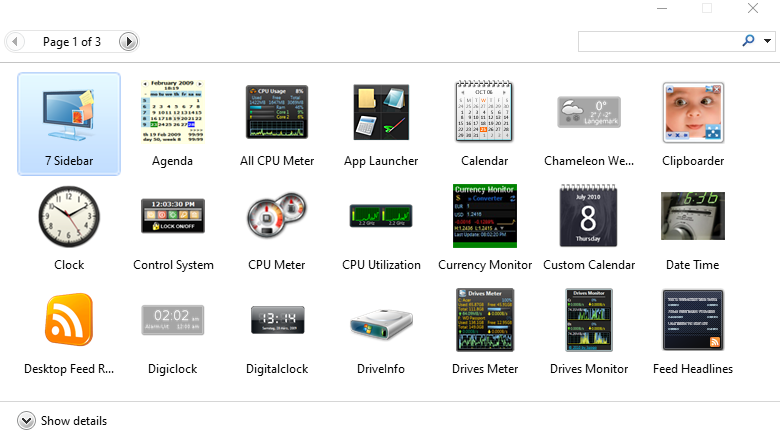
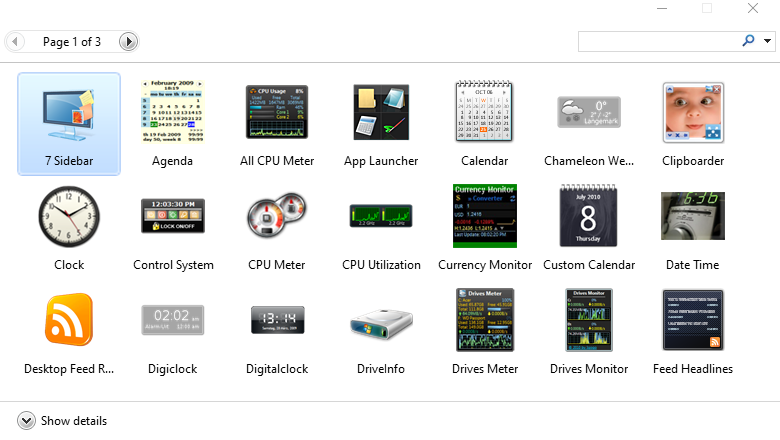
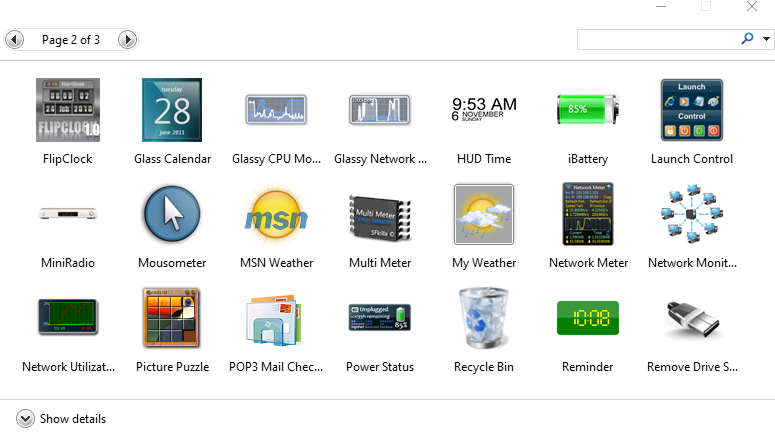
Also for my version of Windows 10 i am using these https://i.gyazo.com/a522ffe7b9f0cb59d073b8dc3e0b0aec.png
 jaunty acorn
Nope it is just windows 7 gadgets
silent shuttle
the vista sidebar is not my thing
jaunty acorn
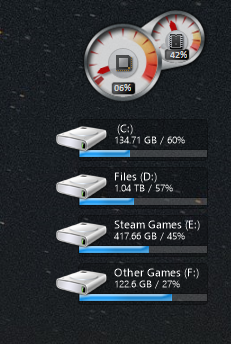
Right now i am only using these https://i.gyazo.com/825edb53e390198eafc7339b1f8df1b2.png
 jaunty acorn
Oh those i just like to monitor sometimes in case something looks off
jaunty acorn
like if my system was idle and i saw my memory spiking towards like 70% i could check
silent shuttle
i think i just am running off an HD
and that's causing slowness
i am used to SSD but my SSD died after many years of service
jaunty acorn
Go for a 240gb SSD from Team Group
Also this is page 2 for the gadgets https://i.gyazo.com/e3cda8ee73e227142175919b0ea6d33b.png
 silent shuttle
i'm getting a super cheap 2TB SSD
NVMe
it's Inland which ask two people and they'll say it's terrible or it's great
jaunty acorn
Id honestly use a 240gb 2.5" for the OS still
silent shuttle
i will take that into consideration, however it is likely I will just have the 2TB as my main drive
i could see what team group is offering at NVMe 2TB
after all i'm buying their RAM
jaunty acorn
I think they only have upto a 1tb
If i go for a M.2 i would actually buy a Sata version since NVMe i wouldn't get any real benefits
silent shuttle
not me, since the SATA drives aren't any cheaper i'm not going to purposely use one
i'm excited to get my SSD
february that and the 32GB RAM
jaunty acorn
Well could be depending on country cause there is this (which is always on sale as well) https://www.newegg.ca/team-group-ms30-512gb/p/N82E16820331232
and then this is the cheapest known brand for a NVMe https://www.newegg.ca/xpg-sx6000-pro-512gb/p/0D9-00DF-00002
jaunty acorn
Well i am talking about for me
silent shuttle
oh okay
sorry
it's hard to tell on the internet what exactly someone is getting at
jaunty acorn
i would use the Sata M.2 for my OS and the 240gb i have now i would use for other games
One thing a lot of Tech Tubers i have been watching has always said that a NVMe is only worth having if you are doing more than just gaming
things like video editing
silent shuttle
but i'm saying it's the same price, so what do i have to lose?
jaunty acorn
Well i don't know which one's you're looking at to be honest
silent shuttle
i'm looking at $215 USD for 2TB
pretty solid pricing
look at me spending $125 on a CPU and almost twice that on an SSD, you can see my priorities
and $120 on the motherboard because why not
 wheat timber
I'm getting a SSD for this laptop
2TB for $210
jaunty acorn
i slapped in a 480gb SSD in my laptop cause i only use it for 3 games and watching movies
wheat timber
I have like 90% of things into my storage (500gb)
and wanted to download some games
the heavy ones, but i cant

wheat timber
I'm always travelling
I need my switch and my laptop for gaming and video editing
this isnt that bad
dry raft
860 QVO is better for only $180
Mushkin Pilot is a pretty good NVMe for only $204
 soft fractal
I remember there being a discussion about the Windows 10 update for 1903 and 1909 could someone tell me about what's going on because I can't remember if it was a bad idea to update Windows 10 or not.
dry raft
1903 certainly still had some issues. Idk about 1909
 fleet goblet
The 860 QVO has QLC memory, that's the worst possible choice
dry raft
because memory type is the only thing that matters /s
fleet goblet
So worth to loose 50% of lifetime and almost the same in performance
 vivid temple
@fleet goblet for the normal consumer? it does not matter one bit
fleet goblet
@vivid temple The lifetime doesn't matter ?
vivid temple
the time it lasts is plenty for the normal consumer.
yes, it does not last as long as a TLC based drive.
and we can keep going on and on about it. Or we can use the drives that perform decently for a decent price.
point being: There are other things that consumers should worry about imo :)
fleet goblet
So why should a normal consumer choose a drive that is less than 5% cheaper, less reliable and less performant ?
vivid temple
because they (perhaps) value the cost higher than the other two
and it can easily be debated that the two dont matter to anyone but the people that think that benchmark scores trump everything.
fleet goblet
I'm comparing here the BX500 and the QVO, for 5$ less in 180 that's a nonsense to choose the QVO
Even without talking about the performance, the lifetime is really bigger with the BX500
dry raft
Have you considered amount of chiplets, quality of chiplets, memory controller, and so forth?
BX500 isn't better than the 860 QVO on perf
MX500 is
vivid temple
agreed (mx500)
dry raft
Don't get confused between the two
vivid temple
and again, the reliability is plenty for the normal consumer.
dry raft
Anyways, lifetime isn't a concern as it is still more than long enough for any standard consumer
vivid temple
however, if you ( @fleet goblet ) want to talk about your personal preference. Sure, we can do that. You might be a person that needs (or think) they need a TLC (or better) drive
fleet goblet
@dry raft If we're talking about pure benchmarks, even if it doesn't matter in real life, the BX500 is way better than the 869QVO
vivid temple
benchmarks does not matter to the extent you seem to think it does.
fleet goblet
@vivid temple I totally agree with you. But even if we're talking about real life, the BX500 is still faster.
But I'm just talking about reliability, again. It is a SSD, as a HDD you keep it for a long time
dry raft
Also note, BX500 has worse cache
vivid temple
the reliability is fine, again, for the normal consumer.
IF you sleep better by not buying a QLC based drive. By all means, do that.
people overestimate GREATLY how much data they actually move around
and IF you are a person that actually understand how much/little data you move around. Buy accordingly :)
smoky pagoda
👀
vivid temple
it is quite simple when it comes down to it :)
and yes sorry for the storage talk in the OS channel @smoky pagoda
smoky pagoda
oh nah it's cool llol
dry raft
@fleet goblet I don't really see the BX being better here. Esp in some workloads due to lack of DRAM cache
https://www.tomshardware.com/reviews/crucial-bx500-ssd,5377-4.html

Tom's Hardware
Crucial's BX500 is designed to bring blazing SSD throughput to your PC at a low price, but it has a few caveats.
 summer bough
I have an 860 qvo. Its not a bad drive for storage or games.
summer bough
this picture is my comparison. from left to right 1tb 860qvo vs 500gb evo vs $30 256gb gigabyte ssd
I was going to use my WD ssd, but I dont know where it is 
silent shuttle
However, we see there is a dip in write performance that spans the 128KB-512KB file sizes. This is due to the DRAM-less architecture, which causes the BX500 to “get into a condition or state where background garbage collection briefly has to take precedence over I/Os” during the test.
that's interesting
DRAMless QLC drive
 sick cobalt
840 evo vs mx500
silent shuttle
these benchmarks make you wonder if it matters what SSD you get at all
as far as SATA goes
sick cobalt
sata's basically maxed out at least in terms of transfer etc
they can always improve the access time with a new design but beyond that we need u2 to become more standard
silent shuttle
u2?
sick cobalt

U.2, formerly known as SFF-8639, is a computer interface standard for connecting SSDs to a computer. It covers the physical connector, electrical characteristics, and communication protocols. It uses up to four PCI Express lanes and two SATA lanes.
It was developed for the e...
basically the same speeds as nvme but in a 2.5" form factor
99.9% enterprise drives only however, which is why it's not really included on consumer boards most of the time
sick cobalt
it's the logical step after sata
silent shuttle
yeah and the power can come from the board because board power is enough to power 2-4 SSDs
dry raft
@silent shuttle Well it can matter. Here is a cherry picked example from the review above. 50GB of random files
It is the most drastic example and all other benchmarks werent as bad. This was the only one where the DRAMless part really kicked in
silent shuttle
BX500 and WD Blue look awful
QVO doesn't look good eithjer
only the 660p (lol) and the optane look particularly good
dry raft
Random perf tho, it's a bunch of random files
I didnt dig too deep but quote above pic
"We use the DiskBench storage benchmarking tool to test file transfer performance with our own custom 50GB block of data. Our data set includes 31,227 files of various types, like pictures, PDFs, and videos. "
silent shuttle
well isn't the random stuff 90% of what you're gonna do with an SSD?
dry raft
yeah, but I feel like the >100mb/s mark seems decently acceptable given the stuff it's doing
Tho, not like I heavily look into SSDs and their average random perf
silent shuttle
probably
but you obviously want the best performance for price
i mean the MX500 is a really good SSD if you factor in price
dry raft
but again, this was a very cherry picked example. All other results for the BX showed itself to be decent
silent shuttle
i won't buy one still, i have an aversion to DRAMless QLC SSDs
dry raft
I wouldnt buy one either cuz price is too similar to others
silent shuttle
i'm poor but i'm not too poor to pay attention, if you get my meaning
like i failed on that board recommendation, live and learn
and i almost bought an intel 660p, but live and learn
Linus did a review of that 660p
and it was basically "it's going to work great unless you fill it up and then it's going to come to a screeching halt"
dry raft
660p isnt horrible. Tho unfortunately for Intel there are brands that have a better cache setup for like $5 more or so
silent shuttle
and there are brands that don't use QLC at all
dry raft
I mean I feel like not too many people will be writing files to an already full drive
silent shuttle
for not much more
i think what was meant
is if you fill it up enough, you take up most of the SLC cache
and writing any more files will bring it to a halt
dry raft
QLC isnt as bad as what people make it out to be so long as the cache setup is good
unless you're running a datacenter or something. Then no go for QLC
silent shuttle
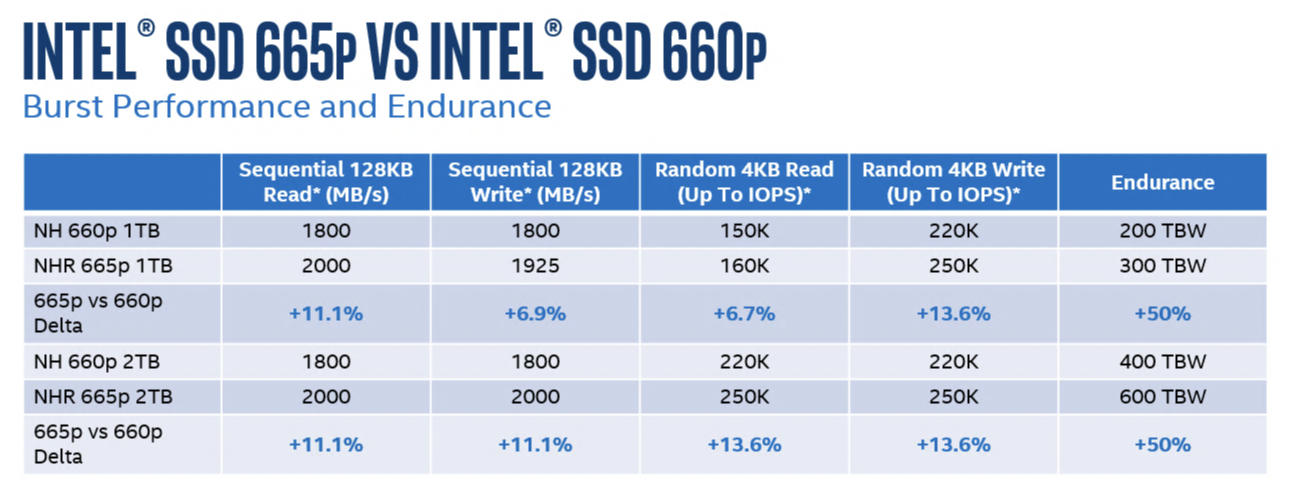
665p any better than 660p?
dry raft
I've heard about it once
sick cobalt
yes they improved it
silent shuttle
it might have fixed the cache problems
intel is a brand i would generally trust for reliability in SSDs, they practically wrote the book on them
 dry raft
Ooo. What'd they improve?
silent shuttle
it doesn't say anything about sustained performance
sick cobalt
96layer now
dry raft
So I guess good for them on that improvement
also how long are we going to #storage-devices in #windows-ios ?
summer bough
my first nvme was an instl 600p. horrible drive, but its worked out great for just OS.
jaunty acorn
instl?
jaunty acorn
Well you didn't say Intel
last gorge
on?
vivid temple
no, he means he is stuck typing on his phone .. forever!!
summer bough
FOREVER!
 tidal lintelBOT
jaunty acorn
tidal lintelBOT
jaunty acorn

Create production-grade JavaScript applications from scratch and understand how to build better web applications with up to 25 eBooks in the JavaScript Bundle.
strong surge
Time to upgrade folks!!! https://www.tomsguide.com/how-to/windows-7-end-of-life

Tom's Guide
How to move on from -- or keep living with -- Windows 7
 sudden yacht
Hey, is there a software/app that you guys trust were I could download youtube video.
vivid temple
considering that would be advocating piracy. no.
 peak notch
no, us suggesting software that COULD be promoting piracy is against discord TOS
we would be advocating piracy lol
smoky pagoda

 quaint veldt
Software isn't inherent piracy
Having said that there are a few "online"solutions.. Use responsibly
I would use those, used them for creative commentary critique before
If they have you download a thing that isn't a media file steer clear
strong surge
It's not Piracy but it is against the YouTube TOS. Hence, we will not discuss nor provide information on software to do so. "“You shall not download any content unless you see a ‘download’ or similar link displayed by YouTube on the Service for that content. You shall not copy, reproduce, distribute, transmit, broadcast, display, sell, license, or otherwise exploit any content for any other purposes without the prior written consent of YouTube or the respective licensors of the content.”
 ripe quest
jaunty acorn
ripe quest
jaunty acorn
Here you go @delicate plaza https://www.newegg.com/microsoft-windows-10-home-64-bit/p/N82E16832416892
 delicate plaza
ah
delicate plaza
mm yes ty my gamer
 gaunt bramble
for mic properties, my enhancements tab is gone. ive searched online and all they say is to install realtek drivers which ive done but it's still not there. any clues on how to get back my enhancement tab to show up?
dry raft
Uninstall audio drivers then install. Don't just install overtop @gaunt bramble
 cinder mauve
@last marsh here
 last marsh
ok
cinder mauve
What's the problem with the windows install?
cinder mauve
What are you trying to do? Wipe the drive and clean install? Upgrade? etc
last marsh
look at the bottom
this is a new drive
i installed windows 3 times before this
on 4
i want to make a new partition
cinder mauve
When you boot from your windows installer usb - do you select the UEFI option? And do you ensure csm mode is disabled?
last marsh
I did select the UEFI option
cinder mauve
If both yes - then do you want to wipe the drive clean for a new install? -if so, delete all 4 volumes there and click next
last marsh
I'm not sure what CSM is
Ik it has to do with BIOS
ohh
compatibility support module
pretty sure it isn't enabled
so i delete all of the partitions?
@cinder mauve
if im not sure about csm
cinder mauve
If you're positive you want to wipe the drive of data and install fresh, yes.
What mobo?
last marsh
ill check
cinder mauve
Probably not an issue, I wouldn't worry.
cinder mauve
If you can see the UEFI boot option, you're probably fine - and the fact it won't let you install without wiping the previous EFI partitions, also sounds like you're booting in EFI mode - all is good.
So to clarify, delete all, then simply click next.
last marsh
aight im deleting
theres drive 0 - unallocated space rn
and i clicked next
it might take a few minutes
cinder mauve
Btw - I always recommend having a spare ~8GB-32GB usb with HiRens PE or similar installed on it for any kind of troubleshooting/rescue/diagnostic use if needed.
last marsh
more than half way done for partitioning i think
the first stage
getting files ready
i have a 32gb drive
cinder mauve
I'm sure you're fine from here, I can't imagine much would go wrong.
last marsh
i always manage to mess something up
i should be fine
the same thing happened at the guy's house that i bought it from
i got a different hard drive
the hell
it just restarted and did this
@cinder mauve
install now again?
thats what its showing
nvm
wait
back here again
cinder mauve
Wait, what'd you do afte the top screenshot?
cinder mauve
Windows didn't install fine after that? The 2nd screenshot looks like you've installed in legacy/bios/MBR mode
last marsh
then it said it needs to restart
and i was back to the setup
i selected windows 10 pro because i have a let for it
key
I'll try installing again maybe?
idk what could be causing this
 fossil swift
Does anyone know about FreeDOS in Rufus?
last marsh
@cinder mauve what now?
cinder mauve
Just to make sure I'm not missing something, do you have a link to a pcpp or other full hardware list?
last marsh
Uh
cinder mauve
Also, did you use the media creation tool to prepare the windows installer usb?
last marsh
I can just give you the specs
cinder mauve
pcparticker
last marsh
yes
cinder mauve
That works too. Whatever is easiesst
last marsh
i5 4690k water cooled
Windforce R9 380x
G.skill sniper 2x4 (8gb) 1600mhz
caviar blue wd hdd 1tb 7200rpm (i think)
do you need any more?
the psu
uh
its an antec green 650w 80+ bronze
mobo
is gigabyte h81m-h
anything else?
idk about the case
is that all you need?
cinder mauve
So is the caviar blue hdd the target install disk?
cinder mauve
Gotcha. My guess is something weird going on with the mobo's default boot/csm/legacy options. I'll check
cinder mauve
How did you create the windows installer usb again?
last marsh
i plugged it into my laptop and made a creation media drive thing
it worked
im installing it on another drive too if it doesnt work
this is getting frustrating
im on finishing up now
ffs
im back at this part
cinder mauve
Ok, so when that happens, do you just let the pc boot? Don't interrupt it with del/f2 etc, right?
Is it connected to the internet/
cinder mauve
Ya, that's the normal windows install screen
last marsh
i didnt interrupt it
its back there no
w
its an instant loop
whats causing thsi?
cinder mauve
Post a screenshot of the "boot" or hdd/ssd etc menu(s) from bios
last marsh
okay
 storm ocean
Anyone know where you can get some cheap win10 keys
last marsh
look literally anywhere on ebay
with sellers that have over 150 positive feedback
and 85%+
storm ocean
Aight thx
cinder mauve
I'd say >98% feedback, better yet - 99.5 ish and 1k+ sales in the last few months to feel confident over key legitimacy
cinder mauve
Disable fast boot, and yes, make boot optoin 1 uefi sandisk, assuming you're about to install clean
last marsh
okay
 rare rune
^I wouldnt promote grey market keys. Just because they haven't been caught yet doesn't mean they are necessarily legitimate. And most keys are knocked off the block well after ebay feedback times expire. Most are for sure bought in enterprise bulk or stolen credit cards.
last marsh
am i ready to try it again?
rare rune
And even keys recovered from scrapped machines, the original owner could still have the key.
cinder mauve
All very true - it's certainly a grey area because it's so hard to differentiate legitimate OEM keys re-sold legally vs the run-of-the-mill ebay exit scam etc.
last marsh
what if i save a few bucks by trying a base64-style counting system
where i sit at my pc all day
and guess codes starting from 0000000000001
worth it
cinder mauve
K73H9-NGFBT-8J77C-2DMG2-XTQ8P
last marsh
.
rare rune
I'm not saying you shouldn't buy grey market keys, you'd need 20 to be disabled to lose money over buying a real one and you're unlikely to even have one deactivated. Just saying, Newegg is a legitimate business that sells legitimate copies, I wouldn't be promoting buying one here. Just winking.
cinder mauve
Agree, and hey - if you buy a system builder's key/license, it can cover multiple installs, machines, often far less headache than dealing with sketch 1 time use recovered MAK keys etc.
last marsh
REEEEEE
BSOD again
holy
this happened at the person's house that i bought it from @cinder mauve
should i try a different windows media ceeationgnfnd
sandisk
i have 2
i jusg instadfildicdd
i snfallled if
i judt indtalled
it
i might just take it to geeksquad or something
this is past my knowledge
ok nvm that takes weeks
cinder mauve
Ya, re-building the installer usb via media creation tool could help.
wary furnace
Does anyone know somewhere I could a get a Windows 10 64-bit key from that's cheaper than $100?
wary furnace
Never heard of it
cinder mauve
You can add a protection bonus for 5 dollars that makes it so they gaurentee you get windows
It’s like 30 dollars
@wary furnace
rare rune
We had this discussion. Its fine to buy grey market but I really wouldn't suggest promoting any site specifically selling it in a discord for a legitimate company selling official copies of Windows.
You can trust most of them to work, you should have no faith that the keys are legitimate though, and expect them to be deactivated at some point in their life.
If you wan't to suggest one then just PM the person.
 royal hatch
What am I doing wrong every application I try to open and change something it says access denied. this happens for everything administrator related for example powershell would give it administrator but I run it but I still get access to denied.mm
And I run everything with administrator to ugh...
wary furnace
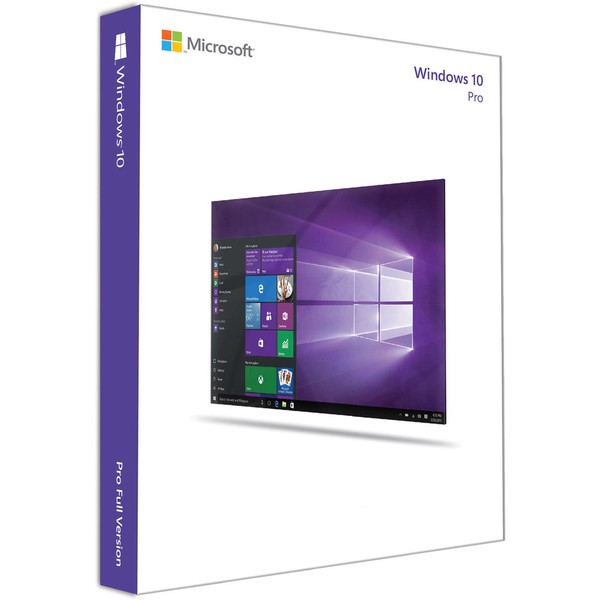
Would this W10 Pro be okay? I was talking to someone and they said if it has 500+ reviews then it's probably real
eBay
Find many great new & used options and get the best deals for Microsoft Windows 10 Pro 64-bit - Single License (DVD) (FQC-08930) at the best online prices at eBay! Free shipping for many products!
wary furnace
Huh it says See all 963 reviews for me
rare rune
^ don't post that stuff in this discord. Keep all links to established legitimate sites/products if you will.
storm ocean
silent shuttle
it might or might not be piracy so you can't just post stuff here
 shell heron
Anyone know anything about Vegas 17? Having some issues with my nephews laptop. Keep getting a run time error on the startup/splash screen the 2nd time I try to open it. Always works the 1st time after installation/reinstallation.
 analog zephyr
What’s the error
rare rune
TIL Magix bought vegas from Sony
And to be fair looks like they made it more affordable
analog zephyr

In this video I show you how to fix Sony Vegas : An error occurred during the current operation. The Microsoft .NET runtime could not be initialized. An error occured starting Vegas Pro. Error 0x80131700 (message missing) Windows 8 and 10
If this helped please subscribe!
Just a guess since it’s requirement is . Net 4.0
Oh back when Sony vaio meant your computer was bogged down with junk, day one.
last gorge
Can you update a prebuilt from windows 7 to 10 without a product key?
 devout delta
You’ll need a product key for it to be a registered legal copy
you can update without one but It’ll just be a trial and will eventually want a product key
last gorge
Darn it
 molten belfry
Windows 10 runs without a product key
Also, you can do a reimage using Windows 10 (full install wiping out the old data, so you need to back up all your files) and use the Windows 7 product key to get a fully activated Windows 10
shell heron
not that 7 key it will be oem
can still do it but you will have to call and complain to the microsoft support team in India first
molten belfry
It should work. I use them all the time, I just did 3 Dell OEM Windows 7 keys with fresh Windows 10 installs about 2 weeks ago
 rugged fjord
shell heron
rugged fjord
shell heron
hardware raid?
 worthy condor
So, I’ve been out of the PC gaming world for about 10 years. Diving deep with a brand new build... considering how out of the loop I am... what’s the best anti-virus people are using these days?
vivid temple
@worthy condor (that is a topic that is close to religion for tech people :P ) best or acceptable ?
worthy condor
@vivid temple acceptable 😜 I used to use AVG. not sure if that’s the go to anymore?
rare rune
AVG free is more than fine.
cinder mauve
Windows defender and the chrome/firefox extensions ublock origin, https everywhere, privacy badger help lots.
strong surge
Provided you aren't into questionable sites, I haven't installed a third party AV in multiple years now. Windows Defender works fine
cinder mauve
^^ I knew you were techie material 🙂
smoky pagoda
I always liked Avast.
strong surge
I used Avast or BitDefender Free in the past
smoky pagoda
they even have their own webbrowser
but yeeah if you don't go into the naughty areas of the web, you really don't need a thirdparty av.
strong surge
I seem to remember Avast not being very configurable though. Flagged some downloads as as virus even though they weren't and it was a PITA to get around it.
cinder mauve
Not a bad way to spend $43 https://www.newegg.com/intel-e1g44htblk/p/N82E16833106050
strong surge
SOmeday I'll have a house that's fully wired for LAN
devout delta
Goals ^
rare rune
I considered a pi-hole for adverts. Until I realised ads for most things change domain very often.
summer bough
unless you are paying for AV most of them are pretty pathetic. AVG and AVAST will annoy you with popups and ads. Bitdefender free will automatically delete anything it thinks could be a virus and has no way to configure it and no support. It wiped several gigabytes of family pics from my computer a few years ago. Once they are gone, they are gone. it doesn't even quarantine it just deletes.
luckily I had them on external backups but still annoying and I don't trust their software after that.
rare rune
I find avast annoying, AVG free is only annoying til you discover you can disable popups hidden quite far in the settings
devout delta
For Paid antivirus I use ESET. Not super expensive and gives me a little extra peace of mind
 remote dew
Well lucky me i have McAfee To keep me safe
 upbeat dawn
Windows won’t go onto my new ssd ;-;-;
rocky cedar
Whats da problem
upbeat dawn
It says because it’s gpt or something like that so I made it mbr and now it says it can’t install it
All i want is faster windows startup and it’s been 2 hours ;-;-(
strong surge
Are you formatting it and allocating space as part of the Windows boot process?
One issue I had was a setting in the BIOS for legacy OS. Might want to check that and see if it's on or off. Whichever it is, switch it.
upbeat dawn
I tried that but I can’t find that option in my bios at all
strong surge
Mothebroard?
upbeat dawn
It’s enabled
strong surge
Disable it then and try again?
upbeat dawn
It always was
strong surge
Does the SSD show in BIOS as UEFI?
strong surge
Is it a Sandisk though?
upbeat dawn
It’s a Hyundai ssd
vivid temple
a suggestion: unplug the drives you dont need. then try again.
upbeat dawn
Ok
vivid temple
(sorry for jumping in with a random suggestion @strong surge )
strong surge
Nah, you're good
I thought of that but it's like the BIOS has locked the drive
I ran into this once before and fixed it but don't remember how
BUt yeah, I'd do what Naed says
upbeat dawn
Ok now it’s just my ssd and win 10 flash
I unplugged my external and internal hdd
Now all I have is my ssd no flash
vivid temple
try the install again, however. in the install process, remove all partitions (that might be on the drive) and just tell it to use the unallocated space as the destination.
upbeat dawn
How? I can’t boot to my flash so I can’t boot to the windows install
vivid temple
hm, you mentioned "Ok now it’s just my ssd and win 10 flash"
strong surge
Plugged in.....
upbeat dawn
I meant as in that’s all I have plugged in but it’s not showing up
vivid temple
that sounds wonky as all
strong surge
What is Storage Boot Option control set to>?
upbeat dawn
What
strong surge
Storage Boot Option Control
upbeat dawn
Legacy
strong surge
Try UEFI
strong surge
ye
vivid temple
let me understand you right: When you had your external and internal drives enabled earlier. You could see the usb stick you are installing windows from right?
upbeat dawn
Yes but now I can’t
cinder mauve
Is the target install drive the only hdd/ssd connected?
strong surge
It is
upbeat dawn
Yes
vivid temple
(now, it is)
strong surge
But now the USB Windows 10 media isn't showing
vivid temple
which does not make any sense.
unless the install that was running earlier was NOT from the usb stick but from a drive
cinder mauve
Is it sata or nvme? Does it have a legacy/uefi oprom?
vivid temple
clarify for us what drives are empty and what drives has the windows installation files (for setting up the new OS) on it
upbeat dawn
Ok so I have an empty Hyundai ssd and a Sandisk flash has my install
Oh now it’s showing up
It is
vivid temple
the latest problem was the install media not showing :)
cinder mauve
Ah. Sounds like maybe there's still an EFI sector on the usb?
vivid temple
could be. but for now. Björn try the install of windows again. Remember what i said about removing partitions during the install
 cinder mauve
You'd have to delete the EFI and msr/whatever carries the bcd to install -
Or just wip them all , then click next
upbeat dawn
I DID IT
cinder mauve
Also - ya, no idea how csm turned itself back on for that boot , and/or it ignored the uefi installer boot optino lol
upbeat dawn
I converted it back to gpt then did some hacker magic and recreated the partition now I’m installing windows
I’m a cool kid
vivid temple
as long as it works.
upbeat dawn
I’ll check back in if it decides to die half way through.
 past musk
I mean
vivid temple
the simpler solution for fixing this is booting with something that can just wipe the drive completely
upbeat dawn
But until than I’m gonna watch Linus roast intel
past musk
AMD > Intel
vivid temple
not for this chat lads :)
past musk
AMD drivers i was saying about
Yes definitely AMD drivers are sure better than intel drivers
cinder mauve
XTU is in a tailspin rn haha
upbeat dawn
What’s xtu?
cinder mauve
Like ryzen master for intel
upbeat dawn
Oh yeah
cinder mauve
anyone familyer with obs studio?
cinder mauve
Aaaaaand still crash
strong surge
installed synapse and uninstalled?
cinder mauve
Yep
strong surge
Restarted?
cinder mauve
My PC?
strong surge
Ya
cinder mauve
Still crash
strong surge
Check for these files
C:\Windows\System32\RzChromaSDK64.dll
C:\Windows\SysWOW64\RzChromaSDK.dll
C:\Windows\SysWOW64\RzAPIChromaSDK.dll
What was your exact error message also?
strong surge
Starts and stops
tidal lintelBOT
 Blade23445#9760 has been warned
Reason: Bad word usage
cinder mauve
The razer chroma thing worked XD
strong surge
Nice
cinder mauve
I don't get it but hey XD
strong surge
it hooks into the game for some kind of display overlay
and Overwatch pitches a fit
cinder mauve
Ah makes sense. Maybe warframe does also
strong surge
I'll bet it does
cinder mauve


 strong surge
that's in hidden devices?
shell heron
special
cinder mauve
This was on a sandisk 2.5" ssd that went from a dell optiplex GPU miner > dual hex core opteron > 2500k homework pc > x570 master/3700x >9900k z390 dark > supermicro H8QGi+-F quad socket 64 core
 sharp holly
anyone know of a program that lets you launch a bunch of other programs and organize your desktop (like powertoys)? So, if I wanted a video editing setup, I would be able to use this program to launch davinci resolve, file explorer, audacity and chrome and place them where I'd like them on my desktop?
rare rune
I just made a batch file to do something similar not all that long ago
sharp holly
well the batch file tells me it can't find my applications
rare rune
Swear at it until it works, as it will work if done right.
sharp holly
hmmmm, what if I want steam to launch a game (not just run the exe)
and is there a way to bypass the administrator prompts (give the batch file administrator privileges)?
 jade ledge
https://www.amazon.com/dp/B07CJVLL1K?ref=ppx_pop_mob_ap_share This is t working with windows 10. Any ideas? Can’t get drivers for it to work...
sharp holly
well, I won't judge your purchase since you've already purchased it, but are you sure you can find proper drivers for the card?
It would appear as driver for win 10 do not exist, but that's just a quick google search
And as far as I know, audio interfaces (internal/external) are not plug and play
jade ledge
@sharp holly what would you recommend for a sound card for 5.1 with the same type of connection as the prior card for windows 10?
sharp holly
Well, I wouldnt recommend a soundcard at all but...
Depends on what you want to do
Amp+dac are for audiophile headphones
Audio interface are for recording setups (I have mine powering my headphones because it has nice adjustment knobs)
Audio mixer if you want to set up a home theatre with surround sound
That being said, these options aren't cheap, and if you don't know what your looking for, a complete pain to find the perfect solution, so you should tell me what you expect out of your audio setup, and how much you want to spend
 fossil nimbus
also not going to judge but amd hd audio that is on thier graphics cards is better than that sound card
also why the heck does that pc have no graphics card
it has intel hd graphics lmao
 floral ruin
Hey so is there any way to fix a black screen no boot issue?
Thankfully it's not for me but a friend of mines PC is messing up somewhere. Guessing win 10 is broke or something
cinder mauve
Well hardware issues are resolved I think. Now it's just in a continual loop of this XD
 halcyon lichen
anyone know how to fix
strong surge
What are you trying to install?
 fleet basalt
Congrats
fleet basalt
Specs?
strong surge
SO that's from the WIndows 10 installation media on a fresh install?
halcyon lichen
Yes
halcyon lichen
fresh
strong surge
Ok, my thoughts on this
Try a different USB port
maybe USB 2 instead of USB 3
If that doesn't work, try a different USB drive, that one may be corrupted
Worst case scenario is faulty RAM but we can test that later
halcyon lichen
i get the same message
strong surge
On a USB 2 port?
halcyon lichen
yes
strong surge
use a different USB drive and create the install media again
 peak moss
if i attempt to make a partition from the bootable drive, will that mess stuff up? for example i have a 500 gb ssd that i want to split into 2 250 gb partitions
strong surge
If that's the boot drive yes, I wouldn't touch that one
peak moss
darn alright
strong surge
I mean, that's not to say you can't but I'm not the one to ask about that
From what I know it's not recommended
 hushed cradle
I think it's doable
As long as the software is smart enough
Which it should be these days
It'll just partition empty space
If the entire drive is full and u want to partition, that's a little bit too hopeful :p
vivid temple
@hushed cradle it is doable, just not recommended. Macrium reflect is probably the simplest for you to use for it.
@peak moss the above bit was for you :)
upbeat dawn
Does anyone know how on windows to choose which GPU is used by a game?
I have an rx 580 and a gtx 1050 (for nvenc) and my game keeps using my gtx 1050
smoky pagoda
would imagine it'd be in the Nvidia Control Panel settings somewhere
is the monitor plugged into the 580?
smoky pagoda
why can't you use control panel?
upbeat dawn
I don’t have a display plugged into my 1050
upbeat dawn
In every game i play except windows store games I don’t have problems, every game uses my rx 580 and OBS uses my gtx 1050
upbeat dawn
I figured it out, I just have to disable the 1050 in device manager, launch forza, enable the 1050 and it all works out 😋
vivid temple
that sounds like a fault of the game instead of a fault of the OS @upbeat dawn
fleet basalt
Besides my OS, what should i install on my boot drive?
strong surge
A game or two for quick access if it's an SSD
fleet basalt
What about drivers and stuff?
strong surge
Well, those get installed to the OS so....ya
vivid temple
personal preference is to only keep stuff on the OS drive that i dont mind losing
cinder mauve
So anyone ever dealt with windows telling you that it can’t retrieve info about the disks before?
rare rune
Format it if its new.
cinder mauve
They have been formatted, it’s either saying that or it’s saying I’m missing a media driver
It won’t let me even get to that point right now
To format them again
smoky pagoda
what are you using to format them
cinder mauve
What is the diffrence between computer science and software engineering
Because programming is writing code
So if I wanted to pursue a career which is basically coding what should I go for
devout delta
Comp sci usually focuses on the software side (i.e. programming) where Comp engineering will have some software and some hardware (i.e. analog & digital circuits)
sharp holly
Isn't computer science the theory behind how computers work? (Logic and circuits)
Software engineers are in high demand rn
But iirc, companies aren't as interested in how fancy your degree is, but what you have in your portfolio (side projects, your own website, some database program you made, etc)
silent shuttle
i made a database program in GW-BASIC on an old DOS machine in childhood - I wasn't familiar with databases and how they worked, but i just accidentally made it
cinder mauve
Anyone know how to fix
hoary nacelle
looks like you gotta reset the CMOS
 late rose
does anyone know if the cyberpower mouse that comes with the pc have a software?
to customize the mouse and such
rare rune
With what PC?
 empty zenith
why don't i have a bootup screen?
 hard wedge
could be a couple reasons. 1 your pc cant/wont post. 2 your gpu isnt working properly wether it isnt seated in the slot all the way, pcie power isnt connected or its dead. 3... last but not least... you forgot to plug it into the wall lol
peak moss
We need much more info to troubleshoot that. Is your pc turning on or no? Is it showing the bios splash screen? Is the pc fresh build or was it working before? What is in it? What did you change? Etc etc
 sudden dirge
Can someone help me with MSIs retarded mystic light/dragon center? I cant get my fans and pc case to sync colors with the mobo rgb, but I can sync the fans and mobo rgb effects but not the case.
sudden dirge
@silent shuttle Are you able to help possibly?
silent shuttle
I don't know anything about RGB stuff, unfortunately
i've never been able to play with anything like that
@sudden dirge
sudden dirge
@silent shuttle No worries. You would think instead of the proprietary junk software they use they'd create something more consumer friendly.
silent shuttle
certainly
but who knows
it's nice to sync if you have RGB, then you can sync some 00ntz 00ntz club music to it
rocky cedar
Well the thing is, some RGB hardware likes to use their own rgb software, and reject MSI RGB software
 warm osprey
Anyone here familiar with Azure pipelines? Specifically looking at CD with a private GitHub repository.
strong surge
Yes, windows 10 media creation tool. Download it and install it to a USB. Free installation media from MS
cinder mauve
what version do you use
strong surge
Well, the media creation tool downloads the latest version for you
Or you mean 64 or 32 bit?
cinder mauve
what windows build are you on
im on 1909
when a new build comes out i always do a fresh install
thats why i create disc
strong surge
- It's the latest build............
cinder mauve
i know
i was on 1903 and when i found out 1909 came out i did a fresh install of 1909
 tepid silo
Plenty of web utilities or software tools out there to just download the ISO of coice , legally, from microsoft. Easy to verify the MD5 hash.
This is one way to save some time, especially with a package manager. https://www.tenforums.com/tutorials/96683-create-media-automated-unattended-install-windows-10-a.html

How to create install media for completely automated unattended install of Windows 10
I use this method /Azure active directory + KMS https://www.tenforums.com/tutorials/129521-microsoft-deployment-toolkit-easy-fast-windows-deployment.html

How to use MDT to deploy Windows 10
cinder mauve
does the media creation tool let you install a fresh windows
when it burns to a flash drive
rare rune
Yes. Thats the point of it
Microsoft give it to you specifically to make installing windows very easy.
Just download the creation tool, run it, itll turn a USB stick into an installer, then boot onto that usb stick on the desired PC
 tall lichen
so i just recently built this new pc and everything works great EXCEPT it can't wake up from sleep mode
windows 10 pro
trying to wake it from sleep just causes it to reboot most of the time
anyone know what's causing the issue?
tepid silo
Could be a bios setting related to suspend/.sleep ppower states, I would also disable fast startup in windows.
TBH - it's often most convenient and rarely costly at all to just run a machine 24/7
Could always pull ethernet or shutdown for security piece of mind ofc.
 vast haven
Hey y'all, I tried to dl a newer version of my realtek audio driver, but when I used the wizard to help me uninstall my current version, it put me in a loop where it keeps "uninstalling" the current version and rebooting only to do the same thing. Now im not getting sound whatsoever and don't know how to restore my old version. Any help would be greatly appeciated!
sharp holly
The wizard doesn't allow you to just install directly/update the existing driver?
vast haven
apparently not, it uninstalled my previous version, rebooted, and puts me back at "uninstalling"
im trying to figure out how to recover my old version rn
summer bough
I have something that will fix it, but it could break windows if something goes wrong
that will fix your audio issues
after its doen and reboots dont touch your system for about 10 minutes after reboot while it finishes
 opal kernel
so is there anyone i can ask for help when it comes to video scheduler internal error BSOD
my pc was fine untill i upgraded from intel to ryzen
peak moss
did you do a fresh instal
opal kernel
by fresh install you mean???
from scratch or you talkin about drivers
heres a better question
peak moss
from scratch
opal kernel
is it possible for intel software to interfere with ryzen
and no its not from scratch
it was a pre existing build
peak moss
basically when you get a new mobo or cpu or in this case, both, you're supposed to reinstall windows. when you switch from intel to amd, from what i understand doubly so. i went from amd to amd and was able to get around it but with going from intel to amd you should probably just reinstall windows. also make sure theres no pending bios updates on your build
if you want to try to avoid fresh install, update your bios which should replace your drivers, but im not 100% that will work.
opal kernel
i have done that and all bios updates are to the latest versions
peak moss
then you probably need a fresh install
opal kernel
of windows
peak moss
yes
opal kernel
i have tried
peak moss
you have already done that?
peak moss
what gpu are you using
opal kernel
want to know my entire spec list to make it easier
peak moss
yeh
opal kernel
k gimme a min
current spec's
GPU: RTX 2060 super OC from MSI
CPU: Ryzen 7 2700
Motherboard: B450M PRO-M2
RAM: 16GB DDR4 2400MHz
HDD: 2x 2TB
SSD: Kingston 240GB
PSU: Corsair 450W 80+ Bronze
damn why did i torture myself there
i could have just snipped speccy >,<
oh well
peak moss
uh gimme a second
strong surge
Uh
opal kernel
should also mention that when launching games 1 of 3 things happen
1: game launches in a black screen audio and controls still audible and interactable
2: the game straight up crashes whilst the gpu is throttled instantly to 100% disconnecting it (from what event viewer tells me anyway)
3: BSOD
strong surge
450 watt Psu too smsll
peak moss
yeah thats what i was looking up right now
strong surge
Need 550w minimim
peak moss
that psu seems way to msall lol
opal kernel
i used a system calculator for the psu, and it stated recommended minimum is 450W
then again
peak moss
the error code reads as a problem with your gpu but its more likely your psu
strong surge
Yeah.....don't trust those lol
peak moss
also you're supposed to draw no more than like 80% of your psu right bekora?
strong surge
Best practice 90%
opal kernel
on the off hand i do go to the shadow realm of BSOD i will post what the gpu does
strong surge
Yes
opal kernel
all the critical errors on event viewer are from error 41 kurnal power
strong surge
Whole Pau shutting off then
opal kernel
at first i thought my gpu was dying so i went and bought a 2060 >,<
peak moss
what did you have before
peak moss
i mean the 2060
peak moss
but thats also proving the issue isnt the gpu and that psu is extremely small for your system