#storage-devices
1 messages · Page 67 of 1
 quiet gust
 pallid orchid
non volatile just means it doesnt get erased after power off
nothing else
all ssds use non volatile nand flash
sata and nvme
quiet gust
Wait, I'll explain you something in a few minutes
pallid orchid
ram is volatile mem
quiet gust
Yeah, that's the point,
NVMe are called like this (non voltaile memory express) because of its speeds (that can be similar to ram ones (in my opinion the speed is very different)) but SATA m.2 "should" not be called non-volatile because they're slow
Maybe they call SATA non-volatile because they came after the m.2 NVMe that were very fast
Idk
 minor sun
quiet gust
Maybe they call SATA non-volatile because they came after the m.2 NVMe that were...
minor sun
quiet gust
Maybe they call SATA non-volatile because they came after the m.2 NVMe that were...
Sata is literally non volatile, when you turn off your computer, sata drives don't just wipe themselves
Ram, which is volatile, does.
Volatility doesn't have anything to do with sleep
pallid orchid
quiet gust
Yeah, that's the point,
NVMe are called like this (non voltaile memory express) ...
ok but nvme is the name of a transfer protocol
thats why non volatile memory EXPRESS
also volatility has nothing to do with speed
it literally just tells you if the drive keeps data after it stops being powered
so all ssds are non volatile
sata and nvme
both those are just protocols
nothing more
one is faster, the other is slower
doesnt mean one drive is volatile and the other isnt
a volatile ssd would be worthless for most consumers
 blazing musk
The first generation of SSDs were volatile. Basically just DRAM with a battery for when it shuts off.
pallid orchid
blazing musk
The first generation of SSDs were volatile. Basically just DRAM with a battery f...
i mean they werent really ssds tho in the strict sense
imo
 red jay
does anyone know if the 970 evo plus is the best ssd on the market or if there is a better one?
 dense merlin
red jay
does anyone know if the 970 evo plus is the best ssd on the market or if there i...
dense merlin
red jay
does anyone know if the 970 evo plus is the best ssd on the market or if there i...
if you want the best ssd on the market, youll be spending thousands
theres best and then theres good enough for your use case
p31 is a good option for gen 3
red jay
ok thanks
dense merlin
sn 850, p31, 970 evo
tho i think i saw smthn about the controller in the 970 evo being changed
so it might not be as good now, im not sure
dense merlin
red jay
ok thanks
https://pcpartpicker.com/product/xNCFf7/sk-hynix-gold-p31-1-tb-m2-2280-nvme-solid-state-drive-shgp31-1000gm-2 p31 is actually on sale rn

SK hynix Gold P31 1 TB M.2-2280 NVME Solid State Drive (SHGP31-1000GM-2)
 sour wadi
red jay
does anyone know if the 970 evo plus is the best ssd on the market or if there i...
sour wadi
red jay
does anyone know if the 970 evo plus is the best ssd on the market or if there i...
Not even close
It's good, not as good after they made a component change afaik :(
Although you won't see the difference in gaming applications etc
 kind sierra
dense merlin
tho i think i saw smthn about the controller in the 970 evo being changed
kind sierra
dense merlin
tho i think i saw smthn about the controller in the 970 evo being changed
They moved it to use the same controller as on the 980 pro
sour wadi
kind sierra
They moved it to use the same controller as on the 980 pro
980 non pro? Surely that would have made it better? I thought it was a downgrade?
kind sierra
Nope, 980 pro. It's a gen 4 controller but a very old gen 4 controller
Some loads are better, some are worse. Unfortunately it's usually real world loads that take the slight hit
 rocky epoch
kind sierra
Nope, 980 pro. It's a gen 4 controller but a very old gen 4 controller
rocky epoch
kind sierra
Nope, 980 pro. It's a gen 4 controller but a very old gen 4 controller
And a pricey one
kind sierra
Ended up being cheaper for them than the phoenix
sour wadi
kind sierra
Some loads are better, some are worse. Unfortunately it's usually real world loa...
Makes sense also means it will be sad on pcie 3 :/
quiet gust
👀 time to mod the HP thin client
 sour wadi
Fun how'd you get a thin client?
quiet gust
Stole it
My dad brought it from work, they're replacing them... So he took one (or two)
(Maybe he took five of them)
sour wadi
Makes sense they usually only sell them commercially
 wispy jungle
dense merlin
tho i think i saw smthn about the controller in the 970 evo being changed
wispy jungle
dense merlin
tho i think i saw smthn about the controller in the 970 evo being changed
only on evo plus
went from Phoenix to Elpis for a bit, but already went back to Phoenix
all due to a shortage probably, but it was technically an upgrade
 small carbon
Yea it was just sort of a side grade, and indeed about supply on the controller afaik.
sour wadi
wispy jungle
all due to a shortage probably, but it was technically an upgrade
Oh it's back to normal now? And i mean it was and wasn't, means that it would have done worse in gen 3 systems right?
wispy jungle
sour wadi
Oh it's back to normal now? And i mean it was and wasn't, means that it would ha...
I don't see why it would perform worse
especially compared to launch evo plus, as they even upgraded NAND at the time
sour wadi
Ah fair enough
wispy jungle
in either config it's one of the best PCIe 3 SSDs out there
but P31 is mainly more efficient
sour wadi
Gotcha, my ssd knowledge of how it works is more on the basic side
wispy jungle
mine isn't Newmaxx levels either, but I can understand a decent part of it
 proper epoch
Is there very much variation in quality of generic NVMe SSDs?
sour wadi
Yes?
minor sun
as usual, depends
proper epoch
Which are the best brands because I’m really inexperienced when it comes to buying them
Just like a 1TB SSD
minor sun
Don't go by brand, just go by model
proper epoch
Sorry if I can’t be very specific
minor sun
mp33 is cheap and efficient
proper epoch
Alright
Alright cool I’m not trying to transfer tons of files just run games as well as possible
blazing musk
MP33 is perfect for that. Even the top drives only load games a few seconds faster than it.
 hallow owl
anybody know how to speed up a m.2 gen 4 nvme
mine says its max speed is 3600mbps
but its running around 1500
and i have it connected to a gen 4 pcie slot
its a wd black sn750
are their better nvme drives?
 snow anchor
hallow owl
its a wd black sn750
snow anchor
hallow owl
its a wd black sn750
you sure it's an sn750? not an sn850?
hallow owl
yep
minor sun
hallow owl
anybody know how to speed up a m.2 gen 4 nvme
How full is it, typically slower as it fills up
snow anchor
minor sun
Prob sn750 SE
good call. forgot they have that thing
hallow owl
minor sun
How full is it, typically slower as it fills up
i think i have only used up 60 gb
hallow owl
snow anchor
https://www.westerndigital.com/products/internal-drives/wd-black-sn750-nvme-ssd#...
yeah except mine is the se version which has faster read and write i think
what one has the fastest proven speeds
ima need lots of speed
wispy jungle
proper epoch
Is there very much variation in quality of generic NVMe SSDs?
Depends on what you call generic. There's less known companies to consumers like SK Hynix, PNY and Liteon which can have solid stuff, but there's also the literal garbage collection SSDs on AliExpress and alike
Because in those garbage collection SSDs you get constant variation
But even in mainstream SSDs it's not uncommon to have multiple hardware changes over the lifespan, especially right now as there's a global IC shortage
It's better than it was a while back, but still
wispy jungle
hallow owl
ima need lots of speed
If you actually utilized the SSD, you'd probably also have a budget higher than looking at an sn750 se 😄
99.99% here won't benefit from anything above a nice pcie 3 drive
minor sun
Hey s70 blade had good prices nowadays
small carbon
Yea $200 exactly for the 2TB is darn good, actually $190 after the 5% back if applicable
blazing musk
The vast majority of people don't need more than a MP33, maybe P31 Gold
The only reason to need more sequential speed is doing workstation tasks like 8k video editing or creating a massive open world in Unreal Engine
small carbon
Yea a bunch of the 2TB gen 3 prices just arebt crazy good. I suppose for $90ish budget people arent looking at 2tb lol
 open gazelle
Or 2 billion years from now, when the first direct storage game comes out
pallid orchid
open gazelle
Or 2 billion years from now, when the first direct storage game comes out
many months ago afaik
blazing musk
pallid orchid
many months ago afaik
Not quite. Forspoken is the first game that will support it and it's not launched yet. The devs are bragging about 1 second load times, though. It'll be a few years before more games actually use it, like ray tracing.
pallid orchid
blazing musk
Not quite. Forspoken is the first game that will support it and it's not launche...
I thought some games on gamepass support it?
blazing musk
No that's game streaming, it's different
sour wadi
blazing musk
No that's game streaming, it's different
xbox gamepass is not streaming btw just like game renting
blazing musk
Yeah, some of the games can be streamed though so you can play without downloading
sour wadi
oh didnt know that, all the ones i tried where downloaded
blazing musk
sour wadi
oh didnt know that, all the ones i tried where downloaded

Xbox.com
Play your favorite Xbox console games on Windows PC, phones, and tablets.
quiet gust
What's the right boot prefer? Pc isn't starting after I installed win 7 sixteen times

Or what do I do to get pc started?
I may have solved the problem
hallow owl
wispy jungle
If you actually utilized the SSD, you'd probably also have a budget higher than ...
i just needed something quick and fast, chill
 green wharf
Which of these is better? Excluding the price
 blazing musk
green wharf
Which of these is better? Excluding the price
blazing musk
green wharf
Which of these is better? Excluding the price
S70 blade is technically better but not anything you'll notice if you're just gaming
green wharf
Ok, how bout streaming wise
blazing musk
Same deal. Streaming barely touches the drive.
Now if you're recording straight to disk in 4k there may be a slight difference
green wharf
Ok thx
pallid orchid
Recording not much difference either really
Its a small difference like falcie said
Real difference would be if u were editing working with multiple large 4k recordings
small carbon
Although just saw ya know, that S70 (maybe blade model) was recently $200 on either amazon or Bestbuy.  --Also no point to the Samsung unless perhaps you're outside the US and can't get a Hynix P31 that's often within $10 of it, or less factoring in discounts/cashback.
blazing musk
It's in the same tier as the S70
Which is the "extremely heavy workstation/HEDT use, or for those that like to burn money" tier
green wharf
Ok, what would you recommend for gaming/streaming
blazing musk
P31 Gold is one of the best because of its random access IOPS. It even beats some of the gen 4 drives in gaming.
green wharf
Ok thx
 reef pebble
Could anyone point me in the direction of a good tutorial of how to make a ssd into your boot drive?
blazing musk
You can just clone your current OS drive using Macrium Reflect, then wipe the old drive to use as storage
reef pebble
yeah but i dont know how to do that lmao
blazing musk
reef pebble
yeah but i dont know how to do that lmao
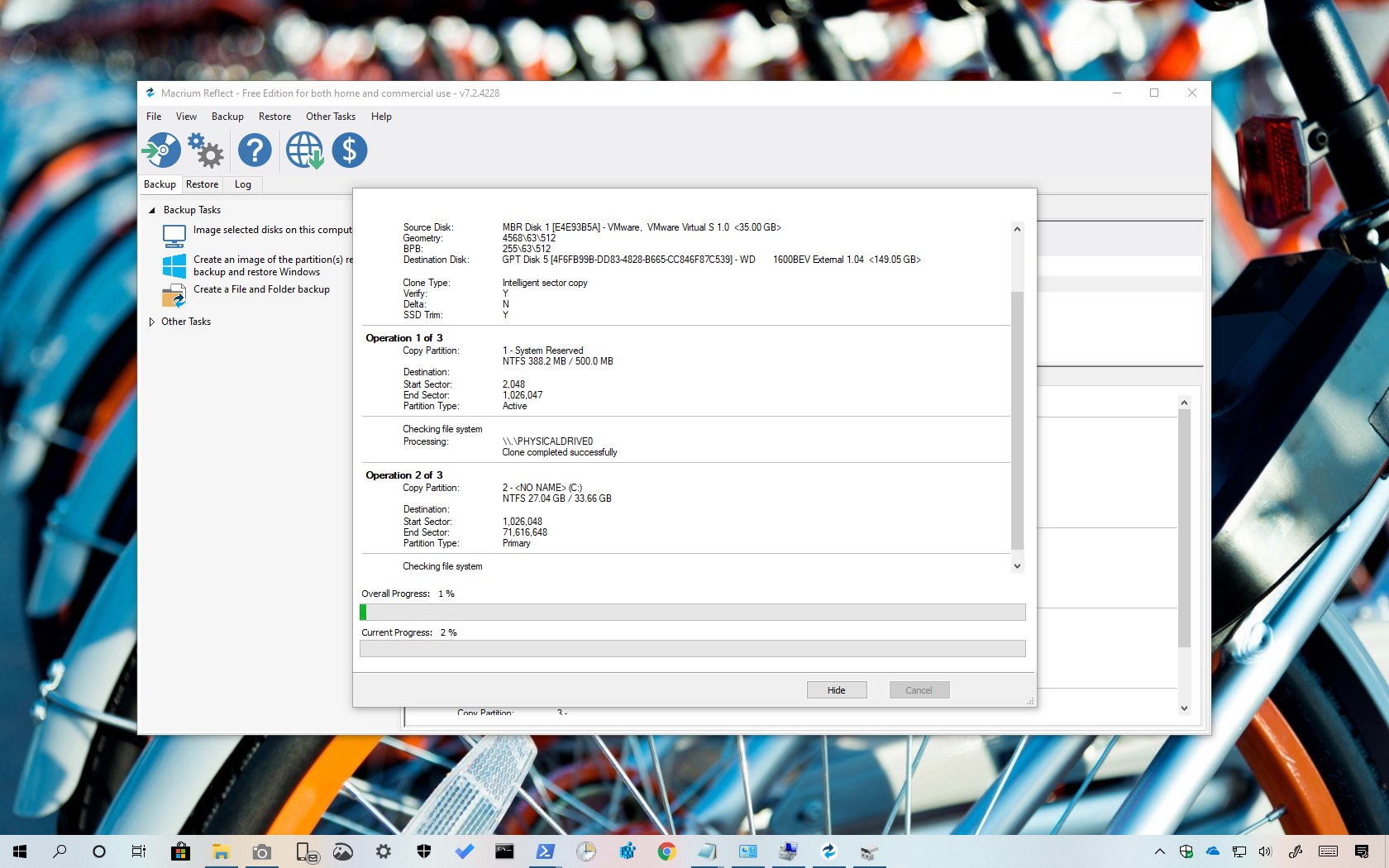
Macrium Reflect is a great tool for drive cloning whether you're replacing a HDD for an SSD or creating a full backup. Here's how to use it.
 waxen venture
https://www.amazon.com/gp/product/B08Y1Q2KSZ/ref=ox_sc_act_title_1?smid=ATVPDKIKX0DER&th=1 is this good? might be getting an xbox series S.
 signal garden
i mean, seagate is the official partner for xbox
should be fine depending on the games youre putting on it
sour wadi
Seems a bit expensive for 2tb hdd and also Ik there was something about external drives only working for previous gen games although I'm not sure if that was xbox or ps5
signal garden
be surprised if it was for xbox considering their support for previous gen stuff
 lethal oriole
M.2 Gen4 x4 means M.2 PCI-express 4.0 x4? or am I getting it wrong?
lethal oriole
Oh, okay. Just want to make sure. I am not too familiar with these different terms.
blazing musk
99% of people don't really need to spend more on a gen 4 drive btw
Unless it's for a PS5 or something
lethal oriole
Well, I am comparing mobos. I was a bit confused about the slot term.
but you said it not necessary to spend extra on gen4?
small carbon
Mobo itself supporting gen 4 pcie isn't really extra cost at all, so yea get 1 that has it. Pcie is generally back compatible so you could of course use a gen 3 ssd. Hynix P31 is a great 1 btw, on sale once in a while.
blazing musk
Yeah P31 is best but following within a few loading seconds is the MP33
small carbon
I'm even fine w/ my post-nerf sn550.
 real lava
sata is perfectly fine
jk
nvme drivers are similarly priced
so like there's no point in sata
if the board has m.2 slots that is, which is all modern boards these days
small carbon
real lava
jk
nvme drivers are similarly priced
Pfft, no 4TB nvme for $320.  (usually)
 real lava
that's nice price
 cyan needle
blazing musk
Unless it's for a PS5 or something
cyan needle
blazing musk
Unless it's for a PS5 or something
What makes the ps5 want a gen 4 when a gaming pc only needs a gen 3?
blazing musk
They have some games that use a form of direct storage
So the result is things like open world games that don't need loading screens ever because all the assets stream off the drive almost instantly. Like the spider man game.
cyan needle
Oh ok. And pc doesn't need to utilize that?
Or that it cant?
Sorry, sometimes these concepts elude me.
minor sun
It's wacky tbh
What Sony says is that you need the gen 4 drives to be able to load fast enough for direct storage, but technically, a gen 3 drive should also work fine, Sony just doesn't want to mess with that and just do guaranteed support.
On PC, direct storage is still a thing, and could be used by both gen 3 and gen 4 drives, but there's just not any games actually using it yet, so we can't really tell yet if gen 4 drive will help.
blazing musk
There is exactly one game using it and it's in alpha still. Or closed beta. I forget.
And that one game is barely any faster than just using the regular storage API

Oh and apparently Witcher 3 is getting upgraded with it. No idea why it needs it at all.
And interestingly direct storage doesn't work at all for raid volumes
kind sierra
blazing musk
Oh and apparently Witcher 3 is getting upgraded with it. No idea why it needs it...
cdpr has been doing a huge graphics remaster for witcher
If they're working in direct storage for streaming assets that might explain the delay
kind sierra
blazing musk
And interestingly direct storage doesn't work at all for raid volumes
I'd guess that would depend on if it's hardware or software raid
lethal oriole
btw, is it even worth getting a HDD anymore these days?
kind sierra
If you want cheap bulk storage for games, photos, or backups then yes. Just don't use it to boot your operating system
 reef pebble
Trying to clone my windows to an ssd using Macrium Reflect and getting error code 0
lethal oriole
kind sierra
If you want cheap bulk storage for games, photos, or backups then yes. Just don'...
Ah I see. mmm, I am thinking of that already
I am thinking for using a SSD for booting and important files
and very demanding games
blazing musk
 opaque kelp
is there a way to make my write speed faster
opaque kelp
is there a way to make my write speed faster
What drive? And a lot of SSDs slow down as they fill up
 exotic valley
HI
Anyone have any good, or bad luck with a TerraMasters NAS drive
Also looking for a 1TB SSD drive to replace my 500GB HDD, and I want to transfer all data to it and use as my C drive. I thought there were some that came with software to clone it, but all I am finding are 3rd party programs for it. ALso, How does it get installed when I had a 3.5" drive, and all I find is 2.5" or smaller?
I am not sure how this works, do I get a notice if someone replies to me?
 upper quiver
exotic valley
I am not sure how this works, do I get a notice if someone replies to me?
upper quiver
exotic valley
I am not sure how this works, do I get a notice if someone replies to me?
yes
upper quiver
exotic valley
Also looking for a 1TB SSD drive to replace my 500GB HDD, and I want to transfer...
how old is the drive? would be best to just get an additional ssd to install windows and programs to
leave the hdd in there with the data for now
what motherboard do you have?
exotic valley
Drive is about 8-10 years old. its not full, even though its a 500GB, its not even half full. Want it to speed up the computer. I am also upgrading the video card, and doubling the memory. I just want a few more years out of it. Its a Dell T1500 workstation running windows 10.
T1600 sorry
upper quiver
oh
you want a few more years? what are you using this box for?
like damn, you might as well just get a 300 dollar lenovo laptop
exotic valley
mainly email and internet use, no gaming, no graphics. run accounting and Tax software
upper quiver
huh
yeah honestly you would be better off just getting a new, cheap laptop
way more reliable
way faster than that thing will ever be
idk how much you were planning to drop on memory, gpu, and a new ssd
exotic valley
problem is all comes with windows 11. the accounting software wont run on 11, and I will need to spend 500 a year for subscription, and then Office costs a yearly subscription as well. so thought was for say 500, I can get 3 years out of it, as opposed to buying a cheap computer, and paying subscription fees fo rthose 3 years as well, so overall cost is less doing it this way. Thats my thinking.
upper quiver
doesnt have to come with 11, you can still find plenty of cheap laptops with 10
also yeah, if its hardware licensing then that sucks
is it not account or key based?
not sure how you're getting out of these huge subscription costs by using old hardware
exotic valley
yup sucks, account or key based? theres no USB key if thats what you mean. and the version I have litterally is not compaitble with 11
upper quiver
yeah, like USB or license keys
or you login to your account in the software
to show that you own it
exotic valley
yeah, no. my current stuff all has license keys, but they wont transfer over
right now I own the softweare, both Office and the accounting software
upper quiver
seems hard to believe you couldn't just reactivate the software on the new system, but idk some software is like that
like, if you have physical disks with license keys, shouldnt be a problem
exotic valley
yeah, I cant install the old rogram on win11, even with the activation keys. Its not compatible. Also its located in a hutch with a larger monitor that would be in the way if we used a laptop there. would need to be a tower to work where I have it.
i bought 32 gig mem for 100, and a 4gb video card for 100
200-300 for a hard drive and program to copy drive
upper quiver
you just want a 500gb ssd to replace the current drive?
you could go with a TB, but i doubt you would use it all
exotic valley
well, was going for a TB so it doesnt fill up too soon and slow down, but yeah.
wanting it to last till win10 EOL in 2025
upper quiver
exotic valley
wanting it to last till win10 EOL in 2025
enterprise ltsc 2019 eol is in 2029
but that would require you to reinstall windows haha
exotic valley
yeah, just have PRO and all my machines. The one you sent me looks good. how does it go into a 3.5" bay though
upper quiver
idk just stick it somewhere in the case
exotic valley
the whole purpose is to avoid reinstalling
upper quiver
it weights like... 100 grams, you can literally just let it hang there lol
exotic valley
are the connectors the same as a regular SATA drive, it kinda looks like it
upper quiver
yup
of course, youre going to have to use something like macrium reflect to image the drive from one to the other
exotic valley
thats what I am trying to understand. are those any good? I thought at one time there was a SSD drive that came with its own method of cloning the drive.
thats fine, what do es that cost
minor sun
There's also brackets for 2.5in to 3.5in if you're bothered by it
upper quiver
also, the clone will require you to use a seperate system to image the drive
exotic valley
and flawless? How does it work with system folders locked, and files in use, and etc. How can it just clone everything and have no issues
upper quiver
you could also just get a third drive, install windows, and run macrium on that
upper quiver
exotic valley
and flawless? How does it work with system folders locked, and files in use, and...
its a bit for bit clone of the drive
the whole thing
so the drive cant be in use while the operation is under way
exotic valley
my computer has space for a second drive, so how do you clone it, need to have a system with 2 empty drive spots and cables
blazing musk
Windows having "protected" folders is a joke anyway, there's no real protections on the files unless you specifically encrypt it and even then you can copy whole encrypted files and containers
upper quiver
three, technically, but it might be easier to get an external usb enclosure for the ssd as well
that way you only need two drives in the system
the original being cloned, and a temp drive to run a temporary windows installation and macrium
exotic valley
um, can you send me a link of something that will work.
upper quiver
you arent running bitlocker, correct?
exotic valley
no
upper quiver
cool

SABRENT 2.5-Inch SATA to USB 3.0 Tool-Free External Hard Drive Enclosure [Optimized for SSD, Support UASP SATA III] Black (EC-UASP)
exotic valley
so, do the clone of the drive, then put it int hte machine and start it up and it acts like the other drive, no issues, just faster
upper quiver
yup
do you have any other drives or computers laying around?
you cant run the cloning software on the drive you are trying to clone, after all
blazing musk
If you don't have a third hard drive you could always use clonezilla on USB, but it's a little more complicated
exotic valley
yes, I have other computers, and other drives as well
Well, I will go for easy
i dont see how the link you sent will work
upper quiver
its for the ssd to go into during the clone process
i suppose if you have 2 additional sata cables you could just plug all three into your desktop
exotic valley
I may actually, but I need this just for the SSd
upper quiver
need what
exotic valley
so on my other computerm I can take the drive I want to clone and make it my second drive, then plug the USB witht he SSD drive in it, then install the program on the c drive, and I am all set
run the program from C and clone D to the USB
exotic valley
Yeah, I can easily do that. Soo, where do I get this free program. I hate all those site that has 20 DOWNLOAD NOW onthe screen never knowing which one to select
Hell, if its that easy, I may buy another SD drive for my other computer, its just as old
upper quiver
Macrium Reflect Free allows you to back up your entire computer and schedule backups. For a free program, you get incredibly powerful software that allows you to create effective backups.
few options there, just get Reflect 8 Free
exotic valley
soo whats the catch, what are the others for? Is there a time limit its free, or maximum amount of uses
exotic valley
so direct disk cloning is what I would be doing
 exotic valley
ok, cool. Thanls. So then basically for $300 I upgraded the computer for 3 more years. I thnks thats a fair price
upper quiver
assuming something else doesnt quit in the mean time
its fair to say the only questionable aspect of the system at the moment is the PSU
exotic valley
Right. well, replaced the HD, Memory, and Video. about the only thing to go is the PSU unless the BOARD goes
ditto
exotic valley
another subject or similar subject different application
upper quiver
shoot
exotic valley
replacing my iomega store center 2 which has 2 drives cloned. been having issues with it going off line, and its not the HDD, its the unit itself. I manage to get it back afte playing around but I am afraid it wont last soooooo
im looking to buy another storage device
I have extra HD's, because when 1 failed, I bought 4 of the same one. I have now 2 new left and looking to see if I can buy a shell unit and use these drives
upper quiver
checked the SMART data on the drives in use?
exotic valley
the HDD i have aare Seagate barracudas LP 500 GB
 small steppeBOT
 SassyFish256#5719 has been warned
Reason: Bad word usage
blazing musk
smh sassy
upper quiver
make sure one of them isnt being fussy
exotic valley
eh?
I can, I think I did, not sure. can check quickly. anyway I found one and was wondering if it would work
upper quiver
i would assume that NAS would report smart data in some way
what gets stored on this NAS?
blazing musk
The interface might call it a "health check" depending on OS
upper quiver
is it live data, or mostly just archival?
blazing musk
Also if the NAS uses hardware raid it might not be able to read raw smart data
exotic valley
its all my live data, that is why my computers HDD dont have a lot on it, because all data is stored ont he NAS. which is raid 1 mirrored, and then also offline backed up everynight
Here is what I am looking at
could it use 2 500GB HDD
 upper quiver
exotic valley
could it use 2 500GB HDD
upper quiver
exotic valley
could it use 2 500GB HDD
how are these drives currently configured?
RAID 1 or JBOD
because the current nas will do either
actually
either case may not matter, i think the data on the drives would still be accessible individually
exotic valley
not JBOD, Raid 1, where each drive is identical, so 1 drive fails, you have the other drive
Im trying to see if this would accept 2 500GB drives.
upper quiver
yeah then you should be able to swap the drives into any nas and it should just work fine
i dont see why it wouldnt
just sata
exotic valley
I have them brand new, still sealed, otherwise I have to buy it with drives for another 400 bucks
upper quiver
ive never heard of terramaster tho
blazing musk
Ok yes TOS 4 (the OS) does have smart health checks and ironwolf health management, it's under storage manager > hard drive
exotic valley
Yeah, My thinking too, and yes, also nev heard of them either. their comments dont look so bad
blazing musk
upper quiver
ive never heard of terramaster tho
It looks a lot like a rebranded cooler master
upper quiver
yeah lol
blazing musk
Maybe a sub-brand since they don't do a lot of NAS stuff
exotic valley
well, is there another brand that I can look at?
exotic valley
I cant find anything on the existing NAS on the drives to show that setting.
Ok, well, I can try it and see
thank you BOTH
does newegg good with returns, like if I try it and I cant get it to work?
i really dont want to spend a thousand bucks on a NAS device
upper quiver
theres your alternative
good known brand, but more expensive
honestly, the terramaster doesnt seem bad at all though
so its up to you
blazing musk
For entry level stuff I'd say it's fine, until you need more complex stuff like a raid 50 volume
exotic valley
not much more expensive. looks very similar actually. even though our files are on it, its used very little.
upper quiver
also going forward i would suggest getting drives built for use in a NAS
no more of these barracudas 🤢
exotic valley
this one does seem to have some bad reviews.
upper quiver
yeah, seems like terramaster has some QC problems
exotic valley
soo, even thought he one I had which was a NAS used the barracudas, your saying dont use them
upper quiver
use what you've got for now
 solar solstice
Can someone help me
exotic valley
are the barracuddas not good, I thought they were pretty good.
upper quiver
but when you go looking for more drives to put in a nas, make sure they are built to be run 24/7 in a nas
barracudas arent designed to run in a nas 24/7
exotic valley
Hey, Thanks GUYS
upper quiver
very much sounds like psu then
solar solstice
 upper quiver
sounds about right
blazing musk
wtf even is that psu
upper quiver
the time bomb in the bottom left corner of your build went off
they usually go somewhere between 6-12 months
pull the psu and all the psu cables out
get new psu
solar solstice
blazing musk
wtf even is that psu
850 watt player x steampunk
exotic valley
Hey SASSY, did you say use the Reflect 8 free COmmercial or non commercial?
upper quiver
non
blazing musk
non commercial means home use usually
exotic valley
👍
upper quiver
only difference is licensing, just stick with the options under Home
exotic valley
right, ty
blazing musk
Ok so here's what I found on that PSU: The 750W gets a B tier rating but above 80% load the efficiency falls off a cliff, suggesting that the platform they used can't handle high loads. That doesn't bode well for the 850W model.
The fan also peaks at 59 dB which is insanely loud, and 46 dB under normal conditions which is still too loud for most people.
upper quiver
b tier rating cool and all, but it did just effing blow up in his build
so
lol i guess
dense merlin
I wouldn't buy a cv, when the g5 650 is $65
Or asus tuf gaming is cheaper, not sure exactly how much
But modular vs non modular, just depends what you care about
sour wadi
upper quiver
https://www.gamestop.com/pc-gaming/pc-components/power-supplies/products/corsair...
 upper quiver
dense merlin
I wouldn't buy a cv, when the g5 650 is $65
upper quiver
dense merlin
I wouldn't buy a cv, when the g5 650 is $65
thats like 25 dollars more lol
dense merlin
not worth putting a bad psu into a build
$25 for safety of the rest of the pc is worth it
https://pcpartpicker.com/product/RkjBD3/asus-tuf-gaming-b-550-w-80-bronze-certified-atx-power-supply-tuf-gaming-550b could also just do this

Asus TUF Gaming B 550 W 80+ Bronze Certified ATX Power Supply (TUF GAMING 550B)
upper quiver
dense merlin
not worth putting a bad psu into a build
its not a bad psu...
dense merlin
upper quiver
its not a bad psu...
C tier
and i really dont trust it, considering the 550 and under is D tier
upper quiver
yeah, but ive looked into actual trusted reviews
550 and under dont use DC-DC converters for lower voltages
so yeah they junk
650 is actually decent
in this case, at least
dense merlin
the asus tuf is high pri B tier tho for $8 more
upper quiver
oh yeah lol its way on sale on amazon rn
regardless, cv650 is a regularly cheap, decent unit for most systems with low power gpus
but yeah, if you want to ping or dm that guy with a link to this other unit be my guest
dense merlin
@solar solstice
small carbon

 upper quiver
small carbon
<:waitwhat:967841531505565729>
upper quiver
small carbon
<:waitwhat:967841531505565729>
cry abt it
 olive wadi
i hate storage
dense merlin
Well storage hates you
minor sun
olive wadi
i hate storage
you've turned to the dark side
open gazelle
olive wadi
i hate storage
Your guide baby is crying from all the hate its father is giving it. Damn bruh.
 molten swallow
Hey folks i need some help with a product a just purchased from Newegg. It's a 2 bay RAID enclosure. I already had the drives from a previous enclosure that died on me. This new one worked fine. I was able to use Superduper to migrate the data over to the two drives - which i had previously formated - and it was running fine. Now it won't stay mounted on my Mac for longer than a minute.
Any ideas? It seems as though the drives are fine. I've tried mounting it on two other computers and the same behaviour happens - it unmounts after about a minute.
 sharp folio
I'm looking to upgrade my game drive, does anyone have recommendations for 2TB SSDs that last?
sour wadi
sharp folio
I'm looking to upgrade my game drive, does anyone have recommendations for 2TB S...
Country? Do you have spare m.2 slots or does it have to be sata?
sharp folio
sour wadi
Country? Do you have spare m.2 slots or does it have to be sata?
United States, M.2 and SATA would both be fine
sour wadi
sharp folio
United States, M.2 and SATA would both be fine

TEAMGROUP MP33 2 TB M.2-2280 NVME Solid State Drive (TM8FP6002T0C101)
sharp folio
Thanks
sour wadi
Np
reef pebble
So I'm having this weird problem with macrium reflect during the final stages of the cloning it'll only get to 60% done my monitor will turn black, at first I thought it was doing something related to when you update a graphics driver so I waited for around an hour to see if it would turn back on, and it doesn't I've searched and haven't found anyone with the same issue
open gazelle
Any error in Event Viewer?
reef pebble
no
open gazelle
Seems like a pretty strange issue.
Did the PC turn off, or did the display turn off/stop having a connection?
green wharf
I was wondering would the Sk Hynix gold p31 would be a good boot drive or should I use a different ssd
Ik someone said it would be good for games, but what about it being a boot drive
dense merlin
p31 is great
open gazelle
Great drive, but its rarely worth the extra cost over a MP33 for the average consumer.
Perfectly fine to use as a boot drive. Could be used as a boot/game drive too for example.
For the most part, can used used for whatever you want.
cyan needle
I personally went with p31 over the mp33
 heady marten
Hello, I have a prebuilt pc and I just recieved an MX500 SSD 2.5 inch. The case can hold another HDD slot but I was wondering if my motherboard which is the Acer aspire gx-785(kbl) has enough cables or which ones do I need to connect.
dense merlin
heady marten
Hello, I have a prebuilt pc and I just recieved an MX500 SSD 2.5 inch. The case ...
Just needs a sata cable
blazing musk
2.5 inch sata drives need power and data
dense merlin
Also make sure you can find the Sata power cable from the psu
heady marten
Man I would send a picture since I have no clue where would I plug it
The power and the sata
blazing musk
sata power

sata data

Power goes to the PSU, data goes to the motherboard header
Header looks like this, could be a different angle though
 heady marten
Perfect thank you
 steady talon
What would y’all consider the best of the best Gen 3 M.2 SSD?
I know there’s the P31 but is there anything even better?
blazing musk
P31 is really the one that punches above it's weight class, not many others can touch it in most workloads.
dense merlin
mm, for the price def mp33, but aside from that there's none that i know that stand out
small carbon
$140 for mp33 2TB is good, but realise $10 more was my 970 evo plus. Love those crazy 1 day sales. "Cost" me $20ish but I switched from the Sammy, lol. Hynix isn't the best ram but their ssds are fantastic. They don't even do the crap of having a gen 3.5 drive & calling em gen 4.
hallow owl
can someone tell me what the best/fastest gen4 m.2 NVME drives are.
blazing musk
P41 Platinum hands down
dense merlin
s70 blade is nice depending on prices of it and other drives
hallow owl
blazing musk
P41 Platinum hands down
im liking these specs
hallow owl
dense merlin
s70 blade is nice depending on prices of it and other drives
actually pretty banger price
thanks.
 livid cargo
I am trying to find an M.2 drive that is budget friendly but I really want one with DRAM on it, does anyone have any recs?
dense merlin
livid cargo
I am trying to find an M.2 drive that is budget friendly but I really want one w...
dram doesnt determine performance
that aside, if p31 is still on sale on amazon thats a great choice
$170 after clipped coupon https://www.amazon.com/dp/B099RHVB42?tag=pcpapi-20&linkCode=ogi&th=1&psc=1

Experience the breakthrough upgrade from a global tech pioneer. SK hynix Gold P31 delivers the world’s first 128-layer NAND, fastest-in-class speed, easy data migration, and 5-year warranty. The latest innovation from the world’s second-largest memory maker, Gold P31 is designed to provide striki...
livid cargo
huh really I always was told it did matter thats good to know might widden my choices a bit
dense merlin
mp33 2tb is $140 atm
thats also a good choice
tho between the two imo id go p31 for the extra 30
livid cargo
thank you ill definitely look into it
blazing musk
DRAM is only used for caching metadata, it doesn't have anything to do with transfers
small carbon
Yep, non-dram ssds usually use host ram a bit anyways. SN770 is 1 that proves dram-less is a non issue. btw kodebi the P31 w/ it's really good latency/"rnd" performance is better than some gen 4 stuff in certain tasks. @hallow owl S70 Blade is probably within $20, I sort of suggest just doing the extra for a P41.
hallow owl
alright sounds cool
real lava
dramless with hbm is nice
kind sierra
Okay, I'm tired. I got very confused trying to think of an SSD with hbm 🤣
red jay
whats the best ssd on the market right now? Looking for 2-4 tb
small carbon
 Depends on use, but obviously haven't been paying much attention
https://www.amazon.com/SK-hynix-Platinum-Internal-Compact-dp-B09QVD9V7R/dp/B09QVD9V7R
 blazing karma
is the samsung 980 1tb a good deal?
sour wadi
No
Depends on country but it rarely is
Usually mp33/mp33 pro or sn550/sn570 are better options
small carbon
$63 SN750se 1TB is decent at gamespot currently https://www.gamestop.com/pc-gaming/pc-components/hard-drives-ssds/hard-drives-storage/products/wd_black-sn750-se-nvme-ssd-battlefield-2042-game-bundle-1tb---pc/303493.html
red jay
i use floppy disks
sour wadi
red jay
i use floppy disks
So you're that guy in me and @pallid orchid 's COD games
red jay
sour wadi
So you're that guy in me and <@499525349109923844> 's COD games
i dont play COD
sour wadi
 pallid orchid
freaking 8 years to load map
red jay
pallid orchid
<:kekw:741678350791081994>
fr i dont play COD
pallid orchid
then someones using ur pc bruh
wispy jungle
steady talon
What would y’all consider the best of the best Gen 3 M.2 SSD?
excluding stuff like Optane because it's unfair... it's a fight between stuff like (alphabetical order)
- Crucial P5
- Samsung 970 evo plus
- SK Hynix P31
- WD SN750
but even SM2262(EN)/SM2263/E12(S)/equal would hold up very well in the top end of PCIe 3
 glad oxide
what does this error mean? MEMORY_MANAGEMENT
sour wadi
bit more context, did you get a blue screen of death or something?
blazing musk
glad oxide
what does this error mean? MEMORY_MANAGEMENT
If that's from a blue screen then something has gone wrong with your memory. You get that a lot when you overclock. If you're not overclocking turn off xmp and see if it still does it. If it does you might have a bad stick of memory.
glad oxide
blazing musk
If that's from a blue screen then something has gone wrong with your memory. You...
it usually happens when the HDD sounds like failing
blazing musk
What sounds? Can you get a video?
glad oxide
of it spinning up and stopping, all over again
and it happens randomly
it usually just crashes once then its fine for the rest of the day
olive wadi
wispy jungle
excluding stuff like Optane because it's unfair... it's a fight between stuff li...
sn750 random performance in the toilet
lol
kind sierra
And the 970 evo plus isn't quite as good after the controller swap
wispy jungle
kind sierra
And the 970 evo plus isn't quite as good after the controller swap
The one to elpis or back to phoenix?
 half flint

Ars Technica
The Phoenix controller in Samsung's own product images isn't present on newer drives.
P sure he's mentioning this one
So yeah the elpis
small carbon
Kind of overblown for general use, but part of why I switched it for a P31.
small carbon
It was a temporary supply issue in Texas afaik. Not sure if they went back to the Phoenix controller, but no cares giveth. @olive wadi were you talking about only sn750, or also 750se? I might almost regret getting the latter, although $64/TB seemed pretty good. Shall I sell/return it?
kind sierra
It's storage, it's cheap
small carbon
Hah, true. Felt overall much better boot drive than sn550 I have, maybe. The sn550 or old mx300 could be my cheap/small forks OS bench drive.  Lookie what else I got to stop using lil 1TB hdds. Glad I didn't already have the X300 Toshiba now I think.

 shrewd stag
hey guys. I need two 2tb gen 4 PCIe SSD cards for my laptop. I can't seem to locate any sticks that will for sure fit in my new machine. hoping for some suggestions and appreciate your help ahead of time. Also, feel free to dm me if needed. here is a link to the laptop: https://www.newegg.com/titanium-blue-msi-ge-series-raider-ge76-12ugs-033ca-gaming/p/N82E16834156133?Item=9SIAFVFHCE3271&Description=GE76&cm_re=GE76-_-9SIAFVFHCE3271-_-Product&quicklink=true
blazing musk
Do they need to be gen 4 for some reason? What are you doing that needs that speed?
shrewd stag
I guess they don't have to be, but because it is capable of that, I am fine with spending the extra money for gen 4.
hopefully totaling around 500 if I am lucky
But if the read/write speeds are not significantly improved, and/or the machine can actually take gen 3, then open to suggestion
blazing musk
If you're just gaming, then the P31 Gold actually beats some gen 4 drives because gaming prefers random and mixed I/O, and not raw sequential speed.
It's also a very low power model so it should help your battery life a little over a gen 4 drive.
shrewd stag
got it, ya
not for gaming, its for music content creation
not sure if that changes things
blazing musk
Ah now that actually can use the sequential speeds when it's loading plugins at least
shrewd stag
ok cool
any exact stick recommendations I can take a look at? hard to search on new egg or amazon for the exact specs like gen 4, PCIe, etc
blazing musk
These are a good price right now https://pcpartpicker.com/product/4KRYcf/western-digital-2-tb-m2-2280-nvme-solid-state-drive-wds200t3x0e

Western Digital Black SN770 2 TB M.2-2280 NVME Solid State Drive (WDS200T3X0E)
Another option, removable heatsink if it doesn't fit https://pcpartpicker.com/product/qCqPxr/adata-xpg-gammix-s70-blade-2-tb-m2-2280-nvme-solid-state-drive-agammixs70b-2t-cs

ADATA XPG GAMMIX S70 Blade 2 TB M.2-2280 NVME Solid State Drive (AGAMMIXS70B-2T-CS)
small carbon
I suggest that S70 Blade, or a similar cousin. True gen 4 instead of sort of gen 3.5 like the sn770 is, at least if you'll use those speeds.
shrewd stag
small carbon
I suggest that S70 Blade, or a similar cousin. True gen 4 instead of sort of gen...
Ok big thanks to you and everyone for all your help over the past few weeks to make this decision. I am going to go with https://www.samsung.com/us/computing/memory-storage/solid-state-drives/980-pro-pcie-4-0-nvme-ssd-2tb-2-pack-bndl-1634758157946/?cid=sem-mktg-pfs-mms-us-google-na-03242022-140976-&ds_e=GOOGLE-cr:0-pl:293204744-&ds_c=FF~Product+SSD_CN~ssd_ID~na_PH~on_MK~us_BS~ms_PR~ssd_SB~msmul_FS~lo_CA~kew_KS~ba_MT~exact-&ds_ag=AG~SSD+980_ID~na_MK~us_AT~ta_MD~h_PK~cpqlh_PB~google_AI~n-&ds_k=samsung+980+ssd&gclid=CjwKCAjwk_WVBhBZEiwAUHQCmU9O37HL0K6r-NOOejeL8mX_RwPW6QbcTY9UQSRmnN7ABcuqby9mKhoCGGkQAvD_BwE&gclsrc=aw.ds
and

Samsung Electronics America
Discover the latest features and innovations available in the 980 PRO PCIe 4.0 NVMe® SSD 2TB - 2 Pack. Find the perfect Memory & Storage for you!
@small carbon @blazing musk any issues with this?
blazing musk
Besides being more expensive than it needs to be, no issues
shrewd stag
Ok cool. I know it is slightly more expensive, but samsung offers a deal for a 2 pack so its only 500 for both on their website
not too bad and samsung has the best ssd's generally no?
blazing musk
The 980 Pro is a S tier drive for sure so the performance will be there, but doesn't offer much more than another S tier drive would
small carbon
980 Pro is if you're writing 500+ GB at once all the time, for reference. Hmm, $250/ea isn't bad tbh but idk. Still $100 over dual S70 Blades.
blazing musk
The S70 blade is also a S tier drive is what I'm saying
shrewd stag
got it
only concern is that the reason i can't put two 4tb drives in there is because the heat sink wont fit. wouldn't the same be true for the blades then?
shrewd stag
hmmm ok
small carbon
It's not just removable, the S70 blade heatsink isn't preinstalled. I know because I have 1. Also, if you were taking use of the 980 Pro by writing 500+ GB in a row, most gen 4 ssd would be getting quite warm & probably throttle a bit in a task like that.
blazing musk
It's for music production so mostly burst reads/writes sequential with mixed otherwise
small carbon
Oh too bad the 15% off for P41 gone. Samsung also good warranty/service, but S70 Blade seems to have a decent track record.
blazing musk
P41 is the most epic drive we've seen yet
small carbon
The P41? Oh it's just on Amazon but back at $260. Hynix P41. Also I forgot there's a new open box S70 Blade on r/hws for like $190 shipped so you could maybe get that 1 too & save $20-30 at least
blazing musk

Experience the breakthrough upgrade from a global tech pioneer. SK hynix Platinum P41 delivers the 176-layer NAND, fastest-in-class speed, easy data migration, and 5-year warranty. The latest innovation from the world’s second-largest memory maker, Platinum P41 is designed to provide striking per...
small steppeBOT
 !ce#0022 has been warned
Reason: Bad word usage
shrewd stag
full sends only. going with the platinums @blazing musk @small carbon
blazing musk
Yolo
shrewd stag
fax machine
small carbon


small steppeBOT
!ce#0022 has been warned
Reason: Duplicated text
shrewd stag
JUST FULL SENT BOYS AND FEMALES!!! thanks again for all your help!!! ❤️
blazing musk
Too many hearts lol
shrewd stag
haha im just excited
blazing musk
Happy to help
small carbon
Can't go wrong w/ what's basically the best ssd currently. 
small carbon
Nah I'm under selling how good it is.
shrewd stag
hahaha
ok scared me
thanks again though fr fr fr fr fr fr fr fr fr fr
now just praying the laptop doesn't show up in two months.....
bought through new egg as well to show support to the fam
maybe a mod can help expedite the shipping 
small carbon
Eh, says within 22 days usually.
blazing musk
shrewd stag
maybe a mod can help expedite the shipping <:derpyBlob:800415354891403275>
I would if I was actually employed there lol, mods are volunteers. Only admins are employees.
shrewd stag
ah i see
small carbon
Plus we don't work at usps or whichever is sending the laptop.
kind sierra
small carbon
I suggest that S70 Blade, or a similar cousin. True gen 4 instead of sort of gen...
Sn770 gen 3.5? Say what now?
real lava
lmao
kind sierra
Sure it doesn't have super fast sequential speeds, but we all know those are mostly just marketing. The sn770 swings with the 980 pro and sn850 where it counts
small carbon
. Gen is sort of about the stated sequentials. 5500MB/s or less isn't true Gen 4 to me. Last part of my msg is why I would say skip the sn770 (in their case). !ce can maybe make use of those higher sequential speeds. 
kind sierra
I guess they don't have to be, but because it is capable of that
Also laptop
So no need for high sequential speeds, just standard day to day usage, but definitely need for low power
Long story short: sn770 for cheaper option, P41 for higher end. Saying that the sn770 isn't true gen 4 is just silly
blazing musk
kind sierra
So no need for high sequential speeds, just standard day to day usage, but defin...
It's not day to day usage, it's music production they're doing. The sequential speeds help when you're loading 30x 500MB+ plugins.
 safe fog
i have an external hdd is there a way to put it inside the pc?
kind sierra
Usually yes, look up to see if your model can be shucked. If so, you can open it up, take the physical drive out of it, and use it like you would any other hdd
safe fog
ok thx
steady talon
safe fog
i have an external hdd is there a way to put it inside the pc?
What is the external HDD?
safe fog
steady talon
What is the external HDD?
wd passport i guess
quiet gust
Chonk boi

 worn prairie
Is the micron 2400 a good ssd? Could get a 2TB version for 169
sour wadi
Never heard of it, probably an oem drive or something, but not worth you can get a team mp33 2tb for 155 iirc
real lava
it is an oem drive
absolutely no reviews
so i wouldn't trust it
ew it's qlc
yeah nope, get mp33
steady talon
worn prairie
Is the micron 2400 a good ssd? Could get a 2TB version for 169
For the same price you can get a P31 2Tb rn

Experience the breakthrough upgrade from a global tech pioneer. SK hynix Gold P31 delivers the world’s first 128-layer NAND, fastest-in-class speed, easy data migration, and 5-year warranty. The latest innovation from the world’s second-largest memory maker, Gold P31 is designed to provide striki...
 cyan leaf
steady talon
https://www.amazon.com/SK-hynix-Internal-3500MB-Compact/dp/B099RHVB42
cyan leaf
steady talon
https://www.amazon.com/SK-hynix-Internal-3500MB-Compact/dp/B099RHVB42
is this a good ssd? i’m looking for more storage and I was advised to get an ssd instead of a hdd
dense merlin
cyan leaf
is this a good ssd? i’m looking for more storage and I was advised to get an ssd...
if you dont currently have an ssd, get an ssd and put windows on it
the difference is night and day
cyan leaf
right now i only have a one TB HDD and i only have 20GB free on it lol
dense merlin
100% get an ssd for windows
that p31 2tb for 170 is a great sale
its the best gen 3 ssd
if you want a 1tb ssd, p31 or mp33 would be what id go for
mp33 is cheaper, and still a good ssd
 formal tusk
you're gonna be amazed how many seconds to minutes to hours you save on every little thing with an ssd
cyan leaf
i’m about to shed tears
thank you i didn’t know i was missing out this much
no more eternal loading screens
wait
isn’t prime day
soon?
do you guys think I should wait till then to buy it or is rn already a good enough deal?
dense merlin
p31 2tb is on a great sale, if youre going to buy that one id just go for it
cyan leaf
Okay
open gazelle
cyan leaf
is this a good ssd? i’m looking for more storage and I was advised to get an ssd...
P31 is one of the best gen3 drives. Getting it for cheap is a nice deal for sure.
red jay
Heya guys, got a question.
I have two motherboards, one with an i5 4600k, one with an i5 6600k (I know this sounds like a question for #cpus-mobo-and-memory but hear me out)
My old CPU is more powerful, being overclocked. My new CPU's motherboard has an M.2 slot (which is currently populated.)
I kinda want to go back to my old CPU, for the power, and the fact that I want to use two GPUs and my old motherboard has two 16x slots. (One is only 8x but still a full size slot) however this presents an issue.
My boot drive is an M.2. I have a SATA SSD.
Here is the speed of my M.2 SSD:

And here is the speed of my SATA SSD:

The write speeds aren't too far apart, however, the read speeds aren't even comparable.
Is it worth using my SATA SSD for a boot drive and going back to my i5-4690k purely for using two GPUs and gaining the faster CPU, or would sticking with the M.2 be my best bet?
If neither is a very good choice, is there a way to use my M.2 (maybe not to it's full potential, but at least FASTER than my SATA SSD) in my older motherboard without M.2 support? Maybe in a PCI-E 1x slot?
I'm unsure of what to do.
red jay
real lava
How is 4690K faster than 6600K?
We're talking an i5-4690k running at 4.6ghz all core
real lava
ah
quiet gust
Ooh
red jay
Over an i5-6600k in a non-overclockable motherboard
red jay
Limited to 3.9ghz lmao
real lava
It won't be too slow
real lava
Unless you really want to use the m.2 ssd, but it won't be possible as boot tho
red jay
I've like, just adjusted to being able to have my PC turn on fully before my monitor has powered up
But idk if it's worth losing that for the CPU
real lava
As the cpu doesn't have support for booting with nvme drive
red jay
Yeah but is it worth that
Like
My other motherboard only has DDR3 memory too
I'm on DDR4 rn
But they're the same size anyway, both have 16gb
Actually
What I will do
Is I'll clone my M.2's data to the SATA SSD
And I'll just try it out
If it's better then I'll stick with it
If not then, I can still go back
blazing musk
red jay
The write speeds aren't *too* far apart, however, the read speeds aren't even co...
Is the 4690k on a Z97 board? If so it supports booting from nvme. If it doesn't have a m.2 slot you can just get an adapter. It worked on my AMD FX and 970 chipset that way.
red jay
Not sure, I'll look
kind sierra
Even if not you could use the old days as boot and just have the nvme chilling for extra storage, right?
blazing musk
Z87 seems to support nvme but only as a storage drive without modded bios
Looks like a lot of Z97 boards came with m.2 slots also but only at gen 2 or 3 x2 mode, so a PCIe adapter would get you a lot more speed anyway.
red jay
kind sierra
Even if not you could use the old days as boot and just have the nvme chilling f...
Yeah but I wanted to use the speed as a boot drive
Like I currently do
red jay
I mean right now I can't find a program that will actually clone my M.2 to the SSD without trying to charge me a ridiculous amount of money
real lava
macrium reflect has free edition
red jay
real lava
macrium reflect has free edition
I just caved and bought a licence for Aomei Partition Assistant
small carbon
Many of us don't suggest cloning, but some people have no issues. Also sata for boot is barely slower tbh, maybe a few seconds.
red jay
I broke the motherboard.
During the re-installation of the heatsink, I managed to scratch through a motherboard trace to the first two RAM slots. Rending them inoperable.
The old board is dead.
The old CPU is now useless.
I'm back to my M.2
Damage assessment:

Note to motherboard manufacturers: PLEASE DONT PUT IMPORTANT TRACES RIGHT NEXT TO MOUNTING HOLES TO THE CPU HEATSINK
quiet gust
^ discussion brought to #cpus-mobo-and-memory
 jolly schooner
red jay
Damage assessment:
jolly schooner
red jay
Damage assessment:
Could be possible a local tech shop could solder the traces back together
jolly schooner
red jay
Note to motherboard manufacturers: PLEASE DONT PUT IMPORTANT TRACES RIGHT NEXT T...
Not to be rude but it is rare when stuff like this happens
 pale violet
Which is faster? Mp33 or sn550?
sour wadi
They're both similar, mp33 is usually better priced tho, I haven't seen sn550 in a while(in the us at least)
kind sierra
jolly schooner
Could be possible a local tech shop could solder the traces back together
Idk how much I would trust a high frequency differential pair like that if it had been soldered back together
red jay
kind sierra
Idk how much I would trust a high frequency differential pair like that if it ha...
Unfortunately it doesn't matter.
During the mounting procedure of the graphics card once I was able to get the system running again, something shorted out inside the main chip controlling input and output to the bios (such as the power switch, reset switch, etc) and the board has since died. I actually burnt my thumb on the chip it got so hot.
 olive glade
Is there a better deal for a 8tb? Ssd or mvme

 small carbon
Of course not, do remember it's qvo if that's an issue. The 4TB evo is also $350 currently, for anyone looking specifically for a 4TB ssd.
small carbon
Probably fine for "storage", idk.
olive glade
I have games on a 8tb hdd 😅
olive glade
They dint have a 8tb Evo 
real lava
ofc
the density of qlc allowed this at the first place
evo version would be stupid expensive
olive glade
But maybe I should wait a few years and keep my hdd
open gazelle
QVO <=2TB be pretty unappealing (unless insanely cheap) due to lack of dynamic SLC cache and QLC. 4/8tb be okay options tho. Use an 8tb as secondary in main PC, its okay.
 fathom blaze
Anyone know how to recover data from a deleted partition without buying some overpriced program?
kind sierra
Yes, I can get you some links in the morning. In the meantime, don't let your computer write anything to the disk
quiet gust
fathom blaze
Anyone know how to recover data from a deleted partition without buying some ove...
Recuva
fathom blaze
quiet gust
Recuva
appreciated
fathom blaze
kind sierra
Yes, I can get you some links in the morning. In the meantime, don't let your co...
it's set as raw so I don't think it can use the partition
quiet gust
Oh god
fathom blaze
otherwise I'd try to do macrium or something
ya I had it scanning for 5 days only to error out
quiet gust
That's gonna take a while
fathom blaze
& the program wouldn't let you recover without finishing the scan unless you dropped $70 for a one year sub
the drive was over USB 2.0 too
terrible
quiet gust
What a scam
fathom blaze
I removed it from the external HDD thing & put it directly into the computer so hopefully it'll run faster this time
ya some program called recoverit
probably works well if you shell out the cash for it
quiet gust
Maybe
But if you want free programs it's easier
kind sierra

Enable Sysadmin
fathom blaze
kind sierra
<@808772530017665024> https://www.redhat.com/sysadmin/recover-partition-files-te...
thank you very much
red jay
Ayyy its ya boi
Back again with another issue
So I'm trying to transfer Civilization VI to my SSD
But when I try to move it there from my HDD (it's 29gb)
The transfer finishes INSTANTLY and CIV 6 does not actually transfer to the new drive
Crystal Disk Info is telling me the health status of the drive is Caution - But I can still play CIV 6. It still launches and runs off of that drive with no issues, only it loads slowly (Which is why I want it on my SSD)
Here's a screenshot:

So uh
Yeah how do I get stuff off of the drive is it won't allow me to move them?
 keen slate
red jay
The transfer finishes INSTANTLY and CIV 6 does not actually transfer to the new ...
keen slate
red jay
The transfer finishes INSTANTLY and CIV 6 does not actually transfer to the new ...
If the game is on steam you'd have to do the transfer through steam itself which is also a lot easier
red jay
keen slate
If the game is on steam you'd have to do the transfer through steam itself which...
That doesn't work either
I'm gonna have to reinstall
keen slate
Well it is only 29gb
red jay
Yeah but that's like 3 hours with my internet
I was thinking of using 7zip to create a .zip file on my SSD from the install directory and then just extract it from the .zip on the SSD
But 7zip said it's a corrupt directory
But... Surely if it's corrupt, I wouldn't be able to launch the game
Welp
Imma just keep using the drive until it dies and then replace it when it does
"D:\Games\Sid Meiers Civilization VI New Frontier Pass Portugal\LaunchPad
The file or directory is corrupted and unreadable."
Just shush and do the thing 7zip
Watch it be like
One readme file that's corrupt
That's preventing the whole directory from being moved
red jay
When you put your game on the SSD and somehow it loads slower than on the broken HDD
blazing musk
red jay
"D:\Games\Sid Meiers Civilization VI New Frontier Pass Portugal\LaunchPad\
The f...
Run chkdsk to repair what can be repaired. Easy way is to go through the right click drive > properties > tools to scan it
blazing musk
Yeah but the scan will help your pull what you can off it
 pale anvil
anyone know the cheapest 1tb sata ssd you can find right now thats actually good?
minor sun
https://www.amazon.com/dp/B078211KBB
But if you have a m.2 slot
https://www.amazon.com/dp/B08GM8N3DB

Start your system in seconds, store up to 4TB of data, and upgrade with an SSD you can count on. Join more and more people who are keeping their family videos, travel photos, music, and important documents on an SSD, and get the near-instant performance and lasting reliability that comes with sol...

TEAMGROUP MP33 PRO M.2 PCIe SSD uses M.2 2280 specification and PCIe Gen3x4 interface. With the highest read/write speed of 2,100/1,700 MB/s, once you’ve used it you will never go back. At the same time, it supports a smart algorithm management mechanism that provides both efficiency and security...
dense merlin
or if you just need dirt cheap storage https://www.newegg.com/team-group-2tb-cx2/p/N82E16820331573?
not a great ssd though
low end
minor sun
pretty bad, would not call good, but ig if you really need storage
dense merlin
ye
blazing musk
real lava
tfw im using wd green ssd
I got 2 and put them in raid 0. They perform better than the equivalent size blue drive.
 vagrant hemlock
Hi, Bought a Samsung SSD shipped from Foxconn China (870 EVO). Samsung Magician says it is not Genuine, Samsung SSD firmware update tool refuses to talk to the SSD (sees it but won't update it) and Samsung Canada tells me they can't offer any warranty nor repair services if ever need. Has anybody every encountered this? Any technical solution to update the firmware on the drive? (I'm not a unix/linux person)
dense merlin
It's likely fake or used for chia
vagrant hemlock
Hoping it is genuine (performance level and SMART data seems up to par), but I believe you're right: its target market is China (model code end with /CN). I did not expect the SSD and its software to be country aware, but this seems to be clearly the case. I was hoping I could at least update the firmware (it's V1). I will obviously not want to deal with Samsung China !!! Worst case, I'll return it. Not warrantied in North America!
This is not exactly an ideal situation although I've had several Samsung SSD and never had any issue whatsoever with them. But you never know!
Samsung Canada could not find the model number in their database and were unable to verify the Serial Number. Not totally good.
kind sierra
@vagrant hemlock wouldn't be the first time foxconn has done forgeries
If Samsung can't find the serial number, I'd say it's almost definitely fake
real lava
^
cyan needle
For gaming, is there any discernable difference between a mp33 and p31? I'm looking at getting a 2tb (I know I should have grabbed one during prime day, but I'm a lamo and didn't think about it)
@small carbon 
small carbon
Normally I'd say P31, but the MP34 is currently a decent $157 https://www.amazon.com/TEAMGROUP-Internal-Compatible-Desktop-TM8FP4002T0C101/dp/B095PMX6JS (and 970 evo plus currently $180, but those often run pretty warm at the least.
cyan needle
small carbon
Normally I'd say P31, but the MP34 is currently a decent $157 https://www.amazon...
The mp33 is 145 for a 2tb on newegg. Is that mp34 better than the mp33? I know it's a higher #, but that doesn't always mean much
small carbon
Yea I know often we don't worry about the sequentials, but it's $12 to go r/w 1800/1500 to 3500/2900 of the MP34. plus MP34 does have dram I think even if that isn't a big factor to performance sometimes.
cyan needle
oh ok
that's "twice" as "good"
I can't remember what dram is anyways. I'm just needing it to put my games on
small carbon
hehe: EDIT --- definitely a solid game drive right now I figure.
 cyan needle
Plus, it's on amazon and it looks like it'll show up the same day my GPU if I order in the next 30 min.. might even be in same box
cyan needle
small carbon
hehe: EDIT --- definitely a solid game drive right now I figure.
I.... knew that lol. my bad. I just woke up and realized I needed another storage device.
vagrant hemlock
kind sierra
<@989896158153412638> wouldn't be the first time foxconn has done forgeries
Thank you for this input. You know what, you may be right, and you'll see why below.
I'm not sure the Customer Center was up to the task. They said they could not locate the model # nor the model code # in their North America system. Very surprising given these codes appeared valid. Maybe an issue with the Service Center Agent, who appeared slightly junior. I didn't want to start arguing with him - he appeared to try to be as helpful as he could. Given what he said, I was not too surprised he could not locate the Serial Number.
The second part: because I wasn't going to live with a drive that was not under warranty in North America and that couldn't be updated (firmware), I asked for an RMA. The drive is already shipped back. In the mean time, I've got a replacement and right off the bat, it is clearly faster. Where the "faulty" 870 could only achieve 525/475 MB/sec (read and write speed), the new one (with 2nd version of the firmware though) is totally up to spec: slightly above 560/530, neat! Is it a firmware issue, or a fake situation? Can't tell.
I first assumed the somewhat poor performance could have to do my system, which is not new but still excellent. I'm starting to believe the drive was possibly at fault here and possibly not fully genuine. Hard to tell.
I didn't like the fact I was never told that my drive would have to be supported and warrantied thru China. And that I would not be able to burn a new firmware. Two reasons to ship the drive back. I tend to hate having to send something back - what a waste of resources.
Bottom line, maybe the drive was fake after all! I will never know. The new drive is behaving superbly!
Thank you for your input!
kind sierra
Maybe, I wouldn't be too worried about those speeds though. They were within a reasonable margin of the expected performance
vagrant hemlock
kind sierra
Maybe, I wouldn't be too worried about those speeds though. They were within a r...
I tend to agree with you - it was not that bad. Had I been able to have it work in Magician or if at least, I could have managed to update its firmware, I might have kept it. After all, I've never had to use the warranty for a Samsung SSD. I've had a few over the years (they are the only SSD I've used) and they all have been fast and reliable. This one possibly on the low side in terms of performance, but still, its performance wasn't awful - just nothing to write home about!
small carbon
Idk about price but lookup 870 evo & mx500, those are 2 great ones. Could check pcpartpicker. I'm not familiar with most sata options.
blazing musk
glad oxide
best sata SSD for not more than 70euro?
What country?
blazing musk

Crucial MX500 500 GB 2.5" Solid State Drive (CT500MX500SSD1)
glad oxide
I can order online, but I dont want it to be damaged while shipping
blazing musk
It's extremely unlikely that a SSD would be damaged in shipping. They're not vibration and shock sensitive like HDDs.
glad oxide
also wouldnt a samsung ssd be better or is there no difference?
blazing musk
Functionally the MX500 and 870 Evo will both push the limits of the SATA interface
glad oxide
price wise?
blazing musk
Evo is 7 euros more
glad oxide
is it worth it?
blazing musk
Imo no but if you're a brand loyalty kind of person maybe.
blazing musk
Both drives would easily last 10+ years barring any physical damage like electric shock
small carbon
I'll say I'm happy w/ my MX500, & have 3 of them.
glad oxide
2 weeks no starting and its even slower
blazing musk
5 years is often the point where HDDs lose performance because of things like demagnetizing and motor wear.
glad oxide
this one is probaly like 7-10 years old
small carbon
Ah, makes sense why my 160GB won't even show in disk management. Edit: no loss. The 80GB is still working though. - edit: It spun. I've long since copied stuff to multiple other hdds though.
glad oxide
found a 7200rpm, 500gb HDD in a vista PC but it died before i could even get all the stuff set up
blazing musk
small carbon
Ah, makes sense why my 160GB won't even show in disk management. Edit: no loss. ...
That's a bad controller
Unless the motor is so worn that it doesn't spin and the controller doesn't start
 blazing musk
Check other stores if the sale prices are wrong
They don't update very fast when things change on pcpp
glad oxide
its also a phisical store nearby I can go to
if theres something wrong I can go there instead of waiting
blazing musk
Ask if they'll price match when you go in
 edgy ginkgo
My windows is installed on my drive but I want to move it to another drive is there a way to do it without uninstalling windows
keen slate
Use a cloning software
edgy ginkgo
It’s actually in the military
We don’t have acsess to that
Do I just uninstall windows with it
Then set boot priority to the drive I want
sour wadi
Only way is to use a cloning software or do and uninstall and reinstall
keen slate
sour wadi
Only way is to use a cloning software or do and uninstall and reinstall
Depending on the type of drives could also use a 2 drive dock
sour wadi
Huh?
keen slate
You can clone hard drives/2.5" SSD's with this
 sour wadi
But you still need a cloning software
keen slate
There is one for M.2's but i forgot what it looks like lol
With those you don't need software
Take this one as an example which you can see there is a clone button and a progression indicator
 sour wadi
Oh never seen one with a built in clone function that's cool
keen slate
This is the one i use https://www.canadacomputers.com/product_info.php?cPath=14_679&item_id=209645
button on the front of course is the clone button
I have a 120gb HDD with windows installed with no key/account to it which i would use for other people's systems to clone over
cyan needle
Thats cool.
 proven wren
what ssd should I get
my pc is out of storage
if there is another ssd or hdd that I should consider let me know
real lava
why external?
real lava
you can clone your storage, but i don't really recommend it
real lava
nope
glad oxide
hmm
I could install windows to the ssd using the hdd
can we go in a VC once my pc boots up?
anyone else?
glad oxide
alright, thanks for the help
proven wren
real lava
why external?
I dont really know how to add storage to a pc and just decided it will be easier
so what would be better?
 glass nexus
proven wren
so what would be better?
glass nexus
proven wren
so what would be better?
I have a crucial X6 1TB that I love!
proven wren
glass nexus
I have a crucial X6 1TB that I love!
how long have you had it
sour wadi
proven wren
I dont really know how to add storage to a pc and just decided it will be easier
It's really easy tbh takes about 10 seconds with an nvme drive

 proven wren
whould I have to remove the storage thing in my pc
because then I would lose my data right?
 lime jasper
my 980 pro was acting up so i put it in a different m.2 (not pcie4) and got this, any ideas whats up with it?

also its not being detected by samsung magician
blazing musk
4.0 x4 tops out at 8 GB/s so it seems like something is bugged or else you have a ram cache set up like Intel rapid storage
Try it in another PC
lime jasper
this is another pc, i got it from a buddy who said it isnt working for him and he gave it to me
i thought i might be able to troubleshoot it
chances are its toast but if its possible to troubleshoot it im all ears
blazing musk
Well if it's doing similar things on two different computers and not showing in Samsung magician then yeah it sounds like the controller is done
minor sun
lime jasper
my 980 pro was acting up so i put it in a different m.2 (not pcie4) and got this...
Also, check if that's in rops instead of mb/s for some reason, that doesn't look right for mb/s
blazing musk
If by "doesn't look right" you mean "is 5x expected values"
formal tusk
I've never seen CDM glitch out but Cinebench does this and you can get runs saying you have millions of points in single or multi core lol
lime jasper
lmso if the controller is toast it makes sense
blazing musk
Also are those 0 scores after it tried doing all the write tests?
Or were just the read tests done?
real lava
proven wren
because then I would lose my data right?
No
You don't lose data by unplugging your storage lol
proven wren
ok
sour wadi
small carbon
Pato it's an mx500
? This guy was looking for recommendations on external drive and hadn't bought anything
small carbon
someone else.
 sour wadi
proven wren
because then I would lose my data right?
sour wadi
proven wren
because then I would lose my data right?
Almost any desktop pc will have around 4 or more different drive possibilities
Yeah wasn't replies to them tho
small carbon
hmm I got mixed up at the time, all the green names. 
proven wren
sour wadi
Almost any desktop pc will have around 4 or more different drive possibilities
So I cab just add another storage drive?
sour wadi
proven wren
So I cab just add another storage drive?
If it's a laptop maybe if it's a desktop yes you can
proven wren
It's a gaming pc so yes
I have one tb right now but what storage drive to you recommend
sour wadi
Do you have any empty m.2 slots for you know? If you don't you can link the pc you have and we can find out for ya
 hallow juniper
WD red plus or Ironwolf?
both are 4tb
but wd is 70 dollars in best buy pick up today
and seagate is 82 amazon
hallow juniper
nas
hallow juniper
but performance wise which one is better?
sour wadi
Would grab the wd for 70
 sleek creek
anyone know the spindle speed for the Kingston FURY Renegade PCIe 4.0 NVMe M.2 SSD
small carbon
Spindle speed is for hdds.
sleek creek
small carbon
Spindle speed is for hdds.
what would be the speed for ssds?
like the indication name
small carbon
Spindle is 1 of the movings parts in a hdd & their discs rotate at mainly 5400 or 7200rpm. Ssds have no moving parts. They're often measured/listed in their sequential read speed, which is up to 3500MB/s for gen 3 & up to 7000ish for gen 4. The "random" file performance is why ssd is so good VS a hdd.
sleek creek
ok ty
proven wren
sour wadi
Do you have any empty m.2 slots for you know? If you don't you can link the pc y...
blazing musk
proven wren
https://www.newegg.ca/abs-ali560/p/N82E16883360190?Item=N82E16883360190
So yes you should have m.2 slots open. There's probably one under the GPU.
cyan needle
Just got my mp34 in the mail, I was wondering if there was anything I need to do besides just installing it in the mobo?
blazing musk
Before installation? No
After installation, open windows disk management to initialize as gpt and create partition(s)
cyan needle
blazing musk
After installation, open windows disk management to initialize as gpt and create...
Alright cool.
proven wren
blazing musk
So yes you should have m.2 slots open. There's probably one under the GPU.
K
proven wren
what storage drive should I buy ?
blazing musk
proven wren
what storage drive should I buy ?
For what? Game storage and OS? This is probably your best bet
https://pcpartpicker.com/product/64MTwP/team-mp33-1-tb-m2-2280-nvme-solid-state-drive-tm8fp6001t0c101

TEAMGROUP MP33 1 TB M.2-2280 NVME Solid State Drive (TM8FP6001T0C101)
cyan needle
blazing musk
After installation, open windows disk management to initialize as gpt and create...
creating a partition.. When I right click it says New Simple Volume?
blazing musk
Yes
cyan needle
and I just alocate all the space to the one partition right?
blazing musk
The defaults for those prompts are usually fine, you can change volume label if you want
Yep it'll take the whole drive by default
cyan needle
ok cool. Thank you
proven wren
blazing musk
For what? Game storage and OS? This is probably your best bet
https://pcpartpick...
I have a 1 tb ssd rn
I am also newer to doing things to pcs so will this be a challenge
the only thing I changed on my pc is the cpu cooler
real lava
it's easier than replacing cooler
small carbon
 sour wadi
proven wren
what storage drive should I buy ?
sour wadi
proven wren
what storage drive should I buy ?
Since you're in Canada here's the Canadian link
https://ca.pcpartpicker.com/product/64MTwP/team-mp33-1-tb-m2-2280-nvme-solid-state-drive-tm8fp6001t0c101
TEAMGROUP MP33 1 TB M.2-2280 NVME Solid State Drive (TM8FP6001T0C101)
sleek creek
Whats a commonnly used hard drive for gaming pcs