#cpus-mobo-and-memory
1 messages · Page 263 of 1
 night hatch
 frosty depot
Yeah, I just want to custom loop a 13900 and 40 series, so I figured I may as well get to ddr5 so I didn't waste money on the loop and have to redo it.
night hatch
13th gen will still use DDR4
frosty depot
I know, but if I'm already going for highest specs for cpu/gpu.. why not for ram as well.
I understand price/perf ratio, but its what would make me feel happy.
 hollow thorn
(there's also the performing worse part)
frosty depot
hollow thorn
(there's also the performing worse part)
Like.. ddr5 performing worse than ddr4?
hollow thorn
It's better now, but now it's more like high end ddr5 starting to match high end ddr4
Not being straight up better
hollow thorn
Rev e is nice
High end was prob the wrong way to put it
But rev e is one of the top performing dies
frosty depot
I see. I still have yet to see if I can get above 4000c16. I still have yet to tighten my timings for 4000c16 lol
frosty depot
I asked in overclock for some help so hopefully someone is willing to help me
frosty depot
hollow thorn
~~get bleach to oc it with you~~
Idk who bleach is
hollow thorn
Orange mushroom's old username
Anyways ddr4 guide
Get started first
Don't actually expect people to do it for you, that was a joke, but do get advice and assistance on fine tuning things
@frosty depot ddr4 guide
https://github.com/integralfx/MemTestHelper/blob/oc-guide/DDR4 OC Guide.md#primary-secondary-and-tertiary-timings

GitHub
C# WPF to automate HCI MemTest. Contribute to integralfx/MemTestHelper development by creating an account on GitHub.
frosty depot
hollow thorn
Don't actually expect people to do it for you, that was a joke, but do get advic...
Right, i kinda understand what this is saying, but then I see people going much further and then I get lost.
 cerulean wadi
Rev E can actually do 4400 sometimes, it's just partly that not many people have mobo/cpu(imc) or the patience to hit that. 
frosty depot
cerulean wadi
Rev E can actually do 4400 sometimes, it's just partly that not many people have...
That's what I would like to get to if I can.
cerulean wadi
This sort of stuff would be fun to play with. 5100 cL19 just from xmp. Ddr5 who? 
 cerulean wadi
Engineering sample, not guaranteed to work in all mobos or well (at all)
night hatch
They can work on all just not properly
frosty depot
I love how to respond before reading it all <3
 vast meadow
frosty depot
Yeah, I just want to custom loop a 13900 and 40 series, so I figured I may as we...
vast meadow
frosty depot
Yeah, I just want to custom loop a 13900 and 40 series, so I figured I may as we...
Then you'd also have to buy a new mobo tho
frosty depot
vast meadow
Then you'd also have to buy a new mobo tho
Yeah, I'd get a white one
Already in the market for one
vast meadow
hollow thorn
~~get bleach to oc it with you~~
I feel neglected 
vast meadow
 autumn frigate
What’s a 12900k es?
autumn frigate
What’s a 12900k es?
Es = engineering sample, you don't wanna buy
vast meadow
frosty depot
Yeah, I'd get a white one
Ehh I'd still keep your ddr4 tbh, atm if you're going high end it only makes sense if you're buying new board and ram and cpu
frosty depot
vast meadow
Ehh I'd still keep your ddr4 tbh, atm if you're going high end it only makes sen...
Yeah, I kinda wanna build a whole new system.
vast meadow

night hatch
vast meadow
Then you'd also have to buy a new mobo tho
13th gen is still going to be LGA 1700 so no need for a new board
vast meadow
night hatch
13th gen is still going to be LGA 1700 so no need for a new board
They would if going d5
night hatch
But still no point on going DDR5 really
vast meadow
I'm agreeing with you
frosty depot
Yeah ill just not go with ddr5 yet then. I'll just hold off with a custom loop and 13900 until the next gen like pato said
I am still grabbing 40 series though
night hatch
frosty depot
I am still grabbing 40 series though
If you're on 30 series id also wait for 50 series
frosty depot
Was on 16. Just got 20 because good sale on bstock
I've been waiting for 40 series, but the 20 series was a good price and I was being impatient.
night hatch
For a lot of games i have been seeing that is coming out this year or next tends to have the recommended as a 2060 which the 2060 is slowly going to become the new 1060 for recommended settings
For myself though i am going to wait for 14th/15th gen i core series and also for the RTX 5050
hollow thorn
vast meadow
I feel neglected <:pepeHands2:361349992352579598>
~~I'm the one that gets neglected  ~~
~~
 eternal helm
hollow thorn
~~I'm the one that gets neglected <:Pepe_SadHug:842484220534194187> ~~
eternal helm
hollow thorn
~~I'm the one that gets neglected <:Pepe_SadHug:842484220534194187> ~~
Epic strike through fail
vast meadow
hollow thorn
~~I'm the one that gets neglected <:Pepe_SadHug:842484220534194187> ~~
But you have hynix don't you? Smh micron superiority x)
hollow thorn
yes :(
 spare sandal
Hello. I'm adding 16GB memory to a Lenovo P51s. The installed 16GB is Samsung DDR4 part# M471A2K43BB1-CRC. I see Newegg has three options for this part number--is this the correct one for my laptop? Thanks. https://www.newegg.com/samsung-16gb-260-pin-ddr4-so-dimm/p/0RM-002H-00135?Description=M471A2K43BB1-CRC&cm_re=M471A2K43BB1-CRC-_-0RM-002H-00135-_-Product&quicklink=true
 cursive epoch
you don't have to match ram to the exact model for laptops
just make sure speed matches and it's good
spare sandal
Thanks Vampire. Great to know!
 brave oyster
Hey all, just upgraded to a 3080 Ti from a 2080 Super. I run 3 monitors, 2x 32inch and 1x 27inch, all Gigabyte and all have a refresh rate of 165hz. After installing it, everything is running fine, but the memory clock is stuck at 1188, even at idle. I used NVIDIA Inspector application for the multi display power saver, but that doesn't seem to be an option anymore. Is there a way to get the memory clock to a normal speed at idle?
whoops wrong room
My bad
vast meadow
brave oyster
Hey all, just upgraded to a 3080 Ti from a 2080 Super. I run 3 monitors, 2x 32in...
I had this for a while too check this is on normal

instead of prefer maximum perf
brave oyster
Thanks! I actually found the issue with NVIDIA Inspector, and was able to turn on Multi Display Power Saver. This gets the memory clock down to 50 at idle, and 420 core clock at idle. Had some major flickering once MDPS was turned on, but figured out one of my monitors was sitting at 120hz refresh rate. Turned that up to 144hz and I am good now.
 tribal wraith
Hello, I am having a problem and I am not sure what to do. When I enable XMP my mobo gives me error code 55 which means there is no signal from RAM. It only happens when I enable XMP.
 crimson egret
Is isopropyl alcohol the best way to go for cleaning thermal paste off a CPU for cooler swap
 obtuse forge
Guys is it possible to run 4 stick of ram at 3600mhz?
crimson egret
If your platform supports it yes
eternal helm
obtuse forge
Guys is it possible to run 4 stick of ram at 3600mhz?
Depends on a lot of factors
 burnt spear
tribal wraith
Hello, I am having a problem and I am not sure what to do. When I enable XMP my ...
burnt spear
tribal wraith
Hello, I am having a problem and I am not sure what to do. When I enable XMP my ...
What ram is it?
tribal wraith
burnt spear
What ram is it?
Corsair vengeance RGB pro 2x8GB 3200Mhz
burnt spear
There's your issue
Corsair makes terrible ram, that's likely the issue
Infamous for making ram thst won't run xmp
tribal wraith
Hm you are the second person to say something about the “Corsair curse”
The other person is trying to help me right now
tribal wraith
burnt spear
Corsair makes terrible ram, that's likely the issue
What ram would you recommend?
burnt spear
Depends on how much you can spend
obtuse forge
eternal helm
Depends on a lot of factors
whats most likely
eternal helm
Mhmm, all of the above ^^^
obtuse forge
burnt spear
What cpu you have, mobo, and what ram would be the factors
a b550 mortar from msi and a 5700g
tribal wraith
burnt spear
What cpu you have, mobo, and what ram would be the factors
Well I have an i7-10700k with an ASUS Maximus XII hero (WiFi)
obtuse forge
ram is a team group rgb ram i dont know the modle
tribal wraith
burnt spear
Depends on how much you can spend
I could spend a good amount
Do you have any brands in particular that I could maybe look at?
burnt spear
tribal wraith
I could spend a good amount
What's a good amount to you
That could be $50 or that could be $200
tribal wraith
burnt spear
That could be $50 or that could be $200
I’d say around $150-$200
I could perhaps go over $200
burnt spear
https://pcpartpicker.com/product/jxH8TW/gskill-trident-z-rgb-32-gb-2-x-16-gb-ddr4-3600-memory-f4-3600c16d-32gtzrc if you want rgb

G.Skill Trident Z RGB 32 GB (2 x 16 GB) DDR4-3600 CL16 Memory (F4-3600C16D-32GTZRC)
 grizzled bloom
crimson egret
Is isopropyl alcohol the best way to go for cleaning thermal paste off a CPU for...
grizzled bloom
crimson egret
Is isopropyl alcohol the best way to go for cleaning thermal paste off a CPU for...
Yes you want high % isopropyl since it evaporates quickly with a low water content. Preferably 95%+
crimson egret
K
grizzled bloom
90 would work if nothing else is available
crimson egret
Ty
 mild jackal
I just use a paper towel, only iso when I want to take a picture of the cpu
grizzled bloom
I'm running on the assumption that this is old/stock paste and should be cleaned thoroughly
eternal helm
I use a shop towel since normal paper towel can kinda leave little bits of itself
mild jackal
Yeah, I pretty much only buy shop towels these days.
Some of the hardest crusty stock paste I've encountered was on a dell r720 https://i.imgur.com/cFvjSNP.jpg
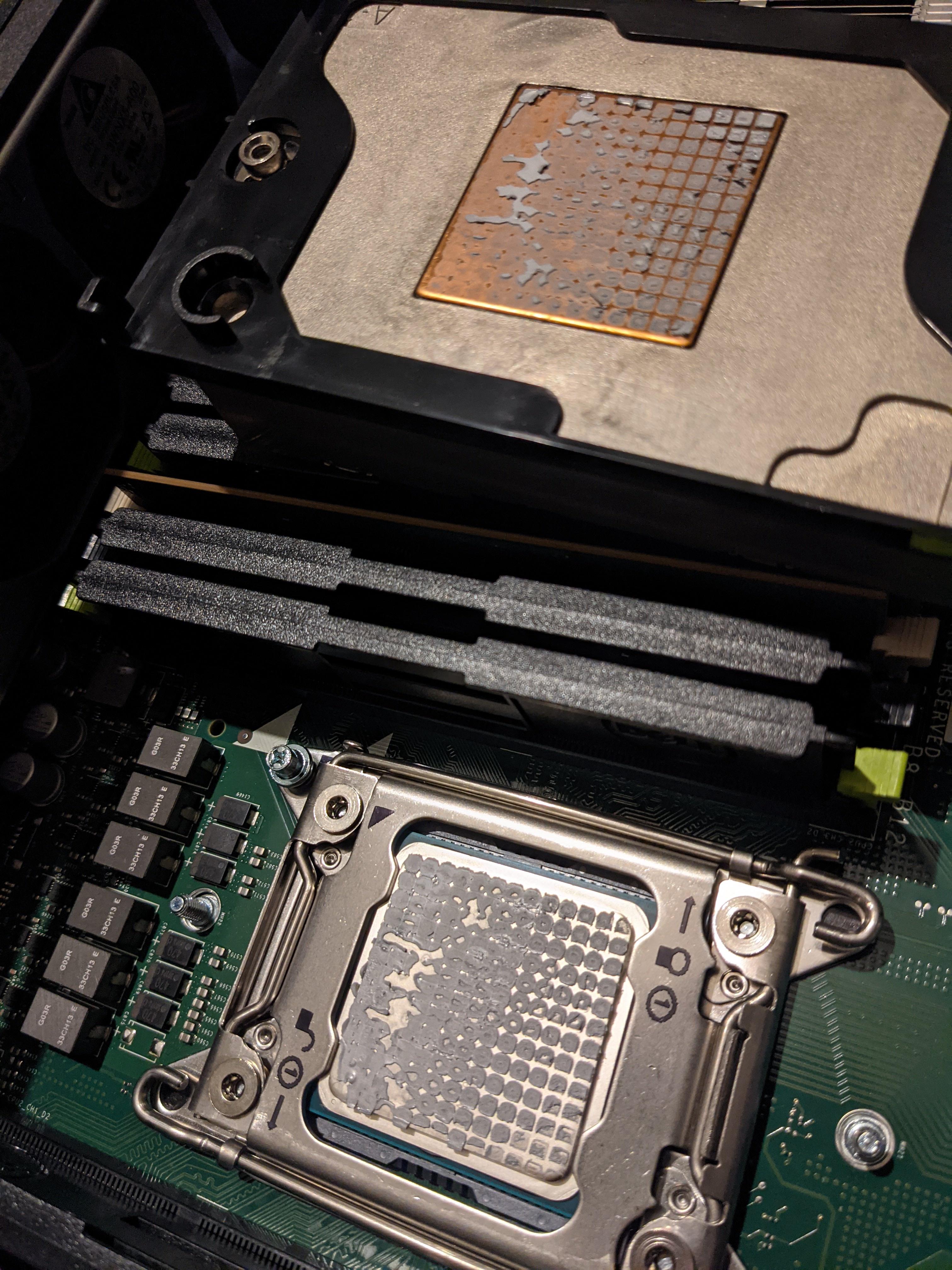
It was only a 4c4t ivy, but with that thickness, I'd imagine something high core count would really cook.
cerulean wadi
Looks like play doh. Paste on my 3550 (ivy) was probably 5+ yrs old & wasn't dried out yet.
 scenic solar
I'm never sure where to ask for RGB devices/programs
Basically I installed openRGB because I wanted to power all my RGBs with only one software (since now I have a led strip non Corsair compatible) the only problem with openRGB is the Corsair vengeance rgb pro ram, at startup only 2dimm lights up (and its pink for some reason). But as soon as the program kicks in at startup they both change back to RGB rainbow.... Is there a solution for this?
When I used iCue the system started with both dimms turned of and it was ok... I'd like to have the same effect ...
 vernal cosmos
scenic solar
I'm never sure where to ask for RGB devices/programs
Basically I installed openR...
vernal cosmos
scenic solar
I'm never sure where to ask for RGB devices/programs
Basically I installed openR...
Idk what u want them to do exactly
scenic solar
I want them to either be off at startup or show RGB, I don't want dimm1 to be off and dimm2 to be pink
vernal cosmos
Ok but like
How many times u restarting in a day and how long does it take every time
scenic solar
You meant the pc?
vernal cosmos
Yes
scenic solar
I usually turn on my pc 2-3 times a day and it takes ~40sec
vernal cosmos
Well maybe you should switch to a better ssd and keep pc on instead since openrgb only loads in after windows
Ur harming the pc more with repeated reboots than by just keeping it on the entire day
scenic solar
I guess my pc is slow because of all the programs it has (1.5tb) and btw it's a SATA SSD, never got a m.2 one
scenic solar
vernal cosmos
Ur harming the pc more with repeated reboots than by just keeping it on the enti...
Oh
Didn't know
Why?
vernal cosmos
Startup is a very intensive process
 hard leaf
the more dangerous time for any failure is at the startup
not only on pc, but on any electrical appliance
vernal cosmos
hard leaf
the more dangerous time for any failure is at the startup
Ehhhh
With a pc you never really power off fully
scenic solar
Is it better to use sleep mode?
hard leaf
yes
vernal cosmos
Since psu always has power and it keeps supplying to all components
scenic solar
Ok ty
https://github.com/integralfx/MemTestHelper/blob/oc-guide/DDR4 OC Guide.md
Based on this ram oc guide which softwares do you guys recommend? There are many but I'd like to know which one is overall the best (AMD system)

GitHub
C# WPF to automate HCI MemTest. Contribute to integralfx/MemTestHelper development by creating an account on GitHub.
 wintry girder
Mods i think we have a bot here
scenic solar
yep i just told forks
wintry girder
@mild jackal
scenic solar
ban
wintry girder
He spammed all the channels 😐
scenic solar
yep
scenic solar
what gpu are you going to use
wintry girder
6600
wintry girder
This one good? https://pcpartpicker.com/product/TG9tt6/asrock-b550m-phantom-gaming-4-micro-atx-am4-motherboard-b550m-phantom-gaming-4

ASRock B550M Phantom Gaming 4 Micro ATX AM4 Motherboard (B550M Phantom Gaming 4)
wintry girder
93
wintry girder
Where did u get it from?
wintry girder
Oh
wintry girder
wintry girder
This one good? https://pcpartpicker.com/product/TG9tt6/asrock-b550m-phantom-gami...
So in that case would this one be fine
scenic solar
for that price is ok....ig..?
autumn frigate
@wintry girder a gpu in pcie 4.0 isn’t that much of a benefit from pcie 3.0
scenic solar
you can use pcie 4.0 card in any other slot with different pcie vesions and it'll work fine, it may benefit a bit more from 4.0 ofc
https://youtu.be/SvBovtT4Vf4 almost unnoticeable difference

Hello people!
Today we have a video that was proposed by a channel member and since i thought it would be a good idea, well, here it is! All generations of PCIe available in mainstream market tested in several games :D
INTRO ------------------------------- 00:00
What is PCIexpress ---------- 01:47
AC: Odyssey ---------------------- 04:15
M...
burnt spear
wintry girder
For a 5 3600
I wouldnt buy it unless you're getting it used
wintry girder
Its the cheapest best option tho
Because the 12400f is like 180 iirc
And the 5 3600 is 150
wintry girder
Yeah and im really really trying to save money
autumn frigate
It’s gonna be better in the long run
wintry girder
Its fine for now, in a few years when im better off financially im going to upgrade
I just desperately need a replacement for my current laptop
scenic solar
just wait some time, mke up some money and go for 12th gen 
cursive epoch
12400f is about 164 rn
 bleh
cursive epoch
bleh
cursive epoch
this is the us i presume
 cursive epoch
hm okay
burnt spear
wintry girder
And the 5 3600 is 150
10400f is same price new
And technichally slightly better
Actually
10400f is $120
PC Builder - Intel Core i5-10400F
cursive epoch
eh not worth over 10400f
vast meadow
autumn frigate
150
Just get 12100 at that stage for 110~
 earnest rover
Is there such a thing as switching a m.2 lane from sata to nvme or the other way around
cerulean wadi
No, afaik. Although there's a certain slot that can work with m.2 nvme and m.2 sata i think. M.2 b & m key or something.
earnest rover
I see, I had a situation the other day. I had a sata ssd in m.2_1 of my mobo got a new ssd a nvme
New go's into m.2_1 while old go's into m.2_2
It accepts the installation of windows (new ssd)
But after a hard or soft restart it gave (no boot image error)
How ever the drive won't show up in bois boot menu but shows in explore even have steam games installed on it
Was wondering if u have to let bios know its an nvme form factor and not sata
cerulean wadi
I'm not sure.
 earnest rover
Guess my mobo brain just ain't like pcie
cerulean wadi
Which mobo. Generally m.2 is pcie only, at least most mobos in the last few years.
grizzled bloom
From what I've seen the top m.2 slot is often PCIe only and the others can be either on modern boards
earnest rover
Which is exactly how the sides are plugged in
But bios will only pick up sata ssd as bootable for windows
 grizzled bloom
No
 dull flint
no no the diagram
earnest rover
Yeah I read through the official notes but idk it's strange
dull flint
I had no idea how or what u.2 was lol
grizzled bloom
Oh above yeah
earnest rover
But what's m key type?
grizzled bloom
Lol I need to scroll up sometimes

 earnest rover
I saw something about keys in bios but didn't bother to click anything I may regret
grizzled bloom
If there's an option for key modes in bios try changing the SATA to B+M key
earnest rover
I'll try tomorrow (my time zone).
I'll mention you if that's OK when I'm done
Couldn't resists

That's it nun else
grizzled bloom
Ah secure boot keys, yeah I'd just disable secure boot if windows is installed already tbh
Doesn't have anything to do with drives except what's allowed to boot
 grizzled bloom
Just ignore it, not important unless you do Linux anyway
earnest rover
What if....a big if the ssd just needs an update?
grizzled bloom
That's a possibility
earnest rover
Downloading an app for the ssd
It's a wd s570 nvme
Yeah it need an update gonna see what bios says now

Nada lol
Well I'll just keep it as a game drive.
grizzled bloom
Weird
scenic solar
My MSI motherboard has a jrainbow connector and I wanted to know if it is compatible with the connector in the photo (despite it is 4pin and the motherboard connector is 3, I know what I'm doing)

Is the name the only thing that changes? Should it be compatible with all the other 3pin RGB connectors you find for fans/led strips?
eternal helm
If that connector is for 5v argb, it'll work fine. But if it's 12v RGB, look for jrgb instead
scenic solar
eternal helm
If that connector is for 5v argb, it'll work fine. But if it's 12v RGB, look for...
I mean the dimensions, I want to know if the connector in the photo can fit in the jrainbow one (3pin)
Then I'll connect the wires they way I need them to make my 5v led strip work
Oh nvm I just found out I had a 3pin RGB to 4pin Corsair fan connctor
I'll cut that and solder it to the rest of the led strip
scenic solar
scenic solar
I want them to either be off at startup or show RGB, I don't want dimm1 to be of...
@vernal cosmos sleep mode, ram stays on.... OpenRGB
Maybe I should control ram with Corsair and fans with openRGB
 scenic solar
Solved:
OpenRGB doesn't let you set hardware lighting (the one for when the hardware is not open) and ram decides to stay lit in sleep mode and act strage at startup,
Corsair iCue however does allow you to set hardware lighting. I'll use iCue for fans and ram. With ram hardware lighting set to off (or both dimms will stay on in sleep mode) and use openRGB for other things like led strip and MB RGB
 kindred rover
My processor has TDP of 65W... says in the specs online... now i was using adobe lightroom classic... the tdp increased to 84W.. is it bad??? will it affect my processor??? i3 10105F
grizzled bloom
scenic solar
Solved:
OpenRGB doesn't let you set hardware lighting (the one for when the hard...
Alternative solution is to disable sleep states in bios until you find the one letting it stay on, or enable EuP which reduces power draw when off by doing things like turning off USB ports and lights.
grizzled bloom
kindred rover
My processor has TDP of 65W... says in the specs online... now i was using adobe...
Nah Intel is just really bad at measuring tdp. Power isn't even part of their formula.
scenic solar
grizzled bloom
Nah Intel is just really bad at measuring tdp. Power isn't even part of their fo...
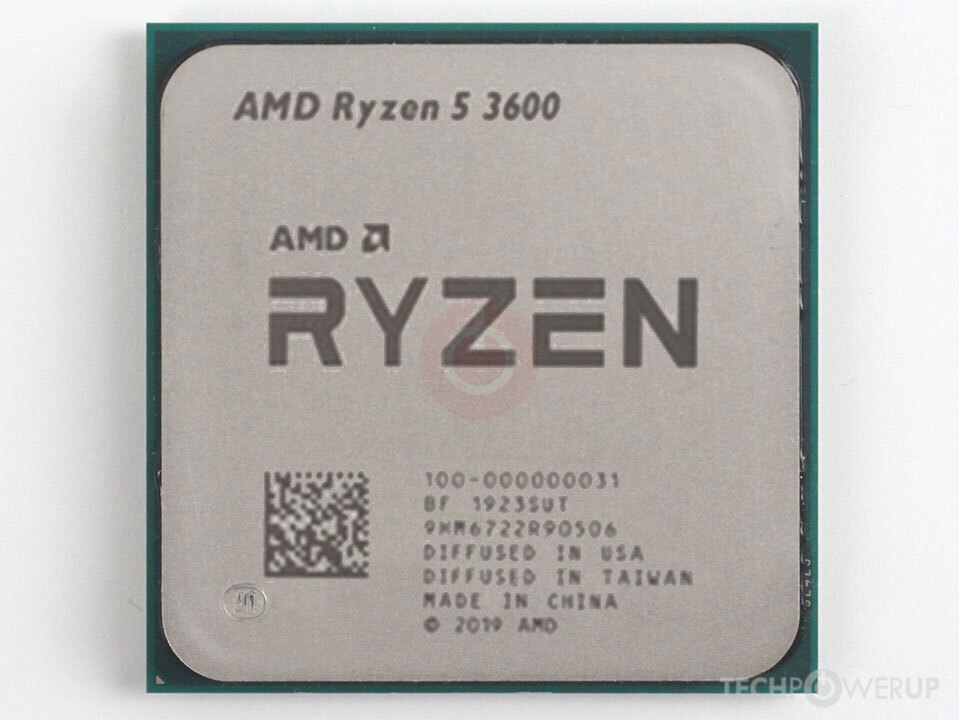
Do you know R5 3600x tdp? I just wanted to know if it is either a 65w or 95w because mine once got to 100w
grizzled bloom
65W
grizzled bloom
 kindred rover
grizzled bloom
Nah Intel is just really bad at measuring tdp. Power isn't even part of their fo...
kindred rover
grizzled bloom
Nah Intel is just really bad at measuring tdp. Power isn't even part of their fo...
So i have nothing to worry abt??
scenic solar
So basically .2ghz more makes the 3600x a 95w CPU
Smh
grizzled bloom
kindred rover
So i have nothing to worry abt??
Nope that's totally normal Intel behavior. Intel will even feed more power into the CPU for a short "boost" duration referred to as Tau period.
kindred rover
grizzled bloom
Nope that's totally normal Intel behavior. Intel will even feed more power into ...
ok thanks for the help..
 vast meadow
grizzled bloom
Nah Intel is just really bad at measuring tdp. Power isn't even part of their fo...
vast meadow
grizzled bloom
Nah Intel is just really bad at measuring tdp. Power isn't even part of their fo...
Actually intels has power as part of tdp it's amd that don't have power in tdp even tho amds is closer 
scenic solar
grizzled bloom
Alternative solution is to disable sleep states in bios until you find the one l...
My "RGB" mouse stays on in sleep mode
But does it completely remove power or just reduce it a lot?
vast meadow
You should be able to turn off the rgb when pc sleeps in your rgb software btw
grizzled bloom
vast meadow
Actually intels has power as part of tdp it's amd that don't have power in tdp e...
Ah that's right. Well if you're looking at hwinfo max power draw it'll still be off spec because of Tau
grizzled bloom
scenic solar
My "RGB" mouse stays on in sleep mode
But does it completely remove power or jus...
EuP turns off the USB ports when the PC is in certain sleep modes, such as the one used when off
scenic solar
vast meadow
You should be able to turn off the rgb when pc sleeps in your rgb software btw
Icue does let me set hardware lighting (for when software is not open) but openRGB is just different
vast meadow
Ic*e? 
 oh god I didn't censor
  scenic solar
grizzled bloom
EuP turns off the USB ports when the PC is in certain sleep modes, such as the o...
scenic solar
grizzled bloom
EuP turns off the USB ports when the PC is in certain sleep modes, such as the o...
Do you know where to find the setting in MSI bios?
Click bios 5
Found it Ig
Is it ErP? Same thing?
grizzled bloom
Yes
scenic solar
Nothing else I should change?
grizzled bloom
Shouldn't be anything no
scenic solar
grizzled bloom
Yes
I just activated it, tried it with ram hardware lighting on and ram stays on (now it also cycles through RGB ) 
And mouse lights are still on...
The mouse is not a problem
But ErP didn't do anything
Actually it made ram RGBs keep going through Corsair RGB effects
scenic solar
But I've solved the ram problem just by setting hardware lighting to off in iCue
scenic solar
scenic solar
Solved:
OpenRGB doesn't let you set hardware lighting (the one for when the hard...
I've solved it one hour ago^
Maybe my motherboard is built different... Btw it's a MSI mpg b550 gaming plus
Basically this is what happens in my system with iCue
Hardware lighting on → ram lights up at startup with the choose effect and ram stays on in sleep mode with the same effect
Hardware lighting off → ram doesn't light up until iCue kicks in and stays off when in sleep mode
cerulean wadi
@scenic solar top left part of this pic. Just confirm what you're trying to use are the same voltage.
 cerulean wadi
scenic solar
Do you know R5 3600x tdp? I just wanted to know if it is either a 65w or 95w bec...
cerulean wadi
scenic solar
Do you know R5 3600x tdp? I just wanted to know if it is either a 65w or 95w bec...
Idk about amd but Intel tdp is at base clock, which people don't understand. (Obviously when boosted tdp jumps up alot).
scenic solar
Yes, I know what I'm doing, output 5v, led 5v
Btw I found a 3 pin I had bought from AliExpress, at first I thought it was a male connector but it only had a male-male 3pin adapter at the end
Just removed it and now it is a normal 3pin female (RGB)
 fading hedge
Does anyone know why my G.Skill Ripjaws V 2x8GB RAM, which was made back in Jan 2021, has temperature sensors, but the sticks I just bought from Amazon don't?
Tried contacting G Skill and Newegg, but they aren't any help
grizzled bloom
There's not really any rhyme or reason to temp sensors. My kit doesn't have any and it's one that would really benefit from them...
frosty depot
Is the 12600k better than a 9700?? I feel like it is.
grizzled bloom
By a lot yes
frosty depot
then canirunit is dumb lol
grizzled bloom
Yes it is
frosty depot
it's telling me I should "upgrade" to a 8700 to play certain games lol
grizzled bloom
They barely ever update that, it hasn't been good in years
cerulean wadi
8c8t vs 6c12t, but I definitely wouldn't have made that swap. (8th to 9th, or vice versa)
grizzled bloom
It probably doesn't know what to do with the e-cores when it scans you
frosty depot
That makes sense
 quartz zinc
Yo im currently using a 240mm aio for my 12700k and only managed to push it to 5.1ghz without crashing. Should upgrading to a 360mm aio be able to push it to 5.2ghz or nah
hard leaf
not a big change by swapping 240 to 360
grizzled bloom
A better upgrade would probably be one of the contact frames for 12th gen to improve cooler contact
quartz zinc
M
hard leaf
at your point i should spend more on better vrms and the contact frame
quartz zinc
Has a direct die frame came out for lga 1700 yet?
hard leaf
yeah
grizzled bloom
The thermal grizzly one comes with a lapping tool too
grizzled bloom
Yeah like 6+ degrees
 haughty ore
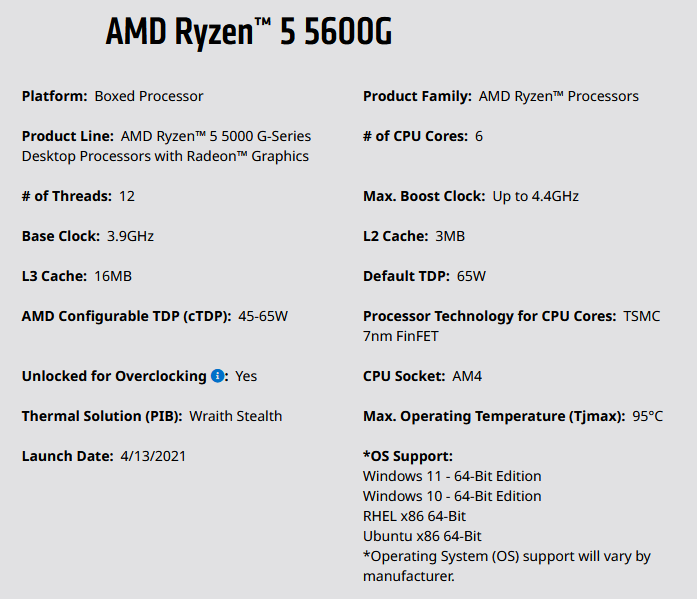
Anyone know the amount of L1/L2/L3 cache of the amd ryzen 5 5600g?
burnt spear
any reason why?
if youre wondering as to performance, its cpu is similar to a 3600 or 10400
haughty ore
just wanted tk
 midnight pollen

 haughty ore
midnight pollen
https://i.imgur.com/B4pvTAM.png
haughty ore
midnight pollen
https://i.imgur.com/B4pvTAM.png
which one would be the l1 cache ifyk?
midnight pollen
its 64k l1 cache
hard leaf
this question is very awkward.... any noticeable/stability difference between a 16-20-20-40 and a 16-18-18-38 memory modules? just stock xmp and no manual tuning
the answers on google are kinda... strange.... best to ask that to you guys
grizzled bloom
Noticeable? Not really
The 16-18-18 kit will probably overclock better but there might be a couple % difference at xmp
hard leaf
so effectively for a regular joe ill just take the cheaper one between those right? like set xmp on and forget
difference between those 2 are 5 bucks anyway, one is a vulcan and the other a ripjaw, both 3200
grizzled bloom
Pretty much yeah, no practical real world difference
hard leaf
gotcha
grizzled bloom
Might be nice later to have the overclocking option though
hard leaf
when you put it that way... yeah, like 89 vs 94? just 2 days without lunch. i can make it
vast meadow
grizzled bloom
The thermal grizzly one comes with a lapping tool too
It's an extra purchase afaik
hard leaf
buying from the evga website they give you a free powerlink for the purchase of a psu
very nice of them
and a pcpartpicker discount 😮
cerulean wadi
Powerlink is useless w/ most non-evga gpus btw.
hard leaf
well no power link for me
already filed a dispute on paypal

yet evga charged my account already... what a company
oh man
cerulean wadi
Evga service ok, evga.com mediocre. Often times they have a sale Amazon would match it within a week. Plus returns are... not the easiest.
hard leaf
yeah, ill have to wait
at least the amount was 101.10usd, and paypal side with the little man most of the time, i have all the screenshots anyway 🙂
 desert lion
whats the best 200-250 dollar Z590 motherboard?
hard leaf
why you want to spend that much on a z590? shouldnt be a better upgrade to jump to 12th gen instead?
vast meadow
desert lion
whats the best 200-250 dollar Z590 motherboard?
There's 0 point
Big waste of money
desert lion
vast meadow
There's 0 point
i didnt ask for you point alr
i have 11th gen currently and dont want to switch as of now so i ask again whats the best z590 motherboard in the 200-250 dollar range
desert lion
hard leaf
why you want to spend that much on a z590? shouldnt be a better upgrade to jump ...
no because for the stuff I do a 12th gen jump would not be worth it
vast meadow
desert lion
i have 11th gen currently and dont want to switch as of now so i ask again whats...
Still no point use your current motherboard
desert lion
vast meadow
Still no point use your current motherboard
their is
eternal helm
$250 gets you a 12400f and b660 tbf. unless you have a 11900k or overclock the hell out of a 11600k/700k, the 12400 would still perform better in games
haughty ore
what dimms do ppl get with the b550m
burnt spear
haughty ore
what dimms do ppl get with the b550m
Depends on how much you want to spend
vernal cosmos
burnt spear
Depends on how much you want to spend
2$ find me ddr4
haughty ore
burnt spear
Depends on how much you want to spend
uhh like 100-120
burnt spear
Do you already have your cpu and or mobo?
burnt spear
This will be fine, let me take a look for 3600c16 ram though https://pcpartpicker.com/product/B8QcCJ/silicon-power-gaming-32-gb-2-x-16-gb-ddr4-3200-cl16-memory-sp032gxlzu320bdaj7

Silicon Power GAMING 32 GB (2 x 16 GB) DDR4-3200 CL16 Memory (SP032GXLZU320BDAJ7)
https://pcpartpicker.com/product/zcH8TW/gskill-ripjaws-v-32-gb-2-x-16-gb-ddr4-3600-memory-f4-3600c16d-32gvkc if you want to spend more

G.Skill Ripjaws V 32 GB (2 x 16 GB) DDR4-3600 CL16 Memory (F4-3600C16D-32GVKC)
grizzled bloom
Ooh my RMA was finalized today and I got a return tracking number. It was in "repairing" status for no time at all. I guess they looked at my problem description and figured it's not worth fixing? At any rate I hopefully have a motherboard that can do xmp again soon.
By no time at all I mean literally it went from "repairing" to "shipped" in the same minute lol
 long geyser
Could just be that no one switched it to "repairing" when it was being repaired. Prolly cant directly goto "waiting for shipment" to "shipping item", so they did "wait for shipment", "repairing", "shipping item".
 ashen pulsar
Any decent mobo for AM4 that isnt screaming "WOOO LED GAMER!"
long geyser
I read that as "Wood LED Gamer"
burnt spear
ashen pulsar
Any decent mobo for AM4 that isnt screaming "WOOO LED GAMER!"
do you already own an am4 cpu?
ashen pulsar
yes
burnt spear
how much would you like to spend?
ashen pulsar
ryzen 9 5900x or something
long geyser
Also what country
burnt spear
hay i know nothing about rgb am4 mobos
ashen pulsar
it seems like the stuff that appears decent has a ton of leds when i look closer
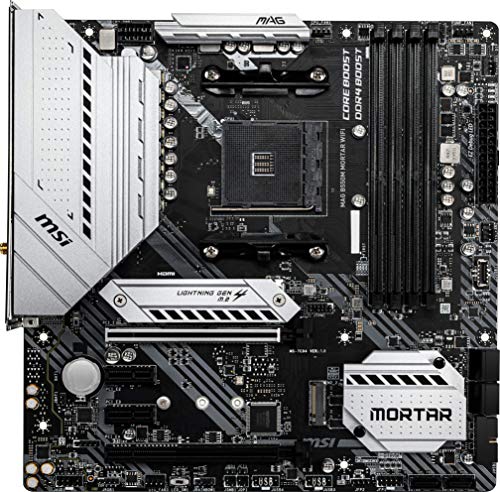
MSI MAG B550M MORTAR WIFI Micro ATX AM4 Motherboard (MAG B550M MORTAR WIFI)
i found this but pcpartpicker doesnt strike me as the ideal place to get a decent idea of a motherboard
the idea is that I would be able to expand if i wanted to in the future
burnt spear
you mean as in upgrade the cpu later?
ashen pulsar
obviously if i really needed to i could just get a different mobo
nah more like more RAM
or SSDs
though i have a 2TB m.2 so i think i will be good on storage for a long time
I have barely used up 250GB
burnt spear
if you want to have multiple nvmes, youll likely want an x570 (3 nvmes+)
but you can always use sata drives for mass storage, its not like sata drives are bad
ashen pulsar
yeah
burnt spear
b550s tend to have better vrms than x570s at similar price ranges
ashen pulsar
i may not use this computer for the majority of my storage anyway
i have a secondary unfinished computer i found in the trash that i could use as a server of sorts
so my focus is more on the other features a mobo can offer
long geyser
ashen pulsar
it seems like the stuff that *appears* decent has a ton of leds when i look clos...
I dont think that board has much of any LEDs, cant really find anything showing it has them online. Either way, all non-terrible boards allow disabling LEDs in BIOS
burnt spear
so nice io and vrms mainly
burnt spear
https://pcpartpicker.com/product/3Mxbt6/msi-mag-b550-tomahawk-atx-am4-motherboard-mag-b550-tomahawk tomahawk is good afaik

MSI MAG B550 TOMAHAWK ATX AM4 Motherboard (MAG B550 TOMAHAWK)
not much rgb tho
ashen pulsar
yeah im good with less rgb
this stuff will probably be hidden under a panel of some sort
hmmm lacks wifi but that isnt an issue
just means i gotta figure out how to add that
(I live in a place without ethernet access)
burnt spear
pcie wifi cards as well as external wifi cards are a thing, but wifi isnt too hard to fit in
i just dont know am4 mobos enough to recommend a good one
so id wait for someone else, maybe when pato wakes up tmrw
ashen pulsar
yeah
long geyser
If you dont like the look of large AIC and want M2E, can do Velocita
https://pcpartpicker.com/product/ZPDkcf/asrock-b550-pg-velocita-atx-am4-motherboard-b550-pg-velocita
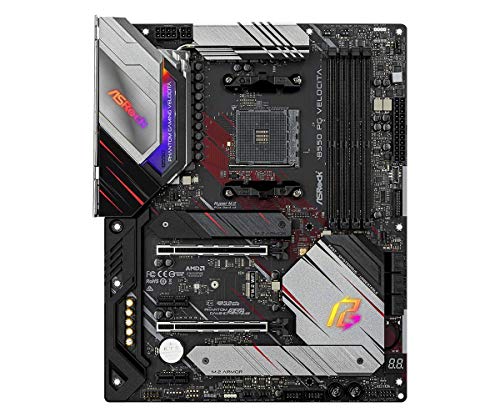
ASRock B550 PG Velocita ATX AM4 Motherboard (B550 PG Velocita)
Buying good M2E card and antennas should be like $20 - $25
ashen pulsar
yeah nothing i cant handle
grizzled bloom
long geyser
Could just be that no one switched it to "repairing" when it was being repaired....
According to USPS it arrived at the location at 12:30 pm local time on the 19th

That's some turn around time
long geyser
Wonder if they just did board replacement and will repair the board at a later date
ashen pulsar
long geyser
If you dont like the look of large AIC and want M2E, can do Velocita
https://pcp...
anyways thanks, going to save these so i dont lose them later
grizzled bloom
That's what I was thinking, they saw my description of the problem, it wouldn't load any xmp profiles correctly on 2 different sets of memory, and decided right away it's just a replacement.
I doubt they have X470 boards on hand at the local service center they had me send it to, so I might get upgraded to a X570
long geyser
inb4 you get a x370 "upgrade"