#overclocking
1 messages · Page 41 of 1
 sterile flame
sterile flame
sterile flame
i wasnt about to bother reading upwards tbh
sorry
Didn't mean it that way, rather that I agree with you
 elfin lotus
Give or take how many years till 10ghz?
 trim fern
with or without liquid nitrogen?
sterile flame
42

 elfin mesa
Anyo euse the inwin sirius loop fans
 toxic mountain
@sterile flame - To answer your question from yesterday, I'm mainly going to be VR gaming, so, from my research, Zen2 loves a fast, low latency RAM config (but is way more tolerant of slower higher latency than previous AMD).
That's kind of what I'm chasing. I'd love 16gb x 2, but those seem a bit slower, so I suppose I'll do 8gb x 2 for now.
 true plinth
Can somebody help me overclock my friend’s 5700 xt red devil? It’s on an ASRock X570 Extreme4 with a 850w PSU
Also 3600 with NH-U12S in case that’s useful
Actually can somebody help me oc that too? Ok it’s kind of pointless but I figured it’s worth a shot
sterile flame
How to ask for help properly on IRC so that you get responses faster. Also relevant to forums and mailing lists
 dry aspen
Is there anyone here that has time to help me OC my 9900k ?
When I run AI it always under clocks it. 😦
When I run it at 5.1 it will reset, and the temps is always below 74
Here is a screen grab when it froze
sterile flame
Before you do anything, I'd reset with "restore optimized defaults" asap, leaving vccio and vccsa (IMC and system agent) voltage on auto sets them far too high when memory clock > 4000MHz
 iron wasp
I would suggest you do manual overclocking through your bios rather than trying to use in windows software
it is also possible that your CPU simply is bad silicone lottery and it will not overclock to 5.1 stable
dry aspen
I cant seem to get it stable even with defaults. 😦
sterile flame
Haha I was about to ping you since that vccsa/vccio thing can degrade the chip somewhat fast
dry aspen
I cant get it stable with an all core 5ghz.
sterile flame
Got a full parts list? If not, do that reset to optimized defaults thing in bios, sign in to windows, run a userbenchmark, and post the link
dry aspen
I think the wakest link is my RAM .
sterile flame
Well that's normal, 9900k?
dry aspen
9900K
 short otter
You also may just have bad silicon lottery luck.
dry aspen
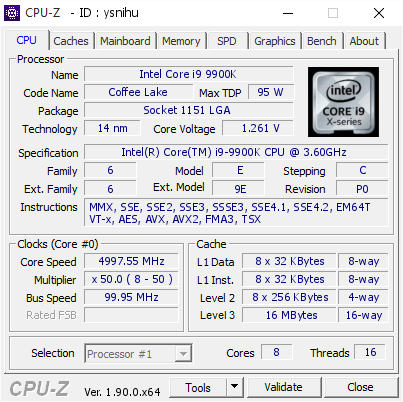
[ysnihu] Validated Dump by DESKTOP-8QJ1PHC (2019-09-24 04:58:59) - MB: Asus ROG MAXIMUS XI HERO (WI-FI) - RAM: 16384 MB
I had to underclock my RAM.. to 2666 - but its 4400
G.Skill 8192 MB (DDR4-2137) - XMP 2.0 - P/N: F4-4400C19-8GTZSW <-- is not on the QVL
sterile flame
Ok, ya, that's extremely hot, somethingis very wrong with your cooler
Ignore qvl tbh
dry aspen
wont boot at 4400 😦
sterile flame
It'll be easiest to help if you can send a full parts list or run a userbench
I'm not surprised it won't
dry aspen
its underload -- YUZU emu when I took that.
sterile flame
Honestly, you shouldn't try to make it
sterile flame
Yes, and 93F is hot no matter the vcore, but at 1.261V - if that's accurate, your cooler has a problem - or you live in the desert
Also you have 2080 ti's - I assume in SLI, but different models, one is a non-a chip
iron wasp
did you use rtv when you reinstalled your headspreader?
sterile flame
Well, I have a ton of recommendations here, the more info you can provide, the more useful we'll be
iron wasp
or do you mean LM on top of the cpu?
sterile flame
Probably on top
iron wasp
it's possible that the AIO isn't making proper contact with LM
sterile flame
Yes
dry aspen
Yes ON top.
iron wasp
also what AIO is it?
sterile flame
That's at the top of my "ton" haha
iron wasp
if it's got an aluminum block, you could have some serious problems
sterile flame
They usually don't , but Conductonaut will slowly eat copper anyway
Not really eat - but it's just not worth it to use there
iron wasp
have you pulled it back off to take a look at how well it contacts the LM?
sterile flame
Let's move this to build chat
dry aspen
ok.
sterile flame
iron wasp
I've got a copper ihs installed on top of my cpu with LM in between >.>
sterile flame
Oh damn, I didn't know that haha.
Post your specs, I wanna see. That's on topic surely haha
iron wasp
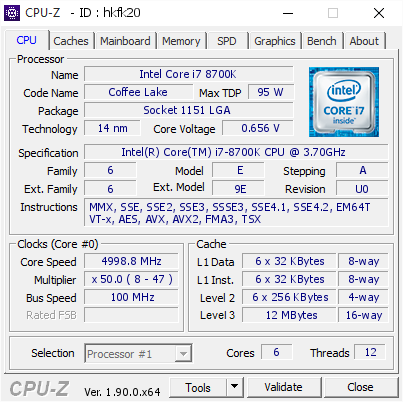
[hkfk20] Validated Dump by Anonymous (2019-09-24 05:10:49) - MB: Asus ROG MAXIMUS X HERO (WI-FI AC) - RAM: 32768 MB
I just did a custom cpu water loop last weekend, the overclock I have is from my AiO
haven't tried to go higher yet, probably will this weekend
sterile flame
Ddo yo stay on the old bios for more performanec?
iron wasp
no, I just hate updating bios, always freaks me out
funny thing I've been getting more and more brave with hardware tinkering, yet I still don't like bios updates
sterile flame
I didn't flash a bios until some LSI raid card in 2017
Do it pretty often now, less scary with dualbios, bios flashback etc.
Or just use an SPI flash programmer haha
iron wasp
I might do a bios update, I was dumb enough to try updating asus aura, and now it straight up doesn't detect any of my hardware
sterile flame
I think I heard about other having that problem. Bios update, and the management engine update that likely comes with it ismainly for security patches and memory compatibility I'd guess. I asked because many avoid said updates to retain performance.
elfin lotus
My bois is overheating uh
Gose up to 90c on the cpu but in the system it's perfectly fine.
sterile flame
After, post in #building-and-recc-chat and @ me - if you want haha
sterile flame
Ah, power it of and un-plug power then
elfin lotus
Tried
sterile flame
I meant to prevent possible further damage.
elfin lotus
It's making much more clicking
It's not turning off.
@sterile flame I have warranty still if that matters
I tried installing another modified BIOS
 neon rapids
thats like a lot of text
 sand halo
anyone here use aorus z390 mobos?
sterile flame
No, that's a good screenshot - at least, that's what i wish everyone did , bettre yet, get sharex, post an actual screenshot
It's a wall of text sure, but i fsomething is very off, you can tell in seconds, and check all of it in not that many more seconds if you know what to look for
sterile flame
Yes. 85C core max on 200W load is good , it shows your cooler is operating very well. 1.35V vcore while under 200W load is high but perfectly fine and considered safe by many if that's what you need to hit 5.0 and stable at those types of loads, but not dangerous as long as you keep LLC on turbo + manual voltage etc, once again there are multiple "right" ways to setup an OC, many more wrong ones
sterile flame
Cinebench is a good test - but like all stress test tools or benchmarks - you have to understand how and when they are useful and how what conclusions to draw from the results.
Cinebench is a relatively mild load. Personally, I considre timespy a decent test for gaming stable.
Why is vccsa 1.3 for 3200mhz c14
sand halo
@sterile flame I haven't touched it
sterile flame
If you leave XMP on at 3200mhz, it's fine - but if you ever increase memory clock , especially >= 4000MHz, never ever use auto. Set to 1.2 -1.3 ish , can do more, but you have to be careful.
sterile flame
That's one of the reasons why I don't want to get ryzen, but then again I guess you could just do without XMP?
sterile flame
Because the IF can't clock past 1800, or at most 1900MHz on most chips, that gives a max DDR4 speed of 3600/3800 MT/s anyway. The Ryzen equivalent of vccio/vccsa is kinda vcc soc, which shouldn't exceed 1.1V I think it's silly to buy XMP rated kits >4000MHz most of the time anyway unless you want highly binned A2 b-die.
sand halo
sterile flame
Anyone else get the black screen after boot problem on 1903 Enterprise LTSC?
sand halo
@sterile flame and do you have to reboot it to get to the login screen?
sterile flame
I just tried different DP ports, then the HDMI and that worked, ended up benching the 3700x / x570 system while I screwed with LTSC. That chip is boring - it'll make a perfect dialy driver haha.
sand halo
@sterile flame I've been having issues kinda like that for a while. Black screen or freeze on bootup, then reboot and login works fine. I tried multiple ports and didn't really do anything.
sterile flame
What's odd is that you're on AMD drivers - and likely 1903 18362, I had these problems on 17736 1903 Enterprise LTSC and Nvidia 's 436.30 - strange. Maybe it's due to a quality update.
sand halo
@sterile flame I'm using 1903, not sure about the specifics. Windows 10 pro.
sterile flame
my laptop w/out overclocking has a blackscreen for ~1 minute between bootup logo and login screen
sand halo
sterile flame
👌
iron wasp
dang is the 5700xt really that much worse than a 1080ti?
you've got over 2k points on top of my CPU score with 8700k
1500 less gpu score
somehow overall mine is 900 higher
sterile flame
1080 ti is a beast - both will vary a ton due to OC settings/cooling though.
iron wasp
my 1080ti doesn't like to overclock, but it also doesn't thermal because of the aio on it
sterile flame
Pascal/Turing OC kinda works automatically to some extent. On Turing - power limit set via vbios is more of a limit I think.
iron wasp
so... I replaced the fan on my GPU's rad to a noctua one, and I had to plug it into the motherboard because the GPU only supported a 3 prong cable
and now my GPU started boosting higher than it did before
I wonder if it was a power issue because it uses a standard 6+8 pin connectors, while also running an AiO pump and fan
sterile flame
boosting? as in fan spinning? or?
iron wasp
no the clock
I didn't change any settings but it's now running at 2050 while I'm in game, consistently
sterile flame
But was the fan cooling more effectively?
iron wasp
before it maxed at 2025, and would drop below 2k most of the time
yeah I never had heat issues
I mostly replaced it because of noise
sterile flame
What card?
iron wasp
evga 1080ti sc2 hybrid
sterile flame
If it's a nvidia - cooler = higher clocks on pascal / Turing - it's not huge - but noticeable to those who have an attention to detail - you apparently haha
iron wasp
I just spent a bunch of time trying to overclock it recently
sterile flame
Below 40C core - big difference. I can run 8k superposition at 38C , 2200MHz core, 2100 mem
sterile flame
Nice, haha I was just talking about how I think it'd be fun to see more people engage in OC'ing , benching etc in this channel
iron wasp
I've been going much deeper into it this summer
I'm in a pretty stable financial situation, so I stopped being scared to try new things
started with delidding my 8700k
sterile flame
It's a hobby in itself to many - but often produces valuable information to many more - the non nerds who just want to game or photoshop etc
iron wasp
then custom water loop
sterile flame
You sounds like me
iron wasp
adding gpu to the loop is on hold though, due to upgrades not being worth it atm
and there being no custom blocks for evga SC2 cards
sterile flame
Same actually - looking for a hydrocopper ftw3, definitely not going EK (preference) thouhght about bykski - but eh
iron wasp
there's plenty of options for ftw3
sterile flame
I need flexibility to run either/both glycols an maybe some ethanol/methanol
iron wasp
and literally nothing for SC2
sterile flame
Really? Isn't sc2 reference cooler?
iron wasp
some sources claim that I can fit a reference block, but info is mixed
I can't remember the details, but there's a very minor difference between SC2 and reference that interferes with blocks
sterile flame
Might need to re-TIM/pad the memory/maybe vrm but probs not, best to keep powerstage heat off the plate in most cases
Got samsung or micron?
iron wasp
I'm not sure, my ram knowledge is very limited
I have gskill trident z rgb 3200 mhz kit
I had corsair dom plats, but there were issues with them
with corsair I bought the two kits at separate times, and it turns out that they don't like to play nice together, even though they're the same part number
but a different version number
so as soon as I started to overclock, started to get memory BSODs
 raw hamlet
 manic helm
But can it beat this https://www.3dmark.com/spy/8198003

3DMark.com
AMD Ryzen 5 2600, NVIDIA GeForce GT 620 x 1, 16384 MB, 64-bit Windows 10}
iron wasp
Updated my bios, now I remember why I haven't done it for a while
It dumped all my overclock settings
iron wasp
guess it's time to push my overclock above 5 ghz
iron wasp
aaaaaaaaand it looks like 5.1 is the highest I can go
iron wasp
8700k
I can "hit" 5.3
but it doesn't pass stress test for more than like 5 min
5.1 seems fine though at 1.35v (1.36-1.37 reported in windows) and all temps maxing at 70C or lower
 dapper hound

sterile flame

sterile flame
i'll be offline for a bit @sterile flame to get some errands done and installing windows (which i never got around to thanks to your discussion 🙃) but i will have to pick your brain a bit later about your 2080ti
sterile flame
Yes - on a CRT:) but no, unless you mean refresh rate - but still - I'm not going to suggest anyone do that - that's a rish they have to understand
 never thought of that
 uneven ermine
yeah
sand halo
Someone actually asked that in this discord I think
sterile flame
But ya- I'm a huge fan of userbench even though it's a "casual" benchmark @sharp herald
sand halo
Idk much about benchmarks but I like the comparisons it has to other users
sterile flame
It's the quickest, most effective troubleshooting tool I can have people run without being too invasive, or asking much IMO.
iron wasp
I have to say though, for real troubleshooting you should be doing stress testing, userbench can pass everything on an unstable machine
trim fern
If you're using a 2080 Ti why are you testing on high and not very high?
 sterile flame
What's dat
trim fern
a server board
manic helm
Just a few opterons
sterile flame
Decided to go with server 2012 R2, Server 2019 datacenter, switching the daily to Enterprise 1903 LTSC, tired of insider's bs.
Also this same install moved from a z390 to x570 board, both stripped to bench at some point, easier to start clean.
manic helm
windows 10 is easy to move between installs
Go into device manager and delete uefi compliant system and acpi compliant system and all the old hardware will disappear. Then use a registry cleaner to get rid of any old entries
sterile flame
Pretty incredible actually how well windows just pulls all the drivers it needs. I've taken a 17763 install from a dual hex core opteron 2431 to a 2500k, to some dell i3 2120 , next to boot from the z390 machine at least. That's definitely getting a hard format.
Ya, Hirens PE or other bootable recovery environments + some gooogling told me what to chop out to make sure I didn't do anything too wreckless.
manic helm
I have moved the install I have on my main pc between 3 different computers about 5 times over the last 2 years
eventually I might have to reinstall
windows update corrupted it a few times but I just recovered from a backup instead of reinstalling
1809 gave me lots of issues
last time I had to reinstall was when I first got my x470 and destroyed a windows install on a nvme drive from bclk overclocking
my intel drive will start to corrupt data around 105mhz
sterile flame
If you went from 1607 to 1709? to 1803 then 1809, then to 1903 - I think that 100% needed a workaround haha.
I saw this poor streamer's first pc build clean install 1609 off the flash drive they bought as the copy of windows itself - against my suggestion to use media creation tool + the free key for win 10 pro I gave them, but eh, oh well.
It'd be less of a big deal if they didn't have a 2080 ti Gaming X trio which needs 1803? at least, and 1809's 17763 redstone 5 build for RTX lol. (IIRC)
manic helm
my retail thumb drive is 1607
but this install started at 1709 and was on fast track until sometime after 1803 then I got out of the fast track
sterile flame
I've been using 960 evo's on pcie x4 NGFF risers to install lol. Disgustingly quick especially if I ignore common sense and run a normal 5.0 all core, 4300c17 OC HT off installing to an optane lol.
manic helm
or fast ring whatever the insider was called
sterile flame
But not that I'm cloning images with clonezilla/macrium etc, - the block level access makes it all fast enough not to mater.
manic helm
the 1809 early builds on the fast ring and the first release had corruption issues and wouldnt boot with my intel nvme
it forced the download twice before they removed the update for people with the issue
I have been fairly happy with 1903 other than the start menu and search bar not working properly
sterile flame
neon rapids
🤔
manic helm
or a leaf blower
sterile flame
This was the very first model - $140 ebay turbo, canola oil - oil, power steering pump from a 2001 impala driven by a power drill with trigger + zip tie. Leaf blower to start, propane fuel. Mainly used a hobart airforce plasma cutter, flux core 120v 15A MIG, and angle grinder.
manic helm
ahh, leaf blower
sterile flame
Well, it's a jet engine, once the leaf blower gets it started, I turn on the propane, hit the igniter and it'll run until it blows up.. about a few hours lol. https://puu.sh/DWjTS.gif
 manic helm
I was just trying to figure out how you got the turbo to spool
sterile flame
Ah ya, leaf blower, later used a 900W outrunner brushless.
Anyway, glad to meet another turbojet enthusiast. Pretty rare haha.
manic helm
thats pretty ingenious using the power steering pump
sterile flame
I basically followed collin furze's design, at least the math parts, this was the first model.
On the 3rd now, using "real" parts.
manic helm
I thought computers was an expensive hobby
sterile flame
$140 turbo, $scrap 1/4" mild steel pipe, hoses (very poor choice for hot, pressurized ... canola... oil) + fittings from menards.
manic helm
I missed the ebay turbo in the picture
sterile flame
3rd turbo I went for a used Holsett from a 6.7 cummins, used, but turbo #2 was basically DOA, bad bearing, + operator error = melted turbine during rapid throttle up haha.
manic helm
The turbo on my old jetta looked like that a few months before it blew apart
24psi and cranking the wastegate closed was too much for it.
trim fern
Old Jetta = best drift car
manic helm
Only because they are horrible and should be crashed into a wall
They look good, but too many electrical issues
iron wasp
How is a fwd jetts best drift car?
 fallow bison
Just buy a 150 dollar ebay turbo
if they hoonagan approved for their cars. Good enough for you
sterile flame
The first was an ebay $140 T3/T4 in the above pictures, the second was from amazon, also $140, leaked oil like mad from the bearing at 30 psi, I even used real motor oil, 5w-20 full synthetic, tried upping the weight, no change.
fallow bison
next is a garret ball bearing than
whats that even for? just playing around with turbo jets?
sterile flame
What is it? I never got around to re-building the 3rd gen with the used holset I got -, the oil system alone was the most work IMO. Andnow I'm re-using those parts for a water loop lol.
fallow bison
let me look

subscribe. And head over to Hoonigan Project Car's to follow Bad Daddy Braddy's 9sec 1/4 mile build!
they are in this video
2 for 300 bucks. weigh like 45 pounds each XD
oh no wrong vid

subscribe. Also, check out Episode 2 of Garage Garage to keep up with this refreshed 9sec s10 build! Hoonigan Project Cars!
this one
 swift dragon
Cinebench R15 - 4338 @ 4.5ghz all core DDR4-3800 16-18-18-38
Cinebench R20 - 10387 @ 4.5ghz all core DDR4-3800 16-18-18-38
https://www.3dmark.com/3dm/40224872?
no GPU OC for this run
3DMark.com
Intel Core i9-7980XE Processor, NVIDIA GeForce GTX 1080 Ti x 1, 65536 MB, 64-bit Windows 10}
3DMark.com
Intel Core i9-7980XE Processor, NVIDIA GeForce GTX 1080 Ti x 1, 65536 MB, 64-bit Windows 10}
sterile flame
Fantastic build man. Love seeing the #overclocking get some real benchmarks as well.
swift dragon
its a delided, Liquid metaled, with a custom copper IHS
but right now i have it under a NH-D15
so im kinda maxed out on my cooling untill i can build a proper loop for it, and eventually go direct die cooling
but, that will have to come later, gonna be another expensive upgrade
lol
sterile flame
Nothing wrong with that, just need appropriate clocks/vcore all that.
sterile flame
Wait -yours was the post I saw on the /r/oc discord haha
swift dragon
yup, was just figuring out wtf i was doing with X299 overclocking
sterile flame
I assume you turned it down a bit from there.
swift dragon
got it fixed and temps under controll now
lol
i still have a 25C delta, but my max core is only hitting 97C
going to need to reseat my IHS and stuff to fix it later
most of my cores hang around 85C
sterile flame
Happens. The chip will just throttle, it takes weeks of that kind of seemingly intentional abuse to hurt the poor thing haha.
swift dragon
yeah, 97C with a 25C delta aint too bad for a HEDT xe chip from what ive seen
sterile flame
I've run a small fft avx on with more OC than I could handle on a giver cooling setup a few times - instant throttle, lol.
sterile flame
It's an HCC die - doesn't surprise me.
swift dragon
i posted a picture of the PC over in #build-pics
sterile flame
Even the much smaller 9900k - much of which is system agent on one end of its rectangular shape, the other being the igpu and media junk, still sees 10C deltas all the time.
sterile flame
Common for intel - if it's perticularly bad, maybe re-visit the under ihs paste job. But you're probably good.
swift dragon
7980xe on the left, 9900k on the right
pulled out the 9900k today and im going to be daily running the 7980xe from now on
sterile flame
I was about to say I'd skip the LM so I could take it to d-ice/ln2 later, but with the aftermarket IHS - doesn't matter much imo. The die is the easy part to clean, the IHS is what gets ruined. Those cost what like, $10?
swift dragon
idk, i bought the CPU and ram off of a guy, and got a killer deal on the X299 board
all together it cost me $1400 to buy the 7980xe, 64GB ram, and the mobo
sterile flame
I kinda want to go for this $235 x299 dark on amazon, but it'd sit idle until I find a cheap 7xxx in who knows when, if ever.
swift dragon
guy already had it delided, but he was doing direct die cooling, he put it all back together with the copper IHS and shipped it
sterile flame
Got plenty of projects to stay busy until then.
Interesting. hwot b/s/t?
Or psycho
swift dragon
?
sterile flame
I thought the user (Psycho) was selling one for some reason
swift dragon
oh, idk. i bought this off of someone from the gamers nexus discord
sterile flame
Ah.
iron wasp
Looks like you've got the same style copper ihs that I've got on my 8700k
Did you get yours from rockit with their delid tool?
sterile flame
coffee lake is far easier to de-lid. Takes 5 mins with a $<50 tool. Main thing is to skip the silicone RTV, at least at first, and just let it float.
iron wasp
I just used a bit of superglue on the corners
And then I realized that I put that copper ihs in wrong orientation and had to pop it off again
 night wagon
Is any one over locking a 3800x Ryzen chip. If so to what clock speed
trim fern
you mean overclocking?
night wagon
Damn auto correct strikes again
 steady dragon
It's best to not bother overclocking it
it already comes at a high speed out of the box and you wont get far
plus you'll increase power consumption and heat output quite a bit
just turn on PBO in the BIOS and let it do its thing
night wagon
To that point i know its fast but why not overclock a processor if you can.
steady dragon
PBO does better than manually overclocking it in many cases
you might squeeze 100-200MHz out of it at most
less than 5FPS in most games
and it'll run hotter and draw more power
not worth it imo
sterile flame
you can adjust how aggressively it boosts
 blazing venture
glhf
sterile flame
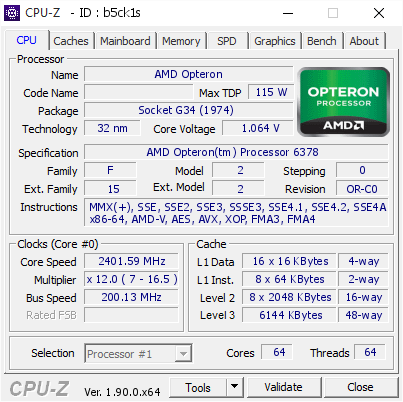
[b5ck1s] Validated Dump by WIN-JHK0QEJ0UCG (2019-10-25 06:15:26) - MB: Supermicro H8QG6 - RAM: 16384 MB
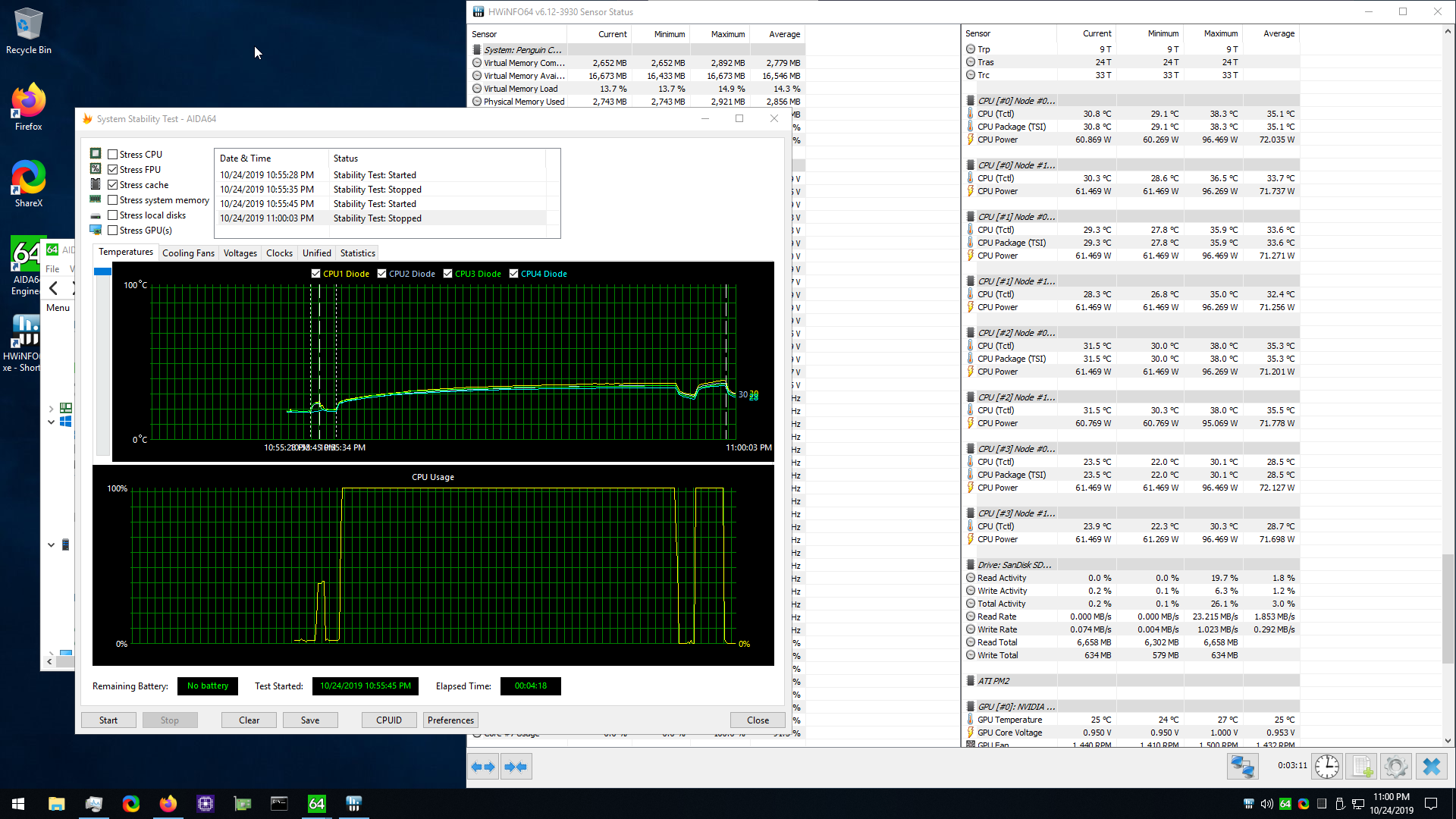
 radiant kettle
Anyone want to come by central IL and bench on ln2 this weekend? Lol
blazing venture
VAS DAT @manic helm
manic helm
magic
uneven ermine
looks like an x299 board 
manic helm

blazing venture
telling Van now.
sterile flame
Random test on an old 970 pro boot volume of win 10 pro in MBR before I wipe it.
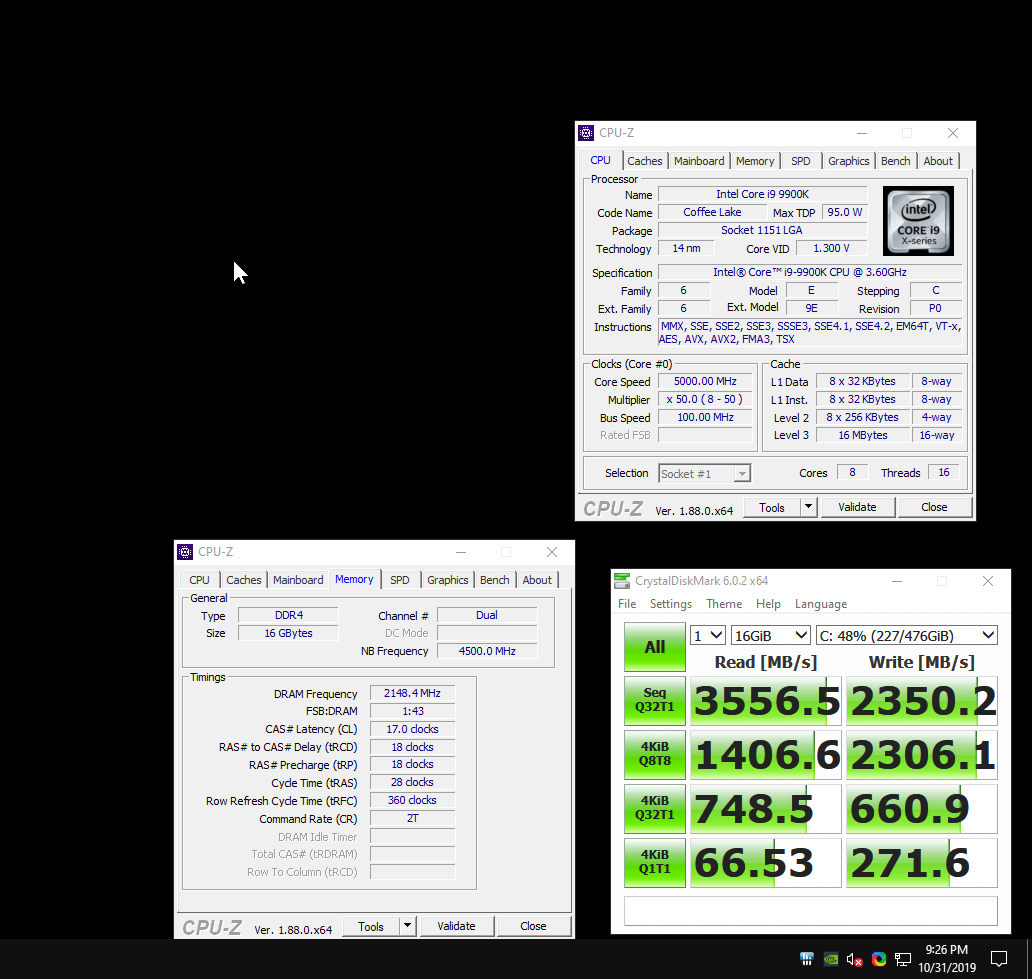 blazing venture
lol.
 midnight moss
haha nice
neon rapids
9900x 
manic helm
That was a $1000 cpu just a few years ago
blazing venture
still proud of my score tho
manic helm
actually it was only a year ago
1000 points better than my 2700x.
not a bad increase for 1 generation
neon rapids
i'd assume he's trying to get the highest multi core, or else he could turn off smt
sterile flame
i can about match it on my 1600x tho, the singlethreaded is worse than my little brother's 3600, a couple of things could make his score higher that wouldn't take that much effort
blazing venture
never said I was pro at it.
manic helm
https://www.youtube.com/watch?v=VYy-UKUrX74 Steve is playing with the 9900ks with LN2

We're attempting to overclock a binned Intel i9-9900KS CPU to 6GHz today. We have 3 CPUs we can try, so hopefully one of them will do it. Baseline is 5.0, 5....
sterile flame
4.5 all core, 3200 14 14 14 31 2T
https://valid.x86.fr/gehc9r
21.51 R11.5 https://i.imgur.com/gfcK3fX.png
4732 R20 https://i.imgur.com/SSIPhEI.png
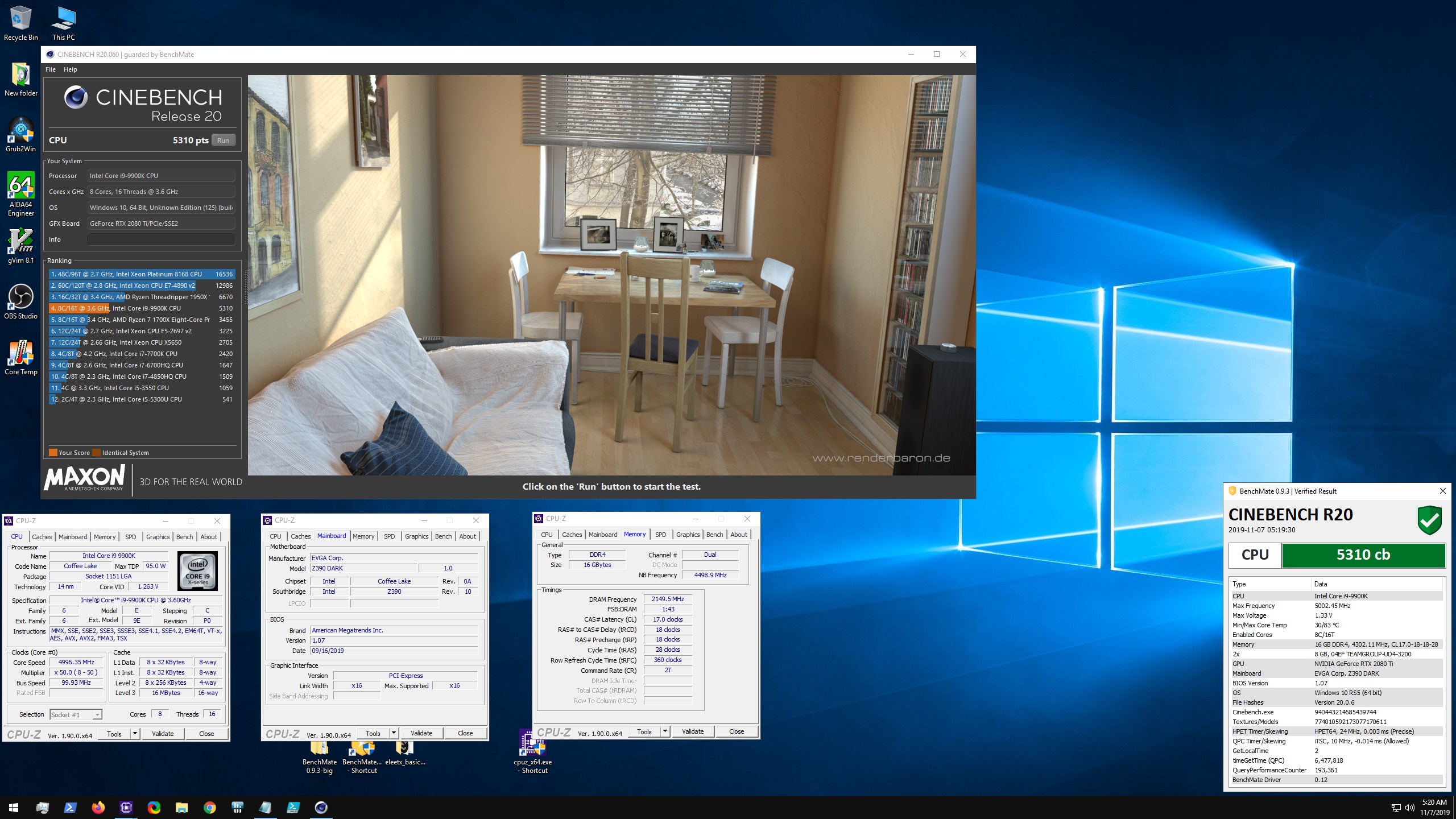
5.0 all core, 4300 17 18 18 38 2T
http://valid.x86.fr/eyus87
23.97 R11.5https://i.imgur.com/3wiyCmA.jpg
2229 R15 https://i.imgur.com/Puz6Wlt.jpg
5310 R20 https://i.imgur.com/PtXZci4.jpg
 slow skiff
if i close out of msi afterburner does my oc stop
neon rapids
@blazing venture it should run if it’s closed
slow skiff
ive overclocked using the OC Scanner but it seems I hit my voltage limit too soon so I cannot maintain the new boost clock
if anyone has any tips on increasing the voltage limit im fairly new to overclocking
sterile flame
Post your setup
sterile flame
What voltage limit does it hit? 1.093V in p0 state? Assuming you're on air - 2010 stock cooler for the gaming trio etc is normal - but you can tune the v/f curve manually to optimize further.
But different uses will have different optimal v/f configs so most don't bother with more than a profile or two just running the auto OC.
sterile flame
On a stock cooler without loud fans curves - just maxing out the power limit is the best config if you want good performance for gaming etc.
If you want to overclock/benchmark for the fun/sake of it , maxing the voltage slider, is the last bit.
Newest drivers aren't always the best choice.
Google them
slow skiff
can i keep the temp limit the same if i max out power limit
trim fern
Well the latest is very stable
sterile flame
No
@ Allah, Pascal / Turing's internal clock /OC control is a lot like zen2's in that the card basically just runs as well as it can under the cooling conditions and demand.
 prime quiver
Think I'm gonna overclock my cruddy i5 now that it will stay cool
sterile flame
yup power limits deep
 lofty totem
Yea I made my fan curve a lot more aggressive, I can’t hear it with my headphones either way, and now my heavily overclocked 2080 doesn’t go above 70C and hasn’t crashed on Forza or Overwatch (the only games I play) in forever
short otter
I'm envious of y'all with good graphics card coolers. Mine ran at 80° max load out of the box, 75 with kyronaut paste, then 82 with an overclock. Ventus sucks
 stray ingot
What Tweide?!?! I love the Ventus!!! What card are you running? I have the 2070 with OC'ed to 1950Mhz with 8000mhz memory and never seen it go higher than 75 with custom fan curve.
Also tested 2080 ti ventus for 24 hours, stock profile, custom fan curve. never reached 80.
swift dragon
3DMark.com
Intel Core i9-7980XE Processor, NVIDIA GeForce GTX 1080 Ti x 1, 65536 MB, 64-bit Windows 10}
5.048Ghz all core OC on my 7980xe
2101mhz OC on my 1080ti
not too shabby for an overclocking noob like myself XD
sterile flame
 prime quiver
Xe? Aren't those server chips?
prime quiver

sterile flame
high end desktop
swift dragon
3DMark.com
Intel Core i9-7980XE Processor, NVIDIA GeForce GTX 1080 Ti x 1, 65536 MB, 64-bit Windows 10}
bumped my score up a bit more
huge boost to my Physics score
lol
neon rapids
heres my weak system with a small oc on the gpu
https://www.3dmark.com/3dm/41088321? - stock
3DMark.com
AMD Ryzen 5 2600X, NVIDIA GeForce GTX 1070 Ti x 1, 16384 MB, 64-bit Windows 10}
https://www.3dmark.com/3dm/41088010? - +190 on core, +350 on mem
3DMark.com
AMD Ryzen 5 2600X, NVIDIA GeForce GTX 1070 Ti x 1, 16384 MB, 64-bit Windows 10}
uneven ermine
'weak system'
uneven ermine
so really powerful computer?
neon rapids
i wouldnt really call a $800ish computer really powerful but sure
 hard lance
any recommendations for Zotac GTX 1660
 fiery notch
Get a 1660 super
short otter
^
fiery notch
oof
sterile flame
Far better than a 1650 though - that's the important cutoff imo.
fiery notch
True
sterile flame
Anyway, 90% of overclocking a Pascal/Turing GPU is max out the power limit and voltage sliders and keep it cold.
sterile flame
<= $125 for a very solid board that can be modded for 9900k
https://www.ebay.com/itm/372810105052

eBay
ASUS ROG Maximus IX Apex, LGA 1151, Intel Motherboard. Condition is Used. Motherboard still functions perfectly as intended and is great for overclocking.This motherboard comes with most accessories except for Sata cables.
sterile flame
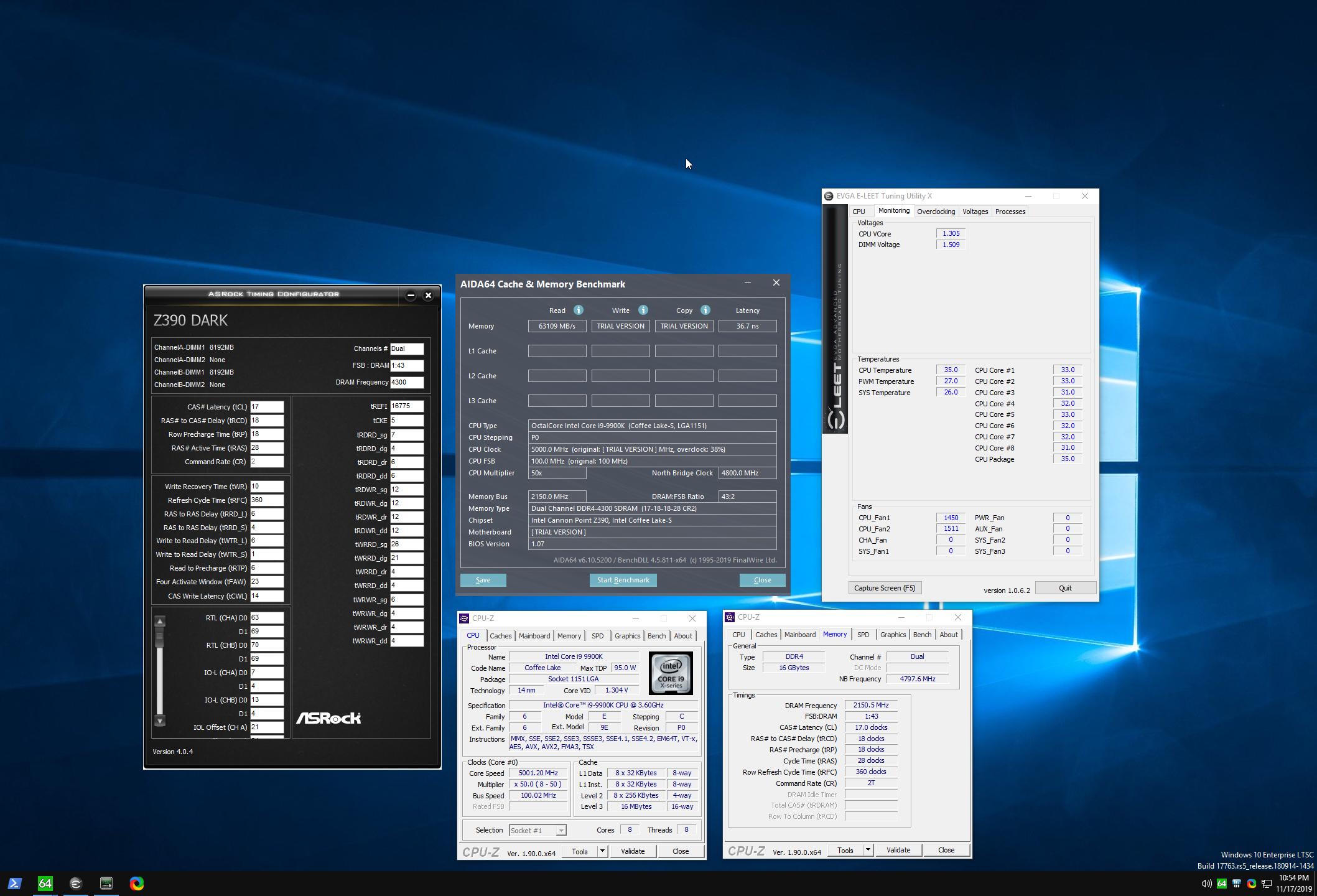
https://i.imgur.com/E32kbZs.png $115 3200 14 14 14 31 2x8 kit. But ya, we idea. @neon rapids
 sterile flame
No, but 1.5 or 1.6 is the highest I'll daily b die like that on good CPU cooling. Can't really recommend people overvolt to oc as a blanket rule imo, but looking at the odds, not too risky
Those subtimings are pretty loose, that's just the most recent pic, same idea anyway.
neon rapids
yeah but what’s the highest you’ve ever pushed like for a short time
hard lance
@tribal nacelle no, I don’t have any evga products
trim fern
1660 is still a great card though
bought my 1660 a couple months before the super and i have no regrets
 somber hornet
Someone teach me overclocking lol. Had a little help lastnight but that was just for my gpu
sterile flame
I might stream some today
somber hornet
So my screen keeps going black while overclocking
Like I reset the overclock and it still keeps going black
sterile flame
The gpu? What's your setup
somber hornet
1060 6gb
Ryzen 5 2600 CPU
Yeah I was using afterburner
I restarted my PC so far so good
Yeah restarting it fixed it. I want to overclock but I'm not sure why that happened. I managed to get 126mhz core clock at standard memory clock speeds
But when I got the memory clock up to around 590mhz, I started increasing the core clock a little bit and it just started going black
So maybe keep the core at 126 and only 126mhz lol? But adjust the memory up to like 550mhz? Idk lmao
sterile flame
which 1060, what cooling?
somber hornet
I actually got 15 extra fps out of that. Evga gtx 1060 6gb sc. And a Corsair h80igt water cooler
I increased the power to Max aswell before I started
sterile flame
I'm playing around with the AB ui myself, btw - copy paste your AB "profiles" folder to make backups
 somber hornet
How do I copy them? Lol
Well I also haven't made one yet either or at least saved one on afterburner
Lmao
So should I just start trying to OC again? And see what happens
I was using kombustor as my stress test to see if it crashed it or not
Ok so now 120mhz core clock crashes kombustor
I'm confused because I was able to get to 126 before
110mhz is good so far
113 is the highest I can go
So now I start increasing the memory clock speed right?
uneven ermine
after overclocking anything id give it a couple hours or so of use before overclocking anything else
just for extra testing
that way when something fails you dont have to figure out which thing isnt stable
if you know what i mean
somber hornet
Yeah that's true
I could load some borderlands 3 as it's my most demanding game on here lol
And see what happens
But even increasing the core clock. Didn't give but maybe 2 to 3 extra fps
I guess I'll see what happens on bl3
prime quiver
I find it hilarious that dx12 does absolutely nothing
somber hornet
No? I just changed it over to dx12 lol
sterile flame
Ya that’s true
somber hornet
It says optimizing shaders rn
On borderlands 3
Ok so bl3 on dx12 on high settings I'm getting a big 50 to 59 fps
Ugh
So I wonder if I start increasing my memory clock if it'll get a little better
Ok so I think I got it stable now
But I couldn't go very high that's for sure
Well can't go very high lol
I achieved and extra 10 fps
Without doing anything to core voltage btw
sterile flame
Ya, there probably won't be too much headroom to gain, do you know what the power limit is for that card / model / bios?
sterile flame
The quick, easy guide to Pascal/Turing OC is just max the power limit and voltage slider, then increase memory until stable limit, repeat for core clock in 15 MHz increments.
somber hornet
Max the core voltage aswell?
I thought you slowly tuned the voltage after you hit the stable point for the core and memoery clock
thats what mine is stable at without voltage
so should I reset all that and turn power and voltage max?
sterile flame
There's not much to gpu overclocking on air tbh - I'll show you what I mean in a bit with a gif
Also - check out the save profile feature.
somber hornet
ill save these current settings
sterile flame
I'm unfamiliar with kombustor, people often only use board specific software like EVGA precision x1 when they have to - e.g. set fan curve on non reference boards
somber hornet
ah
its just a benchmark test is all
I have a msi b350m mobo
should've said that earlier lol
sterile flame
Ah. I have an msi 1080 I'll try to oc later as well, might use similar software.
somber hornet
yeah, so I guess ill crank the voltage to max
i just feel as if thats a bad idea lol
for me anyways since my stuff is a bit old
sterile flame
Looking at the pic - you don't seem to have manual voltage control enabled
prime quiver
I saw the side by side comparisons of bl3 with and without dx12
It does basically nothing
Other than reduce fps
sterile flame
Did dx12 reduce the FPS?
somber hornet
@sterile flame should i turn that on?
prime quiver
By a smidge
sterile flame
When I played bf V I ran dx11
prime quiver

Our graphics and frame rate comparison of BORDERLANDS 3 on PC 1080p wether you select DirectX11 (DX11) or DirectX12 (DX12). Overall, DX12 is a bit more stabl...
somber hornet
do i slowly increase the voltage control?
sterile flame
To clarify - if you want the most safe performance with the least effort, just max power , voltage, temp slider, hit apply.
somber hornet
lol ok so what im going to do is reset the settings and max power,temp, and voltage
and see what happens
ok so it didn't break my gpu lmao
somber hornet
yeah except for core clock and memory
 wild glacier
oke
somber hornet
i guess anyways lmao
wild glacier
I've been too scared to oc my gpu
wild glacier
liable
somber hornet
whatever lol
somber hornet
but yeah i maxed what he said and gained 5 fps
but im going to increase the core clock and memory now
sterile flame
I mean - power slider is like 90% of the safe, potential, real world use gains. There's a GN video where someone asks "is it safe to oc gpu with power, volt, etc sliders , if so when?"
TL;DR yes, according to an EVGA , Nvidia , and ? engineer iirc- I think TiN was the evga source
somber hornet
im at +80mhz memory and still going
sterile flame
Post a gpu-z screenshot
somber hornet
whats gpu z lmao
sterile flame
Really cool gpu monitoring debugger
somber hornet
do i download that or something lol
sterile flame
https://benchmate.org pick up that

BenchMate is a unified solution that defines a common standard for all benchmarks. A well-considered minimum of security and timer reliability applicable to all benchmarks, though much more advanced than everything currently available in this industry.
Has cpu-z, gpu-z built in, also a few, useful benchmarks + hwbot integration.
somber hornet
big or small bundle lol
sterile flame
Big if you can, not a huge deal either way
prime quiver
Memory can OC quite a bit
sterile flame
I should ask - what's your motivation to overclock? Fun, assumed necessity, performance goals for gaming, other?
1060 6GB performance reference https://hwbot.org/hardware/videocards#key=geforce_gtx_1060_6_gb_gp106
wild glacier
Mine is literally just moar frames
short otter
@somber hornet memory can oc a lot. I'm at +450mhz on my 2060
somber hornet
performance for gaming
how do i find the gpu z after i extracted it
found it nvm
@sterile flame is that what you wanted?
ok wow thats small
nvm
short otter
For reference my Asus 1060 6gb used to go up to +125 core +275 memory. Might be a good comparison for you.
somber hornet
ok cool yeah thanks
 tribal nacelle
dx12 looks better tho
is a 1060 6gb that much slower than a 1070 sc? cause i can play bfv 50 frames on my 4k tv at 4k
somber hornet
275 is max for me aswell lol
prime quiver
now how to do i5-3570k....
somber hornet
Same with my CPU lmao
Still barely hitting 60fps on bl3 on high settings lol
So I used GeForces optimal game settings for bl3 and on high with a few things on medium it's over 70fps now so that's decent enough for me lol. Now to learn how to OC my cpu......
prime quiver
wait what gpu are you using again?
somber hornet
evga 1060 6gb sc
prime quiver
and what cpu again...
somber hornet
ryzen 5 2600
prime quiver
Just curious as I have 1660 ti and my cruddy 3570k and even with no overclocking I was getting over 100 on medium
somber hornet
1660ti is better than my 1060
prime quiver
yes but cpu is a big bottleneck
somber hornet
yeah true
prime quiver
your cpu is supposed to be just a smidge better than mine, too
somber hornet
id have to check what medium fps is for me
prime quiver
if nothing else have ambient occlusion off, as that's a real performance hog
somber hornet
I getting back on to see if the ambient occlusion is on or not. I'm not sure lol
prime quiver
as well the anti-aliasing can do it a lot
I usually just do Fxaa as to my eyes, it's good enough, and it's a very very small performance impact
somber hornet
I'm not sure why you're pulling over 100. Maybe cause mines junk lol
prime quiver
I've heard it could be possible that the official versions have a background keylogger or something...

and I have it from uh....
somber hornet
Lmao
prime quiver
Either that or my gpu is just pulling all the weight I guess
somber hornet
Are you on dx11? Btw
somber hornet
Ok im using fxaa like you and turned off occlusion it was on medium
And I'm going back to dx11
So I have to restart the game
prime quiver
I mean frames matter more than anything else, right
even on lowest the game isn't going to look bad persay
somber hornet
Yeah
My game froze lmao
Or maybe it's something to do with the OC
Um how do I get back to desktop if the game is on fullscreen? Lol
Alt tab isn't working
Wait nvm
Well task manager isn't loading either 😒
prime quiver
yikes
prime quiver
yeah it could be the overclock, the boost clock might be too high perhaps. Maybe. I'm no expert on that at all
somber hornet
Guess I have to restart the pc
Yeah I'll turn it down just a hair and see if that helps
I also closed the game weird too. So that could've done it
Boy oh boy do I wish I had an SSD
somber hornet
Dude when I load into the desktop it takes a good 2 mins or so loading steam, and wallpaper engine and whatever else
Its so slow lol
prime quiver
Same for me
I actually see a better argument for having apps on ssd than the games themselves

somber hornet
Lol right
Ok loading back into bl3 lol
Ok I'll tell you what my fps is on sanctuary
70 to 80 lol
On high still though
Medium is 84
Lmao
Ugh 5700xt is calling my name lol
prime quiver
if you don't have a 144hz that's totally fine
somber hornet
I do
prime quiver
then lower the settings, dummyyyy
prime quiver
5700 xt, I'm kinda curious about that
somber hornet
Depending on where I look it's 84 to 104
prime quiver
It's slightly worse than a 1080 ti
hmm but for the price
Jesus christ nvidia is so goddamn overpriced
somber hornet
Yeah
450 for the 5700xt I want
You can get ugh used 1080ti for around 450 to 500
Maybe a little cheaper but ugh used
Ok I also went back to GeForce experience and set there optimal settings on to see what it runs at
prime quiver
oh god
neon rapids
$450 is for the best cooling ones, ones like the gigabyte windforce are like 410-420
prime quiver
they're always wrong
cheapest 2070S you can get for new is $490, which is just a smidge better than a 1080ti
somber hornet
Seems like it tbh I was running a tad better without there "optimal" thing
prime quiver
did they just give the 1080 ti roids when they made it or??
run it on lowest settings if you have to oml
somber hornet
Lmao
 somber hornet
Geez
prime quiver
if you go used you can get 2070 supers for cheaper ofc...
somber hornet
That's old isn't it
prime quiver
IT WAS ONLY 2GB, DDR3
somber hornet
Omg
Wow
Ok yeah that's old lol
I'm doing bl3 benchmark
It's staying above 60 so I'm good with that
The average was 71.91fps so you know what. it is what it is I'll take it
prime quiver
lower the damn settings you dip
somber hornet
Never
prime quiver
fps>all
the buttery smoothness trumps the fidelity
lower settings, cap the fps at like 90 or something idk
somber hornet
Lowest low the settings go im getting 90 fps
Wow that's still bad on the lowest settings I think
Well 90+ depending on where I'm looking
No more than 120
prime quiver
I'd also like to mention I'm on ddr3 ram
uneven ermine

prime quiver
so there's either legit witchcraft going on here or...
somber hornet
I have no clue lol
prime quiver
only one way to find out
uneven ermine
lmao you guys arent fighting, right
sterile flame
What's up?
prime quiver
pirate it and see if that one runs better
uneven ermine
no illegal stuff 
somber hornet
Yeah maybe my gpu is just not able to handle bl3 no matter what
Like I turned everything on low and off and still not passing 100 standing still from where you spawn in sanctuary
Ok now I'm really confused. There has to be something else settings wise somewhere messing with something because on badass quality it's at 56fps
I never get over like 30fps on badass quality
But on very low it's only at 87fps to 120
Like shouldn't there be some drastic difference?
sterile flame
Running afterburner with performance stats like gpu load, cpu load, max single core load, gpu memory controller load etc - can help give you hints at what the limiting factors are
would an AMD xfx 470 be ok for overclocking
somber hornet
Where do I find those at @sterile flame
sterile flame
I have a gif recorded of how to do that - but it's lost, I'll make another lol
sterile flame
No, I actually want to have gifs like that on hand - I just never really organized them
somber hornet
So I reset the overclock to normal and Im pulling 90fps on bl3?
Instead of 80
92 to be exact
Well for me on bl3 overclocking did nothing
So I'm just keeping it on normal settings and leaving it at that
sterile flame
I was going to mentioned earlier - gpu overclocking is pretty simple - but the performance gains to be made can range from none to 20ish percent? in some cases - it really varies.
somber hornet
Then why do it lol
I was hoping to make something run better but maybe since my gpu is a bit old it really doesn't have the room to make it perform better
sterile flame
Point is - don't burn yourself out trying to get the perfect OC in the gpu alone because you want more gaming performance. Do so because you enjoy it, and/or because it's a useful/fun way to learn what factors are important to your desired performance.
prime quiver
oh for sure for check your cpu temperatures
bl3 makes stuff run hotter than usual in my experience
sterile flame
For example - windows, driver, game, everything settings can have a massive impact, day and night difference
somber hornet
Yeah understandable
prime quiver
and if that's happening it could be thermal throttling
sterile flame
Pascal/Turing basically OC themselves just like ryzen 3000 does - to some extent.
somber hornet
I do have msi command center
sterile flame
That is, if you keep a card to 40C, it'll auto OC the core clock just a bit higher vs 50C same settings. Assuming the card is unlocked, and voltage/power limits permit
sterile flame
Idk what msi command center is but I'd delete it lol. Not much motherboard / driver software isn't more disease than it is useful
somber hornet
It lets me overclock the cpu
sterile flame
If you like it, or it works better vs afterburner, go for it
Did you get a chance to check this out https://hwbot.org/hardware/videocards#key=geforce_gtx_1060_6_gb_gp106
somber hornet
CPU frequency, ratio,base clock dram voltage, igp ratio, gt voltage
sterile flame
Oh, cpu, I misread
somber hornet
But I have not a clue what to change or anything for that
sterile flame
Wanna run a userbenchmark haha
sterile flame

Top Market Research & Genuine Product Insight from our Users. Quickly find category leading products with UserBenchmark.
I'll run one as well, might as well
somber hornet
It's gonna be crappy lol
I bet
Thought it went to full screen? It's like small for me
Like 1200x800 or something lol
Mines done
Yikes
sterile flame
In the future, post the url vs screenshot, easier that way
somber hornet
ahh my bad lol
sterile flame
You're fine lol
tribal nacelle
i dont even know why ppl still use 32 bit windows lol
tribal nacelle
i use 64
tribal nacelle
64 bit process the data alot faster https://www.differencebetween.com/difference-between-32-bit-and-64-bit-windows-7/

Compare the Difference Between Similar Terms
32 bit vs 64 bit Windows 7 32-bit and 64-bit are computer architectures, which specify the memory and processing ability of the system. A processor with 3
tribal nacelle
also with windows 32 bit you are locked to 4gb ram
sterile flame
A 32 bit OS can only use 2^32 bits of address space, so limited to about 4GB main memory among other things. These days, you can expect everything to be 64 bit
tribal nacelle
64 bit is alot more
sterile flame
The main thing 32 bit OS gets used for is windows xp 32bit benchmarks like superpi 32m lol
sterile flame
haha there's always plenty more if you want it
somber hornet
oh i bet
tribal nacelle

ZDNet
While the maximum RAM limit for 32-bit Windows 7 editions is 4GB, when it comes to 64-bit editions, the amount of memory that the OS can address depends on which edition you are running.
u can have up to 192gb on 64 bit pro lol
somber hornet
geez
sterile flame
Those limits are imposed by microsoft - it's diffferent on win 10
somber hornet
is there anything higher than 64bit?
tribal nacelle
not yet
sterile flame
Win 10 is 128GB for home, 2TB for pro, enterprise etc, 24TB for server usually
somber hornet
i wonder how much different its going to be
sterile flame
Almost forgot haha
Stock settings gpu, daily driver OS settings
https://www.userbenchmark.com/UserRun/21911541
5.1 cpu, 2370 core 2000 mem gpu, voltage/power maxed
https://www.userbenchmark.com/UserRun/21911810
somber hornet
must be nice lol
prime quiver
please for the love of god get a profile picture
neon rapids
@sterile flame worth it to manually oc a 2600x or just leave it on pbo? Ik there isn’t a lot of headroom, but wondering if there was any headroom (stock cooler but probably going to get a better one over the holidays like a mugen 5)
sterile flame
@neon rapids https://i.imgur.com/wGOSoJ8.png
IMO - not really. Even on a 9900k, the core oc alone isn't much - but as you OC that 3200c14 to 4000c14, that 2080 ti from 1800 to 2200 core, and a full 14% more memory bandwidth not to mention the increase from 250 to 320, up to 400+ watts power limit (xoc bios released by evga unlocks voltage and power fully, 500, 1k, and 3rd setting for no limits iirc) - each of those small to moderate gains can somewhat compount their benefits.
TL;DR - I find overclocking in the general sense to be a fun way to learn about hardware, operating system, and software architecture. Hard to believe - but it's a fraction of the cost I'm paying to get a fancy piece of paper after sitting through some labs, lectures, and exams.
sterile flame
The ftw3 is 373, msi gaming trio's when updated are 400+, Kingpin has 3 bios settings, it varies largely on config - but if you load up the XOC bios which voids warranty, ya, can do 1KW /card
sterile flame
i understand so little about giving gpus so much extra power, i'd imagine it would be a bit dangerous to equate safe temps with safe usage?
i.e. even cranking wattage and voiding warranty, is there a significant risk of damage if you, say, go to350 watts?
i presume this bios is only for the ftw3 as well
neon rapids
evga is really good with bios failures
sterile flame
right but that seems like pumping nitrous into an engine and it blowing up and asking them to fix it
probably an inaccurate analogy but
neon rapids
but i think the bios's dont void the warranties
sterile flame
These are good reads
https://xdevs.com/guide/2080ti_kpe/
https://xdevs.com/guide/e399ocg/ <my board
cool, thanks i'll dig through those later
the other 130% power level bios you mentioned the other time has netted me ~75mhz on my overclock
i have the 2080ti xc ultra
sterile flame
oof
neon rapids
bruh 7.4% graphics
sterile flame
yea crappy workstation nvidia
 fringe apex
Looks like the graphics bench crashed. Post the url for more accurate feedback
fiery notch
I'm trying to get my foot into CPU overclocking
Does anybody have any good resources for overclocking a R5 3600?
sterile flame
(Thread in the making) Welcome to the currently unofficial AMD Ryzen 7 3xxx and Ryzen 9 3xxx owners club! Post below a CPU-Z Screenshot and link of
uneven ermine
RIP ryzen 3 owners
blazing venture
??
uneven ermine
"Ryzen 5, 7, 9 3000 Series Owner's Club"
fiery notch
Thank you @sterile flame!
midnight moss
^^^lol @uneven ermine
I just ran time spy and realized I didn't have my properly overclocked bios profile loaded. I decided to just make a new one from scratch. I'm just googling anything in the advanced I don't already know at this point. After I clear my Cmos. Because...I want to start fresh. Not sure if I believe my past self naming a profile 'original'. Must optimize more...
Does anyone have a good resource for info about ram overclocks? I've only changed the frequency and command rate on my ram, and it's been working fine. I tried messing with some other stuff a few times but I didn't really see in game improvement
midnight moss
hits restart button
Gets distracted for a moment
Sees bios message
Frantically presses F2 knowing it's too late
Computer boots into windows
Presses power interrupt again
Pays attention this time
considers making so only way for computer to boot is boot override
decides to resume tweaking settings
stops for a moment to post this
Lol I fixed everything but forgot to change the voltages so it didn't boot and I had to reset the Cmos again :'( then the above happened
sterile flame
well heres the link of my test it probably sucks because i use an upgraded work computer https://www.userbenchmark.com/UserRun/21934673
uneven ermine
gonna try overclocking my ram, i wanna get to 3600. At 3200 right now. What program should i use to stress test it?
also how do i update my bios lol
blazing venture
dude
if you have to ask how to update bios.. you shouldn't be messing with OC
😐
sterile flame
You've never updated your bios?
 north cradle
Youtube Kappa
sterile flame
Anyway,
https://github.com/integralfx/MemTestHelper/blob/master/DDR4 OC Guide.md
https://www.reddit.com/r/overclocking/wiki/index#wiki_ram_overclocking
For the bios, other than following the mobo instructions, just remember to format the drive fat32, pay attention to what the instructions say about renaming the file, set board to optimized defaults both before and after.
sterile flame
No, but if you don't follow the directions, using the board afterwards could be.
blazing venture

You have to be 100% certain the bios you download to usb is the correct one
lol
trim fern
How certain zack do you know with the bios version you're on now if your memory is even running at 3200MHz
blazing venture
ARE YOU SURE
trim fern
Did you run CPU-Z
midnight moss
^^
sterile flame
2133 incoming
sterile flame
That's normal
uneven ermine
oh i thought it meant it was running at 1600
sterile flame
It is, ddr4 transfers on the rise and fall of the clock edge
trim fern
Would of been funny if it said 800
sterile flame
Default is almost always 2133/2400 , so if XMP wasn't enable you'd see 1066/1200 dram in cpuz
uneven ermine
my dad was running it at 2133
but i fixed it
ill overclock it later, im doing roblox rn
blazing venture
is that some type of drug
wild glacier
robloX
blazing venture
roboX
 midnight rain
Would overcloking a Nividia GT710 yield me any better results graphics wise? Or would it be a waste of time?
I know it's a crap card, I'm just wondering if I can get any more oomf out of it
sterile flame
if it holds an overclock, there will be a performance increase, although it may not be appreciable
i don't know if that kind of card would overclock in msi afterburner or evga x1, ect, but if it could, you'll get a little extra out of it. but it's probably not going to make a big difference
sterile flame
Can't hurt to run a graphics / system benchmark and update drivers
tribal nacelle
dont think itll help its a gt710 not a gtx 750 its a bottom of the line card and old too does it atleast have a fan?
swift dragon
3DMark.com
Intel Core i9-7980XE Processor, NVIDIA GeForce GTX 1080 Ti x 2, 65536 MB, 64-bit Windows 10}
@sterile flame @blazing venture
3DMark.com
Intel Core i9-7980XE Processor, NVIDIA GeForce GTX 1080 Ti x 2, 65536 MB, 64-bit Windows 10}
midnight moss
Hey, so I was p-state OCing my ryzen 1200 and I was getting boost clocks around 3.4 GHz, and I forgot to save the profile that was working. I've been trying to recreate it, but I keep getting stuck to stock speed.
midnight moss
no one took the bait 😢
this thread is dead
does anyone know the right form to requesition a
Lazarus thing from Jesus
manic helm

 midnight moss
XD
You could have just said it was a bad joke and made a better one. I mean you kindof did, butt...
sterile flame
Oh I just find that cat ... art? piece far funnier than I should
midnight moss
lulz
midnight moss
So what are people getting for stable OC on 2600?
 dire portal
I have 4.0GHz and it's incredibly stable. It's my first OC too.
midnight moss
what mobo do you have?
midnight moss
I'm about to buy a 2600
dire portal
I was doing it on the stock cooler for a while but now I have a tower cooler
dire portal
I'm hoping to get a 6TB HDD to replace my 3 HDDs that total 5TB
dire portal
Nice
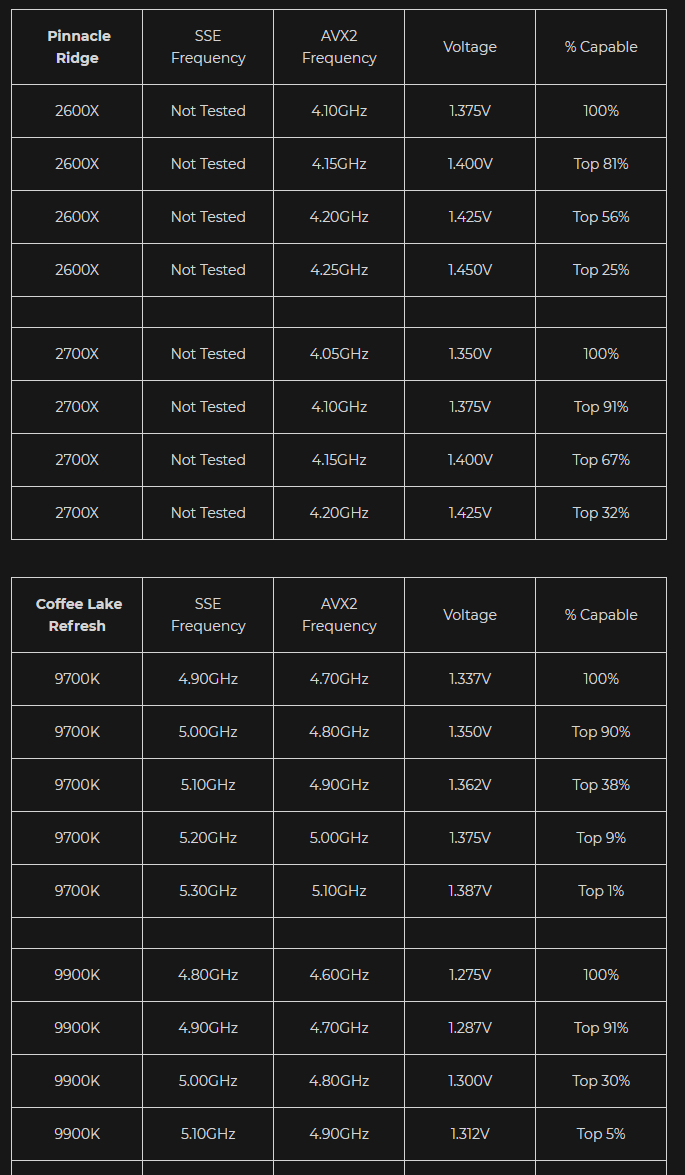
sterile flame
Good resource for ballpartk clock/vcore expectations https://siliconlottery.com/pages/statistics
Keyword - ballpark
midnight moss
I mean I would just take a CPU heavy game, change the settings so it's really working my CPU then game for five or so hours while logging
That way I actually enjoy it
and it's a realistic workload
but if you do ther CPu heavy tasks
Do those
dire portal
I don't really, I mostly wanna check how hot it gets
midnight moss
ahhh
sterile flame
I start with aida64 engineer, those tests tell me enough about what to change if needed.
But - prime95 small fft avx on is considered the highest bar for stable.
dire portal
I also don't know what games are CPU heavy that would show up since I have a 2080 Super
sterile flame
BF V eats CPU
dire portal
Don't have that game
midnight moss
same
dire portal
When I use aida64 Engineer, should I close enverything else?
sterile flame
Could always go for synthetics, timespy, firestrike extreme, then of course the hwbot list
Yes. Somewhat related - would people watch an OC related stream?
midnight moss
hmmm a good question
dire portal
Like watch someone OC a CPU or just talk about it?
midnight moss
lol that's awhole youtbe channel idea there
sterile flame
Not even tryhard bench stuff - just like how to setup bios, how to interpret hwinfo, aida64, setup afterburner and all that
dire portal
That'd be pretty cool. I'd probably prefer a video though
midnight moss
I think it might be interesting to for someone to try racing the tmeperatures to complete a speed run
dire portal
So I can pause and not get stuck behind
midnight moss
Can you beat the game before your overtemp protection shuts down
sterile flame
I've been wanting to play around with this idea just on the discord "going live" since it'd be a small scale test run with people I know
midnight moss
or if you disabled it
before your system fries
gottcha
I'm trying to get buisness internet so I could actually stream
upload be no bueno
sterile flame
We were bouncing ideas around regarding this channel a few months ago about hosting OC competitions - but we'd be very insistent to make the rules level the playing field
e.g. lowest timespy score wins - must use 4 cores , etc
Or - highest score / KWh used per test run - plenty of ways to make things not pay to win imo.
sterile flame
Oh, those are the benchmarks - once you're confident your system is stable , sure you can just run them all - but the cache/memory test is by far the most popular
dire portal
I only see Memory Read, Write, Copy, and Latency
Which one do I stress test with?
Just saw a temp of 60°C after CPU AES
Just got to 70C with CPU SHA3
sterile flame



 dire portal
Just lost signal to my monitor
sterile flame
TBH - I just recommend running a userbenchmark first - makes giving advice very easy, catches 90% of the common problems.
dire portal
I was running the system stability test
sterile flame
Also if you have an aggressive overclock and run aida's fpu only with avx and poor cooling it'll burn/damage something. I actually don't know what hardware setup you got haha
dire portal
Userbenchmark like the website?
midnight moss
yea they have an executable
dire portal
I have pretty decent cooking I think
midnight moss
lol cooking
midnight moss
I know lol
trim fern
@dire portal what is the processor?
dire portal
I just have it to 4.0GHz, didn't really want more
sterile flame
What memory model do you have? 2133 means XMP is off most of the time.