#building-and-recc-chat
1 messages · Page 298 of 1
 cyan ravine
Not without a nearby stud
Don't need to be on a stud, but local to one helps a lot
Fixes a lot of potential movement and disperses some pressure caused by weight dislocating the wall
And that would be flat on the wall, not an arm
Arm you want a stud, 1000%
 lean anchor
The Desk itself will eventually be changed I think sometime in the next few months, so hopefully I will have more room for my second monitor to lay sideways XD
cyan ravine
Well you can explore the options of monitor layouts
Common pick is two side by side both horizontal or 1 vertical
Vertical on one is nice for productivity imo
It reads a lot more like a list and good for a 3 piece workspace
It might sound a little weird but windows apps scale better in more square sizes on vertical screens
So they are easier to work with
Instead of more rectangular on horizontal
Take discord for example
lean anchor
Problem with my current mount is I bought an arm, and it's securement has the monitor tilting forward a bit on top, which means they aren't flush with eachother.
lean anchor
Also with what I do, I don't have to have a verticle monitor, it was just what I went with due to space restrictions.
cyan ravine
Ye no don't worry
Just adding the context to give ideas
Up to you what you'd prefer
I would be clamping to desk tho I think
You really would want a nearby stud imo for wall
Or maybe an arm from the stud
Might look a little weird tho
lean anchor
I would prefer horizontal 😛 but yeah, it sounds like an arm mount or pole either one would be the best option.
Thank you for all your help. I really appreciate it 🙂
cyan ravine
All good 
 mystic dune
hey yall, just an FYI - yall can post your build on our website, use the link here: https://www.newegg.com/tools/custom-pc-builder/showcase/featured-builds
mystic dune
mystic dune
hey yall, just an FYI - yall can post your build on our website, use the link he...
 flint sapphire
F
 manic cloak
Top left, Aa, request Desktop website? 😭
 raw dove
yo
2 questions
do i need to apply the graphene on my ssd if the board already came with a ssd heatsink
and 2nd, is it okay if i used slots a1 and b1 for the ram since i couldnt fit them into a2 and b2 ?

 stoic island
Usually mobo heatsink is fine, don't need to add the extra heatsink if your SSD came with one, and generally don't remove the sticker on the SSD
A1 B1 should be fine
 dusky hearth
raw dove
and 2nd, is it okay if i used slots a1 and b1 for the ram since i couldnt fit th...
dusky hearth
raw dove
and 2nd, is it okay if i used slots a1 and b1 for the ram since i couldnt fit th...
it looks to me in the image you put them in a2 and b2
 jagged ember
Graphene for the ssd is kinda wild haha
dusky hearth
lmao
raw dove
dusky hearth
it looks to me in the image you put them in a2 and b2
i checked the manual but i may be wrong
jagged ember
Then again, there is whole ssd watercooling
raw dove
jagged ember
Graphene for the ssd is kinda wild haha
yeah i wasnt entirely sure
 dusky hearth
i think they meant thermal pads?
raw dove
came in 2 pieces
dusky hearth
oh
raw dove
it said graphene on it
jagged ember
Itd probably be fine without the metal piece
dusky hearth
interesting
stoic island
Yea it should be fine either way
jagged ember
raw dove
it said graphene on it
Aahh that is interesting
Yeah don't necessarily need it
dusky hearth
if your mobo doesnt have an integrated heatspreader, you should probably put it on
stoic island
It decided to do that instead of the usual half graphene sticker thing
jagged ember
Doesn't hurt to have it on
stoic island
Either the mobo heatsink will disperse the heat, or that graphene plate will, both works
You can choose to use it or not to use it
raw dove
its pretty chunky, the motherboard one
 jagged ember
I'd just use the mobo one myself
stoic island
Might as well use the mobo one
jagged ember
Seems like the right ones
raw dove
also do yall know what these 2 little post things are
 stoic island
Mobo manufacturers are starting to use weird stuff like that to skip on using m.2 screws because m.2 screws are easy to lose
Sometimes it's a clip sometimes it's like that
Well it's standoff and screw but yea
stoic island
I've seen a few of the nubbin that spins
I feel like I've seen one like that before
jagged ember
Spins?
 stoic island
jagged ember
Spins?
stoic island
jagged ember
Spins?
Or rather flips over
One of these

Turning might be more accurate
But it's basically spin
raw dove
stoic island
Mobo manufacturers are starting to use weird stuff like that to skip on using m....
i see, thanks
builds coming along nice, only thing that threw me off was this usb c cable, since ive never seen one before and it didnt hook up to one of the normal headers with a pinout
had its own little slot thing
 serene matrix
Hey yall. I got this CORSAIR Vengeance C70 Mid Tower Case. It is completely empty with no powersupply or anything. I wanted to slowly build it for gaming. However it's old so Im not sure if it can take modern hardware, especially since it still hase a blueray player installed on it. Any tips, knowledge or recomendations for a first time builder?
dusky hearth
serene matrix
Hey yall. I got this CORSAIR Vengeance C70 Mid Tower Case. It is completely empt...
atx hasnt changed much since it released
without looking at it, i would expect the issue you may encounter with using that case may just be that there's not enough airflow
having now looked at the case, it should be fine
 analog hearth
2012 isn't that old for a case. You can practically fit any modern hardware in that thing. Just be aware that if you get 2.5" SSDs you might need 3.5" to 2.5" adapters (at least I'd imagine)
dusky hearth

Corsair Vengeance C70 ATX Mid Tower Case (C70 Military Green)
dusky hearth
analog hearth
2012 isn't that old for a case. You can practically fit any modern hardware in t...
or you could just place it in the case and not screw it down because it's a ssd
and ssds dont really care
analog hearth
dusky hearth
or you could just place it in the case and not screw it down because it's a ssd
Die
lol
dusky hearth
lmao
jagged ember
Duct tape it smh
analog hearth
I’m on team "secure it"
dusky hearth
on old cases like these, i tend to just tuck them into one of the 3.5" bays and call it a day
not like you're carrying around the case everyday
and if you are, you would have everything fastened down anyways
 crimson zinc
serene matrix
IF IT GIVES ME THE SPACE, THEN IMMA USE IT
crimson zinc
serene matrix
IF IT GIVES ME THE SPACE, THEN IMMA USE IT
Real
serene matrix
I was lucky to get five for free. Two came form a old external hardrive I bashed open, another two from a old PC of my friend and then one other hard drive from my old PC. I actually ran out of space in my current PC for hard drives so I had to uh, get creative.
(I zipped tied it down to the wower supply)
dusky hearth
do note that for old hdds, it is not recommended to store important files on them (at least without 1 or more backup copies), as it could die at any moment
especially with 3tb drives
those are very unreliable, from pretty much every company
serene matrix
dusky hearth
do note that for old hdds, it is not recommended to store important files on the...
All I got are HDDs, had them for around 4 years now, seem to all be doing ok. And there 1 TB drives :)
so do not fear!
dusky hearth
yeah hdds last around 5-7 years on average in a home pc i'd say
well, even with new drives, you should always keep backups
even those arent safe from random death
serene matrix
My back up is prayers
If I lose them, Im going to goodwill to bash open more external hardrives from 2010
 mossy venture
 autumn wolf
anyone by chance have a good 4070 part list?
autumn wolf
anyone by chance have a good 4070 part list?
Budget?
autumn wolf
yknow, forgor to ask. will ask but more than likely anywhere around the 1200-1400 usd mark
mossy venture
What's it being used for?
autumn wolf
gaming
cyan ravine
autumn wolf
(it does need to be an nvidia card)
I do but it's a used 3080
Or a 4070 super
I will cough blood up before I suggest a 4070
cyan ravine
fwaiting
autumn wolf
i have received a budget
cyan ravine
Incoming budget
mossy venture
Part List - AMD Ryzen 5 7600, GeForce RTX 4070 SUPER, Montech XR ATX Mid Tower
autumn wolf
fren said max of 2k usd
cyan ravine
Preparing brain to receive
mossy venture
Oh
cyan ravine
Beepbeepbeepbeep
autumn wolf
so probably better than 4070
flint sapphire
👀 2k budget
mossy venture
Does he happen to have a microcenter
flint sapphire
but its $50 more 
autumn wolf
mossy venture
Does he happen to have a microcenter
forgor if he does or not cause he moved. he used to live long beach area but think closer to hollywood area now
autumn wolf
idk where the micro center is here in cali
cyan ravine
That should be near 2k
Slap all that in a pcpartpicker it'll be ez sauce
Change to a different 850w if the c850 is no longer $99
@autumn wolf it's gaming right
autumn wolf
ye
flint sapphire

cyan ravine

cyan ravine
I'll upgrade ur cooler in a minute
autumn wolf
will say, 1080p gaming though but he'll upgrade monitors later. he just wants more fps rn over his current system 
cyan ravine
1080p is not allowed here
mossy venture
Part List - AMD Ryzen 7 7800X3D, GeForce RTX 4080 SUPER, Montech XR ATX Mid Tower
Part List - AMD Ryzen 7 7800X3D, GeForce RTX 4080 SUPER, Fractal Design Pop Air ATX Mid Tower
cyan ravine
He wants 1080p he sticks to 6750xt or less
This is 1440p or bust
Anything more is a waste of gpu
On 1080p
mossy venture
autumn wolf
will say, 1080p gaming though but he'll upgrade monitors later. he just wants mo...
Not allowed
https://pcpartpicker.com/list/gjCxyg
Part List - AMD Ryzen 5 7600, GeForce RTX 4070 Ti SUPER, Fractal Design Pop Air ATX Mid Tower
Mostly joking
cyan ravine
cyan ravine
Anything more is a waste of gpu
Like buying a ferrari then putting wheelbarrow tires on it
autumn wolf
to drop the price a bit can i just switch to a 4070 super or that zotac gpu in that list and add more storage
cyan ravine
Sure then he can get a 1440p oled
autumn wolf
i know i said and he said max 2k but sending a max 2k list off rip is a bit
cyan ravine
And take an actual upgrade to his fps experience
cyan ravine
@autumn wolf send this
https://pcpartpicker.com/list/sy7xyg
Part List - AMD Ryzen 7 7800X3D, GeForce RTX 4070 SUPER, Fractal Design Pop Air ATX Mid Tower
Oled at the bottom
mossy venture
If he has a microcenter, id grab the 7600x3d bundle
autumn wolf

cyan ravine
No 1080p screen is better than a 240hz oled
None
I bet I could make this 2K flat hold on
autumn wolf
mossy venture
If he has a microcenter, id grab the 7600x3d bundle
this bundle right?

oop theres more bundlesa
cyan ravine
Part List - AMD Ryzen 7 7800X3D, GeForce RTX 4070 SUPER, SAMA IM01 MicroATX Mini Tower
2K flat
Highly suggest an oled here
autumn wolf
🗿
cyan ravine
Found more
Ktc is 550

Introducing the KTC G27P6 OLED Gaming Monitor - the ultimate display for gamers, designers, and office workers who demand the highest level of performance and quality. With a sleek and modern design, this 27 inch OLED monitor boasts a stunning 240Hz 1440p resolution, offering crystal clear visual...
Part List - AMD Ryzen 7 7800X3D, GeForce RTX 4070 SUPER, SAMA IM01 MicroATX Mini Tower
$1 more @autumn wolf I made it pretty
https://pcpartpicker.com/list/8Zdk4M
Part List - AMD Ryzen 7 7800X3D, GeForce RTX 4070 SUPER, Okinos Aqua 3 MicroATX Mini Tower
$5 more you could fit a 4070 super eagle
Part List - AMD Ryzen 7 7800X3D, GeForce RTX 4070 SUPER, Okinos Aqua 3 MicroATX Mini Tower
mossy venture
autumn wolf
🗿
Should be 7600x3d for $450
autumn wolf
ye saw the other bundle once i realized the pic i sent only had 1 stick of ram
mossy venture
Part List - AMD Ryzen 5 7600X3D, GeForce RTX 4070 SUPER, Fractal Design Pop Air ATX Mid Tower
 mossy venture
autumn wolf
ye saw the other bundle once i realized the pic i sent only had 1 stick of ram
mossy venture
autumn wolf
ye saw the other bundle once i realized the pic i sent only had 1 stick of ram
Yeah, it's still a solid price but you'd need to buy a second stick of the ram, and the mobo is pretty lacking. The 7700x bundle isn't too much more than the 7600x bundle and a second stick of ram, but the 7600x3d is around 15% better than both in games
mossy venture
cyan ravine
Put oily led
$400 is a big jump for what sounds like someone with fairly moderate expectations
cyan ravine
So let's blow his expectations out of the water with the best endgame he can buy
Let's make him a cult follower of the newegg
A believer of techieism
(I accept donations)
autumn wolf
💀
 restive halo
Anyone know y I'm getting an error code when downloading a game from steam?
cyan ravine
restive halo
Anyone know y I'm getting an error code when downloading a game from steam?
Ram might still be unstable but less unstable as it was before
Swap the sticks over to the other 2 and try again, slots 2 & 4
restive halo
cyan ravine
Ram might still be unstable but less unstable as it was before
Oh I put all 4 back in. Lol I thought it was just the one issue. So I need to keep those ram out permanently
cyan ravine
Uh huh
Lol
Mixing is a permanent problem, you should buy a new 2x16 or 4x8 kit for 32gb
Can't add other sticks, gotta be a complete set
2x16gb starts at $50-ish new
jagged ember
Yeah just buy a new set
Mixing them even with the same name can have issues
As you seen
 vale epoch
God why are all nvidia mid range cards so overpriced

This is near high end gpu territory
In terms of pricing
 potent portal
Remember when the 1080 ti launched and it was $700 and people thought that was too much? How foolish we were.
vale epoch
potent portal
Remember when the 1080 ti launched and it was $700 and people thought that was ...
Man i’m getting my 7900xt replaced today cuz it gonked out and was looking for alternatives cuz its the second one that gonked out on me but seeing the prices

potent portal
So you're taking advantage of the microcenter return policy while you wait for RMA, is that it?
vale epoch
potent portal
So you're taking advantage of the microcenter return policy while you wait for R...
Nope when i got my first 7900xt replaced i got their protection plan just to be extra safe and its convenient cuz micro is only a 20 minute drive for me and i have heard good things abt their protection plan, such as offering an exchange or continue the protection plan by having them fix it
The thing just gonks out when vram usage gets over 10 gigs
potent portal
Ah nice
mossy venture
potent portal
Remember when the 1080 ti launched and it was $700 and people thought that was ...
then two gens later we got 3080 ti at $1200
lmao
cyan ravine
vale epoch
Man i’m getting my 7900xt replaced today cuz it gonked out and was looking for a...
I would keep trying
Tbh that bracket is awful for nvidia unless 4080 Super for sub 950
4070 Ti was briefly great, evaporated quick once 4070 ti super dropped
7900XT just stands head and shoulders above the rest between the GRE and 4080S/XTX
vale epoch
cyan ravine
Tbh that bracket is awful for nvidia unless 4080 Super for sub 950
I could go 4080s but it highly unnecessary for my use case so it would be a waste tbh
cyan ravine
Keep trying 7900xt imo
Or go GRE
Or wait for a 4070S sale
590 is a bit meh
GRE for what, 525? Fantastic
700 for 7900xt also
Really good
I would be convinced of a 4070S for 560-ish rn
4070 Ti for 670
Ti Super doesn't exist for all I care
7900XT is scary cos raw raster puts it right between a 4080/S and a 4070 Ti Super
If RT doesn't mean much to you (You'd know by now tbh)
vale epoch
I’m gonna see if they have a gre with a top tier heatsink like the powercolor red devil or asus tuf if not prolly gonna go with the 7900xt again
cyan ravine
Paying more than the lowest price for a GRE isn't wise imo
All have downbin hynix vram, you won't see any benefit to extra anything
Only early ones had good bins
vale epoch
cyan ravine
All have downbin hynix vram, you won't see any benefit to extra anything
What kind of vram does the 7900xt have?
Is it different among different aibs?
cyan ravine
Downbin hynix
18gbps rated
Except unlike early versions able to do over 22gbps
They all do only 18gbps now
vale epoch
Damn for vram samsung chips are preferred right?
potent portal
Last I checked there was only one vram vendor for every GRE
manic cloak
Currently there’s a 3070 about an hour away for 150$
Issue is - it’s a eagle model, and the sellers system is detecting “unknown gpu”
 languid nimbus
oop
potent portal
manic cloak
It’s a solid price, but it’s an eagle.
Gigabyte 30 series are the ones that had cracking PCBs
It's probably dead
manic cloak
potent portal
Gigabyte 30 series are the ones that had cracking PCBs
Cracked PCBs, known to artifact, heating issues, basically any problem you could think of
analog hearth
@cyan ravine @earnest olive TL;DR: Running a Ryzen 7900X for about a month. 6000 MHz (XMP setting) as well default speeds (4800 MHz, obviously no XMP) both causing system instability, 4800 MHz being the better setting. How should I go about fixing this?
I hate to ask but I think I've been having some memory issues. Since changing to Ryzen, I've been having a weird system stutter that happens every so often most noticeable when I move my mouse and have it do this weird stutter. I'll also notice the animating RGB inside my PC will also stutter
I talked to bacca about it a couple times but I don't think either of y'all were around at the time. But he told me to do a memory test, which I used OCCT so I can observe whether memory is the issue, which it confirmed my theory
I've first noticed this when running XMP (Expo?), which is 6000 MHz (don't know the timings). I've also done the same OCCT test with XMP off, which makes the system more stable but it's still not as stable as when I was on an Intel platform a couple months ago
Sorry for the long story. My main question: is there a sweet spot that has been everchanging for Ryzen 7000 CPUs (in particular the 7900X, which is what I'm running)? I've seen some people say to run the memory at 6000 MHz but I've also seen some others (AMD on their 7900X's specs sheet as well) state that the max memory speed is 5200 MHz. I've also seen an article (forgot where) stating that the memory should be at 6000 MHz with an FLCK of 2000 MHz (does this setting apply when changing XMP, or would I have to manually change this?)
Sorry for the long paragraph 💀
I figure either of y'all would know
cyan ravine
analog hearth
<@101107951401455616> <@122901618369757184> TL;DR: Running a Ryzen 7900X for abo...
Define more detail to it
analog hearth
Yeah one sec lemme ellaborate a bit
cyan ravine
Cos specific behaviours attribute different sides of the coin
analog hearth
wym?
cyan ravine
The type of slow down specifics could point to different things
Have I talked about my AM5 rma here?
I sent my own board and cpu back last week for a similar issue
analog hearth
It's basically a random stutter that happens maybe like around four times every minute
analog hearth
More like a microstutter
cyan ravine
Ok lemme simplify
Is it like, every 15 seconds, red light, green light in an instant
Or is it a bit of a longer one
Or is it many
analog hearth
Yeah and that red light lasts for like not even half a second
analog hearth
Like a 1% low frame drop if that makes sense. Only it's not as insane as having a bad PC and experiencing 1% lows like those "budget builds" you see on YouTube lol
cyan ravine
Ah
analog hearth
I haven't done a DDU but I've been thinking about it recently
analog hearth
I'll try later. I just woke up lol. I'll let you know the result
cyan ravine
Second, do anta777 extreme testmem5
Let it run 3 cycles
No errors? Go to number 3
Unplug all but keyboard and mouse, restart, test for stutters
Doing anything
(and monitor)
Have you had any random shutdowns?
Or unusual bsods
Those I would investigate the kind of error
One sec
Reference this gold mine of a reddit post
https://www.reddit.com/r/overclocking/comments/kq69ay/psa_bsod_error_code_diagnosis_possible_solutions/

Reddit
Explore this post and more from the overclocking community
Cross check the error against it
That might give you an indicator of what to investigate or try as a solution
If none of this works, I'd consider windows nuke and maybe a hardware fault
Number 3 could be hardware too, but related to I/O
Could also not be I/O fault
sfc /scannow would also tell you if you had any windows corruption
analog hearth
No BSODs and no random shutdowns. The closest thing to a random shutdown is that my PC kinda stalled during the shutdown process. Screens and everything turned off but I noticed that it took a second longer to shutdown after noticing that the RGB stopped animating
cyan ravine
Stalled like, black screen or
analog hearth
cyan ravine
sfc /scannow would also tell you if you had any windows corruption
Did this yesterday and it found some corruption. Issue persisted. Imma try to run it again
analog hearth
cyan ravine
Stalled like, black screen or
Hard to explain. It just had a pause during its shutdown process. This was before I updated my BIOS though (original BIOS was from February of this year. Updated to the latest non-beta, which is from the 5th of this month)
analog hearth
cyan ravine
Ah yeah run it again
No corruption this time
Bruh where's this Anta777 Extreme download lol
cyan ravine
analog hearth
Hard to explain. It just had a pause during its shutdown process. This was befor...
Possibly a bsod but not a bad one
cyan ravine
analog hearth
No corruption this time
So less likely to have an issue
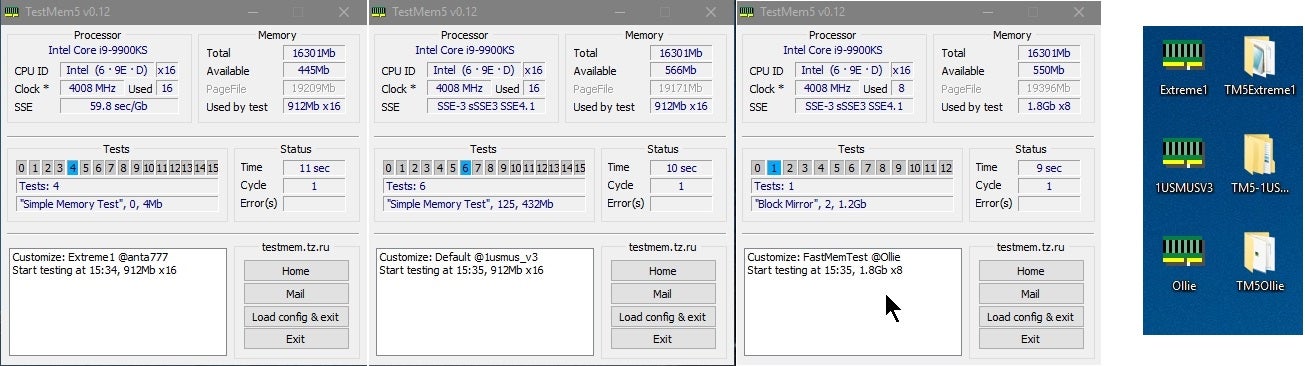 analog hearth
cyan ravine
Possibly a bsod but not a bad one
analog hearth
cyan ravine
Possibly a bsod but not a bad one
Nirsoft BlueScreenView doesn't show any sign of a BSOD
bett

@cyan ravine Speaking of all of this though, I have my memory at default DDR5 speeds (4800 MHz). Obviously Ryzen has a recommended memory speed but Google is telling me different speeds. What's the recommended speed for the 7900X?
I'm thinking about just tuning my memory as well and see if that changes anything, given that I've found that 4800 MHz is more stable than the XMP setting lol
cyan ravine
analog hearth
bett
Didn't load anta777
The default takes like 10 minutes
Anta takes like 2 hours lol
Gotta load the config
cyan ravine
Ye
analog hearth
Yeah my RGB's animations are pausing lol. I think it stopped for like five seconds at one point lol
Still running though
cyan ravine
Probably 1R x2 iirc
Which is recommended for like 5600 or 4800
Ideal, sweet spot? "6000" officially
analog hearth
I wish I still had my Micro Center receipt so I could look up the memory lol
Computer is a stuttery mess with this test atm lol
Can't look it up rn
 cyan ravine
analog hearth
<@101107951401455616>
cyan ravine
analog hearth
<@101107951401455616>
The window would've had a number on it
So yeah move to next
analog hearth
 earnest olive
what's vsoc at?
earnest olive
what's vsoc at?
That wouldn't be in the BIOS, would it? Can't find it and couldn't find it in HWinfo
earnest olive
could be called soc voltage or whatever
analog hearth
For the CPU? It's set to Auto and bouncing around at 1.050, hasn't touched 1.1 while in the BIOS
I have pretty much everything set to defaults after updating my BIOS last night if that helps
analog hearth
I mean I’m down for a different test if it increases stability
I’ve found the XMP profile for my memory: 6000 MHz 36-36-36-96 at 1.35V
Not sure if the timings are good or bad lol
If I set the XMP profile, "FCLK Frequency" stays at the "Auto" setting. Should I set this to 3000 MHz given the 2:1 rule, or is that old information?
@earnest olive what do you think?
earnest olive
2:1 fclk doesn't apply for zen 5
you can try setting it to 2000
3000 won't post
it's almost certainly autoing to 2000 with xmp on
1.1 vsoc seems low try static 1.2
analog hearth
I'll try that with XMP on
This is also on one of those motherboards that has the "DOCP 1" and "DOCP 2" settings. Don't know if that matters lol
DOCP 1 states that it's optimize by Asus (Asus motherboard obviously)
DOCP 2 states that it will load the "complete default DOCP/EXPO profile"
mossy venture
analog hearth
This is also on one of those motherboards that has the "DOCP 1" and "DOCP 2" set...
You do have your ram in slots 2 and 4 right?
analog hearth
Yes
mossy venture
Worth checking lol
analog hearth
Lolll I get it
manic cloak
Trying to buy a used PSU for a friend because his went to 💩 and the seller mentioned this

Description said “You should buy new cables.”
It’s for the Asus Tuf 850w
analog hearth
earnest olive
1.1 vsoc seems low try static 1.2
I'm gonna try 1.15V (manual, not offset) and increase in increments of 0.025V if this setting still doesn't lead to stability
So:
- XMP on (6000 MHz, 36-36-36-96 at 1.35V. DOCP 1 if that matters)
- FLCK set to 2000 MHz
- SOC: is set to 1.15V
I’ve read that 1.2V is kinda high lol
analog hearth
Possibly
earnest olive
the 7800x3d I had autoed 1.25 vsoc for 6000/2000
cyan ravine
manic cloak
It’s for the Asus Tuf 850w
Bronze???
cyan ravine
analog hearth
I'm gonna try 1.15V (manual, not offset) and increase in increments of 0.025V if...
Sounds like a plan
Test occt large extreme cycle 18
Test all core static and switching all cores independently at 1 hour each
analog hearth
cyan ravine
Test occt large extreme cycle 18
I'll try this with the CPU first and then do the CPU + RAM setting
mossy venture
manic cloak
It’s for the Asus Tuf 850w
How much is it
manic cloak
cyan ravine
Bronze???
The gold
manic cloak
mossy venture
How much is it
50$
mossy venture
Could just avoid the issue altogether with an extra ~$30
Psu is one of the last things I'd buy used honestly. The thing responsible for keeping my pc safe is the last thing I'd want to save money on
manic cloak
Well, the build it’s going into is a 3600x 3060 with only 16gb of ram, ngl it’s kinda overkill but it’s the best price we can get used
mossy venture
Oh then I'd just https://pcpartpicker.com/product/xLtKHx/apevia-prestige-600-w-80-gold-certified-atx-power-supply-atx-rp600w

Apevia Prestige 600 W 80+ Gold Certified ATX Power Supply (ATX-RP600W)
manic cloak
I’m not kidding I think I just saw that for 30$ on Facebook and I love refreshing the page 
analog hearth
cyan ravine
Test occt large extreme cycle 18
This mf really wants me to sit through a 12-hour test lol
Lollll
analog hearth
cyan ravine
Test all core static and switching all cores independently at 1 hour each
"Test each core, switching cores every hour for your 12-core CPU" did I read that wrong? :0
 cyan ravine
1st static the 2nd switching between cores
cyan ravine
cyan ravine
1st static the 2nd switching between cores
^
Can't expect clear tech support at 4am
Lucky I'm not drunk or this would be even wilder
analog hearth
my bad lol. You should go to sleep 💀
I may have fixed my actual main issue anyways. My gf and I were playing It Takes Two last night and I had horrible 1% lows all throughout playing it lol
Stressful game and I'm glad her game crashed because we just went to Overcooked after that lolll
analog hearth
analog hearth
I'm gonna try 1.15V (manual, not offset) and increase in increments of 0.025V if...
Runs smooth now after changing to these settings
Still don't know about the weird stutter yet. I haven't done much playing around within Windows yet lol
Moving around a bunch in Bambu Studio also feels a lot smoother (going from BIOS defaults to new settings)
 obtuse compass
analog hearth
obtuse compass
analog hearth
My issues currently: about as goofy as SoreFingertips'
 upper rock
hey guys.
could anyone suggest a good/durable monitor, these are the items that are listed based on priority.
- it should work for mac and windows laptop as well flawlessly
- durability
- good to my eyes. i maintain a distance of 2 feet and i spend around 15-16 hrs before the monitor
- type c
- 24 or 27inch
- pivot /tilt / height adjustment
work type: programming
dusky hearth
upper rock
hey guys.
could anyone suggest a good/durable monitor, these are the items that ...
Any budget?
Also for the adjustments, you can use a gas spring monitor arm and you'll have way more adjustments
Assuming you have unlimited budget, Dell U4025QW (1.8k)
Though it's only an ips black panel
But supports thunderbolt, and has a kvm
For a more reasonable price, there's the Acer Nitro XV275K P3biipruzx that rtings rates as the best overall usbc monitor, does not have kvm or thunderbolt; it uses dp alt mode
Still works with both windows and macos
Dell S2722QC is a bit cheaper if that it still out of the budget, and is also still dp alt mode
(thunderbolt monitors are rare)
And then for a bit less again, ASUS ProArt Display PA278CV
crimson zinc
obtuse compass
https://www.newegg.com/p/3D5-000Z-001N2?Item=9SIA1HJK8G3781&Source=socialshare&c...
Sky tech immediate no
What’s your budget
Do you absolutely need a prebuilt? Or could you put it together yourself?
vale epoch
analog hearth
My issues currently: about as goofy as SoreFingertips'
Bruh goofy as who?!
languid nimbus
 upper rock
dusky hearth
And then for a bit less again, ASUS ProArt Display PA278CV
upper rock
dusky hearth
And then for a bit less again, ASUS ProArt Display PA278CV
thanks @dusky hearth
cyan ravine
He does get men tbh
cyan ravine
analog hearth
Runs smooth now after changing to these settings
Did you run those occt tests btw
You could also do prime95 large but it's less effective on ryzen
analog hearth
cyan ravine
Did you run those occt tests btw
Nah took too long
cyan ravine
analog hearth
Nah took too long
Bruv it might be unstable💀
Just cos it feels better doesn't mean it's got a clean bill of health
analog hearth
Okay fine I'll try it again lol
cyan ravine
It's xmp, I'm not saying to test everything under the sun, 2 hours would reassure everything's fine
analog hearth
So which test again? CPU, CPU and memory, or just memory?
cyan ravine
analog hearth
So which test again? CPU, CPU and memory, or just memory?
Occt large extreme cycle 18 cycle all cores 1 at a time for a total of 1 hour
Then the same test, static all cores
1 hour
 analog hearth
Bett I have 512
analog hearth
bett just started it
cyan ravine
Good sign, then you try the all core version
Swap rules to custom, then all cores
1 hour again
If no errors you're probably in the clear
If you got more ram related issues after that I'd be sus of the hardware
Cos notching up the vsoc is pretty heavy handed
analog hearth
How does this look?
cyan ravine
For xmp
analog hearth
 cyan ravine
Looks like discord
cyan ravine
Oh I'm silly
Swap core cycling to fixed
I'm not used to the newer ui
Then do whatever threads you have
24?
analog hearth
Yeah 24
cyan ravine
Close everything else and hit it
analog hearth
Thread Count is the only setting and it's set to 24
cyan ravine
Ye
analog hearth
bett imma start it
cyan ravine
You're probably safe then
You could do the tm5 anta run to be extra sure but I would like to believe AM5 running xmp-6000 will run with no further adjustments
Like 99% of every other supposed am5 cpu apparently
analog hearth
Yeah I think I'll run that just to be sure
I paid for the whole CPU

(Yeah 312 process don't laugh at me. I paid for the whole CPU and it can handle all of them. Yes I know it's bad, yes I plan to fix it)
cyan ravine
CPU: AAAAAAAAAA-
analog hearth
Lmaooo
analog hearth
lol basically a one-slot gap between the GPU and fans

(A different build btw)
Ehh, not the cleanest but whatever

And yes I’m on the floor
Don't care lol
vale epoch
You guys got any case suggestions that aren’t too big like this 903 air? I honestly think with all the extra space in here looks a bit bad, not looking to buy right away but maybe when one goes on sale perhaps, i think i would still like to stick to the atx standard tho, buying a new mobo would be a pain

 silver bough
Hello I am currently building my pc and I am so confused where to put the tach cable on the manual is says put it on the cpu fan but the cpu fan has 4 pins and my tach cable only has 3 pins
analog hearth
this guy putting a tachometer in his computer
stoic island
silver bough
Hello I am currently building my pc and I am so confused where to put the tach c...
3 pin fan connector can be plugged into 4 pin fan header, the 4th pin is pwm, if the fan connector is only 3 pins, it's just not using the pwm pin
It goes 12v, ground, tach, pwm iirc
dusky hearth
analog hearth
this guy putting a tachometer in his computer
gotta revmatch your pc
crimson zinc
Usually dependent on the deals section
cyan ravine
manic cloak
How do I find those eBay 10-15% off coupons?
Articles normally plaster it right next to the price if it applies
 vague oracle
vale epoch
You guys got any case suggestions that aren’t too big like this 903 air? I hones...
vague oracle
vale epoch
You guys got any case suggestions that aren’t too big like this 903 air? I hones...
Time to take up the space with a custom loop
crimson zinc
I need this colour
 jagged ember
Monster green
flint sapphire
crimson zinc
I need this colour
Found it
 manic cloak
crimson zinc
I need this colour
manic cloak
crimson zinc
I need this colour
bomb pop green
I know this case is seemingly liked by a few people here, but how does it compare to the fractal pop air? https://www.amazon.com/dp/B0BPHG6NSH?

Computer case Mini Tower Bitfenix Nova Mesh SE M-ATX ARGB Black
Friend of mine was looking for a new case, but doesn't want a big/heavy case
crimson zinc
@manic cloak fractal design pop air
Or if he has knowledge of how to fix stuff, the jonsbo C6
mossy venture
https://pcpartpicker.com/product/MM7scf/jonsbo-jonsplus-z20-microatx-desktop-case-z20-black
https://pcpartpicker.com/product/8qRwrH/jonsbo-d31-mesh-microatx-mini-tower-case-d31-mesh-black
https://pcpartpicker.com/product/RMWJ7P/sama-im01-pro-microatx-mini-tower-case-sama-im01-pro-bkg

Jonsbo Jonsplus Z20 MicroATX Desktop Case (Z20 Black)

Jonsbo D31 MESH MicroATX Mini Tower Case (D31 MESH Black)

SAMA IM01 Pro MicroATX Mini Tower Case (SAMA IM01 Pro BKG)
mossy venture
manic cloak
I know this case is seemingly liked by a few people here, but how does it compar...
this case is also fine, idrk how the fans are but felix likes it which is good enough for me
 plucky timber
ooo
I'm a huge fan of this mini matx form factor
they're not too big but you can fit a lot in them
the well designed ones anyways
cyan ravine
manic cloak
I know this case is seemingly liked by a few people here, but how does it compar...
Pop air def better, but this one was the better of the two novas from bitfenix.
It's just a decent mesh box with fans
manic cloak
Looking into these cases I certainly love the matx @mossy venture (ty btw) recommended, he's currently upgrading from a 2020 iGPU build off a 3600x and it needs a whole makeover 😭
I believe he wanted 600$ budget to get a new CPU, a GPU, a better case, a PSU greater than 430w, and a m.2
plucky timber
you can do all of that without the gpu
manic cloak
It's late and i'll definitely get a response in the morning about the cases, but he just didn't want something as big as the pop air sitting on the desk unless it was the last resort
plucky timber
is he willing to get used parts?
manic cloak
plucky timber
you can do all of that without the gpu
I know but he wants a gpu and yes willing to buy used/refrubished for most
plucky timber
hmm
manic cloak
issue is
plucky timber
yeah $600 doesn't seem too farfetched
manic cloak
fbm in my area is dry
plucky timber
what about ebay?
manic cloak
we have some gpu's like the zotac 3060ti at 210$
mossy venture
He alr has the 3600x?
manic cloak
plucky timber
what about ebay?
no deals, haven't seen anything good
plucky timber
you might be able to find a 1080ti for cheaper
manic cloak
mossy venture
He alr has the 3600x?
ya he does
mossy venture
What mobo?
plucky timber
does he really need a new cpu tho
manic cloak
b450m pro4 by asrock
mossy venture
Few min
manic cloak
the thing is, I think he 100% needs a m.2 cause bootup takes about 8 minutes for him.. 💀
plucky timber
does he have an ssd?
manic cloak
he doesn't even know what he has
cyan ravine
Just use the 3600x
cyan ravine
Stick it in any of those cases
plucky timber
6750xt or whatever the cheap one is
manic cloak
there is a 5600G for 50$ in my area
plucky timber
you'll barely get any performance
manic cloak
plucky timber
6750xt or whatever the cheap one is
324.99 for a zotac 3070ti on ebay
plucky timber
it's only really worth it if you're going to a 5800x3d
cyan ravine
manic cloak
there is a 5600G for 50$ in my area
Literally 3600x with an igpu
manic cloak
correction he has a 3200G 😭
plucky timber
that's zen+ right?
cyan ravine
Oh well now that's just messed up
mossy venture
What ram does he have?
manic cloak
I think he has a 3600x though
plucky timber
ok yeah 5600g is justifible
manic cloak
so
plucky timber
wait
cyan ravine
5500
manic cloak
plucky timber
so does he have a 3600x
i'll have to double check in the morning, but i'm 100% he was talking about having 3600x, just his current build has a 3200G
plucky timber
yeah we don't really have enough information
manic cloak
plucky timber
what's the complete specs of his current setup?
3200G, B450M Pro4, 16gb of 3200mhz cl16, 430w psu, no gpu, and 512gb of storage on some storage device
that's the most I know atm
plucky timber
so
mossy venture
Part List - AMD Ryzen 5 3600X, BitFenix Nova Mesh M ARGB MicroATX Mini Tower
plucky timber
512gb?
mossy venture
5700x3d should be fine without changing mobo?
plucky timber
that's probably an ssd
mossy venture
Nah
manic cloak
mossy venture
https://pcpartpicker.com/list/RRGLvj
any different to the mp44L?
cyan ravine
mossy venture
5700x3d should be fine without changing mobo?
Check pins #cpus-mobo-and-memory
plucky timber
could be a really bloated fs
might be fixed by reinstalling windows
correction
might be fixed by fresh installing windows
that way you don't get fragmented partitions
manic cloak
tbh it might be a hard drive, 2020, from the build itself it was likely build on such a low budget
mossy venture
cyan ravine
Check pins <#500101047612604427>
Tried looking and the image is super pixilated on mobile
plucky timber
unlikely
cyan ravine
mossy venture
Tried looking and the image is super pixilated on mobile
Open in browser
Sorry hands full
mossy venture
Ah alr
plucky timber
hdds don't come in 512gb
mossy venture
No you're good ty
plucky timber
and also that's way too low of a capacity for 2020
ssds also weren't that expensive in 2020
manic cloak
true
manic cloak
mossy venture
https://pcpartpicker.com/list/RRGLvj
what's the difference between the SSD and MP44L? SSD sheet has nothing on it 😭
mossy venture
Idk either is fine it won't really make a difference
This is tlc I forget if the mp44l is or if it's qlc
manic cloak
plucky timber
or any number of possibilities
from what I know, he has steam, warzone, and minecraft on it. he used to have valorant but uninstalled it
manic cloak
mossy venture
This is tlc I forget if the mp44l is or if it's qlc
TLC
plucky timber
warzone would easily fill up 512gb
manic cloak
Q is QLC
manic cloak
how about every game mode having the whole warzone map downloaded in the background 
cyan ravine
mossy venture
Is orange 150a ok
150a orange means needs vrm airflow
105W green is fine(iirc?)
plucky timber
iirc the pro 4 isn't too bad
It's one of those budget boards that's not really good for higher end chips but they're not crap gigabytes either
plucky timber
that being said I wouldn't put a ryzen 9 on it
mossy venture
B550 is
cyan ravine
Ye
plucky timber
the B450 one is budget board
tho last time it was relevant it was in the zen 2 era
so my info's a couple years out of date
mossy venture
Anyways, it's not like he loses anything by keeping the cpu mobo and ram now.
plucky timber
that's probably the better decision tbh
if the vrms are dubious
might as well go to am5
mossy venture
5600 should be like 80-90 used too
plucky timber
5600 should be fine but if he's already got a 3600x then eh
mossy venture
Either choice makes sense just depends what route they want to go, it's like a 20% upgrade still?
plucky timber
I'm gonna go on a hunch and say that a 5700x3d would be fine on it
mossy venture
Maybe closer to 15%
mossy venture
Dual tower and a fan above the cpu on the top of the case should give the vrms enough airflow I'd imagine
plucky timber
yeah
It was a pretty good budget board back in the zen 2 era
along with the cheaper msis
I miss when boards were cheap
manic cloak
i'm searching facebook atm for any cheap a620s
there are a bunch of 6000cl36 32gb from 50-80$ because of microcenter deals
so pair it with a cheap 7500f, 7600, etc
mossy venture
plucky timber
I miss when boards were cheap
Tbf we had $110 a620m gaming x that could run a 7950x
But that's oos for a while
plucky timber
b450 and b350 vrms were a lot more mid iirc
some of the lower end boards were very questionable
mossy venture
Yeah vrms on am5 are great
plucky timber
msi boards are were generally solid on b450
some b350 could run zen 2 to a limited extent
mossy venture
Spend $150-160 and you have a board for any cpu with multiple m.2 slots and a good few usb slots
plucky timber
but yeah b350-b450 vrms were very inconsistent
mossy venture
$190 gets you basically top end with riptide
plucky timber
yeah the boards cost more these days but they're generally pretty solid
mossy venture
Idk I wasn't into pcs before 5000 series came out so I wouldnt know
plucky timber
I was in the budget scene around 3000
it wasn't the best time to build
so builds those days were very questionable
a lot of cutting corners
mossy venture
$190 isn't bad, the extra vram will help it age better but it's kinda underpowered for 1440p imo
I think I'd focus budget on a good gpu now and then either get a 5600 for cheap, or upgrade to a 5700x3d down the line
plucky timber
yeah you'd get the most performance/$ from even only upgrading the gpu
mossy venture
Maybe a 6800 if you could find one around $320 or cheaper
manic cloak
oh what an amazing deal, only if it wasn't 6 hours away
 manic cloak
- 50-80$ 32gb 6000 ram
mossy venture
You could check hws
manic cloak
better than micro center's 7600 16gb deal
manic cloak
mossy venture
You could check hws
hws?
mossy venture
R/hardwareswap
manic cloak
I haven't used reddit in a solid year
isn't that the place where you do literal trading with add ons to get something you want?
85$ with a foot pic.. 😭
 mossy venture
manic cloak
isn't that the place where you do literal trading with add ons to get something ...
mossy venture
manic cloak
isn't that the place where you do literal trading with add ons to get something ...
?
manic cloak
mossy venture
?
Its some other reddit page I was thinking about when I was trying to sell my 6650xt
mossy venture
Ah
manic cloak
Is there anything special I would have to do in paypal to set up the buyer seller protection program?
potent portal
manic cloak
Is there anything special I would have to do in paypal to set up the buyer selle...
You just have to select "goods and services" if you're paying directly. If it's through ebay, it's automatic.
If someone tries to get you to pay "friends and family" to "get fewer fees" then they're either a scammer or really don't know how these things work.
manic cloak
Zotac 3060ti (250$ refrub after tax) or Msi 2080 ti? (200$ fbm)
I don't know if there's been any performance gap since.. 2 years because the sheet in #graphics-cards hasn't been updated 😭
 severe dove
Is this the normal behaviour for 7800x3d? 4.8 Ghz max. Thought it was something like 5.05 Ghz

 strong raft
use hwinfo
jagged ember
Windows is pretty bad at seeing precise values
potent portal
manic cloak
I don't know if there's been any performance gap since.. 2 years because the she...
The 2080 ti still has a strong lead, thanks to the extra vram partially
 brittle tinsel
https://www.asus.com/motherboards-components/motherboards/prime/prime-b450m-a/
Are these compatible without a bios update?

Welcome to the power of X3D. AMD Ryzen 7 5700X3D features exclusive AMD 3D V-Cache™ technology for world-beating game performance.
ASUS Global
ASUS Prime series is expertly engineered to unleash the full potential of AMD and Intel processors. Boasting a robust power design, comprehensive cooling solutions and intelligent tuning options, Prime series motherboards provide daily users and DIY PC builders a range of performance tuning options via intuitive software and firmware features.
plucky timber
how's zen 2 threadripper compared to raptor lake?
asking for a friend
Part List - Intel Core i5-14500
I've recommended this as an upgrade to their server but they are exploring used threadripper as an option
(they were looking at skylake HEDT before)
 fossil cedar
plucky timber
I've recommended this as an upgrade to their server but they are exploring used ...
fossil cedar
plucky timber
I've recommended this as an upgrade to their server but they are exploring used ...
Whats the server for?
potent portal
Those would want stronger single core performance so rpl probably better
mossy venture
plucky timber
https://pcpartpicker.com/list/YvF4RK
I'd take a 7700 instead imo
https://www.cpubenchmark.net/compare/5169vs5835/AMD-Ryzen-7-7700-vs-Intel-i5-14500
Could prob find a 5950x relatively cheap used
 south cliff
Hey guys been a while

this pc worth it for 200-225?
i think its a pretty good deal ngl
 covert vapor
3 dimms 
south cliff
i would just buy a stick of 8
south cliff
covert vapor
3 dimms <:Oh_No:641084812161056769>
im kinda trying to upgrade my freind from a 9600k and a rx 570
covert vapor
I mean if it all works
south cliff
i always make them send video with timestamp
covert vapor
Used 1080 ti is on Ebay for 150-160 or so from what I've seen
south cliff
oh so hopefully the guy before me doesent pick it up
the hurricane better come in clutch
potent portal
That's in the "too good to be true" range of deals, be careful.
south cliff
yeah someone alread in line to get it
potent portal
Maybe reverse image search the pic to see if it's ripped from somewhere else
south cliff
didnt come back to anything so i guess thats a positive
south cliff
potent portal
Maybe reverse image search the pic to see if it's ripped from somewhere else
should i offer him more like 275
just to see if i can get it
potent portal
No
south cliff
🫡
 rough loom
man 1080ti is a real old gpu at this point
actually what a buddy of mine is saving up to replace because its showing its age
covert vapor
Your daily reminder that the GTX 1060 is the 9th most popular GPU in the Steam Hardware Survey
rough loom
its cuz they sold a trillion of them and they are worth 34 cents at this point
covert vapor
A majority sell for over $60 on Ebay
Anyways, the 1080ti was a top tier product for the 10 series. Top tier and halo products tend to maintain their relevance longer. Why do you think people held onto their 4790k for so long despite being old
mossy venture
Considering it's still competitive against the 4060, it's still relevant
The older architecture is a downside but it's still a decent card
 wispy wind
can I use a Ryzen 7 5700X3D on a ASUS B450-M MB?
plucky timber
which motherboard specifically?
dusky hearth
weird ass blue
wispy wind
plucky timber
which motherboard specifically?
plucky timber
you will need a bios update
 wispy wind
gotcha thanks!
plucky timber
wispy wind
gotcha thanks!
do you have a compatible ryzen cpu (Ryzen 3000) to update the bios with?
wispy wind
plucky timber
do you have a compatible ryzen cpu (Ryzen 3000) to update the bios with?
AMD Ryzen 5 2600 Six-Core Processor, 3400 Mhz, 6 Core(s), 12 Logical Processor(s) this is the CPU i have rightnow with the MB i have said above.
wispy wind
Gotcha, Is it hard to do a bios update (first time)
wispy wind
Ah what MB do you think could run that CPU
mossy venture
wispy wind
Ah what MB do you think could run that CPU
If you put a fan on the vrms it'd be fine
The vrms are those squarish things near the cpu socket, there's probably a tutorial on YouTube
plucky timber
yeah
mossy venture
If changing mobo, I would go to am5
wispy wind
Alright
plucky timber
I wouldn't overclock it tho
wispy wind
Nah have never overclocked anything and have no need to really.
mossy venture
For am5, id get a 7500f at $137 from aliexpress or a 7600 for $188-195 or so with an a620m pro rs wifi at $130 or the b650m at 140-150
But you'd need new ram too. Depending on the ram you have, it might need replacing anyways
plucky timber
the tier list uses a Ryzen 3000 as a reference but it looks like it just recommends that you have airflow for a 3700X/3800X
wispy wind
Yeah i have new ram on the list
mossy venture
Then at that point I would go to am5
plucky timber
honestly the jump from the 2600 to a 5700x3d isn't bad
wispy wind
Gotcha
mossy venture
What's your budget for the upgrade and what parts are you replacing?
wispy wind
I will notict a change though right?
plucky timber
HUGE change
wispy wind
Notice*
plucky timber
to am5 i mean
wispy wind
Good good thats what i want
plucky timber
5700x3d is still a pretty big leap
mossy venture
mossy venture
What's your budget for the upgrade and what parts are you replacing?
.
plucky timber
and you are in a pretty good position to take advantage of the am4 platform's upgradability
mossy venture
Ehh
When needing to replace ram and with a meh mobo am5 isn't a bad choice, it just depends on the budget
plucky timber
true
mossy venture
5600 might be a good choice too
wispy wind
mossy venture
.
About $500 AUD but i could spent around 1k
wispy wind
yeah
wispy wind
but i dont really need a new pc 😄
plucky timber
we're working with half as much here
mossy venture
What ram are you currently on?
plucky timber
imagine if it's 2400
mossy venture
Here's am5
https://au.pcpartpicker.com/list/V8yHn6
Part List - AMD Ryzen 5 7600
plucky timber
do you have that right now?
wispy wind
yeah
plucky timber
eh don't think you'll need a ram upgrade
mossy venture
wispy wind
32gb
What speed?
plucky timber
unless you're upgrading the whole system that is
would be very disappointed if it's 2666 or something
mossy venture
Might not have xmp enabled
plucky timber
true
wispy wind
i dont remember the speed i think 3200mhz?
plucky timber
yeah that'd be fine
mossy venture
Oh that's fine then, id keep that
wispy wind
(i could be wrong)
mossy venture
mossy venture
Oh that's fine then, id keep that
If you stay on am4 anyways
Part List - AMD Ryzen 7 5700X3D
wispy wind
Ok ok
plucky timber
are the cheap 7500Fs still a thing?
mossy venture
mossy venture
https://au.pcpartpicker.com/list/mNqsDZ
Though selling your b450 and ram should makeup a good bit of the price difference
mossy venture
plucky timber
are the cheap 7500Fs still a thing?
Sadly $17 more than 7600 lol
And no stock cooler
wispy wind
aw gotcha
plucky timber
yeah am5 is quite a big leap
I'd say it might end up costing not that much more if you sell your cpu, ram and motherboard
mossy venture
Well speaking of, what's your power supply, gpu, and os drive (whatever drive windows is on)?
wispy wind
yeah,ill see what happens
mossy venture
If you have an hdd for your windows drive I'd 100% get an ssd first
plucky timber
yeah you could also save up a bit more for a full system upgrade while you're at it
plucky timber
yeah I'm a bit too eagar lol
mossy venture
Just don't want to talk someone into spending money if it's not needed
wispy wind
so i have a pretty low 750w PSU and i have a brand new 7600x amd gpu
wispy wind
yeah i think so
mossy venture
Do you know the model of psu?
wispy wind
its a bomb brand...
plucky timber
bomb brand?
mossy venture
Model>brand
wispy wind
thermsltake
mossy venture
They have a lot of great psus and some bad ones
wispy wind
i was told they really bad lol
plucky timber
well
mossy venture
Gf1 gf a3 toughpower etc
plucky timber
they're just as bad as corsair
mossy venture
They've got like 5 or 6 great psus in recent memory
wispy wind
ah okay
mossy venture
wispy wind
i was told they really bad lol
What model is it
mossy venture
You could send a picture or link if you're not sure
mossy venture
plucky timber
corsair had their cx greens as well
And cv
Cv sucked
Hell everyone loves evga, look at w1-3 and n1-3
plucky timber
yeah I saw people recommending them back in 2020
I was really skeptical
there's a reason they're cheaper than CX
mossy venture
wispy wind
ah okay
And do you have an ssd for windows?
wispy wind
mossy venture
What model is it
i dont know lol how can i tell?
plucky timber
send pic
wispy wind
mossy venture
And do you have an ssd for windows?
yeah i just brought a brand new 22d so wont need a new 1 anytime soon )i hope)
mossy venture
wispy wind
i dont know lol how can i tell?
Can you send a pic?
mossy venture
wispy wind
yeah i just brought a brand new 22d so wont need a new 1 anytime soon )i hope)
Cool, almost any ssd is fine so 👍
 plucky timber
bomb
wispy wind
yeah....
wispy wind
hmmm
mossy venture
Like danger to your pc hard no
plucky timber
yeah that's a "replace as soon as possible" kind of bomb
wispy wind
really??
wispy wind
well thanks guys lol
plucky timber
yeah you'd definitely want a new psu before you get anything else
mossy venture
Descending in terms of price and quality
wispy wind
awesome thanks guys!
mossy venture
I'm gonna head to bed, I gotta be up in about 7 hours for work
wispy wind
If yall saying its that bad of a bomb ill change it 100% dont care about money ha
mossy venture
Happy to help!
wispy wind
have a good one!!
mossy venture
There's a tier list pinned in #cases-psu-and-cooling for any psu questions tho
wispy wind
cheers!
mossy venture
Lite power is pretty old it might not be on there, but it's def not worth using
plucky timber
mossy venture
Lite power is pretty old it might not be on there, but it's def not worth using
oh it is
F tier 💀
I thought they were mythical
never actually seen a f tier in the wild
jagged ember
The timer ran out
jagged ember
potent portal
I've seen a F tier blown up in the wild
terrorists win
Like CSGO
Sorry it's cs2 now
 little osprey
LG 34GS95QE 34-inch Ultragear OLED Curved Gaming Monitor WQHD 800R 240Hz 0.03ms DisplayHDR True Black 400 AMD FreeSync Premium Pro NVIDIA G-Sync HDMI 2.1 DisplayPort Tilt/Height/Swivel Stand Black https://a.co/d/0RNCUe6
What are y'all's thoughts on this monitor? Any possible way of getting a less expensive monitor of the same - if not, better quality anywhere?
My rig:
R7 5800x3d
RTX 4070
32gb RAM (8x4)

Experience stunning performance with the vast 34” curved WQHD LG UltraGear OLED gaming monitor. Stay a step ahead of the competition with an ultra-fast refresh rate up to 240Hz and .03ms response time that will bring you into the game like never before. And with the steep and dramatic 800R curve,...
cyan ravine
I think your gpu is gonna struggle
WQHD is hard enough at the flagship tier for 165hz let alone 240hz
4070 you could probably manipulate settings and use things like dlss 3 to overcome the bit bus hard capping that gpu's bandwidth, but the latency hit will ruin the fps gain
4070 is kneecapped by the bit bus, I would look at something less extreme
This is a pretty sweet spot for a lot of gpus rn
https://a.co/d/daXDO40

Introducing the KTC G27P6 OLED Gaming Monitor - the ultimate display for gamers, designers, and office workers who demand the highest level of performance and quality. With a sleek and modern design, this 27 inch OLED monitor boasts a stunning 240Hz 1440p resolution, offering crystal clear visual...
Very good value, often on sale sub $600
But even then, I beg the question if the 4070 will struggle with this too, due to the cheap bus width
Really ironic that although the 3080 12gb is very comparable to the 4070, that while it lacks the next-gen features like DLSS 3 or AV1 encode, it squashes the 4070 for available bandwidth and can run at much higher fps and resolution
That 34" you linked I would consider for a 4090
Rather than a 4070 lol
potent portal
Ultrawide 1440p is comparable to 4k when it comes to GPU load
So it's doable on a 4070 but only if you use DLSS performance
Which imo defeats the purpose
cyan ravine
Doable ye
But at 240hz I reckon the bus width will flatline it
Even the 4070 Ti would struggle with that 34" screen, same issue
Would probably get a lot closer to performant tho
manic cloak
Could anyone double check this for me?

Not mine, seller on Facebook
Pin looks like the 9 left, 9 up
manic cloak
The “best image I could have gotten” which seems to be a bent VDD_Misc?
manic cloak
100 OBO everything is in good condition except for a bent pin on the MB. If you can micro solder or use for scrap parts that's up to you.
cyan ravine
So it absolutely doesn't post
manic cloak
At that point I’d let a surgeon just take care of it
cyan ravine
Yeah you'd grab that if you felt crazy about the gamble
manic cloak
cyan ravine
So it absolutely doesn't post
That’s a good question he has yet to answer
 frigid night
Might be worth a shot to buy it for that price and see if anyone here would be willing to fix it for you.
cyan ravine
manic cloak
That’s a good question he has yet to answer
His description confesses it without saying it
manic cloak
😭