#cases-psu-and-cooling
1 messages · Page 69 of 1
 scenic lance
 fast lily
NO CLUE but IMMA TAKE IT lol
 summer gorge
scenic lance
How do they accidently ship you an 850w but POG
summer gorge
scenic lance
How do they accidently ship you an 850w but POG
my friend was shipped a 3080 instead of a 3070 at one point
¯_(ツ)_/¯
scenic lance
summer gorge
my friend was shipped a 3080 instead of a 3070 at one point

I want that lmao
Insane luck kek
summer gorge
ik lol
scenic lance
That sounds POG
summer gorge
this was a few months ago
 lofty pewter
5900xt will just be a stopgap for the next gen of CPUs and will barely increase CPU perf
just like how it was for 3900x/3900xt
get a 5900x now or pay a bit extra for a used 5950x in the future
 cerulean obsidian
lofty pewter
get a 5900x now or pay a bit extra for a used 5950x in the future
cerulean obsidian
lofty pewter
get a 5900x now or pay a bit extra for a used 5950x in the future
Kk. Cool. It is one thing in mind that it is an upgrade and not a new build
scenic lance
are rog strix psus good?
 sand atlas
The ones made after 2018 are A tier, good units
Apparently some people had problems with protections tripping, but I doubt that will be a major problem unless you're running it near peak power a lot or you're using a RTX 3080
scenic lance
what about evga g3s? there's a ton of good reviews on it but i dont see it on psutierlist
unless im dumb
sand atlas
Supernova G3? It's in the list, A tier but "low priority" due to lack of in depth testing
scenic lance
ig im dumb
lofty pewter
@sand atlas @scenic lance G3 low priority cuz OCP/OPP doesnt really work properly
allowed overload is way too high
130% overload is possible, until caps melt
scenic lance
w a t
lofty pewter
or until I think UVP sometimes kicks in, but still most likely damaged PSU in the end
sand atlas
So, moral here is don't push it too hard I guess
Or else the Supernova Goes Pop

Music video by Powerman 5000 performing Supernova Goes Pop. (C) 1999 SKG Music L.L.C.
lofty pewter
excellent song for the scenario. Also given the bad OCP/OPP, I'd take a guess that it'd have no issues with Ampere
(provided you dont pair 550w G3 with 450w 3090 + OCed 5950x)
 elfin trout
Also, it'd probably not be pop, since pop is usually protection kicking in, wack ocp/opp along with no otp is probably going to burn itself
sand atlas
That's why the supernova don't stop, weren't you paying attention to the song? lol
elfin trout
Smh you expect me to watch a youtube video off mobile data?
sand atlas
It's like 240p but you can just look at the lyrics, it fits really well actually
elfin trout
Fun
 quasi kraken
lofty pewter
or until I think UVP sometimes kicks in, but still most likely damaged PSU in th...
quasi kraken
lofty pewter
or until I think UVP sometimes kicks in, but still most likely damaged PSU in th...
allowed overload is high enough that the unit just dies
before it even triggers
so like it doesn't even have OPP basically
well
it's there
it's just above the threshold where the power supplies kicks the bucket
so its useless
lofty pewter
one of the reviewers had it shut off I believe, but because smth else failed like crazy voltage droop
quasi kraken
lol one reviewer, forget who it was said they had 3 units which all died during OPP evaluation
lofty pewter
but ye, I already knew of dead G3 cuz I knew it was possible to basically melt caps from overload
if you're lucky it doesnt die on extreme overload, probs depends if nice ambient temp or smth
 tacit wren
sand atlas
Or else the Supernova Goes Pop
tacit wren
sand atlas
Or else the Supernova Goes Pop
missed opportunity here 
 obtuse flare
is this where i would ask for help connecting the front USB and audio ports on my second hand case?
sand atlas
obtuse flare
is this where i would ask for help connecting the front USB and audio ports on m...
You can ask here, sure. What specifically did you need help with?
sand atlas
DM it to me
obtuse flare
okay
so there is a firewire port i dont need, two sets of usb, and the pink and green audio ports
but on the back are three clusters of pins
sand atlas
Do you have the cables for the headers?
obtuse flare
They did not come with any cables at all. previous user let me have all the other basic mobo cables but i suspect he never installed any up front either
i came here because I am lacking the vocabulary to find the cables I need.
I thought i had the right ones, but they turned out to be USB 2.0 TO 3.0 adapters and even if they had the right pins they arent long enough
sand atlas
I'm sure I can find the cables you need. What does the circuit board say next to each header?
obtuse flare
I had all the pics on my phone ready to share. LOL
it gives a series of P numbers, P1,P6, P8 etc
sand atlas
@obtuse flare Ok it looks like the middle one is a proprietary connector that combines the audio and USB for some reason, but the right one is a standard USB 2.0 front panel cable like this: https://www.amazon.com/USB-Internal-Motherboard-Header-Cable/dp/B01MQR5BL8
The one on the left is just the firewire
(left to right based on the first pic)
obtuse flare
Thanks
I had a feeling the middle would be a lost cause when I saw them all join up 😫
In all my searching I think "Header" was the missing piece of the puzzle.
sand atlas
I can find the OEM part number for the middle cable and see if they sell it somewhere in the recesses of the internet still. What model is the computer?
obtuse flare
I look foward to plugging thumb drives and phone charges into the front instead of using the Winnie the Pooh USB Hub I got in a rummage. 
Model? uhhhh.
sand atlas
Start with brand. HP, Dell?
obtuse flare
I have seen no branding like that
sand atlas
Nothing on the case at all? Not even inside the side panel?
obtuse flare
There are decals, but I think they came from the motherboard.
And of course an Apple sticker, because the previous owner is a laugh riot
Steel Series could be the case.
obtuse flare
haha nope
oops no urls either
Well now that I know I'm dealing with an Super Flower 201S Aluminum Tower from 2002 I don't feel so bad about not finding the cables. 
sand atlas
Techware Labs - Latest reviews of computer hardware, guides, and industry news.
Right, I can't find anything about this case besides the fact it existed and that website reviewed it way back when
Looks like you'll be getting a USB headset, I don't think that the weird split cable for this exists any more.

 obtuse flare
The reviewer I found said "For the front multimedia ports you have to connect the two wires into the back of your soundcard in order to get the front ports to work."
So I think you are right about that.
sand atlas
Yep those were the days of add in sound cards being necessary, I do not miss that
obtuse flare
I will just have to be on the lookout for set of USB ports that I can wedge in that space on the front of the case.
Until then, I have the Port Plug multipack that I bought in my last newegg order. So I don't forget they're disconnected and try to charge my phone with them.
obtuse flare
Beauty
sand atlas
Those replace one of the floppy bays
First is if you only have USB 2.0, second is 3.0
obtuse flare
Well I definitely have USB3.0, the mobo was very proud to label that for me.
sand atlas
Well that will make the case downright usable then
sand atlas
No problem! I love digging around for weird stuff like this
 small spire
Sounded fun :).
 spark ridge
Alright I'm big confused rn


I have tried two corsair psu - an rm850 and now this rm850x to replace my cheap powerspec 850w and neither will boot
Everything is connected where it should be
But nothing when I hit the power button
It boots with my old 850
sand atlas
Is that cable with the red plugs made for that unit? I have a RMx and I don't think any cable plugs are red
 sand atlas
The internal wiring is probably different from the old unit, you can actually short circuit the power supply using cables not designed for it.
 minor portalBOT
 Korn#1993 has been warned
Reason: Bad word usage
spark ridge
Oops
Ok I swapped out some of the cables for the included ones and it powered on
But I yoinked it off instantly
Oh god
It went pop and now smells a little bad
**not the psu
Idk what did
Ohwhwheheh
This is bad
sand atlas
Yeah that's a short circuited power supply. You can try to rma it, and make sure to only use the original cables next time, or custom cables designed for it.
 sand atlas
Uh oh
 opal night
Did you use a CPU cable for the GPU?
sand atlas
No he used a cable from his old power supply for pcie
spark ridge
I did that at first and no power on
Switched to the new psu's splitter
It powered on
But popped and smelly
I'm kinda lost what I should actually do now
opal night
Find the smell. If you can't, double check all your connections, all your cables and all the labeling. Make sure they're all the ones that came with the new psu.
summer gorge
spark ridge
It's something in the pc
Check if a fly landed on something hot
This is not a joke, this happened to a friend of mine before
 summer gorge
Fans
Again, this happened to a friend of mine before
It got in through the fans and burnt on the GPU
Killed pretty much the whole system, somehow
Well, I shouldn’t say somehow
The death of the system was a fire caused by a fly
quasi kraken
spark ridge
Alright I'm big confused rn
user error moment
never use power supply cables that aren't made for your power supply
there's no standardization for modular connectors
spark ridge
WELP
spark ridge
summer gorge
Fans
I burnt 3 ML120s and the rgb strip in my gpu block 
I own up to being rlly stupid, this is the first time I've swapped a psu
sand atlas
Extensions are fine but like gamezoid said, modular cables are not standardized
 grand flame
Some power cables have components inside the cable that other power supplies have in the power supply itself.
spark ridge
@sand atlas yeaaa I realized a huge flaw in that my old Sata>6pin had 4 sata's on it and the new one has 3 per
 steady walrus
In general do you want your airflow in the case to be neutral?
 zinc flume
I personally aim for positive pressure.
 chrome iris
Positive nice
 willow sierra
steady walrus
In general do you want your airflow in the case to be neutral?
willow sierra
steady walrus
In general do you want your airflow in the case to be neutral?
What the heck is that? Neutral airflow? Or positive?
"In simple terms, a computer case can either have: Positive pressure – The case fans push more air into the case than then pull out, so there is more air pressure inside of the case. ... Negative pressure – More air is being pulled out of the case than being pushed in, creating a vacuum."
Tho I don't understand why go positive 😄 Adds dust
sand atlas
Positive pressure means their more air being pushed into the case than is being exhausted. This repels dust, not adding it.
Truly neutral air pressure would be near impossible to achieve.
willow sierra
I guess my cases are all negative. Tho I didn't know that 😛
sand atlas
In a high heat environment like a gaming PC you also want more air pressure. More air means more heat dissipation, assuming the air is moving properly of course.
Negative pressure setups tend to pull air through cracks and holes in the case that might not be filtered like PCI slot covers, adding another place for dust to get in.
willow sierra
I have no idea how it works, but since it worked for tens of years, I am not going to change it 😄
I mean all my cases were setup like that
sand atlas
Sure it'll still work, it just could be more efficient is all
willow sierra
I don't know what to say, to me it seems that positive air pressure would add more particles from outside
Since it pulls air from outside.
There are enough fans inside the box on the CPU and the GPU that will contribute to push whatever leftovers enter due to negative pressure
Going positive is inviting all the dust inside
sand atlas
sand atlas
Negative pressure setups tend to pull air through cracks and holes in the case t...
It's the opposite. Negative pulls air through less optimal places.
willow sierra
Lot less, since it pushes out the air, that's why it's negative: "More air is being pulled out of the case than being pushed in, creating a vacuum."
And for that, there are inside fans that can deal with it.
The definition says that negative pushes out
Positive, pulls in
sand atlas
Traditional intake places on cases tend to be filtered, but air being pulled through other places is not
"Creating a vacuum" doesn't mean what you think it means
willow sierra
Not going to argue since I ain't a pro :)) Will keep it negative and that's it.
willow sierra
sand atlas
"Creating a vacuum" doesn't mean what you think it means
I highly doubt you know what I think it means. Unless you are some kind of Mafalda 😄
sand atlas
willow sierra
The definition says that negative pushes out
You already said what you think it means
A vacuum will pull from anywhere that it can, air doesn't just come from nowhere
willow sierra
I haven't. Let's stop it here.
I said I will keep it negative. That's it.
Topic closed 🙂
sand atlas

OPEN THIS DESCRIPTION FOR COUPONS AND DISCOUNTS!
Ever wonder what all that talk about caseflow and air pressure means? Well now you know!
__
You can help support PAX, CES and other Tech Travel directly through PayPal! http://bit.ly/1meKVVy
► Save 5% on all your watercooling needs at AquaTuning World Wide! - http://bit.ly/Uf2Djm
► Get 10% off...
Literally says "there's not a single scenario where negative pressure would be desired"
 lethal ridge
For someone like me that uses electric fan everytime, going negative pressure is more than weird
willow sierra
sand atlas
https://www.youtube.com/watch?v=4NYHC3DXynM
5:00
Thank you. I am a negative person =))))
Especially during summer, which is hot here. Not Africa, but still very hot :)) So I will keep being a negativist 😛
The only way I am going to change is if a Noble prize physics candidate or winner would explain me that positive is better =))
sand atlas
I'm not trying to say you need to change it, just that it could be more efficient
 wanton briar
Lmao
willow sierra
sand atlas
I'm not trying to say you *need* to change it, just that it could be more effici...
That I agree.
I don't say it's more efficient the way I use it 😛
zinc flume
willow sierra
"In simple terms, a computer case can either have: Positive pressure – The case ...
You can also theoretically have balanced airflow. Say if you had two identical fans in equivalent spots in the case at identical rpms. Practically you'll probably always be a bit more positive or negative I think, but there is a third option to aim for
I aim for positive to try to have more pressure within the case so any air going through seams in the case or pcie slots is going out of the case, not coming in. This is because my front intake is through a mesh and should filter dust better than if I had less pressure inside and air was being pulled in through seams etc
willow sierra
I don't want balanced, I want a couple of interior good fans inside the box, so that'd be the CPU and GPU fans, at least 2 if not more, depending on GPU, and all the other case coolers driving air out.
If you have coolers on all walls, better.
I do have that.
opal night
All exhaust fans?
 rich hazel
if you dont want dust then have more intake
rich hazel
lol
opal night
Need intake and exhaust
rich hazel
it wont
zinc flume
I'm not saying you want balanced, just clarifying that it is theoretically an option
opal night
If all fans are exhaust, where does the intake air come from?
rich hazel
i think positive pressure is better for longevity
willow sierra
Why get intake?
rich hazel
willow sierra
Why get intake?
to get cold air
willow sierra
Do I have some pet inside? 😄
willow sierra
rich hazel
to get cold air
Good point.
zinc flume
Cpu and gpu fans won't do that much to pull air in generally. CPU fans are usually pushing air out and most gpu fans are mostly pushing air around unless it is a blower gpu
rich hazel
you need cold air in and hot air out
zinc flume
I want cool air coming in (intake) hot air going out (exhaust)
elfin trout
Here's the thing, air has to come from somewhere to exhaust to somewhere else
opal night
This is about as straightforward as it gets
 rich hazel
yeah
zinc flume
35c < 60c so relatively cooler
elfin trout
@willow sierra so if you don't put intake fans, they have to find somewhere to pull air from, often from weird places
rich hazel
with the same logic you can "go" all intake
willow sierra
I am not sure what's with this discussion about what am I doing, all I asked is what negative and positive means, cause I was never aware of the terms :))
zinc flume
You do you Stefan, I'm just explaining what I aim for and why
willow sierra
So everything else is just chat.
rich hazel
because the "positive pressure will push air out"
however i do think exhaust is more important
elfin trout
Yes, this is about why negative pressure is usually a bad idea
rich hazel
i think its better to have one exhaust fan then intake
willow sierra
rich hazel
however i do think exhaust is more important
I am not trying to convince anyone the contrary
elfin trout
Negative pressure means there's air that's not being pulled in by the intake fans
rich hazel
ok but please dont go all exhaust
willow sierra
Or to be positive or negative 😛
rich hazel
its a bad idea
willow sierra
Will take that into account, thank you
elfin trout
Which means your pc is pulling air from places like the PCIe brackets
rich hazel
pcie fan 😎
elfin trout
Air has to come from somewhere
willow sierra
Probably. Although for now I am not going to add any pets into my case 😛
If I may joke.
rich hazel
you can joke lol
willow sierra
Got to go, thank you for the input. I dully noted that I might not be efficient at all 😛
rich hazel
bye
willow sierra
Cheers
 vocal tree
It would be neat to have a case that was just flipped onto its front
rich hazel
huh
vocal tree
There's cases out there that have that, where your rear io is on top
vocal tree
Then you'd just have fans on the bottom and top
rich hazel
nvm
zinc flume
I don't think gravity matters enough in this instance for it to make a big difference
vocal tree
Probably not, no
 thick shell
Hey guys my computer keeps crashing and I don’t know why. It never turns off but it will randomly reboot. I’m thinking it could be a psu issue but I’m not sure. If you have any ideas or could help please let me know!
My screens go black and the audio cuts but the lights and the fans never turn off :/ I’ve had a bunch of people check it out but no idea
summer gorge
any indicator lights on MB?
 snow spoke
^
thick shell
I’m not sure I’d have to see when it does it again. If I recall tho there’s a orange light that slowly strobes on the motherboard. I have a video of it happening and I see that light. Not sure what it means
snow spoke
what motherboard do you have?
thick shell
I have the ASUS Prime B-450 plus
I just looked and it does need an update but I’m not sure if that will solve the problem
snow spoke
where do you see the orange light?
summer gorge
what CPU do you have
thick shell
@snow spoke @summer gorge sorry I had practice! The light shows up in the middle. I have a video of what happens. I can dm it to you!
snow spoke
ok that's fine
 brisk jewel
What good case should i get? 100 or less
elfin trout
TD500 mesh, Lian li lancool ii mesh, MX410 mesh-g rgb
brisk jewel
Ok thanks
elfin trout
P400a too
 clever orbit
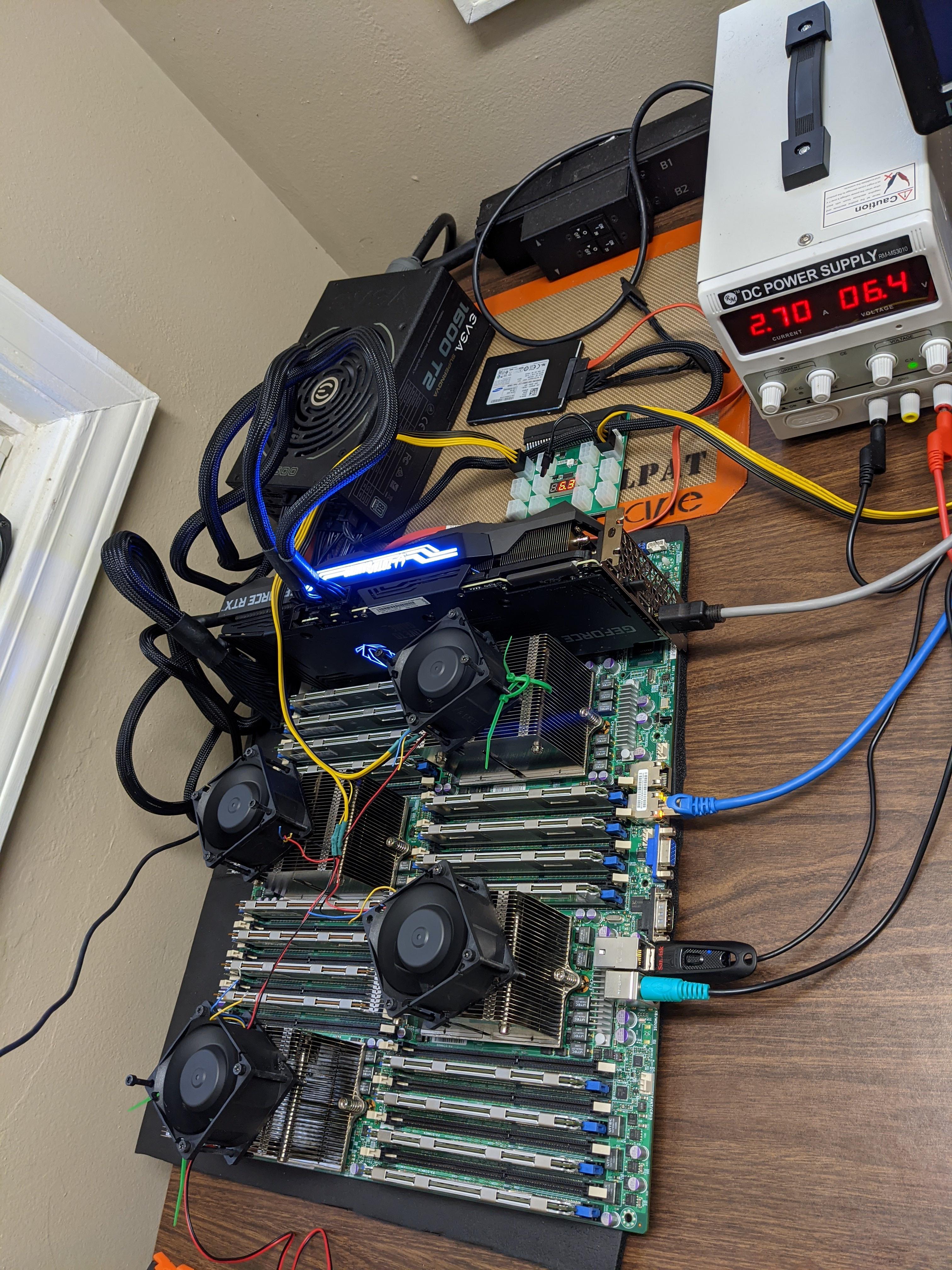
Hey guys I have a unusual request I need a case that the motherboard is an SWTX form factor
its a quad CPU board so its extra large
Form Factor
SWTX
Dimensions
16.48" x 13" (41.9cm x 33.0cm)
Case and Power supply
MB model is MBD-H8QG6-F
clever orbit
yah its a special board has like 64 cores and 1tb ram so it huge
sand atlas
Doesn't look like anything has had that proprietary form factor since 2012 or so. Only Super Micro sold cases for their format.
I seriously doubt you could find a superchassis 850, which appears to be the only supported case for quad CPU (officially). Maybe you could get lucky and find it on some used server hardware website, but I wouldn't hold my breath on that.
Your best bet would probably be a case mod, take a large eatx case and drill the holes yourself.
clever orbit
thanks
elfin trout
You'd probably have a better time looking for server racks, looking around various cases, the SWTX form factor is very wide, the depth isn't the issue, but most cases just aren't built for having that wide a board
 lusty maple
So I landed a deal for a white rog 850 psu from a buddy. 150 bucks unopened. Works with my build. After looking though. It seems on the expensive side, is the asus psu that much better then others? Or is it more expensive cause of the name attached to it?
elfin trout
Which PSU?
lusty maple
The all whitw rog strix 850
elfin trout
It's just good, white adds on to the price, but a comparable PSU in quality (I'd say better than the ROG Strix) is a 130$ Revolution D.F.
lusty maple
Well i don't mind paying slightly extra, I've seen a few being scalped for like 400 near me. So when my buddy got his and was going to return it I told him I'd buy it from him haha.
I plan to use it though
But I'm just curious on is the asus brand jsut that much better?
elfin trout
@lusty maple Fair, but no, it's just not better, hell, I'd say Revolution D.F. is better for being a multi rail unit at 850w :P
Asus just has brand name behind it to justify the price, nothing else
lusty maple
Ok just curious ty ty :)
scenic lance
spark ridge
Quick question is this noise bad
just sounds like coil whine
spark ridge
ooo okay
 fierce pivot
hi, would it be worth my time adding a few fans to the front of my h510 to improve airflow?
fierce pivot
okay thanks, any recommendations for case fans?
snow spoke
how much will you be willing to spend?
you can got cheapo and buy arctic p12's, which are 10 bucks each last time i checked, or 5 fans for 40 bucks
fierce pivot
well theres only enough for 3 fans i believe
snow spoke
or you can get some a12x25's for that sweet noise-normalized performance
fierce pivot
I'd probs need to run some of them off molex power tho cuz only 1 pwm on my board and already have a splitter for that, for the 2 fans in my case
snow spoke
you can use a fan hub
fierce pivot
okay thanks ill look into it, are they much?
snow spoke
lemme check
fierce pivot
thanks
snow spoke
how many fans will you be using?
fierce pivot
2 case fans + 2 or 3 fans at the front, i believe i can fit 3, hold on
snow spoke
ight so you can get something like this https://www.amazon.com/EZDIY-FAB-10-Port-Splitter-4-Pin-Header/dp/B086W5D5ZT/ref=sr_1_10?dchild=1&keywords=fan+hub&qid=1615307988&sr=8-10 , uses a pwm header to control the fans and receives power from a sata or molex cable
fierce pivot
so theres room for 2 fans on the front
would this deep cool one supply enough power i dont see a sata/molex power on it https://www.amazon.co.uk/DeepCool-Control-Supports-Cooling-FH-04/dp/B07LGWHHXV/ref=sr_1_5?dchild=1&keywords=fan+hub&qid=1615308197&sr=8-5
snow spoke
you should double check how much power the fan header on your motherboard supports
if it's too much then you'll fry it
if it's alr then youre gtg
fierce pivot
okay thanks
fierce pivot
snow spoke
or you can get some a12x25's for that sweet noise-normalized performance
the NF-P12's be close enough?
or should i just go with the artic p12's?
wanton briar
Arctic P12s are great for the price
fierce pivot
wanton briar
Arctic P12s are great for the price
better than the noctuas? ik they are like 2x the price but just want an opinion im not that experienced in fans
wanton briar
They are not better but $40 for 5 is amazing
They are very good fans
Way cheaper than Noctuas
fierce pivot
wanton briar
Way cheaper than Noctuas
i only want 2 fans tho, and the non pwm versions are £5.50 each but the pwm versions are like £2 cheaper than the NF-P12's thats why im asking
wanton briar
Are you talking about the Redux fans?
fierce pivot
yeah
wanton briar
I would assume the NF-P12 and the Arctic P12 perform very similiar
fierce pivot
the noctua is probs quiter tho right?
wanton briar
Most likely
fierce pivot
thanks !
 fallow cairn
wanton briar
Most likely
fallow cairn
wanton briar
Most likely
it isn't
NF P12 is worse

well NF-F12 sucks and NF-P12 sucks even more
wanton briar
What? @fallow cairn
I am not comparing the P12 to the F12?
I am talking about the NF-P12 and the Arctic P12
Obviously the NF-F12 will be better than the NF-P12
wanton briar
What about it?
 wanton briar
I know what it looks like lmao
I have read articles and watched videos on it, I am just confused what you mean by "heard about it"
summer gorge
 atomic zealot
https://azza.gg/azza/assets/products/unlimited/overdrive/001/4.png
atomic zealot
https://azza.gg/azza/assets/products/unlimited/overdrive/001/4.png
that really looks like something the PCMR would have
summer gorge
atomic zealot
heart of optimus
yeah
 strange topaz
is that a heatsink with a pc attached to it?
sand atlas
That thing looks crazy, I would totally buy that
atomic zealot

 terse cargo
sand atlas
That thing looks crazy, I would totally buy that
terse cargo
sand atlas
That thing looks crazy, I would totally buy that
Same I went to even try to find it lol
 devout yarrow
can i get a reccomendation of what watt power supply should i use for this i know the one i have is overkill
opal night
You're fine
Honestly could do with an 850W
Like, enermax revolution DF 850W
$129
Do you just fine
fallow cairn
wanton briar
What? <@!745865706964385814>
lol
NF F12 is worse than QL120's
NF P12 is worse than NF F12
and Artic P12 is better than QL120's
easy logic
don't see how it's so hard

 teal flare
fallow cairn
teal flare
fallow cairn
same amount of fans on all tests here?
fallow cairn
what
teal flare
if not then of course 3 fans is better than one
thats a 3 pack of ql
but then the noctua only says its one fan
fallow cairn
interesting how they wrote 3 pack even though they say it's a single component
Could've bought it as a 3 pack and tested it individually too
^ yea they tested it individually
the QL120's and QL120's 3 pack show the exact same performance results
like the SP120 3 pack and SP120 do
in that picture
fierce pivot
Those amounts are indifferent to me tbh especially since anyway, wont see rgb and the noctuas are quiet too so
lofty pewter
really it's either Artic P12 or GentleTyphoon AP15, Noctua kinda overrated
GT AP15 nicer for longer lifespan and serviceability due to bearing
elfin trout
@fallow cairn is it noise normalized or max rpm?
But yea F12 isn't great, a12x25 is where it's at
fierce pivot
Yeah but artic p12s dont ship to where i live and neither do the ap15s
And dont want to spend like 30£ per fan
 outer wolf
O11 mini is good airflow case right?
snow spoke
if you have enough fans, it's good enough
outer wolf
someone is saying that it sucks cuz the airhas to bend and is choked and want to know if that is the case
opal night
Any time air has to turn it slows down
 fleet kestrel
Does be quiet make good power supply’s?
opal night
Some are good, some are bad
Just like all the other brands, some are good, some are garbage

fleet kestrel
If I send a model could you tell me if it’s good or not?
opal night
yes
fleet kestrel
be quiet! Straight Power 11 Platinum 1000W, BN644, Fully Modular, Power Supply
fleet kestrel
3090 strix oc
opal night
Ya, I can kinda see that. That's a top of the line PSU
fleet kestrel
And the psu I have rn isn’t really good for my case so I’m returning it
And the only reason I wanna get this one is cause it’s cheaper than the other ones and I heard it’s pretty good
snow spoke
that's fair
opal night
It's really good, yes
clever orbit
Anyone know a power supply that will work on this board ?
MB model is MBD-H8QG6-F
Quad cpu
sand atlas
That uses a proprietary power supply, let me look for one but it is from 2012
sand atlas
@clever orbit
https://www.bestbuy.com/site/corsair-rm-series-750w-atx12v-2-52-eps12v-2-92-80-plus-gold-modular-power-supply-black/6356248.p?skuId=6356248
https://smile.amazon.com/dp/B07VF887KN/ref=cm_sw_r_cp_apa_fabc_G07RQFEFDR3PKPMKZKWP

Best Buy
Shop CORSAIR RM Series 750W ATX12V 2.52/EPS12V 2.92 80 Plus Gold Modular Power Supply Black at Best Buy. Find low everyday prices and buy online for delivery or in-store pick-up. Price Match Guarantee.
summer gorge
that link 
sand atlas
I'm on mobile, give me a minute to fix it lol
clever orbit
Thanks
 outer junco
Ok maybe I should ask here. Are there any cases like the ThermalTake H22 Versa? (Lots of drive bays, 2+ 5.25 bays, subtle appearance) Also is there any real difference between the H22 and H21?
tacit wren
clever orbit
Anyone know a power supply that will work on this board ?
uhh, you need to use the supermicro power distribution board
Does that live in a case?
tacit wren
sand atlas
<@402760899837952020>
https://www.bestbuy.com/site/corsair-rm-series-750w-atx12v...
nooooo, you'll pull way over 750 watts if you put four 16 core opterons in that
Not to mention the ~100w in ddr3 rdimms
You can kinda get away with an atx psu, but nothing consumer will have the three 8 pin 12v cpu connectors the board needs https://i.imgur.com/nypfaBw.jpg
 sand atlas
Ah you're right, oops I was looking at the 830 model not the 850 for the stock power supply
tacit wren
830 model?
tacit wren
It really depends on their cpu/ram/gpu/hdd config tbh
But ya, I'd guess it'd be 2x or 4x 23 finger supermicro psu,
sand atlas
This is why standardization is good. So we don't have these problems.
tacit wren
ngl that board/platform are borderline ewaste in 2021
About 100 for the board and heat sinks, $20 per chip
Now I want to dust that thing off and play with it again 
 low scaffold
clever orbit
Anyone know a power supply that will work on this board ?
low scaffold
clever orbit
Anyone know a power supply that will work on this board ?
whatcha doin with all those opertons
low scaffold
tacit wren
ngl that board/platform are borderline ewaste in 2021
good for super cheap vps since its like $1 per core
godaddy does it 
wanton briar
@tacit wren What board is that?
wanton briar
Which model though
chrome iris
Ok question that I have never known,
If you wanted to use two power supplies in a system is it as simple as just plugging both of them in the system? Or is it more difficult than that?
elfin trout
More nuanced than that, iirc you have to start the second psu that's not plugged into mobo first by shorting the 2 pins on the 24pin, then start the power supply plugged into the mobo the normal way
chrome iris
Hmm that’s annoying
I want to make a test bench and kinda wanted to put a Xeon in there with an OEM HP Z400 motherboard cause cheap, but those need an OEM power supply and wouldn’t have enough watts to power a lot of GPUs I’d put in there
fierce pivot
chrome iris
I want to make a test bench and kinda wanted to put a Xeon in there with an OEM ...
There's a way you can use a connector that shorts it for you i believe
Yams check dms btw
scenic lance
chrome iris
Ok question that I have never known,
If you wanted to use two power supplies in...
Get something like this
scenic lance
elfin trout
More nuanced than that, iirc you have to start the second psu that's not plugged...
you're egghead now?
nice
elfin trout
Yas
quasi kraken
sand atlas
<@402760899837952020>
https://www.bestbuy.com/site/corsair-rm-series-750w-atx12v...
thats a horrible price for an rm750 smhing
quasi kraken
chrome iris
Ok question that I have never known,
If you wanted to use two power supplies in...
There are dual 24 pin adapters which combine motherboard 24 pin power connectors, which allows both power supplies to be turned on by the motherboard
opal night
Well, that's Best Buy so.....always horrible XD
scenic lance
quasi kraken
There are dual 24 pin adapters which combine motherboard 24 pin power connectors...
so what i said
smh
chrome iris
quasi kraken
scenic lance
so what i said
go back to hating on derpoverty drives like the sn550
sand atlas
quasi kraken
thats a horrible price for an rm750 smhing
In context though, they needed a power supply capable of supporting 3x EPS 8 pin CPU power cords, and that one has modular ports that can be used for either cpu or gpu power
Sure there's just as good or better units for cheaper, it's that feature specifically they needed
quasi kraken
sand atlas
In context though, they needed a power supply capable of supporting 3x EPS 8 pin...
if they need 3 8 pins they can get a revo DF which includes two connectors per cable?
scenic lance
silverstone 1200W if you need a ton of 8 pins
scenic lance
Hello I'm new here, I'm a graphic designer and I'm looking to build my first pc should I start looking for cases? what are the best new cases for under 200 bucks? thanks in advance
summer gorge
scenic lance
Hello I'm new here, I'm a graphic designer and I'm looking to build my first pc ...
join me in #building-and-recc-chat
scenic lance
aight
summer gorge
send a message there with your total budget
tacit wren
wanton briar
<@!546791995830566912> What board is that?
The same h8qg6-f that the other guy was asking about
tacit wren
elfin trout
More nuanced than that, iirc you have to start the second psu that's not plugged...
You can only do this for stuff that doesn't share a power plane. e.g. one psu for cpu + pcie rail, 2nd psu for the gpu's 6+2 connectors
If you want to use two psu's for the same mobo's cpu, need some kind of power distribution board like servers use

19-Pairs Input Connectors
Available Output: 24-Pin ATX + 8-Pin +12v, Legacy 4-Pin, and l2C
Compatible with SC825 Chassis
Supermicro Certified
chrome iris
tacit wren
You can only do this for stuff that doesn't share a power plane. e.g. one psu f...
id want to have one for CPU + mainboard and my other one only for PCIe connectors
tacit wren
ya, either slave the pcie psu with some adapter, or hard-wire it on. It always needs to be turned on first, or at the same time.
chrome iris
so one of those dual 24 pin adapters should work?
fierce pivot
should do
chrome iris
ah wait i just realized i couldnt do that cause my motherboard is OEM agagagaga
summer gorge
what company lmao
chrome iris
its an HP Z400 workstation mobo
sand atlas
quasi kraken
if they need 3 8 pins they can get a revo DF which includes two connectors per c...
It needed 3x 8 pin because it's a quad cpu server board. A single split cable won't cut it when the processors are drawing 500 Watts.
chrome iris
has a 24 pin header, but the pinout is different
quasi kraken
sand atlas
It needed 3x 8 pin because it's a quad cpu server board. A single split cable wo...
what processors are drawing 500 watts each
lmao
old xeons and opterons don't do that
max power draw for those is generally in the 80-120 watt range
sand atlas
4x Opteron 6386 SE with 140W TDP each
elfin trout
Gotcha
tacit wren
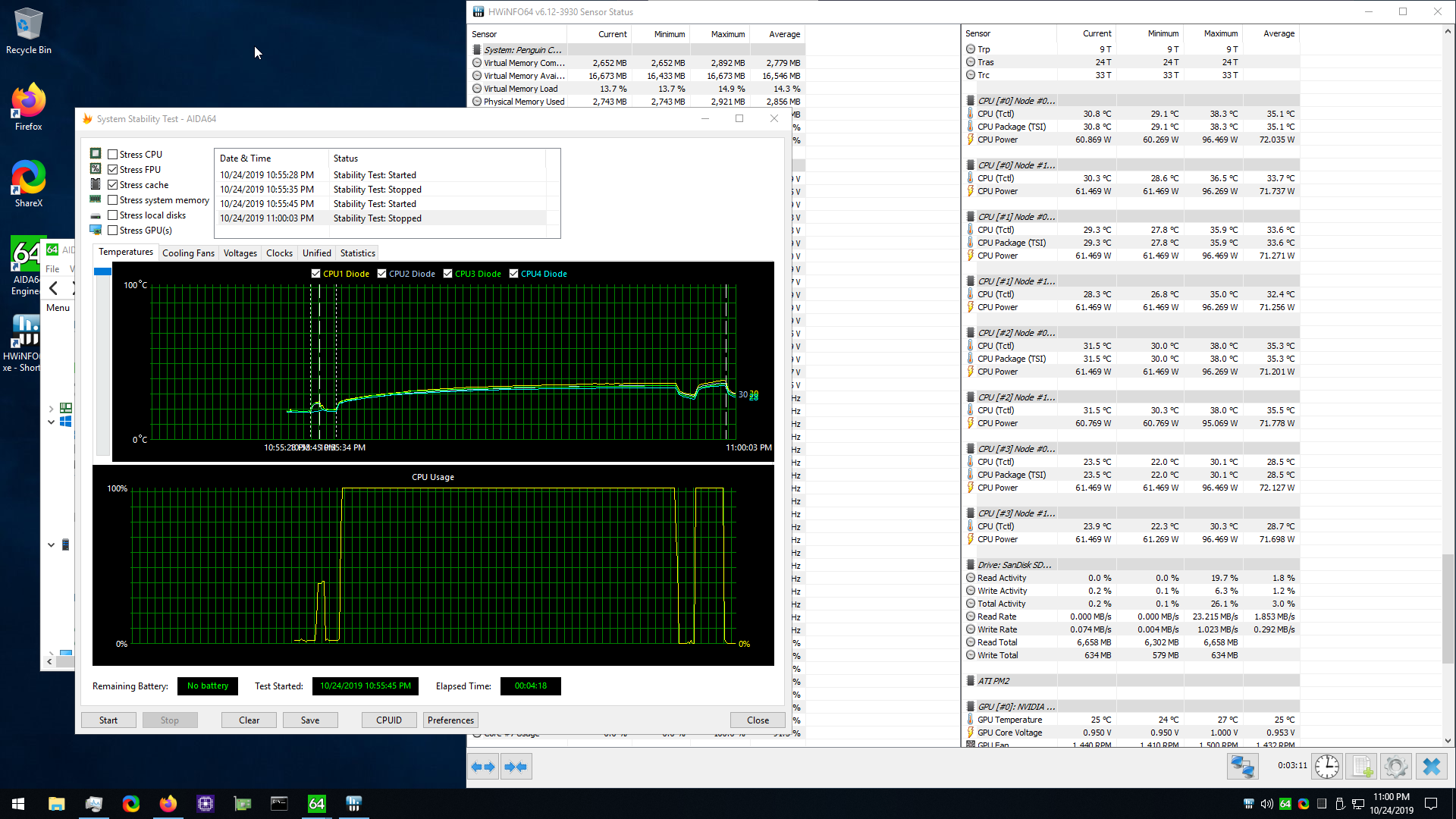
That test was bandwidth starved because only 2/4 channels per chip was filled  , but ya can hit > 200w per socket, 32 sticks of rdimms adds up too
quasi kraken
sand atlas
4x Opteron 6386 SE with 140W TDP each
revo df will do fine 😎
 waxen rune
 tribal bough
what do the different 80+ efficiencys do?
lethal ridge
better efficiency. that's it
but u can opt mostly for at least the good 80+ bronze if lowend system
tribal bough
ye
 coral bear
They simply mean that the psu you are looking at achieves a base efficiency rating when converting DC electricity from the outlet to AC for use. Higher rankings mean higher efficiency at different loads
coral bear
Yeah, rating =/= good psu
 tribal bough
ok thanks
my psu has 80+ bronze i just wanted to know what they do, All i knew was that u should get at least 80+ bronze
tribal bough
i got the xpg pylon 550 wat
lethal ridge
the thing in looking on the pins is to avoid the ones that'll toast your rig
discord pins btw
coral bear
I remember using a Rosewill 1000 watt bronze, with the ketchup and mustard cables and everything. Got it cheaper at the time than other, less overkill psus
 tribal bough
yh
coral bear
Yeah, but muh efficiency in a place with high electricity costs
 tight folio
Does anyone have a cost efficient recommendation got an 850W or 1000W psu? Gonna run an overclocked 5950X + 3090
 trail jolt
wanton briar
trail jolt
wanton briar
Phanteks AMP, Revolution D.F.
chrome iris
AMP doesnt have an 850w varaint
opal night
Also, AMP is based on the Seasonic platform which doesn't handle the 3080/3090 power transients very well and tends to trip the OCP
fierce pivot
tight folio
Does anyone have a cost efficient recommendation got an 850W or 1000W psu? Gonn...
I'd say get 1000w if possible but the psu tierliest on the LTT forum should be able to help
elfin trout
@quasi kraken got any idea on why the hell all the good 1000w+ PSUs are either oos or overpriced like hecc?
like hxi rmi etc
only thing left is revolt pro
actually capstone 1000w might be decent
 ornate garden
I'm missing a 4-pin connector compatible for my Rosewill VALENS-500M and can't find anything on Newegg or Amazon. Does anyone have any suggestions on where I can find that certain cable?
opal night
What does the 4 pin connector power? CPU or GPU?
If CPU, the 8 pin connector should split to make 2 4 pin connectors
ornate garden
CPU
opal night
Ah
ornate garden
I need 6 pin to 4+4 cable but I haven't been able to find anything that I know is compatible
ornate garden
That unfortunately won't work because the PSU is a 6 pin :(
opal night
that doesn't make sense, 6+2 pin is for GPU
Does your motherboard have an 8 and 4 pin CPU power?
If so, you only need the 8 pin
This is from the manual for your PSU

What motherboard is this?
ornate garden
Can I send you the pics through DM?
opal night
Ok? I checked the board though, it only needs the 8 pin CPU power as shown here

2nd picture
ornate garden
Ok
 empty token
ornate garden
Ok
empty token
ornate garden
Ok
You wouldn’t be able to do a pcie power to cpu power
lofty pewter
elfin trout
<@!261617855257116672> got any idea on why the hell all the good 1000w+ PSUs are...
probs because to ease the PSU shortage companies killed off rarely bought PSUs
sand atlas
empty token
You wouldn’t be able to do a pcie power to cpu power
Not without a specialized cord since EPS and PCIe cords have the ground/12v reversed from each other
empty token
Oh ok
sand atlas
Plus the PCIe one has a "sense" pin in place of one of the grounds
coral bear
opal night
Also, AMP is based on the Seasonic platform which doesn't handle the 3080/3090 p...
Isn't that only the pre-2019 Seasonic platform? I though they re-released their psus that had similar problems with other graphics cards
opal night
No, FOrks said it's a thing even with newer Seasonics
coral bear
Oh jeez, guess I can never get a 3080 then 
cerulean obsidian
coral bear
Oh jeez, guess I can never get a 3080 then <:uh:661280664334893086>
you're somewhat better off waiting for that cryptocurrency crash to get a 3080 or what you would like.
lofty pewter
I believe SS fixed it just with incap cables or smth
Which has their limits if so
might be misremembering the fixes tho
coral bear
Wasn't that v2 Focus? I though they changed the psu itself for v3 and got rid of the incap cables
elfin trout
lofty pewter
probs because to ease the PSU shortage companies killed off rarely bought PSUs
interesting, I thought that passed
lofty pewter
coral bear
Wasn't that v2 Focus? I though they changed the psu itself for v3 and got rid of...
I do not know, been a while since I looked into it
coral bear
"The newly upgraded FOCUS PX and GX series are the successors to the FOCUS PLUS Series, which became an instant top seller in the power supply market after its launch in 2017. In 2019, Seasonic engineers have made improvements to the popular series such as removing the inline capacitors on the supplied cables"
That is from Seasonic's page on the Focus PX
 unique pilot
The main thing they fixed is the OCP or OPP not tripping with high transient gpu's
tacit wren
Pretty sure it's just my seasonic that's borked
 grim harbor
Hey y'all. So I bought a new case (https://www.newegg.ca/p/N82E16811353206?Item=N82E16811353206) and to my surprise the fans were not plugged in the motherboard like my previous case but like molex to PCIe (I think? I suck at this) .
Anyway I bought one such cable (https://www.amazon.ca/gp/product/B01DV1Z22K/ref=ppx_yo_dt_b_asin_title_o00_s00?ie=UTF8&psc=1) and my PSU didn't like it. I checked if it was because it drew too much power by testing it with my GPU unplugged and that wasn't it.
I can't afford to keep buying parts until I find the proper one so if anyone can suggest a solution or a good quality cable that will not kill my PSU, or whatever
sand atlas
That cable you bought is to convert 2 molex connectors into one PCIe connector for GPU power
sand atlas
Snap a picture of the connector and DM me since I don't think you can post it yet
Yep that's just molex, should plug right into your power supply. If you have modular cables look for the one that fits the connector.
grim harbor
None fits
 grim harbor
ugh I think I lost these
grim harbor
Thank you I love you stranger
sand atlas
Happy to help
 echo socket
I'm swapping my PSU rn (CX550M -> EVGA 750B2) and I can't seem to turn on my PC.
It was running fine with just mobo and CPU power (m.2 ssd booted into windows) but when I connected my two SATA drives it now does nothing when I press the power button.
I've unplugged the SATA power cables from the PSU and still I get nothing when I press power. Not even debug LEDs or fans spinning.
weirdly enough the Ethernet light is still blinking
 echo socket
I got it to boot again with just one of the SATA power cables plugged in

Yeah the moment I plug the other one in, it dies.
huh. used a different cable and it works now.
 opaque axle
are you using cables that didn't come with that power supply?
echo socket
I think so yeah
Been a few years since I've had these two. Just been too lazy to swap em.
 tight inlet
yo should i get the MPG A750GF or the ROG Strix 750?
scenic lance
Is it normal for EVGA PSUs to make a noticable whirring sound when put into Eco Mode?
 finite agate
For those interested, my EVGA 750 BQ suddenly stopped working overnight like 3 weeks ago. Just got the RMA back
Turns out, as i suspected, a capacitor blew up
Dunno who all wanted to hear back from me, but if ya know, ya know
 edgy tiger
Is there any chance a PSU could catch fire plugged in but turned off
sand atlas
A bad PSU, yes
edgy tiger
How about a psu from a 1994 compaq presario
sand atlas
Yikes, I don't think they even had off switches then and they still weren't auto 120/240 input voltage sensing
Definitely a possibility
sand atlas
Burning dust smell is probably from a short circuit. Dust is conductive, so if enough builds up and it bridges a connection, boom.
edgy tiger
Honestly it is a very clean machine
Have seen computers half the age be a lot more dusty
sand atlas
What about the inside of the PSU though?
edgy tiger
Well it didn’t spray me with dust, thats a good sign
sand atlas
You can open it, it's not like it'll void warranty lol
sand atlas
Can you tell what processor it is? Probably 133 MHz or something
edgy tiger
486dx
Whoever had it before me left a bunch of games that run slow as hell on it
Played jeopardy and won
sand atlas
edgy tiger
486dx
25, 33, or 50 MHz then
You might be able to find a vintage collector for that if you clean it up
edgy tiger
Where? Also have a hulk of a computer that I dont even have a monitor for
Its from a company called corona
Pre- 386 days
sand atlas
Ah never mind they're going for $10 on ebay
Not quite vintage enough, or not rare enough
sand atlas
Corona Data Systems, later renamed Cordata, was an American personal computer company. It was one of the earliest IBM PC compatible computer system companies. Manufacturing was primarily done by Daewoo of Korea, which became a major investor in the company and ultimately the owner.
That?
edgy tiger

Looks very close to this
Need to do something w it
Rn its a nice testbench for my ddr2
(Its the bench not the PC)
This thing is like 4 times my age holy hell
sand atlas
The most I'd say it's worth is $50 if it can boot. If no boot disk or nor power, near worthless. These were pretty common apparently.
sand atlas
Now that would be a fun project. It's certainly got the space in the case, do some mods to fit modern ATX stuff...
edgy tiger
Time to get the tools out
Actually quick question
What is the best way to sell scrap PC parts for gold collection
I have a bunch of MOBOs, CPUs, RAM, cards
sand atlas
Yeah, breaking it down to component metals is more expensive than the metals are worth
opal night
Cost you more in Nitric Acid to extract it than the gold is worth.
opal night
Understood but still, it will cost more to extract than you'll get out of it
edgy tiger
Ok, thx.
sand atlas
The Refining Company buys whole computers, recovers the precious metals within and pays you the highest price
They only take a minimum of 1000 lbs for a shipment
opal night
If there were a way to make money doing it, we wouldn't be shipping it out of the country to be processed
scenic lance
you needs tons and tons of components to profitably recycle
vocal tree
Make a sick funeral build with all the best dead parts and then have it recycled because they only buy whole computers
willow sierra
So I was thinking that for a quiet setup, I should buy "be quiet! SILENT BASE 802", but now just before ordering it, I am not sure if getting another case, and buy silent quality fans, is a better option 😄
Advice?
Or should I get it and also get silent quality fans? 😄
 umbral hazel
I'm looking for a decent LGA 1200 socket ATX form factor case with pre installed rgb fans and can hold a liquid CPU cooler under $80. Ping me
fierce pivot
umbral hazel
I'm looking for a decent LGA 1200 socket ATX form factor case with pre installed...
Are you looking for the case or motherboard?
umbral hazel
fierce pivot
Are you looking for the case or motherboard?
Case
fierce pivot
umbral hazel
Case
Colour preference?
umbral hazel
RGB lighting blue case?
fierce pivot
Okay I'll see blue cases aren't that popular tho
And what size radiator does the cooler have?
@umbral hazel
fierce pivot
Yeah having a look for case now
 split saffron
how i can know my case name ?
fierce pivot
https://pcpartpicker.com/product/wj4BD3/corsair-icue-220t-rgb-atx-mid-tower-case-cc-9011174-ww https://pcpartpicker.com/product/9N4BD3/cooler-master-masterbox-td500-argb-atx-mid-tower-case-mcb-d500d-kann-s01 https://pcpartpicker.com/product/3ZCFf7/cooler-master-masterbox-mb520-argb-atx-mid-tower-case-mcb-b520-kgnn-rga all look good
split saffron
and size
fierce pivot
fierce pivot
https://pcpartpicker.com/product/wj4BD3/corsair-icue-220t-rgb-atx-mid-tower-case...
@umbral hazel
split saffron
 fierce pivot
Well it looks like it's atx but idk the brand
split saffron
atx or micro atx
fierce pivot
Looks atx
fierce pivot
Can you send a better pic so we can see mobo
fierce pivot
split saffron
i am thinking to buy atx
Only bother getting an atx board if you're doing a cpu upgrade too
split saffron
the MB is asrock b460m pro4
fierce pivot
split saffron
the MB is asrock b460m pro4
But can you send a pic of it in the case so i can see where it stops to tell if the case is atx
umbral hazel
Corsair iCUE 220T RGB Airflow ATX Mid Tower Case is over 80
fierce pivot
Pretty sure it's atx but just to check
fierce pivot
umbral hazel
Corsair iCUE 220T RGB Airflow ATX Mid Tower Case is over 80
Yeah ik it's like 10 over you said around 80 so
umbral hazel
The second one looks good
fierce pivot
It's legit 5$ more lol
split saffron
k
fierce pivot
Well they all should be fine, there's better but you wanted ones that came with RGB fans
 edgy tiger
@fierce pivot well that looks to me to be a cooler master case
With some mods for cyberpower
fierce pivot
split saffron
check this
It looks like it's an atx i think, but unless you're getting a new cpu don't bother getting new mobo
edgy tiger
 summer gorge
fierce pivot
It looks like it's an atx i think, but unless you're getting a new cpu don't bot...
summer gorge
fierce pivot
It looks like it's an atx i think, but unless you're getting a new cpu don't bot...
I spoke with him about this in #cpus-mobo-and-memory
Convo is over already
edgy tiger
Looks exactly like the mb511
fierce pivot
Ahh okay
summer gorge
I told him basically he shouldn’t waste his money but if he does then get the B560m Pro4
split saffron
so what i should do 😦
@summer gorge if you have my PC what you will do if i give you around $260
or any one suggest
summer gorge
Sell the PC and build my own
fierce pivot
split saffron
so what i should do 😦
You should only buy a new mobo if upgrading cpu
fierce pivot
split saffron
<@!305102062121648138> if you have my PC what you will do if i give you around...
Mb add 8gb ram idk but not really anything else you can do with it
fierce pivot
split saffron
so i buy 32gp ram with 2666mhz
If there's ram that's cheaper at higher speeds you can just get that
summer gorge
split saffron
so i buy 32gp ram with 2666mhz
You know that you can underclock the RAM, right?
fierce pivot
summer gorge
https://discord.com/channels/500085440221806603/500102568408776724/8206906774234...
True
Usually 3000mhz would be cheaper than finding 2666
split saffron
summer gorge
You know that you can underclock the RAM, right?
what this mean ?
fierce pivot
split saffron
what this mean ?
You can by ram for higher speeds but run slower
summer gorge
If you get 3600mhz RAM then you can just clock it down to 2666
split saffron
but i will not benefit
summer gorge
You might
If you can clock it higher
My B450-f officially lists 3200mhz speeds but I could clock my RAM up to 3600mhz easy
low scaffold
whats going on here
summer gorge
Will it not?
opal night
No
summer gorge
Aw shucks
low scaffold
id get b560
split saffron
at laaast
low scaffold
id get a new board
split saffron
someone know my PC
summer gorge
He bought a cyber power prebuilt with outdated parts (except the CPU)
opal night
The board will not go above 2666 with an i5/i3
split saffron
tell them vin
opal night
Not telling anything
low scaffold
i know more than vintage 
opal night
I'm not sure it's worth spending $250 for a new board and ram, that's up to you
 split saffron
so
summer gorge
opal night
I'm not sure it's worth spending $250 for a new board and ram, that's up to you
^^^
That’s what I keep saying
split saffron
what do you suggest
low scaffold
what are they even trying to do
opal night
SPend money
low scaffold
yeah but on what
opal night
That's their question
low scaffold
probs cooler upgrade depending on their cpu
summer gorge
It’s stock cooler on 10400f
split saffron
no 500
low scaffold
nvme or sata?
split saffron
m2
summer gorge
SSD
low scaffold
id make sure it has at least 16gb of dual channel ram, maybe a better cooler, then id save the rest of the money for a better gpu down the line
although is cyberpower prebuilt so am guessing the psu is a bomb
fierce pivot
low scaffold
id get b560
They already have the pc tho and want to upgrade from b460 to b560
opal night
Dual channel ram will do more for you than increasing the speed
Since that system only has 1 8 GB stick
low scaffold
low scaffold
scenic lance
all the b-die kits oos
buy the one adata meme kit
scenic lance
scenic lance
low scaffold
<:keeeek:591379457017774090>
WHAT IS THAT
low scaffold
what u dont like 4133mhz?
split saffron
CPU i5 10400F
GPU 1660s
MB asrock b460m pro4s
RAM 1*8gp 2666mhz
SSD 500gb
HDD 2T
PSU unknown
those my PC spec @low scaffold
@summer gorge @opal night
so what is should do onlly
so i have end of this
low scaffold
upgrade cooler to gammax 400, get 16gb of 2666mhz ram
if you dont need more space dont get more space
and youll be fine
if you dont have a good keyboard/mouse/display id look at getting that taken care of
split saffron
the cooler not good ?
summer gorge
Intel stock cooler 
low scaffold
id say its worth $20 to not have to worry about it
scenic lance
there is nothing wrong with that build other than the ram/mobo
scenic lance
why 32gb on a 10400?
split saffron
not one time for future
scenic lance
if you're spending that much money i would just buy a b560 along with it
low scaffold
just get 16gb
fierce pivot
low scaffold
upgrade cooler to gammax 400, get 16gb of 2666mhz ram
Or whichever speed is cheapest tbh usually 3000 cheaper
split saffron
same what comes with th pc
low scaffold
split saffron
same what comes with th pc

Keychron | Wireless Mechanical Keyboards for Mac, Windows and Android
Keychron design and produces unique wireless Mechanical Keyboard for Mac, Windows, iPhone and Android.
fierce pivot
Upgrading your mouse would make a huge difference as well
fierce pivot
Okayy....
low scaffold
maybe use the site?
fierce pivot
I think they thought you were linking a specific keyboard
low scaffold

Keychron | Wireless Mechanical Keyboards for Mac, Windows and Android
Keychron K1 is an ultra-slim wireless mechanical keyboard. With Gateron low profile red, blue, brown switch. Wireless and type-c wired mode. Mac layout, compatible with Mac, Windows. Aluminum frame. 18 types of RGB backlight included white LED.
split saffron

 fierce pivot
split saffron
fierce pivot
split saffron
You can get an abs system with those specs for like 600 or so
opal night
$600? big doubt.
fierce pivot
Well roughly
low scaffold
but yeah lol if youre a numpad degenerate then keychron has keyboards for you
split saffron
$679.99
low scaffold
and its sata ssd
low scaffold

fierce pivot
opal night
Nah $900 https://www.newegg.com/abs-ali491/p/N82E16883360086?Description=ABS%20c...
low scaffold
THAT CASE
fierce pivot
Ohh nvm lol
low scaffold
opal night
I posted that. However, it doesn't have an NVME nor a 1660 Super
Elsaad's PC has a super
fierce pivot
Yes just saw that my b
 opal night
I'm also really disappointed in Build Redux now
low scaffold
why
low scaffold
makes sense
fierce pivot
They have a r5 3600 1660 ti for 800 ntb
low scaffold
they were cheap because they werent well known
now theyre well known
so theyre more expensive
fierce pivot
But they are owned by digital storm
split saffron
Cooler Master Hyper 212 EVO is this good cooler?
opal night
Not when others exist
low scaffold
fierce pivot
But they are owned by digital storm
and DS distanced themselves from it to make it seem smaller
fierce pivot
split saffron
Cooler Master Hyper 212 EVO is this good cooler?
Id cooling se 224 xt, gammaxx 400
fierce pivot
low scaffold
and DS distanced themselves from it to make it seem smaller
Yeah fair, well i heard bout them originally from linus and he was like digital storm owns this XD
low scaffold
why would they cannibalize their own company?
fierce pivot
¯_(ツ)_/¯ true
low scaffold
the thing is
DS has a supply of parts
if you use DS directly
you pay a lot more for the system
vs redux
so ofc any new gpus they get
go to DS direct customers first
then maybe trickle down to redux
fierce pivot
Hmm that's fair
 opal night
Gammax or ID Cooling Basic
split saffron
then basic is cheaper
fierce pivot
The se 224 is 30 I'd get rhat
opal night
I have it cooling my wifes 10600K and it's working great
low scaffold
get 16
fierce pivot
split saffron
no more
Yeah just get 16gb
Or tbh you could just add 8 you don't need 24gb
fierce pivot
split saffron
can run 3 stick?
Yes you can but i would only bother getting 8gb of ram
fierce pivot
split saffron
speed 3000 or 3200 or 3600?
Whichever cl16 stick is cheapest
split saffron
 low scaffold
3200 since youre only running at 2666 anyways
split saffron
k
fierce pivot
Yeah but I'd just get 8gb cuz you already have 8
fierce pivot
split saffron
no
You won't need 24gb ram
split saffron
i will remove the old one
fierce pivot
Doesn't matter tbh but okay
split saffron
the mhz and brand and cas may be different
and the same brand dont sell one stick alone
thats y
fierce pivot
split saffron
the mhz and brand and cas may be different
MHz doesn't matter, you can check what cas you're pc has atm
It's prob cl16
And it doesn't matter that much whose ram you buy
split saffron
where i can find
fierce pivot
split saffron
where i can find
This would be better anyway https://pcpartpicker.com/product/zCCFf7/crucial-ballistix-16-gb-2-x-8-gb-ddr4-3000-memory-bl2k8g30c15u4w
fierce pivot
split saffron
where i can find
Hardware tools


