#cpus-mobo-and-memory
1 messages · Page 51 of 1
 burnt spear
 dull flint
Like I'd chance it maybe if you ran them at 2133 MHz and extremely loose they'll probably work as 64gb, but it'll be hella slow
burnt spear

Patriot Viper Steel 64 GB (2 x 32 GB) DDR4-3200 CL16 Memory (PVS464G320C6K)
burnt spear
dull flint
Like I'd chance it maybe if you ran them at 2133 MHz and extremely loose they'll...
Jedec was fine for me mixing kits
dull flint
Yes but am4 hates 2r dr
As I said 64gb is hard to run, I barely got 3666 working on b die
And these are not anything as easy here
burnt spear
dull flint
Yes but am4 hates 2r dr
It was am4 tho
I still wouldn't suggest it either way tbf
burnt spear
5600 on 2666mhz ram maximum no fun
burnt spear
dull flint
32 and 64 is a huge jump
That's true, was 4x8
dull flint
4x8 is like 2x16
burnt spear
Djr and c die I think
 obtuse forge
I guess my pc started with 64 Gb
dull flint
obtuse forge
I guess my pc started with 64 Gb
You should be able to flip or trade for a 64gb kit
Will offset the cost of a new 64gb kit
obtuse forge
I’ll try
dull flint
But yeah sadly corsair is famous for what you just witnessed
Die mixing is an every day thing with vengeance ddr4
They have dozens of different combinations
obtuse forge
 dull flint
Oh? Did you manage to get all four working?
obtuse forge
Yes
dull flint
Interesting, maybe swapping them around helped, they're at 2133 there too
obtuse forge
ik enabling xmp didn’t work
dull flint
Yeah, jedec is a strong chance of success (Sorry, jedec in this situation is 2133)
And 2133MHz makes sense to me
So why did you add 32gb more btw?
obtuse forge
I need more ram
dull flint
Running out?
obtuse forge
Yeah
dull flint
What kind of work are we doing for that to happen
obtuse forge
My pc use 31.4 when working
dull flint
Take me through your process
obtuse forge
?
dull flint
31.4 ok that sounds about right
dull flint
obtuse forge
?
Was wondering what programs lol
obtuse forge
Umm computing program
obtuse forge
 dull flint
Just helps me help
obtuse forge
Got it running at 3000mhz
obtuse forge
Sure
dull flint
I'm going to send you a link with a tutorial
obtuse forge
Ok
dull flint
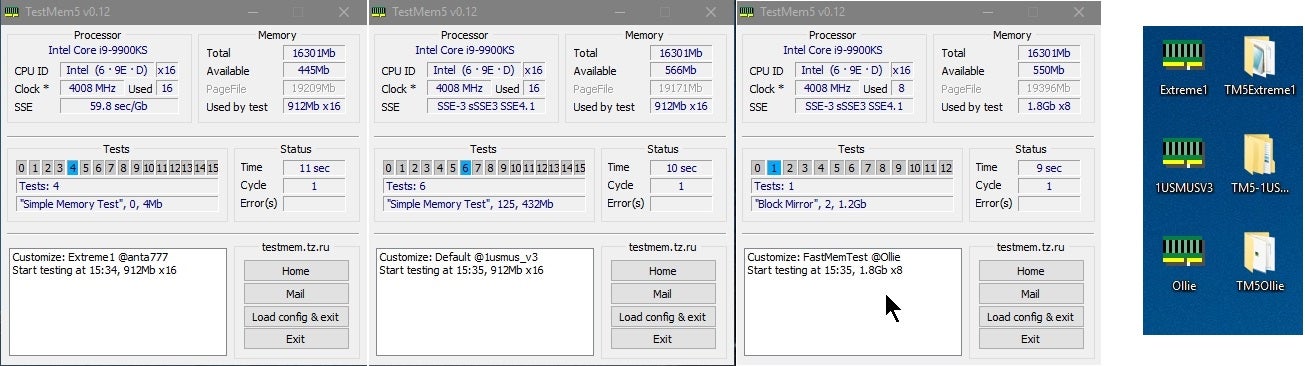
I want you to run this test for a few hours, until it stops, you want 0 errors
obtuse forge
dull flint
I want you to run this test for a few hours, until it stops, you want ***0*** er...
uhhhhh
dull flint
Overclock.net
obtuse forge
i was bout to try push it for 3200mhz
obtuse forge
ill run my program tonight and see if it crash tomorrow morening
dull flint
Reason I say is if you're computing, ram errors can carry over into the work
Especially loaded ram
obtuse forge
As long as my PC doesn’t crash
dull flint
Definitely worth checking
obtuse forge
3200mhz did work
dull flint
Alr
Well the link is there if you crash
Just be warned running unstable mixed ram can lead not only to crashes but dead windows installs
obtuse forge
I get blue screens sometimes with my old 2 stick of ram sooooo
dull flint
Lolol
obtuse forge
My pc start to act weird on the keyboard then crashed
obtuse forge
dull flint
Getting blue screens before is not normal either
I mean my boot ssd is savaged from a laptop
It’s pcie gen 3x4.
dull flint
Might explain it if it's the same windows
obtuse forge
dull flint
Might explain it if it's the same windows
windows 10 before then i upgraded to 11
i did an reinstall
idk if that helped or not
dull flint
Yes that would a lot
obtuse forge
 dull flint
Ah yeah it doesn't ok
Can you click "load config and exit"
Then navigate to the memory test folder, go to configs
Load anta777 extreme
Then relaunch the test
The default one is useless lol
obtuse forge
Where memory test folder
dull flint
Where you downloaded it
 obtuse forge
 dull flint
Yep see extreme1@anta777
obtuse forge
The extreme 1@ant?
dull flint
Yep
obtuse forge
Yes
dull flint
So pick it in the program then it'll close itself, you relaunch as administrator then it'll run the test
Now that should go for I believe up to 4 hours for 64gb depending on the speed
obtuse forge
It says memory manager failed
obtuse forge
 dull flint
Blue screen?
obtuse forge
No
dull flint
Huh
Can you close everything else down and try start it
It mightn't have the allocation space
obtuse forge
It didn’t work when I click the anta extreme
dull flint
Try not launching as admin instead
dull flint
Ok it just closes and crashes?
obtuse forge
It keep saying memory manager failed
obtuse forge
First time I started it did second time it didn’t
obtuse forge
I’ll try
dull flint
You can run this test for 2 hours and I would wager it's a strong chance of stable


 dull flint
If you type 18 what happens
 dull flint
Nope
We need 18 enabled
Start again

The menu changes every time with this program I swear
obtuse forge
 dull flint
Yep now 0
obtuse forge
i pressed 18 it says vectro transfor v3 4.36 enabeld
k
i hope my pc doesnt blow up
dull flint
Now we leave it for 3 hours, if it runs the whole way, you're good
Set 3 hours on the dot
And hey honestly if it works, count your stars
Rare that vengeance mixed does that
obtuse forge
does it really means its stable after 3 hours
obtuse forge
i mean my workloads runs 24/7
dull flint
And this is one of the most thorough and quick tests
obtuse forge
what i need it for
dull flint
obtuse forge
i mean my workloads runs 24/7
By good chance yes
Not a perfect guarantee but a strong one
obtuse forge
also why does corsair do this??????? mixing chips into the same product and states that i can upgrade when ever i want
does it mean i can sue them for it?
dull flint
Unfortunately not
obtuse forge
not what their advertising
dull flint
They sell kits designated to run the spec, if they do alone then they're working
If not well there's warranty which is them trying to "make good" litigiously
So no unfortunately no real grounds to sue
obtuse forge
if my ram kill my pc they will they cover?
dull flint
Heh, if by any stretch it does actually, yes, possibly
Depends on the situation
In any case corsair ain't the only ones
Corsair has a huge gamut though
obtuse forge
i watched one of LTT's video and he said that mixing ram is fine
dull flint
Yes it can be
But I've honestly lost count over the years how many times I've seen both sides to that recommendation
Especially to vengeance ddr4
Infamous sticks
obtuse forge
idk why mother board have slot available when manufactures doesnt make them compatiable :/
dull flint
Ikr
Well for people like us that buy on speed, it's useless
Unless you buy 4x8 to begin with, no real point if you can't confirm the new kit is identical underneath
Otherwise you get blue screens and problems
If you were someone who buys only 2133MHz ram, it's convenient to pop another 32gb in there
Perfectly understandable 100%
obtuse forge
I mean even if my pc pass the vt3 it would still crash
obtuse forge
or i can just run my program overnight and see
dull flint
Overnight works if you want to
It should stop on error with a time stamp tbh
As long as whenever it stops, no errors
Then it's gucci
obtuse forge
whats gucci
obtuse forge
uhhhhhh
dull flint
No I mean like, gucci as in all good
obtuse forge
ok
dull flint
Lol
obtuse forge
well see tomorr
dull flint
No worries
 long scaffold

 umbral fog
So why a 7700xt over a 6800
dull flint
If you're talking raw raster, I can see why you posed the question, however below 400 the 7700XT becomes justifiable in other ways apart from raw raster
umbral fog
Mind explaining those I haven't been to up to date on temlam red
dull flint
It's more a measure of what you value for a gpu honestly, as RDNA 3 introduced hardware RT and AV1 encode, makes it a more powerful workstation card
RT itself is blah
But the performance gains in other workloads is real
burnt spear
Just saying, 3080 10gb is $385 rn
dull flint
burnt spear
Just saying, 3080 10gb is $385 rn
This too
umbral fog
And some nice extras
umbral fog
Like more vram and a bigger memory bus
dull flint
Bigger bus doesn't do much for that card
umbral fog
I myself have a 3080
umbral fog
Are these new prices?
burnt spear
Open box on the nvidia side
umbral fog
I know the 6800 is but I find 3000 series over a 3060 is hard to find new
burnt spear
30 series stock new is not sold
umbral fog
Last gen for gpus was kinda boring
dull flint
Waiting for when that 7700xt dips below 350 tbh, we'll have another 6700xt card on our hands
umbral fog
Only thing I found exciting was the 4090 from a pure power standpoint but otherwise it's been meh on both sides
dull flint
6700XT went through an almost identical path albeit riddled with covid between
umbral fog
Yeah it's just hovering at 400 though
dull flint
umbral fog
Only thing I found exciting was the 4090 from a pure power standpoint but otherw...
4090 is ok, I preferred the xtx between the two irl
Near 4090 perf for almost half is...well insane tbh
Granted with the obvious caveat
But that caveat ain't worth near double lol
umbral fog
dull flint
Near 4090 perf for almost half is...well insane tbh
I wouldn't say that near in many games but the lead that the 90 has is not worth the 2x in price
Xtx more directly competes with the 80 super which is only a lil more expensive
dull flint
In terms of raw raster XTX sits between the two
In fact if you even evc the xtx (something team green can't do indefinitely) it will surpass a 4090 in raster
dull flint
@burnt spear @grizzled bloom
https://wccftech.com/intel-13th-14th-gen-instability-issues-buggy-microcode-etvb-fix-bios-fix-0x125/
Wccftech
Intel has found the root cause of its 13th & 14th Gen CPU Instability issues which stems from a buggy microcode associated with eTVB feature.
 grizzled bloom
I don't trust any article with a typo in the title

 shell swallow
@stiff kraken
I remember you said that the i7 7700k is better for gaming than the i9 7980xe. How true is that in general? Is it just a few games or most? Does there happen to be a benchmark out there that directly compares their gaming capabilities? I was just wondering about the performance of the 7980xe.
dull flint
shell swallow
I remember you said that the i7 7700k is better for gaming than the i9 7980xe. H...
Without googling, likely it'll be the same reason the same generation ryzen is better than it's threadripper counterpart
ST sustained clocks
Higher clock is better games
shell swallow
Can someone explain exactly why clock speed matters less for rendering and workstation tasks?
 stiff kraken
shell swallow
I remember you said that the i7 7700k is better for gaming than the i9 7980xe. H...
stiff kraken
shell swallow
I remember you said that the i7 7700k is better for gaming than the i9 7980xe. H...
higher clocks but also the architecture is just more optimized for it
desktop kaby lake runs those 4 cores on a ring bus with lower latency
skylake-x is using a much slower interconnect
so the cores aren't able to communicate with each other as quickly
the tradeoff is that the slower interconnect is better at scaling with more cores
so the 7980xe is better at the parallelized tasks it was designed for while the 7700k is better for gaming which cares more about low latency and high single core performance
a lot of game logic is just stuck running on a single core because synchronizing things between cores on such a small time frame is a pain
managing concurrency like that is just a nightmare for devs
the 7980xe will pull some wins in games that really make good use of the extra cores
like huge simulation games tend to parallelize better
but in general the 7700k should come out on top especially in anything period appropriate
you can see how when intel tried to stretch the same ring bus architecture to the 10900K there started to be hardware bugs in some chips at stock because the skylake ring bus just wasn't designed to be pushed to 10 cores
some people were getting TLB errors at stock
7980xe uses 18 cores so it needs that slower interconnect

you can see when you're putting this many cores on a ring bus you end up having to make a lot of hops to communicate between cores
but it's really fast when you don't have that many cores
the architectures are just fundamentally designed for different priorities
it's like... a truck is much better than a sedan for transporting goods, even if you go at a slower speed you can transport many more goods at the same time
a sedan is much better for your commute to work
sorry if that was more rambling than you wanted lol
stiff kraken
shell swallow
Can someone explain exactly why clock speed matters less for rendering and works...
it's not really that it matters less
the problem is that you can only cram so much power into one package
and power dissipation has nonlinear scaling with voltage/frequency
so it is much more power efficient to run 64 cores at 3ghz vs 8 cores at 5ghz
rendering/workstation tasks tend to parallelize better than games, which is why chips targeted towards those workloads tend to have more cores at lower clock speeds
of course if you were able to run all those 16 cores at 5ghz you would get much better performance than 64 cores at 3ghz, it's just another design tradeoff with what's realistically feasible
my 8p8e core 13700K at 5.6/4.4ghz: 360 watts
96-core threadripper 7995wx at 3.2ghz: 350 watts
96-core threadripper 7995wx at 4.8ghz: ~1000 watts
as for why rendering tasks tend to parallelize better than gaming
consider that the game has to synchronize many factors of game state - for example, your health, your enemy's health, any incoming or outgoing attacks - and act on it many times per second, with gamers' expectations getting higher (60 fps is no longer considered enough by many when 30 used to be accepted)
you are simply incurring too much latency if you are running such critical calculations on other cores and then communicating them between the cores, the fps will suffer heavily
each frame comes with an update of the game logic as seen by the cpu
you can offload some less critical computations to other cores, but in general you want a lot of things in a game to be running on one fast core
in rendering there is less realtime demand, you just need to be able to create and piece together the final product, so it's much easier to divide those computations up into many small pieces
going to sleep now, hope anyone found my 3am rambling interesting enough to read


 dull flint
stiff kraken
some people were getting TLB errors at stock
dull flint
stiff kraken
some people were getting TLB errors at stock
Ohhhh finally someone verbalised what it is
I've always known it as a "problem" but never a clear cut answer
 grim jay
Wich one IS worth it ?
Gigabyte a520mkv2 75$
Gigabyte b550mk 115$
Asrock b550 HDV 110$
(R5 4600g/32 ram/(rtx 4060 ti later))
Thanks for help 😄
stiff kraken
dull flint
Ohhhh finally someone verbalised what it is
yeah the TLB is part of the cpu's memory management unit (specifically, it caches recently translations between physical memory locations and virtual memory locations) so it makes sense that stretching the ring bus design farther than intended while also upping its clock speed could cause TLB errors
maximum stable clock speeds are a function of some architectural design choices including datapath lengths
so cpus don't really like it when you don't obey those lol
grim jay
grim jay
Wich one IS worth it ?
@wind karma what do you think  ?
?
 wind karma
Probably the a520 board, make sure it has enough m.2 slots if you're going to want multiple m.2 ssds
dull flint
Is there a tuf a520m wifi ii @grim jay for 100
grim jay
No only these 3
 dull flint
Like this is Amazon

Asus TUF GAMING A520M-PLUS WIFI Micro ATX AM4 Motherboard (TUF GAMING A520M-PLUS WIFI)
grim jay
dull flint
Like this is Amazon
Dont live in us
dull flint
Ah sadge
 grim jay
No problem
dull flint

shell swallow
@stiff kraken appreciate the explanation lol

 gritty patio
Should I upgrade to 9000 series?
grizzled bloom
gritty patio
Should I upgrade to 9000 series?
What do you have now and is it good enough for what you're using it for?
gritty patio
grizzled bloom
What do you have now and is it good enough for what you're using it for?
Oh ya fs but my sister wants a pc
But I have Nothin and I've seen some used builds for a decent price but I want a mini itx build with the caveat of my 3080
I plan on printing the case to save some money
And see the what 3d printing can do
grizzled bloom
That doesn't save you much in the long run because filament and power is expensive
gritty patio
But since 9000 series right around the corner I figured I could upgrade
gritty patio
grizzled bloom
That doesn't save you much in the long run because filament and power is expensi...
True but I still wanna give it a go 🦆🦾
Especially since am5 up until 2027
Hugggggeeee
grizzled bloom
If you're just gaming then wait for 9000X3D. It'll be out around October or November.
gritty patio
Ooooo ur right
grizzled bloom
7800X3D will still beat the normal 9000s in gaming
Since 9000 has a claimed IPC increase of 16% plus a little more for higher clocks, that still meets or falls short of the 7800X3D which gets you 22% more fps.
gritty patio
Damnn
Should I just get that discounted then?
Cause I plan on getting a higher end 5000 series card
Unless amd has gas
grizzled bloom
If you're building soon then yeah I'd just get a 7800X3D
grizzled bloom
RTX 5000 is going to be a paper launch. You won't be able to get a 5090 or 5080 until February or so.
Not without dealing with scalpers at least
Nvidia is heavily focusing on their AI chips that they can charge 10x more for
 graceful elm
i have a 4070 ti and a 5800x and i keep getting crazy frame drops until i reboot my pc and then i only get like maybe max 200 fps in games like csgo and valorant which means in more demanging games im getting some caca fps. I used to run cyberpunk 60 fps no problem but thats no longer the case. What is the best way to figure out what the problem is?
just opened ooct and what is going on with my cpu

started running malwarebytes and now its going crazy
 dull flint
@graceful elm
 silk jungleBOT
DDU (Display Driver Uninstaller) Guide by Pato
https://github.com/NeweggTechie/Graphics-cards/wiki/How-to-use-DDU

GitHub
Contribute to NeweggTechie/Graphics-cards development by creating an account on GitHub.
dull flint

graceful elm
i was thinking about doing that
you dont think its the cpu being weird?
Just restarted my pc and heres what we looking at

will try ddu real quick
burnt spear
graceful elm
i have a 4070 ti and a 5800x and i keep getting crazy frame drops until i reboot...
What ram do you have, and have you enabled xmp?
burnt spear
Nice setup
graceful elm
thank you
burnt spear
If ddu doesn't fix it I'd open command prompt as administrator and type sfc/scannow
graceful elm
gotcha
burnt spear
Honestly just a good idea to run that every so often
It scans os files for any corrupted files
And repairs them*
burnt spear
Chkdsk is also a good idea, that scans a drives partitions/sections for any issues if I remember right
There's a way to have it scan each individual drive but I don't remember what it is
grizzled bloom
graceful elm
i have a 4070 ti and a 5800x and i keep getting crazy frame drops until i reboot...
What background tasks do you have running?
There's a few, like iCue, that are known to make your CPU hate its existence.
graceful elm

finished ddu
running sfc/scannow now
now running chkdsk
heres anothe rjust in case

chkdsk found no problems
sfc/scannow did and repaired them
gonna do one last reboot
grizzled bloom
Is that the overwolf overlay
Having multiple overlays can cause issues. You've got overwolf, steam, Nvidia, and whatever is included with armoury crate and your peripherals.
Start with disabling the steam one
grizzled bloom
Between those two, if it's an overlay issue then it's probably better
graceful elm
will do some testing
 scenic solar
Scored big w this one :))))
30 bucks with damaged socket + came with a replacement one but managed to fix the bent pins. Booted just fine

 tender sleet
Nice
 novel shuttle
they are in a position to charge more then zen4 but will they
 grizzled bloom
novel shuttle
they are in a position to charge more then zen4 but will they
grizzled bloom
novel shuttle
they are in a position to charge more then zen4 but will they
Current rumors are that 9000 will cost no more than 7000. The cost per CPU for them to make it is lower due to smaller die areas and lower silicon prices.
AMD could theoretically make 9000 cheaper and make the same profit margin, but how likely is that really.
novel shuttle
grizzled bloom
Current rumors are that 9000 will cost no more than 7000. The cost per CPU for t...
fastest 6 cores on the planet for a few months i think they can somehow justify 349$ for it but will see in due time
grizzled bloom
No way in hell they're charging more for that than a 7800X3D currently costs
novel shuttle
grizzled bloom
No way in hell they're charging more for that than a 7800X3D currently costs
cache is a hacky way to achieve more performance
grizzled bloom
It's also 2 more cores
novel shuttle
it should be on par with a 7800x3d in games where cache matters and just straight up beat it in games where it does not while having similar multi core performance
grizzled bloom
I seriously doubt that
If you look at the things AMD tested when they came to their "+16% IPC" conclusion, all the games were on the single digit end and production was on the higher end
And we already know that the 7800X3D vs the 7700X is +22%
novel shuttle
oh AMD sandbags things when it comes to cpu
grizzled bloom
They have been known to do that but it only means you can't trust their numbers
novel shuttle
yeah but interesting end of the year ahead
but the 9600x i totally except to be 300 atleast until intel actually has something in that price range
the 13600k launch absolutely tanked the 7600x price
grizzled bloom
$300 is more believable, that's closer to what I said too how it'll be the same msrp as last gen.
 cursive epoch
$50/core ratio huh
dull flint
Looks like some keyboard macro mode activated
obtuse forge
dull flint
Looks like some keyboard macro mode activated
I didn’t do anything
dull flint
Not saying you did
obtuse forge
Is there a fix?
dull flint
Try unplugging and replugging the keyboard imo
obtuse forge
I tried
dull flint
Then go look at the manual for it and see if there's some shortcut hotkey for macros
It was still registering the keyboard but the alphabet wasn't being inputted
obtuse forge
I do have auto hot keys installed
obtuse forge
It’s macro
 obtuse forge
my pc is running a program atm i dont really wnat to restart but i also need to use it
dull flint
That comes up when you hold shift and click restart btw
dull flint
obtuse forge
my pc is running a program atm i dont really wnat to restart but i also need to ...
I don't really have a better answer tho
It looks like keyboard shenanigans
obtuse forge
dull flint
That comes up when you hold shift and click restart btw
so my keyboard is auto holding shift to me
obtuse forge
but my input would be all caps
dull flint
Could do
Idk
You should start by looking at the keyboard imo
I've never owned a reddragon so I can't assist there
obtuse forge
dull flint
I've never owned a reddragon so I can't assist there
welp
dull flint
There will be a manual for it
obtuse forge
i hope it doesnt happend too frequent
idk where i got my keyboard from but i had it for 3 years
dull flint
The manual will say something about this I'm sure
obtuse forge
i hate reading :/
dull flint
I can't help with your feelings
PC's will do what they are told to do and are heartless and ruthless
They break not because they choose to lmao
scenic solar
scenic solar
Scored big w this one :))))
30 bucks with damaged socket + came with a replaceme...
H370i gaming, I just noticed the LEDs on the right should cover the entire side, but apparently whoever had this motherboard before didn't care about it living a normal life. So there are 4 broken LEDs and one only showing red. Since it triggers me i'd like to remove that one too. best way to do it without ripping the pads on the mb?
 limber dragon
scenic solar
H370i gaming, I just noticed the LEDs on the right should cover the entire side,...
limber dragon
scenic solar
H370i gaming, I just noticed the LEDs on the right should cover the entire side,...
Soldering iron is safest
Or set rgb to off
 naive pendant
grizzled bloom
<@456226577798135808> <#555881495492034561> #3
No buying, selling, trading, etc
naive pendant
grizzled bloom
<@456226577798135808> <#555881495492034561> #3
No buying, selling, trading, etc
I'm not selling buying or trading? I'm giving away a cpu I don't need and it's not a bad cpu so I thought someone in England might want it
It's still very viable with a decent x99 board
grizzled bloom
If you read the rule it also says no giveaways
naive pendant
grizzled bloom
If you read the rule it also says no giveaways
I thought that was referring to having people pay to enter or join a server
Since it says /sweepstakes
grizzled bloom
No it's what it sounds like, giving things away
scenic solar
...

I hate these cmos batteries
And i need to replace it
Squeezed in between the io
Should I do as usual and just replace the battery only using a classic 3v battery and keep the contacts on the battery with some tape/heat shrink (or whatevers called)
scenic solar
Always has to be diy

 loud crater
when will the i5 12400f be back in stock?
loud crater
huh?
cursive epoch
so there's no future stock
cursive epoch
alternatively just buy into am4 lol
if you're on a low budget and wanna build a pc
loud crater
is am4 part of amd?
cursive epoch
yes
grizzled bloom
loud crater
when will the i5 12400f be back in stock?
You can buy it on eBay for $110 right now. There's little risk buying a used CPU.
loud crater
oh ill look into that, ty
novel shuttle
Ideally you want a 7500f on am5
loud crater
is the g.skill ripjaws v series 32GB 2x16GB ram good?
dull flint
loud crater
is the g.skill ripjaws v series 32GB 2x16GB ram good?
I mean, it's ram, it works
loud crater
is it any different than silicon power gaming 32 GB 2x16GB ddR4 3200?
dull flint
loud crater
is it any different than silicon power gaming 32 GB 2x16GB ddR4 3200?
💀
Yes
Different in ways that it tries to be the same
Are you trying to build a pc mate
Would be a lot quicker if you wanted a list made
loud crater
dull flint
Are you trying to build a pc mate
ripjaws is on newegg with the combo up savings thing, so im wondering if there would be much difference between getting that or silicon power
 unique latch
Hey guys, I need some help here. I'm trying to update my bios (Asus ROG Strix b650e-f). I followed instructions, renamed the cap file, put it in a USB flash and plugged it directly into the motherboard.
The moment I click to confirm the update, a progression bar pop out in the bottom and right after that the PC shuts down.
Now, I know that it's supposed to do that but during the update, not right when I confirm to read the cap file. Any advice?
novel shuttle
wow Asus looks like added extra steps to it for no good reason
unique latch
novel shuttle
wow Asus looks like added extra steps to it for no good reason
Honestly I have no idea. It's my first build so pretty much everything is new to me. I followed the instructions on the webpage so I expected to work just fine. Watched a couple videos too but it makes no sense how the PC shuts down the moment I confirm I want to update the BIOS...
dull flint
unique latch
Honestly I have no idea. It's my first build so pretty much everything is new to...
Definitely unusual
You did all the right steps
Give Asus a holler honestly
That
That's not normal behaviour
Could be a hardware problem, maybe the usb isn't fat32? Idk. Sounds like some really bad stability or AGESA issue
dull flint
loud crater
ripjaws is on newegg with the combo up savings thing, so im wondering if there w...
Is this how much you're about to pay? Or is this just with some prices shown that aren't real
unique latch
dull flint
Could be a hardware problem, maybe the usb isn't fat32? Idk. Sounds like some re...
Yes. Anyways, I spent hours looking for a solution and finally managed to solve the issue.
Basically I had to clear the CMOS and right after that it let me update the BIOS 😩
dull flint
unique latch
Yes. Anyways, I spent hours looking for a solution and finally managed to solve ...
I'm glad it worked out properly but also that still wasn't really normal lmao
I've had Asus boards shut down in a bios update but not trivially
unique latch
Apparently it's an Asus issue that sometimes happen. Lucky me I got it with my first build 😂
loud crater
dull flint
Is this how much you're about to pay? Or is this just with some prices shown tha...
i already have the gpu, other than that its what im paying
dull flint
Let's trim this back @loud crater
loud crater
oh and ive already ordered the cpu and case
dull flint
We can make it even cheaper
loud crater
how?
 dull flint
loud crater
how?
dull flint
loud crater
how?
Do you need wifi lad
loud crater
i have ethernet
dull flint
Ok
Change case
Part List - Intel Core i5-12400F, Radeon RX 580, SAMA IM01 MicroATX Mini Tower
Saved you $40
You could use that on a single tower cooler
Like

Thermalright Assassin X 120 Refined SE 66.17 CFM CPU Cooler (AX120 SE-D3)
loud crater
that case doesnt have fans
dull flint
Makes a massive difference to the 12400f
dull flint
loud crater
that case doesnt have fans
It doesn't, it uses the gpu and psu as intake basically
It's much, much smaller tho
It's basically an itx system if that interests you
It's small enough to be considered one
It's all compacted down so much tho that it doesn't really need extra fans to give it proper airflow
There's alternatives
loud crater
but no rgb 💀
dull flint
Like this works if you prefer

BitFenix Nova Mesh M ARGB MicroATX Mini Tower Case (NSM-150-KKGSK-3A)
It's $12 anyway
It's chump change but if you wanted to save as much as possible, a couple ideas here
loud crater
ok ty
can you also reccomend a good >500gb nvme ssd?
oh i should go to #storage-devices
loud crater
as little as possible without losing performance
dull flint
Well with ssd's it's more like you're losing value at 500gb rather than performance
loud crater
then whats a good vaule 1tb?
dull flint
Gimme a sec I'm cooking
This

TEAMGROUP MP33 1 TB M.2-2280 PCIe 3.0 X4 NVME Solid State Drive (TM8FP6001T0C101)
But if it's too much
This

Silicon Power A55 512 GB 2.5" Solid State Drive (SP512GBSS3A55S25)
dull flint
dull flint
https://pcpartpicker.com/product/q6H7YJ/thermalright-assassin-x-120-refined-se-6...
I would try and get this single tower cooler if you can btw. Makes a huge difference on 12400f
If not reusing an existing one
Big jump over stock cooler
loud crater
cool tysm
whats the difference between the first ssd and the second? other than price
dull flint
Both are probably the nicest at their given capacities
For being value drives
If not very close to the nicest
loud crater
ok ty
 onyx hazel
Is the x570 Elite Motherboard good still?
burnt spear
onyx hazel
Is the x570 Elite Motherboard good still?
For under $120 sure
onyx hazel
burnt spear
For under $120 sure
i alr gotta and im asking cuz I might keep it if I upgrade CPU and GPU
loud crater
is g.skill ripjaws v series 32gb or silicon power gaming 32gb better?
burnt spear
Speed and cas latency?
Brand doesn't matter with ram, the brand just makes the heat spreader on the outside. The ram itself under that is made by one of three main manufacturers, samsung, micron, and hynix
5600mhz+ cl32 or lower is hynix, which is the best on ddr5 atm.
6000c30 is best value atm
loud crater
ty
loud crater
is https://pcpartpicker.com/product/DLVmP6/gigabyte-b760m-ds3h-ddr4-micro-atx-lga1700-motherboard-b760m-ds3h-ddr4 or https://pcpartpicker.com/product/TZPQzy/asrock-b660m-pro-rs-micro-atx-lga1700-motherboard-b660m-pro-rs better?

Gigabyte B760M DS3H DDR4 Micro ATX LGA1700 Motherboard (B760M DS3H DDR4)

ASRock B660M Pro RS Micro ATX LGA1700 Motherboard (B660M Pro RS)
grizzled bloom
I'd say the asrock personally if you plan on ever using anything more than a 13400, because it has better heatsinks
grizzled bloom
Personally I wouldn't consider either of them since they use DDR4 and that will take about 10-15% of your CPU performance away if you use anything with e-cores.
The asrock has a M.2 slot for a wifi card, while the gigabyte has 2.5Gb Ethernet. Those are the main differences.
loud crater
grizzled bloom
Personally I wouldn't consider either of them since they use DDR4 and that will ...
what would you consider for a mobo?
 hollow thorn
Probably something more like
https://pcpartpicker.com/product/6kjRsY/asrock-b760m-pg-lightning-micro-atx-lga1700-motherboard-b760m-pg-lightning

ASRock B760M PG Lightning Micro ATX LGA1700 Motherboard (B760M PG Lightning)
loud crater
hollow thorn
Probably something more like
https://pcpartpicker.com/product/6kjRsY/asrock-b760...
do you know another good one on amazon?
hollow thorn
Do you need wifi, and what are you using it with?
loud crater
nvm sorry about that, newegg is fine
 crude path
you don't have to use newegg on this server. Amazon is fine too lol. I usually buy from whoever has the better deal
scenic solar
Does the "AC" version of the msi z370 gaming pro carbon just add wifi and bt?
scenic solar
I'm looking for a boardview schematic but can't find any...
loud crater
can i plug stock argb fans, thermalright argb fans and thermalright assassin x refined se argb cpu cooler into one asrock b660m pro rs?
 vagrant mist
Yep
Fan is fan
They thankfully do not change the plugs
Well, almost all of the time
 devout heart
Hey guys is it possible without a UPS to make a computer go into hibernate if it detects any power surges?
I have a amd 5600g pc running a couple web servers, backup archives, & a jellyfin server that turns оff bc of a power surge at least 1-10 times a month, I’m not sure if it’ll negatively affect the pc
grizzled bloom
devout heart
Hey guys is it possible without a UPS to make a computer go into hibernate if it...
If it detects a surge? Even a UPS won't do that, it would detect an outage.
The only part that might get some level of extra wear from a surge would be the power supply. If you got a good one, then the protections are doing their job.
 woeful zinc
so cheaper a520 = no OC
more expensive B450 = has OC
I'm wondering if i should splurge more on the b450 to OC a 5600 to pair with a 2080ti
I'm asking what mobos I should buy
and if it's worth ocing my cpu
burnt spear
woeful zinc
I'm wondering if i should splurge more on the b450 to OC a 5600 to pair with a 2...
Cpu oc is not very important if you're gaming
Ram oc/ram tuning makes much more of a difference
burnt spear
woeful zinc
I'm asking what mobos I should buy
However I'm just saying
https://pcpartpicker.com/product/KxFbt6/gigabyte-b550-gaming-x-v2-atx-am4-motherboard-b550-gaming-x-v2

Gigabyte B550 GAMING X V2 ATX AM4 Motherboard (B550 GAMING X V2)
$80 b550, and a pretty good one at that
woeful zinc
burnt spear
However I'm just saying
https://pcpartpicker.com/product/KxFbt6/gigabyte-b550-g...
haha thank you but that's like $100 for shipping to here lol
very unfortunate indeed
btw i have a micro ATX case and I don't want it bigger
woeful zinc
burnt spear
However I'm just saying
https://pcpartpicker.com/product/KxFbt6/gigabyte-b550-g...
after my own research as well i think I'll lean towards the A520 boards, dunno what brand though
burnt spear
woeful zinc
haha thank you but that's like $100 for shipping to here lol
Ah that sucks
burnt spear
woeful zinc
after my own research as well i think I'll lean towards the A520 boards, dunno w...
Lmk what b450, b550s, and a520s are available in your price range at what prices
The issue is with a b450, unless you have a different cpu from a previous gen, you wouldn't be able to flash the bios if it comes with bios that don't support 5000 series
Unless it has bios flashback, which most cheap ones don't. Cheapest one I know of is the asus b450 prime ii
woeful zinc
burnt spear
Lmk what b450, b550s, and a520s are available in your price range at what prices
sure! will it be better to send you screenshots from shopee? I'll do more research on other stores and Facebook pages later but my main store is shopee rn
burnt spear
woeful zinc
sure! will it be better to send you screenshots from shopee? I'll do more resear...
sure that works, doesnt matter too much
woeful zinc
@burnt spear


basically ₱1000 = $20
I'm thinking buying from the EasyPC one, I've bought from them as well previously
I have a M.2 SSD and a SATA SSD, with an external HDD so I'm all good so far with that selection
2x16gb 3200mhz ram
current CPU is ryzen 5 2400G and upgrading to 5600 in the future
gpu 1050ti upgrade to 2nd hand 2080ti
but my other options are 6600/xt or 5700xt and equivalent
burnt spear
out of those b450-a pro max ii imo
only issue is bios
oh
wait, 2400g
can use that to update if needed
woeful zinc
yesyes
burnt spear
dope
so not much reason to go for a b550 unless it has better vrms and isn't too much more
woeful zinc
burnt spear
so not much reason to go for a b550 unless it has better vrms and isn't too much...
you think B450 over A520 for my case?
not gonna mind the extra price if it's worth
hand is hovering on the order button so your say is my decision lmao
burnt spear
woeful zinc
not gonna mind the extra price if it's worth
yeah
specifically between the choices there tho
if there was a better a520 then i'd say that, like the a520m plus wifi from asus
woeful zinc
burnt spear
if there was a better a520 then i'd say that, like the a520m plus wifi from asus
there's the Prime A520m-k for about the same price as the msi one
no wifi, which I don't need
gigabyte A520m-k same price
Biostar brand for $55
woeful zinc
yup
burnt spear
woeful zinc
gigabyte A520m-k same price
Those aren't great either
woeful zinc

burnt spear
I'd stick to the msi b450
burnt spear
It has better cpu power delivery, or vrms
woeful zinc
there's the MSI B450M-A PRO MAX and B450M PRO-VDH MAX
i guess vrms matter that much for this case
burnt spear
I'd grab the pro max ii
Newer revision and typically that means it fixed an issue the first one had
woeful zinc
thank you
great, thanks a lot :)
i got some deals off so instead of $85 it's less than $60 hah
burnt spear
woeful zinc
i got some deals off so instead of $85 it's less than $60 hah
Nice!
 pliant siren
Was tryin to fix a problem, but now another came up.
How can i get my BIOS/Post to show up again?
I've changed CSM(?) To off and now i never see the post anymore, just straight to a butchered windows launch
dull flint
pliant siren
Was tryin to fix a problem, but now another came up.
How can i get my BIOS/Post...
Hold shift+click restart in menu
It'll take you to a blue screen
Go troubleshoot, advanced options
uefi firmware settings
restart
straight to bios
grizzled bloom
burnt spear
Newer revision and typically that means it fixed an issue the first one had
Except for those times where it means they stripped some features out like ARGB headers (looking at you ASRock)
pliant siren
pliant siren
Was tryin to fix a problem, but now another came up.
How can i get my BIOS/Post...
Removing CMOS battery did the trick too
grizzled bloom
AMD is launching 9000 series CPUs at the end of next month, with X3D chips coming a couple months later
New motherboards will drop around the time the X3D does
Oh and Intel is ditching hyper threading so the next i9 Arrow Lake chip will be 24c/24t, 8p16e
 slender cypress
Hi! I have this MSI Gaming Edge AC with an i7-9700kf that I’m getting no signs of life from. Every time I press the power button of the case this MoBo is hooked up to, nothing happens at all, no fans spin, no lights go on, etc. So I was just wondering if y’all could help me figure what’s causing this issue?


 sudden creek
grizzled bloom
Oh and Intel is ditching hyper threading so the next i9 Arrow Lake chip will be ...
sudden creek
grizzled bloom
Oh and Intel is ditching hyper threading so the next i9 Arrow Lake chip will be ...
Interesting.
Did they say why they are doing that?
 ripe tartan
slender cypress
Hi! I have this MSI Gaming Edge AC with an i7-9700kf that I’m getting no signs o...
ripe tartan
slender cypress
Hi! I have this MSI Gaming Edge AC with an i7-9700kf that I’m getting no signs o...
your PSU is a bomb btw
slender cypress
ripe tartan
~~your PSU is a bomb btw~~
Lol
That PSU is actually quite old now and hasn’t had any issues yet
grizzled bloom
sudden creek
Did they say why they are doing that?
Supposedly each hyper thread only nets about 30% more performance per core so if they nuke HT they can get more performance per core. In theory. The conspiracy theory is that they couldn't get it working on the new architecture so they're trying to spin it as a positive.
sudden creek
grizzled bloom
Supposedly each hyper thread only nets about 30% more performance per core so if...
gotcha.
woeful zinc
what difference would there be using two individual 1x8gb sticks compared to 2x8gb sticks (a kit)
both same manu and same model but basically one is a kit
vagrant mist
Dual vs single channel
Generally speaking dual channel just gives you more bandwidth
And obviously two ram sticks means more ram
But that's kinda self explanatory
vagrant mist
woeful zinc
what difference would there be using two individual 1x8gb sticks compared to 2x8...
OH sorry you mean a kit vs mix and match
A kit is more guaranteed to work together than two separate sticks
Unless it's new a new corsair kit, then you'd kinda be doing the same as mixing and matching individual sticks anyway
woeful zinc
vagrant mist
OH sorry you mean a kit vs mix and match
thank you thank you
but it wouldn't really have any difference correct? just the kit would be more likely to work together. that's all?
vagrant mist
more or less, yeah
a kit is normally rated to run at XMP with no issues
but sometimes mixing can cause some issues
woeful zinc
thanks very much
hollow thorn
slender cypress
Hi! I have this MSI Gaming Edge AC with an i7-9700kf that I’m getting no signs o...
No cooler? But with all that dust you'll want to take an air duster to it and just clean everything out, reseating everything and getting dust out of slots when possible
 brisk valley
So, got a 7800X3D for ~100$ below MSRP a few weeks ago, now looking for the motherboard and RAM. Anyone have recommendations?
Primarily thinking between these two
(ASrock B650 Steel Legend, aka the B650E In disguise as it has a PCIE5 x16 slot and somehoe more rear-IO and PCIE Slots than the B650E Steel Legend for some reason) https://t.ly/yCLIO
(Gigabyte Aorus B650E AX ICE) https://www.newegg.com/p/N82E16813145500
The latter is on newegg so I can use Zip. but anyone familiar with Mobos more than me or both able to give a verdict?
tender sleet
brisk valley
So, got a 7800X3D for ~100$ below MSRP a few weeks ago, now looking for the moth...
Whichever is cheaper honestly
B650 boards in general are all well-equipped
 vast meadow
well do you currently have an am5 board? if you already have them almost anything will run it
and yeah one that has the features you want etc and is the cheapest
brisk valley
tender sleet
Whichever is cheaper honestly
Well the B650(E-ish) from Asrock is 180$. But lacks features like EZ installs, USB4(?).etc. And is only available upfront versus the Gigabyte option which is is on Newegg so I can use Zip
tender sleet
USB4 IIRC is only coming on X870 (but not sure)
tender sleet
brisk valley
Well the B650(E-ish) from Asrock is 180$. But lacks features like EZ installs, U...
Is the Gigabyte cheaper?
Cuz I'd not pay more for it
brisk valley
tender sleet
Is the Gigabyte cheaper?
- But again, has the option to use Zip versus upfront for 180
brisk valley
Well the other thing is I can't find any reviews on that board
only the B650E Steel legend which is a meh board. And this one just seems like a errant board with being B650 with PCIE5 on the x16 slot
tender sleet
Meh compared to what?
grizzled bloom
tender sleet
USB4 IIRC is only coming on X870 (but not sure)
There's premium tier X670 that has USB 4
brisk valley
tender sleet
Meh compared to what?
Other options in general at the price point it launched at
tender sleet
grizzled bloom
There's premium tier X670 that has USB 4
It won't be a B650E tho
grizzled bloom
brisk valley
only the B650E Steel legend which is a meh board. And this one just seems like a...
No current consumer grade device uses PCIe 5.0 x16
brisk valley
grizzled bloom
No current consumer grade device uses PCIe 5.0 x16
Oh yeah, just saying the board weirds me with the discrepencies lol
tender sleet
I don't believe that the Gigabyte has USB4 either
So it's not really a factor
I'd personally get the Asrock but you won't do stupid getting the Gigabyte either
Only stupid act is getting the Mobo I have
brisk valley
tender sleet
I don't believe that the Gigabyte has USB4 either
Okay can't screenshot it on this server apparnelty. But the Gigabyte board does say the rear USB-C is "Up to 40gbps" which is USB4, so they are advertising it's wired for 4.0
tender sleet
That one is genuinely awful
grizzled bloom
In the end, just get what you're comfortable with
tender sleet
Yeah neither is a bad choice at the prices
Just avoid the Asus Prime boards
Those are CRAP
brisk valley
tender sleet
Just avoid the Asus Prime boards
As i've heard, apparnetly ASUS and MSI are the "stay away" this gen for AMD?
tender sleet
This gen Asus Prime is absolutely trash tier
I have a Prime B650M-A Wifi ii
I've had nothing but issue upon issue with it
tender sleet
brisk valley
As i've heard, apparnetly ASUS and MSI are the "stay away" this gen for AMD?
MSI has decent boards iirc
Slower boot times and more expensive tier for tier, but not trash tier
I'm just salty about Asus being crap and me falling for the trap
brisk valley
grizzled bloom
In the end, just get what you're comfortable with
Well did some digging on the B650 Steel Legend from Asrock and it appears it was a Asia-Exclusive board at it's launch? And even ASrock's own website doesn't link to the Amazon link for it I found... Even weirder vibes from that board
grizzled bloom
I got an asrock livemixer B650 personally, it's been great so far. Lots of IO.
tender sleet
Livemixer looks funky ngl
It's definitely an acquired taste for me
But if it works it just works
grizzled bloom
It's the paint splatter look, throws people off
tender sleet
Not my fav but it's a decently equipped board, I'd get it if it was discounted
brisk valley
tender sleet
Livemixer looks funky ngl
Yeah, going for a general white or stormtrooper look, so the Steel Legend or AX ICE are preferred for me lol (Currently running a P500a, going to be selling the old PC for the most part if not entirely if I can't sell the platform+Case before I upgrade the GPU and will prolly get the NV5 in white with the M25Gen2 fans when they come out)
grizzled bloom
I have heard that the steel legend is less white and more metallic colored
brisk valley
grizzled bloom
I have heard that the steel legend is less white and more metallic colored
yeah, but it still better than the standard "BLACK EVERYTHING" (looking at you ASUS, sans the prime parts)
tender sleet
tender sleet
Not my fav but it's a decently equipped board, I'd get it if it was discounted
I don't have anything against the capabilities I just don't like the looks
tender sleet
brisk valley
Yeah, going for a general white or stormtrooper look, so the Steel Legend or AX ...
I have my personal issues with going white
Namely
Dust exists.
It can look amazing
But you'll be battling dust ad infinitum
brisk valley
tender sleet
It can look amazing
But you'll be battling dust ad infinitum
Sure, but having a good airflow case helps that, also I don't let pets in my room often (and my PC is raised up a fair bit above the floor).
And again, already living with a P500a
tender sleet
I'm about to get a new case myself because the POS the builders used is just trash
And I'll replace basically everything over time
@brisk valley it's kinda just a slow time because I'm yet to be employed properly
So money is tight rn
I'm aiming for a mid-tier B650 board, 2×16gb 6000 CL36 mem and either a 7900 GRE or a 4070 Ti Super
Probs gonna upgrade to a 7700X while at it (I like having 8 cores, and HOI4 doesn't benefit from 3D V-cache iirc)
tender sleet
Looking at it, apparently it might actually
Damn, I wanted to leave room for upgrading to the X3D later lel
grizzled bloom
9800X3D is coming soon
Probably early October
So they can slip in right before Intel launches
grizzled bloom
tender sleet
Probs gonna upgrade to a 7700X while at it (I like having 8 cores, and HOI4 does...
Most Paradox games do like the cache. Stellaris for instance shows a reduction in simulation time from 31.4 to 29.2 comparing 7700X to 7800X3D, which is a 7% difference.
tender sleet
I guess 7800X3D will be cheaper then?
When the 9800X3D comes out
Maybe I can nab a used one for a low price
grizzled bloom
At the end of this month the 9700X will launch. Maybe wait until then.
tender sleet
Yeah it'd not be a buy rn
First I need to make the money
And there's a lot of things I'd have to buy before the PC
Like monitors, a new phone, pay off debts and so on
Likely gonna be like a year
grizzled bloom
Someone, probably HUB, will do a cost per frame analysis based on price trends when the 9700X launches, so you can take your pick then
tender sleet
Or at least 6 months
grizzled bloom
If it's as much as 6 months then yeah the market will be totally different at that time
9000 will likely end up below msrp by then based on past trends
tender sleet
It's more just stating the tier of hardware I'm aiming
Not SPECIFIC pieces of it
Aim is 1440p 120hz min framerates
At mid-high graphics settings on modern games
And maxed out on older ones
grizzled bloom
Any AM5 chip should be able to do 1440p high/ultra, that's usually GPU bound at that point
tender sleet
Nice
slender cypress
hollow thorn
No cooler? But with all that dust you'll want to take an air duster to it and j...
Nah, I figured I didn’t need one since I’m just trying to make sure the MoBo and CPU work. I was just using an older computer’s case and PSU for it.
The MoBo and CPU have actually been sitting in a anti-static bag in a box for like the past year or so
 past rain
is a i7 9700k for 120 a good deal
grizzled bloom
That's about the current market price
past rain
ok thank you
 severe skiff
Anyone tried a laptop with intel core ultra as the CPU? How's the performance?
grizzled bloom
severe skiff
Anyone tried a laptop with intel core ultra as the CPU? How's the performance?
Generally the performance is hit or miss, even compared to 14th gen sometimes it loses, but at least it's more efficient.
vast meadow
Yeah at intel ultra pricing I'd just grab a Ryzen 7000 chip
 autumn frigate
Is all the talk of having ai features in CPU’s basically just mean running ai/chatgpt offline?
burnt spear
i belive it could help with scheduling and performance efficiency
but that's pure speculation
limber dragon
I have a rysen 8000 series laptop, and the battery life while idle/light webpages is night and day better than my 1165g7
Also that could be down to igpu performance for driving the displays (4k 13" on 1165, 3k14" on 8945hs)
woeful zinc
what's wrong with my ram speeds?

bought 3200mhz ram and enabled XMP-2
task manager reads it as 3200mhz but for cpu-z no

 dull flint
Task manager also used to do this
Yes it's fine
That is clearly an xmp
That is xmp'ing
woeful zinc
amazing
also felix there was an option for -1 lower timings but it's rated as 2933
which is the option for XMP 1, i don't know if i should choose that over the other
i'd also like to experiment on tightening the timings just a little and staying at 3200mhz would be fine for me
it's just i don't know how to approach it, seems like oc'ing RAM is one of the harder things to oc
dull flint
woeful zinc
which is the option for XMP 1, i don't know if i should choose that over the oth...
Just a backup profile
Maybe if 3200 stops working they have it there as a plan b
That's all that will be
dull flint
Nope
Ram isn't that simple
For amd I don't think that even works properly with gdm on
Lmao
woeful zinc
2666 had almost bearable lows and now i seem to average above refresh rate with almost no noticeable lows
alright thank you for the help
dull flint
Np
woeful zinc

how do i understand these timings
i know CAS is 16 and the rest idk how to read em
vagrant mist
No clue
woeful zinc
damn
hollow thorn
woeful zinc
i know CAS is 16 and the rest idk how to read em
Depends on freq
hollow thorn
Hi
hollow thorn
woeful zinc
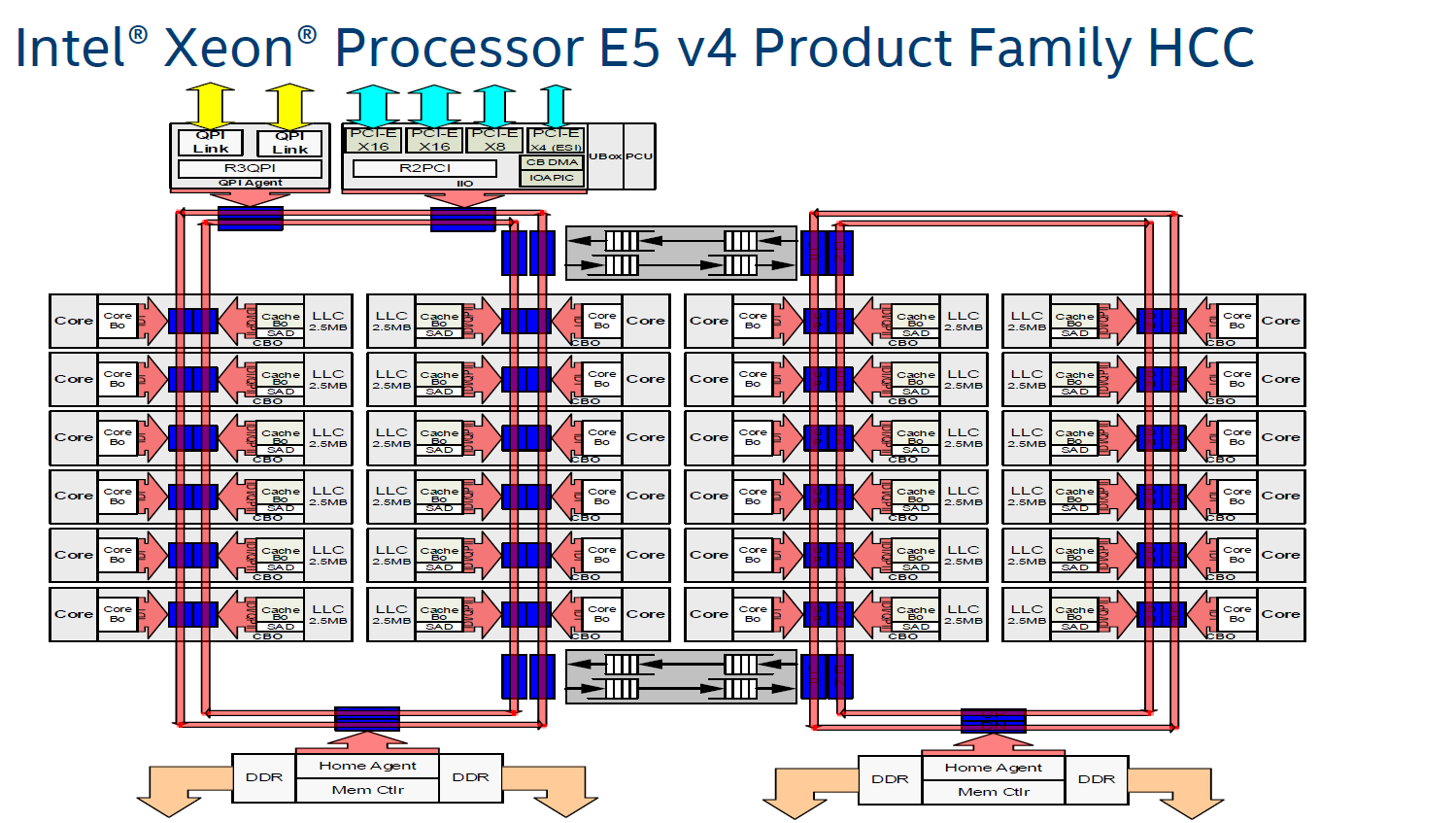
For example, if the ram is running at 1600mhz, each cycle would take 0.625ns, so the tRCmin would be ~73 cycles
woeful zinc
hollow thorn
For example, if the ram is running at 1600mhz, each cycle would take 0.625ns, so...
how do you calculate the cycles?
hollow thorn
1000ns/1600mhz, since hz is just cycle/second
Wait
I might be being dumb
1600mhz is 1600x10^6 hz, to get from cycle per second to second per cycle, you take 1/(1600x10^6), which is 1/1.6 x 10^-9, which is 0.625ns, since ns is 10^-9 s


 hollow thorn
I did the math and then forgot the math and then had to re-do the math lmao
dull flint
hollow thorn
1600mhz is 1600x10^6 hz, to get from cycle per second to second per cycle, you t...
You arrived at the right base 10
So you're at least halfway there without me looking
Lol
hollow thorn
Math might still be wrong but yea
hollow thorn
Dimensional analysis is fun
At least it's effective in getting you in the right ballpark
dull flint
Actually no you are right
Pcpp is the wrong one
Converting base is too annoying I often just do a calculator
Lol
hollow thorn
I did the mental math as just 1/1.6 and just had to justify the units lol
dull flint
There are white papers on all this stuff
Including jedec documents
Lots of math involved
@woeful zinc
Has everything to do with banks and charges to activate and pulse in the right way so cached information is accessed correctly
Think of like an elevator, of which it does both floors and rooms
Lots of the numbers have everything to do with say, choosing floor 2 room 219 in a hotel, if such an elevator existed
So that the elevator (or rather the charge) reaches the right cache bank
hollow thorn
wait a second this is just how ssds work
dull flint
And happens at an extreme rate of thousands of megacycles a second
dull flint
hollow thorn
~~wait a second this is just how ssds work~~
No it really is
There's just an extra step more or less for hmb and dram caching
And the call is still read or write
Much less rapid, intent of permanency
If ram was say the equivalent of L4 cache in the system (arbitrary) then an SSD could be L5 but permanent
I'm making big liberties in describing this though
I'm not too well read on the topic
 potent dew
So I've been using all 32GB of the memory I have recently, it's currently dual lane, 16GB and 6000MHz each. Should I just get another of the same 32GB kit for 64 total in four lanes or get an entirely new kit?
What's the performance difference
R7 7700X and Gigabyte B650 Aorus Elite AX
This is the 32GB kit I have
https://pcpartpicker.com/product/H9CZxr/teamgroup-t-create-expert-32-gb-2-x-16-gb-ddr5-6000-cl30-memory-ctced532g6000hc30dc01

TEAMGROUP T-Create Expert 32 GB (2 x 16 GB) DDR5-6000 CL30 Memory (CTCED532G6000HC30DC01)
dull flint
potent dew
So I've been using all 32GB of the memory I have recently, it's currently dual l...
Nope
dull flint
potent dew
This is the 32GB kit I have
https://pcpartpicker.com/product/H9CZxr/teamgroup-t-...
Good chance you're not mixing on this kit but 4 dimm ddr5 is...bleh
dull flint
I mean what are you doing that needs 64gb
potent dew
Multiple windows of IntelliJ IDEA open, a game which is sometimes what's being tested, Discord, browser, background things
dull flint
Tried ram cleaning?
potent dew
Closing background programs?
dull flint
Yeah debloating, setting up a clean task
potent dew
If it's not at 100% doing that it's at above 90% and sometimes I start games to play with people while finishing things up
potent dew
dull flint
Yeah debloating, setting up a clean task
Using a Windows debloater or something?
dull flint
Reason I emphasize this is I recently learned most AM5 boards are severely cut down outside the basics for a vast majority of boards
Ye a debloat tool
potent dew
IDEA doesn't use a small amount of RAM which nothing can really be done about
dull flint
dull flint
Reason I emphasize this is I recently learned most AM5 boards are severely cut d...
So boards with extra pcie slots and ram slots are done very cheap (not very good traces, often 1x@3.0/4.0 bandwidth even on 16x slots)
So odds are another 32gb kit may even still not work despite matches
potent dew
I mean four isn't really extra
dull flint
It is
DDR5 having 4 slots was a last minute addition
It was a change to JEDEC at the final minute
It's octa channel at 4 dimms on DDR5 vs quad channel on DDR4 and much higher speed
It's extremely hard for our current gen platforms
2x32 would be the way forward imo if you need more
potent dew
Yeah I see that the spec doesn't really allow four at more than 4800 MT
dull flint
You're lucky to get 4800
I got 3200 when I first tried it
As most do at high density
dual rank high density is often well below 4800 (4x2r)
dull flint
https://pcpartpicker.com/product/PzRwrH/silicon-power-xpower-zenith-rgb-gaming-64-gb-2-x-32-gb-ddr5-6000-cl30-memory-su064gxlwu60afdfsk
https://pcpartpicker.com/product/xJV2FT/oloy-blade-rgb-64-gb-2-x-32-gb-ddr5-6400-cl32-memory-nd5u3264320irkde
https://pcpartpicker.com/product/6QcgXL/gskill-flare-x5-64-gb-2-x-32-gb-ddr5-6000-cl30-memory-f5-6000j3040g32gx2-fx5
https://pcpartpicker.com/product/yPBG3C/gskill-64-gb-2-x-32-gb-ddr5-5600-cl28-memory-f5-5600j2834f32gx2-tz5rk

Silicon Power XPOWER Zenith RGB Gaming 64 GB (2 x 32 GB) DDR5-6000 CL30 Memory (SU064GXLWU60AFDFSK)

OLOy Blade RGB 64 GB (2 x 32 GB) DDR5-6400 CL32 Memory (ND5U3264320IRKDE)

G.Skill Flare X5 64 GB (2 x 32 GB) DDR5-6000 CL30 Memory (F5-6000J3040G32GX2-FX5)

G.Skill F5-5600J2834F32GX2-TZ5RK 64 GB (2 x 32 GB) DDR5-5600 CL28 Memory (F5-5600J2834F32GX2-TZ5RK)
Pick one of 4 if you go up
potent dew
Is there some formula for comparing speed in kits like there was for DDR4? I've been told that CAS and clock speed don't really mean what they did with DDR4.
dull flint
potent dew
Is there some formula for comparing speed in kits like there was for DDR4? I've ...
DDR5 halves the channel bit rate but doubles them, burst length is now twice as long so CAS is doubled
potent dew
Oh so the real problem with IDEA is Gradle 🗿
dull flint
Which is why there are no odd number cas latency
potent dew
JVM try not to have crappy build tools challenge
dull flint
The issue is that, albeit much better at a higher gear, the speed is still tough af to run
And we are using on intel, a very new DDR5 controller with tons of voltage issues
Or on AMD, the DDR4 controller, now on DDR5
it's DDR4 compatible but they decided no
potent dew
What Windows debloater should I use?
dull flint
The speed is the issue, as our current IMC's haven't really improved much since DDR5 came out
potent dew
I've tried one or two and I can't remember if they really worked, but I still have Edge and it'll start things in Edge
dull flint
potent dew
What Windows debloater should I use?
#windows-ios has a good one
I would set it up to run periodically to flush the ram
Or use custom app rules to limit the amount of ram that java program can hog
It deserves to be patched if it's memory leaking
potent dew
Okay well the project I opened does give Gradle 8GB of memory in an attempt to make it build faster
whoops
Probably doesn't need that though
dull flint
That hopefully can be adjusted maybe
potent dew
yeah, and I'm the one that did that
I should probably get rid of Chrome
That's not helpful at all
Apparently Edge is pretty memory efficient, which is kind of surprising considering it's still Chromium
dull flint
I have no real issues with edge honestly
Lots of people tell me it's bad but it's very consistent
potent dew
Well the fact that they don't shut up about it doesn't help reputation
dang, 3 or 4% less total memory usage than Chrome
I am also running a media server, but I have a workstation I should be able to move it onto soon
potent dew
dull flint
<#657753562247462922> has a good one
ah, no more stupid buggy weather icon
dull flint
Moving the media station over would help ye
dull flint
Finally found another review of this board

TweakTown
GIGABYTE's A620M Gaming X motherboard is a low-cost product that sacrifices some of the basics to present a solid budget socket AM5 option to the market.
potent dew
dull flint
DDR5 halves the channel bit rate but doubles them, burst length is now twice as ...
So is there some formula for speed comparisons?
Like 1 / clock * CAS for DDR4
dull flint
potent dew
So is there some formula for speed comparisons?
You could make some liberties by saying DDR5 CAS = 2 DDR4 CAS but then making rough soeed comparisons just doesn't really compare well
DDR5 is both much faster but the IMC's we use to run it are much slower in a very non-linear way
Oh man, this is highball for first thing of the day 😂
hollow thorn
Anyone got the actual first word read formula handy?
grizzled bloom
As in the real first word and not just cas? It's a doozy