#graphics-cards
1 messages · Page 76 of 1
 odd siren
Depending on the nature of the issue it's either forced on or forced off
Ok I think I've searched enough webpages now

If any of these fixes don't work it likely needs a repair
That's the only other solution I can find - broken mosfet
Results in an entire mainboard swap which if it's out of warranty isn't worth sending to msi over
Easier to buy a multimeter and locate it to replace/send to a repair shop to do specifically that if you can find the problem child
It shouldn't be in a decrepit state though
Not unless the core is gone
Which is probably not worth fixing
Fixing a mosfet is a little tricky but it's a lot less expensive than replacing the whole thing
 heady plover
The issue with the driver install does seem to be its lack of windows 11 support
odd siren
Well I could believe that
heady plover
Because only ones that claim to have 11 support work
Ones that don’t aren’t working
heady plover
Kinda? I have no idea how old the one I tried is
I just know it wasn’t one of the recent ones
odd siren
Like this

Download the English (US) NVIDIA Studio Driver for Windows 10 64-bit, Windows 11 systems. Released 2021.7.19
heady plover
It seems the one I installed just now forces me to install gfe 💀
heady plover
Yep
Gpu still believes it’s sucking 752 watts 
Actually now that I look at it it isn’t detecting anything on the Gpu but power
Heat isn’t detected
Gpu clock rate is still 210 tho
odd siren
Still trying the fixes?
heady plover
odd siren
https://www.nvidia.com/download/driverResults.aspx/177779/en-us/
says it isnt supported
and yeha
odd siren
Nvidias website not helping at all smh
heady plover
yep
i contacted their like support and honestly they dont seem to really understand what im saying
odd siren
It even says it's supported on the website
heady plover
and they assume incomitence instead of believing my word x_x
they asked me three times if i had the performance mode on for sure
odd siren
 heady plover
lemme try to restart ig
odd siren
I'm really surprised it's not working
The 3060m is 6 months old at the time of that driver
Lmao
heady plover
Cuz it shows up properly in device manager and task manager now
heady plover
Alr
odd siren
It disables the driver
Then you reenable it
Windows uses a basic driver when no nvidia driver is present
 odd siren
Lol
Well the better outcome is one of these things could trick the card into working again
Otherwise it's the other common factor which is warranty/mosfet repair
heady plover
Smh still doesn’t work
heady plover
I’m starting to feel that it is a hardware issue
Well I still havnt done the vbios stuff
But
Man
odd siren
There's a ton of Reddit and techpowerup threads about this
I could sit all day combing the same answers
Those were the most common ones I saw tho
heady plover
Welp looks like imma have to put that off for tommorow
Would highkey be unfortunate if it is a hardware thing
odd siren
Could at least say you've done most of the gamut though when you try and get it repaired/warrantied
heady plover
What is gamut 💀
heady plover
Ah
odd siren
Suspect ram
Hey mate, would you be willing to try doing some light testing by swapping between those two psus for me
I don't want to endanger the cpu (nay, put limits on it after some controlled tests and keep it safe)
So the choice is yours
We talked about it tho
Heard the same story from someone else that this change fixed their cpu too so a repeatable circumstance would make things very concrete
 drowsy mirage
Yeah, I’m willing to run some tests, I’ll reset my bios and run a few when I get a chance
 stiff valley
Just got a new 7900 xtx and I’m trying to figure out how to install it. The guide that came w the card says to “screw the card into the case with screws” but I don’t see anything I could put a screw in. I also am not sure whether i need 2 or 3 pcie cables connected. From what I’ve found online it needs 2 but this card has 3 pcie slots
I could really use some wisdom before I mess something up
 random walrus
stiff valley
Just got a new 7900 xtx and I’m trying to figure out how to install it. The guid...
random walrus
stiff valley
Just got a new 7900 xtx and I’m trying to figure out how to install it. The guid...
The bracket of the end of the card, with the displayport and HDMI, should have a small section bent at a 90° angle. You'll screw through that into the case to hold the card in place
And I believe all the pcie power connectors on the gpu should be filled. If you can, each with its own cable; if not, a daisy chain
stiff valley
@random walrus i got it all figured out thank u man
heady plover
heady plover
Welp looks like imma have to put that off for tommorow
Finally home. Man it feels so nice to have a working desktop with multiple displays instead of a laptop with 1 hour of battery life
 vital oriole

VideoCardz.com
Never released RTX 4070 with AD104-275 GPU and 10GB VRAM spotted It looks like somebody is now selling a once-forgotten RTX 4070 sample that was never made into an official product. What we often say is that just because multiple sources do not agree on the specs, and each source seems to have different […]
What the 4060ti could've been..
Same cuda as 4070S tho
So ig this was OG 4070?
But still
Let a guy dream 
odd siren
"We have a 3080 tier in our next gen 4070 but couldn't release it because of vramlets"
vital oriole
So true
10GB 4070 would've been so good if vramlets didn't exist
Because of the core alone
odd siren
This could create the lore that the 4070 would've been not bad in performance if they stuck to less vram chips
vital oriole
And whatever we have for 4070 in reality could've been a 4060ti
odd siren
Yeah
vital oriole

odd siren
That makes way too much sense tbh
odd siren
Would've had a nearly lineup-wide generational leap that made decent sense
vital oriole
I hate that arc has potential but dragged down by drivers
odd siren
Also explains why the 4070S could launch at the price it did
I can't let myself be convinced of that tho, it's all conjecture
It's very believable however
vital oriole
Isn't 4070 192?
odd siren
Oh nvm ur right
Maybe that changed due to the vram increase
Isn't 4060TI like 128 bit?
odd siren
odd siren
Think about this definitively
$500 3070 beat the halo tier choice of last gen, $700 2080 8gb and nearly matched the 2080TI
New $600 4070 comes out, beats last gen (As the usual trend goes), almost matches 3080TI and delivers the same vram as 3080 10gb, adjusted for price inflation
vital oriole
mhm
odd siren
the 160bit bus makes a ton of sense here
vital oriole
I agree as long as it doesn't impact perf too much
odd siren
odd siren
$500 3070 beat the halo tier choice of last gen, $700 2080 8gb and nearly matche...
If you consider the circumstances, they may have backtracked the 4070 to add more vram
At the time hogwarts was running like ass on 12gb
And 40 series was just dropping
It makes so much sense
vital oriole
blame the game, not nvidia 
odd siren
Blame vramlets
odd siren
As a result we got a way worse card stack
In the lower end
All because of one game
Wtf
vital oriole
4060ti 16gb 😭
odd siren
vital oriole
4060ti 16gb 😭
Ironically a card that can't even use all of it either
vital oriole
right
odd siren
Jfc that explains so much in why Nv this gen sucks ass
OR
SPIN THIS AROUND
4080 12gb never changed name
This sku is 4070 Ti
And so yeah
This means the birth of the super lineup
That makes a ton of sense too
There's way too much possible story behind that card
odd siren
Almost want to buy it just to put it on a wall tbh
 opal iron
why does the coil whine sound this bad holy crap
I left the pc on overnight to download a game and now its making this awful sound
 fierce hull
Hey guys, is the morecoco website safe and reliable ?
 livid idol
Never heard of it. Is that a .com or something else?
livid idol
fierce hull
Hey guys, is the morecoco website safe and reliable ?
From what I can see they're unreliable, frequently selling things they don't actually have in stock. From what I can tell it's not obviously a scam, just a poorly managed business.

 mellow glen
Alrighty, installed the cable and also tested without UPS but unfortunately still having the same issue :/ what are other steps, return/get replacement and hopefully the issue is with the card? lol
or is there anything else you can think of
livid idol
It's about time to start swapping parts yeah
livid idol
 latent cove
is my gpu dying?
latent cove
is my gpu dying?
?ddu
 neat ventureBOT
DDU (Display Driver Uninstaller) Guide by Pato
https://github.com/NeweggTechie/Graphics-cards/wiki/How-to-use-DDU

GitHub
Contribute to NeweggTechie/Graphics-cards development by creating an account on GitHub.
 balmy magnet
Quick question: left LED on EVGA FTW3 3080 is lit red, we have tried with multiple PSUs, in 2 diff systems, 2nd of which is using the same model of card just fine. Any ideas what might be wrong, and ideas to correct it?
livid idol
LED as in the one telling you if the power cable is in correctly?
Does switching the power cable move the LED or is it always on the same one?
balmy magnet
always the 1st of the 4, the one not over any of the PCIe cables
livid idol
Ok sounds like you've just got a dead LED. That would be a warranty issue.
balmy magnet
there is no video output either, sorry i forgot to mention. Monitors just stay on "no signal".
livid idol
I maintain that it's something EVGA has to deal with. Especially since you've tried it in 2 separate systems.
balmy magnet
Sounds good, I just wanted to make sure me forgetting to mention something did not change the advice, I will have him reach out to them tomorrow
mellow glen
livid idol
It's about time to start swapping parts yeah
that’s a fat rip, hypothetically if the new card has the same issue what type of hardware issue could it be since the 3080ti had no issues ?
but for sure appreciate it will report back after replacement is here lol
livid idol
The power supply would be my next choice for things to swap
Transient spikes can trip power supply protections faster than overloading it
 quasi flicker
Would a Quadro be better at transcoding than a gaming card?
I have a workstation with a Quadro P1000 that I would like to move my media server to, it's not the best but I figure since it's only doing that it might be fine
It also has two Xeons which might be better
livid idol
quasi flicker
Would a Quadro be better at transcoding than a gaming card?
Short answer: no
latent cove
livid idol
?ddu
I have reinstalled my drivers
 grave fjord
is it worth spending $100 for a gre vs 7900xt?
livid idol
grave fjord
is it worth spending $100 for a gre vs 7900xt?
It's usually the other way around, the XT costs more than the GRE.
And no, it's not really worth paying more for the XT because you can overclock the GRE in 5 minutes and have it be within 5% of the performance.
grave fjord
livid idol
It's usually the other way around, the XT costs more than the GRE.
And no, it's ...
alright
thats what i meant i flipped it around
like to spend the $100 more and get the xt i don't know why i worded it like that
 lilac cave
I don't trust those bottleneck calculators so I was gonna ask some people here...
Would a Ryzen 7 5800X be sufficient enough for a 7900 GRE?
livid idol
The 5800X is definitely good for that, especially at 1440p or higher
lilac cave
K. Thanks guys!
lilac cave
 tender mulch
Never trust bottleneck calc, they're garbage
tender mulch
Never trust bottleneck calc, they're garbage
I will keep that in mind. Lol
 junior locust
Honestly it's surprising how old a CPU you can still use with modern GPUs
I've seen someone roll with a 2nd gen i7 and a 3070 and it was pretty good
 edgy onyx
tender mulch
Never trust bottleneck calc, they're garbage
edgy onyx
tender mulch
Never trust bottleneck calc, they're garbage
bottleneck calc said i had a 17% bottleneck with my 5 7600x and 4070 super but after some research im pretty sure its not a problem
livid idol
The thing is, did it ever explain what that bottleneck means? Probably not, and they're just throwing arbitrary numbers around like they're common sense.
It's impossible to have a system with no bottleneck, and what component is the bottleneck will vary even by what game you're playing. Sometimes the game engine itself is the bottleneck.
 limber flax
livid idol
The thing is, did it ever explain what that bottleneck means? Probably not, and ...
limber flax
livid idol
The thing is, did it ever explain what that bottleneck means? Probably not, and ...
This 58003dx is 6925% bottlenecked by this 2060 because I say it is
I'm going to assign random discrete values up to 100 to each part I have in my python program, and make it do really easy percentage calculations to make it seem like what I'm doing is useful
odd siren
?bottleneck
neat ventureBOT
"TL;DR Bottleneck calculators take massive generalisations and will cause someone to almost completely miss the entire snapshot of the performance that they wanted to know in the first place.
Bottleneck calculators are a commonly searched tool on the internet to make a generalised comment on a pairing of hardware for things such as games, workstation software, rendering and the like.
Bottlenecks are regarded as a limit for a pc in a given task, and each different workload, each different game, each different task may and will push a pc to a limit in a certain way, and it's never the same way. Some games will push the cpu to a limit, most the GPU, some the ram, etc.
Bottleneck calculators try to generalise this and this is why you should never use them. It isn't a true outlook of the hardware you'd be working with and doesn't give you a real take on the performance, especially when you consider your own individual needs. Some bottlenecks are good for example, a lot are expected and normal, some are caused by the application itself and don't bring out the full pc performance either, the games or apps you use might be very specific and unique in their behaviour and have an entirely different realm of performance altogether."
tender mulch
Never, ever, ever use any kind of bottleneck calc. 😉
 ivory herald
2060 isn't the bottleneck anyways, even if it obviously influences overall game performance. 
 hexed forge
Question, how do people feel about this GPU?
https://www.amazon.com/dp/B0985X2YR1?ref=ppx_yo2ov_dt_b_product_details&th=1
My mom bought it on sale for $260 for me randomly lol. It's def better than the 970 I'm running 😅 Just curious what the consensus is for this card at that price point

Featuring the latest NVIDIA® Ampere architecture, ASUS Dual GeForce RTX™ 3060 fuses dynamic thermal performance with broad compatibility. Advanced cooling solutions from flagship graphics cards — including two Axial-tech fans for maximizing airflow to the heatsink — are packed into the 2-slot car...
 keen nacelle
hexed forge
Question, how do people feel about this GPU?
https://www.amazon.com/dp/B0985X2Y...
keen nacelle
hexed forge
Question, how do people feel about this GPU?
https://www.amazon.com/dp/B0985X2Y...
Very overpriced
6750xt is around 35% better and was $10 more on prime day, or 7600 has been ~$250 for a while and around 20% better
Assuming just gaming anyways
hexed forge
Ah, oh well. Free to me. Plus im still an nvidia fanboi at heart 😂 If I had the money I personally would've just shelled out in the 400-500$ range and figured out what was better from there lol. I kinda figured AMD woulda had a better bang for buck though.
keen nacelle
hexed forge
Ah, oh well. Free to me. Plus im still an nvidia fanboi at heart 😂 If I had the...
Ye 400-500 range gets you an open box 4070
I mean nvidia options before compared to nvidia were at least competitive in terms of value
Now below 4070 super new is just awful value
random walrus
7900gre was $510 a few days ago as well, not sure abt now
keen nacelle
4060/ti, 3060, 3050
7800xt has been as low as $440
4060 ti is $370 for 8gb or $450+ for 16gb (estimates, I don't feel like checking) and still get beaten by 6750xt, let alone the 6800
hexed forge
keen nacelle
Now below 4070 super new is just awful value
4070 super is actually what I want RN but I'm broke so it will be a while before I can actually upgrade 😂 I'm grateful for the 3060 tho cause going from a 2070 super down to a 970 sucked lol
keen nacelle
Yeah 3060 is just under a 2070 super
Better rtx, though in most games it wouldn't be worth using due to the frame loss
Def a huge jump from a 970 lmao
hexed forge
From what I can see, this GPU specifically was just barely under the GPU I had cause it has factory OC and all that. It's practically the same power
At least as far as I can tell
hexed forge
Yeh maybe but I googled this specific GPU against EVGA 2070 S black and they seemed pretty close to me. Haven't stress tested it yet myself and IDK if I still have my logs from when I had the 2070s lol
Although I think at the time I was using user bench which from what I understand is not great anymore
IDr the other benches I used
tender mulch
UBM is relatively useless
hexed forge
But is it still considered useless if you're comparing Nvidia to Nvidia?
Like I know it is useless cause it tends to favor amd, but if you're trying to compare say 970 to 3060, is that still bad data?
keen nacelle
pretty meh yeah
maybe accurate within 10% or so, but between diff gens it's still innacurate
the criteria they use isn't just performance is the issue
they also judge by wattage, efficiency, vram, age
from what i remember, among other things
?ubm
neat ventureBOT
`UserBenchmark is NOT a reliable source of information and has been blanket banned in many hardware communities such as r/hardware and r/intel for what started as an anti-AMD bias but has spiraled into delusion.
In fact, they tried so hard to skew results in favor of Intel's midrange that they even cannibalized Intel's own high end. For example, according to UserBenchmark, the i3-9350K is rated higher than the i9-10980XE.
For a similarly convenient quick-and-dirty hardware comparison website, we recommend using PassMark instead of UserBenchmark.
PassMark CPU comparison: https://www.cpubenchmark.net/singleCompare.php
PassMark GPU comparison: https://www.videocardbenchmark.net/singleCompare.php
Want to know more?: https://youtu.be/RQSBj2LKkWg`
keen nacelle
we have a copy pasta for it
odd siren
hexed forge
But is it still considered useless if you're comparing Nvidia to Nvidia?
There's so much wild variation in ubm you can get vastly off the mark answers even between architecture
Like yeah in the above copypasta
I would also add 3dmark for quick and dirty answers
Time spy extreme is very reliable for rough rasterisation performance
Has a slight bias to AMD but it's very very reliable
Just jump on to the 3dmark results page, search by gpu, filter for gpu score, read the average
tender mulch
Hmnmm, this isn't good. Igor's Lab found some dirt.
https://www.tomshardware.com/pc-components/gpus/nvidia-gpu-partners-reportedly-cheap-out-on-thermal-paste-cheap-paste-allegedly-degrades-in-a-few-months-causing-over-100oc-hotspot-temperatures

Tom's Hardware
Most (if not all) AIB partners allegedly use this dirt-cheap paste that looses performance in months.
livid idol
Yeah we saw that a few days ago
#tech-industry-news message
Absolutely shocking and something no one could have possibly seen coming ||/s||
 wheat crag
Has the quality pc parts been going down lately? Including peripherals
 heady turtle
No?
odd siren
wheat crag
Has the quality pc parts been going down lately? Including peripherals
There's a lot better stuff now but you need to sift through the bs
There's a LOT of BS
Like Coarse hair for example, their new cases are...oddly tooled cheap
Despite the premium
heady turtle
odd siren
Like Coarse hair for example, their new cases are...oddly tooled cheap
Actually idk about that because my 4000d airflow is quite nicely machined imo
But yeah same concept
odd siren
heady turtle
Actually idk about that because my 4000d airflow is quite nicely machined imo
4000D is older
Not talking about those
2500, 6500
Those ones
3000D is probably unaffected since it's seemingly a 4000D retool
heady turtle
Ah didn't realise they had newer ones
 fiery valley
is the rtx 3060ti a good upgrade over the rx 580 for $190? I have a friend who's willing to sell it to me for that price
8gb model
keen nacelle
fiery valley
is the rtx 3060ti a good upgrade over the rx 580 for $190? I have a friend who's...
Yes
ivory herald
That's a pretty good price.
livid idol
Keep in mind that 8GB is no longer enough for games. There's several recent games that use more than that even at 1080p medium settings.
But it's still a good upgrade for you.
fiery valley
i mean im not usually playing the newest games on highest texture quality
my rx580 8gb hasn't been a problem in terms of vram
but looks like its a good upgrade so im gonna get it 
most excited for cuda
livid idol
Cuda doesn't really do much for gamers unless you play older games like Witcher 3 or Arkham Asylum
(and even then the physx is often broken)
fiery valley
oh i didnt even know games took advantage of cuda
i was thinking more for blender rendering and ai
livid idol
Blender, meh, but AI definitely favors Nvidia
I haven't seen benches using the new SCALE thing though, that might shake it up
fiery valley
oh thats pretty cool, didnt know that was a thing
livid idol
Good luck doing AI on 8GB though
It'll work if you use really small models but they have worse performance and results
random walrus
I've had pretty decent results running stable diffusion on my 3060ti
can't push the output resolution very high, guessing more vram would let you do that but not sure
Looking at ebay listings you could maybe snag a 6700xt for $220
12gb and better raster for gaming, but worse for AI and maybe some other productivity programs
keen nacelle
My 6700xt just sold for $190+ shipping
After ebay fees and sales tax I got like 150 which kind of hurts
random walrus

eBay
Get the best deals for RX 6700 XT at eBay.com. We have a great online selection at the lowest prices with Fast & Free shipping on many items!
most have been going for 220-250 after shipping
keen nacelle
Ye mine sold below market value
I should've just listed it on hws but I didn't feel like swapping it into my pc
Ebay doesn't need proof beyond basic pics, hws you gotta have proof of the gpu in a pc turned on and working
 hollow zephyr

Intel Arc A770 OC BiFrost Predator
Anyone know much about that shroud it has and is that why it's price at 399 instead of price a little more in line with the comp?
keen nacelle
hollow zephyr
Anyone know much about that shroud it has and is that why it's price at 399 inst...
Because it is overpriced
Plug that and any other a770 into an otherwise identical system, compare them side by side, and there would be negligible differences
hollow zephyr
Figured
Just saw the shroud and thought maybeeee they were doing something cool
I'm gonna lowball this dude so hard
 plush garden
keen nacelle
Because it is overpriced
plush garden
keen nacelle
Because it is overpriced
is there a better graphics card for around the same price of a 4070 super
keen nacelle
plush garden
is there a better graphics card for around the same price of a 4070 super
7900 gre is cheaper and same perf
plush garden
ok
 tender tusk
Hello was wondering what would be better in terms of this gaming or gaming laptop, gaming pc fx-6300 and radeon rx560 vs gaming laptop with 17-10750h and 1650ti
limber flax
most definitely the latter
the fx series was released in 2012 lol
the 10750h was released in 2020
though not sure why you don't consider building a new desktop?
 granite hawk
yo idk if this is the channel for it but i need some help, i cleaned and moved my pc downstairs after connecting it to my monitor via hdmi and dp my monitor says no signal (m27q) its connected to my gpu (3060ti) and just won’t give signal to my monitor, tried the hdmi cable on another device and ut worked fine, tried it with the mobo (MSI MPG B550 GAMING EDGE WIFI) and it doesnt work, any help? if it is my gpu then how tf do i fix it
 hot bough
fiery valley
i was thinking more for blender rendering and ai
hot bough
fiery valley
i was thinking more for blender rendering and ai
if you plan on actually using blender for productivity use a nvidia gpu as blender favors them due to cuda used when rendering.
fiery valley
gotcha that’s what i’ve heard but i wasn’t sure
picked up the gpu today 😎 came with a free 27” monitor too
 cosmic bluff
hot bough
if you plan on actually using blender for productivity use a nvidia gpu as blend...
cosmic bluff
hot bough
if you plan on actually using blender for productivity use a nvidia gpu as blend...
Not with blender 4.2 introduced better denoising for all gpus using Intel's stuff but quicker
Optix was the target for Nvidia but with 4.1 introducing openapi it was initially for Intel and Nvidia cards which boosted render times, then 4.2 lts allowed And cards to match as well
hot bough
cosmic bluff
Optix was the target for Nvidia but with 4.1 introducing openapi it was initiall...
oh really?
Interesting.
cosmic bluff
It's really nice it cut my render times in half in most cases
hot bough
My friend is on 4.2 using AMD but it doesn't run super well.
I think it's like a 6700xt.
cosmic bluff
It can vary but ensure that compositor if any is set to GPU, and dont have cpu enabled for renders
vital oriole

u might like these
limber flax
I love having a slab of aluminum
 forest oasis
vital oriole
https://www.anandtech.com/show/21491/asrock-launches-passively-cooled-radeon-rx-...
forest oasis
vital oriole
https://www.anandtech.com/show/21491/asrock-launches-passively-cooled-radeon-rx-...
This isn't even passively cooled lmao
forest oasis
Smh misleading article title
It seems to be around the same size as the Nvidia Tesla cards
 solid glacier
Anyone know how I enable secure boot on my bios?
livid idol
solid glacier
Anyone know how I enable secure boot on my bios?
It should be on by default as long as the BIOS is up to date
 raven wharf
vital oriole
https://www.anandtech.com/show/21491/asrock-launches-passively-cooled-radeon-rx-...
raven wharf
vital oriole
https://www.anandtech.com/show/21491/asrock-launches-passively-cooled-radeon-rx-...
how is that possible
livid idol
It's meant for a high airflow environment like a server rack, so it's only passive in the sense that it doesn't have a fan directly attached
 warped spire
Part of me wants to upgrade my 3080 but at the same time the only really graphically demanding game I’m playing is cyberpunk at 1440p.
Even then it performs well enough for gsync to pick up the pace
If anything I’m trying to lean more towards content creation than gaming but still want the graphical power to do both very well
limber flax
It'll be enough
forest oasis
does anybody know if the mining only gpus (the ones without display connectors) have a functional hardware encoder and/or can be used for gpu acceleration on applications like blender or smth
hot bough
warped spire
If anything I’m trying to lean more towards content creation than gaming but sti...
Mind if I ask what kind of content creation? I have been learning and working on projects in Blender.
livid idol
forest oasis
does anybody know if the mining only gpus (the ones without display connectors) ...
The hardware is functional but disabled by the drivers
Modded drivers have been known to get around this
Naturally those are risky
forest oasis
i see
 frail pilot
after advice from someone else on getting a 3070 ti instead of a 4060ti I would like to know if everyone else thinks the 3070ti is better than the 4060 ti
 keen nacelle
frail pilot
after advice from someone else on getting a 3070 ti instead of a 4060ti I would ...
keen nacelle
frail pilot
after advice from someone else on getting a 3070 ti instead of a 4060ti I would ...
4060 ti=3060 ti
livid idol
Not quite
4060 ti is about 10% or so better
You're probably thinking of 3060 vs 4060, which is much more equal because the 4060 has less and slower vram
keen nacelle
livid idol
4060 ti is about 10% or so better
Hm, still disappointing at the price tho
livid idol
Very much so
 summer bane
Does the dell g5 5090 prebuild have space or capability for a gpu upgrade? I have a rtx 2080 8gb. And was wanting to put in a rtx 4080 or 4090
forest oasis
very unlikely
vital oriole
and i googled it up
yep, it uses a proprietary case
with barely any space more than what it came with
forest oasis
tbf you could do like, case mods and such but most people aint adding speed holes and cutting out mounting brackets
just to fit a 4090
in a dell prebuilt
lmao
 summer bane
Alright. Was Just trying to run with what I had if I could. . I’ll probably just end up building a new one. Never done that so it should be fun
vital oriole

forest oasis
i dont think the case is even long enough
forest oasis
vital oriole
https://encrypted-tbn0.gstatic.com/images?q=tbn:ANd9GcRtF7hCwUhXv29zZVB6JQ3NlnmX...
this image is truly the essence of dell prebuilts
single channel memory

tender mulch
Not to mention you'd need a PSU upgrade
forest oasis
summer bane
Alright. Was Just trying to run with what I had if I could. . I’ll probably jus...
also yeah building your own pc is fun
vital oriole
why are you in roblox car crushers server
forest oasis
goated game frfr
vital oriole
real
forest oasis
i used to play quite a bit, even bought early access to cc2
summer bane
Are there any sites or something to help with building? Again. Never done it. So I don’t know how to check compatibility and what not
vital oriole
it will only show parts that are compatible
forest oasis
it does display part lengths and such
vital oriole
but right now i would start with an AM5 rig
forest oasis
and yeah, depending on budget, either a r5 7....600x? was that the number lmao or a r7 7800x3d is a good base
you can ask #building-and-recc-chat for build lists
specify budget and country
and any other information that may be relevant
summer bane
Alrighty. Well thank y’all for everything so far
frail pilot
Could someone find me a good deal on a used 3070ti?
keen nacelle
frail pilot
Could someone find me a good deal on a used 3070ti?

eBay
NVIDIA® GeForce Experience™. Quad simultaneous display capable. HDCP 2.3 support. Engine boost clock: 1755 MHz.

eBay
SPECTRA 2.0 RGB LightingIceStorm 2.0 Advanced CoolingActive Fan Control with FREEZE Fan StopMetal Frontplate and RGB LED Backplate2nd Gen Ray Tracing Cores3rd Gen Tensor CoresVR Ready, NVIDIA DLSSNVIDIA® GeForce Experience™NVIDIA G-SYNC® , NVIDIA GPU Boost™Game Ready Drivers and NVIDIA Studio Drivers10240 CUDA cores12GB GDDR6X memory384-bit memo...
frail pilot
keen nacelle
https://www.ebay.com/itm/387248528833?mkcid=16&mkevt=1&mkrid=711-127632-2357-0&s...
That's a normal 3070 I'm looking for a 3070ti
keen nacelle
Why. They perform within 2% of eachother and 3070 ti has hotter vram
frail pilot
Really?
keen nacelle
frail pilot
Really?
Yes. The difference is almost exclusively that the ti has gddr6x, and the non ti has gddr6
 plucky canopy
Is this true that a card 4 years older than mine is better? I’m comparing these as i have the 960m and the 660 is GPU requirement for GTA5 with FiveM which i wanna get but idk if i can run

Ping me if you reply please
livid idol
plucky canopy
Is this true that a card 4 years older than mine is better? I’m comparing these ...
It is certainly possible when you're comparing laptop GPUs to desktop ones
plucky canopy
So is the 960m specifically a laptop GPU, compared to the regular 960?
limber flax
run at 10fps
plucky canopy
I feel like I shouldn’t make a judgement now though since they’re still quite close and that’s maximum requirements not minimum, plus my CPU meets max recs. So my best best would be to buy the game, try it, play with the settings and see how it runs
livid idol
If you buy on steam you can always refund if you play less than 2 hours
plucky canopy
livid idol
If you buy on steam you can always refund if you play less than 2 hours
well I have to ask my mom to buy the game and I can’t for awhile so it’ll be awhile before I can try it lol
Ugh I always forget this server has that
but I said I hate not being able to buy stuff at my own will lmao
livid idol
You've got higher odds of her saying yes if you wait for it to be on sale
limber flax
real
plucky canopy
It is on sale already it’s $20
Which is still pricey
And I missed summer sale lol so
It needs to be like, under ten dollars on sale lmao
livid idol
$20 bundle though, includes a couple starter packs
limber flax
i forget the sites you can do that with but they're usually cheaper than steam base prices
plucky canopy
livid idol
$20 bundle though, includes a couple starter packs
yeah but $20 is a lot for us I don’t wanna ask my mom for a ton
plucky canopy
limber flax
or you can buy a steam key online
those sites are sketchy as hell
limber flax
then maybe it's a good idea to hold off haha
oh what
oh i guess those specific sequence of numbers and letters is not okay?
tf
livid idol
Yeah no naming those sites
limber flax
ah
plucky canopy
Is it the site that starts with an E and ends with an A?
What sites are you referring to
limber flax
EA SPORTS
plucky canopy
NOOO
livid idol
No dodging the filter either lol
plucky canopy
livid idol
No dodging the filter either lol
I wanna know what site he’s referring to 😭
limber flax
plucky canopy
Is it the site that starts with an E and ends with an A?
but no
livid idol
You can chat about it in DMs
But this is a corporate server so we have a few extra rules
plucky canopy
limber flax
but no
check DMs
 rugged thunder
livid idol
But this is a corporate server so we have a few extra rules
rugged thunder
livid idol
But this is a corporate server so we have a few extra rules
Sold out….
limber flax
sold out of rules? damn
rugged thunder
Happens
forest oasis
sold out of tech tips
random walrus
plucky canopy
those sites are sketchy as hell
sketchy as in where/how they obtain they keys, yes. Sketchy for the consumer? not really.
forest oasis
Sometimes
forest oasis
you should just ask your question
 pine ivy
Alr a second
pine ivy
So I just build a completely new pc every single part is new
Everything is working expect the rtx
And this is my cousins pc
forest oasis
so the pc isnt booting? what is the issue exactly that you're trying to solve?
pine ivy
forest oasis
so the pc isnt booting? what is the issue exactly that you're trying to solve?
The rtx is not working and there is this cable that came with the PSU

So one side of this cable goes into the PSu
And I would guess the other one goes into the RTX
Bc
 forest oasis
oh, then you need one other pcie power
that cable you're holding is the connector used on some nvidia gpus
pine ivy
But the cable doesn’t fit into the gpu
pine ivy
forest oasis
do you have another pcie power cable
Nope
forest oasis
hmm
 forest oasis
it's the same cables as the ones already connected
also no, those are SATA cables
those came with your motherboard most likely
also it's called a gpu, not an RTX
 forest oasis
none of this matters; look in your psu box for any extra cables it may have come with
your gpu might be not turning on because it doesnt have all 3 connectors plugged in

 ivory herald
Which psu? Do something like this 2nd pic:

 forest oasis
did you not look at the box lmao
these are the included cables and supplies with the psu according to the website

 cerulean rover
It looks to have 2 daisy chain 8pin off pcie only
forest oasis
^
ivory herald
Was scrolled down w/ keyboard open, haha. Dang it de quiet
cerulean rover
Really built for ATX 3.0
pine ivy
Where to put this one???
 forest oasis
there's 2 options; get a psu that can have 3 pcie power connectors (this is the better option)
or buy a molex to pcie power cable (less ideal)
pine ivy
forest oasis
there's 2 options; get a psu that can have 3 pcie power connectors (this is the ...
Where to buy the cable for the best option??
And where do i plug the cable?? One head into the gpu
And the other one??
forest oasis
your psu doesnt support another pcie cable from what it seems

 ivory herald
I wonder if be quiet has a 12vhpwr to 2x8pin adapter that would work in this way (opposite the usual way of course)
pine ivy
Uhh
What if I buy a cable that has one head like this

And the other head like this

@forest oasis
forest oasis
yeah that could theoretically work
be quiet doesnt sell it directly on their site though, so you'll have to find something that would work properly
keen nacelle
I just got here. Is the third being left empty?
forest oasis
yeah
keen nacelle
Doesn't work
forest oasis
psu doesnt include 3rd cable
keen nacelle
All need to be filled
forest oasis
yeah i mentioned that
keen nacelle
forest oasis
psu doesnt include 3rd cable
Does it have 2? Could do 2 and then third daisy chain (if that's already been said ignore me)
forest oasis
nah it just has 1
keen nacelle
New psu time
forest oasis
it's a psu that was designed to be used with the new atx power cable
forest oasis
idk
pine ivy
Rtx 3070 to
keen nacelle
Looks like high 30 series
forest oasis
damn 3070 with 3 pcie power
keen nacelle
Honestly, would you be open to selling it or trading down to a 2x8 pin gpu?
3070 is $270 rn and it would be the same exact experience, and yours should sell for around 300
pine ivy
keen nacelle
3070 is $270 rn and it would be the same exact experience, and yours should sell...
270$$???
keen nacelle
Yeah
pine ivy
Are u crazy??
keen nacelle
In the US anyways
keen nacelle
eBay
NVIDIA® GeForce Experience™. Quad simultaneous display capable. HDCP 2.3 support. Engine boost clock: 1755 MHz.
Ah
That makes it more annoying for your end
pine ivy
Na bro this has 3x fans
 keen nacelle
The point is, your card and psu won't work together.
keen nacelle
pine ivy
3 fans is expensive
????
keen nacelle
There's dual fan 3070s that outperform the triple fan ventus
The number of fans is near irrelevant
keen nacelle
If the psu has more 8 pin ports on it, that would work. But they MUST be directly from the manufacturer
Or buy used cables for the same exact power supply. Power supplies do not work well with cables from other psus
pine ivy
I will go with new PSU
Can u recommend me a PSU??
@keen nacelle
Would a Corsair PSU work?
@keen nacelle
Answer asap
Will this work???
Asap bro
Answer asap
ivory herald
A TIER. Rm750x probably plenty for ya also.
pine ivy
??
@ivory herald will the PSU I sent work??
Asap bro
Cause I will go buy it rb
Rb
Rn
@ivory herald
@keen nacelle
@forest oasis
ivory herald
Check the emote. Yes it's a great psu. Corsair even has good adapter cables if you ever get a 40 series nvidia gpu
keen nacelle
pine ivy
<@654444344274845698>
jesus christ my guy
i have things to do that are more important than not being paid to provide tech support
pine ivy
keen nacelle
i have things to do that are more important than not being paid to provide tech ...
I will pay u
I’m rich bro
TikTok money
This is third pc building this month
ivory herald
Only tips here are in the form of information.
pine ivy
Just arrived at the shop
Gonna buy it in some minutes
@forest oasis love u
Just got a PSU with 850watt
The other one was 750
🤣
Rtx with 3 cables
Will start a war on this pc 🔥
pine ivy
Yo anyone

Can I put both heads in the gpu
Both head are from 1 cable
Will it affect anything?? If I put both from 1 cable??
@ivory herald
ivory herald
That's the point, and it's expected to have 1 of the "short" parts handing off since you might use 2 cables but have 4 total conenctors.
 pine ivy
Yo it works now

But I click save and exit from bios
But after the the screen is black for like 5 seconds
And the go back to bios again
Anyone can help?
livid idol
pine ivy
And the go back to bios again
Do you have Windows installed already? If not now is the time to install it.
It goes to BIOS because it doesn't detect a boot drive
plush garden
keen nacelle
leave it alone
Hey is this gap okay
Cause I couldn’t get it to fit without removing this plate
keen nacelle
I'm not familiar with either but it won't be problematic
 barren trout
Amd Rog Strix RX 6700 XT for 350 off market place a good deal or bad
keen nacelle
barren trout
Amd Rog Strix RX 6700 XT for 350 off market place a good deal or bad
Usd?
That's very overpriced
My used 6700xt just sold for 190+$25 shipping lmao
350 should get you a 6800xt
keen nacelle
barren trout
Amd Rog Strix RX 6700 XT for 350 off market place a good deal or bad
eBay
NVIDIA® GeForce Experience™. Quad simultaneous display capable. HDCP 2.3 support. Engine boost clock: 1755 MHz.
 hasty sphinx
Thought I'd post this here. Found at a local thrift store.
 forest oasis
live update
limber flax
Tested as is (it has none of the options checked off)
solid glacier
man
 near jasper
Quick question. A friend of mine just had a 650W PSU die on them and they don't have money to buy another. We swapped in an ancient 700W unit from a decade old alienware but it only has 2x6 PCI power
His system has a 3060 that wants 1x8 pin and 1x6 pin but it seems to boot and run perfectly fine when the 2x6 pins are plugged in. That's fine right? I don't see how a 170W card would want that many connectors
keen nacelle
near jasper
Quick question. A friend of mine just had a 650W PSU die on them and they don't ...
Psus are never something you want to mess with
That's how you end up with dead parts
near jasper
If it were mine I'd get a new PSU, unfortunately he doesn't have the money to
keen nacelle
From what I know, it shouldn't even boot without all connectors filled. I've no idea how it'll behave, or if (likely when) it'll be a problem.
near jasper
Okay, thank you
limber flax
Yeah I definitely wouldn't trust it lol, the two empty pins could be pretty important
I'd rather spend on a new PSU when I can than have to potentially pay for an entire new PC
random walrus

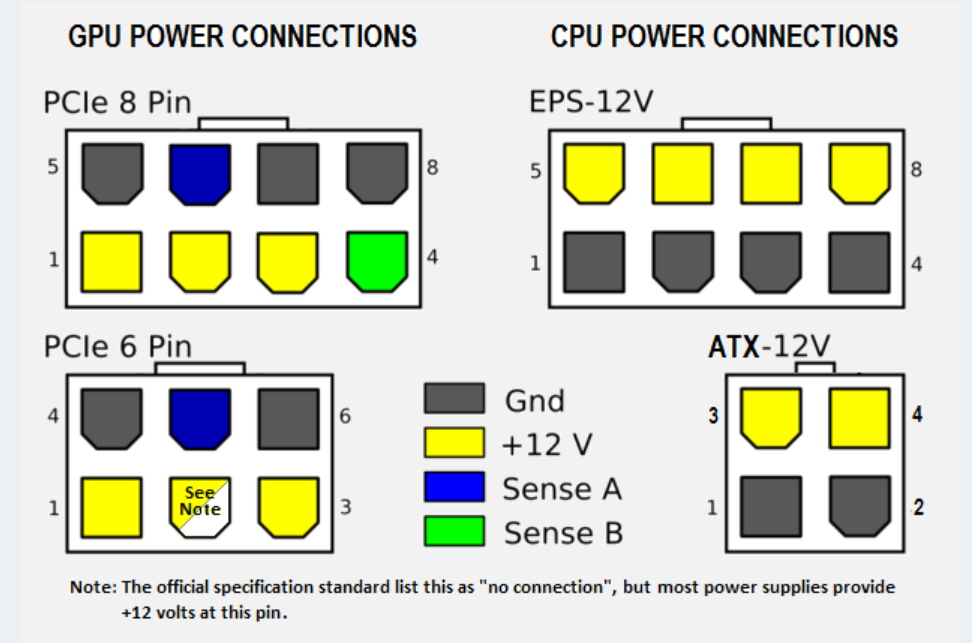
So you're missing sense B and a ground
pcie slot plus two 2x6 cables would be 225 watts, enough for a 3060. But this article says a 2x6 cable in a 2x8 can cause it to pull too much power
https://pactech-inc.com/difference-between-6-pin-8-pin-12-pin-gpu-cable/

With NVIDIA's recent announcement of a 12-pin power connector on their new RTX 30 series, we wanted to clarify the differences between a 6-pin, 8-pin, and 12-pin GPU cables. We also wanted to tell you about our newly developed G-Power™ GPU Power Cable set with Mini 12-pin connector for NVIDIA’s GeForce RTX 30 Series.
near jasper
Ooh that's a good resource
 wicked hound
near jasper
Quick question. A friend of mine just had a 650W PSU die on them and they don't ...
wicked hound
near jasper
Quick question. A friend of mine just had a 650W PSU die on them and they don't ...
6P and 8P cables are rather overbuilt. So the specific question you're asking isnt exactly too concerning. Not recommended to do if one can avoid it, but will be fine for most GPUs (esp for 3060). What is concerning is that you're using a random PSU of which is also old. OEMs/SIs like Alienware are a bit random with choosing good/bad quality PSUs, but generally choose cheap bad quality ones.
Usually you want to choose a PSU that has gone through a proper review with the data published. This isnt just like an unboxing, but an actual test of the PSU with certain workloads and making sure it provides clean and protected power, with the PCB analyzed for quality components and build quality, etc.
A full review doesnt happen all too often for PSUs that OEMs/SIs use, meaning regardless of whether it seems good quality they cant be recommended (usually only see shallow reviews, checking specs for having all the protections that a PSU needs or a quick PCB analysis).
 wild glen
I'm considering getting either the 4070 Ti S or the 7900 XTX for a 2K FPS game, along with a 7800X3D as the CPU. I'm wondering if there would be a bottleneck between them at 2K resolution and I'm not sure if it would be overkill for an FPS game because I currently have a 1660 Super and I don't use DLSS, so I'm unsure of how good it would be for FPS games.
random walrus
depends on what FPS game and what refresh rate you're aiming for
wild glen
random walrus
depends on what FPS game and what refresh rate you're aiming for
overwatch and mw3 and call of duty 6 later on and maybe above 200 fps
random walrus
it will be a bit overkill for overwatch but COD is much more demanding
the modern cod games also run quite well on AMD gpus iirc
~200 fps at 4k with that pair
https://www.youtube.com/watch?v=1j5voO05WwQ

#warzone #callofduty #mw3 #mwii #mwiii #warzone3 #warzonegameplay #amd #rx7900xtx #ryzen #ryzen77800x3d
GAMING PC:
MSI X670E Tomahawk
Ryzen 7 7800X3D
AMD RX 7900 XTX (Reference)
G.Skill 32 GB DDR5-6000 (2x 16 GB) Dual-Kit
Corsair RM850x 850 Watt 80 PLUS Gold
MSI MAG Coreliquid 360R v2 AIO
SAMSUNG 980 PRO 1 TB, SSD
GameSir G7 SE Gaming-Co...
4070 ti super gets about 200 at 1440p
https://www.youtube.com/watch?v=67_PcpmHIdk

Call of Duty Modern Warfare 3 (2023) Multiplayer tested running on RTX 4070 Ti SUPER on 1080p, 1440p, and 4K resolutions using different graphics settings.
►BUY CHEAP GAMES - https://www.instant-gaming.com/?igr=AMGameGoesOn
⏱Timestamps⏱
0:00 - 1080p Extreme
2:00 - 1080p Ultra
3:50 - 1080p Balanced
5:45 - 1080p Basic
7:43 - 1080p Minimum (100% R...
wild glen
random walrus
~200 fps at 4k with that pair
https://www.youtube.com/watch?v=1j5voO05WwQ
ya but I will buy a 2k monitor so I will be more likely to play on 1440p
random walrus
you could also do a 7900gre
wild glen
random walrus
you could also do a 7900gre
but i can't play with dlss on amd
random walrus
won't need it in cod at 1440p
wild glen
and is it good on fps games even?
random walrus
personally I don't like the blur upscalers present while in motion
Granted cod uses TAA anyways so there's some blur even at "native"
AMD also has FSR
wild glen
idk maybe i will go with 7900xt if the dlss not worth it
random walrus
random walrus
you could also do a 7900gre
^
wild glen
random walrus
^
it's the same price as the 7900xt in my region
random walrus
ah
wild glen
vital oriole
yeah modern cod games love amd
Is that the same in Overwatch? I play it too
vital oriole
it doesn't matter too much when the comparison is
4070 TiS and XTX
the xtx would still be faster
limber flax
Its the 7900xtx LMAO
Its always going to be better than a 4070ti
Its basically the 4080 equivalent as far as I'm aware
wild glen
limber flax
Its always going to be better than a 4070ti
yeah but I'm planning to buy a 1440p monitor and play games in 1440p. Will the 7900XTX cause a bottleneck?
limber flax
I'm gonna be real with you man, bottlenecks are everywhere
But no, the 7900xtx will not struggle with 1440p
Its AMD's top of the line card after all
Personally prefer to avoid using the word bottleneck at all in this context
Its too buzzwordy and just incites fear and panic in newbies
vital oriole
it's just
simply obsolescence as tech progresses
bottleneck is easy to use but it barely means anything
limber flax
Buzzword
It applies literally everywhere
Your body bottlenecks your performance
Your myelin sheath thickness also bottlenecks it
Not getting enough sleep? Bottleneck
forest oasis
im gonna turn your neck into a bottle
 craggy pier
Doing a police investigation and want to get a techie to talk? Say you dont want to buy (part) in worries it'll bottleneck your system since youre worried about your future-proofing.
vital oriole
lol
odd siren
LOL
odd siren
craggy pier
Doing a police investigation and want to get a techie to talk? Say you dont want...
"The Tennison Techie Gambit"

heady turtle
craggy pier
Doing a police investigation and want to get a techie to talk? Say you dont want...
Huh?
livid idol
heady turtle
Huh?
Techie: "I don't want to talk to police."
Investigator: "That's fine. Hey (partner), what do you think about me getting a SATA SSD? I'm, worried it might bottleneck my computer."
Techie: (internal screaming)
heady turtle
Ohh i read it as question not a joke
craggy pier
Is it worth waiting to get a sapphire card instead of just grabbing something else for 30-50$ bucks less? Ive heard really damn good things about sapphire with cooling, noise and QOL and those are pretty important to me. Looking at the nitro for the gre
Have heard good things about powercolor as well
Idk, not too keen on brands
random walrus
craggy pier
Is it worth waiting to get a sapphire card instead of just grabbing something el...
I personally would take the $ savings
Though right now it looks like it's $10 extra to go from a 2 fan to 3 fan card, that might be worth it if it'll fit in your case
forest oasis
as long as it isnt the most outdated cooler design in the planet, it's fine
me when msi armour 2x
 ionic pasture
hey guys im taking out gpu real quick from my computer and im nervous ive unscrewed the sides and unplugged the cables now im nervous about pulling it out i have an asus motherboard with pcle slot release button i pressed it but it hasnt come do i just pull i just dont want to break anything am i missing any steps
livid idol
Sometimes the slot release is a push, sometimes it's a pull. Other times you press it down towards the motherboard. Depends on the brand.
vital oriole
im guessing this is a strix board
with the q-release button that releases pcie lock
forest oasis
ionic pasture
hey guys im taking out gpu real quick from my computer and im nervous ive unscre...
pcie slot has a little bit of friction as well
it takes a little bit of force to get the gpu out (but not an excessive amount)
pull straight out, holding the edges of the pcb if possible, and try not to grab the cooler/shroud to pull
 tough plinth
the top portion of my screen is flashing black
i took a video one second
sorry about the first one being sideways lmao
should i try restarting?
also plz @ me
this happened once before, i had just gotten minecraft and was trying shaders
then i tried shaders on with 32 chunks render distance
but when i reduced my render distance the problem went away
i used the screen recording software with amd, the black bar shows up there too
uh
i fixed it
i went into task manager and closed unity
and it was fixerd
😭
does anyone have any idea as to what happened?
livid idol
Driver hiccup
Sometimes they crash, no matter what brand
Windows is ok at recovering but it doesn't work right every time
tough plinth
ohh ok ty
 brave sequoia
I pulled my 3070 out of my computer and took it apart. I found a burn mark. It’s pretty large. Interestingly the gpu still turns on and runs. Should I get a new gpu or can I still stick with this one. Also I will see if I can send the picture I have of the mark
livid idol
brave sequoia
I pulled my 3070 out of my computer and took it apart. I found a burn mark. It’s...
Send me the pic and I'll put it up here
limber flax
Bro ran furmark
brave sequoia
Also any one got an good recommendations for thermal paste?
limber flax
Mx4/6, kryonaut, nt-h2 off the top of my head
forest oasis
limber flax
Mx4/6, kryonaut, nt-h2 off the top of my head
mx5 was the bad one, it's mx4/6
 hot folio
What was wrong with MX5?
odd siren
Separated easily
Chemical composition would cause it separate and dry out very quick, making it very useless
Basically widespread faulty paste
MX-6 quickly came out later, essentially a revision
Those who had working mx-5 tho, iirc had decent results
livid idol
hot folio
What was wrong with MX5?
There was a bad batch that was recalled, and they were almost done developing MX-6 so they just discontinued MX-5
MX-4 is still great budget paste. I personally wouldn't put it on a high end GPU but it's great for just about any CPU or mid-range GPU
 wicked hound
Futuristic game requires futuristic drivers obv. Get a time machine or go home.
||/s||
Prolly a variable typo that'l' be patched soon.
 heady elk
Just to confirm, all power connector slots on a GPU must be filled?
odd siren
Yes of course
 dreamy dune
yo can someone help with my gpu problem? I got a used 3070 and upgraded from my 1050ti. The problem is when I was stress testing, it usually sits around 84 degrees Celsius when running max graphics. But once the gpu hits 90 degrees the screen turns black and doesnt turn back on although the rgb and fans still running on the gpu. As a temp solution I went on msi afterburner and lowered the power usage so it doesnt reaches that temp. But now I cant use my 3070 to its potential, is there a way to stop my gpu from shutting off?
keen nacelle
dreamy dune
yo can someone help with my gpu problem? I got a used 3070 and upgraded from my ...
repaste and repad for sure
also, what case do you have?
and an 85-90% pl is perfectly fine, you really don't lose much perf
dreamy dune
 fast dew
was it a miner card?
fast dew
was it a miner card?
possibly ngl
fast dew
yeah look into repasting and repadding it
keen nacelle
im running my 3060 ti at 65% to avoid noise lmao
i have an oc to offset the perf loss, but i don't do anything that needs that full performance atm
dreamy dune
keen nacelle
and an 85-90% pl is perfectly fine, you really don't lose much perf
I have to put it at like 75 ngl
keen nacelle
75% is still ntb, +450 on memory and +90 on core is a very minor overclock and is perfectly safe, that could help
but i would 100% repaste and repad it
from a lifespan perspective too
dreamy dune
aight, appreciate the help homie
keen nacelle
if you feel like getting more of an oc out of your card, lmk
or go to #overclocking and look in pins
fast dew
if you contact the card maker a lot of times they'll sell or ship you the right pads for it
evga sent mine for free
dreamy dune
for sure
keen nacelle
@odd siren or @livid idol are both great at suggesting the right pads too
livid idol
Personally I don't recommend pads any more since putty is quite a bit better, especially when you look at hotspot temps
It's also hard to figure out exactly what size pads you need for your exact model
forest oasis
fast dew
evga sent mine for free
I mean
EVGA has a track record of great CS
Would other companies do the same
fast dew
so sad they don't make gpu anymore
forest oasis
Fr
fast dew
still
i'm sure if you emailed the manu they'd send some even for a small fee like $15 or something
then you'd know they're right
keen nacelle
livid idol
Personally I don't recommend pads any more since putty is quite a bit better, es...
i didnt even know there was another option
forest oasis
Putty is just harder to clean up
fast dew
ya it's a bit more messy but it works
livid idol
The current best putty is Upsiren UTP-8 and it outperforms every pad except for graphene.
It's also not expensive
forest oasis
Technically speaking, if you had a crap load of thermal paste, you could use that
At least until it drips out if it's not viscous enough
livid idol
You could also CNC mill a block of copper
I try to always bring receipts for my claims
https://media.discordapp.net/attachments/1116503705760579584/1276298975707922584/Screenshot_2024-07-11_232100.png
 odd siren
livid idol
Personally I don't recommend pads any more since putty is quite a bit better, es...
odd siren
livid idol
Personally I don't recommend pads any more since putty is quite a bit better, es...
 @dreamy dune
Utp-8 is my usual suggestion these days
Putty just makes it braindead easy, like repasting
solid glacier
Hey anyone got a list for like 1500? Black preferably, with a decent amount of RGB?
 frigid anvil
livid idol
I try to always bring receipts for my claims
https://media.discordapp.net/attac...
frigid anvil
livid idol
I try to always bring receipts for my claims
https://media.discordapp.net/attac...
Love that actually
raven wharf

Antec FLUX Pro: https://bit.ly/4g1ZuN0
Antec FLUX Pro White: https://bit.ly/3AGnJ3q
Support us on Patreon: https://www.patreon.com/hardwareunboxed
Join us on Floatplane: https://www.floatplane.com/channel/HardwareUnboxed
Buy relevant products from Amazon, Newegg and others below:
GeForce RTX 4070 Super - https://geni.us/wSqSO07
GeForce RTX 407...

6950xt is so low


9950 XTX when
 olive bobcat
raven wharf
olive bobcat
raven wharf
Where’s my boi 2080ti come on man
 clever aspen
1080ti better
livid idol
raven wharf
6950xt is so low
Because RT is on ultra
Even at the low preset it has RT on, which I'm sure Nvidia had a hand in since it's a Nvidia sponsored title.
odd siren
Wtf the XTX is meeting last gen on ultra is INSANE
A whole generation behind in RT and they're matching on that level
Wtf
livid idol
We pretty much knew that already, but yes it's still interesting that they're almost exactly 1 generation behind on RT hardware.
raven wharf
odd siren
Wtf the XTX is meeting last gen on ultra is INSANE
i thought that honestly was low for the XTX
is 6000 series the first rdna to support RT?
livid idol
Yes
vital oriole
rt moment
 fading glacier
using one of those cards for 1080p hurts my soul
odd siren
Ikr
craggy pier
Would the sapphire nitro + 7900 gre be worth getting over the original? Im stuck between the two
heady turtle
craggy pier
Would the sapphire nitro + 7900 gre be worth getting over the original? Im stuck...
Basically always get the cheapest model when it comes to gpus
keen nacelle
heady turtle
Basically always get the cheapest model when it comes to gpus
Not true with gre
The nitro+ overclocks significantly better
Imo worth around $30-50 extra depending on how much you care about overclocking
craggy pier
keen nacelle
Imo worth around $30-50 extra depending on how much you care about overclocking
How much would the overclock affect its lifespan?
livid idol
If you do it right, not at all
craggy pier
I might poke back into here at some point then about it
keen nacelle
craggy pier
I might poke back into here at some point then about it
How much is the nitro+?
livid idol
Currently $610
craggy pier
600
keen nacelle
This is a close second
https://pcpartpicker.com/product/KMYRsY/powercolor-hellhound-oc-radeon-rx-7900-gre-16-gb-video-card-rx-7900-gre-16g-loc

PowerColor Hellhound OC Radeon RX 7900 GRE 16 GB Video Card (RX 7900 GRE 16G-L/OC)
Second best model if I remember right
keen nacelle
Any gre aside from challenger or the dual fan asus one should be fairly quiet
livid idol
tbh you can take almost any GRE and slap the nitro+ vbios on it and get the power bump
keen nacelle
That's a good point I forgot you could flash vbios
keen nacelle
If you're set on sapphire yeah
livid idol
The pulse is decent enough
keen nacelle
Hellhound should honestly be quieter if anything
craggy pier
Mkay
plush garden
Since I have a ryzen 7 7800 x3d and no gpu can the pc still be built and windows and all that be installed or do I need gpu
livid idol
Undervolt + 150 core + 2000 mem and it'll probably draw the same power as stock
livid idol
plush garden
Since I have a ryzen 7 7800 x3d and no gpu can the pc still be built and windows...
There is an iGPU built into the CPU, plug your monitor into the motherboard
plush garden
So just plug hdmi in to motherboard
plush garden
livid idol
There is an iGPU built into the CPU, plug your monitor into the motherboard
^
livid idol
Correct
plush garden
Bet
heady turtle
keen nacelle
Imo worth around $30-50 extra depending on how much you care about overclocking
Fair enough, does it have cherry picked chips or something?
keen nacelle
heady turtle
Fair enough, does it have cherry picked chips or something?
I don't remember exactly what it was, something about the limited vram on the gre?
heady turtle
Hmm
odd siren
@heady turtle @keen nacelle it's a thing of the past
Early GRE samples, some had high clocking vram
Just about all of them now have poor vram OC
I believe the good samples used samsung vram?
Now it's all hynix downbin
Afaik
livid idol
When I was inspecting vbios, they were all reporting they used the exact same memory as the XT. 20Gb chips set to 18Gb. There may have been changes since then.
keen nacelle
odd siren
I believe the good samples used samsung vram?
Ah that sucks
heady turtle
odd siren
<@191276897227898880> <@654444344274845698> it's a thing of the past
Ah yeah i remember that didn't know if was still going on
solid glacier
Need a build for 3k usd
keen nacelle
solid glacier
Need a build for 3k usd
Gaming? just pc or monitor included
keen nacelle
Part List - AMD Ryzen 7 7800X3D, GeForce RTX 4090, Montech XR ATX Mid Tower
solid glacier
Should I get that new AMD cpu that came out or nah
keen nacelle
Not till x3d comes out
solid glacier
How long is that? Or there isn’t a time frame
keen nacelle
I'm not really sure
Google might have some idea but I'm too tired to deal with that
livid idol
solid glacier
How close?
December-ish
No idea how much it will cost but it's rumored to use more power
tough plinth
my 5700 oc keeps on freezing and the only way to fix it is to hold the power button until the pc turns off, then start it again. sometimes after i turn it back on the amd software says that a driver timeout was detected. also the sound keeps playing after the display freezes. im like 90% sure its the gpu because its the only part i got used.

PowerColor AXRX 5700 8GBD6-3DH/OC Radeon RX 5700 8 GB Video Card (AXRX 5700 8GBD6-3DH/OC)
i do have a warrenty with allstate btw
livid idol
That would be par for the course on that generation
DDU should help, and update to the latest driver after
?ddu
neat ventureBOT
DDU (Display Driver Uninstaller) Guide by Pato
https://github.com/NeweggTechie/Graphics-cards/wiki/How-to-use-DDU
GitHub
Contribute to NeweggTechie/Graphics-cards development by creating an account on GitHub.
livid idol
You can also check if the firmware version is up to date, I'll check what the latest version is and you can check gpu-z for your version
tough plinth
livid idol
DDU should help, and update to the latest driver after
couldnt i just update in the software
livid idol
That won't clean up old configurations and other files
Even the "factory reset" option doesn't get everything
tough plinth
oh ok
solid glacier
Part List - AMD Ryzen 7 7800X3D, GeForce RTX 4080 SUPER, Montech AIR 903 MAX ATX Mid Tower
Part List - AMD Ryzen 7 7800X3D, Radeon RX 7900 XTX, Phanteks XT PRO ULTRA ATX Mid Tower
stuck between the 2 xD
clever aspen
idk but get this ssd for sure
and the montech 903 max bc the xt ultra is actually 85 since no one uses the mail in rebates
i would also get the b650 eagle its the same as your board but no ssd heatsink BUT its 15$ cheaper
solid glacier
i would want a ssd heatsink lol
solid glacier
clever aspen
https://us-store.msi.com/PC-Components/Storage-Devices/Solid-State-Drive/M482-NV...
is this on amazon to or nah
clever aspen
no
its no ssd heatsinks for slots 2 and 3
slot 1 has a heatsink
and for psu i would wait for a deal
you can save quite a bit
clever aspen
wait for a deal for this week
if nothing then just get the best price
also 7800x3d price bad rn
https://pcpartpicker.com/list/72fVh3 + the ssd i showed + the gpu you want
Part List - AMD Ryzen 7 7800X3D, Montech AIR 903 MAX ATX Mid Tower
- wait for hopefully better prices

MSI PRO B650-S WIFI ATX AM5 Motherboard (PRO B650-S WIFI)
this is really nice if you dont care about looks tho
atleast i think it is
its the gaming + with less vrm heatsino
solid glacier
isnt more vram good ?
clever aspen
depends
but 16gb wont be used up unless you play star wart outlaws at 4k max settings
or smth ridiculous
livid idol
solid glacier
isnt more vram good ?
Yes, to a point. There's only 2 games I'm aware of that go above 12GB even at 4k with RT on. That's what I've been recommending lately.
Having too little can be bad, but having extra isn't better than having just enough
solid glacier
clever aspen
but 16gb wont be used up unless you play star wart outlaws at 4k max settings
yea i only play on a 1440p monitor
solid glacier
yea just deciding wether to do xtx or super
clever aspen
they are both
good
super better if you wanna turn on rt or plan to do vr
xtx better for everything else
clever aspen
my friend also had an issue with the xtx
it blew up his card
i have a hard time believing he didnt blow it up himself tho bc his username is gpu killer
solid glacier
oop
forest oasis
they should bring back sli specifically for VR
like, one of the only applications in gaming that would make sense for sli to exist
https://developer.nvidia.com/vrworks/graphics/vrsli nvidia did try this a good while back

NVIDIA Developer
basically it used 1 gpu to render the scene of one eye; so you would use 2 gpus for both
because each eye doesnt get the same image; there are 2 ingame cameras, one for each eye so you get depth perception
or even 3 if you want a different camera angle for a stream/desktop view
though i wonder how noticable slight desync from eye to eye would be
random walrus
forest oasis
though i wonder how noticable slight desync from eye to eye would be
I would guess pretty bad, not sure tho
& even if it wasn't perceptible it might cause a headache
forest oasis
idk, would have to try to know
odd siren
@solid glacier
https://pcpartpicker.com/list/3mFY4M
Something a little different, would work well, you know the story for the ram, not our first rodeo there lol.
Part List - AMD Ryzen 7 7800X3D, Radeon RX 7900 XTX, Lian Li A3-mATX MicroATX Mini Tower
forest oasis
but i dont know anything that supports this currently, and the latest supported card appears to be gtx 900 series, at least from the article
solid glacier
odd siren
<@511256003485106177>
https://pcpartpicker.com/list/3mFY4M
Something a little d...
I want 6k frequency ram, is it possible to get ram for that that isn’t what I got last time 😭
Also looking for atx case
odd siren
Sure
Though the atx boards are pretty terrible on AM5 on the cheap end
All the extra slots are wired for x1 bandwidth
Or the rare but nice x4 on the mid range
solid glacier
What about the eagle 650 ax?
odd siren
There's not really any point to an atx board on AM5 value end unless you either use 1x bandwidth cards a lot like wifi or you have a GPU that's like 7 slots thick
Well my point is
solid glacier
Oo
odd siren
If you're thinking to add anything else but a gpu