#archived-urp
1 messages · Page 21 of 1
 haughty garnet
 severe tapir
I basically have blinkers on my car shader, where a texture defined the glowing regions, and to save on texture channels the left and right blinker are differentiated via the meshes local position
but apparently in dynamic batching breaks the position of shader graph
haughty garnet
dynamic batching gives me problems mostly with vertex shaders, but otherwise you don't really need it with URP. SRP batching is (or as I'm told) just strictly better for everything but simple quads.
severe tapir
oh, SRP batching is a seperate form of batching you can enable?
I defininetly will need batching of dynamically moving objects, I'm making a city simulation with like up 100k moving cars (hopefully via ECS)
haughty garnet
By default, you'll be using SRP batcher with URP. The only thing that still uses dynamic batching from built-in is the canvas elements and SpriteRenders
so unless you're enabling it manually from the URP assets, you shouldn't have it enabled on any 3D objects
Or, I think you can override it inside of the shader if you tag it as so?
severe tapir
true, then that info I got might have been outdated
Maybe it's actually a mistake on my end after all?
Essentially the colored cross you see on this bus should be where the axis gizmo is, because that's the origin for the mesh, suggesting that the Position node gives bogous results
Maybe someone can say if this actually is broken or now

I'm going to bed, thanks for your replies!
haughty garnet
Yeah, no problem. Perhaps asking in #archived-shaders as you'll usually find the answers if you're having trouble.
Not entirely sure I understand what passing in the object space coordinates as the color per fragment would produce ;p
severe tapir
just to visualize the positions as funky neon colors
I've just read that I misunderstood static batching, it actually about combining meshes, which would obviously break object space positions, but even after disabling it it's still broken : (

Turns out the node specifically returns positions relative to a specific bone of my mesh, that is... not what I expected
 tall swift
Can someone who understands shaders tell me why terrain grass (specifically meshes with shaders that aren't the default urp unlit) are invisible in webgl builds? (Also the depth buffer on the water still seems to catch them just not the color of the grass itself)
Kinda banging my head against the wall on this one
severe tapir
Problem solved! (Kind of)
My skinned mesh renderer had the wheel set as root bone for some reason, the Position node seems to return the skinned vertex positions, not the raw ones and relative to the root bone (kinda makes sense)
I actually wanted the raw vertex position as in my model, but you can't read that in the fragment shader (?), but it not going to be a problem in this case
 pallid sleet
Hi guys, something I'm a tad uncertain about and wish to confirm-
CommandBuffer.GetTemporaryRT() takes an id to be used as a "key" to be accessed from any location, not limited to one material nor shader.
They specifically suggest to use Shader.PropertyToID() because if I were to just pick a random number, I'll be more at risk of clashing as most IDs are hashed via a name, not even the same across restarts?
-# The underlined parts are my guesses, I'd like if someone could confirm or correct my deduction.
 spring depot
With the full screen pass renderer feature, is there any way to exclude an element from the material? There is a checkbox for "Bind depth-stencil" so I assume there is some way to use a stencil buffer, but I haven't found doccumentation that explains how to use it yet

the doccumentation says this but doesn't show how to actually make use of the stencil, or mark something as stenciled, or anything really

I am trying to do a full screen pass renderer feature that omits certain elements, so I thought a stencil would be the answer to omit writing to some elements in full screen pass

a fullscreen pass has 'enable stencil', so I assume there is SOME way to use stencils with this. But googling I can't find any info on how, just a few old posts saying SG cant use Stencils
spring depot
progress 👀

for anyone reading this confused like I was, I found the answers here: https://www.youtube.com/watch?v=y-SEiDTbszk
 stiff sierra
I want to stop item clipping, which would mean my item should render separetly. I watched multiple tutorials and they all create a second camera, which doesn't have same properties as mine. And doesn't have "Clear Flags", I found that "Background Type" contains the functionality now, but still it doesn't have "Depth Only" option. I looked it up and they deprecated it, so how do I do it now?
 mighty cargo
HDRP has Layered Lit Material, but is there any way to get something like that in URP?
I'm aware I can create a shader to layer texture maps together, but I'm curious if it's possible to do specifically with other materials.
 iron compass
mighty cargo
HDRP has Layered Lit Material, but is there any way to get something like that i...
iron compass
mighty cargo
HDRP has Layered Lit Material, but is there any way to get something like that i...
If you are asking if there are stackable shaders in vanilla unity, then no. But you can get asset packages (Better Shaders) that add the feature. The only builtin layered shader in URP is for terrain only.
haughty garnet
stiff sierra
I want to stop item clipping, which would mean my item should render separetly. ...
Camera stacking carries a few features that previously built-in had, but otherwise you can control rendering using URP render objects / RenderGraph
https://docs.unity3d.com/6000.0/Documentation/Manual/urp/renderer-features/how-to-custom-effect-render-objects.html

 paper ridge
Hey guys
paper ridge
How do you properly assemble a texture?
haughty garnet
RenderTextures?
 haughty garnet
paper ridge
haughty garnet
paper ridge
Unity's lit shader provides fields for most of these maps
paper ridge
haughty garnet
Unity's lit shader provides fields for most of these maps
how to put it together right?
paper ridge
 haughty garnet
Yeah drag em into those squares. I do understand how awful the elements are drawn... having to click these squares to pull up your textures
 haughty garnet
I think that would be roughness? Probably google the maps if they aren't matching up
it's that or if you use specular then you can use that map
 ivory goblet
i'm trying to get the global volume to not work on certain items, how can i get this to work? basically i'm turning down the saturation, so that certain items pop more
but i can't get it to work. i mostly messed with layers, and look online. but couldn't find it online
 keen willow
I'm making a 2D pixel game with Unity 6 and I wanted to blur the background behind the UI, so I tried using "Depth of Field" for 4 hours and it failed. How do I do it?
 soft lion
keen willow
I'm making a 2D pixel game with Unity 6 and I wanted to blur the background behi...
soft lion
keen willow
I'm making a 2D pixel game with Unity 6 and I wanted to blur the background behi...
I think the problem with DoF is that 2D sprites generally don't store their depth (distance from camera) to the depth buffer. You could use some custom full screen shader (regular gaussian blur for example) to blur everything equally without taking depth into account
 uneven path
I switched my project from no pipeline to URP and none of the point lights cast shadows anymore. I have additional lights casting shadows turned on

 jolly quail
spring depot
progress 👀
jolly quail
spring depot
progress 👀
hmm so if i am correct you need to create render obj that assign the value of the stencil buffer right? and then you assign the layer to the targeted obj so it wont get affected by full screen effect
jolly quail
yeah looks like something like that

not sure how much it affect performance tho, probably safer to always turn off the effect when not used
 iron compass
uneven path
I switched my project from no pipeline to URP and none of the point lights cast ...
iron compass
uneven path
I switched my project from no pipeline to URP and none of the point lights cast ...
Have you checked the light’s settings?
 sinful gorge
uneven path
I switched my project from no pipeline to URP and none of the point lights cast ...
sinful gorge
uneven path
I switched my project from no pipeline to URP and none of the point lights cast ...
Are you maybe using a different URP asset than this one?
Can you share the settings of the point lights?
uneven path
sinful gorge
Are you maybe using a different URP asset than this one?
Can you share the setti...
Uh I closed unity but I know it's an issue with the Shader. First image is what it looked like when everything was in the toon shader and in the second image I swapped the floor for the default URP lit Shader.

 sinful gorge
Ahhhhh didn't know you use custom shaders
Maybe it has an option. I think Unity's toon shader has it but not 100% sure
Toon shaders often can sample shadows
uneven path
This is unity's toon shader. The shadows work fine in built in render pipeline but not urp.
I think something is just broken in the Shader because it seems like it should be able to have point light shadows in URP

Especially since it has them in built in (picture is from built in)
sinful gorge
uneven path
This is unity's toon shader. The shadows work fine in built in render pipeline b...
Which one? I thought URP had it's own version. It might just work because unlit BiRP shaders work in URP, but to use URP properly it needs it own shaders
uneven path
It's made to work with every render pipeline. Or at least says it is.
https://docs.unity3d.com/Packages/com.unity.toonshader@0.11/manual/index.html
 tall canopy
Im having this weird transparency artifact on build while on editor, looks fine

 marble vigil
Unity 6 doesn't allow using an uninitialized RT for quick persistent drawing effects
The resolution says to use an "intermediate RenderTexture", but what does that mean exactly and are there specific methods to do that?
marble vigil
Based on the resolution it sounds like the logic is to write to another RT from first one camera writes to, repeating that each frame without overwriting the "uninitialized" pixels in some way
But I can't tell if there are methods to do that in the RenderTexture or Texture class, unlike Texture2D's CopyPixels and similar methods
But I don't really know how those would help either to do this specific task
 twin mulch
Black screen on launch, Unity 6000.38 URP GPU Resident Drawer + APV enabled.

Probable link to a shader bug, linked to APVs
marble vigil
twin mulch
Probable link to a shader bug, linked to APVs
!bug
 past capeBOT

🪲 To make bug reporting as quickly as possible, we made a bug reporting application for you. When running Unity choose Help->Report a Bug in the menu, or you can access it directly through the executable in the directory where Unity is installed. It will also launch automatically if you experience a crash.
📝 If your bug report is to do with Documentation, either an error, typo, or omission, you can report it by scrolling to the bottom of the page where you found the issue and click ‘Report a problem on this page’!
💡If your report is to do with a new feature idea, you can check the Unity Product Roadmaps page to see if your idea has already been planned.
For more complete instructions on how to report bugs, access: https://unity3d.com/unity/qa/bug-reporting
 crystal forge
Anybody have any luck using SSAO with low FOV's (5 degrees perspective) with the camera far away? Seems the effect just doesn't work at that range/FOV as I guess the depth buffer doesn't have the accuracy? My near clip plane is already as close to the scene as it can go (around 240 units). Note: It works fine if I set the FOV to 60 and bring the camera in accordingly.
twin mulch
What can cause NextSubpass : Not inside a renderpass?
I can't believe it even broke my old build that was working just fine to a blank screen.
How could a bug spoil even unlinked builds which were working.
spring depot
What are possible reasons why my Full Screen Pass renderer feature of Roberts Cross edge detection looks completely different between Scene and Game?

Scene is how I would like for it to look 👀 💦
The only guess I have is that its doing this because im using linear01 instead of Raw or Eye maybe?
 haughty garnet
I always notice the scene camera having a different depth than my perspective cameras for one thing
spring depot
Changing it to Raw helped a bit to make both scene and game look the same  but im also seeing a lot of the limitations of roberts cross as well though
 random bone
I'm trying to figure out why this particular shader really dislikes render shadows disabled. (Unity 2022.3.47, URP 14.0.11).
Does anyone recognize what's happening here
twin mulch
twin mulch
Black screen on launch, Unity 6000.38 URP GPU Resident Drawer + APV enabled.
Workaround for blank screen : Enable MSAA in the render pipeline asset, fixes it.
pallid sleet
Hi guys, does anyone know why whenever I try to build my game, I get a null reference exception on the material field in my FogRenderPass?
It doesn't happen consistently, sometimes it works, sometimes it doesn't
The material is passed in by the FogRenderFeature, via new Material(shader) in ScriptableRendererFeature.Create
This feature can be used inside the editor, if that could make this difference
 wheat sigil
RenderPass: Attachment 0 was created with 1 samples but 4 samples were requested.
UnityEngine.GUIUtility:ProcessEvent (int,intptr,bool&)

 cosmic marsh
Howdy folks. I've started a new Unity 6 project with the 2D URP Core and am unable to find Light2D anywhere? Some of my assets and ported code don't work, and following various steps here and online haven't worked. Any idea what I need to be using?
twin mulch
wheat sigil
RenderPass: Attachment 0 was created with 1 samples but 4 samples were requested...
Blank screen? Try to disable HDR and enable MSAA in your URP RenderPipeline Asset
 south loom
hey guys What are the key differences between Unity's built-in render pipeline and the Universal Render Pipeline (URP)?
cosmic marsh
BiRP is officially being deprecated. So there is that. Anecdotally, BiRP is faster on mobile. But recent benchmarks have shown mostly parity. As with most things, its complicated and depends on so many factors who can really say. URP has the capability to make your scenes look better, particularly in 3D environments with many lights and post processing effects. But again, that generally isn't going to work well on mobile so folks have preferred to stick with BiRP. URP in Unity 6 has support for other optimizations like resident drawer and occlusion culling which can give further performance boosts. Unity's docs do a pretty good job of explaining it all: https://docs.unity3d.com/6000.0/Documentation/Manual/render-pipelines-feature-comparison.html
south loom
cosmic marsh
BiRP is officially being deprecated. So there is that. Anecdotally, BiRP is fa...
thanks!!
wheat sigil
twin mulch
Blank screen? Try to disable HDR and enable MSAA in your URP RenderPipeline Asse...
It's not blank scene. But I tried to ask Chatgpt and did some setting in Universal pipeline
 wheat sigil
wheat sigil
wheat sigil
Now it's like this. I'm using Unity 2022.3.20f1. It's the game view, I can see the UI texture..
@twin mulch
marble vigil
Are you using deferred rendering per chance?
 hardy minnow
Im trying to import an asset right now, its stylized, but im not sure if its really compatable with URP let alone Unity 6, its a Stylized Nature Pack, but I can get the basic textures to work but the Nature shaders that seem to be part of the terrain tools system and tree generation system dont work, if anyone has a link to something I can follow to get the shaders working that would be great, I couldnt find anything besides people saying the Tree Generator system is like an ancient relic this is the demo sccene, everything but the trees work


ive been looking at the other textures and the ones that are working by default seem to use URP Textures / Shaders
hardy minnow
ive already done this
the rocks by default didnt work till I ugpraded the materials, its something with the shaders that didnt update
when I create my own tree im able to change this shader option at the bottom but I cant with the pre-made trees

however when I move anything or edit anything with the tree the material by default goes back to where it was
im not sure whats happening tbh


 blazing gull
probably the 28,734 shader variants!

 pure kelp
Terrain lit has 6,190
Strange
How can I reduce the varients? I am building for mobile so I'm not using a ton of crazy features or any thing
Any clue where these variants are coming from?
 woeful iris
i am using a custom shader why my grass which i set the material with gpu instancing nnot usig dynnamic butching ??
and also why my cpu usage is so hight its only rendering

 oblique briar
I have a character holding a torch with a point light that has soft shadow. When I move the torch a bit, some shadows of trees pop in and out(appear and disppear).
Any explanation why this is happening?
ONly happens in build, not editor
cosmic marsh
Howdy folks. I have a unity 6 Core 2D project where I'm using one camera pointed at some quads to make a scene that is rendered to texture on another quad. A camera is then viewing that quad, and rendering it to another texture set on the UI. This more or less works fine. When loading/switching things in the Editor the second camera often stops working and I need to adjust a value on it to make it project to the render texture ok. But I figure that is likely due to being in the Editor? Anyways, I noticed that if I had a global 2D light, all the render textures stop working. Is there something I should be keeping in mind here?
 subtle mesa
hello
i am making a small project where the the whole scene needs to be dark with only the player visible with a spotlight but i can't get the spot light to work nothing seems to be lighting up at any intensity
 fading tinsel
Thanks for your reply @marble vigil, I got my MSAA fixed by selecting 'Use settings from Render Pipeline Asset' in my camera's 'Output' section.
Does anyone here know how to fix flickering lights when using the Deferred pipeline?
Forward and Forward+ don't have this problem but I noticed that Deferred has significantly better performance in my scene.
marble vigil
fading tinsel
Does anyone here know how to fix flickering lights when using the Deferred pipel...
Flickering in what context?
Flickering sounds like forward rendering path light limits, which transparent materials are subject to even when you're using deferred renderering
fading tinsel
marble vigil
Flickering in what context?
Flickering sounds like forward rendering path light ...
I tested the scene with all transparent objects disabled and lights were still flickering but I just figured out what was causing it. I had render graph set to compatibility mode.
When I turn the render graph feature back on again everything is fine.
fading tinsel
oblique briar
I have a character holding a torch with a point light that has soft shadow. When...
Have you tried using Deferred?
oblique briar
fading tinsel
Have you tried using Deferred?
Well I actually found out... that this bug only happens when building the exe. But not only that... it doesn't happen when building in development. So I think it might be some internal bug in Unity, or maybe an issue wioth my meta files? I don't know
 stoic roost
Hello, my project is attempting to maintain some healthy separation between areas of the game by organizing them into scenes such as
Game Controller (always on), Battle Scene, Environment, and UI
My issue is that there may be cameras unique to each scene so that camera authoring can occur independently and so that some scenes might be able to be tested independently.
However with URP, I have not yet found a satisfactory way to stack cameras that exist in separate scenes. Is there a recommended way to establish camera order for URP cameras in different scenes? Below is an example use case

Attempting to move my UI Camera into the Game Controller scene so I can add it to the main camera stack prevents me from using the camera in the UI Scene because it creates a cross-scene dependency as shown here

 cerulean willow
Hello there, I am trying to run a compute shader as a render feature in the newest version of unity in URP. However I am really struggling with the implementation as almost all examples are for older versions of urp. My recordrendergraph currently consists of a computepass followed by a rasterrendpass, in which I want to blit the results of the computepass to a texture. However I think I implemented that last part incorrectly. These are my two passes
using (var builder = renderGraph.AddComputePass("ComputePass", out PassData passData))
            {
                passData.cs = cs;
                passData.output = renderGraph.ImportBuffer(new GraphicsBuffer(GraphicsBuffer.Target.Structured, 1024, sizeof(float)));
                passData.destination = targetTextureHandle;
                passData.threadGroups = new int2(threadGroupsX, threadGroupsY);

                builder.UseTexture(passData.destination, AccessFlags.Write | AccessFlags.Read);

                builder.UseBuffer(passData.output, AccessFlags.Write);
                builder.SetRenderFunc((PassData data, ComputeGraphContext cgContext) => ExecuteComputePass(data, cgContext));
            }

            using (var builder = renderGraph.AddRasterRenderPass("BlitPass", out PassData passData))
            {
                passData.cs = cs;
                passData.destination = targetTextureHandle;
                builder.SetRenderAttachment(targetTextureHandle, 0);
                builder.AllowPassCulling(false);
                builder.SetRenderFunc((PassData data, RasterGraphContext context) => ExecutePass(data, context));
            }
And these are the execute pass fucntions
static void ExecutePass(PassData data, RasterGraphContext context)
        {
            // Records a rendering command to copy, or blit, the contents of the source texture
            // to the color render target of the render pass.
            Blitter.BlitTexture(context.cmd, data.destination,
                new Vector4(1, 1, 0, 0), 0, false);
        }

        static void ExecuteComputePass(PassData data, ComputeGraphContext context)
        {
            context.cmd.SetComputeTextureParam(data.cs, data.cs.FindKernel("CSMain"), "Destination", data.destination);
            context.cmd.DispatchCompute(data.cs, data.cs.FindKernel("CSMain"), data.threadGroups.x, data.threadGroups.y, 1);
        }
When the renderpass is executed nothing happens.
sinful gorge
stoic roost
Attempting to move my UI Camera into the Game Controller scene so I can add it t...
Can you leave it blank or maybe just set it in Awake on that object?
sinful gorge
oblique briar
Well I actually found out... that this bug only happens when building the exe. B...
Update Unity, delete library folder, try again.
Also check if in the editor you use the same quality tier as your builds. This most often is the case.
Likely you gotta upgrade the light count on the build's quality tier
sinful gorge
subtle mesa
hello
i am making a small project where the the whole scene needs to be dark wi...
Do you have enough additional lights allowed in your quality settings?
stoic roost
sinful gorge
Can you leave it blank or maybe just set it in Awake on that object?
Haven't tried this yet but is there a way you would recommend getting the reference to the camera in GameController Sceme from UI Scene?
stoic roost
stoic roost
Haven't tried this yet but is there a way you would recommend getting the refere...
Perhaps an event actually
oblique briar
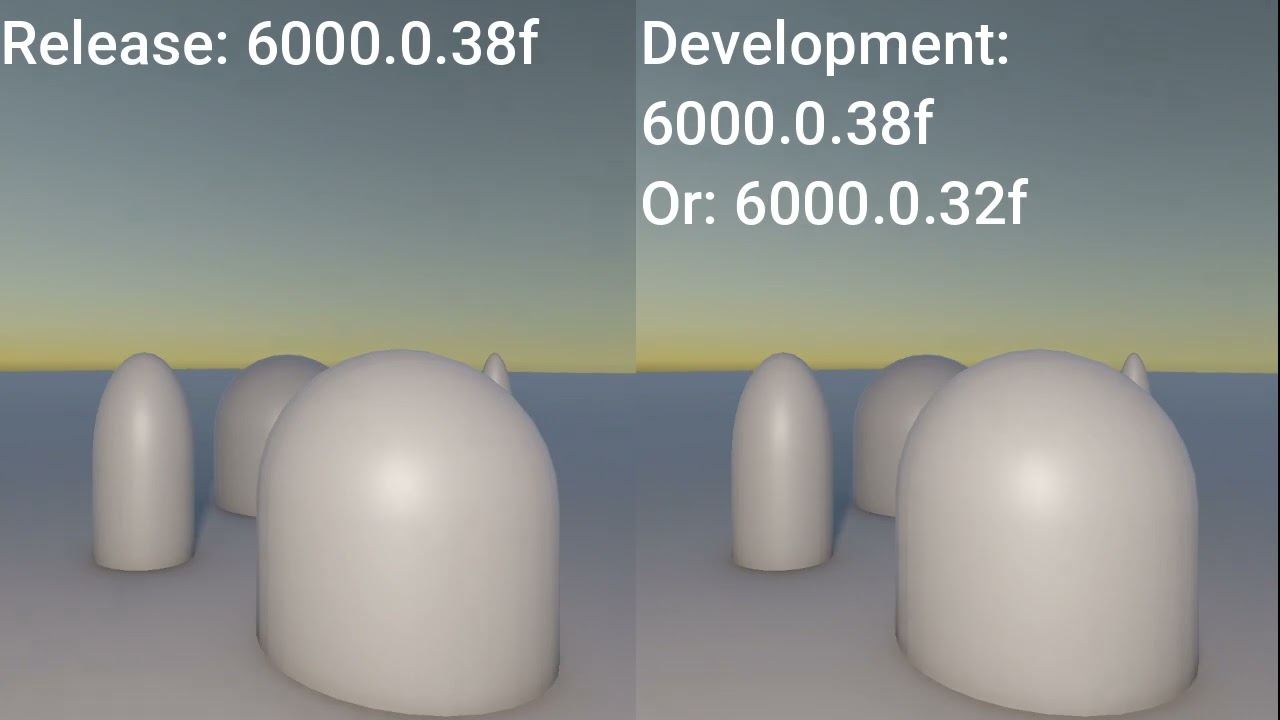
@sinful gorge As I suspected, downgrading Unity to the last version that didn't have this bug, fixed the issue. Maybe it recompiled some of the shaders or refreshed the cache, but I tried to upgrade too, and recompiling the shaders. That didn't help.
So it works in version 6000.0.32f but not in 6000.0.37f or 6000.038f
I will try to create a minimal program that shows this
oblique briar
I was able to create a minimal program that reproduce this bug in Unity 6000.0.38f
oblique briar
Here is a video, I already report this bug:
https://www.youtube.com/watch?v=TAegDNUEnUg
 placid laurel
Are these 6 examples really all the documentation on writing custom shaders in URP?
https://docs.unity3d.com/Manual/urp/writing-shaders-urp-landing.html
I don't feel ready to write my own shaders after reading these. I don't know what half of the words even mean
iron compass
placid laurel
Are these 6 examples really all the documentation on writing custom shaders in U...
The docs aren’t going to teach you how to write shaders, just how to do the unity specific basics. It is recommend to use Shader Graph (when possible) in URP.
placid laurel
Why is it recommended to use the Shader Graph?
Is writing shader code obsolete?
Aren't there things that aren't possible in the shader graph that are possible through code?
iron compass
placid laurel
Why is it recommended to use the Shader Graph?
it is more accessible and has a much smoother migration path between render pipeline versions.
placid laurel
So even experienced developers regularly use the Shader Graph and only use custom shaders when it's absolutely necessary? It's just a better workflow?
iron compass
placid laurel
Aren't there things that aren't possible in the shader graph that are possible t...
shader graph can handle most things that ordinarily come up when building a game, if you however want to implement significant extensions to the pipeline's abilities you will still need to write your own shaders, also if you need any kind of loops.
iron compass
placid laurel
So even experienced developers regularly use the Shader Graph and only use custo...
it is 'better' in the sense that it makes shaders way less magical and lower maintenance
placid laurel
What do you do when you only learn how to use the shader graph and now need to use custom shaders?
iron compass
but it is also less capable, with the trade off being often worth it when the added capability is not needed
iron compass
placid laurel
What do you do when you only learn how to use the shader graph and now need to u...
the principles are still exactly the same, you can translate your shader graph logic/math 1:1 to custom code
you can also use custom-code-partials in shader graph
placid laurel
What are those?
iron compass
stuff you can't do in shader graph with its nodes, but that can be done with custom shader code, can still be included in shader graphs via a custom-shader-code node
placid laurel
Right
That sounds pretty cool
I guess that's why there isn't a good solution for writing urp shaders
I'm trying to use visual studio but it's a pretty bad experience
iron compass
its just regular HLSL
its not a unity specific "problem"
you can get a decent experience when using Rider
placid laurel
I don't know why I didn't think of installing an hlsl extension
I've been trying to find one specificly for Shaderlab, even though that's not going to be the bulk of the code
And doesn't seem to be too complicated
Oh
It doesn't recognize it
iron compass
overall shaders in themselves arent complicated, just a few convetions. The annoying part is usually the library and render pipeline integrations that are specific to unity.
iron compass
you can get basically all info you need from the code completions/intellisense and looking at the source
placid laurel
I don't have any code completion / intellisense
Not when editing .shader files at least
I have no idea where the source is
iron compass
inside the render-pipeline packages
maybe you need to use a better IDE, no idea if VS is the limiting factor here.
placid laurel
I'm gonna get a school license for jetbrains soon
I'll probably use that I guess
I haven't had issues before with vs but if It's necessary i'll change
iron compass
in any case, you maybe need to brows the "scripting" docs, instead of the "manual" docs
placid laurel
Also I found this tutorial
https://www.cyanilux.com/tutorials/urp-shader-code/
It seems to be pretty up to date
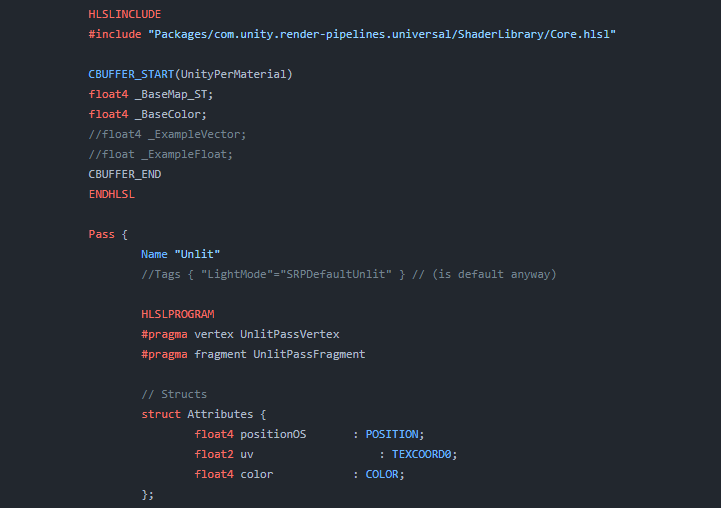
Explains how shader code (ShaderLab & HLSL) is written to support the Universal RP
iron compass
there is quite a bit more info in the scripting side
if you head to #archived-shaders you will get helped
blazing gull
iron compass
you can get a decent experience when using Rider
I was very pleasantly surprised by how good Rider is with ShaderLab
iron compass
blazing gull
I was *very* pleasantly surprised by how good Rider is with ShaderLab
indeed
 void python
hi guys i was a month into this project and it displayed this after a lightbake
plz help 😭


 late monolith
Hello, if you have a custom shader outputting the normal data as a color should the accurate g-buffer normals look the same as the standard ones when properly unpacked?
I am using the following right now but i am not sure if the function is outputting the accurate normals in the correct format.
#include "Packages/com.unity.render-pipelines.universal/ShaderLibrary/DeclareNormalsTexture.hlsl"
The function below is how i retrieve it in the shader.
SampleSceneNormals(input.texcoord);
Here are 2 images. the blue and green are the regular normals. and the purple blue white image is the accurate g-buffer normals one


 grave coyote
A question from someone who is pretty experienced in unity in general but not in its graphic pipeline. If I want a very custom rendering of a few meshes for a 2d top down view, should I use a custom render pass or try to build it within existing pipeline with custom shaders.
I have a mesh that renders by itself but is also used as a mask for a few sprites rendered on top of it. There can more than one mask meshes in the view.
I was planning to mask using stencil buffer for that I need a very specific order of rendering as well as setting correct stencil buffer values for objects that are being rendered.
 copper pilot
I suppose that a custom render pass would make it easier, at least, even if not strictly needed.
 hollow arrow
Hmm has anyone here implemented wind zones to a shader graph? Or does it automatically?
 strong gulch
is there any way of copying depth textures in Render Graph? Blitter.BlitColourAndDepth is giving me trouble
marble vigil
hollow arrow
Hmm has anyone here implemented wind zones to a shader graph? Or does it automa...
It does not
Afaik Wind Zones like Terrain and Particle System that read them have special access to each other since they exist deeper in the engine
If you want to read them, you'd need to get references to them the way your scripts find other components normally, and then produce shader properties from them so your shaders can actually use them
That topic just came up in #archived-shaders so you could ask for more details there
 lost owl
Hi, I am developing a game in unity 6 (URP, Renderer2D). When I enable Alpha Processing I get the warning “Camera back-buffer format does not support Alpha Channel. Final output will be opaque.” I tried disabling HDR and it gets rid of the warning, but the output doesn’t still have transparency. How can I fix it? Thank you in advance 😉
marble vigil
lost owl
Hi, I am developing a game in unity 6 (URP, Renderer2D). When I enable Alpha Pro...
The warning says what the problem is, technically
What part of it is the confusing one?
There's more exact instructions here https://portal.productboard.com/8ufdwj59ehtmsvxenjumxo82/c/2149-alpha-processing-for-post-processing
lost owl
marble vigil
There's more exact instructions here <https://portal.productboard.com/8ufdwj59eh...
I have followed the instructions at the link you sent (and it solves the warning) but when I have to render the texture is still not transparent. I have already set the camera background type to solid color and set it to (0, 0, 0, 0). In the tutorial, it says to set color buffer to RGBA16F for HDR in the render texture but it isn't present in the color format options, so I have set it to R16G16B16A16_SFLOAT that in theory should be the same (tell me if I'm wrong). I need the alpha channel of the render texture for the full pass render.
 marble vigil
lost owl
I have followed the instructions at the link you sent (and it solves the warning...
marble vigil
lost owl
I have followed the instructions at the link you sent (and it solves the warning...
As I understand the steps to render a transparent RT doesn't require alpha processing
Alpha processing would stop post processing from removing the alpha
placid laurel
placid laurel
Also I found this tutorial
https://www.cyanilux.com/tutorials/urp-shader-code/
I...
Dang I need to make a transpiler for writing shader code with C# or something.
That would make it possible to test and simulate. Might be kinda nice
lost owl
marble vigil
As I understand the steps to render a transparent RT doesn't require alpha proce...
What are the steps? Can you link me documentation I can follow? Also, I am using PP on my game, could it interfere with the alpha. Thank you for your patience, I'm still pretty new to working on render pipelines.
marble vigil
lost owl
What are the steps? Can you link me documentation I can follow? Also, I am using...
If you've seen the page for Render Textures then you have all the documentation there is
There are no step by step instructions beyond what you saw for alpha processing
But I'd start by trying to get it to work without post processing
lost owl
marble vigil
If you've seen the page for [Render Textures ](<https://docs.unity3d.com/6000.0/...
Thank you, have a nice day 😉
marble vigil
lost owl
Thank you, have a nice day 😉
Let me know how it works out!
 simple mesa
hey everyone, is there something you have to do to enable environment reflections in the urp? it defaults to black rather than the environment probe unlike hdrp, even though environment reflections is enabled in the lit shader and the environment lighting source is set to skybox.

nevermind, i figured it out. you have to generate lighting each time you change the skybox material for some reason. not sure why that is necessary, the hdri for the environment probe already exists and doesn't need to be baked like a reflection probe.
lost owl
marble vigil
Let me know how it works out!
I really don't understand. If I try to apply the render texture to a raw image in my UI it works perfectly, but only if I change the pass render material from Fullscreen to Unlit. I need to have the shader set to fullscreen though since I use the render texture in the pass render.
Even if I don't use 64 bit HDR precision, that should by mandatory based on the tutorial you sent me
spring depot
In a ScriptableRenderPass, how do I blit the camera texture BEFORE Post Processing?
I need to blit before post, but this returns black any time before post

Looking at Blitter's doccumentation https://docs.unity3d.com/Packages/com.unity.render-pipelines.core@17.2/api/UnityEngine.Rendering.Blitter.html I can't find any mention of post proccessing or step values to insert my getter before post
What are possible reasons why my game objects show up as pure black in my scene, when NOTHING should be showing up at all, those objects should be showing the scene color in their exact location, which should be the scene color behind them since they are filtered by opaque and transparent layer masks to never render?
I need them to show the scene color but I can't get them to show scene color no matter what setting I set, how do I get them to show the scene color instead of black?

I need these objects to show the scene color BEFORE post proccessing but the only way I can get them to show the scene color and not be Black is if I render them AFTER post processing, which is unacceptable

 dry willow
spring depot
What are possible reasons why my game objects show up as pure black in my scene,...
dry willow
spring depot
What are possible reasons why my game objects show up as pure black in my scene,...
Are the distortion object shaders sampling _MyCustomBlit from the above snippet?
I suspect after post processing the m_CameraColorTarget is swapped behind the scenes so it renders fine, but before post process it's the same target that the objects are being rendered to - and you can't read and write to a target at the same time.
That's the point of the blit - to make a copy of the camera target, but the setup here isn't correct. You need to create a custom RTHandle and do BlitCameraTexture(cmd, m_CameraColorTarget, customRT); (I think there's an overload without material? Can't remember. If not use a material just outputting the BlitSource from URP Sample Buffer node)
spring depot
dry willow
Are the distortion object shaders sampling `_MyCustomBlit` from the above snippe...
Here is my code, isn't that running the same method you said?

I pass the material in through the URP renderer asset, is that my mistake?
that is a future problem I need to solve as well, hard coding it to use THIs specific material is wrong, I need it to work generically with a global texture many of these types of distortions can sample from
https://docs.unity3d.com/Packages/com.unity.render-pipelines.universal@14.0/manual/customize/blit-to-rthandle.html
this is where the code I am using came from
dry willow
spring depot
Here is my code, isn't that running the same method you said?
Different overload of the same method. But importantly the destination target isn't m_CameraColorTarget like you have
dry willow
spring depot
that is a future problem I need to solve as well, hard coding it to use THIs spe...
Then I'd remove the material completely and use cmd.SetGlobalTexture. There should be an overload for BlitCameraTexture that only includes the 3 params like I mentioned above, which uses an internal blit material/shader URP provides instead of a custom one
spring depot
dry willow
Then I'd remove the material completely and use `cmd.SetGlobalTexture`. There sh...
        using (new ProfilingScope(cmd, m_ProfilingSampler))
        {
            cmd.SetGlobalTexture("_MyCustomBlit", m_CameraColorTarget);
            Blitter.BlitCameraTexture(cmd, m_CameraColorTarget, m_CameraColorTarget);
}```Trying this now
Didnt work, now my entire game view is pure black instead of just those objects
weirdly the camera shows it should be showing something thought

though in the preview they're still black
I set the shader to be just the global texture directly so there's less funny buisness to fight with
 dry willow
This is what I mean
// in Pass (outside functions)
private RTHandle customRT;

// in OnCameraSetup
var colorDesc = renderingData.cameraData.cameraTargetDescriptor;
colorDesc.depthBufferBits = 0;
RenderingUtils.ReAllocateIfNeeded(ref customRT, colorDesc,
    name: "_MyCustomBlit");

// in Execute
using (new ProfilingScope(cmd, m_ProfilingSampler)){
     Blitter.BlitCameraTexture(cmd, m_CameraColorTarget, customRT);
     cmd.SetGlobalTexture("_MyCustomBlit", customRT);
}
the problem might be that the renderer feature is expecting a materal still, ill try to remove it from the pass as well
My pass always had an RTHandle in it, isnt that unique or is it special because of that name?

I will change its name to your name just in case that name is affecting it
dry willow
You need both handles. I assume that one is equivalent to renderingData.cameraData.renderer.cameraColorTargetHandle
spring depot
Here is a paste of the renderer feature and pass
This is just the example code from the docummentation page
I'm trying to refactor it to include the code you just posted to me now
I'm not experienced enough to know what specifically needs to be changed so going is slow
ill just add all your code and not remove or change any of mine

ColorBlitPass needs a material oh wait thats my own code
I see how to change it now
making progress

We're in business! Distortions rendering before post proccessing sampling from the Global texture
 it has some vestigial stuff about an Intensity float that when I removed this code, the whole screen permanently turned grey and the console threw lots of errrors so Im just going to leave those parameters as load bearing
here is the renderer feature and a shadergraph shader that samples it for distortion that can be used on a quad if anyone wants to play with it further
I only got this far with lots of help so everyone who helped me deserves the fruits of the labour
all of it working together

Thank you Cyan for all the help, I wouldnt have gotten this far without it
late monolith
When using SampleSceneNormals(input.texcoord) in URP from the following file
#include "Packages/com.unity.render-pipelines.universal/ShaderLibrary/DeclareNormalsTexture.hlsl"
Are the accurate g-buffer normals already fully useable? like compared to the default?
When i output the data as a color it looks very different. I am not sure how to properly debug and test if the normals are in a similar direction.
the colors i see when turning accurate g-buffer normals on and off are very different
marble vigil
lost owl
I really don't understand. If I try to apply the render texture to a raw image i...
UI may have some unique steps, especially if it's a screen space overlay UI
But I'm not sure what exactly
 cedar gorge
im kinda new to unity so sorry if this question is too obvious, but how do i actually make the character look like the preview from this? https://assetstore.unity.com/packages/3d/characters/humanoids/humans/protective-suit-man-158254 The character outline is in the prefab folder, but he is pink.
 lofty fog
Hey people, is there anything similar to https://docs.unity3d.com/2022.3/Documentation/ScriptReference/Camera.SetTargetBuffers.html in urp?
hollow arrow
marble vigil
It does not
Afaik Wind Zones like Terrain and Particle System that read them hav...
Ah so something like this. 👍
// Access Wind Zone properties
float windStrength = Unity_WIND_MAIN;
float windTurbulence = Unity_WIND_TURBULENCE;
float3 windDirection = Unity_WIND_DIRECTION;
// Output as a combined vector (example)
return float3(windStrength, windTurbulence, windDirection);
lost owl
marble vigil
UI may have some unique steps, especially if it's a screen space overlay UI
But ...
I will investigate and report if I find something
pallid sleet
Hi guys, I'm having a problem where one ScriptableRenderPass nullifies another, am I doing something wrong here?
They both do this and work fine alone:
RTHandle cameraColorHandle = renderingData.cameraData.renderer.cameraColorTargetHandle;
Blitter.BlitCameraTexture(commandBuffer, cameraColorHandle, cameraColorHandle, material, 0);
Somehow they must be getting the original cameraColorHandle value as input, since the later pass wipes the postprocessing of the earlier one
But how does Unity's other postprocessing do it then? They don't interfere with eachother in such a bad way?
I expect it to get the texture output of the previous pass, and then draw over that, but instead I got the above
lost owl
marble vigil
UI may have some unique steps, especially if it's a screen space overlay UI
But ...
SOLVED! The issue was that I was using the same renderer 2d data for both MainCamera and ForegroundCamera (the one that captures for the render texture), so I was applying the custom pass render to both outputs. I solved by created a renderer 2d data without pass renders for the ForegroundCamera.
 sterile ridge
is there a way to change this through code?
URP, Unity 6
I tried light.shadowResolution = LightShadowResolution.Low; but it doesnt work
 sinful gorge
sterile ridge
is there a way to change this through code?
URP, Unity 6
I tried light.shadowR...
sinful gorge
sterile ridge
is there a way to change this through code?
URP, Unity 6
I tried light.shadowR...
Does the code actually run?
Maybe you need to do it via the URP additional lighting settings?
If both don't work out, it sounds like a bug. Make a report and hope it gets fixed soon
sterile ridge
yes code runs but it doesnt affect anything
also tried the additional light data but nothing, all readonly
sinful gorge
Then if you're updated with Unity I'd say file a bug report. They respond relatively fast lately
sterile ridge
sure, unfortunately this seems more like a missing feature than a bug :/
im recently converting over built in and im finding so many missing features in urp
I created this in unity discussions for the time being
marble vigil
sterile ridge
is there a way to change this through code?
URP, Unity 6
I tried light.shadowR...
I'm curious why do you want to swap it per light at runtime
sterile ridge
I have many lights and I want to optimize them in real time
and im hitting the limits of the shadowmap and the auto optimization ends up in a ugly state
I plan to lower res of lights farther away from the player, only the closer ones being full res
sinful gorge
sterile ridge
sure, unfortunately this seems more like a missing feature than a bug :/
Depends how you phrase it haha
QA often passes issues like this since the code does say it should work
 paper pagoda
Guys i am making a arcade car game for android. It ran well on my phone which has snapdragon 870 and 12gb ram. I thought to try it out on a bit older phone which has snapdragon 662 and 6 gb ram. Its only giving me like 15 fps on it . I used profiler to know whats responsible for this perfomance and these are the results . Sry for not sending a screenshot but this should do

Can anyone help me optimize the game
 scenic burrow
any URP experts in here can assist with helping me add a simple feature to my forked local URP renderer? I've decided on a project to switch to URP but before I make the full jump I have a sample project with the URP renderer with some modifications that I want to make to it before I decide to fully commit.
The first "simple" feature I want to try adding is just a simple option on the light shadowcasting settings to where I can control how often the shadowmap updates every frame. I already have the added option on the editor side, and have went into MainlightShadowCasterPass.cs and added a simple block to where when it's time for the shadowmap to update, it does. However that seems to introduce an issue that I'm not expecting and looking to solve
it looks like the shadowmap might not actually be persistent the whole time? either that or there is a clear/issue command that is executed whenever the shadowmap is not actually getting rendered
TLDR; the shadows in my main directional light flicker, and don't stay persistent when there is no shadowmap update. I want it to be persistent
 quasi drum
Is there some way I could disable a URP custom render feature from a script? I want to disable all of these CRT effect scripts when the player toggles them in the settings.
 sterile ridge
I have another issue with URP now, wrote about it on the forums, anyone else experienced this? https://discussions.unity.com/t/object-light-count-different-behavior-in-builds-and-editor/1605442
 hard talon
heya, does anyone know if there's a working example of a grab pass renderer feature in URP 17?
sinful gorge
hard talon
heya, does anyone know if there's a working example of a grab pass renderer feat...
I think it's in the render feature docs
sinful gorge
quasi drum
Is there some way I could disable a URP custom render feature from a script? I w...
I got this from QA after I broke it
Thank you for reporting your issue!
I’ve spoken with the developers regarding this issue, the problems that they found were this: It’s best to avoid using reflection if possible, so you could change your “FoggedUpManager.cs” scripts code like this:
Change this:
var renderer = (GraphicsSettings.currentRenderPipeline as UniversalRenderPipelineAsset).GetRenderer(0);
var property = typeof(ScriptableRenderer).GetProperty("rendererFeatures", BindingFlags.NonPublic | BindingFlags.Instance);
List<ScriptableRendererFeature> features = property.GetValue(renderer) as List<ScriptableRendererFeature>;
To this:
List<ScriptableRendererFeature> features = (GraphicsSettings.currentRenderPipeline as UniversalRenderPipelineAsset).rendererDataList[0].rendererFeatures;
This ensures only the Renderer Features are saved in the variable.
Also, you should also make sure that your “New Universal Render Pipeline Asset_Renderer.asset” has the Renderer Features set up. In your project that you attached, no Renderer Features were added to this asset. You can find this in Assets/Settings.
Hope it helps!
sinful gorge
paper pagoda
Guys i am making a arcade car game for android. It ran well on my phone which ha...
Very likely a GPU bottleneck. Can't say more without more data
paper pagoda
sinful gorge
Very likely a GPU bottleneck. Can't say more without more data
any suggestion to get more data... sry i'm a newbie
sinful gorge
paper pagoda
any suggestion to get more data... sry i'm a newbie
Fold it out more and share URP settings
hard talon
sinful gorge
I think it's in the render feature docs
I'm not sure it does, I can see a render to a target material texture feature in the samples but unfortunately I'm only familiar with the syntax pre-urp 17 and I'm not sure what I'd modify to make it set that texture to a global shader tex instead
    // Pass which outputs a texture from rendering to inspect a texture
    class OutputTexturePass : ScriptableRenderPass
    {
        // The texture name you wish to bind the texture handle to for a given material.
        string m_TextureName;
        // The texture type you want to retrive from URP.
        TextureType m_TextureType;
        // The material used for blitting to the color output.
        Material m_Material;

        // Function set setup the ConfigureInput() and transfer the renderer feature settings to the render pass.
        public void Setup(string textureName, TextureType textureType, Material material)
        {
            // Setup code to trigger each corrspoinding texture is ready for use one the pass is run.
            if (textureType == TextureType.OpaqueColor)
                ConfigureInput(ScriptableRenderPassInput.Color);
            else if (textureType == TextureType.Depth)
                ConfigureInput(ScriptableRenderPassInput.Depth);
            else if (textureType == TextureType.Normal)
                ConfigureInput(ScriptableRenderPassInput.Normal);
            else if (textureType == TextureType.MotionVector)
                ConfigureInput(ScriptableRenderPassInput.Motion);

            // Setup the texture name, type and material used when blitting.
            // In this example we will use a mateial using a custom name for the input texture name when blitting.
            // This texture name has to match the material texture input you are using.
            m_TextureName = String.IsNullOrEmpty(textureName) ? "_BlitTexture" : textureName;
            // Texture type selects which input we would like to retrive from the camera.
            m_TextureType = textureType;
            // The material is used to blit the texture to the cameras color attachment.
            m_Material = material;
        }

        // Records a render graph render pass which blits the BlitData's active texture back to the camera's color attachment.
        public override void RecordRenderGraph(RenderGraph renderGraph, ContextContainer frameData)
        {
            // Fetch UniversalResourceData from frameData to retrive the URP's texture handles.
            var resourceData = frameData.Get<UniversalResourceData>();

            // Sets the texture handle input using the helper function to fetch the correct handle from resourceData.
            var source = GetTextureHandleFromType(resourceData, m_TextureType);

            if (!source.IsValid())
            {
                Debug.Log("Input texture is not created. Likely the pass event is before the creation of the resource. Skipping OutputTexturePass.");
                return;
            }

            RenderGraphUtils.BlitMaterialParameters para = new(source, resourceData.activeColorTexture, m_Material, 0);
            para.sourceTexturePropertyID = Shader.PropertyToID(m_TextureName);
            renderGraph.AddBlitPass(para, passName: "Blit Selected Resource");
        }
    }
 quartz yoke
Does anyone know what this screen space artifact is?
sinful gorge
quartz yoke
Does anyone know what this screen space artifact is?
I can't see it, but maybe SSAO?
iron compass
quartz yoke
Does anyone know what this screen space artifact is?
static SSAO noise indeed
marble vigil
quartz yoke
Does anyone know what this screen space artifact is?
Post only to one relevant channel at a time please
 river current
Hey, I followed this video : https://youtu.be/KpTK-OraZ-g and it solved the pink texture issue, though I have alot of warnings in the console and i don't know how to fix them and also in the Render Converter Pipeline I have 1 complete, 1 with warning and 2 pending and I don't know how to solve that


In this tutorial, we cover how to convert a Synty Studios asset pack in Unity to use the Universal Render Pipeline. We look at the old conversion process for Unity 2020 and earlier as well as the newer converter for Unity 2021+.
We look at setting up a fresh URP project from the Unity Hub templates, importing the Universal RP package from the p...
quartz yoke
Guys I have lots of objects. When they are inside a child of another GameObject, my frame rate slows down significantly.
Does anyone know whats wrong? they dont slow down when they dont have parent object
I have an animator and when this animator is inside a nested gameobjects with lots of children then it slows down
 cloud night
Help please! For some reason my project got corrupted and now URP is no longer working. I tried removing it and installing it again but yet no fix. If I try to enter playmode it says to fix all compile errors but in the console there is NO errors. This is not the first this happened but I can't remember how to fix it. I just rebuilt the entire library before opening the project since it said the project was corrupted for some reason.
Any idea why this is happening and how to fix it?
 quartz yoke
if it is corrupted u should undo ur last edit with version control
cloud night
quartz yoke
Guys I have lots of objects. When they are inside a child of another GameObject,...
You shouldn't have a lot of child objects in your scene, it will impact performance. There doesn't seems to be a logical explanation but one dev youtuber already covered it.
quartz yoke
cloud night
You shouldn't have a lot of child objects in your scene, it will impact performa...
yup I know that my problem is, this animator is fine animator my character when not inside a parent
cloud night
quartz yoke
if it is corrupted u should undo ur last edit with version control
No it's not thatcorrupted + it was already broken in version control, I just made a lot of changes and forgot to push them and now the last version is like this.
quartz yoke
it slows down when inside a parent with lots of children
the game itself runs fine with lots of children I have
this animator just slows down, eatting up the frame down to 20 fps
quartz yoke
cloud night
No it's not *that*corrupted + it was already broken in version control, I just m...
what do you mean it was already broken in version control
do you not have a version of your game thats' not broken?
cloud night
quartz yoke
what do you mean it was already broken in version control
I have no idea, I just changed from branch B to branch A and the corruption I fixed got corrupted again since for some reason the last pushed version had that corruption.
It had something to do with Library, and it doesn't make sense because Library is not in version control and shouldn't affect it.
quartz yoke
cloud night
I have no idea, I just changed from branch B to branch A and the corruption I fi...
How many people are in your team? do you have anyone working on different OSs?
cloud night
quartz yoke
How many people are in your team? do you have anyone working on different OSs?
Just me.
quartz yoke
ok then its not OS compile issue
u should just go as far as back where there is no corruption tbh
corruption is almost impossible to " fix "
or just reimport your entier game in a new Unity project
cloud night
quartz yoke
or just reimport your entier game in a new Unity project
No matter what, my projects always corrupt for some reason in different ways.
Long time ago it happened to me that one of my projects corrupted after importing the terrain tools.
Unity has so much issues, at this point it just feels like a joke.
marble vigil
cloud night
Help please! For some reason my project got corrupted and now URP is no longer w...
The only issue visible here is that you have no URP asset where it should be, so your materials cannot be rendered
Refer to pinned instructions
You may have toggled the buttons to hide errors in console
cloud night
marble vigil
The only issue visible here is that you have no URP asset where it should be, so...
Again, I removed and installed URP. The project was originally created on URP. Unity is NOT detecting URP but the URP assets ARE there.
cloud night
marble vigil
You may have toggled the buttons to hide errors in console
No it's not, as said, there is NO errors.
 marble vigil
cloud night
No matter what, my projects always corrupt for some reason in different ways.
marble vigil
cloud night
No matter what, my projects always corrupt for some reason in different ways.
At that point it seems to point to an issue with your system
Your drive itself may be corrupted, another program may be interfering with write operations to it, any number of external causes really
marble vigil
cloud night
Again, I removed and installed URP. The project was originally created on URP. U...
You should be able to drag and drop the asset from your project into that field, and into the SRPP asset fields for quality levels
Even if the pop up cannot find it
cloud night
I'm gonna try to recompile scripts because not even my scripts are loading.
marble vigil
That should have nothing to do with compile errors at any rate
I'd restart the project, which will prompt it to go to safe mode if there really are compile errors
You can also re-clone the project from the repository which creates all temporary files from scratch
cloud night
@marble vigil Aight, now errors show up after editing a script.
I believe this is the issue I had previously but I can't remember how I fixed it.
 marble vigil
cloud night
<@166982635950702592> Aight, now errors show up after editing a script.
I belie...
marble vigil
cloud night
<@166982635950702592> Aight, now errors show up after editing a script.
I belie...
I would honestly just try re-cloning
After making sure the correct URP and SRP packages are installed
quartz yoke
cloud night
No matter what, my projects always corrupt for some reason in different ways.
Just commit regularly
if thats the case then committing regularly should be ur priority job
so that you can go back to working version
 granite anvil
Can reflection probes really not be disabled on a per MeshRenderer basis in URP? It seems that even if a mesh's pixel is outside of any reflection probe volume bounds, it will fallback to the skybox reflection (according to the docs). The Reflection Probe Usage setting was removed, and while it can be accessed via the Debug inspector, it doesn't appear to have any affect now if I set it to 0 (which I assume to be None).
So it seems like every mesh is intended to have some form of reflections in URP, which causes mesh's that are not exposed to the sky to be artificially brightened when they should be dark. What am I missing here?
 lusty jewel
Hi all, i've been banging my head looking at the urp samples for the render graph api. I want to create an alternative to scene color, where I blip after transparent. Does anyone have any pointers? What example Render Feature should I be looking at?
marble vigil
granite anvil
Can reflection probes really not be disabled on a per MeshRenderer basis in URP?...
Renderer.ReflectionProbeUsage still works when set with a script
But I wonder in what situation reflections cause objects to be "artificially brightened"
In theory reflection probes are required for materials to appear correctly, and each area should have a probe that captures its reflections
granite anvil
marble vigil
Renderer.ReflectionProbeUsage still works when set with a script
But I wonder in...
Hmm, that is not my experience (regarding setting ReflectionProbeUsage). Maybe it is broken in my Unity/URP version (6000.0.24f1, URP 17.0.3).
For example here. This room has no windows and a closed door, yet all of the walls are bright due to using the skybox reflection probe
 marble vigil
granite anvil
For example here. This room has no windows and a closed door, yet all of the wal...
marble vigil
granite anvil
For example here. This room has no windows and a closed door, yet all of the wal...
Is there a reason to not have a probe baked inside it?
granite anvil
No, other than the additional work of adding a probe to every indoor space, and the fact that it's not possible (AFAIK) to rotate reflection probe volumes in URP, which makes matching them to the indoor spaces really hard.
marble vigil
Apparently ReflectionProbeUsage.Off means the skybox is used, rather than any probe components
So you can't fully "remove" the reflections
granite anvil
marble vigil
Apparently ReflectionProbeUsage.Off means the skybox is used, rather than any pr...
that makes sense. Was that how it previously worked too, or just now with URP?
marble vigil
No idea
@granite anvil Light layers may be an option to let interiors and exteriors be affected by separate probes, even if the probe bounds don't properly match the building
I think HDRP might support rotated reflection probe bounds but otherwise you're out of luck sans for workarounds like these
granite anvil
marble vigil
<@399073402935181313> Light layers may be an option to let interiors and exterio...
Do you mean using the Culling Mask on the Reflection Probe?
marble vigil
granite anvil
Do you mean using the Culling Mask on the Reflection Probe?
No, that's for what the probe will capture when baked
granite anvil
Right, that's what I thought. How should I setup what you suggest?
marble vigil
Ah well I would've suggested light layers / rendering layers for the probes but apparently that's also just for HDRP
granite anvil
URP does have rendering layers, but I guess not for reflection probe use?
marble vigil
granite anvil
URP does have rendering layers, but I guess not for reflection probe use?
I guess not
granite anvil
Ok. Oh well. Thanks for the ideas though!
I guess I may just have to disable the environment reflection probe and only use manual probes placed strategically. Even though the image below may not be perfect lighting wise, I think with the Environment reflection probe disabled I can at least get darker areas:
 lost owl
Hi, there is a way to render a lit scene as unlit from a specific camera? The rest of the cameras in the scene should render it with lighting.
iron compass
lost owl
Hi, there is a way to render a lit scene as unlit from a specific camera? The re...
you can, for example, use replacement shaders: https://docs.unity3d.com/6000.0/Documentation/ScriptReference/Camera.SetReplacementShader.html
lost owl
iron compass
you can, for example, use replacement shaders: https://docs.unity3d.com/6000.0/D...
Hi, thank you for your answer! I am using a custom lit sprite shader I created from shader graph and I need to still use it, only disabling the lighting on it. It could work?
iron compass
lost owl
Hi, thank you for your answer! I am using a custom lit sprite shader I created f...
i don't understand what you actually want to do. You could change the shader graph to unlit.
if you want to render the entire scene with a different shader, in URP, you need to make a render feature for that.
lost owl
iron compass
if you want to render the entire scene with a different shader, in URP, you need...
Ok, I'll try that. Thank you.
pallid sleet
Hi guys, I'm having serious difficulties finding any info on how making a custom VolumeComponent is supposed to work
Does anyone have any pointers?
I previously made a ScriptableRenderFeature, with a ScriptableRenderPass, but I believe that volume components would suit this much better
 worthy mauve
Anybody knows why in the URP camera the Depth Texture in Rendering distorts some effects of shaders that are compatible with URP while moving the camera?
I want to put some nice water in my game, but a waves effect in it gets distorted everytime I move the camera in play mode.
I disabled Depth Texture and this error doesn't happen, but the problem is that the waves effect doesn't appear anymore
 late monolith
I am looking at some resources for screen space reflections and have implemented a few different methods already that work pretty good.
I would like to now try some optimization by implementing a hierarchical depth buffer.
So basically sample 4 pixels and create a texture at half the resolution of the previous texture. This is then done until you have a texture of 1x1 pixels.
What's the best method to generate and use the texture?
Can i make a renderpass for a rendererfeature that outputs everything into an LOD texture? is this a good use case to use an LOD texture?
I think it would max likely be 16 textures each texture half the size of the previous one.
 thorn lynx
Hey, adding a fullscreen post-processing effect should be as simple as writing a HLSL shader for it, putting that on a material and putting that material in here right?
 iron compass
thorn lynx
Hey, adding a fullscreen post-processing effect should be as simple as writing a...
iron compass
thorn lynx
Hey, adding a fullscreen post-processing effect should be as simple as writing a...
you could even make a shader graph for it
thorn lynx
iron compass
you could even make a shader graph for it
Not too experienced with graph shaders (neither with written ones tbh) but I want to try my hand at the atisotropic kuwahara filter showcased in that one Acerola yt vid.
But I saw that you should write your own pass for it, but I found this "Full Screen Pass Renderer Feature". Wondering what's the best way to go?
 karmic iron
thorn lynx
Hey, adding a fullscreen post-processing effect should be as simple as writing a...
karmic iron
thorn lynx
Hey, adding a fullscreen post-processing effect should be as simple as writing a...
Yes
thorn lynx
Thx
 dire agate
Hello guys, how do you solve the dark effect on terrain for mobile (Android)? It's on Unity 6 I don't remember if the problem was always there.
 carmine sky
Hello, when I started making a project with the universal 3d template, I noticed that when I import some material in the scene, the color of it seems to be different than it's supposed to be. I know that's not a lighting issue because the material I imported is not affected by it. Does anyone know why does this happens and how could I fix it?
 placid laurel
carmine sky
Hello, when I started making a project with the universal 3d template, I noticed...
placid laurel
carmine sky
Hello, when I started making a project with the universal 3d template, I noticed...
Post Processing maybe
carmine sky
placid laurel
Post Processing maybe
in that case which effect would I choose?
 placid laurel
carmine sky
in that case which effect would I choose?
placid laurel
carmine sky
in that case which effect would I choose?
Well, I assume the existing effects mess with the color
carmine sky
I don't have any effect
placid laurel
Can you click on Global Volume and show the whole editor?
 placid laurel
carmine sky
placid laurel
carmine sky
Those are all effects that are applied, if you want to disable PP fully, just disable it here
 carmine sky
alright
placid laurel
However its better most of the time to have at least some effects, like Color Correction, ACES Tone mapping
carmine sky
thank you, the colors now looks better after I choose the default volume profile there

 plucky trellis
Does anyone know what causes this fuzzy shading? I'm messing with baked lighting and it's driving me absolutely insane.

Everything is set to static, baked illumination turned on.
using default cubes provided by unity
placid laurel
plucky trellis
Does anyone know what causes this fuzzy shading? I'm messing with baked lighting...
That looks like Ambient Occlusion
plucky trellis
i disabled ambient occlusion and its still there
 placid laurel
plucky trellis
i disabled ambient occlusion and its still there
placid laurel
plucky trellis
i disabled ambient occlusion and its still there
It might also be from SSAO (Screen Space Ambient Occlusion) but it wouldnt look like that unless you changed the settings drastically.
So its likely shadows then
But when I bake, shadows never looked like that, If I recall correctly
plucky trellis
@placid laurel i think you are right, my SSAO is set to blue noise and it looks absolutely horrendous
my baking is actually fine and working
placid laurel
Thats good. Blue noise def makes SSAO look bad
plucky trellis
Yea i dont know why it was set to that by default lol.
Also, would you recommend interleaved gradient or just tweaking blue noise?
 ebon karma
plucky trellis
Also, would you recommend interleaved gradient or just tweaking blue noise?
ebon karma
plucky trellis
Also, would you recommend interleaved gradient or just tweaking blue noise?
gradient
plucky trellis
Ok ty. Also im reading a recent post in May 2024 complaining about Unity 6 blue noise artifacting so ig thats the issue
placid laurel
plucky trellis
Ok ty. Also im reading a recent post in May 2024 complaining about Unity 6 blue ...
Had to make a new URP project to check, sorry it took so long.
The settings are way off in Unity 6 for some reason (Likely rendering changes).
But yes gradient like that other guy said
plucky trellis
placid laurel
Had to make a new URP project to check, sorry it took so long.
The settings are ...
Thanks for the help
placid laurel
And the shadows are 😬 .
Yeah ill stick to 2022 HDRP for now lol

 edgy anchor
I am trying to convert this part from shadergraph to HLSL code with URP
However I cant find the Transform Node equavilent of what I have in shadergraph inside of HLSL. This is kind of what I have so far. https://pastecode.io/s/1jx9skgg
 soft lion
edgy anchor
I am trying to convert this part from shadergraph to HLSL code with URP
However ...
soft lion
edgy anchor
I am trying to convert this part from shadergraph to HLSL code with URP
However ...
btw you can inspect the generated code to see how it is implemented
iron compass
edgy anchor
I am trying to convert this part from shadergraph to HLSL code with URP
However ...
Those are presumably all predefined matrix multiplications to convert between vector spaces. In that screenshot it’s a conversion of a direction from object to tangent space. If you can find the corresponding matrices you can perform the principal axis transformation manually.
 summer salmon
Hello, can someone help me use Emission? It's for bloom effect. In all tuto, they just add a material with a shader like URP/Lit, check "Emission", update "Emission Map" color and intensity, but on my side the color and intensity have no effect.
Blooming is working with post-processing through Volume component, but emission property does nothing.
I tried with new project from zero, with latest versions, nothing changes.
 grim rivet
Hey guys, i recently wanted to add CRT to my project but i am running to a bit of a problem, i wanted to like use this CRT Shader (https://github.com/Cyanilux/URP_RetroCRTShader) but instead of making it fullscreen i wanted it to be shown on a screen with a mask that make sure that the effect only affect that mask while everything else is not affected, is there any way to achive this ?
GitHub
A shader graph which replicates some retro tv/monitor effects. CRT (cathode-ray tube) warping, scanlines, static, distortion, etc. - Cyanilux/URP_RetroCRTShader
 raw hinge
Hi! idk if this belong here, i work with URP, and set materials surface type to Transparent, as objects texture has some transparent surfaces, and i have some weird rendering problem, that some models back parts being see through front side. Any solutions?


 little wharf
raw hinge
Hi! idk if this belong here, i work with URP, and set materials surface type to ...
little wharf
raw hinge
Hi! idk if this belong here, i work with URP, and set materials surface type to ...

Set the render face to both
raw hinge
little wharf
Didn't make better :(
 little wharf
raw hinge
Didn't make better :(
little wharf
raw hinge
Didn't make better :(
Actually your image is kinda dark so i am not understanding what problem you having can you explain?
raw hinge
Second image is how it must be, first image how it is with Transparent parameter on... with both render face is worst than only front, but still wrong

 dry willow
You should separate opaque & transparent parts of the model into separate submeshes so you can apply two materials
raw hinge
dry willow
You should separate opaque & transparent parts of the model into separate submes...
Any other way to not apply 2 materials but having only one? I had same problem with glass of water, with image on 1 side, that can be seen from both sides on first plane...
 dim perch
Hello I have a question about shadows in URP
I know it doesn't support contact shadows yet
But why does close by or small objects cast a wrong/misaligned shadow? And can that effect be mitigated?
Example of the hair showing misaligned shadows, the shader are the UTS toon by unity, fully supported and working as intended, this shadow artifacting happens on on small scale, if I scale up the character model the problem is gone, bu obviously I have to keep my character to scale appropriate for the world
woeful iris
Guys why in urp light cookies texture dot work in my project
is a problem of urp unity 6
or foward redendered path
iron compass
woeful iris
Guys why in urp light cookies texture dot work in my project
because your settings affecting the cookies are wrong.
woeful iris
which settings ??
 bitter fjord
I'm trying to use urp in 2D project
I've done everything
I've downloaded the assets, changed scriptable pipeline settings, but when I try this I get most random errors thrown at console

and no matter what I can't make lighting and URP work
I'm trying to make a day-night cycle (with light sources etc.) and URP seemed like an easy alternative but now it took my hours and nothing
 hushed vessel
the convertor only works for basic materials..
if you're using custom shaders or shaders created for a different pipeline they'll need to be manually converted.. or just swapped out for new materials..
it can have issues with:
- Legacy Shaders
- Unlit Shaders
- Custom Shaders
these errors are editor errors.. (likely not related to the materials themselves) but maybe an issue w/ an editor window or something.. should be able to just clear those out..
sometimes a restart/ or rebuilding the Library folder in ur project's directory can help solve those

and kinda odd to me that ur talkin about lighting for a day-night cycle when ur showing a 2D scene...
for 2D its less about the actual lighting and more about the Color/Tint of the Images you use..
... Ultimately, 2D day-night cycles are about creating the illusion of time passing through visual effects, not through dynamic lighting as in 3D.
 lone lantern
How can i make it so there isnt that circle and its seamless / way bigger? (Im developing for meta quest)
ebon karma
lone lantern
How can i make it so there isnt that circle and its seamless / way bigger? (Im d...
looks like low shadow distance
 manic marten
guys is this lightning good for a URP
 placid laurel
manic marten
guys is this lightning good for a URP
placid laurel
manic marten
guys is this lightning good for a URP
The floor reflections look quite a bit off
manic marten
placid laurel
The floor reflections look quite a bit off
anyways to improve?
placid laurel
In general you should give more context to the scene, im not really sure whats going on there
manic marten
placid laurel
In general you should give more context to the scene, im not really sure whats g...
yea
imma gonna add guns and broken chairs and shelves in it too
placid laurel
manic marten
anyways to improve?
Mainly this white reflection doesnt fit
 manic marten
placid laurel
Mainly this white reflection doesnt fit
manic marten
placid laurel
Mainly this white reflection doesnt fit
i think it would better to add 2 reflection probes at 2 halves of the room
One reflects the blue light infront
and other reflects the tube lights on the ceiling
placid laurel
Well I dont really know how your map is set up so I cant comment much on that
manic marten
placid laurel
Well I dont really know how your map is set up so I cant comment much on that

marble vigil
manic marten
anyways to improve?
Box projection for the reflection probe might do wonders
manic marten
marble vigil
Box projection for the reflection probe might do wonders
lemme see
 exotic acorn
Is there a way to set up a volume to control a skybox material? The docs are telling me to add an 'override' but skybox doesn't appear to be an option
iron compass
exotic acorn
Is there a way to set up a volume to control a skybox material? The docs are tel...
Only in HDRP
exotic acorn
ok, thank you!
 lusty garden
hey I'm using URP local to make an underwater effect with a box collider but see when i try and go underwater i cant cause of an important body collider, when i try to change the URP objects layer to another layer then the default layer the URP doesn't work anymore but i need to change the layer for me to go into the the URP box collider thing, cause i have a layer that stops me from colliding with objects that i put it on and stuff liek scripts and on trigger stuff still works when its on the layer. so can someone pease help me
marble vigil
lusty garden
hey I'm using URP local to make an underwater effect with a box collider but see...
Use more than one layer
lusty garden
like wdym
lusty garden
marble vigil
Use more than one layer
i dont understand
cause u can only use 1 layer
marble vigil
lusty garden
cause u can only use 1 layer
One layer for your water collider
Another layer for your local volume
They don't have to be the same object
late monolith
I would like to have a depth texture with mips enabled so i can use a compute shader to generate lower resolutions.
Is it possible to copy the depth texture into a new texturehandle without a custom material?
I am trying to make a rendererfeature for generating it but i am not really succeeding at a basic copy of the depth texture to a new texturehandle.
late monolith
Below is what i have now but if i use the frame debugger to verify or output the result it's not showing what the depth texture has.
I want to copy the depth texture into the first mip so mip 0 of the created depth pyramid texture and then after that use a compute shader to generate the other mips from the first level (0). but i am having a hard time getting a basic copy to work
using (var builder = renderGraph.AddRasterRenderPass<PassData>("Depth Pyramid Copy Pass", out var passData))
{
    passData.source = resourceData.cameraDepthTexture;
    passData.target = depthPyramidTexture;

    builder.UseTexture(passData.source, AccessFlags.Read);
    builder.SetRenderAttachmentDepth(passData.target, AccessFlags.Write);
    builder.SetRenderFunc((PassData data, RasterGraphContext context) =>
    {
        Blitter.BlitTexture(context.cmd, data.source, new Vector4(1, 1, 0, 0), 0, false);
    });
}
Guys, I have two issues, some assets are pink and others are grey instead of having their material properly set up. I tried to go to Window > Rendering > Render Pipeline Converter but didn't do much and I keep having red "!" saying something didn't go well and to this day I don't know why it does that everytime when I try to use Synty's Assets in Unity 😦
 placid laurel
Any way to make URP light weaker at source and stronger at distance?
RN its very very bright where the torch is but one meter further the light is gone and i have max range
Using Point Light.
I remember this is specifically URP's issue/trait
iron compass
placid laurel
Any way to make URP light weaker at source and stronger at distance?
RN its very...
no, URP uses a PBR light model (exponential decay).
you can however make custom unlit shaders and implement your own lighting for everything.
 ivory prairie
Hi, i am trying to maka an object glow. i have a material with red emission set to intensity 2 on a Specular Workflow, I have a Volume with Bloom Threshold 1 and Intensity 5 but i still have no real glow
iron compass
ivory prairie
Hi, i am trying to maka an object glow. i have a material with red emission set ...
is your post processing grading mode set to "high dynamic range"?
iron compass
In your render pipeline asset


 iron compass
without HDR, your volume bloom effect wont do much


 iron compass
ivory prairie
iron compass
ivory prairie
the actual camera
iron compass
ivory prairie
is this the only volume in the scene?
iron compass
and show the emission color
iron compass
ivory prairie
and the cinemachine camera is the one on the player
the cinemachine camera is irrelevant
show the rendering camera
ivory prairie
this?
 iron compass
ivory prairie
this?
iron compass
ivory prairie
this?
yes, and you obviously should expand the settings


 iron compass
ivory prairie
iron compass
ivory prairie
you have disabled post processing on the camera
iron compass
the one that says "post processing"
ivory prairie
oh boy, didn't see that
iron compass
should work now

 iron compass
idk, sorry, check if all settings are still the same at runtime and nothing is in the way (like fog)
ivory prairie
if it helps, it only glows in the scene if i deactivate and reactivate volume
ok i increased the emission intensity to 5, so at least its glowing ingame now
still confused, why the volume doesn't work tho
 maiden depot
Hello, is there a way to add custom render events? I have three different render objects and I need them all to be drawn in BeforeRenderingTransparents Event, but only in a specific order, so how can I do it? I found RenderPassEvent enum in urp scripts, but adding passes there just creates a dummy, when I try to use it in Render Objects, it just does not render anything


 crisp steeple
Has anyone made a video fixing the additional lights problem in unity 6 urp?
I can't find any
marble vigil
crisp steeple
Has anyone made a video fixing the additional lights problem in unity 6 urp?
What "problem" is that specifically
 rich drift
I am trying to manipulate the main shadow texture in unity 6, using the new render graph
I have used all the existing information about the render graph and adding custom passes, specifically the sample blur pass in the documentation
I can get the shadow texture just fine from the resource data of the universal data resource
But when I try to do anything with it in a blit pass
Nothing actually changes
And unity gives me a warning that I am allocating data that I am not doing anything to
Now I know that I am missing something, maybe the pass type or maybe the pass queue is wrong
But I don't know what that is since there is basically no info about this, and I have tried this exact thing with previous version of unity
Does anyone have any pointers?
severe tapir
I can't seem to get normal mapping in the lit shader to be correct for a partially mirrored mesh, anyone got any pointers?
I assume this is related to tangents being wrong
crisp steeple
marble vigil
What "problem" is that specifically
You cant add additional lights?
marble vigil
crisp steeple
You cant add additional lights?
Sure why not?
crisp steeple
marble vigil
Sure why not?
I meant to say cant
marble vigil
crisp steeple
I meant to say cant
What's stopping you then
You have to be more specific
crisp steeple
It adds the game object just no light
I'm really just looking to see if there are any videos on it yet so I can share it to friends that had the same problem.
marble vigil
crisp steeple
It adds the game object just no light
You need an object with a lit shader for the light to illuminate something
You also need to be using the correct light component for whether you're using 2D or 3D URP
hard talon
heya, is anyone aware of a way to sample the decal buffer in an unrelated shader? I need to access it in my grass compute shader to hide grass where decals are placed
crisp steeple
marble vigil
You need an object with a lit shader for the light to illuminate something
You a...
that wasnt the problem. the settings for additional lights are default disabled. i am just looking to see if there is a video on how to fix it for me to share, i have already fixed it, i do apoligize because i am really new to development and dont know how to explain stuff technically.
marble vigil
crisp steeple
that wasnt the problem. the settings for additional lights are default disabled....
Don't have to be very technical as long as you're precise about the steps that lead to the issue, like editor version, specific project template or if it was an upgrade
I'm fairly certain additional lights are supposed to be enabled in new Unity 6 projects made from the URP universal template, same as ever
crisp steeple
marble vigil
I'm fairly certain additional lights are supposed to be enabled in new Unity 6 p...
they are not i think they are trying to optimize urp
marble vigil
crisp steeple
they are not i think they are trying to optimize urp
In which unity version and project template and was it an upgraded project or a new one?
crisp steeple
marble vigil
In which unity version and project template and was it an upgraded project or a ...
a new project 6000.0.37f1 and it was the urp/vr template
marble vigil
crisp steeple
a new project 6000.0.37f1 and it was the urp/vr template
Ah, vr template
No surprise if that disables graphical features out of the box
crisp steeple
marble vigil
Ah, vr template
No surprise if that disables graphical features out of the box
ok thank you. you dont know of any video tutorial fixes do you?
marble vigil
crisp steeple
ok thank you. you dont know of any video tutorial fixes do you?
I'm not sure what that would entail
Every project needs its own specific graphical settings, so it's not something that's "fixed"
The URP documentation explains every feature and setting
For a lot of VR games most graphical features probably will have to be kept off anyway
crisp steeple
marble vigil
I'm not sure what that would entail
Every project needs its own specific graphic...
ok thank you buddy
marble vigil
crisp steeple
ok thank you buddy
There are probably more generic resources about optimizing for specific VR platforms which will be helpful to you
Profiling graphics performance using the analytics tools is also an important skill when your project reaches a point where that's relevant
marble vigil
 steel elm
how can I remove the spacing between my grass?
steel elm
how can I remove the spacing between my grass?
Iirc detail brush opacity is the only variable that controls detail density
steel elm
marble vigil
<#497875195718271004>
apologies, was looking for a terrain channel but couldnt find one
 bright bramble
Is there a way to force a renderer with a transparent material to be rendered as part of the opaque pass, or vice versa? Not just overridden with a different shader, but included in things like the depth/normal pass?
If I just draw those renderers separately with a different material, it's not included in the depth/normals pass, so it doesn't form an accurate picture of what's opaque when it comes time to layer the transparent stuff.
Alternatively, I could potentially draw the objects using a custom material that colours the object based on the normal data, but that means any custom vertex data on the original shader is ignored.
bright bramble
Also, another question: when I write an array of values to a ComputeBuffer, and then retrieve that data in a shader, how does said shader know which entry of the array to retrieve?
 neon gull
Hi guys. My 2D URP sprite outline shader graph works fine in Editor but not working in WebGL build, I didn't figure out why. Here are some details:
the graph exactly followed this example tutorial: https://www.youtube.com/watch?v=84rZ-rCRsZk
most nodes used are common to me, except the using of SubGraph and Keyword toggle. But I didn't find any disscussion about webGL problem of these features
I build with WebGL2.0, and shader stripe level settings are 2D URP defaults

Create an outline effect in 2D for SpriteRenderers using Unity Shader Graph! You can also read this tutorial here: https://danielilett.com/2020-04-27-tut5-6-urp-2d-outlines/
💻 Get the source on GitHub:
https://github.com/daniel-ilett/2d-outlines-urp
✨ Get the "Bandits - Pixel Art" pack on the Asset Store:
https://assetstore.unity....
neon gull
neon gull
Hi guys. My 2D URP sprite outline shader graph works fine in Editor but not work...
solved. Looks like Keyword makes shader variants, and variants are ignored by default. I added a shader variant collection file and tick my outline variant and it works fine on WebGL
 lethal dagger
I need help, looks like my issue will get over shadowed by one guy. #archived-shaders message
late monolith
lethal dagger
I need help, looks like my issue will get over shadowed by one guy. https://disc...
i do not think i have enough experience with decals to help, but is it the decal that doesn't receive a shadow?
lethal dagger
late monolith
i do not think i have enough experience with decals to help, but is it the decal...
yes, it is. more like area its touching on object
late monolith
lethal dagger
yes, it is. more like area its touching on object
This is a custom material right? The default decal material URP has can be accessed if you go to the Packages->Universal RP->Shaders
Maybe that can help a bit, you can see how the default one is made.
lethal dagger
late monolith
This is a custom material right? The default decal material URP has can be acces...
Doesnt have what i need
late monolith
lethal dagger
Doesnt have what i need
I probably don't know then. i need to look into decals myself sometime
hard talon
does anyone know of a way to exclude decals from writing to the depth buffer? i want to have decals on my terrain that don’t obscure outlines (or rather recreate them), but this is tough as is since neither the viewspace normals or depth textures are usable inside the decal shader
 young meadow
hey, anyone tried and managed to get scriptable renderer features work together with sprite renderer? I tried with all fw, fw+ and 2d renderers and got no luck so far. I can work around with with second camera, but I though it might be better to do it with render feature / render pass. (I need to draw sprite into render texture and then use it for some shneningans later in the frame)
 dim prairie
Hello guys.
I've been struggling with a problem with rendering for some time now.
It happens that when i build, the colors in my game are much brighter than when I run in the editor.
Current setup is:
-Multiple scenes for different things(UI, gameplay, DontDestroyOnLoad).
-Rendering settings for all layers have no lighting settings asset
-Player object(as seen on images) is a child of the DontDestroyOnLoad scene.
-The shader is a shader graph, GPU instancing is turned off ( if i turn it on, it becomes completely black in the editor)
-The render asset is the same on editor and on build.
-There is no Post Processing or GlobalVolume on any scene.
Following are screenshots from editor and build, respectively
Apprecciate your help!

 marble vigil
dim prairie
Hello guys.
I've been struggling with a problem with rendering for some time no...
marble vigil
dim prairie
Hello guys.
I've been struggling with a problem with rendering for some time no...
It's the scene ambient lighting, specifically with black shadows it's missing
The lighting would be taken from the active scene
More commonly the shadows would appear bright in editor since editor generates temporary lighting data, yet black in build as without manually generating lighting from the Lighting window it doesn't persist and defaults to black shadows
dim prairie
marble vigil
It's the scene ambient lighting, specifically with black shadows it's missing
ok! got it. Thanks!
 humble obsidian
Built in RP, unity Ver 6000.0.41f1
Not sure in which channel to put this since there isnt one for the built in render pipeline - When building for linux natively some weird rendering issues arise like objects that are close to each other clipping through each other as well as super weird lights i can only assume are specular highlights or something.
Im not sure what could cause this since it works perfectly fine on windows
(also added screenshots of it working properly on windows builds for reference)


 mental vortex
uh... so i'm trying to switch from BIRP to URP while its still early in the dev process... and all my cameras are broken. anyone got a few min to help me work this out?
i had a 3 scene stack (additive), had a play area scene with a depth only camera. now it only either renders that or the terrain background camera but not both
also getting flooded with this error
"InvalidOperationException: The operation is not possible when moved past all properties (Next returned false)
UnityEditor.SerializedProperty.Verify (UnityEditor.SerializedProperty+VerifyFlags verifyFlags) (at <95707308f6f3498991e9df8902fe97ba>:0)
UnityEditor.SerializedProperty.get_isLiveModified () (at <95707308f6f3498991e9df8902fe97ba>:0)
UnityEditor.UIElements.Bindings.SerializedObjectBindingToBaseField`2[TValue,TField].OnUpdate (UnityEngine.UIElements.BindingContext& context) (at <0f0b52ca76b24b5a86e5ec27d306db37>:0)
UnityEditor.UIElements.Bindings.SerializedObjectBindingBase.Update (UnityEngine.UIElements.BindingContext& context) (at <0f0b52ca76b24b5a86e5ec27d306db37>:0)
UnityEngine.UIElements.BindingUpdater.UpdateUI (UnityEngine.UIElements.BindingContext& context, UnityEngine.UIElements.CustomBinding customBinding) (at <7878115525854df7993c2f050b5b1154>:0)
UnityEngine.UIElements.BindingUpdater.UpdateUI (UnityEngine.UIElements.BindingContext& context, UnityEngine.UIElements.Binding bindingObject) (at <7878115525854df7993c2f050b5b1154>:0)
UnityEngine.UIElements.VisualTreeDataBindingsUpdater.Update () (at <7878115525854df7993c2f050b5b1154>:0)
UnityEngine.UIElements.VisualTreeUpdater.UpdateVisualTreePhase (UnityEngine.UIElements.VisualTreeUpdatePhase phase) (at <7878115525854df7993c2f050b5b1154>:0)
UnityEngine.UIElements.Panel.UpdateDataBinding () (at <7878115525854df7993c2f050b5b1154>:0)
UnityEngine.UIElements.UIElementsUtility.UnityEngine.UIElements.IUIElementsUtility.UpdateSchedulers () (at <7878115525854df7993c2f050b5b1154>:0)
UnityEngine.UIElements.UIEventRegistration.UpdateSchedulers () (at <7878115525854df7993c2f050b5b1154>:0)
UnityEditor.RetainedMode.UpdateSchedulers () (at <0f0b52ca76b24b5a86e5ec27d306db37>:0)
"
 placid bison
Hello everyone, could you please help me? I have a problem with my 3D models. When I import them into Unity, they get covered with black spots. Does anyone know what could be causing this? I'm using Unity 6 with URP.


 wispy cave
placid bison
Hello everyone, could you please help me? I have a problem with my 3D models. Wh...
wispy cave
placid bison
Hello everyone, could you please help me? I have a problem with my 3D models. Wh...
Are your normals flipped?
marble vigil
placid bison
Hello everyone, could you please help me? I have a problem with my 3D models. Wh...
It mostly looks like SSAO, though it's not meant to appear on flat surfaces like that
I would verify normals as crockettagne suggests
 floral radish
Guys I got this weird bug probably related to the renderer maybe someone can help me resolve it? I recorded how it looks
The camera jitters when moving (but only on small screen?)
Movement also jitters (like teleporting), but again only on small screen
it is also not related to fps count
Not sure if I'm asking on the right channel so if no one here knows the answer can you tell me where should I ask?
marble vigil
floral radish
Not sure if I'm asking on the right channel so if no one here knows the answer c...
It's a code problem related to how you get input or how you apply it as rotation
Not URP or rendering related
I'd ask in #💻┃code-beginner
floral radish
Oh okay thank you
sinful gorge
humble obsidian
Built in RP, unity Ver 6000.0.41f1
Not sure in which channel to put this since ...
Sadly the images don't load for me, but maybe use a different graphics API? Vulkan might be good if it's on OpenGLCore now
 neat elm
Hello, please what is the equivalent of the forward rendrer to set the default layer mask in the latest version of Universal RP package

the tutorial i am watching is a bit outdated
this is what i have in my version

Does it have a relation with this

 tired prism
Hey everyone! I'm trying to recreate the visibility effect from monaco: whats yours is mine. I'm pretty close to it by using stencil shaders in custom URP Render Object passes. However I got stuck at the no-lightning-beyond-FOV part.
I've come to the conclusion that I need to somehow create custom shader for all lighted in-scene objects, that ignore all light shading if the stencil test fails I already created a custom duplicate of sprite-lit-default that checks for stencil tests, but shadows and light are still displayed on it if the stencil test fails (its beyond the FOV)

as you can see camera lights are still visible beyond the FOV, and i had to put a sprite-unlit material on enemies in order for dynamic lights and shadows to not give away their positions instantly. So I want to have only those pixels that are within the FOV of the player (the lighter area) to respond to light. Including the environment (ground mostly, so things like camera lights are not visible on it if not seen by the player)

 somber arch
mental vortex
uh... so i'm trying to switch from BIRP to URP while its still early in the dev ...
somber arch
mental vortex
uh... so i'm trying to switch from BIRP to URP while its still early in the dev ...
I wonder if this is one of those Unity bugs that can be fixed by resetting layout?
Otherwise I might myself try deactivating the original cameras, and adding a new URP camera to compare. Without seeing your project setup.
 proven drift
Hey all! I'm trying to create a simple billboard shader in Unity URP for a particle system I'm working on. I'm more used to the BiRP and was wondering if anyone knows what the URP equivalent of the unity_CameraToWorld matrix is?
thorn lynx
using custom nodes in shader graph and defining hlsl shaders that way is kinda cool
is it weird to think one could define their whole post processing pipeline in one shader graph? Linking custom nodes together that load hlsl files
 burnt pelican
Hello, I have render camera in scene with Output texture set to Render texture. When color format of render texture is set to everything else than none I am seeing this error: Graphics.CopyTexture called with null source texture. Do you have any idea how to fix it? Thank you! (I am using unity 6000.0.39f1)
 marble vigil
paper ridge
Why is there no graphics settings in Unity 6? My text is so awful.
marble vigil
paper ridge
Why is there no graphics settings in Unity 6? My text is so awful.
Graphics settings have not moved from their usual location in Unity 6
Not that they would affect the appearance of text
paper ridge
marble vigil
Graphics settings have not moved from their usual location in Unity 6
Not that t...
Why do I have terrible UI quality in Canvas?
 marble vigil
paper ridge
Why do I have terrible UI quality in Canvas?
marble vigil
paper ridge
Why do I have terrible UI quality in Canvas?
The canvas component does not tell us anything about that issue
I would demonstrate the terribleness issue in #📲┃ui-ux, including an example of what it looks like in both scene and game windows and the properties of the text
iron compass
paper ridge
nobody knows what "terrible" means to you
marble vigil
URP doesn't practically deal with UI or text rendering
paper ridge
and you can see that the quality is worse
iron compass
paper ridge
and you can see that the quality is worse
you need to be more specifc and not use super vague words like "quality"
also this has nothing to do with URP
 fading ember
Hi, I have a problem where the textures seem to "fade out" (I don't know what else to call it) the farther away they are from the camera, does anyone know what's causing it and what the solution would be.
To add some more context, it's a project started from the VR template.
The only assets currently in the scene are the model from Unity's starter assets and a stadium bought from the asset store (https://assetstore.unity.com/packages/3d/environments/multi-sport-stadium-224377) (maybe this asset has wrongly imported textures?)


Elevate your workflow with the Multi Sport Stadium asset from HotwiredGames. Find this & other Environments options on the Unity Asset Store.
iron compass
fading ember
Hi, I have a problem where the textures seem to "fade out" (I don't know what el...
that can be fixed by setting your textures to use trilinear filtering with a filter value > 1, values of 5-12 are common. The value can also be set globally in quality settings.
fading ember
iron compass
that can be fixed by setting your textures to use trilinear filtering with a fil...
where do I do this?
iron compass
fading ember
where do I do this?
on the texture import settings.
fading ember
thank you
placid laurel
Hey all! I'm wondering how I can use ScriptableRendererFeature and ScriptableRenderPass to create a copy of the current depth buffer and send it to a global shader texture? This is my first time using these and documentation/tutorial is few and far between. It might be a lot to ask for but I would really appreciate if someone can provide me with an example code for this.
 wanton elm
does anyone know how to grab what was rendered by previous camera in a stack in render graph? I did that in custom render pass without render graph but now unity 6 says that is depracated and I'm struggling a bit implementing it with render graph system
 raw brook
why is it pink :(
 marble vigil
raw brook
why is it pink :(
marble vigil
raw brook
why is it pink :(
Likely your materials not compatible with the render pipeline
raw brook
marble vigil
Likely your materials not compatible with the render pipeline
how do I fix it? :<
marble vigil
raw brook
how do I fix it? :<
Upgrade them to urp using "shader upgrade" instructions in pinned messages, or if they're not urp convertible you can make and assign new materials with urp shaders
 marble vigil
raw brook
the link is unaccessible for some reason?
marble vigil
raw brook
the link is unaccessible for some reason?
https://docs.unity3d.com/Manual/urp/upgrade-shaders-landing.html
Here's the up to date page
@cyan talon first three pinned links, "3D sample" and "boat attack demo" links are either broken or outdated
wanton elm
does anyone know how to copy camera color into render texture after rendering and then access it in the next camera in stack in render graph?
I had no problem doing that in URP before render graph but I can't implement it in rendergraph no matter what I try
I can't even seem to be able to copy camera color into texture after opaques, let alone after rendering
I tried to have a global rthandle and import it in rendergraph to preserve it for the next camera but copying into it doesn't seem to do anything
I tried AddCopyPass, AddBlitPass with material, AddRasterRenderPass with blitter inside function, I tried copying from resourceData.activeColorTexture (didn't work), resourceData.cameraColor (didn't work) resourceData.backbufferColor (obviously didn't work but I had to try), resourceData.afterPostProcessColor (also didn't work). I'm not even trying to replicate what I did before and I just want to see how to at least copy it after opaques
before rendergraph what I did was simply create temporary render texture in beingcontextrendering if there were any cameras active with my component attached, release it in endcontextrendering and blit it in Execute function of scriptable pass
 cursive notch
wanton elm
I can't even seem to be able to copy camera color into texture after opaques, le...
cursive notch
wanton elm
I can't even seem to be able to copy camera color into texture after opaques, le...
Edit, but keeping the original message below for context.
Someone on the Unity Render Graph forums has mentioned the camera being cleared and the buffer data also being cleared at certain points before the final render frame of a render graph loop. FrameDubgger might be able to help figure these things out combined with the Render Graph View.
Original Message:
You might be running into the same bug I was about to type about.
Just started asking people if certain RenderPassEvent values are broken or not being done in the same order.
I have issues where certain RenderPassEvent values (specially the RenderPassEvent.AfterRendering), breaks a lot of passes and RendererFeatures.
Example in the screenshots below. This is an earl wip x-ray visor.
The picture with the white wall showing orange targets is working. The targets are behind a wall and I have x-ray mode on and can see through it.
When setting certain RenderPassEvent values it breaks and can no longer see through the front most wall.
Second picture shows setting the RenderPassEvent value to AfterRendering breaks the feature.
And it shouldn't matter what RenderPassEvent value I am using because I iterally am discarding rendering of things, so they should not even be trying to draw.
Seems like certain RenderPassEvents are ignoring draw/filtering settings.
Anyone else run into this.

 oblique briar
Enabling GPU Instancing for materials should potentiall reduce draw calls or batches?
iron compass
oblique briar
Enabling GPU Instancing for materials should potentiall reduce draw calls or bat...
In URP you don’t need it. Feeding the batcher with as few shader variants as possible is the best strategy.
Meaning instanced materials may even reduce performance. But afaik the flag is ignored anyway when possible in favor of batching.
oblique briar
Well the profiler stil track it, so why is that?
I am not sure how to measure the performance in this case. How is batching better than GPU instancing?
Ok, I need to enable SRP batching
Ok, I have a mixed SRP and non SRP opaque calls. SRP was already enabled.
Now I am trying to disable GPU instancing to see how it affects, at least the draw calls.
Only one of the walls with GPU instancing was actually able to GPU instance.
 oblique briar
Ok, now everything has SRP batching, and I also have a static batch. Thanks.
 wanton elm
cursive notch
Edit, but keeping the original message below for context.
Someone on the Unity R...
wanton elm
cursive notch
Edit, but keeping the original message below for context.
Someone on the Unity R...
for me AfterRendering just straight up doesn't work, if I make a pass with rendering event AfterRendering it never gets called, but I tried after rendering opaques and copying color texture didn't work there either even though I made sure it's called and it shows up in render graph
 lusty quartz
Can someone explain to me why Unity's shipped shaders in their LTS build are failing to compile?
 marble vigil
oblique briar
Ok, I have a mixed SRP and non SRP opaque calls. SRP was already enabled.
Now I ...
marble vigil
oblique briar
Ok, I have a mixed SRP and non SRP opaque calls. SRP was already enabled.
Now I ...
SRP batching overrides GPU instancing, so to test for effectiveness of GPU instancing SRP batching needs to be disabled entirely
Even with hundreds of identical meshes GPU instancing in my tests loses to SRP batching though
Static batching on the other hand can work on top of SRP batching, but offers no measurable benefit
Despite that it has the cost of increasing scene file sizes a lot
oblique briar
marble vigil
SRP batching overrides GPU instancing, so to test for effectiveness of GPU insta...
It overrides, but not globally. If something does not match SRP, it can still have GPU isntancing, although that is not desirable. I had a mix of SRP and GPU instancing. Mostly due to property block making it incompatible with SRP
marble vigil
Yes, the way to disable SRP batching for specific objects would be to cause such an incompatibility
For better or worse
wanton elm
please, anyone knows how to copy result of rendering by first camera in stack to next camera to be used in shader as texture with rendergraph?
 ocean ivy
Im having a weird issue with a transparent shader in urp that starts everynow and then when I test my game. The issue resolves for a bit when I change the queue control to override and back to auto again on the material but this hasnt solved the issue fully. Any suggestions?


 wanton elm
What am I doing wrong here? As source I tried using resourceData.cameraColor / resourceData.activeColorTexture and a bunch of other things
var descriptor = cameraData.cameraTargetDescriptor;
if (!target.IsValid())
{
    descriptor.msaaSamples = 1;
    descriptor.depthBufferBits = 0;

    RenderingUtils.ReAllocateHandleIfNeeded(ref targetTexture, descriptor, FilterMode.Bilinear, TextureWrapMode.Clamp, name: settings.TextureName);
    target = renderGraph.ImportTexture(targetTexture);

    if (!target.IsValid())
    {
        return false;
    }
}
// ...
public void AddBlitPass(RenderGraph renderGraph, TextureHandle source, TextureHandle destination, Material material, int pass, int? textureId = null, string passName = "Blit")
{
    using var builder = renderGraph.AddRasterRenderPass<PassData>($"{nameof(CameraCapturePass)}_{passName}", out var data);
    data.source = source;
    data.destination = destination;
    data.material = material;

    builder.SetInputAttachment(source, 0, AccessFlags.Read);
    builder.SetRenderAttachment(destination, 0, AccessFlags.Write);
    builder.AllowPassCulling(false);
    if (textureId != null)
        builder.SetGlobalTextureAfterPass(destination, textureId.Value);
    builder.SetRenderFunc<PassData>((data, context) => ExecuteBlitPass(data, context, pass));
}

private void ExecuteBlitPass(PassData data, RasterGraphContext context, int pass)
{
    Blitter.BlitTexture(context.cmd, new(1f, 1f, 0, 0), data.material, pass);
}
I can see passes in rendergraph but whenever I tried using texture in shader it doesn't work and in frame debugger it just shows up as 4x4 empty texture for that shader
and also if I set render event to AfterRendering it doesn't even call RecordRenderGraph
 vague fossil
Sorry if this is not the right channel for this question, but is there a way to make Unity editor Game view smoother when it comes to updating shader when not in play mode. Now the shader effect seems to stutter a lot. There is this setting for the Scene view to make it run smoother but it does not affect how it updates on the Game view. I'm using URP and shader is made with Shader graph.
 sinful gorge
vague fossil
Sorry if this is not the right channel for this question, but is there a way to ...
sinful gorge
vague fossil
Sorry if this is not the right channel for this question, but is there a way to ...
Game view should update at the framerate it is set to via target framerate or max achievable. In the stats window you see the fps. This only happens when in play mode, as it is the game view. Afaik the game window cannot update realtime outside of play mode. That's what the scene view is for
sinful gorge
ocean ivy
Im having a weird issue with a transparent shader in urp that starts everynow an...
Unity updated? Is it a custom shader? Is the camera clear mode set to skybox (since now it doesn't seem to update)? How is the effect made exactly?
wanton elm
can someone give me a working example of rendergraph pass that copies camera content into rendertexture
because none of the official examples work
I've spent last 60 hours trying to do a simple damn thing that should've taken 5 minutes and I'm frustrated as hell
in built-in it literally takes 1 keyword in shader, in URP without rendergraph it took 10 minutes to write custom pass and now I can't even make a simple thing work at all
burnt pelican
Hello,
on android build I am getting this game crash, please do you have any ideas how to fix it? Thank you!
P.S: I am using Unity 6 (6000.0.42f1)
 hybrid crest
Ive got an issue with entity material colors, Im using the urpmaterialpropertybasecolor component. it seems that i can set the value of that component but it wont change the basecolor of the material currently on the character. im doing setcomponentdata and everything seems correct. the material im using is a urp lit shader as well so im just a bit confused why it doesnt change colors
 naive nacelle
hey what can i do so my trees in the basckground dont get affected by the volumetric 2d lights of the player?
 marble vigil
naive nacelle
hey what can i do so my trees in the basckground dont get affected by the volume...
marble vigil
naive nacelle
hey what can i do so my trees in the basckground dont get affected by the volume...
Light's "target sorting layers" field
Volumetric glare will still appear in front of the trees
 coarse tangle
Hi! I got something weird happening to me in Unity 2022.3.60f1. I created a Universal 3D project, and in my scene i created a canvas, and then a RawImage under it. it's set to be fully white, but for some reason it's kinda gray. Any reason that's happening? how can i fix it?
i'm actually not sure i can even get a pure white at all

Ah! found it! it was some tonemapping
ok, so the tonemapping just straight up doesn't work to detect (or even affect) anything in hdr. that's odd.
marble vigil
coarse tangle
ok, so the tonemapping just straight up doesn't work to detect (or even affect) ...
What do you mean by doesn't work to "detect"
Tonemapping remaps color values in HDR color space
You can see the light is pure white since it is so bright
marble vigil
coarse tangle
i'm actually not sure i can even get a pure white at all
The reason it appears grey here is because you're looking at it through the scene window, not your game camera
Scene renders canvases always in its own world space, which means they're included in post processing
For your game camera screen space overlay canvases are rendered after the scene and the post processing so they're unaffected by it
coarse tangle
marble vigil
What do you mean by doesn't work to "detect"
there's a checkbox in the thing to "detect paper white", and it does nothing. neither does changing any of the sliders there.
i tested its effects using that 3d sphere on the left with a light intensity at 100
regardless, the tonemapping still seemed to affect the canvas
when i turned tonemapping off, the raw image turned white
marble vigil
If your canvas is a screen space overlay you're looking at the wrong viewport and these changes are pointless
Paper white setting is a setting specific only for HDR monitors so the component is synchronized with their physical brightness
 marble vigil
Why is any of this relevant though
coarse tangle
not relevant to the UI issue. just something i noticed.
kinda new to HDR, figured i'd prod at it
disabling the detection and moving the sliders seems to do nothing
marble vigil
You also need to enable HDR output, and whatever else required for unity to support HDR monitors
For the UI issue look at your Game window, not your Scene
Use a screen space overlay canvas unless you have a compelling reason to use one of the other types
coarse tangle
marble vigil
You also need to enable HDR output, and whatever else required for unity to supp...
i have it set to use 10bit

UI issue does seem to go away in overlay mode for the game window, but i kinda need it in camera space, so for now i just disabled to the tonemapping. (it makes more sense for this project)
thanks for that
thorn lynx
In a unity shader graph custom node, if I wanted to sample the neighbours of a pixel, how would I get those. I see so many conflicting things, _CameraOpaqueTexture, Screen color works, but I can't use it in a loop with screen position
marble vigil
thorn lynx
In a unity shader graph custom node, if I wanted to sample the neighbours of a p...
I'd ask in #archived-shaders
 teal bloom
Hey guys, I have this realtime spot light going through the walls. My light settings are set to default and walls have lightmap UVs. What is the probable cause?
 marble vigil
teal bloom
Hey guys, I have this realtime spot light going through the walls. My light sett...
marble vigil
teal bloom
Hey guys, I have this realtime spot light going through the walls. My light sett...
Don't crosspost please
young meadow
hey, I'm trying to write custom render feature that renders objects on a layer, but also so they are ignored by the camera, there is option for it in URP, but nothing yet (I believe it's in 6.2 alpha) in 2D renderer, I could do the same thing either by using second camera (which I was trying to avoid) or just have those objects all the way at the bottom of the sorting, so everything else is rendered on top of them, anyone has idea how it could be done better? or more "that's how these things should be done" way?

 autumn jasper
Hey
I tried to import the asset, and its pink. For whatever reason the material converter isnt working

 marble vigil
autumn jasper
marble vigil
autumn jasper
Only Unity's own shaders can be converted
Custom shaders require manual replacement or remaking
If an asset from the asset store lists support for URP, usually the URP specific assets are contained among the imported assets inside a .unitypackage
thorn lynx
[Baked Lighting]: How do you manage to get nice bounce lighting and a reasonable source light intensity


I guess the good old faking it by adding a point light where the light would bounce from works?
wanton elm
a whole week almost and I haven't found a single shred of information on how to capture from camera to global texture with rendergraph urp in unity 6
I love unity 
 dreamy stratus
wanton elm
a whole week almost and I haven't found a single shred of information on how to ...
dreamy stratus
wanton elm
a whole week almost and I haven't found a single shred of information on how to ...
From a specific camera, or the current "MainCamera" ? Why not use the classic method of assigning a RT as camera output, and set it as global texture ?
dreamy stratus
thorn lynx
[Baked Lighting]: How do you manage to get nice bounce lighting and a reasonable...
You can increase the indirect intensity in the lighting settings.
thorn lynx
dreamy stratus
You can increase the indirect intensity in the lighting settings.
Thanks, will have a look at that
wanton elm
dreamy stratus
From a specific camera, or the current "MainCamera" ? Why not use the classic me...
I could potentially do that but I'd like to avoid that because that is extremely annoying to set up and I didn't have to do that before
in old unity I just did grabpass, which is gone in SRP, in URP before rendergraph I used renderer feature to achieve similar effect, just less flexible
in rendergraph getting camera color doesn't seem to work AT ALL
I literally just staight up copied official example into a new project just to see if it works and it doesn't
 tight fog
Hi, does anyone know why soft shadows are not working? I turn on and off and nothing changes
 warped crater
I'm having a problem using the decal projector: The projector works fine, the decal is projected over several objects, but if the objects are moved to another position, the projected decal is lost. Is there a way to make that persistent? Can the projector "bake" somehow/somewhere the projected image and make it part of the affected object?
dreamy stratus
wanton elm
in old unity I just did grabpass, which is gone in SRP, in URP before rendergrap...
With URP or HDRP, the easy way is to use shadergraph and use the SceneColor node.
You need to have "Opaque Texture" enabled in your URP asset though.
sinful gorge
tight fog
Hi, does anyone know why soft shadows are not working? I turn on and off and not...
What's your target device?
Is that urp asset the active tier?
Any custom shaders?
Is Unity updated?
Do you see it at a lower shadow resolution,?
tight fog
-PS5
-We use Deferred Renderer
-Yes, some simple shaders from LuxURP
-2021.3.45
-Yes
autumn jasper
marble vigil
If an asset from the asset store lists support for URP, usually the URP specific...
The thing is, the author has shared some files, but they don't seem to fix the issue, unless im doing something wrong
Just packs full of shaders in addition to what was already there
marble vigil
autumn jasper
Just packs full of shaders in addition to what was already there
You would have to swap the materials to use those shaders
autumn jasper
marble vigil
You would have to swap the materials to use those shaders
swap? with what? Can you elaborate? I have just learned what URP is a few days ago
The pack didnt have any more materials
marble vigil
autumn jasper
The pack didnt have any more materials
A material is an asset that stores properties for a shader
You can swap the shader the material uses
autumn jasper
marble vigil
A material is an asset that stores properties for a shader
You can swap the shad...
ok... let me see...
autumn jasper
marble vigil
A material is an asset that stores properties for a shader
You can swap the shad...
Ok so

 autumn jasper
marble vigil
A material is an asset that stores properties for a shader
You can swap the shad...
autumn jasper
marble vigil
A material is an asset that stores properties for a shader
You can swap the shad...
it looks like that to me, how to swap?
marble vigil
autumn jasper
it looks like that to me, how to swap?
This to a URP compatible shader that has the same function
 autumn jasper
marble vigil
This to a URP compatible shader that has the same function
autumn jasper
marble vigil
This to a URP compatible shader that has the same function
I tried messing with it, it all became white

Elevate your workflow with the Old Cliffs asset from Dmitriy Dryzhak. Find this & other Landscapes options on the Unity Asset Store.
Im working on this asset btw
marble vigil
autumn jasper
That is an URP compatible shader, but too different from the asset's shaders to be swappable while keeping properties
You should swap the BiRP shader with equivalent URP shader that the asset's publisher provided
Each shader should have a counterpart for the other render pipelines
autumn jasper
Im not really sure if i understand what you're saying. Here is my shader, i think thats the one? Also there is a warning

 marble vigil
autumn jasper
Im not really sure if i understand what you're saying. Here is my shader, i thin...
marble vigil
autumn jasper
Im not really sure if i understand what you're saying. Here is my shader, i thin...
Is this the shader that was provides as the URP compatible one?
Apparently the publisher provides URP versions of the shaders on their discord of all places
autumn jasper
Yes, i downloaded that, i can double check

i got it from the link he provided on discord:
marble vigil
autumn jasper
i got it from the link he provided on discord:
Yes, these seem URP compatible
So you should be able to swap a pink shader of the same name to one of these
autumn jasper
It doesn't work, could it be that my URP setting are somehow screwed up?
marble vigil
The default URP simple lit shader works, at least in the preview, so I'd guess not
But do test it in the scene
The previews might not be accurate
autumn jasper
 autumn jasper
marble vigil
The default URP simple lit shader works, at least in the preview, so I'd guess n...
autumn jasper
marble vigil
The default URP simple lit shader works, at least in the preview, so I'd guess n...
As you can see, it is still broken
marble vigil
autumn jasper
The Lit shader is working perfectly here
It's simply not swappable with the custom shader
marble vigil
autumn jasper
If you have a material that appears pink despite having textures assigned, like here, then you should be able to swap its shader to the URP counterpart
That means the URP version of the custom shader, not Unity's URP Lit shader
If you import the URP versions of the custom shader, make a new material that uses it and assign it to a material, it should also appear white, not pink, which would prove it does work technically also
Pink material in general means a shader error
It's most commonly happening because it's the wrong shader for the render pipeline, but it could be any kind of error
Since you bought the asset and they have a support channel, it may be time to utilize that avenue
autumn jasper
marble vigil
Since you bought the asset and they have a support channel, it may be time to ut...
I would if he would have answered
But i see your point
Thanks a lot for trying to help me out!
I learned something new today
marble vigil
autumn jasper
Thanks a lot for trying to help me out!
From what I can see it seems the shaders regardless of the render pipeline they're made for have the exact same paths and names
This may be confusing the unitypackage importer and/or you
autumn jasper
marble vigil
From what I can see it seems the shaders regardless of the render pipeline they'...
Well, I tried every one of them, it was either nothing (particle I guess), white or pink, sometimes black
I can send you few materials to see for yourself
marble vigil
autumn jasper
I guess if you have an "ASE_Standart" shader that appears pink, like this one here I could try it
Probably won't need the material or textures for the test
autumn jasper
Yeah, I will send you this
autumn jasper
marble vigil
I guess if you have an "ASE_Standart" shader that appears pink, like this one he...
5 mins
autumn jasper
wanton elm
dreamy stratus
With URP or HDRP, the easy way is to use shadergraph and use the SceneColor node...
- it doesn't work (even with opaque texture enabled) and
- it's not what I need, I need fully rendered capture, I did that before rendergraph without problem
it also doesn't need shadergraph either, it's just _CameraOpaqueTexture global shader property
marble vigil
autumn jasper
This "standart" shader is pink as expected
Swapping to the URP version does work, and it keeps the material properties I gave the broken shader
However, since they have the exact same shader path, inspector can't differentiate between them
If both birp and urp shaders exist in the project at the same time, even in different locations, you can't pick between them
These should be the different shaders but both point to the broken birp version

As you likely have both if you delete the birp shader (and be careful to delete that one and not the other), the materials swap to InternalErrorShader which you can swap to the right urp ase shader and the materials will work
It would be simpler to only have one set of shaders in your project at a time, so you could delete the birp shaders and replace them with the urp ones
If they don't exist at the same time when you delete the birp shaders, the swap might happen automatically Unity considers them different shaders in this situation so you can't speed up the process that way
autumn jasper
That is one of the weirdest making sense bug of late
So I have ASE_ASE_Standart and ASE_ASE_Standart_birp, and I should delete the birp one? (I will hop on unity tomorrow)
marble vigil
autumn jasper
So I have ASE_ASE_Standart and ASE_ASE_Standart_birp, and I should delete the bi...
None of the shaders have a _birp suffix, that I can see, or any other sign that denotes their render pipeline
So maybe you're looking at a material rather than a shader
autumn jasper
I'm just talking from the screenshot, as I'm not on PC anymore
marble vigil
Right, the _birp asset is a material I created, so you don't have it and since it's a material deleting it would not help
In a nutshell you want to swap every material from birp shader to urp shader
Problem for you is that birp and urp shaders look exactly the same so you need to be aware where each exist in your project
Another problem is that you can't swap between the two for your materials as long as they both exist
This difficulty occurs only because the author of the asset chose to give the shaders the exact same name and path
(Unless that enables some quick and clever way to swap them that I don't know about)
autumn jasper
So they have the same names? It seems very confusing. Like I understand and don't at the same time. I get that I have multiple shaders with the same path, so it creates an error and everything fucks up. I need to delete one of them, so I need to delete half of the shaders. How do I see which is which?
marble vigil
autumn jasper
So they have the same names? It seems very confusing. Like I understand and don'...
I would suggest to delete all, then re-import the unitypackage with the correct shaders
autumn jasper
marble vigil
I would suggest to delete all, then re-import the unitypackage with the correct ...
Ok, so I just shouldn't have downloaded the ones in the asset, and only the ones I sent you
Right?
marble vigil
autumn jasper
Ok, so I just shouldn't have downloaded the ones in the asset, and only the ones...
That might've simplified the process
If you never had the included birp shaders, maybe the urp shaders would've slotted into the materials automatically
But if not, you may have hard time telling what shader the materials are supposed to use when all of them fall back to the internal error shader that gives no clues
autumn jasper
Ok. Thank you a lot. I'll give you info when I'll wake up and get to unity (so 7h probably). Goodnight!
 astral ledge
Hey, guys! How are you? I am really thinking in switching Render Pipelines, because I am currently using Built-in for my horror game and I am really thinking to change because URP has more post processing effects and things to add, as well as it offers higher quality look. What do you think is it really worth it to change specifically for horror genre the pipeline?
Also, what I have to consider when changing pipelines?
haughty garnet
Depends, if you're far into the project I wouldn't bother too much. I don't think there's much you can't do in built-in that you can do with URP, but usually those types of rendering effects do have a larger cost compared to SRPs. So, I'd make this more of a choice between what assets are available on your pipeline, othewise you've got the tools already if you decide to do it yourself.
It's really nice to just slap on surface shaders without having to go through the ropes of injecting it into the SRP passes, or having to make every freaking shader incoporate it ;p
marble vigil
astral ledge
Hey, guys! How are you? I am really thinking in switching Render Pipelines, beca...
What makes you say it offers "higher quality"? How your game looks depends on your assets
They have the same post processing effects as well (except BiRP has screen space reflections while URP has screen space lens flare)
The biggest and maybe only visual difference is that URP uses inverse squared distance light falloff, which compared to BiRP makes lights sharper and more vivid, but a huge amount brighter up close than far away
Usually people making horror games don't like it when the brightness blows up completely when something is placed close to a held lamp
Other than that, I would say the genre doesn't affect the render pipeline choice at all
It used to be that you were on your own if you wanted to change the light distance attenuation, but luckily now there's an official guide for changing this part of the light calculation, coincidentally to the same one BiRP uses
The main improvement would be SRP batching which improves performance a lot if you have not already been doing drawcall optimization
tight fog
tight fog
Hi, does anyone know why soft shadows are not working? I turn on and off and not...
nevermind 😐
 autumn jasper
marble vigil
That might've simplified the process
autumn jasper
marble vigil
That might've simplified the process
Hey
I deleted all previous ones, and downloaded the shader package i sent you again
It turned from pink to.....
PINK!
SO yea
marble vigil
autumn jasper
PINK!
After that you probably just have to assign them into the materials by hand
A material that used a particular cubemap shader? Assign the URP cubemap shader of the same name to it
Presuming the author has not gotten back to you with advice
You could also search their support discord for keywords related to what you're doing, in case others had the problem too
autumn jasper
He answered but haven't offered a solution yet

I tried assigning all of them to one material, one by one, nothing has changed
marble vigil
autumn jasper
These errors seem like they would also be breaking the shader and making it pink, so the issue not only the incompatibility
Did these appear yesterday?
autumn jasper
marble vigil
These errors seem like they would also be breaking the shader and making it pink...
Im not sure, there were some errors...


(screen from few days ago)
marble vigil
The ones with the "shader error" would break the shader
Not sure why those would occur
Possibly errors in your project Library, or some kind of version incompatibility
marble vigil
In situations like these I make a new fresh project, import the assets and try to see if it works then
It rules out errors in the project, and minimizes mistakes because it's a very simple test environment
These shaders even if they worked in my tests, the swapping process was still tedious because of the naming
autumn jasper
Thanks. I have still a lot to do and on one month deadline, so i guess ill move it at the end of this week list and wait for the answer from the author
 thick hinge
Am i missing something simple or is there no way to have something like a projector or decal that multiplies blend mode wise
 wind oasis
anyone had issues using custom shaders and renderers on URP mobile?
I can apply the shader affect in the editor but trying to build gives an error.
I've followed the official documentation exactly to make a blur effect.
https://docs.unity3d.com/6000.2/Documentation/Manual/urp/renderer-features/create-custom-renderer-feature.html
Found a forum post where someone said they have the same issue when building, meaning the documentation must not have actually been tested in a build. I tried in a fresh project as well.
Error:

(6000.0.33f1, URP, Android)
 oak pivot
is there a way to cache shadows like there is in HDRP?
sinful gorge
oak pivot
is there a way to cache shadows like there is in HDRP?
There is an asset in the asset store for it, which saves on the CPU side of shadow casting
No official implementation
 solar vessel
Hey everyone , tommorrow I have to submit my project ,all the materials were good last time I opened , then I pushed the project to github , after that suddenly all materials are pink? can anyone please help me out?
 marble vigil
solar vessel
Hey everyone , tommorrow I have to submit my project ,all the materials were goo...
marble vigil
solar vessel
Hey everyone , tommorrow I have to submit my project ,all the materials were goo...
Are you sure that's all you did at the time?
solar vessel
yup but I did that after watching a youtube video on how to upload and all , as its my first project and it seems like somehow the Default Render pipeline got deleted , idk how
marble vigil
solar vessel
yup but I did that after watching a youtube video on how to upload and all , as ...
I don't think you are allowed to create a repository into a directory where files already exist, rather you'd have to first clone the repository, move your project into it and push the necessary files
I'd imagine you lost some files in the moving step
Pushing files or even moving a project should not normally be able to make any changes to the project
solar vessel
marble vigil
I don't think you are allowed to create a repository into a directory where file...
thank you for the guidance
 tulip nova
I'm using the Profiler to check performance and the GPU profiler has ~18ms on an empty scene. The hierarchy doesn't list anything like the CPU profiler does to indicate something like "editor loop" causing it that wouldn't be going in a built version of the game.
Can I assume this ~18ms is still from some editor loop thing? The GPU Profiler does mention it comes with overhead, but it doesn't seem to have a way to tell what that is like the CPU Profiler does with indicating the Editor Loop's usage.
marble vigil
tulip nova
I'm using the Profiler to check performance and the GPU profiler has ~18ms on an...
Probably, but for accurate metrics profile the application rather than the editor
https://docs.unity3d.com/Manual/profiling-target-device.html
tulip nova
marble vigil
Probably, but for accurate metrics profile the application rather than the edito...
Thanks!
oak pivot
is there a way to make a reflection probe scan objects looking 'into' the box rather than outwards from the probe's origin?
I'm making a closed room with a water pool and want to have it and other shiny objects reflect nicely, but the reflection probe seems to have some accuracy issues
 sullen dune
oak pivot
is there a way to make a reflection probe scan objects looking 'into' the box ra...
sullen dune
oak pivot
is there a way to make a reflection probe scan objects looking 'into' the box ra...
Does box projection not work for this particular use case?
oak pivot
sullen dune
Does box projection not work for this particular use case?
It’s obstructed by objects close to the middle of the room
sullen dune
You may need to make use of Render Layers? Not sure... haven't tried to solve for that
 stoic coyote
I'm tearing my hair out trying to get URP to work with sprite renderer sorting layers.
marble vigil
stoic coyote
I'm tearing my hair out trying to get URP to work with sprite renderer sorting l...
What do you mean by "get URP to work"
Sprite sorting works out of the box in URP
stoic coyote
not this time. The doodad will always render above the entity, despite them being different sorting layers

sprite renderer of entity prefab:

of doodad:

I have reversed the sorting layers, no change or effect whatsoever
equal distance from camera, in 3d space
I have even tried to use the sorting priority on the material, nothing.
stoic coyote
The materials are identical and were only created in an attempt to solve the issue using material sorting priority:
 severe tapir
How do you optimize drawing performance for many objects with individual shader parameters (without ECS)
ie simply draw in a single drawcall -> batching/instancing
I'm confused about the whole Materials, MPB, SRP batcher, hybrid renderer stuff
stoic coyote
marble vigil
What is the shader?
URP lit would be the more concise answer.
marble vigil
stoic coyote
URP lit would be the more concise answer.
It's not a sprite shader so it doesn't support 2D sorting methods
Unless I misremember
Actually, try swapping the surface type to transparent
That might be enough
stoic coyote
The place holder sprites have the PNG transparency now but the sorting does not work still:

So you think the issue is that its not a sprite shader?
stoic coyote
marble vigil
It's not a sprite shader so it doesn't support 2D sorting methods
No dice, here it is when everything is an unlit sprite:
 stoic coyote
Okay I would love to know why this happened but the only way I could fix it was by giving the sprite renderer a custom render queue value in the debug UI in the editor...
 marble vigil
stoic coyote
Okay I would love to know why this happened but the only way I could fix it was ...
marble vigil
stoic coyote
Okay I would love to know why this happened but the only way I could fix it was ...
I checked my assumptions and it appears sprite sorting layer and order are unrelated of the choice of shader
I believe the property technically overrides the render queue
Could be a case of your project just glitching out
Deleting Library is worth a try
I've had strange things break when upgrading from 2022 to unity 6, and no fix worked besides making a fresh new one and moving assets there
Sometimes URP assets and renderer assets can break internally so the only option is to remake those
severe tapir
Can somebody give advice?
What's the recommended way to send per-instance data to a shader without breaking batching and with minimal cpu overhead?
[MaterialProperty("_Color")]
public struct MyOwnColor : IComponentData {
   public float4 Value;
}
Let's say I had 30 properties like this i needed per instance, this method would be silly
marble vigil
severe tapir
Can somebody give advice?
What's the recommended way to send per-instance data t...
Which batching are you trying not to break?
severe tapir
same material/mesh combinations being batched
I have many individual road objects, which need to receive individual bezier and other parameters so the vertex shader can bend them
This should scale to like 100k without wasting too much cpu or ram
Ideally Unity would handle LOD (only swapping mesh) and frusting culling for me, if not I would probably look at the instanced drawing APIs
marble vigil
There's multiple batching methods but none that would batch a mesh like that automatically
Except SRP Batching which is designed to work even if materials or even shaders are different between meshes
So officially you'd have as many materials (or runtime material instances) as you need
But would that be 100k unique materials, or 100k meshes on screen, or both?
severe tapir
very few unique meshes and materials, but the shader somehow needs to get the per instance data
it's just that instead of the usual per-instance transform, I have a complicated custom set of params for the vertex shader
marble vigil
Per instance data with SRP Batching would mean a material for each
But with GPU instancing I think you could use material property blocks
Might not perform better than SRP batching though
Custom vertex streams might also be an option to store that kind of data
Hopefully relevant
What the CPU cost would be to do it at that kind of scale is beyond me though
I think usually road meshes are generated totally procedurally around the curve
severe tapir
My roads meshes are curved around bezier curves in the vertex shader, which works fine with a many materials appraoch with game objects, but this scales badly
In my opengl implementation which I'm trying to port I was simply using instancing (but never implemented culling and LOD)
marble vigil
My understanding is that gameobjects and their components have a lot of stuff that don't scale well, if you need many instances of them
severe tapir
I worry about the used ram with the standard DOTS rendering, It might not matter that much
But in my c++ project, each instance only needed to store it's unique params (eg. beziers) and then a reference to the shared "type"/"asset" which containted the mesh, textures, road top speed, LOD params etc.
this way only the minimal per instance data is needed, in theory this can even be done on the GPU this way
In unity however, it seems like every instance always stores all sorts of references even if they could be shared(?) and LODGroups for example even require child entities
This might not matter much really, but I doubt the way DOTS works here is as efficient as what I could achieve in my own custom renderer
I think I'm going to create a testing project, maybe I can see how feasable a custom renderer framework would be
marble vigil
With the right knowhow, a custom solution will always be a better fit than something prepackaged
But it's usually more work too
Gameobjects are old and pretty archaic in more ways than one, and they're more designed to be more so intuitive than high performance
severe tapir
Yes, I was going to switch to dots anyway
I'm evaluating unity for my project so using gameobjects was just out of curiocity to see how things work out the old way
wind oasis
wind oasis
anyone had issues using custom shaders and renderers on URP mobile?
I can apply ...
please can anyone help with this?
 lapis basin
As you see my object is not glowing in scene view but it is glowing in game view.
Can Anyone help?
marble vigil
lapis basin
As you see my object is not glowing in scene view but it is glowing in game view...
this dropdown has post processing under it, it's likely not active in your scene
 lapis basin
its active
marble vigil
If it is, then I'd guess you have multiple cameras and the scene window takes its settings from a camera that doesn't have post processing enabled
That's impossible to say
lapis basin
marble vigil
If it is, then I'd guess you have multiple cameras and the scene window takes it...
Ohh srry i forgot about tht thing thnx bro
stoic coyote
marble vigil
Could be a case of your project just glitching out
Deleting Library is worth a t...
Okay I will give it a shot. What specific files should I be deleting?
marble vigil
stoic coyote
Okay I will give it a shot. What specific files should I be deleting?
Library folder, unity will then regenerate it when you launch the project
Meanwhile you can also make a new test project, import those particular assets as a .unitypackage and see if it's also immediately broken there
pure kelp
Is there a more performant approach to windows then straight up transparency? Transparency kills performance on lower end devices like Quest VR
haughty garnet
pure kelp
Is there a more performant approach to windows then straight up transparency? Tr...
Forcing depth priming mode (would require writing transparents to depth which could create issues) or just using opaque alpha clipping
pure kelp
haughty garnet
Forcing depth priming mode (would require writing transparents to depth which co...
What settings would be optimal?
haughty garnet
Really I'd just ditch transparency all together and just use dithering opaque shaders to fake transparency for mobile / VR*
but if you do want transparency and want to reduce overdraw, then calculating depth beforehand is an idea.
pure kelp
I'll look into all this, hard to get rid of transparency as a have a medium scale city that would look goofy without windows
marble vigil
pure kelp
I'll look into all this, hard to get rid of transparency as a have a medium scal...
From what perspective? If looking inside from outside, solid reflective panes are often fine
Sometimes fake interior shaders are used too
pure kelp
marble vigil
From what perspective? If looking inside from outside, solid reflective panes ar...
Every building you can go in and make changes too on the inside which is why faking approaches won't work. I'm gonna try culling windows based in distance but worst case scenario I just gotta make windows purely reflective
The performance is fine until you get real close to the windows (most overdraw)
 hushed condor
wanton elm
can someone give me a ***working*** example of rendergraph pass that copies came...
hushed condor
wanton elm
can someone give me a ***working*** example of rendergraph pass that copies came...
Yo did you ever solve this? I am similarly pissed off and the constant API updates since URP 14 have killed my only good implementation of https://github.com/sinnwrig/URP-Atmosphere and I need it to work with camera stacks, it used to but won't anymore.

GitHub
Implementation of an atmospheric scattering example found on ShaderToy, ported to URP and made to work with baked optical depth. Inspired by Sebastian Lague's series on Atmospheric Renderin...
RenderGraph screen effects when you have a custom shader to apply to the depth of a prior camera, the old blit method seemed simple and then it has been updated and changed around as to where you schedule screen passes and how the data can be formatted. ScriptableRenderPass is mysterious
wanton elm
nope I couldn't figure it out, I just gave up for the moment after over a week of beating my head against the wall, I'll get back to it later
I can't seem to copy either camera depth or color to a texture to use in the next camera in stack
 honest nova
Hello everyone, just a small question, i tried to make my first asset to put it in urp and I have this light bleeding through it, sides are 1cm wide, the idea was to create a box to put things in, I've been searching for ours about UV overlaps and everything but it doesn't look like that's the thing, (when I make 2x times bigger the light bleeding is almost gone but that's far too big), I also tried shadowcaster but obviously it makes my box always in the shadow inside, finally I tried to make the material both sided but no changes
Of course I checked my normals and everything in Blender, I'm quite running out of idea here .. the light is really bright because I was running some tests but even with a "normal" one, it's no better, do you have any ideas on how to fix this please ?

Here is what UV overlapping debug view is showing me
 marble vigil
honest nova
Hello everyone, just a small question, i tried to make my first asset to put it ...
marble vigil
honest nova
Hello everyone, just a small question, i tried to make my first asset to put it ...
Is the light realtime, mixed or baked, and are you generating baked GI
Doesn't really matter which, but the troubleshooting steps are different for each
honest nova
ideally I would prefer realtime but while trying to find a fix I tested all of these
I mean the only setting that fixed the light bleeding itself was to use subtractive light while letting the prop static but that's not really my goal
iron compass
honest nova
I mean the only setting that fixed the light bleeding itself was to use subtract...
in realtime your primary option is to up resolution and play with the bias values or make the box a single mesh.
 marble vigil
honest nova
ideally I would prefer realtime but while trying to find a fix I tested all of t...
marble vigil
honest nova
ideally I would prefer realtime but while trying to find a fix I tested all of t...
Whatever it would "ideally" be it would be important to know which lighting system you want to troubleshoot
honest nova
Originally it was a single mesh but I tried to split it to see if it could change something
honest nova
marble vigil
Whatever it would "ideally" be it would be important to know which lighting syst...
Well realtime please
honest nova
iron compass
in realtime your primary option is to up resolution and play with the bias value...
Thanks for the answer but I tried to play with bias and while it helps a bit it's not solving the issue, even with 0 in every bias values while creating other artifacts
iron compass
honest nova
Thanks for the answer but I tried to play with bias and while it helps a bit it'...
the real solution is making a single mesh
marble vigil
honest nova
Well realtime please
For realtime you want to tweak the bias values either per light or in quality settings as seen above
Bias settings can only go so far without causing other issues however, so you may also want to thicken the walls of the box, and if possible overextend the walls or use continuous non-sharp geometry with a bevel for corners
honest nova
marble vigil
For realtime you want to tweak the bias values either per light or in quality se...
Ok thanks, that would be strange to see bevels at the bottom of a cardboard box but I'll try to see if I can make the illusion with normal map, is there some sort of minimal value for sides/walls recommended by Unity (without having to use a 4k shadow atlas resolution)? I never found any information on this
marble vigil
honest nova
Ok thanks, that would be strange to see bevels at the bottom of a cardboard box ...
Which value for sides/walls?
honest nova
thickness I mean, in order to handle shadows properly
marble vigil
Not any solid one
It would be a function of shadow resolution and bias settings that cannot really be predefined
iron compass
honest nova
thickness I mean, in order to handle shadows properly
the advice is generally "dont make things out of 'thin' walls"
and people generally do not even try to approach the 'minimal thickness' concepturally in their designs
if you want thin stuff, make a single mesh out of it
marble vigil
Shadows-only meshes that have smooth normals are useful for padding the insides (or outsides if not seen) of problem areas like those
But with very thin surfaces there isn't much place to put them
This is a pretty universal problem with raster shadowcasting passes that most game engines use now
Baked shadows don't have this issue, but they can get another that looks almost the same but has a different cause
honest nova
iron compass
and people generally do not even try to approach the 'minimal thickness' concept...
Well as I'm very new to modelling I was thinking more about what could be closest to reality by wanting a cardboard that wasn't 5cm thick but thanks for the advice
honest nova
marble vigil
Shadows-only meshes that have smooth normals are useful for padding the insides ...
Yeah that's the solution I found while searching for old discord messages about this kind of issue but when I tried, I realized that haha
marble vigil
honest nova
Well as I'm very new to modelling I was thinking more about what could be closes...
By the way you can do bevels with "hardened normals" which means all normals are smooth rather than sharp, but each face before beveling keeps their normals facing the way they were rather than averaging
This means a beveled corner will look almost the same as a non-beveled one, if not better as that's how cardboard is bent in real life too
It doesn't fix the thinness issue, but it improves how light bias works
Light normal bias pushes the shadows away from the face using its normals, so if there's a split in the normals the shadow physically splits a gap which causes light leaking

 honest nova
That's a good tip that will be useful ! I'll try that 😉
 gloomy crow
Anyone here any good with scripting custom Render Features?
This has always seemed like black magic to me and am just trying to get my feet wet, but I'm having trouble with the most basic things:
For example:
I'm following the little example here in the documentation:
https://docs.unity3d.com/6000.0/Documentation/Manual/urp/renderer-features/create-custom-renderer-feature.html#code-renderer-feature
Which, fine, it's cool and all. Though it doesn't do anything at all beyond what I could have made for a full-screen shader and just applied it directly via a 'Full Screen Render Pass' Feature.
I'm looking to tweak this example so that it only applies the blur to a specified layer via a LayerMask. (With the new Unity 6 Render Graph API) I can't find examples, documentation, or anything on this.
haughty garnet
Render Features are more controlled and can be used for selective layers compared to full screen render passes. You also have more options for where these render features are applied in the pipeline, while fullscreen render passes are more for things like post-processing where they come at the end and apply to all rendering layers.
And technically you can make render features behave as post-processing if applied to all layers and are at the end of the rendering stack
gloomy crow
ah good, that's what I thought!
Just trying to figure out how to actually use the selective layers part of it, as there doesn't seem to be much documentation for it.
haughty garnet
gloomy crow
ah good, that's what I thought!
Just trying to figure out how to actually use th...
https://docs.unity3d.com/6000.0/Documentation/ScriptReference/Rendering.FilteringSettings.html
Documentation is pretty bad for this stuff. I kinda just jumped around on the forums to figure it all out
Additionally, if your render pass doesn't need any extra instructions and you simply want to make a layer a mask, you could consider the easy editor solution of URP render objects. https://docs.unity3d.com/6000.0/Documentation/Manual/urp/renderer-features/how-to-custom-effect-render-objects.html
I mostly use those unless I need to do stuff like blit operations, or something with command buffers
bright bramble
How do I stop a URP forward renderer from calculating light? I have a forward renderer that my camera switches to for a thermal vision effect, but even though none of the stuff rendering is meant to make any use of lighting effects, I noticed big frame delays in the profiler from calculating some light and shadow stuff.
I did some digging and apparently that renderer's class (UniversalRenderer) has light calculations built in, so would I need to create my own renderer that ignores light calculations completely?
 hallow star
How can I fix that? I already changed Additional Lights from Pex Pixel 4 to 8 and now the three lights but lift is one more and Idk how I can fix that, it only shows up when I disable my main lights, or when I change the Render Mode from Auto to Important but then my object is completly black

Maybe I have some issues with my URP but Im completly lost in that
(btw im using Unity 2022.3.1f1)
marble vigil
hallow star
How can I fix that? I already changed Additional Lights from Pex Pixel 4 to 8 an...
Do those green things need to be lights? Looks like they'd be better as meshes with an emissive material
hallow star
marble vigil
Do those green things need to be lights? Looks like they'd be better as meshes w...
yea but need point light because that should be a router and I create horror game like WTTG2 and the point light are in my scripts
marble vigil
Why can't they be meshes instead?
Anyway you can limit the number and range of lights that affect each mesh, and split meshes into parts to the same end
Or you can swap to deferred rendering path which has no light limit, but larger overhead performance cost and some specific rendering limitations
hallow star
marble vigil
Why can't they be meshes instead?
idk tbh
hallow star
marble vigil
Anyway you can limit the number and range of lights that affect each mesh, and s...
How can I limit the number and range?
thats the main light
 marble vigil
hallow star
How can I limit the number and range?
marble vigil
hallow star
How can I limit the number and range?
Range is a property of the light component you can decrease
You can limit the number by having less lights, and using say, emissive meshes instead
hallow star
okay
marble vigil
Deferred rendering path has no light limit, but you need to look up what its limitations are
hallow star
marble vigil
Deferred rendering path has no light limit, but you need to look up what its lim...
Yea idk why I dont get it myself, but its really nice idea thank you!
marble vigil
hallow star
Yea idk why I dont get it myself, but its really nice idea thank you!
What do you mean by "don't get it"?
marble vigil
hallow star
I mean, I don't know why I didn't think of it myself
Ah, yes
There are a lot of things to know about
Actually since you're on the 2022 version you have Forward+ rendering path as well, which does much the same but cheaper and with less limitations as Deferred (and sometimes more glitches)
I misread you as being on 2021
hallow star
marble vigil
Ah, yes
There are a lot of things to know about
Actually since you're on the 202...
Yea I know that im on Forward but I never know what exactly it does and I dont test It yet because everything is working now haha
marble vigil
hallow star
Yea I know that im on Forward but I never know what exactly it does and I dont t...
Random settings like that are easy to overlook, but reading about them is often worth the time
Rendering paths are basically all about how the lights are handled in the renderer back-end, which is directly related to how many you can have and their cost
hallow star
But lightning is something I really hate because I never know why or how it really works
hallow star
marble vigil
Random settings like that are easy to overlook, but reading about them is often ...
ah okay
severe tapir
What API do I need to create a custom entity renderer (opaque objects with shadows etc.)?
severe tapir
Gonna try BatchRendererGroup
...Turns out SimpleBRGExample from the docs instantly crashes the editor for me
 bronze sundial
I want to render those red/green grid effects on top of the grass but under the characters
what's the best way to achieve this?
 haughty garnet
From the image, nothing seems too special and is simply higher up on the y axis
Actually seems like the terrain grid itself is whats changing color
bronze sundial
It's not, I'm instantiating new colored planes on top of the terrain
I want them to be always rendered on top of the terrain (grass, props, etc), but still under the characters
haughty garnet
Little hard assuming you want the ground to depth test as is. Otherwise if you dont mind forcing the ground and planes rendering first without sorting anything else then camera stacking may be the idea
Shader masking a grid onto the terrain would be best case scenario
sullen dune
Does anyone know if there is a means to bake light probes that are stored with a prefab? I am using Prefab Baker (off of a git) to store baked lighting with map segments (rather than using scenes) - which works great for lightmaps, but I would like an equivalent for light probes.
Seems like GPU Bakery (asset) might handle it, but unfortunately I am working on a macbook pro currently. So may be SOL
 unreal lava
Yall have any solution to this issue. I'm trying to recreate the way sonic goes though walls abd be able to be seen. Problem with that is it increases poly count using render objects and its going though all the layers and not just one. I'm only trying to let the game know it should go only under the layers marked semi solid. I'll use render feture for his death animation because it goes over everything. But for now I just want him to just go though the platfrom and be able to be seen

Any clue what I can do. Not sure if there a way to do this though shader graph or something as he will only do this if he's is off the ground
hushed condor
make his shader a custom shadergraph and do the depth test on him
could do allow material override on the shadergraph and flip it live even
so he doesn't have depth test stuff unless you need it, stands on grass but then noclips through walls
should be able to get several different behaviors on it just by enum differences in LEqual Always etc.
if it acts up and won't let you switch it live then you can just make variants on the material and cache them and change them when you detect that the character is "in the wall"
takes 1 frame to flip the material once it compiles/renders the first time
unreal lava
hushed condor
make his shader a custom shadergraph and do the depth test on him
He has shader is a custom shadergraph but could see if possible.
hushed condor
yeah set it to allow material override
and then change how it does depth tests
or make variants you can switch between depending on needs
if you use rendering layers it can potentially avoid having to do depth processing if you aren't already doing some
unreal lava
hushed condor
if you use rendering layers it can potentially avoid having to do depth processi...
It possible to do that in 3d?
haughty garnet
unreal lava
Yall have any solution to this issue. I'm trying to recreate the way sonic goes ...
If you want to force an opaque to always be on top you use multiple viewports / camera stacking and clear depth. You can also force it through render objects by fooling around with the depth testing settings of that layer.
Also you can change depth testing setttings directly from the shader
 upbeat jolt
In my Unit 6 project I get this warning "Your project uses a scriptable render pipeline. You can use Camera.stereoTargetEye only with the built-in renderer." I am not sure how to get rid of the warning
hushed condor
upbeat jolt
In my Unit 6 project I get this warning "Your project uses a scriptable render p...
find your in-scene camera(s), check the bottom part of its inspector
upbeat jolt
@hushed condor any chance you can give me a screen shot of the setting. I cant see anything
hushed condor
upbeat jolt
<@352615827096469504> any chance you can give me a screen shot of the setting. I...

Bottom section, output