#archived-urp
1 messages · Page 2 of 1
 astral atlas
i get errors
[Worker3] Shader error in 'Universal Render Pipeline/Lit': Couldn't open include file 'Packages/com.unity.render-pipelines.universal/Shaders/LitInput.hlsl'. at line 146
[Worker4] Shader error in 'Universal Render Pipeline/Lit': Couldn't open include file 'Packages/com.unity.render-pipelines.universal/Shaders/LitInput.hlsl'. at line 146
please
 runic gyro
remake materials
runic gyro
astral atlas
thats not a solution thats manually deleting and remaking things
I've done that with 24 materials
you'll be fine

astral atlas
I have 370 ish
i dont want to waste my life lmao
thx for the help anyway tho
i appreciate it
astral atlas
rip
 little cliff
ive setup up URP for a 2D game and whenever i use a 2D light, it just shows the light and nothing behind it

 fickle forum
Hi all. I need a bit of help.
I have (1) converted my project to URP, (2) set the Project Settings>Graphics and Quality to URP, (3) upgraded Project Materials to URP Materials, AND (4) reimported all objects.
Yet the trees I placed with the Terrain painter are still pink, and I still get a bunch of "There's no upgrader to convert etc etc shader to selected pipeline" messages in the Console. What else can I try?

 warped skiff
are they speedtrees?
fickle forum
warped skiff
are they speedtrees?
Nah, I just added them with the Terrain Paint Trees tool.
warped skiff
if they're an asset you got from somewhere then they probably use a custom shader
which isn't compatible unless the shader is remade
fickle forum
I see, yeah that must be it. Thank you, dog in a ski mask.
Another couple of questions. What's the benefit of using URP over Built-in? And if there's a benefit, why isn't URP just the default RP in Unity?
warped skiff
there's benefits and downsides
benefits are compatiblity with devices like mobile and web
downsides is there aren't many tuts covering it and the few that exist won't work with current versions of urp since unity keeps updating it
you can still use urp without any trouble if you don't use any custom shaders tho
you have to rely on unity's shaders tho
fickle forum
No wonder. This tree asset was packed with a Readme to update them to URP and some Unitypackages to do it, but they were out of date already, so none worked. That explains that
fickle forum
I appreciate the help!
warped skiff
no problem
runic gyro
It doesn't let me change render type to overlay
 runic gyro
ok
gonna try
I don't see the pipeline setting

only one option
how

already have it on forward
says to make render overlay
guess its unfixable
 late monolith
Will URP possibly have deferred rendering in a future version of 2020
Or will it stay only on 2021 and higher?
 marble vigil
Are you like, sure? The pipeline converted fundamentally cannot convert custom shaders because it doesn't "convert" anything
It replaces shaders from one pipeline with a matching shader of another pipeline
 ocean hinge
late monolith
Will URP possibly have deferred rendering in a future version of 2020
Or will it...
ocean hinge
late monolith
Will URP possibly have deferred rendering in a future version of 2020
Or will it...
i dont think that they will implement stuff in outdated versions. Also LTS Versions only get bugfixes i think
late monolith
I see thanks
runic gyro

 restive elm
Hi guys, when I switch scene for the first time the main light "breaks" in a weird way:

Any clue why?
I don't know where to look at... Those capsules have a normal lit shader

That's how it should look
That's the bug when it's in game, both lit and unlit shaders (even my custom shaders) become completely black and don't react to my main light
 marble vigil
restive elm
Hi guys, when I switch scene for the first time the main light "breaks" in a wei...
marble vigil
restive elm
Hi guys, when I switch scene for the first time the main light "breaks" in a wei...
Generate lighting manually for each scene in lighting settings (disable baked lightmapping if it's not necessary)
restive elm
What do you mean?
By "manually"
I can't bake lightmap since the world is completely procedural
and modificable
I can't press "generate lighting" in game
restive elm
marble vigil
Generate lighting manually for each scene in lighting settings (disable baked li...
I'll be a bit more specific: when I say "switching scene" I mean in playmode, using the scene manager.
When the game is not in playmode, everything works flawless. The weird thing is that only the second scene switching has problems: if I start the game from my game scene, it checks for the savefile, doesn't find it (it has to be selected from the menu) then switch to the menu, breaking the lighting system. And when I load my game from this "broken" scene, the game works.
But when I start from my menu, the menu works, but when I load the game, the game breaks
marble vigil
Yes
Generating lighting without lightmap baking basically saves the ambient lighting into the scene (or into lighting settings asset? not 100% sure)
restive elm
I'm sorry but I'm still not getting it.
I can't generate lighting while playing and generating it outside the game doesn't change anything
Also because outside of playmode the scene works perfectly
marble vigil
Do it for every scene you need to load
If this isn't done, you'll still get lighting in the currently active scene due to some temporary lighting from the editor, but it won't persist on scene switch
marble vigil

restive elm
Could you explain why this happens? I'm really really confused
I'd never have tried that in one hundred years, I'm just not getting why it should work
marble vigil
restive elm
Could you explain why this happens? I'm really really confused
I don't fully understand the mechanism behind it, but ambient lighting needs to be generated and saved for each scene
The currently open scene will have lighting automatically generated by the editor, but whenever you switch at runtime scene it tries to look for that scene's lighting, and won't find any, so it turns black
restive elm
Ok... but this never happened to me
marble vigil
Lighting here means just the "ambient" lighting applied to all objects, dynamic or not, separate from baked lighting
restive elm
in, like, two years of unity programming
(as a hobby)
it seems like a problem that I should've had more times
marble vigil
Maybe it wasn't always that way, I dunno
I guess having "auto generate" on for lighting usually takes care of it? Which used to be default setting I think
But it's also possible to miss if a game takes place in just one scene, or doesn't need lighting as in the case of most 2D games
restive elm
marble vigil
Maybe it wasn't always that way, I dunno
I guess having "auto generate" on for l...
Mmh.... Ok, thanks, I think I've always auto-generated lighting when I coded 3d games
marble vigil
But I also recall situations where the fix is to specifically untick auto-generate and generate manually
May or may not need to create new "lighting settings asset" for it to work, it's a bit wonky and my memories are hazy
restive elm
Would this have been avoided in my build?
I didn't build my game for some days because there was this bug, and I tried to not build it until it wasn't absolutely needed
marble vigil
restive elm
Would this have been avoided in my build?
Build has the same requirement, but doesn't get the benefit of the initial editor-generated ambient lighting I think
It's a good idea to do builds every now and then even without any specific goals, just to check how things are looking and running outside of the editor
restive elm
marble vigil
It's a good idea to do builds every now and then even without any specific goals...
That's what I was trying to do, but then this bug showed off and I stopped caring
guess what, it's full of visual bugs 😦
some objects are purble (classic URP shader error), and lighting still doesn't work (I'll try to auto generate lighting to at least repair the broken lighting in game)
The build is still not working, even with "auto-generate" on
How the world looks in game... Some shaders are broken and the lighting still doesn't work... in both scenes, menu and build

Ok seems like I can't fix any of my problems. Any clue why? I noticed that both graphics and quality in my project settings were missing my URP settings, but even changing that didn't work. Anyone?
By the way that's how it should look...
 marble vigil
restive elm
Ok seems like I can't fix any of my problems. Any clue why? I noticed that both ...
marble vigil
restive elm
Ok seems like I can't fix any of my problems. Any clue why? I noticed that both ...
If the slots there are empty that suggests URP isn't configured at all
Though the ambient light problem is the same on both pipelines
restive elm
marble vigil
If the slots there are empty that suggests URP isn't configured at all
I filled them

that's my urp asset now
isn't it enough to configure URP?
Yeah I think I have to convert my shaders.
marble vigil
restive elm
isn't it enough to configure URP?
The important part is to connect that to the slots in graphics and quality
restive elm
I did it
I hadn't recompiled the shaders
Well it worked and fixed my purple shaders
but ambient lighting is still broken
 restive elm
I fixed everything, except that shadows doesn't work. I didn't notice it before because everything was broken, but now that it works good I can't understand why shadows aren't working. Graphics is set to ultra, and directional light is set to important...
marble vigil
restive elm
I fixed everything, except that shadows doesn't work. I didn't notice it before ...
It may be helpful to work with test scenes where there's less stuff going on and easier to see what works and what doesn't
Testing in isolation is my number one technique that gets stuff fixed
restive elm
Did that with a test scene and the menu (that has wayy less objects than the game scene), for some reason only a single shadow works (a shadow of a character, which is weird because it has the same shader and mateiral of other objects...)
marble vigil
restive elm
Did that with a test scene and the menu (that has wayy less objects than the gam...
If the ground is a single mesh, it probably has the 4-8 light limit shared across all trees
restive elm
I'm not sure if that's the problem, there's no single tree with another tree's shadow in itself, so I guess shadows simply don't work
marble vigil
restive elm
I'm not sure if that's the problem, there's no single tree with another tree's s...
Good point
I recommend even more test scenes
Verify that default cubes with default lighting cast/recieve shadows, then introduce your custom shaders
restive elm
I did a lot of tests and ended up with the conclusion that's the cartoonshader's fault, copied from an unity project
I don't even know if that's built for URP, but in the editor it works really well...
Isn't there a way to simply "port" or "confirm" that what I've got in the editor is the result that I want?
I'm talking about this shader btw: https://www.youtube.com/watch?v=GGTTHOpUQDE

Open Projects are small, open-source games where the community of creators is free to collaborate and contribute actively to the entire game development journey. In this first devlog, we're going to discover the ideas and the process behind the cartoon look we developed in the first Open Project, an action-adventure game titled "Chop Chop".
⭐ ...
 shadow trout
Does anyone know how can I set this at a runtime?

or in editor
but has to be done through code
I cannot access Renderer List
it's only get; field
 sinful gorge
shadow trout
Does anyone know how can I set this at a runtime?
sinful gorge
shadow trout
Does anyone know how can I set this at a runtime?
I think in that case you gotta change the URP asset as a whole
shadow trout
sinful gorge
I think in that case you gotta change the URP asset as a whole
I created that asset in code
Is there a way to instantiate that same asset but with filled renderer data ?
 dry willow
shadow trout
Is there a way to instantiate that same asset but with filled renderer data ?
dry willow
shadow trout
Is there a way to instantiate that same asset but with filled renderer data ?
Maybe try creating a UniversalRendererData asset, then pass it into UniversalRenderPipelineAsset.Create(rendererData);
https://github.com/Unity-Technologies/Graphics/blob/4ccc5351ef4d264e7cf5d4cdab0024770dbc3740/com.unity.render-pipelines.universal/Runtime/Data/UniversalRenderPipelineAsset.cs#L271
shadow trout
Ill try that thanks!
shadow trout
dry willow
Maybe try creating a `UniversalRendererData` asset, then pass it into `Universal...
There is no Create method exposed, I assume I need to create and override project or sometghing
dry willow
shadow trout
There is no Create method exposed, I assume I need to create and override projec...
According to that file there is. It's surrounded in #if UNITY_EDITOR though, so would likely need that too when calling it.
Could be that older versions don't have it, not sure
 storm pendant
I am currently doing graphics compositing using a scene + disabled ortho camera (that renders one frame via script) + render texture + putting all my objects in a container + render layer to keep my objects invisible to the normal main camera.
I'm trying to make that less dependent on which scenes are loaded (i.e. not having to have a component container/camera loaded, no rendering layer stuff to keep things invisible to my normal cameras, etc).
I saw that I could do something very similar without a camera and without setting up a scene by using Graphics.Blit. However, that method doesn't seem to support rotation, and I need to be able to rotate my sub-images. I suspect this is because it's trying to emulate old-school blitter hardware, which wouldn't necessarily just support arbitrary transformations/at least not rotations. that's fine.
Is there any middle ground between these two approaches? Or at least something that would let me render transformed (or just translated + scaled + rotated) quads to a render texture, without scene setup?
I'd be fine with using some sort of semi-low-level rendering facility. Just not sure where that lives, if Unity even exposes such a thing.
dry willow
storm pendant
I am currently doing graphics compositing using a scene + disabled ortho camera ...
Maybe Graphics.SetRenderTarget & Graphics.DrawMesh - which can take a matrix (to apply translation + rotation + scale)
https://docs.unity3d.com/ScriptReference/Graphics.html
storm pendant
ty
dry willow
Or the CommandBuffer versions, which could run in a custom Renderer Feature.
https://docs.unity3d.com/ScriptReference/Rendering.CommandBuffer.html
storm pendant
looks like it still requires a camera (mmm) but I guess it can skip the scene (yay)
ah, yes. probably requires the camera to be in a scene too
 dry willow
storm pendant
looks like it still requires a camera (mmm) but I guess it can skip the scene (y...
dry willow
storm pendant
looks like it still requires a camera (mmm) but I guess it can skip the scene (y...
Maybe DrawMeshNow instead then, that seems to not require a camera
storm pendant
That one doesn't even take a target texture, so I am guessing probably will draw it into my other stuff.
I'll explore this namespace more tho. Might have something in here.
thx
dry willow
It should draw onto whatever the current target is, hence using SetRenderTarget before it
But I'm more familiar with the CommandBuffer versions tbh
storm pendant
ah ok. yeah, that might do it then
shadow trout
dry willow
According to that file there is. It's surrounded in `#if UNITY_EDITOR` though, s...
UniversalRendererPipline.Create() did the job, thanks!
shadow trout
@dry willow Do you know how can I load postprocess data to my instance of UniversalRendererData
dry willow
shadow trout
<@357936113983291393> Do you know how can I load postprocess data to my instance...
It looks like postProcessData is a public field, so should just be able to assign it?
shadow trout
figured that out, but how do I grab existing PostProcessData from Packages/URP?
I noticed that it's asigned by default when universalpiplinedata is created
dry willow
shadow trout
figured that out, but how do I grab existing PostProcessData from Packages/URP?
They seem to use
internal static PostProcessData GetDefaultPostProcessData(){
var path = System.IO.Path.Combine(UniversalRenderPipelineAsset.packagePath, "Runtime/Data/PostProcessData.asset");
return AssetDatabase.LoadAssetAtPath<PostProcessData>(path);
}
It's an internal function so probably can't call it, but could copy the contents there.
shadow trout
Thanks!
shadow trout
dry willow
They seem to use
```
internal static PostProcessData GetDefaultPostProcessData()...
Worked!
Do you by any chance know how to add this feature? ARBackgroundRendererFeature
I see features list exposed, but I don't know how to create the feature
trying to do this
 dry willow
shadow trout
dry willow
shadow trout
Can you not use the ARBackgroundRendererFeature class with ScriptableObject.CreateInstance? Rather than ScriptableRenderFeature.
 sleek sphinx
anyone experienced this with 2021.3 LTS when making a build? colors are all weird

looks like this in editor

using urp
only found this, but didnt rlly contain any explaination of how it happened / solution
https://forum.unity.com/threads/urp-lights-gone-wild-after-build.1289888/

Unity Forum
Hello everyone, I am having a really spesific issue. I couldn't find anything relatable on the internet and seems like I'm the only one having this...
shadow trout
dry willow
Can you not use the ARBackgroundRendererFeature class with ScriptableObject.Crea...
Fixed it, thanks! Do you by any chance know how do I make ARBackgroundRendererFeature child of UniversalRendererData
dry willow
shadow trout
Fixed it, thanks! Do you by any chance know how do I make ARBackgroundRendererFe...
I think you can do it with AssetDatabase.AddObjectToAsset(Object objectToAdd, Object assetObject)
https://docs.unity3d.com/ScriptReference/AssetDatabase.AddObjectToAsset.html
shadow trout
Figured that out but thanks anyway!
i solved all of my issues and learned so a lot about editor scripting, thanks to you!
shadow trout
When I create URP Asset from Create Menu It also creates UniversalRenderPipelineGlobalSettings
How can I replicate this from script?
I can already create URP Asset from script and it's dependencies except UniversalRenderPipelineGlobalSettings
warped skiff
make sure you follow 2d urp tuts step by step
 pure hedge
Heya, was wondering how i could use shaders to create something akin to this (in this case just used a perspective camera with 45 degrees angled quad) but with an orthographic camera?

other solutions are also possible
ocean hinge
pure hedge
Heya, was wondering how i could use shaders to create something akin to this (in...
i would say render several lines, offset them and you got it
pure hedge
huh that could work, thanks!
oof now that i realise it, probably wouldn't due to performance and whenever i have to use different sprites, still thanks for the recommendation but would be nice if there is another way to do it
so yeah, what would be the idea behind how a shader like it would work
ocean hinge
pure hedge
oof now that i realise it, probably wouldn't due to performance and whenever i h...
you could use a rect and scale it down to look like a line
pure hedge
wait you can rotate the x-axis of a rectangle node?
ocean hinge
You can rotate the UV
i think rotating a UV node and plug it into the Rectangle node should work
pure hedge
hmm tried doing that before but only got rotations for the z-axis, lemme see
ocean hinge
pure hedge
Heya, was wondering how i could use shaders to create something akin to this (in...
is your sceenshot not just a 2D plane? ^^
pure hedge
sadly not, it was just a quick mockup screenshot made using perspective cam and a quad mesh render's x-axis being rotated by 45 degrees
 viral tendon
So I was getting some pink materials when I downloaded some Unity Assets. When I went and used the Unity Render Pipeline Converter, it changed A LOT. Now when I play my scene, everything is grey. Could someone help me please? I really hope I havent just lost everything.Here's a picture of some of the errors im getting and what the scene looks like

when I then play the scene, this is all I see
 marble vigil
viral tendon
when I then play the scene, this is all I see
marble vigil
viral tendon
when I then play the scene, this is all I see
URP has different shaders and renders things differently so you can't expect everything to work one to one
You're probably using render layers for the viewmodel which URP doesn't have
For viewmodels in URP you'd use camera stacking or render objects feature
The pipeline converted can also be used in reverse and URP can be uninstalled by reversing the configuration steps, so you haven't "lost everything"
You should always use version control for your projects though
viral tendon
marble vigil
URP has different shaders and renders things differently so you can't expect eve...
Gotcha thank you. Also I used the pipeline converter, I’m not sure how I would reverse those steps?
marble vigil
viral tendon
Gotcha thank you. Also I used the pipeline converter, I’m not sure how I would r...
The converter has an option to go from URP back to built-in, don't it
viral tendon
marble vigil
The converter has an option to go from URP back to built-in, don't it
I hope so, sadly I can’t check right now
 cyan bay
hey friends, how can i calculate a light.shadowAttenuation but with a given light.direction? in URP HLSL
i've been looking through RealtimeLights.hlsl and Shadows.hlsl and function that has a lightDirection parameter ultimately ends up only working for point lights for some reason (and they have to be actual lights, i want a fake one if that makes sense)
 tepid hatch
i'm reading about optimizing particle system, i read an article which told
When using SRP Batcher, you will need to pay attention to the following points:

    Shader needs to be compatible with SRP
    SRP Batcher does not support particle systems temporarily
    Shader variants will interrupt the batching of DrawCall
i didn't understand, what is particle systems temporarily ? (unfortunately that article didn't tell anything about it)
dry willow
tepid hatch
i'm reading about optimizing particle system, i read an article which told
```
W...
Not sure why they wrote temporarily, maybe they meant "currently".
Either way, SRP Batcher only works with MeshRenderers & SkinnedMeshRenderers.
tepid hatch
dry willow
Not sure why they wrote temporarily, maybe they meant "currently".
Either way, S...
so SRP Batcher don't work with 2D things? (2d renderer & 2d sprite)
then i should focus on GPU instancing for 2d games, right?
 lilac glacier
Edit >> Render Pipeline >> Universal Render Pipeline >> Upgrade Project Materials to UniversalRP Materials does NOT upgrade my materials. Still pink. I tried making a new shader and material. The preview still shows pink. I reopened the project, and tried upgrading again. Nothing.

 soft lion
lilac glacier
Edit >> Render Pipeline >> Universal Render Pipeline >> Upgrade Project Material...
soft lion
lilac glacier
Edit >> Render Pipeline >> Universal Render Pipeline >> Upgrade Project Material...
If it doesnt work, its the render pipeline (urp) thats not working, not the shader. Make sure you have configured the urp correctly
lilac glacier
soft lion
If it doesnt work, its the render pipeline (urp) thats not working, not the shad...
Thanks for the help. I went through the procedure here again: https://docs.unity3d.com/Packages/com.unity.render-pipelines.universal@7.1/manual/InstallURPIntoAProject.html
Works now, because of you!
lilac glacier
Now I can't get shadows to work at all
lilac glacier
I got it
 limber dagger
why when i bake my light the shadow of sprite are not at the good place ?

wait is the shadow map based on the uv ?
 cinder kindle
Yes. There's a checkbox in th emesh import settings to generate lightmap UVs
limber dagger
thx
 iron thistle
Im not sure this is the right place to ask this but I wan to experiment with breaking up a heightmap texture into chunks, each chunk is a defualt unity 3D plane.
For this to work, I would need to adjust the UV range of each vertex in a chunk's plane to match up with the area on the heightmap.
The problem is I am unfamiliar with UV mapping and how to create custom mapping for the plane meshes, anyone got tips on how I can get this done?
 feral cosmos
Hi
how can I convert default 3D scene to URP
iron thistle
I want to use a heightmap image (.jpg) as a RenderTexture object for my compute shader but there is some incompatibility between my texture and adding it to my script as a RenderTexture
 broken radish
Is there an option somewhere to have a roughness/smoothness map on a URP material?
 soft lion
broken radish
Is there an option somewhere to have a roughness/smoothness map on a URP materia...
soft lion
broken radish
Is there an option somewhere to have a roughness/smoothness map on a URP materia...
You can see the source is set to Albedo Alpha meaning the smoothness map is stored on the alpha channel of the "Base Map"
broken radish
ty
late monolith
How much peformance does it take when changing the shadow distance from 50 to 100 for example?
Is it very expensive to do or very ok?
 placid laurel
It's more expensive, since you're rendering shadows from further away.
ocean hinge
late monolith
How much peformance does it take when changing the shadow distance from 50 to 10...
Just have a look in the Profiler and how much FPS you lose 🙂
soft lion
its more expensive because you are rendering more objects to the shadow map, but most likely the difference is very negligible
placid laurel
I asked this a lot of times before, so I am going in this channel maybe more people know
Is this bloom flicker normal? Can I eliminate it?
late monolith
I have experienced such flicker before but i myself did not mind.
It's probably normal and just a side effect of the bloom.
I don't know how to reduce it tho, i think the best thing to try is playing around with the settings of the bloom like the intensity and all that
soft lion
placid laurel
I asked this a lot of times before, so I am going in this channel maybe more peo...
Actually increasing render scale would work
placid laurel
Oh I’ll look into that
placid laurel
late monolith
I have experienced such flicker before but i myself did not mind.
It's probably ...
Yeah but I would like to keep the bloom at current settings
Thanks guys
But in general, as a player this is a normal thing to see right?
late monolith
in my experience it is
it just mostly depends on the settings how much the effect is
placid laurel
Yeah
soft lion
placid laurel
But in general, as a player this is a normal thing to see right?
Yeah it is, when theres only few pixels that exceeds the limit for the bloom, you will get flickering when the amount of pixels "activating the bloom" changes randomly (lets say theres either 0 or 1 pixel that is brighter than the threshold, when theres 0 pixels, theres no bloom coming from that area and when theres 1 bright pixel there is some bloom)
I believe thats the reason, not sure
feral cosmos
soft lion
<https://docs.unity3d.com/Packages/com.unity.render-pipelines.universal@15.0/man...
how can i fix this
 soft lion
feral cosmos
how can i fix this
soft lion
feral cosmos
how can i fix this
Did you upgrade all the materials?
feral cosmos
no
soft lion
Did you follow all the instructions? (One was to upgrade shaders)
 feral cosmos
soft lion
Maybe this is better <https://jordancassady.medium.com/how-to-upgrade-materials-...
feral cosmos
soft lion
Maybe this is better <https://jordancassady.medium.com/how-to-upgrade-materials-...
it worked with the assets but didn't work with the terrain

what should i do?
soft lion
feral cosmos
it worked with the assets but didn't work with the terrain
The converter doesnt work well with the terrain shaders for some reason, take a look at this: https://forum.unity.com/threads/standard-terrain-shader-upgrade-to-urp.892882/
Oops wrong link
feral cosmos
ok
soft lion
Now should be the correct one

 feral cosmos
soft lion
Now should be the correct one
feral cosmos
soft lion
Now should be the correct one
can u help me?
i fixed the ground and the assets @soft lion

how can i fix the trees and the grass
(sorry for ping)
ocean hinge
feral cosmos
You should have a look in the material of the trees. They may use a shader your render pipeline does not support
placid laurel
soft lion
Yeah it is, when theres only few pixels that exceeds the limit for the bloom, yo...
Got it, thanks
 thin spire
Hey all!
I have a problem with my baked lighting looking like this in one place and it seems to correspond with the "baked lightmap culling". Does anyone know what baked lightmap culling does and how I could fix this? Thank you.
 ocean hinge
thin spire
I have a problem with my baked lighting looking like this in one place and it se...
ocean hinge
thin spire
I have a problem with my baked lighting looking like this in one place and it se...
you mean the benches?
placid laurel
Any idea why probuilder object don't cast baked shadows?

I'm using urp, the object is set to static, lightmapping setting from probuilder is set to auto, but instead of shadows it kind of fades black at the bottom
Ok, apparently it's the whole scene that is fucked somehow
But why does it happen?
Tag me if you have any idea please
placid laurel
For anyone dealing with the issue above, go to lighting -> environment and make sure you have a light source in the slot below the skybox
 dense turtle
I'm trying to use prefabs in my palette w/ a GameObject brush. I'm using URP.
When I open the palette as a prefab, I can see the prefabs rendering perfectly and when I paint with them, they render fine as well, but the palette pane in the inspector renders them magenta every time. I suspect it may have something to do with the PreviewRenderUtility which GridPaintPaletteWindow.cs uses, but I can't for the life of me figure out why it'd be using a different render pipeline or how to affect it.

Any ideas?
 void comet
URP / Post Processing question:
I'm trying to have my depth of field ignore anything on the Character layer, so that everything gets blurred except for my character. What I did was to go to my forward renderer => remove the layer from opaque layers => Add a render objects feature that renders the layer after post processing is done
In theory, this should work, in practice, my player avatar (skinned mesh renderer) gets drawn a bit messed up

Is this a bug with the feature (since its experimental), or am i missing something silly here?
soft lion
void comet
I dont know much about render features but why you want the character not to be affected by the depth of field completely? Could you just focus the camera on the player distance?
void comet
soft lion
I dont know much about render features but why you want the character not to be ...
Ty for answering, managed to make it work with simply a second camera and turns out it looks like crap when some elements arent affected 😅
so no depth of field for now
soft lion
void comet
so no depth of field for now
Have you tried using Bokeh Depth of Field with Focus Distance at the player level? You can change the focus distance on runtime via script to keep the player on focus
soft lion
void comet
Btw the reason for this type of error is that the shader doesnt read or write (or neither) from the depth buffer (usually rendered as transparent geometry)
void comet
Yeah tried bokeh, even with that its hard to get a good result since
A) At the point of the blue particle effect there'll be another bot, so its range needs to be quite wide with a fast dropoff in blur right after the bot. Didn't manage to get any parameter settings to look right, I don't feel a real life camera would be able to do it either
and B) platform is WebGL so want to avoid expensive volumes
Simply not using depth of field since it was just an idea, thanks for the info on the depth buffer, rendering is still a big mystery to me
placid laurel
You can always go with the AC Unity route where you don't actually have depth of field, you just swap the meshes and textures to low quality ones to simulate depth of field and save performance.
 fathom quarry
guys how do i check if im using hdrp or urp
I think im using hdrp but there's an "Exposure" node that I can't find here
placid laurel
You can go to the package manager and see which one you have in the project.
 clear sentinel
fathom quarry
guys how do i check if im using hdrp or urp
I think im using hdrp but there's an...
clear sentinel
fathom quarry
guys how do i check if im using hdrp or urp
I think im using hdrp but there's an...
in your graphics settings check your render pipeline asset
 jagged valve
Hey, I'm trying to make a shader graph that allows me to cross section an object based on it's intersection with a plane

When the white rectangle goes into the red archway on the right, say only half way in, the other half shouldn't stick out the other side
 obtuse lily
Do standard unity trees that come with unity terrain work on URP ?
im having trouble with the materials being pink
placid laurel
I'm pretty sure that they only work with the standard render pipeline. #archived-hdrp had this same convo a few days back.
 scarlet lava
hey,
I have few walls that are URP based, they look fine on the editor even in playmode.
However, once I make an android build it and enter the game, those walls just disappears.
what could be the cause of that?
 main eagle
I switched pc's and now I can't see any post processing in my project, not even basic bloom! Who knows a fix? All post processing is correctly set up and it is enabled in the scene camera. The white thing is my sun.

It doesn't show up in game, but neither does it show up in the editor camera
Also, my inputs don't seem to be working on my UI (new input system with Player Input component on the canvas), maybe this is connected to the issue above? I am able to walk around with my character, however... 🤔 🤔
 steep aspen
ive installed URP and my whole post processing thing stopped working, i ticked the HDR and post processing thing in the URP thing and ticked the post processing one in the camere and its still not rendering bloom and all the fancy stuff, anyone has an idea how i could fix this?

\


the post processing stopped working after i set the URP thing in settings
warped skiff
only thing i can think of is you're using the wrong post processing component
URP has a special one
@steep aspen
steep aspen
i will try this later, thank you so much
main eagle
main eagle
I switched pc's and now I can't see any post processing in my project, not even ...
got it finally! There was an evil hidden option that somehow got toggled off

 frosty heart
Hello I am new here and I was wondering if anyone had a solution to this. My player sprite seems to just be black when it gets close to this 2d light even though it's not really in the radius of where the light is affecting. I was wondering if anyone had a solution to this?

 rich drift

 copper pilot
frosty heart
Hello I am new here and I was wondering if anyone had a solution to this. My pla...
copper pilot
frosty heart
Hello I am new here and I was wondering if anyone had a solution to this. My pla...
Make the light bigger?
 cyan swallow
Is there a preprocessor directive for different graphics APIs? I know e.g. SHADER_API_METAL is defined for shaderlab, but it doesnt appear to work for C#
cyan swallow
cyan swallow
Is there a preprocessor directive for different graphics APIs? I know e.g. SHADE...
The reason I ask is because the cameraDepthTarget behaves differently for Vulkan and Metal compared to other APIs on 2020 and 2021 LTS (specifically, it refers to the scene view depth target for these APIs but not others). So I need to switch my code path to select a more appropriate depth target for these APIs only in these engine versions
 polar sable
i just added urp to my game and my player is always under my wall sprite regardless of how low he is

probably has to do with the rendering layer masks but i have no idea why
haven't found anyone else with this issue
ocean hinge
polar sable
i just added urp to my game and my player is always under my wall sprite regardl...
Probably the Z Position?
Or the Position in the Hierachy?
polar sable
ocean hinge
Probably the Z Position?
Or the Position in the Hierachy?
the z position on all sprites is 0
everything was fine before i added urp renderers
marble vigil
polar sable
i just added urp to my game and my player is always under my wall sprite regardl...
https://docs.unity3d.com/Manual/2DSorting.html
There are multiple modes of 2D sorting
To my knowledge URP doesn't touch this, but if all your sprites are at the exact same depth, tiebreaks may happen unpredictably
pure hedge
heya, after installing urp into my (originally non-urp) project the "recompile and continue playing" option completely stopped working and just used recompile after finished playing. pretty sure there was a notification on it during installation the first time, but can't recreate it
 keen shuttle
So I set up my project with URP, and where before, I could easily see my entire scene, now it's like the far clipping plane on the scene camera is really close.
I tried increasing the scene camera's far clipping plane, but that doesn't change things at all.
I also tried selecting the ground and pressing "F" to automatically set the clipping planes, but that also didn't make a difference.
I looked online for a pretty long while, but couldn't find anyone with the same problem I'm having.
Any advice?

 stable knot
I have this distortion shadergraph for the water in 2D. It works fine for what I want, but when I build the game for phones its all pink and WebGL is all gray. How can the build platform affect the result we see? I based a lot of it on this video: https://www.youtube.com/watch?v=A8Z3QvYApnk&ab_channel=SethFunk
It works fine in Unity and on PC builds, anyone has any idea why doesn't it work otherwise and how do I fix it?


JOIN THE DISCORD COMMUNITY:
https://discord.gg/YUbRk325Bz
LINK TO GITHUB REPOSITORY OF PROJECT:
https://github.com/SnootySnootGames/DistortionShaderUnity2020AndLater.git
LINK TO LAVA SHADER TUTORIAL (HOW TO SETUP URP):
https://youtu.be/6Yloso8vTQ0?list=PLasZSLr_qyEvV9pmdZEDIyQysSm6O6uve&t=25
LINK TO DISTORTION SHADER TUTORIAL UNITY 2019:
htt...
 barren pike
question! when I build to quest 2 in a URP project with "opaque textures" enabled, all of the transparent materials don't show up in the build (I think they're being rendered in the wrong order.) is this a bug? anyone know of a workaround?
 peak agate
frosty heart
Hello I am new here and I was wondering if anyone had a solution to this. My pla...
peak agate
frosty heart
Hello I am new here and I was wondering if anyone had a solution to this. My pla...
If the sprite is using a LIT material, then it has to be in a light to not be just black, so you have to either put it in the range of a light or use an UNLIT material
 stoic imp
Hey guys! We are trying to get shadows from a plane which has a mask. When we set up the Surface Type as Transparent, no shadows are casted; and, if it is set to opaque, mask does not work... Do you have any idea to proceed? Custom shader approaches will also be interesting 😅
Also, with a custom shader, we get the mask working fine, but the shader displayed is the squared one from the plane (it does not respect the mask)
 dry willow
stoic imp
Hey guys! We are trying to get shadows from a plane which has a mask. When we se...
dry willow
stoic imp
Hey guys! We are trying to get shadows from a plane which has a mask. When we se...
Should be able to use Opaque + Alpha Clipping
stoic imp
dry willow
Should be able to use Opaque + Alpha Clipping
Inside the regular Lit URP Shader?
dry willow
Yeah
 stoic python
hey folks, i'm trying to make a unity decal projector that ignores lighting and just sets an unlit decal on an object, but i'm unsure of how to make it unlit in the decal shader graph
anybody familiar with how to go about creating a basic decal shader graph that is unlit/ignores-lighting?
placid laurel
stoic python
anybody familiar with how to go about creating a basic decal shader graph that i...
You sure you need to create one? URP already has decal projectors you gotta just add it as a renderer feature
copper pilot
Is tessellation in URP doable with shadergraph?
marble vigil
copper pilot
Is tessellation in URP doable with shadergraph?
Not with SG, I don't think, but in URP otherwise yes
https://www.patreon.com/posts/basic-setup-in-45320078
 gentle charm
Is it possible to use SRP Batcher with Graphics.DrawMesh?
stoic python
placid laurel
You sure you need to create one? URP already has decal projectors you gotta just...
oh i'm already using a decal projector, i just need to make a shader graph for the material the decal projector is firing
i'm using it for a projector in my game, but i don't want it to be lit by anything, i just want it to show up full brightness

this kinda shows my problem, where the lighting of the level affects the decal and makes it darker

 coral ravine
hello
just upgraded to urp
and i get this error all time

i've never did work with shaders or urp

 heady stag
Hello, is there an appropriate channel for 3D solid objects (filled)
placid laurel
stoic python
oh i'm already using a decal projector, i just need to make a shader graph for t...
Oh ok, well when making a shader graph you can select unlit
 frail cradle
having absolutely wild performance issues in URP on 2021
60% GPU usage in an empty scene even when limiting frame rate to 30fps with vsync
the same test without URP gives like 23% gpu usage
anybody else seen this?
clear sentinel
frail cradle
having absolutely wild performance issues in URP on 2021
60% GPU usage in an *em...
what framerates do you get if you let it rip?
frail cradle
clear sentinel
what framerates do you get if you let it rip?
pretty high (>100fps)
we've discovered that using either 2022 or 2020 fixes the problem completely, literally taking me down to 0% GPU
soft lion
heady stag
Hello, is there an appropriate channel for 3D solid objects (filled)
Elaborate, I dont understand and I dont think others do either
 static shadow
Hey guys. I've been working on this project for a bit now and I finally went to go build it to see if it runs and unfortunately, it doesn't look as how I thought it would. For some reason the windows on these houses are rainbow and the lighting is completely off, and this is ONLY happening on the build - not during the Play Test.

When I change the Rendering Path from Deferred to forward, it goes full rainbow.

Okay. I was able to figure it out, thank god. I had these checked.

Accurate G-buffer normals (off) fixed the lighting, and the Transparent Receive Shadows (off) fixed the rainbow windows. As to why it's even rainbow I have no idea.
heady stag
soft lion
Elaborate, I dont understand and I dont think others do either
Is there a channel for filled 3D objects, as in 3D objects that not only have their surface layer meshed but rather all of their insides aswell, since importing such meshes from Maya and Catia did not work in unity but rather created 'shells' of the objects. Im wondering if unity even has such support ? ( importing full 3D meshes )
I require this because I need the full meshes for CNC cutting and drilling simulation
soft lion
heady stag
Is there a channel for filled 3D objects, as in 3D objects that not only have th...
In unity all the backfaces are just culled (not rendered). You can use double sided shader (shader that doesnt cull backfaces) to render both sides of the triangles
heady stag
I believe you havent understood my question, in order to avoid constant retriangulation when cutting or drilling I would just remove the triangles associated with the vertices to be cut thus making the part of the mesh invisible, but for this to completely work id have to have a fully filled 3D mesh with a high enough number of verts and am wondering if that is even possible in unity
the kind of mesh generated by CATIA, Inventor, AutoCad 3D and MAYA
not the blender one, since blender created shallow objects
marble vigil
heady stag
the kind of mesh generated by CATIA, Inventor, AutoCad 3D and MAYA
For those programs to display "filled" objects they do some fancy procedural geometry and shader math
Something you'd have to replicate from scratch in Unity
There may be some solutions for it on the asset store
Generally I think that effect is categorically either a mesh generated fully at runtime from SDF data, or one or more meshes combined with an "internal cutout" masking shader
heady stag
CATIA uses both enclosed surfaces & solids ( filled meshes ), so I believe you're wrong there
marble vigil
heady stag
CATIA uses both enclosed surfaces & solids ( filled meshes ), so I believe you'r...
Wrong about what?
heady stag
Those programs dont just 'display' the objects to appear as they are filled, rather they are 'filled', thus they are called solids
 marble vigil
heady stag
Those programs dont just 'display' the objects to appear as they are filled, rat...
marble vigil
heady stag
Those programs dont just 'display' the objects to appear as they are filled, rat...
They might not, but it's one of the options
In rendering it's a bit of a pointless semantic difference whether something "looks" like it's filled or actually "is" filled
The polygonal mesh representation you see is never thicker than paper thin anyway
marble vigil
 dusk orbit
Pixel light limits per object
dusk orbit
marble vigil
Pixel light limits per object
Thanks Spazi, what does it mean? This is pratically my first time using URP.
Tried to search only It's said something about 8 light
marble vigil
dusk orbit
Thanks Spazi, what does it mean? This is pratically my first time using URP.
It's a setting by that name and a whole topic related to optimization of light rendering
You can surely find a lot of info searching that term
dusk orbit
but I don't uderstand the per object part.
Oh! Got it... so a chair can only render 8 light
Thanks!
marble vigil
dusk orbit
Oh! Got it... so a chair can only render 8 light
In forward rendering path every mesh object has to be rendered once for every light affecting it, so bundled up lights are expensive and big meshes easily fall into many light ranges
dusk orbit
marble vigil
In forward rendering path every mesh object has to be rendered once for every li...
That's why it's preferred to bake light right?
Alright thanks!
marble vigil
dusk orbit
That's why it's preferred to bake light right?
Yes, avoiding this challenge and expense one upside of baked lights
dusk orbit
marble vigil
Yes, avoiding this challenge and expense one upside of baked lights
Thanks! It works!

 unreal shore
Hi,
my texture renders all funky in my custom generated mesh (an hexagon) i've tried to setup the uvs but it's like the texture is "starting from each angle"
On the left, a simple plane with the texture i'm trying to setup
And this is how i setup the uvs :
Vector2[] uvs = new Vector2[mesh.vertices.Length];

            for (i = 0; i < uvs.Length; i++)
            {
                uvs[i] = new Vector2(mesh.vertices[i].x, mesh.vertices[i].z);
            }

            mesh.uv = uvs;
any idea on what i've fucked up ?

 spice hedge
is there a way to make a decal projector only project on the first mesh it hits
soft lion
spice hedge
is there a way to make a decal projector only project on the first mesh it hits
Not with the projector components unity provides afaik
 surreal jungle
is built-in render pipeline considered legacy?
soft lion
surreal jungle
is built-in render pipeline considered legacy?
What is this referrig to? I think it is in some sense. Unitys plan is to get rid of birp in the future, urp is meant to have all the birp features so it could be used instead
surreal jungle
friend of mine told me this and I was unsure if it's so
 ancient obsidian
guys why post processing not work?


 mystic delta
ancient obsidian
guys why post processing not work?
mystic delta
ancient obsidian
guys why post processing not work?
Make sure you are using URP components and not installed default pipeline package. Instructions are pinned in #💥┃post-processing
soft lion
surreal jungle
friend of mine told me this and I was unsure if it's so
You can still use birp, no worries about that (and you can upgrade to urp very easily later on), unitys long term plan is just to get rid of it. What comes to rendering etc. they are not working on it anymore, editor etc. gets all the updates normally but the render pipeline isnt on active developement. So its not going to be removed from existing unity versions but upcoming unity versions may not support it
 next talon
I'm not sure where to put this, but what is that default material probuilder used to have that was basically a placeholder cubes that would show how much one meter was basically
 idle musk
hello, I'm working with a UI, and I want to make an inventory with some 3D gems, I'm using URP and use a render feature, but I can't use masks to hide them if they come out of a grid. does anybody know how I can fix it?
 lime moth
is there a reason for the default capsule to have so many duplicate vertices? (all vertices that are not yellow are duplicates, the one on top has 6 vertices in one place!)
 copper pilot
surreal jungle
is built-in render pipeline considered legacy?
copper pilot
surreal jungle
is built-in render pipeline considered legacy?
Not even close.
URP is not even close to feature parity with BIRP yet.
surreal jungle
ty
 peak flame
Hello! So I am trying to layer cameras in a URP app, but world text appears in different locations on the cameras I am trying to stack ( I am trying to make a UI camera to render on top of special effects)

The result is the right picture, where there is two different locations for the text, has anyone seen this before?
I set up the UI camera as a child to the main, set it to overlay, added it to the main camera stack, the FoV is the same (by script), so I'm stuck on what could be making it different
marble vigil
@surreal jungle It is "legacy" but it's not deprecated
 polar cipher
lime moth
is there a reason for the default capsule to have so many duplicate vertices? (a...
polar cipher
lime moth
is there a reason for the default capsule to have so many duplicate vertices? (a...
I'd guess it's because of UVs
ancient obsidian
mystic delta
Make sure you are using URP components and not installed default pipeline packag...
got it
ancient obsidian
mystic delta
Make sure you are using URP components and not installed default pipeline packag...
im using 2020 version and idk it is default or not
btw i enabled post processing in camera

this glowing thing is prove
 mystic delta
I mean the post processing package. URP has built in one, remove external one if you have it
ancient obsidian

delete this?
it work when i put component to main camera

but i dont want it
placid laurel
any impact on performance or future light problems if my normals are flipped randomly but i am setting the render to 'both'?
ancient obsidian
it not work tho
ancient obsidian
ancient obsidian
i deleted it
soft lion
placid laurel
any impact on performance or future light problems if my normals are flipped ran...
Just make the normals correct. Yes, it affects performance and id imagine it can cause some other issues too (like leaving gaps im shadow maps)
placid laurel
soft lion
Just make the normals correct. Yes, it affects performance and id imagine it ca...
i mentioned random normals just as an example... i am using a lot of single faces on plants models etc.
soft lion
placid laurel
i mentioned random normals just as an example... i am using a lot of single face...
Single faces sounds fine in this case
placid laurel
ok! thanks 🙂
 stray ocean
generated my lighting and now none of them are working

how do i fix this
when i delete the lighting data and reload the scene most of them work, some just dont

nvm got it, my objects have to be static 🤦♂️
 mental wigeon
Anyone have experience converting shaders from built-in RP / CG to URP / HLSL? Or from converting HDRP to URP? Looking to hire someone for a small port project (I have a working project examples of a shader effect in both Built-In and HDRP already)
peak flame
peak flame
Hello! So I am trying to layer cameras in a URP app, but world text appears in d...
As an add on to what I asked earlier, the frames are the camera are different in the editor, I don't understand how this is possible if I am setting their FoV to be the same every frame

 simple skiff
Hi... I have a URP scene of a building and I need to add markers on all (rectangle) windows - (see Potoshop illustration) ... how should I go about? is there a shader I can use \ create that do that to quads?- Fresnel doesn't work on quads

 outer nest
Trying to use URP/Baked Lit shader, am i doing something wrong? Because it ends up looking nothing like URP/Lit shader... Am i missing a baking step?
 warm island
outer nest
Trying to use URP/Baked Lit shader, am i doing something wrong? Because it ends ...
warm island
outer nest
Trying to use URP/Baked Lit shader, am i doing something wrong? Because it ends ...
The Baked Lit shader only receives light from a baked lightmap. So you should apply these materials to static objects and make sure your lights are set to Baked or Mixed. Then bake your lightmap.
outer nest
ah i see
ok thanks
i wish there was a way to "bake" the exact rendered appearance of the URP/Lit shader onto my objects, maybe onto their textures or something... then just render it without the URP/Lit shader for better performance
for several reasons 1) these are static objects 2) this is for mobile, i've seen significant performance difference between using URP/Lit and URP/Unlit shader
 quaint marlin
how do I convert built-in legacyshaders/particles/additive to urp and should I do it or not?
I just want particles to work with urp... I can create new if needed
marble vigil
quaint marlin
I just want particles to work with urp... I can create new if needed
https://docs.unity3d.com/Packages/com.unity.render-pipelines.universal@12.0/manual/particles-unlit-shader.html
Use this or any of the particle shaders with additive blending
quaint marlin
marble vigil
<https://docs.unity3d.com/Packages/com.unity.render-pipelines.universal@12.0/man...
okay! one thing though, where is texture pick in this shader?
 quaint marlin
marble vigil
quaint marlin
marble vigil
oh, like this, I see, thank you!!
 waxen pewter
How to change tile color at runtime?

 urban silo
simple skiff
Hi... I have a URP scene of a building and I need to add markers on all (rectan...
urban silo
simple skiff
Hi... I have a URP scene of a building and I need to add markers on all (rectan...
Just use a different texture 4Head
simple skiff
urban silo
Just use a different texture 4Head
Thanks. what is 4Head? tried texturing but the problem is that textures do not stretch that well 🙂 and I have the quad in different sizes...
 tender python
I need to fix this so it won't render it like this but the other way, that the top is on top of the upper one and under the lower one
 placid laurel
Oh wait
tender python
what
urban silo
simple skiff
Thanks. what is 4Head? tried texturing but the problem is that textures do not ...
Lol, dont mind the "4Head" reference, its a twitch.tv thing
But this vid might help you https://www.youtube.com/watch?v=NiOGWZXBg4Y
It creates a highlight where it intersects with different objects

Let's learn how to make an awesome force field with Unity Shader Graph!
● Check out Skillshare! http://skl.sh/brackeys15
● Support us on Patreon: https://www.patreon.com/brackeys
● Project Files: https://github.com/Brackeys/Force-Field
● Water Shader shown in intro: https://youtu.be/jBmBb-je4Lg
● Setting up Lightweight: https://bit.ly/2W0AY...
 old belfry
Hey guys I have an emergency here.
Downloaded and imported one of the free Unity particle packs from the asset store, now my project looks like this. I didn't save after the import when when I reloaded it was still like this


How can I fix this? I also can't find the file of the imported asset
 fresh pond
@old belfry If you imported the Unity Particle Pack, it's a tutorial project that overwrites some of your project settings
old belfry
fresh pond
<@217211204903370754> If you imported the Unity Particle Pack, it's a tutorial p...
Is there a way to undo that?
fresh pond
old belfry
Is there a way to undo that?
As far as I know, no. You could read through the review section and hope someone has some tips there, but this asset also looks like it's meant for standard/built-in, not URP
old belfry
fresh pond
As far as I know, no. You could read through the review section and hope someone...
I've been working on my project for 2 years. I kinda need a fix if not an undo 😒
fresh pond
old belfry
I've been working on my project for 2 years. I kinda need a fix if not an undo �...
I don't have a very specific answer here, but when you imported it, a whole bunch of stuff may have changed, including project settings.. Tags & Layers may be gone
old belfry
Is there someone I could reach out to for help with this? I know very little about tags and layers and I don't know code (been using Game Creator for my scripting)
fresh pond
And I imagine you may have to set up URP from scratch
I think it will take some time to fix this, but it's not impossible- in a review someone mentions the asset changed: "render pipeline (in your case from URP to standard), lighting settings, global physics settings, layer settings"
So unless you have a recent backup there's not much you can do except to manually fix stuff that it broke
old belfry
I don't mind taking time to fix it, but it kinda needs to be fixed as...as I said, with the exception of a few month break I've been working on my project for at least several hours a day daily for 2 years.
Unfortunately my processor is kinda outdated so haven't been able to back up in a while
Does Unity have a tech support phone number?
fresh pond
I don't know. I personally email them if I have issues with something
old belfry
Is it support@unity3d.com?
fresh pond
https://support.unity.com/hc/en-us - You can go here and at the top Submit a request
 fresh pond
old belfry
Is it support@unity3d.com?
fresh pond
old belfry
Is it support@unity3d.com?
I believe you can use that email too
old belfry
Will do, thank you
tender python
tender python
so how can I fix it?
ocean hinge
tender python
so how can I fix it?
what exactly am i looking at?
tender python
I need ot fix that rendering, hte bottom part should be covered bz other sprites, not the upper part
tender python
ocean hinge
what exactly am i looking at?
.
ocean hinge
tender python
.
When using Sprites, you must change the Z Position to change who will appear in front of who.
But ideally Z ordering is the last thing to determine what is in front of what. Typically in a 2D game you almost never have to worry about Z if you do things right.
You have order in hierarchy for the canvas, as well as Sorting Layer and Sorting Order on every Sprite Renderer and Canvas.
could help also: https://docs.unity3d.com/Manual/class-SortingGroup.html

 proper basalt
Anyone have any ideas why my render pipeline may go missing inbetween github pushes? I have them correctly but whenever a partner fetches project it opens up as missing or the terrain texture is missing.
 knotty saffron
hey! I am using a decal projector w/ a transparent decal in unity.
however, i get this result

would anyone know why?

 hardy rover
Can we do ssgi in urp?
marble vigil
hardy rover
Can we do ssgi in urp?
No, unless you implement it yourself
 fading arrow
How do I configure URP for a generic mobile game?
hardy rover
marble vigil
No, unless you implement it yourself
Dayum, I thought there was a plan to port it to URP a while back, or proly I mixed it with something else. Thanks 👍
 proven ether
hey guys! i have a global volume thats im using to desaturate the game. however it's only applying to my scene view and not the game. whats up?????
marble vigil
proven ether
hey guys! i have a global volume thats im using to desaturate the game. however ...
Cameras need to have post processing enabled individually
proven ether
marble vigil
Cameras need to have post processing enabled individually
thank you
proven ether
i deleted Procedural Worlds folder from my project, because im not using Gaia for anything and its like 5gb
and everything turned purple!
how fix :(
like i literally wasnt using it, and had only used it on one scene that i deleted a while ago.
dont get why deleting it impacted my other stuff
marble vigil
proven ether
dont get why deleting it impacted my other stuff
First you would check if the purple objects have missing materials or missing shaders on those materials
If nothing there is missing, it's possible that the package contained an universal render pipeline asset which was in use, and now the project thinks it should use built-in RP
proven ether
doing a render pipeline conversion again fixed all but 1 thing
though a bunch of other assets look kinda funky
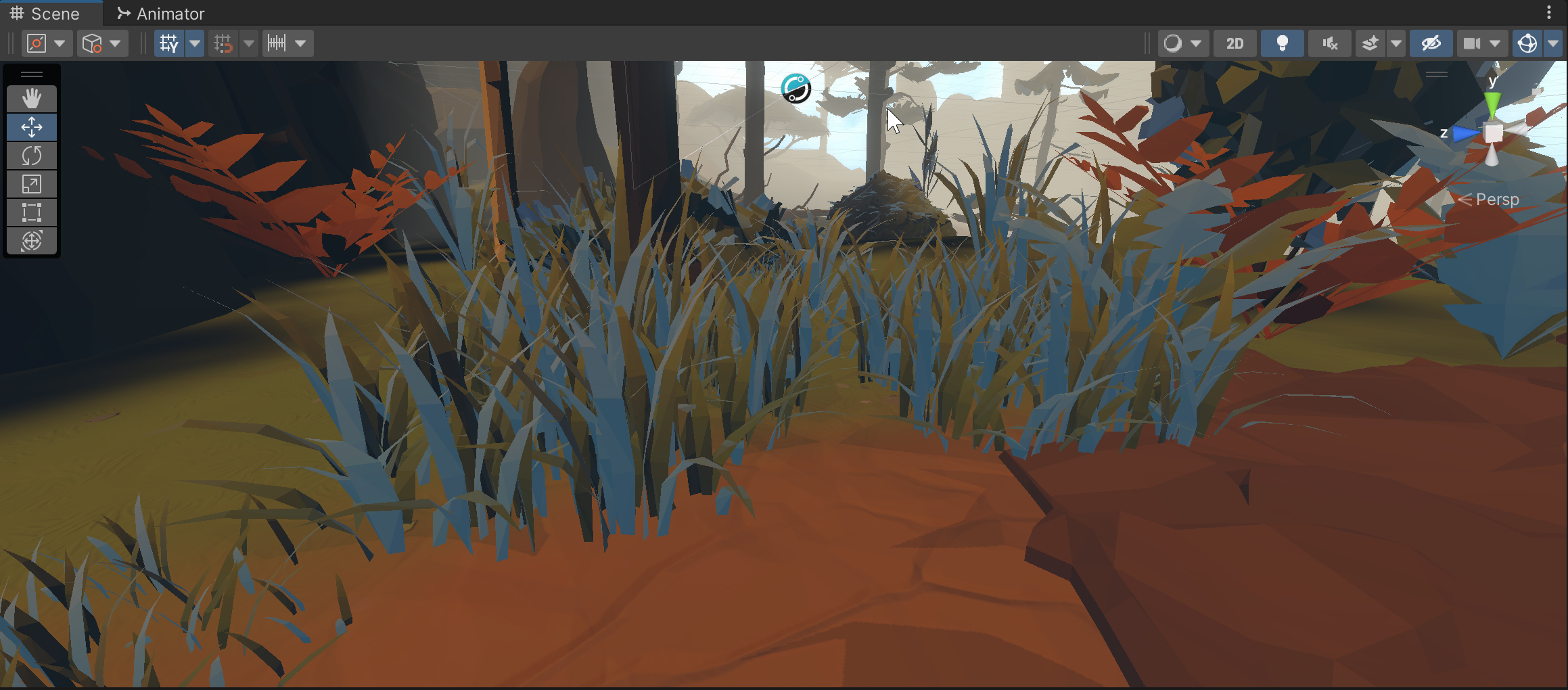
like, the grass is half renderingn ormally
if i change the shader to simple lit, it looks fine
but it was working fine on Lit before
i dont really understand how shaders and everything work
is there something i could do to like.. refresh everyhting?
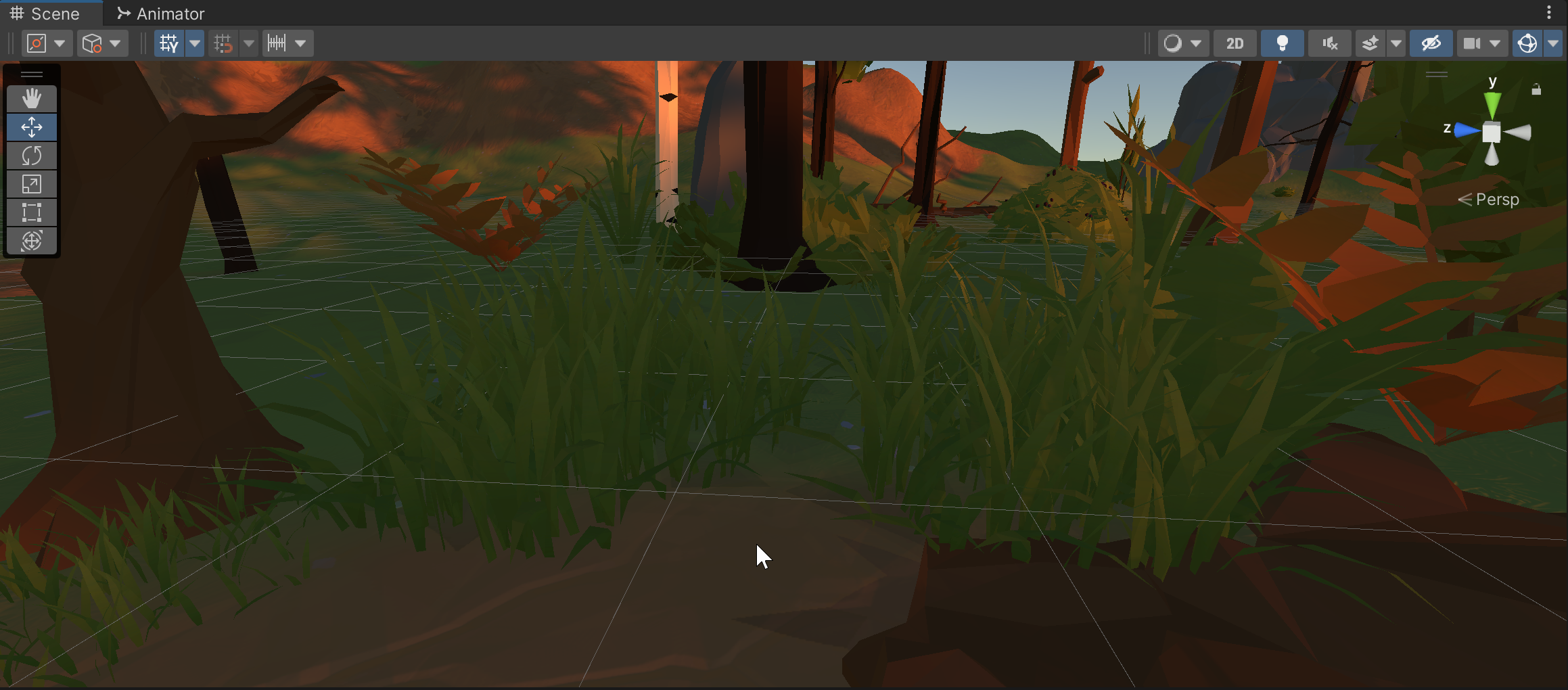
it should look like that, for reference
it seems like my whole scene is a bit darker now too
like it changed the lighting or somethign?
marble vigil
proven ether
like it changed the lighting or somethign?
That is possible, you could regenerate lighting from lighting settings window
proven ether
how do i do that
i have the lighting window open
just reimport the lighting settings?
marble vigil
"Generate" button
proven ether
ah it was on auto generate
marble vigil
proven ether
https://i.imgur.com/pv9r2ZD.png
I struggled with two-sided backfaces rendering their lighting really weirdly, but I didn't find out if there's a workaround for it or not
Let me know if you find out
proven ether
hm
i think its kinda back to normal
but it feels off before
i was relaly happy with how it looks before
and now everything just feels a bit off
for future reference, whats the proper way to delete unused assets?

like this light used to be blindingly bright to look at
now its just like... nothing
marble vigil
proven ether
for future reference, whats the proper way to delete unused assets?
If they're installed through the package manager you should be able to uninstall them there
Otherwise you'd just delete them from the project window
It becomes difficult to uninstall packages if they overwrite existing assets, such as project settings which is what happened here I believe
This is also why it's very important to use version control software so you can roll back any change to your project
or at very least why you should keep backups of some kind
proven ether
yupyupyup
lessons learned
it def deleted some shared assets
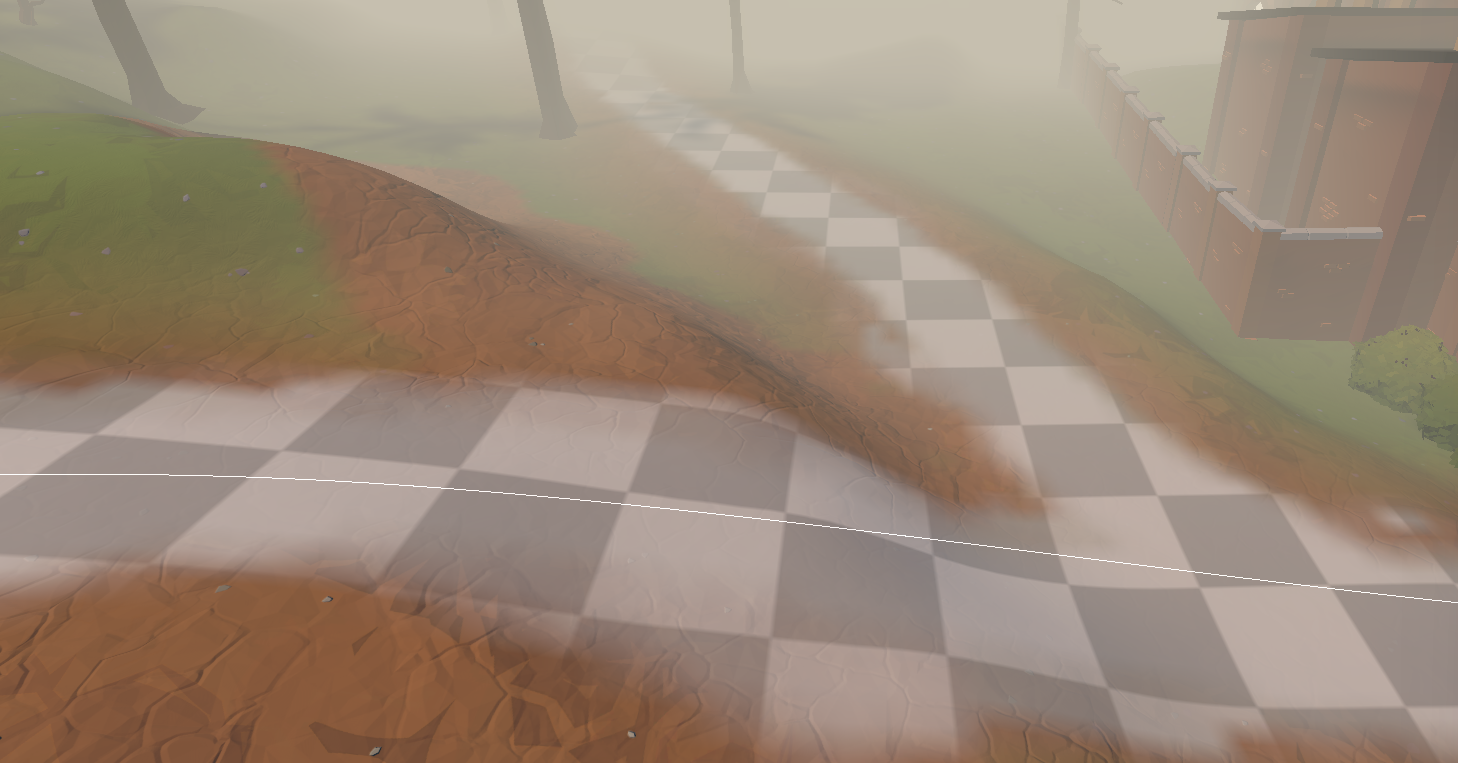
it seems like no matter what i set my Lighting Settings profile as in lighting, it makes no change
marble vigil
proven ether
it seems like no matter what i set my Lighting Settings profile as in lighting, ...
I believe the LightingSettings asset only contains data for baked and precomputed global illumination
If you use neither of those systems it won't make any visual difference
Stuff like ambient light probe and fog settings which do have an impact on appearance are stored in the scene asset, not LightingSettings, though I'm not 100% sure where they're hiding
If none of your scenes have baked lightmapping and all of them use default sky settings, they'd all have identical ambient probes as well so you wouldn't be able to see any difference if you were to swap them around
proven ether
too baked to deal with lightmaps
proven ether
im trying to make a spotlight, but its not actually lighting up anything in my scene
any idea how to fix?
 sonic temple
Hey guys, does anyone know how to lower the resolution for only the VR camera?
Here is the forum post: https://forum.unity.com/threads/dynamic-resolution-on-vr-camera.1333062/
Unity Forum
Hey there, I am trying to achieve a dynamic resolution scale on a VR camera, previously I used the render scale value from URPs settings, but this...
hardy rover
Any idea why the Screen Space Shadow in URP is doing that?
it's a skirt with a opaque material + alpha clipping on
soft lion
Its really hard to tell without more information, do you have any comparison images between the pipelines?
soft lion
Seems like theres much less lights (ambient and directional lights?)
Also the shadows looks like the urp one doesnt use more than 1 shadow casting light source
The object in the middle looks very different 🤔
I dont think its the same scene at all... that boat looking thing looks clearly very different
 mint vortex
Anyone know why render queue doesn't seem to be responding to changes? I have two objects, object A set to queue 2000, and object B set to queue 2001, but B doesn't render on top of 2000.
 soft lion
mint vortex
Anyone know why render queue doesn't seem to be responding to changes? I have tw...
soft lion
mint vortex
Anyone know why render queue doesn't seem to be responding to changes? I have tw...
Render queue defines the order in which the gpu draws the meshes, not in which order they are on the screen, take a look at "Z-buffering" for more information, toggling Z-writing/testing on/off gives more control over the drawing order
Where are all these overlapping shadows coming from? Multiple directional lights am I right?
mint vortex
soft lion
Render queue defines the order in which the gpu draws the meshes, not in which o...
Ah okay! Thanks for the pointer!
soft lion
Honestly I dont know how to fix that as URP supports only one directional light shadowmap. Could you get similiar results with only one directional light + spotlights and pointlights?
I think multiple directional lights are still supported but only one that has shadows. The way URP handles shadows is more optimized but limits the amount of shadow casting lights. Have you tried playing with ambient lighting/ambient probe? Btw I like the URPs skybox shader a lot more. You have to make new material with that shader and add it to the Lighting Settings (or was it somewhere else?) in order to get that skybox
 silk yew
assuming that the before is in built-in 3d if i remember correctly only the built-in pipeline supports multidirectional shadows while urp and hdrp only support 1 directional shadow even if u got multiple directional lights
that's the only problem i can see
 solar coral
is there any built in method of converting a shader built for the default render pipeline into being compatible with urp, or is there a guide on what to replace inside the shader file?
solar coral
solar coral
is there any built in method of converting a shader built for the default render...
nevermind figured it out, turns out it is as simple as replacing a few tags and changing to hlsl in unlit shaders!
quaint marlin
Is it a bug that with urp+pixel perfect camera packaged with it + cinemachine you still get cameras fighting each other even though the pixel perfect extension is added?
if so, how to go back to unity built in pipeline?
warped skiff
Fightimg how?
ancient obsidian
ancient obsidian
i deleted it
guys
i still cant solve it
enabled post processing
it only work when i put it into camera
put component
marble vigil
ancient obsidian
it only work when i put it into camera
I don't understand what this means
Stop crossposting about this issue please
 tulip jay
hey, in this unity tutorial, the guy changes the plane's mesh filter to "waterBlock", ive added URP to my project and still dont see it, how should i get it?

 lean gale
how do i only render part of the object in the vision cone using universal renderer
i have no idea how to configure the universal renderer data object

 plucky patio
I’m kinda new to 2D in unity and I was wondering how I can create a shiny effect like this? Creating something like this easy in 3D but for 2D I’m kinda lost since materials work differently. Any thoughts?

 twilit acorn
plucky patio
I’m kinda new to 2D in unity and I was wondering how I can create a shiny effect...
twilit acorn
plucky patio
I’m kinda new to 2D in unity and I was wondering how I can create a shiny effect...
Well, the simplest solution would be an animation.
Although probably not so simple from the artistical point of view.
plucky patio
twilit acorn
Although probably not so simple from the artistical point of view.
Yeah lol I have no knowledge in 2D animation I was hoping it was possible to make a glossy effect from either shader or materials
twilit acorn
Glossy effect would probably work the same way as in 3d if you were to do it with a custom shader.
 ionic carbon
Beginner here. I have a black hole with a distortion effect that distortions everything around it, like the little green ship.
Is there any way for this distortion to affect the thruster particles (little flames)? They're rendering over the distortion so they're not in line with the ship.
Is there any way the distortion can affect the particles? Thanks in advance.

 tepid dragon
On URP 12.1.7 with unity 2021.3.9f1, how can I sample from the camera render texture, as well as the depth and normals buffers, from a scriptableRenderPass? For the shader, I've been building on top of the Blit.hlsl utility, but I can't tell if my issues are coming from the ScriptableRenderFeature itself or the shader code.
render feature: https://pastebin.com/DM3vrAmK
shader: https://pastebin.com/nfjaSFVy
the output of the render pass (the camera is directly facing an opaque cube):

Pastebin
Pastebin.com is the number one paste tool since 2002. Pastebin is a website where you can store text online for a set period of time.
Pastebin
Pastebin.com is the number one paste tool since 2002. Pastebin is a website where you can store text online for a set period of time.
 urban raft
Hello! Changed the target platform to android and the Sprite-lit-default material stopped working and does not show the texture of the object, urp is used in the project. help me please
 quaint marlin
Finding a workaround to URP Pixel Perfect Camera Cinemachine Bug
 desert flax
I've got a decal projector but the decal is only projecting on to the terrain, all the other stuff is being rendered on top. Any ideas what I need to check?
hardy rover
Any side effects of using FSR for upscaling on non AMD gpus?
marble vigil
Do not crosspost, please
 nocturne shale
hey guys a build of mine to iOS builds perfectly but when running the apk in the Xcode emulator i got this error, can someone help?
 tardy grove
marble vigil
Do not crosspost, please
tardy grove
marble vigil
Do not crosspost, please
Sure, sorry
 surreal valley
I'm trying to develop a 2D texture array to hold 10,000 slices. Except, I'm getting this error:
UnityEngine.Texture2DArray:.ctor (int,int,int,UnityEngine.Experimental.Rendering.GraphicsFormat,UnityEngine.Experimental.Rendering.TextureCreationFlags)```
Am I unable to create a larger format? I've heard that a pro to these are how much they can fit! Is it possible the graphics format? Thanks.
```tileArr = new Texture2DArray(51, 51, 10000, GraphicsFormat.RGBA_DXT3_SRGB, TextureCreationFlags.None);```If it says that max supported is 2048, then I guess that's what it is
Out of curiosity, what's the practical use for a 10000 slice texture array?
surreal valley
marble vigil
If it says that max supported is 2048, then I guess that's what it is
Out of cur...
I have an image with 10,000 textures on it. It's for a voxel framework. I'm suprised and curious as to why that's the limit- if that's the case.
marble vigil
surreal valley
I have an image with 10,000 textures on it. It's for a voxel framework. I'm supr...
I don't think I've heard of any games utilizing ten thousand textures in total, let alone at the same time
Still, texture atlases are another option which you could use instead of / in combination with texture arrays
surreal valley
marble vigil
I don't think I've heard of any games utilizing ten thousand textures in total, ...
I haven't tried a texture atlas yet- but Im worried about texture-leakage. If I want a texture to repeat, I don't want the tiling to go to the neighboring texture in the atlas.
that's what I've heard texture arrays prevent which is why i wanted to use it
marble vigil
That's true, atlases need some extra care to prevent that
 sand sigil
is it possible to use more than 1 render data if yes how do i go about it please help me
surreal valley
sand sigil
is it possible to use more than 1 render data if yes how do i go about it please...
define 'render data'
sand sigil
surreal valley
define 'render data'
🤦♂️ i figured it out lol
sand sigil
surreal valley
define 'render data'
thanks for the reply
 summer prism
Hello I have tile map rendering issues. there is like a line on the border of my tiles. does anybody know how to fix?
 marble vigil
summer prism
Hello I have tile map rendering issues. there is like a line on the border of my...
marble vigil
summer prism
Hello I have tile map rendering issues. there is like a line on the border of my...
Tilemaps require 1-2 pixel margins between tiles, as the edges will bleed color over a bit
 dawn bronze
So I can not add a "LightMode" tag to a shader graph? Is that a fact?
Kinda important when this is the only way to specify drawing settings in the render feature dontcha think?
placid laurel
Is post processing vignette basically like ellipse? (I deleted this message from #💻┃unity-talk because I didn’t want to put it there)
https://docs.unity3d.com/Packages/com.unity.shadergraph@6.9/manual/Ellipse-Node.html
copper pilot
plucky patio
I’m kinda new to 2D in unity and I was wondering how I can create a shiny effect...
I'd make a normal map for the card and then use that to distort a gradient 'reflection' texture.
desert flax
I asked about decal projectors the other day but I've got a bit more info now. I've got a projector just projecting a white rectangle straight down. When the game starts there's just a car on a large plane. If I turn the projector on at that point, everything is affected as expected. Then I do something and loads of geometry is generated, roads, etc. and also terrain. If I turn the projector on here, only the terrain is affected, nothing else as far as I can see. Does anyone have any clues they could give me on why?
polar cipher
desert flax
I asked about decal projectors the other day but I've got a bit more info now. I...
Is generated geometry on the same layer? Doesn't it by any chance use transparent shaders? Is it rendered by a renderer feature? Are you using forward or deferred renderer?
desert flax
polar cipher
Is generated geometry on the same layer? Doesn't it by any chance use transparen...
I'll have to go and look up the answers to all those, thanks!
 polar belfry
Hi, I just changed my forward renderer in an fps game, so i only need one camera. I used the render pass thing or what its called and followed a tutorial. It all works good but the ambient occlusion is now not applying on the gun render layer. Does anybody have a fix for this ?
 royal iron
Hello!! Is there any way to use Complex Lit in deferred rendering mode? Or some hack so that it doesn’t fallback to forward and limits the lights available!
 plucky river
Hello there! Does anybody know why VFX Graph could be not working in my project? URP 12.1.7, Unity 2021.3.9f1 LTS (Also tried on Unity 2021.2.17f1 and 2022.1.16f1). Any VFX effect, even the default one just don't emit and don't show anything at all. I've tried to change versions, reinstall package, import effects from another projects where they were working, set the URP and Quality settings equal to that projects... Nothing worked. Any ideas?
marble vigil
plucky river
Hello there! Does anybody know why VFX Graph could be not working in my project?...
There's no need to crosspost
Instructions for URP configuration in this channel's pinned messages
soft lion
royal iron
Hello!! Is there any way to use Complex Lit in deferred rendering mode? Or some ...
What is the feature you want from the complex lit shader? I dont think deferred rendering in unity supports clear coat etc.
royal iron
soft lion
What is the feature you want from the complex lit shader? I dont think deferred ...
Basically a car at night requires to have a clear coat for the paint, but if there’s too many lights they start pop in and out. I also know that it doesn’t support deferred rendering but I never understood why 😦
royal iron
soft lion
What is the feature you want from the complex lit shader? I dont think deferred ...
Oh but basically I just want the clear coat when compared to the standard shader!
soft lion
royal iron
Basically a car at night requires to have a clear coat for the paint, but if the...
Did you try to increase the per pixel light count? Did you know urp now (i think its only on alpha release) has forward+ renderer which is able to handle more lights than the default forward renderer.
royal iron
soft lion
Did you try to increase the per pixel light count? Did you know urp now (i think...
Yes I maxed out to the 8 limit and in some scenarios still pops in, I can work around the placement of lights but I wish I didn’t 😦
royal iron
soft lion
Did you try to increase the per pixel light count? Did you know urp now (i think...
Oh yesss!! It’s just sad that it’s still in alpha, because forward+ is hella powerful! Since it’s alpha it crashes a lot and I can’t build for iOS it throws me errors.
But when it’s a stable release it’s just a no brainer to have it selected
cyan swallow
I've got a question with SRPs and editor behavior. It seems that in URP the scene tab and preview window actually both render their views at the same time, or there is no guarantee one finishes before the other begins at any rate. This means that if you have custom passes that rely on storing some data in a global property, those properties can be overwritten by the two cameras creating race conditions which give rise to nondeterministic behavior
Is this a bug? Is there an alternative to work around this?
For instance, I have a custom pass that requires the viewport size to accurately produce a regular dither pattern. To support RenderScale != 1, I have to store the viewport size manually in a global vector, because _ScaledScreenParams does not provide sufficient data to determine the render target size accurately (to within 1px). But then whenever scene viewport and preview window are different sizes, I get glitches
 native socket
Does anyone know if I can write to a velocity buffer in a custom shader? one that would be used by motion blur
or would i have to write the implementation from scratch
jagged valve

Why are my sprites appearing as just cubes?
And that black shadow was never there before, it was a semi-transparent shadow, no idea why it's now fully solid...
 cedar sleet
Does 2D URP with with android? The "New Project" page says 3D URP works with android but 2D URP doesn't..
Looking at the documentation, it looks like Android is supported but why would the "New Project" page say its not?
 balmy vine
Anyway to change my default material when using URP? It's tiring to change it for every new material
soft lion
balmy vine
Anyway to change my default material when using URP? It's tiring to change it fo...
What would you want to change it to?
And are you talking about the material thats added when you create new object or the one when you create new material?
balmy vine
soft lion
What would you want to change it to?
Because I have my own shader that I want to use as a default, it will be the default for most objects.
balmy vine
soft lion
And are you talking about the material thats added when you create new object or...
Ultimately I'd like to change both, custom material that can be copied when creating new materials; and used for primitives and imported models.
soft lion
@balmy vine Im not aware of that feature atleast. I think default material per imported mesh can be changed, im not sure. If thats really a problem, custom editor script could be used to easily change the materials/create objects with certain properties
balmy vine
Really wish it was a feature, URP already overrides the material for everything
hardy rover
balmy vine
Really wish it was a feature, URP already overrides the material for everything
that would be disaster
marble vigil
You can assign materials to multiple selected objects at once
hardy rover
marble vigil
You can assign materials to multiple selected objects at once
And pray that the materials would assign the texture correctly 😆
jagged valve
jagged valve
And that black shadow was never there before, it was a semi-transparent shadow, ...
.
marble vigil
jagged valve
Why are my sprites appearing as just cubes?
Hard to guess
Did you change something recently?
jagged valve
I figured out what it was. Something to do with upgrading my version of Unity.
Alpha channel was being incorrectly handled.
jagged valve
New issue popped up, now any shaders that had transparency are just filled with opacity but it only shows in game not in the editor
jagged valve

Only comes up in the game view, not the scene view, and has only started happening after i upgraded my unity to 2022
marble vigil
jagged valve
Only comes up in the game view, not the scene view, and has only started happeni...
2022 versions are still alpha/beta and can have unpredictable issues
In my experience it's much more likely those issues show up when upgrading to an experimental version, as opposed to creating a new project
cyan swallow
Is it possible to define our own shadergraph targets for the scriptable render pipelines yet? I see in HDRP there is a DecalTarget, for instance. In URP it looks complicated by the fact that UniversalTarget is a sealed class?
(I'm trying to work around the old problem of not being able to add passes in shadergraph)
cedar sleet
Does 2D URP with with android? The "New Project" page says 3D URP works with android but 2D URP doesn't..
Looking at the documentation, it looks like Android is supported but why would the "New Project" page say its not?
marble vigil
cedar sleet
Looking at the documentation, it looks like Android is supported but why would t...
Probably an oversight
Should be fairly quick for you to verify if you build android projects
marble vigil
 wheat leaf
how do i add the 2d urp rendererrdw
wheat leaf
how do i add the 2d urp rendererrdw
Don't crosspost, google can answer these questions
https://docs.unity3d.com/Packages/com.unity.render-pipelines.universal@12.1/manual/Setup.html
 shadow wind
So ive noticed something odd. Using URP decals, when I use automatic or dbuffer, if I use it on a Terrain, it won't currently show on top of any terrain layer after the 4th. I feel like this is something im just not sure of
cyan swallow
shadow wind
So ive noticed something odd. Using URP decals, when I use automatic or dbuffer,...
do you know if the terrain passes get drawn again for layer 5+? maybe it's redrawing over the decal?
the frame debugger might help you take a look at what is happening after the decals are drawn
balmy vine
hardy rover
that would be disaster
How so?
 green torrent
has anyone any idea why im getting these jagged circle artefacts thru a reftection on a surface? lack of a refection probe maybe?
 marble vigil
green torrent
has anyone any idea why im getting these jagged circle artefacts thru a reftecti...
marble vigil
green torrent
has anyone any idea why im getting these jagged circle artefacts thru a reftecti...
If you're using deferred rendering this could be caused by not using "Accurate G-buffer normals"
green torrent
marble vigil
If you're using deferred rendering this could be caused by not using "Accurate G...
interesting. ill check that out straight away.
green torrent
marble vigil
If you're using deferred rendering this could be caused by not using "Accurate G...
btw, thanx. and btw, where are those settings?
green torrent
marble vigil
<https://docs.unity3d.com/Packages/com.unity.render-pipelines.universal@13.1/man...
awesome! superthanx yet again
green torrent
marble vigil
<https://docs.unity3d.com/Packages/com.unity.render-pipelines.universal@13.1/man...
didnt work. just shifted the angle you see it from, not the actual jagged circles. they are still there. and it kinda messed up my URP somehow. got alot of flickering pixels when i mive the mouse or camera. had to close unity. so there must be something else.
green torrent
marble vigil
<https://docs.unity3d.com/Packages/com.unity.render-pipelines.universal@13.1/man...
getting this now:
 marble vigil
green torrent
getting this now:
marble vigil
green torrent
getting this now:
I don't recognize this, but definitely looks more severe than the usual g-buffer artifacts
Restarting or reimporting may help
green torrent
marble vigil
Restarting or reimporting may help
i did restart. same issue as before with the circles. but the pixelation is gone thankfully. but isnt there a way to smoothen out this reflection? like increase a HD slider on something?
marble vigil
green torrent
i did restart. same issue as before with the circles. but the pixelation is gone...
Well no, it's not supposed to be jagged like that, except in the specific case I talked about
green torrent
marble vigil
Well no, it's not supposed to be jagged like that, except in the specific case I...
strange.
 exotic wasp
I made a maze and I got a spotlight working, but when I added a shadow caster to my wall it makes weird shapes


the first one is without and the second one is with the walls (darker grey) have a shadow caster enabled
is there a reason for this


oh god
I got it working
and it's lagging up a storm
bad idea
marble vigil
hardy rover
is realtime GI possible in Unity?
Enlighten does precomputed realtime GI
HDRP does ray traced GI and SSGI
hardy rover
@marble vigil how's the workflow tho, like, how it works with dynamic/static objects etc?
marble vigil
hardy rover
<@166982635950702592> how's the workflow tho, like, how it works with dynamic/st...
Enlighten can only bounce lighting from static, baked objects, ray tracing and SSGI work with everything
hardy rover
marble vigil
Enlighten can only bounce lighting from static, baked objects, ray tracing and S...
And there's no SSGI as of now in urp, right?
marble vigil
hardy rover
And there's no SSGI as of now in urp, right?
Nope, and unlikely to be
hardy rover
🥲
wheat leaf
marble vigil
Don't crosspost, google can answer these questions
<https://docs.unity3d.com/Pac...
i have the issue is the answers i see on google dont work for me
wheat leaf
wheat leaf
i have the issue is the answers i see on google dont work for me
sorry for cross posting tho i forgot to delete the other one
marble vigil
wheat leaf
i have the issue is the answers i see on google dont work for me
The documentation I linked explains how to create renderers including 2D
If it doesn't work you'll have to be more specific as to why
 solemn zodiac
@marble vigil @hardy rover there is no solution from Unity's end, but Raytracing is supported in URP, here is my take on DDGI in URP. Got some artifacts as this was learning project not final solution. But realtime GI is definitely possible.
 near spade
Can someone pls help.
I want to implement that light won lose its intensity over distance.
While searching I only found https://docs.unity3d.com/Manual/ProgressiveLightmapper-CustomFallOff.html
and I have 0 idea how do I implement it.
Any suggestions ???
I'm fairly new to Unity so I'm still learning to use documentation
Edit: I use realtime lighting in urp
marble vigil
near spade
Can someone pls help.
I want to implement that light won lose its intensity over...
Post only to one relevant channel
placid laurel
marble vigil
Enlighten does _precomputed_ realtime GI
HDRP does ray traced GI and SSGI
I think Precomputed is way better
It makes things look amazing and doesn’t kill your device
placid laurel
placid laurel
Is post processing vignette basically like ellipse? (I deleted this message from...
Anyone know?
 sour bronze
placid laurel
Anyone know?
sour bronze
placid laurel
Anyone know?
if you make the parameters extreme enough you can tell

enabling "rounded" makes it a circle i think

hey guys I have a question relating to camera stacking
I wanted to have a render feature apply to everything except certain objects
the only way I could think to do this was by adding an overlay camera that and rendering the objects on a different layer
the only problem is now those objects dont render their shadows anymore
the way I thought of resolving that was by duplicating the meshes, turning off shadows on one, and setting the other to shadows only, then putting them on their respective layers
but im worried about the performance implications of doing that with high poly meshes
is there a way to go about this that won't have a substantial impact on the performance?
sour bronze
i guess more simply the question is if I can have an overlay camera render the shadows casting onto objects outside the culling mask
placid laurel
sour bronze
if you make the parameters extreme enough you can tell
Alright 👍
marble vigil
sour bronze
the way I thought of resolving that was by duplicating the meshes, turning off s...
A shadow casting mesh is rendered once normally and a second time for the shadow caster pass, so it doesn't make much of a difference if the shadowless and shadows only meshes are separate
 opaque plume
I made my lit material double sided for this flag, but why does it look so different on the backside?
 soft lion
opaque plume
I made my lit material double sided for this flag, but why does it look so diffe...
soft lion
opaque plume
I made my lit material double sided for this flag, but why does it look so diffe...
The backface most likely uses the normal from the frontface
opaque plume
well yeah it is only one face
but since the flag will use cloth physics it can only be a once sided mesh
 mystic violet
Why was my message removed ??
soft lion
opaque plume
but since the flag will use cloth physics it can only be a once sided mesh
You could make a shader graph that inverts the normal for backfaces
 slate spade
i get this black artifact when using URP high fidelity, if i use balanced i don't see it. seems to have something to do with shadow, playing with the Near Plane setting on the Light's shadow setting affects it. is there some easy way to deal with this instead of playing with each individual light's settings?
 hardy rover
how would you get like super sharp shadows in URP? is that possible?
slate spade
slate spade
i get this black artifact when using URP high fidelity, if i use balanced i don'...
I get these messages in the console also, not sure if related.
 marble vigil
slate spade
I get these messages in the console also, not sure if related.
marble vigil
slate spade
I get these messages in the console also, not sure if related.
These simply mean that the shadow resolutions to make them fit the atlas, I'd be more concerned about the yellow warnings and red errors
If light's near plane has an effect, that's surely worth looking into
marble vigil
hardy rover
how would you get like super sharp shadows in URP? is that possible?
Sharpness comes from a high shadow resolution
Shadow cascades will be important to get the resolution where it's needed
hardy rover
marble vigil
Sharpness comes from a high shadow resolution
Shadow cascades will be important ...
thanks for pointing that out, too bad, we can't lose any more performance by ramping up the shadow resolution 🥲
sour bronze
marble vigil
A shadow casting mesh is rendered once normally and a second time for the shadow...
right, thanks for the pointer
slate spade
marble vigil
If light's near plane has an effect, that's surely worth looking into
The yellow warning/errors weren't related to the light/shadow issue, just something else I was working on when I took the screenshot. Do you have any recommendations on things I could look into to resolve the issue? Thanks
marble vigil
slate spade
The yellow warning/errors weren't related to the light/shadow issue, just someth...
I don't recognize the issue, but since it happens only on one quality setting but not the other, I would try pinpointing the cause by comparing the differences in quality settings
e.g. by making a copy of Balanced and switching the settings one by one to the values from High Fidelity to see when the issue appears
That should reveal what the issue exactly is so it'll become easier to solve
slate spade
I tried that actually, nothing I changed in the quality settings affected it =/
marble vigil
slate spade
I tried that actually, nothing I changed in the quality settings affected it =/
Yet it only happens on high fidelity? Seems odd
slate spade
Yeah, this is an asset I picked up off the Unity store, I reached out to the creator to see if they have any advice
marble vigil
slate spade
Yeah, this is an asset I picked up off the Unity store, I reached out to the cre...
The odd part is that if you change a quality settings asset's all settings to match another asset (one that doesn't have the issue) there should be 0% difference between them and the issue should be eliminated
 tribal steppe
hello guys, I migrated to HDRP few months back (with quite a pain)
after using it all this time, I decided that takes a lot of work for a solo dev to make assets. I was thinking of switching to URP. Is there a procedure to do so? how painful is it?
marble vigil
tribal steppe
after using it all this time, I decided that takes a lot of work for a solo dev ...
I haven't done it personally, but I believe the pipeline converter can handle most of it
The parts that can't be directly translated are light intensities, post processing volumes and environment and sky settings
tribal steppe
aha, I expected this
I am thinking of switching before I write more custom HDRP shaders
the volumetric lights are really something but beyond that I don't see any hardcore change and feel
and wondering what extra performance can I squeeze out of it by going to URP
marble vigil
tribal steppe
and wondering what extra performance can I squeeze out of it by going to URP
Significantly, most likely
hardy rover
marble vigil
Sharpness comes from a high shadow resolution
Shadow cascades will be important ...
it can be done apparently... but the performance, is super shitty! https://github.com/unity3d-jp/RaytracedHardShadow

GitHub
DXR based raytraced hard shadow for Unity. Contribute to unity3d-jp/RaytracedHardShadow development by creating an account on GitHub.
what a shame... I mean, shame on me 🥲
I mean, the amount of sampling is just... insane
marble vigil
hardy rover
it can be done apparently... but the performance, is super shitty! https://githu...
Well yes, anything is possible when you start customizing the render pipeline
soft lion
tribal steppe
I am thinking of switching before I write more custom HDRP shaders
Custom HDRP shaders? How is that possible?
cinder kindle
You can write your own shaders for HDRP in addition to creating them with Shader Graph
soft lion
Afaik theres no documentation about them and pretty much no one knows how it works (maybe unlit ones could be doable but lighting may be tricky)
wheat leaf
marble vigil
The documentation I linked explains how to create renderers including 2D
If it d...
i believe it was because i wasnt using the urp when i first created my project so when i tried converting it to one, now it wont let me
marble vigil
wheat leaf
i believe it was because i wasnt using the urp when i first created my project s...
That shouldn't be an issue
You'll have to provide more information
cinder kindle
soft lion
Afaik theres no documentation about them and pretty much no one knows how it wor...
It's totally doable but you're right it's not very well documented
tribal steppe
I made my own explosion effectes in HDRP shader graphs
tribal steppe
did you notice a big performance jump when going back to URP ?
I feel like from a graphical perspective I could fake most HDRP things (except the volumentric lights, which I dont have it down yet from condig-wise) and because my game is kinda bullet hell wanted to see if i could get some extra performance with switching from hdrp to urp
tribal steppe
other thing is that I want to implement a split camera and I find it hard with HDRP
copper pilot
slate spade
i get this black artifact when using URP high fidelity, if i use balanced i don'...
Is that an 'artifact' or just the shadow of the torch the light is inside?
slate spade
copper pilot
Is that an 'artifact' or just the shadow of the torch the light is inside?
It's the shadow, if I adjust the Near Plane setting in the Light's Shadow settings the black square changes/goes away. But different values are needed to make each light/shadow look right so I'd have to go through them all which is a pain. Still trying to figure it out
copper pilot
slate spade
It's the shadow, if I adjust the Near Plane setting in the Light's Shadow settin...
Can't you just change the shadow settings on the torch mesh?
 mint juniper
I have a camera with a culling mask set to 1 layer (just the water in the gif) that is outputting to a render texture (RText_Channel_1 in the gif). You can see the output of the camera in the gif bottom middle.
For some reason the render texture is capturing objects the camera isn't (shown left in the gif).
The render texture works as expected though when I disable Enable Compatible Color Format in the render textures settings.
Anybody have any clue why this is?

Further testing it seems to be because I have 2 cameras rendering to 2 separate RTextures (each camera is rendering different layers), and both of those textures are using the same color format. If I switch either to a different format there is no issue
Enabling Mip Maps on 1 of the 2 also works
mint juniper
mint juniper
I have a camera with a culling mask set to 1 layer (just the water in the gif) t...
Root cause was actually the camera have the background type set to Uninitialized
wheat leaf
marble vigil
That shouldn't be an issue
You'll have to provide more information
ah then sorry i dont know which more information to give
 stray scroll
is there any way to upgrade only selected materials to urp?
(instead of initialize converters and uncheck one by one)
marble vigil
wheat leaf
ah then sorry i dont know which more information to give
No idea what it means that it "won't let you" create a renderer
 final swan
Hi guys. Can you recommend a "good way" or low resource consuming way to play a video in additive mode (making black areas transparent).
I'm looking for a way to play some videos (complex particle animations I have) floating in the space with a glowing effect.
marble vigil
final swan
Hi guys. Can you recommend a "good way" or low resource consuming way to play a ...
Flipbook/spritesheet animations, I would presume
 candid owl
meet a bug
new Texture2D
then SetPixels32, then texture.Apply(false);
then Material.SetTexture();
but the shader can't access it
a black texture.
soft lion
candid owl
meet a bug
Most likely not a bug and not #archived-urp related either. Could you show the code to make sure its not flawed in some way?
candid owl
soft lion
Most likely not a bug and not <#900380950083534888> related either. Could you sh...
I finally find it, if I update, it meets the bug
Color32 data = new Color32((byte)12, (byte)15, (byte)miplevel, 1);
dataCache[0] = data;
tex.SetPixels32(ID.x, ID.y, 1, 1, dataCache, MipLevel);

tex.Apply(false);
this is the update code.
I only update a pixel, then Apply(false);
not all pixels
candid owl
need help, still don't know why
in my old project(2022), it works.
but when I create a new project with URP template, it fails.
candid owl
I also find it's corelated to color space
if I use gamma space, it works.
switch to linear space, fails.
 vestal acorn
Does anyone know how to achieve the same affect as GL.wireframe = true, but in URP?
 wraith kestrel
just switched to urp and converted my materials now the color is gone in my scene
 wraith kestrel
something to do with post processing
 eternal parcel
marble vigil
wraith kestrel
something to do with post processing
eternal parcel
marble vigil
wraith kestrel
something to do with post processing
URP and built-in RP use different post processing
Instructions for each pinned in #💥┃post-processing
wraith kestrel
thanks buddy
solar coral
doing some fluid rendering and need opaque texture to be turned on, wondering which of the urp pipeline assets im meant to turn it on, on, if that makes sense?
solar coral
solar coral
doing some fluid rendering and need opaque texture to be turned on, wondering wh...
nevermind, i turned them all on and that seems to have worked
 restive sigil
Are the any plans to try to get volumetrics built-into urp, like Godrays and such? I find it a big pain in the ass to try to make them myself 😆
marble vigil
restive sigil
Are the any plans to try to get volumetrics built-into urp, like Godrays and suc...
https://portal.productboard.com/8ufdwj59ehtmsvxenjumxo82/tabs/3-universal-pipeline
You can view here all planned features and their statuses
Volumetric fog is "under consideration"
Which I take as practically meaning "check again after a year or two"
sour bronze
another issue:
I have a UI camera that I'm used to draw the UI with its own post-processing volume, and that camera has the highest priority and only renders the UI.
it works fine until I adjust the viewport rect of the maincamera, where it just turns black and doesn't update unless its own viewport rect matches the maincamera's viewport rect. This would be fine if I wasn't trying to implement splitscreen local multiplayer and needed the UI to draw on top of everything.
is there a solution for this? is this expected behaviour?
the canvas is set to render on world space and it definitely has the UI camera selected.
hang on maybe the problem is the renderer I chose for the UI camera
no i dont think it is
basically the second the viewport rects dont match the only thing it renders is whatever it can see in the culling mask
and it doesnt let everything else pass through
oh and the 2nd camera is also makred as maincamera but it seems to only work if its on the 1st camera, which is higher in the hierarchy
oh weird actually
as long as the viewrect sizes match, the UI camera actually renders both what the 1st camera can see and its own UI on top of that
so even if I offset them the UI still renders cam1+itself
i wish I could send pictures to help
this was the best I could get

ignore the white on the right, snipping tool added that itself
basically is there a way to do a UI-only camera with an uninitialised background type that essentially transparently renders over everything
but is also screen space - camera or world space
sour bronze
sour bronze
this was the best I could get
heres this with both cameras at 0.5 width viewport btw

man thats really frustrating, the post processing makes it look like 90x better
i suppose I could concede and try designing a questionable paused indicator for the other half of the screen and make the UI shrink into player 1's side since they are the only one that has control anyway
but that would certainly be not ideal
 hollow creek
Did you figure out why locking/unlocking your android phone made your game run smoother?
 cold geyser
hollow creek
Did you figure out why locking/unlocking your android phone made your game run s...
cold geyser
hollow creek
Did you figure out why locking/unlocking your android phone made your game run s...
I guess it was SSAO not sure though, I do not remember.
 tender wasp
I want to stack cameras, but my second camera isnt rendering my item
 cyan talon
tender wasp
I want to stack cameras, but my second camera isnt rendering my item
cyan talon
tender wasp
I want to stack cameras, but my second camera isnt rendering my item
Screenshot your setup so there's some context to the problem.
If your second camera's an overlay camera with its culling mask including the item's layer it should work fine
tender wasp
I got it working
 wet kestrel
hey guys i have downloaded urp and i cant import any texture onto a object like im trying to use a render texture but it just turns white when i apply it what do i do to fix that?
 restive sigil
You need to most likely apply your textures to the material again
A little repost from #archived-shaders from yesterday.
I made a water shader a while back, decided to upload it to github yesterday. It's a mess, but still quite amazing.
https://github.com/Tespinen/Unity-URP-Water-Shader-Graph

GitHub
A flexible and easily editable water shader for Unity. Made in Shader Graph. - GitHub - Tespinen/Unity-URP-Water-Shader-Graph: A flexible and easily editable water shader for Unity. Made in Shader ...
wet kestrel
restive sigil
You need to most likely apply your textures to the material again
how?
sorry im a begginer
*beginner
restive sigil
Press on the material in the editor, and assign what you want to assign in the inspector
If you've used the built-in renderer/standard renderer it's the same thing.
wet kestrel
usually i drag the texture onto the object and it just works but now when i do that it becomes white and i dont really know what todo
restive sigil
You need to assign the textures into the material in the inspector, as I said. If you find this confusing, check a youtube tutorial about creating materials in Unity.
restive sigil
Glad to be of assistance. 😄
wet kestrel
have a good day
restive sigil
Thanks, ya too.
 drifting summit
Hi, was hoping someone would be able to help me. I just installed the urp for my mobile game and trying to use decals for my character's mouth.
All is going well but whenever I build and take a look at the game on mobile the decals aren't visible. Searched this up and found lots of posts and forums about it but nothings helped sadly. Wondering if anyone else has had this issue before and knows how to fix it?
marble vigil
drifting summit
Hi, was hoping someone would be able to help me. I just installed the urp for my...
Decals sound like an overcomplex solution to that problem
You could have a bit of extra geometry for the facial features which you swap between different expressions by animating material changing or UV offsets
drifting summit
Hmm I think I understand what you're saying. Not sure how to do that stuff but I can see what I can come up with
My character is fully customisable (so could have a sphere face, cube face, pyramid face, etc.) which is why I thought decals might be the best choice for the mouth
Thanks for the advice!
soft lion
drifting summit
My character is fully customisable (so could have a sphere face, cube face, pyra...
I see what you mean, custom shader for the face would be much cheaper solution
marble vigil
drifting summit
My character is fully customisable (so could have a sphere face, cube face, pyra...
Seems like a reasonable situation to use decals for, though you could just as easily model the facial meshes for each head
I don't have time to dig up resources for either approach right now
soft lion
Why not custom shader that uses x and y coordinates of the head to display the face/mouth texture?
drifting summit
marble vigil
Seems like a reasonable situation to use decals for, though you could just as ea...
I'm decent with Blender so I should be able to pull that off I'm sure
drifting summit
soft lion
Why not custom shader that uses x and y coordinates of the head to display the f...
That sounds like a good idea for efficiency. Only problem is I have absolutely 0 knowledge on making shaders. Always struggled with them
Unless there's some resource out there explaining how to do that specific thing
soft lion
drifting summit
Unless there's some resource out there explaining how to do that specific thing
Maybe try to ask on #archived-shaders
drifting summit
Will try that once I get back to working on the game. Thanks for the help 🙂
gentle charm
is there any way to have blueish shadows in URP ?
 restive sigil
Pretty sure there's a post processing option for shadow coloring and other settings too.
soft lion
gentle charm
is there any way to have blueish shadows in URP ?
I think ambient color from lighting settings should do the trick
 rocky sphinx
Hi guys,
I'm testing Dots on the Quest 2. I was wondering: does Hybrid Render supports Quest 2? From my googling it seems it doesn't yet but I'm not sure...
 nova mica
Hey, I'm trying to figure out how to convert this shader to URP, can someone help me?
Shader "Custom/MaskShader"
{
    Properties
    {
        _Color("Main Color", Color) = (1,1,1,1)
        _MainTex("Base (RGB) Trans (A)", 2D) = "white" {}
    }
        SubShader
    {
            Tags {"RenderType" = "Transparent" "Queue" = "Transparent"
    }
            Blend SrcAlpha OneMinusSrcAlpha
            ZTest Always
            Pass
            {
                ZWrite On
                ColorMask 0
            }

            UsePass "Transparent/Diffuse/FORWARD"
    }
        Fallback "Transparent/VertexLit"
}
Stick to one relevant channel please
solar coral
it seems neither #archived-code-general nor #✨┃vfx-and-particles could help me, so i come asking here, how can i get my particle system to always render, even when the origin (0 0 0) is not visible in the camera's view (i can send a video if my question is too vague)
solar coral
solar coral
it seems neither <#763495187787677697> nor <#532260045887373352> could help me, ...
after a bit of research, it appears that it is not possible to disable culling on a particle system, atleast most places seem to say so
 normal orbit
boy that's gonna be a shit show https://discord.com/events/489222168727519232/1022565846717050932
cyan talon
They've done it before with UI and it was fine
rocky sphinx
Has anyone attempted to use the DOTS hybrid renderer on the quest 2?
marble vigil
solar coral
after a bit of research, it appears that it is not possible to disable culling o...
Particle Systems aren't culled by their origin point, but by their bounding volume
solar coral
marble vigil
Particle Systems aren't culled by their origin point, but by their bounding volu...
ye, and the bounding volume is really messed up
marble vigil
solar coral
ye, and the bounding volume is really messed up
So, that sounds like the root issue
solar coral
marble vigil
So, that sounds like the root issue
ye, and the only solutions i can see to it are to either set the bounds to be way too big, or to use time travel
marble vigil
solar coral
ye, and the only solutions i can see to it are to either set the bounds to be wa...
You still haven't really described the problem itself
Which is likely why you don't get many answers
solar coral
i cant see particles when i should, due to the bounds being nonexistant, i can only see them when i see the origin
solar coral
marble vigil
Which is likely why you don't get many answers
ye, sorry lol
im not the best at describing stuff...
i can send a vid though?
i think this is the right vid showing the issue?
oh i forget discord doesnt like mkv, brb while i convert it
 earnest raft
How do I fix this type of error?

I transferred some urp materials to a new project
including the urp pipelins
 cyan talon
close and reopen unity and hope it fixes it
if something can't be opened, then something might be holding onto the file forcefully. Even a proper restart might be required. Though I can't say whether that's the actual problem, it's not in the code!
earnest raft
cyan talon
close and reopen unity and hope it fixes it
it has been like this for the past weeks
but can you tell me
how to do this
 cyan talon
Close Unity, find the folder called Library at the root of the project, delete it, reopen Unity
It will force Unity to do a full project reimport
earnest raft
cyan talon
Close Unity, find the folder called Library at the root of the project, delete i...
wait this one?
 cyan talon
Yes

 cyan talon
Yes
earnest raft
I'll give an update if it work, hopefully it does
BRO
wtf
it worked
Thank you so much
marble vigil
The suggestions in forum threads often do
earnest raft
marble vigil
The suggestions in forum threads often do
I was weirded out on the "reimported everything" part
If I have to reimport the assets that caused or something
surreal valley
For the submeshdescriptor, what's the difference between the basevertex and indexstart? Thanks.


 digital wharf
does anyone know of any good free tree assets that work with urp?
i cant find one where the mat isnt bugged
 toxic forum
Materials don't bug. As you've been told before, if they're not URP compatible, they won't work.
This isn't a bug, this is normal, expected, behaviour.
Here are your options:
https://assetstore.unity.com/?free=true&q=URP Tree&orderBy=1
placid laurel
How come when I use deferred rendering in my project, and I build it, the probuilder material doesn’t get rendered?
 marble salmon
Is there a way to make bloom effect without enabling HDR in quality settings? As I really want to be shinny, but dont want to hit performance too hard as platform is Webgl... nad it sucks. Any tips?
marble vigil
marble salmon
Is there a way to make bloom effect without enabling HDR in quality settings? As...
I don't think HDR is a requirement for bloom, but you'll be limited to working with brightnesses within the visible color range
marble salmon
But how to make it shine then. for example we have material, and i want it to shine. Without HDR is will be just Very red, and will not go ino bloom trigger field.
marble vigil
marble salmon
But how to make it shine then. for example we have material, and i want it to sh...
Bloom threshold must be sufficiently low, by default it would cut off all brightness below 1
But without HDR there can be no brightness brighter than 1 or "fully bright"
marble salmon
oh. So then I should adjust bloom threshhold at or 0.9999 but then make every single material not to get even close to that color level? hmmmmmmm
marble salmon
marble vigil
Bloom threshold must be sufficiently low, by default it would cut off all bright...
oh got it, I need to make bloom effect at 1.1 then make material with HDR. Dissable HDR on settings. But just crank BLoom intensity to the max 😄 works fine, will check performance differences, might be good idea. thank you
vestal acorn
Does anyone know how to achieve the same affect as GL.wireframe = true, but in URP?
hardy rover
With custom shader you can do that pretty easily, see this -> https://www.youtube.com/watch?v=pX7_ArmNftY
Help to support the channel if you are feeling super kind: https://www.patreon.com/dapperdino
Join our Discord: https://discord.gg/sn9xXK4
In this video I show you how to create a simple Wire-Frame shader using an imported texture an the alpha value to only show a 'wire-frame' of the object.
----------------------------------------------------...
marble vigil
hardy rover
With custom shader you can do that pretty easily, see this -> https://www.youtu...
That's not really a wireframe shader, rather a projected grid
marble vigil
vestal acorn
Does anyone know how to achieve the same affect as GL.wireframe = true, but in U...
https://github.com/marcozakaria/URP-LWRP-Shaders one wireframe shader included here
hardy rover
yes, just randomly searched that without watching it 😄
placid laurel
I'm running into a nasty layering bug and I'm starting to think it's unity's fault (I use sorting groups) first is intended, second is the bug. Deleting all of the objects and undoing the deletion fixes it but that's not a good way to fix a bug like this.


This bug doesn't occur in the unity editor
soft lion
Everything is possible. How is this URP related btw?
 tall python
I wasn't sure which channel this belongs to.. sorry!
tall python
soft lion
Everything is possible. How is this URP related btw?
but do you know how to?
soft lion
By stretching you mean same as scaling?
tall python
I mean that instead of copying the same object over and over, I could stretch it and it would copy itself. I have done this in a 2d project before(it was called tiled or something)
soft lion
tall python
I mean that instead of copying the same object over and over, I could stretch i...
This is not possible in all general cases but in this case simply scaling the cube and changing the tiling from the material could work
tall python
are you from Finland?
soft lion
Lets focus on the problem yes
tall python
sama, so where do I change the tiling
 soft lion
tall python
sama, so where do I change the tiling
soft lion
tall python
sama, so where do I change the tiling
Its the higher one of the Tiling properties (under Emission). The second one is only meant for detail maps
tall python
soft lion
Its the higher one of the `Tiling` properties (under `Emission`). The second one...
I got it working, Thanks
 serene orbit
I turned on Screen Space AMbient Occlusion in my URP project, but I am unable to get it to affect the project. Is there some checkbox that I am missing somewhere? I have been trying to figure this out for two hours and watched a couple videos. They all always just check the box and it starts working.


 haughty garnet
Does anyone know how I can access the width/height setters for the URP decal projectors? The general script does have a size Vector3 variable but seems like it contributes nothing to how it's rendered.
surreal jungle
Just added an overlay camera to the stack of a base camera (the main camera) and now my Raycast doesn't reach objects on the scene! How to fix it?
placid laurel
surreal jungle
Just added an overlay camera to the stack of a base camera (the main camera) and...
Raycasting from the camera? Make sure you raycast from the correct cam.
surreal jungle
placid laurel
Raycasting from the camera? Make sure you raycast from the correct cam.
OnMouseDown
placid laurel
i didnt ask in which event you raycast
show your raycasting code
ok does anyone know why this happens after installing the URP and setting it up properly?
 coral ravine
I want to upgrade from Built in to Urp
after installing the package
what should i choose here

 proven ether
coral ravine
proven ether
coral ravine
No I believe you should go to the project settings and then quality after that click on the choose the urp thing and select one of those
if one of them doesn't works switch to the other
coral ravine
proven ether
No I believe you should go to the project settings and then quality after that c...
i did follow this https://www.youtube.com/watch?v=6KM16tivA4Y&t=71s

In this Unity game development tutorial we're going to look at how we can convert an existing project, using the built-in render pipeline, over to the newer Universal Render Pipeline.
URP is a Scriptable Render Pipeline that lets you create optimized graphics across a wide range of platforms.
It also allows us to create shaders and effects vi...
but she had a different menu
coral ravine
proven ether
Don't worry
well


It's been 2 months and i have this problem
I don't know why but upgrading to urp gets this problem
creating a whole new urp project don't

Everything is pink again
This is really stupid
placid laurel
why do i need this many shaders... i have like 10 materials only... using the default urp mats

 limber spade
coral ravine
I don't know why but upgrading to urp gets this problem
limber spade
coral ravine
I don't know why but upgrading to urp gets this problem
Convert your materials to urp materials
opaque plume
How can i get anti aliasing in the scene view?
marble vigil
opaque plume
How can i get anti aliasing in the scene view?
Never found a way to do it so I assume it's not an option
marble vigil
Would be nice to have, but not gonna ruin my day
opaque plume
was quite confused since it was always there with the old render pipeline
marble vigil
opaque plume
was quite confused since it was always there with the old render pipeline
From what I can tell it stopped working there at some point too, though post processing stack package was able to return it
opaque plume
just wow
coral ravine
limber spade
Convert your materials to urp materials
The lit shader failed to compile
it's making the whole urp useless
marble vigil
coral ravine
The lit shader failed to compile
Googling your error suggests that deleting the library folder and letting unity regenerate it could be a fix
Aside from that you need to follow the render pipeline upgrade instructions exactly
When switching pipelines, before converting materials they will be incompatible and appear pink, even if everything has been done correctly so far
coral ravine
marble vigil
Googling your error suggests that deleting the library folder and letting unity ...
i had googled it many times , yet never seen any person to day that
Might do it again
coral ravine
marble vigil
Aside from that you need to follow the render pipeline upgrade instructions exac...
Any updated guide on how to upgrade to urp ?
I think the ones i've seen are outdated
marble vigil
coral ravine
Any updated guide on how to upgrade to urp ?
The official documentation is always up to date and a good place to start, direct links in this channel's pinned messages
coral ravine
marble vigil
The official documentation is always up to date and a good place to start, direc...
i'll try this right away
is it important to have the latest unity editor version ?
marble vigil
coral ravine
is it important to have the latest unity editor version ?
Well no, not the most latest, but preferably the most recent LTS version with the most recent bugfix patches
coral ravine
marble vigil
Well no, not the most latest, but preferably the most recent LTS version with th...
then lts 2021.3.7F1 is fine iguess
marble vigil
coral ravine
then lts 2021.3.7F1 is fine iguess
That's the most recent LTS editor which is good, the newest patch is 10f1 which isn't critical but may fix bugs like this
Fixing the "couldn't open include file" error one way or another probably should be your priority, in case it prevents URP from working properly
coral ravine
marble vigil
Fixing the "couldn't open include file" error one way or another probably should...
it prevents urp from working at all (almost)
So yes that would be helpful
marble vigil
I don't know what exactly causes it, but it sounds like something went wrong within the editor or its packages, rather than something you did
coral ravine
marble vigil
I don't know what exactly causes it, but it sounds like something went wrong wit...
i think that too
im new to unity but not dumb enough to mess editor files
i did install it when i just started the project and there were few stuff in it
yet it never did work so i didnt use it at all
marble vigil
coral ravine
i did install it when i just started the project and there were few stuff in it
Removing library folder could work, as might uninstalling and reinstalling packages
If all else fails you can also make a new project with URP preloaded, first to make sure that it does work, then move your game's assets over to the new project
Tedious but rarely fails
coral ravine
marble vigil
Removing library folder could work, as might uninstalling and reinstalling packa...
Making a "new urp project" works just fine
and the progress would be a bit haard to move but that would be the last way to solve it
coral ravine
marble vigil
Removing library folder could work, as might uninstalling and reinstalling packa...
MAN IT DID WORK !!!!
im so greatfuk for you
Thank you !!!!!!!!!!!!
limber spade
Yeah removing Library folder as well as Re-importing All can work
 fading seal
anyone know or have a link to the benefits of forward+(clustered) vs deferred?
hardy rover
forward+ is just that you can have more lights in the scene...
As for forward vs deffered, these are common terms, you can find this on google... just to add, deffered is useful for highend rigs, and the implementation in Unity is still experimental even in the latest versions
soft lion
hardy rover
forward+ is just that you can have more lights in the scene...
As for forward v...
Forward+ is definitely not just forward with increased per pixel light count limit