#archived-hdrp
1 messages · Page 86 of 1
 midnight surge
 hollow frigate
Wondering if anyone has had this issue. Changing the exposure of the physically based sky at runtime causes extreme lag, almost 300 ms. Changing anything else on the physically based sky doesn't cause lag, but exposure does. Is this intended?
 summer glacier
hollow frigate
Wondering if anyone has had this issue. Changing the exposure of the physically ...
summer glacier
hollow frigate
Wondering if anyone has had this issue. Changing the exposure of the physically ...
Yes, physical sky is precomputed, so if you don't change it, it costs nothing
but if you do change some settings, it'll have to recalculate ambient lighting and all, it depends on the setting. Some won't require an update. few things to watch out for:
Number of bounces, this plays a big role in how long it takes, find a reasonable amount
and second, update mode: Don't leave it at realtime since it'll cost you every single frame
you can do "on change" and basically it will cost you whenever you change some important settings or the sun moves (since it's cached, it recalculates on change)
last option is to set it to on demand, and you decide when to update it by script.
Ideally you'd set it to onDemand, and update it every few seconds (or longer, depends on your project)
This only matters for the ambient lighting, the look of the sky is unaffected for the most part
hollow frigate
summer glacier
Yes, physical sky is precomputed, so if you don't change it, it costs nothing
It doesn't really matter what update mode I use, it takes around 300 ms every single time, which is going to cause a noticeable stutter no matter what
And I have it set to two bounces
There's no way that it taking 300 ms to update after a change is normal, right? That pretty much entirely disqualifies it from changing settings at runtime
I mean, It takes less time to calculate a 4k reflection cubemap
 loud leaf
Why would you change exposure every frame?
summer glacier
Well, if you change exposure every frame then it will update the sky every frame.
Although onDemand should stop it from updating unless you tell it to via script..
300ms also sounds too much, way too much.
I believe back when I tested it, it took around 5ms on a GTX 1070.
(give or take a bit)
Are you initializing and deactivating the sky? This is the one thing I can think off that would cost so much. (Like moving into a volume that changes sky type away from physical, and then a volume that switches back to physical) the initialization step is very expensive but it should only happen once unless you change sky type at runtime.
hollow frigate
loud leaf
Why would you change exposure every frame?
Who said anything about changing it every frame?
hollow frigate
summer glacier
Are you initializing and deactivating the sky? This is the one thing I can think...
The problem isn't the frequency, the problem is that it takes a third of a second to complete. And no, I'm not activating and deactivating the sky, the only thing I'm doing is changing the exposure value
Even something like 50 ms is fine as long as I limit the frequency, it's just the fact that it takes literally a third of a second that makes it an issue
loud leaf
I think that's simply because it's not intended to be used that way
hollow frigate
Right, that's why they included a setting that specifically allows you to do exactly what I'm trying to do
 eternal laurel
hollow frigate
Right, that's why they included a setting that specifically allows you to do exa...
eternal laurel
hollow frigate
Right, that's why they included a setting that specifically allows you to do exa...
Defo worth submitting a bug report about and a forum thread
hollow frigate
Im going to update to 2022 first
If that doesn't improve things I'll submit a bug report
 barren goblet
how to not using the exposure, when doing lighting calculation?
the lightmap doesn't use exposure I see
 tall lynx
hi there,
i have a little issue with HDRP and lighting.. using unity 2022.1.1f1
i got exposure set to fixed exposure of 15..
i have a directional light, and it works as expected, i can rotate it, change the intensity, and it all works fine..
but if i add a spot light or area light to the scene, it doesnt have any effect, nothing lights up. if i disable the directional light, the scene just stays dark..
ive tried that with area lights and spot lights, and ive tried lighting up a unity3d terrain and a model im using, but it's like it doesnt exist..
i've googled some time about this issue, but i cant find anything besides issues with exposure settings, or hdr sky (which i'm also using, but have disabled atm) or too low intensity, but that's all not the reason
does anyone have an idea where the issue lays?
- screenshot the light settings
- screenshot the exposure settings (overrides for that are in the Sky and Fog volume entity that is currently disabled)
- screenshot without the directional light, but the spot light still doesn't do a thing


maybe this should have been in #archived-lighting but it is essential hdrp/lighting mixed issue i assume
midnight surge
Guys I'm placing lights in my procdural maze but when I get away from the spawn lights start flickering does someone knows how to fix that ?
midnight surge
the problem was that they were too many lights at screen
 plush hinge
hey, is there a way to apply opacity maps to materials in unity?
 shrewd moon
plush hinge
hey, is there a way to apply opacity maps to materials in unity?
shrewd moon
plush hinge
hey, is there a way to apply opacity maps to materials in unity?
If your material is transparent or has alpha clipping enabled, alpha channel of Base Map will be used for transparency
plush hinge
shrewd moon
If your material is transparent or has alpha clipping enabled, alpha channel of ...
it's not transparent, but it has an opacity map
so i want to use that instead
shrewd moon
plush hinge
so i want to use that instead
Are you asking how to use a separate texture for transparency instead of the alpha channel?
plush hinge
shrewd moon
Are you asking how to use a separate texture for transparency instead of the alp...
yes
shrewd moon
plush hinge
yes
The shader determines where the alpha will be sampled and I don't think there's an option to change that in the default shaders
You can make a new lit shader in Shader Graph to get full control over that, though
plush hinge
shrewd moon
The shader determines where the alpha will be sampled and I don't think there's ...
they should add that feature, i'll just convert them to png.s manually and remove the alpha parts now
summer glacier
wish I could help but 2D is an area I don't know much about, did you try posting in the forums? Both HDRP and 2D sections
or shadergraph section
 twin holly
Any way to change the render distance on these light cones for spot lights?
No matter how high i set the fade distance they dont seem to render past a certain threshold


i have a Sky and Fog volume with a high enough attenuation distance for objects, but is there a different value for these lights?
op never mind i figured it out
forgot about this lol

 wintry depot
Is it normal that adding a physically based sky permanently hangs Unity 2020.3.34f1 on Intel Comet Lake UHD Graphics?
VULKAN DEBUG: ERROR: [../mesa-22.1.1/src/intel/vulkan/anv_device.c:3631, 0]: GPU hung on one of our command buffers (VK_ERROR_DEVICE_LOST)
 scarlet hull
wintry depot
Is it normal that adding a physically based sky permanently hangs Unity 2020.3.3...
scarlet hull
wintry depot
Is it normal that adding a physically based sky permanently hangs Unity 2020.3.3...
It should not. Could you make a bug report with all the log files so we have infos ?
wintry depot
I just tested on another laptop with Intel Tiger Lake UHD Graphics and on Windows 10 instead of Linux and it worked
Not sure if I used the exact same volume overrides
I'll try again on the Comet Lake computer running Linux
wintry depot
Why do I get this as soon as I start Unity now? There's nothing to even render in the scene

Not that this is really related to HDRP
wintry depot
Ok, as soon as I create a Sky and Fog Volume, which by default adds a Physically Based Sky override, Unity hangs and the last line in the Editor log is this:
VULKAN DEBUG: ERROR: [../mesa-22.1.1/src/intel/vulkan/anv_device.c:3631, 0]: GPU hung on one of our command buffers (VK_ERROR_DEVICE_LOST)
Time to file a bug report I guess
scarlet hull
wintry depot
Why do I get this as soon as I start Unity now? There's nothing to even render i...
Is it an old project that you've upgraded maybe ? Like the error mentions, you need SRP batcher to use hybrid (dots) rendering.
wintry depot
scarlet hull
Is it an old project that you've upgraded maybe ? Like the error mentions, you n...
The project was created with Unity 2020.3.34f1 (still using the same version right now) and Entities 0.50.something (no update was released since afaik)
I used the 3D Core template and added the High Definition RP, Entities, Hybrid Renderer, Unity Physics and Netcode for Entities packages
 polar light
Hi all
I was just about to commit to URP, but then i saw this thread
https://forum.unity.com/threads/stylized-npr-hdrp-examples-screenshots-videos.837313/
Basically if i'm gonna focus on the graphics in the future and not so much now, should i switch to URP now then HDRP later, or HDRP from now and the work towards stylization can be iterative?
Also in general, if i'm targetting something more low end, can HDRP stylized be low end? Or HDRP is always gonna be heavier than URP no matter the "quality" of the content, even if say the type of stylized is low poly, vertex color?

Unity Forum
I was wondering now that HDRP has been around a while, if anyone has any examples (screenshots, videos, etc) of some stylized or NPR assets in HDRP?...
scarlet hull
Generally speaking, HDRP will always be heavier than URP with the same base content.
If you don't need all the HDRP lighting option, URP is probably a better choice
polar light
But say a base content of a style that's "low end" (low poly, almost no texture), can typically be lower end than URP of standard/higher quality content ?
scarlet hull
Hum, this is almost more a debate abou art direction and expertise in the lighting and tooling than something else
If I want I can use low poly assets and make them look crappy fast in HDRP VS high poly asset looking good and slow in URP
Performance is not only about polycounts
wintry depot
wintry depot
Why do I get this as soon as I start Unity now? There's nothing to even render i...
I don't get it, the SRP batcher is already on?

Why do I get this error then?
And the DOTS entities render just fine
 scarlet hull
Do you maybe have multiple HDRP assets ?
Else I don't know why it would happen :/
wintry depot
No, I only have one:
~/projects/alter/Alter/Assets master* ➜ rg HDRenderPipelineAsset
HDRPDefaultResources/HDRenderPipelineAsset.asset
13:  m_Name: HDRenderPipelineAsset
~/projects/alter/Alter/Assets master* ➜
IDK what I should understand from this 😅
wintry depot
I only have a single file that contains an instance of the HDRenderPipelineAsset MonoBehaviour
And it's HDRPDefaultResources/HDRenderPipelineAsset.asset
 thorn yew
Hi all, I'm working on a HDRP project and I'm using shadergraph and vfx graph to make some simple FX.
We're looking at using HDRP volumetric fog, however I've found that when I'm using a shader on a vfx graph effect that has something plugged into the alpha channel, it renders black when the camera is far away in fog.
Its hard to tell it from the picture but on the right I've got the same particle but without anything going into the alpha channel in its shader and it reacts as expected to fog.
Is there any way I can get a vfx graph shader to react to fog as you'd expect: disappearing when the camera is far away and re-appearing when closer?
 midnight surge
I have a procedural generated donjon, how can I light it without having preformance issues ?
Also because I can't bake light, how can I get indirect bounces ?
 deep mortar
Did someone know why when im trying to render in AOV sequence image for Depth pass it's full black... ?
Or it render depth pass like a beauty pass .. @shrewd moon
summer glacier
midnight surge
I have a procedural generated donjon, how can I light it without having preforma...
do you mean how can you get gi from your lights?
Well, not much you can do. In HDRP there's SSGI, it will help a bit but it can't be compared to the quality of baked lighting.
You'll just have to rely on dynamic lights, maybe you can try to fake GI with dynamic lights, but probably a pain to do procedurally
midnight surge
yeah and because I'm using a lot of lights, I can't to activate shadows :(
summer glacier
did you try shadow caching? it's helpful for spot/point lights
 echo crow
wintry depot
Why do I get this error then?
echo crow
wintry depot
Why do I get this error then?
This is a error that can currently spam while the correct shader variant is getting compiled. It is fixed in more recent versions of unity and hybrid renderer.
 digital spire
Hello, I got this error spamming the scene
"Cannot use a Mesh for building the Ray Tracing Acceleration Structure"
There are some mesh where it have problem with raytracing. I know which one but I don't know how to solve it? There is no guideline or documentation about this error
 round slate
Im new to HDRP and after launching a new project with the HDRP preset and placing a normal plane into the scene (scale 10x10) those dotted shadow circles appear around my camera. It doesn't lineup with the end or start of a Cascade so it doesn't have to do anything with those settings. Im wondering if anyone else experiences that issue?

It looks like it applies dithering between cascades without there being any shadows
Nvm figured it out by myself. The settings in my HDRP Quality preset were pretty messed up. Turns out its not a good idea to use High Quality filtering with 512 resolution directional lights...
 willow torrent

Why are all of my models so dark?
Not super familiar with HDRP
So any help would be great : D
Ah ok lol I dont have a light source
 mortal moth
?

 sterile mesa
Hello, I upgraded to hdrp. It seems my old shaders are incompatible. Is there a way to convert them? If not, is there a way to detect non hdrp compliant shaders and delete them, I have like 50 and I think they hurt compile time.
 floral oar
working with Crest and Gaia in HDRP
 glacial fossil
floral oar
working with Crest and Gaia in HDRP
glacial fossil
floral oar
working with Crest and Gaia in HDRP
Thats absolutely beautiful water shader 🤩
 oblique vapor
Any suggestions for per object outline (highlight Interactable object) for HDRP 12.1.6 (Unity 2021.3 LTS) ? Looking at this https://assetstore.unity.com/packages/vfx/shaders/outline-shader-hdrp-202845 since https://assetstore.unity.com/packages/vfx/shaders/fullscreen-camera-effects/hdrp-outline-162150 does not seem to work with recent HDRP releases. Any opinions are more than welcome (personal experiences etc)

Add depth to your next project with Outline Shader (HDRP) from Easy Game Studio. Find this & more VFX Shaders on the Unity Asset Store.

Add depth to your project with HDRP Outline asset from Knife Entertainment. Find this & more VFX options on the Unity Asset Store.
 mellow condor
is there a way to have different bloom for the celestial body than for the rest of the scene?
 inner parcel
mellow condor
is there a way to have different bloom for the celestial body than for the rest ...
inner parcel
mellow condor
is there a way to have different bloom for the celestial body than for the rest ...
Custom layer based post process?
Also bloom effects emission. If your celestial body has an emission map you can increase/decrease it aswell
inner parcel
oblique vapor
Any suggestions for per object outline (highlight Interactable object) for HDRP ...
Have a look at this. I did some minor modifications to the outline custom pass to get it to work on latest unity. If you cant get it to work, just let me know. I can send over my files.
https://github.com/alelievr/HDRP-Custom-Passes
if you're looking for a ready made solution, you also have this. just import it, configure the project and youre pretty much done.
https://github.com/Arvtesh/UnityFx.Outline
 whole fossil
inner parcel
Have a look at this. I did some minor modifications to the outline custom pass t...
whole fossil
inner parcel
Have a look at this. I did some minor modifications to the outline custom pass t...
since I am also interested in that may I toss quick question - those links you provided - alelievr repo is layer based, not object based, right? And Avrtesh doesn't seem to support hdrp atm, right?
inner parcel
whole fossil
since I am also interested in that may I toss quick question - those links you p...
maybe i misunderstood them. fullscreen effects are mostly post process and i assumed they are okay with layer based outlines.
for object based outlines, I dont have a direct link, but it can be done using hull shader
you can find some awesome tutorials on it. basically will render the mesh twice.
now i'm not sure how to deal outline of multiple skinned meshes, which could be overlapping.
 swift pawn
Hello. I've been loosely orbiting around the raytracing support for a while, and when getting 2022.1 today, I noticed enabling the feature in the pipeline asset while disabling all raytracing effects still causes a significant load to the GPU. Does someone know what is being processed on the GPU side exactly? Disabling raytracing from the pipeline asset removes the load entirely. I know running this on a GTX 1070 is asking for troubles, and it doesn't really matter in my case performance-wise, but I don't see an explanation for this behavior. I also looked up online, but there's very little information and discussions about Unity raytracing, so I didn't find anything interesting.


Hmm. Looks like Discord didn't bother to send the descriptions for the images. First shows all effects disabled, second is the load on the GPU with raytracing enabled in the pipeline asset but all effects disabled, and third is raytracing disabled entirely from the pipeline asset.
The remaining enabled components have no effect on the framerate as well.
Another odd thing I noticed is that when an effect is on, enabling path tracing (did it accidentally) and disabling it tanks the framerate until leaving play mode.
Though I'll say the tanked framerate feels more believable for a 1070. 😛
mellow condor
inner parcel
Custom layer based post process?
Also bloom effects emission. If your celestial ...
cool i'll give it a try thanks
can i put the sky on a different layer?
my objective is to do a moon
i want the moon to have a sharp border and still use procedural celestial body. maybe that's dumb. i can use an hdri too
scarlet hull
swift pawn
The remaining enabled components have no effect on the framerate as well.
What about disabling raytracing at the frame settings level ?
swift pawn
The one on the camera? That's where I disable it.
Didn't think there would be a difference, since it's an override.
scarlet hull
Ok, I tought it was the global toggle for raytracing in the HDRP asset
swift pawn
Also, the components I was referring to are the HDRI Sky/Visual Environment etc...
Ok, I tought it was the global toggle for raytracing in the HDRP assetAren't they the same?
scarlet hull
No
On the HDRP asset, it fully disables the feature, and in the frame setting it tells the renderer "don't bother calling the raytracing stuffs for this camera"
swift pawn
Thought it could be something like this. I only have one camera though, and toggling in the frame settings override does make a difference.
So somehow it's doing work for that camera, but I can't locate the load. 🤷♂️
GPU profiling didn't seem to work either whether Graphics Jobs was disabled or not, so I couldn't check that.
scarlet hull
yeah, I agree it's not so easy.
I'm no a pro on the raytracing part either. I suspect that there is still some build up of the scene representation done, even if there is no effect using it.
They shouldn't be on by default, but maybe you have raytraced shadows ?
swift pawn
Camera's frame settings.

 scarlet hull
Shadows are set per light 😅
scarlet hull
But like I said, it is possible that the acceleration structure is computed for the camera, even if it's not using it, that would explain the additional perf hit.
Maybe just disable the frame setting if you don't need it
swift pawn
I'll try disabling this.
 swift pawn
scarlet hull
But like I said, it is *possible* that the acceleration structure is computed fo...
swift pawn
scarlet hull
But like I said, it is *possible* that the acceleration structure is computed fo...
Is computing the acceleration structure this heavy for the GPU even without performing raytracing? Wouldn't have expected such a hit.
I did notice optimizations on the CPU side since last time I tried on an older version (acceleration structure update versus re-adding objects to it every frame), so I figured most of this load might have been something else entirely.
Disabling shadows and contact shadows on the light source made it about 35% faster (~110fps vs ~400fps with raytracing disabled), so I guess there's leftover effects that aren't managed by the volume component.
And well, I do need raytracing eventually for this project, but I can definitely work without it in the meantime. Was just curious about this behavior.
Thanks the help!
scarlet hull
I'll asks questions around, normally if all effects are inactive RT should not impact the perfs, but there might be an issue
swift pawn
scarlet hull
I'll asks questions around, normally if all effects are inactive RT should not i...
Appreciate it. Thanks. 🙏
Oh wow. Disabling the HD Additional Light Data component from the light removes the load entirely.
Goes back to 400-450 fps.
scarlet hull
Okay, so it was comming from the shadows/light.
I'm not sure you're only affecting RT by disabling this component tough 😅
swift pawn
Well, I just realized disabling it outside of play mode made everything dark! 😛
It still worked in play mode somehow.
And alt tabbing also fixed it. 🤔
scarlet hull
IDK, don't do that, it's unsupported behaviour 😄
swift pawn
Right. I don't want more things to go weird. 😛
Looking back on the shadows stuff though, it makes a bit of sense since the volume component doesn't seem to have raytraced shadows modules. The only ones it has have no sampling or raytracing options. The additional light data bit is a big mystery though.
scarlet hull
Also, you've disabled the volumes overrides in the screeshot above, but it doens't mean disabling the effects.
Maybe there is some other volumes with RT active, maybe even the defautl one.
You can try look at the rendering debug window, volume section to see how the different volume components get resolved
swift pawn
There's only one volume listed there.
I'd setup a side-scene only including persistent objects for this project so things don't get unloaded when switching scenes/maps. I haven't gone far with raytracing, so I only used one volume in the persistent scene.
 scarlet hull
I have no other idea
swift pawn
Well it's no biggie, I can work with this. At least we could narrow it down some. Thanks for your help again! 🙂
scarlet hull
👍
 balmy patio
Any idea why I have this artifacts in this HDRP scene? Is the Terrain Demos Scene from the asset store, played as it was downloaded

Without TAA the issue is removed but there is a lot of noice in the alphas
 native pilot
How can I get the shadow casting to have a very far max range without the close stuff looking terrible? Can I adjust the squishing of the shadowmaps so that the max distance of the shadows can be really far, but the close stuff still loofs fine?
glacial fossil
native pilot
How can I get the shadow casting to have a very far max range without the close ...
Take a look at shadow cascades
native pilot
glacial fossil
Take a look at shadow cascades
Well, yes, I did look and I adjusted all the distances, but I don't see a way to change the quality of each cascade?
glacial fossil
You cant change the quality per cascade. You can set the general shadow map quality from hdrp asset tho. In general, further cascades are blurrier than the closer ones
native pilot
alright, it still looks bad but not nearly as bad
 vague mulch
Hello, people! Having a weird problem with framerate drops in our project when shooting. If I use Vulkan, it works fine, but if I switch to DirectX, then FPS suffers. Checked the profiler, but there seems to be something which is not being tracked. Here's the example of normal frames and frames with spikes.
Normal frame:

Percentage of ms values are distributed properly
Frame with a spike:

Something is taking most of %, but is not even being shown
 frosty agate
Help. I left the editor open for 1 hour, then unity stopped rendering used +25gb ram so i had to shut it down and restart.
Now my HDRP project is not rendering anymore. I restarted the pc but still same errro.
The scene view is grey, game view is black, no errors in console.
I changed nothing.
what can it be?
vague mulch
Ok, I found the cause of my problem. It was in Nvidia Control panel setting per application. Texture Filtering Trileniar Optimization was on. Should be off
vague mulch
frosty agate
Help. I left the editor open for 1 hour, then unity stopped rendering used +25g...
perhaps try to switch graphics API and then switch back. I think I has similar problem
UPD: apparently it was a max frame rate setting problem. Also inside driver
frosty agate
ye this is not the first time this buggy mess of hdrp does that.
last time it did it when i made a shader for a rug in shadergraph with parallax occlusion mapping.
you look at the mesh with the camera in the scene, and immediately it starts spamming an error and stops rendering anything
i will try vulkan, but with vulkan the nodes in shadergrah are flickering so hard that its actually unusable to work withing ...
thx for the hint @vague mulch
vague mulch
frosty agate
ye this is not the first time this buggy mess of hdrp does that.
last time it d...
you can switch back to DirectX if it will be working with Vulkan. For me it happened when I was in Vulkan and painting terrain with microsplat. Then ran out of memory and scene was turning black once I look in particular direction. Even if I was restarting the editor. So after API switch it seemed to work. There was a weird looking square patch on the ground which I painted over
mellow condor
did you ever figure out what the issue was here?
i'm also trying to diagnose a very long deferred depth prepass
 quiet quest
is there a way to turn of shadow casting for hidden objects when using raytracing?
 stray flume
how can i stop clouds from rendering on second camera?
scarlet hull
stray flume
how can i stop clouds from rendering on second camera?
You can use a dedicated volume which disables clouds for this specific camera.
Set the volume in a dedicated layer and use the volume mask on the camera, or use a very small sized local volume attached to the camera
 high void
Hey I'm compiling a list of good tutorial on hdrp for our art dept and was looking for recommendations. Obviously all the unity ones, but do you guys have others you recommend beyond beginner stuff? Super appreciate it. Thanks
 hexed barn
anyone know how i could get rid of the shine on the floor and wall? I am using DXR
 loud leaf
You need to setup and bake reflection probes
The reflections you're seeing are ray traced, but the lighting -inside- the reflection is still rasterized, it will fall back to the reflection probe & sky.
 kindred gyro
Is this the right place to ask questions and help with light baking using HDRP?
scarlet hull
kindred gyro
Is this the right place to ask questions and help with light baking using HDRP?
Either here or in #archived-lighting
kindred gyro
scarlet hull
Either here or in <#497873729578336276>
Ok, I have tried that in the Lighting group and have had no luck. I was hoping someone could help with my issue.
The problem was the light baking, and when I baked it, I got a dark, mushy looking scene. Left before and right after.

I tried to generate the UV on the FBX, adjusting the exposure through the Volume, and reflection probe. Nothing works, and I believe I am missing something here.
scarlet hull
kindred gyro
Ok, I have tried that in the Lighting group and have had no luck. I was hoping s...
Sooo, what is baked here ?
Everything ?
If I'm correct, the roof is more or less correctly baked, but walls and ground are full black ?
kindred gyro
Yeah, everything is baked. This scene is for testing, using Probuilder wall, floor, and ceiling. Ticked the Contribute GI as well.
Testing scene so that way I can bake faster and tweak the settings.
scarlet hull
🤔
Are you 100% sure the lightmap UVs are good ?
You should see the UV islands of the elements in the lightmaps display of the lighting window
 scarlet hull
You can click on "preview" to display them bigger and then view UVs.
I can spot some gradients there, but I'm not sure from what elements they are

 scarlet hull
I don't think so, with the exception of the floor and ceiling, I guess that the other bigger sized quads are the walls, and they appear to be lightmapped, so I don't really understand why they are rendered black in you screenshot
 snow axle
Is it possible for HDRP to raytrace in real time, something like UE5's Lumen?
- maintaining the same quality as it would with pre-built lightmaps.
eternal laurel
Even lumen doesnt maintain the same quality as pre-baked maps
scarlet hull
There is no equivalent to Lumen in HDRP ||for the moment||
HDRP supports raytraced GI tough
eternal laurel
scarlet hull
There is no equivalent to Lumen in HDRP ||for the moment||
HDRP supports raytrac...
teasing the long awaited realtime GI I see 🙂
scarlet hull
I'm not teasing anything here 😅
eternal laurel
sure sure 😉
loud leaf
eternal laurel
teasing the long awaited realtime GI I see 🙂
APV Dynamic GI would be a pretty cool name, or maybe something shorter, I guess all we can do is wait and see
 heady ruin
Are there any resources for getting started with an outer space scene in HDRP? I want to be able to include a sun as a star but the only options seem to include having a ground included as well which I don't want.
Also having some wild issues with the exposure being too high and fixed exposure doesn't seem to be fixing it without getting rid of the sun, but am hoping the folks in the lighting room can provide some solutions there
 sterile mesa
How do I change the graphic of an HDRI sky in game?
sterile mesa
heady ruin
Are there any resources for getting started with an outer space scene in HDRP? I...
I'm in your boat too. I want to actually make the HDRI sky background by custom making it proceedurally to a sprite(which I can do). I just don't know how to slap it in.
sterile mesa
heady ruin
Are there any resources for getting started with an outer space scene in HDRP? I...
Download free asset from asset store: AllSky
heady ruin
sterile mesa
Download free asset from asset store: AllSky
Thanks but I'm looking for more than just a skybox, plus I'm not even sure how to get rid of the ground in HDRI skies
About ready to ditch HDRP and try URP. A little annoyed I upgraded in the first place cuz so far it's been nothing but headache
eternal laurel
loud leaf
APV Dynamic GI would be a pretty cool name, or maybe something shorter, I guess ...
Just Adaptive Probe Volume sounds cool enough and the adaptive part can be considered dynamic🤣 I really hope it turns into some sort of RT GI
sterile mesa
heady ruin
About ready to ditch HDRP and try URP. A little annoyed I upgraded in the first ...
I'm in the same boat, HDRP made me lost 30% of my FPS in the absolute best case scenario I could trim down settings, and I feel like I can't do anything in it since the API functionality became obfuscated. Yet, it's the "future", so I'm being dragged along with it against my will. Nothing more annoying than your old code being depreciated and being locked in the past.
I'm not quite sure why they couldn't have kept legacy API changes while updating to new stuff. Everyone keeps repeating the same mistakes of Windows 8 for user interface. Corporate executives and managers think the User Interface Captain's seat is their seat because they think they should be in charge of everything... This is why google/Blizzard and even Apple have quite terrible UI design decisions.
loud leaf
heady ruin
Thanks but I'm looking for more than just a skybox, plus I'm not even sure how t...
What ground? If your HDRI has a "ground", and you don't want it, use another HDRI.
 dawn sorrel
Anyone know how to exclude objects from motion blur? I know how to disable it entirely, but its mostly the first person mesh that looks bad with the motion blur.
Not sure if I need to look at custom passes or the post processing settings, dont see anything in either
 quick birch
sterile mesa
I'm in the same boat, HDRP made me lost 30% of my FPS in the absolute best case ...
quick birch
sterile mesa
I'm in the same boat, HDRP made me lost 30% of my FPS in the absolute best case ...
Not entirely sure the scale of your project but the other render pipelines are just as capable of most things that hdrp does and i think its typically recommended to go with the other options because of the performance hit of hdrp
shrewd moon
HDRP is not meant to fit every project and every developer, as its goals and requirements are quite specific
The right tool is always the one that works best for the specific purpose
heady ruin
loud leaf
What ground? If your HDRI has a "ground", and you don't want it, use another HDR...
I meant Physically Based Sky, not HDRI, sorry. I'm not sure how to get rid of the ground on the PBS. If there's another way to add a physical sun / star without the need of PBS or Procedural Sky, would love to hear about it cuz that's really all I need it for.
 paper briar
Hey guys, I'm creating a 3rd person game using HDRP and I'm wondering if I could get some help to achieve an idea I've got.
The idea involves having a dense global fog with an attenuation distance of say 2. However I'd like to create an effect where the player can sort of walk through this fog with a 'bubble' around them that pushes back the fog in a certain radius. I tried doing this with a global volume and a local volume attached to the player with the local volume at a higher priority (with a less dense fog) and a sphere collider that is big enough to encompass the camera, however this didn't achieve the effect I was after, instead it had basically just overwritten the global fog while inside the collider and it meant you could see as far as you wanted.
Is there any way I can create this effect?
snow axle
paper briar
Hey guys, I'm creating a 3rd person game using HDRP and I'm wondering if I could...
I'm sorry to say this but I don't think that's possible in Unity. I've seen things like that done in Unreal, though.
 near fjord
i am a studdent and for my project i want to make a game that support RTX but how does anyone knows a tutoriels or a pdf book if you know dm me or sent it derectly to me "sorry for the grammar"
paper briar
snow axle
I'm sorry to say this but I don't think that's possible in Unity. I've seen thin...
Oh.. that’s quite sad but thank you for the response anyways
eternal laurel
paper briar
Oh.. that’s quite sad but thank you for the response anyways
What happens if you attach this https://docs.unity3d.com/Packages/com.unity.render-pipelines.high-definition@12.0/manual/Local-Volumetric-Fog.html to your player and not a whole volume since that will override the global fog settings
paper briar
eternal laurel
What happens if you attach this https://docs.unity3d.com/Packages/com.unity.rend...
I’m not at my PC right now so I’ll have to get back to you on that but from my understanding volumetric fog is just for how much the light reacts to the fog rather than how dense it is?
eternal laurel
No... you can controll the density locally with this. We have used it for this exact purpose. Havent attached it to a player but it should work
paper briar
eternal laurel
No... you can controll the density locally with this. We have used it for this e...
So, it must be the version of HDRP I'm using, but I'm not seeing an option here for local volumetric fog?
 paper briar
I had a look and the changelog said all they did was rename a density volume to a local volumetric fog so I'll try using a density volume and see if I get a result
paper briar
eternal laurel
No... you can controll the density locally with this. We have used it for this e...
Okay I'm now using a density volume (local volumetric fog in later version) and this actually has the opposite problem where the fog is multiplied with the global volume instead of replacing it. This means I can't make a specific area lighter than it's surroundings.
I can make darker local environments compared to global, but not lighter local environments compared to darker global.
eternal laurel
paper briar
I can make darker local environments compared to global, but not lighter local e...
That... sounds like a bug. Try using hdrp 12 or 13 at least. Im sure we are using it to make certain areas lighter. If I remember I will check on Monday
paper briar
Just to check we aren’t at a misunderstanding, I’m looking to still be able to see the global fog from within the radius, it just cuts off at a certain point, if that makes sense. It’s quite hard to explain
Or essentially make like a small clearing in a global fog
I will download and test newer versions
Hopefully you’re right
 leaden quartz
Does anyone have any idea why this face appears jigged like this in HDRP, it doesnt happen in SRP, I've tried different shaders and parameters but it doesnt change anything, im using the HRDP/Lit shader rn

 turbid matrix
leaden quartz
Does anyone have any idea why this face appears jigged like this in HDRP, it doe...
turbid matrix
leaden quartz
Does anyone have any idea why this face appears jigged like this in HDRP, it doe...
HDRP is SRP
srp = scriptable render pipeline
leaden quartz
i mean standard rendering pipeline by that sorry
shrewd moon
 strong elbow
Does camera stacking exist in HDRP?
strong elbow
Does camera stacking exist in HDRP?
Not practically
It does have "custom pass framework" though which does similar stuff
strong elbow
How is it that URP has it but HDRP doesn't?
strong elbow
shrewd moon
Not practically
It does have "custom pass framework" though which does similar s...
I'm looking to create FPS hands to overlay onto my camera
Can custom passes do that?
shrewd moon
strong elbow
How is it that URP has it but HDRP doesn't?
It does have it but it's not recommended for realtime use
HDRP cameras do a lot more so stacking them is prohibitively expensive
I have no direct experience with custom passes but I think it's the best option to try in your case
turbid matrix
@strong elbowthere is "FPS Foreground" sample here https://github.com/alelievr/HDRP-Custom-Passes/blob/master/Assets/Scenes/
haven't tested that one specifically myself, just seen it being there
strong elbow
turbid matrix
<@267067377395433492>there is "FPS Foreground" sample here <https://github.com/a...
Thank you, this was a huge help
strong elbow
shrewd moon
It does have it but it's not recommended for realtime use
HDRP cameras do a lot ...
and thank you as well
custom passes are sick!!
dawn sorrel
Probably a dumb question but
Is there currently no way in HDRP to have a UI camera? HDRP does not allow multiple camera stacking as far as I am aware, right?
So there would be no way to have another camera showing only the UI and then doing post processing on that UI camera?
I see above some people are talking about Custom Passes
Not sure if that applies to this situation or not
summer glacier
dawn sorrel
Not sure if that applies to this situation or not
it does, check the github link by 0lento
 toxic basin
Hello! , i have a problem , i'm making a test HDPR project to test camera stacking with the HDPR graphic compositor and an error has started to appear: "Objects ae trying to be loaded during a domain backup , this is not allowed as it will lead to undefined behavoiur!".
is there a fix for this?
i'm using Unity 2022.1.0f1
toxic basin
dawn sorrel
Is there currently no way in HDRP to have a UI camera? HDRP does not allow multi...
USE the compositor , it works
shrewd moon
toxic basin
USE the compositor , it works
The compositor is specifically not optimized for realtime rendering
toxic basin
shrewd moon
The compositor is specifically not optimized for realtime rendering
what problems would it create if it was used in such manner?
is more optimal / safer to use custom passes?
again , working on a test project to test the waters here
shrewd moon
toxic basin
what problems would it create if it was used in such manner?
either performance or memory overheard, depending on technique
Custom passes would probably be much cheaper, my understanding is that the compositor is intended for rendering demos or showroom use where performance is not a concern
But you can try it and profile to see what the cost would be in your use case
toxic basin
shrewd moon
either performance or memory overheard, depending on technique
Custom passes wou...
profile... ok
I'll see
The TLDR of this is : composito is used in recording /not IRT uses
thanks a lot
I'll take a look at the link posted here prevously
the rendering CPU usage is the tradeoff, from what i see using the compositor and various cubes moving
toxic basin
turbid matrix
<@267067377395433492>there is "FPS Foreground" sample here <https://github.com/a...
the guy of the link has a camera stacking project for HDPR as well , it seems to be easyer but it "does not support Lit "
i guess lighting is more limite with this option , ill be testing all 3
dawn sorrel
shrewd moon
The compositor is specifically not optimized for realtime rendering
Yea I remember researching and figuring this out
Also the camera stacking project doesn't work for me
Just causes the screen to go grey
And I'm on unity 2022
One thing I couldn't wrap my head around last night is how you can even do world space UI in hdrp - without post processing affecting it
An obvious example would be floating nameplates or health bars
In the case I was trying to figure out, I wanted world space UI behind a specific mesh, and I wanted this UI to not be affected by post processing
I couldn't figure it out
In the standard render pipeline this is way easier. I even have another unity project set up and I accomplished it fairly effortlessly
The one camera limitation in HDRP is really frustrating
shrewd moon
dawn sorrel
In the case I was trying to figure out, I wanted world space UI behind a specifi...
That sounds like something custom passes should be able to do
dawn sorrel
Are custom passes complicated? I tried looking into them and they seemed really overwhelming
I also use Amplify Shader suite for making my shaders so I don't know if that adds complications
shrewd moon
dawn sorrel
Are custom passes complicated? I tried looking into them and they seemed really ...
https://youtu.be/vBqSSXjQvCo this tutorial is really straightforward
You do need some idea how the rendering and passes work, but that's inevitable once you start layering stuff in complex ways
dawn sorrel
I am familiar
Actually I watched that vid last night and recreating his exact steps did not yield the same results for me somehow
But I'll test more today
So if I wanted to make UI elements glow under certain situations, I'd use a custom pass?
Probably completely separate thing: can particles be rendered on a ui canvas?
UI particles are very common in games so I'd imagine there's a way
shrewd moon
dawn sorrel
So if I wanted to make UI elements glow under certain situations, I'd use a cust...
Tbh I have no idea how UI is rendered in HDRP or if it works with any of the techniques we've talked about
 sacred veldt
Soemone knows why that happens? like everything is black and exposure changes nothing
 dawn sorrel
sacred veldt
Soemone knows why that happens? like everything is black and exposure changes no...
dawn sorrel
sacred veldt
Soemone knows why that happens? like everything is black and exposure changes no...
Do lights work period? Check to make sure you don't have anything silly toggled off here:

Do any materials work? Are your normals flipped?
sacred veldt
I just did some changes and that happened even clearing changes in source control didnt fix this
and yes lights are broken
everything just looks like that
 onyx gale
Does anyone know why, when i change to a new scene, not in additive mode, the old scenes volume is effecting the new scene being loaded in. It only effects it for like half a second then fixes almost like its blending out from the old volume. any thoughts
 kind zephyr
Hi there 🙂
I try to optimize my HDRP scene and I don't understand the following message in the Frame Debugger
SRP: Node material requires device state change
Materials are the same and keywords too ... could you help me?
 bold wadi
Heya everyone! I was wondering why my reflection probe isn't working right now? As you can see, the sphere outside of the radius reflects the sky, so I added a reflection probe to make it reflect it's surroundings. Though, the sphere just doesn't reflect anything when it is inside the probe? Why does that happen?

(pressing bake doesn't change a thing)
Oh and here is the reflection prob inspector if you need it

 weary quarry
When switched over to HDRP, my debug.drawlines and any other gizmos no longer show in Game view when I have Gizmos toggled on. Tried toggling all of them on/off. Having a surprisingly hard time finding any info using google. Anyone know anything about this or heard of it?
 versed zealot
why does my preset look like this

 lone river
hey guys I got a map with 4 terrains, when I am looking to one of them it does this

that white patch
it does not render
lone river
but it only shows that in a specific camera angle
 crimson pewter
hey does anyone know where to turn on opaque texture in HDRP pipeline asset? can't seem to find it
turbid matrix
@crimson pewter what are you trying to do?
crimson pewter
turbid matrix
<@285498203506343938> what are you trying to do?
turn on opaque texture and depth texture, like i do in URP
turbid matrix
also, this is no URP, you don't have to separately toggle that
I meant... what do you need that for
crimson pewter
i'm making a transparent shader but it turns out unnecessary bright

it's just the scene color plugged in the base color
turbid matrix
hdrp has hd scene color node that can take exposure into account
it's separate node
 turbid matrix
is that actually mesh behind it or something else?
crimson pewter
nope, empty scene with just a plane
turbid matrix
if it's just empty space, you could see all kinds of things affecting that plane, like fog
crimson pewter
oh might be it
sorry i'm new to hdrp
thanks a lot for your help! it's all fixed now :)
crimson pewter
hey, sorry for the probably newbie question but i'm new to hdrp, why does my twirl effect only works in game mode? did i miss something?
 glacial fossil
crimson pewter
hey, sorry for the probably newbie question but i'm new to hdrp, why does my twi...
glacial fossil
crimson pewter
hey, sorry for the probably newbie question but i'm new to hdrp, why does my twi...
And what happens when it "doesnt work"? If it just doesnt animate, you probably just need to enable Always Refresh from Scene view View Options toolbar (google if you dont know where that is)
lone river
hey guys when I am running my game my scene view turns gray, I have to enable and disable lights to see my scene again, any ideas?
 crimson pewter
glacial fossil
And what happens when it "doesnt work"? If it just doesnt animate, you probably ...
crimson pewter
glacial fossil
And what happens when it "doesnt work"? If it just doesnt animate, you probably ...
that was it thanks! i must be completely blind to miss that haha
 weak tendon
is it normal for screen space reflections to be this blocky?
 silver trench
Hey does anyone know a good deal about render pipelines and shaders that would be willing to help me fix a project I have been working on? I have been working on a game for a while and I accidentally installed the incorrect version of an asset which used a different render pipeline or something and now a lot of my stuff is pink. I tried looking it up and fixing it on my own but I feel like I am making it worse due to my lack of experience/knowledge with render pinelines. I have been trying to fix this for so long I am just lost on what to do at this point.
 lofty kestrel
guys how can i upgrade the material to HDRP
 turbid matrix
@silver trench main thing to learn from this is to always use version control (so you can easily revert any change you don't like)
basically your issue is that your materials use shaders now that are not supported by the renderer you are trying to run them with
turbid matrix
lofty kestrel
guys how can i upgrade the material to HDRP
you can't upgrade custom shaders to HDRP automatically
you'd think there would be some HDRP variant for probuilder shaders though
I haven't really used it much myself so no idea
lofty kestrel
turbid matrix
you'd think there would be some HDRP variant for probuilder shaders though
the pro builder package provided shader for different render pipeline , so its fixed it
 lethal carbon
There is a shiny material made by shader graph.
How can I maintain the same brightness and appearance in any environment, but not affect other objects?
No matter how dark or bright the directional light is, I hope it will shine with the same brightness.
It shines on itself, but I don't want it to reflect or affect other materials.
How should I approach it?
shrewd moon
lethal carbon
There is a shiny material made by shader graph.
How can I maintain the same brig...
What do you mean "affect other objects"?
sacred veldt
Shader error in 'HDRP/Lit': Couldn't open include file 'Packages/com.unity.render-pipelines.core/ShaderLibrary/Common.hlsl'. at line 351
unity 2022 and hdrp
lethal carbon
shrewd moon
What do you mean "affect other objects"?
object emission on its own but does not brighten or reflect other materials
shrewd moon
lethal carbon
object emission on its own but does not brighten or reflect other materials
Does not, or should not? Emissive materials are not normally capable of illuminating anything, so are you using some global illumination system like lightmapping, Enlighten or ray tracing? Or perhaps screen space reflections?
lethal carbon
shrewd moon
Does not, or should not? Emissive materials are not normally capable of illumina...
Yes, SSR is the problem
silver trench
turbid matrix
<@540585085066543134> main thing to learn from this is to always use version con...
Yea, I've been kicking myself over it. We were about to set that up to avoid shit like this but yea its unfortunate. Basically I wasnt able to catch it before the asset installed.
But i've been doing more research, I basically just have to go to all the materials and such and change the shader to standard right?
I found this video on it if you dont mind taking a look to see if this is what I should be doing to fix it: https://www.youtube.com/watch?v=26dB_qEoc34&ab_channel=StevenSun
Thank you for responding btw.

Unity 2019's HDRP does not currently support the mobile platform. If you need to switch the template to the mobile platform, this video tutorial can teach you how to remove the HDRP function in the project.
- Delete the package corresponding to HDRP.
- Rebuild the materials.
- Rebuild the light and shadow.
- Adjust the Post effects.
- Swit...
shrewd moon
lethal carbon
Yes, SSR is the problem
Material surface options has an "after post-process" rendering pass which you could try
Also, according to docs SSR only includes transparent GameObjects that use the BeforeRefraction rendering pass, so you could also make it transparent and use some other pass than that
If neither options work, there's still the custom pass system that may solve the problem
lethal carbon
 shrewd moon
Still, kind of a niche request
Why do you want to exclude objects from SSR?
lethal carbon
It is the same use as the UI
I want to act like a world canvas UI as a 3D object.
look the same everywhere.
But don't want it to affect other objects.
Did I approach something wrong?..
shrewd moon
Makes sense to me
turbid matrix
silver trench
Yea, I've been kicking myself over it. We were about to set that up to avoid shi...
basically yes.. your materials have to have such shaders assigned to them that support the render pipeline you are using atm
shrewd moon
lethal carbon
It is the same use as the UI
Sounds like custom passes may be very useful for this purpose, but using the existing ones I suggested may get the job done just as well
turbid matrix
lethal carbon
you can just opt to not apply SSR for that material
there's a "receive SSR" checkbox for this
not sure if this was something you were asking about though, didn't read all past discussion
basically how that works is that HDRP then just marks that object extra stencil bit that bypasses SSR for that part of the screen
if you just want to do it the opposite way (omit that specific object from SSR effect) then that wouldn't work
but you could do things like render your bright object using transparent instead of opaque and not using transparent SSR option on HDRP
your transparent object can still be 100% on it's alpha
shrewd moon
turbid matrix
if you just want to do it the opposite way (omit that specific object from SSR e...
This seems to be the goal
You could review my suggestions at
#archived-hdrp message
You probably understand HDRP passes better than I
turbid matrix
ah so.. HDRP handles opaque and transparent materials separately for SSR... hence suggesting that transparent material possibility because it wouldn't show up on regular SSR
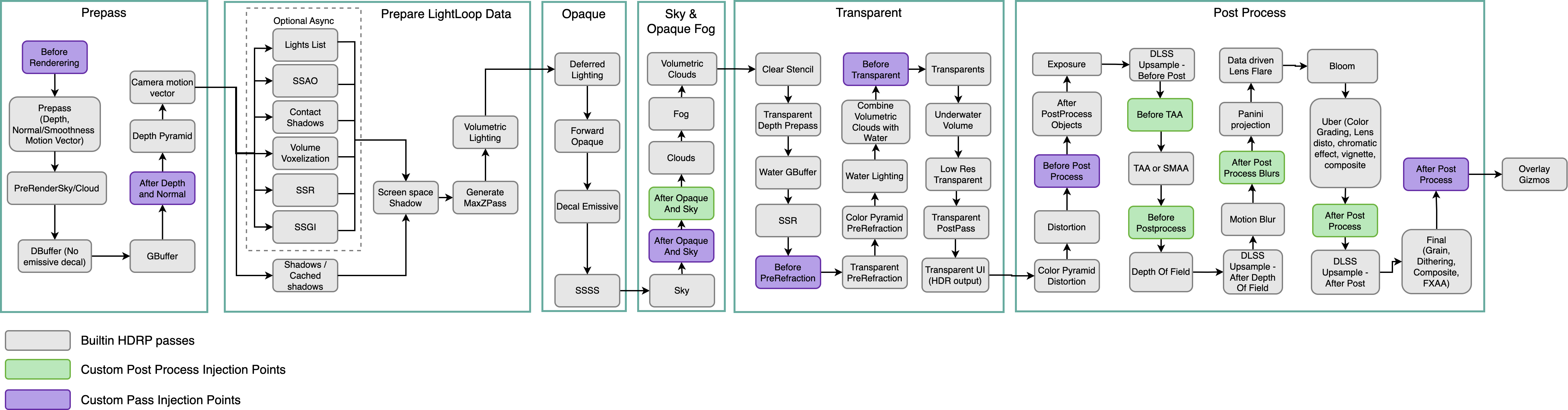
SSR is actually processed really early on HDRP's graph
it's part of that async lighting stage
so you might be able to draw the extra object on next custom pass injection point after that
which is that before prerefraction
so.. I guess same thing that Spazi said
but this really boils down on what your project can do
lethal carbon
shrewd moon
Sounds like custom passes may be very useful for this purpose, but using the exi...
Thank you. I'll look into the keywords you gave me and try it
Material Rendering Pass has only Default option.
I looked up the manual and found that After Post Process Pass only works with Unlit
I could have done something wrong.
Set Shader to Unlit + surface RenderingPass to AfterPostProces
It still affects SSR
shrewd moon
turbid matrix
https://docs.unity3d.com/Packages/com.unity.render-pipelines.high-definition@14....
I feel like I'm learning more than our subject here 😄
lethal carbon
 turbid matrix
lethal carbon
Thank you. I'll look into the keywords you gave me and try it
Material Renderin...
turbid matrix
lethal carbon
Thank you. I'll look into the keywords you gave me and try it
Material Renderin...
I don't think you need to go that far on that graph, bloom is processed on PP so you'd want to have that included for your object
or was bloom done earlier? that graph doesn't seem to list it.. my assumption would be that it's at PP stage
it's not horribly difficult to check, it's probably listed on that render graph debugger thing
I haven't done HDRP custom passes in a while myself so can't directly guide you for the setup now but docs and existing samples should get you going
(check pinned messages on this channel)
lethal carbon
@shrewd moon @turbid matrix Thank you, everyone. I'll look into the keywords you gave me : )
 rigid token
silver trench
Hey does anyone know a good deal about render pipelines and shaders that would b...
rigid token
silver trench
Hey does anyone know a good deal about render pipelines and shaders that would b...
just port stuff over to a new project, thats what i did
silver trench
rigid token
just port stuff over to a new project, thats what i did
What exactly do you mean? because I tried that but the problem remained, but I might have done it incorrectly or different than what you are speaking of
rigid token
i just moved all my assets and the scene to a non-hdrp project
sometimes assets in hdrp just dont work
all my guns turned pink so i just went back
silver trench
rigid token
i just moved all my assets and the scene to a non-hdrp project
Oh okay, I might try that tonight before having to go through all the shaders and fix them. Did you mean to send that video or did you mean to send like an example?
rigid token
yep wrong chat 😅
was wondering where that was sent
but yeah its worth it if you have no other solution and want to save what youve done so far
 undone pecan
question:
Why can i see a transparent material thru an object?
The material is being used on a particlesystem.
It doesnt show in the Scene view, just in game view.
undone pecan

 shrewd moon
Kinda looks like SSAO misbehaving
Could try toggling that off to see if it does anything
Seems like it may be less trouble to make a new HDRP project and import your scripts and art assets into that, rather than converting back and forth
How are they a pain? Shouldn't references stay intact when changing between similar shaders? Moreover shouldn't the pipeline converter be able to handle that part automatically
turbid matrix
this is about swapping between RP's that Unity doesn't have automatic conversion scripts for
there's is a hacky approach for this btw
you could just make your own shader / SG that uses same property names as the RP you are moving from
if you have matching names there, swapping the shader will automatically map the old values there
I sometimes do this if I just need to test some content between the different RPs and the original content is authored for only one
I have no idea why URP and HDRP don't have matching names for these
they really should have
they share some same names (if I remember right) but most common ones don't
Unity's stance on that is evolving.. they have had cross-SRP initiative for few years now where they try to make it easier to jump between these
being able to add multiple targets to shader graphs was first steps on this
(you can author SGs now that work on all RPs)
I have made proof of concept prototypes even on hotswapping between LWRP and HDRP (and later URP and HDRP) at runtime. It's possible but it's not what Unity is trying to achieve
what they basically want to happen is that you can use like say, URP for some platforms and HDRP for others without having to reauthor the whole project
but right now majority would be fine for just having conversion scripts that weren't only one way street from built-in renderer
for some reason Unity just refuses to do this
lethal carbon
Where should I start to use the custom pass?
There was not much information available through unity's official manual and video.
Can I use a custom pass without background knowledge such as HLSL or ShaderLab?
Many of the common problems I face with hdrp seem to be saying that I should be able to use custom pass.
But there doesn't seem to be a lot of tutorials or information about this.
What should I look for first?
turbid matrix
@lethal carbonlook for pinned messages on this channel
github part has some practical examples
digital spire
Is it expected that HDRP full screen custom pass with the injection at "Before Post Processing" doesn't have transparent objects in the color buffer ?

and after that just below there is no transparent object

Alright, enabling "Distortion" in frame setting fixed this issue -*-
versed zealot
how to i make a sprite renderer render last in a 3d project
 misty orchid
how much of an effect on performance can a decal have?
also is hdrp the only way to have decals?
glacial fossil
Urp has decals too and you can use some assets made by others that allows decals on built-in render pipeline
quiet quest
is there a way via script to get a list off all the texture attached to a material. All the shader map keywords are unknown
scarlet hull
quiet quest
is there a way via script to get a list off all the texture attached to a materi...

And use this to filter out textures : http://docs.unity3d.com/ScriptReference/Shader.GetPropertyType.html
quiet quest
@scarlet hull thank you
 iron siren
Hi, I'm creating a HDRP outdoor scene and created an new outdoor empty scene. When I check the profiler, I see 2500+ textures loaded taking 2.4Gb of memory but the scene is empty. Where does it come from ?
 shrewd moon
iron siren
Hi, I'm creating a HDRP outdoor scene and created an new outdoor empty scene. Wh...
shrewd moon
iron siren
Hi, I'm creating a HDRP outdoor scene and created an new outdoor empty scene. Wh...
Probably the editor
iron siren
Yeah, after reading online, it appears it also check textures in the Resources folders which are actually not used at all in the build. After building and check the memory usage in Windows it's only a few hundreds so this number is not really relevant. That's quite misleading
shrewd moon
iron siren
Yeah, after reading online, it appears it also check textures in the Resources f...
My understanding was that assets in Resources folder were always included
Anyway, profiling the editor will give you stats of the editor, so any assets the editor has loaded for its own purposes would show up
iron siren
Oh, I thought the profiler was only profiling the current assets used in the player, not the editor
strong elbow
Is there a way that I can uncap the light intensity? Right now my spotlight is rather far away but it's capped at 40k lumen

and it has basically no effect on the scene
 whole fossil
strong elbow
Is there a way that I can uncap the light intensity? Right now my spotlight is r...
whole fossil
strong elbow
Is there a way that I can uncap the light intensity? Right now my spotlight is r...
toggle advanced settings, there is multiplier option iirc
strong elbow
whole fossil
toggle advanced settings, there is multiplier option iirc
There is an intensity multiplier but it's capped at 16
which barely makes a difference, sadly
After looking at some general lighting tutorials, I've found out that 40,000 lumen is exhaustingly hot
like your face would melt off
but for some reason ALL of my scene lights are much more dim than they should be
any ideas?
shrewd moon
strong elbow
but for some reason ALL of my scene lights are much more dim than they should be
What are your exposure settings at?
strong elbow
I don't have any exposure settings I don't think
The Volume component has exposure disabled for now and I'm using the scene view to look around
shrewd moon
Light brightness is always relative to exposure
strong elbow
Where else can I control the exposure though?
Because if I have it disabled, is it normal to have a super low exposure by default?
shrewd moon
You should always use some level of exposure, or have it set to dynamic
And try to use real world light intensities
If you have no exposure defined at all, what is the light brightness relative to?
strong elbow
wym relative to?
Oh huh apparently my exposure was too low
I set it on the Volume component
But that's weird that it would be super low by default
hmmm maybe not
Alright I got it now
It ended up being a combination of my exposure settings being wrong and having baked the lighting
so when I changed everything, the lighting stayed the same
thank you Spazi
shrewd moon
strong elbow
wym relative to?
In the physical world and HDRP any light or shadow are relative to the exposure range it's being viewed with
As far as I know it's not even possible to "not use" exposure, at least it's certainly not intended
strong elbow
Well technically it is
 dry tendon
Any idea why are all the textures, except few others, don't work despite their material preview showing everything fine?
 strong elbow
If I have an empty scene with no camera, I don't have any control over an exposure value
strong elbow
dry tendon
Any idea why are all the textures, except few others, don't work despite their m...
Would it have to do with your UV maps being incorrect?
dry tendon
strong elbow
Would it have to do with your UV maps being incorrect?
They're correct and have worked before I added hdrp
That's also saying I am also using default object meshes such as cubes capsules and etc. Some done using ProBuilder
mellow condor
how can i reduce the amount of pulsing in motion blur on a moving camera
 finite parcel
hey folks! It's been a while since I checked in with how the render pipelines are coming along. how production-ready would yall say they are? where are we at in terms of feature parity with built-in?
i'm considering switching to SRP but I've been burned by incomplete unity features before
mellow condor
finite parcel
hey folks! It's been a while since I checked in with how the render pipelines ar...
you can definitely ship a game with URP without being an expert in it. i wouldn't say the same for HDRP
finite parcel
@mellow condor well, I'm happy to do my research & figure it out -- would you say it's feasible to ship a game with HDRP if you ARE an expert in it?
or, maybe a better question: if I'm comfortable writing shaders, doing tech art, etc etc -- is there a big benefit to switching? in terms of performance, workflow, or features?
 steel meteor
finite parcel
or, maybe a better question: if I'm comfortable writing shaders, doing tech art,...
steel meteor
finite parcel
or, maybe a better question: if I'm comfortable writing shaders, doing tech art,...
HDRP is aimed for modern PC gaming, URP is designed so games can work on mobile and up, I.e consoles and PC.
finite parcel
I know! I would probably be interested in writing a custom SRP
steel meteor
Sorry. I thought you were asking what the differences were.
finite parcel
oh sorry -- yeah i meant switching between built-in and srp
 wraith blaze
Hey guys what would be the best course of action to making a city in hdrp and not destroy performance?
scarlet hull
wraith blaze
Hey guys what would be the best course of action to making a city in hdrp and no...
Limit the number of materials, possibly use GPU instances or hybrid rendering with dots, occlusion culling.
wraith blaze
thx
mellow condor
finite parcel
I know! I would probably be interested in writing a custom SRP
i see... as an academic exercise?
 finite wing
Hi guys! I'm using Hair Shader and as a result I'm seeing these weird shadows. Does anyone know what this is? I thought it was the shadow texture resolution, but I increased it and didn't notice any improvement.

This is the shader's parameters

 summer glacier
finite wing
Hi guys! I'm using Hair Shader and as a result I'm seeing these weird shadows. D...
summer glacier
finite wing
Hi guys! I'm using Hair Shader and as a result I'm seeing these weird shadows. D...
Does it happen in-game?
If you're using high filtering shadows, change to medium and see if it does anything. Make sure refresh is enabled in the scene view
finite wing
this occurs both in the editor and in the game
ok, i'll try
this worked perfectly!
for some reason the high quality causes this visual problem.
ty ^^
summer glacier
finite wing
this worked perfectly!
np, you might still want to use high filtering shadows as it gives you more control on how smooth the shadows are, and also produces better smooth shadows
your issue was most likely that the parameter that handles how smooth shadows are, was set too high
You can control it per light, in your directional light there's an "angular" setting at the bottom in the shadows section
lower = less smooth, high values can lead to issues
Your issue also might've been samples set too low, you can increase the quality of high filtering shadows , in your light there will be new parameters, increase them but remember it effects performance, find what works for you
(these options only show up when shadow filtering is set to high)
also high filtering shadows rely on Temporal Antialiasing, so you might need to enable that in your camera, and your scene view camera (Also need to enable refresh mode for TAA to work in scene view). TAA will look better in-game since scene camera refresh is FPS capped
finite wing
Thank you for the tips. I'm testing the parameters you pointed out to find a nice match. Anyway, a simple change in these parameters has already brought me much better results using the high filter.
scarlet hull
finite wing
Thank you for the tips. I'm testing the parameters you pointed out to find a nic...
Those artifacts look like contact shadow missing the hair at some pixels
Maybe also look at tweaking the contact shadow settings to increase the precision
finite wing
I also thought it was something like that. But contact shadows are disabled in lighting and HDRP settings.
In fact, perhaps this warning I've neglected for too long has to do with shadow accuracy. It makes sense?

 mossy star
Hey, So for a few days now, in HDRP I am trying to draw a terrain over another terrain (basically I have a low res background terrain and multiple closeup terrains) I want to draw the cloesup terrains over the background terrain so the background terrain is not visible when the closeup terrains are drawn.
I tried custom passes but that produces some artifacts...
Also tried to modify the TerrainLit shader so i could overwrite the depth buffer of the background terrain to some BIG numbers but i dunno how to achieve this cuz there is no frag shader that i could touch.
Any suggestions?
summer glacier
mossy star
Hey, So for a few days now, in HDRP I am trying to draw a terrain over another t...
Not sure I understand, but can't you just calculate distance from terrain to player and use that
iron siren
Why is material not displaying properly here ?

The transparent material behind renders before the one in the front?
OK nevermind, checking depth write in the material options fixed the issue, nice.
Though I still can't figure out how to import a transparent texture at runtime... At the moment, transparency is displayed in black...
mossy star
summer glacier
Not sure I understand, but can't you just calculate distance from terrain to pla...
I have to draw all the terrains otherwise the background terrain will not be visible where it needs to be (far from the player where the closeup terrains are not loaded yet)
turbid matrix
@iron siren you can also use opaque material with alpha cut for something like that
I don't know if there's any good reason to use transparent for use case like that
scarlet hull
iron siren
Though I still can't figure out how to import a transparent texture at runtime.....
What do you mean "import a transparent at runtime" ?
iron siren
scarlet hull
What do you mean "import a transparent at runtime" ?
Well actually I fixed the issue. There where several problems actually. First, I created my PNG using GIMP but using the Erase tool in GIMP sometimes doesn't erase the colors properly. So first, I clean the PNG making sure it's fully transparent.
Second, I created my own shader using shader graph and I didn't know I had to handle transparency in it myself. So I added a Step node to get a black/white copy of my original transparent texture to now which part to cutout then simply multiply the original texture with this cutout to remove all the transparent areas. Now, the transparent areas are correctly not appearing.
The only downside right now is that my cutout is a yes or no, meaning if a pixel will fully show or not depending on the cutout value, it doesn't handle semi transparency yet. I still need to study Shader Graph a little more to know how to handle such a case but at the moment, my game can work with this shader. Already spent too much time on shaders :x So much to learn.
 scarlet hull
iron siren
The only downside right now is that my cutout is a yes or no, meaning if a pixel...
scarlet hull
iron siren
The only downside right now is that my cutout is a yes or no, meaning if a pixel...
You should just have to connect the texture alpha to the alpha input of the shadergraph, and that's all 🤔
iron siren
Oh, I'll give it a shot
Oh indeed, that does the same lol
Actually, no, it does display semi transparent now
Even better
Thanks lol
scarlet hull
Actually, do you really need a custom shadergraph to simply display a texture with transparency ?
iron siren
Well, I use two different shaders, one is basically a copy of the lit HDRP, the other one is another copy except I add nodes to be able to merge 2 textures together
Like this, this shader use 2 textures : one is the wall, the other is the windows. I merge them together

But then I reached a case where on of the model was using transparency (fences) and I missed the alpha node.
scarlet hull
iron siren
Like this, this shader use 2 textures : one is the wall, the other is the window...
This looks like a use case for the layered lit shader to me :p
But learning shadergraph is always usefull
iron siren
Now I only have this problem. Depth transparency. I'll try to play with the settings.
 scarlet hull
iron siren
Now I only have this problem. Depth transparency. I'll try to play with the sett...
scarlet hull
iron siren
Now I only have this problem. Depth transparency. I'll try to play with the sett...
You can have transparency + cutout.
iron siren
Layered lit shader? I'll have to check it. But as you said, learning shader graph can be useful in the long term
iron siren
scarlet hull
You can have transparency + cutout.
Ok I'll check, thanks
scarlet hull
iron siren
Now I only have this problem. Depth transparency. I'll try to play with the sett...
And on top of this, if needed, you can have two depth passes on transparent, with two cutout values, so the "post pass" can be thinner to accomodate post FX like depth of field
To fix what you have in the screen shot, enable alpha clipping for the transparent shader, with a depth prepass.
Use a cutout value slightly above zero to ignore all fully transparent pixels, but still profit from alpha blending for the other ones.
iron siren
scarlet hull
And on top of this, if needed, you can have two depth passes on transparent, wit...
Ok, I didn't understand the first sentence but the two others should be easy to try. I'll give it a shot
Hm, I don't see any cutout field when enabling the alpha clipping option in shader graph. Do I need to add a node myself to handle the cutout like I did before ?
At the moment it does fix the problem but it's cutting out way too much like you said since I don't know how to change the value
 scarlet hull
iron siren
Hm, I don't see any cutout field when enabling the alpha clipping option in shad...
scarlet hull
iron siren
Hm, I don't see any cutout field when enabling the alpha clipping option in shad...
Sorry, I was refering to the hdrp/lit shader property name, in shadergraph it is named "alpha clip threshold"
iron siren
Got it, I'll try
 remote notch
Does anyone have any tips on why my volumetrics is making this weird noise?
 summer glacier
remote notch
Does anyone have any tips on why my volumetrics is making this weird noise?
summer glacier
remote notch
Does anyone have any tips on why my volumetrics is making this weird noise?
Are you in scene view?
Make sure refresh mode is activated in the scene view settings, also make sure volumetric fog denoisers are enabled
finally look at volumetric fog quality settings, if it's too low increase it a bit.
only do the last part if you have to, since it will increase the cost
but this issue looks like denoiser are disabled, or fog quality is set way too low
or you're using reprojection but refresh mode is disabled
remote notch
working fine now, thanks ! 😄

 safe cargo
Hello, one question 🙂 If I want to create my shader in HDRP - is there some documentation for that language? (Sorry I am a beginner) - maybe a stupid question - what is even this language? Is it C ? Or C++ or something like that?
scarlet hull
safe cargo
Hello, one question 🙂 If I want to create my shader in HDRP - is there some doc...
To create a shader in HDRP, I HIGHlY recommand using ShaderGraph.
If you know what you are doing (which, without condescending I doubt because you're asking the question) and want to hand write shaders, use Unity's Shaderlab syntax and HLSL language.
safe cargo
I know about the ShaderGraph, but I am just curious what is the language behind 🙂 Thanks! 🙂
scarlet hull
Shadergraph under the hood generates shaderlab/hlsl code (you can look at is when inspecting a shadergraph and clicking "show generated shader").
safe cargo
Okay, thanks 🙂 I am asking because maybe I want to understand a little bit so I can upgrade some of the shaders, which are not compatible with HDRP..... (in the far future 😄 )
scarlet hull
safe cargo
Okay, thanks 🙂 I am asking because maybe I want to understand a little bit so I...
Usually the "easy" solution is : recreate the shader in shadergraph / look if the asset store publisher did HDRP/URP version of your asset.
Seriously, doint shadres manually for HDRP is a pita ^^
safe cargo
I know it is complicated - that is the reason why the publisher is not doing his version for HDRP 😄
iron siren
Why is this wall normal map cut in half and moves strangely depending on camera distance and rotation ?

Same with the grass, it becomes darker when the camera gets closer
scarlet hull
iron siren
Why is this wall normal map cut in half and moves strangely depending on camera ...
Hard to guess ... are the maps properly imported as "normal map" type in their import settings ?
glacial fossil
Dont know either, most likely has something to do with mip maps tho
 keen latch
Hey guys
I barely know anything about shaders and need some help
I need this effect https://www.youtube.com/watch?v=EzM8LGzMjmc but in hdrp
I havent found any tutorial for this and really need it for a project Im working on in uni

Games like Antichamber feature impossible geometry where multiple objects seemingly inhabit the same physical space, but only appear when viewed from certain angles. We can recreate the effect in Unity using stencil shaders and Universal Render Pipeline's special Renderer Features functionality!
👇 Download the project on GitHub: htt...
scarlet hull
keen latch
Hey guys
I barely know anything about shaders and need some help
I need this eff...
To make something similar in HDRP, look into custom passes.
Although HDRP is limited to two user stencil values.
keen latch
scarlet hull
To make something similar in HDRP, look into custom passes.
Although HDRP is lim...
could you tell me how i can set those stencils?
i have looked into custom passes but havent figured out how to use them in this case
scarlet hull
keen latch
could you tell me how i can set those stencils?
i have looked into custom passes...
Look at the "see through effect" in the samples here : https://github.com/alelievr/HDRP-Custom-Passes

GitHub
A bunch of custom passes made for HDRP. Contribute to alelievr/HDRP-Custom-Passes development by creating an account on GitHub.
wraith blaze
Anyone got any pointers on how to improve this shot?

 lunar condor
does anyone know of a good HDRP night environment set up without any packages?
lunar condor
wraith blaze
Anyone got any pointers on how to improve this shot?
obstacles, maybe flags scattered around or people cheering you on with a sort of flying futuristing seat. And definitely improve the UI a little bit
wraith blaze
Thx will do
turbid matrix
track surface also looks like one repeating texture.. could break it up / use decals
@wraith blaze
digital spire
I am in love with HDRP path tracing denoising package. How can I live without it in 2021 LTS now 🥺

It's filling the gap of realtime bake lightmap preview nicely.
wraith blaze
Do u need RT for it?
scarlet hull
Yes
digital spire
The only downside about this is that now I will not be satisfied with the rasterized result 🥲
All the little detail that I have overlooked before now stood out so much that I can't unsee it
How do I even get this kind of details with the typical light map baking and reflection probe 🥲 Raytracing result do not even come close.
 shrewd moon
digital spire
How do I even get this kind of details with the typical light map baking and ref...
shrewd moon
digital spire
How do I even get this kind of details with the typical light map baking and ref...
SSAO is probably the best substitute
digital spire
No. Can't
I have tried EVERYTHING. Those little shadow just won't show up except in Path Tracing
And light baking but I need to bake for a long time because I need very high resolution light map
shrewd moon
If you get no effect from SSAO at all, you have some problem with it
It should be able to shade crevices like that, just not nearly as accurately as RT
loud leaf
digital spire
How do I even get this kind of details with the typical light map baking and ref...
More RTGI samples + lower RTGI denoiser radius
But that's heavy, maybe you can get a similar result with RTAO
Are the shadows from a directional light or sky?
shrewd moon
loud leaf
More RTGI samples + lower RTGI denoiser radius
This too
Baked lightmapping is totally capable of shadows like that, it's just terribly inefficient at small detail scale
loud leaf
(shadows on the ground)
digital spire
loud leaf
More RTGI samples + lower RTGI denoiser radius
This did it but my editor freezed up. SSAO just won't make those shadow for some reason
loud leaf
Yeah it's very heavy. Have you tried RTAO instead of SSAO? And are the shadows on the ground casted by a directional light or by your sky?
digital spire
Raytrace AO did. So I think I need to decrease the denoiser radius a lot

Raytraced AO
loud leaf
I would try setting the RTAO sample count to 2 and decrease the denoiser radius as much as you can
digital spire
It seems like large denoiser radius is the main problem that blocked me
loud leaf
Yep. Something like 0.1 for both RTGI and RTAO is great for restoring detail but is more likely to break with bright small lights (more prone to noise)
digital spire
loud leaf
Yep. Something like 0.1 for both RTGI and RTAO is great for restoring detail but...
THANKS.
loud leaf
Basically you balance these settings depending on the use case, there is not one setting that works for every situation.
There are two ways to reduce noise:
- Use a higher denoiser radius (~0.5), you will lose details and contact shadows, but you can keep a high clamping value (~10.0) which means lights are exactly as intense as they should be
or
- Use a lower clamping value (~1.0), this way lights won't be as intense as they should be, but you can keep using a lower denoiser radius (~0.1) for details and contact shadows
lunar condor
lunar condor
does anyone know of a good HDRP night environment set up without any packages?
?
^ forgot to mention I don't want to bake anything (everything realtime) since baking would take 10 years on my PC
and most other tutorials I've seen on youtube use baking
eternal laurel
lunar condor
^ forgot to mention I don't want to bake anything (everything realtime) since ba...
The Fontainebleau demo from unity has a night environment set up. You can use that as a guide
turbid matrix
probably also baked
altho I don't really understand the "has to be realtime" aspect here
you setup lighting and sky anyway
eternal laurel
We uaed it as a starting point and made a realtime env
So the pp settings and dir light settings etc from there are good
turbid matrix
there are some samples where that definitely isn't the case
like the current HDRP sample template
it totally breaks if you swap it to realtime lighting (unless you redo all lighting work)
just a random note, not related to fontainebleau
lunar condor
turbid matrix
altho I don't really understand the "has to be realtime" aspect here
? my PC literally will take 10 hours to bake it
lunar condor
eternal laurel
The Fontainebleau demo from unity has a night environment set up. You can use t...
I was hoping for a tutorial I could check out, makes it easier to understand what I need to do in order to make it look decent
turbid matrix
lunar condor
? my PC literally will take 10 hours to bake it
no I meant more of... you set the lighting and sky anyway regardless of the baked or realtime aspect
eternal laurel
lunar condor
I was hoping for a tutorial I could check out, makes it easier to understand wha...
GitHub
Fontainebleau demo. Contribute to Unity-Technologies/FontainebleauDemo development by creating an account on GitHub.
eternal laurel
lunar condor
? my PC literally will take 10 hours to bake it
Btw a 10 hour bake is good. We sometimes bake for up to 48 hours 🥳
🥳
And anyways 90% of a good night scene is the pp effects
keen latch
scarlet hull
Look at the "see through effect" in the samples here : https://github.com/alelie...
we have played around with it a bit now and are still stuck and cant figure out how to do it
lunar condor
eternal laurel
And anyways 90% of a good night scene is the pp effects
I just need something that doesn't look completely terrible. I'm decent enough to make daytime scenes but my nighttime scenes look worse than the standard pipeline and I have no idea how to make that look decent at all
I tried for around 2 hours today before I gave up, it's something about HDRP that is making working with lighting at night that makes it so difficult
I also wasn't able to get fog working at all, the light from the flashlight was super bright, shadows didn't blend whatsoever and the fog nearly covered the entire screen even tho the annuation distance was over 500
turbid matrix
2h while trying to learn something you don't know yet is nothing
there's limited amount of tutorials for HDRP since it's not that widely used but people typically figure these things then by reading the docs and doing experiments
with HDRP you'd also need to understand how exposure works and how to deal with more realistic lighting values
 ebon yarrow
Trying to change particle effect color, but start color has no effect. The default particle material uses HDRP/Lit or Unlit. I think that’s why color doesn’t change, what’s a proper shader to use for particle system in HDRP?
shrewd moon
ebon yarrow
Trying to change particle effect color, but start color has no effect. The defau...
There are separate HDRP shaders for particles which implement color functionality
ebon yarrow
shrewd moon
There are separate HDRP shaders for particles which implement color functionalit...
Where may I get said shaders?
shrewd moon
ebon yarrow
Where may I get said shaders?
I thought there was one included by default but it seems you may have to import "Particle System Shader Samples" under HDRP samples from the package manager
turbid matrix
@dawn sorrelhttps://docs.unity3d.com/Packages/com.unity.render-pipelines.high-definition@12.1/manual/Override-Visual-Environment.html#sky
or just override the sky type from camera setting?
"Color"
if it's gradient, you'd have bunch of color options and you can just put same color for all
but you could also be seeing fog here
HDRP has different camera settings
yes, by not using HDRP
technically yes but it's not supported scenario by Unity.. also if it's just the sky color you care about, there's nothing preventing this on HDRP
what does background type "none" do?
I've never wanted to setup any scene without sky but this is definitely something you can do
you probably still have bunch of overrides on default HDRP volume that implements visual environment
which Unity version?
turbid matrix
@dawn sorrel so basically the simplest thing you could do is to create a new scene, go to camera and set the sky to color from it. then go to volume the new scene gives you, disable visual environment and fog
keen latch
keen latch
Hey guys
I barely know anything about shaders and need some help
I need this eff...
anyone else got an answer for this?
turbid matrix
@dawn sorrel it's also probably going to be darker than the color you set because of the default tonemapper which you can disable by putting tonemapping override on the volume
@keen latchstencils are kinda pain in HDRP
there's supposedly some stencil additions on bleeding edge Unity (2022.1 or 2022.2) but haven't tested those myself
in past it was mostly manual shaders with custom passes to get stencils set yourself
well.. there's few exceptions here.. basically you could reuse the existing material stencil flags too if they don't break your project otherwise
keen latch
damn okay
i asked so many people now and nobody got an answer to that
turbid matrix
you know these material flags?

these are actually stencil bits
of course you may want to use these features yourself and then you can't just hack and reuse these for your own things
for Uni project, I'd definitely just go with built-in renderer or URP at most if you need something like this
built-in will give you the most resourses and tutorials to pull this off
keen latch
alright thank you i will take a look into it
ebon yarrow
shrewd moon
I thought there was one included by default but it seems you may have to import ...
Thx. I’ll look into it.
turbid matrix
@ebon yarrowjust to be more clear, these samples are located in the HDRP page on package manager.. there's separate samples section per feature
sacred veldt
I have baked lights on hdrp and seems its just 30 fps thats just uhm ( RTX 3060 )
shrewd moon
@sacred veldt You need to give a lot more info if you want anyone to be able to help
ebon yarrow
sacred veldt
I have baked lights on hdrp and seems its just 30 fps thats just uhm ( RTX 3060 ...
Did you remove the refresh rate limit? Found under Application static class?
sacred veldt
Now it seems editor loop takes everything reason idk #💻┃unity-talk message
shrewd moon
sacred veldt
Now it seems editor loop takes everything reason idk https://discord.com/channel...
This is a bit of a long shot but if "auto-generate" is enabled in lighting window, try disabling it
sacred veldt
downgrade to 2021 uh pain
 shrewd moon
sacred veldt
downgrade to 2021 uh pain
shrewd moon
sacred veldt
downgrade to 2021 uh pain
It's probably less trouble to put all your assets in a package and import them in a project of a different version
Ideally you would never have to downgrade a project
 lusty lily
any idea why this happens? changing scale in lightmap does nothing
 sacred veldt
baked light with HDRP any move with camera just fps drops Unity 2021.3
Its just true pain
its 0 realtime stuff
 sacred veldt
profiler 10/10, editor loop takes time mhm imagine whats that
sacred veldt
I need to really make build?
shrewd moon
lusty lily
any idea why this happens? changing scale in lightmap does nothing
Looks a bit like texel invalidity
https://forum.unity.com/threads/faq-blocky-artifacts-appear-when-i-bake-a-scene-how-can-i-fix-them.951444/
shrewd moon
sacred veldt
I need to really make build?
Yes, if you want accurate results
The editor does a lot of stuff that has an impact on performance
sacred veldt
then its editor issue or what? or its normal
lusty lily
shrewd moon
Looks a bit like texel invalidity
<https://forum.unity.com/threads/faq-blocky-ar...
thanks!!! I’ll look into it when I get back to my computer
turbid matrix
sacred veldt
then its editor issue or what? or its normal
it's normal
sacred veldt
Soo any fps drops like from 160 to 30 while moving camera is because of editor? ( while looking at profiler )
turbid matrix
you'll know the answer to that once you profile in build
this isn't HDRP thing btw, you should always do benchmarking on actual builds regardless the renderer you use with Unity
sacred veldt
Ok but if I want to make build then il2cpp build will work with profiler? how itself I can do this
turbid matrix
it'll work just fine
just make sure you do development build when you want to attach the profiler to built version
 scenic jay
sacred veldt
this thing uh oh
scenic jay
sacred veldt
this thing uh oh
looks like Z fighting
the light plane that is generating the reflection is probably to close the the geometry behind it
sacred veldt
soo light source is like too close?
should be easy to fix afaik
its any best distance to not have problem with this?
seems like even while moving light same thing happens
its just blinking at some camera rotation
 vapid dragon
what could be causing this flickering it only happens when i use lerp on the material of the robot ...
mellow condor
why is the CPU performance of HDRP so poor
on simple scenes, it is CPU bound
it takes 5ms to render shadow maps of a directional light at 512x512... why...
it's ridiculous
is unreal engine this bad?
vapid dragon
mellow condor
is unreal engine this bad?
Wrong engine ?
mellow condor
vapid dragon
Wrong engine ?
i'm asking if unreal has the same issues
vapid dragon
oh idk i just know asset management is the worst there
loud leaf
Are you on DX11?
mellow condor
loud leaf
Are you on DX11?
i try toggling between dx11 and dx12
loud leaf
Also, what version of Unity & HDRP?
mellow condor
nvidia reflex seems to have helped a lot
mellow condor
loud leaf
Also, what version of Unity & HDRP?
2021 & 12
DirectX 11 performance is about 1/4th of DirectX 12
but i think that's idiosyncratic
sometimes it's the same, sometimes it's different
@loud leaf i can even show you directly with a link right in your browser
hardware gpu scheduling also made the computer very unstable
mono vs. il2cpp master is about 2-4 fps
seems way too ilttle
 blissful dust
help
this is a screen shot from one of my testers

why is the lighting like that
its only like that for him
he is using a 550ti
game is made in unity hdrp
steel meteor
blissful dust
HDRP allows for your game settings to change to say High, Medium and Low (or other custom modes), so maybe this persons PC is using Low settings and this has turned off one of the overrides on your global volume, like fog for example.
On your PC, try the different graphic settings to see if you can replicate this issue.
blissful dust
OHHHHHH
ohohoh
so i just force high settings
because high settings
is just low
with fog
blissful dust
steel meteor
HDRP allows for your game settings to change to say High, Medium and Low (or oth...
wait i just have one HDPIPELINE Asset
steel meteor
blissful dust
wait i just have one HDPIPELINE Asset
In your Project settings, take a look at the Quality panel. You should be able to swap between different settings in there.
blissful dust
i did
it didnt change a thing
also i deleted the other quality settings
since they are useless
but could this be a visual environment thing
steel meteor
Well the quality settings aren't useless. If the player has a 550ti, that video card is 11 years old and isn't going to be able to play your game with all the top-notch HDRP settings.
It difficult to tell what the issue might be when it's some else's code running on another persons PC.
blissful dust
well the HD settings
are very low
and the quality settings
wont matter
since its a voxel game
and the textures are relatively small
ill look for more fixes
and try more
mellow condor
ugh
@loud leaf
when i set graphics APIs this way
PlayerSettings.SetGraphicsAPIs(BuildTarget.StandaloneWindows64, new[] { GraphicsDeviceType.Direct3D11, GraphicsDeviceType.Direct3D12 });
d3d11 and d3d12 have 20 fps (using -force-d3d11, -force-d3d12)
when i set it this way
PlayerSettings.SetGraphicsAPIs(BuildTarget.StandaloneWindows64,
new[] { GraphicsDeviceType.Direct3D12, GraphicsDeviceType.Direct3D11 });
d3d11 and d3d12 have 60 fps+ (using -force-d3d11, -force-d3d12)
loud leaf
vsync?
mellow condor
there are just too many hidden side effects for settings in unity
this is a joke
no
it's got nothing to do with that
it's got nothing to do with anything
it is probably a huge editor bug
with some side effect
who the hell knows why!!
it's completely ridiculous
i feel like i'm on crazy pills
GitHub
Package version 2.4.0-exp.8 Environment * OS: Windows 11 * Unity version: 2021.3.6f1 Steps To Reproduce Application.targetFrameRate = 999. Render the streamed texture using Camera.render. Set the e...
 snow delta
Okay, this is gonna be a weird one, and may involve directly editing the scene files, but:
Our project was initially in HDRP, but we switched to URP. Everything else is fine, however, one of our scenes, when loaded, seems to spawn an object called "HDRP Compositor" with a missing script. This object seems to be spawned on load, and we've got no idea how. how do we remove this offending object?
 shrewd kite
Hey guys, when I set this skeleton to transparent/alpha this is what it looks like, is there a way to avoid it? I want my material to be transparent, but only when I change it's alpha, I don't want it to be like in the picutre

 mellow condor
why does changing hte layer of a Volume strongly affect the appearance of the scene?
what is the significance of it?
same with the probe's "volume layers" - what is the significance?
it's not documented
of a volume layer mask
like for the purposes of sampling the sky?
also, while i'm willing to pay for nice materials, is measure materials going to still perform the best?
mellow condor
why is baking a reflection probe so hard in hdrp
why doe sit never work
clicking bake, clicking generate lighting bake... what the hell do i have to do
to make it work
is realtime on enable the only viable probe rendering solution?
steel meteor
mellow condor
why is baking a reflection probe so hard in hdrp
I just tried baking a reflection probe in 2022 and it works fine.
Have you set your gameobjects to Static so they appear in 'Baked' baking.
mellow condor
steel meteor
I just tried baking a reflection probe in 2022 and it works fine.
Have you set ...
ugggghg
they aren't static so why would i have rememberd to do that lol
i just wanted it to bake the probe
steel meteor
mellow condor
they aren't static so why would i have rememberd to do that lol
I'm not sure what you mean. Is the reflection probe working now?
mellow condor
steel meteor
I'm not sure what you mean. Is the reflection probe working now?
i haven't done it yet
but i believe you are right
and i am sad
thank you for helping me
digital spire
Is there a way to fix this over exposure from looking out of dark room to sun lit exterior?

Oh I use "curve mapping" mode + spot and it get rid of the over exposure and behave like phone's camera now.
mellow condor
has anyone experienced flickering of a reflection probe's affect on an object as the camera rotates?
why might this occur?
Unity Forum
Hi there,
I've got a weird problem in my scene where a reflection probe keeps turning off/on if you like depending on what way the camera is facing....
i see i'm not the only person with this problem
 knotty solar
not sure if this fits in here or #⛰️┃terrain-3d (but I guess the later is more for editing tools), but I'm having way too many drawcalls (20k), especially looking into it, RenderLoop#DrawSRPBatcher is calling DrawIndexedInstanced each a lot of times with an InstanceCount of 1. This doesn't feel right, does anyone have a clue? The Vertex and IndexBuffers also aren't changed either, only the "SetGraphicsRootDescriptorTable"...
according to https://blog.unity.com/technology/srp-batcher-speed-up-your-rendering, I misunderstood the batcher then, but why does it call Instancing API if it's not instancing? Does that mean I need to get my materials instancing ready and then they wouldn't even be real subject to SRPBatching? If so, is that even possible for terrain details?
mellow condor
i also see that hdrp reflection probes are glitchy in general - https://forum.unity.com/threads/massive-performance-hit-with-realtime-reflection-probes-on-hdrp.612946/
Unity Forum
Unity 2018.3.1, HDRP 4.6.0
Without reflection probes i get stable 60+ fps no problem:
[ATTACH]
However adding just one cube reflection probe, cuts...
mellow condor
maybe this is a stupid question but is it possible to have a realtime render probe in hdrp that behaves more like the standard render probe in terms of performance?
knotty solar
From https://docs.unity3d.com/Manual/GPUInstancing.html: The SRP Batcher takes priority over GPU instancing.
From: https://docs.unity3d.com/Manual/SRPBatcher.html#intentionally-removing-compatibility : If you want to render many identical meshes with the exact same material, GPU instancing can be more efficient than the SRP Batcher.
Why?
I get that the overhead of rebinding uniforms/whatever SetPass does can be avoided, which is what the batcher avoids. But why isn't the batcher itself rendering all the batched meshes using instancing? I mean they are by definition easy because they don't have real per-instance data. Is it because you typically have only a few meshes per batch and general instanced rendering has a bigger overhead than a regular drawcall?
Asked differently: Why is using Instancing worse than the SRP Batcher? Shouldn't the whole instance call have the very same constants anyway? So is it only that the SRP Batcher applies to more than regular instancing could?
mellow condor
is there some kind of accelerated shadows option? as opposed to rendering shadows on the player loop
mellow condor
how does hdrp know to use a reflection probe for a material?
why would it flicker on and off?
steel meteor
mellow condor
how does hdrp know to use a reflection probe for a material?
The probe volume (Cube or Sphere) is where materials are influenced by that probe. Outside that volume, materials aren't influenced by it.
mellow condor
steel meteor
The probe volume (Cube or Sphere) is where materials are influenced by that prob...
my game is an open world vehicle simulator. i am experiencing an issue where:
in the editor, everything works fine
in standalone player
when the vehicle starts at the origin, the reflection probe affects the object
as soon as the vehicle starts moving away from the origin, the reflection probe only affects it at certain narrow camera angles
this is pretty baffling. i don't see why it should decide no reflection probe effects this way. the reflection probe is parented to the vehicle.
steel meteor
dawn sorrel
2022 beta is out
I've been using 20221.0f1 for a while now. It's actually pretty stable and most of the 3rd part assets I use work with it fine.
steel meteor
mellow condor
my game is an open world vehicle simulator. i am experiencing an issue where:
i...
I did a quick test in Unity 2022 and didn't see any issues with what you're experiencing. A statically baked reflection map attached my character worked fine from all angle as I moved around. When I changed it so the probe was dynamic, that worked pretty well too, but I didn't do any benchmarking to see how performant it was.
Maybe there's an issue with the version of Unity you're using?
dawn sorrel
2022.1.0.f1 ?
steel meteor
dawn sorrel
2022.1.0.f1 ?
Lol. Yes that’s right, I’m not using one that’s from 18,000 years in the future 😁
mellow condor
steel meteor
I did a quick test in Unity 2022 and didn't see any issues with what you're expe...
2021.3.6f1
i am doing custom rendering
i assume that is related but i'm not sure why
i am calling Camera.render
is there a reason a probe might not affect custom rendering?
i haven't figured out yet what might be happening in the internal render loop that i haven't reproduced
i tried the culling thing and that didn't improve anything
it's just so odd.
i have a feeling it has something to do with the "screen" resolution versus the render texture size
 mellow condor
 tough lagoon
This happens whenever I create an HDRP game
tough lagoon
This happens whenever I create an HDRP game
that's pretty odd, is this on an empty project?
or are you duplicating something on your file system?
you can try setting your com.unity.burst version in manifest.json to 1.7.0
mellow condor
steel meteor
I did a quick test in Unity 2022 and didn't see any issues with what you're expe...
the reflection probes are known to be way worse on hdrp
i think because in the standard pipeline it looks like this
cpu (mc cpu          )
   cpu                wait for probe last
      cpu
         cpu
            cpu
               cpu
                  gfx gfx gfx gfx gfx gfx (mc gfx)
whereas in hdrp it's
cpu   cpu   cpu   cpu
   gfx   gfx   gfx   gfx...
also i don't think they render shadows in probes lol
people have tried turning off everything except opaque and it doesn't perform nearly as well as standard
the graphics pipeline stays much busier with the standard pipeline
tough lagoon
mellow condor
that's pretty odd, is this on an empty project?
I switched to a new unity version and it fixed everything. Very strange but convenient
dawn sorrel
@blissful dustnice avatar, anyways can u read logs?
blissful dust
no sorry i cant
mellow condor
dawn sorrel
there isn't much in here unfortunately. it looks like it's a bug in 2022
does the scene work in 2021?
@dawn sorrel also i think an ev6 is more fun - https://player.appmana.com/watch/bonneville
dawn sorrel
@mellow condorso
i made a new scene and grabbed the two cars edy physx
work fine
niice car game
can i have the scene project?
mellow condor
dawn sorrel
can i have the scene project?
depends. can you figure out why reflection probes glitch out when doing custom rendering to render textures?
mellow condor
in my journey to diagnose the reflection probes, it is clear that the hd probe system is culling them
i might make an override to never cull the probe and i think this will solve the issue
i'm not sure how it decides
i don't know why rendering from Camera.render would cull while rendering in the renderloop would not
mellow condor
well
can i use something like a custom pass to modify the culling state for hdrp?
what is the best way to do this?
i found a bug in the internal culling code
mellow condor
what's the best way to do glossy reflections like these? i believe that is a reflection of the sky

in my experience it is pretty blown out in hdrp
mellow condor
can i bake high quality filtered shadows, then toggle to realtime low quality later?
summer glacier
mellow condor
can i bake high quality filtered shadows, then toggle to realtime low quality la...
You can bake shadows using unity's lightmapper, but you can't bake a certain quality of shadows, baked shadows have nothing to do with high filtered realtime shadows
mellow condor
summer glacier
You can bake shadows using unity's lightmapper, but you can't bake a certain qua...
thank you yeah i understand now
it sounds like i should bake shadows, then when i need to switch to realtime, change the light to realtime and that's it
i'm trying to build a vehicle scene
summer glacier
mellow condor
it sounds like i should bake shadows, then when i need to switch to realtime, ch...
A baked light can't be changed to realtime without clearing the lightmap, since the objects effected by the light will have a lightmap texture
 random pasture
I'm new to Unity and want to know how to remove the sun in HDRP projects.
(For context in case this may help: The game I am working on is supposed to have very little natural light from the sky.)
steel meteor
random pasture
I'm new to Unity and want to know how to remove the sun in HDRP projects.
(For c...
Disable the directional light and the sun will go away.
random pasture
steel meteor
Disable the directional light and the sun will go away.
Thanks!
random pasture
So I tried it but it ended up pitch black (as opposed to my idea of very little natural light). Do you know how I would be able to do like 4% or 5% lighting without the sun?
ah, nevermind, I found a better channel for this.
blissful dust
hello my freind has this bug where the point lights are over exposed only for his pc

this is how it looks when he's away from the point light
other than that its just pure white
anyone got a fix
if anyone has a fix dm me please i need to fix this before release
mellow condor
summer glacier
A baked light can't be changed to realtime without clearing the lightmap, since ...
i guess i would just toggle between two lights
 wheat valley
Doing Venice Level Art And Level Design For a game. Rendered In Unity HDRP.
For 4K Images Go to my ArtStation:
https://erbeilo.artstation.com/


 dawn sorrel
wheat valley
Doing Venice Level Art And Level Design For a game. Rendered In Unity HDRP.
For ...
dawn sorrel
wheat valley
Doing Venice Level Art And Level Design For a game. Rendered In Unity HDRP.
For ...
Damn that is amazing
hollow frigate
Just wondering if anyone has had performance issues with realtime reflection probes
Having just one costs around 60 ms
Doesn't matter what the resolution or any other setting is, it's always about 60 ms
steel meteor
hollow frigate
Just wondering if anyone has had performance issues with realtime reflection pro...
With Realtime > Every frame, yes there is a significant drop in frames - my game drops from 100fps to 45fps. With Realtime > On Enable, there is no difference in FPS when I have the reflection probe enabled or disabled. I'm using Unity 2022, but if you don't need to reflect moving objects then you don't need to use the 'Every frame' option.
Depending on what your reflection needs are, you could try enabling Screen Space Reflection. This is done in the Project Settings > HDRP panel, and then add an SSR override to your Volume.
glacial fossil
hollow frigate
Just wondering if anyone has had performance issues with realtime reflection pro...
60 ms sounds surprisingly much but id imagine draw calls are the biggest problem, not resolution
hollow frigate
steel meteor
With Realtime > Every frame, yes there is a significant drop in frames - my game...
My game is a completely dynamic procedurally generated world, so the reflection probes have to be regenerated relatively quickly. Screen space reflection works alright, but reflection probes provide significant better quality. The problem is, I'm fairly certain a bug is causing the performance issues since I doubt that a single reflection probe has 60 ms of overhead, not intentionally at least
hollow frigate
glacial fossil
60 ms sounds surprisingly much but id imagine draw calls are the biggest problem...
I don't think that's true. Rendering a 1024x1024 cubemap is going to be exponentially more difficult than rendering a 128x128 cubemap, but as far as I can tell there is almost no difference
glacial fossil
hollow frigate
I don't think that's true. Rendering a 1024x1024 cubemap is going to be exponent...
Not "exponentially more difficult". GPUs are extremely good at doing lots of things at once but most of the resources are wasted when doing only few calculations (like rendering object with only few pixels on the screen). CPU side also needs to do exactly same amount of work no matter which resolution you use (draw calls are likely the heaviest/very heavy part of the cubemap updating)
GPUs can run either 32 or 64 threads at once (theres also lots of those 32/64 groups of threads called wavefronts, theres thousands of cores on modern GPUs in total), not less so if you make only one addition on GPU, 31/63 extra additions will be made anyways
So no, 128x128 -> 1024x1024 is not 64 times slower and it shouldnt be, CPU is still processing same amount of draw calls and doing things on GPU is not that straight forward, GPUs are specificly designed to do loads of parallel calculations
 celest citrus
Hello everyone, So I'm having a problem with HDRP light layers. The light layers are active in the global settings and they show up in the culling of objects but for some reason in the light settings if I try to open additional properties it won't work. Anyone knows why? it should look like this but for some reason, the light layer won't show up
 scarlet hull
celest citrus
Hello everyone, So I'm having a problem with HDRP light layers. The light layers...
scarlet hull
celest citrus
Hello everyone, So I'm having a problem with HDRP light layers. The light layers...
Did you also enable them in the HDRP asset ?
celest citrus
yes mate
it's so odd cause the light layers are enabled everywhere, just the lights wont show the additional properties
scarlet hull
On my side, enabling/disabling light layers on the active HDRP asset will show/hide the setting, I really think that this is what is missing
 scarlet hull
😉
summer glacier
hollow frigate
My game is a completely dynamic procedurally generated world, so the reflection ...
You can split reflection probe rendering over a few frames, so the performance cost is reduced. I think this landed in 2021.1, or 2022.2
called slicing or something similar in the inspector
or set it to OnDemand and choose when to update it
mellow condor
why might my projects' vfx graphs not be rendering on metal hdrp in 2021.3, when they rendered correctly in 2021.2..
 ionic flame
i enabled hdrp and everything is purple
steel meteor
ionic flame
i enabled hdrp and everything is purple
Purple or pink? If your materials are pink then you need to update your materials to use HDRP. You find guides on YouTube on how to do this. Search for 'Unity pink materials'
ionic flame
steel meteor
Purple or pink? If your materials are pink then you need to update your materia...
thx i worked that out but i have another question
so now that i have hdrp set up i cant use occlusion maps
steel meteor
ionic flame
so now that i have hdrp set up i cant use occlusion maps
Are you referring to an occlusion map texture, or SSAO post processing? Either way, both should world on HDRP.
glacial fossil
glacial fossil
So no, 128x128 -> 1024x1024 is not 64 times slower and it shouldnt be, CPU is st...
@hollow frigate you can test this theory of draw calls being a big performance problem by reducing the far plane of the probe to something much lower (shadow max distance too ig) to see if the amount of objects drawn correlates better (than the resolution) with performance
ionic flame
steel meteor
Are you referring to an occlusion map texture, or SSAO post processing? Either w...
texture
like theres no spot to put it
steel meteor
They are packed into the green channel of the Mask texture. Check out Mask Map for hdrp. That will explain it.
ionic flame
wait so how do i isolate the green channel
bc it looks like its making it smooth too
steel meteor
Or you can create your own shader graph and use separate textures, but the built in hdrp shader is more efficient.
steel meteor
ionic flame
wait so how do i isolate the green channel
Photoshop, or maybe Gimp.
ionic flame
oh wait you make it green?
what if there are white splotches will that just be ignored
steel meteor
ionic flame
steel meteor
This will explain it better https://docs.unity3d.com/Packages/com.unity.render-p...
oh alright
just 1 quick question though
what is the alpha channel
steel meteor
Usually it's for transparency, like having holes in flag texture, but on the mask map it is used for smoothness.
Smoothness is related to how unity calculates proper PBR materials.
ionic flame
steel meteor
Usually it's for transparency, like having holes in flag texture, but on the mas...
but is it like white
or like value ✨
steel meteor
Well each channel goes from 0 to 255 or black to white.
steel meteor
Not sure what you mean by 'contact' the channel.
ionic flame
like if i were to "contact" the green channel i would color an image green
steel meteor
No, on the Mask map, each channel is black and white. The value is used in calculation to determine a physical property of the material.
ionic flame
gotcha thx
digital spire
https://twitter.com/Sebasti66855537/status/1549493365628076035?s=20&t=S0w8KmPNkxvRPEUeC00PJQ
Apparently It's not only DX12 in Unity that's broken lol It's borked in UE4 too


DX12 in this game is so freaking broken that enabling it slashed my framerate from 248 FPS to just 82 FPS in the exact same spot, at the exact same settings (1440p max):

 Twitter
·
Twitter
·
 loud leaf
It shouldn't be broken in Unity anymore, at least same framerate or better
digital spire
loud leaf
It shouldn't be broken in Unity anymore, at least same framerate or better
I hope so. I read that all the improvement is in the 2022, which unfortunately I can't migrate to that version yet.
mellow condor
hollow frigate
Just wondering if anyone has had performance issues with realtime reflection pro...
in my experience you have to turn off a ton of options in custom frame rendering
mellow condor
is it possible to dim the self-shadowing of normals?
bold wadi
Hey everyone, I was wondering why I get this error?


When both options are enabled like asked
bold wadi
Another question, why is my lightning looking like this when Im generating the lightning :
(This is the version I want)

And like this when it's done? :
 shrewd moon
bold wadi
Another question, why is my lightning looking like this when Im generating the l...
shrewd moon
bold wadi
Another question, why is my lightning looking like this when Im generating the l...
In the second image baked global illumination has correctly prevented the outside lighting from leaking inside through the walls
bold wadi
ooh, so that's what happens?
shrewd moon
bold wadi
ooh, so that's what happens?
That's usually a big reason for using baked global illumination in the first place
What's your goal with it?
bold wadi
Thanks ^^
I'll make sure to check that tomorrow
bold wadi
bold wadi
Hey everyone, I was wondering why I get this error?
I enabled it because here
it said I should ^^'
shrewd moon
bold wadi
I enabled it because here
When does that error happen and does it break something?
bold wadi
shrewd moon
When does that error happen and does it break something?
Everytime I launch the project, and no not really, I was just trying to get rid of it
mellow condor
bold wadi
And like this when it's done? :
this is pretty good looking
the materials need to be tuned so that they reflect more indirect light
eternal laurel
Anyone know if it is possible to "inject" a custom fog formula in hdrp ? I mean the regular distance fog, not volumetrics. I can ofc copy over the shaders, manually modify them and use that but maybe there is a better way ?
scarlet hull
eternal laurel
Anyone know if it is possible to "inject" a custom fog formula in hdrp ? I mean ...
The other "clean" solution is to make a copy of the package and change the fog formula from there
eternal laurel
scarlet hull
The other "clean" solution is to make a copy of the package and change the fog f...
I was afraid of that answer. However I do plan several major changes anyway so I will be running a local version anyways
That way I can probably even extene the volume and have my fog as a option
I very much want to try out the gpudriven branch that relies on render🍔 and has a ton of cool things like geometry pools and viz buffers