#🖼️┃2d-tools
1 messages · Page 1 of 1 (latest)
 vocal raft
 elfin sandal
don't resize it
 rancid depot
vocal raft
Hi! For some reason, whenever i zoom in my camera (like resize it), the change w...
rancid depot
vocal raft
Hi! For some reason, whenever i zoom in my camera (like resize it), the change w...
if you make the changes in play mode of course they will not be saved.
Hello i would like some help here.You see, i opened a png file with sprite editor and made some 16x16 pixels and after that some of them i transported them in tile palette,and everything worked fine in the tilemap except from one pixel and that is the one inside the red circle.I thought i have cropped it with a little bit bigger width but i checked it and it is 16x16 and also right.I moved the offset so not it cannot be seen easily but i want to selve the problem without changing the offset


 modest cargo
rancid depot
Hello i would like some help here.You see, i opened a png file with sprite edito...
modest cargo
rancid depot
Hello i would like some help here.You see, i opened a png file with sprite edito...
That tile's pivot point got nudged one pixel to the left
aka the blue circle in the middle
rancid depot
what does the blue circle mean exactly?
modest cargo
"Pivot point" or where the sprite's center point is in relation to the object origin
Tilemap assumes that each pivot point will be right at the center of the grid cell
rancid depot
so it's better keeping it in center for safety😅
elfin sandal
If its easy you should be able to look it up
 crimson folio
elfin sandal
If its easy you should be able to look it up
crimson folio
elfin sandal
If its easy you should be able to look it up
yea but im a beginner unity user
and i dont understand how to resolve my "problem"
elfin sandal
Whats the problem
crimson folio
elfin sandal
Whats the problem
i wanted to download thishttps://docs.unity3d.com/Packages/com.unity.2d.tilemap.extras@2.2/manual/index.html but i dont find any download button or something like that
elfin sandal
Look up "github unity technologies 2d tilemap extras" in google
crimson folio
oh ok thx
vocal raft
rancid depot
if you make the changes in play mode of course they will not be saved.
duh
ofc i know that
rancid depot
sorry i saw the playtest and thought about the resizing during the play
 mighty dirge
is there anyway to make a game object tiled mode but it randomizes the textures rotation cuz it will make it so i dont have to make as many textures
 solemn latch
There are several ways
mighty dirge
solemn latch
There are several ways
such as.. ?
solemn latch
You'll need to give more information about what you're making for me to really suggest anything
mighty dirge
solemn latch
You'll need to give more information about what you're making for me to really s...
if i have a grass texture and i set it to tiled mode so i can make it cover the entire ground. im wondering if you can randomize the rotation of each tile
solemn latch
Like, using a tilemap?
Or just a tiled texture?
If you're using a tilemap, then a rule tile would probably work. You could also do it in the shader.
 dark flicker
what should i change?
 dark flicker
 spiral monolith
damn that was yesterday
spiral monolith
damn that was yesterday
lol form e it was 2 hours ago
dark flicker
spiral monolith
add a hole
wym
spiral monolith
oh the time
tbh idk if it would look good or not
kinda like that but idk if u can fit sm like that in sucha small gun
 dark flicker
spiral monolith
kinda like that but idk if u can fit sm like that in sucha small gun
dark flicker
spiral monolith
kinda like that but idk if u can fit sm like that in sucha small gun
i see
i think i cant do that in my size
spiral monolith
Ye like i was saying didnt think but just a suggestion
 finite zealot
Is it possible to change the hitbox of a tile?
like I have this spike

and I want to make it so that the player can only collide with like a small hitbox so it doesn't feel irritating
but right now the player collides with the gravel
which feels unfair
how can I change the collider on this tile?
modest cargo
finite zealot
how can I change the collider on this tile?
I believe that editing that tile's physics shape in the sprite editor will update its colliders in tilemaps
finite zealot
Yes, thank you!
I realized that I needed to reset the tile map collider for it to work
spiral monolith
theres something missing in the stone area i just dont know what

 turbid kayak
How can I mask UI by it's form?
I want to overlap these two images to one overlapped image.


 worthy stump
Hi there, I have a few questions about how sprite atlases work.
- Is it the case that once a sprite has been included on an atlas, that atlas will be loaded/used whenever the sprite is used, rather than the original texture that the sprite originated from?
- Can I use atlases in conjunction with Tilemaps (I.e, is the workflow the same as with other sprites?)
- If I have a sprite that exists on more than one atlas, how do I know which one will be loaded when the game runs? For example, if I had some common sprites across multiple "game levels", and I wanted to have an atlas for all the sprites used on each level, is Unity intelligent enough to just load the single atlas that has all the sprites I need for a given level, or will it load more than one atlas?
Found the answer to 3 here: https://docs.unity3d.com/Manual/SpriteAtlasScenarios.html
 solemn latch
worthy stump
Hi there, I have a few questions about how sprite atlases work.
1) Is it the ca...
solemn latch
worthy stump
Hi there, I have a few questions about how sprite atlases work.
1) Is it the ca...
- when used in a sprite renderer.
- assume unity will do the stupidest choice possible, except not in a predictable manner.
solemn latch
It will use the original texture when the sprite is used in, say, a meshrenderer.
(Unless you specify the atlas in the material)
rancid depot
solemn latch
(Unless you specify the atlas in the material)
i found what caused it was somehow a flaw in the animator,so i didn't see it because it was too specific.Thx anyway😁
worthy stump
I have another pretty complicated question about the way in which tiles are rendered.
I'll give a brief overview of what I'm trying to do, but I would kindly request that you don't ask why I'm trying to do it because it will take a long time to explain. Please just have faith that I have researched this properly and I believe this is the only way to solve my problem.
What I'm trying to do:
I want to scale up the vertices of every tile in my tilemap by an arbitrary amount, whilst simultaneously scaling the UV coordinates by the inverse so that visually the sprite appears to be the same size
What I have done
I have achieved the above as described
What is the issue I am encountering
I am currently in the process of migrating my project from an old 2D plugin to Unity's inbuilt tools. On the old plugin, the flow for the construction and modification of the tilemap appeared to be:
- Build Tilemap (All sprites aligned correctly)
- Apply shader, scalling verts and UVs
- Result: Verts overlap, but visually sprites appear unchanged (Anchor point of sprites was centre)
However, after migrating to Unity's Tilemap, it appears to be the case that the order of operations has changes, and thus I get this:
- Apply shader, scaling verts and UVs
- Build tilemap
- Result: Tiles are scaled correctly, however they do not overlap. Instead, adjacent sprites appear to be rendered so that their edges are in-line with the scaled verts of the other tiles. This leads to gaps appearing between the tiles in the tilemap.
Is there anything I can do to achieve the desired effect?
https://imgur.com/epTvx4q (Screenshot of desired effect)
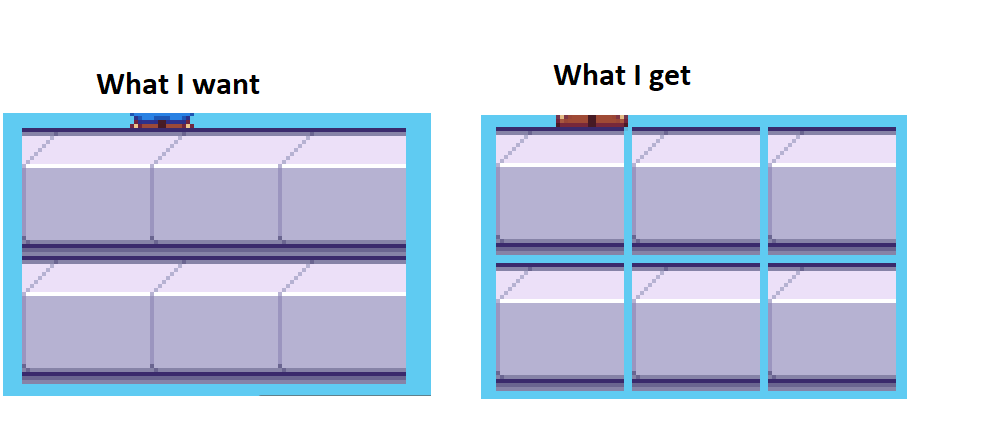
Im going to try changing the anchor point to the top left corner and seeing if I can move the verts
But I am very confused as to why my shader would impact the tilemap in such a way. I thought that shaders were a post-processing step? I don't see how that could actually impact the placement of the tiles if I'm using the centre of the tile as the scaling point
I.e, when the shader is not used, the centre of tile (0) will be something akin to (16,16), but after the shader is applied the centre becomes (18,18)
The only thing I can think of is that the anchor point for the tiles is not used in the way we think it would be
elfin sandal
probably better to use Tilemap.SetTransformMatrix
worthy stump
elfin sandal
probably better to use Tilemap.SetTransformMatrix
Thanks very much, Ill give this a go later
 fathom carbon
(Trying to generate 2d terrain using noise) How would you guys go on to implement these tiles? My idea would be to make some meaty if code to check for each condition but that can't be the most efficient way
 modest cargo
fathom carbon
(Trying to generate 2d terrain using noise) How would you guys go on to implemen...
modest cargo
fathom carbon
(Trying to generate 2d terrain using noise) How would you guys go on to implemen...
Rule tiles already exist in a package, no need to code them
fathom carbon
Amazing. I will look into it. Thank you
fathom carbon
modest cargo
Rule tiles already exist in a package, no need to code them
I couldn't find any way to place it via scripts. Would that even be possible?
modest cargo
fathom carbon
I couldn't find any way to place it via scripts. Would that even be possible?
fathom carbon
How could I not find this haha. Anyways, thanks again
fathom carbon
fathom carbon
(Trying to generate 2d terrain using noise) How would you guys go on to implemen...
Anyone have any idea how I can make it so only the green part is seen as the tile when placing it?
modest cargo
fathom carbon
Anyone have any idea how I can make it so only the green part is seen as the til...
What do you mean when placing it?
fathom carbon
On a tilegrid. It makes it so the tile grid is higher than it's suppossed to be because the walls are also part of the tile when only the green area should be. That way they don't align right now
 silver heron
hey guys my tiles are hiding themselves when i go to use the brush tool if i click edit it shows them on the pallette but wont place them on the tilemap
is there a bug going around atm or have i missed something
no edit clicked

edit clicked

still not placing hmm
 timid bluff
Is there any way to fix my spritesheet textures bleeding on my tilemap without changing the tilemap scale/PPI? This isn't an issue in the editor, but in-camera it's very noticeable.

 modest cargo
timid bluff
Is there any way to fix my spritesheet textures bleeding on my tilemap without c...
modest cargo
timid bluff
Is there any way to fix my spritesheet textures bleeding on my tilemap without c...
You can edit the sprite sheet to give margins to the tiles, the scale does not matter as long as you keep the PPU value the same
Or if you don't want to do that you can generate a sprite atlas which has the option to add margins, without having to re-do any references to the sprites themselves
timid bluff
modest cargo
Or if you don't want to do that you can generate a sprite atlas which has the op...
I will look into this option, thank you for your advice.
fathom carbon
I will procedurally generate my world with tilesets like these using bitmapping. How would you guys go on to generate vegetation only on the green tiles? (plants, flowers, trees)

I would either make the sprites readable and look for green pixels or make prefabs instead of using just the sprites containing a mesh for vegetation areas. Any better ideas?
fathom carbon
Does anybody know, why this tile is spawning? It isn't the default sprite nor are ANY of the conditions met. I have one whose conditions meet exactly those of this tile, so why wouldn't it spawn?
 rancid depot
If you can see in this picture i have a problem with the tiles that colliding to the tilemap.i saw from a youtuber a solution where he changed the grid cell gap to a really small negative number but it didnt work to me.Any idea how to fix this problem?I saw also the pivot from my previous mistake and it is ok now of course.

 reef stratus
I was wondering if there is a quick efficient way to make a sprite sheet high quality and to get rid of the green background
this is the one im trying to use
 elfin sandal
seems like you have a sprite sheet that has compression on it
you'd have to find the source sprite sheet instead
reef stratus
i found it on deviantart
 elfin sandal
says you have to buy it
reef stratus
https://www.deviantart.com/xxniiroxx/art/Itadori-jus-874055412 i downloaded the hd version of this, is there a quick way for me to get rid of the greenscreen even the little parts in between the sprite

so i can automatically slice the sprites in unity
elfin sandal
use gimp
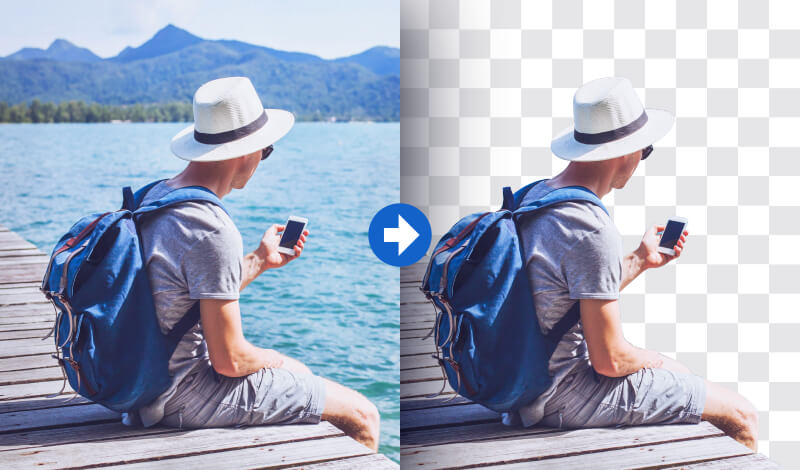
In today's tutorial I'll be demonstrating how you can use GIMP to delete an image background to transparent while preserving the subject.
reef stratus
appreciate your help, theres one more thing, in unity the sprite is very small but when i scale it up the resolution goes, is there a way i can make the sprite bigger but not lose qualitty
elfin sandal
change the pixels per unit to something like 16
reef stratus
elfin sandal
change the pixels per unit to something like 16
sorry but how would i do this?
elfin sandal
in the sprite settings
spiral monolith
What does anti aliasing do
spiral monolith
whats missing here espically the walls are so flat

the red line is to see the middle
elfin sandal
textures i guess
solemn latch
spiral monolith
whats missing here espically the walls are so flat
The perspective is fucky. You can see the top of the stairs and floor but other parts are front view.
modest cargo
In addition to textures, imagining a light source or shadows is the most important thing for creating "depth"
modest cargo
spiral monolith
What does anti aliasing do
https://en.wikipedia.org/wiki/Spatial_anti-aliasing Here's the technical explanation
https://en.wikipedia.org/wiki/Pixel_art#Techniques Wikipedia is spoiling you today
 fresh pagoda
hello, does anyone know how to put a tile between 2 specific tiles whilst auto tiling
spiral monolith
Ye idk how i forgot texture and i see what u mean by the perspective
And I'll try depth also
 crude heart
Why does a Tilemap that is filled with the GameObjectBrush not have any Size? if i log the Size it tells me the tilemap is (0,0,1) big.

 oblique nebula
Hey peeps
I'm poking around looking if anyone is knowledgeable about Sprite Atlases
I mostly want to know if I should be able see improvements in draw calls while in editor or if I need to build and test that?
crude heart
oblique nebula
I mostly want to know if I should be able see improvements in draw calls while i...
you should see the improvements in the editor too.
oblique nebula
when looking at the profiler I was expecting a bunch of icons I atlased to show up as one batch but it still seemed to list each icon as a separate draw call
I guess I ran another time and it showed the batched icons as one call... 🤷♂️
oblique nebula
Side question... how does one eliminate bleed when 8 pixel padding doesn't cut it?
fathom carbon
Does anybody have an idea if rule tiles are capable of what I'm trying to do? In the red square there should be walls but it wouldn't work since there is already a tile below so I couldn't register it. In the yellow square the walls should connect to the sides while the crenel (other tile) shouldn't

 lean estuary
Simplest way would be to use another tilemap layer for walls, since they ignore some rules for the top platform.
 shut plover
Hi guys, I'm currently painting normals for 2D sprites in Photoshop and testing out the normals in Unity and am having an issue with sprites displaying a very thin outline which becomes more or less visible depending on the lighting settings and placement.
I know the issue has to do with the soft pixels around the edges of the sprites being more visible on top of each other, but I'm not sure if there's anything that will fix this when exporting from photoshop or any changes I can make in Unity. With that said, I'm pretty new to Unity and am not a programmer, so I won't be able to deal with code to make any fixes.
Thank you! I posted this in #🔀┃art-asset-workflow as well since I'm not sure where the best place is for this question.
 solemn latch
oblique nebula
Side question... how does one eliminate bleed when 8 pixel padding doesn't cut i...
solemn latch
oblique nebula
Side question... how does one eliminate bleed when 8 pixel padding doesn't cut i...
Add the sprites to an atlas with padding enabled? Reduce the compression?
solemn latch
fathom carbon
Does anybody have an idea if rule tiles are capable of what I'm trying to do? In...
Like Fogsight said, having the walls and platform on separate layers should help with that red area problem. As for the yellow area, the usual solution would be to either have more rules or to just design the tile to fill the space so there's no gap either way.
oblique nebula
solemn latch
Add the sprites to an atlas with padding enabled? Reduce the compression?
looks like I needed to reduce my graphics max resolution.
fathom carbon
solemn latch
Like Fogsight said, having the walls and platform on separate layers should help...
Yes alright. Thought there would maybe be some kind of way to connect two different textures with rules (especially if I was to add biomes later). The idea was to put it all into one rule tile somehow to make the scripting easier, however I might scrap all that and go for bitmasking like in this video (https://www.youtube.com/watch?v=gu4xOWIFQUA&t=238s). Especially if I'm going for biomes or something similar later where I'd like to blend between textures
And thanks for your answers
 crystal mauve
hello can someone me fix my background
there is a video so you can see the problem
sorry if I'm interrupting any one
modest cargo
crystal mauve
hello can someone me fix my background
there is a video so you can see the prob...
There's no "simple" fix for this from what I know, but the simplest is to use pixel perfect rendering and conform to its requirements
crystal mauve
how do i do that?
hi on my tile map these keep appearing and I cant find a way to erase them
 crystal mauve
pleas can some one help
timid bluff
crystal mauve
hi on my tile map these keep appearing and I cant find a way to erase them
Those are missing textures, have you tried box-selecting around them to be sure they can't be selected/deleted?
crystal mauve
they were but i have fixed my problem now
it just took it bit of time to figure out
timid bluff
Great to hear 👍
crystal mauve
thank you for helping thought have a good day
timid bluff
You too!
Does anybody know how I would go about applying a custom physics shape to a scriptable tile?
Or at the very least, can I open the editor for its spritesheet through code?

Above is a TileHazard which derives from TileBase, but it's missing the normal inspector fields because it's its own scriptable object.
crystal mauve
timid bluff
Great to hear 👍
by any chance do you know how to fix this?
timid bluff
crystal mauve
by any chance do you know how to fix this?
I'm confused as to what's happening there, what is the intended behavior?

 modest cargo
@crystal mauve Can you search pixel perfect rendering which I pointed you towards?
crystal mauve
modest cargo
<@960217393358077963> Can you search pixel perfect rendering which I pointed you...
Were do i find mip maps
modest cargo
I wonder
timid bluff
crystal mauve
there shouldent be lines in the background
Is your background made from a tilemap?
crystal mauve
yes
timid bluff
That's a pretty common issue, there are a few ways you can fix it. The least hacky is to give your sprite an extra one-pixel margin so that the pixels surrounding it on the spritesheet are not transparent, like so:


If you're not using a spritesheet, the easiest (if not a little hacky) way to hide gaps is to decrease the pixels-per-inch of your texture by a little bit (e.g. 8 to 7.99).
@crystal mauve Just pinging if you haven't seen since I didn't reply directly.
crystal mauve
@timid bluff how do i add a margin
timid bluff
crystal mauve
<@166507111193378816> how do i add a margin
In whatever image editing software you're using you can just draw a border of pixels around your background tile. However, if you're only planning to use that one solid color as your background there are easier methods than applying it in a grid to a tilemap.
 timid bluff
crystal mauve
is this a sprite sheet
timid bluff
crystal mauve
is this a sprite sheet
Yeah, do you know which tile from that sheet you're using for the ground?

 timid bluff
I see, that's probably because it's bordered by a transparent tile on the right.
You can either separate it out from the rest which I'm guessing you don't want to do, or you can decrease the PPU of the texture by just a tiny margin. As far as I know, that's the only other solution.

Actually, there is one more thing. You can generate a sprite atlas with padding and add all of your spritesheets (like the one you showed above to it). I haven't tested it out since I'm having trouble recreating the gap issue in my current project but it seems to work for other people and it's probably the most 'proper' fix.

You can think of the sprite atlas as grouping your individual spritesheets into one larger single sheet.
timid bluff
The 'padding' field in the inspector for the sprite atlas is the number of pixels in each direction to 'pad' the image with.
crystal mauve
 timid bluff

Padding can be whatever, 2 or 4 worked fine in my testing. Filter mode should be set to point to avoid blurriness, and compression should be set to none.

Unity only generates sprite atlases at build time, so this will not apply until you actually run your game.
Here's how my generated atlas* looks with a padding of 2 pixels.

 timid bluff
Do you have the tilemap editor package installed?
In Window > Package Manager, search for "tilemap".
 crystal mauve
yes
 timid bluff
crystal mauve
yes
timid bluff
crystal mauve
yes
Oh, I think I know the problem.
Check to see if you have a package called '2D SpriteShape' installed.
timid bluff
Install that, it includes the sprite atlas functionality.
Alright, hopefully everything will work after that.
crystal mauve
ok i m back
crystal mauve
@timid bluff i have dowload both of them and i still cant find it
 muted elbow
Hello everyone! I was wondering, if I have a Freeform Light 2D that covers all the sprites in my scene, does it essentially replicate a Global Light 2D in terms of rendering in-game?
timid bluff
crystal mauve
em,
You're trying to add it to your scene hierarchy in this screenshot, not your file structure.

You should be right clicking in the project tab.
crystal mauve
@timid bluff were do i put my atles
timid bluff
crystal mauve
<@166507111193378816> were do i put my atles
You can put it anywhere, maybe in your "artwork" folder for now.
crystal mauve
ok
its working thank you so much im sorry this took so long
@timid bluff
I hope you have a great day
timid bluff
crystal mauve
I hope you have a great day
You too 👍
 frail vigil
HI! I am having a bit of a problem
I thew together a simple sprite, nothing fancy

But when i throw it into unity....

It gets messed up completely
The donut was made in aseprite
 abstract olive
Set the filtering to Point Filtering and turn off compression on the sprite
frail vigil
Thanks a lot mate!
 quasi minnow
elfin sandal
use gimp
quasi minnow
elfin sandal
use gimp
i use powerpoint to do it
timid bluff
Does anybody know how I would go about applying a custom physics shape to a scriptable tile? Or at the very least, can I open the editor for its spritesheet through code?

 tacit wave
Do you guys know any iPad app that's good for pixel art?
I'm doing it on PS but my girlfriend wants to switch from tattoo to pixel art, and she's mainly using an iPad to draw
 fluid lichen
hey guys, maybe a little bit of a dumb question, but I'm experimenting with a topdown 2D game and I want to rotate all of these sprites to be facing the front, because as is, the game recognizes their left shoulder to be the front of the sprite. What would be the best way to do this?
 tacit wave
fluid lichen
hey guys, maybe a little bit of a dumb question, but I'm experimenting with a to...
tacit wave
fluid lichen
hey guys, maybe a little bit of a dumb question, but I'm experimenting with a to...
Can't you set its basic position to -90°?
fluid lichen
Unfortunately not, it still recognizes the left shoulder as the "front"
 tame inlet
fluid lichen
hey guys, maybe a little bit of a dumb question, but I'm experimenting with a to...
tame inlet
fluid lichen
hey guys, maybe a little bit of a dumb question, but I'm experimenting with a to...
A possibility, though tedious, would be to rotate the spritesheet -90º in an external application, and then recut all the sprites from the spritesheet in unity using sprite editor
 faint dune
I made a 2x2 bmp that's just a checkerboard and I want to have it tile as a background sprite (blocks bigger than 1 pixel when it draws) but if I make the sprite big enough to cover the whole scene it stops tiling
solemn latch
fluid lichen
hey guys, maybe a little bit of a dumb question, but I'm experimenting with a to...
'best' way would indeed be to fix the image so that the sprites are facing the right way. If you have after effects, you can do that with the cc griddler tool very easily
You could also probably write a script to rotate the data
 still tendon
hi! 😊
game maker has auto tiling based on a given sheet similar to this video https://www.youtube.com/watch?v=JRb4_GzF95k
im wondering if its possible to use a similar sheet in unity + unitys rule tiles somehow?
thanks!

Auto tiling allows you to design levels quickly and efficiently. Grab a free tileset with this video and learn how it all works!
https://www.udemy.com/be-a-game-maker-with-gamemaker-studio-2/?couponCode=YT_COURSE_LAUNCH
Dirt Tile Set: https://drive.google.com/open?id=1wLEXPsXjsvRZ6muxVn6AH1Rm85QoJPni
Check out our website @ www.beyondusgames....
lean estuary
still tendon
hi! 😊
game maker has auto tiling based on a given sheet similar to this video...
That's exactly the purpose of rule tiles. You can find tutorials for them in Unity Learn or YouTube. (or Manual)
 agile crane
Hi guys, is there any good free software for pixelated tile drawing?
 somber jolt
does anyone know of a 2d pixel art free software for windows? I need to make some buttons
somber jolt
frail vigil
how did you make that sprite?
 nimble hull
how do I remove the text at the bottom while previewing?
 solemn latch
nimble hull
how do I remove the text at the bottom while previewing?
solemn latch
nimble hull
how do I remove the text at the bottom while previewing?
I don't believe you can.
Why do you need to?
 elder minnow
For whatever reason it is, I'm pretty sure it has to be a bizarre one.
 pale nymph
Hey, idk if I'm supposed to ask this here, but here's my question:
How can I make it so that my low resolution sprites and tiles look as good (or at least better than they do now) as in the editor? And also how do I get rid of the gaps in between tiles?

 marsh river
pale nymph
Hey, idk if I'm supposed to ask this here, but here's my question:
How can I mak...
marsh river
pale nymph
Hey, idk if I'm supposed to ask this here, but here's my question:
How can I mak...
make sure that the pixels per unit on your sprites are correct and turn compression off and change filter mode to point (no filter)

see if that helps
pale nymph
marsh river
see if that helps
didn't really help too much, still the same as before
elfin sandal
are u using pixel perfect component?
marsh river
pale nymph
didn't really help too much, still the same as before
hmmmm. sorry a lot of the sprite work was done by a different programmer on our team that i just one of the solutions he gave to me when an issue like this came up. good luck though.
elder minnow
Is the blurry image taken from the built game or is it just running under the game tab inside of Unity?
If the later then you might have changed the zoom level of your game window. Set its scale to 1 if it's not it.
pale nymph
elder minnow
If the later then you might have changed the zoom level of your game window. Set...
The same problem occurred on scale 1
just zoomed it in to make it more visible
pale nymph
elfin sandal
https://docs.unity3d.com/Packages/com.unity.2d.pixel-perfect@latest
This worked perfectly tho
Thanks a lot
elder minnow
pale nymph
This worked perfectly tho
If the sprites are crispy in the scene window then they will also be in the game window if the scale is correct without any zoom levels
pale nymph
well, besides that the gaps in between tiles were a problem
pixel perfect camera fixed it tho so it's good
just getting this error when resizing the game window

idk if it's just an unity editor error because of how resizing works there
elfin sandal
is your game window in free aspect
 radiant cedar
what are the options for showing in-game animation?
Specifically, I want to make some sort of a machine with tubes, and fluids flowing in them.
There's no need for interaction from the user - but I do want it to be seen as part of the scene (hence not playing a video file or something like that).
tacit wave
Do you guys have the Selection Outline working for 2D sprites? It's only showing for 3D objects on my end
While in the tutorial I'm following it works for 2D sprite
And I have not found a setting that differentiate 2D Sprites and 3D Objects regarding Selection Outlien gizmo
solemn latch
tacit wave
Do you guys have the Selection Outline working for 2D sprites? It's only showing...
I only get selection outlines for sprites when in 2d mode.
tacit wave
solemn latch
I only get selection outlines for sprites when in 2d mode.
Yep I'm in 2D mode too, created a normal 2D project and didn't change much on it, but the outline just won't appear
It's only appearing for 3D objects, even in 2D modes
solemn latch
Also you need the rect tool selected
tacit wave
solemn latch
Also you need the rect tool selected
Yup also had that (and with 3D objects it just works with any tool )
solemn latch
I've never had a selection outline for sprites when not using the rect tool, I don't think.
tacit wave
solemn latch
I've never had a selection outline for sprites when not using the rect tool, I d...
Well, not working there on 2D sprites 😦
 solemn latch
Um, what do you think that blue box with the little circles on the corners are
radiant cedar
I'm looking for a tool where I can create 2d animation, hopefully something with fluid simulation, and then import it into unity and being able to play it.
Player doesn't need to interact with it.
Any tools that fit these requirements?
 marsh dew
Not sure exactly if this really has fluid simulation but there are some cool pixel FX programs by CodeManu
https://codemanu.itch.io/particle-fx-designer
https://codemanu.itch.io/fluid-fx
They cost money though so they aren't good if you're looking for something free
When I use the pixel perfect camera with crop frame it places these black borders around my game. Anyone know how I can fix this?

Stretch fill gets rid of the issue but then makes the whole game blurry
This is what it should look like - there is no issue in edit mode only play mode
 solemn latch
marsh dew
When I use the pixel perfect camera with crop frame it places these black border...
solemn latch
marsh dew
When I use the pixel perfect camera with crop frame it places these black border...
That is what 'cropping' means.
marsh dew
Well yes I know that but how can I stretch it to fill the whole screen without blurring the game? I've made pixel perfect games before with a render texture which worked fine but can't use in this project for other reasons
solemn latch
What reasons?
 marble escarp
solemn latch
marble escarp
solemn latch
Well there you go
tacit wave
Hey, how do you guys work with dark tilesets? Cause I don't find where to change the TilePalette Window's background color in Unity, and the solution I found doesn't work anymore since Unity's code has changed
For example, I don't think I'll go through the pain of working with a dark background and that tileset haha
 solemn latch
tacit wave
Hey, how do you guys work with dark tilesets? Cause I don't find where to change...
solemn latch
tacit wave
Hey, how do you guys work with dark tilesets? Cause I don't find where to change...
I'd ask in #📲┃ui-ux if anyone there knows how to mess with the colors of that
tacit wave
solemn latch
I'd ask in <#502171135350407168> if anyone there knows how to mess with the colo...
Good idea!
tacit wave
solemn latch
I'd ask in <#502171135350407168> if anyone there knows how to mess with the colo...
If you're interested, #📲┃ui-ux message
 amber juniper
what software could I use to make a tileset for free?
I saw a YouTuber use this but I don’t know if it’s free or not, or what it’s called
 modest cargo
amber juniper
I saw a YouTuber use this but I don’t know if it’s free or not, or what it’s cal...
modest cargo
amber juniper
I saw a YouTuber use this but I don’t know if it’s free or not, or what it’s cal...
Aseprite
It's great and pretty cheap
Also available as Libresprite, a free fork
amber juniper
modest cargo
Aseprite
It's great and pretty cheap
Also available as Libresprite, a free fork
Ty
 velvet rivet
amber juniper
Ty
velvet rivet
amber juniper
Ty
It’s free if you compile Aseprite yourself (infos on the GitHub)
 topaz axle
How would I be able to get a point on a SpriteShape spline using a float, perhaps something similar to what's done in the editor? https://i.gyazo.com/c75a161058a4fc71139ee6cf6d00aeab.mp4
amber juniper
velvet rivet
It’s free if you compile Aseprite yourself (infos on the GitHub)
I've decided to pay the 20 dollars to support the devs
velvet rivet
amber juniper
I've decided to pay the 20 dollars to support the devs
Yes, me too
It’s a cool software
amber juniper
however, I dont have the money right now, so for the time being, I will use libresprite or compile it myself
velvet rivet
Ok
 clear furnace
how do i make my point 2d light that's looking at the map from upwards react to the colliders of the tilemap

I want this "cave" to be dark inside
 clear furnace
i used the shadow caster component
 elfin sandal
👍
solemn latch
That seems to do the trick
 elder minnow
 hot fog
how do i make it better
hot fog
how do i make it better
Impossible to explain since it's hard to know what type of style and mood you are going for but if you want to learn how to do anything well you need tons of reference.
You need to look and compare many pixel art noses from that pose and compare why yours does not look "right", what is different? etc etc
Something as simple as making curvy lines need a lot of understanding to make them feel right and not a jagged weird mess
 elder minnow
Again, hard to tell without knowing exactly what is the vision you have for it and how it compares to the rest of the art. However, I do see some jaggies in there, look it up on google.
hot fog
wdym jaggies
elder minnow
Just search pixel art jaggies on google and you will understand

 ancient fossil
hi!! would digital faceless type art be allowed here? or some digital landmarks that aren’t pixel art?
abstract olive
ancient fossil
hi!! would digital faceless type art be allowed here? or some digital landmarks ...
This channel is for discussing 2D tools and Unity. If you want to showcase your art, you can do it in #archived-art-asset-showcase
somber jolt
Is it possible to export files from asperite to unity?
abstract olive
Yes of course, you're just exporting a PNG from aseprite which is all a sprite is.
 abstract olive
Crop them onto their own boards and export them separately?
Or organize it into a sprite sheet and slice it in Unity
somber jolt
Im sorry Im kinda new to this. What do you mean?
Like this?

its in that same project/file
abstract olive
Well it's a bit more involved than that. A sprite sheet is an organized sheet of sprites that can be spliced in Unity (or a game engine in general) into individual sprites. Probably overkill for what you're doing.
Just look up how to export based on selection instead.
somber jolt
abstract olive
Crop them onto their own boards and export them separately?
How do I move them from one to another tab in asperite?
nevermind (sorry for ping)
pale nymph
Can anyone tell me how do I make an object with Mesh Renderer appear above a tilemap with Tilemap Renderer in a 2D space?
probably shouldn't ask here but idk where else
solemn latch
pale nymph
Can anyone tell me how do I make an object with Mesh Renderer appear above a til...
You can set the render layer/order in layer of a mesh renderer via script.
pale nymph
I see
But I resolved the problem in a different way already, just tossed it in a canvas and somehow found a way around it
But still good to know
thanks
solemn latch
No problem. Specifically, you can set Renderer.sortingLayerID and Renderer.sortingOrder
Yet another alternative would be camera stacking. So really there are tons of ways. 😄
 honest palm
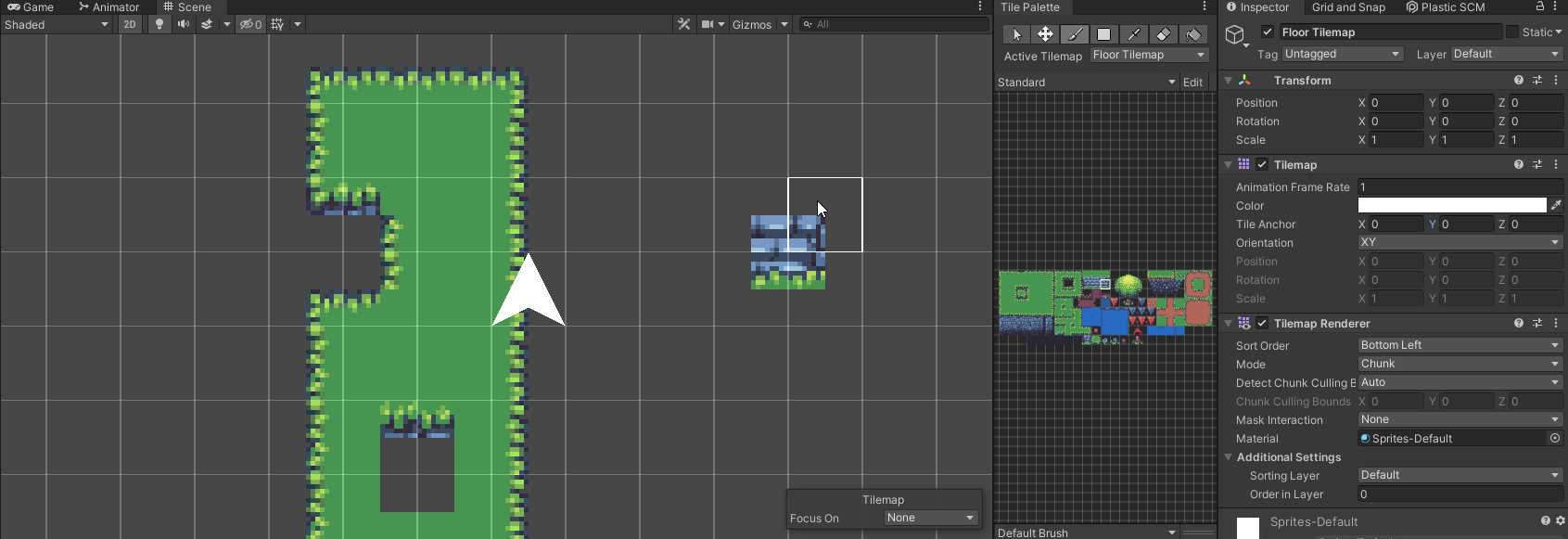
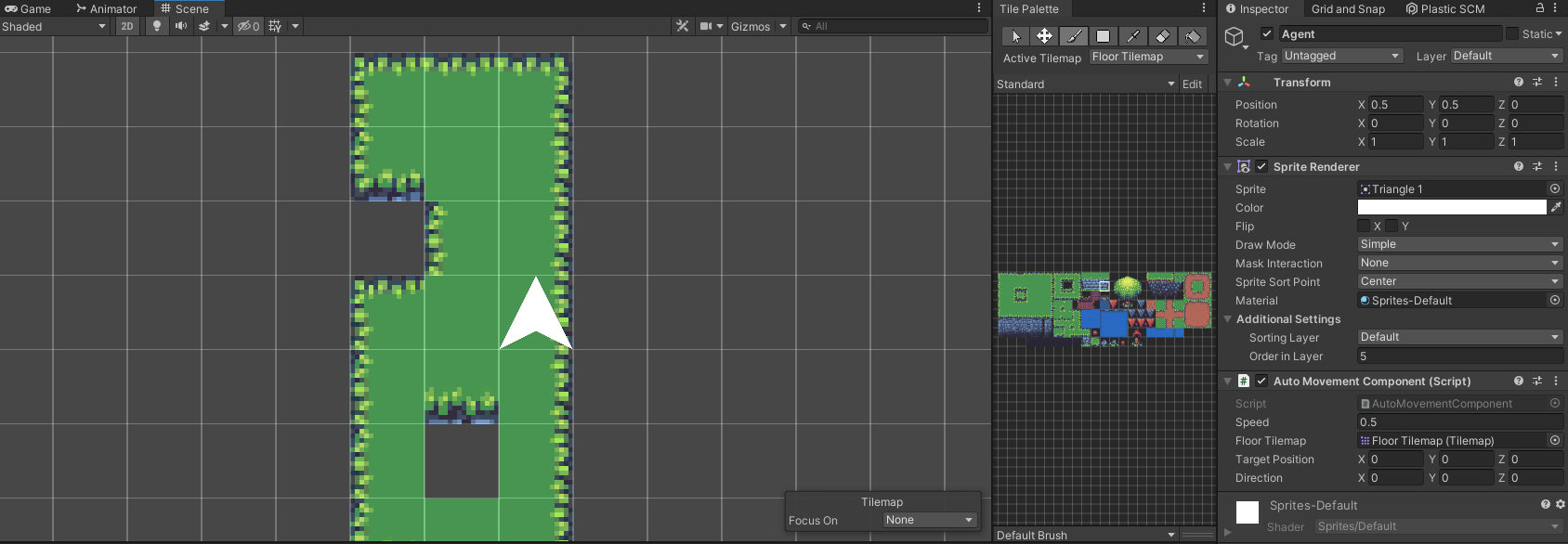
Does anyone know if there's a way to have the tilemap grid map to a 0-1 scale for tiles? Currently whenever I make a tilemap it's tile anchor is set (0.5,0.5,0) and if you move it back to (0,0,0) all of the tiles are offset on the grid.
https://i.imgur.com/cU7phpE.png
It'd be nice if the grid could just be moved and the tile anchor set to (0,0,0) so that my dynamic sprites could be placed at (0,0,0) and be in the center of a tile without needing to offset everything by (0.5, 0.5, 0)
For instance here, my triangle must be placed at a (0.5, 0.5, 0) offset to be in the center of a tile when I'd rather it just be centered at (0,0,0).
https://i.imgur.com/HriXtxB.png
 leaden sky
how do you guys solve different resolutions(2D game, no UI)? I want to design a game with a "fixed" view of say 50x100 tiles. How can I make sure they are all rendered the same way(and all within bounds) for different resolutions? My tiles atm is just sprite with a width of 50px.
solemn latch
leaden sky
how do you guys solve different resolutions(2D game, no UI)? I want to design a ...
The pixel perfect renderer is designed to handle this sort of thing- you set a 'reference resolution' that it renders the scene at.
 abstract olive
Turn the filter mode to Point in the import settings of the sprite.
somber jolt
Thank you.
leaden sky
solemn latch
The pixel perfect renderer is designed to handle this sort of thing- you set a '...
Thank you. I will look into that. Guess I have to find a playing area (aspect ratio) that works for any phone/PC
leaden sky
another question. Is there a non-manual process to combine sprites from a spritesheet which splits the image in a grid. Some items are 3x2 and some are 1x1 which makes the 3x2 a bit manual work to put together
 solemn latch
Is that a remake of Incredible Machine?
And I don't know if there's an automatic way to combine grid based sprites other than to do it manually
Since it'd need some way to detect them
You could probably write a script for it if you had some method of identifying which cells needed combining.
 dull rover
frail vigil
dull rover
frail vigil
yo good donut btw. I made mine today they are still hot
 somber jolt
abstract olive
Turn the filter mode to Point in the import settings of the sprite.
somber jolt
abstract olive
Turn the filter mode to Point in the import settings of the sprite.
Im sorry, Im still very new, how do I do that?
abstract olive
Click the asset and look at the inspector panel, it'll be there.
somber jolt
I think I found it but I dont see point
leaden sky
solemn latch
Is that a remake of Incredible Machine?
yeah it is! Remake/inspiration. Was thinking of making a small game for change, maybe I will complete it. Thanks for your input, I guess manually defining the sprites (coordinates) is the way to go then.
 tiny nest
I need the right arm and hand to be infront of the gun instead of behind, how do I do that?
 solemn latch
tiny nest
I need the right arm and hand to be infront of the gun instead of behind, how do...
solemn latch
tiny nest
I need the right arm and hand to be infront of the gun instead of behind, how do...
Change the order in the sprite renderer inspector, if they are separate sprites. If they are a single sprite, edit the order in the sprite editor.
tiny nest
solemn latch
Change the order in the sprite renderer inspector, if they are separate sprites....
the gun is not part of the sprite skin, it's an added sprite
and I've been told that added sprites are not allowed to share the order of the sprite skin
solemn latch
Is it a layered sprite (that is, multiple sprites sharing the same rig, created with the psd importer) or a single layer image?
If the former, you can easily adjust the layer order individually per piece. If the latter, you probably need to use some trickery.
 charred spoke
hi, im having a problem with mi tile here, this is the sprite in the scene mode, this is fine

but then in the game mode

anyone know why?
solemn latch
charred spoke
anyone know why?
 tiny nest
solemn latch
Is it a layered sprite (that is, multiple sprites sharing the same rig, created ...
tiny nest
solemn latch
Is it a layered sprite (that is, multiple sprites sharing the same rig, created ...
it's a single layer image
let me send the image
so this is the player

I gave every part some bones and then IK
oh and there's an emission map but that's irrelevant
solemn latch
tiny nest
it's a single layer image
Ok, that makes it more complicated, since all pieces of a sprite skin sort together
The easiest way would be to make a copy of the sprite with just the top parts and link the bones
 hollow solstice
Hello, sorry if this isn't the right channel but I was wondering if anybody knew any good programs for 2d spine animation? Unfortunely I cannot afford Spine Pro and was wondering if anybody knew any good alternatives?
tiny nest
hollow solstice
Hello, sorry if this isn't the right channel but I was wondering if anybody knew...
Unity
You make your 2D rigs in it and there's a built in animator
 golden quail
whats with the gap between the tiles for the top 2 rows? how do i fix it?

 winged zodiac
Why does this sprite get Scale like this with sprite slicing. Shouldnt the borders be equally sized?


 soft raft
Ok so I need some help
I'm making a level editor in unity and using a rule tile
But i need some help with pattern things
Some don't work
here they are
hollow solstice
tiny nest
You make your 2D rigs in it and there's a built in animator
Oh snap I'm pretty new to the 2d scheme lol, thanks so much you saved me a bunch of money!
tiny nest
hollow solstice
Oh snap I'm pretty new to the 2d scheme lol, thanks so much you saved me a bunch...
No problem, happy to help
 unreal flint
hey any1 here good with seting up isometric tilemaps?
 mystic magnet
can someone explain how to make an upgradeable house for example in a 2d topdown game
for example i have a house and i can upgrade it and the level 2 house will be bigger
how to i change the house from the level 1 to level 2
timid bluff
How can I find the start/end index of a text selection with TMP as it updates in real time? For instance, the selection here starts at index 1 and ends at index 4:
 timid bluff
selectionAnchorPosition would work, except it doesn't update as the selection bounds change. Only after the selection has been made.
I guess I should ask: does anybody know how I can control the color of the selected text (not the selection box color) with TMP?
 quiet spruce
How do you make a mesh collider that's perfectly around a 2D sprite?
Should I just give up and try my best to fit circle or square hitboxes instead
 sly egret
quiet spruce
How do you make a mesh collider that's perfectly around a 2D sprite?
sly egret
quiet spruce
How do you make a mesh collider that's perfectly around a 2D sprite?
does 2D polygon collider not work?
sly egret
 hushed mesa
does anyone have 2D sprite animation flow tips?
hushed mesa
does anyone have 2D sprite animation flow tips?
#🔀┃art-asset-workflow maybe ? or #🏃┃animation
 remote pebble
Is there a good way to add 2D motion blur to animations. I am trying to recreate old Flash files that had motion blurs to help simulate speed on actions.. The same image is moved in the animation and is blurred.
solemn latch
remote pebble
Is there a good way to add 2D motion blur to animations. I am trying to recreat...
You'd pass motion vectors into either the sprite shader or a postprocessing effect, and use those to blur the image.
remote pebble
solemn latch
You'd pass motion vectors into either the sprite shader or a postprocessing effe...
It looks way too complex for my needs. All i need is an image blurred for 10-20 frames out of 300 for each animation. It might be easier to just blur the images and import them twice but that does not seem efficient. I have nearly 700 Animations I would need to do this with.
elfin sandal
If its flash they probably used gausian blur and edited the amount
Per keyframe
So youd make a custom sprite shader and animate the material property
remote pebble
elfin sandal
So youd make a custom sprite shader and animate the material property
I will have to look into sprite shaders. They thankfully used the same blur of 12 pixels on the x axis every time.
modest cargo
remote pebble
Is there a good way to add 2D motion blur to animations. I am trying to recreat...
Flash didn't have motion blur, did it?
It was something made by hand into the sprites or vector maps
Though I'm not sure which type of "motion blur" do you mean
remote pebble
modest cargo
Though I'm not sure which type of "motion blur" do you mean
Yeah, it was really just a version of a pose with a blur effect at select frames. So motion blur is not exactly what I want. I just couldn't think of a better way to put it. So shaders are the best way to do that? I tried to recreate the animations without the blur and they are just too jerky, i guess more studying for me. 🙂
modest cargo
remote pebble
Yeah, it was really just a version of a pose with a blur effect at select frames...
I don't see how shaders would help with this specific task
remote pebble
modest cargo
I don't see how shaders would help with this specific task
Any Ideas? I am still learning Unity, Long time Flash user, with basic C# knowledge.
modest cargo
remote pebble
Any Ideas? I am still learning Unity, Long time Flash user, with basic C# knowl...
If the style you're going for uses manually blurred frames, then manually blur the frames
That doesn't have much to do with animation "jerkiness" though
solemn latch
remote pebble
Yeah, it was really just a version of a pose with a blur effect at select frames...
Either shaders or manually produce blurred versions of the sprites(which is what the flash animations did).
modest cargo
The approach also depends if the blur needs to be per-sprite on the object, or per-limb within the animation
And the type of blur
Until all that is cut and dry I recommend against shaders
remote pebble
modest cargo
That doesn't have much to do with animation "jerkiness" though
The typical sprite sheet is about 20-30 poses only half of which need a blur. But bringing in 700 additional sheets seems like a lot of extra data. So I was hoping for a simple quick solution.
modest cargo
That doesn't really answer the question of what kind of blur it needs to be
700 sheets?
remote pebble
I will post a picture. There are 700+ characters in the game I am recreating.
This happens a dozen or 2 times in each animation with various poses.
 modest cargo
Is the blur masked to a part of the sprite here, or are there multiple sprites some of which blurred?
remote pebble
This one is the main body is blurred, the head and weapon are separate parts, most it is the entire image.
modest cargo
If you can let the shader blur the whole sprite according to a variable, then that may save effort
If you need to mask it you'll spend the same effort creating mask maps for every frame as you would just blurring them
remote pebble
Letting the whole thing blur is fine.
solemn latch
modest cargo
Until all that is cut and dry I recommend against shaders
What exactly are you recommending against? Shaders are a good option for any of those scenarios you list.
And they can be animated like anything else.
remote pebble
I guess it is time to research shaders. Thank you everyone for the info.
modest cargo
solemn latch
What exactly are you recommending against? Shaders are a good option for any of ...
I recommend against jumping into shaders before knowing exactly what the effect needs to do, or if it will save any work in the specific scenario
There are various blurs one would find, only some applicable to 2D, and various ways to apply shaders to sprites
If one wants to blur something like a swinging arm during a couple of sprite frames where the blur needs to be both masked and multidirectional, then it'll be an uphill battle to do with shaders for basically no benefit at the end
solemn latch
modest cargo
If one wants to blur something like a swinging arm during a couple of sprite fra...
I disagree.
modest cargo
solemn latch
I disagree.
About which part?
Point being there are pros and cons to every method in each situation, and they need to match
And that it's easy to get misdirected if you don't know exactly what you should be searching for
solemn latch
It is a shame that URP motion blur is only for the camera
solemn latch
remote pebble
I guess it is time to research shaders. Thank you everyone for the info.
are you using URP or built in render pipeline?
If you're using built in I'd try Keijiro's kinomotion
Not sure how well it works with sprites.
remote pebble
solemn latch
are you using URP or built in render pipeline?
I would guess built in. Still new at Unity. no idea what URP is. I will look into that.
remote pebble
Thank you everyone, for leading me in the right direction. Got this from following CodeMonkey's Sprite Blur tutorial.
 remote pebble
Not quite as smooth a blur as I was hoping for, but enough for the frames it will be on in each
modest cargo
remote pebble
Not quite as smooth a blur as I was hoping for, but enough for the frames it wil...
Shader blurs are always kind of limited (or prohibitively expensive) and there are quirks to applying shaders to sprites like I alluded before
For example the area that should be transparent is showing pixels from the texture's transparent regions
I don't know if it's even possible to work around that within just the sprite shader
remote pebble
This is plenty for what I need, I got the shader working on separate sprites. Now it's just replicating the movements in the original flash files in the animations, which is easy to me. I just had no idea how to add a blur effect.
Thank you for your help and the information.
I will only ever have a max of 6 characters on screen and most of the time 4 max will be using the shader.
modest cargo
remote pebble
I will only ever have a max of 6 characters on screen and most of the time 4 max...
This one isn't that expensive since most blurs in shaders aren't "true" blur algorithms
 gray shoal
Not sure where to post this question. I am struggling with getting my character sprites aligned with the animator. When he gets hit his upper body moves backwards, but legs stay in place. When I import the sprite and use the sprite editor I really struggle with getting everything aligned. The different animation states are all over the place - meaning the player is suddenly in the air when running, for instance.
Have looked and looked for an answer, but there's just a sea of information and nothing about this specific question. Maybe I dont know how to formulate it correctly. I tried changing the pivot but that messes things up even further. Trying to give all sprite slices the same heigh fixes nothing. There must be a simple solution to this problem?
modest cargo
gray shoal
Not sure where to post this question. I am struggling with getting my character ...
Never use automatic sprite slicing for animations
Always lay out animation frames in neat grids so you can slice them by count and won't need to "align" them manually at all
solemn latch
gray shoal
Not sure where to post this question. I am struggling with getting my character ...
I use shoebox tools to automate pivots and slicing
Lets you get the benefits of arbitrary sizes and of grids
 edgy wharf
what is the point of this documentation how can i learn from this?

am kinda stupid sry
 frank bramble
edgy wharf
what is the point of this documentation how can i learn from this?
frank bramble
edgy wharf
what is the point of this documentation how can i learn from this?
Like what angle are you viewing the game play from the side like Mario or from an angle like there is no game
edgy wharf
Mario
edgy wharf
frank bramble
Like what angle are you viewing the game play from the side like Mario or from a...
Like super mario
 vapid orbit
Is it possible to put a "image collider" on this?
 modest cargo
vapid orbit
Is it possible to put a "image collider" on this?
modest cargo
vapid orbit
Is it possible to put a "image collider" on this?
You can use a polygon collider which inherits the sprite's physics shape
If the physics shape does not match the visual shape you can generate a matching one in sprite editor
There are no "image" or pixel based colliders though, it's all polygons, meshes or primitives
(except for UI raycasting, but there's no physics there)
vapid orbit
modest cargo
You can use a polygon collider which inherits the sprite's physics shape
If the ...
Ill go ahead and try thanks
 orchid torrent
What's a good Windows program to crop .png and re-export without resampling? Affinity Photo is forcing me to pick a resample method, even when the export dimensions match the canvas dimensions -_-
Looking for pixel-perfect quality
 south bay
any reason why my tile palette looks like this after i imported many sprites?

or rather how i can resize it back to how its supposed to be like lol
when painting in scene view it even looks all normal
even when in the palette prefab it looks normal, it's only the palette that looks weird
ahhh it seems to be related to importing many assets of different sizes at once into the palette
 indigo fractal
^^^
You should see a pixels per square thing, I generally change it from 100 to whatever the size of my sprite is
if the sprites on the tileset vary in this variable then it'll do that(or if the sprites themselves are incorrectly sized)
south bay
where can you change that
i meannnnn, might be better if i split up those bigger sprites into uniform-sized tiles (16x16 in my case)? 🤔
modest cargo
south bay
where can you change that
"Pixels per unit" in texture import settings
 glad vine
do you know any site where i can edit an image as pixels or pixelate an image and then edit pixel by pixel
unreal flint
Piskel
 brisk sapphire
Hello friends, I'm gifting a bunch of Aseprite copies if you guys need it : https://twitter.com/gif_not_jif/status/1561819372523585537?t=wf73aG96O8jZ8WChV5S35w&s=19

Do you guys need Aseprite (Steam gift) ?
Comment below 👇 I'll pick 10 to gift this weekend
#pixelart | #gamedev

 Twitter
·
glad vine
unreal flint
Piskel
Twitter
·
glad vine
unreal flint
Piskel
thanks
 distant tide
hello all where is the tile palette
distant tide
in normal time when we do window->2d There is "tile palette" but me there is only Sprite i dont understand why so if anyone can help me?
still tendon
why cant i add my prefab to my tile palette?
distant tide
still tendon
why cant i add my prefab to my tile palette?
do u know where is the tile map
i dont find it
south bay
still tendon
why cant i add my prefab to my tile palette?
you dont add prefabs to your palette, you use the gameobject or prefab brush and select your prefab inside the brush settings
 dry aurora
I'm trying to build a procedurally generated dungeon out of pre-built rooms. If the room is made in the tile editor, is there an easy way to move the filled in tiles with the loose gameobjects in the room/include them in a "Room" prefab?
still tendon
south bay
you dont add prefabs to your palette, you use the gameobject or prefab brush and...
what i basically did, was drawing what i wanted, and made the material out of the prefab
 woven sorrel
hello, i have a question, what is an actually good free pixel art softwares
like
free free
not "free trial"
modest cargo
woven sorrel
free free
Try Libresprite
 lost turtle
anyone know why this is showing as grey tranparency instead of wood

the matieral IS applied to the square
modest cargo
lost turtle
anyone know why this is showing as grey tranparency instead of wood
It looks like you're trying to apply a 3D material to a 2D sprite
lost turtle
what do i do insead?
modest cargo
Assign 3D material to a 3D mesh
or
Make the wood texture a sprite and assign that to a sprite renderer
modest cargo
lost turtle
im really new to unity
Try finding some beginner guides for creating 2D games / scenes
Unity is not the kind of engine you can just figure out as you go
 hallow turret
After splitting a texture into sub components, how am I supposed to use the different textures? Expand the sprite and select the one I want or can I load the entire texture and just tell it to use sprite # 4?
modest cargo
hallow turret
After splitting a texture into sub components, how am I supposed to use the diff...
Sprite renderer component can display individual sliced sprites
solemn latch
hallow turret
After splitting a texture into sub components, how am I supposed to use the diff...
The most common way is a sprite renderer to animate the sprites, like Spazi said. You can also use a flipbook shader in a custom material.
hallow turret
Thanks. This is a 2D project, so I am exploring the Sprite Renderer. I am just not sure how I should do it.
If I expand the sliced image I can select image_12 and drag it to the Sprite slot and it will render properly, but I had hoped I could just set the entire series + a number for the index instead. That would make it easier to reference in my C# script.
 verbal pond
Hello! Is it possible slice a sprite with a dead zone in the middle? So that the edges stretch but the center remains unaltered?
lean estuary
verbal pond
Hello! Is it possible slice a sprite with a dead zone in the middle? So that the...
verbal pond
perhaps im not understanding the docs correctly or missing something but thats the opposite of what I want to do

i want to stretch those two bits on the side to fit the screen while leaving the center shape intact
lean estuary
You should be more clear about what the end result you are expecting
Illustrate what it should look like
 lean estuary
Well this is easy, you just include bars in left and right slices. You don't have to fill all of the 9 slices, collapse the ones you don't need
verbal pond
Right! I'll have a look into it, thank you. 🙂
I gave it a go but this is where my understanding breaks down. When I cut it into multiple slices like this is generates several sprites based on slices. How do I display all those as a single object?

Or am I doing something completely wrong? Sorry I'm fairly new to unity.
lean estuary
The manual page I've linked explains how to use slicing
Specifically look at the settings on the asset they show
verbal pond
ok thank you
 abstract olive
 frigid torrent
Change the Background Type
 lucid crypt
Ive been having this issue a lot and i cant get any results for it on the internet. My player jitters up and down when walking on a platformer tilemap but they do just fine walking on a normal collider. Why is this, and what can i do to fix this?
solemn latch
lucid crypt
Ive been having this issue a lot and i cant get any results for it on the intern...
are your physics shapes for the tile sprites set up properly?
lucid crypt
Can you clarify what you mean by physics shapes?
Its been a pretty long time since ive worked with tiles so im blanking on terminology
solemn latch
The physics shape for each tile in the sprite editor that tile colliders are based on?
 tulip tinsel
i dont know where to ask this but how do i make a the collider not trapezoid shaped for the slopes?
 elfin sandal
tulip tinsel
i dont know where to ask this but how do i make a the collider not trapezoid sha...
elfin sandal
tulip tinsel
i dont know where to ask this but how do i make a the collider not trapezoid sha...
how do you want them to look?
modest cargo
tulip tinsel
i dont know where to ask this but how do i make a the collider not trapezoid sha...
Using custom physics shape in the sprite editor, remove the two vertices that give the slope unneeded thickness
Then you may need to add the tilemap collider component again to force it to reset
pale nymph
Hey guys, a little guestion here
Do you have any good tutorials on managing massive 2D maps?
Or at least any advice / examples
tulip tinsel
modest cargo
Using custom physics shape in the sprite editor, remove the two vertices that gi...
Thanks
 last delta
**Hiiiii! Im a bit dumb in wasting my time finding solution on the internet, instead of joining a community that has expertise in this specific field. Hello Guys how are you!!!😍 **
Is tehere anyone here who particularly working in some top down 2D genre??
modest cargo
last delta
Is tehere anyone here who particularly working in some top down 2D genre??
Sure
If you have questions about the topic go ahead and ask them
elfin sandal
I want the patern at the top of the wall to repeat so i tried using 9-sliced on the sprite but it didn't repeate
it just gets stretched
solemn latch
elfin sandal
I want the patern at the top of the wall to repeat so i tried using 9-sliced on ...
Did you slice the sprite in the sprite editor?
elfin sandal
Yes
solemn latch
did you set the sprite type to full rect in the importer?
elfin sandal
yea
 cursive gulch
For everybody in fields like digital art, illustration, and design. I am currently working on my Bachelor thesis called "Synthpaint", which is a hybrid sound synthesizer/2D art tool made with unity. I made this survey to gather some impressions that will help me to make better design decisions. Check it out and share it with your artsy friends. Many thanks in advance! https://forms.gle/GLRiifVatdHWoAkx6
🙂

Google Docs
Note: this survey is meant for people in the graphic arts. You are free to answer no matter your background, but if you come from a sound related field, check out this survey instead.
Hi there! My name is Gabriel and I am a last semester student of Audio Design at SRH School of Popular Arts in Berlin. I am currently designing a sound synthesiz...
 fading osprey
(not sure if this is the right place to ask) is there a way to overlay a sprite onto a tile without using another tilemap or instantiated gameobjects?
solemn latch
cursive gulch
For everybody in fields like digital art, illustration, and design. I am current...
Responded 🎵
solemn latch
fading osprey
(not sure if this is the right place to ask) is there a way to overlay a sprite ...
You could probably do it with a custom shader
fading osprey
solemn latch
You could probably do it with a custom shader
never made shaders before, is there a thing for a parent shader so that i can use sprite-lit as a parent?
fading osprey
okay thanks
 sudden topaz
Hi, is it possible to 9-scale sprites that are present in a spritesheet?
 versed agate
Anyone else had issue with multiple tilemaps in chunk mode interfering with each other and is this intended?
 hybrid wharf
Can anyone give suggestions on Unity programs that are useful for helping writing Linear stories, Like a Visual novel for example
modest cargo
hybrid wharf
Can anyone give suggestions on Unity programs that are useful for helping writin...
You don't need Unity or programs for writing stories
If you mean creating visual novel progression in engine, there's Yarn Spinner I suppose
hybrid wharf
modest cargo
You don't need Unity or programs for writing stories
If you mean creating visual...
Well I’m just asking since I think it may be just annoying to write the same print code over and over again since this will be a very long game. Wanted to see if there’s anything that could help making it much easier to do, am I thinking wrong?
modest cargo
hybrid wharf
Well I’m just asking since I think it may be just annoying to write the same pri...
Print code? I'm not sure what the context is
solemn latch
#💻┃code-beginner is a better place to ask that
But fungus and yarnspinner seem to be the most popular options
 regal kindle
Hey, I'm having trouble aligning tiles in the grid that I drag from the palette. Any thoughts?
 last delta
Hi guys
last delta
regal kindle
Hey, I'm having trouble aligning tiles in the grid that I drag from the palette....
Oh I see, I have the same problem the other day with this pallete and grid thing
last delta
regal kindle
Hey, I'm having trouble aligning tiles in the grid that I drag from the palette....
First determine what resolution is your tilemap is it 16x16,32x32,64x64 or etc. The bottom line is it varies with the pixel per unit.
pardon for my bad english.
 dim lava
regal kindle
dim lava
regal kindle
It looks like you didnt splice it correctly, check youtube for some tutorials
 dense flame
regal kindle
dense flame
regal kindle
Check your pixels per unit and the size of your tiles in the grid
 bleak parrot
Does anybody know a method of using the same animation for sprites that are the same
I'm working on a top down 2d game with character customisation and creating animations for every piece of clothing seems abit too much
modest cargo
bleak parrot
Does anybody know a method of using the same animation for sprites that are the ...
I don't think it's natively possible because sprite animation makes references to specific sprite assets
You could use some system like this which reads and replaces sprite references in animations
https://answers.unity.com/questions/1195416/animation-and-sprite-swapping.html
My idea would be to have a script which has an array of all the sprites to display which can be swapped, and the animator only changes the ID of that array
 night finch
anyone know y?
For some reason when I use custom phyiscs shape to set my polygon 2d boundries and I try generating it with 1 outline tolerance it comes out like this
 fresh pagoda
hello, i am having some problems with the Sprite Shape Profile. How can i "shrink" the texture that fills it ?
my texture is a little big (4096x4096)
i would really like to make the fill texture as small as the outline sprite shape texture
wait
i got it
i just changed the compression max size to 256
and it does work now
(and yes, i had Pixel size set to 4096 previously )
also, i just found out i could have just gotten in the Sprite Shape profile component of the Sprite Shape and turned the fill pixel per unit to 4096 (default is 256, thats why pixel size compression 256 must have worked)
but now i got another problem
id like to turn the edges of the sprite shape to use Worldspace UV
so that the texture can link up
wait
i found a solution to that too
why do i always find a solution to a problem AS SOON AS I ASK FOR HELP
fresh pagoda
night finch
For some reason when I use custom phyiscs shape to set my polygon 2d boundries a...
maybe try setting the outline tolerance to something like 0
idk
i never tried it
(polygon 2d boundary)
solemn latch
night finch
anyone know y?
If only we had a #philosophy channel.
solemn latch
night finch
For some reason when I use custom phyiscs shape to set my polygon 2d boundries a...
So use less outline tolerance?
solemn latch
Sorry, answering so many questions 😄
solemn latch
fresh pagoda
why do i always find a solution to a problem AS SOON AS I ASK FOR HELP
So how did you do it? 😄
fresh pagoda
np lol
solemn latch
Just a different shader?
fresh pagoda
hmm. gotta check how i did that 😅
oh yah now i remember, i just put transparent snow top sprites on the top of the sprite shape editor and just negatively offsetted the fill sprites
worked wonders
 sharp turtle
having issues with my tiles not aligning with the grid.
 night finch
solemn latch
So use less outline tolerance?
night finch
solemn latch
So use less outline tolerance?
the higher the outline tolerance the more accurate
solemn latch
Ugh, I hate how unity sometimes uses words in the opposite of their English meanings.
Manually edit it I guess
 stray whale
So using the 2d universal render pipeline thingy, how do I make an object cast a shadow behind it? An example here would be the top platform, but the light just passes through.
 modest cargo
Use a lossless image format (prefer tga or png)
Rotate only in 90 degree increments
File size doesn't matter, it'll be recompressed to a different format anyway
which is also why lossless source files are important
JPG is a lossy format so you can't open one, edit it and save without losing quality or file size
modest cargo
stray whale
So using the 2d universal render pipeline thingy, how do I make an object cast ...
stray whale
modest cargo
<https://docs.unity3d.com/Packages/com.unity.render-pipelines.universal@12.1/man...
Tyssm!!! I'll look into it. No, I haven't, got busy with texturing.
stray whale
modest cargo
<https://docs.unity3d.com/Packages/com.unity.render-pipelines.universal@12.1/man...
Its uhh... Not letting me add it (?)

nvm
My bad I forgot to select a component
thingy
modest cargo
Gameobject to add the component onto
stray whale
yes
ty
Oh boy.

What have I done XD
oh wait 1 sec
watafak
The lighting is doing hella weird stuff

Each object gets its own shadow instead of it... working normally- and its weirdly pixelated
hhhh

Comparrison of what the shadow does vs what its supposed to
 elder sun
Autotiling across many tilemaps
 weary onyx
Can anyone give me a hand on how to retarget animations for 2d animation? (I'm a student programmer who has to create some assets for a game project)
 eternal nova
Hello, I am having a problem where my 2D Tilemap broke and now each tile is getting its own shadow. What can I do to stop this? Thanks.
 solemn latch
weary onyx
Can anyone give me a hand on how to retarget animations for 2d animation? (I'm a...
solemn latch
weary onyx
Can anyone give me a hand on how to retarget animations for 2d animation? (I'm a...
Well, unity has no built in retargeting for 2d at all so you'll have to come up with something new probably.
weary onyx
solemn latch
Well, unity has no built in retargeting for 2d at all so you'll have to come up ...
So how would you implement a downloaded animation from the asset store to an existing character? That's ultimately what I'm trying to figure out
solemn latch
weary onyx
So how would you implement a downloaded animation from the asset store to an exi...
I guess it would depend on the asset? If the character hierarchy and everything is the same you can use it but that isn't 'retargeting.'
 simple dagger
What free software do you guys recommend for pixel art?
 buoyant olive
using GetTIle to get the tile at the player's position and then I apply a force to them based on a TileData scriptable object for that tile if one exists.
However, all tiles seem to be 'offset'. It only starts getting the slope tile when the player is halfway up it
been trying to fix this for over 12 hours and no one has been able to shed light on why it's happening
circle's origin/pivot is at it's center
Getting the tile is just:
tilemap.GetTile(pos);
where pos is the position of the player after being ran through WorldToCell
solemn latch
buoyant olive
using GetTIle to get the tile at the player's position and then I apply a force ...
Isn't GetTile() based on the tilemap grid, not the sprite graphic?
modest cargo
simple dagger
What free software do you guys recommend for pixel art?
Aseprite if you know how to compile software, Libresprite if you don't
 limber pagoda
Hello,
How is everyone?
I need your help for a 2D game.
Problem: As you decrease window size, the character is jumping higher. And also, moving faster.
Details:
- I am using a parent with a Canvas Scaler (Scale with Screen Size & Expand) to keep the game at 16:9.
- I am using the new Input System with very basic movement code. ( obj.movement = context.ReadValue<Vector2>().x; ).
- I have tried changing Update to Fixed Update.
- Velocity value seems normal.
Question:
Could you please try to point me out to something to check that could be useful? Any thoughts would likely be extremely helpful because I am out of ideas.
Thank you for reading my question 
 simple dagger
modest cargo
Aseprite if you know how to compile software, Libresprite if you don't
simple dagger
modest cargo
Aseprite if you know how to compile software, Libresprite if you don't
Thanks 🙏
 silver vale
Hi guys, just got started with unity and I'm a little bit lost. I was following up some tutorials to import a sprite sheet into my editor, but I cant seem to slice the sprites with the automatic tool at least, they do not have the same size and the sprite sheet has a background colour. Can I slice it manually or use some unity tool to slice them?
heres a pic ( the sprite sheet is way longer )
 modest cargo
silver vale
Hi guys, just got started with unity and I'm a little bit lost. I was following ...
modest cargo
silver vale
Hi guys, just got started with unity and I'm a little bit lost. I was following ...
Sure you can slice them manually if you have the patience for it
You could also split them into multiple sheets, each only containing sprites of uniform size
silver vale
thats smarter lol, I'll try it. Can I make the image jpg inside unity? to remove thr green background
modest cargo
silver vale
thats smarter lol, I'll try it. Can I make the image jpg inside unity? to remove...
Not really
Also, use png or tga, never jpeg for assets
silver vale
ow ok, I'll edit the sprite sheet outside unity, save it as png and its good to go I think, thanks 🙂
buoyant olive
solemn latch
Isn't GetTile() based on the tilemap grid, not the sprite graphic?
idk. what should i be using instead then?
because every example i see for "getting tile under player" seems to use GetTile
solemn latch
buoyant olive
because every example i see for "getting tile under player" seems to use GetTile
My point is that your ball seems to be moving up and down so you'll need to look at the 'ground position,' not the screen position
solemn latch
Well, you didn't say how you were getting your position, but if you use the screen position of the sprite with tiles that have depth you'll get that sort of problem?
 worn kite
For the tilemap is there a template to use to make the tilemap
tiny nest
9 slice is not working how it should


 elfin sandal
im having that issue too
im guesing you want it to repeat the pattern instead of stretch?
@tiny nest
or is it about the borders?
can you provide a screenshot of the sprite renderer component
tiny nest
elfin sandal
or is it about the borders?
it's about the borders, and where is the sprite renderer?
I have it in UI
1 sec
tiny nest
 elfin sandal
the ui uses a different component
tiny nest
we can try, I'm having the issue with normal sprite renderer as well
actually wait, the issue isn't in sprite renderer
only in UI
I'll take my business to the other channel
elfin sandal
try playing with pixels per unit multipliyer
tiny nest
tried
elfin sandal
no problem
buoyant olive
solemn latch
Well, you didn't say how you were getting your position, but if you use the scre...
???? its literally just the transform position of the circle?
i dont know what you mean
buoyant olive
buoyant olive
Getting the tile is just:
```cs
tilemap.GetTile(pos);
```
where pos is the posi...
I said so here (unless 'position of the player' isn't obviously synonymous with 'transform position')

 solemn latch
buoyant olive
i dont know what you mean
solemn latch
buoyant olive
i dont know what you mean
Your tile grid is isometric but the slopes are tall; getting the screen position will get the isometric grid position which might not match the tile that is visually there.
solemn latch
buoyant olive
I said so here (unless 'position of the player' isn't obviously synonymous with ...

 open stream
anyone know how to fix my sprite when the open animation opens it makes the gameobject bigger so then it clips through the ground how would i make the bottom stay and only top move? https://gyazo.com/1bb4299634d619bf4282d446b35d1c53

 hollow crown
open stream
anyone know how to fix my sprite when the open animation opens it makes the game...
hollow crown
open stream
anyone know how to fix my sprite when the open animation opens it makes the game...
change the pivot of your sprite in the sprite editor so it's consistent across the images
open stream
Thank you!
buoyant olive
solemn latch
so how would I fix this then?
solemn latch
Program something I guess gestures vaguely.
 dull tusk
I tried right-click on a tile inside tile palette, but it becomes a hand tool. Am I doing something wrong?

 wet cove
Can anyone help me out with the following questions:
- if I'm making a 2D pixel game, should I be making my pixel art at a specific size?
- I noticed when I imported some sprites, they came in at different scales, so even though they look sharp, the pixel points are different sizes, same issue with the tiles. Is there a way to get them all the same scale?
 gusty hearth
why is everything grayed out???
 solemn latch
wet cove
Can anyone help me out with the following questions:
- if I'm making a 2D pixel ...
solemn latch
wet cove
Can anyone help me out with the following questions:
- if I'm making a 2D pixel ...
That's really up to you, what you want the aesthetic of your game to be. If you want everything to have the same pixel scale, use the same pixel per unity value when importing.
solemn latch
Because that is the default material and can't be edited. You'd need to create a material and add it to edit it.
Sprite default material just gets its data from the sprite renderer.
gusty hearth
and so i make a new empty and add sprite renderer?
i added the sprite renderer myself, didbt work

oh wait i see
solemn latch
gusty hearth
and so i make a new empty and add sprite renderer?
You make a material and drag it into the material slot of your sprite renderer.
gusty hearth
wdym materiallllll
 lyric orchid
I'm just learning about using Sprite Atlases for game optimization, and I watched a tutorial video that said it wasn't ideal to let a sprite atlas have multiple pages, but it didn't elaborate on why.
Right now I'm building some sprite atlases, and one of them I had the Max Texture Size to 4096, but there were two sprites that didn't fit and got put on the second page. I think the first page said it was 16MB and the second page was 1MB. But if I want all of the sprites in the atlas on a single page, I have to set it to 8192, which puts all the sprites in one page, but it says the size goes up to 32MB.
Is there a good reason why I would want to increase the Max Texture Size to fit all of the sprites or should I just leave it using the two pages?
solemn latch
gusty hearth
wdym materiallllll

The ideal is to have the sprite atlas not have multiple pages per scene. Not per game. So you'd have all the sprites in a particular scene in the same page. The max texture size, I believe, is best chosen based on your build target. I'm not actually sure whether the single 32 meg atlas or the two smaller ones is better performance wise.
lyric orchid
solemn latch
The ideal is to have the sprite atlas not have multiple pages *per scene.* Not p...
Okay. I have several character animations that each use 75 sprites, so I was hoping to pack them all into a sprite atlas. From what you are saying, it sounds like since they will all be used in the same scene, I should use the larger sprite atlas. Is that right?
In order to have all the sprites for the animation fit on a single page.
solemn latch
I haven't done much with sprite atlases so I suggest doing more research rather than taking me as an authority. 😄
solemn latch
gusty hearth
Where is that button
The sprite renderer. You have yours minimized.
wet cove
solemn latch
That's really up to you, what you want the aesthetic of your game to be. If you ...
Ah so is the unity "canvas" kind of like an undefined size, and everything can be set to the same size on import? And the output can be set too?
Also would there be a way to render out pixel graphics larger, but then have higher detailed images overlaid
- I'm thinking pixel art for the actual game but then higher resolution images for characters "avatars" next to dialogue when speaking
solemn latch
wet cove
Ah so is the unity "canvas" kind of like an undefined size, and everything can b...
The unity scene is in meters(the 'unit' in pixels per unit.) The textures are in pixels. If you have the same PPU and no scaling, all pixels will be the same size in world space.
That is possible; you can set the PPU per sprite.
dull tusk
Is it possible to add gizmos to tile palette editor? I want to label custom daya
data*
 olive yacht
Hey anyone know how to change the grid sizes for unity 2d so that its not the default 16x16 grid and instead custom sized?
Because I've seen people set it to 32x32 or even 64x64... etc.
 ornate saddle
Hey I'm trying to use the hexagonal grid system, but I'm having a pretty frustrating issue


for some reason the tiles are the right scale in the tile editor (bottom), but in the tile grid they're far too big. How do I change the size? Thank you.
elfin sandal
Pixels per unit i think
ornate saddle
elfin sandal
Pixels per unit i think
thank you, yeah this was it
 chrome forum
where are all the tools
 hollow crown
chrome forum
where are all the tools
hollow crown
chrome forum
where are all the tools
elaborate on what you mean
and don't cross-post
chrome forum
these tools
 hollow crown
 chrome forum
hollow crown
and don't cross-post
chrome forum
hollow crown
and don't cross-post
sorry I didnt know where to post
chrome forum
hollow crown
oh so sorry my bad
 sick saddle
This is killing me. The selection in the Tile Palette is off from what it actual selects AND when I paint a tile positions it's in the middle of the grid line


I set this to .5 it puts one title per grid unit, but that seems jank. -- So by default my palette shifts down .5 , but when I paint it into the grid instead of up/down it's a left/right shift of .5. That doesn't make any dam sense at all.

 shell parcel
Have you set a proper Pixel Per Unit value for the tile sprites?
sick saddle
shell parcel
Have you set a proper Pixel Per Unit value for the tile sprites?
As far as I know, it's all set to 32 (the tile size) In the area where the tiles are sliced up it's all perfectly aligned.

also, in the assets window everything is looks correct.
 still tendon
help
my player refuses to collide with the tilemap
note:
they are both on the same layer order
the player DOES have a collider and IT IS 2D
solemn latch
sick saddle
This is killing me. The selection in the Tile Palette is off from what it actual...
Looks like your pivots might be in the wrong place?
solemn latch
still tendon
help
my player refuses to collide with the tilemap
note:
they are both on the s...
Does the tilemap have a collider?
sick saddle
solemn latch
Looks like your pivots might be in the wrong place?
I'm not sure what that is, I'll google it.
 river anchor
so
can anyone tell me why this is happening?

i followed a tutorial idk why it looks like this
please
solemn latch
Wrong grid size I guess?
sick saddle
solemn latch
Looks like your pivots might be in the wrong place?
I watched yet another tutorial on importing tile maps it had a little different method and it works. Appreciate the feedback.
I think it had something to do with setting the scale of the tiles and the grid, leaving both at 1 seemed to fail.
 calm wyvern
river anchor
calm wyvern
river anchor
probaby the pixels per unit value is wrong in the sprites importer
sick saddle
river anchor
so
your grid size doesn't match your tile size, I just had that problem
sick saddle
There is several places that you need to define your pixel size to (something). In your tilemap, in the splice action, and in the grid. Just gotta make sure it's all legit. 😄
sick saddle
I had made some great progress but after some really weird crap, like half my project turning pink and getting an error that I need to log into the cloud services, (I don't use that), I restarted Unity, after that my brush use got really weird, first it wanted to pain a 3x3 in a non painted area, but in a painted area it wanted to paint a 1x3. But in reality it seemed to paint a line. (Brush selection didn't seem to work at all) Now my brush does nothing it's empty.


 quartz berry
is it better to put a whole building directly into the game or do it with tiles?
I'm kind of lazy and I don't want to touch tiles lol
solemn latch
quartz berry
is it better to put a whole building directly into the game or do it with tiles?...
There isn't a 'better;' there are plusses and minuses for both methods.
quartz berry
are the minuses for importing a whole house really bad?
sick saddle
quartz berry
are the minuses for importing a whole house really bad?
carbon copies, it's boring to look at
modest cargo
quartz berry
are the minuses for importing a whole house really bad?
It's not about how "bad" it is, but whether the pros and cons are compatible with the project's needs
Tiles have the advantage of being incredibly modular and programmable, whole sprites obviously don't
That's not to say big sprites can't be modular or programmable on their own if you design them that way
Normally you'd use a tileset system to leverage the advantages of tilesets, or if your game is tile-based to begin with
 austere jungle
hello, my camera doesn't work on scene any solution pls
austere jungle
i can see just blue screen
 dire plaza
How do I make pixel fonts work with Pixel Perfect Camera's upscale render texture thing? They are almost always sort of blurry

nevermind! solved it. might not always be a solution but it worked for me just to set this to "nothing".
 dire plaza
nevermind, it changes during runtime
 split portal
Hello
I am using Affinity Designer to export PSB to Unity. But the quality degrades. Any help?
gusty hearth
how do i make the sprite larger?
 split portal
gusty hearth
how do i make the sprite larger?
split portal
gusty hearth
how do i make the sprite larger?
scale it?
gusty hearth
the hitbox thing scales up with it
i found the solution tho
i made it sliced
and then i could resize it
split portal
You just look in the hierarcy to target it specifically
 steel kayak
how can i make it so the curser hotspot is in the middle of my mouse ?

setting it to .5 wont work
quartz berry
modest cargo
That's not to say big sprites can't be modular or programmable on their own if y...
Oh ok I see
But yeah my problem is that it's a hand-drawn 2D platformer. The thing is, I have no reference/tutorials on how to do it assets-wise and I don't think I understand tileset to be really honest
I drew my characters 500x500
I know I need a big tileset but I have no idea about the size I really need
 tidal turret
Are sprite atlases not used anymore? I keep seeing different opinions on this. I'm told Unity puts it together automatically for you when you build the game? I have hundreds of sprites. Do I need to make atlases for them?
modest cargo
tidal turret
Are sprite atlases not used anymore? I keep seeing different opinions on this. I...
Unity doesn't make sprite atlases by default, but you can define them by creating a sprite atlas asset
Using a sprite atlas helps to cut down on draw calls and texture loads, but they're not perhaps as necessary in the modern age as they used to be
Optimization is specific to each project and hardware anyhow
Unity docs have more accurate info on sprite atlases that what you may find in random places on the net
tidal turret
so for example, it'd be best to try and combine several sprites of one level in my game into specific atlases for just that level
modest cargo
tidal turret
so for example, it'd be best to try and combine several sprites of one level in ...
That's the idea
Though how exactly to group sprites on atlases and if that tangibly helps can only be determined by performance testing
tidal turret
Cool. Ok, then I think I understand it correctly
 eager gyro
Anyone know what is going on there? It's my first time doing anything 2D related and I'm lost...I've added Cinemachine and this happens.. Character Vibrates when you move(only happens sometimes) , there are also random lines and whatnot on the walls too ? I've added Pixel Perfect to Cinemachine already so not sure what is going on...
 solemn latch
eager gyro
Anyone know what is going on there? It's my first time doing anything 2D relate...
solemn latch
eager gyro
Anyone know what is going on there? It's my first time doing anything 2D relate...
When are you moving the player transform? Update? FixedUpdate?
eager gyro
solemn latch
When are you moving the player transform? Update? FixedUpdate?
https://pastebin.com/GnH0THAV Rigidbody inside FixedUpdate
the rb.Cast is for corner movement and edges
solemn latch
Why are you doing input stuff inside of FixedUpdate? that's the sorta stuff you wanna do in Update.
eager gyro
solemn latch
Why are you doing input stuff inside of FixedUpdate? that's the sorta stuff you ...
Wait I sent you the earlier script.. I'm not getting any inputs in FixedUpdate tho .. My Input is simply this cs void OnMove(InputValue value) { moveInput = value.Get<Vector2>(); if (moveInput != Vector2.zero) { } }
solemn latch
eager gyro
Wait I sent you the earlier script.. I'm not getting any inputs in FixedUpdate t...
ALL the stuff you're doing in FixedUpdate has no reason to be in FixedUpdate.
FixedUpdate is for stuff that needs to be done on every physics step.
eager gyro
solemn latch
FixedUpdate is for stuff that needs to be done on every physics step.
yes ```cs
Vector2 moveVector = direction * moveSpeed * Time.fixedDeltaTime;
rb.MovePosition(rb.position + moveVector);``` this
No. Put it in Update.
And multiplying by FixedDeltaTime is something you do outside of FixedUpdate
eager gyro
solemn latch
No. Put it in Update.
I did that. Same Issue. Don't think it's movement related, happens only with 2D and Cinemachine
solemn latch
When debugging, always start with the obvious problems 😄
 shy stump
eager gyro
Anyone know what is going on there? It's my first time doing anything 2D relate...
shy stump
eager gyro
Anyone know what is going on there? It's my first time doing anything 2D relate...
random lines can be removed by disablin Anti Aliasing
eager gyro
solemn latch
When debugging, always start with the obvious problems 😄
I think ima stick to 3D.... lol
ty for the help tho
eager gyro
shy stump
random lines can be removed by disablin Anti Aliasing
AA was off :\


 shy stump
is the scene using tilemap?
modest cargo
eager gyro
Anyone know what is going on there? It's my first time doing anything 2D relate...
Jitter between camera/player/environment happens when they update their relative positions at different intervals - most commonly if player uses uninterpolated FixedUpdate and vcam uses LateUpdate
Tiles showing seams happens technically for similar reasons, but as far as I know it can only be fixed by making each sprite a tiny bit bigger to overlap each other more than half a pixel at least
or
Use pixel perfect rendering which forces all sprites to snap to the pixel grid
eager gyro
shy stump
is the scene using tilemap?
yes it is
eager gyro
modest cargo
Jitter between camera/player/environment happens when they update their relative...
I did use pixel perfect for cinemachin(second screenshot) and it remained the same ( in the video .) I can see the camera cycle on different intervals being an issue tho I will try tomorrow. Thanks for the suggestions!
modest cargo
eager gyro
I did use pixel perfect for cinemachin(second screenshot) and it remained the sa...
Cinemachine Pixel Perfect extension allows the vcam to communicate with a Pixel Perfect Camera component on the main camera/brain, so you need both
Unfortunately there is another type of jitter specifically caused by pixel perfect rendering that looks much similar to other jitters
That one happens when player, camera or enviroment have different sub-pixel positions so they snap to whole pixels at different intervals at a high frequency, for example almost always when using a smooth follow camera
 zenith ivy
Hi all! I'm coming with a question - is this kind of setup possible to do with Unity 2D animation tools? I want to give to my game characters a bit more depth and not just moving them in one flat axis. I can do it now in Live2D and then import to Unity but I was wondering if with using bones directly in unity this could work somehow: https://youtu.be/YsCC8f-w-O0

Cartoon Animator 4 WIP II: https://www.reallusion.com/cartoon-animator/360-head-creator.html
Cartoon Animator 4 WIP I: https://www.reallusion.com/cartoon-animator/smart-ik-animation.html
CrazyTalk Animator 3: https://www.reallusion.com/crazytalk-animator/default.html
Cartoon Animator 4 (CrazyTalk Animator)
Reallusion breaks through the limita...
 worn zealot
zenith ivy
Hi all! I'm coming with a question - is this kind of setup possible to do with U...
worn zealot
zenith ivy
Hi all! I'm coming with a question - is this kind of setup possible to do with U...
Yes.

This is a pretty simple example that's just bones with a flipbook(open/close) for the mouth.
zenith ivy
Ok, thank you!
 fading shore
Interesting. Do you have a guide?
worn zealot
I don't; I pretty much had to figure it out on my own.
Though the same basic principles apply as live2d or any animation software. Unity isn't entirely designed with it in mind, but it does have the benefit that you can script your own helper tools too.
fading shore
I'm collecting information to do face recognition 2d live using an iPhone right now, so I originally used an Android model.
worn zealot
I've only worked with android myself.
My setup for this example was dead simple; I just hooked up an OnScreenStick component to the blend tree of the face angle(Float2) with a key input for the mouth(bool). Though obviously you could hook anything into controlling those.
Could do the same with blinks, expressions, etc.
fading shore
I know it works for Android, but they say that ios moves more delicately, so I saw a 3d example using a live capture app, but I can't feel the 2d...
 unkempt bison
Hey guys
I have some questions about the develoment of 2D and 3D asset
Can i slide in someone DM for explanation ?
 vivid axle
how much does aesprite cost? Also is the compiled version available for commercial use
 jolly narwhal
 vivid axle
valid point
 keen hinge
is there anyway to modify the color of a tile on a tilemap in the editor, instead of going back to the original image and changing them before importing
steel kayak
can anyone recomend me a good tutorial for advanced 2d parallax that isnt just for an infinite background
worn zealot
fading shore
I know it works for Android, but they say that ios moves more delicately, so I s...
That probably has more to do with the character art than with the platform, really.
 soft hazel
vivid axle
how much does aesprite cost? Also is the compiled version available for commerci...
soft hazel
vivid axle
how much does aesprite cost? Also is the compiled version available for commerci...
AFAIK you should totally be able to use the compiled version commercially. 🤔
lyric orchid
Maybe someone here will know how to do this. I have a sprite atlas with 91 sprites in it. One of my scenes will use all 91 of them, but another scene will only use three of them at a time. In the scene that only uses three at a time. I grab the individual sprites using Resources.Load, but when I check the memory profiler, it still shows the full sprite atlas being loaded into the scene in conjunction with the three sprites, even though the sprites are being loaded individually. Is there a way to make sure my sprite atlas does not get loaded into the scene when I load those other three separately?
 oak spoke
How do I scale the UI good I find that unity automatic scaling is very bad on big screens the text looks like an ant and on smaller screens you can only see one letter
solemn latch
lyric orchid
Maybe someone here will know how to do this. I have a sprite atlas with 91 sprit...
The sprite atlas is the actual file that the sprites are in. The 'sprite' object is just the UV offsets for that chunk of the file.
If you want to load only those sprites, put them in their own atlas.
 final tulip
Is there any good tools to generate tiled textures easily with a image?
worn zealot
final tulip
Is there any good tools to generate tiled textures easily with a image?
GitHub
Unity extension for lossless sprite texture compression - GitHub - Elringus/SpriteDicing: Unity extension for lossless sprite texture compression
final tulip
worn zealot
https://github.com/Elringus/SpriteDicing
That looks like it's compression.
worn zealot
Well, it takes an image and generates an atlas of all unique tiles.
final tulip
worn zealot
Well, it takes an image and generates an atlas of all unique tiles.
Ah, I'm looking for tiled textures. Not an atlas. https://plusspec.com/seamless-texture-tileable-texture/
PlusSpec for SketchUp: Professional, intuitive, easy to use. PlusSpec is the most affordable 3D/2D CAD Design & Estimating BIM software in the world. PC/Mac
solemn latch
Hah, I can understand the mistake, sometimes this feels like the 'tilemaps' channel.
hollow solstice
Quick question, I'm pretty new to the whole gamedev landscape, so I don't have a lot of tools, including drawing tablet I can use to create sprites and assets. Do you guys know of any programs that could maybe help me convert my physical drawings to digital? I've tried taking pictures and drawing over them with a mouse but it just doesn't look as good.
 crisp pond
When the player collides with the enemy it can push it which looks weird. It can be solved by changing the rigid body to static from dynamic but then the enemy will stop moving. How can I prevent this without changing rigid body type
 cerulean condor
for position constriants how do i get the constrained object and the source object to move opposite of one another
cerulean condor
crisp pond
When the player collides with the enemy it can push it which looks weird. It can...
you can try and change the movement to rigidbody.MovePosition() function and see if that works.
solemn latch
crisp pond
When the player collides with the enemy it can push it which looks weird. It can...
Give the enemy more mass so it can't just be shoved willy nilly?
cerulean condor
cerulean condor
for position constriants how do i get the constrained object and the source obje...
basically i mean this
https://youtu.be/kH07-zz-W2E?t=586

Unity 2D animation package or Spine Pro? A native solution for game devs compared to one of the animation market leaders! Things might get foxy.
🦊🎬🐺
Enjoy!
► Support us on Patreon: https://www.patreon.com/thinkcitric
Also, some timestamps for your convenience:
00:00 - Introduction
01:11 - Importing Graphics
03:09 - Mesh Creation
05:13 -...
cause by default position constraint just makes it alongside rather than opposite of the constrained object and the source
solemn latch
cerulean condor
basically i mean this
https://youtu.be/kH07-zz-W2E?t=586
You don't. You need to use a custom constraint for that.
Because the position constraint is kinda terrible
cerulean condor
solemn latch
You don't. You need to use a custom constraint for that.
what kind of custom constraint?
like path constraint?
solemn latch
Like you open up your IDE and write a constraint that does what you need
Because the built-in one doesn't have that capability.
cerulean condor
ah
solemn latch
I made a basic one a while back, don't have it handy though.
spiral monolith
eager gyro
Anyone know what is going on there? It's my first time doing anything 2D relate...
ikr i still have them i just gave up since every solution i can find doesnt work
 wet rock
This is kicking my butt right now, but can I not get a list of names in a sprite atlas? https://docs.unity3d.com/ScriptReference/U2D.SpriteAtlas.html
I can see it has the correct number of sprites, and I can access the sprites by name from the atlas, but how would I get a list of the paths in it?
eager gyro
spiral monolith
ikr i still have them i just gave up since every solution i can find doesnt work
yeah it sucks. I don't really work on 2D projects so it's not big deal to me, I'll stick to my 3D but it can be a big annoyance to deal with and it should be addressed from Unity for anyone getting into their 2D.
spiral monolith
eager gyro
yeah it sucks. I don't really work on 2D projects so it's not big deal to me, I'...
ye its so annoying we dont need 20 ways to fix it and most of them dont work we need 1 and it fixes it
 frozen anvil
I've got these flaky outlines, especially with smaller objects. Any way to fix them?
 tidal turret
I'm having some issues with selecting my sprite game objects in my scene after upgrading to 2021.3.8f1
Some of them I can only select while rotating my camera around, sometimes when I flip X or Y, sometimes it doesnt work if it has negative scale. I don't see any coherent pattern of reason why it's happening, it's very random.
I've googled on this and looked on forums but can't find any solution. Anyone know what it is?
 dull pelican
Hey, can someone help me with 2D sprites? All the PSB files I imported to the project look great, but the latest one just loses a lot of quality and looks blurry. I tried turning of "generate mip maps"but that did nothing. Can someone one please help? Thanks!
modest cargo
dull pelican
Hey, can someone help me with 2D sprites? All the PSB files I imported to the p...
Usually this happens because the image size is larger than default maximum import size
solemn latch
Like Spazi said.
solemn latch
frozen anvil
I've got these flaky outlines, especially with smaller objects. Any way to fix t...
Antialiasing and enabling anisotropic filtering in the texture importer.
frozen anvil
Thx
 astral anchor
Is there a way to rotate pixel art waay smoother without upscaling the sprites and stuff?
I've heard of pixel perfect but maybe it only applies to camera movement?
I got this sprite that I want to rotate but still keep the pixelly look without it warping as much
If someone needs an example I can give it tmrw
 sharp storm
i unlocked 2D sprite shape and now this happen, can anyone tell me how to fix this ?
 modest cargo
sharp storm
i unlocked 2D sprite shape and now this happen, can anyone tell me how to fix th...
modest cargo
sharp storm
i unlocked 2D sprite shape and now this happen, can anyone tell me how to fix th...
"Unlocked"?
If a package is locked that means it's a dependency of another package, afaik
sharp storm
modest cargo
"Unlocked"?
i got it fixed, it's all ok now
 stable linden
Hi! I'm following this tutorial from CatLikeCoding for creating a clock in Unity: https://catlikecoding.com/unity/tutorials/basics/game-objects-and-scripts/
A Unity Basics tutorial about creating game objects and your own script.
and I am somewhat puzzled about axis orientation
he starts with a cylinder laying flat on the ground:

but he wants it to face the person looking at it, so he rotates it 90 degrees along X axis:
and after that he asks to adjust the scene so that it looks like this:

(on his picture the green arrow points in the sky). But I can't do this, because after 90 rotation along the X axis, the green arrow of the cylinder does not actually point in the sky
before rotation:

after rotation:

and if here I position the axis like he wants them to be -- the clock will lie flat again 🙂
so I suspect that on his image, he actually displays the axes of the parent object, and not of the rotated cylinder. Am I right?
ah, I've got it: in the tutorial Tool Handles rotation are set to Global, while mine were set to Local
(maybe that's the wrong channel to ask this sort of questions 🙂
solemn latch
stable linden
(maybe that's the wrong channel to ask this sort of questions 🙂
It is indeed, but you seem to have solved it.
 fathom nova
Hi! I am trying to create an isometric game, but why does it overlap so weirdly?


I am drawing all things on same z position
 timber fog
fathom nova
Hi! I am trying to create an isometric game, but why does it overlap so weirdly?
timber fog
fathom nova
Hi! I am trying to create an isometric game, but why does it overlap so weirdly?
check your sorting in the settings if it is the same for isometric sorting in the docs
fathom nova
timber fog
check your sorting in the settings if it is the same for isometric sorting in th...
I can't find the setting where it's supposed to be :/
 timber fog
fathom nova
I can't find the setting where it's supposed to be :/
timber fog
fathom nova
I can't find the setting where it's supposed to be :/
open your urp renderer 2d. should be there. these should be values for sorting regular iso, not the one with the z axis
 fathom nova
timber fog
open your urp renderer 2d. should be there. these should be values for sorting r...
fathom nova
timber fog
open your urp renderer 2d. should be there. these should be values for sorting r...
Thanks a lot for your help! 😄 Got it working

 karmic stump
Can 2D physics objects have objects bounce around inside of them?
solemn latch
@karmic stump Define 'inside.' You could build a hollow shape, or use edge colliders.
karmic stump
solemn latch
<@907569901349244988> Define 'inside.' You could build a hollow shape, or use e...
a circle2D inside a circle2D
solemn latch
karmic stump
a circle2D inside a circle2D
If you mean a circle collider, then no. Those are convex colliders.
karmic stump
solemn latch
If you mean a circle collider, then no. Those are convex colliders.
thank you, that's the info I needed.
 ember mantle
Hi, devs! We are working with Tile Palette for drawing tiles on our game. We are now wondering how to efficiently replace the spritesheet used for that tiles with another one with the tiles positioned in the same places. Do you know how can we achieve this? SwapTile does not work properly for us because it consumes a lot of execution time...
 round portal
how can i make a tileset that appears in the foreground
 limber cradle
Lets say I make a 2D platform game, is the entire level rendered at once or does unity have some way to decide what to render?
timber fog
round portal
how can i make a tileset that appears in the foreground
You can change the sorting layer and order on the renderer
timber fog
limber cradle
Lets say I make a 2D platform game, is the entire level rendered at once or does...
I assume you use tilemaps. Unity can cull what is being renderer automatically or you can control it. Check out the chunk culling behavior
limber cradle
timber fog
I assume you use tilemaps. Unity can cull what is being renderer automatically o...
No, I don't use tilemaps, should I use it? I never understood the benefit of it? (Beginner at unity)
 slate copper
what is better practice, to use tilemaps for collision or to set collision on the assets themselves? https://stackoverflow.com/questions/68416084/how-to-modify-the-default-tile-map-collider-2d-unity
Stack Overflow
I'm new at unity 2D,I crated this scene so far, But I had problem with the Tile map 2D collider (that comes by default when I created a grid and used a palette to create this simple scene) :
I wan...
elfin sandal
slate copper
what is better practice, to use tilemaps for collision or to set collision on th...
you change the sprite's phsyics shape
and i think you need a composite colider too but im not sure
slate copper
elfin sandal
you change the sprite's phsyics shape
thanks! in my case I just wanted the collider to be on the whole tile, so I ended up changing the Collider Type on the tile assets themselves to "Grid", which seems to work for my purpose
and it's working with the Tilemap Collider 2D
elfin sandal
yah but i think it'll slow ur game down
slate copper
oh
elfin sandal
idk tho
slate copper
oh i see because each tile is a separate collider rather than a composite collider?
elfin sandal
yeah
slate copper
that makes sense. found a video on it, watching it now
oh brilliant, the video had exactly what i needed. Added the composite collider to the tilemap
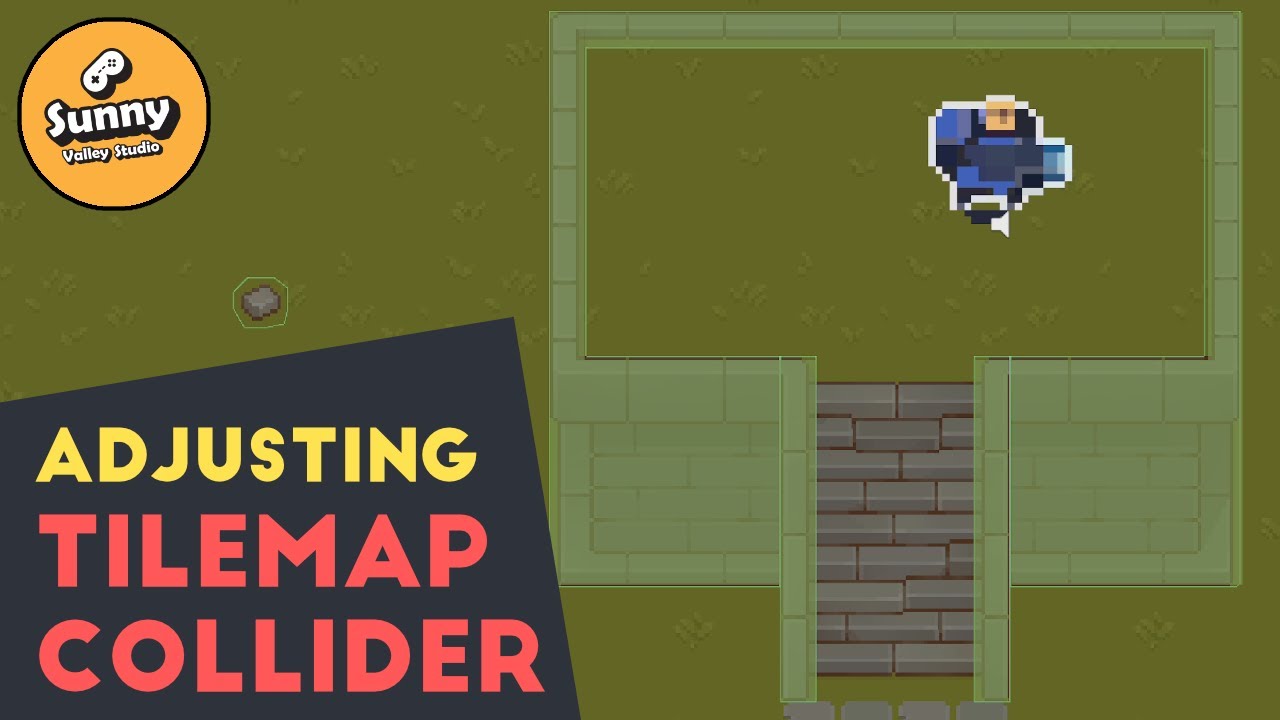
In this video we will talk about how to adjust the shape of a 2d collider in Unity.
Tilemaps in Unity allows us to quickly design levels for our games. The problem is usually with the colliders that our tiles generate. The automatically created collider doesn't always matches what we had in mind. Lucky for us there is a simple way to tweak it....
weary onyx
Any hints?
 solemn latch
Can anyone with 2d animation package 7.x, 8.x, or 9x let me know if this happens for you?
 solemn latch
weary onyx
Any hints?
solemn latch
weary onyx
Any hints?
set the custom sorting axis correctly?
weary onyx
solemn latch
set the custom sorting axis correctly?
0, 1, -.26
right?
solemn latch
I dunno, I don't do isometric stuff
I believe there's a link in the pinned messages to the isometric handbook unity made

 edgy pawn
Hi, looking for some help related to layering/sorting on an isometric. I'm having some difficulty figuring out the proper method to have a character be able to walk up on stairs and behind/under. I'm not sure if this can be achieved just by layering properly or if it also requires some code
 elfin sandal
limber cradle
how to change the size of this palette back to 1 by 1 ratio?
elfin sandal
limber cradle
how to change the size of this palette back to 1 by 1 ratio?
pixels per unit in the sprte properties

 scarlet lark
How it looks:

vs how it should look:

The pixels are stretching in some places. How would I fix this?
timber fog
scarlet lark
The pixels are stretching in some places. How would I fix this?
you have a couple of options:
- Pixel perfect camera
- Making sure your camera size fits the amounts of pixels
- Make/use a shader that does pixel filtering to make it pixel perfect
scarlet lark
timber fog
you have a couple of options:
1. Pixel perfect camera
2. Making sure your camera...
thank you. i'll try the 2nd one first and hope for the best
limber cradle
limber cradle
how to change the size of this palette back to 1 by 1 ratio?
I don't mean in my scene, I mean inside the Tile Palette window
 mortal ivy
Hi everyone, I have a beginner problem but I hope you can help me:
I am using a Rule Tile for my 2d StreetLamp and I want to add my 2d URP Lamp Prefab when the sprite shows my Bulb 💡. The Prefab is rotated by 180 degrees, so it lights up the floor and not the sky, but if I put the Prefab in the Game Object Reference in the Rule Tile, it shows up in the scene but isn’t rotated by 180 degrees.
Do you know what I am doing wrong?
 solemn latch
 chrome bronze
why is it it is only doing the bone geometry for the torso?
chrome bronze
why is it it is only doing the bone geometry for the torso?
Because you only have the torso selected?
 ashen ravine
Is there a way to reverse the slice here?
so when scaling the image the green part will be scaled and the left and right parts will stay the same?
 modest cargo
@balmy elk It may be more relevant to continue the tilemap discussion here, though I'm not sure if I can be of more help
 balmy elk
I'll play around with it a bit and see how far I come, thanks!
modest cargo
balmy elk
I'll play around with it a bit and see how far I come, thanks!
We're on the same page about the gradient mapping, but I'm maybe a bit too unfamiliar with tiles, a bit too unfamiliar with your specific case and/or too zoned out to understand the problem with the custom tile types
But I don't mind hearing about your progress and solutions
balmy elk
No worries! I'll let you know if I make progress, maybe it will also make more sense with some pictures 🙂
 dire adder
so... I got a tileset from the asset store and its size is a bit different from the one I was using previously...

how do I change the size to fit the grid again? I don't quite remember...
Do I have to change the pixel per unit from every texture added to the tileset? or its there something else I can do instead?
This is... going to take a while... there are a lot of tiles
timber fog
dire adder
Do I have to change the pixel per unit from every texture added to the tileset? ...
Probably faster to write an editor tool to automate that
You can use TextureImporter class to modify the texture settings
dire adder
Not really? Since I only need to adjust the ppu once for each image and I can select multiple images at once to do that faster, and since the assets from the pack all have the same size, I can just do crtl+a on them and adjust the ppu accordingly.
 west veldt

