#archived-code-general
1 messages · Page 457 of 1
 dawn nebula
2023.1
 simple saffron
anything like odin inspector or the like?
 maiden fractal
Many packages do their own custom inspectors for scripts, is there one?
 somber nacelle
yeah this is 100% a custom inspector
 vestal arch
you sure you just found that script? was it not a plugin/asset?
dawn nebula
alright getting this on a raw project

okay what weirdo shit did I download months ago
maiden fractal
dawn nebula
okay what weirdo shit did I download months ago
What’s wrong with it though? It looked much nicer did it?
dawn nebula
maiden fractal
What’s wrong with it though? It looked much nicer did it?
Oh it does, I just don't like not knowing what's causing certain things.
maiden fractal
With just two lists theres definite visual disconnect between elements and therefore big risk of mistakes
dawn nebula
Side note. Any good suggestion for serializing dictionaries natively in Unity?
dawn nebula
maiden fractal
With just two lists theres definite visual disconnect between elements and there...
ya I dislike it
simple saffron
not sure if this is better as a code question or an animation question but is there a way to play an animation at runtime that does not exist as part of the animator?
For example, if I have a gesture animation that I want to play, where that gesture could be any one of x gestures, I'd plug that one in and then play that
I'm aware of animator overrides, since I already use those for a lot of stuff
maiden fractal
dawn nebula
Oh it does, I just don't like not knowing what's causing certain things.
Most likely custom inspector. Should be a c# class somewhere in the project
vestal arch
dawn nebula
okay what weirdo shit did I download months ago
was it perhaps not just that class
vestal arch
dawn nebula
Side note. Any good suggestion for serializing dictionaries natively in Unity?
unity doesn't natively serialize dictionaries
the workarounds are
- list of keys + list of values
- list of entry structs (key + value in the entry)
- custom serialization
dawn nebula
Let me restate my question. Dictionaries are useful. It would be nice to be able to use them in the Inspector. How best do?
vestal arch
i mean depends on what you mean by "best"
imo easiest to set up would just be importing a serializeddictionary asset
there are free ones available in the asset store
 lean sail
dawn nebula
Side note. Any good suggestion for serializing dictionaries natively in Unity?
lean sail
dawn nebula
Side note. Any good suggestion for serializing dictionaries natively in Unity?
There is an asset on the asset store which is free and pretty good.
dawn nebula
lean sail
There is an asset on the asset store which is free and pretty good.
What's it called?
vestal arch
SerializedDictionary
maiden fractal
dawn nebula
Oh it does, I just don't like not knowing what's causing certain things.
You can look for [CustomEditor(typeof(TestDictionary))] at the starts of the scripts. Your IDE most likely has feature to find from all files of the project too
 little meadow
you already have one that works, no? is there any problem with it?
lean sail
dawn nebula
What's it called?
 night harness
+1 to ayellowpaper's implementation
dawn nebula
Ah it was Odin. I though I needed to use SerializdMonobehaviours to get dictionaries to show up.
night harness
you can use yellowpapers along with odin if you prefer it aswell
dawn nebula
night harness
you can use yellowpapers along with odin if you prefer it aswell
Checking out YellowPaper's.
Seems pretty good.
I know there is some oddities with Odin and prefab variants.
Anything wrong here?
night harness
I'm not informed enough to give you a fully formed answer there but it's my understanding that ayellowpaper's solution does not have those problems? I think due to Odin's standards in how they implement things?
 latent latch
Unity's got their own SerializedDictionary which works fine
just need to make a custom drawer
vestal arch
latent latch
Unity's got their own SerializedDictionary which works fine
it does? where?
latent latch
night harness
unity devs got sick if it not being built-in lmao
latent latch
I assume it's used with something like visual scripting
vestal arch
it's presumably for rendering pipelines given that it's in that library
latent latch
still no clue how 2D tileset serializes because I've no clue how they do the undo operations if you can't serialize that stuff, otherwise it's being rebuilt each time it undos
night harness
It really should be built in though like i know theres reasonsTM but
vestal arch
night harness
It really should be built in though like i know theres reasonsTM but
backwards compatibility 😩
night harness
vestal arch
backwards compatibility 😩
its kinda giving that "omg you people cant do anything" adhd meme
visual scripting also has type serialization
or at least a proper drawer for it
very jealous
vestal arch
relevant xkcd(s) https://xkcd.com/1172/ https://xkcd.com/927/
night harness
 dawn nebula
latent latch
https://docs.unity3d.com/Packages/com.unity.render-pipelines.core@17.3/api/Unity...
dawn nebula
latent latch
https://docs.unity3d.com/Packages/com.unity.render-pipelines.core@17.3/api/Unity...
Okay but this is what its inspector looks like.
 latent latch
Pretty much what a dictionary is lol
that you can serialize
Like I said, you probably want to make a custom drawer
dawn nebula
latent latch
Pretty much what a dictionary is lol
My monkey eyes do not want to perceive the underlying arrays/lists.
night harness
My theory is if they did any custom drawer it would have to meet the pre-existing standard so doing nothing is more viable than bare minimum
But yeah just use ayellowpaper’s
dawn nebula
night harness
But yeah just use ayellowpaper’s
Ya probably will. Looks solid enough.
vestal arch
night harness
My theory is if they did any custom drawer it would have to meet the pre-existin...
method A -> "why didn't you do it like B? terrible design"
method B -> "why didn't you do it like A? terrible design"
simple saffron
simple saffron
not sure if this is better as a code question or an animation question but is th...
bumping this question, hoping someone has done something similar before
if its google-able, im not sure how to google it on this occasion
latent latch
You can swap out clips assuming you have the states setup in your animation controller
otherwise legacy animation clips
simple saffron
thought so. I'm already using overrides for the rest of the animations, so I suppose I could just swap out a specific gesture animation whenever I want to use it
 peak chasm
simple saffron
not sure if this is better as a code question or an animation question but is th...
peak chasm
simple saffron
not sure if this is better as a code question or an animation question but is th...
Animancer probably. You can do it with playables as well
simple saffron
playables might be a good option. I don't want to have to buy an asset for one feature in a game
peak chasm
It has a free version that has most the features can check it out
 mellow sigil
 rocky whale
oh my bad
 vestal geode
@simple saffron You also can add sates and otherwise edit an animator at runtime from a script
https://docs.unity3d.com/6000.1/Documentation/ScriptReference/Animations.AnimatorController.html
Might get clunky if you try to micromanage it too much, but it's certainly possible
vestal arch
vestal geode
<@524671365056430113> You also can add sates and otherwise edit an animator at r...
this is in UnityEditor
you can't use that in a build
the runtime version is RuntimeAnimatorController
 ripe violet
https://discussions.unity.com/t/android-build-failure-in-unity-6/1655026
Can anyone help me out regarding this issue? I have ported my project from 2022LTS to Unity6LTS.
In Unity 6, Android builds are being failed. This is a VR project for Meta Quest.
vestal geode
vestal arch
the runtime version is RuntimeAnimatorController
Good point
Are there any equivalent runtime methods after all?
vestal arch
doesn't seem like it
night harness
You can barely do anything with animations at runtime
Can’t even read the data off clips
The OverrideAnimationController is about it
 modern dew
anyone know any workarounds i can do? I'm trying to link a script from a gameobject in the hierarchy to a script on a prefab that is later instantiated into the scene, but unity says that it is a type mismatch.

Unity 2022.3.29 btw
im trying to add a value to an integer in the gold script using a function from the enemy script
help me out chat 🙏
 dry violet
As far as I know, you cannot reference a scene object from a prefab that is not in the scene.
you can reference it when instantiating it
 somber tapir
modern dew
anyone know any workarounds i can do? I'm trying to link a script from a gameobj...
somber tapir
modern dew
anyone know any workarounds i can do? I'm trying to link a script from a gameobj...
After you Instantiate the Enemy you have to set the script
modern dew
somber tapir
After you Instantiate the Enemy you have to set the script
how would I do that though
is there some unity function that automatically attaches scripts
or something
somber tapir
modern dew
how would I do that though
The script that spawns the enemies needs to have a reference to the Gold Script (this works because they are presumably both in the scene).
Then when you Instantiate:
Enemy clone = Instantiate(enemyPrefab);
clone.GoldScript = goldScript;
Well, yes
public Enemy enemyPrefab;
public GoldScript goldScript;```im kinda a noob programmer
so im not really sure how to put that in my instantiation
GameObject enemy = Instantiate(enemyPrefab, spawnPosition, Quaternion.identity);
somber tapir
is enemyPrefab of type 'Enemy' or of type 'GameObject'?
modern dew
GameObject
somber tapir
you should change it to 'Enemy' then. It will still spawn the entire gameObject with all scripts and components when you instantiate it.
modern dew
alright
somber tapir
and instead of having
GameObject enemy = Instantiate(...
you should have
Enemy enemy = Instantiate(...
somber tapir
doesn't matter
somber tapir
it's both the same
modern dew
wdym
modern dew
somber tapir
the script is also the object
im still confused about how clone.GoldScript = goldScript; would fit in
don't really understand it
somber tapir
clone is the freshly instantiated enemy
clone.GoldScript is a reference to a script of type 'GoldScript' which is currently empty (null)
goldScript is a reference to a MonoBehaviour that is in the scene
somber tapir
AddComponent creates a new script. I assume you want to have a reference to an existing script that is already in the scene
modern dew
ohh
yeah
but you know how you have to link it in the inspector
there isn't a way to do that in the script?
somber tapir
the code above is exactly how you do that in the script
if you check your cloned enemy in the scene the GoldScript reference should be no longer null or type mismatch
you just link the GoldScript first to your Enemy spawner and than "pass it on" to the enemy
 somber tapir
maybe it's private or called 'goldScript'
 modern dew
the gold script is just called "Gold"
modern dew
ill just post the whole instantiate thing
    {

        for (int i = 0; i < count; i++)
        {
            // Instantiate the enemy prefab at the specified position
            Enemy enemy = Instantiate(enemyPrefab, spawnPosition, Quaternion.identity);
            enemy.GoldScript = goldScript;
            Debug.Log("Spawned enemy at: " + enemy.transform.position);

            // Wait for 1 second before spawning the next enemy
            yield return new WaitForSeconds(1f);
        }
}```we need to see the Enemy script, at least the references at the top
modern dew
    public float speed = 2f; // Speed of the enemy
    public GameObject healthBarPrefab; // Reference to the health bar prefab

    public CustomHealthComponent healthComponent; // Reference to HealthComponent
    private GameObject healthBar; // Instance of the health bar
    private Healthbar healthbarUI; // Reference to the health bar UI script

    private bool isMovingDown = true; // Track if the enemy is moving down
private float horizontalDirection = 0f; // Horizontal movement direction```thats all the references in the enemy script
you mean the spawning script?
 somber tapir
add it back in and make sure its public
modern dew
still getting the same error
somber tapir
how did you name it
somber tapir
in Instantiate you try to set a variable called GoldScript with a capital G, so they don't match, fix that by changing either one of them.
modern dew
yeah i see it
lemme try it out rq
no more errors
lemme just write the code that does the thing i want
it works
tysm
 outer quail
Getting this error when trying to add this script to an object. Not sure why?

 somber nacelle
outer quail
Getting this error when trying to add this script to an object. Not sure why?
somber nacelle
outer quail
Getting this error when trying to add this script to an object. Not sure why?
 lean karma
outer quail
Getting this error when trying to add this script to an object. Not sure why?
lean karma
outer quail
Getting this error when trying to add this script to an object. Not sure why?
Check file and class name
vestal arch
outer quail
Getting this error when trying to add this script to an object. Not sure why?
the Instance == this means Instance will never get assigned
you don't need that check, just the Instance == null is enough
outer quail
Am I being blind? They have the same name, right?
 vestal arch
Make sure that there are no compile errors
outer quail
Right, my bad. I had an error in a different script
 robust dome
always read the error messages.
outer quail
Okay.
 fiery steeple
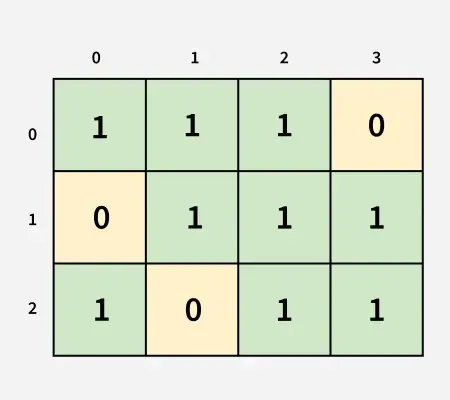
What does sr and scstand for in the example of floodFill algorithm I found please ?

 leaden ice
fiery steeple
What does ``sr`` and ``sc``stand for in the example of floodFill algorithm I fou...
leaden ice
fiery steeple
What does ``sr`` and ``sc``stand for in the example of floodFill algorithm I fou...
You'd have to ask the author of the code but probably row and column?
Maybe starting row and starting column?
fiery steeple
leaden ice
You'd have to ask the author of the code but probably row and column?
Found it here https://www.geeksforgeeks.org/flood-fill-algorithm/
GeeksforGeeks
Your All-in-One Learning Portal: GeeksforGeeks is a comprehensive educational platform that empowers learners across domains-spanning computer science and programming, school education, upskilling, commerce, software tools, competitive exams, and more.
fiery steeple
leaden ice
Maybe starting row and starting column?
yes, it's "starting" it's written at the top of the article, thanks 👍
though I don't understand what they mean by "starting row" and "starting column" 🤔
 chilly surge
That's some questionable quality code.
fiery steeple
chilly surge
That's some questionable quality code.
why ?
chilly surge
Combined with the unnecessary comments, it almost reads like AI code.
chilly surge
fiery steeple
why ?
If you have:
void ModifyA(Image image);
Image ModifyB(Image image);
What do you expect the two methods to do?
fiery steeple
chilly surge
If you have:
```cs
void ModifyA(Image image);
Image ModifyB(Image image);
```
Wh...
I have no clue because there's not enough info on what "modify" does but all I can say is one doesn't return anything while the other returns the image (I guess modified) as I don't know what A and B refers to
chilly surge
A and B doesn't matter, I mean to highlight that just from reading the method signature alone, you can infer that ModifyA modifies the image you pass in, whereas ModifyB doesn't and instead returns a new image with the modifications applied.
Now look at that piece of flood fill code 😄
fiery steeple
chilly surge
A and B doesn't matter, I mean to highlight that just from reading the method si...
I don't get it, why do you say ModifyA modifies the image you pass in while B doesn't ?
Oh you mean modify directly the source
so yeah B modified a copy of that image
mellow sigil
Geeks for Geeks makes notoriously bad content. All they're good at is SEO. I wouldn't be surprised if they've started churning out AI slop
vestal arch
it's a blog site disguised as a learning resource
sometimes it's good, usually it isn't
like medium lol
 opaque vortex
So recently I realized my code was breaking the single responsibility rule which made it super long. Is there a good place to learn all these good coding practices?
 rigid island
opaque vortex
So recently I realized my code was breaking the single responsibility rule which...
rigid island
opaque vortex
So recently I realized my code was breaking the single responsibility rule which...

Refactoring is a controllable process of improving code without creating new functionality. Design Patterns are typical solutions to the commonly occurring problems in software design.
and there is no hard set rule, especially for SOLID.
they are mostly suggestions for cleaner code, you can break the rule once in a while if its easier for you to get the intended result and works
 viscid prawn
Hey, anyone got any resources for custom SRPs? I'm getting consistent editor crashes when trying to enable MSAA on my rendertarget and there's no obvious way to debug it.
(I've already looked at the manual and a github repo with examples, they seem outdated for rendergraph)
 buoyant marten
Hi guys can anyone tell me why my tracer Keeps Bending/ flying off to the left as shown in the video if i drag my mouse to the left.
Note that this only happens when i drag my mouse to the left, if i drag right the tracer behaves as intended
Here are my code files that control the gun shooting and the tracer
In short i get the aiming reticles position from the aiming reticle script and the use it in the player shooting script
vestal arch
buoyant marten
Hi guys can anyone tell me why my tracer Keeps Bending/ flying off to the left ...
!code
 tawny elkBOT

Posting code
📃 Large Code Blocks
Use links to services like:
https://paste.mod.gg/, https://hastebin.skyra.pw/, https://paste.ofcode.org/, https://paste.myst.rs/
📃 Inline Code
Surround code with three backquotes. Not quotation marks.
To format as C#, add cs to the first line:
```cs
// Your code here
```
Add a comment with a line number if there is an error message.
rigid island
instead of wall of text , you skipped the 📃 Large Code Blocks part..
simple saffron
vestal geode
<@524671365056430113> You also can add sates and otherwise edit an animator at r...
animator overrides should be enough for what I want to do, I hope
I was looking into replication of animator.play as well, it would seem there's the caveat of it not syncing the state time when you call it multiple times, though I don't play to let players spam emotes
rigid island
unable to fully see code I'm at work but from the video it looks like you're moving the end point while the line is going towards there ?
buoyant marten
thats what i originally thought but i use lockedEnd And lockedStart variables to yuse the very original start and endpoint so turning or moving would not affect the tracer but this fix did not work.
also
I am setting 2 points start and end
first the tracer spawns and extends from start to end
then the tracer reduces from start to end
this creates an illusion that the gun is actually firing a bullet
(The real bullets are so small so the player dont see those)
the problem : when dragging and rotating the player to the left the tracer turns/warps weirdly ehen dragging to the right this does not happen
here is the link to the coroutine where i handle the tracer extension and shortening
rigid island
coroutines can overlap
if you are running one and its finishing, you could be starting another that messes the previous coroutine if they modify the same value/object
buoyant marten
oh i did not know that
rigid island
You might have to instance different tracer (like a prefab you can setup each shot) / maybe pool them
buoyant marten
hmm so if im understanding correctly, when i fire rapidly the couroutine changes also the older tracers and modifies their start and end positions. causing the warping effect
rigid island
yeah thats what it looks like to me, because again starting a coroutine will not stop the previous one (unless you explicitly code it so)
buoyant marten
Hmm this was a very good point and thanks for that but the issue still exists when i fire only once and after firing drag left fast and then the tracer turns/warps
rigid island
gotta debug that endposition and see whats happening there
maybe put a gizmos there
buoyant marten
private void SpawnTracer(Vector3 start, Vector3 end)
{
    // Always spawn a new tracer instance
    GameObject tracerInstance = Instantiate(tracerPrefab);
    StartCoroutine(AnimateTracer(tracerInstance, start, end));
}
I fixed the overlapping issue like this
buoyant marten
rigid island
gotta debug that endposition and see whats happening there
Okay i put gizmos to the tracers endpoint and and another to the aiming redicles position and i noticed that the tracer endpoint does not follow the aiming redicles movement which is intended and i took a look at the scene window and there the tracer does not warp or turn and works as intended but in game window the tracer warps any idea why
as in the tracer is dependent on the cameras view angle
rigid island
buoyant marten
as in the tracer is dependent on the cameras view angle
its possible , especially if camera is in perspective view
buoyant marten
its a cinemachine freelook camera
rigid island
buoyant marten
its a cinemachine freelook camera
yeah but how do you calculate the end
buoyant marten
Vector3 hitPointLeft = CastGunRay(gunLeftAimLine);
Vector3 hitPointRight = CastGunRay(gunRightAimLine);

Vector3 averagePoint = (hitPointLeft + hitPointRight) / 2f;

smoothedAveragePoint = Vector3.Lerp(smoothedAveragePoint, averagePoint, Time.deltaTime * smoothSpeed);
Here.
so the end = Smoothed averagepoint
aka the aiming reticles position
rigid island
buoyant marten
```cs
Vector3 hitPointLeft = CastGunRay(gunLeftAimLine);
Vector3 hitPointRight =...
how do you get the original point in the first place
might be something to double check here if its changing oddly during turning though
buoyant marten
and now when i disable the lenghtening and shortening of the tracer and just spawn a tracer line and dont destroy it the line turns when i turn the players camera so the tracer is trying to face the camera
rigid island
if you're using a ray why not use Ray.GetPoint
buoyant marten
rigid island
if you're using a ray why not use Ray.GetPoint
Because im dumb XD
rigid island
haha naw just seems you might have slightly overcomplicated it and given weird result cause of it
buoyant marten
rigid island
haha naw just seems you might have slightly overcomplicated it and given weird r...
YUP and i see now that the line renderer component is rotating the spawned line so it matches the cameras look angle because otherwise the line is not visible from all angles
rigid island
buoyant marten
YUP and i see now that the line renderer component is rotating the spawned line...
you think its the line renderer messing it up ?
buoyant marten
The LineRenderer's "Alignment" setting is what’s causing your tracer line to "rotate" or "warp" as you move the camera.
chat gpt's responce
In Unity, the LineRenderer component has an Alignment setting that determines how the line is drawn relative to the camera or world.
rigid island
I always used a tracer with line render default settings i never seen it change the actual points, only rotates / billboards the sprite for me
don't take anything GPT says as gospel, it makes up half the shit to make it sounds pleasant/plausible to the user
buoyant marten
yeah
hmmh im just wondering how can i now make the line not to turn when the camera turns
in the allignment settings there is transform z setting but then the line is not visible or very thin in some angles
rigid island
that I don't know much about :\ I barely worked with linerenderer to have deep knowledge of it
I used it with basic weapon tracer but worked fine for me , I used LLamaAcademy video for tracers on Raycast bullets
buoyant marten
ok i go check it out
 hidden nacelle
Hey, guys. I want to rotate a gameobject depending on its velocity (in my case pointer delta), but it's really jaggy. Is there something I do wrong?
 buoyant marten
Use Quaternion.Lerp or Quaternion.Slerp to interpolate toward the target rotation
the jaggy rotation you are experiencing could be due to frame-to-frame noise in the pointer delta and the direct assignment to transform.rotation
buoyant marten
hidden nacelle
Hey, guys. I want to rotate a gameobject depending on its velocity (in my case p...
also remember to scale with Time.deltaTime for consistency across framerates.
rigid island
fyi mouseInput is already framerate independent
leaden ice
The code seems to be setting the rotation to the delta.
It should be adding the delta to some variable or to the rotation
rigid island
 keen lake
ah thanks
rigid island
also provide more info on the setup like screenshots and networking tool used
 neon plank
If I want to create a texture from code, which GraphicFormat should I use? There are some many, and many of them look quite similar. ¿Is there a general purpose one? 🤔
I'm programming an atlas generator, so I take a bunch of random sprites [probably with different texture formats] and merge them into a single texture, so I would need a texture format that works for many different inputs.
On a partial related topic, just found out that GetPixels32 doesn't support retriving a block of pixels, unlike GetPixels. Weird
 broken light
anyone know what this means:
Objects are trying to be loaded during a domain backup. This is not allowed as it will lead to undefined behaviour!
UnityEditor.Graphing.GraphObject:OnBeforeSerialize ()
im creating a new material instance in my monobehaviour in edit mode but i also destroy it
 cosmic rain
broken light
im creating a new material instance in my monobehaviour in edit mode but i also ...
cosmic rain
broken light
im creating a new material instance in my monobehaviour in edit mode but i also ...
Where exactly are you creating it? The timing is the problem most likely.
broken light
OnEnable and OnValidate both destroy and re-create the material they both call this method:
    void CreateMaterial()
    {
        if (_material != null)
            SafeDestroy.Release(ref _material);
        _material = new(_buildingAsset.FloorMaterial);
    }
Sounds like very bad places to create and destroy objects.
little meadow
Remove it and see it fixes your problem. OnValidate can be called at weird times (there was a way to if it, but i don't remember exactly atm)
broken light
possibly but i need it to work in editor and run time so its confusing how to set it up
ill try remove on validate
cosmic rain
In editor it's best to hook an editor script.
broken light
wouldnt that mean making buttons to do it all manually
cosmic rain
No. You could hook it up to some editor specific events.
broken light
oh
 dire pelican
I'm having this extremely bizarre issue. I have this if statement that's functioning correctly. The instantiate() inside however is creating two objects, yet putting a debug.log statement tells me that the if statement is running only once...
On top of that, the first of the two empty "Rocket" objects is at 0,0,0, instead of the position it's supposed to be at (21, 0, 0). Removing the instantiate line creates no "Rocket" objects at all, so it's clearly this script that's creating them. There's no other object called "Rocket" prior to running this script either.


A tool for sharing your source code with the world!
vestal arch
dire pelican
I'm having this extremely bizarre issue. I have this if statement that's functio...
is the rocket perhaps creating another copy itself
leaden ice
dire pelican
I'm having this extremely bizarre issue. I have this if statement that's functio...
Instantiate is creating one object
The other object is created when you call new GameObject()
You're making a new object with new GameObject and then cloning the new object with Instantiate
Hence two objects are created
dire pelican
oh wait yeah that's stupid
leaden ice
You should instantiate a prefab instead
leaden ice
Instantiate a prefab
dire pelican
leaden ice
You should instantiate a prefab instead
an empty prefab...?
vestal arch
leaden ice
The other object is created when you call `new GameObject()`
oh lmao missed that
leaden ice
Pick one or the other
 fading quail
Do you guys know any good timeline tools? Unity timeline causes me so much manual work. I have a activation track and I want to play fadeout before object disables. Now I have to manually do signaltrack to tween function and place it manually before object disables from activation track
 steady bobcat
You can make your own playable + track to do this
fading quail
I need to read more on this. Haven't done any palyables yet.
steady bobcat
fading quail
I need to read more on this. Haven't done any palyables yet.
Unity have some examples which may help you make something yourself:
https://docs.unity3d.com/Packages/com.unity.timeline@1.8/manual/samp-custom-samples.html
There is also an old blogpost but I think its a tad outdated now
https://unity.com/blog/engine-platform/extending-timeline-practical-guide

Unity
Unity launched Timeline along with Unity 2017.1 and since then, we have received a lot of feedback about it. After talking with many developers and responding to users on the forums, we realized how many of you want to use Timeline for more than as a simple sequencing tool. I have already delivered a couple of talks about this (for instance, at ...
fading quail
Thank you! I'll put those examples to an LLM and ask it to teach me the basics 🙂
steady bobcat
haha oh no
fading quail
LLM is the best teacher
steady bobcat
no
they lie and are not fully reliable. its okay to use it to help but you need to learn things yourself too
fading quail
Well.. I don't mean that I ask LLM to write me a code. I send a code and ask it to break down and explain everything. Then I usually ask it to make me a exercise
But I get your point. They aren't always reliable. When something does not work, then I google or ask here.
steady bobcat
Yea i'm not a fan of "make this thing for me" when you don't yourself understand how as that's sure to lead to mistakes you cannot solve
Sometimes i ask an ai chat about some obscure thing but its often no help so i give up 🤷♂️
fading quail
Biggest problem for me is that I don't know what's available inside Unity. I changed from Godot->Unity.
steady bobcat
Unity has no shortage of tutorials and articles written about what unity can do
fading quail
This question I tried asking LLM but it suggested activationtrack + signal or making script that searches end of the clip. I thought there might be a better way so I came here.
fading quail
steady bobcat
Unity has no shortage of tutorials and articles written about what unity can do
Yeah I have noticed that. Also, Unity community is somewhat worse than Godots. Only a few people answer questions. (Thank you for helping me)
vestal arch
fading quail
LLM is the best teacher
definitely not
steady bobcat
I've often had a good experience on here and elsewhere with unity related questions but ive been using unity since v4.5
The recent rise of LLMs has degraded things somewhat however, people asking for help with code they generated and have no idea about for example.
fading quail
steady bobcat
I've often had a good experience on here and elsewhere with unity related questi...
First I hated C# after using phyton so long but now I start to like it
But yeah, LLM code is usually bad. Sometimes I get 300 lines of code that could be done like 20 lines of code.
 quiet panther
What is this error?

 dusk apex
quiet panther
What is this error?
dusk apex
quiet panther
What is this error?
Is this code related? (relative to code you've written etc)
This is the coding channel.
You might want to provide information on what you're doing as well.
quiet panther
ok
hidden nacelle
buoyant marten
Use Quaternion.Lerp or Quaternion.Slerp to interpolate toward the target rotatio...
ty so much, couldn't reply yesterday
 vestal gulch
I am trying to add an event system to a game I am working on, but I have been having an issue that happens when both Blackout and FlickerLights coroutines are started. Whenever either is called, unity immediately hangs, which is weird as there is no infinite loops in them. The lights list is also empty. The editor logs also show that the Debug.Log("first wait"); line is getting reached, however the last Debug.Log() line appearing in the console. is Debug.Log("Event loop starting"). Both the editor log and the script is in here: https://paste.mod.gg/zxeigynlgjlw/1. The attached video might help with explaining what issue I am having.
A tool for sharing your source code with the world!
steady bobcat
vestal gulch
I am trying to add an event system to a game I am working on, but I have been ha...
If you attach a debugger and pause during a "freeze", where does it pause?
at first glance I dont see a loop without a yield in it...
vestal gulch
What do you mean by "attach a debugger" and by pause do you mean press this button?
 leaden ice
vestal gulch
What do you mean by "attach a debugger" and by pause do you mean press this butt...
leaden ice
vestal gulch
What do you mean by "attach a debugger" and by pause do you mean press this butt...
Your IDE has a debugger which let's you pause the actual code execution and look at the state of the program and step through it line by line
steady bobcat
vestal gulch
What do you mean by "attach a debugger" and by pause do you mean press this butt...

Visual studio, vs code and rider all have a debugger usable with unity
vestal gulch
I added some breakpoints and attached the debugger, and after playing it again, the first line with a breakpoint turns into this

It still seems to hang, but I am not sure if that is because of the breakpoint or something else
 naive swallow
So, it hangs here? Like, if you hit next line it freezes here?
vestal arch
that looks normal breakpoint behaviour?
vestal gulch
I dont see a next line button, or is it supposed to be a keybind?
leaden ice
vestal gulch
I added some breakpoints and attached the debugger, and after playing it again, ...
Don't add breakpoints.
Remove all the breakpoints and wait for the game to hang. Then hit pause in the debugger and look at the call stack
naive swallow
vestal gulch
I dont see a next line button, or is it supposed to be a keybind?
It's one of the control buttons
https://learn.microsoft.com/en-us/visualstudio/debugger/debugger-feature-tour?view=vs-2022

Get started debugging your applications by using the Visual Studio debugger and see what your code is doing while it runs.
vestal gulch
leaden ice
Don't add breakpoints.
Remove all the breakpoints and wait for the game to hang...
Do you mean the break all button in the debug dropdown?
 leaden ice
Maybe? Idk what it's called
There should be a pause button at the top of the app
(assuming the debugger is connected)
steady bobcat
When attached via this button, it should then change to have a pause button:

you can use that to pause anytime and if user code is running it should show it in the stack trace window at the bottom

 steady bobcat
Hmm then you can try adding a break point after your editor freezes to see if it really is your code that is looping forever
vestal gulch
Oh wait, after relaunching unity, those options are now available
 steady bobcat
attach and then make it freeze and see if you can then "pause" from VS
The idea is we want to see what code is doing this
If it says something like "no managed code" or something go check the call stack section
vestal gulch
It froze and I pressed the break all button, and a new tab opened that looked like this
 steady bobcat
There should be a few small windows at the bottom, one should be "call stack". If not you can go to Window > Debugger > call stack to show it.
vestal gulch
The window looks like this:
 steady bobcat
Oh, there was a bug with burst that caused a freeze. What version of burst does your project have?
try updating that and other packages and try again
vestal gulch
The package manager says this:
 steady bobcat
what unity version is this?
vestal gulch
2022.3.6f1
steady bobcat
update to the latest 2022.3 version and then update packages to rule out those
make a project backup if not using GIT/UVC/SVN
vestal gulch
It is currently downloading 2022.3.62f1
steady bobcat
nice, you are quite behind 😆
vestal gulch
Its only 2 years old...
steady bobcat
2 years of fixes
vestal gulch
It is currently launching and installing packages
burst just updated to version 1.8.21
steady bobcat
I hope it helps, if not you may need to search though "threads" when paused in the debugger to find the main thread code and then check the stack again
vestal gulch
Unity is still hanging, and after pressing the break all button, the call stack looks like this
 steady bobcat
any other threads? When is it hanging, when you try to enter play mode? Some time during play?
vestal gulch
It seems to be hanging whenever it reaches one of these two lines:
yield return StartCoroutine(FlickerLights());at line: 53yield return StartCoroutine(Blackout());at line 57
At least thats what i have got from debugging yesterday
steady bobcat
can you put a breakpoint in both and continue?
But you need to check the other threads and see if your c# code is running on one
have a look and see what you can figure out. i doubt it is burst anymore now you updated
naive swallow
vestal gulch
It seems to be hanging whenever it reaches one of these two lines:
- `yield ret...
Can you show the code for those coroutines?
There might be an infinite loop in one
vestal gulch
I think it might be hanging before that. VS seems to think that it is reached the yield return StartCoroutine(FlickerLights()); line, but the console is not showing the debug.log statement right before it
 leaden ice
vestal gulch
Unity is still hanging, and after pressing the break all button, the call stack ...
leaden ice
vestal gulch
Unity is still hanging, and after pressing the break all button, the call stack ...
which thread is this?
that looks like the compiler thread
you need to find Unity's main gameplay thread
vestal gulch
naive swallow
There might be an infinite loop in one
There is no infinite loop. That was my first assumption when it was hanging


 steady bobcat
vestal gulch
There is no infinite loop. That was my first assumption when it was hanging
steady bobcat
vestal gulch
There is no infinite loop. That was my first assumption when it was hanging
step through the code here and see what happens
naive swallow
Could also be recursion, if any of these functions are calling each other or if they're spawning objects that spawn more objects
vestal gulch
steady bobcat
step through the code here and see what happens
I am pressing the step into and step over buttons and once it finished the flickerlights coroutine, it started going through the hdaditionallightdata script and then just stopped
steady bobcat
then where exactly did it "stop"?
vestal gulch
after it went through all the lines in the LateUpdate function
steady bobcat
so after that frame, your coroutines never ran again?
does the unity editor freeze and show "not responding"?
vestal gulch
These buttons greyed out, and the yellow line just dissapeared
 vestal gulch
It is currently frozen, and in task manager it says running until i try to end the task, then it gives me an error and swaps to not responding
steady bobcat
- attach debugger
- play
- wait for editor freeze
- pause debugger in ide
- check threads window to find main thread
- look for your code or something else you recognise
vestal gulch
After pausing, the threads window is empty...
 steady bobcat
Hmm it should have some so something is wrong
vestal gulch
After breaking, the window that popped up now says
 steady bobcat
now check threads again
vestal gulch
clicking the view all threads shows this.
 steady bobcat
im out of ideas then, something is royally fucked if it cant show any managed code threads
vestal gulch
Tried updating VS, but that didn't change anything
Thanks for trying to help though
cosmic rain
vestal gulch
After breaking, the window that popped up now says
How are you attaching the debugger? Can you record a video of what you're doing?
If you're not using "attach to unity", but attach to process, then you're likely messing something up.
And if you're using "attach to unity" it would usually only includes limited info(like only code that is related to your project assembly).
cosmic rain
vestal gulch
Ok, try attaching to process instead.
vestal gulch
After pressing the break all button, this window appeared:
 cosmic rain
If it's asking for c/c++ code, you can cancel it.
You should have an access to threads now.
And more importantly callstack
vestal gulch
The threads list is now full
 cosmic rain
Hmm... Seems like something during jit compiling.
cosmic rain
vestal gulch
The threads list is now full
Can you try again, but when attaching to process, specify managed application(or whatever the option is other than native).
vestal gulch
I am trying to close unity through task manager, but it keeps saying The operation could not be completed. Access is denied.
cosmic rain
vestal gulch
I am trying to close unity through task manager, but it keeps saying `The operat...
Did you disconnect the debugger?
vestal gulch
Fixed it by disconnecting it
vestal gulch
cosmic rain
Did you disconnect the debugger?
no i didnt 😢
Am i supposed to check Managed Compatablity Mode?
 cosmic rain
vestal gulch
Am i supposed to check `Managed Compatablity Mode`?
cosmic rain
vestal gulch
Am i supposed to check `Managed Compatablity Mode`?
I think managed .net 3.x should work, but if you can select multiple select all the managed stuff.
vestal gulch
I can only check one of the Managed (.NET options with the managed compatiblity mode
It is set to Managed (.NET 3.x, .NET 2.x) code, Managed Compatibility Mode
With those settings, this window appears when i try to break all
 cosmic rain
vestal gulch
With those settings, this window appears when i try to break all
cosmic rain
vestal gulch
With those settings, this window appears when i try to break all
Hmm... So no managed code is running I guess..?🤔
cosmic rain
vestal gulch
It is set to `Managed (.NET 3.x, .NET 2.x) code, Managed Compatibility Mode`
Don't any other code types work? Like .net core?
Script or unity
vestal gulch
Sorry for the wait, I was eating supper
Same thing happens with unity, and for script, the break all button greys out and nothing else happens
cosmic rain
vestal gulch
Same thing happens with unity, and for script, the break all button greys out an...
I see. Btw, did you check if there's any useful info in the log, when it freezes?
Also, make sure that your ide is configured correctly.
steady bobcat
If needed, this extension should make vs show managed and native code together in the debugger callstack:
https://github.com/Unity-Technologies/UnityMixedCallstack

GitHub
Visual Studio native debugger extension to help debug native applications using Mono. - Unity-Technologies/UnityMixedCallstack
 deep stirrup
Hello, I have a pretty compact but filled with tons of objects scene. Most of the scene is static and have baked lightmaps. The issue I am having is that it takes like 2 minutes to load, which is huge, so how can I reduce this time? I've read about instancing prefabs at runtime to reduce load time, but for my case it isn't the way, since the scene is pretty much a big static decoration with baked GI. I also read about splitting scenes into subscenes and load them in additive way, but I don't think this will help, since I need almost whole thing in view at one time and splitting my scene would be a literal pain (but if this is the only way, I guess I will have to), so what should I do?
night harness
gotta use the profiler in order to figure out whats taking so long
deep stirrup
This does make sense, but I think this is caused by huge amounts of GameObjects on scene, it's tens of thousands. Maybe there's a way to merge static objects into one, reducing parenting and other garbage stuff (not renderers batching, since batching will only help with reducing draw time, not loading)
night harness
i say this purely in a objective answer sense
it doesn't matter what you think
you gotta know
deep stirrup
oh, okay
night harness
optimisation in any direction can be pushed to obscene extents so before diving into a rabbit hole make sure it's one you want
 kind willow
then you realize you need your own engine
 last quarry
deep stirrup
This does make sense, but I think this is caused by huge amounts of GameObjects ...
last quarry
deep stirrup
This does make sense, but I think this is caused by huge amounts of GameObjects ...
There’s no real overhead from GameObjects persay
Occlusion culling doesn’t like obscene amounts of objects but if you do that on the GPU instead it’s fine
 vapid vessel
last quarry
There’s no real overhead from GameObjects persay
vapid vessel
last quarry
There’s no real overhead from GameObjects persay
well, maybe not from the gameobject directly - but every component attached to it will increase loading time 😂
night harness
One thing that can commonly contribute to initial scene loading time is meshcollider initialization iirc
last quarry
vapid vessel
well, maybe not from the gameobject directly - but every component attached to i...
Yeah but that's not really noticeable until you hit 100,000, I've found
last quarry
night harness
One thing that can commonly contribute to initial scene loading time is meshcoll...
Yes, and worse, this happens synchronously on the main thread.
deep stirrup
night harness
gotta use the profiler in order to figure out whats taking so long
Interestingly, in editor scene loads just fine in 10 seconds max, even if I am loading it the first time during session, is there a way to check what takes so much time in build?
last quarry
Yeah, profiler.
deep stirrup
wait, you can use profiler in build?!
last quarry
Yep
deep stirrup
💀
vestal geode
deep stirrup
wait, you can use profiler in build?!
It's better to use it in build because there's a lot of extra stuff going on in the editor
deep stirrup
vestal geode
It's better to use it in build because there's a lot of extra stuff going on in ...
I agree, but damn, how did I miss the fact that it's compatible with build...
last quarry
A lot of the debugging tools work with builds
steady bobcat
Development builds support debugging (if enabled too) and other tools such as the profiler and frame debugger
last quarry
Never did manage to get that one to work
 midnight flicker
Does anyone here know about particle Systems? I'm currently working a beam that continuously explodes the ground causing around 50 Explosion prefabs to appear. Each filled with about 5 particle Systems. Shooting one is fine but, at 5 the Frames drop significantly. I have implemented object pooling, so the instantiation side of the lag is fixed, and it's still lagging, so I believe the Problem is on the side of Rendering. Whenever I create the explosions it creates a ton of extra batches in the frame Debugger. Since most of the Systems are copies of the same prefab shouldn't it be possible to use GPU instancing to batch it somehow? But the option doesn't exist for billboard particles only for meshes. But aren't billboards just plane meshes?
I'm a bit confused what my general approach should be. How are you actually supposed to handle lots of particles Systems? Or is the solution to just make less?
I was unable to find a solution online that fits what I need. I would appreciate any Input.
lean sail
midnight flicker
Does anyone here know about particle Systems? I'm currently working a beam that ...
this is a coding channel, maybe #✨┃vfx-and-particles
midnight flicker
sorry
 visual fjord
Hi
An question
I using the new input system in my project

So, I have a value that change in array
But only it change one time, when press the button
So, I don't know
vestal arch
your WeaponCurrent is inconsistent - sometimes it's the index of the current weapon, sometimes it's one more, sometimes it's one less
you should probably make it the exact index - you would change your checks to == 0 and == Weapons.Count - 1, and then use ++WeaponCurrent/--WeaponCurrent instead of WeaponCurrent++/WeaponCurrent--
vestal arch
what?
visual fjord
Forget it
 trim schooner
Delete from here and ask in #archived-shaders
 sacred zenith
oh okay my bad
 thorn crag
So, I am currently trying to optimize and rewrite so code for a script that picks a bunch of cards at random, and for some reason, it will only set the first Slot to it's game object, however it outputs all of the Debug.Logs like it had set all of them, Help would be appreciated! I have also provided the unoptimized function (CardUpdate) and some other functions that are also related. (I sent this in #archived-code-advanced by accident and had to move it sorry)
The code: https://paste.mod.gg/abopytxcaddu/0


A tool for sharing your source code with the world!
rigid island
aw hell
thorn crag
sorry?
thorn crag
rigid island
this code....needs..like fire..
yeah, that is why i am rewriting it lol
rigid island
if you are using array inside of the code, why do you have numbered vars like Slot_1, Slot_2 etc
that switch is crazyy
thorn crag
rigid island
that switch is crazyy
i know
rigid island
you're probably better off with a dictionary too
thorn crag
rigid island
you're probably better off with a dictionary too
for the slots?
i have one
rigid island
im still confused why you have
Card_Slot_Array
but above all the Card_Slot_1
why not just array and already reduce half the clutter
thorn crag
rigid island
im still confused why you have
Card_Slot_Array
but above all the Card_Slot_1
it is mainly because i am still moving stuff over to arrays and i don't want to break the unrewritten code
rigid island
Oh okay.. yeah well def start by using array first lol
vestal arch
    [SerializeField] public GameObject Weapon_Slot_2;
    [SerializeField] public GameObject Weapon_Slot_3;
    [SerializeField] public GameObject Weapon_Slot_4;
    [SerializeField] public GameObject[] Weapon_Slot_Array;
    [SerializeField] public List<GameObject> Weapon_Slot_Array_Ordered;
what's the difference between these 3 wtf
arrays are already ordered
rigid island
ya List is just an array that can change size
thorn crag
vestal arch
> ``` [SerializeField] public GameObject Weapon_Slot_1;
> [SerializeField...
The Slots are always assigned to their corresponding GameObject, The Ordered one is because the amount of Card and Weapon Slots can be changed, and the Weapon Slots need to go in opposite order
lean sail
thorn crag
it is mainly because i am still moving stuff over to arrays and i don't want to ...
at a certain point you just gotta abandon this old code and rewrite it from scratch. quite literally every part of it could be improved massively
once you just use arrays/lists properly, this code is probably cut down by more than half
vestal arch
thorn crag
The Slots are always assigned to their corresponding GameObject, The Ordered one...
because the amount can be changed
ok, this explains why there's a list.. but why is there an array at all then
thorn crag
vestal arch
> because the amount can be changed
ok, this explains why there's a list.. but w...
i don't know
lean sail
i also question why there are multiplayer parts here. if you arent very familiar with coding, this is just a bad idea
thorn crag
the full project is multiplayer, i am kind of using this to get familiar with how coding for multiplayer works. I know it is a bad idea but i wanted to try anyways
vestal arch
learn one thing at a time
rigid island
agreed, you should not be throwing networking ontop of the complications as beginner to get Inventory to work
Inventory is already a crazy beast in itself, add multiplayer ontop its a disaster waiting to happen just being honest
lean sail
thorn crag
the full project is multiplayer, i am kind of using this to get familiar with ho...
you wont learn multiplayer if you're struggling at every step of the way. take a step back and learn basics of arrays/lists. multiplayer shouldnt even be a thought right now
thorn crag
lean sail
you wont learn multiplayer if you're struggling at every step of the way. take a...
i know how arrays and lists work
thorn crag
rigid island
agreed, you should not be throwing networking ontop of the complications as begi...
This is not inventory??? this is for the menu to select a card
rigid island
tomato , tomato.. same concept
lean sail
you very clearly are not familiar with how to use them properly given the code above. plus in your initial message, you had a null error screenshot. if you aren't familiar with how to debug an error as common as this, multiplayer isnt for you yet.
vestal arch
do you know how loops work
oh wait there are loops in there whoops
Card_Update could probably be 10% of its current length with loops lmao
thorn crag
vestal arch
`Card_Update` could probably be 10% of its current length with loops lmao
That is what Card_Update_Optmised is, I am working on rewriting Card_Update
that is why i came here
vestal arch
ah, that explains it
rigid island
perfectly valid, but you are better of rewriting it rather than refactor
vestal arch
generally rewriting something like this in place tends to be easier though fyi
lean sail
there is so much in that code that needs to just be scrapped. im sure most of us would just start with a clean plate rather than trying to modify the current logic thats going on
thorn crag
lean sail
you very clearly are not familiar with how to use them properly given the code a...
i know how to debug null point errors, i got confused because the debug.logs said it should be getting set and i don't know why it wasn't
vestal arch
going back to your original question - you now have 2 systems, where one is incomplete, and you're trying to sync them
thorn crag
vestal arch
going back to your original question - you now have 2 systems, where one is inco...
What?
vestal arch
just doing the new system separately would be easier
vestal arch
thorn crag
What?
the system of separate variables, and the system using arrays/lists
thorn crag
vestal arch
the system of separate variables, and the system using arrays/lists
oh
sorry brain died for second
vestal arch
they exist completely separately, the array system isn't complete, and you're trying to sync them
also fyi, interpolated strings would make writing and reading the Debug.Logs a lot easier
thorn crag
vestal arch
they exist completely separately, the array system isn't complete, and you're tr...
The Arrays are set up, i am trying to assign Slots 0-9 to their corresponding Game objects which are held in The Weapon and Card Slots
vestal arch
yes, you're trying to sync 2 otherwise-unrelated systems
just ditch the numbered slots
lean sail
thorn crag
i know how to debug null point errors, i got confused because the debug.logs sai...
🤷♂️ if you knew how to debug a null error, you wouldnt be confused about whats causing it here..
you cant just say you know every concept when the code and errors prove otherwise
lean sail
though one thing i noticed, this isnt the complete code so a line causing the null error isnt shown in the file
vestal arch
thorn crag
So, I am currently trying to optimize and rewrite so code for a script that pick...
you never assign into the slots you mention when you log those messages
you're just assigning to some random local variable
(line 98/108 in the bin)
rigid island
thorn crag
I came here to get help not to be insulted
No one is insulting you though ? you're just taking everything as critisim towards you for some reason
thorn crag
i think i am just going to rewrite this
rigid island
yup thats a much better idea
lean sail
rigid island
No one is insulting you though ? you're just taking everything as critisim towar...
its the same reason a lot of beginners say the same thing of "i know how to do X" while actively showing they dont know how. taking it as an attack rather than something they should go learn properly.
rigid island
I guess its "when the answer isn't what I wanted to hear" it gets taken out of context as a personal attack
chilly surge
Note that just keep rewriting bad code isn't by itself the solution, if you never improve from one rewrite to next. You should look at your current code which you want to rewrite, and understand why you want to rewrite it (what's bad about current code, how can that be improved?)
rigid island
also true, but several suggestions were made especially when having arrays/list there is absolutely no reason to number variables etc.
but yeah understanding WHY you need it is much better than "do this just cause its better"
vestal arch
yall do realize it was in the middle of the rewrite, right
lean sail
thorn crag
i think i am just going to rewrite this
another thing u can do is store the objects by the component you want like Card_Appearance rather than GameObject
[SerializeField] public Card_Appearance[] Weapon_Slot_Array;
because then you can skip the GetComponent like on line 86. you might have to rewrite some other part like also not use GameObject for Weapon_Slot_Array_Ordered
then you access it by Weapon_Slot_Array[i].Weapon
chilly surge
Yes but just blindly rewrite without understanding the underlying problem isn't going to help improving.
vestal arch
vestal arch
you never assign into the slots you mention when you log those messages
btw @thorn crag not sure if you missed this
i mention that because it seems very questionable that you think that'd work
so there might be some underlying misunderstanding there
thorn crag
vestal arch
btw <@306921404933079041> not sure if you missed this
it was supposed to be so that i could make a dictonary of the slots, and used the dictorary to call a slot and then set that slot, i realize the issue now, thank you
 dim umbra
just wondering, whats the best approach to this problem?:
On a game board, there are different objects that have different conditions for scoring. After each turn, I want to iterate through all the objects and check if their scoring conditions are true or not. How would I make that system work if each condition is its own unique script?
vestal arch
probably events or an interface with a list
dim umbra
I've used events before, is there a way to have a return value with them? so I could see what things scored while I'm iterating through them?
vestal arch
not really, since the iteration isn't by you, it's in the delegate
dim umbra
I'll look into interfaces then
vestal arch
i mean tbf those 2 approaches are fundamentally pretty much the same, just a list of things to call
it's just a difference in how that list is maintained
steady bobcat
an interface or virtual method will do the job here so you can check each in a common way
lean sail
dim umbra
I've used events before, is there a way to have a return value with them? so I c...
Interface/inheritance definitely sounds better here but yes there is a way. You would basically be going through the delegate manually with GetInvocationList and invoking each subscribed object yourself
 hollow jackal
I have a problem while building my game pls who know this error failed creating system
somber nacelle
see #854851968446365696 for what to include when asking for help
 steady dawn
Hi all - I'm having an issue where JsonUtility.FromJson returns null if the system language is not English. Is there some way to set JsonUtility's locale to prevent this?
somber nacelle
that is certainly odd behavior, i would assume JsonUtility would not care about the system's language and should really only care about the content of the string and whether it is valid json or not. how have you confirmed the issue is regarding the system's language and not something else?
steady dawn
I had several reports that this was the case, so to verify I started the app on-device with the system language set to English, and then restarted and tried Italian. I attached a debugger both times and noted that the JSON string provided to .FromJson was identical, but the function returned null when the language was set to Italian.
somber nacelle
in that case you should probably file a !bug report
assuming the issue isn't actually in your code
tawny elkBOT
🪲 To make bug reporting as quickly as possible, we made a bug reporting application for you. When running Unity choose Help->Report a Bug in the menu, or you can access it directly through the executable in the directory where Unity is installed. It will also launch automatically if you experience a crash.
📝 If your bug report is to do with Documentation, either an error, typo, or omission, you can report it by scrolling to the bottom of the page where you found the issue and click ‘Report a problem on this page’!
💡If your report is to do with a new feature idea, you can check the Unity Product Roadmaps page to see if your idea has already been planned.
For more complete instructions on how to report bugs, access: https://unity3d.com/unity/qa/bug-reporting
steady dawn
The string does contain some escaped characters like \t and \n but I thought that would be okay - does that ring any alarm bells?
leaden ice
steady dawn
The string does contain some escaped characters like \t and \n but I thought tha...
Can you show your code and the JSON string?
steady dawn
I'm afraid I don't think I can (NDA)
I'll try stripping the escaped characters to see if that works - if not I'll see about filing a bug report
leaden ice
steady dawn
I'll try stripping the escaped characters to see if that works - if not I'll see...
The JSON spec is quite clear and there should be no use of system culture or anything for parsing it. If there was it would be quite a huge bug. I would be very surprised if that bug existed and nobody noticed it until now.
It's not exactly clear what you mean by the string containing escaped characters
Like, escaped as a c# string? Or escaped within a quoted string in the JSON?
Ultimately if your JSON doesn't follow the JSON spec that's where I would expect there might be some issue.
steady dawn
As a snippet, this is what I mean:
The original JSON: {"general":
The read string, which gets passed into FromJson: {\r\n \"general\":
It's the same string, which I would assume would fail, but in English it succeeds? So I'm a bit confused.
leaden ice
steady dawn
As a snippet, this is what I mean:
The original JSON: `{"general":`
The read str...
It's unclear to me here if the string literally contains "\r" or the carriage return character
If it's a carriage return and a newline, that's ok. If it's literally \r\n, that's not valid JSON
steady dawn
Ah - so an explanation could be that, before the string reaches the FromJson call, it gets read from the text file differently based on locale? So in English it's carriage returns and newlines but in Italian it's the literal characters?
leaden ice
steady dawn
Ah - so an explanation could be that, before the string reaches the FromJson cal...
Depends how you're reading the file
But there could certainly be an issue related to how you're reading the file.
The region wouldn't change the file read back but if you're doing any processing between reading it and plugging it into the JSON that could be affected
steady dawn
ah okay interesting - that clarifies things a bit for me. Thanks for the help!
steady bobcat
carriage return characters differ based on the OS and program that saved the file but should all be parsed the same as new lines do not affect JSON parsing
vestal arch
steady bobcat
carriage return characters differ based on the OS and program that saved the fil...
this is a bit of a mischaracterization
end-of-line characters differ by os, either CRLF/\r\n, carriage return+linefeed, on windows, or LF/\n on *nix
steady bobcat
most ides also let you customise what line ending type is used so its not JUST the OS
VS even warns you when the file is not consistent
vestal arch
yeah, but these differences come from the different OS's, the ide lets you choose which style to conform to
steady bobcat
🤷♂️
vestal arch
my main point is that it's not "carriage return characters" that differ
 earnest gazelle
What do you name this type of branches? Sometimes, game designers change some parameters.
Is this feature or bugfix or we need a new branch type?
mellow sigil
Are you talking about git? Usually I name that just "change"
vestal arch
earnest gazelle
What do you name this type of branches? Sometimes, game designers change some pa...
probably "tweak" or "tweak-[feature name]"
branch name isn't super important though
if you're worried about a consistent history, use conventional commits
vestal arch
wdym by shortcut? do you mean intellisense (the suggestions box)
 young yacht
im checking on unity's localization package
im starting to notice you barely have to use JSON unless for more specific data
is that correct?
 solid tusk
How do i make a robot move around by detecting a wall with collider and it turns other way not using animator
trim schooner
Raycast/ collision for wall detection, on detection.. do what you need to turn it around
 round violet
is there some known issues with using player prefs on mobile ?
im testing my android apk and while i set a key & value and save, the key doesnt exist when closing and opening the app
trim schooner
Haven't had any issues with it
 steady moat
round violet
is there some known issues with using player prefs on mobile ?
im testing my and...
steady moat
round violet
is there some known issues with using player prefs on mobile ?
im testing my and...
You should not use Player Prefs as a save system. It might be a good opportunity to change your system.
round violet
steady moat
You should not use Player Prefs as a save system. It might be a good opportunity...
ik but since my deadline is short i went for the fastest
ideally i would write to a file myself
steady moat
Writing to a file is pretty easy
round violet
didnt thought this wouldnt wokr on IOS and Android
round violet
steady moat
Writing to a file is pretty easy
its more about making it sure its location is known for different platforms
round violet
oh nice
steady moat
Whatever the platform you use, it would always be at the same place relative to that.
steady moat
Usually is
 thin aurora
I personally found it tedious as soon as anything more complex got added, and I preferred just implementing a very basic binary writer and reader.
steady moat
Being easy to modify is not a downside though.
Also, binary writer/reader are usually less robust to change.
steady bobcat
json is flexable and easy to parse but is not as fast as solutions like protobuf
thin aurora
Majority of people would not want their data to be mutable
The point is you can't really go around it unless you implement encryption. At that point you might as well use a better alternative
steady moat
There is no reason to wants to protect the save data of a game. People can easily mess around your game if they want.
Being larger and slower is a reason to not use JSON.
steady bobcat
Yea you can never fully prevent local save modification.
If its multiplayer then it should all be server side.
thin aurora
It has quite a few issues, including polymorphism which has very poort support compared to just writing bytes which is much better controlled
If you don't care about the mutability of it then by all means use it, but do note it has some big issues in specific cases
round violet
json or lua is great for modding support tho
chilly surge
STJ supports polymorphic de/serialization just fine, and I would assume NSJ too.
Security via obscurity is a wrong path to go down.
thin aurora
It really doesn't. Involve a plugin that doesn't define its type on the base type you inherit from and you can't deserialize into that type. That's already a big deal breaker
chilly surge
JSON is a generic format that works well enough for most cases, if you don't have special requirements then it's a waste of time to write your own de/serialization with your own made up format. This is generally true for most things: go for the generic well established solutions if you can, unless you have special requirements that those cannot fulfill, then you consider rolling your own.
thin aurora
Remember STJ specifically requires the use of attributes on the base type for the serializer to convert to the type at all, which isn't dynamic or configurable
Anyway, very niche, not really a direct issue to most. Still important to note
steady moat
thin aurora
Remember STJ specifically requires the use of attributes on the base type for th...
You should pretty much always use DTO anyway.
thin aurora
What does a DTO have to do with how your data is stored?
steady moat
You use a Data Transfer Object to read and write with.
thin aurora
.NET already has existing BinaryWriter/BinaryReader classes
steady moat
Putting the actual writing and reading logic down
chilly surge
It takes me no time to not write my own de/serialization.
thin aurora
A DTO also hides the rest, making it practically not work at all instead of just for your dynamically defined types
steady moat
thin aurora
A DTO also hides the rest, making it practically not work at all instead of just...
Whatever floats your boat. A DTO make it easy to abstract the reading and writing process.
If you want to use a Database or us a Server instead of something local it can easily be adapted for the needs.
thin aurora
I don't understand what a DTO has to do with my point about polymorphism being very limited. Your suggestion literally makes it worse lol
But this discussion definitely exceeds the point of the initial question
chilly surge
To me it's just crazy to suggest rolling your own as the first option.
steady bobcat
There are many ways so save data to disk (or to some binary blob) so lots of options to pick from. Some more manual than others
somber tapir
Why does it default to the bool parameter function. Doesn't even give me an error for being ambiguous.

 leaden ice
somber tapir
Why does it default to the bool parameter function. Doesn't even give me an erro...
leaden ice
somber tapir
Why does it default to the bool parameter function. Doesn't even give me an erro...
What is the type of your variable called parent?
somber tapir
Transform
leaden ice
I think it's just because the one with the bool has 0 parameters
It prefers the zero parameter one when it's ambiguous
(the default param doesn't count)
 dense rock
Is there a way to get a Grid Layout Group without having it fix the cell size? I was hoping to make a grid of tags, which adjust their size based on their text
 leaden ice
I would agree this is probably not the best result
leaden ice
dense rock
Is there a way to get a Grid Layout Group without having it fix the cell size? I...
dense rock
leaden ice
<#502171135350407168>
I would assume the fix is rather in code, not in the engine part
that + there I probably won't get an answer for 3 days
vestal arch
even if it is in code, it's something the folks over there would be more likely to be able to answer
dense rock
i see
 ocean mirage
found it nvm
 stable geyser
Hey all, trying to implement Gradius style drones in my 2D shmup, they are parented to the player to keep them in position. Problem is when the drone takes a hit from a projectile, or collides with an object it is destroying my player. And I seem to have lost all ability to detect whether the trigger/collision happened on the drone or the player. Anybody have advice here? Edit: PS - Player uses Rigidbody Collider2D and drones have Collider2D's on them.
 thorn helm
Hey, I'm running into the classic jittery camera when moving and looking around for my FPS game, but after researching for quite a while, i cannot seem to find any issues with my code. I separated camera logic into late update and physics logic into fixed update. I'm utilizing interpolation etc, but I may be missing something obvious.
https://paste.mod.gg/pzmsyehsidmc/2
Lmk if you need anything else/im in the wrong channel! thanks
A tool for sharing your source code with the world!
 swift falcon
thorn helm
Hey, I'm running into the classic *jittery camera when moving and looking around...
swift falcon
thorn helm
Hey, I'm running into the classic *jittery camera when moving and looking around...
It seems like you’re transform rotating the RB’s body on the last line of Mouse Movement, pretty sure that might be the issue
thorn helm
wait
im blind, i missed that, i put that line in for testing a while back trying to work on a different solution but somehow i missed that
thanks!
 tired pecan
hey im working on a prcedural dungeon generator based on some roomtemplates. this is the main code: https://paste.ofcode.org/XTVN5mJPUtrMEfjAqtYZS2 the class RoomTemplate consists of 4 arrays containing room prefabs depending on where there connection points are. my problem is that the rooms keep on spawning forever. i triple checked the openingDirection values on each and every spawnpoint and believing the tutorial it should end automatically after a few rooms
rigid island
tired pecan
hey im working on a prcedural dungeon generator based on some roomtemplates. thi...
what scripts you have on the room prefab? Not sure I see anything in this script that keeps spawning anything forever
tired pecan
rigid island
what scripts you have on the room prefab? Not sure I see anything in this script...
my room prefab consists of the room, and child spawnpoints containing a kinematic rigidbody, a trigger boxCollider and the RoomSpawner class.
rigid island
tired pecan
my room prefab consists of the room, and child spawnpoints containing a kinemati...
you have "RoomSpawner " on your room prefab ?
tired pecan
what do you mean?
rigid island
what dont you get
you said "RoomSpawner class" is on your Room prefab ?
so you are recursively spawning this through a new one?
tired pecan
idk if it helps but heres the hierarchy of one of the rooms and the properties of one of the spawnpoints

 rigid island
tired pecan
idk if it helps but heres the hierarchy of one of the rooms and the properties o...
rigid island
tired pecan
idk if it helps but heres the hierarchy of one of the rooms and the properties o...
doesn't seem you have some type of stop conditions?
dusk apex
tired pecan
hey im working on a prcedural dungeon generator based on some roomtemplates. thi...
Why should it end automatically?
As is, it should go indefinitely - relative to the current code.
tired pecan
rigid island
doesn't seem you have some type of stop conditions?
i know i was wondering about that too but in the tutorial im following it works without a stop condition too. i can send it too you if you want. its in 2d but i dont think thats the problem here
dusk apex
It would end though if spawned was a static member.. but you're probably not trying to do that.
thorn helm
swift falcon
It seems like you’re transform rotating the RB’s body on the last line of Mouse ...
Hey, sorry to poke again, but it is beginning to feel like my approach was flawed in the beginning, was the player rotation in mouse movement the only issue you saw? if you did notice anything else
swift falcon
thorn helm
Hey, sorry to poke again, but it is beginning to feel like my approach was flawe...
Is the camera parented to the RB? That might also cause problems if I remember correctly
vestal arch
thorn helm
Hey, sorry to poke again, but it is beginning to feel like my approach was flawe...
is playerBody the player, does it have an rb?
thorn helm
yea its currently a child to the RB, with the RB being on the root player

 vestal arch
if it has an rb you shouldn't touch the transform position/rotation, the rb will manage that
rigid island
tired pecan
i know i was wondering about that too but in the tutorial im following it works ...
send video
you probably missed a step or something
tired pecan
these are part one and two but 2 should be the relevant part as part one is mostly setup https://youtu.be/qAf9axsyijY?si=2BM0hJhvHhADM5Ys https://youtu.be/eR74EjkA_4s?si=Wu5hSek2SzWNKwBw

In this beginner unity tutorial we will begin making a random dungeon generation !
We will first of all discuss what are random dungeon must and must not have and follow up by making our rooms and doing some programming with C# !
SUPPORT ME : https...
In this beginner unity tutorial we will continue making our random dungeon generation !
We will get our rooms to spawn in game, and then make sure using collisions that multiple rooms don't spawn at the same location !
SUPPORT ME : https://www.patr...
thorn helm
swift falcon
Is the camera parented to the RB? That might also cause problems if I remember c...
I heard opposite? i may be mistaken
im coming from a 2D game background so im struggling with transitioning to a 3D project
rigid island
tired pecan
idk if it helps but heres the hierarchy of one of the rooms and the properties o...
which object is supposed to have "SpawnPoint"
tired pecan
rigid island
which object is supposed to have "SpawnPoint"
you mean the tag?
rigid island
tired pecan
you mean the tag?
yea
tired pecan
rigid island
yea
every RoomSpawner object, so objects with the RoomSpawner class attached
swift falcon
thorn helm
I heard opposite? i may be mistaken
Sorry for taking so long to respond, I was opening Unity.
So in your Movement you use Orientation to add force to the RB.
Did you replace playerBody with orientation that the player movement uses
playerBody.Rotate(Vector3.up * mouseX);
Hey no rush! i just genuinely appreciate the help
thorn helm
swift falcon
Sorry for taking so long to respond, I was opening Unity.
So in your Movement yo...
i have gotten rid of that for now, and i currnetly have hte player camera move independently (rotation wise) and now im working on getting the RB to update its rotation in fixed update
swift falcon
I have a setup like this.
So I think if you make the camera just follow a point on the player, rather than being directly on the player, that will work better
camHolder.position = camPos.position;
 thorn helm
oh? i see, so having a small point thats attached to the RB and have the players camera being in a seperate game object where it places the camera onto the point?
if im not mistaken
i would need to refactor my player prefab to remove the RB from being directly on root but that shouldnt be bad
rigid island
tired pecan
every RoomSpawner object, so objects with the RoomSpawner class attached
I see.. did you hit part 3 already ? i see that has more code
vestal arch
thorn helm
i would need to refactor my player prefab to remove the RB from being directly o...
you probably shouldn't do that
tired pecan
rigid island
I see.. did you hit part 3 already ? i see that has more code
no i didnt yet as it worked for him after part 2 atleast as far as not spawning rooms forever. i wanted to fix that before expanding it even more
rigid island
tired pecan
no i didnt yet as it worked for him after part 2 atleast as far as not spawning ...
I would check the opening directions are the correct values then
also their OnTrigger has another bool check
 swift falcon
thorn helm
i would need to refactor my player prefab to remove the RB from being directly o...
swift falcon
thorn helm
i would need to refactor my player prefab to remove the RB from being directly o...
You can just unparent the camera from the RB, not much else.
The "Player Pack" in my screenshot is just an empty object, just for convience
tired pecan
rigid island
also their OnTrigger has another bool check
yes he wrote this in the comments tho
 thorn helm
swift falcon
You can just unparent the camera from the RB, not much else.
The "Player Pack" i...
thorn helm
swift falcon
You can just unparent the camera from the RB, not much else.
The "Player Pack" i...
because my game is multiplayer, i would need to have individual player cameras in each prefab if im not mistaken, so would it make sense to then put the player game object in an empty player pack so i can have both in a single prefab
dusk apex
tired pecan
these are part one and two but 2 should be the relevant part as part one is most...
What he says at 5:35 in the second video doesn't work the way he'd expect it to as the above code would have already run and created a room for that specific instance. That variable doesn't have any effect on the new rooms instantiated. The trigger effect, though, could potentially halt the indefinite spawning but purely by luck.
rigid island
tired pecan
yes he wrote this in the comments tho
gotcha.. well from looks of it then you'd need to double check the Opening value is correct for each room
thorn helm
swift falcon
You can just unparent the camera from the RB, not much else.
The "Player Pack" i...
changing the structure to something like this then?

(Player has the RB)
tired pecan
rigid island
gotcha.. well from looks of it then you'd need to double check the Opening value...
im gonna grab some food and check again afterwards thanks for the help so far
swift falcon
thorn helm
changing the structure to something like this then?
Yes, then have the camera's transform be set to the Camera Point.
And also have an orientation object, that will be used to apply force in the correct direction
    private void HandleHorizontalMovement()
    {
        Vector3 moveDirection = (orientation.right * moveInput.x + orientation.forward * moveInput.y).normalized;
        ...
    }
Which is this thing.
And then the camera controller will rotate the orientation on the Y axis, so that the orientation horizontally faces where the camera is looking
orientation.Rotate(Vector3.up * mouseX); //There are other ways to apply rotation, im using this since its in your code
If you've seen his final editing to his code, he added some bandaid solution not shown in his video.
https://github.com/BlackthornProd/Random-Dungeon-Generation/blob/master/IsaacGenTut/Assets/Scripts/RoomSpawner.cs
Good luck!
(he called destroy in Start that wasn't shown in the video and tried setting the bool to false in on trigger)
thorn helm
swift falcon
```js
private void HandleHorizontalMovement()
{
Vector3 moveDire...
sorry for the delay but im trying implementing this, thanks so far! i just need to tweak my Mouse movmenet and player movement scripts, and have the players camera go to the camera point on update and have the players body face the orienttation object (which im assuming needs to be slightly ahead of the player?
swift falcon
thorn helm
sorry for the delay but im trying implementing this, thanks so far! i just need ...
Doesn't matter where the orientation is as long as nothing fucks with it's Y rotation as far as I know. So you can just put it in the center of the player's collider (0,0,0)
thorn helm
ahhh right, cause its just storing the Y rotation, i kept imagining it like a small point ahead of the player that its looking at lol
thorn helm
swift falcon
Doesn't matter where the orientation is as long as nothing fucks with it's Y rot...
Here, i tried implementing it as you said, here is the modified code, lmk if there is any issues


A tool for sharing your source code with the world!
swift falcon
thorn helm
ahhh right, cause its just storing the Y rotation, i kept imagining it like a sm...
This is how I would implement it:
    public void ReceiveLookInput(Vector2 lookDelta)
    {
        ...

        xRotation -= mouseY;
        yRotation += mouseX
        xRotation = Mathf.Clamp(xRotation, bottomLookLimit, topLookLimit);
        transform.localRotation = Quaternion.Euler(xRotation, yRotation, transform.localRotation.z); //This is the camera
        orientation.localRotation = Quaternion.Euler(0, yRotation, 0); //This is the orientation object
    }
The difference is that the camera itself can look side to side, your old code made the body itself-that the camera was parented to, look side to side, which I suspect caused the jitter
thorn helm
ahh that makes more sense, i need to fix up the player pack a bit first before testing, as the network objects and stuff are now messed up when i try to run it, as it was all in the player not player pack which is the root
i just need to move around this mess lol
 tired pecan
dusk apex
If you've seen his final editing to his code, he added some bandaid solution not...
tired pecan
dusk apex
If you've seen his final editing to his code, he added some bandaid solution not...
what exactly do you mean? i tried downloading the code but githubspits errors at me sadly
dusk apex
tired pecan
what exactly do you mean? i tried downloading the code but githubspits errors at...
That's his github repo posted in the video. The code wasn't adding up so I had checked it and it wasn't as illustrated in the video. He added an extra line in Start and one in the Trigger method.
Just compare yours with his from his repo
thorn helm
swift falcon
This is how I would implement it:
```js
public void ReceiveLookInput(Vector2...
well uh, i think i amde a mistake or smth with the objects cause the camera is now just stuck in position and does not rotate or anything really sorry for being a bit slow with this, i only started 3D a few weeks ago lol
tired pecan
dusk apex
That's his github repo posted in the video. The code wasn't adding up so I had c...
i cant open the repo im getting a server error from github
vestal arch
oh no way github is down
vestal arch
well apparently the status site doesn't actually have anything for the github.com website
https://www.githubstatus.com/
Welcome to GitHub's home for real-time and historical data on system performance.
dusk apex
tired pecan
i cant open the repo im getting a server error from github
Hmm, sworn it worked early wth
swift falcon
thorn helm
well uh, i think i amde a mistake or smth with the objects cause the camera is n...
Are you sure it's nothing to do with the networking.
Also, does the player move? Is it only with the camera
thorn helm
swift falcon
Are you sure it's nothing to do with the networking.
Also, does the player move...
player moves, just the camera
tired pecan
dusk apex
Hmm, sworn it worked early wth
insane timing i use github like twice a month 😂
thorn helm
im going to look into networking a bit, im thinking it could be an issue involved with the network objects transform position not properly interpolating the players position
swift falcon
Oh I found the problem. (At least one part of the problem)
    void Awake()
    {
        ...
        camHolder.position = camPos.position;
    }
This has to be updated, so put it in your ReceiveLookInput function @thorn helm
dusk apex
tired pecan
insane timing i use github like twice a month 😂
I don't have any way to verify what I saw prior as I've already closed the browser and am speaking entirely from recollection so you'll have to wait till the servers are back up to be able to compare your code with his.
thorn helm
swift falcon
Oh I found the problem. (At least one part of the problem)
```cs
void Awake(...
i noticed as i sent it, but when i put it into the function it didnt actually move to the cameras position at all, not even at the start
somber nacelle
dusk apex
I don't have any way to verify what I saw prior as I've already closed the brows...
here's the code from the link you posted before (github still seems to be working for me) https://paste.mod.gg/pprqqqnaofqe/0
tired pecan
dusk apex
I don't have any way to verify what I saw prior as I've already closed the brows...
i used the time to check threw every RoomSpawneragain atleast im 100% certain thats not where the problem lies
swift falcon
thorn helm
i noticed as i sent it, but when i put it into the function it didnt actually mo...
So either it's a network problem, or you didn't reference it, or maybe Im not seeing some other problem
tired pecan
somber nacelle
here's the code from the link you posted before (github still seems to be workin...
life saver ty🙏
thorn helm
swift falcon
So either it's a network problem, or you didn't reference it, or maybe Im not se...
i honestly suspect i may just be making a stupid mistake im just not noticing and unable to show you cause im only showing the work through text lol
swift falcon
That's possible. Of course multiplayer makes everything harder too.
But camHolder.position = camPos.position; is a very straightforward line, so if its not working then It's most likely a networking problem (If you referenced everything properly)
thorn helm
Oh okay, the code you provided isnt the issue currnently, but i noticed its no longer calling my mouse movement update line so im going to investigate the networking code and object hierarchy as i now realize moving it into a player pack make have caused some connection issues
vestal arch
somber nacelle
here's the code from the link you posted before (github still seems to be workin...
it's up for me too now, probably just a very peculiarly-timed hiccup lol
thorn helm
swift falcon
That's possible. Of course multiplayer makes everything harder too.
But `camHold...
okay there was a small hierarchal issue that was an easy fix, now currently the horizontal camera movement doesnt actually move the player, im going to do a little snooping because i suspect its not properly applying in player movement
thanks again for all the help, i cant express that enough
swift falcon
thorn helm
okay there was a small hierarchal issue that was an easy fix, now currently the ...
That's correct, the camera isnt supposed to move the player's body anymore, as transform rotating a rigidbody can cause lots of issues.
It must be moving the orientation, and you can parent whatever visuals you want to the orientation object.
But is it not jittery now? or whats it like now?
vestal arch
you can rotate a rigidbody without going through the transform though
thorn helm
oh yea its not jittery at all! the camera can move independently well the player moves with no jitter haha
 frigid lagoon
guys i m new in unity world, i know it s a regular question but can someone tell me their best tutorial or thing to learn unity like from "scratch" ( i know good c/c++ and programation algorithms and principles ) but don t know anything just a little bit about unity and i need to start learn for a project.
vestal arch
frigid lagoon
guys i m new in unity world, i know it s a regular question but can someone tell...
!learn
tawny elkBOT
:teacher: Unity Learn ↗
Over 750 hours of free live and on-demand learning content for all levels of experience!
frigid lagoon
oh ok ty
thorn helm
frigid lagoon
guys i m new in unity world, i know it s a regular question but can someone tell...
good luck starting!
frigid lagoon
i saw that on some chats on reddit but i normaly buy a course or watch one on yt for start that s why i asked
vestal arch
you don't have to buy anything to learn programming, there's tons of free material online
swift falcon
thorn helm
oh yea its not jittery at all! the camera can move independently well the player...
Okay so the main problem is solved?
And does the orientation work correctly? Meaning if the player looks to the right, thats where the player moves
thorn helm
Yup! just now i need to actually rotate the rigid body
swift falcon
thorn helm
Yup! just now i need to actually rotate the rigid body
You can reference the Rigidbody, and do rb.Rotate, the rigidbody itself not the transform though
thorn helm
right, got it
swift falcon
thorn helm
right, got it
But personally I dont think you should do that either way, there isn't much point to it
And it might cause more problems later on
thorn helm
wdym? i kinda need the players body to rotate with teh camera lol


 swift falcon
thorn helm
wdym? i kinda need the players body to rotate with teh camera lol
swift falcon
thorn helm
wdym? i kinda need the players body to rotate with teh camera lol
You can parent the visuals such as the model to the Orientation
thorn helm
the actual player characters orientation should match where the camera looks, so i would realistically need to use RB.rotate
omfg
im stupid
i forgot you dont need to have the visuals mathc the RB
i should have waited for when im not sleep deprived to code haha
swift falcon
Yeah, as long as they're looking the right direction- its the same.
Well im glad the hardest part is done.
thorn helm
yes exactly
now its time to bug my friend (the 3D artist) that the model isnt balanced and the center is slightly off LOL
i hope you have a great day!
swift falcon
You too
 cosmic rain
 deft blade
its stuck like 3 hours
deft blade
its stuck like 3 hours
Does it seems like it's doing something if you look in the task manager?
cosmic rain
deft blade
it uses cpu and ram
Obviously it would use RAM, but how much CPU does it use?
You could also try looking in the editor !logs and see if they're getting updated from time to time.
tawny elkBOT
📝 Logs
Editor logs
Windows: %LOCALAPPDATA%\Unity\Editor\Editor.log
MacOS: ~/Library/Logs/Unity/Editor.log
Linux: ~/.config/unity3d/Editor.log
Unity Hub
Windows: %UserProfile%\AppData\Roaming\UnityHub\logs
Mac: ~/Library/Application support/UnityHub/logs
Linux: ~/.config/UnityHub/logs
somber nacelle
!collab 👇
tawny elkBOT
:loudspeaker: Collaborating and Job Posting
We do not accept job or collab posts on Discord.
Please, use Discussions to promote yourself as job-seeking, advertise commercial job offers, or look for non-commercial projects to participate in:
• Collaboration & Jobs
 wintry jungle
somber nacelle
!collab 👇
wintry jungle
somber nacelle
!collab 👇
thanks
lean sail
this is a code channel, and this isnt a unity issue even
 quiet yoke
I don't understand why my HeroDataSO is local addressable but when I load it ,it gives me an error like in the picture when I turn off the network I use unity 6.0.50f1 and addresable 2.5.0
can anyone help me ?


 steady bobcat
quiet yoke
I don't understand why my HeroDataSO is local addressable but when I load it ,it...
steady bobcat
quiet yoke
I don't understand why my HeroDataSO is local addressable but when I load it ,it...
The group its in could have a dependency on a remote bundle. Ask more in #📦┃addressables
build reports should tell you these dependencies
 weary horizon
I was making a angry bird game i wanted to render my 3 angry bird state according to scenrio like while its on rest it should be this image when i its flying it go to other image and when it hit it goes in 3rd image can anyone help
how can i do this
can somone guide me
i got a big sprite with all the images
is there a way to call all 3 images according to scnerio we can make like when its in air change to this sprite and on collision change to this ?
i can show u code how i have worked so far
vestal arch
break it down into smaller parts
on start, be sprite 1
on launch, be sprite 2
on hit, be sprite 3
so there's 4 parts to it - setting up the "on start"/"on launch"/"on hit", and then the animation system
solid tusk
How do I spawn objects for 5 seconds when I pick them up
steady bobcat
solid tusk
How do I spawn objects for 5 seconds when I pick them up
Bit vague but you can have the spawned object destroy itself after some amount of time (manual timer via Update() or a Coroutine). Particle systems have functionality to destroy themselves after they finish.
solid tusk
Destroy huh but just need em to spawn back like everytime i take one object, that same object will keep spawning
weary horizon
vestal arch
break it down into smaller parts
on start, be sprite 1
on launch, be sprite 2
on...
chris but how i make sprite render like
i got this logic
 wide dock
solid tusk
Destroy huh but just need em to spawn back like everytime i take one object, t...
wide dock
solid tusk
Destroy huh but just need em to spawn back like everytime i take one object, t...
Once you take one object, start a timer in the object spawner or whatever is responsible for it and spawn it back when needed.
Via either Update or Coroutine
solid tusk
I see, thanks
steady bobcat
If you need to pool objects or just hide it then the same logic applies, wait some amount of time then do thing
young yacht
weary horizon
I was making a angry bird game i wanted to render my 3 angry bird state accordin...
if you have mutiple states you can use a switch case
vestal arch
weary horizon
chris but how i make sprite render like
you use a spriterenderer
 modern epoch
hello, what happens if i use ontriggerenter with a collider that is not a trigger
mellow sigil
nothing
mellow sigil
correct
mellow sigil
yes
modern epoch
cool thx
 autumn pendant
What is the best way to design a boon system like Hades
 short flame
hey
fellow developers happy to see
why only developers can understand developers, people doesnt take developers personally but just as a tool
 steep herald
Can't say I have experienced that
mellow sigil
There's no off-topic chat on this server
 sharp garden
with the Behaviour package, is there a way to directly access a variable in a ScriptableObject in a BT?
the only way I can find to do it atm is by creating an action who gets the variable from the SO and sets it to a blackboard variable, which works but creates a ton of single-purpose actions
also, is it possible to wait inside an action script without using a wait node? figured it out, you can open the wait action's source code and see how it works
naive swallow
autumn pendant
What is the best way to design a boon system like Hades
That's way too vague of a question.
 clever leaf
would it be better to use a Rigidbody or CharacterController for controlling a vehicle (e.g. a boat?)
vestal arch
character controller is, as its name suggests, for characters
it's basically a capsule collider with some built-in functionality
so it's kinda mostly for humanoid stuff, i don't think it'd work with a vehicle
clever leaf
yeah, thought so, thanks
leaden ice
I used CC for a camera rig once. It was pretty good!
tired pecan
hey ive asked about this bug yesterday already but i went to sleep without a real solution. my dungeon generator spawns rooms forever and after triple checking everything it still doesnt work as it does in the tutorial. ive recreated the project in 2d instead of 3d to make it simpler and i also made a github repo if someone could take a look at it and maybe figure out the cause of the problem. thanks in advance https://github.com/Bxrnenbaum/dungeonGenerator
somber nacelle
tired pecan
hey ive asked about this bug yesterday already but i went to sleep without a rea...
you're gonna want to double check that link, it's a 404
 viscid falcon
anyone would know why Dualshock 4-5 controllers refuse to work properly on a steam build or in editor? even with steam input enabled or disabled. other controllers work fine, just not those.
im NOT using the input system just legacy input stuff.
someone said they worked fine months ago but not anymore
tired pecan
somber nacelle
you're gonna want to double check that link, it's a 404
oh it was on private i dont use github a lot. i think i fixed it tho can you try again?
rigid island
viscid falcon
someone said they worked fine months ago but not anymore
I would recommend you switch to new Input System since that is much more compatible with newer Controllers and is being actively worked on.. Input class is legacy, and for good reason
viscid falcon
would take lots of refactoring and time to learn it. legacy works best for me and it used to be good until some time ago
rigid island
I mean not much we can go on here with "it was good until now" anyway, we don't know your setup etc..
on the conversion note though.. a bit of work in the beginning now, but the long run you are set, and future proofed.
viscid falcon
rigid island
I mean not much we can go on here with "it was good until now" anyway, we don't ...
if by setup you mean this then i mostly have default inputs really. as for implementation its basic default getbuttondowns

 rigid island
viscid falcon
if by setup you mean this then i mostly have default inputs really. as for impl...
rigid island
viscid falcon
if by setup you mean this then i mostly have default inputs really. as for impl...
how exactly were the conditions for it working before ? what did you do that changed since then to now stopped working?
viscid falcon
well, i created a tutorial for the game and made an input processor that detected if the last input was controller or keyboard. i dont imagine that wouldve changed anything though. disabling it on a new build did no changes after all
 steady bobcat
Have you looked at the new input system?
 silk sandal
is this prefab mode?
 steady bobcat
Yes, its "prefab stage"
vestal arch
it's prefab mode
silk sandal
Is there a reason Canvas(Environment) is grayed out?
vestal arch
it's deactivated
steady bobcat
its more that you arent meant to edit that cus its just there to make editing the UI prefab possible
vestal arch
ah whoops yeah it's not part of the prefab
 lament dragon
Trying to create buttons from a prefab, and I have to add a click function through code. How would I do this?
I tried this, but...

 viscid falcon
steady bobcat
Have you looked at the new input system?
viscid falcon
steady bobcat
Have you looked at the new input system?
im not interested in refactoring everything to make it work how it already used to
steady bobcat
lament dragon
Trying to create buttons from a prefab, and I have to add a click function throu...
what does T actually do?
vestal arch
silk sandal
is this prefab mode?
also i don't think there's an "official" name for it but docs refer to it as "prefab editing mode"
steady bobcat
it should be named Prefab stage according to the functions relating to it:
https://docs.unity3d.com/6000.1/Documentation/ScriptReference/SceneManagement.PrefabStageUtility.GetCurrentPrefabStage.html
you have to fuck with this if you want to automate stuff using the prefab asset name
lament dragon
steady bobcat
what does T actually do?
All I need is to make the button call a function on this gameobject with an integer assigned to the button when I instantiate it
I copied this mostly over from another thread somewhere and I don't understand it fully myself
vestal arch
for reference the docs im referring to are ExecuteInEditMode and ExecuteAlways, which list "edit mode" and "prefab editing mode" separately
https://docs.unity3d.com/6000.1/Documentation/ScriptReference/ExecuteInEditMode.html
https://docs.unity3d.com/6000.1/Documentation/ScriptReference/ExecuteAlways.html
notably, MonoBehaviour.runInEditMode also says "when the editor is not in play mode", so i'm not sure prefab editing mode is actually a separate mode from edit mode.
i'm not sure ExecuteInEditMode runs while the prefab stage is open, i'll have to test (it does)
steady bobcat
lament dragon
All I need is to make the button call a function on this gameobject with an inte...
Are you aware this is not to be used for runtime subscription?
you can just sub in code without needing this workaround to add a serialized subscription...
e.g. button.onClick.AddListener(() => Debug.Log("cool beans"));
lament dragon
Wait
Yeah I think I just thought of a way to do this
Sorry, I did a kinda dumb '-w-
steady bobcat
To me I cannot think of a good reason to do what you are trying to do, serialized subscriptions are slower
vestal arch
oh yeah, this is also a thing.

 whole wyvern
    private void PassiveMovement()
    {
        Ray forwardRay = new Ray(transform.position, transform.forward);
        Ray rightRay = new Ray(transform.position, transform.right);
        Ray leftRay = new Ray(transform.position, -(transform.right));
        Ray[] rays = { forwardRay, rightRay, leftRay };

        bool canGoForward = Physics.Raycast(forwardRay, movementRaycastDistance);
        bool canGoRight = Physics.Raycast(rightRay, movementRaycastDistance);
        bool canGoLeft = Physics.Raycast(leftRay, movementRaycastDistance);
        bool[] options = { canGoForward, canGoRight, canGoLeft };

        bool foundOption = false;
        while (foundOption == false)
        {
            int i = Random.Range(0, options.Length);
            if (options[i] == true)
            {
                foundOption = true;
                chosenRay = rays[i];
                break;
            }
        }


        Vector3 newDestination = chosenRay.GetPoint(movementRaycastDistance);
        agent.SetDestination(newDestination);
    }
anybody know why this is crashing my game? im running it on update()
naive swallow
whole wyvern
```
private void PassiveMovement()
{
Ray forwardRay = new Ray(tr...
Because the loop never ends
Probably because nothing in options is true
leaden ice
whole wyvern
```
private void PassiveMovement()
{
Ray forwardRay = new Ray(tr...
btw that break; statement is pointless, as is the == true part.
But the correct way to do this is to shuffle the array, then use a for loop that goes through them one time.
 karmic stone
Quick Csharp question, which float.Tostring() identifier forces strings to do 2 things. A. make all numbers have x decimal points, and B. rounds any data after the x decimal points? F6 and N6 and 0.000000 ive tried, and for all of them, they seem to all allow 7 point decimal precision
 simple egret
"Fx" where x is the number of digits after the decimal point
steady bobcat
You can try #.00
karmic stone
Ahh if F6 is what works, then i must be doing something wierd with regex
vestal arch
karmic stone
Quick Csharp question, which float.Tostring() identifier forces strings to do 2 ...
all 3 work fine, i just tested
karmic stone
thank you for the clarification, everyone
vestal arch
though N6 will add commas
i think F6 and 0.000000 are equivalent
simple egret
Be wary that this formatting is culture dependent, some languages do not use the dot as decimal point, which might cause some issues if you're parsing numbers manually - output will change depending on the installed language
karmic stone
yep userError must be it, printing my float strings before inserting them prints them right with F6. gotta figure out why.
karmic stone
simple egret
Be wary that this formatting is culture dependent, some languages do not use the...
im parsing the FBX file format right now, so hopefully i wont run into that problem anytime soon
vestal arch
@karmic stone it's starting to sound like x/y problem
what exactly are you trying to do
simple egret
Reading might fail on computers which use a different language, pass the appropriate culture if you're using float.Parse() or .ToString() to ensure consistent output across all langauges
karmic stone
no im not needing any more help i can figure things out from here, its a simple index problem ive created myself. everything else ive already figured out
vestal arch
did you read the link
karmic stone
the information about "I really have x problem, but x problem has lead me to needing to implement y stuff, and asking about y, which doesnt really solve the problem?"
vestal arch
it's not just "doesn't really solve the problem", it also encompasses going in a weird direction that may be harder or more fragile
a few things you've mentioned seem odd to me
specifically using regex on the result string?
is this formatting intended for user display or what exactly?
karmic stone
I'm just creating a FBX import plugin that has the goal of solving some of the commen issues with blender importation into unity. i extract the data from string and format it into vectors ints etc, then perform what i need to, and then convert that data back to strings to replace it in-place inside a copy of a fbx file.
im using regex to get the string of numbers out of the larger string (which may include spaces and or \n characters) replacing the data, and rewriting it.
vestal arch
why do you need the 6 decimal places?
karmic stone
thats how fbx 6 stores float data, 6 decimal places exactly.
example:
Vertices: 0.297356,-1.509191,0.173076,0.239285,-1.668747,0.358466,0.464713,-0.547092,0.292191,0.465310,-1.025968,0.292191,
yea, trying to replace it in a way that keeps the overall structure of the file,
vestal arch
anyways about my original point - i was mildly concerned about regex being used on the output, so nvm on that
do make sure to provide a locale though
karmic stone
locale to the regex? or due to the face some locales dont use points as decimal specifications?
vestal arch
locale to the format string
formatted stringification is generally intended for user viewing, so it'll follow the user's locale unless specified
this could encompass different numerals, different decimal separators, different thousands separators, etc
karmic stone
Ahh gotcha, will do, thank you.
vestal arch
karmic stone
locale to the regex? or due to the face some locales dont use points as decimal ...
afaict, it seems that you'd want to do ToFormat("F6", CultureInfo.InvariantCulture)
https://learn.microsoft.com/en-us/dotnet/api/system.globalization.cultureinfo.invariantculture?view=net-9.0
Gets the CultureInfo object that is culture-independent (invariant).
karmic stone
ahh, thank you for giving me that info, was searching on it but didnt find that yet.
vestal arch
took me way too much searching lmao
 solar olive
!ide
tawny elkBOT
💡 IDE Configuration
If your IDE is not autocompleting code
or underlining errors, please configure it.
Select one:
•  Visual Studio (Installed via Unity Hub)
• Visual Studio (Installed manually)
•  VS Code
•  JetBrains Rider
• :question: Other/None
round violet
for an TransformAccessArray, what is "desired job count"
is it how many jobs i will execute with this array ?
 west lotus
It’s a hint for the system on how to split parallel jobs and how to arrange the date within the array.
I have never used it explicitly
Unity sets a default value based on cpu core count and I presume the amount of elements in the array.
steady moat
You should choose a value that has enough load to reduce the amount of thread that needs to take on the load. If you have 100'000 simple operations, you do not want to split in 16 if you have 16 available worker thread because you might end up waiting on a single for a considerably amount of time, but you do not want to split in 100'000 otherwise you are going to lose a lot of time acquiring the operation to do.
There is no "right" answer though, only wrong one.
 kind river
I've just created a prefab and instancied it in the scene. I copy pasted it to have two instance, however, in ended in a weird state. They have custom component values, and they show up in the .unity scene file. But when I try to move them, they reset to some position when reselected. In the override dropdown menu (where you can revert changes applied to an instance), I don't see changes to transform, eventho each of them have their transform reseted to different values (all different from Prefab transform).
I don't want to report this as a bug as I probably made hasardous manipulation and ended up in this state. How can I know what I did wrong ? (can give further information if you need)
somber tapir
kind river
I've just created a prefab and instancied it in the scene. I copy pasted it to h...
do they have a parent?
kind river
Yes
Not Working Interactible isthe instance that was buggy as described.
Interactible is another instance I tried afterward, created from the prefab and it was working fine

But now both are working and I feel gaslighted
 fiery bough
So, I want to add 8 buttons to a script's inspector as follows:
Each one represents a bool.
This isn't necessary for development, but it would be a convenience I'd like to implement.
 somber nacelle
you'd have to write a custom inspector for that
fiery bough
Yeah, but I don't know how to do it.
I know how to make a custom inspector very basic, but not that specifically.
rigid island
fiery bough
Yeah, but I don't know how to do it.
I know how to make a custom inspector very...
I made something similar its pretty simple, I can give you some of the code to get you goin if you want

its for a different purpose but I'm sure you can adapt to your usecase
 fiery bough
YEYE pls
It is to control the camera which is by triggers and zones to control what directions it can have per area
rigid island
fiery bough
YEYE pls
https://paste.ofcode.org/fKp3VGgeRJV6ZeUVjt6r8e
(keep In mind I'm no expert at custom inspector scripting and only dabble a bit)
fiery bough
THANKS
 rigid island
fiery bough
rigid island
fiery bough
lookin good! 
how did you achieve the empty space in the middle btw ? I think I have an idea of it, was curious how you do it @fiery bough
 rigid island
ahh okay.. thought of something similar but yea a Space makes sense now
 wraith cobalt
rigid island
its for a different purpose but I'm sure you can adapt to your usecase
wraith cobalt
rigid island
its for a different purpose but I'm sure you can adapt to your usecase
Super cool, stealing that
Like a cat burglar.
 marsh mesa
Im working on a visual novel game, that has some HUD elements, and utilizes the new input system.
I have the text advancement bound to a mouse click event, like any visual novel does. However, since i have buttons on the hud, whenever i click on these UI buttons, it detects the mouse click binding, and advances the text, which is not what i want. What's the best way to work around it?

I'll make a provide a video in a sec
And here's the binding that i use for the text advancement

I would like for it to NOT trigger on a UI button press
i would also prefer not to rebind it to any other button, since text advancement on mouse click is how most visual novels operate, so changing that would the experience less familliar to a lot of players
cosmic rain
marsh mesa
Im working on a visual novel game, that has some HUD elements, and utilizes the ...
You could keep track of if your mouse is over ui or not and check that in the method that you invoke on this button press.
marsh mesa
cosmic rain
You could keep track of if your mouse is over ui or not and check that in the me...
What would be a good way to detect if my mouse is over the button?
just comparing the position to it's bounding box?
or is there some kinda component for that?
cosmic rain
marsh mesa
What would be a good way to detect if my mouse is over the button?
If it's a canvas UI, there was an event system property you could check.
Checking if position is in uiobject bounds is an option as well.
marsh mesa
Alrighty then, thanks!
night harness
@rigid island @fiery bough no idea why but i was bored this morning and saw your post and wanted to try and implement a similar bool grid but as a property drawer rather than a whole editor, little rough but figured i'd share for inspo 😄
 rigid island
night harness
<@968604165150507078> <@509887250981715968> no idea why but i was bored this mor...
rigid island
night harness
<@968604165150507078> <@509887250981715968> no idea why but i was bored this mor...
looks neat!
 dim cairn
night harness
<@968604165150507078> <@509887250981715968> no idea why but i was bored this mor...
dim cairn
night harness
<@968604165150507078> <@509887250981715968> no idea why but i was bored this mor...
a lot better than my attempt at it by using arrays XD
dusk apex
<@&502884371011731486>
 odd creek
Hey this might be a beginner question, not really sure, but I'm setting up some functional util stuff for a personal project and I'm a typescript dev irl so I'm used to being able to do stuff like doThing({foo: 5, bar: 6});, i.e. have the args for a function be an object (or struct, dictionary, etc) for the purpose of having args be both explicit and flexible in order. Is there any way to do something similar to that in C#/Unity? I've looked into doing it with a struct but it seems like you can't initialize them without a constructor, which wouldn't have explicit or flexible-order arguments, so it seems it would just be redundant. Possibly a dictionary then if it's possible to enforce type-safety? I just want to avoid writing float doThing(float a, float b, float c, float d) and having to keep track of the order of arguments when calling the method. But yeah again idk if something like that is possible
Nevermind! Just found inline initialization for structs, I think that's what I was looking for
 idle river
im currently making an overlay game like desktop kanojo, im just wonderng if there is a way to make it prioritize over everything like say, Street fighter 6?
 prime acorn
So Im trying to extend HorizontalLayoutGroup so that I can use a percentage value instead of a fixed number, I got the logic working but for some reason the field to input the value doesnt show in the inspector. Anyone know why? Heres what I do:
/// <summary>
/// HorizontalLayoutGroup with spacing as a percentage of the screen width.
/// </summary>
[AddComponentMenu("Layout/Horizontal Layout Group (Percent spacing)")]
public class HorizontalLayoutGroupPercentage : HorizontalLayoutGroup
{
    [SerializeField, Range(0f, 1f), Tooltip("Spacing as percentage of screen width.")]
    private float spacingPercent = 0f;

    public float SpacingPercent
    {
        get => spacingPercent;
        set => spacingPercent = Mathf.Clamp01(value);
    }

    public override void CalculateLayoutInputHorizontal()
    {
        base.CalculateLayoutInputHorizontal();

        float pixelSpacing = Screen.width * SpacingPercent;

        spacing = pixelSpacing;
    }
}
 mossy snow
looks like HorizontalLayoutGroup inherits from HorizontalOrVerticalLayoutGroup, which has a custom editor that is applied to all child classes. The easy lazy solution would be to create your own editor and inherit from HorizontalOrVerticalLayoutGroupEditor, but since it's pretty short I think I'd probably just copy-pasta it and insert your own field as appropriate
prime acorn
How do I find these custom editor scripts myself for any class? Like usually I just F12 over them but I dont think I see any reference, or even any sense in having a reference, to an editor class
mossy snow
your IDE is failing you, then :( Searching for HorizontalLayoutGroup puts you on the trail, and then searching for references to it or its base class or even just a name search since editors are usually pretty closely named lead me there in a few seconds. Here's the editor class you're interested in copying/inheriting: https://github.com/Unity-Technologies/uGUI/blob/main/com.unity.ugui/Editor/UGUI/UI/HorizontalOrVerticalLayoutGroupEditor.cs
prime acorn
Hm searching for a string when I dont even 100% know its that string doesnt seem reliable, sure unity may adhere to its naming scheme but the random stuff I download from the asset store probably doesnt xd
anyways so I copy the whole thing, change it to this https://pastebin.com/Mp52Zhsk (added line 28, 44 and 55) since that is how the original spacing is implemented so I figure that would be right? I must misunderstand something then because it doesnt change anything, my guess it still gets overridden by HorizontalOrVerticalLayoutGroupEditor?
Pastebin
Pastebin.com is the number one paste tool since 2002. Pastebin is a website where you can store text online for a set period of time.
same when I extend it like it would make me believe it wants me to do
using UnityEngine;
using UnityEngine.UI;
using UnityEditorInternal;
using UnityEditor.AnimatedValues;
using Maffin.BetterUI;

namespace UnityEditor.UI
{
    [CustomEditor(typeof(HorizontalLayoutGroupPercentage), true)]
    [CanEditMultipleObjects]
    public class HorizontalLayoutGroupPercentageEditor : HorizontalOrVerticalLayoutGroupEditor
    {

        SerializedProperty m_spacingPercent;

        protected override void OnEnable()
        {
            base.OnEnable();


            m_spacingPercent = serializedObject.FindProperty("spacingPercent");
        }

        public override void OnInspectorGUI()
        {
            serializedObject.Update();

            EditorGUILayout.PropertyField(m_spacingPercent, true);


            base.OnInspectorGUI();
        }
    }
}
I pasted your code and it works for me. Compile errors?
 prime acorn
no no compile error
I removed and re added the component and it showed up
 solid falcon
Guys Should I just buy a Grid Inventory System I find that I'm hating trying to understand making a inventory system. I hate working on ui and coding these UI systems and its making me not even want to open unity anymore. I love working on creating systems and logic other than UI.
 unkempt meadow
So all rays are obviously hitting the ground every time, but it gives me false for at least half of them.
Sometimes the ray hits are above the ground, clearly not in the ground collider. What is going on here?
 mossy snow
I don't see how you can expect anyone to figure out what you're doing wrong just by showing a cropped screenshot of things being apparently wrong. The usual problems are incorrect layer mask or the raycast origin is inside the collider
unkempt meadow
Ray origin is on top of the line and layermask is set to "Terrain", which is the name of the terrain layer
mossy snow
show your code that does that
unkempt meadow
mossy snow
show your code that does that
first of all, I'm a stupid person
I put debug log "did hit" inside the raycast if statement, then placed "didn't hit" outside it, so of course it always says it didn't hit
I logged the names of the bones and it seems like they do hit
so that's normal
However, if they hit and I move the ik target toward the hit point, why is it here
 mossy snow
assuming you've confirmed that's the actual world space location of the hit, I'd be looking at the default contact offset which is normally 1cm. What scale are you operating at?
unkempt meadow
mossy snow
assuming you've confirmed that's the actual world space location of the hit, I'd...
while(Vector3.Distance(target.transform.position , hitPoint) > 0.002f)
so it shouldn't be this, if this is what you're talking about
that's the tolerance
mossy snow
Put some kind of marker at the hit point. You also might want to check what the actual collider looks like (use physics debugger)
unkempt meadow
mossy snow
Put some kind of marker at the hit point. You also might want to check what the ...
So I place a mesh or something at the hit point? Tbh I'm already placing the ik target there
I paused and showed the collider and even disabled tessellation displacement in case that's the culprit (it wasn't)
unkempt meadow
mossy snow
Put some kind of marker at the hit point. You also might want to check what the ...
ok possibly my layermask is wrongly setup (don't know how that's possible tbh) because when I disable the colliders that I have on my hands, the ray hits are indeed on the ground, it's just that the fingers don't reach it sometimes due to anatomy
I might need to adjust the ray directions somewhat, but I have a clue now
mossy snow
make sure you're using an actual mask and not a layer index. You said you're using LayerMask so that mistake is harder to to make, but I still see people sometimes use LayerMask.NameToLayer and get it wrong anyways
unkempt meadow
mossy snow
make sure you're using an actual mask and not a layer index. You said you're usi...
I'm not home now and I'm pseudocoding but I used something like:
LayerMask.SetMask("Terrain")
Ofc terrainMask = what I wrote above
mossy snow
GetMask would be the right method if you're setting it up via code, yes
unkempt meadow
I mean, I very much doubt I set my hands on the terrain layer lol, but I need to check things