#archived-code-general
1 messages · Page 431 of 1
 inland tangle
I need to go to sleep
This is literally the last fix I need to make
If anyone has an idea what I can do pls lmk
I want to run the below code but after I changed Destroy(gameObject) to gameObject.SetActive(false) it works once, but then if I requip the item it doesnt work the second time or any time after that, its just frozen, equipped but the animation doesnt play and it doesnt heal which makes no sense
using UnityEngine;
using System.Collections;

public class EnergyBar : MonoBehaviour
{
    public int healthRestoreAmount = 10; // Amount of health restored
    public Animator EnergyBarAnimator;  // Animator for the energy bar
    private UserInventory userInventory;
    public GameObject playerInventoryGameObject;

    private bool isConsumed = false; // Prevent multiple uses

    void Update()
    {
        if (Input.GetMouseButtonDown(0) && !isConsumed) // Check for LMB click
        {
            Consume(FindObjectOfType<GameManager>());
        }
    }

    public void Consume(GameManager gameManager)
    {
        if (gameManager != null)
        {
            isConsumed = true; // Mark as consumed
            gameManager.health += healthRestoreAmount; // Increase health
            Debug.Log("Energy Bar consumed! Health: " + gameManager.health);

            if (EnergyBarAnimator != null)
            {
                EnergyBarAnimator.SetTrigger("Eat"); // Play the eat animation
                StartCoroutine(WaitForAnimationToFinish()); // Wait before destroying
            }
            else
            {

                gameObject.SetActive(false); // If no animator, destroy immediately
            }
        }
        else
        {
            Debug.LogWarning("GameManager not found!");
        }
    }

    private IEnumerator WaitForAnimationToFinish()
    {
        float animationLength = EnergyBarAnimator.GetCurrentAnimatorStateInfo(0).length;
        yield return new WaitForSeconds(animationLength); // Wait for animation to finish
        userInventory = playerInventoryGameObject.GetComponent<UserInventory>();
        userInventory.BarQty -= 1;
        Debug.Log("New Inventory: Flamethrowers=" + userInventory.FlameThrowerQty +
          " | Katanas=" + userInventory.KatanaQty +
          " | Bars=" + userInventory.BarQty);
        gameObject.SetActive(false); // Destroy after animation ends
    }
}
 modern creek
where/how are you enabling the object again? if you setactive(false) it, you need to setactive(true) it to enable it
 leaden ice
inland tangle
I want to run the below code but after I changed Destroy(gameObject) to gameObje...
leaden ice
inland tangle
I want to run the below code but after I changed Destroy(gameObject) to gameObje...
Also if you're deactivating this object or destroying it, this Update code is of course going to completely stop running
 steady bobcat
As the others said, disabling the game object will stop update + fixed update + late update AND coroutines (current coroutines will end)
 rigid island
then you're passing a null to it?
 quasi elbow
I was never rly accessing it 
 fiery elm
my unity wont let me login

i click sign in, it pings back on the browser, and goes back to the hub
ik this becayde if i close unity and refresh the api page it reopens it
but it doesnt do anuthing and im still on the login page in UH
 trim schooner
fiery elm
my unity wont let me login
trim schooner
fiery elm
my unity wont let me login
this is a code channel, and that is not a code question.. delete it all (so you don't get told off for cross posting ) and move to #💻┃unity-talk
fiery elm
fixed
 kind willow
So I got a class for my saves, and I use clumsy web api to send out save files once something got changed
Question, is there a magical kind of way to call a method each time any value there getting changed?
The way I am doing it right know is converting fields onto properties where I call this method once it get changed, and still manually adding calling this method each time I use arrays of data because there is no way to do this property trick for array elements, right?
Is there anything better I could do?
steady bobcat
kind willow
So I got a class for my saves, and I use clumsy web api to send out save files o...
i hope you aren't doing a web request for every single var change. its better to make a set of changes and then update.
probably not sustainable to have this done automatically for each field
kind willow
I do not really respect the host and I am still within their limits
steady bobcat
respect? its just inefficient to be updating too frequently
kind willow
besides I am still doing it within a timer of 4 seconds and the savefile size is about 14 kilobytes
kind willow
steady bobcat
respect? its just inefficient to be updating too frequently
and it's not my problem that it's ineffiecnt? the whole idea of making a webgl game is inefficient af
steady bobcat
if its only being sent every 4s then that sounds very reasonable. your first explanation made me think every write caused a web request
its your problem to make your game run well right? dont get mad at me 😆
kind willow
I am not mad
it's just host says no more than N requests in M seconds and size not more than K kilobytes
I can try to really optimize sized and delay saving insignificant or frequent chances but eh they can take it as it is
kind willow
steady bobcat
if its only being sent every 4s then that sounds very reasonable. your first exp...
yeah honestly I forgot about the timer because it's in a plugin for integration in one of those browser gaming sites
 terse surge
okay so, i have a feature i wanna add but im not sure how i can add it, so im gonna use a display to describe how it works.
Cyan/blue = ground (has ground layer)
Green = player
Magenta = enemy
Gray circle = overlap circle of enemy for player detection
Red line = raycast to detect when enemy is too close to a wall/ground and needs to jump
what i want the enemy to do is when they get too close to a wall like that, to asses how tall of a jump it is as indicated in the image, and only call Jump() if the height is less than a certain amount. But how do i asses the height in such a situation? I am not using tile maps, the map will be drawn in one piece

 hexed pecan
terse surge
okay so, i have a feature i wanna add but im not sure how i can add it, so im go...
hexed pecan
terse surge
okay so, i have a feature i wanna add but im not sure how i can add it, so im go...
You could do a raycast starting from the above and front of the enemy, pointing downwards, to check the height
Or a more robust way is to do a multiple horizontal raycasts in front of the enemy, stacked vertically

Something like that
I did a similiar thing to find vault/climbing height in 3D
terse surge
hexed pecan
Or a more robust way is to do a multiple horizontal raycasts in front of the en...
ah so a raycast starting from player position.x, player position.y + heightCheckDistance, and if the raycast catches the ground, then its too high, otherwise, jump
hexed pecan
Might wanna use circlecasts though since raycasts can go through small holes
 cold parrot
terse surge
ah so a raycast starting from player position.x, player position.y + heightCheck...
cold parrot
terse surge
ah so a raycast starting from player position.x, player position.y + heightCheck...
you could go the total opposite approach, put a line-collider on the vertical edge and annotate that with the jump-height information
terse surge
hexed pecan
Might wanna use circlecasts though since raycasts can go through small holes
but we only wanna check in one direction, is raycats not bettert there?
terse surge
cold parrot
you could go the total opposite approach, put a line-collider on the vertical ed...
you mean like a line collider on the ground itself?
hexed pecan
terse surge
but we only wanna check in one direction, is raycats not bettert there?
I mean if you have gaps like this then you get false positives
 cold parrot
i mean you put markup in the scene that informs your character controller instead of making a generic solution that analyzes any odd terrain
hexed pecan
I'd check if there's a couple of misses before considering it a proper gap
cold parrot
whichever is best, depends on the game's design
hexed pecan
Third option is a mix of these two: Bake the height/climb/jump positions after analyzing the map
cold parrot
fourth option: put "jump links" into the scene that enemies can follow like its ground.
terse surge
hexed pecan
I mean if you have gaps like this then you get false positives
seems like a rather specific situaiton, but its also nice to be extra cautious, but wont circle casts over detect?
cold parrot
terse surge
seems like a rather specific situaiton, but its also nice to be extra cautious, ...
its always a balancing act
terse surge
cold parrot
i mean you put markup in the scene that informs your character controller instea...
i dont think im quite following
cold parrot
your main challenge with such problems is that you have to manage the complexity of all potential (edge)cases
and you have to think hard what the easiest option is for your specific design
the generic approach via raycasts is certainly flexible, but also complex. But when it works, its fantastic.
hexed pecan
terse surge
seems like a rather specific situaiton, but its also nice to be extra cautious, ...
Not sure what you mean "over detect". They have volume unlike raycasts. You are trying to detect where the enemy will fit, so the cast having some volume makse sense
 wintry crescent
is there a difference in performance between UnityEngine.Mathf.Round and unity.mathematics.math.round?
it's negligible either way, but I'm curious
terse surge
hexed pecan
Not sure what you mean "over detect". They have volume unlike raycasts. You are ...
oh so its like a raycast with thickness?
hexed pecan
Yepp
terse surge
cold parrot
the generic approach via raycasts is certainly flexible, but also complex. But w...
hmmm i think i see what you mean, ill choose the raycast stuff system because, well, i understand its steps so hey, it works
anyways, thanks guys
hexed pecan

The most important parts are here
Raycast will work if your map geometry is simple enough 👍
 rapid glen
Hey all, I'm hooking values from the settings menu in to gameplay. I'm not very experienced with FMOD as my co-worker set that stuff up, however I need to hook volume control in to it.
In settings i have audio values such as Master/Effects/Music Volume, which are values from 0-100. I'm assuming I'll need to divide value by 100 when setting applying it to FMOD volume level.
Is changing the volume as simple as doing EventInstance#setVolume and using the settings volume type i want it to inherit? for instance, for an effect,
instance_WooshEffect.setVolume(_effectVolume * _masterVolume)
Then the value of "Effect Volume" is scaled by "Master Volume", and applied to instance?
Finally, is 1 generally the highest value i should use when setting volume of an instance?
 quick token
about to  but,i just saw a for loop that was compiled as
for(; ; )
{

}
anyone know why it was compiled like this
rapid glen
quick token
about to <:tryitandsee:1090612861178478703> but,i just saw a for loop that was c...
i think that's basically while(true)
quick token
oh good point, it was in a coroutine so that would make sense.
quick token
rapid glen
Hey all, I'm hooking values from the settings menu in to gameplay. I'm not very ...
btw, im pretty sure most FMOD questions are asked in #🔊┃audio (still haven't used it myself yet)
rapid glen
quick token
btw, im pretty sure most FMOD questions are asked in <#531974372714610688> (stil...
oh rip lol thanks. doing my own and if it doesnt work then ill re-ask over there. so many channels! didnt see it
hexed pecan
rapid glen
Hey all, I'm hooking values from the settings menu in to gameplay. I'm not very ...
You can also use mixer channels and set their volume, or the master volume of the bus, instead of having to scale every event's volume by manually multiplying by masterVolume
rapid glen
hexed pecan
You can also use mixer channels and set their volume, or the master volume of th...
that would be more ideal. im not sure how to reference the bus, or where it might be. what "type" is it?
hexed pecan
I think FMODUnity.RuntimeManager.GetBus("bus:/") gets the master bus
You can call setVolume on that
rapid glen
hexed pecan
You can call setVolume on that
ok i will give that a try! thank you
 wide totem
Im not sure where to ask this, so apologies if this is the wrong channel.
I recently switched to a Composite Collider 2D from a tilemap collider. This works perfectly fine, but the switch made me realise a bug that was happening from before. When an upwards force is applied to a object with physics above around 80, they seem to clip through the ground on return downwards. I failed to realise this before because the tilemap collider would push them back out, but the composite collider is made of outlines, so it cannot. I would provide a video, but I am unable to on this device.
(image 1 is height from ground, around 6-7 units, image two is example of them falling into the ground)


here is my collider details
 wide totem
Im not sure where to ask this, so apologies if this is the wrong channel.
I rec...
wide totem
wide totem
Im not sure where to ask this, so apologies if this is the wrong channel.
I rec...
increasing the radius of the collider outline does help, but it does not solve the underline issue of the object temporarily clipping through at high(ish) velocities. Here was can see the object still temporarily clipping through the flore (this was a pain to take a screenshot of)

 soft shard
terse surge
oh so its like a raycast with thickness?
soft shard
terse surge
oh so its like a raycast with thickness?
If you plan to use casting of any kind, I would suggest checking out this repo to help visualize the different shapes (they basically do what Osmals graphic shows and can be used in addition, or as a replacement of the Physics calls): https://github.com/vertxxyz/Vertx.Debugging - I personally found it a big help in my own projects where I had to use casting of some kind
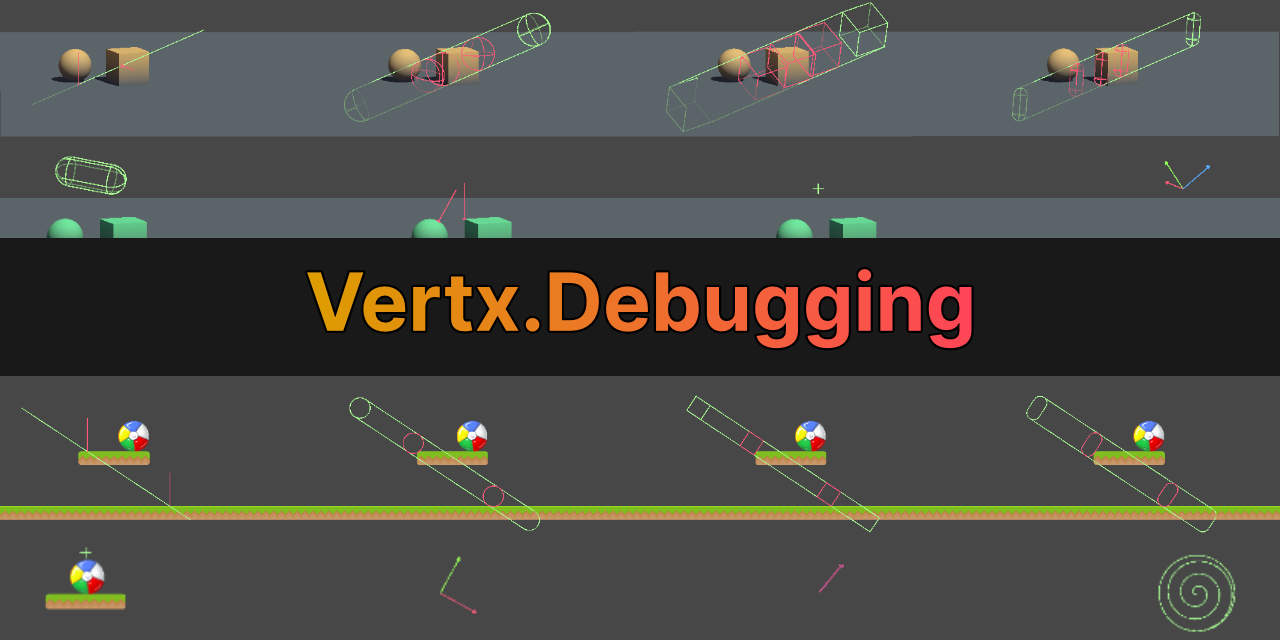
GitHub
Debugging utilities for Unity. Contribute to vertxxyz/Vertx.Debugging development by creating an account on GitHub.
rapid glen
hexed pecan
You can also use mixer channels and set their volume, or the master volume of th...
i am told to use VCA, going to look in to that
wintry crescent
Any idea why OnMouseUpAsButton might not get called? I have colliders on my objects, they're on the default layer, all enabled and everything, proper size, I'm clicking on them and yet nothing. Does it perhaps not work with new input system?
 somber nacelle
none of the OnMouseXXX methods work with the input system. use the event system interfaces for it instead
wintry crescent
I know it's not being invoked for sure, I have a debug on that function that never appears, I made sure the correct script is on the object etc etc
wintry crescent
somber nacelle
none of the OnMouseXXX methods work with the input system. use the event system ...
ah
is there a very quick and simple replacement for this specific function?
or do I have to reimplement the whole functionality myself
somber nacelle
am i going to have to explain the entire setup for you or have you actually searched how to use those?
wintry crescent
somber nacelle
am i going to have to explain the entire setup for you or have you actually sear...
dont worry I know what I'm doing
public class BlockController : MonoBehaviour, IPointerClickHandler
    {
      /// irrelevant code here

        public void OnPointerClick(PointerEventData eventData)
        {
            Debug.Log("AAAAAAAA");
        }
    }
I am admittedly new to the input system overall, but it does work elsewhere in the project
somber nacelle
great you know how to implement an interface. have you actually searched how to use the event system interfaces or am i going to need to explain the setup
this is also not an input system issue at the moment
leaden ice
wintry crescent
dont worry I know what I'm doing
```cs
public class BlockController : MonoBehavi...
You need the conditions in the scene to be correct as well
wintry crescent
okay, well, I suppose I don't know how those interfaces work exactly
I do have an event system in my scene
leaden ice
Do you have the appropriate raycaster in the appropriate place?
Do you have the appropriate other component(s) on the object?>
somber nacelle
do you have the relevant physics raycaster on the camera and a collider on the object?
wintry crescent
- collider on the object, yes
- raycaster I did not have, but I added one to my camera and it didn't improve the situation
leaden ice
wintry crescent
1. collider on the object, yes
2. raycaster I did not have, but I added one to m...
what kind of raycaster
what kind of collider
which camera


 leaden ice
and the collider is on the eame GameObject as the script with the IPointerEnterHandler?
wintry crescent
yes
wintry crescent
it's the default one
 leaden ice
one possibility is you have some other object blocking this object
perhaps a UI element
could be invisible
wintry crescent
no ui in this scene
no other colliders either
only a bunch of objects with the same collider/script combo
leaden ice
also make sure your code is saved and compiled
wintry crescent
it is
leaden ice
and try removing/re-adding the physics raycaster
wintry crescent
this project was originally set up for 2D, could that change things?
somber nacelle
no
leaden ice
not really but... check your Project Settings -> Physics settings
make sure PhysX is selected
(assuming you're using Unity 6)

like this
leaden ice
there ya go
wintry crescent
that sounds like the issue but I gotta restart the editor to know
leaden ice
that's a relatively recent one on the checklist 😢
Yeah it's very possible they disable PhysX by default in 2D projects now.
It would make sense
 remote cobalt
These are two seperate tilemaps, and in my script i take an array of TileBase. The one with the higher index is rendering on top of the other, even when the actualy z is set to 0. Any ideas why ?
 leaden ice
remote cobalt
These are two seperate tilemaps, and in my script i take an array of TileBase. T...
leaden ice
remote cobalt
These are two seperate tilemaps, and in my script i take an array of TileBase. T...
YOu answered it yourself no?
2D sorting is based on sorting layers and order in layer
leaden ice
IDK. What did you mean by "the higher index"?
remote cobalt
I can show you
remote cobalt
Is there any way i can screenshare you ?
leaden ice
make a thread and show screenshots
remote cobalt
These are two seperate tilemaps, and in
 magic tusk
How would I go about hosting a website in my game
not like Hosting my WebGL game online, like... my game will host a local website
I've considered just getting some kind of Python engine into my game (IronPython maybe?) and then hosting is just one "py -m http.server" away
but Im sure its possible to do this nicer... right?
magic tusk
quick token
<#900376522639155250>
I think... technically it does fall under #🌐┃web
I should clarify, I want a Windows (or Mac I suppose) build to be hosting the local website, is there a relatively simple / easy way to do this somehow using Unity Engine / C#
 dense rock
hey there, I want to make a text editor in unity similar to how notion works. Can I get some suggestions on how I could do that? I feel just a big inputField wouldn't quite do the job..
leaden ice
magic tusk
How would I go about hosting a website in my game
not like Hosting my WebGL game...
It's not really clear what you mean by this to be perfectly honest
What's the end user experience you're trying to create?
magic tusk
leaden ice
What's the end user experience you're trying to create?
distribute webGL build to local network
leaden ice
Any off the shelf web server will do that
Nginx for example
A webgl build is just a static resource on a web page basically
magic tusk
Im not the smartest when it comes to web stuff, I assume it's made to be easy to use but I just can't seem to figure out how to make it work in Unity
leaden ice
You pretty much just dump the webgl build files into the serving directory for your web server
That's it
The webgl build comes with a serviceable index.html page
magic tusk
But I want the game itself to call / setup the web server, is that doable?
leaden ice
I don't really understand what that means
If the game is webgl it runs inside a web browser
A server has to be serving the game for the game to even run for webgl
magic tusk
there are two builds A is a windows build and B is a webGL build
A will host B
players can access B to interact with A
hope that clears it up
leaden ice
I mean you could just have your A build start a web server
With Process.Start
Alternatively
You actually do the serving of the html in C# but it seems weird

Gist
A Simple HTTP server in C#. GitHub Gist: instantly share code, notes, and snippets.
For example like this
But it's pretty odd
Because you'd have to make both builds
And somehow distribute them together to the windows machine
I would probably just go with having the windows build start an off the shelf web server
And distribute that side by side with the windows build
magic tusk
leaden ice
https://gist.github.com/define-private-public/d05bc52dd0bed1c4699d49e2737e80e7
right, I actually considered Process.Start
but to my understanding end user would also need whatever web hosting solution, so I wanted to avoid that
So I looked into C# hosting and it was rather odd
Im currently considering compiling for windows build and then dropping the webgl build inside the windows build lol
leaden ice
It's going to be way better than something you cobble together in c#
leaden ice
magic tusk
right, I actually considered Process.Start
but to my understanding end user woul...
Yes you could find some small lightweight web server executable and bundle it with the windows build
Or find a C# solution
Either will work
But the separate process is likely better
magic tusk
leaden ice
Yes you could find some small lightweight web server executable and bundle it wi...
who's making small lightweight web server executables in this economy 😭 (and where could one find tools like this)
leaden ice
GitHub
Another option is to actually use a real in the cloud website, like JackBox.tv does
magic tusk
I see, I'll probably go with some C# webhosting solution then
leaden ice
But the game won't be running entirely over LAN that way of course.
magic tusk
yeah I was afraid of the "other option" because of a mixture of cost, latency, and just uh... sunk cost fallacy?
but I think the web host thing is a funny way to go about doing this so I'd give it a shot
 latent latch
I was trying to bum off bittorent trackers for a pseudo listening server, but turns out it's a pain in the arse to echo back and forth off it
AWS for 5 bucks a month is a pretty good deal if you need one
 elfin socket
The documentation for Mesh is a bit confusing, how could I get the mesh in a format similar to this?c // Four vertices of a unit square in the x-y plane Vector3 vertices[4] = { {0.0f, 0.0f, 0.0f}, {1.0f, 0.0f, 0.0f}, {1.0f, 1.0f, 0.0f}, {0.0f, 1.0f, 0.0f} }; // Triangle indices use clockwise winding order Triangle triangles[2] = { {2, 1, 0}, {3, 2, 0} }; I thought for triangles I could use Mesh.GetTriangles() but that doesn't return a list of integer Vector3 but confusingly a list of just ints instead? vertices however makes perfect sense, I guess it'd just be Mesh.GetVertices().
leaden ice
elfin socket
The documentation for `Mesh` is a bit confusing, how could I get the mesh in a f...
Vector3[] verts = myMesh.vertices;
int[] tris = myMesh.triangles;```yes the tris array is just ints
they are indices into the vertex array
elfin socket
Oh so the triplets simply aren't paired together?
leaden ice
yeah you just read it by threes.
0, 1, 2 are the first tirangle
3, 4, 5 are the second
and so on
elfin socket
Ohh, I see. I wonder why it's not just something like Vector3i or whatever that would be called in Unity
But thanks!
leaden ice
because this is simpler to blit around in memory
elfin socket
I see
 little cypress
Hello all! Newbie here, been trying to build the essentials project to WEBGL but having issues with audio building
Basically everything is fine with the 3d audio in the play zone but when built to webgl it goes 2d and fixed volume
I have tried using some spatializer plugins like Resonance Audio without success, also haven't found the solution online
is it a known issue? I'm using the 6000.0.16f1 version for the project
leaden ice
little cypress
Hello all! Newbie here, been trying to build the essentials project to WEBGL but...
(also you should upgrade your Unity that's a quite old version)
elfin socket
elfin socket
The documentation for `Mesh` is a bit confusing, how could I get the mesh in a f...
So my plan is to just get all collisionmesh components from the scene, copy them into above data structure for steam audio. Then copy over Unitys global transform and use the resulting scene as reflection simulation input.
Does that make sense?
little cypress
leaden ice
(also you should upgrade your Unity that's a quite old version)
I'll try that first then ask around over there, thanks!
elfin socket
elfin socket
So my plan is to just get all collisionmesh components from the scene, copy them...
And yes I know there is a steam audio plugin I could use instead, but in my case it'd be pretty hard to integrate.
 woven pendant
hey, i have an active ragdoll I'm trying to balance, i need to try and figure out when to take a step, which foot and where the step needs to end. What's the best way i could do it? I've tried lifting the foot and placing the foot down when the velocity magnitude of the pelvis is over a threshold, and then placing the foot down at the current velocity of the pelvis as a position, (this is all happening on an animator which is located at 0 0 0) clearly that wasnt going to work. Any ideas?
 mossy flare
woven pendant
hey, i have an active ragdoll I'm trying to balance, i need to try and figure ou...
mossy flare
woven pendant
hey, i have an active ragdoll I'm trying to balance, i need to try and figure ou...
Try emailing Boston Dynamics?
You are asking about an engineering problem that's on the boundary of human knowledge
lol
Most active ragdoll systems fake it by adding an upwards force at the pelvis to straighten the character
 cosmic rain
They might also be interpolating between physics and an animation.
woven pendant
mossy flare
Try emailing Boston Dynamics?
Mmmmmm good idea
mossy flare

This is all I learned while making active ragdolls in Unity. I hope you find it useful or, at least, interesting :D
The actual tutorial: https://bit.ly/3lKsfk2
Github repository: https://bit.ly/2VxnU98
----- Social -----
Twitter: https://twitter.com/sergioabreu_g
Ambient Generative Music by Alex Bainter [generative.fm]
-...
You have seen this?
It describes the fake force I mentioned
4:55
 mossy valley
Hello! I am having issues with this Interaction Code I wrote. It works, yes. But it makes the Camera Movement too Choppy and makes it feel really weird. Any idea why? Would appreciate some help, thank you in advance!
This is my code: https://hastebin.com/share/avecajopeg.csharp
||The code is not really long, but I didn't want to fill up chat  ||
||
Hastebin is a free web-based pastebin service for storing and sharing text and code snippets with anyone. Get started now.
hexed pecan
mossy valley
Hello! I am having issues with this Interaction Code I wrote. It works, yes. But...
I don't see anything related to camera movement here
mossy valley
hexed pecan
I don't see anything related to camera movement here
Camera Movement is here: https://hastebin.com/share/wokopohaqo.csharp
Hastebin is a free web-based pastebin service for storing and sharing text and code snippets with anyone. Get started now.
hexed pecan
Try again 😄
mossy valley
I moved it to LateUpdate and it works a bit better now. It doesn't happen often but still happens here and there.
Ohh
Wait wrong script
mossy valley
hexed pecan
Try again 😄
Hastebin is a free web-based pastebin service for storing and sharing text and code snippets with anyone. Get started now.
THIS SHOULD BE IT
Hopefully
I moved "HandleMouseLook" from Update to LateUpdate just now.
hexed pecan
Okay so you have this common mistake: cs float mouseX = Input.GetAxis("Mouse X") * mouseSensitivity * Time.deltaTime; float mouseY = Input.GetAxis("Mouse Y") * mouseSensitivity * Time.deltaTime;
Mouse input should not be multiplied by deltaTime, it makes it inconsistent
So remove that multiplication. After that you need to lower your mouseSensitivity by around 50x to 100x
1-2 is a common value I think. In that ballpark anyway
mossy valley
Okay, so just removing it is fine?
hexed pecan
No, read the other part of my message
mossy valley
hexed pecan
1-2 is a common value I think. In that ballpark anyway
Okay will try, brb!
Yes, will reduce the sens too!
mossy valley
hexed pecan
No, read the other part of my message
Lmao, it fixed it! And it feels way smoother! Thank you so much <3
hexed pecan
Np, do you mind linking the tutorial you used for this?
Just curious if it's one of the usual two tutorials that spread this mistake
mossy valley
I didn't use any tutorial, I wrote the code myself 😓
hexed pecan
Alright, did you use a bit of ChatGPT for that mouse part?
I know that it likes to make that mistake
mossy valley
Yeah I did
 clever shadow
hello- i am trying to set a clip on an animator controller at runtime. I cant get it to work. please help!
public void UpdateAnimation(string fbxPath)
        {
              GameObject fbxPrefab = Resources.Load<GameObject>(fbxPath);

                if (fbxPrefab != null)
                {
                    // Instantiate the prefab in the scene
                    currentPrefabInstance = Object.Instantiate(fbxPrefab);

                    // Set position as needed
                    currentPrefabInstance.transform.position = Vector3.zero;

                    // Add an Animator component to the instance
                    animator = currentPrefabInstance.AddComponent<Animator>();


                    // Extract animation clips from the FBX
                    AnimationClip[] clips = Resources.LoadAll<AnimationClip>(fbxPath);
                    if (clips.Length == 0)
                    {
                        Debug.LogError($"No animation clips found in FBX model at path: {fbxPath}");
                        return;
                    }

                    // Assuming you have a default state in your AnimatorController named "DefaultState"
                    // Override it with the first animation clip
                    OverrideController["DynamicFBXLoad"] = clips[0];
                    // Assign the override controller to the animator
                    animator.runtimeAnimatorController = OverrideController;

                    animator.Play("DynamicFBXLoad");

                }
                else
                {
                    Debug.LogError($"Failed to load asset at path {fbxPath}");
                }
            }
        }
is this AI code?
trim schooner
because it's doing weird things and has comments for everything
clever shadow
thats my full function, i am loading the fbx at runtime and instantiating it
there is one comment in there from the AI, "// Assuming you have a default state in your AnimatorController named "DefaultState""... the rest is mine
trim schooner
That's even more odd
animator.Play("DynamicFBXLoad"); this string has to match something in the animator
 trim schooner
that's the default state, you dont need to tell it to play that
clever shadow
oh you mean animator.Play();
just do this?
no it doesnt
not in the editor
// Override it with the first animation clip
OverrideController["DynamicFBXLoad"] = clips[0];```this is what im doing at runtime
I load the clips from the fbx file
trim schooner
so, at run time... does that work? Does it have an animation clip assigned after this has ran
 trim schooner
ok, what's clips[0] does that have an animation assigned?
clever shadow
AnimationClip[] clips = Resources.LoadAll<AnimationClip>(fbxPath);
i can see in the debugger it is loading the clip correctly
trim schooner
OverrideController["DynamicFBXLoad"] = clips[0];
// #1
                    // Assign the override controller to the animator
animator.runtimeAnimatorController = OverrideController;
#2```

You need to put 2 logs in, at #1 and #2 and see if the clips are being assigned in #1 nad in #2 see if the runtime anim controller has been updated with the relevant datawhich field should i examine for 1 and 2?
trim schooner
you'll need to work that out, I don't know these api's without looking it all up
You're trying to determine if the clips and controller are assigned and if not, at which point it fails
clever shadow
k thank you!
 placid edge
if I call a coroutine like this, how can i pass a variable by it considering all coroutines involved have one?
 cold parrot
placid edge
if I call a coroutine like this, how can i pass a variable by it considering all...
cold parrot
placid edge
if I call a coroutine like this, how can i pass a variable by it considering all...
You would use the "proper" way to start a coroutine: get an Enumerator and run it.
public void Start () {
    IEnumerator enumerator = Foo ( 10 );
    StartCoroutine ( enumerator );
}

private IEnumerator Foo ( int count ) {
    for ( int i = 0; i < count; i++ ) {
        yield return null;
    }
}
alternatively (and very much not recommended)
StartCoroutine ( "Foo", 10 );
Just don't call it that way.
 languid hound
cold parrot
You would use the "proper" way to start a coroutine: get an Enumerator and run i...
languid hound
cold parrot
You would use the "proper" way to start a coroutine: get an Enumerator and run i...
Just curious why is the alternative not recommended?
I use that albeit it's sparingly used for transitions anyways
leaden ice
The string version is error prone as you get no compile time validation that your method name actually exists
It's also slower
and in this case, generates garbage
somber nacelle
the string version also relies on reflection and therefore has more limitations and a slight performance impact (if using it a lot). one example of a limitation is you cannot use local methods for coroutines
cold parrot
most of all, using the string API "because it makes things easier" pushes you down a path of very bad code design
leaden ice
Let's say you refactor your code and rename the Totemxxx methods. This call will fail the next time you run the game. Wouldn't it be nice if the compiler cought that immediately?
languid hound
Oh crap yeah that makes a lot of sense rip
cold parrot
leaden ice
Let's say you refactor your code and rename the `Totemxxx` methods. This call wi...
to be fair, Rider can refactor that now 😉
languid hound
It's a shame rider doesn't have some free commercial license like VS does
I would make the switch in an instant
cold parrot
VS doesnt either
languid hound
What hold on
Could you elaborate sorry my crappy signal won't load google
I was under the impression I could release a commercial game with VS
leaden ice
VS community is not for commercial use
languid hound
Maybe my definition of commercial is botched
somber nacelle
well vs's commercial license is a lot more lenient than rider's is. rider requires purchasing a license if you work on anything that is commercial, even if it is not making money. vs only requires purchasing a license after a certain revenue threshold and/or team size threshold
leaden ice
yeah it'd be nice if Rider had a similar non-zero free tier
steady bobcat
i remember when visual studio was only a paid product 🧓
 craggy veldt
there's a chance they will replace vstudio with vscode
somber nacelle
lol no there isn't
cold parrot
leaden ice
I think 1 million USD
1 million is the hard cut off, otherwise only 5 users in your org are allowed to use it commercially for non FOSS.
steady bobcat
yea no way
craggy veldt
i said there's a chance 🙂
vscode uses the same internal as vstudio ever since devkit was a thing
steady bobcat
then why is the vs code debugger so shit with native code
somber nacelle
there is 0 chance that microsoft will drop vs in favor of vs code. vs code doesn't make them any money
craggy veldt
incase y'all don't know, vstudio still uses the old net Framework.4
there's a long discussion regarding this on c# server incase y'all interested
cold parrot
one thing to be aware of: Microsoft captures your with very friendly and cheap offerings for small business and entry level use. After which they make it very difficult, almost impossible for you to leave. Mostly because you've budgeted and organized around microsofts platform that cannot be replaced incrementally without massive separation/integration pains.
what might seem like a good deal at the start will cost you dearly later. The adivce usually goes: you either buy everything from Microsoft or nothing.
craggy veldt
craggy veldt
incase y'all don't know, vstudio still uses the old net Framework.4
as in being developed in net Framework.4
you can do new net stuff ofcourse, it's just the editor being built/developed based on ancient framework
steady bobcat
craggy veldt
as in being developed in net Framework.4
you can do new net stuff ofcourse, it's...
Maybe they can replace it with an electron app! /S
It's actually scary how many things in windows now don't even use their UI anymore but web views
Apple makes better programs for windows than Microsoft
Okay maybe only Apple music...
cold parrot
steady bobcat
Maybe they can replace it with an electron app! /S
It's actually scary how many...
this is all optimized to be "easier to sell to (clueless) management"
craggy veldt
lemme say it again.... Devkit on vscode uses the same internal as VStudio 😌
you can even see the same background services as vstudio when you run vscode + devkit
cold parrot
to be fair, they made their own electron cause electron was shit
fiery elm
steady bobcat
then why is the vs code debugger so shit with native code
you installed a shit debugger
a dm one works flawlessly
bps, stack traces, debug console, all that jazz
var lookup
craggy veldt
somber nacelle
there is 0 chance that microsoft will drop vs in favor of vs code. vs code doesn...
there's a chance... the 1 sign is they killed MacOs support last year....
somber nacelle
visual studio for mac was a completely different program as well, it was just a rebranded xamarin studio
craggy veldt
somber nacelle
visual studio for mac was a completely different program as well, it was just a ...
no.. it was worse... it's MonoDevelop
not even joking
😄
steady bobcat
who remembers the lil box in monodevelop that would say stuff
somber nacelle
craggy veldt
no.. it was worse... it's MonoDevelop
they're the same thing
craggy veldt
somber nacelle
they're the same thing
they're? oh
somber nacelle
https://en.wikipedia.org/wiki/MonoDevelop
MonoDevelop (also known as Xamarin Studio)
craggy veldt
but yeah I'd consider that as a sign or at least an effort to drive their users there to use VSCode..
also vscode is crossplat... while vstudio isnt 🙂
aight im done promoting vscode... not even being paid by msft 😄
steady bobcat
They keep adding stuff to vs, unreal got some good features not long ago too. I think it won't go anywhere (I hope)
somber nacelle
craggy veldt
but yeah I'd consider that as a sign or at least an effort to drive their users ...
i wouldn't consider the discontinuation of vs for mac to be any indicator that they are dropping support for vs on windows any time soon. it's more likely they just didn't want to spend resources developing a completely separate IDE that was only being used on a single platform that also wasn't a large share of the usage. windows is by far the biggest desktop platform and visual studio has a huge market share for .net development (at least compared to vs code). microsoft also actually makes money from vs licenses which simply do not exist on vs code (what with that being completely free)
craggy veldt
yeah fair
steady bobcat
I guess Mac users have xcode? (I pray for them)
Maybe they are working on a re write for VS as it's been a few years since a major release?
 daring cove
Hey,
A simple question.
I'm rotating a radar dish that has a fixed angle where it can see targets.
In this example the radar is scanning a 70 degree section of sky in 0.1 seconds.
This is done to calculate the optimized traverse rate to scan the sky so that it doesn't miss anything.
float radarHorizontalAngle = 70f;
float radarScanTime = 0.1f;
float radarTimeToScanSky = (360f / radarHorizontalAngle) * radarScanTime;
float radarTraverseRate = 360f / radarTimeToScanSky;
Now I need to offset the forward vector of the radar by the radarTraverseRate to get a constant 360 rotation to scan for targets at an optimized rate.
Vector3 forward = radarTurretMotorDrive.transform.forward;
forward.y = 0f;
forward.Normalize();

Vector3 heading = forward;

// how to offset the heading with radarTraverseRate??

radarMotorDrive.TargetHeading = Vector3.SignedAngle(Vector3.forward, heading, Vector3.up);
Basically I'm asking how to offset a vector by an angle?
cold parrot
steady bobcat
I guess Mac users have xcode? (I pray for them)
Maybe they are working on a re w...
on mac, everyone uses jetbrains
vs for mac was also only monodevelop reskinned
hexed pecan
daring cove
Hey,
A simple question.
I'm rotating a radar dish that has a fixed angle where...
Basically I'm asking how to offset a vector by an angle?
You can construct a quaternion and then multiply the vector with that.Quaternion * Vector3rotates the vector
cold parrot
probably everybody uses VS Code in some form
steady bobcat
cold parrot
on mac, everyone uses jetbrains
ah ye i forget about jetbrains products
cold parrot
if you do JS webdev, and anything that doesn't have a jetbrains IDE, the VSCode is strong, not so much for 'real apps'
hexed pecan
@daring cove And you can get the Quaternion with, for example, Quaternion.Euler(0, yAngle, 0) (not sure what kind of rotation you exactly want)
rigid island
 vestal arch
i think nav does too? don't remember
vestal arch
i think nav does too? don't remember
ye
 swift falcon
does anyone know why my vs doesnt read my code?

 naive swallow
rigid island
ye
naive swallow
rigid island
ye
I'm so sorry
steady bobcat
!ide
 tawny elkBOT

💡 IDE Configuration
If your IDE is not autocompleting code
or underlining errors, please configure it.
Select one:
•  Visual Studio (Installed via Unity Hub)
• Visual Studio (Installed manually)
•  VS Code
•  JetBrains Rider
• :question: Other/None
steady bobcat
@swift falcon ^
swift falcon
thank you
steady bobcat
make sure your unity has 0 compile errors before trying to do these steps btw
rigid island
naive swallow
I'm so sorry
lol yeah its getting better though, lots of .net apps supported now with Hot Reload.
MAUI, Blazor, Asp.Net
WPF and WinForm still stuck using parallels / vmware fusion win11
daring cove
hexed pecan
<@257846560468107264> And you can get the Quaternion with, for example, ``Quater...
Hey thanks for the response.
I want the radar to yaw so offset the heading vector by the offset of radarTraverseRate.
hexed pecan
My example should work then since yaw is the Y angle in unity
daring cove
error CS0019: Operator '*' cannot be applied to operands of type 'Vector3' and 'Quaternion'
heading *= Quaternion.Euler(0f, radarTraverseRate, 0f);
its quat * vec
daring cove
thats weird
hexed pecan
Similiarly a -= b translates to a = a - b so not that weird
leaden ice
daring cove
error CS0019: Operator '\*' cannot be applied to operands of type 'Vector3' and ...
Heading = quaternion * heading will work
somber nacelle
daring cove
thats weird
while typically multiplication in math is commutative (meaning you can flip the multiplication order and get the same result), multiplying quaternions and vectors is a bit different so it is only defined in a specific order within the code
craggy veldt
in this case it just Unity quats don't have implicit operator for multiply with the vector on the left side
vestal arch
multiplication is only commutative if it's defined to be, like for the reals and the complex numbers
it's not commutative for, say, matrices or vectors or quaternions
daring cove
Okay, now the target heading is being calculated weirdly.
It is wrapping around 180 so its slowing down the traverse. Making the traverse slower in a sinusoidal pattern in respect with 180 degrees.
The traverse rate is 700deg/s
The turret is calculating the direction to rotate with the offset from its current heading and the target heading
and computing the duration to fire the motor for.
But in this case the offset is only 20 degrees so it's traversing extremely slowly.
 shadow wagon
how could i turn a basic black/white texture into a mesh? idk if this is the right channel but I cant see a geometry specific one
 daring cove
I might be approaching this problem in the wrong way...
hexed pecan
Toss the related code in a paste site, easier to help that way
shadow wagon
Anikki, problem is google keeps serving me results that arent even relevant
hexed pecan
shadow wagon
how could i turn a basic black/white texture into a mesh? idk if this is the rig...
How accurate does it need to be?
What's the use case?
daring cove
shadow wagon
how could i turn a basic black/white texture into a mesh? idk if this is the rig...
Sounds like a ridiculously difficult problem
hexed pecan
Most solutions probably turn it into a grid graph first
shadow wagon
hexed pecan
How accurate does it need to be?
not too accurate, i basically just want to draw a few different map shapes for a level, and when i enter a room, I pick a texture and then generate the floor from that
like these could be used to make 3 different levels
 hexed pecan
Marching squares can also be useful here
Just need to post process it a lot if you want the result to be as simple as your first example
steady bobcat
if its pre made stuff... just make the mesh to start 😆
shadow wagon
hexed pecan
Just need to post process it a lot if you want the result to be as simple as you...
i only made the first example geometric looking as it was too annoying to draw it as the triangle representation to illustrate the point
hexed pecan
Yeah do these exist before the game starts?
daring cove
you could probably just sample the texture with a certain resolution and just 1 = vertex, 0 = empty
hexed pecan
Unity has some built in stuff for generating polygons for sprites, perhaps some of that tech is exposed
shadow wagon
hexed pecan
Yeah do these exist before the game starts?
for now they do, but the plan later on is to generate them when you enter the dungeon
hexed pecan
daring cove
you could probably just sample the texture with a certain resolution and just 1 ...
That's a starting point, you then have to fill it with triangles
cold parrot
shadow wagon
Anikki, problem is google keeps serving me results that arent even relevant
process: make a poly-line trace of the edge, triangulate the enclosed area.
daring cove
then run edge detection to get the corners and smooth them out
this way you could get a pretty nice quad topography across
The run a greedy mesher over it to get max area topography
shadow wagon
marching cubes looks like it could work nicely
cold parrot
you make a poly-line-trace by performing an edge walk
hexed pecan
Marching cubes is the 3D variant of marching squares
shadow wagon
oh yeah i meant squares
cold parrot
marching squares makes no sense here
but the edge walk part of it would help
starting points for more googling
tracing: https://en.wikipedia.org/wiki/Boundary_tracing
triangulation: https://en.wikipedia.org/wiki/Polygon_triangulation
Boundary tracing, also known as contour tracing, of a binary digital region can be thought of as a segmentation technique that identifies the boundary pixels of the digital region. Boundary tracing is an important first step in the analysis of that region.
Boundary is a topological notion. However, a digital image is no topological space. Theref...

In computational geometry, polygon triangulation is the partition of a polygonal area (simple polygon) P into a set of triangles, i.e., finding a set of triangles with pairwise non-intersecting interiors whose union is P.
Triangulations may be viewed as special cases of planar straight-line graphs. When there are no holes or added points, triang...
hexed pecan
Marching squares is used to turn grid/texture data into meshes all the time
It would make it easier to handle inner/nested polygons too
The tradeoff is having to probably discard a lot of the work (triangles)
cold parrot
idk in what way marching squares would help here, maybe you would have to explain, it certainly isn' the shortest path to the initial picture in the question
hexed pecan
"Not the shortest path" is not the same as "makes no sense"
I'm just providing an option
daring cove
Maybe following a terrain generation tutorial would help.
Treating the image as an heightmap and making the zeros holes
maybe even as high walls
shadow wagon
what if i was to do it with a tilemap instead? I still want to have an actual mesh for the environment, but tiles seem easier to work with then using textures

just use the tilemap to create a rough idea of the level, then create an actual mesh with the grass tiles
like that
 hexed pecan
You can get results like these with marching squares

 daring cove
beautiful
hexed pecan
You can always post process (for example, mesh relaxation) it to adjust the shape
shadow wagon
hexed pecan
You can get results like these with marching squares
thats pretty close to what i've imagined
shadow wagon
hexed pecan
Related stuff:
<https://www.youtube.com/playlist?list=PLFt_AvWsXl0eZgMK_DT5_biRk...
oh! i remember seeing these ages ago
 chrome marsh
Just a simple question
i have vehicles in my physics based game, and at the moment, there is a slight issue regarding colliders.
i want vehicles to have concave insides so that objects can move inside of them, not accurately but roughly, this is fine
However im not sure wether to
- Create a gazillion box colliders for each concave mesh so that objects can move inside of them and interact physically (roughly 20 or more colliders per complex mesh, this would make me redo alot of my code)
or - Seperate the vehicle parts into a gazillion more vehicle parts so that there are no more concave meshes and i can just apply convex colliders to all parts (roughly 50 or more parts, this also would make me redo alot of my code)
I want to go with the most performance friendly solution, but i also dont want to spend a lot of hours just manually creating colliders for each vehicle
 unkempt cobalt
shadow wagon
how could i turn a basic black/white texture into a mesh? idk if this is the rig...
unkempt cobalt
shadow wagon
how could i turn a basic black/white texture into a mesh? idk if this is the rig...
you mean like during runtime? or just trying to make something
o nvm yea what osmal said
 lean sail
chrome marsh
Just a simple question
i have vehicles in my physics based game, and at the mome...
lean sail
chrome marsh
Just a simple question
i have vehicles in my physics based game, and at the mome...
whats making you need to have meshes for 20 or 50 parts? the performance friendly way to me would be like making box colliders for each side of the car.
regardless of what you do though, i don't think you'll really get the result you want from just colliders and rigidbody. An object inside your car, meaning an object within a bunch of colliders, won't move as we do in real life. The car will move and the object will hit the back of the car probably causing pretty drastic collisions
chrome marsh
lean sail
whats making you need to have meshes for 20 or 50 parts? the performance friendl...
ig the 20 or 50 parts dont need mesh colliders and they can survive using other types of colliders, fn they are mesh colliders because i dont have to tweak those manually.
Also second option is something i tried and gave up half way because of how time consuming it was
lean sail
I still dont see why you even need colliders for up to 50 parts
chrome marsh
lean sail
regardless of what you do though, i don't think you'll really get the result you...
that is not a problem as i know how to code so that objects dont move by themselves inside of the car and stay relative to it, i think
lean sail
I would definitely set up as much as you can using box colliders and consider which objects dont actually need colliders. Like im sure the user isn't gonna freak out when the object doesnt bounce against the rear view mirror
chrome marsh
lean sail
I still dont see why you even need colliders for up to 50 parts
I need all doors to be openable, the chair, pedals and panel are seperate because they can be destroyed, and every single time a concave mesh area appears, i need to split that part into 4 or more pieces so that it doesnt make the collision too inaccurate
 chrome marsh
lean sail
I would definitely set up as much as you can using box colliders and consider wh...
chrome marsh
lean sail
I would definitely set up as much as you can using box colliders and consider wh...
thats a good point, pedals and steeringwheel probably shouldnt have colliders, but the inside of the car and chair must have those
hexed pecan
Use primitives where possible and mesh colliders where absolutely needed
Most of that looks box-able to me
chrome marsh
is there no way to automate primitive collider placement?
My main problem rn is that its way too time consuming
If theres no wrokaround for spending time thats fine
This is the one i tried making manually, and i think ill go with that because having 50+ objects in a single car is true that seems insane
 lean sail
thats unfortunately just going to be a part of setting up your game. I mean I dont even think your current collider makes sense to use if you need the doors to open and parts that can be destroyed
those would have to be separate objects
chrome marsh
all openable and removeable car parts are seperate objects already
hexed pecan
A tool that would align a collider to the mesh by selecting a couple of vertices would be pretty cool
chrome marsh
i found an asset store item that essentially makes a voxel representation of your mesh with colliders, but it was made in 2017 and allegedly does not work anymore 😢
hexed pecan
Voxels sounds horrible for this
At least if they are all axis-aligned
It would be all jagged right?
chrome marsh
hexed pecan
It would be all jagged right?
yes, not rotated, litterally just like voxelart
 lean sail
I wouldnt look for separate tools or workarounds for this. It's really just work that needs to be done, which I mean should've been known when this feature was thought of.
chrome marsh
lean sail
I wouldnt look for separate tools or workarounds for this. It's really just work...
i played the long drive which is a unity game, and it has stuff interact inside of vehicles convicningly enough and i thought how hard could it be
hexed pecan
That could even be its own physics scene
I know that it's done for larger stuff like ships in games
lean sail
ive thought the same before, now when planning what i'll make im avoiding a lot of cool features intentionally
Yea for the object inside the car that could make sense. You'd still be manually moving the object i think though
hexed pecan
Yeah I mean the interiors specifically
chrome marsh
hexed pecan
That could even be its own physics scene
i did read about those but i also read that they are not as straight forward
also my game is in multiplayer which complicates using physics scenes like 10 fold
i wonder if its okay if my script upon hitting the colliders, moves up through the hierarchy from the colliders until it finds a script that it has to interact with

in this case, the script is on the Hull object
i could use smth like hit.collider.GetComponentInParent<>();
lean sail
chrome marsh
i wonder if its okay if my script upon hitting the colliders, moves up through t...
manually searching up the hierarchy is definitely not desired. im assuming some parent object here has a rigidbody? if so just get that object from the collider.attachedRigidbody
 wraith cobalt
chrome marsh
Just a simple question
i have vehicles in my physics based game, and at the mome...
wraith cobalt
chrome marsh
Just a simple question
i have vehicles in my physics based game, and at the mome...
Have you considered just having the objects inside the vehicle interact with a separate set of colliders from the external physics?
chrome marsh
wraith cobalt
Have you considered just having the objects inside the vehicle interact with a s...
im sorry im not entirely sure what you mean
chrome marsh
lean sail
manually searching up the hierarchy is definitely not desired. im assuming some ...
i js use hit.collider.GetComponentInParent<>();
and it works fine, i think its pretty much the same thing as you suggested
lean sail
chrome marsh
i js use hit.collider.GetComponentInParent<>();
and it works fine, i think its p...
it really isnt
https://docs.unity3d.com/6000.0/Documentation/ScriptReference/Collider-attachedRigidbody.html
https://docs.unity3d.com/6000.0/Documentation/ScriptReference/Component.GetComponentInParent.html
the collider already has the rigidbody field. GetComponent needs to search for it
chrome marsh
lean sail
manually searching up the hierarchy is definitely not desired. im assuming some ...
i cant rly do this since the vehicle will only have one rigidbody and i have to access pretty much every mesh renderer in the vehicle, however i could initialize alot of stuff and optimize my code in a way that i think i could actually use this instead, but atm it seems very complicated
lean sail
whats complicated about it? it literally is just a reference to the attached rigidbody. Related scripts should be on that same GameObject anyways
im not saying you should have multiple rigidbodies if thats what you meant with the first sentence
if you have a setup where there are scripts scattered across the hierarchy and you need to go find them in the parents, you should 1000% reconsider the setup
chrome marsh
lean sail
whats complicated about it? it literally is just a reference to the attached rig...
no with my code it wouldnt work well atm
id have to change how stuff is modified through code during runtime if all i get is the highest parent rigidbody, as my script currently heavily relies on being local to every mesh renderer, instead of being a script that sits at the top and acc modifies everything beneath it
chrome marsh
lean sail
if you have a setup where there are scripts scattered across the hierarchy and y...
noted, because that is the current setup, i knew it was bad but i was hoping at the beginning it wasnt gona come back and bite me in the a
lean sail
chrome marsh
no with my code it wouldnt work well atm
id have to change how stuff is modified...
you could even just have code on the same object as the rigidbody (i assume ToyatoHilux?), which has references to the code you need on the Hull
there isn't really a way that what I suggested "wouldnt work". its just really up to how you wanna structure your code
chrome marsh
lean sail
you could even just have code on the same object as the rigidbody (i assume Toya...
nah, ill do what you suggested and make it so that all objects under the rigidbody dont have their own script, because that would in turn also otpimize another potential huge performance issue (every affected mesh renderer has a unique copy of the initially assigned material) and the car is textured in a way that a single material could be applied to all of it anw, so i just gotta fix that in code.
lean sail
chrome marsh
nah, ill do what you suggested and make it so that all objects under the rigidbo...
its not a necessarily bad thing if the Hull has a script on it to do logic it needs. its just awkward if a child object needs to search for it. Ik this might not be your case but this especially breaks if you have 2 parent objects that have the component and you need a specific one.
So the best thing is if you have some manager object on the parent, ideally with the rigidbody in this case, referencing everything.
im trying to think of a specific example but im drawing blanks
lean sail
chrome marsh
nah, ill do what you suggested and make it so that all objects under the rigidbo...
I guess one example is if you wanted to code getting into the car by looking at it and pressing a button. Since you have a bunch of colliders, if you just raycast you'll just be hitting all the child colliders like a tire. How would you get from the tire to play an animation opening the car door? You definitely wouldnt want to search through parents and children to find the car door. You'd ideally get this manager script from the attached rb of the tire collider. The manager would have the reference to the door.
So basically i wouldn't go and remove all code from child objects to just move them to the parent. It makes sense to have logic on child objects
chrome marsh
Thats true, but in my case there isnt just one reason to remove the script from the children, the main concern is that every mesh essentially has its own material which is why im gona recode the script to instead modify a single copy for all car parts of the same car
So per car materials are 1, not 10+
elfin socket
When a Mesh isn't readable that means it's not in CPU-accessible memory, which makes it unsuitable for collision, correct?
 turbid river
hey smart ppl, id like some assistance pls.
i have an object in 2d that moves, and im trying to figure out a good yet simple movement system that will make it move on slopes and loops naturally and without looking janky
any ideas?
 night harness
a good yet simple solution just doesn't exist tbh
There are many notable titles that completely cut or refused to do slopes for that reason
(eg. Hollow Knight cut slops midway through)
turbid river
okay im not trying to do something like hollow knight, more of a vehicle type 2d movement
and im trying to think, should i just use the linear velocity, or maybe use addforce
and also i should probably conserve the velocity so that it carries over slopes and loops
if im missing something, any help would be appreciated
 gloomy osprey
I got myself into a bit of a pickle and im not so certain what approach to take to get out of it
so in my game all items are scriptable objects, while some items are created before runtime, all gear is generated during runtime which im unable to save the generated scriptable object gear when Saving/Loading
!code
tawny elkBOT
Posting code
📃 Large Code Blocks
Use links to services like:
https://paste.mod.gg/, https://hastebin.skyra.pw/, https://paste.ofcode.org/, https://paste.myst.rs/, https://scriptbin.xyz/
📃 Inline Code
Surround code with three backquotes. Not quotation marks.
To format as C#, add cs to the first line:
```cs
// Your code here
```
Add a comment with a line number if there is an error message.
gloomy osprey
https://paste.mod.gg/lbkenruuqgxf/0 here is my Item Class
A tool for sharing your source code with the world!
how can i make a version of this that will work the same without having to recreate all of my already made scriptable objects?
leaden ice
gloomy osprey
how can i make a version of this that will work the same without having to recre...
Basically think of your Item SO as like an "Item Template".
Make a new class that is the "runtime" version of an item.
Give the ItemTemplate class a "ToRuntimeItem()" method that creates the runtime items from the SO as needed (e.g. when first loading)
In your game you can directly generate the RuntimeItems.
Saving/loading should be done with the RuntimeItem class basically, although you will run into some complications with being able to properly serialize the Sprite reference (and any other unity asset references).
To fix that problem you'll need to explore either using a custom id there, or Addressables, or Resources.Load
gloomy osprey
so when the item is generated it automatically becomes turned into a ToRuntimeItem()
or do i run the items through ToRuntimeItem() on save?
ohhh wait ok
leaden ice
gloomy osprey
or do i run the items through ToRuntimeItem() on save?
they would already be runtime items by the time you're looking to save.
The game would operate entirely on RuntimeItems
The only time the SO would be involved is when you first load.
gloomy osprey
so technically the scriptable objects are filled templates that then get entered into the game when loading, and items generated are already runtime items
then in the inventory the player could have many runtime items which are loaded from the save it does
so the runtime item would have all the same fields but does not inherit from the SO in order to stay a POCO, and are generated on loading which makes sense
supposedly it can generate the entire item SO like it had already been then make ToRuntimeItem(Item item), put it as a parameter before entering the inventory
leaden ice
pretty much
gloomy osprey
well thatll save some time, ill still likely have to change every instance in-runtime with items to runtime items now which shouldnt be too bad
thanks for the assistance
swift falcon
how would i access a class from an editor script that is in a regular script? i currently have this but it doesnt work

 quartz folio
It's either misspelt, in a namespace, or under an assembly definition
Or your IDE is wrong and nothing is wrong (confirm in Unity)
swift falcon
quartz folio
It's either misspelt, in a namespace, or under an assembly definition
what is an assembly defenition
steady bobcat
swift falcon
what is an assembly defenition
if you arent using asm defs, click the lightbulb and see if it has a fix
probably that you simply put the wrong class name
steady bobcat
dw for now. you have the 2 auto unity ones (Assembly-CSharp and Assembly-CSharp-Editor)
editor one can ref stuff in the base one
swift falcon
makes sense, so how can i use that to help me?
 opaque vortex
Is there a limit to how much you should put into multithreaded burst before it becomes a negative instead of a positive?
At what point is too much
cold parrot
opaque vortex
Is there a limit to how much you should put into multithreaded burst before it b...
Jobs are intended to complete within 1 or 2 frames
cosmic rain
opaque vortex
Is there a limit to how much you should put into multithreaded burst before it b...
Too much of what? Code? Burst doesn't add any overhead on it's own. It just compiles code with certain processor instructions.
In the context of multithreading, there is some overhead(unrelated to burst). So if anything, putting too little code would cause degradation in performance.
opaque vortex
cosmic rain
Too much of what? Code? Burst doesn't add any overhead on it's own. It just comp...
Oh ok
 sweet forum
Rigidbody2D' does not contain a definition for 'linearVelocity' and no accessible extension method 'linearVelocity' accepting a first argument of type 'Rigidbody2D' could be found (are you missing a using directive or an assembly reference?)
wtf is this bullshit
an update fixes one thing and breaks another
rigid island
sweet forum
Rigidbody2D' does not contain a definition for 'linearVelocity' and no accessibl...
show whole code. what version of unity you got?
sweet forum
Unity 6000.0.9f1
it was a beta update
it's not my code because it was working fine last night
sweet forum
whats the latest version
rigid island
hub says 41f
sweet forum
ok thx
another problem
my character isnt moving in the x direction in dynamic while working fine in kinematic
what could be the problem
im using linearVelocity
rigid island
sweet forum
what could be the problem
do you have constraint on?
rigid island
sweet forum
no only for its arms
wdym , how are they attached ?
sweet forum
the arms are just the child
it wouldnt be the arms because my guy can move vertically
it's not the code because it moves fine kinematically
sweet forum
mills.linearVelocity = new Vector2(stickHoriz * 5f, stickVert /* Time.deltaTime / 3.5f);
i printed the values and they're fine
rigid island
this isn't the whole code
Time.deltaTime on rigidbody is also not what you'd add to velocity
sweet forum
it's commented out sorry the code ''' thing isnt working
rigid island
sweet forum
it's commented out sorry the code ''' thing isnt working
paste site and use link from below !code 👇
tawny elkBOT
Posting code
📃 Large Code Blocks
Use links to services like:
https://paste.mod.gg/, https://hastebin.skyra.pw/, https://paste.ofcode.org/, https://paste.myst.rs/, https://scriptbin.xyz/
📃 Inline Code
Surround code with three backquotes. Not quotation marks.
To format as C#, add cs to the first line:
```cs
// Your code here
```
Add a comment with a line number if there is an error message.
sweet forum
mills.linearVelocity = new Vector2(stickHoriz * 5f, stickVert /* Time.deltaTime */* 3.5f);
im using a custom joystick asset
maybe it's in there
ooo
{
    // Store the relative position of the joystick and divide the Vector by the radius of the joystick. This will normalize the values.
    Vector2 joystickPosition = ( joystick.localPosition * ParentCanvas.scaleFactor ) / radius;

    // If the user has a dead zone value assigned...
    if( deadZone > 0.0f )
    {
        // If the absolute value of the horizontal position is less than the dead zone value, then just set the horizontal position to zero.
        if( Mathf.Abs( joystickPosition.x ) <= deadZone )
            joystickPosition.x = 0.0f;
        // Else the value is over the dead zone value...
        else
        {
            // Subtract the dead zone from the horizontal position.
            joystickPosition.x -= joystickPosition.x > 0.0f ? deadZone : -deadZone;

            // Divide the horizontal value by the max distance that the joystick can move so that the value will be between 0.0 and 1.0.
            joystickPosition.x = joystickPosition.x / ( 1.0f - deadZone );
        }

        // Same thing as above just for the vertical position.
        if( Mathf.Abs( joystickPosition.y ) <= deadZone )
            joystickPosition.y = 0.0f;
        else
        {
            // Subtract the dead zone from the vertical value.
            joystickPosition.y -= joystickPosition.y > 0.0f ? deadZone : -deadZone;

            // Divide the value by the max distance the joystick can move.
            joystickPosition.y = Mathf.Clamp( joystickPosition.y, -1.0f, 1.0f ) / ( 1.0f - deadZone );
        }
}```at the bottom the y value has a clamp but not x
also // If the absolute value of the horizontal position is less than the dead zone value, then just set the horizontal position to zero.
rigid island
try logging the values, is keyboard working?
sweet forum
yes
yep that's the issue
deadZone is reading as 0 no matter what
this guy gave me a broken asset
i paid for this fucking shit
cosmic rain
sweet forum
deadZone is reading as 0 no matter what
Or maybe you're not using it correctly
cosmic rain
Is the deadzone not assigned anywhere? Is it a serialized fields?
cosmic rain
You can find all the references of the variable in your ide
No need to read everything.
sweet forum
still not working
i made everything symmetrical to the y values
i think there's something wrong with unity
cosmic rain
Is that variable still relevant? If so, did you check where it's referenced?
cosmic rain
sweet forum
didnt read the documentation
Well, that's on you then
sweet forum
but it's not necessary because the y value works fine
and everything works fine kinematically
cosmic rain
I'd recommend to read the asset docs first
cosmic rain
sweet forum
my character isnt moving in the x direction in dynamic while working fine in kin...
Had to scroll through the channel.
Something must be overriding the velocity then. If kinematic is working, it must be something physics related, like collision or friction.
sweet forum
why would it only affect the x value tho
cosmic rain
sweet forum
why would it only affect the x value tho
It could be colliding something on the ground when moving sideways. Or the ground has more friction than air.
Code issue is still a possibility too
You should check the values of applied velocity and make sure it's in the expected range.
cosmic rain
sweet forum
how do i check that
Isn't the asset that you're using coming with code?
sweet forum
thats only the joystick
the velocity code is in another script but i already checked the values
how do i see the values for linearVelocity
cosmic rain
If the values are matching your expectations, then it must be the physics system(the things that I mentioned earlier)
cosmic rain
sweet forum
how do i see the values for linearVelocity
Debug them right before/after assigning.
sweet forum
ok so i outputted the values for linearVelocity
the x is changing values
should be fine
but my guy isnt moving in x
cosmic rain
Then refer to my previous messages
 carmine orbit
https://www.youtube.com/watch?v=Sru8XDwxC3I
https://paste.mod.gg/ouvbpsikestr/0
Following this tutorial I made a render texture, I'm trying to make a ui element track over a gameobject, which is normally very easy, but due to how render textures work, I am struggling to find a solution. Any help would be very appreciated (and yes I know that its not actually changing its position right now, thats for debugging purposes)


This short video tutorial covers how to get a pixelated look (also called "low resolution look" or "retro look") in Unity. This is a great effect for 2D and 3D games.
In this tutorial we learn:
- How to create a Render Texture
- How to create a Raw Image
- How to tweak some settings (game scale, camera warning, crisp pixels, resolution)
You ca...
A tool for sharing your source code with the world!
 vast ember
I have 2 issues where I generate an ID for collectable gameobject,
1.) What I want is if you collect that item it gets destroyed so it should persist this next time restarting the game, but it doesnt save that destroyed state and that item is once again in the hierarchy.
2.) On the top of it ID is generated every time the game starts.. ID is saved in the save data file but its never loaded again somehow, it always generates a new id for the item whether its collected or not.
Code for reference: https://pastecode.io/s/c9nvbype
cosmic rain
vast ember
I have 2 issues where I generate an ID for collectable gameobject,
1.) What I w...
- The IDs need to be assigned at editing time and never modified at runtime.
- You should have a list of disabled object IDs on a manager or something. When you're loading a save, load that list data, then each object that can be disabled should check if it's ID is in the list. If it is, disable the object.
This is just one of many ways to implement what you're trying to do.
sweet forum
how do i give an animation bones
vast ember
cosmic rain
2. The IDs need to be assigned at editing time and never modified at runtime.
1....
But if the item is spawning at runtime, how will the id be assigned before runtime?
sweet forum
i went to sprite editor and added bones to each sprite in the animation but it doesnt show up in the scene
cosmic rain
vast ember
But if the item is spawning at runtime, how will the id be assigned before runti...
If the item is spawned at runtime, then keep a list of new items with info like id, type, position and any other relevant mutable data. Then when you load the game, load that list from the save data and recreate these objects. When the object is removed, remove it's info from the list.
Or something like that. Logic 101.
vast ember
cosmic rain
If the item is spawned at runtime, then keep a list of new items with info like ...
Got it, will try this
vast ember
cosmic rain
2. The IDs need to be assigned at editing time and never modified at runtime.
1....
The main issue i see is its generating IDs even for non collected items again and again when the game starts, even though the id is saved
cosmic rain
vast ember
The main issue i see is its generating IDs even for non collected items again an...
Well, don't do that. If an item is loaded, it should already have an id. If it's created at runtime for the first time, you give it a new unoccupied Id.
vast ember
cosmic rain
Well, don't do that. If an item is loaded, it should already have an id. If it's...
Right now For testing purposes I have 4 items in the hierarchy that I am not spawning, I set a resource id for them in Awake() in Interaction script which is attached to them. Now When U collect the item it gets destroyed and so does its interaction script too
cosmic rain
Check the loading data. If the items were generated in previous sessions, you don't need to do it again. Load them from the save data instead.
vast ember
cosmic rain
Check the loading data. If the items were generated in previous sessions, you do...
The loading data has the IDs . but still it generates a new one
cosmic rain
vast ember
Right now For testing purposes I have 4 items in the hierarchy that I am not spa...
Don't set their ID in awake. Or at least do it smartly.
vast ember
cosmic rain
Don't set their ID in awake. Or at least do it smartly.
Smartly as in?
cosmic rain
Actually, make one step back. Load the save data first, before even generating any items. If the save data exists and items were generated in it,don't generate them again. Or rather, generate still remaining items based on the save data.
vast ember
cosmic rain
Actually, make one step back. Load the save data first, before even generating a...
The thing is I am loading the data in Start(), and using interface every other script is fetching that data , I am wondering if the order of saving and loading is causing this issue?
cosmic rain
vast ember
The thing is I am loading the data in Start(), and using interface every other s...
Well, then you've messed up. You shouldn't generate these items until the save data is ready/loaded
vast ember
cosmic rain
Well, then you've messed up. You shouldn't generate these items until the save d...
Yeah the item is already in the scene before the script has loaded the data
Since for testing I aint spawning the items, I have just put them in the scene hierarchy
cosmic rain
Then you need to decide whether you want to generate them or have existing items, or both.
vast ember
cosmic rain
Then you need to decide whether you want to generate them or have existing items...
Actually both
Some items would remain existing, other would spawn over time
cosmic rain
Then you need to keep track of all items. The items created at editing time, should have constant ID, not generated at runtime. And those that spawn at runtime, should have ID generated once, and then saved with the save data.
Then when you load a save, remove items that should be removed and add items that should be added.
vast ember
cosmic rain
Then you need to keep track of all items. The items created at editing time, sho...
Got it, also is the following a good way to load data into the other scripts or any better way?
  {
      yield return new WaitForSeconds(0.1f);
      this.dataPersistenceObjects = FindAllDataPersistenceObjects();
      LoadGame();
  }


  private List<IDataPersistence> FindAllDataPersistenceObjects()
  {
      IEnumerable<IDataPersistence> dataPersistenceObjects =
          FindObjectsOfType<MonoBehaviour>().OfType<IDataPersistence>();

      return new List<IDataPersistence>(dataPersistenceObjects);

}```If it's a manager object, it should probably have access to all objects/save data without finding it.
vast ember
cosmic rain
If it's a manager object, it should probably have access to all objects/save dat...
but if the objects are spawning realtime, it would need to find them constantly right?
cosmic rain
vast ember
but if the objects are spawning realtime, it would need to find them constantly ...
No. Or at least that would be very inefficient.
Is this script not related to spawning your objects?
vast ember
cosmic rain
No. Or at least that would be very inefficient.
Is this script not related to sp...
nope its just a SaveManager that saves data and loads data in scripts that follow a IDataPersistence
So I did a coroutine that checks for 0.1f every time for any object of this type
cosmic rain
vast ember
nope its just a SaveManager that saves data and loads data in scripts that follo...
Then you could record the objects with it.
vast ember
cosmic rain
Then you could record the objects with it.
How?
cosmic rain
When you spawn an object and need to keep track of it SaveManager.Instance.AddPersistentObject(object)
Or your spawner should have a reference to the save manager instance if you don't want to use singletons.
vast ember
cosmic rain
When you spawn an object and need to keep track of it `SaveManager.Instance.AddP...
Got it, so no need of a coroutine that finds objects?
cosmic rain
No. If you have a reference to it somewhere, you can pass it around to the object that needs it.
vast ember
cosmic rain
No. If you have a reference to it somewhere, you can pass it around to the objec...
Understood, thank you. I will try all of the things you said
 azure frost
So... my bro and I have been wracking our brains for a bit.
We want to make a modular character controller system, where various actions or abilities, from walking to sprinting, to swimming, double-jumping, air-dashing, teleporting, you name it, each have their own script and animations.
But we're not sure how the animation tree would even work with that.
cosmic rain
azure frost
So... my bro and I have been wracking our brains for a bit.
We want to make a m...
Blend trees and layers.
You can basically have any combination of animations with these.
 arctic sparrow
cosmic rain
You can basically have any combination of animations with these.
arctic sparrow
cosmic rain
You can basically have any combination of animations with these.
Are you saying that the animator controller has to account for every possible module if each one is an individual script?
cosmic rain
arctic sparrow
Are you saying that the animator controller has to account for every possible mo...
Yep.
cosmic rain
arctic sparrow
Are you saying that the animator controller has to account for every possible mo...
You can try reinventing the wheel with playables API if you want.
Would basically be making your own custom animator
sweet forum
hexed pecan
sweet forum
https://discord.com/channels/489222168727519232/763495187787677697/1349648165921...
chrome marsh
lean sail
I guess one example is if you wanted to code getting into the car by looking at ...
Hi, i thought about it a bit and started refactoring my stuff, however
- All meshes are stored in the runtime texture painter in a list and use a single material
- Projectile hits a collider, for performance reasons then gets the attached rigidbody and gets its component RuntimeTexturePainter
How does my projectile script properly pick the mesh of the object it hit through this script, keep in mind that colliders are simple box colliders as children under the mesh
i believe in this case i am kinda forced to use MeshFilter meshFilter = hit.collider.GetComponentInParent<MeshFilter>();
 steel vortex
Yo guys have a question what is better pressing "E" to sit on the computer or pressing left mouse click to get in?
Im not sure what key better is to sit on the computer for my horror game
leaden ice
steel vortex
leaden ice
<#532311577576210432>
thanks 👍 , didnt saw this channel
lean sail
chrome marsh
Hi, i thought about it a bit and started refactoring my stuff, however
1. All me...
i dont really think i know enough about your setup to see why you'd need this regardless. It does sound a little bit odd to me that you'd need to get the mesh and do something with it from a projectile
chrome marsh
lean sail
i dont really think i know enough about your setup to see why you'd need this re...
i cant get UV coordinates from rigidbodies since they are forced to use non-convex or primitive colliders, i have set up a system for returning UV coordinates manually but it requires direct access to the mesh
terse surge
can someone double check in my math is right, imtryna get the angle of the upper corner:
float angle = Mathf.Rad2Deg * (Mathf.Asin(a/ c));
is this it?
 lean sail
terse surge
can someone double check in my math is right, imtryna get the angle of the upper...
lean sail
terse surge
can someone double check in my math is right, imtryna get the angle of the upper...
https://www.mathsisfun.com/algebra/sohcahtoa.html
sin(θ) = opposite / hypotenuse so you either need to use B/C or use cos
terse surge
and to get a direction vector do i do this? (holeCheckDistance = B)
float angle = Mathf.Asin(holeCheckDistance/hypotenuse);
Vector2 ray2Direction = new Vector2(Mathf.Cos(angle), Mathf.Sin(angle));
lean sail
terse surge
and to get a direction vector do i do this? (holeCheckDistance = B)
float angle...
whats the problem you're actually trying to solve here? how are you even getting this triangle in the first?
(Mathf.Cos(angle), Mathf.Sin(angle)) surely can be a vector. I dont know if this would be a vector that you really need
terse surge
lean sail
whats the problem you're actually trying to solve here? how are you even getting...
sending a ray top to down (line a) to detect ground, same with c, a ray to detect ground. if a doesnt hit ground but c does, that means its a jumpable gap and the enemy is close enough to jump. i get the triangle by getting transform pos +half the length of the enemy added to the x axis as the starting point, and B is a public field set, its the hole check distance, and i do Pythagorean theorem to get C
terse surge
lean sail
(Mathf.Cos(angle), Mathf.Sin(angle)) surely *can* be a vector. I dont know if th...
when we get C this way we only have length, not direction, was getting this vector to be the direction
Vector2 hypotenuseDirection = (new Vector2(holeCheckDistance, -sr.bounds.extents.y)).normalized;
maybe this is a better way to get the vector?
lean sail
terse surge
when we get C this way we only have length, not direction, was getting this vect...
ok yea so you are doing this a bit backwards.
You must have the position of where A starts since you're raycasting from there. You have the length of B (hole check distance), meaning you can calculate the end point of where they can jump to. These are 2 positions
Get C from subtracting these 2 positions, b-a
lean sail
terse surge
Vector2 hypotenuseDirection = (new Vector2(holeCheckDistance, -sr.bounds.extents...
if -sr.bounds.extents.y is where you always start the downwards raycast from, then yea this is basically what i said in the above message
terse surge
meaning you can calculate the end point of where they can jump to. These are 2 positions
so... an overlapcircle with a small diameter in that position?
lean sail
did you by chance use AI for this..? i really question how you got the above formula without even really understanding what I wrote
terse surge
terse surge
Vector2 hypotenuseDirection = (new Vector2(holeCheckDistance, -sr.bounds.extents...
i tried to figure it out msyelf and then fed it into ai and it gave me this which seemed like a better option
lean sail
Yea I dont help with AI stuff.
 compact carbon
hey, im having a problem where im trying to make something pivot toward another object, the thing im tryna make pivot only rotates when i move the camera for some reason and also doesnt even rotate right??
the part that actually rotates the pivot.
{
    if (swinging)
    {
        Quaternion lookRotation = Quaternion.LookRotation(GM.GetSwingPoint() - transform.right);

        lookRotation = Quaternion.Euler
            (
                Mathf.Clamp(transform.rotation.x, MinX, MaxX),
                Mathf.Clamp(transform.rotation.y, MinY, MaxY),
                Mathf.Clamp(transform.rotation.z, MinZ, MaxZ)
            );

        transform.rotation = Quaternion.Slerp(transform.rotation, lookRotation, Time.deltaTime * rotationSpeed);
    }
}```transform.rotation.x etc are very very wrong here
You can't use quaternions like that
compact carbon
so how would i fix it, im not exactly great at scripting
 heady iris
transform.rotation.x is the first part of the quaternion -- it's like a complex number (1 + 2i), but with four parts
hence why it's borked
Note that clamping the world-space rotation doesn't really make sense
compact carbon
so would i make it localrotation
heady iris
Start by getting rid of the lookRotation = ... part entirely
it should then rotate property (just without any limits)
er, the lookRotation = Quaterion.Euler... part -- keep the first line :p
compact carbon
well, it didnt exactly work. it still doesnt update with the swing
latent latch
Eulers? In my 3D engine?
compact carbon
i hate quaternions
is there a simple way i can make it look at the swingpoint and clamp the X
heady iris
clamping the X euler angle isn't meaningful on its own, since the meaning of the X component depends on the Y component!
rotations can be tricky to reason about
heady iris
compact carbon
well, it didnt exactly work. it still doesnt update with the swing
what does this mean?
compact carbon
as in when i swing it doesnt update unless i move the camera for some reason
compact carbon
would quaternion be beginner, Gen, or advanced?
cuz ill have to ask in one of those
naive swallow
compact carbon
would quaternion be beginner, Gen, or advanced?
The best category for Quaternions is "Don't"
rigid island
compact carbon
would quaternion be beginner, Gen, or advanced?
You dont even need to worry about quaterions as you never should be touching them
use the Euler to Quaternion functions
compact carbon
well idk how i can make this pivot point at the swing point but not just when the camera moves, i want it happening all of the swing.
i cannot do this for the life of me
i managed to get it to where it will do it all swing but i cannot get it to clamp the Z
rigid island
One thing is certain you never pass Quaternion values to a Euler to then put it back into a quaternion
rigid island
compact carbon
i managed to get it to where it will do it all swing but i cannot get it to clam...
most of the time when you clamp you should be clamping a separate value/variable not the axis directly
compact carbon
ok, how can i add a clamp to the X,Y, Z on this code.
{
    Quaternion lookRotation = Quaternion.LookRotation(GM.GetSwingPoint() - transform.position);

    transform.localRotation = Quaternion.Slerp(transform.localRotation, lookRotation, Time.deltaTime * rotationSpeed);
}```say you want to clamp xRot
you would create a float value for it to then pass to the Euler
compact carbon
oh so i made a value for the x y and z and apply them to the x y z
rigid island
xRot += someInput * speed
xRot = Mathf.Clamp(xRot, min, max)
something.rotation = Quaternion.Euler(xRot, etc..
just an example
compact carbon
im very confused, im unsure on how to assign this. I might just be stupid?
{
    if (swinging)
    {
        float zRot = Mathf.Clamp(90, -90, 90);
        float yRot = Mathf.Clamp(90, 90, 90);
        float xRot = Mathf.Clamp(0, 0, 0);

        Quaternion lookRotation = Quaternion.LookRotation(GM.GetSwingPoint() - transform.position);

        transform.localRotation = Quaternion.Slerp(transform.localRotation, lookRotation, Time.deltaTime * rotationSpeed);

        transform.localRotation = Quaternion.Euler(xRot, yRot, zRot);
    }
}```Not sure what's the plan using clamps with three constants
If you're defining the numbers directly, why clamp?
Just use values you actually want
compact carbon
the values i want are only between -90 and 90 on the lookRotation but i need to clamp them for that to work
naive swallow
compact carbon
the values i want are only between -90 and 90 on the lookRotation but i need to ...
Okay, but, 90 is always between -90 and 90
so why clamp? Why not just use the 90 you're passing to clamp?
compact carbon
oh ye lol
the only axis i want to move is the Z axis, but i also need to clamp said axis
hexed pecan
compact carbon
im very confused, im unsure on how to assign this. I might just be stupid?
```pr...
I think the idea is to have float zRot = etc. as member variables, not local variables
compact carbon
float yRot = 90;
float xRot = 0;``` i fixed that thoughDeclare them in the class, not in the method
This way the machine remembers the value and you can modify it every frame
rigid island
this doesnt make much sense
naive swallow
compact carbon
```xRot = 0;
yRot = 90;
zRot = Mathf.Clamp(90, -90, 90);```
Again, just set zRot to 90
compact carbon
im new to scripting so this doesnt make much sense to me
rigid island
why are you clamping 90 if its a constant value
compact carbon
im so confused
naive swallow
compact carbon
im so confused
https://docs.unity3d.com/6000.0/Documentation/ScriptReference/Mathf.Clamp.html
Mathf.Clamp(a, min, max) will return the value of a, but if it's less than min it will return min. If it's greater than max, it will return max.

So, let's plug in the numbers.
Mathf.Clamp(90, -90, 90) will return 90, unless 90 is less than -90, in which case it returns -90. If 90 is greater than 90, it will return 90
Now, we know that 90 is not less than -90, and we know that 90 is not greater than 90. So it will return 90
No matter what, every time the code Mathf.Clamp(90, -90, 90) runs, the value it spits will be 90
So, you should just use 90 instead
compact carbon
so how can i make it go into the negatives
compact carbon
but i will swing on it, so i need it to be able to go 90 to -90 and back to 90 if needed depending on the swing
it has to start at 90
naive swallow
compact carbon
but i will swing on it, so i need it to be able to go 90 to -90 and back to 90 i...
Right now, zRot will always be 90.
naive swallow
Well, what do you want zRot to be
compact carbon
i want it to be pointing at the swingPoint, when doing whati showed in the video
naive swallow
compact carbon
im very confused, im unsure on how to assign this. I might just be stupid?
```pr...
Code runs one line at a time, top to bottom. Every fixed time step, you're setting zRot to 90 here. It doesn't matter what it used to be. It is now 90
And then you set the object's rotation to 0, 90, 90 at the end
So, if you want zRot to change between frames, you can't just obliterate it every frame by setting it to 90
compact carbon
this is the current state of it btw
{
    xRot = 0;
    yRot = 90;
    zRot = 90;

    Quaternion lookRotation = Quaternion.LookRotation(GM.GetSwingPoint() - transform.position);
    Quaternion desiredRot = Quaternion.Euler(Mathf.Clamp(lookRotation.x, 0f, 90f), 90, 0);

    transform.localRotation = desiredRot;
}```Okay, good to know, you're no longer setting local rotation to a constant every frame
but we're back to the old problem. lookRotation is a quaternion. lookRotation.x is not the degrees about the X axis the object is rotated on
it's part of a four-dimensional vector representing the object's orientation
compact carbon
how can i make it 3 dimensional? i cannot even
naive swallow
and individual components of that vector do not mean anything to humans
compact carbon
like picture 4d
naive swallow
Exactly
so stop trying to access individual elements of a quaternion
you will not ever need to do that
compact carbon
so how can i make something point at something else without using Quaternions
naive swallow
just forget the fact that x, y, z, and w properties even exist
naive swallow
compact carbon
so how can i make something point at something else without using Quaternions
the lookRotation is that. If you set the object's rotation to lookRotation, it'll point at something else
(in this case, GM.GetSwingPoint())
compact carbon
i do want it to point at that but i dont want the other axis like X and Y but i do want Z but only between -90 and 90 (atleast these values in engine)
naive swallow
The issue with that is, there are an infinite number of ways to express the exact same orientation in a 3D vector of degrees
hexed pecan
Z axis is the twist/roll axis. Are you sure you don't want X axis?
compact carbon
hexed pecan
Z axis is the twist/roll axis. Are you sure you don't want X axis?
not in my case, my object is rotated weirdly so i cant really do it like that
and i dont want it to be a child object
naive swallow
If something's at 0, 0, 90, then it is also at 0, 0, 480 and 0, 0, -270 and 180, 90, -90 and so on
compact carbon
for me y is forward x is up and z is right
 compact carbon
naive swallow
If something's at `0, 0, 90`, then it is _also_ at `0, 0, 480` and `0, 0, -270` ...
compact carbon
naive swallow
If something's at `0, 0, 90`, then it is _also_ at `0, 0, 480` and `0, 0, -270` ...
that is confusing asf
naive swallow
compact carbon
that is confusing asf
This is why unity uses Quaternions to represent rotations
Because degrees are cyclical, and 3D rotations are susceptible to Gimbal Lock
Which means things that you think should be simple actually don't work the way you think they do
 vague cosmos
What's the best way to check for a string of inputs, for example the konami code? Currently, i have every input being recorded into a list, and then checking for a sub string, but this is not working properly for more than one combo input.
latent latch
I'd say maybe a dictionary where you'd string build then compare it at the current input string
Or something like regex perhaps, but I'm not too knowledgeable about fighter games
leaden ice
vague cosmos
What's the best way to check for a string of inputs, for example the konami code...
A state machine basically
vague cosmos
Thanks!
 wary forum
I have a Steam release on demo vs paid app, is it possible to share multiplayer using Steam matchmaking? how do i combine them?
 upbeat folio
hi
 half zinc
Hi, I'm currently using the Meta Voice SDK and having issues, but I'm not sure why. Does anyone know why I'm getting these errors?

 woeful hamlet
If I have a score I wanna add and decude points, but keep it non-negative, is there any difference in efficiency between:
score = Mathf.Max(score-5, 0);
and
if (score < 0) {score = 0};``` vagrant blade
No, and if there was it would be so small it would be considered non-existent for the majority of anything people are creating in Unity. In the end, choose the most readable option, which would be Mathf.Max in my opinion.
vagrant blade
@distant thistle You can create a #1180170818983051344 to share your game.
craggy veldt
vagrant blade
No, and if there was it would be so small it would be considered non-existent fo...
there's a difference.... UnityEngine.Mathf is hardware accelerated (intrinsify/vectorized) on il2cpp
all of them in UnityEngine.Mathf
guaranteed
vagrant blade
Sure, if you want to dive deep into it, people have made benchmark comparisons online and have argued the results.
But as I said, for most what people are doing at a beginner level, it's a non-issue. Readability over micro optimization.
leaden ice
There's nothing to vectorize there though it's basically just a single if statement
craggy veldt
leaden ice
There's nothing to vectorize there though it's basically just a single if statem...
not the statement.. but the call to mathf.Max
if statements cant be vectorized
leaden ice
Vectorization is related to for loops
craggy veldt
leaden ice
Vectorization is related to for loops
incorrect
leaden ice
Applying the same operation to several contiguous memory elements at once
I'm saying there's nothing inside Mathf.Max that could be vectorized
Also isn't Unity.Mathematics the highly hardware optimized one
craggy veldt
leaden ice
I'm saying there's nothing inside Mathf.Max that could be vectorized
it is automagically auto vectorized in il2cpp
nah(sure mathematics... BUT....) mathf as well
cold parrot
min/max moves are atomic assembly instructions, you'd likely get those in any compile.
craggy veldt
typically, not in all cases... even the regular System.Numerics.Math
thus they give us System.Numerics.Math.MaxNative in net 9 now
that one is guaranteed
but with a catch, it is fast but not tied to IEEE specs
meaning it might behave differently on other platforms
this conversation somehow getting out of context to system.numerics
lol
cold parrot
the lesson in all this is, someone will always pop out of hole and throw some arcane details at yyou that are entirely irrelevant to 99.9999999999% of people.
craggy veldt
agreed and pardon for my text wall above 😅
incase any of you wondering https://learn.microsoft.com/en-us/dotnet/api/system.single.maxnative?view=net-10.0&viewFallbackFrom=net-9.0
tons of Native stuff in 9-10, which is... great
cold parrot
craggy veldt
tons of Native stuff in 9-10, which is... great
thx, doesn't have any info though
craggy veldt
yeah, they're testing it since 9.... y'all will see lots of these in the next version guaranteed
craggy veldt
cold parrot
thx, doesn't have any info though
if you want to know what they do, feel free to ask it on c# server, fat chance the maintainer themselves will directly answer you..
 crisp flower
anyone know of an asset or can suggest a methodology for having a research tree in a game? Hoping there's a framework I can just easily implement somewhere...
 gleaming current
Hello fine people of this discord, i want to create a game similar to Farm Merge Valley, basically a merge game but cannot figure out how to correctly implement the merge mechanic, essentially, when i drag an object on top of a similar one, it should generate the 'next evolution' of said object, if there is at least one more similar object on a tile nearby. i think the function to check for neighbouring tiles doesnt work correcly as my console states that there are never enough objects for the merge to take place

 mossy shard
Is it better to have only one Update function which calls any other metods of the game or have multiple?
Dk how Unity handles the Updates rlly
 atomic whale
is there any fix to this inspector bug? first pic is the position of a gameoject according to the inspector. second pic is printing the result of the math which the objects position is being set to and then also the objects position as in obj.transform.position just to double check. in the scene the object visually also has a y of 0.

 atomic whale
gleaming current
Hello fine people of this discord, i want to create a game similar to Farm Merge...
atomic whale
gleaming current
Hello fine people of this discord, i want to create a game similar to Farm Merge...
hard to tell without seeing your code. I'd personally do it as follows: move obj, check all 4 sides of obj for merge partners, if found also check partners 4 sides, if found merge. should be easily doable in a 2dimensional array.
gleaming current
thanks, I'll try that
leaden ice
atomic whale
is there any fix to this inspector bug? first pic is the position of a gameoject...
Position in the inspector is local position
It's not a bug
It probably has a parent that is offset
atomic whale
it doesnt have a parent
leaden ice
mossy shard
Is it better to have only one Update function which calls any other metods of th...
"better" is vague. It's a tradeoff
leaden ice
atomic whale
it doesnt have a parent
Some other thing is happening then
There's no way there's a bug in the inspector
atomic whale
when I move the object myself slightly it jumps from whatever it is to the correct number
slight nudge upwards and its back to displaying correctly

 leaden ice
atomic whale
slight nudge upwards and its back to displaying correctly
leaden ice
atomic whale
slight nudge upwards and its back to displaying correctly
Are you sure it's not actually a really tine number in scientific notation?
e.g. -1.5240894548e-8
that's probably it
atomic whale
that. is the case.
another mystery solved. ty
there isnt actually any reason for this to happen as I am multiplying the position vector by smth and 0 * x is just 0 if I'm not mistaken
atomic whale
oh yea thats interesting I've exported a simple quad from blender but when I read the y of a vertex its at -2.185569e-08.
mossy shard
leaden ice
"better" is vague. It's a tradeoff
how so, what would change and how
leaden ice
mossy shard
how so, what would change and how
The main difference is how you have to organize your code
The "each object handles itself" pattern is quite convenient and easy to think about
You sacrifice some performance to have a cleaner more maintainable codebase
Sometimes that tradeoff is worth it and sometimes it's not
gleaming current
atomic whale
hard to tell without seeing your code. I'd personally do it as follows: move obj...
regardless of that specific problem, as a coding noob - where can i best learn to improve my coding skills and solve problems that are not specifically found on youtube?
atomic whale
gleaming current
regardless of that specific problem, as a coding noob - where can i best learn t...
there is no easy way to answer this. The best thing pretty much is 🌟The Internet.🌟 if you cant find your exact problem try to break it down into smaller more generic pieces which might be easier to find a solution for.
gleaming current
thanks mate, I'll try that 👍
remote cobalt
I have a random grid generator using a grid element that renders tiles
but its overlapping them

I found the issue which was the tileset was putting one over the other, anyone know how to fix that
Any help would be appreciated
 fluid crown
It will if each sprite is an object in the same layer
You can fix easily if using URP

Change the transparency axis in the renderer settings
 night patio
if I want a cancellable asynchronous process, should i use coroutine wrapper or async await wrapper?
fluid crown
coroutine is not async
night patio
then for cancellable process, do u think coroutine or await is better
vestal arch
night patio
if I want a cancellable asynchronous process, should i use coroutine wrapper or ...
i mean, depends on what you're doing, i guess?
coroutines are cancellable
night patio
vestal arch
i mean, depends on what you're doing, i guess?
coroutines are cancellable
like if a building is running a process but it suddenly get destroyed
fluid crown
night patio
then for cancellable process, do u think coroutine or await is better
Use Coroutine if you will use unity stuff like monobehaviours
rigid island
awaitable is also an option and has cancellation token like Tasks do
 thick sable
anyone know of ways to do procesing on animations? I have mocap takes that unity recorder seems to drop out on a keyframe basis
was looking to make an editor script to address this but there's seemingly no documentation on reading curves from an anim file
 wide totem
can a dict with gameobject values hold the same gameobject at two different keys?
rigid island
ofc
 hard estuary
wide totem
can a dict with gameobject values hold the same gameobject at two different keys...
hard estuary
wide totem
can a dict with gameobject values hold the same gameobject at two different keys...
Yes. Only keys have to be unique.
rigid island
as long as keys are unique
wide totem
okay just making sure ty
rewriting half my script because i named two variables too similarly and got them mixed up when adding to a list will teach me a lesson hopefully
 rough cobalt
hey guys, is it possible to rotate a physics.overlap sphere along with the object it takes as center?
As you can see from the pic, the sphere always stays under the object even if it's rotated cause i only give it a center reference:
objectsInRange = Physics.OverlapSphere(this.transform.position + new Vector3(0, -5 ,0), spotlight.range/2, detectionLayer);
is it possible to make it sensible to the object rotation?
 naive swallow
A sphere would be identical no matter which way you rotate it
That's kind of definitionally what a sphere is
rigid island
rough cobalt
hey guys, is it possible to rotate a physics.overlap sphere along with the objec...
btw you can see the real gizmos if you go to Physics Debugger
rough cobalt
naive swallow
A sphere would be identical no matter which way you rotate it
i meant that the contact point is rotated ofc
naive swallow
rough cobalt
i meant that the contact point is rotated ofc
If you want it to spawn at a different spot, you'll need to change the spot you spawn it at
leaden ice
Are you asking how to change the position where you do the overlapSphere based on the rotation of the object this script is attached to?
naive swallow
You're creating it 5 units below this object so that's where it's gonna be
leaden ice
use transform.TransformPoint(new Vector3(0, -5, 0))
rough cobalt
a behaviour like this to be precise:
 rough cobalt
leaden ice
yep - follow what I wrote above
rough cobalt
leaden ice
yep - follow what I wrote above
lemme try that
rough cobalt
leaden ice
use `transform.TransformPoint(new Vector3(0, -5, 0))`
works like a charm man, thank you so much
could you explain me what that does or link me to the docs?
leaden ice
rough cobalt
could you explain me what that does or link me to the docs?
jsiut gets that position in the object's local coordinate space
or "from the object's perspective"
rough cobalt
thanks a lot
 night sparrow
How do i batch multiple game objects together?
I have a scene where i want to dynamically add moving gameobjects. However i can easily reach 1000 batches since every gameobject has it's own draw call
They use the same sprite(2d), how can i draw them using a single draw call?
 visual flare
is the max Random.Range (minInclusive, maxExclusive) guaranteed to be exclusive? i keep getting out of range exception in available[Random.Range(0,available.Count)];
vestal arch
visual flare
is the max Random.Range (minInclusive, maxExclusive) guaranteed to be exclusive?...
yes, and show more code in context please
!code
tawny elkBOT
Posting code
📃 Large Code Blocks
Use links to services like:
https://paste.mod.gg/, https://hastebin.skyra.pw/, https://paste.ofcode.org/, https://paste.myst.rs/, https://scriptbin.xyz/
📃 Inline Code
Surround code with three backquotes. Not quotation marks.
To format as C#, add cs to the first line:
```cs
// Your code here
```
Add a comment with a line number if there is an error message.
night sparrow
How do i make a drop down menu in the inspector depending on another variable?
For example i have a variable that can have n items, i want each item to be in the dropdown menu of another variable
somber nacelle
Custom inspector. Check the pinned documentation in #↕️┃editor-extensions to learn how to make one
 tawny jungle
Hey can someone else me out? I’m tryna implament multiplayer into my 6v6 fps game I need it to be able to Do matchmaking and party’s and lobby’s if anyone knows the best way please lmk
rigid island
visual flare
is the max Random.Range (minInclusive, maxExclusive) guaranteed to be exclusive?...
most likely you have no items
visual flare
rigid island
most likely you have no items
tss, you're right
wide totem
why does vscode sometimes allow me to Random but sometimes has to make me specify unityEngine.Random
cold parrot
wide totem
why does vscode sometimes allow me to Random but sometimes has to make me specif...
when you have a using System; and a using UnityEngine; statement in the same file you need to disambiguate between System.Random and UnityEngine.Random
wide totem
does unity just sometimes add one of them into the file? i swear it just happens halfway through writing the script sometimes
 stable osprey
Unity adds UnityEngine if you "Create new MonoBehaviour" via C#.
but VS/VSCode may add them as you type if you have certain options enabled
wide totem
ah, thank you
stable osprey
like when you type MonoB and autocomplete to MonoBehaviour, VS/VSCode's smart autocomplete adds the necessary Using
 pastel halo
Hey, i've got a plugin question. Would it be theoretically possible to have a performant "subdivision" plugin that is applied as a modifier on a skinned mesh?
Like how in most animation software, you rig a lower definition model, then apply a subdivision modifier to smooth the visuals after the armature/rig (uncollapsed, just in the stack)
It's beyond my scope but I was curious if it's even possible in unity. It would be great for cinematic stuff, since trying to export subd out from anim software collapses it and results in crunchy surfaces (unweighted because collapsed)
wraith cobalt
pastel halo
Hey, i've got a plugin question. Would it be theoretically possible to have a pe...
Shader based tessellation is essentially that, though it has caveats.
soft shard
tawny jungle
Hey can someone else me out? I’m tryna implament multiplayer into my 6v6 fps gam...
Technically, most commercial libraries like Photon, Fishnet, Mirror, Netcode (Unitys multiplayer solution), etc can all do those requirements, some can do more than that as well so it may be worth looking at the features and paid license plans for several multiplayer solutions and pick the one that best fits your needs, some are more beginner friendly and others might require a more extensive knowledge of networking, then there is also the option of running your own solution or using 3rd party distributors like Steam if you decide to publish your game there, they have SDKs that handle matchmaking, friends, and a bunch of other cool features - I will say though, playing with different multiplayer solutions and designing your game with multiplayer in mind from the beginning, is much easier than injecting a multiplayer solution into a existing game, not impossible, just much more difficult, likely with a good bit of refactoring game logic
 last raven
anyone knows if this is a bug in unity 6 or do I have to do this in some other way? I have game maximize game view after loading in editor, it worked in previous version but in new version view.maximized = true causes NRE if I call it early (still works fine later)
 night patio
if i were to learn UniRx, how long would that take? anyone got recommended UniRx materials?
cosmic rain
night patio
if i were to learn UniRx, how long would that take? anyone got recommended UniRx...
Totally depends on your experience with unity and programming in general. From what I remember UniRx is not very well documented and has even less tutorials, so you might need to be able to read the source code.
night patio
cosmic rain
Totally depends on your experience with unity and programming in general. From w...
im an intermediate at Unity but ye i've been googling and havent seen any good unirx materials
rigid island
Unity has awaitable now, what would even be the point of using something like unirx
 gloomy helm
why does my camera cause me the error Screen position out of view frustum (screen pos 960.000000, 539.000000) (Camera rect 0 0 1920 1080) when i teleport my car's rigid body only with this code
night patio
rigid island
Unity has awaitable now, what would even be the point of using something like un...
im working on old versions and dont want to upgrade yet so im looking for options
rigid island
I see. I would be upgrading at some point.
rigid island
gloomy helm
why does my camera cause me the error Screen position out of view frustum (scree...
!code
tawny elkBOT
Posting code
📃 Large Code Blocks
Use links to services like:
https://paste.mod.gg/, https://hastebin.skyra.pw/, https://paste.ofcode.org/, https://paste.myst.rs/, https://scriptbin.xyz/
📃 Inline Code
Surround code with three backquotes. Not quotation marks.
To format as C#, add cs to the first line:
```cs
// Your code here
```
Add a comment with a line number if there is an error message.
gloomy helm
rigid island
!code
mb
rigid island
gloomy helm
mb
which one is the camera ? its hard to tell from this function only
gloomy helm
the camera is attached to the car
rigid island
in the code
rigid island
How does the camera follow the car
gloomy helm
only happens after building the game
gloomy helm
rigid island
How does the camera follow the car
the camera is the child of the car
mb
rigid island
So when you teleport the car, the camera attached stays with the car but throws that error ?
where is the car
gloomy helm
no i if i teleport the car lets say with random range and keep the Velocities the same the issue does not happen only when i teleport it with that piece of code
i have removed all canvases in the scene
rigid island
where does canvas come into play ? Also you should consider not using such inline code like this, its very hard to read and there is much repetition
gloomy helm
rigid island
where is the car
i thought maybe the canvas might cause the issue
gloomy helm
i have no canvas or ui i removed it all
also btw i have built the game before and i was not experiencing any issues
gloomy helm
rigid island
if you try to move one it might.
i just fixed by just not resseting the velocities
but i need to know why that would cause the iisue
rigid island
gloomy helm
i just fixed by just not resseting the velocities
uhh maybe something else, that seems very unlikely to be a cause
rigid island
yeah not sure why that would be...I never had such an issue ever when resetting vel on rb
Im sure camera being parented to a dynamic rb doesn't help
gloomy helm
ok i just used a camera follow script so the camera is not the child of the car i thought the cam follow script was the issue
so should i just make the rb kinematic ?
when i dont want it to move
rigid island
No but if you want camera to follow the vehicle it would be better to use Cinemachine
rigid island
gloomy helm
when i dont want it to move
maybe
gloomy helm
k let me try
ok that broke the camera again
let me use ""yield return new WaitForEndOfFrame();""
rigid island
I mean if its physics it would be WaitForFixedUpdate
rigid island
gloomy helm
ok that broke the camera again
btw what is the fullstack of the error ?
gloomy helm
wdym?
rigid island
like the stack trace
gloomy helm
i only get the error on the build so i have to turn on dev mode and all i get is Screen position out of view frustum (screen pos 960.000000, 539.000000) (Camera rect 0 0 1920 1080) repeated
screen pos the numbers are the mouse's position
rigid island
open the PlayerLog see if its there
rigid island
weird..still think might be something you're doing to the camera thats not supposed to be doing
gloomy helm
how do i get to the log file i also locked the mouse bc i thought it would be the problem
rigid island
gloomy helm
how do i get to the log file i also locked the mouse bc i thought it would be th...
Player-related log locations
rigid island
use paste site
gloomy helm
ignore the Object reference not set to an instance of an object it was because i removed the canvas
ok turns out yield return new WaitForEndOfFrame(); did not fix it
rigid island
naa.
where do you have ScreenPointToRay in your code?
gloomy helm
i dont have that
i never usse ScreenPointToRay
ok so i just made sure it was the velocity and it was bc i removed all velocity canceling and kinematic = true
and now it works
also idk if this helps when i did yield return new WaitForEndOfFrame(); it only starts spitting the error at only when moving the mouse so it does not just keep doing it repedetlly
rigid island
gloomy helm
i never usse ScreenPointToRay
if you show inspector for the camera there is probably something there
gloomy helm
this ?
 gloomy helm
rigid island
if you show inspector for the camera there is probably something there
gloomy helm
rigid island
if you show inspector for the camera there is probably something there
also i tried reinstalling the editor and building another game and the issue still persists