#✨┃vfx-and-particles
1 messages · Page 9 of 1
 noble osprey
 pallid osprey
Oh wow didn't see that ty
 warm torrent
noble osprey
Okay I gotcha. Yeah tbh keeping things on the cpu side seems to be really inten...
warm torrent
noble osprey
Okay I gotcha. Yeah tbh keeping things on the cpu side seems to be really inten...
With the number of asteroids that asteroid belts usually have yeah that sounds like a problem
I don't think I've seen any game with that many interactable objects
The ones that do utilize data chunks so that objects outside of the player's vicinity are not loaded in at all, being either hidden or replaced by a non-interactive mesh
noble osprey
@warm torrent Yeah that was the idea behind the particle thing tbh. sokay, just figured I'd ask if it were possible or not 🙂
 opal star
noble osprey
<@166982635950702592> Yeah that was the idea behind the particle thing tbh. sok...
opal star
noble osprey
<@166982635950702592> Yeah that was the idea behind the particle thing tbh. sok...
It’s very doable l. You can keep your gameplay data on the cpu side and offload the rendering of the asteroids to a vfx graph via a Compute buffer. https://docs.unity3d.com/Packages/com.unity.visualeffectgraph@12.0/manual/Operator-SampleBuffer.html but at this point it would be better to just write up your own InstancedIndirect rendering.
Positions, rotations and what not can be done in jobs as well
 arctic oar
Is there a way to have finer control over turbulence and have it be a wave throuhg a particle cloud? For example have a cube as the bounds for the turbulence/scale or whatever effect, and have that cube pass through your particles and have thenm deform only that area? Im trying to find that distortion effect that passes through a point cloud.
warm torrent
arctic oar
Is there a way to have finer control over turbulence and have it be a wave throu...
VFX or PS?
noble osprey
Hey all, so, I have a vfx graph (it's rather large) and it keeps disappearing whenever it's pivot point leave the camera view. If I remember correctly, there's a setting somewhere to change that behaviour, would anyone be able to point me in the right direction please?
warm torrent
noble osprey
Hey all, so, I have a vfx graph (it's rather large) and it keeps disappearing wh...
"Bounds"
noble osprey
Ah thanks.
noble osprey
Okay, so not sure what I'm doing wrong here..... Two graphs, VFX and Shader.....
Idea being that I'm spawning a ring of asteroids and within a distance they need to be invisible, so I figured I could use the alpha, that way they don't just 'pop on' Current distance I'm looking at is that they disappear at 400 (unity units).


 prime dome
so i do have a system where i can spawn particles on the vertexes of mesh with rgb channels of the 2d texture height map but at the same time i am using shadergraph to tesselate the vertexes using heightmap and making a terrain from it
now when i spawn particles they only spawn on the planes initial vertexes positions and not the manipulated texures
is there any way i can spawn they when shadergraph make the vertex manipulated? @warm torrent
the mesh particles are being spawned flat as given mesh initial normals
 arctic oar
warm torrent
VFX or PS?
arctic oar
warm torrent
VFX or PS?
Vfx
arctic oar
prime dome
so i do have a system where i can spawn particles on the vertexes of mesh with r...
I asked this exact question about 10 comments above. Seems like a script is needed on skinned mesh render according to spazi. I couldn’t find a simple example of this. Lmk if you figure it out.
warm torrent
Yea since vertex shaders deform the mesh on the GPU side that means it happens in parallel with VFX particle simulations so they don't have access to each others' data
Maybe it's possible to have tessellation on a compute shader so the result can be saved to a readable buffer but I'm not at all familiar with those
warm torrent
arctic oar
Vfx
There aren't really any limitations to how you control the variables
Whatever value you're using to move the particle positions or apply turbulence can be modified by any kind of math you like
arctic oar
warm torrent
There aren't really any limitations to how you control the variables
Whatever va...
Lets pretend I dont know how to do that. which is why Im asking on this dicord.
warm torrent
arctic oar
Lets pretend I dont know how to do that. which is why Im asking on this dicord.
Whereas the Particle System has modules that do one specific thing, VFX Graph is just math nodes you can chain together to do anything really so there isn't just one way to solve the problem
arctic oar
The only example Ive seen that comes close is using camera position as a point of reference to jitter the particles. Seems like using alpha in the shader might be another. still, I cants find a single example of this online. Like a simple "wipe in" of a particle shape seems like it would be one of the most sought after effects, but I cant seem to fin one anywhere lol
warm torrent
arctic oar
The only example Ive seen that comes close is using camera position as a point o...
What do you mean exactly by "wipe in"
 lethal frigate
My first VFX Graph :) followed a yt tutorial but it's still a win in my book 🙂
arctic oar
warm torrent
What do you mean exactly by "wipe in"

Learn more: https://ole.unity.com/vfxgraphoverview
Getting started blog post: https://blogs.unity3d.com/2018/11/27/creating-explosive-visuals-with-the-visual-effect-graph/
Unity 2018.3's VFX Graph gives creators greater flexibility and power in their visual effects. Inspired by leading tools for film visual effects software to provide node-base...
As I said I guess this is alpha or b&w mask but I can’t get it to work on particles.
warm torrent
arctic oar
As I said I guess this is alpha or b&w mask but I can’t get it to work on partic...
Could be size or spawn rate controlled by a wave offset by time as well
Even if there might be no tutorial to do the exact same thing you don't really need one once you get experience and start understanding how math universally can be used to control particles
You can find official examples here https://github.com/Unity-Technologies/VisualEffectGraph-Samples (requiring HDRP)
And a lot of tutorials here https://www.youtube.com/@GabrielAguiarProd/videos
arctic oar
So, to be clear, you know how to do this, but suggest google is my friend? 😂 I’m not trying to piss you off it’s just you respond and ask me to clarify whether it’s graph or not then make some vague hand wave about “math is great”
Thx yeah I watched a ton of Gabriel’s stuff already. I’ve found an example of alpha driven particles in the forum even, but having a hard time getting it to work. So many variables was just hoping for a solid example. I’ll just go get gud.
 craggy storm
hey in vfx graph how does SetCustomAttribute work?
warm torrent
arctic oar
So, to be clear, you know how to do this, but suggest google is my friend? 😂 I’...
Yes basically
If it was PS instead of VFX I could've pointed you to a module that does what you initially asked for but little anything else (or what I thought you asked for at any rate)
With VFX Graph nothing comes ready to use like they do in PS modules, so even if I knew exactly what kind of nodes and math are required I'd have to take time to build the example
But since I only know generally what those nodes would be, it would take trial and error in addition to that, and I have other projects waiting
The better you've described the issue the better others can help as well
If you have the "wave" it should be pretty simple to use that to update particle size, spawn rate or alpha
Assuming you already know how to update those properties generally
The wave would probably be something like a saturated (or repeated with frac) y component of object space coordinates, offset by adding time to it
noble osprey
Okay, this is driving me absolutely nuts, I seriously don't get it. Everything I've read suggest that I'm doing this correctly, but it's just not behaving itself.
Particle system emits and I'm trying to kill the particles with the killbox and trying to 'bind' the killbox to the transform of the 'ground plane' but it just refuses to go where it should 😕
Can anyone see where I'm going wrong with this please?

The ground plane isn't parented to anything (sitting alone in the scene)
 minor glen
hey guys. how can i make a particle fade away and dissapear when im looking at it from above or below? this six way smoke particle looks weird when looked at from the top or bottom, and i cant make it face the camera plane beacuse it breaks the six way lighting so im using the 'orient : fixed axis' node
 noble osprey
Are you using ShaderGraph to shade the particles?
minor glen
noble osprey
Are you using ShaderGraph to shade the particles?
im using the hdrp lit particle quad with no custom shaders
 noble osprey
Right okay. I'm not 100% sure if this can be done directly in VFX Graph, but my thinking is that you could calculate the direction from the VFX asset to the camera and adjust the alpha based on that direction?
noble osprey
Okay, so according to this video
https://youtu.be/nqhkB8CG8pc?si=xnPrIFBJkCmI8gF6&t=167
I shouldn't need to do anything 'extra' to enable the depth pass stuff in the camera, but the depth collision thing just doesn't work and I'm very confused.
Anyone used it in HDRP and got it to work?

See how to make use of decals in VFX Graph to create thousands of dynamic, splattering balls of green goo. This video shows how to use the camera depth buffer to calculate the normals for the decals’ projection of the splatter graphics. The demo uses the portal assets from the free Visual Effect Graph Samples. Download it here: https://on.unity....
 ornate cairn
I have a vfx graph question!
whats the best way to get particles to spawn around a certain area

Like this
so the particles only spawn in the area marked with green
Right outside the camera view
 keen pagoda
Anyone know how one can recreate the fog/smoke particle system that Inmost was able to make. I think they used Unity.

 sharp shoal
Any one have experience exporting a Vector Field (.vf file) from Houdini? there is a package from github but I'm struggling to get it to work and kind find many resources related to this. I have my Volume set up but the exporter is not receiving the right name or data type or something. The exporter asks or a Volume Name which I assume is "vel" the name of my velocity attribute but I get an error "Cannot find Volume with name of : vel.x"
 sharp shoal
...okay so I found a .hip in the github package which provided some clues. still not quite sure what was wrong but if I start with a Volume node rather than a VDB the vector is passed through in a way that the Exporter understands.
noble osprey
Okay, this is seriously beginning to p*** me off. There seems to be a complete lack of documentation etc. about scene depth in HDRP.
I was looking at the gooball sample from Unity and in that they use the cameras depth pass as a collider to drive decal placement, which is what I need. The vfx graph that they use is massively complicated, but that's not the issue. I've got my vfx graph set up exactly how they have for the parts I need (particles 'exploding', colliding and then spawning the decals. Should be simple (literally one block 'Collide with Scene Depth), but the depth collision just doesn't work (particles fall through and never collide).
So trying to visualise the depth pass using the render debug and I get the attached image, which is massively confusing to me. (walls and floor are weird and I just don't understand why when the other objects in the scene seem fine. 😕
Does anyone have any idea at all as to what's going on as I'm about to throw my pc out the window. lol.
 noble osprey
Okay well I fixed the depth issue. My camera scale was messed up so throwing it off. Yes, me idiot.
noble osprey
Yup, me again. lol.
Would anyone know how to fix the rotation of these particles so that they look like they're flat to their respective surfaces?
I'm including the VFX Graph just because screenshotting it is a bit silly. There's a chunk of it that I've 'stolen' from the gooball sample, so I could be misunderstanding what's going on there.

 ashen robin
noble osprey
Yup, me again. lol.
Would anyone know how to fix the rotation of these particle...
ashen robin
noble osprey
Yup, me again. lol.
Would anyone know how to fix the rotation of these particle...
The wall looks fine, but seems like somethings off with the plane normals?
seems like something you'd want to make a decal too so they would project between the corners
ashen robin
ornate cairn
Maybe you could do something with shapes, but I'd just use vector positions relative to the players and sample a range from a min and max randomly.
unless you want it all filled out, then you do it in a uniform fashion
ornate cairn
ashen robin
Maybe you could do something with shapes, but I'd just use vector positions rela...
oh, how exactly would that work?
i need them to specifically not spawn in the camera's view, but just outside of it
ashen robin
2D probably easy by just grabbing the dimensions of the camera's frustum, but 3D you need to add in the distance from the plane you're viewing from to calculate it properly.
something to research
noble osprey
ashen robin
The wall looks fine, but seems like somethings off with the plane normals?
Yeah it's something to do with the rotation etc when they're spawned. Decals was the plan, but because I'm using a front projection texture on the floor and wall, the there's no depth information on those objects, so the collision doesn't work. 😦
ornate cairn
ashen robin
2D probably easy by just grabbing the dimensions of the camera's frustum, but 3D...
Im working with 2D, but im not sure i understand how do i actually apply that
Sorry, im really new to this
ashen robin
ornate cairn
Im working with 2D, but im not sure i understand how do i actually apply that
https://gamedev.stackexchange.com/a/158597
Gotta use your google-fu

Game Development Stack Exchange
Problem
I have a spawn manager written in c# which spawns my game object, i use screen.width, to set the maximum screen with and -screen.width to set the minimum screen width for the spawning, but...
ornate cairn
That's not what I'm having a problem with tho, I just don't get how exactly do I use camera size to spawn the particles outside it
Like, I am using a random range value for my VFX X and Y positions
But how do I like, exclude the camera area
Let's say my range is -10;10
But I need the particles to not appear in the -3;3 portion of it
That's the thing I'm having a hard time figuring out
Is there a way to join 2 ranges, like in this case -10;-3 and 3;10
Or better yet exclude a portion from that range
Hope I explained it better now
I feel like there's an obvious solution I'm missing, isn't there
noble osprey
ornate cairn
That's not what I'm having a problem with tho, I just don't get how exactly do I...
Trying to do that?
 ornate cairn
Yes, exactly
ornate cairn
ornate cairn
I guess my previous drawing wasn't really clear about it
noble osprey
Ah didn't see that. Sorry.
ashen robin
Usually I do stuff by radius for wave based projects, but basically you have a max and minimum of both axis, for two different cases
I think? Been a while but basically:
x = -20 to -10 or 10 to 20
y = -20 to -10 or 10 to 20
randomrange(x, y)
ornate cairn
Hmm, but even if I have 2 ranges, how I do I make it so both are possible options
ashen robin
-10 to 10 being your view
ornate cairn
I know I can just plug one range in, but what do I do with 2
ashen robin
You random the cases to pick, then just plug both axis in a random range
ornate cairn
Oh, that makes sense
noble osprey
I think you could possible use the box shape to spawn and add a random position in the x/y? and then lock the box to the cameras transform?
ornate cairn
Thanks a ton, I didn't think about that
noble osprey
with a property binder
ashen robin
probably the most simplest implementation, but there's probably a more mathy way about it
ornate cairn
noble osprey
I think you could possible use the box shape to spawn and add a random position ...
I did try to use the box shape shape thing, but it takes Z axis into consideration for it's surface
So it still spawns them in the view
Circle did work, but it had other problems
noble osprey
In your set position random (per component), offset block, set the Z position to 0, 0
noble osprey
Gimme 5-10 mins
noble osprey
Just starting up a new project to test it out.
ornate cairn
I'll try whatever you suggest tomorrow tho, it's way too late for me
Thanks for spending time to help me
noble osprey
No probs. been there myself with this stuff. lol.
ashen robin
I was thinking of the box shape but we'd also need to apply the minimum which im not too sure the best way for that
noble osprey
@ornate cairn is the area always a fixed shape?
size sorry

@ornate cairn
All done in the Initialise particle block.

Spawn box is the 'outer edge' and the kill box is the 'inner edge'
takes a bit of trial and error to get the sizes right, but you should be able to do a bit of maths and get it to work dynamically if you need to.
ashen robin
Ah, so just kill the particles. That's not a bad idea.
Probably better to compute it all and discard than calculating it anyway
noble osprey
yeah, just need to attach it to the camera transform. (on the x/y and 'manually' enter the z with a very slight offset towards the camera.)
ornate cairn
Oh my god, thanks!
noble osprey
@ornate cairn No probs. Ping me if you have questions.
ornate cairn
Mhm, will do
this works wonderfully, almost
but i think i can fix the rest myself
 jaunty tree
If I want to render a lot of something (gras haha), is BRG the right tool?
Ok, it seems I should use GPU instancing. Just a small question then in case someone knows. As I understand, GPU instancing works by having the mesh and shader already on the GPU, setting both of them up to be run, and then just passing in all the positions etc
But doesn't the SRP batcher do the same? Have all the meshes and materials already on the GPU and then just pass in some per-instance properties (like position etc.) for each mesh/material combination and render them all in one batch
it seems like it already does the optimization I am hoping for from GPU instancing. Why is GPU instancing still recommended?
noble osprey
I'm doing something similar with an asteroid belt. Very efficient.
Moreso that gpu instancing in my experience.
jaunty tree
SRP batching being more efficient than GPU instancing?
noble osprey
In my experience with the asteroid thing yes.
jaunty tree
This is what the Unity manual says:
In some rare cases, you might want to intentionally make particular GameObjects incompatible with the SRP Batcher. For example, if you want to use GPU instancing, which isn’t compatible with the SRP Batcher. If you want to render many identical meshes with the exact same material, GPU instancing can be more efficient than the SRP Batcher. To use GPU instancing, you must either:
Only thing I can suggest is to try both ways and see which is less 'intensive' resource wise.
I think it's very much a 'case by case' thing.
jaunty tree
Ok, thanks!
 coral tusk
hello, new to vfx graph here. i followed a sword slash tutorial and want to add a delay to it so theres time for an ability range indicator to display on the ground. after the delay, the indicator would disappear and the slash would play out.
i currently have the slash on a periodic burst as i want it to loop on a delay. i tried enabling "delay before loop" in the spawn system inspector, but the delay only plays out once, and only the periodic burst delay is used afterward. is there a way to have a delay before every periodic burst?
 noble osprey
Evenin' all. Would anyone be willing to help me out a little please? I'm trying to get the asteroids in my scene to fade off over distance from the player.
Here's the graph I've built and the scene view. (collider placed for reference of player position and sphere radius.


Oops, forgot the property binder
 noble osprey
Okay, eventually fixed it, didn't know there was a camera fade node. lol.
 worthy sundial
hello! Can anyone here shed some light on terminating graphs once they are done emitting? I tried aliveParticleCount but it's quite finicky.(I'm assuming since it has to be retrieved from the GPU??)
 zenith grove
worthy sundial
hello! Can anyone here shed some light on terminating graphs once they are done ...
zenith grove
worthy sundial
hello! Can anyone here shed some light on terminating graphs once they are done ...
can't you just Destroy(gameObject)?
worthy sundial
Yes I am using that, however I want it executed once a condition is met. Ie when the particle count reaches a certain threshold 😦
zenith grove
Oh, I misunderstood. In that case, maybe a property binder may do the trick, but I can't tell you anything more specific now, sorry
worthy sundial
No worries, thank you for your input I'll look into it
prime dome
@tough arch
So maybe particles actually
I'm a bit cnfused tbh
I wanna make my game look really cool
So I wanna add particles now
How do i add some butter particles?
I've experimented with the particle object
But i cant get it to look good
 tough arch
-Get a butter sprite
-Use it in the particle system
-You got butter particles!
-profit?
tough arch
Then change their color.
Really you'd need to come up with proper description of what you're trying to do.
"make it look cool" doesn't really explain anything.
If you need feedback on how it looks, maybe share some examples of what it looks like now and explain what you don't like about it.
prime dome
Sorry I'll think about it and come back
 tight river
worthy sundial
hello! Can anyone here shed some light on terminating graphs once they are done ...
tight river
worthy sundial
hello! Can anyone here shed some light on terminating graphs once they are done ...
Use a stop/start event in the graph, stick it into the main node of the specific graph!
 shut cliff
Is there any way to avoid this litlte glitch when using Texture Sheet Animation with Shuriken?

 warm torrent
shut cliff
Is there any way to avoid this litlte glitch when using Texture Sheet Animation ...
warm torrent
shut cliff
Is there any way to avoid this litlte glitch when using Texture Sheet Animation ...
Padding between the tiles
 solar trellis
i am using unity "Free VFX image sequences and flipbooks", why some particle is flipped? i didnt even set any rotation or velocity


 ember trail
My trail renderer does not work when the cube is moving on the ground. I made sure it is not below the ground.

Appears only when I'm jumping or falling
It works as expected if the alignment is set to view
 acoustic orbit
ember trail
My trail renderer does not work when the cube is moving on the ground. I made s...
acoustic orbit
ember trail
My trail renderer does not work when the cube is moving on the ground. I made s...
this looks nice and you're making good progress
are you using an orthographic camera?
use a perspective camera with a very long focal length instead (i.e. FOV is very small), and correctly set your clipping planes (which will be much higher than 0.01 in the near plane, because your camera will be very far away)
this will resolve a bunch of sorting issues you are experiencing.
ember trail
acoustic orbit
this looks nice and you're making good progress
Thanks a lot. I solved it by rotating the trail position on the x just a tiny amount and got the look I wanted.
I will do as you say as well. Thanks for the help
and yes I am using an ortographic camera
acoustic orbit
ember trail
Thanks a lot. I solved it by rotating the trail position on the x just a tiny am...
the perspective camera thing will also fix some shadow glitches you are going to inevitably encounter
ember trail
All right I will keep that in mind. Thanks again.
minor glen
hey guys. is there a way to get decals in vfx graphs to affect transparent objects like the decal renderer? im trying to get a decal on my hdrp water but i dont see an option to make vfx graph forward decals or hdrp decals to affect transparent materials. any help would be appreciated!


 raven vortex
Hi i'm not sure if this the right sub-form but I have a question. Does anyone know how to make a gameobject effect stick to the ground. What i mean by this is the object having a certain material/shader that sticks on top of the painted terrain (similar to the circled area taken from wow in the picture). Basically the area would have a collider for related effects so I want it to be tied to gameobject. Is there any tips on what keywords i need to find out how to make this work?
 ashen robin
raven vortex
Hi i'm not sure if this the right sub-form but I have a question. Does anyone kn...
ashen robin
raven vortex
Hi i'm not sure if this the right sub-form but I have a question. Does anyone kn...
They're called decals
You'd want to wrap the decal projector and a script that does some casting method to grab colliders together.
raven vortex
ashen robin
They're called decals
Just checked decals, exactly what I was looking for. Thank you very much.
noble osprey
Hi all, could someone point in the right direction on what I might be doing wrong here please?
Basically it's a system of particles that spawn, but then when they collide with the floor they leave a 'splodge' behind. It works great when 'static', but I need the emitter of the particles to move around with a another object (hence the transform etc) and the second emitter to emit in place and stay there. So I can't parent the system to the main parent object because the splodges move around too.
 ashen robin
noble osprey
Hi all, could someone point in the right direction on what I might be doing wron...
ashen robin
noble osprey
Hi all, could someone point in the right direction on what I might be doing wron...
What's wrong with changing the locality of the secondary particles?
noble osprey
ashen robin
What's wrong with changing the locality of the secondary particles?
Sorry, how do you mean? (please forgive me if I'm slow atm, been looking at numbers all day. lol.)
This is another part of the point and click shooty thing from earlier btw. lol.
ashen robin
Probably clarify a bit more on what is following the transform and what is staying in place(?)
noble osprey
Okay, 1 vfx graph with 2 particle systems. One that creates 'splash' particles (shoot up, spread, hit the ground), the second one is placing 'flat' (splodge) particles on the floor based on the death position of the splash particles. I'm 'targetting' with the mouse, I'm using an empty game object to 'drive' the position of a few things (the empty follows the 'hit.point' of the raycast. When I click the mousebutton and 'fire' I want the splash particles to emit from empty's position (and follow it around as the mouse is moved), but have the 'splodge' particles stay where they're emitted.
Here's the graph as it stands. The 'splash emitter currently isn't following the 'targetObject'
 ashen robin
noble osprey
Okay, 1 vfx graph with 2 particle systems. One that creates 'splash' particles ...
ashen robin
noble osprey
Okay, 1 vfx graph with 2 particle systems. One that creates 'splash' particles ...
Right, so you've got a collisional event which you can use vfx graph's collisional plane since I think your game was fixated on a location
noble osprey
Yes, it's a static camera/scene.
ashen robin
You seem to have the idea there
I assume the first system is what should follow? Then you should be updating its position in the update there
oh, you have it in local though and if it's parented then it should follow it
but then that means your secondary system needs to be deployed in world
noble osprey
The problem is when I parent it, the 'splodges' follow too and don't stick to the floor.
ashen robin
Yeah, remove local and set it to world (on the system itself), but set the position as local (though it inherits the position so I think that's fine as is)
noble osprey
Here's what I'm doing (with an example of splashes/particles.)

Okay, sorry, when you say remove local, where are we talking?
OH!! It's okay, I figured it. Thank you so much @ashen robin for the help 🙂
noble osprey
Hmm, next issue. lol. Can anyone see any reason here why my colour over life isn't working as it should? should fade off close to death, but my splodge particles are just 'popping' off. (current lifetime is set to 5
 noble osprey
Ah yeah of course.
Is it possible to change the rotation of particles based on their direction of travel?
ashen robin
Sure, why not? Throw the logic into update
noble osprey
Not sure how to tbh. (ie, which block(s) to use) lol.
Scale by speed? Can't see anything that takes direction into account. 😕
Sorry, was thinking of something else when I wrote the last message. lol.
So I want to scale on the Y axis of the particles which sort of arc up/out/down and have their rotation follow that path (if that makes sense?).
ashen robin
You want the forward direction of the particles to align with the direction set by the gravity?
noble osprey
With the direction they're traveling. the particles are supposed to be water, so would like them to 'stretch' in their travel direction (not sure I'm making sense)
ashen robin
Oh, that's a little more complicated and more dependent on your vertex shader
noble osprey

Okay, well I don't have a vertex shader (they're not big enough on screen to see the benefit.
ashen robin
Unless there's some more mesh support for the vfx graph, but you'd need to change the verts to stretch it out and make it fluids like water
noble osprey
Right okay. hmm. I guess I could pack them closer together on their emission (they're a little too vigorous as it stands). I'll 'fudge it' lol.
ashen robin
could just make it rotate a bit as it falls
noble osprey
Yeah I'll keep playing with it and see what I can come up with.
I did think of trying to play with Raymarching a bit to see if I can get them to blend together, but there is very little out there that I could find that explains how to do it. Everything I've seen explains what it is, and that it's really good for blending meshes together etc. but all the guides/tutorials I've found on how to actually do/implement it is all about clouds. lol.
 hidden knot
Is there a way I can prevent a vfx system from sleeping? Seems to be causing issues with a gpu event playing properly from an estimated guess atm
So far, I wanted to test to make sure that was the cause by forcing it to never sleep.
 quick violet
old shurikem system, unity 2021 ... it looks like the profiler doesn't show the performance cost of particle system 🥺
 high smelt
Can i make the particles not destroy when the object holding the particle system destroys?
warm torrent
high smelt
Can i make the particles not destroy when the object holding the particle system...
Set "stop action" to "none"
noble osprey
Hi all, would anyone have any pointers on how to make my 'splash particles' look more like a supersoaker type water pistol impact please (the spherical particles in this video.

Or a way to manipulate the trigger event on die to only trigger on every nth particle death?
ashen robin
Not too sure if that's possible but you can always make duplicate systems and only have some particles trigger the secondaries
noble osprey
I've got the 'splash' looking way better, but it meant ramping up the particle count so my impact event is spawning sooooo many 'ground splodges' it just ends up being a mess.
The idea I've had now is maybe adding a branch to the set lifetime on my 'splodge' chain (ie, if count=10 lifetime=5 else lifetime=0 (or somesuch), but struggling a bit to figure out how to use it, and what to plug into it)
ashen robin
getting total alive particles is a pain which I don't think is possible within the graph itself
noble osprey
Well that was overcomplicating it. lol. Took your suggestion of just duplicating the 'primary' chain and adjusting the spawn rate of that to drive the 'splodges' lol.
ashen robin
Yeah, sometimes the easiest solutions are the more generic ideas
noble osprey
That's why I find some guides/samples/tutorials hard to follow sometimes. I've found over the years that people who really know the nuts and bolts of this stuff (and coding) always seem to find the most complicated way of doing things. StackOverflow/DaniWeb etc. are full of questions that can be answered with a single line of code, but you get answers which are multiple methods/classes etc. It's so frustrating. lol.
quick violet
does someone know how to access the particle system source code?
I remember it being possible only by paying for a pro subscription, but I don't have that yet 🥺
 inland tusk
Any idea why this isn't sampling the position of the skinned mesh renderer? must be something obvious I've missed


if I change the transform position it moves but relative to each other all the particles just spawn at zero
 dark kestrel
Anyone know why I'm suddenly getting a ton of these "use of potentially uninitialized variable" warnings in my VFX Graphs? They seem to be on all of the autogenerated shaders and they log everytime a VFX system plays.

I'm on 2021.3.32
 river pasture
Hey, I am trying to get this black smoke to display in VR but when I do the color black is mostly transparent and I dont know why. I am using URP with currently no post procecing.

 zenith crest
river pasture
Hey, I am trying to get this black smoke to display in VR but when I do the colo...
zenith crest
river pasture
Hey, I am trying to get this black smoke to display in VR but when I do the colo...
Maybe try with a shader that is not legacy. URP sprite shader or something similar
 junior oasis
Hello! I created a nice particle system that spawns particles with a tail around the player, rotating with radial speed.
However, changing the velocity over lifetime space from local to wrold seems like it changes nothing!
when the player moves, particles will stay in the position they were (since the simulation space is set to world), but no matter the settign in the velocity over lifetime (world or local), the particles will move based on the particle system's position, taking it as a radial/orbital center.
I'd like to maintain the center where the spawn particles spawned
for each particle
The problem seems to be the orbital speed that it's always linked to the center of the particle system, no matter which setting is set
river pasture
zenith crest
Maybe try with a shader that is not legacy. URP sprite shader or something simil...
changing it to URP unlit helped!
 winged talon
hey... I have created in VFX grid of meshes and I'm trying to animate those on mouse hover, so when mouse is over particular grid cell it moves up.. it basically looks great using SetPosition correlated to the [x,y] I'm giving as parameter to VFX graph, but I don't know how to handle animation..
I suppose I should use Lerp, but when I'll change my [x,y] input it will... well.. look strange...

 carmine bone
Is there any good resources for wanting to make and sell vfx on the asset store? Having trouble finding anything solid but would like to try and cover my bases before I get too deep.
Mostly just guides for things to consider, stuff to keep in mind, what to watch out for, etc.
 amber latch
I have this particle that's just a glow effect, and I need it to always render behind a mesh. Right now if you look at it from certain angles it clips through the mesh. Is there way to get it to always render behind the mesh? Or is there another way to do what I am trying to get? Thing is I cannot use scripts to get it

 ashen robin
amber latch
I have this particle that's just a glow effect, and I need it to *always* render...
ashen robin
amber latch
I have this particle that's just a glow effect, and I need it to *always* render...
If both are using a transparent material you can force that through the sorting layer
if the mesh is opaque then you'll instead use the camera depth to determine what is in front
 south siren
Guys, I've noticed something weird in VFX Graph, seems like I can't mark tangents as "weighted" 🤔
As soon as I right click a point > Both Tangents > Weighted, it snaps back
I also have predefined curves I made outside of VFX Graph, and here they're broken (they're still fine outside of VFXG)
IDK what I'm missing..
I'm using editor 2022.3.10 with VFX 14.0.8

 cursive thorn
Hello ! I'm trying to get the color from my shadergraph on the Visual Effect Asset but it looks unlinked.. I get that warning in the console : Remove 1 owners that couldnt be deserialized from of type UnityEditor.VFX.VFXDataParticle, any idea why ? Using Unity 2022.3.10f1 with VFX 14.0.8

 ashen robin
cursive thorn
Hello ! I'm trying to get the color from my shadergraph on the Visual Effect Ass...
ashen robin
cursive thorn
Hello ! I'm trying to get the color from my shadergraph on the Visual Effect Ass...
Haven't seen that error but other than that what you have looks fine
Does changing the color not reflect the particles?
cursive thorn
ashen robin
Does changing the color not reflect the particles?
changing from VisualFx works and affect the particle but not from the shadergraph, that's weird x)
ashen robin
The error looks like some serialization issue from the shader to the vfx graph. Probably some new bug I've not encountered yet
cursive thorn
got so many bugz, even more with 2022.3.11 almost turned me crazy x)
anyway I m doing good changing the color from the VirtualFX so it's ok, thx
 vital wigeon
Hello so i'm following a visual effect graph tutorial but noticed he had a shader graph Output when i didn't (he's using Hdrp) and i'm on Urp THis is his Graph

This is mine

its not supoorted on Urp or am i missing something ?
ashen robin
vital wigeon
Hello so i'm following a visual effect graph tutorial but noticed he had a shade...
May need to enable the experimental package in project preferences (yeah preferences for some reason) for them to show
vital wigeon
ashen robin
May need to enable the experimental package in project preferences (yeah prefere...
Thanks will try that
 austere fog
Anyone know why this weird sort of blurriness is happening? I have a particle system parented to my 2D camera in HDRP, this only happens while the camera is moving (and it lingers for a few seconds when the camera stops).


It also doesn't happen while looking at the particle system moving in the scene view, only the game view so I think it's to do with the camera
ashen robin
austere fog
Anyone know why this weird sort of blurriness is happening? I have a particle sy...
I assume by blurriness you mean how your particle orientation is changing depending where the camera is at.
Should be some setting on the particles system to change that
austere fog
Thanks I'll try that :D
ashen robin
It's the one with settings such as Face Camera, align with axis and stuff like that
ashen robin
Ah, nice ;p
austere fog
I guess I was looking in the wrong sections before
Thanks for your help I was probably going to give up otherwise lol
south siren
south siren
Guys, I've noticed something weird in VFX Graph, seems like I can't mark tangent...
Anyone? does VFX Graph supports weighted tangents in keys in AnimationCurve nodes?
 civic bane
how do I make a shader material that replicates various fundamental properties of the default sprite particle shader, including spritesheet animation and applying color?
warm torrent
civic bane
how do I make a shader material that replicates various fundamental properties o...
The officially supported way of doing that is to use Shader Graph to work on the sprite graph template
civic bane
warm torrent
The officially supported way of doing that is to use Shader Graph to work on the...
im doing stuff thats too low level and niche for the shader graph
warm torrent
civic bane
im doing stuff thats too low level and niche for the shader graph
URP sprite lit and unlit shaders could be found in the URP reference repository
Built-in shader code can't be viewed so you may be on your own with those
 worldly heath
hey so i have a trail renderer in my game for sword slash trails, it looks perfectly fine in the editor, but it's way more jagged in the build for some reason? if anyone has any ideas on why this might be happening please let me know
 modern charm
Does VFX Graph have a node for Vector4 out = mul(Matrix4x4 m, Vector4 v)? I am poking around but coming up empty handed, not sure if missing something obvious.
 stoic trail
 dry dove
How do I make an elbow/corner on an edge in VFX graph?
 tawny dawn
Hello. Does unitys Particle system work in 2d?
warm torrent
tawny dawn
Hello. Does unitys Particle system work in 2d?
Yes
Unity does not distinguish between 2D and 3D (unless you use URP 2D renderer but particles still work there)
 quick gull
Hey so anyone know how to make this energy beam stop when it hits a collider? I turned on collision but nope
 opal star
Anybody got a fga to vf converter that I can use before I jump in writing my own?

GitHub
.fga VectorField Importer for Unity. Contribute to the40san/FGAImporter development by creating an account on GitHub.
 azure portal
how do i get my blood puddles to spawn onto the ground?
ashen robin
azure portal
how do i get my blood puddles to spawn onto the ground?
Can try making a subsystem that spawns decals on the ground
azure portal
ashen robin
Can try making a subsystem that spawns decals on the ground
I'm trying to follow this tutorial https://youtu.be/5zro4xqbKWw

Using Unity particle system to create a Blood Splash on Ground FX
-Unity Particle System Collision
-Unity Particle System Time Burst control
-Unity Particle System Sub Emitter
⬇️ You might also want check this FX package ⬇️
►Water Package
https://assetstore.unity.com/packages/vfx/particles/environment/water-fx-collection-129420?aid=1011ljW7q
...
ashen robin
Billboards work fine too if you want to use those
azure portal
they spawn onto the "floor" before i make them a subsystem of the flying blood like this:


the blue squares are the puddles as a subsystem

 crude grove
Does anyone know why my white particles are turning yellow-ish the less visible they are (using a fade camera node here, fading down the alpha).

 static shell
Anyone have any good leads for particle system "magnets"? I'd like to spawn 10-20 particles and have them ease into an endpoint without doing it manually
south siren
south siren
Guys, I've noticed something weird in VFX Graph, seems like I can't mark tangent...
Upgrading to editor V 2022.3.14 and VFXG 14.0.9 won't fix the issue.. can someone at least confirm that's happen to him too? please
 true palm
Hello, about the particle system force field . Is the gravity strength over time working for you? I am asking, cause it is never working for me...also in the documentation I didn't get much information. Just that the curve is over time, but in the game mode I don't see any effect at all. So I wrote a small curve script to manipulate the strength property. Do I misunderstanding how the force field should works?
cursive thorn
hello ! I made a shadergraph following a tutorial, it's working properly when affected to a mesh/sphere, but when I wanna apply it to the mesh of a particle system the alpha clipping doesnt work on it.. I searched but can't find why.. on the SS you can see the sphere mesh on the left with correct alpha clipping, on the right the particle system with the same mat not clipping the alpha Idk why.. any idea please ?
 shut cliff
static shell
Anyone have any good leads for particle system "magnets"? I'd like to spawn 10-2...
shut cliff
static shell
Anyone have any good leads for particle system "magnets"? I'd like to spawn 10-2...
You could use negative Radial Velocity and offset the Shape position to where you want the particles to spawn from. The Radial Velocity will however move the particles towards the Transform point of the particle system
static shell
shut cliff
You could use negative Radial Velocity and offset the Shape position to where yo...
That is a fantastic idea.. Reminds of of some star trek scene talking about warp.. "whoa, I never thought that it's not the ship that moves, but the entire universe instead"
 hot berry
Might someone have a clue to why the color isnt changing on the mesh

 errant terrace
hot berry
Might someone have a clue to why the color isnt changing on the mesh
errant terrace
hot berry
Might someone have a clue to why the color isnt changing on the mesh
The material needs to use a shader that supports vertex colors
hot berry
oh gotcha
errant terrace
You can try one of the built in particle shaders
hot berry
yup that worked
hot berry
of course im getting a weird problem with it not being rendered if its being drawn on the skybox for some reason

i set it to transparent and that works for some reason?
ashen robin
what shader are you using
hot berry
Particles/Standard Unlit
ashen robin
try messing with the render queue if you want to stick with opaque
 midnight fiber
with VFX graph, how do I get attributes I set using SentEvent?
var attr = dustVisualEffect.CreateVFXEventAttribute();
attr.SetVector3("position", agent.position);
dustVisualEffect.SendEvent("Emit", attr);
this doesn't seem to be working
 ashen robin
midnight fiber
with VFX graph, how do I get attributes I set using SentEvent?
```cs
var attr =...
ashen robin
midnight fiber
with VFX graph, how do I get attributes I set using SentEvent?
```cs
var attr =...
Ah, I don't think I've used that before but it seems the idea is changing the attributes using a single system without just changing the custom attributes every time you create a new particle, right? Wouldn't you just use the custom attribute itself into the position there then?
midnight fiber
what do you mean by custom attributes?
I am trying to emit individual particles with specific world positions
ashen robin
attr.SetVector3("position", agent.position);
The first param is a custom attribute which your system should include and you access by a string.
You may need to expose the attribute too. I forget.
midnight fiber
Isn't "position" a standard attribute? ie it is listed in the get attribute node
ashen robin
Oh yeah that would make sense. I only use Get Attribute nodes after I've set it inside of the system and need to use it on some branching logic.
And if that's the case it looks like you have there is fine
My next guess would be some locality problem since you've your system in local there
Which probably wouldn't matter if the system isn't a child of any object.
midnight fiber
the result seems to be the positions says at 0,0,0, but I've changed that locally
this doesn't work either
 ashen robin
I don't actually use the systems this way but rather spawn them individually on gameobjects and inherit their position. Though, this is usually the ideal way to optimize (as a single system instance), but recently they added some pooling features between system instances so hopefully that eases out some things for me.
midnight fiber
(whoops ignore the loop settings I was just messing with those)
the docs don't seem to have much in the way of doing this and no examples

 ashen robin
Pretty neat. May change some of my item loot rarity systems like this for the heck of it.
ashen robin
Has anyone tried 2023.2.0a18+ for the new decal shader support for the vfx graph? Just wanna know if it's buggy or not ;)
ashen robin
oh also hlsl support o_o
 quick fern
I need help my firework dont have physics like when i turn it sideways it will still shoot up
ashen robin
Has anyone managed to make a system of logic that incorporates different particles states, such that each state governs a specific animation curve? Between the shuriken system and the vfx graph, creating systems that depend on variables like a custom duration create a bunch of problems.
For example, imagine creating a smoke grenade which has three states; the explosion, the smoke dispersion over a duration, and the dissipation. For the explosion, this particle animation should always have a fixed time which is pretty straight forward. Now, when we think about reusability and how we can take advantage of using a single particle system to create multiple assets, we'd usually have a good amount of custom attributes exposed in our graphs, right? So for example, let's say there's different types of grenades you encounter in your game that linger and disperse more than others as you progressed. This is where the problem arises as having different types of durations would could negatively effect how the first state (the explosion) would have resolved if you were to use a single animation curve throughout the system.
This could be managed inside of the vfx graph with a complex system of logic blocks, but it just seems odd that this absence of particle states (which was already problematic with the shuriken system) make creating dynamic and reusable particles systems quite the hassle.
There's also the method of using the very few gpu events to spawn particles in a sequence, but having to create a whole new set of particles that are identical to the previous system just creates more problems like masking the transitions between the two.
acoustic orbit
crude grove
Does anyone know why my white particles are turning yellow-ish the less visible ...
the most likely reason is that in the graph, there is a gradient with a yellow color but a high intensity.
acoustic orbit
ashen robin
Has anyone managed to make a system of logic that incorporates different particl...
use a script (possibly editor) that computes the animation curve from the parameters. in my experience, the greatest power comes from graphics buffers, which is how i send physics data to vfx graphs
ashen robin
acoustic orbit
use a script (possibly editor) that computes the animation curve from the parame...
Yeah, unfortunately that's probably the easiest solution. Not that I've not got scripts to handle calling events already, it just seems odd that I've got to send in additional events to tell the particles to change states into the system itself.
Which is something the the vfx graph should be handling itself.
I actually created a decent particle controller for the cpu-side logic that takes this into consideration.
acoustic orbit
ashen robin
Yeah, unfortunately that's probably the easiest solution. Not that I've not got ...
your script can compute the animation curve, then assign it to an exposed property. your script does not have to be the animation curve itself
ashen robin
How well does that synchronize with everything? My assumption is since this is all gpu computed logic, it would be not that ideal to communicate with these systems throughout.
Actually, I'm a little puzzled how it can read and update on transform and positional data throughout, so there's probably more to how it's all handled than I think.
acoustic orbit
ashen robin
How well does that synchronize with everything? My assumption is since this is a...
are you saying you want to CPU compute something for the whole system every frame, or CPU compute something for every particle in the system every frame?
acoustic orbit
ashen robin
Actually, I'm a little puzzled how it can read and update on transform and posit...
the native ECS rendering pipeline is essentially VFX graph driven by graphics buffers, with some affordances
ashen robin
I'm just asking how well does communicating to the vfx graph via updates is handled. I'm not too fussy on complete synchronization, but I'd assume these calls when a system is being computed mid-way wouldn't be as efficient than the system handling itself.
Because at the moment, I've been under the assumption that we'd just set and forget everything throw into these systems, and the majority of the events I made are single calls for the instantiation of the particles.
acoustic orbit
ashen robin
I'm just asking how well does communicating to the vfx graph via updates is hand...
concretely, a graphics buffer / vfx events are (arrays of) data that you can prepare at any time.
there isn't a meaningful communication overhead. it's always about your gameplay: your gameplay decides whether or not you have to wait. copying data into graphics buffers, the so called communication overhead, is so fast as to not matter
if you do work in an Update you will be delaying rendering. it doesn't matter if you do that work to copy into a graphics buffer, or to do raycasts, or whatever. you will expect work duration + all other Update duration in delays
you can do work in a Job, and by default, you will still be delaying rendering. however, you can do other work in parallel with the Job, so usually the delay is shorter. you will expect min(work duration, all other Update duration) in delays
you can do work in a Job and indicate that you do not depend on its output this frame (i.e., do not complete it). then frame rendering will not be delayed at all. the VFX graph will render whatever is the latest values in its graphics buffers. the values you have written into those graphics buffers may be greater than 0 frames old, but maybe it doesn't matter. you will expect all other Update duration in delays.
does this make sense?
ashen robin
That's understandable, I just wonder why it's problematic to get collision to work with the graph with how long this has been in development.
acoustic orbit
ashen robin
That's understandable, I just wonder why it's problematic to get collision to wo...
it isn't necessarily. it just makes a lot more sense in the context of ECS (which should be called Unity 2) than game objects workflow (which should be called Unity 1)
ashen robin
Really wish there were more technical documentation for this thing. What's there is fine, but it's nice to know how everything is working under the hood.
acoustic orbit
making ordinarily game physics* work seamlessly with VFX graph is exactly as hard as making ECS automatically convert game objects scenes
ashen robin
I've yet to try unity's ECS, but perhaps next project I'll dabble a bit into it ^^
acoustic orbit
i don't know if the Unity developers have embraced that*, i have a feeling the two teams are separate
ashen robin
Haven't actually created a smooth way to detatch particles either, but I guess I'll just make a more general vfx event script now to handle these types of events.
been just killing the systems directly instead of a smooth transition to its destruction, so having those types of events would probably be helpful too
which I guess is relevant to my initial question on resolving states. Anyway tyty
crude grove
acoustic orbit
the most likely reason is that in the graph, there is a gradient with a yellow c...
Yeah that‘s not it, no yellow color is set anywhere, it‘s really strange. It only happens in areas with a very high vertex density
acoustic orbit
crude grove
Yeah that‘s not it, no yellow color is set anywhere, it‘s really strange. It onl...
okay, my next guess is it will be related to your volume settings, specifically your diffusion profiles are probably misconfigured
they have a tendency to make transparent materials cast a certain color unexpectedly, especially green
yellow i usually see with bloom and glow. so your volume may have a yellow colored bloom, or you are using a light or environment that has a temperature instead of color light
it could be related to the atmosphere or fog color. if your procedural sky is inadvertently set to a sunset because you have no directional light and hence the orientation is 0,0,0,0 aka forward is 0,0,1 aka a sunset
which is another place yellow or orange can come from
acoustic orbit
crude grove
Yeah that‘s not it, no yellow color is set anywhere, it‘s really strange. It onl...
is this helpful?
i like the obra dinn vibes
crude grove
acoustic orbit
it could be related to the atmosphere or fog color. if your procedural sky is in...
Thank you for taking the time! I did check most of those things as I was also sure the issue was somewhere in there, but trying my graph on a completely new scene with no volumes, no skybox, no lights, results in exactly the same behaviour (the gif is actually from that scene). It’s very strange indeed. I will have to do some more digging, something is off somewhere 😉 It also happens with a default vfx graph btw.
crude grove
acoustic orbit
i like the obra dinn vibes
Hehe, yes definitely a big inspiration!
acoustic orbit
crude grove
Thank you for taking the time! I did check most of those things as I was also su...
it sounds like a bug. it's unlikely, but Unity could make mistakes when doing conversions between RGB and luminance & chrominance, that might be cropping up in some part of the blending or postprocessing choices Unity makes
opal star
Anybody got recourses, tutorials and ideas on how to achieve a semi realistic pouring effect, that needs to be dynamic. Meaning the end position of the pour must react to colliders. My current implementation with particle strips in the vfx graph is not pretty at all.
ashen robin
well, since you can only estimate an area where the rain can collider with a plane, it's hard to make it that dynamic
so ideally if you want to use the vfx graph, perhaps develop clusters of where the rain can hit by casting, or stick to shuriken system if you can so every single rain drop to collide with a surface (probably really expensive though!). Another idea is to ray cast each drop and send that hit position along with the start position into a system via vfx graph event.
 real birch
im trying to make a effect like setting a player on fire (see image). I notice I have to place my visual effect at the world origin or else it spawns at an offset relative to how far the vfx is from (0, 0, 0). Is it common practice to set the VFX graphs at (0, 0, 0) for this, or should I be doing something else?
I initially planned to parent the VFX to the player, but I realized that this causes the effect to follow along instead of leaving a trail.
 ashen robin
real birch
im trying to make a effect like setting a player on fire (see image). I notice I...
ashen robin
real birch
im trying to make a effect like setting a player on fire (see image). I notice I...
Well, if you don't have the system parented and you're using world locality, then it wouldn't make too much sense to set it at a zero'd position (if you're not going to use it as a single master system for that asset). If you want to constraint the particle effect to an object's coordinates, then keeping the system local and set the local position by local coordinates. (Clicking the top right of a system changes the system's locality, while clicking the smaller L/W near the value inputs will change the values with respect to the system.
I think as a default the position is a zero'd vector, and the one of the main reasons to keep it that way is if you're using a single system with events that you can call. Imagine something like floating combat text where you don't want to parent a system to every unit, so you basically feed this system dynamic values to spawn over those units when needed.
If you want to parent and do a trail, that's completely possible. You can keep it parented if you want, but when you spawn the particles, you spawn them relative to the player but I believe you want the system to be world* so they linger behind the player.
real birch
ashen robin
If you want to parent and do a trail, that's completely possible. You can keep i...
I realized i might not want to parent it, so I dont need to attach a fire vfx to every single enemy. I still just get this weird offset whenever the visual effect isnt directly at the world origin in the scene. I can just never move it, but it feels kinda fragile to work like that. Im new to this so just experimenting around with the local/world space stuff to see if any of it does what i want
ashen robin
For the longest it was recommended you just use master systems, but recently they optimised pooling, so parenting a system to everything and swapping out asset probably less awful now? I've not really looked into it but it's usually more convenient to parent the stuff.
Otherwise you need to semi-set up pooling yourself on the scene
I guess shuriken was kind of the same way, but instead you deparented particle systems and hid them when not needed.
real birch
I initially just wanted to parent it because the vfx would stop rendering if the camera wasnt looking at the bounds, but i swapped Bounds Mode to automatic and that seems to just fix it. I can probably get this to use a master system if i notice lag with pooling, assuming you're talking about gameobject pooling instead of some like vfx stuff
And thanks, i got the effect i wanted without relying on the object being at (0, 0, 0) with that world option at the top right. I think i had some other option that was messing with it, so it didnt work initially
ashen robin
The vfx pools itself (you've capacity sliders in each system), but removing the asset from the system would unload the mem, so you want to keep the asset/system in the scene when possible.
But since last editor version, systems now share with each other if particles are available, so having a system in world space even if you don't call it directly seems like an interesting choice.
real birch
ashen robin
But since last editor version, systems now share with each other if particles ar...
im unsure what you mean by that last part, is it good or bad that its in world space?
ashen robin
I mean like how you generally pool, you've got it hanging out somewhere not messing with the scene.
but unlike GO pooling, the system would always be active, or well not entirely true since you can deactivate temporarily if you wanted but you'll have the overhead when reactivating them.
Just minor tidbits about this stuff since documentation is vague and only info exists by scouring the forums or unity talks lol
real birch
I see, i barely see stuff I want in vfx graph lol so this has been a confusing learning process. A lot of people seem to just use the particle system
Ill just end up pooling them probably instead of some master graph since thats easier for me, and i already have a pooling system setup to work with any object
ashen robin
Pretty much similar to shuriken minus the collision triggers and the stuff that people usually want, but you can get around with using your own game object controller to detect collision.
Probably better now as of recent with all the render/shader changes
real birch
I just really dislike the UI for the particle system lol, vfx graph is very satisfying to work with
ashen robin
Yeah, I was looking at Godot's particle system and even though it doesn't have the same amount of features, it's set up in a way that you can navigate through it.
meanwhile I'm just clicking away at the particle system (shuriken) groups trying to find that one damn setting
VFX graph real good though. Just having a lookup for the components makes everything so much easier.
real birch
ashen robin
VFX graph real good though. Just having a lookup for the components makes everyt...
from what i see online, vfx graph can handle more than the particle system. I think the guides i was watching as well just work for the purpose of the demonstration, and not anything more. Anyways thanks a lot for the help
 vital wigeon
Have an issue where when my scene camera is close to a vfx graph object the particles will not show up in scene view until I back the camera up
I have reset my editor
apparently it was my bounds not being automatic
ashen robin
https://qriva.github.io/posts/how-to-vfx-graph/
Great page for more of the technical stuff like custom events, links, and graphic buffer setups.
 west shard
I'm trying to get started with particles and the VFX graph for the first time in my project. No matter what I do in the graph, all I see is this symbol. Initally my project did not use URP but after converting, I still get the same thing. Any ideas on how to resolve this?
 ashen robin
west shard
I'm trying to get started with particles and the VFX graph for the first time in...
ashen robin
west shard
I'm trying to get started with particles and the VFX graph for the first time in...
I believe when you create a vfx graph asset you should at least get a basic system that produces some particles. Double check though to make sure the system is correctly configured, and perhaps set the particle spawn type to spawn particles constantly. There's also a remote to pause and play the particles on the scene when you've selected a gameobject with the visual asset attached.
west shard
in that case, do you think converting my project to URP made any difference? could I still have created particle effects with custom meshes before converting all the assets in my project?
ashen robin
west shard
in that case, do you think converting my project to URP made any difference? cou...
If you have had assets that used built-in shaders and then changed to URP then you'd probably want to make sure they are still compatible.
west shard
So is URP required to use particle effects and VFX graph?
warm torrent
west shard
So is URP required to use particle effects and VFX graph?
Yes
Not just installed but configured
 zealous wing
URP or HDRP
west shard
I tried using just URP, I believe it is configured correctly too. I can't get any sort of indication that the particles are functioning.
Particle spawn mode is set to constant. Play is pressed on the remote. Does my configuration look right in the first screenshot?

 zealous wing
west shard
Particle spawn mode is set to constant. Play is pressed on the remote. Does my c...
zealous wing
west shard
Particle spawn mode is set to constant. Play is pressed on the remote. Does my c...
have you done much in your project? Because if it's a fresh project it may be easier to just create new one that already is in URP
west shard
unfortunately I have
zealous wing
show the vfx graph
west shard
I'm new to VFX graphs so I don't know what most of it means. I've been following a tutorial for the most part while learning. When a create a new VFX graph tho I still get no particles.
 zealous wing
west shard
I'm new to VFX graphs so I don't know what most of it means. I've been following...
zealous wing
west shard
I'm new to VFX graphs so I don't know what most of it means. I've been following...
The graph itself looks very weird and it doesn't have any spawn rate of particles. For testing, create a new graph, it should already spawn simple particles once placed in the scene
west shard
ahhh, I guess I just had to remake them after configuring.
This is the first time I'm seeing any particles at all in my project, it seems the fix was rather simple. Thank you guys for your help.
zealous wing
west shard
This is the first time I'm seeing any particles at all in my project, it seems t...
np, have fun, its a really cool system
 signal halo
Hi everyone, i wanted to ask a quick simple and maybe dumb question about the particle system in unity.
Is there a way for a particle to spawn when the object is awake at 0 instead of 1?
 warm torrent
signal halo
Hi everyone, i wanted to ask a quick simple and maybe dumb question about the pa...
warm torrent
signal halo
Hi everyone, i wanted to ask a quick simple and maybe dumb question about the pa...
What does "awake at 0" mean
warm torrent
signal halo
it has that setting?
I'm totally confused about what you're asking
signal halo
sorry
i forgot my own question
so when i hit play
it takes 1 second to start
the playback time hits 1, then it shoots 1 particle
but i want to shoot when i imediatly hit play
warm torrent
signal halo
the playback time hits 1, then it shoots 1 particle
I see
What do you have in the Emission module?
signal halo
1 for rate over time
and 0 for rate over distance
and nothing else on bursts
but i only want to shoot one particle
warm torrent
signal halo
but i only want to shoot one particle
Then set rate over time to 0 and instead add a burst of 1 particle
Might want to disable looping too

 fresh tangle
Hi, I'm following a tutorial and trying to change the renderer sort mode to youngest in front, but it's not doing anything? The sort mode just doesn't work at all
Any clues on what the issue could be? Thanks!
 ashen robin
fresh tangle
Hi, I'm following a tutorial and trying to change the renderer sort mode to youn...
ashen robin
fresh tangle
Hi, I'm following a tutorial and trying to change the renderer sort mode to youn...
What's the material you're applying

Looks like it may sort only by opaque values
fresh tangle
It’s uhhh in the shader tab of a new material
Universal Render Pipeline -> Particles -> Unlit
fresh tangle
ashen robin
Looks like it may sort only by opaque values
Could I get a bit more explanation on what this means? I’m kind of new to the engine haha 😅
ashen robin
Basically transparent shaders aren't the easiest to sort. Usually it's done by forcing them to render one after another, or by their pivots (which is only helpful for smaller systems)
In this case the documentation hints at camera depth which is how we sort opaque objects (depth of each vertex from the camera). This could also imply alpha sorting but instead of per vertex sorting we need specific pivots to reference the depth. This however may not be possible if all these particles are of the same system using the same pivot. But now that I think of it, this constraint does imply a specific ordering to render in front, so it would be odd that they didn't include transparent sorting in this method 
So, to test our theory, open your material and swap transparent to opaque or vice versa and see if that works.
fresh tangle
OHHHHH it worked!! Omg thank you so so much
And thank you for the in depth explanation! That helped me a lot :)
 raw torrent
hey so i just started trying to make a particle system and im really confused how to like add a particle or material here
 warm torrent
raw torrent
hey so i just started trying to make a particle system and im really confused ho...
warm torrent
raw torrent
hey so i just started trying to make a particle system and im really confused ho...
What do you see in the area below that's cropped out of the screenshot?
raw torrent
i fixed it but thanks
 vagrant juniper
Does somebody know why it could be that from the Trail Renderer the "Time" Property does not work? or somehow exponensially slower when it went smaller

 dapper pagoda
Does anybody know why me prefab looks different in- game from my prefab inspector Unity 2023.2.0b17

 warm torrent
dapper pagoda
Does anybody know why me prefab looks different in- game from my prefab inspecto...
warm torrent
dapper pagoda
Does anybody know why me prefab looks different in- game from my prefab inspecto...
The background it's contrasted against has a big effect, but looks like the main thing is a different reflection probe / reflected sky
dapper pagoda
It was looking like the left picture until i updated Unity from 2023.1 to 2023.2
So the bg hasn't changed. Nothing on the scene has changed :/
Any idea where to look? @warm torrent
warm torrent
Not sure
Kind of looks like there's a yellowish overlay covering the thing? Really vague screenshot
dapper pagoda
it's the actual probe being another color, but yeah I get what you mean.
This is how it looked earlier @warm torrent

You see that they were always brighter and reflection was visible on top
now it just looks like a solar eclipse
warm torrent
Custom shaders on the ball or the environment? Maybe
dapper pagoda
https://docs.unity3d.com/2023.2/Documentation/Manual/UpgradeGuide20232.html#environment-lighting
@warm torrent I solved it. Seems like they no longer auto generate lighting

 warm flume
peeps, what's the benefit of using animated tiles (in 2d) as opposed to getting a spritesheet and dragging into scene and getting the animation done as a game object?
warm torrent
warm flume
peeps, what's the benefit of using animated tiles (in 2d) as opposed to getting ...
The benefit is not having to use gameobjects and not having to make every animation individually
Tiles are quicker to set up and more performant if you work within their constraints
ashen robin
https://i.imgur.com/3G2O65x.png
    //Accepts an AbilityObject which will supply positional values for our particles
    public unsafe int SpawnParticles(AbilityObject abilityObject)
    {

        int index = GetFreeIndex();

        abilityDataArray[index] = abilityObject;

        bufferDataPtr[index].Alive = 1;
        bufferDataPtr[index].Lifetime = abilityDataArray[index].abilityBase.StorableSO.AttributesData.Duration;

        return index;
    }

    private unsafe void LateUpdate()
    {
        if(occupiedIndices.Count == 0)
        {
            return;
        }

        foreach(int index in occupiedIndices)
        {
            bufferDataPtr[index].Position = abilityDataArray[index].transform.position;
        }

        graphicsBuffer.SetData(bufferDataArray);
    }
Can anyone that has experience with using graphic buffers with the vfx graph explain to me why setting the positional data in the buffer for each particle instance updates each accordingly, yet setting the lifetime through the buffer applies it to all instance for that system?
Well, there's actually a few things I don't understand too. If I am reusing all these particles, how do I exactly set a new lifetime duration when updating the buffer? Reusing particles and inserting new positional data is straight forward, but if I were to reuse a particle like this I need to 'instantiate' a new set duration. There's some examples of people setting it this info in the initializer block, but I'd assume that's only ever called once if you're using buffers this way.
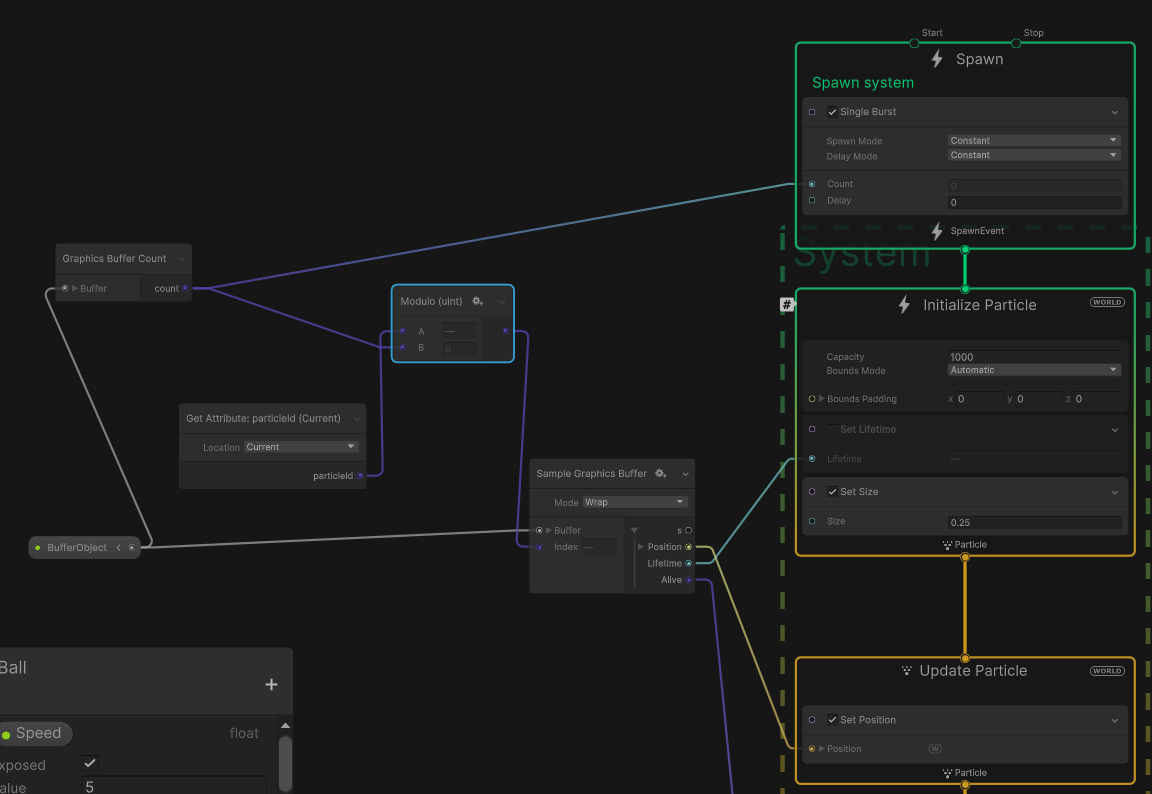
Trying to figure out how to do this primarily through forum posts is so exhausting lol
ashen robin
Actually, it's not the case of all particles share the same lifetime, it's that when I compile/create the graph that all particles are created, thus they all are created with that lifetime.
So, I guess the question is down to how to set a new lifetime duration outside of the initialize block
Like, I can handle the lifetime outside of the graph too, but I want to apply the animation curves and all that jazz from that graph... which I could also do outside of the graph. At that point I might as well just write my own vfx graph.
I mean, I already do control like 90% of how the particles move outside of the graph since I need the collision callbacks per particle.
carmine bone
Hi, I'm making a vfx and having an issue with my texture and can't figure out what exactly is going on with it to cause it to behave this way. When I make the texture I use wrapped mode which in my mind should make it seamless but I'm still getting seams.

Here's a version of the texture with a black background so you can actually see it.

 burnt coral
carmine bone
Hi, I'm making a vfx and having an issue with my texture and can't figure out wh...
burnt coral
carmine bone
Hi, I'm making a vfx and having an issue with my texture and can't figure out wh...
Make sure the horizontal UVs of the cylinder mesh is the full 0-1, and only use integer tiling values
carmine bone
Sorry, I'm a little newer to Blender.
Probably my problem, would you mind expounding on that for my sake?
I have my UV for the cylinder up, but not sure what you're telling me.
 ashen robin
Make sure the material/shader you're using have the correct tiling values if those were modified.
oh, it's seamless anyway, but integer tiling values still probably matter
 torn crane
had a question about Playable Graphs but figured it's best to ask in #🏃┃animation **^
 grave berry
Hey everyone,
will it heavily impact performance if I set a vfx shader graph hybrid-per-instance property per particle by accessing a custom vfx attribute?
grave berry
Different question: What's the difference between Add Custom Attribute and Set Custom Attribute?
Another question: Are GPU events propagated on the same frame?
 ashen robin
grave berry
Different question: What's the difference between `Add Custom Attribute` and `Se...
ashen robin
grave berry
Different question: What's the difference between `Add Custom Attribute` and `Se...
I think previously SendEvent was once a frame but recently it's been changed to support multiple calls, but other types of GPU events I've not noticed any problems. Add just means to append to any values already set.
Also may want to clarify how you're accessing per particle
grave berry
ashen robin
Also may want to clarify how you're accessing per particle
I set the properties like this
 ashen robin
At worst, it's probably continuously updating the values, but otherwise I doubt there's much of a performance implication. Actually, it's probably just set once if you're not continuously updating values of the system through exposed properties or buffers.
I remember them explaining a bit more in one of the Unity talks

Real-time VFX are often performance intensive, especially as your game scales. In this session, you will see how VFX Graph works, in particular the new instancing feature that enables you to create many instances of your VFX in an efficient way. Using practical examples, you will learn how to identify issues and potential bottlenecks, as well as...
Here's one that's unlisted for some reason yet super helpful for their new features this year
grave berry
ashen robin
Here's one that's unlisted for some reason yet super helpful for their new featu...
Thanks, that's great!
ashen robin
grave berry
Thanks, that's great!
https://qriva.github.io/posts/how-to-vfx-graph/
Also some information on SendEvent limitation and the direct link feature + other goodies this person salvaged from the forums (aka the actual documentations)
 stone echo
does anyone have an aura effect like this or know how to make one? (URP)
https://m.youtube.com/watch?v=F8ck26La2FY
 inland tusk
Is there anything like a compare but works like a switch/minimum or someething?
I want to compare 3 values and for the smallest one to be used as a 0-2 ID to select another input


(I want to add a third effector here into the above)
hang on

so how can I get a 0-2 value out of a list of 3 values and get the id of the smallest one
inland tusk
nm I'll just do it with 2 compares 😛
inland tusk
So! I have a thing that is a bit of a problem.
If I have a prefab that has 3 VFX graphs in it and then instantiate it at runtime, only 1 or 2 of the graphs actually generate, and then to get the last ones to work I have to toggle the component on and off again in the editor, any idea?
ashen robin
Seems odd. Does it happen in a build or only the editor?
ashen robin
ashen robin
https://i.imgur.com/3G2O65x.png
```cs
//Accepts an AbilityObject which will ...
Tricky problem but I kinda figured a way out. The ultimate problem, and what was most confusing me the most, is that you don't actually know the particle ID that the system assigns when you request a particle bucket as there is no way to read it back to the cpu. However, in my original post, I was trying to be witty by just spawning all buckets at once which allowed for linear ID assignment per buffer. The problem with this idea is that these particles would could never expire if I wanted to keep the IDs so I used callbacks to the buffer to handle the lifetime and rendering of the particles.
This worked until I realized that since these particles could never expire, then they would never re-enter the initialize block, making one-time assignment impossible without a bunch of logic gates and checking in the update. So, the right idea was to forgo the particle IDs and make my own ID script CPU side then pass it in and assign it as a custom variable via event attribute. By doing it this way, I can now continuously update my particles (per bucket) whenever I choose and in whatever node it may be in. Also, I still have complete control over the lifetime of the particle via callback if I wanted to and I know exactly how many particles are alive if needed.
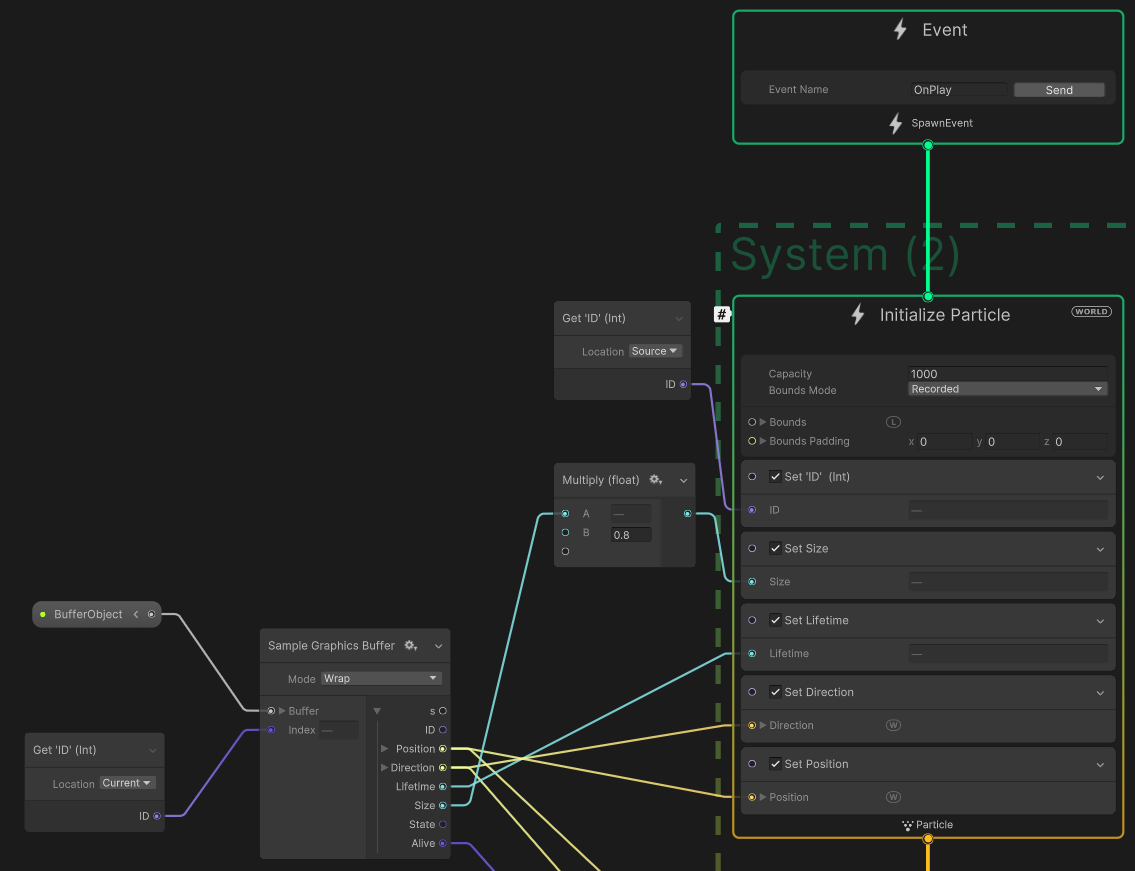
Continuously updating the position or stuff that needs to be done on a frame by frame basis could be expensive, but for smaller systems it should be fine.
Some vfx assets I only set the position in the buffer a few times throughout; you don't need to continuously update these buffers and can choose to only pass in partial data to update.
I've not really read much into the absolute optimization of it all, but other than caching a bunch of buffers, and the implications of continuous data update, I feel like this should be be standard to the VFX graph. There just seems to be such a wide focus on spewing out thousands of particles for cheap, but some people (like me) just want a better Shuriken System with some visual scripting and better pooling.
prime dome
is it possible to use two shadergraphs at the same time in vfx graph? like using one for one LOD And second for Second LOD respectively.
ashen robin
prime dome
is it possible to use two shadergraphs at the same time in vfx graph? like usin...
I've not looked into that, but I could think of ways of creating a master-shader with LOD capabilities where I'd disable/reduce the parameters of the shader via exposed properties.
Otherwise perhaps using multiple event calls (creating a whole new set of particles with new settings in its place)
zealous wing
In VFX graph, how can I achieve this flag shape (screen with dots)? I have tried to use sequential line with compare and branch blocks to change the position of line on Y-axis when spawned amount of particles reached the the compare limit, and amount of particles it will spawn before changing the position again, but it proved to be very inaccurate method.

 modern charm
zealous wing
In VFX graph, how can I achieve this flag shape (screen with dots)? I have tried...
modern charm
zealous wing
In VFX graph, how can I achieve this flag shape (screen with dots)? I have tried...
Use SetPosition, pass in Vector3 where you calculate Vector3 like Vector3(0, particleIndex % X, particleIndex), where X = number of items to spawn per row
 lusty phoenix
why doesnt my trail dissapear after one seconf ?

 mental reef
I was wondering if I could snap VFX particle's initial position to a grid. I am working on a pixel art game and need the particles to align to said grid to maintain pixel perfect detail. The first image is the particle not aligned to a grid, the second is the what the particle should look like when it is aligned on a grid. I am using VFX graph. I still want them to spawn randomly, I just need them to be aligned on which ever grid point is closest to their spawn.

 ashen robin
Has anyone managed to make a system of logic that incorporates different particl...
ashen robin
ashen robin
Has anyone managed to make a system of logic that incorporates different particl...
https://i.imgur.com/X4vC5bm.png
My attempt at this particle state / animation curve problem. If anyone else had any ideas do tell
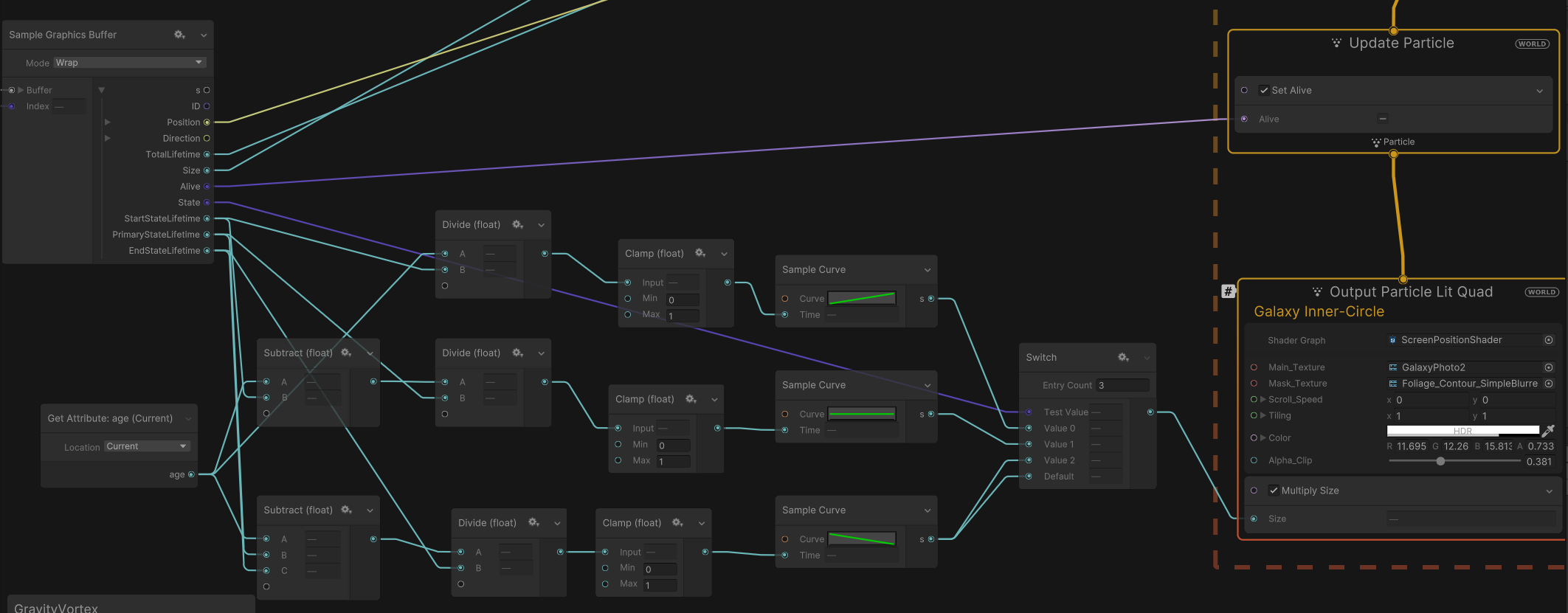
 severe sun
I am emitting 4 particles from a CUBE. (shoot the cube, it breaks into 4 particles). I have them bouncing onto the ground, but... can they bounce 'onto themselves' currently as seen in the screenshot, they are clipping eachother. originally i was instantiating 4 cubes with rigid bodies (not a particle system) for each cube shot, and that was working, but i thought the particles would be more performant in the long run, and i can live without internal collisions, but it would be nice if its possible?
 fresh tangle
Hi! I'm trying to follow a tutorial, but for some reason the alpha key on my color over lifetime isn't doing anything? This is my shader. Thank you in advance :D

AHH nevermind I figured it out!!
ashen robin
Use your own alpha (color over lifetime modifies vertex color aka the mesh data while shaders can either use that data or override it)
fresh tangle
yes haha 😭
 zealous relic
is anyone able to help me figure out why my particle system just like isnt doing anything
do particles just not work with baked lighting
warm torrent
zealous relic
do particles just not work with baked lighting
Depends what you mean by "work with"
Particle systems are totally dynamic, procedural things so light baking can't interact with them
Except by using probes and mixed lights
inland tusk
Anyone know if it's possible to convert a render texture to an attribute map? I'd like to get a position and color map from a rendertexture to use within VFX graph
 junior thistle
OK so how should I implement leaves moving through the entire map via wind?
I tried parenting the particle system to the camera but since it emits slowly, it only catches up when the player stops
what is the best solution for this?
 sinful badger
does anybody know how I can make a particle based whip that accelerates when you swing it?
 viscid kindle
Heya,
Has anyone used the URP Camera Depth Buffer function on VFX Graph?
I'm really struggling to get it set up and working and wondering if anyone had any examples, what settings they used, etc.?
EDIT: Wasn't on the latest alpha version of unity editor - had to download it from the website, now works
warm torrent
junior thistle
what is the best solution for this?
"Best" solution really depends on a lot of factors
Maybe you can extrapolate player's movement and move the particle system in that direction so the leaves are mostly coming from where the player most likely will be
 tall dune
I'm trying to programatically send out a large number of particles in a given frame with different positions and trajectories by setting values in a VisualEffectComponent. I put an event trigger at the start of my VFX graph, and in code, I call .SendEvent("SendParticle"), but it doesn't seem to work. Any advice?

    Vector2 initialPos = cardinalOffsets[(int)incoming] * 0.5f + coordinate;
    Vector2 finalPos = cardinalOffsets[(int)outgoing] * 0.5f + coordinate;

    elecVFX.SetVector2("TileCenter", coordinate + Vector2.one * 0.5f);
    elecVFX.SetVector2("InitialPos", initialPos);
    elecVFX.SetVector2("InitialVel", (finalPos - initialPos) * PARTICLE_LIFETIME_INVERSE);
    elecVFX.SendEvent("SendParticle");
}```My live particle count looks to be 120, but i think they are all spawning with the exact same parameters
tall dune
I think I know the answer I'm going to get, but is there a way to realistically pass an array into a VFX graph?
tall dune
I think I learned that I need to use a graphics buffer, but I'm struggling to make it work right. My scripts currently say that the properties I defined in my VFX graph don't exist (they do, and the code was fine before I moved to graphics buffer. Any advice to hook this up properly?

Value of name 'GraphicsBuffer' was not found
...
(Null Asset) : Exception while compiling expression graph: System.InvalidOperationException: The expression UnityEditor.VFX.VFXExpressionCombine is not valid as it have the invalid flag: InvalidOnCPU
  at UnityEditor.VFX.VFXExpressionGraph.BuildMapper (UnityEditor.VFX.VFXContext context, System.Collections.Generic.Dictionary`2[TKey,TValue] dictionnary, UnityEditor.VFX.VFXDeviceTarget target)```
 tough arch
 brazen stone
how can i get the glow?
brazen stone
how can i get the glow?
Postprocessing
ashen robin
tall dune
Buffer stuff is a little confusing when it comes to indexing so I just handle it myself outside of the graph, but other than that I'm not too sure why you're getting those errors (perhaps the buffer isn't being set correctly).
CustomAttributes with SendEvent does work though and you need to use the custom attribute blocks to grab and set the variables in the initalize particle block
The graph has these standard attributes that if your data conforms to them then you can simply inline (innode?) the attribute data using inherit
The difference between the compute buffer and SendEvent with CustomAttributes is that you can update the buffer throughout the particle lifecycle, while you can only set the particle data once without.
Basically the implied way of using the graph, or any buffer computation is through limited communication; set-once, single lifecycle.
Yet, you can always use the systems independently, using another gameobject's locality to manipulate it in game space which I still don't understand since that goes against a lot of how this feature works. I guess for single-use effects you'd otherwise don't need to pool? But still, updating the position only dirties the system so the buffer must do some readback.
 stark crest
brazen stone
how can i get the glow?
stark crest
brazen stone
how can i get the glow?
Bloom active as Post-process, and a HDR value on the color of the particle (or strong emissive)
stark crest
junior thistle
what is the best solution for this?
VFXgraph : To calculate the wind into the VFXgraph, you will need a 3D(x,y,z) or 2D(x,z) Texture that you apply using WorldSpace (position) as UV, then using this texture result you can have a nice effect just multiplying it with a vector3 that you expose as property to manipulate general the direction of your particles wind, in th end you branch it to Force or a Turbulence(more complex) node so you will have wind in all VFX graph using your node
Shuriken : enable linear force module + noise module
tall dune
ashen robin
Buffer stuff is a little confusing when it comes to indexing so I just handle it...
I’m really struggling to find basic reference code to see how it is used. Would you know where I can find anyone using a graphics buffer?
My goal is to basically tell my VisualEffect component to summon a burst of particles on one frame. Looping through an array/buffer, where each one has parameters defined for it.
ashen robin
Welcome to terrible unity documentation
tall dune
I’m sorry to say we’re already well acquainted
and in an abusive relationship
if I could just find a sample of someone’s code where they have something simple working, I might be able to make it work right
one of the unity devs said on the unity forum (I shit you not): write pixels into a texture2D via C# script, so the VFX graph can read and parse the pixel data
this was before graphics buffers were a thing, but that was a particularly jaw dropping comment
like surprisingly dogshit
ashen robin
#✨┃vfx-and-particles message
Probably the best sample project using buffers
you can probably do stuff with send event and custom attributes though like I was saying
stark crest
tall dune
My goal is to basically tell my VisualEffect component to summon a burst of part...
I guess you can just try to stick with a boolean set to the VFXgraph to emit the burst, If coordinates are wisely compute in the particle graph itself you can just set a vector2 to your offset
tall dune
so single burst spawn node => loop?
stark crest
if you revert it from script why not?
tall dune
i made a small struct with 3 bits of information (3 Vector2)
and I try to populate my graphics buffer with an array of that struct
tall dune
stark crest
if you revert it from script why not?
i’m mostly trying to figure out how the looping works in the VFX
maybe I could show code
ashen robin
tall dune
```private void DrawParticle(Vector2 coordinate, Cardinal incoming, Cardinal out...
Are you using VisualEffect.CreateVFXEventAttribute(); or are you just changing the exposed parameters as is of the system
tall dune
private int bufferedParticleCount = 0; // Number of particles currently written in the particle buffer.
private ElecDrawCell[] elecParticleArray = new ElecDrawCell[MAX_PARTICLE_COUNT]; // This is used to populate the graphics buffer
private GraphicsBuffer elecParticleBuffer;
/// <summary>Struct representing parameters for one </summary>
[VFXType(VFXTypeAttribute.Usage.GraphicsBuffer)]
struct ElecDrawCell {
    public Vector2 tileCenter;
    public Vector2 initialPos;
    public Vector2 initialVel;
    public ElecDrawCell(Vector2 tileCenter, Vector2 initialPos, Vector2 initialVel) {
        this.tileCenter = tileCenter;
        this.initialPos = initialPos;
        this.initialVel = initialVel;
    }
}```Relevant lines later on:
MAX_PARTICLE_COUNT, System.Runtime.InteropServices.Marshal.SizeOf(typeof(ElecDrawCell)));```
Later
```elecParticleBuffer.SetData(elecParticleArray,0,0, bufferedParticleCount);
elecVFX.SetGraphicsBuffer("GraphicsBuffer", elecParticleBuffer);
elecVFX.SendEvent("SendParticle");```Assume my code makes the elecParticleArray and bufferedParticleCount correct. I'm familiar with that stuff
tall dune
ashen robin
Are you using VisualEffect.CreateVFXEventAttribute(); or are you just changing t...
the later
ashen robin
im trying to think what the heck making a custom event attribute implies again
there's a reason I use it lmao
tall dune
I believe custom events are consumed that one frame, and just tells the VFX graph to go trigger the spawn on that frame
ashen robin
yeah, I think it's called direct link feature
or there's some limitation on events per frame
tall dune
point being, I have two parts i'm very unsure of: the VFX graph and the script
ashen robin
if you haven't: https://qriva.github.io/posts/how-to-vfx-graph/
Dude made a site of everything he's taken from the forums
tall dune
that helps
ashen robin
The buffer error above I think implies an error in the script if GraphicsBuffer was not found
tall dune
That would make sense to me, except "ParticleLifetime" (A float) was also not found
I suspect the whole graph isn't compiling properly, or something
....but I have no idea
ashen robin
I think I was having trouble with the spawn block too using compute buffers too. Usually I'm using it without it and directly initializing with event calls
ill probably look into it more later if I need it
but otherwise you can send data in as well with the SendEvent which may be available
tall dune
is there a way to turn off a block of a VFX graph? so I can test without it, but turn it back on?
tall dune
now? as in they didn't before?
ashen robin
the node boolean stuff was added in an update last year
tall dune
(Null Asset) : Exception while compiling expression graph: System.InvalidOperationException: The expression UnityEditor.VFX.VFXExpressionCombine is not valid as it have the invalid flag: InvalidOnCPU
 formal rock
anyone knows how I make the spawned particles get into the world space?
instead of being only local?
tall dune
 ashen robin
if you're using vfx graph then change the system in the top right*of each system block to world
tall dune
you see that LOCAL? click it
ashen robin
also, if you're sending in positions then make sure to change that to world too
tall dune
ashen robin
https://discord.com/channels/489222168727519232/532260045887373352/1136563246564...
I think this helps a lot. working through it
tall dune
I think I narrowed down the cause for the null asset problem

if that cyan line actually connects to the VFX graph, it refuses to compile
and any combination of nodes in between also causes it to not compile
ashen robin
so it's the bounds?
there's usually stuff you can't edit during runtime, so I wouldn't be surprised
or maybe it expects the info sooner than by the buffer
tall dune
I didn't put 2 and 2 together. I thought it was ALL info from my graphics buffer, but it just turned out that bounds can't be set, which is lame
I literally know everythere that particle will be
whatever, it is now working
not working correctly, but correctly enough that it's like my code is calculating values wrong.
ty mao
ashen robin
lol yeah np
I find the ID stuff to be an annoyance too so you may run into problems with that
more that you can't get the ID back on the cpu side so you got to make sure you're always updating the right buckets
 boreal venture
making a shiriken projectile that follows the player in unity 2d, only problem is while i want the sprite itself to rotate, i dont want the hitbox to also rotate bc its too resource intensive
whats the best method to keep the collider static
ashen robin
well, I actually continously update my buffers in update so that may be related
boreal venture
boreal venture
making a shiriken projectile that follows the player in unity 2d, only problem i...
like how would i put contraints in place for the collider to stop it from rotating with my homing projectile
ashen robin
are you using vfx graph
boreal venture
ashen robin
are you using vfx graph
no, rn im using a transform function
ashen robin
oh, so your own particle then
any reason (beyond preference) that you believe it's resource intensive
boreal venture
ashen robin
any reason (beyond preference) that you believe it's resource intensive
theres no point in rotating the 2d box collider with the sprite itself
its just a waste of resources
ashen robin
it's pretty minimal unless you thousands of stuff updating, but to accomplish that you can go about it two ways:
- Use a wrapper gameobject and make two children, one with the collider and one with a sprite which you'd rotate instead.
- You can use https://docs.unity3d.com/Manual/Constraints.html to target an object that doesn't rotate
Actually, constraint probably isn't what you want. You can also target position and update directly via script if they aren't part of the same hierarchy
Well, it can work assuming you rotate the parent instead of the secondary gameobject
Anyway, go with 1 and and add the controller script on that, then update the rotation of the sprite
ashen robin
for the most part I use automatic and it seems to work
but I wouldn't be surprised it's still rendering so ill have to double check on that
tall dune
is there a way to apply a transform to a particle texture?
I just want to rotate the particle quad by a fixed angle
ashen robin
there's angle nodes that take in euler rotation values
not sure about text uv manipulation if you are also refering to that
usually you have shaders for that
tall dune
for some reason my graphics buffer seems to retain information from previous play sessions. I already call buffer.Release in OnDestroy(). how do i stop that?
ashen robin
I think that happens when you've currently got indices active/being used by the graph
at least I've noticed that when I was indexing stuff badly
the graph itself needs to be flushed or something? Recompling it probably fixes it
tall dune
gross
but ty
is there a way to tell my VFX graph to just destroy all particles currently on it?
ashen robin
https://docs.unity3d.com/2020.2/Documentation/ScriptReference/VFX.VisualEffect.Reinit.html
Maybe try that
individually you need to use Alive node
and set it via buffer
There's StopEvent too, but I think that just stops loops but not kill particles
tall dune
i see. does this include resetting all the properties?
and is there a better way to set variables with like a constant from a string or something?
ashen robin
You can send in custom structs but the data must be blittable or conform to their types
Oh, I guess you technically do that anyway with the buffer
tall dune
is it substantially more expensive to draw a new particle every single frame for one frame as opposed to allowing a single particle to just go along its update loop?
or maybe I can just tell the VFX graph to spawn 10000 particles, and manually update their positions via buffer every frame?
ashen robin
tall dune
is it substantially more expensive to draw a new particle every single frame for...
it's hardly expensive if you set once and let the particles run their own course. It'll get expensive the more you update the buffer though
my update loop checks if anything needs to be updated then updates the buffer accordingly
but I need to mutate my particles throughout the lifetime by the position of the cpu so it can get expensive (I'm mostly use single particles to update but using that single particle I can spawn more particles from it)
ashen robin
private unsafe void Update()
{
    if (eventSet.Count == 0)
    {
        return;
    }

    foreach (VFXAbilityEvent abilityEvent in eventSet)
    {
        int indexID = abilityEvent.IndexID;
        AbilityObject ability = abilityEvent.AbilityObject;

        bufferDataPtr[indexID].Position = ability.transform.position;
        bufferDataPtr[indexID].Rotation = ability.transform.eulerAngles;
        bufferDataPtr[indexID].Direction = ability.transform.forward;
        graphicsBuffer.SetData(bufferDataArray, indexID, indexID, 1);
    }

}
I should probably change all that to a Matrix4x4 eventually but that means reconfiguring all my graphs again ahaha
ashen robin
https://cdn.discordapp.com/attachments/448923113921576992/1184600593562599424/Unity_vL400cYNcp.webm?ex=658c9046&is=657a1b46&hm=a4f643d7b53c4711a29f695696958a3a05d1c4afeaaf8f01c15a0e8c5312e62a&
So here I shoot out three fireballs, but I'm actually only updating 3 buffers that then do their own GPU events to proliferate the values into other events, so those trails are like 100 particles each without having to update them.
Now, for the most part you can manage this with just normal events and sending the transform values into the initialize block, which you'd then let the vfx graph handle the change in velocity. But, you'd have to predict the position for collisional callbacks, and doing any abnormal movements (like homing or ricocheting) would be impossible to accurately mimic with the vfx graph.
tall dune
i think I need to scale back my idea from using particle effects to a few tilemaps. rendering things as quickly as I need just seems like too much of a slowdown.
 storm halo
I am using VFX Graph to make a "falling leaves" particle effect. I can't figure out how to stop the leaves from rotating once they hit the floor. Does anyone know how to solve this?
tall dune
I'm not super sure, but could you maybe play with the bounds?
tall dune
ashen robin
Now, for the most part you can manage this with just normal events and sending t...
So you know, while I did have to scrap the particle idea I had, you did help me learn how to use shaders/VFX graph for other things, and learn the limitations. I would not have gotten far enough to see it wouldn't work for that as quickly without you. ty
ashen robin
tall dune
So you know, while I did have to scrap the particle idea I had, you did help me ...
That was two weeks of trying to salvage info from the forums lmao. Always could consider making your own particle system later on ;p
tall dune
would you know how to randomize a texture on a VFX graph?
there's a forum post on it, but it isn't very useful
I hear something about flipbooks that I don't understand
ashen robin
tall dune
would you know how to randomize a texture on a VFX graph?
I've not used flipbooks but they're just sprites that loop to create a more stylized particle. If I were to think of a way to randomize a texture I'd send in a texture atlas via shader then randomly pick a index. Actually, that's pretty much what the flipbook is so maybe that's all you need.
 proud bane
How do you stop a particle from moving after a while? (Found out  )
)
ashen robin
Jeesh, why are VFX graph assets so large. I've a bunch of graphs that are a mb or two... Hopefully it's reduced when packaged and built.
Guess I could try to reuse some of them a bit more, but why would they be so bulky anyway? It's as if they're duplicating texture assets.
 hearty flare
ashen robin
Jeesh, why are VFX graph assets so large. I've a bunch of graphs that are a mb o...
hearty flare
ashen robin
Jeesh, why are VFX graph assets so large. I've a bunch of graphs that are a mb o...
Can you not look at the text and see what it is? It's presumably just the terrible way the graph itself is serialized, where Unity's serializer keeps everything regardless of whether it's a change from the original declaration
ashen robin
hearty flare
Can you not look at the text and see what it is? It's presumably just the terrib...
It's bundled in a .asset with a bunch of shader code and other precompiled code (which all seems to be dependent on the amount of subsystems you have). It also creates materials so I could only assume it's reusing assets, but then again 2MBs of precompiled code (per asset) is quite a lot. Could always standardize the systems and make them more reusable by feeding the required textures at runtime, but seems like such a pain...
warm torrent
ashen robin
It's bundled in a .asset with a bunch of shader code and other precompiled code ...
You'd certainly want a system to test and confirm the actual effect of vfx graphs on build size before designing systems like that
ashen robin
Yeah, I'd probably don't want to be passing texture data into the buffer each time I use them.
I'm more worried about the runtime implications haha
Then again, I'm not sure how that's all handled, so perhaps it wouldn't be that detrimental. Rather, you're very restricted to primitives for the graph buffers (for the most part), but it may be possible to do it through the custom events.
warm torrent
ashen robin
Then again, I'm not sure how that's all handled, so perhaps it wouldn't be that ...
Before even thinking this you'll want to verify this isn't an editor-only issue you're solving
ashen robin
I guess I'll dupe a few hundred and try it out 
tall dune
ashen robin
Jeesh, why are VFX graph assets so large. I've a bunch of graphs that are a mb o...
i made a VFX graph yesterday of medium size, and it is 332 KB
ashen robin
I've been playing with point caches so that's probably related. On that note, rotating these things when not confined locally is arse. Gotta rotate all points in world space with a bunch of nodes.
ashen robin
Marvel at this masterpiece
https://cdn.discordapp.com/attachments/288887968960086016/1185312298814931075/mQcDVrkdtH.webm?ex=658f271a&is=657cb21a&hm=c50a9782068c4ecb6d6c1670f51cd35b914c0d22037903b5666e739a44d90946&
All for that. Reasoning why is you can't easily rotate these point caches in world space (the system itself is in world space), so you need to break out the atan and friends.
also 100% opaque here with alpha clipping. Need to smooth out the curves though cause alpha clip can be a little snappy.
 tawdry owl
Does anyone know how to project 3D objects on to a flat canvas? For example, you might have a flat CCTV screen that shows footage from a camera elsewhere in the scene.
opal star
tawdry owl
Does anyone know how to project 3D objects on to a flat canvas? For example, you...
Well usually you would use a camera that renders to a render texture and use that texture as the base color of the screen material. But cameras get expensive quickly in the new srps so there are other methods such as custom passes to achieve the effect.
tawdry owl
Thanks @opal star . Are custom passes a post processing thing or should I be looking elsewhere?
opal star
They could be. What render pipe are you on ?
tawdry owl
Actually @opal star maybe I should rephrase this. What I really wanted to do was show a 3D spinning object on a 2D plane. Would I be better off recording the spinning object, exporting as a PNG sequence, then reimporting as an animation to use on the plane? I'm trying to find the right way to do this with low expense / file size
opal star
If the object does not change then sure
Look into making a spritesheet and how to play it with a shader
Unity also has a video player if you need more details lenght than what a sprite sheet can offer
tawdry owl
Fantastic, thanks so much.
tawdry owl
@opal star I converted all the PNGs in the sequence to 2D Sprites, then created an Animation Clip using them, and placed that inside the Canvas. Does that feel like the right thing to do, or is that hacky?
Hmm it doesn't seem to like being in the Canvas, getting some weird behaviour. Maybe I'll have to make a sprite sheet for an Image object after all.
 brave trail
Help, how do I change the rotation screen?
 warm torrent
brave trail
Help, how do I change the rotation screen?
warm torrent
brave trail
Help, how do I change the rotation screen?
Start asking your questions in the relevant channels
#💻┃unity-talk
 mortal comet
whatsup
warm torrent
mortal comet
whatsup
This is not a channel for chit chat, and the post you replied to is from 2019
 ebon orchid
been following a tutorial on adding rain colliding with the environment im using. although its not working. using unity btw
made sure to make it so it collides with the world but still goes through
the environment im using is from the unity asset store
ashen robin
ebon orchid
been following a tutorial on adding rain colliding with the environment im using...
Terrain needs colliders, and your particle system needs collision enabled
- you'll probably need to dedicate a layer for the terrain
warm torrent
ebon orchid
been following a tutorial on adding rain colliding with the environment im using...
You may want to be more specific than "using unity"
What is your tutorial, what is the "environment" (terrain or mesh or something else?) and what kind of particles are you using (how is the collision detection set up)
ebon orchid
ill link everything just now
tutorial im using https://www.youtube.com/watch?v=SrWrUN56UWU&t=308s

I'll show you how to create a very simple, rainfall effect using just Unity's own "Shuriken" particle system and the default particle texture. We can use the parameters to create various effects, whether this be gentle, ferocious rain. We look at using collisions and sub emitters to create splashes and other cool effects that you can use to make...
then the asset im using as my envrionment https://assetstore.unity.com/packages/3d/environments/historic/sponza-229289#description

Elevate your workflow with the Sponza asset from studiolab.dev. Find this & other Historic options on the Unity Asset Store.
also, making rain particles
managed to make them but goes through the environment
and the rain is set up to collide with the world instead of planes
warm torrent
ebon orchid
and the rain is set up to collide with the world instead of planes
Your environment has collider(s) as Mao pointed out?
ebon orchid
oh, i dont think it does
how do i set that up
ngl assumed it would automatically collide if i turned it on for the rain
ashen robin
what I find interesting is that this video has some of the rain going through the colliders
and I've experienced that myself
ebon orchid
yea, that is odd
the reason why im trying to make it colide is so i can add a subemitter so i can add a splash effect
ashen robin
does seem like it collides later, but it still renders too far away
so it must be doing some interpolation, but apparently it's still not catching it in the forward direction
warm torrent
ashen robin
what I find interesting is that this video has some of the rain going through th...
Particle collisions are always Discrete, meaning they don't check for colliders in their traveled path, only in the current position
World colliders are infinitely thin, so fast particles are likely to slip through
"Plane" collisions are infinitely thick, so the collision happens late instead of never
ashen robin
understandable, I think I'd probably a good idea to tackle it like via raycasting backwards and rendering the droplet at a normal upwards
actually maybe the triggers do that ah, actually if they are discrete I guess that rules that out
warm torrent
ashen robin
understandable, I think I'd probably a good idea to tackle it like via raycastin...
Raycasts for every particle doesn't sound performantly practical, and overriding particle behaviour is really tedious
Trigger module and trigger colliders are even more limited in collision information
Even rigidbodies are always treated as discrete against trigger colliders
I haven't found any practical solution to accurate particle collisions
If you're making rain it's likely better to do the rain and splashes entirely separately
ashen robin
and just let it clip through (the drops)
I guess no one should be seeing that anyway haha
warm torrent
If you do it right, it shouldn't be perceptible that the two don't line up
It's difficult to see in real life anyway
ashen robin
probably way more performative too since you can probably just ditch the thousand+ colliders
I guess you would just bake a bunch of points where the raindrop effect would be produced

 wintry sail
any idea how to get rid of this box around my muzzle flash, im using the particles from the legacy particle asset: https://assetstore.unity.com/packages/vfx/particles/legacy-particle-pack-73777

 ashen robin
wintry sail
any idea how to get rid of this box around my muzzle flash, im using the particl...
ashen robin
wintry sail
any idea how to get rid of this box around my muzzle flash, im using the particl...
the image itself may not have any alpha values
in the import settings you can fool around with what is alpha so try that
 calm tapir
I have a particle system that looks like snow and follows the player to simulate snow, but when I move, the snow becomes distorted and stretched. Does anyone know why? I have the simulation space set to world so it doesnt rotate with the player.
found out the problem, had to use camera motion vectors in the rendering tab or the particle system
formal rock
I want that the bullet VFX becomes a copy of the one sended in the function, how do I make so that it not only copy the VFXAsset but also the parameters on the object sended?
 jaunty tree
Is there any good asset for VFX in URP?
This seems to have been the go-to one but for some reason (?) they won't update it to URP:: https://assetstore.unity.com/packages/vfx/particles/ultimate-vfx-26701

Add depth to your next project with Ultimate VFX from Mirza Beig. Find this & more VFX Particles on the Unity Asset Store.
warm torrent
jaunty tree
This seems to have been the go-to one but for some reason (?) they won't update ...
Assuming it uses Particle System, all you need for updating it to URP is to upgrade the materials (though if custom shaders are used they won't be directly upgradeable)
jaunty tree
warm torrent
Assuming it uses Particle System, all you need for updating it to URP is to upgr...
Thanks! Can I somehow see that before I buy the asset?
They explicitly say though it's not supported
warm torrent
jaunty tree
Thanks! Can I somehow see that before I buy the asset?
Looking in the description:
URP: While not officially supported, you may be able to automatically upgrade most of the effects, but many use custom shaders that will have to be edited/changed manually.
jaunty tree
Yeah that's what I have read but with the "you may be able" it's basically as vague as it gets haha
warm torrent
jaunty tree
Yeah that's what I have read but with the "you may be able" it's basically as va...
It basically means "you can, but no guarantee"
The asset was made in like 2018, and URP has changed a lot since
jaunty tree
Ah OK I read that differently. More like there probably are ways but they might be quite hard
warm torrent
Generally there's nothing stopping you from simply swapping BiRP materials to equivalent URP shaders, but they handle things like emission and soft particles a bit differently iirc so it may take some tinkering to get it to look exactly the same
If it uses a lot of custom shaders that don't have equivalents then it's a lot of extra work
Specialized work at that since converting shaders requires basically making it again from scratch
jaunty tree
So the only thing that could be incompatible is that they wrote the shaders by hand you say?
I'm not an expert, but fragment and vertex shaders are probably the same and use the same language in the two RPs or not?
Or is it that they used surface shaders and these differed for the RPs?
warm torrent
jaunty tree
So the only thing that could be incompatible is that they wrote the shaders by h...
- yes, the default shaders have equivalents
- Yes, they're similar and use the same languages but have different APIs basically (or functions, I don't understand that part totally)
Worth noting the only officially supported way of authoring shaders for URP is the Shader Graph
The exact differences don't really matter, you'd have to do pretty much all the work of making the shader again in any case
 spiral moth
jaunty tree
So the only thing that could be incompatible is that they wrote the shaders by h...
spiral moth
jaunty tree
So the only thing that could be incompatible is that they wrote the shaders by h...
Fwiw Mirza Beig is really active on Twitter etc so I'd guess if you reach out he'd be happy to help. Besides buying ready made assets the tools are there to build them so there's also learning VFX Graph itslef, and/or ParticleSystem.
warm torrent
spiral moth
Fwiw Mirza Beig is really active on Twitter etc so I'd guess if you reach out he...
All good options!
 lusty plinth
Guys, how do you call that effect where a character, for example, teleports itself somewhere else and there's like a clone of it that stays behind and fades out?
ashen robin
afterimage
lusty plinth
ashen robin
afterimage
Thanks, fam
 umbral axle
Guys, is there any configuration for the particles to give them more tone and make them not look so transparent?
warm torrent
umbral axle
Guys, is there any configuration for the particles to give them more tone and ma...
Making them less transparent should be done by keeping the color alpha higher
Not sure what "tone" means
Maybe you'll want to show an image or a video of what you're working with currently
The instructions would differ based on which blend mode you're using, for example
umbral axle
warm torrent
Making them less transparent should be done by keeping the color alpha higher
No...
like this particle of fire
 warm torrent
umbral axle
like this particle of fire
warm torrent
umbral axle
like this particle of fire
Material properties to show?


 warm torrent
umbral axle
warm torrent
umbral axle
These are particle system properties
Material properties are on the material
I don't see any module reducing the particle alpha, so I'd guess you have additively blended particles that have darkish color making them less visible
umbral axle
warm torrent
These are particle system properties
Material properties are on the material
I d...
 warm torrent
umbral axle
warm torrent
umbral axle
Do you intend to use legacy shaders? There are no blend mode options there
umbral axle
Mmm may change it
warm torrent
umbral axle
Mmm may change it
Try the particle shader that is the default for your render pipeline
Once you do that try the alpha blending instead of additive blending
If your texture has no alpha channel and you can't alleviate that with "alpha from greyscale" import option and you must use additive blending instead, make sure the color of the texture is high enough or has a high emissive color intensity
jaunty tree
Does anyone know a good tutorial for the vfx graph?
zealous wing
jaunty tree
Does anyone know a good tutorial for the vfx graph?
https://www.youtube.com/watch?v=iCEHarLRCzI
This one teached me few important things about graph while still being a simple VFX effect. But for me, creating systems that are already built in the VFX graph (like swarm) and breaking them down, tweaking and experimenting with them made me learn the most

Let's get this year started with some awesome fireworks in Unity!
Explore your creativity and get 2 free months of Premium Membership: https://skl.sh/brackeys18
● Post Processing: https://youtu.be/a0OQvWAPeuo
● This effect was inspired by: https://youtu.be/rBU7XNxQs84
···········································································...
jaunty tree
zealous wing
https://www.youtube.com/watch?v=iCEHarLRCzI
This one teached me few important th...
Thanks! With already created you mean just following break downs of effects?
zealous wing
jaunty tree
Thanks! With already created you mean just following break downs of effects?
Once you right click inside an empty space in the graph you can choose "systems" and create one of the few example graph. I meant these
jaunty tree
Ah nice thanks?
 brazen stirrup
What's considered best practice for keying charactere particles/vfx in animation clips? is it better to have all vfx/particles pre instantiated on the character and invoking them to play through a script method which is keyed? or have said script instantiate them?
If the former how should I reference them? is a predefined empty which stores them all a good idea and passing an index? or passing a string? (if i'm instantiating them I can just pass the prefab which is simpler but I'm not sure on efficiency)
ashen robin
brazen stirrup
What's considered best practice for keying charactere particles/vfx in animation...
Like any other gameobject, you'd want to pool your particle pools in the long run. So load them, hide, then play them when you need them.
brazen stirrup
ashen robin
Like any other gameobject, you'd want to pool your particle pools in the long ru...
yeah ended up doing this and pooling per prefab/vfx type
 inner knoll
anyone know why my lens flare just go through objects? they all have a collider so im just confused.
 hearty flare
inner knoll
anyone know why my lens flare just go through objects? they all have a collider ...
hearty flare
inner knoll
anyone know why my lens flare just go through objects? they all have a collider ...
Occlusion isn't ticked, surely that's required
inner knoll
Yea but if I turn it on, the flare disappears if I just look it directly
warm torrent
inner knoll
Yea but if I turn it on, the flare disappears if I just look it directly
Looks like that is your true issue
Usually that happens when you have something like a crosshair that's rendering to depth buffer in the way blocking it
#archived-urp is the correct channel for this
 cobalt scarab
@bronze sail Don't cross-post, please
ebon orchid
how do i hide the teapot icon
 warm torrent
ebon orchid
how do i hide the teapot icon
warm torrent
ebon orchid
how do i hide the teapot icon
Gizmos menu of the scene window
Decrease their display size, or find the vfx component gizmo from the list and disable that
Or disable all gizmos temporarily using the same menu button
ebon orchid
oh thanks, ill see if that works
 glad vigil
im quit new to vfx i found this cute little skull here:
when it starts it pops up and then it change the size over the lifetime.
after 5 secs it restarts with the popup because of the loop
i just wanna let it popup once and then change the size over lifetime until i destroy the object
how can i achieve this? 🤔
 warm torrent
glad vigil
im quit new to vfx i found this cute little skull here:
when it starts it pops ...
warm torrent
glad vigil
im quit new to vfx i found this cute little skull here:
when it starts it pops ...
VFX or Particle System?
Actually if you want just one persistent skull mesh I wouldn't use either for that
For it to persist until destroyed the lifetime would have to be "infinity", but then you can't use size over lifetime (or I assume that wouldn't work)
So I'd just have a separate skull Mesh Renderer that you control the size of using a script, with a lerp or an exposed curve field for example, and use VFX or Particle System for the glow or other related efffects
ebon orchid
i seriously dont understand. im following a super short tutorial on how to make stylised fire and im doing exactly what hes doing and im not getting even something similar man :/
this is what its meant to look like

and this is what mine looks like

why does unity refuse to cooperate with me
just trying to make fire is hard :(
ebon orchid
okay so i got something worth keeping but how do i add more color variation to the fire cause right now its just an orange.

duplicated the particle and made it a dark grey to create a smoke look
ebon orchid

how might one turn down the bloom intensity of the camera while still keeping how bright the emissions are
 muted olive
Hey for some reason particles aren't appearing on a raw image with a render texture when the camera which is creating the render texture clearly sees them. Any idea why?


 gleaming orchid
Hey, I have an issue where after re-parenting a Particle System GO, its Trails module seemingly stops working (in attached video at 0:20).
It doesn't seem to be recoverable, save for creating a new Particle System and copying over all values.
Any ideas? Is this a Unity bug?
 grizzled orbit
hi is it safe to use vfx graph for most things these days? Or should i just stick with shuriken?
ashen robin
grizzled orbit
hi is it safe to use vfx graph for most things these days? Or should i just stic...
stick with what your project needs
 winged bough
hi, so I'm starting to learn the VFX Graph and Shader Graph, do you know any projects that could be useful to learn and showing them on the portfolio?
ashen robin
winged bough
hi, so I'm starting to learn the VFX Graph and Shader Graph, do you know any pro...
VFX graph's specialty is the large amount of particles that can be simulated at once. I'd go grab the example projects from the git and get an idea from them.
warm torrent
grizzled orbit
hi is it safe to use vfx graph for most things these days? Or should i just stic...
"Safe" in what sense?
gleaming orchid
Does anyone know why do the trails move with their parent object transform?
Since they are set to exist in world space and not local, aren't they supposed to ignore the movement of the parent object?

(fullscreen the video to expand)
brazen stone
stark crest
Bloom active as Post-process, and a HDR value on the color of the particle (or s...
How do i do that?
warm torrent
brazen stone
How do i do that?
Instructions pinned in #💥┃post-processing channel how to enable bloom
brazen stone
warm torrent
Instructions pinned in <#497873924504420362> channel how to enable bloom
it worked but the issue is i only want it to bloom for the Effects only

Bloom applys for cube, and the background and the effect
how can i make it so it only applys to effect?
warm torrent
brazen stone
how can i make it so it only applys to effect?
Let's stick to the relevant channel
 regal girder
is it possible to make like a ball of lightning appear on something that then kind of spreads out to the edges of the screen before disappearing?
it's for a very specific effect
like an emp device going off
it's in 2d btw
nvm i got it
 balmy shale
i have a problem i think it has to do with the settings from it but my particles do not start when i am just in Game view but they do when i am aswell in the Scene view. do someone know how to fix that?
solar trellis
balmy shale
i have a problem i think it has to do with the settings from it but my particles...
particle system : only play when you click the game obj
VFX : will always play
balmy shale
balmy shale
solar trellis
particle system : only play when you click the game obj
VFX : will always play
how do i do VFX?
solar trellis
you dont need to use that if particle system is already sufficient
balmy shale
but do u know what the Problem is?
solar trellis
it's not "problem" it's by design
if you want to make it always play you can lock the inspector
for the particle system
click the particle game object -> lock the inspector
this will make the particle alwasy play
balmy shale
i just want the particles to play when i click the Screen
and ingame that wouldnt work for now bcs it dont show when im in game view
solar trellis
didnt the particle already rendered in the game view? sorry i am bit confuse
 balmy shale
ye but just when the scene view is open aswell
thats the Problem
if its not
the particles dont show
solar trellis
ohh sorry i didnt watch the video all the way to the end
balmy shale
ye
solar trellis
this is screen space canvas right?
balmy shale
its screen space - camera canvas
solar trellis
maybe you can try disabling the canvas and try to play it again
if the particle is rendered then you need to change the render value of the canvas or the particle
if it's still didnt render then it could be bug from the editor, and you can try building the project to check it
balmy shale
okay
solar trellis

Unity Discussions
I added a particle system to my scene which had a canvas with an image and 2 buttons.But the particle system in being blocked by them irrespective of the z position of the particle system of the camera.However when I disable the image the particles are seen in the game view. I tried making it a child of the canvas and assigning it a new renderi...
warm torrent
@balmy shale Non-Canvas components like Particle Systems often don't scale or render correctly when parented under a Canvas
Only Images and other UI components should be under a Canvas
balmy shale
Okay
balmy shale
balmy shale
But Look in the Szene view it works
warm torrent
balmy shale
But Look in the Szene view it works
Try parenting the particle system to the camera instead anyway
balmy shale
Okay
balmy shale
doesnt work
warm torrent
balmy shale
doesnt work
That confirms it's not a Canvas related issue in this case, which is an important clue
balmy shale
wait
i try it
i didnt do that
it was the wrong camera
no its not canvas related
the problem is just that the Particle system dont start when im in the game view but when im in the scene view
and i dont know why
wait
warm torrent
balmy shale
the problem is just that the Particle system dont start when im in the game view...
There would be no difference between the two, unless you're also previewing the particle effect via scene window when you enter play mode
balmy shale
what do you mean
when i open both it works
when i just open scene it works aswell
but when i just open game view without scene view
it doesnt
i fixed it
the culling mode wasnt automatic
 coarse grove
i delete the trail but the trail renderer window stay on my screen and i cant delete it
 hearty flare
coarse grove
i delete the trail but the trail renderer window stay on my screen and i cant de...
hearty flare
coarse grove
i delete the trail but the trail renderer window stay on my screen and i cant de...
 mellow scarab
Hello. I'm using scene color to create a distortion effect in space. The thing is it seems scene color does not include other particles and so they just disappear behind it. If i change the order in layer the particles reappear but they are not affected by the distortion
Or i guess in general it doesn't include transparent objects
 worldly pier
Does anyone at all know why my VFX for muzzle flash, and the vfx for smokeburst target spawn in a multiple of the localtion it should? but my smoke burst source VFX spawns in the correct position? im going insane rn

The only one that works(SmokeBurstSource) is identical to one that does not work(SmokeBurstTarget)? just in a different location (which is the correct location(SmokeBurstTarget is the correct xyz))
ashen robin
worldly pier
Does anyone at all know why my VFX for muzzle flash, and the vfx for smokeburst ...
There's a L/W for local and world where you set position so play around with those
actually if the system is in world I guess it wouldnt matter (this is assuming the system itself is at world zero)
worldly pier
The system is on a entity, i think this is why its breaking as im using ECS, and playing this through a reference on the entity.
ashen robin
are you trying to use world values specifically, if so then try it without an entity's coordinates and spawn it at a location
worldly pier
ok u fixed it thanks alot the little (L) and (W) there is nto verry clear.
< 3 it was the local /world ref on the set positon : )
ashen robin
oh, ok so it is child to an entity then
worldly pier
 ashen robin
right, so the system in world then would imply it lingers in world coordinates, so then it should matter the locality of the particles
ashen robin
oh, I'm confused then lmao. But it's great that it's working now at least
worldly pier
haha i got mega confused >< not seeing all the local/world options, expecially when your working with vfx + DOTS for the frist time : ) thanks 👍
brave trail
Guys, please help me, I can’t light the color, how can I fix it?
 warm torrent
brave trail
Guys, please help me, I can’t light the color, how can I fix it?
warm torrent
brave trail
Guys, please help me, I can’t light the color, how can I fix it?
Did you follow the setup instructions for PPv2 to completion?
You can find them pinned in #💥┃post-processing
 main spire
Hello. I am trying to create my first Shader Graph - a portal effect. I watched two tutorials.
From "Tannos 2023"
https://www.youtube.com/watch?v=GeeKVPwM5Xw&t=15s
From "Gabriel Aguiar Prod."
https://www.youtube.com/watch?v=w0znZIuvQ2I&t=172s
My problem: I somehow struggle to apply the mask effect so the black background of the vfx isn't visible. The YouTube tutorials all connect the last multiply node with the alpha. But then my material is completely empty
Gabriel uses an old "PBR" Shader. I chose the "Lit" one because it appears to be the most similar one.
Edit: Maybe this belongs to #archived-shaders ?

 burnt coral
main spire
Hello. I am trying to create my first Shader Graph - a portal effect. I watched ...
burnt coral
main spire
Hello. I am trying to create my first Shader Graph - a portal effect. I watched ...
How the tutorials here connect to the master node/stack is somewhat wrong. Connecting a Vector4 to a Float port takes the first channel (red, not alpha). You would need to Split and take A output or Swizzle (with "A" or "W")
Would also likely want to leave the clip threshold at 0.5. It shouldn't be the same as the alpha or you'll end up clipping everything.
main spire
I see. I took the A(1) output from Sample Texture 2D and connected it to the Alpha(1). I decreased the alpha Clip Threshold so the mask effect is smaller and thus the portal is more visible. However, there is a slightly visible grey circle around the portal effect as I decreased the Alpha Clip Threshold. How do I get rid of that grey-ish circle?
 burnt coral
main spire
I see. I took the A(1) output from Sample Texture 2D and connected it to the Alp...
burnt coral
main spire
I see. I took the A(1) output from Sample Texture 2D and connected it to the Alp...
Using the other Split/Swizzle method I mentioned on the final Multiply is probably a better method
main spire
It's the first time I am using a split or swizzle node. I attempted it with the "Split" Node so it is guaranteed that alpha and not red is taken for the alpha(1) input of the "Fragment" node. Yet, the material preview is completely empty. I looked up for a "Swizzle" Node as you mentioned above. But the final multiply node has a vector 4 output "Out(4)" and the swizzle takes a float input. So I have no idea how the swizzle node is supposed to interact with the other Nodes.
 burnt coral
main spire
It's the first time I am using a split or swizzle node. I attempted it with the ...
burnt coral
main spire
It's the first time I am using a split or swizzle node. I attempted it with the ...
It's likely that your Color property has an alpha value of 0 - it defaults to (0,0,0,0) which is quite annoying.
Also the input port on the Swizzle can change size, like a lot of the math nodes. It allows you to reorder components by entering x, y, z, w (or r, g, b, a) into the "Mask" text field. In this case, "a" would give you the alpha channel as a float output. But Split works too.
https://docs.unity3d.com/Packages/com.unity.shadergraph@17.0/manual/Swizzle-Node.html
main spire
burnt coral
It's likely that your Color property has an alpha value of 0 - it defaults to (0...
Do you mean like this?
There is still this thin grey layer behind the portal effect. I can't erase this. Am I doing something wrong with the swizzle?
Edit: I took this as my final version. It looks very promising. Thanks for your help Cyan
 minor glen
main spire
Do you mean like this?
There is still this thin grey layer behind the portal ef...
minor glen
main spire
Do you mean like this?
There is still this thin grey layer behind the portal ef...
Remapping the alpha should do the job
Just remap your alpha zero to a lower value, then clamp your alpha so it dosnt actually become negative in the end
 stiff carbon
can someone please tell me some good vfx courses for unity and vfx in general, and also how do youtubers and other artists import their effects in mp4 format for youtube videos ?
warm torrent
stiff carbon
can someone please tell me some good vfx courses for unity and vfx in general, a...
This is probably your best resource https://www.youtube.com/@GabrielAguiarProd
I don't think they "import effects in mp4 format" as much as they just record their screen with the effect playing
stiff carbon
warm torrent
This is probably your best resource <https://www.youtube.com/@GabrielAguiarProd>...
so how do their effects look so high resolution, and thank you for the the help
warm torrent
stiff carbon
so how do their effects look so high resolution, and thank you for the the help
Effects are "infinite resolution" when played in the engine because at that point they're not videos
If they record them on a fullHD screen they get them out as fullHD video
Or as 4K video if recorded on a 4K screen
Just like when you are recording gameplay, as effects in a game engine are rendered just the same as the gameplay
There's also Unity Recorder which I think can output videos from the engine that are higher than your screen resolution but most of the time that's unnecessary
stiff carbon
warm torrent
Effects are "infinite resolution" when played in the engine because at that poin...
thanks man i now understand how they do it, i wanted to add the things i made in my portfolio and didnt know how, thanks for clarifying and sorry for the late response heheh
ashen robin
stiff carbon
thanks man i now understand how they do it, i wanted to add the things i made in...
I find that having a large folder of textures (noises, particle splats, ect) does help a bunch at polishing up your designs as far as using quads go. It's nice to also have a folder of primitive 3D models for when you need that depth for your particles. Furthermore, knowing your shaders and having an archive of them to just mix and match for the final touches of your creations.
stiff carbon
ashen robin
I find that having a large folder of textures (noises, particle splats, ect) doe...
thats the only reason i learned blender
ashen robin
Many games will just use quads for the most part and a good example of that is Genshin Impact, and their stylize approach helps give the illusion of depth to a lot of it.
 plush fern
how would i make this kind of effect for a missile in my game
one of the issues i had with missiles in games like project wingman is how un-telegraphed the missiles can be so i want to use it for showing the player exactly where the missiles are

 river igloo
I was asked to do quartenions in some weird ass Texas Instruments part (that was old, old 8051), so blew my mind they are in Unity. They work, but math heads hate them, b/c they don't fit in anywhere. Let celebrate 4D into 3D that works. Fuck math heads, but compassion. I get it, does not fit or hold together, no consonance.
ashen robin
wat
 quasi skiff
how do i make my vfx render on top of everything else?
its being cutoff by the gorund
 ashen robin
Is the pivot above the ground
quasi skiff
i didnt get you
ashen robin
it the y value larger than that of the ground
quasi skiff
its all done in vfx graph using the default particle texture
quasi skiff
ashen robin
it the y value larger than that of the ground
no
ashen robin
make sure the pivot is above the ground then


 ashen robin
quasi skiff
ashen robin
quasi skiff
does it have nothing to do with these?
 ashen robin
it does if you're comparing transparents together but your ground is opaque and your vfx is transparent
quasi skiff
ohh
im spawning the vfx gameobject at the point where my raycast hits an object
and the vfx always faces the camera
that causes it to get cutoff
 ashen robin
usually face plane fixes a lot for the orientation, but you may want to raise it up a few on the y
quasi skiff
its not neceserily always on the y, if i hit it horizontally then id have to move it toward the player by a bit in some combination of the x/z axis
i was hoping for a simple "render on top of everything" button i can hit 😅
ashen robin
there is but it's another concept called render objects
you need to dedicate a layer to it
quasi skiff
doesnt that mean i need a seperate camera rendering only that layer
ashen robin
camera is another idea
quasi skiff
ashen robin
you need to dedicate a layer to it
how would i do this?
ashen robin
but not necessarily needed. It's more forcing a layer to render after everything else
quasi skiff
im worried that a seond camera might destory fps
ashen robin
you can cull everything but the layer you want to render
ashen robin
it's actually common to render floating combat text and stuff via second camera
ashen robin
ye
quasi skiff
😃
ashen robin
hmm now that I think about it you may need 3 cameras if you want to write to depth still
assuming you dont want to force the vfx to render on top of everything
eh, i'd say try it out and see if it works
also readback from the gpu (vfx) is not likely, so you'd need to just count down the time yourself from when you set it
warm torrent
quasi skiff
its being cutoff by the gorund
For this purpose I use a vertex shader to move the particles close to camera, and I think you can do that within VFX Graph too
It won't render on top of 'everything' but usually that's not necessary
If that is necessary, you may be able to override the render queue of the material
Or use an additional camera as suggested for everything that needs to be in front, but I'd consider that only if the render queue option doesn't seem to pan out or if you have a lot of stuff to render as the overlay
 tame storm
Hey does anyone experienced with unity VFX know where to find good unity vfx textures?