#✨┃vfx-and-particles
1 messages · Page 2 of 1
 warm torrent
 nocturne yarrow
warm torrent
Seems right!
Good thing is the example had implemented the extra systems already...
nocturne yarrow
warm torrent
Seems right!
Good thing is the example had implemented the extra systems already...
Weird, I think I found where you found them, but I can't seem to find where they are myself

Unity Blog
Looks like it's Sample #04
Looks like they omitted that sample from the more recent versions of VFX graph additions though...
warm torrent
nocturne yarrow
Weird, I think I found where _you_ found them, but I can't seem to find where th...
If it's not in the package manager, it's probably available in this linked repository
https://github.com/Unity-Technologies/VisualEffectGraph-Samples/releases
nocturne yarrow
warm torrent
If it's not in the package manager, it's probably available in this linked repos...
Ahh yup it's in there.
 hollow yarrow
decided to give my particles some opacity, by setting the material from opaque to transparent, this had an odd effect though on the rendering of the particles, is there anyway to fix this?

 clear spruce
hollow yarrow
decided to give my particles some opacity, by setting the material from opaque t...
clear spruce
hollow yarrow
decided to give my particles some opacity, by setting the material from opaque t...
The problem is that transparent objects doesnt write to depth buffer but you can take a look at Sort Mode on https://docs.unity3d.com/Manual/PartSysRendererModule.html. Vfx graph also supports particle ordering on newest versions of unity (2022.1 and later)
hollow yarrow
clear spruce
The problem is that transparent objects doesnt write to depth buffer but you can...
ooh, ive considered using vfx graph before, wondering would i be able to send them arrays of vector3 or something like that to specify particle positions, or is that kind of particle system only?
 ashen robin
you can create and expose fields in the vfx graph, which is one of the reasons im using it
good at generalizing stuff
hollow yarrow
ashen robin
you can create and expose fields in the vfx graph, which is one of the reasons i...
ooh that sounds really nice, wondering does it have good post proccessing functionality? (im doing fluid rendering, so blurring is probably gonna be required in my case lol)
ashen robin
I've not really touched much of the post processing, but to my knowledge, using the vfx graph takes advantage of your gpu and uses that primarily to calculate and render everything.
hollow yarrow
ooh nice, thanks so much for the info!
ashen robin
You do lose out on information such as colliders however, but you can always use scripts for that.
hollow yarrow
ashen robin
You do lose out on information such as colliders however, but you can always use...
im using nvidia flex luckilly, so collision will be handled for me!
ashen robin
Oh, interesting.
hollow yarrow
ye, surprisingly most of the time it requires more proccessing power to render than it does for flex to simulate the fluids lol
hollow yarrow
wondering can i use pointers in the vfx graph, or will i have to convert my pointer arrays into Vector3[] before passing them to the vfx?
ashen robin
Pointers, eh? There's a large level of abstraction using the graph so I wouldn't bet too much on it.
The fields are also limited to a very specific amount of data types.
hollow yarrow
ah that is unfortunate, due to flex being a c style thing it uses pointer arrays, i suppose a bursted for job loop could convert them into a 2d texture and pass that along instead
wondering how fast it is to be tranferring data, cause every time it wants the data ill be giving it about 30 thousand positions and colours
whoops crashed my gpu, and unity, all at once lol, vfx graph is chaotic lol
clear spruce
hollow yarrow
wondering can i use pointers in the vfx graph, or will i have to convert my poin...
No, im pretty sure thats not possible. Vfx graph uses compute shaders meaning all the properties needs to be in GPU memory (vram), the GPU doesnt know anything about values in ram or pointers to those values
hollow yarrow
clear spruce
No, im pretty sure thats not possible. Vfx graph uses compute shaders meaning al...
ok, ill convert it into a texture 2d and sample it, according to most places that is what is usually done
clear spruce
hollow yarrow
ooh, ive considered using vfx graph before, wondering would i be able to send th...
You dont need to use vfx graph. As the link shows, particle system also has Sort Mode property
hollow yarrow
clear spruce
You dont need to use vfx graph. As the link shows, particle system also has `Sor...
i dont have to, but im happy to try vfx graph, it is fun looking, i can always go back if i need to, plus it seems vfx graph has better performance so far
clear spruce
hollow yarrow
i dont have to, but im happy to try vfx graph, it is fun looking, i can always g...
It has its limitations too. For example it doesnt support mobile devices and collisions with the environment
hollow yarrow
clear spruce
It has its limitations too. For example it doesnt support mobile devices and col...
im doing fluid physics so collisions are already handled by flex, and i doubt i would be able to get flex working for mobile anyway, so those limitations dont really affect me lol, but thanks for the info!
clear spruce
hollow yarrow
im doing fluid physics so collisions are already handled by flex, and i doubt i ...
So what you use the particle system for? Do you set the particle positions to the system every frame?
hollow yarrow
clear spruce
So what you use the particle system for? Do you set the particle positions to th...
yup
fluid physics go brrr
im playing around, trying to decide how i want to render them, whether i wanna do it myself in compute shaders, or use the particle system with some post proccessing, or something else lol (although i admit that rendering is really not my forte, and so all my trial and error will probably be mostly error, but that's fine lol)
clear spruce
hollow yarrow
im playing around, trying to decide how i want to render them, whether i wanna d...
I see no reason to use particle system at all if you can just use Graphics.DrawMeshInstanced or similiar
hollow yarrow
clear spruce
I see no reason to use particle system at all if you can just use Graphics.DrawM...
you can just directly draw stuff like that? Wow, i never knew lol, ill try that tommorrow definitely then!
clear spruce
hollow yarrow
you can just directly draw stuff like that? Wow, i never knew lol, ill try that ...
Thats something very similiar to what particle system and vfx graph uses under the hood anyways
hollow yarrow
clear spruce
Thats something very similiar to what particle system and vfx graph uses under t...
awesome, thanks so much!
 umbral sedge
hollow yarrow
fluid physics go brrr
umbral sedge
hollow yarrow
fluid physics go brrr
you can fake this with custom renderFeature by blurring and masking the intersection.. look up for metaball renderFeature on google
or just look it up here https://github.com/bzgeb/UnityScreenSpaceMetaballs

GitHub
Screen Space Metaballs using URP's ScriptableRendererFeature - GitHub - bzgeb/UnityScreenSpaceMetaballs: Screen Space Metaballs using URP's ScriptableRendererFeature
hollow yarrow
umbral sedge
you can fake this with custom renderFeature by blurring and masking the intersec...
ye i was planning on doing something like that, i found an awesome nvidia paper on screen space fluid rendering using bilateral filtering (like gaussian blur but maintains edges)
umbral sedge
sounds cool and all... but eh...
hollow yarrow
lol
nothing is final, im just playing around, seeing what i like best, and what runs well
hollow yarrow
umbral sedge
or just look it up here https://github.com/bzgeb/UnityScreenSpaceMetaballs
that is actually really cool, i remember seeing that one before i think. It shall be useful, im probably gonna try setup something similar to that, but using bilateral filtering instead of kawase cause i find it makes the fluid looks more realistic lol, thanks a ton for reminding me that thing existed!
the only annoying part about using bilateral filtering is that it requires the depth of each pixel, which can a pain to try get
umbral sedge
cool cool, goodluck🧐
hollow yarrow
thanks lol!
hollow yarrow
umbral sedge
or just look it up here https://github.com/bzgeb/UnityScreenSpaceMetaballs
also an oddity about that specific implementation is that it causes the particles to be rendered above everything else, meaning they can be seen through walls, odd lol
 fading iris
how do i make particles like thin look the way direction of the cube face that they are on but also not follow the camera or view

in this picture one looks perfect and other is clipping and wierd how can i make it look like it actually attached to cube properly
ashen robin
You can use decals to project it onto the mesh, otherwise you'll have to get the normal of mesh at the point of collision then adjust the particle to that.
 barren frost
Hey so today I started working on a sword slash effect using vfxgraphs and shadergraphs, but after I finished the tutorial, I realized that the mesh blocked the vfx from showing through to the first person camera I have setup.
Is there any simple fix for this, or would there be some option where I can modify the mesh to have the vfx show in a different direction?
Just realized-- should that be in the #archived-shaders channel?
ashen robin
barren frost
Hey so today I started working on a sword slash effect using vfxgraphs and shade...
Hard to really tell what you problem is from this. If the problem is just that, your mesh is opaque and is obscuring vision, then consider making it transparent and lowering the opacity, or changing where you're instantiating it like you said. If it's a rendering issue such that particles are being drawn in the wrong order, you may have to change the rendering order for your particles.
barren frost
ashen robin
Hard to really tell what you problem is from this. If the problem is just that, ...
I guess this is a better explanation:
I made a mesh that sits on/slightly in front of the camera. The mesh is transparent, but the vfxgraph effects are only rendering on one side of the mesh, and not rendering through it even though it’s transparent.
For my game, I’d like to be able to see through the mesh to see the effect from the first person perspective
Since I think the mesh is blocking the view of it in that mode
I'll send a screenshot rq
ashen robin
If you haven't make the mesh material lit, or make sure the node that it's created from is a urp lit mesh
and if that doesn't work, check out the rendering order from the graph and play around with that
barren frost
I'll have to take a look at the mesh material later, but this is kind of what I was talking about:

Thanks for the info, and I'll make sure to check it out once I'm back later today.
ashen robin
oooh
maybe it's being culled
when you select the mesh node, make sure on the inspector that cull mode is set to off
barren frost
Ah, so, you're saying the camera isn't rendering it at all because it's behind the mesh
regardless of opacity
ashen robin
Yeah, possibly.
Another idea is your bounds box isn't on screen
and since your camera may not be facing it then it wont render anything
 pearl gale
Hi there! How can I prevent this from happening with particles in UI?
They are inside a scoll box, but visible outside of it.
GIF: https://gyazo.com/d6b7ef6f8b9668eb9d5176d6abe631b3

 cinder pewter
Would anyone know how to sort out decal draw order issues?
it seems to always render above custom render passes
ashen robin
cinder pewter
Would anyone know how to sort out decal draw order issues?


Unity Forum
Being able to exclude meshes from being affected by decals is very important, especially if the targeted decal surface isn't flat. Is there a way to do...
Assuming you're using the urp decals
cinder pewter
I am. It doesn't work. Decals seem to get rendered on top of any custom render passes
barren frost
ashen robin
when you select the mesh node, make sure on the inspector that cull mode is set ...
Hey so I was wondering where the cull mode would be (in the mesh itself, or in the vfxgraph)?
barren frost
Weird. I'm not seeing it within the mesh.
Is it only in URP, or does HDRP have it as well?
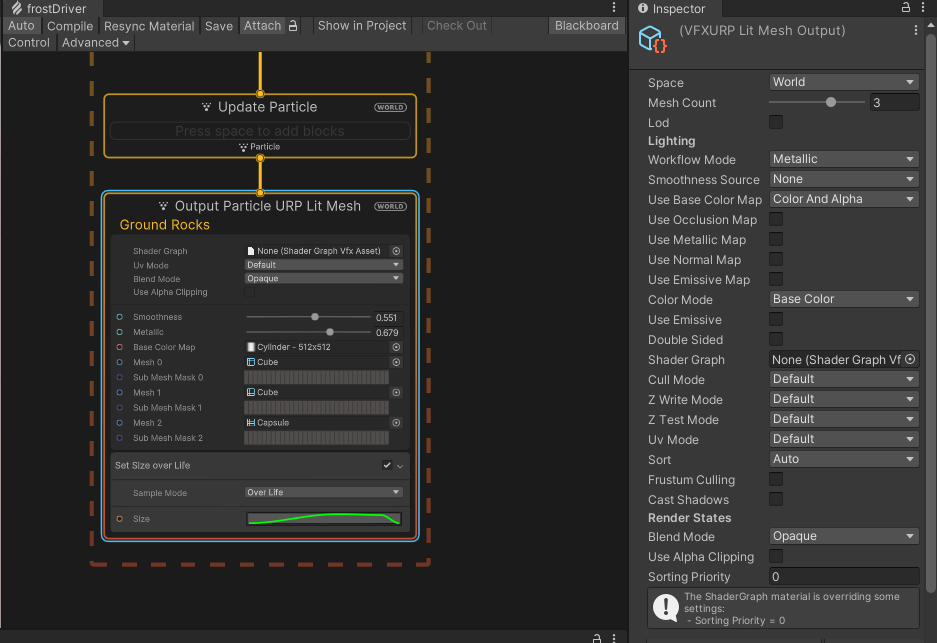 ashen robin
Yeah, no problemo. I think I had the same problem as you when I was making arc meshes too lol
 vapid jewel

i bought some Particles assets, but i can't find what's the thing that is restricting all the particles to that particular shape
because i have changed the material to use this texture instead

but it's still that sharp shape

i found it:

🤔
 restive grove
Does someone have an idea on why my animation sheet is fading each row ?


(using HDRP)
 shut cliff
@restive grove I believe the FlipbookBlending does that
restive grove
Fading away at the end of each row by default ? Seems a bit strange
shut cliff
Yeah, I don't understand the reason for the fade. I thought the purpose of it was to blend frames together, but not every particle should fade out at the end
also not every spritesheet goes left to right in one row, which is why you get the flickering fade effect
restive grove
Arh I just reopened the project and it corrected itself
we'll never now, again.
thanks for the help though !
shut cliff
Oh, just figured out what the issue is here. Before I had the same problem, but it was because Custom Vertex Streams are disabled for the particle system. Enable it and it'll stop flickering. Did not know this 😮
 stoic marsh
Hey everyone,
I have a VFX portal. I want to trigger two audio tracks (one for opening, the other is a "open" loop). I've been reading up on the best way to tie SFX to my VFX.
It seems like timelines are the way to go. Is there any other way to do it, or are timelines the way to go?
warm torrent
stoic marsh
Hey everyone,
I have a VFX portal. I want to trigger two audio tracks (one for ...
Iirc Timelines are for essentially making sequences with animation overrides for multiple gameobjects that by themselves don't have animators
If all you need to do is turn the effect on/off and play a sound when something happens, I'd just use a script
Perhaps an animator if the sequence needs to be complex and have multiple events or animation curves, but not Timeline
stoic marsh
I just found Output Event That's solved my problem.
i've managed to emit an event, and listen to it in a script.
 final rain
how to turn on universal pipe linje
 warm torrent
final rain
how to turn on universal pipe linje
warm torrent
final rain
how to turn on universal pipe linje
Instructions pinned in #archived-urp
Or you could just google it
final rain
why is that thing not pure white
 final rain
why is that thing not pure white
final rain
final rain
why is that thing not pure white
@snow spruce could u help pls
 snow spruce
I can't really help you without seeing the nodes which input into that
and probably whichever nodes you have before those
final rain
can I make my visual effect make disappear not at once?
I use visual effects as drift smoke
and it disappears at once
looking kinda weird
warm torrent
I would expect that lens flares are rendered additively and texture alpha is ignored
ashen robin
Think that's removed and it's just Arc circle now
otherwise it may be in the experimental package
ah ok
I find it easier and less overwhelming than the shuriken system

 hearty flare
You can hack it with LineRenderer and good shaders, but generally something like Shapes https://acegikmo.com/shapes/ is a better fit as it's got proper logic around dashed poly lines.
The "curved" part is just combining either approach with any spline solution, (even Unity's https://docs.unity3d.com/Packages/com.unity.splines@latest)
vapid jewel
yeah I have shapes but i'm kind of uh, lazy to do combining work with spline stuff
but seems like i don't have much of a choice
there are several shader graph videos about it but,
due to the vast difference between the Shader Graph versions,
it will always have some weird issues and it is just driving me crazy
 visual cove
Is there a way to get VFX graph to recieve fog ? google isn't being helpful. (hdrp)
 inner topaz
visual cove
Is there a way to get VFX graph to recieve fog ? google isn't being helpful. (hd...
inner topaz
visual cove
Is there a way to get VFX graph to recieve fog ? google isn't being helpful. (hd...
should be possible when using VFXGraph shader (shader graph)
but that seems only be available from 2021.2 Beta 1 and forward
visual cove
inner topaz
should be possible when using VFXGraph shader (shader graph)
but that seems on...
cool, ill play more with that shadergraph and see if i can come up with something.
 rare cape
I have a script to detect particles hitting other objects to paint a decal in that event. My problem is that in case of blood there are like 100 collider events as there are many particles. Do you guys have any best practice how to not process all those particles, especially when they hit the other object around the same place? I could split the surface into sections and only paint the decal if the section wasnt painted yet and similar, but not sure if there are better ways?
inner topaz
rare cape
I have a script to detect particles hitting other objects to paint a decal in th...
you could make a list with recent impacts and the impact time, check if the new impact is to close to one of the old once
if its to close don't draw it
and then remove the oldest entrys after some while
 dry dove
Is there an "on complete" event for VisualEffect like there is for ParticleSystem?
ashen robin
dry dove
Is there an "on complete" event for VisualEffect like there is for ParticleSyste...
https://i.imgur.com/11MEc2z.png
This maybe?
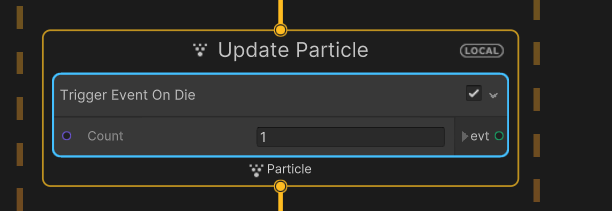 dry dove
ashen robin
https://i.imgur.com/11MEc2z.png
This maybe?
dry dove
ashen robin
https://i.imgur.com/11MEc2z.png
This maybe?
Ah, so you have to make your own?
I can do that.
ashen robin
Yeah, kinda the idea of it all. It's alright though, you get a lot more control this way.
dry dove
ashen robin
Yeah, kinda the idea of it all. It's alright though, you get a lot more control ...
Makes sense to me! I'll have to look into how to share this between all of the VFX graphs.
dry dove
ashen robin
https://i.imgur.com/11MEc2z.png
This maybe?
The graph I'm looking at has two UpdateParticle sections...
Do you know how i'd add a handler for the final emitted particle dying?
ashen robin
Can always use subgraphs, but you can pretty much make the whole vfx inside of a single graph
dry dove
Okay, I'll speak to my VFX artist. :-)
ashen robin
The on die trigger is based off the lifetime from the instantiation block I believe.
dry dove
So, I can't make that block on my machine.
This is what our VFX artist sees:

And this what I see:

This is hovering the same "Update particle" block in the same graph asset.
Is there some way for me to be able to add the event trigger section too?
ashen robin
Hmm, could be part of the experimental pack
Got to enable it in the project preferences I believe
dry dove
ashen robin
Got to enable it in the project preferences I believe
oh that's so weird...
So one collaborator can have experimental support enabled
And another doesn't...
Because preferences are per-user
This must be a mistake right? It would be impossible to build the project right?
On CI
haaha, this is giving me cold feet
ashen robin
Unless it gets hidden, but I would assume that project preferences would be shared, no?
Oh, sorry. I meant it's in the settings ^^
Oh, no wait. It is in the preferences. That's pretty odd.
Maybe it does get hidden then.
hearty flare
That preference won't affect what gets built or is in the project, it only affects what's hidden in the UI afaik
ashen robin
Yeah, but say someone with the preferences disabled and then edit the graph. I'd assume it pretty much breaks it in the next version.
hearty flare
Why would it break the graph, it only hides the stuff in the create menu surely
ashen robin
Lot of the stuff add functionality, and it's hidden and you screw around with the events it would overwrite what particle system block you're working with I'd assume.
dry dove
hearty flare
That preference won't affect what gets built or is in the project, it only affec...
Right right. Still feels like a strange place to put the setting.
Should I be trying to pool my VisualEffect objects?
Seems there's no way to find out if the graph has finished?
https://forum.unity.com/threads/is-there-way-to-detect-in-c-when-vfx-graph-finished-emittion.872458/
Unity Forum
As title says, I want to be able to detect when effect is finished or I want to be able to throw some custom events from graph to C# code. For example...
dry dove
ashen robin
https://i.imgur.com/11MEc2z.png
This maybe?
This is a per-particle event btw, so it won't help me find out whether the graph has finished playing in the same way that the onComplete handler of ParticleSystem does.
dry dove
Also... where can I find documentation for VisualEffect? https://docs.unity3d.com/Packages/com.unity.visualeffectgraph@12.1/api/UnityEngine.VFX.html
For me it's in UnityEngine.VFX, but is not documented here?
dry dove
hearty flare
<https://docs.unity3d.com/ScriptReference/VFX.VisualEffect.html>
Ah, it's still in core I see.
ashen robin
dry dove
This is a per-particle event btw, so it won't help me find out whether the graph...
Oh that's unfortunate. I'm actually surprised there's not more trigger events, but there must be some way to do that. If anything, you always know the lifetime of the particles, so you may be able to estimate the time your particles fade and go by that.
dry dove
ashen robin
Oh that's unfortunate. I'm actually surprised there's not more trigger events, b...
I actually found the solution (I think):
    void Update() {
      if (!_visualEffect.HasAnySystemAwake()) {
        gameObject.SetActive(false);
      }
    }
Very simple
ashen robin
Ah, that's nice. I'll have to remember that. Would prefer to just do everything in the graph but I guess it's still being worked on.
Then again, I do have to use scripts anyway to sphere cast cause you can't trigger on collision.
dry dove
ashen robin
Ah, that's nice. I'll have to remember that. Would prefer to just do everything ...
I don't think it's necessarily appropriate in this case.
Otherwise it means our VFX artist need to add the same event logic to every effect
this way they just need to make something that works
 spare bolt
Can I change the framerate that a particle system animates at?
I want my particle system to step only once per second
but I want it to simulate the same as if it was at whatever it defaults to
I'd like to not do it in script if I can
 outer storm
spare bolt
I'd like to not do it in script if I can
outer storm
spare bolt
I'd like to not do it in script if I can
you'd need a script. ParticleSystem.Simulate lets you update the system at custom intervals/time steps.
spare bolt
outer storm
you'd need a script. ParticleSystem.Simulate lets you update the system at custo...
Thanks
nocturne yarrow
Simple one for someone who knows what the heck they're doing...
I'm trying to make particles spawn along a line, but I want the line to "snake" over time... IE, oscillate back and fourth
Just imagine spawning particle along a snake moving in place and that's basically what I want to do lol
warm torrent
nocturne yarrow
Simple one for someone who knows what the heck they're doing...
I'm trying to ma...
Or try the suggestion here if it needs to be a very specific procedural curve to spawn from
https://forum.unity.com/threads/particle-system-with-custom-curve-emitter-shape.1298874/
nocturne yarrow
@warm torrent Oh, I am trying to do this in VFX graph, not shuriken
ashen robin
nocturne yarrow
<@166982635950702592> Oh, I am trying to do this in VFX graph, not shuriken
A trick you can do is use a line renderer and reduce its opacity to nothing while giving it some velocity, sine funcs, turbulence for whatever you need to make the particle move and oscillate. Now, by using the update block you can set a trigger to spawn particles over time which will spawn at the head of the invisible line renderer as it moves.
nocturne yarrow
ashen robin
A trick you can do is use a line renderer and reduce its opacity to nothing whil...
Sounds sort of like what I ended up on, using the simple heads and trails setup in VFX graph and tweaking it to my needs
 wind pawn
Hello I have a question about particles. My particle system works in the editor, but not on mobile. I am using a mobile shader (Mobile/Particles/Alpha Blended). What should I look at to debug?
wind pawn
I have made sure to include the shader in my ProjectSettings/Graphics "Always Included Shaders" setting.
inner topaz
wind pawn
I have made sure to include the shader in my ProjectSettings/Graphics "Always In...
check if the logs on mobile (or the console if you have the debug build) have anything to say about it
wind pawn
I don't get any errors or warnings. Is there something I should try manually logging in particular?
 digital marsh
Does anyone have an idea how to create 2d sword slash in unity 2d
 cerulean sierra
I know a few racing games which use a sort of long exposure light trail effect,
where the game draws trails from light sources based on where the lights are on the screen instead of in world space.
Here's a link to some examples to show you what I mean: https://mega.nz/folder/bgckwbIa#S2Q63MEi_frlu7omhJ2yPQ
How would I achieve this visual effect in Unity?
ashen robin
Sounds like something for post-processing
cerulean sierra
ashen robin
Sounds like something for post-processing
I'll move my post there then?
ashen robin
Probably want to post examples instead of having people download that.
cerulean sierra
The videos' file sizes are too big, and I'm afraid lowering the quality may make the examples hard to look at
Also, Mega lets you play the videos in your browser
You don't have to download them
Should I move my post to #💥┃post-processing?
ashen robin
You could try trail renderers, but that sounds pretty iffy, so I would recommend some shader/post-processing method
You can probably create a similar effect with high emission bloom and a lot of motion blur which is why I suggest looking into it.
cerulean sierra
ashen robin
You can probably create a similar effect with high emission bloom and a lot of m...
Won't those effects apply to everything?
ashen robin
Yeah, unfortunately. Could try independent shaders, but should really try googling cause you'll probably get more from that than asking here.
cerulean sierra
Okay, thanks
umbral sedge
Ghost of Tsushima visible wind style by just using 6 particle strips + flipbook texture... very very easy to make
any idea why particleStrip won't work with Tile/Warp block?
 compact crow
Hello! Sorry to barge in, but I've been trying to play with the particle system for a bit, and try out the mesh renderer emitter. I used it on a flattened sphere, but the particles end up black, when they are supposed to be pink. Does anyone know the fix to this?
https://youtu.be/4F7sVFR1Yhg to understand better
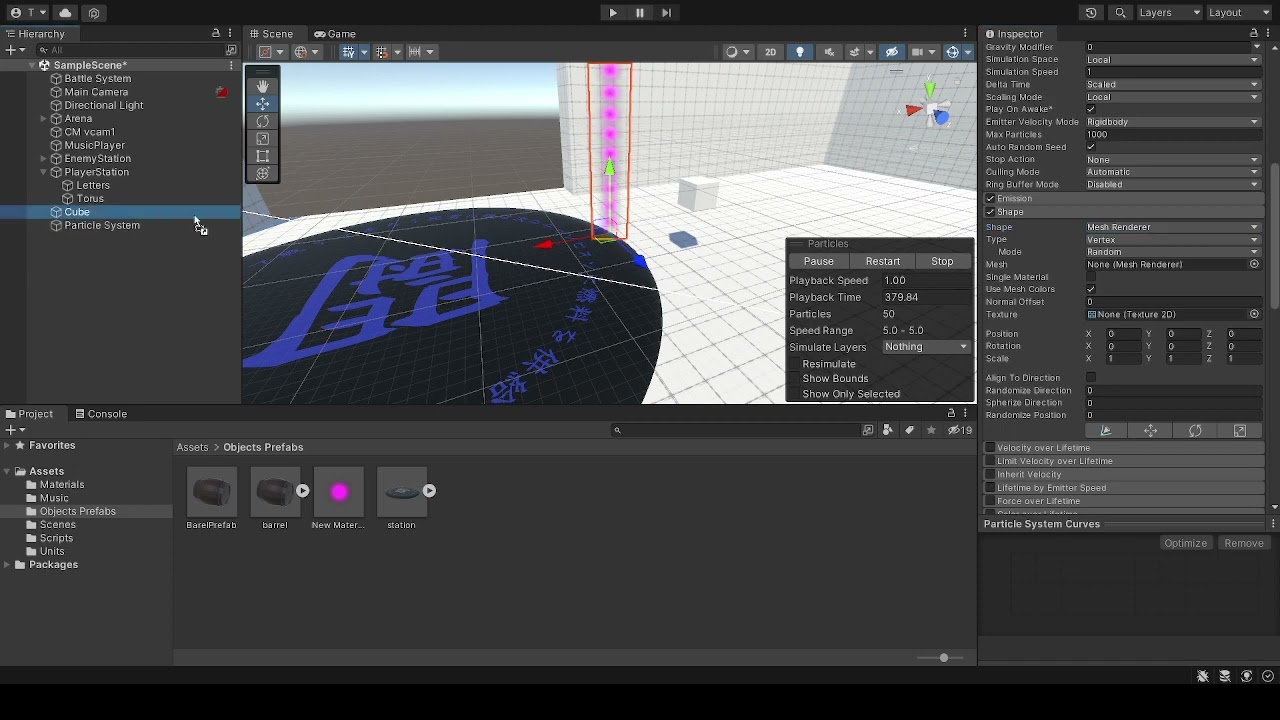
 stoic ridge
Hey guys, im having an issue where my imported FBX mesh is not showing up in the output particle mesh, any ideas on how to resolve this?
 nocturne yarrow
Is there a way to get the camera forward in VFX Graph?
 dapper night
is it possible to create a point cache bake for a terrain
 prime dome
Anyone here know how to make "Color over Lifetime" work with materials? I have a material used on my particle, but the color over lifetime isn't doing anything, anyone got any ideas?

 ashen robin
If you made the shader inside of the shader graph then make sure you've got vfx listed in the graph settings
prime dome
ashen robin
If you made the shader inside of the shader graph then make sure you've got vfx ...
Where's graph settings?
ashen robin
same place where you change the shader to lit/unlit
 ashen robin
Oh, you're using a default shader. I'm surprised that it's not compatible with the vfx graph.
prime dome
ashen robin
Oh, you're using a default shader. I'm surprised that it's not compatible with t...
Strange, so what shader should I change it to?
ashen robin
I've been just making my own in the shader graph, and there's some intergration with it from there, but I've not used anything from the defaults.
warm torrent
prime dome
Anyone here know how to make "Color over Lifetime" work with materials? I have a...
You should use particle shaders for particles
 errant rapids
can anyone help me out in making an effect like this from harry potter?
i just need the spinning part, not the entire harry potter thing
 outer storm
compact crow
Hello! Sorry to barge in, but I've been trying to play with the particle system ...
outer storm
compact crow
Hello! Sorry to barge in, but I've been trying to play with the particle system ...
Uncheck "Use Mesh Colors"
outer storm
prime dome
Anyone here know how to make "Color over Lifetime" work with materials? I have a...
Either your effect i so bright it's just whiting-out (too much bloom?) or the shader your material uses doesn't read the vertex colors. The particle system sends its colors to the shader via the Vertex Color stream. Be sure to use a particle shader if you're unsure about what I'm talking about.
 shut cliff
@compact crow That's a bit strange. Just a wild guess, but can you try enabling Resimulate on the particle effect controls? (scene view)
compact crow
Doesn't seem to change anything
I also tried to disable mesh colors when resimulate and I'm still getting those black particles
shut cliff
Have you tried making your own particle material?
compact crow
Yup that's my own
It's a fade/multiply one
With an emission

I tried with both custom and built in
And Unity doesn't seem to like slightly rounded planes with mesh renderer
it could be on my end tbh
shut cliff
Does the mesh you want to emit from change at all in size etc. ?
compact crow
It's the same as my prefab
The only thing happening in this scene is this object, and the particle system
shut cliff
If not you could just approximate the shape with one of the standard shapes
 compact crow
No script or anything I wanted a blank project to see what could be wrong
Yeah I did that with a plane but a donut does seem like a better idea!
ashen robin
Without the particle system, what's the mesh look like with the shader
could just be a uv problem
compact crow
Sorry I'm still new, what do you mean with the shader?
ashen robin
Material^

 ashen robin
Yeah, bring out the mesh onto the scene and just toss the material on it
compact crow
Oh the material is already on it
Should I create another to experiment?
Unity one
ashen robin
The flatten sphere or w/e you're working with
drag it onto the scene and just toss the material on it
if it's black, then the uvs maybe mapped wrong if you've made it in blender

 ashen robin
Oh, that's the object lol
compact crow
I'll check in Blender if anything is wrong
Oh yes XD
Sorry
Here's what I got, I'm not very good with UV yet
 ashen robin
yeah weird, the mesh color still applies with the material placed into the particle system
compact crow
Should I ask to the Unity support team or something?
ashen robin
compact crow
Should I ask to the Unity support team or something?
You can try removing the vertex coloring from blender if you haven't tried that yet. Other than that, all I can think of is maybe you've got bloom going and its emission is creating problems.
I'm not too aware of the shuriken system, but I'd would assume a boolean that disable vertex coloring would do as it says.
compact crow
ashen robin
You can try removing the vertex coloring from blender if you haven't tried that ...
I don't really know what vertex coloring is, but I'll try to give it a look. And I don't think the issue is bloom since the side test I did had no URP, or bloom setup (other than the material emission)
compact crow
ashen robin
I'm not too aware of the shuriken system, but I'd would assume a boolean that di...
What's the difference between a shuriken one?
ashen robin
compact crow
What's the difference between a shuriken one?
shuriken is the older particle system for unity, but there's a newer feature for particles which is the vfx graph: node based visual scripting. I'm not too sure if it supports custom mesh emissions though.
compact crow
ashen robin
shuriken is the older particle system for unity, but there's a newer feature for...
I'll give it a look then! I had no idea there was a new one. Do I need URP for this?
ashen robin
Yeah, or HDRP
 slate lily
Is there a way I can still use the Set Color or Multiply Color Random from Gradient blocks with a custom VFX graph shader?
I did expose the color value in shader graph, but can't seem to get SetColor working as a block
ashen robin
Make sure your shader's general graph settings have the vfx graph included
ashen robin
Also, the color field may need to be set to HDR in the shader graph.
 fluid lagoon
Is there a simple way to get a VFX graph to only render behind everything?
Or do I need to do camera compositing or something along those lines.
prime dome
i have this particle system that should send message "hi" when it collide with an object with tag "P1" which is the white Cylinder, but for some reason, when the cylinder is a child of another object, the particle system checks the tag of the parent object not the actual cylinder and dont send the message, but when its not a child of another object, it works correctly and sends the message

 slate lily
ashen robin
Make sure your shader's general graph settings have the vfx graph included
slate lily
ashen robin
Make sure your shader's general graph settings have the vfx graph included
Late reply, but I did that. The shader works, just not with blocks. So I have to set the color in the color field in vfx graph and blocks do not override
The initialize particle color also is overriden by the shader color
ashen robin
slate lily
Late reply, but I did that. The shader works, just not with blocks. So I have to...
Have you tried using nodes outside of the blocks and constructing some logic there? You've access to nodes such as age over time and gradients which are completely independent to the blocks.
slate lily
ashen robin
Have you tried using nodes outside of the blocks and constructing some logic the...
That's what I told my artist as well, but blocks are easier to work with.
If it's not possible we will use nodes instead yeah
ashen robin
The shader color will always override anything set in the initializer block. Perhaps it's possible by forcing vertex coloring in the shader, but I'm not too sure if that works.
slate lily
ashen robin
The shader color will always override anything set in the initializer block. Per...
Good to know, thanks!
 fickle wyvern
Hello, every time I open vfx graph I get this error. No idea what I can do to fix it
[smokeImpact] [System] CameraSort.compute: Kernel at index (0) is invalid
UnityEngine.GUIUtility:ProcessEvent (int,intptr,bool&)```Does anything break with it?
fickle wyvern
The only issue I see is that it doesn't show the particles in the editor.
outer storm
fickle wyvern
Hello, every time I open vfx graph I get this error. No idea what I can do to fi...
it's failed to compile a shader.. seems like a unity bug to me. if you disable sorting maybe it will go away..
fickle wyvern
outer storm
it's failed to compile a shader.. seems like a unity bug to me. if you disable s...
Ight, ill check when I have time
fluid lagoon
Been a day so I'll ask this again:
Is there a simple way to get a VFX graph to only render behind everything? Or do I need to do some camera compositing shenanigans?
 sonic vapor
 ashen robin
Try to be a little more constructive, but you'll need to make a new material if you want to change those options.
ashen robin
fluid lagoon
Been a day so I'll ask this again:
Is there a simple way to get a VFX graph to o...
Have you tried using renderer objects? I use them to fix the funky nature of URP decal renderings at the moment with some of my vfx. I think they were releasing a decal layer system soon though.
fluid lagoon
ashen robin
Have you tried using renderer objects? I use them to fix the funky nature of URP...
Are you talking about the Render Objects scriptable renderer feature?
or something else
 fluid lagoon
Yeah the render objects renderer feature
Not sure how I'd use this to get my VFX to be behind everything though
Tried this and it didn't seem to do anything
 ashen robin
Honestly seems similar to how you would do it with cameras, being that you're stuck with having to use your layers for this stuff specifically. But there's probably some better setups but I've not experimented much with it.
Probably more performative this way though, since you're less likely to render stuff twice.
 timber galleon
Ello guys, so I have a 2d rocket with a particle system at the bottom
The rocket is the parent to the particle system
What is happening is that when ever the rocket rotates, all the particles that were emmitted also rotate with it
the particles should pick their direction and trajectory at the moment they are emitted and should continue in that direction, regardless of whether the rocket rotates or not
How would I go about doing this?
 weak dagger
how can i get VFX graph to ignore the freeze effect done by timekeeper.timescale = 0f?
 midnight grove
@high siren You can use the forums for jobs/collaboration posts (link in #📖┃code-of-conduct)
timber galleon
timber galleon
Ello guys, so I have a 2d rocket with a particle system at the bottom
The rocket...
I've been trying for a long time but still haven't been able to figure it out, if anyone has any idea, it would be much appreciated
ashen robin
timber galleon
I've been trying for a long time but still haven't been able to figure it out, i...
You need to set the emissions in world coordinates
timber galleon
Thank you!
I was trying to switch the local to world under the renderer section before...
 tiny sage
I'm trying to rotate a particle around the player indefinitely, is this possible with just the regular particle system options?
 fluid lagoon
ashen robin
fluid lagoon
ashen robin
How'd you get the "Render Everything"?
 round berry
tiny sage
I'm trying to rotate a particle around the player indefinitely, is this possible...
round berry
tiny sage
I'm trying to rotate a particle around the player indefinitely, is this possible...
what are you trying to achieve tho
fluid lagoon
tiny sage
I'm trying to rotate a particle around the player indefinitely, is this possible...
tiny sage
round berry
what are you trying to achieve tho
Basically like an orbit.
tiny sage
fluid lagoon
https://www.youtube.com/watch?v=J3vFCpZ-Ims
Ahh dude, sweet! I need to get better at my google game. Thanks @fluid lagoon 🙂
round berry
ok i thikn the video is a better solution
fluid lagoon
tiny sage
Ahh dude, sweet! I need to get better at my google game. Thanks <@17936773957458...
I googled:
"particle system unity orbit"
many results
tiny sage
Yeah I just thought of the word 'orbit' right now lol, that would have done it
I keep looking for "Unity 2d particle rotate around object' etc
just it just brings up the local spin stuff (understandably)
ashen robin
fluid lagoon
How'd you get the "Render Everything"?
Uh, that's just the name I've given to one of the renderer objects. Nothing too special on that one.
fluid lagoon
Oh 🤦
fluid lagoon
ashen robin
Uh, that's just the name I've given to one of the renderer objects. Nothing too ...
Can you explain what you did here a bit? I'm not really understanding. is there a terrain object in front of the particle system there? And you're enabling the thing that renders the terrain after the thing that renders the particles?
ashen robin
That one specifically I'm just rendering the opaque after my transparents, so they will always be behind those.
The plane itself is tagged layered as terrain^
 zealous nymph
So im making a snow weather but when i took colision on and make it a sub emitter for the snow. it wont change. it is supposed to go horizonaly on ground when colisoned
 zealous nymph
How do i make splash effects
fluid lagoon
ashen robin
so does this render everything twice?
ashen robin
fluid lagoon
so does this render everything twice?
I'm not too sure since the documentation on this stuff is non-existent, but I'd assume everything on the layer mask would be passed again. I recall reading some blog about them which was trying to sell me on using these over camera layering as they would reduce the amount of overall performance problems with using it, but beyond that, I've no real idea how it's all handled.
I've been experimenting a lot with it since I do want refractive shaders to work with my sprites though and I've got it working somewhat.
fluid lagoon
ashen robin
I'm not too sure since the documentation on this stuff is non-existent, but I'd ...
Some quick testing is that my framerates suffer a lot with this technique - I think it's rendering everything an additional time from the RenderObjects feature
I Think I'll probably just go with some camera compositing and see how that goes
Oh you know what - RenderObjects BeforeOpaques for the VFX and then just excluding my object from the camera's culling mask seems to work. nvm it doesn't
ashen robin
lol, probably easier to find the information with the camera than this, so I'd give that a try at least.
weak dagger
how can i make my VFX graph ignore the timescale so it doesn't freeze when i implement a hitstop effect
zealous nymph
zealous nymph
So im making a snow weather but when i took colision on and make it a sub emitte...
help
warm torrent
zealous nymph
help
The question seems a bit unclear to me
What do you mean by "go horizontally"
What is the sub-emitter supposed to do
zealous nymph
warm torrent
The question seems a bit unclear to me
What do you mean by "go horizontally"
Wha...
Like: Its snow particles and i want the snow to lay horizontaly when their collisioned. Or rotate
warm torrent
zealous nymph
Like: Its snow particles and i want the snow to lay horizontaly when their colli...
You'd first make sure that the collision destroys them, for example by reducing their lifetime to 0
Then have the sub-emitter trigger on particle death, and as the sub-particle have just one snowflake with its render mode as horizontal billboard
zealous nymph
warm torrent
You'd first make sure that the collision destroys them, for example by reducing ...
It destroys them and everything but the sub emitter part dont work


 warm torrent
Make sure the sub-emitter system spawns exactly one particle without any Shape parameters
zealous nymph
warm torrent
Make sure the sub-emitter system spawns exactly one particle without any Shape p...
 warm torrent
zealous nymph
warm torrent
zealous nymph
This is the intended "SCollision" particle system?
If so, not sure off the top of my head what else could be wrong
What I would do in your situation is to make a test particle system which is the simplest possible example of sub-emission, try to make that work with collision, then compare that to your snow system to hopefully discover the problem
Practise and familiarity with these features is your best bet for eliminating these issues once and for all
zealous nymph
ill try
zealous nymph
warm torrent
What I would do in your situation is to make a test particle system which is the...
still not working
warm torrent
zealous nymph
still not working
That implies you're missing some step
Look for sub-emitter tutorials
zealous nymph
warm torrent
That implies you're missing some step
Look for sub-emitter tutorials
this is my render in collisioned
 weak dagger
how can i make my VFX graph ignore the timescale so it doesn't freeze when i imp...
weak dagger
weak dagger
how can i make my VFX graph ignore the timescale so it doesn't freeze when i imp...
plz help
warm torrent
post only to one relevant channel please
 worn urchin
warm torrent
post only to one relevant channel please
worn urchin
warm torrent
post only to one relevant channel please
how can i know to which channel is it relevant?
warm torrent
worn urchin
how can i know to which channel is it relevant?
You can look in channel descriptions for clues
Some topics fit on many channels but you should post on just one
Posting in many gets spammy and can cause people to spend time helping when there's already someone on it
 gleaming stream
Iam looking for somone pro who can create/help create this VFX and Shader.
https://youtu.be/gCCYWTAA2wQ
Willing to pay for this
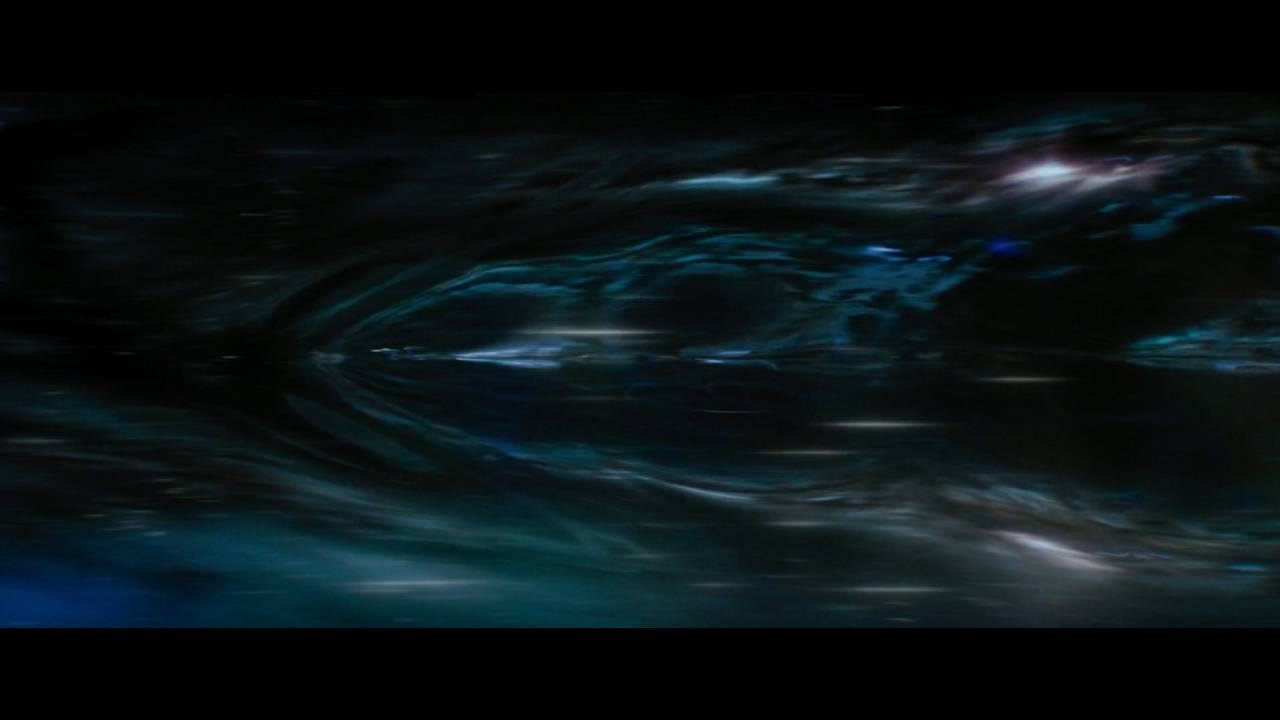
Short but awesome; the brand-spanking-new warp FX from Star Trek Beyond. The first time we've ever seen the warp bubble and the bending and warping of spacetime as the Enterprise travels faster than light.
Gorgeous new effects, I hope the next film has more shots!
tiny sage
Can a shadow effect like the one seen below the bullets here be achieved using the particle system?

LOL i am a certified idiot, the shadows are part of the sprite, duh.
 stiff topaz
weak dagger
plz help
stiff topaz
weak dagger
plz help
Hello, never tried it myself but when selecting your VFXGraph in your ProjectFolder, you got bunch of options in the Inspector.
One of them is "ignore TimeScale" 😉
That should do the Trick
 stiff topaz
nocturne yarrow
Is there a way to get the camera forward in VFX Graph?
stiff topaz
nocturne yarrow
Is there a way to get the camera forward in VFX Graph?
this should be Built-in the "Camera" or "Main Camera" Block operators, but in the Meantime you can use a "Transform (direction)" Block and plug the "Transform" output of your "Camera". You can then Transform the ZForward Vector (0,0,1) with the Cam transform . And voila , you got the Camera Forward.
Note that the Up would be Transforming (0,1,0) , the RightAxis transforming (1,0,0).

The "Main Camera" by default will give you the "Scene Viewport Camera".
You can change this behavior to get the Scene "Main Camera" in the Preferences > Visual Effect.
Or you can Expose a "Camera" properties in the Black Board and chose whatever Scene Camera you want.

 stiff topaz
fickle wyvern
Hello, every time I open vfx graph I get this error. No idea what I can do to fi...
stiff topaz
fickle wyvern
Hello, every time I open vfx graph I get this error. No idea what I can do to fi...
Please don't hesitate to Post a Bug in the VFXGraph section of the Unity Forum.
Give your Unity version, VFX Package version, used Scriptable Rendered pipeline (& Version ) and Describe your issue on top of your
error Message. That should help the Team find a solution with you.
Did disable sorting made the errors go away?
Hey, they are several way doing this.
This will really depend on your need and how do you want to "Control" the Velocity.
The more "Physical" way would be to initiate some Velocity in the "Initialize Context" and then in the Update Context add a "Linear Drag ".
Drag is force that will make the velocity Tends to 0.
Other More "Intuitive or "Art Directable" way would be using the "Set Velocity From Curve" Block.
You can Search for "Velocity Over life" in the "Update Context".
When selecting the Block, in the inspector you have several options:
You can set the" Mode" to "uniform" this way you control All Velocity Axis at once.
The Sample Mode, let you control the Velocity: Over the Life of a particles but also with it speed, or Randomly.
The composition option enables to "Overwritte" the Velocity, or for example Multiplying it.


As you can see in my example, the PArticles are naturally Slowing out until full stop.
this is by using a the "Linear Drag".
But you can also use the other method with the "Velocity over Life Method"
 stiff topaz
slate lily
Is there a way I can still use the Set Color or Multiply Color Random from Gradi...
stiff topaz
slate lily
Is there a way I can still use the Set Color or Multiply Color Random from Gradi...
Three Thing needs to be Checked:
"Support VFXGraph" in the Graph settings of your Shader Graph.
The "ShaderGraph" should be set in the "output Context"
The needed properties should be exposed.
And you need to link your "Attributes" to your Output Properties.
note that if you don't need to "store" per-Particle Colors , you can directly put your color in the Exposed properties of your Output Context without the need to pass by a Set color.
Hope this help.


Here in this example, the Color is the Same for each-particles. So, you don't need to store it per-particles.
you can directly put your color in the Shader Exposed inputs without using the "Color attribute".
 nocturne yarrow
stiff topaz
this should be Built-in the "Camera" or "Main Camera" Block operators, but in th...
nocturne yarrow
stiff topaz
this should be Built-in the "Camera" or "Main Camera" Block operators, but in th...
Thanks for the pro-tip! Very helpful 🙂
just what I needed
slate lily
stiff topaz
Here in this example, the Color is the Same for each-particles. So, you don't n...
Got it working already, but thanks for the detailed help!
stiff topaz
slate lily
Got it working already, but thanks for the detailed help!
Glad to know that you've managed to got it working 🙂
outer storm
tiny sage
I'm trying to rotate a particle around the player indefinitely, is this possible...
2 options: 1 is the orbital velocity option in the Velocity over Lifetime. The other is to use a Particle System Force Field component, and hook it up to the External Forces module in the particle system. That has a Vortex option to spin particles around a central point.
 spare vigil
is there a way to render a particle system's each particle if they are in camera view
I want to keep particle playing but only render the particles if they are in camera view
ashen robin
spare vigil
is there a way to render a particle system's each particle if they are in camera...
That's what the bounding box field is for in the initializer block.
 dark kestrel
Anyone know how I can draw the render queue of a VFX graph? In a material you can just set a value but I'm not seeing a way to do that with a VFX graph asset.
 icy cosmos

I've got this rain system on the same layer as my platforms, and I have these "pole" sprites that are in front of the platforms
I want the particles to render behind the poles but in front of the "mountains" in the background, but if I change the order in layer, it's either behind everything or in front of everything
any ideas?
I've been messing with so many things trying to figure this out lol. Z component of the transform, order in layer, sort mode etc
nocturne yarrow
Is there a way to adjust the emission in Visual Effect Graph? I see I can use an HDR color, but I'm having trouble adjusting the exposure weight in the same way that it's setup in Shader Graph
I'd like to be able to use EV100
Only thing I can think of based on what I'm seeing is that I'd have to make a custom shader
Maybe EV100 is not supported in VFX Graph?
weak dagger
stiff topaz
Hello, never tried it myself but when selecting your VFXGraph in your ProjectFol...
just found this now and THANK YOU FOR LETTING ME KNOW it helped me out so much!
stiff topaz
nocturne yarrow
Is there a way to adjust the emission in Visual Effect Graph? I see I can use an...
Could you tell me a little more about what you're trying to do?
What's EV100 ?
Regarding the emissive you got a Bunch of them.
For exemple if you got a HDRP lit Quad Output selected, in the inspector you'll found option that you can activate regarding Emissive:
Emissive Map, Emissive. You even can set the exposure weight
 spiral storm
Heya! Can anyone tell me why Unity's example GroundFog particle sample is rendering out particles as squares here?

Im in 2021 HDRP - and using the HDRP example shaders for particles (from the package manager samples)
I tried all the example shaders and they all do this
shut cliff
Looks like it doesn't have an albedo texture?
spiral storm
ya i tried adding in the default soft circle particle texture and that didnt work either
the original standard render pipeline shader that was on the groundfog particle system didnt have an albedo texture either
stiff topaz
dark kestrel
Anyone know how I can draw the render queue of a VFX graph? In a material you ca...
I hope that I understood what you were looking for ..
Just select the Output Context, and you should find the Render Pass options in the Inspector Tab:

 dark kestrel
stiff topaz
I hope that I understood what you were looking for ..
Just select the Output Con...
dark kestrel
stiff topaz
I hope that I understood what you were looking for ..
Just select the Output Con...
Thank you!! I ended up making a custom render feature yesterday to render the layer the VFX graph was on later in the queue but glad to know there's a way.
Looks slightly different in URP
 stiff topaz
dark kestrel
Thank you!! I ended up making a custom render feature yesterday to render the la...
stiff topaz
dark kestrel
Thank you!! I ended up making a custom render feature yesterday to render the la...
Glad to know that you find a way. I need to spend some time with URP, as I've been mostly using HDRP...😢
dark kestrel
Np! This is exactly how I'd expect it to work since it's how URP handles render queues elsewhere like in materials and such
nocturne yarrow
stiff topaz
Could you tell me a little more about what you're trying to do?
What's EV100 ?
R...
For whatever reason, VFX Graph doesn't let you pick between Emission Units like Shader Graph does: https://docs.unity.cn/Packages/com.unity.shadergraph@10.2/manual/Emission-Node.html
My project is more EV100-oriented
The practical effect of this is that I can have similar levels of emissivity/glow (which dictates the amount of bloom) under a variety of lighting conditions.
stiff topaz
How I see. Regarding the Emission unit, I will ask some question with the Engineers to know what unit is used for emission.
 wraith mortar
hello there again, so I'm still trying to add effects on attack animations (particles, splashes, glows etc.) but Assetstudio is just coughing up - assetstudio can't export the effects as intended is responsible for a big chunk of how long it takes to port effects since it can't port the whole ready made effects from another compatible game
Is there any good alternative for Assetstudio that would get the job done and wouldn't require going through those hurdles...
By the game game is Digimon story cyber sleuth and I'm trying to port new digimon from a compatible game Digimon rearize, everything is done and ready expect for no effects on attack animations....
 astral quest
im guessing this is the place to go for this buuuuttttttt
how do I make the background clear

this is from the unity particle pack
compact crow
Hello! this might be the wrong place so correct me if it is please! I heard about vfx a few hours ago and wanted to get into it to make my animations a bit more interesting. I would like to know how should I go about using vfx to play on a specific frame of an animation. Thank you!
 narrow stirrup
is there a way to use the vfx graph for smoke bullet trails as i've given up on scaling a capsule
 stark glacier
URP lit quad doesn't show the sprite from some reason, why?
 errant terrace
compact crow
Hello! this might be the wrong place so correct me if it is please! I heard abou...
errant terrace
compact crow
Hello! this might be the wrong place so correct me if it is please! I heard abou...
add an AnimationEvent to your AnimationClip, and make it call the Play function on the vfx directly, or another method that calls it
compact crow
errant terrace
add an AnimationEvent to your AnimationClip, and make it call the ``Play`` funct...
Thank you! Found out I can play different stuff inside the same graph!
Could you please help me for another thing? I'm trying to change the rate over time of a simple heads and tails system. How do I achieve that?
errant terrace
compact crow
Could you please help me for another thing? I'm trying to change the rate over t...
sorry mate my knowledge of VFX Graph is a bit limited
if that's what youre using? (not particlesystem)
 mellow fractal
is there a way to not render vfx particles in a certain area?
so I don't get stuff like this

 trim musk
Particle collisions arnt enough?
 peak ridge
hi all, I search youtube for a while to find how to "trail vfx particle conform to mesh"
the "spawn particle on mesh" is the easy part.
I want to start particle somewhere, then it will move to it's conform to mesh position, do anyone know a tutorial for this ?
 sturdy sierra
Hey all
I don't know if this is the right chat, put I'm working with render textures
The render texture is displaying this :

But the camera it's tied to should be seeing this:
 sturdy sierra
Hey I figured it out
The object I was displaying the render texture on was created in probuilder which fudges with the UV's
So I just use a non-probuilder object
 civic bane
Hey how do I make particles rotate based on the direction they're moving? I tried align to direction, but that just made them disappear
 sand kelp
Hey does anyone know how to get which particle collided with a gameobject and it's position?
warm torrent
sand kelp
Hey does anyone know how to get which particle collided with a gameobject and it...
No easy way that I know of
What for do you need the individual particle?
Usually info from ParticleCollisionEvent is enough
https://docs.unity3d.com/ScriptReference/ParticleCollisionEvent.html
sand kelp
warm torrent
No easy way that I know of
What for do you need the individual particle?
Usuall...
oh i got it working thanks though
dry dove
Does anyone know why a particular VisualEffect would never return false from HasAnySystemAwake()? I have this working on a general purpose vfx pool system, but our artist just created a new system and it remains "awake" forever after it stops playing. I've tried setting all the spawners to "loop duration = infinite" (confusing option name), but that doesn't seem to work.
dry dove
Surely there is a way to find out whether a VisualEffect is playing...
 iron spear
No matter how many render textures or video players I used, I could not manage to play video in Unity. The image does not appear on the screen. Do I need to use a special script or codec?
compact crow
Hello! Does anyone also have this issue where if they spawn the simple heads and trails system, it creates a single particle that lasts waay longer than supposed to, and doesn't get affected by anything? (bright orange)
 raw lance
hello, is there a way to get depth buffer collisions to work on urp vfx graphs?
raw lance
i think i'll have to write my own computeshader to fill a graphicsbuffer and sample that, basically mirroring the builtin node
i'll dig some more into the code and see if i can hack together a remapper to map the urp camera depth texture to the one used by the node
warm torrent
raw lance
hello, is there a way to get depth buffer collisions to work on urp vfx graphs?
https://forum.unity.com/threads/vfx-collide-with-depth-buffer-in-urp.1059341/ this hacky way might work
Haven't tried it though
raw lance
doesnt work, tried it
the node uses a named object which is neither a texture2d or texture2darray
or maybe i could close unity, edit the files and reload
since the file watcher would just reload the changes
 bold kelp
Heya, is there anyone who can tell why the particles on Die won't spawn in this system?
 stiff topaz
bold kelp
Heya, is there anyone who can tell why the particles on Die won't spawn in this ...
stiff topaz
bold kelp
Heya, is there anyone who can tell why the particles on Die won't spawn in this ...
Well, It could be several things . By looking at your screen I've got two hints:
How Many particles are inside the "parent Systems" ?
I'm asking as I see that you "spawn" 1000 particles for each "dying one".
So You might have trouble with you "capacity count" in your Child System.
The capacity is the maximum number of Alive particles and is used to make the proper memory allocation.
The second Hints could be your "Bound settings ".
If the Child's Bound are "Manual" they might be At a different position from the PArent particle (I saw that you inherit the Dying particle Position).
Also, it should be a problem, But I see that your child System as a "Add Velocity" Block, but I don't see any "Update Context" so Velocity will not work.
stiff topaz
compact crow
Hello! Does anyone also have this issue where if they spawn the simple heads and...
That's weird. Default System should'nt do that.
Could you provide a unity.package with your VFXGraph so that we could take a look?
stiff topaz
narrow stirrup
is there a way to use the vfx graph for smoke bullet trails as i've given up on ...
Yes VFXGraph can be a good option.
In the past I've doing Bullet trails with different Methods:
Tessellated QuadMesh: I spawn a Tessellated Quad Mesh on the Gun. A Script is Feeding the HitPosition. In the QuadMesh Shader, I get the HitPos and calulate the Distance between the ObjectPos and HitPosition. Still in the Shader I Stretch the Quad to the HitPosition tahnks to a Normalized gradient.
After this you can add some comestic Fade, and you can also add Some 3D noise in the VertexShader to Fake Smoke Dissipation and Turbulence.
**Trail : ** Take advantage of your particle Editor to make a Nice trail. Might be less optimized than the first method, but it give you a lot of flexibility and it's easy to use.
in VFXGraph you can take a look at the "Head and Trails" templates. A head Particles, is "moved" to the "HitPosition", it's spawn a particle trail on it's path.
GPU dots: Spawn a lot of "Dot" sprites particles on the Bullet Path. Not ideal with "Overdraw" but you can get a nice look too
Hope this help
compact crow
stiff topaz
That's weird. Default System should'nt do that.
Could you provide a unity.packag...
I'm really new to all this sorry, how can I provide the unity.package
This is the vfx though!
 vestal rune
hi.... my particle effect isnt showing in front of other images and stuff... why??
I can only see the particles out of the canvas
 vestal rune
can someone help me please?
vestal rune
 grand kraken
Try alpha clip?
grand kraken
Try alpha clip?
what is that
grand kraken
Opaque texture with alpha clip
vestal rune
grand kraken
Opaque texture with alpha clip
yes but for what ?? for the particle effect?
grand kraken
For the icon would be more performant, just needs one of the thing to write depth
vestal rune
grand kraken
For the icon would be more performant, just needs one of the thing to write dept...
how do I do that
grand kraken
Its an option in your material, just called alpha clip
vestal rune
grand kraken
Its an option in your material, just called alpha clip
they're not materials.. they're images that I made
grand kraken
Oh sprite, then change the particle
You know what, if they are always supposed to show on top, make a desperate rendering camera or layer that render after opaque should do it
vestal rune
you mean make the canvas screen space - camera? and give another layer to the particle effect?
grand kraken
Yeah make another camera with curling mask set to that, and adjust settings in your render pipeline for that to render after opaque or whichever one that works
Or use alpha clip on the particle, but that hurts performance given a mobile condition
vestal rune
grand kraken
Yeah make another camera with curling mask set to that, and adjust settings in y...
im not using any rp... on the legacy one
but I will try to make it happen
grand kraken
Probably still a way but thats an idea
grand kraken
All good
vestal rune
😁
 glad mason
I have a script that changes daytime to nighttime in my 2d environment by changing the global lighting however my particle systems all don't respond to this. the sprite lit default material on all my sprites allow them to change colour but the particle systems don't change when it becomes nighttime.. has anyone encountered this before?
as you can see the water particles and leaf particles are still the same color as during daytime

do I have to write a separate script for that or do I change my sprite shader to something else?
civic bane
silly question: how would I go about making a particle system use either a random material or a random texture
really would rather not resort to having a bunch of duplicate particle systems on the same place where the only difference is the texture
warm torrent
civic bane
silly question: how would I go about making a particle system use either a rando...
Use texture sheet animation with no animation but a random start frame
I guess it's not possible to have differing materials within a system, but you could use PBR maps along with texture sheet animations to have different material properties per frame
I don't know if texture sheet animation affects all maps with lit particle material, including metallic and smoothness, but if it does a custom shader won't be necessary for the effect
glad mason
glad mason
as you can see the water particles and leaf particles are still the same color a...
it's working yay

wrong sprite shader for my particle system
civic bane
How do I change a parameter of a particle's trail shader over it's lifetime
glad mason
civic bane
this looks like a very pretty game
Thank you! :D
civic bane
civic bane
How do I change a parameter of a particle's trail shader over it's lifetime
Actually i only need to change the particle's base material shader parameters independent of individual particles, how do I do that
grand kraken
Is it a good idea to pool particle system? Because particle systems are basically a big pool of gameobjects themselves
Might be worth it?
ashen robin
For the vfx graph? I'd assume a lot of that is optimized already, but the systems themselves could be a good idea to pool.
grand kraken
I think same goes for the graph, if you have 1000 max particle... I assume all 1000 will be instantiated and pooled when the graph initializes
warm torrent
grand kraken
Is it a good idea to pool particle system? Because particle systems are basicall...
It is a good idea if you need to spawn a lot of particle systems, as all gameobjects you destroy must eventually be handled by the garbage collector
Semantically you wouldn't call individual particles "gameobjects", they're simple points of data where the particle system instances meshes
grand kraken
Im not sure how it works under the hood but
The max particle cap is there for a reason
So its probably pooled somewhere for each particle system
It wouldn't make sense to have any more or any less
warm torrent
ashen robin
For the vfx graph? I'd assume a lot of that is optimized already, but the system...
VFX graph handles particles within a system more efficiently than Shuriken, but less efficiently between systems due to the overhead cost
At least recently Unity recommended going as far as fitting multiple effects dynamically within the same VFX graph to minimize their number
https://blog.unity.com/technology/upgrading-vfx-in-the-fps-sample-with-visual-effect-graph
grand kraken
Cant really find any other posts about whether or not to pool it, all unity says is the thing itself needs a lot of memory
warm torrent
@grand kraken In other words yes, it's wise to use pooling for both particle systems and vfx graphs
You'll have a pretty good idea how both systems are optimized under the hood if you imagine them as one 3D mesh
Although the particle polygons are loose and floaty and have all kinds of logic, the rendering part handles them all in one go, unlike gameobjects in most cases
grand kraken
One giant mesh, yeah thats a pretty good approach to understand it
Before i was like ok 1000 gameobjects per second, thats a lot, i should pool it, now it's quite ambiguous in terms of determining a threshold
But this leads to another question, how many of the vfx or particle systems i need to spawn per secons, or per few seconds to make pooling worth it
warm torrent
grand kraken
But this leads to another question, how many of the vfx or particle systems i ne...
The correct answer to "when to optimize" is probably "as soon as you profile and find out there's an issue that needs to be fixed in systems that won't change"
That said I can't think of many situations where object pooling wouldn't be beneficial
Once you're familiar with the practice it's pretty trivial to do and has a marginal cost
grand kraken
I already have a master pooler setup and I have some of the simplest stuff inside that i feel like I will be using over and over again
But now i saw the addressable video and realized memory might become an issue later on
Now im thinking about how to balance between when to and when to not pool item
I am not having trouble with either performance or memory issue yet but i feel like it will be much more of a hassle to deal with when it actually pose an issue
Maybe im thinking too much, or too far, but it's best to be safe than sorry, i am still quite new to building relatively big games
 jagged oyster
why is my particles not on my character
i made particles and i want it to follow my character
i put it as a child
but it wont follow still
what do i do
raw lance
is this shuriken or vfx graphs
jagged oyster
i dont understand the question
peak ridge
jagged oyster
why is my particles not on my character
world space particle won't follow. Can if you enable inherit velocity.
local space follow but it will look real stiff
civic bane
does reducing the max particles increase performance, even if you never get close to it
grand kraken
Less memory = better performance, always
So only put up to the amount you need, if you know
warm torrent
civic bane
does reducing the max particles increase performance, even if you never get clos...
I have never seen any performance recommendations about that, so I would assume that the only variable that matters is the number of live particles you're simulating and/or rendering
The limit would ensure the emitter never spawns too much
You could test it though, or play it safe and always use a reasonable limit
clear spruce
Should be easy to try by increasing the limit to something really really high
 frigid holly
civic bane
does reducing the max particles increase performance, even if you never get clos...
frigid holly
civic bane
does reducing the max particles increase performance, even if you never get clos...
Hello, at least for visual effect graph, Capacity (max particles) indicates the memory allocation for the effect. Setting it as close as possible to the max particle count will avoid allocating unecessary memory for the effect and will help performances. You can do that easely using debug "Efficiency" in VFX Graph's control panel.
clear spruce
That makes sense as dynamically rezising the buffers would be really slow and wasteful. Same way in shuriken it would make sense the max capasity is used to give the array of particles initial size
 strong crow
Not sure where to ask this but I was interested in getting started in generative art in Unity like this, is there any tutorials or good resources to learn about what tools/packages might be needed or where to start with the process? Total newbie
 hearty flare
strong crow
Not sure where to ask this but I was interested in getting started in generative...
hearty flare
strong crow
Not sure where to ask this but I was interested in getting started in generative...
There are VFX Graph tutorials pinned to this channel
strong crow
Great thank you! I wasn’t too sure vocabulary wise if that was what I should be looking at, so thank you
 drifting jacinth
Player machine gun particle effects change, the position when got hit by the turrets. Does anybody know what could be wrong? Because I have no collider attached to my particle system object.
 true burrow
Hello guys, is it possible to set a random texture in vfx graph?
 tame sluice
sub block is set to world space, just like the initialize particle. Changing the space made no difference
true burrow
true burrow
Hello guys, is it possible to set a random texture in vfx graph?
@tame sluice can you help me?
grand kraken
true burrow
Hello guys, is it possible to set a random texture in vfx graph?
With set texture in script
Or if you really want to, branch node with random number works but it means casheing a lot of memory
true burrow
Thx, but I want to change inside the graph not globally for the whole system. Here I want to insert 4 different textures. https://i.imgur.com/JQZond7.png
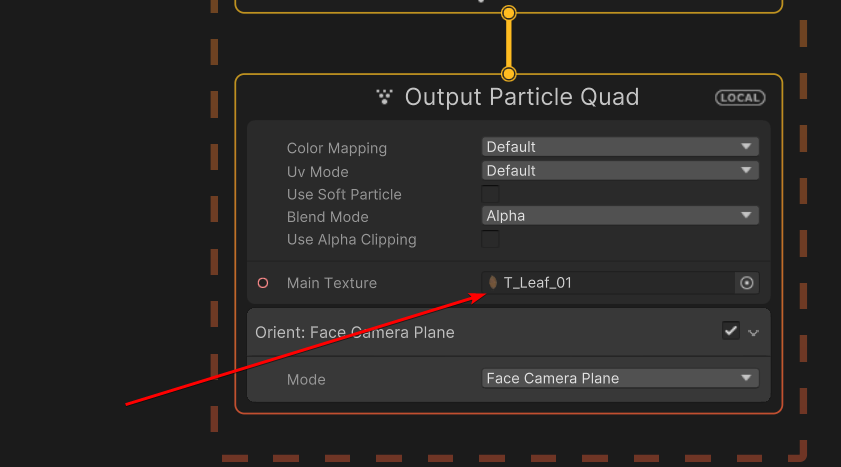 tame sluice
true burrow
Thx, but I want to change inside the graph not globally for the whole system. He...
tame sluice
true burrow
Thx, but I want to change inside the graph not globally for the whole system. He...
how about using a flipbook texture?
grand kraken
Ahh ok so just for each particle, then probably what dutchious said, flipbook with randon page number
tame sluice
can someone help me analyse this?
true burrow
Thank you I will try that
outer storm
civic bane
does reducing the max particles increase performance, even if you never get clos...
particle system component or vfx graph? for particle system, it doesn't matter all that much unless you hit the limit, which menas you will "lose" some emission. we don't preallocate max-particles-worth of data. we just allocate a best guess at what you will need based on emit rate and lifetime, and increase if our guess is too small. for vfx graph, "capacity" is pre-alllocated, so you gotta be more careful there.
true burrow
true burrow
Hello guys, is it possible to set a random texture in vfx graph?
If someone is interested, this is my solution now.
 frigid holly
true burrow
frigid holly
true burrow
I will see if that's also doable with branches tomorrow. Sorry for delay 🌙
 grim agate
Is there an easy way to reverse particle flow in particle effects? I want my particles to spawn on an edge of the sphere and go towards the middle
 sleek viper
Hey all, Im having some trouble with some lighting in my game. I made some custom shader graphs with URP and set those materials as trails for particle systems that I've been experimenting with, but for some reason in one area of my game, the trails turn black and dont emit light
shut cliff
grim agate
Is there an easy way to reverse particle flow in particle effects? I want my par...
In the Velocity module is Radial Velocity, you can set that to a negative value and it'll go to the center of the shape
grim agate
works great, thanks
 devout hinge
Hello, I never touched VFX in unity until today so I got some effects to try and reverse engineer them. Can anyone please explain why my game object is not moving with the VFX when I click play? Google does not seem to help much
ashen robin
The particles are moving, not the game object.
You can however design your particle system such that it's stationary and control it via script if you want to design it that way
hollow yarrow
decided to finally try use the vfx graph, wondering if it is possible to create an amount of particles, then destroy them after they have been rendered, so i can recreate them next frame? (assuming the vfx graph even uses frames...)
hollow yarrow
hollow yarrow
decided to finally try use the vfx graph, wondering if it is possible to create ...
hmm, seems like i could do that using that single burst spawn block thing, then just use those kill blocks at the end to remove them all? Although it appears that the spawn lightning thing does not run every loop, very fascinating!
clear spruce
devout hinge
Hello, I never touched VFX in unity until today so I got some effects to try and...
The particles are simulated on GPU, CPU has no idea where the particles are moving and even if it did, it would be wasteful to try to figure out where the center of those particles is (there can be hundrets of thousands of particles moving all in different directions). If this is going to be a projectile that is meant to collide with the environment or something like that, you could do what mao said: inside the vfx graph make it so the effect doesnt move at all (doesnt move relative to the object origin) and move the object, potentially consisting of collider and rigidbody, itself
Setting the effect to use world space coordinates could help on achieving the the same effect without any forward movement
umbral sedge
devout hinge
Hello, I never touched VFX in unity until today so I got some effects to try and...
Set the UpdateParticle output to GpuEvent block, initialize and Update like you would in the particle blobk, then inherit the positionOverTime of those moving particles then add another UpdateParticle block put anything you want here, and wire it to Output mesh block where the mesh here is the GameObject's mesh
I assume the gameObject uses it's own material then you can assign the material in that outpur mesh block too
this way it will follow the particle and update it's position when the particle is moving over time
you may want to set the lifeOverTime for the mesh that is following the same as the lifeOverTime of the particle it follows
...
You can follow this exact example in the particleStrip examples, just DON'T use particleStrip node/block and just use the regular nodes/blocks instead
If you can, don't do it via c#, well you technically can, but GpuEvent can be abused for such scenario so why not just use it 😃
...
If that too complicated, you can use PropertyBinder component via c# to get the position of moving particles
gleaming stream
Was wondering if anyone know how to developem continuous, mesh-driven engine effects.

 main canopy
I have question, can i add vfx effect to UI element? or it has to be scene stuff. I mean does it work on UI canvas?
My problem is that my particles are not showing up

these are unity samples, the sparks

they work, just are not visible
 midnight grove
Particles don't work on the UI, no
There are some git links you can find that people have created to have UI particles. A quick Google search will show them.
main canopy
but shouldnt it still be visible in my scene view?
this is on my scene, not child of canvas, inside camera and it is not visible on scene or game view

also what i see online is that this box contains preview of particle effect, to me its empty

and i tried switching from my 2d URP to default, newly created one URP and it doesnt fix the issue
umbral sedge
gleaming stream
Was wondering if anyone know how to developem continuous, mesh-driven engine eff...
not quite sure what you mean by mesh-driven, if you mean something like vertex animation, then yeah you can do that with custom mesh + vfxgraph
depends on your use case, you'd need your own custom shader for moving the mesh's vertexes
 austere fog
How do I change the rotation of a particle during the lifespan of the particle? I know "Start Rotation" exists but that only changes the rotation every time a new particle spawns, instead of during the lifetime of a particle. Also, I've tried rotating using Local Space but that didn't work for my needs.
vestal rune
question how can I make my vfx show IN FRONT OF THE CANVAS
 rose tulip
Good morning fine people!
I'm about to create a VFX for my weapon slash, added the VFX Graph asset, but nothing shows up when I add it to my scene, could someone help me here? 🙂
When I watch a tutorial, they just add it to the scene and it starts playing, showing how it will look
umbral sedge
austere fog
How do I change the rotation of a particle during the lifespan of the particle? ...
You can get the renderer and go from there
    var vfxRender = transform.Find("VFX").GetComponent<Renderer>();

    vfxRender.sortingLayerName = "layerName";
    vfxRender.sortingOrder = 10; //or whatever sorting order so it would be on top in the layer hieararchy//
Pretty sure there's a renderQueue option in the meshQuad so you can just set it from there, but you should check
vestal rune
question can you have more than one texture for the same vfx graph?
raw lance
i dont see why not
just add more output nodes or create a shader that targets vfx graph that samples multiple textures
vestal rune
raw lance
just add more output nodes or create a shader that targets vfx graph that sample...
sorry just saw* your message.. i am new to this so I will try to add more nodes
vestal rune
i have a vfx graph that automatically plays... can anyone tell me how to stop that AND how to stop it. .. so far I am using the .Stop method yet it is not working all the time
raw lance
vestal rune
i have a vfx graph that automatically plays... can anyone tell me how to stop th...
send an OnStop event
vestal rune
raw lance
send an OnStop event
can you tell me what action i need to subscribe to?? i cant find it in the api
raw lance
VisualEffect.SendEvent()
vestal rune
thank you
 tepid violet
i have 4 particles 2 are set with a emisson of 1 and 2 are set with emission of 100, the ones with 100 seem to fire first before the others how do i fix that

 open birch
Quick question that I'm stuck on does anyone know how to access an SRP lens flare component through a script? Component "LensFlare" only seems to work for the built in pipeline. Been looking for ages now and only the legacy manual/built in manual seems to mention accessing it through script.
outer storm
austere fog
How do I change the rotation of a particle during the lifespan of the particle? ...
if you're talking about Particle System Component see Rotation over Lifetime module. If talking about VFX Graph, there should be some Rotate block you can add to the Update context... maybe it's as simple as adding a Set Rotation Block, and change the mode to Add. That will add on some value each frame. Or use Set Angular Velocity in the Initialize context.
austere fog
outer storm
if you're talking about Particle System Component see Rotation over Lifetime mod...
I ended up just using quaternion look rotation. Rotation/Velocity over lifetime never ended up moving in the right direction according to my player’s rotation, but thanks for the help anyways.
prime dome
if anyone has any good textures plz dm
or just send here
also i use roblox studio 🥹
warm torrent
prime dome
also i use roblox studio 🥹
This server is for Unity only
And not for begging for assets either
 hallow lintel
Any know why when in unity I have a set of particle effects in a int layout when toggling between them, instead of one deactivating then activating the new one, they just stack?
<@&502880774467354641>
frigid holly
rose tulip
Good morning fine people!
I'm about to create a VFX for my weapon slash, added ...
Hello Weelie, on some Unity versions we had an issue where you had to recompile the VFX so it could display. It does it automaticly when opening the VFX Graph, otherwise you can go into Edit>VFX>"Rebuild and save all VFX". It might take some time but will solve the issue for all the VFX in the project directly.
If this still doesn't work, selecting the VFX with gizmo on can be a good help: if you see orange outliner, your particle spawns but the VFX is not display because of it's rendering (ex: alpha can be at 0). Explore your VFX Output settings to solve this issue.
If you don't have the VFX Outliner, then you probably have an error in console or in the graph that needs to be fixed, preventing the vFX to spawn.
ℹ️ 📢 Hello, for more relevant/faster help, don't hesitate to directly specify:
- using HDRP, URP or Built in?
- VFX Graph or Particle System?
- Unity version?
With those informations, it will be easier to correctly answer your questions
Also, providing images (gifs or screenshots or videos) is recommended when possible.
rose tulip
frigid holly
Hello Weelie, on some Unity versions we had an issue where you had to recompile ...
Hello! Thank you for you answer, I figured it out, it was some "pipeline-something-something" I didn't know about, worked when I installed that asset and restarted Unity 🙂
frigid holly
Yes Visual Effect Graph doesn't work with Built In, it needs a Scriptable Render Pipeline (SRP) to work. So you need either HDRP or URP when using VFX Graph!
 gusty ledge
Hi. I was looking for a way to use an atlas in a particle system and I found this old article where they set the texture sheet animation to constant. Am I right that this feature is no longer available? We're on unity 2019.3.11
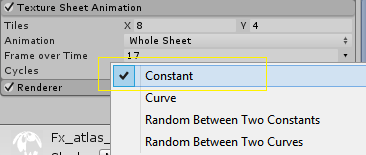 raw lance
you should try vfx graph flipbooks
gusty ledge
We're on an old version and legacy pipeline 🙃
raw lance
bummer, i doubt there's that many changes since for the legacy particle system though
frigid holly
gusty ledge
Hi. I was looking for a way to use an atlas in a particle system and I found thi...
Seems to be still available at least on very recent versions
 gusty ledge
Oh!!! I didn't realise where I had to click. Thank you so much
midnight grove
hallow lintel
Any know why when in unity I have a set of particle effects in a int layout when...
In the future, do not ping usergroups unless it's for a moderator for a server issue. Ask your question and wait for a response like everyone else.
frigid holly
open birch
Quick question that I'm stuck on does anyone know how to access an SRP lens flar...
Hello, You might be able to find an answer by asking on a more relevant channel: #archived-urp or #archived-hdrp , or #archived-lighting
frigid holly
tepid violet
i have 4 particles 2 are set with a emisson of 1 and 2 are set with emission of ...
Hello, emission works by spawning the count amount of particles during the first second. A emisison of 100 will result at first particle spawning at 1/100s while rate of 2 will result at first particle spawning at 1/2s This might explain why your particles are spawning first, if they have the bigger particle spawn rate.
A workaround can be to use a burst isntead with a time of 0 so it swpawns directly, count of 1 an cycle infitie so it spawns 1 particle indefinitly, and then tweak the interval to change the rate. Interval of 1 = rate 1, interval of 0.2 = rate 5 etc..
 rose tulip
Might be a dumb question. But as I watched a bit of GoW: Ragnarok yesterday I noticed the ui, specifically the health ui, and how it was moving and seemed more "alive", if that makes sense.
Could I use VFX in Unity to create a similar effect to make my bars pop more?
I haven't tried yet, just a random thought while I'm waiting in my car ^^
frigid holly
rose tulip
Might be a dumb question. But as I watched a bit of GoW: Ragnarok yesterday I no...
That's a very interesting question. I will ask for more insight from the rest of the team so I can give you an answer asap, as it raises a few other questions
Also could you provide a screenshot of your reference?
rose tulip
frigid holly
That's a very interesting question. I will ask for more insight from the rest of...
Using this as an example: https://youtu.be/ixllGOX0Evw?t=2309
You can see how the bars at the bottom left and above enemies heads have this "flow" to it.
I'm currently using a standard canvas, background and foreground, and the fill thing.

GOD OF WAR RAGNAROK Gameplay Walkthrough FULL GAME PS5 4K 60FPS No Commentary
New Clips 2022!
Subscribe To Gameclips To Catch Up All The Best Clips.
Gameclips always brings you the best full game movies with a focus on the story cinematic aspect of the video games. On this channel you will find the best cinematic moments and clips from the be...
Want screenshots or does the video work?
frigid holly
this will work thanks!
rose tulip
frigid holly
this will work thanks!
Awesome!
I'll look up on how to do this effect when I start polishing, but being able to use a VFX would be amazing.
I've used VFX for my attack animation, and there's so much cool stuff you can do with it
raw lance
is a screenspace target available for vfxgraph? that'd be pretty cool
frigid holly
After seeing the effect, I think this kind of things would be made in Shader Graph more than VFX Graph, I'll still try to know more about VFX Graph's integration possibilities with UI
rose tulip
frigid holly
After seeing the effect, I think this kind of things would be made in Shader Gra...
If that was for mye, then I'm sure there are other better ways for doing this, as I mentioned, I haven't tried or looked it up on how to do it, but VFX was the first thing that popped into my head
hallow lintel
midnight grove
In the future, do not ping usergroups unless it's for a moderator for a server i...
You don’t gotta be so rude about it
midnight grove
hallow lintel
You don’t gotta be so rude about it
Nobody is being rude. 👍
prime dome
warm torrent
This server is for Unity only
And not for begging for assets either
lol stingy
dont know why people dont just share assets
its fine though ill leave
 vernal glacier
Anybody got any experience / ressources for creating a shockwave particle effect in 2D ?
ashen robin
vernal glacier
Anybody got any experience / ressources for creating a shockwave particle effect...

A shockwave shader graph (or shock wave shader graph) is a relatively simple effect, that can add a lot of pop to actions in your game.
Shockwave updated for 3D in my timeline video here: https://youtu.be/A5jl5RVEjqE
The reason I'm doing this tutorial at all is because someone commented on one of my YouTube videos requesting it. I bring this...
 nimble grove
Is there a way to delete a single particle from a particle system when it collides with a certain object? I went the particles to collide with the ground but as soon as the particle touches a player, it should delete. Thanks
ashen robin
You can find trigger options for particles for the shuriken system for when they collide
rose tulip
O hi! About to do a deep dive into the particle system, is there a resource you would recommend starting out with? Videos preffered 🙂
Seen alot of introduction courses on YouTube, but most of the seemingly good ones with alot of views are aften multiple years old, how much has the system changed over the years?
weak dagger
can anyone suggest why 2 elements of my vfx arent playing, the other 2 elements work fine, and these 2 seem to play correctly when i first initiate play mode but don't actually trigger when triggered in game

these are the 2 elements in question
 signal lotus
im spawning particles around the circle
and i want to make velocity direction like those arrows, outside of this circle
how to make it?
im using hrdp, vfx shader graph

 lavish verge
Hopefully simple question, is there an easy way for me to reduce the bounds range from where particles spawn? Probably just poor google-fu on my end but I can't see an obvious answer on how to do it.

Never mind managed to find it immediately after posting, such is the magic of asking a simple question 
grand kraken
signal lotus
im spawning particles around the circle
and i want to make velocity direction li...
Conform to sphere, make it really big
weak dagger
weak dagger
can anyone suggest why 2 elements of my vfx arent playing, the other 2 elements ...
plz help
 autumn pine
Anyone know how to selectively cull certain objects without changing its layer?
 nimble axle
how can i make a burst of particles in a cone?
its just like a single instantiation of bullets which looks like a muzzle flash
and then the particle system is destroyed immediately after
sorry im very new to the particle system
warm torrent
nimble axle
how can i make a burst of particles in a cone?
Shape: Cone (which is the default)
Emission: "Burst" instead of Over Time
Main module's Stop Action: Destroy
nimble axle
awesome, right now they are all travelling at the same angle, how can i make it so its like along the angle of the cone
 nimble axle
okay i got burst working
but it keeps bursting
and it doesnt destory after completion
my setup rn
 rose tulip
o hi, my VFX suddenly stopped working.
It works if I disable "Set Lifetime", but that is essential for my VFX to be correct, could anyone try to help me out? 😄
It was working yesterday
 spiral moth
in VFX Graph how do i convert a bool to an int to plug the compare operator into the switch?

it doesn't allow plugging the output bool into the Test Value port on the Switch
hmm, just read this reply to the same question.. they should allow a direct bool plugin to switch
 dull obsidian
spiral moth
hmm, just read this reply to the same question.. they should allow a direct boo...
dull obsidian
spiral moth
hmm, just read this reply to the same question.. they should allow a direct boo...
it appears this bool auto casting feature has been added, i tested quickly with the latest unity editor 2023.1.0a18 / vfx graph 15.0.1.

while I can't find this mentioned in the visual effect graph release notes https://docs.unity3d.com/Packages/com.unity.visualeffectgraph@15.0/changelog/CHANGELOG.html
i found this bool auto cast feature was added to shadergraph 13.1.1 (unity editor 2022.1+)
https://docs.unity3d.com/Packages/com.unity.shadergraph@15.0/changelog/CHANGELOG.html#1311---2021-10-04
Adding ability to automatically cast Bools to Vector types in ShaderGraph [1359160]
spiral moth
dull obsidian
it appears this bool auto casting feature has been added, i tested quickly with ...
ah nice, thanks for checking.. would be useful to backport it to 2021.3 😛
dull obsidian
the shadergraph pull request is here https://github.com/Unity-Technologies/Graphics/pull/5718
GitHub
Purpose of this PR
Fix for https://fogbugz.unity3d.com/f/cases/1359160/
Add bool <-> vector casts:
Testing status
Describe what manual/automated tests were performed for this PR
Tested th...
which led me to find the visual effect graph pull request not mentioned in the changelog, it was added as part of a related feature to allow a bool to enable/disable contexts https://github.com/Unity-Technologies/Graphics/pull/5990

GitHub
Purpose of this PR
This PR implements the activation ports in block to allow a better/more convenient way to enable/disable blocks with graph.
Activation expressions can be evaluated on both CPU an...
spiral moth
activation slots that's interesting
dull obsidian
dull obsidian
while I can't find this mentioned in the visual effect graph release notes https...
@spiral moth so, according to the date of the pull request merged on 2021, November 8th this was added in visual effect graph [14.0.0] - 2021-11-17 for Unity 2022.2+
spiral moth
dull obsidian
<@612264661680652290> so, according to the date of the pull request merged on 20...
i'm using DOTS also but haven't switched to v1.0 ( which uses 2022.2 )
good to know for when i do switch up
really enjoying learning and using vfx graph either way, it's so powerful
custom data structs ( via GraphicsBuffer ) is a game changer for triggering multiple fx spawns at the same time, the setup could maybe be a little easier tho
dull obsidian
spiral moth
really enjoying learning and using vfx graph either way, it's so powerful
until one finds that visual effect graph extensibility stops with a hard barrier of the most essential VFX graph runtime code being hidden in the black box of the unity engine core, precompiled C++ we can't touch or even see reference source code for. i took a long step back after coming up against that a few times.
this is apparently due to performance reasons and DOTS not being mature enough when VFX graph was developed. Still, due to this being a package they should have made it a runtime plugin we could modify and rebuild ourselves with C++ source instead of being locked away in the Unity Engine core C++. But they just couldn't be bothered to do so, I get it, it would have been more work, but the alternative we were left with violated the core promise and values of package modularity and extensibility.
good news is the supposed plan is now that DOTS is about to be production ready the C++ runtime will then at some point be ported to C# with source available in the visual effect graph package. https://portal.productboard.com/8ufdwj59ehtmsvxenjumxo82/c/128-dots-runtime
spiral moth
dull obsidian
until one finds that visual effect graph extensibility stops with a hard barrier...
oh that's good to know.. it makes it more accessible and also removes the managed barrier from dots compatibility
atm my dots code is populating some NativeArrays, and then i have a mono which is uploading those arrays to the graphics buffers in Update
so it's not too bad really
but good to know there's a plan to move the vfx codebase over, as you say it's a black box atm
dull obsidian
@spiral moth so are you using VFX graph mainly for rendering data already simulated or generated upstream, earlier in the frame?
spiral moth
dull obsidian
<@612264661680652290> so are you using VFX graph mainly for rendering data alrea...
actually it's just for stuff like collision fx, blood splats and explosion fx etc
spiral moth
dull obsidian
<@612264661680652290> so are you using VFX graph mainly for rendering data alrea...
It's a good question actually, because I haven't tested with something like say a bullet collision fx, which might need same-frame rendering.. not sure exactly of the timings between dots and monos, it might be impossible to do it on the same frame
I think uploading to the graphics buffer and sending an event to a graph within an ecs system should be possible though, just avoid the mono completely
dull obsidian
spiral moth
I think uploading to the graphics buffer and sending an event to a graph within ...
yeah that should work fine
@spiral moth you can also adjust the update mode and fixed time step of vfx graph if that helps:
https://docs.unity3d.com/Packages/com.unity.visualeffectgraph@15.0/manual/VisualEffectGraphAsset.html
https://docs.unity3d.com/Packages/com.unity.visualeffectgraph@15.0/manual/Operator-DeltaTime.html
warm torrent
nimble axle
but it keeps bursting
Is Looping enabled or disabled?
spiral moth
signal lotus
im spawning particles around the circle
and i want to make velocity direction li...
 rose tulip
O hi!
Could someone help me figure out why my vfx stopped working?
It worked yesterday during the day, but stopped in the evening, after an hour of trying to figure it out before I gave up.
I just started up Unity again and I cant leave it alone, I need to figure this out
It might have happen when I was playing around with the HDRP lighting
When I disable the "Set Lifetime" bit the vfx works
but obviously, it's not even close to what I need it to be
spiral moth
rose tulip
Could someone help me figure out why my vfx stopped working?
It worked yesterday...
maybe if you shared what you have..
rose tulip
Thing is, I have no idea what you need, I got my VFX set up so it worked, but then it broke somehow, probably something I did.
What should I start sharing?
And I really wish I knew what to share, but I honestly don't know

Wait a second...
Max Delta Time, under VFX settings
What should that say?

This is what my settings said, changing it from negative to positive fixed it
But, what should they say?
spiral moth
Max delta should default to:
 weak dagger
can anyone suggest why 2 elements of my vfx arent playing, the other 2 elements ...
weak dagger
weak dagger
can anyone suggest why 2 elements of my vfx arent playing, the other 2 elements ...
can anyone help me out with this
spiral moth
weak dagger
can anyone help me out with this
the screengrabs are really small and hard to read


 rose tulip
spiral moth
Max delta should default to:
rose tulip
spiral moth
Max delta should default to:
Thank you so much, I have no idea how it got changed, if it was me doing it accidentally, or if it was something else, but it works now!
spiral moth
weak dagger
what i normally do to debug is add a PeriodicBurst in the Spawn context so that it loops, drag it into the scene ( if it isn't already ) and check scene view to confirm if particles are being emitted
weak dagger
spiral moth
what i normally do to debug is add a PeriodicBurst in the Spawn context so that ...
the weird thing is that its being emmitted in constant spawn mode but it isnt when im executing from single burst
and the weirdest thing is that this thing plays correctly exactly 1 time when i press the start button
then ceases to play again
spiral moth
weak dagger
then ceases to play again
i've had a couple of issues like that but i think if you make sure that play is enabled here:

you should be able to hit the Play() button and it'll send the default play event to the system
other thing is maybe check your initial event name hasn't been overridden:
 weak dagger
spiral moth
you should be able to hit the Play() button and it'll send the default play even...
weak dagger
spiral moth
you should be able to hit the Play() button and it'll send the default play even...
it actually plays when i press that but doesnt play in game
 torpid snow
does Unity Built in RP supports VFX graph in 2022?
weak dagger
and 2 other effects i have on that do play
spiral moth
weak dagger
it actually plays when i press that but doesnt play in game
sounds like a code issue then - where in your code are you sending the play event or doing for example vfxgraph.Play()
weak dagger
spiral moth
sounds like a code issue then - where in your code are you sending the play even...
im doing it from the script attatched to the vfx called "hiteffect"
using UnityEngine;
using UnityEngine.VFX;
public class hiteffect : MonoBehaviour
{
private int recentmove;
[SerializeField] VisualEffect VFX;

private GameObject p1;
private generalmovementscript p1gs;
private GameObject p2;
private Transform tr;
private generalmovementscript p2gs;
// Start is called before the first frame update
void Start()
{
    VFX = GetComponent<VisualEffect>();
    p1 = GameObject.FindWithTag("player1");
    p1gs = p1.GetComponent<generalmovementscript>();
    p2 = GameObject.FindWithTag("player2");
    p2gs = p2.GetComponent<generalmovementscript>();
    tr = gameObject.GetComponent<Transform>();
}

// Update is called once per frame
void Update()
{
    if (Time.timeScale == 0f)
    {
        if (p1gs.hitting == 1 || p2gs.hitting == 1)
        {
            if (p1gs.hitting == 1)
            {
                tr.localScale = new Vector3(p2gs.CurrentMove._sizey,p2gs.CurrentMove._sizey);
                tr.position = p1gs.effectpoint;
            }
            else
            {
                tr.localScale = new Vector3(p1gs.CurrentMove._sizey,p1gs.CurrentMove._sizey);
                tr.position = p2gs.effectpoint;
            }
            VFX.Play();
        }
    }
}
}
this is the full script
spiral moth
weak dagger
using UnityEngine;
using UnityEngine.VFX;
public class hiteffect : MonoBehavio...
you mentioned that there are two systems that play ok but these two only play once - are all four in the same vfx graph?
weak dagger
spiral moth
you mentioned that there are two systems that play ok but these two only play on...
yep there are four that play
one is the vertical cross
another is the horizontal cross
which are the ones i showed
and theres the circle single particle
and theres the particle effect that spawns about 20 particles
spiral moth
weak dagger
yep there are four that play
there's no errors in the console indicating maybe the shaders not compiling? not sure otherwise, it looks okay
maybe try setting bounds to automatic and ramping up capacity, just to double check that
weak dagger
spiral moth
maybe try setting bounds to automatic and ramping up capacity, just to double ch...
wait what do those to exactly do?
i can find capacity and changed it to 128 from 32 but where can i find bounds
wait just found it
spiral moth
weak dagger
wait what do those to exactly do?
bounds is like an invisible box, that clips particles that are outside of it.. it's for optimization.. normally the bounds is tied to camera position so that only particles in the camera view will be visible
weak dagger
should i set it to L or W
spiral moth
weak dagger
should i set it to L or W
well it really depends on how you're using it
if it's local, the bounds box position will be relative to the position of the gameobject the graph is attached to
weak dagger
so if i want to change it to automatic what exactly should i change

i should try Local then
wait i think the bounds are too small
lemme fix that
spiral moth

maybe you're on an earlier version
but yeah try increase the size
when you click on the bounds settings, you should be able to see the bounds as a gizmo in the scene view
spiral moth
hmm not sure in that case
normally a good idea is strip back to just a simple case of what you're doing
maybe try with just one simple system
weak dagger
@spiral moth also why does the animation play when i first start the simulation
(and its the one time it actually plays correctly)
spiral moth
weak dagger
<@612264661680652290> also why does the animation play when i first start the si...
i think the default OnPlay event plays on start, so you'd have to switch to a custom one
weak dagger

these are the properties of the vfx
before i boot up the game the VFX is set as "none"
and after i boot up it is set to that
wait hold on
it plays correctly before i start the game
maybe it has something to do with that
spiral moth
weak dagger
your VFX field, delete the ref to the vfx asset, and make that field private.. your script is already grabbing the vfx component in Start
weak dagger
spiral moth
your VFX field, delete the ref to the vfx asset, and make that field private.. ...
oh this is shown after i started execution
spiral moth
oh ok
weak dagger
spiral moth
oh ok
one pattern im recognizing is that the effect plays well before it is handed to the script then stops playing after it is handed to the script
spiral moth
weak dagger
one pattern im recognizing is that the effect plays well before it is handed to ...
i think it's probably something obvious but whatever it is i'm not seeing it 😛
i'm relatively new to vfx graph myself just getting to grips with it, and i can say it is a bit of a black box to begin with and fairly annoying to get going with it
really powerful and a great tool though
to me it's one of the most exciting features to come out of unity, alongside shader graph, dots, and the equally annoying and convoluted render pipeline
fickle wyvern
Why does the particle system make an outline on my sprite?

The outline can only be seen when the sprite has colors on, and can also be seen in-game
frigid holly
torpid snow
does Unity Built in RP supports VFX graph in 2022?
Hello,** VFX Graph will never be supported by Built In. It will always require URP or HDRP.**
I already came accross workaround to make it work on the internet but it is not recommended. If you plan on using built-in, then using the regular particle system is the way to go
My answer comes a bit late but about the** UI integration for VFX Graph** that was asked a while ago, no work has been done on this yet.
clear spruce
if you want a render pipeline that you can make games with in the future too urp/hdrp is the way to go. bird isn't on active development anymore and is probably removed from the future releases some day, honestly there's not many reasons not to use urp these days...
frigid holly
Why does the particle system make an
URP and HDRP contains more support and features than built it, with more recent technologies. More people are working on those pipelines. I also recommend that you use one of those on your project so you can just have more features to play with 😉
https://docs.unity3d.com/2022.2/Documentation/Manual/render-pipelines.html
This page can help you understand more about it and make your choice, there are also dedicated channels on this discord if you have any questions or feedbacks.
dull obsidian
frigid holly
Hello,** VFX Graph will never be supported by Built In. It will always require U...
to be fair, that was also the official line with shader graph as well for a few years, yet shader graph ended up gaining built in RP support one day when hell froze over :). but i get it, not for the foreseeable future, extremely unlikely.
clear spruce
Have you tried enabling "High Quality Flickering" on the bloom settings?
spiral moth
i think the Plaedians are at war with Sirius..
clear spruce
Try to play with those values, thought you were using urp
rose tulip
Is it possible to make the particles spawned from the particle system NOT be a part of the object?
I wanna create a burst of particles as the player picks up a crystal, but as I'm destroying the object on burst, the particles goes away.
Is there a simple way to fix this?
warm torrent
rose tulip
Is it possible to make the particles spawned from the particle system NOT be a p...
Short answer: no
You can however apply some conditions to how particles get destroyed on collision
Or just instantiate gameobjects that have their own particle each, which sounds more fitting for the task
rose tulip
warm torrent
Short answer: no
You can however apply some conditions to how particles get dest...
Got it, I'll keep my current solution. Instead of Destroy, disable EVERYTHING but the PS, them make the PS destroy the gameObject when it end
 frail sleet
Anyone know how Unity did the fire effect in this tech demo?
Do you think it's a particle simulation or just a flipbook/sprite sheet like you can generate with Embergen
 dry dove
So for VFX graph... Should we make one graph for all the effects of one type in the level and use a custom event with position and direction arguments to fire it? So far I've been using a pool and disabling individual graphs. But it's so messy.
This is for muzzle flashes and puffs of smoke, these kinds of effects.
clear spruce
frail sleet
Anyone know how Unity did the fire effect in this tech demo?
Do you think it's ...
It was shader based, not particle effect
frail sleet
clear spruce
It was shader based, not particle effect
bruh, how
hearty flare
@clear spruce @frail sleet
It is a fancy flipbook made in embergen, with layered shaders reducing the amount of frames and the way it integrates with the scene.
https://twitter.com/Tuatara_Games/status/1567548488606695425
frail sleet
hearty flare
<@689758471003963472> <@195869819340455937>
It *is* a fancy flipbook made in em...
Geeze, way to save the day. Now my mind is settled
thanking you
clear spruce
hearty flare
<@689758471003963472> <@195869819340455937>
It *is* a fancy flipbook made in em...
Thanks, remember seeing something like that on some live stream but didnt remember exactly
torpid snow
frigid holly
Hello,** VFX Graph will never be supported by Built In. It will always require U...
hey thanks
frigid holly
dry dove
So for VFX graph... Should we make one graph for all the effects of one type in ...
Yes currently this is what you have to do. On 2022.2 we added instancing to help your workflow in those cases
You can also use this feature: https://forum.unity.com/threads/new-feature-direct-link.1137253/ to help you
Unity Forum
Hello,
I would like to follow up on this thread and I think it’s more appropriate to centralize a message in a dedicated post.
We have some updates...
prime dome
for some reason my particle system is rendering behind my sprite?
it's at the bottom of the hierarchy with these layer settings changed too

sorting layer and order in layer, nothing seems to change it
prime dome
you can see the particles both under the sprite of the gameobject that spawned it, and the whole background
 prime dome
fixed it, didn't know particle systems couldn't render on UI so i downloaded this script that adds that functionality https://forum.unity.com/threads/free-script-particle-systems-in-ui-screen-space-overlay.406862/
Unity Forum
I haven't been too active in the Unity forums, but I am a professional dev who has been working with Unity for several years. I've recently been...
nevermind it's still behind the sprite lol
dry dove
frigid holly
Yes currently this is what you have to do. On 2022.2 we added instancing to help...
Thank you so much! This looks like exactly what I need!
 worthy palm
Hi all - VFX Graph question. I am debating making an interactive grass vfx graph to render say 1000+ grass objects (not sure how many). There will be multiple objects that can interact with the grass (move/flatten the grass), say 10 AI characters running around. I know I can pass in their positions using a texture, property binders or graphics buffers. What I was then wondering is how to evaluate all 10 positions per particle. Is there a way to say get the minimum distance from a single particle to the 10 positions to get the closest position, or even a way to just evaluate all of their interactions and add the results?
At the moment my current idea would be to have to add multiple copies of sampling the array of positions or multiple copies of sampling the texture of positions and then doing a min between each and the current particle position in a big cascade. Basically I was trying to see if there was the equivalent of a for loop in vfx graph to loop through the array - trying to keep the graph as simple as I can.
Other options for this are not to use VFX Graph and to maybe use Jobs/Burst + DrawMeshedInstanced/Indirect or maybe ECS/Hybrid.
 willow fox
Here's an effect I made for my game that I think looks pretty cool https://cdn.discordapp.com/attachments/484200276694269953/1042257240649904188/8bd5ef7be7eb2fac6fdf1a4474f94720.mp4
nocturne yarrow

You don't suppose visual effects graph is smart enough to not run these length operations twice eh?
probably safest to just access it all from one node
I worry that even accessing an exposed property from multiple nodes will lead to overhead somehow... although that one seems less likely I suppose
umbral sedge
willow fox
Here's an effect I made for my game that I think looks pretty cool https://cdn.d...
That's awesome 👍
You can make it more dynamic with ParticleStrip
willow fox
What's that?
and thanks 🙂
https://www.youtube.com/watch?v=MZIKvqSuNpU Here's more footage of the game

I'm working on a VR game with a similar concept to Waltz of the Wizard, designed to simulate the experience of having magic powers. There's still a lot to do but I'm making good progress on it. I'm designing it only for hand tracking, though I might add controller support if there's enough demand for it in the future. Since I'm running this on m...
umbral sedge
willow fox
What's that?
https://www.youtube.com/watch?v=gdb9zvHh3r0 have fun! ♥️

VFX Graph Advanced Tips は、 Unity の Visual Effect Graph (VFX Graph) の使いこなしテクニックを紹介する、中~上級者向けチュートリアルシリーズです。
第1回は Particle Strip の解説です。 VFX Graph を使ってパーティクルの軌跡を描くという機能です。これを使いこなすことで VFX Graph の表現力が格段にアップします!
併せて補足説明の動画もご覧ください。機能の有効化の手順や、サンプルプロジェクトについて解説しています。
https://youtu.be/jZ7RTkwQIfU
#UnityVFXGraphTips
 vale linden
is it possible to make particles bounce off of layers?
 tribal magnet
Hi. Is there a way to swap the sprite of a particle system when each particle collide with a mesh? I mean, I want to transform each particle when it collides with the hands. It's a VR experience.
Thanks for your suggestions.

 fast fulcrum
I want to do this in Unity. Can anyone point me in the right direction, please?

 elder latch
Is there any way to use mutliple render layers per vfx graph? E.g. per output particle? I need to render my refraction effects in a custom pass to work properly
 viscid bridge
nimble axle
viscid bridge
nimble axle
check this option?
 viscid bridge
fast fulcrum
I want to do this in Unity. Can anyone point me in the right direction, please?
viscid bridge
fast fulcrum
I want to do this in Unity. Can anyone point me in the right direction, please?
https://www.youtube.com/watch?v=z_HplIvasqA
Also check out general vertex displacement, and make it biased on the moon I suppose

Tessellated Spheres! Watch as the Outer Wilds art director goes into detail on the Ocean Shader of Giant's Deep. Join Unity and Mobius Digital as we explore the solar systems of Outer Wilds one planet at a time!
fast fulcrum
viscid bridge
https://www.youtube.com/watch?v=z_HplIvasqA
Also check out general vertex displa...
Thank you so much, I will check it out 😄
viscid bridge
Is it on Destroy?
nimble axle
yeah
nimble axle
viscid bridge
Is it on Destroy?
it destroys after 5 seconds instead of after the particles reach the end of their life
 sudden heart
so for particles I have "Play on Awake" turned off but every time I start my game the particles get set off. (The duration is set to 2 so they work correctly they are just playing at the begining still.)
frigid holly
nimble axle
it destroys after 5 seconds instead of after the particles reach the end of thei...
Hello, It might destroy at the end of your effect duration setting, you can adjust the value of "duration" to match the end of the effect and tell us if it solves the issue?
 leaden notch
I can't seem to find anything on this. How would I skin immortal particles to an object?
A similar effect would be any of the hair & fur assets, but I'm wanting to instantiate my own objects instead.
fluid lagoon
leaden notch
I can't seem to find anything on this. How would I skin immortal particles to an...
 median wing
Hey, how can I optimize the particle system when it comes to collisions? I am trying to make snowing weather using particle system, but I don't want the particles to fly through the roofs (obviously). However when I enable World collisions, the game slows down drastically, mostly due to the particle system and it's collisions.
Also, second question, how bad idea is it to just make one big particle system for the whole map, and limit particles to 100K?
warm torrent
median wing
Hey, how can I optimize the particle system when it comes to collisions? I am tr...
Pretty bad, would be better to only spawn the particles around the camera
Particle System should generally be used only for systems with a couple of thousand particles at most
The VFX Graph is better suited for systems with more particles than that, and it has the option to collide with depth buffer which is much cheaper than real collision
It's not a perfect solution either, but probably the best one
Snowflake collisions are really difficult to make work perfectly while being optimized, and I can't think of any game that's bothered to do that
Usually they just use an imperfect system and hide the imperfections
For example by only using unclear and short-lived snow particles which are only spawned out in the open
 floral bloom
Olla, very basic question:
With shuriken, can I have particles flying in a zig zag motion easily?
Something like every .2 sec they change their direction
More specific, a solution where I dont have to do this ^^"
 warm torrent
floral bloom
More specific, a solution where I dont have to do this ^^"
warm torrent
floral bloom
More specific, a solution where I dont have to do this ^^"
You should be able to make that variable change via scripting
median wing
warm torrent
Pretty bad, would be better to only spawn the particles around the camera
Partic...
Thanks, I'll try that. Perhaps a particle system that moves with player would make sense, although it would still have to be big, as the player can move fast (it's a car game), just so the player won't run away from the already falling snow. I'll try to play with it and see what looks best
warm torrent
median wing
Thanks, I'll try that. Perhaps a particle system that moves with player would ma...
In real life snowflakes become indiscernible from a white fog over a distance and at high speeds, so it may be necessary to only draw them close to the camera
And not worry about collisions at all
median wing
I guess I'd still need collisions tho, since there are roofed places you can drive to, and it would look bad if the snow could fall through the roof
But I'll see how to make it look generally nice. Luckily winter is around the corner, so I can remind myself how it should look
 shadow abyss
Is it possible to get the effect of a particle moving along a mesh surface?
fluid lagoon
shadow abyss
Is it possible to get the effect of a particle moving along a mesh surface?
although if your mesh isn't animated you could do it with a normal SDF doesn't have to be dynamic
 cedar pine
how do i call the function on a vfx graph play() in another script
 high anchor
I'm in need of some help. I have this particle that grows and once its done growing it dissolves, and i just want the particle to just grow then stay the way it is, lol sorry if it doesn’t make sense, anyone know how to stop the dissolve at the end, (doesnt have an animation and the loop is on)
 light patrol
What is my fundamental misunderstanding here? This colour node isn't doing anything.

No matter what colour I input, it doesn't change the textures colour
hearty flare
light patrol
No matter what colour I input, it doesn't change the textures colour
Does your material make use of vertex color?
light patrol
I see, I didn't realise I needed a material. I am sampling a texture that has no material.

Nevermind, It's randomly working now with the colour over life node. I tried that multiple times before and it wasn't working. Not sure what is going on now
light patrol
Now the set size node isn't working in the initialize block. Doesn't matter what value I input, it doesn't change the size of the particles. I am saving the graph after changing the value.

I try, 0.00001, 10, 10000. Doesn't change anything
fluid lagoon
light patrol
Now the set size node isn't working in the initialize block. Doesn't matter what...
I mean... are you also setting the size somewhere in the update section?
light patrol
Doh. Yep. Thanks
fluid lagoon
is that what was happening with Color too?
light patrol
No
 mint cave
Hlo guys
can anyone give me a idea or way to make animal bite effect(only using particle system and script)

ArtStation
 warped pine
light patrol
Nevermind, It's randomly working now with the colour over life node. I tried tha...
warped pine
light patrol
Nevermind, It's randomly working now with the colour over life node. I tried tha...
Hello, Can you share a screenshot of the complete system and indicate your Unity Version? I will see what's happening 🙂
light patrol
warped pine
Hello, Can you share a screenshot of the complete system and indicate your Unity...
I appreciate the reply. I have it sorted now as that was some hours ago. Admittedly, I haven't used the VFXG before so it was more than likely user error. I think I must have had a faulty memory about what I had done that would have caused the colour over life ramp's colour values to not reflect in the sampled texture.
outer storm
floral bloom
More specific, a solution where I dont have to do this ^^"
in the Force over Lifetime module there is a Randomize option. However, this is applied every frame, so i suspect it may be far too high frequency for what you are hoping to achieve. still, maybe worth a look: https://docs.unity3d.com/Manual/PartSysForceOverLifeModule.html
slate lily
https://github.com/Unity-Technologies/VisualEffectGraph-Samples
Trying to make the GrassWind sample working in my URP project without success. Does someone know why this could be?
I get 0 output from the vfx

GitHub
Visual Effect Graph - Samples Project. Contribute to Unity-Technologies/VisualEffectGraph-Samples development by creating an account on GitHub.
floral bloom
outer storm
in the Force over Lifetime module there is a Randomize option. However, this is ...
Thank you, I will check it out. For now my solutions seems to work good enough, it's just annoying to work with
light patrol
Is there a way to set an infinite lifetime?
Any tips on how to get this output node to 'work'? I can't get anything from it.
sending nodes now

It works with Output Particle Quad
I can see it with the Output Particle Quad. I can't see anything using Forward Decal Output
I am trying to create a shadow decal for a player. I want a single burst spawn and then infinite lifetime. Iam on unity v2020 so no access to decal renderer
Nevermind, I got it working
outer storm
light patrol
Is there a way to set an infinite lifetime?
i think there is something in the inspector if you select the Update Particle context, and change automatic reap (https://docs.unity3d.com/Packages/com.unity.visualeffectgraph@7.1/manual/Reference-Attributes.html)
light patrol
I am trying that now and it doesn't seem to have any unique options in the inspector for the Update Particle Context node, nor any thing similar to "automatic reap". I did however have success with a loop and delay node thanks to Uthel for pointing it out. This setup seems to have success.
 slate lily
Need some basic support
How could I made grass blades in vfx graph?
Probably output mesh, but I am not sure what else to do.
I want to use it to make the individual blades interact with objects.
I originally wanted to do it in shader graph, but so many meshes might not be great for performance
Edit:
Working on a combination of vfx graph and custom shader with vfx graph support
 loud yacht
Hey does anyone know how these zones in games are called where an ability/ meteor or something is about to hit? For example there would be a red circle on the ground that fills up and when its filled a lightning strike or something else hits there. Their purpose is so the player can dodge these damaging things. Anyone an idea what theyre called? Im trying to find something so i can implement it myself but am only finding unrelated stuff about hitboxes etc.
inner topaz
loud yacht
Hey does anyone know how these zones in games are called where an ability/ meteo...
In most cases that are decals that are projected onto the ground
 steady holly
Hello! Is it possible to have soft particle in particle system?
slate lily
steady holly
Hello! Is it possible to have soft particle in particle system?
Mixed messages online. Worst case you can use a shader graph shader
fluid lagoon
steady holly
Hello! Is it possible to have soft particle in particle system?
Can you explain what a "soft particle" is?
steady holly
slate lily
Mixed messages online. Worst case you can use a shader graph shader
I already use the shader graph but i don't know how to combine the vary of node to make "soft particle". Could you help me please?
steady holly
fluid lagoon
Can you explain what a "soft particle" is?
this is how "soft particle" work. 😁

I search about soft particle in this chat room and found this! then my problem with "soft particle" is solved! 🙏 ☺️
#✨┃vfx-and-particles message
 lofty orbit
does anyone know how to get c# side events being triggered from the VFX graph? (example: an event triggered on particle death)?
lofty orbit
looks like the output events can only be triggered by a hard spawn context, meaning i cant route GPU events through to it (such as a particle kill event)
outer storm
slate lily
Need some basic support
How could I made grass blades in vfx graph?
Probably out...
we released a sample of exactly this. it's here: https://github.com/Unity-Technologies/VisualEffectGraph-Samples

GitHub
Visual Effect Graph - Samples Project. Contribute to Unity-Technologies/VisualEffectGraph-Samples development by creating an account on GitHub.
slate lily
outer storm
we released a sample of exactly this. it's here: https://github.com/Unity-Techno...
I does not work in URP sadlu
outer storm
slate lily
I does not work in URP sadlu
Sure, but hopefully you can use it as inspiration/research/starting point.
umbral sedge
porting it to urp is very straightforward yes
slate lily
Sadly did not get it working yet since I'm not great with vfx graph
prime dome
Hi, im a roblox studio dev. Ive been thinking of switching for a while because roblox really just doesnt have that many capibilities. So should i switch to Unity or Unreal for VFX (visual effects). Things like slash effects and auras and cool stuff yknow?
warm torrent
prime dome
Hi, im a roblox studio dev. Ive been thinking of switching for a while because r...
Visual effects are a very small part of what Unity and Unreal do, and I don't expect either to be strictly better at it
I'm no authority on Unreal, but I prefer Unity because it's lighter and is better at piecemealing all its capabilities and complexity
Unreal on the other hand is more powerful, but only if you have the abilities to make full use of it
prime dome
warm torrent
Visual effects are a very small part of what Unity and Unreal do, and I don't ex...
dont bullshit me 😭
untiy and unreal both solo roblox studio
i mean of course you havent seen studio yet
but once you have you will see why
well since im a beginner i guess ill use unity. Thanks dude 🙂
warm torrent
prime dome
well since im a beginner i guess ill use unity. Thanks dude 🙂
You can always try both and see how they work out for you 
Both do require a lot of learning though, being fully fledged professional game engines
prime dome
warm torrent
You can always try both and see how they work out for you <:UnityChanThumbsUp:88...
i mean what games do unity even do?
every big game uses unreal
 stone latch
Hey everyone! Sounds like a stupid question but I'm sitting on this one for hours. Consider this very basic vfx, which slowly moves a bunch of white quads on the y axis.
Their movement is not smooth for me, which you can see in this video: https://nc.artcom.de/index.php/s/CjRHfB5rPDNWogd
Do I need to factor in delta time in the vfx or is this sort of "micro-jitter" always to be expected for very slow movements?

 steady holly
Hello again. I need to use decal in particle system. Is it possible? I try to do like this on shader graph, it worked fine with geometry but it doesn't work with particle system when i moved the particle system decal didn't follow.

 jade bone
Hey, is it possible to overlay a laser effect over a line render?
All the stuff I can find on this seems to be for 2D but I'm working with 3D atm.
warm torrent
jade bone
Hey, is it possible to overlay a laser effect over a line render?
Depends what you mean by "overlay" and "laser effect"
Line renderer generates geometry which you can apply any kind of shader to
 remote token
hey there, does anyone know the latest status of VFX graph effects on Android?
I have a VFX that works fine on Desktop as well as on iOS, but when I show the same on android, I don't see anything. I also don't get any errors, my scripts execute fine, I just don't see any of the particles on the android screen (this is an a Samsung S9, so a decently well-equipped android)
warm torrent
remote token
hey there, does anyone know the latest status of VFX graph effects on Android?
...
https://forum.unity.com/threads/effects-created-using-vfx-graph-not-showing-on-android.841465/
It should work on devices that support it if I understand this correctly
A system that emulates VFX graph particles using CPU on devices that don't support them is "under consideration" so definitely not coming soon, if at all
remote token
warm torrent
A system that emulates VFX graph particles using CPU on devices that don't suppo...
I read through that thread earlier. Do you know about a list of the devices supporting vfx, or a mention of which GPU capability is specifically required?
I mean, if i need to build a particlesystem fallback it would be great to know which condition to spawn it on
remote token
the Samsung S9 I am on has SystemInfo.supportsComputeShaders = true, but
SystemInfo.maxComputeBufferInputsVertex = 0
So what should my criterium to do the fallback be?
if (SystemInfo.supportsComputeShaders && SystemInfo.maxComputeBufferInputsVertex > 0) {
  // instantiate particleEmitter fallback
}
```?That's what post #5 suggests, so I assume so
remote token
warm torrent
That's what post #5 suggests, so I assume so
ah ok, scrolled though the thread to quickly 🤭
i was unsure whether >0 is enough
 vagrant sigil
hello i'm trying to do a bubble effect, so when my base bubble dies, i want it to "pop" with another effect but i can't make the sub emitter work
ok i found out why, but how do i make the base bubble die
 rustic zenith
anyone know why i particle system size would change in size when my characters animations change?
fluid lagoon
Are you scaling stuff with your animations?
rustic zenith
The player is being animated and the child particle system is being increased
Because i want the dust ps to follow the player as a trail
fluid lagoon
fluid lagoon
Are you scaling stuff with your animations?
Ok but??
If you are scaling the parent, the child will be scaled as well
prime dome
prime dome
every big game uses unreal
No
You can find a big game made on literally any engine, including Unity and Unreal
The size of a game depends who makes the game & how
 foggy fulcrum
Can anyone help with these error
and also any VFX graph effect in scene instantly pushes the GPU usage to 100% on GTX 1080

 rugged mural
How would I go about making a sprite particle system to play for 10 seconds for example, then when the particles gets to halfway time 5 seconds, it would rotate 180 degrees and go back in the same direction where it came from? Could I do it in the particle system editor?
 sinful light
rugged mural
How would I go about making a sprite particle system to play for 10 seconds for ...
sinful light
rugged mural
How would I go about making a sprite particle system to play for 10 seconds for ...
Do you want exact movement, than you have to alter the particles with a loop and reassign them to the system. Otherwise you can of course do a curve for velocity over lifetime that just goes negative after half of it
warped pine
slate lily
https://github.com/Unity-Technologies/VisualEffectGraph-Samples
Trying to make ...
Hello, the VFX Graph samples are using HDRP features and based on a HDRP project. Make sure that the output is converted to a urp-compatible output, and the shader graphs too. Also, URP support is quiet recent and still being worked on. Make sure that your unity version is recent enough to support needed features (more infos here: https://docs.unity3d.com/Packages/com.unity.visualeffectgraph@15.0/manual/System-Requirements.html).
warped pine
vagrant sigil
ok i found out why, but how do i make the base bubble die
they die at the end of their "lifetime" parameter, or you can use a collision that can make them die.


 warped pine
remote token
hey there, does anyone know the latest status of VFX graph effects on Android?
...
warped pine
remote token
hey there, does anyone know the latest status of VFX graph effects on Android?
...
Hello, we are still improving the mobile support for VFX Graph, on GPU compatible devices. Many devices unfortunately still causes issues.
To work on android, you need to use Vulkan as graphics API. This can be checked in Edit > Project Settings > Player and you use the + button to add vulkan in the android field
warm torrent
prime dome
how can i add vfx effect to 2d pixel game?
What specifically do you mean by "how"?
warped pine
prime dome
To do this with VFX Graph, You will need to be on unity 2021.2 or higher, and make sure that your target platform is gpu-compatible. otherwise you can use built-in particle system
prime dome
warped pine
To do this with VFX Graph, You will need to be on unity 2021.2 or higher, and ma...
thx
warm torrent
prime dome
skills in game
It really depends what kind of effects you're talking about
The ones in your image look like frame by frame sprite animations, which do not require any kind of particles
prime dome
warm torrent
It really depends what kind of effects you're talking about
The ones in your ima...
yes
it is frame sprite animations
rugged mural
sinful light
Do you want exact movement, than you have to alter the particles with a loop and...
No not exact movement just have the particles reverse direction when it gets to a certain lifetime, and also flip/rotate the sprite 180 degrees. Is there a good tutorial on that? I was trying to search YT
Basically I was wanting to do a 2D animation of pac-man moving left in a 3D space on a timeline, then after a few seconds, flip the sprite around and go to the right. Instead of trying to manually animate on the timeline I thought it would be easier to do a particle system with just a few particles for each pac-man.
 junior grove
im tryign to follow a gabriel tutorial on vfx and he puts in this Trigger Event Rate (Over Time) from GPUEvents but I don't seem to have that option, any help with this?

nvm figurd it out
had to enable it in preferences T_T
remote token
warped pine
Hello, we are still improving the mobile support for VFX Graph, on GPU compatibl...
Thank you for the remark @warped pine , unfortunately it looks like Vulkan is not an option for us, since we're also relying on ARCore
BuildFailedException: You have enabled the Vulkan graphics API, which is not supported by ARCore.
EDIT: Which I know is not your fault, Google needs to update ARCore to work with Vulkan
prime dome
does anyone have a similar vid to this

Создание базовых текстур для спецэффектов.
Подпишись что б не пропустить новые видео!
Моя в группа в ВК - https://vk.com/hovlstudio
Музыка в видео:
Track: Rolipso - Canyon
Link: https://youtu.be/mco8Drz0Gus
Теги:
#FX #VFX Unity Special Effects For Games
rlly wanna know how to create textures
 rugged willow
after updating project from 2021.3.5f1 to 2021.3.14f1 I've noticed that VFX were not working correctly. Then I've tried to open my VFX graphs, and it looks like this. Completely broken

So Unity decided to make VFX graph deprecated as well, or what?
sinful light
rugged willow
So Unity decided to make VFX graph deprecated as well, or what?
I dont think that they deprecated vfx graph. Maybe try to reset library folder
Or create one sample graph to kick in the editor view to reset and then try to open yours again
 raven magnet
Hi, I'm pretty new to unity, and I don't know how to apply Kino's glitch effect, from the Kino package. Could anyone help me out? :)
rugged willow
sinful light
I dont think that they deprecated vfx graph. Maybe try to reset library folder
Thank you for answers. Sadly neither helped. Probably a Unity bug
Will try to submit a report somewhere
sinful light
You can try to move your file in and out and see if unity reimports it and generates meta for it.
rugged willow
sinful light
You can try to move your file in and out and see if unity reimports it and gener...
hmm, also doesn't help
rugged willow
Important note. I've noticed that only VFX graphs that had any kind of output decal component got broken
rugged willow
And particularly HDRP Lit decal seems to be the most broken component. Forward decal at least has a slot to connect. But I can't add any new nodes to the graph anyway and it's definitely corrupted

 tawny drum
Hi, I want my vfx graph to spawn more particles the faster the player is moving. I was trying to use Spawn Over Distance but it doesn't spawn anything
I feel I must connect something to the Position parameter, but not sure what lol
nvm found it!
vapid jewel
Any cartoon water splash effects out there?