#🏃┃animation
1 messages · Page 23 of 1
 agile solstice
 snow hedge
how do i get the armature
agile solstice
snow hedge
how do i get the armature
Armature is an object in blender that contains a hierarchy of bones
Or one bone, before you add some
 fierce jewel
Guys, I want some opinions on
Root motion vs Scripting motion ?
agile solstice
fierce jewel
Guys, I want some opinions on
Root motion vs Scripting motion ?
Whichever is easier for you to get the results you need is better
fierce jewel
agile solstice
Whichever is easier for you to get the results you need is better
Okay, so does that mean both are better
Well, I have always used scripting motions, I know the idea of root motion but never applied it.
You know when I made a character controller for my character. So when he stops the animation stops instantly but the motion stops just after the animation. It kinda seems like it's lagging. Is it because of script motion ?
Should I switch to root motion ??
Or
Is there something in my character movement script that needs to be changed ??
agile solstice
fierce jewel
Okay, so does that mean both are better
Well, I have always used scripting motio...
Root motion is workflow, it doesn't let you do anything you otherwise could not
It simply allows the animator to determine the speed and direction of movement so that it can perfectly match the animation and move in an organic way that's difficult to represent with code
On the other if "natural" movement is not your goal, being restricted to moving using only the root motion in the keyframes can be limiting
From your description it sounds like your movement and animations are simply not coupled very well
You should be able to make responsive movement and animations with and without root motion
snow hedge
i dont even know where the action editor or nla editor is 😭
agile solstice
snow hedge
i dont even know where the action editor or nla editor is 😭
Then you have an idea of what you need to know to have a chance of accomplishing your task
fierce jewel
agile solstice
You should be able to make responsive movement and animations with and without r...
Ohh, okay
fierce jewel
agile solstice
From your description it sounds like your movement and animations are simply not...
Hmm 🤔
I used that 2D Freeform Directional blend tree for movements
Well, may I ask you some other questions..... not related to animation ??
agile solstice
fierce jewel
Well, may I ask you some other questions..... not related to animation ??
I'll find them if you post them in the relevant channels
fierce jewel
agile solstice
I'll find them if you post them in the relevant channels
Okay. Check #🎥┃cinemachine
 spiral palm
i dont understand why my animator isnt working

i have my bullet animated sprite speed set to 0 in the "bullet" phase which is connected to a trigger to activate "bullethit" on collision with an obstacle
agile solstice
spiral palm
i dont understand why my animator isnt working
There's no issue in this image, so you could show the parameters, the transition and its conditions and the code you're using to set the trigger

 agile solstice
spiral palm
agile solstice
spiral palm
And the transition?
spiral palm
 agile solstice
spiral palm
agile solstice
spiral palm
transition Settings?
spiral palm
 agile solstice
spiral palm
agile solstice
spiral palm
Has Exit Time means the transition waits for the animation to be at time 0 before the transition starts, which will happen never apparently because your animation speed is 0
Transition duration 0.25 means it would take 0.25 seconds for the transition to occur, if that were to come to pass, which isn't great considering the gameobject gets destroyed at 0.2 seconds
Disable Has Exit Time and set transition duration to 0
spiral palm
i did that and the animation is still not playing
agile solstice
spiral palm
i did that and the animation is still not playing
Is it getting destroyed as expected 0.2 seconds after hitting the wall?
 agile solstice
You should first confirm that the clips themselves work in isolation
spiral palm
they do
agile solstice
Select a loose, stationary bullet during play mode, then with animator window next to you you can see the transitions and states in effect
You can then manually toggle parameters, or choose "jump to state" by right clicking on a state
spiral palm
it appears that activating the parameter does nothing
should i change it to a boolean?
ok im getting this error
what does it mean
 agile solstice
spiral palm
what does it mean
agile solstice
spiral palm
what does it mean
I don't recall seeing this specifically
I might create another animator controller just in case there's something messed up internally
 wheat flint
Guys, how do I apply the animation of my weapon to other weapons that are exactly the same, just with different materials? one part of the animation is applied which is the recoil but things like slide, trigger and hammer are not applied,here an example:
agile solstice
wheat flint
Guys, how do I apply the animation of my weapon to other weapons that are exactl...
If the animator is in the gun's hierarchy, you can copy it over to a new gun as long as the hierarchy of the moving parts matches exactly
Or you could make a prefab variants of the other guns with a different material
Or even simpler have just one gun and swap its materials as needed
 tiny orbit
i need help with my animations. can anyone help me solve my problem?


it still wont work even tho i got the correct setup
wheat flint
agile solstice
If the animator is in the gun's hierarchy, you can copy it over to a new gun as ...
its something like this
 agile solstice
wheat flint
its something like this
agile solstice
wheat flint
its something like this
You could reuse the animator controller if it were on the Pistol_00, or if each pistol had its own GunHolder
But it's better you simply change the material
 cursive hollow
Is possible to turn on / off avatar mask parts from script?
 quick swift
A n00b question: Should an animation have 0-59 frames or 0-60 frames if I want it to be 1 second @60 fps? And should frame 0 and 59/60 be identical?
For a looping animation like a walk cycle
 woeful wyvern
Hi all, could someone please look at this and maybe tell me where I'm going wrong because I am seriously losing the will to live over this.

!code
 dusk valeBOT

Posting code
📃 Large Code Blocks
Use links to services like:
https://gdl.space/, https://paste.ofcode.org/, https://hatebin.com/, https://paste.myst.rs/, https://hastebin.com/
📃 Inline Code
Surround code with three backquotes. Not quotation marks.
To format as C#, add cs to the first line:
```cs
// Your code here
```
Add a comment with a line number if there is an error message.
woeful wyvern
if (Input.GetKeyDown(KeyCode.T))
        {
            pinkAnimator.SetBool("Tripped", true);
            Debug.Log("Tripped");
        }
Looking at the animator the Tripped bool never gets triggered and I really don't understand why.
agile solstice
woeful wyvern
Hi all, could someone please look at this and maybe tell me where I'm going wron...
For one you should select the gameobject with the animator so the Animator window will reflect the status of the states and transitions
woeful wyvern
agile solstice
For one you should select the gameobject with the animator so the Animator windo...
Sorry, my bad....
I don't get it. now the bool is being triggered, but the animation isn't playing.
If I play the transitions individually, the 'trip' animation plays on the 'return' transition.
agile solstice
woeful wyvern
Sorry, my bad....
https://streamable.com/eodoka
Link doesn't work
agile solstice
woeful wyvern
If I play the transitions individually, the 'trip' animation plays on the 'retur...
Well it looks like your transition to trip may have as much as two second delay
If you record a video you should take the opportunity to show every transition with Settings not hidden
woeful wyvern
agile solstice
Well it looks like your transition to trip may have as much as two second delay
Sorry. Hopefully this is right.

Basically I want the 'trip' animation to play as soon as it's triggered, no transition.
agile solstice
woeful wyvern
Basically I want the 'trip' animation to play as soon as it's triggered, no tran...
Them you need to set transition offset to 0
Still, I expect we should be seeing something
I hoped to see the paramters tab in action instead of the layers tab
woeful wyvern
 agile solstice
Not sure what's up
What you really want is just a transition from one animation to the next
I'd try to create a new object to test that, no scripts or events
woeful wyvern
 agile solstice
Other than a test script to start the transition
I'd also confirm that the animation does work on that character
In isolation and in the Animator
During play mode you can right click on a state and choose "jump to state" to play it regardless of transitions
agile solstice
@red bramble It really seems bizarre but it makes sense what you said about the actions not understanding poses
It's like each of them is in its own bubble where only deltas are recorded in any way
 red bramble
Each action is baked individually, yeah
And the baker just sees "huh, nothing is happening on this channel"
agile solstice
Kinda mindboggling that the reference pose is not preserved to compare they keyframe data to
red bramble
That's what I expected to be done, yeah
agile solstice
This also seems to mean that after importing every clip that needs to be additive must itself contain the additive reference pose on some frame, even if that frame is cut out using the frame range
red bramble
right, which is why there's that "additive reference pose" option
i need to figure out how to actually use additive animations properly
they've just blown up in my face in the past
agile solstice
Previously I was operating on the assumption that only one of the clips needs to contain the reference pose for other clips to refer to
red bramble
afaik each clip is entirely separate
agile solstice
Yea it seems so
agile solstice
red bramble
i need to figure out how to actually use additive animations properly
They haven't been too much trouble generally
They're intuitive in the sense that you can somewhat easily work out what two animations look like if you sum up all the keyframed transforms
red bramble
yeah, I'm just doing something wrong and getting Animation Explosions
but i also haven't tried them in a while
agile solstice
Explosions usually are from incorrect reference pose I thinks
agile solstice
One mystery to solve is that despite keying every bone of every pose and motion, even when used as override layer some limbs like ears and hands still retain the motion from base layer
I'm usually doing "bake action" before exporting and naturally "bake all actions" during exporting which should key or leave unkeyed all bones equally
Funny thing there are at least three different ways to "bake" an animation in blender which all do different stuff
 quartz halo
Hey folks. In my 2D URP game I'm using Animation Controllers on each RTS unit and adjusting the animation via script. It all works quite well, but performance starts to drag on a modern PC at about 200 units. From profiling standalone builds on PC/Tablets I'm seeing the Animator Code using 80% of the available time. The units are simple, no nodes or avatars or anything. Offscreen culling doesn't seem to work (and searching has shown that to be an issue with Unity). Might there be some simple optimizations I'm missing here?
quartz halo
If I disable the SpriteRenderer and Animator on the Prefab that is being instantiated 200 times, and remove calls to Animator.Play... the amount of time spent in the PreLateUpdate and PostLateUpdate.directorUpdateAnimationBegin is unaffected. I still see 10 workers processing a bazillion things even though nothing is being rendered in game. I must not be understanding this correctly.
 lean sorrel
Hi all! 👋🏻 I'm attempting to get SWGOH characters into Unity to combine the animations (.anim) via recording & then eventually export via .fbx .. I've barely used Unity in the past, apparently i need to add an animation controller or use umotion?.. Could anyone please link me to a good tutorial on how to add the controller as I've looked on Youtube but really dont know what I'm doing.. plenty of experience with 3ds max/blender retargeting yada yada so not a complete noobie...
 coral shard
hello I asked this earlier in #✨┃vfx-and-particles but, I am curious about Playable Graphs, I realised there are not many resources out there about it, can somebody help explain what it exactly is, I know it's for animation + scripting, however, is there a panel to open in Unity? an actual graph etc? somewhere I can learn this or get a quick tutorial on (is this the right chanel to ask?)
quartz halo
Alright, I think I figured this out. My RTS units have several gameobjects attached to them with their own spriterenderers and animators, used to reflect buffs, debuffs, etc. Nothing is implemented to use them yet, and so the sprite renderer is disabled on each. However, the animators are not disabled. So that is where all the processing appears to be. Time to do more tweaking!
 upper surge
why is kyle stuck in the falling animation he came with?

I changed one of the animations I added and it fixed it to the point where he would do the land animation. But I think the orange idle/walk/run blend one isnt set up correctly so its giving me these errors
when I hit play the speed doesnt change in the animator window
but its a the animator controller that kyle came with so shouldnt it work
 stone jacinth
Why is sprite shown in first picture but not in the second?


Sprite sheet is complete and every frame has sprite, you can see that in first 2 pictures also in timeline, in timeline sprite is shown but not on screen
 upper surge
 stone jacinth
Why is sprite shown in first picture but not in the second?
stone jacinth
stone jacinth
Why is sprite shown in first picture but not in the second?
That happens in game also so its not editor bug
z position of sprite is 0 and camera is -10 so that is not the problem
right before making post, sprite frame 2 was not visible, now 3 is not visible while 2 is
upper surge
so I got the speed to change in the animator but he is stuck in this pose when i move

its the default animator so not sure why 0 speed isnt idle and speed is walking
 simple marsh
Could someone explain why the sprinting animation doesn’t play although it’s humanoid

 hybrid tinsel
simple marsh
Could someone explain why the sprinting animation doesn’t play although it’s hum...
hybrid tinsel
simple marsh
Could someone explain why the sprinting animation doesn’t play although it’s hum...
Are you never setting the parameter high enough?
 normal grail
Hey everyone, just curious but do Canvas Scalers also scale animations?
for example, I design a screen for 1920x1080 and move an element up 150. Now at 3440x1440, will that animation scale or will it still be moved up 150?
simple marsh
hybrid tinsel
Are you never setting the parameter high enough?
i’m kinda new to unity what is that
 austere hinge
Hello! Does anyone know why my fbx from blender is so scaled down when imported into unity? I tried the scale factor at one but gives me the same thing. I could really use some help if available!!
 south flicker
Did you apply the scale within blender before exporting (Shift+A) @austere hinge
 crimson oasis
hey guys i need help with making a character sit on a chair, i already have the sitting animation i just need help making the character sit exactly on the chair
austere hinge
south flicker
Did you apply the scale within blender before exporting (Shift+A) <@595049153143...
I did after finishing the animation, only to the model because doing it to the rig messes it up
Maybe that’s the problem?
 tidal nebula
I rigged character in mixamo, download fbx with idle animation, changed rig to humanoid, dropped it into scene, made animation controller, assigned idle avatar, looks normal, animation is working. Then in mixamo, same character, changed animation to walking, downloaded without skin, dropped only motion file in controller, setup transitions. Everything works, but legs bending backwards when walking. Changed avatar from idle to walking, now walking is right but idle is crocked. Whats the correct way to use mixamo animation and is it possible to fix? every fbx files that comes from it has so much stuff which is like totally unnecessary, makes me confused whats important and whats not.
 vast light
can someone help me with my animation, when my character walks it will random glitch it backwards
simple marsh
Can someone help me understand this error

 uncut salmon
You're calling a parameter on an animator where it doesn't exist.
simple marsh
uncut salmon
You're calling a parameter on an animator where it doesn't exist.
How do I fix that
Nvm I found out the problem
I forgot to add the false statement to the animation
 terse gate
When i import an Animation from Blender and i change the Rotation in Unity my Model teleports. How do i fix that?
I exported a sword and animated the swing. It works and does its job, but the rotation tools in Unity doesnt seem to do something. Im new to Animation, but experienced in Blender.
uncut salmon
You said rotation teleports your model and then that the rotation tools don't seem to do anything, which is it?
 acoustic osprey
Is there a way to scale this to be longer than a second, I've read that its a mouse scroll wheel thing but that isn't working for me.
 uncut salmon
Grab the last frame and drag it to the right?
Mouse wheel will just zoom out the timeline so you can see more
acoustic osprey
I want to see more. I can place past a second but can't see past it
uncut salmon
Well, mouse wheel is how you do it 🤷♂️
acoustic osprey
weird. welp it's good to have someone confirm it
hybrid tinsel
acoustic osprey
I want to see more. I can place past a second but can't see past it
If you have a keyframe offscreen hit f
(with nothing selected)
Also, the lighter areas on the edges of the scrollbar adjust the scale.

 jovial seal
question
im using 2D pixel art, but i want my characters to have separated body parts
how would i avoid creating an animation clip for each individual body part variants
or is there no way
jovial seal
there is also a issue i have with animating my sprite along with separate body parts; they seem to line up incorrectly, ive matched up the parts together frame-by-frame in the editor, but at runtime when they animate together it is slightly off-sync, even though they have the same sample rate & are matched up with one another in the editor. is one of them starting a second too early or smth?
hybrid tinsel
jovial seal
how would i avoid creating an animation clip for each individual body part varia...
You can have as many objects as you like as the children of a single animator.
And therefore controlled by that single animator
Generally, multiple animators won't be guaranteed to be frame perfectly in-sync.
jovial seal
hybrid tinsel
And therefore controlled by that single animator
ik animator controllers but im talking about animation clips
you need a animation clip to use to animate something
hybrid tinsel
jovial seal
ik animator controllers but im talking about animation clips
Yeah, and you control all the children from the same clip.
jovial seal
hybrid tinsel
Yeah, and you control all the children from the same clip.
oh ok well do you have any idea how to animate separate body parts that are all in sync with eachother
i guess i just dont understand how can i animate all bodyparts from the same animator
like reference the ones i want to reference in the animator
i dont see a box for that
hybrid tinsel
An animator controls all gameobjects that are a child of it unless they have their own animator.
Everything controlled by the same animation vlip in the same animator should be in sync in most cases without any further effort.
It is very possible. https://imgur.com/zrMetmv
 jovial seal
hybrid tinsel
It is very possible. https://imgur.com/zrMetmv
jovial seal
hybrid tinsel
It is very possible. https://imgur.com/zrMetmv
ik im just saying like
how does each layer know which gameobject its for
and im starting to realize having all the body parts in the same animation clip is a bad idea probably because they all are supposed to be randomized
hybrid tinsel
They are all children of the same object, that's how.
You have an animator on a parent object, and as many children as you need, each of which is controlled by the single animator and the single animation clip.
 meager smelt
Hey! I implemented foot ik witha simple asset called homebrew ik, but it seems to have a little issue when walking. The player's legs get positioned closer to the center, so it looks a bit weird. Everything else seems to be working. What can be the problem? Ik settings or is this an animation issue?
 unborn radish
Hi, can someone please help me to understand what the problem might be here regarding an imported fbx animation. In Maya, the animation plays exactly as I would expect. If I set the import rig type to generic, the animation plays exactly how it should. When I set to humanoid, the animation almost plays with the exception of the rigged weapon not following the hands. I attached a short video here demonstrating the differences when previewing the imported fbx file and previewing the anim file within the fbx file. In the test scene, using an animator, the character doesn't hold the weapon properly if set to Humanoid. Why is this happening? What could possibly cause this? I have tried flipping switches and google searching, forums searching, youtube videos, but nothing to help me identify what the cause is.
If you watch the hands holding the weapon in the first part of the animation, that's what I expect to always happen, yet in the scene play mode, it does not.
The animation plays in the scene mode exactly the way the 2nd part of this clip shows.
Why would the animation cut off the other rigged joints?
I've tried with and without baking to no success
hybrid tinsel
meager smelt
Hey! I implemented foot ik witha simple asset called homebrew ik, but it seems ...
Were the animations made for that character, or are they from one with more regular proportions? That could be messing it up. Does it still happen without the IK asset?
hybrid tinsel
unborn radish
Hi, can someone please help me to understand what the problem might be here rega...
Humanoid, by default, ignores any bone transforms(and transforms in general, like for child objects) that aren't part of the humanoid definition. You have to tell it to add any additional ones manually in the importer.
unborn radish
Do you add bones with the "optimize game object" option?
unborn radish
hybrid tinsel
Humanoid, by default, ignores any bone transforms(and transforms in general, lik...
Thank you so much for the help, I found the option to add the extra bones and now it animates correctly in the scene play mode
meager smelt
hybrid tinsel
Were the animations made for that character, or are they from one with more regu...
It doesnt happen without the ik asset, and the animations wasnt directly made for the character
unborn radish
I found it unintuitive to have to enable a "optimize game object" option to discover the expose transform feature which then led to the Animation tab showing more exposed transforms and only after creating a mask.
hybrid tinsel
unborn radish
I found it unintuitive to have to enable a "optimize game object" option to disc...
The UI leaves much to be desired.
 vestal kindle
How would I go about animating an attack? In mecanim I can make a boolean variable "attack" and when thats set to true, I go from idle to attack animation.
However, I want to go back to idle afterwards and set attack to false again. This depend on the length of the attack however
How would one code this up?
 cunning spindle

is there a way to reduce the FPS in the top right
nvm solved with this: https://forum.unity.com/threads/resolved-setting-animation-frame-rate.801936/

Unity Forum
In Unity 2019.3.0f3, how can I set the frame rate of an animation?
My Animation window does not have the Samples 60 option shown in this screenshot...
meager smelt
Hey! I implemented foot ik witha simple asset called homebrew ik, but it seems to have a little issue when walking. The player's legs get positioned closer to the center, so it looks a bit weird. Everything else seems to be working. What can be the problem? Ik settings or is this an animation issue?
vestal kindle
How do I in general do a running animation? The mixmao running animations already move the character. Does that mean that my charactercontroller should not move the character at all, but just set the animation state to running? That would make it a bit hard with physics?
I actually thought that the animation would be the character running in place, and then I move the gameobject via code and try to match up the speed such that it matches up with the feet etc.. But thats not how its done I figure?
agile solstice
vestal kindle
How do I in general do a running animation? The mixmao running animations alread...
If the animations move the character, that means they're authored for root motion and root motion is enabled
Otherwise you need to disable root motion
vestal kindle
Yes I also now googled, it seems to be a tradeoff right. Either you enable root motion for very nice animations that perfectly fit the actual position of the character
or you disable it for an easier life
and I went for second haha
agile solstice
Basically so!
vestal kindle
Thanks!
hybrid tinsel
vestal kindle
How would I go about animating an attack? In mecanim I can make a boolean variab...
Instead of a boolean, you can use a trigger. Those are used similarly but set themselves to false after being used.
vestal kindle
Thanks, was more asking about if it is ok for me to query the state of the animator from my code
I.e. would it be ok to check in code if the attack animation is done already, or have an event when the attack animation is done (for example to remove the attack collider), or if I am doing something wrong if I do it like that
hybrid tinsel
You actually have several options for that. I'd probably not use animation events because those are unreliable when they are at the very start or end of the animation if you're using transitions, but can be useful for triggering stuff during the animation. State machine behavior scripts are probably how I'd handle that scenario.
vestal kindle
but how do I get the state from the animation into the state machine in my code?
hybrid tinsel
meager smelt
Hey! I implemented foot ik witha simple asset called homebrew ik, but it seems ...
Just reposting the same question with zero additional info isn't super helpful. Have you looked at the debug information the asset gives you?
You probably wanna make sure that it is casting the feet from the right position
agile solstice
vestal kindle
but how do I get the state from the animation into the state machine in my code?
There are some example implementations of that which you should be able to find by googling, but if your only goal is to "have an animation state play regardless of length and then transition out" you can use the setting "has exit time" to make a transition happen automatically at a specific part of the animation clip
No code or conditions needed
hybrid tinsel
Yeah, this is one of those situations where there are so many options that it is hard to narrow down.
 north tusk
I havent animated in unity before and wanted to do something simple. I want to know how to create a down swing animation, and a forward swing animation in 3d unity. My game looks like this currently. I just want the gray block sticking out of the character to swing forward when using the arrow keys, and swing down when using the down arrow key. Is there anyone that can help me do this?
 hybrid tinsel
north tusk
I havent animated in unity before and wanted to do something simple. I want to k...
hybrid tinsel
north tusk
I havent animated in unity before and wanted to do something simple. I want to k...
Have you followed any of the beginner tutorials on the unity site and/or read any of the manual section on animation?
jovial seal
i have new issue, i have parent object just with animator no spriterenderer, than all my 4 body parts have no animator and just spriterenderer, now when i select one of these body parts and i look at my animation clips, it shows the sprite used in the clip as missing, but all the body parts share the same spritesheet as the one the clip is using and i think that is why they aren't animating because the sprites are missing but i dont know why
 severe arrow
Heyy @everyone , could anyone give me or suggest animations free asset for third person shooter game. I'm just into unity and learning. Any help is very much appreciated and I will be very grateful. Thx.
hybrid tinsel
jovial seal
i have new issue, i have parent object just with animator no spriterenderer, tha...
Did they all have the same name or something?
jovial seal
hybrid tinsel
Did they all have the same name or something?
the body parts?
hybrid tinsel
The items showing as missing.
jovial seal
no
jovial seal
hybrid tinsel
The items showing as missing.
& runtime and in the editor

even if i replace the sprites in there again
hybrid tinsel
Have you tried pointing the correct gameobject back to there?
jovial seal
hybrid tinsel
Have you tried pointing the correct gameobject back to there?
i think i understand whenever i try to make animations it gives the parent object of all the parts a sprite renderer, but idont want a sprite renderer on there
and i keep removing it and it make the sprite go missing
how do i make the animations without that happening
meager smelt
hybrid tinsel
Just reposting the same question with zero additional info isn't super helpful. ...
No I did not know what to debug. The asset itself works when it comes to ik positioning and rotation, but the animation feels wrong
hybrid tinsel
meager smelt
No I did not know what to debug. The asset itself works when it comes to ik posi...
It looks like it is placing the feet in the wrong place. Now, I haven't used this asset but the documentation says that it has debug gizmos to show the information about where it is casting rays from and where it is placing the feet
meager smelt
hybrid tinsel
It looks like it is placing the feet in the wrong place. Now, I haven't used thi...
I do think they're in the right place if the foot raycast should be at the player's hips
 hybrid tinsel
I mean, it could just be the proportions of the different characters making the animation look really different
meager smelt
Hm, I discovered that if I change the legs' weight, they serve well with the animation, but then they are pretty much not do the IK movement just a bit

And also this warning
hybrid tinsel
Well, that will certainly cause arm issues
 soft radish
Hi is there anyway to import gifs into unity like i can with godot or can i only do sprite sheets
For making 2d animations
 worn patrol
unity says my transition uses a parameter which does not exist in controller
hybrid tinsel
soft radish
Hi is there anyway to import gifs into unity like i can with godot or can i only...
You can use a converter to make a sprite sheet from a gif. Shoebox tools has a free one.
hybrid tinsel
worn patrol
unity says my transition uses a parameter which does not exist in controller
Is it incorrect?
worn patrol
idk what was wrong but i fixed it
 vagrant vortex
Does anyone know if it is possible to animate a character in 8 directions using the 2D animation package in unity?
Was planning on trying out skeletal animation isntead of spine just out of curiosity.
Thank you!
hybrid tinsel
vagrant vortex
Does anyone know if it is possible to animate a character in 8 directions using ...
Yes.
vagrant vortex
hybrid tinsel
Yes.
Thanks! Just realized I forgot to add — I meant with a single skeleton 🙂
hybrid tinsel
vagrant vortex
Thanks! Just realized I forgot to add — I meant with a single skeleton 🙂
Also yes, though it is significantly more difficult.
vagrant vortex
hybrid tinsel
Also yes, though it is significantly more difficult.
Ah noted! Thanks for the heads up 🙂

 hybrid tinsel
 rancid sparrow
What's wrong with exporting from blender?
**Blender* **
rancid sparrow
What's wrong with exporting from blender?
**Blender* **
Nothing. Unity bones are actually 'joints,' so the bone renderer is only drawing connections between those joints. I believe that there is a blender option to add 'leaf bones' when exporting which adds a bone to the tip of the blender bone, but not sure of the details since I don't use blender.
rancid sparrow
hybrid tinsel
Nothing. Unity bones are actually 'joints,' so the bone renderer is only drawing...
I don't understand what the problem is.
In the preview everything is fine, but in the game the animation does not work as it should

*in game
 hybrid tinsel
rancid sparrow
*in game
hybrid tinsel
rancid sparrow
*in game
That is a blurry mess and I can't even see what you're trying to show. Have you checked for warnings or errors in the animation importer?
rancid sparrow
hybrid tinsel
That is a blurry mess and I can't even see what you're trying to show. Have you ...
the hand animation is wrong.
errors list is clear.
 hybrid tinsel
Those are completely different poses.
And reposting the same image isn't very useful; I already know what a hand is, but you aren't showing the importer, or a view of the game view that isn't a blurry, overlapping mess.
Like, I can see that something's going on but it is hard to do any analysis beyond that.
rancid sparrow
hybrid tinsel
And reposting the same image isn't very useful; I already know what a hand is, b...
hybrid tinsel
Is it a humanoid?
Are you sure there are no extra transforms with animation aside from the humanoid bones, if so?
rancid sparrow
hybrid tinsel
Is it a humanoid?
yes
rancid sparrow
hybrid tinsel
Are you sure there are no extra transforms with animation aside from the humanoi...
no, just clear animation
hybrid tinsel
rancid sparrow
no, just clear animation
What does that mean
rancid sparrow
hybrid tinsel
What does that mean
"no extra transforms with animation aside from the humanoid bones"
hybrid tinsel
Have you adjusted the avatar muscle settings?
And does it happen with all animations, or just that one?
 polar ice
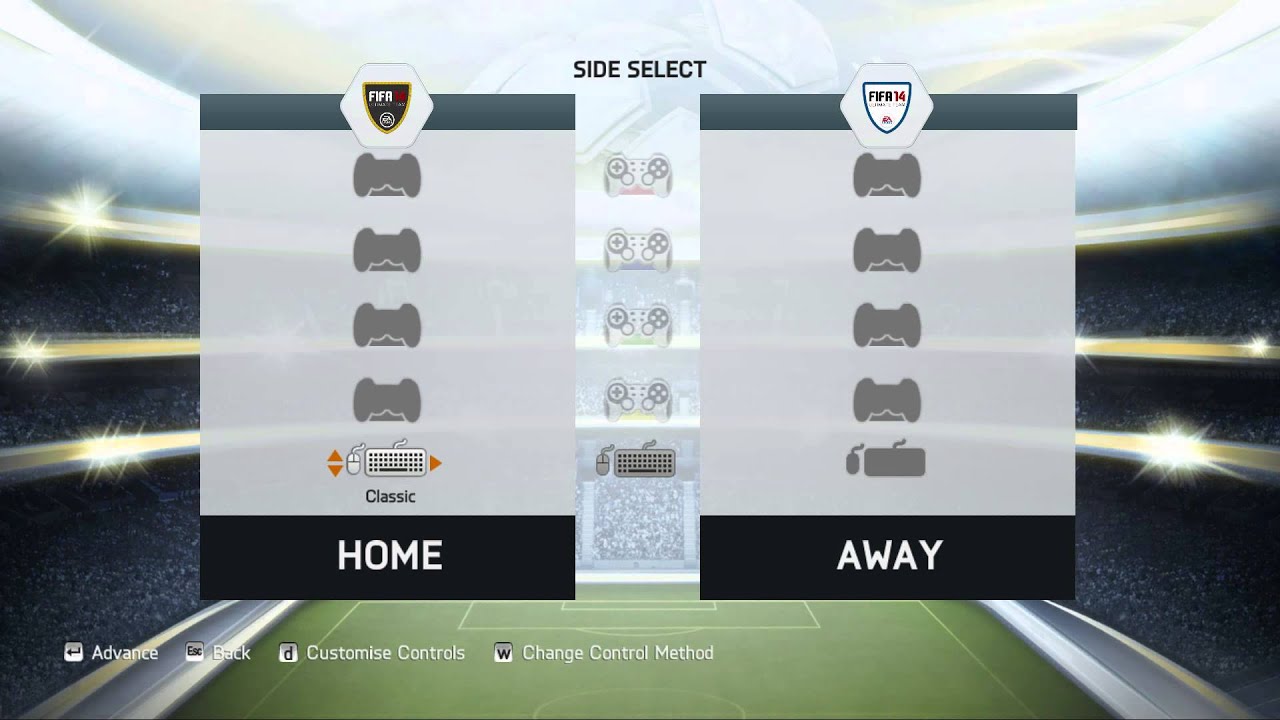
Hello, I would like to create a simple animation in my game for side selection similar to this
https://i.ytimg.com/vi/8Ch3QII6hWY/maxresdefault.jpg
So I capture keyboard left-right inputs, but I want to trigger animation to keyboard icon to switch left or right or to middle. I am looking for animation tutorial or walkthrough for this purpose. Any resources for me to learn?
 celest crag
Checkout pinned resources. Top right.
uncut salmon
Animations have no collisions, so if you're animating it going through the ground, it will do so.
vast light
can someone help me when i start moving my character around he goes up in the air and wont cvome back down and when i stop moving he sldies a lil bit
 jovial seal
when it comes to the position parameter of an animation clip, is there a way to use it without, actually referencing to that position?
i just want to go to a certain spot during the animation, relative to the character's current place
not an actual X,Y coordinate i want it to be at
agile solstice
jovial seal
i just want to go to a certain spot during the animation, relative to the charac...
You can override any transform position in an animation clip, and it will be set relative to the parent transform
If there is no parent transform it will be set relative to scene, so an absolute position
Or if root motion is enabled, the transform will be moved there in its local space
If you need to move the root gameobject, it may be more practical to make a script that moves it locally that can be keyframed than to try to use root motion, but I'm not sure
What's the use case precisely?
hybrid tinsel
jovial seal
i just want to go to a certain spot during the animation, relative to the charac...
That is what Root Motion is for.
wheat flint
its possible to stop an animation in a keyframe/animation position for a few seconds?
hybrid tinsel
wheat flint
its possible to stop an animation in a keyframe/animation position for a few sec...
Set the speed to zero.
wheat flint
hybrid tinsel
Set the speed to zero.
That's through script or there is an option/config for that?
 viral shale
Is Animation retargeting also possible when getting a humanoid model to do generic model animations?
jovial seal
i figured out all my other issues, now i back to the syncing issue, all my body parts have separate layer in animator and all animator accordingly, under the same parent animator. but they're out of sync even though i lined it up
is there a way?
all of them have several different variants so i really trying to make them all in separate clip
so i dont have to make more than needed
 tidal lance
Is there any way in Timeline to adjust starting offset and have all the keyframes adjust accordingly?
 mellow remnant
I'm trying to import an animated Blender model into Unity, but it keeps messing up the rigged object positions. The animation data itself imports just fine, but the model positions are all messed up. I've tried applying all transformations in Blender before importing into Unity, but the problem still occurs. Does anyone have any ideas on how to fix this?

 hybrid tinsel
tidal lance
Is there any way in Timeline to adjust starting offset and have all the keyframe...
hybrid tinsel
tidal lance
Is there any way in Timeline to adjust starting offset and have all the keyframe...
Yes, you can select the subsequent clips and choose align to previous
tidal lance
Talking about this kind of thing

 shadow obsidian
!collab
dusk valeBOT
📢 Collaborating and Job Posting
We do not accept job or collab posts on discord.
Please use the forums:
• Commercial Job Seeking
• Commercial Job Offering
• Non Commercial Collaboration
hybrid tinsel
tidal lance
Talking about this kind of thing
Yes. Right click on the actual clips in the track.
You can set it to match either the previous or next track.
 brisk shore
Hey, does anyone know what causes unity imported animations to react like this?

Everything from blender has the correct transforms applied and the rigify rig was converted to unity.. I've tried everything and even weight painted a thousand times to make sure I had everything applied
Blender:
 leaden prism
Is it possible to have custom animated properties be readable in unity while an animation is playing?
For example, in blender I have an int in the armature custom properties that changes which image a texture is showing currently, and would like to have it be readable in unity so I could create a similar system in it as well.
Is there a way to do that?
mellow remnant
mellow remnant
I'm trying to import an animated Blender model into Unity, but it keeps messing ...
following up on this. Anyone have any suggestions?
leaden prism
leaden prism
Is it possible to have custom animated properties be readable in unity while an ...
I have found the solution here, sorry for the previous message https://forum.unity.com/threads/what-is-animated-custom-properties-in-fbx-animation-import.527134/
Unity Forum
Hi all,
Just wondering what this does? In the animation section of FBX import...
[IMG]
I'm really hoping it might mean an end in sight for having to...
tidal lance
hybrid tinsel
Yes. Right click on the actual clips in the track.
What if it’s an infinite track, or there’s only 1 clip in the track?
hybrid tinsel
tidal lance
What if it’s an infinite track, or there’s only 1 clip in the track?
Offsets are per clip, so setting it will affect all keyframes.
tidal lance
hybrid tinsel
Offsets are per clip, so setting it will affect all keyframes.
Is adjusting the offset while keeping the visual position exactly the same impossible?
hybrid tinsel
tidal lance
Is adjusting the offset while keeping the visual position exactly the same impos...
I'm not sure what you mean.
 urban pond
Hi guys, I'm trying to figure out something very weird. I have copied an animation as a different clip and am playing it on the same object with no changes at all between the two animation clips, but somehow the animation is different in the copy.
Do you have any idea why they might have differences? I am testing them both out from the editor too so transitions and such shouldn't be an element here (I think)
This is the original animation from our FBX.
And this is that animation literally just copy pasted to a new clip on the same gameobject.
urban pond
It gets weirder. If I shorten, lenghten or move the keyframes in the same clip even 1 frame, it breaks.
 glossy crystal
I have a trigger parameter in an animator but somehow its behaving like a boolean parameter (and just staying on):

I should never be able to see it filled right? Because it should trigger and then turn itself?
I found this report that sounds exactly the same but its from 2013: https://issuetracker.unity3d.com/issues/animator-trigger-parameter-is-not-cleared-after-triggering
To reproduce: 1. Open the project that is attached to the subcase 2. Open the Animator window 3. Press play 4. Check "Die" parameter...
glossy crystal
Found a workaoround so just updating: My transition's "interruption source" was set to "Next State". That was somehow preventing the transition from happening. I don't really have an explanation but changing that back to "Current State" made the transitions happen again and that results in the trigger clearing out.
 rich slate
Is there a way to snap keys in animations curves? Liek holding a button lets me move it along the value axis only
vestal kindle
Does anyone know how I can find a mixamo running animation where the character do not move their arms so much? In the normal ones they use their arms a lot and if they are holding a sword they are constantly stabbing themselves
agile solstice
brisk shore
Hey, does anyone know what causes unity imported animations to react like this?
Rigify doesn't support exporting to fbx, it's not designed for game ready animations
You'll have to use GameRig instead of one of the proprietary analogues
agile solstice
glossy crystal
I found this report that sounds exactly the same but its from 2013: https://issu...
Trigger parameters are like buggy booleans and this has not been fixed
Triggers can be reset manually but you might as well use some other parameter type at that point
glossy crystal
Thanks, was definitely very annoying. I added a transition from the state to itself and that seemed to "eat" the trigger value
But good to know that this is a general known issue
brisk shore
agile solstice
Rigify doesn't support exporting to fbx, it's not designed for game ready animat...
There's a plugin I use that is called Rigify to Unity, wouldnt that solve it?
And btw does unreal also have this problem?
 twin musk
does anyone know why my idle animation and crouch animation are playing at the same time?
 stuck timber
twin musk
does anyone know why my idle animation and crouch animation are playing at the s...
stuck timber
twin musk
does anyone know why my idle animation and crouch animation are playing at the s...
not with a guessing game.
you might want to show your transitions and their conditions
the more details u provide, more likely you get a solution
twin musk
this is when it isnt crouching
 agile solstice
brisk shore
There's a plugin I use that is called Rigify to Unity, wouldnt that solve it?
agile solstice
brisk shore
There's a plugin I use that is called Rigify to Unity, wouldnt that solve it?
Maybe, but doesn't look like it? I'm not familiar with that one
twin musk

this is when it is
and it just keeps cycling through both animations in a milisecond
agile solstice
brisk shore
And btw does unreal also have this problem?
I don't know, but blender itself has that problem if you export rigify to fbx and then import it back, so from that I'd assume yes
brisk shore
agile solstice
I don't know, but blender itself has that problem if you export rigify to fbx an...
Everything looks fine and I even used that Rigify to Unity plugin, its so weird.. Thanks for the help though
twin musk
twin musk
and it just keeps cycling through both animations in a milisecond
does anyone know a solution to this issue
agile solstice
brisk shore
Everything looks fine and I even used that Rigify to Unity plugin, its so weird....
The root of the issue is that Rigify uses constraints to fix inherited transform errors between multiple complexly linked bone structures, and constraints aren't exportable
twin musk
Can someone help me with my animation
agile solstice
And the multi-layered armature makes a lot of rig related operations really tough or impossible in-engine
brisk shore
agile solstice
The root of the issue is that Rigify uses constraints to fix inherited transform...
I'll have to research a workaround, there are tons of videos that explain how to do it but none is solving my problem, I start to think it's actually something I'm doing wrong
 nova roost

my gravity is broken
it literally only has one capsule collider on the main player object
root animation is unchecked
 spice hemlock
i have a player that is constantly moving, i applied a sliding animation i downloaded, the problem is that the slide animation moves the model forward
how do i make it so the model is "sliding in place"? i want the code to handle the movement
i tried apply root motion on and off
 hazy estuary
Does anyone know how to use the animation rig package + two bone IK constraint with a limit? You can see that using it to hook a rope in my game works fine... until the character turns too much


Would be good if I could set like a rotational limit so the arms dont clip through the body, does anyone know of any resources for that?
jovial seal
ion wanna flood the channel with my question, so here's my forum post that explains it : https://forum.unity.com/threads/2d-animation-with-pixel-art.1526314/
Unity Forum
I'm trying to figure out how to go about this.
I have 3 body parts: Body, Ears, and Tail. They all are under a parent object that has an animator....
twin musk
does anyone have any idea how to create a animation clip of 1 sprite only where you take the anchoredposition.x as the property? I'm trying to do a button that moves into frame from outside the camera
the animation has only one sprite not multiple

 wild marsh
hey im making a low-poly character. was wondering if it's more traditional to make the pupils of eyes a 3d model and animate their movement, or if the pupils should just be a part of the texture?
 lime nova
i switched my characters animation type to generic but for some reason my override and additive animations all stopped working after i replaced the old humaoid animations
do override and additive animations not work with generic rigs?
agile solstice
 grand ruin
is this a big no no when creating an animated rig?
grand ruin
is this a big no no when creating an animated rig?
Bad for performance, difficult to weight map and might not deform properly with a bone weight limit
Use high poly to low poly baking workflow to preserve details while using proper topology
agile solstice
lime nova
do override and additive animations not work with generic rigs?
They do
agile solstice
wild marsh
hey im making a low-poly character. was wondering if it's more traditional to ma...
Totally up to your style and preference
agile solstice
jovial seal
ion wanna flood the channel with my question, so here's my forum post that expla...
How many unique variant combinations do you really need? You could animate all three parts in one clip, then use override layers to trigger variant animations when needed
Not precisely what you're asking for but seems like one of the few sane ways to do it
Start with the question of how much flexibility do you really need in the system
twin musk
I have a gameobject in the HUD with an animator and two animations: Idle and Movement. The propierty that is being modified in those animations is anchoredposition.x. I have also created a trigger parameter to make the transition between animations.
How do you make it so that when a button is clicked, it should execute the movement animation with OnClick()?
jovial seal
agile solstice
How many unique variant combinations do you really need? You could animate all t...
well i mean there is like 100 different possible combinations
i dont really understand what you mean by override layer or how to do that..
agile solstice
jovial seal
well i mean there is like 100 different possible combinations
"Possible" but how many are necessary
How does the gameplay need to affect each body part's animation?
jovial seal
immense detail is required
Plus I want to make sure it's expandable so I could add more in the future
agile solstice
That doesn't answer the question
jovial seal
it's random generation
agile solstice
Every body part plays random animations all the time?
agile solstice
Hmm it seems I can't explain clearly what the decisive question is
Without knowing precisely what the animator's logic should be, I can't recommend how to set it up
Something that's "not random" follows some kind of specific logic
twin musk
twin musk
I have a gameobject in the HUD with an animator and two animations: Idle and Mov...
In relation to this question, how can I make it so the gameobject only executes the animations in its animator controller only once I click on the button while still being active on scene
twin musk
Ok, I solved my issue with the animations
in the end I just been able to create an "idle" that is the image unchanged for 1 second
wheat flint
Guys, how do I pause my animation on a specific keyframe and after x seconds it continues and ends?
uncut salmon
If you're using the animator, you can set the speed of the current state to 0 which will essentially pause it. Then set it back to 1 when you're ready.
wheat flint
thanka
crimson oasis
hey guys
i have an animation but when i try to use it for another character the characters hands starts going through its legs and its hands and head go through the floor
how can i fix this ?
hybrid tinsel
wild marsh
hey im making a low-poly character. was wondering if it's more traditional to ma...
There's no single right answer to that; it depends a lot on whether you NEED animated eyes. If you're not gonna animate them anyway then having them be hyper detailed can be uncanny, or at best just a waste. But if you are doing facial animation you might want the extra detail.
hybrid tinsel
grand ruin
Ik triangles are bad too
Triangles are good.
hybrid tinsel
grand ruin
is this a big no no when creating an animated rig?
On modern hardware it is probably fine, especially if you are using a cloth sim, but probably excessive.
 jovial skiff
What new features and technologies for animation are already in development, and what can we expect in the new versions?
uncut salmon
jovial skiff
What new features and technologies for animation are already in development, and...

Unity
Our extensive 3D character and animation toolset, plus our comprehensive API, can help bring your creative vision to life.
grand ruin
agile solstice
Bad for performance, difficult to weight map and might not deform properly with ...
where can i learn about high poly to low poly baking workflow
does baking mean like finalizing and thus optimized but not editable?
jovial seal
is there a reason why my body parts drop down if i disable the object mid-animation? it doesnt do this for the actual body, which is also a part just like any other body part
Actually it might be because position is involved in the other animations
but is there any work-around to prevent this from happening?
hybrid tinsel
jovial seal
but is there any work-around to prevent this from happening?
Don't turn the animator off? Set defaults on those animations?
agile solstice
grand ruin
where can i learn about high poly to low poly baking workflow
I'd try the internet first
jovial seal
hybrid tinsel
Don't turn the animator off? Set defaults on those animations?
well issue is it turns off when the gameobject is disabled so
and i cant have these enabled at all times
and idk what you mean by default
i never saw anything about that anywhere
the position is relative to the body object
ive already tried resetting it back to normal via code before re-enabling the animator but that doesn't work either
hybrid tinsel
I'm confused. Are the objects with position animation or the ones without incorrect?
vestal kindle
I have a player that can be idle, run and attack. Right now my mecanim is set up as follwos:
- All animations are set to loop
- I have only transitions from "Any State" to all the other states (Run, Attack, Idle), under certain circumstances
- The transitions are not allowed to transition to self.
Is this is a good setup for a simplistic animation setting, or is this some kind of antipattern?
The parameters are isRunning and isAttacking, which are set from code and which will then trigger which transition is done
 muted smelt
I created a andoride build and the animations of player stop working can anyone tell me why its not working
 zenith burrow
hi
ineed help with some problem i run into when i try to do jump with root motion and character controller on type generic the character controller dosnt moving with the animation in the game mode when the player jump
 serene widget
I have the same problem
I have a jump animation with root motion, and I dont know how to make the character controller follow the mesh of the character
jovial seal
hybrid tinsel
I'm confused. Are the objects with position animation or the ones without incorr...
The ones with position animation
hybrid tinsel
vestal kindle
I have a player that can be idle, run and attack. Right now my mecanim is set up...
I'd consider it an antipattern for a typical character setup, yes. Especially if you need to extend it later.
hybrid tinsel
zenith burrow
hi
ineed help with some problem i run into when i try to do jump with root motio...
Are you applying root motion on the Y axis, or just XZ? Is the applied motion enough to counter gravity?
zenith burrow
i use tried to canceld the gravity
hybrid tinsel
muted smelt
I created a andoride build and the animations of player stop working can anyone...
They stop working in the build or in editor or what?
zenith burrow
thi isnt work ):
zenith burrow
hybrid tinsel
They stop working in the build or in editor or what?
i use tried to canceld the gravity
zenith burrow
hybrid tinsel
They stop working in the build or in editor or what?
iam applying in both axis the root motion
hybrid tinsel
jovial seal
and idk what you mean by default
 jovial seal
yeah that’s enabled
am I supposed to have a state that’s default?
and anyway that’s not gonna put it back to the original position
From what I’ve seen it needs to be disabled (the animator(0), reset the body parts position, then enable animator again
But even that does not work during code
Probably need multiple delays
Alternatively, is there a way to swap sprites in animation clips?
Every one of these characters are randomly generated though, so it needs to be specific
I’m iffy on whether or not that would work, though.. every sprite always comes out different when split in sprite editor, so the positions would need to be changed in the animation clip
This is why I am forced to use this method
serene widget
hybrid tinsel
Are you applying root motion on the Y axis, or just XZ? Is the applied motion en...
Can you explain more, or refer to a tutorial or something that explain it better?
because I didn't find anything on that on the internet
hybrid tinsel
Unity separates the root motion of y(vertical) and xy. The most common setup is to bake y and have jumps handled through physics.
 buoyant sentinel
So I'm using the documented gameobject recoreder script to record animation in runtime, but I'm using to record a rigs animation that is being controlled by an IK system. it is only recordering the main object none of the armature
I had it as humanoid and ik that was some issue, so I was able to get the IK working fine with it in generic, but still to no avail
does anyone know why this might be happening?
hybrid tinsel
You have it set to record hierarchy?
buoyant sentinel
hybrid tinsel
You have it set to record hierarchy?
using UnityEngine;
using UnityEditor.Animations;

public class RecordTransformHierarchy : MonoBehaviour
{
    public AnimationClip clip;

    private GameObjectRecorder m_Recorder;

    void Start()
    {
        // Create recorder and record the script GameObject.
        m_Recorder = new GameObjectRecorder(gameObject);

        // Bind all the Transforms on the GameObject and all its children.
        m_Recorder.BindComponentsOfType<Transform>(gameObject, true);
    }

    void LateUpdate()
    {
        if (clip == null)
            return;

        // Take a snapshot and record all the bindings values for this frame.
        m_Recorder.TakeSnapshot(Time.deltaTime);
    }

    void OnDisable()
    {
        if (clip == null)
            return;

        if (m_Recorder.isRecording)
        {
            // Save the recorded session to the clip.
            m_Recorder.SaveToClip(clip);
        }
    }
}
I'm using this to capture the transforms of the armature
it works to record transforms of seemingly anything but what I need it too, I think it's the interferance with the IK but idk what the solution would be
OH I got it!! nvm ty for the help!
hybrid tinsel
buoyant sentinel
OH I got it!! nvm ty for the help!
What was the solution?
buoyant sentinel
hybrid tinsel
What was the solution?
using UnityEngine;
using UnityEditor.Animations;
using System.Collections;

public class RecordTransformHierarchy : MonoBehaviour
{
    public AnimationClip clip;

    private GameObjectRecorder m_Recorder;

    void Start()
    {
        m_Recorder = new GameObjectRecorder(gameObject);
        m_Recorder.BindComponentsOfType<Transform>(gameObject, true);
    }

    void LateUpdate()
    {
        if (clip == null)
            return;

        // Start a coroutine to delay the recording very slightly
        StartCoroutine(RecordAfterDelay());
    }

    IEnumerator RecordAfterDelay()
    {
        // Wait for a very short time (end of the frame)
        yield return new WaitForEndOfFrame();

        // Now take a snapshot for recording
        m_Recorder.TakeSnapshot(Time.deltaTime);
    }

    void OnDisable()
    {
        if (clip == null)
            return;

        if (m_Recorder.isRecording)
        {
            m_Recorder.SaveToClip(clip);
        }
    }
}
I honestly just used some auto generated script and tried a few of them, this one worked. it doesn't work on humanoid but if you can convert your character back to generic and still do what you were hoping to do it can record it. which works in my scenario!
seemingly its just that an IK takes a longer delay to actually go into the system so the recorder would capture to quickly gathering nothing. so this add some sort of delay
hybrid tinsel
You could probably do the snapshots in OnIK()
buoyant sentinel
I mean if you want to make the edit to it I can try it, I really don't know anything when it comes to code. I'm just handymanning this
I'm using Final IK though, not the built in IK so idk if that would change that
hybrid tinsel
Ah, I haven't uses fik
lime nova
I'm using a generic rig for my character and im trying to make an animation using root motion but for some reason doing that makes the model stop rotating
in the animation tab the animation looks relatively normal besides it rotating more than it should, but in game it just doesnt rotate at all
im using a bone in the armature as the root motion node
is there something im missing?
 solar halo
Why can't I see my hands, and why can't I see an object next to me in animation mode
https://youtu.be/hjdtHCTqa3s
 agile solstice
solar halo
Why can't I see my hands, and why can't I see an object next to me in animation ...
agile solstice
solar halo
Why can't I see my hands, and why can't I see an object next to me in animation ...
If the robot is a skinned mesh renderer, it should be solved by increasing the size of the mesh renderer Bounds
Meshes are culled when off-screen using the bounds as a guide, but when a skinned mesh renderer deforms the bounds do not always get updated properly
solar halo
agile solstice
Meshes are culled when off-screen using the bounds as a guide, but when a skinne...
I didn't understand anything, if you look not in animation mode everything is fine, or in viewport when the game is running
agile solstice
solar halo
I didn't understand anything, if you look not in animation mode everything is fi...
Skinned mesh renderers have "bounds" that determine when it's inside the camera's view and when it's out, to remove it when it's outside to not waste power rendering it
 solar halo
Do you know how to fix it, just pick up the numbers?
agile solstice
These can be modified to increase the size of where to render the mesh
Update When Offscreen can also help improve the accuracy of culling
agile solstice
solar halo
Do you know how to fix it, just pick up the numbers?
You should be seeing a visualization of the bounds when the mesh is selected, and click the Edit Bounds button to get gizmos to increase the bounds size
solar halo
Thank, I will try
serene widget
hybrid tinsel
Unity separates the root motion of y(vertical) and xy. The most common setup is ...
so there isn't a way to drive the character controller collider through the root motion?
agile solstice
serene widget
so there isn't a way to drive the character controller collider through the root...
That's pretty much what it's for
If the setup is right, root motion will be passed to the CC as Move() method automatically, afaik
serene widget
agile solstice
That's pretty much what it's for
If the setup is right, root motion will be pass...
Is there any good recourse on the internet that explain that stuffs properly instead of me asking tons of question? 😅
agile solstice
serene widget
Is there any good recourse on the internet that explain that stuffs properly ins...
There's the official documentation, probably official tutorials and certainly unofficial tutorials
Learn how it works with the simplest setup you can first
serene widget
agile solstice
There's the official documentation, probably official tutorials and certainly un...
I haven't seen any resources that explain how to implement a jump through root motion, and baking the Y and all that stuff.
agile solstice
serene widget
I haven't seen any resources that explain how to implement a jump through root m...
I don't use either root motion or the CC in my stuff generally so I can't be of more help
But if I were to learn it I'd try to study and grasp the fundamentals as well as possible
I doubt horizontal movement is that much different from vertical movement, even if it's common to separate the two
serene widget
agile solstice
I don't use either root motion or the CC in my stuff generally so I can't be of ...
I implemented run and sprint with root motion, and its working well, but jump is a different issue.
hybrid tinsel
serene widget
so there isn't a way to drive the character controller collider through the root...
I definitely didn't mean to imply that.
serene widget
hybrid tinsel
I definitely didn't mean to imply that.
so basically I need to Bake the Y and make it drive the CC right?
hybrid tinsel
No. Baking removes root motion
 pale axle
I downloaded a few animations from Mixamo because my Polygon Dungeons didn't have 'em included, but some of them act weird or seem to be facing in the wrong direction (crouch animation for example is playing in torwards left while I move forward)
How could I resolve such issues?
pale axle
This project is an assignment I chose for my finals, and since my school doesn't really teach game dev, there's no where else I can ask such stuff but here
 ornate birch
anyone know why when i add an animation rig to my player character none of its animations play anymore?
vestal kindle
hybrid tinsel
I'd consider it an antipattern for a typical character setup, yes. Especially if...
But where do I learn what I should be doing instead?
 mystic river
Why almost all animators in assets and tutorial entangles Blend Trees and Animation States with one another instead of using Any State? From what i understand it takes little to no conditions tweaking to untangle everything in a one level tree.

Is there a major disadvantage in using Any State?
 ivory copper
So currently I have a 2D character with 4 walking animations (up, down, left, right) and 4 idle animations (also up, down, left right).
I'm using a blend tree to transition between them using horizontalDirection and verticalDirection as float parameters. Both can be anywhere between -1 and 1.
The issue I'm having is that when the player lets go of their controller, I want the character to go into the idle animation of whichever direction they were walking in. Right now they're just returning to the "down idle" animation. How can I fix this?
uncut salmon
Only change the animation if the input is greater than a threshold value rather than updating the floats every frame
 devout ember
i've got two bone ik constraints set up here, but when i try them out in play mode this happens, how can i fix this? its some weird offset.


i think its because of this but idk
 stuck timber
devout ember
i think its because of this but idk
stuck timber
devout ember
i think its because of this but idk
where two bone IK is transform position wise shouldn't matter
the important part is where you put target
although ideally you want all your IK to be nested in player at 0,0,0 regardless
devout ember
stuck timber
where two bone IK is transform position wise shouldn't matter
I made all the IK at 0,0,0 and the same thing happens. Strangest part is that if I enable, disable and enable the rig builder again the arms go to the offset targets
 past grove
Hello everyone. I'm new to animating sprites and have an issue I can't find an easy solution to. So I have a character who animates. I also have a hat the player can wear attached to the player game object that renders or doesn't depending on if the player wears it. While I have sprites for the hat from all directions the player might move, it doesn't quite follow them because of their animation. Is there a way to make it track where the player's head is as they animate if the head moves a few pixels during the animation loop?
 midnight halo
i have this animation which works in animation editor
but when i play it, it does nothing
the console says speed is 3, which is the condition for my walking animation to play
    void UpdateAnimation()
    {
        int speed = speedAbility.speed;
        print("speed: " + speed);
        animator.SetInteger("Speed", speed);
    }

    private void FixedUpdate()
    {
        Collision();
        UpdateAnimation();
        Fall();
        UpdateBody();
    }
 wheat flint
Can you guys help me? How do I make my animation of when the gun runs out of ammunition play after the last shot that left the gun with 0 bullets? Why do I have a conflict with the same animations of shooting?
 midnight halo
i have this animation which works in animation editor
but when i play it, it doe...
midnight halo
midnight halo
i have this animation which works in animation editor
but when i play it, it doe...
animation works in animation editor, but not in preview window
i dont get it
 tough phoenix
https://veed.io/view/62e6e29e-982b-4c21-b671-89189843d431
the animations after locking on an target seems to work weirdly.
you can see the video


Make stunning videos with a single click. Cut, trim, crop, add subtitles and more. Online, no account needed. Try it now, free. VEED
mystic river
mystic river
Is there a major disadvantage in using Any State?
It seems that screenshots posted in the last 24 hours show that Any State is widely used and presumably works just fine.
agile solstice
mystic river
Why almost all animators in assets and tutorial entangles Blend Trees and Animat...
Any State transitions are kind of a "nuclear option" that overrides the natural flow of the state machine entirely
They are seen by beginners as a simple solution but using them teaches you bad practices and creates state machines with problems that are hard to track and skips that don't seem logical
agile solstice
mystic river
It seems that screenshots posted in the last 24 hours show that Any State is wid...
It's rarely a coincidence that people who are using Any State are reporting weird transition issues and a lack of understanding what their state machine is doing
My advice is avoid it entirely until you understand it completely
That said it's still a tool among others, and it can be useful for transitions that are meant to interrupt the state machine
Usually a one-way trigger transition like to a dying animation
mystic river
agile solstice
Any State transitions are kind of a "nuclear option" that overrides the natural ...
To me the "natural flow" of many animators I've seen in assets is a convoluted entanglement that is hard to follow and maintain. "Mecanim Bonsai: Lessons from Firewatch and ReCore" talk from 2016 suggests to put complexity into Blend Trees and use hub transitions. Turned out Any State provides an easy way to get from the main Blend Tree into different Blend Trees upon flag, while the overall layout of the animator is remains flat.

But I was unable to find anything similar among tutorials therefore was unsure if there is no major disadvantages to this approach.
agile solstice
mystic river
To me the "natural flow" of many animators I've seen in assets is a convoluted e...
90% of animators you see, even in commercial assets, is awful and rarely utilizes blend trees, sub-state machines and automatic transitions to their full extent to reduce unnecessary work and complexity
There sadly are close to no good examples or comprehensive best practices guides
agile solstice
mystic river
But I was unable to find anything similar among tutorials therefore was unsure i...
The disadvantages are usually poor scalability, error-proneness and a tendency to teach bad practices when trying to "rein in" the Any States after overusing them
I see no issue with the above, and as long as it does what it needs it's perfect
Potential confusion could ensue from having both crouching->airborne transition as well as any state->airborne
And with that system you can't elegantly stop airborne transitioning to crouching before landed without extra checks, if that's a concern
Ideally a state machine smoothly adapts to whatever the code sets the animation parameters to, without having to do any micromanaging or explicit triggering of states from code
That kind of smoothness is a big priority with realistic 3D animation, less so with other types
But the same principles are still useful when keeping things clear even if the animator has to be expanded a lot
That's the theory anyway
mystic river
agile solstice
Potential confusion could ensue from having both `crouching->airborne` transitio...
Yes, I wasn't sure that Any State means indeed any blend tree. As I understand state machines, a machine can't be in two states at the same time except for when is blending between them. Theretofore Airborn and Landed can be viewed as a single state with a toggle for a transition. But I suspect that a mirroring of states from a code into flags isn't the best practice for Animator because it suppose to have all FSM transitions at the start.
Which leads to a horror like this:
 agile solstice
mystic river
Yes, I wasn't sure that Any State means indeed any blend tree. As I understand s...
agile solstice
mystic river
Yes, I wasn't sure that Any State means indeed any blend tree. As I understand s...
That kind of "grouping" of states in logical contexts is what you want with the Animator, and using sub-state machines can make that more convenient
agile solstice
mystic river
Which leads to a horror like this:
Another flavor of this you see is the same thing but with Any State in the middle connected to everything
As that's how it feels like it should be used
You don't have that many states, so organizational problems do not yet manifest much
devout ember
devout ember
i've got two bone ik constraints set up here, but when i try them out in play mo...
anyone knows how i can fix this issue? i've nested the IK's at the origin, so i dont know why they move upwards seemingly for no reason.
it goes up here for some reason. i've no idea why
 mystic river
Not sure what goes where, but elbows adhere to hints. This is why arms are so twisted back.
devout ember
mystic river
Not sure what goes where, but elbows adhere to hints. This is why arms are so tw...
no, the problem is that the targets and hints are erroneously moved upwards at runtime, . if you look at the message i'm replying to, you'll see that they normally start lower
but when a player is instantiated, they move up for some reason
mystic river
devout ember
no, the problem is that the targets and hints are erroneously moved upwards at r...
I don't know where targets are in the hierarchy, but:
- Move the rig outside of the root bone object
- Check the order of rigs in the Builder
- Try slowly add weight at runtime to see the effect
- Try a different Two Bone Constraint on a leg
devout ember
mystic river
I don't know where targets are in the hierarchy, but:
* Move the rig outside of ...
the rig is parented to the armature, and the constraints are parented to the rig. is this wrong?

there is only one rig, and it is for the arms
mystic river
From what I've read rigs should be on the same level as the root of an armature and under an object with Animator (i. e. as descendants to the Rig Builder object).
devout ember
right, i'll try that
devout ember
mystic river
From what I've read rigs should be on the same level as the root of an armature ...
should the rig builder object be on the armature, or on the player gameobject?
never mind, i got it working. thanks so much man you saved me a ton of strife and time 😅
 mystic river
devout ember
should the rig builder object be on the armature, or on the player gameobject?
mystic river
devout ember
should the rig builder object be on the armature, or on the player gameobject?
Since an armature is often a part of a prefab longside with meshes, I tend to put them in a parent object with Animator and Ring Builder on the parent. Then I add rigs in a separate object on the same level as the armature, otherwise Burst tend to bully me.
Inability to bind transforms that are not between the Animator and Rig is painful tho.
solar halo
devout ember
i think its because of this but idk
arrow down and disable 3d icons
 hybrid tinsel
mystic river
Is there a major disadvantage in using Any State?
hybrid tinsel
mystic river
Is there a major disadvantage in using Any State?
Basically, any state can be like using a nuke to kill an ant because it takes priority over everything else.
So no specific down side, but it gets misused a lot and then folks find it causing unintended sude effects.
tough phoenix
https://veed.io/view/62e6e29e-982b-4c21-b671-89189843d431
https://cdn.discordapp.com/attachments/493511037421879316/1185861817046679572/image.png?ex=659126e1&is=657eb1e1&hm=9e830124a13cbb5bd2224b33a1327c24ed71a330d7a4f2e05cb3b5a9921b9c9c&
https://cdn.discordapp.com/attachments/493511037421879316/1185861817365430312/image.png?ex=659126e1&is=657eb1e1&hm=8614fc551e4a1451aab2960ea2d455e864087ff1fc51865c44291b79b8853ead&
the animations after locking on an target seems to work weirdly.
you can see the video
Make stunning videos with a single click. Cut, trim, crop, add subtitles and more. Online, no account needed. Try it now, free. VEED

 solar halo
tough phoenix
https://veed.io/view/62e6e29e-982b-4c21-b671-89189843d431
https://cdn.discordapp...
solar halo
tough phoenix
https://veed.io/view/62e6e29e-982b-4c21-b671-89189843d431
https://cdn.discordapp...
Maybe u have NOT looped animation
tough phoenix
solar halo
Maybe u have NOT looped animation
I have
solar halo
tough phoenix
I have
As for me, walking animations should be looped
tough phoenix
solar halo
As for me, walking animations should be looped
huh ?
solar halo
You can take out the animation, expand the object in which your animation is, click on the animation and ctrl + d and change it name
 solar halo
tough phoenix
huh ?
solar halo
tough phoenix
huh ?
I understand that your animation is not looped, and that's why your legs are twitching
tough phoenix
solar halo
I understand that your animation is not looped, and that's why your legs are twi...
my animations are looped as I am using the walking animation which works fine outside the lockedState
solar halo
fine
solar halo
rancid sparrow
***Unity**
 agile solstice
solar halo
agile solstice
solar halo
Nothing's wrong
Blender interprets bones having a length, but Unity does not
They still work the exact same way
Oops meant to reply to i3sN
And missed that Pinballkitty answered it already
The small internet is too small to see
lime nova
is it possible to convert a humanoid animation to generic?
when i changed the rig to generic the animation stops working and just tposes
lime nova
i also have an issue where a generic animation i copy from an fbx is buggy compared to the preview
agile solstice
lime nova
i also have an issue where a generic animation i copy from an fbx is buggy compa...
Copy to where? Buggy how?
Are you trying to make use of some Avatar features with the Generic animation clips
lime nova
in the preview the animation runs smoothly but when i look at it in the animation tab it seems to rotating and moving position in a more exageratted manner?
like where it should spin once it spins twice, and rotate 30 degrees, it rotates 90 degrees
additionally this gets more janky if i lower the sample rate a lot
solar halo
If I add a revolver through a script, it does not animate, why is that?
https://www.youtube.com/watch?v=GjjBWmODXcE&ab_channel=MaXanter2017
 rotund tangle
can somebody help me regarding animation? like get in a call and show me?
im not sure why multipleobjects i animate dont appear
the animated cameras view doesnt show the animations of other objects, it will show the object but as if its not even animated
im coming from animating from blender and maya so this whole thing is confusing to me
is there something extra i need to do?
uncut salmon
Cameras have no control over whether another animation is ran or not. If you give objects their own animations/animators and call for them to play, they will play.
Maybe post a video of how/what you're animating?
rotund tangle
uncut salmon
Cameras have no control over whether another animation is ran or not. If you giv...
my other objects have their own animation timeline, i come from animating in blender and maya so this is confusing
rotund tangle
uncut salmon
Maybe post a video of how/what you're animating?
are you willing to call and il stream it?
rotund tangle
prompting? im just adding keyframes in their timeline? if i select them induviually and press play it will show the animation in where i left perspective view on say the head, it will turn , but if i animate the cameras postion and the head then is in view, it does not turn in perspective of the camera
uncut salmon
Can you make a video of what you're doing?
rotund tangle
not sure why unity needs to add extra steps to a simple function
do i need to sync or combine the timelines?
uncut salmon
Okay, this is a misunderstanding on how animations in Unity work
Currently, you have two different objects with their own animations. While you're in editor mode (that is, not play mode), you're scrubbing the animation for one object. These animations are not synced in any way.
solar halo
rotund tangle
If I understood the problem correctly, that flag will only work in game mode
uncut salmon
If you want to do a larger animation consisting of multiple objects, you will need to install the Timeline package and create a timeline instead.
Timelines let you composite cinematics/cutscenes easier because you can add/adjust the timing of multiple objects. Not just animations, but sounds and camera blending as well.
And yes, if you hit the play button, assuming these animations are the default ones set for the objects, they'll both run simultaneously. But trying to match/edit them will be difficult if you're not using the Timeline package.
 solar halo
https://streamable.com/whc7w6
solar halo
solar halo
https://streamable.com/whc7w6
@rotund tangle
Do you want it like in the video?
rotund tangle
solar halo
<@220515256990957569>
yeh
shadow obsidian
rotund tangle
yeh
Osteel explained how to achieve that pretty well.
The only thing I'll add that there is some terminology ambiguity.
You were looking at a timeline here
#🏃┃animation message
But Osteel was talking about the Timeline package which is different. It allows synced animations
solar halo
rotund tangle
yeh
You can use this script if you want. I've provided a link to a video on how to use it, hope it helps you https://streamable.com/idjmi3
 rotund tangle
uncut salmon
If you want to do a larger animation consisting of _multiple objects_, you will ...
rotund tangle
uncut salmon
If you want to do a larger animation consisting of _multiple objects_, you will ...
ok i tried that, but now why is it that when i place the animations in the timeline, the postions and rotations of the animation chnage?
 plucky kayak
Has anyone ever used the curves in the animation tab for animating characters with bone rigs not just a simple 1 transformation movement of a single object ?
agile solstice
solar halo
If I add a revolver through a script, it does not animate, why is that?
https:/...
I'm not sure why this happens (other than maybe an arbitrary limitation) but my conventional wisdom states you shouldn't generally animate objects that are may or may not exist in the hierarchy
Usually you'd animate extra item bones that always exist
Most games I've seen do it that way, either always attaching items to some body part, or using a static number of item bones that all wieldable objects share
 lavish epoch
why does my character start to float when i turn on the animation? the animation is from mixamo and when i turn the animation off, it stop floating and works perfectly fine


i have check the y velocity and it is 0 as you can see from one of the screenshot, but it still floating
nvm guys, i fixed it by disabling the apply root motion
 fossil hill
ey; I am kinda new, maybe this is really simple but; I have a platform with just a simple animation of up and then down to make an elevator; how can I prevent the thing to push the player clipping into the ground if they are standing beneath it?
like I know I may turn the animation off by a script that detects any player beneath it, but I am kinda more looking to do something like... push them gently with colliders
urban pond
urban pond
It gets weirder. If I shorten, lenghten or move the keyframes in the same clip e...
Hey guys we haven't been able to find the cause of this. Any ideas?
urban pond
Another example: These two animations are exactly the same. I only changed extended the animation's length.
Only thing i did is this
 rustic axle
i have an animation from mixamo and i want to be able to turn but currently the animation is walking forward so i cant rotate the player. my question is do i have to make a new animation and copy paste the walking animation and then just trn the player or is there a way to rotate the player that im just not seeing?
 rapid spruce
Hello everybody! Anybody know any tutorials for moving rigged models from Unity over to Blender?
I've been trying to animate using the curves in Unity's animation panel for about a week but it's been very difficult and I haven't been able to make the animations look "un-wonky", so I wanted to transfer it over to blender as I'm more comfortable animating there. Unfortunately when I convert the prefab to FBX and import it into blender the bone hierarchy goes bananas as shown in the picture.
Feel free to suggest alternative approaches too.


 fossil hill
I don't think exporting from Unity to blender is really that viable, you should mostly do the other way around
rustic axle
How do i change the direction of mixamo character animation?
rapid spruce
fossil hill
I don't think exporting from Unity to blender is really that viable, you should ...
Thanks I'll try building it up in Blender from scratch and then transferring it over to Unity
fossil hill
Ey guys, new here so... I have like a ring to score goals on it and I want it to have an animation in idle mode and one for when it scores a hit; but the when making the transition, the score animation has to wait for the long idlle animation to finish before triggering, I want it to immidiatly trigger no matter the point at were idle is at; how can I do that?
wheat flint
guys how do I make my trigger pulling on the pistol animation play? Am I doing something wrong in the transition?

 fossil hill
wheat flint
guys how do I make my trigger pulling on the pistol animation play? Am I doing s...
fossil hill
wheat flint
guys how do I make my trigger pulling on the pistol animation play? Am I doing s...
I have not much idea of this, but should you have transitions back and forth and not only into the state?
wheat flint
Nono, I did it so that the animation ends and can also be interrupted by any state
fossil hill
There is probably something is off with the triggers, the transition looks fine to me
 covert hull
how can i control the speed of my idle animation, its really just a 'reset' for params / settings on a model. when i animate to a new state, the idle takes up to a second to goto the second state, i set the idle to 1000 for speed and now its almost instant, but it feels like a hack... is there a better / default way?
and if i set the speed to 0, it doesn't transition
 slate coyote
Hey all, Any tips for using a humanoid righ with extra bones?
Iw ant to have sever empty bones that I can parent weapons to at runtime and attack animations that can be used regardless of what weapon is equipped. Ive added hte extra bones and made a test animation but the extra bones are not being animated
I dont want to just parent the items to the hands since I would like the character to be able to throw the weapon or flip it around etc.
Ive tried using a generic righ but it breaks all the current animations I have.
Several sources online have said that allowing the extra bones on the mask import settings solves the issue but its not working for me
slate coyote
covert hull
how can i control the speed of my idle animation, its really just a 'reset' for...
If I understand correctly,
On the transition settings, You can either
Toggle Has Ext Time this will make the animation instantly transition if conditions of transition are met regardless how much the idle animation has played
OR
You can tweak the bounds of the blue region showing the transition between the clips the smaller that region is the faster the actual transition will be, although if the iddle animation is really long it will wait till it hits the start bounds of the transition to start the transition
 covert hull
i just moved sliders around and it randomly was perfect 😦
click the checkbox, unclick, drag this
etc
got it going perfectly
thanks for the reply!
slate coyote
Nice 🙂
slate coyote
slate coyote
Hey all, Any tips for using a humanoid righ with extra bones?
Iw ant to have sev...
I think ive solved my issue. The animation tool I was exporting from didnt include the mesh in the exported package, so it was only exporting the armature. Since when using a mask the heirarchy must be identical (Even tho the bone structure was identical the the fact that there was no mesh was making it mess up...)
crimson oasis
hey, i have 2 animations and i need help with making them work on all characters. as in i have a sitting animation that should work fine but when i play the animation on my characters their arms go through their legs and stuff like this. i believe i need to do something that is called ik or something but i have no idea on how to do it. can anyone help
 untold spear
for my animation
it starts off with the death animation
instead of the walking animation

is it cause slime dying is first

This is how i have it in the animator
 tulip forge
you set the trigger to on wich will imediatly fire and automaticly jumps to the defeatet animation
twin musk
click the defeated checkbox in left side
 cedar ruin
untold spear
cedar ruin
untold spear
Seems like your trigger param is active.
twin musk
you start it as off
cedar ruin
Yes. It's supposed to be triggered by code.
untold spear
twin musk
click the arrow from slime anims to death
yh i have an arrow
twin musk
then turn it on when your slime died (via code)
untold spear
i turned it off
twin musk
yay that's it
untold spear
the walking animation plays
but the death dosent once i kill it
omg my internet is slwo
twin musk
twin musk
then turn it on when your slime died (via code)
this is for that
untold spear
the code should work idk why it not
twin musk
and better watch a tutorial for this one
untold spear
twin musk
and better watch a tutorial for this one
yh im watchin a tuttorial
the code from there
twin musk
easier to absorb than people pointing u step by step how to trigger animations
and it's not working?
untold spear

 twin musk
untold spear
twin musk
untold spear
is there any error in the console?
untold spear
nope
cedar ruin
untold spear
When showing the transition, expand its "settings" too.
untold spear
 twin musk
but where is the current animation playing when the slime die?
cedar ruin
untold spear
Is Defeated even being called? Add a debug log in it.
twin musk
do you see the moving bar? where is it
cedar ruin
untold spear
And it seems like you have tons of errors in the console. Pay attention.
cedar ruin
If you need help with code, move to #💻┃code-beginner
untold spear
where those error
twin musk
minimize ur animator
untold spear
wdym
untold spear
cedar ruin
And it seems like you have tons of errors in the console. Pay attention.
how do i access the errors
twin musk

 untold spear
this rises each second
untold spear
untold spear
this rises each second
 twin musk
ctrl shift c
 twin musk
click the red button
untold spear
 twin musk
oh u have typo
untold spear
😭
twin musk
copy the defeated word from animator parameter directly to your code
untold spear
its the same
untold spear
untold spear
what does it mean by player
untold spear
yh
untold spear
what a backup method wdym
twin musk
can u show the event?
or better, remove it for now and add it when you already see how that thing works
untold spear

yikes lety me delete those
real quici
those ones were by accident
the

the event was sppose to be like this
omg it works
now
thank uuuuu
twin musk
didnt really do much, just told u to click a single trigger
anyways, hope you learn somehow how to work some things off
untold spear
ty
 fathom hornet
Hello, I'm using a bunch of storebought assets and I'm trying to blend animations together. But some animations snap the actor back to the origin point of the animation, is there a way to edit this? I'm using timeline to animate.
I have tried rootmotion but it doesn't seem to work on my character Nvm it seems that rootmotion works but the animations I have selected do not have root motion.
Is there a way to offset the animation clip?
 radiant mango
also the fall animation is playing in mega slow motion for some reason, it plays at normal speed when it gets called correctly
seems like a huge unity animator bug
fathom hornet
If I have one root motion that rotates and one that moves forward how come the rotation doesn't carry over? it resets back to the original rotation
 agile solstice
radiant mango
seems like a huge unity animator bug
agile solstice
radiant mango
seems like a huge unity animator bug
Unlikely
Make shorter less delayed transitions
Check the speed variables of the states
Do not use Any State
radiant mango
Why not use any state?
agile solstice
radiant mango
Why not use any state?
Functionally it's an "emergency override" of highest priority to all the state machine's logic
Because of that it often seems to have unintended side effects that are hard to track unless you already know precisely what you're doing
It also teaches you to use the Animator wrong, as you might expect when trying to make all the animations work via an emergency override
 weak matrix
Can someone help me understand AnimationState.AddMixingTransform?
I have a running, walk, and idle animation that I only want to apply to the torso and below, how do I do that?
 chrome notch
Hii, so like I'm trying to do some simple button animations
but like I don't really want the button to get stuck after pressing it
So like I want it to be able to move when hovered over again but unsure how to do that
So like after it being in selected state I just want it to go back to normal state
 final current
Is there anybody that can help me with making my walking animation?
 young mulch
Hello everyone. Quick Q: I want to interrupt any animation when I'm hit, and I want to back to exactly the state I was in. Right now I have it going back to the "idle/movement" state... but... in this case, I am in "Melee Motion" and want to go back to "melee motion". I don't want to write transitions to and from EVERY state. Is this possible to do?

 potent igloo
I have 4 idle animations that need to transition into walking, can I avoid having to draw transitions from all these 4 states back and forth?
cedar ruin
young mulch
Hello everyone. Quick Q: I want to interrupt any animation when I'm hit, and ...
You'd probably need to manually play animations then.
cedar ruin
potent igloo
I have 4 idle animations that need to transition into walking, can I avoid havin...
They could be in a sub state machine. Then you only need a transition from that sub state machine.
 cosmic coyote
Happy Holidays! : ]
TL;DR:
I'm having a problem with the Timeline breaking my scene by leaving Animators at animation states that are not their default/first frame.
I'm using Timeline to control many different animators simultaneously. The problem is that, when I'm working in Unity, frequently... Literally every few hours or so... it completely breaks my scene. By broken, I mean specifically that my entire scene is no longer in its default state, but "frozen" at a particular spot on the timeline. Every single object in the scene controlled by an animator changes to the state it should be in at a certain spot in the timeline, but even when the timeline isn't playing or active.
A good way to describe it is as if, while I'm working in the scene, every once in a while Unity "takes a screenshot" of what my scene looks like in that moment, but then just keeps the whole scene there. It doesn't revert back once the timeline is unselected or deactivated. It's as if entire scene's default states have been changed.
Since this happens frequently, the default state of my world keeps changing every few hours, and so eventually I get lucky and it saves at the first frame. But it has become too problematic to rely on that hopefully happening. I have tried to fix it attempting to recreate the problem in many ways, but with no luck yet.
Is this a known bug? Can I avoid it? Any recommendation on how to restore things to their default, frame 0 state? 🙏🏻
This happens to me all the time, in multiple projects, on multiple computers, in multiple versions of unity spanning across 3 years, so surely I can't be alone in this. Please help ||save Christmas|| 🥹🥹🙏🙏
young mulch
cedar ruin
They could be in a sub state machine. Then you only need a transition from that ...
Hey - thank you for the answer! I fell asleep 🙂 I'll do that. Thanks again! Happy holidays!
potent igloo
@cedar ruinI did try it,


How do I draw from this? When I draw to (Up) Base Layer I still need 4 transitions and need to set 4 parameters
Since you can go into walk from all 4 idle positions, this would become a nightmare really fast exponentionally if I add jumping etc.
 native pelican
why are none of my animations being played
in the animator they are being played but in the game they arent
also a animation i found for walking seems to also move the character how can i easily disable that
native pelican
native pelican
in the animator they are being played but in the game they arent
fixed that problem still have the walking one
 dense magnet
Hey! I struggle with animations quite a lot. I have plenty of purchases animations and they always look really bad. I understand the issue , but I have zero clue how to start correcting it.
What I am looking for is a definitive guide or a way to better understeand how to fix these sort of issues.
native pelican
native pelican
also a animation i found for walking seems to also move the character how can i ...
fixed this but now the animations dont play again

it plays in the animator just not in the actual game like i dont see the animation
cedar ruin
potent igloo
You could make a transition from "any state" node to an exit node with one parameter in the condition(why do you need a parameter for each state anyway?).
 oblique cave
How can i make 2 animations run at once? I have a tank where it moves foward, but the wheels are a separate animation and they wont move for some reason. Only one animation plays looped (i want the tank and the wheels to move with it)
nevermind. i figured it out myself i just had to add animators since they were separate animations (DUH 🤭)
fierce jewel
Hello!!
You know the small animations like "running to stop" or starting "idle to walk", these types of some small animations that make the game better looking in terms of animation.....
So, My question is where do we put these ??
I have already made a 2D freeform directional blend tree for walking, forward, back, left, right
Now where do I put these "running to stop" animation ? Outside the blend tree ?? Inside the blend tree ?? How?
twin musk
hi, I've used Mixamo before but for whatever reason when I download a model from it now it doesn't give me the avatar, why so?


 chilly viper
oblique cave
How can i make 2 animations run at once? I have a tank where it moves foward, bu...
chilly viper
oblique cave
How can i make 2 animations run at once? I have a tank where it moves foward, bu...
you can have different animations on seperate gameobjects or for this case you can have the animation in a parent and animate both properties
oh you already answered yourself
hybrid tinsel
fierce jewel
Now where do I put these "running to stop" animation ? Outside the blend tree ??...
You dont use them with a blend at all generally. That type of transitional animation clip would be used between discreet animation states, or as part of a motion matching system.
Blend trees, by nature, are a blend between all the animations in them and therefore all the animations need to be synched up.
dense magnet
I would love some help. I have a few animations that I wanto to play. Particular animations that play are animations like 180 degree turning or turning left or right. The issue I face is that , once I set the navmesh to go to a position, the animation plays but you can see the NPC slide across the floor as the destination and animation don't match in terms of destination or speed
dense magnet
dense magnet
any help in handeling rotation would be great. I can't see how I can use animation bases rotation with navmesh Rotation . I have zero clue how to blend them
twin musk
Hey I usually do vr when it comes to development but i needed to work out some animations and when I try them nothing happens

when I move the red dot the hand is still
instead of using the animation presets
oblique cave
how can i use a rigidbody with an animation? its still floating in the air even though i had a rigidbody component on the gameobject
 hallow holly
yall what would i connect the crounch anims to
 shadow obsidian
hallow holly
yall what would i connect the crounch anims to
shadow obsidian
hallow holly
yall what would i connect the crounch anims to
Depends. Maybe from anystate
Otherwise you may need ones from idle, walk, and run
Just play around with it and figure out what you like best
hallow holly
ok
agile solstice
shadow obsidian
Depends. Maybe from anystate
Please don't recommend Any State
It's a cause of enough newbie problems here every day
shadow obsidian
agile solstice
Please don't recommend Any State
It's a cause of enough newbie problems here eve...
Alright, thanks. What would you recommend. I am not great with animation
I definitely overuse it
agile solstice
hallow holly
yall what would i connect the crounch anims to
I would place crouched variants on another animation layer, that can be synced too optionally
Idle+walk+run could be condensed into one blend tree, and so can the crouched animations
You can do both layers and blend trees, but if your animations are sprite animations I'd prefer layers over blend trees most of the time as blending isn't a thing for sprites
hallow holly
ok thanks
agile solstice
shadow obsidian
I definitely overuse it
A rule of thumb is to only use it for transitions that are one-way and absolute highest priority, like a death state
Use them as an "emergency override" basically, which I think paints a correct picture of why it's inefficient to make big systems out of them
As they skip the flow of the state machine entirely
shadow obsidian
agile solstice
A rule of thumb is to only use it for transitions that are one-way and absolute ...
Thank you so much. The other message taught me a lot. Appreciate it
agile solstice
shadow obsidian
Thank you so much. The other message taught me a lot. Appreciate it
Additionally remember to make use of sub state machines and automatic transitions via Exit Time (and Override Controllers)
The more you leverage the various features to their strengths, the more you find the Animator starts to "work for you"
The more you can automate transitions and eliminate the need for explicit transitions, the better
hallow holly
man i didnt know blend trees existed
now i gotta rewrite my whole animation script
😭
twin musk
I feel that
 potent imp
hi what should i do to draw weapons like guns or swords etc like in here
https://youtu.be/Mf1Sh_nPSas?si=CnjRUg7koUUeQwwP
Having your character grab and release a weapon is one of the most common questions all new Blender Animators ask at some point in their career. But, not for you because in the next 60 seconds, you'll know exactly what and how to do it!!!
Free Female Base Rig Download:
https://www.youtube.com/watch?v=_XfvLpLyulI
Animation Speed Tutorials:
htt...
do i place a empty game object under player then position it and then disable at start record the animation and enable inside unity?
agile solstice
potent imp
do i place a empty game object under player then position it and then disable at...
Yes, if I understand correctly
You can use the same disable/enable technique on the wielded and worn items just like in the video, but inside Unity
For that you need wielded and worn weapons to begin with
Often you want "item bones" as a part of the rig so you can easily parent gameobjects to them, without involving any explicit references to those gameobjects in the animation clips
 vital olive
SOLVED in #🏃┃animation message
~~Heya, I am new to Blend Trees, specifically 2D ones.
However I have some very odd behavior with my animations: https://streamable.com/qt8frw
Any idea, what I am messing up?~~
 vital olive
**SOLVED in https://discord.com/channels/489222168727519232/502171313201479681/1...
vital olive
vital olive
**SOLVED in https://discord.com/channels/489222168727519232/502171313201479681/1...
Heya, figured it out. When downloading animations from Mixamo, it is important to check "In Place" before downloading.
 brittle kernel
so im trying to animate the player object but when i try to select one of its children the animation window switches to the one of the child instead of staying on the parent's animator how do i animate the child
nvm figured it out
twin musk
twin musk
hi, I've used Mixamo before but for whatever reason when I download a model from...
update: I noticed it doesn't let me apply the Humanoid option whenever I import anything, even when it's not from Mixamo
I'm using Unity 2022, any ideas as to why this is?
 cedar ruin
twin musk
update: I noticed it doesn't let me apply the `Humanoid` option whenever I impor...
cedar ruin
twin musk
update: I noticed it doesn't let me apply the `Humanoid` option whenever I impor...
Humanoid rig requires an avatar definition.
You either create it from this rig or reference an existing one.
twin musk
cedar ruin
Humanoid rig requires an avatar definition.
just tried importing the Mixamo model into Unity 2021 instead of 2022, there it allows me to apply Humanoid and creates an Avatar automatically, but like, I kind of don't want to port my whole repository to another version, do you have a tutorial on how to manually create this Avatar thing? cause stuff online seems to call the model itself the avatar
twin musk
twin musk
just tried importing the Mixamo model into Unity 2021 instead of 2022, there it ...
my bad, I'm stupid, I can just change the unity version of the project itself
cedar ruin
twin musk
just tried importing the Mixamo model into Unity 2021 instead of 2022, there it ...
It should work the same way in 2022. It should let you create it from the rig.
twin musk
unfortunately it doesn't for some reason
and I've tried creating another project in 2022
doesn't let me
cedar ruin
Weird
cedar ruin
Maybe it didn't register the changes, so there was nothing to apply.🤔
twin musk
kinda felt like that
hybrid tinsel
twin musk
update: I noticed it doesn't let me apply the `Humanoid` option whenever I impor...
Did you change the avatar definition to 'no avatar' deliberately?
Because that option explicitly prevents it from creating an avatar
twin musk
tried changing it to "create from this model", even "choose from other avatar" whatever it was called, wouldn't let me apply the settings
hybrid tinsel
Strange. I haven't had any such issues. Were there any import errors/warnings?
...wait a second. I can't help but notice that everything is orange. Is that in play mode?
twin musk
nope
tried creating a new project with that version and everything
the orange is a weird f.lux + lightshot bug
maybe cause I haven't installed the latest 2022 version, I think it was the .11 one instead of the .15 one
hybrid tinsel
And manually adding a valid avatar doesn't help either?
Have you tried just restarting unity to see if it is a UI bug?
Can you apply settings for other things?
twin musk
nah it's cool I fixed it by downgrading and don't care too much to report it ✌️
but for those wondering why they don't get an Avatar for their Mixamo animation / doesn't let you pick Humanoid: if you're using Unity 2022 try downgrading to 2021
serene widget
Hey
I want to cut one animation to like 4 different animation, is there a way to combine all this 4 different animation to one animation?
 twin bridge
Does anyone know why my two bone ik constraint weight gets set to 0 when disabling and re-enablign an object that has it as a child?
And is there a way to fix it?
 wide turtle
for a one sprite idle animation (no animation at all), is it normal to have an animation clip of just the one sprite? i have a spring/jump pad object that does nothing until a player steps on it, then it plays the animation and goes back to the idle animation (again, it's just one frame) when it's done
serene widget
Why is Unity playing sub-frames/in-between frames?
So it happens to me in Unreal and Unity...
I have a combat animation, and the hit attack is pretty fast, in 4 frames the animation goes a really big distance, and Unity interpolates between these 4 frame and causes a lot of visual noise.
The problem is that I'm animating in 30FPS and Unity probably playing it in 60FPS so it adds more frames.
I tried to make these 4 frames constant, but I don't know why, it deforms the whole mesh a lot.
So I wonder if anyone has a solution for that
Thanks.
 floral lake
I recently came across some very impressive videos made with SFM. I then asked myself whether SFM could be integrated into game development with Unity and whether it was even worth learning / doing. Did I understand correctly that you can only do animations in SFM or is it a complete 3D graphics software like Blender? If anyone here has information or experience with this, please tag me.
agile solstice
serene widget
Why is Unity playing sub-frames/in-between frames?
So it happens to me in Unreal...
3D (assuming) animation is not restricted to any framerate
Frame/sample rate only determines the number of samples for interpolating
Usually interpolation is what we want, but it's also an option to use "constant" type interpolation on a per-keyframe basis
Interpolated motion is usually the desired result regardless of engine
It may help to demonstrate what the problem looks like
agile solstice
floral lake
I recently came across some very impressive videos made with SFM. I then asked m...
I guess it's technically possible but not at all worth it
You'd probably have to port your rigs into Source and then back out for that to work
I'd Expect you'll have better animation tools in real animation programs
serene widget
agile solstice
3D (assuming) animation is not restricted to any framerate
Frame/sample rate onl...
ill send you soon, but I wonder, in Unreal Im able to cut those weird frame and then make one animation clip without those weird frames, is there a way to do it in Unity?
agile solstice
serene widget
ill send you soon, but I wonder, in Unreal Im able to cut those weird frame and ...
"Those weird frames"?
I assumed you meant the interpolation between keyframes, which aren't frames at all
serene widget
agile solstice
I assumed you meant the interpolation between keyframes, which aren't frames at ...
yes
agile solstice
Unless you mean the frames are being created upon export when the animation is baked
serene widget
its the inerpolation between keyframes
agile solstice
They can't be cut out because they're interpolation, not frames
But you can set interpolation to constant, as mentioned
serene widget
agile solstice
They can't be cut out because they're interpolation, not frames
But you can set ...
ill show you how the animation suppose to look like and what its actually does, ill show it in Unreal but its the same as in Unity
serene widget
agile solstice
They can't be cut out because they're interpolation, not frames
But you can set ...
as you can see if I move through whole frames, its look fine, but when Its playing real time, the animation is broken, the hand is getting out of the sword, the legs are distorted and bunch of other stuff.
In Unreal I can cut those inbetweens and then put it all together, but I wonder what the solution is in Unity? when I took this section that being weird, and made it constant, its deformed the whole mesh, idk why.
this is what happen to the mesh when I make this 4 frames constant

in Unity
agile solstice
serene widget
as you can see if I move through whole frames, its look fine, but when Its playi...
Hmm does the animation look right in the animation editor you made it in?
When played at full speed
serene widget
agile solstice
Hmm does the animation look right in the animation editor you made it in?
I made it in maya, and yes it looks fine
agile solstice
serene widget
I made it in maya, and yes it looks fine
I suppose you'll want to export it with constant interpolation then
Or do it manually by duplicating each keyframe and placing it 1 frame before the next one
Another option is to create actually valid inbetween frames for the keyframes manually
That way the interpolation can't make them look bad
serene widget
I don't really want to add more frames, it will lose from the impact, it will make the attack much slower
agile solstice
serene widget
I don't really want to add more frames, it will lose from the impact, it will ma...
That's not how inbetween frames work
Also not what happens if you use them to achieve constant interpolation before exporting
But try simply exporting with constant interpolation first without touching the frames
And preview it in engine by playing the animation, not just by scrolling the timeline, as it may give you an incorrect idea of the real speed and appearance
serene widget
agile solstice
That's not how inbetween frames work
Also not what happens if you use them to ac...
I tried, its not working, its still interpolate between those frames
agile solstice
As said engines don't deal with frames, just samples at arbitrary points in time so you have to work around that a bit
serene widget
agile solstice
As said engines don't deal with frames, just samples at arbitrary points in time...
well I think I found a "solution" for that, I edited it unreal, exported it as FBX, and then re-imported and it looks fine
I sent it to a friend to test it unity, I hope its fine
agile solstice
It should be possible to do it right the first time in the animation software
serene widget
idk, fast movement don't work properly in engine without editing some stuff, I have no idea what big games do
I spent on this problems days and days in Unreal until I found a way to edit it in engine, and its works perfectly normal, but now Im doing some personal project with a friend who is working with Unity and its has the same issue
 spare kayak
does anyone know why my animation seems to like pause at the end before starting over?
let me know if that makes sense
uncut salmon
Because your first and last frames are the same position ... ?
spare kayak
uncut salmon
Because your first and last frames are the same position ... ?
how would I make it so it smoothly goes to the last position and transitions smoothly?
im very inexpirenced with animation sorry
agile solstice
spare kayak
how would I make it so it smoothly goes to the last position and transitions smo...
You can use the Animation window's curves tab to control the smoothing
spare kayak
agile solstice
You can use the Animation window's curves tab to control the smoothing
thank you!
 slate wharf
idk if i should post it here or where else, but im having a problem with masking and animations, so i have a animation and its inside of a mask but when there is just a small bit inside the mask you can see the whole animation even tho the rest of the animatio is outside the mask, im sorry but im bad at explaining stuff
first image is good, second its outside of the mask, 1 small scroll difference


 toxic totem
does anyone know if theres a way to get all the animations from blender without exporting it as an fbx file
more so asking out of curiosity and just to save time
but i couldnt find anything on youtube

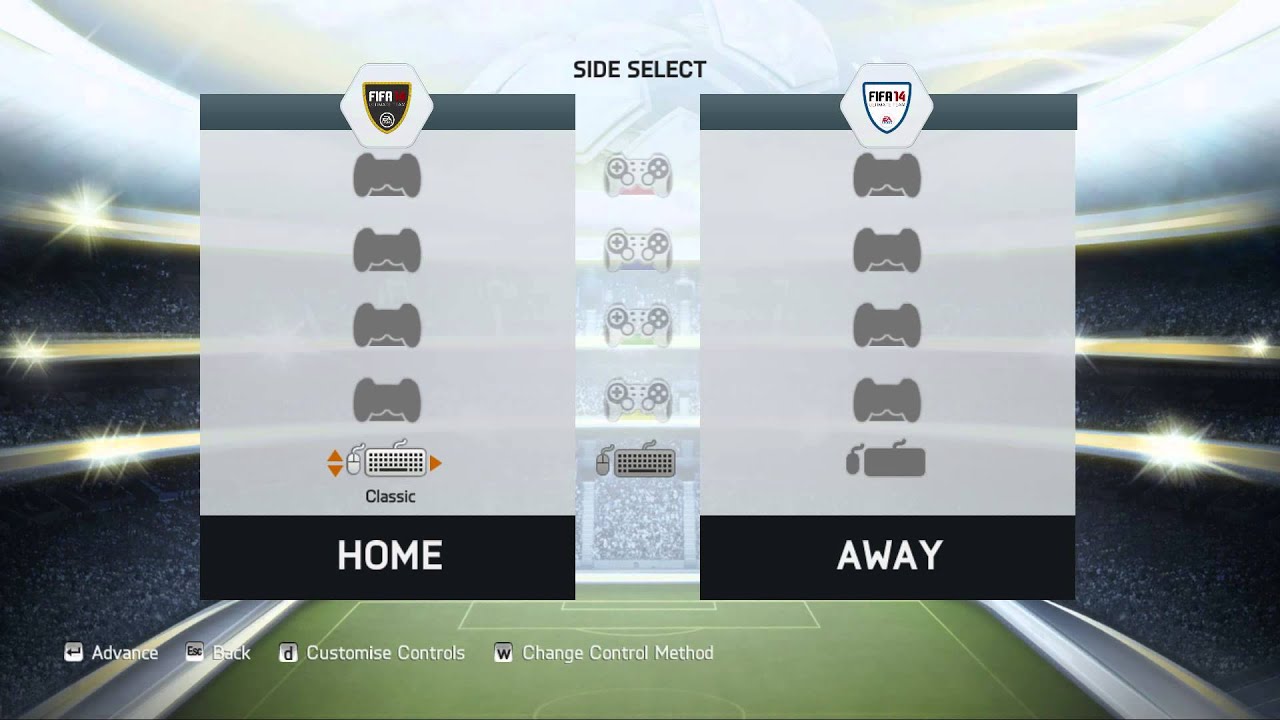

 hybrid tinsel
solar halo
https://streamable.com/gkw1c2
hybrid tinsel
solar halo
https://streamable.com/gkw1c2
because you don't have the rotation mode set to pivot?
solar halo
hybrid tinsel
because you don't have the rotation mode set to pivot?
How to do it?
 storm leaf
solar halo
How to do it?
storm leaf
solar halo
How to do it?
See top left corner of the scene view; theres "Center", change it to pivot
solar halo
storm leaf
See top left corner of the scene view; theres "Center", change it to pivot
Thank you very much 
agile solstice
toxic totem
does anyone know if theres a way to get all the animations from blender without ...
What do you mean by "without exporting"
The file will have to be in an unity-readable format to be imported, which practically means fbx
toxic totem
agile solstice
What do you mean by "without exporting"
you know how you can drag and drop blender files straight to unity and theyre usable? i mean that way
its very convenient cuz u can just edit assets and they update quickly
however it only comes with one animation (and im trying to see if anyone knows how to get more than one)
agile solstice
toxic totem
you know how you can drag and drop blender files straight to unity and theyre us...
They get exported from blend to fbx in that process
It's automated but has some obvious limitations as you don't get export settings
You may be able to import more animation clips via import settings but I don't use the .blend importer so I don't know
toxic totem
agile solstice
You may be able to import more animation clips via import settings but I don't u...
i will have a check tomorrow morning 👍 thanks for recommendation
slate wharf
slate wharf
idk if i should post it here or where else, but im having a problem with masking...
smb know why the animation is bugged here?
devout ember
I'm having an issue with my animation where as the player moves, the bones start to move upwards for some reason, as if they aren't being controlled by the animator controller. any idea why this might be happening?
agile solstice
devout ember
I'm having an issue with my animation where as the player moves, the bones star...
Do your animations have Write Defaults enabled?
devout ember
agile solstice
Do your animations have Write Defaults enabled?
no, whats that?
@agile solstice wait, they are enabled sorry, what does that change?
enabling and disabling them doesnt change anything
agile solstice
devout ember
enabling and disabling them doesnt change anything
Thought that might've had something to do with it, in case the issue is that the animation transform values compound over time
devout ember
agile solstice
Thought that might've had something to do with it, in case the issue is that the...
why has this issue suddenly happened now, though? for context, i've recently added a ragdoll to the character, but when the character isnt in ragdoll mode the physics of each joint is disabled i.e. they become kinematic
and how would i fix the transforms compounding
 crimson rivet
I duplicated an animation and assigned it another skeleton. In the preview, the skeleton is rotated by -90 degrees, and the animation is not working even though no errors are appearing.

Its Unreal Engine 5
agile solstice
devout ember
and how would i fix the transforms compounding
I don't know, I only saw it once myself but didn't figure out what was causing it
I don't have more ideas besides that one
agile solstice
crimson rivet
Its Unreal Engine 5
You know this is not an Unreal server?
crimson rivet
Yeah, but I thought maybe someone could help!
agile solstice
crimson rivet
Yeah, but I thought maybe someone could help!
Do you try to buy clothes at the soup store?
devout ember
agile solstice
I don't know, I only saw it once myself but didn't figure out what was causing i...
damn, unfortunate. i appreciate you at least shedding some light on what might be causing it though, did you ever fix the issue?
 bleak harness
Would anyone be able to recommend any tutorials on exporting my animations from blender to unity and setting them up? Nothing I find really is what I'm looking for.
agile solstice
devout ember
damn, unfortunate. i appreciate you at least shedding some light on what might b...
In my case I never had to fix it
The issue happened due to transitioning between clips, as an offset seemed to be inherited each time until the mesh had wandered way off
Ultimately I combined multiple clips into one looping sequence with no transitions so the drift didn't get a chance to occur
It's obviously not a good solution since usually you need transitions
devout ember
agile solstice
In my case I never had to fix it
The issue happened due to transitioning between...
yeah, for me it looks like the running animation does something weird to the legs and the head
devout ember
agile solstice
In my case I never had to fix it
The issue happened due to transitioning between...
i ended up "fixing (?)" it by just reimporting the animations and that fixed it somehow
slate wharf
slate wharf
idk if i should post it here or where else, but im having a problem with masking...
smb know why the animation is bugged here?
agile solstice
slate wharf
smb know why the animation is bugged here?
Can't really see from the images where the mask is
Or what's happening in them at all
slate wharf
well the animation is just overlapping the mask, in the first image the mask ends where the upgrade is cut off, in the second the aimation is overlapping the mask
here is a vid
don't mind the vid in the corner
i was listening to music
also don't mind the errors
slate wharf
agile solstice
Can't really see from the images where the mask is
Or what's happening in them a...
i hope this helps, cause ive looked online and found no awnser to my problem
agile solstice
slate wharf
here is a vid
So, the problem is that the masking stops working randomly when you scroll?
agile solstice
slate wharf
yes but only for my animation
Even when the animator is disabled?
slate wharf
yes
agile solstice
That suggests it's probably not an issue related to animation
slate wharf
oh, any clue where i should post this issue then or where i could find a sollution?
agile solstice
slate wharf
oh, any clue where i should post this issue then or where i could find a solluti...
Probably more of an #📲┃ui-ux issue
slate wharf
ah alr, i already posted it there to, but i didn't get a response then
agile solstice
There aren't a lot of visible clues
 long walrus
hey, does anyone know where can I learn to make animations that interact with other objects?, what I mean is e.g. an attack where the player grabs an enemy's leg and throws him away, help
my only idea is to make the enemy play an animation where he's being grabbed by the leg, etc, but what if the player is facing the other side of the enemy?, the enemy would play the animation of his left leg being grabbed, but the player's animation would be grabbing the right leg, a solution is to make the player search the left leg when attacking the enemy, and set the correct rotation and whatever, but I'm not sure if that's even okay, or if there is another way to do that
ooo this is it, should've searched it first, oop
 lofty arch
Anyone know why an .fbx animation file imported from Blender 4 would not work in Unity Engine?
shadow obsidian
lofty arch
Anyone know why an .fbx animation file imported from Blender 4 would not work in...
Not without knwoing what "not work" means and other crucial information like that
lofty arch
shadow obsidian
Not without knwoing what "not work" means and other crucial information like tha...
Not work referring to animation not playing. The animation component is there and I can see it bundled in with the Blender model. But clicking play on the animation shows that it does not play.
 tall saddle
What am I doing wrong? the animation gets deleted every time
agile solstice
tall saddle
What am I doing wrong? the animation gets deleted every time
You're not in record mode
tall saddle
this red button?
agile solstice
The only red button
 hardy sky
Anybody know why my animations don't work? It's imported from Blender. I can see the animations working in the preview window and the Animator Window shows the correct animation being selected, but ingame the character doesn't animate one bit.
 agile solstice
hardy sky
Anybody know why my animations don't work? It's imported from Blender. I can see...
agile solstice
hardy sky
Anybody know why my animations don't work? It's imported from Blender. I can see...
The awkward pose there signifies that the animation playing is not compatible with the avatar
hardy sky
agile solstice
The awkward pose there signifies that the animation playing is not compatible wi...
What does that mean, and how would I fix it?
agile solstice
hardy sky
What does that mean, and how would I fix it?
Couldn't tell, I don't work with avatars
hardy sky
agile solstice
Couldn't tell, I don't work with avatars
Do I need to use an avatar? How come the animations show up fine in the preview?
agile solstice
hardy sky
Do I need to use an avatar? How come the animations show up fine in the preview?
Avatars give you some useful features like IK and retargeting but they're not necessary
hardy sky
agile solstice
Avatars give you some useful features like IK and retargeting but they're not ne...
ok, but even without avatar the animations don't work, he is in T-pose now.
agile solstice
hardy sky
ok, but even without avatar the animations don't work, he is in T-pose now.
Does the animation window present any warnings when selecting the gameobject with the animator?
hardy sky
agile solstice
Does the animation window present any warnings when selecting the gameobject wit...
No, but I think I fixed it somehow, thanks
 gritty wave
I'm trying to use Synty models in a first person perspective, anybody have any tips on how to remove the body / head from the model and just be left with arms? I'm exported / imported into blender and deleted those, but it seems that it removes the bones as well so I can't use my existing animations
oblique cave
How can I make my animation more smoother? I don't want the hatch to move up and down when transitioning to its new spot. i just want one fluid motion as realistic as possible
It like dips down then goes up to meet its desired position
oblique cave
oblique cave
How can I make my animation more smoother? I don't want the hatch to move up and...
@brave storm could you possibly help with this?
nvm i fixed it, sorry for the @
 small vault
Do some models not handle recorded animations properly? I enabled read/write and then keyframed a small animation. The bones move in real-time during the recording, but they aren't actually recorded to the animation clip for some reason. I try to play back and it only has recorded the initial transform positions.
small vault
gritty wave
I'm trying to use Synty models in a first person perspective, anybody have any t...
you can scale the bone down to 0, or if the head is rendered separately, then you can change the shader to not render the head (which can still provide a shadow)
gritty wave
small vault
you can scale the bone down to 0, or if the head is rendered separately, then yo...
Thanks! I'll have to try that. I ended up downloading Maya with my student license and found it easier to import/export models to and from unity
tidal lance
All too often, the Video Playback glitches, plays at wild speeds, or just doesn't play altogether. It seems to work slightly more reliably when it's not recording, but when it is, it bugs out constantly.
Notice how the speed ramps up and parts get skipped?
 charred belfry
tidal lance
All too often, the Video Playback glitches, plays at wild speeds, or just doesn'...
charred belfry
tidal lance
All too often, the Video Playback glitches, plays at wild speeds, or just doesn'...
https://unitytech.github.io/unity-recorder/manual/index.html
The Unity Recorder has the following limitations:
...
The Unity Recorder does not capture frames at a consistent rate from systems that use a real-time clock, like the Video Player. Data captured from these systems might appear speeded up or slowed down.
tidal lance
Any alternatives?
charred belfry
Which version of Recorder are you using?
tidal lance
charred belfry
Which version of Recorder are you using?
3.0.3
charred belfry
If you're on a version of Unity that supports a later version that may help. You could comp the video in after the fact
A quick google points out some alternatives https://forum.unity.com/threads/frame-accurate-video-or-image-sequence-playback.854203/
Disabling https://docs.unity3d.com/2021.3/Documentation/ScriptReference/Video.VideoPlayer-skipOnDrop.html may also be a lazy fix; suggested by someone
tidal lance
Didn't really work...
 dark peak
The two point and line hands are set up to follow my hand via a webcam. How would I set up the rigged actual hand to follow the point and line hands? (like moving the ends of the bones to follow the points)


 undone slate
I have an animation in blender of a bee, wings moving, head bopping up nad down, arms moving, so 3 different animations, how can i join them together into one so i can use it in unity and assgn it to an animation controller
 dusty forge
hey, so i have different objects in my unity scene, which are punchable and eventually destroyable, i want to animate them when they take a punch, so for example, i have a tree, and when it gets punched, i want to animate its scale from 1 to 1.5 then back to 1 using animation clip, is there a way to apply this same animation clip on every object i want, without redoing the animation
 twin surge
undone slate
I have an animation in blender of a bee, wings moving, head bopping up nad down,...
twin surge
undone slate
I have an animation in blender of a bee, wings moving, head bopping up nad down,...
Look up "unity animation layers" on 
twin surge
dusty forge
hey, so i have different objects in my unity scene, which are punchable and even...
You need every object to have the same exact rig, then you choose the avatar option "create from this model" on one of them. Then go to all your other models and use the avatar of that one model you just changed the avatar option on.
On animators of their game object assign the avatar from that one model and then you can also reuse one animator controller and animation for all of them
dusty forge
twin surge
You need every object to have the same exact rig, then you choose the avatar opt...
thank you so much!!!
undone slate
twin surge
Look up "unity animation layers" on <:google:1068113782599065660>
I have all the animations i need for unity, when i export it into unity, i get a long list of all the indavidual objects moving and none of the combined nla animations i have
 uncut salmon
@clear current !collab
dusk valeBOT
📢 Collaborating and Job Posting
We do not accept job or collab posts on discord.
Please use the forums:
• Commercial Job Seeking
• Commercial Job Offering
• Non Commercial Collaboration
undone slate
im real lost to why this wont work, I have two obejcts each with their own animation, how can i combine them, so when im in unity i can use that in the animaiotn controller

 polar linden
hey, I would like to start making a character controller based on persona 5.
I want to be able to move around with smooth, blended directional animations, to be able to jump, and to be able to attack, upon doing so I will transition the play state into a battle state where the animations will be entirely different.
while I want to use the freelook camera (cinemachine seems to already have something for me there) when out of battle, on occasion fixed camera angles are used in P5 which look great for example when inside a building.
I am completely new to animation stuff within unity but have been playing around with code for years so I'm comfortable with c# in unity but not so much blend trees and the like. i've been been watching iheartgamedev's videos but I just need some extra guidance 🙂
I do not currently have any character controller code or animations, I want to know where to start with this and how to make it
the game will be a rhythm RPG where you time your attacks to the music but it's otherwise just a clone of popular jrpg games
btw anyone can @ me it would be appreciated
polar linden
https://www.youtube.com/watch?v=IurqiqduMVQ
I feel like this will be good for me, but I want to add the cinemachine look camera and blending between animations

Learn to move characters in Unity 3D with this beginner-friendly explanation of Unity's new input system and root motion!
With this deep dive tutorial, you will not only have a better understanding of root motion and Unity's new input system, but you will also have an animated character by the end of the video!
SUPPORT THE CHANNEL:
💛 https:/...
 dull sinew
I need a bit of help.
I am creating a game in which the user drives a car. Im using a character from mixamo and ive set up the character's animations to make it seem like he/she is driving.
I want to make it so that, if i press the D key on my keyboard, the character smoothly turns to the right, the longer i press the more the intensity of how they turn. Same goes for pressing A, which does the same but to the left.
So i used the animator to make a blend tree

The script :
using System.Collections;
using System.Collections.Generic;
using UnityEngine;
public class DriverAnimation : MonoBehaviour
{
private Animator dAnimator;
private float directionMagnitude = 0f;
// Start is called before the first frame update
void Start()
{
    dAnimator = GetComponent<Animator>();
}

// Update is called once per frame
void Update()
{
    if(dAnimator!=null)
    {
        if(Input.GetButton(KeyCode.D))
        {
            directionMagnitude+=5f;
            dAnimator.SetFloat("turnAngle",directionMagnitude);
        }
        if(Input.GetButton(KeyCode.A))
        {
            directionMagnitude-=5f;
            dAnimator.SetFloat("turnAngle",directionMagnitude);
        }
    }

}
}
Now my script looks like this, ive obviously made some mistakes, but what i want is to use the Input.GetButton() function here (I think) to make it so when i press a button, it changes the value of the directionMagnitude variable based on the key pressed, im having errors thrown up though, telling me that I cannot convert from 'UnityEngine.KeyCode' to 'string', pls halp
 paper merlin
is there a way to expand and select the image from all my slots at once, doing it one by one takes years? in the animation window
 hybrid tinsel
paper merlin
is there a way to expand and select the image from all my slots at once, doing i...
hybrid tinsel
paper merlin
is there a way to expand and select the image from all my slots at once, doing i...
Alt key when clicking the arrow will open or close all children.
polar linden
I have a way to track beats in my game, so if I wanted animations on my character e,g, the walk cycle to animate to the beat (say for instance my character walks and runs in time to the current music) how can I do that?
 obtuse wraith
hey all I am hoping to get some help with an animation. I have the final Y position for an object set at 16.9, but whenever I play the animation it is not in the correct position and it is at 16.6 in the inspector. Why would it not update to be at 16.9 how I have it in the inspector when editing?


 upbeat breach
I have a Prefab of a Player that has an Animator component on it. The Animator component has both a Controller and an Avatar. I added some animations and did some transitions in the controller layout. It seems to work. The problem is - i want to be able to play animations (AnimationClips i guess) on my player without having to add them to the controller and make transitions. The player/avatar is rigged as humanoid btw.
It seems to me that it should be easy to just add an Animation component instead - then add the clip with .AddClip and then play it. I can always remove the clip again i guess... I run into some problems with the clips not getting added and then can't get found when i use .Play but then i see that i might have to mark my clips as legacy (i found a really old video telling me to put the inspector in debug mode and change the animation type from 2 to 1).
Am I on the right path? It sounds like i'm trying to use some tech that was already legacy 8 years ago?
I just want to be able to able to play an animation on a character without having to manually add it to that crazy animation controller manually and add transitions and everything... It feels nasty with all those manually handled dependencies and setup
agile solstice
undone slate
im real lost to why this wont work, I have two obejcts each with their own anima...
Can't "combine" them really
Every object will get its own animation action
You could play at the same time or animate just one object
You can have multiple moving parts in one object if you use an armature with mesh skinning, or if you parent the objects to bones both in blender and unity
undone slate
agile solstice
Can't "combine" them really
Every object will get its own animation action
You ...
But if I’m just Keyframe moving 3 different objects can’t I just, in nla, create meta to join them. Cuz now when I bring them into unity it’s one animation that plays all three moving parts
agile solstice
undone slate
But if I’m just Keyframe moving 3 different objects can’t I just, in nla, creat...
So they are one animation in unity, not three?
Isn't that exactly the goal
polar linden
how can I use animator override controllers to give a character multiple weapons in a JRPG setting? I want the player to hold a weapon correctly in their hands based on a scriptableobject, and use the correct animations
(e.g. a "sword" scriptableobject would have a model of a sword, a damage value / multiplier etc and when the player attacks it plays the sword attack animation, with the right model in the player's hand)
melee weapons could probably share an animation most of the time, but what if i then choose to use a gun weapon, which is held and animates enirely differently?
undone slate
agile solstice
So they are one animation in unity, not three?
Isn't that exactly the goal
No there are three separate object with their own animation that make on up characters movement, I want to combine all three so when I export it to unity it’s a single animation
agile solstice
undone slate
No there are three separate object with their own animation that make on up char...
As I explained you can't, without using an armature or simply playing them in unity at the same time
agile solstice
polar linden
how can I use animator override controllers to give a character multiple weapons...
An animator override controller copies all the states of the base animator controller, but swaps animation clips within states as needed
polar linden
agile solstice
An animator override controller copies all the states of the base animator contr...
yes, it looks like that would help a lot with a system like this
for example if i had melee weapons that need to be held in two hands rather than one, guns with two hands etc
agile solstice
In your case you might want an override controller for each weapon, and swap those based on what's equipped
I'm not sure if swapping an animator for an override controller at runtime goes smoothly, so note that you also have the option to use animation layers for different weapons/stances
Animation layers can also be "synced" so they copy the state machine of another layer, just like the override controller, but they can be blended with other layers for smoother transitions
polar linden
right, I'll look into layers - sounds very useful
thanks
also, i mentioned before i wanted to sync a walk cycle to a beat, but another simpler idea (and one i could use layers and masks for) is a hi-fi rush style idle animation where the player clicks their finger in time to the beat - i have an OnBeat event and a way to get the time that the next beat will occur, so how could I go about doing this?
i want to figure out how to sync any animations to the beat in this way - i can use dotween for some simpler stuff but things like character animations idk how to do
undone slate
agile solstice
As I explained you can't, without using an armature or simply playing them in un...
Oh I feel like it a little over kill to set up an armature just to horizontally move a couple simple objects
agile solstice
undone slate
Oh I feel like it a little over kill to set up an armature just to horizontally ...
That's what we have to work with, unless you can find a better way
Let me know if you do
Note that armatures will simply export as transform hierarchies which by themselves aren't overkill
Using weighting / skinned mesh isn't necessary either with armatures
You can parent objects to bones in blender, and do the same again in unity after importing even if the parenting is lost on export
undone slate
Well what I did was create simple animations with keyframes, push down to nla strips, select all of the nla strips, right click, add meta strip. Then if you export to fbx. It turns out as one animation in unity
agile solstice
undone slate
Well what I did was create simple animations with keyframes, push down to nla st...
Is that or is it not what your goal was? I may be misunderstanding
undone slate
Sorry when I first asked I couldn’t get it working but now I worked out that method and I was explaining it because you asked if there was another way
 stuck trout
How should I manage multiple animation players?
lets say I have 3 Different play modes: a third person player,
a player mounting a dinosaur and a flying ship, each with their own animations.
at first I thought the best approach would be to place different animation controllers and swap between them at runtime, but that cuts animations in the middle and causes a small pause effect which I don’t like.
Then I thought about having all animations set in one controller with many triggers, which allows me to play a connecting animation and handle them by groups with code.
I am weak when it comes to handling animations so I would love to hear your thoughts 🙂
upbeat breach
does anyone know if it's possible to just play an animation clip on an object without needing to add it to a controller - without needing to set some legacy mode on the animation clip?
agile solstice
stuck trout
How should I manage multiple animation players?
lets say I have 3 Different pla...
Use Animation Layers, Sub State Machines and Blend Trees
All of them can be useful for what you ask, but there's a lot of ways to go about it
agile solstice
upbeat breach
does anyone know if it's possible to just play an animation clip on an object wi...
No, unless you have an animated hierarchy of transforms that you parent your gameobjects to temporarily
upbeat breach
agile solstice
No, unless you have an animated hierarchy of transforms that you parent your gam...
Thanks, but perhaps i'm asking the wrong question. I would like it to be possible to make an animation configurable through the inspector, so just by finding and dragging the animation clip into a field i could change the animation of an object/controller/avatar. Right now i can only do it if i manually also drag it into the animator layout... is it possible to perhaaps add it to the animator programatically (not the Animation component, since that won't work unless i mark the animation clip legacy)
stuck trout
agile solstice
Use Animation Layers, Sub State Machines and Blend Trees
animation layers seem to be amazing when it comes to managing different parts of the same model.
eg different body parts or mount + humanoid
I would look into sub state machines, thanks!
native pelican
so i have a ton of sprite sheet animations how do i take the sprite sheets and turn them into animations quickly
like those are all the sprites lol

so in total i think that would end up being 60 different animations
upbeat breach
i think you can select them all and drag them into the dopesheet? never played with 2d animations but i think i saw some guy in a video do that once
Do i really need an "animator" to play an animation clip on an object? also does that clip need to be manually dragged into the animator layers window first?
agile solstice
upbeat breach
Thanks, but perhaps i'm asking the wrong question. I would like it to be possibl...
I guess it's possible to do at runtime, in the editor anyway
What kind of system do you need it for exactly
upbeat breach
native pelican
so i have a ton of sprite sheet animations how do i take the sprite sheets and t...
Today I will show you how you can animate WITHOUT using the Animator in Unity, by animating purely through code instead! 🙂 This process will make animating MUCH easier and simpler.
How to create pixel art and animation: https://www.youtube.com/watch?v=LHxg_1oTGn0&ab_channel=DaniKrossing
➤ TIMESTAMPS
00:00:00 - Introduction
00:00:42 - Demonstr...
native pelican
thanks
upbeat breach
agile solstice
I guess it's possible to do at runtime, in the editor anyway
What kind of system...
I have some scriptable objects that i use for actions, i have a field on them for animation to use for that action - like AttackAction, MoveAction etc - i want each action to hold all the data - so i don't need to modify it in two places (like adding to the animator and THEN write the name in the action afterwards)
that way each action is contained within itself and seperated from the other code
native pelican
native pelican
thanks
anyone know how to find a good speed / samples value
because 1 of my characters animations are good at 12 but this one is super bad at 12 because it has 30 frames