#⛰️┃terrain-3d
1 messages · Page 10 of 1
 terse lark
 winter minnow
terse lark
from what im observing im worried it's not accessible which would be insane?
winter minnow
terse lark
from what im observing im worried it's not accessible which would be insane?
"Accessible" in what way or context?
terse lark
Via code or even generally where it’s stored period
 solar swan
Terrain.terrainData.terrainLayers[].specular
https://docs.unity3d.com/6000.2/Documentation/ScriptReference/TerrainLayer-specular.html
 terse lark
winter minnow
<https://discussions.unity.com/t/changing-terrain-tint-color-via-script/241529>
...
terse lark
winter minnow
<https://discussions.unity.com/t/changing-terrain-tint-color-via-script/241529>
...
ah you legend, no clue why that didnt pop up on google
also no clue why thats named so weird
solar swan
terse lark
also no clue why thats named so weird
maybe because its a gradient remap and not a straight tint
terse lark
fair but it is presented as a color based tint in inspector
 brittle jewel
I want to ask something what is the best terrain tool out there?
unity's internal terrain tools doesnt look that good
 thin hearth
I haven't seen an alternative. Everything else is built on top of it, even though it's terrible 
The biggest issue is that the things you'd need to implement your own TerrainCollider (heightfield + trees) are not exposed. So you'd be stuck with poorly performing mesh colliders.
solar swan
brittle jewel
unity's internal terrain tools doesnt look that good
It’s good enough for the things you’re supposed to make in unity and extensions for the most pressing issues exist (not free ones), particularly instanced indirect rendering and better shaders.
A better terrain system would be appreciated but that comes with additional expectations for scalability of other systems that would need to be improved alongside (asset streaming), which makes the engine overall more complex. This is a likely reason why little has happened regarding core terrain implementation over the years.
It’s also far from cost effective for a 3rd party to build a better terrain system. It is variously estimated to be a 1-3 year engineering effort, depending on scope and team capabilities.
Partial solutions for ‚better‘ terrain can be found on the asset store.
thin hearth
Band aids
winter minnow
This doesn't seem related to terrain
You can post showcases to #🏆┃daily-win or #1180170818983051344 but they have to be related to Unity in some tangible way
 golden copper
winter minnow
This doesn't seem related to terrain
golden copper
winter minnow
This doesn't seem related to terrain
Is there a hiring chat here?
winter minnow
golden copper
Is there a hiring chat here?
No, but
!collab
(if the bot is asleep, here's what should appear #💻┃unity-talk message )
golden copper
winter minnow
No, but
!collab
Do you know of any servers that have hiring?
winter minnow
Not off the top of my head
thin hearth
!collab
 light bloomBOT
thin hearth
!collab
light bloomBOT
thin hearth
!collab
:loudspeaker: Collaborating and Job Posting
We do not accept job or collab posts on Discord.
Please, use Discussions to promote yourself as job-seeking, advertise commercial job offers, or look for non-commercial projects to participate in:
• ** Collaboration & Jobs**
 rocky folio
Hi all. My terrain is invisible. I can do set height and stuff, but only the outline of the terrain shape is showing

I seem to remember i gotta do something to trigger refresh of the terrain's splat textures, but i can't find that now
Also i'm using microsplat
But trying on a standard terrain also does the same
winter minnow
rocky folio
But trying on a standard terrain also does the same
Do any meshes appear as expected?
To me this mostly looks like the shade of grey you get when the project is set to use the 2D renderer
rocky folio
Well yes this project used to be 2D, and i'm testing terrain 3D
I changed the URP data and URP renderer asset to use the normal one, assigned in project settings etc
But it seems to still be like this
winter minnow
rocky folio
Well yes this project used to be 2D, and i'm testing terrain 3D
I changed the UR...
Sure you changed it under Graphics as well as under Quality?
 grim valve
arent stuff like this supposed to be provided by unity itself lol? its a problem every terrain user is gonna come across smh and they want me to pay for an addon
winter minnow
grim valve
arent stuff like this supposed to be provided by unity itself lol? its a problem...
That's a complex question
It's hard to make a feature that fits every game's needs
Triplanar texturing is pretty expensive to render, and most games through history have fared well without it
And in turn what about games that need overhangs, caves or infinite terrain?
Unity is "just" a game engine, some think they're not "supposed" to provide any level or content creation tools as extras, instead dedicate their resources to improving the engine
Providing many features has the downside of quickly becoming resource costly, and while doing so they'll compete with and discourage asset store publishers who effectively bring money to them while improving the engine's potential
And it's not unreasonable or at least not unusual to have paid plugins, even "essential" ones to an extent
Very few production software don't work in a similar way, and when studios start a project they expect to spend resources either developing the tools and features they need or buying them if someone's built them already
terse lark
all of that but also yes unity's terrain stuff is shit
winter minnow
By many metrics yes, but it's always relative
The animation editor is also "shit" if you try to animate entire human characters interacting in complex ways
But there's no expectation that it's up to that kind of task in place of proper tools
Still, fair to expect that Terrain would be production ready as there are no hints that it's not
But it does have its uses and it'd be a loss if they deprecated and removed it with no replacement (as almost happened to Realtime GI), to avoid any kind of confusion and disappointment
 coral cliff
when you guys have a level design ready to be sculpted / put into a 3d design, would you recommend sculpting it using unitys inengine tools? or using a 3d modeling tool like blender and exporting it as a heightmap to unity? "
If you do recommend using the ingame tools, how do you sculpt / design using a pen in unity? i have a laptop with a flat drawing screen built in, and it feels really "clunky" to try to draw on the terrain, while being able to move around and switch the strength / opacity / size of the brush
PS: Wish there was a way to use unity terrain brush tools / interface with good pressure point sensitivety and mouse emulation. the tools seem really inituative for making a heightmap.
solar swan
coral cliff
when you guys have a level design ready to be sculpted / put into a 3d design, w...
i generally make specific stamps with gaea and world-creator, and assemble them in unity via MicroVerse. The built-in terrain tools are destructive edits, and i do not use those. Same thing for sculpting in any other app. That workflow just doesn't work for me when it comes to terrain. I dislike the early commit to a specific shape with no way to move stuff around later.
https://quadspinner.com/
https://www.world-creator.com/
QuadSpinner.com
QuadSpinner Gaea is the industry's most loved terrain design tool for VFX, games, and virtual production.

World Creator: Advanced real-time terrain generator for games, VFX, and CGI. Create, sculpt, and simulate landscapes with powerful tools and export to any 3D software.
coral cliff
what engine do you recommend for people unable to buy world creator or gaea?
solar swan
coral cliff
what engine do you recommend for people unable to buy world creator or gaea?
make games that don't need realistic terrain or buy/find a premade stamp pack
coral cliff
i do have microverse,and i love the way it works, just painful to create my own terrain stamps using 2d and wilbur etc
solar swan
you will not be happy making a game that needs detailed terrain if you rely on free stuff.
you can get the free version of gaea, that still gives you 1k resolution exports
maybe that is sufficient
if you cleverly layer the stamps, you can get far with 1k, you just cant really make an entire map in the generator, which is often counterproductive anyway.
fwiw, MicroVerse doesn't really work with large-ish terrains anyways. anything above 4x4 @2k is practically impossible.
coral cliff
understood, i thought i could figure out how to sculpt using blender or another pipeline. i will try gaea and see if i can adapt the 1k exports. yeah that does make sense, ill see how far i can take things, and if it doesnt pan out ill try to get some coding commisions done to buy one of the terrain design ones.
yeah i dont need huge terrain my map is only 2k by 2k
wouldnt have time to fill it with pois if it was any bigger
solar swan
coral cliff
understood, i thought i could figure out how to sculpt using blender or another ...
if you need a gameplay oriented map, not realistic vistas, and if you add fog, you can probably get far with 1k stamps
also download the free stamps on the asset store to see what a 4k stamp gives you
coral cliff
i have gaia and microverse stamps already downloaded along with the free ones,but it was just a bit hard to figure out how to combine my level design with just those stamps
solar swan
btw, for reference, i'd study Horizon Zero Dawn. that game has a tiny map (for an open world game) that feels very large with many level design tricks to create "pockets" and winding paths that don't need huge draw distance or much foliage.
coral cliff
ill defo take notes, the whole kinda goal with the level design for my game is to make it have a bunch of mountains seperating different areas of exploration of the game to make it feel bigger t hen it is.
solar swan
yes, definitely look at HZD for that, their map is all about that trickery
caveat: they also use a lot of meshes/rocks to cover up the terrain.
another good case study for map design is Skyrim
But skyrim is relatively large (3x as big as HZD).
coral cliff
thank you for the advice, wish terrain design fell a bit more in line with sculpting, but i can defo make the meshes to cover the terrain. yeah skyrim is defo one i looked at already, just need to figure out a bit of implementation of how to structure the pipeline. thank you as always anikki,
solar swan
i would say that skyrim is too big for standard unity terrain. their map vocabulary does not translate to your small map.
thin hearth
Skyrim is just the right size for standard Unity terrain
Any bigger and you run into memory issues or floating point precision
Skyrim is a 37km² square including the sea. If I measure my map the same way it's 35km². So these are very similar sizes with similar levels of detail.
What saves you here is that Bethesda's maps are measured like they're square but the playable area is oblong.
With Unity terrain's tiling capabilities you can fill up the rest with low-resolution background terrain. All in all this (27km² playable area, 100km² background) costs less than a gigabyte of memory, which makes it doable without streaming.

They're also just small enough to avoid floating point precision problems. You'll always be less than 10km from the center of the map.
So in short: you can make Skyrim in Unity, but not even a little bit bigger.
 worn cedar
can you guys help me im new to unity why's this upside down
 winter minnow
worn cedar
can you guys help me im new to unity why's this upside down
winter minnow
worn cedar
can you guys help me im new to unity why's this upside down
Green Y there is the up axis so it's your scene view that's upside down
solar swan
thin hearth
What saves you here is that Bethesda's maps are measured like they're *square* b...
this entirely depends on the terrain resolution, you cannot make skyrim at modern < 0.5 m units per heightmap pixel. you're also limited in the number of splats you can use at that size. Editor workflow is atrocious at this scale too. So while it may run in a build and be technically prossible, there is just no way to make a real project of that size in unity with any kind of acceptable workflow using only standard tools.
thin hearth
Yes, heightmap resolution sucks but the editor workflow isn't that bad.
Obviously with a lot of custom tooling.
I use 16 layers per tile. 1024x1024 tile resolution, 2048x2048 splatmap, and no basemap.
solar swan
you cannot take your own project as a model for all others.
idk how you get that to work at a skyrim scale, i suppose it makes some compromise that others might not find acceptable for their project.
terse lark
solar swan
you cannot take your own project as a model for all others.
it's a comparison ?
for reference..
thin hearth
It's only 2km² shy of Skyrim's map size so I think it's a fair comparison
solar swan
well, can you maybe share what other assumptions and metrics you use, what you optimize for and what tools you use, so we can have an even footed discussion
otherwise we're talking based on divergent assumptions and goals
my intent was was to communicat what you can expect from baseline unity terrain usage without diving deep into its constraints to allow a newcomer to gauge whther their ambitions are realistic.
thin hearth
I can hardly condense two years of engine / tooling development in a single message.
The key for the terrain system is the resolutions.
And number of layers I guess
solar swan
thin hearth
I can hardly condense two years of engine / tooling development in a single mess...
well, then if one needs 2 years of tool development to do what you do, that doesn't really compare to what i was trying to communicate
thin hearth
Fair enough
But terrain system does handle it - although I'd call it a brute force solution with relatively high hardware requirements.
solar swan
i think "it can handle it in theory with years of work" is just not helpful
terse lark
I mean anything of this scale is gonna need years of work either directly or in previous experience
solar swan
anyone who can get it to work at that level, isn't asking questions in this discord about it
coral cliff
solar swan
my intent was was to communicat what you can expect from baseline unity terrain ...
I'm not entirely new to the performance side of unity and the limitations of the heightmap based system, i was mostly stuck on the level designer workflow,, as theres not many resources. i do know that its never going to be realistic to have a giant map as a solo / small team, as the resources to fill the heightmap with interesting pois is way more then just making the terrain. my questions was way more about how to convert 2d /conncepts to a 3d version.
my background is in scripting, and have had experience with reading / optimising heightmaps and terrain. just i have zero experience when it comes to creating terrain, so needed a bit of help to figure out how the workflow for level designers works
solar swan
coral cliff
I'm not entirely new to the performance side of unity and the limitations of the...
i understand, i think the conversation got a bit off-topic in your absence 😉 in any case, depending on what your goals are there are some things you can do to turn a 2D concept or rough shape into a terrain that preserves the level-design aspects. But there is no simple blanket thing, just individual trickery you can apply.
taking the the HZD style map, you can block out your map with basic shapes (cubes/extrusions), define just the terraces, paths and pockets you want for gameplay, then layer displacement effects stamps on top like you would with a texture. The idea here is to not sculpt the terrain with stamps but to turn a low-detail modelled shape into something that resembles are plausible hillside, coastline or some craggy cliffs. All before adding decorative meshes on top. However this doesn't 'just work'. There is a compromise to be made, and i believe the details are something everyone has to find/figure for themselves.
This is also the main issue i see with terrain, if your goal is to approach realism, there are many frustrations, but you can aim for making something that looks and feels good (without aiming to be realistic) and that can live with the technical constraints of videogame terrain.
thin hearth
coral cliff
my background is in scripting, and have had experience with reading / optimising...
It's very personal. I settled on having a lot of height differences.
Everything is hand sculped with only the first three brushes in the list. I usually start by raising, then flattening, raising again to get some variation. Then a smoothing step. Next I paint a cliff texture using a slope filter, then place cliff meshes over that.
Grass placement is generated based on the splat map using a custom tool. Roads use splines. I use a modified version of prefab painter+ to place rocks and stuff.
Trees and plants are a mix of procgen (again, custom system) and hand placement using the terrain tools.
But this is just one workflow and it yields very specific results.


 woeful drift
thin hearth
It's very personal. I settled on having a lot of height differences.
Everything ...
woeful drift
thin hearth
It's very personal. I settled on having a lot of height differences.
Everything ...
wow why my game looks bad
My trees are disappearing in the distance along with the grass
 rain lake
hi, is there a way to export terrain pieces as an FBX to blender?
woeful drift
rain lake
hi, is there a way to export terrain pieces as an FBX to blender?
not to fbx but to obj
also needed that
GitHub
Exports a Unity terrain object as an .obj file that can be loaded into various 3D apps. Requires Unity 2.5 or later. - burakdaskin/Terrain-To-Object-Exporter
look there
rain lake
thanks!
thin hearth
woeful drift
My trees are disappearing in the distance along with the grass
I’m watching on a phone screen so apologies if I’m seeing it incorrectly, but to me it looks like the trees are rendering alright. It’s just the shadows which fade out over distance, which is normal.
This doesn’t happen in my game but I modified the render pipeline to make that happen. I can point out several AAA games that also have this issue though. So it’s not a huge deal if you tune it right.
woeful drift
thanks
woeful drift
thin hearth
This doesn’t happen in my game but I modified the render pipeline to make that h...
Maybe you know what can help my game look better?
 open tulip
rain lake
hi, is there a way to export terrain pieces as an FBX to blender?
open tulip
rain lake
hi, is there a way to export terrain pieces as an FBX to blender?
i think i have a script for that, my friend gave me it awhile ago but idk if it works
woeful drift
woeful drift
Maybe you know what can help my game look better?
I mean visually
open tulip
rain lake
hi, is there a way to export terrain pieces as an FBX to blender?
use this and get this package com.unity.formats.fbx
might work but im not sure
rain lake
open tulip
use this and get this package com.unity.formats.fbx
I am an ultra n00b beginner but I will try that ty
you are very kind to dig that up for me thanks
open tulip
rain lake
you are very kind to dig that up for me thanks
no problem, just put the script in a folder called “Editor” and go to tools on the top and it shoulf be somewhere there, if you need any more help i can always try
thin hearth
woeful drift
I mean visually
I think the terrain itself is pretty great. Looks like real mountains. I'd remove the shadows from the grass entirely, so you don't have so much noisy high-contrast stuff. You can see if I put it in black and white, everything completely blends into the grass.

Then you'll just want some variation. More different stuff. Different ground textures with their own foliage.
Oh and fog, for depth.
woeful drift
Thanks
I added fog and just set it on 0.0025
Because it doent looks so good as I wanted
I searched the internet about the sky and the sun, but I still don't understand how it's implemented in Unity.
thin hearth
It depends on your render pipeline.
woeful drift
thin hearth
It depends on your render pipeline.
I using URP in my project, you meant that?
thin hearth
woeful drift
I using URP in my project, you meant that?
Yup. Might want to find some tutorials for that.
 neon umbra
When trying to create procedurally generated terrain in top down 2d, is it better to usr game objects or tilemaps?
Im using tilemaps rn and it seems easier. Problem is sprite sorting doesnt work well when it comes to different parts of the terrain such as cliffs and whatnot
Kinda lost on how to implement terrain generation from a top down 2d perspecti e
thin hearth
neon umbra
When trying to create procedurally generated terrain in top down 2d, is it bette...
#🖼️┃2d-tools would be the better channel for this
 thick timber
I hoped to release this on the Asset Store, but I decided to open source it instead because I've been too busy at work and... executive dysfunction? Spline-based terrain editing tool:
https://www.reddit.com/r/Unity3D/comments/1ow4wkj/open_sourcing_my_spline_terrain_editor/
I hope someone likes it 🙂
 hexed ice
I've got a weird issue that I'm hoping someone can suggest a fix for.
In my map I have a bunch of assets and a single piece of unity terrain. If I just leave the scene static the memory usage of the editor goes up and up and up until eventually it runs out of memory and crashes.
If I disable the Tree & Detail objects, by simply unticking the "Draw" option in the Terrain Settings, it stops going up. So I have narrowed it down that far.
I know if I remove a bunch of the trees etc.. it becomes less noticeable but it still creeps up.
Is it just the case where I am overdoing it and Unity just can't take it? Or is there something else perhaps going on?
woeful drift
should I put a lod group on trees or is it not necessary?
how much lods is the best for trees
thin hearth
woeful drift
should I put a lod group on trees or is it not necessary?
Yes
More LODs is more pop-in. I prefer having few, with relatively low quality for LOD0
Beats pop-in, in my opinion.
thin hearth
hexed ice
I've got a weird issue that I'm hoping someone can suggest a fix for.
In my map...
Sounds like an engine bug.
I think I have something like 70,000 trees and that works fine.
hexed ice
Which version of Unity are you using?
thin hearth
6.0
hexed ice
Ok thanks, I might do some tests with a blank project. it could be related to the assets themselves.
thin hearth
If you can reproduce in a blank project you can make a bug report
woeful drift
why am I driving through my trees on terrain even though I added mesh collider to the prefab
 woeful drift
thx i will try soon
 woeful drift
thin hearth
Trees only support capsule collider
woeful drift
thin hearth
Trees only support capsule collider
maybe i can use smth else?
thin hearth
woeful drift
like this?
Yep
woeful drift
thin hearth
Yep
can u look how to better

it just doesn't fit in any way, my car can touch both foliage and trunk.
winter minnow
woeful drift
it just doesn't fit in any way, my car can touch both foliage and trunk.
Your only practical option is to conform the collider to the trunk
Would you want the foliage to be a totally solid barrier for the car anyway?
woeful drift
winter minnow
Your only practical option is to conform the collider to the trunk
Would you wan...
ok thx
winter minnow
If you want something different or more complex, you have to make that kind of system to replace Terrain trees/colliders or to work on top of them
woeful drift
winter minnow
If you want something different or more complex, you have to make that kind of s...
mb u know how to fix this

that my trees look normal
they become white too close
 burnt shore
does anyone know how to prevent trees from clipping when mass placing trees on the terrain

 whole spruce
hey smart unity peoples, ive been looking into using gaea 2.0 for terrains mainly just to mess around since im still a complete novice and ive got one made but when i use terrain toolbox unity says imported heightmap resolution is not power of two. i honestly dont understand what it means as this is my first time doing anything with terrain toolbox so a bit of a teaching moment would be awesome if anyone has some time!
thin hearth
whole spruce
hey smart unity peoples, ive been looking into using gaea 2.0 for terrains mainl...
Powers of two, so 2^2 = 4, 2^3 = 8, 2^10 = 1024, etc.
Texture resolution should always be in a power of two to facilitate mipmapping because it can be cleanly halved all the way down to a single pixel.
whole spruce
gotcha gotcha, so gaea 2 exports out in 1k free but when i export its 1025x1025 does that mess with anything or am im wrong?
whole spruce
i see
i wonder why its so pissed at me, ill have to remake the terrain and try again and see if maybe its just being silly. thanks for the info tho
 pearl ember
Can someone build me some terrain for free for my game
woeful drift
How to increase the rendering of trees on the terrain
Because my trees lose their shadows and colors with distance.
And that is too close for me
thin hearth
burnt shore
does anyone know how to prevent trees from clipping when mass placing trees on t...
Write your own code for it. The mass place function is very primitive.
thin hearth
woeful drift
Because my trees lose their shadows and colors with distance.
That'll be due to your shadow distance.
woeful drift
thin hearth
That'll be due to your shadow distance.
Where can I edit that
thin hearth
I don't know URP
winter minnow
woeful drift
Where can I edit that
URP has shadow settings in "URP assets", each matching a quality level from Project Settings > Quality
woeful drift
winter minnow
URP has shadow settings in "URP assets", each matching a quality level from `Pro...
im there

and what to do?
winter minnow
woeful drift
im there
Read URP docs about the URP asset
woeful drift
winter minnow
Read URP docs about the URP asset
Project Settings > Quality but im there maybe u can tell me pls
woeful drift
winter minnow
Read URP docs about the URP asset
pls can you say me I didnt found it
woeful drift
how to place rocks to terrain as a tree or as a grass
what collider should i select
thin hearth
I would advice against that.
Trees only support capsule collider, which is not a shape that conforms well to rocks. Grass doesn't support colliders at all.
woeful drift
thin hearth
Trees only support capsule collider, which is not a shape that conforms well to ...
thanks, I added a lod group to the object, but now I can ride through rocks. I tried mesh collider, but it didn't help.
woeful drift
thin hearth
Trees only support capsule collider, which is not a shape that conforms well to ...
can you tell me which collider is better to use?
thin hearth
I use mesh colliders for large rocks
They don't really conform to primitive shapes well
woeful drift
thin hearth
I use mesh colliders for large rocks
why when I use it i cant touch the rock
mb due to lod group
 woeful drift
thin hearth
Does it have a mesh?
woeful drift
thin hearth
Does it have a mesh?
oh forgot about that thanks
woeful drift
thin hearth
Works fine here
please can you say how to increase the visibility distance of the shadows. how you did it in your project
thin hearth
I use HDRP
thin hearth
I also modified the render pipeline to achieve my shadow distance
woeful drift
Is it hard?
thin hearth
If you don't know shader code then yes, that would be pretty hard. Just configuring it however, is not.
This is what the manual says:
https://docs.unity3d.com/6000.0/Documentation/Manual/urp/universalrp-asset.html#shadows

 wind bison
am using same terrain paint layer on two different terrains but there is difference in color I think its not because of baking all terrains except this one anyone knows about this ?
 woeful drift
 shadow pebble
Hi guys, I created a rough path for my world, and it goes uphill. I made that path using just 3d objects to vision it. is there a tool that will raise terrain but stop at objects? does such a thing exist?
rain lake
hi, just wondering if anyone can help here, regarding material blending. I know how to set up terrain layers to paint between 2 textures, but I don't want to use the default URP lit shader as it gives faceting on the terrain model and I want to ideally be able to use toon shaders to give it a specific look. Is it possible to use custom materials in conjunction with blending terrain layers? Would appreciate any input if possible
 pastel scaffold
I'm trying to reduce memory usage and I am using microsplat to extract and compress splatmaps, however my terrains are generating a lot of render textures of splatmaps and other things, does anyone know how I can deal with these?
thin hearth
pastel scaffold
I'm trying to reduce memory usage and I am using microsplat to extract and compr...
I found a few ways to reduce splatmap memory overhead.
If you select a splatmap, then put the inspector in debug mode, you get some options. The streaming ones DO NOT work. But you can add them to mipmap limit groups, which should allow you to control their memory usage in VRAM.
I haven’t fully tested this but I imagine making several groups and limiting resolution of those groups would allow you to create a rudimentary mip streaming solution.
You can also uncheck read/write enabled, which means they are no longer duplicated in CPU memory. This means you can no longer read the splatmaps at runtime, but terrain keeps working.
 smoky glacier
My game takes place on basically a massive abyss/cave so the only light generally comes from the crack above. I was wondering what the best approach to achieving this would be?
Should I make a large low poly cave model with a gap in the top? Or is there a better way
 fast quartz
hi all, i think it's a dumb question but my render on editor is broken? (ignore the ground, it's gray temporary)
it's only appears when i go nearly


 summer gust
thin hearth
It's very personal. I settled on having a lot of height differences.
Everything ...
summer gust
thin hearth
It's very personal. I settled on having a lot of height differences.
Everything ...
noice ! are those the cliffs from synty ?
thin hearth
I think so, yes
Using triplanar mapping so it doesn’t look so repetitive (mesh detail and texture detail are different frequencies)
 torn palm
guys i set a brush a png photo but i cant brush
 shadow pebble
thin hearth
I can hardly condense two years of engine / tooling development in a single mess...
shadow pebble
thin hearth
I can hardly condense two years of engine / tooling development in a single mess...
hi wolfos hope you are well bud. i have a question about this after reading this channel, for a small outside area, about 200 x 50 x 200 what would you recommend as the resolutions of the tiles and maps? i've read 16 layers is best? thanks
 drifting crown
@shadow pebble Please don't ping people not in conversation with you into your questions. If someone finds they can answer your question, they would answer it.
thin hearth
shadow pebble
hi wolfos hope you are well bud. i have a question about this after reading this...
Depends on target hardware, but if it's a single terrain you can go much higher resolution than with a big world. Simply going 4096 on everything would work just fine on PC, you wouldn't run into memory pressure and it'd look better.
 wary stump
Hello everyone, I'm trying to learn the terrian system. The first thing I want to do is make a small river. I am not able to because lower terrain (shift left click) doesn't work. I understand this is because my height is set to 0 and I can't go below that. I've read about 30 posts dealing with this issue but all the answers just say "set the height to X" or refer to fields that I can't find anywhere. Can someone please tell me how to do this in Unity 6?
 shadow lark
Hii
coral cliff
wary stump
Hello everyone, I'm trying to learn the terrian system. The first thing I want t...
(Unity 6.0, but will work for all versions of unity
 wary stump
@coral cliff : thank you so much!
 tepid mantle
https://assetstore.unity.com/packages/tools/terrain/microsplat-hdrp-for-unity-6-3-344008
What exactly is changing in 6.3 that's requiring a full rewrite of their shaders?

Get the MicroSplat - HDRP for Unity 6.3 package from Jason Booth and speed up your game development process. Find this & other Terrain options on the Unity Asset Store.
If terrain shaders turn out to be better than I expect then I may just stick with them
tepid mantle
Honestly they are looking pretty good, I just wonder about the performance

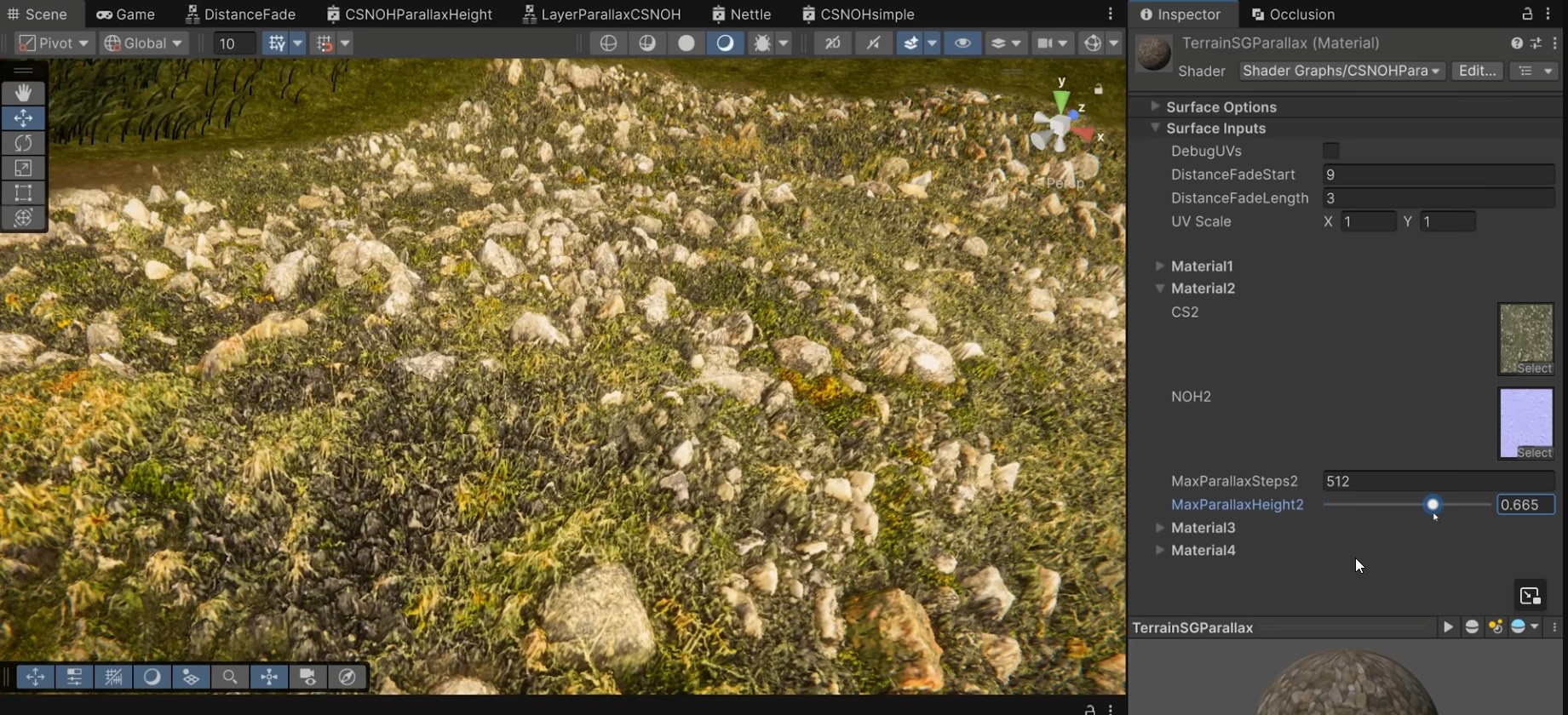
They should really use some higher quality assets for the foliage though in these examples. All this work but using the most flat looking grass decals
 fair lily
do people typically build the game environment in unity or something like blender?
 gusty jungle
How many official unity tutorials are there?👀
thin hearth
fair lily
do people typically build the game environment in unity or something like blende...
Unity. Blender has no prefab support so it’s ass for scene editing.
 buoyant urchin
I am looking for lightweight URP terrain shader, is there any?
thin hearth
I wouldn't worry so much about the cost of the terrain's shader. The cost is mostly elsewhere
They all do pretty much the same work anyway
buoyant urchin
How to turn tree collider off programatically?
I will write a tool to turn it off
 finite juniper
I've very new to terrain, can't see any explanation with this but... how are you able to make it so that the terrains texture is not like a "copy/paste" image, like this grass

like as in u can see the lines
unless that's just a bad grass texture, dont know if I am using it right
winter minnow
finite juniper
unless that's just a bad grass texture, dont know if I am using it right
It doesn't look great
Textures not made to not visibly repeat or which have seams are not well suited for terrain texturing
But even with a great texture you usually want more than one texture to mix in with terrain painting for variance
And cover them with stuff like grass, trees and rocks
Even in games such as Skyrim their grass textures don't repeat all that well, but you never see it because the terrains are filled with variance
finite juniper
winter minnow
But even with a great texture you usually want more than one texture to mix in w...
Aaah riight, is that why I prob noticed 3 types of grass with same color, maybe I was meant to paint 1 and brush 2 others over it?
or am I misunderstanding
winter minnow
finite juniper
Aaah riight, is that why I prob noticed 3 types of grass with same color, maybe ...
Maybe not directly "over" each other but in the same area
Could be different grass of same color, similar grass of a different color, patches of no grass at all, grass mixed with detritus, whatnot
In nature you rarely find any perfectly uniform stretches of grass
Or rather never
finite juniper
I'm not too fussed about it, it's just for a Game Jam event, it just looks so damn ugly haha
winter minnow
Even golf courses which are rather unnaturally smooth do have all kinds of variance
There are image editing methods that can fairly easily improve a texture's seamlessness
But that might not even be necessary if you brush in multiple texture layers
finite juniper
literally everything looks like they have the same textures, I think they guy who made it just made a texture and then Green = Grass, Gray = rock etc
I'll see if I can prob find a better one tomorrow, it's getting late
finite juniper
winter minnow
There are image editing methods that can fairly easily improve a texture's seaml...
Thanks though for the tip 🙂
 deep phoenix
hey i started doing terains and i cant find the add terain layers feature in it
 tardy lark
deep phoenix
hey i started doing terains and i cant find the add terain layers feature in it
tardy lark
deep phoenix
hey i started doing terains and i cant find the add terain layers feature in it
under Paint Terrain then Edit Terrain layers
deep phoenix
tardy lark
under Paint Terrain then Edit Terrain layers
 tardy lark
you can also manually create them with the context menu, right click then Create > Terrain Layer
deep phoenix
tardy lark
you can also manually create them with the context menu, right click then Creat...
what that like the context menu
tardy lark
click this small drop down and change it to Paint Texture
 deep phoenix
tardy lark
click this small drop down and change it to Paint Texture
deep phoenix
tardy lark
click this small drop down and change it to Paint Texture
why cnat i see the things near me
tardy lark
focus an object in the scene, double click on it in the hierarchy
should be a small object in your scene a default cube would do it too
thin hearth
deep phoenix
Looks like you don’t have the terrain tools package installed
deep phoenix
thin hearth
Looks like you don’t have the terrain tools package installed
that i do not
thin hearth
Might be the reason you can’t find it
deep phoenix
how to lower not raise the terrain
thin hearth
Height doesn’t go below 0, so if you want to lower it you have to raise it first
thin hearth
coral cliff
(Unity 6.0, but will work for all versions of unity
This
deep phoenix
thin hearth
This
how to make the height bigger then
deep phoenix
thin hearth
Firstkindgamer explained that in the message I replied to
thx
tepid mantle
Let's say I want to create a bunch of islands, say like 500x500 each. I'd imagine I can stitch them together easily at runtime by adding them as neighbors, but the problem is I don't really want to lerp the edges/faces together. I rather have each of these islands keep the verts as is and let some buffer between the islands to bridge those verts smoothly and this buffer would be something like 500x100 as I don't need something too large. Not really seeing a way to have different size neighbors on the editor, so I was wondering if that sounds possible via scripting
https://discussions.unity.com/t/assembling-terrains-without-seams/761455/6
Guess this kinda goes over it
 glacial pond
Does anyone know what might be causing this weird black patterns on my terrains on iOS?
I am on Unity 6...12f
Not appearing on Android and didn't change anything from before, just updated Unity.
It seems due to the URP TerrainLit material somehow
 glacial pond
It seems related to normals somehow, whenever a normal power is set to 1 it will screw up like that. Only on iOS...
finite juniper
Hey, I'm trying to fix the stretch of my Terrain, not sure where I should be able to fix that, is there any way to make it more natural... tools or any sorts?
 thin hearth
finite juniper
Hey, I'm trying to fix the stretch of my Terrain, not sure where I should be abl...
thin hearth
finite juniper
Hey, I'm trying to fix the stretch of my Terrain, not sure where I should be abl...
Triplanar mapping would help (some stuff on the asset store for this), but what I do is smooth the edges a bit and put cliffs over the really steep bits.
finite juniper
thin hearth
Triplanar mapping would help (some stuff on the asset store for this), but what ...
you mean slowly up/down brush on the terrain with the brush? yeah I've also thought about triplanar I just haven't found the right tutorial online yet
Also when we're on this terrain topic, is there a way to scale down the terrain without ruining my current terrain that I've already made, I noticed it before it was too late.
Plan was to have this (red line) the "play area" rest is just pointless and just does unnecessary rendering
 thin hearth
finite juniper
Also when we're on this terrain topic, is there a way to scale down the terrain ...
thin hearth
finite juniper
Also when we're on this terrain topic, is there a way to scale down the terrain ...
It's not really supported out of the box, but you can export the heightmap and crop it. Then reapply to a new terrain that's the size you want.
You don't necessarily have to care about this. Those few extra triangles being sent to the rasterizer won't matter. But there's a bit of memory and storage waste, and GPU compression doesn't get rid of that as well as a format like PNG would.
finite juniper
thin hearth
You don't necessarily *have* to care about this. Those few extra triangles being...
Yeah it's good to know or prepare for next time, this is just a game jam project so as long as it runs fine it shouldn't be a problem cuz I'm only using kinda lowres/poly assets
thin hearth
I have a very big low-res background terrain for stuff that isn't in the gameplay area
Just make sure to exclude that from ray tracing if you're using that. Took me a while to figure that out! 😄
finite juniper
thin hearth
Just make sure to exclude that from ray tracing if you're using that. Took me a ...
That's a very good point, Noted 😂
thin hearth
It's not about performance, it just breaks the ray tracer if you have overlapping terrains 🙂
finite juniper
aaah I see
 leaden coral
does anyone know when i paint my terrain it all turns out to be blocky ?

nevermind i fixed it, increased the control texture resolution
 granite trout
hey guys... how can i optimize terrain? I have trees not a lot only few but i got only 30 fps .. lods included, gpu instant too - HDRP
thin hearth
granite trout
hey guys... how can i optimize terrain? I have trees not a lot only few but i go...
How did you do GPU instancing?
 spiral garden
granite trout
hey guys... how can i optimize terrain? I have trees not a lot only few but i go...
spiral garden
granite trout
hey guys... how can i optimize terrain? I have trees not a lot only few but i go...
Start with profiling your game(preferably a build).
thin hearth
I’d start by just looking at draw calls in the editor here
Something tells me the instancing isn’t working
 onyx ocean
granite trout
hey guys... how can i optimize terrain? I have trees not a lot only few but i go...
onyx ocean
granite trout
hey guys... how can i optimize terrain? I have trees not a lot only few but i go...
Tile up your terrains in chunks preferably smaller ones like 512^2 and use lowpoly dummies for further terrains
 amber stirrup
What's the status of Speedtree?
 uncut dagger
Hi guys, I recently started learning unity 6.3.
I'm currently at the stage of creating a basic terrain. I have seen information about graph shaders, but I have not been able to understand them properly and find more detailed information. Can someone tell me how to get rid of the terrain texture tiling? I know very little about this, but I would like to learn how to add it to my terrain so that the tiling of all the textures that I use to paint the landscape is not visible. Can someone give information regarding this particular case, for a 3d game on the HDRP version of Unity. Please, I need information from people who understand this, as I have already looked at the official documentation on this, as well as the unity forum and other YouTube videos, but no one has been able to properly explain how to do this and use it, as the texture brushes that I paint are still hidden, and I am very I am surprised that there is no solution to this problem right out of the box of the engine, I would appreciate your help.
winter minnow
uncut dagger
Hi guys, I recently started learning unity 6.3.
I'm currently at the stage of cr...
Texture repetition tends to be computationally expensive to solve with shaders, and typically not a problem with good enough textures when used smartly
With sufficient resolution and seams and repetitive patterns hidden, you might not need any more steps than that
But also to combat this you can use detail mapping to create two "levels" of texture variance at different scales per layer, and to alternate between layers to create even more variance
uncut dagger
winter minnow
Texture repetition tends to be computationally expensive to solve with shaders, ...
The thing is, I want to use 2-4k textures.
And I want to make them repeat themselves often enough, so that it doesn't get messy. But there is a problem with tiling in the form of a chessboard. I've seen solutions from people regarding this, when they somehow change and scale the texture that they use for painting during application to hide this tiling, and thus, due to accidental transformation and rotation, this tiling is not visible. Of the solutions I've seen, it's a graph shader, some kind of microsplat system, and something else, but I didn't understand anything from all of this, nor did I find any normal tutorials that could help me solve the issue, but unfortunately all the information that is available is only indirectly related.,
winter minnow
Furthermore even if the textures weren't all that seamless, in most practical scenarios that occur in real life as well as most games the details and terrain features placed on top will conceal a lot of it anyway
uncut dagger
winter minnow
Furthermore even if the textures weren't all that seamless, in most practical sc...
I've seen some solutions, but they're paid. I would like to make my decision, and for free, by understanding this, as I am an indie developer, and in any case, as a loner, I will have to figure it all out, I really want to find information where the person who presents it understands what he is talking about and how it works, but Surprisingly, all the information that I had received before did not correspond to this(
winter minnow
uncut dagger
The thing is, I want to use 2-4k textures.
And I want to make them repeat themse...
2-4k sounds plenty in the ballpark of enough to me
What do you mean by "problem with tiling in the form of a chessboard"
Do you have a picture of the problem
uncut dagger
I'm talking about things like this, that is, when you see an obvious repetition of the texture, it absolutely does not suit me and I want to get rid of it anyway, here's an example of how it happens in unity in the first photo, and in the second photo, what I want to get is an example from the arma reforger game. Yes, they have a different engine and so on, but from experience I understand that in any case, the tiling solution is the same everywhere, that is, it is the transformation of the texture layer by some method, I have heard of some kind of stochastic method, most likely it is used there, but how to implement it in unity for my project I I don't understand how this solution works in other engines by default in the engine itself.


I also heard information about the method of superimposing some kind of global noise map that will interfere with texture tiling, but as I said earlier, I couldn't really figure it out, because unfortunately people present information more often specifically for their solution, and not what I'm looking for. In addition, I have repeatedly come across attempts to solve this problem using various crutches that people made 5 or more years ago, but I think there are some modern solutions for this, especially considering version 6.3 of unity.
It would be cool to find a guide where a guy says, "Hey dude, now I'm going to tell you as a beginner what you should do at the beginning of creating your project, how to get rid of tiling, and so on, where you need to click alternately to achieve a solution to your problem with tiling," and he will really show it and explain that why and how, and not just do something incomprehensible on the screen without explanation, while not understanding what is happening.
winter minnow
uncut dagger
I'm talking about things like this, that is, when you see an obvious repetition ...
In the first image the grass texture has a lot of recognizable patterns which could be removed and it'd improve
In the second picture I cannot see any repetition at all
They could be using a procedural stochastic texturing method and to your eye it still appears to have the same issue
Because the terrain is so unnaturally featureless the real issue is not the texture repetition
uncut dagger
winter minnow
In the first image the grass texture has a lot of recognizable patterns which co...
No. The second screenshot just solved the problem with tiling, the first screenshot just has the same problem that exists with painting the unity landscape by default, I want to get the result as in the second photo.
https://github.com/mgolucino/Unity3D-MacroMicroVariation?tab=readme-ov-file
I've seen this page with a possible solution, but to be honest, I still haven't figured out how to apply it to the standard terrain texture layers in unity. How to use it and so on, but I couldn't find a guide that explains it in an accessible and understandable language, by a person who really understands it.

GitHub
Contribute to mgolucino/Unity3D-MacroMicroVariation development by creating an account on GitHub.
solar swan
uncut dagger
I'm talking about things like this, that is, when you see an obvious repetition ...
you will probably want to use stochastic texture sampling, an example of which is described here https://medium.com/@jasonbooth_86226/stochastic-texturing-3c2e58d76a14
you can get the sampler node for this on the asset store or DIY it https://assetstore.unity.com/packages/vfx/shaders/stochastic-height-sampling-node-for-amplify-shader-editor-143715

Add depth to your next project with Stochastic Height Sampling Node for Amplify Shader Editor from Jason Booth. Find this & more VFX Shaders on the Unity Asset Store.
winter minnow
uncut dagger
No. The second screenshot just solved the problem with tiling, the first screens...
I see
My point is that avoiding repetition is barely ever worth the cost and effort, which is why you find so few resources for it
Another reason is that Unity's Terrain has barely received any updates in many years, custom solutions tend to be used instead
And technically there already is an official solution, more or less:
https://github.com/UnityLabs/procedural-stochastic-texturing
So each solution/tutorial ends up looking kinda unique to each project and rarely gives you the exact information you need
And if it seems incomprehensible, or if you want to do custom Terrain shaders otherwise, you should first learn Shader Graph and and shaders on their own
uncut dagger
winter minnow
I see
My point is that avoiding repetition is barely ever worth the cost and ef...
Oh, I've seen this guide, but I still haven't figured out how to use it. As I understand it, the standard terrane unity uses texture layers to paint the terrane with the brushes that are available in the default tools. But I did not understand how to use the materials on the terrane to paint the areas of the terrane I need with this texture layer, so that the texture does not repeat as it says in the manual.
solar swan
you would have to be careful using this technique though, because it needs 3-6x texture samples over the basic tiled method
winter minnow
...Then after learning Shader Graph study the various anti-repetition techniques available to you
Then learn how custom Terrain Shader Graphs are made to work with Terrain features, which is new in Unity 6.3.
Three different steps you can't really tackle all at once
solar swan
if this isn't a learning project, you can also take the shortcut and buy a terrain shader
then modify that to suit your needs
uncut dagger
That is, guys, I need to study the graph unity 6.3 shader, and use it to try to get rid of texture tiling, do I understand everything correctly? I also immediately ask a question about how to use this shader graph on the terrain itself, so that you can use texture sets and draw them with your custom brush patterns. This is how I want to manually color the terrain, giving more detailed drawings, while not having a tile on the texture layer that I paint.
winter minnow
That seems correct
I can't advise how to make Terrain Shader Graphs as I haven't used that 6.3. feature yet
uncut dagger
Guys, if you have any guides that I will study myself, or additionally with a neural network, and they will really help solve my question, or move towards solving it, I will be grateful to receive links and recommendations from you to certain information that is referenced, thank you in advance
https://github.com/JuniorDjjr/Unity-Procedural-Stochastic-Texture-Terrain-Shader?tab=readme-ov-file
I also saw this information page, I don't know if it corresponds to what I want.
GitHub
Procedural Stochastic Texturing for Unity URP terrain - JuniorDjjr/Unity-Procedural-Stochastic-Texture-Terrain-Shader
uncut dagger

GitHub
A simple procedural terrain shader for unity's inbuilt terrain system - GitHub - MichaelEGA/Procedural-Stochastic-Terrain-Shader: A simple procedural terrain shader for unity's inb...
 twin salmon
i dont know what im doing

 ocean trout
is 452k triangles and 230k vertices too much if I want to make my game available for mobile? Btw whats your feeling on my 3D terrain for a 2D game? hehe.
All of the terrain are procedurally generated using compute shader.
The hardest part was for the 3D terrain surface to match my 2D terrain exactly, pixel by pixel, especially that the world is a planet, so it had to match pixel by pixel even at the other side of the world.

 tepid mantle
ocean trout
is 452k triangles and 230k vertices too much if I want to make my game available...
tepid mantle
ocean trout
is 452k triangles and 230k vertices too much if I want to make my game available...
Well, if you're rendering the full complexity of it at full draw distance then perhaps you need to generate some LODs along with it
thin hearth
ocean trout
is 452k triangles and 230k vertices too much if I want to make my game available...
No, it’s not too much geometry. But you should always be testing performance on target hardware, rather than inferring from barely relevant details like polycount.
 brave hornet
is there any kind of mirror tool for the terrain painting? I've been trying to make one myself but its being a huge pain. I just want to be able to make symmetric maps
tepid mantle
brave hornet
is there any kind of mirror tool for the terrain painting? I've been trying to m...
You can always export the splatmap and bring it to another painting software
and heightmap for that matter
if you use blender you can build the mesh inside of it and texture paint it (the splat) there too
 lunar leaf
Is there someon e her ethat can help me with with doing a terrain?
 pastel inlet
Hey guys, I'm new to Unity, and the first thing I'm really interested in: is there some free automatic open world streaming solution in unity (like world partition in UE5)?
thin hearth
pastel inlet
Hey guys, I'm new to Unity, and the first thing I'm really interested in: is the...
I’d recommend building this yourself so you can customize it and integrate it with your tooling.
 steady pasture
is it possible to lower all terrain at once?
keep the height differences but if it's all at 600 then have it the same but at 200. like clamping
steady pasture
pastel inlet
Hey guys, I'm new to Unity, and the first thing I'm really interested in: is the...
thin hearth
steady pasture
is it possible to lower all terrain at once?
keep the height differences but if ...
Could write some code to do this, yeah
Would take a while to process several million pixels on the CPU but it'll work
steady pasture
thin hearth
Would take a while to process several million pixels on the CPU but it'll work
what???
I mean just jump up selection with brush or the entire thing, that shouldn't be a heavy operation
fixed, simply changing the terrain height did it
thin hearth
steady pasture
I mean just jump up selection with brush or the entire thing, that shouldn't be ...
Yeah brushes use the GPU
Just not really worth doing for a one-time operation
steady pasture
ah cool
rocky folio
Hi. My terrain is lightmap baked
But is there a way to disable this lightmap without uhh deleting the lightmaps ?
thin hearth
rocky folio
Hi. My terrain is lightmap baked
But is there a way to disable this lightmap wit...
Could probably get there by modifying the render pipeline but I don't think it's built in.
rocky folio
I'm on URP
Well i've disabled the global lightmap and stuff in the lighting settings. That should be... it for the lightmaps. And i see shadows are actually working on the terrain
But the terrain is still bright, even with no lights being on
I've disabled fog and all that
My other, non terrain objects are properly pitch black with no lights on. But the terrain (using URP Terrain Lit shader) is.. i guess lit/shaded, but just won't go full black
 proud forum
Hello
Does Unity terrain not support height mesh? I am using Navmesh surface, and heightmesh is not generated for terrain, but it is for other objects.
 shell mortar
Hi, I'm a total beginner to terrain and world building in unity, how would I go about making a very simple forest map?

I've setup lighting and fog, and wanted to continue on my prototype project by getting the map in
 opaque rover
shell mortar
Hi, I'm a total beginner to terrain and world building in unity, how would I go ...
opaque rover
shell mortar
Hi, I'm a total beginner to terrain and world building in unity, how would I go ...
Well, what do you mean?
I assume you'll want trees in the forest, yes?
That's a good start
If you're asking how to use the terrain system, there's a section to add tree meshes to so you can paint with them and one for grass meshes too
You'll want a variety of them, presumably
Also, paint some height variations cause nothing is ever completely flat
I don't know what else to tell you without you being more specific
shell mortar
Hey
Yeah so basically I'm asking how to make the simplest forest map with possible a path of sort
As you mentioned, the terrain system let's you "paint" trees and such, but how do I start with that?
 twilit torrent

Does anyone know why the shadows appear extremely dark on the grass and/or how I can fix this? The terrain and the grass are all done using the built in unity terrain tools
opaque rover
shell mortar
As you mentioned, the terrain system let's you "paint" trees and such, but how d...
Sorry, you didn't tag me so I didn't see it
There is a menu called something like "paint trees" and one called "paint details" or something
Speaking from memory
One of the little box icons
I'm sure there are yt tutorials for the terrain system
Everything is there, sculpting terrain, painting and blending textures, this and that
opaque rover
twilit torrent
Does anyone know why the shadows appear extremely dark on the grass and/or how I...
Can't see shit in this screenshot but did you mark the normal map as a normal map if you're using one?
Other than that, what is casting that large shadow?
shell mortar
opaque rover
There is a menu called something like "paint trees" and one called "paint detail...
Yeah I tried it out, but when I put the new system on the plane I have, it creates a whole new terrain above all pink
opaque rover
shell mortar
Yeah I tried it out, but when I put the new system on the plane I have, it creat...
Don't add it to a plane, you need to add a terrain instead
shell mortar
opaque rover
Don't add it to a plane, you need to add a terrain instead
That makes a lot more sense lmao
Is there a way to combine multiple made terrains?
opaque rover
shell mortar
Is there a way to combine multiple made terrains?
yes
you can add multiple terrains, just make sure you line them up
or make one bigger one, whatever works
shell mortar
Also another thing, I've imported some trees that has HDRP, but they still turn out like this.
I've used the HDRP wizard to convert materials into HDRP but still doesn't seem to work

 shell mortar
opaque rover
you can add multiple terrains, just make sure you line them up
shell mortar
opaque rover
you can add multiple terrains, just make sure you line them up
There's a setting in the terrain options to add terrains next to it, but won't let me merge them
opaque rover
shell mortar
Also another thing, I've imported some trees that has HDRP, but they still turn ...
does that asset say it supports hdrp? Does it come with hdrp materials?
opaque rover
shell mortar
There's a setting in the terrain options to add terrains next to it, but won't l...
afaik you can't "merge" them, just line them up manually if that's what you need
shell mortar
opaque rover
does that asset say it supports hdrp? Does it come with hdrp materials?
As you can see in the folder list it says "HDRP" so I assume it does?
 opaque rover
and you used those in your scene? I don't know then, I am troubleshooting blindly. Does it say it supports your version of unity?
Maybe it's using a shader that got broken in a newer version, couldn't tell you like this
shell mortar
Yeah I'm sorry for giving you a broad question like this
It's likely that it doesn't support unity 6
I'll try and find a different HDRP one
shell mortar
opaque rover
and you used those in your scene? I don't know then, I am troubleshooting blindl...
Could I ask what "bend factor" means?
 opaque rover
shell mortar
Could I ask what "bend factor" means?
opaque rover
shell mortar
Could I ask what "bend factor" means?
that's for bending with the wind if the tree supports that
shell mortar
opaque rover
that's for bending with the wind if the tree supports that


It now gives me this, tho I think I have adressed the issues, I added a mesh renderer to the tree and it already has LOD's
opaque rover
have you added it to the prefab tho or just the one in the scene? Cause it spawns them from prefabs
 opaque rover
shell mortar
opaque rover
shell mortar
it's hard to say, terrain system can be picky as to what needs to be put where
maybe the mesh renderer needs to be on the one below
not sure
shell mortar
I actually added it to both in case
shell mortar
opaque rover
not sure
Even the stamp terrain one isn't working either
Oh nvm that was a different issue
shell mortar
@opaque rover So I got it slightly working
Basically I moved Spruce_1 to be the top and only parent. And now trees spawn, but it's VERY laggy

 stark relic
so im modding a game and it doesnt support the basic Lit shader is there any way i can get a different shader for it?
terse lark
stark relic
so im modding a game and it doesnt support the basic Lit shader is there any way...
we can't help with modding here, sorry
stark relic
got it thank you
 supple quail
anyone know why the billboarding version of the trees gets outlayered by the water? they are using the terrain systems lod range but im unsure of the effect

i figured out that changing the waters shader to alpha test in its render queue fixed it, but im not sure that is the best approach
 lone jay
hey all, is it still not possible to use terrain trees with a nav mesh?
thin hearth
supple quail
i figured out that changing the waters shader to alpha test in its render queue ...
Yeah, adjusting the sorting order is the best bet. HDRP has a few more options.
thin hearth
lone jay
hey all, is it still not possible to use terrain trees with a nav mesh?
Nothing changed. You can work around it by automatically spawning capsule colliders for each tree before baking, then deleting afterwards.
Example: https://github.com/Wolfos/Adventure-RPG/blob/master/Utility/TerrainTrees.cs
thin hearth
thin hearth
Nothing changed. You can work around it by automatically spawning capsule collid...
Should probably wrap this in a try / finally block if you use it.
lone jay
thin hearth
Nothing changed. You can work around it by automatically spawning capsule collid...
kind of unintuitive but at least i was able to make a script for it, ty
thin hearth
It's been confirmed as a bug (or at least missing feature), but terrain has never been a priority for Unity.
steady pasture
has anyone here used digger?
I am looking for a way to scatter objects in caves.
Polybrush and terrain scattering tools don't work with areas modified using digger, and the digger developer doesn't help on Discord anymore...
I would also appreciate a stable alternative to Digger if anyone here recommends 🙏🏻
in general just looking for any tool that can scatter objects based on normals
 limber cove
Hello there. Does anyone know how to make a 3D Object change color in play mode? I've been trying to make the leaves of this tree model change colors, like the seasons, but so far, I haven't had much luck.
I tried looking up the right tutorials, but none of them seemed to work.
https://youtu.be/pY4MnY6pwMw?si=QNCSblzPGO_jVgny
https://youtu.be/s8mAXdrwGFk?si=BTWglDJbsakEDvkI
This one is the latest tutorial...
https://www.youtube.com/watch?v=pbU2tInJTOQ


In this Unity tutorial, learn how to use Color.Lerp for creating smooth color transitions in your games or UI. We’ll cover how to customize color arrays, adjust transition durations, and apply the effect to any GameObject. Perfect for beginners looking to enhance their game visuals!
Don’t forget to like, comment, and subscribe for more Unit...

How to smoothly transition between colors in unity!
In this video, you'll learn how to program a smooth color transition in unity with in depth explanation.
This is the first video of the channel, every single view, like, and subscribe is highly appreciated.

#unity #coding #gamedev #tutorial #color
In this Unity Coding Tutorial, we'll learn how to change color over time and use ping pong effects.
🔑 Key Chapters
00:00 ➤ Intro
00:07 ➤ Creating the ColorLerp Script
02:44 ➤ Setup
03:10 ➤ Seeing ColorLerp Script in Action
03:25 ➤ Outro - Thanks for watching!
🔔 Subscribe to stay up to ...
thin hearth
steady pasture
has anyone here used digger?
I am looking for a way to scatter objects in caves....
I don't use Digger, but if it emits PhysX colliders it should work with Prefab Brush+
And if not, you could always modify the code.
steady pasture
nice i'm considering
steady pasture
thin hearth
I don't use Digger, but if it emits PhysX colliders it should work with Prefab B...
character controller walks on it,
terrains use mesh collider, right? I think it just leaves that as the default.
would it be stupid to add a mesh collider to the terrain?
thin hearth
Terrains don't use mesh collider, no
thin hearth
limber cove
Hello there. Does anyone know how to make a 3D Object change color in play mode?...
A custom shader with globals is probably the way to go here. Or look into The Visual Engine.
thin hearth
thin hearth
Terrains don't use mesh collider, no
They use the TerrainCollider component, which I assume maps to PhysX's heightfield collider.
limber cove
thin hearth
A custom shader with globals is probably the way to go here. Or look into The Vi...
I'm sorry for the late reply. I'm still new to Unity and I still have a lot to learn about it.
I'll look into the custom shader designs with the "globals" and the Visual Engine.
I'll follow-up with some progress and results...if that's okay.
 brazen delta
I'm having two issues with Unity Terrain
- It tells me to use the
Nature/Soft Occlusionshader but this doesn't exist in the project
- Trees are absurdly unoptimized
I added ike 20 trees and the editor has slowed to a crawl, I'm basically soft locked in lag
This is on Unity 6.3 using Universal Render Pipeline
winter minnow
brazen delta
I'm having two issues with Unity Terrain
These seem like they could be related issues
What shader are your trees using exactly, and what amount of detail do they have?
thin hearth
If it's suggesting the Soft Occlusion shader that means it's using the legacy tree path, which means the tree prefab lacks a LOD group.
brazen delta
winter minnow
These seem like they could be related issues
What shader are your trees using ex...
URP Lit, and they are normal full detail PBR trees
Does Unity support auto generation of LOD or do I have to make this myself and assign in the LOD groups?
thin hearth
brazen delta
Does Unity support auto generation of LOD or do I have to make this myself and a...
Unity 6.3 added auto LOD generation. Though these algorithms tend not to work very well for foliage.
Don’t necessarily need LOD though. Just a LOD group component
 desert rock
Why doesn't the color tint option pop up in my terrain layer?
 spiral garden
desert rock
Why doesn't the color tint option pop up in my terrain layer?
spiral garden
desert rock
Why doesn't the color tint option pop up in my terrain layer?
The shader probably doesn't use it.
desert rock
spiral garden
The shader probably doesn't use it.
The docs said both URP and HDRP support this feature
Also I am using a custom shader
I had to create a custom editor to override unity's to expose that field
 iron shoal
is there a way to know if your occlusion static is working?
weird quesition but static batching and occlusion stuff are new to me
desert rock
iron shoal
is there a way to know if your occlusion static is working?
Open the occlusion culling window visualisation, if you see stuff culling then, occlusion culling is working
iron shoal
desert rock
Open the occlusion culling window visualisation, if you see stuff culling then, ...
thanks that makes things very clear
 broken flume
I do not understand Unity. I accidentally used Copy Paste for my Terrains and now they are all linked to each other which I don't want.
And when I tried to change the Terrain Data... it just changes it back at runtime complaining about colliders or something

So like I just can't edit my "chapter1" Terrain without also having the same edits appear in "chapter2"
And like on runtime it just reverts back
So like I can't edit or do anything
How do you change the TerrainData in the "Terrain" Component ??
I do not see a drop down place for this .
thin hearth
broken flume
How do you change the TerrainData in the "Terrain" Component ??
I do not see a d...
I think it’s in the rightmost tab
Or maybe if you set your inspector to debug mode
Or you could just delete it and create a new one.
broken flume
I guess I will just delete and create new ones
 mystic terrace
A unity terrain questions why arent the colors matching on the terrain and the palete? on terrain its from left to right in the pallete.


 rough magnet
mystic terrace
A unity terrain questions why arent the colors matching on the terrain and the p...
rough magnet
mystic terrace
A unity terrain questions why arent the colors matching on the terrain and the p...
because it's blending
if you paint with full weight it should match
mystic terrace
rough magnet
because it's blending
what you mean with full weigth? where is that setting? all i know about is opacity and that on full on those
rough magnet
mystic terrace
what you mean with full weigth? where is that setting? all i know about is opaci...
yeah i mean, one sec
yeah make opacity 100
mystic terrace
it doesnt match at all

the top layers works just fine
for example this one matches
 thin hearth
mystic terrace
the top layers works just fine
thin hearth
mystic terrace
the top layers works just fine
Is this Unity 6.2?
They were messing with the terrain shader
winter minnow
mystic terrace
it doesnt match at all
To my eye all of them are relatively brighter, probably due to lighting
But regardless can you show the Ground002 layer properties
mystic terrace
thin hearth
Is this Unity 6.2?
6000.3.2f1
mystic terrace
winter minnow
To my eye all of them are relatively brighter, probably due to lighting
But rega...
im bad at this is this the properties?
 winter minnow
mystic terrace
im bad at this is this the properties?
winter minnow
mystic terrace
im bad at this is this the properties?
Yes
I expect the mask map might be wrong, or be just having an unexpected effect
(Assuming you haven't touched Channel Remapping)
mystic terrace
i never touch theese 😄
winter minnow
If you remove the mask map from the texture slot, you can compare the difference
mystic terrace

the only thing i noticed is that i can change the color from white to brownish and it looks better, but thats just weird.
winter minnow
mystic terrace
It shows smoothness comes from diffuse alpha channel, I would try getting it to a fixed value of 0 or 0.5 to compare that
My only guess at this point is that the smoothness may be too high so the layers could be reflecting the sky and so appearing brighter
But that failing I think it would be most likely due to lighting and post processing
Bright light and default tonemapping will make all materials appear brighter and more washed out
Even if the difference is pretty drastic here
mystic terrace
thanks but now you are talking about stuff i have no idea on what it is 😄
ill just change the color to what i want 😄
winter minnow
mystic terrace
ill just change the color to what i want 😄
One thing that is easy to try is changing the smoothness source
What options are under that dropdown?
mystic terrace
 winter minnow
Try Constant with 0 value
 winter minnow
Well, that checks off the specularity theory
mystic terrace
there is no diffrence between 0 and 1 😛
 winter minnow
I'd wager the same color difference appears on non-Terrain meshes with materials using the same textures
mystic terrace
AO changed something
 winter minnow
It's also possible the default Tint value is not pure white but some level of grey
AO value 1 lets all ambient light in, value 0 removes it
It's supposed to be 1
mystic terrace
looks better with 0 hahah 😄
winter minnow
You would rather modify your scene's ambient lighting than occlude it per-material
Which supports the theory that your scene's lighting may be too bright
mystic terrace
winter minnow
You would rather modify your scene's ambient lighting than occlude it per-materi...
this is mumbo jambo for me 😄
winter minnow
You probably don't want it to be
mystic terrace
probably not but atm it is 😄
winter minnow
(Just checked the default Tint seems to be white)
winter minnow
mystic terrace
probably not but atm it is 😄
Since you're using lighting and post processing you will need to learn about them
In a nutshell there are light components like Directional Lights, which you typically should have one of
Additionally the scene has ambient lighting and environmental reflections which can be configured in Lighting window, which are the illumination an object receives outside of any light components
To take effect they must be baked using the Generate button, but Realtime Global Illumination or Baked Global Illumination need not be enabled for that, and should not be unless you want to simulate global illumination which is a bigger process
mystic terrace
winter minnow
Since you're using lighting and post processing you will need to learn about the...
hehe its not me using 😄 i bought a frame work 😄 so the lightning was allrdy set up
winter minnow
Post processing is not crucial to understand outright, as long as you note that by default URP equips its scenes with Neutral Tonemapping that can make lighting look pale and washed out without any extra color correction
winter minnow
mystic terrace
hehe its not me using 😄 i bought a frame work 😄 so the lightning was allrdy se...
What framework?
mystic terrace
winter minnow
What framework?
Spark
maybe framework is the wrong name 😛 not suire
winter minnow
That doesn't yield any search results
mystic terrace
i basicly bought a Addon that helps me with the game im doing 😄 and it had lightning and alot of other stuff allrdy set up 😄
winter minnow
Anyway, whether the framework has set up the lighting for you or you're on defaults, it looks like you're now trying to "fix" it as a problem
mystic terrace
winter minnow
Anyway, whether the framework has set up the lighting for you or you're on defau...
because in my eyes it is a problem. if something doesnt add up its a problem
winter minnow
Therefore you need understanding of lighting features involved to correctly tweak the relevant systems
As it seems the pre-set lighting is not to your liking
mystic terrace
its not about liking or not. its that some textures doesnt give the result they say they will give. it has nothing to do with my likning or not the rest of the textures works as shown
winter minnow
mystic terrace
its not about liking or not. its that some textures doesnt give the result they ...
I'm not sure they do
The grass in scene is also significantly brighter and paler than seen in the layer selection
Anyway you have two paths for troubleshooting it
- Investigate the textures and materials: make some non-Terrain mesh objects with non-Terrain materials using the same textures, see if it also shows up the same way. If not, you know it's related to Terrain. If so, try different textures, different properties like normals, smoothness etc. Try to pinpoint the issue to either specific textures or material properties.
- Investigate lighting and PP: Create the Terrain with its textures in a new scene from Unity's templates rather than the Framework. That could rule out the scene's lighting settings causing the difference. Learn basic operation of light components and scene lighting and tweak those directly to understand how they affect material appearance.
- Not a troubleshooting path at all: tweak whatever variables without precisely testing for anything or learning the systems involved, until it looks kinda right without understanding why. Watch more issues resurface that will seem impossible to solve because you don't remember your tweaks or know what their precise effect was
mystic terrace
winter minnow
I'm not sure they do
The grass in scene is also significantly brighter and paler...
thanks 😄 alot for all the help this is gonna take me a while to do since im such a noob 😄
mystic terrace
winter minnow
I'm not sure they do
The grass in scene is also significantly brighter and paler...
oki i tried number two since i dont really understand 1 and 3 :D_ but luckely it looks alot better with default urp settings. So i quess than there is something in the lightning in the framework. This is the time i wish i could have both projects open at the same time on my computer 😄
mystic terrace
@winter minnow Thanks it was the skybox in the scene that was not on default 😄 now it works like a charm again
 raw field
Hey any idea where can find a good tutorials/guides on how to approach envio for 3D top view game (ARPG-like) ?
I struggle with even the basic stuff, the texture filtering makes everything look pixelated and quite damn ass (turning off mipmaps causes flickering)
winter minnow
raw field
I struggle with even the basic stuff, the texture filtering makes everything loo...
You usually want to keep texture filtering on (bilinear or trilinear) and not to disable mip map generation
raw field
Yes I know that but that doesn't really answer the question of how to make it look good 😄
winter minnow
raw field
Yes I know that but that doesn't really answer the question of how to make it lo...
No, but that seems unrelated
 gleaming belfry
I’m going to go insane. This is the second time my map got corrupted or deleted somehow..
I don’t know what happened. Can I send a file to someone and they can look at it? I’m like a few days in and my terrain turned black or something
I have to go to bed it’s 3am if someone can help. I’ll try sending the file over in the morning
winter minnow
gleaming belfry
I’m going to go insane. This is the second time my map got corrupted or deleted ...
"Turned black or something" doesn't sound like a corruption but more so a rendering issue
Corruptions would typically make the terrain unreadable and cause it disappear entirely
You should demonstrate the issue in some clear way (after you've rested)
And use version control software so all changes to your project can be backed up and reverted
gleaming belfry
winter minnow
"Turned black or something" doesn't sound like a corruption but more so a render...
Would that also affect the dimensions? I don’t see my mountains anymore. It’s all part of the same terrain. There’s like…. Little hills but it isn’t the same and again the color is gone
 manic wave
Raising or lowering terrain isn't as detailed as I'd like it to be
How can I make it add more detail in between those vertices it seems to interpolate between?
winter minnow
manic wave
How can I make it add more detail in between those vertices it seems to interpol...
If your brush is too strong, it may skip height levels
But ultimately your terrain's height resolution is relative to its maximum height
If the maximum height is very tall, the height resolution you have will be stretched over a taller distance
gleaming belfry
@winter minnow can I send you the file or share the project with you? Maybe it’s a simple fix.
Or I can send a picture
winter minnow
gleaming belfry
Or I can send a picture
Pictures or a video
gleaming belfry
Okay
winter minnow
And ideally of what it looked like before
manic wave
winter minnow
If your brush is too strong, it may skip height levels
But ultimately your terra...
Hmm I think it got solved by setting these down from 1000 to 250

thx tho
gleaming belfry
winter minnow
gleaming belfry
Terrain data has become unassigned, if not lost

Not expected to happen on its own
Most likely from not saving a scene after assigning a terrain data
But that's not a common occurrence
Even more reason to use version control software
And investigate your system if it keeps happening
gleaming belfry
thanks. i was trying to use chat gpt to help troube shoot it
winter minnow
I don't really recommend that
gleaming belfry
whyat does this mean? i'm trying to scale water out and it doesnt load

 rose sentinel
Hey. So I am completely new to most of the unity itself and started making my own game and I am really confused about the new terrain texture system how does it work and how can I achieve decent looking terrain texture
gleaming belfry
I’m pretty sure you got to download them from the unity store. Or that’s what I do at least. Once you download them they’ll be in your assets panel.
I’m new too but this is what I’ve learned so far
 still marten
Hey, so a quick question, I have a 16x16 grass texture that I paint on my terrain, yet instead of clean edges like the texture I get a rounded texture as grass, any idea why and how to fix?

 thin hearth
still marten
Hey, so a quick question, I have a 16x16 grass texture that I paint on my terrai...
thin hearth
still marten
Hey, so a quick question, I have a 16x16 grass texture that I paint on my terrai...
Probably not a solution, but this shouldn’t be a sprite
Under advanced, try disabling mipmapping
still marten
thin hearth
Probably not a solution, but this shouldn’t be a sprite
You mean trying different texture type? Mipmap is disabled, still rounded
tardy lark
16x16 sounds really small, maybe use 512x512
still marten
Yeah, it's meant to be a a mix of 2D and 3D
And since I suck at art, and I make all assets myself I opted for low pixelart
But I'll try using bigger resolution, maybe that lowers the smooth effect
Nope, still same with 32x32
thin hearth
still marten
But I'll try using bigger resolution, maybe that lowers the smooth effect
Maybe try playing with the alpha cutoff on the material?
 frozen condor
 mossy temple
You should probably be more explicit, You explained what you wanted much better in the #💻┃unity-talk channel. You can do that here as well.
 proper scroll
yo any of you guys know how to make this map better or how to make it easier
 drifting crown
proper scroll
yo any of you guys know how to make this map better or how to make it easier
drifting crown
proper scroll
yo any of you guys know how to make this map better or how to make it easier
This is not related to terrain. Perhaps you are looking for #🛠️┃probuilder
proper scroll
Why whenever I put texture into my map why does it go on the roof wall and floors? I only want it on the floors. How can I get that to work?
I made the map in blinder
winter minnow
proper scroll
I made the map in blinder
Use material slots
Still not the right channel for it
#🔀┃art-asset-workflow is for assets like externally created level geometry
rose sentinel
how do you paint terrian in the new version of unity 6
all the vidoes just point to things like terrian painter
winter minnow
rose sentinel
how do you paint terrian in the new version of unity 6
The same way you always did
Terrain component > Paint Terrain button > Paint Texture from dropdown
Create Terrain Layers to have something to paint
rose sentinel
where can i get good textures for it then
winter minnow
rose sentinel
where can i get good textures for it then
Make them, or search for them online
There are countless sites for textures and pbr materials
Unity's Asset Store has them too
 foggy thicket
still marten
Hey, so a quick question, I have a 16x16 grass texture that I paint on my terrai...
foggy thicket
still marten
Hey, so a quick question, I have a 16x16 grass texture that I paint on my terrai...
had the same issue, this is due to terrain grass shader using it's own sampler state instead of taking texture's one, so only solution I found is making the texture stupidly bigger (had 64 by 64, scaled up to 512 by 512) to reduce filtering radius. This will not affect performance on most platforms, since grass renders fully on GPU and it's using the same texture over and over again without taking up more VRAM for each grass piece. You could also change the shader, but it will be a lot harder solution, but it will give you true Point filtering, not smaller rounding. Hope this helps!
foggy thicket
thin hearth
But you can supply any shader for grass
wait, really? Last time I've checked, you can't assign a shader to the terrain grass...
thin hearth
You need to assign a mesh. It’ll use the mesh’s default assigned material
foggy thicket
Oh, you are talking about terrain detail
winter minnow
Editing the shader should be relatively easy as well
foggy thicket
still marten
Hey, so a quick question, I have a 16x16 grass texture that I paint on my terrai...
I think he is using terrain plane grass in billboard mode, not terrain detail
thin hearth
Well don’t do that then
foggy thicket
winter minnow
Editing the shader should be relatively easy as well
yeah, it would be a one line of code, but knowing unity, they probably did some shenanigans and divided this shader into a billion files like usual
winter minnow
foggy thicket
I think he is using terrain plane grass in billboard mode, not terrain detail
There is also a "plane grass"?
thin hearth
Legacy feature in the old render pipeline
foggy thicket
winter minnow
There is also a "plane grass"?
yeah, you just assign the texture, tweak some parameters (like colors, wind reaction, etc.) and can place plane grass (random rotation and billboard modes)
foggy thicket
thin hearth
Legacy feature in the old render pipeline
urp? I beilieve they are still work on it
foggy thicket
thin hearth
Well don’t do that then <:catshrug:770049584688791572>
Seems like another solution, but since details use the material you give it you will have to replicate all the wind, billboard and other features in your shader (if you want them, ofc)
winter minnow
foggy thicket
yeah, you just assign the texture, tweak some parameters (like colors, wind reac...
Ah right the detail type
Don't know where from it uses the shader, but I'd rather edit the one for mesh grass
Assuming it has all the features needed
still marten
thin hearth
Well don’t do that then <:catshrug:770049584688791572>
But it's easy to setup 😭
still marten
foggy thicket
had the same issue, this is due to terrain grass shader using it's own sampler s...
Thanks mate, I'll try tomorrow, hope it works 🤞
Btw, anyone know why my trees are 90° rotated when placing with tree paint tool? Has been a issue since unity 2020
I'm unity 2025... (not recommended, crash basically every 10min)
rose sentinel
what do you think i am only tring to fix tilling problem does it look good

 compact hornet
rose sentinel
what do you think i am only tring to fix tilling problem does it look good
compact hornet
rose sentinel
what do you think i am only tring to fix tilling problem does it look good
Textures kinda weird but good terrain
Me likey
rose sentinel
compact hornet
Textures kinda weird but good terrain
main problem is the tilling . but yes finding good texture is rather problmetic
want to see full terrian
 compact hornet
rose sentinel
main problem is the tilling . but yes finding good texture is rather problmetic
compact hornet
rose sentinel
main problem is the tilling . but yes finding good texture is rather problmetic
You know you could like split a texture (I don’t remember) to like many parts or smth so it looks more detailed or smth idk
 burnt summit
Guys i can't remove my editor can someone help me
rose sentinel
compact hornet
You know you could like split a texture (I don’t remember) to like many parts or...
what like i can divide the texture or something
compact hornet
rose sentinel
what like i can divide the texture or something
Yea
rose sentinel
compact hornet
Yea
thanks i will try that
compact hornet
rose sentinel
thanks i will try that
I’m Sorry that idon’t remember where it is (probably in texture settings for the texture)
rose sentinel
compact hornet
I’m Sorry that idon’t remember where it is (probably in texture settings for the...
no worries i will figure it out
rose sentinel
i figured it out what do you guys think
 compact hornet
rose sentinel
i figured it out what do you guys think
compact hornet
rose sentinel
i figured it out what do you guys think
Much better
rose sentinel
adding forest and stuff by the end of tommor
what terrian resolurion is better
according to storage and computer power
foggy thicket
still marten
Btw, anyone know why my trees are 90° rotated when placing with tree paint tool?...
This is not really an issue of unity (though option to control detail rotation would be really handy), this is due to how your modeling software exports models. If you place your tree manually, it will probably stay upright, but if you look at it's transform, you will see that it is in fact rotated about 90 degrees to be like that, and terrain places details with 0 0 0 rotation. To fix this you should tweak export parameters in your modeling software or export in different format
rose sentinel
yo guys any tips on what i can do better here
 winter minnow
rose sentinel
according to storage and computer power
winter minnow
rose sentinel
according to storage and computer power
For performance and file size, less resolution is better
winter minnow
rose sentinel
yo guys any tips on what i can do better here
This is not a feedback channel, for that you have to make a thread in #1180170818983051344
But truthfully nobody can tell you how can you make something better because "better" can mean anything subjectively
rose sentinel
winter minnow
This is not a feedback channel, for that you have to make a thread in <#11801708...
thanks man
still marten
foggy thicket
had the same issue, this is due to terrain grass shader using it's own sampler s...
Tested and works, kiss on your 4 cheeks pal, my grass is now crisp and about 400x400 pixels bigger then needed, but crisp sharp, also thx to Murado
compact hornet
rose sentinel
thanks man
What’s your dev log thread I gotta see ts
rose sentinel
compact hornet
What’s your dev log thread I gotta see ts
Haven't made it yet I am gonna add it by tomorrow
 oak egret
does anyone have any general good resources (Tutorials and the like) on using something like SYNTY assets to create nice environments? Whenever I try modular sets I never get a good looking scene, pretty new to it still but was just wondering if there are any vidoes i'm not finding showing peoples workflows or setting up nice scenes?
solar swan
oak egret
does anyone have any general good resources (Tutorials and the like) on using so...
you could look at their screenshots, try to imitate them, then learn from that experience and adapt to your own scenes.
you can then google for generic level design books/talks that teach you how to recognize what someone else is doing in a level, this then allows you to "learn from the masters" simply by looking at their work.
one popular source is this ebook (yes thats the official source): https://docs.google.com/document/d/1fAlf2MwEFTwePwzbP3try1H0aYa9kpVBHPBkyIq-caY/edit?tab=t.0

Google Docs
Level Design In Pursuit of Better Levels Table of Contents 🔹Planning🔹 4 ❖ Concept process ❖ 4 ❖ Metrics ❖ 6 ❖ Prototyping & Blockout ❖ 9 ⚒ Structural geometry ⚒ 11 ⚒ Form follows function ⚒ 11 ⚒ The Backdrop ⚒ 12 ⚒ Check the scale ⚒ 12 ⚒ Empty space ⚒ 13 ⚒ Testing the leve...
this is also a nice primer: https://www.youtube.com/watch?v=AKeUZVikPV8

This is a talk I gave at Develop Digital in 2020. It tried to dig into what a layout is silently communicating to a player and how we, as designers, can take control of this conversation to make sure players get the experience we intend.
The level was built in Dreams on a Playstation 4.
oak egret
Awesome thank you those are both very helpful and something I hve not come across before!
 fast lantern
What Are Some Really Good Free/Cheap Terrain Plugins That Help With Texturing And Anything Else Like Mountain Creations And Anything Else.
spiral garden
fast lantern
What Are Some Really Good Free/Cheap Terrain Plugins That Help With Texturing An...
There Are Many On The Asset Store You Should Look It Up Yourself.
fast lantern
spiral garden
There Are Many On The Asset Store You Should Look It Up Yourself.
100% 👍 I was asking for the sake of those who want to shed any insight or knowledge they have to anyone/everyone
 vestal stag
Any biomes rules pros that can help me? I’m using Gaia for my terrain generation 10x10 km, great. But now towards populating the terrain, I’m looking at the biomes spawner. I populated theirs with prefabs I have but I feel like it’s either over spawning it or lightly and I’m sure it’s because of rules etc so was hoping to get some guidance how to make the terrain feel lively
 novel dust
I have 2 directional lights, one is on a custom layer but still seems to show up on the main camera as well.

wait, is it inverted?
no, i click icon generator and it still shows the light
oh i found it, light culling mask
 open coral
What resolutions do you guys typically use for terrain? Is there some rule of thumb or something?
For example for a 500x500 map what would you pick in terms of heightmap, control and base texture res?
thin hearth
open coral
What resolutions do you guys typically use for terrain? Is there some rule of th...
Just one terrain? You can afford big textures then
Except for basemap, set that to lowest and put the basemap distance on maximum so it’s not used.
Basemap is a feature that made sense in 2007, when the terrain system was introduced. Back when pixel shaders were still new and expensive.
Now it just costs extra memory.
open coral
thin hearth
Just one terrain? You can afford big textures then
yea just one. Interesting about basemap, noted, thanks!
 lilac path
How can I sync changes across all terrains, if I add details brush for example grass blade to one terrain I expect to have it on all terrains, same for terrain settings which I made editor script for but for detail palette im having duplication glitches which cba anymore to figure out theres no way ppl work with terrain as is so what yall use
winter minnow
lilac path
How can I sync changes across all terrains, if I add details brush for example g...
Do your different Terrains use the same terrain data?
Or do you mean you want only the added brushes and detail setups to sync
If so I don't know what the solution might be, besides maybe to set those up once first and then make the individual Terrains by duplicating the first one
Assuming your situation is that you want separate Terrains in different scenes/places which have different shape but share everything else
In serious use people usually abandon the default Terrain system quickly
But out of curiosity what kind of editor script are you using and what kind of duplication issues do you encounter?
thin hearth
lilac path
How can I sync changes across all terrains, if I add details brush for example g...
Since arrays are a reference, copying the reference will mess things up
Solution is:
[Button]
public void CopyDetails()
{
  GetComponent<Terrain>().terrainData.detailPrototypes = copyDetailsFrom.terrainData.detailPrototypes.ToArray();
}
The LINQ .ToArray() method copies it to a new array.
 sick plover
hello i was wondering if anyone could help me
im trying to add trees to my terrain using a model i made but it says "The tree can't be instanced because the prefab contains no valid mesh renderer"
im not sure how to add one to a prefab
 sudden moss
hey everyone im having a problem with my unity terrain, im using UNITY 6 6.000.0.51f1.
after i added the terrain mesh from 3D object > terrain and went to the paint terrain tab, none of my brushes appear on my viewport and i can only select the obejct or move the viewport
i tried creating new brushes, pressing T. and my brush still wont appear
thin hearth
sudden moss
hey everyone im having a problem with my unity terrain, im using UNITY 6 6.000.0...
Do you have the terrain tools package installed?
sudden moss
Yes
Although when i downloaded it i didnt notice any changes on the amount of brush existed
I'll try to restart unity
sudden moss
thin hearth
Do you have the terrain tools package installed?
still didnt work
this is how it looks,

i can only select or move the viewport
thin hearth
sudden moss
i can only select or move the viewport
No idea. You have the source code for the terrain package, so you can debug it if you’re comfortable doing that.
sudden moss
thin hearth
No idea. You have the source code for the terrain package, so you can debug it i...
i see any idea on where to start spesifically?
i do have several of these brushes being marked Read Only for some reason
 sudden moss
thin hearth
Do you maybe have a second inspector window open somewhere?
sudden moss
thin hearth
Do you maybe have a second inspector window open somewhere?
No, im certain. I reset the layout to default and its still the same
Any ideas?
 formal torrent
Is there a way to reset the terrain position to 0,0,0? The inspector shows 0,0,0 but the terrain is not at the pivot point of the parent gameobject.

 blazing axle
made a tutorial on texture packing in substance painter to use the new terrain shaders in unity 6.3:
https://www.youtube.com/watch?v=PZqqRnrHeLk

This video shows how to properly pack textures in Substance 3D Painter and export packed textures to be used with Unity 6.3's new terrain shaders.
formal torrent
formal torrent
Is there a way to reset the terrain position to 0,0,0? The inspector shows 0,0,0...
Does anyone know where I can get assistance for my question? Or is terrain-3d the wrong place to ask?
blazing axle
formal torrent
Does anyone know where I can get assistance for my question? Or is terrain-3d th...
looks like your terrain is a child of another object, so it's showing local center position of the parent and its children and not world pivot position
unparent the terrain and see if that changes the value/pivot
the location of the child objects being away from the center of the terrain will also mess with the pivot
blazing axle
formal torrent
Does anyone know where I can get assistance for my question? Or is terrain-3d th...
you can turn on pivot at the top left corner
 blazing axle
sudden moss
i do have several of these brushes being marked Read Only for some reason
blazing axle
sudden moss
i do have several of these brushes being marked Read Only for some reason
these brush size/opacity are reeeally small. are they too small to make a noticable change?
sudden moss
blazing axle
these brush size/opacity are reeeally small. are they too small to make a notica...
Ive tried increasing that to no avail, it turns out there was a bug on the editor and one had to do branch switching in github desktop (im running a unity-github desktop setup)
formal torrent
blazing axle
you can turn on pivot at the top left corner
Yes thank you! I troubleshooted with the global/local option but it slipped my mind to try changing the pivot/center options. This solved my issue.
rocky folio
Hi. This is a shader question but it's about terrain
What is TERRAIN_SPLAT_BASEPASS ? I was writing some shader and was relying on this being defined. But at some point, this gets undefined
Could it be caused by some things in the terrain being disabled?
thin hearth
rocky folio
Hi. This is a shader question but it's about terrain
What is `TERRAIN_SPLAT_BASE...
It's defined by the base pass of the terrain splat shader. Just an identifier for when that pass is running.
rocky folio
If there's base pass then there are other passes?
I was implementing a uhh custom lighting that should happen on the terrain, regardless of which splat texture is showing on it. Is base pass related to which splat index being shown? Or it's something else?
I just remembered this error not showing, and what i was changing works. But now there's this error and i don't remember what i did
Oo nvm found the problem
thin hearth
rocky folio
If there's base pass then there are other passes?
Yes, the pipeline has many passes and a few of them like depth prepass and shadow will also render the terrain.
 limpid pewter
Made this for my own game and it does it's thing 🙂
Basically reads your terrain texture layers and (using data from the terrain settings) auto-paints grass wherever you painted textures. Obviously, only works paired with the built in Terrain Tool.
Beats manually painting grass.
Read more and download at:
https://www.little-frontier.com/blog/devlog-04/

Little Frontier is an upcoming story-driven open-world RPG set in the fading days of the American frontier.
thin hearth
limpid pewter
Made this for my own game and it does it's thing 🙂
Basically reads your terrai...
I did something like this as well.
Here’s some tips:
- put the data in a ScriptableObject so you can reuse it on multiple terrains
- you can multi-thread the detail array generation, very important if you have a lot of detail layers
sick plover
can you make a 3d asset separate not made in unity a terrain you can paint trees on?
solar swan
sick plover
can you make a 3d asset separate not made in unity a terrain you can paint trees...
https://unity.com/features/polybrush allows you to paint prefabs on any mesh. If you need lots of trees on arbitrary surfaces, you can look at 3rd party gpu instancers and DIY a painting or mask generator solution that suits your project.

Unity
Learn about the many features of Polybrush, which lets you blend textures and colors, sculpt meshes, and scatter objects in the Unity Editor. It’s now part of Unity, with ProBuilder and ProGrids.
 maiden oracle
im new to unity and wondering if anyone could give advice to me with something that prolly seems pretty simple, how do i make clean terrain? what i mean is, not hilly, but like clean, cylindrical cliffs without it being super bumpy but perfectly flat?
I figured it out actually, despite a bit of a struggle. for anyone that doesnt know (probably not many of you but in case theres other beginners who see this) it's just terrain -> paint terrain -> set height, scroll to set height controls then just paint where you want the cliff
 shut zenith
Working on an external project, and as soon as I turn on Draw Instanced the whole terrain becomes a vertex explosion. Any ideas what this could be and how to fix it?
Using Unity 6000.2.8 with URP
winter minnow
shut zenith
Working on an external project, and as soon as I turn on Draw Instanced the whol...
I believe that editor is the equivalent of an old beta version of an even currently buggy release
I'd try reproducing the same issue in a new project in 6.0. or 6.3.
shut zenith
Yeah I'll give 6.3 a shot later
It's a quite complex project (also just saw it uses non-terrain shaders for the terrain, which could definitely be the issue...)
winter minnow
shut zenith
Yeah I'll give 6.3 a shot later
It's a quite complex project (also just saw it u...
That sounds like a likely culprit, and easier to test
6.3. has shader graph support for custom terrain shaders that aren't supposed to break with terrain features
shut zenith
Yepp, also told that to the client. Thanks!
rose sentinel
Is there a way to make a generat a maze than I can add to it or
drifting crown
There's no modding discussions on the server.
 hollow pumice
hi guys, have a very generic question
how can i make track for bike racing type game. if possible please share some resource, i couldn't find proper resources
winter minnow
hollow pumice
hi guys, have a very generic question
how can i make track for bike racing type ...
"Track" is rather vague and varies a lot by game
But I recommend you search for tools and resources made about car roads and foot paths, those are way more common
And can be easily converted for bike needs
 magic pewter
how do i change the distance that the trees will spawn in around me or just preferably turn of the trees despawning. idk how to do lod groups.
 jagged karma
Hello! I'm having an issue with Unity 6.2.6f2 terrain (default URP terrain shader) where terrain chunks are visibly culling far before the clip plane, leading to some really wacky artifacts like seeing 'floating objects' relatively nearby. (all in pictures + videos)
Does anyone have any idea how to prevent this? I've played with some of the terrain distance settings, but they're mostly for detail distance, not base terrain chunk distance.
This is only an issue in the Game View, the Scene View looks fine.
(I'm playing the game in 16:9, just cropping out the bottom of the screen for NDA purposes, apologies for the weirdly wide looking screenshots)

 magic pewter
how do i stop my trees from dissapearing when there still in view?
blazing axle
magic pewter
how do i stop my trees from dissapearing when there still in view?
might be one of a couple of things, but first try checking terrain settings for fade length. if that number is too high foliage can disappear. other than that you can check LOD settings on the foliage, or the camera near clip distance. decreasing the near clip plane would prevent things from disappearing when the camera is too close.
blazing axle
jagged karma
Hello! I'm having an issue with Unity 6.2.6f2 terrain (default URP terrain shade...
this looks like a far clip camera issue, but you said it's clipping far before the plane? do you have LODs set up on the terrain?
jagged karma
blazing axle
this looks like a far clip camera issue, but you said it's clipping far before t...
Yes, so this floating object is on the hill that isn’t being rendered

I just created a default terrain and painted some height on it, didn’t do any setup beyond that - I did try pushing up the detail distances to see what’d happen, but since this isn’t an issue rendering details, just the base terrain, it didn’t have any effect :/
You can see it tiling in in the video
I really appreciate the thoughts!
Is there anything that’d be helpful for me to check?
thin hearth
jagged karma
I just created a default terrain and painted some height on it, didn’t do any se...
Reducing the "pixel error" will probably do what you want
 odd tendon
Hi, I'm new to Unity and I'm trying to make my own game but I'm having problems with assets and textures. Can anyone help me solve my problem?
 half cloud
What is this orange border around the Terrain object? It seems to clip/hide objects in the scene and Terrain itself if I zoom in.

It seems like glitch/bug. Because it's happening randomly.
If I select some other object and press F, then select Terrain again, there's no such issue.
If I select Terrain, press F, then zoom in, then there's this issue. Weird.
 sick fulcrum
odd tendon
Hi, I'm new to Unity and I'm trying to make my own game but I'm having problems ...
sick fulcrum
odd tendon
Hi, I'm new to Unity and I'm trying to make my own game but I'm having problems ...
Yes i can help you with that
winter minnow
half cloud
What is this orange border around the Terrain object? It seems to clip/hide obje...
Orange border is the same outline you get when selecting any object in scene window, it's not related to the clipping that you see
The clipping is the viewport's clipping planes
When rendering 3D each viewport/camera must have a specified minimum and maximum distance for drawing the geometry
By default scene window uses "dynamic clipping" which adjusts the near and far clipping planes to fit the size of the object you focus on with F or middle mouse click (or double click in hierachy), but the planes are not adjusted when zooming or moving the view outside of that
That's intended
You can specify the near and far clip planes manually but learning to use the dynamic clipping is probably more practical
Generally you can just middle click on whatever object you're working on, or press F either once or twice to determine the distance to the focused object, that also adjusts the scroll zoom level to better fit the scale
half cloud
winter minnow
Generally you can just middle click on whatever object you're working on, or pre...
Okay. But how do I work on Terrain correctly? I need it in focus as I want to work on it. I have to press F any other object in the scene only then Terrain gets focused without clipping. Then I have to select Terrain object.
It seems one extra step every time I want Terrain in focus.
I found a relevant comment on Reddit.
I find that when I have focused the scene camera on an object much larger than others, like a terrain model for example, Unity editor sets its camera's near and far planes appropriately to view that object. But then it's really not the appropriate near and far planes for doing detail work, like placing trees or stones. Simply double clicking a smaller object in the scene always works to reset those clipping planes, for me.
It seems like that there's only that workaround which I commented above. Other than manually adjusting clipping distances.
half cloud
How do I smooth these jagged corners? If I use smooth tool, it changes the original shape. I want them smoother rather than deform. I even tried low opacity but still it deforms it rather than removing those sharp edges/spikes.


Do I need to increase this Texture Resolution?
 half cloud
I can't find a good tutorial on this topic.
Will appreciate if anyone could help find it.
winter minnow
half cloud
Okay. But how do I work on Terrain correctly? I need it in focus as I want to wo...
You have multiple ways to swap focus: selecting and F, selecting and F twice, double click in hierarchy, middle click on an object in scene
Using these it becomes pretty convenient to focus on close objects when you work up close, and focus on large objects when you work on large scale, even if you need to rapidly swap between the two
Important to note how you're moving the viewport camera though
If you move with right click + wasd FPS style movement, the "focus point" is easy to lose track of as it moves attached to the camera
If you rather tend to move with orbit, pan and zoom, it's a bit more logical as you always orbit around the focus point and zoom closer to / further from it when you scroll (scrolling doesn't simply move the camera "forward")
If swapping focus a lot is not convenient enough, you can set the far plane manually sufficiently far and near plane sufficiently close, while keeping in mind that the further the two are from each other exponentially more rendering glitches start appear
winter minnow
half cloud
Do I need to increase this Texture Resolution?
Yes
Terrain's shape is derived from the height map, so it's limited entirely to what pixel data the texture can store given its resolution and bit depth across the size and maximum height of the terrain
The jaggedness you see is individual vertices being offset by individual pixels of the height map
Because the vertices or height map cannot have a variable resolution, and can only store height, the terrain is very inefficient at representing fine details and vertical features
Additional cliff meshes are recommended in those situations
half cloud
winter minnow
You have multiple ways to swap focus: selecting and F, selecting and F twice, do...
I'll try them
half cloud
winter minnow
Yes
Terrain's shape is derived from the height map, so it's limited entirely to ...
So there are enough particles already, it's just that height map is not detailed enough to offset vertices?
Additional cliff meshes are recommended in those situations
Do you mean I need to create/import separate models for tiny details?
winter minnow
half cloud
So there are enough particles already, it's just that height map is not detailed...
There's no particles
Height map's pixels map one-to-one to the vertices of the generated geometry
When you sculpt terrain it merely modifies the height map texture, like drawing on an image
winter minnow
half cloud
> Additional cliff meshes are recommended in those situations
Do you mean I need...
Yes, that'd often be much more practical
half cloud
winter minnow
Yes, that'd often be much more practical
That height map resolution option improved it a little. I changed it from 513 to 1025. Do I need to change any other options like Control Texture and Base Texture resolutions too? I'm not sure they are needed for my use case.

The other options below that don't seem to make any effect.
winter minnow
half cloud
That height map resolution option improved it a little. I changed it from 513 t...
Control texture resolution is the resolution of painted terrain layers
Specifically the texture that determines where the layers will go, the layers themselves have their own textures/resolutions
So it determines how sharp transitions there can be between layers
Base texture is a single texture used for the whole terrain beyond a certain distance
Afaik it's generated from the painted layers, but it seems to be a legacy feature and I've never seen it in use
thin hearth
half cloud
That height map resolution option improved it a little. I changed it from 513 t...
I recommend minimizing the basemap resolution and setting the distance it activates at to he max
I guess when they introduced this feature in 2008, some GPU's were still slow enough at pixel shading that it made sense to optimize that.
Today you mostly want to optimize memory bandwidth instead
half cloud
thin hearth
I recommend minimizing the basemap resolution and setting the distance it activa...
Default distance says 1000. Is it in meters?
thin hearth
Yep
half cloud
I won't zoom out more than that for now.
thin hearth
Just push it up to 20k
half cloud
OK
thin hearth
It's fine, the feature is unnecessary
half cloud
Oh
half cloud
I want to flatten this particular height so it becomes at exact level like other surrounding flat terrain (basically want to remove that hill as I don't need it now). I can't find exact height value for this. Any way to do this?

There's flatten tile option, but that flattens everything.
half cloud
I found the way to find the height at a particular point. Shift + Click.
half cloud
Is there any "eraser" tool for texture layers? I want to remove some of the sand texture from some areas. Or the only way is to paint with the other terrain layer?

 fathom spoke
Hi guys. Im trying to get some sort of grass for an enviroment im building. I'm not really sure how to implement something that looks good properly - any suggestions? Going for a stylized low poly art style - it is a first person game that takes place in a backyard pool area.
 fathom spoke
Problem solved literally just + terrain mesh paint the grass with grass texture underneath
 fathom spoke
Please give honest critique about the current enviroment please!
I'm not sure if this looks good to me and it really isn't or if it actually looks good.
let me know what you guys think please
the grass throws me off a bit (idk how) ad maybe the fog is too strong on the treeline?
 solar swan
fathom spoke
updated grass to be more grass like
solar swan
fathom spoke
updated grass to be more grass like
you may want to post in #1180170818983051344 if you want feedback like this, in general it would also help if you specify what goals you try to achieve so any feedback isn't random or based on someone assumptions.
fathom spoke
solar swan
you may want to post in <#1180170818983051344> if you want feedback like this, i...
Perfect, thanks ill do that
 sinful dust
Hey everyone, I'm stuck in a Terrain Data loop. I duplicated my Terrain Data asset (DesertTerrain -> GrassTerrain) to use in a new scene. I assigned GrassTerrain to the Terrain Collider, but the main Terrain component is still stuck on the old DesertTerrain data. Clicking 'Assign' just forces my Collider back to the old Desert data. How do I force the visual Terrain component to switch to the new asset without it reverting?
In short what I'm trying to achieve is duplicate Terrain A, which would result in having Terrain A and Terrain B, and only change Texture/Material on Terrain B. How do I divorce these terrains so I can edit them separately
I have tried using different Terrain Data.asset for each terrain, but it doesn't solve the problem
 thin hearth
sinful dust
Hey everyone, I'm stuck in a Terrain Data loop. I duplicated my Terrain Data ass...
thin hearth
sinful dust
Hey everyone, I'm stuck in a Terrain Data loop. I duplicated my Terrain Data ass...
You screwed up. Set your inspector to debug mode to assign the right TerrainData
sinful dust
thin hearth
You screwed up. Set your inspector to debug mode to assign the right TerrainData
Will check, thanks
sinful dust
@thin hearth it helped, thanks again, didn't even know unity had debug mode until now
 tight tide
How to fix this feature in POM so that it makes the other asset look like floating. Do I have to use PDO?
 thin hearth
tight tide
How to fix this feature in POM so that it makes the other asset look like floati...
thin hearth
tight tide
How to fix this feature in POM so that it makes the other asset look like floati...
Can't
This is just how parallax mapping works.
tight tide
thin hearth
Can't <:catshrug:770049584688791572>
This is just how parallax mapping works.
Yeah, I'm just wondering if anyone already found a way to cheat this
sinful dust
Maybe tweaking contrast between colors of objects could mask it a little as it should be less visible if they are closer in color palette, but that could take some time
thin hearth
Can you use tessellation + displacement?
tight tide
I am controlling the use of it through masking by distance.
thin hearth
as much as possible low end PCs
Should pick a target spec though
tight tide
Yeah, I wanted to as well, but the previous lead dev just wanted to lower everything in the graphics as much as possible while still expecting high-quality output—like, wtf. He even chose the Built-in Render Pipeline because he believed it was lighter.
thin hearth
I do think it has less overhead, but it's also designed for older hardware
tight tide
Harder to control
thin hearth
Depending on what you do, even HDRP can be the fastest pipeline.
It's much better at crunching through draw calls because it uses newer GPU features
So "this pipeline performs better" is pretty situational, and making that choice means picking an actual hardware target.
And it's a necessary choice because "as much as possible" isn't a real thing, IMO. You do your best to cater to a specific audience. No game appeals to everyone.
 west marsh
Hello guys, can you help me with a bug or what is it? I just created a terrain in an empty project for clarity, used a brush and after Ctrl Z brush won’t let me touch that area anymore, I don't understand what to do :/ It's like terrain remembers texture outlines and ctrl z removes only the visible part
thin hearth
west marsh
Hello guys, can you help me with a bug or what is it? I just created a terrain i...
Try installing the terrain tools package. Hopefully it'll be solved by then 🙂
west marsh
thin hearth
Try installing the terrain tools package. Hopefully it'll be solved by then 🙂
Tryed, It does't support anymore... I find a crutch, i can create 2 terrains and use Terrain data by first terrain in second terrain, and it work. But only until i compile the project, then problem is here again. So bugy bug literally on the start 
winter minnow
@tight tide @thin hearth The technique to get around that limitation is called Pixel Depth Offset but Unity doesn't support it, and if it did it'd be no doubt way more costly than POM alone
Might even be a better alternative to use simple mesh geometry with LODs
Geometry is relatively cheap, and LOD blending can make it seamless
Only HDRP and modern URP support LOD blending for geometry out of the box though iirc
thin hearth
Oh, yeah, that’s not a small feature
fathom spoke
Why does it seem as though with the mesh painter for my grass on Unity's terrain system, the grass isn't affected by any lighting in the scene?

is there a fix to this
Like yes the grass is casting shadows but it isn't affected by the shadows of for example the fence / foliage around
twilit torrent
I have a tree prefab with LODs which I am painting a bunch of trees on my Unity terrain but I noticed that despite the tree being batching static, the draw calls still shoot up dramatically (~+1000 draw calls), does anyone have any advice on how to deal with this? Additionally, I also noticed that Unity doesn't auto generate billboards for really distant trees, does anyone know how I could achieve that and if it would improve performance & draw calls?
thin hearth
twilit torrent
I have a tree prefab with LODs which I am painting a bunch of trees on my Unity ...
Yeah, Unity’s tree system doesn’t use instanced rendering.
I recommend grabbing this;
https://assetstore.unity.com/packages/tools/utilities/gpu-instancer-pro-290293

Use the GPU Instancer Pro from GurBu Technologies on your next project. Find this utility tool & more on the Unity Asset Store.
twilit torrent
Ah I see, thanks, do you happen to know if this asset usually goes on sale?
thin hearth
Checked my invoice- yep, got it at 50% discount
twilit torrent
ah okay then guess imma have to wait for it to go on sale, thanks!
 forest stratus
thin hearth
Yeah, Unity’s tree system doesn’t use instanced rendering.
I recommend grabbin...
forest stratus
thin hearth
Yeah, Unity’s tree system doesn’t use instanced rendering.
I recommend grabbin...
working on my own little project for that, using BRG
 tacit seal
opinions? the scene feels empty and im just curious what i can do to improve the scene aside from props, ill add those in after im done fleshing out the gameplay
 rose sentinel
tacit seal
opinions? the scene feels empty and im just curious what i can do to improve the...
rose sentinel
tacit seal
opinions? the scene feels empty and im just curious what i can do to improve the...
ambient occlusion and stronger shadows (just bake lightmaps)
tacit seal
rose sentinel
ambient occlusion and stronger shadows (just bake lightmaps)
cant really bake unfortunately, the room will be randomly generated each game ;-;
unless theres a way to do that
terse lark
you'd need something like bakery
tacit seal
oof
rose sentinel
tacit seal
cant really bake unfortunately, the room will be randomly generated each game ;-...
then double down
take advantage of the fact your lighting is off and do cel shading or something
or maybe do some pixelation
maybe some sobel edge outlines
get creative 🤷♂️
rose sentinel
ig
maybe if the environment was darker, the lights would have a more visible effect
and maybe with some environmental particles like dust you could get something nice
 marble dragon
When i use a soft brush to paint on my terrain it seems to be painting over it as if it were a low quality texture. is there something that im missing here?
 winter minnow
marble dragon
When i use a soft brush to paint on my terrain it seems to be painting over it a...
winter minnow
marble dragon
When i use a soft brush to paint on my terrain it seems to be painting over it a...
That's what it is
Control Texture Resolution
marble dragon
winter minnow
That's what it is
Control Texture Resolution
i did increase the resolution from 512 to 1024 but the stepping has only slightly decreased.
and this is at 2048

it wasnt like this before
these are the setting
 winter minnow
marble dragon
i did increase the resolution from 512 to 1024 but the stepping has only slightl...
winter minnow
marble dragon
i did increase the resolution from 512 to 1024 but the stepping has only slightl...
Doubling of the control texture only halves the pixelation, so it's not efficient to keep increasing it
Brush softness matters more for hiding the jaggedness
With 750 width and 2k control texture you would expect 2.73 terrain paint pixels per unit
To check that it's working as expected you could compare the jaggedness you see to a default cube to verify it's almost three pixels along the cube's width
And as a sanity check paint a bit at each corner of your terrain and then see that those strokes show up on the control texture asset itself
marble dragon
so if i increase the terrain dimension to 1024 and control tex resolution to 1k it should be fairly okay im guessing?
winter minnow
marble dragon
so if i increase the terrain dimension to 1024 and control tex resolution to 1k ...
Increasing terrain dimensions decreases the relative resolution of control textures and other textures, as they're spread over a larger area
Decreasing control texture resolution obviously decreases the resolution of your splatmaps
The inspector screenshot shows control texture resolution of 2k, so 1k would not be an increase
thin hearth
marble dragon
so if i increase the terrain dimension to 1024 and control tex resolution to 1k ...
How many terrains do you have and what's the target platform?
marble dragon
thin hearth
How many terrains do you have and what's the target platform?
just 1 and PC
thin hearth
marble dragon
just 1 and PC
Alright. 4096 then, don't worry.
You can afford the few MB of memory on PC
marble dragon
cool, i'll try that thanks 🙂
coral cliff
How do you get custom trees on Unity Terrain in URP? SpeedTrees dont work due to the shader incompatibility with the way my shader handles leaves, and the default nature shader is built in. There doesnt seem to be any way to extend / trick unity into using a custom shader as a terrain tree shader.
thin hearth
coral cliff
How do you get custom trees on Unity Terrain in URP? SpeedTrees dont work due to...
Anything can be a terrain tree. Just use a prefab with a LOD Group
coral cliff
thin hearth
Anything can be a terrain tree. Just use a prefab with a LOD Group
problem without implementing / extending shaders is that billboarding / lighting will not work correctly, and i need lighting to affect the trees, and want billboarding for the performance increase
I decided to use the GPU Resident drawer for instancing for now, albiet not supporting real time illumination is annoying
 golden basin
i need help with terrain cuz im new to this. yk i am using the tree paint tool but after i save it with ctrl + s, they dissapear, they reappear tho if i apply the prefab again and then refrehs the tree paint
 drifting raft
!code
light bloomBOT
drifting raft
!code
Posting code
📃 Large Code Blocks
Use links to services like:
https://paste.mod.gg/, https://hastebin.skyra.pw/, https://paste.ofcode.org/, https://paste.myst.rs/
📃 Inline Code
Surround code with three backquotes. Not quotation marks.
To format as C#, add cs to the first line:
```cs
// Your code here
```
Add a comment with a line number if there is an error message.
drifting raft
ignore this thanks
 livid tide
Hi everybody
Can someone help me with the map magic 2?
thin hearth
@woeful siren (you earned the accidental ping with a username like that 😄 )
<@&502884371011731486>
 ocean vale
does anyone have an idea how i can solve the tree texture, i am in 3D built in render pipeline project, and even the conversion don't help, and every tree react like this, even if it's an other asset

 next escarp
ocean vale
does anyone have an idea how i can solve the tree texture, i am in 3D built in r...
next escarp
ocean vale
does anyone have an idea how i can solve the tree texture, i am in 3D built in r...
what shader is the tree using?
ocean vale
next escarp
what shader is the tree using?
 next escarp
can you open the shader, what does it show in the graph inspector?
ocean vale
the graph inspector ?
next escarp
its the thing on the right when you open the shader graph
 ocean vale
next escarp
its the thing on the right when you open the shader graph
ocean vale
next escarp
its the thing on the right when you open the shader graph
ahem, i don't find it TwT
next escarp
you may need to enable / install shader graph in your project
 vivid fog
Do someone know how to fix this problem:

Because my game vehicle is also shaking similar to this when I try moving it on terrain
 night peak
Hello guys. Im really new to unity, and game deving in general. I would like to know this issue im having. I 3d modeled a simple tree in blender and trying to import it as fbx so i could paint the trees to a terrain. But well it didnt have something called lod. I looked up and i found how to add ones. BUT the prefab doesnt have any renderers. Maybe i modeled it wrong, or imported it wrongly or just something. Could someone find me a good tutorial how to import 3d models from blender to unity. Since i didnt find one.
Thanks.
vivid fog
Unity is showing this error:
CS0246: The type or namespace name MaterialReferenceChanger could not be found
after importing Sample Assets Package & Terrain Tools
I am using Built-in render pipeline:

 red lion
im tryna use this as terrain tree but its saying it dont have mesh renderer, parent has none but children do, how does one fix this
 winter minnow
red lion
im tryna use this as terrain tree but its saying it dont have mesh renderer, p...
winter minnow
red lion
im tryna use this as terrain tree but its saying it dont have mesh renderer, p...
They should be a combined mesh one mesh renderer on the root gameobject
Don't know if there's a workaround to that requirement
 cold parrot
I only need to paint trees but without a terrain, i need to paint directly top of the mesh, or collisions. Is there a possible way for that or do i need to make a custom tool for that? I have custom made mesh terrain with blender, and its way more better to work on it without terrain stuff. But trees should be added via using unity because of its LODs and collisions.
thin hearth
cold parrot
I only need to paint trees but without a terrain, i need to paint directly top o...
This is six bucks:
https://assetstore.unity.com/packages/tools/utilities/prefab-brush-44846
If you're planning on having a lot of them you may want to do some instanced rendering though
Or eh, the CullingGroup API
 bitter junco
Hello! 👋 if I was to be making a large scale world map, let's say several hundred miles², call it 600 miles² even. I appreciate breaking it into chunks for creation etc, what would you recommend would be a good size? Few hundred m², a mile²?
I recognise for any populated areas (settlements) you'd probably change up the working area for this, but as a general thought - what would be a good bet?
solar swan
bitter junco
Hello! 👋 if I was to be making a large scale world map, let's say several hundr...
if this is supposed to be a contiguous land mass, use a different engine or DIY a custom Terrain + streaming system using Entities (Unity does NOT help you in regard to asset streaming and the built-in terrain is not suitable for large worlds). Otherwise, if you don't plan to keep a huge landmass loaded and you have dedicated transition zones for loading: 1k-2k heightmap resolution is the sweet spot for unity. this means your chunks are 250-1000 world-units in size depending on desired per-unit resolution. The largest "single map" you can realistically do in unity is 8km^2, but only at fairly low resolution. Some will argue you can do more, some less, it depends on what you want to do with that terrain. In any case, expect lots of custom tooling work, its not only about runtime performance, the editor workflow with large worlds can get terrible quick.
bitter junco
solar swan
if this is supposed to be a contiguous land mass, use a different engine or DIY ...
Thanks so much for the detailed answer! So if I'm interpreting that right, a higher detailed area would want to be more towards the 250 unit size. For additional reference say an area of rolling hills.
When you say transition zones, is that in reference to essentially a loading screen? Or instead "x area is loaded as you approach"? Or is that more the streaming aspect.
If that's also the case, what alternative engine works best for this purpose in your opinion?
solar swan
bitter junco
Thanks so much for the detailed answer! So if I'm interpreting that right, a hig...
yes, loading screen, you cannot realistically achieve smooth streaming with unity terrains and all the stuff that attaches to that, if you want actual streaming, you need a custom terrain system.
solar swan
bitter junco
Thanks so much for the detailed answer! So if I'm interpreting that right, a hig...
unreal or cryengine
but they have other issues that also make it really tough to build large worlds
if you can share more about what the project actually is, maybe you don't really need "AAA terrain tools and world streaming":
UE/cryengine aim at streaming much more than just 'terrain'.
for example Valheim has a very large map, streamed as meshes, with their own system, not using unity terrains at all. They can do that because their world is largely procedural with very low view-distance. And they implement their custom asset streaming via asset bundles and only for some of the assets.
bitter junco
solar swan
if you can share more about what the project actually is, maybe you don't really...
Well, the basic premise is cozy exploration, 19th/early 20th century rural region, so essentially many large sections of pasture/farmland, with forests dotted between, settlements would be primarily villages/hamets. Main transport would be foot travel or bicycle!
This in mind would lean towards a open world scenario, pre built maps/terrains rather than procedural
solar swan
bitter junco
Well, the basic premise is cozy exploration, 19th/early 20th century rural regio...
imo, this sounds like you should be able to do it in unity, but unfortunatley they engine will get in your way (unless you do said DIY tooling) at the scale you want. if you can compress it into 4x4 km, you can easily do it in unity without much tool work, it just wont port to PS4 level consoles/mobile without some extra work.
if you can live with low-poly terrain, you can do it at 8km (low poly being around 1-2m per terrain triangle)
note that these arent "hard" limits, it just a very rough number that means "bigger will get really slow (workflow wise) and tedious for various reasons"
the 8km terrain constraint is mostly about memory -> lower resolution, fewer layers --> larger map
bitter junco
Good to know! I'll greybox a small portion, because obviously what is a 30 minute lovely walk irl, could well be very boring in game, so I need to tweak distances and whatnot.
Thank you so much
solar swan
have a look at horizon zero dawn, that is a 4km map
you can do a lot in 4km if you dont plan to have realistic mountains
iirc kingdom come deliverance is also around 4km
thin hearth
solar swan
unreal or cryengine
CryEngine is dead
thin hearth
bitter junco
Thanks so much for the detailed answer! So if I'm interpreting that right, a hig...
There's a few specialized engines that support worlds this size, Unigine and O3DE are two I know of. But they don't have great pedigree.
Other than that, a custom engine is also not crazy when you have special requirements like this
winter minnow
<@&502884371011731486> advertisement
 gray night
hey guys!
i need some assistance with terrains, i wanna make one terrain for well, terrain, and other one for trees solely.
so the tree terrain will not overlap with the first one
anyone got ideas how to do that?
thin hearth
I would not advice doing this.
It's not impossible, that's just spending a whole lot of data you don't need.
On second thought it is impossible. You can't get tree collision without the terrain collision.
gray night
thin hearth
On second thought it *is* impossible. You can't get tree collision without the t...
you can understand russian?
i kinda do it for an good mechanic
for destroying trees
thin hearth
gray night
you can understand russian?
No.
thin hearth
Place them in the scene as GameObjects
Make sure not to use CPU occlusion culling. Render them using instancing. Everything will be fast.
gray night
i used terrain to place a component to create a capsule trigger that would destroy them
can i do an parent empty gameobject
and then place trees in it so it will work?
thin hearth
Yes
gray night
thin hearth
Yes
any tips in what to change here?
i did this by guide, and sorry if disturbing you, but i cannot quite understand how to do it properly
 silk hornet
Hello everyone. Not sure if this is the right channel, but I need to know; how can I fix the lighting in my URP 3D scene? Some of the textures are fully visible right now for some reason, and I want to make it more foggy and dark with dimly lit lights.. How can I achieve this?
 gray night
dudeee
gray night
silk hornet
Hello everyone. Not sure if this is the right channel, but I need to know; how c...
i think you need to be here https://discord.com/channels/489222168727519232/1390346776804069396
silk hornet
Ah thank you
silk hornet
I'm a dude dude xdd
 scenic snow
Anyone know how to fix this? When I paint or do mass place trees, they are put a foot above the terrain (left tree), but when I manually put the tree prefab down its flush with the terrain (right tree)
 winter minnow
scenic snow
Anyone know how to fix this? When I paint or do mass place trees, they are put a...
winter minnow
scenic snow
Anyone know how to fix this? When I paint or do mass place trees, they are put a...
Prefab placement probably has some additional functionality to try to align the object's mesh or collider with the ground
Terrain's tree placement uses the mesh's pivot directly, whatever it is
scenic snow
So i need to manually edit the mesh's pivot then?
winter minnow
scenic snow
So i need to manually edit the mesh's pivot then?
Yes, but first you can verify it's the issue
See if the move tool in pivot mode shows the mesh renderer's pivot in the wrong place
scenic snow
yeah the pivot point is like a foot below the tree
 dense palm
do you guys know about any FREE tools to paint terrain in a 3d heightmap?
red lion
dense palm
do you guys know about any FREE tools to paint terrain in a 3d heightmap?
i think blender has
 pulsar flare
Hello any ideas why my "grass" in the HDRP project (Unity6000.3) is changing to red when the source of the light changes its angle ? As You c an see I put the point light and walking around it...and the light changes the grass color from green to red....
(and not it is not purple one - with missing textures/wrong shader)
 winter minnow
pulsar flare
Hello any ideas why my "grass" in the HDRP project (Unity6000.3) is changing to ...
winter minnow
pulsar flare
Hello any ideas why my "grass" in the HDRP project (Unity6000.3) is changing to ...
Incorrect or unassigned diffusion profile, related to subsurface scattering
pulsar flare
Let me check that...(I have absolutely no idea, what you are talking about 😄 )
Hmm I have created new Diffusion Profile, assign it to Global Volume override and checked that all subscattering is enabled in to project settings, but nothing has changes.... can you please help me a bit more ?
Ok I have found "Fix" button that had solved that problem!!! Thanks 😄
winter minnow
pulsar flare
Hmm I have created new Diffusion Profile, assign it to Global Volume override an...
Iirc the subsurface scattering volume override is for ray traced subsurface scattering
Not necessary for the ordinary sort
As long as the subsurface scattering feature isn't wholly disabled in HDRP settings and the material has a valid diffusion profile, it should work
If you want subsurface scattering for that material, that is
It defines how light is tinted when it goes through a thin material
I guess the "fix" button you meant was for the warning that the diffusion profile used was not in the diffusion profile list
 humble veldt
Just wanted to ask. How is that bad for my game. I’m try to optimise some staff in the game .For the most is that trees in background
I will took them away and want to replace with low poly trees for background
I have made a LOD although, but is it any good examples for background layout for such as games ?

 thin hearth
humble veldt
Just wanted to ask. How is that bad for my game. I’m try to optimise some staff ...
thin hearth
humble veldt
Just wanted to ask. How is that bad for my game. I’m try to optimise some staff ...
It’s not bad. Keep in mind the scene is rendered multiple times (shadow mapping does one draw pass per cascade, for one).
Unity isn’t good at handling lots of geometry but your game doesn’t seem to have any issue here, even in the editor where it’s likely CPU bound.
humble veldt
thin hearth
It’s not bad. Keep in mind the scene is rendered multiple times (shadow mapping ...
Hmm, I just thought about 11m Verts….. and all of them is terrain component. If I will take away that it shows 600 000 total
humble veldt
All of them , terrain with grass and trees
thin hearth
humble veldt
All of them , terrain with grass and trees
Right, you should narrow it down. In the terrain settings you can toggle each separately.
If it's the terrain itself it can be reduced easily, but I suspect it's the trees
humble veldt
I made a grass density modification before, it can be although I think. Trees have 4500 tris each
thin hearth
humble veldt
I made a grass density modification before, it can be although I think. Trees ha...
Everything is rendered multiple times
 novel echo
why isnt my grass brush thingy working?
 bitter junco
Hiya 🙂 I've been wanting to make some of my own textures for painting the terrain (example above) my logic is to suit my art style more closely than asset packs of course.
do textures HAVE to be seamless tiles, or is there a way I can paint with them, adding random rotation etc?
 winter minnow
bitter junco
Hiya 🙂 I've been wanting to make some of my own textures for painting the terra...
winter minnow
bitter junco
Hiya 🙂 I've been wanting to make some of my own textures for painting the terra...
Terrain shaders don't support any automatic / procedural stochastic tiling techniques
So when going with default shaders they do have to be seamless, and that's the simplest and cheapest way
I think 6.3. now has a shadergraph template for custom Terrain shaders so changing that for a different type of terrain layer mapping shouldn't be a huge hassle
There's an old official example for procedural stochastic texturing too, though this one is probably built more for accuracy than performance
 ocean hornet
Hi yall, for a school assignment I have to make a game in unity and my team wants to have some sort of indoor terrain generation and have assigned me to it. I made an algorithm here, but how do I make this into unity? Where do I even get started, I basically know nothing.
 ruby ridge
When memory profiling we're seeing about 2.5GB of 'Tree Imposters' being generated by Unity. We dont even have that many trees in our scene. Does anyone have any idea how we can stop this? it happens in both editor and in builds
 fathom coral
I'm new to using terrain and my detail mesh is stuck in the floor, what can I do to offset it
 spiral garden
ruby ridge
When memory profiling we're seeing about 2.5GB of 'Tree Imposters' being generat...
spiral garden
ruby ridge
When memory profiling we're seeing about 2.5GB of 'Tree Imposters' being generat...
Check what it's referenced by until you get to an object that you do include in the build explicitly.
thin hearth
fathom coral
I'm new to using terrain and my detail mesh is stuck in the floor, what can I do...
You can't offset it in Unity, you'll have to offset the actual vertex data in a 3D editor
ruby ridge
spiral garden
Check what it's referenced by until you get to an object that you do include in ...
Its trees. We include trees in the build, but Unity creates a bunch of random 'Tree Imposter' objects with seemingly no way to prevent this functionality. Found a few forum post referencing the issue but nobody has any solutions. The best we can do is let it generate them, then go through with reflection and crunch them all down to 1x1, but the memory is still taken on start causing crashes on low memory devices. If we disable all trees on the terrain, they aren't generated. https://discussions.unity.com/t/tree-impost-texture-terrain-memory/817187/6
The imposters also only show in memory profiler, cant see them anywhere else
spiral garden
ruby ridge
Its trees. We include trees in the build, but Unity creates a bunch of random 'T...
Huh... I don't remember unity creating imposters automatically... Are you sure it's not some kind of plugin/asset?
Or manually for that matter.
ruby ridge
yeah, we suspected Amplify imposters at first, but removing it doesn't get rid of them. All of the render textures are fully black too. Not used anywhere.
spiral garden
Well, it's kinda hard to say anything without seeing more details. Maybe you can share a screenshot from the memory profiler?
Are any of the trees made with unity tree editor?
ruby ridge
spiral garden
Are any of the trees made with unity tree editor?
nope, just our own meshes
heres the memory profiler
 spiral garden
ruby ridge
heres the memory profiler
spiral garden
ruby ridge
heres the memory profiler
What do you see in the references if you drag this down?
ruby ridge
I have just found this, which had previously been marked as wont fix, but now appears to have been fixed https://issuetracker.unity3d.com/issues/terrain-creates-a-tree-imposter-texture-for-a-tree-when-the-tree-does-not-use-it

Reproduction steps:1. Open the “IN-14574_TreeImposterTexture“ project and open the “Main” scene2. In Memory Profiler capture a snaps...
ruby ridge
6000.2.13f1 - and none of the references can be found in the scene, we can only get them through code, which is how we can crunch them down after they're generated
 spiral garden
Is that in the editor?
Doesn't seem like something that would exist in the build.
Also 6.2 isn't even an LTS, so there might be bugs that won't be fixed.
ruby ridge
this is a profile from a build, and this issue has persisted through several unity versions
though, it does appear that unity might have finally fixed this in 6.3 according to this issue tracker https://issuetracker.unity3d.com/issues/terrain-creates-a-tree-imposter-texture-for-a-tree-when-the-tree-does-not-use-it
Reproduction steps:1. Open the “IN-14574_TreeImposterTexture“ project and open the “Main” scene2. In Memory Profiler capture a snaps...
ruby ridge
yeah, we'll upgrade to 6.3 when we can. This issue was marked as 'Wont fix' until recently, so good to see ti finally marked as fixed. Thanks for your help 👍
 neat burrow
hello, does terrain have a LOD built in? if so how does it work for details/trees?
thin hearth
neat burrow
hello, does terrain have a LOD built in? if so how does it work for details/tree...
- Terrain itself has LOD, using the "pixel error" value as a modifier
- Details have no LOD, but render only up to a certain distance. If you disable shadow mapping for details, they'll be very lightweight to render, though.
- Trees are typically driven using the LOD Group component
livid tide
Hey i was trying height maps to create terrain but it always turn out blocky but to get higher quality terrain data I use NOAA but it need qgis and more before I get a height map what should I do? Should I try to get better quality height map or should I do something else
neat burrow
thin hearth
- Terrain itself has LOD, using the "pixel error" value as a modifier
- Details ...
i see, thank you!!
livid tide
No bodys gonna help 🥺
 atomic imp
livid tide
Hey i was trying height maps to create terrain but it always turn out blocky but...
atomic imp
livid tide
Hey i was trying height maps to create terrain but it always turn out blocky but...
Ooh
I can help you create that