#archived-shaders
1 messages · Page 182 of 1
 low lichen
 twilit geyser
yes
low lichen
I would just apply the sway in world space rather than in local space
Then convert back to local space before giving the final vertex position to the output node
I'm happy to explain if you need clarification
 midnight minnow
is there a way to count how many passes you have made for the current pixel
or create a variable each subshader
im v new to shaders in general
low lichen
@midnight minnow What do you need that for?
midnight minnow
dw i worked something out
but i was trying to get a stencil
to change the albedo of a pixel
instead of cutting it out completely
 grand jolt
Is it possible to have model 2.5 shader that receives and casts real time shadows?
grand jolt
I am using bulit-in "VertexLit (Only Directional Lights)" shader and bulit-in internal shader for Screen Space Shadows.
And when I turn on Shader Model 2 emulation, all shadows disappear.
 warm gust
One of the URP items is the 2D Renderer (Experimental), and I am making a 2D game.
- Is it a good idea to use the 2D Renderer, and what advantages does it have over the alternatives?
- I'm new to URP, how should I best use the 2D Renderer if it is a good idea?
 lavish sierra
@low lichen that's some impressive handling of the XY problem
low lichen
@lavish sierra The XY problem? I'm not sure what you're referring to
 plucky viper
hi, im trying to get a shader to use with gl.color and gl drawing
i cant find any really
plus i have no idea what im doing
plucky viper
solved.
// Unity built-in shader source. Copyright (c) 2016 Unity Technologies. MIT license (see license.txt)

// Unlit shader. Simplest possible colored shader.
// - no lighting
// - no lightmap support
// - no texture

Shader "Shaders/DrawVertex" {
Properties {
    _Color ("Main Color", Color) = (1,1,1,1)
}

SubShader {
    Tags { "RenderType"="Opaque" }
    LOD 100

    Lighting Off
    Cull Off
    ZWrite Off
    ZTest Always

    Pass {
        CGPROGRAM
            #pragma vertex vert
            #pragma fragment frag
            #pragma target 2.0
            #pragma multi_compile_fog

            #include "UnityCG.cginc"

            struct appdata_t {
                float4 vertex : POSITION;
                UNITY_VERTEX_INPUT_INSTANCE_ID
            };

            struct v2f {
                float4 vertex : SV_POSITION;
                UNITY_FOG_COORDS(0)
                UNITY_VERTEX_OUTPUT_STEREO
            };

            fixed4 _Color;

            v2f vert (appdata_t v)
            {
                v2f o;
                UNITY_SETUP_INSTANCE_ID(v);
                UNITY_INITIALIZE_VERTEX_OUTPUT_STEREO(o);
                o.vertex = UnityObjectToClipPos(v.vertex);
                UNITY_TRANSFER_FOG(o,o.vertex);
                return o;
            }

            fixed4 frag (v2f i) : COLOR
            {
                fixed4 col = _Color;
                UNITY_APPLY_FOG(i.fogCoord, col);
                UNITY_OPAQUE_ALPHA(col.a);
                return col;
            }
        ENDCG
    }
}

}
 rugged verge
Anyone have this issue before? A comment on the previous line seems to make the next line "green", but it doesn't affect the compiler, just a visual bug. Visual studio
 meager pelican
looks like a VS thing, that comment should terminate at the new line since it's a line-comment. Check (just for fun) your new line settings (CR vs CR/LF) and/or putting some characters after the comment.
It's messing up the whitespace issue, IMO, and getting the colors wrong in the syntax highlighting process. The compiler should (and per you is) deal with it fine.
 harsh radish
Just a general quick question: Unity uses HLSL to write compute shaders, right?
 exotic kraken
Question: In the "Color Over Time" section of particle systems, what color value is actually being accessed? I want to use the color in a shader in some way.
 regal stag
@exotic kraken You should be able to access the particle colour over lifetime via Vertex Colours. (e.g. COLOR semantic in the vertex shader input struct, or Vertex Color node in shader graph). Would also be tinted by the particle start colour.
exotic kraken
Thanks
I just wanna say, ya'll are really helping me out with this stuff. I can't imagine how inacessible this would be before the internet age.
 wheat quail
brand new to tinkering with shaders. I have a zfighting issue on a transparent object. I think maybe my issue is that I have to change ZWrite to off but I have no idea how to access shader properties. Can someone point me in the right direction?
 devout quarry
@wheat quail using shader graph?
you can't control those in shader graph :/ but you can open up the generated graph and edit it there
but I think a transparent object should not write to depth buffer by default?
what kind of issue do you have?
wheat quail
it only flickers after I add collider component
interstingly it doesnt flicker with 2d collider component
I also dont know what a shader graph is.
ive tried playing with camera clipping planes with no real success. I could get the clipping to stop but only after I lost half my screen
the flickering is not exclusive to the tent object, it does the same thing with a primitive sphere when I add collider.
regal stag
Colliders shouldn't really affect the shader, so if it's only occurring when there's a collider it's likely that your raycasting code to move the object to the mouse position is catching the object's collider and jumping it towards the camera more - which isn't obvious because I'm assuming this is an orthographic camera? You should make sure the raycast is ignoring the object collider's layer.
 elfin oxide
Anyone willing to help me make a shader that will make a mesh invisible when it passes inside another volume?
To be more precise, I am trying to make a section of a cylinder invisible. The area to be made invisible will be bounded by a sphere that the cylinder may pass though. You can think of this as a bead on a string, where the bead is invisible and it make the string it obstructs invisible as well.
Unfortunately I am pretty illiterate when it comes to shaders. I have about 8 hours of experience playing around with shader graph and a few minutes of experience modifying written shaders.
I have found some material that sounds like it will do what I want, but I am using URP and this just gives me a pink sphere. The shader is the last reply. https://forum.unity.com/threads/make-an-object-visible-only-within-another-object.256534/

Unity Forum
I guess I'll try asking this another way.
How can I get sprites/objects to render only when they are within another invisible object (or bounds)?...
low lichen
@elfin oxide The common solution for this would be to calculate a world position of the current pixel in the shader and somehow determine if that position is inside the volume or not and clip based on that.
Fortunately in your case, you need a sphere volume, which is the easiest shape to implement a distance check for. Just get the distance between the center of the sphere and the position of the pixel. If the distance is less than the sphere radius, then it's inside the sphere and should be clipped.
elfin oxide
Alright that's a good start. Are there any shader graph nodes I can use for this, or will I have to look in the shader api and write this in code?
low lichen
There's a Position node, where you can pick World. That will give you the position of the pixel.
Then you would need to pass in the position of the sphere as a Vector3 property
As well as the radius, or if it's always the same you could hardcode it in the graph.
Then you need to calculate the distance, and luckily there's a Distance node for that
And ultimately you need to connect something to the Alpha Clip port in the master output
elfin oxide
I'll give this a shot. Thanks for the guidance!
Is alpha clip threshold the input you mean?
low lichen
Yes. And it's a bit weird, because you have to also set the Alpha output
It will check if the alpha output is less than the Alpha Clip Threshold value and clip if it is
It might actually work to just connect the sphere radius to the Alpha Clip Threshold and the distance to the Alpha
Assuming it doesn't clamp the values 0-1 before doing the check
elfin oxide
Yeah that actually did work. This isn't exactly the effect I wanted, but it's close. I think I can take it from here. Thanks again!
low lichen
👍
 winged valve
Hi. I'm using 2020, URP. New-ish to Unity. Question: I'm trying to achieve an effect where I have a bog-standard URP Lit Shader, reflective, with a Metallic map populated. The only trick is that I don't want the environment reflected, I want to use my own artificial cubemap. Now I can make an unlit Sample Cubemap shader no problem. But I don't want that. I still want the nice URP Lit Shader options, like metallic map and smoothness. What's the right way to tackle this? Do I have to abandon the URP Lit Shader completely and reimplement the pieces I want in my own shader? Is there some way to use the standard URP lit shader but somehow feed it my cubemap sampler as a base map somehow?
 wary horizon
Is there a shader or post processing effect i can use for a "brightness" slider? Im baking my lights so changing the ambient light wont work
Im a little lost
I am using URP ^
devout quarry
@wary horizon post exposure maybe?
wary horizon
@devout quarry Yep. working on that now. But i cant seem to use it correctly in script
devout quarry
or lift
wary horizon
there is no Volume component. i am using UnityEngine.PostProcessing;
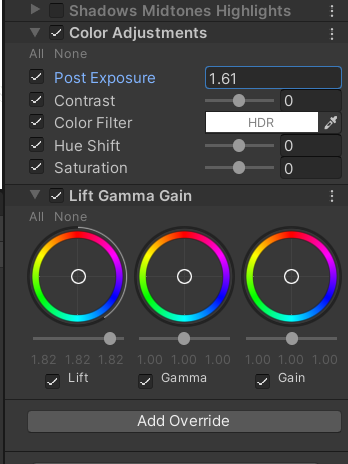 wary horizon
I want to change these attributes in code
devout quarry
I know you can't make your own PP effects with volume system so maybe you can't change them either
regal stag
I think all the effects are under UnityEngine.Rendering.Universal
UnityEngine.PostProcessing would be for PPv2 if I'm not mistaken
wary horizon
Doesnt look like it
i cant access anything
Might of found it,.
Now i need to filter for only the global tag
There... is no colour adjustements settings???
@devout quarry There is no lift gamma gain property either.. :/
But why
regal stag
@wary horizon Are you using the URP-integrated "Volume" system for post processing, or relying on PPv2 / Post Processing package?
regal stag
Then yeah, the PostProcessingProfile isn't what you need. That's probably related to PPv2.
For URP volumes, should be able to do something like this :
using UnityEngine.Rendering;
using UnityEngine.Rendering.Universal;

public class NewBehaviourScript : MonoBehaviour {

    public VolumeProfile profile;

    private void Start() {

        profile.TryGet(out ColorAdjustments colorAdjustments);

        colorAdjustments.contrast.Override(50);
    }
}
Thats not a class within Rendering.Universal
regal stag
You need both of these
using UnityEngine.Rendering;
using UnityEngine.Rendering.Universal;
VolumeProfile being under UnityEngine.Rendering. It's the same as the profile used in the volume component
wary horizon
what is a tryGet
Can i use a normal GetComponent
Since im filtering through a tag, so it will always find it
regal stag
The TryGet obtains one of the effects listed on the volume profile.
You can use GetComponent to get the Volume if you want, then use volume.profile to get the VolumeProfile. Or just have a global VolumeProfile like in my example above and set it in the inspector.
wary horizon
Your method returns a bool, which cant have property access :/
Is it possible we could take this to dm's?
regal stag
I'd rather keep it here, we could move to #💥┃post-processing though since it's not entirely shader related anymore.
wary horizon
Sure
 golden glade
Do you know a proper way to get a "world space position texture"? I have tried reconstructing it with the depth buffer but when i try to use it i get weird results. My test is to try to make a fake light by just doing simple attenuation of a value based on the distance to that position and i get some super weird results specially in negative coordinates. Thanks in advance
https://hatebin.com/kjrujjtylg this is the shader i use to get the world position btw
I then input that texture to a compute shader (i want to use that for my final result, for using compute buffers as i want some data to interact with it) and try to do a simple light with a distance() function
weirdly enough my world pos seems to be alright
but when i try to do the simple light test i get this
this is my compute shader code:
;-;
what am i doing wrong?
oh i think i found my mistake
yep
the position for some reason is clamped to 0 and 1
golden glade
i cant find a way to do proper infinite values for it
 midnight dagger
should i use SetFloat for these range stuff?
regal stag
@midnight dagger Yea, I believe so
midnight dagger
also should i change the _TransparentSortPriority in the script or can i leave it default?
golden glade
;-;
 flint lily
can someone please help with this: https://answers.unity.com/questions/1790943/shader-acting-not-as-expected-i-have-no-clue-why.html

Unity is the ultimate game development platform. Use Unity to build high-quality 3D and 2D games, deploy them across mobile, desktop, VR/AR, consoles or the Web, and connect with loyal and enthusiastic players and customers.
 zealous mural
Complete noob at at shaders. Could someone point me to a reference to changing a models entire color? Would rather not have to change each material color if possible.
 thick fulcrum
@winged valve you can recreate completely the lit characteristics and functionality in the unlit shader graph, but there's not many shortcuts and you will have to delve into unities shaders if you want a more precise match. Not an easy undertaking imo
 toxic flume
What is the difference?
unity mobile unlit supports lightmap vs unlit/texture? unity
 trail dragon
hello, guys. I'm stuck with FullScreenPass shader. How do i sample a texture in this shader?
i've tried
float2 uv = varyings.positionCS.xy;
float4 color= SAMPLE_TEXTURE2D_X_LOD(_Texture, s_linear_clamp_sampler, uv, 0);
but only got an error "float4 object does not have methods"
is there even some api documentation for SAMPLE_TEXTURE2D_X_LOD and another methods?
meager pelican
@flint lily IDK, interesting. I'd use RenderDoc to see what's going on during each draw call.
You could for debugging purposes have the top-pass return something like solid Red, and the default-pass return something like blue. Or maybe return them at 50% opacity.
Also RenderType isn't set on the 2nd pass, and IDK if that even matters. Nor dos it have a pass section (should be default).
No variables. Hard coded return result.
 hot bluff
Does anyone here know if Shader Graph with Visual Effect target should work on URP? (https://forum.unity.com/threads/simple-shader-graph-does-not-generate-a-visual-effect-shader.1011460/)
golden glade
btw i already fixed my issue
 proud axle
quick question for you smart people
i got tmpro text in a urp scene, dof postfx
that shit aint right
I dont pretend to know how zwriting depth stuff works
but the only fix I found online was on the forums and it doesnt compile
is there a checkbox or a layer order or some method I can use to make text on an ignored layer or something?
regal stag
@hot bluff I think there just isn't a preview for it, I noticed this in older versions too. I think the Visual Effect Graph works differently from regular shaders. Like, you can't create materials from one, it has to be used in the particle output blocks in VFX Graph. That might also be why it doesn't really generate code for it, I've never bothered checking that. Have you checked whether the shader still works in the VFX Graph?
regal stag
You might be able to draw the text with an overlay camera instead of the main one
proud axle
is there a certain way to control render order?
I can tell its because the depth info there says "hey shits far away lets blur it"
 vocal narwhal
You could change the text to a non-transparent material so it renders to depth
proud axle
I mean most of the tmp shaders are transparent I think
vocal narwhal
or make it render after other transparent objects and also render it to depth
proud axle
vocal narwhal
or make it render after other transparent objects and also render it to depth
that sounds better to me but Im inexperienced
I tried changing the queue order but I was just using a number slider idk how anything correlates
vocal narwhal
I'm not sure how easy any of it is with TMP materials tbh
proud axle
😦
guess I can disable dof if the camera angle is low
kinda like the blurry horizon tho
😢
maybe a render feature?
idk how those work yet either but im using URP
vocal narwhal
if you do that you can render it after the post effects, but then it won't contribute to any of that and any pretty post stuff will probably need to be done manually
proud axle
well maybe a 2nd bloom pass but I think besides that it would be fine
hmm
maybe just drawing it twice would work
blurry behind and then a sharper text on top
vocal narwhal
The "Weapon Rendering in URP " tutorial pinned to #archived-hdrp is a pretty good first look at the render feature thing that gives you a pretty good understanding of how to use the system
even though it's not related in output, it's helpful to understand how to use it via that tute
hot bluff
regal stag
<@!496391391480381440> I think there just isn't a preview for it, I noticed this...
While the shader renders nothing, you just gave me the idea to check the generated shader in the VFX graph, where the output is much more useful than in the Shader Graph – under #if VFX_SHADERGRAPH I can see the shader from the Shader Graph. Unsure why nothing is rendered, though – I'll have to simplify the shader to a constant albedo color and if that works on a quad output iterate from there to the actual shader I want. Thanks @regal stag!
golden glade
proud axle
the thing is that DOF affects the final image and the text doesnt write depth so it takes the depth from the thing that is behind it
help pls lol
this is how i create the buffer
and this is the struct
proud axle
golden glade
the thing is that DOF affects the final image and the text doesnt write depth so...
man I wish there was a quick fix like adding a tag to a shader or something
golden glade
yea
tmp uses some sort of raymarching afaik so it would be a bit harder to do it
with regular text it should be easier
 sterile sigil
Is there a way to use a shader as a calculation tool? For example if given a Vector3 property, could I then read a Color from that shader to be used elsewhere in scripts?
golden glade
sterile sigil
Is there a way to use a shader as a calculation tool? For example if given a Vec...
wdym? converting a vector to a color?
sterile sigil
that's just an example, I'm actually working on a color picker
right now I've resorted to using an image texture and sampling from that texture, but I'd prefer to use the color wheel I made in shader graph
the idea being that on click, I tell the shader the angle of the color wheel
and then from the shader I can somehow read the correct color, based on position on a gradient
I think that shaders simply don't work this way? and the image texture is the way to go? but I wanted to ask
golden glade
idk
thick fulcrum
@sterile sigil compute shaders are for pushing math heavy tasks to the gpu, but not something you would use for say a color picker 😉
what you can do is save your color wheel as a texture and sample it via coordinates in c# and get the color directly
sterile sigil
@thick fulcrum sounds good, that's the current approach, I've just been enamored with shader graph recently and want to use it for everything lol
thanks
 fast bolt
Hey guys! sorry to interrupt!
I'm unsure how broad this question is, but I wanted ask away anyways!
I'm working with a style that requires a toon shader + outlines; but I find that Unity's method of making automatic outlines with shaders like Unity Chan Shader 2 (UTS2) and the like don't "read" the geometry as nicely as I wanted. I know of a work around, which is doing the inverted hull method "manually", meaning, on the mesh itself, and not through a shader.
My question is; how much more performance intensive is doing it the "manual" way (modelled in) over the shader way?
regal stag
@sterile sigil Assuming this a circular colour picker. If you don't want to go for a texture approach, you could also generate the colours using the angle with conversions between HSV and RGB. There's a Colorspace Conversion node in shader graph, and for C# there's Color.HSVToRGB. Set the hue based on the angle / 360deg.
midnight dagger
is this enough for adding alpha to a HDRP/Lit material?
texture is a transparent png
golden glade
https://gyazo.com/f3b47980f37040bf9740e01c9b7a32e3 i managed to fix everything and voilá, lighting done completely in compute
regal stag
@fast bolt I imagine the performance would be similar since both is still rendering the same amount of geometry & shaders/materials. It would double the amount of vertices in the model though, so I'd assume double the memory usage. Not really an expert on this though.
Since the inverted-hull shader technique typically uses normals for pushing the vertices out, you could also provide your own vectors (e.g. in vertex colours an additional uv channel) to adjust how the result looks, (without changing the normals as that would also affect the shading). That might be even more difficult to manage though.
fast bolt
Hm, thank you @regal stag !, sadly, I'm not a tech artist so I have no idea how I'd even go about doing that shader-wise; if there's any shader in the asset store that does that or something similar however, I'd be more than willing to look into it!~
hot bluff
hot bluff
While the shader renders nothing, you just gave me the idea to check the generat...
When I use the Universal target, on a quad I see the animated smoke cloud. When I use the shader (with VFX target only) on particles in the visual effect quad output (see particles on the right), the quads are a flat color. I expected the smoke cloud to be rendered on the quad particles. Is the UV mapping different for VFX quads?
hot bluff
Ah, apparently I cannot make use of default inputs in a VFX shader. I need to expose properties and explicitly pass in values into the shader in the VFX graph.
 honest frost
Hi there, I'm trying to experiment with Shaders for my project and am trying to learn how to make a comic-style half-tone effect (I'm new to Shader Graph). I started following this tutorial finished it, however there's one step in here that mystifies me and has resulted in my shader not working as it should.
https://www.youtube.com/watch?v=YrATLRhOExk
At around 1:49, he suddenly makes a "Main Light" node in the shader. This seems to be a sub-graph or script of some kind, but the reference he points to is based on LWRP, which is depreciated, and the author of the script he's referencing altered his directories all over the place to update them (they're still out of date now) so it's confusing. I'm using URP so that doesn't work. Could anyone advise me on what to do here? It's the only step I'm missing.

What do you think about the Halftone Effect? Did you know that?
In this video, we create on Unity the shader that applies the Kirby's halftone effect to 3D models.
Model: https://sketchfab.com/3d-models/fan-model-kirby-159e9a80a0e04ab49ea227fa04ca775d
Custom Node articles by Ciro Continisio:
https://connect.unity.com/p/adding-your-own-hlsl-cod...
regal stag
@honest frost I've got some custom lighting functions/subgraphs here : https://github.com/Cyanilux/URP_ShaderGraphCustomLighting
Probably more up-to-date if that video was based on the old LWRP / CodeFunctionNode methods instead.
honest frost
regal stag
<@!106164238090801152> I've got some custom lighting functions/subgraphs here : ...
Ah cool. Thank you. Unfortunately, shader graph is new to me so I may need a bit of specific instruction on how I would impliment the code you have here.
regal stag
If you just copy the Custom Lighting folder into your project assets, the sub graphs listed in the readme on that page should become available in shader graph automatically.
honest frost
Alright, cool I'll give it a shot
regal stag
I think some will be listed under Custom Lighting in the create node menu, and some in Sub Graphs because I forgot to change their path. I think you'll just need the Main Light one but I haven't watched the video entirely.
Ah, might need the Main Light Shadows one too for the "Attenuation" output used in the video.
honest frost
@regal stag Thanks that seems to work. However, in the tutorial's main light does have a Worldspace Input that I can't duplicate. Does that seem to matter?
regal stag
@honest frost Check the "Main Light Shadows" sub graph too, that one will have the World pos input that you'll want to put a Position node (World space) into. I think the Shadow Atten output from that would be the same Attenuation from the one in the video.
That's assuming the Attenuation output in the video is even used
honest frost
I don't think it is. I believe the video only uses direction
regal stag
Then yeah, you don't need it, just the direction from the Main Light one will do. The Worldspace input was only for shadow calculations.
honest frost
Ah
Thanks
While I have you here, I have 2 other questions about Shaders:
- Is there a way to turn one of your Shader Graph Shaders into the default Shader objects would import with so you don't always have to change it manually
- Is there a way to map a texture that only appears on Shadows?
 finite talon
Hello, I really need help with that
I have video Input source that is feeding my App with frames, and I would like to pass the last N frames into the shader (as textures) and get the result of shader as a texture.
It should be similar to cyclic buffer of N textures when on each frame I insert the frame into it and remove the oldest one.
I have tried the following code, but it doesn't feed my shader with the Last N Frames correctly:
     public void Filter_Left(ref Texture2D source)
        {

            if (_historyPagesLeft == null)
            {


                _historyPagesLeft = new Texture2D[HISTORY_CAPACITY];
                for (int i = 0; i < HISTORY_CAPACITY; i++)
                {

                    _historyPagesLeft[i] = new Texture2D(width, height, TextureFormat.RGBA32, false);

                    filterMaterialAssetLeft.SetTexture(_historyIDs[i], _historyPagesLeft[i]);

                }
            }

            Graphics.Blit(source, dest_left, filterMaterialAssetLeft);


            var newPage = source;
            source = _historyPagesLeft[_oldestPageLeft];
            _historyPagesLeft[_oldestPageLeft] = newPage;
            filterMaterialAssetLeft.SetTexture(_historyIDs[_oldestPageLeft], newPage);
            _oldestPageLeft = (_oldestPageLeft + 1) % HISTORY_CAPACITY;
        }
@honest frost 1) I'm assuming you are referring to when importing materials with models? I'm not hugely familiar with that, but I know there's a way to override the materials there. That is still quite a manual process though. I don't think there's a way to handle that automatically. I could be wrong though as I tend to never import materials with models and just assign materials separately anyway.
- You can use the Shadow Atten output from the Main Light Shadows subgraph. That'll give you a value of 1 for lit areas and 0 for shadowed (assuming the shadow strength is 1 anyway). You can then put that attenuation into a the T input on a Lerp node, with A as the colour/texture result you want in shadow, and B as the colour/texture result you want when lit.
finite talon
Please would someone help me please 😦
I can't imagine that there is NO body on answers.unity or here can't know how to set N Last Frames into Unity!!!
low lichen
It's a very specific problem, I'm not surprised there isn't a thread on it
finite talon
Yes but no one doesn't know this ?
even on gamedev.net
answers.unity
here
very surprsied
low lichen
What's the end goal? You want to add some filter to these frames with a shader?
low lichen
And it's important to do multiple frames in one pass?
low lichen
Because in the shader you need to do some operation that requires multiple frames? Like blurring them together?
finite talon
yes
I'm doing Gaussian Blur
Exactly
@low lichen Hope you have an idea, it seems you know what I want to do Exactly
low lichen
Well, it seems you had some idea of a solution. What did you try and how it it not working?
finite talon
        public void Filter_Left(ref Texture2D source)
        {
            Graphics.Blit(source, src_left);

            if (_historyPagesLeft == null)
            {


                _historyPagesLeft = new RenderTexture[HISTORY_CAPACITY];
                for (int i = 0; i < HISTORY_CAPACITY; i++)
                {

                    _historyPagesLeft[i] = new RenderTexture(width, height, 0);
                    _historyPagesLeft[i].format = RenderTextureFormat.RFloat;
                    filterMaterialAssetLeft.SetTexture(_historyIDs[i], src_left);

                }
            }

            filterMaterialAssetLeft.SetFloat("_dataDelta", dataDelta);
            filterMaterialAssetLeft.SetFloat("_blurRadius", _blurRadius);
            filterMaterialAssetLeft.SetFloat("_stepsDelta", _stepsDelta);
            filterMaterialAssetLeft.SetFloat("_StandardDeviation", _StandardDeviation);
            // Copy your texture ref to the render texture

            Graphics.Blit(source, dest_left, filterMaterialAssetLeft);

            var newPage = src_left;
            src_left = _historyPagesLeft[_oldestPageLeft];
            _historyPagesLeft[_oldestPageLeft] = newPage;
            filterMaterialAssetLeft.SetTexture(_historyIDs[_oldestPageLeft], newPage);
            _oldestPageLeft = (_oldestPageLeft + 1) % HISTORY_CAPACITY;

        }
@low lichen Here is what I did
dest_left is the output render to texture to a canvas for debugging
I see flickering
first I copy source Texture ( camera input ) to a render to texture src_left
then if history pages (render to texture array ) are null, set new ones
then I blit source (input camera texture) to dest_left which is a canvas as I said
then I swap the src_left with new page
and set the history IDs _ Pages
I have a history of History Capacity
_historyPagesLeft render to texture array (history pages)
I guess the problem is in that line ``` Graphics.Blit(source, src_left);
because it always copy the new image to render to texture
however down var newPage = src_left, will swap new image
not the last N Images
Right
low lichen
Not really sure where to start. It might be easier to read this code if I could visualize what these "pages" are. What's the final effect you're trying to get?
finite talon
Gaussian blur over history of textures
I accumlate N textures, do Gaussian Blur over them
Pages are just Textures
Frames..
@low lichen
I have video Input source that is feeding my App with frames, and I would like to pass the last N frames into the shader (as textures) and get the result of shader as a texture.
It should be similar to cyclic buffer of N textures when on each frame I insert the frame into it and remove the oldest one.
that's what I want to do
@low lichen If you know another way , that's fine
low lichen
Does _historyPagesLeft contain copies of the frames you get from the video source unfiltered or after being filtered?
finite talon
            Graphics.Blit(source, src_left);

    if (_historyPagesLeft == null)
            {


                _historyPagesLeft = new RenderTexture[HISTORY_CAPACITY];
                for (int i = 0; i < HISTORY_CAPACITY; i++)
                {

                    _historyPagesLeft[i] = new RenderTexture(width, height, 0);
                    _historyPagesLeft[i].format = RenderTextureFormat.RFloat;
                    filterMaterialAssetLeft.SetTexture(_historyIDs[i], src_left);

                }
            }
@low lichen according to that it has the source unfiltered
it should have the source unfiltered
low lichen
Have you tried looking at the Frame Debugger? It sounds like you have a solution which should be working but for an unknown reason you're getting bad output
Frame Debugger will let you see each blit and what the inputs and outputs are from it
It's hard for me to look at this code and say exactly what the problem is with so little context
finite talon
@low lichen can you review it ?
just look line by line
I think the problem is copying source to src_left
then down swap
low lichen
Frame Debugger will tell you if it's a problem
finite talon
Only _MainTex and Last History
are set
@low lichen
why it shows just MainTex and History G
last one actually
honest frost
Trying to figure out my toon shader and am experimenting with 2 versions of the shader with PBR and Unlit Masters. My PBR Shader looks a bit too defined to get the toon look I'm looking for, but my Unlit version looks not defined enough and looks too flat. Any advice on decreasing definition on PBR and adding definition on an Unlit?
For reference: PBR vs Unlit
 spring fox
my watershader isnt liking refraction...
finite talon
why when I pass a number as a float in shader, it can't unroll the loop
  float r = 5;
                  if (abs(z[0] - z[1]) > _dataDelta) // threshold depth change
                  {
                    z[0] = 0.0;
                    float x, y, xx, yy, rr, dx, dy, w, w0;
                    // 2D spatial gauss blur of z0
                    rr = r * r;
                    w0 = 0.3780 / pow(r, 1.975);
                    z[0] = 0.0;
                    for (dx = 1.0 / xs, x = -r, p.x = 0.5 + (screenPos.x * 0.5) + (x * dx); x <= r; x++, p.x += dx) {
                        xx = x * x;
                        for (dy = 1.0 / ys, y = -r, p.y = 0.5 + (screenPos.y * 0.5) + (y * dy); y <= r; y++, p.y += dy) {
                            yy = y * y;
                            if (xx + yy <= rr)
                            {
                                w = w0 * exp((-xx - yy) / (2.0 * rr));
                                z[0] += tex2D(_MainTex, p).r * w;
                            }
                        }
                    }
for example setting r = SOME_Variables_from_Shader_Properity
it can't unroll the loop
 jolly igloo
I was wondering how I may be able to achieve an effect like in scenario two where I could get each triangle in the mesh to individually face the camera. I was going to attempt this with geometry shaders but it seems like my gpu doesn’t support that at all. Would there be an alternative way to handle this? Even if it’s not shaders I’d be willing to give it a try. Thank you.
 spare pumice
Hey guys, I was wondering if any of you have any interesting applications for the use of Culling in shaders (I am thinking about Unity atm, but it applies to everything). So my question is, when Culling and ZWriting properties are used? Do you have any examples of use in games?
 cerulean thunder
 amber saffron
spare pumice
Hey guys, I was wondering if any of you have any interesting applications for th...
amber saffron
spare pumice
Hey guys, I was wondering if any of you have any interesting applications for th...
Typically, use it for making a hull base outline 😄
cerulean thunder
why is the shader broken in the player view but not in the viewport?
amber saffron
cerulean thunder
why is the shader broken in the player view but not in the viewport?
Isn't it just an effect of the point of view ? The game view is more "grazing" than the scene view.
amber saffron
Seems like the depth texture is missing ?
Is it properly enabled on all the URP assets in the project ?
cerulean thunder
oh
let me chekc
where do I see it?
oh snap, it is off
thank you @amber saffron
cerulean thunder
        camera = copy.AddComponent<Camera>();
        camera.CopyFrom(thisCamera);
        camera.transform.SetParent(transform);
        camera.targetTexture = renderTexture;
        camera.SetReplacementShader(normalsShader, "RenderType");
        camera.depth = thisCamera.depth - 1;
Does this code work in URP?
it does not seem to be rendering using the shader
amber saffron
No, the shader replacement feature doesn't with with SRPs
 west eagle
how can I change the value in script "MaterialOverride" by code (URP)
 carmine karma
Hey, How you guys would get objects crease from the shader graph in URP ?
 strong hedge
Hi anyone know how to do functions in compute shaders
amber saffron
@west eagle If you can't do it from public API (and I don't find it in the doc), you probably have to create your own ScriptableRenderPass .
@carmine karma You might be able to do it by doing looking at the DDX DDY value when sampling the depth buffer.
But this will detect any geometry crease, without considering smoothed normals.
Maybe then DDX DDY from the "normal" node might help, but you probably need to filter out the value.
@strong hedge I don't get this question.
Like
{
  return a+b;
}
?
strong hedge
basicallly
but run it in the .compute
@amber saffron
for example i would like to make this into a bool function
[]codeblock
this is the full code
amber saffron
So ... ?
bool MyCheck( uint3 id )
{
  return id.x < 510 && id.x > 0 && id.y < 510 && id.y > 0 ;
}
Compilation error ?
strong hedge
nope
i put in something that must be true and in an if statement if it is true it made a pixel red
amber saffron
Maybe there is also racing conflicts in your approach, and you should try double buffering the texture
strong hedge
if i run the code without a function it is ok
amber saffron
as from the compute shader, you're reading and writing to different pixels of the texture, it might happen that the value of a pixel is changed while it is executing, when it should be constant to "read from" during the whole process
strong hedge
dought that
amber saffron
Well, this bool function is pretty straightforward, I don't why it would fail
amber saffron
Can you show the code that includes this function ?
strong hedge
i ill make a new computeshader gimme a minute
west eagle
@amber saffron thanks
carmine karma
@amber saffron Thank a lot !
carmine karma
Hey Shader enthousiast
Whats the problem with this ?
GetAdditionalLight(0)
//Show a light for the preview
#if SHADERGRAPH_PREVIEW
    Direction = half3(0.0, 0.0, 0);
    Color = 1;
#else
//Get main light(the other light)
    Light light = GetAdditionalLight(0);
    Direction = light.direction;
    Color = light.color;
#endif
@carmine karma URP's GetAdditionalLight takes two inputs not one. (The light index and a worldspace position). You can read the source here (might vary based on URP version) :
https://github.com/Unity-Technologies/Graphics/blob/477e14540feb10aa11b1eb86da458a4eaa84d253/com.unity.render-pipelines.universal/ShaderLibrary/Lighting.hlsl#L219
You would typically also use GetAdditionalLightsCount() and loop through it for each additional light. For example :
void AdditionalLights_float(float3 SpecColor, float Smoothness, float3 WorldPosition, float3 WorldNormal, float3 WorldView, out float3 Diffuse, out float3 Specular) {
   float3 diffuseColor = 0;
   float3 specularColor = 0;

#ifndef SHADERGRAPH_PREVIEW
   Smoothness = exp2(10 * Smoothness + 1);
   WorldNormal = normalize(WorldNormal);
   WorldView = SafeNormalize(WorldView);
   int pixelLightCount = GetAdditionalLightsCount();
   for (int i = 0; i < pixelLightCount; ++i) {
       Light light = GetAdditionalLight(i, WorldPosition);
       float3 attenuatedLightColor = light.color * (light.distanceAttenuation * light.shadowAttenuation);
       diffuseColor += LightingLambert(attenuatedLightColor, light.direction, WorldNormal);
       specularColor += LightingSpecular(attenuatedLightColor, light.direction, WorldNormal, WorldView, float4(SpecColor, 0), Smoothness);
   }
#endif

   Diffuse = diffuseColor;
   Specular = specularColor;
}
Why when I put it in the custom functions it make me a lot of errors?
what kind of data does it needs?
Like this ?
It does this..
regal stag
The function I posted needs to be used with the Custom Function's "File" mode, rather than String. The code can be put into a .hlsl file. It's because it includes the void AdditionalLights_float( ... part which defines the function and the string mode basically handles that for you. You might be able to remove the first line and have it work with the string mode, but it's a lot easier to edit code in a proper text editor rather than in-graph.
carmine karma
The problem with hlsl is that Visual studio doesn't understand it anyway..
But it does even more errors ha ha
regal stag
I mean, that body field also does not do any syntax highlighting and it's a bit cut-off on the side and awkward to edit. I think some improvements were made to it in newer versions but I still prefer file mode.
carmine karma
And do you know what TVA_ID is ?
regal stag
Not really sure what that error is about
carmine karma
It work in the end, thank you a lot!
I have another question
is there a way to smooth DDX DDY values ?
Does a color ramp node like the blender one exist ?
Is bluring a texture impossible in shader graph ?
low lichen
Blurring a texture is usually just sampling it in a couple of different nearby places and averaging the result. Why would that be impossible in Shader Graph?
devout quarry
@carmine karma best to do it in a custom function node
carmine karma
low lichen
Blurring a texture is usually just sampling it in a couple of different nearby p...
How would you do it ?
carmine karma
devout quarry
<@!369916816216162306> best to do it in a custom function node
You mean by codding the function?
How to average the result afterward ?
low lichen
You sample a few neighbors around the current pixel as well as the current pixel, add them all together, then divide by how many pixels you sampled. That will give you an average. But that's not a very good blur.
You're better off looking up existing blur algorithms for shaders
carmine karma
I see, but I'm can you adapt the algoritms to the hlsl format ?
devout quarry
yes
carmine karma
Someone had done this before ?
low lichen
I've translated these before
https://github.com/Jam3/glsl-fast-gaussian-blur

GitHub
optimized single-pass blur shaders for GLSL. Contribute to Jam3/glsl-fast-gaussian-blur development by creating an account on GitHub.
devout quarry
yes people have written blur shaders in hlsl before
here's a two pass HLSL box blur shader you could look at for inspiration
probably there exist some tutorials online as well if you search 'unity shadergraph blur'
low lichen
Gaussian blurs are often done in two passes to significantly reduce the amount of samples, which is not easily done in Shader Graph
carmine karma
I see
carmine karma
devout quarry
probably there exist some tutorials online as well if you search 'unity shadergr...
I search for hours.. I find a lot of Camera blur for UI and whatnot
but not a thing for textures in shadergraph
devout quarry
it should be the same I think, for full screen effect you use the screen position node, for local effect you use UV input node
carmine karma
low lichen
A camera blur is probably going to be doing it in multiple passes. That's not possible in a one pass Shader Graph.
carmine karma
Not exactly because here for exemple you can't replace the screenposition to a texture
devout quarry
carmine karma
Not exactly because here for exemple you can't replace the screenposition to a t...
remove the screen position and instead of inputting to scene color, input to a sample tex node
carmine karma
What should I put instead of screen position ?
devout quarry
if you remove it, the default input will be used which is UV
low lichen
@carmine karma What do you need this for? Do you see any possibility of premaking the blurry textures and just lerping between them in the shader? It will be a lot cheaper to run, but not as dynamic.
carmine karma
I'm building a pseudo AO system
It's almost working but the result is way to sharp
low lichen
This "texture" is something you're generating in the shader, and you want to blur it in the same shader?
carmine karma
It's a output in the end, doesn't it ?
It doesn't work that way ?
I didn't find a way to get DDX node to be smooth..
low lichen
This is not a trivial problem. And I think you'll find the blur is going to be very slow, especially if however you're calculating that sharp AO is already expensive.
carmine karma
And it didn't work, I could't even input it as a socket
midnight dagger
objects are reflecting skybox by default, how can i make them reflect a texture instead?(HDRP)
winged valve
Dunno about the HDRP aspect, but in URP, I just used Sample Cubemap in Shadergraph
midnight dagger
this is the texture i want it to reflect
start the video from 1:10 https://www.youtube.com/watch?v=KEPhP3_eXjk

If you support the channel give the video a thumbs up!
I kept the Z31's engine build stage 1 for this race to see how the RX7 would do against it. I don't believe the advertised HP it shows for the FD3S one bit lol
Disclaimer:Information In This Video Is Used For Entertainment Only.
Merch:https://teespring.com/stores/hiboost-racing
Join th...
i want to make it like this, i got these textures from that game
 knotty juniper
@midnight dagger why not use a reflection probe with a custom texture?
or use a master shader node that is not PBR
 honest bison
Does anyone know how to get instancing to work with box projection reflection probes?
midnight dagger
knotty juniper
<@!666324788846919709> why not use a reflection probe with a custom texture?
can i do these with a custom shader instead of these reflection probe stuff? im making these as a mod for a unity game and its not that easy to do these stuff, using a custom shader would be easier.
knotty juniper
sure custom shader would work fine
what renderpiline does it us(URP ,HDRP or Build in)
midnight dagger
knotty juniper
sure custom shader would work fine
what renderpiline does it us(URP ,HDRP or Bui...
HDRP, do you know a custom shader that can do what i want?
knotty juniper
you can use the shader gaph and do a unlit shader that does your relections
midnight dagger
ok thanks
midnight dagger
thank you soo much!
 brittle owl
maybe try adding it as a render feature, and change the render order? idk
wary horizon
Meh, ill figure it out
wary horizon
Plz
I want my sun to not be obscured by fog, its using a Lit shader graph material
i want it to be like this, at all times
wary horizon
if you know, please @ me and i'll check when i wake up.
 blazing zephyr
is it possible to make a shader that lits all faces of a mesh equally? it would be like unlit shader, but light actually lits it, changing the illumination of every face equally no matter where the light is coming from... not sure if explaining it correctly lol
grand jolt
your better off adding a toggle and just routing your RGBA through the emission channel instead, that way itll "glow" (give the illusion of illumination)
@blazing zephyr
blazing zephyr
@grand jolt But with emission (or unlit), even when there is no light at all, the object is 100% visible
If there is no light it shouldnt be visible
grand jolt
ah i see
low lichen
@blazing zephyr You could change the all the normals to always face the sun
low lichen
You ask that as if it's a trivial thing to do
low lichen
You can't really draw anything in the shader outside the mesh
So if you wanted to add shadows that are around an object, it would have to be drawn somewhere other than that object's shader.
carmine karma
Is there a way maybe to trick it to make it think it cast shadow like a normal pbr node ?
low lichen
Do you consider drop shadow to be the same as regular shadows?
carmine karma
What do you mean ?
In a way I mean that I want the object to send the shadow information to other game objects
From my Unlit graph base
low lichen
You said "drop shadow" instead of just "shadow". But I'm assuming now you mean just regular shadows.
carmine karma
Oh I mean the shadow that the object cast to another
Like what appear to be missing in my picture, I'm sorry if I didnt expressed it well
The object have regular shadow, doesn't it ?
Oh... I start to understand
low lichen
The common term for what you want would be "realtime shadows" or just "shadows"
carmine karma
When changed the ground to a basic lit shadow
Yeah I understand.. so you say that my Unlit graph get light, but not shadows ?
low lichen
You are manually calculating light, right?
carmine karma
I'm getting the Unlit graph light from a custom function
low lichen
You'll have to manually calculate shadow as well
I don't know what's required to receive shadows in an unlit URP shader graph. @devout quarry would know, I think.
Probably some keywords and some functions in Shadows.hlsl or something that you need to call
 fathom plinth
@regal stag also has good stuff for custom lighting shader graph
@carmine karma take a look at these subgraphs and hlsl files https://github.com/Cyanilux/URP_ShaderGraphCustomLighting

GitHub
Some custom lighting functions/sub-graphs for Shader Graph, Universal Render Pipeline - Cyanilux/URP_ShaderGraphCustomLighting
carmine karma
Thank you!
It helps a lot!
What is Atten?
like ShadowAtten
I saw that keyword a lot
low lichen
Attenuation, basically how much shadow is there. 0 would be none, 1 would be full shadow.
carmine karma
thank you
carmine karma
Hey, what would make the shadow to look like that ?
    #ifdef SHADERGRAPH_PREVIEW
        ShadowAtten = 1;
    #else
        float4 shadowCoord = TransformWorldToShadowCoord(WorldPos);

        ShadowSamplingData shadowSamplingData = GetMainLightShadowSamplingData();
        half4 shadowParams = GetMainLightShadowParams();
        ShadowAtten = SampleShadowmap(TEXTURE2D_ARGS(_MainLightShadowmapTexture, sampler_MainLightShadowmapTexture),
                            shadowCoord, shadowSamplingData, shadowParams, false);
    #endif
It wasn't linked to the player quality in unity
Is there a way to have a better shadow quality in the graph itself ?
Maybe in the GetMainShadowParams?
the thing is you can't use auto correct to know what to do
Or at least smooth shadows ?
carmine karma
Simpler question :
Is it possible to get the lightest color from the input, and put every other color to black ?
meager pelican
wary horizon
I want my sun to not be obscured by fog, its using a Lit shader graph material
Depends on how you do the fog. If you do fog as a post-process, you'll have to draw the sun AFTER applying the fog. You could even use a 2nd camera or render pass (feature?) to do that. If you calc fog as you draw, don't calc it for the sun. So it's all some form of customization either way. I'd have to play with URP/HDRP fog and know your settings to find out but this should get you thinking.
thick fulcrum
@carmine karma you need to add a keyword to your graph, check the example in Cyan's I think it's soft shadows to get rid of the stepped look.
amber saffron
carmine karma
Is there some hints for normal mapping ?
This a pretty vague question.
blazing zephyr
low lichen
<@613513484742819842> You could change the all the normals to always face the su...
Ohh ok im gonna try that, thanks!
 cunning mortar
Hi. I am working on an android game. I used VFX graph to make a sandstorm. And it's working fine in the editor. But when I build it, It gets stuck in the first frame of the game and goes completely black after a minute or so. I cloned a VFX in URP test project and built it to see if my device can support VFX shaders and it works fine.
spare pumice
amber saffron
Typically, use it for making a hull base outline 😄
Hi Remy, thank you for your reply. I have checked it and I may try to implement it just for fun. There are so many good examples out there.
wary horizon
meager pelican
Depends on how you do the fog. If you do fog as a post-process, you'll have to ...
The fog is the tickbox in the lighting settings. Set to linear
@meager pelican Here you go, I've tried changing the render queueueueueue on the shader material, but it has no effect (Ive tried many manny many different numbers)
I am using URP ^
meager pelican
So you're using forward rendering? The Linear fog is applied in forward rendering (like the Info box says) to each object by the lit shader. That's basically your problem here. You could maybe try an unlit shader, or you could use another camera pass with fog off.
You could also turn that fog off, and use Global Fog image effect instead, and then another camera.
You could use a custom shader graph (unlit?) with no fog in it.
Just some ideas. I haven't taken the time to try any of them, so grain of salt.
@wary horizon
twilit geyser
Anybody have an idea why the lighting gets so extreme when I zoom in on objects in HDRP? Is this normal behaviour of HDRP?
amber saffron
I'm pretty sure this is the automatic exposure that lowers the exposition level when you zoom in (as the overall image is darker due to the full black character), and as such, the more high intensity area of the image is blooming
twilit geyser
@amber saffron but would this happen ingame as well, if I walk towards the character? would be kind of weird, wouldn't it?
amber saffron
It would currently indeed.
But you can switch to auto exposure if needed.
But is it really expected to have this full uniform unlit 0,0,0 color character ???
amber saffron
brittle owl
quick question for shader graph:
how do i get rid of specular highlights for pbr graphs?
its a toon shader and i already have my own specular implementation, so i want to get rid of it
amber saffron
Usually when doing custom lighting, you'll use an unlit shader, but I guess it's to support shadows ?
You can try to set the smoothness and Ambiant Occlusion to 0
brittle owl
i tried using unlit, and i got everything working including shadows, but the one thing i couldnt do is replicating reflections so i switched to pbr
 granite blade
Help:
So I have an outline shaders that uses UVs to store things ( i didn't make it) and I get this results with objects that aren't from Unity (image: left - unity sphere working, right - sphere exported in fbx from maya)
Thoughts ?
 rustic talon
i'm trying to aply this efect when ofject intersect with water, i have the intersection done, but now i dont know ho to do this wave effect, should i draw a texture or ther is any way to do with nodes?
thick fulcrum
@rustic talon something like https://www.youtube.com/watch?v=LaHvayJphdU

This is a tutorial on creating procedural water ripples using Shader Graph without any textures (never done before ... I think)
····················································································
Checkout my assets if you want more Tuts!
LWRP Material Pack Vol 1: https://bit.ly/lwrp-materials
LWRP Material Pack Vol 2: https://...
rustic talon
@thick fulcrum not something like this... its exactly this!! thanks!
rustic talon
okay, i thing i cant do this like the video, i have this riple that grows and fades out, and i have the intersection, bun i dont have any idea how to combine them to "instantiate" the riples where object intersect with water
blazing zephyr
how can you get the light direction?
rustic talon
@blazing zephyr with a custom function

Unity Technologies Blog
N/A For the sake of viewer convenience, the content is shown below in the default language of this site. You may click one of the links to switch the site language to another available language.With the release of Unity Editor 2019.1, the Shader Graph package officially came out of preview! Now, in 2019.2, we’re bringing […]
here is explained
cunning mortar
cunning mortar
Hi. I am working on an android game. I used VFX graph to make a sandstorm. And i...
Guys please somebody help me it's for a college project and I don't have a lot of time :(
grand jolt
hi guys, so i'm following a CodeMonkey tutorial for an animated 2D outline but i've run into an interesting problem while trying to convert it to HDRP....
It turns out that the SpriteRenderer does it's OWN clipping on the sprite, so if I try stacking the sprite with an effect like this, it still clips everything out according to the alpha of the main texture sprite....
Does anyone know a way around this?
0 Threshold
Above 0 threshold
regal stag
@grand jolt I believe there is an option on the sprite to change it's mesh type from "Tight" to "Full Rect"
blazing zephyr
rustic talon
<@!613513484742819842> with a custom function
thanks but im not sure if thats what i need xD
im trying a different approach now
i created a shader with the unlit template and im wondering if its possible to get the "unity_LightColor0" in that kind of shader? because it seems to be pure black
regal stag
grand jolt
it's already full rect
I'd assume it must be something with the shader then, maybe share the graph?
grand jolt
sure, you want me to try and screenshot the sub-graph or just throw it your way and screenshot how it's hooked up outside? ( main graph is massive XD) @regal stag
actually it's basically this:
https://www.youtube.com/watch?v=FvQFhkS90nI
@10:45 you can see how he hooks it up to the master, except mine is outputting like this:

✅ Get the Project files and Utilities at https://unitycodemonkey.com/video.php?v=FvQFhkS90nI
Let's make a Outline Effect Shader to apply to our Sprites in Shader Graph!
Check out the entire Shader Graph Tutorials Playlist
https://www.youtube.com/playlist?list=PLzDRvYVwl53tpvp6CP6e-Mrl6dmxs9uhx
If you have any questions post them in the comment...
The Alpha output of this is then added to the main texture A channel with an add node, then routed to Alpha master output
also curious to note, if I turn off Alpha is Transparency in the sprites import settings the alpha for the effect works fine, but the sprite renderer obviously doesnt clip the main texture anymore so it reverses the problem XD
blazing zephyr
lol, got the shader i was looking for just by doing col.rgb *= _LightColor0 in the unlit template shader
rustic talon
im ot being able to find a good video or post that explains how to do reflection. Do you know any?
 warm otter
is there way to run a custom function in shader graph after the PBR master node?
i.e. take all the aggregate values from albedo, metallic, smoothness, etc.. and then custom process that result?
devout quarry
no(t that I know of)
rustic talon
im trying just to move the top mesh vertices but the cube breaks
i know this cube doesnt have enough geometry but just to taste its okay
blazing zephyr
why does a mesh with unlit shader dissapear when there is no light illuminating it? 🤨
exotic kraken
Is there a way to extrude normals with a shader without creating seams? I'm creating a ripple shader and it behaves well on flat surfaces but not on others.
 unique oar
How could I get the edges of a posterized texture? Like where it switches from one value to the next, right on that edge. Is there some way I could create lines there?
 frail inlet
I have two textures and one model and when attempting to apply said two textures to the model they overlap eachother
both textures when applied texture the correct part of the object but overlap where the other texture should be
the body texture overlaps where the face should be, and the face texture stretches and overlaps where the body should be
example image
body texture incorrectly scaling over the face yet being perfectly in place on the body
amber saffron
@rustic talon @exotic kraken To avoid "breaks" at normal seems, you either have to bake some smoothed normal for deformations (stored in vertex color for examples), or use a displacement method that isn't base on UV (because of UV seams) and normals (because of normal seams)
never heard of that "depth map shadows" ?
Oh, it's a Maya term ? That's basically shadowmaps, right ? If yes, this is built-in unity for every possible render pipeline
amber saffron
cunning mortar
Hi. I am working on an android game. I used VFX graph to make a sandstorm. And i...
Maybe you should post this in #✨┃vfx-and-particles or #archived-hdrp section ?
But from you explanation, it seems to be a project setting that is missing or something like that ?
Check and compare in depth the settings between the two projects.
cunning mortar
amber saffron
Maybe you should post this in <#532260045887373352> or <#517108768933281843> se...
I was rendering too many particles so the device crashed. Although the test vfx graph I used had a similar number of particles, I think they weren't as complex as my original graph (which included flipbook textures, etc.). I am trying to minimise the particle count and still get the effect I want. Thank you for the reply though.
 south garden
Hi, new member to the server here, is this the place to ask about stuff related to Shader Graph?
low lichen
@south garden Yes. You can see a description for each channel at the top if you're not sure
south garden
low lichen
<@!177815869504749569> Yes. You can see a description for each channel at the to...
Cheers, thanks for the heads up. I just have a tendency to want to be sure I'm in the right place before I go on an unrelated tangent.
Anyway, I'm having some issues with using keywords in SG. I'm using the Unity Open Project to learn about lighting and shadows, but I can't to seem to get the shadow/lighting related global keywords in one of the subgraphs to register for the shader itself. Is there something else I need to do to trigger them?
 shy grail



 granite blade
Help:
So I have an outline shader that uses UVs to store things ( i didn't make it) and I get this results with objects that are not from Unity (image: left - unity sphere working, right - sphere exported in FBX from Maya with UVs)
Thoughts ?
granite blade
granite blade
Help:
So I have an outline shader that uses UVs to store things ( i didn't make...
Update - I found a Fix in my outlines shader I have the option to tick off "Use UV1 Normals"
Now, it breaks the unity objects but fixes the Maya imported ones.
So how to fix this? I'm guessing it has to do with UVs and scale options maybe?
thick fulcrum
@granite blade possible, perhaps ensure you only have one UV map per object and the all scales and rotations etc. are correct, in blender I think you can do a reset to delta or something no idea about Maya though I imagine there is similar.
 wheat night
Hi, I have a material with a metallic texture in Unity and I was wondering what different channels (red, green, alpha) represent in terms of physics based rendering. Could somebody explain it to me, please?
 warm wasp
Hey guys, I'm a little bit lost (again). I have a glass modell that is only slightly transparent, like 90% Opacity, and it has weird sorting issues. Some polygons in the back are displayed before the ones in the front, depending on the angle of the camera. I've tried to add a Z-pre-pass to the shader, which solved the sorting issue, but now I can't see the backfaces anymore. Am I missing something? Or is there a better way to deal with this?
amber saffron
It's not easy to fix.
Basically what you want to do, is display in two passes, front face culling first, and then back face culling.
warm wasp
I already have those two passes for that.
But since I added the depth pre-pass, the first pass doesn't render anything anymore.
amber saffron
We have this toggle in HDRP/Lit shader to do "back then front rendering" to fix this issue, but haven't looked in depth how it handles it.
warm wasp
Well I'm working with the default Render Pipeline, but I just tested that with HDRP. The problem exists there too actually, the backfaces are not rendered when I enable "Transparent Depth Prepass" and "Back then front rendering".
amber saffron
I think it is expected with the depth prepass, but how is it without ?
warm wasp
the same result... hm
amber saffron
Maybe the opacity is too high to distinguish the back faces ?
warm wasp
that might be the problem yes, I don't have this sorting issues with below 30% opacity
 fair glacier
do anyone knows why material is not updating its heightmap at start of game? it requires clicking on material to update..
script is setting copy of material (provided in inspector to script) into mesh renderer and assigning runtime-generated texture to it (_HeightMap and _BaseColorMap). As seen in picture: it updates texture and base map changes colour, but displacement is not updating if not clicked into material once, then it works
amber saffron
The HDRP/Lit... shader inspector does a lot of stuff under the hood when you change values/assign maps.
In this case, it's enabling a keyword, so you will have to also do it in the script
I don't know on top of my head the exact keyword, but you can see it in the inspector when switching to debug mode inspector
Warning : if you have 0 material in your final build that actually has the keyword enabled, then the displacement code path is stripped, and the keyword will have no effect.
An easy solution is to assign a neutral 4x4 px heightmap so the keyword is there, and you can swap the texture at runtime without having to care about it.
fair glacier
oh yeah, it works, thank you for this! I didn't know that it works in such way and that there's debug inspector 😮
warm wasp
After adding Ztest the modell is displayed correctly, but is now visible through solid objects. 🤦♀️ I'm starting to think that I can't use depth writing/testing to solve this....
 grizzled prairie
Not sure if this is the right channel, but I have a feeling it's a common problem when working on shaders.. Are there any (free) apps that lets me generate a seamless/tiling voronoi texture?
amber saffron
grizzled prairie
Not sure if this is the right channel, but I have a feeling it's a common proble...
This maybe ? https://rodzilla.itch.io/material-maker

Oh, no wait, I've got a way better thing !
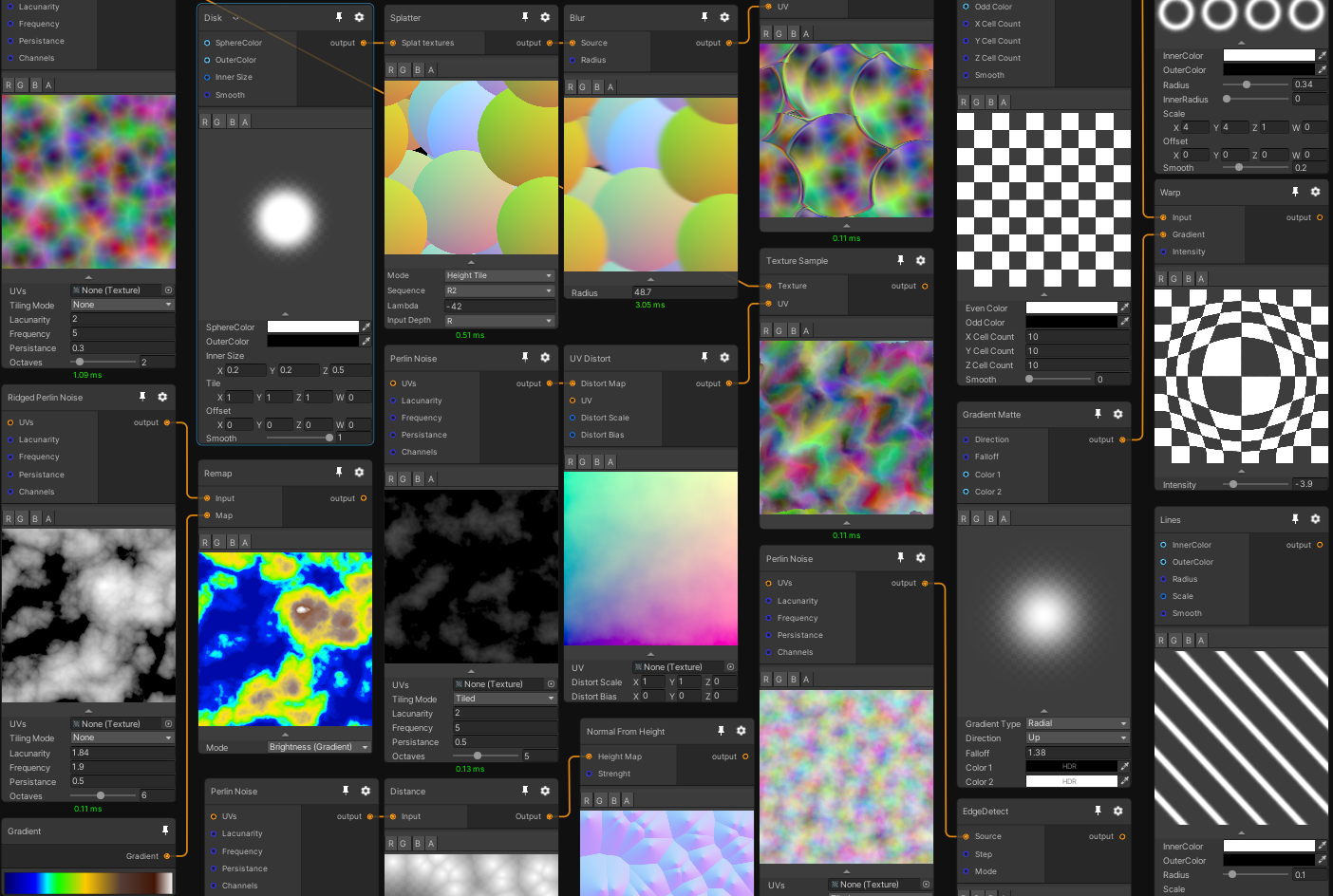
GitHub
Mixture is a powerful node-based tool crafted in unity to generate all kinds of textures in realtime - alelievr/Mixture
Why didn't I post this first of course 😄
amber saffron
idk for material maker, but I can ♾️ % confirm that you'll have a tiling voronoi in mixture
grizzled prairie
I'll take a look at that too, thanks!
amber saffron
And fully build in unity, so very fast iteration on your textures
devout quarry
wow Remy thanks for sharing, that looks incredible
amber saffron
Thank @hollow quartz 😉
granite blade
thick fulcrum
<@!244269326578876418> possible, perhaps ensure you only have one UV map per obj...
Thanks but that's it, Still trying to figure it out, something to do with scale in unity and normals .. so weird
 limpid tulip
Hey guys, not exactly sure where to ask this but I'm having quality issues with 360 images in unity, and with there being a million different import settings with bundle rebuilding & app rebuilding required to test each, I'm hoping I can get some advice here
In terms of getting maximum image quality regardless of file size on disk / memory usage for android is there a file format that will destroy my device ram to give me the best possible quality?
grizzled prairie
grizzled prairie
Not sure if this is the right channel, but I have a feeling it's a common proble...
Gonna reply to myself here 😄 https://njbrown.itch.io/texturelab Found this app which seems pretty lightweight and does what I was looking for! Seems pretty handy.
 grand jolt
Is it normal for my scene that consists of only a few cubes and a few planes to go from 3000 fps to 300 fps when I enable hdrp?
amber saffron
Probably.
HDRP has a much higher overhead than built-in pipeline
grand jolt
Yea - also about an hour after playing around with it all my assets which were the standard blue color just turned white. The shadows look a lot more natural so I'm assuming it just took that long to compile the shaders - is there a way of knowing if Unity is currently compiling shaders? I know in ue4 it says at the bottom right every time its compiling shaders
amber saffron
There should be a progress bar in the bottom right of the window
 solar sinew
I started taking a crack at converting some GLSL/CustomFunctionNode code into HLSL but then I finally found a repo for someone who already has.
https://github.com/JimmyCushnie/Noisy-Nodes
I have been looking for these custom noise nodes in HLSL for what feels like months and then I found this.

GitHub
Adds various noise generation nodes to Unity Shader Graph, including 3D noise nodes. - JimmyCushnie/Noisy-Nodes
No more trying to decipher out the internal node function API anymore - just HLSL (I am still a HLSL novice)
grand jolt
How would I go about creating / finding a shader to replicate blended textures / vertex alpha in older games? (I have almost zero shader graph experience lol) I'm trying to directly smooth out textures on mesh objects (NOT terrain). The best example I can give is using a blender node setup for vertex alpha. (Note: using URP, not HDRP or standard)
 jagged flare
Guys, does anyone know why I get this seam when I add the R value of the UV node?
Instead of the gradient like here?
 tulip light
guys anyone used 2d light and 2d Shader Graph together
becuase i cant get them working
the 2d Sprites with Shader Mat dont get effected by light
 silk sky
What shader should I select to make it applyable on UI?
regal stag
@jagged flare It's because if a node like Position is connected the previews switch to a 3D sphere version, where the UVs are no longer a simple 2D quad but wrapped around the sphere. Specifically it's wrapped around twice for the preview with the 0-1 seam facing the camera, which you can see further if output the UVs or result to the master node colour and look at the "Main Preview" window (which you can drag around to rotate). Other meshes might produce different results based on how they were UV mapped.
Newer versions are going to have a option to switch between 3D and 2D previews, which I'm very much looking forward to.
@tulip light If you are referring to URP's 2D lights they only work with the 2D Renderer and should be taken into account with the "Sprite Lit" Graph/Master node. Is that the one you are using? PBR won't work afaik.
warm wasp
So, following up my question from yesterday (since I couldn't solve this), is there another possibility to prevent polygon sorting issues besides the depth pre-pass? Just want to make sure.
amber saffron
warm wasp
So, following up my question from yesterday (since I couldn't solve this), is th...
If your overthinking it, you could compute the distance of each triangle to the camera in a compute shader, and reorder them from back to front ....
Other solution is the magical order independant transparency, but it's not implemented in unity render pipelines
warm wasp
amber saffron
If your overthinking it, you could compute the distance of each triangle to the ...
Hm, i don't really know how to do this... Still learning shaders. Is there a documentation somewhere?
amber saffron
The is a very basic documentation and exemple in the script API, but you'll find more stuff on the net.
Still more advanced that shader writing, and what I said is more and idea that could work than an actual solution I think
warm wasp
I see.
tulip light
regal stag
<@!344658435440377858> If you are referring to URP's 2D lights they only work wi...
while i was testing
i found the Shader Lit works with 2d light
while Shader Unlit dont work with 2d light
regal stag
That's expected, "Unlit" means it is not lit / illuminated, so lights won't affect it
 wanton dune
is there a way to make a 2d impact distortion effect?
rugged verge
noob question, how to get the 4th value in float4, i can do point.x, point.y, point.z, but what's the 4th one?
regal stag
@rugged verge w. You can also use .r, .g, .b and .a instead
rugged verge
Thanks!
 blissful marlin
I've got a material with 1 normal map, 1 mask map, and several variations of basecolor, which I need to select between on the same material. Is the best option to put them all in a node graph and select the base color with blend nodes, or is there a more elegant solution I'm unaware of?
thick fulcrum
@toxic flume (assuming around the frame) you could just use a gradient circle which is moved along a path of the frame, layering and clipping ensures you only see part through the frame or just a good o'l animation.
grand jolt
add a material that has an emissive color, and add a bloom post-process
 worthy matrix
Bloom post-process then, i'll look it up later. Many thanks 😀
 ancient shoal
How should I calculate this so that I get straight edges instead of the curving?
low lichen
@ancient shoal You mean you want to add black bars on each side?
amber saffron
@ancient shoal I'm a bit surprised it isn't already straight ...
But instead of the lerp route, you can do it with multiply only ?
UV.x = (UV.x - 0.5) * ( UV.y * (Distance-1) + 1)
ancient shoal
Like this?
amber saffron
Almost, invert those two nodes :
But still not straight, I'm starting to think that there is a linear/gamma issues somewhere.
I don't have a project with amplify at hand right now, but try looking for a color conversion node if they have ?
If not, you can try doing UV.y ^0.454545 before the connection to the ADD node.
ancient shoal
amber saffron
Yes 👆
You also have the other way around : https://wiki.amplify.pt/index.php?title=Unity_Products:Amplify_Shader_Editor/Linear_To_Gamma
If the first doesn't work, I'm always messing them up 😅
 gloomy tendon
is amplify being used in place of shader graph still for many?
amber saffron
I don't have data, but I think a lot of people that are used to amplify are staying on it, since it does support the RPs
gloomy tendon
shader graph lacks so many simple things - if you start a new HDRP shader it will not bring in all the standard imports for a lit material say - will Amplify start you with a fully ready graph based on one of the HDRP/URP shaders?
amber saffron
.... I'm not sure to understand.
You'd like for shadergraph to not be full blanc when it's created ?
ancient shoal
Can’t seem to fix it, I’ll try recreating it on shadergraph to see if it has the same problem
gloomy tendon
yes @amber saffron because you have a master node but none of the inputs - nothing in the blackboard etc. So you have to add all the usual inputs to mimic a normal material if you want to just then change 1 or 2 things. Unless that was an old version... it was not...
regal stag
@ancient shoal @amber saffron No idea if this is a "correct" way of handling this sort of thing, but this seems to work. Mainly the use of the Sign node to just get -1 or 1 on each side.
Ah wait no, it's cutting off the texture a bit :\
amber saffron
gloomy tendon
yes <@!532477925250039820> because you have a master node but none of the inputs...
That's .... a long debate I guess.
What's best ? Having a pre-made setup of input and nodes that you need to fully delete if it doesn't fit your need, or having a full blank board that your have to fill ....
low lichen
why not both 🤷 .gif
gloomy tendon
how about both - choose? Not even having metallic and smoothness appear in material...
I think a short debate...
amber saffron
I'm more for the blank canvas, but It's not a strong position
low lichen
I think having a premade template will help beginners, because even as high level as the master output is, there's still a learning curve of what connects where.
And for creators that just want to take HDRP/URP Lit (or something equivalent to it) and make a small modification to it.
This is also a problem with surface shaders. If someone wants to make a small modification to the Standard shader, they could make a surface shader, but there's a lot of boilerplate to get a similar shader.
gloomy tendon
exactly...
Anyway the node graph system is nice - is it in a state to use for my own editor tools yet?!
amber saffron
People are already publishing assets based on I, so I guess so ?
gloomy tendon
oh really - any to name?
amber saffron

Discover the best assets for game making. Choose from our massive catalog of 2D, 3D models, SDKs, templates, and tools to speed up your game development process.
gloomy tendon
oh yes but I meant the UI system for building other node-based graph systems, rather than anything shader specific. Off topic UI question!
amber saffron
I can't tell, I've never directly worked with :/
gloomy tendon
Can they not make the swizzle and split nodes have an xyz toggle?
amber saffron
idk, don't ask me 😅
gloomy tendon
yeah I'm going to bug them! np
ancient shoal
regal stag
<@!334807239221051393> <@!532477925250039820> No idea if this is a "correct" way...
This works for cutting of the edges but doesn’t really work with tiling.
And looked like shadergraph gave the same results. ☹
amber saffron
I must be tired, because my brain can't get why it's giving a curved result :/
ancient shoal
I'm with you there 😄 Thanks for the help though
ancient shoal
Oh, nice! It works, thank you! 👍
regal stag
Nah, mine looked like it worked until I swapped the texture out for something else and it did not look right. 😅
Think your solution makes more sense.. but I feel my brain isn't really working today either
amber saffron
I totally stumbled on that thing now and ... well, it actually make sense
 mental snow
Scrub question as I can't appear to find the answer with my google fu; are there any limitations when it comes to materials for unity UI? I tried applying a material to the Unity UI image and it just went invisible despite the color alpha being 255
None of the unlit shaders seem to work for UI
mental snow
Sadly you have to use Screen Space - Camera for shaders to work, which makes all the post processing you have enabled apply to your UI also
solar sinew
Anyone know the HLSL syntax for a section header in VS Code? I just want to organize my code a bit better and I haven't found a conclusive answer via google
I tried
//-------------------------------------------------------------
//Section Header
//-------------------------------------------------------------
but that wasn't recognized by syntax highlighting either (I do have shader syntax highlighting installed)
low lichen
Does any programming language have an officially recognized section header format?
solar sinew
Oh I'm dumb - the glsl reference (that I am converting to hlsl) is actually a markdown file (.md)
Hence using
## headers

 slender saffron
Hello everyone, I would just like to ask, where can I find a good tutorial in regards to unity URP shader? I was hoping to learn how to work on shaders since majority of the ones on the asset store doesn't provide support for mobile user. Any advice are welcome. Thank you 🙏
amber saffron
I suggest this serie of shadergraph videos from brackeys : https://www.youtube.com/watch?v=NiOGWZXBg4Y&list=PLPV2KyIb3jR6Q9Iz3PiQ3nvNowtEJ97Tu

Let's learn how to make an awesome force field with Unity Shader Graph!
● Check out Skillshare! http://skl.sh/brackeys15
● Support us on Patreon: https://www.patreon.com/brackeys
● Project Files: https://github.com/Brackeys/Force-Field
● Water Shader shown in intro: https://youtu.be/jBmBb-je4Lg
● Setting up Lightweight: https://bit.ly/2W0AY...
Might as well start with this video https://www.youtube.com/watch?v=Ar9eIn4z6XE&t=320s
● Check out Bolt: http://ludiq.io/bolt/download
The time has come... Let's explore Unity's new Shader Graph!
♥ Support Brackeys on Patreon: http://patreon.com/brackeys/
····················································································
♥ Subscribe: http://bit.ly/1kMekJV
● Website: http://brackeys.com/
● Facebook: https://f...
slender saffron
Thank you very much @amber saffron
rustic talon
i've seen u were talking about shadergraph and amplify, i supose amplify its better, but, it means that there are things i could do on it that i cant on shadergraph??
slender saffron
Hello again, first thank you for the links you guys shared. Hoping to seek some answers. Is it still possible to make a realistic asset(such as Nature) to switch their shaders into cel shading? 🤔
thick fulcrum
rustic talon
i've seen u were talking about shadergraph and amplify, i supose amplify its bet...
it's probably more a question of what you need, for most beginners shader graph is probably more than enough. My biggest hurdle has always been knowledge, but I'm getting confidant and can achieve almost everything I need.
The one item which springs to my mind is tessellation which we currently can't do in URP shader graph but I believe is available in amplify. However that is probably a bad example, what you may need is access to ztest, cull, zwrite from time to time which shader graph currently can't do. So the question to ask imo is does amplify give you easier access to those features?
maybe someone else has better examples, I too would be interested if there's some good reasons why one might want to adopt it before shader graph gains more features.
toxic flume
Can we define local variables inside shader graph? I mean compute only one time and assign the value to a variable
Also, I have some problems with shader graph and UIs (image), it does not work for Image
 violet sage
i have a problem where my shader makes the object i add it to invisible
is it a common bug or just me doing something wrong
 slate zodiac
@violet sage send the shader pls
violet sage
imageor what?
violet sage
slate zodiac
Add a position node
And change its dropdown to object mode
And bind to position of output node
slate zodiac
Just right click and search for "position"
slate zodiac
Bind it to vertex position on mostright node
regal stag
You don't need to output the position. If you leave the input blank it already does that for you.
The problem is likely that the alpha of your Color properties is set to 0, as you are outtputting it in the alpha input on the master too.
The Color defaults to (0,0,0,0) so it's very easy to miss
regal stag
If you don't care about transparent water, removing the alpha input works fine. If you want to support transparency leave it but change the alpha values of the Color properties (both in the shader blackboard so the defaults change for the main preview, but also if you've made a material you'll need to change it there too).
It's the fourth slider in the colour picker, in case that's not obvious
violet sage
Ooooh Thanks so much!
 gray elm
is it possible to pull normal data from some part of a mesh and apply it on some other part of the same mesh? Like, say I have a face mesh enclosed by a sphere, can I somehow project the normals from the sphere onto the face at runtime?
I'm guessing have the parts have overlapping UVs, bake the normals to a custom render texture and then use that data in a different shader pass? Do I understand it right? I feel like I'm saying nonsense. And I'm not sure how optimized that would be...
amber saffron
At the end, you're using the alpha value of a blend between two colors.
Do those colors actually have an alpha over 0 ? 🙂
toxic flume
Can we define local variables inside shader graph? I mean compute only one time and assign the value to a variable
Also, I have some problems with shader graph and UIs (image), it does not work for Image
amber saffron
Can we define local variables inside shader graph? I mean compute only one time and assign the value to a variable
You can compute a value in c#, and assign it to the material using the shadergraph, like with regular shaders
Also, I have some problems with shader graph and UIs (image), it does not work for Image
Define "it does not work" please.
toxic flume
@amber saffron
I have to copy shader and change some stuff like ZTest, ZWrite, Blend, Render Type, etc. to solve the issue
It does not work means I can not see my result like opaque
I want to define some local variables and use them in several places like something I have in fragment shader, intermediate variables. I have it in amplify.
toxic flume
amber saffron
> Can we define local variables inside shader graph? I mean compute only one tim...
It is not what I want
amber saffron
toxic flume
I want to define some local variables and use them in several places like someth...
No you can't do that (for the moment ... ?) in shadergraph.
You need to pull out connections from place to place.
A "hacky" way to do it would be to use custom function node, but this might get tricky.
toxic flume
Thanks @amber saffron I have seen the generated codes. The type of return value in the functions are "out".
Is it for performance, by ref (instead of using return ..) or because we can have multiple output values?
amber saffron
Because you can have multiple output values per node
toxic flume
@amber saffron Really appreciated
 coral otter
Hello ! I'm in need of a guru to understand my problem. I'm using shadergraph, with the unlit shader master node. And i project on my plane the view of a camera. My problem is that the plane is darker than the reality, probably because my unlit shader seem to still receive some light.
On the standard pipeline I used a custom shader which worked just fine, because i didn't used any light.
Is there a way to remove the lightning from my unlit shader in HDRP ? Or to use a shader without lightning ?
I only need to put a render texture on something really unlit
 night tusk
Hey, can I somehow access the data in a VertexAttributeDescriptor inside a shader? I need to give a byte-value, the index, to each vertex (to reference a color lookup table), but I'm not sure how I could access that index in a shader.
Also I'm really new to shaders, so should I do that in a surface shader or a vertex/fragment shader?
amber saffron
coral otter
Hello ! I'm in need of a guru to understand my problem. I'm using shadergraph, w...
The issue you have is "double exposure"
The texture you're applying in the shader has been exposed when captured by the camera, it is then displayed on the quad, and re-exposed for the render camera.
I suggest that you disable the exposure (and probably also the post processes ?) in the custom frame settings of the camera you're using to capture the image.
grand jolt
Why are my is my whole particle material white if im using texture with alpha?
coral otter
@amber saffron thank you very much ! So it finally was unrelated to the shaders and you still helped me, I really appreciate ! It solved the issue ! 🥳
devout quarry
@open cloud you mean a toggle? or the pixel snap functionality
 open cloud
the pixel snap functionality please
low lichen
@night tusk You define which attribute the data is with the VertexAttribute enum. That maps to the semantic you use in the shader. VertexAttribute.Position maps to POSITION, VertexAttribute.Normal to NORMAL, etc...
 wintry nest
Hello... I followed the Brackeys tutes and some others to start learning Shader and VFX Graphs... but I noticed I am having a weird issue, and I am not sure how to find answers in solving it. I am using 2020.1.16 - URP and making things for VR, testing with a Rift S, and on some shader graph made fx I see normal in my left eye, but a strange mask shadow of world objects in the effect in my right eye. It is best seen with a screen shot...
any clue as to what I may have setup wrong, or things that may cause this?
I now solved WHAT was causing this, just not the WHY. But it seems to be related to another Camera I had for making a Render Texture, that is giving me issues as well (camera and texture work, but camera wont use the set FOV). Disabled that dang camera, and this issue does not happen.
low lichen
Frame Debugger is helpful to understand issues like these
solar sinew
does Unity have any built in hlsl math.utils? or are there some on github anyone would recommend?
looks like it's intended for the Burst compiler
 fervent flare
Can anyone help me out here? I'm wondering why my flipbook node is being so weird and seemingly random
solar sinew
what's the issue?
regal stag
That's really weird
solar sinew
isn't it just 9 slicing the UV
regal stag
It's using the 4 instead of the 7 on tile 6
devout quarry
@solar sinew are you on an older SG version?
solar sinew
devout quarry
<@!347435811223896064> are you on an older SG version?
it's @fervent flare but I'm not sure what he is using
devout quarry
oh sorry, my bad
solar sinew
haha it's all good
devout quarry
because there was a PR on graphics repo on july 21
it's not very detailed but mentions a 'flipbook fix that affects the node in a big way', you never know
solar sinew
My only guess is since the bottom left corner is where the UV starts moving towards black - there is some bug with texture mapping related to reading value?
I have no idea
regal stag
Yeah, I'd assume its a bug with the node. Can't seem to replicate it in URP 8.2.0 so it was probably fixed?
devout quarry
yeah the PR doesn't seem to be linked to any SG version and I can't find anything in changelogs related to flip book so no idea
toxic flume

I want some guide and suggestion to implement this effect "outside zone" exists in pubg and call of duty.
Is it a cylinder or sphere model and some effects on it?
In the intersection we can see a border line. For glow border, we can use stencil or projector, right?
fervent flare
@devout quarry @solar sinew @regal stag Thanks guys! I'll see if updating SG fixes this.
Well it's up to date so I guess it's just Unity being Unity. God I love Unity. Thanks nonetheless!
regal stag
You might need to update Unity version as well to get newer versions of URP in the package manager.
 arctic oak
Are stylized texture only being made outside of Unity such as Blender? Or is it via shadergraph?
gray elm
gray elm
is it possible to pull normal data from some part of a mesh and apply it on some...
anyone?
solar sinew
arctic oak
Are stylized texture only being made outside of Unity such as Blender? Or is it ...
If you're asking what other applications are used for making stylized textures, there are a lot. But Substance Designer and Substance Painter are most definitely two of them
thick fulcrum
@gray elm 🤔 sounds like a screen space projected decal type of effect, if your in a deffered renderer you will gave access to the gbuffer which stores detailed normals to help with reconstruction onto the projected surface. While in forward renderer it's much harder to get the same, which means using mesh normals which don't have the same level of information and can result in far less detailed projections.
You can project any type of texture to the surface, normals, color, etc. look them up there is plenty of info on the net about the technique
However these are two seperate objects and materials, so not sure if this matches completely with your query
@arctic oak you could always try out this project for making textures https://github.com/alelievr/Mixture
GitHub
Mixture is a powerful node-based tool crafted in unity to generate all kinds of textures in realtime - alelievr/Mixture
gray elm
thick fulcrum
<@!175548178437767168> 🤔 sounds like a screen space projected decal type of eff...
Thanks! I'll look more into it then.
gray elm
For some reason I wrote off decals as something to use in level design but thinking about it, it does make sense. This is giving me a lot of ideas and I'm sure one of them will work out. Thanks again.
thick fulcrum
@gray elm for hard surfaces it's good, but if you have cloth for example you will need a different decal type such as mesh which needs to be made to anchor at certain points to the surface and deform with it. so depends on usage case etc. mileage may vary
 restive hare
Hey there everyone, I am an absolute beginner with unity shaders and i have only used shader graph and wanted to learn how to code shaders instead. Do you guys have any tutorial recommendations?
I wanted to create a LIS like outline shader and that was the main reason i wanted to learn them in the first place. What sort of approach should i take while making this? (Do tag me when you reply i have most of the servers muted up )
https://user-images.githubusercontent.com/16706911/51456336-84970100-1d62-11e9-97cd-c21dab55d4d1.gif
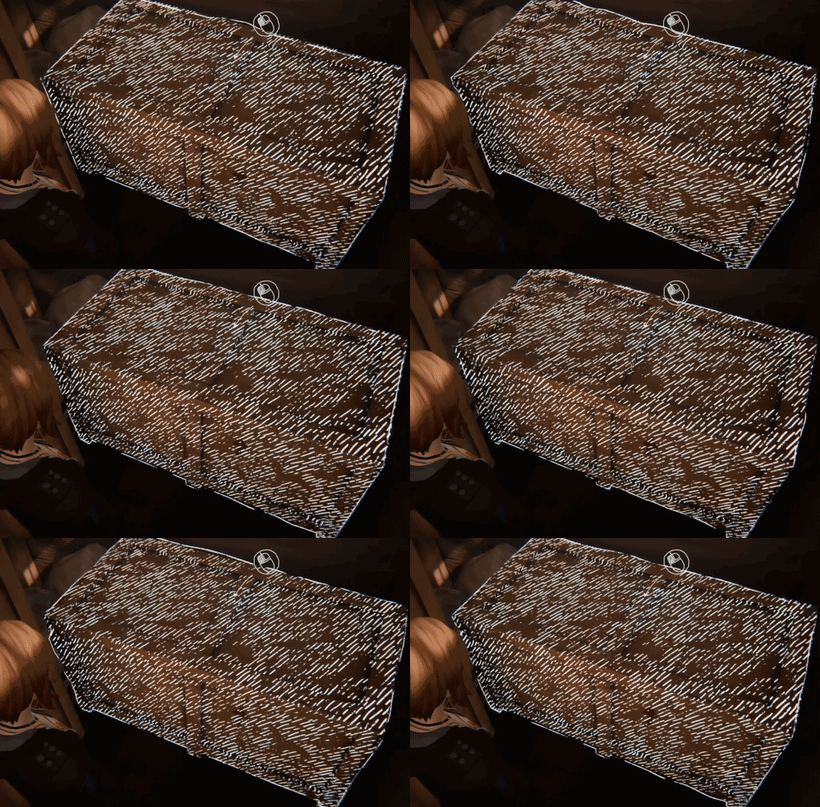 coral otter
Hello there, so I am trying to convert a HDRP shadergraph shader used for a portal to allow an use with a VR headset. I opened a thread here : https://forum.unity.com/threads/trying-to-get-an-hdrp-portal-to-work-on-vr.1017616/ if someone believe he can help anyhow ! ❤️

Unity Forum
Hello there !
So the main goal is to have a working HDRP VR portal (And potentially URP later), since I havn't found any on the asset store nor on the...
fair glacier
hi, is there an easy way of applying heightmap to vertex position to achieve vertex displacement in shader graph? (urp)
I have texture2d and some nodes to manipulate radius of cylinder manually. but radius of cyllinder should displace according to heightmap
amber saffron
fair glacier
hi, is there an easy way of applying heightmap to vertex position to achieve ver...
Sample the heightmap using the sample tex2DLOD node
 modest pike
guys anyone know how to create a water shader similar to Raft or Subnautica water shader?
grand jolt
anyone have anygood recourses for learning shadergrapth...
 grand jackal
Hey,
I have a few models with multiple materials and I'd like to have a big atlas texture instead of all textures seperately.
Anyone has the idea of creating an atlas textures and using it with working UVs?
Preferable doing it automatically, since there are just too many to do it manually.
solar sinew
grand jolt
anyone have anygood recourses for learning shadergrapth...
there are some suggestions following that message that are great!
solar sinew
restive hare
I wanted to create a LIS like outline shader and that was the main reason i want...
Check out Daniel Illet's video/article on replicating Pokemon Mystery Dungeon's Drawing Effect. It has many of the same effects as the Life is Strange outline
https://danielilett.com/2020-10-09-tut5-11-urp-mystery-dungeon/

Daniel Ilett: Games | Shaders | Tutorials
Looking sketchy
solar sinew
thick fulcrum
<@!473044971830771743> you could always try out this project for making textures...
wow this looks amazing!
Does anyone know of a way to create a new section dropdown to organize subgraphs?
It would be nice to organize imported subgraphs into their own dropdown and keep my own under the "Sub graphs" dropdown
regal stag
@solar sinew You can change where they show in the dropdown, it's the grey text in the blackboard under the main name of the graph. It doesn't look like it's editable, but it is. You would have to go through and edit it on all the imported graphs though.
solar sinew
Oh wow
regal stag
Yeah...
solar sinew
I'm happy the functionality is built in but I had no idea it would be hidden like that
regal stag
Yeah, I wish it was more obvious that it is an editable field (probably should've mentioned that in the recent survey they did, but I forgot about it).
It's not even a new feature. That has been editable for ages unless I'm mistaken.
solar sinew
Could I write it like a path - Sub graphs/New Dropdown - to create a sub section?
regal stag
Yeah, pretty sure you can do that
solar sinew
ooo
 fair sleet
I want to interpolate 2 normals in shader graph. Should I use Lerp or some other node setup?
toxic flume
#archived-shaders message
Are the lines projection or something like stencil intersection?
To show lightning , what is your opinion?
toxic flume
fair sleet
I want to interpolate 2 normals in shader graph. Should I use Lerp or some other...
If you want to interpolate between two normal vectors, lerp works, also normalize it after lerp
 worldly steppe
Hi everyone, I'm placing a 2D sprite in a 3D environment & how can I make an unlit sprite material shader graph that is affected by the fog around it when it's seen from a distance?
 cinder chasm
Anyone know whether you can get the current UV of the particle in the VFX graph?
arctic oak
@solar sinew thanks alot.
solar sinew
@regal stag I've got some work-in-progress clouds based on the shader you shared a little while back 🙂
toxic flume
worldly steppe
Hi everyone, I'm placing a 2D sprite in a 3D environment & how can I make an unl...
Probably you can not do that using shader graph. You can copy shader code (right click on master node and then copy, create new shader script and paste there and finally change shader code, add fog..)
 stone night
Hey everyone :)
I am working on some UI in my game, and I wanted to look into a blur effect for behind my UI. I don't need it to work with layered UI panels, just something for the furthest back UI element so whatever is happening behind the UI gets blurred.
I am using URP, and from what I understand something called a Grab Pass is not supported for URP which a lot of blur shaders used. So I haven't been able to find anything that works.
Any recommendations for UI blur shaders (maybe tinted?) or tips on how I would go about creating one? Thanks in advance 🙂
amber saffron
stone night
Hey everyone :)
I am working on some UI in my game, and I wanted to look into a ...
URP in shadergraph has a "scene color" node that is similar to the grab pass usage.
stone night
@amber saffron Cool, thanks!
stone night
Hello again XD
I got a basic blur effect working, and everything is fine in the editor, but when I press play it seems to disappear when applied to UI elements, and turn to black for normal cubes, when the shader is recompiled.
Any ideas? Here's the shader graph:
amber saffron
Maybe something related to the pipeline settings, missing the color buffer settings ?
restive hare
solar sinew
Check out Daniel Illet's video/article on replicating Pokemon Mystery Dungeon's ...
thanks a lot, i just checked it. Going to create it and then tweak it to get LIS like results.
 coarse hatch
Hey all, i thought that this free event may be interesting for some of you: https://www.eventbrite.com/e/behind-the-scenes-programming-shaders-and-3d-interactions-tickets-130452863025

Eventbrite
Have fun with Shaders, Math & 3D Interactions with Freya Holmér
 slow bear
I need some advice on Vulkan: I'm trying to use Vulkan on a mobile VR project because I'd like to use geometry shaders
I know that OpenGLES3+ doesn't support geometry shaders, but I read that Vulkan does
so, on a Oculus Quest1/2 can geometry shaders be used if I use Vulkan as the graphics API?
 hearty wasp
solar sinew
<@!357936113983291393> I've got some work-in-progress clouds based on the shader...
hearty wasp
solar sinew
<@!357936113983291393> I've got some work-in-progress clouds based on the shader...
neat, which shader did you base this off?
gloomy tendon
Hi having trouble reading a cubemap as a skymap in shader graph. It has view and normal inputs but I just want to pass camera to pixel direction and read from cubemap as if skymap
All I did before shader graph is pass interpolated WorldSpaceViewDir(v.vertex) and read texCUBE (_Tex, i.texcoord);
sometimes shader graph seems to make things rather more complicated!
regal stag
@gloomy tendon I think this has actually been changed in the newest URP 10.2+ according to the docs, (to have a separate "Reflected Cubemap" version that uses the view and normal inputs). For older versions, you could use a custom function with something like Out = SAMPLE_TEXTURECUBE_LOD(Cubemap, Sampler, Dir, LOD);
gloomy tendon
ah you know I forget about custom stuff but it seems this is equivalent for me
😆
took toooo long to figure out
 rustic thistle
Hey guys, I'm pretty new to ShaderGraph and want to get a lifetime float from the object. Is it posibble or do I need to make it through script?
gloomy tendon
pass variables into the material instead. Create properties in the blackboard and use the reference name to set from C# (Material.SetFloat)
regal stag
@rustic thistle You would have to calculate it in a C# script and pass it into the shader using a Float/Vector1 property, which you can set up in the Shader Graph Blackboard. (Make sure to change the "Reference" of the property, not just the name, e.g. to something like "_Lifetime". Then in C# send it in using the material reference. material.SetFloat("_Lifetime", lifetime);
gloomy tendon
yep! Why do they have a name and a reference name? It seems odd
I guess name is a 'nice name'
regal stag
Yeah, just a nice display name. It's used in shadergraph as well as the material inspector
rustic thistle
Ok, thank you guys, got this this way.
gloomy tendon
One question on bounds - You can alter the vertex positions in a shader but the mesh bounds stay the same and the object can be hidden before going off screen - is there a way to update the bounds from shader modification?
regal stag
Not from within the shader. You'd have to edit the bounds on the C#/cpu side.
Probably best to just set it once, to the maximum size that the offset will occur in
gloomy tendon
Yes thanks, I kind of figured that might be so - oh well it's not ideal but makes sense!
solar sinew
hearty wasp
neat, which shader did you base this off?
https://twitter.com/cyanilux/status/1310989532746178560?s=21
I sampled some Ghibli colors and also use two gradients in place of two colors. This lets me add a little more definition to the clouds and adds a general sky gradient

Playing around with skyboxes & clouds a bit.
... Kinda just accidently made something that looks really nice?? It wasn't the look I was going for / expected, but wow! ☁️ 😮 #unity3D #shaders

 Twitter
·
hearty wasp
solar sinew
https://twitter.com/cyanilux/status/1310989532746178560?s=21
I sampled some Ghi...
Twitter
·
hearty wasp
solar sinew
https://twitter.com/cyanilux/status/1310989532746178560?s=21
I sampled some Ghi...
thanks for answering! I'm curious, how is this actually applied in-engine? I'm imagining a giant dome mesh but that may not be right
toxic flume
#archived-shaders message
Are the lines projection or something like stencil intersection?
To show lightning , what is your opinion?
and How can I have a generated seamless gradient noise?
gloomy tendon
Anyone tried capturing a 360 image in HDRP? I tried using camera to cubemap as I have done with built-in but the output image is too bright, needs like post-processing for exposure or something...
gloomy tendon
toxic flume
https://discord.com/channels/489222168727519232/497874081329184799/7849271500965...
just looks like images projected on a dome with fog behind but may do something based on z-depth behind dome pixels also
coral otter
Hello there ! I'm trying to make a shader in shadergraph working on VR, and unity tell me that : "undeclared identifier 'unity_StereoScaleOffset'"
Any idea of a workaround ? More information here : https://forum.unity.com/threads/trying-to-get-an-hdrp-portal-to-work-on-vr.1017616/
Unity Forum
Hello there !
So the main goal is to have a working HDRP VR portal (And potentially URP later), since I havn't found any on the asset store nor on the...
solar sinew
hearty wasp
thanks for answering! I'm curious, how is this actually applied in-engine? I'm i...
you just go to the lighting window and set the skybox material as such
hearty wasp
I was just on my way back to my pc when it dawned upon me that the skybox input is just a regular material as well lol
either way, thanks for answering
 tough plinth
Hey, im new to shaders and custom render pass.
I managed to set up a regular "custom pass class" + a "custom pass fullscreen shader" that you can generate in the editor. I see that i could get the color or the depth inside my shader, but how do i get the light information only ?
stone night
amber saffron
Maybe something related to the pipeline settings, missing the color buffer setti...
Where would this be at, I can't find it.
 ionic brook
coarse hatch
Hey all, i thought that this free event may be interesting for some of you: http...
ionic brook
coarse hatch
Hey all, i thought that this free event may be interesting for some of you: http...
@coarse hatch will it be on twitch or where will i be able to watch it?
 signal tide
Hi has anyone manage to get https://www.youtube.com/watch?v=wbpMiKiSKm8 this tutorial to work with lightweight. i used his world for example but i get the mesh min and height out it just puts a black to white faded circle on my plane mesh .. so none of the colors or textures apply to the plane.. any ideals or suggestions ?

Welcome to this series on procedural landmass generation. In this introduction we talk a bit about noise, and how we can layer it to achieve more natural looking terrain.
A quick summary:
'Octaves' refer to the individual layers of noise.
'Lacunarity' controls the increase in frequency of each octave.
'Persistence' controls the decrease in ampl...
 river ibex
Hi guys, I'm new to shader in unity and i was working on this shader for a while however im having an issue,
the affect seems to be getting affected by camera, as in the squares always seem to be facing the camera
as you can see, the squares aren't really correct in 2nd figure, they are facng camera
they are also changing size based on how far away object is from camera.
im trying to make URP unlit shader
here's the code
vocal narwhal
@river ibex please post large amounts of code using external services like hatebin
vocal narwhal
Is there any reason you're not just using shadergraph?
You should be using UV coordinates I imagine
river ibex
yes, i want to learn this
think of it as an learning activity, i know i can use texture
vocal narwhal
Or, at least not transforming to homogenous space
river ibex
but i want to practice shader pattern n stuff and understand coordinate spaces
i think it is
you can see here, homogenous clip space
toxic flume
Which blend mode is more efficient for mobiles? For example between additive, soft additive, traditional, alpha blended, etc.
Additive is one one so it is more efficient than alpha blended?
@river ibex Don't waste your time to learn CG, HLSL languages. You can use shader graph, amplify, etc.
river ibex
hmm alright then i will go and look into shadergraph then, thnx 😉🙂
toxic flume
If you like to learn HLSL codes, you can do right click on master node and copy shader, then paste it in a new shader file. You can see all stuff there and also change it.
 deft gazelle
Tbh learning HLSL is better than using shader graph when you're doing multi-pass because shader graph still doesn't handle that
 willow pike
Looking for some help with the best way of creating this effect. Left is the original, right is the desired effect. Basically I need a "lip shadow" for the edges of indoor rooms. I want to be able to create a simple cutout mesh to wrap around the top of walls and blur them out without having to create a custom texture to match each room's layout.
 grave obsidian
I'm a bit lost lol... how am I supposed to connect a normal map texture to its point?
solar sinew
grave obsidian
I'm a bit lost lol... how am I supposed to connect a normal map texture to its p...
try setting the Space dropdown on the Sample Texture 2D node to Normal instead of Tangent
grave obsidian
solar sinew
try setting the Space dropdown on the *Sample Texture 2D* node to Normal instead...
still doesn't let me. thank you for pointing that out though! ^_^
thick fulcrum
grave obsidian
I'm a bit lost lol... how am I supposed to connect a normal map texture to its p...
texture normal maps generally go to the surface normal output node on a pbr(lit) shader, the next section down from vertex.
If your using an unlit graph, then one normally uses the normal texture in custom lighting calculations.
although there can be uses for them at the vertex stage too, this is just a generalization since it seems like a beginner question 😉
oh and if you want to use it in vertex stage, needs to be a texture2d lod node.
coral otter
Yo, I have this render texture in shadergraph.
I want to flip it and keep only the left part of the picture like so. Do you have a way to do it in shadergraph ?
I know OUT.y = 1 - OUT.y; can help to flip, but it's a texture2D in the shader and not a vector so I cannot use a custom node
low lichen
Not a vector? To sample a texture, you have to use some UV. You would flip the Y/V component of that UV before sampling the texture.
coral otter
You would change the UV and not the texture ? But the texture is the one flipped, the UV are fine
Then I need to keep only the left part of the render texture to apply this part of the render texture relatively to the screen position, so I cannot mess with the screen position
amber saffron
stone night
Where would this be at, I can't find it.
The "opaque texture" setting here : https://docs.unity3d.com/Packages/com.unity.render-pipelines.universal@7.5/manual/universalrp-asset.html
low lichen
@coral otter I know the texture is flipped, but you compensate by flipping the UVs. Once you've sampled the texture, that's it, you've gotten the pixel. You can't flip it after you've sampled it.
coral otter
Ok so a way would be to create a new texture in the C# code every frames from the flipped texture and to give it to the shader ?
coral otter
Because if I flip the UV, I do not have access to the right position of the screen on the player camera. The shader is supposed to cut only the part inside the screen from the picture, and to past it on my plane screen, which has the material with this shader.
I dunno if that clear. The screen position node return the uv relative to where the screen is on the camera, and it's right atm
low lichen
You can flip it just for sampling this specific texture. Flipping it doesn't flip it for everything else too.
stone night
amber saffron
The "opaque texture" setting here : https://docs.unity3d.com/Packages/com.unity....
Yes, that is enabled. Still the same issue. Forgot where it was for some reason, but I did enable it to get it working in the inspector.
coral otter
Ok, so If I flip it this way, is there a way to keep only half of the texture ?
amber saffron
stone night
Yes, that is enabled. Still the same issue. Forgot where it was for some reason,...
Maybe you have multiple URP asset for the different quality levels, and need to set it everywhere ?
stone night
amber saffron
Maybe you have multiple URP asset for the different quality levels, and need to ...
All quality levels have it enabled.
low lichen
@coral otter Sure, you would have to also modify the X component of the UV, probably stretching it by multiplying it by 2.
coral otter
Well this approach didn't worked. I tryed it in a custom node :/
But thanks, i'll see if I can get the texture right in C# before assigning it to the shader
low lichen
@coral otter Trust me, you're missing something because this is super simple to do in shader and completely overkill to manipulate the texture in C#
coral otter
low lichen
The custom node isn't connected to anything there.
You're not using its output, the original screen position is still being used
This function isn't modifying the UVs, it's generating new UVs based on the original.
low lichen
What about doing this with nodes? Seems like you only need 4 nodes.
coral otter
Well i'd love it ! May you have an example ? 😄
thick fulcrum
sry to jump in @low lichen one quick example @coral otter although many ways to do this
low lichen
Rotate isn't the same as flipping. It won't be mirrored
thick fulcrum
doh! true XD
low lichen
But you've reminded me that the Tiling and Offset node exists
-1 tiling on Y should have the same effect
@coral otter Just one node is needed then, Tiling and Offset. Put that in between Screen Position and the texture sample. Tiling would be 0.5, -1 and Offset either 0, 0 or 0.5, 0, depending on if you want the left or right side.
thick fulcrum
coral otter
So it's a bit more clear the goal at the end is to have for my right and left eye two textures, and to be able to cut exactly the content on the portal (Which UVs are the same as "ScreenPosition" without vr)
And to past them on the screen of the red portal like so
I'm trying your nodes !
low lichen
If you're making portals, I would recommend the stencil approach. It works really well in VR.
Portal 1 used render textures, Portal 2 used stencils. Budget Cuts uses a technique similar to stencil, but with the depth buffer instead.


 low lichen
It's only flipped in VR?
thick fulcrum
on the camera which is capturing the portal view, you could also use view rect to clip and flip I think
coral otter
Yup
low lichen
Are you using Multi Pass or Single Pass rendering?
low lichen
Could be that the Screen Position node isn't accounting for single pass on HDRP.
Do you need recursive portal rendering?
coral otter
https://forum.unity.com/threads/trying-to-get-an-hdrp-portal-to-work-on-vr.1017616/
There is more information here, and I even added a github with the project
Unity Forum
Hello there !
So the main goal is to have a working HDRP VR portal (And potentially URP later), since I havn't found any on the asset store nor on the...
No I do not need recursive
low lichen
Then you can do the same thing Budget Cuts does, since stencils isn't an option
Here's a talk from the developer on how they did it
https://youtu.be/f786ak3GKQo?t=1217

In this 2018 VRDC @ GDC talk, Neat Corporation's Joachim Holmer discusses the ins and outs of the design behind Budget Cuts' portal translocator device, and offers practical insight into the technical implementation of the system, as well as his team's solutions to making it perform well.
Register for GDC: http://ubm.io/2gk5KTU
Join the GDC ma...
coral otter
But how is that easier to move to a totally different implementation when this one almost works already ?
I'm watching it thanks 😄
low lichen
It isn't just a question of what's easiest to do. I assume you would like your game to run on most computers? Unless this is not meant to public consumption?
coral otter
It's not meant to public consumption, I just want it to work 😂
low lichen
HDRP complicates things. I don't know if your portal isn't working because of something in HDRP or if it's something else, because I don't know much about HDRP.
That original video tutorial you're following isn't using HDRP, I'm pretty sure
coral otter
Damn is that possible to do that in HDRP shadergraph ?
Yeah I had to convert the shader to work on HDRP, this project is for standard pipeline
But The shader was super easy, just the screen position, and the input texture on a unlit node
low lichen
I assume the problem is that the Screen Position node doesn't account for single pass
At least, that's why you're seeing it as double and flipped
coral otter
There may be this, and also the render texture is flipped and both eyes screen are on it at the same time
low lichen
You're going to want to check in the shader if the left or right eye is rendering
So you can show the correct side of the texture
Unity Forum
I'm trying to make a basic depth shader for VR using LWRP, which means I'm required to use single pass stereo. I'm aware that this means my depth...
coral otter
I found this thread, and sadly his code doesn't work on shadergraph anymore. Any unity variable inside a custom node lead to a red error
Undefined blabla
low lichen
This is why the stencil approach works better for VR. Not only is it more performant in every way, it automagically handles single pass because you're just rendering directly to screen.
coral otter
Yeah... But HDRP doesn't allow stencil operations because it uses the stencil buffer already
low lichen
I say stencil approach, but it can be applied using the depth buffer as well, like Budget Cuts is doing.
Do you know if it's possible to do camera stacking in HDRP?
I know that's something that took a while to get added to URP
Rendering one camera on top of another
coral otter
I have absolutely no idea :X
low lichen
Are you using deferred rendering in HDRP?
coral otter
Also the budget cuts approach seems awesome but I don't know where to start since I doesn't have his knownledge
I'm using mixt
You can use both in HDRP, forward and defered
low lichen
Does that mean forward for transparent, deferred for opaque?
coral otter
I don't know, but i'm fine with all defered too
low lichen
I assume HDRP is important to you in this project?
low lichen
I think in deferred, you would want to render the portal camera in between the main camera, so there's only one final post processing step instead of two.
HDRP has something called custom passes, which might be able to inject something like that in between
But yeah, it's more complicated than the brute force way of rendering a full screen render target from the portal camera and displaying a portion of it.
One downside of stencil portals is that you can't easily distort the portal image, but since you're using HDRP, you're probably fine with distorting as a post processing effect
coral otter
Actually I already disabled the post processing for the camera rendering the portals, there is a custom frame setting option on the hdrp camera component
I do not want any distortion or any effect though
I just want it to look clear 😛
low lichen
Deferred rendering always requires a post processing step. That's what deferred means, it's deferring all the lighting calculations until the end where it does it all in post processing.
coral otter
oh ok i see what you meant now
low lichen
This is a great talk from two Portal 2 developers and it has a section about how they use stencils for portal rendering. That's using stencils, meaning they can more easily do recursive portal rendering.
https://youtu.be/ivyseNMVt-4?t=281

00:00:00 - Introduction
00:01:58 - What is a Portal?
00:04:40 - Rendering
00:04:52 - Texture vs Stencil Tradeoffs
00:09:35 - Rendering Using Stencils
00:15:36 - Duplicate Models
00:16:36 - Clip Planes
00:17:44 - Banana Juice
00:19:44 - Recursion
00:23:19 - Third Person Gotchas
00:24:48 - Pixel Queries
00:26:34 - Design
00:27:45 - Prototyping in ...
I seems like HDRP reserves 2 stencil bits for the user.
https://forum.unity.com/threads/hdrp-stencil-ref-and-stencil-buffer.923960/
Unity Forum
Is there any clean way of working with the stencil buffer in HDRP, or is such a thing coming soon? Would be fantastic if it was part of the shader...
coral otter
Yeah but I havn't found anybody using stencils shaders in hdrp with shadergraph though
low lichen
Yeah, Shader Graph doesn't support custom stencil settings. I know in URP you can tell it to draw everything with a certain stencil setting
Which is a lot nicer than having to make every material define the same stencil settings
I don't know if that's possible with HDRP
Honestly, if I was making a VR game with portals, I would be using URP. Forward + MSAA + URP being easily extendable is too good.
coral otter
I know, but I want to push the vr with the best graphics with HDRP. I already made few stuff in standard pipeline, but it didn't satisfied me.