#steam-bugs-discussion
1 messages · Page 13 of 1
 stark meadow
 main mulch
Didn't work
main mulch
Didn't work
Where are you from, which worlds region?
main mulch
Europe, both of us are in the same country
stark meadow
main mulch
Europe, both of us are in the same country
Will send you info about my servers that I'm hosting over crossplay as well
@main mulch sent you a DM
 astral trench
Me and my friend had the same issue as Moon dragon
We just disable crossplay and everything work again
stark meadow
astral trench
Me and my friend had the same issue as Moon dragon
We just disable crossplay and...
Also EU or different region?
 tame pumice
stark meadow
Will send you info about my servers that I'm hosting over crossplay as well
tame pumice
stark meadow
Will send you info about my servers that I'm hosting over crossplay as well
We both joined there now
 elfin ember
Lol I was hoping to find steam deck solves. Eeek! Lol 😆
 verbal fjord
Hello help me pleas i have a new problèm
stark meadow
elfin ember
Lol I was hoping to find steam deck solves. Eeek! Lol 😆
Have some kinds of issue on steam deck?
stark meadow
verbal fjord
My friend cannot join my game
Try to tell them to not use recent tab, then to remove your server from favourites tab, then to add your server again to favourites tab (via join code for example that you have to tell them), and then have them connect though that favourites tab entry.
 lusty mirage
Level 6 cauldron, all the engredients in inventory, still can't craft wolf skewer. Restart didn't help so a new bug to deal with
 verbal fjord
stark meadow
Try to tell them to not use recent tab, then to remove your server from favourit...
verbal fjord
stark meadow
Try to tell them to not use recent tab, then to remove your server from favourit...
ok we try
stark meadow
lusty mirage
Level 6 cauldron, all the engredients in inventory, still can't craft wolf skewe...
One of those 3 stacks is probably corrupt:

Can you DM me? I would like you to send me your world backups.
I'm triyng to figure out how this bug happens.
lusty mirage
New stacks helped
stark meadow
lusty mirage
New stacks helped
One item's stack was the one corrupt?
lusty mirage
Yes, I piecked enteriely new one's and It worked as intended
stark meadow
lusty mirage
Yes, I piecked enteriely new one's and It worked as intended
Yeah, but which one was a problem? Wolf met, onion or mushroom?
It's probably one of them, not all 3
verbal fjord
stark meadow
One item's stack was the one corrupt?
That work thanks
lusty mirage
I'll check which one specifically
elfin ember
stark meadow
Have some kinds of issue on steam deck?
yes. Seems it goes into picture slide mode after about 45mins of solid play. It's not an over heating issue or internet issue.
lusty mirage
stark meadow
Yeah, but which one was a problem? Wolf met, onion or mushroom?
It's probably on...
Mushroom
And wolf meat
both don't work
onion works fine
stark meadow
elfin ember
yes. Seems it goes into picture slide mode after about 45mins of solid play. It'...
Do you have Steam overlay disabled or enabled in general, and how about for Valheim specifically?
stark meadow
lusty mirage
Mushroom
Wow, so two got corrupt. Can I send you DM with some extra questions if you have some time to answer them?
lusty mirage
Sure
stark meadow
There's been this bug happening often, but we didn't get any useful info about what could cause it so far. Hoping you might help
 split tinsel
Anyone else having issues with Valheim crashing after the patch? I played 30 hours this week with zero crashes, 5 crashes just today.
 misty river
stark meadow
Try to tell them to not use recent tab, then to remove your server from favourit...
misty river
stark meadow
Try to tell them to not use recent tab, then to remove your server from favourit...
is there any other ideas that we try this one didnt work
stark meadow
misty river
is there any other ideas that we try this one didnt work
You all on steam? If so, usually disabling crossplay will work
misty river
stark meadow
You all on steam? If so, usually disabling crossplay will work
yes we are will try now thanku for bein so helpful!
elfin ember
stark meadow
Do you have Steam overlay disabled or enabled in general, and how about for Valh...
I'm not even sure. I'm using a monitor, keyboard, and mouse and R2modman.
stark meadow
elfin ember
I'm not even sure. I'm using a monitor, keyboard, and mouse and R2modman.
Check in Valheim properties in steam library

Should look similar on steam deck as well
elfin ember
nope, it's off
stark meadow
elfin ember
nope, it's off
Try to enable it, then let me know if the issue goes away
elfin ember
it's not an option. It wont let me
stark meadow
elfin ember
it's not an option. It wont let me
Could be that you have it disabled in general Steam settings, in which case it would have to be enabeld there first.
Try general steam settings → in game → steam overlay?
misty river
stark meadow
You all on steam? If so, usually disabling crossplay will work
thankyou so much it worked!
stark meadow
@elfin ember did you manage find general steam overlay settings?
elfin ember
stark meadow
<@227161930328965120> did you manage find general steam overlay settings?
I did. And you were correct. I had it shut off in settings
stark meadow
Great, let me know how ti goes when you have both enabled.
elfin ember
i will, once I can get into the game
 limpid canopy
Just got on and I didn't crash but I don't have a hot bar showing and I can't craf anything and I have a shift plus e or alt and wood shield icons
Ru Ning mods thought it was a problem with mods .I'll have to try later.
stark meadow
limpid canopy
Just got on and I didn't crash but I don't have a hot bar showing and I can't cr...
This channel is for vanilla issues only, best to report into #mods-issues
You'll most likely have to disable few mods until new updates come out
Or you can switch back to previous Valheim version if you are on steam
limpid canopy
Was thinking about it 🤔 but like the extras lol
 hidden mulch
hello folks, multiplayer joining broken?
stark meadow
hidden mulch
hello folks, multiplayer joining broken?
Not really, just the server you are connecting to should be removed, and you should re add it via join code or invite
Don't use most recent tab.
hidden mulch
right
well after trying to join server or friend I type in password and then it goes black, nada else. Vanilla
stark meadow
hidden mulch
right
That's a different problem then. Were you using mods before?
Double check if these are all the files in your installation folder or you have more of that on the screenshot
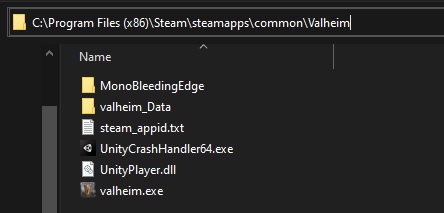 hidden mulch
did a complete sanitation, deleted the valheim folder completely and did a fresh install
still couldn't join my friend
seems to be a problem with the patch this morning, works when reverting to default_old
stark meadow
hidden mulch
did a complete sanitation, deleted the valheim folder completely and did a fresh...
So is that a yes on, were you using mods before?
hidden mulch
yea the other day, but removed all trace and retried fresh
stark meadow
hidden mulch
yea the other day, but removed all trace and retried fresh
Mods can permanently corrupt worlds
hidden mulch
clean world and character
stark meadow
hidden mulch
clean world and character
Doesn't make sense
stark meadow
Are you saying that you tested new world new character and vanilla?
stark meadow
Tell your friend to check his installation folder manually, you should as well
Steam uninstallation doesn't remove mods
stark meadow
hidden mulch
yeah we did
I will host a server for you, will send you a DM with join code and pass
hidden mulch
alr
stark meadow
Meanwhile have your friend screenshot your their installation folder, you screenshot yours and send me both screenshots
stark meadow
hidden mulch
no we've both got bepinex and mods on now
Ok, remove mods before you attempt to join my server
Not interested in testing modded setups
No mods, current version, try to connect to my server via info I sent you
Send server info to your friend also whle at it
hidden mulch
yeah alright you'll have to gimme a bit i'm busy rn
stark meadow
hidden mulch
yeah alright you'll have to gimme a bit i'm busy rn
Np, let me know when you gonna be ready to test
Might restart the server by then
 bright coral
The new "splatform" logic for dedicated server admin/ban list checks has debug logging left in. This is causing some confusion amongst users (see #dedicated-server chatter). It's especially prevalent on non-Crossplay servers as every connecting player will get an attempted PlatformUserID() construction before the Steam platform check, and that will fail noisily.
 graceful lintel
Did the latest update break steam input with gamepad or there any reports on this?
stark meadow
graceful lintel
Did the latest update break steam input with gamepad or there any reports on thi...
No reports so far. Valheim has been largely independent of steam input for PS4 controllers.
Are you using Steam input for purposes of setting custom binds?
graceful lintel
stark meadow
No reports so far. Valheim has been largely independent of steam input for PS4 c...
Yes - essentially my gamepad is emulating a PS5 Dualsense controller.
Maybe it's conflicting mod or something ill try disabling them and report back.
Essentially its not picking up a few inputs (can't open build menu from hammer) cant use 'x' or 'b' buttons while standing
stark meadow
graceful lintel
Maybe it's conflicting mod or something ill try disabling them and report back. ...
Sounds like a mod problem. Those buttons should generally works regardless of steam input being enabled or not.
graceful lintel
stark meadow
Sounds like a mod problem. Those buttons should generally works regardless of s...
It was a mod - updated it and its fixed 
 barren cargo
Anyone having problems having friends join after the new update
stark meadow
barren cargo
Anyone having problems having friends join after the new update
Black screen or just failed to connect?
When selecting server don't use the recent tab, rather remove the server you are trying to connect to from favourite tab, then add the server again to favorite tab again (via join code for example that you have to tell them), and then connect though that favorite tab.
Generally, if you are all using steam, it's best that the host disables before starting the server (option is right next to start worlds button).
 mental spear
stark meadow
Black screen or just failed to connect?
mental spear
stark meadow
Black screen or just failed to connect?
same problem, with black screen
stark meadow
mental spear
same problem, with black screen
Then it's not the same problem. Black screen issues are related to mods. Using any?
mental spear
Yes, we use some, but we have disabled quite a few because BepInEx was showing errors. Now the errors (the red texts) are gone.
stark meadow
mental spear
Yes, we use some, but we have disabled quite a few because BepInEx was showing e...
This channel is for vanilla players only, try checking with #mods-issues if players have identified which mod lies behind black screen issues.
mental spear
ah okay, sorry, thank you
 gusty kiln
stark meadow
When selecting server don't use the recent tab, rather remove the server you are...
gusty kiln
stark meadow
When selecting server don't use the recent tab, rather remove the server you are...
This isn't working for me and I am having then same issue
It just shows up as a red x for my friend when he is trying to join me
stark meadow
gusty kiln
It just shows up as a red x for my friend when he is trying to join me
Are you both using Steam? If so, have you tried disabling crossplay yet before starting the server?
 raw geyser
Hello! So I'm having an issue with Valheim not saving my progress. I log out and then it gives an error message and next time I log on it's rolled back to before I last played. I didn't quite know where to put this question, either here or in mods discussion. Also should I post the error message?
stark meadow
raw geyser
Hello! So I'm having an issue with Valheim not saving my progress. I log out and...
What's the error message?
raw geyser
stark meadow
What's the error message?
It's a bit long so sorry if this fills up a lot of the chat.
[Warning: Unity Log] The KeyCode: 1, lacks a proper counterpart in the Key enum. Returning "Key.None".
[Error : Unity Log] ArgumentOutOfRangeException: Specified argument was out of the range of valid values.
Parameter name: key
Stack trace:
UnityEngine.InputSystem.Keyboard.get_Item (UnityEngine.InputSystem.Key key) (at <462ba9d290604c77b266e1c9744638cc>:0)
ZInput.TryGetKeyStateLowLevel (UnityEngine.KeyCode keyCode, System.Func`2[T,TResult] stateCheckProperty, System.Boolean logWarning) (at <0bd59ead379a4ce19fccb387f1bacf6f>:0)
ZInput.GetKeyDown (UnityEngine.KeyCode key, System.Boolean logWarning) (at <0bd59ead379a4ce19fccb387f1bacf6f>:0)
Chat.Update () (at <285f74454c9841259bb8585eb4409ef4>:0)
stark meadow
raw geyser
It's a bit long so sorry if this fills up a lot of the chat.
[Warning: Unity Lo...
Your most likely bound some actions to keys that don't exist. Could be related to mods as well. If you intend to use mods, refer to different channel #mods-issues. Since this happened, vanilla won't work either, until you reset your binds. Best to wipe registry settings as suggested here: #steam-bugs-discussion message
raw geyser
stark meadow
Your most likely bound some actions to keys that don't exist. Could be related t...
Okay. I'll inquire further in Mod Issues. Will wiping the registry delete any world or character data?
stark meadow
raw geyser
Okay. I'll inquire further in Mod Issues. Will wiping the registry delete any wo...
No. it resets settings and leybinds only
raw geyser
stark meadow
No. it resets settings and leybinds only
Alright. Thank you very much. I appreciate the help 👍
 jolly sleet
Hello! I'm playing Valheim in Japan. I recently purchased this game, but whenever I try to join a friend's server or community server, I get a message saying "Connection failed." I can't invite a friend to my server, but is there anything I can do?
stark meadow
jolly sleet
Hello! I'm playing Valheim in Japan. I recently purchased this game, but wheneve...
Hi, do you both have the game on Steam? If so, try disabling crossplay option before you start the world as a server (option is right next to start world button) . Then when you are in the world, send your friend an Steam invite via Steam overlay. You both have to be Online on Steam, and they should see your server as available in the in game friends tab (favorite, recent, friends, community tabs)
jolly sleet
Understood. I'll try it out once with a friend. If I fail, I will come back for advice. thank you
I just tried it with a friend and it still didn't work. I can join the server with my friends, but I can't join the server, so I think it's my fault.
jolly sleet
jolly sleet
Hello! I'm playing Valheim in Japan. I recently purchased this game, but wheneve...
If anyone knows about this, please reply
 gilded sluice
jolly sleet
If anyone knows about this, please reply
gilded sluice
jolly sleet
If anyone knows about this, please reply
Do you use VPN?
split tinsel
"Vulkan - Out of memory! (allocating memory for image)
Crash!!!"
Vulkan started crashing for me with yesterday's patch. Switched to DX12 and it runs ok but right about the time I would be crashing in Vulkan I get constant 100% GPU usage for 10-15 seconds.
stark meadow
split tinsel
"Vulkan - Out of memory! (allocating memory for image)
Crash!!!"
Vulkan started...
What specs do you have?
split tinsel
stark meadow
What specs do you have?
AMD 7600X, Radeon 6750XT, 32gb of RAM, 2Tb nvme.
I had played for 40+ hours over the past 2 weeks with zero issues. After the patch I crash every 20-30 minutes with Vulkan, or have huge GPU spikes with DX12.
stark meadow
split tinsel
AMD 7600X, Radeon 6750XT, 32gb of RAM, 2Tb nvme.
Probably an issue with AMD drivers then, and not related to this patch in particular.
Jusging by out of memory error, you game is probably using iGPU and GPU instead of just GPU.
split tinsel
iGPU is disabled in Bios
stark meadow
split tinsel
iGPU is disabled in Bios
You should probably double check that. On which resolution are you playing? Using moded textures that increase VRAM?
split tinsel
Vanilla game. I play on 1440p but with 90% scaled resolution to keep 80fps locked.
Ram and GPU Ram are less than 50% usage
stark meadow
split tinsel
Vanilla game. I play on 1440p but with 90% scaled resolution to keep 80fps locke...
Yeah, doubt you encountered some kind of in-game bug that caused lack of free VRAM. Nobody else reported anything similar. AMD cards generally exhibit more driver related issue than nvidia cards. Check when was the last time your Andrenaline updated + if windows messed with any drivers lately in start → view reliability history.
Either way, I would recommend reinstalling graphic driver and selecting custom installation, so you can choose to select clean profile. If Windows updated something, then sometimes it's necessary to disable automatic windows driver installation before removing and adding Adrenaline.
split tinsel
stark meadow
Yeah, doubt you encountered some kind of in-game bug that caused lack of free VR...
There were some Windows Defender updates, Microsoft.DesktopAppInstaller, MICROSOFT.WINDOWSCALCULATOR. Adrenalin is up to date, drivers are up to date.
stark meadow
split tinsel
There were some Windows Defender updates, Microsoft.DesktopAppInstaller, MICROSO...
Expected that they are up to date. That's what usually causes this issues, Andrenaline updating along with Windows doing someting at same time usually. When did Andrenaline update for you last time?
 rapid wave
Hi,When I set no_placement_cost to true, there is a brief delay when opening chests. Is this related to memory performance?
stark meadow
split tinsel
Drivers were installed in December.
Windows 11 or 10? Do you have any optional windows updates pending that you haven't installed (they don't install automatically)?
split tinsel
stark meadow
Windows 11 or 10? Do you have any optional windows updates pending that you have...
Windows 11. "Cumulative Update Preview for Windows 11 Version 24H2" is available to manually install.
No other optional updates.
stark meadow
rapid wave
Hi,When I set no_placement_cost to true, there is a brief delay when opening che...
There always was a performance drop when opening crafting with all items available. If you are using mods, it can make the problem worse.
E.g. azucraftyboxes mod was reported recently as slowing down loading inventory.
rapid wave
Yes, I'm using this mod as well,this is slightly affecting the gameplay experience
stark meadow
rapid wave
Yes, I'm using this mod as well,this is slightly affecting the gameplay experien...
Report the issue to mod author then or check if other players in #mods-issues found workarounds aside from disabling the mod.
This channel is for vanilla issues only.
stark meadow
split tinsel
Windows 11. "Cumulative Update Preview for Windows 11 Version 24H2" is available...
Can't really recommend to jump on that update, as I had reports stating that players started crashing after this particular update. Are you doing something specific in Valheim when this 100% GPU usage spike occurs? You should probably check in task manager which programs use GPU the most in that moment, in case it isn't entirely Valheim (could be Discord or Chrome, if you have hardware acceleration enabled in them). GPU colum isn't automatically added in task manager, so you would have to add it manually, by rick clicking on one of the colum names.
Generally, seeing 100% GPU usage in Valheim should be problematic, and it often occurs, just that it shouldn't randomly occur.
split tinsel
stark meadow
Can't really recommend to jump on that update, as I had reports stating that pla...
The crash happens no matter what I'm doing, even just standing in place waiting for it to happen. Total GPU load typically sits at about 70%, with 60% being Valheim, 5% Windows Desktop, 5% other. Then Valheim will spike to 97-100% usage for 10-20 seconds, then go back to normal. This happens, again, no matter what I'm doing. Even sitting in place and waiting for it. That 100% spike is what seems to be crashing Vulkan as GPU-z logs a usage spike just as it freezes.
rapid wave
stark meadow
Report the issue to mod author then or check if other players in <#1202550198174...
OK, I thought this update would solve the performance degradation of the vanilla game
stark meadow
split tinsel
The crash happens no matter what I'm doing, even just standing in place waiting ...
After how much time does this occur since loading into the world?
split tinsel
stark meadow
After how much time does this occur since loading into the world?
20-30 minutes.
stark meadow
split tinsel
20-30 minutes.
Can you check if you have steam overlay enabled or disabled for Valheim?
split tinsel
It happens soon enough that I don't get an auto save and can lose progress if I'm not manually saving before it happens.
split tinsel
stark meadow
Can you check if you have steam overlay enabled or disabled for Valheim?
Steam overlay has always been enabled.
stark meadow
split tinsel
Steam overlay has always been enabled.
There's a steam issue on Linux that wrecks performance on AMD cards, so wondering if there was any correlation. Probably isn't.
This is the last time I spoke to a 6750XT user: https://www.reddit.com/r/valheim/comments/1iatthv/comment/mg54lvi/?context=3
They seem to have had a different crash manifestation than you tho.
Which manufacturer built your 6750?
split tinsel
It's just frustrating that I play for 60+ hours with no crashes, a new performance patch comes out and I crash constantly with the patch being the only change.
MSI
 marble wolf
Correlation is not causation.
split tinsel
marble wolf
Correlation is not causation.
The patch is the only change though. No system updates, no driver updates, no other games crash. Valheim now spikes GPU usage to 100% and crashes if I'm in Vulkan, or 100% in DX12 and my fps drops for 10-20 seconds before going back to normal.
stark meadow
split tinsel
It's just frustrating that I play for 60+ hours with no crashes, a new performan...
So far we have no reports that there is a Vulkan specific issue. There certainly isn't for Nvidia cards, and I know a lot players that play on AMD cards daily. As in 99% of crash cases, the solution to the problem is almost never in Valheim.
I can count on one hand the amount of times we had AMD or Vulkan specific problem, and that issue turned out to be related to Unity update we did or something similar, and every time it was extremely obvious due to reports coming from all over the place.
split tinsel
I get that there could be an issue with my setup, or AMD drivers, that using 100% GPU causes my crashes, but I never had 100% gpu usage before the patch. Is it possible for me to roll back to the previous version so I can verify that it's only the new patch that's the issue?
marble wolf
Yep, select the last previous version from the beta options in Steam.
You'll need to roll back the server as well if you're on one though.
split tinsel
I play single player, will that matter?
marble wolf
No, that will make your life a lot easier!
stark meadow
split tinsel
I get that there could be an issue with my setup, or AMD drivers, that using 100...
Were you using mods or messing with windows page file at any point?
split tinsel
stark meadow
Were you using mods or messing with windows page file at any point?
No, never had mods or messed with the page file.
stark meadow
split tinsel
No, never had mods or messed with the page file.
Do you have any crash dumps from previous crashes? (Secton 2 in the guide: https://www.reddit.com/r/valheim/comments/uq9b8x/my_valheim_is_crashing_fix_for_crash_guide/)
split tinsel
stark meadow
Do you have any crash dumps from previous crashes? (Secton 2 in the guide: https...
I have one crash dump in the Temp\Valheim folder
stark meadow
split tinsel
I have one crash dump in the Temp\Valheim folder
You can send me that one that if you want me to take a look at it
And player.log accompanying that crash
split tinsel
I've now been playing for an hour on the previous patch and haven't had any GPU spikes and no crashes.
 marsh wolf
The issue with ash vines is still present right? I’ve planted some at my base and have only gotten one harvest
stark meadow
marsh wolf
The issue with ash vines is still present right? I’ve planted some at my base an...
Not fixed yet. They will desapwn at logout, need about 1.5days since login to start growing. If they don't grow even after that, you will have to replant them.
 dreamy nymph
Hello everyone!
I have a problem with saving the world and the player
Steam showed a window about the conflict between local and cloud saves
I knew that local saves contain more progress, a new player and a world created for the conquest of AshLands
I chose local saves as preferred and when I entered the game they were gone. No world, no player
I lost 350 game days of progress, during which I opened everything except the Bog Witch and the victory of the last boss in the ashlands. I passed this location so much and had several large bases
In general
So that is so sad situation and no matter how I searched in the game files, the only trace left was in the "worlds_local" folder
I want to ask support to somehow add the ability to roll back the world and the player, maybe in the cloud, in Steam, or better in the game folders
So that there are no more similar problems for players
Where can I write about this?
stark meadow
dreamy nymph
Hello everyone!
I have a problem with saving the world and the player
Steam show...
Can you paste a screenshot of your world backups that you have visible right now in the in-game manage saves menu?
 stark meadow
dreamy nymph
stark meadow
dreamy nymph
expand the backup list before taking screens
dreamy nymph
 stark meadow
dreamy nymph
stark meadow
dreamy nymph
I don't see backups deleted, rather corrupt.
How much of free disk space do you have on your disks? Or were you running low on free disk space in the past around February when those backups were made? Have you used mods at the time?
dreamy nymph
stark meadow
How much of free disk space do you have on your disks? Or were you running low o...
There was at least 70/240GB of free space on the SSD
I never even tried mods, only the classic single player game
stark meadow
dreamy nymph
There was at least 70/240GB of free space on the SSD
I never even tried mods, on...
How many disks your have? Do/did you have free space on all of them?
dreamy nymph
stark meadow
How many disks your have? Do/did you have free space on all of them?
2, ssd 70/240gb is free and hdd 1.4/1.8tb
Here conflict with steam saves i think no with my pc
stark meadow
dreamy nymph
2, ssd 70/240gb is free and hdd 1.4/1.8tb
Why did you get a popup about a conflict between cloud and local saves in the first place?
Were you playing with Steam Cloud saves disabled, or using your steam account on multiple devices?
stark meadow
dreamy nymph
just cant have the internet all times when uce pc
If you selected local on that dialogue box, the saves from your PC overwrote the saves that were in Steam Cloud. So the saves that were corrupt initially were you local saves, meaning that something on your PC caused them to get corrupt.
Do you have Steam installed on C drive?
stark meadow
dreamy nymph
Yes, on C
- First, check the health of your disk that is responsible for the C drive. Something like Crystal disk and HWiNFO can report the health of your SSD.
- Check this link in the browser and if any saves for DeepAsh are there that are bigger than 0MB
https://store.steampowered.com/account/remotestorageapp/?appid=892970 - Check if you had system restore enabled on your PC (start → type and open recovery → open system restore and check if you have any date points (don't restore anything, just check)
dreamy nymph
Crystal disk say that all ok
2.
where is ling, what about?
3.
No, that i have'nt
stark meadow
dreamy nymph
1.
Crystal disk say that all ok
2.
where is ling, what about?
3.
No, that i have...
Fixed the link
stark meadow
dreamy nymph
1.
Crystal disk say that all ok
2.
where is ling, what about?
3.
No, that i have...
At what health percentage is your disk?
dreamy nymph
100
bright coral
After checking the cloud storage like above, I would also take an inventory of these three folders and see if any .db file sizes and modified dates that may reflect a working copy of the world:
C:\Program Files (x86)\Steam\userdata\<steam user ID>\892970\remote\worlds%USERPROFILE%\AppData\LocalLow\IronGate\Valheim\worlds%USERPROFILE%\AppData\LocalLow\IronGate\Valheim\worlds_local
(note that Windows Explorer will hide the .db extension by default)
dreamy nymph
In the link many old saves worlds, but nothing about i find
dreamy nymph
bright coral
After checking the cloud storage like above, I would also take an inventory of t...
Yes, I checked there at the very beginning.
bright coral
All 3 places?
dreamy nymph
stark meadow
dreamy nymph
In the link many old saves worlds, but nothing about i find
Nothing about DeepAsh you mean? Not even the 0MB ones are there?
dreamy nymph
nothing
stark meadow
dreamy nymph
nothing
When was the last time you successfully played in DeepAsh world?
Were you online or offline last time you played?
Did you ever install a 3rd party program to manage backups for your saves?
dreamy nymph
no, wait
worlds_local is have, here "DeepAsh_mapTexCache"
heightTexCache and forestMaskTexCache
that 3 files have
stark meadow
dreamy nymph
no, wait
worlds_local is have, here "DeepAsh_mapTexCache"
Not useful unfortunately, those are just minimap cache files
dreamy nymph
Last time i do that today, without enternet
3rd program i never use
no mods, no programms, vanilla play
stark meadow
dreamy nymph
Last time i do that today, without enternet
What's weird is that you have only autobackups there and not a single save with only backup in the name (saves that get automatically created every time you update from one lerger patch to another, like from Ashlands patch to BogWitch). Did you start playing in that world after BogWitch update?
 crude ingot
Hello, I was just wondering if the bug that allowed troll and surtling raids to happen incorrectly was ever fixed?
stark meadow
crude ingot
Hello, I was just wondering if the bug that allowed troll and surtling raids to ...
Kinda. Are you asking for a world with or without player based raids modifier?
crude ingot
without just the normal system
stark meadow
crude ingot
without just the normal system
Yeah, should be normal for you then.
crude ingot
Ok thanks for the response!
dreamy nymph
stark meadow
What's weird is that you have only autobackups there and not a single save with ...
I think after
that world and characetr have 1 month
Create that ~3 february 25y
stark meadow
dreamy nymph
I think after
that world and characetr have 1 month
Create that ~3 february 25y
Yeah that would explain why you don't have those then. Still, completely unknown why would all of your backups get corrupt. This leads me to believe that what your next save attempt will also be corrupt for some reason.
marble wolf
crude ingot
Hello, I was just wondering if the bug that allowed troll and surtling raids to ...
As per the patch notes from yesterday '* Fixed an issue that made some events able to trigger without their conditions being met'
stark meadow
When you go to the C disk (steam userdata folder where steam cloud saves are located), do you only have those autobackups there or are there more files with DeepAsh name?
That might end with .new or .stmp
dreamy nymph
stark meadow
Yeah that would explain why you don't have those then. Still, completely unknown...
Next save with connect with cloud saves in steam i think
dreamy nymph
stark meadow
When you go to the C disk (steam userdata folder where steam cloud saves are loc...
Checked again, definitely nothing more
Neither about the character nor about the world
stark meadow
dreamy nymph
Checked again, definitely nothing more
Neither about the character nor about the...
You do see those autobackups there right?
dreamy nymph
stark meadow
You do see those autobackups there right?
They are nowhere to be found here.
stark meadow
dreamy nymph
They are nowhere to be found here.
You might be looking in a wrong folder then.
Do you have multiple numbered folders in? C:\Program Files (x86)\Steam\userdata
dreamy nymph
I can do screens
dreamy nymph
stark meadow
Do you have multiple numbered folders in? C:\Program Files (x86)\Steam\userdata
no, only one
But in that more
stark meadow
dreamy nymph
But in that more
Ok, I assume then that you see other saves in 892970\remote\worlds, but you don't see a single mention of DeepAsh?
dreamy nymph
Here nothing too
stark meadow
dreamy nymph
Here nothing too
Could you DM me your cloud_log.txt and cloud.log.previous.txt located at:
C:\Program Files (x86)\Steam\logs
dreamy nymph
Only other worlds
 dull ether
Hey everyone, im having some issues with joining my friends server post-current update. Our games match version, tried with and without mods enabled and tried verifying game files and i kept getting "Failed to connect" and no password prompt. I was then able to get her server to boot by joining direct with friend code but I'm just met with a black screen that never actually loads anything that I'm able to access the main menu with.
Anyone have any ideas?
Thanks!
if its helpful, i can get my own world to boot but she experiences the same thing trying to join mine
stark meadow
dull ether
Hey everyone, im having some issues with joining my friends server post-current ...
Black screens are related to mod issues. You most likely haven't cleaned up mods properly or world might already be corrupt
First check if you have clean installation folder, and if not, remove access files
This is how it should look like: https://i.imgur.com/vdpdeOA.jpg
dull ether
what does the world being corrupted mean?
stark meadow
dull ether
what does the world being corrupted mean?
That mods corrupted it and you might need to restore an earlier version of it so you can load into it properly.
You shoud worry about that if world isn't loadable after you remove mods properly.
If you don't wanna remove mods and play with them, head over to #mods-issues where players are trying to figure out which mod is causing black screen issues.
dull ether
thank you
 smoky jasper
hay my game is "unplayable broken" after latest patch i get 4 fps and so does my girl friends comp as well. i do have mods and game has been running fine for the last year for both of us
 marble wolf
Your mods will need updating.
marble wolf
I have no idea if there are updates.
But yes, you can roll back your game version from the beta menu in Steam.
smoky jasper
all mods are up to date and no moders have put out up dates in last 2 days. does eney one alse have this problem?
marble wolf
If your mods haven't been updated in the last couple of days then they definitely will need updating.
smoky jasper
but there are no updates? they are all up to date
 bright coral
That would be something to take up with the mod authors, unfortunately. We mostly volunteer help on vanilla/un-modded Valheim in here. You might ask about specific mods in #mods-issues if you can pinpoint a specific culprit.
smoky jasper
have eney one alse hade lag problems since updates?
maybee its just one mod doing it
marble wolf
smoky jasper
but there are no updates? they are all up to date
The game was patched yesterday. If one of those mods wasn't updated since then it's probably that that's what's causing it.
smoky jasper
they are all updated!
marble wolf
I give up.
smoky jasper
that all good thank you i bet patches will come in time
stark meadow
smoky jasper
they are all updated!
It's not about whether you have them updated or not, rather if the mod authors updated them after the latest Valheim patch, which you can't check in your mod organiser, rather check when was the last time mod author updated their mod on mod sites.
 tulip trench
How about making dirnwyn not glow when not in hand?
I don't play with it, only because the light on its back is very annoying
- it looks very flammable when you have a feather cape and a flaming sword on it
stark meadow
You can check with other players at #mods-issues as which mods cause issues. This channel is for vanilla issues only.
gilded sluice
tulip trench
How about making dirnwyn not glow when not in hand?
I don't play with it, only b...
This channel is for bugs and issues. not suggestions.
-----> #suggestions is where want to post in
 brisk lintel
While mining iron...
Some items dropped from muddy scrap piles actually dropped through the crypts and landed on the surface world surrounding the ground level crypt
stark meadow
brisk lintel
While mining iron...
Some items dropped from muddy scrap piles actually dropped ...
Yep, known issue
stark meadow
The game was stuttering on crossing zone borders since launch.
You might have additional stutter issues due to some other problem if it didn't bother you before
Did you check how much you stutter compared to others for the same world seed scenario?
gilded sluice
mod build...?
ah
the user has already left the discord server after posting all of that
 jagged hamlet
If it involves mods that is most likely the culprit.
Clean install without mods, test, if the stutter is gone, mods were the problem.
Now try adding each mod you want separately to find the problem mod, find another one that does the same but doesn't cause the stutter.
gilded sluice
I'm removing that wall-of-text because the user left the same second as he posted that
if he comes back. we can try to help or figure out what
but it's to suspicious to just dump all that information and "valheim is unplayable on my amazing super computer" and just walk out
atm I am watching someone random on twitch that I've never seen before playing valheim. on a lower end PC
no stutter, no issues. just playing
 indigo bluff
Anyone know if there is an issue connecting to other servers right now?
gilded sluice
indigo bluff
Anyone know if there is an issue connecting to other servers right now?
yes and no
remove your old favourite and re-add the server
indigo bluff
gilded sluice
yes and no
That worked! Thank you!
gilded sluice
indigo bluff
That worked! Thank you!
 gilded sluice
Known issue:
On steam your server in the server list / rescent list / favourite tab isn't working.
We did an update so you need to remove it and re-add it.
gilded sluice
gilded sluice
Known issue:
On steam your server in the server list / rescent list / favourite ...
vMatt be like "you should pin that"
 cunning flame
ahahahaha
was about to ask about this exact issue I think
I spotted yesterday that I can't add/remove a favorite, didn't payed much attention a the moment so I was going to ask right now. That the issue you are talking about I guess
stark meadow
cunning flame
I spotted yesterday that I can't add/remove a favorite, didn't payed much attent...
You should be able to remove servers from favorite list, but you can't remove them from recent list
That would be intentional. Are you sure you can't remove servers from favorite list?
cunning flame
Have to check it out, as I said I wasn’t really attentive the moment I spotted the issue, so I may be missing something.
What happened is that I wanted to quickly sort the list of favorite (which is long and I don’t recall having manually set them as fav). But the star box wasn’t interacting, no matter which panel I choose (I tried all of them). I also tried click on the item on case it would show a menu but nothing happened.
As I said, it was quickly just before joining my friend’s server so I wasn’t attentive.
 stable cliff
goodday, don't know if it's known issue, strange thing happened with food/meads put on a table with serving tray, i activated ptb and i'm sure i visited that room multiple times during and after ptb, but the thing happened yesterday for the first time ever:
some food and mead items (single, no feasts) appeared dropped on the ground as i portalled back to the room in cause, put them back, and same items where on the ground again when i out-in portalled back to the room..
stark meadow
stable cliff
goodday, don't know if it's known issue, strange thing happened with food/meads ...
They can end up flying if you modified terrain in that area. Mountain biome, built on one of the locations, or?
stable cliff
stark meadow
They can end up flying if you modified terrain in that area. Mountain biome, bui...
uhm, no terrain modified in that base, nor building.. i was portalling back and forth a near mountain where i was bulding/modifying terrain, but i'm quite sure that's enough far / high away for influenced that meadows base
stark meadow
stable cliff
uhm, no terrain modified in that base, nor building.. i was portalling back and ...
So you haven't used any hoe tool to prepare ground before building? Have a screenshot of that house? What was in that area before you started building? (any pregenerated location)
stable cliff
stark meadow
So you haven't used any hoe tool to prepare ground before building? Have a scree...
i'm taking screenshot rn for reference, no building in the base, a lot of terraforming in the "near" mountain
meadows base (with serving tray problem) and mountain terraforming work, map is to roughly show distance (max map size, the two fireplace markers, visible also on minimap actually)


 stark meadow
stable cliff
meadows base (with serving tray problem) and mountain terraforming work, map is ...
stark meadow
stable cliff
meadows base (with serving tray problem) and mountain terraforming work, map is ...
Probably somehow related to that mountain then, and affecting served foods which are known to respond to terrain changes
Could you DM me your world file?
stable cliff
stark meadow
Probably somehow related to that mountain then, and affecting served foods which...
ok seemed strange for the long distance, but actually is the only thing that changed, sending rightaway, thanks
 wind crown
Is there an issue with connecting to other servers still on?
I go to an infinite black screen since the update a few days ago. I've tried removing it from favourites and re-adding with the 6 digit code but no luck joining still
stark meadow
wind crown
Is there an issue with connecting to other servers still on?
I go to an infinite...
Black screen issues are mod related. Some mods have to be updated to new patch, like serversync features Jotun mod has and other mods that use it as dependency. As a workaround you can disable crossplay if all of your teammates are on Steam
For further info, you should be reporting to #mods-issues. This channel is for vanilla issues only.
bright coral
There's not really a crossplay-bugs-discussion channel, so I'll put this here, but there's someone in #dedicated-server who is hitting LobbyPlayerMaxLobbyLimitExceeded from their server, effectively kicking it off of PlayFab and I don't know if this is a:
- Per-IP limit
- Per-game/subscription limit for Coffee Stain or Iron Gate's PlayFab account
- Per-region relay limit
Anyone know?
 worthy osprey
Every time I open up Valheim using Vulkan, I experience this tab opening before it eventually crashes. I've verified the integrity of the game files, and I'm not using any special launch options other than Vulkan. It's now working using the regular launch option so it's not time sensitive, but I thought I would let someone know.


 gaunt mist
worthy osprey
Every time I open up Valheim using Vulkan, I experience this tab opening before ...
gaunt mist
worthy osprey
Every time I open up Valheim using Vulkan, I experience this tab opening before ...
Do you use mods or have ever used any?
worthy osprey
gaunt mist
Do you use mods or have ever used any?
I have used one in the past to redo the Mistland generation (when that update came out) of an old server because the boss room didn't spawn on the map. But I don't launch the game with mods through steam or have with any recent update.
gaunt mist
worthy osprey
I have used one in the past to redo the Mistland generation (when that update ca...
You should check your folders just in case, since mods can leave some traces that can mess up with the game even when you disable/delete the mod.
worthy osprey
gaunt mist
You should check your folders just in case, since mods can leave some traces tha...
Mmm okay, thanks for the help! 
gaunt mist
worthy osprey
Mmm okay, thanks for the help! <:TrophyFrostTroll:489509728070795264>
If you can't find anything for some reason, you could try reverting to last stable version of the game to see if it works normally then.
If it works after reverting, it probably is the reason I stated above.
That being said, afaik since I've not used any mods but based on what information I've gathered.
bright coral
worthy osprey
Every time I open up Valheim using Vulkan, I experience this tab opening before ...
Next time you observe the crash, it would be helpful to see what might be shown in the Player.log leading up to the crash (if anything).
worthy osprey
bright coral
Next time you observe the crash, it would be helpful to see what might be shown ...
It was crashing on startup, I'm not sure if that would've worked? Maybe it would, I'll see next time!
 wicked sentinel
hi. we opened a server to play valheim with my friends. when we join each other's server, it stays on the black screen. we cannot connect in any way. we uninstalled the mods and tried the game normally and we have the same problem again. it does not give any error but it stays on the black screen. 3 of us opened a server one by one and tried. our versions are the same. has anyone experienced this situation?
stark meadow
wicked sentinel
hi. we opened a server to play valheim with my friends. when we join each other'...
Black screen issues are exclusive to modded setups. Chancse are you haven't removed mods properly.
Installation folder has to be manually cleaned up from BepInEx folder.
gaunt mist
wicked sentinel
hi. we opened a server to play valheim with my friends. when we join each other'...
Mods could cause those problems even after uninstalling them, since they can leave folders in game files. Some solutions:
- You could search for any folders from files and clear them,
- you could ask from https://discord.com/channels/391142601740517377/1202550198174486599 for specifics regarding the mods you've used (this current channel is for vanilla problems) or
- you could revert to last stable version of the game until the mod author(s) have updated the mods to newest version.
Oh, you are here now @stark meadow, you can correct my statements if there is something off!
stark meadow
worthy osprey
Every time I open up Valheim using Vulkan, I experience this tab opening before ...
Does that mean that you don't crash when you launch the game in d3d11? Please list you PC specs as well.
worthy osprey
stark meadow
Does that mean that you don't crash when you launch the game in d3d11? Please li...
Whatever the other launch option is yes, I'm not sure what d3d11 is... 😅
Specs:
-AMD Ryzen 5 2600 Six-Core
-32 GB of Ram
-SanDisk SDSSDH3 1TO2
-NVIDIA GeForce GTX 1660
The launch option I used just said "Valheim" while the other was Vulkan.
stark meadow
worthy osprey
Whatever the other launch option is yes, I'm not sure what d3d11 is... 😅
Spec...
Yeah that's the other one. Are you using multiple monitors? Launching in Vulkan could be incompatible with some 3rd party software that you might have running (e.g. Fraps), but if you are stable in d3d11, it's usually some kind of graphic driver issue that gets resolved upon reinstalling them (emphasis on selecting custom installation so you can choose to preform clean profile). Vulkan can also use more of system resources, demanding more power and raising temps, which can be the source of crash, so I would definitely recommend testing liming FPS of Valheim to 20-30 via Nvidia control panel + lowering Valheim resolution as a test, to see if initial crash goes away. To lower Valheim resoluion on launch, add this line to Valheim launch argument on Valheim properties in Steam library (just below you selected Vulkan option in your screenshot):
-screen-fullscreen 0 -screen-height 270 -screen-width 480
worthy osprey
stark meadow
Yeah that's the other one. Are you using multiple monitors? Launching in Vulkan ...
Ahhh okay gotcha
 limber sluice
my instance of valheim has an intermittent short freezing affliction. I tried puting -console in launch options, and it is still occuring. Does anybody have any suggestions?
stark meadow
limber sluice
my instance of valheim has an intermittent short freezing affliction. I tried p...
What are your PC specs? Using mods?
I would recommend reading this comment about known stuttering issuses:
https://www.reddit.com/r/valheim/comments/1al0zeb/comment/kpciuzg/?share_id=hpbWB9U4sQSA6Crm9p3oH&utm_content=t1_md8uj2u&utm_medium=usertext&utm_name=valheim&utm_source=reddit&utm_term=1
limber sluice
Specs: Intel(R) Core(TM) i7-6700K CPU @ 4.00GHz 4.01 GHz - 16.0 GB RAM - 64-bit operating system -- thanks
stark meadow
limber sluice
Specs: Intel(R) Core(TM) i7-6700K CPU @ 4.00GHz 4.01 GHz - 16.0 GB RAM - 64-b...
Do you have a dedicated GPU in that system or are you playing with integrated GPU that's in 6700K?
gilded sluice
limber sluice
my instance of valheim has an intermittent short freezing affliction. I tried p...
when does it freeze?
some specific places in game?
specific times in the game (like mornings. night times etc) ?
limber sluice
it seems to be non-stop freezing for a moment and then i'll move a little bit and it'll freeze and seems to be constant. The game will start okay, and then about a minute in it'll start to stutter consisitenly. What's wierd is that it used to run perfectly. So something changed and now it doesn't behave.
sorry for the delay, i had to go to the bank and store
thanks for your expert help
stark meadow
limber sluice
it seems to be non-stop freezing for a moment and then i'll move a little bit an...
Starting ok, and then continuously stuttering later is reminiscent of temp related issues. That would be the first thing I would check on your end. I recommend installing HWiNFO tool and checking which MAX temps get reported for your CPU and GPU after stuttering starts to happen.
 low ocean
limber sluice
it seems to be non-stop freezing for a moment and then i'll move a little bit an...
low ocean
limber sluice
it seems to be non-stop freezing for a moment and then i'll move a little bit an...
Is your computer near a heat source like , sun light, electronics, and is it a laptop or desktop? Have you cleaned it from dust lately with a vacuum cleaner? Does around the comp have room so heat doesnt build up at wall, or furniture?
When I use a laptop, and play games so it gets hot, I tend to put something under it so that the table or whatever I use is not directly in touch with the laptop. I check the places which get hot, and dont put anything under then. I put some items on 2-4 corners of the laptop so that air can flow under neat it.
Of course this is easier, since I use an external gaming mouse, external gaming keyboard, external gaming display, and external web cam, and then my sounds are connected to external Dolby Atmos 5.1.2.2 which is far from laptop. My external SSD is not every close of the laptop either.
Of course, there are other alternatives... too high settings which cause heat, too high resolutions,. But suddden start could mean your comp is dusty. If you have a desktop then open it and vacuum away. Laptops can be little vacuumed too.
low ocean
stark meadow
Starting ok, and then continuously stuttering later is reminiscent of temp relat...
What resolution you play in, and what framerate and is Vsync on and is framerate unlimited or capped?
In settings th resolution scale slider, do you use it at max "Native", Automatic" or some value between 5-100 %?
limber sluice
those are good questions. It's a pc and isn't really near another heat source. I blew the tower out last week and all the intake areas and am now going to check my fans to see if I can get more air flow.
I'll check what suggestions you just sent regarding res and frame rate and vsync. I've been playing around with vsync on or off, but didn't do any res or framerate tweaks.
I'm playing at what is recommended in the system display, 3840/2160 and 300% scaling which is what windows 10 is telling me to do. I had vsync off and unlimited framerate up to now which I haven't changed. resolution/render scale slider is set at native. Thanks for your assistance.
stark meadow
limber sluice
those are good questions. It's a pc and isn't really near another heat source. ...
You shouldn't really do guesswork when it comes to temps. Monitor the temps first, then we can go into all other potential causes of problems. Monitoring AVG temps does not matter, focus on which MAX temps get hit. On of other basic thigns you should do, is as soon as stutters start, opening task manager and checking what programs use the most of your CPU and GPU (for GPU you will have to add a new column → right click on any column name and add GPU).
limber sluice
3840/2160, which is what "performance
okay thanks, I will proceed to check what you're suggesting.
low ocean
Wow put v-sync on at first so it wont run as much as it can. put max framerate in game at max your monitor handles. 60, 75, 90, 100, 125, 144 but start with 60. It massively restricts unneccesarily FPS since your monitor needs to support those higher Hz like 144 for it to be useful. Even 60 fps is good.
The scaling 300 % you mentioned if its setting outside of game and for reading websites and UI elsewhere is not connected to this. Ignore that for now.
But running 3840/2160 meaning 4k takes lot of horsepower and generates heat, and your GPU and processor might not be handle it like that. Especially since you ran the game on NATIVE. No vsymc, native, no max FPS? Woaah! You need good system for that.
Try setting resolution in game to to 3840x2160 if that is the native resolution (note the word native here does not now refer to the slider on top of the settings we got to that soon).
and tick Full screen next to it and V-sync and limit framerate to something reasonable. Start with 60.
Now personally I like to turn vegetation quality off to lowest, since its harder to see stuff on the ground. Middle might be good too, but highest especially makes seeing things hard.
Turn the view distance and details to max. Only lower if you absolutely have to.
Try particles to medium and shadows to medium or even low.
Set active light sources to medium or low
Set light source shadows to medium or maybe even low.
Turn off distant shadpws. Leave Bloom on as well as chromatic aberramce, SSAO and Depth of field and movement blur you can try turning off since some dont like the effect. Soft particles may be on or not they may cause a performance hit
Turn on Sun lights although thats a performance hit and turn on surface flterin.
I recommen antialiasing off!
It makes the game look blurry and confusing and makes it less nice.
 worldly notch
Okay, I'm back trying to diagnose what on Earth is causing crashes on my system. Recently replaced the GPU but its still crashing randomly, and the end of the stacktrace is full of this:ERROR: SymGetSymFromAddr64, GetLastError: 'Attempt to access invalid address.' (Address: 00007FF975977C9C)
The system is a Ryzen 5 7600, 32 GB of Crucial DDR5, Gigabyte B650 Aorus Elite AX, Rx 7700 XT (as of yesterday). I have disabled the iGPU, I have reset BIOS to optimized defaults, I have re-enabled EXPO, it crashes with PBO on or off, and tried both DirectX and Vulkan renderers. I stripped graphics drivers with DDU entirely this morning as well. At the end of my wits - I've been watching temps and there's no sudden spiking there either.
low ocean
And now the slider. You can try it on Automatic. which mean game turns stuff off automatically. Anyway take it off from native. You can turn it all the way to 50 % if not using automatic. Even 40 %. The more you drop render scale,. the more stuff i said turn off, you can turn back obn. You can even try tunning game on lesser resolution like 1920x1080 and turn all on... but it looks uglier. Or 1600x900.
worldly notch
worldly notch
Okay, I'm back trying to diagnose what on Earth is causing crashes on my system....
Valehim is running 1080p, max quality settings. Monitor runs up to 144hz, freesync is ON.
low ocean
Man i typed those a long time. V-sync, frame rate limit on, then render scale help a lot alone. Shadows dont look too good anyway at least on max but use gpu a lot
I have NVIDIA 4050 and newest driver from march 5 installed. When I hit alt+r I get all kinds of info like FPS, GPU and core temp, voltages etc. You can decide what info you want to see. That way you se if temp goes high. It even shows right now, if i hit alt+r while im not playing game. I think steam has a way to measure FPS too without external software. I dont know if valheim has fps counter
Do you use Vulcan or Directx with Valheim?
stark meadow
worldly notch
Okay, I'm back trying to diagnose what on Earth is causing crashes on my system....
What happened with thos printed spam logs in event viewer. Those stopped?
worldly notch
Yeah I completely removed the entire Brother suite of apps and reinstalled, those errors are gone
what is utterly bizarre is I can play for hours and Valheim will be fine, or I can play for hours and have random crashes throughout. There's no rhyme or reason and I can't consistently reproduce them
stark meadow
worldly notch
Yeah I completely removed the entire Brother suite of apps and reinstalled, thos...
Great thing you checked your GPU and confirmed it's not a GPU issue. Crash logs looks the same as before, and point to CPU and RAM. Since you reset your BIOS to default, and even tried PBO off, I'm leaning towards RAM and MBO issues or some kinds of Windows thing messing with CPU processing.
Are you currently playing with some kinds of FPS limiter?
limber sluice
Thanks everybody, for your help and attention to this matter. I am making progress with you're help.
low ocean
I've read that if you go to Steam and right click Valheim and get properties you can see a place for advanced users to add commanline parameters. I've heard about these:
-window-mode exclusive -screen-fullscreen
If you copy and type that there, supposedly it may helpo performance. I have no clue if it works.
I have another clue and I don't know if it helps.
Go to Valheim installation directory and find file boot.ini.
Open it with a notepad or some text editor and two lines into it as a first line:
gfx-enable-gfx-jobs=1
gfx-enable-native-gfx-jobs=1
stark meadow
low ocean
I've read that if you go to Steam and right click Valheim and get properties you...
This kind of fixes unfortunally haven't helped anybody with crashes. Rather were the cause of crashes in some cases
Those are most preformance tweaks, not solutions to crash problems.
worldly notch
stark meadow
Are you currently playing with some kinds of FPS limiter?
No. I just tried enabling fps limits in-game to lock to a max of 144 (monitor refresh). And FreeSync is active
low ocean
stark meadow
This kind of fixes unfortunally haven't helped anybody with crashes. Rather were...
Okay good to know. Thanks for the info. Oh they do help with performance? Interesting. I was thinking that maybe the system overheats due to too much load, and performance boost can help so the heat wont go so far.
stark meadow
worldly notch
No. I just tried enabling fps limits in-game to lock to a max of 144 (monitor re...
I suggest playing with 60fps lock for some time, but not in Valheim menu, rather in graphic card control panel, to ensure FPS gets limited even in instances when Valheim won't (e.g. during Valheim boot). After you do that, make sure to double check how FPS behaves with some overlay. There have been instances in the past where FPS limiters were misbehaving due to driver problems. Btw. what's your power plan on control panel for CPU?
low ocean
worldly notch
No. I just tried enabling fps limits in-game to lock to a max of 144 (monitor re...
I wonder if you lessen the 144hz to something much smaller... 144hz is a lot on modern displays and this game doesnt benefit so much from big Hz.
worldly notch
@stark meadow The event log entry for the Valheim crash is this: Faulting application name: valheim.exe, version: 2022.3.50.56191, time stamp: 0x66fec0c7
Faulting module name: UnityPlayer.dll, version: 2022.3.50.56191, time stamp: 0x66fec402
Exception code: 0x80000003
Fault offset: 0x0000000001095ae1
Faulting process id: 0x938
Faulting application start time: 0x1DB904BBAB312A5
Faulting application path: C:\Games\Steam\steamapps\common\Valheim\valheim.exe
Faulting module path: C:\Games\Steam\steamapps\common\Valheim\UnityPlayer.dll
Report Id: dff1485c-2a6b-4f54-9d93-a97fdaccb0e3
Faulting package full name:
Faulting package-relative application ID:
low ocean
I play with FPS 60 happily.
worldly notch
stark meadow
I suggest playing with 60fps lock for some time, but not in Valheim menu, rather...
I can try that. Ironically boot is the time when the game never crashes.
Power plan in Windows is set to Best performance
The CPU temps are staying under 60 degrees and utilization is low, like 30-40% in game
stark meadow
worldly notch
I can try that. Ironically boot is the time when the game never crashes.
Power ...
Try tweaking advanced setting for that power plan and set both min and max power to 100%
 low ocean
Hmm if power plan is best performance, does the game then run the processor and GPU at max regardless of how much is needed? That would make it blaing hot. Hmm.
stark meadow
low ocean
Hmm if power plan is best performance, does the game then run the processor and ...
Yeah, on laptops I don't recommend going up to 100% in cases where themral management is bad. Players that can't updgrade to cooling pads, chance fans and replace thermal past often find relief in lowering power plan in control panel at cost of performance.
worldly notch
stark meadow
Try tweaking advanced setting for that power plan and set both min and max power...
Isn't that going to spike processor power usage even during regular windows operations
low ocean
When I install new Graphics drivers, I always choose "clean install", so that all settings get reset. just in case.
low ocean
stark meadow
Yeah, on laptops I don't recommend going up to 100% in cases where themral manag...
Okay, we are on the same page then. Sounds good ideas on both of us.
stark meadow
worldly notch
Isn't that going to spike processor power usage even during regular windows oper...
Yes it will, but it's a valuable info. If crashes become more frequent, it's an indication that CPU might be unstable at high power, and if crashes stop it might be related to CPU now becoming more stable because it no longer oscillates between low and high power. Crashes usually happen when there is a sudden shift in frequency, clocks, power, etc...
worldly notch
okay I'll give it a shot. I activated fps limits in AMD adrenaline now and locked to 60 as well.
is it worth using one rendered over the other for this?
stark meadow
worldly notch
okay I'll give it a shot. I activated fps limits in AMD adrenaline now and locke...
I would also like to see which other processes you have running on windows start if you don't mind DM-ing me a screenshot of those (start → msconfig → open system configuration → services → hide all microsoft services → screenshot those.
worldly notch
sure, a sec
this is all very weird. Valheim was rock solid on my old i5 4590 and 16 GB of RAM with the GTX1060, very strange that it would have stability problems on newer hardware
stark meadow
worldly notch
is it worth using one rendered over the other for this?
Statistically more people crash in Vulkan, but some players that were crashing in default (d3d11) stopped crashing when they switched to Vulkan. It all depends where is the issue.
low ocean
Are your drivers uptodate if you just switched to newer hardware?
worldly notch
yeah I just stripped everything with DDU and installed AMD andrenaline. This problem pre-dates the GPU upgrade
low ocean
Oh and do you have extra hard disk space available on the drive you have your games and operating system?
low ocean
worldly notch
yeah I just stripped everything with DDU and installed AMD andrenaline. This pro...
Okay good to know
worldly notch
600 GB free on the SSD, I think it's okay 😉
low ocean
Interesting to try to help you anyway, kinda feels like a challenge 🙂
low ocean
worldly notch
600 GB free on the SSD, I think it's okay 😉
My SSD doesnt have that much space :). So it is okay... except, well, you have it, and I don't 🙂
Hmmm have you tried both Vulkan and Directx
low ocean
limber sluice
Thanks everybody, for your help and attention to this matter. I am making progr...
No problem it was kinda fun and refreshing to try to help. I save those texts for later... Do you still have problems?
low ocean
So @limber sluice and @worldly notch did you get those porblems sorted out? Need more advice or things to try?
worldly notch
still testing. this can be stable for hours and then suddenly go, going to be a while
low ocean
Okay. Have you noticed it go boom in certain locations, or when shifting to another area, from day to night, dungeon to dungeon, or from low graphics area and closeby to walls for example, maybe night, to high graphics are, sunlight, open areas, lots of enemies, lots of distant shadows or particles, anti aliasing (i like it off now since it looks better, as well as amount of grass i liike lowest possible so its easier to see.
Does music affect it? Turning it to 0 %, and maybe continuous music away? I wonder if volume 0 music still uses CPU or GPU. This should be asked from devs though. Sometimes you can mute music entirely
worldly notch
There's no common observable pattern. Just went down again, sent MaCaBre the details
 woven comet
I am having issues connecting to my roomates server and vise versa. Anyone know whats going on?
gilded sluice
limber sluice
I'm playing at what is recommended in the system display, 3840/2160 and 300% sca...
Scaling? DLSS or using FSR?
 crude hare
I hope the devs know about this server issue from the last patch. Not sure where to post about that or find out when a fix is coming. When anyone tries to login to our group server it's just black. I have seen people say that turning off crossplay "fixes" it, but half our group is on xbox and the rest mac and pc so that's not really an option.
stark meadow
crude hare
I hope the devs know about this server issue from the last patch. Not sure wher...
There are no black screen issues on vanilla Valhiem. The problem is exclusive to modded setups.
You can go to #mods-issues if you need more information about which mods cause this (e.g. Jotunn and mods that depend on it)
stark meadow
woven comet
I am having issues connecting to my roomates server and vise versa. Anyone know...
If you don't use mods, just delete your friend's server from your favourites list, and then re-add the server via new join code.
woven comet
I am joining via steam friends list not the favorites list
stark meadow
woven comet
I am joining via steam friends list not the favorites list
And it works that way or not? Do you get black screen or failed to connect?
If your friend's server has this icon 🔀 , it means it has crossplay enabled.
Crossplay can be incompatible on strict NAT that some VPN use. Do you have any VPN installed?
woven comet
stark meadow
And it works that way or not? Do you get black screen or failed to connect?
If y...
crossplay is disabled and it will change between both of those
No VPN as well
stark meadow
woven comet
crossplay is disabled and it will change between both of those
What will change between both of those? Sometimes getting black screen issue?
Try to use mods as well?
stark meadow
woven comet
sometimes its a black screen sometimes its failed to connect
Same answer then as I gave here: #steam-bugs-discussion message
You probably haven't tested with mods disabled properly
Modless setup means clean installation folder, so all BepInEx files removed
woven comet
with mods disabled its just failed to connect
stark meadow
woven comet
with mods disabled its just failed to connect
It's not enough to disable mods. That's not how you remove mods.
Installation folder has to look like this and have no excess files other than these:
https://i.imgur.com/vdpdeOA.jpg
If you have extra files there, you are still using mods.
stark meadow
woven comet
I am aware of how to mod valheim
There wasn't a single report with clean installation folder having black screen issues.
All reports were mod related, hence the chance you didn't disable/remove mods properly is high.
Clean your installation folder, tell your friend to do the same, try to connect, let me know which error you get.
woven comet
as I said above with no mods it just has failed to connect
stark meadow
woven comet
as I said above with no mods it just has failed to connect
Your friend has to remove mods properly also.
woven comet
he doesnt have mods
stark meadow
woven comet
he doesnt have mods
Can you DM me your player.log file?
woven comet
I did a work around by starting a dedicated server
this wasnt an issue until the latest hotpatch
stark meadow
woven comet
I did a work around by starting a dedicated server
New patch requires old servers form server list to be removed and to re-add them.
Moded setups have black screen issues.
There are no known new issues other than that.
gilded sluice
I've made a pinned comment
low ocean
Black screen when starting and no mods installed now or even never? One solution comes to mind. You pulled the power cord. Or brightness too low. Or cable to monitor properly attached :). Or from display source.
crude hare
@stark meadow There are no mods as far as I know. All vanilla, and I already tried removing and re-adding. I used an IP address though. Do you need a join code?
Oddly I can connect, enter the password, and then it plays music but all black.
I see lots of folks on reddit reporting the same issue, and people say turning off crossplay fixed it, but that isn't an option for us.
stark meadow
crude hare
<@196192010581835776> There are no mods as far as I know. All vanilla, and I al...
How is the server being hosted?
Black screen issues happen due to mods being incompatible with new crossplay logic.
Either mods have to be removed or crossplay disabled, since most most haven't been upated yet.
crude hare
Any way I can know if it is modded?
I don't know of any mods on the server, but I'm not the host
stark meadow
crude hare
Any way I can know if it is modded?
If you don't know if it's modded, it's probably modded.
crude hare
the host is very non-technical...
gilded sluice
low ocean
Black screen when starting and no mods installed now or even never? One solution...
most people says "never had mods". still had mods. but think they got rid of them
stark meadow
crude hare
the host is very non-technical...
Are they hosting a dedicated server or hosting their world from the same instance of the game they play with?
gilded sluice
it's a language barrier sometimes
and sometimes they think we won't help them if they admit to have used mods :/
crude hare
dedicated server
low ocean
gilded sluice
most people says "never had mods". still had mods. but think they got rid of the...
Thats easy to believe. My reply was humorous though. Offering alternative explanation to a black screen... eh.
stark meadow
crude hare
dedicated server
Dedicated server hosted on their PC or on hosted on some website?
crude hare
hosted on a rented cloud server
yeah, using this: https://dathost.net/valheim-server-hosting

Experience high-speed Valheim Server Hosting with DatHost. Featuring auto-updates, world backups, one-click mods, and crossplay support. To Valhalla!
it auto-updated when the patch came out, and our group discord patchbot showed the update, as did my steam, and it hasn't worked since
stark meadow
crude hare
hosted on a rented cloud server
You should make sure that your installation folder looks like this and that you are launching the game from steam library (not some shortcut or mod manager):
https://i.imgur.com/vdpdeOA.jpg
Hosting sides usually have easy methods to disable mods, some have mods enabled by default even.
crude hare
I'm on mac, and I have only ever launched from within steam
ok I pinged the host to make sure, but he's in the UK so probably not awake anymore
stark meadow
crude hare
I'm on mac, and I have only ever launched from within steam
I assume you never installed mods since the process is not as easy on Mac anyay. You're good then.
crude hare
appreciate your help. Hopefully it is a mod and he can disable in the morning
nope, never have
ah, in the server selection panel I do see "custom modifiers", does that mean mods?
bright coral
nah
stark meadow
crude hare
ah, in the server selection panel I do see "custom modifiers", does that mean mo...
No, those are probably vanilla. But Dathost has one click mod installed on their site
crude hare
just settings tweaks
gilded sluice
crude hare
ah, in the server selection panel I do see "custom modifiers", does that mean mo...
custom modifiers are our own made stuff
bright coral
I had a recent case where an x86_64 macOS Steam vanilla Valheim wasn't connecting to my (Steam) vanilla Dedicated Server by IP. Got the spinning hammer and Failed to connect with an RPC timeout reported in the Player.log. Interestingly, in Wireshark showed no attempts whatsoever to even try outbound UDP to the IP/port. ICMP ping to the same IP worked fine from that host. Removed the server list entry and re-added it without change to behavior.
I have no explanation. It started working several hours later.
This was LAN IP, so there was no Party query logged ahead of time.
gilded sluice
bright coral
I had a recent case where an x86_64 macOS Steam vanilla Valheim wasn't connectin...
crossplay or steam API?
crude hare
Huh, in my case I can connect to the server, enter password, and then the music starts but the screen goes black. M1 mac
gilded sluice
no Justin
stark meadow
crude hare
Huh, in my case I can connect to the server, enter password, and then the music ...
I can host a server for you if you wanna confirm that you have no issues. I'm sure you wouldn't have isuses tho.
gilded sluice
Crossplay will never ever work with local IP
bright coral
gilded sluice
Crossplay will never ever work with local IP
Using direct networking Steam mode. Was able to connect fine from other hosts in the LAN. Tried restarting the server and the mac whose game had the issue. Wish I knew what happened. I'm generally pretty IT/network savvy, but could find no network-level issue with the setup.
gilded sluice
I'm more a network person 😄
bright coral
Old ARP cache entry was my next best guess, but ping to that IP was working. Outbound UDP was working as I saw A2S queries from Valheim to public servers just fine in Wireshark.
 peak crow
Anyone getting crashes since new update , my game doesn't usually , two yesterday , on the water ,
marble wolf
Probably mods.
peak crow
no mods , all vanilla
it is a friends server, but don't usually have problemscan connect, crashed PC ,
heat while playifn about 72 C
gilded sluice
72C is not issue for any PC
marble wolf
72C isn't too bad. Are your graphics drivers up to date?
gilded sluice
peak crow
no mods , all vanilla
it is a friends server, but don't usually have problemsca...
is the server crashing, or your client?
peak crow
marble wolf
72C isn't too bad. Are your graphics drivers up to date?
i'll check
peak crow
gilded sluice
is the server crashing, or your client?
i'm crashing
stark meadow
peak crow
Anyone getting crashes since new update , my game doesn't usually , two yesterda...
What are your PC specs?
peak crow
marble wolf
72C isn't too bad. Are your graphics drivers up to date?
up todate
graphics nvidia GF rtx 3080 . amd ryzen 7
stark meadow
peak crow
graphics nvidia GF rtx 3080 . amd ryzen 7
Overclocked anything at any point?
Next time you crash, grab a player.log file like described in Section2 of the guide: https://www.reddit.com/r/valheim/comments/uq9b8x/
gilded sluice
peak crow
i'm crashing
send me your player.log file
In this hidden folder in windows:
C:\Users\ <username> \AppData\LocalLow\IronGate\Valheim
peak crow
have to do that later , got go out , ty
 sullen sage
With and without debugmode, ashlands and surrounding area on my 3 year save is broken.
bright coral
sullen sage
Is this first time playing on this world since Mistlands releases?
gilded sluice
That's expected sadly if go to the area on a older world before the content is released
gaunt mist
sullen sage
With and without debugmode, ashlands and surrounding area on my 3 year save is b...
That is normal, if you had visited that area before Ashlands patch because terrain changed but already loaded stuff stay there.
 limber herald
Is anyone else unable to their friends world? I have been trying for quite a while but I can not join their world nor if i host a world they can join mine
gilded sluice
limber herald
Is anyone else unable to their friends world? I have been trying for quite a whi...
read here
limber herald
ah thanks
let me see if i can figure it out
@gilded sluice sorry to bother you but i can not seem to understand what i have to do to fix the issue
gilded sluice
basicly. go into your favouites tab, remove your friends server. then re-add it
if that's not the issue. you could have a bad WIFI connection or using VPN
limber herald
I tried joining with a vpn as well but it didnt work
limber herald
as for the bad wifi I was able to play with them 2-3 days ago
yeah i was not able to connect normally so i tried a vpn to see if that would make any difference
I also thought maybe becuase of mods i was unable to join so i tried a vanila client but it didnt work either
gilded sluice
try to get closer and/or better wifi connection
Valheim will detect if it's bad and not setup a connection if it don't think it will be playable
limber herald
any other way i could do it. becuase i can not get a better connection than the one i already have
gilded sluice
a cable :/
limber herald
but i though 40mbps should be more than enough
gilded sluice
speed doesn't matter
limber herald
I already have eternet
gilded sluice
to your PC?
limber herald
yes
limber herald
the router is on my table
the cable is from the router to the laptop its a direct connection
nothing wireless
gilded sluice
Hm... 🤔
limber herald
is there a way to provide logs to you for better understanding my problem?
gilded sluice
I mean I can look, but usually it's the usual 3-4 issues
- VPN
- WIFI / wireless
- CGnat
- super bad internet
limber herald
CGnat?
I have the world files. is it possible that the world is bugged in someway?
gilded sluice
basicly when the host is behind a special network within the internet service provider which makes it impossible to host some games
limber herald
we are 3 player that were playing so we circulated the world files to everyone and everyone hosted but couldn't connect on any networks
gilded sluice
and you had this issue before? or this is new?
limber herald
new
gilded sluice
Hm.. yeah 🤔
lemme take a look on your player.log file
In this hidden folder in windows:
C:\Users\ <username> \AppData\LocalLow\IronGate\Valheim
 ocean peak
hiya
does anyone else habe the bug where they get the info "failed to connect" to a server even before you are able to type in the password?
sometimes I get it from the start and can not join a friends server. then sometimes I can join them first , logg out to join 5 mins later again and I get the error. Restarting the server sometimes helps but not every time. It happened on multiple different PCS/ locations for me so it is not a problem with my network/ PC. It happends randomly with other servers too so it is not a specific problem of that friends computer either I guess. No VPN is used
we have the problem since the recent update of the 4th
sullen sage
gilded sluice
That's expected sadly if go to the area on a older world before the content is r...
So there’s nothing to be done about this other than start a new world? Damn that sucks so bad.
gilded sluice
sullen sage
So there’s nothing to be done about this other than start a new world? Damn that...
well. I don't want to tell you there are mods that will fix it 100%
there is no vanilla fix
gilded sluice
ocean peak
hiya
does anyone else habe the bug where they get the info "failed to connect" ...
look at the pinned comment 📌
sullen sage
Okay. Do you anticipate this potentially happening when Deep North drops?
sullen sage
Okay cool. Thanks for your responses!
 robust rain
Sky never changed during the Surtling invasion

 oblique dew
@stark meadow Thanks for helping me out in the Steam Discussion thread about my weird mouse-moving-tanked-fps issue. I posted a longer response there, but I've narrowed the issue down to some issue with wired USB mice. I hooked up a Bluetooth mouse and it worked fine. It's not a long term solution, but it at least narrows down the issue.
Just because it's so weird, I took a quick video of the FPS drop happening: https://youtu.be/vkfCyYBhLyI
First 30 seconds is with a wired USB mouse, you can see the frames in the background tanking. After 30 seconds it's with the bluetooth mouse, no issues.
Original Steam Discussion Post - https://steamcommunity.com/app/892970/discussions/1/596268676750004061/

The first 30 seconds are moving the wired logitech mouse, after the 30 second or so mark it's a bluetooth logitech mouse that doesn't have any issues.

I have a very strange issue with Valheim that unfortunately is making the game unplayable for me. There are 2 issues that are NOT present on a very similar computer setup elsewhere in the house, and no amount of googling has produced any results in trouble shooting. Other games have no issues, so this is specific to Valheim. I played Valheim wit...
stark meadow
robust rain
Sky never changed during the Surtling invasion
Noted 👍
stark meadow
oblique dew
<@196192010581835776> Thanks for helping me out in the Steam Discussion thread a...
Do you know the pooling rate of your Logitech mouse?
If not you can test it on sites such as these (check few more sites): https://cpstest.org/polling-rate-test/
oblique dew
I set it to the lowest option available in the g-hub software
it was the only thing that had come up on google searches about similar issues in other games
but, let me test it with a third party
stark meadow
oblique dew
I set it to the lowest option available in the g-hub software
Hm... Tried another USB port for the mouse, like plugging the mouse at the back USB port on your PC case?
I would also be interested to know how the mouse would behave with logitech software uninstalled and just windows managing it.
oblique dew
stark meadow
Hm... Tried another USB port for the mouse, like plugging the mouse at the back ...
I tried a different (logitech) mouse, on a different USB port earlier, same issue.
Interesting thing, the CPSTEST.ORG shows that I have a much higher polling rate (700-800 Hz) compared to what I have the 'Report Rate' set to in G-Hub (125).
oblique dew
stark meadow
Hm... Tried another USB port for the mouse, like plugging the mouse at the back ...
Hmm, just tried polling rate update through G-Hub on my other gaming PC and it worked as expected. I'm going to uninstall G-Hub and try the default windows driver
oblique dew
stark meadow
Hm... Tried another USB port for the mouse, like plugging the mouse at the back ...
And interestingly enough, testing the polling rate for the Bluetooth mouse shows closer to 125.
stark meadow
Only pooling rate above 1000 Hz can be problematic, so I'm guessing that your logitech software might be causing some issues. Try to lower pooling rate via software and test again maybe to see if there is any difference?
oblique dew
stark meadow
Only pooling rate above 1000 Hz can be problematic, so I'm guessing that your lo...
Yep, so it looks like a bug with G-Hub software. The tool said the polling rate was 125, but it was translating to the mouse. The older mx518 i connected let me change the polling rate correclty, and 100% confirmed that it was causing the issue
So i'll need to figure out how to force my main mouse polling rate to lower
or just play with the mx518at least i figured it out
stark meadow
oblique dew
Yep, so it looks like a bug with G-Hub software. The tool said the polling rate ...
Let me know later which max pooling rate starts to cause issues.
Btw. about that boot time issue. Did you have to reinstall Steam to fix it? Was steam installed on some other drive?
bright coral
ocean peak
hiya
does anyone else habe the bug where they get the info "failed to connect" ...
Yes. I have observed this issue and have had trouble narrowing down the underlying cause. Did you try removing/re-adding the entries in the server list before connecting? And are you connecting to Steam games or Crossplay? And if Steam, are you connecting via loopback IP, LAN IP, external IP, Community servers list, or a domain name?
Any extra info will help us correlate. Thank you!
oblique dew
stark meadow
Let me know later which max pooling rate starts to cause issues.
Btw. about that...
Boot time issue - Honestly not sure what improved it, I did NOT do a whole steam install, but followed your guide with the registry updates, and turning off steam saves etc. Something in there greatly improved it.
I'll play around a little bit with the break point for the polling rate, but at least 125 works, and 900+ did not work (on this setup). The 900+ worked fine on the other computer.
ocean peak
bright coral
Yes. I have observed this issue and have had trouble narrowing down the underlyi...
We tried to join via server list. so basically when server opens we select the friends thing and then try to join the one that shows up. it works interestingly enough with newly opened severs that are fresh not with servers that have been established before the last patch. no matter if there were open as a server already or not in the past. We tried for example with a single player world of a friend no one of us has ever been on , opened it up as a server but it did not work. as soon as we made a totally new server it worked. we are connecting steam/Steam via the community server list via friends tab. But same result is if we type in the 6 digit invite ode for the server it doesnt connect too. IP is the only thing we did not try yet
the error t hat I get in my windows activity log is basically that if it tries to connect to an "old" server it just times out because it gets no response. no issue with new servers at all
bright coral
Ok, thanks, that aligns with the known issues of needing new entries. Thanks for clarifying and sorry you ran into that
ocean peak
bright coral
Ok, thanks, that aligns with the known issues of needing new entries. Thanks for...
np
yeah was a bit unfortunate cause our group world with more than 60+ hours of playtime is now gone as it seems
or at least now only playable as single play world by our usual game host
ocean peak
bright coral
Ok, thanks, that aligns with the known issues of needing new entries. Thanks for...
we just tested something every older save of the world works
ocean peak
bright coral
Ok, thanks, that aligns with the known issues of needing new entries. Thanks for...
it is just saves from between march 4th and yesterday that seem bugged
stark meadow
ocean peak
np
yeah was a bit unfortunate cause our group world with more than 60+ hours of...
Did you read the pinned comment that was suggested?
Old servers added on previous patches should be removed from favourites tab
ocean peak
stark meadow
Old servers added on previous patches should be removed from favourites tab
i did remove those I had and never had it in my favourite tab the particular server the problem is on
like on steam itself I never did any server to the favoruite tab
stark meadow
ocean peak
i did remove those I had and never had it in my favourite tab the particular ser...
Any time you add a server via join code or IP they will appear on favorites tab
Think I got confused by what you are referring to as server and what as a world
Are you saying that you can't connect to old worlds when you run them as servers?
ocean peak
If a friend opens their world as a server
like a local host
you can not join if it is a backup file from between march 4th and yesterday
but if it is a new local server or an older backup file it works just fine
sry english is not my first language especially when it comes to IT terms and stuff
stark meadow
ocean peak
If a friend opens their world as a server
Will have to some testing a bit later to see what you mean
ocean peak
stark meadow
Will have to some testing a bit later to see what you mean
we could maybe try to send u the backup of the file that is causing the problem if you like?
or I can try to make a video of what is happening
stark meadow
ocean peak
we could maybe try to send u the backup of the file that is causing the problem ...
No need for now. Did any of you use mods in the past in those worlds? Anyone still using mods?
ocean peak
stark meadow
No need for now. Did any of you use mods in the past in those worlds? Anyone sti...
nope no mods
stark meadow
oblique dew
Boot time issue - Honestly not sure what improved it, I did NOT do a whole steam...
Boot time issue - Honestly not sure what improved it, I did NOT do a whole steam install, but followed your guide with the registry updates, and turning off steam saves etc. Something in there greatly improved it.
But now you don't have access to your old saves right? How big was that Valheim Appdata folder you backed up? (in terms of file size).
If you were to re-enable Steam Cloud saves, does the boot time issue come back?
worthy osprey
This has to be a world generation bug right? Or is it allowed to have this large of a contiguous land mass in the world? This is actually so painful to sail around/just get to places...


I've had to turn around after an ungodly amount of time sailing in fear that I might load the deep north islands before the update thus ruining this world
gaunt mist
worthy osprey
This has to be a world generation bug right? Or is it allowed to have this large...
There absolutely can be starter islands that reach to the edge of Southern/Northern part of the map.
worthy osprey
gaunt mist
There absolutely can be starter islands that reach to the edge of Southern/North...
Oh wow okay, just wanted to make this wasn't an unintentional bug/design feature
There's only one game that could get me to sail this much and love it, so I'm not frustrated or anything. 
I just wanted to report it just in case.
gaunt mist
worthy osprey
There's only one game that could get me to sail this much and love it, so I'm no...
It really depends on the seed, yours just happened to have that large island lol.
worthy osprey
gaunt mist
It really depends on the seed, yours just happened to have that large island lol...
Time to spend 20 minutes sailing my meager 90 iron back just to need about 10,000 more for the rest of the game...
You will never have enough iron
gaunt mist
worthy osprey
You will never have enough iron
True, especially if you're a builder.
stark meadow
robust rain
Sky never changed during the Surtling invasion
When I think about it, this was probably intentional Ashlands change, as surtlings are no longer inhabits of Ashalnds biome. Will double check.
robust rain
stark meadow
When I think about it, this was probably intentional Ashlands change, as surtlin...
Would be a shame, the sky change was my favorite part of that invasion :C
gaunt mist
stark meadow
When I think about it, this was probably intentional Ashlands change, as surtlin...
Interesting, but then again I haven't gotten the raid for a while so I don't remember seeing the same change.
stark meadow
ocean peak
you can not join if it is a backup file from between march 4th and yesterday
Tried loading some worlds, making backups and loading them again but haven't noticed any connection issues.
Might be a problem with that backup of yours then. Send me that backup when you find the time. Maybe also test connecting with new characters.
 abstract crypt
I think I lost my save, help?
Hello friends, I can't access my game save. There may be a chance that I have corrupted it unintentionally. Do you happen to have backup? Here is the image with the problem, I just can't access it because something is missing.
 stark meadow
abstract crypt
I think I lost my save, help?
Hello friends, I can't access my game save. There...
stark meadow
abstract crypt
I think I lost my save, help?
Hello friends, I can't access my game save. There...
Think I just responded to you on Steam forums (you forgot to upload image there).
Can you click on manage saves button (visible in your screenshot), expand the backup list for your world, and then take a screenshot (so we can see all the backups).
stark meadow
abstract crypt
Perfect, I'll answer you on the forum.
It would probably be easier for you to share screens here.
 stark meadow
abstract crypt
stark meadow
abstract crypt
When was the last time you played in your world? Today (10.03.2025 for you), and before that in 2024?
This save looks fine, and you should select and restore it:

However don't do that yet.
First check all of your disk and ensure you have enough free disk space.
abstract crypt
stark meadow
When was the last time you played in your world? Today (10.03.2025 for you), and...
I think 05/09/2024. I tried to bring this backup locally but it didn't work I think (I really didn't know what I was doing)
abstract crypt
stark meadow
First check all of your disk and ensure you have enough free disk space.
I have
Well, I'll test
It worked, thank you very much!
 valid grove
Hi, is it ok for mist creatures to be in the snowy mountains? 😅
 gilded sluice
valid grove
Hi, is it ok for mist creatures to be in the snowy mountains? 😅
gilded sluice
valid grove
Hi, is it ok for mist creatures to be in the snowy mountains? 😅
yes
depending on where you are. some creatures will apear in other places
 worthy agate
Hello everyone, i have a weird and extremely annoying bug since yesterday and frankfully i've tried so many things to the point i'm posting here because i'm DESPERATE
I get this weird irritating crackling sound when i'm walking, it's most noticeable on wood floors, but i think it's still there when i walk on grass, just harder to hear, i think it appeared yesterday afternoon as i was building a moderately big shack, limited fps with RTSS and switched to vulkan version as my pc was getting too hot, i've also pinpointed it to be part of the effects volume, it isn't here when turned off, i thought it maybe was the server side only mod doing that but it also happens on new characters and even solo worlds
Here's all the things i tried to fix it :
Lowering graphics, turning up graphics, setting fps to unlimited, turning off vsync, changing resolution, disabling continuous music, verifying game files, uninstalling then reinstalling, updating my sound drivers, updating my gpu drivers, uninstalling my gpu drivers and doing a clean install, changing audio device (bluetooth speaker, monitor speaker), disabling overlays, disabling RTSS that was limiting FPS, going on the non vulkan version and turning off fast boot in Windows
Here's my specs :
Windows 10 - 22H2
AMD Ryzen 7 5800x3D
AMD Radeon RX 6700 XT
32 gbs of RAM
Game is on an SSD (i tried switching to another to no avail)
Anyways i know this is a complex issue that i have and i don't know if anyone will be able to help, but i'm still putting that here just in case because i really don't know what to do, game was fine on Sunday
worthy agate
worthy agate
Hello everyone, i have a weird and extremely annoying bug since yesterday and fr...
stark meadow
worthy agate
Hello everyone, i have a weird and extremely annoying bug since yesterday and fr...
Did you test vanilla Valheim + new world + new character?
worthy agate
Yeah i did, i even switched to PTB with new character to see if it was the current version
stark meadow
worthy agate
Yeah i did, i even switched to PTB with new character to see if it was the curre...
Did you also remove BepInEx manually or just disabled mods in mod manager (not enough).
About the video, what's the problem there? Sound of footsteps or you stuttering the entire time while recording?
gilded sluice
worthy agate
Hello everyone, i have a weird and extremely annoying bug since yesterday and fr...
RTSS?
stark meadow
gilded sluice
RTSS?
MSI afterburner uses it to display stats on screen, Riva Tuner Server Statistics
stark meadow
And some other programs use it
worthy agate
Okay so i actually didn't have BepInEx (at least for Valheim, i got it for Lethal Company so don't know if that plays a part), the mod is only serverside
Also the problem is the crackling sound if you can hear it, you might need to turn it up, the stutter is recording related i don't have that ingame, but this popping/crackling has been driving me INSANE
gilded sluice
did you click some kind of "optimize" valheim in some kind of program?
stark meadow
worthy agate
Okay so i actually didn't have BepInEx (at least for Valheim, i got it for Letha...
I don't hear anything off with sound in the video tbh
You @gilded sluice ?
gilded sluice
stark meadow
You <@260480620054970378> ?
nope
stark meadow
Oh actually, there is a cracking snapping high pitched sound
gilded sluice
everything stutter like mad tho. but no wierd sound atm
stark meadow
worthy agate
Okay so i actually didn't have BepInEx (at least for Valheim, i got it for Letha...
Do you have that sound in a singleplayer world as well?
gilded sluice
I can hear a bee hive outside tho
worthy agate
Oh yeah i do have that in a singleplayer world, and no i didn't use anything to optimize valheim, i just did what i said, i built, limited fps, and switched to vulkan :/
stark meadow
gilded sluice
I can hear a bee hive outside tho
It like a pop rock sound (those pop rocks that you put in your mouth and they start cracking)
gilded sluice
worthy agate
Oh yeah i do have that in a singleplayer world, and no i didn't use anything to ...
I do have heard simular before. but not in valheim 🤔
AMD.com
Hello. I am having the same or similar audio issues after installing an RX6750XT. I have tried driver versions 22.5.1, 22.11.2 and 23.2.1. 22.5.1 seems to work the best, but still has issues. If I have any audio playing, I hear clicks/pops when opening new tabs in chrome, adjusting window sizes of c...
worthy agate
I have even tried on a pre mistlands world, and it's the same
Also if you have heard about an issue like this and know anything that could help even if it's not about Valheim, please tell, i'm willing to try anything
Oh thanks
stark meadow
worthy agate
I have even tried on a pre mistlands world, and it's the same
Also if you have ...
I just checked and I have the same issue, don't think it's anything specific to you.
And I have completely different system (i7 + 1070).
You sure you didn't have that before as well?
worthy agate
Wait wait wait, so you're telling you have the problem too, but my mind is so nitpicky it's annoyed by this whereas you aren't ?
That is actually hilarious, if there's truly no fix i'll still play even if it's annoying
worthy agate
stark meadow
You sure you didn't have that before as well?
Now that you say it i'm not 100% sure
But i surely didn't hear it that much before
stark meadow
worthy agate
Now that you say it i'm not 100% sure
Oh god, why did you tell me there's a crackling sound XD
worthy agate
Oh my god i'm really sorry xD
gaunt mist
valid grove
Hi, is it ok for mist creatures to be in the snowy mountains? 😅
After defeating the Queen Seekers start to spawn in other biomes during night time and they despawn when night is over.
valid grove
gaunt mist
After defeating the Queen Seekers start to spawn in other biomes during night ti...
Now I see, thx a lot
gilded sluice
stark meadow
Oh god, why did you tell me there's a crackling sound XD
just vilently remove the GPU and throw it onto the street
problem solved
stark meadow
gilded sluice
just vilently remove the GPU and throw it onto the street
Not related to GPU
It's Valhiem sfx being recorded improperly
Just hard to spot the crackle
gilded sluice
Hm.. I usually have a good ears. but I couldn't find it
but is it the usual suspect?
voice channels
stark meadow
Won't be surprised if some people can't hear it due to not hearing certain frequency
worthy agate
Okay so you have a really good point about it being sfx, so what i'm gonna try is to disable footsteps, as this is genuinely the only sound with that, staying still or fire or bees don't have this issue
gilded sluice
oooh now I hear it when you said foot steps
stark meadow
gilded sluice
oooh now I hear it when you said foot steps
Yeah, it's probably been there this entire time
gilded sluice
stark meadow
Yeah, it's probably been there this entire time
possibly
but the sound isn't footsteps. it's "after"
worthy agate
Holy hell thank you both so much, it is actually sfx_footstep having crackling audio linked to it, i have no idea why, but i have to admit it is an hilarious bug, i thought it was my pc, i thought i messed up something BUT NO, the freaking footstep sound has crackling in it and i guess most people don't hear cause they don't have a DAC like i do xD
If you want the sound crackling gone, install "the sound of silence" mod in r2modman/thunderstore, then config editor, then go into soundofsilence.cfg and put "sfx_footstep" as a muted sound, and you'll see what i mean
Thank you both @gilded sluice@stark meadow so much for your help i was genuinely so desperate especially since i just opened a Valheim to play with friends
stark meadow
worthy agate
Thank you both <@260480620054970378><@196192010581835776> so much for your help ...
Yeah, somebody didn't record the sfx properly and picked up a crackle with the mic
gilded sluice
yeah. was gonna ask my collegue to export the sound 😄
worthy agate
Yeah true or as a friend of mine stated, maybe they got the footstep audio from a soundpack which had crackle in it
If anybody knew how to make mods i feel like this could be interesting to do
Maybe i'll learn to make mods just for this xD
worthy agate
gilded sluice
now that we know, we will fix ti
Oh wait i didn't even see you were a dev haha that's hilarious xD
Anyways have a nice day you two !
ocean peak
hhiya one question is it suppesd to be that you are able to "harpoon" some entities twice?
because I noticed that with greylings you sometimes see them with two connections to the harpoon
gilded sluice
worthy agate
Anyways have a nice day you two !
 iron bough
Hi guys, I’m trying to get valhiem running for my wife fresh install on her computer cloud turned off. No saves. Go to create a character. Name it done is greyed out. Can’t manage a world or character as it’s all greyed out. Any ideas?
stark meadow
iron bough
Hi guys, I’m trying to get valhiem running for my wife fresh install on her comp...
What is grayed out? Which name did you put in? Character name has to have a minimum of 3 letters
iron bough
The done is greyed out won’t let me select done at all. Don’t know if it is something to do with cloud saves and local back?
stark meadow
iron bough
The done is greyed out won’t let me select done at all. Don’t know if it is some...
Which name did you put in? Tried different names?
Using keyboard and mouse or overlay keyboard and controller?
iron bough
I used many name lol. I have tried both mouse and controller. Both give me the same. Just greyed out. I’m thinking that if I uninstall steam turn off cloud saves. And reinstall steam and val with cloud data off. Possibly? I’ve read some people found that as a fix. Didn’t know if that’s still a thing?
Just a lot of work lol
stark meadow
iron bough
I used many name lol. I have tried both mouse and controller. Both give me the s...
Do you know on which drive is steam installed on that system?
iron bough
Single drive C
stark meadow
There shouldn't be any problems then, unless the windows user doesn't have enough permissions.
Can you access the folder where player.log is located? (starting in-game menu → bottom left → show player.log → grab that player file and DM it to me.
iron bough
The player log is just empty. I’m doing this on my phone she has a laptop no discord lol
One sec, I got the cloud saves off, it’s not gray let me see if I can open the world
stark meadow
Thought you said you disabled Steam Cloud already when you said "cloud turned off" in your first sentance.
iron bough
Hey here we go…. So deleting the cloud saves file did it
… it was turned off. But I had not deleted the file
stark meadow
Is your player.log still empty?
iron bough
I’m going to look now
No it is not
It has all the files. Thank you. You actually helped a lot lol!
stark meadow
Steam will probably need reinstalling if you intend to make Steam Cloud be enabled.
iron bough
Ok. I will do that now. Thank you so much
That is a huge help! Thanks again. I know where to go for help! If there was a review board lol 5*s haha
stark meadow
iron bough
That is a huge help! Thanks again. I know where to go for help! If there was a r...
Think you're doing just fine on your own even 👍
iron bough
😉
stark meadow
ocean peak
hhiya one question is it suppesd to be that you are able to "harpoon" some entit...
Playing in multiplayer?
low ocean
gilded sluice
https://tenor.com/view/welcome-gif-17947975675570061849
How can you always be up so late and still make it to work and feel rested enough to work with Valheim? Software development is hellish if you are tired, and especially if you've been up all night. I did that once.... eventually burned out entirely.
gilded sluice
low ocean
How can you always be up so late and still make it to work and feel rested enoug...
um
multiple multiple reasons
low ocean
Work doesnt start at morning?
gilded sluice
- we only work normal work hours. no crunchtime unless something super-mega breaks during a push to live client happens.
- we have fun together as a team in and out of work
- we have swedish vacation
- small team makes more friendly enviroment when everyone knows everyone
- no hunting money.
- publisher don't "own" us
etc etc
and even more etc etc 😄
low ocean
Yeah I understand that such a situation has huge amount of perks and is even fun way to make games. Finnish people also have long vacations so I know about those.
But if you are up here lets say for example at 04 at night and you gotta go to work the next morning... only few hours of sleep and then coding whole day is hell on earth...
marble wolf
Smiffe isn't a coder.
low ocean
Well okay, but no matter the job, only few hours of sleep and then wake up painfully sleepy and go to work? That is pain.
gilded sluice
low ocean
Well okay, but no matter the job, only few hours of sleep and then wake up painf...
um is it?
I am a human person
I get my "battery" charged from human interactions
I usually go to bed around this time. = 01-02am) and up around 7am
and my job is amongst other things. community management
so all the nice things I get to talk about with players. makes me happy
 iron steppe
FYI - SwampHut2 has this chest sitting in the middle with no support, so depending on landscape it can be floating. If you end up fixing the other swamphut, could tweak this one too at same time. But small issue - so all good

 worldly crown
Brenna spawns multiple times during her raid event, not sure if its intended
 dreamy shoal
Hey guys, i have a hot key that I use to do background activities while i play games. For some reason it does not work while Valheim is open. I use the hotkey and it types and enters in background application without needing to tab if that helps solve anything. If anyone has a solution then that would be awesome
the specific key is left arrow key as well, not sure if that makes a difference either
 copper relic
Is it normal that i dont regenerate eitr when mining?
stark meadow
worldly crown
Brenna spawns multiple times during her raid event, not sure if its intended
All Hildier bosses can spawn multiple times depending on how fast you kill them.
stark meadow
dreamy shoal
Hey guys, i have a hot key that I use to do background activities while i play g...
I recommend to test other macros that are not related to Discord, but are rather in game
stark meadow
copper relic
Is it normal that i dont regenerate eitr when mining?
Yes, it's intentional.
gilded sluice
copper relic
Is it normal that i dont regenerate eitr when mining?
Eitr and stamina don't regenerate when you use either of them
you're only suppose to re-generare when you aren't doing anything 😄
gaunt mist
gilded sluice
Eitr and stamina don't regenerate when you use either of them
Except when running.
ocean peak
stark meadow
Playing in multiplayer?
yep it happend a few times I am not sure if it was server laggs or anything else. wasn´t able to reproduce it again though to get a picture after I noticed that this is probably not how it was supposed to work XD
dreamy shoal
stark meadow
I recommend to test other macros that are not related to Discord, but are rather...
the macro i am using is meant to ignore the game and send commands into discord, so i can play discord bots without having to tab out. aka i press a key and it circumvents the game to send a message in discord in order for me to not have to tab out
stark meadow
dreamy shoal
the macro i am using is meant to ignore the game and send commands into discord,...
The problem can be in Discord, Valheim or your autokey
To differentiate where the problem is, test different macors
Start by utilising in game macros
dreamy shoal
where do i access the in game macro? My macro currently works inside of every game except for valheim. I play monster hunter, press left arrow key and it sends a message into discord @stark meadow
stark meadow
dreamy shoal
where do i access the in game macro? My macro currently works inside of every ga...
There are no in-game macros
Use your autokey to make some key preform an action in Valheim
Discord can have all kinds of various bugs related to specific games
dreamy shoal
ahh, i had done that at one point, which is definitely not the desired action, it sent the hotkey command into the in game chat rather than into discord
and then going from there i wasnt able to make it go from in game to in discord instead
maybe you could help with the code itself if you know whats going on?
stark meadow
dreamy shoal
maybe you could help with the code itself if you know whats going on?
I don't use autokey for Discord bots so can't help, you would be better asking on some Discord bot, or autokey community
If your macros get registered in Valheim to preform Valheim actions, it's means that autokey works while in Valheim
You would have to adjust various delays between keys if it stops working in certain scenarios
The way you launch Valheim (Vulkan) vs d3d11 could also be problematic for Discord to pickup your autokey, so you will have to do some experiments
dreamy shoal
would you recommend launching valheim regularly or with the vulkan option?
marble wolf
Can't imagine that would make any difference to your hotkey issue.
dreamy shoal
fair
gilded sluice
dreamy shoal
would you recommend launching valheim regularly or with the vulkan option?
depends on your CPU and GPU. but try vulkan and see if you get more FPS and less stutter
but hotkey. shouldn't matter just like Derek says
stark meadow
dreamy shoal
would you recommend launching valheim regularly or with the vulkan option?
You should test them all, d3d11, d3d11 exclusive, Vulkan, windowsed etc..
Depending on how your script works, blocks inputs in Valheim and which windows it activates, it can work differently
A game window isn't registered as active the same way with every renderer. Vulkan bypasses windows desktop manager
Input in Valheim is somewhat FPS dependant so you might also test your hotkey on low and high FPS
marble wolf
Ooh. i was completely wrong then. Maybe it DOES make a difference.
 brazen jacinth
So im having an issue with roads and lava from the Ashlands, the lava is showing up where there shouldnt be and where there IS lava it doesnt show. same with roads glitching all over the place. Here are some pictures showcasing it.


When i move it will pop in and out. I tried uninstalling and re installing, and changing graphic settings but cant figure it out
Also is happening with mistlands grass
stark meadow
brazen jacinth
So im having an issue with roads and lava from the Ashlands, the lava is showing...
Were you using mods in that world?
robust rain
Thought this got fixed 🤔
 stark meadow
robust rain
Thought this got fixed 🤔
stark meadow
robust rain
Thought this got fixed 🤔
Not yet. Just quirky bug that is sometimes ok.
robust rain
Yeah cuz it was ok when this was in PTB... interesting
gilded sluice
robust rain
Yeah cuz it was ok when this was in PTB... interesting
are you sure it was fixed? 🤔
I got a ton of food items and potions that needs to be fixed with itemstands.
but it's not a high priority item to fix 🥲
robust rain
I'm pretty sure I messaged you about it
gilded sluice
yes but it's not me who prioritized what gets fixed 😦
robust rain
No I mean, I messaged you that it showed up, but maybe I hallucinated
robust rain
it's fine lol I have the rotations memorized 😄
oblique dew
@stark meadow Hey, I'm back! So I got through the weird polling rate issue, but when I actually load into a vanilla local world I'm somehow only getting 10-15 FPS. The similar PC in the house with a 3090 instead of a 3080 gets 100+ stable in a vanilla local world, so this seems like another weird issue. Anyone else had similar issues of incredibly low FPS on a brand new vanilla local world with a rig that shouldn't have problems?
stark meadow
oblique dew
<@196192010581835776> Hey, I'm back! So I got through the weird polling rate iss...
What does task manager say about CPU and GPU usage of Valheim when it's running on 10 FPS? (GPU column has to be manually added to task manager column list). I would also eliminate temps as being as issue, by monitoring MAX temps (not AVG temps) via HWiNFO tool.
This 10fps issue is not related to mouse you say? Boot times still ok?
Did you happen to test returning your local saves to Valheim appdata folder to see if boot times would get worse again?
oblique dew
Interesting that you mentioned CPU/GPU usage because that was the next thing that was standing out to me between the two PCs. I actually stood up a quick local server on a different PC so I could make sure there wasn't any issue with running locally, so these tests are from a LAN server:


So the 3090 PC does almost 100% GPU usage, and the 3080 PC does like 10-15% GPU usage
confirmed against task manager, Nvidia overlay seems similar
stark meadow
oblique dew
Interesting that you mentioned CPU/GPU usage because that was the next thing tha...
Monitor plugged into GPU (chech that you didn't plug it in motherboard at the back)?
Try also disabling iGPU that's on 10700K in device manager.
In Nvidia control panel set GPU for Valheim (and probably on general profile) to maximum power.
On Windows start → type and open graphic settings → add Valheim to list of apps → choose which GPU gets used to run the app, and choose your 3080
If that doesn't help, just uninstall graphics drivers and then install them again with emphasis on running custom installation so you can select and preform clean installation. Then don't optimise your games via Nvidia apps.
oblique dew
Alright, DDU cleanup of video card drivers was going to be my next step
oblique dew
Okay, so DDU and driver cleanup didn't actually fix anything. I ended up with a hunch that for some reason the refresh rate of the monitor wasn't ACTUALLY at 120, the desktop felt really laggy. Sure enough, even though the Nvidia control panel and app told me 120, the windows advanced graphics setting told a different story (59.97). I changed that back to 120 as god intended, and it seems to have 100% fixed the issue. GPU usage is close to 100%, framerates are about 100, this is a fully hardware G-Sync monitor so I was able to turn on V-Sync and cap my FPS at 120 and it all seems fine... so far
Other crazy thing? Seems like that fixed the mouse polling rate issue on the G402 logitech mouse too
So I guess I've learned not to trust anything
gilded sluice
what CPU do you got?
stark meadow
oblique dew
Okay, so DDU and driver cleanup didn't actually fix anything. I ended up with a ...
Enabling V-sync will disable G-sync. Did you have G-sync enabled before when monitor was running at 60Hz?
Also, do you remember changing your monitor Hz via Nvidia app, control panel or some other software before this happening?
gilded sluice
did you look in his player.log to see which GPU he is using?
oblique dew
I always understood that with hardware G-Sync, you wanted to actually run with V-Sync on capped at your monitor refresh rate
i don't think the refresh rate was specifically changed, I've noticed that occasionally it will reset itself to default
CPU was the 10700k I believe
stark meadow
gilded sluice
did you look in his player.log to see which GPU he is using?
Nah, it's not related to specs. I've encountered this before, Nvidia locking up FPS to 15 1/4 of monitor refresh rate due to tipple buffered V-sync of sorts. Not sure what causes it. As always I think it's the fact that players optimise Valheim with Nvidia apps.
gilded sluice
oh no.
that was 5th on my "usual suspect" list
should be fine to just do a clean reinstall of the drivers
don't need DDU
oblique dew
I ended up doing DDU, didn't actually fix anything
regardless, thanks everyone for helping me eliminate issues and work towards figuring this out.
stark meadow
oblique dew
I always understood that with hardware G-Sync, you wanted to actually run with V...
V-sync stalls your GPU to put out frames only when monitor is ready.
G-sync makes refresh rate of a monitor variable so that it matches what GPU does.
G-sync usually won't trigger when FPS is too low (unless tweaked), and it seems it wasn't triggering for you, probably because you had both V-sync and G-sync enabled at the same time somehow. This shouldn't really happen.
That's why I wanna know what apps you have been using to tweak your V-sync, G-sync and Hz before this issue happened.
gilded sluice
oblique dew
regardless, thanks everyone for helping me eliminate issues and work towards fig...
stark meadow
gilded sluice
don't need DDU
Counting dozens of users as of now, that absolutely needed to use DDU to fix their issues.
At the very least, you need safe mode to uninstall Nvidia drivers sometimes. Even Kristi had this problem.
oblique dew
i DID use safe mode. As far as what apps I use, I only used the Nvidia app/control panel to make sure G-Sync was on for both full screen and windows. And I thought the refresh rate was set correctly, but I always did it from the windows advanced graphic setting
and then I rely on in-game graphics settings to turn V-Sync on
stark meadow
gilded sluice
regedit delete fix? 🤔
Did that first, for another issue.
This is not a Valheim issue, rather a driver related to specific games.
gilded sluice
true
stark meadow
oblique dew
i DID use safe mode. As far as what apps I use, I only used the Nvidia app/contr...
Even tweaked this one?
 oblique dew
i didn't specifically change it in the 3D Settings, but it IS set that way
I checked and used the 'Set up G-SYNC' option
stark meadow
oblique dew
i didn't specifically change it in the 3D Settings, but it IS set that way
K, so mystery on how this happens still unresolved XD
In anyway, don't use V-sync with G-sync, you will only create problems that way.
If you are interested in learning how G-sync works, watch some older Nvidia presentation videos on it, or some newer youtube vidoes on titles somewhat (you've been using G-sync wrong).
oblique dew
I'll try it out, all of my research was from 4-5 years ago when I built these PCs
I specifically tried to get a monitor with the hardware g-sync module as opposed to a freesync monitor
it does seem to be a pretty volatile topic though, seems like there are 100 threads, posts and videos with alternating instructions
stark meadow
oblique dew
it does seem to be a pretty volatile topic though, seems like there are 100 thre...
Yep, too much misinformation. So either old Nvidia videos or new videos on youtube showcasing tests on what actually happens.
I was competitive FPS gamer, and cared a lot for monitor refresh rate, so much so that I didn't transision to LCD monitors up until 120Hz was available.
oblique dew
I remember the 'ole 1.6 days on CRT monitors, I didn't upgrade to LCD for a long time too because of response times and ghosting and whatnot
ocean peak
I noticed that people that are steering the boat are bugging out of the boat during storms
XD
has anyone seen that before?

it looks quite funny though🤣

 balmy garnet
Same
gilded sluice
that's a new one
gilded sluice
ocean peak
I noticed that people that are steering the boat are bugging out of the boat du...
is it Linus who is driving?
ocean peak
gilded sluice
is it Linus who is driving?
yes
gilded sluice
Hm.. could just be some kind of wierd de-sync
will test tomorrow
anyone running mods?
since we did change some things with the stearing and hiding UI
ocean peak
nope no mods
I just noticed that the more unsettled the water is the more the one who is steering seems to "bugg" out
gilded sluice
ok
 lunar crypt
I just lost my Black metal pickaxe, it may be nothing but i had the Pickaxe for a very long time, it got lost from a very old bug im surprised still isn't patched, the Damn Catapult
We played since Ashland release over a year ago, why is it still in the game, i'd be pissed if that was a more valuable item, i mean i knew about it, but it was going to happen at some point with that catapult
The worse thing is when the Pickaxe got launched, as soon as it hit the ground it got disintigrated, i expected the item to at least survive.
marble wolf
You're asking why a game feature is still in the game?
stark meadow
lunar crypt
I just lost my Black metal pickaxe, it may be nothing but i had the Pickaxe for ...
Focus atm is on developing new content. Bugs that can usually be solved by a workaround have a lower priority to fix, but will be eventually. When something unfair happens to your character, the preferred workaround would be to restore an earlier character save via the in-game manage saves menu.
stark meadow
ocean peak
I noticed that people that are steering the boat are bugging out of the boat du...
This stuff usually happens when the host runs the game at low FPS.
Who was hosting there and which GPU do they have?
You also said that you often have issues opening chests right?
I suggest that all of you preform the buffer bloat test
I'm not sure for whom did you last tell me had A rating
ocean peak
stark meadow
This stuff usually happens when the host runs the game at low FPS.
I was hosting with an RTX 4070 TI super
ocean peak
stark meadow
I'm not sure for whom did you last tell me had A rating
Friend had A rating I had C sometimes then I suppose it is my Internet connection
stark meadow
ocean peak
I was hosting with an RTX 4070 TI super
Check amongst all the three of you, GPU and high FPS is most important for smooth sailing
Then it would be the connection buffer bloat
You were the world host via 4070TI super?
What does Linus have?
stark meadow
ocean peak
RX 580
That might be the problem then, yeah. Older AMD cards also tend to run at 100% GPU usage in oceans, often also overheating
A quick workaround would be to reduce graphic settings when sailing, and seeing if it improves anything.
Also recommended to monitor FPS via steam overlayt osee what's going on, and have HWiNFO running in background monitoring MAX GPU temps (AVG temps not as important).
ocean peak
stark meadow
You were the world host via 4070TI super?
Yes
gilded sluice
ocean peak
I was hosting with an RTX 4070 TI super
valheim really like CPU and RAM alot
so boosting those helps
like XMP/ EXPO and unlocking the power settings helps
lunar crypt
marble wolf
You're asking why a game feature is still in the game?
Catapult is meant for Rocks and Payloads, my Pickaxe is not one of them, my Pickaxe also turned into a projectile which is why it got disintigrated when it hit the ground similar to Rocks and Payloads when used on Catapult
My point here is to remove items affected that are not meant to be used on the catapult. Why would I ever throw any item on the Catapult when it will only destroy an item when launched, Payloads have impact, AOE, while Rocks are just there to activate it.
It's easy to accidentally use an item when "E" is not the button to activate it rather than pressing the Hotbar which is where Ur other Weapon/tools are
marble wolf
lunar crypt
Catapult is meant for Rocks and Payloads, my Pickaxe is not one of them, my Pick...
That's user error, not a game bug.
stark meadow
lunar crypt
Catapult is meant for Rocks and Payloads, my Pickaxe is not one of them, my Pick...
All items should be launchable, however regular items should not be destoryed upon impact.
There is a current bug that will make the first item you throw disappear when ever you freshly load the zone the catapult is in. Subsequent items are then fine, until you load the zone again, the bug will trigger on first item again.
jagged hamlet
stark meadow
All items should be launchable, however regular items should not be destoryed up...
I'd give them a chance to break because a pickaxe launched by a catapult might pull trough but might also be destroyed depending on what got hit, speed and so on.
stark meadow
jagged hamlet
I'd give them a chance to break because a pickaxe launched by a catapult might p...
Don't feel like it would improve gameplay. Maybe only if all items could deal damage, but then it wouldn't make sense for some items to do so. The design choice to be able to launch any item was deliberate, as you never know what players might come up with (e.g. some kind of delivery system in multiplayer). It can also be a fun moment for players to launch items by mistake, but they shouldn't not be destroyed upon impact if they don't do damage to structures.
jagged hamlet
Maybe have everything deal damage when launched by a catapult depending on size and material, then give everything a chance to break again depending on certain factors.
A mushroom launched by a catapult should almost always be destroyed upon impact, a boulder less so.
 minor pollen
I can't find a .db file of my 2 worlds after the most recent windows update, any idea on how to fix?
stark meadow
minor pollen
I can't find a .db file of my 2 worlds after the most recent windows update, any...
Could be that windows picked them up into a shadow copy of your drive. Do you have system restore enabled?
Generally it would be easier to just restore your .db.old or backup_auto-timestamp.db than to hunt for the latest .db file that got lost
minor pollen
I don't think I had it on for this PC
stark meadow
minor pollen
I don't think I had it on for this PC
Windows also uses .db extensions so there is a possibility it got picked up if it was backing up your files.
Where did you keep your files? (Steam Cloud, Appdata or some backup folder)
minor pollen
On steam cloud, never had any issues with it until now.
stark meadow
minor pollen
On steam cloud, never had any issues with it until now.
Could you also post a screenshot of your worlds folder in Steam userdata? (with exensions showing)
It's at C:\Program Files (x86)\Steam\userdata\SteamIDnumber\892970\remote\worlds
Could be different driver if you installed Steam somewhere else

 stark meadow
minor pollen
stark meadow
minor pollen
I only see pohjolankultakuume missing a .db file there
What's the other one that has it missing?
minor pollen
Thyresia
stark meadow
Oh, yeah, right, seems like all the .db files for those two worlds went off somewhere
Try to login here and check if you see .db files for those two worlds there (check all pages)
minor pollen
Should I download them if I see any
Found the .db for first one
And now the second
stark meadow
minor pollen
Should I download them if I see any
Yeah, download them, then copy them one more time.
Then rename them from what ever format they are in, into shortened form: worldname.db and put them into that original worlds folder where they are missing
minor pollen
Do I copy as path?
stark meadow
minor pollen
Do I copy as path?
Just make a copy of the file you download, so you have an extra copy of the file before you start renaming it
Also, important, before you go about renaming the file, enable file name extensions
 minor pollen
They are still saying missing db
stark meadow
minor pollen
They are still saying missing db
Did you enable file name extensions?
How does the bundle of files for Thyresia world look like now, in your worlds folder (screenshot)
Exspand the file names so we can see full names
minor pollen
Enabled them and also it has valheim logo on it now:
 stark meadow
Looks good, but Steam is probably not picking it up.
We can put those files to worlds_local folder + .fwl files as well (another location) and them move them from Cloud via in-game manage saves menu, which would work.
But before that, what's the state of your Steam Cloud?
Do you have a sync error on your steam library/home for Valheim?
You can restart steam and try to sync Cloud. If you get asked about which fiels to pull (Cloud or Local), choose Cloud files
 distant hemlock
good afternoon
after the last update, the character stopped jumping and fixed it, but another problem appeared: now I can't interact with anything, i.e. neither build nor open doors
If someone has encountered a similar problem, I will be glad if they can tell me a solution.
stark meadow
distant hemlock
good afternoon
after the last update, the character stopped jumping and fixed it...
Usually mod related. Used mods before?
Better Archery was one of the mods causing such issuese on latest patch so be sure to check if it has any post patch updates
distant hemlock
@stark meadow I used them, but I updated them, and then I can't interact with anything. Before the update, I could interact, but I couldn't jump.🙂
stark meadow
distant hemlock
<@196192010581835776> I used them, but I updated them, and then I can't interact...
It's defeinitely not a vanillla bug. Check #mods-issues for what other mods cause such issues.
 jade socket
I need assistance fixing a major performance issue with Valheim. Two days ago, it was running on balanced graphics settings at a steady 70 fps. Yesterday, after making no changes to my gaming laptop which has more than capable specs to run this game, I could only achieve 10 fps. I have updated all graphics drivers, windows 10, and verified the game files but nothing seems to have worked. I even uninstalled and reinstalled the game, but that didn't work either. Does anyone know what else I can try to do to fix this?
bright coral
jade socket
I need assistance fixing a major performance issue with Valheim. Two days ago, i...
Check your OS' own performance modes as well as those provided by your GPU vendor if applicable. Check memory usage to make sure memory isn't stored in swap. If you have more than one GPU/iGPU/APU, then make sure the one you want is what's getting used.
robust rain
Not a "bug" but interesting how shield generators protect vs rain, but the fires still go out
low ocean
jade socket
I need assistance fixing a major performance issue with Valheim. Two days ago, i...
What Graphics card, Nvidia or AMD? And it it Nvidia 5000 something?
low ocean
dedicated GPU is much strong than any integrated thing for desktops. But there was another reason I asked, i its nvidia 5000 eries
low ocean
I know some issues like black screen crash with current drivers and some low FPS. but musrt be nvidia 5000 series. There is out of bounds hotfix. I didnt bother
https://hothardware.com/news/nvidia-hotfix-gpu-driver-black-screen-bug-overclocking-issue
Here is one new

HotHardware
Still running into black screen issues on your GeForce RTX GPU? Try this new hotfix driver.
gilded sluice
low ocean
I know some issues like black screen crash with current drivers and some low FPS...
you got a 5080 or 5090?
low ocean
But you cant download that crom the regular Nvidia App, you need to go to the website and find it. Since it is a hotfix and they stll test it
They dont want everyone installing them if they dont work 🙂
low ocean
https://nvidia.custhelp.com/app/answers/detail/a_id/5640/
I think this is the site you can officially download hotfix 572.75.
I dont have a NVIDIA 5000 series. I bought my laptop year ago and it has 4050. I couldnt higher. And now I especially cant afford 5000. Nor need itr
gilded sluice
worse connector than the 4000 series, same issues as 4000 series, worse cables, drivers issues, lost ROPs
low ocean
I read some very bad press that the cards lacked parts or something like that
gilded sluice
oh?
that's new to me
and i've tried to keep up with all the tech boys
but you mean ROP's I guess
low ocean
5000 is overpriced also
gilded sluice
yes and no
the cost of manufacturing is mad
it's why it uses the same nanometer size as 4000 series
low ocean
Price and demand also. They are hard to get, especially since those ROP card dont exactly count, but must be replaced
gilded sluice
that also
but yeah. totally not needed 😄
unless you work in some kind of industry
low ocean
Yeah I don't even play games so much anymore, especially the one which need super powerful GPU.
I like some singla players a lot. More immersive
jade socket
I have a gaming laptop with an AMD Ryzen 9 5900HS with Radeon Graphics 3.30 GHz with GeForce RTX as well
bright coral
jade socket
I have a gaming laptop with an AMD Ryzen 9 5900HS with Radeon Graphics 3.30 GHz ...
Were you plugged in to AC power with your usual adapter when you witnessed the drop?
jade socket
My laptop is always plugged into its charger
it was also very sudden since the day before it was working fine and I changed nothing
it is also very laggy on other games, even roblox after I tested it. i can only assume the issue is my laptop
bright coral
Alright. Scrolling up, looks like you're running Windows. In NVIDIA Control Panel / Manage 3D Settings / Global Settings, do you set your Preferred graphics processor to your RTX or automatic? If automatic, you might set it to your RTX for a spell to test.
Your laptop vendor might also have a Windows app for showing battery performance that might give you hints as the wattage you're getting from the AC/DC adapter that would be worth checking at gametime.
And you verified you aren't using any significant swap memory while the game is running?
 white merlin
Good afternoon. I have a world that was created during the MistLands, and we have been playing on it since then, now we have sailed to the Ashen Lands, and unfortunately they have not spawned correctly for us, We have castles, but we do not have Ore, caves, and ruins with plants. If we create a new world - everything is correct. We tried the genmod command - it did not work. Is it possible to somehow solve such a problem?
stark meadow
white merlin
Good afternoon. I have a world that was created during the MistLands, and we ha...
There is no genmod command. You mean genloc?
Have you ever used mods before? Ever used upgrade world mod? Even sailed to Ashalnds before updating to Ashalnds patch?
stark meadow
gilded sluice
<@196192010581835776> you seen this also right?
The cards have a bunch of issues. I haven't encountered any of our players reporting crashes having those cards yet.
stark meadow
robust rain
Not a "bug" but interesting how shield generators protect vs rain, but the fires...
Will probably be changed so that it protects fires as well.
white merlin
stark meadow
There is no genmod command. You mean genloc?
Have you ever used mods before? Eve...
Yes, "genloc", we used this command once, in the Hildir update, Never used mods, didn't swim in Ashlads before the update. The only thing I can complain about is that we moved this world to another PC, right after the Ashland update.
stark meadow
white merlin
Yes, "genloc", we used this command once, in the Hildir update, Never used mods...
How do you know that you are missing out this other locations?
white merlin
stark meadow
How do you know that you are missing out this other locations?
After the genlock, I tried to fly to the undiscovered continents with the Ashen Lands, there is no ore spawn there either. The rest of the world works correctly,
stark meadow
white merlin
After the genlock, I tried to fly to the undiscovered continents with the Ashen ...
What do you get on the map by running "find LeviathanLava 150"?

 stark meadow
white merlin
stark meadow
white merlin
Then they are generating, just not much because you probably explored a bunch of Ashlands before
You can load your preAshalnds backup to see how much you explored before on this site: http://valheim.kirilloid.ru/world-edit
white merlin
stark meadow
Then they are generating, just not much because you probably explored a bunch of...
It's strange, because we really haven't sailed here before. But I checked, and there really is a normal spawn further down there. Thanks for your help, you saved the world we've been running in for 3 years,🤝
 stark meadow
white merlin
It's strange, because we really haven't sailed here before. But I checked, and t...
stark meadow
white merlin
It's strange, because we really haven't sailed here before. But I checked, and t...
Someone in your team probably did sail, or you had an uninvited guest on your server who did.
Check the backup on the site like I mentioned and you will see an explored portions of the map.
jade socket
bright coral
Your laptop vendor might also have a Windows app for showing battery performance...
I ran a test on my laptop and it said i may have an issue with my battery, could this be it? I have it set to only charge to 80%, so maybe this is why?
minor pollen
stark meadow
Looks good, but Steam is probably not picking it up.
We can put those files to w...
Forgot to thank you, got it fixed, ty 👏
jade socket
While the game is running, my CPU is barely used and my duel GPU's are at 50 to 60% use. I am also using 61% of physical memory while the game is running
bright coral
jade socket
I ran a test on my laptop and it said i may have an issue with my battery, could...
Definitely a likely culprit given everything you've told us. Laptops will typically throttle when there's not enough power for reliability guarantees.
jade socket
so games should be relying more on the CPU rather than the GPUs?
 blazing birch
today i bought valheim and it made my gpu 100% and nvidia app gave me a notification of high gpu load which i never got before in last 3 years. ihve played cyberpunk high settings , rdr2 high settings ,never got the notification of high gpu load from nvidia app
gilded sluice
Reddit
Explore this post and more from the nvidia community
stark meadow
blazing birch
today i bought valheim and it made my gpu 100% and nvidia app gave me a notific...
It's normal to get high GPU usage in Valheim, especially on weaker cards. Limit your FPS to decrease the usage, if your laptop is struggling at 100% GPU usage. You might have some additional probelms tho. Which laptop model do you have?
 muted jackal
The fishing hat seems to be bugged at the moment to only give +19 swim
stark meadow
muted jackal
The fishing hat seems to be bugged at the moment to only give +19 swim
It's a known bug related to dying when you have a particular skill at 0
muted jackal
Interesting, as long as it's known.
stark meadow
jade socket
My laptop is always plugged into its charger
Which laptop model do you have? Do you have fast boot option enabled in your control panel power plan?
muted jackal
I reported a bug long time ago but I don't think it was addressed, a lot of trophies aren't giving 1:1 coal in obliterator. I think those after the Mistlands update.
stark meadow
muted jackal
I reported a bug long time ago but I don't think it was addressed, a lot of trop...
You can see the bug listed as a known issue on main site. Very low priority to fix compared to other issues. Devs have been really focused on new content moe since Ashlands. In due time.
jade socket
stark meadow
Which laptop model do you have? Do you have fast boot option enabled in your con...
I have a ROG Zephyrus G14, and the only power plan options I have are Balanced, ASUS Recomended, and Turbo. I have Turbo enabled.