#steam-bugs-discussion
1 messages · Page 23 of 1
 stark meadow
That's why I usually use HWiNFO for monitoring temps, it records AVG and MAX on hotspots
 proven gate
stark meadow
That's why I usually use HWiNFO for monitoring temps, it records AVG and MAX on ...
proven gate
stark meadow
That's why I usually use HWiNFO for monitoring temps, it records AVG and MAX on ...
these are my gpu temps usage etc

cpu temps. This was after playing valheim for about an hour
 stark meadow
proven gate
these are my gpu temps usage etc
stark meadow
proven gate
these are my gpu temps usage etc
Do you know how to use devcommands in Valheim to force certain weather to happen?
proven gate
stark meadow
Do you know how to use devcommands in Valheim to force certain weather to happen...
You mean as in a console command?
stark meadow
proven gate
You mean as in a console command?
Yeah, you can enable console in the settings menu (gameplay tab).
Then while in some new world/char, you hit F5.
Type devcommands and confirm.
Then you can use commands such as fly, fly over ocean and env showstorm to force showstorm.
That usually stresses the GPU, so check what happens with GPU temps after that.
proven gate
alright. How long shall i run it for?
stark meadow
proven gate
alright. How long shall i run it for?
5min should be enough I would say, don't lower resolution
proven gate
stark meadow
5min should be enough I would say, don't lower resolution
just ran it for 5+ mins, these are the temps
 stark meadow
proven gate
just ran it for 5+ mins, these are the temps
stark meadow
proven gate
just ran it for 5+ mins, these are the temps
Forgot 5080 doesn't have hotspot sensor.
Only way to detect if hotspot exists is looking if AVG temp jumps few degrees higher for a second or two in real time monitoring.
However, if you passed the 5min test it's not likely that GPU can issues.
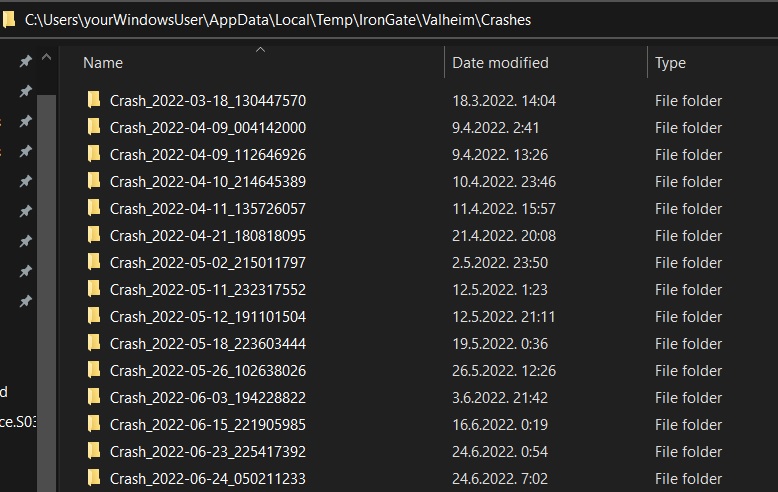
Do you have any crash.dmp files to check out?
At %username%\AppData\Local\Temp\IronGate\Valheim\Crashes
https://imgur.com/R8sG7lv
 proven gate
stark meadow
At `%username%\AppData\Local\Temp\IronGate\Valheim\Crashes`
https://imgur.com/R8...
proven gate
stark meadow
At `%username%\AppData\Local\Temp\IronGate\Valheim\Crashes`
https://imgur.com/R8...
hmm, i only have 4 but they are all empty apart from the one from the 19th of may
 stark meadow
proven gate
hmm, i only have 4 but they are all empty apart from the one from the 19th of ma...
stark meadow
proven gate
hmm, i only have 4 but they are all empty apart from the one from the 19th of ma...
Dm me that one then so I can check it out, and it's player log
Others have at least player.log right?
proven gate
stark meadow
Others have at least player.log right?
the one from the 19th has these 2 files. The other folders don't have anything in them

 jade bison
Guys this x mark keeps showing when I'm exploring

I've dug the ones before nothing seems to be under them, is this a bug? if not then I humbly apologise for wasting your time
 modern gust
Its just edge borders of chunks, each world is split into many 64x64 meter chunks and sometimes the borders are more visible
Visual bug
 gilded sluice
jade bison
So it doesn't mean anything?
gilded sluice
jade bison
So it doesn't mean anything?
means nothing. it's a damn anoying bug tho
modern gust
Nothing to worry about, but a bit of an eyesore at times
 tropic torrent
you can use the cultivator to get rid of them.
 chrome falcon
I'm having an issue where trying to place a Charcoal Kiln on top of stone flooring doesn't place the bottom of the kiln on the stone floor but instead on the ground beneath it.
 cedar edge
jade bison
So it doesn't mean anything?
cedar edge
jade bison
So it doesn't mean anything?
it's the edges of each zone reminding the devs they have overlooked something
 wicked pelican
Are Fuling and/or Deer sounds bugged? I keep hearing Fulings and Deer making much lower sounds than usual. I don't think it has anything to do with my movement either.
 gaunt mist
wicked pelican
Are Fuling and/or Deer sounds bugged? I keep hearing Fulings and Deer making muc...
gaunt mist
wicked pelican
Are Fuling and/or Deer sounds bugged? I keep hearing Fulings and Deer making muc...
Probably affected by being inside mist.
wicked pelican
gaunt mist
Probably affected by being inside mist.
Mist does that!? 😱
gaunt mist
It has been always since Mistlands was added so probably intented effect.
Mist lowers the noices for all mobs, even the buzzing sound of deathsquitos get lower.
wicked pelican
I don't know how I missed that all this time, but hey, now I know. Thanks!
I'm glad to know it's not just Fulings going through puberty,
 warm lake
I have'nt been playing (or using my computer in general) for a few months, coming back to it and trying to launch steam, I get a very scary message of "can't sync with steam cloud, are you sure you want to launch Valheim, it may permanently delete your data"
I tried looking in my save files and they do seem to be empty, only steamcloud.vdf files, I am on linux so I grepped (searched) for any .fch/.fwl files, and found one in the following path:
/home/kyren/.local/share/Steam/userdata/405314847/892970/
Which seems to contain my saves, but steam doesn't seem to look at that location, which makes me think that either a steam or valheim update, updated the location where the saves are stored and so it can't find them? bcz I do have plenty of wine prefixes and non-wine locations where I found the 892970 valheim ID but it was just empty, or had only a steamcloud.vdf
(this happend a few days ago) - I just tried opening steam (before launching the game, also after a computer restart), I got a Valheim update which just finished, and now the game just launched normally without the scary warning, and cloud status is also "up to date", maybe it was like I said, that the update changed the location so after the update it fixed itself? but then why didn't it also update the last time I tried, I don't remember seeing an update
Verified that everything works and I have my character, so glad it's resolved, but leaving this up in case someone has any idea how to prevent it from happening again
stark meadow
warm lake
(this happend a few days ago) - I just tried opening steam (before launching the...
What you had is not a Valheim issue, just Steam/Linux bugs, unavailable servers, etc...
Generally it's always a good idea to backup those saves manually when you get Steam messages about sync failing, from the location you found yourself already. We have seen either players choosing wrong saves to sync (steam asks you cloud or local to overwrite).
If you don't wanna risk Steam messing your saves, you can move them from Cloud to Local via Valheim manage saves button in the starting menu, but I don't recommend that either, because people tend to forget their saves are then not in Cloud, they wipe the disk and lose saves.
warm lake
Wiping is less of a concern for me, but I do plan to keep the saves in the cloud bcz it already happened to me once that I had to go to a different home for a while, and only had a laptop from there, and I was able to just login to steam and get all my saves, so that was nice (and when returning, also just get the saves back)
But ye I did immediately back the files I found to my desktop, but then it just resolved itself, but it got me scared for a bit lol
 atomic scaffold
Having issues with the fps dropping hard whenever my builds get too large, it seems to be regardless of pc-power as I have tried the same worlds on multiple different pc's and this issue seems to have been persistent for a long time.
stark meadow
atomic scaffold
Having issues with the fps dropping hard whenever my builds get too large, it se...
What specs? What FPS? How many instances (number counter in F2 menu)?
atomic scaffold
stark meadow
What specs? What FPS? How many instances (number counter in F2 menu)?
Several different systems with varying specs. From 2080ti's in sli to 3080, to pc's with unknown specs played in co-op.
The lag seems to start somewhere in the 10k instances range, and just progressively gets worse and worse with framrates going from steady 144 fps all the way down to 30-10.
stark meadow
atomic scaffold
Several different systems with varying specs. From 2080ti's in sli to 3080, to p...
Are you referring to sudden drop in performance after playing for while in those large bases?
Or are you talking about permanent loss in AVG and MIN FPS the more you build?
If the latter is the case, performance drop is not related to GPU, rather CPU main thread.
atomic scaffold
stark meadow
Are you referring to sudden drop in performance after playing for while in those...
It's more or less a permanent loss the more you play. And like I said, it's across multiple systems with differing cpu's as well.
stark meadow
atomic scaffold
It's more or less a permanent loss the more you play. And like I said, it's acro...
Sorry, I have to be precise here. Loss in FPS the more you play or the more you build?
Like do you start with higher FPS in your base, and in the same play session do you drop to 10-30FPS?
If you build to much too the point you have 10-30FPS, you have simply built too much. It's CPU related, so listing CPU is important.
You should not have 10FPS on 10k instances on a system that has CPU from same gen as 3000 series card.
atomic scaffold
stark meadow
Sorry, I have to be precise here. Loss in FPS the more you play or the more you ...
The more is built.
So say at 10k instances I might get 130fps, but approaching 20k, you go way lower, and around 30k you're approaching the 30-10 fps range.
Which for a game where building your base is sortof a massive point, feels increadibly bad. As the more love you put into your build, the worse the game feels to play.
Don't get me wrong, if you were to put 1000 torches down in an area, I understand that it would impact performance, but these aren't extravagant creative-mode builds, just normal survival bases that grow as you play.
Especially when the game is graphically way less detailed than other games in the same genre, like conan exiles, where this is absolutely 0 issue, and massive sprawling bases with many npc's run buttery smooth.
modern gust
How do you get 30k instances without extravagant building?
atomic scaffold
modern gust
How do you get 30k instances without extravagant building?
We might have a different interpretation of extravagant, but a dock house, a store house, a sleeping area, and a garden area along with a portal area has easily gotten to that point.
chrome falcon
Can I please get someone to verify that placing a Charcoal Kiln on stone flooring does NOT place the bottom of the kiln on the top of the stone floor but instead places the bottom on the ground below it? I remember it used to, but it's not working as intended and I'm trying to verify if it's just my files. The smelter is just fine however.


 stark meadow
chrome falcon
Can I please get someone to verify that placing a Charcoal Kiln on stone floorin...
stark meadow
chrome falcon
Can I please get someone to verify that placing a Charcoal Kiln on stone floorin...
It just sinks a bit, in your case into the stone blocks, it doesn't seach the ground per se.
chrome falcon
That to me is a bug no?
cedar edge
i'm going to go with: 'no'
modern gust
chrome falcon
That to me is a bug no?
i think that's just how the kiln is, it has a bit of extra model underground so it doesnt look weird ground that isnt completely flat. the end result above ground is how all kilns look