#installation-archived
74689 messages · Page 82 of 75
 humble mirage
 teal summit
Ok sorry did not know can’t run it there will do it (try it) on MacBook I didn’t try yet so not sure if is so dumb if so I will feel that way lol but sorry not everyone fall already smart from heaven like some people. (Just cheeky sarcasm dnt take it wrong way) Anyway thank you I do appreciate
humble mirage
It'll run just fine in a VM on the Mac
 vocal atlas
humble mirage
You can't run it on one, and there's no way I'm helping anybody do something so ...
vocal atlas
humble mirage
You can't run it on one, and there's no way I'm helping anybody do something so ...
That's a bit impolite. Pretty much every tablet has more performance than a raspberry pi.
humble mirage
- It's unsupported
- It's unsupported
- Tablets aren't designed as servers
- Wifi is terrible for servers
- It's unsupported
Oh...
6) It's dumb
vocal atlas
OK thanks man for letting me know your opinion should not be considered in any argument
 royal moon
Hey guys.
I'm from Denmark so we use EU plugs and switches are smaller than many other countries.
So I'm looking for two things.
-
A contact to set between my freezer, coffe machine, washingmachine etc to measure how much power the use.
could this work? https://www.banggood.com/da/4PCS-BlitzWolf-BW-SHP15-Zgbee-3_0-16A-3680W-Smart-Plug-Wireless-Power-Socket-Outlet-EU-Plug-APP-Remote-Control-or-Voice-Control-or-Multiple-Timer-Modes-Compatible-With-Amazon-Alexa-or-Google-Assistant-p-1903535.html?cur_warehouse=CN&rmmds=CategoryElectronicsPop -
And then the switch to replace the ones built in walls. In Denmark we almost only have one model and it's good, but I want to know if there's anything else and maybe for better price.
This one: https://smartkontakten.dk/vare/hue-kompatibel-zigbee-batteritryk-til-fuga/
And is it possible to check energy on all lights to calculate the kw and then price?
 manic bane
vocal atlas
OK thanks man for letting me know your opinion should not be considered in any a...
manic bane
vocal atlas
OK thanks man for letting me know your opinion should not be considered in any a...
Regardless of anything, it being unsupported renders it a stupid idea. Especially so if you’re very new to everything. It can be a fun thing to tinker with, just not a stable item to actually do anything on
 latent thistle
https://community.home-assistant.io/t/ha-inaccessible-after-failed-to-call-service-system-log-write/410408/3 I have found a link between this and esphome
vocal atlas
manic bane
Regardless of anything, it being unsupported renders it a stupid idea. Especiall...
Sure, it renders it an unsupported idea. That doesn't mean it's stupid depending on your intention. I was more put off by the annoying know it all I'm better than you response to such a request
latent thistle
whenever I try to flash/install/ updated esp32 device using esphome, HA become unresponsive
it remains so until I physically restart the rpi4
manic bane
vocal atlas
Sure, it renders it an unsupported idea. That doesn't mean it's stupid depending...
It comes from a bunch of people wanting to do it then complaining it doesn’t work. Because an android tablet actually doesn’t work better than a Pi for HA
humble mirage
I mean, it's been a while since somebody's done that and killed the onboard storage with excessive writes...
 fallow maple
is there a config file we can edit on the haOS to connect it to wifi
 ripe flint
Existing Home Assistant user here. Is there a way to install Hass OS on a Coral Dev Board? The board boots from SD cards or internal flash.
humble mirage
In theory it might be supported by the Pi based builds, if you're really really lucky
 crude inlet
humble mirage
crude inlet
humble mirage
You're likely to be a lot better off just doing a Container install
ripe flint
humble mirage
In theory it _might_ be supported by the Pi based builds, if you're really reall...
I've tried release-pi4 and the general aarch64 from the dev page
Maybe I will try pi3
teal summit
Hello Hope all doing well after several times been trying Download virtual box and I find finally the problem. As I Got Macboom Pro with M1 chip is not supporting Virtual box. Any advice please have I can sort HA in it please? Privet message me I would really appreciate and please leave comments how dumb I am loool (as one member already pointed out) if I didn’t not work with things like this before. Bet some people would not be able do my work neither what I do for life. Everyone we are good in different things
teal summit
vocal atlas
OK thanks man for letting me know your opinion should not be considered in any a...
Thank you 😉
teal summit
teal summit
Hello Hope all doing well after several times been trying Download virtual box a...
Do you think UTM is my best option?
vocal atlas
teal summit
Hello Hope all doing well after several times been trying Download virtual box a...
Installation of debian in parallels could work and then you Install the docker version on it
 iron cedar
Does the 64 bit HassOS usually take longer than 20 min to prepare on a rpi 4 b+?
 grand pivot
It can based on the storage device that you're using, or you could be experiencing network issues. Clicking the blue dot will help determine what's going on
iron cedar
Oh thanks, yeah it's downloading stuff. But that blue dot tip was awesome. Thanks :)))
Oh seems like it has errored a few times
https://www.toptal.com/developers/hastebin/fuziguvuvo.yaml
crude inlet
DNS
grand pivot
(always)
iron cedar
Oh yeah, the HASSOS was acting as my DNS server lol
iron cedar
Done that now, do I need to restart the installation or does it automatically find it?
1.1.1.1 was setup as the backup DNS in the router tho
crude inlet
I'd try unplugging ethernet and plugging it back in instead of pulling power
Wait a bit and refresh the page and see if that takes
Is this a Pi?
 fossil veldt
other than VM is there a way to install the HA server on PCs? I dont mean within windows but like a fresh install from the OS from dos maybe or ?
humble mirage
https://www.home-assistant.io/installation/generic-x86-64#install-home-assistant-container if you don't mean HAOS
iron cedar
crude inlet
Wait a bit and refresh the page and see if that takes
seems like it still has issues https://www.toptal.com/developers/hastebin/genebovura.yaml
crude inlet
ok now I would pull power 😛
iron cedar
Guess I'm one step ahead then, lost patience after that message and pulled it lol
Still getting the error after reboot yaml [supervisor.docker.interface] Can't install ghcr.io/home-assistant/raspberrypi4-64-homeassistant:2022.4.2: 500 Server Error for http+docker://localhost/v1.41/images/create?tag=2022.4.2&fromImage=ghcr.io%2Fhome-assistant%2Fraspberrypi4-64-homeassistant&platform=linux%2Farm64: Internal Server Error ("Get "https://ghcr.io/v2/": net/http: request canceled while waiting for connection
I can reach the url from my pc
iron cedar
reflashed sd card same issue :/
 manic lark
whats the point of running 2 instances of HA? anyone here on that scenario that can name a few benefits of that?
humble mirage
Test instance is one common use
 jovial rampart
I have a backup docker install I can spin up for any number of reasons. My original goes down, I want to play with things. I get a weird itch I can’t scratch any other way. With docker it is easy to rsync your config anywhere and spin it up.
humble mirage
I have:
- Production HA node
- Z-Wave HA node
- Test Core HA node
- Test Container HA node
 high token
Some of mine are even in different physical locations 😛
jovial rampart
I have two raspi and a NUC and a desktop behind my bedroom dresser. Two desktops an odroid and a raspi behind my entertainment center. One raspi at the front of the house and one at the back.
iron cedar
iron cedar
Still getting the error after reboot ```yaml
[supervisor.docker.interface] Can't...
For future reference this was the solution #330990055533576204 message
The link has been removed but bellow is the solution instead.
It seems that netgear blocks ghcr.io in atleast my case which results in Can't install ghcr.io/home-assistant/raspberrypi4-64-homeassistant:2022.4.2: 500 Server Error for... this can be solved by changing the dns server for homeassistant.
you'll be at the ha cli (ha >). Type
loginwhich will take you to the underlying shell --> #
thennmcli con showshould show you one entry in green
edit that connection usingnmcli con edit "Home Assistant OS default"(that should be its name or something close that makes sense)
thenset ipv4.dns 9.9.9.9andset ipv4.ignore-auto-dns yes
save
quit
and finallyha host reboot
I think atleast cuz I can ping ghrc.io now
high token
jovial rampart
I have two raspi and a NUC and a desktop behind my bedroom dresser. Two desktop...
those are a lot of raspis
jovial rampart
high token
those are a lot of raspis
They were fun till they weren’t. Then you have to find uses for them. I have a kismet wireless install that uses two of them to scan WiFi and Bluetooth. One day I will figure out why 🤣
jovial rampart
There is a laptop somewhere that was doing network sniffing. When you have kids, old laptops come in handy
The kismet install brings in so much info I haven’t figured out how to use it
And I got a couple Dell desktops cheap
high token
I have an RPi4 for production HA, Odroid housing docker containers (another HA there among several other containers), old Rpi3 became 3D printer server and 2nd Rpi3 I took with me here for another HA to play with if I wanted to lol. Back home on Friday will be getting things ready to migrate to a Proxmox installation (got my hand on a SFF)
jovial rampart
3 routers, opensense, edgerouter, poe switch. Couple unmanaged switches.
high token
you got some serious amount of hardware
high token
iron cedar
For future reference this was the solution ~~https://discord.com/channels/330944...
that's always the answer 😉
jovial rampart
Yea, when I do something….I go all in. Problem now is when it just isn’t as fun 🤣. Maintenance still there 🤣
high token
If only that wasn't necessary
iron cedar
high token
that's always the answer 😉
Seems like netgear really hates GHRC.io since there has been atleast three people in here showing this issue using a netgear router
high token
this was also the case with some people having HA on a switch and they would get it to work when connected directly to router. I wonder if those switches were also netgear
I can't remember anymore
iron cedar
In my case I had a 24 port managed HP switch
latent thistle
how to fix this "Home Assistant observer
Supervisor: Connected
Supported: Unsupported
Healthy: Unhealthy
"
humble mirage
What's your install method? HAOS?
latent thistle
HAOS
it loses connection at random time. what I have noticed is whenever I try to update my esphome configuration it simply crashes
humble mirage
What hardware are you running it on?
latent thistle
rpi4
humble mirage
Which model?
 vital yew
Afternoon all. Trying to update my Home Assistant Core from 2022.4.2 to 2022.4.3 but I am getting an error "System is not healthy" when i try
humble mirage
What's your install method?
humble mirage
Native Container never mentions health
vital yew
humble mirage
You only get that reported if you're using HAOS or Supervised
See https://my.home-assistant.io/redirect/info/ to see your install method
I'm betting you've got Supervised
humble mirage
Well, "good" news...
Supervised isn't supported on Ubuntu
That's likely at least part of your problem
humble mirage
The bad news is that it's not supported, and never will be, and you can't make that system healthy
humble mirage
Take a backup, re-build with HAOS, restore
Or, if you must run Supervised, use Debian and this time ensure you comply with all the requirements
(that includes not running other containers outside of add-ons)
Unless you've got hardware that's not supported by HAOS though, HAOS is the way to go
vital yew
Im running VMware Workstation on a dedicated Windows Box#
so i guess this
whats the fullest way to run a backup?
Just use the full backup from under configuration?
humble mirage
vital yew
Im running VMware Workstation on a dedicated Windows Box#
In that case absolutely use the VM images
vital yew
will the backup/restore literally restore everything or am i going to have a load of manual work to do ?
trying to decide if i attempt this now with on 30 minutes spare, or if i need to wait until i have a full day spare
lol
humble mirage
AFAIK it covers all your add-ons and HA config, that's kinda the point
Nothing stopping you spinning up a fresh VM and trying it out though
vital yew
yep on it
@humble mirage once again thank you for your help! Twice in three days, your a bit of a hero
latent thistle
whats strange it is connected on tailscale but not on zero-tier
still inaccessible.
 midnight marsh
looking to get some help with my install ... I've been running HassOS for a little over a year on a RPi 4b
i decided to try running on different hardware
so my current test setup is on a macbook running docker desktop
i'm running core in docker and i have HA running .. i'm slowly adding in all my integrations ... HACS is installed and i've got a bunch of frontend custom components isntalled
at this point, on my dashboard i get custom elements doesn't exist
in my config.yaml file i've added the proper resources under lovelace
the only way I can get it to work is if I add the line "mode: yaml"
problem is i want to keep it in UI mode ...
humble mirage
You can add resources using the UI
No need for YAML mode
 -> Dashboards -> Resources
midnight marsh
I only have that on the old setup on the RPi4b running HassOS, not on the core docker container
 abstract hearthBOT
Various settings are hidden unless your user profile has Advanced mode enabled. These include some add-ons, the Lovelace Resources menu, server control options, and more.
Command '~advanced' was invoked by: Tinkerer
high token
are you wanting to start from scratch? Why not 'restore' your files?
 outer token
Hi! As I am now searching and trying for at least half of the day - does HA OS 6.0 and newer run on Hyper-V on Windows Server 2012 r2? I can't get it to finish update (tries 3x to boot entry "system0" and then goes for entry "system1"), and not even a fresh .vhdx newer than 5.13 will boot up.
I am running it like this since HassOS 2.12, and had no issues yet. But from 6.0 and upwards nothing will even boot.
Tried 6.0, 6.6 and 7.6 on my Win10 Hyper-V, and all went up
midnight marsh
high token
are you wanting to start from scratch? Why not 'restore' your files?
umm .... can i restore a HassOS backup to this docker version?
will stuff break?
high token
there's no supervisor to restore a backup with
but you can take the entirety of the /config folder and add it to the new /config folder
midnight marsh
oh gotcha ... yeah i've been adding things slowly
i thought youy meant you coudl restore .. haha
midnight marsh
but yes, i'm adding stuff in bit by bit ... but the integrations i'm putting back in manually tho
high token
anything configured in the UI lives in .storage If you were to override it with the one from the old HA would be like you did a restore
midnight marsh
and i'm having a hell of a time with the tp-link kasa one ... isn't there a way to do that manually in yaml?
midnight marsh
high token
anything configured in the UI lives in `.storage` If you were to override it wi...
oh ... didn't realize that
high token
literally if you unzip your backup and take everything from your homeassistant /config and override the /config of the docker HA then restart it should bring everything back
as it was
midnight marsh
interesting ....
i don't mind doing it all manually .. gives me a chance to clean stuff up a bit 😄
but maybe some things can just be restored
the two that are giving me the most trouble are my alarm decoder and tp-link kasa integrations
high token
its not really easy to pick and choose from the .storage folder
midnight marsh
oh wow ... i just opened up the folder and yeah i see what you mean
midnight marsh
this dockerized configuration is still work in progress ... so how should i handle my zwave dongle and esphome integration?
for zwave i don't want to migrate the stick over to the new system yet ....
and for esphome ... can devices be connected to 2 different esphome instances?
vital yew
Dont suppose anyone is using Vmware Player 16 to run HASIO?
The guide here: https://www.home-assistant.io/installation/windows talks about going to settings>options>advanced to set the firmware type to UEFI, but this isnt an option in Vmware Player 16
(Vmware Workstation Player 16)
firmware = "efi"
for anyone else, you have to edit the vmx file and add that line
@humble mirage so took the backup, all up and running in HASIO, but cannot find how to restore from backup
Ignore found a way of doing it 🙂
that turned out to all be super easy! 🙂
outer token
outer token
Hi! As I am now searching and trying for at least half of the day - does HA OS 6...
just tried the 8.0rc1 - same bootloop, so it's not related to barebox...
is there any log that could help at that point?
or some debugging I could activate in bootloader?
outer token
outer token
Hi! As I am now searching and trying for at least half of the day - does HA OS 6...
Just to let you know what I am struggling with: https://risen.eu/pub/HassOS_updatefail.mp4
Same behavior with stock .vhdx files in 6.0, 6.6, 7.6 and 8.0rc1, except that these do not have a working system to fallback to after three fails...
 torn monolith
I asked in the general chat, and was sent over here!😁 I am kinda stuck with a serious issu on my home assistant. I upgraded my network to fiber and had to factory reset my mesh router. I implemented the same wifi ssd name and password, but (as I hope would not happen) the home assistant will not connect to wifi.. so I am kinda stuck, and are not able to reach the home assistant, even though I have it connected with a ethernet cable:/ Any suggestions? After falling in love with using HA, it is a hard set back when nothing works anymore😅
crude inlet
@torn monolith the Ethernet connection should have a different IP address
torn monolith
Then what do I need to do😊
 lyric thicket
im hoping someone can help me...I have proxmox loaded on a thin client that has only 8GB of HDD space. I have a USB SSD drive that i want to attach. I want to install HASSOS per these directions: https://community.home-assistant.io/t/installing-home-assistant-os-using-proxmox-7/201835/59....... I'm not sure how to connect the USB Drive to the pc so that this drive space is shared properly so i have enough room to install HA and to have room to store the data from there as well. the backups im trying to restore from are approx 11GB's.
appreciate any help on this!!
manic bane
torn monolith
Then what do I need to do😊
Use your router to see what IP address is assigned or connect a display and see what it’s giving you. Definitely recommend using Ethernet long term too
 turbid rapids
Hey if I move from a Raspberry pi 3 to 4, will the backup from 3 work to just add to my 4?
latent thistle
➜ ~ ha core check
Processing... Done.
Post "http://supervisor/core/check": context deadline exceeded (Client.Timeout exceeded while awaiting headers)
➜ ~
latent thistle
turbid rapids
Hey if I move from a Raspberry pi 3 to 4, will the backup from 3 work to just ad...
yes
vital yew
Morning All. Dont suppose anyone can help answer something silly for me!
I am running HASSIO, and i have the SSH Add-On installed.
However when i SSH i notice i am at a bash prompt, and not the hassio command line
how do i enter the hassio command line from the bash prompt?
worked it out. Thanks
 urban flame
Hi all - a quick question - after installing hass os 8.0rc1 my RaspberryPi lost wifi access and I'm now stuck, Unable to downgrade. I want to reflash the RaspberryPi and start fresh.
I have run a backup through the console and want to copy that back to a USB drive. Is that possible through the console?
 onyx void
Hi Guy's
If I install Home Assistant OS Release-8 build 0 (RC1) will the updater recognise the official release and offer to update to it?
 runic token
Hello Experts of HA,
i installed home assistant core on venv on raspi (i realise no the most popular way of doing all HA things) ... i update the venv to python 3.9.0 as 3.7 was announced to be deprecated, but i still get the warning on the home assistant as a notification
crude inlet
@onyx void you'll probably need to manually update to it
@urban flame you could try rebooting it 3 times or so
urban flame
@crude inlet tried,not working. Was able to rebuild core and reboot. Some how network returned (only wired, wlan still missing). Connected to the network and downgraded os back to 7.6. Now all is working
crude inlet
@urban flame yes, it was a known issue with the RC version
It sounded like wired wasn't an option.
humble mirage
runic token
Hello Experts of HA,
i installed home assistant core on venv on raspi (i reali...
When you "updated" the venv, did you blow away the old one and rebuild it, or ... what?
runic token
humble mirage
When you "updated" the venv, did you blow away the old one and rebuild it, or .....
yes i deactivated it and deleted the file
runic token
humble mirage
When you "updated" the venv, did you blow away the old one and rebuild it, or .....
i ran a check of the installation, seems i am have trouble with libffi.so.7
[homeassistant.auth.providers] Unable to load auth provider homeassistant: libffi.so.7:
humble mirage
runic token
yes i deactivated it and deleted the file
folder, not file
humble mirage
runic token
i ran a check of the installation, seems i am have trouble with libffi.so.7
That means you didn't install all the pre-requisite libraries
libffi-dev amongst others
http://blog.ceard.tech/2017/12/upgrading-python-virtual-environment.html is slightly outdated, but should get you close
humble mirage
And yet you missed the libraries 😛
runic token
humble mirage
And yet you missed the libraries 😛
says i should just remove it from the requirements.txt if i ran into trouble
runic token
humble mirage
And yet you missed the libraries 😛
thing is, i don't know what i am doing...first time trying out core
humble mirage
You probably should use Container then, unless there's a strong reason for needing a Python venv
runic token
humble mirage
You probably should use Container then, unless there's a strong reason for needi...
only reason is stubbornness, used 2 days trying to understand the Core installation, too invested 😛
grand pivot
That's called the Sunk Cost Fallacy
humble mirage

runic token
humble mirage
You probably should use Container then, unless there's a strong reason for needi...
also i am running the raspi for other purposes
runic token
makes so much sense when you guys put a name to the idiocracy
hahah
alright guys! thanks a lot, will try container 🙂 🙂
 velvet mirage
Hi guys im thinking of installing hassio on a nuc , but i wanted to know if the difference between hdd and ssd installation is very diferent on the speed aspetc of ha
humble mirage
You're unlikely to notice much of a difference - only if you're viewing history or the Logbook, and even then maybe not much
velvet mirage
thx so much @humble mirage its nice then i can use the plex add on and the hdd i already use for plex
humble mirage
Well, you'll wipe that HDD in the process
velvet mirage
i know im already backing up my movies/tv shows
runic token
humble mirage
And you'd already be up and running
so much easier!!
manic lark
is it possible to run 2 instances of HA in 2 pies? any configuration i need to add to the second one?
what i want to acomplish is this
my main HA in one pie had everything i need and attached a broadlink remote
i want another HA to attached a camera and avoid slowing the first one
manic lark
high token
attach a camera you mean just adding an integration for a camera stream?
attached to the usb pi
manic lark
high token
which Pis?
raspberry pie 3
crude inlet
directly attached probably won't work well unless you are running an OS other than HA OS
 ashen nacelle
Good afternoon. I'm having troubles with hacs. I've looked everywhere and don't find anyone else with the same problem. It says that I'm using version 1.15.2 and version 1.24.5 is available. I try to update, reboot HA and keeps the same...
grand pivot
did you update by re-running the installation script?
ashen nacelle
grand pivot
did you update by re-running the installation script?
Thanks for the reply. No. I'm afraid to loose all the settings of hacs
ashen nacelle
Ao I must do all the initial configuration ?
grand pivot
just re-run the script
ashen nacelle
*so...
manic lark
crude inlet
directly attached probably won't work well unless you are running an OS other th...
yes it works, actually in the main pie works but it slows it down that why i want another pie
crude inlet
@manic lark there is no issue with running multiple HA instances, as long as you can remember how you have things organized
You might want to change the hostname on one of them
ashen nacelle
grand pivot
just re-run the script
Must do all the initial configuration ?
ashen nacelle
grand pivot
just re-run the script
Thanks. It solved ! Thanks a lot !!!
grand pivot
fewer questions, more re-running the script 🙂
 steel sky
@slim orchid Why not use the documented method for updating? https://www.home-assistant.io/common-tasks/core/#update Edit: Sorry, wrong link
It may still be fixable if you try that.
 slim orchid
steel sky
<@497294395796881418> Why not use the documented method for updating? <https://w...
slim orchid
steel sky
<@497294395796881418> Why not use the documented method for updating? <https://w...
I use DietpiOS and they have that Dietpi-software center and install with scripts.
I try that method from docs but still the same.
Do You know how to move my HA config to docker? It's some easy method?
I can install HA with Dockstarter in few seconds on the same device but don't know what files to move.
grand pivot
everything in your config directory
slim orchid
You mean just copy everything from my /dietpi_userdata/homeassistant/?
To new docker installation?
 merry galleon
yes, all config files should be moved to teh new location
slim orchid
Folder where configuration yaml is?
merry galleon
yes
slim orchid
OK, I will try 👍
 merry fjord
My HA no longer prompts to install new releases. I’m still on version 2022.4.0 anyone else had this issue?
 glossy cairn
any idea why my rasberry pi 4 would not show up on my network? i followed the instructions using balena etcher, plugged it into the network
high token
you can't get a screen attached to make sure it's actually booting?
 cloud lily
is there a problem with 2022.4.4 ? pip3 can't find it just 2022.4.3
 fickle obsidian
^ i havent been able to update and i havent been able to do any addons
im trying to update by plugging in my second monitor and spare keyboard
its been saying Processing... for a while
I was able to execute core update and it went thru but they didnt make it go away on the UI
 reef hamlet
what is the best way to install HA on a tower pc with ubuntu?
I want to put HA directly onto linux, but im not sure what "supervised" or docker means
grand pivot
If you don't want to reimage with Debian, your best option is a VM
reef hamlet
why would i need a VM, if i already have ubuntu? what VM would i be putting on it?
thanks for being patient. i'm very very new to this.
grand pivot
Because Ubuntu isn't supported for a Supervised installation and not knowing what docker is makes me think that's not the right option for you either
I recommend reviewing this: https://www.home-assistant.io/installation/
 olive kayak
Hello, I am running into an issue while trying to install HA OS on a VM . following guide from community - https://community.home-assistant.io/t/installing-home-assistant-os-using-proxmox-7/201835 and https://github.com/whiskerz007/proxmox_hassos_install
error info - https://pastebin.com/mMt2Esuw
can someone help me on it? I ran this method multiple times before , it was always working.
reef hamlet
That first link you sent me, i have viewed many times. I have only used windows before. the surplus PC i got had ubuntu already installed on it.
i previously tried to install the KVM, and it didn't work
 queen bronze
What effect does the .HA_VERSION file have on HA? Is it informational or is it read by something(s)?
 cursive pulsar
hello i am running ha on a pi 4. is there a way to switch from ethernet to wifi via the ui or do i have it to do by removing the sd card and adding the my-network file?
okay, found it in the intuitive menu 😄 ... but it doesnt seem to work..
i clicked reboot and unplugged the ethernet cable. but i cant reach ha
i the ui it says its connected to wifi but its only working when the ethernet cable is connected. i love wasting time with issues like this 🥴
 hexed mirage
cursive pulsar
i the ui it says its connected to wifi but its only working when the ethernet ca...
hexed mirage
cursive pulsar
i the ui it says its connected to wifi but its only working when the ethernet ca...
check the setup in cat /etc/wpa_supplicant/wpa_supplicant.conf DO NOT share details here as it will have ssid and password information. Correct if necessary and reboot
hexed mirage
cursive pulsar
i the ui it says its connected to wifi but its only working when the ethernet ca...
wait - are you trying to reach the same IP over WIFI as it was via ethernet. It may not be same. check using ifconfig against the wlan0 interface
cursive pulsar
no i was expecting a new ip within my router.
but i solved it. hat to turn on dhcp first in ha
hexed mirage
good. now reserve that ip in router
cursive pulsar
already did 🙂
 open crow
hello my friend; because of power interruption, my raspberry kill my usb with home assistant; i triing to reinstall from yesterday, unable to... always stuck here: [supervisor.host.manager] Host information reload completed ; if i put a monitor in, i only saw supervisor waiting setup state (something similar) 😦
i always had problem installing home assistant (always stuck install and similar), but this is the first time that i'm not able to install after 42 try (42 usb format and rewrite haha)
fickle obsidian
is it a server 500 error? @open crow cause then we would be in the same boat on this issue
open crow
fickle obsidian
is it a server 500 error? <@427835687023149057> cause then we would be in the s...
no my friend, no server error. its incredible because everytime i have to install new home assistant instance, i have to try for 10 days.. i didnt change nothing, sometimes works without explaination
dont know why
nevermind, thanks all and have a nice Easter 🙂
fickle obsidian
lol im with you on that my man
Well, I guess I'll shoot my shot then. Hey guys, here's my problem. Fresh install on RP4 w/ SSD. Followed HA doc online for install. Booted up and looking at my RP on second monitor. Made it to the Home Assistant prompt on there. It gives IPv4, IPv6, OS Version, Home Assistant Core, Home Assistant URL, and Observer URL. On my separate computer on the network I type in the homeassistant.local:8123 and the page shows up with the wait 20 minutes while it configures things page. I hit that blue dot to see the log and it is timing out trying to install something from the web. Server 500 error. I had this issue in the past install of HA on my RP4 and was able to fix it by following these instructions
network update eth0 --ipv4-nameserver 1.1.1.1
login
nmcli con edit “Supervisor eth0”
remove ipv4.dns
set ipv4.dns 1.1.1.1
save
quit
exit
host restart
network info
supervisor log
Those don't seem to work this time. I'm stuck. Any gurus out there?
I'm on a fresh wipe of my SSD because I couldn't update to the newest core and for some reason, i couldnt install any new addons so it all felt very bricked. I tried reverting to a backup first but that didnt help at all so i went nuclear option
I kind of think what is happening is that RP4 has a bug with the new version and my fresh install is calling on that version to get itself setup and just keeps failing
I'll google around and see if there's a way to have it try to talk with a previous version or something
fickle obsidian
tried supervisor update and it returns Error: Update of Supervisor failed: Can't install....
i can ping my router too
runic token
--------Configurator installation -------complete noob------
running home assistant container on a raspi. i installed hass-configurator-docker. when i ran file editor it ends-up at a different location in the file system.
see this short thread - post #6
any idea where i glitched out
 orchid pebble
runic token
--------Configurator installation -------complete noob------
running home assist...
orchid pebble
runic token
--------Configurator installation -------complete noob------
running home assist...
where's the thread
orchid pebble
fickle obsidian
its weird that it gives me internal server error because i can type login from t...
can I see the exact error
 sick geyser
so the HA VM image doesn't like being started with two network adapters eh?
 storm sluice
why would you need that?
sick geyser
i have a prod network and an iot/service network
my current rPi HA host is connected to both
it could probably just be on the service LAN, it doesn't need to be on Prod
should the onboarding page be giving me some kind of indication or progress bar after I tell it to restore from a backup file?
sick geyser
The web interface seems to stop working after I point it to my backup file (1.8gb~)
 upper crescent
i had home assistant running on my Pi as the OS, but wanted to run Pi hole and Homebridge etc as well. Flashed the SD card with Raspberry Pi imager, put it back in the Pi and installed Docker, then Portainer. Googled for a Portainer HomeAssistant image, and it's been a minute of trying to correct it so I can't tell you what i landed on BUT now I have like five separate containers for Hassio, but no GUI that I can find.
The containers are: hassio__ supervisor, hassio__ multicast, hassio__ observer, hassio__ audio, hassio__ dns and hassio__ cli -- they are persistent, as in, if I remove them all, they reappear.. what have i done, can anyone suggest what I can do? thanks for your help
 spare trellis
Hi friends. I have been struggling to get the SSD install of HA on Raspberry Pi 4for a few days now. When I burn the image on the SSD, the boot drive of only 32 MB is created and rest of the drive is unused. Due to this home assistant does not complete the "Prepare home assistant" step and keeps stuck for hours. Any idea how to move forward.
runic token
orchid pebble
where's the thread
 pulsar slate
I'm trying to update Home Assistant OS 5.13 to the latest version, but it doesn't work.
22-04-16 13:24:07 INFO (MainThread) [supervisor.os.manager] Fetch OTA update from https://github.com/home-assistant/operating-system/releases/download/8.0.rc2/haos_ova -8.0.rc2.raucb
22-04-16 13:25:45 INFO (MainThread) [supervisor.os.manager] Completed download of OTA update file /data/tmp/hassos-8.0.rc2.raucb
22-04-16 13:25:46 ERROR (MainThread) [supervisor.os.manager] Home Assistant Operating System update failed with: Installation error: Failed updating slot kernel.1: failed to mount slot: failed to run mount: Child process exited with code 32
22-04-16 11:49:22 WARNING (MainThread) [supervisor.resolution.evaluations.base] OS-Agent is not correctly working (more-info: https://www.home-assistant.io/more-info/unsupported/os_agent)
Installed on virtualbox
@lavish anvil What is proper database?
high token
Try updating closer releases from the cli
Go to 6.0 first then 7.0
I think 6.0 is the one introducing OS Agent
ha os update --version 6.0
pulsar slate
high token
Go to 6.0 first then 7.0
Thank you very much, I updated to 6, now I'm updating to the latest.
We sat for 2 days and installed packages through the console to install the OS agent
XD
high token
Usually going to 6.0 first worked. You're not the first with this issue 😅
 placid sage
Do you guys know if it would be acceptable to use https://version.home-assistant.io/stable.json to determine the latest version information in my own (public) scripts?
It is served via cloudflare with static content from https://github.com/home-assistant/version so i would assume it might be, but after a quick googling i didn't find external usages of this.
Why i'm asking: The latest HA OS RC releases in github are not marked as prerelease so I can't easily determine latest stable version from GH API anymore..
https://github.com/home-assistant/operating-system/releases
 hollow ledge
HI!
I'm in the process of installing HA Supervised on my fresh Debian.
I'm stuck at this command:
root@basil:~# curl -fsSL get.docker.com | sh
# Executing docker install script, commit: 93d2499759296ac1f9c510605fef85052a2c32be
+ sh -c apt-get update -qq >/dev/null
E: The repository 'https://download.docker.com/linux/ubuntu bullseye Release' does not have a Release file.
root@basil:~#```
The script is trying to get an Ubuntu repo, not a Debian.
Is this a known bug?
Do you have any tips to how to solve this?Which os are you running?
cat /etc/lsb-release would give this info
Also, this is an issue with docker installer, not with HA components, so this might not be the correct place to ask this. Or perhaps in #the-water-cooler
hollow ledge
the os should be fine according to the Requirements
root@basil:~# cat /etc/os-release
PRETTY_NAME="Debian GNU/Linux 11 (bullseye)"
NAME="Debian GNU/Linux"
VERSION_ID="11"
VERSION="11 (bullseye)"
VERSION_CODENAME=bullseye
ID=debian
HOME_URL="https://www.debian.org/"
SUPPORT_URL="https://www.debian.org/support"
BUG_REPORT_URL="https://bugs.debian.org/"
root@basil:~#```used apt-get install docker-ce docker-ce-cli containerd.io we will see how it works out
placid sage
hollow ledge
the os should be fine according to the Requirements
```bash
root@basil:~# cat /...
I also tested the installer script on Debian 11, for me it creates the correct info.
You could try to remove /etc/apt/sources.list.d/docker.list and running it again, perhaps where was some other issue before
The workaround could be to manually install everything without the install script using oficcial instructions: https://docs.docker.com/engine/install/debian/
hollow ledge
thanks, will try that in a bit.
BTW my plan is to set up a Debian server on a mini pc, run HA supervised on it, along with other non HA related programs. is this the best way?
What I really need is to manage HA addons from the Supervisor from the web UI, but still have a server that I can use for other purposes too
Is HA Supervised on Debian a good solution for this? or is there a better installation method?
placid sage
In software, there is no such way a "best way" - everything has it's own (dis)advantages.
But you want to use plugins via UI you do indeed need the supervisor so you have two options:
- Configure supervised HA yourself (what you are doing now)
- Use Homeassistant OS
Depending on how much resources your mini-PC has, you could also virtualize the HA OS.
For example in my Intel NUC, I run Proxmox supervisor as my host and then HA OS virtual machine in it - this gives me the most flexibility by giving up some resources for virtualization overhead
hollow ledge
these are my specs:
- Intel Celeron J1900 4 cores @ 2GHz
- 4GB DDR3
- 120GB SSD
I think it could run a VM, but I feel a bit more stable with not having 2 machines in one
placid sage
Yeah, 4GB RAM is a bit sparse for running HA in VM (HA reccommended minimum is already 4GB).
If you have the time and will you could also install HA OS directly on the nuc, and deploy your own workloads in docker containers as an addon.
See more here on how to develop them: https://developers.home-assistant.io/docs/add-ons/
hollow ledge
thanks, that could be a project for the future.
Right now my new issue is that the Spotify Connect addon doesn't see the HDMI as an audio output. maybe I have to manually enable it for the container?
 teal hill
hollow ledge
these are my specs:
- Intel Celeron J1900 4 cores @ 2GHz
- 4GB DDR3
- 120GB S...
teal hill
hollow ledge
these are my specs:
- Intel Celeron J1900 4 cores @ 2GHz
- 4GB DDR3
- 120GB S...
i'd recommend checking out if you can add ram to the mini pc, and if you can just install proxmox and run HA in a vm
spare trellis
Hi! I am trying to install HA on RP4. Tried both SSD and microSD but I get stuck on preparing stage. Desperate for help.
21-10-12 20:56:20 INFO (SyncWorker_0) [supervisor.docker.interface] Updating image ghcr.io/home-assistant/raspberrypi4-64-homeassistant:landingpage to ghcr.io/home-assistant/raspberrypi4-64-homeassistant:2022.4.4
21-10-12 20:56:20 INFO (SyncWorker_0) [supervisor.docker.interface] Downloading docker image ghcr.io/home-assistant/raspberrypi4-64-homeassistant with tag 2022.4.4.
21-10-12 20:56:23 ERROR (SyncWorker_0) [supervisor.docker.interface] Can't install ghcr.io/home-assistant/raspberrypi4-64-homeassistant:2022.4.4: 404 Client Error for http+docker://localhost/v1.41/images/ghcr.io/home-assistant/raspberrypi4-64-homeassistant:2022.4.4/json: Not Found ("no such image: ghcr.io/home-assistant/raspberrypi4-64-homeassistant:2022.4.4: No such image: ghcr.io/home-assistant/raspberrypi4-64-homeassistant:2022.4.4")
21-10-12 20:56:23 WARNING (MainThread) [supervisor.homeassistant.core] Error on Home Assistant installation. Retry in 30sec
I also notice that my 256 GB SSD is all empty and HA bootable is just 32 MB.
fickle obsidian
https://www.home-assistant.io/faq/404/#:~:text=Dashboards-,404 Client Error%3A Not Found ('no%20such%20image%3A%20homeassistant,the%20image%20to%20be%20downloaded.
i googled Home Assistant 404 error
you could try doing it manually and see if it works. If you can plug in the hdmi on the pi to a monitor and find a keyboard you can type on the CLI
login
docker pull ghcr.io/home-assistant/raspberrypi4-64-homeassistant:2022.4.4
fickle obsidian
I'm stuck at "Preparing Home Assistant"
It's a DNS problem I can't solve
I've been watching the su logs while plugged into my RP4 via HDMI and keyboard. I can manually do a docker pull of the image its trying to automatically fetch and download if I login and execute nmcli con edit "Supervisor eth0" and change my ipv4 dns to 1.1.1.1
After nmcli con edit changes I can reboot the host and do my manual docker pull, which succeeds in downloading but it doesnt have an affect on getting me out of the preparing home assistant process im stuck in
 left kraken
Hoow long could take restore HA from the backup? Backup is about 400MB, and i freshly installed hassio
fickle obsidian
my backups b4 my problem occurred only took maybe 5 mins on my RP4
it depends on compute power and data transfer speeds
left kraken
crap, i am waiting already 20 minutes and cannot connect to webapi
IP is visible on router config site
Hassos is SSHable by default?
fickle obsidian
no but you can plug in an hdmi to your device and see its output and talk to the CLI
if youre using this http://homeassistant.local:8123/
try this http://homeassistant:8123/
left kraken
problem is that i have no lan acess near my HDMI acess
 hoary badger
Hey all, new here. Just installed HA using the Docker method (on Windows). Container seems fine. No obvious signs of trouble in the log. But, I cannot seem to connect to the site (myip:8123). What gives? How do I verify everything is ok? What could I be missing?
humble mirage
Docker on Windows isn't supported
https://www.home-assistant.io/installation/windows lists two options, neither of which is Docker
The problem is, Docker on Windows is less than fully functional - particularly on the networking side
 willow reef
Hi everyone. I've installed my version of HA using docker in a sinology NAS which carries the problem of not having the "supervisor" mode and turns everything a bit harder to install addons.
Wonder how can I install an add-on that I've downloaded from github. Any help?
willow reef
I managed to install HACS
 unkempt crow
grand pivot
unkempt crow
grand pivot
that's unrelated to addons
willow reef
I c
So if I use HA within a container... there's no addons
So, best option to use it inside a Sinology NAS would be to install ubuntu into a container and then add the HA ?
grand pivot
um, no
you can use the docker installation that you already have and add whatever containers you want
or install the HA OS image in a VM, I suppose, if your NAS supports that
"best option" is up to you, but none involve installing ubuntu in a container
left kraken
It runs, but : https://pastebin.pl/view/f348eff7
 soft silo
New to Home Assistant, but long time MisterHouse/Insteon/X10 person. Just swapped over from now-defunct Insteon Hub (online) to Home Assistant to restore Alexa connectivity.
Is there a way to re-run autodiscovery for Insteon Hubs? My VM host died 1/2 way through discovery and now I'm missing 20 or so devices.
 half patio
How easy was it to pick up Home Assistant. I too am a long time INsteon user and need a new platform
humble mirage
The answer is very much how long is a piece of string - a lot will depend on you
If you're looking for some polished point-n-click thing, it's probably not for you. If you want something flexible and powerful and are happy to deal with the fact that you'll need to learn how it works, then give it a shot
 primal osprey
I'm installing Home Assistant on an Odroid UX4 and booting up is giving me this screen: https://imgur.com/a/EuESaKK
As you can see i can't read the left half of the text and moving it with my monitor's controls doesn't reveal what's to the left and therefore I can't complete the installation.
Localhost shows "Preparing Home Assistant" for the past 40 minutes so I think it's waiting for me to do something on the Odroid. Does anyone know what I should press to complete the installation since I can't read the options?
humble mirage
Click the blue circle
grand pivot
Maybe it needs to say that
humble mirage
Why would you make it easy for people to find out why their install is taking a while?
grand pivot
It's like it's laughing at the poor users. Ha! I know why it's not working but I'm not telling!
My ISY994 shows a single line display that updates with the last log entry and makes it easier to see what's going on without filling the page with a log
crude inlet
It's probably DNS tho
humble mirage
It does often seem to be
grand pivot
Maybe just a static message with that 🙂
 grand pivot
Ya know, maybe start the thing with a health check and display the results
I'm just full of ideas that I have no plans to implement
But seriously, that would be good, right?
crude inlet
I think mdegt01 is working on it
primal osprey
Update: It's fixed now. I had to flash the ROM again
placid sage
hollow ledge
thanks, that could be a project for the future.
Right now my new issue is that t...
Linux containers are isolated from the rest of the hardware, you'll need to tell docker to pass any device to the container, including sound devices.
This SO post describes on how to do it: https://stackoverflow.com/a/28985715/1119550
However, it requires --privileged flag, which grants the container with pretty much full control of the host machine, defeating all container isolation so use with care.
If running supervised addon, then you could enable the privileged mode from the addon settings page
fickle obsidian
Update: Fixed my dns issue
midnight marsh
i'm in the middle of setting up a new HA configuration going from my current RPi4 haOS to a docker configuration on my mac
a lot of stuff has been migrated/works
but i've noticed a bunch of things that don't work properly and i'm wondering if it's because of docker on mac because network host mode is not available for docker on mac/windows?
the motivation for setting it up this way is to 1) repurpose older hardware and 2) being a laptop, it has inherent "battery backup" 😄 3) the rpi4 setup for some odd reason for these past few months exhibits very high memory usage and is causing some issues.
 native rock
Hi, I have a Fibaro door/window sensor and my HA has recognized it as a number. How can I modify the identity to be a binary_sensor?
I tried the new identity change, but it doesn't work for other than Switch.
grand pivot
the binary_sensor entity may just be disabled
what integration exposes a door/window sensor as a number?
native rock
grand pivot
what integration exposes a door/window sensor as a number?
fibaro is a zwave manufacture. upon syncing, it appeared as number
grand pivot
see if there are disabled entities for that device
native rock
grand pivot
see if there are disabled entities for that device
found it. was hidden. thx
upper crescent
is installing Raspbian OS with desktop the worst idea? I get extra draw on the Pi, but I have Pi 4 which should buffer most the additional computing... right?
or should i stick with Lite; I'm familiar enough with command line but wouldn't mind a bit of a reprieve from relying on them at times
to note: i want to install HA supervised on the Pi once it's up and running, to reframe the question to the audience lol... does it suffer being on a desktop-enabled pi?
grand pivot
It will suffer from not being Debian, which is the only supported OS for Supervised
upper crescent
oh my bad, raspberry pi OS is on debian:
Raspberry Pi OS with desktop
Release date: April 4th 2022
System: 64-bit
Kernel version: 5.15
Debian version: 11 (bullseye)
Size: 757MB
i'm going the Pi OS route instead of Hassio bc I want Homebridge and HKSV video, which I've hd configured to deliver cam motion notifications to my Apple TV – which is pretty sweet, and not possible on HA
just fingers crossed i'm not asking too much of the processor
crude inlet
I'd go with the regular docker install
You don't need supervised and its ecosystem. If you do need it, then HA OS is what to run on a Pi. It has that ecosystem and nothing else. If you need to run other things, then docker and the HA docker image.
upper crescent
ah cool. the things I want HA for are energy monitoring with Emporia Vue and heat pump control with ESP home.
 bitter hornet
Anyone know why this is happening ?
"Unable to check for updates"
"You do not have any integrations that provide updates."
It pops up after I hit the "Check for updates" button.
It started happening after the 2022.4.0 update - when everything was fine before.
Thanks
bitter hornet
Additional:
I noticed (Github Page) there was a newer version. I manually updated to 2022.4.5 - that went aok. However, the pop-up persists when I hit the "Check for updates" button.
Additional (2)
I've checked all the logs and there's nothing mentioned (anywhere) pertaining to updates, etc.
 hexed night
Morning folks, another insteon refugee here. Saying hi 👋
Im using a pi4 for the haos install which seemed to go fine but am getting stuck on the next step
Namely: "In the browser of your Desktop system, within a few minutes you will be able to reach your new Home Assistant on homeassistant.local:8123." etc
Does not load. Also when entering the IP address in numerical form
humble mirage
Try port 4357 instead of port 8123
You should have a blue dot you can click on that gives you more info
It's probably going to be DNS, there seems to be a theme of that causing issues with HAOS installs of late
hexed night
Thank you sir. I'll give that a try 🙏
Doesn't work either.
Connection timeout err
Same as other
crude inlet
2022.4.0 introduced some GitHub hammering. 2022.4.5 hopefully fixes that
hexed night
crude inlet
2022.4.0 introduced some GitHub hammering. 2022.4.5 hopefully fixes that
Should I start over and reflash my sdcard?
I didn't look at the GitHub, just copy pasted the URL given in the instructions
I see there is a release-8 now
crude inlet
Of HA OS? That's an RC. You can ignore that
Are you installing on a Raspberry Pi? Can you connect a monitor and keyboard to it?
hexed night
Yes
crude inlet
The steps in that linked comment are what you can use to set a public DNS on the host
hexed night
Excellent, thanks a lot brotha I'm doing it now
crude inlet
My comment about hammering GitHub has more to do with everyone else running HA who is not you
As everyone updates to the latest, there should be less of an issue with GitHub becoming suspicious of so many repo update hits
hexed night
I see, yeah this is an f'd up moment. What a f'n rugpull
crude inlet
And it's a holiday. And I'm still half asleep. Insteon's mystery yoink was not timed well. 😫
hexed night
Yeah terrible timing
 lofty talon
i got so much insteon....
foolishly i was letting amazon manage thru hub
always meant to take local and to HA
now i got to get insteon_tools figured out, dump everything from hub and re-link to my PLM
cant seem to get load_devices to fire on hub
just hangs
hexed night
lofty talon
i got so much insteon....
RIP
lofty talon
lol
well if i can get this junk off the hub without having to visit every device im good...
at the time I started HA, insteon support wasnt great so i was weak and went from PLM to hub... i should have just wrote it myself then. lol
started to but got lazy
hexed night
crude inlet
And it's a holiday. And I'm still half asleep. Insteon's mystery yoink was not t...
sadly did it all and no success. arp /a from desktop shows that IP is online
tried both ports, 8123 and 4357
lofty talon
ah, sorry
jovial rampart
hexed night
no i'm just trying to access my pi4 where i've installed haos
Can you ping the host?
Also, as mentioned before, did you connect a monitor and keyboard?
hexed night
jovial rampart
Also, as mentioned before, did you connect a monitor and keyboard?
yes, my pi is not headless
hexed night
Yes I have it running. Just did followed the instructions for setting a public dns on host
when I ping i get 100% packet loss
trying to find an open port
getting zero
jovial rampart
Depending on your network, have you forwarded port 8123 to your host?
hexed night
i have not
And I only vaguely understand that process. Do I need to set a static IP or something
i feel like I'm missing some elementary step here
jovial rampart
Well, yes, your HaOS host should have the same IP each time it boots. I do it through IP reservations on the router.
On the host, can you run top on a cli and see home assistant running?
hexed night
in fing on my phone it show homeassistant.home as online
jovial rampart
Do you even know the ip of the host?
hexed night
yes i do
jovial rampart
And that’s the host, you need to confirm home assistant is actually running
My guess is that it is but if it isn’t, anything else is futile
jovial rampart
So then highly likely your network isn’t setup correctly.
But I would think there is a way to open it in a browser on the host. I do not run HaOS though so 🤷🏼
What is on the screen of the host?
abstract hearthBOT
Please use imgur or other image sharing web sites, and share the link here.
Image posting is blocked in most channels to discourage people from sharing text as images. Sharing text as images assumes that everybody sees the world as you do, which isn't the case. Some people are colour blind, or have visual impairment that means they can't make sense of an image of text.
Command '.images' was invoked by: pdobrien3
hexed night
The HA cli with basic infos like ipv4 address and whatnot
jovial rampart
hexed night
I have not done port forwarding as that step was not discussed in basic setup instructions
But that may be my next effort, for lack of other ideas.
humble mirage
That you can't even reach the observer is pretty odd
humble mirage
The network HA is on can reach the Internet with no filtering at all?
hexed night
I don't think I fully understand the question. The device is online. In any ordinary sense.
Hardwired ethernet connection to router
humble mirage
You're not doing anything fancy with IOT networks/VLANs or any form of firewalling?
hexed night
No
jovial rampart
hexed night
when I ping i get 100% packet loss
When you ping the HaOS host from another computer on the same network or the internet from the host?
Something is blocking access if you can’t ping the host ip from another computer on the same network.
hexed night
I am using fing on an Android phone to identify devices on the network. It shows home assistant online at the expected IP address. When I ping, I get nothing. When I check for an open port, it shows none
jovial rampart
Do you have another computer on the same network? Outside of your phone?
hexed night
Yes
jovial rampart
Windows or linux?
fickle obsidian
So he’s able to view the CLI with an HDMI cord but not via browser on another device? This is new to me
hexed night
fickle obsidian
So he’s able to view the CLI with an HDMI cord but not via browser on another de...
in a nutshell, yes that's correct
jovial rampart
Are you using fing to ping or another computer?
If you can’t ping the host you have network issues outside of HaOS
jovial rampart
Right, and I don’t trust fing’s ping so try on another computer
I can’t remember if fing does any blocking or just straight network mapping
I think it depends on if you have their hardware or just their app
hexed night
App only
jovial rampart
Ok, well I just went and opened fing and it properly pings my HAss host so you have something going on in your network
fickle obsidian
How’s everything connected?
hexed night
I can confirm that when I ping the IP address in question from a networked PC I get 100% packet loss
The PC is on wifi, the host is wired
No reason that would be a problem though
I'm stumped
jovial rampart
Exactly. Something is blocking things on your network
hexed night
How to determine what though
I'm going to have a look at my router admin
Maybe can learn something there
jovial rampart
Also not sure why you did this
#installation-archived message
We’re you getting the same error?
hexed night
This is wired though because I've set up pi devices for various things many times
hexed night
jovial rampart
Also not sure why you did this
https://discord.com/channels/330944238910963714/9...
I was simply following the recommendation I received here, to try that
Doesn't seem to have done any harm. Just didn't apparently get at the source of the problem here
jovial rampart
Can you ping anything else on your network?
hexed night
Good question lol
Lemme see
Yes
Pinged a Sonos just now no problem
Pinged my printer
Nothing unusual here
jovial rampart
If you aren’t too far into your install, and I am guessing you aren’t, maybe try to reimage and start over
You did check all your cabling and such?
hexed night
Yes, cabling is fine. Here's what I'm gonna try now. I will swap in a freshly configured Raspbian OS on the same hardware
And open a random port
Or disable firewall entirely
Will check it's the same IP and then try to ping just as I'm doing now
Make sense?
jovial rampart
Yes
And then just install docker and docker-compose and spin up the HAss container
Being able to ping the host is sufficient on some level
hexed night
Okay so I can do all the above on Raspbian OS? I mean the whole docker container thing
jovial rampart
Yes
You lose supervisor and addons though
Addons are just services and/or containers though that you can install
And supervisor just adds backups which are now available on docker installs
hexed night
This sounds like many, many more steps than the basic haos install as attempted.
I'm still dying to know why this didn't work
jovial rampart
HaOS is truly a plug and play appliance. Docker install is not
hexed night
Well it plugged pretty good, but not playing yet
jovial rampart
Right, and you have very little control over the underling os.
Pick your flavor. Some like vanilla, some like chocolate chip cookie dough
hexed night
Well given I'm crunched for time and I'm completely new to home assistant, I was hoping for the simple/stupid version for now.
Need to be able to get back basic functions insteon douchebags rugpulled me of
Ok so I have just done the following:
- Swapped in Raspbian OS on the pi
- Booted up
- Refreshed fing, shows pi at same IP as before
- Successfully pinged as normal
So this issue was specific to my HAOS install
Not my network
I guess I'll try and retrace my steps
jovial rampart
Unfortunately, it is Easter and the HaOS experts seems to be looking for eggs
hexed night
Bad timing for insteon to f*ck everyone
Basically feeling like the Keegan-Michael Key character here and they are Jordan Peele:
https://youtu.be/CI_mFIfFars
 lucid carbon
Where should I be storing the HA config file? (docker installation)
grand pivot
everything goes in the config directory, and that goes wherever you want
lucid carbon
/ha :P
lucid carbon
aaaaaaaaand docker errors. great. Back to googling
nvm just perms denied
pog its done
hexed night
jovial rampart
Right, and you have very little control over the underling os.
Hey brotha so I went the docker container rout on Raspbian OS and everything seems to be running as expected. Set up HA account and am the web UI is very straightforward. I see a lot of my stuff is detected like my Spotify,Sonos, and other stuff however ... The crux of my problem is the Insteon hub...
Obviously the goal here was to to regain functional control of my home lighting
When I try to manually add the hub as a new integration, it unsurprisingly fails to connect
Oh joy. I just found some freshly written help on HA website. Will report back
hexed night
Yeah I'm stuck here. According to the above should be able to do integration. But how to get the Insteon hub reachable on the network
jovial rampart
I am not sure how the Insteon hub works but surely it has a reachable IP on your network. You will prob do better in #integrations-archived though
And just to make sure, you did follow these?
https://www.home-assistant.io/integrations/insteon
hexed night
jovial rampart
I am not sure how the Insteon hub works but surely it has a reachable IP on your...
I found it rather confusing. For instance, do I have to install the pyinsteon package
I did try the integrations add, yes
But connection failed
Not surprising as the device (insteon hub) shows as offline
In fing
It is receiving power and has a 'live' Ethernet connection
Green and yellows illuminated as normal
My hub type (2245) is listed among the viable options for HA to connect to
orchid pebble
what installation method are you running
hexed night
Docker install on pi4
hexed night
Progress. Messed around a bit with my router and restarted the Insteon hub, it reappeared on the network and long story short HA integration working as expected. It's taking some time but it is finding all my insteon devices
Hopefully no roadblocks from here. Ultimately i hope I'll be able to get the cloud account happening and mobile app access for doing it all remotely
 patent grotto
So i've got a weird issue
I restarted my HA after some changing to my groups.yaml
suddenly I have a lot less addons on my left tab
and none of my automations show up under automations tab but the yaml file still shows all
restarted twice now and still nothing
abstract hearthBOT
Always run the configuration check command when you make changes. Don't trust the UI check - it misses some problems.
- HAOS & Supervised use
ha core check - Container uses
dockercommands - Core requires you to activate the venv first
Command '~check' was invoked by: RobC
patent grotto
ha core check completed succesfully
what else can I check?
I don't understand. everything just gone
I have a backup from a few hours ago, should I try and load that ?
in Entities ALOT is showing either red ❗ with not available or a ❗ with a recovery type logo and recovered next to it
this doenst look good at all?
I also get this in the logs when trying to restore a backup :
22-04-17 23:26:02 WARNING (SyncWorker_1) [supervisor.backups.backup] Can't restore folder share: not a gzip file
 dense tusk
new to HA. just installed several hours ago and integrated with insteon hub. renamed all devices after testing each one out. I am having issues where the overview screen shows a diff stat of the actual wall dimmer switch. I also see sometimes when i turn something off, the window flips it back as on but the light is not on.
patent grotto
Yeah so none of my automations are working anymore
Someone? I dont understand whats going on here
patent grotto
it was the update to the newest core version that messed up everything
I did a partial restore from yesterday, just the core and now its all back
what was wrong here ?
but almost all my zigbee devices are still unavailable I see now
after a reboot some random devices work and others dont
next reboot it changes randomly to others. some work some dont
what the F is happening here
bitter hornet
Anyone know why this is happening ?
"Unable to check for updates"
"You do not have any integrations that provide updates."
It pops up after I hit the "Check for updates" button.
It started happening after the 2022.4.0 update - when everything was fine before.
I noticed (Github Page) there was a newer version. I manually updated to 2022.4.5 - that went aok. However, the pop-up persists when I hit the "Check for updates" button. I've checked all the logs and there's nothing mentioned (anywhere) pertaining to updates, etc.
Thanks
hollow ledge
I have HA Supervised running on Debian.
What happens on a sudo shutdown? Does the OS gracefully stop HA? or just kill Docker without mercy and HA will have to return from an improper shutdown, like a power loss?
humble mirage
It'll be sent the shutdown signal, and if it doesn't take too long will be able to shut down cleanly
 teal rapids
With the April update, should I stop using the MariaDB recorder and switch back to the vanilla DB recorder? Every other time I restart HA my graphs and history stop working (no new data points) since the April update
I originally switched to Maria add on to speed things up
And it helped a lot
teal rapids
But now..
steel sky
I set up my docker compose file to run a script that waits for the database to be available before starting hass. Something like ```bash
until mysql --host="$host" --user="$user" --password="$pass" -e '\q'; do
sleep 1
done
exec "$@"```
That helps a lot
merry galleon
@steel sky couldn't you use depends_on instead of the sleep?
grand pivot
I thought the same, but maybe you need to wait for the DB to really be up and responsive
merry galleon
still you could check for condition: service_healthy
something like depends_on: db: condition: service_healthy
teal rapids
Can I do this with HASS though?
merry galleon
are you using docker?
steel sky
merry galleon
something like ```
depends_on:
db:
condition...
That's not in compose v3 according to the documentation.
teal rapids
No. It’s straight into a Pi. HA OS?
I mean, I installed Portainer and can see the main image
never messed with it though
humble mirage
Check https://my.home-assistant.io/redirect/info/ and it tells you your install method
merry galleon
steel sky
That's not in compose v3 according to the documentation.
Was bought back in 3.9+ based on the stackoverflow thread
steel sky
Then I need to update some stuff.
merry galleon
I have myself been on the docker run cli....and need to move to docker-compose
bitter hornet
Anyone know why this is happening ?
"Unable to check for updates"
"You do not have any integrations that provide updates."
It pops up after I hit the "Check for updates" button.
It started happening after the 2022.4.0 update - when everything was fine before.
I noticed (Github Page) there was a newer version. I manually updated to 2022.4.5 - that went aok. However, the pop-up persists when I hit the "Check for updates" button. I've checked all the logs and there's nothing mentioned (anywhere) pertaining to updates, etc.
Thanks
 final kayak
Guys can someone help me troubleshoot access to web interface. I am not able to reach it.
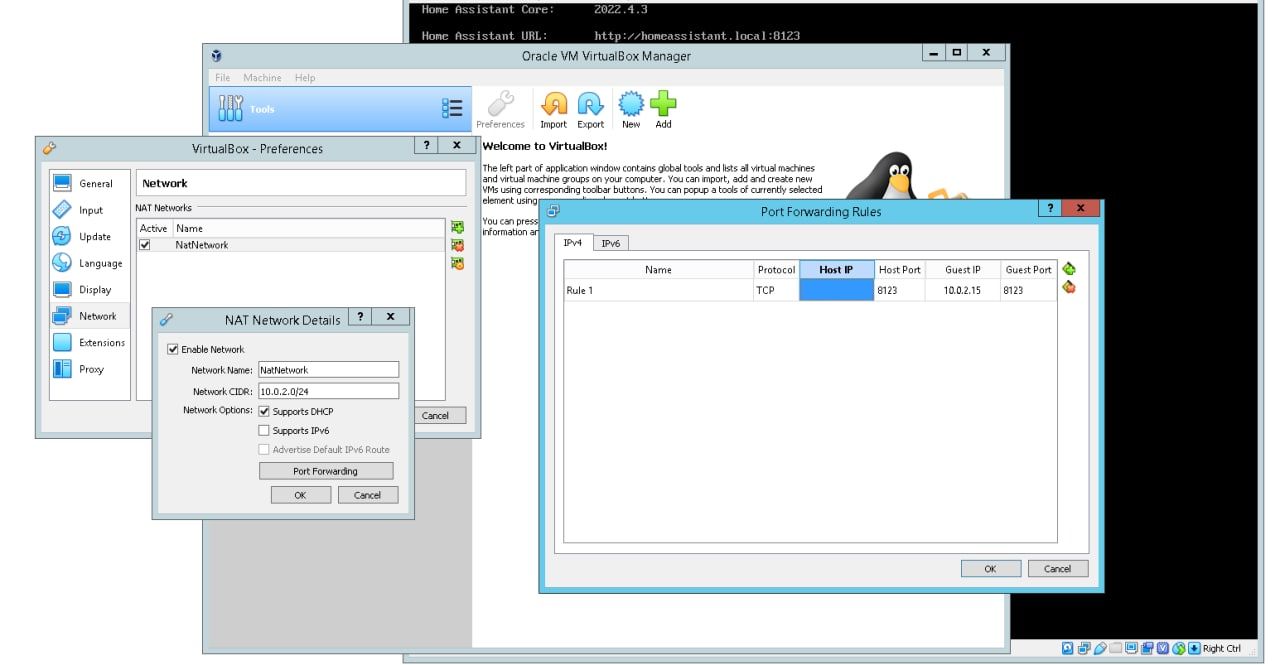
I got a vps server and installed Virtualbox and Hass OS (image from github).
It boots fine and I had selected Nat network in adapter. It gives ipv4 of 10.0.2.xx:8123 but its not reachable at all in browser. Homeassistant.local:8123 also not reachable
Weird that on trying bridged adapter, HASS does not show/get any get ip on screen.
Someone suggested creating a Nat network and forwarding ports. I tried some things but did not work. Also not sure if they are correct.
Any clues what this 10.XXX ip range is about? Should not it be 192.XXX range?
humble mirage
VPS ... as in cloud server?
final kayak
humble mirage
VPS ... as in _cloud server_?
Yes. Just testing reliability. Its a good one
humble mirage
As for that IP range, can I introduce you to RFC 1918
https://datatracker.ietf.org/doc/html/rfc1918
homeassistant.local will only work on your LAN, with HA on the LAN
For Home Assistant on some cloud server you need to connect using the public IP - before somebody else does
final kayak
Actually i am ok for now to use remote desktop to use servers browser (for testing purposes) . But thats also not working. I tried this in VitualBox NAT settings (someone suggested online to someone) But not sure if i am doing right. As HASS is booting and all fine (and even network synced), so its surely a minor issue somewhere related to ports i feel
https://i.postimg.cc/66c1dzBx/Clipboard01111111111111.jpg
Here is the config ^
humble mirage
homeassistant.local is unlikely to work, just use the IP
final kayak
yes i understand but ip is not working at all. that 10.XXX is not reachable. thats the issue
humble mirage
It should be reachable just fine from the host running Virtualbox
(but not from anything else)
final kayak
humble mirage
It should be reachable just fine from the host running Virtualbox
Thats the problem as i said 😦 It gave me a ipv4 of 10.0.2.15:8123 ...which is not reachable in browser 😔 i tried even tried asking the server support but they are less inclined in helping with software i install
abstract hearthBOT
@final kayak When using Discord's Reply feature it defaults to pinging the person you reply to, which can get frustrating for the target. Use Shift + click on the Reply option, or click @ ON to @ OFF to stop this - on the right side of the compose bar.
You have to change this every time (thank the Discord devs for that).
Command '~reply' was invoked by: Tinkerer
humble mirage
Well, if that's HAOS have you checked the observer?
Have you checked the console?
Have you tried pinging it from the PC running VBox?
final kayak
humble mirage
Well, if that's HAOS have you checked the observer?
Observer ip+port is reachable sometimes in server browser. Sometimes not. Right now not. Weird i know
By Console do you mean the VB screen, HASS boots fine. NO error whatsoever in startup. here is screenshothttps://i.postimg.cc/8CBP4xyb/Clipboard032323232323.jpg
Pinging ping 10.0.2.15 -t from commandline in server itself (which is running VB), is timed out . its a windows server
 torn furnace
Anyone here running on Buster and installed python-openzwave with success ?
humble mirage
torn furnace
Anyone here running on Buster and installed python-openzwave with success ?
You shouldn't need that for Z-Wave JS
humble mirage
final kayak
Observer ip+port is reachable sometimes in server browser. Sometimes not. Right ...

 stuck burrow
I have a lot of Kasa light switches in the house, is there a way batch load all the IP's of these devices. It's very painful to load them one by one.
humble mirage
stuck burrow
I have a lot of Kasa light switches in the house, is there a way batch load all ...
#integrations-archived can help with integrations
stuck burrow
humble mirage
<#672220541343760384> can help with integrations
thanks for the pointer.. 🙂
teal rapids
humble mirage
Check <https://my.home-assistant.io/redirect/info/> and it tells you your instal...
Home Assistant OS
humble mirage
No Compose files for you, or manipulating Docker
final kayak
humble mirage
https://tenor.com/view/pings-off-reply-pings-off-reply-ping-discord-reply-ping-g...
ok. any suggestions?
abstract hearthBOT
@last ermine posted a code wall, it is moved here --> https://hastebin.com/gurozafugi
 last ermine
ok so im trying to install the homeassistant/amd64-hassio-supervisor docker container on an ubuntu server. but it keeps bootlooping with the error on the hastebin above
 brisk willow
You can't just install the Supervisor container and have it work
last ermine
ok, is there a way to get the addon store into the homeassistant/home-assistant container?
brisk willow
No, but add-ons are just pieces of software you can otherwise install yourself
last ermine
okay, thank you
teal rapids
humble mirage
No Compose files for you, or manipulating Docker
I suppose I should just switch back to the built in recorder db then 😞
 dusk parcel
I’m trying to set up HA OS on an old laptop, and it seems to have booted fine from the drive I added the files to with the etcher program, but I can’t connect to it from anywhere on my network, and when I look in the HA CLI network info it looks like it’s all disabled? Under interfaces: the connected and enabled are both : false for the Ethernet and WiFi devices
My router doesn’t see anything plugged in to it either on that wifi spot
Err Ethernet port
Oh snap updating that interface made it say connected and enabled, but my method is still disabled with blank info for address and name server and null for gateway
bitter hornet
Thanks to everyone that replied and/or contacted me. 👍
- I've now found what the problem was.
REF:
"Unable to check for updates"
"You do not have any integrations that provide updates."
slim orchid
Hello, my time in HA is wrong after I move to docker. In .env file I have wright timezone: Europe/ Warsaw but in development-template time is wrong. {{ now().time() }}
In HA card with clock I have wright time. How to fix this?
 tough pendant
Maybe I'm wrong or stupid, but what is the best way to edit configuration.yaml with a home assistant helm deployment?
 upbeat wharf
Hello, I moved to docker and want to upload a backup from my old system. How does this work? The backup is saved on my Laptop (.tar)
 dawn flame
Was your old system "supervised"?
upbeat wharf
Yes, my old system was HomeAssistant OS on the same Raspberry Pi 4
dawn flame
Then I believe you're going to have to undo the archive file and move the configuration manually to the new instance. Not sure exactly what will transfer over, but I believe the main configuration will. In the future, you just back up the entire config file. There is no "snapshot" feature in container..... Much better off though.
upbeat wharf
Okay and how do I move the files from my laptop to the docker container ?
dawn flame
Well, the files don't go in the container to begin with. They go in the configuration folder that you mapped as part of setting up the container.
dawn flame
https://www.youtube.com/watch?v=reg1Hf0eKTU - This may help...
 honest geode
[HA OS][RPi3]
Is there a better method of completely starting over than straight up reinstalling to the SD card?
crude inlet
You can delete everything in /config including hidden directories and restart HA
@honest geode
 primal nimbus
Hi guys there is something I don't understand if you can help me to figure out why I can't install any community add-on ?
It's a fresh install of homeAssistant (Vm based)
 jagged sleet
Could someone help me change the date/time on my raspberry pi with hassos?
grand pivot
it expects to be able to contact an NTP server
jagged sleet
Yeah, my pi has internet. but its reading the wrong time
grand pivot
the wrong time zone, or completely the wrong time?
jagged sleet
hm, im not sure about the timezone, it says UTC, however it is 5 hours off. The appdaemon time is worse, but one problem at a time, lol
grand pivot
then you should be able to set the proper timezone in -> Settings -> General
jagged sleet
yeah thats the thing, i have that set right. Automations set up from the UI have the correct timing, but my hassio logs and appdaemon automations are all on different times
Okay, i figured out the issue with appdaemon. The appdaemon.yaml file needs to be edited with the proper timezone
primal nimbus
grand pivot
"can't" doesn't tell us much
sure, let's say I want to install visual studio code, if I'm following this link to install it : https://my.home-assistant.io/redirect/supervisor_addon/?addon=a0d7b954_vscode
here is what I get :
Add-on not found
when I'm going to admin addon page I don't have all community addons
grand pivot
the follow the instructions here: https://addons.community/
primal nimbus
yes I already read it, it says :
"In general, there is no need to install this repository on your Home Assistant instance. It is activated and added by Home Assistant by default."
primal nimbus
yeah I also read it 🙂
grand pivot
and did it solve your problem?
primal nimbus
not sure I'm following the good stuf, I added the git repository plugin
started it, added the following config :
"""
"""
interval: 300
repository: https://github.com/hassio-addons/repository.git
restart_ignore:
- ui-lovelace.yaml
- .gitignore
"""
grand pivot
did it solve your problem of not being able to install the addon?
primal nimbus
no
grand pivot
?
primal nimbus
official addon are here.. I'm talking of communities add-ons
grand pivot
that's what that link is for
I don't know where you're putting the stuff above
it goes here, in the Repositories section:

 ornate stag
I have a little problem with the new version of HA. The Supervisor no longer appears on the left panel. Do you have any solution to fix this.
the OS is installed on a Raspberry PI 4
grand pivot
it moved under several builds ago
ornate stag
I know but it's not practical
grand pivot
?
ornate stag
I liked it better when it was on the panel
grand pivot
you can have it back there if you want
I added that and server controls with this:
panel_custom:
  - name: panel-redirect
    # url_path needs to be unique for each panel_custom config
    url_path: redirect-server-controls
    sidebar_title: Server Controls
    sidebar_icon: mdi:server
    module_url: /local/panel-redirect.js
    config:
      # Where you want to redirect to
      target: /config/server_control

  - name: panel-redirect
    url_path: redirect-supervisor
    sidebar_title: Supervisor
    sidebar_icon: mdi:home-assistant
    module_url: /local/panel-redirect.js
    config:
      target: /hassio/dashboard
I find that there's rarely a need to go there anyway
ornate stag
effectively except in a new installation
upbeat wharf
Good morning. Yesterday I moved from HAOS to Docker and now im not sure where to find the configuration.yaml file. I have downloaded Visual Studio Code and im connected to the pi, but there are no folders from homeassistant. Do I need to change the username (now: pi) or something like that? Please help me
grand pivot
Wherever you told docker your config directory is
 ancient cloud
Good day. I have home assistant running via docker on a Proxmox VM. In addition to that I have Traefik as a reverse proxy set up working tightly with Cloudflare to ensure external access with SSL (essentially double proxying from Cloudflare to Traefik and from there to my local HA docker instance).
Everything seem to be working fine although I am getting a rather worrying message in the logs:
Logger: homeassistant.components.websocket_api.http.connection
Source: components/websocket_api/http.py:254
Integration: Home Assistant WebSocket API (documentation, issues)
First occurred: 10:31:23 AM (1 occurrences)
Last logged: 10:31:23 AM

[139663494498720] Disconnected: Did not receive auth message within 10 seconds
This only once and very rarely after a reboot. I know the websocket API is a big thing for many HA features. Is there a proper way that I can debug this further?
 covert pilot
danol@server:~/docker/homeAssistant$ sudo lsof -i :8123
COMMAND  PID USER   FD   TYPE DEVICE SIZE/OFF NODE NAME
python3 1583 root   14u  IPv4  35356      0t0  TCP *:8123 (LISTEN)
python3 1583 root   17u  IPv6  35358      0t0  TCP *:8123 (LISTEN)
danol@server:~/docker/homeAssistant$ ps -aux | grep 1583
root        1583  3.7  3.9 269920 156260 ?       Ssl  11:15   0:23 python3 -m homeassistant --config /config
danol       2973  0.0  0.0   6432   660 pts/0    S+   11:25   0:00 grep --color=auto 1583
danol@server:~/docker/homeAssistant$ sudo docker ps
CONTAINER ID   IMAGE     COMMAND   CREATED   STATUS    PORTS     NAMES
danol@server:~/docker/homeAssistant$
Yo, does anyone know what is happening (^^)? I have the home assistant installed as a docker container, but it seems like it's trying to run twice, there is something taking up the port 8123 even when I shut down the container
humble mirage
You have Python running, presumably in a Python venv
covert pilot
humble mirage
You have Python running, presumably in a Python venv
That python is python3 -m homeassistant --config /config
humble mirage
Yes
covert pilot
I have no idea how this happened
humble mirage
Check docker ps -a
covert pilot
Empty
humble mirage
sudo ps -efl|grep 1583
covert pilot
(I have shut down the container before all this)
4 S root        1583    1580  2  80   0 - 67480 futex_ 11:15 ?        00:00:24 python3 -m homeassistant --config /config
0 S danol       3017    2688  0  80   0 -  1575 pipe_w 11:29 pts/0    00:00:00 grep --color=auto 1583
ps -efl|grep 1580
covert pilot
4 S root        1580    1361  0  80   0 -    49 poll_s 11:15 ?        00:00:00 s6-supervise home-assistant
4 S root        1583    1580  2  80   0 - 67480 futex_ 11:15 ?        00:00:24 python3 -m homeassistant --config /config
0 S danol       3020    2688  0  80   0 -  1575 pipe_w 11:30 pts/0    00:00:00 grep --color=auto 1580
To format your text as code, enter three backticks on the first line, press Enter for a new line, paste your code, press Enter again for another new line, and lastly three more backticks. Here's an example

Don't forget you can edit your post rather than repeatedly posting the same thing.
For over 15 lines you must use a code share site such as https://dpaste.org/ (pick YAML for the language), https://www.codepile.net/ (pick YAML for the language), or https://paste.debian.net/ (pick YAML for the language).
Command '~format' was invoked by: Tinkerer
humble mirage
Ok, so, looks like your Docker is borked
covert pilot
:D
humble mirage
Reboot
covert pilot
I've just booted it
This has happened to me multiple times already
it's a fresh Ubuntu Server install, just installed it yesterday
covert pilot
Hah
okay
I'll reinstall today evening
I thought the containers are designed in such a way that this should never happen
humble mirage
It shouldn't, unless there's something screwed up with your host
covert pilot
Well, thank you for your time :)
 undone sentinel
Hey on the home page of home-assistant.io it says the current version is 2022.4.5 so i updated my image on docker en restart server but still says it only updated to 2022.3.3 when can we expect the new version to hit the docker community ?
undone sentinel
i use powershell with ssh conection pull new image en restart container
humble mirage
That doesn't tell us what you're doing
What exact command are you running?
How are you restarting the container?
undone sentinel
docker pull homeassistant/home-assistant:latest
then
docker restart f3d1ff8fcca3
that's all i do
workt in the past
when i run the pull command again it says
Status: Image is up to date for homeassistant/ho
docker.io/homeassistant/home-assistant:latest
humble mirage
latest 

You should be pulling :stable - that's what the docs have said for the last many years
undone sentinel
ah okay my bad did not know
humble mirage
Then you clearly never read the official docs
Which is why your update is failing
Compose files will make your life easier
Until then, stop the old container, remove it, start a new one
undone sentinel
it's how they learned me to update my minecraft server on docker i assumed that it was the same for all
-v /docker/Home-Assitant/Config:/config \
doe this look correct ? or is it without the first / ?
humble mirage
What's the whole command line?
undone sentinel
docker run -d
--name homeassistant
--restart=unless-stopped
--privileged
-e TZ=Europe/Brussels
-v /docker/Home-Assitant/Config:/config
--network=host
ghcr.io/home-assistant/home-assistant:stable
undone sentinel
ill get there i hope 🙂
think i broke it now when i go to 192.168.0.100:8123 it says Page not found and the container is up and running
humble mirage
Check the log file?
undone sentinel
it does not produce a error it just says in the logs Start container homeassistant. no errormessage
abstract hearthBOT
If you're having problems with your updates to your configuration:
- Check the troubleshooting steps
- Check your log file - remembering you may need to set logger to
infoordebug - Explain what the problem you're having is - sharing configuration, errors, and logs
Command '~troubleshooting' was invoked by: Tinkerer
undone sentinel
think i found it
just need to change my configuration file
had some generic camera streams in there deleted those lines of codes
it says it's running now but stil now responce on 192.168.0.100:8123
home-assistant.log also does not show any errors
i was using Docker Hub register one and not the ghcr.io one could that cause the problem ?
humble mirage
No
undone sentinel
found it 🙂
my installation was on his own network and not the network of the docker container that fixed it right up 🙂
no i have version 2022.4.5 🙂
Thanks for the help 🙂
 cyan mist
Hi, I installed HA on my QNAP using docker. It seems to have installed ok, I can get to the overview page, but I don't see a way to add integrations
humble mirage
Integrations are set up following the instructions in the docs for each one
Assuming that you have 2022.4.x installed
Add-ons are a whole other thing, if you're thinking of those
cyan mist
I installed using Container Station. It says image home-assistant:0.65.5
humble mirage

 brazen herald
Read the docs and follow the installation guides there.
humble mirage
March 2018...
brazen herald
Then you'll have something from this decade as a starter 😛
humble mirage
Gotta thank QNAP for being so inept
cyan mist
I followed the instructions here: https://www.home-assistant.io/installation/alternative#qnap-nas
woops
humble mirage
Sadly QNAP haven't updated their system in 4 years
cyan mist
Can you point me to a newer build that works in docker?
cyan mist
Thank you
upbeat wharf
grand pivot
Wherever you told docker your config directory is
https://dev.to/elalemanyo/how-to-install-docker-and-docker-compose-on-raspberry-pi-1mo I used this guide. Can't find a path
upbeat wharf
humble mirage
Did you create a compose file?
No, do i need this
 stoic quest
Hi. Complete noob here. Insteon died. Trying to get my first Raspberry Pi up and running Home Assistant. Got stuck trying to install balena etcher. Followed the link to github for the Debian installation. I copied and pasted the two strings into terminal. The first one seemed to work. The second came back with E: Unable to locate package balena-etcher-electron" in the last line, I am stuck. Does this make any sense to any of you?
humble mirage
upbeat wharf
No, do i need this
You don't - but it would make your life easierr
upbeat wharf
Ok. I tried it 2 h ago and it didn't work but I will try again
humble mirage
For a start, you'd know where you mapped the config folder to 😄
upbeat wharf
Thank you so far, sorry for my missing knowledge
humble mirage
Everybody starts at zero
See #installation-archived message for finding out what, if anything, you've done so far
upbeat wharf
[] I get this response
humble mirage
Then you didn't map any volume
You have no config folder, outside of what's inside the container
Hopefully you've not done much with it yet?
upbeat wharf
humble mirage
You have no config folder, outside of what's inside the container
Yes, thats what I thought of
upbeat wharf
humble mirage
Hopefully you've not done much with it yet?
No, just installed Portainer and HomeAssistant but that wasnt much work
I followed this guide, maybe I left something
humble mirage
Well, you followed a guide other than HA's guide
You should create a compose file, and use that, rather than relying on the command line
upbeat wharf
Ok, so just copy the code from the homeassistant website
grand pivot
changing paths as appropriate so that you don't end up with /PATH_TO_YOUR_CONFIG as your config dir
upbeat wharf
I don't get /PATH_TO_YOUR_CONFIG. Do I have to create a folder in Visual Studio Code and copy this path in ?
upbeat wharf
grand pivot
changing paths as appropriate so that you don't end up with `/PATH_TO_YOUR_CONFI...
Ah thanks
humble mirage
You make a folder, somewhere, and use that instead
I'd recommend you put everything under `/docker
/docker - compose file lives here
/docker/homeassistant - your HA config folder
Then you can easily back it all up
upbeat wharf
What does somewhere mean? on the raspberry pi?
humble mirage
Yes, the computer running Docker
upbeat wharf
Ah okay
upbeat wharf
So i followed the instruction from you and the HomeAssistant guide, but im getting an error if i send this command: version: '3'
services:
homeassistant:
container_name: homeassistant
image: "ghcr.io/home-assistant/home-assistant:stable"
volumes:
- /home/Konsti/docker/hass/config
- /etc/localtime:/etc/localtime:ro
restart: unless-stopped
privileged: true
network_mode: host
It says: -bash ... command not found
How can I send pictures in here?
abstract hearthBOT
To format your text as code, enter three backticks on the first line, press Enter for a new line, paste your code, press Enter again for another new line, and lastly three more backticks. Here's an example
Don't forget you can edit your post rather than repeatedly posting the same thing.
For over 15 lines you must use a code share site such as https://dpaste.org/ (pick YAML for the language), https://www.codepile.net/ (pick YAML for the language), or https://paste.debian.net/ (pick YAML for the language).
Command '~format' was invoked by: Tinkerer
humble mirage
Image posting is blocked to stop people posting text as images
That however is a file, you create the file, and you need to have docker-compose installed
upbeat wharf
docker-compose --version
This command gives me an answer. Does this mean docker compose is installed correctly? It says: docker-compose version 1.29.2, build unknown
humble mirage
Now try your docker-compose up -d command, in the folder with the compose file
upbeat wharf
ERROR: Can't find a suitable configuration file in this directory ...
humble mirage
Then you don't have docker-compose.yml file in the folder
upbeat wharf
And the docker-compose.yml file is created by this command, right?
services:
  homeassistant:
    container_name: homeassistant
    image: "ghcr.io/home-assistant/home-assistant:stable"
    volumes:
      - /home/Konsti/docker/hass/config
      - /etc/localtime:/etc/localtime:ro
    restart: unless-stopped
    privileged: true
network_mode: host```Ahh
humble mirage
That is your compose file
upbeat wharf
Ohh
Okay, hold on a second please
Okay, I think I got it. I used this command docker-compose up -d and it says Creating homeassistant ... done
humble mirage
Oh, I spotted another typo in your compose file
version: '3'
services:
  homeassistant:
    container_name: homeassistant
    image: "ghcr.io/home-assistant/home-assistant:stable"
    volumes:
      - /home/Konsti/docker/hass:/config
      - /etc/localtime:/etc/localtime:ro
    restart: unless-stopped
    privileged: true
    network_mode: host
You were missing a : in the /config map
Change that and then run
docker-compose stop homeassistant
docker-compose rm homeassistant
docker-compose up -d
Did it. Am I finished?
humble mirage
See if HA is running and if you've got configuration.yaml appearing in /home/Konsti/docker/hass?
upbeat wharf
YES!!!
humble mirage
Now configure backups
upbeat wharf
humble mirage
Now configure backups
Ok, thank you. I will try to use your blog and yt tutorials this time
Really, thank you very much for your help. Im very happy that it works
abstract hearthBOT
@sinful oak posted a code wall, it is moved here --> https://hastebin.com/ujubeqoriy
 sinful oak
I'm trying to run HASS on docker in OpenWRT (hardware is NanoPi R4S). I was able to install it but I am having trouble seeing my USB Z-wave dongle... as I troubleshoot I think maybe OpenWRT has missing drivers? does this look right... https://hastebin.com/ujubeqoriy
the reason I ask is because although in OpenWRT "lsusb" shows the device; there is no /dev/ttyUSB** instance... and the lsusb -t shows a missing driver
humble mirage
Sounds like it's missing support for USB Serial
A quick Google suggests
sudo modprobe ftdi_sio
does "dev/ttyACMx" sound familiar? Looks like I need to compile the OpenWRT kernel with this https://openwrt.org/docs/guide-user/hardware/usb_gadget?s[]=kmod&s[]=usb#g_serial_-_serial_device_gadget
root@r4s-prod:~# modprobe ftdi_sio failed to find a module named ftdi_sio
humble mirage
Depends entirely on your stick how it appears
Some appear as ttyACMx some as ttyUSBx
Both should ideally appear under /dev/serial/by-id/
sinful oak
root@r4s-prod:~# ls /dev/s shm/ snd/
no serial folder
thanks this points me to the right direction. I will try to compile a new build for it
humble mirage
Possibly because it's such a cut down OS
sinful oak
You are right 🙂
I think without the kernel driver there's no /dev/serial/ path created
 weary jay
hello! does anyone know how to fix that the duckdns IP does not match the actual public IP of my computer and hence I can't access HA remotely? thank you
humble mirage
What are the first two sets of numbers of the WAN IP shown on your modem's admin page?
weary jay
201.152
humble mirage
Ok, so not CGNAT then, that's good
Do you get the same numbers when you visit http://checkip.dyndns.org/?
humble mirage
Then that sounds like time to phone your ISP
humble mirage
Well, find out what they're doing. Explain that the WAN IP shown in your router's admin page is different to what you get when you visit the various IP check sites (do test a few more)
Possibly they're doing some form of NATting, possibly they've got a transparent proxy in play
weary jay
ok... thank you for the tip! I will call them to see if they can help fix the issue +
 torn mortar
Migrated my qcow2 image from proxmox to an unraid vm. HA is restarting itself every few mins.
humble mirage
Home Assistant, or the whole VM?
humble mirage
Did you do a fresh install of the VM image and then restore a backup, or ?
torn mortar
No.
Just tried to copy the image over.
Hoping it would be as easy as that.
I made a full backup juat in case before copying it over.
Is that a bad way to do it?
22-04-20 14:49:00 INFO (MainThread) [supervisor.homeassistant.core] Detect a running Home Assistant instance 22-04-20 14:51:00 WARNING (MainThread) [supervisor.misc.tasks] Watchdog found a problem with Home Assistant Docker! 22-04-20 14:51:00 INFO (SyncWorker_4) [supervisor.docker.interface] Starting homeassistant
humble mirage
I'd take a backup, spin up a fresh VM with a fresh image, and then restore
torn mortar
Okay fair enough il report back when I get a sec to redo it
 radiant wind
How do I find my Insteon IP address if the service is down?
I don't see it on my hubs list of devices
Trying to add the integration to my new home assistant setup
humble mirage
Tools like fing can help there
radiant wind
Nice! Found it
Now getting a failed to connect
Any suggestion?
Using credentials on back of hub for login
radiant wind
Resolved, was case related
torn mortar
Only thing not working is the Logitech media server addon. Doesn't want to start due to perm issues
Spun up the lms container on unraid and its fine. The addon worked fine before so not sure. Created an issue on Github
humble mirage
#add-ons-archived can help with add-ons
torn mortar
👍
 raw hedge
Are there any issues if HA’s ip changes from time to time?
 ruby harbor
hi guys i have issue with the HA , i connected the raspberry pi to router w ethernet cable but it wont load .
but when i config the file to sd card to connect to wifi then it will work
upbeat wharf
Good morning, sorry to say that there is another problem coming up. After the installation - with the help from you yesterday (thank you) - I cant edit my configuration.yaml in Visual Studio Code (Permission denied) and in the Terminal (read only)
humble mirage
raw hedge
Are there any issues if HA’s ip changes from time to time?
Posssibly. If that runs anything like an MQTT broker then your other devices will lose the connection to the broker. Best to give it a static DHCP lease.
humble mirage
upbeat wharf
Good morning, sorry to say that there is another problem coming up. After the in...
That's because the files are owned by root and you're not trying to edit them as root
Assuming you're running as the user Konsti which is in the group humans try the following:
chgrp humans /home/Konsti/docker/hass/*
chmod g+rw /home/Konsti/docker/hass /home/Konsti/docker/hass/*
You can find out the groups your user belongs to with
id Konsti
 slim ridge
hi, io just installed hassio in hyper-v and tried to restore a snapshot from raspberry pi, everything loads well but no web interface. and am using http. what can i do ? tried repairing the supervisor from the cli. didnt help.
humble mirage
Did your previous install use HTTPS or HTTP?
slim ridge
haven't tempered with https... still stock
humble mirage
Did you have either the Samba or SSH add-ons ?