#installation-archived
74689 messages · Page 81 of 75
 pallid jay
 lime cobalt
By default, is SSH enabled in the RPI3 image? I'm just creating the installation media now and want to ensure I can get to the yaml files if i break the http when messing with certs etc.
 humble mirage
Install the SSH #add-ons-archived when you've got the host running
lime cobalt
ok, thanks.
 unkempt shoal
When restoring a full backup on the onboarding page, once I click "fully restore" the popup disappears. Is that supposed to happen? I'm now on the onboarding page, but there is no status or anything like that
 crude inlet
There's no status. You just wait
 placid sage
hello everyone
i am new
unfortunately I have a problem: I am not able to install HA on a mini pc intel (bmax)
when at the end it seams to be installed and I browse the url:8123... i see a lot of :
22-04-05 23:06:39 WARNING (MainThread) [supervisor.jobs] 'Updater.fetch_data' blocked from execution, no supervisor internet connection
and i try to ping www.google.it from the console and i get no answer
crude inlet
ethernet plugged in?
placid sage
i mean: if i unplug the eth cable and I plug it again, i am able to ping www.google.it
and i get 'alive'
22-04-05 23:10:09 WARNING (MainThread) [supervisor.jobs] 'Updater.fetch_data' blocked from execution, no supervisor internet connection22-04-05 23:10:09 WARNING (MainThread) [supervisor.homeassistant.core] Error on Home Assistant installation. Retry in 30sec
what could I do?
crude inlet
set DNS server to 9.9.9.9 or 1.1.1.1
placid sage
in the resolv.conf ?
crude inlet
you can enter "login" and then use nmcli commands at the #
Skip down to number 3 and ignore the wifi parts
 jaunty ice
@high token my DB file still seems to be 5.5 gb
placid sage
crude inlet
Skip down to number 3 and ignore the wifi parts
rebooting...
no way 😦
2-04-05 23:23:44 WARNING (MainThread) [supervisor.jobs] 'Updater.fetch_data' blocked from execution, no supervisor internet connection22-04-05 23:23:44 WARNING (MainThread) [supervisor.homeassistant.core] Error on Home Assistant installation. Retry in 30sec
crude inlet
placid sage
rebooting...
did you confirm that your settings got saved?
placid sage
i wrote save and then quit
crude inlet
you can use the same commands to check them
or just nmcli
enter that and you'll see all the details
crude inlet
at the top was the connection green?
 glacial lily
I'm unable to update my Home Assistant and HACS. I'm running Hass.io in VMWare Workstation, can someone give me some help?
After accepting the upgrade, I can see the loading icon and it loads undefinetely until I'm redirected to the previous page. After refreshing this page, I can see the popup saying I have an update available to be done.
This is how it stays:
https://i.imgur.com/nIlAv1Y.png
And after "the update" I get this message again:
https://i.imgur.com/cKVU16K.png
crude inlet
so that should be ok then. did you notice any thing during the reboot while the os was starting?
glacial lily
Can someone help me troubleshoot my HA problem?
 lone pendant
I'm stuck trying to upgrade an install in a virtual environment. I've upgraded the system's python to 3.9 but the virtual environment is stuck at 3.8
glacial lily
OK, I've found out why....
For some reason I'm getting extremelly slow downloads when downloading from github, but not for any other mirror.
https://i.imgur.com/MuT13qC.png
But I don't know how to fix this =/
If I download the same file via my PC browser, it gets slow as well.
If I use a download manager like IDM, I get blasting fast speed to download anything from github....
 hasty owl
can someone explain the difference
if i go to supervisor settings it has my correct dns server - if i go to terminal --> cat /etc/resolv.conf
it has 127.0.0.11
and can't resolve any names
placid sage
goodmorning, i am not able to install HA on mini PC !
do you have please a dedicated best minipc where to install it ? and the procedure?
the mini pc was the whole night and i still get:
22-04-06 05:01:08 WARNING (MainThread) [supervisor.jobs] 'Updater.fetch_data' blocked from execution, no supervisor internet connection22-04-06 05:01:08 WARNING (MainThread) [supervisor.homeassistant.core] Error on Home Assistant installation. Retry in 30sec22-04-06 05:01:38 WARNING (MainThread) [supervisor.jobs] 'Updater.fetch_data' blocked from execution, no supervisor internet connection
placid sage
the MiniPc is working because i tested with the live linux and it resolve and pings
but once installed di HA start to not resolve
 untold forum
aw updated my container 3 minutes too soon
 lament estuary
wdym
placid sage
dear all
is there any consolidated procedure to install HA?
and a suggested hardware?
humble mirage
placid sage
is there any consolidated procedure to install HA?
Follow the official docs?
humble mirage
placid sage
and a suggested hardware?
Depends on what you want to do, but at least a Pi3 - but more is better
 grand pivot
<assembles Pi3 cluster>
 final oasis
When I try to update my HA core it won't load the update even in the terminal
I tried using the dashboard method & ha core update in my ssh and in the terminal running my VM.
crude inlet
what's showing in the logs?
final oasis
nothing
acting like I didn't press it.
When I try to restart it doesn't. I shut down the VM and restarted it and same thing
final oasis
crude inlet
supervisor logs?
how do I get to those?
final oasis
crude inlet
Do you have notifications in the lower left?
Yes but not about the update
crude inlet
are any regarding errors?
crude inlet
final oasis
how do I get to those?
Configuration > Supervisor > System tab
final oasis
crude inlet
are any regarding errors?
Yeah with an arlo integration but it's working
crude inlet
HA won't restart if there are config errors, which is why I'm asking
final oasis
they're not config errors
crude inlet
ok
final oasis
I just tried again and my screen that has my VM went black
The VM just crashed.
Imma reboot it and fix those errors.
I'll update ya
Yeah this shouldn't stop it from rebooting should it?
If I use the check config button it says it's fine
Error: session start failed
If error persists you might need to change config and restart.```Yeah I was able to successfully restart it
But I try to run the updater the VM crashes
that time it worked.
All I did was pull up task manager to see the amount of ram used and watched while it updated and worked. So idk why but hey it's good! lol thank you
 sick saffron
I have a UDM pro and I'm going to try to migrate all my ip addresses in to another location. From 192.168.0.X to 192.168.20.X. is there an easy way of doing this and if I'm in the wrong location to ask this question. I would appreciate a nudge in the right direction
 orchid pebble
sick saffron
I have a UDM pro and I'm going to try to migrate all my ip addresses in to anoth...
orchid pebble
sick saffron
I have a UDM pro and I'm going to try to migrate all my ip addresses in to anoth...
I don't know if we have a channel for networking
 tame hamlet
Hi! I'm trying to solve the following problem: adapt my regular light switch to work with smart bulb. I got a sonof minizb switch. I was able to add it to home assistant via ZHA directly as a zigbee device via CC2531 USB dongle, no sonof hub involved. However I can't figure out how to configure it so it does not ever cut the power off. I'm able to create an automation that turns it on in case of toggle event however that leads to the light bulb blinking because the switch first turns the power off and the HA turns it back on. What's the right was to solve it? It's my first time ever with HA so sorry if it's a noob question or if I picked the wrong channel.
humble mirage
You'd need to configure the Sonoff to be decoupled
#zigbee-archived may know about that, and will also tell you that you picked the worst coordinator
(it's dirt cheap for a reason)
tame hamlet
CC2531 you mean? Yeah, I have already read about it but it was the cheapest option and works fine with one device so far, will upgrade it later if necessary.
humble mirage
It's mostly ok for a dozen devices or so, depending on your luck
 fringe steeple
I'm trying to use VLC for tts rendering. I'm running HA in docker on a RasPi. Does that satisfy this requirement stated in the VLC integration? Home Assistant Core in a Python virtual environment Or, might I need to install VLC inside the container?
 reef hamlet
Hi, just getting started. Is there a newbie channel, or would installation questions be put here?
orchid pebble
reef hamlet
Hi, just getting started. Is there a newbie channel, or would installation quest...
I say if your questions are related to #installation-archived post them here
reef hamlet
So i got a used computer today since an old one died. It came with UBuntu installed, so i'm following this installation guide. https://www.youtube.com/watch?v=5h-OQqlgjy0
I'm not sure which home assistant one to download, as i get error with the KVM one.
The youtube video is for : How to Setup Home assistant on Ubuntu (supervised) from scratch as virtual machine (KVM)
 amber wedge
Don't set up supervised on ubuntu. Install debian and follow the ha docs, not some youtube trash.
reef hamlet
is the debian supervised?
@amber wedge Unless you have a sticky on HA community i should follow?
amber wedge
yes it is, hold on I'll find the instructions
reef hamlet
thank you kindly! my plan is to use a new "to me" computer as a server. it came with Ubuntu, which is why im trying to do linux.
reef hamlet
on that one you linked, i scrolled to the top. am i going to have to install home assistant core also?
amber wedge
No, that should be a direct link to supervised, near the end of the page.
crude inlet
The link takes you right there
reef hamlet
do you recommend doing container or virtual machine?
amber wedge
Follow the link, the page should open to a heading Install Home Assistant Supervised
reef hamlet
yep, thats where i am. just reading through it, so i understand what im getting myself into
what advantages are there using HA supervised versus the OS?
Why push me towards that?
amber wedge
You said you wanted it...
reef hamlet
Im very new to this, i'm not sure what i want. Security is paramount as my main purpose of HA is for security cameras. Am i choosing the right path in your opinion?
I had originally planned to put HA on windows, but my old computer was DOA when i booted it.
crude inlet
The main purpose of HA should be automation and not security cameras. If you're looking for an NVR, choose an NVR
reef hamlet
For more info. i went to University since im faculty today, and all the computers have ubuntu already installed, so i thought id work with this
am i incorrect in seeing many posts about people using HA for security vids with AI?
crude inlet
It's not a camera platform. People are automating off of cameras and what happens when they detect something, yes
If you're new to HA, try again with KVM of HA OS which manages docker for you, or go with docker and manage containers yourself. "Supervised" is an unintended middle ground between the two and requires more understanding of everything.
amber wedge
@crude inlet is quite right. about it not being a camera platform.
 glossy mason
After moving from OS to container homeassistant.local no longer resolves to the server. I can use HA as usual through it's IP. Previously this was no issue.
orchid pebble
reef hamlet
am i incorrect in seeing many posts about people using HA for security vids with...
I think what you might be seeing is https://frigate.video/ which is compatible with Home Assistant but does not require it
orchid pebble
glossy mason
After moving from OS to container `homeassistant.local` no longer resolves to th...
mdns is unreliable to say the least, and I don't think it will be advertised from the container to your network without some tweaks
orchid pebble
glossy mason
After moving from OS to container `homeassistant.local` no longer resolves to th...
do you have host network mode enabled?
glossy mason
orchid pebble
do you have host network mode enabled?
Yep! I do. It does seem very fragile yeah
orchid pebble
glossy mason
Yep! I do. It does seem very fragile yeah
I would honestly just use the IP
 rocky yew
hi, i have setup a rpi3b as NA via wired network i give access to my local network. And use my wlan0 to connect to a secondary SSID where i have configurated my esphome devices.
Now when i use the hostname of a device within HA the IP is not resolved but when i use the IP address i can access the device.
I suspect that mDNS needs to look at the dns for the IOT SSID some how is it not?
rocky yew
when i check the ha dns info in the ssh terminal then i found that both dns servers are configurated correctly.
but a ping device1 which is a esphome device, ping cant resolve the hostname.
 velvet quail
hi, I need to enable the i2c on my raspberry, but I can not get it to work....... is this the right channel for this ?
 dusk igloo
Great Apr Release Team ! 👍
velvet quail
I followed the instructions on https://www.home-assistant.io/common-tasks/os/ via Terminal, but I do not get it to work this way. I use an SSD for my pi and I do not have an adapter to access the SSD directly 😦
orchid pebble
rocky yew
hi, i have setup a rpi3b as NA via wired network i give access to my local netwo...
you need an mdns reflector
orchid pebble
velvet quail
I followed the instructions on https://www.home-assistant.io/common-tasks/os/ vi...
did you get any errors
velvet quail
@orchid pebble not during setting up these configs. Or where shall I see any errors ?
orchid pebble
velvet quail
<@252612711274250241> not during setting up these configs. Or where shall I see ...
after typing any of the commands
velvet quail
no
orchid pebble
and you ran sync and reboot
velvet quail
yes
I also saw someone mentioning that the device has to be powered off completely, but that also did not help
rocky yew
orchid pebble
you need an mdns reflector
can you explain or direct me to an explaining doc?
orchid pebble
velvet quail
I also saw someone mentioning that the device has to be powered off completely, ...
did you get the right device "you may need to replace sda1 with sdb1 or mmcblk0p1 depending on your platform"
velvet quail
I only see sda devices
orchid pebble
rocky yew
can you explain or direct me to an explaining doc?
all depends on your network setup
orchid pebble
velvet quail
I only see sda devices
lsmod | grep i2c
rocky yew
there are 2 subnets 192.168.178.1/24 local network and ...181.1/24 a wifi only IOT network
orchid pebble
does your router have an mdns reflector built in? some do
rocky yew
the pi is connected wired to the local network and via wlan0 connected to the IOT network
I have a fritz.box
velvet quail
@orchid pebble that gives me a device "i2c 20480 0"
orchid pebble
velvet quail
<@252612711274250241> that gives me a device "i2c 20480 0"
its working
rocky yew
orchid pebble
does your router have an mdns reflector built in? some do
i dont think so i cant find anything about it anyway
orchid pebble
did mdns ever work?
rocky yew
this is the first time i tried it, i'm new to the whole HA etc.
velvet quail
@orchid pebble what do you mean it is working. Then why is there no i2c device in dev ?
rocky yew
btw both are managed by the same router.
orchid pebble
rocky yew
this is the first time i tried it, i'm new to the whole HA etc.
mdns is very finicky, it seems it only picks one interface to advertise on
rocky yew
yeah, that's indeed what i was thinking as well.
orchid pebble
velvet quail
<@252612711274250241> what do you mean it is working. Then why is there no i2c d...
ahh sorry about that, I read dev 🤦♂️
velvet quail
@orchid pebble wait, I miss typed, it actually says: "i2c_dev 20480 0"
if that makes a difference
orchid pebble
velvet quail
<@252612711274250241> wait, I miss typed, it actually says: "i2c_dev 20480 0"
so its there
that means its working
velvet quail
as I understand, this only means it is there, but when it does not show up in the dev folder, it is still deactivated
The integration I want to use, is looking for "/dev/i2c-1"
rocky yew
@orchid pebble would it be better to setup the pi as an AP for the devices? or do i get the same issues?
orchid pebble
rocky yew
<@!252612711274250241> would it be better to setup the pi as an AP for the devic...
why not just use ip addresses
orchid pebble
velvet quail
The integration I want to use, is looking for "/dev/i2c-1"
what integration?
orchid pebble
rocky yew
my router wants to change the IP address to many time.
you really should set static ip's you will run into a lot of issues if you don't
rocky yew
maybe you are right there, I'm so used to use DHCP service for everything,
velvet quail
@orchid pebble the ArgonOne Active Cooling
 slim orchid
Hello I upgrade last HA core on my Dietpi (Debian) miniPC and now I have 404 error. Anyone have that situation?
orchid pebble
velvet quail
<@252612711274250241> the ArgonOne Active Cooling
I assume you followed the steps here about the power cycle https://community.home-assistant.io/t/argon-one-active-cooling-addon/262598
You could try this https://community.home-assistant.io/t/add-on-hassos-i2c-configurator/264167
orchid pebble
slim orchid
Hello I upgrade last HA core on my Dietpi (Debian) miniPC and now I have 404 err...
Logs?
slim orchid
orchid pebble
Logs?
Where I can find logs?
orchid pebble
In your home assistant configuration directory
slim orchid
OK I find log
 abstract hearthBOT
@slim orchid posted a code wall, it is moved here --> https://hastebin.com/etuwomolil
slim orchid
I have full log here: https://www.toptal.com/developers/hastebin/ayewelisoc.yaml
 kindred escarp
what would the recommended method be to install Home Assistant OS on a Wyse thin client 5060 ?
humble mirage
 celest heron
My supervisor version is 2022.03.5 and github says the latest version is 2022.04.0
Is i use ha supervisor update I get No supervisor update available
 deep stratus
Hey 👋 there! Anyone tried to flash the installation file to SD through Android? I did (successfully supposedly) but the Pi won't turn on, at least I can't see it coming up as a wifi.
Any help would be much appreciated as I at the moment lack PC/mac
 high token
Assuming flashing through Android was successful it doesn't broadcast an AP
you'd also need an ethernet connection to the Pi so it can download the rest of the images
assuming we are also talking about HAOS?
 zenith horizon
I've been seeing various folks report they're having issues trying to update to 2022.4, In my case, it's not finding the image, even if I manually attempt the update via CLI. Here's the log entry stating it can't find the image's version https://www.screencast.com/t/XJ6KbTHq
high token
could also be space
abstract hearthBOT
404 Error for docker usually is a result of one of these things:
-
The image tag you are trying to use does not exist (if this is the case you will see the word 'manifest' in the error)
-
There is not enough space left on the device to download the new container.
Command '.404' was invoked by: Thanasis
zenith horizon
high token
could also be space
Was the very first thing I checked. It's only using 17.3% of the MMC. It might have been a temporary 404 because it fetched the image in a subsequent check (though it's not applying the update after Core restarts, it falls back to 2022.3.8... another problem to look into :D)
high token
I'd expect something in supervisor logs if that's the case
zenith horizon
I checked my DNS and IPS/deep packet inspection to make sure the calls aren't being blocked. Everything going out to ghcr.io looks good, might be a load balancing problem on their part. I'll try it again later tonight during a low demand period.
velvet quail
@orchid pebble Thanks, this addon did the trick. I have no idea what this was doing differently than I did, but now it works
velvet quail
I try to migrate from a raspi3 to a raspi4. After the restore of the backup my HA UI does not load up anymore
Home Assistant observer says
Supervisor: Connected
Supported: Supported
Healthy: Healthy
grand pivot
using the wrong IP address? using mDNS with both devices still connected to the network?
velvet quail
I disconnected the old setup and the new device has a different address
 trail ferry
What should be upgraded first, Core or OS? Or does it not matter?
 karmic agate
is there a way to get home assistant core to rebuild itself to start a new installation? something is stopping mine from booting. i remember somewhere you could delete a folder and it then rebuilds itself keeping all your configuration?
orchid pebble
karmic agate
is there a way to get home assistant core to rebuild itself to start a new insta...
ha su repair
orchid pebble
trail ferry
What should be upgraded first, Core or OS? Or does it not matter?
I don't think it matters
orchid pebble
velvet quail
I try to migrate from a raspi3 to a raspi4. After the restore of the backup my H...
do the logs show anything?
karmic agate
orchid pebble
`ha su repair`
I believe that only works in HA os
humble mirage
Then how are you running HA?
karmic agate
humble mirage
Then how are you running HA?
home assistant core
humble mirage
You could uninstall and re-install HA
You could also remove the venv and build it fresh
That's only going to help if the problem is a corrupt install though, which is unlikely
karmic agate
thank you will try
humble mirage
I'd suggest running a command line config check first, to see if it's trying to install packages
placid sage
good morning all
thank you for the support
i installed ha 2021.12.10
do you have any idea how to integrate sonoff?
humble mirage
That's a topic for the #integrations-archived channel really
placid sage
thank you!
 grand sun
I have a problem with accessing my ha after change of network, running in docker on a vm on a laptop
humble mirage
Is the VM using bridged mode networking?
grand sun
Yes
humble mirage
And you're using the IP of the VM? That IP is the same network as the host?
grand sun
I always used the homeassistant.local:8123
But when trying the host internal Ip I can still not connect
humble mirage
Did you check HA's logs?
grand sun
I cant connect to the HA - in docker I only have access to the cli - which im not a pro using
humble mirage
You've got the VM though, in the VM you've mapped the folder to /config - the log file is in there
grand sun
yea - but not sure how to access that
humble mirage
Do you know where it is?
grand sun
config file is inside the .vdi file I guess which I can't access??
humble mirage
Sure you can, you can log on to the console of the VM
If you don't know how to do that, then this probably isn't the right install method for you
grand sun
I'll try some stuff, and return if I don't solve it
 lean pike
I updated the OS, and now my Rpi is not responding to http://homeassistant.local:8123/
 copper jolt
wondering if you guys are having issues with HA OS no longer responding after 2022.4.0?
seeing lots of errors like
2022-04-08 08:17:55 ERROR (MainThread) [homeassistant.components.hassio.handler] Timeout on /addons/a0d7b954_adguard/stats request
2022-04-08 08:17:55 ERROR (MainThread) [homeassistant.components.hassio.handler] Timeout on /addons/a0d7b954_esphome/stats request
2022-04-08 08:17:55 ERROR (MainThread) [homeassistant.components.hassio.handler] Timeout on /addons/a0d7b954_logviewer/stats request
2022-04-08 08:17:55 ERROR (MainThread) [homeassistant.components.hassio.handler] Timeout on /addons/core_ssh/stats request
2022-04-08 08:17:55 ERROR (MainThread) [homeassistant.components.hassio.handler] Timeout on /addons/f1c878cb_octoprint_proxy/stats request
2022-04-08 08:17:55 ERROR (MainThread) [homeassistant.components.hassio.handler] Timeout on /addons/a0d7b954_nodered/stats request
2022-04-08 08:17:55 ERROR (MainThread) [homeassistant.components.hassio] Error fetching hassio data: Error on Supervisor API:
2022-04-08 08:28:22 ERROR (MainThread) [homeassistant.components.hassio.handler] Timeout on /addons/core_configurator/stats request
2022-04-08 08:28:22 ERROR (MainThread) [homeassistant.components.hassio.handler] Timeout on /addons/a0d7b954_logviewer/stats request
tried rebooting via ssh but won't work
hard restart of the pi4 is the only fix
only seen after 2022.4.0
Home Assistant OS 7.6
supervisor-2022.03.5
 quiet dirge
I want to upgrade my homeassistant-core installation but pip3.9 still offers me homeassistant-2022.2.9.dist-info
humble mirage
That sounds like you've got a venv running on Python 3.8
quiet dirge
No that would be the 2021 version
humble mirage
The deprecation didn't kick in until 2022.something
quiet dirge
my venv only has the 3.9 version so that is not it
(I had this issue a couple of months ago and upgraded to 3.9 back then)
abstract hearthBOT
Please use a code share site to share code or logs, for example:
- https://www.codepile.net/ (select YAML as the language)
- https://paste.debian.net/ (select YAML as the language)
- https://dpaste.org/ (you guessed it, select YAML)
Please don't use Pastebin, since it can randomly add spaces to the main view. Please also don't share text as images since it makes it harder for people to help you. Remember that others may have colour blindness, impaired vision, etc.
Command '~share' was invoked by: Tinkerer
humble mirage
Use one of those to share the output of your upgrade command
quiet dirge
OK I found it, I had to add "--upgrade" to the command
humble mirage
Well, yes
lean pike
How do I get my wifi back after installation?
I'm in the cli
Only have eth0
No internet
I was able to set the network configuration via ha but I can't find info in it any more
I need to he able to do it from the ha cli - no other options
How do I exit ha cli and get bash
I want full access to my system
humble mirage
You don't have full access, but try login
lean pike
Ah there we go
Now I can use nmcli
My wlan0 interface is missing after the update
What can I do from here? I can't use ethernet
lean pike
I had no choice but to reset everything after the update
Wifi needs to be an option to set up pre-install
 little fox
copper jolt
seeing lots of errors like
```
2022-04-08 08:17:55 ERROR (MainThread) [homeassi...
little fox
copper jolt
seeing lots of errors like
```
2022-04-08 08:17:55 ERROR (MainThread) [homeassi...
I'm having the same issue. About to restore from a backup
crude inlet
@lean pike it is an option and always has been and wifi sucks
copper jolt
little fox
I'm having the same issue. About to restore from a backup
installed .1 hoping it will resolve
 latent thistle
is there any sd copier builtin?
 jovial rampart
A quick search
#installation-archived message
latent thistle
https://i.ibb.co/MshXTwP/image.png How do I solve this?
my current solution is to restart host
humble mirage
Fix your config?
abstract hearthBOT
Always run the configuration check command when you make changes. Don't trust the UI check - it misses some problems.
- HAOS & Supervised use
ha core check - Container uses
dockercommands - Core requires you to activate the venv first
Command '~check' was invoked by: Tinkerer
humble mirage
☝️ run that and get more information, so you can fix it
grand pivot
not a path to success
crude inlet
@latent thistle it runs a check when you hit restart. It wasn't restarting so that you could fix the problem
deep stratus
high token
you'd also need an ethernet connection to the Pi so it can download the rest of ...
Thanks for the heads up! Let me check.
jovial rampart
Does a restart run the ui config check or the cli config check. I would think the former.
latent thistle
jovial rampart
Does a restart run the ui config check or the cli config check. I would think t...
it runs cli config check
I think
crude inlet
Either way, it found an error
You see the pop up in the lower left of your screenshot, and you should also have a notification about it
There is no check when rebooting the host
latent thistle
humble mirage
Fix your config?
https://i.ibb.co/MDVkgPp/image.png this is the result of ha core check
humble mirage
Images .. of text ... 
abstract hearthBOT
@latent thistle Please use a code share site to share code or logs, for example:
- https://www.codepile.net/ (select YAML as the language)
- https://paste.debian.net/ (select YAML as the language)
- https://dpaste.org/ (you guessed it, select YAML)
Please don't use Pastebin, since it can randomly add spaces to the main view. Please also don't share text as images since it makes it harder for people to help you. Remember that others may have colour blindness, impaired vision, etc.
Command '~share' was invoked by: Tinkerer
latent thistle
humble mirage
Images .. of text ... <:nauseated:574412894494654494>
I tried copying it but couldn't
how do I copy it from terminal?
I am SSH and web terminal
*using
humble mirage
No idea, there's going to be some (hopefully documented) key sequence
Failing that, use any SSH client
latent thistle
tried connecting through putty but somehow it isn't working
humble mirage
Did you actually configure the add-on?
latent thistle
I remember using the recommend configuration
humble mirage
And you've configured it with a username and key, or a username and password?
latent thistle
init_commands: []
packages: []
share_sessions: false
ssh:
allow_agent_forwarding: false
allow_remote_port_forwarding: false
allow_tcp_forwarding: false
authorized_keys: []
compatibility_mode: false
password: xxxx
sftp: false
username: xxxxxx
zsh: true
humble mirage
And you're trying to connect to the right port, with the right username?

 latent thistle
humble mirage
> tried connecting through putty but somehow it isn't working
<a:ablobthinking:4...
latent thistle
humble mirage
> tried connecting through putty but somehow it isn't working
<a:ablobthinking:4...
tried putty as an alternative
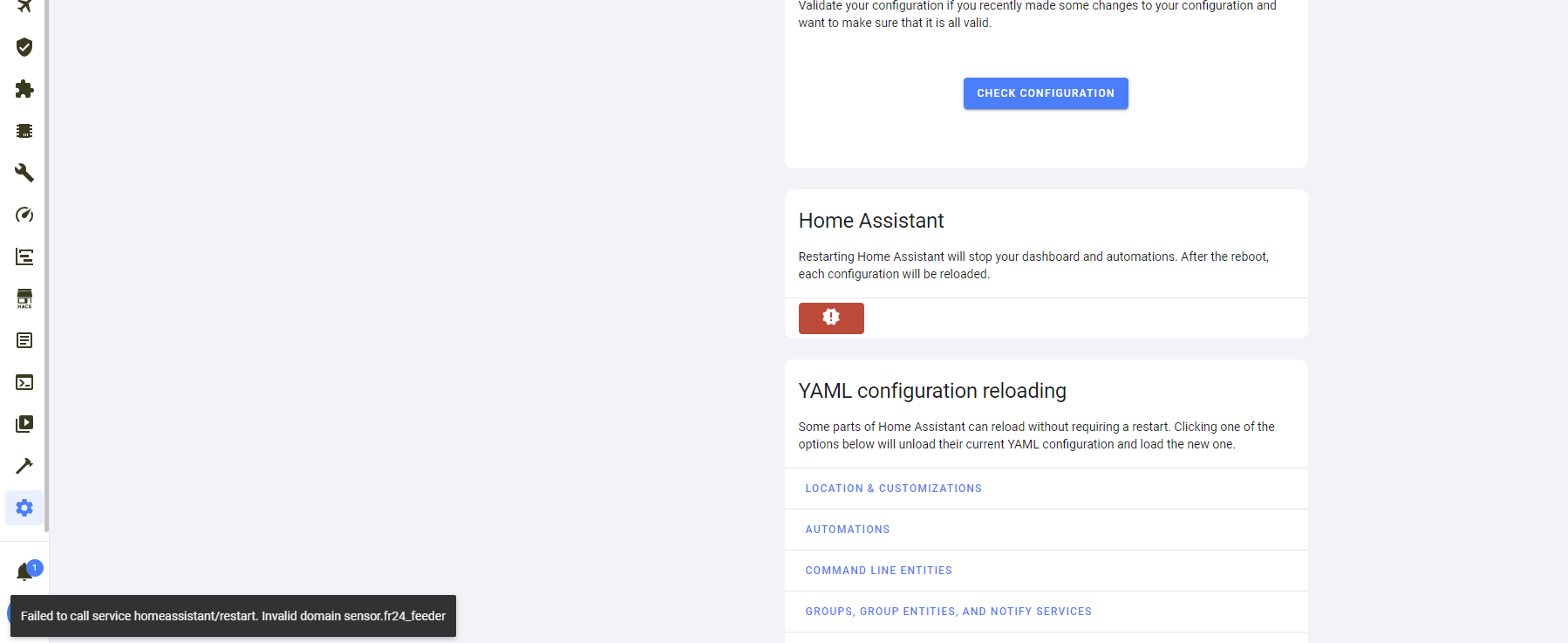
➜ ~ ha core check
⣯ Processing...
Processing... Done.
Error: Testing configuration at /config
Fatal error while loading config: Invalid domain sensor.fr24_feeder_aircraft_upl oaded
Failed config
General Errors:
- Invalid domain sensor.fr24_feeder_aircraft_uploaded
Successful config (partial)
there you go
humble mirage
Find where you have that in your YAML
latent thistle
humble mirage
Lines 1 through 8 don't go in configuration.yaml
latent thistle
humble mirage
Lines 1 through 8 don't go in `configuration.yaml`
okay let me remove these and check
➜ ~ ha core check
Processing... Done.
Command completed successfully.
latent thistle
humble mirage
Lines 1 through 8 don't go in `configuration.yaml`
where these lines should be added?
lament estuary
whats the recommended python version for HA core? 3.10?
humble mirage
3.9 AFAIK
latent thistle
humble mirage
They look like <https://www.home-assistant.io/docs/configuration/customizing-dev...
humble mirage
That's a post from over 3 years ago. The world has changed a lot since then
crude inlet
@latent thistle just to emphasize, your core check adventure was the long way around to getting to the result you were seeing in your original screenshot.
 latent thistle
https://i.ibb.co/TMfsB2P/image.png before and after https://i.ibb.co/0MDK2tR/image.png tried to upgrade LG smarthinq
latent thistle
crude inlet
<@435143657541074944> just to emphasize, your core check adventure was the long ...
I knew but there is sometimes the correct way to doing things
lament estuary
humble mirage
3.9 AFAIK
thanks
latent thistle
humble mirage
They look like <https://www.home-assistant.io/docs/configuration/customizing-dev...
https://i.ibb.co/QDckYgq/image.png custom icons are gone and can't configure those from UI
https://i.ibb.co/x7ZxxMH/image.png "This entity ('sensor.fr24_feeder_aircraft_tracked') does not have a unique ID, therefore its settings cannot be managed from the UI. See the documentation for more deta"
latent thistle
latent thistle
https://i.ibb.co/TMfsB2P/image.png before and after https://i.ibb.co/0MDK2tR/ima...
how do I fix this?
placid sage
hey can anyone help me with a guide on how to installing HA Supervised in docker on raspberry pi
lament estuary
Error: Command '['/home/<USERNAME>/home-assistant-core/venv/bin/python3', '-Im', 'ensurepip', '--upgrade', '--default-pip']' returned non-zero exit status 1. does anyone know how to fix this? trying to install HA core on WSL with python 3.9 for development but i get this when running script/setup
humble mirage
placid sage
hey can anyone help me with a guide on how to installing HA Supervised in docker...
Don't, if you have to ask it's not the method for you
Supervised is the install method that pretty much nobody should use - use HAOS or use Container
placid sage
humble mirage
Don't, if you have to ask it's not the method for you
I have installed it before like an year ago but now i have tried several different ways but non worked
humble mirage
https://github.com/home-assistant/architecture/blob/master/adr/0014-home-assistant-supervised.md details the basic requirements for even starting down that path
Conclusion: Expert. Maintaining a Debian installation to a very specific set of requirements is hard
I see a lot of people with broken installs because they didn't have the skills, or deliberately ignored the requirements
placid sage
My main goal is to run home assistant and hyperion on the same raspberry pi
humble mirage
Then Container is the way
placid sage
I won't get supervisor then🥲
humble mirage
Or HAOS, since it looks like there's an add-on
placid sage
Alrighty i will try installing HAOS
crude inlet
@placid sage supervisor manages containers
placid sage
crude inlet
<@456226577798135808> supervisor manages containers
Bud my main aim is to use HA and hyperion in the same raspberry pi
Does HAOS have hyperion Add-on?
If it does then i would have no issue installing HAOS
lament estuary
lament estuary
`Error: Command '['/home/<USERNAME>/home-assistant-core/venv/bin/python3', '-Im'...
nvm, made a new vm and now its this:
Usage:
  /home/<username>/home-assistant-core/venv/bin/python3 -m pip install [options] <requirement specifier> [package-index-options] ...
  /home/<username>/home-assistant-core/venv/bin/python3 -m pip install [options] -r <requirements file> [package-index-options] ...
  /home/<username>/home-assistant-core/venv/bin/python3 -m pip install [options] [-e] <vcs project url> ...
  /home/<username>/home-assistant-core/venv/bin/python3 -m pip install [options] [-e] <local project path> ...
  /home/<username>/home-assistant-core/venv/bin/python3 -m pip install [options] <archive url/path> ...

no such option: --use-deprecated
I Googled and found some results
humble mirage
lament estuary
nvm, made a new vm and now its this:
```
Usage:
/home/<username>/home-assista...
What did you type to get that?
lament estuary
script/setup
humble mirage
If you're trying to setup the dev environment then #developers is going to be a better place to ask for help
This channel is for normal installs
placid sage
humble mirage
I Googled and found some results
Alrighty bud i will try installing HAOS
Thanks
I'm getting warning on HAOS
Home Assistant CLI not starting! Jump into emergency console...
placid sage
It's been 30min and home assistant is still on installation
placid sage
placid sage
I'm getting warning on HAOS
``Home Assistant CLI not starting! Jump into emerge...
And shows this warning on the raspberry pi
21-10-12 15:31:15 WARNING (MainThread) [supervisor.homeassistant.core] Error on Home Assistant installation. Retry in 30sec
21-10-12 15:31:45 WARNING (MainThread) [supervisor.jobs] 'Updater.fetch_data' blocked from execution, no supervisor internet connection
21-10-12 15:31:45 WARNING (MainThread) [supervisor.homea```This is what I'm getting
high token
Did you plug in ethernet?
high token
It doesn't think it can access the internet
You could try manually setting DNS servers in case that helps
placid sage
Can you tell me how to?
placid sage
high token
You'd have to do it from the terminal with nmcli
/bin/ash: nmcil: not found
BTW I'm using home assistant os
humble mirage
#developers can help with that, this is the channel for standard user installs
placid sage
Ok, thanks. Is it ok to remove my message here and post in that channel?
 normal spire
does anyone know off the top of their head where homeassistant will save their backups to with the 2022.04 Update?
or is it just a straight download?
jovial rampart
At least on the docker install, it saves it to the config folder in a folder called backup. I would imagine that is consistent across all install methods
 fickle flower
Hello everybody,
I'm new in HA, wich is install on my Synology DS412+ on Docker with a Conbee II key
I have found @red geyser youtube videos #023 and #024, and I finaly could reach my HA over https
But now, I'm cannot reach HA localy from http://192.168.0.10:8123 but only from https
I have found this site, but could someone explain me this answer https://community.home-assistant.io/t/i-cant-connect-via-http-locally-yet-https-works/237288/11 My case is exactly the same
jovial rampart
fickle flower
as I said, I cannot reach HA from http but only from https, https works fine
jovial rampart
But your true https shouldn’t be from a local ip
fickle flower
That's what I read everywhere 😦
jovial rampart
Huh
jovial rampart
Yes, just try https with your local ip…..isn’t that what you want? Local access?
 young halo
Anyone know the fix for stuck on configuration screen, I get server 500 error and cant get to login for Home Assistant!
 chrome hollow
I just moved my home assistant os virtualbox image and disk to another drive, reattached, restarted, it fired right up and now I get connection refused, however everything acts like it's working fine, an ha core rebuild times out eventually, networking should be fine I've read on the forums
 round blaze
I cant access homeassistant from http://homeassistant.local:8123 and :4357 or over the IP adress and ssh anymore. HAOS 2022.4.0 rpi 3B 64 bit. It’s a fresh headless rpi 3B install with 2 addons (zwavejs and ssh) and more integrations (zwave (usb), hue, dsmr (usb), lan opentherm, rfxcom (usb)) No ssl and remote access set up. Automations seem to work. I tried deleting app cache and another browser. The router shows homeassistant correctly. It’s been running for 2 days from a fresh install
I just moved over from domoticz
round blaze
A hard reboot solves this momentarily, but does harm the installation in the long end. It’s also not friendly to the zwave nodes
 delicate citrus
Hey! Does anyone know why my database upgrade is taking so long? I am coming from 2021.2.1 -> 2022.4.1 and I have had the update running since 9:00 this morning and it is 6:00 pm now. Home Assistant periodically reboots and sometimes I can't even interface with the system itself. Any ideas?
copper jolt
guys anyone else getting HA not responding ad a ton of these in the logs?
2022-04-08 07:20:45 ERROR (MainThread) [homeassistant.components.hassio] Error fetching hassio data: Error on Supervisor API:
2022-04-08 07:51:50 ERROR (MainThread) [homeassistant.components.hassio.handler] Timeout on /addons/a0d7b954_nodered/stats request
2022-04-08 07:51:50 ERROR (MainThread) [homeassistant.components.hassio.handler] Timeout on /addons/core_mariadb/stats request
2022-04-08 07:51:50 ERROR (MainThread) [homeassistant.components.hassio.handler] Timeout on /addons/f1c878cb_octoprint_proxy/stats request
2022-04-08 07:51:50 ERROR (MainThread) [homeassistant.components.hassio] Error fetching hassio data: Error on Supervisor API:
Only fix is to hard shutdown the pi4
happens 1-2 times a day
only after 2022.4
never had this before
running HA OS
copper jolt
also, how do I enable HA observer?
on port 4357 I see this
Supervisor:    Connected
Supported:    Unsupported
Healthy:    Unhealthy
 cold mountain
I performed an update on my home assistant os and core on my pi3b+ and now my wifi doesn't work. I connected Ethernet and then tried to use the nmcli command to set up wifi to end up with Error: No wi-fi device found. I see similar errors when searching this version.
delicate citrus
Would removing the home_assistant_v2.db file and restarting home assistant fix the issue? What is stored in the db file?
cold mountain
Had issues accessing it. It is over 300mb. That's probably bigger than it should be right?
Deleted it. Still same error. Should I just wait until an update/patch is pushed?
 tender ferry
delicate citrus
Would removing the `home_assistant_v2.db` file and restarting home assistant fix...
tender ferry
delicate citrus
Would removing the `home_assistant_v2.db` file and restarting home assistant fix...
That file contains all your collected HA data, such as state changes. You can think of it as the history of your tracked entities.
 versed bronze
Hi, I updated my core 22.3.8 to 22.4.1 (on Intel NUC) and it resulted in errors on my KNX devices. Finaly I had to go back to 22.3.8 after several tries.
Has anybody the same issue and maybe a solution?
Thanks
 lean herald
Hi there, I'm wondering what's the best practice to setup https proxy for a supervised / rpi4 ha installation. I've found this article, is it good way to achieve this : https://dummylabs.com/posts/2021-03-13-the-easiest-way-to-https-home-assistant/
I've built this rpi4 supervised ha for a friend, I personnally use the container way at home. And for my setup I use traefik + clouflare to acheive this.
Thx
lean herald
A shorten version of this quetion could be : is the supervisor installation would interfere in any way with other deployed containers than the ones it manages.
 undone pulsar
versed bronze
Hi, I updated my core 22.3.8 to 22.4.1 (on Intel NUC) and it resulted in errors ...
undone pulsar
versed bronze
Hi, I updated my core 22.3.8 to 22.4.1 (on Intel NUC) and it resulted in errors ...
It would help to know what exact errors you were getting to answer your questions 🤷
copper jolt
does supervisor observer work for HA OS or not supported?
grand pivot
It works fine in HA OS
cold mountain
Any ideas how to restore WiFi after the HA OS 8.0rc1 update?
copper jolt
grand pivot
It works fine in HA OS
not for me it seems
Supervisor:    Connected
Supported:    Unsupported
Healthy:    Unhealthy
I have the pi4 image installed, 64bit
when I go to homeassistant.local:4357
how can I fix that?
copper jolt
absolutely nothing, never even knew about the existence of 4357 until today
how can I dig into it and find out more?
grand pivot
that will happen if you've created other containers in your setup
copper jolt
never did, I installed it from the image, unless something went wrong with the 2022.4 updates
I am having some issues with HA not responding at times
grand pivot
then you can try running ha su repair
copper jolt
cool
thx for the suggest, I'll try that and see if it resolves
not seeing any crazy errors in the logs either
high token
If those show up in Observer, there should also be warnings within the Supervisor System page
lean herald
Any chance someone can advise me ? #installation-archived message
humble mirage
If you're running Docker containers, or any other software, outside of the Supervisor then you're unsupported and will have problems
If you want to use Traefik then either you need an add-on, or to use the Container install
Supervised is for people who don't have enough frustration and suffering in their life already
crude inlet
or trauma 😅
lean herald
I don't want to use traefik particulary, nethier want to put the system at risk. So the method linked in my previous message sounds "right" to you ?
humble mirage
Well, HAOS would be about 1000% better than Supervised
Doubly so if this is for somebody else
At a quick glance, that guide looks ok, but I haven't taken the time to read it in detail
crude inlet
Yeah that link looks like a guide to using Nginx Proxy Manager and DuckDNS addons. Should be straight forward
lean herald
Hum, in the end I'm not so sure wich installation method I coosed for this setup.. let me check
crude inlet
Configuration > Settings > Info
lean herald
I'm also realising I'm laking knowledge about the "Supervisor-> Add On Store"
humble mirage
Supervised has no benefits over any other install method, and many downsides
lean herald
crude inlet
Configuration > Settings > Info
I don't curently have access to the Pi, but i'll get back to the docs to find out
I've used this : https://www.home-assistant.io/installation/raspberrypi
lean herald
yeah indeed lol, I've flash the img, so I should be using haos_rpi4-64-7.6.img.xz
humble mirage
HAOS, which is a far better choice than Supervised
lean herald
Ok so I've mistaken myself
So.. what would be the best method to expose this haos on the web over https ?
humble mirage
That guide looks like it's going to be fine
lean herald
the one I've linked ?
humble mirage
Yes
lean herald
All right, thanks @humble mirage
But in the end, does HAOS use the supervisor in it's achitecture ? (maybe it's documented somewhere 😛 )
 lean herald
ok, fine thanks
I've always used "native" ha in a container, and I now realise I don't know anything about the "addons" feature.. will look into it
thx
Ok, I get it. Addons are fine for people with no advanced IT skills...
lean herald
ok, fine. So my initial question wasn't that stupid 😛
copper jolt
I wonder if these are the reason my supervisor is unhealthy?
22-04-09 17:52:10 WARNING (SyncWorker_0) [supervisor.addons.validate] Add-on config 'auto_uart' is deprecated, use 'uart'. Please report this to the maintainer of Z-Wave JS Server DEVELOPMENT
22-04-09 17:52:10 WARNING (SyncWorker_0) [supervisor.addons.validate] Add-on config 'devices' use a deprecated format, the new format uses a list of paths only. Please report this to the maintainer of Google Assistant Webserver
And what addons are they exactly?
lean herald
does haos use dind ?
humble mirage
dind?
lean herald
docker in docker
humble mirage
No
lean herald
ok
 foggy mountain
When I install for first time on an odroid n2+ sd card, using V7.6 image , Its not working 🙁. System tries to boot and gets an IP address I can see in the console but then it errors out with serverip not set error and it does not continue with the install. see screen shot: https://www.icode.com/wp-content/uploads/HA-error-SH-1-scaled.jpg Any ideas anyone?
 fickle obsidian
Why would someone want to purchase a Zigbee USB dongle?
Is it just for latency and local control?
lean herald
fickle obsidian
Why would someone want to purchase a Zigbee USB dongle?
Using a usb dongle over what ?
fickle obsidian
I'm learning but I'm starting to think the dongle is needed for cases where Sonoff devices only work with Zigbee
lean herald
It is indeed mandatory for zigbee only enabled devices
and if you have no other zigbee gateway/coordinator in your network
that is compatible with home assistant
fickle obsidian
my brain power is growing. thank you @lean herald
zenith horizon
high token
I'd expect something in supervisor logs if that's the case
I wanted to come back and let you know why the logs didnt help me solve the update issue (sometimes it 404, sometimes it didnt, but theupdate would always fail). It turned out to be automatic route blocking by my IPS/IDS (firewall rules that automatically kick in for low reuptation IP groups). See the red circles in the graph https://www.screencast.com/t/qgGDkxhb2RR? Soem traffic gets through while other stuff didnt, which made it hard to debug.
 umbral canyon
Hi .. anyone that can point me to a tutorial for setting up SSL/HTTPS on HA that actually works in latest release? .. I have own domain, and IP 🙏
fickle obsidian
I'm not going to be helpful but i thought this was done through duckdns
umbral canyon
fickle obsidian
I'm not going to be helpful but i thought this was done through duckdns
As I can read Duckdns is used when you do not have your own domain .. atleast that is what the guides I have seen refer too
high token
Duckdns addon does keeps your duckdns domain up to date (dynamic DNS) with the IP of your ISP and also renews your SSL certificates using certbot
you already have your own domain so you definitely don't need that
IP as in you have a static IP?
is the domain cloudlfare?
humble mirage
fickle obsidian
Why would someone want to purchase a Zigbee USB dongle?
To get support for a much larger range of devices than some crappy hub supports
lean herald
umbral canyon
Hi .. anyone that can point me to a tutorial for setting up SSL/HTTPS on HA that...
What kind of installation do you have ?
copper jolt
guys what does this mean? seeing a few of them in my supervisor logs
ERROR (MainThread) [supervisor.api.middleware.security] Invalid token for access /supervisor/info
umbral canyon
lean herald
What kind of installation do you have ?
I am using the wmdk on an Unraid server
orchid pebble
copper jolt
guys what does this mean? seeing a few of them in my supervisor logs
`ERROR (Ma...
something is trying to access your supervisor info with an invalid token
copper jolt
orchid pebble
something is trying to access your supervisor info with an invalid token
Lol yes but how do I find out what 😄
orchid pebble
what addons do you have installed?
lean herald
umbral canyon
I am using the wmdk on an Unraid server
this approach could feat your needs i think : https://dummylabs.com/posts/2021-03-13-the-easiest-way-to-https-home-assistant/
umbral canyon
lean herald
this approach could feat your needs i think : https://dummylabs.com/posts/2021-0...
Great, thank you very much 👏 .. I will take a look
 uncut holly
I would like to install IOTstack on RPI4 with USB SSD hardrive. I understand I need to first install Rasbberry OS on to SD card, which I did. Next I need some guidance on moving OS to USB hardrive (intend to follow some youtube guidance) and then install IOTstack as per Andreas Spiess youtube video from 2019 (that one was for installing on to SD card and I used that at that time)? Would be great if I will run into some issues following this logic? Any other path to follow?
umbral canyon
lean herald
this approach could feat your needs i think : https://dummylabs.com/posts/2021-0...
Just a follow up .. took me 5 min and working like charm .. thanks again @lean herald for your help 👏
grand pivot
how did you install HA?
grand pivot
then you don't have it
 olive yew
ok- is there any way to add a repository?
grand pivot
no, you don't have the supervisor at all
you can create whatever docker containers you want outside of HA
olive yew
confused. i can't bring in any additional add-ons?
grand pivot
no
olive yew
okay, so how do i have to install it to be able to
grand pivot
you can create whatever docker containers you want outside of HA
olive yew
right but - i can't bring them into HA?
grand pivot
or, you create a virtual machine and use HA OS
"bring them into HA" doesn't mean much
olive yew
sorry. sort of new to ha
grand pivot
you can't control external containers from within HA
grand pivot
you do not have the supervisor and cannot use addons
olive yew
okay, thanks
fickle obsidian
Need recommend on universal gateway. Raspberry Pi. Looking at Sonoff Dongle and Conbee but don’t know jack.
 somber pike
So I found a piezero w in a box that I totally forgotten about, would be cool to detect presence in office; monitor.sh or room-assistant ?
 sleek ridge
I installed the docker/supervisor manually on a raspbian buster a year ago. Since one or two months I can not longer restart the core - if I try to, the core stops but does not restart.
I read that there was a change on with which signal homeassistant terminates - does anyone knows what I may have to change to make restarts of the core from the supervisor on the web ui work again?
somber pike
So many updates past year, I’m sure that broke configuration. Check the logs
humble mirage
sleek ridge
I installed the docker/supervisor manually on a raspbian buster a year ago. Sinc...
What does your compose file/command line look like?
sleek ridge
It worked until 1 or 2 months ago, there are no clues in the log
humble mirage
The log is likely irrelevant here
sleek ridge
ExecStart=/usr/sbin/hassio-supervisor
this is how systemd starts the supervisor
humble mirage

Well, then, if you're running Supervised you're relying on the Supervisor restarting HA
Is the Supervisor reporting your system as healthy?
sleek ridge
yay
humble mirage
Is it showing as supported, or unsupported?
sleek ridge
thank you for pushing me in this direction - I always thought that the startup script was within a docker
but this seems to me that I never updated the hassio-supervisor skript, I'll fetch a new one and compare, thanks
somber pike
I did look at you blog tink about monitor, wanna use watch to detect presence but I can’t tell mac on the watch, it tells time!
humble mirage
So, look at the phone and see what it reports the MAC of the watch as?
somber pike
It doesn’t tell, it’s a fruity iPhone
somber pike
I can’t tell whitch devices picks up monitor.sh and narrow it down from there?
 dawn flame
olive yew
okay, thanks
dawn flame
olive yew
okay, thanks
You do not need the supervisor to integrate things into HA. Add-ons are just docker containers with the Integration built in to allow the supervisor to control it. What do you want to "add on"?
high token
Let me guess Rpi4
high token
yeah indeed same here too
high token
No seems to be several Rpi users having it
copper jolt
yeah helping out that issue with logs etc
high token
I haven't been able to pinpoint exactly what component within HA is causing it though
copper jolt
hopefully they find something 🙂
high token
usually you don't see anything wrong in the logs which is why it's hard to find it
high token
yeah doubt you'll find anything on that one
look at his one instead https://github.com/home-assistant/core/issues/69695#issuecomment-1094186060
copper jolt
yeah that was me that posted the mem graph there
copper jolt
running a mem profiler now
high token
wanna tell me how so I can add mine on the issue? 😅
copper jolt
install profiler from integrations
high token
that I have. I just never understood the different services
copper jolt
then run profiler:memory service
service: profiler.memory
data:
  seconds: 300
not sure if it contains any useful info though
high token
right. that one
bdraco had suggested something else to me but it would crash the whole container
 dusty osprey
I can't seem to get Home Assistant to update. I am using Home Assistant Core on a Raspberry Pi4. I have tried running "pip3 install --upgrade homeassistant" from the home assistant directory (with and without sudo) and it certainly goes through the motions but my Home assistant stays on the same version number. I have stopped and restarted Home Assistant and I have also tried a full reboot, all to no avail.
I have tried google but I'm getting nowhere so I was hoping someone on here might be able to help.
somber pike
@dusty osprey not a venv installation?
humble mirage
Pretty clearly one
 left kraken
Hello. My HA cathed lots off errors , i think it will collapse any second. I can't even restart it. Is there any chance for help to find a reason?
somber pike
Yea, but normal procedure is it enter that venv if person is to upgrade
@left kraken sure upload errorlogs somewhere https://paste.debian.net/
humble mirage
dusty osprey
I can't seem to get Home Assistant to update. I am using Home Assistant Core on ...
dusty osprey
somber pike
<@711905406162829382> not a venv installation?
It says "virtual environment false" in my info page
humble mirage
What does it say for your install method then?
dusty osprey
humble mirage
<https://www.home-assistant.io/common-tasks/core/#update>
That where I got the command I used, The other two commands din't run
humble mirage
Check your install method
left kraken
somber pike
<@132797827230334976> sure upload errorlogs somewhere https://paste.debian.net/
I can't read full log, because supervisor isn't responding. And that is remote instance, i can't get there for few days
somber pike
and how are we supposed to help you if you have no access at all ? I could probably not help you, but sombody else 🙂
dusty osprey
humble mirage
Check your install method
I have carried out the instructions on the page you linked to, that was part of the process that brought me here. I was hoping someone mught have had similar issues and resolved them
left kraken
I can paste single events in log
humble mirage
dusty osprey
I have carried out the instructions on the page you linked to, that was part of ...
Right, but what is your installation type?
Check the page that said it wasn't a virtual environment
dusty osprey
Home Assistant Core
humble mirage
Ok, so you managed to do a non-standard install then
You need to check the init/systemd script to see what user it runs as, and where it's running from
Actually, the Info menu tells you the user
Installation Type    Home Assistant Core
...
User    homeassistant
Virtual Environment    true
Python Version    3.9.7
``` (from mine)I will look into that, I didn't realise I had a non standard install, I just followed some bloke from youtube. I might start from scratch if that would be easier but Docker did my head in before.
humble mirage
Core is fine, if you're used to compiling software from source
Docker is good if you're not
Best thing to do though is not follow some rando's guide, and use the official documentation
left kraken
Guys, i made a thread about my problem, and tried to post necessary infos from log. Please if anyone could look at it
somber pike
left kraken
Guys, i made a thread about my problem, and tried to post necessary infos from l...
but what is the use to look at if you have no access at all ?
abstract hearthBOT
@dusty osprey Rule #6: Spam will not be tolerated, including but not limited to: self-promotion, flooding, text walls (longer than 15 lines) and unapproved bots.
Please take the time now to review all of the rules and references in #rules.
For sharing code or logs use https://www.codepile.net/ (pick YAML for the language) or https://paste.debian.net/ (pick YAML for the language).
Command '~rule6' was invoked by: Tinkerer
somber pike
😄
humble mirage
Want to try again @dusty osprey ?
dusty osprey
humble mirage
<https://www.home-assistant.io/installation/raspberrypi#install-home-assistant-c...
Thanks I will have another go at a fresh install
left kraken
somber pike
but what is the use to look at if you have no access at all ?
I still got some access remotely, and i want to figure out the reason of my problem
dusty osprey
version: core-2021.10.7
installation_type: Home Assistant Container
dev: false
hassio: false
docker: true
user: root
virtualenv: false
python_version: 3.9.7
os_name: Linux
os_version: 5.10.103-v7l+
arch: armv7l
timezone: Europe/London
humble mirage
CONTAINER
somber pike
and you are able to fix it, thought you had limited access, sure give url and sombody will prolly look at it. But it's a waste of everyones time if you cant make the fix because you have limited access.
dusty osprey
This is different from what I thought
humble mirage
Trying pip to upgrade it is always going to fail, because you're running in Docker
latent thistle
loosing connection to HA after this https://i.ibb.co/t3ddZP9/image.png ping is norma
running HA OS
2022.4.1
somber pike
latent thistle
loosing connection to HA after this https://i.ibb.co/t3ddZP9/image.png ping is n...
😄 😄 😄 dont you have any logs ? 😄
dusty osprey
I, honestly, thought I wasn't in Docker. what an idiot. I suppose I will have to follow the correct instructions and see where that gets me
humble mirage
It'll get you a lot further
latent thistle
somber pike
😄 😄 😄 dont you have any logs ? 😄
it seems so
humble mirage
latent thistle
it seems so
Do you have the SSH add-on installed?
latent thistle
The System Log integration was introduced in Home Assistant 0.58, and it's used by 100% of the active installations. It scores internal on our quality scale.
latent thistle
humble mirage
Do you have the SSH add-on installed?
yes
humble mirage
Can you SSH on?
latent thistle
sshed
humble mirage
Then you can check the logs
latent thistle
what to do next
dusty osprey
You guys have been great, Cheers.
latent thistle
humble mirage
<https://www.home-assistant.io/common-tasks/os/#home-assistant-via-the-command-l...
ha core logs
or ha supervisor logs?
humble mirage
Check all the logs
latent thistle
ha core logs
Get "http://supervisor/core/logs": context deadline exceeded (Client.Timeout exceeded while awaiting headers)
humble mirage
login and look at home-assistant.log
latent thistle
ha supervisor logs
Get "http://supervisor/supervisor/logs": context deadline exceeded (Client.Timeout exceeded while awaiting headers)
Welcome to Alpine!
The Alpine Wiki contains a large amount of how-to guides and general
information about administrating Alpine systems.
See http://wiki.alpinelinux.org/.
You can setup the system with the command: setup-alpine
You may change this message by editing /etc/motd.
humble mirage
Now you can more home-assistant.log
latent thistle
\W $ more home-assistant.log
more: home-assistant.log: No such file or directory
humble mirage
You may need to cd to the config folder
somber pike
So monitor.sh does not create sensors 😢
latent thistle
humble mirage
You may need to `cd` to the config folder
cd config?
latent thistle
what should I search in homeassistant.log?
 green igloo
You probably should just review all the logs from the time when you are having the issue. If you're using the ssh addon, the config folder is at /config.
 modest olive
I assume I cannot move the ZHA zigbee.db sqlite file onto my pgsql instance? The option being called database_path makes it sound like it's pretty set on wanting a (sqlite) file.
lament estuary
how would one migrate from HaOS to a container installation?
grand pivot
I believe that you can just restore an HA OS backup as of 2022.4: https://www.home-assistant.io/blog/2022/04/06/release-20224/#backups-for-home-assistant-core--container-installs
lament estuary
where can i restore a snapshot? the backup screen just has one button for creating backups
grand pivot
I don't know what the container install looks like right now, but perhaps uploading via the three-dot menu
or put the HA OS backup wherever the backups go and refresh from there
lament estuary
just added the HA OS backup to the folder, but there isnt an option to restore anything
only two buttons per each backup are download and delete
grand pivot
in the end, the config directory is just the homeassistant.tar.gz file in there
so you can just manually extract that
lament estuary
oh ok
so just stop docker process, delete everything in config directory, extract homeassistant.tar.gz into config, and start it back up?
grand pivot
yes
lament estuary
are integrations included in a backup
seems like my only integration that transferred was browser mod
nothing else shows up
lament estuary
my custom components folder still has everything there, but none of them show up under the integrations page
grand pivot
and they did before?
lament estuary
yeah
crude inlet
Did you include the hidden directories?
lament estuary
believe so, let me check
grand pivot
if you literally untarred that file in your config directory, it should have gotten them
if you did something else, then...
lament estuary
grand pivot
if you literally untarred that file in your config directory, it should have got...
thats what i did
custom_components is the same with nothing in integrations, but the .storage directory is much smaller
one thing that is probably important is that it went into safe mode after i first started the container because of a bad https config
but it worked normally after commenting out the https stuff and restarting docker container
nvm ok i can use the custom components but only after re-adding and re-configurating them
ig i can try doing it again but removing the https config before starting it again
so it doesnt go into safe mode
yeah that worked
works normally now
latent thistle
green igloo
You probably should just review all the logs from the time when you are having t...
other than home-assistant.log what other logs I should inspect?
I have opened the homeassisnt.log in vs-code for live view
 brisk zephyr
I'm looking for guidance on how to set up Z-Wave USB dongle with Synology NAS - any good guides out there? I've found a video on youtube, but it's from 2016, and I'm not sure it still applies. I'm running HA in a docker container.
lament estuary
https://www.home-assistant.io/integrations/zwave_js#advanced-installation-instructions and https://zwave-js.github.io/zwavejs2mqtt/#/getting-started/quick-start this will probably help (goes over HA container install)
latent thistle
➜ ~ ha core check
Processing... Done.
Command completed successfully.
➜ ~ ha core restart
Processing... Done.
Error: Unknown error, see supervisor
what should be done now?
~ ha supervisor logs
Get "http://supervisor/supervisor/logs": context deadline exceeded (Client.Timeout exceeded while awaiting headers)
➜ ~
 simple relic
Hey folks, I'm finding I can't pull HA down from GHCR.
$ docker pull ghcr.io/home-assistant/home-assistant:stable
Error response from daemon: Head "https://ghcr.io/v2/home-assistant/home-assistant/manifests/stable": denied: denied
@humble mirage yes they can.
abstract hearthBOT
@simple relic Discord isn't like IRC, you don't have to tag people on every response. Keep in mind that every time you tag somebody, they get a notification ping. That can very quickly become annoying and people may block you.
When using Discord's new Reply feature it defaults to pinging the person you reply to, click @ ON to @ OFF to stop this - on the right side of the compose bar.
You have to change this every time (thank the Discord devs for that).
Command '~irc' was invoked by: Tinkerer
simple relic
sorry
humble mirage
I just tried my test host, and docker pull ghcr.io/home-assistant/home-assistant:stable doesn't throw any errors, it all works
simple relic
yeah it works on my laptop too
just not this specific machine
it used to work...but not anymore
humble mirage
Try with sudo and see if that fixes it
humble mirage
Check your user and Docker config
simple relic
Okay, but I can pull other docker images
is there something special about that one?
humble mirage
Nope
simple relic
this is weird.
I can pull:
- pihole/pihole
- linuxserver/unifi-controller
- traefik
- mealie
- babybuddy
what on earth?
latent thistle
latent thistle
➜ ~ ha core check
Processing... Done.
Command completed successfully.
➜ ~ ha ...
@humble mirage any help
abstract hearthBOT
@latent thistle Generally, don't tag people to ask for help - it comes across as bad manners, you’re demanding somebody answers you. It’s different if you’re thanking somebody, obviously. If you do tag somebody keep it polite and respectful. Remember that everybody is a volunteer, and nobody has to help you, and people may block you.
Similarly, please don’t DM (direct message) people asking for help. It also comes across as demanding, and means that others can’t learn from what you do.
Finally, please keep tagging people in replies to a minimum. That too can become annoying very quickly and should be used only when it's necessary (such as if it's been a long time, or there's multiple conversations going on). When using Discord's new Reply feature it defaults to pinging the person you reply to, click @ ON to @ OFF to stop this - on the right side of the compose bar.
Command '~tagging' was invoked by: Tinkerer
humble mirage
latent thistle
<@332579266623438848> any help





 abstract hearthBOT
@latent thistle posted a code wall, it is moved here --> https://hastebin.com/enuzefiduq
@latent thistle Rule #6: Please do not post codewalls (text longer than 15 lines) - use sites such as https://www.codepile.net/ (pick YAML for the language) or https://paste.debian.net/ (pick YAML for the language).
Please take the time now to review all of the rules and references in #rules.
Command '~codewall' was invoked by: Tinkerer
latent thistle
abstract hearth
which one is recommended site for code??
humble mirage
Either, or any other that suits you
latent thistle
https://www.codepile.net/pile/jZ9d278d complete error list before the crash
simple relic
I fixed my GHCR auth issue
looks like I'd docker login'd on that client, which created an auth key for GHCR in my home dir. This auth key had then expired meaning it was no longer valid. Running docker pull with sudo caused it to be run as root. Root has no docker auth key configured meaning it just fell back to anon access and worked.
🎉
 maiden oar
since last update can't download updates keep gettin error:
A timeout of 60! seconds was encountered while downloading https://****, check the network on the host running Home Assistant. This is not a problem with HACS but how your host communicates with GitHub
any fix?
 raw hedge
Ha in a macvlan so it gets it’s own MAC address and ip inside a docker swarm cluster with a distributed fs works great!
grand pivot
simple relic
🎉
this has happened to a few people recently
I didn't see your error message earlier, but that's exactly what happens:
Error response from daemon: Head "https://ghcr.io/v2/home-assistant/home-assistant/manifests/stable": denied: denied
I believe that docker logout is enough to fix it
orchid pebble
maiden oar
since last update can't download updates keep gettin error:
A timeout of 60! sec...
this is HACS producing that error
lime cobalt
After performing a restore from backup, should the device re-appear on homeassistant.local or do I need to do a manual hard reset (RPI 3) ? I can ping the device, but have no web UI: 192.168.1.250 refused to connect.
 glad ferry
Hey Guys, The 2022.4.2 upgrade is silently failing. I see it make a backup and then it just stops and there are no errors in the log. Any thoughts on how to troubleshoot? I'm running Home Assistant Supervised and I've never had an issue upgrading before.
maiden oar
orchid pebble
this is HACS producing that error
any fix?
orchid pebble
maiden oar
any fix?
first off what installation method are you running, and have you tried rebooting your host
orchid pebble
lime cobalt
After performing a restore from backup, should the device re-appear on homeassis...
mdns is unreliable access it via the ip:8123 you may need https if you had a cert configured previously
maiden oar
Ha on virtual
orchid pebble
glad ferry
Hey Guys, The 2022.4.2 upgrade is silently failing. I see it make a backup and t...
I am about to update my supervised install, I will keep you posted
orchid pebble
maiden oar
Ha on virtual
HAOS on virtualbox?
maiden oar
yes
orchid pebble
have you attempted restarting the vm
maiden oar
yes
orchid pebble
same error
maiden oar
yes
orchid pebble
is hacs up to date?
maiden oar
have3 diffent addons want to update with the same error
hacs is up to date
also renistall once
orchid pebble
addons or hacs components
maiden oar
smartIR
local-tuya
orchid pebble
and you are sure the device can ping github.com right?
maiden oar
what is the reason it will suddenly blocked?
orchid pebble
I just want to make sure, maybe you have dns issue
maiden oar
no
orchid pebble
no you can't ping?
maiden oar
ping is ok
orchid pebble
whats the https address it is trying to reach?
 hushed fern
Hi there, I have a problem with a temperature sensor. I can't get graph for this sensor. On the way to debug I'm trying to have a look at history but I don't see the option anymore. I've check my config and history: is enable. I've a recorder to InfluxDB is it because of it ? or the problem is from another part of my config ?
maiden oar
orchid pebble
maiden oar
ping is ok
have you tried removing the hacs integration and relinking your github https://hacs.xyz/docs/configuration/basic
maiden oar
yes
orchid pebble
maiden oar
yes
and you restart ha and still get the same error?
maiden oar
yes
orchid pebble
what dns servers do you currently have set?
maiden oar
as my router
orchid pebble
can you try setting your dns statically to either google (8.8.8.8, 8.8.4.4) or cloudflare (1.1.1.1, 1.0.0.1) from the home assistant UI
maiden oar
how could i do that?
orchid pebble
maiden oar
how could i do that?
Configuration > Supervisor > System
maiden oar
found trying now
orchid pebble
you may have to reboot
orchid pebble
glad ferry
Hey Guys, The 2022.4.2 upgrade is silently failing. I see it make a backup and t...
I just updated, everything is fine. Would you like some help troubleshooting?
maiden oar
SAme problem after reboot
glad ferry
orchid pebble
I just updated, everything is fine. Would you like some help troubleshooting?
Yeah if you have any ideas they would be appreciated.
orchid pebble
glad ferry
Yeah if you have any ideas they would be appreciated.
first of all you are running Debian 11 Bullseye correct?
glad ferry
Correct
orchid pebble
does ha su logs or ha core logs show anything useful
what is happening when the upgrade fails? can you no longer access the UI?
glad ferry
Oh I forgot about the system log. I think we have a clue.
22-04-11 17:05:57 ERROR (SyncWorker_1) [supervisor.docker.interface] Can't install ghcr.io/home-assistant/qemux86-64-homeassistant:2022.4.2: 404 Client Error for http+docker://localhost/v1.41/images/ghcr.io/home-assistant/qemux86-64-homeassistant:2022.4.2/json: Not Found ("no such image: ghcr.io/home-assistant/qemux86-64-homeassistant:2022.4.2: No such image: ghcr.io/home-assistant/qemux86-64-homeassistant:2022.4.2")
No everything works fine. It just doesn't upgrade. The progress indicator is running for a while (doing the backup) and then it stops.
orchid pebble
glad ferry
Oh I forgot about the system log. I think we have a clue.
```
22-04-11 17:05:5...
seems like a networking issue
glad ferry
Should it be looking at localhost?
 manic lark
Dumb question here, if i got a pi running HA is it HA Core?
orchid pebble
manic lark
Dumb question here, if i got a pi running HA is it HA Core?
how did you install it
manic lark
download pie imager installer for windows, select HA as a OS and install it in a SD
orchid pebble
glad ferry
Should it be looking at localhost?
is the host version of docker up to date?
orchid pebble
manic lark
download pie imager installer for windows, select HA as a OS and install it in a...
thats Home Assistant OS not Core
glad ferry
orchid pebble
is the host version of docker up to date?
Docker version 20.10.5+dfsg1, build 55c4c88
orchid pebble
glad ferry
`Docker version 20.10.5+dfsg1, build 55c4c88`
your docker is out of date
mine is Docker version 20.10.14, build a224086
glad ferry
Did you install as a debian package?
orchid pebble
Docker?
glad ferry
Yeah
I can't actually remember how I initially installed it. I'll have to track it down. This has been running for at least a year now.
Okay I think I found the problem.
/etc/resolv.conf is empty
Your initial assessment was probably correct
And now I'm upgraded. 🙂 ty for the help
I'll track down why /etc/resolv.conf isn't getting a nameserver set
hushed fern
you should also modify your deamon.json in /etc/docker to add this :
{
"dns": ["8.8.8.8", "1.1.1.1"],
}
orchid pebble
glad ferry
I can't actually remember how I initially installed it. I'll have to track it do...
the process for how I installed docker and supervised is documented here https://mathesonsteplock.ca/install-home-assistant-supervised-on-debian/ if its been a while since you have setup supervised I highly recommend you go through this process again as requirements have changed
glad ferry
Thanks. I have backups so I might blow this all away and start over.
orchid pebble
you can rerun the installer without loosing anything however I would recommend a backup first
orchid pebble
glad ferry
Thanks. I have backups so I might blow this all away and start over.
Glad I could help
glad ferry
The only thing I'm really using supervisor for is studio code server
I have everything else setup externally.
orchid pebble
you could always run that in docker
glad ferry
This is probably outside the scope of this space, but can I setup studio code server externally and still have it work within my HA UI?
Just for convenience?
orchid pebble
glad ferry
This is probably outside the scope of this space, but can I setup studio code se...
panel_iframe might work
glad ferry
orchid pebble
panel_iframe might work
Thanks I'll check that out.
cold mountain
How can I downgrade the home assistant operating system? The current release broke my wifi.
cold mountain
Would this work from the community addon?
high token
yes either of them
cold mountain
I got Error: can't compare <unknown 7.x> and <simplever 6.0>
high token
well you obviously need to choose which version 😄
I left x since I didn't know which one you wanted to downgrade to
I see 7.6 being the latest stable one so I assume 7.5 then
cold mountain
I updated to 8.0rc1 which apparently broke a bunch of wifi.
cold mountain
Typed that in and it seems to be working.
cold mountain
Someone committed a fix but I don't know how long that takes to implement.
high token
Stefan won't release a new beta if not enough significant changes I'm guessing (and I don't think wifi is big enough a bug to release one)
it will be in the dev branch in a few hours but don't try that
just stay in 7.6 till you see the new 8.0rc2
cold mountain
Thanks for your help. Been in overall all my tech is broken hell for the last few days.
high token
is ethernet impossible?
cold mountain
It is but I was running my Adguard through the WiFi up address. And my duck DNS. Plus some integrations I use seemed to depend on my ip address.
There's a whole semi connected mess with a Logitech harmony that I hoped pushing an update to the is would fix.
high token
That seems like an easy fix. Change the ethernet IP to the one the wifi adapter had and the rest of the network would not know the difference
cold mountain
True. But I didn't want to run Ethernet except as a stopgap since my pi lives across the room.
high token
I wouldn't trust wifi for something like HA personally
cold mountain
I'll consider that but it is a necessary evil at the moment with the degree of Ethernet connected devices and plugs all in one location.
 distant acorn
Hi all 🙂
Any known issue with the MacOS VirtualBox image?
I have posted this question in the forum: https://community.home-assistant.io/t/macos-virtualbox-image-network-not-working/410885
Failed to start Network Manager Wait Online
orchid pebble
distant acorn
Hi all 🙂
Any known issue with the MacOS VirtualBox image?
I have posted this q...
M1 Mac?
distant acorn
orchid pebble
M1 Mac?
Nope, 2019 Intel MacbookPro
distant acorn
https://community.home-assistant.io/t/macos-virtualbox-image-network-not-working/410885/2?u=macs79
Should this enp0s3 interface have an ip address?
orchid pebble
what does systemctl status NetworkManager-wait-online.service say
distant acorn
It's been hard to me because it's my first time with homeassistant
orchid pebble
distant acorn
https://community.home-assistant.io/t/macos-virtualbox-image-network-not-working...
yes
distant acorn
Error: unknown command "systemctl" for "ha"
orchid pebble
type login
orchid pebble
login should take you to the correct shell
distant acorn
not very clarifying
I guess there is something in the VM "hardware" that's not right
orchid pebble
distant acorn
I guess there is something in the VM "hardware" that's not right
I am reading a thread, some say restart your mac and hope it works others say it doesn't work on wifi
distant acorn
hmmmm interesting
let me check that
will try rebooting first.
If ethernet cable is the solution I am in trouble 😁
grand pivot
you can't bridge wifi, if that's what you're doing
distant acorn
my mac is on wifi, yes
orchid pebble
grand pivot
you can't bridge wifi, if that's what you're doing
would a nat work?
orchid pebble
yeah thats what it seems like
distant acorn
my ethernet router is in the ceilng 🙁
I will try to figure a way to plug into that router. at least to test if it will work.
orchid pebble
do you not have a switch
distant acorn
hmmm maybe I could setup another router and plug on that one
should't require internet to test it, right?
orchid pebble
It will require internet to do the initial download of ha
distant acorn
but if that error disappears it's a good sign
will start with that
thank you very much folks.
Let you know if it works later.
orchid pebble
alright, good luck
distant acorn
grand pivot
you can't bridge wifi, if that's what you're doing
This is weird though, is it a limitation of homeassistant?
I do bridge from wifi to a windows VM and it works fine
distant acorn
orchid pebble
alright, good luck
thanks again @orchid pebble
distant acorn
grand pivot
https://discord.com/channels/330944238910963714/330990055533576204/8743540876033...
Interesting!
I have a Windows 10 VM on VirtualBox to work with some modelling software and NAT works fine. https://imgur.com/a/uoNoRt2
But I get the issue.
changed network to NAT now on my HA VM
rebooting
orchid pebble
distant acorn
changed network to NAT now on my HA VM
nat will cause issues with ha
distant acorn
it is fine, I just want to test something
it is not supposed to be a prod setup
well, the NetworkManager-wait-online.service was ok now
but still can't access it through http://homeassistant.local:8123/
orchid pebble
ha su logs
distant acorn
Updater.fetch_data No internet connection
orchid pebble
if you drop to the login shell can you ping 8.8.8.8
orchid pebble
yep with bridged
distant acorn
distant acorn
changed network to NAT now on my HA VM
I had to try 🙂
thanks
will look for a way to plug it in the router
manic lark
how can i install HA core from windows 😩 is there a tutorial that anyone recommends for this?
grand pivot
It's only supported in WSL, and instructions are with the rest of them: https://www.home-assistant.io/installation/windows#install-home-assistant-core
but it's not recommended
manic lark
ok can i install it via raspberry to an sd to use on another raspberry? any tutorial for dummies for that? 😩
crude inlet
@manic lark whatever you can use to flash an image to the SD
grand pivot
All the tutorials are right there
crude inlet
@manic lark get a usb SD adapter
I'm assuming you can't flash it using windows because it doesn't have an sd slot and you don't have an adapter
manic lark
I got a usd adapter and actually got HA but its not core, and i need core to attached a camera to the usb so i can add an integration thats only for core
but i really dont know how to install core🤣
crude inlet
Well, that I suppose you could do, if the pis are the same kind. And if you knew how to install core
placid sage
Hi guys. I need some advice. Which OS will be the best for containerised version of Home Assistant? Will Ubuntu Core be okay? I think that i will run only docker on my machine and I don't need to plug any display to it. I want to install my HA on HP T630 terminal.
humble mirage
Ubuntu Core should be ok. I'd suggest Debian over Ubuntu (for servers, which this is), but it should be fine
placid sage
Thanks for your reply, i think i will proceed with Debian 🙂
 fervent jewel
Hey, I am using Home Assistant 2022.4.1 supervised and when trying to update to 2022.4.2 it advises HA is not in a healthy state.
 fleet apex
uh oh, i just updated my Hass installed in hyper-V to the latest version, and all i'm left with is the error "[supervisor.homeassistant.core] Home Assistant has crashed!"
fervent jewel
@fleet apex was that 2022.4.2
fleet apex
ye
fervent jewel
hmm ok my HA wont even let me install it as its reporting unhealthy
fleet apex
did a downdate to 2022.3.8 now and rebooted the vm
but to no help, WebUi is still unavaiable
fervent jewel
hmmm Im seeing the following errors in my log
Logger: homeassistant.components.zha.core.channels.base
Source: components/zha/core/channels/base.py:457
Integration: Zigbee Home Automation (documentation, issues)
First occurred: 5:47:06 PM (1 occurrences)
Last logged: 5:47:06 PM
[0xADCF:11:0x0008]: async_initialize: all attempts have failed: [DeliveryError('[0xadcf:11:0x0008]: Message send failure'), DeliveryError('[0xadcf:11:0x0008]: Message send failure'), DeliveryError('[0xadcf:11:0x0008]: Message send failure'), DeliveryError('[0xadcf:11:0x0008]: Message send failure')]
Logger: homeassistant.components.websocket_api.http.connection
Source: components/websocket_api/connection.py:96
Integration: Home Assistant WebSocket API (documentation, issues)
First occurred: 5:46:56 PM (1 occurrences)
Last logged: 5:46:56 PM
[139938787618240] Received invalid command: mobile_app/push_notification_channel
fleet apex
i wished i installed it under ubuntu with docker, i'm in the dark what i can do to fix this issue,
fervent jewel
oh u usin HAS OS?
fleet apex
yep
fervent jewel
i was on that, but after a HASS Update went bad and bricked the install i switched to supervised cause at least u can actually troubleshoot the issue
fleet apex
trying a way into my configs from the CLI
trying to restore a backup, but that gives me the error that it is a partial backup
 manic bane
fervent jewel
i was on that, but after a HASS Update went bad and bricked the install i switch...
manic bane
fervent jewel
i was on that, but after a HASS Update went bad and bricked the install i switch...
Supervised is a horrible install method. Container is a lot nicer
fervent jewel
@manic bane what the difference, supervised uses containers? Also doesnt the container option not allow Add-Ons?
manic bane
fervent jewel
<@137144563109330944> what the difference, supervised uses containers? Also does...
Supervised is a install method that requires you to be an expert to run it, and has very strict criteria (eg running on Debian 11 only).
Containers are a lot more flexible, easy to spin up something new if it breaks, plus add ons are just custom docker containers, can easily spin up whatever else you want
(Also the fact that supervised only supports running HA & HA Add on containers, whilst container lets you do whatever else running too)
high token
@fleet apex have you tried ha su repair and then ha core rebuild ?
fervent jewel
right, but Supervised is still using docker containers.... the deb requirement is because the installer is packaged as a deb
manic bane
Supervised has a lot more to it than just using docker containers too, plus the fact that Ubuntu can run deb but supervised specifically needs Debian 11
If you’re not an expert at networking, docker, and Linux do not run supervised
fleet apex
@high token su repair not yet, core rebuild yes
high token
I think given enouh crashes Supervisor itself tries to rebuild Core anyway but maybe the repair one would do something
fleet apex
observer url gives something back though: Home Assistant observer
Supervisor: Connected
Supported: Supported
Healthy: Healthy
high token
those are expected
fervent jewel
eh i have it back and running, it was just no longer supervised.... all fixed
high token
what does that mean? haha
manic bane
fervent jewel
eh i have it back and running, it was just no longer supervised.... all fixed
Serious recommendation that if you’re not a networking/ Linux/ docker expert to migrate away from supervised
high token
how did it loose its supervisness?
jovial rampart
I do that on the regular….but in life
fleet apex
su repair is completed, ha still not running though
core start points me back to the supervisor logs, with a message Home Assistant has crashed
fervent jewel
@high token not entirely sure, @jovial rampart you saying thats a regular issue for you?
jovial rampart
I wouldn’t really call it an issue……more an intended result.
fleet apex
i think there is an issue with a yaml file, but how to reach that from the vm.....
half of a yaml was saved i think before the update kicked in
high token
that should still not necessarily cause it to crash and at least trigger safe mode
from the VM console it's a bit trickier
if you have SSH addon enabled it would be easier
high token
in that case your config folder is in /mnt/data/supervisor/homeassistant/
if you are in the HA cli you need to first type login
and also you only get vi as an editor
fleet apex
thats not a issue
high token
I'm glad. It's easy going in. Escaping is the issue 😄
fleet apex
but whats the login user 🙂
high token
just type login nothing else
 teal summit
Hey guys I’m new into this please could you advice me on some videos how to install it please as is asking me URL address and I dnt know from where I should copper it. Been on YouTube but mostly of them are about Raspberry etc and if android then is not explaining how they get the url address. I am installing on Samsung tablet where I have 32GB SD card as well. I would really appreciate
humble mirage
Installing HA on a tablet isn't supported
The URL however is basically:
http://192.168.0.42:8123/
replacing 192.168.0.42 with the IP of the computer you install HA on
teal summit
But people having it on tablets. …😓 I got lost lol (can’t even mention I did study IT College lol but for my defence we work with 98 windows and XP lool) can I be cheeky and could you help me please step by step? Txt me in privet message… so I have Samsung table but other things have appl, if is phone or MacBook. I would really appreciate please
humble mirage
You can use a tablet to view HA