#installation-archived
1 messages · Page 56 of 1
 glad crest
glad crest
glad crest
Thanks!!
 gritty compass
Hey guys, can anyone tell me how I can solve this?
System is unsupported because Systemd Resolved is missing, inactive or misconfigured. Use the link to learn more and how to fix this.
It just happened out of nowhere.. I tried using Terminal to check status with systemctld but the command can't be found and I'm not sure how to log in to the host (ssh into 22 works but not 22222)
Thanks!
 humble mirage
You're using HAOS or the cursed Supervised?
gritty compass
humble mirage
You're using HAOS or ~~the cursed~~ Supervised?
LOL I fear 'supervised' it's installed on my Rpi4
how can I confirm?
 humble scaffoldBOT
Open your Home Assistant instance and show information about your system
gritty compass
ok I'll check. waiting for the backup to complete.. last time it failed for no reason
gritty compass
humble mirage
Look at `Installation Type`
Here's what it says
Version    core-2024.1.2
Installation Type    Home Assistant OS
Development    false
Supervisor    true
Docker    true
User    root
Virtual Environment    false
Python Version    3.11.6
Operating System Family    Linux
Operating System Version    6.1.63-haos-raspi
CPU Architecture    armv7l
Timezone    Indian/Mauritius
Configuration Directory    /config
@gritty compass When using Discord's Reply feature it defaults to pinging the person you reply to, which can get frustrating for the target. Use Shift + click on the Reply option, or click @ ON to @ OFF to stop this - on the right side of the compose bar.
You have to change this every time (thank the Discord devs for that).
humble mirage
Reboot the host
gritty compass
humble mirage
Reboot the host
ok doing that
gritty compass
humble mirage
Reboot the host
But just in case that doesn't work or it does, how would I go about dropping to the right shell (I suppose the host's) to use systemctld to restart the right service? There seems to be nowhere on the internet to indicate in a straightforward way how to do this
besides plugging the rpi with a screen/keyboard
gritty compass
humble mirage
<@155956382330257408>
omg I'm sorry
gritty compass
humble mirage
Reboot the host
This worked! thank you. But would you know how to restart the service without a reboot in my setup? Thank you! Sorry again for the 'ping' I did not know it was you (I thought a bot sent me this lol)
humble mirage
Yes, the bot sent you it on my behalf... all you had to do was read it 😉
And you can't fix that without a reboot, something got confused and a reboot was needed
gritty compass
humble mirage
Yes, the bot sent you it _on my behalf_... all you had to do was read it 😉
I realise that now 😅 I thought the bot woud send 'tips' on and off to new members haha.. Really the first time i see this on discord. Pretty neat 🙂
humble mirage
Bots like that are common on many servers, not just here
gritty compass
humble mirage
Bots like that are common on many servers, not just here
Apparently I can't put a simple emoji on your message either 😅
 raven forge
Maybe you pinged them too many times and were blocked 😄
gritty compass
Anyway, does anyone know how I could go and be able use systemctld to restart services? Right now I get a 'command not found' whilst in the scope of the docker I assume
gritty compass
humble mirage
You can't
oh..that is suprising. I'm concerned as I cannot explain why this happened... In the event that a reboot of the host did not work I worry that I would not have a means to do this..
I've seen a lot of mentions of 'use systemctld' to restart the faulty service. Does this mean they are using supervised install or some other way?
humble mirage
Yes, with HAOS the OS is basically an appliance like setup
The error you saw was because the internals got confused, and a reboot is the fix on HAOS
That kind of thing is pretty rare, but we see a post like that every month or so
gritty compass
Thank you for the insight...
I have a question on esphome not sure if here is ok
maybe on #add-ons-archived ? 🤔
humble scaffoldBOT
ESPHome is a system to control your ESP8266/ESP32, with a native integration for Home Assistant.
You can find their documentation here, and get help with ESPHome itself here in the #diy-archived channel (#integrations-archived for the Home Assistant side integration with it). They also have their own Discord server too.
humble mirage
Depends on the question ☝️
humble scaffoldBOT
@proud owl I converted your message into a file since it's above 15 lines :+1:
 proud owl
Hello, what is wrong in my ESPHome configuration? I'm just starting with ESPHome, the code is installed...
https://i.imgur.com/fHx8sHV.png
 humble mirage
You're in the wrong server
humble scaffoldBOT
ESPHome is a system to control your ESP8266/ESP32, with a native integration for Home Assistant.
You can find their documentation here, and get help with ESPHome itself here in the #diy-archived channel (#integrations-archived for the Home Assistant side integration with it). They also have their own Discord server too.
proud owl
Oh alright
humble mirage
ESPHome has their own server 😉
proud owl
I didn't know that, ty
 leaden gyro
I just did a fresh install of Ubuntu 22 including update & upgrade. I followed the instructions on the Virtual Box page to install virtual box. I followed, as best as possible the instructions on the Home Assistant page to install it in Virtual Box. Home Assistant aprears to have started. I open the web page homeassistan.local:8123 and instead of getting the onboarding page, I get the page requesting username and password. I don't know what these are. Shouldn't I have gotten the onboarding page? I need one of two things to move forward, the default username and password or how to get to the onboarding page.
humble mirage
That sounds like it's connecting to an existing HA install
leaden gyro
Yes, I would agree. I'm using the .VDI downloaded from here: https://github.com/home-assistant/operating-system/releases/download/11.4/haos_ova-11.4.vdi.zip
humble mirage
Use the IP of the VM
leaden gyro
How do I find the IP? when I go to my router, home assistant doesn't appear
humble mirage
The VM console will show it
leaden gyro
I think we're getting on the right track, though. I have Home assistant installed on two other machines (one for production and one for developemnt) This one is for another location
humble mirage
So, every install of HAOS uses homeassistant.local
leaden gyro
I'll shut down the other two and try again
humble mirage
If you've got more than one then that's just gonna cause pain using mDNS like that - use the IP
leaden gyro
Yeah, that would be true. I shut down the other two instances. Now when I type use homeassistant.local:8123 I get "page not found"
oops, the virtual machine wasn't running. starting it now.
OK, it's up and running with the two other instances shut down and now I get the onboarding page. Thanks for your help!
my router has given the virtual machine an IP address. The name for the virtual machine is "PCS Systemtechnik GmbH" Can that be changed?
raven forge
Where do you see that name? You can change the hostname in the network settings.
 scenic lodge
Hi, I am having a few troubles with **external HTTPS access ** on my HA. So far i've installed duckdns, created an account, got my domain and token, now I can't setup the config file as showed in the doc cause I'm having that error :
The system cannot restart because the configuration is not valid: Invalid config for 'http' at configuration.yaml, line 15: not a file for dictionary value 'http->ssl_certificate', got '/ssl/fullchain.pem' Invalid config for 'http' at configuration.yaml, line 16: not a file for dictionary value 'http->ssl_key', got '/ssl/privkey.pem'
Internet doesn't really help, any clue ?
my config file :
default_config:
# Load frontend themes from the themes folder
frontend:
themes: !include_dir_merge_named themes
automation: !include automations.yaml
script: !include scripts.yaml
scene: !include scenes.yaml
#duck dns config
http:
ssl_certificate: /config/ssl/cert.pem (line 15)
ssl_key: /config/ssl/cert_key.pem (line 16)``` heady gate
scenic lodge
Hi, I am having a few troubles with **external HTTPS access ** on my HA. So far ...
heady gate
scenic lodge
Hi, I am having a few troubles with **external HTTPS access ** on my HA. So far ...
can you show us the first 16 lines (at least)of your configuration.yml?
 quasi wedge
hi guys - i got my proxmox set up with HA a while ago and only gave HA 32gb, but want to give it more now - is there a way to edit my HA in proxmox to let me have, say, 64gb? i've never done anything with proxmox before other than HA so it's all very new to me
raven forge
Go to your VM's Hardware tab, select the disk, then use the Disk Action > Resize button at the top and reboot it.
quasi wedge
ah perfect, i'll give it a shot, thanks!
scenic lodge
heady gate
can you show us the first 16 lines (at least)of your `configuration.yml`?
Sure,
default_config:

# Load frontend themes from the themes folder
frontend:
  themes: !include_dir_merge_named themes

automation: !include automations.yaml
script: !include scripts.yaml
scene: !include scenes.yaml

#duck dns config
http:
  ssl_certificate: /config/ssl/cert.pem (line 15)
  ssl_key: /config/ssl/cert_key.pem (line 16)```
the identation is respectednot a file for dictionary value 'http->ssl_certificate' says that there's no file at that path
On HAOS that path should be /ssl/ not /config/ssl/ if you're using the DuckDNS or LetsEncrypt add-ons (unless they changed that recently)
scenic lodge
humble mirage
`not a file for dictionary value 'http->ssl_certificate'` says that there's no f...
Yes i've changed that cause i was testing with /config, but i'm having the same error without /config/
scenic lodge
humble mirage
On HAOS that path should be `/ssl/` not `/config/ssl/` if you're using the DuckD...
Problem is that I can't find that file on my HAOS
humble scaffoldBOT
@scenic lodge When using Discord's Reply feature it defaults to pinging the person you reply to, which can get frustrating for the target. Use Shift + click on the Reply option, or click @ ON to @ OFF to stop this - on the right side of the compose bar.
You have to change this every time (thank the Discord devs for that).
humble mirage
How are you generating the certs?
scenic lodge
(I'm using duckdns) I started the addons, and the log confirmed that the certs are being generated
humble mirage
Did you try the path listed in the add-on docs?
scenic lodge
Yes there is nothing there, so I'm not sure where they'r being generated
humble mirage
Also, keep in mind that when you SSH to HAOS you're inside another container, not the one with HA
The files you see there don't represent what HA sees
scenic lodge
Ok
humble mirage
So, did you actually try the paths?
scenic lodge
I should use the physical terminal ?
humble mirage
No
Did you actually try the paths?
Did you add them to the config and then config check it?
scenic lodge
What paths sorry ?
scenic lodge
Yes
humble mirage
And?
humble mirage
if you got the same error (whatever "doesn't work" means) then #add-ons-archived can help you get the add-on working
scenic lodge
I added config because I was convinced there was something in the config folder
Ok
Doesn't work means I'm getting the same error
certs not found
quasi wedge
hey guys, i accidentally added too much space to my HA instance in proxmox - is there a way to remove how much space i've given it?
heady gate
quasi wedge
hey guys, i accidentally added too much space to my HA instance in proxmox - is ...
if you've not restarted yet and/or haven't grown the filesystem yet, then you can do the same as what you did previously
which is to edit the hardware
quasi wedge
heady gate
if you've not restarted yet and/or haven't grown the filesystem yet, then you ca...
i tried to do that - but i did it through resize and it wouldn't let me resize with a negative number 😛
i just gave up and am letting HA have 96gb now though 🙂
nothing else is using that pc so i've got the space, so can't really complain
humble mirage
English please @serene kettle
For Italian see https://forum.hassiohelp.eu/
Inglese per favore
Per l'italiano vedi https://forum.hassiohelp.eu/
What do you mean? Home Assistant doesn't have any official distributors or installers
Ah... please read #rules about not spamming 😉
 covert basin
since today I am having issues with my HA instance installed using the supervised-installer
none of my docker containers is able to resolve any name - I cannot ping/pip install / wget or whatever from inside the container,
but as soon as I manually change the resolv.conf within the container to use 8.8.8.8 or my local dns as nameserver instead of the preset 172.30.32.3 everything works
I already purged every container and image form docker to ensure I am not using some old / buggy thing
I additionally tried to add the "dns" option to /etc/docker/daemon.json
an obvious error I am seeing (again and again) wihtin docker journal is:
level=error msg="Handler for POST /v1.44/networks/c110db6216ff0e71a2e3f5640a5ed0df25e917773a054aab5f5a2112b4a8675a/connect returned error: invalid endpoint settings:\nno configured subnet or ip-range contain the IP address 172.30.32.6"
humble scaffoldBOT
@covert basin I converted your message into a file since it's above 15 lines :+1:
 alpine musk
I'm instaling home assistant with z2m as containers.
Do I need to expose the zigbee controller to HA too?
As I've understood it HA will communicate with the devices through mqtt, so is it really necessary to expose the usb device to HA too?
humble mirage
#zigbee-archived can better help there, but no, don't do that
Doing that makes you more likely to cause yourself problems
alpine musk
(y) thanks 🙂
 agile atlas
hi, i have istalled home assistant via the truenas scale app, changing the default config path to a dataset i created and configured permission of to be accessed also via smb and averything looks ok, i also see files being populated n the folder as a integrate things.
the problem is that if i reboot ha or reload it doesn't load any configuration or devices or integration.... but files are still there in the config folder.... any suggestion?
 distant adder
hey there,
I had HA installed on my Raspberry Pi 4, until my SC-card broke.
Now I only have partial backups.
I reinstalled HA on a new SD-card for the Pi and it worked.
But when I tried to start over from my backup it just seemed to load forever...
It's currently sitting here for at least 3 hours and I think it will not work at all.
My question is now, whether it is possible after all to restore from a partial backup.
If so, does anyone know how to do that?
Kind regards
pezubi
 young mural
is there a gui installer for haos?
due to hardware limitations i cant manage to install it through ubuntu
raven forge
No. What limitations?
 grand pivot
presumably if a GUI installer could do it, you could do it with "dd" also
young mural
well basically its just way too slow, as soon as i open firefox it nearly freezes entirely
could just be ram limitations as well tho not sure
grand pivot
what does the browser have to do with it?
raven forge
What hardware are you using?
young mural
grand pivot
what does the browser have to do with it?
gotta download the image
young mural
raven forge
What hardware are you using?
using an intel compute stick with 2gb of ram
raven forge
2G should be enough for ubuntu and a browser but you can also just use the CLI to download it.
distant adder
distant adder
hey there,
I had HA installed on my Raspberry Pi 4, until my SC-card broke.
Now ...
anyone??
 winged bramble
Need some quick help guys...
I'm aligning my HA installation to supported OS... So I'm installing Debien 12 Bookwork on my Raspberry Pi 4. I do NOT have a screen or a micro-HMDI cable at hand...
How do i login into the OS over SSH?
I tried the ssh-file on the boot partition, but it does not seem to work
any ideas ?
attempting login with root gives me access denied as the default image does not seem to allow network login with root
winged bramble
yes... I had supervised, so I intend to keep that appraoch
winged bramble
I'll use the supervised installed, but I'm first preparing the OS
because I like to retain access to the OS... I work quite a bit with multiple interfaces and vlans... not sure HAOS provides that kind of flexibility
raven forge
As long as you understand the requirements and are happy with it. I'd either recommend using docker or virtualizing HAOS.
Also see here: https://github.com/home-assistant/operating-system/blob/dev/Documentation/network.md
I can understand wanting a familiar base OS. In my case I chose to use the docker installation method to achieve this.
winged bramble
So I followed all the steps and requriements... installed the supervised... and it fails...
installation seemed to went along well, but when it starts... dear boy...
seems that the docker network setup by the installer does not allow for the containers to talk to eachother... so no supervisor, no addons, no nothing
2024-01-19 23:09:54.243 ERROR (MainThread) [homeassistant.components.hassio.handler] Client error on /info request Cannot connect to host 172.30.32.2:80 ssl:default [Connect call failed ('172.30.32.2', 80)]
2024-01-19 23:09:54.245 ERROR (MainThread) [homeassistant.components.hassio.handler] Client error on /host/info request Cannot connect to host 172.30.32.2:80 ssl:default [Connect call failed ('172.30.32.2', 80)]
2024-01-19 23:09:54.245 ERROR (MainThread) [homeassistant.components.hassio.handler] Client error on /store request Cannot connect to host 172.30.32.2:80 ssl:default [Connect call failed ('172.30.32.2', 80)]
2024-01-19 23:09:54.246 ERROR (MainThread) [homeassistant.components.hassio.handler] Client error on /core/info request Cannot connect to host 172.30.32.2:80 ssl:default [Connect call failed ('172.30.32.2', 80)]
2024-01-19 23:09:54.247 ERROR (MainThread) [homeassistant.components.hassio.handler] Client error on /supervisor/info request Cannot connect to host 172.30.32.2:80 ssl:default [Connect call failed ('172.30.32.2', 80)]
seems others are facing the same issue: https://community.home-assistant.io/t/macos-vmware-fusion-debian-12-home-assistant-supervisor-cant-update-home-assistant-access-token/676063/2
from my trobleshooting it seems that after the install, the containers fail to bind to the hassio network:
24-01-19 23:58:14 INFO (MainThread) [supervisor.docker.supervisor] Connecting Supervisor to hassio-network
24-01-19 23:58:14 ERROR (SyncWorker_0) [supervisor.docker.network] Can't link container to hassio-net: 500 Server Error for http+docker://localhost/v1.44/networks/d3ab25f7d681254d802d4f7615388d5a185fcebc200d91792d821b38448d0ade/connect: Internal Server Error ("invalid endpoint settings:
no configured subnet or ip-range contain the IP address 172.30.32.2")
24-01-19 23:58:14 CRITICAL (MainThread) [supervisor.supervisor] Can't setup Supervisor Docker container!
24-01-19 23:58:14 INFO (MainThread) [supervisor.resolution.evaluate] Starting system evaluation with state initialize
24-01-19 23:58:14 INFO (MainThread) [supervisor.resolution.evaluate] System evaluation complete
24-01-19 23:58:14 INFO (MainThread) [__main__] Setting up Supervisor
 versed vapor
using the supervised installation is highly unrecommended, for various reasons
winged bramble
I've been told that many times already... but it's easier to manage multiple interfaces and vlans through a native debian... so Supervised it is...
versed vapor
we arent telling you this because we dont like you to have nice things but because we would prefer you not having a hard time
running haos virtualized yields much more happyness
grand pivot
Or that
If one is already in 'home lab' mode, presumably one is also acquainted with Docker and is already running containers
winged bramble
Ironically enough, the supervised install worked much better on an unsupported raspbian, than a supported native Debian 12. 😅
 rancid jetty
Hi. I'm working to get an SSL certificate from my own CA working with HomeAssistant. I'm getting the following error: homeassistant.exceptions.HomeAssistantError: Could not use SSL certificate from /config/pub.pem: [Errno 22] Invalid argument
How can I find more info on what may be wrong with my config, or with the cert?
rancid jetty
I think it may be because my pub.pem isn't the full chain, its only the issued cert, or it may be because my pem's have 'Bag Attributes' associated with them. (vs. just a 'BEGIN' and 'END' statements)
winged bramble
winged bramble
from my trobleshooting it seems that after the install, the containers fail to b...
looks like the issue is related to docker CE 5.25... thank you community for finding this 😉
perhaps for the Supervised developers t otake a look at those docker-ce requirements 🙂
 manic bane
winged bramble
looks like the issue is related to docker CE 5.25... thank you community for fin...
manic bane
winged bramble
looks like the issue is related to docker CE 5.25... thank you community for fin...
Ce 5.25? Ce minimum is 20.10.17 for supervised
winged bramble
sorry mistyped: 5:25.0.0-1~debian.12~bookworm
so version 25 seems to be the culprit... falling back to version 24 works
fix is here: https://community.home-assistant.io/t/macos-vmware-fusion-debian-12-home-assistant-supervisor-cant-update-home-assistant-access-token/676063/4
now that I know that everything starts... because of issues during the setup i think its preferable that I rerun the installation clean of HA supervised.
Is there a command to remove all the containers (without then recreating automatically) ?
manic bane
winged bramble
sorry mistyped: 5:25.0.0-1~debian.12~bookworm
so version 25 seems to be the culp...
There's a reason supervisor is advanced
winged bramble
agreed, but i think these kind of issues extend towards the developer expert level, rather than the advanced sysadmin...
 tender wren
That's one reason why we don't recommend Supervised to anyone
Either HAOS or Docker install
 formal frost
Hi, I recently tried updating my home assitant server (hosted on a pi) and something went wrong, and now its not turning on. What do I do?
It might be because the OS update and system update overlapped
formal frost
Nevermind, it restarted on its own
 nocturne arrow
Hi, my installation refuses to update from 2024.1.3 to 2024.1.4. It's dumping home-assistant-rollback.log with the following output: https://pastebin.com/jz8NvK7J
voluptuous.error.MultipleInvalid: expected a dictionary for dictionary value @ data['alarm']
I've even disabled all my custom_components but installation keeps failing. Everything else is up to date.
I have no clue where this "alarm" thing may come from. How can I find this?
 placid sage
dealing with the same issue right now https://pastebin.com/vNyuvJK6
tender wren
You have likely included a directory with yaml files. One of those files is empty (and contains the string alarm)
nocturne arrow
placid sage
dealing with the same issue right now https://pastebin.com/vNyuvJK6
aha glad I'm not alone, means there will probably be a fix soon
nocturne arrow
tender wren
You have likely included a directory with yaml files. One of those files is empt...
checking this!
placid sage
Ah, I am seeing an empty yaml file also, that must be it.
tender wren
Everything commented out is considered "empty"
nocturne arrow
ok also found the issue. had an empty file alarm.yaml in some include directory for my knx files.
thanks for the pointer!
 jovial smelt
Hi, i'm trying to install a new instance of hassio supervised but no matter what I do the core ends up being unhealthy unsupported and unreachable same with verion API. Does anyone know what the issue is?
tender wren
Wrong OS or some unsupported software version for example.
jovial smelt
I installed the newest version form github and doing it on a debian (it worked before, im reinstalling the system )
in the logs I got: Can't update Home Assistant access token!
 forest summit
Hi, Is there a HA Supervised docker image for Raspberry Pi5 out yet?
 hearty pollen
I have also had issues trying to install 2024.1.4. It keeps dropping back to 2024.1.3. What do I look for in the rollback.log file?
My rollback log. No idea where to look
tender wren
hearty pollen
My rollback log. No idea where to look
You have likely included a directory with yaml files. One of those files is empty or completely commented out.
hearty pollen
Just found this from the messages above. I had two files that were completely commented out. I had them as I didn't have time to figure out what was wrong with the yaml that I created. I did not realize that this was not allowed? I just renamed the extension and all is working again. Thank you for your help.
 mortal sinew
I'm told that to get rid of the annoying messages in the vscode addon, I need to access HA via https rather than http. I also understand that part of the after installation process of HA this need to be configured somehow. I was told that DuckDNS setup could be used. DuckDNS appears to be a service that is outside my LAN. Does this mean that once it is setup, I need to access HA (within my LAN) with a fully specified domain name? I assume DuckDNS won't interfere with the DNS service I already have. But, it doesn't seem right that to access HA withing my LAN, from another machine on the same LAN I need to go to an web service outside my LAN to resolve the name.
placid sage
Bonjour toute la communauté peut on mette se cite en francais merci ?
tender wren
placid sage
Bonjour toute la communauté peut on mette se cite en francais merci ?
In English, please
humble scaffoldBOT
@primal saffron I converted your message into a file since it's above 15 lines :+1:
 primal saffron
Anyone?
 neon grove
I never had much luck with Virtual Box, so my instinct is to blame that. Are you running HAOS or another variant
neon grove
mortal sinew
I'm told that to get rid of the annoying messages in the vscode addon, I need to...
You need to get a Certificate so at a minimum you need to be able to pull the certificate down and as I suspect you do not want to pay insane amounts of money for a certificate so need to use Lets Encrypt to get and update a free certificate.
grand pivot
You're probably including an empty file somewhere in your config
hearty pollen
I and others above had similar issues. Apparently there was a change that there cannot be any empty yaml files that are being loaded. I had two in my package directory that had everything commented out.
mortal sinew
neon grove
You need to get a Certificate so at a minimum you need to be able to pull the ce...
I have only a rudimentary idea of how this all works. So, "be able to pull the certificate down" to where? And once I have it there what then? How does HA (and subsequently satisfy vscode) know to use it?
primal saffron
neon grove
I never had much luck with Virtual Box, so my instinct is to blame that. Are y...
I'm running HAOS through VirtualBox.
Mainly because this Mini-pc is also my Plex media server.
Is it better to install it some other way?
Without losing my Plex server.
neon grove
mortal sinew
I have only a rudimentary idea of how this all works. So, "be able to pull the c...
There are lots of tutorials on YouTube so that is the best place to start.
grand pivot
primal saffron
I'm running HAOS through VirtualBox.
Mainly because this Mini-pc is also my Ple...
Switch to a container install
neon grove
primal saffron
I'm running HAOS through VirtualBox.
Mainly because this Mini-pc is also my Ple...
You could run Plex under HAOS as an add on. I don't use Plex, as I prefer Jellyfin. So can not help with moving it.
primal saffron
Aah, I though Plex through HA was just an integration between the 2 but I needed to have 'plex media server' installed and configured first?
I could just install HAOS directly on the PC and install the Plex media server once HA is all set-up?
grand pivot
You implied you already have one
But yes, you can install Plex Media Server as an addon
 brittle sail
ok but he shouldnt
primal saffron
Ohoh... 
Any other way to get a clean install whilst also hosting a Plex server on the same device?
I've also got a raspberry pi 4B 8gb on which I could run HA but it seems a waste of hardware to run them separately.
brittle sail
primal saffron
Any other way to get a clean install whilst also hosting a Plex server on the sa...
https://www.derekseaman.com/2023/10/home-assistant-proxmox-ve-8-0-quick-start-guide-2.html then run a dockerhost vm for a plex container
mortal sinew
neon grove
There are lots of tutorials on YouTube so that is the best place to start.
Thanks. the ones I've watched so far have left me with the same questions. So, I think I'll leave this rabbit hole until I figure out some other things.
neon grove
Have you seen this one: https://www.youtube.com/watch?v=xXAwT9N-7Hw
primal saffron
brittle sail
https://www.derekseaman.com/2023/10/home-assistant-proxmox-ve-8-0-quick-start-gu...
Thanks, I'll look into using proxmox instead of VirtualBox.
mortal sinew
neon grove
Have you seen this one: https://www.youtube.com/watch?v=xXAwT9N-7Hw
In his very first sentence he says "set up remote access". Remote access is not my problem. The problem is vscode thinks it is insecure to access files on the pc it is running on.
 pine forum
Hi guys, i have a HA Blue that i've previously used and was looking to basically factory restore it but i can't find any of that anywhere. Looking to wipe all my info from it and have it in the same state that it arrives in with the initial setup screen. Any way to do that without opening it up?
tender wren
pine forum
Hi guys, i have a HA Blue that i've previously used and was looking to basically...
You have to open the case
https://www.home-assistant.io/common-tasks/os/#flashing-an-odroid-n2
pine forum
tender wren
You have to open the case
<https://www.home-assistant.io/common-tasks/os/#flashi...
There's no -> Factory reset button in the HA site itself i would guess?
tender wren
No
Removing all data (including the dot-directories) in /config would re-trigger an onboarding. But an as-new state with HA downloading the newest HA version would require flashing
pine forum
that might suffice, cheers.
pine forum
tender wren
Removing all data (including the dot-directories) in /config would re-trigger an...
just a quick one, will deleting all of that config wipe my user accounts and credentials from the instalation?
tender wren
They will be deleted.
pine forum
tender wren
They will be deleted.
any good guide on how to do this specifically? Apologies to keep bothering about this. I can access the config folder via the Samba addon but unsure if deleting everything in there will be the right way of doing it and if it would even allow me to do so while the thing is basically running.
tender wren
You can use that. Remove everything (including the hidden directories) and restart HA. But: that will only delete the HA Core config. Add-ons' credentials will not be deleted, until they are uninstalled
pine forum
like the SMB addon you mean?
not integrations
i only got 3 i think terminal & SSH, SMB and the MQTT
 stuck river
I need help, I keep getting this error when i start home assistant which is not allowing me to access the add-ons store. I'm using Home assistant supervisor.
Logger: homeassistant.components.http.ban
Source: components/http/ban.py:129
Integration: HTTP (documentation, issues)
First occurred: 4:37:53 AM (64 occurrences)
Last logged: 4:45:24 AM

Login attempt or request with invalid authentication from 172.17.0.3 (172.17.0.3). Requested URL: '/auth/token'. (HomeAssistantSupervisor/2024.01.0.dev1902 aiohttp/3.9.1 Python/3.12)```If you want to give it away, I would just reflash it. You just have to remove 2 screws
pine forum
tender wren
If you want to give it away, I would just reflash it. You just have to remove 2 ...
yeah here in lies the problem, i gave it away already, and the only thing i can do is anything you can do from a PC connected to the same network as the device, i have no physical access to it anymore.
tender wren
In that case I would go with a SSH connection.
ha core stop
rm -rf /config
ha core start
ha addons list to get all add-ons slugs and uninstall those one by one with
ha addons uninstall <slug>
When uninstalling SSH, you loose access
pine forum
tender wren
In that case I would go with a SSH connection.
`ha core stop`
`rm -rf /config`
`...
ha core stop - shuts down the SSH web interface
xD
grand pivot
fortunately, that's not the only way to connect via SSH
tender wren
The web interface isn't SSH. I said SSH connection for a reason
pine forum
i tried putty but the default port isn't connecting
not sure if something in the configuration is wrong i never got it working
grand pivot
you need to actually enable it
pine forum
the addon runs and it's not prompting for settings so i have no idea what port it's open on as it's not on 22
grand pivot
The config tab
stuck river
May i please get help?
pine forum
well i think i managed, what i ended up doing is
reinstalling the SMB piece,
reconfigured to regain access.
opened the config file share
In a separate window open the web terminal ssh
run ha core stop - this does not stop the SMB share
delete files from share
unplug and replug device
it started the onboarding so i guess, great success, thank you for the assistance
young mural
i installed haos but cant access the webui
i can however reach observer
trying to reach ha itself just tells me it refused to connect
young mural
 fallen lichen
Also... new install? Has it ever worked?
fallen lichen
Also... new install? Has it ever worked?
its a new install
havent done anything on it yet
fallen lichen
Gotcha, yeah look at the core logs and see what that shows
young mural
where can i see em?
fallen lichen
On the host, ha core logs
young mural
rip, ssh aint enabled by default 😭
fallen lichen
Nope, that's not provided by core, that'd be an add-on for HA OS
young mural
i am running ha os
fallen lichen
Right, but you can't actually use it yet.... so, you need to run commands on the host 🙃
fallen lichen
What provided that output? Also, what hardware are you running on
fallen lichen
What image is on it
 placid burrow
How did you write the image to it?
young mural
Using method 1 from the page
So ubuntu then disks then restore from image and selected the img.xz
placid burrow
I was about to ask are you sure you didn't click "arm64" not "amd64" until I remembered HA doesn't use that moniker.
(have definitely made that mistake a few times, and UEFI binaries are universal so things can actually appear to boot, right up until they try and run native code)
fallen lichen
Yeah, it really sounds like an architecture issue. I'm not familiar w/ the compute sticks, but I was trying to see if they were x86 only
young mural
placid burrow
I was about to ask *are you sure you didn't click "arm64" not "amd64"* until I r...
Nah its def not arm64😂
placid burrow
fallen lichen
Yeah, it really sounds like an architecture issue. I'm not familiar w/ the comp...
Ha, first thing I checked too. All four CPU options I can see (Core m5/m3, Atom Z83xx/Z37xx) are 64 bit
young mural
fallen lichen
Yeah, it really sounds like an architecture issue. I'm not familiar w/ the comp...
Cpu is 64 bit
1 sec let me check if that actually is the one xd
This is it actually
Was looking at the wrong one
placid burrow
Is fine. You've got the slowest CPU they shipped in any of those, but it's still in theory compatible
young mural
Yeah i noticed its slow ah
Just barely fast enough to flash the emmc with ubuntu desktop
placid burrow
What I'd do is wipe the disk properly (just with dd booted from Ubuntu should be fine), update the BIOS and wipe its settings, re-flash the image, then probably do the manual efibootmgr configuration too:
https://www.home-assistant.io/installation/generic-x86-64#start-up-your-generic-x86-64
The only one of those compute sticks I ever used had a dead WiFi adapter, getting that thing up and running wasn't my idea of fun 😄
young mural
This one isnt exactly dead but any os refuses to grab dhcp on boot for some reason with wifi
raven forge
young mural
Exec /init: exec format error
If you enter login can you then properly run things like uptime and so on?
young mural
So i was kinda forced to hook up an ethernet adapter
young mural
raven forge
If you enter `login` can you then properly run things like `uptime` and so on?
Yes
raven forge
Okay because I saw an error like this for docker once. Can't remember why though.
young mural
placid burrow
What I'd do is wipe the disk properly (just with `dd` booted from Ubuntu should ...
Tried it with the efibootmgr and it says no bootable device detected
Gonna try doing it again without that
placid burrow
If you can run efibootmgr -v and paste the results
 shy epoch
Hello have this issue
[supervisor.host.sound] Can't update PulseAudio data: Failed to connect to pulseaudio server
try install Home Assistant on RPI4 2GB Ram with 256GB SSD
Anytime if try the Landing Page get this issue
can not step over
placid burrow
Ok so you might want to - just for belt-and-braces certainty - run efibootmgr -o 2 to set HAOS as the first boot option.
You could also delete the ones you don't want with -B but up to you
young mural
Nope
Still not bootin it
Ok so uh
Back into ubuntu i noticed something
Suddenly /dev/mmcblk2 which i used for the command suddenly became /dev/mmcblk1
And now removing it and using /dev/mmcblk1 it works
And core logs now actually shows a nice message instead of an error
raven forge
/dev/disk/by-id/ 😎
 west umbra
yo i would need some help my HA is not accesible thru http://homeassistant.local:8123/ but it was thru http://homeassistant:8123.Now nothing works first it was working on pc and a tablet then only on tablet now none
 sturdy plinth
Hello, some problems in my installation, any idea? [supervisor.host.sound] Can't update PulseAudio data: Failed to connect to pulseaudio server
 south spoke
I want to switch to HA OS from docker container, so I can install addons and not just HACS modules, and have simpler updates and stuff.
I am at a bit of crossroads right now in terms of how should I approach migration - I use a few bluetooth devices, and I am not sure how to set up pass through properly if I will go into HA OS VM, or maybe I should install HA OS as my main system? I am running Debian 12, and have a lot of apps in Docker plus current HA instance is behind traefik + cloudflare tunnel.
I plan on running HAOS VM inside cockpit libvirt integration. Though I am not sure whether I will be able to run it properly, not a lot of RAM available (about 2 gigs out of 16), not really sure, probably zfs caches eat it all up?
Or is it not worth it and I should continue to use HA in docker?
sturdy plinth
sturdy plinth
Hello, some problems in my installation, any idea? [supervisor.host.sound] Can't...
Solved, I have Raspberry 3 32bits, need HOOS 32 not 4
 sharp skiff
Hi try to install home assistant on a new raspberry since my old one crashed. But it stucks on [supervisor.resolution.fixup] System autofix complete
fallen lichen
How long have you waited
sharp skiff
20 min
fallen lichen
Probably wait longer
sharp skiff
ok lets try
west umbra
 sharp skiff
looks like a corrupt partion
west umbra
how do i fix it
tender wren
Re-install HAOS
west umbra
is there more stable version for rasbery pi 5?
 brittle star
The pi5 isn't supported yet as far as I know.
west umbra
brittle star
The pi5 isn't supported yet as far as I know.
i got some beta file and it worked fine tičč i pudated the system
tender wren
The image for Pi5 has not been released as stable yet
brittle star
west umbra
i got some beta file and it worked fine tičč i pudated the system
Well it's a beta, so you can't expect it to be stable. These sort of things can happen when running a beta.
 tropic yarrow
Hi, can anyone help me in my supervisior not being able to access the internet on a homeassistant supervised install?
tropic yarrow
im basically getting the following error message when trying to add a repository. All other addons seems to install fine.
'StoreManager.add_repository' blocked from execution, no supervisor internet connection
alpine musk
has anyone been able to run HA in a container not using network_mode: host and keep discovery working?
sharp skiff
hi I try to reinstall from backup tar. Has anyone experience with this? For 180 MB it takes several hours now.
neon grove
Depending on your hardware it does take a while. Another option is to do the clean set up of Home Assistant so you get to a Dashboard and then do the restore. This often seems to work better.
 lost root
Hey guys, i so often (nearly everytime) get the errormessage "repository XYZBLA exists in the store", while i try to add a github custom repository. Its a fresh install of HA with HACS. I had it everytime yesterday while i tried to install victron related stuff... got to bed and now i could install it without any issue. so i wanted to install "power-flow-card" .. and same message.
I read the countrycode might be an issue, so i checked yesterday to change it from ALL (default) to my country... no success installing it, changed again to ALL.. no difference.. got to bed, tried it now - victron works. Restart the HA as requested by the installation procedure for victron, now again the error its already exists in the store for whatever new i want to install with HACS... huh?
 viscid glacier
Don't add it as custom, just search for it.
humble scaffoldBOT
open a repository inside the Home Assistant Community Store
viscid glacier
Or use "my" links
lost root
viscid glacier
Or use "my" links
@viscid glacier thanks for reply, checked it with the victron one as well yesterday (sfstar/hass-victron) which offers a .io link as well.. but same with your link then :
repository ulic75/power-flow-card not found
viscid glacier
Then your HACS is broken, check your logs during startup of Home Assistant
 ripe nest
I've just rebooted and have a black screen with
ha >
The IP address checks out in the routers mage, but I can't seem to reach it...
Is there some kind of command I need to run after booting it to actually get it active? This server was running for about 2 months before I knocked the power, I can't remember what I did first time.
I can ping the machine from the Windows computer I am using, but can't load homeassistant with IPADDRESS:8123
raven forge
Check core logs and superviser logs. What hardware is this running on?
ripe nest
It was running via ProxMox VM installation - rebooted it twice and now, rather oddly it has decided to work... I've no idea why it didn't the first few times tho...
Cheers for the info tho!
alpine musk
for anyone who's setting up TSL with with mosquitto and runs in containers:
due to hostname issues in the certificates I didn't get HA to connect to mosquitto without network_mode: host
fix was to set static ips in the docker bridge network, and then add
extra_hosts:
- mosquitto:xxx.xxx.xxx.xxx
(mosquitto being the hostname in the docker network
now I have TLS setup in a containerized environment and discovery works normally since HA is in host network mode 🙂
 empty veldt
can someone please tell me what is wrong with the supervised installation? i installed a fresh new one, cause the old installation tells me "no privileged access to the docker runtime"
but fresh installation the same, reboot will fix it for a time, but the same error after a time ~2-3days
manic bane
empty veldt
can someone please tell me what is wrong with the supervised installation? i ins...
Why are you running supervised?
Or do you mean HAOS
empty veldt
cause haos images won't boot
empty veldt
manic bane
Why are you running supervised?
Or do you mean HAOS
what is wrong with running supervised?
manic bane
empty veldt
what is wrong with running supervised?
Supervised is for experts. People who are very knowledgeable with both docker and Linux
What hardware are you using?
And what OS are you installing supervised onto?
empty veldt
debian bookworm
i fixed the issue with the "to new" docker runtime (issue #351 https://github.com/home-assistant/supervised-installer)
and some other weird issues that comes with debian installation (installing resolved leads to not working dns configuration)
anything fine, but i want to know, where does hassio get the information that it has no privileged access to the docker runtime
manic bane
empty veldt
debian bookworm
What hardware is it running on?
might be able to figure out why HAOS wasn’t starting, which can save you the hassle of supervised
empty veldt
i am ok with the hassle, and i am ok with the annoying breaking changes which comes with every update 😅
but there must be a way to debug this "privileged docker" stuff
manic bane
but why
Its excess effort for no benefit. HAOS is just as restrictive as Supervised
empty veldt
the little help button tells me to reinstall the supervised 😦
i wondering about, it is working over weeks
then it has no privileged access without touching anything
empty veldt
manic bane
What hardware is it running on?
might be able to figure out why HAOS wasn’t sta...
i think, i got a problem with booting uefi disks on my proxmox installation. have to investigate here a little
manic bane
To check, did you install anything extra on the OS other than what is expressly needed for supervised?
Including other docker containers too
empty veldt
nope it is a fresh installation
just installed the newest debian version, and followed the steps on https://github.com/home-assistant/supervised-installer
manic bane
empty veldt
i think, i got a problem with booting uefi disks on my proxmox installation. hav...
Theres a script that someone has created that can be run to install HAOS on proxmox, creates everything for you
empty veldt
this one? https://github.com/tteck/Proxmox
ahh ok got it https://github.com/tteck/Proxmox/raw/main/vm/haos-vm.sh
empty veldt
manic bane
Theres a script that someone has created that can be run to install HAOS on prox...
any other suggestions to find out why hassio can't access docker runtime in privileged mode?
manic bane
empty veldt
any other suggestions to find out why hassio can't access docker runtime in priv...
I'm not an expert with supervised, going to have to wait till someone with more knowledge chimes in
 ivory crescent
Im having difficulty with installing homeassistant supervised on debian 12. I have tried several install methods but all fail due to the instructions including the requirement for systemd-resolved to be installed which breaks networking, based on what I have learned it configures things to use ipv6 by default which does not exist on my network but additionally it also required network-manager which should not be used on the same system and causes conflicts. I dont know what to do because it breaks dialing out of my network and pinging sites on the internet is no longer possible.
This is extremely frustrating.
https://github.com/home-assistant/supervised-installer
^ This is the official guide that I used, the only exception being that I used the most recent version of os-agent, however I have tried this with many combinations of versions and it never works although again I have confirmed this to be a problem with the systemd-resolved package.
empty veldt
manic bane
Theres a script that someone has created that can be run to install HAOS on prox...
works, but networkmanager can't start 😄
hi @ivory crescent 😂
ivory crescent
you are having the same problem then? 😓
empty veldt
yep sure
ivory crescent
ughhh
well maybe we will both get some answers.
here are the pages I have found that might help.
empty veldt
you can stop the resolved and add a correct entry to the resolv.conf
then the installation process will work, but after it no privileged access to the docker runtime
which is another issue with supervised
ivory crescent
I had it working by some miracle but had to reinstall after breaking it by rerunning the supervised installer
no clue why it broke just that after doing so I had no access to the addons store and kept getting errors about the observer not being reachable and various parts of the system not being able to connect to each other
so I reinstalled debian
now I am back at this problem
empty veldt
same here 😄
ivory crescent
do you recall where the resolv.conf is located and what the correct config would look like?
empty veldt
at first stop the resloved
ivory crescent
Failed to stop resolved.service: Unit resolved.service not loaded.```systemcrt stop systemd-resolved
ivory crescent
ohh
empty veldt
then /etc/resolv.conf
just add: nameserver <nameserver ip>
you can use 1.1.1.1 oder 8.8.8.8
homeassistant will controll it after installation was successful
ivory crescent
nameserver 192.168.51.1 already exists there and thats the ip of my dhcp server
empty veldt
does ping google.com work?
ivory crescent
it does while systemd-resolved is stopped
humble mirage
FYI Supervised doesn't like Docker 25.0 - if you updated Docker you need to roll back
empty veldt
empty veldt
i fixed the issue with the "to new" docker runtime (issue #351 https://github.co...
yip, i already mentioned it here
@humble mirage we fixed this issue @ivory crescent 's pc in a screen sharing session
but he is running into the same issue as me
System is currently unhealthy because it does not have privileged access to the docker runtime. Use the link to learn more and how to fix this.
@manic bane any suggestions what to to with the broken network-manager in haos? 😅
ahh ok this was my fault, i picked the vmbridge which is master of my vlan devices
😄
empty veldt
yip rubberducky is helpful sometimes, but i think not with the docker issues we are running in
humble mirage
Well... Supervised is a trap, sadly one that attracts a lot of victims
empty veldt
i am not sure that running haos will bring any advantages
i will give it a try, but i think it is a matter of time that the "System is currently unhealthy because it does not have privileged access to the docker runtime. Use the link to learn more and how to fix this." will return 😦
maybe if something helpful will show up if you click on "Use the link to learn more and how to fix this."
manic bane
empty veldt
i will give it a try, but i think it is a matter of time that the "System is cur...
HAOS will not have that issue. HAOS is a far more tightly controlled system. You can't install the wrong things on there. The os is immutable
It'll bring advantages of you never have to worry about the underlying OS
Or if you want some control but still ease of use, container install
empty veldt
i cant install the wrong things on it? sounds like i can't deploy my zigbee2mqtt database there
ahh ok it is in plain text, should work via the file editor
empty veldt
manic bane
HAOS will not have that issue. HAOS is a far more tightly controlled system. You...
i tried to "restore from backup" looks like there is another trap i found 😅
manic bane
empty veldt
i tried to "restore from backup" looks like there is another trap i found 😅
On HAOS? You can restore fine
Just once it is restored restart the VM itself, not just HA
empty veldt
i waited around 50 minutes
then i noticed system was crashed and in poweroff state
but backup is from 2023.9.3 😅 but it is the last version that is working with my nodered flows
expire_after: '1' does not longer work in the sensors: section
manic bane
empty veldt
but backup is from 2023.9.3 😅 but it is the last version that is working with m...
So you want to restore a 2023.9.3 to a 2024.1.4 install?
And keep functionality that has changed from .9.3?
empty veldt
nope i be fine with the new version, i have to migrate like 100 of my automations to automations.yaml
i just want to aviod repairing of 150 zigbee devices
some of them are covered under the wallpapers 😄
tropic yarrow
Hi Guys, i need some help with HA telling me that the supervisor is unable connect to the internet but i am able to add addons from exisitng repositories
im basically getting the following error message when trying to add a repository. All other addons seems to install fine.
'StoreManager.add_repository' blocked from execution, no supervisor internet connection
humble mirage
humble mirage
FYI [Supervised doesn't like Docker 25.0](<https://community.home-assistant.io/t...
 flat sky
Spent all day yesterday on this here's what worked;
- Run sudo apt install then add line by line seperately
(ie sudo apt install docker-compose-plugin=2.21.0-1~debian.12~bookworm)
sudo apt install
docker-compose-plugin=2.21.0-1~debian.12~bookworm
docker-ce-cli=5:24.0.7-1~debian.12~bookworm
docker-buildx-plugin=0.11.2-1~debian.12~bookworm
docker-ce=5:24.0.7-1~debian.12~bookworm
docker-ce-rootless-extras=5:24.0.7-1~debian.12~bookworm
flat sky
any way to install ha onto pc ffrom cli?
humble mirage
Do you want HAOS to take over the PC?
flat sky
yes
humble mirage
Then ... you just flash the image to the boot drive
flat sky
I did a ha os datadisk move / then to drive but theres no partition
can I do that in cli
I only have one usb
humble mirage
Windows may not be able to see the partition
 fluid solstice
I’m using a tpk of home assistant for terrmaster which I think is an old version, and don’t have the add on store available, but also a lot of integrations when I try to add them say they need to be added through configuration.yaml, but of course because the method is no longer really in use, I can’t find instructions on what to do for integrations…… I’m currently trying to add Fitbit, can anyone advise me?
humble mirage
What version number of HA does it show?
Almost certainly the answer will be bug Terramaster to update or switch to Docker
 simple meteor
Hey guys after several years running, my supervisor suddenly seems down. I get timeout on every CLI command, how can I wake it up again? I have local and remote access to the UI and terminal and the webUI works as normal (except for that most pages gives errors, for example addons/system etc)
 summer cove
Hi. Im installing home assistant but I have a problem
I using Orange pi zero 3 with debian linux
I am having a problem like this at the last stage.
simple meteor
You have the same issue @summer cove ? When did this start for you
I got it this morning
summer cove
right now
dpkg: error processing package homeassistant-supervised (--install):
dependency problems - leaving unconfigured
Errors were encountered while processing:
homeassistant-supervised
root@orangepizero3:~# sudo apt-get install systemd-journal-remote
upon this I use apt --fix-broken install
tender wren
dependency problems
That is saying, what is wrong. You are not meeting the dependencies
simple meteor
And what could be the issue if the setup has been running for several years? "ha observer info" results in "Get "http://supervisor/observer/info": context deadline exceeded (Client.Timeout exceeded while awaiting headers)"
summer cove
I dont have a same problem
This is my first setup and setup start is this morning
I wish I could send photos
but
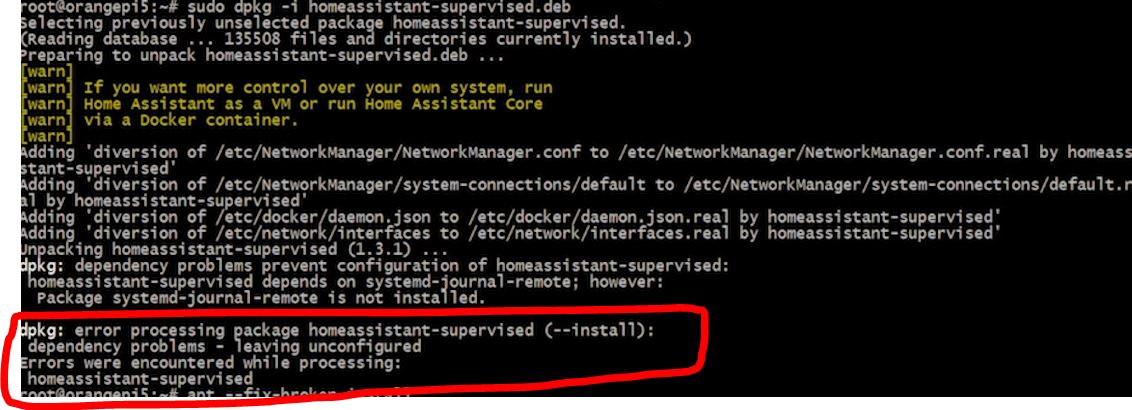
something like this
sorry if the question is stupid
simple meteor
@summer cove seems like your system doesn't mee the requirments to install. See if your hardware is up to standard with the current homeassistant version.
The issue I had was a DNS issue causing everything to timeout
humble mirage
Also check the top pinned message here
But in general you should consider moving to a less broken install method
summer cove
simple meteor
<@525694771415744522> seems like your system doesn't mee the requirments to inst...
1gb orangepi zero 3
humble mirage
Supervised is only supported on actual Debian
You also really shouldn't run Supervised
summer cove
humble mirage
Supervised is only supported on actual Debian
So does this mean that I can't use the debian version customized for orangepi?
humble mirage
Nope
raven forge
summer cove
dpkg: error processing package homeassistant-supervised (--install):
dependency...
There should be more than that above it.
humble mirage
The Supervised docs are pretty clear about that, but then I appreciate that most people don't actually read them
summer cove
https://www.youtube.com/watch?v=0SiQ07xAUjI&t=739s&ab_channel=MecFontana bu this man can do it
 stuck anvil
Hi, so just installed HAOS using generic generic-x86-64 all goes fine, the observer is working and all green, but cannot reach the instance of HA (tried IP and tried using homeassistant.local) any suggestion? PC has static IP
summer cove
humble mirage
11 months ago
"Only the above-listed version of Debian Linux is supported for running this installation method. When a new major version of Debian is released, the previous major version is dropped, with a deprecation time of 4 months. An exception to this rule occurs if the new version does not meet the requirements of the Supervisor." is this?
winged bramble
I've finally moved to HAOS and... it doesn't work better than my standalone Supervised instance...
Seem that HA does not work well with multiple interfaces with vlans...
I got plenty of native integrations that take ages to start... even the HA Version integration fails to initialize... It's as if HA is completely lost in routes when needing to go out...
As I did add a vlan, I'd like to remove it now...
"ha network interface vlan" allows to add, but how can I remove it now using that command...
It' good to have a full OS, but it should also offer all capabilities to revert changes in case of problems... doesn't seem to be the case yet...
I may evaluate returning back to my good old Supervised installation...
 old salmon
what Terminal command do I use to shutdown HA?
raven forge
IIRC it's ha host shutdown. Try ha help host. To shut down just HA try ha core stop and ha help core.
 earnest condor
anyone know of any issues with latest docker-ce v25.0.0 - seems the recorder won't start with that docker now which results in all kinds of downstream grief?
 thorny pilot
earnest condor
anyone know of any issues with latest docker-ce v25.0.0 - seems the recorder won...
thorny pilot
earnest condor
anyone know of any issues with latest docker-ce v25.0.0 - seems the recorder won...
Just killed an evening after an update. Following the advice here fixed me up: https://github.com/home-assistant/supervisor/issues/4827
Not sure if it's directly related to your issue but docker v25 certainly caused me grief. Some IP feature that was dropped in v25...more info here: https://community.home-assistant.io/t/home-assistant-supervisor-based-installations-fail-after-docker-upgrade/676477
empty veldt
@manic bane i just tested the backup/restore functionality and noticed that a partial backup of zigbee2mqtt does not contain the necessary files to restore. it just contains addons.json and options json.
humble mirage
"Only the above-listed version of Debian
fluid solstice
I’ve moved over from a core installation to a docker version which is a full install. Is it possible to port all of my integrations over or do I need to set them up again? I restored from a backup out of core but it only ported over 1 or 2 integrations
humble mirage
Then you didn't include .storage/ and all the files in there
fluid solstice
Hmmm. I’ll have a look, thanks. I did move it over but perhaps I haven’t quite got it in the right place
humble mirage
Check file permissions too
fluid solstice
I still have both the installations,
humble mirage
I've done a Core -> Container move before and it works if you get all the files
Not really any different to restoring a backup for a new Core install
fluid solstice
Great, thanks. I’ll have another look
Does it do the application credentials too, like the oauth stuff as that was a PITA to set up
humble mirage
Yes
fluid solstice
Amazing
humble mirage
Everything is in your config folder
And hopefully that's all in the backups too 😄
This is one way of finding out if your backups were ever any good ...
fluid solstice
I can just copy the contents of one config file to another can’t I instead? (Same system, ones just dockerised)
humble mirage
Well, the folder yes
You need everything in your current .homeassistant folder - all the hidden files and folders too
 lone flame
thorny pilot
Not sure if it's directly related to your issue but docker v25 certainly caused ...
lone flame
thorny pilot
Not sure if it's directly related to your issue but docker v25 certainly caused ...
thank you for linking to that.. I had the exact same issue
I was having all sorts of issues, figured I'd try using HAOS instead of the supervised install and HAOS would not detect my combo stick or the skyconnect for whatever reason. I ended up doing a clean raspi os lite install and fresh HA install as well after I moved docker back to v24
 brittle ginkgo
Any thoughts on SR-IOV networking on Hyper-V with HAOS? Seems the boot process leaves the eth0 and a virtual NIC with DHCP on it. Neither work will work once it runs DAD for a duplicate IP.
 solemn current
Trying to do a fresh install on dell optiplex with the generic install. Booted fine and got to the landing page but it seems to be stuck at the "waiting for supervisor to start" page. No UI at the local:8123 adress. Anyone know what the deal is?
 mint nova
I am in the process of installing home assistant and transitioning from my 10-year-old homeseer system to home assistant. I've been using chat GPT4 a lot to help me with the installation, and it helps. However, since GPT4's current training only goes through April of 2023 it often gets things wrong because things have changed in home assistant since then. I was wondering if I could somehow package up the home-assistant.io website and build a GPT just for my own use from that background knowledge. Is that a reasonable thing to attempt?
tender wren
We don't encourage people to use ChatGPT to set up Home Assistant
humble scaffoldBOT
ChatGPT and other "AI" systems do a fantastic job of generating well structured, convincing looking answers... that are either totally garbage or, if you're lucky, have subtle flaws. Don't use them to "help" others, and don't use them yourself.
tender wren
You surely can build a custom GPT, but in the long run, it might be better to learn HA yourself
mint nova
tender wren
You surely can build a custom GPT, but in the long run, it might be better to le...
I fully intend to learn ha myself, but it has a steep learning curve, and chatgpt4 helps me climb that curve. If chatgpt4 was up to date, it would help even more, instead of referring to Integrations and add-ons and screens whose names have changed or been relocated or whatever. I'm not looking for an answer such as "so don't use chatGPT". If that's the official answer from home assistant, they need to revisit chat gpt4. It's been incredibly helpful so far with my transition.
tender wren
The linked blog post says exactly that:
If AI systems get better, we will revisit this rule.
Is it reasonable to attempt to build a custom HA GPT for using it yourself? Maybe.
But in my opinion that time might better be spent otherwise.
grand pivot
part of effectively using an AI chatbot is assessing correctness, so if you have to do that anyway...
mint nova
grand pivot
part of effectively using an AI chatbot is assessing correctness, so if you have...
The linked post does not specify whether it is referring to chat GPT 3.5 or 4. Chatgpt4 is very very good. They should revisit that advice now If they are referring to chat GPT 3.5 and evaluate version 4 and distinguish between the two.
 empty bloom
mint nova
I fully intend to learn ha myself, but it has a steep learning curve, and chatgp...
empty bloom
mint nova
I fully intend to learn ha myself, but it has a steep learning curve, and chatgp...
FYI, it makes up integrations, it's not referring to relocated or removed integrations
which is why it doesn't work well with HA
because all the integrations set up very simliar so it just decides to make them up because it sees a pattern
mint nova
Okay, I get it. This form is hostile to chat GPT. I will seek my answers elsewhere.
empty bloom
Not hostile, just telling you what it does
use it to your hearts content, it actually does well with automations
integration setup, not so much
mint nova
empty bloom
FYI, it makes up integrations, it's not referring to relocated or removed integr...
I've been using gpt4 for almost a year now to help me develop a complicated python system when I didn't know much python before I started. My experience may be different from yours.
tender wren
mint nova
Okay, I get it. This form is hostile to chat GPT. I will seek my answers elsewhe...
You asked for opinions, you got them. And we have been saying why we think this way. If you consider that hostile... 
empty bloom
mint nova
I've been using gpt4 for almost a year now to help me develop a complicated pyth...
You aren't understanding what I'm saying and you're getting upset based on my comments
I'm telling you, for setting up a yaml integration, which is specific to home assistant and home assistant only, it messes up and makes up integrations that don't exist
it uses all the examples that people have posted and makes up integrations that follow the same yaml paradigm
You can pretty much trust it will get a "set up this integration for me" wrong. Automations, it typically does well
humble scaffoldBOT
@nimble quartz I converted your message into a file since it's above 15 lines :+1:
empty bloom
mint nova
I am in the process of installing home assistant and transitioning from my 10-ye...
FYI, you can build and run the HA.io website from the github repo. https://github.com/home-assistant/home-assistant.io
 undone igloo
I’m encountering a strange login issue. Regardless of client device (PC, android, iphone) or connection (directly to HA server IP or through the reverse-proxy). Randomly when I open the app/website, it doesn’t log in, and instead hangs. Eventually it will show the retry prompt. About 80% of the time that will work, but sometimes it will still hang before the device eventually is able to get logged in. Additionally, if an app/browser has sat with HA open, it will eventually get disconnected and be unable to reconnect automatically for a long time.
Everytime I get this issue, I see a relatively unhelpful warning log: [device details] Disconnected: Did not receive auth message within 10 seconds. This issue started after I converted my HA setup from a docker instance running on a NAS into it’s own dedicated HAOS server. (By simply creating a backup of the configuration and importing that into the freshly installed HAOS server)
Has anyone else experienced this issue or may have some insight on what to look into next?
mint nova
empty bloom
FYI, you can build and run the HA.io website from the github repo. <https://gith...
Thank you! That's the kind of information I was hoping for.
placid sage
I have a problem and hope someone here can help me. I bought a Raspberry Pi 5 and wanted to use Home Assistant. Unfortunately that doesn't work now. I flash it (https://github.com/home-assistant/operating-system/releases/download/11.4/haos_rpi5-64-11.4.img.xz) onto the micro SD with the Raspberry imager, plug it into the Pi and the green power lamp comes on briefly and then turns permanently red. When I flash Homebridge everything works. The lamp stays green and I can also control the Pi.
brittle star
The pi5 isn't officially supported yet
placid sage
Yeah. I know. But there are images u can flash
 rugged fox
Dear all,
i find the HA very interesting and actually i am in prepration phase to install. My first question is if HA can be installed natively on an arm64 server (Ampere® Altra®) ? Also possible to run it as LXC (or VM) on an proxmox Arm64 server ?
humble mirage
HAOS can't, but Home Assistant itself can be installed on an ARM64 server
You may be able to run it in a VM there, but I'm not sure anybody's tried
rugged fox
humble mirage
HAOS can't, but Home Assistant itself can be installed on an ARM64 server
Does it mean i cant use the image but using debian and install HO natively i can use it ? With all addons ?
fluid solstice
humble mirage
You need everything in your current `.homeassistant` folder - all the hidden fil...
Thanks for the advice, got it working last night by mapping the config folder from the current setup to the docker container
 warm scroll
tried to install Failed to install add-on
Can't install ghcr.io/hassio-addons/motioneye/amd64:0.20.0: 500 Server Error for http+docker://localhost/v1.43/images/create?tag=0.20.0&fromImage=ghcr.io%2Fhassio-addons%2Fmotioneye%2Famd64&platform=linux%2Famd64: Internal Server Error ("Get "https://ghcr.io/v2/": net/http: request canceled while waiting for connection (Client.Timeout exceeded while awaiting headers)")
 sterile pine
Hey folks - I am trying to get the Core repo up and running on my machine. I'm no python expert and have tried searching the exception that are being thrown when I run script/setup to no avail. I posted more details here and won't flood this thread with the stacktrace. Does anyone have some insight into what's going on?
https://community.home-assistant.io/t/cannot-start-dev-environment-failing-to-run-script-setup/678658
My guess is it's something with my local python setup, but I've nuked and reinstalled via brew with no success. I'm on MacOS Sonoma, python --version and python3 --version both return 3.11.7
 stiff portal
Howdy all. New Home Assistant user here. I currently have it running on a raspberry pi zero w in a docker container and it's working better than I expected. My question is: is running it on the zero a bad idea, long term? I'm really excited about all the possibilities home assistant provides and I'm concerned I'll eventually run into hardware limitations. I do super love that it's drawing less than a watt of power though, which makes it tougher.
humble mirage
Hey folks - I am trying to get the Core
humble mirage
stiff portal
Howdy all. New Home Assistant user here. I currently have it running on a rasp...
It's a bad idea full stop
stiff portal
Oh yeah?
humble mirage
With half the minimum RAM you're gonna have problems
For really small setups you'll probably get by, for now anyway
stiff portal
I was kind of surprised I got it working in the first place, but it's actually working really well at the moment
humble mirage
Gonna be very easy to summon the OOM killer though
stiff portal
Gotcha. Any idea what the lowest power consuming, hardware appropriate device would be?
stiff portal
Can't be slower than the zero 😄
Oh I actually like the zero for another reason, it has bluetooth built in which I'm using to connect to my victron solar charge controller
humble mirage
The Pi Zero 2 should be ok too, and maybe a touch faster than a Pi2
All the Pi's have Bluetooth, even if that Bluetooth is utterly crap
stiff portal
The pi zero 2 still only has 512MB ram though
stiff portal
Is it possible to run multiple instances of home assistant? Like keeping the zero running for talking to the solar but a stronger device for everything else, where they communicate seamlessly? I guess it's probably not a common use case
humble mirage
Yes, many of us do that - one for production, one for test, etc
https://github.com/custom-components/remote_homeassistant allows you to connect them
stiff portal
Oh really? That's awesome
So what should I watch out for with the zero? Will it just crash when it's out of memory or will there be less obvious signs?
humble mirage
Well, running out of RAM summons the OOM Killer, which basically kills stuff at semi random
stiff portal
ah
humble mirage
That may include hass, or something else important
stiff portal
Gotcha. Good to know. Thanks a bunch for the info, Tinkerer!
 tribal birch
Hello. How can I add my own internet radio to my home assistant?
There are many radio channels, but I don't have a radio in them!
humble mirage
More a topic for #integrations-archived
tribal birch
tnx
 slate sluice
Hello everyone,
I started with FHEM over 10 years ago. In the meantime, I wanted to switch to ioBroker, but never finished. Now I have decided to move everything to Homeassistant. Well, except for Siemens PLC S7, there is no integration for that.
But now I have a sporadic error. Often (1-2x per minute) the interface does not respond and I have to reload it. In the Mosquitto log I have seen that there are always reconnects from Zigbee2MQTT. Both are running as add-ons.
But I don't notice anything else. Do you have any ideas where I can look further?
Extract from the log:
2024-01-25 13:20:00: New connection from 172.30.32.2:56680 on port 1883.
2024-01-25 13:20:00: Client <unknown> closed its connection.
2024-01-25 13:22:00: New connection from 172.30.32.2:51362 on port 1883.
2024-01-25 13:22:00: Client <unknown> closed its connection.
2024-01-25 13:24:00: New connection from 172.30.32.2:36418 on port 1883.
2024-01-25 13:24:00: Client <unknown> closed its connection.
 raven stirrup
How can one remove unused entities from Home Assistance, I have some unused Sonoff switches I need to remove and need some help.
humble mirage
#integrations-archived can better help there
Do tell them what integration you're using
 paper idol
Hello everyone,
I'm currently attempting to launch Home Assistant Supervisor as a Docker container on a Raspberry Pi 5. While I've successfully started the core container using a Docker image, I now need to incorporate DuckDNS for dynamic DNS and utilize Let's Encrypt certificates for https. Unfortunately, I haven't found an alternative method for achieving this.
Could someone please provide guidance or corrections if there are any mistakes in my approach?
humble mirage
With supervised you have add-ons
Unless you mean you're running HA Container, add-on free?
paper idol
The core app comes from here ghcr.io/home-assistant/home-assistant. I need to start supervised as well to have the add-ons function with core as well. is there an image for that?
humble mirage
No
For add-ons you want HAOS
With a pure Docker install, which you have, you need other Docker images
paper idol
any other way besides HAOS?
humble mirage
For LetsEncrypt and DuckDNS, yes
As the world existed before HAOS, and most of the world doesn't use it
paper idol
ok, can i find any documentation on how to use these two add-ons without supervised or HAOS?
humble mirage
Because you can't run add-ons without those
And you don't need add-ons
https://docs.linuxserver.io/images/docker-swag/ handles your certs, for example
humble scaffoldBOT

Duck DNS
Keep your computer registered with the DuckDNS dynamic DNS.
Quality scale
IoT Class
Integration type
Documentation
Source
Issues
humble mirage
That handles your DuckDNS updates, for example
Or you could use https://docs.linuxserver.io/images/docker-duckdns/
paper idol
ok, this helps a lot. thank you very much
 wooden moss
Hello! I have some experience using Home Assistant at my home. I'm working on a school project and would like to design a sensor using ESPHome to integrate with Home Assistant. I have a question that I'm hoping someone can help with.
Is there a way to run HA on a RPi using some sort of ad hoc network that will allow ESPHome to talk to it? I want to make a standalone system that doesn't depend on the school's wifi.
humble mirage
If you use HA Container (not HAOS) you can turn the Pi into a WiFi access point
Of course, you'll need internet to set up HA, update it, etc
wooden moss
@humble mirage Thank you for the suggestion!
@humble mirage I just saw that the container doesn't support add-ons. Do you know if there is a way to still use ESPHome with it running in a container?
humble scaffoldBOT
@wooden moss Discord isn't like IRC, you don't have to tag people on every response. Keep in mind that every time you tag somebody, they get a notification ping. That can very quickly become annoying and people may block you.
When using Discord's new Reply feature it defaults to pinging the person you reply to, click @ ON to @ OFF to stop this - on the right side of the compose bar.
humble mirage
Ah, another person who thinks the internet doesn't exist outside of add-ons
ESPHome existed before add-ons did, so yes... and they even document that
 wooden moss
humble mirage
Ah, another person who thinks the internet doesn't exist outside of add-ons
wooden moss
humble mirage
Ah, another person who thinks the internet doesn't exist outside of add-ons
Awesome! Thanks! I didn't know that there was a way to install it outside of the plugin environment.
humble mirage
wooden moss
Awesome! Thanks! I didn't know that there was a way to install it outside of the...
 mint zinc
Hey guys, I'm having a bit of trouble accessing HA
thing is, I had my external url set up, but there were problems with domain, and now I can't access it even locally
I'm using RPi4 4gb and 2023.11.2 version of HA
tender wren
Have you set up https in the configuration.yaml? If so, try https://<IP-address>:8123
mint zinc
woah! thanks, i tried just https, but adding the port fixed it!
Though mobile isn't working because of certificate error
 fervent vapor
I installed my HA in USB but its not up and running please @humble scaffold help me out
humble mirage
You need to give us more if you expect anybody to be able to help you
grand pivot
I'm sure the bot will help
 rugged nacelle
Hi, I installed proxmox to run haos on, but I want to run docker separately so I can have my z2m and mqtt completely separate of ha.
should I just run docker on a debian vm?
raven forge
Yep.
 stray crystal
Im looking into trying out home assistant as easily as possible. I want to try it out with some devices and test it with sonos speakers. If i decide to go for it, i will get a raspberry pi or home assistant green.
What is the easiest way to evaluate it without buying? Just installing in a vm om windows seems easy enough.
The guide confuses me though: https://www.home-assistant.io/installation/windows/
Do I need to unstall home assistant core using wsl? Isnt that included in the virtual machine?
I have a windows desktop, mac laptop and linux server at home. I have a raspberry pi too, but it is the first generation.
humble mirage
There's two guides there, one for HAOS in a VM, one for Core ... you want the first one
If you use Docker already then https://www.home-assistant.io/installation/linux/#install-home-assistant-container on your Linux server is another option
stray crystal
Oh, ok. It is two guides? They are not meant to be performed after each other?
Im reading it on the phone, and it looks like two steps in a guide. 🙂
Im very comfortable with docker and docker-compose so I might look into that first. Thanks 👍
humble mirage
Correct, the install docs are usually N guides
The only "downside" of Docker is that you don't get add-ons, but they're just special containers for HAOS - there's nothing you can't do yourself
stray crystal
✅ my linux server isnt always on. I mostly use it as storage/plex server, so I shut it down occasionally.
If i end up going for HA i'll get some other lower power device specifically for it 🙂
raven forge
Is it such an energy hog?
stray crystal
I don't know really. 😅 But it has six mechanical drives (i think) and is an x86 machine, so if i know it wont be used for a few days/weeks, I usually turn it off.
 wooden smelt
rugged nacelle
Hi, I installed proxmox to run haos on, but I want to run docker separately so I...
wooden smelt
rugged nacelle
Hi, I installed proxmox to run haos on, but I want to run docker separately so I...
 deft condor
hey, i just switches from proxmox to unraid, so i installed a Vm with HAOS without issues. BUT im still wating for my backup to get done (like 20 min). i think there is something wrong, where can i check the process more detailed?
brittle sail
deft condor
hey, i just switches from proxmox to unraid, so i installed a Vm with HAOS witho...
was it a giant backup file?
if it's multi gig the recommended method is to install fresh home assistant, move the file over via smb or something, then restore from backup inside the gui
at least that was the recommended way a few months back, not sure if that's still necessary
 hazy maple
hey, im getting error while trying to install "Error installing Home Assistant
An error occured while installing Home Assistant, check the logs below for more information."
lets say it's unknown, because theres any red errors, except networking problems while booting, after it network is fine
so, can anybody help me with it? the host is hp t620 and im booting it with external drive
(log: https://dpaste.org/1oRjF)
humble mirage
People can only help if you share the logs
humble scaffoldBOT
Please use a code share site to share code or logs, for example:
- https://dpaste.org/ (select YAML for the language, and consider picking a longer expiry)
- http://pastie.org/ (select YAML for the language)
- https://paste.debian.net/ (you guessed it, select YAML as the language)
Please don't use Pastebin, since it can randomly add spaces to the main view. Please also don't share text as images since it makes it harder for people to help you. Remember that others may have colour blindness, impaired vision, etc.
hazy maple
humble mirage
no supervisor internet connection
hazy maple
ugh, so wifi is not an option right?
humble mirage
Well, not recommended, but should work ... if you do it right
Wired is 200% better
hazy maple
ye, i know, i was just trying rn to test onvif then to plug it into ethernet in another place some km's away, just wanted to do it there and be ready to go, damn
deft condor
brittle sail
was it a giant backup file?
well no its just 460mb... but ya i will try the other way u mentioned, hope it works 😢
 south hawk
Hello, is there a way to install home-assistant on x86_64 hardware directly? Is there an image for that purpose?
placid burrow
south hawk
Hello, is there a way to install home-assistant on x86_64 hardware directly? Is...
south hawk
Thanks very much @placid burrow 🙂
brittle sail
you're welcome
placid burrow
If you have sufficient CPU/RAM, always worth considering virtualising too. At the very least, might mean you don't have to drag out a monitor/keyboard if anything ever goes wrong.
Great guide to install HAOS on top of Proxmox here: https://community.home-assistant.io/t/installing-home-assistant-os-using-proxmox-8/201835/1
raven forge
Agreed. Some of my reasons why: <#hardware-archived message>
south hawk
Has anybody instsalled homeassistant on a Apple Mac Mini? I'm worriedd about the Partition containing EFI/refind...
@placid burrow @raven forge Thanks, I'll have a look at it. Maybe that solves my problem with the EFI partition. Nevertheless I'm not a fan of virtualization at all.
 formal crystal
Rpi4 fresh install. Seems it’s struggling to get passed “starting docker application container engine”. Once it moves on it throws a warning for “Home Assistsnt CLI not starting! jump into emergency console..”
I’ve tried multiple SD cards and thumb drives. All the same result.
 rich mantle
Can someone possibly tell me how long a restore takes for a RPI3 with a backup size of 7GB? Been at it for 12 hours. There's no indication of the progress, so.. ya :(
raven forge
No but you can check the progress like this: <#general-archived message>
rich mantle
Ah, thank you :). Though quite impossible atm. System is already hooked up without a monitor. Can't move the device without plugging the power.
Would be nice if this was pre-added in the restore / onboarding.
 icy fjord
So, I had my home assistant running on a sd-card which ofcourse crashed. What is the procedure to recover the settings and setup for a new installation?
 dusky junco
someone help me, I got an error when I went to install the home assistent <An error occured while installing Home Assistant, check the logs below for more information.>
humble scaffoldBOT
Please do not cross post. Read the channel description, post it and wait for folks to respond. Crossposting wastes people's time as they're unaware of the help you're getting elsewhere.
If you don't get any responses after an hour or more, and your message is no longer on screen, it is fine to re-post or post a link to it.
 cedar bloom
I would have a problem, I installed home assistant on a PC, just to try, the computer is connected to the internet via ethernet cable, I tried to add various integrations but can not find devices connected to wifi. For example my google home is not recognized despite I also manually entered the IP address, if I try to connect the cable to my smart samsung TV, through integration I can connect and manage it correctly, but if I unplug the cable the connection falls. How can I remedy this?
If I try to ping a device like my Google Home with its IP from my Ethernet connected PC, it doesn't work... don't ping...
raven forge
Are they in different ip ranges?
 brazen herald
My bet is different networks/VLANs
 drifting elbow
Hello there currently probably facing a bug with HAOS 11.4 2024.1.5 core placed on rpi5 which just don't want to boot if there is no monitor attached.
Can I ask for any advice how to get over it ?
And second thing ha > console does not respond to standard sudo and apt commands what am I missing?
Supervisor: Connected
Supported: Supported
Healthy: Healthy
But under ip:8123 no response
I'm noobie here sorry to bother
tender wren
drifting elbow
Hello there currently probably facing a bug with HAOS 11.4 2024.1.5 core placed ...
HAOS for RPi5 is not stable yet. So you can access http://<IP>:8123 if the monitor is attached? If so, you can report that behavior as an issue to the HAOS GitHub,
To your second question: there is no sudo and apt, because you are running the software as root (thus no sudo needed) and it is no Debianoid system (thus no apt)
 signal grove
I just installed HA using container on a vps and I can access the ip:port fine but once i did the basic steps at the beginning it just says "Unable to connect to Home Assistant. Retrying in 60 seconds..." I went to the logs file and it said that I was getting a 400 bad request error on /auth/token
anyone know why?
im new to this sorta stuff
and in chrome dev console https://ibb.co/yfY9Xqv
oh nevermind its working now
i think it was my ad blocker
 naive surge
Morning everyone 🙂
Had a server crash on my NAS and got it back up and running now. Downside is that one of my disks on wich most of my packages were installed on is now replaced.
Now i had HA running in a VM because i came to know the core version wasnt supported on the synology package (or something). But for a lot of apps im running docker.
So im wondering if the docker version from HA is the core version?
https://hub.docker.com/r/homeassistant/home-assistant
raven forge
Yes. The docker installation method is core inside a container:
naive surge
thank you. nice picture! 😛
But do i get this right? The container version doesnt support integration of addons?
raven forge
Correct. For addons you need the supervisor and that is only part of Supervised (not recommended) and HAOS. Addons are just containers though so you can mostly have the same functionality. You can use iframe_panel to "integrate" your other containers into HA's sidebar.
naive surge
hmz oke. So the whole addon part from HA itself isnt available then?
I'm not that familiar with docker composing. Its just looking for compose files and tinkering arround. Had a lot of addons when i ran it in vm. but that would mean i would have to make a container for all those addons?
raven forge
Yes, each addon you want to replicate would be another container.
naive surge
thats a pain in the ass i think 🥲
raven forge
You can always run HAOS in a VM and your other containers that don't make sense to run in HAOS (most of them IMO) in another one.
There's not a lot much more I can suggest.
humble scaffoldBOT
An add-on is a Docker container with tweaks to allow it to be configured in the Supervisor UI. It is only available in the Supervised installs (#330990055533576204 and #330944238910963714) since if you've used any other install method you're able to install software already.
naive surge
oke, but if i run it in vm i might as well just use the provided addons like i did.
naive surge
humble scaffold
cant seem to open the links provided
raven forge
Unless they limit you or what you want to run is not available as one. Yeah the message is buggy for now.
naive surge
How's the home assistant package from synology? Is it any good or is it that kind of package that is running behind a half year of updates?
raven forge
Not sure. I don't use it. I'd stick to the officially supported installation methods on the website.
naive surge
oke, well thats exactly what i meant haha. Its latest update is 2023.7.3
Guess im gonna set it up in vm like i did before.
Now since my disk crashed i gotta start all over. The container's advantage was that i kept its data inside the /config folder. So i only had to run the compose command. But is there a way i can backup the HA vm version somehow so i can restore all data, settings etc from my HA?
Had everything on an ext backup now but it didnt involve the vm. Im also on planning on hooking up my old synology nas at my mom's house as an offshore backup location.
raven forge
Let the purpose build NAS system be a NAS and the purpose build HA system be a HA. It's the same reason I don't like most addons in HAOS. The options will be opinionated and limited. They somewhat have to be.
naive surge
I get it about the addons and possible limitations. But the ones i had running worked just fine. I'm an HA enthousiast but my setup wasn't very complex or large. It worked fine the way it did and although there are limitations to the addons i dont mind that. I also used HACCS that offered a great deal of possibilitys.
But since working with containers brings a lot more work into this and the syno package isn't up to date im heading back to my vm setup.
Only question that remains is if there is way to make some sort of backup somewhere else so i can prevent to set up my whole HA in the future if something happens to my NAS again.
raven forge
To back up the HA related stuff: https://www.home-assistant.io/common-tasks/os/#backups
Also check HACS for backup related things.
To back up the VM you have to check your NAS for options to back up the VM configuration/data.
naive surge
oke, thnx! 🙂
Any advice on the recommended settings? Website says:"
2 GB RAM
32 GB Storage
2vCPU
But would a bigger RAM make a big difference in how HA works? Only got 10gb RAM in my nas
might be more i cant remember. thought i upgraded it but it only sees 10 😛
raven forge
I actually wondered that myself but didn't come around to actually test or research that. More memory means more "space" for buffers/cache, I'm just not sure how much difference it makes as there's caching going on in other places too. You can either allocate it more, lets's say 4GB, or add more if needed later. Check with glances what it actually uses. You said you use(d) a lot of addons so it might make sense to do the former. I tend to be very frugal with my VMs for no good reason.
naive surge
Oke thnx, guess i can try and see what it does.
Am i correct that when it runs in vm and i address 4gb RAM to it, it won't take it away fully from the rest of my NAS right? It is only limited to the max use of it. So rest of my NAS will not be limited to 6gb if i set the vm to 4gb. That would only occur on havy duty tasks from both NAS as vm right?
raven forge
Generally memory allocated to a VM is (and should be thought of as) dedicated to it. You can over-allocate cores but for RAM that's often not a good idea. Not sure if synology supports things like ballooning. My guess is that the VM process is using all the 4GB and a bit more for management/auxiliary processes and other overhead.
naive surge
oke, so simply said it takes 2gb of my total 10gb and owns it so everything left on my nas has 8gb to use.
raven forge
Yeah something like that.
naive surge
oke, get it! Thnx.
Ill keep it at 2gb then. It was enough for what i had so that'll be oke
formal crystal
First boot Pi4 HA OS 11.4
Anyone know whats going on? It finally loaded the gui. I created a user and it loaded the default dashboard. Rebooted and it appears to be going back through the initial install process in the cli. Gui now unable to be reached.
Waiting for the Home Assistant CLI to be ready...
[WARN] Home Assistant CLI not starting! Jump into emergency console...
[ 2296.814306] INFO: task dockerd:3315 blocked for more than 120 seconds.
[ 2296.814409] Tainted: G C 6.1.63-haos-raspi #1
I 2296.814468] "echo 0 › /proc/sys/kernel/hung_task_timeout_secs" disables this message.
formal crystal
Installed on a 2.5" USB SSD drive and install went fine. I'm thinking it must have been an issue with my SanDisk USB 3.2 thumb drive. Is there a known issue with thumb drives or USB 3.2 as boot devices?
drifting elbow
No i can not. If monitor is attached It just boot up to ha > command line but no sudo works there, home assistant.local and direct ip works only on observer port , but on main port doesn't, home assistant app also don't see it.
drifting elbow
tender wren
HAOS for RPi5 is not stable yet. So you can access http://<IP>:8123 if the monit...
So for now I don't know what to do:
- no proper terminal commands works
- can't boot up without monitor (hangs somewhere in pre system boot stage - fans are 100% witch works like this before system boots)
- can access thru app or remotely
rugged nacelle
Hi, trying to run prox mox with haos in one vm and debian in another vm for docker. I wanted to run cloudflared in docker, not in haos. I am having trouble with my compose though, I can't work out how to get it working for other machines on the network?
version: '3.8'
services:
  cloudlfared:
    container_name: tunnel
    image: cloudflare/cloudflared
    restart: unless-stopped
    command: tunnel run
    network_mode: "host"
    environment:
      - TUNNEL_TOKEN=
My own is very similar:
  cloudflared:
    container_name: cloudflared
    image: cloudflare/cloudflared
    restart: unless-stopped
    command: tunnel run
    env_file: cloudflared.env
    ports:
      - '3333:3333'
Mostly the magic is in the service definitions, telling the tunnel where to connect to
Here:
 rugged nacelle
sorry, slightly more context, I had this tunnel running in tha haos addon for cloudflared
Then I took the same key and everything and tried to setup the compose and now it doesn't connect
rugged nacelle
rugged nacelle
I can access that from my dev pc though
humble mirage
mDNS
What you had worked before because it used Docker's internal DNS magic
it works from your PC because of mDNS
it doesn't work from inside Docker on a remote host
rugged nacelle
what should the service be now
humble mirage
Or sort out actual DNS for your nework
it used Docker's internal DNS before, which only works inside one stack, on one computer
You now have more than one stack, on more than one computer, there's no magic between those stacks
rugged nacelle
ok, I am not experienced in networking. how does my dev pc get dns?
rugged nacelle
humble mirage
And that works from another computer?
Then if you wget or curl that URL from the computer running the Tunnel software does it work?
rugged nacelle
root@debian:~# wget 192.168.0.17:8123
--2024-01-28 22:10:15--  http://192.168.0.17:8123/
Connecting to 192.168.0.17:8123... connected.
HTTP request sent, awaiting response... 200 OK
Length: 4148 (4.1K) [text/html]
Saving to: ‘index.html’

index.html                    100%[=================================================>]   4.05K  --.-KB/s    in 0s

2024-01-28 22:10:15 (348 MB/s) - ‘index.html’ saved [4148/4148]
And that's from the one running the tunnel software?
rugged nacelle
Yes, that is ssh into that vm
humble mirage
What's in index.html, since for HA that should be a 404
rugged nacelle
its one line and has a log of stuff... "404" does not exist in the file
humble mirage
<!DOCTYPE html><html><head><title>Home Assistant</title>...
```?yes
<!DOCTYPE html><html><head><title>Home Assistant</title><meta charset="utf-8"><link rel="manifest" href="/manifest.json" crossorigin="use-credentials"><link...
humble mirage
Then I have no idea what's going wrong
rugged nacelle
When I access my URl from chrome (different browser) I get
400: Bad Request
humble mirage
You have checked the HA log during all of this?
You did update the proxy settings in HA, so it knows that's a trusted proxy?
rugged nacelle
humble mirage
You did update the proxy settings in HA, so it knows that's a trusted proxy?
no, I haven't
Do I add the IP of the tunnel origin
rugged nacelle
Received X-Forwarded-For header from an untrusted proxy 192.168.0.231
would you look at that
It works now hahaha, thank you for bearing this pain
 distant cosmos
anyone know how I can add an LCD to HAOS? I would normally use CLI to get python and blinky per the adafruit guide but these commands obviously don't work. I should note this is on an RPi 4 running HAOS.
humble scaffoldBOT
@old thorn I converted your message into a file since it's above 15 lines :+1:
neon grove
Can you confirm you have the computer plugged in with Ethernet AND have allowed it internet access, check your router to check it has been allocated an IP and traffic is allowed.
 old thorn
my pc is connected and i have internet
neon grove
That is not what I asked. Has the Raspberry PI been allocated an IP in your router and is it able to send through any router firewall you have.
old thorn
pi has an ip, i can see it in the routers site
idk about firewalls since its just a tplink
neon grove
The error is tell you it can not see the internet so there is something blocking it.
old thorn
hmm
oh
now i think i know what the issue is
i had a ip & mac binding to a different device that was not powered and it had the same ip so i think that must have been it
ah yes, now the page loaded faster too and seems to be working
neon grove
Yes duplicate IPs will do it every time.
old thorn
ye 😅 i had to look very carefully, didnt see it the first time lol
placid sage
Hi. i'd like to move my supervised HA install to a dockerized version. i've copied the config files to the config dir in docker, but HA keeps presenting me the welcome wizard when i start it again.
first it was missing some ssl config files, now it's some kind of dependencies of, think, certain addons.
TLDR: how can i get my existing config on my docker HA install?
placid sage
.cloud and .storage are there
the first errors in the log are: 2024-01-25 19:23:56.766 ERROR (MainThread) [homeassistant.setup] Setup failed for 'usb': (DependencyError(...), 'Could not setup dependencies: websocket_api')
2024-01-25 19:23:56.767 ERROR (MainThread) [homeassistant.setup] Unable to set up dependencies of 'network'. Setup failed for dependencies: websocket_api
old thorn
now i got funneh thing, i can access
http://homeassistant.local:4357/ but not http://homeassistant.local:8123/
old thorn
idk now it works, reinstalled it
 alpine sonnet
I'm following the guide to install HA with docker compose, and I'm at this line
Create a
compose.ymlfile
Where am I supposed to put this? This is the first time I'm using docker.
This is on a headless arch linux device. I'm only using it to host stuff like this, a media server, etc, if that matters
humble mirage
Anywhere you want, really
/docker - compose and env files
/docker/homeassistant - HA config folder
/docker/zigbee2MQTT - Z2M config folder
``` etcADHD choice paralysis moment
humble mirage
Then you can back up /docker and get everything
Also... remember to test your backup and restore 😉
alpine sonnet
Ok, thanks! I'm gonna try to set up a backup system after this (and moving my Jellyfin server to docker too)
humble mirage
Backups first
alpine sonnet
Does that initial docker compose up -d tell it to run that on restart too, or does that require more steps?
I'm enabled the docker service.
humble mirage
Depends on the settings for the container
grand pivot
TIL:
The default path for a Compose file is compose.yaml (preferred) or compose.yml that is placed in the working directory. Compose also supports docker-compose.yaml and docker-compose.yml for backwards compatibility of earlier versions. If both files exist, Compose prefers the canonical compose.yaml.
humble mirage
What restart policy did you pick?
grand pivot
all the years of my life that I've been typing docker-, wasted
don't get me started on the a
alpine sonnet
humble mirage
What restart policy did you pick?
I'm just copying the one listed here https://www.home-assistant.io/installation/linux#install-home-assistant-container
which is unless-stopped
alpine sonnet
humble mirage
The Docker docs explain that in detail
oh, right. I forgot there's documentation outside the arch wiki I could check, lol
 stable zephyr
Hi all, is this an alright spot to ask for help on my VM installation of HAOS? It's my first install of Home Assistant and I'm not sure what I'm doing wrong.
I'm seeing this when navigating homeassistant.local:8123
24-01-28 21:10:56 ERROR (MainThread) [supervisor.docker.interface] Can't install ghcr.io/home-assistant/qemux86-64-homeassistant:2024.1.5: 500 Server Error for http+docker://localhost/v1.43/images/create?tag=2024.1.5&fromImage=ghcr.io%2Fhome-assistant%2Fqemux86-64-homeassistant&platform=linux%2Famd64: Internal Server Error ("Get "https://ghcr.io/v2/": dial tcp: lookup ghcr.io: no such host")
24-01-28 21:10:56 WARNING (MainThread) [supervisor.homeassistant.core] Error on Home Assistant installation. Retry in 30sec
24-01-28 21:11:26 INFO (MainThread) [supervisor.docker.interface] Updating image ghcr.io/home-assistant/qemux86-64-homeassistant:landingpage to ghcr.io/home-assistant/qemux86-64-homeassistant:2024.1.5
24-01-28 21:11:26 INFO (MainThread) [supervisor.docker.interface] Downloading docker image ghcr.io/home-assistant/qemux86-64-homeassistant with tag 2024.1.5.
24-01-28 21:11:31 INFO (MainThread) [supervisor.plugins.dns] Restarting CoreDNS plugin
24-01-28 21:11:31 INFO (SyncWorker_0) [supervisor.docker.manager] Restarting hassio_dns
I followed these steps to get it installed https://community.home-assistant.io/t/installing-haos-in-a-vm-on-truenas-scale/511393
stable zephyr
Yep, noticed. I'm just not aware of what I can do about it. I have a local dns server that DHCP is assigning to the VM. I've also attempted to go into the shell and issued a ha dns configs --servers dns://8.8.8.8 to see if that helped.. but it did not
 onyx light
Hi. Trying to install a new home assistant green. The app does not recognize the server. Have tried restarting device, reinstalling app, android and Apple , finding through windows desktop. Waiting it out.
onyx light
The router admin page lists the home assistant
grand pivot
Then use the IP address instead. mDNS doesn't seem to be working for you
onyx light
tried that too . I tried http://homeassistant.local:8123 and i get an error log. I am unable to upload it to the discord server but can copy paste a specific aspect of it if it helps
 brazen herald
homeassistant.local is not an IP address.
humble scaffoldBOT
Please use a code share site to share code or logs, for example:
- https://dpaste.org/ (select YAML for the language, and consider picking a longer expiry)
- http://pastie.org/ (select YAML for the language)
- https://paste.debian.net/ (you guessed it, select YAML as the language)
Please don't use Pastebin, since it can randomly add spaces to the main view. Please also don't share text as images since it makes it harder for people to help you. Remember that others may have colour blindness, impaired vision, etc.
raven forge
So try http://10.0.0.79:8123 and http://10.0.0.79:4357
naive surge
Good morning,
Got a question about the installation of HA on synology virtual machine manager. One of my disks where this app was running crashed last week. I replaced it and got everything up and running again (created vmm again and installed HA with this documentation: https://www.home-assistant.io/installation/alternative/#install-home-assistant-operating-system
Now i'm getting some weird stuff i didn't had before. Or rather say i won't get stuff i had before.
For some reason it automatically detects less devices under integrations then it did before. On my previous installation it automatically found my samsung tv's and honeywell lyric t6 thermostat. But it won't do that now. Also tried the honeywell integration but its broken. Callback url didnt work and integration is not shown in the menu. But i cant edit the info either :/
I also notice in automations is a select menu pop up when pressing the button to add a trigger. I had always had a full list of options. Now i gotta press again somewhere to get more options like call service.
Last thing i noticed is that the device tracker for me and my wife wont show the pictures i have set in the profiles. On my previous installation it automatically picked those uploaded pictures to show there.
Now i was wondering if it could be that my previous installation was HA OS instead of supervised that may be cause to these issues? And if that could make a difference: where do i find the ova file for it so i can try and run that?
Or has there been a big update this weekend in wich my disk crashed?
humble mirage
Do you know what version number you were on before?
naive surge
no, i don't know. But it did update regulary. And it had also the core version of HA. But that could be the case with supervised and OS if i see that correctly
raven forge
Got any backups? Supervised is generally not recommended but I doubt your issues are related to it.
naive surge
no 😦
If i had them i guess i wouldnt be facing these issues.
humble mirage
The versions of the Supervisor and HAOS won't impact HA itself
naive surge
I had a backup from my server tho. But the vm wasnt included. But that'll be something i take with me when creating the automatic backup task again in synology
naive surge
humble mirage
The versions of the Supervisor and HAOS won't impact HA itself
Hmz oke. But what could be the cause of these differences then?
humble scaffoldBOT
Various settings are hidden unless your user profile has Advanced mode enabled. These include some add-ons, the Lovelace Resources menu, server control options, and more.
humble mirage
Some of the changes though are likely because you hadn't updated to 2024.1
naive surge
oh really? although i always updated my HA version? Updated it a few days or at least 1 week before the crash happend last friday.
The advanced settings are already enabled in my profile tho.
And i'm still curious to why those devices were automatically detected and why that isnt the case now?
I dont mind the tv that much but the thermostat is a real bummer 😒
drifting elbow
drifting elbow
So for now I don't know what to do:
1) no proper terminal commands works
2) can'...
May i ask what to do with rpi5? Is it beta or it won't be supported?
tender wren
HAOS for RPi5 is still beta
drifting elbow
Can at least someone help me out how to manually override it?
And place nomodeset
What about this 8123 port not working?
Can I somehow help with it?
tender wren
What are you trying to achieve with nomodeset?
 slate adder
Hey I'd change my installation from docker to ha supervised installed in a debian vm.
My host system provides the ssl certificates. I created a shared folder to the ha-vm. But when I choose the ssl files I got the following error:
Invalid config for 'http' at configuration.yaml, line 39: not a file for dictionary value 'http->ssl_certificate', got '/mnt/ssl/ssl.crt'
The rights are as followed:
-rwxrwx--- 1 root vboxsf 3319 12. Dez 21:26 ssl.crt
-rwxrwx--- 1 root vboxsf 241 12. Dez 21:26 ssl.key
I have no idea why the system can't access these files.
Any suggestions?
humble mirage
Supervised... why?
Most people leave Supervised for HAOS or Docker, not the other way around
onyx light
raven forge
So try <http://10.0.0.79:8123> and <http://10.0.0.79:4357>
I just did again. I get an error code with the first one -1004 and with the second one http://10.0.0.79:4357/ I get a screen of home assistant observer which states supervisor connected, supported and healthy.
slate adder
humble mirage
Most people leave Supervised for HAOS or Docker, not the other way around
because of the addons. I'd liked to use zigbee2mqtt
slate adder
I will have a look at this
humble mirage
slate adder
because of the addons. I'd liked to use zigbee2mqtt
- Zigbee2MQTT can be installed in Docker
- HAOS is the right solution if you want add-ons
- Pretty much every add-on can be installed another way since they're based on existing software 99.9999999999999999% of the time
slate adder
Okay I will give it a try
raven forge
onyx light
I just did again. I get an error code with the first one -1004 and with the seco...
Are you able to connect a keyboard and monitor so we can check the logs?
onyx light
Thank you! I should be able to do so this evening. Are there any instructions for that ?
 north venture
hi i want to setup homeassistant on docker but the installation hangs
homeassistant  | s6-rc: info: service s6rc-oneshot-runner successfully started
homeassistant  | s6-rc: info: service fix-attrs: starting
homeassistant  | s6-rc: info: service fix-attrs successfully started
homeassistant  | s6-rc: info: service legacy-cont-init: starting
homeassistant  | s6-rc: info: service legacy-cont-init successfully started
homeassistant  | s6-rc: info: service legacy-services: starting
homeassistant  | services-up: info: copying legacy longrun home-assistant (no readiness notification)
homeassistant  | s6-rc: info: service legacy-services successfully started
homeassistant  | 2024-01-29 16:03:22.447 WARNING (MainThread) [homeassistant.setup] Setup of bluetooth is taking over 10 seconds.```

this is everyting i get when i spin up the containerDid you pass through a Bluetooth adapter?
north venture
humble mirage
Did you pass through a Bluetooth adapter?
2024-01-29 17:00:56.950 ERROR (SyncWorker_1) [homeassistant] Error doing job: Future exception was never retrieved
Traceback (most recent call last):
  File "/usr/local/lib/python3.11/site-packages/bluetooth_adapters/dbus.py", line 146, in _get_dbus_managed_objects
    reply = await bus.call(msg)
            ^^^^^^^^^^^^^^^^^^^
  File "/usr/local/lib/python3.11/site-packages/dbus_fast/aio/message_bus.py", line 375, in call
    await future
  File "src/dbus_fast/aio/message_reader.py", line 19, in dbus_fast.aio.message_reader._message_reader
  File "src/dbus_fast/_private/unmarshaller.py", line 777, in dbus_fast._private.unmarshaller.Unmarshaller._unmarshall
  File "src/dbus_fast/_private/unmarshaller.py", line 638, in dbus_fast._private.unmarshaller.Unmarshaller._read_header
  File "src/dbus_fast/_private/unmarshaller.py", line 376, in dbus_fast._private.unmarshaller.Unmarshaller._read_to_pos
  File "src/dbus_fast/_private/unmarshaller.py", line 339, in dbus_fast._private.unmarshaller.Unmarshaller._read_sock_without_fds
EOFError``` i also got this error some times maybe this is betterPlease share your Docker compose file/run command
humble scaffoldBOT
@north venture Please use a code share site to share code or logs, for example:
- https://dpaste.org/ (select YAML for the language, and consider picking a longer expiry)
- http://pastie.org/ (select YAML for the language)
- https://paste.debian.net/ (you guessed it, select YAML as the language)
Please don't use Pastebin, since it can randomly add spaces to the main view. Please also don't share text as images since it makes it harder for people to help you. Remember that others may have colour blindness, impaired vision, etc.
north venture
Im not at my desktop atm but right now i just have the docker compose from the official homeassistant website and my run command is docker compose up if thats what you mean
humble scaffoldBOT
@north venture When using Discord's Reply feature it defaults to pinging the person you reply to, which can get frustrating for the target. Use Shift + click on the Reply option, or click @ ON to @ OFF to stop this - on the right side of the compose bar.
You have to change this every time (thank the Discord devs for that).
humble mirage
Ok, so privileged: true should mean it can access Bluetooth, time to up the log level and check more
north venture
sorry i forgot to turn the ping off
humble scaffoldBOT
If you're having problems with your updates to your configuration:
- Check the troubleshooting steps
- Check your log file - remembering you may need to set logger to
infoordebug - Explain what the problem you're having is - sharing configuration, errors, and logs
north venture
can it be that it can't acces the bluethoot thing because it's in a virtual machine?
 night light
Hi! I'm trying to use an audio card called the "hifiberry dac-plus" using the dtoverlay in config.txt on a raspberry pi 5.
This thread gave me hope that, with that "overlay_prefix=slot-A/overlays/" added to my config.txt, I'd be all cool.
https://github.com/home-assistant/operating-system/issues/3079
The overlay file is listed in "/mnt/boot/slot-A/overlays" and is called "hifiberry-dacplus.dtbo" but after a reboot, "ha audio info" still only gives me a "Dummy output" output.
<edit, forgot my question, my apologies>
Does anyone have experience with loading dtoverlays on the raspberry pi 5?
humble mirage
north venture
can it be that it can't acces the bluethoot thing because it's in a virtual mach...
Did you pass the BT adapter to the VM?
Because if not then it clearly can't access it
north venture
let me check real quick but i thought i did
it is now but stil the same error
but can i tell it to not use bluethoot because i don't really use it
night light
Hi! I'm trying to use an audio card
placid sage
Hey i want to migrate my HA installation. where can i find my mosquitto.conf in a HA OS installation?
tender wren
In /share/mosquitto
placid sage
my /share dir is empty
i've tried /usr/share, /etc, the find command. just can't find it
raven forge
You should download and restore a backup then. The addon does not seem to make it accessible. It's in the addon's /etc/mosquitto/ directory.
You can copy it with something like docker cp addon_core_mosquitto:/etc/mosquitto/mosquitto.conf /config but I don't see the point.
For the docker command to work you need to use the advanced SSH addon and disable its protection mode.
It appears you can use the share directory to add overrides though. If you want to find something you can simply do find / -name mosquitto.conf btw.
placid sage
i'll have a look in my backup and then, if necessary, try it via docker cp. thanks!
placid sage
raven forge
You should download and restore a backup then. The addon does not seem to make i...
If you want to find something you can simply do find / -name mosquitto.conf btw
That's exactly what i did, but found nothing
In the backup i found some json files but they look longer than i remember a mosquitto.conf being
disabling the safetyblabla and just using a shell to access the container is what i should've done in the first place 🙂 never knew that HA was using docker internally
 carmine basalt
can anyone help with a pi os question?
I need an office sw or sw that does spreadsheets but I need to install it on a pi that is never connected to the internet.
grand pivot
Doesn't seem related to Home Assistant
carmine basalt
grand pivot
Doesn't seem related to Home Assistant
wth?
grand pivot
Well, is it? This is a server for Home Assistant
carmine basalt
grand pivot
Well, is it? This is a server for Home Assistant
I guess I will ask in a different room maybe people in installation don't have that knowledge. Thanks
grand pivot
It has nothing to do with this server
This isn't a server for general installation questions for random things
 slow junco
carmine basalt
wth?
slow junco
carmine basalt
wth?
He's been trolling multiple discord's with this very same thing.
 lucid brook
Good Morning! Need you're help...My addons stopped working. Couldn't restart non of them anymore. Re-installed home assitant and restored everything from backup but the addons still don''t start.
Using version:Core
2024.1.5
Supervisor
2023.12.1
Operating System
11.4
Frontend
20240104.0
humble scaffoldBOT
@lucid brook I converted your message into a file since it's above 15 lines :+1:
lucid brook
File Editor:
INFO:2024-01-30 08:25:47,644:hass_configurator.configurator:127.0.0.1 - "GET / HTTP/1.1" 200 -
INFO:2024-01-30 08:26:17,897:hass_configurator.configurator:127.0.0.1 - "GET / HTTP/1.1" 200 -
INFO:2024-01-30 08:26:48,146:hass_configurator.configurator:127.0.0.1 - "GET / HTTP/1.1" 200 -
INFO:2024-01-30 08:27:18,401:hass_configurator.configurator:127.0.0.1 - "GET / HTTP/1.1" 200 -
INFO:2024-01-30 08:27:48,666:hass_configurator.configurator:127.0.0.1 - "GET / HTTP/1.1" 200 -
INFO:2024-01-30 08:28:18,914:hass_configurator.configurator:127.0.0.1 - "GET / HTTP/1.1" 200 -
INFO:2024-01-30 08:28:49,172:hass_configurator.configurator:127.0.0.1 - "GET / HTTP/1.1" 200 -
INFO:2024-01-30 08:29:19,425:hass_configurator.configurator:127.0.0.1 - "GET / HTTP/1.1" 200 -
INFO:2024-01-30 08:29:49,670:hass_configurator.configurator:127.0.0.1 - "GET / HTTP/1.1" 200 -
INFO:2024-01-30 08:30:19,934:hass_configurator.configurator:127.0.0.1 - "GET / HTTP/1.1" 200 -
INFO:2024-01-30 08:30:50,198:hass_configurator.configurator:127.0.0.1 - "GET / HTTP/1.1" 200 -
no one starts 😭
 latent thistle
which virtual machine method to use for HAOS? https://www.home-assistant.io/installation/windows I just need this for demonstration purposes
fallen lichen
If it's just for a demo.... pick the easiest? VBox is probably the absolute easiest if you're not familiar w/ Hyper-V and all that, but they're all pretty similar
fallen lichen
lucid brook
Good Morning! Need you're help...My addons stopped working. Couldn't restart non...
Do a full host reboot, not just a HA Core restart
lucid brook
fallen lichen
Do a full host reboot, not just a HA Core restart
thanks! that worked after 3 full reboots...strange
north venture
hi i want to spin up a homeassistant in docker compose in a new virtual machine but when i try to start it and check the logs this is as far as it getst
s6-rc: info: service s6rc-oneshot-runner successfully started
s6-rc: info: service fix-attrs: starting
s6-rc: info: service fix-attrs successfully started
s6-rc: info: service legacy-cont-init: starting
s6-rc: info: service legacy-cont-init successfully started
s6-rc: info: service legacy-services: starting
services-up: info: copying legacy longrun home-assistant (no readiness notification)
s6-rc: info: service legacy-services successfully started```

https://dpaste.org/dsJ1H my docker compose
i use docker compose up to spin up the container/PATH_TO_YOUR_CONFIG seems like an oversight
north venture
the container is in a virtual machine on proxmox in a docker swarm node but i have not yet exposed it to the swarm and it's just running local on my master node
fallen lichen
Any reason for the container within the VM instead of just HA OS?
north venture
ik but i have tried to use another file loction because i thoufht it was because the files where in a shared drive but that doesn't change anything
i wanne spin up several other applications so going with docker seemed like the better option
i have done this in a docker before and it just worked but for whatever reason it doesn't work as soon as i do it on a node part of a docker swarm
fallen lichen
How long have you waited
north venture
2 cores 4GB ram to start with and it's not being fully used so i don't think it would be the hardware
and it has 20GB storage
i did it with the exact same hardware like before
and then it worked
north venture
humble mirage
2 Cores of what?
CPU(s) 4 x Intel(R) Pentium(R) Silver J5040 CPU @ 2.00GHz (1 Socket)
there is an home-assistant.log file in the config file but that is empty
humble mirage
Two cores of that isn't terrible
north venture
yea it's using 4% atm
could it be unhappy because it's on a server thats's in a swarm?
humble mirage
Maybe host networks don't work in swarm - did you check?
north venture
is there a way to test that?
north venture
  agent_network:
    driver: overlay
attachable: true``` like thisAnd HA requires host networking...
People have got HA working in swarm/k8s, so some Google searches will probably help
north venture
alr thanks
latent thistle
fallen lichen
If it's just for a demo.... pick the easiest? VBox is probably the absolute eas...
but I do need the USB and it will be on laptop so no ethernet possible
fallen lichen
Providing details can certainly help decide which option is best
latent thistle
I want to test some zigbee devices using sonoff dongle on dell xps 7590 laptop, it doesn't have any ethenet option. currently running Windows 11, will be creating a virtaul HA within windows 11
humble mirage
Keep in mind a network connected coordinator doesn't mean your HA server has to use wired networking
latent thistle
humble mirage
Keep in mind a network connected coordinator doesn't mean your HA server has to ...
Okay, this is just for demo/testing, my main HA is HAOS on Rpi4
humble mirage
That doesn't change my answer at all
latent thistle
booting HAOS in virttualbox
humble mirage
So?
latent thistle
how to access it once it's started?
humble mirage
The same as every other install... by connecting to port 8123 on the IP shown in the console
latent thistle
it has started, but typing in ip:8123 in windows's chrome gives up "ERR_CONNECTION_TIMED_OUT"
humble mirage
And the IP on the console is the one you're using?
That's also on your network range, you did use bridged for the VM?
latent thistle
humble mirage
That's also on your network range, you did use bridged for the VM?
changed network adapter but it is taking too much time to boot
humble scaffoldBOT
@latent thistle When using Discord's Reply feature it defaults to pinging the person you reply to, which can get frustrating for the target. Use Shift + click on the Reply option, or click @ ON to @ OFF to stop this - on the right side of the compose bar.
You have to change this every time (thank the Discord devs for that).
latent thistle
working thank for the tip, onboarding
latent thistle
stuck on "[supervisor.resolution.fixup] System autofix complete" since then
winged bramble
i need some quick help for HAOS Network settings...
I defined a new interface using ha network vlan command and equally assigned it a static IP. However when I reboot, I get a DHCP address again...
Why is this setting not retained ?
 solid warren
I'm trying to replace NGINX Home Assistant SSL proxy with Nginx Proxy Manager.
I used the former and the DuckDNS add-on to get the certificate etx, and it's all working fine, but I'm also reverse-proxying some other stuff on HA using the latter and that can't use port 443 as it's already taken.
How do I do this without anything breaking?
winged bramble
winged bramble
i need some quick help for HAOS Network settings...
I really really need some assistance... half of the integrations don't start when my vlan is configured...
I moved to HAOS after a lot of push, being told there was more support and it would work better... I'm now stuck with little help and no way to fix the underlying issues at OS level... 😫
Integrations not starting: HomeAssitant Version, Google Calendar, Google Assistant SDK, Buienradar, Smartthings, Cloudflare
 hushed tusk
hey guys I have a hue motion sensor I would like to add to the bathroom. How do I set it up to where the lights dont turn off while I am in taking a shower?
I know there is a temp sensor on it but not sure how I need to write the automation
I am new to HA and getting into it all. I have other motion sensors that I have set up but not that knowledgeable yet on the whole HA ecosystem
humble mirage
hushed tusk
I am new to HA and getting into it all. I have other motion sensors that I have ...
You wanted the #automations-archived channel
humble mirage
winged bramble
Integrations not starting: HomeAssitant Version, Google Calendar, Google Assista...
Check the logs for errors or warnings
hushed tusk
thank you will move it there
winged bramble
winged bramble
Integrations not starting: HomeAssitant Version, Google Calendar, Google Assista...
Well at least I found the issue... seems that those integrations don't work well with IPv6... disabling that in the network settings made all the integration suddely start...
carmine basalt
slow junco
He's been trolling multiple discord's with this very same thing.
You and I have a difference of opinion about what trolling is. actually you've been the one trolling me. People with ego problems are unhealthy to the the community. Leave people be when they discuss things you don't care about. Tyranny be damned! (and I did solve the issue) Have a nice day.
tender wren
humble mirage
winged bramble
Well at least I found the issue... seems that those integrations don't work well...
My HA host has IPv6, and I use some of those without problems
winged bramble
So any troubleshooting suggestions ? HA logs are not helpful...
Also, to add on top...since I disabled IPv6, the network bandwidth used by WebRTC dropped from a constant 50mbps to almost zero...
 frank atlas
Hello.
I currently have Home Assistant installed as a docker container and it generally works fine, but I'd like to switch to something that's Supervised. I host other docker containers (Next Cloud, Jellyfin, Minecraft, etc, all routed through traefik) so I'd like to keep this machine running containers. The root filesystem is generally immutable so I have to keep everything in containers.
Reading through my options I think the easy option would be to install Home Assistant OS in a virtual machine, and have that virtual machine live under a Docker container.
Has this been done? Is there already a container for it? So far I haven't found an official one but I did find one for kvm.
I'm a bit worried about the efficiency of an entire virtual machine being used for this as well (I want to setup Whisper and Piper at some point), so I wouldn't mind hearing some people's experience with that.
raven forge
have that virtual machine live under a Docker container
frank atlas
Does it seem like a bad idea? Honestly I don't do a ton of sysadmin stuff, even though I probably just made it look like I do 😅
raven forge
I'd just create 2 VMs if you absolutely insinst on the supervisor. One for HAOS and one for the OS of your choice hosting your other docker containers.
frank atlas
Personally, I'd love it if I could put the supervisor into a container and let it manage the host, but reading around online, that sounds likely to be a fragile setup.
frank atlas
raven forge
I'd just create 2 VMs if you absolutely insinst on the supervisor. One for HAOS ...
Let me make sure I understand things right, because you just made the supervisor sound a lot more optional than I think it is.
The supervisor allows me to use addons, right?
raven forge
Efficiency is a bit too broad a term so I can't rally say anything specific about it. Yes.
The supervisor supervises the OS and addons and such. Addons are kind of optional. They are just docker containers.
frank atlas
raven forge
I'd just create 2 VMs if you absolutely insinst on the supervisor. One for HAOS ...
Hmm, that makes sense but would require me to rebuild the whole setup I have.
Doable but risky and... time consuming. I'll keep it in mind.
frank atlas
raven forge
The supervisor supervises the OS and addons and such. Addons are kind of optiona...
Hmm, so it manages more than docker containers is what I'm hearing. That would explain why people make the idea of running it from a docker container sound like such a bad idea.
raven forge
The assist pipeline seems to be a bit "unsupported" for a pure docker setup though. I haven't looked into it much but at least it wasn't properly documented when I did.
frank atlas
Yeah that's actually the final thing that sparked me wanting to transition to a supervised setup.
I've seen people talking about how to do it in pure docker and it looks possible.
There's just this feeling of annoyance when it feels like I could have it at the push of a button if my system was supervised, rather than spending an afternoon or two digging through yaml files to find that one setting I forgot.
I remember spending a lot of time figuring out how to get MQTT working in the pure docker container too.
raven forge
I virtualize almost everything. I can only recommend it. VMs are pretty "efficient" in my experience but you need a bit of spare memory and being open to a learning curve.
frank atlas
I've heard other people say that before.
Do you have a recommended setup for virtualized servers?
My server is legit just a machine that I installed headless Ubuntu and Docker on.
raven forge
I currently use proxmox VE. Great CLI tools and GUI. Based on debian which I use anyway. Works for me.
frank atlas
Thanks, I'm going to go do my homework now.
frank atlas
Okay, Proxmox looks super cool. Thanks for introducing me to that.
Kinda wish I had started with that since I'm probably going to have to take all my services down for a week while I figure this out.
But that's just the fault of me being naive when I built this thing back in 2020.
 prime obsidian
Hey guys! I am looking to automate my home and I've got one question: are there rules and regulations for different countries that I have to look out for when purchasing different products?
humble mirage
prime obsidian
Hey guys! I am looking to automate my home and I've got one question: are there ...
There are, and please don't crosspost - see my answer over in #integrations-archived
prime obsidian
humble mirage
There are, and please don't crosspost - see my answer over in <#6722205413437603...
Sorry about that. Wasn't sure which channel was suitable for this question
humble mirage
#hardware-archived would have been the most obvious, and correct, choice
 lean lava
can someone help me i have following error by instalation with docker:
✘ homeassistant Error 0.1s
Error response from daemon: Get "https://ghcr.io/v2/": dial tcp 140.82.121.33:443: connect: network is unreachable
portainer is running fine but homeassistant dosnt start
 toxic bramble
For installing on a minipc that I’m using as a home server, I understand this version has no addons so I’m struggling to find a guide how to setup remote access on a Linux server. I’d rather not use Nabu casa since my intentions are hosting my own needs with my own server. Would anyone please be so kind to point me to a guide to setting up free remote access perhaps with duckdns or something more suitable?
humble mirage
toxic bramble
For installing on a minipc that I’m using as a home server, I understand this ve...
- https://community.home-assistant.io/t/remote-access-for-home-assistant/206072
- Cloudflare tunnels (Google, there's dozens of guides or that with HA)