#installation-archived
1 messages · Page 26 of 1
 quasi wedge
i don't have a way to prove i've had internet running this whole time, but i feel like i have
 fallen lichen
Host is connected via Ethernet or WiFi?
quasi wedge
wifi
fallen lichen
Please keep in mind that the bridged adapter only functions over a hardwired Ethernet connection. Using Wi-Fi on your VirtualBox host is unsupported.
WiFi is flaky in general
quasi wedge
yeah, i just don't have an easy way to get an ethernet cable here
eventually i plan on getting a nas or something to run HA, but for now it's just off my laptop
so basically if i keep using wifi it's possible that it'll just stop working every so often?
fallen lichen
Seems to be doing just that. Someone may know more about WiFi and VBox here (I don't) to possibly offer additional adjustments, but in general it's not supported
quasi wedge
that's a shame, but thanks for the help!
maybe the solution is to just use everything locally for now until i get a nas, or speed up the nas process and get HA running on that sooner rather than later 😛
fallen lichen
Yep, you bet, hopefully the second option 🙂 Could always start w/ something like a used mini PC and graduate to or add a NAS depending on your needs. Used mini PCs can be had for ~$100 USD or so
quasi wedge
the problem is i already have a plex server on a secondary pc, but that lives near my laptop and also doesn't have wifi and has been fine 😛
so i don't think i'd be able to justify a third pc for this sort of stuff
fallen lichen
This would run fine on a Plex machine, I'm sure
quasi wedge
at least nas can double up as backup/extra storage space etc
fallen lichen
You're saying Plex serves via WiFi?
quasi wedge
yeah
quite well
well, as well as my wifi is
unfortunately i'm from australia and the average upload speed i get is like 15mbps
 crude inlet
That isn’t using bridged Wi-Fi though
quasi wedge
that's the standard upload speed for pretty much all plans down here unfortunately
fallen lichen
Oh i hear that, I only get 5 Mbps here, it's sad
quasi wedge
you can get ones that go to "40mbps upload" advertised, but you have to pay almost twice as much as a regular plan
yeah, it's not fun at all
meanwhile across the lake in nz you can get 2000/2000 for like... 70USD per month i think
fallen lichen
Well, if you can relocate the secondary PC, I'd think that'd be for the best, unless you're multi-purposing that as well and need that in a office or something
quasi wedge
you can even get up to 8000/8000 if you're in the right area and don't mind paying a little more
yeah, that's fair - unfortunately there's not really a good space to put the plex pc - whoever made the house and the router point definitely had it in mind to only be used as a wifi connection place rather than ethernets, because it's part way in the kitchen
we also can't do our own electrical work here, so i might be out of options until we can get someone to fix it
fallen lichen
No hookup where the PCs are to connect the modem?
quasi wedge
nup
fallen lichen
Well, you've got a lot of options 🙂 Just gotta figure which one fits best into your plans
quasi wedge
yeah, ikr 😛
i think if i could get it working, the plex computer would be best, as it's always on, but next best would be a nas next to the router, but that's a lot more time and money than just switching pcs 😛
definitely something to think about though!
fallen lichen
For sure, if you're already hosting plex, putting it there makes sense
 night pollen
Hey all running hassos on a nuc and it's been randomly rebooting all of a sudden with the following log on hosts
Mar 27 12:42:10 homeassistant kernel: oom-kill:constraint=CONSTRAINT_NONE,nodemask=(null),cpuset=docker-18effed9fbdc9115325d4d43572ba357d88e0fef6cb72242bb8095b40d6df3b6.scope,mems_allowed=0,global_oom,task_memcg=/system.slice/docker-86d6a8fc27d91e041b3ec219dbe25616b5baee4fbb1a2038f6c2262d5d36d23f.scope,task=python3,pid=4433,uid=0
Mar 27 12:42:10 homeassistant kernel: Out of memory: Killed process 4433 (python3) total-vm:40519908kB, anon-rss:30665416kB, file-rss:0kB, shmem-rss:0kB, UID:0 pgtables:76164kB oom_score_adj:-300
Mar 27 12:42:10 homeassistant systemd[1]: docker-86d6a8fc27d91e041b3ec219dbe25616b5baee4fbb1a2038f6c2262d5d36d23f.scope: A process of this unit has been killed by the OOM killer.
32gb ram nuc 10 i7
 grand pivot
That's quite a hungry Python
night pollen
Is there a place can get a list of all of that? System info?
Host Operating System Home Assistant OS 9.5
Update Channel stable
Supervisor Version supervisor-2023.03.2
Agent Version 1.4.1
Docker Version 20.10.22
Disk Total 228.5 GB
Disk Used 22.1 GB
Healthy true
Supported true
Board generic-x86-64
Supervisor API ok
Version API ok
Installed Add-ons Samba share (10.0.0), Terminal & SSH (9.6.1), File editor (5.5.0), Dnsmasq (1.5.1), Studio Code Server (5.5.5), Mosquitto broker (6.1.3), Node-RED (14.1.1), AppDaemon (0.11.0), SQLite Web (3.7.1), UniFi Network Application (2.6.0), Grafana (8.2.1), InfluxDB (4.6.0), Glances (0.18.1), chrony (2.5.0), NetDaemon V3 - beta (22.44.0), OneDrive Backup (2.01)
 brittle sail
I’d bet money it’s UniFi network
You can enable the system monitoring per addon for cpu and memory
And see if it keeps growing
 worn warren
Is there anyone that might be able to help start a deeper troubleshooting path? I looked even further at my logs and all of the add-ons are running that I've installed. Their individual log files look just as I'd expect them too. No failures. The Add-On page and any official Add-On just don't want to load their interfaces. And as I stated in later posts, this is even extending into other /hassio based features like the Backups page.
 raven forge
I'd set up some kind of monitoring. If it happens randomly there's little point checking the current state.
But to do that you can use glances or run something like free -h, docker stats, top -c with the SSH addon.
https://www.home-assistant.io/integrations/systemmonitor/ might be the simplest but is limited. The log says python3 which does't narrow it down much.
Ideally you'd have something like netdata or similar to check current and historic system usage per process
night pollen
yep have cpu mem and disk all in already none of those are showing any spikes at all
raven forge
worn warren
Is there anyone that might be able to help start a deeper troubleshooting path? ...
Do you have more logs and where exactly you saw them happen?
worn warren
no. every page that tries to load in /hassio location gives that same, one error.
raven forge
night pollen
yep have cpu mem and disk all in already none of those are showing any spikes at...
According to the log python3 "used" > 30G of memory so that's weird. Maybe it spiked in such a short amount of time that it was missed
worn warren
as far as the backend is concerned i see no glaring problems. the backup system is actualyl still working, i just can't view the page. cloudflared is still routing the cloudflare tunnel and i can access my instance just fine over the net, it just won't load the page because of a javascript error.
I feel like someone with HA code-base knowledge might better understand what is going on, especially if I give them the raw JS that the browser is showing to me
 low notch
leave out cloudflare, try your local ip
sometimes cf does weird things to mimetypes with caching
depending on your cf settings
 fossil pine
Can someone help me with a running (or not so running) proxmox VM installation? Mine doesn't boot since disk space ran full -> Increased disk space and then rebooting...
 radiant sundial
worn warren
I feel like someone with HA code-base knowledge might better understand what is ...
radiant sundial
worn warren
I feel like someone with HA code-base knowledge might better understand what is ...
I've seen that JS error occur in Firefox too. it didn't in Chrome so I swapped for a bit. but then after a while I did a hard refresh in Firefox and it went away. probably some bad JS cached but no idea why it would be served that way
*a while being like 15 min to an hour or so
worn warren
Here's something interesting and new I've come across:
Source map error: Error: NetworkError when attempting to fetch resource.
Resource URL: moz-extension://9dd388e4-9ffe-4b85-9ba6-102c7fd7cf96/lib/browser-polyfill.min.js
oooook. that's weird. after letting it sit for a minute or so, the addon page loaded
and that's with using the tunnel. for some reason, i can't use my local ip address
but that was random, not the rule it seems. this is really weird
radiant sundial
yeah it was weird, but it also went away on its own lol
 serene elm
night pollen
yep have cpu mem and disk all in already none of those are showing any spikes at...
serene elm
night pollen
yep have cpu mem and disk all in already none of those are showing any spikes at...
i have a similar problem only that my home assistant does not crash. Got 16 gigs of ram but the usage is always capped at 2 GB. Did u find a solution?
night pollen
serene elm
i have a similar problem only that my home assistant does not crash. Got 16 gigs...
Nothing yet
 pallid lake
 viscid stone
I got error failed to start network manager wait online anybody help
 autumn temple
HA boots up with a message saying "waiting for the home assistant cli to be ready" -- tried login same, checked network, checked DNS, checked date - still the same. Any tips?
autumn temple
HA boots up with a message saying
 pastel sphinx
Wrote up a Getting Started guide to HA: https://www.derekseaman.com/2023/03/home-assistant-pt-1-getting-started-guide.html
 manic bane
pastel sphinx
Wrote up a Getting Started guide to HA: https://www.derekseaman.com/2023/03/home...
manic bane
pastel sphinx
Wrote up a Getting Started guide to HA: https://www.derekseaman.com/2023/03/home...
If HAOS is not appealing, then the next best option is Home Assistant Supervised where you provide your own OS
Oh god no lol
radiant sundial
I think the next best one would have been throw it on a VM
 hexed mirage
Do consider docker install over supervised. As supervised is not really supported and when you get into issues, you better know the in and out of distro
It also frees up the machine for other containers
radiant sundial
you don't get addons with docker I think?
hexed mirage
No you don't but all add-ons have container images, unless very specifically created only for HA
raven forge
See here for the matrix: https://www.home-assistant.io/installation/#compare-installation-methods
radiant sundial
I guess between supervised, docker, and VM... if I had the option I'd probably have gone with VM > supervised > docker. but everyone has their preferences hah
hexed mirage
Actually the decision should be quite simple. Choose HAOS if want to mostly do eveyrything from UI and specially for non-techies who would want to use a blackbox. For Techies who see that dedicating a machine only for HA is kind of overkill and has lot of potential, use docker /container. For those want to experiment and feeling GODs of linux distros, use Supervised 😃
radiant sundial
I read that as for increased suffering just do each step manually
😄
I looked at how to set up the google assistant manually and backed away. not because I couldn't technically perform it... there's just so much content that my eyes glazed over
hexed mirage
Well it's either you pay money or do the hard way...unless Rhasspy becomes a reality. This year is "voice of the year" for HA, so things should become easier i presume
low notch
who has the voice of the year?
 robust quarry
Add Timestamp to an ESP32-CAM snapshot
Does anyone know if adding a timestamp to pictures being taken with an ESP32-CAM would be possible? I guess so but I don't know how 😂To add some context to my question, I am being asked to take a picture of the electric meter every 1st of each month and I want to automate this. I already created the automation for this, but adding a timestamp would make it even better.
In the automation I already store the picture locally:
action:
- data:
filename: /tmp/snapshot.jpeg
service: camera.snapshot
I guess there must be a way to uncompress, draw, then compress again.
 humble mirage
There's nothing native to HA I know of, but #cameras-archived is likely to know better. You're likely to be better off solving that in the ESP (in which case #diy-archived or ESPHome/Tasmota Discord depending on what you're running on it). If you can't and you can run arbitrary software then ImageMagick could certainly do that.
 cloud jolt
Tried to uninstall one addon, and now the supervisor won't start. Remains disabled.
So I can't delete other addons or use commands inside the UI. And it's restarting every 10 mins or so.
Logs: https://paste.debian.net/1275515/
HACS loads. Most stuff seem to load properly, but supervisor's dead. I get to errors on notifications: both "Hassio" and "Raspberry_pi".
- reposted since this was in #general-archived -
 placid sage
I repost this here because I have been told in #general-archived that I may be helped here.
I have been unable to update my Home Assitant for a long time because I get this error:
[1554218432] Error updating Home Assistant Core 'HomeAssistantCore.update' blocked from execution, system is not healthy - supervisor, docker
13:17:50 – (ERROR) Home Assistant WebSocket API
It worked fine for a long time. Recently it started giving me that error when trying to aqualify.
humble mirage
You have a Supervised install... at least tell me that you used Debian itself?
The UI will give you a link that tells you the problem, which usually comes down to didn't follow the requirements
placid sage
What I believe happened was this:
There were two updates. Home Assistant Core and Home Assistant Supervisor.
I hit update on Home Assistant Supervisor first and since then, it no longer allows me to equalize Home Assistant Core.
humble mirage
If you installed this on something other than actual Debian that'll happen
If you otherwise didn't follow the requirements, that'll happen
placid sage
How can I fix it without losing everything I have?
If I do a fresh install of Home Asisstant from 0 and restore a backup of the current Home Asisstant, will it work?
humble mirage
If you do a fresh install of Home Assistant OS then yes
If you use Supervised again... unlikely
placid sage
Okay, thank you very much.
 grave island
Balena etcher keeps failing on flashing SD card
grave island
Share HA Raspberry Pi with other Webservers etc
pastel sphinx
If I'm running HAOS on a RPi 4, can I do a native/Google Drive HAOS restore on a Proxmox Intel VM and be good to go? Will the restore download the different CPU architecture containers?
brittle sail
pastel sphinx
If I'm running HAOS on a RPi 4, can I do a native/Google Drive HAOS restore on a...
Ya it’s automagic
pastel sphinx
brittle sail
Ya it’s automagic
awsome@
brittle sail
Yep
brittle sail
pastel sphinx
awsome@
Once you restore from backup you need to restart the VM not just home assistant to get everything working correctly
 stuck wasp
Hopefully a quick one, Can someone let me know what this error means? "23-03-28 17:03:22 INFO (MainThread) [supervisor.jobs] 'ResolutionFixup.run_autofix' blocked from execution, system is not healthy - supervisor"
I'm getting this repeating on a new install. Can't get passed "Preparing Home Assistant"
brittle sail
how did you flash your ssd/sd? is this on a pi?
stuck wasp
Pi3, used Etcher.
I did have to download the file. kept erroring when attempting to flash from URL
stuck wasp
I was just following the docs, I'll get that downloaded and see.
Alright, flashed and booting. 🤞🏼
Same issue.
Alright I give up for now.
Been at this a couple hours now.
brittle sail
stuck wasp
Been at this a couple hours now.
it needs access to internet when first booting did you have it plugged into ethernet?
it really should just work TM
stuck wasp
brittle sail
it needs access to internet when first booting did you have it plugged into ethe...
Yes, where it will live it will remain plugged into Ethernet. I did see errors connecting to GitHub, but it was able to download from docker. I’m suspecting there’s some network issues. Taking it to a different location to try and do the intuits setup.
brittle sail
some people have issues with ghcr.io - maybe isp dns related issues i guess
i think those of us that use cloudflare/google public dns dont have those issues
what country are you in?
 amber iron
is it possible to submit something that "check configuration" sees as valid but stops the config from loading
 uneven merlin
that would definitely be worth a bug on github
stuck wasp
brittle sail
what country are you in?
I'm in the US, California. ghcr.io was the domain that worked just fine actually, I did see issues with Github failing to resolve. I was at a friends house trying to get HA setup for her. I bought her Pi home with me. So I'll try and get it through the first portion from my house, if it works here we know it was her network.
 sleek lion
guys, my first time on discord - and rather a newbie to HA. I have installed HASSIO on raspi, but the GUI remains in 'preparing Home assistant' forever. Now looking at the log files by pressing on the blue pulsing button, I see errors ' no supervisor internet conection'. Looking further, seems this problem is due to DNS settings. Can anybody recommend how to set DNS on HASSIO usng the CLI ( sicne my GUI is not working ). thanks a bunch, and in advanc e
hexed mirage
stuck wasp
I'm in the US, California. ghcr.io was the domain that worked just fine actually...
yeah looks like ghcr.io was down for sometime. try again. Also, good practice to keep your own repo and keep those critical image version uploaded there. You never know when you need it. Just that you need to remember to maintain it.
stuck wasp
I'm at the office today, I'll test it when I get home on my network, this is for a friend so once I'll get it set up I'll run it to her place and install it there.
What needs to be done to point the installation at my own repo if I did go that route?
 balmy topaz
Hello guys,
I have HA installed on a Synology via docker. Evrything working fine.
I now want to install my SONOFF USB Dongle. I saw that we need to install first a MQTT Broker like Mosquito MQTT.
I tried to install it by adding the synocommunity package center to my synology package center and it does not work. I have a "Connexion failed" error. ANy idea why ?
 slow oak
Suddenly my HA doesn't boot. Plugging a screen in, and seeing the messages it seems to not find any storage. I've taken the SD card out, and opening it on the computer it only shows hassos-boot and an unopenable second drive. As far as I can Google, there should be three drives, right? Does that mean that most likely my SD Card is dead?
humble mirage
balmy topaz
Hello guys,
I have HA installed on a Synology via docker. Evrything working fine...
You don't need to do that, you can use it directly with ZHA if you want - and #zigbee-archived could help therre
balmy topaz
Ok thanks 😄 I will go there
 tiny phoenix
My HA instance totally exploded this morning and I can't seem to fix it. It is a HassOS running inside of a proxmox VM. Playing with some stuff on the proxmox server itself this morning and rebooted the VM. When it went to come back up the hassio integration won't load any more and its not loading addons/supervisor etc. Tried to restore the entire VM, but doesn't seem to change anything.... Anyone suggest where to start? Looking at the logs for the hassio addon it says system is not ready with state: setup.
Yeah... its a mess.... I do have a full backup on google drive... but not sure if there is a way to unbreak this one
brittle sail
Personally I’d blow it away and restore from backup but maybe it’s a simple fix
tiny phoenix
Damn... no clue what went wrong
tiny phoenix
what's interesting is I can see the backups on the virtual machine... but in the web interface I can't
crude inlet
reloaded the backups page?
tiny phoenix
did that....
tiny phoenix
yep
crude inlet
how are you observing the backups on the virtual machine? this is through a console and looking in the /backups directory?
tiny phoenix
ssh into homeassistant machine
crude inlet
just wondering if you are looking at two different HA instances
tiny phoenix
Yeah... was wondering the same thing... but I ruled that out
 wooden smelt
Have you created a backup of the Home Assistant OS VM using the Proxmox backup feature?
 brittle sail
That profile is something else
 errant violet
ok sorry
humble mirage
Supervised is:
- Only supported on Debian itself (https://github.com/home-assistant/architecture/blob/master/adr/0014-home-assistant-supervised.md)
- A trap
If you really want to run HA on Android (buy why) then Container or Core are the only options
tiny phoenix
@wooden smelt yep.... does exactly the same thing
errant violet
humble mirage
If you really want to run HA on Android (buy why) then Container or Core are the...
ok thanks
wooden smelt
Playing with some stuff on the proxmox server itself this morning
Maybe something you did on the server side?
 empty bloom
tiny phoenix
<@565533286055804948> yep.... does exactly the same thing
empty bloom
tiny phoenix
<@565533286055804948> yep.... does exactly the same thing
I'd wager your addons are still running, see if you can connect to SSH and run some commands
tiny phoenix
They are
empty bloom
connect to SSH and try to repair the supervisor
tiny phoenix
tried.... still no go
empty bloom
sounds like the nuclear option is the way to go
tiny phoenix
Yeah... just annoying
errant violet
https://cdn.discordapp.com/attachments/1039603836916088942/1090693134566052003/Screenshot_2023-03-29_at_20.44.35.png how can i fix this. i tried everything on google but it didnt work
humble mirage
Is that actual Debian Bullseye?
Ah, hang on... you've moved on from Supervised
- You forgot to change
/PATH_TO_YOUR_CONFIG
- You should be using Compose files
- Try
sudoor adding your user to thedockergroup
- Please share text as text and not screenshots
 quasi citrus
Hi, new here. I'm trying to install homeassistant in a conda env (https://github.com/conda-forge/homeassistant-feedstock), but the 'hass' command fail, because it try to install pip package in the root system.
This is due to is_virtual_env() in util/package.py:
def is_virtual_env() -> bool:
    """Return if we run in a virtual environment."""
    # Check supports venv && virtualenv
    return getattr(sys, "base_prefix", sys.prefix) != sys.prefix or hasattr(
        sys, "real_prefix"
    )
This code return False if a conda env is activated, so I've tried to modify it to be able to check for conda:
def is_virtual_env() -> bool:
    """Return if we run in a virtual environment."""
    # Check supports venv && virtualenv or conda
    return getattr(sys, "base_prefix", sys.prefix) != sys.prefix \
        or hasattr(sys, "real_prefix") \
        or Path(os.path.join(sys.prefix, 'conda-meta')).exists()
This patch seems to work
humble mirage
Bloody hell, that's old

Is there a reason you want to use a third party version of HA, that's outdated and clearly abandoned?
humble mirage
https://www.home-assistant.io/installation/linux#docker-compose is going to be a lot better
quasi citrus
should i avoid using conda ?
quasi citrus
Ok, i will keep my actual virtualbox, or try docker
manic bane
humble mirage
Is that actual Debian Bullseye?
Looks like running on an android device too??
 limpid smelt
heh, looks like writing the pi4 image directly to an SSD then putting it in a waveshare baseboard-b doesn't work very well. It boots, but is sitting there trying to connect to docker and some other errors flew by.
raven forge
Probably a good idea to share what it shows
limpid smelt
"cannot connect to docker daemon. /var/run/docker.sock" then a message about jumping to emergency mode.
haven't really played with it as that would require connecting a keyboard.
 leaden gyro
How does one change the unit_of_measurement”? I would like to use metric. I found that when I have a flow and send it to HA it is in M3, but HA converts it to FT3
fallen lichen
leaden gyro
How does one change the unit_of_measurement”? I would like to use metric. I fo...
Settings -> System ->General has a unit system selection
 olive vessel
HI everyone, i convert my vhdx into a vcenter with vmware converter. I try to boot the vm, but cant find the boot drive. Any one already see this ?
leaden gyro
@fallen lichen Thanks. I had to scroll down to see the "UPDATE" link to make the setting stick 😉
 waxen rose
hello guys !!! I need a favor, someone who could explain how to recover the backup from a looped HA instalation. The drive got full and it won't restart. Don't have google backup, so I need to go into the drive to recover it. anyone? Thanks !!!
OR.... anyone has been able to recover from RESCUE MODE?
 umbral helm
Unsupported system - Unsupported software
Why do I get this msg?
I have only HA installed in mine RPi4
raven forge
Can you share more information about your setup?
 knotty mesa
I'm trying to migrate my HA installation from one machine (FreeBSD) to another (Kubernetes/Linux). I copy the contents of /config to the new machine, set the permissions to root, but HA always starts up showing me the onboarding flow. The logs don't tell me why and they do show that some of the configuration is being taken (Unifi, printer integrations). Do you have any suggestions on how I can debug this?
knotty mesa
yeah, and I verified that there's my person entry in them
knotty mesa
I chgrp'd everything to root:root. I'm running this in a container via kubernetes using ghcr.io/home-assistant/home-assistant:2023.2.5 for the image
chgrp -R root:root /path/to/config/mount is what I ran
 copper steppe
and the config is mounted into the container from the host? use docker-exec into the container once you start it, and check the mount/perms, to be sure
knotty mesa
yeah, it looks like it is mounted with root:root and I can run touch foo in /config no problem. I see homeassistant running as root as well (python3 -m homeassistant --config /config), along with about seven s6 processes.
The timestamps on some of the copied configs have been updated, so I assume it has been able to update them. It's also writing out logs to /config/home-assistant.log
 limber pivot
I just set up homeassistant on a pi. I have my password, but spaced and forgot my username. I've got the CLI open, is there a way to make the CLI list users?
 glad iron
Hi, I’m a newbie to Ha. I have a old Windows Surface Pro4, I want to make use of it instead buying raspberry pi. What is recommended installation? I see Hyper-v has limitations on USB Pass through devices. Thanks for the suggestion in advance
umbral helm
raven forge
Can you share more information about your setup?
Home Assistant 2023.3.6
Supervisor 2023.03.3
Operating System 9.5
Frontend 20230309.1 - latest
Not sure what else to share, pls let me know
raven forge
How did you install HA? Do you use any third party addons/software? What do the supervisor logs say?
 weak sedge
Hi! Is there a way to have two nics on the home assistant os server, but only use one for home assistant and one for e.g. emulated_hue?
Something like bind_address or wouldn't I be able to set the emulated_hue to that ip then (since it's an integration...)
weak sedge
yeah, I have hass on port 80
low notch
then move hass away from port 80
weak sedge
😛 but I want it on 80
low notch
then you need a proxy
weak sedge
but is that possible on the same machine with home assistant OS?
low notch
yes, no idea about the NIC situation
weak sedge
i used to do it like that on my home assistant core installation...
low notch
I don't use haos so 🤷♂️
humble mirage
There's #add-ons-archived for that, like NPM
weak sedge
but isn't NPM more for external access (SSL) and reverse proxying by dns name (like by using subdomains)?
I don't think there is an addon which can do reverse proxying like nginx or apache, right?
humble mirage
NPM ... aka NGINX Proxy Manager
weak sedge
yeah i know that but i meant nginx webserver (reverse proxy)
weak sedge
maybe I just haven't understood how to configure npm to just locally proxy from port 80 to 8123
 stone nova
hi
if i use etcher to install home assistanyt on my pi, will the computer still be usable for other purposes?
raven forge
Such as? HAOS is a purpose built OS/appliance to run HA
 merry summit
Hey folks! I need some help with troubleshooting... The HA interface is not starting. I am running HA on a remote setup, but I have access to a computer in the same network via remote desktop. The Home Assistant observer is starting and is showing the following info:
Supervisor: Connected
Supported: Supported
Healthy: Healthy
How to troubleshoot further?
humble mirage
Do you have a working SSH add-on?
merry summit
I can't remember if I set that up. I've tried accessing using Putty from the RD machine, but only get "Connection Refused".
I assume port 22?
merry summit
Define properly?
From the OS CLI, can I do any troubleshooting?
humble mirage
Well, many just install it and use it in the sidebar
 rigid mason
Hello everyone, I have a problem with the remote access of my HA. I've followed a lot of DNS duck tutorials but nothing works. The connection pending in initialized mode. Thx for ur help !
I use home assistant 0S 9.5
humble mirage
https://community.home-assistant.io/t/remote-access-for-home-assistant/206072 covers all the basics, but we need to know what you've done and what you've tested
rigid mason
Ok, i will try to resume all manip
 humble scaffoldBOT
@rigid mason I converted your message into a file since it's above 15 lines :+1:
rigid mason
I tried to lower the security of my box and I switched my box to DMZ
IP of home assistant is on static
and i have install home assistant on virtual machine on Ubuntu
humble mirage
Did you forward port 8123 on the router/modem to HA?
rigid mason
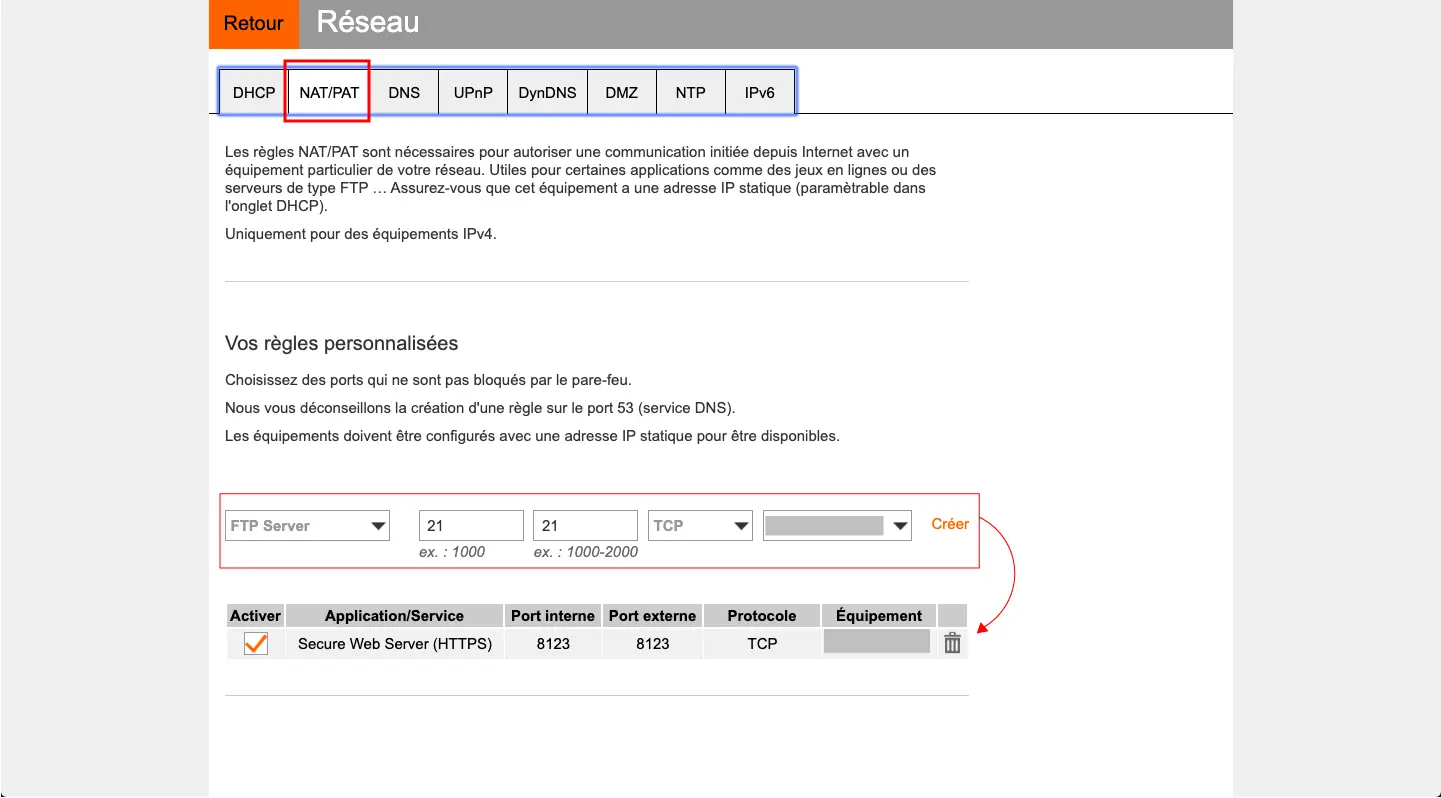
Yes like that :
Application/Service Port interne Port externe Protocole Équipement IP externe
Secure Web Server (HTTPS) 8123 8123 TCP homeassistant Toutes
manic bane
Also, if you shared your duckdns token you should probably refresh that
Also are you sure you're not behind CGNAT
rigid mason
yes, thanks when it works
humble mirage
Did you check that the WAN IP in the router's admin page matches what homeadrian.duckdns.org resolves to (109.223.213.162)?
rigid mason
manic bane
Also are you sure you're not behind CGNAT
I dont know, in my box configuration menu : NAT/PAT
humble mirage
Port 8123 is open on 109.223.213.162.
manic bane
Check what tinkerer said
manic bane
humble mirage
Port 8123 is open on 109.223.213.162.
Sounds like it may be forwarded then
humble mirage
And something is listening
manic bane
rigid mason
Yes like that :
Application/Service Port interne Port externe P...
What did you put as the server that it's forwarding to
It should be the IP of the server HA is on
rigid mason
I see only internal IP and its not 109.223.213.162
manic bane
What do you mean
rigid mason
manic bane
What did you put as the server that it's forwarding to
its old asus computer
i see : 192.168.1.37
and its ip on my home assistant server
humble mirage
And you can access HA on https://192.168.1.37:8123/?
manic bane
rigid mason
I do that : https://www.lesalexiens.fr/wp-content/uploads/2020/04/Fichier-1nat-l...
But what's it forwarding to. The device. That page is in French I don't speak French
humble mirage
rigid mason
the page remains in Initializing
Well, then there's no point in testing remote access
rigid mason
humble mirage
Well, then there's no point in testing remote access
the problem is in server ?
humble mirage
Same with
https://192.168.1.37:8123/
``` ?Ok, so https://192.168.1.37:8123/ works?
rigid mason
My network configuration on home assistant : https://ibb.co/VQwPSgJ
rigid mason
sometimes they stop working even though I haven't changed anything, now I have a blank page
i have just restart HA
Now, its ok : After auth, its blank page
humble mirage
Then ... you have bigger problems
I'd stop trying to get working remote access and just get HA stable - remove the port forwarding for now
When you have HA stable use the NGINX/NPM add-on to handle SSL and forward the remote traffic to HA
rigid mason
Forwarding is disable now
domain: homeadrian.duckdns.org
hsts: max-age=31536000; includeSubDomains
certfile: fullchain.pem
keyfile: privkey.pem
cloudflare: false
customize:
active: false
default: nginx_proxy_default*.conf
servers: nginx_proxy/*.conf
its ok for u ?
When i use : https://homeassistant.local:8123/ its OK
When i use : https://192.168.1.37:8123/ I can auth, but blank page
humble scaffoldBOT
To format your text as code, enter three backticks on the first line, press Shift+Enter for a new line, paste your code, press Enter again for another new line, and lastly three more backticks.
```yaml
example: here
```
Don't forget you can edit your post rather than repeatedly posting the same thing.
humble mirage
Remove the ssl lines from http:// - when you get a stable HA you'll have the proxy handle SSL
Then restart HA and see what works
At this point I'm starting to wonder about your web browser
merry summit
Is there a way to see "top" usage or something similar on the host os cli?
radiant sundial
if you're on the host os cli, can't you just use top?
also.. you could glances. the glances add-on looks nice at least
merry summit
HA is not straing properly... Need access to something/anything to troubleshoot further...
radiant sundial
for glances at least it has you disable "protection mode"
radiant sundial
how is your install set up?
merry summit
HA OS on laptop
radiant sundial
a bit confused why you can only access the cli
merry summit
Because HA Core is not starting as it should... Or any of the addons....
fallen lichen
Are you seeing a ha > prompt @merry summit?
merry summit
Yes
rigid mason
humble mirage
Remove the `ssl` lines from `http://` - when you get a stable HA you'll have the...
I solve the problem ... I have delete External_url of my config, and its ok now .. But not without my mobile. Its Pixel 7 updated
umbral helm
raven forge
How did you install HA? Do you use any third party addons/software? What do the ...
I installed it like 1.5 y ago, I don’t remember anymore, but I installed HA OS using the SD card.
placid sage
Hey there, I'm new to Home Assistant and looking for some help with the installation. I flashed the newest RPi3 version to a 32gb microdisk, attached it to my router via ethernet, and turned on the RPi3, but I can't seem to find the device on my network. I can use the same cable and port to connect my laptop, so I know it's an issue on the RPi3's end, but I'm not sure where to go from there.
radiant sundial
Connect a monitor and keyboard?
placid sage
radiant sundial
Connect a monitor and keyboard?
On it
umbral helm
raven forge
How did you install HA? Do you use any third party addons/software? What do the ...
Should I be looking for something in particular?
placid sage
Flashed again and am getting same result. ping homeassistant.local
returns ping: cannot resolve homeassistant.local: Unknown host and a connected monitor shows nothing.
raven forge
umbral helm
Should I be looking for something in particular?
You should at least answer one of the questions...
Look for something mentioning health or support. I'd restart and then look for it to have fresh logs. Sometimes restarts also fix things
umbral helm
raven forge
~~You should at least answer one of the questions...~~
Look for something mentio...
I did
umbral helm
umbral helm
I installed it like 1.5 y ago, I don’t remember anymore, but I installed HA OS u...
“I installed it like 1.5 y ago, I don’t remember anymore, but I installed HA OS using the SD card.”
Did I miss something?
Sorry
raven forge
Sorry, I checked/answered the newest mention first. Do you use any third party addons? As in, other than the addons that come by default with HAOS?
radiant sundial
placid sage
Flashed again and am getting same result. `ping homeassistant.local`
returns `pi...
monitor showing nothing seems like a bad sign
have you tried just using raspbian flash to see if it's the pi itself first?
or maybe some bootloader shenanigans. more just to diagnose. or try another SD card
or usb boot if it supports that
placid sage
It's pretty embarrassing, turned out I do in fact have an RPi4. I flashed the matching image and it fixed the problem.
brittle sail
placid sage
It's pretty embarrassing, turned out I do in fact have an RPi4. I flashed the m...
Live and learn!
radiant sundial
lol well at least you figured it out
amber iron
if im getting a new, os-less device, should i install haos directly or proxmox as the os
raven forge
You'll get a lot of different opinions on that. Mine is to go with the latter unless it's only got 1G of RAM or something
radiant sundial
Does it support virtualization? lol
copper steppe
yeah, that's a popular question. I agree with Impact's response.
amber iron
whats the reason for proxmox over a direction haos install
raven forge
You can use the device for other things as well and you get snapshots and easy backups
copper steppe
yes, what they said
HA doesn't need much resource itself
my proxmox is running a bunch of stuff, including my firewall and my add-blocker. https://imgur.com/TUdWZz8
Plus if you like his scripts, tteck has one-paste install of haos https://tteck.github.io/Proxmox/
 topaz atlas
Is the ODROID-N2+ still considered the best (in stock) device to use considering the CM4 is impossible to get for the Yellow?
humble mirage
Best overall, no... best SBC, maybe. #hardware-archived has a long history of better recommendations, mostly mini-PCs and old laptops
 silent rover
I’m running HA on Raspberry PI 3B for 3 years. I started as a basic user and I’d like to think that I now am qualify as a middle level user. Over last 2 years, I’ve slowly added more devices and more automations to my HA. Currently I got about 40 devices and 4 cameras in my HA. I got about 15 different integrations including Tasmota, MQTT, Ring, Shelly, etc as well as 4-5 others thru HACS.
It is probably a time to replace my PI 3B. I’ve recently bought an Intel NUC N5095 8GB RAM 256GB M.2 SSD mini computer as replacement for my current PI. It came with Win11 preinstalled. I’m not certainl which method I should use to run HA on this NUC.
Should I go with “Generic x86-64” method or should I run HA over Windows11 using Virtualbox?
 quiet lotus
Hello! I'm just starting starting out with HA and thought I could use my ODROID I have lying around. Unfortunately my model does not have an appropriate image file.
So I wanted to ask whether it is within the realms of possibility to create an image file for my model? I have an ODROID U3+ board, which has more computing power than the Raspberry Pi 3.
I have no experience in creating my own image files whatsoever, so I want to ask politely whether someone is able to create said image file? I'm reluctant to buy a new N2+ because the computing power with my board should be sufficient.
Thank you very much for reading concern.
raven forge
silent rover
I’m running HA on Raspberry PI 3B for 3 years. I started as a basic user and I’d...
I recommend using proxmox and install HAOS or container in a VM
amber iron
quiet lotus
Hello! I'm just starting starting out with HA and thought I could use my ODROID ...
dont know m uch about odroid, but i found this https://github.com/home-assistant/core/pull/81995. So obviously you wont get official support, but maybe the guy who did the pull request will help you build an image, or has one on his github somewhere
silent rover
raven forge
I recommend using proxmox and install HAOS or container in a VM
Can I use all integrations and HACS-integrations if I use it thru proxmox ? Do I need to install additional containers ?
grand pivot
All integrations are available regardless of installation type
silent rover
grand pivot
All integrations are available regardless of installation type
I mean, do I need to install other containers or such in order to get HA working exactly same as on my Raspberry PI ? I'm not really proficient in Linux and that's why I'm asking
silent rover
grand pivot
No
Sorry for bothering you further. What is the advantage of using proxmox then? I was thinking to use that X86-64 native installation method.
grand pivot
You can run other things on the machine?
With a bare mental install, you're limited to what's available as an addon. With proxmox you could spin up more VMs
stone nova
hi i have a qyery
raven forge
Do share
 velvet mantle
hello, im on the Preparing Home Assistant screen and its stuck for a few minutes now
The lastest log is "INFO (MainThread) [supervisor.resolution.fixup] System autofix complete", nothing happened for ten minutes since that
should i wait or is it stuck?
brittle sail
pi4 or what hardware? it has to download some stuff during first boot so if you have slow internet / shit hardware like a pi it can take some time. i think the average is 20min but maybe that has changed
 bright crow
So I messed up my HAOS installation on PI3. My guess is that it was an automation I did and now HA continuously reboots. I have spent some time understanding how I can access the HA files on the media card but no success. Have been trying WSL but it only gives me the PI portions (partition 1), not partition 0
Any idea
 iron marten
ive just received my skyconnect; hoping to install it on my mac mini and run HA via docker. I cant seem to find any drivers for the skyconnect however? and it doesnt appear to be found by my mac
stone nova
raven forge
Do share
I am installing HAOS 9.5 RPI 4/400 on 16GB SD card and continually getting this.
This site can’t be reached192.168.0.85 refused to connect.
Try:
Checking the connection
Checking the proxy and the firewall
ERR_CONNECTION_REFUSED
Tried changing the browser from edge to chrome as suggested by someone in HA ommunity but no avail.
Connecting through wifi as i have to do a headless setup
raven forge
Plug in a monitor and see what it says. Does it grab a ip via DHCP or how do you know its ip?
stone nova
i know the ip and dont have a monitor :/
stone nova
raven forge
Plug in a monitor and see what it says. Does it grab a ip via DHCP or how do you...
This is the errori face when io try installing HA Core
(homeassistant) homeassistant@testpi:/srv/homeassistant $ pip3 install homeassistant==2023.3.6
Looking in indexes: https://pypi.org/simple, https://www.piwheels.org/simple
ERROR: Could not find a version that satisfies the requirement homeassistant==2023.3.6
ERROR: No matching distribution found for homeassistant==2023.3.6
stone nova
humble mirage
You ... shouldn't be doing that
ok#
humble mirage
You are trying to use port 8123?
stone nova
yes..
humble mirage
Try port 4357 for the observer
humble mirage
Yes
stone nova
same
humble mirage
That's a very bad sign and suggests that it hasn't even booted
stone nova
Hmmm… can't reach this pageCheck if there is a typo in homeassistant.local.
Search the web for homeassistant local
If spelling is correct, try running Windows Network Diagnostics.
DNS_PROBE_FINISHED_NXDOMAIN
why though
stone nova
what is that. sorry ima noob
humble mirage
You said http://192.168.0.85:4357/ and then posted DNS_PROBE_FINISHED_NXDOMAIN for homeassitant.local
stone nova
yep im doing both same results
stone nova
oh
placid sage
ohohoh... ive been running this homeassistant installation on a raspberry pi 4 on ubuntu for over a year but suddenly it stopped working as supposed. I fear the angry of my wife beacause the lights are not working anymore haha
anyone wanting to help me out?
I made an ubuntu update and now homeassistant is starting and the webinterface is on but NONE of the addons is showing neither can i see the add-ons menu in the config menu
the logs tell things like that:
[homeassistant.components.hassio.handler] Client error on /supervisor/info request Cannot connect to host 172.30.32.2:80 ssl:default [Connect call failed ('172.30.32.2', 80)]
i cant even find my backups, the webinterface backups is empty
seems like i ignored the warnings running supervised on a not supported system, i know thats dumb. but maybe theres a way to recover my setup?
humble mirage
Check /usr/share/hassio/backup - a quick Google suggests they may be there
placid sage
oh thx, i tried to find out but didnt look there... found them with your help
raven forge
stone nova
i know the ip and dont have a monitor :/
How do you know it? Afaik you can't install HAOS without ethernet. How did you install it? Is the ip pingable?
humble mirage
You can install it with WiFi, with a suitably prepared thumb drive
You shouldn't, but you can
raven forge
That might have been worded badly. I know that HAOS would only modify the config on disk as well but I couldn't find any (official) documentation about it other than this: https://github.com/home-assistant/operating-system/blob/dev/Documentation/network.md#wireless-lan-wpapsk
which isn't easily accesible to a self proclaimed "noob".
Something tells me the device isn't connected to WiFi
placid sage
humble mirage
Check `/usr/share/hassio/backup` - a quick Google suggests they may be there
just one more question to not make an irreversible mistake:
i saved the tar files of my backups.
when i freshly install homeassistant os can i use the backup files to recover my system or do i need something else?
bright crow
bright crow
So I messed up my HAOS installation on PI3. My guess is that it was an automatio...
Has anyone managed to read a memory card crated by a HAOS install and how can I do that?
humble mirage
placid sage
just one more question to not make an irreversible mistake:
i saved the tar file...
If you have a full backup that's all you need
humble mirage
bright crow
Has anyone managed to read a memory card crated by a HAOS install and how can I ...
You need an ext driver for Windows
stone nova
raven forge
How do you know it? Afaik you can't install HAOS without ethernet. How did you i...
i found the ip using my internet router
stone nova
raven forge
How do you know it? Afaik you can't install HAOS without ethernet. How did you i...
i followed this video https://www.youtube.com/watch?v=WAolAvektlw
raven forge
I don't see this guy configuring WiFi for HAOS though
stone nova
i did
he is using ssd as well
can i connect with ethernet and wifi both?
or connect with ethernet and then have headless setup?
raven forge
stone nova
i did
Okay but how?
stone nova
raven forge
Okay but how?
like the normal settings
ok so I have now connected the pi to ethernet,the address of the pi is 192.168.0.84. for headless setup i'm using ssh pi@192.168.0.84 but recieving the error ssh: connect to host 192.168.0.84 port 22: Connection refused
raven forge
There is no SSH server running on HAOS by default and I also see no options to configure any settings for it in the PI imager so I'm not sure what you did.
humble mirage
I'd perform a fresh flash of HAOS
Also ensure that the network cable is connected before you power it up
raven forge
Explaining in detail what you did would be helpful. This is quite frustrating to be honest.
You should follow the installation as laid out in the docs. You can configure WiFi afterwards if you really have to
stone nova
raven forge
Explaining in detail what you did would be helpful. This is quite frustrating to...
i only need wifi for the headless. can i do without? also, i tried using the balena etcher but it was giving some sort of long error which i am unable to copy when i press flash thats why looking for other ways
stone nova
humble mirage
I'd perform a fresh flash of HAOS
i just did, but the network wasn't connected. will try doingagain
raven forge
Try again and screenshot the error for us? Headless just mean no display
stone nova
ok
stone nova
how do i attach the ss here
raven forge
Use a image sharing site and link it here
stone nova
raven forge
Have you tried downloading the image to your pc and flashing it from a local file?
stone nova
raven forge
Have you tried downloading the image to your pc and flashing it from a local fil...
no
stone nova
humble mirage
I'd perform a fresh flash of HAOS
did this
on the preparing page now !😅
Thankyou guys for bearing with me
 errant bronze
Has anyone haad this experience? I have a OPI 4 LTS and strugling with HAOS installarion
radiant sundial
? are you installing haos or supervised. seems unclear to me
errant bronze
I would like to have the full power of HA on OrangepI 4 LTS. I would say that for this, I would need the haos. Since I am newbie here - trying to get some help
I learned that docker installation would require all the addons to be on containers too. I am not linux expert. Thats why I am looking into HAOS. I had the HAOS on an old linux laptop, and would looking into upgrade the performance using the OPI 4 LTS
humble mirage
I doubt an Orange Pi4 would be an upgrade from an old laptop
errant bronze
oh really?
humble mirage
Unless that was a really crappy laptop a Pi of any form will be a downgrade
errant bronze
it is a Processador: Intel® Celeron® CPU N3010 1.04 GHz
humble mirage
Well... that is a really crappy laptop then 
radiant sundial
I mean what kind of performance problems do you think you're having
humble mirage
CPUMark 599, vs the Raspberry Pi4 around 900
SD cards are shite though... don't use one
errant bronze
got it. so my perception was right.
i would like to test the HA on PI and then transition to SSD.
the laptop today has freezes once a week
and a hard reset solves it
have you guys seen HAOS on a OrangePI? Can I follow the RPI tutorial??
humble mirage
I've seen people ask if it's possible
I've not seen anybody say they've tried it and it works
errant bronze
😩
humble mirage
Do yourself a favour and buy something else 😉
Just about any mini-PC or old laptop from the last decade will be better. I ran HA on an i5 laptop for years
errant bronze
thank you
 sly current
in my docker-compose.yml I have this line "- /opt/docker/containers/home-assistant:/config". But in the folder I have only ".storage" folder and no "config"
humble mirage
It should have created configuration.yaml there
What does your entire compose file look like?
humble scaffoldBOT
Please use a code share site to share code or logs, for example:
- https://dpaste.org/ (select YAML for the language, and consider picking a longer expiry)
- http://pastie.org/ (select YAML for the language)
- https://paste.debian.net/ (you guessed it, select YAML as the language)
Please don't use Pastebin, since it can randomly add spaces to the main view. Please also don't share text as images since it makes it harder for people to help you. Remember that others may have colour blindness, impaired vision, etc.
sly current
https://dpaste.org/Z0s8x provides the two files
humble mirage
Looks fine, there's no configuration.yaml there?
sly current
It is the first file! you means that it does not contain configuration data
humble mirage
configuration.yaml only contains what you add to it
If you've set something up in the UI it goes elsewhere
sly current
why if I remove every thing relative to the HA container and reinstall the container the first web page is not the setup?
humble mirage
Because that information is held in .storage/
You have to:
- Stop the container
- Delete the entire config folder
sly current
I have done that several time! I certainly miss something elsewhere
 empty palm
Hello, having issues setting up a Raspberry Pi. I've ran HA on a virtualbox for a month as a staging environment without issue. This is my first time with a Pi so I'm sure this is something simple. I flashed the HA Install to both a USB drive as well as a SD Card and I get the same results with both (attempting to install to an SSD). The Pi will POST when no bootable media is inserted but will fail to POST (just a blank screen) when bootable media is inserted. I've flashed both the USB and the SD card with the latest image from the github using belena.
raven forge
Which pi do you have? Which image did you flash?
empty palm
4b... looking at the image now
haos_rpi3 (assuming that's the wrong version)
downloading rpi4 now
rubber duck debugging might have got me again
radiant sundial
I was gonna wonder if the bootloader for the rpi gets updated so you can do stuff like usb boot
it's been a while since I needed to update mine though
empty palm
Am I thinking about this correctly that it would be better to install to a SSD drive over an SD due to database writes?
radiant sundial
SSD will definitely be better
empty palm
thank you... quite the community y'all have here. I taught myself Crestron a few years back and just don't want to do it again. Hoping this will be as fun to learn.
sly current
another information: no issue to set up the HA container but I got this message in the log: 2023-04-02 19:20:46.959 ERROR (MainThread) [homeassistant.components.http] Failed to create HTTP server at port 8123: [Errno 98] error while attempting to bind on address ('0.0.0.0', 8123): address in use
raven forge
Check with docker ps for orphans
empty palm
looks like I've got joy with the right image now on the rpi4
sly current
Outside removing the container HA and the folder associated do I have to remove otherthings?
docker ps -a did not show any other orphans
raven forge
Maybe lsof -i TCP:8123 -s TCP:LISTEN will show something.
If lsof is not available you can also try something like netstat --tcp --listening --numeric --program | grep -E ':8123\s'
empty palm
well thought we were in a good spot. Install script runs, pi turns off halfway through. doesn't reboot
raven forge
Brownout maybe? Does the monitor show anything interesting?
empty palm
no, just cycling like it's gettign signal then not
going to try a different power supply
radiant sundial
power supply quite important lol
empty palm
I know too small a power supply is a problem but is too big an issue?
raven forge
No. There's a difference between a charger and a power supply though. Not everything is good for providing its power continuously or in bursts
empty palm
Thank you @raven forge
radiant sundial
it needs to provide the min amps but if it's rated for higher it's okay
sly current
raven forge
Maybe `lsof -i TCP:8123 -s TCP:LISTEN` will show something.
If `lsof` is not ava...
here is the result of the suggesed command:
tcp 0 0 0.0.0.0:8123 0.0.0.0:* LISTEN 2036/python3
tcp6 0 0 :::8123 :::* LISTEN 2036/python3
raven forge
I suggest you open htop, press t for tree mode and look for that pid. Sorting by it with F6 might be helpful. You can also press F3 and search for the name.
The other choice would be something like killall/pkill python3 (obviously a hammer and not the best way), kill 2036 or similar.
htop makes it a bit easier to kill the right process as you might have to kill the parent, if any
sly current
thank you but it is not with docker! how can I track it?
brittle sail
raven forge
I suggest you open `htop`, press `t` for tree mode and look for that pid. Sortin...
that's a neat feature with htop thx
placid sage
Have you found a solution for this problem? i am running the same board and latest software, but nothing happens when trying to boot. thanks!
raven forge
sly current
thank you but it is not with docker! how can I track it?
Check the message above yours 🙂
sly current
I have try to use htop thx but I don't see the 2036 pid. I use the kill 2036 command then remove HA docker and find the same warning regarding the port and having the same issue on the web welcome page of HA
exploring again the tcp log I find another pid using the port 8123 : 117805/python3
humble mirage
docker ps -a
I finally find the root cause: I have a snap HA running in the back. I will remove it and check again. Thank you
It works now many thanks
raven forge
humble mirage
```
docker ps -a
```
Why -a? Not running containers do not listen on ports?
humble mirage
Because it catches containers that are currently stopped, but were running 5 seconds ago
Not that we've seen the impact of things like Watchtower here, or other problems caused by errant scripts/tools
placid sage
Hello!
I am trying to boot HAOS on my TinkerBoard 2. I have flashed the SD Card with Debian - works fine. Flashed it with HAOS - nothing boots
It does not even boot a tiny bit, normally there's a green blinking led on the board but I do not see it now, and nothing on the display either, not even a black screen
I'm kind of confused what is happening thanks for helping
raven forge
Which image specifically did you use? I don't see a v2 in the docs, only Tinker Board but I'm not familiar with those devices: https://github.com/home-assistant/operating-system/tree/dev/Documentation/boards
radiant sundial
it might not be supported by that image tbh
placid sage
im not sure either, its a newer board. I guess it is not supported, is there any other way i can make it work?
I just started from here, since it didnt mention any specific boards that are/arent supported. https://www.home-assistant.io/installation/tinkerboard
placid sage
i will most certainly try that, is that any different than this?
radiant sundial
quite involved
humble mirage
Supervised is a trap... don't do that to yourself
It's a bit like learning to juggle by starting with running chainsaws
placid sage
ah, i see.. it would turn my 30 minute task into a month of headaches im assuming
humble mirage
The biggest problem is that the minute you deviate from the requirements it'll go badly wrong
The requirements also change without advance warning
placid sage
maybe that isn't the best way to go.. i'll have to try a different tinker board model to see what happens
radiant sundial
you probably want an rpi instead lol
humble mirage
Container or HAOS are the two sane options
Core is for nutters like me
Supervised is for people who hate themselves
radiant sundial
generic x64 devices woudl work well too. or virtualized stuff
placid sage
rpi is easier, cause i have one running rn.. which took 10 minutes 🙂 but i am starting a business with tinkerboards and wanted to try this as my first tinker project
radiant sundial
lol
placid sage
thanks a lot, ill keep looking and hopefully they will support more models soon
humble mirage
Well... one option is to help create that support
radiant sundial
I think you end up using armbian with tinkerboards
humble mirage
Depends on your skills really
placid sage
i will do my best and improve my skills, which arent there quite yet
radiant sundial
I think the real problem is deviating from common distros and what not and linux arch etc. it's a pain to generate and maintain so many options I'm sure
you kinda want the hardware and software environment to be expected / easy / common
 summer tinsel
I am using the Linux install of HA (https://www.home-assistant.io/installation/linux) and have been doing so for years now. I like the fact that I can run other applications on my linux box (like the TICK stack) and link them to HA. I noticed that my version of portainer is outdated. How do you update portainer, which is inside the KVM machine? I don't think I can use Docker compose outside of the KVM as in fact Linux doesn't know Docker is installed inside my VM
I tried using the terminal inside HA but it does not seem to support any of the docker commands I need
pastel sphinx
I just published a fresh April 2023 HAOS on Promox install guide. Yes there are other guides out there, and even recent ones, but I ran into some snags and also lessons learned. Plus tteck has updated his HAOS script with new options (this week) that I added: https://www.derekseaman.com/2023/04/installing-home-assistant-on-proxmox-quick-start-guide.html
summer tinsel
@pastel sphinx This looks similar to the supervised KVM install. How do I then update Portainer inside the KVM? I was hoping there would be a terminal I could use to run the required upgrade and docker install
pastel sphinx
@summer tinsel No my guide uses the HAOS 9.5 image, so it's not "supervised" (e.g. bringing your own OS to the plate).
 sudden canyon
hey all - looking to move to a docker container instead of HAOS, I've installed core fine, just wondering how to install the supervisor / add-ons?
 brisk willow
You can't, but add-ons are just pieces of software you can install yourself
radiant sundial
the container version doesn't support addons
sudden canyon
oh right... So the blueprint for lack of better words is install HA Core and then install the add-ons separately?
brisk willow
Well, HA Container, but yes (except you won't install the add-on version)
sudden canyon
righto. thanks... just mucking around while i have a sick day 🙂
brisk willow
Oof, sorry to hear that
sudden canyon
Its ok, weekend ruined by being sick - never happens on a work day haha. not 100% so thought why not use one of the many sick days I have banked over covid 😄
so how does something like ESP Home running in its own container interact with HA Container?
brisk willow
I don't think the ESPHome dashboard needs to communicate with HA, but to answer your question, that's where integrations come in
sudden canyon
ah right...
what about something like VS Code Server?
or Terminal
(just going thru my existing add-ons)
brisk willow
Terminal no longer applies
sudden canyon
cos you use it thru the container yeah?
brisk willow
Well because you can just SSH to the host
As far as VSCode, just expose your HA config as a volume
sudden canyon
ok, will have to figure that one out 😄 and I assume something like HA Google Drive Backup, you'd just schedule your own script to do that
(using unraid so that is easy enough).
Figured out HACS already - most important one, can I restore from backup from a HAOS to HA Container instance?
brisk willow
I use rsnapshot for local backups and rclone for Google drive backups
Not directly, but you can copy the files over where you want them to be
brittle sail
sudden canyon
(using unraid so that is easy enough).
You now lose both your server and your smart home when you have hardware failure :/
sudden canyon
brittle sail
You now lose both your server and your smart home when you have hardware failure...
always was the case, currently run it in VM on Unraid. Alas, all my lights still turn off and on without home assistant...
 cobalt python
hello! (please redirect me if this is the wrong channel) i'm trying to get HA running on virtualbox, and I keep getting EXC_CRASHs on my mac os. (will add the log in thread!)
sudden canyon
brisk willow
I use rsnapshot for local backups and rclone for Google drive backups
any idea on the backup of the maria db add-on db and redeploying it for ha container?
raven forge
I'd suggest you use PhpMyAdmin addon to export the data and then import it either via console, a client (I recommend HeidiSQL), or PhpMyAdmin on the other side
sudden canyon
thanks i will check it out
low notch
you will most certainly need a proper mysql client to import, phpmyadmin only does 50mb DBs afaik
sudden canyon
low notch
you will most certainly need a proper mysql client to import, phpmyadmin only do...
oh, what would you use?
low notch
I think adminer goes a little above the 50mb but not much, you want to use mysql-client (mysql) or some app with a gui on your pc
raven forge
sudden canyon
oh, what would you use?
HeidiSQL is very intuitive but can hang a bit on long queries. DBeaver is also good. Here's more: https://alternativeto.net/software/heidisql/?license=free
copper steppe
mysql -u whatever -p whatever yourdatabase < yourstuff.sql
Meh, something like that, it's been many years
iron marten
as a linux/windows user, who had a mac mini laying around that I intended to use HA in docker with skyconnect passthrough, id like to say fuck macOS and docker not supporting USB -.........-
humble mirage
Docker on MacOS is nerfed anyway
raven forge
Or install linux and run it as a VM there 🙂
errant bronze
radiant sundial
I mean what kind of performance problems do you think you're having
Still trying to figure out a way, my Opi is running debian 10. Would it work if I could install VM + hassio?
fallen lichen
Why not use Docker? Virtualizing on a Pi seems like it'd be a disaster
errant bronze
Docker does not allow me to have the addons as far as I learned
fallen lichen
Docker allows you even more flexibility.... to add whatever you want
Correct, it doesn't let you use HA addons though
What happened when you attempted a HAOS install? Didn't boot?
errant bronze
@placid sage do you mean the RPI image will run on OPI? Sorry if this is a dumb question
fallen lichen
I think it has been stated, but the Orange PI isn't official supported on HA OS natively.... could an image boot? Possibly, you'd have to try.
errant bronze
i will
placid sage
errant bronze
<@456226577798135808> do you mean the RPI image will run on OPI? Sorry if this i...
Isnt it like the same just slower?
errant bronze
i would say different architecture. but just testing to see
 fiery fox
Hi, I am trying to migrate from HA OS to docker. I read in the forums that after the docker container is comfigured i have to copy my old config folder to the new docker. I did this but the only that has been migrated is the entities I have created manually in mi config.yaml but I am not able to see all the other integrations created from the UI. Do I need to do anything else?
fallen lichen
Make sure you've copied all of the hidden files as well
There's a .storage folder that has most of the other info
fiery fox
Yes I copied it, well I used the cp -R command in Linux, I assume it copies the hidden folders as well right?
humble mirage
Depends on how you ran it
cp -R * won't get the hidden files and folders
cp -R config/ will
fiery fox
Yes, i ran the first command with *
My mistake
I will try with the second command. Regarding the zigbee integration (ZHA) it is going to work doing just that (copy config folder)?
What about my USB ZigBee coordinator?
(the migration is done from a RPi to a PC running Ubuntu and docker)
 novel blaze
i have been using HA installed from pip on debian. it is a huge hassle upgrading python version for newer HA release or getting a new distro so i decide to go official route with OVA deployment on my ESXI host. all did go well and instance running straight away. how do i migrate configuration? is creating backup from settings and restroing it on new instance enough?
humble mirage
Yup, backup and restore
novel blaze
or backups have to be restored on the same type of installation?
novel blaze
humble mirage
Yup, backup and restore
thanks, trying to do that
how long it could take? is there a way to check what it is doing (in case something did go wrong)? backup is from 2023.1.7 and it is trying to restore for freshly installed HA. i have had certificates provided by certbot so it could have failed on that (http configuration) but didn't say anything
humble mirage
Then it'll likely error on startup as it can't find the certs, but it should still restore and start
How long it takes... 
novel blaze
humble mirage
Then it'll likely error on startup as it can't find the certs, but it should sti...
hmm... okay. it was like 15 minutes and is still restoring. too long to restore 60mb backup >_>
humble mirage
novel blaze
hmm... okay. it was like 15 minutes and is still restoring. too long to restore ...
novel blaze
humble mirage
Then it'll likely error on startup as it can't find the certs, but it should sti...
seems like it is started with lots of errors. how do i get out of ha imposed configuration shell to edit configuration.yml ?
novel blaze
so install ssh addon, ssh over to get access to limited list of directories and edit configuration so it starts?
any way to just drop to shell from a remote screen without dealing with addon(s)?
okay, '#login' it is. still does not pick up old backup after commenting out http section and does not tell what exactly is wrong. great >_>
fallen lichen
ha core logs will spit out the logs
novel blaze
it spits more than a few screen worth of logs that is hard to understand what exactly it didn't like.
ha core stop / restart didn't help. had to restart host and it did start with edited out http section
 golden walrus
Hey all, i installed HA using Docker on my synology NAS last year. I chose an image that is tagged with an actual version instead of "stable" or "latest". I now want to update HA. If i download the "stable" tag and restart the container, will it work? i have this feeling it won't because somewhere its looking for the old version tag
also, should i use 'latest' or 'stable' tags?
amber iron
i uh, messed uo the ha device i was on and want to grab my config manually from the proper .img. what directory do i need to go to
raven forge
golden walrus
also, should i use 'latest' or 'stable' tags?
The latter is probably the "best" choice
raven forge
amber iron
i uh, messed uo the ha device i was on and want to grab my config manually from ...
To find what exactly? Why .img?
amber iron
just my config and automation yaml, for any changes i made since last backup
and .img cause when i open the vdi it shows all the .img files, so thats what i ahve access to
raven forge
Assuming you use HAOS, the config directory is in /mnt/data/supervisor/homeassistant/ if that's what you wanted to know
amber iron
ye, thats it, ty
golden walrus
ha, i remembered/got it. You have to export the Docker container settings, modify the json to point to the new image, delete old container, import settings, then start
amber iron
question if youre using x86-64 c, can you use the integrated bluetooth if it has it for either plain haos and/or proxmox or is an adapter required either way
 acoustic thistle
amber iron
question if youre using x86-64 c, can you use the integrated bluetooth if it has...
acoustic thistle
amber iron
question if youre using x86-64 c, can you use the integrated bluetooth if it has...
Either built-in or external should show up as a USB bluetooth, so it's more of a chipset & driver question than an internal vs. external question.
If the bluetooth chipset is supported, it should work.
If using proxmox, you'll need to configure usb passthrough.
 sonic ore
Im trying to install a virtual hard disk file and haos isnt showing up
humble mirage
What do you mean? Are you trying to use the VBox install method, or adding an additional hard drive to an existing install that's using VBox?
sonic ore
This is my first time touching home assistant so i dont know what you mean sorry
but im setting it up
for the first time
humble mirage
Ok, so you're following https://www.home-assistant.io/installation/windows#download-the-appropriate-image for VirtualBox?
sonic ore
i was just following a video i found online
Im 90% sure I did everything right so far


 sonic ore
ok
humble mirage
That's 2 to 3 years old, the odds of it still being 100% correct are low, very very low
sonic ore
It says the same stuff on the document and when I go to virtual hard disk file to select to create my virutal machine and I go to this pc and dowloads my haos ova ins't coming up in the downloads list even when it does come up when I go directly to files
humble mirage
You'll need to unzip the file
sonic ore
Thanks
humble mirage
Select “Use an existing virtual hard disk file”, select the unzipped VDI file from above
sonic ore
ah ok
Hi again im getting this error when trying to start up VM Name: Home assistant
Not in a hypervisor partition (HVP=0) (VERR_NEM_NOT_AVAILABLE).
AMD-V is disabled in the BIOS (or by the host OS) (VERR_SVM_DISABLED).
Result Code:
E_FAIL (0X80004005)
Component:
ConsoleWrap
raven forge
Do you have VIrtualization enabled in the BIOS/UEFI?
quasi wedge
hey guys, I've been having an issue lately that might be related to my server being on wifi - I'm getting this error when trying to connect from my phone, and on my computer it just times out and doesn't connect, and the only way to fix it is to restart ha https://i.imgur.com/c9JCo04.jpg

it was recommended i keep an eye out for when it's failed and look through using the terminal at what's going on - it just happened and I had a look at core logs and it's spitting out these logs - does anyone know if there's a workaround for it on wifi? or what the next steps are/if I'm barking up the wrong tree? https://i.imgur.com/9Pio49U.png

thanks in advanced!
 sudden quarry
How are you accessing the terminal?
quasi wedge
So atm I only have a Windows machine to run ha, so I'm using virtual box
sudden quarry
can you run a network info command in the terminal
quasi wedge
Sorry, I just got home a little while ago and restarted ha so we could use it while at home
sudden quarry
Thats fine
quasi wedge
Does it need to be crashing when I run that? Or can I do it now?
sudden quarry
Now works
sudden quarry
Hmm, seems like it cannot reach AWS cloud servers
When it crashes again can you open the terminal on a windows pc and see if you can ping the ap-southeast-1-1.ui.nabu.casa you may need to check its the same hostname when it crashes
humble mirage
That assumes that you can ever ping it
Not every host responds to pings when up, indeed most won't
humble mirage
Try it and see if it responds now
sudden quarry
Which one?
humble mirage
The one you suggested they ping
sudden quarry
oh yes thats right, the instance technically wouldnt exist would it.
humble mirage
You're missing the point
You're making assumptions that every host responds to pings
That hasn't been true for decades
sudden quarry
yes thats true, I was just suggesting what a maintainer said on github with a similar issue
quasi wedge
So what could be the cause of that then? Just bad luck? Or could there be a way around it so I don't have drop-outs in future?
humble mirage
Something's going wrong with your WiFi - it's probably something specific to your setup as many people do manage to use WiFi with HAOS without this level of pain
The recommended fix is still to use wired networking
quasi wedge
Its definitely weird and I don't know what it could be
quasi wedge
Are there any settings I should check for my network?
manic bane
Are you using an ISP provided router? If so, get a different one
quasi wedge
Ah, that could be it - would there be a way to tell? I have plex connecting remotely constantly, so don't have a cgnat or anything - is there something I should look for?
merry summit
Not sure #installation-archived is the best place, but here goes....
I really really want to start with a clean sheet using HA! My current HA install is a couple of years, and I have messed up so much during that time. Currently it works, but...
The only thing I actually care about from the current isntall is the long term statistics. I have focused quite a bit on energy monitoring and have good data in this for the two years my current install have been up.
Is ther any way I can do a clean install of HA, but keep my long term stats?
I am open to using some 3rd party tool to dump the data from the old to the new DB if that is what it takes...
humble mirage
Pretty sure the answer will be that there's no official way. It may be possible to migrate the history over (basically just copy over the database from the current install)
merry summit
I was already pretty certain there was no official way, so thats perfectly fine. Do you have anything to go on about how to copy the DB over in a way that allows the new install to read it?
humble mirage
If you're going from SQLite to SQLite just copy the file to the new install - if you're using HAOS you'll probably have to complete the onboarding, stop HA, and then use Samba to copy the file over
manic bane
quasi wedge
Ah, that could be it - would there be a way to tell? I have plex connecting remo...
Well were you given your current wifi router by your ISP? Does it have any ISP branding on it?
merry summit
humble mirage
If you're going from SQLite to SQLite just copy the file to the new install - if...
Long term statistics are stored using the recorder configuration? If so, I am using MariaDB as an external docker container. Could it be as easy as using the same config on the next install?
quasi wedge
manic bane
Well were you given your current wifi router by your ISP? Does it have any ISP b...
sorry, been a long day - i meant to say it was given when we signed up with our isp but it's not isp branded or anything - probably just a generic one they send out to everyone
i meant to ask (and if it hadn't been such a long day i'd have asked it better :P) if there's a way to tell if there's something the isp could be doing to stop HA from connecting properly or anything?
merry summit
humble mirage
Certainly not down the back of the sofa
Good, beacuse I was about to ask about that! Can I store SOME data there?
manic bane
quasi wedge
sorry, been a long day - i meant to say it was given when we signed up with our ...
Not so much ISP blocking it, just ISP routers are usually terrible
humble mirage
merry summit
Good, beacuse I was about to ask about that! Can I store SOME data there?
You can store lots there, usually socks and remote controls
manic bane
Don't forget coins
merry summit
humble mirage
You can store lots there, usually socks and remote controls
But, yeah... 🙂 It sounds like you think no other config than using the same config fore the recorder component on the new install will preserve long termd data?
humble scaffoldBOT
@merry summit When using Discord's Reply feature it defaults to pinging the person you reply to, which can get frustrating for the target. Use Shift + click on the Reply option, or click @ ON to @ OFF to stop this - on the right side of the compose bar.
You have to change this every time (thank the Discord devs for that).
humble mirage
And yes, just the recorder... good luck
quasi wedge
manic bane
Not so much ISP blocking it, just ISP routers are usually terrible
true - ours has been good so far, and no branding or anything on the router or on the router's 192.168.1.1 page or anything
it might be a little generic but i don't think it's an ISP one
merry summit
humble mirage
And yes, just the recorder... good luck
Sorry for not understadning the ping function.... Thanks for your time!
This time I tried to use the <shift>+click method.... Hope it works! 🙂
 icy spoke
Write database out on paper, roll paper up and slide in sock, drop down back of sofa. Et voila. If you let the dog chew the paper first, you even have lossy storage.
There are three basic paths for a "database" - sql lite file on instance, add-on database (maria/influx are xommon), third party database on another vm, another machine, or the same machine but outside Home Assistant.
The first two do not survive a reinstall so backup and copy/reimport again. The third will likely survive a reinatall, but backup just in case.
Also, strongly suggest a new install with the same HA version. The database 'schema' changes every now and than, and restoring a sql backup to a modified schema.. it is not impossible, but it is more work 😦 and may leave room for bugs and frustrations
merry summit
icy spoke
Write database out on paper, roll paper up and slide in sock, drop down back of ...
Thanks! That pretty much sums up my understanding as of now. I'll start the reinstall tonight and will pray, cross fingers, hold thumbs and anyhting else... 😄
icy spoke
Just make backups 😄 if possible, install on new media / disks, so you have the old ones intact to refer back to
And be aware that typing with fingers crossed increases typos.. 😄
 tender dock
Should I be able to take a full backup from a supervised install and restore it on an HAOS install?
merry summit
icy spoke
And be aware that typing with fingers crossed increases typos.. 😄
Hehe! I am running HA on VM in Unraid, so I thought it best to create a new VM first and keep the old VM around for QA! 😉
I've even planned this so well that I've sent my family out of town for a few days before attenmpting this... 😄
tender dock
Well, it's not working.. getting this notification after the fact: ```Invalid config
The following integrations and platforms could not be set up:
history_stats.sensor (Show logs)
history (Show logs)
logbook (Show logs)
energy (Show logs)
default_config (Show logs)```
And the first error in the logs shows: 2023-04-04 06:59:46.766 ERROR (Recorder) [homeassistant.components.recorder.util] Error executing query: (sqlite3.DatabaseError) database disk image is malformed [SQL: UPDATE recorder_runs SET "end"=?, closed_incorrect=? WHERE recorder_runs.run_id = ?] [parameters: ('2023-04-04 13:59:46.748224', 1, 436)] (Background on this error at: https://sqlalche.me/e/20/4xp6) Traceback (most recent call last): File "/usr/local/lib/python3.10/site-packages/sqlalchemy/engine/base.py", line 1964, in _exec_single_context self.dialect.do_execute( File "/usr/local/lib/python3.10/site-packages/sqlalchemy/engine/default.py", line 748, in do_execute cursor.execute(statement, parameters) sqlite3.DatabaseError: database disk image is malformed
humble mirage
That's pretty normal if you back it up while running
tender dock
how do I back it up without it running?
humble mirage
No idea how you do that with Supervised/HAOS, but you could use the Samba add-on to copy the database file after you stop HA
tender dock
doesn't this mean that all the backups are useless then? if they can't be used to restore?
humble mirage
You can use them, you just don't get your history
tender dock
what's the name of the db file?
tender dock
and how do I drop down to the base OS in HAOS to put the file in place?
 dull sky
hello, Can someone help me understand why I can't access HA remotely?
tender dock
how do I stop HA in HAOS?
humble mirage
humble mirage
dull sky
hello, Can someone help me understand why I can't access HA remotely?
What have you done?
dull sky
humble mirage
What have you done?
I tried with several videos and tutorials, I configured duckdns and nginx, I think I did the port forwarding correctly, but it doesn't work and I don't understand what's wrong
tender dock
I remember there's a command in the HA CLI that drops you down to the real OS...
so you're saying I could do ha core stop in HAOS, swap in the db file, then start it back up?
tender dock
where are the backup files stored locally?
 runic crystal
Folks, is there a NUC of some kind that is recommended to run HA ?
Trying to move away from an ESXi install but still want some kind of beefy machine
humble mirage
#hardware-archived has a long history of recommendations, and a pinned message to help us help you
raven forge
tender dock
where are the backup files stored locally?
/mnt/data/supervisor/backup/
runic crystal
I get a bunch of "[supervisor.api.middleware.security] Invalid token for access /xxx" since my last reboot and it looks like only half of my HA is loaded, any chance this is a quick known issue ?
google isn't giving me concrete stuff to look for
I am running a supervised install on debian
 scarlet ledge
When i was using microsd and got some errors, i noticed supervisor was able to restart HA automatically.
Actually, after switching to SSD and having the same errors as before, my HA instance hangs up and not restart automatically, so i am forced to manually turn off my RaspBerry pi and then turn on.
Is it maybe a problem with supervisor? And, how to check it?
runic crystal
scarlet ledge
When i was using microsd and got some errors, i noticed supervisor was able to r...
look at the supervisor logs when you try to have it restart to see if it tells you that it can't because of some running task
scarlet ledge
runic crystal
look at the supervisor logs when you try to have it restart to see if it tells y...
I tried to check the log, nut when HA hangs up all the various option are blocked, i.e. i loose connection...
with the micro sd it was magically automatic... supervisor restart HA
Supervisor seems to not restart HA automatically when since i switched to SSD
tender dock
hmm.. when I stop the docker container for homeassistant, something is restarting it.. how do I stop that from restarting?
humble mirage
If you're using Supervised or HAOS don't do that
tender dock
how do I stop it to copy the db file then?
tender dock
that's in HAOS, I don't have an ha cli in supervised
humble mirage
If you'd installed the SSH add-on you would have
humble scaffoldBOT
@sick marsh Don't ask to ask, just ask your question. Then people can answer when they're around.
When you do ask a question, try to provide as much background detail as possible. Ask yourself these questions first so that others don't have to:
- What version of the Home Assistant are you running? (remember, last isn't a version)
- What exactly are you trying to do that won't work?
- Is the problem uniform or erratic?
- What's the exact error message?
- When did it arise?
- What exactly don't you "get"?
- Can you share sample code, ideally with line errors where the error occurs?
 sick marsh
first of all sry for my bad english.
i have a problem to install the Generic x86-64, tried on the DELL Wyse with an 500GB SanDisk HDD and Balena Etcher but it wont even start to flash the HDD instant faild to flash error.
4GB of ram installed its the WYSE Zx0
raven forge
What error?
sick marsh
Something went wrong while writing haos_generic-x86-64-9.5.img to ASMT USB 3.0 Destop H SCSI Disk Device (\.\PysicalDrive3).
raven forge
Looks like you typed that yourself. Maybe you can make a screenshot of the whole message? Try downloading the file and flash from local file if you flashed from URL
sick marsh
tried both ways
always same error
is there a way to open a console or log fiel
file
crude inlet
sick marsh
Something went wrong while writing haos_generic-x86-64-9.5.img to ASMT USB 3.0 D...
the hdd is a usb 3.0 drive?
sick marsh
sata to usb over usb3.0
crude inlet
are you in a live ubuntu session?
sick marsh
i made it formating on FAT32 and tried again now it worked
merry summit
What is the difference between the generic x86_64 and the ova images?
 high token
generic is for barematel installs. You install it directly to the drive you want to run HAOS on
ova images or for virtual machines
 barren heath
I'm looking to install HA on a MacMini M2 as that seems to be the best server for the bucks, at least performance wise (I want to run Plex, transcode 4K, video monitoring and such so a NUC or Raspberry Pie would not be enough). Lastly, as it will run 24/7 it's friendly towards my energy bills.
One thing that kind of sucks with MacOS (and Windows) is Docker when comparing to how natively and smooth it runs in Linux. For one it's not possible to pass the USB which will not allow me to pass my USB dongle for Z-Wave and Zigbee.
As I see it I have three other options:
- Run natively directly in the Python env.
- Install and run Linux instead of MacOS
- Run Linux through Parallels (vm)
As of now I'm leaning towards number 1, running it directly in Python env. Is there any disadvantages with this that I'm not thinking of?
tender dock
humble mirage
If you'd installed the SSH add-on you would have
what a f'ing pain in the ass that was. I think that's a bug in the backups...
tender dock
why back up a .db file if it's unusable?
runic crystal
I'm running into [supervisor.utils] Can't execute rebuild while a task is in progress, I can't find any info on how to see what is the task causing this issue, any idea how I could get more info ? I tried running ha in debug but this was way too verbose
merry summit
I was in here earlier asking about moving the long term statistics to a new HA instance. It was mentioned that this should be as easy as using the same recorder config, given that the DB was hosted outside the built in SQLite in HA. While that will probably work (setting up stuff now), I just realised that this will also move over the entire DB, obviously. I'd rather avoid that in order to decrease the size of the DB in the new instance...
Can I migrate only the long term stats and not the short term data?
Willing to try unsupported 3rd party tools in order to succeed!
low notch
You‘d need the exact same entities with their ids in the new setup
To make this work
And that is quite hard except you already started with a proper naming scheme
In this case you should be good to go with a full db backup and just purge with 0 days left
manic bane
barren heath
I'm looking to install HA on a MacMini M2 as that seems to be the best server fo...
Just use something other than a Mac and install Linux directly on it. You will also avoid any issues that may come up due to the arm M2 chip too by going with x64
barren heath
manic bane
Just use something other than a Mac and install Linux directly on it. You will a...
What kind of issues can I expect with arm? Pie:s are also arm and seems to be recommended and running well (although not that powerful).
hexed mirage
barren heath
I'm looking to install HA on a MacMini M2 as that seems to be the best server fo...
MacMini M2 is certainly a super overkill for what you are doing, a celeron N5105 does transode 4K and run plex and or jellyfin with lots of other containers as well. But if you already have one, no need to justify 🙂 for your HA setup #1 is probably the best choice
low notch
barren heath
What kind of issues can I expect with arm? Pie:s are also arm and seems to be re...
your M2 is not just simply ARM, it is apple silicon and the only software which can utilize this to its full potential is macos as of now. far from comparable to generic aarch64
imo the best you can do is a debian aarch64 vm in parallels and do everything in docker there
novel blaze
https://bugs.gentoo.org/show_bug.cgi?id=778014 or gentoo prefix 🙂
(that's too advanced i guess)
 junior dune
Hello. I am in trouble with HA. Yesterday without touching anything, Ha lost external connection to the web. From there, all integrations that requires connection to the web are disabled. I restart HA. It takes a long time (like 20 minutes!!!) . Internally in my network i have no problem accessing HA. HA is installed on a Raspberry Pi 4. can anyone hel me? I thing this is the problem "23-04-05 10:11:48 WARNING (MainThread) [supervisor.plugins.base] Watchdog found dns plugin stopped, restarting...
humble scaffoldBOT
If you're having problems with your updates to your configuration:
- Check the troubleshooting steps
- Check your log file - remembering you may need to set logger to
infoordebug - Explain what the problem you're having is - sharing configuration, errors, and logs
humble mirage
Check the log file ☝️
junior dune
Hello I am in trouble with HA Yesterday
barren heath
hexed mirage
MacMini M2 is certainly a super overkill for what you are doing, a celeron N5105...
I haven't gotten the M2 yet, just thinking about it. I have missed this one though, that's interesting, thanks. Low powered as well. The thing is that I've been wanting to play around with AI for security cameras. It might not be powerful for that, especially while transcoding 4k as well.
barren heath
low notch
your M2 is not just simply ARM, it is apple silicon and the only software which ...
My idea in that case would be to run everything natively in MacOS, as well as Home Assistant directly in Python env. I'm not too sure about Python, but everything else is working like a charm with Apple Silicon including Plex and Node.
Another computer I've been checking out is Nvidia Jetson. It's great for graphical tasks but have just 4gb of ram. The MacMini M2 feels hard to beat when comparing performance, bucks and power efficiency (power has become very expensive here lately, around $0,2 per kilowatt)
hexed mirage
barren heath
I haven't gotten the M2 yet, just thinking about it. I have missed this one thou...
lets move to #hardware-archived Not sure what AI you want to do in camera, but a frigate container can certain help https://docs.frigate.video/ If you are rich and can play around with M2, go ahead. Otherwise, setup a oracle free tier cloud VM which has 24GB ram and install all the software you want to test out first and then make the purchase. The oracle free tier 24 GM ram VM is ampere as well
barren heath
hexed mirage
lets move to <#672223433907765288> Not sure what AI you want to do in camera, ...
Sure. To keep the discussion here in #installation-archived I guess my main question is if there's anything I'm missing running HA in a native Python env that I'm not thinking about.
(And thanks for the tip of Frigate!)
humble mirage
Not really
I run HA in a venv (on Linux), the only thing I "miss" are add-ons, which is just software in Docker containers modified for the Supervisor
hexed mirage
barren heath
Sure. To keep the discussion here in <#944337294389805056> I guess my main quest...
Whats stopping you to try out really in your existing Laptop / PC? try out and see if there is anything missing 🙂
barren heath
hexed mirage
Whats stopping you to try out really in your existing Laptop / PC? try out and s...
Nothing more than the amount of work I guess. And maybe risk. Moving my current setup back and forth.
barren heath
humble mirage
I run HA in a venv (on Linux), the only thing I "miss" are add-ons, which is jus...
That's interesting. Would that be solved by just installing HACS though?
low notch
your python env installation will not make you happy
go docker
and do not do docker on macos
humble mirage
barren heath
That's interesting. Would that be solved by just installing HACS though?
HACS has no add-ons
hexed mirage
barren heath
Nothing more than the amount of work I guess. And maybe risk. Moving my current ...
if you are currently on linux, just build up a new LXC or setup a new VM. However, don't hold my words against your itch to buy M2, it's a great machine though 🙂
barren heath
low notch
your python env installation will not make you happy
Can you elaborate if there's anything more I'm missing than installing add-ons as smoothly as I just understood?
low notch
your pyenv will fight with macos, usb will not work as expected most of the time and some other disadvantages
discovery will also be a mess
I run macos daily and I would never think about running HA on it, I don't even touch homebrew, it messes with the os
barren heath
I have very little (about none) experience with pyenv to be honest. Normally I work with Go and Node. Is pyenv like a virtual machine that does not access USB and other OS specific devices?
low notch
sincerely, a macos user that hasn't reinstalled macos ever. my userfolder literally dates back to `12
barren heath
Hehe, mine is about the same. Haven't reinstalled since Snow Leopard I believe.
low notch
and you want to keep it that way, so separate this install from your work machine with a vm or other ways
barren heath
But OK. Thanks for your heads up. Feels like it's worth testing out first. Otherwise the best solution would probably be to go with that Celeron N5105 and run only HA and Plex on it. If I feel the urge for video recognition I can think about that then and run that on another machine if necessary.
barren heath
low notch
and you want to keep it that way, so separate this install from your work machin...
I have an old Macbook that I can try it on first. I will not try on my work machine.
low notch
a old (intel) macbook can run linux fine
even the apple silicon ones can run linux but not at the level you want rn with gpu support
 cursive kraken
Hey guys I just installed the HA 9.5 image on a Pi 4B, but it seems to just crash cycle.
I used Balena Etcher and it verified it fine.
Not sure what I did wrong
I would upload an image but doesn't let me
Confirmed I did install the pi 4 image and it's a pi 4 model B
I will try reflashing
raven forge
Use an image sharing site and share the link. Not sure why images aren't permitted but it's the case for a lot of channels here
humble mirage
Because too many people share images of text, or flood the channels
cursive kraken
Yeah fair enough. I'll see if reflashing works and go from there
omg seems to be working
Maybe I selected the wrong image? weird
crude inlet
The wrong image results in nothing/black screen if you've got a monitor connected.
cursive kraken
No I meant the generic HA image
instead of the specific pi4 version
haos_generic-aarch64-9.5.img instead of haos_rpi4-64-9.5.img
Turns out it doesn't like that much if that's the case hah! Working now though. Just connected to it on my phone in the HA App, says can take up to 20 mins, so now I wait
Not sure what I am going to do with it yet, but I have door sensors for my ubquiti gear, wonder if it can alert me if doors are left open etc
Wish I could see what it was doing. Still running
yay it finished
 dire birch
Help with Android Companion App, I've changed router from a TP Link to an ASUS. Everything worked with the TP but now I cannot access HA. Using DuckDNS, configured the ports 8143, 433 etc. On the surface its all setup as the TP link. Any suggestions to troubleshoot?
humble mirage
Ignore the app for a minute, does it work from anything?
dire birch
Tried entering via browser my duckdns.org address and nothing
humble mirage
What about the LAN IP (and port) with https://?
dire birch
internal works, my previous setup with TP Link worked both internal and external with my duckdns address
humble mirage
Ok, so then it's a problem related to the port forwarding
Start by checking in the admin screen of your router and looking at the WAN IP - make sure it matches what your DuckDNS hostname resolves to
radiant sundial
I was gonna say maybe your ip changed
crude inlet
Is "8143" a typo you made here in Discord or something you purposefully changed?
dire birch
8123, error in discord
crude inlet
ok just checking
dire birch
can it be a coincidence that my smart things were not updating sensors the moment I changed routers?
crude inlet
new router means a new local network. all ips are going to be different unless that was accounted for
dire birch
I did setup static IPs, the binary sensors work
From my research could it be a dynamic dns setting within the router? Noticed the TP Link was using TP Link as a provider?
humble mirage
- Does your WAN IP match your DuckDNS/whatever hostname?
- Does the port forwarding go to the new/current LAN IP of your HA host?
dire birch
I need to re-connect my ASUS router and I'll check. If 1 and 2 are correct can you suggest a number 3...4 step to troubleshoot.
humble mirage
Start with those two
dire birch
Thanks
 chilly verge
I'm having trouble connecting to my new Home Assistant install on the local network. I used the 9.5 image for RPi 3 as given by the Raspberry Pi imager.
I've tried connecting to it from LAN and WAN, using both the ISP-supplied router and another router that I had spare. In the second case, the only devices connected to the router were the Home Assistant raspi over LAN, and the laptop I was using to connect to it on WAN.
In all permutations that I've tried, I've tested both the http://homeassistant.local:8123/ URL and the direct IP connection. The home assistant raspi does show up in my router config, I'm just not able to reach its conf page.
Is there a router setting I have to change?
radiant sundial
are you sure it's up and running so that you can connect?
chilly verge
Pretty sure. If I ping it by ip, it responds.
olive vessel
Hi ! my HA running on port 443. I need also be able to reach on 80 locally. How can i set 2 port
humble mirage
chilly verge
Pretty sure. If I ping it by ip, it responds.
Try port 4357 - the observer
humble mirage
olive vessel
Hi ! my HA running on port 443. I need also be able to reach on 80 locally. How ...
You can't. Use a reverse proxy for SSL
chilly verge
humble mirage
Try port 4357 - the observer
I was able to reach a status page using that port on the IP, but not on homeassistant.local. The status page reported the following:
Supervisor: Connected
Supported: Unsupported
Healthy: Unhealthy
chilly verge
Sure, one moment
humble mirage
You'll have to power cycle it for that to work, so hook the monitor up and then power cycle the Pi
chilly verge
It's booted to cli
And it's working now???
The dashboard reports all green, and homeassistant.local connects.
radiant sundial
lol
humble mirage
Maybe it just needed a reboot
chilly verge
I dunno, I've powercycled the thing quite a few times during all this.
I just hope it keeps working without the monitor.
humble mirage
It should
 shell sundial
I have problem installing HAOS 9.5 on RPi4
Failed to start Wait Until Kernel Time Synchronized
because of that haos-data doesn't resize and I'm stuck on Waiting for Home Assistant CLI to be ready...
My router is running openwrt at address 192.168.1.1 and it's propagating dhcp-option 42 with address 192.168.1.1 which runs NTP
raven forge
Is it connected via ethernet?
shell sundial
yes, it is, however nothing in dmesg suggests that
the leds on port light up, I have a ssh root prompt after using CONFIGURE usb drive with ssh key of my host
I have no clue what might be wrong with dhcp, dhcpdump from other host contains:
OPTION: 42 ( 4) NTP servers 192.168.1.1
openwrt's server respons to: ```ntpdate - q 192.168.1.1
server 192.16B.1.1, stratum 3, offset +375.966541, delay 0.10394
5 Apr 11:48:24 ntpdate(1568]: step time server 192.168.1.1 offset +375.966541 sec
@shell sundial I converted your message into a file since it's above 15 lines :+1:
shell sundial
running on haos
adjtime state 0 status 2001 time Wed 2023-04-05 19:03:44.083208 UTC
 crystal quiver
Where in the logs would I find info as to why Home Assistant doesn't appear to see any updates to HA Core, Supervisor, etc., while running ha core update and so on on the shell updates it fine?
low notch
do you miss the version integration?
crystal quiver
Not sure, it's a friends installation. But it's the Pi image.
I haven't one set up over here and updates work fine.
Hmmm ha refresh-updates on his terminal gives a 403.
crystal quiver
For some reason the update.* entities for the various HA components were disabled. He says he never touched it. 
 left tangle
I am installing home assistant on an old laptop that will be dedicated to running HA. is this the guide I should be following: https://www.home-assistant.io/installation/generic-x86-64/#write-the-image-to-your-boot-medium?
I wasnt sure if I should do the windows one or the generic x8664 one
I want to do OS install. its a windows laptop but the guide is talking about a virtual machine so im lost
radiant sundial
if you're not going to run windows on it then you probably want the generic
would suggest so since it's older
 hard skiff
Does anyone know how to set up TLS without LetsEncrypt on the HAOS virtual machine? It's hard to configure the reverse proxy when there's seemingly no way to upload certificates to the machine
quasi wedge
hey guys, what's the general consensus for running HA through a nas? is it recommended over just a pi?
radiant sundial
as a VM?
quasi wedge
i'm not sure - is there any other way? atm i'm trialing HA on my windows machine in a VM but apparently that's not the best way to run it, so was looking at other options - i eventually want to get a nas anyway so was hoping i could kill 2 birds with one stone
raven forge
You can run a NAS as a VM too. What's important is the hardware you're using
quasi wedge
so does it matter what type of nas i get then? i've been having some issues running HA on my windows through a VM at the moment, so was hoping a nas could fix them
radiant sundial
What's the issue?
I mean if you're already having problems I don't see how making it harder on yourself will make it any better later lol
 drifting patrol
So it appears my SD card finally went kaput (been delaying moving things off of it for a long time, I know I know). I'm hoping the files I was able to pull using DiskInternals will be helpful to restore to a relatively recent backup since I also don't have one of those with my most recent changes.
I've been running on a RPi for a long while, and it's been doing fine for me. I don't really have any 100% on machines currently besides a newly added Synology DS. Is there any reason I should consider trying to use the NAS instead of rebuilding on my Pi? If I want to just rebuild on my Pi just go through general setup again then try to load the backup once the base system is running?
 brisk aspen
where would be the best place to suggest that when a release happens, for the companion app the brew cask is updated at teh same time.
quasi wedge
radiant sundial
What's the issue?
ever since i got a nabu casa trial cloud account, i keep having errors when trying to connect to HA - after a random period of time, HA crashes and can't be fixed unless i close the VM and reopen it
some people are suggesting it's because my computer running the VM is a windows computer on wifi, but i haven't been able to test plugging an ethernet cable in to test yet - was hoping a nas would be better, but it sounds like it might be the same thing
quasi wedge
true, sorry, one sec, let me get the pictures
quasi wedge
radiant sundial
random errors? what kind?
so when it looses connection, this is the error on my phone: https://i.imgur.com/c9JCo04.jpg
when i try to connect on my computer, it just times out and can't connect
i had a look at the logs when it's in this failed state and this is them: https://i.imgur.com/9Pio49U.png
radiant sundial
I would guess your internet isn't stable
quasi wedge
that's what i've been told, but everything else seems to be working fine - i have a dedicated plex machine on the network that never has an issue playing things back on wifi, and i wfh and connect remotely using the same computer that has HA running and i never have any dropouts at work
it's so weird
hard skiff
quasi wedge
so does it matter what type of nas i get then? i've been having some issues runn...
Not all NAS setups (particularly a lot of prebuilt consumer options) can host VMs or containers so won't be able to host HA. My setup is DIY so not familiar with the off the shelf options
quasi wedge
ah, so i'd have to check whether the nas is capable of running HA first? that's good to know, thanks!
radiant sundial
yeah depends on the kind of nas you're getting/building
quasi wedge
fair enough - i'll probably be getting it
radiant sundial
what kind of nas is it?
quasi wedge
i'm not sure - i've heard of people using synology and qnap, but i haven't got one yet so am pretty easy with anything
i already have a dedicated plex server, so don't need it for that, and was going to use it purely for backing local copies of files and media to, but if it can also handle HA just fine then i won't complain
humble mirage
Be aware that Synology no longer supports USB passthrough
quasi wedge
sorry, this might be a silly question, but does that mean if i wanted to connect a speaker to HA through the nas synology can't do that?
humble mirage
Is that a USB connected speaker?
quasi wedge
sorry, long day - yeah, a USB speaker
humble mirage
Not that there's any support in HA for those anyway...
quasi wedge
well i was thinking of something like rhasspy?
humble mirage
Then you couldn't use it for HA if you were to find an integration for it
humble mirage
It also makes life harder for Zigbee and Z-Wave
quasi wedge
oh yeah!
i completely forgot about that
i don't have any zigbee stuff at the moment but was planning to down the line
ok, maybe qnap then
hang on - you said "synology no longer supports usb passthrough" - did they used to and they've disabled it or something? because that would be sucky if i got a qnap and they decided to do the same thing
humble mirage
Yes, that's exactly the case, when they rolled out DSM 7 they removed/broke USB passthrough
humble mirage
With things like the TerraMaster you can even buy something you can run your choice of NAS software on - theirs, TrueNAS, UnRAID, something else...
 civic flicker
what are the usb sticks to use for z wave and zigbee
low notch
people in #zigbee-archived and #zwave-archived will know
civic flicker
OK
I am not seeing all my homekit devices on HA. I have a Moen water device and Hunter ceiling fans, those did not show up - ideas?
low notch
people in #integrations-archived will know
except you don't run in docker host mode, then you have a installation issue
civic flicker
I am just running regular installation for now. Testing and such. Actually running as a virtual machine
 wooden dagger
Ehm, what? 'AddonManager.install' blocked from execution, no host internet connection
 lapis kettle
Hi all. I'm trying to install home assistant on my brother's RPi 4, and I downloaded and wrote haos_rpi4-64-9.5.img on the SD card. It boots up, and shows the "preparing" web page on the 8123 port, but it keeps failing:
23-04-06 15:04:11 INFO (SyncWorker_2) [supervisor.docker.interface] Downloading docker image ghcr.io/home-assistant/raspberrypi4-64-homeassistant with tag 2023.4.0.
23-04-06 15:09:47 ERROR (SyncWorker_2) [supervisor.docker.interface] Can't install ghcr.io/home-assistant/raspberrypi4-64-homeassistant:2023.4.0: 500 Server Error for http+docker://localhost/v1.41/images/create?tag=2023.4.0&fromImage=ghcr.io%2Fhome-assistant%2Fraspberrypi4-64-homeassistant&platform=linux%2Farm64: Internal Server Error ("Get "https://ghcr.io/v2/": net/http: request canceled while waiting for connection (Client.Timeout exceeded while awaiting headers)")
Any ideas?
 tropic tiger
Hi, can someone push me in a direction to find what is going on.... i can acces HA by duckdns domain when i am connecten to wifi. Also when im on wifi from my friends in another town. But i cant acces it when im on 4g or 5g...
hard skiff
Does anyone have any experience getting Home Assistant to work with self signed certs? I've successfully gotten the certs installed and can connect from 2 different desktop systems but can't for the life of me connect from my phone through either the app or browser. Note that the certificate is trusted and works to verify other services I'm hosting in Chrome, but I still get an error connecting to HA (ERR_CONNECTION_REFUSED in Chrome, ERR_SSL_UNRECOGNISED_NAME_ALERT in the app. I presume the latter is untrusted CA)
humble mirage
Did you load the CA certificate you're using as a trusted CA in the phone's certificate store?
hard skiff
Yep, have confirmed by connecting to a different service I'm hosting using the same CA
 blazing fog
Hey guys, I’m new to home assistant. Just got it installed on an intel machine.
Now not able to get the Wi-Fi working. Can anyone guide me through?
olive vessel
Question, i attach a new vmdk drive to my homeassistant into Vmware. i can i mount it and put my video on it
humble mirage
No, HAOS doesn't support multiple disks like that
olive vessel
So i need to do Move to disk with my bigger disk then ?