#installation-archived
1 messages · Page 14 of 1
 manic bane
 dark garnet
I tried taking the home assistant.tar.go and that don’t work.
dark garnet
I tried taking the home assistant.tar.go and that don’t work.
You unzip the backup, should give you a bunch of files there
Presuming it's a full backup
dark garnet
Yes it did.
I took the largest, the ha.tar.gz and extracted it into my data directory after shutting down the container first.
No go.
manic bane
What are the contents from the .tar.gz
dark garnet
Sorry not home at the moment. I’ll check later. Dumbass kid stuck a popcorn kernel up her nose so sitting in the er at the moment.
manic bane
Oh god. What a new year for you 😂
dark garnet
Oh fucking yea…
manic bane
But yeah there's a chance your folder structure may have unzipped wrong. Happy to help when you get back
Or we won't blame you if you abandon your kid either
dark garnet
Thanks. I’ll ping ya.
 brazen herald
(And make sure you got the hidden files!)
 quasi light
this was no fun... ~ # ha security info content_trust: true force_security: false pwned: true ~ #
Changed my pwd and still reports pwned...? Help please
manic bane
quasi light
this was no fun... ```
~ # ha security info
content_trust: true
force_security:...
From this, https://community.home-assistant.io/t/ha-cli-security-info-pwned-true-which-what-is-triggering-this/427849
Sec info returns what checks are being done
That's the locked out part
quasi light
manic bane
From this, https://community.home-assistant.io/t/ha-cli-security-info-pwned-true...
Thanks... So I can't reset via ssh?
manic bane
I think there are methods if you already setup host SSH and not an add on
But otherwise just connect a display and go to town
quasi light
Got it fixed, thanks! But did not really get the pawn-check. I know what it means, but which credentials?
manic bane
Read the first link I sent. It's just the pwn check is operational
Not that it's found anything
quasi light
DOH! That was a relief. Thanks 🙂
so.. while on this topic, what would "ha security options --force-security=True" really mean, and why is it false by default?
Description mentions forcing security on "backend", whatever that means in this context?
dark garnet
@manic bane thanks for the offer for help last night, I just extracted the entire ha.tar.gz which created the data folder and then just adjusted my docker-compose file to use that for /config and it worked.
dark garnet
Another question... with zwave js is it a good idea to run it in a container as well?
Looks like https://zwave-js.github.io/zwave-js-ui/#/getting-started/docker is a good resource
 wheat bear
Hiya friends. Was pointed to this channel to try to get a little help with some SSH issues.
HA is running in virtual box and the SSH & Web Terminal add on is up and running. I can run ssh commands from within the shell via the UI (as well as the docker instance core uses to call it from that shell) and all works fine.
But, like many before me it seems, when I try to make the exact same calls I do from the command line in a script it fails with 255 error.
I presume this is really more about permissions and ssh keys in some way and less about Home Assistant proper, but I admit I'm probably at the limits of my understanding about now.
Really though I had it this morning, but.. nope.
 grand pivot
Start a shell in the home assistant container and debug from there. docker exec -it homeassistant /bin/bash
and if you share the command that you're trying to run, perhaps somebody can help
wheat bear
yep, that's exactly what I did this morning and they run perfect, that's why I* thought* I had it, but it seems like I'm still missing something
Basically just this:
ssh -i /config/id_rsa -o 'StrictHostKeyChecking=no' user@ipaddress '~/Downloads/shellscripts/somescript.sh'
which works great from the command line - including if I run it from the docker like you showed above, but when I put it in a script, 255...
grand pivot
and you're using a command_line sensor? or a shell_command?
wheat bear
shell
wheat bear
yep
shell_command:
connect: ssh -i /config/id_rsa -o 'StrictHostKeyChecking=no' user@ipaddress '~/Downloads/shellscripts/somescript.sh'
that's what's in configuration.yaml
(sorry, let me learn how to format for code in discord)
 humble scaffoldBOT
To format your text as code, enter three backticks on the first line, press Enter for a new line, paste your code, press Enter again for another new line, and lastly three more backticks.
```yaml
example: here
```
Don't forget you can edit your post rather than repeatedly posting the same thing.
grand pivot
there are permission requirements for the key, and it's usually better to put them in a directory, like /config/ssl, and make it 700, as in chmod 700 /config/ssl
grand pivot
but if you can execute the command from within the container...
grand pivot
well, if they're in /config/.ssh, that doesn't match your command line
precision, again
I don't know whether you're doing random/imprecise things, or if you're just not posting exactly what you're doing
wheat bear
nope, I am currently restarting after editing my configuration.yaml, because if it's that - you will have just spotted the thing I have been missing for the last 5 hours 🙂
I've been at this off and on for about 2 weeks, no kidding, and I think I had moved the damn keys so many times I just missed that in config when I was trying something else...
sadly though, that wasn't it 😦
That WAS wrong though, Fixed now but still not working.
grand pivot
I don't see how that command was working in the container...
you were pointing it to a nonexistent key
or just not posting what you were actually doing
wheat bear
Yeah, that was cut and paste from a reddit post, I can't copy from the terminal in the web in a way that is easy
grand pivot
sigh
wheat bear
OK well thanks for helping, Ill just take off, didn't mean to be a bother
 alpine hollow
hey when i wanne change my ip to a static ip i get a error in the log the error is:```text
Logger: homeassistant.components.hassio
Source: components/hassio/websocket_api.py:124
Integration: Home Assistant Supervisor (documentation, issues)
First occurred: 14:53:00 (6 occurrences)
Last logged: 18:34:29
Failed to to call /network/interface/enp1s0/update -```
i run HA os on a HP Client i dont have a wifi card i use cable i have a static ip in my router for the HA but i still get's it's old ip address. i restarted it already and also restarted the hp cliend
 formal grove
hi all, does anyone have any suggestions on how to manage home assistant via Git? I want to fully automate the deployment of both Home Assistant and my config. I'm guessing Ansible would be a big part of that. I heard a viscous rumor that YAML was being mostly retired, is that true?
brazen herald
That's not true exactly, but lots of integrations are being moved to a UI config. You can check in the hidden .storage folder though - but I wouldn't recommend modifying that yourself.
formal grove
that seems like such a step backwards. i get that we want to make Home Assistant accessible, but there has been a big push for "Everything as Code" across the industry in recent years, so making Home Assistant GUI only, even in parts, is a miss-step. Is there a petition that can be signed to keep everything YAMLable?
 brisk willow
The decision has been made. Unfortunately the powers that be have made it clear it's final
They've also made it clear that key things like automations and scripts are here to stay in YAML though
 grizzled compass
Apart from no longer being able to track your modifications in git (in a useful way), it also makes it very hard (if not virtually impossible) to share parts of your setup with other users.
 humble mirage
The ship sailed on that years ago
brisk willow
i do wonder what integrations others are using (besides automations, scripts, etc.) where not being able to track modifications would be detrimental
any integration that i set up that connects to a device or service stays static forever apart from adding new devices (if applicable)
 celest yew
Greetings folks, I am trying to install Home Assistant in VirtualBox. Installing verson haos_ova-9.4.vdi and it has been running for over 25 minutes and still shows that a start Job is running docker application container
Do I just need to keep letting it run?
 fierce pine
Hello, i had a power outage and after that my home assistant running on a PI does not work. It's using the home assistant OS. When booting it starts the emergency console. It seams like there is an issue with the SD-card. I can mount it as readonly in the emergency console. I havent taken backups :(. Can i manually copy files from a folder(s) somewhere, make a fresh install and restore the files somehow? Or if someone have other tips it would be greatly appriciated.
 copper steppe
Yes all config is the the “config” directory. You should be able to back it up and restore; if that’s not corrupt
grizzled compass
brisk willow
i do wonder what integrations others are using (besides automations, scripts, et...
For example, I have a package for my weather station. It has all sensors and calculations. For some calculations I need history data and use SQL sensors. Starting early last year SQL sensors in YAML were removed and now the sensors must be defined in the GUI. That means carefully typing all data (database url, complex sql statements) for each of the queries. But I agree, that needs to be done only once.
However, in the YAML there was a simple db_url: !secret recorder_db that allows me to run a shadow instance of HA using a shadow database by just changing the secrets.yaml file. Now I can no longer do this, since the GUI defined SQL sensors have the database URL hardwired in the guts of .storage.
brisk willow
Oof. That makes sense
 pearl bane
If I move to wifi on new network and I had ethernet on old network how to move
copper steppe
Shouldn't matter, but HA on wifi is a bit cr*p, you're much better to use ethernet.
formal grove
YAML FTW
formal grove
pearl bane
If I move to wifi on new network and I had ethernet on old network how to move
no server should ever use WiFi
 ocean timber
Hey everyone. So, since today I have set up a new home network, but I came to find out that for some reason I have lost the login credentials to my HA (on Raspberry Pi). Online I found that I can simply connect my pi to a monitor and keyboard and reset my account. However.. I have connected the Pi to a monitor, ethernet cable, and power (5A plug):
I see some text scrolling past, and then my screen just keeps flickering. Don't see any information whatsoever. Anyone knows whats happening?
brazen herald
Are you sure the power supply is sufficient? You'll see text scrolling past during boot, but once it's done you should have a prompt.
ocean timber
I have two power bricks, one is 5v, 2.3A the other is 5v 2.3A or 9V 2A or 10V 4A. Also I have my laptop charger which is 5V/20V with 1A/6.5A :/
humble mirage
The Pi foundation recommends 2.5A for the Pi3, and 3A for the Pi4
(all at 5V, since the Pi doesn't use anything else)
ocean timber
Strange. It's been running on the 5v 2.3A for over a year, without a problem...
Annoying when your house is filled with power plugs and adapters, and none seems to be the right one
humble mirage
If you've nothing else connected to the Pi (no SSD, USB sticks, etc) then 2.3A should be enough
ocean timber
For some reason, when I disconnected my monitor during setup, I got it to work. I changed my password and everything is working fine now. Thanks for the help!
 marble coral
hello people in this room 🙂
I need to force my Home Assistant to use a specific network interface as its gateway. It keeps randomly changing which interface it uses, and I need it to not do that.
Can anyone point me in the right direction please?
🙂
 crude inlet
@marble coral do they both appear on your network settings page?
marble coral
crude inlet
<@196989784739151872> do they both appear on your network settings page?
I have 3 networks, all appear in that page.
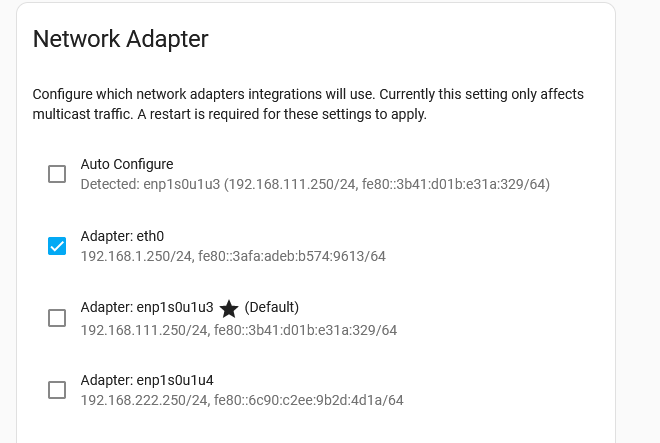
I need eth0 to be my gateway...
 cobalt plume
Hi,
Is an odroid n2+ with 2gb ram enough for hass ? Or should I privilege 4
I have 20 devices
Maybe 20 automations running
marble coral
marble coral
I have 3 networks, all appear in that page.
https://iili.io/HuPlEbe.png
I need...
I can "force" it by removing DNS settings from the other adapters, but that breaks things
 odd marlin
Above that there's network interfaces. Have you tried either disabling the others or setting static IPs so they don't get a gateway from DHCP?
marble coral
odd marlin
Above that there's network interfaces. Have you tried either disabling the other...
They are all statically set.
crude inlet
Those are all adapters. Are you saying 192.168.1.250 needs to be your gateway? How did the address get assigned?
marble coral
So the x.x.x.250 is the HomeAssistant address on each network
odd marlin
Do all 3 interfaces have a gateway defined in the static config? If so, that's likely the issue
marble coral
Yes they do, however I cannot submit a blank one. Didn't try in YAML to be fair.
I kinda need the gateways to function... I just want to set a default one for homeassistant only.
As in, if HA needs to check something on the internet. eth0.
I am using eth0 for dynamic DNS
odd marlin
Most OSes including Linux don't really play nicely with multiple default gateways defined
marble coral
If HA defaults to another network, it sends the wrong IP
Hmmm, works good on my QNAP. I just set teh default, and it obeys it
odd marlin
Typically with multiple interfaces, one would be the default gateway and the others would either be used for their directly connected subnet or some additional routes. If you have multiple default gateways, then it comes down to whatever metric gets assigned
marble coral
odd marlin
Typically with multiple interfaces, one would be the default gateway and the oth...
Is it possible to set the weight / metric?
The problem is that HA randomly assigns the default (it seems).
I just want to hard set it
I can force it by unplugging the others.. rebooting, then plugging them back in after the default is set, and it works fine... until i reboot
odd marlin
I don't think there's any way to set the metric. It won't let you just assign an IP without a gateway?
marble coral
odd marlin
I don't think there's any way to set the metric. It won't let you just assign an...
I will try in YAML. Can't set a blank gateway in the gui
But I kinda need the gateways to be set.
I have it like this:
Network 1 (eth0) naked internet gateway, dynamic DNS runs here, some services hosted online via this network
Network 2 (enpblahblah1) is my domain network, I vpn through here...
Network 3 (enpblahblah2) is my smart home network
HA is connected to all 3 networks, and provides DNS filtering on all, and also NGINX reverse proxies
odd marlin
If the only things it talks to on network 2 and 3 are things within their respective subnet, e.g. 192.168.2.0/24, then there's no need for a gateway. You only need a gateway if you're crossing subnets
marble coral
odd marlin
If the only things it talks to on network 2 and 3 are things within their respec...
Hmmm, but wouldn't that mean that NGINX won't be able to reverseproxy to web apps on the other networks?
If NGINX still works, that would fix it for me
odd marlin
If HA is assigned say 192.168.2.6/24, it will have an entry in its routing table for 192.168.2.0/24 and can talk to anything on that subnet without a gateway
marble coral
Ok, I will see if I can set a blank gateway via YAML
Hmm no YAML option
Is there a config file where I can edit this?
Hmm. I will try setting them all to 192.168.1.1
see if that works
it shouldn't
but hey ho
Boom!
Default changed
Need to check to see if anything broke
Yup. Something broke... Turns out I need the gateway set correctly for one of my reverse proxy hosts
Also, my curl commands broke (they target an interface specifically)
Trying one more thing.
Will try setting DNS to HASS instead of router
Nope. Default is good now, but DNS is not doing what I need.
 ivory root
Hi, i got some issue with my addons, but i dont know how to troubleshoot this
humble scaffoldBOT
@ivory root I converted your message into a file since it's above 15 lines :+1:
ivory root
sure, because its about all addons. so it seems like a higher layer
and its after a recovery from backup
every addon i try to run is greyed out and wont start if i press start
if you still think it iss, ill go there
ivory root
fixed it with a full reboot of the machine(vm in my case) the restart within home assistant wassent sufficient
(sauce: https://community.home-assistant.io/t/cannot-start-add-ons-after-migrating-to-nvme/450571)
 keen comet
👋 I would like to install hass via pip3 directly. With python3.11 the deps aiohttp won't compile because requirements.txt contain aiohttp is 3.8.1.
aiohttp compile with 3.8.2 only.
My question before to create a PR about "classic upgrade" Hass works with python3.11 ?
humble mirage
Use Python 3.10
The devs haven't yet worked on 3.11 support, so until then it's reasonable to expect problems
keen comet
ok thanks, this is because I've seen end of support of python3.9 so I wanted to be on latest
humble mirage
The trick is to basically follow what they use for the Container, which is mentioned in the release notes when they bump it
 sonic lance
Hello all,
I am new here and plan to set up Home Assitant. I have already done the installation and got the server up and running. The installation was done on a NAS. My problem is that I can't get to the Home Assitant page.
I have tried both http://homeassistant.local:8123/ and via the IP. I can ping the IP, but I can't ping http://homeassistant.local:8123/.
Does anyone have any ideas?
 grizzled belfry
hey guys, i am stuck at Preparing home assistant page
the last line on the log is 23-01-02 15:23:24 INFO (MainThread) [supervisor.resolution.fixup] System autofix complete
it just has been sitting for hours
i am running hass on a vm
keen comet
humble mirage
The trick is to basically follow what they use for the Container, which is menti...
thanks! any simple way to find that ? the only mention of python is here https://hub.docker.com/layers/homeassistant/home-assistant/latest/images/sha256-ee9bad6c64530a5fe660d454f7049b9c0984b240a782858201f8bf82f51d35b5?context=explore not very efficient
odd marlin
grizzled belfry
it just has been sitting for hours
Try opening the page in a new tab. Apparently sometimes it'll just sit there even though it's ready
grizzled belfry
odd marlin
Try opening the page in a new tab. Apparently sometimes it'll just sit there eve...
Still sitting there
manic bane
Then you'll need to share a few more of the logs with us
humble scaffoldBOT
Please use a code share site to share code or logs, for example:
- http://pastie.org/ (select YAML for the language)
- https://dpaste.org/ (select YAML for the language)
- https://paste.debian.net/ (you guessed it, select YAML as the language)
Please don't use Pastebin, since it can randomly add spaces to the main view. Please also don't share text as images since it makes it harder for people to help you. Remember that others may have colour blindness, impaired vision, etc.
 severe matrix
Is there a way I can set in the config different retention times for different entities? For my Energy dashboard, I want a storage time of 365 days, but the other data such as lights, I need this for only thirty days along with some other entities maybe a day only. Is energy stored in the standard recorder config and how can I set its own storage time?
 vocal yew
hi guys! is there any way to add the bluetooth card drivers of the laptop im running hass os on to hass os?
manually
home assistant doesnt see my card
manic bane
The drivers should be in the kernel for HAOS. If it's not detected then I'm not sure if there are drivers for it
Are you not seeing the BT under hardware?
vocal yew
im not seeing it discover
manic bane
It should be listed there if HAOS can see the BT
If not then you're probably out of luck
vocal yew
no, it just says generic x86-64
manic bane
I don't use HAOS but if it's not detecting it there's no way to add drivers
vocal yew
ouch really?
in the future would it work if i changed to running it as a docker container
brazen herald
Don't run Supervised, it's a fast road to pain and no gain.
Try Debian + docker or similar.
 solar hedge
Hi! Do i have to set up a Hue light + Dimmer Manually with Automations or is there a shortcut? I'm using a Sonoff Zigbee bridge.
brazen herald
You're probably looking for #automations-archived or #blueprints-archived, there's also a Switches #integrations-archived that popped in up HACS recently which might be useful.
 muted sluice
Hi I've installed HASS as it's own OS on a VM but when I log on to the ip address for the IPv4 in the web browser it gets stuck in the "Preparing Home Assistant" I've left it for over an hour still preparing did some research saw try
ha> login
#nmcli con edit “Home Assistant OS default”
set ipv4.dns 8.8.8.8
save
quit
ha host reboot
but when I do the nmcli con edit "Home Assistant OS default"
it says Error: Unknown connection 'Home Assistant OS default'.
 molten patio
muted sluice
Hi I've installed HASS as it's own OS on a VM but when I log on to the ip addres...
molten patio
muted sluice
Hi I've installed HASS as it's own OS on a VM but when I log on to the ip addres...
Run "nmcli conn show" to find the name of the network adapter to pass into "nmcli conn edit"
muted sluice
molten patio
Run "nmcli conn show" to find the name of the network adapter to pass into "nmcl...
once I do that and do "set ipv4.dns 8.8.8.8"
am I meant to see a confirmation or anything to know it's been set? because once I do the code it just goes straight to the next line to allow me to type again with nothing showing it was set?
 maiden mesa
that means everything is good, in unix
molten patio
Was just about to say exactly that, you can confirm by running "nmcli print" and it will show you all the settings set.
grizzled belfry
i just followed those instructions and it is still sitting at preparing home assistant
muted sluice
same with me I even reinstalled the vm and still waited over an hour, should I just install a linux vm or something to make it easy?
grizzled belfry
muted sluice
same with me I even reinstalled the vm and still waited over an hour, should I j...
are you running off wifi?
muted sluice
I'm hardwired to my host pc so when I setup the vm I setup a bridged adapter
grizzled belfry
ok just checking i am using the bridged adapter but with a wifi card
what log prompt is your preparing home assistant sitting at?
muted sluice
how do I check that?
grizzled belfry
c;ick the pulsing blue dot and scroll to the bottom
muted sluice
23-01-03 12:42:44 WARNING (MainThread) [supervisor.homeassistant.core] Error on Home Assistant installation. Retry in 30sec
muted sluice
23-01-03 12:43:14 INFO (SyncWorker_1) [supervisor.docker.interface] Downloading docker image ghcr.io/home-assistant/qemux86-64-homeassistant with tag 2022.12.8. and then it's this one when I refresh the page
 fallen lichen
muted sluice
23-01-03 12:43:14 INFO (SyncWorker_1) [supervisor.docker.interface] Downloading ...
fallen lichen
muted sluice
23-01-03 12:43:14 INFO (SyncWorker_1) [supervisor.docker.interface] Downloading ...
There's probably more to it.... looks like yours is getting hung up on something earlier
muted sluice
fallen lichen
There's probably more to it.... looks like yours is getting hung up on something...
I did a quick CTRL+F on the webbrowser and typed in failed and got 38 hits
fallen lichen
I'd suggest pasting your full log to a sharing site
Log lines don't necessarily only show failed, other ones may be interesting too
muted sluice
is there an easy way to get the log lines? or just ctrl+a ctrl+c
fallen lichen
Select all copy is as good as anything
muted sluice
as I pasted this I did see a line saying "fatal: unable to access 'https://github.com/esphome/home-assistant-addon/': Could not resolve host: github.com
'.
fallen lichen
ahh likely DNS related then
grand pivot
Broken DNS
muted sluice
do I do the
ha> login
#nmcli con edit “Home Assistant OS default”
set ipv4.dns 8.8.8.8
save
quit
ha host reboot
thing?
odd marlin
Make sure you can also ping out to the internet too
muted sluice
did a ping on the vm hass says "google.com is alive!"
fallen lichen
grizzled belfry
https://jpst.it/33Dnf
How long have you been waiting and what hardware do you have? I don't see anything that stands out
fallen lichen
Just looking at that log, it looks like ~45m, but I'm not sure if there's anything earlier
muted sluice
grand pivot
<https://www.home-assistant.io/more-info/unsupported/dns_server/>
did everything also did the set ipv4.dns 8.8.8.8 and then did the reboot will update in about 30 minutes
grizzled belfry
can i run this vm with a wifi adapter
odd marlin
You can use WiFi, but you really shouldn't unless you have no other choice
grizzled belfry
coulld that be my problem?
grand pivot
Well, at least that is a bad thing
grizzled belfry
?
grand pivot
?
odd marlin
You passed a wifi adapter through to the VM?
grand pivot
just...don't do that
do not use wifi with a bridged network connection with a VM
it is an unsupportable configuation
grizzled belfry
ok. So it will act like it can work. But at the end of the day it is never gonig to work
odd marlin
Are you not able to just bridge to an ethernet adapter instead?
muted sluice
okay so 30 minutes still no progress, I did some more research and it said check "resolution info" and issues that come up are
context: supervisor
reference: null
type: update_failed
uuid: (string of numbers and letters)
context: system
reference: null
type: no_current_backup
uuid (strong of numbers and letters)
google a work and it says do "ha supervisor update"
did that and now it's sitting on Processing... for about 5-6 minutes now
pearl bane
Hi can I move from ethernet to wifi home assistant
odd marlin
pearl bane
Hi can I move from ethernet to wifi home assistant
Why do you want to switch to wifi? You should really avoid using wifi for HA
pearl bane
Wife say it "slows" the home internet 😮
muted sluice
been almost an hour nothing has worked I give up on this app it's just not for me I guess 🤷♂️
copper steppe
@pearl bane don't do that, man. ha cannot be slowing your internet.
unless it's doing an update, which will only be for a minute or two
ha on wifi sucks
 misty briar
odroid n2+ arrived, do I just do the github HAOS on the EMMc? Don't think i need a desktop.
humble mirage
If you just want to use HAOS then yes
misty briar
cheers, balina time
misty briar
well that was easy. famous last words. so run on ethernet + UPS?
 fierce laurel
what is the oldest pi i can use for homeassistant?
humble mirage
Depends on whether you mean Home Assistant OS, or just the HA software itself
Either way, anything below a Pi3 is asking for pain
fierce laurel
To be able to run it all. Dont know the details of how to set anything up yet. Tryhing to read up on everything
humble mirage
You want at least a Pi3, but Pi4 on SSD is smarter
Personally I'd recommend something better than a Pi
fierce laurel
what is better then a pi?
for now i have 2 shelly wifi plugs i want to set up and test with to learn. but to be honest, i dont really know even where to star 😛
humble mirage
Just about any PC from the last decade
brazen herald
If you already have a computer that's always on, you can run it on there
humble mirage
I run HA on a 9 year old i5 laptop, and it massively out performs any Pi, is more stable, and draws only a little more than a Pi4
brazen herald
(Ideally a Linux machine, and running it with a Docker container so you don't break what you already have.)
fierce laurel
how are a minipc? are they called nuc?
humble mirage
Sure
fierce laurel
i would prefer if i dont go over the price of a pi. preferebly che aper ofcourse 😛
humble mirage
So... find something second hand
brazen herald
Well, is that the RRP of a Pi or the current retail price of a Pi?
humble mirage
A Pi on an SD card is just waiting to lose all your data
brazen herald
Because current retail price, I have an old gaming machine you can buy 😂
fierce laurel
current retail prices are a joke.
humble mirage
So, budget for a Pi with at least 2 GB of RAM + decent powered USB hub + USB connected SSD if you're going with a Pi
 turbid rampart
Hello again.. i just installed ssl-cert-check on my Pi , but HA (docker) can’t start it. I went in my docker and i can’t use it. Do you have an easy trick ? This is not mentionned in the ssl guide
I may need to restart the pi, or add a volume in my docker to the ssl-cert-check ?
fierce laurel
so a better choice would to get a old laptop and run it of of that?
brazen herald
An old laptop or mini PC of some kind
humble scaffoldBOT
@turbid rampart * HAOS ha core check
- Container uses
dockercommands - Core requires you to activate the venv first
turbid rampart
Oh well the ssl is working
I just try to setup the sensor to fetch the validity time left
humble mirage
i just installed ssl-cert-check on my Pi , but HA (docker) can’t start it. I went in my docker and i can’t use it.
Sounded very different to that
fierce laurel
humble scaffold
what is that? sorry for my dumb questions
humble mirage
fierce laurel
what is that? sorry for my dumb questions
Not relevant to you
fierce laurel
humble mirage
Not relevant to you
ok
humble mirage
The ssl-cert-check command you installed on the host... it's not in the container where HA runs
humble mirage
So, SSH to the host and run it that way
You need to have the SSH key in /config somewhere, to tell it to use that, and to tell it to accept new certs
ssh -i /config/ssh/id_ed25519 -o StrictHostKeyChecking=accept-new tinkerer@orbital.ceard.tech /usr/sbin/meltdown
Or ... don't bother and just ensure you automate renewing it 😛
You've also got https://www.home-assistant.io/integrations/cert_expiry/
turbid rampart
Yes i miss knowledge I need to read all your links
Following the guide step by step i stumbled on the sensor to see my expiration, before starting to automate the renewal :p
humble mirage
TBH I use Traefik for remote access and that handles SSL renewal transparently
turbid rampart
Oh well i added the integration and it works
I will read anyway to understand more
Thanks a lot
fierce laurel
If i have a old laptop, what should i install on it, Linux mint?
brazen herald
Debian 🙂
brazen herald
You can install other OSes, but long term you'll find that googling "Debian problem" is a lot easier than translating what you find
And skip Ubuntu, the snap store alone is terrifyingly bad 😛
fierce laurel
So just core debian is the best?
 humble timber
I am going to reinstall HA and have a couple of options and wanted what is going to be the best option for me. I’ve purchased a new MacBook so I have a my old Mac that I can install it on and run virtual box. I have an old dell optic plex that would be a decaded machine just for HA or I could purchase HA blue/yellow. If I install it the Mac that would basically be the only thing running on that machine as well. Thoughts?
odd marlin
How old is the Optiplex and what are the specs? That's probably going to be the best choice
humble mirage
The Yellow would be the worst option IMO, closely followed by the Blue
If the Optiplex is newer than 8 (maybe 10) years old then it's likely your best option
turbid rampart
Funny to read that yellow is not a good option when it’s somehow promoted by HA ?
humble mirage
Don't confuse most of us who're here with the HA project team 😉
turbid rampart
My bad !
humble mirage
The Yellow is better than a Pi3 or older, and with an SSD is better than any Pi on an SD card
Of those four it's the worst option
turbid rampart
185$ home assistant yellow 🥶 proceeds to close webpage
humble mirage
I'll stick with my 10 year old i5 laptop 😄
Even with spinning rust rather than an SSD it way outperforms that Yellow
 south sky
I am contemplating what device to use for installing home assistant
and also what method
this is for our holiday home. so some degree of reliabilitiy is rather important
humble mirage
Not a Pi
 dawn flame
Mini PC, can be had in the 100-150 range. Linux install and Docker. Use it for more than just HA...
humble mirage
The method depends on you and your skills - but it's either going to be HAOS or Container
south sky
I feel very comfortable with Debian (since 199x)
brazen herald
Debian is a good choice in general 🙂
dawn flame
I went with bare Alpine. Debian without the GUI would be a solid choice though.
south sky
I'm thinking of reusing an old thinkpad x series laptop
because that has got a UPS builtin in case of
electricity outage
humble mirage
I run on an old i5 laptop, way better than any Pi
south sky
is this a common thing to do, or not?
humble mirage
It's common to re-use hardware you already own
south sky
I have the rack space anyway, and I'm trying to keep everything wired
so no need for any fancy zigbee/matter/ble stuff anyway
humble mirage
Well, Zigbee etc can be done with dongles, or external hardware
brazen herald
I would think carefully about dismissing #zigbee-archived and #zwave-archived, especially as Thread becomes more popular and people crowd onto the "new cool thing", you'll be able to pick up lots of sensors cheaply
south sky
being an old fart, I just don't trust that as much as wired connections
so I went a bit overboard and wired every room to the technical room multiple times
... in star, not bus topology
so the investment in wiring has already been made
dawn flame
That's nice, but light switches don't run on Cat-5. They operate on Z-Wave, Zigbee, and WiFi.
humble mirage
dawn flame
That's nice, but light switches don't run on Cat-5. They operate on Z-Wave, Zigb...
There are plenty of wired options for that too
south sky
I'm hesitant to name a specific board, but I'm using a fairly generic Chinese esp32 board with wired ethernet and nice screw terminal headers for that
the plan would be to run esphome on this board and hook this up to home assistant
and that is where my next question comes from
how to best organise the software mechanics of integrating those two on the home assistant side
ok, that sounds super vague
humble mirage
Well... if it's ESPHome you just enable the integration
south sky
I just enable the api on the esphome side
humble mirage
HA doesn't care that those are ESPHome vs Zigbee vs anything - every light is a light, every switch is a switch, etc
south sky
ok, clear
brazen herald
https://esphome.io/components/api.html
# Enable Home Assistant API
api:
That's all you need to do 😉
humble scaffoldBOT

ESPHome
Support for ESPHome devices using the native ESPHome API.
Quality scale
IoT Class
Integration type
Documentation
Source
Issues
south sky
brazen herald
That's all you need to do 😉
thx, happy to see my suspicions confirmed
humble mirage
There's a bunch of forum threads, but honestly ... high availability is a thing you shouldn't worry that much about
I can't remember the last year my HA crashed
south sky
I do care about it because our place is 2000km away and needs the heating to work in winter to avoid bust piping
etcetera
humble mirage
Well... most of that then is about ensuring that it fails safe, as there's no native high availability solutions. You'd be better off solving that below HA - say with a hypervisor that can handle it
Of course, odds are that your problem won't be with HA
south sky
odds are I could just round robin dns between two machines
humble mirage
That won't help with the HA side of it
Host failover is solved already, safely redundant HA isn't
humble mirage
south sky
I don't care too much about logging tbh, and I can keep a few config files in sync
humble mirage
I don't think that'll solve the problems you're likely to face
maiden mesa
If your esp devices are controlling heat by chance, I would put some failsafes locally on the esp device so it doesn't need a connection to anything to keep things from freezing
humble mirage
Real world problems are more likely to be things like the heating not responding when HA tells it to turn on
HA itself is the bit I'd expect to not fail. Failure will be of either the logic (automations etc) or communication with the remote devices
humble mirage
Doesn't mean things won't respond when instructed
south sky
plug them in, they work
(we plug them into a Shelly pro 4pm mqtt relay)
and those are distributed, not just one boiler
and fairly passive in terms of components
ok, something to think about
will be back
 stoic cedar
Hey, im running HA in a virtualbox on windows, and I've added my aeotec zwave stick to it, but i keep getting an error saying I can't attach it. Anyone else run into this issue?
I'm able to pass through other USB devices tho.
 brisk mesa
So I was messing with the internet settings so that I could run it on my rpi off of WIFI, but i messed it up and was completely inable to connect. So i did a fresh install of the HA OS on my sd card. Now its giving me the error in my browser "Something went wrong loading onboarding, try refreshing"
humble mirage
Is HA able to reach the Internet?
brisk mesa
i have it hard wired to my router
brisk mesa
i changed the ipv4 settings (under the wlan0 tab) trying to see if i could get it on a specified ip or figure out what ip it had. after that my internet browser kept giving the "ERR_CONNECTION_REFUSED" error
 tawdry glen
Try unplugging your ethernet cable and plugging it back in
humble mirage
I'd also look on the console and see that it's getting an IP
maiden mesa
I would suggest using your router to try to specify your IP rather than setting a static ip on the client, if possible.
brisk mesa
well I did a fresh install after that and im stuck with a loading screen now. i cant even get to the consol or anything
humble mirage
Connect a keyboard and monitor to it
crude inlet
if you have reflashed the SD and are at the preparing screen then you can click on the blue dot
brisk mesa
crude inlet
if you have reflashed the SD and are at the preparing screen then you can click ...
im past the preparing screen. im at the onboarding html where its just giving me a loading screen there
tawdry glen
Try opening the page on a different device
like a phone
Happened to me before, it wasn't loading on my pc, but it was on phone
Still don't know why
brisk mesa
im trying to use the mobile app too and it straight cannot connect on the mobile app
tawdry glen
You can try using the browser on the phone
humble mirage
I'd expect you need to have set HA up before the app works
tawdry glen
I thought so too
crude inlet
or hard refresh the page on your pc, or try a private/incognito tab
brisk mesa
tawdry glen
You can try using the browser on the phone
tried phone browser this time. gave me site cannot be reached "DNS_PROBE_FINISHED_NXDOMAIN"
humble mirage
Use the IP and port
brisk mesa
what do i ping in my pc command console to find the ip?
tawdry glen
I'd probably look in your router to find it
humble mirage
Well, given that you're getting NXDOMAIN, I doubt that'll help
If you have a keyboard and monitor connected to HA then you can see the IP therer
brisk mesa
i got a ping back when i pinged homeassistant
tawdry glen
what ip address does it show when you ping
try using that in the browser instead of homeassistant if you didn't before
brisk mesa
it gave me an ipv6
tawdry glen
That should also work
brisk mesa
its working now
tawdry glen
The original address works? or does the ipv6 work?
brisk mesa
managed to pull the ipv4 and that works
 haughty finch
Hello. I am new to HA. I have HA running on virtual box on Win10. I am wondering...is there a way to stop and close virtuql box so that I can turn off my pc?
I tried to close virtual box and that resulted in my home assistant to lose th zwave dongle...i had to delete the virtual machine completely!
humble mirage
If you stop the VM then HA isn't running and no smart home for you
haughty finch
Ok...that is no a problem
humble mirage
ha host shutdown should do what you want, and I'd expect there's a shutdown option if you hit c and search
odd marlin
Ideally you want to run HA on a separate computer that can be left running 24/7
haughty finch
And then i can simply close the virtualbox and the pc?
humble mirage
Shutting it down when you use Z-Wave (or Zigbee) is likely to cause mesh issues
haughty finch
Safely?
Ok i will try....i will ask another silly question...to turn on the system again will be host on?
brazen herald
You'll need to start the virtual machine, it may be automatic, or not.
haughty finch
Ok...i will try...in the end at the moment i have only 2 devices and 1 atomation...best moment for testing
 wild drum
this is not really a question more of a weird idea : hassio on ps2 linux ?
brisk willow
If you could even get it to run (which seems impossible given its specs) it would be horrendously slow
odd marlin
I mean, if you want to do it as project to prove it can be done, like how people install DOOM on all sorts of crazy stuff, sure. For any real use, it doesn't make any sense
 loud elbow
Home Assistant and DNS falling asleep
 heavy pumice
Hey, I tried to do a supervised install using pip3 in a virtualenv and it won't find a version of homeassistant published after 2021. I assume that some sort of automation of building and pushing packages failed, I'm interested in running an up-to-date version on my existing PI and I don't mind building or even fixing the automation so that others can do the same. Can anyone key me in on the build-yourself story or else point me at the thing I can do to avoid all this 😉 or else the automation and I can try work on that. I haven't searched the documentation / repo thoroughly yet, but I'm off to go do that now.
 low notch
who told you that "supervised in venv" thing?
low notch
alright this is not "supervised", this is a core install
any reason why you go that route?
heavy pumice
ah, shoot sorry I got that wrong. Just trying to install on a pi3 that already has a job that has a tricky configuration / setup to it, and it's a bit underpowered so I was worried about the lift associated with docker
but now that I come to think about it it's probably a lot less on Linux I guess... would that be your recommendation to use on a raspberry pi3 that is already busy(ish) with some other things?
low notch
the performance impact of docker is minimal. go with a container install
heavy pumice
ooo-raaa. I've been ruining my life with docker on os x recently so I guess I just avoided it by instinct.
odd marlin
If you're running anything even a little bit resource intensive already, HA is going to struggle on a pi3
heavy pumice
It's a sporadic load, I was just worried about the overhead. But of course given it's just a container and not a VM on this platform, I guess I shouldn't be worried.
Anyway I'll try to remember to report back when the container install works.
Thank you very much for your help.
humble mirage
The overhead of Docker is zero @heavy pumice - it's little more than a "partition" of the OS
(technically a namespace)
heavy pumice
Yeah, it wasn't something I really thought about, more like a pavlovian response 🙂
heavy pumice
Yep, it's working now. Good stuff. Thanks!
 placid sage
getting this error while trying to install:
 BLK0: Alias(s):
      PciRoot(0x0)/Pci(0x4,0x0)/Sata(0x0,0xFFFF,0x0)
Press ESC in 1 seconds to skip startup.nsh or any other key to continue.
using the kvm image on current fedora
 storm sluice
tried pressing esc?
or type exit in the efi shell
also make sure the disk is set in the bootorder in the vm settings
placid sage
thanks but i ended up just going with docker
 plain leaf
Hello all, one short question. Is, for testing purposes, a RPi 2 fast enough?
odd marlin
It's very slow and also not supported by HAOS anymore. If you're just looking to try out HA and see if you like it, you'd likely be better off setting up a VM with Virtualbox or similar
Alternatively if you have an old PC or old laptop sitting around that's up to around 10 years old, that's also a good option
plain leaf
OK thank you for ur fast answer.
I already installed a Virtual Box, but wasn't able to get an network connection.
I will take a look into it later and try to get a connection
odd marlin
It's been a while since I used Virtualbox, but I recall possibly needing to reboot after it installs its network drivers
copper steppe
you should be using bridged networking in virtualbox, did you do that? check that
 cinder wing
when my pi is instelling itself ut sais failed to syngronyse kernel time and it doesnt show up when i go to the web cliënt any fix ?
 cinder marsh
@cinder wing You can try this: https://community.home-assistant.io/t/wait-until-kernel-time-synchronized-error-on-first-installation/365382/5
if you have a monitor and keyboard connected
or try enabling the ntp protocol on your router if available or changing the server to a working one
cinder wing
cinder marsh
or try enabling the ntp protocol on your router if available or changing the ser...
where can i change that ?
 terse fossil
Good morning! I am having annoying problem after fresh install of Home Assistant and restoring backup. None of my Add-Ons can be started, yet if I look in logs they actually are running! How can I stop them and start correctly???
brazen herald
Did you refresh and clear your cache?
fallen lichen
If that doesn't work a restart of the entire host or at least the supervisor (not just a dev tools->restart) should get it reporting correctly
terse fossil
Let me try complete power off on.
terse fossil
brazen herald
Did you refresh and clear your cache?
why would clearing cache in browser help?
brazen herald
Because the addons are running and you can't see it 😉
terse fossil
Ok did both, waiting for boot up
Thank you all, it worked 🙂
Now I can start and stop correctly, and leave what needs to be with autostart
low notch
Webapps usually don‘t get to decide what to cache and wheter that is still valid and current, its the browsers decision. And webkit is pretty bonkers about it sometimes.
 noble solstice
Hello everyone !
I'have deploy Home assistant on k3s cluster via rancher and I put http configuration like this
http:
server_host: 0.0.0.0
ip_ban_enabled: true
login_attempts_threshold: 5
use_x_forwarded_for: true
trusted_proxies:
Pod CIDR
- 10.69.0.0/16
Node CIDR
- 192.168.42.0/24
but when I wanna acces to Home assistant via a clusterIP service it will only shows the HA logo
brazen herald
Did you put that in the configuration.yaml?
Also, why do you want to run HA in a cluster? 🤪
storm sluice
noble solstice
Hello everyone !
I'have deploy Home assistant on k3s cluster via rancher and I ...
how does your ingress resource look like?
noble solstice
storm sluice
how does your ingress resource look like?
I didn't use ingress here. I just want to access HA via a clusterIP service.
noble solstice
yes
storm sluice
check the browser request logs maybe?
it shouldt tell why/if something fails to load
noble solstice
browser logs : Failed to load resource: the server responded with a status of 404 ()
 finite thunder
is it possible to install home assistant os on a raspberry pi zero w?
odd marlin
No. The lowest level Pi supported is the rpi3 and that is not very fast
placid sage
hello, i got a CORE installation (full manual in a venv), and i want ALL features
humble mirage
You've got them
placid sage
so i'm decided to migrate to a container because it is the only way acceptable for me
no i don't have all feature
humble mirage
Core vs Container ... HA is identical
if by "all feature" you mean add-ons then you need HAOS
HA itself remains the same, but you can then point and click in the UI to install other software
placid sage
i mean the add-ons yes
odd marlin
You can run HAOS in a VM
odd marlin
Well, no not on a pi
placid sage
my current setup is a PI3+
brazen herald
Container install is where it's at for you.
odd marlin
AdGuard Home is available as an add-on for HAOS. It does basically the same thing as pihole
placid sage
but container is not giving more than my current setup
i got also unifi running on my PI
odd marlin
How are you running pihole, a Unifi controller, and HA on 1GB of RAM?
humble mirage
Well... no add-ons for you then
placid sage
load average: 0.35, 0.19, 0.19
crude inlet
placid sage
and it works FINE 🙂
for now
humble mirage
It will if you start adding more software
placid sage
i don't want to add more sofrware but more addons
odd marlin
Addons are software
placid sage
it is peace of code let 's say
crude inlet
that's exactly what add-ons are
software other than HA
are you referring to integrations?
placid sage
for instance i got the broadcom appliance for IR
for remote IR
and i read it requires an addon to integrate it to HA
humble mirage
No, it doesn't
placid sage
oh sorry it is for eWeLink
humble scaffoldBOT
#integrations-archived integrate Home Assistant with devices or services, or provide functionality within Home Assistant.
#add-ons-archived provide additional software or services, which an integration could possibility integrate with. Add-ons are for Home Assistant OS and Supervised only, other install methods can install software other ways.
humble mirage
Yeah, ok, so that piece of shit is an add-on
placid sage
oh it is bad ?
humble mirage
It's a damned ugly hack by the author, to avoid writing a proper integration
There are ... less bad options for that hardware
Including not buying it 😛
placid sage
i bought this shit because it was saying it is compatible with HA
crude inlet
yeah the ewelink add-on is famous for it
humble mirage
Don't trust the vendors 😉
If you trust them you'll end up buying stuff like Tuya...
humble mirage
brazen herald
I'm pretty sure my eWeLink Wi-Fi USB switches are working with a sonoff integration. Likely the one Tinkerer linked
placid sage
so even if it is not SonOFF it should work ?
i can see on the github "support new eWeLink API"
😄
HACS > Integrations > Plus > SonoffLAN
i don't have that
humble mirage
Do you have HACS?
placid sage
what is HACS ?
humble mirage
Then the answer is no
placid sage
i can install it on my HA Core install ?
humble mirage
Click the link on the word HACS in the text you posted
It works on any HA install...
placid sage
You have the my integration enabled.
ok cool
wget -O - https://get.hacs.xyz | bash -
haha
my: was missing in my config
Congratulations, you're all set!
can i stop my old appdaemon ?
/home/appdaemon/bin/python3.6 /home/appdaemon/bin/appdaemon -c /home/appdaemon/.appdaemon/conf/ <== running for so many long
it is even not the good python interpreter i'm using now for HA
humble mirage
Well... you know if you can stop it or not
placid sage
i just removed it
HACS is not in my integration
but i don't see how can i add SonOff
this is what i see
humble mirage
HACS ... is on the sidebar
grand pivot
 placid sage
excellent ! thanks
indeed there is a new menu on left pannel, sorry to not seeint it previously
perfect i just added it, it installed new stuff in ~/.homeassistant/custom_components/sonoff
sounds good !! i thought i was going to go to a container but i can keep my venv at the end !!!
HOly shit, i control it now on HA !
do you think it is possible to disable the application ? to stop having China controlling my electricity 😄
humble mirage
"the application"?
placid sage
i got an app on my phone EweLink
i m just wondering if removing this shit will remove the china access to my wifi sonoff thing
but maybe i 've to keep it because the integration asked my login/pass of eWeLink
now, i got broadcom integration but it looks hard
i want to use it for an Air Conditional
humble mirage
Maybe, maybe not
Removing the app from your phone won't stop their devices talking to their cloud service
placid sage
i have to block China IP BLOCK on my FW i guess
i found https://github.com/smartHomeHub/SmartIR/blob/master/docs/CLIMATE.md that provide some json file with the button already configured
for the Broadlink/Broadcom IR Remote
i thought it would be easy but it not for an Air heater
when you click on the real remote, it sends always all the states (Temperature/Mode/Speed FAn/Power status)
odd marlin
Maybe blocking it in your firewall will work, or maybe the device will detect that it can't talk to the cloud and stop working until it can again. Really depends on how they have it setup
 agile yew
Hi, might be a stupid question, but I couldnt solve it myself..
As a proud owner of the yellow, and had HA running for a couple of days I was going to show my son that we could turn on and off the lamps via app..
Instead i met
Unable to connect to Home Assistant.
Retrying in 54 seconds...
So I have done the "mandatory" reboot etc, still nothing :/
humble mirage
Are you able to connect a keyboard and monitor?
If not try port 4357 instead of 8123
agile yew
It has been http://homeassistant.local:8123 since I started. Should be noted I installed adguard also on the yellow
agile yew
Did not work with the other port either.. and now I cannot connect mouse or monitor as this is compute module and yellow board.
If it can, I dont have hdmi/mini hdmi etc for connecting to a monitor
humble mirage
Yeah... no video out ... that's an "interesting" design choice
At this point a fresh install and restore of a backup is probably your only hope if you can't access it using SSH or Samba
agile yew
Wohh! I think I figured out.. it worked with IP instead of the "homeassistant.local..." so exampe IP + port --> 192.168.129.10:8123/
Thanks for the support anyways @humble mirage
odd marlin
My MDNS never worked in the first place ¯_(ツ)_/¯
agile yew
"f***" when I tried to log in I got back to unable to connect to HA retrying in X seconds
humble mirage
Now try the observer port (4357) with the IP
agile yew
Home Assistant observer
Supervisor: Connected
Supported: Supported
Healthy: Healthy
humble mirage
odd marlin
My MDNS never worked in the first place ¯\_(ツ)_/¯
mDNS works here, but I don't use it (or HAOS)
humble mirage
agile yew
Home Assistant observer
Supervisor: Connected
Supported: Supported
Healt...
By any chance did you install either the Samba or Terminal/SSH add-ons?
agile yew
No, just started the switchover to yellow. Only thing I did was adding adguard as an addon.. can this have messed up my HA?
humble mirage
It shouldn't have
crude inlet
well..."first thing i'm going to do is run a dns server" could be a problem
odd marlin
To rule out browser weirdness, try Ctrl + F5 or open it in a private/incognito window (with the IP and port 8123)
agile yew
odd marlin
To rule out browser weirdness, try Ctrl + F5 or open it in a private/incognito w...
Same in private mod and different browser
When waiting, it gives me "lovelace auth callback etc etc"
odd marlin
Are you running any sort of reverse proxy like nginx? The fact that you get a page at all in a different browser means it's responding in some capacity. Sounds a bit like a websocket problem
quasi light
Hi guys. Is it possible in a reasonable way finding out what in HAOS or its plugins are eating up all ram thrown at it? It is a small installation, not having many plugins etc. Still consuming almost all of 6GB...
agile yew
No proxy, but can it be that since I have added some things to the blocklist of adguard it mess up?
storm sluice
no idea, never used that
odd marlin
If you open a new tab, press F12 to open the browser's dev tools, select Network, then try to enter the HA URL, you should see info about the network requests it's making. You may be able to narrow it down to see if it's timing out or something
agile yew
In the app it tells me login attempt failed --> with invalid authentication see the log for details. But I used same login yesterday with auth code to..
agile yew
It is working now... no idea how but I turned off totp in HA.
 random ivy
Guys I have a question, Is it true that ubuntu OS is not the most recommended OS to use HA on docker?, should I switch to debian?
At the time I was using ubuntu for RBPi as it was the only 64bit OS for it, but now I can use RBPi OS
 frozen plinth
random ivy
Guys I have a question, Is it true that ubuntu OS is not the most recommended OS...
frozen plinth
random ivy
Guys I have a question, Is it true that ubuntu OS is not the most recommended OS...
If you are running Core i don’t think it matters, as there is no integration with the host. I run on Debian tho. If you are trying to run supervisor, you have to follow the instructions exactly. So you have to use the exact version of Debian that is in the instructions. In general for a pi it’s best to use HAOS and not have to worry about the OS.
random ivy
frozen plinth
If you are running Core i don’t think it matters, as there is no integration wit...
Planning to run everything on proxmox separatedly later, for now I run everyting in docker under ubuntu as all I have is a RBPi 4 8gb for now
fallen lichen
copper steppe
how to force an update-check for the new release?
May not be there yet, even though the site it updated: https://hub.docker.com/r/homeassistant/home-assistant/tags (I know they're also on ghcr, but I believe they get pushed at about the same time)
ha refresh-updates should do it though
frozen plinth
random ivy
Planning to run everything on proxmox separatedly later, for now I run everyting...
That’s probably fine then, as long as you aren’t trying to run supervisor on there.
 lean ferry
I'm attempting to move from an Rpi3 to a home assistant VM on Unraid. I did the restore and everything appeared but my zigbee and zwave devices are not working. I passed the dongles through to the VM, but I'm thinking I must need to repoint them somewhere? I tried going to "Configure" under Settings->Devices & Services-> Zwave JS-> Configure but it just gives "Z-Wave JS: Retrying setup..." error.
how can i check that the VM sees the dongles from CLI?
fallen lichen
https://my.home-assistant.io/redirect/hardware/ ->  -> All Hardware... should see devices that list
 /dev/serial/...
lean ferry
fallen lichen
https://my.home-assistant.io/redirect/hardware/ -> <:dotsvertical:63377884670918...
Ok so they are both there. I rebooted and Zwave came online but Zigbee is saying this in the logs:
Couldn't start deCONZ = dresden elektronik deCONZ protocol: ConBee I/II, RaspBee I/II coordinator (attempt 1 of 3)
fallen lichen
Is there more to it than that? In the logs? Is the path to the device correct?
lean ferry
I think that's the issue, I just clicked "Migrate Radio" and selected the path to the USB dongle... trying now
hmmm - so it failed at last screen on migrate radio, it says path was "/dev/ttyACM0", but I wonder if it should be /dev/serial/ttyACM0
fallen lichen
You should also really look at the logs 🙂
 cedar forge
my date is 6 months behind, I have tried rebooting but no luck, it has access to the internet
 calm stag
Hi again all. I have setup mqtt with success, but the script that is supposed to help me discover/setting up shelly devices does not seem to make them beeing discovered, despite me seeing mqtt acitity while listening. https://github.com/bieniu/ha-shellies-discovery-gen2
I have setup python as per guide, made it run. I have setup configurations in in configurations.yaml and automations.yaml.
Any one have suggestions i would be very grateful. I do not have any errors when doing check in developer.
Thx in advance 🙂
lean ferry
Ok so I'm back to work on my HomeAssistant migration, I tried using
/dev/serial/by-id/usb-dresden_elektronik_ingenieurtechnik_GmbH_ConBee_II_DE2291306-if00 as my serial device path in the Zigbee config, but it didn't like that. Same error as with using /dev/ttyACM0
It's definitely something wrong with my path, logs say "FileNotFound"
Under Zigbee, Configure, Migrate Radio -> I get two options /dev/ttyS0 and /dev/ttyUSB0 and "Enter Manually"
Under my Settings-Hardware-All Hardware it says it's under /dev/ttyACM0 but it says Failed to Connect with either that or the longer version above
serial.serialutil.SerialException: [Errno 2] could not open port /dev/serial/by-id/usb-dresden_elektronik_ingenieurtechnik_GmbH_ConBee_II_DE2291306-if00: [Errno 2] No such file or directory: '/dev/serial/by-id/usb-dresden_elektronik_ingenieurtechnik_GmbH_ConBee_II_DE2291306-if00
fallen lichen
lean ferry
Ok so I'm back to work on my HomeAssistant migration, I tried using
/dev/serial...
Maybe take a look at this? Seems kinda similar, although I'm not familiar w/ the Unraid setup: https://community.home-assistant.io/t/solved-conbee-2-fails-to-connect-to-zha-ha-in-unraid-vm/431276/2
lean ferry
thanks, it must be an unraid issue, i just found this: https://forums.unraid.net/topic/113301-passthrough-of-conbee-ii-zigbee-usb-gateway-to-home-assistant-virtual-machine/page/4/
lean ferry
fallen lichen
Maybe take a look at this? Seems kinda similar, although I'm not familiar w/ th...
definitely thought this would get me working but alas same error after doing this
lean ferry
Well, this is complicated. Geez. It's working but I dont know exactly why. Lots of reboots and settings in Unraid. Sounds like an unraid problem.
 plush marlin
lean ferry
Well, this is complicated. Geez. It's working but I dont know exactly why. Lots ...
plush marlin
lean ferry
Well, this is complicated. Geez. It's working but I dont know exactly why. Lots ...
I set this up just yesterday
You're probably going to use less resource and be more stable installing Docker containers for HA Core, and then using Containers for Node Red, Zigbee2mqtt and Zwavejsui, and whatever other addons
Also breaks it all up a little meaning it's not all tied to HA
storm sluice
how is it more broken up? it still runs in the same vm/machine then. also not sure breaking it up is really a good thing
 dense herald
I've been using my Pi 3B+ for quite a while now, and the SD card was suddenly spitting out errors. I had foreseen this, though and used a USB drive as the data disk as to not lose all the data when formatting the SD card. The problem is that I can't find any way to tell the newly installed HOAS to use the existing USB drive instead of setting it up like new. Is there any way to tell the new installation to use the data that's already on the USB drive? And if that won't work, is there any way to get one of the snapshots off of the USB drive? I can't find what type of file system it is anywhere...
I did find this on the forum, but I'm a bit hesitant: https://community.home-assistant.io/t/haos-data-disk-how-to-restore/384007/2
odd marlin
The external drive is just a single ext4 partition
You can pull a backup off of that if you mount it from a Linux machine or a bootable Linux USB. It lives in /path/to/drive/supervisor/backup
dense herald
odd marlin
The external drive is just a single ext4 partition
It's showing as unknown in gparted...
I'm using a fairly old live iso though, idk if that could be the issue
Probably not, I assume
odd marlin
Looking at mine here, it's a GPT partition table and 1 ext4 partition labeled hassos-data-external. Is it possible your ISO is old enough to not support GPT partition tables?
My go-to is SystemRescueCD for trying to salvage systems/drives
dense herald
gparted > view > file system support shows it supports ext4
By very old I mean maybe 3/4 years
odd marlin
oh, that's plenty new enough, hmm
The whole drive shows up as unknown? Just the partition?
dense herald
the disk drive has one partition which shows as an unknown file system
And 1mb unallocated for some reason
odd marlin
I'd try just mounting it read-only and see what happens. mount -o ro /mnt /dev/whatever1
dense herald
odd marlin
I'd try just mounting it read-only and see what happens. `mount -o ro /mnt /dev/...
mount: /mnt: wrong fs type, bad option, bad superblock on /dev/sdc1, missing codepage or helper program, or other error.
odd marlin
Any useful data about it with lsblk -f /dev/sdc?
odd marlin
You could see what's in the superblock. There will be a magic identifier if it's ext4 hexdump -C /dev/sdc1 | head -n 20
dense herald
No idea what to do with this or how to read it, though
00000010  00 00 00 00 00 f8 00 00  3f 00 ff 00 00 08 00 00  |........?.......|
00000020  00 00 00 00 80 00 00 00  ff b7 f3 00 00 00 00 00  |................|
00000030  00 00 0c 00 00 00 00 00  02 00 00 00 00 00 00 00  |................|
00000040  f6 00 00 00 01 00 00 00  ba af fa d0 c8 fa d0 d4  |................|
00000050  00 00 00 00 fa 33 c0 8e  d0 bc 00 7c fb 68 c0 07  |.....3.....|.h..|
00000060  1f 1e 68 66 00 cb 88 16  0e 00 66 81 3e 03 00 4e  |..hf......f.>..N|
00000070  54 46 53 75 15 b4 41 bb  aa 55 cd 13 72 0c 81 fb  |TFSu..A..U..r...|
00000080  55 aa 75 06 f7 c1 01 00  75 03 e9 dd 00 1e 83 ec  |U.u.....u.......|
00000090  18 68 1a 00 b4 48 8a 16  0e 00 8b f4 16 1f cd 13  |.h...H..........|
That looks like an NTFS partition. I wonder if they used to use NTFS when you moved your data and now it uses ext4
dense herald
ntfs would also show up in gparted though, right?
odd marlin
If the Linux environment doesn't have the NTFS driver (usually called ntfs-3g), it wouldn't be detected
dense herald
ntfs-3g was already automatically installed apparently
odd marlin
Try mount.ntfs-3g -o ro /mnt /dev/sdc1
odd marlin
The plot thickens
dense herald
😩
crude inlet
it's always been ext4
dense herald
dense herald
I've been using my Pi 3B+ for quite a while now, and the SD card was suddenly sp...
But back to the problem at hand. Am I not able to just tell the new HAOS install to use the existing drive?
Actually, now that I think about it, the errors that were thrown at me were about invalid GPT headers. I'm guessing the usb drive was the thing that died, and not the sd card?
Then again, still a weird state for the drive to be in
odd marlin
Maybe a silly question, but you're sure that /dev/sdc is the external drive right?
odd marlin
As for just putting the drive into a new install, I've never tried that and didn't see it in the docs which is why I was trying to go down the route of helping you rescue the backups
dense herald
Also, gparted does show that the name of the partition is hassos-data-external
dense herald
odd marlin
As for just putting the drive into a new install, I've never tried that and didn...
gotcha
odd marlin
I'm guessing you don't have a backup saved elsewhere?
dense herald
From a long while ago :(
odd marlin
I would try booting up a live CD of SystemRescueCD. There's all sorts of tools on there for file recovery. If it is the external drive that died, you may be able to track down a backup on it
dense herald
Hmm I'll try HBCD, since I have that one already on my multiboot. Otherwise I'll check it out.
Thanks for the help though!
odd marlin
When you (hopefully) are able to salvage a backup, I'd recommend the first thing you set up is some sort of automatic backup to another location. There's a few different addons to do it
https://www.home-assistant.io/common-tasks/os#copying-your-backups-to-another-location
dense herald
Will definitely do!
copper steppe
I backup to google drive. Works nicely
 prime heron
Aloha 👋
humble scaffoldBOT
@prime heron I converted your message into a file since it's above 15 lines :+1:
odd marlin
Home Assistant OS doesn't support additional mount points like that. The only option is to move all data to the external drive
https://www.home-assistant.io/common-tasks/os/#using-external-data-disk
If you need more complex storage options, you should consider a HA Container install instead
fierce laurel
i have installed a fresh install of debian on a old laptop. What is my next step to start setting up everything?
placid sage
i see a notice saying python 3.9.2 is going to be deprecated. So i'm on the way to install Python-3.11.1. is there any alternative of compiling it ? no package for PiOS ?
 graceful crypt
Hey! I‘m having problems with proxy-redir (NGINX) to home-assistant. My setup works for external access, but when I access the ssl domain of an device inside my local network it wont initialize/ redirects to my routers web-panel.
frozen plinth
placid sage
i see a notice saying python 3.9.2 is going to be deprecated. So i'm on the way ...
You shouldn’t go to 3.11 yet. Not all dependencies work with it yet last I heard, and it’s still not listed in pyproject.toml as supported.
placid sage
oh i'm right now compiling 3.11
currently i'm running 3.9.2
so i can finish the compile but wait a bit before migrating
frozen plinth
placid sage
i see a notice saying python 3.9.2 is going to be deprecated. So i'm on the way ...
TBH If you are having to compile stuff like that You should consider just biting the bullet and moving to docker. Then you’ll get the right version of python, future upgrades will be easier and aiui theirs is built with a faster memory allocator than Debian’s.
manic bane
placid sage
oh i'm right now compiling 3.11
HA is only on 3.10 right now
placid sage
so i should also compile 3.10 then ?
manic bane
fierce laurel
i have installed a fresh install of debian on a old laptop. What is my next ste...
What install method do you want? If docker, install docker, docker-compose and then do the docker-compose script
frozen plinth
3.9’is still supported. 3.10 is the max.
manic bane
placid sage
so i should also compile 3.10 then ?
Should swap to container method as its easier, but you should be on 3.10 if you want to be latest
Otherwise can stay on 3.9
placid sage
when will 3.9 be kick out ?
fierce laurel
manic bane
What install method do you want? If docker, install docker, docker-compose and t...
I have no clue. I'm new so i want the easiest way possible
manic bane
fierce laurel
I have no clue. I'm new so i want the easiest way possible
Easiest way would've been to install HAOS not debian
placid sage
i'm doing all python update since 3.6, it is quiet common now
manic bane
placid sage
when will 3.9 be kick out ?
I'm not sure, it should be listed somewhere
fierce laurel
manic bane
Easiest way would've been to install HAOS not debian
Can I run that on a old laptop?
@manic bane
manic bane
fierce laurel
Can I run that on a old laptop?
<@137144563109330944>
Depends on how old it is
frozen plinth
Does it have uefi?
fierce laurel
I do think so. If it is bios then yes
Can't post a image of bios
CPU pentium n370 1.6ghz
4096mb Memory
fierce laurel
Do i install haos in a VM or is it a full install like Debian?
low notch
You get a pre installed disk image
 high token
You need to flash the internal disk of the laptop with the HAOS image
either removing it and flashing it from another computer or booting a linux OS and flashing it that way
 dreamy jay
Is it possible to install multiple HA Supervised Instances on one machine
fierce laurel
high token
either removing it and flashing it from another computer or booting a linux OS a...
So I could use the Debian os i just installed to do it?
humble mirage
dreamy jay
Is it possible to install multiple HA Supervised Instances on one machine
You could if you were to install a hypervisor on that machine, and run multiple instances of HAOS in the VMs
high token
fierce laurel
So I could use the Debian os i just installed to do it?
If you installed Debian on the drive you cannot use it and at the same time install on top of it something else
fierce laurel
I'm a bit lost.
Haos is a standalone os that i can install on my laptop.
While doing so do it the "normal" way ofusing balens etcher to load haos on the USB, access it via boot and install it from there?
high token
OS like Ubuntu/Debian etc have the option to flash it to a USB drive, boot that USB and from there install it on the internal drive
HAOS doesn't have that option
the images needs to be flashed directly to the drive
either taking the drive out, using an adapter and flashing the drive with e.g. Balena
or if that is not an option you need to boot Ubuntu Live through a USB (not installing it) and from there download HAOS and install it on the drive
fierce laurel
I have a emmc storage on that laptop so removing it is not an option.
Going via Ubuntu live sounds like fairly easy way
Thanks for explaining it 😊
prime heron
Is there any way to get access to the "real" host system CLI on Home Assistant OS (Blue)?
Using the addon-ssh I only get limited access to the host system, as I'm nested inside a docker container.
The reason I would like to access the host is that I would like to use these udev rules to auto-mount USB drives.
https://gist.github.com/eklex/c5fac345de5be9d9bc420510617c86b5
humble mirage
- There's not really much on the "real host"
- The OS is disposable anyway
- Connect a keyboard and monitor
dense herald
prime heron
Is there any way to get access to the "real" host system CLI on Home Assistant O...
This should help/inform you
https://developers.home-assistant.io/docs/operating-system/debugging/
But connecting a keyboard and monitor also works. Just type login when it's booted and you'll get a Linux shell
prime heron
dense herald
This should help/inform you
https://developers.home-assistant.io/docs/operating...
Thanks a lot! That's exactly what I was looking for. I could login to the host system successfully.
prime heron
humble mirage
1) There's not really much _on_ the "real host"
2) The OS is disposable anyway
3...
The OS is disposable anyway
Can you expand a bit on this? Are there some parts that are persistent?
Where could I add a persistentudevconfig (like in the gist I linked)?
prime heron
dense herald
This should help/inform you
https://developers.home-assistant.io/docs/operating...
I guess this page partially answers my questions: https://developers.home-assistant.io/docs/operating-system/partition
The overlay or data partition are the only persisted partitions.
I'm not sure though, how / where I'd configure udev accordingly through those.
I'll try digging some more.
fallen lichen
https://github.com/home-assistant/operating-system/blob/dev/Documentation/configuration.md#udev-rules Not sure if it'd actually be persistent across upgrades though
prime heron
As it's on the overlay fs, I would assume that it is. I'll find out in time. 😅
And the docs you linked agree with that.
 golden walrus
Hi all. I'm preparing to migrate from my RPi HAOS install which uses z2m to my synology NAS. I have the usb port sorted, docker installed, HA container installed (but not logged in yet), mosquitto container installed and seemingly working via mqtt explorer.
in terms of how to actually migrate.. ive read that i can backup my current config dir and copy it over to my new HA install's config dir. This config contains a zigbee2mqtt dir for the z2m addon, though. I believe i can move the dir to my zibee2mqtt container data dir. am i on the right track?
i want to be especially sure i dont need to repair all my zigbee devices
i'll also move the nas to the same local IP the RPi install was
 vale panther
(Moving from general) I have HA - generic x86 HAOS on NUC on which I am experiencing regular crashes. Can anybody recommend a debugging procedure which I can use to track down the source of the crash please?
humble mirage
Is it just HA that's crashing, or more?
vale panther
I haven't plugged a screen in, but the device becomes unreachable via the network. I'm using the ethernet not the Wifi and BLE is disabled
humble mirage
Did you install the SSH add-on?
vale panther
yes
humble mirage
And does the SSH add-on respond?
vale panther
Not tried, I will do when it next crashes which should be this evening
humble mirage
That'll at least tell us if it's the host, or just the HA container
golden walrus
can anyone provide insight on migrating zigbee2mqtt from my HAOS install to a docker container? I want to do this today but im nervous about losing my device pairings! 🙂
Is there risk of my zigbee devices getting screw up in a way that even if i move the dongle back to the RPi and boot that up things wouldnt work like they did?
humble mirage
More for #zigbee-archived - but take a backup and you can extract the Z2M config from that
I think that @brazen herald recently did this so may be able to shed more light
golden walrus
ok thanks
brazen herald
I'll reply in the Zigbee channel
 exotic wyvern
so im attempting to move from supervised to haos kvm. At startup, it gives me the option to restore a full backup, which is about a 2gb tar file. Is there anyway to monitor this restore?
humble mirage
Sadly no
crude inlet
I also wouldn't try a 2GB restore at onboarding
exotic wyvern
ha info shows the current state as freeze
crude inlet
Set it up, then use samba or ftp to upload that backup
golden walrus
does the contents of the HA config dir include my account/log in info? In other words, if i restore those files to my new install, will my logins work? I have my fresh install but havent created a user yet.
humble mirage
Yes
golden walrus
I have some backups that i made in my HAOS install, full backups. if i dig through the folders that are archived, i see a bunch of json files, but not the actual configuration files i expect to see. It seems that i can't use this to copy to my new installation. I'll need to archive teh HA config dir myself, eh?
humble mirage
They're in .storage/
golden walrus
ah ok thanks
exotic wyvern
crude inlet
Set it up, then use samba or ftp to upload that backup
restore fails at that point too
well, doesnt really give a failure, it just never reconnects and i have no way to monitor its status, which seems crazy. not even a log from cli?
crude inlet
@exotic wyvern you can use the su logs to somewhat see progress
exotic wyvern
ha logs doesnt show much
i know addons have been restored as i see them when using ha addons, but the ha info state is still frozen and no web gui access
ok, i think i got it restored.
 rapid trail
Currently have my HA setup on my unraid server in a docker container but curious what the benefits of moving it to a RPI4 would be? It seems like the biggest benefit is during power outages since you can power a rpi4 much easier than an entire server. Are there any others?
We don't often get blackouts where I am, and I already have a UPS to cover any short spurts of outages.
humble mirage
The main benefit would be that you get to wonder when you'll wake up to a dead smart home because the SD card failed
rapid trail
lol
humble mirage
Pi4 with a powered USB hub and an SSD is ok though
golden walrus
I've been on a RPi4 w/ SSD for about 18months no without a single hiccup. Just to screw with myself, im moving it to my NAS in docker
rapid trail
the convenience is a huge benefit. I run so many docker containers and they are all easily accessible
I just happen to have a rpi4 laying around so was trying to give myself a reason to use it lol
odd marlin
I've had no problems with my rpi4+SSD either, but it probably doesn't make sense to go from a server to a pi unless you're trying to downsize your power budget or something
golden walrus
yeh im learning docker as i go and i'm really liking what i'm seeing. Really cool.
humble mirage
Even then, if the NAS is going to stay on you're likely to increase your overall power consumption
rapid trail
yeah, that has been something I've been juggling bc I live in a hurricane area. So have been thinking about how I can downsize the power budget and run it off a UPS for a few hours but really if we're without power it's not just gonna be a few hours.
Obviously could tap into our gas line and get a generator installed if I truly cared but that's expensive and likely overkill
exotic wyvern
@rapid trail i mean, during that time, is smart home stuff really that important? 😛
im down in SWFL myself, so completely understand where you are coming from
rapid trail
haha no, not at all. I think it's just one of those things where it is only needed maybe once or twice a year but would be fantastic if you had it.
golden walrus
I still have my main lights on a Hue hub so that can work independant of HA. It is integrated into HA though
exotic wyvern
dont spend tons of time on something like that imho, not worth your time
rapid trail
yeah, that's what I'm learning. There's a line, similar to security. You can spend a lot but if someone wants in, they are getting in unless it's ft. knox lol
gotta balance it!
exotic wyvern
100%
rapid trail
struggling with that for home security right now as well. I've already got outdoor cameras and plan to get sensors. Do I truly need to setup alarmo etc for piece of mind? idk... just more shit that I think about at 2am when I can't sleep!
exotic wyvern
@rapid trail i get you for sure. My cams are really only there live viewing to keep an eye on my kids
humble mirage
You can do a lot by integrating Zigbee sensors into HA, and your choice of siren device (like existing media players)
rapid trail
yeah, I went down that rabbit hole. But as I don't really have an existing smart home. I'm in that weird middle area where do I wait for matter support?
humble mirage
Nah
exotic wyvern
@rapid trail are you down here in FL?
humble mirage
You'll always find something new and "better" on the horizon
rapid trail
I know HK has eve which supports thread and matter so I contemplated those sensors for future proofing
rapid trail
exotic wyvern
<@183381608806612993> are you down here in FL?
yep
exotic wyvern
im in Bonita Springs
rapid trail
St. Pete for me
exotic wyvern
nice. Was just at Treasure Island a little over a week ago
rapid trail
If I was more suburban I probably wouldn't be as invested in home security. But St. Pete going thru a lot of gentrification and development so you have houses like mine sprinkled amongst 60+ year old shacks.
great area! that's the beach I always go to, sunset beach on treasure island, great small hidden gem of a beach
rapid trail
humble mirage
You'll always find something new and "better" on the horizon
you're correct but since I haven't started wouldn't it make sense to go with thread or matter over zigbee or z wave?
humble mirage
Sure... if you want to wait a year or two
rapid trail
haha that's why I was leaning towards eve products that use thread
humble mirage
This is Home Assistant, you can run a whole bunch of ecosystems
rapid trail
and will support matter.
humble mirage
Thread and Matter are still pretty new, and a bit of a shit show
rapid trail
I feel like all Home automation is really... not for the faint of heart.
humble mirage
Put it this way, Matter is already proving to not be all it was promised 😉
low notch
just wait for Matter2.0 and throw out the 1.0 stuff
rapid trail
what? surely not... that has never happened before. big companies promising something and reneging?
maiden mesa
It is going to be a good long while before you have a device ecosystem that can compare to existing solutions, loooooong
rapid trail
yeah... ring contact sensors look might good from a price standpoint but I like being able to use HK where I can. However, I have to use HA for what I have now (unifi network/cameras).
maiden mesa
if you're waiting for things to exist let alone competition and reputability, going to be a bit
rapid trail
If money wasn't a factor would you choose eve door and window sensors or ring contact sensors? Both have pretty great reviews.
rapid trail
any privacy concerns there?
humble mirage
Zigbee... so no
odd marlin
It's Zigbee, so no. It's local
humble mirage
I personally prefer the Terncy sensors over the Xiaomi ones, they're a tiny bit smaller and nicer... but they cost more
rapid trail
nice, local is good. I will check those out! thank you
odd marlin
If you go with #zigbee-archived for Aqara sensors you'll need a coordinator and some wired devices to act as routers to expand your coverage
rapid trail
shit that's right. That's another reason I was leaning eve bc I have some thread border routers already.
low notch
people are always kind of afraid of this coordinator purchase, but it will save you the money afterwards multiple times
and you get a lot more device compatibility with it, the variety alone
rapid trail
yeah I'll have to do some comparisons and research on it for sure.
humble mirage
Basically, Zigbee is already a rich ecosystem with a massive range of devices. Thread and Matter are still mostly promises
 drowsy bough
anyone know if i need the aqara switches to be close to the sonoff adapter to add it?
cant add some of the switches
i thought that switches with neutral wire are repeaters.
storm sluice
yeah pretty sure the neutral switches are routers
grand pivot
seems like you shouldn't need to do that, but I did with some plugs in my Faraday-cage garage
fierce laurel
I f*cked up a bit with my installation.
I installed HAOS via ubuntu live and flashed into my laptop. Did everything and started it up just to understand i have to have network cable attached to it and the computer have no ethernet cable port. Can i somehow solve it and run the laptop via its wifi?
grand pivot
yes
fierce laurel
Thanks
storm sluice
there is laptops without ethernet?
humble mirage
The one I'm using right now doesn't have wired networking
The last one I used only had 100 Mb/s wired networking as it wasn't really expected to be used
drowsy bough
do i need ikea tradfri gateway if i want to control the lights?
maiden mesa
you need some sort of zigbee coordinator
humble mirage
No, you need some form of Zigbee
I'd recommend using ZHA or Zigbee2MQTT over any branded gateway
maiden mesa
tradfri will limit you to tradfri while a zigbee coordinator will let you use 90+% of zigbee devices including tradfri
drowsy bough
but i also have tradfri light bulbs
drowsy bough
how do i get the lights in join mode
maiden mesa
tradfri is their zigbee line and all of that stuff should work with zha/z2m
humble mirage
That's a topic for #zigbee-archived
drowsy bough
ah ok
grand pivot
I would say that most modern laptops don't have an RJ45 plug built-in due to the size of the plug and the size of the laptop and require some sort of dongle. That's increasingly some sort of USB adapter
maiden mesa
yeah, I have one that unfolds and it's janky 🙂
grand pivot
I'm actually kinda surprised that there hasn't been a push to standardize a smaller RJxx connector
there's a ton of plastic in there
brisk willow
RJ22.5
 lunar kraken
Hello! New here,
Question about installation:
Is this the eMMC I need for ODROID N2 Plus? :
https://r-pi.se/products/128gb-emmc-linux-modul-for-odroid-n2-och-n2?variant=39475380093118
I don't find the one with red dot in sweden.
 fresh marten
~~ I would guess no ~~
https://cdn.hardkernel.com/wp-content/uploads/2020/07/N2plusboarddetailh.jpg
M is a micro-SD slot, and I would guess you can add a ssd via USB
edit: me and reading...
idk
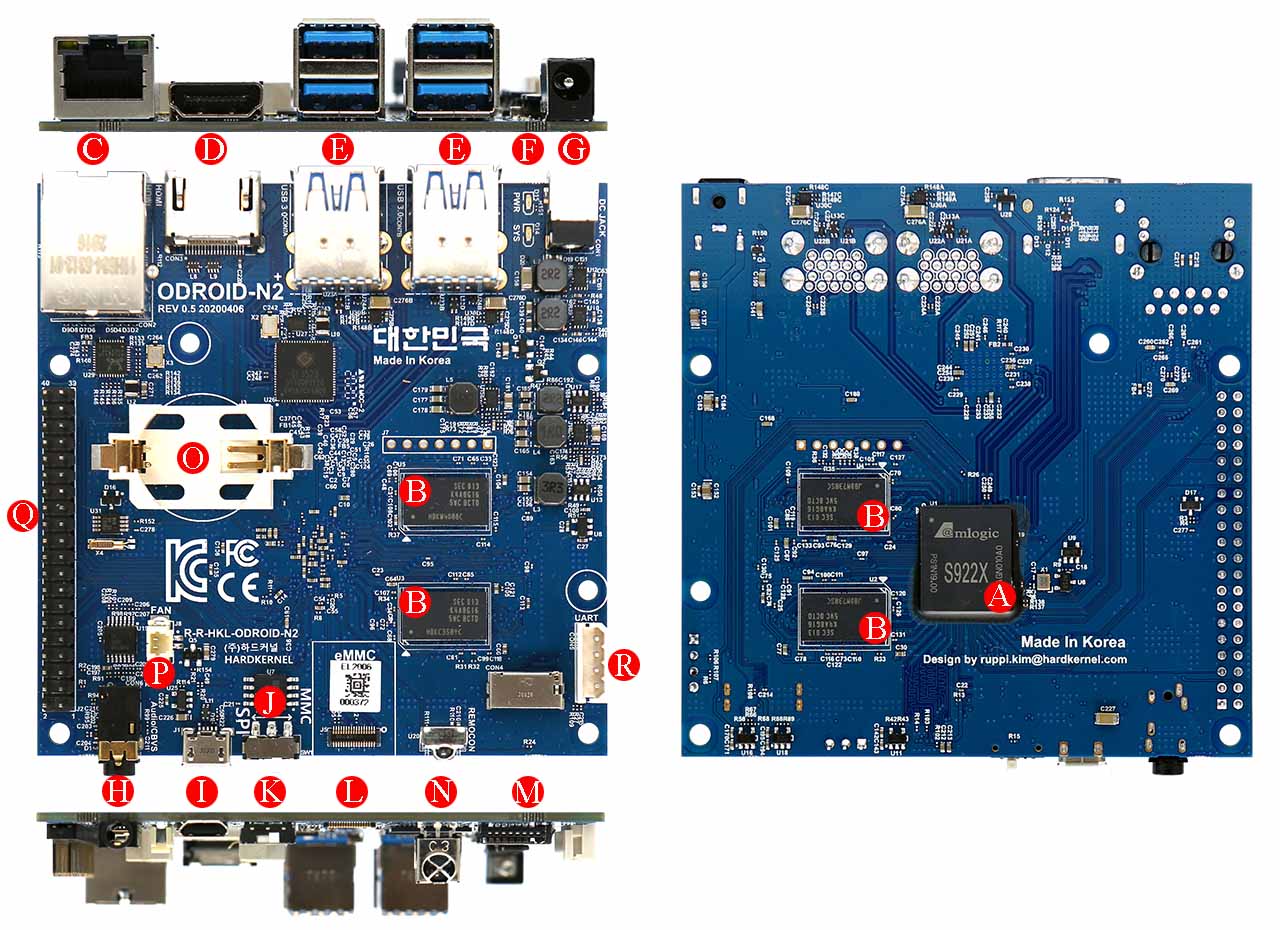 lunar kraken
https://www.home-assistant.io/installation/odroid trying to understand this.
eMMC is put in L in your link I guess. But why this link to one with a red dot?
fresh marten
I can only guess, but I think as long as it is red it could be fine, my guess is that dot is around 2019 and they changed to square
see https://wiki.odroid.com/accessory/emmc/reference_chart?s[]=emmc#emmc_modules_for_current_running_products_2016
scroll down to eMMC modules for year 2016~2019
mhmmmmmmmm... red square could be for linux C2
by any change in a odroid discord? users from there might be better suited to answer this question
lunar kraken
N2 seems to be purple squares now days. But is it important Linux/or android?
https://www.hardkernel.com/shop/16gb-emmc-module-n2-linux/ AHA! both red dot and purple square
fresh marten
I would guess so.
Probably there is some hardware madness going on, go for linux when you want to play with home assistant.
placid sage
Hi to all, my problem Homeassistant for PI 3b cannot be installed. Stucks during update phase. Time is wrong (1 hour) less. With a PI4 no problems. I used the 64 bit and also 32bit version nothing worked. Read a lot in homeassistant newsgroups, but found no hint. Does anybody have the same issue? Any ideas? thanks
got this error: [supervisor.jobs] 'Updater.fetch_data' blocked from execution, no supervisor internet connection
every 30s
dense herald
And is the ethernet plugged in?
placid sage
yes
dense herald
Have you tested the cable with another device
placid sage
now wifi used the correct ha image
yes
with a pi4
any ideas or is it a known issue with the pi3 image?
odd marlin
The pi3 is still supported and should be working. Did you check the console to see if you were getting an internet connection?
placid sage
yes it seems that there is no internet connection. I looked into cli.
but this is strange for the pi4 everything works fine.
there seems to be an issue with the dns-server: [supervisor.resolution.checks.base] Run check for IssueType.DNS_SERVER_FAILED/ContextType.DNS_SERVER
odd marlin
ha network info will show the IP, DNS servers, etc
placid sage
i looked on it everything looked ok
odd marlin
If you type login at the ha > prompt, you'll get a shell and can try pinging out to the internet and verify any connectivity issues
dense herald
Btw, update on the corrupt datadisk: I managed to find a lot of Core related files, but no backups :(
odd marlin
dense herald
Btw, update on the corrupt datadisk: I managed to find a lot of Core related fil...
Do you have the disk mounted right now?
dense herald
I haven't managed to fix the file system. I just scanned the entire drive with multiple recovery programs
placid sage
i use a sd card on the pi
what do you mean by update the corrupt data disk, I used a fresh installation image
dense herald
That's my problem, nothing to do with yours 😅
placid sage
problems occur directly after flashing the image, first boot (Preparing Home assistant....)
it seems to be that the time is not updated. time is 1 hour behind
odd marlin
The time is likely wrong because it can't connect to the internet to sync
placid sage
maybe you can tell me the ha commands to correct the dns-connection
odd marlin
You should make sure you can ping out to the internet etc first. If you don't have an internet connection, DNS won't work
dense herald
When connecting to any server the first thing that happens is a DNS request, so if you don't have internet the first thing that fails is the DNS
odd marlin
dense herald
I haven't managed to fix the file system. I just scanned the entire drive with m...
ah shoot 😦 tar files should theoretically be easy for a recovery program to locate, if they're intact, because they always have the same magic identifier of ustar
placid sage
when updating configuration.yaml there is no possibility to refresh the conf without restarting HA ?
dense herald
placid sage
when updating configuration.yaml there is no possibility to refresh the conf wit...
Depends on the type of change you made. If it's listed in Developer Tools > YAML then you can.
vale panther
humble mirage
That'll at least tell us if it's the host, or just the HA container
OK, so it's crashed no SSL or observer response.
dense herald
odd marlin
ah shoot 😦 tar files should theoretically be easy for a recovery program to loc...
Yeah... I found one tar of 6.8gb (seemed pretty empty tough, must be bogus bytes), and all the other tars are <32kb
placid sage
dense herald
Depends on the type of change you made. If it's listed in Developer Tools > YAML...
thanks, i wanted to refresh script last time, and i restarted everything but not needed at the end !!
previously it was not at this place
odd marlin
dense herald
Yeah... I found one tar of 6.8gb (seemed pretty empty tough, must be bogus bytes...
You could resort to making a full bit-for-bit backup of the drive as it is now, then try some file system repair tools on it. The backup is important if the repair tools destroy the data even more, you'll at least have the backup to go back to
placid sage
thanks for your help
dense herald
odd marlin
You could resort to making a full bit-for-bit backup of the drive as it is now, ...
I already have a dd. What programs are you thinking of?
odd marlin
I'd probably start with a basic fsck if it'll recognize it
dense herald
Alright, had to switch to Linux.
You mean just fsck /dev/sdc1?
Because that's giving the same error about an invalid superblock
odd marlin
Yeah that's what I meant for the fsck. What kind of drive is it? An SSD?
odd marlin
oh, ouch. They're definitely harder to recover from in general
Which file recovery tools have you tried so far?
low notch
what are we talking? haos disk image backup or debian?
dense herald
haos
dense herald
odd marlin
Which file recovery tools have you tried so far?
All the ones in HBCD. Ones that I can think off of the top of my head: Recuva, PhotoRec, LazaSoft, DMDE
low notch
dense herald
haos
ok I'm out
dense herald
😭
odd marlin
Ubuntu's wiki has some other tools listed: https://help.ubuntu.com/community/DataRecovery
golden walrus
Hi all, i just migrated my system from a raspberry pi to a docker container. Everything seems to be working well, except i have an error logged at startup. It says teh following platformsm and integrations could not be setup: hassio, raspberry_pi
i guess theyre from old addons i no longer have with the docker container
where are they being called so i can remove them?
brazen herald
Did you check the integrations list and the configuration.yaml?
golden walrus
i checked configuration.yaml but its pretty sparse. only thing i think i added there a while back is system monitor, but that appears to be working with the new computer
humble scaffoldBOT
@golden walrus I converted your message into a file since it's above 15 lines :+1:
brazen herald
Then you need to check the integrations list 🙂
golden walrus
where is that?
humble scaffoldBOT
Open your Home Assistant instance and show your integrations
golden walrus
oh, well i actually did have a raspberry_pi integration shown through the integrations GUI and i deleted it. restarted HA. still have this error
brazen herald
Odd. Do you have anything named Raspberry Pi?
brazen herald
What is the exact error?
golden walrus
i had to install somethign once for the RPi case thing i use. Argon or something. let me look into what i did there
humble scaffoldBOT
Please use a code share site to share code or logs, for example:
- http://pastie.org/ (select YAML for the language)
- https://dpaste.org/ (select YAML for the language)
- https://paste.debian.net/ (you guessed it, select YAML as the language)
Please don't use Pastebin, since it can randomly add spaces to the main view. Please also don't share text as images since it makes it harder for people to help you. Remember that others may have colour blindness, impaired vision, etc.
brazen herald
golden walrus
i had to install somethign once for the RPi case thing i use. Argon or something...
There would have been an add-on and also configuration for it most likely.