#hardware-archived
1 messages · Page 57 of 1
 cold moon
 vital turtle
So white is neutral here?
cold moon
Find the ground man
Think of neutral as back up ground
If there’s a ground fault neutral takes the electricity back to the breaker (in us and Canada uses our standards iirc)
 cold moon
the bare copper is your ground in the very back
stop what you're doing and buy an assorted pack of wago connectors
and a 10foot or longer stretch of 12/3 wire (assuming that is 12/3)
and then watch a youtube video on how to make pigtails
and then do it

Includes all 3 sizes of WAGO 221 LEVER-NUTS in a convenient plastic case. They are sorted into compartments by size. Use them to connect any combination of solid, stranded, and flexible copper wires faster and more reliably. Includes: 34x 221-412 (2 conductor), 26x 221-413 (3 conductor), 18x 221-...
vital turtle
cold moon
and then do it
sorry man, I'm not sure what I need to do
cold moon

WAGO (35 Pcs) Wire Connectors, 221 Series Lever-Nuts Assortment with Case,Includes (10x) 221-412, (10x) 221-2411, (10x) 221-413, (5X) 221-415 Compact Splicing Wire Connectors
canada
cold moon
vital turtle
sorry man, I'm not sure what I need to do
that's kind of my point
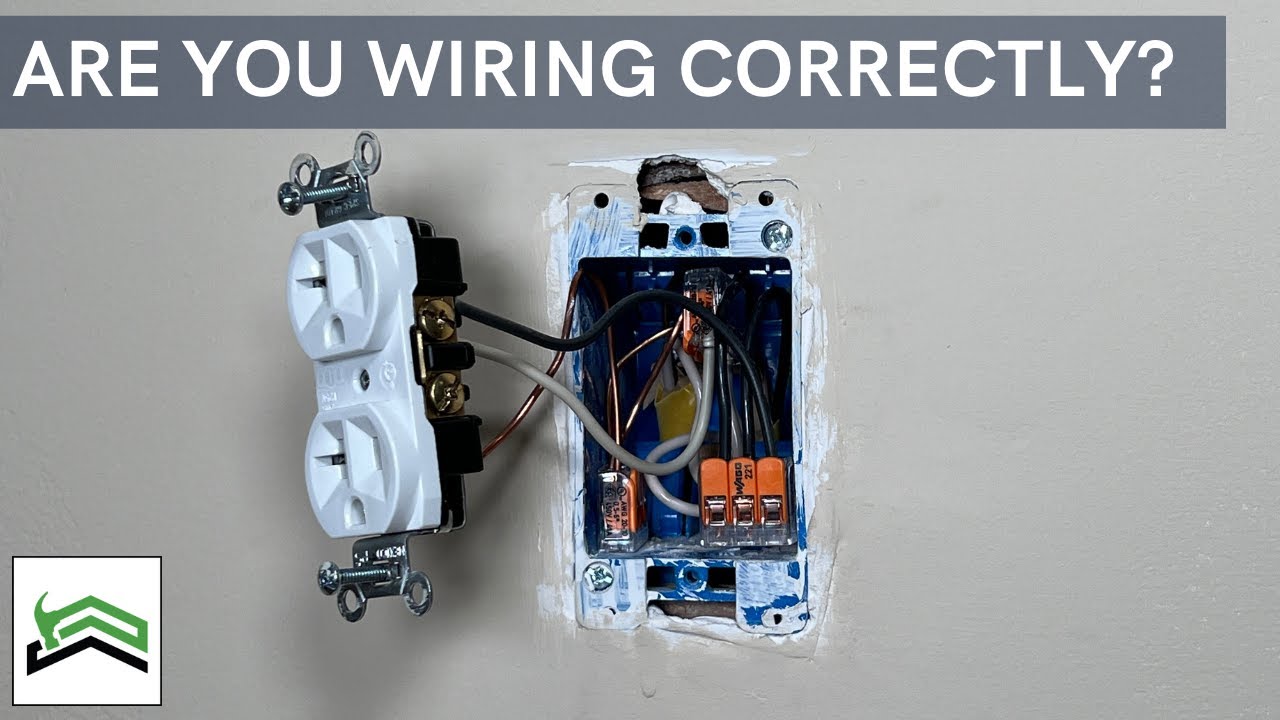
Most Popular Wago 221 Kit: https://amzn.to/3oMn2NP
One thing I learned a couple years back actually from a bunch of great comments on past videos is to use a Pigtail when wiring an outlet where you have multiple sets of Romex in the same electrical box. I will show you an example and the reasons why most electricians recommend using a pigtail...
watch this
vital turtle
i thought i can put a sonoff zbmini somewhere on the bottom or top and smartify this hallway light
cold moon
well first you should wire your shit right cuz it's not wired right
and then you can add a chinese device to your mains electricity (i wouldnt)
you need to learn more, buy the right shit, then do what you want
vital turtle
cold moon
you need to learn more, buy the right shit, then do what you want
ok fair enough, but what is wrong with the existing wiring if you don't mind elaborating?
cold moon
someone sent me one of those to try. it had already released the magic smoke

 cold moon
vital turtle
ok fair enough, but what is wrong with the existing wiring if you don't mind ela...
cold moon
vital turtle
ok fair enough, but what is wrong with the existing wiring if you don't mind ela...
i'd point you to what i've said above
hint: the ground that isnt connected to the switch
vital turtle
cold moon
hint: the ground that isnt connected to the switch
so the ground needs a wago to the switch
cold moon
this is very serious so you need to know what you are doing
just yoloing it is how you burn your house down and kill your pets and or family
i'm not gonna give step by step advice you need to watch youtube videos and learn
vital turtle
cold moon
i'm not gonna give step by step advice you need to watch youtube videos and lear...
I really appreciate the advice you've me given me about the ground but just know that you've done nothing to address my initial question about integrating a 3-way switch in HA and how it's current;y wired up given the pictures I've posted. Thanks any way.
cold moon
yikes
vital turtle
yikes indeed
 earnest spoke
I'm looking for a power strip (I need only 3 sockets but more are fine) in the EU that I can use with HA. I'm Protocol agnostic, so zigbee, zwave, WiFi (no cloud pls), it's all good. I'm looking for something with these features:
- Each Socket can be controlled individually with actual buttons (clicky would have a very high WAF / Wife Approval Factor) as well as with Home Assistant
- Energy monitoring for each socket
- USB ports nice to have, but not essential
I've managed to find strips that meet one or two of these criteria but not all. Does something like this even exist?
I've seen some talk about the Kasa HS300 but that one isn't available in 🇦🇹 (I can't find it in any case)
 glacial oracle
that sounds a bit like a unicorn in that combination
Maybe the NOUS A5T could be a match
i see plugs, switches, tasmota and energy monitoring
not sure if later is per plug tho
earnest spoke
That's the one I was about to pick but the hardware buttons are missing which is one of the most important factors. My wife is 100% not going to interact with HA in any capacity.
glacial oracle
those red things look like buttons to me but i didnt look into it further to confirm that
 cold moon
You can use any kind of battery powered remote or button to tie to some entity
She doesn’t need to know home assistant is the middle man
earnest spoke
cold moon
She doesn’t need to know home assistant is the middle man
The current solution is a normal Ikea power strip and it has MASSIVELY high WAF but the individual things aren't controllable. She wants a switch, and is willing to compromise and use a button, but janky is not cool.
 wispy sapphire
Has anyone an idea how to get an ecobee api without having to download their app?
cold moon
wispy sapphire
Has anyone an idea how to get an ecobee api without having to download their app...
What’s the end goal? You need an account and to follow the directions to enable the api on your account
Otherwise use HomeKit protocol over WiFi and don’t use the ecobee integration
wispy sapphire
cold moon
What’s the end goal? You need an account and to follow the directions to enable ...
I have it in home kit but can't access it off my net
I have an account with ecobee
but I don't / can't / shouldn[t need to use their app to register
cold moon
I did it on their website
Their app is just a shitty webapp in a shitty wrapper
I think they hired a guy off fiverr to make it
 bitter dove
Anyone have any experience interfacing this Amcrest video doorbell for NVR Coral/Frigate? I am looking at getting one that will still have good functionality when I sell my house as someone won't be running the smart home stuff as I'll take my server with me. Amcrest 4MP Video Doorbell Camera Pro, Outdoor Smart Home 2.4GHz and 5GHz Wireless WiFi Doorbell Camera, Micro SD Card, AI Human Detection, IP65 Weatherproof, 2-Way Audio, 164º Wide-Angle Wi-Fi AD410 https://a.co/d/bhWBsWC

AMCREST MODEL: AD410 DOORBELL CAMERA FEATURES: 4-Megapixel CMOS Image Sensor, HD 2560x1920p, 2K @15fps Focal Length: 2.27mm Max Aperture: F2.1 164° viewing angle Nightvision: Up to 16 feet Motion Detection up to 16 feet IP65 Weatherproof MicroSD Storage up to 128GB, Class 10 or higher. (MicroSD C...
 tall hare
I'm planning on replacing my current thermostat and from what i hear nest and ecobee are great but they cost nearly 200cad and i was wondering if there are any cheaper options?
 tawny viper
cold moon
someone sent me one of those to try. it had already released the magic smoke
tawny viper
cold moon
someone sent me one of those to try. it had already released the magic smoke
what a jerk
 acoustic yoke
has anybody found a good temperature sensor that works on Zigbee? I have a few different brands but the freezer that’s the furthest away loses connection regularly. it’s small and it’s placed inside of the freezer. ideally, some thing that ran on AA batteries. that was on the outside with a remote sensor would be ideal.
 golden thorn
I seem to be the only one who is mostly happy with the cheap tuya based stuff.
 tame hamlet
I've just gotten two tuya devices and I don't even know where to start with them lol
glacial oracle
The sensible way would be to start returning them
Alternatively there should be both a cloud + somewhat hacky local integration you could try to bring em into ha
Unless it's ZigBee then it at least will be not horrible to integrate
Kinda scary how many fake and real brands use their service
tame hamlet
both of them are zigbee
i just can't find anything on adding them to home assistant

 distant yacht
tame hamlet
distant yacht
tame hamlet
https://letmegooglethat.com/?q=ts0601+_tze200_icka1clh
Looks like it should work with Zigbee2MQTT already: https://github.com/Koenkk/zigbee2mqtt/issues/20977
https://letmegooglethat.com/?q=ts0601+_tze200_icka1clh+zha
Not supported by ZHA (yet): https://github.com/zigpy/zha-device-handlers/issues/2926
tame hamlet
am I meant to disable ZHA when using zigbee2mqtt?
distant yacht
tame hamlet
am I meant to disable ZHA when using zigbee2mqtt?
yes
and #zigbee-archived btw
 outer steppe
tall hare
I'm planning on replacing my current thermostat and from what i hear nest and ec...
outer steppe
tall hare
I'm planning on replacing my current thermostat and from what i hear nest and ec...
ecobee has been easier to not have to phone home (IMO) but honeywell makes a zigbee/zwave version that you can get. Second-hand is probably a decent option, I got an ecobee premium for decently cheap off of facebook
tall hare
outer steppe
ecobee has been easier to not have to phone home (IMO) but honeywell makes a zig...
I mean I already got zigbee might as well be using it then but I'll check the second hand market for ecobee thank you
 mystic marsh
I am wondering if there is already a Blauberg fan integration?
Blauberg Smart Wi-Fi doesn't work out of the box and I am planning to create PR, if there isn't anything
tame hamlet
any good VOC monitors that are cheap?
 quasi spindle
What's the brightest multicolor LED chip you can buy to make your own e26 led light?
cold moon
tame hamlet
any good VOC monitors that are cheap?
Not cheap
tame hamlet
how not cheap is not cheap
 gloomy spoke
what is cheap for you?
cold moon

Apollo Automation
The Apollo AIR-1 is the most compact, feature-rich, affordable, and expandable air sensor for Home Assistant. Utilizing wifi and ESPHome it is locally controlled with no subscription or cloud required. Powered via USB-C and a standard wall plug. We proudly offer the software and CAD drawings to the community, encour
$80+ compared to $50 or so for a much worse ikea version
tame hamlet
gloomy spoke
what is cheap for you?
like ~£30
tame hamlet
cold moon
https://apolloautomation.com/products/air-1?variant=47743956025651
looks nice but ouch
gloomy spoke
your lungs may be the air quality meter that means that price target
there are some DIY ones
tame hamlet
i don't mind DIYing it if it's cheaper
cold moon
The air 1 is just a diy sen55 with a custom pcb and some added led and whatever else
But the sen55 itself is like $50+ iirc
tame hamlet
right
cold moon
Not sure how much you can save if you want an advanced multisensor like that
 wild atlas
I would've recommended the air gradient but even diy that comes in above $50
It does have more sensors though
 proven gust
anyone know any good smart mortise locks / how to tell if it fits in your door? this thing seems so complicated.
cold moon
proven gust
anyone know any good smart mortise locks / how to tell if it fits in your door? ...
basically none exist last time this was brought up
proven gust
how much is a new door lol
 ashen apex
If I wanted to monitor AND have relay control over a 240V 15A circuit, would I just need a Shelley EM? Or does that not have the relay capability, just the monitoring portion? Never mind, just read the docs. Relay is a separate connection in the EM and only rated to 2A.
Anyone know of an in-wall/in-breaker relay/energy monitoring solution strong enough to handle 15A?
golden thorn
Since you mentioned shelly. The 1PM states that it can handle 16A.
ashen apex
Yeah, I just saw that. I'm not convinced though. In my experience, relays often fuse if you try and break the circuit with high current. They might work alright up to 10A, but would be good to hear some experiences if anyone is using them to their max rated current.
Reading up on it, sounds like the EM is the way to go with the contractor controlling a breaker directly.
 mild galleon
I have a dehumidifier that I want to control with home assistant. It sits inside a camper trailer, and the camper trailer already gets power for about an hour every day, controlled by HA, to charge the battery. The issue I have is that the dehumidifier requires a touch to restart once the power has been disrupted. There is a plastic top, that has no button, just a spring underneath it, and it detects the capacitance of the hand touching the plastic lid. Is this forum a good place to get ideas on how to trigger this, or even remove that sensor altogether? If not, can anyone recommend a forum where I could discuss this and get some guidance? BTW, the device is powered by only 9 volts barrel plug, so safe to play with, I do have a humidity sensor in the camper that reports to HA, and I will route the liquid outside the camper, so if I can make it so it is on when power is supplied, then the system will be fully automatic. I just don't know how to route around the sensor switch.Thx.
 half sentinel
Do i need a managed poe switch for cameras?
I'm planning on having a 24 port 2.5gbe switch, a 16-24port poe gigabit switch hooked up to cameras, and wanna hide them and other network devices from the web for security. I may possibly add a pfsense 4port 2.5gbe firewall. Would like to put all the iot gear in a vlan or 2 n only have my servers see it. Currently proxmox on optiplex but thinking of an i5 in a 2-4ru rackmount case with 2-4 hdds and try make it a nas with 2.5gbe nic, coral ai. I have 2 optiplexes and 1 runs HAOS and want to try high availability with the second optiplex, POE zigbee coordinators (1 in house, 1 in shed).
Wanna fit it all in a 9ru rack. Just not sure if I can do the main switch as managed 2.5gbe to manage the cameras too, if everything needs to be managed, or nothing and pfsense is enough. Also a UPS and a 1ru power strip. Probably a patch panel. and a 1ru tray for the optiplexes. I'm thinking 4-8mp probably 4mp large sensor size dahua cameras poe, 8 or so, and possible 2 wifi if I get a chicken coop for chicken cam lol so i can stream to youtube for fun n keep an eye on them.
 runic tinsel
ashen apex
Yeah, I just saw that. I'm not convinced though. In my experience, relays often ...
runic tinsel
ashen apex
Yeah, I just saw that. I'm not convinced though. In my experience, relays often ...
I ended up with a tp-link P110 as the only thing I could find on the market here -- type E sockets in the EU. But the highest I;ve seen it pull was 13A or so and I've never tried switchign it on/off with that kind of current going though.
runic tinsel
mild galleon
I have a dehumidifier that I want to control with home assistant. It sits inside...
You could just remove the connection to the touch sensor and wire it directly? WIth 9V nothing can go wrong really
 unique mural
Anyone got recommendations for Zigbee USB adapters? Have narrowed to Conbee 2 zigbee or Sonoff Zigbee 3.0, are there others I should look at?
 winged knoll
#zigbee-archived can help there, but the TL/DR is not the ConBee 2 and not the Sonoff P (there's at least 4 of theirs that are Zigbee 3.0)
unique mural
Ah, thanks!
half sentinel
slzb-06 poe is good. apparently the m version is good too.
unique mural
Yeah thanks, that looks handy with ethernet also
 final canyon
hi there, i have a question, i am looking for a small hardware devices that can imitate a light bulb. i have a smart duo dimmer in my walls and 1 is connected to a light bulb and the second is not wired but there is no light bulb (because i don;t need it right now) my idea is to put a small device which can monitor if the dimmer has been set to on (Power flows) and even better to monitor the voltage output what do you guys recommend?
glacial oracle
If it's smart won't it just tell you wether or not it's turned on?
final canyon
nope, there must be a device / light bulb connected behind the dimmer
only then it registers if it is turn on or off
it is always off by default but to turn it on it needs a light bulb or something with power behind it
glacial oracle
That sounds like it might expect a minimal load
wild atlas
Is it a smart switch without a neutral connection?
If you have a neutral you can connect, then you normally don't need a load for it to get power
final canyon
ECO-DIM.05 WiFi it is this type of dim unit
glacial oracle
I would check what load size would minimally be required
If it's sufficiently little you may get away if you just put a large enough but small resistor in there
wild atlas
It's certainly got a minimum load, they advertise no neutral required
 muted maple
I'm looking for hardware solution for water meter.
Any solution working with Maddalena CD SD PLUS ?
OR thinking of changing the meter itself .. and I'd like a digital meter. not a reed one sending delta but more like a p1 sending digital numbers
For reed i know :
https://watermeterkit.nl/ or https://www.homewizard.com
glacial oracle
The homewizard clip on one is probably one of the easiest solutions on compatible meters
muted maple
agree ! I'm using it at home.
but only works with Maddalena MVM .. not CD SD PLUS
and if I need to change I was wondering if a numeric .. like P1 for electricity exist.
glacial oracle
Most I am currently seeing look like lorawan/oms or similar wireless
 tacit creek
Hello people.
In my home I deployed HASS on QNAP NAS.
I am looking for temperature and humidity sensors.
I look for something which integrates well, is not too expensive and has a potential for the future (thread? Matter? ...).
I live in Czech Republic, I'm only starting with all of this. So I have no gate etc.
I have no specific budget, but I want to keep it modest.
cold moon
tacit creek
Hello people.
In my home I deployed HASS on QNAP NAS.
I am looking for temperatu...
Best bet is to just ignore thread and matter and buy known working devices using known working protocols
muted maple
glacial oracle
Most I am currently seeing look like lorawan/oms or similar wireless
hmm that's a domain i know nothing about.. thx for the lecture 😉
how do you integrate Lora with HA ? gateway with dedicated integration ?
cold moon
If you want dirt cheap temp humidity buy the xaiomi Bluetooth ones for around $5 each
If you want to spend a bit more then aqara zigbee temp humidity sensors will work fine
tacit creek
cold moon
If you want dirt cheap temp humidity buy the xaiomi Bluetooth ones for around $5...
Thank you for advice. I have to admit I feel uneasy taking Xiaomi/Huawei into my house.
OK. So Aqara looks sensible.
How is it in compatibility with other producers? Won't Aqara bridge prevent me from using something else?
cold moon
Aqara and xaiomi are the same company fyi
These would be used fully local with no cloud connection whatsoever
I fully support not buying Chinese cloud connected garbage
winged knoll
Don't use the bridge, use a #zigbee-archived coordinator with ZHA or Zigbee2MQTT
cold moon
tacit creek
Thank you for advice. I have to admit I feel uneasy taking Xiaomi/Huawei into my...
Ignore what the box says
https://www.zigbee2mqtt.io/supported-devices/ if the device exists here it has support for fully local via zigbee like tinkerer said
Zigbee to MQTT bridge, get rid of your proprietary Zigbee bridges
tacit creek
Oh. Thank you.
BTW is there some page/blog... about home automation I can study?
cold moon
There are many but none I’d link to
I have my own opinions 
The smart home scene guy has some decent write ups
https://www.derekseaman.com/2023/10/home-assistant-proxmox-ve-8-0-quick-start-guide-2.html and this guys site

Hot off the press is Proxmox VE 8.1, which GA'd in late November, 2023. It is based on Debian Bookworm 12.2, and has a number of new features like defaulting to Linux Kernel 6.5. This post is a completely refreshed version of my popular Home Assistant: Proxmox VE 8.0 Quick Start Guide, but all new
I’d take their hardware suggestions with a grain of salt
winged knoll
tacit creek
Oh. Thank you.
BTW is there some page/blog... about home automation I can study?
Start with the HA site itself, that's the best source of current truth
There's lots of blogs (hell, I have one), but they all suffer from the problem that HA moves fast and things become outdated
cold moon
The bigger issue is thread and matter being shoved down peoples throats
Which spurred his initial request asking about devices for them
tacit creek
Well, the idea of it seems rather promising.
But Matter/thread devices are expensive as hell.
cold moon
Well we’ve been sold a lie
And as you understand home assistant more you’ll see whatever benefits they could offer we get with hass
winged knoll
For Matter and Thread try again in 2025
muted maple
glacial oracle
Most I am currently seeing look like lorawan/oms or similar wireless
does anyone knows about lora integration into ha ?
doesn't seem very popular
cold moon
muted maple
does anyone knows about lora integration into ha ?
doesn't seem very popular
One gateway, many technologies: MQTT gateway for ESP8266, ESP32, Sonoff RF Bridge or Arduino with bidirectional 433mhz/315mhz/868mhz, Infrared communications, BLE, beacons detection, mi flora / mi jia / LYWSD02/ Mi Scale compatibility, SMS & LORA.
muted maple
I'm only on first page and looks ultra sexyyyyy 🙂 thx
 tawny veldt
I'm in ikea right now, looking at their smart lights, do I need the 'DIRIGERA' to connect the lights, or can I connect the directly to HA running on my laptop? I have a Google hub and a Philips bridge at home, if that makes a difference
 terse pebble
IKEA Tradfri bulbs can be paired with the Hue bridge. Not sure, if the Styrbar, Rodret and Somrig work with it.
tawny veldt
terse pebble
IKEA Tradfri bulbs can be paired with the Hue bridge. Not sure, if the Styrbar, ...
Oh really!? That's sick! I'll pick some up then, thank you!
 gusty dust
Would it be worth updating my hardware from an RPi 4 to RPi 5. And even if there were performance gains, would it be worth the time to move everything over?
winged knoll
The move would be to restore a backup on the new host
gusty dust
Or if someone has a different suggestion to upgrade from an RPi4
winged knoll
Well, the standard recommendation is a small form factor (SFF) PC
gusty dust
winged knoll
The move would be to restore a backup on the new host
Does that restore like "everything" or would there be addons/HACS/settings that would need to be redone manually? I've never dont a restore beforfe
 subtle creek
i mean.., take something like openwrt, a backup is just some of the configs, to restore it you still need to reinstall all of the extra apps
perfectly valid question
winged knoll
HAOS backups only include the data and settings, but it's smart enough to re-install add-ons when you restore a backup of them
 magic flint
muted maple
agree ! I'm using it at home.
but only works with Maddalena MVM .. not CD SD PLU...
magic flint
muted maple
agree ! I'm using it at home.
but only works with Maddalena MVM .. not CD SD PLU...
Hi, slowpoke response, I just use tape to keep it in place along with the clip (that isn't screwed in obviously)
So the adapters aren't compatible with my meter but I can still use it
 rose rain
Anyone here have a Mi Band 8 and know how to get it into "Discoverable" mode so that I can track it with something like ESPresence?
The documentation says the bands work if they're set to discoverable but I don't see the option anywhere
 hexed galleon
Each time I am more into home automation, I have automated my whole house, I am just missing Climatization
I have been checking options so far for a Haier MRV2 but everything seems very expensive, INtesis and Coolmaster
Now, I saw a can Install a Modbus RTU translator to the VRF thats a good starting point
now I need to get that to homeassistant
I was thinking two options, send ModBus to a KNX gateway and KNX to homeassistant
Or more simplier send modbus data to homeassistant
now question is, for both options
How
I am a noob lol
 inland fog
Good evening and I am new to this server, I was wondering if anyone could help me with a 3rd party hardware issue. I have a nodemcu ESP8266 running Milight Hub, with Mosquitto Broker, running Node Red for my automations. The issue that I am having is with Node Red and my lighting in Overview. With the effects, I have played around with them in overview, but when I try to get a light to change color, it will go to the color that I want, but then the effect will take over, (If I set the light to red, get it to turn to that color, then it will go right to white mode, or what ever mode I had selected before) Is there a way to clear the effects every time so that I can properly utilize the colors without it being overridden?
 cyan lichen
rose rain
Anyone here have a Mi Band 8 and know how to get it into "Discoverable" mode so ...
cyan lichen
rose rain
Anyone here have a Mi Band 8 and know how to get it into "Discoverable" mode so ...
hmm. I know how to do that with the fairly similar Amazfit fitness bands with the Zepp app - there's just a toggle for "Discoverable" when you select the device in your profile in the phone app. But Xiaomi uses a different app and I wouldn't know where to look :/ It probably is only something you can enable in the phone app and not in the on-device settings tho.
 solemn falcon
Im currently casting my dashboards to 2 google nest hubs, one has broke down.
Im looking for an alternative: an affordable standing touchscreen with power cord (no batteries) which will work locally. Suggestions?
 fading aurora
I'm moving away from philips hue as I'm sure a lot of people are in recent times. Looking for recommendations for a reliable zigbee based alternative which is available in downlights and standard bulbs. Price, don't think any vendor is more expensive than hue so not a concern.
golden thorn
Might be useful to know why you're moving away from them.
fading aurora
golden thorn
Might be useful to know why you're moving away from them.
Want to keep everything local and Philips are about to enforce having a hue account and data sharing with 3rd parties
glacial oracle
that will pretty much change nothing about the hardware besides their hub
its just zigbee
getting a decent zigbee coordinator + zha/z2m will ensure fun for days to come no matter what they decide on
fading aurora
I will be keeping the existing bulbs and moving them to my zigbee controller. But don't want to finish the rest of my house with hue
glacial oracle
most stuff is just an intentional downgrade at that point
if you dont need the brightness the bulbs from ikea seem to work quite ok for people
but those just come in standard shapes
fading aurora
yeah if they had a downlight option I would be keen on going that route
 junior spear
Does anyone have an alternative smart button system similar to this Ikea Tradfri remote?
I use this with an automation where I can assign functions to each button but I can’t find them anymore online, any suggestions would be great
 runic tinsel
junior spear
Does anyone have an alternative smart button system similar to this Ikea Tradfri...
runic tinsel
junior spear
Does anyone have an alternative smart button system similar to this Ikea Tradfri...
The Ikea Styrbar
 junior spear
runic tinsel
The Ikea Styrbar
junior spear
runic tinsel
The Ikea Styrbar
Nice, assume I can integrate it the same way I’ve integrated the last one?
runic tinsel
it's basically the same apart from the missing middle button and additional heft
 tacit pilot
Looking for RF transmitter recommendations. I have a broadlink ir blaster I really like and was thinking of getting the RF one, but thought I'd ask to see what else is out there.
rose rain
cyan lichen
hmm. I know how to do that with the fairly similar Amazfit fitness bands with th...
Yeah I did a bunch more searching, including scouring the app, and it seems they may have removed it from this version 😭 I found a reddit thread of people with the same complaint.
 indigo bolt
Has anybody used this screen? I'm thinking of cutting a hole in the wall and feeding in the port section in and powering everything inside the wall that way the tablet would be flush. Heat would be a concern however. https://www.aliexpress.com/item/1005003799767538.html
golden thorn
Please read this: #zigbee-archived message
cold moon
golden thorn
Please read this: https://discord.com/channels/330944238910963714/55184365568249...
Imo linking to a zigbee channel just confuses them even tho I understand your reasoning
If you don’t want to copy paste then imo it’s worth contributing to the bot to see if tinkerer will add a new command
golden thorn
I'm a little bit afraid of contributing due to the horror stories 😄
indigo bolt
golden thorn
Please read this: https://discord.com/channels/330944238910963714/55184365568249...
Thanks I honestly did not know about that. I did try make it smaller but didn't know that links contain a lot of other phishing stuff. good to know thanks. Did I do it right also ?
cold moon
indigo bolt
Thanks I honestly did not know about that. I did try make it smaller but didn't ...
if you arent already i highly suggest you install the ublock origin web browser plugin
look how much is blocked just from one site "cnn.com"


this is all legal because.. people suck. so we have to protect ourselves from getting cucked by... big browser
indigo bolt
I do have Malwarebyte browser gaurd currenlty. would you say ublock is better?
cold moon
i would say malwarebytes is worthless
you use windows?
you dont need an extra antivirus you have one built in called windows defender
just dont go to "please-pwn-me-daddy.com" and you will be fine
indigo bolt
cool good to know i went cnn to see what its block and it shot up to 40 something. so its not to bad but i will look into Ublock thanks.
ya windows also. I use defender ya.
cold moon
you should also be using some form of dns blackhole adblocking like pihole/adguard or at least one of the public dns with some blacklists in place like quad9
indigo bolt
I had pihole on my home network for a little bit but couldnt get the lists right to allow my work stuff through while working from home so i unplugged it until i had more time to do a deepdive and figure out what i needed to allow.
 serene mulch
Someone with the Lutron Diva dimmers answer a couple of questions for me please:
Does the brightness setting from the physical slider make it into HA?
I've seen online that people are annoyed that when you turn_on the entity, it defaults to full brightness. But if I can read and store the setting from the slider, then this can be worked around.
Also, imagine the following scenario:
- Turn light on at physical switch, move slider to 100% brightness.
- Change brightness to 50% via HA
- Turn off via HA
- Turn on via physical switch
Does the brightness go to 100% or 50%?
cold moon
if you havent already bought them i'd look into zigbee or zwave solutions instead
serene mulch
I have zigbee and zwave networks already for other sensors, buttons, locks, etc.
I just haven't found hardwired smart switches anywhere close to the quality that Lutron is putting out.
cold moon
Inovelli blue or red or black owners would disagree
serene mulch
I've looked into Inovelli. I really like the multi-tap inputs, and the LED bar is cool, but the slider on the Diva is so much more intuitive and friendly to guests and future owners of my home
Maybe I'm missing something, but why Inovelli over Lutron?
cold moon
That’s basically it. The multi tap functionality and them being good repeaters on your zigbee or zwave meshes
Also they’re releasing a switch with built in mmWave but it’s months out and I expect firmware bugs for months after release
I’m not a fan of proprietary bridges like Lutron but it’s definitely a good product line if you are
It’s basically zwave using around 900mhz band
serene mulch
Honestly, if they had sliders, I'd 100% go Inovelli.
Plus I think they're about to start dropping Matter switches.

 near knoll
junior spear
Does anyone have an alternative smart button system similar to this Ikea Tradfri...
near knoll
junior spear
Does anyone have an alternative smart button system similar to this Ikea Tradfri...
I can recommend the SYMFONISK sound remote gen2. More buttons! https://www.zigbee2mqtt.io/images/devices/E2123.png
 cold moon
serene mulch
Honestly, if they had sliders, I'd 100% go Inovelli.
Plus I think they're about ...
cold moon
serene mulch
Honestly, if they had sliders, I'd 100% go Inovelli.
Plus I think they're about ...
I automate with motion sensors and dim based on time of day. For me interacting with the switch isn’t necessary unless I want to override an automation
serene mulch
cold moon
I automate with motion sensors and dim based on time of day. For me interacting ...
I've got a few lights running on https://github.com/basnijholt/adaptive-lighting, which has been really nice.
What motion sensors are you using, if I may ask?
cold moon
I don’t like adaptive lighting and find it kinda crazy but it seems good at what it does. I just stick to a nice warm color temp
I use hue motion sensors but the newer aqara p1 work well I have one
The hue last over 4 years on battery life and have a 10 second retrigger time. Aqara p1 is down to 5 second Re trigger which could be better for a bathroom or stairs in a multi person household
serene mulch
Was about to ask if they're battery and how their life is.
I picked up an Aqara FP2, but the wall-plug tether is a deal-breaker
plus I get near-constant false detections despite hours of troubleshooting.
How are the Hues and P1 on false-positives?
cold moon
serene mulch
plus I get near-constant false detections despite hours of troubleshooting.
How ...
Non existent on hue, p1 my cats 🐈 activate them so I do notice bathroom lights on sometimes but I don’t think it’s a false positive
Just a sneaky black cat
He lets me hold him like a sack of potatoes

Live pic made it blurry lol
serene mulch
Haha cute cat.
You have a robot vacuum?
cold moon
Fp2 had a firmware update that was supposed to fix ghosting mostly but I couldn’t justify nor afford to buy one to try
cold moon
serene mulch
Haha cute cat.
You have a robot vacuum?
Nah but if I did I’d only buy ones that can be flashed to openvaletudo no cloud bs
Roborock fanciest model probably
serene mulch
Was gonna ask if it sets off the motion sensors
cold moon
I’m sure
I don’t use motion sensors in open areas like living room or bedroom. I do it for bathroom stairs kitchen laundry room
Stairs I’m testing an mmWave sensor Msr-1 so I can do some fun automations with an led strip based on coming up or going down stairs
I was hoping to use fp2 or similar mmWave for dining room living room etc but I’ve just been pushing it off hoping the space matures a little
I have two fp1 and played with zones and they work ok but do get stuck occasionally and that breaks automations
Also fans set off mmWave so placement is a big concern
 native pilot
cold moon
Fp2 had a firmware update that was supposed to fix ghosting mostly but I couldn’...
native pilot
cold moon
Fp2 had a firmware update that was supposed to fix ghosting mostly but I couldn’...
the firmware update fixed the ghosting in my case (along with their "AI false detection training" feature)
cold moon
I’ve heard it still happens to others
serene mulch
I still got some ghosting after the update, so I gave up pretty quickly. Maybe I'll give it another go
 ashen sentinel
Is there a good GPS device for a small dog that doesn't require a subscription and works with HA?
cold moon
gps or bluetooth tracking around your house/yard?
otherwise airtag with one of those collar or harness things to attach to dog is prob easy answer
ashen sentinel
cold moon
gps or bluetooth tracking around your house/yard?
Gps, she's running next to me when cross country skiing, but as a safety if she runs away (and to be able to track her daily activity etc)
Does AirTag work even if you're not in the apple ecosystem?
cold moon
It’s a bad use case for this but no it uses other Apple devices as a big botnet more or less
 fluid hedge
Would anyone be able to help me picking a led strip / controller?
 outer knotBOT
Looking for advice about a device to buy? Remember to provide guidance on:
- Which country you're in
- What your budget is
- What protocols you prefer (eg Zigbee, WiFi, Z-Wave)
- Any features you want (such as power monitoring, dimming, etc)
fluid hedge
Good call.
Im looking for a controller + cob led strip ww/cw.
Im in the netherlands but i dont mind buying on ali.
my budget is about 50 euros.
i prefer zigbee.
Features i want are: dimming, support for transitions (soft on/off) in z2m. cob strip with cool white / warm white - no rgb.
I've already done some research and found that gledopto should offer these features but i dont really mind other brands as long as the quality is good.
winged knoll
Gledopto controller + strip of your choice
https://www.zigbee2mqtt.io/devices/GL-C-008P.html is what I use
The more you spend on the strip the better you'll get
fluid hedge
are ali links allowed?
winged knoll
(also, longer costs more, you didn't say what length you needed)
Yes, with all the tracking crap removed
fluid hedge
https://www.aliexpress.com/item/1005006211142868.html this is the one i found

 devout parrot
ashen sentinel
Is there a good GPS device for a small dog that doesn't require a subscription a...
devout parrot
ashen sentinel
Is there a good GPS device for a small dog that doesn't require a subscription a...
Anything that's compatible with Traccar. The thing is you'll have to charge it periodically and you will need a subscription to some kind of data plan for it to work.
winged knoll
Homey Tuya Smart Life APP Control ... gives me shivers
fluid hedge
oh that is just what it supports
winged knoll
As long as it's not actually Tuya it'll be fine
Anything that says Smart Life or Tuya though is suspect
fluid hedge
This'll be my first diy led strip so im a bit confused here and there
the demo video for the product on that page shows a CW/WW strip connected with just 2 wires whereas the ones i found were 3
fluid hedge
okay weird how they changed the colour temperature with just 2 wires, thats what confused me
Thank you
 patent river
I mean if you really just had to save the pin, you could do it like how xmas lights work. Wire the cool white LEDs +- and the warm white -+
I don't know I've seen anything do it that way, but technically would be possible. It's just awful at the kind of PWM frequency cheap equipment tends to use
fluid hedge
winged knoll
<https://www.zigbee2mqtt.io/devices/GL-C-008P.html> is what I use
Just curious, this is the RGB version, the 006P is the (CW/WW) CCT version but neither the 008P or the 006P state anything about dimming, the Z2M page does state a brightness option though.
fluid hedge
thats awesome, would you recommend the RGBCCT for a CCT CW/WW strip?
winged knoll
Check the link above ( #hardware-archived message ) - pure CCT will be better than RGB+CCT for whites
(if they're not directly visible then you'll probably be fine, but if they're not directly visible why buy COB?)
fluid hedge
Hm, the reason why is im afraid the individual leds might be visible
winged knoll
Sure, if the strip is directly visible
fluid hedge
so i might potentially save some money here if i dont buy cob
https://www.aliexpress.com/item/1005005967259602.html this was the one i had my eyes on
winged knoll
COB is great if you can see the strip and you've no room for a diffuser, though from about 100 LED/m it may not matter to you
fluid hedge
i see
well, price wise (if i were to pick auxmer) it doesn't seem to matter
These are the CCT WW/CW options from auxmer, i honestly wouldn't know why i would pick one over the other.
https://www.aliexpress.com/item/1005005084263043.html
https://www.aliexpress.com/item/32914447442.html
https://www.aliexpress.com/item/1005005070984213.html
winged knoll
Two have a high cri, one doesn't
fluid hedge
Just noticed that too, so i have two options
fluid hedge
mm okay
I'm going for the low one, probably more than good enough for under kitchen cabinets.
Thank you @winged knoll
 zenith ivy
Anyone know of a device I could attach to my car battery and have it alert me if the Voltage goes below a set voltage?
cold moon
zenith ivy
Anyone know of a device I could attach to my car battery and have it alert me if...
Wican?

Not sure if that’s what it does I forget
zenith ivy
That’s pretty cool I’ll look into it. It should be an option as voltage should be in the CAN data. I’m shocked there isn’t a cheaper option for simply battery voltage monitoring. It would be useful for all small equipment monitoring. I guess I’m the only one who wants to have low power voltage monitoring for such things like the car, mower, ect. Or there is a DIY solution via ESP chips that I haven’t found yet.
cold moon
zenith ivy
That’s pretty cool I’ll look into it. It should be an option as voltage should b...
All this is is a diy esp32 in a cute case on a pcb
 silk basin
cold moon
I’m sure
silk basin
cold moon
I’m sure
mmwave just may be too sensitive since it sees through stuff. I've had stairs out for years without any trouble using a 7-in-1 motion sensor. luminance decides if the light is needed, motion triggers it, and it also monitors temp and humidity for other purposes (heat rises, i run house fan occasionally to even if out overnight, for a better sleep).
 cold moon
silk basin
mmwave just may be too sensitive since it sees through stuff. I've had stairs ou...
cold moon
silk basin
mmwave just may be too sensitive since it sees through stuff. I've had stairs ou...
I’ve tuned it it works just as expected


It has 3 zones that can tell if I’m at top bottom or middle
I got glued it to the wall to test lol
I need to figure out a good permanent mounting solution and test again
I’m tempted to hide it behind drywall in the attic but I don’t want to do the work necessary for that
Tbh there’s still a delay compared to PIR even tho it’s wired
But I haven’t updated the esphome code on it and recalibrated since they made some big changes
silk basin
cold moon
I’ve tuned it it works just as expected
Attic space is "outdoors" anyway, you have to humidity proof it up there, and PLA prints will just crack in time with the temperatures unless you dip it in epoxy paint. I went with down-lighting since that's the pathway to our bedrooms, when tired, a blast in the eyes with led's isn't relaxing.
Maybe you can do some kind of mobile, with it embedded. Have kids? They'll be thrilled to make one.
cold moon
/me thinks of a nice way to say i know more than you
I use this diffuser on the stairs

It takes a lot of the lumens
i actually would like to switch it to downlighting tbh but i am waiting to redo all my shit
i have two dig octas that i will be putting in IDFs around the house
and i will use those to supply 24v and data to various rooms and closets
right now they are still on my test bench cuz i'm roadblocked by money and laziness
silk basin
similar to mine, though it's aluminum, just i did down-lighting, my banister is huge though. Did you ever end up automating your cat door?

 silk basin
t'was i... but i think you were interested.
cold moon
ah
silk basin
how do you disperse the 24v?
cold moon
nah man i never really looked into it and forget what you did
cold moon
silk basin
how do you disperse the 24v?
do you mean drop down to 12v/5v?
this thing has a shitload of power and ground terminals
and comes with 8x data outputs
so you just run 18/3 wire to a bunch of places from this
and bam one ethernet controller to control a bunch of rooms
cuz right now i am overextended to hell and back with my wled instances
silk basin
i assume you buck down at termini, but are sending 24v throughout...
cold moon
shitting all over my 2.4ghz wifi
cold moon
silk basin
i assume you buck down at termini, but are sending 24v throughout...
i will be using 24v for long runs and switching to 5v with buck converter if i use 5v at that end location
each location will depend on length of strip i havent decided how much i want to redo yet
silk basin
It's DC, right? shouldn't be messing with the wifi. get a big cap on it if the switching is noisy
cold moon

this is why i need to do what i've laid out above
a bunch of cheap esp8266/esp32 are having lots of retries cuz their antennas suck and airtime fairness issues with APs
and i have 4 APs lol
i just kept throwing stuff at my 2.4ghz network til it got mad
tbh i'll probably have to switch from smart wifi plugs on each 3d printer to zigbee/zwave too
but i'll remove wled stuff or minimize that first
i might just leave one extra in wall AP in that room with low power on 2.4ghz just for some stuff in there tho
cold moon
silk basin
It's DC, right? shouldn't be messing with the wifi. get a big cap on it if the...
i'm talking about all the controllers i'm using that will be unnecessary when i instead replace them with one big controller (or two)
i have 25 wled controllers lmfao
 silk basin
That's a many-spaces house... business? I had to run my own wiring, would have loved to have had lan cables all over, with home runs to a utility closet, but my home instead came with interlaced daisy runs for electricity creating a bunch of crazy loops. I think i've got them all, then another pops up... I'll never get LAN in the walls, would have been nice to POE the power though.
cold moon
 cold moon
silk basin
That's a many-spaces house... business? I had to run my own wiring, would hav...
cold moon
silk basin
That's a many-spaces house... business? I had to run my own wiring, would hav...
5 bedroom 2800sqft iirc
basically the layout (i guessed i didnt put in perfect measurements)

 silk basin
not much bigger than mine. why so many wifi channels? Lots of steel around?
cold moon
silk basin
That's a many-spaces house... business? I had to run my own wiring, would hav...
i've been running all my own wires but to be honest i've ran a bunch of CCA cat5e cuz poor. and because i figured i'd go back and do it again i half assed it and didnt run them nicely in the attic cuz why bother
cold moon
silk basin
not much bigger than mine. why so many wifi channels? Lots of steel around?
no to spread out airtime fairness between devices on 2.4ghz and to give better signal to 5ghz (and eventually 6ghz) to non IoT devices
5ghz doesnt travel as far as 2.4 and 6ghz is even less range / more interference as it goes through open air etc
also cuz people sent me some old shit they didnt want and i had the extra APs so why not (i honeycomb APs with channels)
i will 100% shrink my topology when the money is there

i'm not proud of it but i get a lot done with not a lot of $
zenith ivy
@cold moon do you want 500ft of cat 5e not CCA I’ll give it to you for cost of shipping.
 cursive cradle
with all these extra APs why not mesh with e.g. one single 2,4ghz net and one for 5+ghz?
cold moon
 cold moon
cursive cradle
with all these extra APs why not mesh with e.g. one single 2,4ghz net and one fo...
cold moon
cursive cradle
with all these extra APs why not mesh with e.g. one single 2,4ghz net and one fo...
first of all mesh is a bad word. second they are all showing up as one 2.4ghz and one 5ghz network
they have backhaul links (not wireless mesh) to PoE switches
cold moon
zenith ivy
<@237771007228641292> do you want 500ft of cat 5e not CCA I’ll give it to you fo...
i'm in dfw if that matters
cursive cradle
😄 okay, then I misunderstood, have similar setup
cold moon
i got to design and deploy a dream setup in november of last year for a rich dude
over $5000 in unifi gear including a point to point link with two UBB to his guest house
it turned out really nicely
while doing the final installation shit on last day i saw a frontier van.. where the guy was coming to install a second fiber line in the guest house
(╯°□°)╯︵ ┻━┻
fuckin rich people lol
zenith ivy
Where is DFW? I’m in Ohio
silk basin
🙂 yup... i have all the home automation stuff on 2.4gHz, they just don't need that much speed. Even video, though that one gets hungry sometimes. with about 15 cams i keep most NOT transmitting, and just send occasional updates (a frame every 2 sec), so it's happy enough on 2.4. I keep 5gHz for the humans, the two younger ones eat most of that up.
cold moon
silk basin
🙂 yup... i have all the home automation stuff on 2.4gHz, they just don't need...
eh wifi cams bad
my cams and network have around 30min of power after my server shuts down on a UPS in the same closet as the main PoE switch
some days i wish i didnt go unifi cams (i have older cheaper models mostly) but the app is shiny and nice
but i use frigate to do advanced object detection and it would work better with cheaper higher quality resolution and other feature cams
so not ideal
altho i still need to pay the $50 and try frigate+ cuz my black cat is probably not a person
 silk basin
I didn't want to run LAN around the roof line, hate heights, two story home. I agree that WiFi is a bit laggy, and occasional drops so the cams need RAM on board to record, then the server takes its time to poll and clean the files later. I just didn't want to buy pre-made cams that owe their loyalty to somebody else's eyes.
cold moon
well
a very common thing now is for people to drive up with a signal jammer to knock out ring and other (non security) cameras and steal your shit
so i am at least protected from that
i talked with a few guys in #diy-archived about cheap options to do a DIY esphome sensor to detect when some frequency is getting shit on (like 2.4ghz for example) and notify
it's something i might play with down the road
silk basin
Yup... i do have some hidden and some hard-wired though, just nothing in high places. The problem is that i don't have the house pre-wired with home runs to a central location, so i have created some stellae at various spots in the house. There's one side of the house that's poorly served, but no windows or doors on that side.
cold moon
I’ve done the same thing it’s not ideal
I’d show you a picture but i don’t want to
Short of ripping up drywall or learning to be a pro wall fisher it’s pretty much my only option
The whole house needs new siding if I ever get the funds for that I’ll run a ton of wires everywhere
silk basin
wiring outside the vapor barrier... That should be fun. At least you're in texas, i wouldn't mess with vapor barrier in an area that frequents the precipitation temperatures.
cold moon
silk basin
wiring outside the vapor barrier... That should be fun. At least you're in te...
"vapor barrier"
this house was made in 1980
silk basin
I think i got pretty good coverage with the cams though, the biggest challenge was keeping within the local ordinance requirements (not supposed to point it into public spaces).
cold moon
if someone sneezes in my driveway the humidity spikes inside
the shower i redid myself is "tighter" than the rest of the house combined
the ducts drip water when i run the ac in the summer
it's a shitshow
the ideal scenario is replacing the hvac with ductless mini splits
and eventually changing the radiant barrier of the home to the roof not the ceiling of second story
and throwing a shitload of money into insulation
and buying solar panels and a battery wall or three
and bam we're at 100k or 200k
i've learned so much to realize just how fucked i am
it's fun
silk basin
Yikes. I'm in SoCal where cold never exists (yeah, people complain it's cold, wear massive boots and parkas, but i'm still in short sleeves, they just wimped out), and my home is pretty well sealed. Only the windows sucked, so i replaced those within a month of moving in. Also helped that i didn't want to learn my neighbor's make-out schedule.
 snow schooner
What’s the best smart bulb nowadays?
devout parrot
cold moon
the ducts drip water when i run the ac in the summer
I've had that problem. You should probably invest in a dehumidifier.
cold moon
i have a nice one inside
the issue is in the uninsulated attic
i've figured it all out i just dont have the money to make the problems go away
and it's a big amount
 pliant forum
snow schooner
What’s the best smart bulb nowadays?
pliant forum
snow schooner
What’s the best smart bulb nowadays?
I don’t know about “best.” I’ve been using some Sengled zigbee bulbs with little to no issues for a while now though
glacial oracle
the best buy pretty much still is hue (/ wiz)
its also pretty much one of the most expensive options
zenith ivy
I second the Sengled bulbs super fast response via zigbee versus Wi-Fi
 maiden tree
anyone have fire alarm recommendations ? I need to replace a ton
 past yarrow
Hey there! I just need some help with my HomeAssistant Green. I try to connect the Green-Pi with an external Touchdisplay but no Operating System ist showing up. Just the HA-Command line. What am i doing wrong? Thx for your Support!
 patent river
I don't know much about the HA-branded hardware, but I don't think you're doing anything wrong.
Grab a browser on another machine on your network and see if http://192.168.178.24:8123 responds with the setup wizard.
past yarrow
No everything ist working fine. The App ist running well and i can see my dashboard on my Browser via the IP.
winged knoll
What you see is correct and normal - there's no local UI
The only UI is accessed with a web browser from another device
golden thorn
Servers don't usually have a desktop environment, window manager or web browser installed. HAOS is no different in that aspect.
past yarrow
Oh okay. I just saw a YouTube Tutorial where everything is working right on spot.
winged knoll
Then either that wasn't HAOS or the video wasn't what you thought it was
past yarrow

The ULTIMATE Home Assistant TouchScreen Dashboard!
Screen - https://amzn.to/3uNO7oS
Pi - https://amzn.to/3tbBmEb
Battery - https://amzn.to/4af4uuY
SD Card - https://amzn.to/3tbBDab
Case - - https://amzn.to/48iChSB
Pi Software - https://www.raspberrypi.com/software/
I fell down the rabbit hole known as Home Assistant a little while back afte...
winged knoll
From a quick glance option (1) applies
They didn't install HAOS on the device connected to the display
past yarrow
Sooo this is only the PI-OS?
winged knoll
Or anything else that has a web browser and local display
The video even said that
Maybe you should watch it again 😛
past yarrow
But why is there an HDMI Output on the Green-PI?
winged knoll
Because sometimes you need local access to fix problems
For example if you lock yourself out by forgetting the password
Or you break your install horribly and need to recover it
past yarrow
Okay. Damn it! So there is on way to Display the Dashboard on an external device without the App or a browser right?
winged knoll
No
HA's UI is 100% web based
No web browser (or app with web view), no dashboard
This is pretty normal these days
past yarrow
Okay thanks very very much! I‘ll send the Display back and Order an Fire hd 10 tab instead.
Or is there any better alternative?
winged knoll
That I don't know, but search this Discord and the HA forum - people have asked that many times
outer knotBOT
You can find the community forum here
golden thorn
past yarrow
Okay thanks very very much! I‘ll send the Display back and Order an Fire hd 10 t...
Or keep it for the mentioned emergencies and other things like that.
 midnight ibex
Hey there
I am doing some market research finding hardwired base (rs485, can, ethernet) io moduls that are small, and can be installed behind wall switches.
The only product I found is this, do you know any alternatives?
https://www.kincony.com/rs485-io-module.html

The smallest RS485 IO Module let your switch panel and dry contact sensor convert to RS485. it have plugin for ESPHome, easy integrate to home assistant.
 atomic ridge
morning guys... quick (and hopefully easy one) ... every ESP32 board I've used so far.. seems to have seriously bad WIFI connectivity (no more than 3 meters)... whereas the mini 8266's seem much better... what ESP32 board are people using with the best WIFI? preferably on amazon because I don't want to wait a month on aliexpress... I only need to reach about 10 meters.. which I didn't think should be a problem....
atomic ridge
most sites I've looked at says I should be getting ~50m-200m meters easily... but am just not getting that.
midnight ibex
atomic ridge
morning guys... quick (and hopefully easy one) ... every ESP32 board I've used s...
Well 3 meter is not much… I think there are other issues there too. You can buy esp32 boards with attachable external antenna, those are stronger
Also there are ethernet capable boards too
Maybe need to upgrade your router? 🙂
atomic ridge
probably bad to compare other wifi devices (phones, tablets, laptops etc).. but I don't have any issues with anything else... and the 8266's are fine...
I did have one idea.. but am not sure it's relevant.. I'm using ESPHome on the 8266's.. and ESPresence on the ESP32's... but that shouldn't make any different, right? they must use the same or similar libraries....
it's a tiny apartment... only 2 thin walls between the router and the bedroom where I want the device to be... no more than 8-9 meters I'd say...
if that...
midnight ibex
Look for board with these esp:
https://www.conrad.hu/hu/p/espressif-esp32-wroom-32ue-m113eh3200uh3q0-vezetek-nelkuli-modul-1-db-2383844.html?gad_source=1&gclid=Cj0KCQjwqpSwBhClARIsADlZ_Tn2kRhfsNmGOEEW12sWckKKLzSSpuTru3vhrmfxyylbFKtiFv7L79QaAh3VEALw_wcB
Espressif ESP32-WROOM-32UE (M113EH3200UH3Q0) Vezeték nélküli modul 1 db vásárlása - Conrad Electronic
there are other esp-s with this connector too.
Wifi strenght I think has nothing to do with libraries. It is a hardvare issue.
so you have to replace something physical .
atomic ridge
that looks very similar to what I'm using now... https://www.amazon.co.uk/AZDelivery-NodeMcu-CP2102-Development-including/dp/B074RGW2VQ/ref=sr_1_6?crid=3C7CC86635NDW&dib=eyJ2IjoiMSJ9.gSzdVtGHS_8JvWzgLP7VpotKHmI0IeJsdIcQNRsuuX1c40Kgz30cKFedBiC4SGuDo_pQgVYGrj20Xm2B0GYmi2DKlRv9-9dtNtS8NNQzROvUr6N1u4zprpsqwmV19qk10EgmDIGnQq8bH4wyt7DWhMWQnp57coitAsBFBBKY--VoIOT98rVESJtx16DdC2IQJ59-J2Y8u12xUV5aL7S3d1xOf9EObjVZd8jO6XNdR64.TOtzRXvayLmUVStOSpG_lxVQ5mu3-iRPPoFxgfvOoxc&dib_tag=se&keywords=esp32-wroom-32&qid=1711627267&sprefix=esp32-wroom-32%2Caps%2C90&sr=8-6 .. except yours says UE....

AZDelivery 3 x ESP32-DevKitC NodeMCU WiFi WLAN CP2102 ESP32-WROOM-32D IoT 2-In-1 Microcontroller Bluetooth Module Development Board compatible with Arduino including E-Book!
oh.. yours has the antenna

Dealikee 2 Pack ESP32-DevKitC core Board ESP32 Development Board ESP32-WROOM-32U
midnight ibex
nope.
Google for :
esp32 external antenna

Overview ESP32-DevKitC V4 is a small-sized ESP32-based development board produced by Espressif. Most of the I/O pins are broken out to the pin headers on both sides for easy interfacing. Developers can either connect peripherals with jumper wires or mount ESP32-DevKitC V4 on a breadboard. Downloa...
like this.
you need to look for that small connector, on the esp32 chip itself.
these esp32 doesnt have a built in antenna, only a connector, that you can attach an anteena to it
atomic ridge
ok - thanks.
midnight ibex
midnight ibex
Hey there
I am doing some market research finding hardwired base (rs485, can, et...
So anyone can give some tips?:)
 rough kettle
Is anyone using the ELFIN EW11 and an confirm that it's ridiculous slow?
 frank narwhal
Does anyone know of a relay board with ESPHome on it or zigbee/z-wave enabled? Need 20 minimum relays on it for handling 24V 2.5A each, so I can turn off LED lights for each step on my stairs
gloomy spoke
Tell me this is for some sort of dance number
frank narwhal
gloomy spoke
Tell me this is for some sort of dance number
wdym?
glacial oracle
That would be 1.2kW in leds
gloomy spoke
Gotta be some Fred Astaire performance
frank narwhal
2.5A is worst case power draw*
on average each strip is white 2700k, only 4 feet long
gloomy spoke
glacial oracle
Personally id go with having addressable LEDs and just controling the segments individually
But I heard some espish based relay boards with 8 ish relays
frank narwhal
ah well it's beyond too late for that
i had to give up on addressable leds bc the electricians forgot to wire the 3rd wire
glacial oracle
It seems there are some eBay ones with esp8266 and 24 relays
frank narwhal
glacial oracle
It seems there are some eBay ones with esp8266 and 24 relays
link?
glacial oracle
https://www.ebay.de/itm/276061736472 not sure if this does your required wattage in total tho
There seem to be other ones around in the alternative purchases section. No idea who makes those so I can't really recommend any
cold moon
frank narwhal
Does anyone know of a relay board with ESPHome on it or zigbee/z-wave enabled? N...
https://www.youtube.com/watch?v=vHB7BhsfV4A this guy makes some crazy boards and will make you w/e you need specifically
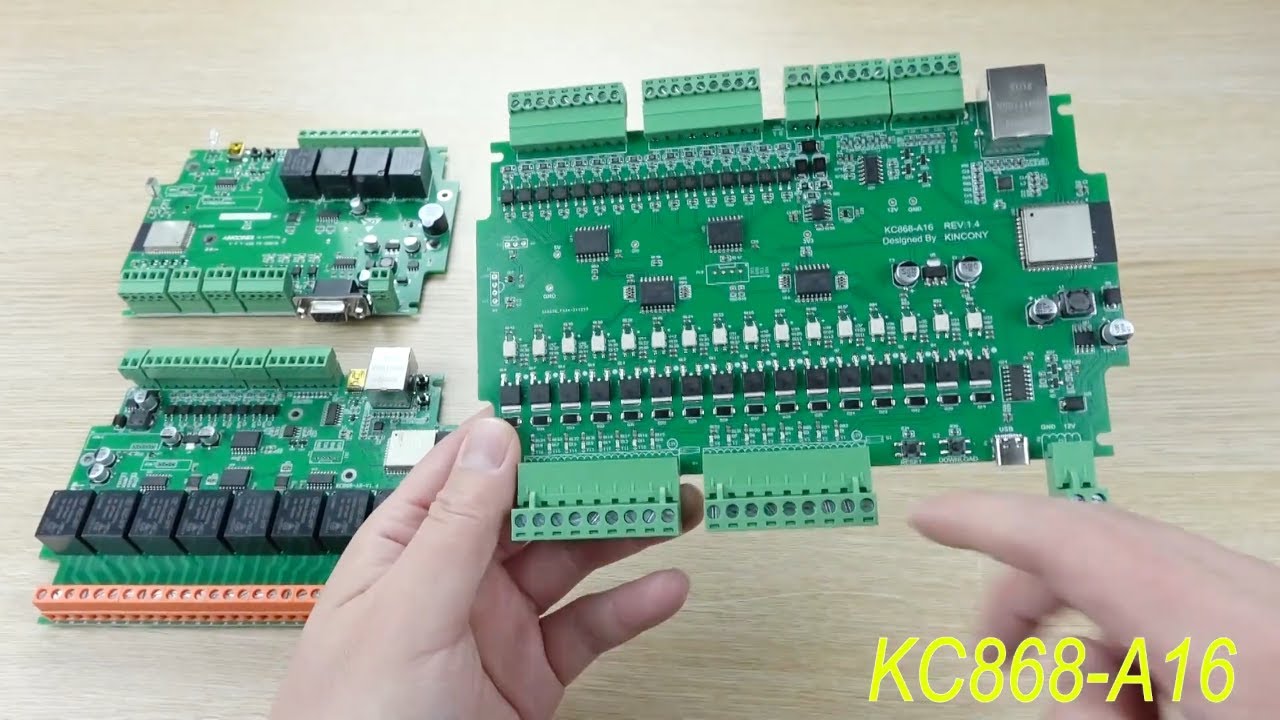
we have designed KC868-A16 ESP32 home automation relay module. it’s new version based on KC868-A8 ESP32 relay module, add RS485 port. Support ESPHome for home assistant and Tasmota firmware for home automation DIY.
order link:
https://www.aliexpress.com/item/1005003736312354.html?spm=a2g0o.store_pc_groupList.8148356.5.5cb61d9fwkzxjK&spm=a2g0o.s...
https://www.youtube.com/watch?v=obstyUrOnaU 128 relay lol
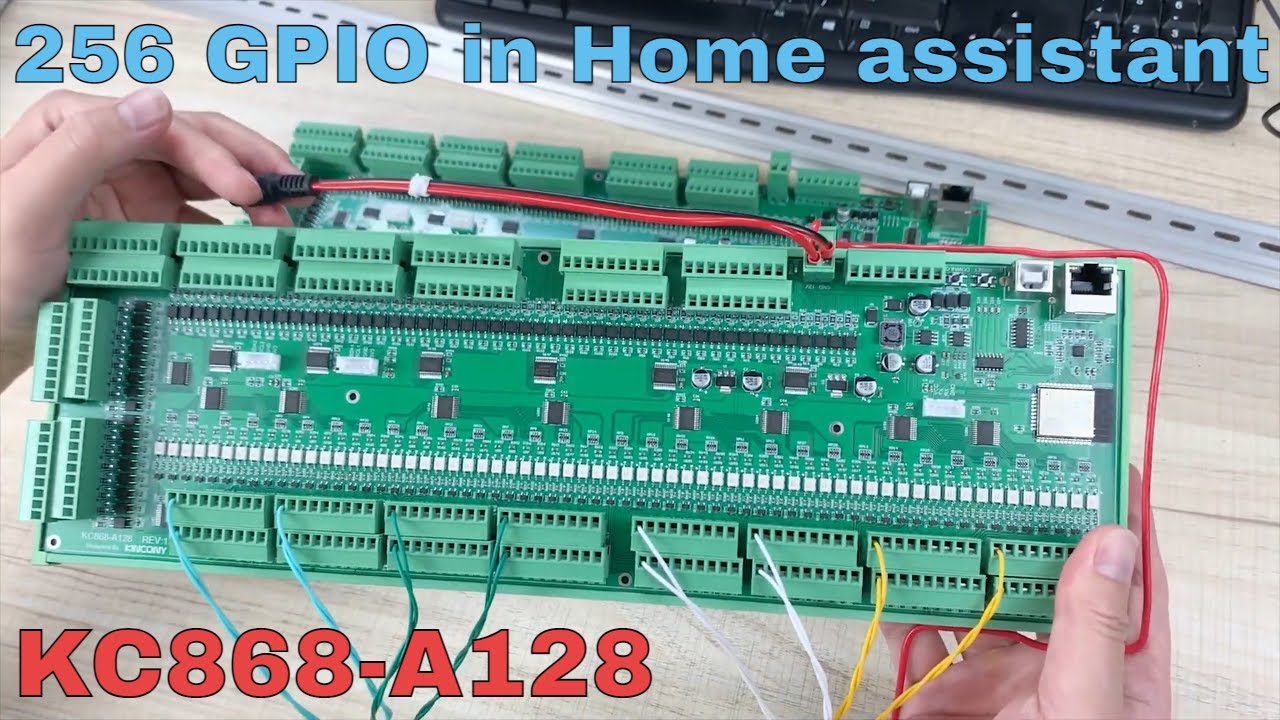
we have designed KC868-A128 ESP32 home automation GPIO module. it’s based on ESP32 , Ethernet + RS485 + 4CH analog input + 128CH digital input and 128CH digital output by MOSFET. Support ESPHome for home assistant and Tasmota firmware for home automation DIY.
KC868-A128 online store order link: https://www.aliexpress.com/item/3256804421376396....
sorry that's just gpio in general but still he has some multi relay ones
 forest pike
Should I put my LED strip controller right next to my strip or right next to the transformer? The transformer and the strip are about 15 feet apart
 bold leaf
forest pike
Should I put my LED strip controller right next to my strip or right next to the...
bold leaf
forest pike
Should I put my LED strip controller right next to my strip or right next to the...
I would think it more important to have shorter lead from controller to strip. 15' from power shouldn't be an issue...
forest pike
bold leaf
I would think it more important to have shorter lead from controller to strip. ...
That's what I was thinking as well but I was talking to an electrician and he was saying they normally bring all LEDs back to a mechanical room far away which has the controller in it. I was surprised by that tbh
I think they were doing 24V though
bold leaf
forest pike
That's what I was thinking as well but I was talking to an electrician and he wa...
Sounds like a different scenario...
forest pike
bold leaf
Sounds like a different scenario...
How do you figure?
bold leaf
I just can't fathom bringing all LEDs back to a mechanical room. My mechanical room is where I hang my coats when I come in so I just can't picture what type of installation they're referring to...
forest pike
bold leaf
I just can't fathom bringing all LEDs back to a mechanical room. My mechanical ...
In this scenario the mechanical room has the HVAC and plumbing and electrical panel.
bold leaf
My LED controllers are attached...
- to the back of my TV
- under the cabinet over the sink
- on the back of the mirror in the powder room
- on the back of my headboard
- In a dry box under my back patio stairs
all with wall warts supplying power.
I can't imagine wiring all those back to a central transformer in my coat closet!
A blanket rule of where to put power can't be applied to all scenarios regarding LED lighting.
native pilot
maiden tree
anyone have fire alarm recommendations ? I need to replace a ton
This came up last week I think. If you have smoke alarms with interconnect wiring, avoid getting "smart" smoke alarms. Just wire in a relay that can send HA alerts-- something like this:
The Smartest House
SAFE ALERTS PRODUCT HIGHLIGHTS Quick reports to your hub for low-voltage trigger signals, including interconnected hard wired smoke and CO detectors by all major brands like First Alert, Kidde, and BRK (do NOT use with battery powered detectors) Recognizes and reports both smoke and CO signals from interconnected hard


 solar sparrow
Hi, does anyone have any experience with energy consumption per electricity group? I'd like to measure the consumption per group, but not sure which hardware I need to use (and is a bit "cheap")
I'm from the Netherlands, so it must be hardware that is comptabile with the way our electricty groups work
I know you have these clamps that you can put on your group wires, but I'm still not sure how that works and IF it works in the Netherlands, anyone has experience with them?
winged knoll
#energy-archived can better help with energy stuff
solar sparrow
ah, thanks!
 pseudo pelican
Hi, so i'm struggling with resetting a RGBCW controller. With it comes a video that shows the resetting process of said controller. And having tried following along with turning the power on and off at the same speed as in the video, i am still having no luck. I have a spare controller lying around that i have tried swapping in it's place, and it's the same for that one, no dice. I do realise it's a bit of a long shot, but i am hoping i'm overlooking something simple here?
Video of the resetting process: https://www.youtube.com/watch?v=dzfNYLXzdZY&t=41s&ab_channel=LightSolutions

Sådan nulstiller du ZigBee Triac forsyning.
 golden thorn
That link 😬. Please don't. Here's the direct link: https://youtu.be/dzfNYLXzdZY
What does no luck mean?
pseudo pelican
Once i've turned the power on and off like they do, my lights are still not turning on 4 times to show a successfull reset has occurred
And when using HUE (which i used the first time to connect to it to test my soldering on the strips as well as connections) no new devices are showing up when searching
atomic ridge
midnight ibex
these esp32 doesnt have a built in antenna, only a connector, that you can attac...
just delivered... dramatic improvement... thanks....
why the others fall out at 3m... no idea... but for the extra $1 or so... definitely worth it... lol
midnight ibex
atomic ridge
why the others fall out at 3m... no idea... but for the extra $1 or so... defin...
awsome! 🙂
 lunar delta
Anyone using the Apollo MSR-1 for temperature and humidity tracking? Curious about the accuracy or how difficult it is to calibrate since they mention the ESP generates "significant heat"
i am so tired of constantly replacing batteries in my zwave multisensors
pseudo pelican
golden thorn
That link 😬. Please don't. Here's the direct link: <https://youtu.be/dzfNYLXzdZ...
Just noticed, that link does indeed look sketchy as shit, redacted original message, do apologize
 marsh parrot
Please recommend me a TOUCH light switch that is 1 way 4 gang, HA compatible and works with dimmable led (UK only)
 edgy crater
Hi, I have two buildings with the following setup:
Building 1, 5G modem, router TL-WR841N, 5ish smart devices connected to the router via Wi-fi
Building 2: TL-WR841N in range extender mode (connected to the host TL-WR841N via wifi), 1 Wifi device, two Ethernet devices (one of which is RPi4 with HA).
I have constant issues with networking. Heatpumps losing connection to their native cloud app. Home Assistant GUI unreachable, etc etc. We sometimes have power outages, after which I have to restart routers and devices repeatedly to make them work.
The host TL-WR841N has approx. 13 devices connected, this includes the ones in the range extender. Does it sound like my issues are caused by the routers and is there some setting I can change. Do you have any recommendations or 101 tutorials since I know very little about networking in general.
Thanks
glacial oracle
This can be pretty much anything from an unstable connection to running gear in environments they are not intended for
Considering the TL-WR841N costs about 15 bucks, it would be my first point to replace in this setup.
cold moon
building to building bridge UBB + a decent router + PoE switch + multiple APs + lots of learning
glacial oracle
Wifi to cover areas between buildings is anything but great, but if you need to stick to a non wired solution for whatever reason - I would recommend investing into a decent mesh system
cold moon
or hire someonem to do it
glacial oracle
You'd probably end up spending at least a couple hundred bucks on it, more likely a couple thousand
(Might be a bit cheaper to run fibers between the buildings if you own the land between)
 wise gorge
anyone tried to use HA for opening/closing windows in a greenhouse? If yes - what hardware was used?
glacial oracle
That would depend on how those windows open or close
You can get some long travel linear actuators and have ha trigger relays for them to extend / retract
Personally I use two of change the angle on solar panels, they likely can open some window as well
wise gorge
can you give me a link to the hardware or similar @glacial oracle ? 🙂
glacial oracle
If it needs to be a mesh I would look at the Netgear Orbi or TP Link Deco series. Later is significantly cheaper but has some app only online setup and limited configuration options, which might or might not be ok for you to have. They also can be used as a router directly instead of just being an access point which may or may not cut some cost for you.
For a fiber based bridge between both locations you would need to at least buy the fiber and two switches which support those sfp+ish transceivers but I couldn't recommend specific ones here.
For the thing smart home sellout talked about you would look at ubiquity gear for the most part. They have pretty much all the gear you would need/want. routers, access points, the wireless 60ghz building bridge, switches and wires. If money ain't an issue you can buy the whole set from them
edgy crater
glacial oracle
If it needs to be a mesh I would look at the Netgear Orbi or TP Link Deco series...
Do you know about Asus RT-AX53U or Asus in general compared to TP Link? Their mesh systems seem to be in the same price range.
glacial oracle
I would generally avoid asus
They have a good track history of shipping poor firmware and never fixing stuff
I don't have any specific opinions on the model
winged knoll
I have some ASUS mesh devices. They're ... ok, but I probably wouldn't recommend them
 near needle
Hi guys! 👋
I apologize in advance, if this question has already been answered "a million times", but apparently my google-fu is failing me... 😕
So here goes: I'm setting up a new HA on a RPi5 with a PiMoroni NVME base attached. I did so by first installing RaspberryOS on a SD card, and from there I used the RPi Imager to write HAOS to the NVME disk. After setting the NVME disk as my primary boot device, I removed the SD card. The system works just as expected up to this pont.
Now I tried to follow the official guide (https://www.home-assistant.io/common-tasks/os/#enable-i2c-via-home-assistant-operating-system-terminal) to enable I2C, because I also have a PiJuice HAT attached that I want to use as an UPS. This however, is not going well. I can't get past the second step in the guide due to a "permission denied" error...
My unix skils are weak, I'm a Windows and GUI guy; sorry if this offends anyone. Nevertheless, here is a screenshot from my attampts. I listed what I think may be relevant, but probably I have just missed something totally obvious to a unix person 😔
Any help or pointers are highly appreciated.

 golden thorn
The docs say physical access via keyboard & monitor. You're using SSH.
near needle
Ok, but I am "root" according to "whoami". Does that still matter? (This just show how little I understand about Linux 🙂 )
golden thorn
Yes but you are inside a container. Addons are containers and those have no full access to the system. See here: #general-archived message
near needle
Aha... Well, then I'll connect physically to the device and do another attempt.
Thank you; I'll report back in a while!
near needle
...and yes; once again I stand corrected. There are no short-cuts. RTFM, and do what it says! 😁
Thank you @golden thorn for being patient with someone who should have learned by now to follow instructions by the letter.
 hollow axle
so im going to get a handful of esp32 boards to setup espresence on for in home detection. Im wondering if i can use those same devices for multiple tasks easily. Such as can i also connect some temp/humidity or PIR sensors to them or does it need to be a different device?
im just wondering how i can maximize the usage of each board. More about compactness and using less outlets than cost.
based on this video as well as a few others ive seen
https://www.youtube.com/watch?v=s7kyqpq4Ev4
hollow axle
what is the recommended humidity sensors to use with an esp32 for indoors. Here the humidity ranges from low teend to upper 60s easily. I would also like to get one i can place outside to get the outside humidity. I would mount it under the edge of the roof/awning and plugged into an outside outlet. Or possibly if one could be battery operated with a good operation time
currently i am looking at a Si7021 ($3.50 ea) or BME280 ($6.33) each. At least from amazon. I would likely get more from aliexpress for cheaper later one once i get things figured out.
SHT40 from adafruit is $6 and seems to be a good option
cold moon
hollow axle
what is the recommended humidity sensors to use with an esp32 for indoors. Here ...
you already said you're doing esp32 which can be BLE proxies so why not buy some super cheap xaiomi bt temp/hum sensors? or are you wanting all wired?

Home Assistant Community
This guide describes how I got the Xiaomi Mijia LYWSD03MMC Temperature and Humidity sensors working in September 2022. This is likely to change soon as Bluetooth functionality is being built into Home Assistant Core, but for now it’s probably fairly accurate. Note that I am not an expert in this area, I read a lot and spent a lot of time on this...
hollow axle
cold moon
you already said you're doing esp32 which can be BLE proxies so why not buy some...
still figuring some of it out. But, the plan was to buy some sensors i can just wire up to the esp32. they will all generally be plugged in
cold moon
yeah
i've gone down that path and just wasnt happy with diy solutions compared to off the shelf solutions for sensors like temp/hum/lux/pir
i'd rather categorize different types of dirt than use a DIY PIR sensor instead of a hue or aqara zigbee one
hollow axle
any reason why? thats why i was just getting a few to try it out first. Thinking it would be cheaper since im already going to be using the esp32 for BT based presense detection
cold moon
cuz at best they're still gonna disappoint you
like to learn sure have fun but it's just not something i'd do myself after using both
hollow axle
thought it would be nicer to get multiple things into one spot and only need one plugin. Though i know many sensors are battery based.
cold moon
ya that's the dream
hollow axle
also, cheaper than buying dedicated zigbee sensors lol
 hybrid wraith
I'm looking for information on how to control the heater directly through HA, with no thermostat, and any concept of a thermostat would just be recreated (at a later date) using thermometers and automations. I searched but all the community threads I find are talking about their own specific needs, which don't match mine
I don't know what the product would be called that I need, basically just some modulating heater controller with zigbee, thread, wifi or ethernet
hybrid wraith
I don't look forward to scripting ALL the logic for a modulating thermostat from scratch so I would prefer a device that either does some of this or has an integration that does some of it. but I will if I have to
runic tinsel
hybrid wraith
I don't look forward to scripting ALL the logic for a modulating thermostat from...
Look at the template climate integration. Or the versatile thermostat HACSs integration if you want to do something more complicated.
runic tinsel
solar sparrow
Hi, does anyone have any experience with energy consumption per electricity grou...
These ct clamps can measure any current — they just need to be connected to the same phase of voltage to get the power correctly. I built this slowly and have a 3 Shelly 3em in my fuse box. They come either three clamps and you can put one around a wire. There is also an emporia Vue device, which is aimed at the us market but works fine in EU fuseboxes. This one has 16 clamps I believe, so ends up being cheaper if you want to have detailed per circuit monitoring
But in the end you can improvise and build it but by bit — many devices report energy use, some have a simple mapping between state and power and can have a virtual power sensor in HA etc. Some you will need to monitor by a smart plug. And eventually bring it all together.
Not to blow my own trumpet, but I wrote up what I do here: https://community.home-assistant.io/t/guide-monitoring-energy-by-device-category-and-running-averages/665769

Home Assistant Community
Here is a short guide to how I’ve organised monitoring of (electrical) energy consumption in HA. The main objective here was being able to track usage by category of device reduce glitching in the data and allow me to add/remove devices without losing historical per category data running averages for e.g. the last 30days’ consumption instead o...
 steel zealot
hybrid wraith
I'm looking for information on how to control the heater directly through HA, wi...
steel zealot
hybrid wraith
I'm looking for information on how to control the heater directly through HA, wi...
esp and a relay with esphome?
hybrid wraith
ESP sounds too technical for me, there has to be some product I can buy that's fundamentally meant as a smart heater controller
I ran into some like this but they were part of broader set-ups that I don't want
I wish it were easier, for any given device, to find out whether the HA integration lets me use it internet-independently or not. I hate the idea of internet-dependence
I'm just dipping my toes in automation and don't wanna end up with freezing pipes while I'm busy googling YAML syntax or what voltage my heater needs or whatever
steel zealot
a zigbee based relay?
thermostat is most of the times just a connection between two wires
hybrid wraith
steel zealot
thermostat is most of the times just a connection between two wires
But it needs to be modulating, that's the tricky part
steel zealot
hybrid wraith
But it needs to be modulating, that's the tricky part
what modulating needs to be done ? you create a thermostat entity https://www.home-assistant.io/integrations/generic_thermostat/ in home assistant--> give it a tempsensor (can be zigbee) and an output (can be zigbee) and its finished
devout parrot
I assume it's for a boiler or something, I think that's usually the application for modulating thermostats.
hybrid wraith
steel zealot
what modulating needs to be done ? you create a thermostat entity https://www.ho...
It can heat more or less intensely, you can ignore this feature I think but it saves money to use it
or energy. and also you gain comfort
 steady hinge
Can someone help me? I have a DG45 Bluetooth USB Adapter that I am trying to use with Home Assistant. I am running Home Assistant through proxmox by passing the USB adapter through to Home Assistant. After restarting, home assistant automatically will see the adapter and and me to configure it. Configuring it works fine. I got a Bluetooth SwitchBot Indoor/Outdoor Thermo-Hygrometer that I am trying to link to the Bluetooth adapter. When I try to add the Switchbot thing to home assistant by searching for it, I get an error saying "SwitchBot Bluetooth
No supported SwitchBot devices found in range; If the device is in range, ensure the scanner has active scanning enabled, as SwitchBot devices cannot be discovered with passive scans. Active scans can be disabled once the device is configured. If you need clarification on whether the device is in-range, download the diagnostics for the integration that provides your Bluetooth adapter or proxy and check if the MAC address of the SwitchBot device is present." I don't know what to do about it.
Also, I do have passive scanning turned off on the Bluetooth adapter like it wanted.
runic tinsel
hybrid wraith
It can heat more or less intensely, you can ignore this feature I think but it s...
But those are two different things: you typically control the room temperature by the rate of flow — this is decided by the valve on the radiator. They are called Thermostatic Radiator valves (TRVs) and they open and close depending on the difference between actually and desired temp in a room. I have Eurotronic ones for example.
hybrid wraith
runic tinsel
But those are two different things: you typically control the room temperature b...
and when the flow is less, surely the water needs to be heated less?
runic tinsel
Typically no — the water temp is usually set to something so that a cold room can still be heated and a warm room can have the valve shut off
hybrid wraith
Well anyway, it's a real thing, modulating thermostats
runic tinsel
The question is when to heat the water in the first place. And for that your boiler needs to have the understanding of the thermal load required.
The tradition system just taken one temperature in your living room and if you are lucky the temp outside and heats on some curve without really understanding what is going on in your house
hybrid wraith
A traditional thermostat just sends "on" when the temp is below target, and "off" when it's above target, surely?
runic tinsel
For a temp In one point in your house. The trvs they change the flow per radiator to equalise it a bit
hybrid wraith
I don't know why the heater can't react to the resistance to flow or something, but in any case my radiators don't have TRVs
runic tinsel
You can put them on. The valves are one of four standards in Europe basically. The smart ones have thermometers or can get associated to a thermometer in your room and keep the temperature there at what you set it to
Provided they get fed by water from the boiler
hybrid wraith
then what controls the boiler?
runic tinsel
If you get an all in one system from Vaillant for example, they all talk to each other. Typically those systems are proprietary and there aren’t integrations. There is a thing called opentherm I think, which some boilers support. And then that can talk to HA and HA can talk to the TRVs
hybrid wraith
Yeah so I need some sort of device with opentherm on 1 end and ethernet/wifi/zigbee/thread on the other
but not a thermostat, because I don't need it to have a thermometer
There is a very good chance the answer comes down to still having a thermostat but ignoring its reading (if that's possible)
runic tinsel
I found this referenced in a thread on HA community: https://www.slimmedingen.nl/plugwise-anna-slimme-thermostaat-230v-5a-zigbee.html
SlimmeDingen.nl
Je regelt de temperatuur en zorgt daardoor voor comfort in huis. Zolang je maar internet hebt, kun je haar waar ook ter wereld bedienen met je smartphone of

 ashen sentinel
Does anyone know of a device for dog tracking (outdoors) compatible with Traccar?
I had a look at this one, but not really sure what to look out for. https://www.aliexpress.com/item/32702506699.html
devout parrot
So you're mostly going to be looking for devices that are explicitly in the supported list at https://www.traccar.org/devices/ or devices that are rebadges or use the same protocols.
Whether that device would work with Traccar depends on what it's got going on under the hood and whether it can be reprogrammed, either via SMS or serial.
That device will probably work
Since it probably uses the same protocol as similar tkstar devices
ashen sentinel
Thanks!
devout parrot
TKStar TK935 is the only tkstar device listed but I'm pretty sure I've seen threads on the Traccar forums about other models working and programming instructions.
 obsidian monolith
is there a doc about sizing for HAOS?, or better yet - what is considered overkill for HAOS, and I know that's an epic variable based on connections / intergrations
golden thorn
Here's rough minimum specs: #hardware-archived message
I recommend you go overkill and virtualize HAOS: https://www.derekseaman.com/2023/10/home-assistant-proxmox-ve-8-0-quick-start-guide-2.html
Here's why: #hardware-archived message
edgy crater
glacial oracle
If it needs to be a mesh I would look at the Netgear Orbi or TP Link Deco series...
Thanks, TP-link was super easy to set up. The situation improved a lot after setting them up!
obsidian monolith
golden thorn
I recommend you go overkill and virtualize HAOS: <https://www.derekseaman.com/20...
That looks very promising
 cerulean portal
Does anybody know if you can use a Lutron Pico Paddle Remote for Dimmers and Switches to trigger automations within HA? I know it's more designed to be paired with another dimmer switch, but I am trying to see if I can use it to connect to HA (via the Lutron hub), and have it trigger my automations. For example I have a dumb outlet, but a lamp with smart bulbs on it. I'd like the switch to control the lights (basically on/off).
native pilot
cerulean portal
Does anybody know if you can use a Lutron `Pico Paddle Remote for Dimmers and Sw...
I think you can. I don't have one, but I do remember watching a video about Lutron stuff in the last month or so-- for some reason I think the remotes are disabled by default in HA. Someone correct me if I'm way off here (also curious).
cerulean portal
native pilot
I *think* you can. I don't have one, but I do remember watching a video about Lu...
I contacted Lutron and they said it could be added to the Caseta hub without a hard-wired dimmer or switch. So in theory I think it might work. I'll find out soon enough as I ordered a pico remote. If it doesn't work for this I can still find a use for it. https://www.home-assistant.io/integrations/lutron_caseta/#pico-and-shade-remotes
I also found this which makes this all sound promising. https://community.home-assistant.io/t/lutron-pico-configuration-example/32670/3
 grizzled dock
anyone ever get one of these z-wave neo coolcam PIR sensors working on a z stick?
ive tryed doing a factory reset on the sensor, but cant get it to include, even tryed diffrent security levels
glacial oracle
#zwave-archived may know
 signal cedar
Has anyone found a small, cheap status indicator light? Ie turn light on when garage is open.
Don’t want to use something like a smart bulb if I don’t need to
devout parrot
signal cedar
Has anyone found a small, cheap status indicator light? Ie turn light on when g...
You could #diy-archived something pretty easily with an esp32 and some individual LED pixels.
signal cedar
devout parrot
You could <#444529271806099486> something pretty easily with an esp32 and some i...
This was something I wanted to place in the kitchen so need high spouse factor 😦
tawny viper
inovelli
 devout latch
I don’t think this is how a battery normally works 🤔🤔🤔🤔🤔
 winged knoll
Looks pretty typical to me
 pulsar lily
Is an 6gen i3 16gb ram enought?
golden thorn
For what?
pulsar lily
For home assistant?
winged knoll
More than enough for HA
Whether it'll be enough for all the other stuff you want to run...
glacial oracle
It's not a pi, that's already a pretty good start into anything
winged knoll
As long as the CPUMark score is north of 1K you'll be ok, ideally north of 2K
 inner cape
Anyone one had experience controlling Krear ceiling fans by chance?
hollow axle
What cameras do people recommend for building a home se uroty system and integration with HA? I don't mind doing DIY cameras like esp32 camera or the like
hollow axle
Also, I'm putting up a fan and light switch into a 2 gang switch. I have a PIR and mmWave sensor I'd like to use, that run off of power from a USB cable to a 5v wall wart, or on batteries
Is there a way I can rewire that to connect to the wires on the inside of the switch box and mount the sensor above the plate? Or drill a hole into the plate so the pir sensor cover pokes out?
glacial oracle
Usually people would consider buying real security cameras for surveillance, which at best be poe powered
Everything else is usually just rather useless toys. If you can't identify people with it due to low resolution, high compression or various other artefacts you might as well not have that camera at all
 neat grove
I'm looking at power monitoring solutions.
I live in an apartment, so anything that needs to be installed into the breaker box or requires modifying the outlets is off limits.
I see a lot of devices like this one which looks qualified and has a great price, but I'm a bit nervous about the fact that it's able to switch itself on and off. I plan to plug my PC and server into these things and I'm worried that I might accidentally switch one off while experiencing fog brain at 3AM.

Control lighting, fans, humidifiers and other appliances from anywhere with the Kasa Smart Wi-Fi Plug KP115 with Energy Monitoring. Monitor every consumption of your plug-in devices and set times and schedules to avoid waste. Add voice control to any outlet when paired with Alexa or Google assist...
glacial oracle
There is not a lot you can do about that besides not turning it off yourself (and not buying tuya based products which do that on their own on low loads)
For proper installations there are both passthrough and clamp on energy monitoring you can put on din rails or have free behind a socket or switch
Later may not necessarily include relays so power cannot be cut
neat grove
Hmm, sounds like I may have to go the DIY route then. I've done some ESPHome stuff so I'm cool with that.
Also Tuya products can turn themselves off that's kinda terrifying.
glacial oracle
Well that they may turn themselves on is far worse
But that seems less to be what people have observed
neat grove
Yeah I'm thinking more and more about it and realizing that using a smart plug for a computer is just a bad idea.
Like what happens if it gets a software update?
Will the relay remain in the "on" position?
Who knows.
glacial oracle
There is no real need for it to toggle states during a software update
Also it usually not does that automatically
I decided to put most stuff on smart plugs, unbind the hardware button and simply not touch the switch to keep stuff monitored
You could likely diy an extension cord with one of those Shelly pm minis of you really feel like it
neat grove
Ah, I just got back from looking at that page, but the US variant (I probably should have mentioned that I'm in the US).
It looks pretty solid.
hollow axle
glacial oracle
Usually people would consider buying real security cameras for surveillance, whi...
yea im totally fine with POE cameras
glacial oracle
I do like the plug approach a bit more as I can replace them more easily
neat grove
How are plugs easier to replace than extension cords? The fact that you can just buy them off the shelf?
glacial oracle
Well those devices above usually sit inside the wall
neat grove
Yeah I do think it'll need an enclosure. Those screw heads are going to be live.
glacial oracle
It's fine they are somewhat recessed and usually inside plastic environments
Or something a bit of tape can fix
neat grove
It seems they still come with the relay though, which makes me just a little nervous.
neat grove
Oh right I was looking at the EM because that's what I found when looking it up myself.
Thanks for the correction.
glacial oracle
There are em and a third that do however (red and blue if I recall the colors)
It's a bit unintuitive naming
 fallen nexus
Are there any battery powered relay modules that aren't so heavy duty? Like I'd want it to simulate pressing buttons on a device I physically modify, so it doesn't need to handle any significant amounf of current.
If I'm doing something that technical, should I just be making it completely from scratch with an arduino/esp controller and use wifi?
 radiant heath
does anyone have the streamlabs water integration working?
I have the api and integration connected, but it doesn't show any sensors/devices, just 1 entry
cerulean portal
native pilot
I *think* you can. I don't have one, but I do remember watching a video about Lu...
Yul, it works and was very easy to add and integrate.
bold leaf
neat grove
Like what happens if it gets a software update?
I have quite a few
Sonoff S31 plugs flashed with ESPhome and the on state survives a firmware update. One is on my computer that is always on and I've never had an expected off condition with it.
If you need my config for them I'm only too happy to post it
neat grove
Thank you but I already bought/scrapped the hardware I needed to make the "extension chords". Still, I'll keep that in mind for the future.
I remember there use to be a tutorial page on ESPHome for replacing the firmware for Sonoff plugs, but it doesn't seem to be there anymore.
bold leaf
I'll see if I can find it. I remember opening them up and connecting 4 leads from my USB to TTL serial adapter...
 royal aspen
Is the Lenovo ThinkCentre M710q Tiny, Pentium G4560T with 16GB ram and 128GB M.2 SSD an upgrade over a raspberry pi 4 4gb?
outer knotBOT
@royal aspen Please do not cross post. Read the channel description, post it and wait for folks to respond. Crossposting wastes people's time as they're unaware of the help you're getting elsewhere.
If you don't get any responses after an hour or more, and your message is no longer on screen, it is fine to re-post or post a link to it.
royal aspen
👍🏼
devout parrot
neat grove
Thank you but I already bought/scrapped the hardware I needed to make the "exten...
Can't go wrong with the S31. Affordable and extremely easy to disassemble and flash. if you grab some test hooks you don't even need to solder anything to flash them.
cold moon
devout parrot
Can't go wrong with the S31. Affordable and extremely easy to disassemble and fl...

i will say i'm disappointed in the sonoff ifan04 i flashed
- it doesnt connect to wifi over usb power so you cant test it without mains electricity after flashing. 2. it is too big to fit in my fan without fully removing it from the ceiling and i dont wanna
oh and it's through holes so you have to solder on headers or use pogo/alligator i guess
bold leaf
devout parrot
Can't go wrong with the S31. Affordable and extremely easy to disassemble and fl...
My last three I used test hooks and managed to squeeze them in place. The pad spacing was kinda tight for the width of my clips though. Placed the 4th one sideways on the edge of the board and managed to get the other three just so and touching the right pads.
native pilot
cerulean portal
Yul, it works and was very easy to add and integrate.
Sweet! Thanks for following up!
edgy crater
royal aspen
Is the Lenovo ThinkCentre M710q Tiny, Pentium G4560T with 16GB ram and 128GB M.2...
I don't know if you're using SD card with RPi4, but I can definitely recommend SSD... My RPi4/HA bricked the SD card in less than a week!
golden thorn
Don't forget to buy a powered USB Hub with that.
forest pike
Is there any benefit to a wall mounted screen for smart home control as seen on Alibaba or AliExpress? Or is a wall mounted Android tablet sufficient for everything?
glacial oracle
as seen on X really isn't a good description to what you are looking at
Generally you want something capable of running a real web browser
Generally Android tabs are good for that / you can even buy them without battery
forest pike
2024 Smart Home Sonoff Nspanel Scene Smart Switch Eu/us All-in-one Control Wifi Smart Thermostat Display Switch - Buy Sonoff Nspanel Smart Switch Home Automation
wifi Wall Switch Sonoff Nspanel
wifi Smart Thermostat Display Product on Alibaba.com
Something like this for example
glacial oracle
That's mostly locked down to their eco system with some non trivial flashing options which may or may not be available
be aware that 3.5" aren't a whole lot for displaying stuff
forest pike
Understood. Just for my understanding regarding the tablets, why is a browser necessary? I was thinking the home assistant app would be used?
glacial oracle
The ha app is effectively just a browser in a trench coat with some adjustments
You at least need it to be capable to display a site, if it can do the app that's even better
forest pike
Gotcha okay, I was thinking just a cheap Amazon tablet next time they're on sale. I'll try it out first with the app once I get it. But it sounds like generally a tablet should be sufficient for control. I really only need it at the main entrance.
glacial oracle
Yes most stuff will somewhat be sufficient
You can also order em from the Asian stores if you like, it's usually good enough to do that
Alternatively the Lenovo (and Amazon) ones are kinda popular for this
forest pike
Ya this is the other one I saw https://x.alibaba.com/Aw7Pc1?ck=pdp
Smart Home Control Panel Wall Mount 9.7 10.1 15.6 Inch Poe Relay Touch Screen Android System Tablet - Buy Smart Home Control Panel
smart Home Device
smart Home Control Panel Wall Mount 9.7 10.1 15.6 Inch Poe Relay Touch Screen Android System Tablet Product on Alibaba.com
But it seems to just be Android. If I'm doing Android I might as well get a cheaper one or get one that'll at least be supported with updates at least for the next few years.
 dusk notch
Hi all,
I'm slowly gowing out my 8th gen NUC with i3. CPU is constantly at 50% and since i use the graphics card to re-encode 4 .h265-->.h264 stream of my reolink cams the GPU is also constantly at 60% utilization.
Any suggestions on what kind of server to build?
i was thinking to build something based on an asrock deskmini B760
glacial oracle
minisforum had a sale like yesterday where you could have shot some larger systems on the cheap
if i see this correctly the deskmini does not offer pcie expansion nor higher power cpus
 jagged crypt
dusk notch
Hi all,
I'm slowly gowing out my 8th gen NUC with i3. CPU is constantly at 50%...
jagged crypt
dusk notch
Hi all,
I'm slowly gowing out my 8th gen NUC with i3. CPU is constantly at 50%...
you are using 50% of your capabilities, doesn't sounds like you are growing out of it, just actually using it.
dusk notch
thats true but I'm afraid the thermal system of the nuc will not take it.
jagged crypt
your thermals can take it
glacial oracle
unless it fails or throttles too much there isnt a whole lot that it cant take
jagged crypt
if you want ot upgrade, go ahead. For new gear, there's a ton of new and used mini's to choose from.
if it's an actual NUC, not something else, then it's been engineered to be capable of handling full load
dusk notch
glacial oracle
minisforum had a sale like yesterday where you could have shot some larger syste...
oh cool, will check it
jagged crypt
as to what to buy, just figure out what minimum cpu (and gpu it sounds like) requirements you have, and what your budget is. I'm a fan of the used older SFF desktops, but no GPU in those. At the same time doing 265 decode is not GPU intensive.
dusk notch
jagged crypt
your thermals can take it
🙂 problem is the NUC is situated in the room with our central heating system. Hence the room is already at about 32°C ambient constantly
jagged crypt
(I also don't have any cameras, so can't add re-value to quantificiation)
what NUC do you have?
dusk notch
NUC8i3
glacial oracle
there are a couple dozen variations
dusk notch
NUC8i3BEH2 to be specific
bought it a couple of years ago second hand for 150€
and served me very well so far
dusk notch
jagged crypt
as to what to buy, just figure out what minimum cpu (and gpu it sounds like) req...
frigate tells me the re-encode is keeping the build in GPU at about 60-70% utilization
jagged crypt
 glacial oracle
thats a dual core i3-8109U
dusk notch
yep
jagged crypt
whoops, wrong i3, but probably same spec
hah, the pdf for yours:

anways, i wouldn't worry about the thermals
but if you want a newer box, get one 🙂
dusk notch
mhm ok I see, maybe I can find another spot in the house to move the NUC to operate in a little cooler environment
glacial oracle
if its the i3 mentioned above, that is about equal to half an N100
dusk notch
glacial oracle
if its the i3 mentioned above, that is about equal to half an N100
what is an N100?
glacial oracle
unless he tries to go absolutely all out there isnt a lot of need for a whole lot more cpu
jagged crypt
here's some quick specs - https://www.cpubenchmark.net/compare/3333vs2627vs5157/Intel-i3-8109U-vs-Intel-i5-6500T-vs-Intel-N100 - the i3-810u in your existing system, the i5-6500t in my sff , and the n100 in the common SFF NUC.
you'll notice your i3 is fastest at single threaded operations, so may actually be faster in some cases
glacial oracle
i do wonder what intel cpu they consider will fit. there isnt a single one in the 11-14th gen lineup that only turbos up to 65w
dusk notch
jagged crypt
what cpu are you looking at upgrading to?
I was thinking of a mid-tier 12th/13th gen i5 or something else that does not break the bank
jagged crypt
roughly twice as fast in single threaded operations, but 6 cores, and potential for more power usage
glacial oracle
it probably looses some of the performance depending on what the 65w power limit means
jagged crypt
i got that cpu from the very expensive - https://www.amazon.com/ITX-ASRock-DeskMini-System-Pre-Installed/dp/B0BSXCCG3D/

ASRock DeskMini B660 Mini PC System pre-assembled, configured and tested by E-ITX
dusk notch
glacial oracle
it probably looses some of the performance depending on what the 65w power limit...
why would it?
glacial oracle
because tests rarely are done with disabled turbo
which would have that cpu use about 120w for some period of time
dusk notch
ah ok i see
glacial oracle
which may or may not be the case, its kinda weird that they dont specify it (on the asrock page)
dusk notch
ok but i dont think that I realy need the burst power for my instance,
If there would be a easy way to just upgrade the cooler on my NUC i would do that instead
is there any way to read the internal temps of the system within HA?
glacial oracle
more cooling doesnt really yield a whole lot more performance in those style devices
its also very much alright to run stuff hot
dusk notch
Its not so much about the performance, at the moment it can handle everything OK but I'm just afraid that the hardware will not take it in the long run
glacial oracle
its unlikely stuff will fail based on it
for hard drives and ssds that may be a bit different, but processors in general can withstand that for very much decades
dusk notch
mhm ok I see, if the SSD would fail that would be no problem to swap since I'm running daily backups to my NAS
so that's a rist I would be OK to take
glacial oracle
they also work just about fine in warm environments, just within reason
dusk notch
ok ok I see you guys convinced me, will stick with my NUC a bit longer 🙂
jagged crypt
if it lasts 3 months, things will be either 10% faster or 10% cheaper
at the same time, if you want to spend the money for piece of mind, don't feel bad about doing it
 dense pawn
Hello,
I know this is not quite the right channel, but I imagine that someone may have had a similar problem.
I have a shelly em configured with MQTT in HA.
I'm trying to change the "mqtt_update_period" value, which is supposed to limit the values sent to mosquito.
I have it set to 30, but it's not working.
I'm getting multiple values in less than 5 seconds...
Any ideas?
 frigid citrus
I've been running HA as a VM on Hyper-V for about 2 years. I got hold of an older i3 NUC that I want to migrate to. Should I do a bare metal HA install, or still virtualize HA on the NUC? (Side note: VM Checkpoints have saved me from some software update nightmares. Is that messier un-virtualized?) Many thanks.
golden thorn
I recommend Proxmox Virtual Environment as it has a lot of benefits and it would be a waste and limitation to run HAOS bare-metal: #hardware-archived message
frigid citrus
golden thorn
I recommend Proxmox Virtual Environment as it has a lot of benefits and it would...
Will Proxmox let teh HA instance have direct access to USB ports for Zigbee etc? (That is one Hyper-V limitation I really did not like)
golden thorn
Yes.
distant yacht
frigid citrus
Will Proxmox let teh HA instance have direct access to USB ports for Zigbee etc?...
I'm using sonoff dongle-p -> connected to proxmox machine -> previously delegated to HAOS VM, now used in Z2M LXC -> it works
frigid citrus
I will use this proxmox install guide on YouTube unless the group recommends another: https://www.youtube.com/watch?v=PrKQkI53xys I think it's pretty good guide, though it is old.

In todays video we are going to be installing and setting up Proxmox (PVE) in order to host a Virtual Machine for our Home Assistant instance. In this demo we are also looking at an Intel NUC alternative. This alternative offers more power than a Pi4 for a similar price, and is a cheaper option than the NUC.
To be more specific we are install...
golden thorn
This is a good start: https://www.derekseaman.com/2023/10/home-assistant-proxmox-ve-8-0-quick-start-guide-2.html
For a general PVE video instruction I recommend this: https://www.youtube.com/watch?v=5j0Zb6x_hOk&list=PLT98CRl2KxKHnlbYhtABg6cF50bYa8Ulo
This should also be good but it's older: https://www.youtube.com/watch?v=Ce0uwBxbVRQ
frigid citrus
A few more Proxmox questions... Any issues with using the non-enterprise Proxmox? Do you feel like it will get ripped out from under you? Does it have to be connected to the internet?
I have to say, it'd be hard to find a more current guide than Derek's:
 golden thorn
I have never used it offline but the installer doesn't need internet as far as I know. I also never used the enterprise repos and have been happy with the no-subscription one.
For offline updates this might be of interest: https://forum.proxmox.com/threads/proxmox-offline-mirror-released.115219/
frigid citrus
I will run it online. I just don't want the system to fail when it's offline.
golden thorn
I just glanced at the video you linked. It's generally okay but I'd recommend a few different settings for the VM: <#general-archived message>
<#1212170331570307102 message>
Giving your server a .local hostname isn't really smart as far as I know: https://en.wikipedia.org/wiki/.local
They also tell you to ignore that there's no repo configured. You will not get updates, at least not from the PVE repos, if you don't add the no-subscription repo.
The scripts derek uses do this for you. I'm not a fan of that because you never learn how to do it manually. The video explains this though.
 clever kelp
Does anyone have recommendations for Light Bulbs that can shift hues and are compatible with home assistant?
outer knotBOT
Looking for advice about a device to buy? Remember to provide guidance on:
- Which country you're in
- What your budget is
- What protocols you prefer (eg Zigbee, WiFi, Z-Wave)
- Any features you want (such as power monitoring, dimming, etc)
wispy sapphire
anyone know how to pressure ecobee to provide an api key? without it I can't even integrate this HA
 ocean scaffold
Hey is it possible to connect an sp530e controller ?
jagged crypt
wispy sapphire
anyone know how to pressure ecobee to provide an api key? without it I can't eve...
Did they change their policy, I got one last august, without having to interact beyond a web form if i recall correctly. Of course checking their developer page right now is timing out, so maybe that's your problem?
runic tinsel
clever kelp
Does anyone have recommendations for Light Bulbs that can shift hues and are com...
I have a mix of Philips Hue White Ambiance and Ikea ones. Both work, the Hues are faster to respond and feel nicer, but are much more expensive. Note that their peak brightness is at colour temp around 5000 K and they are less bright in the warm white range. The key thing is to then use something like the Adaptive Lighting HACS integration to adjust the colour during the day automatically. I’d say that for me this is the main benefit of smart lighting, as opposed to say automatic control.
 trim owl
Hey there HA community, I'm looking for an occupancy sensor with a Lorawan connectivity that would support a simple integration with HA. Im trying to use it as a watchdog for a small room in the office to know almost realtime occupancy. Anyone have any suggestions?
patent river
The brand of LoRa gear I use has one, but I feel like you aren't going to like the price
https://www.milesight.com/iot/product/lorawan-sensor/vs135

Milesight
with 6.5m high ceiling mounting version and IP65 rated waterproof protection, the sensor can be applied in various indoor and semi-outdoor applications.
trim owl
I saw these products on a google search and found this one, https://www.milesight.com/iot/product/lorawan-sensor/vs330

Milesight
The Milesight Cubicle Occupancy Sensor VS330 combines ToF and PIR technology for accurate detection, solving the ultimate difficulty in telephone booth, public bathroom and more.
Its for a commercial project so there is budget for this. Is it easy to integrate Milesight products in the HA?
winged knoll
Lots of people use OpenMQTTGateway for LoRa connectivity: https://docs.openmqttgateway.com/setitup/lora.html
patent river
I'm using one of Milesight's gateways, and have it talking directly to Mosquitto in HA.
I made a script to pull the list of devices from the gateway (via its HTTP JSON API) and configure them as devices via MQTT discovery (it's a bit rudimentary, but so far functional)
trim owl
Would you be willing to share that script or help consult on this project?
patent river
I can definitely lend advice if you'd like. Send me a DM.
Here's what a configured sensor ends up looking like, the way I've done it:
https://i.imgur.com/kBNu74K.png
https://i.imgur.com/u3nB9CZ.png
https://i.imgur.com/zcbsEE3.png
(this is somewhat older and was configured by hand, but general principle still applies the way I've automated it)
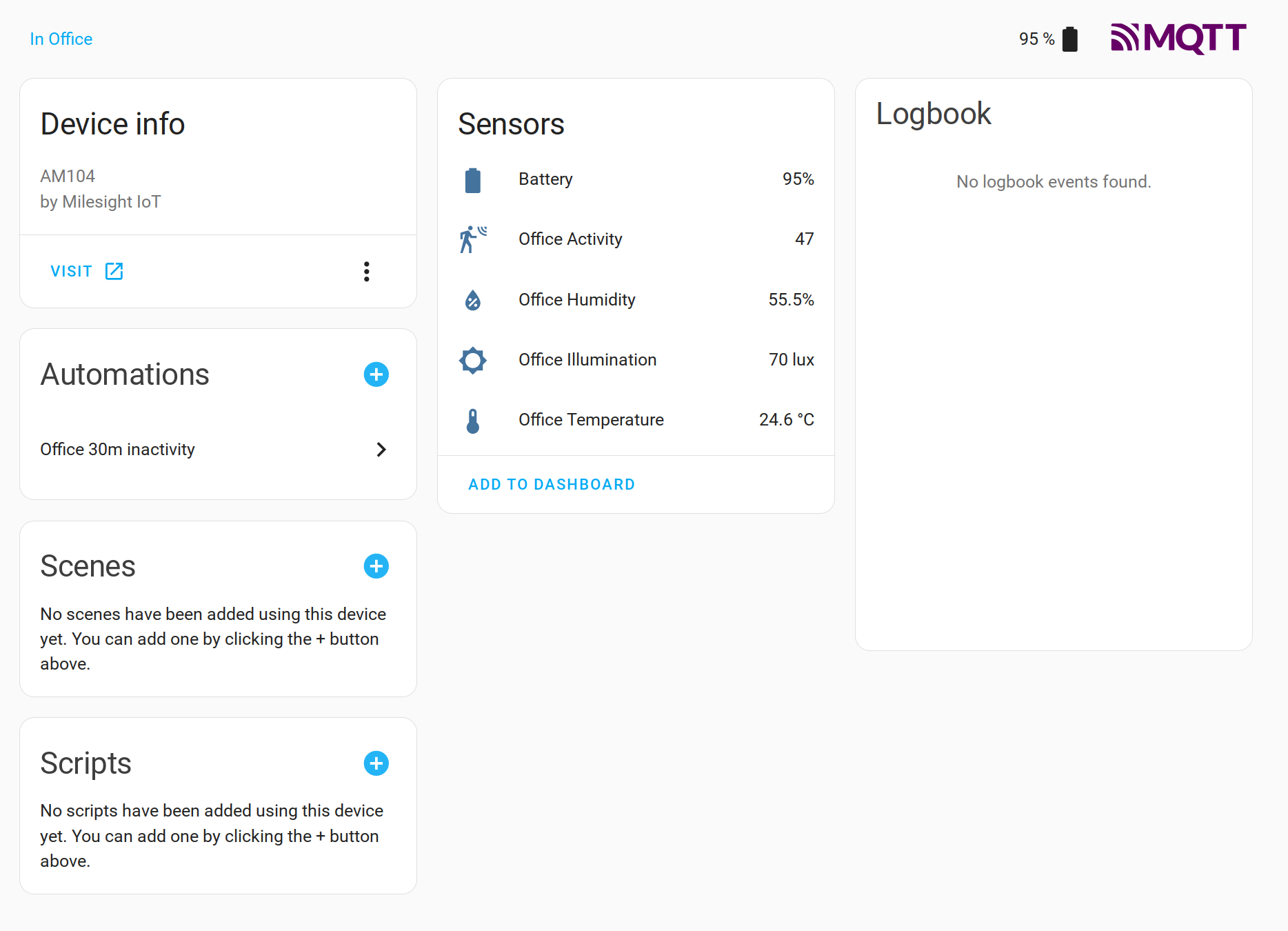

 flat estuary
Hello guys. I am just starting to design my home. I am thinking of using Shelly relays but I am conserved about drowning my house WiFi signals. Is there any other alternative maybe one that depends on cables?
steel zealot
flat estuary
Hello guys. I am just starting to design my home. I am thinking of using Shelly ...
I'm very happy with my KNX installation, it integrates nicely with HA and it can also work independently from HA
flat estuary
does HA works with all KNX manufacturers?
outer knotBOT
@flat estuary Please do not cross post. Read the channel description, post it and wait for folks to respond. Crossposting wastes people's time as they're unaware of the help you're getting elsewhere.
If you don't get any responses after an hour or more, and your message is no longer on screen, it is fine to re-post or post a link to it.
steel zealot
flat estuary
does HA works with all KNX manufacturers?
you only need an ip interface and it will work, its just the protocol
glacial oracle
some of the shelly modules can be lan connected. realistically having a lot of smart relays doesnt make a whole lot of sense
unless its proper multi way switching, but its quite expensive for that
 twilit relic
for the Rpi4, is it is possible to keep the POE hat in and just use if for ethernet, AND have a normal DC barrel plug AC adapter plugged-in?
(i think the USB SSD i have is drawing more power than the POE hat might be able to handle consistently)
winged knoll
Plug the SSD into a powered USB hub
twilit relic
hmm, dont' have one and plug space is limited (hence the POE hat), but i'll give that a shot. thanks. (Trying to rule out voltage/power issues with my weekly instability)
native pilot
Do you have an SD Card that you can restore to? You could run HA off the SD card without the SSD in play to test that.
twilit relic
i do
 tawny fox
if this isn't the right place to ask please point me to where it is. I've installed the general x86 image on a nuc and find that the os doesn't respond to the physical power button on the case being pressed by shutting down, is this something which can be configured?
winged knoll
tawny fox
if this isn't the right place to ask please point me to where it is. I've instal...
That's one for #installation-archived
 unreal bane
Hi curently i need a smart multiple socket device. (3) and with 2 USB.
I found two which i can buy:
NOUS A5T (or some other) WIFI
Or one from Lidl SILVERCREST Zigbee
All my devices are currently Zigbee devices.
But most multiple socket device are wifi based.
Isn't wifi more power-hungry than zigbee?
flat estuary
Guys, is Home Assistant Green better than Rasberry Pi 5?
patent river
unreal bane
Hi curently i need a smart multiple socket device. (3) and with 2 USB.
I found t...
Probably do, yes. Enough to actually matter (compared to the amount of power the things you plug into it use), almost certainly not.
If the USB doesn't need to be switched, the TP Link Kasa ones have worked well for me.
unreal bane
patent river
Probably do, yes. Enough to actually matter (compared to the amount of power the...
No the usb just is nice because i have two usb powered devices (aqara E1 roller shade driver) and they can actually hang on to the power all the time.
TP Link => Tapo p300? This is also wifi based. And not even an open standard. Aren't there disadvantages?
unreal bane
I looked into SILVERCREST. But i don't think it has a wall mount.
So my only optiosn are Tapo P300 and Nous A5T. Nous A5T uses Tasmota. Tapo P300 is proprietary.
Tapo P300 is 10€ cheaper and uses less power in standby. Very hard to decide.
glacial oracle
the nous should be using tuya// nvmd its tasmota
unreal bane
glacial oracle
the nous should be using tuya// nvmd its tasmota
yes. I would rather do without Tuya. But the A5Ts here are specially equipped with Tasmota.
unreal bane
glacial oracle
yea the A5 non t is the tuya one
Yes, it's easy to mix the two up. (just one letter)
glacial oracle
the standby power consumption seems pretty similar between both. i personally would go with the tasmota one
unreal bane
glacial oracle
the standby power consumption seems pretty similar between both. i personally wo...
Yeah ... I think for hardware support it's better.
patent river
unreal bane
No the usb just is nice because i have two usb powered devices (aqara E1 roller ...
I've found the older Kasa line to be better than the Tapo ones, but they both work.
But they're local control (for the newer ones you do have to register it to an account and use that to sign in inside HA, but after that works 100% locally), don't seem like dodgy burn-your-house-down crap, are available in just about every country's flavour of outlets, and don't even cost that much.
A few downsides for sure, but for the most part great.
unreal bane
patent river
I've found the older Kasa line to be better than the Tapo ones, but they both wo...
I think I don't get the kasa ones. Only tapo but it looks like there is a local hacs integration.
Anti Burn-your-house-down is very important xD
But I also think nous is also a good brand? I heard a lot about it.
patent river
They've kinda smushed the two ranges together anyway
Kasa used to be quite different and Tapo used to be basically cloud-only (not really any meaningful local control), but they combined the two and they basically run the same firmware now
For what it's worth the one I have is the "KP303", because that's the only one they sold here in NZ
This one:
 unreal bane
patent river
This one:
unreal bane
patent river
This one:
Generally speaking, I would also recommend TP for the brand. Especially because I know the brand myself and have used it several times. It's not a 0815 supplier. Generally, however, I don't like the fact that they don't use an open standard but their own protocol. So that I then have to set an external hacs integration.
unreal bane
patent river
Kasa used to be quite different and Tapo used to be basically cloud-only (not re...
I've only heard of Nous so far. I've never had any real points of contact. And when it comes to electricity, I prefer to think twice.
patent river
unreal bane
Generally speaking, I would also recommend TP for the brand. Especially because ...
It's all built in: https://www.home-assistant.io/integrations/tplink
Home Assistant
Instructions on integrating TP-Link Smart Home Devices to Home Assistant.
Some time earlier this year they merged the formerly-HACS-required Tapo integration into the mainline Kasa one
unreal bane
"Tapo device it will require your TP-Link cloud" meh
patent river
Again, only for setup
Once it's configured, it's 100% local forever after
That was what I meant by "a few downsides"
It's not perfect, but it's an acceptable compromise in my book
unreal bane
patent river
It's not perfect, but it's an acceptable compromise in my book
Thanks in any case :) I'll think again about whether it will be tp tapo p300 or NOUS. I'm torn right now.
glacial oracle
<@&330946878646517761> fast
winged knoll
Guys, is Home Assistant Green better
 finite dawn
Hi, anyone can suggest ZIGBEE 4 position push button powered for EU cable installation with backlight ?
 oblique harbor
Is there a cheaper alternative to the skyconnect (that also has matter and zigbee)
Because it's £32.50, which is almost as much as a pi 4 on pi hut
winged knoll
That's actually cheap for a decent Zigbee stick alone
Though, you don't want to use the multi-protocol firmware anyway, so you want two sticks or some other #thread-archived solution
oblique harbor
winged knoll
Though, you don't want to use the multi-protocol firmware anyway, so you want tw...
Why not use the multiprotocol one?
winged knoll
Because it's broken
You can read up on that with the pins over in #thread-archived and the various blog posts
Or use it, and then wonder why your Zigbee and Thread setups are FUBAR
terse pebble
oblique harbor
Why not use the multiprotocol one?
Because it is experimental (buggy) and development is frozen, due some issues,
winged knoll
You'll get a similar result by unleashing the chaos monkeys on your meshes
terse pebble
And the performance with two radios will likely be better than with one and shared ressources
winged knoll
Yup, only with the new MGM24 chips are we likely to see decent mixed performance on a single adapter
(been reading up on those as apparently they're uber-stable even on really large Zigbee meshes - 300+ devices)
oblique harbor
winged knoll
Because it's broken
that should probably be mentioned on the product page, for a 30 pound dongle
then I'll just get a zigbee stick without matter for cheaper
I dont currently have zigbee or matter devices (that also dont support wifi) but I will probably get some in the future, so I can just buy zigbee only or ensure there is homekit wifi support (to integrate with homeassistant)
if I need two dongles for that price I might aswell get an apple tv as a thread border router💀 (not that im going to)
winged knoll
oblique harbor
that should probably be mentioned on the product page, for a 30 pound dongle
The dongle's fine
Multi-protocol isn't
And beware buying cheaper sticks, they may be shite
 tawny rover
Conbee2 works well for me. A year in. 70 odd Zigbee devices
glacial oracle
winged knoll
Yup, only with the new MGM24 chips are we likely to see decent mixed performance...
Which ones do have that one?
tawny rover
ZHA. No experience of Z2M.
winged knoll
glacial oracle
Which ones do have that one?
Tube has one, and there's more coming
SMLight for example
glacial oracle
Sounds like a decent upgrade to a SonoffP
winged knoll
Should be a decent upgrade from almost anything, though on Z2M there's no migration path 
glacial oracle
Guess I wait for zha support 
winged knoll
I'd expect them to work with ZHA already
glacial oracle

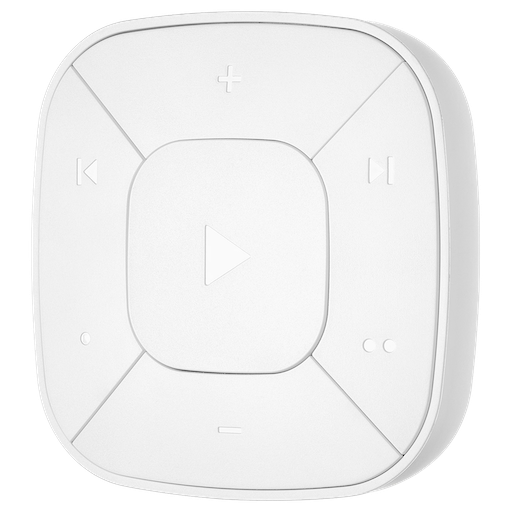


 visual drift
how can i add more than one Xbox to my home assistant?
winged knoll
That's a topic for the #integrations-archived channel
outer knotBOT
The topic of this channel is:
There's a channel for #yellow-archived if you have questions about it.
Questions about a hardware device (not their #integrations-archived with HA, and not the thing that HA calls devices)? Someone might have the same device and be able to help you out! If you've got a Z-Wave or Zigbee devices, see #zwave-archived and #zigbee-archived, #cameras-archived for cameras, and #diy-archived for making your own stuff (or if you're asking about Tasmota or ESPHome).
If you have problems with the Blue or your installation see #installation-archived.
If you want to share images, use https://imgur.com/ or similar.
Please use https://www.codepile.net/ or https://paste.debian.net/ to share code or logs
Looking for advice about a device to buy? Remember to provide guidance on:
- Which country you're in
- What your budget is
- What protocols you prefer (eg Zigbee, WiFi, Z-Wave)
- Any features you want (such as power monitoring, dimming, etc)
visual drift
i apologize, thank you for the direction
 compact flicker
Hi, is there a way to calibrate planttower sensors (i'm sending the data through mqtt)? I have these 2 but I do not know which is the more accurate sensor.
 glacial oracle
Check the datasheets
compact flicker
glacial oracle
Check the datasheets
to my knowledge both datasheet does not mention anything about calibration.
glacial oracle
They tend to not sell sensors without details about their accuracy
The calibration itself is something either the sensor/device itself needs to offer, or you just manually adjust the value with a helper template if the delta is constant (which it likely isn't)
signal cedar
anyone know of a good place to get 5w usb chargers? in USA - unsure if i should trust ebay as there are so many fakes on there
winged knoll
Amazon? UGreen or Anker
signal cedar
saw those. feels odd spending more on the charing block than it does on the esp32 devices
glacial oracle
5w is something even the cheapest will usually do
you can buy em in bulk on amazon, usually around two bucks each if you get a set of ten
patent river
You could go thrift shopping for old 5V1A iphone chargers.
Apple was making those things FAR too late in the piece so I bet a lot of them got discarded when people realised they could charge their phone in less than 4 hours, but they tend to be pretty high quality, electrically speaking
Although that said, I guess there's a pretty big issue with fake ones of those, so you'd better read up on how to identify the genuine Apple products
signal cedar
yea thats my biggest issue. i would love to get apple 5w chargers but the fakes. so hard to know whats going on
 hoary widget
whats the best way to figure out which GPIO pins control a relay? I got a cheap switch/relay thingy that i want to connect to garage door motor and control via home assistant. I managed to flash esphome on it and i'm trying to modify the YAML config based on this: https://esphome.io/cookbook/garage-door
I found the pinout info for the MCU, but it's not clear to me which pins i need to use following that template to control the relay. I am having trouble finding any documentation on the board, only the mcu. is it realistic to find documentation about what each pin controls on the whole board for a cheap tuya relay? do i need to add each combination possible, reflash, then blindly test until it switches the relay? advice appreciated 🙏


 patent river
Have you got a multimeter? You possibly don't want to use continuity mode in case it's stuffing too much voltage somewhere it shouldn't, but should be able to do a voltage measurement to see which pin is putting out voltage
One lead of the meter to ground, other one on the pins of the micro, see which one is hot
hoary widget
i do have a multimeter. i'm very much diving in head first to all this without much prior knowledge of electricity and never worked with arduino / esp before, so excuse the dumb questions. would i need to add every potential pin to the YAML config as a switch, reflash, then test as you have suggested after switching each one individually on the web server?
since i already overwrote the stock firmware, none of the buttons or anything does...anything, bc i haven't correctly modified the yaml config with proper GPIO pins and reflashed the firmware...if my understanding of how all this is correct. so an oversight on my part to not test this first when there was stock/working firmware installed
can i eliminate or narrow down the search by assuming the relay would only be triggered by a specific type of pin (eg PWM only)?
glacial oracle
Realistically no
I would suppose that relay would just be activated by applying 3 or 5v to it / maybe some logic to toggle it in-between
hoary widget
darn. would by best bet be to add each GPIO as a switch and rebuild the firmware, then toggle each one until the relay opens or closes? i am just not sure what the best way to figure out which pins control the relay
glacial oracle
Do you got a link to the product?
I would expect they list how this is supposed to work
hoary widget
maybe i overlooked it, but i could only find documentation on the mcu itself and not the whole module/board (its a cheap chinese tuya product): amazon.com/dp/B08F7M82NB
and found the pinout here: https://docs.libretiny.eu/boards/cb3s/#pinout - the pic on the amazon listing shows a different type of wifi mcu than what i received
patent river
That doesn't appear to match the module in the photo though; contacts on 2 sides vs 3
hoary widget
correct, the product picture on amazon has a different chip than the one i got. here is a pic of it. please excuse the poor soldering wires to flash the firmware initially. that part worked and i have esphome installed on it, and it can connect to wifi and home assistant.
 glacial oracle
If you can figure out which pin of the relay needs to get some voltage to switch you could might be able to trace it back to which pin on the esp it is
patent river
Smart money says the transistor at the top of the column of components between the relay and micro is driving the relay
If you can follow the trace from that to a pin, it's probably that pin
glacial oracle
It probably flips the voltage to figure out the state
The side with the three pins, the left and right one should control the coil
Tho I have no idea, the datasheet is basically just am image lol
hoary widget
well, thanks for your advice and moral support guys. i'll try to trace that pin as @patent river commented, thanks for the recommendation of a place to start. I found another data sheet from tuya here (https://developer.tuya.com/en/docs/iot/cb3s?id=Kai94mec0s076#title-5-Pin definition) which will at least help give me an idea of which ones are more likely to control the relay. this will be a good learning experience for me lol
CB3S is a low-power embedded Wi-Fi module that Tuya has developed. It consi......
hoary widget
woo hoo! it was PWM4
 fresh crest
Hey everyone, I hear lots of people recommending NUCs for first time HA set ups, from my understanding its just because its low energy, has the power to run and storage suitable based on that would the collective of you agree this would be suitable, its a refurbished HP EliteDesk 800 G2 Mini
Form Factor - Mini PC
Processor - Intel Core i5 6th Gen, 6500T 2.50GHz Processor
RAM - 16 GB
Storage - 512GB (480GB)
Storage Type - SSD (Solid State Drive)
I/o Ports - 6 x USB 3.0 Ports, 1x USB-C, Ethernet, VGA & 2x DisplayPort,1 x Optional Display Port or VGA
Features - WIFI USB dongle, Built-in Speaker
Connectivity - WiFi Wireless
golden thorn
Not a bad choice. I'd recommend virtualizing HAOS on it: #hardware-archived message
fresh crest
golden thorn
Not a bad choice. I'd recommend virtualizing HAOS on it: https://discord.com/cha...
Thank you! can I ask a kinda dumb question whats the difference between installing and virtualizing?
golden thorn
Basically virtualizing allows you to slice the hardware into multiple separate PCs. That hardware is overkill for just HA and a waste. You also get a lot of benefits from virtualizing. See links.
fresh crest
On it! thank you again.
pliant forum
fresh crest
On it! thank you again.
Look into Proxmox
mild galleon
What is recommended for door sensors that work well with HA? I don't mind using esp32, esp8266, etc if that's the best, but i don't know what sensor to get for that purpose. Otherwise something of the shelf ready to go. I don't mind re-flashing to move the product to HA if that's needed. Just looking for some advice. Initially I want one for a large metal stores cupboard just so i know i don't leave it open. A roller door sensor would also be great.
 dusk steppe
Hi, I got HA installed on the micro pc and I want to connect stereo via jack 3.5mm. I've downloaded Spotify and done all setup but music doesn't play from speakers. Any ideas what can be the issue?
mild galleon
golden thorn
Not a bad choice. I'd recommend virtualizing HAOS on it: https://discord.com/cha...
Quick question on virtualising HAOS. Is there documentation on guidance for that? Like what host os and vm host works best? Ihave only used vmware and hyper-v, never any Linux VM products. Thx.
 spiral steeple
I’m trying to make a soil moisture sensor however my readings don’t make sense in dry conditions I measure 0.075v and in wet conditions 1.05v but there seems to be nothing in between, moist soil is either 0.075v or 1.05v what could this be? My sensors have the en555 so I supply 5v to the sensor and I’m using d34 pin on the esp32. I also soldered the resistor on one of my sensors but it doesn’t make a difference

 oak vortex
mild galleon
What is recommended for door sensors that work well with HA? I don't mind using ...
oak vortex
mild galleon
What is recommended for door sensors that work well with HA? I don't mind using ...
Depends what you want it to do. If it's just open / closed states that you're after, the Sonoff one is great and works well.

SONOFF SNZB-04 ZigBee Wireless Door Window Sensor, Burglar Alarm for Home Security, Compatible with Alexa/Google Home
 past summit
If I want to both control waterflow and measure the amount of water, is there a recommended ”thing” to I can/should use? Hopefully on a mains water line. I’m not even sure what to google
Approved for EU market preferably
glacial oracle
I don't think so, at least not for water
One would be a valve and the other device a meter
For later there is the watermeter from homewizard
past summit
Thanks for the reply
 carmine mason
Does anyone use the Ikea Tradfri bulbs with HA? I'm looking for confirmation of two things:
- Can I just use any Zigbee stick with them?
- Is it possible to set the color temp continuously? It looks like it may be...
tacit pilot
Looking for recommendations on zigbee water leak sensors
terse pebble
IKEA has really cheap ones, called BADRING. They cost about half the price of the Aqara ones. They have a beeper and work mostly well with ZHA.
I'm quite satsfied with the Aqara ones as well.
tacit pilot
Yeah was thinking of going aqara. Does the beeper have to go off or is that optional?
Was also thinking of checking out the Linkind one too
terse pebble
At least in ZHA it cannot be disabled.
On the positive side for the IKEA one: it uses usual AAA batteries
 strange zodiac
mild galleon
What is recommended for door sensors that work well with HA? I don't mind using ...
strange zodiac
mild galleon
What is recommended for door sensors that work well with HA? I don't mind using ...
https://www.amazon.com/gp/product/B0BTL8B72D/ is working well for me. A bit pricy, but the matter/thread is working flawlessly.

Aqara Door and Window Sensor P2
tacit pilot
It's also going to be in the basement and I've had issues with one of my zigbee devices down there. One works fine though. Already have a plug to act as a repeater
 cold terrace
tacit pilot
Looking for recommendations on zigbee water leak sensors
cold terrace
tacit pilot
Looking for recommendations on zigbee water leak sensors
I use the Aqaras... be sure to get some scrap wire and hook it around the electrodes to increase coverage area
I have 2 in my boiler room, 1 next to a bathroom that's had Noah's flood before and 2 under sinks. the boiler room ones get the most action because I have an old gas/steam boiler
here's me throwing buckets of water out at 1:30 am
 strange zodiac
Looks like Enphase solar hardward/batteries have a nice integration with HA, and maybe Tesla hardware doesn't.
golden thorn
mild galleon
Quick question on virtualising HAOS. Is there documentation on guidance for that...
Like the link says, I recommend Proxmox VE as OS. For hardware what you have should be fine. You just might have t enable virtualization in the UEFI.
fresh crest
pliant forum
Look into Proxmox
Thank you and shall do, Impact's links also were taking me to Proxmox. I have ordered the computer about to order the SkyConnect usb adapter and about to find some suitable sensors now
golden thorn
Do you want to use ZHA or Z2M for zigbee? Because the SkyConnect isn't recommended for the latter.
fresh crest
I honestly wasnt aware of the difference, I currently havent touched Zigbee before I have 9 Matter lights connected via a google hub
golden thorn
One main difference/benefit of Z2M over ZHA is that it's not bound to HA as it's a separate software. ZHA is easily integrated into HA and has some goodies but I'll suggest you research the differences on your own if you're interested.
fresh crest
definitely will do some research, thank you again Impact! - would you have any recommendations on dongles for Z2M that you've used?
golden thorn
See link. I use a Sonoff P but it's not usuallly suggested.
subtle creek
I have enphase panels/gateway and it works nicely with mine @strange zodiac , no batteries on my system though
past summit
Are there any remotes that can be used with HA that is similar to e.g. the control4’s? https://www.control4.com/solutions/products/remotes/
distant yacht
golden thorn
See link. I use a Sonoff P but it's not usuallly suggested.
I've seen only one person not recommending it.
I've also seen MANY other people recommending it (including me).
golden thorn
Whenever it's talked about someone pops in and recommends against it. Similar to tuya. I chose to simply link to the official recommendations in most cases.
cold moon
the sonoff p dongle is fine. there's a handful of people who said the p dongle nvram corrupts and you have to flash it again. it's not some super expected known thing it just can happen like it can happen with anything that has nvram on it
distant yacht
golden thorn
Whenever it's talked about someone pops in and recommends against it. Similar to...
it's the same person xd
jagged crypt
So the humor value if you are deciding between z2m and zha based on which dongle to get, you don't know which ones makes sense for you, because you don't have the dongle. It's a little catch-22. I bought sonoff-e, because it was the same chipset as the skyconnect, use zha, and am happy. I'm not doing any odd zigbee devices though, so ymmv.
ZHA vs Z2M seems to be more around if you are already comfortable with MQTT setup you have, and if you need slightly more cutting edge support for devices. I'll let others comment if it makes any other non-religious difference past that.
 tranquil girder
I'm not sure where the correct place for this is, but I'm trying to find the correct fan for the type of smart switch I bought for my office that I'm renovating. I bought this switch a while back when I started: https://www.amazon.com/gp/product/B086PPRWL7/ref=ppx_yo_dt_b_search_asin_title?ie=UTF8&psc=1
Basically it's a smart switch that allows you to control the fan (and speeds), as well as the light (and dimness) independently. I was going to to use it with home assistant so I could create cool automations with it, but it says that it's incompatible with 'built-in remotes'. I think the point is that you want the single point of control to the be the switch itself and not anything else on the fan, for the most part, so adding a remote in there messes this up. Also, it limits functionality I think, if you were to say, set the switch light dim level of the fan to 50% and then use the remote control to try to make it 100%, it may not work because the switch is only giving the fan 50%. Stuff like that.
But my question was basically, if I get a fan that has the standard independent control between fan + fan speeds, and light and light dimness, and I never use the built in remote at all, would this be acceptable? I'm not sure if this simulates just not having a fan with a remote, if I never use it, so the smart switch is free to control the fan in whatever way I specify on the switch

Smart Ceiling Fan Control and Dimmer Light Switch, Neutral Wire Needed, Treatlife 2.4Ghz Single Pole Wi-Fi Fan and Light Switch Combo, Works with Alexa, Google Home and SmartThings, Remote Control
jagged crypt
you are looking for a dumb fan is my translation of the amazon page, as long as the fan/light combo has two independent load lines
tranquil girder
Most of the fans I'm finding nowadays have a built in remote and it seems to severely limit the fans I can choose from if it must be a truly 'dumb' fan but it can still allow for light/fan control with their respective wires.
Yeah, exactly what you said, but again this limits the ones I can choose from. Just do a simple search for fans on Amazon and 50%, maybe even 75% that come up have remotes. If I could literally just never even put batteries into the remote and act like it doesn't exist, it would give me many more options
Seeing if that makes sense based on anyone's understanding of how smart switches control fans
jagged crypt
your assumption follows rational thought. It'll boil down to how the remote side deals with dimming the lights and changing rotational speed
tranquil girder
Maybe the best thing to do is to just find the fan I like, remote or not, as long as it doesn't use WiFi or anything, and just buy it and try it out. If it doesn't work, Amazon takes it back and then I know
problem solved right there, maybe
jagged crypt
or find a fan with built in wifi controls, and toss your smart switch
tranquil girder
thought about that too, but those tend to be less common (fewer options aesthetically) and they're more expensive
jagged crypt
add "hardwired" to your search to possibly narrow down - https://www.homedepot.com/p/CRAFTMADE-Inspo-54-in-Dual-Mount-Indoor-3-Speed-Brushed-Polished-Nickel-Finish-Ceiling-Fan-with-Hard-Wired-4-Speed-Wall-Control-647881211493/325386378

The Home Depot
The CRAFTMADE Inspo 54 in. ceiling fan is a picture of modern design. It's low profile, minimalist styling, multiple finishes. heavy-duty 3 speed reversible motor is the inspired choice for any room. The Inspo includes a 4-speed wall control and comes with a Limited Lifetime Warranty.
tranquil girder
plus you have to figure out how each fan interacts with HA
but most of the functionality I'd want is pretty simple. Not looking for much more than on, off, speed, and dimness
jagged crypt
forward/reverse
tranquil girder
yeah
jagged crypt
there's not a lot of other options on fans