#hardware-archived
1 messages · Page 15 of 1
 queen vessel
 cold moon
and is there no workaround?
queen vessel
I think it’s only the eqsmart thermostats
queen vessel
That’s the only one I know of
cold moon
when adding my xaiomi temp/hum sensors they needed a bind key to add securely but i suppose that isnt pairing
although i do have bluetooth (built in using old laptop with haos)
queen vessel
cold moon
when adding my xaiomi temp/hum sensors they needed a bind key to add securely bu...
it’s not actual Bluetooth pairing so no worries there
cold moon
i had to unhide my IoT ssid (i didnt do it for security through obscurity i just saw no reason to have it confuse people when searching for wifi) because the esp32 with esphome wouldnt connect because it tries to scan first and find best AP
queen vessel
If you’re using a VM, I definitely would not recommend using a local adapter
cold moon
i saw fast_connect: true as a workaround and taht worked, but then it joins to w/e AP it wants on boot and not necessarily the one with the best signal which to me is sub-par
cold moon
queen vessel
If you’re using a VM, I definitely would not recommend using a local adapter
eh with unraid VMs and usb passthru are pretty painless
i moved from a vm to haos on an old laptop cuz i figure fuck if my server is down i dont want smart home down too
queen vessel
cold moon
eh with unraid VMs and usb passthru are pretty painless
Are you probably have better luck than most, but the Bluetooth issue queue says otherwise
cold moon
queen vessel
Are you probably have better luck than most, but the Bluetooth issue queue says ...
referring to github issues?
queen vessel
Yes
cold moon
thinks of nice way to say people are dumb / dont follow directions
lol
i've seen most issues here with vm and usb passthru are virtualbox users that followed some youtube tutorial
queen vessel
It’s nicer when people use the proxies actually, since they are pretty painless, and no virtual box involved.
 unique lantern
They're also just cheaper and more convenient. I was able to cover my house with 2 ESP32s
cold moon
and easy to passthru the entire device if needed and mobo supports it / you buy a pcie card
 tacit pilot
Thanks so much!
cold moon
unique lantern
They're also just cheaper and more convenient. I was able to cover my house with...
yeah
and they can double as sensors or whatever
tacit pilot
@uncut ridge ^
queen vessel
I also like the proxies, because they can be powered over ethernet, and I have a few inside socket boxes in the yard to reach the gate locks. Hopefully to monitor the LPG soon
queen vessel
Liquid propane
cold moon
sounds firey
queen vessel
Flemoon Large Outdoor Electrical Box (12.5 x 8.5 x 5 inch), IP54 Waterproof Outdoor Extension Cord Cover Weatherproof, Protect Outlet, Plug, Socket, Timer, Power Strip, Holiday Light Decoration, Black https://a.co/d/78gQFie (example only)
Not using that one
queen vessel
At least the ones I have are sealed and I don’t have a problem with it going on the 8 years
Ymmv. Depends on your climate
unique lantern
IP54 is fairly well sealed
 pearl glade
Good to know! I have hue bulbs and I'm still shopping for switches. I'm thinking Lutrons no neutral switch. Given price I imagine it will work fine, but what can I look for to know if they will be compatible?
 uncut ridge
is there a reason to use this when its bluetooth 4 when that isnt the latest standard? I guess i dont understand how this is ranked as one of the best bluetooth devices to use but its only bluetooth 4?
tacit pilot
I do have one BT "proxy", but it's actually a dedicated one for switchbot (different project)
uncut ridge
what is a bluetooth proxy?
tacit pilot
Otherwise the only BT devices I control are Valve Index base stations and they are the same room as my HA instance where I have the BT dongle plugged in
tacit pilot
uncut ridge
what is a bluetooth proxy?
Was added recently
I kinda purposely stay away from BT devices because of what I've heard and experienced with them
Maybe I just have a bad dongle but my BT experience has been really poor
 winged knoll
uncut ridge
is there a reason to use this when its bluetooth 4 when that isnt the latest sta...
winged knoll
uncut ridge
is there a reason to use this when its bluetooth 4 when that isnt the latest sta...
Marketing strikes again
tacit pilot
Wish I liked them more because there are some good devices out there. And I really appreciate the work draco has been doing
uncut ridge
winged knoll
Marketing strikes again
enlighten me please
queen vessel
uncut ridge
is there a reason to use this when its bluetooth 4 when that isnt the latest sta...
The Linux drivers for newer Bluetooth adapters versions tend to be far behind the windows drivers. Vendors don’t usually release Linux drivers so they tend to be community developed or release once by the vendor and never updated so you end up with a bad experience. Also almost no devices need anything newer than ble 4
winged knoll
uncut ridge
enlighten me please
Well, clearly 5 is better than 4, right?
uncut ridge
thats what we are told to believe
winged knoll
So, obviously you need to buy 5, not 4, because bigger is better
I mean, that's why you should be buying WiFi 7 gear
tacit pilot
I mean I wouldn't really say that's marketing is it? BT is "better" than 4, it's just that the drivers need to be smoothed out
queen vessel
tacit pilot
I kinda purposely stay away from BT devices because of what I've heard and exper...
There is a lot of bad hardware out there. It works solid if you get decent hardware. If you don’t it’s a nightmare
winged knoll
Marketing is also why so many people want a Pi for running HA when it's far from the best choice
tacit pilot
winged knoll
So, obviously you need to buy 5, not 4, because _bigger is better_
That's why I don't get the d1 mini, too small. I prefer to buy the esp boards that take up the entirety of my spare bedroom 🙂
winged knoll
Better to buy something that's stable and performs well than try to live on the bleeding edge
queen vessel
Also connect everything with Ethernet.
tacit pilot
queen vessel
There is a lot of bad hardware out there. It works solid if you get decent hardw...
Hardware on the controller side or device side? Or both
Controller side I can, well, control. If devices are a crapshoot well then that's kinda the problem. I'm just not gonna risk it
And hasn't BT as a technology been like way overloaded?
Like it was never meant to be used for audio. Not sure if that is still relevant
 real fractal
Anyone know specifically which Roth SoftLine thermostat works with HA? Is it any of them but you need the WiFi add-on to make it work with their app? Is that the device with the API?
queen vessel
Also need to add this to the docs: The Bluetooth integrations employs automatic failover and automatic connection path logic to achieve high availability. When adding multiple proxies to increase range or available connection slots, be sure to separate them enough to avoid interference with each other.
queen vessel
tacit pilot
Hardware on the controller side or device side? Or both
Well both but is almost always the controller being the issue because of the poor Linux drivers for most
Even if you have a working local adapter adding a proxy can help if you have a range issue. It will figure out the best path
tacit pilot
Well the base stations are all the same same fairly small room as the dongle
And they are what's filling up my log
queen vessel
tacit pilot
And they are what's filling up my log
?
uncut ridge
winged knoll
Marketing is also why so many people want a Pi for running HA when it's far from...
I'm not rich and I had a pi laying around so thats what I went with. ¯_(ツ)_/¯
 outer knotBOT
@uncut ridge When using Discord's Reply feature it defaults to pinging the person you reply to, which can get frustrating for the target. Use Shift + click on the Reply option, or click @ ON to @ OFF to stop this - on the right side of the compose bar.
You have to change this every time (thank the Discord devs for that).
 boreal vessel
Not sure where to ask, but I've been using ISY 994 for Insteon device control and a ZWAVE USB stick for ZWAVE control. Should I look at upgrading to the eisy now that ISY is discontinued? I feel like having the ISY in the mix added something else to break, but I hate to give you my already installed devices
 gloomy spoke
there isn't any reason to change now if you don't need anything else from the ISY
I'm essentially using my ISY994 as a GUI for Insteon linking/scenes and I have all logic involving them in HA
boreal vessel
I just get that shiny object itch -- and trying to think ahead about what WOULD I be able to do with the newer tech
gloomy spoke
I would get nothing out of upgrading to eisy
IMHO, if you want to use PG3, you have to migrate. If not, you don't
why someone would choose PG3 over moving that functionality to HA is beyond me
boreal vessel
I love my ISY, it's been very solid. Just concerned I'll need to move away from Insteon sooner or later as things fail. But I think that Zwave is the current sweet spot, until Matter devices really start to multiply. Just hate to think that I'm making the same mistake that I feel like I made going with Insteon instead of Zwave 15 years ago
What is PG3?
gloomy spoke
Polyglot3. It's their "integration" store
if you don't know what it is, moving to a newer box won't help you
Your existing Insteon devices should continue to work fine until they fail, and then you should make a choice about whether to double-down on Insteon. Given their history, I would take that opportunity to move to something else, and HA supports ZWave, Zigbee, and will support Thread/Matter
HA also supports Wifi devices, of course, depending on who makes them. Lots of options
 glossy prism
Reminds me...I can't believe Wink hasn't totally failed yet
gloomy spoke
Really, the whole point of PG2->PG3 in the UDI universe is locking down the "integrations" and turning it into a real "store" where you can charge for them. There's nothing about it that interests me in the slightest
boreal vessel
Thanks for y'alls advice!
cold moon
You’re welcome
 low nymph
I've got my SkyConnect and I'm wondering if ZHA is recommended over Z2M. Especially considering the thread/matter support down the line. I'm currently using deconz with a conbee II so I'll be migrating either way
I'd honestly prefer Z2M so the zigbee network will remain active through HA restarts, but if it's not going to work with matter / thread then it doesn't seem worth it
unique lantern
#zigbee-archived but the short answer is that Z2M only has experimental support for the SkyConnect radio
low nymph
unique lantern
<#551843655682490399> but the short answer is that Z2M only has experimental sup...
kinda relates to matter / thread as well though
 night atlas
not sure if it's hardware or instalation, but a laptop's fancurve runs indepenant from HAOs right in most cases. as in it should just turn on the fan if the laptop hardware thinks it's to hot
 muted wasp
Hi all. would anyone have an idea on best way to acomplish this:
I have a wall switch with two switches. I just want to have their states reported into HA. the switches would not be connected to anything else in the house, just need their info in HA. in the wall cavity I do have 220v (L, N and earth)
I do have a zigbee network throught the house so maybe using that? but i havent found any hardware specific to reading switches states. I was looking at the sonoff Mini but that only has 1 input.
 summer shell
Sadly it looks like my old non-rolling code garage door opener is dying.... Going to have to get it replaced. I currently have a dry contact relay on the unit in line with my wall switch to close the circuit and open the door. I am reading this doesn't work with more modern garage door openers and I frankly want a local solution to make life easier. I found this little neat project and wanted to know if anyone is actively using it and their thoughts. https://paulwieland.github.io/ratgdo/
Thanks!
tacit pilot
queen vessel
?
A bunch of BT related errors
tacit pilot
winged knoll
Marketing is also why so many people want a Pi for running HA when it's far from...
What are better choices?
winged knoll
I'd suggest hitting up the search feature, it's been discussed to death in this channel
The short answer is just about any PC from the last decade
queen vessel
tacit pilot
A bunch of BT related errors
Did you post them somewhere, also from which adapter?
tacit pilot
Ok. Not saying I disagree, was just wondering what you thought
tacit pilot
queen vessel
Did you post them somewhere, also from which adapter?
Not yet, and this one: https://www.amazon.com/gp/product/B09KGVFX1K
I bought it before there was a "high performance adapters" list
queen vessel
oh. the RTL8761BU one. Yeah the linux drivers are garbage.
tacit pilot
:/
It was in the list of "known working" before
I had a small tplink one before that straight up didn't work
queen vessel
its still on the working list https://www.home-assistant.io/integrations/bluetooth/#known-working-adapters ... it just works poorly
which is why its not on the high performance list https://www.home-assistant.io/integrations/bluetooth/#known-working-high-performance-adapters
tacit pilot
Yeah, just a bummer cuz I got it just for HA and there was no high performance list at the time
queen vessel
It took a couple months to buy all those adapters and test them.
 ruby harbor
Can I use a microphone of either USB or 3.5mm jack style and get that working with HAOS on the Pi 4 B?
cold moon
what's the end goal?
ruby harbor
To listen to the sound of everything around where the microphone is placed.
Even recording it.
It would be nice to go into the dashboard and hear what is going on. Also, to be able to go into files to see audio tracks that got record when motion detection went off.
ruby harbor
I see several people talking about getting a USB and 3.5 mm jack working and I assume they are using it on HAOS but they don't mention how they are using it.
 copper juniper
sox has rec in it; http://what-when-how.com/Tutorial/topic-183m6d/Raspberry-Pi-for-Secret-Agents-42.html goes over some of it
cold moon
Not cool
cold moon
Careful tho. Even single party consent states say ‘reasonable expectation of privacy’ and it’s illegal to record someone where they live without consent
ruby harbor
I have homeassist on this Pi. Will these commands work the same?
copper juniper
outside?
ruby harbor
Bascially, does this OS swap mess with the method you linked which seems to rely on the original OS.
copper juniper
probally
cold moon
It depends on each state. It would be worth paying a lawyer or at least searching for past cases to see how it was ruled for your state
I worked at a security camera company and our in house lawyers wouldn’t let us have mics on for any cameras cuz it wasn’t worth dealing with litigation
And this is in Texas with single party consent laws
I’m not sure the best course of action sans running away from crazy people
Even if that isn’t an option
You could get crafty and set them up but I wouldn’t suggest talking about it with anyone if you feel that’s your only recourse
🤐
Sorry you’re going through that tho
copper juniper
so unless yelling happens i don;t care
 blazing hawk
Ok, installed Ubuntu, set up the VM and started configured Home Assistant. That wasn’t so bad. Anyone else have issues discovering LIFX bulbs?
 static sapphire
cold moon
I worked at a security camera company and our in house lawyers wouldn’t let us h...
static sapphire
cold moon
I worked at a security camera company and our in house lawyers wouldn’t let us h...
We got a new COO recently... He found out all the cameras had mics... Had the facilities team take apart and remove each one 🤦
unique lantern
 idle escarp
Sorry, thank you. I'll delete my message.
 tacit burrow
Hmm, anyone remember the magic spell to make lenovo thinkcentre book from usb OK? Something about bios/uefi?
AH I think it's "secure boot" setting.
 hard tinsel
Are there any decent robot vacuums yet? By decent I mean, some form of local integration and isn't a paperweight if the manufacturer drops support or goes offline
 zealous dune
anything flashable with Valetudo
hard tinsel
haha true, I do currently have a Dreame D9 with Valetudo, was just thinking about buying a second vacuum, and was curious if anyone is actually doing it right yet
hard tinsel
fair enough, at least we have that, thanks 🙂
blazing hawk
Would someone mind explaining the different types of firmware you can flash? Tuya seems to be the most popular but apparently newer wi-fi chips don’t support flashing. How does ESPHome compare?
winged knoll
Tuya ... you probably mean Tasmota
blazing hawk
Ah yes, my primary use right now is for lightbulbs not supported by a HA integration like Feit Electric and Sengled.
blazing hawk
I see, so it looks like Tasmota can be done wirelessly while ESPHome requires disassembly and soldering?
winged knoll
No
It's usually down to the hardware whether you can OTA or not
#diy-archived can tell you all about both of those, and if you tell them the hardware in question (make and model) they can tell you about what's possible, and how
blazing hawk
Thanks!
 frozen arrow
Hiya. I'm trying to use a few bluetooth LE devices through my home, but it's old brick construction and I can't get much distance from the central cupboard before the signal drops off. I'm using the xiaomi temp/humid sensors with flashed firmware and they work great from close proximity. Is there an adapter anyone can recommend, maybe with an external antennae that would be more likely to give whole home coverage?
frozen arrow
if anyone has an idea please tag me so I don't miss it, as I need to change offices now
 sand oxide
Hello, I'm noticing that SkyConnect is missing drivers in Device Manager (Windows). Do I need to install those?
winged knoll
You should just be able to pass the USB device through to the VM
sand oxide
winged knoll
You should just be able to pass the USB device through to the VM
I don't see it available to me in the virtual box.
winged knoll
Then maybe you do 
sand oxide
winged knoll
Then maybe you do <:shrug:729303702761898084>
Are there drivers available for the SkyConnect? I'm not seeing anything in the documentation.
outer knotBOT
@sand oxide When using Discord's Reply feature it defaults to pinging the person you reply to, which can get frustrating for the target. Use Shift + click on the Reply option, or click @ ON to @ OFF to stop this - on the right side of the compose bar.
You have to change this every time (thank the Discord devs for that).
winged knoll
I have no idea...
gloomy spoke
You may need the cp210x driver for the USB to serial converter
sand oxide
gloomy spoke
You may need the cp210x driver for the USB to serial converter
Okay, maybe I do see it, I have something listed Cygnal Integrated Products, Inc. CP210x UART Bridge / myAVR mySmartUSB light [0100]. Is that it?
gloomy spoke
Doesn't sound like it
sand oxide
Sorry, the cp210x reference got me thinking that might be it. In other news, SkyConnect has finally shown up in the virtual box.
tacit pilot
Is there any consensus on power-line ethernet? Like would it be preferred to wifi? I know if you can do ethernet in general that's the recommended approach, but wondering if that recommendation would carry to PLC.
winged knoll
Powerline can be good, if your wiring is up to scratch. It can also be anything but
tacit pilot
Might give it a shot. But if I were to say if it were good or not, I'd say not since it's an old apartment lol
cold moon
tacit pilot
Is there any consensus on power-line ethernet? Like would it be preferred to wif...
Powerline is considered last resort or actively refuse to use it by most networking guys including myself
tacit pilot
Kinda surprised by that
winged knoll
I used it in my last house, because of brick walls, lots of WiFi, and the challenges of running cables. Worked flawlessly.
The problem is, it's got ... issues. If the wiring isn't good enough you lose a lot of speed. Older generations also screw with amateur radio.
tacit pilot
Seems like it has the potential to be the perfect combo with POE
tacit pilot
winged knoll
The problem is, it's got ... issues. If the wiring isn't good enough you lose a ...
At least with the devices I imagine using it for, it wouldn't really need speed
Can you do powerline and poe at the same time?
winged knoll
You do know what PoE is?
 jagged crypt
my powerline story is from the mid 00's, where i bought a system to connect living room up in a rental unit. Connected one part on, hooked up my laptop and promptly got DHCP from a neighbor who was using a powerline adapter also. We living in stand alone houses next to each other.... 🙂 I returned the unit.... I suspect things are a little more secure currently.
 gentle fossil
Fiber > Eth > MoCa > Wifi > Powerline for me
jagged crypt
later, in a different location i ran ethernet because the wifi interference in the building complex was so bad, I could barely stream ISO files 50 feet with line of sight.
 north trellis
I'm looking for a good HA integrated outdoor irrigation system, what do you suggest?
jagged crypt
I'm a huge fan of WIRED connections for anything important. Wifi is low bandwidth solution, but 99% of what people need are low-bandwidth.
cold moon
gentle fossil
Fiber > Eth > MoCa > Wifi > Powerline for me
You lost me at moca
Coax can die a fiery death
gentle fossil
ey they do 5gbit nowadays
cold moon
Only thing coax is good for is it doubles as a whip
tacit pilot
winged knoll
You do know what PoE is?
I'm just not sure if there's a limitation where it couldn't be used along with a plc adapter
 stoic falcon
Careful with PLC, some implementations are only good with low data volume applications, e.g. they can only handle 10Kb/s
gentle fossil
even having a steady connection was troublesome for me with these powerline adapters,
once a month they just disconnected and didn't see each other until plugging one of them out and back in
tacit pilot
Just chain it with a smart plug 🙂
stoic falcon
If you need more distance then a mesh tech would be something to consider. e.g. Zigbee
gentle fossil
I chained them to the bin
tacit pilot
lol
My roommate at my old place was using it for his xbox so I assume he was able to get fairly high bandwidth
It was a newer building though
stoic falcon
Descipher is trying to hold back the bad jokes
tacit pilot
George is gettin upset!
sand oxide
Alright, so I have to ask, is anyone here successfully using the SkyConnect with a VM on windows? I feel as though I've gotten the VM to recognize the device, however, I can't add it to ZHA. As far as I understand, it should automatically find it. If not, it will ask you to manually enter some values (which I've done with no success). If anyone can provide pointers, it would be much appreciated. During my research I've found plenty of horror stories about SkyConnect being unreliable or not working at all and that's mostly without even adding the complexity of running HA in a VM.
 valid frigate
https://youtu.be/5jDzeOtMlGc oohhh possibilities
 mossy hemlock
Whats everyone's options of running hassio on a server in docker as a VM or a seperate device altogether? Thinking of splitting hassio from my unraid server incase the server dies or fails to come back online?
winged knoll
You don't run "hassio in docker"
Hassio is the (3 years dead) name for Home Assistant OS, you run that in a VM or on dedicated hardware
 gloomy elbow
Also, considering what's happening in #general-archived right now: not using Unraid seems like the way to go 🤪
tacit burrow
@mossy hemlock HAOS in a VM on justabout anything works great.
vmware, virtualbox, proxmox, kvm, etc
Yes, it's a VM that runs supervisor/docker, but you don't need to worry too much about it, and all the add-ons will run in the VM too.
Just One Thing to move around
mossy hemlock
Oh is that all the VM is. I was hoping for something a little more direct without any sort of virtualization involved
cold moon
mossy hemlock
Whats everyone's options of running hassio on a server in docker as a VM or a se...
yeah i did the same thing. haos on a used laptop is what i went with and it's been flawless for a couple years
tacit burrow
@mossy hemlock I doubt you'd ever notice the overhead, on anything except a pi. There's basically no overhead in docker, but a little in VM. But HA itself doesn't use/need much.
mossy hemlock
@tacit burrow I am looking to get an old thin client and run HA on that with zero tier and ombi
tacit burrow
🤷♂️ I never used zero tier or ombi. Have lots of love for SFF boxes from ~5 years ago, with proxmox.
 amber frigate
the pc I was intending to use for HA came in today but I hadn't considered the fan noise of a machine running 24/7. Thus I'm kinda considering sending it back and getting a pi or something like it after all. I know some people's smart homes outgrow running on a pi, but considering I have zeor interest in running frigate or anything like that, should I really be concerned?
tacit burrow
@amber frigate is it a big/noisy machine? most of the sff boxes are nearly noiseless. FWIW https://www.servethehome.com/introducing-project-tinyminimicro-home-lab-revolution/
amber frigate
it's a hp elitedesk 705 g2
tacit burrow
pi are gutless, and hard to get right now; better with a sff box. THat one looks OK?
Does it have SSD? What's making the noise?
amber frigate
cpu fan, I don't know if something is wrong with it but it drove me insane after 2 hours already
tacit burrow
I can barely hear my pretty-similar lenovo box, which is right on the desk next to me
There's a few good videos on how to make those quieter. At least adjusting the power/fan settings in bios. It might be set to max-crank
amber frigate
https://www.servethehome.com/wp-content/uploads/2020/07/Project-TinyMiniMicro-Dell-Micro-and-HP-Mini-Interior-Drives.jpg this is actually the exact layout on mine on the right there except it's an m2 ssd, but makes no difference for noise obviously
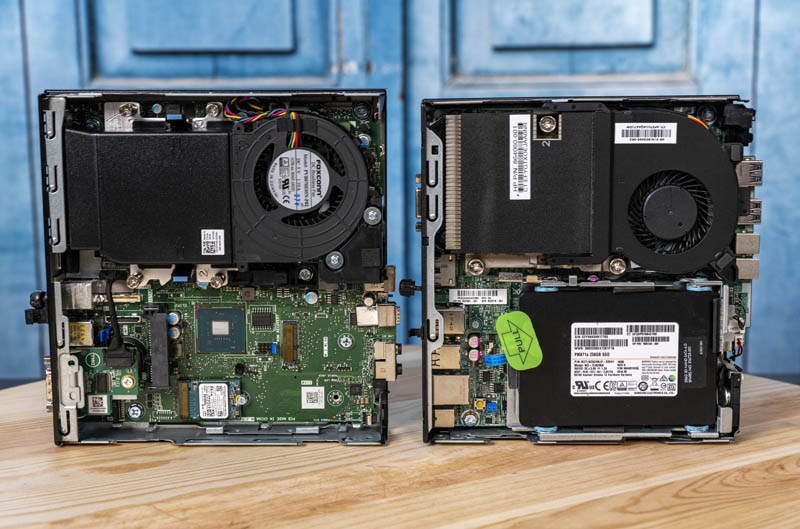
I tried to have a look in bios but it only lets me bump the minimum fan speed, not reduce it 🥲
tacit burrow
See a few vids at https://www.google.com/search?q=hp+elitedesk+705+g2+noise
amber frigate
max crank is absolutely unbearable but even when it's fairly low it's just unbelievably annoying because it's a tiny fan I think. It's noisier than my full tower on idle 😐
tacit burrow
Maybe google, see if other people have the same issue? Maybe your fan just needs replace.
jagged crypt
amber frigate
https://www.servethehome.com/wp-content/uploads/2020/07/Project-TinyMiniMicro-De...
?
these should all be silent, if you just bought the unit, ask the seller to buy you the replacement fan maybe
amber frigate
jagged crypt
https://www.ebay.com/itm/394207026983
yeah, same part number. Let me hook it up and see if I can get a little sound recording
tacit burrow
@jagged crypt I just bought my second thinkcentre. Was supposed to be a 6500t, but got a 7500t instead. Small Win 🙂
But I had to buy a DP cable, so. Meh.
amber frigate
jagged crypt
these should all be silent, if you just bought the unit, ask the seller to buy y...
sound changes dramatically when i tilt it it seems
https://www.youtube.com/watch?v=QkCLubSukzI kinda like this but not quite as bad. but yeah does seem like the part's kinda botched
unique lantern
That sounds like a bad bearing
gloomy elbow
Replacing fans isn't too bad. Noctua has good reviews 🙂
cold moon
Arctic are a good cheap alternative to noctua without the price gouging
amber frigate
do any of them make something that would fit the format?
its obviously sort of laptop form factor thing, kinda seems very proprietary
amber frigate
yeah probably could. Just annoying as I bought the machine specifically for running HA etc. Came in today so could just as well return it. But it's cheaper than a pi 4gb with a lot more power...
bit of a dilemma
jagged crypt
I thought you bought a SFF not a laptop
amber frigate
it is an SFF
jagged crypt
oh, i was looking at the video
jagged crypt
sorry, didn't pay attention and notice it wasn't yours 🙂
amber frigate
No problem lol
jagged crypt
just get a replacement $12 fan
ask the seller for a discount
or a replacement unit. You don't expect cosmetically perfect, but fans need to work for these to be functional
Not sure on your location, so $12 may be 12 euro, gbp, or ?
unique lantern
The question is, is it worth going through the hassle of returning a working machine and buying something else to save the cost of a replacement fan?
Personally, I'd rather spend the $12 and get a working fan than pack the thing back up, send it back, wait for a refund, then start the process of buying a new machine all over again
jagged crypt
i would probably just order the fan, and then ask for a discount, and go from there.
but time/money questions are different for everyone
cold moon
Was it ordered on eBay? If so the guy has to make it right or eBay forces him to..
They’re so buyer friendly it’s gross
mossy hemlock
I was hoping to run hasso as the core os which is docker and then have an addon for swag duckdns and ombi. So these would always be up if my server had issues like the array failed o start the docker system corrupted
tacit pilot
I'm kinda shocked to find that two nearly identical ESP32 devices have significantly different BT signal strength. I'm playing around with ESPresense and there's over a 2x difference in the reported distances with the beacon right next to the devices. Even with the ESP devices swapped out for testing in the same physical spot. These are the two ESP32's:
https://www.amazon.com/gp/product/B08D5ZD528/
https://www.amazon.com/gp/product/B0718T232Z
jagged crypt
the first link i bought an returned for horrible (<10 feet clear view) wifi signal strength
i bought these to play with - https://www.amazon.com/gp/product/B0B3JD1K1T - and much better wifi strength
tacit pilot
jagged crypt
the first link i bought an returned for horrible (<10 feet clear view) wifi sign...
I haven't had any problems with the wifi with mine at least, though I have a pretty small place. Do you have any experience with the BT?
jagged crypt
it's the same antenna
i was trying to to the pressence detection, and could never get anything consistent
tacit pilot
jagged crypt
i was trying to to the pressence detection, and could never get anything consist...
So you're using those linked ones with ESPresense?
jagged crypt
i haven't reinstalled the esppresense on the second units yet
tacit pilot
Also what's the difference between those two units? The "WROOM-32U" and "ESP32-DevKitC"
jagged crypt
the newer units are esp32-wrover-e (that i bought, not in general)
tacit pilot
Seems like it's ESP32-WROOM-32U vs 32D. I'll have to look up what that means
Ah no I think I see, one has an external antenna connector
You got the one with the built in antenna though it seems
Well I guess I'll give these a shot then. Even the one you pointed out you had problems with hasn't had the best strength
jagged crypt
yeah, and the camera unit (which works at low quality right now)
tacit pilot
jagged crypt
yeah, and the camera unit (which works at low quality right now)
I was planning on skipping the camera one. Are you using it with the camera?
jagged crypt
i'm just playing with esp32 stuff to see if there is anything i want to do with it
so yeah, the camera works, but nothing special 10fps 640x480 maybe
i got more fps when i turned the quality to "crap"
i wanted to do the bt presence thing, but realized I don't actually carry my phone (the only bt beacon) around all day, so may stick with motion sensors for stuff for now. But do want to play with the boards to see if there are other things i can do with them.
tacit pilot
Yeah I eventually hope to use this with a smart watch. But yeah I have the same concern about not actually having a tracker on me
Interesting that ESPresense actually links to this saying it's better quality than generic ESP boards:
https://www.amazon.com/Adafruit-HUZZAH32-ESP32-Feather-Board/dp/B01NCRYHDL
I wonder why
zealous dune
Because it's built by Adafruit and not an unknown factory in China
 sage topaz
Woah, you can use an internal layer in a PCB to run a max length trace, and then dump a load of power into it to heat the board up to be self-soldering: https://youtu.be/r0csHZveVvY 🤯
tacit pilot
That's pretty cool
 sly owl
Anyone found a way to make Samsung Smart Tags ring without going into the SmartThings app or visiting findmymobile.samsung.com?
 north fossil
Anyone ever had a sensor battery randomly dip incredibly low? I have a Tuya door sensor connected by ZHA to. Sonoff zigbee dongle and the battery has randomly dropped 70% of its battery in literally just a few hours.. I don't think it's a correct reading.
I rebooted HA and tried new batteries. No change. So weird.
amber frigate
jagged crypt
or a replacement unit. You don't expect cosmetically perfect, but fans need to...
Turns out I was working 5 min from their warehouse today so they gave me a replacement for free 😀 also used so let's see how this one does
 plucky drift
https://templates.blakadder.com/athom_CB01-TAS.html <- could one place on of these inside of a "dumb" light switch to turn it into a smart one?
jagged crypt
amber frigate
Turns out I was working 5 min from their warehouse today so they gave me a repla...
awesome, good luck!
 floral sun
Hello. I'm having trouble adding my Sonoff Zigbee 3 stick. But the error message isn't very descript. Anyone have any ideas?
Oh I can't post pictures. it just says "Error"
winged knoll
#zigbee-archived can help with Zigbee stuff
floral sun
thanks
north fossil
north fossil
Anyone ever had a sensor battery randomly dip incredibly low? I have a Tuya door...
Anyone got any ideas?
 frosty field
Hello,
Not my best ever idea, but I'm trying to conserve cash right now. I am considering using my old PC-Engines/Netgate APU1D4 as a Frigate box. My Zimaboard is starting to get overloaded with all of the stuff I'm trying to run on it.
It has 2x MiniPCIe slots, so I'm considering dropping in a Coral AI card and a Crystal HD video decoder.
The APUs have no video console, only Serial. Setting up something like Debian might be a bit daunting, but certainly possible.
winged knoll
Can I recommend https://fai-project.org/FAIme/
You can create an install ISO that auto-installs and reboots the host
frosty field
The part I'm not sure about is the Crystal HD Video decoder - it's a really old card for one thing, so have drivers been maintained? Also, I don't know if it'll correctly do video acceleration for FFMPEG any more, due to it's age.
That is, does FFMPEG even support it, even if there is a working driver?
 elfin jackal
Has anyone had experience integrating smart curtains into their Home Assistant setup? I'm looking for recommendations on which devices/brands to use and any tips for the integration process.
gloomy elbow
Aqara #zigbee-archived curtain motors are excellent, though you need thick enough curtain poles as I discovered on one curtain. Switchbot bluetooth ones are good, but I find Bluetooth to be a trickier protocol than Zigbee.
cold moon
Trickier or evil
 kind wind
reading through old posts about zigbee light switches brings me to a new question: If you have a smart light switch, must you also have a smart bulb? (seems redundant but thought I should ask).
gloomy elbow
No. It's usually either or
If you have a smart switch and a smart bulb the switch needs to be in bypass/smart bulb mode where it doesn't turn the power off
cold moon
kind wind
reading through old posts about zigbee light switches brings me to a new questio...
no but there are obvious benefits to having both with rgbw-cct bulbs or white+color temp changing
it's the superior solution just also way more expensive
kind wind
ok. I was thinking smart dimmer switch and dimmable LED bulb. maybe I should look at smart bulbs tho as the switches are pricey.
gloomy elbow
You can get covers for regular switches that you can stick smart buttons on/in which solves the "person wants it to work like it did before" problem.
kind wind
when I search for zigbee switches I find a lot of "reviews" of the top 10 "zigbee" switches and more reading reveals some are not using zigbee. it's a bit frustrating.
gloomy elbow
Try using zigbee.blakadder.com or something like the zigbee2mqtt site
The #zigbee-archived channel can help too.
kind wind
gloomy elbow
Try using zigbee.blakadder.com or something like the zigbee2mqtt site
Thank you that looks super helpful. I found a GE light switch product number, googled it and found it was one I had reviewed earlier. What’s is weird, confusing and interesting is that I had read a review in a forum post (smart home I think) that said this series of GE switches does not work at all with zig bee. 🤷♂️
frosty field
Ok, could someone please refresh my memory: is it the Sonoff R2, the Shelly 1+, neither, or either that I can use with a reed switch (and custom fw) to both sense if my garage door is open or closed and be able to open and close my garage door via HA?
I just ordered a heavy duty reed switch, and a Shelly 1+, and now panicking as to whether It was supposed to be the Sonoff, and wondering if I should cancel the Shelly order?
 rancid lion
I have these rgb led pit lights that use an app called homelinking. the lights are ble and 'work with alexa'. I don't see any integrations listed, nor can I manage uo figure out how to see them.. has anyone ever heard of these? I took one apart and have a pic of the brain, but none of the numbers return any google results I could find
cold moon
Nah
It’s possible they’re some tuya rebrand or something
Do they have a dedicated r/g/b or just ground vcc and data or?
rancid lion
there is rgbcw onbthe led strip and +
I have homeassist running on an rpi4, and one of my esp32 has bluetooth proxy enabled
it was suggested to me from someone to rebrain them, but not sure what to use, or how.. and being rgbcw I haven't found anything really...
cold moon
Take a close up pic and upload to Imgur then post here
My question above was leading there
The best way to use led strips is buy ones you want (such as ws2812b) then buy an esp32 and a psu and diy it
Your way works too but then you’re at the mercy of whatever shit china quality you bought usually
https://kno.wled.ge/ tons of info here including hardware suggestions, wiring guides and calculator, etc
rancid lion
rancid lion
oh. so, I am sol
cold moon
No
rancid lion
or, just making things more harder
cold moon
Look at the diagram there
Then scroll a bit ‘For analog LEDs, the MOSFETs IRLZ44N or STP55NF06L are good candidates. Partial, example circuit...’
And the microcontroller in your pic doesn’t look like an esp device
rancid lion
since I have 8 of these in my 1 room, could I make 1 brain and wire all 8 off it?
cold moon
Technically
rancid lion
I'm thinking I need more time to wrap my brain around this... but seems possibly doable
unique lantern
As long as you can figure out what the voltage is, usually 5, 12, or 24V, you can just get any power supply and an LED controller. This is a Zigbee one but there's plenty on the market. That's the beauty of analog LED strips
https://www.amazon.com/GLEDOPTO-Zigbee-Controller-Control-Ultra-Thin/dp/B09QFK59SW
rancid lion
unique lantern
As long as you can figure out what the voltage is, usually 5, 12, or 24V, you ca...
I was looking at that actually.. but the rgbcw cct one was unavailable
cold moon
I prefer wled with Wi-Fi and all the features wled has
There are premade controllers if diy is too scary
unique lantern
The 5-in-1 will do RGBCW. Just be mindful of the output limit
rancid lion
I am diy my home at the moment. I just learned about esp32, starting to monitor temp humid and motion in all my rooms, hjusg made a high/low water sensor for my sump pit, and a floor water sensor.. sending to mqtt, and i have a pho/laravel app listening and alerting me on thkngs
going to write code to servo controls on the dampers of my furnace ducts
and relays to shut the dark bathroom exhaust fan off instead of running all darn day
unique lantern
This is the one I bought, works great. I use it for single color strips but it's easily switchable between different types. If you want to DIY it though, that's understandable
https://www.amazon.com/dp/B09SZ5VC63
cold moon
Esphome plus whatever motors you find will be a pretty cool project for dampers
Way simpler than arduino sketches
rancid lion
cold moon
Esphome plus whatever motors you find will be a pretty cool project for dampers
yes, found esphome 2 days ago.. love how simple it is... was writing it all by hand, and publishing to mqtt... took me 5 days to get all the logic done and functioning... took 10 minutes in esphome
cold moon
Yep
rancid lion
then I stalled home assist, it does most of the stuff I want, but I'll write the code in php to do what I need... since I know php as that's what I do
cold moon
You gotta work on calling home assistant by the right name lol
We’re in their server after all
rancid lion
it probably will do all I need, if I dive deeper into it
and sorry, on my phone, in bed..it's 130am and this is all I am thinking about and can't sleep now... lol
cold moon
Lol
I have three of those I use around the house
Plus like 20 esp32 diy wled installs
My disco kitchen
I use individually addressable strips not analog though
rancid lion
I'm new to all this... thought about doing this for a while, but couldn't figure out what to use, and never looked further... wasgunna use rpi, but that was going to be expensive
cold moon
One dig quad can control up to 8 strip ‘segments’ aka different outputs
rancid lion
then at Xmas, found out about esp32 and its been all I think about
cold moon
Although it’s technically 5 unless you buy an expansion board hat thingy
Pi’s have lost their usefulness to me almost completely
Then I got into 3d printing and now use one pi per printer for network control of them
 rancid lion
I'm going to pull my pot light apart again tomorrow, measure voltages and see what all is up, and go from there...
octopi was what I used back when mg 3d printer was going
but it's been like 4 or 5 years since I did that
ok, thanks guys... lots of things to think about... going to explore wled route... I think I need to order more esp32 boards.. lol
but I think ditching the app that it cane with, is something that needs yo be done
cold moon
Later dude
 midnight ibex
Morning (or evening depends on your location and your mood)
Is there anyone from here, who has remeha boiler and managed to integrate it to HA?
Based on my research I can get info out of it via the rs485 and opentherm with different hardver, but I have few dark areas.
 serene steppe
hi
i'm in the market to buy 10m of addressable leds
i would love a 10m addressable RGB+W string that can be controlled with home assistant
do you guys have any recommendation?
afaik i can buy an AIO kit or the string, controller, and power supply separately right?
what do you advice?
I've also find out this https://kno.wled.ge/ that should be compatible with hassio right?
so, if not mistaken, provided that i buy like a WS2812B, WS2811, SK6812 string, with a wifi compatible controller i should be able to control the string through hassio right?
midnight ibex
WLED! use wled. It is that best thing that could happend to adressable leds. 😄
You need to do some thinkering though.
 slate stream
anyone got a vGPU running on Home Assistant OS? Im using Frigate NVR so i could use a nvidia card
 cinder sentinel
is there a widely recommended kit for ambilight LED TVs? I've noticed there are kits that do it using a camera and visually matching colours, and others use HDMI ports to extract them. I'd like to go with the most recommended options around.
cold moon
cinder sentinel
is there a widely recommended kit for ambilight LED TVs? I've noticed there are ...
The govee solution with a camera is shit, as is the $300 hue hdmi sync box
Hyperion-ng or hyperHDR + led strip of your choice + esp32 running WLED + android Hyperion grabber + nvidia shield tv is the route I went
If you don’t have a shield or other android tv box then you need a hdmi capture device or a router LG TV
 wispy shale
my journey to ambilight DYI has been a disaster so far...
cold moon
Not me
wispy shale
kept ordering wrong components because i thought i understood how it works and didnt really research
and then to top it all off i burned my led strip cuz i thought that it could handle 5v and 12v just fine like normal rgb ones would..
think i got it figured out now tho lmao, just waiting for right stuff to arrive
cinder sentinel
cold moon
The govee solution with a camera is shit, as is the $300 hue hdmi sync box
can you elaborate? Why is Govee shit, and why is the expensive Hue too?
cold moon
Watch YouTube videos showing off how each looks
Then compare that to Hyperion-ng or hyperHDR
Night and day
wispy shale
i wanted to buy one of those things at first as well
cold moon
But your name looks familiar I think I already had this convo with you a few months back lol
wispy shale
but then i realized how stupid the whole thing is with having to use a webcam to capture video
better build it yourself
cinder sentinel
cold moon
Watch YouTube videos showing off how each looks
I saw a friend that got the Govee and it didn't look that bad. But yeah, I felt a camera for this wouldn't be a good idea given that HDMI capture exists
cinder sentinel
cold moon
But your name looks familiar I think I already had this convo with you a few mon...
mine? I never asked about this. It's the first day I'm considering it.
cinder sentinel
wispy shale
and then to top it all off i burned my led strip cuz i thought that it could han...
they don't?
cinder sentinel
cold moon
Hyperion-ng or hyperHDR + led strip of your choice + esp32 running WLED + androi...
I'm a bity confused with this setup tho. The video I saw on YT just needed an HDMI capture card. That's all.
cold moon
My way doesn’t require a capture card
cinder sentinel
I have a Chromecast with GTV, not sure if that's useful. Not sure what's the NVIDIA shield for tbh
cold moon
Sends it over the network to Hyperion addon in haos
Then you need to go the hdmi route
You can google what an nvidia shield tv is tho
Highly recommend them
cinder sentinel
I slightly know what it is and don't see the use for it tbh :S
cold moon
Ok
cinder sentinel
I stream whatever I want to my Chromecast, even PC games with controller, and I can play from the TV. AFAIK that's what the Shield do.
anyway, what's the point in the LED setup?
wispy shale
cinder sentinel
they don't?
if you run 12v on 5v strip apparentlty it fries the chip inside the pixels
i just saw them flash for split second and that was it lol
cinder sentinel
ah well, kinda makes sense xD
wispy shale
it does yeah but i was so used to using plain RGB strips for years and they can handle both easily
so it didnt even occur to me
another leasson learned... now im getting the right components
cinder sentinel
Im pretty noob too tbh, won't fault you
wispy shale
i barely know what im doing lmao but its good fun
cinder sentinel
cold moon
Hyperion-ng or hyperHDR + led strip of your choice + esp32 running WLED + androi...
I need your help to understand this setup mate. Idk what each thing does. I can guess the Nvidia just acts as a capture card using the hyperion grabber app? Why wouldn't be able to do that with a Chromecast? What's the esp32 thing for?
cold moon
Esp32 controls the individually addressable leds (ws2812b in my case) running wled firmware
Some use a pi instead
cinder sentinel
but doesn't HA with Hyperion do that? Or I got that wrong?
cold moon
https://cdn.discordapp.com/attachments/444529271806099486/922199732871381003/video0.mov this is an old video of my setup. I’ve since improved it a bit
cinder sentinel
if there's a YT video that explains all this that you can suggest, please do
cold moon
I thought about making one
Everything smart home made a video on it using a pi and hdmi capture box
unique lantern
wispy shale
if you run 12v on 5v strip apparentlty it fries the chip inside the pixels
When it comes anything electrical (but especially with sensitive electronics), you always need to check and match voltages. Some devices will accept a range of voltages, others expect specific a specific voltage. Putting less voltage into something may damage it, but often times putting too much voltage will kill it
cold moon
cinder sentinel
but doesn't HA with Hyperion do that? Or I got that wrong?
Hyperion addon or container has to be able to connect to something to control the leds
cinder sentinel
cold moon
https://cdn.discordapp.com/attachments/444529271806099486/922199732871381003/vid...
no offense, but it doesn't look great to me. Or maybe it's not what I expect it to be. But I see lots of "glitches", flashing LEDs when there's pure black in the scree edges. It's more a distraction than anything. :S Maybe you've improved that, or I'm missing something.
cold moon
Also I use hyperHDR now
cold moon
cinder sentinel
no offense, but it doesn't look great to me. Or maybe it's not what I expect it ...
Yea I recorded in 60fps which makes it look like it isn’t keeping up + changed settings that synced it up better since then
cinder sentinel
but honestly haven't see too many examples, so can't really compare
cold moon
Also it’s not perfect with black bars but it’s gotten much better
And hyperHDR fork makes colors show up that used to not make the leds light up before
cinder sentinel
cool. Ok, I see I have yet to understand all the components and its purpose, but I'll search a bit about them to get myself a better idea.
cinder sentinel
why is the Android app better than an HDMI capture though? Network instead of electricals seems like it's adding delay more than any benefit.
cold moon
4k capture cards aren’t cheap
cinder sentinel
this is the video I wateched: https://www.youtube.com/watch?v=J26oYlKyq7Q
cold moon
Nvidia shield does 4k so nothing else needed to be able to handle it
cinder sentinel
I really thought HA was the one controlling the LEDs. Not something else. What's the connection with HA then? Just to override the controls manually? Or to do the setting remotely?
 fervent knoll
is there any way to monitor CPU, etc. on HAOS?
cinder sentinel
fervent knoll
is there any way to monitor CPU, etc. on HAOS?
or this I think: https://www.home-assistant.io/integrations/systemmonitor
haven't tried tho
unique lantern
Two different use-cases, but yeah that will give you metrics over time. The hardware page is for real-time monitoring
copper juniper
fervent knoll
cinder sentinel
or this I think: https://www.home-assistant.io/integrations/systemmonitor
thanks, I'll give it a try
cold moon
cinder sentinel
it's not this? https://www.amazon.co.uk/s?k=4k+capture+card+usb&camp=1789&creati...
these all say 1080p output?
cinder sentinel
cold moon
these all say 1080p output?
ah,. thought we needed 4K input, but 1080p output was enough
why is 4K needed? LEDs don't have that much resolution tho
 drifting grove
Hi I'm trying to install home assistant on rasbarry pi 4 but once the image with whale etcher is written on sd trying to reach it between browsers it can't find it, through the app it finds it but from this message error code:-1001 can someone give me a but no?
 proud aspen
The first boot may be a bit long, try again with your browser 5 to 10min after you powered the pi.
On my network, I have my own DNS domain so I had to strip the .local from the URL : http://homeassistant:8123/
unique lantern
drifting grove
Hi I'm trying to install home assistant on rasbarry pi 4 but once the image with...
#installation-archived can help with install issues
 twilit relic
is there a general "performance benchmark" i could run on my HAOS RPI4?
it feels like I could be getting better performance
jagged crypt
you could by swapping out to more powerful machine 🙂
twilit relic
like what
jagged crypt
(you'll find a number of us here are SFF fans)
twilit relic
ah yeah, the SFF solution
twilit relic
well, i'm speaking to other RPI4 owners and they are getting 10x faster performance than me
jagged crypt
$150 got me 16gig ram, i5-6500, 256g nvme, 15watt box to run HA on (in my case inside a proxmox VM)
twilit relic
so i feel like i need to optimize
jagged crypt
memory? things you are running, what's slow?
twilit relic
my Node Red Add-on performance
i can't get it to call ha service nodes faster than 300ms
and others are getting 50ms
jagged crypt
i've only poked at node-red, but you are seeing 300ms latency on calls?
twilit relic
yep
between 300ms and 500ms delay between an event:state change node reaction and the service call node
however, if i use a pure HA YAML automation, it's instant.
side note - my logger DB in HA is 2.5GB...
is that normal?
unique lantern
Did you set the retention to something very high?
twilit relic
i don't believe i changed it at all, so it's default.
jagged crypt
all on SDcard i assume also?
 worldly goblet
hello, i'm running hass, zigbee and influxdb on 3 different Pi. I'm looking for a single PSU for my 3 Pi. Any know a like to such a psu ?
twilit relic
yeah, @jagged crypt - an A2 micro (supposedly the "best" at the time 2020)
twilit relic
jagged crypt
https://discourse.nodered.org/t/reference-optimising-node-red/38321 ?
i have zero clue on where some of these settings/params are... is this meant for the NR Add On on a supervised install?
jagged crypt
i don't use node-red, so can't help you too much. I was looking for obvious OS level tunings.
where are you looking at your logger db?
twilit relic
well it can apparently achieve 50ms service calls from NR, but my particular setup isn't getting that with the same hardware stats as @hollow scaffold
gloomy elbow
If you want #node-red-archived, try it's channel 😉
jagged crypt
whoops, i forgot i pushed to mysql, so that DB file is old
twilit relic
yeah. working on that too. my original ask tonight was "is there a general benchmark i can run on my hardware"
jagged crypt
i don't think the pi's are going to thermal throttle from HA
twilit relic
jagged crypt
where are you looking at your logger db?
i have the 7-day history default, and the builtin sqlite is showing 2.8GB in my System Info report in HA
logger:
  default: warning
  logs:
    custom_components.average: debug
my config, i forgot i installed mariadb
#Drop the recorder data into mariadb
recorder:
db_url: mysql://homeassistant:xxxxxxxxxxxxxxxxxx
twilit relic
i was using maria db for a while, then in 2021 or 2022 it was recommended to go back to the builtin for better performance or compatibility
gloomy elbow
MariaDB is much more performant than SQLite
twilit relic
ugh. is it compatibile with long term history and all that newer HA core stuff?
also, would that cause significant performance changes?
gloomy spoke
twilit relic
i was using maria db for a while, then in 2021 or 2022 it was recommended to go ...
I can't imagine who would have made that recommendation
You can use any of the SQL databases mentioned in the recorder docs. They all support what's needed
gloomy elbow
gloomy spoke
I can't imagine who would have made that recommendation
Maybe someone very very uninformed? Or insane? 🤔
twilit relic
maybe it was a thing for memory card users or hAOS? i dunno. so it sounds like its best overall to switch back to maria db
gloomy spoke
Yes
Moving your database off of an SDcard is just good advice overall, regardless of the database software
jagged crypt
took me a bit, my mariadb is 400megs
gloomy elbow
Moving off an SD card is good advice
jagged crypt
default answers for optimizations, sd cards are slow for any db. get off sqlite if doing anything beyond simple. ram always helps (don't run influx/grafanna/ha on a 1gig pi3....).
twilit relic
how would i move it off the sdcard? a remote maria db on another device? i only have my "weak" little rpi4 here in the house
jagged crypt
you can attach SSD via a couple different ways
all of these things are why the SFF solution becomes the answer rapidly
twilit relic
i've heard horror stories migrating the pi4 to ssd
twilit relic
jagged crypt
all of these things are why the SFF solution becomes the answer rapidly
true
but i also have a nice little POE and power backup for my smart home
jagged crypt
time and money decision
unique lantern
twilit relic
i've heard horror stories migrating the pi4 to ssd
As long as you download a backup beforehand, it's fine
jagged crypt
spare SD cards, you could backup the existing system, install a new HA on a different HA, restore onto that, and migrate back to maria and see what happens
cheap cost in $, couple hours in time
twilit relic
hmm. so i guess there's still no answer to, "is there a HA benchmark program i could run"
to see if my performance compared to others is normal or abnormal
fwiw, i am very time limited and budget limited
jagged crypt
your bare hardware benchmark is the same as everyone else with a pi4
you are looking for the actual issue or root cause of your difference
which is different
cpu, disk, configuration, what configuration, etc
twilit relic
it's hard to know what "normal or optimal" would be because it differs so much, yeah
jagged crypt
yup, you got it
twilit relic
i have X number of devices and entities. but how does one tell if it's normal for the scale of items or not - if it's a simple mistake in config?
a 7 day history for 350 devices/entities maybe be normal at 2gb, i dunno
twilit relic
i suppose, for the recorder at least, i could switch to an opt-IN policy rather than an opt-OUT one
i don't need temperature records or RSSI changes every 5 seconds from every sensor in my house for 7 days
but generally, i can't tell if i'm using home assistant "wrong" or if it's just the massive size of my smart home ecosystem
jagged crypt
[core-ssh ~]$ time dd if=/dev/zero of=bigfile.delme bs=1G count=10
10+0 records in
10+0 records out

real    0m14.228s
user    0m0.000s
sys     0m10.932s
so i wrote 10gigs SEQUENTIALLY to my disk in 14.5 seconds so 10000/14.2=704megs/second
don't forget to run "rm bigfile.delme", and you can change count to something smaller
twilit relic
cold moon
massive size of smarthome ecosystem and you're still on a pi?
well what do you consider massive?
cold moon
i just think it's easy to justify spending a couple hundred bucks or w/e on a decent hardware solution instead of forcing yourself to live within the constraints of a pi4
twilit relic
i have 2,229 entities, and multiple add-ons doing stuff
cold moon
sincerely, previous pi4 ssd boot haos user
jagged crypt
a much better way to get the perf number on your ssd:
[core-ssh ~]$ time sh -c 'sync; dd if=/dev/zero of=bigfile.delme bs=1G count=10 ; sync'
10+0 records in
10+0 records out

real    0m41.951s
user    0m0.002s
sys     0m11.272s
[core-ssh ~]$ bc -l
bc 1.35.0
Adapted from https://github.com/gavinhoward/bc
Original code (c) 2018 Gavin D. Howard and contributors
10000/41.951
238.37334032561798288479
238 megs/second, gets rid of ram cache in the total
i would change count=4 on your pi test
unique lantern
I have around 330 entities and I'm considering moving off my pi4. I can't imagine having almost 10x that and it still running reasonably
twilit relic
😬
jagged crypt
we may have cost your $150, but we saved you hours
twilit relic
i've been in a bubble for 3 years. i have no idea how many entities is too many for my pi lol
i'm just very frugal by nature
jagged crypt
nothing wrong with frugal, just need to add your time and mental anguish into the equation
if you have no money, then your time is your only commodity, so you spend it instead.
 kind crater
cold moon
Hue and govee just “blend” the colors
kind crater
cold moon
Hue and govee just “blend” the colors
Govee t2 does an allright job for the price. Not as exact as my old lightpack but very pleasing for the eye. Thought about going hyperion but hyperion did not support dolby vision. :/
It does fairly accurate represent the colours tho. Govee
cold moon
with my method and nvidia shield i dont see why i couldnt use dolbo vision etc
there's no passthru to rip away certain codec support
twilit relic
ok. i'll seriously consider an SFF.
jagged crypt
you could also buy the SFF, convert over, and sell the PI4 for more than retail
kind crater
I did a research in november prior to gettimg the govee, i read it would not support dolby vision then, at least.
cold moon
kind crater
I did a research in november prior to gettimg the govee, i read it would not sup...
?
reread my hardware scenario above
cold moon
twilit relic
ok. i'll seriously consider an SFF.
or a used laptop or whatever
it doesnt have to be a specific sff device
kind crater
Very intresting read, is there a guide for that? Step by step n00b guide?
kind crater
But havin the ambilight a little slower and a little blurryer is pleasing for the eye. Dont count out govee 🙂
cold moon
kind crater
Very intresting read, is there a guide for that? Step by step n00b guide?
nothing that exciting. i'm just controlling the led strip with wled on an esp32 (many tutorials online) and then using a free app on nvidia shield called android hyperion grabber to send data to hyperion-ng or hyperhdr docker container (or whatever other install)
i disagree i find all govee products overpriced for what they are and diy led strips to be a much better solution for even the most novice person
twilit relic
I think I'll pre-order a HA Yellow Kit
unless that pales in comparison to a cheap SFF..
cold moon
it does
twilit relic
sigh. ok, there's choice paralysis in the SFF market which is why i'm hesistant
cold moon
Buyer protection keeps you pretty safe
You can’t go wrong with anything better than a pi really.. but you can post links here and we can confirm it
gloomy spoke
cold moon
Nice
gloomy spoke
Cheap, powerful, more than enough for HA
unique lantern
That's a bit older than I'd buy. 3rd gen is 10 years old at this point. You can find at least 6th gen CPUs for around the same price
gloomy spoke
Tiny
twilit relic
something around that price point that's newer / has nvme?
cold moon
You don’t need nvme really just sata
unique lantern
cold moon
Prices have been going up since the thin client revolution haven’t they
I swear this stuff was like 50 5 months ago
unique lantern
A lot of these don't come with power bricks for whatever reason, but they tend to use the same brand's laptop chargers as bricks, and those are easy to find
twilit relic
so it sounds like an i5 6+ gen lenovo style machien would be good?
bonus if it comes with a power brick?
cold moon
Don’t rule out broken screen laptops either
You can get much newer for cheap
I’m using one lol
I did have to get a usb c to Ethernet dongle to add eth tho 😦
twilit relic
ebay for that?
cold moon
Thing is new laptop screens are $100-200 depending on screen
unique lantern
Even an i3 is fine, like the i3-7100T. All of these should be fairly low power CPUs which will save you money in the long run on power
twilit relic
(i super appreciate this guidance btw, thank you)
cold moon
So working ones are sold cheap with broken screen for parts or whatever
Cuz it isn’t worth putting that much $ into a used laptop vs putting that $ towards a new one
cold moon
twilit relic
ebay for that?
Yea
 next sun
Does anyone know of a wifi smart light switch option for EU? I want to change the light switch in the garage, which is not attached to the house and has no Zigbee coverage?
I was considering ditching the switch entirely and replacing it with a shelly 1 in the wall.. but I kinda like the idea of a manual override..
 sterile sapphire
Anyone use bluetooth on their setup? If so, for what? I'm looking at buying a mini computer and I'm wondering if it is worth paying extra to get one with the built in wifi (which I won't use) and bluetooth card/antennas. I know you can always got a dongle but my understanding is that dongles will never work as well as the nice intel ones with long antennas. So if I think I'll want bluetooth, I should get it now. But I'm skeptical that I want bluetooth and that's why I'm asking.
next sun
sterile sapphire
Anyone use bluetooth on their setup? If so, for what? I'm looking at buying a mi...
IMO, it's better to pay a little extra now to get functionality you may not use... than to wish you did so later and end up paying more for a lesser solution.
unique lantern
I use BLE temp/humidity sensors, but I also just use ESP32s as bluetooth proxies. You can get better coverage that way
next sun
Some people use Bluetooth for room presence detection.. but they'd have a bluetooth device in every room.
sterile sapphire
next sun
IMO, it's better to pay a little extra now to get functionality you may not use....
I get the general idea but I'm also guilty of over buying and never needing the features.
sterile sapphire
unique lantern
I use BLE temp/humidity sensors, but I also just use ESP32s as bluetooth proxies...
So basically it is just doing an aggregation for you and then broadcasting back? With wifi?
unique lantern
The ESPs just listen for BLE beacons and send them back over wifi to ESPHome and then to HA
sterile sapphire
ESPHome is another system made by the same guys as HA right?
unique lantern
Yep
sterile sapphire
unique lantern
I use BLE temp/humidity sensors, but I also just use ESP32s as bluetooth proxies...
Is this a common application/solution you are doing? Are they cheaper than the alternatives? I guess I'm asking if you are describing an oddball, uncommon solution or is this pretty common?
next sun
sterile sapphire
I get the general idea but I'm also guilty of over buying and never needing the ...
I guess it depends on how much extra the cost is. I usually add functionality I may not need if the cost is negligible
sterile sapphire
next sun
I guess it depends on how much extra the cost is. I usually add functionality I ...
I'm internally balking at the extra $15 because part of me is seeing just how cheap I can do this.
next sun
sterile sapphire
I'm internally balking at the extra $15 because part of me is seeing just how ch...
Raspberry Pi would be cheaper 😉 lol.
sterile sapphire
next sun
Raspberry Pi would be cheaper 😉 lol.
No way. You can't beat these USFF computers. It is crazy how cheap and capable these things are.
unique lantern
It's not at all an oddball solution, they added it sometime last year and it's very much supported, with features still being added. Bluetooth range is very short, so having 1 single Bluetooth adapter isn't going to give you a lot of coverage. ESP32s are cheap and you can put 2-3 around your house for the price of a single adapter
next sun
sterile sapphire
No way. You can't beat these USFF computers. It is crazy how cheap and capable t...
What is it? I'm in the UK.. not heard of them.
unique lantern
next sun
What is it? I'm in the UK.. not heard of them.
next sun
Oh! Ultra small form factor 🙂
sterile sapphire
next sun
What is it? I'm in the UK.. not heard of them.
I'm referring to the class of computers called micro SFF or 1L computers. Businesses buy them by the skid load and get rid of them by the skid load.
next sun
What do they cost to buy?
sterile sapphire
They are cheap because of scale.
Depends on how recent you want. I see them for $50 or less.
next sun
Wow! That really is cheap!
sterile sapphire
If you want something with a powerful, 10th gen intel processor, maybe $250
You wouldn't get that for HA....you would get that for HA plus 10 other VMs
next sun
I have 10 RPi 4B's in a drawer from a project a while back.. so I try to use them for as many things as possible (because they didn't cost me anything) - But they're just not stable enough for anything worthwhile.. so I just migrated HA onto my Synology NAS.
I'd like to move it again onto a proper home server though. So this may be an option.
sterile sapphire
next sun
I'd like to move it again onto a proper home server though. So this may be an op...
That's exactly my thought process. I have HA sitting on my NAS right now but I'm looking to put it on its own home along with a few other high uptime apps. Then it can live in a tiny box in my network closet and not in the basement
next sun
Wow, on ebay I see, i5 2ghz, 8gb RAM, SSD with WiFi - £79!! ($97)
sterile sapphire
The RPI purists will tell you that it will use a few less watts....but it will also be slower and currently cost more money
next sun
I was burned by a RPi failing and I lost HA entirely.
The SD Cards are just no suitable for high uptime
sterile sapphire
The idea made a ton of sense as a cheap computer with IO. Just right now they are too expensive and there are alternatives if you don't need the direct IO.
next sun
Yeah, agreed. They're crazy expensive now and you can't really get them!
sterile sapphire
Look at the lenovo, HP, and dell options. If you are in UK, maybe add Fujitsu as well.
next sun
For now, I'm happy with it running on my NAS.. certainly more stable than a pi. But in time I'll move to a dedicated host.
I would like to run HA in Kubernetes.
So I'd probably run MicroK8s or something on a dedicated host, and run everything in K8s.
I don't think we really need direct IO to HA anymore, with the various hubs available - I don't think I'll need to use a dongle for anything anymore.
So I guess that in its self kinda adds fuel to your BLE fire... I don't think you really need it lol
sterile sapphire
next sun
So I guess that in its self kinda adds fuel to your BLE fire... I don't think yo...
Which hubs do you like?
next sun
I use the Aqara hub for Zigbee
But slowly trying to migrate everything away from Zigbee tbh.
Aside from hue of course.
Annoyingly I'm pretty much committed to phillips hue for lighting now 😦 It annoys me because it's so expensive.. but I just haven't found another solution which is as good. It just works! And works well
I have WAY too much hue stuff now to change.. some of this would be way too painful to change too.
unique lantern
A #zigbee-archived coordinator stick can consolidate all that stuff in ZHA or Z2M without the need for any proprietary vendor hubs
next sun
But that would require a dongle directly connected to HA and then repeater dongles around the house right?
unique lantern
No, (almost) every wall powered Zigbee device is a repeater. You just have a stick plugged into HA
Light bulbs, switches, smart plugs, they all act as repeaters
next sun
I'm trying to avoid having to plug anything directly into the HA box.
unique lantern
Why?
next sun
I run HA Docker on my Synology NAS.. and don't want to faff with IO pass through, and I'm planning to migrate it to kubernetes in time, which means I won't really be able to pass USB through easily.
I remember that Phillips Hue works on Zigbee right? But I seem to remember it's a different type or something? Which is why we can't use the hue network for our stuff?
jagged crypt
twilit relic
something around that price point that's newer / has nvme?
https://www.ebay.com/itm/195408124912 (may be sata vs nvme, still fast enough)
https://www.ebay.com/itm/195410360637 (dell instead of lenovo)
unique lantern
All those proprietary hubs mostly don't interoperate because it's not in their business interest to support other companies' products
I think there are standalone coordinators that don't use USB, but that's a question for #zigbee-archived
I have IKEA blinds, an Aqara motion sensor, and a Gledopto LED controller all going through one Zigbee coordinator instead of having 2? 3? different hubs
jagged crypt
or just run the phillips hue integration and leave the hue hub online
next sun
jagged crypt
or just run the phillips hue integration and leave the hue hub online
But you can't add other stuff to the hue hub unless it's supported by hue.
jagged crypt
correct
next sun
Which means you either need other hubs, or as @unique lantern said, something which can handle all
jagged crypt
either deal with passing through usb, or put it in a VM instead of a docker
next sun
jagged crypt
either deal with passing through usb, or put it in a VM instead of a docker
....or use hubs and put them on the wall under the stairs so they're never seen 😄
jagged crypt
sure do whatever you want, my goal with any automation tool is to make my life easier... That's not the primary goal of everyone on this channel though 🙂
unique lantern
next sun
jagged crypt
sure do whatever you want, my goal with any automation tool is to make my life e...
True! My goal isn't always to make life easier.. it's a hobby and doing things just to see if I can. Sometimes it's more work, and sometimes it doesn't work out... but meh! ha.
 gusty sequoia
I wonder how much multiple zigbee-based hubs pollutes the RF environment. Doesn't seem good whether they run on the same channel or on different ones
next sun
My goal is to have HA running in kubernetes, for bullet proof resilience and see how it scales (it probably won't lol)
gusty sequoia
(and yes, always it's about what a given person wants to do with things, I'm just idly curious)
jagged crypt
k8s isn't going to give your bullet-proofness or scaling with HA
next sun
I'm sure it won't scale at all.
jagged crypt
how do you think k8s is going to make it scale?
next sun
I don't think it will lol.
jagged crypt
experiment, no complaints, just trying to short circuit some exploration to perhaps exploring k8s in a way that allows you to see something scale....
next sun
I'm a DevOps Engineer 🙂
Which is another reason for putting it in k8s, it's home base for me.
And putting it in k8s will mean I can handle ingress nicer, have an observability stack running alongside.
And I've been meaning to build a local k8s cluster for a while, for lab testing purposes.
I don't think HA will scale properly at all, because it's not designed to.. but running it in a mesh means I could easily have two instances running in separate pods, and I can traffic shape between them to failover instances when needed.
jagged crypt
are you going to sync the backend db's? configs? 🙂
or are you planning on doing rollback?
jagged crypt
so you are now building multiple client boxes + nas, right? 🙂
jagged crypt
(client boxes for HA would be your "k8s cluster")
unelss you are running HA in HA on the NAS... 🙂
unique lantern
If they're sharing storage, what do you gain by having more than 1 instance other than a headache?
next sun
Yeah, so I'd run something like MicroK8s or Kind on another box.
next sun
unique lantern
If they're sharing storage, what do you gain by having more than 1 instance othe...
Nothing.. that's the point 😄
jagged crypt
good luck, I know this is a learning experiment vs a production goal
next sun
Ooh kids awake.. gotta go 🙂
next sun
Tbh, it’s more to keep things together and have all my apps running in one place than building in unnecessary resilience.
plucky drift
Can anyone identify the chip in these photos?
https://ibb.co/chNXRHy
https://ibb.co/zFJZQNT
It's from a smart LED flourescent light tube form "LEDvance". In HomeAssistant it's detected by the Tuya integration. I assume this chip is the controller.
 magic island
Hey. I Just got my SkyConnect today. Does somebody know on which baudrate it should be running?
/Nevermind.. got it working now (with 115200 btw.) 🙂
 vernal marsh
Hello there. I'm currently setting my homeassistant from scratch (I discarded my previous config, it was ancient and most of the devices were gone anyway). I want to add temperature/humidity sensors with display to each room - I earlier wanted a smart wall thermostate, but I eventually realized it would be bad idea. So what is the best hardware to get in terms of reliability/ease of installation/cost?
I was thinking about zigbee devices, I have conbee2 stick plugged to my raspberry (configured it today, sadly no devices to test it with for now), but to deploy sensors in whole home I'd need some repeater too, right?
 brisk pond
vernal marsh
I was thinking about zigbee devices, I have conbee2 stick plugged to my raspberr...
brisk pond
vernal marsh
I was thinking about zigbee devices, I have conbee2 stick plugged to my raspberr...
I'm using zigbee2mqtt with a sonoff dongle to handle my zigbee devices
from what I could gather in my home automation adventure so far, and please somebody correct me if I'm wrong, zigbee is great to reach every place in the house, but devices are expensive, while wifi works great if you roll your own esp8266-based sensors (with esphome), works pretty well with things that have wifi integrations (but you will most likely depend on third party cloud services) and works terribly if the thing you want to integrate is too far from the wifi access point
vernal marsh
ugh I had used esp8266 based modules and they are very problematic. they cause lots of annoyance in my old home and I'd rather stay away from them.
I look on aliexpress for zigbee sensors, and they cost anywhere from 5 to 50 euro, and no idea which would work well
brisk pond
I used them with esphome and I was greatly pleased, amazing support
also I think there's a zigbee channel for detailed discussion about that, I've only now started integrating zigbee and one big challenge is actually finding compatible hardware for what I want
for instance amazon might have smart plugs with alleged power monitor functionality but sometimes the insertion may be wrong and you get an unsupported product, on aliexpress you have to be careful to check the model of what you are buying and to see if it's compatible with whatever you need
by the way I've been wanting to ask a question but maybe this is the right place, I have a wifi power strip from 2 or 3 years (model ZLD-34EU-W) ago that is listed as compatible with alexa and smartlife, I wonder if it's possible to skip these and somehow use it straight from home assistant somehow, but I haven't been able to find any info on the matter
 rigid wing
brisk pond
by the way I've been wanting to ask a question but maybe this is the right place...
rigid wing
brisk pond
by the way I've been wanting to ask a question but maybe this is the right place...
Looks like it is possible. https://community.home-assistant.io/t/zld-44-eu-w-powerstrip-esphome/200771
brisk pond
rigid wing
Looks like it is possible. https://community.home-assistant.io/t/zld-44-eu-w-pow...
yeah I went down a rabbit hole and found out it's maybe possible to flash tasmota on it since it supposedly uses esp8266
rigid wing
Yep, Tasmota or esphome should work
brisk pond
but couldn't find any info whatsoever about esphome
also it seems like a lot of work, I wouldn't have any idea where to even start with that code
aaaand turns out that even through the official smart life app there's no power monitoring whatsoever in the plug
rigid wing
You can go from one to the other with OTA updates I think, so it doesn't really matter which one you start with.
brisk pond
I guess I'll flash it if I feel like removing the dependency on the external cloud service but it's a lot of work
now I wonder if there is a way to hack power consumption reporting into things
like some circuit that hijacks into things to get power data out of it, kind of like the shelly em clamps do, but in smaller form and cheaper
rigid wing
I know esphome supports EM clamps, haven't tried it myself
brisk pond
interesting, I'll have to look into it, find out if there's a small EM clamp I can solder on a circuit on an ESP
rigid wing
Looks like you also use Tasmota, for example https://tasmota.github.io/docs/PZEM-0XX/#pzem-004t-version-v3_1
brisk pond
I'm still not sure what tasmota is
is it like an esphome alternative?
can they cohexist?
cold moon
basically
tasmota and esphome both let you install custom firmware and configure esp devices
esphome was acquired by home assistant and is generally just easier / simpler to configure in my eyes
brisk pond
I have two esphome devices and I love them
not having to do the program myself is so liberating
cold moon
and since home assistant owns esphome the integration is a bit better imo
brisk pond
plus wifi flashing and self AP
cold moon
yea tasmota does all that
brisk pond
oh man, the clamps are CHEAP
20€ for two clamps, esp is like 2 bucks, rest is components
I'm going to build a bunch
cheaper than zigbee plugs, the downside: it's wifi and as I said earlier reception may be spotty in some areas
cold moon
you should have multiple access points then
brisk pond
any idea if cheap zigbee modules with features equivalent to esp8266 are a thing?
brisk pond
cold moon
you should have multiple access points then
I do but it's still not enough, can't bring network cables everywhere and for instance I have difficulty covering the electric cabinet properly so the shelly EM has bad reception
cold moon
brisk pond
any idea if cheap zigbee modules with features equivalent to esp8266 are a thing...
?
brisk pond
it's actually a coat cabinet with an electric cabinet in it
brisk pond
cold moon
?
like imagine esp8266 but in zigbee form
cold moon
lol
brisk pond
I have 2 xbee modules I got 10 years ago and never used but other than that I can't find anything at an affordable price
 brisk pond
neat, thanks
cold moon
you can use that sensor for lots of other projects
brisk pond
chair occupancy? that sounds hilarious but I want it now
brisk pond
I don't see images on that site for some reason, as if everything is classified as an ad by the adblocker
so are they hacking into an already existing zigbee sensor?
brisk pond
I tried on mobile with no ad blocks and it's still broken
brisk pond
I'll just accept the fact
cold moon

pic loads if i click it
it has two exposed pins on the back of the device that you can connect any sensor to
and it's a zigbee device
so you can use it for all kinds of projects
brisk pond
neat
cold moon
word
unique lantern
The Emporia Vue 2 can monitor 16 circuits for about the price of 2 Shelly EMs
brisk pond
sadly that's not available for me on amazon, it seems
actually nevermind I found emporia energy den 2
cold moon
not everything worth spending money on is
brisk pond
I have a big supply of ESP8266 coming from china but it's taking forever
cold moon
i'm only buying esp32 going forward
brisk pond
I'm getting both
cold moon
unless i'm making cheap gifts for people
brisk pond
esp01 is great for buttons and binary sensors
cold moon
i havent touched esp12f or 01
brisk pond
I made an interior doorbell with it
and a sensor to detect when the cat is in front of the drinking fountain to turn it on
nevermind that the cat still hasn't taken a single sip from it
cold moon
cats dont trust running water
or they want to put their face under it
there is no inbetween
brisk pond
my cat only drinks from the faucet
but we got to turn it on manually
ok google how to hack cat
cold moon
so really he just wants you to submit
rigid wing
brisk pond
any idea if cheap zigbee modules with features equivalent to esp8266 are a thing...
Not 1-1 equivalent, but its possible to use CC2530 chips for projects, although for more complex stuff people seem to add an ESP device for anything beyond basics. https://www.cnx-software.com/2019/12/23/tasmota-open-source-firmware-now-supports-zigbee-connectivity/ https://community.home-assistant.io/t/zigbee-cc2530/425998
brisk pond
I'm not sure I understand what's going on in the first link
wow CC2530 is cheap, that's the missing link I was looking for, I'll definitely grab a bunch and experiment with them
cold moon
Well that’s an old chipset
So whether it’s ideal to put on your mesh or not is probably worth determining
brisk pond
does it have any crippling limitations?
rigid wing
You should move to #zigbee-archived to discuss this in depth, there are more experts there
 fringe moon
Don't use 2530 for anything except routers, and even then don't
DIY ZigBee is quite niesche, makes more sense to DIY matter / thread at this point in time
cold moon
I knew it
brisk pond
oh I see, thank you
ok let's move to the zigbee channel, I'm curious about what your recommendations are
rigid wing
Oh sorry
brisk pond
what is thread? is that another wireless protocol?
fringe moon
It's what all the kids talk about these days
Expect stable in 2025
Will probably be interesting though
brisk pond
oof
cold moon
It’s zigbee 3.1 as far as I can tell
fringe moon
More like zigbeev6
cold moon
3.16? Stone cold Steve Austin? Austin Texas? Illuminati confirmed.
twilit relic
I'm thinking quad core would be better/more future proof than dual-core for an SFF
at least 8GB
cold moon
Stop overthinking it just buy something lol
 jade jetty
Soo slight issue with one of my Shelly Plug S. I tried over-the-air firmware change to Tasmota but now it's not coming on at all. Tried connecting it with USB-to-TTL as well but nothing pops up anymore. Anyone got ideas on what to check or do in this case? Since no lights show up anymore I can't even hold the button 10s to reset firmware 😔
Also please mention me if you respond
night atlas
twilit relic
I'm thinking quad core would be better/more future proof than dual-core for an S...
almist anything I-core and almost any SSD will be better and well suited to run HAOS
 summer bear
I recently converted to TubesZB Zigbee POE setup and love that it’s decoupled from my HA server. Anyone know of a similar option for z wave?
cold moon
There’s a z ember thing discussed in #zwave-archived recently but it’s out of stock
You can run a pi etc remotely for the same effect using zwave js
kind wind
Are there any PoE control panels that aren't stupidly expensive that you all are aware of?
night atlas
controll panels in what way?
cold moon
dmx controller i guess
kind wind
something similar to this (I guess, I'm building a house and don't know what I want other than PoE where possible) https://www.brilliant.tech/pages/smart-home-control
 pliant forum
kind wind
something similar to this (I guess, I'm building a house and don't know what I w...
kind wind
pliant forum
kind wind
something similar to this (I guess, I'm building a house and don't know what I w...
kind wind
at this point, i'm developing a plan for where I want ethernet cable routed.
 tidal bridge
Any suggestion on how 2.4g antenna for zigbee should look like ?
cold moon
there are no known radiation patterns and best antenna mounting suggestions that i know of
i've asked the same thing
tidal bridge
Well, it is hardware related… just opened my sonoff 3.0 plus dongle. Antenna connection has black spots around antenna and middle one is barely connected.
winged knoll
Yeah, but you're asking about Zigbee... and there's a dedicated channel for that
outer knotBOT
The topic of this channel is:
There's a channel for #yellow-archived if you have questions about it.
Questions about a hardware device (not their #integrations-archived with HA, and not the thing that HA calls devices)? Someone might have the same device and be able to help you out! If you've got a Z-Wave or Zigbee devices, see #zwave-archived and #zigbee-archived, #cameras-archived for cameras, and #diy-archived for making your own stuff (or if you're asking about Tasmota or ESPHome).
If you have problems with the Blue or your installation see #installation-archived.
If you want to share images, use https://imgur.com/ or similar.
Please use https://www.codepile.net/ or https://paste.debian.net/ to share code or logs
tidal bridge
tidal bridge
Well, it is hardware related… just opened my sonoff 3.0 plus dongle. Antenna con...
Had to reflow it. Opened antenna and it is lonely boi. Single straight piece of silver plated copper wire or something
winged knoll
Even directs you there in the channel topic...
pliant forum
@kind wind some other things not in the guide I should probably mention:
If you wire for a security system- you can use Konnected (or an Envisalink 4) to connect the sensors to Home Assistant and use them for automation. (For example: If it starts to rain you get an alert to close a window..)
If you want smart bulbs in the ceiling you can use an Inovelli Blue Zigbee switch and Zigbee Binding to have instant on/off/dimming and it will work without HA being online. This is good for colored light bulbs or different color temps throughout the day.
Smurf tube is one of the most important things in futureproofing your house, it will let you pull cables through later on, at a minimum i'd run it to the ISP box outside, but I'd really recommend running it to all your Ethernet locations.
If you do in ceiling/in wall speakers I'd recommend running all the streaming stuff centrally in the house.. run two fiber optic HDMI cables from the "server" room to each tv. They are one-directional so keep in mind the source and display side. I'd recommend running both ends to each location resulting in two cables.
Sorry for the rambling 🤣
 vivid grove
Are there any 16x16 HDMI matrix switches that work well with home assistant?
kind wind
pliant forum
<@349337844302479361> some other things not in the guide I should probably menti...
so I want to make sure I'm understanding about the "streaming stuff centrally in the house". With the setup you describe, the fiber HDMI cable takes sound from the output of the TV receiver and pipes it back to my "tech room" where I then distribute it to the speaker system. (yes, planning for wired speakers throughout the home mounted in ceiling)
pliant forum
kind wind
so I want to make sure I'm understanding about the "streaming stuff centrally in...
The fiber optic HDMI cables take the sound from the TV via HDMI ARC and take it to the receiver. Then from the receiver you can distribute to the speakers
kind wind
if the outside fiber would already come to the tech room, do i need to bring it back to the tech room from the TV?
pliant forum
kind wind
if the outside fiber would already come to the tech room, do i need to bring it ...
What do you mean by "outside fiber"? sorry 😅
kind wind
oh, the company that provides internet is fiber to the home. They don't provide any TV so it's just streaming. However, I think if I wanted, I could do satellite. But anyway, fiber from the provider comes into the house.
pliant forum
I would just run a smurf tube from the outside "demarc" area (usually by the electric meter) into the tech room
That will bring the fiber into the house
also make sure you leave pull strings in every smurf tube lol
Then from the tech room you can run a smurf tube and a couple CAT6a to each tv/data location
kind wind
right, I was just wondering if I could tap into the fiber as it comes in to the tech room. I don't know what I'm asking (so anything is possible to me at this point 🙃 )
pliant forum
kind wind
right, I was just wondering if I could tap into the fiber as it comes in to the ...
Who's your ISP?
pliant forum
Alright not familiar with them but I'll describe the typical setup: Usually the fiber will enter the home and then go into a ONT (Optical Network Terminal) which terminates the fiber into an ethernet connection which then goes into your own router.
from the router all your CAT6 will go into switches
kind wind
sounds familiar
pliant forum
The switches will provide all the CAT6 with internet
I'd recommend using Fiber DACs to connect between switches
SFP+ to be exact (if the switch supports)
 formal otter
I am considering building a simple doorbell without a "chime" myself or buying something that works great locally with Hass. I need a button and maybe just maybe a camera. Any ideas?
pliant forum
If you are wiring for in ceiling speakers- you should be wiring for a center channel underneath the TV also. I'd run 12/4 cable or 14/4 cable from the tech room
I wouldn't go below 14 gauge for audio cable
kind wind
so far, with smurf tubes and speaker wiring we are totally aligned.
pliant forum
kind wind
so far, with smurf tubes and speaker wiring we are totally aligned.
Are you running smurf tube to the ethernet locations?
kind wind
I had not considered 6a cable to each drop. was only running 6a to tv's and control panel. Yes, smurf tube to attic (for some rooms) smurf tube directly to other rooms and smurf to demarc point.
but in all rooms I will directly run ethernet
smurf tube is backup
pliant forum
kind wind
I had not considered 6a cable to each drop. was only running 6a to tv's and con...
6A can handle 10 gig at longer distance and other (non-existent) standards we have right now 😅
compared to CAT6
I wouldn't go above CAT6a for ethernet
at that point run Fiber
Also shielded is likely more a headache then it is good. So i'd recommend unshielded
kind wind
i have read in several places that having an electrician pull ethernet cable is nominally $85 per cable. That is hugely pricey in my opinion. Is that an accurate estimate?
pliant forum
kind wind
i have read in several places that having an electrician pull ethernet cable is ...
Probably yeah. I'd get a couple quotes from AV companies and electricians
if you end up going with an electrician make sure you explicitly tell them how you want the cables ran.
They will want to do everything in series similar to electrical.. and leave you with a huge mess 🤣
kind wind
I'd love to do it myself. But I take my time and have high expectations for what good looks like. But I know i would hold up production.
pliant forum
kind wind
I'd love to do it myself. But I take my time and have high expectations for wha...
If you're not doing a custom build you likely won't be able to unfortunately.
kind wind
it's custom
pliant forum
If you're doing a custom build I would 100% recommend doing it yourself if the builder allows.
You can make sure it's right before drywall goes up which is a huge bonus.
kind wind
size of smurf tube? I read min 1.5 inch. I was gonna go with 2 inch. I imagine that is a challenge to route through walls.
pliant forum
kind wind
size of smurf tube? I read min 1.5 inch. I was gonna go with 2 inch. I imagin...
2 in is a bit big. Are you running to each jack or only each room?
pliant forum
I'd price out how much it'd be to run to each room vs each jack (with a smaller smurf tube) it may end up being cheaper
kind wind
it's not too late for me to downsize the tube
pliant forum
2 in smurf tube is pretty expensive from what i've seen
kind wind
oh. I just googled at Lowes or HD and it didn't seem much more than 1.5
pliant forum
Yeah that also. It's hard to find 2"
Oops read wrong.
I would only run 3/4" to the demarc and ethernet jacks
if you were doing each jack
kind wind
and to be clear, the existing jacks would have ethernet (outside of the tube?)
pliant forum
kind wind
and to be clear, the existing jacks would have ethernet (outside of the tube?)
Yes, mainly to leave the tube empty for future pulls
kind wind
ok. I imagine 3/4 is much easier to run
pliant forum
kind wind
ok. I imagine 3/4 is much easier to run
Yeah it is haha
kind wind
you sound like you've done this before. I appreciate the advice.
pliant forum
I'll be honest with you, I haven't. We built our house a couple of years ago and wired for some basic CAT6.. but once I learned about the smart home stuff I realized how much more we should have wired for.. lol. The guide is basically all the stuff I wished I had wired for.
kind wind
i will most certainly study it. I have to go pick up some medicine for a very sick puppy otherwise I'd be looking at it now. in fact, I should have left already but my car battery decided it was too cold to work.
pliant forum
I've done tons of research over the past few years and thought it'd be good to consolidate it into a guide.. so that's what I did haha
pliant forum
kind wind
i will most certainly study it. I have to go pick up some medicine for a very ...
Alright.. ping me if you need anything 🙂
kind wind
Thank you.
twilit relic
vivid grove
Are there any 16x16 HDMI matrix switches that work well with home assistant?
i have a 4x4 HDMI matrix that works well via IR (Broadlink IR integration with HA). Had to program it myself. It comes with an RS232 (sp) serial port as well, but so far I've only gotten that to work on Windows
pliant forum
vivid grove
Are there any 16x16 HDMI matrix switches that work well with home assistant?
https://www.home-assistant.io/integrations/blackbird/ you could try this.. it's only a 8x8 switch though
twilit relic
blackbirds have been great for me (in general, not specifically HA)
 wooden sundial
If I was looking for a boomer proof (for an in-law) smart switch that he can connect/control with Google Home, what would you all recommend? Just some sort of wifi switch? (Not sure I want to have to explain to him zigbee, zwave, separate hubs, etc.)
pliant forum
wooden sundial
If I was looking for a boomer proof (for an in-law) smart switch that he can con...
Kasa
It can be implemented with Home Assistant and smart home hubs later on if he chooses
If he has homekit setup just get a homekit switch
wooden sundial
He is android. He has Google nests and knows how to use Google home. He has no other hubs or setups besides that
Is this the right one?
https://a.co/d/bPxeVbI
pliant forum
Yep!
The dimmer may be worth it if the lights are dimmable
should be only a couple of bucks more
wooden sundial
pliant forum
Yep!
Just watched a review video on it. Does that switch need to be pressed on its bottom half whether it's being clicked to turn on or off?
pliant forum
wooden sundial
Just watched a review video on it. Does that switch need to be pressed on its bo...
Yes, you just press the bottom to switch on/off
wooden sundial
Hmm. I think my in-law may prefer a paddle that you click up for on and down for off. That's how all their dumb paddles work, and they'd be fighting muscle memory. Is there another brand that has paddle up and paddle down?
pliant forum
Take a look at Leviton Decora WiFi
cold moon
Alternatively, don’t buy Wi-Fi switches lol
wooden sundial
What's the simplest non-wifi option for him then? I don't want to be playing IT for an additional hub he doesn't understand
I'm all zigbee and zwave in my house, so I'm well aware how wifi is not ideal
cold moon
Then you know the right path
A proper zwave or zigbee mesh isn’t gonna fall over
And if you want it foolproof you can nvm backup both zwave and or zigbee sticks and restore the nvm to backup sticks
And have a haos cold spare ready as well
Best I’ve got
wooden sundial
I will not be having him use HA. His literal ability limit is voice commands to the switch via Google voice. HA is not in the cards for him
cold moon
Since we’re in home assistant discord it was assumed you’d be using it…
wooden sundial
cold moon
Since we’re in home assistant discord it was assumed you’d be using it…
"that he can connect/control with Google Home" was meant to mean in lieu of home assistant. I get this is an HA discord. I just figured HA users may still be knowledgeable about smart switches that can work with other ecosystems.
 plush hatch
So i am updating my system and have a question. What motion sensors are you all finding work the best with HA that are fast reliable and worth the money? I will also be adding on door sensors and human body presence sensors. If you all can recommend any. If this is in the wrong spot please let me know.
cold moon
Zigbee or zwave or?
pliant forum
plush hatch
So i am updating my system and have a question. What motion sensors are you all ...
Need more details ^
plush hatch
What information are you needing?
plush hatch
i dont have one in mind yet i want to know what you all recommend.
i was using wyze but we know how that turned out. So i will be starting all over.
pliant forum
Alright, I run Z-wave and Zigbee at my house.. It really depends on your budget.. Zigbee stuff will often be cheaper than Z-wave but you may find Z-wave stuff is a tad bit more optimized
There's a lot of factors haha
plush hatch
sorry i am newbie i have been out of this so long.
plush hatch
I dont have a budget i will grow it as i need but i know i will spend 75 or so on each body detector and around 25 on each motion sensor
plush hatch
but i expect it to be atsrting out around 500.00 - 1k
pliant forum
Zigbee sensors are super cheap if you are willing to buy off of ebay