#hardware-archived
1 messages · Page 9 of 1
 zealous wyvern
For context my Ikea devices connected the same way never seem to stop sending statuses. But they are all hardwired though.
 zealous dune
The first question is great for Homey support. The second one is maybe
zealous wyvern
Yeah I guess the important question is "do aqara devices perform better with a conbee stick"
zealous dune
No
zealous wyvern
So this is a common problem?
zealous dune
It's not common but it's been known to happen
I have no such issues with my Aqara end devices on a CC2652 coordinator
zealous wyvern
For me it keeps happening over and over again. Ever couple of months.
 regal stratus
i have the sonoff zigbee dongle in use, works like a charm
 winged knoll
See the pins in #zigbee-archived - Xiaomi devices can be fussy about the router
zealous wyvern
winged knoll
See the pins in <#551843655682490399> - Xiaomi devices can be fussy about the ro...
Yeah I've red the pinned posts and done what it says but they Keep fallinh of the network. Was wondering if it might be homey that is the issue and if was better going with another solution.
winged knoll
Possibly, many of us use Zigbee2MQTT or ZHA and have no issues
 stark meadow
Hi hi, if I have a 5V 20A AC->DC PSU do I need a 20A fuse?
Or can it be lower due to some of the conversion from AC to DC?
 civic kraken
Depends on which side you want to put that fuse
Output side you'll need a 20A fuse and input side either a ~1A fuse on 115V or ~0.5A on 230V. I'm not an electrician so take it with a pinch of salt and some electrician can correct me where I'm wrong
stark meadow
Awesome, it was the input side
 cold moon
stark meadow
Awesome, it was the input side
cold moon
stark meadow
Awesome, it was the input side
https://kno.wled.ge/basics/getting-started/ there's a basic fuse/wiring guide here
stark meadow
I think I'm all set for the output side. I think for the PSU a 1A fuse should do the trick
.5A seems a little hard to get
 flat flame
what is that new mmwave presence sensor? wifi?
winged knoll
What are you referring to?
 glossy prism
You know, the new mmwave sensor
zealous dune
Which one dammit, there are so many new ones
glossy prism
the new one
zealous dune
Ah not capital The, now I know...
 brisk lotus
Anyone know if I can use this radio as a thread router? https://itead.cc/product/sonoff-zigbee-3-0-usb-dongle-plus/
 stone spindle
uhh so has anyone had a lamp kill their smart bulbs before? i have a 4 bulb lamp and it seems like 2 of the bulb sockets literally kill any smart bulb attached to them after a day or two lol
cold moon
Maybe it’s just waiting to catch fire lol
Dirty power or something wrong with the hardware.. I wouldn’t keep trying lol
stone spindle
oh yeah ofc .. i just realized it was my lamp and not the bulbs :p not going to use it much more
lol its pretty crazy though ive been going nuts debugging bulbs
turns out its a lamp..
cold moon
Yea
Been there lol
We’re so used to not blaming hardware these days..
I’m ready to blame it early on or try and swap for another part device etc to rule out hardware before I start chasing ghosts in software
stone spindle
hmm thats interesting youre totally right lol
i actually had a ryzen CPU 1-2 years ago that was a similar nightmare
months of software debugging to prove it was a hardware issue
cold moon
Fun
 shut trellis
Hey Folks,
Location: USA.
I'm just starting down the Home Automation route, and was wondering: has anyone used these 20a smart plugs with Home Assistant? It says they're Google/Alexa capable. I was hoping they might be directly integrate-able, without requiring either, since I'm trying to avoid both of those. All I really want to do is click a space heater, and a heat lamp, on&off so my wife stops turning her home office into a sauna, and to cut down on the power spend for heating a chicken coop (respectively). I'm probably just going to buy one, and see how setting it up goes, but thought I would try and ask, first. I can find almost 0 information on these smart plugs, which isn't encouraging...
Almost every circuit in the house is 20 amp, and spending $70/outlet to save money on electricity will take a very long time to math out.
https://www.amazon.com/gp/product/B09P3KN1XS/ref=ewc_pr_img_1
 idle bough
shut trellis
Hey Folks,
Location: USA.
I'm just starting down the Home Automation route, a...
idle bough
shut trellis
Hey Folks,
Location: USA.
I'm just starting down the Home Automation route, a...
They are Smart Life compatible (which is part of the Tuya integration).
For the most part, those work pretty well with Home Assistant. (
I do say most part because my Merkury Door/Window Sensors (which are also Tuya) do not work at all.
glossy prism
Tbh I would avoid cloud-based stuff though
idle bough
Most people would. I've migrated most of my Tuya stuff to localtuya.
But my door/window sensors do not work with localtuya.
It throws an exception error when I try. 😐
glossy prism
Zigbee or zwave would be a better choice for battery-powered sensors
 jagged crypt
shut trellis
Hey Folks,
Location: USA.
I'm just starting down the Home Automation route, a...
jagged crypt
shut trellis
Hey Folks,
Location: USA.
I'm just starting down the Home Automation route, a...
If you believe the amazon reviews, everyone says it burns out at 1200watts, so if you plan on running 20amps through it, I would potentially investigate further
stark meadow
Hi there, has anyone had any success getting an Alexa Echo Dot to work as a bluetooth speak with home assistant. I'm running the container on a pi 3 B+ with the bluetooth integration setup
I just can't get the pi to pair with the alexa ...
 gloomy elbow
Has anyone got any recommendations for some lights to make a sunrise light for my bedroom?
Above my bed I have built-in cabinets which have a small lip hanging down that I could stick an LED strip to (pointing at the wall), or I have a deep headboard I could fit something like a Hue Play Bar (or pair of) onto pointing upwards and out at a ~45° angle. Finally I can stick something straight onto the underside of the cabinets pointing down at my face which may be the most effective way to wake me up, but could also cause crankiness. I'd like RGBCCT for full transition into a "wake the hell up" 😄
So far I've looked at:
- Hue Play Bars: still in the running.
- Twinkly Flex: Looked perfect until I found out that it doesn't support transitions in HA.
- Hue gradient strip: 💸
- Some kind of other LED RGB strip: I would prefer not to see individual LEDs if possible.
I prefer Zigbee to wifi, but I'll take whatever works.
zealous dune
if you have the dineros just go with Hue
gloomy elbow
stark meadow
Hi there, has anyone had any success getting an Alexa Echo Dot to work as a blue...
HA doesn't support bluetooth speakers directly.
stark meadow
Ohhh
gloomy elbow
zealous dune
if you have the dineros just go with Hue
I was hoping to save some money 😛
stark meadow
Ok, maybe an audio cable then?
zealous dune
other options is buying FCOB CCT LED strips and pairing them to a LED controller of your choice
FCOB so you don't see individual pixels
gloomy elbow
zealous dune
other options is buying FCOB CCT LED strips and pairing them to a LED controller...
Is there a guide somewhere to the difference between COB and FCOB?
I think I have COB in my kitchen, but I'm not 100% sure
winged knoll
https://www.zigbee2mqtt.io/devices/GL-C-008P.html is a good controller, but any of their (Zigbee 3.0) range should be solid
zealous dune
F is for "flexible" COB
gloomy elbow
I remembered you and atx saying Gelopto Tinkerer, thanks for the link to the specific one!
Bingo, I have FCOB in my kitchen already and like those!
zealous dune
cannot not like 640 LEDs per meter 😄
winged knoll
If it's indirect you can get away with less, but once it's directly visible...
gloomy elbow
It also solved my "my kitchen is always freezing" problem 😄
gloomy elbow
winged knoll
If it's indirect you can get away with less, but once it's directly visible...
Yeah, the way my bedroom furniture works means I can stick it so I'll only see the side.
zealous dune
and with FCOB you can even get away with installing them without diffusers
gloomy elbow
|____
||  | #cupboard
|---| #overhang
|
||(°)--<   #sleeping human
|————————— #bed
|_________ #floor
The LED strip on my bedhead is about 10 to 15 cm from the wall and that it's only 30 LED/m isn't very obvious until it's very dim
gloomy elbow
ASCII diagrams ftw 🤓
zealous dune
i still need to buy some of those RGBCT FCOB strips to see how well they work
stark meadow
Couldnt I use MPD to play sound on the raspi host?
 analog oar
I have this heat-valve from lidl: https://ibb.co/FbJX7J1
I found that the detail-page to set the values for the valve are a bit complicated to understand & set.
How can I figure out, who had developed this gui - to ask/support them to optimize it.
stark meadow
And have the speaker setup there?
winged knoll
analog oar
I have this heat-valve from lidl: https://ibb.co/FbJX7J1
I found that the detail...
That's a topic for #zigbee-archived - you're using Zigbee2MQTT, but the idea is that you use something like Home Assistant to manage it, Z2M's UI isn't intended for "normal" use
analog oar
ok. thanks. I'll ask there.
I only found a way to programm the vallve (for the week) in that ui.
winged knoll
Z2M's UI is generic, for everything, but if you can do it in their UI you can do it over MQTT
gloomy elbow
#automations-archived and perhaps the new weekly schedule helper are your friend to do it in HA
winged knoll
https://www.zigbee2mqtt.io/devices/368308_2010.html is pretty complete about how to control it over MQTT
analog oar
What you mean with MQTT? Is that another plugin?
I'm a newbe and are glad that I got the stuff up and running with Z2MQTT, but I'm willing to learn.
Can you suggest some more information how you would do it via MQTT?
winged knoll
If in doubt, check Z2M's docs for the device - they're usually pretty complete
analog oar
Yep" I still read it.
So what I did untill now, I open Z2MQTT, go to the valve > details and there I do the setting
gloomy elbow
Did you look at controlling the device through HA?
winged knoll
Z2M's UI is more of an admin interface, not one for "normal" use
If you're using it regularly then you're doing all of this very wrong
gloomy elbow
You can easily make a schedule with this #integrations-archived: https://www.home-assistant.io/integrations/schedule/
And then add a simple #automations-archived to turn the heating on and off: https://www.home-assistant.io/docs/automation/editor/
Then give it a day or two and get fancier 😉
analog oar
gloomy elbow
Did you look at controlling the device through HA?
I didn't see the difference on this.
For me (as newbe) the whole thing is HA.
I assume it like that: I have the nice dashboard to see and change states of a device per Room. Means I can turn on/off bulbs with a tap on a icon, or see what currently the heating-point of the valve is.
To setup the weekly schedules for the valve I go to Z2mqtt.
I've also played a bit with automation & scenes (if time > 22.00 and TV goes off, run the scene "goToBed")
analog oar
winged knoll
If you're using it regularly then you're doing all of this very wrong
ah ok. I don't use it regulary, but only to adjust the setup of the valves
winged knoll
Zigbee2MQTT is other software, and is just one of many ways of getting Zigbee into HA
If you installed an add-on, that's other software and not part of HA itself
analog oar
gloomy elbow
You can easily make a schedule with this <#672220541343760384>: https://www.home...
Ahh, I see (and love it) Nice. Never noticed that this exist
 spiral spear
I know this has been asked before, but I've not seen a good answer (apologies if I missed it, I'll be grateful for a URL pointing me to it!)
I'm very happy with my Coway Air Mighty purifier's performance. I'm not happy with how it's not easily integrated, and it seems to me that all the Air Purifiers I've looked at use a cloud integration 😕
Are there comparable H14 or better air purifiers with good local controls?
winged knoll
The only 100% local one I know of is the Ikea STARKVIND - not sure what level it is though
gloomy elbow
I am so tempted to get one of those, I'm just not 100% sure it's a good idea for me
 torpid peak
have you found a solution? i have 2 philips motion, one sends events, the other dont. reconnecting doesnt help. install zha and adding devices should be enough to get events, right?
spiral spear
winged knoll
The only 100% local one I know of is the Ikea STARKVIND - not sure what level it...
The Starkvind is "only" a H12 equivalent, apparently they are not exceptional in results. (I'm using a smart plug on the Coway, but ... it plays an annoying chime whenever it's turned on, and it forgets the LED/ionizer settings over the power cycle.)
winged knoll
I'm no expert, but do you really need H14? A lot of the results I found out there in the past suggests that there's a lot more to it than just the number on the filter
spiral spear
Yes, for my needs I do want that 🙂
gloomy elbow
spiral spear
The Starkvind is "only" a H12 equivalent, apparently they are not exceptional in...
If it helps, I had a fan that beeped when it turned on, and when it turned off (even with sleep mode  ). I opened it open and desoldered the buzzer and it works perfectly but silently now.
spiral spear
gloomy elbow
If it helps, I had a fan that beeped when it turned on, and when it turned off (...
Hah, yes, I've considered just disconnecting the beeper too! But that also does funny things to the warranty 🙂
gloomy elbow
Well, it's entirely possible that somehow yours slipped through QC without the beeper. Just saying 😉
analog oar
gloomy elbow
You can easily make a schedule with this <#672220541343760384>: https://www.home...
What would be the "automation"-event-trigger for the "#integration" I've added?
I would assume "helper", but that didn't appear in the list.
 boreal tendon
Anyone know of a good flat zigbee RGBW ~bulb? A15 E26
winged knoll
analog oar
What would be the "automation"-event-trigger for the "#integration" I've added?
...
State triggers work on almost all entities
boreal tendon
Is there an LED strip that plugs into a E26 socket?
boreal tendon
I guess you could just get one of those plug sockets then plug it in that way
winged knoll
Anything "flat" is unlikely to use any standard bulb fitting
boreal tendon
the fan takes a15 bulbs I thought eh I'm sure a19's will fit in there but nope too fat 😦
I remembered seeing a Philips that was an a19 but flat but not rgb
That's probably just two led strips back to back in that shape
analog oar
@winged knoll I use "state" now, set "entity" to "heating basement" (where I've chosed the plan at which times it should be "ON" (e.g Mo-Fri 7am - 10pm).
On "attribute" I only have next event
And below there is "from" and "to" as selector.
I'm not sure what input the integration creates? Is it only 0 and 1 ?
winged knoll
You really want to ask about #automations-archived in the #automations-archived channel
You can check the current state in  -> States
 outer knotBOT
show your state developer tools
analog oar
ok, I switch over to #automations-archived
 abstract marlin
hey, just wondered if anyone had any recommendations for me:
I am currently doing a full renovation and rewire on my property, and was considering running all of the lighting circuits back to a central point, and controlling/dimming them from there.
is there any "din rail dimmer" solutions? my searches so far are fruitless
gloomy elbow
As in, all of them together?
gloomy elbow
I would suggest doing it in the ceiling of each room, rather than elsewhere
Usually if you have multiple lights, one of them is the main one which controls the others, that's the one you'd add that to.
But it really depends on what kind of lights you're looking at
zealous dune
centrally controlled lights usually are done with a system different than your typical home stuff
abstract marlin
gloomy elbow
But it really depends on what kind of lights you're looking at
thanks, will look at this
abstract marlin
zealous dune
centrally controlled lights usually are done with a system different than your t...
yea, i know, like control4 etc?
gloomy elbow
I'd say: figure out what kind of lights you want, and then we can help figure out the dimming
zealous dune
you have a central control unit and lights are DC voltage
the control unit has PWM controllers
gloomy elbow
If it's just regular lights and you're in the US, I've heard good things about the Lutron Casetas.
If you want RGB with rainbow chasing discos, you'll need something different
zealous dune
I know there are RS485 16 channel pwm controllers with Ethernet running on ESP32
abstract marlin
im in the uk. I just figured since it was a full rewire, in a house im never going to move out of, Id try and get it all right
zealous dune
problem is finding someone to do it 😄
zealous dune
my electrician got a seizure when i mentioned low voltage lighting
didn't compute for him
abstract marlin
so my initial plan was to bring all rooms back to a central point, and control each room with a relay
but obv i would prefer a dimmer
wasn't initially thinking of going low voltage
then get a din mount relay solution (buy/build)
zealous dune
i don't think the space is there yet
abstract marlin
the commercial alternative seems to be like a row of shellys in din mounts
zealous dune
its in the industrial sphere
abstract marlin
but seems a waste, + I would sooner hardwire ethernet if poss
zealous dune
gloomy elbow
abstract marlin
just surprized there isnt something off the shelf
There is, but it's not going to be HA compatible
zealous dune
it's off the shelf(y)
gloomy elbow
Personally I prefer to have CCT bulbs, which means different needs—but also, the ability to switch between warm and cool whites
 abstract marlin
I mean if I could get something taht was modbus or whatever I can do the inbetween bit
I was looking at dmx for a bit haha
what a bunch of wled controllers per room? 😛
what CCT bulbs are you using?
@zealous dune your site has been a godsend by the way!
zealous dune
not sure extracting all of your money for smart home toys classifies as godsend but thanks 😉
zealous dune
mine was questioning my decision harshly, now we have two
although it doesnt really need to be smart
gloomy elbow
I have the Hue CCT bulbs in my ceilings, but the IKEA ones in lamps and like both
abstract marlin
and they are wifi?
the hue ones?
also concerend about 60-80 smart bulbs on wifi :S
winged knoll
Hue are Zigbee
abstract marlin
ah
gloomy elbow
#zigbee-archived is nice, 100% local protocol 🙂
abstract marlin
I have done some testing with zigbee tbf
I didn't realise hue was zigbee
🤔
I guess I can still bring all wires back to a central buzzbar, then I have the option down the line to replace it with something smarter
run cat6 from there to each room too
jagged crypt
zigbee vs wifi for lightstrips (for fun). After playing with esp32 pressence detection, I found the m5atom lite, and m5 has some lights(sk6812), and was looking at something simple but deployable (was trying to figure out power also).
gloomy elbow
#zigbee-archived for me. It'll expand your mesh nicely
jagged crypt
I've got some hue strips, and hue-hub, which work fine, I was eyeing the crazy wled (i think) animations,etc
cold moon
Wled is superior for rgb yep
jagged crypt
was looking at - https://shop.m5stack.com/products/sk6812-rgb-led-flex-strip + https://shop.m5stack.com/products/atom-lite-esp32-development-kit?variant=32259605200986 , but suspect I would need additional power for the led strip?
cold moon
Don’t buy those lol
jagged crypt
the lights or the esp32?
cold moon
Buy sk6812 or whatever you want from Ali express and esp32 wroom32
Not all esp32 are equal and don’t all work with wled
If you want a better variant buy like a quinled esp32 in a d1 mini form factor
https://quinled.info/quinled-esp32/ something like that
The btf lighting shop on Ali express is a pretty good place for strips / pixels
https://shop.allnetchina.cn/products/quinled-esp32-ae you can buy ‘hats’ with a mic and other things built in or add your own if you prefer a more diy approach
jagged crypt
anyone make any cases for these things?
cold moon
Yea
jagged crypt
i don't have a 3d printer 🙂
cold moon
There’s a few options to print. You can download the files and have someone else print them
Treatstock is a site I have my printers on.. lots of shops there who can print whatever you want. You just send a file
Local makerspaces have printers too
Mine just charges a bit for filament iirc
You can also just buy a project box and drill holes in it
jagged crypt
I was hoping to throw money at a solution that doesn't require time 🙂
cold moon
Ok
jagged crypt
i see the benefit of the quinled external antenna, but i see that breaking/falling apart in any place I would put it "loose"
what's the "average" shipping time on china orders? 4 weeks?
glossy prism
Depends on the destination and shipping method
jagged crypt
hmm
 drifting grove
Does some of you have a good idea to monitor multiple temperaturs at the floorheating distributor. I need some kind of hardware with 4 temperatur input. Preferably a unit I can buy as a prewired pcs of hardware.
drifting grove
drifting grove
Does some of you have a good idea to monitor multiple temperaturs at the floorhe...
Some linke NTC or thermocouples or similar input
 cunning horizon
Ok so this is probably gonna devide people into camps but I am gonna ask anyways.
I recently found out that things like KNX and Homematic exist.
Now my question is:
If money is no object and the only things you are concerned with are comfort and designing your smart-home/home in a way that makes it easy to modernize it over time (changing to different standards, switching out cables without having to open all the walls, etc) would you go for wired hardware like KNX or would you use wireless hardware like wifi, zigbee, thread or would you combine the two?
winged knoll
Wired has many advantages over wireless. Where you're able to pre-plan and pre-wire, I'd go wired if money was no object
 fallen coral
Hello i have been looking for ir blaster and i am out of luck with esp based ones as either they out of stock or just eol
cunning horizon
winged knoll
Wired has many advantages over wireless. Where you're able to pre-plan and pre-w...
My thinking was that if I use something like KNX I can still use home-assistant as my controller which allows me to keep it open-source and local and I retain the ability to use other gear if I so choose. Dont know how well that works in practice though - does anyone use KNX stuff and can tell me how they like it?
fallen coral
Tried all the links from template blakkader
Anyone have any recommendation for ir blaster with esp module? Or ir blaster with zigbee but not battery based
 hushed rapids
anyone here run home assistant on an orange pi 3 LTS?
If so, did u use a sd card or ssd to boot from?
and how reliable is it?
hushed rapids
Also am I able to run Home Assistant OS/Supervised on it?
 tacit burrow
HA will run on nearly anything. Whether it's any good depends on how much you're demanding from it. Cameras and Media stuff tend to be quite demanding, but basic monitoring etc isn't.
But looks like Orange pi only has 2GB of ram? That'll be your biggest limitation
jagged crypt
fallen coral
Anyone have any recommendation for ir blaster with esp module? Or ir blaster w...
https://shop.m5stack.com/products/ir-unit ? (no personal experience)
hushed rapids
tacit burrow
But looks like Orange pi only has 2GB of ram? That'll be your biggest limitation
realistically whats max capacity for 2gb or ram?
or if u can give an example of a generic 4gb ram layout would appreciate it
tacit burrow
SOrry I don't understand the question.
 stable fractal
hushed rapids
realistically whats max capacity for 2gb or ram?
stable fractal
hushed rapids
realistically whats max capacity for 2gb or ram?
Realistically, nobody can tell you that because utilization depends on what you’re doing. I’d say start with 2gb if you want, and upgrade to 4 when things get slow or stop working.
If you’re really worried about capacity, you can buy an old dell desktop for $100 or so on Amazon & use that. It’ll be much faster than a pi.
hushed rapids
stable fractal
Realistically, nobody can tell you that because utilization depends on what you’...
True, what makes it worse is I got rid of an old laptop I had
 random stream
I'm looking for a low voltage smart relay to turn on/off a 12v power supply that I can use with my Hue Bridge, until I get me HAYellow. Any recommendation would be appreciated.
 echo river
what do i need to use WLED and what light strip do you guys recommend
or do i wait for matter
and if so whats the eta on strip lights compadable with matter
zealous dune
No need to wait for matter. For WLED you need an ESP32 based controller, light strip and a power supply
abstract marlin
wled works well on esp8266 too, but less pixels/strips
gloomy elbow
Oooh, I have a serious case of the wants: https://www.philips-hue.com/en-gb/p/hue-white-and-colour-ambiance-festavia-string-light-250-leds/8719514465558
zealous dune
140 GBP!?!?!?!?!?
gloomy elbow
I said I want, not "I buy" 😛
But they are addressable. I have Twinkly lights already
zealous dune
you shouldn't even want them with the price
you can get a 100m of WS2811s for the price
maybe even more
gloomy elbow
I like Hue stuff, the colours are very good. I know they're overpriced, but these are also HomeKit compatible which a lot of folks I talk to and work with want
zealous dune
meanwhile I have these in the mail https://aliexpi.com/xGTL to pair with a WLED controller
gloomy elbow
Page not available 😉
zealous dune
ah you're in one of those countries
gloomy elbow
I have a RGBCCT COB strip and the Gledopto Zigbee Pro controller coming soon anyway I hope. So that'll be my morning wakeup light
Turns out you can't find addressable RGBCCT COB strips... yet
zealous dune

you can find addressable RGB FCOB strips if that helps
but the addressability is only in 3cm segments
gloomy elbow
I know, but I wanted RGBCCT
So I went with "CCT is going to be better for waking me up than a rainbow"
zealous dune
i dont think there even are regular addressable rgbcct strip
you can get one rgb one and one WWA one
i do have a RGBW neon tube one
gloomy elbow
Yeah, I was thinking if I like how this looks and it works I may get an addressable one and run it right underneath. If my measurements are accurate I'll have just enough space to run two COB next to each other
 static beacon
Does anyone know a smart heater that can be easily controlled with home assistant?
gloomy elbow
What kind of heater? What country are you in?
outer knotBOT

Generic Thermostat
Turn Home Assistant into a thermostat
Quality scale
IoT Class
Integration type
Documentation
Source
Issues
gloomy elbow
With that integration, any smart plug/switch and a temperature sensor can be a smart heater
static beacon
What I'm looking for would be a heater which can be controlled using the amount of power so that I can control it with a pid controller. I have heaters with a smartplug at the moment but the only thing they can do is on and off. It would be great if I could change the power of the heater in order to get a constant consumption with the use of a pid controller in node red. Havent found anything though so i guess this does not exist
gloomy elbow
That seems unlikely. Why are you aiming to control the amount of power rather than the temperature in the space?
zealous dune
static beacon
What I'm looking for would be a heater which can be controlled using the amount ...
boy do I have good news for you https://millnorway.com/wifi-panel-heaters-generation-three/
static beacon
Damn even with local Api support nice
 native bough
I need to add a Cisco router in my home assistant.
For which I have host, username and password.
But when I am changing the confirmation.yaml file and restarting the HA. It is not showing anything. Please help.
Changes I am doing in my configuration.yaml file are:-
device_tracker:
- platform: cisco_ios
host: 192.xxx.xx.xx
username: cisco
password: xxxxxx
      new_device_defaults:
        track_new_devices: true
gloomy elbow
Did you run the configuration check?
Also, local IP addresses shouldn't be sensitive information, so there's no need to hide those.
But most importantly, where did this come from?
new_device_defaults:
track_new_devices: true
That's nowhere in the documentation
native bough
gloomy elbow
Did you run the configuration check?
Yeah yes I ran it...it is fine
gloomy elbow
It's not noted on the cisco ios page: https://www.home-assistant.io/integrations/cisco_ios/
winged knoll
Yeah, but that's how platform config options are shown... only in the "parent"
Yes, it's confusing
gloomy elbow
If you're troubleshooting, I wouldn't start with adding extra options not listed on that page personally 🙂
winged knoll
Well... that and running the command line check and not trusting the stupid UI
outer knotBOT
- HAOS
ha core check - Container uses
dockercommands - Core requires you to activate the venv first
native bough
gloomy elbow
If you're troubleshooting, I wouldn't start with adding extra options not listed...
I tried doing it with cisco-ios first
But it didn't work...so I decided to use the Netgear integration details.
winged knoll
Making shit up is a sure way of ensuring things don't work
native bough
winged knoll
Making shit up is a sure way of ensuring things don't work
Any solution??
gloomy elbow
Remove the lines that I told you about it
Use the service call (Developer tools > Services > Check Configuration) to make sure the file is valid
winged knoll
native bough
Any solution??
device_tracker:
  - platform: cisco_ios
    host: ROUTER_IP_ADDRESS
    username: YOUR_ADMIN_USERNAME
    password: YOUR_ADMIN_PASSWORD
Follow the fine manual?
Add that, do #hardware-archived message
native bough
winged knoll
```yaml
device_tracker:
- platform: cisco_ios
host: ROUTER_IP_ADDRESS
...
Already tried it...😩
outer knotBOT
@native bough When using Discord's Reply feature it defaults to pinging the person you reply to, which can get frustrating for the target. Use Shift + click on the Reply option, or click @ ON to @ OFF to stop this - on the right side of the compose bar.
You have to change this every time (thank the Discord devs for that).
winged knoll
native bough
Already tried it...😩
So... do the next step
gloomy elbow
 winged knoll
Then once you've done that, restart HA and check the log file
See the pins in #integrations-archived - where this really belongs
static beacon
I was wondering if a Shelly 1 pro (dinrail variant) can also measure negative values. So for example if i connect solar panels to it
 runic tinsel
static beacon
I was wondering if a Shelly 1 pro (dinrail variant) can also measure negative va...
runic tinsel
static beacon
I was wondering if a Shelly 1 pro (dinrail variant) can also measure negative va...
Can anyone suggest a reasonably priced ambient light/illumination sensor that I can use in HA? I guess compatible with Zigbee deConz or maybe BLE though an esp32? I'm in EU if that matters
winged knoll
I have https://www.zigbee2mqtt.io/devices/GZCGQ01LM.html and it works really well
runic tinsel
winged knoll
I have <https://www.zigbee2mqtt.io/devices/GZCGQ01LM.html> and it works really w...
Thanks. One question I have about these -- if you use them to turn lights on/off when it's dark/bright, how do you deal with the light shining on the sensor and making it go into some loop?
winged knoll
Don't put the sensor directly under the light?
I have (most of) mine mounted horizontally on a wall, in a suitable location to pick up the light level in the room, and they're not controlling lighting that's going to exceed my "turn on the lights" threshold
abstract marlin
hey guys, I spoke to a couple of you the other day, about a full rewire on my house.
I am now considering using something like this:
https://www.amazon.co.uk/GEYUEYA-Home-Downlights-Spotlights-2700K-6500K/dp/B08D61BDHC/ref=sr_1_51?crid=36A1M8ZEMZZ9Y&keywords=zigbee+lights&qid=1668530641&sprefix=zigbee+lights%2Caps%2C114&sr=8-51
can you see any issues with a house full of these? (~50-60 of)
winged knoll
Do they have a local integration with HA?
Is your WiFi going to handle 50 to 60 bulbs?
zealous dune
Can your eyes handle the shitty light quality?
If you're redoing everything do yourself a favor and get high CRI for main lighting, preferably 90+
winged knoll
I hadn't twigged that they carefully avoid specifying the CRI
zealous dune
They must've forgotten...
abstract marlin
err they are szigbee
winged knoll
Our lights have a CRI that's at least in double digits
zealous dune
Color rendering index
abstract marlin
ah
winged knoll
You want at least 80, but higher is good
And nothing there says Zigbee
WiFi Bluetooth Mesh
zealous dune
Makes stuff look natural when no natural lighting and not like in a night club
winged knoll
Then later on it just says
Connection methods: BLUETOOTH 4.2
zealous dune
That means they re not even WiFi
zealous dune
They use wifi interchangeably with wireless meaning any protocol without wires
zealous dune
You should pick a brand that has an actual website
abstract marlin
I really feel like I should be running back to a central place and handling it there tbh, but struggling to find a solution. Ideally, Id have them daisychained like a pixel strip of leds, but in a gu10 ish format
winged knoll
personally if you're going for smart lights, I'd buy fittings that'll take a standard bulb and then you can buy a smart bulb version
Much easier to swap a bulb than a whole fitting
abstract marlin
I have been looking at DMX too
zealous dune
I'd just install led strips if redoing
abstract marlin
but was put off by the fact that it doesnt send state
abstract marlin
zealous dune
I'd just install led strips if redoing
wife says its gotta be spot light style
zealous dune
Cause she doesn't know better, I have one of those too
winged knoll
GU10 smart bulbs in a GU10 fitting
zealous dune
Spot lights are for... Wait for it... Spot lighting
They don't fill the space with lights well
Works great in museums tho
abstract marlin
haha
so how are you using led strips?
I would be game for led strips, If I can sell it to her
winged knoll
zealous dune
Spot lights are for... Wait for it... Spot lighting
I'd disagree, we use GU10 downlights for a lot of the lighting here - get ones with a broader spread and they work brilliantly
zealous dune
I don't, I have ceiling lights since I didn't redo the installation
abstract marlin
😅
zealous dune
I use led strips in my workshop
abstract marlin
other issue is some of the ceilings have oak beams etc, so gu10 would be easier
zealous dune
You'd need to select them carefully then, test one out first
abstract marlin
really I want 3 wires on the back, and control them myself
its a nightmare
CRI is my friend then
zealous dune
That's not happening with retrofit solutions that are based on L and N
Only some version of LED lights with dimming drivers
abstract marlin
yea i know, but there doesnt seem to be any alternative
zealous dune
There is but you won't find them in the home section, they're used by professionals for clubs, restaurants and in industrial settings
abstract marlin
ok...
cold moon
https://www.athom.tech/blank-1/wled-gu10-rgbcw i put a couple of these in a bathroom and i'm happy with their color. they're rgbw-cct and able to be flashed with wled/tasmota/etc
i dont like the idea of 60 wifi bulbs in a house tho
abstract marlin
I got a couple of those, but yea i didnt fancy that much wifi
zealous dune
I don't see an issue there
cold moon
the upside to these is with wled you can control via dmx or e1.31 or w/e
buy some fancy controller if you so please
abstract marlin
I was thinking maybe I could get something like that and pop them open and drive them myself
but not ideal
cold moon
why?
abstract marlin
just the work of modifying 60+ bulbs
cold moon
why modify them in the first place?
zealous dune
That's... Almost pointless
zealous dune
Led bulbs are just circular led strips
Technically you can link them together to a single PWM controller... But damn that's a lot of work and undoing
cold moon
buy a strip of sk6812 and some silicone diffusers and a controller and show the wife what led strips can look like. or analog if you want high cri
zealous dune
Buy cheap normal gu10's and replace the PCBs with your own custom ones with LEDs and connectors to a singular LED controller
abstract marlin
I got some sk6812 and am using the reflected light rather than diffuser, its great. (on a different project)
when you say normal gu10s, you mean like just normal white ones, and swap them with something like sk6812?
zealous dune
Yep
I actually have that planned for someday to replace the two I have in the kitchen exhaust
abstract marlin
yes. I see
I guess I was thinking of doing that, but buying a led rgbcct gu10 and just removing the board and making it addressable
but tbf I never taken one apart, no idea what the inside looks like
zealous dune
It's not a pleasant task, they're usually filled with some putty like mass of varying degrees of hardness
The cheap normal ones are lighter so might not be that problematic
Or.. you know... Get some good downlights
Innr has some spot ones but not sure if it's RGB or only W
abstract marlin
zealous dune
Or.. you know... Get some good downlights
this is the other option. just get standard decent downlights, and then attach them dimmers
winged knoll
Innr do CCT bulbs, I've been looking at them, though I've been happy with the Tradfri GU10
abstract marlin
https://www.amazon.co.uk/Round-Recessed-Ceiling-Lamp-6500K/dp/B017Z5OKS0/ref=asc_df_B017Z5OKS0/?tag=googshopuk-21&linkCode=df0&hvadid=231945702707&hvpos=&hvnetw=g&hvrand=16228416965117142936&hvpone=&hvptwo=&hvqmt=&hvdev=c&hvdvcmdl=&hvlocint=&hvlocphy=1007121&hvtargid=pla-466401915484&psc=1 << would be good If I could buy these empty 🙂
cold moon
abstract marlin
https://www.amazon.co.uk/Round-Recessed-Ceiling-Lamp-6500K/dp/B017Z5OKS0/ref=asc...
6500k? maybe at a gynecology office lmao
abstract marlin
I mean If I could buy that as an empty case
right, cheers guys. will pick this up tomorrow
determained to get this sorted soon ahah
 clever summit
not exactly an HA issue... but I have a Pi 3 that I use a kiosk for an HA dashboard... recently Chrome started throwing an Error 4 no matter what I do... it simply won't load the HA dashboard. Anyone seen that?
 broken flower
cunning horizon
My thinking was that if I use something like KNX I can still use home-assistant ...
broken flower
cunning horizon
My thinking was that if I use something like KNX I can still use home-assistant ...
Hey 👋! I use it. It's fine, like it does what it is supposed to to. It's not really open source though - you always need ETS (on Windows) to configure devices.
Can't say anything about reliability compared to zwave or such as I don't have any of those devices.
shut trellis
jagged crypt
If you believe the amazon reviews, everyone says it burns out at 1200watts, so i...
I have so little faith in Amazon reviews, I hadn't even looked at them. Hm. Them burning out at 1200 watts is pretty believable. Crap. That means I'm back to the drawing board for this.
tacit burrow
@clever summit error 4? javascript/console error, or http?
jagged crypt
shut trellis
I have so little faith in Amazon reviews, I hadn't even looked at them. Hm. Them...
10amps may means you may want to look at other solutions?
echo river
zealous dune
No need to wait for matter. For WLED you need an ESP32 based controller, light s...
cant find any lights with ESP32 what ones would you recomend
jagged crypt
i think @cold moon has a faq for wled... 🙂
echo river
ooh ok thanks
jagged crypt
i think you want sk6812 lights + controller + power
but I haven't put together anything at this time
echo river
ok thanks!
cold moon
Just join their discord
 frosty field
Hello, I’ve been looking at both Sonoff and Shelly relays to replace my MyQ remote on my lift-master garage-door opener. I’m not sure either will work for me. I’d rather not use a separate power supply, but I’m thinking I may need one regardless of what I want.
I’m looking for a relay to go inline with my regular button, would trigger on the button press, but also be able to activate via HA.
Also, I can’t remember if Tasmota is compatible with Shelly relays or if I dreamt it?
I would also need some way to know if the Garage door is open or closed at any given time. Dunno what I could use for that.
MyQ uses a wireless tilt sensor that sticks to the garage door via self-adhering velcro.
 severe flume
hey new to home assistant and looking for a physical remote to control devices
is rf the best protocol for buttons ?
frosty field
severe flume
hey new to home assistant and looking for a physical remote to control devices
Wall-mounted android tablet.
Most devices won’t respond to normal RF.
severe flume
no its just 1 room but 5 devices and i would rather just a physical remote
can i get a rf receiver for home assistent?
frosty field
Possibly. Never heard of anything like that.
severe flume
ok
frosty field
Then again, I’m kind of new here also.
glossy prism
frosty field
Also, I can’t remember if Tasmota is compatible with Shelly relays or if I dream...
it is, and to answer your question about sensing the door state, you could use a wired reed switch
https://www.youtube.com/watch?v=nSrm6h7r-KE skip to 6:20 for a wiring guide
frosty field
I thought a reed switch used an electro-magnet to open or close an SPST switch?
glossy prism
this is the one i used: https://www.amazon.com/SM-226L-3Q-Seco-Larm-Overhead-Magnetic-Applications/dp/B005H3GCW0
frosty field
Ok. Great! I didn’t think about wiring the original button in parallel with the shelly. I figured the original button would go into the switch input. This is genius!
@severe flume Unless you use a custom remote, it’d be difficult to set and remember which button does what.
Back in the days of Windows XP Media Center Edition, there used to be “MCE remotes” - infra-red remotes and USB receivers. They are designed for that purpose, and the layout of the buttons reflects that.
severe flume
stickers
frosty field
Point being, unless you want to paint the remotes, and use a sharpie, etc. it would be difficult.
Yes, or stickers.
The other issue would be getting HA to recognize your USB receiver, and know what to do with it.
severe flume
i was looking into numpads but they are the wrong shape
frosty field
Might I ask what types of devices you want to control?
severe flume
a ac, light, 2 window shades and a sleepme dock pro (water cooled matress pad) and a bedjet (bed fan)
frosty field
Hmmm. Not sure about the window shades, but the rest could be controlled with relays or smart switches. Home assistant has phone & tablet apps, so you could just use your phone as the remote.
severe flume
ye but i would like to have a dedicated remote
they are all smart
and connect to home assitent
frosty field
Ahhh. Ok. Not sure what to say then. Perhaps you could build one with an ESP32, but that would require quite a bit of work.
severe flume
i thought so but looks waaay to complitaed for multiple buttons
frosty field
Check back in a few hours and see if anyone else sees this thread.
cold moon
severe flume
hey new to home assistant and looking for a physical remote to control devices
Do you have a zigbee and or zwave mesh?
You can use any kind of remote or button with multiple buttons and button presses for anything you want
frosty field
frosty field
Check back in a few hours and see if anyone else sees this thread.
Someone like @cold moon …
cold moon
I use a couple hue remotes and then a blueprint to do all kinds of cool shit
cold moon
severe flume
i ordered a usb with both
Cancel that order
There is no good zigbee and zwave combo device
severe flume
HUSBZB-1 not good?
cold moon
Correct nortek is shit
jagged crypt
cold moon
It was good like 3 years ago
cold moon
Buy a sonoff p dongle for zigbee and a zooz or aeotec 700 series for zwave
jagged crypt
harmony remote to home assistant?
severe flume
ok thanks
cold moon
Buy usb extension cables as well
severe flume
ok will do
cold moon
Zigbee and zwave sticks are prone to interference from usb ports of pi or computer or whatever is running hass
Also good to route them outside a rack or other metal enclosures
jagged crypt
cold moon
Harmony were discontinued a year ago iirc
severe flume
so wont work
jagged crypt
USB 3.0 has a 5Gbps signaling rate. The USB 3.0 specification requires USB 3.0 data to be scrambled and it requires spread-spectrum. The noise from USB 3.0 data spectrum can be high (in the 2.4-2.5GHz range). This noise can radiate from the USB 3.0 connector on a device (such as a PC or Router), the USB 3.0 connector on the peripheral device or the USB 3.0 [port]. If the antenna of a wireless device operating in this band is placed close to any of the USB 3.0 radiation channels, it can pick up the broadband noise. The broadband noise emitted from a USB 3.0 device can affect the SNR (signal-to-noise ratio) and limit the sensitivity of any wireless receiver whose antenna is physically located close to the USB 3.0 device. This may result in a drop in throughput on the wireless link.
anyways, that's not working
According to the home assistant web page, 4.9% of the HA users are using harmony remote plugin:
The Logitech Harmony Hub integration was introduced in Home Assistant 0.34, and it's used by 4.9% of the active installations. Its IoT class is Local Push.
severe flume
still works even tho discontinued?
jagged crypt
no clue, i see a hub in some of the pictures
severe flume
aha ok thanks will look into it
cold moon
My point is you’d literally be investing in discontinued hardware and possibly used only options
jagged crypt
frosty field
cold moon
My point is you’d literally be investing in discontinued hardware and possibly u...
Which only makes them cheaper, but its a gamble as to how long they’ll remain useful.
cold moon
Not necessarily
They have a cult following for people that like them
You can look at sales trends on eBay after the discontinue announcement
frosty field
Ahh. Don’t they need a server to phone-home that could be taken down at some point?
severe flume
frosty field
I remember buying a NetGear stora, and 2 Seagate GoFlex home NAS models. They were super cheap!
jagged crypt
if you are willing to go with "multiple" remotes, finding zigbee buttons with 3-4-5 buttons is straight forward.
severe flume
this says it has bluetooth is there any possibilty it would work?
frosty field
3 months later…
jagged crypt
I found this also - https://www.amazon.com/Universal-Connection-G20S-PRO-BT/dp/B0B1MCDJ37 🙂
no personal experience though
i understand wanting physical remote, I picked up these for control of media in the house - https://zigbee.blakadder.com/Ikea_E1810.html
severe flume
jagged crypt
I found this also - https://www.amazon.com/Universal-Connection-G20S-PRO-BT/dp/B...
will order this will see how it goes thanks
jagged crypt
I've never used it, so start with low expectations
severe flume
jagged crypt
i understand wanting physical remote, I picked up these for control of media in ...
this hasdoable press?
severe flume
jagged crypt
I've never used it, so start with low expectations
ye understand
 gentle fossil
Those ikea remotes eat batteries like crazy in my experience
jagged crypt
I picked up some of the 4 button ikea (2xAA) also, the 5button is 2032 based.
severe flume
gentle fossil
Those ikea remotes eat batteries like crazy in my experience
anything better?
gentle fossil
I think its better with z2m than the ikea hub though
Only have a really old gen though so i suppose they could have changed a lot
cold moon
The magic cube could be fun
jagged crypt
the firmware update eats the battery if you aren't close to a location you want to be
cold moon
Hue remotes are pretty good tho
gentle fossil
Hue remotes are more expensive but i love them,
The rotary one is really nice, heavy and full of functions
severe flume
which is one is that?
jagged crypt
The webpage at https://image.coolblue.be/max/500x500/products/1778098 might be temporarily down or it may have moved permanently to a new web address.
ERR_ADDRESS_INVALID
severe flume
jagged crypt
the firmware update eats the battery if you aren't close to a location you want ...
do i have to update?
severe flume
gentle fossil
You can dial turn the outer ring
oh nice
can i hold a buttun and then the rotate will do something else?
jagged crypt
it updates once, just make sure it's paired near where it'll be, and/or leave it next to a zigbee router for the first couple hours to do the firmware update easily
gentle fossil
Yes
severe flume
oh not a big deal
jagged crypt
which rotary hue dial?
jagged crypt
I have one of these - https://zigbee.blakadder.com/Lutron_Z3-1BRL.html - but didn't know what other rotary hue switches there are. I use this for actual dimming/on/off lights.
I had one of these, just didn't work well - https://zigbee.blakadder.com/Ikea_E1744.html
severe flume
ok
jagged crypt
whoops, coolblue.be is being blocked by adguard
severe flume
🤣
jagged crypt
to answer my own questions "Philips Hue Tap Dial" is the unit in question
jagged crypt
and lastly - https://github.com/dionifreitas/playr-remote
make sure to at least report back the results
severe flume
jagged crypt
and lastly - https://github.com/dionifreitas/playr-remote
whats the advantage of this over just regular keyboard?
severe flume
jagged crypt
make sure to at least report back the results
will do
jagged crypt
looks like they interfaced it to a ble remote of some sort.
severe flume
oh it looks like he is using to control a bluetooth device? i dont need that thanks
 wraith marten
Anyone else had problems with his skyconnect order? I ordered on 5.10. thought its a preorder. In State of open home i heard first batch had been send. So i rechecked my mail and saw there was a tracking link but i never get anything and the tracking link also did not work. I also did not get an answer from the seller. I am happy to support Home Assistant with my money but the seller is here a problem for me. Main reason is lack of communication from them.
 lunar tapir
I want to control my fireplace which uses an RF remote via Home Assistant. Considering Bond or Broadlink. Anyone have any experience?
runic tinsel
lunar tapir
I want to control my fireplace which uses an RF remote via Home Assistant. Cons...
Not what you want, but I have the rfxcom gadget and that works well in my 100 m2 apartment for various legacy RF devices
 thin latch
just curious, will someone walking past my home be able to control my Philips hue light either via BLE or zigbee?
winged knoll
Zigbee, no
Bluetooth.... no idea. Some Bluetooth stuff is encrypted and authenticated, but an awful lot isn't
thin latch
winged knoll
Zigbee, no
how does it prevent it from happening?
thin latch
winged knoll
Bluetooth.... no idea. Some Bluetooth stuff is encrypted and authenticated, but ...
any idea about philips hue?
outer knotBOT
@thin latch When using Discord's Reply feature it defaults to pinging the person you reply to, which can get frustrating for the target. Use Shift + click on the Reply option, or click @ ON to @ OFF to stop this - on the right side of the compose bar.
You have to change this every time (thank the Discord devs for that).
winged knoll
thin latch
how does it prevent it from happening?
With encryption and authentication and all that good stuff that takes effort
As for Hue, I don't know, I've never bought any BLE kit to go sniffing traffic for
See all the recent chatter though on people discovering their neighbours BLE devices and being able to interact with them
thin latch
🤔
I wonder if it disables the BLE part if it get paired to a zigbee stick
waiting for my first zigbee stick
Hmmm, seems like it only listens for Bluetooth within 30 minutes of a physical power cycle
jagged crypt
thin latch
just curious, will someone walking past my home be able to control my Philips hu...
go outside try 🙂
sitting at my desk scanning for bluetooth I "see" a "hue light 1", "ihomet something" 3-4 apple decides (none in my house), couple microsoft devices (unsure), and a samsung device (work phone i assume). Using wifiman (ubiquiti) on my phone. I live in a house, not a condo, apartment.
now scanning for PAIRING availabl devices from my phone, I don't see anything.
though I have found neighbors BT speakers, and a TV before.
 still sapphire
What’s the best way to have a simple stand fan that you can control the speed of? I was kind of thinking a WiFi triple relay (ESPHome or so) and just wire it to the buttons.
zealous dune
A Xiaomi fan
 torn escarp
Hi, anyone happen to know what level of reliability I should expect from Tradfri Zigbee bulbs mounted in sconces like this?
https://www.amazon.com/gp/product/B09JBBKZLS/ref=ox_sc_act_title_3?smid=ACSOVW5LP5G75&psc=1
Not entirely sure on the rest of the environment, other than that it's for an office building and the hub should be within ~30 feet.
 fleet ocean
hello, I downloaded govee integration and entered api but now devices discovered (I can see them in my moblie app) any ideas?
tacit burrow
FYI @jagged crypt my lenovo acting as firewall/router has been rock-solid since I changed to a rtl usb-nic instead of the other one (ax88179)
TP-Link UE300 10/100/1000 LAN (ethernet mode) [Realtek RTL8153]
The other driver may be getting work; there are a few threads on this eg https://bbs.archlinux.org/viewtopic.php?id=278526
jagged crypt
Awesome, @tacit burrow i also ordered a dummy displayport, read that if the boxes don't detect a video card they shut down the GPU, so meshcommander can't display console, since there actually isn't one. Will report back on power changes with gpu poweredup. 🙂
tacit burrow
I got meshcomander console working by just changing the linux/boot console mode
I think. Sec
jagged crypt
my experience with hardware driver issues, spend the extra $5 on the good chipset 🙂
the display dummy port was $8 usd, there are ways to change the grub config also
or just plug it into a monitor
tacit burrow
My box sits on a little shelf at the top of my WC, along with a switch, and my starlink router. A bit hard to get too (need a ladder) and no space for monitor
ordered a dummy. AU$7.99 free shipping, from local seller. No waiting for .cn to save a couple bucks.
I guess my screen-mode fix didn't work. I certainly can't see anything now.
jagged crypt
mine arrives to tomorrow to validate
 runic lodge
Anyone have any good uses for motion sensors that detect occupancy a single time and are then "clear" until motion stops for the entirety of the rearm period (2 minutes)? Bought a few assuming I could use them for light control, but since they report as clear until people stop moving again, doesn't work so well 🙄
jagged crypt
my hue lights (via hue hub, not HA automation) I just set the lights to trigger for 20 minutes or 10 minutes after a motion sensor. That timer keeps resetting after the clear period and pushing the timeout. It means worst case the lights are on for 20 or 10 minutes if I run through a room and then leave, but in reality it covers 80-90% of usage. Get fancy and trigger all lights off when you aren't detected in the house anymore.
 narrow belfry
Is that bad? How does that compare to a Raspberry Pi? I have one of Synology's older DiskStation models currently that doesn't support Docker. 😕
 sturdy shore
Hi i am using a RPi4 for my HASS - Can i easily control my PWM fan without adding some random python scripts? Currently it is always running but i want to enable it only over 60°C
 hearty sigil
I have a question regarding homematic integration. Somebody here with some experience? https://community.home-assistant.io/t/integrate-hmip-falmot-c12-homeatic-into-home-assistant/490315
winged knoll
#integrations-archived would be the channel to ask about integrations in
Your forum post is about #add-ons-archived though
Bonus points, the add-on you linked to clearly states that it's deprecated 
 dusky sapphire
Hi, I've a trouble with the update of the Shelly H&T, https://community.home-assistant.io/t/shelly-h-t-update/490019
 rain kelp
Hello! I'm new, I was wondering if someone could point me in the direction of the best locally controlled non-chinese devices that can intergrate with HA and don't compromise security/privacy.
winged knoll
#zigbee-archived devices are always local, and where they're made is irrelevant
Personally I rather like my Xiaomi devices - cheap, reliable, don't look ugly
jagged crypt
rain kelp
Hello! I'm new, I was wondering if someone could point me in the direction of th...
what devices? bulbs, energy monitors, buttons, fans, etc?
 terse condor
Zigbee is absolutely amazing
Speaking of though, is there a affordable way to continuously measure chlorine in water and have the results in home assistant?
rain kelp
jagged crypt
what devices? bulbs, energy monitors, buttons, fans, etc?
all of the above. complete smart home. Its a future project, so I'm also looking into Matter
jagged crypt
good luck on your project, as a first goal I would recommend you downsize your goal to what you plan on installing and paying for in your smart home.
terse condor
I know you said not chinese, but Sonoff makes some nice Zigbee devices
rain kelp
jagged crypt
good luck on your project, as a first goal I would recommend you downsize your g...
I'm planning on building my house from the ground up in a few years, building it around completely self-reliant smart home tech, and future-proofing in many different ways.
jagged crypt
"in a few years" means come back in a few years, things will evolve and change
rain kelp
definitely they will, just getting a rough idea.
terse condor
fwiw the best future proofing you can do in your house is to run some bigger pipes through your walls to run whatever cables you need in the future
Size them larger than what you think you need. ie don't think you only need ethernet
rain kelp
thats definitely the plan
I despise using anything wireless that can be wired. for example at work they have battery operated window blinds 🤦♂️
terse condor
Yeah that's dumb af. I'm also a huge fan of keeping things wired when possible
rain kelp
I shouldn't need to replace batteries in a device that is fixed in place in a building full of power
terse condor
That being said, my house was built in the 80s and sometimes batteries are the better choice than ripping open a ton of drywall 🙃
rain kelp
same with internet/inter-device connecting. I don't want a bunch of devices on my wifi even if they dont need a ton of bandwidth
terse condor
At least I don't live in Europe with their darn brick buildings 😛
Yeaaahh... I mean, wifi is okay to a degree. Not a fan of IoT stuff in general, so I don't have a lot of that. But a bunch of things are okay with just wifi
Anything that's in place though can have ethernet (but again, opening drywall after the fact isn't so fun. Hence my recommendation to leave yourself a lot of room to run cables behind the walls)
And like, the best future proofing you can do is realizing that your house will (hopefully) be around for a while and tech changes. What's state of the art at the time of building might not be anymore 20 years down the line, so if you leave yourself enough space to expand without doing big reno projects is super valuable
Another big recommendation is to not have a stroke when doing the wiring in your house. Mine has some absolute batshit insane wiring from years of adding more and more stuff to it
Looking at you, breaker that controls the outlets in two rooms and the lights in two others
rain kelp
yeah, I plan on putting a ton of planning and future-proofing into my house. I want everything done right, and I want smart home sensors like mmWave built right in so there's no need for super obvious eye-sore sensors in the room.
drifting grove
Hallo, habe HA auf einen Intel NUC installiert als VM, wenn ich nun ein Backup von meinem laufenden System von einen raspi3 einspiele kommt nach Abschluß die anmeldeseite wo ich Benutzername und Passwort eingeben muß, wenn ich dies mache kommt immer falscher Benutzername oder Passwort, wo liegt hier der Fehler?
 real fractal
anyone got a (LAN controlled) solution for people turning your smart bulbs off with physical switches? Thought about replacing the switch panels with ESPHome/Tasmota buttons or something and then make them control the lights with automations, but cant find any hardware and dont want to get soldering iron out - anyone know of an out of the box solution that doesn't involve cutting my 3 year olds fingers off?
glossy prism
any smart switch flashed with tasmota/esphome with the relay bypassed either in software or by wiring the load as always hot
jagged crypt
real fractal
anyone got a (LAN controlled) solution for people turning your smart bulbs off w...
Any of the zigbee (maybe other) units that latch onto throw switches? I use a lutron unit, turns a on/off throw switch to a dimmer, and prevents me from physically dropping power. May not be 3-year old proof depending on the shape of your switches. https://zigbee.blakadder.com/Lutron_Z3-1BRL.html
sturdy shore
How to setup remote_rpi_gpio on a raspberry with HASSOS?
winged knoll
sturdy shore
How to setup remote_rpi_gpio on a raspberry with HASSOS?
That'd be a topic for #integrations-archived
 limber ridge
what do you guys use for bulbs?
my Zigbee Sengleds are a bit tempermental, they dont make the zwave plus bulbs i have anymore. and I haven't tried wifi bulbs but would imagine they take a bit longer to come online?
terse condor
I use regular bulbs and then zigbee switches
The Sonoff zbmini-l is great because it doesn't need a neutral wire
 loud radish
I'm looking for a wi-fi peep hole camera that supports rtsp at a decent frame rate. I figured if it supports USB power, I can just run it off of a power bank attached to the back of the door. Any recommendations/suggestions?
Not sure if @gentle fossil is still around here, but I searched and saw a 2021 reference to an AliExpress camera. I couldn't find a post with the details.
 smoky shoal
Any suggestions for a currently available in the US zigbee keypad to use with alarmo? Seen only a couple at ridiculous pricing on eBay. Doesn't seem like anything has come out to replace the old discontinued ones.
glossy prism
Not familiar with Alarmo, but maybe the Xfinity keypad? Here's one listing: https://www.ebay.com/itm/234672425874
hushed rapids
so i have a supper old spare system
but its 32 bit
is there no possibility i can run the Generic x86-64 Home Assistant Operating System?
tacit burrow
I think the -64 gives it away, buddy 🙂
Prerequisites
This guide assumes that you have a dedicated generic x86 PC (typically an Intel or AMD-based system) available to exclusively run Home Assistant Operating System. The system must be 64-bit capable and able to boot using UEFI. Pretty much all systems produced in the last 10 years support the UEFI boot mode.
Though some people report some kind of success - https://community.home-assistant.io/t/hass-hassos-on-an-old-32-bit-laptop/400235/4
But seriously, spent $100 and get an old 64bit one from your local gumtree/tradingpost/craigslist/ebay
hushed rapids
tacit burrow
I think the -64 gives it away, buddy 🙂
whats up with the sas
tacit burrow
No sass. Being friendly!
jagged crypt
limber ridge
what do you guys use for bulbs?
Philips hue, mostly white & white-ambience, plus some full color ones. If you want to try a wifi bulb, the KAUF bulbs are on amazon and inexpensive.
 echo badger
+1 for the kauf bulbs, only downside is that they are rather large.
really hope he makes the more common size (forget exactly what it is) at some point
 dense sierra
I there a consensus about what the best smart lock for a front door is?
I want something local-first ideally, but was looking at the Yale locks
 void leaf
Got a Yale lock, an August and a kwikset. Yale is way superior to the others. Battery lasts forever, super silent, operates local
dense sierra
Is it an Assure one?
Do you have to do stuff through the Yale cloud or can you cut it loose?
 fervent ocean
I'm thinking of buying an Amcrest Ad410, as recommended here... Would it work fine in Europe?
I only see it a available from US
drifting grove
I have modbus tcp USR-DR301 and controller HMI Volcano EC 0-10V (ISM-01-25299). Can it be set somehow to be controlled via homeassistant ?
limber ridge
i think schlage makes the best looking smart door locks
and i havent had any problems with mine
 wild swift
Whenever I lookup smart locks I eventually see a sub-2min video of lockpickinglawyer pwning the lock with very little effort.
hard to justify like $300CAD after seeing that.
limber ridge
haha i mean that guy can pick anything so dont think of it too much
a locksmith can break in to any lock
with the exception of some crazy expensive safes
i forgot my smart lock even has a keyhole haha
wild swift
limber ridge
haha i mean that guy can pick anything so dont think of it too much
yeah fair play.
Alarmo is security, locks just slow people down lol.
then again any asshole with a sweep jammer can disable my alarm system as well
winged knoll
The game of security is to make your house less attractive than the others nearby
As long as you achieve that, you're winning
wild swift
winged knoll
The game of security is to make your house less attractive than the others nearb...
I work in it consulting. I call it "bike lock theory". same idea tho
that ofc falls down if you're being targeted, but if you're a crime of opportunity it's a less attractive opportunity.
winged knoll
If you're being targeted, that's a very different risk model
At that point DIY and off the shelf really shouldn't be involved
wild swift
which reminds me... my ST setup had a rule where while armed, vibrations on the door sensor would turn the lights on->Red for 10s. I need to recreate that in HA
winged knoll
(unless you happen to be an expert in the field)
wild swift
winged knoll
At that point DIY and off the shelf really shouldn't be involved
at that point you need a moat with gators
winged knoll
ED209
wild swift
hahah perfect
I grabbed a bunch of cheapo zigbee door sensors the other day. going to connect some to the outer doors and use those for some kinda warning action when the system is armed..... provided that the batts can survive -20 to -30c. we'll see.
 ionic folio
not sure if this is the right channel to ask in but....does anyone have advice on a cheap way to build/buy/convert a physical thermostat that is not wired directly to any heating/cooling system but would just allow me to send commands to HA to control a climate entity in HA?
I'm setting up my mitsubishi mini splits with either esphome or mitsubishi2mqtt so i can integrate them to homeassistant. that would allow me to read temps, change setpoints, etc from HA...but i want to retain some sort of local control in the room.
one option is to continue using the IR remote they came with, and changing the setpoint temps with that would be reflected in HA, but it's only one way, so if i change the setpoint in HA it won't change the display on the remote.
i'm a little tempted to go pick up a nest thermostat (i can get it free after local rebates), and -- i have no idea if this would work -- wire it up with a 24VDC transformer, and put some resistors on the terminals to trick it into thinking it's wired to a furnace. then use the nest integration and set up some automations to sync the values between the nest and the esphome controller
jagged crypt
wild swift
Whenever I lookup smart locks I eventually see a sub-2min video of lockpickingla...
I find the window next to the door operates far easier 🙂
 tired wedge
ionic folio
i'm a little tempted to go pick up a nest thermostat (i can get it free after lo...
tired wedge
ionic folio
i'm a little tempted to go pick up a nest thermostat (i can get it free after lo...
I've been using HA as my main thermostat for over a year and it's been great. I would start with the "one way" setup, and see how it goes. I imagine the remote will gather dust. I would not buy a Nest thermostat. I'm not sure what the current state of things is, but for a while you couldn't set up new developer access, so you couldn't get them working with HA. Plus the whole setup you described, while creative, seems like it would be a little wild with wires everywhere. You could set up a small inexpensive tablet in the room with HA on it to make changes.
 rocky lodge
anybody have experience with TP-Link Tapo security cameras and/or Blink Minis?
tired wedge
Does the minisplit have Homekit support? That's how I'm controlling my Ecobee thermostat with HA. It works well
 sullen zinc
I have some Sonoff plugs, they seem to keep disconnecting from Wi-Fi, any idea?
tired wedge
sullen zinc
I have some Sonoff plugs, they seem to keep disconnecting from Wi-Fi, any idea?
stock firmware? flashed with Tasmota?
How long do they disconnect for?
 tepid forge
Heya, I'm currently looking for a way to monitor our electrical usage and I think going with a smart wall plug would be the best option as they are quite cheap. But I'm not sure which to choose that will work well with HA. It would be fine for me to flash new firmware to it but I'd still prefer not to have to do that for ease of installation. I'm based in Germany.
tacit burrow
@tepid forge depends what you need. I had very good results with the tplink kasa plugs, which are wifi (not zigbee etc) so easier to get working if you don't have any of that.
I don't know if they manufacture with your wall plug configuration, might have to google
tepid forge
Those are currently not available for me.
tacit burrow
if you can control plugs with your phone (via local, not cloud especially) you will probably be able to do same via HA
tepid forge
Oh, I found this project that seems to be very helpful in finding a plug that I can flash with my own firmware.
Ups, forgot to paste the link XD https://www.tasmota.info/hardware/
sullen zinc
tired wedge
stock firmware? flashed with Tasmota?
Stock firmware, disconnects for seconds every minute
 dense wyvern
Anyone know what this antenna type is? I broke it and need to order another.
It's the Sonoff ZigBee USB stick antenna.
zealous dune
2.4Ghz wifi antenna
dense wyvern
zealous dune
2.4Ghz wifi antenna
Thank you. Do I need to get the same length as before? I think it says 108mm on the product spec page.
thin latch
My smart light do not support xy color but home assistant shows the xy color slider, how can I remove that?
void leaf
Is the aqara motion sensor p1 better than the original? Can find only the original from aliexpress, otherwise I can get the p1 from Amazon (for double the price). No way I can seem to find the e1 anywhere
jagged crypt
I swapped out to different ESP32 boards, and the onboard antenna is "much" better. I picked up WROVER-E with camera modules (https://www.amazon.com/dp/B0B3JD1K1T) and I've got a camera working on one unit, and the other unit reports "marked as failed". I swapped the little camera bits and it stayed with the board. Bad board? something else? Config in esphome is identical:
[I][app:029]: Running through setup()...
[E][camera.c:1113] camera_probe(): Detected camera not supported.
[E][camera.c:1379] esp_camera_init(): Camera probe failed with error 0x20004
[E][esp32_camera:024]: esp_camera_init failed: ERROR
[E][component:113]: Component esp32_camera was marked as failed.
 spare drum
Is it possible to use Cree Lighting Bluetooth bulb with Home Assistant through Bluetooth?
jagged crypt
no experience with bt bulbs, sorry
gloomy elbow
It's not listed as supported on the HA website, but someone may have a HACS #integrations-archived for it
spare drum
Didn’t have any luck looking for it
spare drum
What kind of devices work well with HA using Bluetooth?
idle bough
😐
I definitely need to get a better humidity sensor. 😐
Any ideas of which ones are the most accurate?
zealous dune
Which one do you have now?
 weary tangle
Originally had my HA on a old laptop with i5/8gb ram but it got broken by my dog. As a temporary solution I have been using my old RPI model 3B+ but its just too slow. I was recommended this: https://store.minisforum.com/products/minisforum-u820-u850-mini-pc?variant=37581008470177
Which could also double as a computer connected to my TV directly to more chill watch youtube for example. However I guess that means no HA OS. Any thoughts from others? I'm in northern europe. I already have a Dell R720 server I use for heavier loads so I'm, not looking for a heavy load server, but I dont want to run HA on this because of distance and a couple of other things
winged knoll
You could run HAOS in a VM on that if you really felt the need
 west yew
weary tangle
Originally had my HA on a old laptop with i5/8gb ram but it got broken by my dog...
west yew
weary tangle
Originally had my HA on a old laptop with i5/8gb ram but it got broken by my dog...
Im also using a Rpi 3 and have similar issues with quality. Mainly during upgrades do I notice speed issues. However would love to beef it up with better hardware. I'm wondering if waiting for a Rpi 4 or just getting something similar to what you posted is a good option.
Does anyone have a favorite way to run HASS. I feel like as a VM might be overly complicated so leaning towards standalone hardware like the rpi
winged knoll
Pretty much any PC from the last decade will be better than a Pi
I run it on an ancient i5 laptop
west yew
Makes sense. I'm looking at this right now per what David posted above https://store.minisforum.com/products/minisforum-gk41-mini-pc?pr_prod_strat=use_description&pr_rec_id=7cc005608&pr_rec_pid=5254681821345&pr_ref_pid=5254726647969&pr_seq=uniform
 nova pivot
i'm running it on a pi4 and have no complaints really.
winged knoll
Pi4 on an SSD is ok, but the GK41 is about 4 times faster
nova pivot
guess i'm just not all that bothered with the speed on my sdcard. 🙂
winged knoll
SD cards also have a nice feature ... they're good at failing with little warning
 peak talon
Just keep a backup going on if you have pi and sd card, as stated, it might just fail. Duplicati is a nice quick solution and there are plenty of always free resources in cloud for backup
drifting grove
Just a quick Q - I have tcp bulbs and tapo smart switches, is there anyway to connect these to HA?
winged knoll
drifting grove
Just a quick Q - I have tcp bulbs and tapo smart switches, is there anyway to co...
Google found me https://github.com/petretiandrea/home-assistant-tapo-p100
No idea about the TCP bulbs, that's a terrible thing to Google
drifting grove
winged knoll
No idea about the TCP bulbs, that's a terrible thing to Google
I know, such an annoying name but they were cheap and alls I could afford at the time lol
winged knoll
Does suggest they may be Tasmota convertible though
Sadly you're likely to learn that buying cheap means buying twice
winged knoll
drifting grove
I know, such an annoying name but they were cheap and alls I could afford at the...
 tacit warren
I have a lot of projects on hand, and I have a few hurdles googling i was hoping maybe someone can help me out with.
I already have a variety of Z-wave and Zigbee devices in my home with a Futurehome smarthub.
I want to transition completly to homeassistant due to local handling and wider device support, futurehome still isnt fully working properly with most of the devices. Thermostats show up 3 times etc.
I have HA in a VM on my server, and it is talking to the Futurehome hub via their API and an Add-on - but it's clunky and doesnt support all devices or commands.
What different categories of Z-wave/Zigbee adapters are there? I though i had to use USB-Adapter in my server, but.. Are there Z-wave/Zigbee "Hub"'s that you connect directly to the router, which my server/HA can access and fully access/manage as if it was a physically attatched like a USB adapter?
drifting grove
If I knew I would be looking at HA down the line then I would have looked into it, but I just wanted a simple light to connect to my google
drifting grove
winged knoll
oops mb
winged knoll
tacit warren
I have a lot of projects on hand, and I have a few hurdles googling i was hoping...
#zigbee-archived and #zwave-archived can help with Zigbee and Z-Wave
Your choices for Z-Wave depend on your country, so do tell them where in the world you are
For Zigbee you've got more flexibility
tacit warren
winged knoll
<#551843655682490399> and <#332357267364249621> can help with Zigbee and Z-Wave
Thanks!
 marble snow
Hello to all... I'll raise probably a stupid question to you 🙂 I have an ARGON ONE M.2 case for my Raspberry pi 4.. It was running on a SD card... and just got an ssd... Seems the ssd doesnt fit in the case by 0,5mm.... I now onder if it is a correct one... It seems it shall be a M.2 SATA SSD... And the one I have is a Crucial P5 Plus M.2 PCIe 4.0 NVMe M.2 SSD...
Is this SSD ok or should I change it?
cold moon
marble snow
Hello to all... I'll raise probably a stupid question to you 🙂 I have an ARGON ...
M.2 is the connector type or form factor. It requires a sata m.2 not a nvme m.2
marble snow
cold moon
M.2 is the connector type or form factor. It requires a sata m.2 not a nvme m.2
Ah.. thanks a lot!! I hope I can still return it 😦 Have a great day..
thin latch
My smart light do not support xy color but home assistant shows the xy color slider, how can I remove that?
 scenic osprey
Hi et all, maybe someone can give me a feedback on this one: Do ThermoPro TP359 (https://buythermopro.com/product/tp59/) temp & humidity device work with HA? Here: https://www.home-assistant.io/integrations/thermopro/ the 359 is included and should work. Any confirmation? Thanks for helping, /alekos
spare drum
Do switchbots curtain motors work directly with HA through Bluetooth? Or would I still need the switchbot hub?
 twilit quartz
Does anyone know if there's a way to install a smart switch on this kind of wire configuration?
https://www.hometips.com/wp-content/uploads/2013/01/switch-diagram-end-of-circuit-3.jpg?ezimgfmt=ng:webp/ngcb101
(Please correct me if I'm not in the right channel)
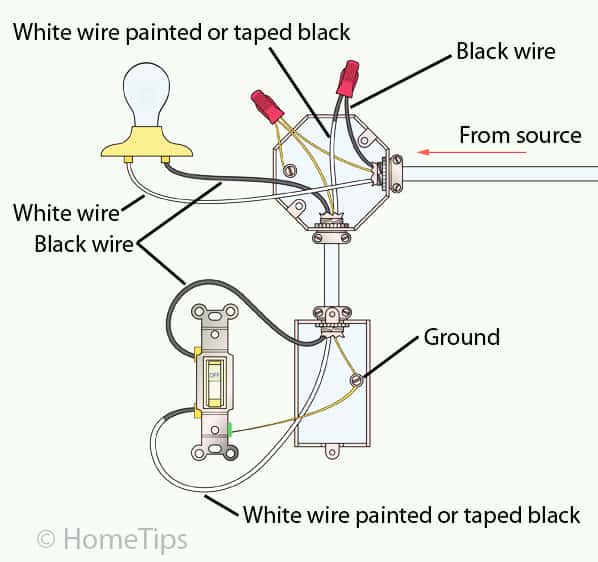
 mental abyss
Mini PC for HA
idle bough
zealous dune
Which one do you have now?
The humidity sensors I have now are on my Nest Thermostat and on my Broadlink RMPro 4 (with the humidity sensor on the cord).
void leaf
Are there any US zigbee smart in wall outlet with power delivery?
 surreal rampart
Potentially silly question - If I have a Shelly 2.5, am I able to flash the Zigbee variant of Tasmota onto it? Or is the hardware for WiFi and Zigbee physically different despite both using 2.4 Ghz band?
winged knoll
Tasmota is for WiFi devices, not Zigbee
surreal rampart
I see a "tasmota-zigbee.bin.gz" on the download page http://ota.tasmota.com/tasmota/release/
3rd from the bottom in the top section
winged knoll
 native sparrow
can someone help
jagged crypt
native sparrow
can someone help
jagged crypt
I swapped out to different ESP32 boards
jagged crypt
native sparrow
Wheeen I try to flash ha on my micro sd it says flash failed
size of SD card? os you are using? software you using to flash?
 dull portal
Is there any cameras working with HA trough zigbee2mqtt?
drifting grove
you can not feed video via zigbee or mqtt
gloomy elbow
MQTT does support cameras, but Zigbee does not.
https://www.home-assistant.io/integrations/camera.mqtt/
peak talon
dull portal
Is there any cameras working with HA trough zigbee2mqtt?
As far as i know the zb in camera is for the camera controls, on/off, ptz, etc. It is not for streaming. Which camera you have?
zealous dune
you can do images over mqtt
theoretically video is possible but no point in doing that
 meager gale
Hello, would anyone be able to recommend a single port ethernet to wifi adaptor? To connect my ethernet only smart TV to HA. I did some research and found this Asus WL-330gE but it looks to be very old and unavailable in Australia.
tacit burrow
No chance of running a cable? More reliable, faster, and less EMF than wifi.
What kind of smart-tv is ethernet only?
cold moon
tacit burrow
No chance of running a cable? More reliable, faster, and less EMF than wifi.
they put a lot of fast ethernet adapters on tvs cuz they hate us so it's not always better
best option is not using w/e junk is built into smart tv and use apple tv / nvidia shield / kodi etc
tacit burrow
Yeah, I don't use the built-in smart stuff on any of my tvs. It's a mix of Amazon devices and Apple TV.
But to be frank, I use maybe 10 apps anyway. 90% of usage would be netflix+prime+stan+youtube.
I don't think I've touched my main tv remote in a year or two. I just use the firetv 4k remote.
meager gale
it's an older sony smart tv, doesn't run android
tacit burrow
What are you trying to do with the tv/HA?
meager gale
I've found some options, but it's not worth $50 to do it
might just get a second hand old apple airport express which can do it
tacit burrow
meager gale
I don't buy from kogan, no exceptions
tacit burrow
they're super spammy, and mostly crappy products 🙂
Yeah, any wifi AP that can act as a bridge would be fine
meager gale
CEC with chromecast works so I guess I can just use that, or install libreelec on a spare pi4
cold moon
tacit burrow
Yeah, any wifi AP that can act as a bridge would be fine
brings me back to WRT54G days lol
tacit burrow
Ha, kids. That's basically modern stuff! 🙂
I remember coax and t-connectors, and chasing down the bad cable to fix the LAN...
and installing ipx drivers to play doom
and installing linux off 30 x 5.25 floppies
cold moon
im not that old -.-
i started with dos and grew up with 56k and such though so i had enough hardships
tacit burrow
56k? Luxury! I had a 300b modem, which I built from a kit myself, with acoustic couplers (big foam cups for the phone), and you couldn't talk too loud near the modem because it caused line-noise. No error-correction/detection then! 🙂
And (many years later) setting up uucp over modem, to batch download usenet 🙂
cold moon
haha yeah i was too young for all that
drifting grove
gloomy elbow
MQTT does support cameras, but Zigbee does not.
https://www.home-assistant.io/i...
thats not for video though just single image and will not perform to push single frames fast enough to make it look like a video. but ye in theory it works
drifting grove
cold moon
best option is not using w/e junk is built into smart tv and use apple tv / nvid...
true but my LG has a nice API that allows Input switching via HA so it’s worth to connect it to HA for that 🙂
drifting grove
cold moon
https://www.reddit.com/r/homeassistant/comments/ug72gf/hyperion_running_directly...
sadly it’s not possible to get root access atm
would be really cool
cold moon
I haven’t looked into it much I have old Vizios with nvidia shields on them
 uncut ridge
is there a good place to ask about hardware? or this is it? Im interested in adding a motion sensor that is smart but could also work with home assistant, wondering whats good out there since the stuff i currently own doesnt work with HA.
winged knoll
Zigbee (and Z-Wave) are great choices as they're 100% local and will work with HA
uncut ridge
does that require an adapter to plug into my pi?
winged knoll
Yes
WiFi based sensors are usually pretty terrible, both in terms of their ability to interface with HA but also in terms of battery life
uncut ridge
i see. is zwave or zigbee better?
winged knoll
Yes, but no
Z-Wave is more expensive as it's a proper standard, but it means you know everything will work (at least if you buy Z-Wave Plus or newer). It is also however region locked so you can't just buy and import stuff without some care.
Zigbee is cheaper, lots of it is of suspect quality (Tuya, Sonoff's sensors, Osram's older stuff, etc), but it's so much cheaper, and not region locked
If you're happy to research before buying, and you're not drowning in WiFi signal, then Zigbee is a better choice IMO
winged knoll
See the pins in #zigbee-archived for how to tell if that's a problem
uncut ridge
thx
 tough vine
Hi all, has anyone experienced a battery drain on Aqara P1 Motion Sensor? From 100% to ~75% in around one month. That means 4 months of battery life instead of 5 years. Presence led is off and cool off period is 30 seconds as described here: https://cdn.aqara.com/cdn/website/mainland/static/image/Motion-Sensor P1_pc_05.jpg
 winged knoll
I have one set at 10 seconds and battery level is still 100% 2 months later
tough vine
Great, thanks! If that's the case I need to find out what could cause this battery drain. The sensor is using the battery it came with. Could it be the ZHA integration? Or the Sonoff Zigbee ZBDongle-E?
winged knoll
Unlikely to be ZHA, could be the dongle, could be the router the P1 is connected to
#zigbee-archived could help more
dull portal
peak talon
As far as i know the zb in camera is for the camera controls, on/off, ptz, etc. ...
I'm looking for camera that will work in HA and some other app. I have now Imilab camera but working only in Xiaomi app.
winged knoll
Search the history in #cameras-archived - this has been asked and answered many many many many many ( 🔁 ) times
dull portal
Thanks
tough vine
winged knoll
Unlikely to be ZHA, could be the dongle, could be the router the P1 is connected...
What dongle are you using?
winged knoll
CC2652
void leaf
Someone knows a good wifi6 /6e mesh/access point? Currently own two asus xt8 and they start dropping devices when around 50 devices are connected on a single node. Saw few tplink Delco that they say support 200 devices, but on fine prints it mentions that it's not guaranteed, so I feel it's there just for the eyes
 spiral wagon
is there any zigbee 13A UK wall socket with power monitoring except the Aurora AOne?
spiral wagon
winged knoll
Salus SP600
sorry, I mean those installed on walls replacing the existing face plate
it is 13A according to the spec on the official page
winged knoll
The Salus and Hive plugs are 13A, no idea about sockets
 keen flame
Does anyone use a fitbit-like device that hooks up to HA and doesn't send data to the cloud? (I'd like to start tracking my sleep quality but I also care about privacy.)
I think writing automations around my quality of sleep for the night sounds like a really fun thing to play with. 🙂
 obtuse tree
hey all
anyone got anyu experience with adding a SONOFF inching to a garage door pcb?
I have successfully done one on my lobby door, and want to do one on the garage
but I am not a wiz at reading pcb layouts
drifting grove
do you have a pic?
obtuse tree
yeah go dm so I can post it
can I dm u ?
I have found the circuit board manual as well
https://www.acsys.gr/products/autotech_control_boards/apic-2001/index
U will need to translate to english
drifting grove
ye go ahead
gloomy elbow
Can I ask where you got that light from? 😄
 cinder coral
gloomy elbow
Can I ask where you got that light from? 😄
cinder coral
gloomy elbow
Can I ask where you got that light from? 😄
I ended up not getting it, but the specific one I was looking at was by the brand Northern Light Technology on Amazon
gloomy elbow
Darn, those don't seem to exist over here. I'm trying to find a lamp that just turns on when power is provided.
 minor pecan
If I am trying to hook up two optocouplers to one pin on an ESP32 for PWM control on some lights, and the example circuit has one optocoupler and uses one 100ohm resistor before the optocoupler's diode, do I need to change resistor size to run the two in parallel off that pin?
winged knoll
You may want to try the experts in #diy-archived
minor pecan
Oh, thanks, wasn't sure what the appropriate room was
jagged crypt
gloomy elbow
Darn, those don't seem to exist over here. I'm trying to find a lamp that just t...
You mean a standard lamp 🙂
gloomy elbow
No, specifically a 10,000 LUX lamp.
jagged crypt
that's a lot of lumen
winged knoll
gloomy elbow
No, specifically a 10,000 LUX lamp.
You want https://www.youtube.com/watch?v=LT5_-A0m8_U then
jagged crypt
@gloomy elbow https://www.amazon.com/Carex-Day-Light-Classic-Bright-Therapy/dp/B00PCN4UVU reviewer reports that it doesn't have a power switch, that if it's plugged in it's on. non dimmable, wirecutter recommended if you care. But I can't remember if you are in the US.
gloomy elbow
I'm in the UK, but I shall look
I ordered a cheap one with physical buttons off Amazon as I already have a switchbot.
keen flame
You can get a full spectrum light bulb and make your own if necessary.
gloomy elbow
Wowza, that one is pricy
gloomy elbow
keen flame
You can get a full spectrum light bulb and make your own if necessary.
I really want something smaller that will sit behind my keyboard if possible.
jagged crypt
doesn't that effectively negate the purpose? Shiny high output flashlights into my face while typing doesn't seem productive or helpful for SAD
keen flame
Full spectrum, 10,000 lux light is the most commonly used in treating SAD. You want to put it in your peripheral vision for several hours per day.
I used to live in Seattle and used a number of them. They help a bit.
cold moon
keen flame
Full spectrum, 10,000 lux light is the most commonly used in treating SAD. You ...
can these not just be made diy for cheaper?
cold moon
i assume you need analog led strips with a high cri number?
keen flame
Oh I dunno...
 dawn storm
Hey guys, I have an old tuya device that I need to flash.
I haven't done a tuya convert in years. What's the latest and greatest method to convert these days?
keen flame
I can't help but I'm curious (still learning), convert to what?
dawn storm
keen flame
I can't help but I'm curious (still learning), convert to what?
Convert from the proprietary tuya firmware to tasmota so you can use it locally (without cloud) etc
keen flame
Oh. Didn't know I could do that. 🙂 I have two tuya smart plugs that I hooked up using LocalTuya.
cold moon
dawn storm
Hey guys, I have an old tuya device that I need to flash.
I haven't done a tuya ...
Hope and a prayer that it still works
Manufacturers have been making it harder with non esp chips or locking them down iirc
dawn storm
cold moon
Hope and a prayer that it still works
Yeah that's exactly why I haven't initialised the device via the manufacturers app. Afraid it might auto update
I bought this device years ago so I'm pretty sure it's flashable
peak talon
well here you go. https://github.com/ct-Open-Source/tuya-convert all the best
dawn storm
peak talon
well here you go. <https://github.com/ct-Open-Source/tuya-convert> all the bes...
Thank you, that is what I used years ago, but was wondering if there was a better way these days?
peak talon
from the time they patch the software with new pskKey, there is no way around it - so no alternative than this one afaik
 karmic solar
has anyone had any luck un-clouding a InkBird ITC-308?
hrm soldering it seems 😦 that means I have to unplug my homebrew beer fridge 😦 https://www.ozonejunkie.com/posts/itc308-wifi-tasmota/
 tall cloak
hello! does anyone have sonoff pow r3?
zealous dune
Are you starting a club or have an issue?
jagged crypt
with the price of easy flashable or pre-flashed gear, why are people fighting with Tuya stuff at all? Genuinely curious.
jagged crypt
yeah, the hobby/tearing things apart i understand, perfectly valid
zealous dune
I'm more flabbergasted with people trying to use Tuya cloud integration
jagged crypt
my flabbergasting comes from people who automatically equate wifi device to cloud
zealous dune
The muggles, same ones that equate Zigbee to being battery powered
 young wharf
Anyone have problems with an m.2 enclosure and a powered usb hub just deciding to die(connected to a pi 4)? Im away from the house so I cant get the error but this happened once like a month ago. And I ended up plugging a monitor into the pi and seeing it stuck trying to boot from usb. I ended up fixing it by moving the m.2 usb to a different port on the usb hub and restarting HASS to get it online again.. Btw the hub is plugged into the USB 3.0 port
jagged crypt
i've had usb devices wedge on PC's before, where i've had to unplug/plug. on linux, unloading the device driver and reloading usually fixes it (probably does on windows, just don't know how). Could be similar on the pi. Since you mentioned powered, I assume it's got enough power to drive the m2 drive.
young wharf
Yeah the hub is powered and seems to have plenty of power. I dn why it wouldnt since the m.2 is the only thing plugged into it.. Also, just running the normal pi hass img. So it's Linux. But I can't ssh into it either. It doesn't get that far to start the ssh server. My friend is gonna go over to my place tomm and get me back up but it's bugging me so I'm trying to do some research.
west yew
I'm trying the learn how to have a esp32 press a button on a device. Such as pressing the garage door button or pressing the button on a vehicle key fob. All the guides seem to show a 5v relay being used, but can this be accomplished without a relay? I thought it could but maybe that's a bad idea?
peak talon
west yew
I'm trying the learn how to have a esp32 press a button on a device. Such as pre...
Just use a gpio switch and conect any button - 1 leg to respective gpio pin and other to gnd https://esphome.io/components/switch/gpio.html
peak talon
west yew
I'm trying the learn how to have a esp32 press a button on a device. Such as pre...
You can also try using ble button as esp32 is ble enabled as well https://esphome.io/components/sensor/ble_client.html
west yew
peak talon
You can also try using ble button as esp32 is ble enabled as well <https://espho...
I'll check these options out tomorrow, thanks!
 cinder sentinel
What's the opinion here about https://smarthomescene.com/tag/aliexpress-reviews/ ?
Just asking since I was recommended here several times to avoid Tuya like the plague, but then found these reviews of some Tuya and Moes Zigbee products that are cheap and the reviews don't seem bad at all (at least the ones I've read).
There are some light switches in there that might be useful for me.
gloomy elbow
The question is always "how have they set up and configured the devices?" If you can buy something else I'd always recommend it personally
zealous dune
I do use a lot of Tuya but you need to be realistic and have some experience with smart home in general
when a beginner asks I also tell them to look away
cinder sentinel
got it. Will try to avoid if I can find something else. Thanks again
 sand pier
I built a PC with the idea of running it 24/7 for Plex/Frigate/HA but since the electricity prices went crazy I’ve been only using it sporadically when I want to use Plex.
Anyone know how I can measure the power usage and compare it to my existing thin client for HA that already runs 24/7?
Wondering how much difference there is.
zealous dune
a power monitoring plug?
sand pier
Simples.
peak talon
sand pier
I built a PC with the idea of running it 24/7 for Plex/Frigate/HA but since the ...
Try online cloud vm. Fyi oracle cloud provides a beefy 4 ocpu, 24gb ram ampere system with 200gb storage as always free. Run all your "heavy" loads there. Then at home run rpi or old mini pc which takes no more than 6/7 watts and run zigbee and mqtt. Connect both cloud and mini pc using wireguard, zerotier or tailscale .
 outer fog
Anyone have experience with the Atlas EZO Sensors? I have them on an isolated carrier board, but I see extreme errors directly proportional to enclosure temperature, not liquid temperature. It appears the modules use the built in ADC on the PIC18, which has poor temperature performance. I have a pressure sensor hooked to an ADS1115 in the same enclosure that doesn't see such temperature drift.
 astral rain
Is it possible to turn off the button on a Xiaomi Aquara Smart Plug (zigbee2mqtt) so that no one turns off the plug by accident? I would like to use it to measure my refrigerators energy consumption and it would be nice knowing no one by accident turns it off. Is it possible to set it to by on by default in case of power outage?
winged knoll
Only if that plug supports it
astral rain
https://www.zigbee2mqtt.io/devices/SP-EUC01.html seems like no?
winged knoll
Looks that way
 unreal star
Hi can I force temperature sensors to update more often ? Let’s say every 5-10mins ? I am using Sonoff dongle 3.0 m2qtt and sonoff temperature sensors
 rustic ledge
I don't suppose anyone happens to have a more up to date version of the Yamaha Extended Control API Specification (Basic) document by any chance? I've been able to find document revision 1.10, but the HiFi system REST API indicates it is at API version 2.08 and I see a v2 endpoint is available that isn't mentioned in the spec. I tried Yamaha support, but they were less than helpful pointing me to a local dealer and basically saying I'm "not authorized" to call the REST API on my own device myself 🤣 I'm pretty certain the official dealer I got the device from knows nothing about REST APIs.
Thank you for your inquiry regarding external control protocols:
Since the control protocols are only available for our authorized dealers and installers, please contact your Yamaha dealer or installer to integrate your MusicCast products.
For a price on integrating MusicCast products into your home network through the control protocols, please contact a distributor or installer of your choice.
karmic solar
🔫 gimme a pi 4 or else
jagged crypt
@rustic ledge you are looking at this - https://github.com/rsc-dev/pyamaha ?
Google search for "Yamaha Extended Control API" - 2nd hit - https://community.symcon.de/uploads/short-url/vRXaJXAn6vI2DSQYMHF0aqLbdir.pdf - is v2 of the document (but not of the API)
rustic ledge
@jagged crypt Thanks for searching for it as well! Sadly enough, that is revision 2 of the Advanced document, which deals with more a more high-level management API that doesn't allow for things like changing the volume or loading another preset.
The first link looks good though!
jagged crypt
yeah, i figured you had gotten that for, the pyahmaha has v1 of the same document
rustic ledge
I somehow saw that GitHub repository and didn't bother to look in the doc folder. The specification doesn't contain the changes to the API that I had hoped for, but that's mostly on me
jagged crypt
good luck, I was dealt with automation rest on squeezebox server (but that's all software)
      - service: squeezebox.call_method
        data:
          entity_id: media_player.office
          command: playlist
          parameters:
            - play
            - Playlist-Office
The whole Yamaha and MusicCast way of storing favorites is just so backwards that I was hoping to get around the issues by using the API myself. Sadly enough, there doesn't seem to be a way to tune in to a specific DAB channel yourself. All you can do is "next" or "previous". Sigh.
jagged crypt
can you create a playlist that you load?
that prefills that info?
which is what I did for setting up remotes to trigger media players
rustic ledge
DAB is a radio format. So I don't think I can do anything with playlists for that
I think I'm just going to do some network monitoring to intercept the commands the app sends to the device. There are things the app seems to be able to do that the specification doesn't mention
drifting grove
rustic ledge
The whole Yamaha and MusicCast way of storing favorites is just so backwards tha...
I worked around that by sending the stream url to the device via api, so web radio instead of DAB broadcasts but most german radio station have a web radio stream too
rustic ledge
I guess moving away from DAB would be a solution as well
drifting grove
rustic ledge
I guess moving away from DAB would be *a* solution as well
but you can save tuner presets and recall them by there preset number
page 7 in the documentation
rustic ledge
(sorry, cat butt interfered on keyboard)
Yup, but when you store the preset via the API, you can't set its name. The app can do that in some way.
Recalling the presets works fine and it's what I'm doing right now. I was just hoping that API v2 would have some parameter for providing the name when storing 🙂
 midnight grotto
I need temperature, humidity and window/door sensors for my HA what is better Sonoff or Aqara or something 3rd?
drifting grove
this guy did a pretty good test of detection failure rate and battery life
maybe watch the video
midnight grotto
drifting grove
this guy did a pretty good test of detection failure rate and battery life
tnx! gonna look
 torpid rune
Looking for quality smoke detector that can be controlled via MQTT
zealous dune
any Zigbee2MQTT supported one then
jagged crypt
i'm happy i was able to code up a double-click functionality for the Tradfri 5-button remote, need to extend it so it's not just double click on the center button.
cold moon
jagged crypt
i'm happy i was able to code up a double-click functionality for the Tradfri 5-b...
https://epmatt.github.io/awesome-ha-blueprints/docs/blueprints/controllers/ikea_e1743/ was there not a blueprint like this for it?
jagged crypt
the second one may be good, will look when i have a chance
i didn't find it when I looked earlier
jagged crypt
i think my search failed on that because they have the special char - TRÅDFRI vs TRADFRI
no, I found that one, but it caused me issues
cold moon
i had to tweak it for my hue remotes but i like it a lot
jagged crypt
i have double&triple click working with tradfri 5 button with my blueprint, it's pretty straightforward once i figured out how to get it run effectively single-threaded (mode:single)
actually maybe i didn't use that one, i used the version of that one for the synfondisk dial and then gave up
that was causing me problems
 empty wing
Hello. Can anyone recommend a budget NAS? I am not sure what I am looking for.
Example:
Is SSD necessary or would HDD be sufficient?
Hard to determine the upper max of what is needed for storage, so is it easy to expand these later?
Is $100-$200 a good range to be looking for a starting NAS?
jagged crypt
you need to figure out what you are trying to do before blindly buying something 🙂
empty wing
Backing up my computer, picture storage, archive emails,.. that's all I can think of right now
Oh and backup my Home Assistant so it doesn't take up space on the mini computer
jagged crypt
do you leave your primary machine on all the time? how much space do you think you need?
the synology/qnap's are all good
empty wing
Main station? No. Mini computer, yes. It runs my HA.
Space is probably no more than 4 TB right now. Having the ability to expand later would be needed.
I will look at those 2
What do you think of a dock like this one?
SABRENT USB 3.1 to SATA Dual Bay Hard Drive Docking Station for 2.5 or 3.5in HDD, SSD. Hard Drive Duplicator/Cloner Function [Includes Both Type C and Type A Cables, Supports 10TB+ Drives] (DS-UTC2) https://a.co/d/cVp6YiB
jagged crypt
if you want raw disks sticking up works great, not sure i would call that a NAS vs a temporary way to deal with a pile of HDD....
if you need storage, 4bay (or more) nas of some sort works well (raid 5 or variant). Though some value in a small 2-bay mirror nas.
if you don't want to run anything else on it, the Synology 220j isn't bad, if you want to put additional "things" on the nas, then the 220+ or similar. Pair for 14tb drives, and you are in for about 650-750 plus taxes - https://www.amazon.com/Seagate-3-5-Inch-Internal-Enterprise-ST14000NM001G/dp/B07T63FDJQ/
If you're just buying a NAS to have a NAS, think it through. You are buying storage for backups and to remove large primary storage from your desktop. If you are already backing up all your photos and apps in a "cloud" of some sort, you may not need a NAS. They come with extra work/energy and if you aren't careful will actually be worse off than using a cloud backup of some sort. They can give you a false sense of security if you aren't careful.
 vivid sky
Agree with @jagged crypt about the NAS false sense of security. While they are fun to tinker with and all. If you don't have at least two in two deferent location then a fire, natural disaster or act of god will destroy your data.
torpid rune
Xiaomi Mijia Honeywell Fire Alarm Smoke Detector Sensor Bluetooth version can be integrated to HA?
jagged crypt
cold moon
i had to tweak it for my hue remotes but i like it a lot
ok, got it working, but wondering if I'll just keep the simple one I made, that doesn't require a helper test input entity. Right now I'm not trying to do more than play/pause, volume up/down, next/previous track. Then added "play specific playlists" with double taps. Anything complex you are doing with the remotes that you use past the day you set it up?
I'm sure i can rig up a mortal combat fatality sequence if I thought it would be useful, but .... 🙂
 vapid flume
finally managed to get some data out of my Apricus (resol) Solar Hot water system
jagged crypt
congrats, sometimes it the small things at the end of the day 🙂
 tender aurora
hi! anyone know of a battery-powered outdoor camera?
with decent quality? i'm going to use it to create a timelapse
so i need to be able to program it to take a picture every xth minute
tender aurora
what's the battery life of that?
i need something that can be placed outdoors for a prolonged period of time
during winter (-20 C)
tender aurora
all winter
several months
4-5 months, at least
of course i can change the battery, but i wouldn't want to do that too often
jagged crypt
I've got nothing. You could do it with a gopro and usb battery packs that you swap out every day or similar. But I suspect for the timeframe you are looking for, a better solution would make sense
tender aurora
yeah
i see these
they use a pir-sensor that consumes little power that in turn will trigger the internal stuff
jagged crypt
how often are looking to take pictures for a timelapse?
tender aurora
but a camera like that that i could instead trigger every hour or similar
every hour should suffice
every hour during daytime
it's for a construction site
tender aurora
true enough
 ruby rain
Is it possible to flash a Android TV Box with HA? (I have a S905W x96 Mini laying around)
zealous dune
it is possible but you probably won't like it. you need to install linux on it first
ruby rain
zealous dune
it is possible but you probably won't like it. you need to install linux on it f...
Why not? 😄
zealous dune
well, can you install linux on it?