#add-ons-archived
1 messages · Page 59 of 1
 simple bridge
 twin onyx
Hm, I'm also having the issue of Failed to save add-on configuration, Missing required option 'device' in deCONZ (core_deconz). Got {'device': None} Although clicking outside the seelctor isnt helping in my case. Oddly I see two devices /dev/serial/by-id/usb-FTDI_FT230X_Basic_UART_DM0104CM-if00-port0 & /dev/serial/by-id/usb-0658_0200-if00 One is a Aerotech zwave controller, but.. cant really tell which is which
Neither seem to be accepted by deConz
 mellow pond
hmmm the last one seems to be the Aeotech-stick, is is similar to mine but the other looks weird... my conbee-stick actually has the name Conbee in the name of the device in /dev/serial/by-id/
twin onyx
hm, yeah that's all its saying. this was working in a old version of HA so Im not sure why the name would be different
Yeah, I reattached it to a old VM running a kinda outdated version of HA and it's working fine there
"Phoscon-GW, Vendor dresden Elektronkik, ConBee"
Version 2.11.05 / 09/05/2021m Firmware 26390500
twin onyx
so very confuised why this isnt working in the new build...
 river acorn
hello there: is it possible to send ssh commands to other devices from HA running in docker?
My plan is to start/stop a Crypto mining rig when there is excessive solar energy available 🙂
first to control it manually, then of course via automations, but I first have to read into that as well..
river acorn
okay I just now found the addons github page. How can I add those addons to my docker? maybe via docker-compose? is there a guide?
 sly kindle
you don't use add-ons without a supervisor
if you're running HA core in a container, you have all of dockerhub as your "add-ons" store
river acorn
hmm okay I'm dumb. is there a guide of how to for example file explorer to the installation?
 mossy blaze
I'm trying to integrate my arduino node devices using nRF24L01. I have a MasterNode.py script that uses sqlalchemy to create and populate a sql db. I am really new to this HA OS. I saw there was an Add-on for SQL. I am wondering, can someone tell me if I need to create the sql db in the UI using the add-on? Can I run my MasterNode.py script in the background on the raspberry pi 4 B to populate that db? If so, do I have to do something specific to make that happen? Is there an add-on where I can manipulate fields within the db tables (such as boolean switches/values, other variables, etc/). Then, last and certainly not least, Is there an event triggering mechanism in HA OS that I can have my MasterNode.py to 'listen' for that would execute certain functions within the script to pull data from the db and it can do its thing by sending messages to the individual nodes?
twin onyx
Is there another way to attach the Conbee to deCONZ? It is simpyl flat out not allowing me to attach it through the intergrations menu
 fiery prism
river acorn
hmm okay I'm dumb. is there a guide of how to for example file explorer to the i...
fiery prism
river acorn
hmm okay I'm dumb. is there a guide of how to for example file explorer to the i...
No, because that is a Home Assistant specific addon. You could however load up a VSCode Docker container and install the Home Assistant helper extension. Which IMO is a better solution.
twin onyx
You cant seemt o type in anything manually, and its just not saving anything from the dropdown box at all
sly kindle
twin onyx
You cant seemt o type in anything manually, and its just not saving anything fro...
click outside of the dropdown box before hitting save
twin onyx
I've tried that already Im afraid, it makes no difference
Heck, even setting it to "Edit in YAML" returns the exact same error message
OK,. I managed to get it working, although Im unclear as to why? It's listed as 3 devices when I go into Supervisor, hardware, DEVLINKS: >- /dev/serial/by-id/usb-FTDI_FT230X_Basic_UART_DM0104CM-if00-port0 /dev/serial/by-path/pci-0000:02:00.0-usb-0:2.1:1.0-port0 DEVNAME: /dev/ttyUSB0
Settiing it to the ttyUSB0 or pci-0000... seems to work
sly kindle
what is the error message?
twin onyx
Just as above, Failed to save add-on configuration, Missing required option 'device' in deCONZ (core_deconz). Got {'device': None}
There is nothing in the logs, and I cant start Deconz till I edit the YAML manually and add the second (or third) device
(Since those two other options dont appear in the dropdown list)
That's assuming the Conbee is going to add any bulbs now.. for.. ugh.
 cobalt plume
Hey guys. Any elegant solution in Automation to check if an addon is still running?
The use case is: I want to run Let's encrypt addon at the end of the month, and after the certificate is renewed, I want to deployed it on another server via scp. So in the automation I need to wait(in the worst case a fixed time) until the addon finished its job. My current solution is to call the RESTful api api/hassio/addons/core_letsencrypt/info but I'm sure there must be a more elegant solution.
fiery prism
That's the way to do it.
 clear gust
My Amazon Echo Dot No. 4 (named echodot4) is shown under /config/cloud/alexa. However, there is no media_player.echodot4 listed in the developer tools section, but my other dots are listed. I have restarted my Home Assistant about 15 times. I even rebooted the machine where Home Assistant is installed several times, everything without luck. Any ideas? Did I miss an installation step?
sly kindle
echoes are not media player entities unless you make use of the custom Alexa Media Player integration
Are you using that for your other dots?
clear gust
Yes, I do.
sly kindle
not sure how that integration works as I don't use it myself, but it isn't an add-on or related to any add-ons that I know of
clear gust
Do I have to reinitialize the Alexa Media Player integration?
 celest belfry
Hey folks. Added a couple new devices to my lineup and after getting Tasmota on them, I'm trying to add the usernames and passwords in core_mosquitto. Unfortunately when trying to save the config, I'm presented with a Failed to save add-on configuration, Unknown error, see supervisor logs error. Checking the system log, I don't see anything related. Checking home-assistant.log manually, I found:
2021-06-14 15:51:56 ERROR (MainThread) [homeassistant.components.hassio] Failed to to call /addons/core_mosquitto/options/validate - ```
The addon is still running and working, I just can't save (modify) my config. Core is 2021.6.4, Supervisor is 2021.06.0, Mosquitto Broker is 6.0.1. Any ideas of what else I can check?For other info, I'm running Home Assistant Supervised on an Intel NUC running Debian 10.9, with all updates applied. I tried a system reboot as well.
I've tried minimizing my config to see if there's a difference.
This works:
customize:
  active: false
  folder: mosquitto
certfile: fullchain.pem
keyfile: privkey.pem
require_certificate: false```This doesn't:
- username: x
password: y
customize:
active: false
folder: mosquitto
certfile: fullchain.pem
keyfile: privkey.pem
require_certificate: false``` weary stratus
my github token expired in HACS, now the integration fails to work... how do i update the token? I have a new one from github but don't know where to paste it 🤔
sly kindle
HACS is not an add-on or related to add-ons
you yourself describe it as an integration and this is correct. so #integrations-archived
weary stratus
er.. sorry
 hollow stump
since this morning (probably after an update of grafana addon), when i try to plot a new graph, select an entity, it shows loading and then HA becomes completely unresponsive. i waited 10 minutes and nothing changed. i need to power cycle the RPi to get it working again. anyone else having this issue?
 willow dune
@lethal jacinth Thank you. When I install the integration it prompts for a host. I added the IP address of the Pi itself and then it prompts to "unlock your deCONZ gateway to register with Home Assistant" It almost seems as though when I am selecting the option thru the intergration section it expects that I have deCONZ running someplace else. Thoughts?
 restive osprey
Hello all,
I hope I am in the right place :/
I just do not get on and read everywhere something else, I have installed the anging Proxy Manager. Under Http I have TCP forwarding set to 127.0.01 and ::1 is that correct? Elsewhere I read that I should enter the proxy host there instead. If so, how do I get the address out? I am really too stupid, I think.
In addition, the file editor is spinning for me since the latest, whenever I want to use this, I am redirected to the hate configurator page. Can this have something to do with the proxy?
Thank you for the help
 glad vigil
How can I adapt the Samba integration to allow my receiver to see the media files? IF not possible what are the options? It doesn’t work als in the Plex server integration (HA is on PI 4)
fiery prism
The core SAMBA addon is for sharing HA files across the network. If you want to expose external shares to HA you will need something like this instead: https://community.home-assistant.io/t/new-addon-samba-nas-mount-external-disk-and-share-it/172193
 earnest beacon
i'm honestly not sure where to put this so for some reason, the media browser doesnt play mp4s?
 dark yoke
 livid kiln
I can not see the Addon's for knx and Bose soundtouch in the Addon store. In Github they are available. What am i doing wrong? HA installed as Hass.Os as VM on Unraid
sly kindle
are you confusing add-ons for integrations?
search for those there
add-ons and integrations are not the same thing
@livid kiln
 shy comet
Good evening! Has anyone encountered problems with Supervisor after upgrading Homeassisant OS to 6.0?
celest belfry
is it #add-ons-archived related or in general? if not, may want to post in the correct channel.
shy comet
Sorry, I wasn't sure which channel to post in. It's not related to a specific add-on, although I can't access the configuration screens for those either now!
 viscid orchid
shy comet
viscid orchid
shy comet
Thanks! A little more googling and I think the issue is browser cache related, so apologies for bothering anyone!
 buoyant breach
Thank God there is a dnsmasq add on in HA....
The dockers on my PiNAS have stopped working for some reason... and one of those dockers is my PiHole which I also use for local name resolution.
[12:55 PM]
So I created another DNS Server on my HA Pi
[12:56 PM]
As much as it might sounds like overkill for a home residential application, if you have reason to use DNS, and you have two different server platforms... you might as well have two DNS Servers running.
 alpine niche
could someone help me with esphome and mosquitto?
everytime i try to connect an esp32 it cant resolve the mosquitto ip adress.
i am trying to hook up a p1 dsmr (iskra am550) on a esp32 and then telegram the readings via mqtt
in mosquitto addon logs i get socket errors
 amber willow
Just added influxdb and grafana...now what?? A lot of power here and so I am quite overwhelmed. I have an entity that tracks water usage....its a counter that is non-decreasing. It was a challenge but I got a time series graph going in Grafana. My first 3 questions are:
- The counter is for 1/10 of a gallon....so I'd like to plot the counter divided by 10 so it is in units of gallons. Can I do this?
- I'd like to also see the delta value of the counter...it should mostly be 0 but when water is being used I'll see a spike/blip. How do I do this?
- assuming (2) is possible can I set up some sort of alert/notification if the delta value ever exceeds some value OR is non-zero for longer than some period?
Thanks in advance for your patience with a newbie!
alpine niche
alpine niche
in mosquitto addon logs i get socket errors
I do have Nginx reverse proxymanager set up. And I am using a guide https://trmm.net/smartmeter
 willow lintel
MariaDB update 2.4.0 is available but it won’t install? 3 instances… anyone?
 modern zealot
Greetings... I’m trying to update an older Home Assistant install. For some reason I can’t get the option to update ZWave_JS. I’m stuck on 0.1.13. I’m running core-2021.6.4, Home Assistant OS 6.0 on an RPI3. I’ve tried to remove the Add-on and rebooted, but it keeps offering me 0.1.13... Do I also have to remove the integration? Or, is there a way to “force” an update?
viscid orchid
you can go to the Addon Store tab, click the 3-dot menu, and select reload. then refresh the dashboard
modern zealot
OK I’ll give that a try.
fiery prism
willow lintel
MariaDB update 2.4.0 is available but it won’t install? 3 instances… anyone?
Update went without issue for me. Which I realise does not help you much.
 severe urchin
Have anyone had the issue with zwavejsmqtt that it forgets all interview data and have to reinterview at reboot. Happening quite often now and getting annoying
Running in ws mode
willow lintel
fiery prism
Update went without issue for me. Which I realise does not help you much.
thanks, maybe I was too quick. After some time I tried again, and it went fine alright. I always wait for updating until the frontend supervisor shows the available update, (dont do the cli updates whihc can be sooner) and never experienced this before, that's why I asked
 dense spadeBOT
@blissful fog posted a code wall, it is moved here --> https://paste.ubuntu.com/p/Ds8gXbwxWK/
 blissful fog
Hi - I managed to get the Texecom2mqtt plugin up and running and communicating with my alarm system, there is a reliance on MosquittoMQTT as the broker but I am having problems there with the following messages as per the log below.
I apologise if this is a really obvious issue, I am a newbie and only mildly technical 🙂
One thing to point out is the internal network IP address range is on 192.168 so not sure if HA creates the 127 addresses?
The message above was a copy and paste from the log if that is helpful
sly kindle
blissful fog
Hi - I managed to get the Texecom2mqtt plugin up and running and communicating w...
those are internal docker network addresses, yes
blissful fog
Thanks Cogneato, any ideas on the socket error?
sly kindle
something local to the machine...not sure
blissful fog
Ok back to head scratching then...
sly kindle
is your texecom configured to use the mosquitto broker add-on?
blissful fog
Yes it is
viscid orchid
Is there an actual problem?
sly kindle
everything looks normal there except you don't have other mqtt things chiming in yet
blissful fog
I'm not seeing any of the Alarm options
In devices or entities that is, Texecom is connected and seeing all the zones etc but only place I can see them is in the log of the add on
sly kindle
is it one "New connection from..." for one ip address for this panel?
And are you using discovery in the texecom addon config as well as the mqtt integration?
blissful fog
Yes one IP in the texecom2mqtt add on, I'm only seeing one IP for Mosquitto so am assuming that is for the texecom
blissful fog
sly kindle
And are you using discovery in the texecom addon config as well as the mqtt inte...
Yes I am
sly kindle
if devices aren't showing up in the mqtt integration card, then you might wait, depending on how long it has been
 blissful fog
No devices showing and it has been up and running for a few days and I have been googling and playing around but no joy
 green fossil
I get this log when using the Unifi controller addon. I've tried 8443, empty and 443 as the port for 8443/tcp port but same problem for all of them.
Error connecting to the UniFi controller at 192.168.1.228: Error requesting data from 192.168.1.228: Cannot connect to host 192.168.1.228:8443 ssl:default [Connect call failed ('192.168.1.228', 8443)]
viscid orchid
did the addon start successfully? have you reviewed the addon logs?
I just installed it, started it, and then went to https://192.168.1.169:8443 and it connected
green fossil
viscid orchid
I just installed it, started it, and then went to `https://192.168.1.169:8443` a...
Yes. It starts and is running. No problems in the Unifi addon log.
green fossil
viscid orchid
perhaps you're not using https://?
Not with with http or https. And not from the Unifi app. Or from unifi.ui.com.
viscid orchid
no idea, then
 agile scroll
Let´s Encrypt add-on settings, now I have the Cloudflare api key in clear text in the configfile. Is it possible to put the key in my secrets.yaml file or do I need to have it in clear text in the config?
agile scroll
Thanks!
viscid orchid
surrounding quotes are important
 wanton pivot
With HA OS, if I wanted to run https://github.com/dchesterton/amcrest2mqtt which states "Docker is the only supported way of deploying the application. The app should run directly via Python but this is not supported." Would I use the Portainer community Add-on?
 buoyant marten
Can anyone help me troubleshoot let's encrypt? Apparently it doesn't auto-renew (which sort of defeats the purpose?), but I have line of site to fix that with an automation... bigger problem at the moment is that I manually ran it, everything looked like it was successful, but I'm still seeing the same expired certs come back despite restarting everything
nvm, looks like a browser cache issue with the old certs
ok, now just need to setup an automation to auto-renew. Is there a recommended way to do this?
Looks like a service automation that callshassio.addon_restart on core_letsencrypt should do the trick
buoyant marten
PR to update add-on docs... https://github.com/home-assistant/addons/pull/2085
 fathom phoenix
Hi my almond does not seem to be working correctly
fathom phoenix
when I try to enable a skill it gives me this back
Expected "action", "import", "list", "monitorable", "query", "}", comment, or whitespace but "e" found.
 weak mango
Do you know any nice way/addon to create a chart, with daily and/or monthly data?
viscid orchid
for display where?
there's Grafana
or several Lovelace cards that draw from HA history
weak mango
I mean cards in lovelace, i used once mini-graph-card but I can't configure it too much
viscid orchid
then you want #frontend-archived
weak mango
oh, ok
 molten dew
hi everybody, my samba share addon is acting crazy, i dont know why I cant find my share from my pc.. can I post the log file somewhere?
 ocean lodge
Hello, could someone give me a little help on how to install this? https://github.com/tvrulesme/pymhub
I copied all the files to a new folder custom components and restarted the server but i don’t think it’s installing. Do I need to do something else?
dark yoke
#integrations-archived are not #add-ons-archived , #integrations-archived are for #integrations-archived , #add-ons-archived are for #add-ons-archived
ocean lodge
Sorry, I will ask in the other section
 strange shell
Anyone know how to access the Adgaurd.yaml? I want to do a DNS rewrite (create a record) to redirect my local traffic to a local ip and port.
 tough bluff
I am trying to get samba add on working. Here is the error message ERROR: Got unexpected response from the API: Interface default does not exist
viscid orchid
remove the interface line from the addon config
tough bluff
I don't have that line. I restarted and the log does not show any errors that I can see. I still cannot connect.
viscid orchid
Not even the error above?
tough bluff
Yes not even the error I submitted.
The log says using host name hassio and interface=eth0
viscid orchid
How are you connecting to it?
tough bluff
I am trying from my desktop to my pi 3
viscid orchid
The url
tough bluff
smb://myip
viscid orchid
Ok. 🤷♂️
tough bluff
It does not show up on my network places. I am using ubuntu 18.04
viscid orchid
You’re using supervised?
tough bluff
yes
viscid orchid
Then I wouldn’t bother with the addon, just use native samba
viscid orchid

Ubuntu
Ubuntu is an open source software operating system that runs from the desktop, to the cloud, to all your internet connected things.
And uninstall the addon so it doesn’t conflict
tough bluff
Thanks I will try and let you know how it goes.
 lyric umbra
does anyone know how to limit the cpu usage on frigate?
weary stratus
Hi I’m trying to get the latest Zwave JS to MQTT add on. The GitHub shows the latest version as 0.19.1 but when I install it gives me 0.18.1. How to new GitHub releases show up in the community add-ons sections? And is there any way to force an upgrade to the latest released?
viscid orchid
you can select "Reload" from the  menu in the upper right of the addon store
weary stratus
Awesome that was not obvious!
I wonder if that could be something automated - eg reload the store once a day or on access
Also I submitted this issue:
https://github.com/hassio-addons/addon-zwavejs2mqtt/issues/194
I’ve updated to the latest 0.19.1 and I still see this error. The webUI loads fine the first time, but if I click elsewhere and then go back to the add on and clock to load the UI, it doesn’t work - just hangs and eventually reports an error message.
Would anyone have any other troubleshooting suggestions to consider?
viscid orchid
weary stratus
I wonder if that could be something automated - eg reload the store once a day o...
I believe that it already checks every so often
well, what error message? 🙂
weary stratus
In the frame it sometimes says ‘network error click to retry’ - if you click it will sometimes load the web UI but without any CSS or styling so you can’t click on it or use it. There are some other things in the logs and JavaScript console, I added those into the GitHub issue
 quick perch
Hi, I'd need some assistance with the AdGuard Home add-on. After a few weeks or months of trouble-free operation, my AdGuard Home add-on seems to have stopped working . Suddenly Google Image Search worked flawlessly again without any limitation 😉
I have uninstalled and reinstalled the add-on - but nothing has changed. As it looks, it is only listening to 127.0.0.1, not to my hassio Pi IP address anymore.
After some research without real result, I now installed Raspbian & AdGuard Home on a second Raspberry Pi and it directly worked.
However I’d like to get it back in my Home Assistant platform again. What can I do?
 opaque pilot
quick perch
Hi, I'd need some assistance with the AdGuard Home add-on. After a few weeks or ...
opaque pilot
quick perch
Hi, I'd need some assistance with the AdGuard Home add-on. After a few weeks or ...
https://community.home-assistant.io/t/home-assistant-community-add-on-adguard-home/90684/589
They talk about this on this thread
I'm trying to send notifications using nodered when motioneye (addon) detect movement. I read regarding webhooks in nodered to call the function but until now I couldn't achieved it. The camera source imported on homeassitant from motioneye is always in idle, but motioneye is taking pictures when motion detected. Any advise to make this work and notify my phone when movement is detected?
 wheat wind
Hi, I'm trying to install Elyra-AI (https://github.com/elyra-ai/elyra) on top of the Jupyter Lab addon but I'm running into problems. After using the built-in command line tool in Jupyter, the build looks fine but I don't see the newly created "options" for the Elyra-AI-functionality. If I refresh the page or restart the add-on I receive an error that reads: Error contacting server, Endpoint elyra/namespace not found. Any ideas on what I'm doing wrong?
 proper haven
Hi folks! I’m really interested in grabbing the Eufy locks while they are on the prime day sale, but I’m concerned they won’t be supported in HA. I can’t seem to find anyone who has implemented this - am I wrong?
sly kindle
@proper haven more of an #integrations-archived topic https://www.home-assistant.io/integrations
proper haven
Ah okay thank you!
 spiral quest
@proper haven - lol for a moment I thought I was in the Developer Tea discord. thanks man. It's been a great help over the years 😄
proper haven
spiral quest
<@!227093015834001418> - lol for a moment I thought I was in the Developer Tea d...
How kind! Thank you for the shout. 🙂
spiral quest
proper haven
How kind! Thank you for the shout. 🙂
Kindness costs nothing 😉 and you're very welcome. had no idea you were into Home Assistant
proper haven
spiral quest
Kindness costs nothing 😉 and you're very welcome. had no idea you were into Hom...
Oh yeah, definitely! But I’m also bad at making my own stuff. I’m a lazy integrator
spiral quest
I've not done any custom stuff for HA either - just using what I can to save time doing the mundane and making life a bit easier.
 placid rivet
Hello!! Im having an issue where I can't use Vs Code Add-on. Its installed through Supervisor. Started correctly , i think. I get ->
500
VS Code failed to load. timed out
- I uninstalled and reinstalled again.
- Cleared Storage
Unsure what to try next.
viscid orchid
did you review the logs?
placid rivet
Oddly enough, In Supervisor Logs, I can't find any relevant txt. Only maybe this. 21-06-23 00:47:37 ERROR (MainThread) [supervisor.api.ingress] Ingress error: Cannot connect to host 172.xx.xx.x:1337 ssl:default [Connect call failed ('172.x.xx.x', 1337)] Which is not my host ip. I use 192......
viscid orchid
the addon logs
placid rivet
Im trying to find the screenshot, gimme a sec
viscid orchid
please don't screenshot
dense spadeBOT
Please use https://paste.ubuntu.com/ to share code or logs. Please don't use Pastebin, since it can randomly add spaces to the main view.
Command '~share' was invoked by: RobC
placid rivet
alright
sly kindle
172.x.x.x is the internal docker network
placid rivet
viscid orchid
hmm.. are you going through a reverse proxy like NGINX?
placid rivet
nah. I havent set up anything like this.
In HA logs I do see this, not sure if relevant
Timeout on /supervisor/options request
Timeout on /addons/a0d7b954_vscode/info request
Timeout on /ingress/validate_session request
Timeout on /ingress/session request
seems relevant, but perhaps indicative of a larger issue.
I just installed it and it worked fine
what if you go to http://youripaddress:4357?
you may want to do ha su repair from ssh
placid rivet
ERR_CONNECTION_TIMED_OUT
viscid orchid
then do ha su repair
viscid orchid
no, the 4357 URL again
placid rivet
Yup, Supervisor Connected
viscid orchid
better than before?
placid rivet
I had ha a connection time out before on 4357
viscid orchid
try "open web ui" in the addon again
placid rivet
500 again
viscid orchid
wrong answer 🙂
placid rivet
I wished so hard, didn't work.. magic still doesn't exist
Ill restart the Add-on
No luck.
 ionic carbon
Looking at the log you shared its Debian, so supervised, looks like something is blocking traffic somewhere. Is it a fresh install, in which case, did you add a firewall in anywhere?
placid rivet
Nope, nothing new that I can think of. been running this for months.
ionic carbon
So check the OS to see whats being blocked, from what you have shared the containers can't communicate with each other
placid rivet
How would one do that? Its weird. I have many Docker Container that are communicating between each other
ionic carbon
I don't know your setup, and as it seems you are running a supervised config, not sure anyone can tell you. It would point to me its likely name resolution but its a guess. If it worked previously, something changed...
Either way its not really an issue with the VSCode addon, I would guess you would see the same challenge with anything that uses ingress
Looking at the error again, not name resolution, but something is blocking somewhere🤷
viscid orchid
something was clearly broken before because even the Observer URL was timing out. That started working after ha su repair
ionic carbon
Not sure of the config, but guessing the Observer makes calls to the Supervisor API, either way, its the joys of running a supervised install, rather than the HAOS install 😉
placid rivet
I choose this not knowing what I was doing. Now.. Im so deep that Im not sure I want to change
ionic carbon
My suggestion would be seriously consider HAOS, the backup restore process should be straightforward
viscid orchid
ah, the "sunk cost" fallacy
placid rivet
Is Node-Red using Ingress?
ionic carbon
Yes, kind of
placid rivet
Well, this one is working. Might not be ingress per say
SSH & Web Terminal also is working fine. Ill just restart the whole pc at this point and pray to some entity somewhere
ionic carbon
I'd seriously look at moving to the HA Operating System, you will find it easier. You can just Snapshot, install, restore
Then you won't need to worry about OS configuration
placid rivet
I do run a bunch of Docker Container on that pc so Im not sure ill be able to do that after
I don't know s*** about HAOS
ionic carbon
In all honesty, if you are running additional containers, you are pretty much on your own anyway 😉 It's up to you.
placid rivet
Oh. yeah. maybe. Ill have to learn all that 🙂 Im already way over myhead with docker. It's a debian no ui on top of that.
viscid orchid
that's okay
ionic carbon
HA OS makes it easy for you 🙂
viscid orchid
I feel like I get the best of both worlds running a KVM with HAOS on a machine that I run other stuff on
use addons for the stuff I don't care to manage, separate containers for what I do
but to each his/her own
placid rivet
Ill def have a look. I have other pcs where I could test this on
Alright, thx both for your help. Ill try some stuff on my end now that I now its probably not the add-on issue
 upper birch
Hello, I'll try to solve this, meanwhile I ask: after installing the nginx addon for: 1) having SSL from outside and play http in my LAN, I started to get "401 not authorized" for accessing other addons UI, any clue?
 ornate gull
After installing TasmoAdmin from Home Assistant Add-on Store and starting up, when I click on [OPEN WEB UI] I get a failed to open page on port 9541. I run Home Assistant on a Mac laptop.
Are there further steps required I have missed from reading the documentation?
weary stratus
weary stratus
In the frame it sometimes says ‘network error click to retry’ - if you click it ...
Based on that error message and the messages detailed in the GitHub issue linked above, would you have any other troubleshooting suggestions? cc: @viscid orchid
 viral terrace
HI. is it possible to enable anonymous login for the mosquitto Server 1.6.12? I have insert anonymous: true in the configuration file. But this don't work.
blissful fog
viral terrace
HI. is it possible to enable anonymous login for the mosquitto Server 1.6.12? I...
I have that same problem, also enabled anonymous
 amber quest
where can I find the grafana folder in the home assistant ?
viscid orchid
For what?
amber quest
for edit grafana.ini for enable auth anonymus :/
viscid orchid
There’s a section in the addon docs about enabling anonymous access
amber quest
ok thanks for the advice 😄
dense spadeBOT
@rough geyser posted a code wall, it is moved here --> https://paste.ubuntu.com/p/KZ3QYTmh5x/
 rough geyser
 jade wing
Your install method doesn't have add-ons
dense spadeBOT
@still rivet Rule #4: Our moderators are kind enough to volunteer their time to help keep this a great community for everyone. Any inappropriate or unconstructive comments toward or about them will result in a ban.
Please take the time now to review all of the rules and references in #rules.
Command '~rule4' was invoked by: Tinkerer
viscid orchid
True to the handle
 jovial linden
Hi 🙂 I'd like to set up my HomeAssistant box as a peer in my WireGuard network so I can access it from outside my home network. Is there a convenient way to do that?
jovial linden
(The WireGuard addon doesn't seem to support this)
viscid orchid
I'm not quite sure what you're after. If you have a separate Wireguard server on your home network, then connecting to that should allow you to access any machine on your home network, including HA
if you want to use the Home Assistant addon as the Wireguard server, then it should also allow access to your HA instance
A "peer" is typically some other device outside your home network that you want to connect to your Wireguard server to provide an encrypted VPN channel between that device and your home network (your phone, your laptop, etc.)
 versed mirage
hi quick question, im having trouble accessing the ubiquiti webui from the addon page
it tells me that this site cant be reached
 lethal briar
If added the Check Home Assistant configuration add on, but it seems to have some problems with the use of secrets.yaml
[13:44:18] INFO: Checking your configuration against this version...
[13:44:21] ERROR: The configuration check did not pass!
[13:44:21] ERROR: See the output below for more details.
Testing configuration at /tmp/config
Failed config
  General Errors:
    - Error loading /tmp/config/configuration.yaml: Secret postal_code not defined
Anybody an idea how to work past this?
fiery prism
Do you actually have a secret called postal_code in your secrets.yaml file?
lethal briar
Yep, it's there.. I've also tried to replace it in the configuration, but then it just complains about the next one
What might be useful information, I have a split config, so most of the references to the secrets.yaml are altually in something like /config/integrations/weather.yaml
 junior pebble
So, the new ESPhome update sucks; they took out the compiler that allowed me to download the .bin file so I can flash it with windows.
 robust yoke
hey, as I'm new here I just discussed in the Deconz Discord some topics in regards to the HA Add-On for Deconz. Where it is about the integration of Phoscon with Alexa. Is this the right channel for some questions?
As the current AddOn doesn't support UPnP the integration of Phoscon and Alexa is not possible, and my concern would be if this will every be possible or not.
fiery prism
junior pebble
So, the new ESPhome update sucks; they took out the compiler that allowed me to ...
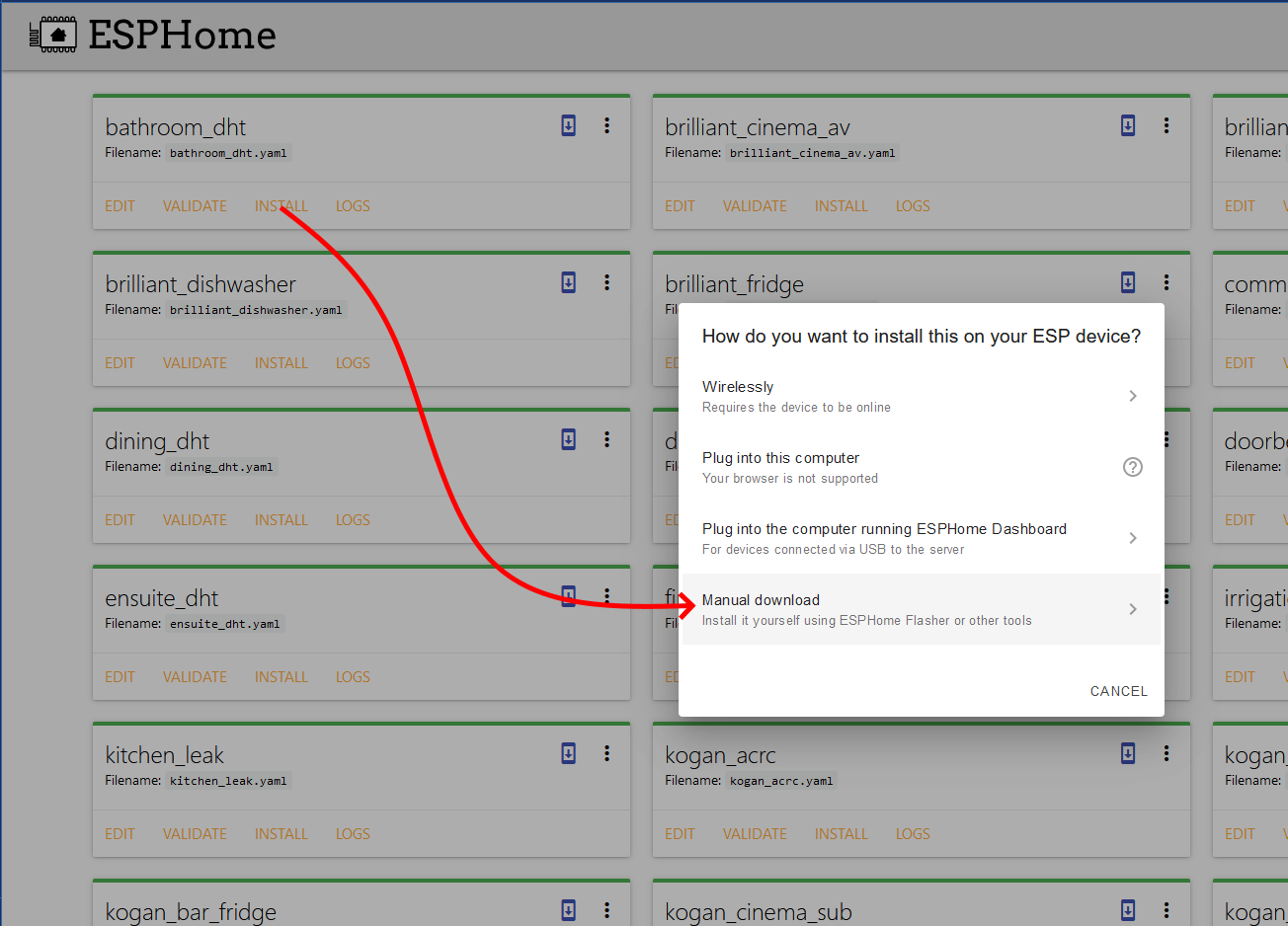
No they didn't. When you click on 'install' you get a pop-up with one of the options being: download a .bin file.
If you don't see that pop-up you need to clear your browser cache which can be very sticky.
junior pebble
I’m getting issues with it; tried uninstall and reinstall and on another computer.
Now its not even starting up...
Maybe my flash-drive ran out of space?
Altho HA isn’t giving me the warning...
fiery prism
Should look like this: https://i.imgur.com/QQpBvmm.png
 junior pebble
It wasn't working so I had to uninstall and reinstall a few times...; now it works fine...
However; if there is a way to make the default have "esphome:
arduino_version: 2.5.1" it would be nice so I won't have to add it every time.
It doesn't work until I add that part to it.
 pure forge
Any special tricks I need to do to get the Garmin Connect to work? It doesn't seem to get past the log-in screen... Spinning"forever"
Sorry, wrong channel...
 shell hawk
I'm interested in find more models for doods. Where can I find them?
 frigid current
pure forge
Any special tricks I need to do to get the Garmin Connect to work? It doesn't se...
frigid current
pure forge
Any special tricks I need to do to get the Garmin Connect to work? It doesn't se...
I'm having the same issues with Garmin. Not sure what's going on. I get an error eventually but can't get it to log in
Question: how do I get HA to show up in Windows 10 Network drives? I've installed Samba and got it running after adding a password. I did enable the SMB options in Windows 10 and restarted. Still no dice 😦
shell hawk
You have to open this PC, click computer at the top bar, select map network drive
frigid current
shell hawk
You have to open this PC, click computer at the top bar, select map network driv...
Still doesn't show up. I'm guessing I should use an IP address or something to find it, but I'm not sure which IP to use. I tried "//192.168.1.15" which is the IP i see in the Samba log repeatedly (ex. "send_election_dgram: Sending election packet for workgroup WORKGROUP on subnet 192.168.1.15").
but that doesn't work
I'm an idiot. forward slashes instead of backslashes. sigh.
 sick timber
hi there, Anyone else got issues with ZHA ?
sly kindle
heh
 raven tinsel
@sick timber That is not really an add-on question 🙂
try #integrations-archived (or #zigbee-archived )
sick timber
thx mate will do..
weary stratus
Hi there, is there any way to install a specific version of an AddOn which I have as zip file?
weary stratus
thx, I'll take a look
weary stratus
Perhaps there is a less difficult way? I would like to use the Unifi AddOn 0.23.0 (not the latest 0.23.1)
dark yoke
restore from backup snapshot
viscid orchid
It’s not hard. Just put the directory in /addons
Or that, especially now that snapshots are automatically made when updating (at least by default)
weary stratus
Well, I already tried to restore from snapshot. I managed to restore the core which I updated before the AddOn. But when I try to restore the AddOn, nothing happens.
dark yoke
restoring definitely does something
weary stratus
21-06-25 21:01:46 INFO (MainThread) [supervisor.snapshots] Partial-Restore 8583f390 start
21-06-25 21:01:46 INFO (MainThread) [supervisor.snapshots] Restoring 8583f390 Docker Config
21-06-25 21:01:47 INFO (MainThread) [supervisor.snapshots] Partial-Restore 8583f390 done
But the AddOn remains 0.23.1 😦
dark yoke
right, it does something
not just what you wanted
and the addon exist in the snapshot?
viscid orchid
It tells you what version the snapshot contains
dark yoke
only if it exist there in the first place
viscid orchid
Well, yeah
dark yoke
ahhhh I know.... ||I think||
You need to click in the checkbox to the right of the add-on before clicking "restore"
viscid orchid
 dark yoke
just like that
weary stratus
There is no checkbox 🤔
dark yoke
I find that hard to belive
weary stratus
Well, if I could paste a pic here (didn't figure out how to do), I could show a screenshot (using the web-client)
dense spadeBOT
Please use imgur or other image sharing web sites, and share the link here.
Image posting is blocked in most channels to discourage people from sharing text as images.
Command '~images' was invoked by: RobC
 hidden delta
i used to use the hacs addon 'Custom Header' It seems to have vanished from my HA install and I can see that development has stopped. Did it get removed automatically? Do i need to do any additional cleanup?
viscid orchid
HACS has no addons
But yes, custom header was deprecated months ago, with some of the functionality added to Lovelace
hidden delta
rather the repository? not sure the correct word but i used HACS to install Custom Header. and want to make sure i cleaned it out properly
viscid orchid
There’s no similar replacement
hidden delta
Im not looking for a replacement I just find it odd that it just vanished and I want to make sure I dont have any remnants that will cause issues in the future.
weary stratus
weary stratus
Hmm okay, thanks anyway. Have to leave for now but will be writing again later...
viscid orchid
hidden delta
Im not looking for a replacement I just find it odd that it just vanished and I ...
It’s been deprecated/unmaintained for a long time, so maybe it was archived. You can manually delete the directory, but my experience is that such an integration or Frontend plugin can get stuck in HACS if the repo goes away
Maybe that’s better now
dark yoke
it's better
pure forge
frigid current
I'm having the same issues with Garmin. Not sure what's going on. I get an error...
It's a known issue. One day it might get fixed, I guess... https://github.com/home-assistant/core/issues/52034
junior pebble
Is something wrong with the NodeRed add-on?
Sometimes I am able to change my lights to red and sometimes it doesn’t change at all. 🤷♂️
junior pebble
It also changes the brightness of the lightbulb when I change the color of the lightbulb.
 hazy musk
Hey 👋 quick question is there a way to control my esphome rgb strip with sound? I saw there is a spotify connect addon maybe you can use it
fiery prism
Flash the ESP with WLED instead of ESPHome. https://github.com/Aircoookie/WLED You can then use this https://github.com/atuline/WLED/wiki
hazy musk
yeah i read about that but then i cant controll the esp anymore with hassio right ?
junior pebble
fiery prism
Flash the ESP with WLED instead of ESPHome. <https://github.com/Aircoookie/WLED>...
Any way to control ESPhome devices with a browser?
Or is there an app where we can put in the local IP and have it show up as a button?
fiery prism
fiery prism
hazy musk
yeah i read about that but then i cant controll the esp anymore with hassio righ...
There is a WLED integration that works really well. https://www.home-assistant.io/integrations/wled/
It controls it like any other RGB light. With a big list of effects.
hazy musk
alright thanks i will try it out
 severe hollow
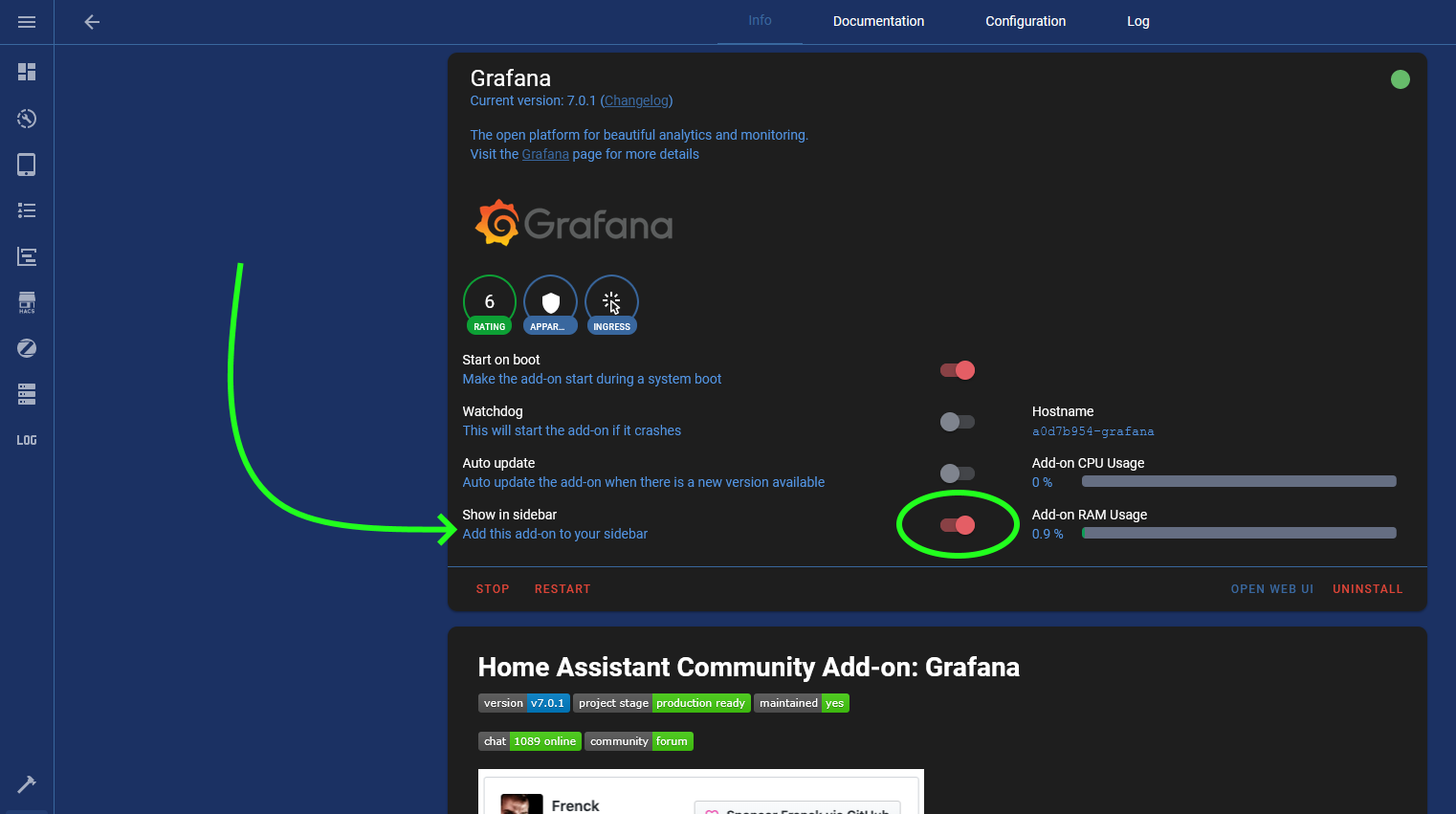
Hi is there a way to add a shortcut to Grafana dashboard on the HA sidebar
fiery prism
severe hollow
Hi is there a way to add a shortcut to Grafana dashboard on the HA sidebar
Yes. In the addon panel: https://i.imgur.com/zJwC2wm.png
 severe hollow
fiery prism
Yes. In the addon panel: https://i.imgur.com/zJwC2wm.png
severe hollow
fiery prism
Yes. In the addon panel: https://i.imgur.com/zJwC2wm.png
I mean a direct link to the dashboard itself. So its easier to get to with one click
fiery prism
Yes, but there are issues with it. You have to have opened grafana since opening the browser so that an nginx session is set up for security access.
severe hollow
fiery prism
Yes, but there are issues with it. You have to have opened grafana since opening...
ah got you. I was hoping it would be straightforward 😄 I'll just tolerate an extra click. thanks 🙂
 crystal thistle
Howdy, I updated my home assistant core-2021.6.6, supervisor-2021.06.6 and adguard 4.1.6 and I am no longer getting DNS. Is there something that I missed in the update that I need to change config?
 rotund patrol
Hi everybody
After solving the problem of Supervisor not Healthy (changing dns)
Now I find that the addons cannot be updated: for example addons ssh
21-06-27 18:54:18 ERROR (MainThread) [supervisor.jobs] Unhandled exception: 'a0d7b954_ssh'
Traceback (most recent call last):
File "/usr/src/supervisor/supervisor/jobs/decorator.py", line 105, in wrapper
return await self._method(*args, **kwargs)
File "/usr/src/supervisor/supervisor/addons/init.py", line 265, in update
store = self.store[slug]
KeyError: 'a0d7b954_ssh'
or grafana:
21-06-27 18:56:11 ERROR (MainThread) [supervisor.jobs] Unhandled exception: 'a0d7b954_grafana'
Traceback (most recent call last):
File "/usr/src/supervisor/supervisor/jobs/decorator.py", line 105, in wrapper
return await self._method(*args, **kwargs)
File "/usr/src/supervisor/supervisor/addons/init.py", line 265, in update
store = self.store[slug]
KeyError: 'a0d7b954_grafana'
amber quest
how to create ssl for grafana web ?
weary stratus
Hello dears,
I am a beginner. I am trying to configure my HomeAssistant OS in order to accept https connection from remote. I followed the instructions as indicated by duckdns add-on, but I am not able to connect via https (only http)
Any help?
weary stratus
Thanks anyway, I fixed it 🙂
weary stratus
Hi There, did anything change within the Viessmann ViCare API during the last days? The entity id "sensor.vicare_boiler_temperature" is not available anymore since last week. The other entities are still available. Is there a chance to "reset" the integration, e.g. delete the configuration entry, reload the supervisor and then re-enter the configuration values? ... would this question better be placed in #integrations-archived ?
earnest beacon
So, this is odd, for some reason I can't use Samba Share to connect to smb through ZeroTier, i was able to before and im not sure what changed
 rocky mauve
Hi there - I have installed Home Assistant on RPi 4 4GbRAM - it is supervised version. I wanted to install Visual Code Studio but it says : "This add-on is not compatible with the processor of your device or the operating system you have installed on your device. "
Could some one explain me why is that?
sly kindle
@rocky mauve did you flash the 64 bit version?
rocky mauve
Not sure ... how can I check what kind of verson do I have?
 half blade
Configuration -> Info, in the System Health area, you can find CPU Architecture.
sly kindle
@rocky mauve sorry, didn't see your response. ☝️ is where to check
dense spadeBOT
@rocky mauve posted a code wall, it is moved here --> https://paste.ubuntu.com/p/YRmjGKr2fG/
rocky mauve
@sly kindle here is the whole section. How can I know if this is 64 bit version?
As I understand correctly - Visual Code Studio requires 64 bit?
sly kindle
@rocky mauve it would appear as CPU Architecture aarch64
you have 32
and yes to the 64bit requirement. You can find those details in the docs
rocky mauve
Okay - but Raspberry Pi Os is only 32 bit correct?
sly kindle
nope. You had a choice when you flashed it
rocky mauve
Okay... I am missing something. I went to the website https://www.raspberrypi.org/software/
and after downloading of OS image creator there is only option for 32 bit
As I understand correctly - I should flash SD card with 64 bit OS version and then put it into RPi?
rocky mauve
The problem is - The Raspberry Pi Imager v 1.6.2 gives me only 2 options - both for 32bit image download
Sorry, apparently I'm missing sthg obvious
and dont know where to find 64 bit version
sly kindle
HA being added to the Rpi imager as an option is rather new. Normally you would pick the image and use etcher or another tool to write the image
rocky mauve
Okay now I get it 🙂 Thanks a lot 🙂
sly kindle
So down in the list of assets, you want to download the haos_rpi4-64-6.1.img.xz image
rocky mauve
After I install this version - terminal command "sudo apt update" will perform all updates or it has to be done somehow manually?
sly kindle
There is no package manager here. This OS is more like a firmware. Updates appear when available
HA OS is there to run docker and talk to hardware
rocky mauve
So running HA OS on 64 bit RPi OS is much different in comparsion to 32 bit ?
raven tinsel
So
I need to step in
you guys are talking about different things
@sly kindle talks about Home Assistant OS
@rocky mauve talks about Raspberry Pi OS
Those are not the same things. Add-ons do only run on Home Assistant OS, not Raspberry Pi OS.
If you install Home Assistant OS, we recommend to install the 64 bits version.
If you install Raspberry OS, you are probably in the wrong channel, as add-ons are not part of that.
rocky mauve
Awww
So in my case - as the add-on Visual Code Studio didn't want to start - was 32 bit version of Home Assistant - not 32 bit of Raspberry Pi?
raven tinsel
no
So, lets start with
what are you running actually?
On the System Health tab, it says installation type
rocky mauve
Actually trying to set HA on Raspberry Pi
raven tinsel
In that case, we recommend installating Home Assistant OS on a Pi (the 64 bits version)
sly kindle
oh running supervised...🤦
rocky mauve
Yeaj
here I can get the image of Pi 64 bit version
I flash SD card --> put it into Pi
Than procede with HA
And 64 bit version will allow to use among the others Visual Code Studio?
sly kindle
That's an advanced install for a user who is an expert with linux, docker, and HA. You are copying the ecosystem which using HA OS would provide
By choosing your own OS instead of HA OS.
rocky mauve
I am lost ... Just want to use Visual Code Studio as it is more convenient to me and I don't want to get the message "This add-on is not compatible with the processor of your device or the operating system you have installed on your device. "
What kind of Pi OS should I install ?
sly kindle
Stop installing Raspberry Pi OS and install HA OS
the 64 bit version
Also you can use Visual Studio Code from any pc
viscid orchid
it also looks like they're using armv7, which is which Pi?
or maybe that's just an artifact of the 32-bit install
rocky mauve
But than I won't be able to use Raspberyy Pi for others thing as supervised version gives me that possibility?
sly kindle
What kind of "other things"?
raven tinsel
rocky mauve
But than I won't be able to use Raspberyy Pi for others thing as supervised vers...
Running "other" things on a supervised install is not supported
sly kindle
This is not a super pc. It's a hobbiest board. Give it a main purpose and you'll be better off
rocky mauve
Perhaps I misunderstand many things about whole issue but ... if I install directly HA OS on Pi , i won't be able to use for instance additional camera?
raven tinsel
Nope
well at least not the raspberry pi cams
other webcams supporting v4l will work
rocky mauve
yeah I mean raspberry pi cam
raven tinsel
won't work with Home Assistant OS
It is design to run Home Assistant and its eco system
not a camera
If you want to run custom things, I would recommend you to look into running e.g. using Docker
(and not the Home Assistant OS or Supervised stuff)
Than you can go customize any way you like.
rocky mauve
So than my Pi will be used only for Home Assistant and nothing else.
But would you recommend me this type of installation? Thought supervised will be more versatile somewhat ...
My intention is to use Raspberry Pi for Home Assistance and to add external drive for files etc
so better idea is to connect disc to router and keep Pi for Home Assistant? I know that these seems to be extra ordinary basic questions but I am a little bit lost within this whole thing...
sly kindle
Run HA OS and have addons. Or run your own OS of choice and use docker and forget add-ons.
rocky mauve
Thanks for answers and patience 🙂
 ionic harness
crystal thistle
Howdy, I updated my home assistant core-2021.6.6, supervisor-2021.06.6 and adgua...
ionic harness
crystal thistle
Howdy, I updated my home assistant core-2021.6.6, supervisor-2021.06.6 and adgua...
Have the same issues, i rolled back to 4.0.0. Worked last time... this time my whole network is down... had to change the dns back to default to get it to work... now adguard is useless 😦
crystal thistle
ionic harness
Have the same issues, i rolled back to 4.0.0. Worked last time... this time my w...
For me the issue was that adguard was not binding to port 53. After the upgrade I tried restarting the addon and restarting supervisor with no luck. But as a last ditch I rebooted the core and that worked.
severe urchin
Is it anyone with experience with the aircast addon who devices fall out after about a day with the log removing renderer. Restarting the addon they come back
 idle narwhal
Hi, I have trouble getting let's encrypt with rfc2136 working. I have manually verified my credentials, but whenever I start the add-on, it throws a python exception that is so long I can't even see the beginning of it on the log page.
Maybe somebody could point me in the right direction? Even a pointer on how I can properly debug this would be welcome.
 neon sonnet
Hello, i'm installed AdGuard but under AdGuard Home > Setup Guide i see only docker internal IP 172.30.32.1 and not my network IP. Also there is not a service on port 53 of my raspi. What i'm missing in the configuration?
 snow agate
I'm troubleshooting an intermittent google assistant issue. As part of that I'd like to get access to the full nginx log (using the official Nginx Proxy Manager add-in). Running HassOS on Raspberry Pi. Is this possible?
 edgy elk
Hey guys: I am using the Mosquitto broker in the supervisor in HA and I want to see verbose logging?
any ideas how to enable this in the supervisor?
 grizzled remnant
Is there any debugging to be done for mosquito add-on? I can't get TLS or mtls to work using the add-on configuration tab. If I remove port 1883 from network section to try and force, mosquito never fully starts. I've tried adding config to configuration.yaml, using a custom .conf file on mosquito folder. All throw errors or just simply never work.
 gleaming cairn
Hi I add bookstack in HA but I will login with the credentials but it don’t work? What’s the problem? Thanks
 grizzled remnant
Mqtt figured out. Needed to just add a listener in a .conf file for port 8883
gleaming cairn
raven tinsel
I use: admin@admin.com / password I don’t understand why it don’t work 🙃 I try it 20 times ahah
raven tinsel
In that case, I don't know m8
sly kindle
@gleaming cairn I set it up just now and that login works
 honest shadow
hello, i recently joined the community ^^
and trying to use the nginx proxy manager to setup a proxy for my jellyfin server... quick question, where is the cert stored for ssl ?
 tired swift
You can browse through /ssl/nginxproxymanager/
But I don't think you would need that path if you set one up via the GUI?
Something weird going on with my WLED add-on. It has been working since ages, but now today (2021.7.0b0) one of my three WLED integrations does not work anymore.
I can get to its browser portal perfectly fine via the IP address I've reserved in the router.
I removed that device and restarted, then it was automatically discovered it again but I can't get through the setup process on it. It errors out: https://pastebin.com/7rcL9S3U
honest shadow
tired swift
You can browse through `/ssl/nginxproxymanager/`
But I don't think you would ne...
i am not a pro with command lines... but how do i access that ?
trying to setup samba share to acces anything from my vm (installed in on a virtualbox vm)
sly kindle
@tired swift #integrations-archived WLED is not an add-on
celest belfry
So I'm quite puzzled at this one. Mosquitto addon (core_mosquitto) is behaving very oddly with a new set of credentials I've added. If I add a specific username/password, it works for MQTT Explorer but not for Tasmota.
In the logs, I see:
1625114004: Sending CONNACK to 192.168.14.133 (0, 5)
1625114004: Socket error on client <unknown>, disconnecting.
Simply changing the password, even appending an "x" to the end, resolves the issue. But setting it back, the issue re-presents. I'd like to keep with my standard passwords per device (based on their MAC) if possible. This is really bugging me.
I've went so far as removing the addon, ensuring the underlying Docker image was fully removed, and re-installing it. But no luck there.
Running Intel NUC, Debian 10 (buster), supervised install. Fully updated (system, supervisor, and core)
I'm fairly certain it's addon-related as running Mosquitto on my PC, the issue does not exist.
Relevant log from Windows PC running Mosquitto server, with Tasmota set up to use the same credentials that don't work on Home Assistant's Mosquitto addon
2021-07-01T00:46:49: New client connected from 192.168.14.133 as MJerry Switch 6021 (p2, c1, k30, u'haswit03').
2021-07-01T00:46:49: Will message specified (7 bytes) (r1, q1).
2021-07-01T00:46:49:    tele/haswit03/LWT
2021-07-01T00:46:49: Sending CONNACK to MJerry Switch 6021 (0, 0)
2021-07-01T00:46:49: Received PUBLISH from MJerry Switch 6021 (d0, q0, r1, m0, 'tele/haswit03/LWT', ... (6 bytes))
2021-07-01T00:46:49: Sending PUBLISH to mqtt-explorer-dd882511 (d0, q0, r0, m0, 'tele/haswit03/LWT', ... (6 bytes))
2021-07-01T00:46:49: Received PUBLISH from MJerry Switch 6021 (d0, q0, r0, m0, 'cmnd/haswit03/POWER', ... (0 bytes))
2021-07-01T00:46:49: Sending PUBLISH to mqtt-explorer-dd882511 (d0, q0, r0, m0, 'cmnd/haswit03/POWER', ... (0 bytes))```Verified /etc/mosquitto/acl and /etc/mosquitto/pw contain entries for the haswit01 user. Turned on log_type all but the first snip posted above is all that's in the log.
celest belfry
Appears it may be Tasmota related, under very specific circumstances (flashing a new device to 9.5.0 and using an all-numeric password). https://github.com/arendst/Tasmota/issues/12513#issuecomment-871968864
 uncut timber
 autumn ermine
Hi everyone. I'm new to Home Assistant and recently purchased an Odroid-N2 with Home Assistant pre-installed. I'm trying to install some add-ons but the only add-ons I see are the official add-ons. I don't see the Home Assistant Community Add-ons. Can someone please tell me what I'm missing? Thanks!
autumn ermine
Thanks!! Worked like a charm @sly kindle
honest shadow
~~heya, ive followed multiple video tutorials, but i am still failing at making samba shaire work.. any tips ?~~nvm, its a win 10 feature that needs activation
honest shadow
welp, new prob, i don't find a "PKCS#12 file.. or i don't know what extention it should be
Path to a PKCS #12 file containing a certificate and private key to enable TLS support on a custom domain.
 wary kestrel
Hello guys, Wireguard just stopped working today. For some reason, if I put my Public IP into endpoint, it works again. When DuckDNS is set it stops working. DuckDNS current IP is correct so I don't know what's happening. Any clue? (It used to work perfectly with DuckDNS)
viscid orchid
@honest shadow For Samba? What are you trying to do?
honest shadow
viscid orchid
<@!176389641681895424> For Samba? What are you trying to do?
trying to setup reverse proxy to acces jellyfin
viscid orchid
ok, wasn't clear frrom that
honest shadow
was trying to get the ssl encryptions cert
wary kestrel
wary kestrel
Hello guys, Wireguard just stopped working today. For some reason, if I put my P...
it works now, manually changed IP to random numbers and updated it again. Weird.
jovial linden
Hi 🙂 I'd like to set up my HomeAssistant box as a peer in my existing WireGuard network so I can access it from outside my home network. Is there a convenient way to do that? The Wireguard addon doesn’t support this.
Alternatively, is there a way to SSH directly to the host OS so I can configure wireguard manually? I don’t think it would be possible using the SSH addon, since that runs inside a container itself.
Oh, I just found a documentation entry on how to access the host OS 🙂
 sly badge
Hi, I can't get HiveMQ addon to work. When I try to connect it gives me error: 'connect failed amqjs0007e socket error undefined'
 trail gazelle
Hi there, I was using the ASUS wrt integration since around a year without problems but since some weeks my wife phone is not tracked at all and I have some error message on the integration. Am I in the right place to get some help on such topic?
sly kindle
@trail gazelle the right channel is #integrations-archived because you used the word "integration" and what you are using is found on the home-assistant.io/integrations page 🙂
gleaming cairn
sly kindle
<@!429021745253580802> I set it up just now and that login works
I use admin@admin.com and than the error is: These credentials do not match our records. How is that possible 🙃
sly kindle
@gleaming cairn and password as password?
gleaming cairn
sly kindle
<@!429021745253580802> and `password` as password?
I fix it 2 minutes ago I add the addon PHP admin and delete the database i think that fix it
 atomic tide
Hello, I have question I use Bitwarden on my Home assistant OS and Bitwarden (vaultwarden) doesn't protect me against brute force attacks as I can try to connect 500 times and nothing is blocking me... Do you have any solution for me ?
 gusty fog
honest shadow
gusty fog
honest shadow
welp, after fiddleing with nginx proxy manager... it only redirects me to home assistant.. even if i put as the destination my jellyfin server...
anyone else got this prob ? or any way to solve it ?
jovial linden
I'd like to set up my HomeAssistant box as a peer in my existing WireGuard network so I can access it from outside my home network. Is there a convenient way to do that? The Wireguard addon doesn’t support this.
sly kindle
@jovial linden wouldn't it just show up on your network as another IP through wireguard?
Like everything else on your network?
jovial linden
It would show up on the network were it connected to it, which is what I'm trying to accomplish 🙂
As I imagine it would with other VPNs as well
sly kindle
Why is it not included in your existing wireguard network?
jovial linden
Because it's not connected to it? Because the wireguard addon doesn't support it?
I'm not sure what you're asking 🤔
sly kindle
There is no wireguard client add-on, true
viscid orchid
I had replied this earlier when you last posted: <#add-ons-archived message>
this bit:
so I can access it from outside my home network
is what a server does, not a peer/client
jovial linden
No it's not.
viscid orchid
ok
jovial linden
Two devices connected to the same VPN node can see each other, despite not being able to see each other normally
Because the traffic gets tunnelled through the server 🙂
I want to access my HA box from outside my home network, that's why the HA box should be connected to a WireGuard server accessible from outside the home network.
jovial linden
I've literally never seen anyone use it any other way.
If I wanted to expose my HA box outside my firewall, I could just access it directly, making any need and/or security benefits from using WireGuard completely moot.
viscid orchid
it's not how most people use it
jovial linden
How do most people use it?
viscid orchid
they set up a Wireguard server on their home network and use clients to connect to it to reach things on their home network from outside their home network
which sounds like a rewording of exactly what you want to do
jovial linden
That might be how Home Assistant users use it, definitely how WireGuard is typically used, since it's not intrinsically tied to the concept of a "home" network 🙂
viscid orchid
the server lives on a network that peers want to connect to
jovial linden
I'm going to lay it out clearly:
sly kindle
You might check zero tier instead
jovial linden
I'm not going to use ZeroTier as I've already considered it, but thanks for the suggestion 🙂
I have a roaming device. I have a public server I can access from anywhere. I have a HomeAssistant instance on my home network.
I want to access my HA instance from the roaming device. Why would I EVER expose it to the public, when I can tunnel the traffic through the public server securely?
I have a large, already configured, already running, already functional WireGuard network. I want the HA box to join it as a peer. That is the extent of the problem, it would take 5 minutes to set up with access to the underlying networking interface with 6 lines of configuration (give or take some minor tweaks like keepalive).
However the Home Assistant OS host is very barebones and I've honestly got no idea about the networking internals of Docker, which is what I hoped to solve by asking for help here 🤔
I'll try running wireguard containers manually through portainer and see where that takes me 🙂
jovial linden
For anyone trying to solve this in the future and stumbling upon this conversation: The solution is trivial. Run wireguard in a docker container with your normal config and use the host network driver 🙂 Don't forget that /config and other paths in Hassio are actually under /mnt/data/supervisor/ in the host OS.
 onyx olive
My average processing time in the AdGuard addon is 42 ms. How bad is that? I have HAOS running on a Windows 10 Intel NUC through VMware. And can I speed it up somehow?
 digital grotto
probably depends on the amount of filters and filter lists you are using, im at 30ms with just the default "AdGuard DNS filter" active
running on a rpi4
oh and the upstream dns server should be relevant too
onyx olive
I also have "AdAway Default Blocklist" and a "NOR: Dandelion Sprouts nordiske"
Haven't touched the upstream DNS server. It's set to https://dns10.quad9.net/dns-query.
 surreal vessel
yo!
is there any way for me to access the AdGuard REST API (from the Adguard integration) from HASS itself?
surreal vessel
onyx olive
My average processing time in the AdGuard addon is 42 ms. How bad is that? I hav...
here is the query speed for some of the most popular public DNS resolvers:
https://www.dnsperf.com/#!dns-resolvers
i am in no way a DNS expert, I just know the bare basics, so "processing time" and "query speed" might be something different here.
I have been using this command to measure DNS lookup times powershell "Measure-Command { nslookup www.google.com }" (note: this is for Windows, run it in CMD). this one is courtesy of a Stack-Overflow answer, see here: https://stackoverflow.com/questions/34743804/get-dns-resolution-time-with-batch-cmd'
(worth to note might also be that I think that AdGuard Home speeds up after a while when it "knows" what it should reply to DNS servers. might be a wrong claim, but my queries started out at processing times around 900 with a lot of blocklists on a Pi 3B+ and then went down to like 80ms to go down to something like 40ms.)
 raven wing
Is anyone using the AdGuard home add-on? I seem to be having a bit of trouble. My underlying OS is using systemd-resolved for localhost DNS queries (on port 53) and when I disable it AdGuard doesn't effectively take over localhost DNS so I lose outside connectivity from my Hassio device. Now if I enable systemd-resolved hassio works fine, but then AdGuard is blocked on port 53 or at least I think it is because no queries end up making it to AdGuard and this is what lsof returns:
COMMAND PID USER FD TYPE DEVICE SIZE/OFF NODE NAME
AdGuardHo 11468 root 27u IPv4 671759 0t0 UDP openmediavault.local:domain
AdGuardHo 11468 root 35u IPv4 671760 0t0 TCP openmediavault.local:domain (LISTEN)
systemd-r 18198 systemd-resolve 17u IPv4 95328 0t0 UDP 127.0.0.53:domain
systemd-r 18198 systemd-resolve 18u IPv4 95329 0t0 TCP 127.0.0.53:domain (LISTEN)
Any ideas?
 rough patrol
I think im done with home assistant, it is not as stable as smartthings. I have to go fidget with it all the time to make sure its working.
 remote oriole
rough patrol
I think im done with home assistant, it is not as stable as smartthings. I have ...
remote oriole
rough patrol
I think im done with home assistant, it is not as stable as smartthings. I have ...
just in time for smartthings to go belly up too!
viscid orchid
Well, I’m glad we know where <blocked person> stands
 unreal latch
hi everyone ! how can I know if my security certificates have expired. im using duckdns and i cant get into my HA "Unable to connect to Home Assistant."
sly kindle
@unreal latch you should always be able to connect using the local address regardless of the certificate status
Does your external IP address appear correct when you do to duckdns' website?
unreal latch
I can't get into https://localip:8123
unreal latch
sly kindle
Does your external IP address appear correct when you do to duckdns' website?
yes
sly kindle
is this before or after you removed the http: config?
without that config you have not configured SSL at all
sly kindle
With the http: config = only https:// works.
Without the http: config only http:// works
This is expected.
sly kindle
You're connected now?
unreal latch
yes
sly kindle
Yes only http works when you remove the http: config which specifies that ONLY https:// will work
What IP address do you see at supervisor > system > host card?
 celest flower
losing my mind trying to figure out why no devices can connect to the mosquitto broker 😦 Getting errors to do with unique device ID's but. I can connect with tools like MQTT lens, but devices fail. Is there cached data I need to flush? For instance, the error I get in tasmota devices is: Connect failed to 192.168.2.20:1883, rc -2. Retry in 110 sec
unreal latch
lets_encrypt:
accept_terms: true
certfile: fullchain.pem
keyfile: privkey.pem
token: SOMECODETOKEN
domains:
- name.duckdns.org
aliases: []
seconds: 300
this is my duckdns configuration
sly kindle
@unreal latch What IP address do you see at supervisor > system > host card?
unreal latch
IP address is the right localIP
sly kindle
check the duckdns add-on logs
after you restart the add-on
everything shows as OK there?
unreal latch
I really think its ok also because "http:" isn't in configuraion.yaml
[s6-init] making user provided files available at /var/run/s6/etc...exited 0.
[s6-init] ensuring user provided files have correct perms...exited 0.
[fix-attrs.d] applying ownership & permissions fixes...
[fix-attrs.d] done.
[cont-init.d] executing container initialization scripts...
[cont-init.d] done.
[services.d] starting services
[services.d] done.
INFO: Using main config file /data/workdir/config
ERROR: Problem connecting to server (get for https://api.letsencrypt.org/directory; curl returned with 6)
[cmd] /run.sh exited 1
[cont-finish.d] executing container finish scripts...
[cont-finish.d] done.
[s6-finish] waiting for services.
[s6-finish] sending all processes the TERM signal.
(thanks for trying to help btw)
sly kindle
that's not ok. the add-on is not starting
sly kindle
your challenge isn't failing, though. You aren't connecting to get to that point
back at the supervisor > system > host page. Click on your ip address and then check the DNS server that is set
unreal latch
its 8.8.8.8
unreal latch
sly kindle
back at the supervisor > system > host page. Click on your ip address and then c...
8.8.8.8 is ok?
celest flower
celest flower
losing my mind trying to figure out why no devices can connect to the mosquitto ...
Just did a reinstall of the addon as well which I hadn't done until now. stumped.
sly kindle
@unreal latch should be ok but you might try changing it and rebooting the host
9.9.9.9 as a test
@celest flower are the tasmota devices set to use an HA user/pass?
unreal latch
change to 9.9.9.9?
sly kindle
Yes.
celest flower
I’ve created new user accounts and even tried listing new ones in the config manually. All works with mqtt lens, just nothing from the devices themselves.
unreal latch
sly kindle
Yes.
i got Failed to change network settings
Error: Timeout was reached
sly kindle
I've got this lost dog. I'm trying to gain trust. The neighbors just ruined it
I had it eating out of my hand
Now he's hopped away
@unreal latch what network adapter is showing at configuration ,> general
unreal latch
sly kindle
<@380958131007782912> what network adapter is showing at configuration ,> genera...
its enp063
sly kindle
@celest flower do you have an example config screenshot of one of these tas devices?
celest flower
sly kindle
I've got this lost dog. I'm trying to gain trust. The neighbors just ruined it
Oh no. I know the feeling and emotional energy that goes into that.
unreal latch
also the internal URL is http://anotherlocalip:8123
sly kindle
@unreal latch not the local_ip you are using to reach it?
unreal latch
(Im using ha on virtual box)
celest flower
sly kindle
<@858690069153054760> do you have an example config screenshot of one of these t...
Shoot. Just stepped out to go for a walk with the fam. Can’t access local network stuff right now 😦
sly kindle
I would change that to be the one you use
unreal latch
ok - DuckDns has the same error in logs
ohno... I uninstall duckdns addon because I wanted to reinstall it but now I can't install it.....
any idea what can I do now?
sly kindle
DNS should not matter since you have it set on the HA host, but reboot your router anyway
unreal latch
router working ok btw
sly kindle
The VM or the VM host?
unreal latch
The VM and now the Windows PC that run the VirtualBox
sly kindle
Yeah VirtualBox on windows has plenty of times where you need to reboot windows
To fix something
unreal latch
im the same situation after the restart of both
unreal latch
sly kindle
To fix something
in the logs of the supervisor: 21-07-05 20:57:33 WARNING (MainThread) [supervisor.host.network] Can't update connectivity information: Error: Timeout was reached
21-07-05 20:57:41 WARNING (MainThread) [supervisor.misc.tasks] Watchdog found a problem with core_duckdns!
sly badge
How can I test microphone?
I'm trying to get Almond working but he's not responding to me
celest flower
sly kindle
<@858690069153054760> do you have an example config screenshot of one of these t...
Here's a screenshot. Thanks for looking into this @sly kindle https://drive.google.com/file/d/1m5pOs0xYjLEu-6StoAZDzGmFQhAGWeiK/view?usp=sharing
 dry jewel
Hey all, does anyone know how i can install ADB Android Debug Bridge? I have it on my old instance but im setting up a new instance and starting from scratch. For some reason its not showing up in the add on list. On my old instance its showing under community addons
dry jewel
Ahh thanks man.
celest flower
Definitely having broker problems I can't figure out. Further testing=so weird. I can make the devices connect to hivemq, but not my mosquitto broker. Though strangely, I can connect to the broker from MQTT lens and the integration. So lost and have no idea what's going on 😦
 covert hare
Hello! Last time i used an ARM Device (RPI), Visual Studio Code was not supported, are there any updates?
celest flower
celest flower
Definitely having broker problems I can't figure out. Further testing=so weird. ...
So I’ve got things running yet again after moving my Pi (to ethernet). I think this has something to do with the very unconfigurable isp-provided router I have. I think it was popping it over to another vlan (or something else strange to do with it recognizing the pi as a wifi pod). I’m hoping this sticks now and survives the next round of restarts/power outages.
raven tinsel
covert hare
Hello! Last time i used an ARM Device (RPI), Visual Studio Code was not supporte...
The VSCode Add-on has been supported on a ARM device
however, you need to run a 64 bits OS
which has been documented on the add-on as well.
 crude parrot
Hi guys, I have a requirement and thought of picking your brains here. I use a proxmox running multiple VM's and i have a need to access one of the VM's from outside my network, currently i have wireguard setup and i can access all of my LAN network, is it possible to restrict this specific peer to only one lan ip ? rest of peers should access all of it? Thanks for your help. I am a newbie on networks so please excuse me if i am asking stupid questions
honest shadow
Heya, quick ultra dumb question.... Can nginx do subdomains ?(with the HA addon ) or i should make a new VM with only that
viscid orchid
You can route to subdomains
honest shadow
viscid orchid
You can route to subdomains
(sorry ping)
i am a TOTAL newbee to this (just got my first domain name this morning level newbee)
sooo
test.mydomain.fr can work ?
or its mydomain.fr/test ?
viscid orchid
A subdomain would be test.mydomain.fr
if you're using NGINX to route to HA like (ha.mydomain.fr), then you have to do that - mydomain.fr/ha won't work
honest shadow
great, i wanted to do ha.mydomain.fr
perfect, won't have to buy the 50€ server from them 😄
new question... is how ? x) (if its a long process, no need to explain, will google it a bit ^^ )
viscid orchid
if you use the NGINX Proxy Manager addon, it's all pretty easy
honest shadow
yhea i use it
i joined this community mainly for that, but staying for the extra features ^^
waaait don't tell me its just a redirection hosts ?
viscid orchid
it's a reverse proxy
honest shadow
no, i mean yes, i mean how to do it ? use a redirection hosts ? or proxy hosts ?
viscid orchid
proxy hosts
honest shadow
just putting it in the domain names works ?
viscid orchid
I'm not sure what you're asking
honest shadow
i was asking how to do subdomains using nginx on HA add-on x)
viscid orchid
that's more of an NGINX question for a Google search
the addon just provides a way to run it
like I said earlier, NGINX Proxy Manager makes it trivial
create a certificate or add your own, and then just this:
 rough patrol
anyone know how to force remove a switch with Zwave-JS to MQTT? I can still turn it off and on tried to remove it in exclusion mode and won't remove lol.
fiery prism
#zwave-archived might know. I thought you'd given up on Home Assistant? <#add-ons-archived message>
weary stratus
Hi
since update to supervisor 2021.06.8 i have the following error:
1625646880: New connection from 127.0.0.1 on port 1883.
1625646880: Socket error on client <unknown>, disconnecting.
in my mqtt log that is
anyone got an idea on how to solve?
and what this relates too?
I get a similar error from an IP 172.2.X
Additionally this pops up in my log: 21-07-07 10:34:42 ERROR (MainThread) [supervisor.services.modules.mqtt] There is already a MQTT service in use from core_mosquitto
weary stratus
1625647738: New connection from 172.30.32.2 on port 1883.
1625647738: Socket error on client <unknown>, disconnecting.
it just started again
fiery prism
weary stratus
ok thanks
what about the: ERROR (MainThread) [supervisor.services.modules.mqtt] There is already a MQTT service in use from core_mosquitto
?
fiery prism
Don't know about that one.
weary stratus
comes back about every 20 minutes
fiery prism
Try rebooting the host.
weary stratus
already tried
fiery prism
The host machine? Not Home Assistant.
weary stratus
yes indeed, host, not HA
fiery prism
Hmmm 🤷♂️ I got nothing, sorry.
weary stratus
no worries, appreciate the help
viscid orchid
Integrations are in #integrations-archived
trail gazelle
right sorry.
unreal latch
Hello, duckdns issue: sometimes like now I can’t get into my HA because I can’t get into mydns.duckdns.org is not available. What can cause this? Nothing specific happened. (HA on virtualBox - the virtual machine still running)
 dusky crescent
I just updated HA to 2021.7.0. Now when connecting through NPM I get error 400
viscid orchid
read the breaking changes
dusky crescent
arg
dusky crescent
that works
i have to rollback. https://github.com/home-assistant/core/issues/51860
dusky crescent
NPM issue is fixed
now i have that separate issue with 2021.7.0, which is going to require a roll back
weary stratus
I have located unifi controller in HA all worked . My unifi Access point can i See and adopt , but AI still restarting and not more. I configure WiFi Name and Password and i can not See in the list .
Have any ideas ?
 lethal root
hmmm
Im pretty sure this is a new issue
my mariadb password had an @ in it
worked fine before but with the latest update some components fail to find the db
I solved it by removing the @ but it seems like an unintentional something
dusky crescent
@solemn patrol I think pyinsteon needs to be bumped to 1.0.11 to work with 2021.7.0 since it moved to python3.9
weary stratus
Hi! someone here who can help me with the deconz add-on? I´m having so much problems with it 😦
After migrating from Ubuntu to HASS OS all my deconz devices stoped working and i have tried since then removing all and add them back but in Phoscon doesnt find them when i try to add them i have tried with lights, switches and sensors. I have also installed ubuntu on another pc with Deconz and phoscon installed from dresden as standalone and in their i can find everything. Switching back to the add-on nothing is discovered it just times out
 fathom tulip
So i went to check my nginx log on the supervisor tab, and i notice a huge amount of GETs from random ips like
GET http localhost-nginx-proxy-manager "/"
GET https myip "/"
GET https mydomain "/redlion/"
they all return error codes of course but i wonder if im really protected.. if they keep hitting hard they could find some exploit in time..
 molten lance
dusky crescent
now i have that separate issue with 2021.7.0, which is going to require a roll b...
molten lance
dusky crescent
now i have that separate issue with 2021.7.0, which is going to require a roll b...
How did you fix NPM? I added what I found in the breaking changes but it still doesn’t work.
viscid orchid
what did you add?
molten lance
I figured it out… had to see what was being blocked by the new proxy protection and add that address with a /24 at the end. No issues now.
 tidal spruce
my wife has a android phone and she'd like to stream audio to our sonos. I have AirSonos configured for my iphone and it works well. II know there is an Aircast add-on. Is there an app for her phone we need to connect to aircast?
edgy elk
can yoiu change the description of a device for the sake of Alexa integration?
fiery prism
I've been using utf8 as the charset encoding for the mariadb addon for ages. This works as I don't use unicode characters like emoticons. For future-proofing I want to change it to the recommended utf8mb4. Can I simply change the mariadb URL in Home Assistant or am I going to have to drop all my old data (I'm not fussed about doing that)?
fiery prism
Changed it. No issues.
 errant pulsar
After upgrading core-2021.7.0, I got an error when accessing traccar:
HTTP 415 Unsupported Media Type - NotSupportedException (…)
molten lance
Here’s a dumb question: Where are the supervisor add on files saved? I can’t start Tautulli and the FAQ says to delete three lines in the config file but I can’t find it. I’ve searched just about every file.
molten lance
sly kindle
<@!825950714332446780> the add-on config page?
When i go to add-ons I have an infinite loop of add on folders
sly kindle
@molten lance not the addon directory. That's for self installed or developed addons
The addon's config page. In the ui
molten lance
sly kindle
<@825950714332446780> not the addon directory. That's for self installed or deve...
Oh… okay. I’m in the config within supervisor but there aren’t any HTTP line items to delete as it said in the FAQ (which I can’t find now of course)
sly kindle
What do the add-on logs show when you try to start it?
molten lance
Everything seems fine… It has an error with Git but then says its fine
dense spadeBOT
@molten lance posted a code wall, it is moved here --> https://paste.ubuntu.com/p/sYRjTyYVNP/
molten lance
sly kindle
What do the add-on logs show when you try to start it?
See code above
@sly kindle I haven’t even been able to add a Plex server or anything… Just turned it on and can’t get into the web interface other than logging in.
 cunning cobalt
I am new to HA and trying to enable HTTPS, I have installed letsencrypt but don't know where to go next?
molten lance
This is how I did it… But you do need to also add a rule in your config file with the new HA to allow reverse proxy
@cunning cobalt See above
cunning cobalt
thanks
 brittle mortar
Hello! I have the officially supported Let's Encrypt addon installed and working correctly with my own domain, and it has provisioned a cert to the right location. I have the officially supported NGINX Home Assistant SSL proxy installed as well. I can successfully connect to port 443 in the browser and the cert presented is correct and valid, with no TLS/SSL errors presented to the browser. However, instead of presenting the login page when visiting the root path at the domain, the server returns a 400 bad request error status, with no other context. There is nothing present in the logs for the Nginx addon to indicate more deeply what is going on. Any suggestions?
I have a strong technical/engineering background, but no real experience with home assistant yet. I am running Home Assistant OS.
viscid orchid
Did you do this?
https://cdn.discordapp.com/attachments/551864459891703809/862677211198390282/2021-07-07_19-55-41.gif
 brittle mortar
viscid orchid
https://cdn.discordapp.com/attachments/551864459891703809/862677211198390282/202...
brittle mortar
viscid orchid
https://cdn.discordapp.com/attachments/551864459891703809/862677211198390282/202...
Thank you! I think that should be enough to go on to get it fixed ^^
We'll see anyway XD
brittle mortar
@viscid orchid Spam above ^^^^^
Someone got it, thanks!
Back to my issue: For future reference to anyone searching, this was resolved for me by installing the file editor addon, opening configuration.yaml in that, then adding the following lines:
http:
  use_x_forwarded_for: true
  trusted_proxies:
    - 172.30.33.0/24
@viscid orchid I do have one more question though. It looks like I also could have directly configured SSL/TLS there and skipped the proxy?
viscid orchid
That’s the right content, but only 2 spaces per indentation level
brittle mortar
Is there any reason to do one or the other?
viscid orchid
You can, but proxies are helpful for other services by terminating SSL at the proxy
viscid orchid
brittle mortar
Is there any reason to do one or the other?
It’s just convention
It only needs to be consistent, but 2 spaces is enough to define blocks and it’s what you’ll see everywhere with HA
brittle mortar
viscid orchid
It only needs to be consistent, but 2 spaces is enough to define blocks and it’s...
The yaml parser was nice enough to work anyway and not blow up and break my install, but I went back and fixed it now as well. FYI: using tab to add indentation in the file editor addon defaults to adding 4 spaces for indents. If the standard is using 2, it would be nice to have the editor do that, or have it detect what the file is using and default to that.
brittle mortar
That's cool, but if everywhere in HA is using 2.. XD
I will change mine though ^^
viscid orchid
It’s been forever since I’ve use that for anything real, but I remember that
Try VSCode instead
brittle mortar
Is SSH running on Home Assistant OS?
viscid orchid
The addons all run in their own containers
And the OS itself doesn’t enable ssh by default. You can, but it’s usually unnecessary
brittle mortar
What do you use to access the files?
I prefer to run less services where possible, especially services that provide access to the filesystem and system configuration files.
Do addon containers by default have the root filesystem or main configuration directory mounted as a volume?
viscid orchid
brittle mortar
What do you use to access the files?
Try VSCode instead
brittle mortar
viscid orchid
> Try VSCode instead
VSCode needs to get to the files to open them though?
viscid orchid
Addons have all the folders you’re supposed to modify
The code-server runs locally and you access it through a browser
brittle mortar
oohhhh
viscid orchid
See the addon for more
brittle mortar
Okay, that is nifty
viscid orchid
It’s awesome
brittle mortar
Perhaps they should make that an officially supported addon at some point.
 night pebble
Speaking of filesystems and configuration are there any widely used plugins/integrations for version controlling home assistants configuration with git?
viscid orchid
I just use git with a private repo
night pebble
How so? I'm thinking like every time I make an edit to my Config in the front end ui it'll automatically commit to a private repo like you mentioned
What are your thoughts?
viscid orchid
I don't necessarily want that
I use snapshots to daily backup, and git when I want to push changes
pushing on a regular basis would be better done by the editor, like VSCode
it has tons of extensions to integration with git
 nocturne moth
does anybody know how to get TasmoAdmin to work. I'm running a raspberry pi with a duck DNS server and I think because of that it just will not allow me to open up the page after I hit the "OPEN WEB UI"
night pebble
Is there a way I can use vscode to edit my configuration either from another device on the network or through a plugin or something on the frontend ui?
nocturne moth
I have no idea how to do that
molten lance
Still can’t figure out Tautulli. DO I need a separate server running for it to work? I thought this was a server add on…
viscid orchid
night pebble
Is there a way I can use vscode to edit my configuration either from another dev...
Yes, use the addon
 spark pagoda
I can't seem to get anything other than the official add-ons to show. Am I missing a toggle somewhere?
^ namely, I wanted to install Visual Studio Code, and in every example I've seen it sits below the block of Official add-ons. I don't have anything showing under the official ones.
viscid orchid
night pebble
viscid orchid
Yes, use the addon
Sweeet!!
 kindred karma
Failed to to call /store/addons/core_configurator/update - Can't install homeassistant/aarch64-addon-configurator:5.3.2: 500 Server Error for http+docker://localhost/v1.41/images/create?tag=5.3.2&fromImage=homeassistant%2Faarch64-addon-configurator: Internal Server Error ("Get "https://registry-1.docker.io/v2/": context deadline exceeded")

Failed to to call /core/update - Unknown error, see supervisor

Failed to to call /store/addons/a0d7b954_nut/update - Can't install ghcr.io/hassio-addons/nut/aarch64:0.7.1: 500 Server Error for http+docker://localhost/v1.41/images/create?tag=0.7.1&fromImage=ghcr.io%2Fhassio-addons%2Fnut%2Faarch64: Internal Server Error ("Head "https://ghcr.io/v2/hassio-addons/nut/aarch64/manifests/0.7.1": Get "https://ghcr.io/token?scope=repository%3Ahassio-addons%2Fnut%2Faarch64%3Apull&service=ghcr.io": context deadline exceeded (Client.Timeout exceeded while awaiting headers)")
I get the above error , when I try to update Home assistant or any of the addons and also I am unable to access HA via internet but it works locally
I have already tried a roll back with a fresh install but the issue persists
Any help would be really appreciated !
Edit : It was an issue with the micro SD card , migrated to NAS
 untold harbor
I’m trying to play a local mp3 file using a custom addon I found on the hone assistant forums, called local_audio_player. I want it to play through the headphone jack, however when I call the service I get the following error in my logs: [Info] Read alias: http://localhost:8123/local/doorbell.mp3
ALSA lib dlmisc.c:337:(snd_dlobj_cache_get0) Cannot open shared library libasound_module_pcm_pulse.so (Error loading shared library /usr/lib/alsa-lib/libasound_module_pcm_pulse.so: No such file or directory)
ERROR: Failed to load plugin /usr/lib/ao/plugins-4/libalsa.so => dlopen() failed
play FAIL ao: Could not find a default ao driver
play FAIL sox: Sorry, there is no default audio device configured
I’m not sure how to get it to recognise the default audio device I assume? Has anyone else had any luck playing local audio files?
 muted blade
brittle mortar
Back to my issue: For future reference to anyone searching, this was resolved fo...
muted blade
brittle mortar
Back to my issue: For future reference to anyone searching, this was resolved fo...
@brittle mortar thanks for the solution. I have exactly the same problem. I will try this out. But before have a question. What is that IP mentioned in tje configuration.? 172.30.xxx??
What is it actually.?
brittle mortar
muted blade
<@323353974075817984> thanks for the solution. I have exactly the same problem. ...
I believe it is the internal address space used within the Home Assistant OS. Something like a custom network for Docker containers. And the host OS manages forwarding traffic to things inside that network where all the stuff actually lives.
So it is kind of similar to saying you are trusting localhost to be a proxy in a way.
That /24 subnet lives within a range that is designated for internal networks and is non-routable on the internet.
muted blade
Bit complicated but able to get the idea. Thanks for the clarification. I will try it out now...
brittle mortar
It is an extra layer to understand, but it is actually a really good thing. Different parts of Home Assistant and addons can live in isolated containers for security.
@viscid orchid Any resources to share for creating addons? I'd like to explore a bit about how the internals work.
 quartz gate
Does anyone else have problems with node-red addon
after latest updates all text areas are broken so i can't edit function nodes etc
or write json in service nodes etc etc
muted blade
@brittle mortar Thanks. It works for me now again.
viscid orchid
brittle mortar
<@!558346704953540628> Any resources to share for creating addons? I'd like to e...
 cursive fog
Hi, im using the Avanza Stock Addon from HACS and wondering how i can set up the "scan interval" of the stock prices. Actually it updates every hour and i want shorter intervals. Thanks for help 🙂
viscid orchid
you were right the first time. HACS has no addons
cursive fog
damn, its an integration, right? ^^
viscid orchid
yes
cursive fog
allrighty...
 tranquil sail
I've managed to mess up my remote connection. I had to recreate my home assistant VM in proxmox and then used a snapshot to restore. I am now no longer able to access HA from my duckdns url. I have tried restarting and reinstalling the duckdns and nginx add-ons and still not sure what's wrong or where to start. Any ideas of where to look?
This might have been a breaking change in 2021.7
viscid orchid
Yes, there was a breaking change for reverse proxies
 lament hemlock
Is there a way to get a duckdns certificate to be valid, I cant access the companion app since update?
viscid orchid
You just need to follow the instructions in the addon
 solar hatch
Howdy. Since the recent upgrade it seems the nginx server add on went wonky. Anyone else having the same issue? I'm getting a 400 even though I have a valid cert and configuration (I use the cert for other things).
solar hatch
ignore me. apparently I can't RTFM. What I need is in release notes. Thx.
 worldly cliff
Do secrets not work for the Mosquitto broker addon? I have secrets working for the Node-Red addon and am using the same format, but I get an error of "Failed to save add-on configuration, Unknown secret"
This is the part of the config:
logins:
  - username: user
    password: "!secret Mosquitto_Password"
I do have a secret set up with the same name in the secrets.yaml
and have restarted HA and still get the error message
viscid orchid
have you tried a lowercase name?
worldly cliff
Um, no, but my node red secret has uppercase letters and it doesnt give me the error message
viscid orchid
the key does?
worldly cliff
yeah, my node red config looks like "!secret Node_Red_Password"
viscid orchid
no idea, then
worldly cliff
cool
viscid orchid
incidentally, this says that it works, but I'm still suspicious that there isn't consistent handling of multi-case keys. I can't get it to work that way with Samba either: https://github.com/home-assistant/supervisor/issues/2904
worldly cliff
even with an all lowercase secret key, I still get the error "Failed to save add-on configuration, Unknown secret"
  - username: user
password: "!secret mosquitto_password"```it lets me save this:
logins:
  - username: mqtt
    password: '!secret mqtt_password'
customize:
  active: false
  folder: mosquitto
certfile: fullchain.pem
keyfile: privkey.pem
require_certificate: false
I just installed it and edited the config. and I do have mqtt_password in my secrets.yaml
worldly cliff
did it let you save the config
viscid orchid
yes
worldly cliff
is the secrets.yaml in the config folder, or does it have to be in the mosquitto folder?
viscid orchid
it's the normal secrets.yaml file in /config
sly kindle
As an aside, you don't need to add a user/pass there
viscid orchid
also true
worldly cliff
I changed the name to an all lowercase key and it didnt work. So I set the key to my node red key, and it saved. Then I set it to the mosquitto key and it saved
worldly cliff
That addon configs like to **** with me
and yeah I know I dont need the username/password set up really if I use ssl for securing it, but I wanted it kinda secure, but have been having issues getting ssl to work on an arduino that I wanted to talk to the broker
sly kindle
@worldly cliff no, I meant the addon will check against the HA user list for valid users
worldly cliff
viscid orchid
ok, not so much
and if you kno anything about node red addon config, feel free to check the node red channel
sly kindle
So you can add an HA user which is that same user/pass credential
worldly cliff
sly kindle
<@113053102961086464> no, I meant the addon will check against the HA user list ...
and ah, how would I reference the HA user list on an external client? same username/password for logging into the ui?
sly kindle
And leave logins: empty
viscid orchid
worldly cliff
and ah, how would I reference the HA user list on an external client? same usern...
yes
sly kindle
The broker keeps the list. Any existing HA user will be valid to authenticate with the broker
viscid orchid
well, the username/password that you provide when setting up the user in HA
Unfortunately, #node-red-archived is like a black hole for me. I only send people there, but I can't actually see it 🙂
worldly cliff
ah, if thats the case, I didnt want to do that since I didnt want to put my login to the ui/system on random devices around my house, would rather have a seperate username/password that can only access the broker since theres less security risk
worldly cliff
ah, I gotcha, doesnt that still have ui access?
sly kindle
It would but you could also make it a regular user. Doesn't need to be admin. And you could set up mfa for that user.
worldly cliff
I suppose
sly kindle
But using logins: works too
worldly cliff
yeah, well I got the secrets working for the logins section so Im good now. Just had to set the secret to an already used one and then the one for mqtt
sly kindle
My clients authenticate to the broker as me in HA, which already has MFA
worldly cliff
For MQTT, How do you set multiple log in credential pairs in the config? I know how to set one, but if I wanted to set up multiple for different devices, i don't know how that would look in the config
sly kindle
Secrets is really only about sharing your config publicly
worldly cliff
yeah I suppose
sly kindle
Like so you can copy paste your addon config here without leaking your user and pass when you have an issue lol
worldly cliff
Yeah, I just like putting them in secrets if I can, I know its not really a big thing
sly kindle
In your case secrets WAS the issue 😄
viscid orchid
and it's becoming less interesting as more stuff is migrated to config_flow
worldly cliff
config_flow?
 -> Integrations

 worldly cliff
For MQTT, How do you set multiple log in credential pairs in the config? I know ...
worldly cliff
worldly cliff
For MQTT, How do you set multiple log in credential pairs in the config? I know ...
and I found this in the mqtt docs:
A list of local users that will be created with username and password. You don’t need to do this because you can use Home Assistant users too, without any configuration. If a local user is specifically desired:

logins:
  - username: user
    password: passwd```

Which seems to suggest that you can set up multiple usersyes, it's a list
worldly cliff
viscid orchid
I'm only using half the secrets that I originally set up
ah gotcha
do i just add another username/password
viscid orchid
that's what the original [] and now - username: xxx means
worldly cliff
with a dash infront
and oh ok
so just:
logins:
  - username: user
    password: passwd
  - username2: user2
    password2: passwd2
oh so
logins:
  - username: user
    password: passwd
  - username: user2
    password: passwd2
is what I meant
viscid orchid
yes
worldly cliff
ok, yeah my bad about the first one
viscid orchid
np
worldly cliff
Thanks for the help
viscid orchid
I think there is something wonky going on with the secret lookup, but it's a one-time thing and I don't know that there's a clear way to repro it
 bitter grail
Hi guys I would love a little help with getting this running please
Iv downlaoded the zup
The How to use is little hard for me to understand if you have the time and able to run me down would really apicale it
 wild trout
Can someone explain how to use tags for aliases in Grafana? I can't get it to work, I'm following some tutorial and a guy just puts $tag_entity_id into Alias and it shows on the graph, but I only get this exact string as series name, and not the name from home assistant
fiery prism
wild trout
Can someone explain how to use tags for aliases in Grafana? I can't get it to wo...
#analytics-archived might know
 nova anvil
Hello, I'm trying to use the Sonoff K-200MP2-B in MotionEye but currently I get a grey screen with the message "Unable to open the video device". I think I need to install ffmpeg. Can somebody advise on how to install it on my VirtualBox Machine?
 neat lily
Is there a sensor, on an attribute or something that indicates if there is an available update for any of the istalled add-ons?
Like the sensor.hacs, but for add-ons
fiery prism
Yes the supervisor integration has current and installed version sensors for all your addons. You may already have it installed. If not add it through the UI, Configuration / Integrations / Add Integration button.
lament hemlock
viscid orchid
You just need to follow the instructions in the addon
Even after following the instructions for duckdns my HA is not secure? I've put all the options into my config
neat lily
fiery prism
Yes the supervisor integration has current and installed version sensors for all...
They were already there, but disabled. Thanks!
raven wing
Hey everyone - does anyone have AdGuard installed and can give me some pointers? I've successfully installed the add-on and in the logs it shows AdGuard has binded to port 53 successfully however when I set my device to use my HA server as a DNS provider it does not receive the request?
Previously AdGuard was responding on the ip address of my machine which was 192.168.0.122, it looks as though recently in the logs it's changed to: udp://172.30.32.1:53. I've tried both IP addresses as my DNS, but neither work unfortunately.
and additionally lsof -i :53 returns:
COMMAND PID USER FD TYPE DEVICE SIZE/OFF NODE NAME
AdGuardHo 3736 root 32u IPv4 26428582 0t0 UDP openmediavault.local:domain
AdGuardHo 3736 root 35u IPv4 26428583 0t0 TCP openmediavault.local:domain (LISTEN)
systemd-r 12853 systemd-resolve 17u IPv4 725077 0t0 UDP 127.0.0.53:domain
systemd-r 12853 systemd-resolve 18u IPv4 725078 0t0 TCP 127.0.0.53:domain (LISTEN)
or 2 processes on the one port, disabling systemd-resolved doesn't seem to solve the issue
weary stratus
Hi! someone here who can help me with the deconz add-on? I´m having so much problems with it
After migrating from Ubuntu to HASS OS all my deconz devices stoped working and i have tried since then removing all and add them back but in Phoscon doesnt find them when i try to add them i have tried with lights, switches and sensors. I have also installed ubuntu on another pc with Deconz and phoscon installed from dresden as standalone and in their i can find everything. Switching back to the add-on nothing is discovered it just times out
raven wing
Okay so looks like there's an error:https://github.com/hassio-addons/addon-adguard-home/issues/195 with AdGuard which requires you to setup the proper IP and DNS settings in supervisor->host->IP
however, since I'm running on OpenMediaVault and cannot install network-manager (because OMV manages network settings), I don't have those settings in the GUI for HA
Is it safe to go and manage this adguard container manually in portainer to bind it to the correct network or is there a risk in that?
weary stratus
Hi, do we have any Deconz specialist here ?
 mellow whale
I keep getting this error when trying to install add-ons
Can't install homeassistant/aarch64-addon-configurator:5.3.2: 500 Server Error for http+docker://localhost/v1.41/images/create?tag=5.3.2&fromImage=homeassistant%2Faarch64-addon-configurator: Internal Server Error ("Get "https://registry-1.docker.io/v2/": net/http: request canceled while waiting for connection (Client.Timeout exceeded while awaiting headers)")
viscid orchid
it's usually a DNS issue
mellow whale
any ideas how to fix it?
viscid orchid
Supervisor->System->Host->Change, set DNS to 8.8.8.8
mellow whale
I think i already changed it when i installed HA, and i dont see the place to change it on the dash
viscid orchid
where I pointed you to
mellow whale
its not there...
viscid orchid
 mellow whale
oh, mine was set to dhcp
i changed dns to 8.8.8.8 and its still giving me the same error
viscid orchid
you can try disabling ipv6 there. otherwise, I don't know what more to tell you
 unreal vale
need some help figuring out how to access hassio add-on's web server from external networks
im using duckdns
i can access hassio fine but i can't view the web servers it makes
 sweet cargo
Hi all, is there an addon that can turn my Hass Blue (Odroid) into a Hass media player? I'm not talking about the Spotify Connect addon.
OK, found it 🙂 The VLC addon should do this trick 🙂
Although, I fear this is not what I was hoping for. I would like home assistant to "see" the local spotify connect endpoint created by the spotify connect addon as a media player. I think this VLC will be an independent entity?
 clear narwhal
I would like some help to get Z2MQTT working in the UI interface please
I have it installed followed the docs recommndations i believe. But i cannot get it to display
https://gist.github.com/thorrrr/e45c6172ae9f18ee7db0598d6d4f50db
Been pointed out by @jade wing that the error is obvious which it might well be. But i do not understand what the issue is fully.
I cannot see in the docs why i would have to port forward on my localhost ip or about creating a folder file structure !!!
clear narwhal
Please note i have looked at FAQ but these relate to fixing it if your on a Rasberry Pi which i am not
 solemn kindle
Hello
clear narwhal
Hi
clear narwhal
Anybody able to help ?
jade wing
'Error: Error: No such file or directory, cannot open /dev/ttyACM0'
Yes i read this before i have tried adding a dev folder to my z2m directory but makes no difference so i guess i am doing it wrong
clear narwhal
jade wing
```
'Error: Error: No such file or directory, cannot open /dev/ttyACM0'
```
As mentioned i read ''' Determine location of the adapter and checking user permissions #
We first need to determine the location of the adapter. Connect the adapter to your Raspberry Pi. Most of the times the location is /dev/ttyACM0. This can be verified by:'''
I do not have a Ras Pi
I am on a Linux VM in Unraid ??
jade wing
https://media.discordapp.net/attachments/398945876074299402/859322928473702470/discord-reply-off.gif


I know I've mentioned that repeatedly
In your case, the answer is in the Supervisor hardware menu
I however am done here...
 echo topaz
Hi there, I'm having an issue with duckdns not starting after updating from 2021.6.x to 2021.7.1, I can uninstall the add on and install it again, but starting does not work. the error is:
500 Server Error for http+docker://localhost/v1.41/containers/addon_core_duckdns/json: Internal Server Error ("stat /mnt/data/docker/overlay2/28ebb1dcba07def4165f322551850568c76c0cca3de5384772d7dd21c1c2cd32: no such file or directory")
@echo topaz try the ha su repair command
echo topaz
sly kindle
<@!556108515631038464> try the `ha su repair` command
Thanks! that fixed it. After that https still did not work but after a full reboot everything is normal again.
 formal furnace
Greetings all!
What do y'all think about running 'home' based apps on your HA instance? Like grocy, recipe managers, inventory managers, password managers?
Or should you run it on a different machine/instance
My thinking is since it's home related stuff and easier to back up the system as a whole via snapshots?
Sound logic?
viscid orchid
there's already a Wireguard addon in the community repo
 plucky linden
oh
plucky linden
viscid orchid
there's already a Wireguard addon in the community repo
would that be client or server?
plucky linden
viscid orchid
you can add that repo via the three-dot menu
oh if im using the docker image do addons not work?
viscid orchid
correct
plucky linden
ah thats unfortunate, guess ill run linuxserver's wireguard container
viscid orchid
you can work backward from this, where somebody was trying to do the same thing: <#add-ons-archived message>
but since you're using the container version and not OS, probably not
plucky linden
thanks ill look at that, reason i was trying to use the addon was because swag couldnt connect to hass when on the wireguard network
snow agate
Grr. Just got done by the mariadb snapshot restore bug (which looks to be fixed in the latest version). Took a bit of screwing around to restore due to Nginx Proxy Manager storing the config in MariaDB. All good now, but it was a bit of an "oh shit" moment.
snow agate
snow agate
Grr. Just got done by the mariadb snapshot restore bug (which looks to be fixed ...
Can confirm, restoring from a backup created with v2.4.0 running works as expected.
sly badge
My Traccar stopped working all of a sudden. It is giving this error (When I try to load the UI): HTTP 415 Unsupported Media Type - NotSupportedException (...)
anyone knows how to fix? I tried reinstalling but didn't help.
 noble spire
Quick question on the NUT add-on...very, very useful but am a bit confused about a behavior that might be an edge case. I have one local connection (via USB) to my HA host, and one remote to a NUT instance on a Synology. I can add an integration for both, but nut.ups_event seems to fire only for the changes to the local instance. Expected? I can work around it, but perhaps I am missing something? thanks.
 solar locust
'''https://mysite.duckdns.org/auth/authorize?response_type=code&redirect_uri=https://mysite.duckdns.org/?auth_callback=1&client_id=https://mysite.duckdns.org/&state=eyJoYXNzVXJsIjoiaHR0cHM6Ly9taWxsYWFsdGEuZHVja2Rucy5vcmciLCJjbGllbnRJZCI6Imh0dHBzOi8vbWlsbGFhbHRhLmR1Y2tkbnMub3JnLyJ9 has experienced a network protocol violation that cannot be repaired.'''
Seeing this error when attempting to connect through Duck DNS.
 vapid spade
I got a question real quick about the grocy addon I’m still very new to home assistant and I’m wondering if there is a way to use the barcode scan in grocy to make using the inventory a lot easier and faster I just can’t get it to open the camera on my iphone and I’m wonder if you have to be using ssl or if it’s just not supported. If anyone has figured this out and could help that would be greatly appreciated!
sly badge
I'm trying to setup traccar
How do I forward port 5013 to the container?
I forwarded it to the raspberry in router but there's no service running on that port?
viscid orchid
for the web interface?