#bug-discussion
1 messages · Page 167 of 1
 restive socket
i have a problem where i cant play with frienea at all and ive done all resets on my xbox and still no fix i cann run the gane solo and play but cant join or invite friends please help


 glacial terrace
@mental geyser You can report in #420195388675588096
 mental geyser
i know but i dont want to report it as a bug if its intentional and/or if it's known
especially since it's about error cubes
 prime folio
Speaking of things we don't know if are intentional or not
 storm tendon
mental geyser
i know but i dont want to report it as a bug if its intentional and/or if it's k...
storm tendon
mental geyser
i know but i dont want to report it as a bug if its intentional and/or if it's k...
what's the bug ?
prime folio
Wormhole Special doesn't leave you frozen anymore when you get back to the station.
storm tendon
prime folio
Wormhole Special doesn't leave you frozen anymore when you get back to the stati...
that's actually suppose to work that way
staying frozen was the bug
prime folio
That kind of sucks, it was a good bug.
mental geyser
storm tendon
what's the bug ?
basically what happened was that bosco didnt try to mine an error cube when i pinged it repeatedly
prime folio
They even changed it so the frozen status UI would appear in the space rig, so I assumed it was intentional.
storm tendon
mental geyser
basically what happened was that bosco didnt try to mine an error cube when i pi...
I think that's a bug and not intentional
prime folio
They should bring it back, I liked being able to just stand there frozen while I wait for the host to start.
mental geyser
prime folio
They should bring it back, I liked being able to just stand there frozen while I...
what about arkenstout though
prime folio
That too
They should both leave you frozen until you break out.
Hang on, is the frozen status in missions still permanent until you break out too?
mental geyser
will do
prime folio
If it's not still permanent, that may be why the bug was fixed.
glacial terrace
@mental geyser Is your bug as in the report?https://ghostshipgames.atlassian.net/browse/DRG-1256
mental geyser
glacial terrace
<@!147695870719164418> Is your bug as in the report?https://ghostshipgames.atlas...
yeah thats exactly it
 mortal ocean
Ah bug discussion, I'm glad the Deep Rock Galactiv devs allow us to discuss the glyphid here. I just wanted to say that bugs have .. awakened things within me. That is all. o7
storm tendon
mortal ocean
Ah bug discussion, I'm glad the Deep Rock Galactiv devs allow us to discuss the ...
😐
Ah yes the bug joke
How original.
mortal ocean
you are welcome

 subtle coyote
This is the second time someones come in here with a 'strange' fascination with bugs. Im tired of this shit. I really am
I come in here thinking i can help someone with a in-game issue and its- its this shit.
subtle coyote
Dont fuckin call me sweetie
mortal ocean
my mother is also my sister
storm tendon
I think this shit is been going on long enough
mortal ocean
I agree, yall need to learn to relax
 earnest harbor
@mortal ocean please use the channels appropriately, and end this discussion now
mortal ocean
Will do, thanks for being so serious yall
 spice dawn
the hud for escort missions sometimes just bugs out
shows doretta at 100% for all parts and the speed at 2
it persists between restarts
idk what causes it
but it only seems to happen when I join games
at least, it only started happening when I started joining games
but when doretta stops, the speed meter goes away
which I don't think usually happens when the head is glitched
 wanton stump
he drank himself under the table.

 lilac whale
haven't seen any today
 raven silo

 gaunt oyster
Weird mineral desync. Joined while someone was mining it I think..?
 austere coral
 acoustic aurora
missing egg here
acoustic aurora
missing egg here
screenshot esc menu
 coarse hemlock
165hz monitor, gsync enabled, vsync is off, 1440p 1080ti ryzen 2700x
I am having major screen tearing issues at the base
using full screen mode
subtle coyote
Vsync
coarse hemlock
^makes the game stutter cause gync is already on
acoustic aurora
austere coral
screenshot esc menu
Already lost, sorry
subtle coyote
coarse hemlock
^makes the game stutter cause gync is already on
And im telling you to turn it off.
coarse hemlock
subtle coyote
And im telling you to turn it off.
yea it's been off, I always keep it off in games
subtle coyote
Then have you tried turning it on? Its supposed to fix screen tearing.
Also try running in borderless window.
Checked the Pinned FAQ, etc.
coarse hemlock
borderless fullscreen seems to have fixed the issue
 bold lance
so uh deep rock forgot i had joined a union and now i cant get the union reward nor connect to the union channel it keeps asking me to join the discord which im already in
austere coral
pinned messages #interplanetary-miners-union or #drg-chat
bold lance
its pretty sad to lose these rewards
well i lkived without iot for so long
can live longuer withotu
austere coral
You're missing out on one missions worth of resources. It's negligible.
storm tendon
spice dawn
it just flashes
try turning off DX12 if you haven't yet
spice dawn
why, what does that do?
storm tendon
If you want to know the specific about how directX works, I'd rather tell you to google it because I'm absolutely unable to give you much details on that
storm tendon
Welp, that was worth a try
spice dawn
it stays through restarts
storm tendon
spice dawn
just in general
"Windows API that handles the graphics, audio, and input for games that use it."
 round rock
hello, my game crashes after i complete any mission and it's kind of annoying
i don't lose any progress or anything, but it's after every single mission
austere coral
pinned messages for FAQ and Troubleshooting
I'd probably start with audio related issues
round rock
alright, thanks
 mossy breach
No clue how I got the mk5 default paintjob on different armors but when I switched to a different character and back it was fixed
 subtle coyote
Its known, dont worry
 remote citrus
 subtle coyote
Known. Its always stage 2 too.
 blissful thistle
so a few days ago I managed to get weapons on the spacerig while the droppod was leaving, is this a known bug?
storm tendon
blissful thistle
so a few days ago I managed to get weapons on the spacerig while the droppod was...
Were you hosting ?
blissful thistle
no
storm tendon
I'm pretty sure that's not something very common. Feel free to take a look at #420195388675588096 to report the bug on JIRA
blissful thistle
the seasoned moonrider effect ran out after the droppod countdown, pretty sure that's what caused it
subtle coyote
Those two things are unrelated entirely
Its more than likely the game gave the weapons to you too early while the pod left, or a mod
blissful thistle
I mean that and wormhole special effects running out can revive you so I just assumed something similar happened
 civic matrix
So, huh... My Scout uses a Massive Fro and his hair is always glitching in and out of existence. I really want my scout to rock the hairdo, can I fix this?
blissful thistle
I just replicated it, I know it sound weird but it's actually because of seasoned moonrider
storm tendon
blissful thistle
I just replicated it, I know it sound weird but it's actually because of seasone...
welp, time to #420195388675588096 then 
good catch
austere coral
neato
storm tendon
civic matrix
So, huh... My Scout uses a Massive Fro and his hair is always glitching in and o...
No idea, never heard of that happening
austere coral
include video in the report and reproduction steps as detailed as you can make
blissful thistle
is a screenshot enough? idk if I can record a video
austere coral
are you using an nvidia gpu?
blissful thistle
yes
austere coral
use shadowplay
blissful thistle
shadowplay doesn't work for whatever reason, it's 11pm and I really don't want to spend more time making it work, guess a screenshot will have to do
storm tendon
as long as the report is very very detailed then it'll be fine
can't be too hard to reproduce once you have the right steps
civic matrix
so... I asked a friend to record the hair glitch
https://youtu.be/Eh60XHFTaa8
 queen coyote
I have been trying to help my friend with his game for the past 2 days. It keeps crashing without an error and the windows event viewer doesn't have any errors during the crash. Any ideas or suggestions would be greatly appreciated! He has over 500h in the game and this is a fairly new issue (computer hasn't changed)
subtle coyote
queen coyote
I have been trying to help my friend with his game for the past 2 days. It keeps...
Pinned FAQ is your best bet
queen coyote
We have already tried all of that, and DDU and CCleaner :/
queen coyote
Any other suggestions @subtle coyote ?
We have been struggling with this issue for days now, and really want to play again
subtle coyote
I got none if you already checked pinned FAQ
Im sure maybe @austere coral can help you more, he's usually very good about this stuff
queen coyote
I'll take all the help I can get! We tried so many things, and we finally checkced the Reliability Viewer and saw that every time it crashes, it crashes with an LiveKernalEvent 141
austere coral
queen coyote
I have been trying to help my friend with his game for the past 2 days. It keeps...
There's always a change. Windows tends to break things regularly with their uncontrollable updates. I'm guessing it's a laptop. Error code 141 is generally a hardware error likely related to overheating. General overheating steps apply here. Could even be microsoft screwing up your power options in settings. Could be dust on the heat sinks.
queen coyote
austere coral
There's always a change. Windows tends to break things regularly with their unco...
So this isn't a laptop, and the temps are all well below 60c (never even saw them going above 55c tbh). Any other suggestions? You are absolutely right about things changing, but that's not something we can control (as you said, windows does windows things). We tried uninstalling and reinstalling the drivers with DDU, used CCleaner and even reseated the card and cleaned everything to be sure it is making good contact
 cloud warren
queen coyote
I'll take all the help I can get! We tried so many things, and we finally checkc...
cloud warren
queen coyote
I'll take all the help I can get! We tried so many things, and we finally checkc...
Such things are almost always hardware related. Power supplies and cooling fans are components that commonly degrade / fail over time and cause instability, even if they worked fine for years prior. I’d recommend that your friend go back to basics and pursue this as a hardware instability problem - run synthetic stress tests, try to recreate the instability/errors, and then use differential diagnosis to determine what part isn’t behaving right.
Unfortunately this is just a burden of being a PC gamer sometimes. 😔
storm tendon
queen coyote
I have been trying to help my friend with his game for the past 2 days. It keeps...
did you get through the pinned FAQ ?
Nvm that
All I found about it on the net was this
https://www.reddit.com/r/DeepRockGalactic/comments/9tblpc/hard_crashing_my_pc/e8wnij4/

reddit
1 vote and 11 comments so far on Reddit
As The Loan Ranger and AndroidAndy pointed it, it's due to hardware dying
So you just need to identify which part is dying and replace it
Good luck
cloud warren
Another thread here where someone chimed in (in the last post, not the OP) saying they had the same problem and it was ultimately their power supply:
https://steamcommunity.com/discussions/forum/11/1319962683447982514/?ctp=4
queen coyote
The issue with it being a hardware related is that it would cause more problems in other games. DRG isn't by no means the most demanding game he has, so it being the only one that crashes really wouldn't make sense if it was hardware. He said War Thunder has some issues, but nothing this bad, and that's still only 2 games our of the dozen he plays regularly
austere coral
queen coyote
The issue with it being a hardware related is that it would cause more problems ...
Different software uses the same hardware differently. It's the same reason why a high overclock will work perfectly fine in say blender, but completely fall apart in fire strike.
 tough totem
My Scout Shotgun OC 'shaped shells' doesnt seem to want to kick in when I enter missions
storm tendon
tough totem
My Scout Shotgun OC 'shaped shells' doesnt seem to want to kick in when I enter ...
it's just the visor who's having trouble
it's a known issue
queen coyote
I mean, I understand what you are saying, I just don't agree I guess. If a GPU is failing, stressing it in game A vs game B won't make a difference to it. It will be used in the same way if both of those game cause it to hit 100% usage. I mean maybe it is theoretically possible to have hardware failure that is only diagnose in one thing, but I high doubt that a GPU used for gaming is going to be that. In the end, the games are talking to the GPU directly, they are using an abstraction layer (DirectX or Vulkan). I just don't see how it could fair in such a way where only one game really has issues when others are also using the same API layer (DX in this case)
I could be very wrong about this, but with my current understand of hardware, this is the conclusion I came too
storm tendon
...
austere coral
queen coyote
I mean, I understand what you are saying, I just don't agree I guess. If a GPU i...
I mean I didn't say gpu. I just said hardware. It could be anything ranging from a power supply unable to deliver proper power either because it's dying or because it's stressed too hard, gpu overheat or damage, cpu overheat or damage, bad ram, a dying motherboard chipset, failing mosfets, bad flash where the game or windows is stored, etc. Windows error codes are vague like that and barely helpful.
 rare spear
my game keeps crashing at launch, reintsalled and
files too
subtle coyote
pinned faq.
rare spear
huh, but it was working fine yesterday
rare spear
rip still doesnt work
storm tendon
rare spear
rip still doesnt work
you've done everything in the pinned FAQ ?
rare spear
yuh
round rock
game crashed and it says "Unreal Engine is exiting due to D3D device being lost."
the log files included do not paint a clear picture of why it's crashed
rare spear
tried launching both Dx11/12 and they both crash for me
storm tendon
rare spear
tried launching both Dx11/12 and they both crash for me
Just to be clear, I meant that FAQ #bug-discussion message
 bitter wave
When loading a Deep Dive I get a black screen and the game just doesn't run, then I disappear from the party.
And my game stays frozen and can't be closed with alt tab
I can't open the task manager on top of it to close it either
Only way to get out is to restart my computer. :(
I tried a solo regular mission and it loaded fine, haven't tried an MP regular today or a solo deep dive
I'm running dx11 not 12 if that helps
 proven urchin
I found an extremely op money glitch on Xbox I’m not sure who to talk to about it :/
 amber moon
Hey, where can i receive help with a problem i have with my game?
storm tendon
amber moon
Hey, where can i receive help with a problem i have with my game?
here
you're in the right place
what's the problem ?
amber moon
Alright, well my game keeps exiting after i start it up. So when you're supposed to spawn after entering the game it just quits, it doesn't give me any crash reports either i believe
I had it before, but then i fixed it by forcing it to run on dx11 and worked for a good while now
storm tendon
On what platform are you playing ? (Steam/Windows Store/Xbox)
amber moon
Steam
amber moon
Yeah, thats what worked for me previously until now
I played it for like 1 hour ago and was going to play again but then it just stopped working with that method
storm tendon
just to be clear, I meant by using that : https://cdn.discordapp.com/attachments/258990272967475200/844232122889797662/drglaunchmenu.JPG
 amber moon
Yeah
storm tendon
alright
did you also turn off dx12 in the options ? Because it stays on even when launching with dx11
amber moon
I believe it was off since i could restart my game multiple times before without any problems
storm tendon
Then, I guess you'll have to get through the FAQ in the pinned message
amber moon
Alright, ty for trying to help me 😃
 mint spruce
Weird bug, but if you were aiming grapple downwards or just the right angle, and get stuck by terrain, momentum builds up somehow and when you release the grapple, it just kills you, but it depends how long you were holding the button
subtle coyote
ive not heard of it, send the video regardless
subtle coyote
I know that DRG reuses sounds sometimes so if its what i think it might be, ive had the drills make the pickaxe like, ricochet sound before
see, the issue is
your not hosting
its probably some strange desync issue
but report it to the JIRA anyway
that sounds like a mod
austere coral
your host was cheating, not a bug.
subtle coyote
yeah, thats a mod
if it capped at the normal 60 and you wherent runnning the perks i could maybe see it as a bug
but 91 and it being only a 25% or so of the bar? yeesh.
 deft rapids
My graphics are going hay wire, the lighting is all polygons and one time purple polygons just covered my entire screen. If anyone can help or knows the issue, could you please help me?
subtle coyote
deft rapids
My graphics are going hay wire, the lighting is all polygons and one time purple...
and if that doesnt work, check the Pinned FAQ, update your drivers, verify files- all that good shit
gaunt oyster
something that can dig, not sure yet, started slamming the ground here permanently

its been slamming that one spot for 2 minutes now
subtle coyote
probably an oppressor.
gaunt oyster
either way here is this. it is trying to get to the machine event.
 subtle coyote
you need to take a screenshot of the full screen
they need the name, biome, hazard level, etc.
And if its trying to get to a machine event its probably stuck on something unbreakable.
proven urchin
On Xbox if you take the deal where you sell your minerals on the trading network and quit your game and re open it you keep the minerals and you keep the money that you sold the minerals for
subtle coyote
proven urchin
On Xbox if you take the deal where you sell your minerals on the trading network...
report it at #jira-bug-reporter
gaunt oyster

oh wait it is a bulk
ohhh wait
oh
its not a bug, it's been fighting steever this whole time, but because it only knows ground slam it cant kill it

 subtle coyote
its striking nothing.
report it to the #jira-bug-reporter
use the Full screen
do not segment it in any way
gaunt oyster
subtle coyote
report it to the <#524964865388052480>
how do I use that?
subtle coyote
there is a message about it in #welcome-and-rules i believe
also this message from 2018
gaunt oyster
subtle coyote
use the *Full screen*
problem. we died and I never got a full picture
subtle coyote
then include the 2 segmented photos you used here
its good enough, includes all the needed info i suppose
gaunt oyster
alright, thanks
storm tendon
gaunt oyster
how do I use that?
 gloomy heart
Constant CTDs when I'm in the escape pod are killing my desire to play. I've lost over an hour of playtime today alone to crashing-upon-completion.
What do I need to collect besides the crash reporter to send in?
mental geyser
one of the tritilyte lasers spawned inside the wall


also it seems that you can build pipe segments to the pumpjack
even if the pumpjack isnt there

 young atlas
yeah that's always been that way
I think the connection snap point is part of the actual liquid morkite well, and the pumpjack is actually just an animation of the morkite well
pipe won't be considered 'complete' until the pumpjack lands though
 mystic tapir
mini engineer :))))))))))))))))))))))))
 fallen plover
Experiencing seemingly random loss of connection in games of 2+ players. (It still happens with games with two people, just less frequently). Hosting results in the players connected to me being randomly disconnected. I have already verified that the game is allowed through my firewall and antivirus programs. Bad internet is unlikely to be the cause as I have tested my connection on another computer on the same network with no issues. I have noticed that I tend to lose connection when throwing cluster grenades as Gunner and when I or other players change class in the hub world.
Any suggestions?
I have already tried reinstalling and verifying game files on Steam
storm tendon
fallen plover
Any suggestions?
Check the FAQ in the pinned message
Are you using Steam or Microsoft version ?
fallen plover
Steam
storm tendon
ngl, sound like a strange issue. Hopefully you find a workaround
fallen plover
Are you talking about the disabling iPv6 thing in the forum post?
fallen plover
Oh okay thanks
 potent cloak
A weird bug... when doretta ran out of fuel, one of the fuel cannisters didnt come out. And when we try to find it it says its where the drop pod came down, but it's not there.

It broke our game cause we couldnt fuel her
storm tendon
potent cloak
A weird bug... when doretta ran out of fuel, one of the fuel cannisters didnt co...
that happens when someone with a bad ping grab a canister
or disconnect while holding it
potent cloak
...that makes sense because my friend who generally disconnects was apparently the one shown as holding it to the nonhosts
 mystic lake
Mission control sent us faulty equipment!


 austere coral
obvious phishing link is obvious <@&296918282403840000>
tradoffrer
stean comnunytu
 halcyon current
I don't know how, but I got stuck on a pump jack -
 mossy breach
 gleaming compass
flying Drilldozer
gleaming compass
flying Drilldozer
Happens all the time lamo
storm tendon
halcyon current
I don't know how, but I got stuck on a pump jack -
if you jump on top of a pumpjack after sliding, you'll end up stuck. Try not to do that for the time being 😛
mossy breach
Hmm
halcyon current
thankyou :)
mossy breach
I’ve done that and been just fine lamo
mental geyser
the armor of brundles isnt listed in its bestiary entry

 autumn burrow
Can someone help me out. I havent been able to launch the game at all. Crashes on start up. I've tried uninstalling reinstalling. Ive also verfified game file intergirty. Tried the -dx11 and -dx12 in launch options too. it just black screens then crashes immediatly. sometimes it doesn't even do that
I have an rtx3090
storm tendon
autumn burrow
Can someone help me out. I havent been able to launch the game at all. Crashes...
FAQ in the pinned message
fallen plover
Haven't had any luck fixing my problem so I'm looking to completely uninstall Deep Rock Galactic so it performs the "First time setup" once again. Does anyone know how to do this? When I uninstall through Steam/delete the files from C:\Program Files (x86)\Steam\steamapps\common\Deep Rock Galactic it doesn't seem to delete everything to do with the game.
 austere coral
screenshot esc menu
 little kiln

@austere coral btw, should i post when menace bugs out?
because i've been in several games which menace bugs and we cant kill it
austere coral
if one doesn't already exist on their jira or you have reproduction steps
subtle coyote
i think thats a desync issue, its not the menace is unkillable its model just sits where it died
ive had it happen a few times m'self
little kiln
But its a bug anyway, right?
subtle coyote
yes
glacial terrace
@subtle coyote its already reported
subtle coyote
thanks, but you pinged the wrong guy.
 slim mural
I have no clue what caused the first one and the second one was caused by my cursor hovering over the primary slot.

Test.

 kind shadow
Hey yall, I'm trying to report a bug but Jira is kind of overwhelming and confusing me. I did find a previous post with the same bug reported but it is marked "closed" (with no mention how to resolve it). Is the protocol that I just comment on that same closed post and wait for a reply? Or do I report anew? Thanks. (My bug is that I have unlocked the "Legendary Miner" achievement for 500 missions, but the "Miner" and "Expert Miner" achievements strangely are still locked.)
glacial terrace
@kind shadow Your bug has been marked as a duplicate. If this bug occurs in the new version, you can create a new report in detail.
 proper stump
So i just got the mk5 drill suit and for some reason its putting mk1 on instead after i equipped the mk5
 storm stone
So I found an oob you can replicate pretty easily. Just dig a small hole as engi where your head is against a ceiling and shoot platforms at your feet while holding back
 median mantle
^allows you to shoot through terrain
had that bug earlier
if you do it right can kinda xray the ground and shoot up at things
austere coral
<@&296918282403840000>
mental geyser
drank an underhill and stood on top of the sleeping pod in a room and now im completely stuck
 austere coral
proper stump
So i just got the mk5 drill suit and for some reason its putting mk1 on instead ...
austere coral
proper stump
So i just got the mk5 drill suit and for some reason its putting mk1 on instead ...
screenshot your wardrobe
mental geyser
the icon for the gloomstalker mask mk1 doesnt have the head model

it also appears to be at a different level of zoom
mossy breach
Some hats share its level of zoom tho
look at the uhh
my brain is fried
the hat below it
that
thingg I have and used to wear
 lofty jewel
just experienced an interesting bug, got into a solo mission and the mule went with the drop pod and now i cant call it.
subtle coyote
What was the mission type
lofty jewel
escort mission, difficulty 2, beginners bluff, first mission after promotion to 1 star engineer
subtle coyote
Then yeah. Report to the jira
subtle coyote
Are you using the tutorial in #420195388675588096
subtle coyote
Fuck if i remember man, lmao
Just post the vid here, im sure someone better than i can walk you through it later
lofty jewel
yeah, thats what im asking how to do
subtle coyote
Get a role from #welcome-and-rules so you can post videos then
lofty jewel
uploading the video to #drg-gallery
subtle coyote
you need to upload it here, ideally replying to your original bug message
 young atlas
-hit the void
-teleport back into the map
-be instakilled by fall damage
also works when you step into a crater created by another player with high ping, which is a really annoying feature
mental geyser
young atlas
-hit the void
-teleport back into the map
-be instakilled by fall damage
yep, that's the fun part!
would be nice if you got a bit of immunity when you get teleported back up (which i just put in #suggestions)
young atlas
it would be quite nice
normally I find the terrain edit desync issue leads to a choice of death or death, since the bugs don't have trouble pathing through it and you can do next to nothing against that fall
it's just, do you want to die there and be revived into the same situation again and again, or do you want to g o d o w n ?
 violet viper
Just found a new bug, get downed by a nyakka trawler while riding a pipe line, it will hold your body and just fling it everywhere
Or at least it will only happen on a sand blasted corridors mission on haz4
 frozen saffron
I lose the game’s sound whenever I change from headphones to speaker. Does anyone have that problem?

 round rock
just played a game yesterday, where the game did not spawn enough morkite for the objective to be completed
had me looking for an hour before I gave up
 fading acorn
round rock
just played a game yesterday, where the game did not spawn enough morkite for th...
fading acorn
round rock
just played a game yesterday, where the game did not spawn enough morkite for th...
Did you take a screenshot of the esc menu? Devs can recreate it if you provide the info and file a bug report. See #420195388675588096
round rock
I didn't take a screenshot because this was at 1 am and I was tired enough to pass out
 wispy sluice
both sentries have become labelled sentry #2. anyone else experienced this/reported it?
 mental geyser
whenever i try to jump on top of a gunk seed hanging from the ceiling it usually sends me down with too much velocity
round rock
game still crashes on tab out, despite me running on directX 11
i've had so many problems with directx in the past it's stupid
austere coral
there's a couple links in the troubleshooting guide in pinned messages for repairing directx. Outside of that I don't have a fix.
 rocky solar
I have this major bug. I have a bug where all is smooth but when I play on second stage of DD (or EDD), it start to lag so hard I can't play, even if leaving to rig, it still lags hardcore. Resetting the game only fixes it. Happens ONLY when on second stage or third stage of Deep Dives. Generally I can't beat them since then.
cloud warren
rocky solar
I have this major bug. I have a bug where all is smooth but when I play on secon...
FPS lag that pops up only after a bit of playing usually indicates some change in your system performance. I’d check things like CPU temp, GPU temp, RAM utilization, and make sure your OS drive isn’t full (as it can be used for virtual memory).
A lot of this is covered in the troubleshooting FAQ which you can find in the pinned messages for this channel.
rocky solar
cloud warren
FPS lag that pops up only after a bit of playing usually indicates some change i...
but it only happens at DD stage 2. Last night played like separate 6 missions (non dd) and it was fine
cloud warren
rocky solar
but it only happens at DD stage 2. Last night played like separate 6 missions (n...
If only everything made perfect sense in the world of PC game troubleshooting! 😉
rocky solar
oh yea agree
storm tendon
rocky solar
I have this major bug. I have a bug where all is smooth but when I play on secon...
it's any DD and EDD ?
rocky solar
yes pretty much
storm tendon
what version of the game are you playing ?
 nocturne kite
Not sure if it's considered as a bug, but we couldn't get inside the droppod :/
 subtle coyote
Screenshot esc menu
nocturne kite
Arf, the mission ended, do the screenshot of the esc menu in the space rig is still good ?
austere coral
nope
storm tendon
nocturne kite
Maybe it's only bad luck on the dropod location tho
nope, it(s a bug
the Machine Event is supposed to be destroyed upon arrival of the drop pod in the area
nocturne kite
Ho ok
austere coral
it being destroyed was removed because they improved the spawn logic of the drop pod. Evidently there's still edge cases where it can still prohibit entry. Very uncommon now though.
storm tendon
austere coral
it being destroyed was removed because they improved the spawn logic of the drop...
Ah, I thought it was still a thing. My bad then.
austere coral
damn, got it before I could ping it
 storm tendon
 ashen granite
fuel cells way below the pod
ashen granite
fuel cells way below the pod
didn't your teammate just dug under it ?
storm tendon
oh
yeah
that can happen very rarely IIRC
that's a lack of luck rather than a bug
mental geyser
having the effect of blackreach blonde end forces you back into first person, even if there's currently music playing from the jukebox and you're in range of it
 hidden elm
Had an escort mission where some rocks got stuck in an oddly generated side room.

seed

The rocks stayed alive until the very end where the hearthstone explosion destroyed them
 marsh escarp
Is there a way to switch off Razor Chroma integration? Mine's been buggy for a while and just constantly flashes between my selected profile and the DRG profile
marsh escarp
Thank you but I'll wait for a helpful non-sarcastic answer.
austere coral
That’s unfortunately your solution. DRG has no official support for razors products. Beyond turning it off you’ll need to contact razor for further support.
 versed lagoon
Every suggestions Chanel has the same weird message in a different language for some reason
*as well as bug discussion (the message has now disappeared).
 rocky copper
When the host disconnects even for a second it stops the server and doesn't reopen when online again. need to restart the dive/mission in order to reopen
subtle coyote
rocky copper
When the host disconnects even for a second it stops the server and doesn't reop...
thats not a bug
thats just how peer to peer hosting works
 glacial sphinx
oh no
subtle coyote
thats for the people in #babelfish-lounge because its a typo/translation error, its not a bug
 kindred raven
Thanks!
 maiden umbra
is this some sort of hack? and, if it is, how do I report someone?
austere coral
no reporting or banning system
 graceful yarrow
 rose tiger
that
doesn't help me at all
all it tells me is how to make an account
how do I go from there to reporting a bug
austere coral
you see the yellow button with black text that says create? You click that
rose tiger
oh I see! thanks
mossy breach
When I go to insert a canister into doretta, canister is spelled "cannister" in the prompt, not a bug, but, idk where else to put this
austere coral
storm tendon
subtle coyote
they handle the translations n such
we do but the english lines are between the hands of the devs. There's no translation from english to english
subtle coyote
weird, I always assumed you guys could at least fix it, mb
rocky copper
subtle coyote
thats just how peer to peer hosting works
That's not really true. Yes, with peer to peer (and other networking solutions) when the host is down connection is impossible. My issue here is that there is no way to boot up the server mid mission, even tho we know the game can do that as it does so inside the ship, and also it does that when you start a single player misssion and turn it multiplayer. It's definetly not intended behavior to not let the players start a server after one was closed.
storm tendon
rocky copper
That's not really true. Yes, with peer to peer (and other networking solutions) ...
yeah, it is, there's no host migration in missions.
The spacerig is coded very differently from the missions
And I'm pretty sure you're "hosting" before people are joining when starting a multiplayer mission solo. Hence why we have the "solo" specific mode too. But I don't know the specific on that part though.
rocky copper
I'm not talking about host migration
When you start a solo mission you can make it a server mid mission\
This is not migration
The same process can happen when a server connection was closed and the game came back to solo mode
subtle coyote
rocky copper
When you start a solo mission you can make it a server mid mission\
no, you cant. if you host a friends only or private game you can, but a solo mission is launched as solo. you cannot invite friends, you cannot make it public unless im overlooking some zealous button
rocky copper
Sorry, actually I just checked and I was wrong, a solo mission can't turn into a multiplayer one
 karmic jungle
When using beast master marking a tamed glyphid still results with characters saying phrases such as "kill the bug". I think some phrases such as "there goes steeve" would be nice
subtle coyote
karmic jungle
When using beast master marking a tamed glyphid still results with characters sa...
this isnt a bug. go to #suggestions
storm tendon
 hexed viper
bug or not?
hexed viper
bug or not?
yeah
the canisters have a few bugs like that
nothing major
good catch 
hexed viper
should u leave it here or post to Jira?
storm tendon
hexed viper
should u leave it here or post to Jira?
check in #jira-bug-reporter if it's been reported already. If not, you can always make a report for sure
cloud warren
Oh that’s a nice one, will have to remember that…
mental geyser
those gross gas shrooms generate inside of ommoran red

they even generate COMPLETELY inside of it
 dim blade
Someone might have said this already but are sentries supposed to float in the air after the ground beneath them has been destroyed
subtle coyote
yes
dim blade
good
 weary scarab
maiden umbra
is this some sort of hack? and, if it is, how do I report someone?
weary scarab
maiden umbra
is this some sort of hack? and, if it is, how do I report someone?
That's an Engineer grenade launcher Fat Boy overclock, right? But it looked like he fired it multiple times, so potentially an ammo cheat. Or it's some sort of network glitch that made it look weird
subtle coyote
its a infinite ammo mod.
end of discussion, mods arent to be talked about or posted here (With some exceptions) until offical support is added
 dreamy yacht
This isnt really a bug but I wiped my hard drive, and so i had to get my drg save from the cloud, but now my main save isnt recognised as my primary save and the game is always asking me to switch to my main save. How do I make my primary save my "main save"?
 subtle coyote
@austere coral Hey, you can help with this right?
slim mural
 subtle coyote
close and re-open the map
austere coral
dreamy yacht
This isnt really a bug but I wiped my hard drive, and so i had to get my drg sav...
FAQ updated to reflect the changes I made a couple weeks ago. Pinned messages for FAQ.
young atlas
#bug-discussion message this one?
subtle coyote
the pinned messages.
 severe lotus
My friend lost everything he had levels gear promotions and everything
lofty jewel
Idk if this is a bug of not, but every time i start up drg i need to rejoin the union. Is there a way to fix this?
(its only annoying because i have to leave the drg server every time)
graceful yarrow
Not really, no. The bot works when it wants to half the time, and the method of rejoining the server that you've been doing is the only fix we've got.
lofty jewel
Ok, thanks anyway
storm tendon
lofty jewel
Idk if this is a bug of not, but every time i start up drg i need to rejoin the ...
potential "fixes" for that (more like band-aid to go around the problem)
What you need :
- To be online on both Steam and Discord (make sure you're not invisible)
- You can try using the browser instead of the app (or the other way around)
- You can also try having steam and discord running on administrator mode (thx to Marcos for this one)
- If nothing work, check this message : #drg-chat message
- Or this one : #interplanetary-miners-union message
storm tendon
severe lotus
My friend lost everything he had levels gear promotions and everything
He should be able to go in the options to restore his save
 stable hemlock
Almost couldn't finish the mission cause molly got stuck
 subtle coyote
known, pod opens at ~15ish seconds as a failsafe regardless
stable hemlock
Ahh, didn't know, haven't had the timer run that far down before so good to know
 muted bloom
Dotty was having some bad pathing issues here, Spawn cave was too close to the next cave which caused dotty to U-turn when she started to actually drill through the terrain, Almost cost us the mission. 
 subtle coyote
u-turning i dont think is their biggest issue but reporting it is still good
lofty jewel
just experienced what might or might not be a bug with DRG. im playing farming simulator 19 while watching bleach on my video player (mpc star) and i hit pause on my keyboard and the video paused but the soundtrack (which i dont own or have downloaded anywhere) to DRG started playing as well as several rock and stones
austere coral
was the game running?
lofty jewel
nope
ive decided not to open drg until ive finished my chores today, because im feeling unusually responsible today. hence playing farming simulator
austere coral
Yeah that's weird. I'm inclined to believe that it has more to do with your video player. Maybe you fat fingered the pause and skip button which started playing a drg recording on your system.
lofty jewel
i found the problem, it was playing the recording from my last game session through the xbox game bar thing
 craggy forge
stable hemlock
Almost couldn't finish the mission cause molly got stuck
craggy forge
stable hemlock
Almost couldn't finish the mission cause molly got stuck
When molly does that a satchelcharge/fatboy/explode big from other source/digging everything around it usually fixes it before the countdown reaches 15... ususlly takes less time to do that than waiting for the timer to run out...
stable hemlock
craggy forge
When molly does that a satchelcharge/fatboy/explode big from other source/diggin...
That's what we did and she eventually got free
 sinful helm
hey so im trying to go to the mineral trade and it says to "unlock mineral trading at the assignment board", but when I go to the assignment board, there is nothing there under available assignments. Unsure if bug or not, but just thought I'd mention it in case it is. any work around?
subtle coyote
what level are you
subtle coyote
player rank? the little blue one?
subtle coyote
i belive it is
sinful helm
do u know what level is required?
subtle coyote
have you completed the "Conquering Hoxxes IV" assignment?
the 10 mission long one that has to be played by new players
sinful helm
no i have not
subtle coyote
it unlocks after that.
 oak mango
Get malt rockbearer
step into drop pod (without being host, so you have more time)
Drink
Grow
Then jump
Trust me
 stiff hamlet
does anyone else have a problem where the mouse and switch weapon buttons are incredibly unresponsive?
austere coral
pinned messages for FAQ and Troubleshooting
mossy breach
theres a spider in my room
austere coral
ok?
storm tendon
austere coral
ok?
"bug discussion" joke strikes again.
subtle coyote
We really ought to enforce a rule of "no discussing actual bugs jokes"
subtle coyote
oak mango
Trust me
Known. You clip into the pod dont you?
oak mango
subtle coyote
Known. You clip into the pod dont you?
Yeah. This also screws with the timer if you’re about to start a mission.
 warm dove
after wrestling with this for over an hour and doing everything i can conceivably do except for a factory reset of my computer i'm going to ask for help here
in the past hour, i have launched this game 14 times, and blue screened 12 times out of those 14 times (the other two times were unplayable when i launched them due to low fps or a straight up CTD)
the blue screen error is a 'video scheduler internal error' which I have dealt with before (last time it was my video drivers fucking up, but this game was running just fine yesterday)
so naturally i updated my video drivers to the most recent ones
didn't work
i reinstalled the game
didn't work
i reinstalled the game to a different hard drive
didn't work
i scanned for viruses
didn't detect any
i used geforce experience to change the settings of the game to hopefully ensure a smoother launch so i could get into the game and further troubleshoot
that worked!
for one time, then it crashed
i'm completely out of ideas on how to make this work other than a complete and total reset of my computer
i also tried running as administrator for the record, didn’t work either
warm dove
i have read through them
subtle coyote
thats the best of my skill then lol, im sure someone else can help you in a minute
usually Ranger is quick to check into this channel
warm dove
i will also include my specs here that i know of
windows 10 pro (64 bit)
nvidia geforce gtx 960
intel i7-6700t @ 2.8 ghz
none of my hardware is modified either, i haven't opened the computer up to look inside of it either
the computer is a pre-built alienware alpha from a few years ago and i've only ever had this issue while running the call of duty black ops cold war beta, but like i said that was because my video drivers were out of date but that isn't the problem here
ping me if you find a solution to the problem please
 vital pivot
Clipping through the ground is now happening at least once every mission
subtle coyote
vital pivot
Clipping through the ground is now happening at least once every mission
that sounds like a desync issue
mossy breach
Hello
I'm currently experiencing somewhat of a gameplay issue having to do with performance
Is this is right channel to ask this type of thing in?
mossy breach
Well during solo mode, on higher difficulties during swarms the game runs pretty well overall averaging a stable 60 FPS with the only drops I've seen been around 50 during really intensive fights
But when I go to play any sort of multiplayer mode with other dwarves the FPS tanks to mid 40s or sometimes 30
Is this an engine related issue that I could chance some settings in the Unreal Engines config files, or just my specs?
FX-8350
R9 270X
16 GB RAM
Windows 10 Pro
Because the performance stays the same even if the settings are all the way on low or high
subtle coyote
pinned FAQ first and foremost
it usually covers basic issues and im betting it covers yours
its probably a firewall issue
mossy breach
Where would the FAQ be located?
also I checked the firewall and DRG is indeed allowed
subtle coyote
the pinned messages
mossy breach
Now I see em, thanks
 graceful frigate
Another 'Not sure if it's a bug or a hardware issue' - get screen tearing, but only when I'm on a barrel/sign, and only directly between the dance floor and the shop.
cloud warren
warm dove
i will also include my specs here that i know of
windows 10 pro (64 bit)
nvidia ...
If you’ve exhausted the basics and the FAQ, I would pursue your issue as a potential hardware problem. Run some stress / stability tests to validate that the hardware is functioning properly under heavy load. The power supply in particular is a common “slow/soft fail” component that can degrade over time and cause stability problems.
DRG seems to tickle the CPU/GPU differently than a lot of games which can expose underlying hardware instability.
cloud warren
graceful frigate
Another 'Not sure if it's a bug or a hardware issue' - get screen tearing, but o...
Tried turning on vsync (or using variable refresh rate if your rig supports it)?
warm dove
cloud warren
If you’ve exhausted the basics and the FAQ, I would pursue your issue as a poten...
I can run games like Red Dead Redemption 2 just fine, nigh-perfect in fact. I'm not particularly sure if that's a good comparison, but I thought I would mention it.
This only happens for particular games and Deep Rock Galactic seems to be one of those.
cloud warren
warm dove
I can run games like Red Dead Redemption 2 just fine, nigh-perfect in fact. I'm ...
Logic suggests that blue screens are low level problems, often hardware related, particularly on bog-standard hardware like an Intel CPU and Nvidia GPU
warm dove
what are your suggestions to fix this problem?
cloud warren
warm dove
what are your suggestions to fix this problem?
If you haven’t been down the path of PC hardware troubleshooting before, I’d probably start with some googling/redditing
warm dove
i've done some troubleshooting before, albeit primitive, but only on PC peripherals
cloud warren
I’d start with researching tools to stress test a gaming PC under load and monitor vital signs. Some quick starters: Prime95, Furmark, HWinfo
Sites like Reddit have good subreddits with guides to help with such things. Probably outside the scope of this discord
 bitter scroll
Night everyone. Laser pillar destroyed but laser is still firing. Checked the reports and it's been submitted as DRG-3143 and there it was apparently fixed, but guess not

 graceful frigate
cloud warren
Tried turning on vsync (or using variable refresh rate if your rig supports it)?
graceful frigate
cloud warren
Tried turning on vsync (or using variable refresh rate if your rig supports it)?
I would, but it's only in that one place and one other that I've gotta try to reproduce before I say something. Otherwise, it's nowhere else. I'll see if vsync changes that at all, likely it will since that's what it's there for I think.
 vital cobalt
My audio input is stuck at 1% and I'm not sure why...
Anyone has an idea ?

So I can't use in voice chat cause nobody can hear me
Works fine in Discord
cloud warren
vital cobalt
My audio input is stuck at 1% and I'm not sure why...
Anyone has an idea ?
DRG voice chat is kinda flaky (though it used to be even worse if that helps). Also that 1% indicator is actually an audio meter rather than a configurable slider, but it /also/ is kinda flaky.
One thing that has worked for me: quit DRG, open up the old school Sound Control Panel in windows, set your mic as the default communications recording device and default playback device for both communications and system sounds. Then launch DRG and go into the audio menu and simply tell it to use default device.
If that doesn’t work, use Discord voice chat 😉
gaunt oyster
has there been a bug report for scout's grapple hook getting desynced, and randomly firing getting getting the player stuck inside ground?
Just happened to me
storm tendon
gaunt oyster
has there been a bug report for scout's grapple hook getting desynced, and rando...
yep
storm tendon
mossy breach
My game still has FPS drops during multiplayer
if you're using DX11, switch to DX12. And vice-versa
hopefully you'll get some better performance
gaunt oyster
storm tendon
yep
I found a post about a similar situation. Is there a way I can show it happened to me too or contribute to the reproduction part?
storm tendon
you can look for the bug report in JIRA I suppose and contribute to it with a record of what happened
gaunt oyster
I found it (drg-3229) but i'm not sure what to do
it does say "reproduced by gsg" which im assuming means the devs found a way to reproduce it
storm tendon
probably
 indigo veldt
Hey, My Gunner is stuck at at level 25 with no option for second promotion. I have no assignments or anything and alot of minerals but the option to promote doesn't appear at the terminal or the character selection screen. Any ideas?
cloud warren
indigo veldt
Hey, My Gunner is stuck at at level 25 with no option for second promotion. I ha...
Can you post some screenshots?
versed lagoon
Have you looked at the promotion board?
indigo veldt
I've check the board and there is no promotion option
Here are the screen shots https://imgur.com/a/F6XE0Jr
for some reason I can't just paste an image in to Discord
subtle coyote
indigo veldt
for some reason I can't just paste an image in to Discord
Get a role from #welcome-and-rules
storm tendon
indigo veldt
Here are the screen shots https://imgur.com/a/F6XE0Jr
can we have a screenshot of the assignment board too ?
indigo veldt
Ignore me!! I am an idiot! Thank you!
 bronze glacier
Today I experienced several glitches, which were pretty big.
1: Shields would still work normally, but not show any feedback that they were damaged, on their actual bar or through that pulse that happens when you get damaged
2: After throwing your first grenade, your grenade counter would show that you have 9, and would never deplete, allowing you to throw infinite grenades (which was very fun, but of course very broken. See the image below for the result of infinite cluster grenades)
3: When an engineer would place down their turret, all of the ammo for it would be put in at like a 1:12 ratio, I put down a turret while I had 125 in reserves and it all got turned into 10 in the turret. This also happened before, when I had full ammo, and put down a turret, it consumed all of my ammo and only had a very small amount of ammo in the actual turret.
If it were only the infinite grenades, I would think it must be a hack or something done by the host, but given the other things that happened as well I don't think it was.
 austere coral
"glitches"
bronze glacier
Another image, featuring the turret that consumed 125 of my ammo and only had 10 in it
 austere coral
Your host was cheating.
bronze glacier
Well then I guess he just hated turrets and shields for some reason, oh well. Maybe it was a problem in whatever cheat he was using that made that happen.
Oh yeah, forgot to mention, the AI director was showing some really weird choices as well, it was like it had a hard on for acid spitters, at one point I saw like 5 that had all spawned in next to each other while pretty much nothing else had spawned
 vapid flicker
Hi, i have a problem with game progress after deleting from the computer. its gone. Can I restore it somehow? In Deep Rock Galactic \ FSD \ Saved \ SaveGames file backup.sav is missing
Thank you
austere coral
pinned messages for FAQ
mossy breach
storm tendon
if you're using DX11, switch to DX12. And vice-versa
DX 11 gets worse frames, DX 12 is what I use by default
still issues during multiplayer for some reason despite turning resolution all the way down, settings all the way down
and even disabling the master EQ setting
austere coral
mossy breach
FX-8350
R9 270X
16 GB RAM
Windows 10 Pro
Your processor is almost 9 years old from a time when AMD consistently performed much lower than Intel. You technically meet the minimum specs for the game, but I'd avoid hosting. It's likely a CPU bottleneck.
 sour star
i submitted a jira report for weird artifacts that occur very commonly on plain quartz formations in the crystalline caverns. you guys notice these?
 sour star
right yeah. they use the same models im sure
didnt find any bug reports or really any mentions of plain quartz at all in this server so i figured i would submit a formal report since they bug me every time i see it lol
storm tendon
sour star
i submitted a jira report for weird artifacts that occur very commonly on plain ...
it's known yeah
sour star
im sure people know about it but there's not a single bug report about it so here we are
storm tendon
subtle coyote
think since its a cave gen thing the devs cant fix it
the devs know about it, they'd like to fix it eventually but it's not very high priority
subtle coyote
i see
 fallow zodiac
My game wont launch after I downloaded the new gpu driver, I follow the steps on the steam page and did a clean install and nothing
 lavish umbra
any errors codes or anything like that?
fallow zodiac
doesn't give me an error, once it launch it shows the DRG icon and stops crash
 pliant fulcrum
@fallow zodiac it is just drg or other games
austere coral
sounds like you have your answer
pliant fulcrum
yep
austere coral
uninstall your driver with DDU then reinstall fresh from the manufacturers website
fallow zodiac
The Unreal Engine doesnt work
LoginId:30cf397a470f24035e93dd8f25c605c3
EpicAccountId:689136b2207e4291a00ca67f61b4b49e
Unhandled Exception: EXCEPTION_ACCESS_VIOLATION reading address 0x0000000000000000
AudioDevProps2_7ffed6e20000
xaudio2_9
xaudio2_9
xaudio2_9
xaudio2_9
UE4Editor_AudioMixerXAudio2
UE4Editor_AudioMixer
UE4Editor_Engine
UE4Editor_Engine
UE4Editor_Engine
UE4Editor_Engine
UE4Editor_Engine
UE4Editor_Engine
UE4Editor_Engine
UE4Editor_UnrealEd
UE4Editor_UnrealEd
UE4Editor_UnrealEd
UE4Editor
UE4Editor_UnrealEd
UE4Editor
UE4Editor
UE4Editor
UE4Editor
kernel32
ntdll
pliant fulcrum
try the sugestion of The Loan Ranger
fallow zodiac
I did that, but installed with the old 21.6.1 because the new 21.8.1 made the game crash. but it's not working now so imma try the new driver
pliant fulcrum
hope that works, maybe it is a problem with the amd software
fallow zodiac
pliant fulcrum
hope that works, maybe it is a problem with the amd software
I had to reset my PC and reinstall windows. thanks for the help thou @austere coral @lavish umbra
gaunt oyster
uhh
 austere coral
 tardy loom
Yo guys, I joined a game just as the host finished loading, so it started the drop pod entrance sequence. I didn't load yet, but I could walk and shoot. The ground wasn't loaded for me but my friend had his ground loaded. I walked off the drop pod and started falling, 1000m and then i teleported to the drop pod starting location, unable to do anything (I could see the surrounding, but cannot move the camera. I could type)/
austere coral
sounds like a poor connection to me
subtle coyote
yeah thats poor connection+an out of bounds error
prime folio
Had a bug during this week's EDD stage 3.
The shield recharging UI element was full for a while, but my shield generator was still blinking red, it continued for about a couple minutes or so, then it returned to normal and I never experienced the problem again.

 violet kettle
is there a known fix for the microphone volume problem?
it worked great for weeks, and IDK whats changed, but now my mic volume registers 1-4%
storm tendon
violet kettle
is there a known fix for the microphone volume problem?
did you check the pinned messages ? There's a whole post dedicated to fixing sound problems and a FAQ for common problems too


 surreal island
must be that suger free version
storm tendon
more details needed
 round saffron
Is Endor pearls spawning outside of their stuff a bug? Also the Drilldozer bug where the canister disappears is dumb
subtle coyote
round saffron
Is Endor pearls spawning outside of their stuff a bug? Also the Drilldozer bug w...
- yes but its a hard one to actually fix
- devs are working on it. its commonly caused by high ping so 🤷
storm tendon
in what situation it doesn't work ?
storm tendon
round saffron
Is Endor pearls spawning outside of their stuff a bug? Also the Drilldozer bug w...
- not really, it's just the level generation being entirely RNG that makes this stuff happens.
- known issue, hopefully to be fixed one day. Don't let people with high ping pick up canisters
round saffron
So to be safe just let the host take them from the drilldozer first?
subtle coyote
just to be safe make the host do all the work
pick up means ANY TIME
the canister is touched by a dwarf.
it doesnt matter if its the 800th time the canister has been touched, it can happen
 signal bay
Hello I was wondering if I could get a direction on a problem I am having. I reinstalled the game but I keep getting this error message coming up "D:\Steam\steamapps\common\Deep Rock Galactic\FSD\Binaries\Win64\FSD-Win64-Shipping.exe" FSD -nohmd
CreateProcess() returned 2e4.
 rotund stream
guys anyone had issues with the factions?
I had picked the blue one
but today I log in and Imon the yellow '-'
subtle coyote
your blue right now
storm tendon
that doesn't surprise me, the perk has been a bit bugged for quite a while
 glacial magnet
DRG needs to pump a hotfix soon pls. I cannot play the game in DX11 or DX12. Keeps freezing my game everytime i open the main menu and i have to use task manager blind or restart my PC
mystic tapir
signal bay
Hello I was wondering if I could get a direction on a problem I am having. I rei...
have you checked the pinned troubleshooting messages yet?
 mighty birch
Hey guys ! I hope Iam not bothering you, but my friend has a problem. He always get lost connection to the server. We turn on mission and like not even 5 minutes and he gets disconnected. He has no issues in other multiplayer games, and even in Deep Rock Galactic, he never had this issue before, it is just recent thing this error (started like month ago). Also he is playing on Xbox. Thanks for any replies (sorry for my english, not my native language)
mystic tapir
check pinned msgs, might help in some way
subtle coyote
glacial magnet
DRG needs to pump a hotfix soon pls. I cannot play the game in DX11 or DX12. Kee...
have you updated your drivers and followed the other fixes posted in Pinned FAQ?
im almost betting its a hardware issue and not of the games fault if neither DX versions work
austere coral
signal bay
Hello I was wondering if I could get a direction on a problem I am having. I rei...
from steam or the UE4 crash reporter?
austere coral
mighty birch
Hey guys ! I hope Iam not bothering you, but my friend has a problem. He always ...
microsoft store issues are best asked about in #xbox-and-windows-store
signal bay
I fixed my issue. However now the game freezes about 6 seconds into the tutorial where I am sitting inside the ship.
storm tendon
@split palm https://i.imgur.com/S6dcLn8.png
N°7 maybe ?
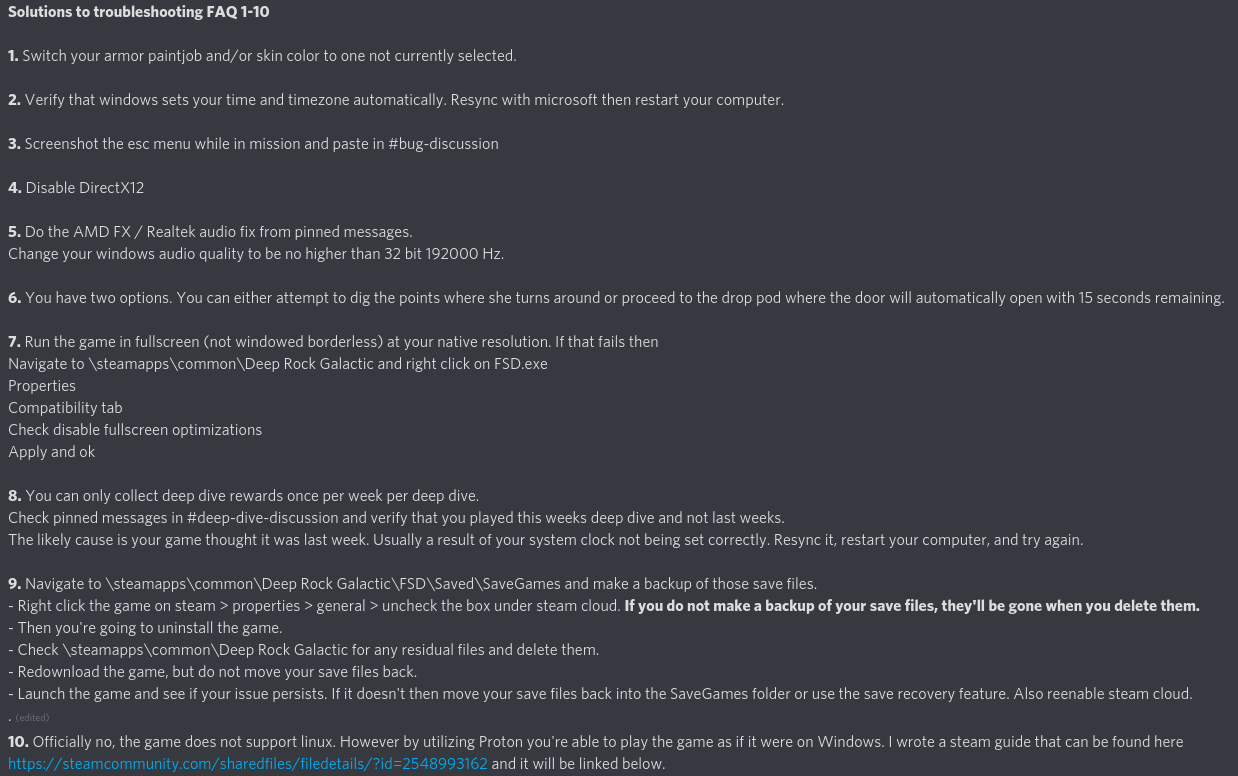
hopefully it fixes your issue
 split palm
Thank you
 acoustic plume
Game is suddenly so slow it's unplayable. Starts at splash screen. Any advice welcome. Reinstalled all NVIDIA drivers, steam, dx, and the game itself. Tried using dx 11. All performance metrics look great (CPU, Memory, GPU). No errors. No issues with any other games. No major updates or system changes. I've exhausted the FAQ.
 boreal jay
Stuck between the pipe and the Extractor :"((((((((( I can't move after pressing E multiple times on the pipe line or spamming space bar to jump out. I even got lucky to ride the Angel after a while but it wouldn't let's me send help please :((
subtle coyote
known issue
devs are probably working on it
but you arent the first to be stuck on a pipe
boreal jay
:((( sad
 foggy bloom
I got stuck on-top of a Pumpjack jumping off the pipe once. Thankfully a sweet cave-angel happened close enough that I was able to hitch a ride.
subtle coyote
foggy bloom
I got stuck on-top of a Pumpjack jumping off the pipe once. Thankfully a sweet ...
this is also known
 fair sundial
so my game has stopped accepting inputs mid deep dive
i can still do stuff outside of the game
 tired wren
Hey guys im having an issue where i cant see my friends missions but they can all see each others missions. Ive tried looking up the solution to it but apparently no one else has the problem. i might just be dumb and missing a super easy fix on it but i would like help with it
 urban oyster
not gonna sign up to report this:
Drink blackout stout, press tab to open map, pass out, exit map. Respawn won't work.
 woeful burrow
Why does my mic not work in the game anymore
 jade junco
I'd joked about this #drg-chat but it is kind of an issue so I'll put it here.
On very low resolutions and texture scales the M1000 Classic's crosshair is invisible, making it hard to aim even when making focus shots (as the only reticle you can go by is the animation during the shot's charge). In some ways the obvious answer is "get a better PC" but it's still annoying.
 balmy hound
i have a problem where i cant start the game and i get this crash log AudioDevProps2_7ffc579e0000
xaudio2_9
xaudio2_9
xaudio2_9
xaudio2_9
FSD_Win64_Shipping
FSD_Win64_Shipping
FSD_Win64_Shipping
FSD_Win64_Shipping
FSD_Win64_Shipping
FSD_Win64_Shipping
FSD_Win64_Shipping
FSD_Win64_Shipping
FSD_Win64_Shipping
FSD_Win64_Shipping
FSD_Win64_Shipping
FSD_Win64_Shipping
FSD_Win64_Shipping
FSD_Win64_Shipping
FSD_Win64_Shipping
kernel32
ntdll
and i cant fix it by redownloading directx and i have redownloaded steam, drg and i have verifyed the game files like a bazillon times
glacial terrace
@balmy hound Did you checked the FAQ on pinned messages?
balmy hound
glacial terrace
<@!547492360179810304> Did you checked the FAQ on pinned messages?
i dont think so
oh yeah i did now and none of the 3 works
glacial terrace
Hm try the audio fix, it was fixed when an old user reinstalled windows maybe you can try this too
balmy hound
alright
i have the same issuie with a game called biped but i have not tried on other games
balmy hound
are you sure there is nothing else to be done @glacial terrace ?
glacial terrace
There are many solutions in the FAQ, if they don't work either, this is the last solution I can think of
austere coral
No.
 rose patrol
anyone know why my game wont connect to steam? i made it forcefully run as admin ever since it became an issue
ok so making the game NOT run as admin fixes the issue,albeit ingame i experience high latency for whatever reason?
subtle coyote
this just looks like a desync issue
that doesnt change the fact it looks like a desync issue
im not sure what else could cause that
glacial terrace
@rose patrol Are you getting high latency when you join any room?
rose patrol
im getting high latency when a lot of things start to happen
my fps is fine but i will rubberband
austere coral
is your ping increasing or is your framerate dropping?
austere coral
does this occur when you're a client or host or either?
rose patrol
no
only when i join lobbies
they're all in my region aswell
i played the game on the same system about a year ago just fine
cloud warren
Host CPU lag is a thing as well, sometimes host can’t keep up and weird things happen on clients
round rock
salvage operation mission with @jovial cape and the fuel pump just... didn't count us as in the zone????
we lost because of it
 jovial cape
both of us were definitely in the radius
it was working fine until i blew myself up with my damage-detonated satchel charge while in the radius
as soon as i was downed, the meter started dropping, and wouldn't go back up even after i was revived
additionally:
- there was a supply drop clipping into the fuel line
- we messed around a bunch with the fuel pipeline beforehand, probably unrelated
- he was playing gunner, i was in his shield when i downed myself
round rock
we made a sick pipeline spiral
 sick sable
does anyone know what makes you crash randomly during a game
i get those way too randomly and its triggering me
subtle coyote
pinned FAQ
 brisk raven
anyone ever have that problem where they start spinning staring at the ceiling? restarting game fixes it
storm tendon
brisk raven
anyone ever have that problem where they start spinning staring at the ceiling? ...
yeah, it's known. It's the mouse bugging out for some reason. Often near the equipment terminal
 nimble portal
gotta fix this dual monitor mouse movement if my mouse is on the second screen when game is open it just slowly drifting back to the game
subtle coyote
have you tried locking the cursor to the window
 subtle sequoia
silly question, is there a known bug about there sometimes not being a swarm notification or music change?
subtle coyote
Yes
 north sable
I know this has probably been asked before, but as the faq is an image and not text, can't really search for a response... are unions no more? I've followed all the yt videos and instructions everywhere but cannot get the terminal beside the pickaxe station to become the union terminal... is it broken, or just not a thing anymore?
austere coral
Can’t make it text or link a text document. I’d exceed the character limit with what I have.
It’s already going to be difficult enough getting page 3 of the faq fit in when it’s finished.
north sable
good luck
austere coral
Pinned messages #interplanetary-miners-union or #drg-chat for fixing the union.
north sable
Thank you
 native mesa
So anyone else encountered a Korlok that after spitting out and closing up a few times will then proceed to open up for way longer, stop spewing seedlings and then start lagging the hell out of your game?
jade junco
Mule disappeared into the drop pod at the start of a mission
Tried to call it back to drop off a gunk seed but the marker wouldn't appear and the game crashed
mossy breach
anyone else cant join any friends or public servers?
 ruby spruce
mossy breach
anyone else cant join any friends or public servers?
ruby spruce
mossy breach
anyone else cant join any friends or public servers?
on xbox, there's a weird problem where the "invite to game" button is disabled as soon as you start the mission. regardless of if it's public or private.
mossy breach
what i mean is i can join people but i get the infinite joining screen, sometimes i get flukes but rarely
ruby spruce
thats never happened to me
mossy breach
it happened to me and another one of my friends
ruby spruce
steam?
mossy breach
nope
ruby spruce
or xbox?
mossy breach
xbox
ruby spruce
idk man
young atlas
ruby spruce
on xbox, there's a weird problem where the "invite to game" button is disabled a...
actually it happens from a seemingly large variety of causes, you can tell when it's active because the menu shows the 'friends can't be invited during solo missions' thing
ruby spruce
ive had rather long loading times when joining in progress but i was never stuck on one
young atlas
it's a very annoying bug requiring team resets though it does not affect the server browser
mossy breach
i was thinking it was a problem with xbox but i see
ruby spruce
young atlas
actually it happens from a seemingly large variety of causes, you can tell when ...
do you know if it's a problem on steam?
young atlas
not sure
the versions differ in a good few ways
for instance, many things dropping in the XBox/Microsoft store version don't deal damage, or elevator plants cannot be properly destroyed and despawn noiselessly momentarily after their health is depleted, or, potentially, this issue
mossy breach
for the moment i have a fluke and i am playing with a friend
 vital sun
has anyone else encountered a visual display issue with Loretta's health?
just had a run get ruined by us not being able to see Loretta's hp drop below 98%
subtle coyote
Doretta's health not displaying properly is a desync issue
subtle coyote
vital sun
has anyone else encountered a visual display issue with Loretta's health?
And a common one at that, i should add. Aint much you can do to fix it
vital sun
ouch
fading acorn
ruby spruce
on xbox, there's a weird problem where the "invite to game" button is disabled a...
Are you using the instant on for Xbox? I find this causes a lot of problems with the game suspending in the background, and causing sound/multiplayer issues.
Best advice I have is to always force quit the game entirely before quitting. It won't solve all your issues but it helps with a lot of cases.
ruby spruce
ill keep that in mind
 tranquil terrace
Is there a fix for when the fuel canisters dissappear
Well one just one actually
austere coral
yes, abandon mission
tranquil terrace
Sad

 silk patio
Trying to get around a bug where I don't get any audio through my earphones past the tutorial. Tutorial was fine, MENU is fine, but lobby and games there's no sound through my bluetooth earphones
works fine with speakers, changing default sound devices doesn't work. Can't change sound device in the ingame menu, not even if I'm starting the game with speakers. Tried changing all the audio settings like disabling EQ, disabling voice chat or push to talk I'd heard could fix it. Tried exiting Discord in case that was messing with it. Restarted the game each time and no dice
silk patio
should mention that the default sound device is the correct device when I start the game with earphones, it just has no sound. Starting the game with PC speakers as my sound device, I get a totally different (but always connected) sound device as the default but it still works. Trying to switch to earphones from pc speakers midway through the game produces warbly audio through the speakers and no audio still from earphones.
giving up for tonight but hoping to give the devs as much info as possible!
 hardy summit
pretty sure i saw mission control say "The droppod is en route" instead of "The droppod is on route"
it was during an aquarq mission
hardy summit
why does it say en when the voice says on?
subtle coyote
"Is it 'On Route' or 'En Route'? When you want to say you are "along the way" the correct spelling is en route. This phrase has been borrowed from French and its pronunciation in English is very close to "on route." Thus, it is not uncommon to see this spelling error throughout the phrase's usage."
 unreal folio
I'm pretty aure both work
En route will be the whole sentence in french
But for "On route" it's only the route word in french, so it has the same meaning (on route = on the road)
storm tendon
hardy summit
why does it say en when the voice says on?
because english has a lot of borrowed words and expression from french, and it's also true for the other way around. It tends to happen when both countries go at war multiple times over the course of a few centuries
also being neighboor too
hardy summit
don't know if it is a bug or already known, but when i deposit into the drop pod the dwarves still use voice lines about molly
 latent zephyr
That's just because depositing plays the same voicelines no matter what you're depositing into
 sweet stag
Anyone know a fix for dx12 causing flickering/strobing on neon green textures? Phretorians, tumurous growth, mactera. Its only on dx12 and super annoying
austere coral
yes, don't use dx12
sweet stag
Uhm. I prefer if I did. More stable fps
austere coral
well that's the fix for it. You can either continue to use dx12 with the flickering and wait for GSG to fix it (if they can) or use dx11 which does not have those issues.
sweet stag
So it's a known issue?
austere coral
yes
sweet stag
Never heard anyone talk ab it before. Thought it was just me. Makes me feel better. Thanks
austere coral
I don't know, those .ru links really sell it for me
subtle coyote
I know right?
 grand arch
man, this game is full of bugs  ( i had to do it)
 regal sage
hey i lost my save file a while ago after uninstalling and reinstalling the game on the windows edition. anyone have any solutions? i've tried the in game save recovery and it did nothing
my game files dontr seem to have a backup either
austere coral
you need to exit the tutorial before using the save recovery function. If you're on the win store version of the game and that doesn't work, you're pretty much out of luck.
regal sage
OOOOOOooooof
I guess imma have to use drg game editor and a random save file, tried it before but got really frustrated and gave up cuz stuff wasnt working
feelsbad
windows store is the worst thing ever created
austere coral
Personally I find the win store version to be inferior both from a technical front (at no fault to the devs, there are hardware limitations in play) and a user maintenance front. The steam version is better for the consumer in the long run.
regal sage
Yeah thats definitely true, anything on win store is always 100% more buggy and complicated then steam purely because of how garbage win store is, im on gamepass tho so rip
 hearty verge
regal sage
I guess imma have to use drg game editor and a random save file, tried it before...
hearty verge
regal sage
I guess imma have to use drg game editor and a random save file, tried it before...
whats drg game editor
 tulip jolt
on the dancefloor, when doing the ballerina spin, you can rock and stone to break your spine and rotate your lower half continuously
is that supposed to happen
graceful yarrow
Yesn't
 midnight narwhal
its not a bug, its 100% a nightmare fuel feature
 young cave
Anyone else having an issue with the drilldozer where her health isn't showing properly? I'll be looking at it and everything's at 100% but for my teammate it shows she's losing health.
 limpid willow
I tried to sign up to report a bug but Jira won't let me past the sign in.
[email] doesn't have access to Jira on ghostshipgames.atlassian.net.
 drowsy oyster
Got stuck inside a newly-finished pipeline that I couldnt destroy because it was fully linked, could NOT get out no matter what I tried
quit out the game, and now it crashes on startup
Still won't start up
Hold on, I clicked to start in DirectX 11 and it's working now, at least
Still, the stuck-in-pipe bug that started all this was a kick in the nuts
fading acorn
young cave
Anyone else having an issue with the drilldozer where her health isn't showing p...
Yes, this is a known bug that people experience. I recommend you add your experience on the JIRA Bug reporter here:
https://ghostshipgames.atlassian.net/browse/DRG-2942
It seems to not effect the host, so if playing with a friend they need to warn you if it's going down.
 jagged cargo
My game keeps crashing either on start-up or any other times at random. Additionally, when it does start up, it has a serious lag problem. I've restarted my computer multiple times and validated my game files.
subtle coyote
Boot in DX11
 short echo
guys do u have problems with mobs? some of them are glowing tooooo much
subtle coyote
short echo
guys do u have problems with mobs? some of them are glowing tooooo much
Use dx11.
 nova oyster
I had a mission with gold rush and exploder infestation shown but I think there was also swarmageddon active as several waves of swarmers kept appearing for most of the mission. I do not know if and eventually how I should report it or if was just unlikely yet weird spawning
subtle coyote
nova oyster
I had a mission with gold rush and exploder infestation shown but I think there ...
Weird spawning. Swarmageddon doesnt affect swarms.
nova oyster
It wasn't during swarms, it accompanied waves of exploders
subtle coyote
Do you mean swarmers and not "swarmes"
Regardless its probably weird spawning. Ive had stupid wave spawns
nova oyster
Yes, typo

 ornate ermine
desync
your client thinks you fell out of the world, but you're actually still there for everyone else
young cave
Hey uh, a lot of the bugs in my game are like bugging out. The textures on them are like spazing out between normal and bright glowing colors and the oppressor's armor is red for some reason.
I've never seen an oppressor look like this.

And like the exploders, materas and pretorians are all glowing a solid color too.
subtle coyote
use dx11.
young cave
Ah, that might work.
However, for some reason dx11 drops my fps by like 30-60 frames.
DX12 runs way better for me, but yeah, this sure isn't normal.
 subtle coyote
then make a decision.
 maiden chasm
Hey I just did the deep dive twice under 45 minutes and didn't get the achievement
any idea what's going on with that?
subtle coyote
maiden chasm
Hey I just did the deep dive twice under 45 minutes and didn't get the achieveme...
Where you hosting
No? Thats why. Host next time.
maiden chasm
subtle coyote
Where you hosting
I was with 3 other people. The host already had his. A second person (not hosting) got their achievement, but not me
subtle coyote
maiden chasm
I was with 3 other people. The host already had his. A second person (not hostin...
Achievments are bugged for clients. Host and you wont have an issue
maiden chasm
ok thanks
 strong tree
This damn typo is bugging the hell out of me, "immediatly"
 glacial terrace
@strong tree Thanks and if you find more, let me know
 chrome rampart
 glacial terrace
@chrome rampart Next time include your mission ESC menu(don't crop it) with screenshot for details
 wet dew
Hey guys, I just started playing again. I tried to join an in-progress game and I was joining but crashed. I sent the feedback to the DRG team via the automated response they have, and I tried to join another in progress game. That is when it said I was banned....
austere coral
you were kicked, you're banned from that specific lobby until it's reformed.
don't worry about it, just find another or host one yourself
subtle coyote
wet dew
Hey guys, I just started playing again. I tried to join an in-progress game and ...
Adding to what Ranger said; this game has no moderation. You cannot be 'banned' from the game. Probably got booted before your crash and tried to rejoin
wet dew
Gotcha... thank you!
 austere coral
throw it in #420195388675588096 so there's a record
subtle coyote
mystic tapir
has this been reported before? it should be "hygiene"
dont you lads down in #babelfish-lounge have a list that you hand into the devs over this stuff?
otherwise for sure do as Ranger said, with U35 being potentially so soon
mystic tapir
subtle coyote
dont you lads down in <#407086800075489281> have a list that you hand into the d...
im not the guy who reports this, so not sure
mystic tapir
austere coral
throw it in <#420195388675588096> so there's a record
my account is flagged for inactivity, and im too lazy to ask for a reopening lmao
mental geyser
okay so my PGL grenades are like
getting launched east with insane velocity when they hit stuff
only sometimes
and sometimes they go through walls?
im on this week's DD
stage 2
wait a second nevermind i completely forgot i had proxy trigger
disregard all of that
 reef sedge
Hey, me and my boyfriend just finished up playing a game and then our connection to the server just got like, destroyed and it force stopped my game and literally shit down my game. Anyone else experiencing this???
Happened the last time we played as well
mossy breach
Ran into about where we managed to shunnt the glowing sphere of the drop pods thruster out of the droppod geometry
A friend got stuck inside of the thruster and we only got them out by turning gravity off. Which seems to have shunted the terrain somehow
We were in the hub area just messing around when it happened
storm tendon
do you have mouse problems in any other game ?
 fallen hill
mystic tapir
has this been reported before? it should be "hygiene"
fallen hill
mystic tapir
has this been reported before? it should be "hygiene"
fixed, ty
mystic tapir
fallen hill
fixed, ty
Once again, I do assert that mark do be feeling them "ayy lmao"s today
What a legend
fallen hill
strong tree
This damn typo is bugging the hell out of me, "immediatly"
fixed
storm tendon
Mark is on fire today, daaamn 😄
 cerulean basin


 clear prairie
So this happened when a friend joined in on the last end of the escort mission, which finally loaded in but did not load in their hitbox, or controls except for the rock and stone. Even escape could not be triggered so we tried to hit them with a supply pod which when right through them and caused the two to combine thus making fraud the pod, the only living supply pod. When one of us went back to investigate how they were doing we found the individual floating where they had entered while the bugs nearby desperatly attacked the supply pod they had become on with. From their POV they were still in the supply pod and can offer their screenshots if need be. Overall this is an interesting bug of several all into one mishmash of amazing goodness Rock and Stone Developers.
 subtle coyote
I have 3 words
What the fuck?
austere coral
clear prairie
So this happened when a friend joined in on the last end of the escort mission, ...
Sounds like a failed join. I wouldn't worry about it unless it becomes a pattern.
 lunar cloak
Hi! I’ve just completed the DEEP DIVE in 37 min but haven’t received the achievement “Deep for speed” and my friend has. Could you fix it please?
storm tendon
lunar cloak
Hi! I’ve just completed the DEEP DIVE in 37 min but haven’t received the achieve...
was your friend hosting ?
lunar cloak
yep
storm tendon
lunar cloak
yep
That's why then. Achievements tend to bug out for clients a lot. Hosting the game will fix that if you manage to do it again.
lunar cloak
Nice.... Thanks
 sweet torrent
hey y'all, got a question
pressed shift+f (???? maybe s) and my game went windowed-i've since messed around with the windowed settings, and restarted the game, but the game is acting like it's in fullscreen windowed mode-my cursor won't move through a quarter of the screen
hope i'm posting in the right place, ROCK AND STOOOOOOOOOOOOOOOOOOOOOOOOOOOOOOONE
 dense wyvern
recently reinstalled the game, all of my progress is gone
subtle coyote
dense wyvern
recently reinstalled the game, all of my progress is gone
Go through the tutorial.
Go to the save menu and click restore save
dense wyvern
it only has my current one
subtle coyote
Did you actually click the restore save button or are you just looking at the save menu
dense wyvern
i clicked restore
subtle coyote
Then you'll need someone to help you.
@austere coral you can help with this shit right? Think youve helped before
dense wyvern
yeah you know, dont worry about it, im just going ti use a save editior
glacial terrace
@dense wyvern Try these solutions: https://steamcommunity.com/app/548430/discussions/2/1735466157769202703/
 willow seal
hey does anyone know if a zipline would stop an omen from doing the animation, or is this a bug

 jaunty berry
Ima say that’s a bug
subtle coyote
Probably not even the zipline. Report it on the JIRA
subtle coyote
willow seal
hey does anyone know if a zipline would stop an omen from doing the animation, o...
willow seal
subtle coyote
<#420195388675588096>
i don't have permission to post there, so i brought it here 🙂 sorry!
subtle coyote
Because you dont post in it. Read the instructions.
 vague matrix
i can't connect to the discord pannel to join guilds
it disconnected me every session back then
but now i can't even join anymore
can someone help ?
storm tendon
vague matrix
can someone help ?
you need :
- To be on Steam
- Online on both Steam and Discord (make sure you're not invisible)
- You can try using the browser instead of the app (or the other way around)
- You can also try having steam and discord running on administrator mode (thx to Marcos for this one)
- If nothing work, check this message : #drg-chat message
- Or this one : #interplanetary-miners-union message
- Bot is half-broken, so it's only working half of the time
vague matrix
storm tendon
you need :
- To be on Steam
- Online on both Steam and Discord (make sure you're...
ty
bitter wave
Very minor bug but interesting so figured I'd share it, my Steeve showed up near the drop pod with no HP left. I hadn't seen him for like 10-15 minutes so I wonder if there was some related effect making him stuck but also not die.

 shadow kite
Not sure if this has happened to other people, or if it is intentional for some reason, but every once and a while all the characters are super high pitched during a mission. It's kinda funny but really weird
storm tendon
shadow kite
Not sure if this has happened to other people, or if it is intentional for some ...
It's because of the "rich atmosphere" anomaly
shadow kite
Ohhhhhh that makes sense
storm tendon
I'd recommend to take a look at the warnings and anomaly in the miner's manual (top left corner in the escape menu) ^^
shadow kite
They were online missions that I joined randomly so I didn’t think to look. Thanks for the info :D
mental geyser
switching classes while under the effects of blackreach blonde causes multiple tracks to play at the same time
it also appears to cause the pink light to linger

additionally, the music is lasting much longer than it should
subtle coyote
mental geyser
it also appears to cause the pink light to linger
fill a JIRA report since you can replicate easily.
mental geyser
there seems to be some deeper underlying bug that involves all beers and not just that one
i will once i test it with more different beers
 atomic lily
Hello! I was playing with some friends and came across a lot of creatures that were just frozen. They didn't move and were all in a weird spot together. Should I report this and if so any information I should provide? 🙂

I'm not quite sure if this is of any use since I'm not sure how to reproduce the issue. So just making sure!
glacial terrace
@atomic lily if you encounter this issue next time include your mission ESC menu(don't crop it) with screenshot for details. Also you can record a video
atomic lily
I was recording so I do have some footage but I'll have to check if I pressed ESC by any chance for the information.
It seems like I didn't press ESC during the mission, so rip.
I'll keep this in mind for the next time I encounter something though, didn't know this was something to watch unfortunately.
 spice basalt
Has anyone else had issues with flickering textures? Happens alot with Praetorians, where their whole body will become illuminated briefly then revert to normal textures.
mystic tapir
spice basalt
Has anyone else had issues with flickering textures? Happens alot with Praetoria...
Are you using DX12?
spice basalt
I see it sometimes happen with wall eyes also
I'm afk rn I can't remember I'll chey when I'm home
Would dx12 help or increase the issue?
mystic tapir
DX12 may be the cause of the issue
DX12 isn't working correctly on drg, so it's recommended to downgrade to Dx11 to avoid said mistextures
spice basalt
Copy I'll check it out
 robust flume
https://ghostshipgames.atlassian.net/browse/DRG-3581
I think we had this bug too in early July. Just started spawning more dreadnoughts as we were trying to escape.
subtle coyote
spice basalt
Copy I'll check it out
to add what Poker said, DX12 indeed causes that and is launched by default. if you dont mind it and its not causing instability with the game then feel free to continue using dx12, but otherwise do swap to dx11
 swift laurel
If anyone feels like going though the bug report process and checking if this is already reported. For over a year every time I'm playing in a friends only lobby with just myself and 1 other. If one of us disconnects it forces the host into a single player mode where they are unable to re invite the other. I play on windows 10 / Xbox version. The amount of times this has happened is pretty game breaking for duo gameplay. It seems like as long as there are still 2 players in the lobby a 3rd-4th can be re invited (most of the time).
 wintry heron
Ok so three times now when im doing a kersiyte mission they dont spawn enough bugs. ive been playing solo and everytime i need 1 or 2 left they just wont spawn. i did them in verticle caves, open caves, and messy caves and they are nowhere to be found. PLEASE fix this its frustrating
 scenic rapids
Have you checked to see if there are any nearby caves that would intercept their spawning?
That’s happened to me before
atomic lily
I've experienced the same with some friends before, it's indeed pretty frustrating. Also no caves nearby where they could have spawned.
 still marten
anyone experience a situation where the fuel cell cable splits into two and you cannot activate the fuel cells?
 simple arch
Got a glitch that involves Molly
Molly got stuck on the side adjective thing?
(The one where you get to destroy the Rock bugs)
Had to take the last egg to Molly but whenever I called for extraction Molly just sat in place
(I have video evidence on Xbox but I don't think I can share on here because I don't have nitro)
subtle coyote
simple arch
Got a glitch that involves Molly
Molly got stuck on the side adjective thing?
(T...
Kursite or Ebonite?
subtle coyote
simple arch
Got a glitch that involves Molly
Molly got stuck on the side adjective thing?
(T...
regardles sthe bug is known
 real matrix
I have seen it before in this discussion, but just confirming that the car pool achievement is still buggy. We kept doing it and while it did unlock, it only did for one person at a time, meaning we had to do it 4 separate times.
storm tendon
real matrix
I have seen it before in this discussion, but just confirming that the car pool ...
I guess it only did for the host ?
 glass trout
<@&296918282403840000> scam above
 slender warren
What is this bug. Played DRG more than 4 weeks ago for my first time and crashed the whole time for 4 weeks. Now it seems to do it too. I do not know any games that do it too except DaysGone which needs some luck or multiple restarts if lucky. So I did the only thing I did not try months ago.... Install Nvidia drivers and no still the same and no one wnats to tell me where I can get the knowledge why this game shows me these crash handler information. Pinned FAQ is a meme as always when the PC is still new. R3700x, 32gb, 2.5 TB, 1070ti. ONLY crashes on modernised engines e.g. DX12 if at all. DX diagnostic tools says it is fine. Windows 10 d.t. says it is fine. Audio goes through Toslink to highend external devices. Running on older screens from 2004 -> VGA tubes because still better than average.
 subtle coyote
Pinned FAQ
storm tendon
yes
slender warren
Btw that is the fix after 8 weeks of looking because no one wants to help nor tell me what this error was. Thx to past reddit for saving me from more rage and me with my game modding and higher knowhow than the normal lads could not find the right answer with the binary? error message. omegalul feel free to copy paste it for tagging in FAQ. Tested on all suspicious newer games with new audio tech e.g. Serious Sam 4, DRG ....
 subtle coyote
@austere coral you wanna toss this in yer FAQ?
 spring mango
how do i upload a picture here?
 eternal plover
spring mango
how do i upload a picture here?
eternal plover
spring mango
how do i upload a picture here?
You press the + button to the left of the text box
subtle coyote
spring mango
how do i upload a picture here?
get a role from #welcome-and-rules
gaunt oyster
How would one report an extremely desynced lobby
nevermind host canceled mission :P
storm tendon
gaunt oyster
How would one report an extremely desynced lobby
you're basically asking "how to report bad internet" 😂
gaunt oyster
I've got good internet and it happened 
subtle coyote
as pounce said, its either YOUR FAULT, for picking a far mission
or its the hosts because their downloading something/pissy internet/whatever and out of your control
nothing the devs can do about connections
gaunt oyster
neither I or the host had bad internet, but aight
storm tendon
internet problems can come down to many things
but nothing the devs can do about it really
gaunt oyster
alright then
atomic lily
I don't think it's really fair to immediately blame it on a bad internet connection while there could have potentially been another problem as well, it's a game after all. Sure it could also be the case, or for example a mix of both bad and proper internet. Maybe there was a problem at the start of the game with the connection and then that issue resolved it self after some time but caused a different issue in the game it self to be triggered which could have caused desyncs. Although I doubt you'll be able to figure out how that works without the developers them self, unless it's a really common issue 🙂
subtle coyote
atomic lily
I don't think it's really fair to immediately blame it on a bad internet connect...
desync is almost always internet or connection based. so yes, its fair to blame it on bad internet connection.
atomic lily
subtle coyote
desync is almost always internet or connection based. so yes, its fair to blame ...
Just because it happens often doesn't mean it's always the case, for all we know it's a legit issue they were having. But just instantly blaming it on a bad connection without asking for any details isn't "fair", it can definitely be the case I'm not arguing about that, but not giving it even the chance of being an issue isn't.
spring mango
I have been playing for some 3 weeks now, and i can't seem to be able to interact with the union terminal, i tried the one at the bar, on med bay, close to the crew quarters and the one close to the memorial hall, i tried both solo and on lobbies, both near and far, everyone else on the same lobby is able to use it freely, i tried connecting dc to steam to see if it solves anything, and it did nothing, any ideias?
 subtle coyote
atomic lily
Just because it happens often doesn't mean it's always the case, for all we know...
subtle coyote
atomic lily
Just because it happens often doesn't mean it's always the case, for all we know...
if there was more details Jacu should have told us. from the infromation given, im betting one of them was downloading something and connection got fucky.
storm tendon
spring mango
I have been playing for some 3 weeks now, and i can't seem to be able to interac...
you need :
- To be on Steam
- Online on both Steam and Discord (make sure you're not invisible)
- You can try using the browser instead of the app (or the other way around)
- You can also try having steam and discord running on administrator mode (thx to Marcos for this one)
- If nothing work, check this message : #drg-chat message
- Or this one : #interplanetary-miners-union message
- Bot is half-broken, so it's only working half of the time
subtle coyote
storm tendon
you need :
- To be on Steam
- Online on both Steam and Discord (make sure you're...
They said not interact, im assuming they mean they just cant use it
do you just have that on standby pounce?
storm tendon
subtle coyote
do you just have that on standby pounce?
yes
subtle coyote
incredible
storm tendon
subtle coyote
They said not interact, im assuming they mean they just cant use it
not being able to interact with it means it's not showing, which is what that list of fixes is for