#udon-general
59 messages · Page 51 of 1
 polar sail
A sequencer
 paper plinth
yeah
polar sail
That would be cool
paper plinth
like a multiplayer magix
 stoic mountain
I assume this
transform.Rotate(rotationAxis, speed * Time.deltaTime);has no chance to trigger an overflow by rotating an object too much ? (should stay -180/180 right ?)
polar sail
magix is horrible but you do you
paper plinth
no
lol
yeah
I have reaper installed
and there's a tutorial here
just need to get to it
stoic mountain
are regular Monobehavior scripts allowed btw ? for object for which network sync is irrelevant ? (here its a propeller)
stoic mountain
oh, ok ill convert it then
polar sail
If i could use monobehaviors I'd be so happy
I'd have a working synth with wave deformation and everything by now
But instead i have to have three samples just for one note
Granted, they're tiny, but still
 dapper lion
what about soundfonts. did those ever get allowed into udon?
polar sail
Unsure
Wouldn't solve the current problem I'm having though
I need a slice of audio to be able to be queued up seamlessly, but that's not possible like it is in regular unity because i don't have access to the audiosettings class
stoic mountain
Sanity check : im trying to have a plane fly in a straight line and pass through a random point. To do so, I use a dummy object with UdonBehavior and synced position checked, move and rotate it randomly from in a .isMaster player script, hoping that this object position will be synced to that new position for all players, then I tell all players (through a network custom event) to put the plane at this object's positions, using this object orientation as forward (flattened ofc) then move it back and start moving it.
Im using an object as the point to align with as I didnt find a way to send variables (like a position) to other players.
Is this approach dumb ?
polar sail
...
Maybe i should just give up on vrchat honestly because everything you said just bounced right off my little skull
stoic mountain
tbh I dont feel really helped with vrc/photon network stuff
I feel like I would do better with my own net code :|
polar sail
Honestly i just want to make things
Vrchat seemed like a good platform but ALL of my experience is with code, being so limited makes my head hurt
stoic mountain
Same here. My dream is for vrchat to become more like a simple plugin (managing avatars, main menus, friends & so) leaving the rest of your unity project "vanilla" so you could code your stuff however you like.
dapper lion
it was like that
 floral dove
@polar sail if you're more comfortable with code than a visual graph you can work with UdonSharp: https://github.com/MerlinVR/UdonSharp/wiki
stoic mountain
That wouldnt be a bad buisness approach too, being a unified multiplayer/avatar service provider that any developer could work with for their own games
stoic mountain
dapper lion
it was like that
it was ?
polar sail
U# is still limited by the fact that it's only a portion of the unity engine
dapper lion
theres also altspace, which works from scripts that you host rather than the game hosting the scripts
stoic mountain
isnt altspace dead ?
dapper lion
nah, its just full of smart quest users. its terrifying
u# is limited because udon allows so much. the problem when unity scripting was allows was because of the possibility of malicious usage and many other problems
stoic mountain
I tried it the other day and checked "popular worlds" and they had like 3-4 players at most on them. Maybe I missed something. Also VRChat avatars spoiled me, I dont like altspace very generic avatar style :s
dapper lion
yea, as i said. alt space is where all the smart people/normal people who have a quest hangout
polar sail
I know why I'm not allowed to use all of unity but it still makes me moderately upset that so much of what unity offers isn't accessible even though it's right there.
floral dove
@polar sail - if you would like to request the use of particular aspects of Unity, you're welcome to make a Canny feature request
 fading cipher
Are the in-game positions and scale perfectly equivalent to real meters and cm?
polar sail
floral dove
<@!209777632324091905> - if you would like to request the use of particular aspe...
Is that on the site? I'd like it if there was a bit more audio functionality accessible through udon.
stoic mountain
Tbh the script limitations, I can get used to it. The 0.25s sync rate, added to the unexplainable 2 to 4 seconds of lag between players ? that really limits what can be done :|
floral dove
polar sail
Is that on the site? I'd like it if there was a bit more audio functionality acc...
Give feedback to the VRChat team so we can make more informed product decisions. Powered by Canny.
fading cipher
Sync does suck...I made a custom grab script that piggybacks off of VRC_Pickups and it has a good half second or more of lag in following a person that’s holding it lol
polar sail
Thank you momo
dapper lion
he got you there with the audio flexibility
stoic mountain
tough Ive been told you'll be allowed to force sync on request in a future version, so you could get a higher rate of sync for some objects if you code it I guess
dapper lion
had to glitch some of my audio matrixes in
polar sail
Just let me make a sine wave
Instead of making one with audacity and sampling a 500B file
floral dove
how would you like to make a sine wave?
 hasty hare
is it normal that user layers in-game don't retain the names given to them in the editor? just noticed they become user1, user2, etc. when using LayerToName
I get the correct layer name testing in editor though
polar sail
Unity has an event that exposes an audio filter that you can write to the data stream in
floral dove
OnAudioFilterRead?
polar sail
So you can set a sample size and calculate a waveform and send it to the audio buffer in real time
Yes
I couldn't find anywhere to reference that event
Could be nasty anyway because it would likely require constant writing to the data stream
floral dove
If you'd like us to add support, you can request access to OnAudioFilterRead on the canny. If you think it's too nasty to use then...maybe don't? Not sure what you want here.
dapper lion
wasnt there a waveform = sine?
polar sail
It works perfectly fine but I'm not sure if an event that calls every frame is good or not, but that's more of something for the guys on the dev team to look into i suppose
Granted you can access the update event though, so... yeah it would be fine nvm
I did put it on the canny though, thank you @floral dove, MIDI support and procedural audio would open up a ton of doors for cool stuff in the future.
MIDI support alone was enough for me to make a working sound generator in less than an hour
 lilac hatch
Hello ! I'd like to ask this question before messing around without any ideas:
Is there anyways to make a player voice being heard inside of a collider if the said player is inside another one ?
I made a picture on my phone to visually explain what i mean kind of.
By default, the voice range is smaller than the room 1
I'd like a player (or multiple, whatever) to step into a precise zone on the room 1 ( the pink square) to be heard equally everywhere in the room 1 only and not outside of it so people in the room 2 can talk in peace ?
I'm having troubles putting words into what my brain is thinking I hope i'm clear enough ;-;
 dapper lion
@lilac hatch so not being heard between walls?
fading cipher
I don't think there's an audio occlusion option rn, so you'd have to set the player's voice falloff for other players I believe
So each player in room 1 would be doing a check to see if there's a player in the pink zone, and if there is, they'd up the falloff distance on that person's voice until they leave
I'm not sure how to modify that stat, but I know someone else has made walkie talkies for players by making it so the other person holding the talkie gets their falloff set way high
So I know modifying voice falloff when certain criteria are met is possible
dapper lion
@fading cipher there is a way to make audio occlusion
just making sure thats what niyah is asking
fading cipher
You can do audio occlusion 👀 is it heavy to process?
 mint spade
I've seen exactly this work though for the open mic night map, voice amplification for on stage, falloff before other room. Rest of room is normal, so it is possible.
dapper lion
@fading cipher no this is done via udon and unity does the audio matrixing so its basically no performance dither at all
lilac hatch
ye basically, that's what i'm looking for right now !
fading cipher
three different people have made suggestions
So you can't say "that's what I want"
dapper lion
ok, so 3 people i have to remember to send the audio occlusion script to 😅
fading cipher
there are 3 thats lol
dapper lion
niyah, in about 4-6ish hours, ill probs be able to send you a script, but if i forget. plz message me if you can
fading cipher
Yeah I have absolutely no use for that but as a person obsessed with realistic things, that sounds glorious
dapper lion
@fading cipher also remind me. i totally agree. realistic audio matrixes are cool
dapper lion
thanks lol
lilac hatch
So yeah, the idea is to have a scene/microphone in the pink area ( Let's stick it on a static object for the moment) and being able to be heard in the entire room but having a big falloff/sound cut when exiting the area, i'm very unfamiliar with the technical terms ;-; sorry
Audio occlusion it is then
dapper lion
but yea, you can alter a lot of audio points like voices, avatars, low pass, and what layer you can occlude audio from
lilac hatch
"I've seen exactly this work though for the open mic night map, voice amplification for on stage, falloff before other room. Rest of room is normal, so it is possible."
Exactly that tbf 👀
dapper lion
i still need to figure out how to make a handhelp radio/phone so you can talk to people from afar
yes, you can also make collider that activates the voice mods scripts so it amplfies your voice
 scarlet lake
Are web browsers allowed?
dapper lion
no
lilac hatch
Sharing it here btw
GitHub
'Better' audio for UDON (VRChat) based worlds. Inc. speed of sound, sonic booms, doppler, occlusion, reverb, ... - Guribo/BetterAudio
 heady tusk
i need help again..early i asked how to fix my Mirror Trigger Zones: Basicly a Mesh Collider that says a script when a player goes in and back out to turn off the mirror and back on when he goes back in. Problem was that props or button inside or below that collider was not pickup or interactable. Now someone said to put it to mirrorreflection. Which works but now the trigger zones are triggered by everybody and not only playerlocal xD
which of these i have to select in playertrigger to get both to work?
 heady tusk
 heady tusk
ok so i still run it over MirrorReflections then?
and add the Branch with isplayerLocal ?
ok got it. Thanks @paper plinth 😄
 edgy moss
i know this is simple but I'm completely blanking at the moment
what node do i need to add to make this happen globally?
 floral dove
edgy moss
what node do i need to add to make this happen globally?
floral dove
edgy moss
what node do i need to add to make this happen globally?
you can use a bool variable with sync. Have the owner of the object change the value of the variable, then do this update when OnDeserialization is called on the other players.
edgy moss
@floral dove sweet, thank you!
 vague agate
Hello everyone I'm recently creating a world to share musical instrument performance using MIDI with people.
My goal is to make sure that one person plays a midi piano and everyone can appreciate it.
My first attempt was as follows. Since midinoteonevent occurs only for the person playing the MIDI, I create a sync int variable to store the int value for the number of what button pressed and then use sendcustomvent to play the note of the number stored in the sync int.
This worked fine for multiple notes locally, but from the perspective of other players receiving sendcustomvent, the playing note was played one beat late(if i play 1234, receved 123), and even if several notes were pressed simultaneously, only one to two notes were played.
Maybe I did something wrong?
In a different way, I created each customevent corresponding to 88 piano keys and played a different customevent for each button (without using the int sync variable). At this time, the musical performance was very well delivered.
However, creating a custom event corresponding to the keyboard was a very difficult task. I want to add more features, but I think it's too hard to do repetitive tasks.
If you have any ideas or am doing something wrong on this issue, please answer me. and thank you for reading my question 🙂
 jaunty schooner
Is the maximum resolution for the video player the vertical or horizontal resolution, or both? Like if I want to fetch 480p streams, should I set that to 640, or 480?
floral dove
jaunty schooner
Is the maximum resolution for the video player the vertical or horizontal resolu...
vertical resolution, so yes to 480
floral dove
vague agate
Hello everyone I'm recently creating a world to share musical instrument perform...
Sounds like a fun project! I don't have a good solution for this yet, which is why we don't yet have any automated networking for MIDI. Your best bet would probably be to make as many synced ints as you'd possibly play at one time, then you could change them in order. But you'd still lose some timing info, as well as velocity.
vague agate
floral dove
Sounds like a fun project! I don't have a good solution for this yet, which is w...
oh i see Thank you for answering the question. It was a great really help! 🙂
jaunty schooner
I'm trying to determine if two UdonBehaviors are equal, but I'm having a hard time finding the right node. I dragged a noodle out from the input to my branch, and typed in UdonBehavior and found UdonBehavior[].Equals but that's an array if I'm not mistaken and in any case, when it creates the node, the node says the type is IUdonEventReceiver[] which is also an array and I'm not sure if it's the same type as an UdonBehavior.
Also the two inputs are strangely named differently, which one would not expect if one were trying to compare two variables of the same type:

I would also expect to get something if I were to drag out a noodle from my UdonBehaviors and search Equals, but instead search finds nothing:

Well clearly that's the wrong node because I can't even connect my UdonBehavior variables to the top input.
 grand temple
Just use object equality. they all inherit from that
 old karma
A random one as its bugging me and should be a thing but probably is not you never know. For local testing we can have multiple clients for sync testing but is there away to test late joiners in local testing as my current method of bothering someone else just to test late joiner syncing is a pain. edit:This probably belongs in world development now that i think about it but blehh
jaunty schooner
@grand temple What's the difference between that and ReferenceEquals? Cause I did some googling to see how it's done in Unity, and someone said ReferenceEquals is the fastest and I found a node for that, which seems to work.


Unity is the ultimate game development platform. Use Unity to build high-quality 3D and 2D games, deploy them across mobile, desktop, VR/AR, consoles or the Web, and connect with loyal and enthusiastic players and customers.
grand temple
old karma
A random one as its bugging me and should be a thing but probably is not you nev...
Yeah, just launch more clients with local build and test. They'll all go into the same instance. You can also go to the settings page in the sdk to enable a a "last build" option which will skip the build process and launch the clients immediately
grand temple
jaunty schooner
<@!84443478817255424> What's the difference between that and ReferenceEquals? Ca...
That would work too. There are many ways to do that one thing, and if someone says that's the fastest one then I'd believe it
Though I doubt the difference in speed is very much
old karma
never thought of trying the obvious thanks.
 compact stirrup
has anyone had a world build and test fine but fail to build and publish?
compact stirrup
Exception Message:
An exception occurred during EXTERN to 'VRCSDKBaseVRCPlayerApi.__GetPosition__UnityEngineVector3'.
Parameter Addresses: 0x00000010, 0x0000000C
I have 2 udon graphs. The first sets a vrcplayerapi on the second during runtime
it's complaining while compiling to build that the second doesn't have a variable initialized, even though this error never happens during runtime
I've published this build in previous versions with this same script setup, as well
and it builds and tests fine
 harsh magnet
Does the second graph have a null check for the VR player API?
compact stirrup
no, but I've never had to before in order to get it to upload
harsh magnet
If they both start at the same time there is a chance you're seeing a race condition where graph 2 executes before graph 1 is finished populating the input
I can't speak to why it worked before, perhaps the graph compiled in such a way you got lucky
compact stirrup
hm, that makes sense, I'll add a null check
harsh magnet
Null check plus maybe custom event to fire off the second graph once you're sure graph 1 is complete
compact stirrup
The way it is setup, the first graph has a start event to disable the udon behavior of the second object
to set enabled to false
it is a object that I clone in my world when the first object is triggered by players
harsh magnet
You could just have the object you clone set to false initially, then enable it as the last step of graph 1. Disabled objects won't run any graph code until they're enabled
compact stirrup
that's the checkbox next too "Udon Behavior (Script)" in the editor?
harsh magnet
Yup. That or the object itself at the top of the inspector
Your can disable the whole game object, which will disable everything attached to it
But you can still clone the object and turn it on at your leisure
This is useful for things like RigidBody that can't be disabled by themselves, but you can disable the whole object and get the same effect
compact stirrup
oh, that saves me some dumb code segments, thanks for the tip
harsh magnet
Sure thing! Good luck with the graphs.
compact stirrup
that worked, and I was able to trim off some excess code
scarlet lake
Hi, is there a deck of cards prefab?
harsh magnet
You can check the Prefabs database here
I'm not sure there is one for Udon yet but I could be wrong, on mobile
scarlet lake
Thank you, I've looked through and searched various forums but nothing so far.
jaunty schooner
Is setting a variable immediately after changing owner supported? #udon-general message
I saw that post from a month ago mentioning it. I didn't even know it wasn't possible before, and now I don't know if it is possible now, or how to work around that since I wrote my code assuming anyone could set a synced variable and now I find out only the owner can, but then I immediately discover that maybe even they can't change it if ownership has just been transferred, so now I gotta redo my code to use an event to toggle a button instead?
Btw, its really hard doing this networking stuff without solid docs explaining exactly when ownership will be transferred. Like, I expected ownership of my power button to be transferred when someone clicked it, but apparently it's not being transferred because that synced variable isn't being set unless the owner of the instance clicks it.
And yet the code for the video players that I've been tweaking had given me the impression that the person that entered the URL would be the owner of it. But that's a click. So if clicking didn't transfer ownership for my button I shouldn't expect it would do so for the video player either. And yet, the code for the video player checks for owner... But why if ownership would never be tranferred? Why not master?
I guess I should just skip the whole setowner thing since I don't know if I can set the variable immediately after changing ownership and just have the player that interacted send an event to notify everyone the button was clicked and then have that event toggle the synced variable.
And since only the owner will actually be able to toggle it...
Hm.. come to think of it, I don't know what happens if a player that is not the owner tries to set a synced variable. I mean I think I know it won't be synced.. But will it change locally? That would cause a desync... Though I suppose if the master is keeping sync any desync would only be momentary if it could happen...
Hm... I guess it should be fine.
Well I decided to check the the owner was the one that is receiving the event anyway. Just in case anything wonky happens if a non-owner tries to set the variable.

Worth noting that I could not find SendCustomNetworkEvent or IsOwner by typing them into the quick search box, and SendNetworkEvent isn't under Networking, which is where I'd expect it to be, its under UdonBehaviors.
And while I understand that perhaps Networking is Unity Networking stuff and this is specifically an Udon thing, if I'm looking for networking commands the first place I'm gonna look is under Networking.
 stark adder
jaunty schooner
Hm.. come to think of it, I don't know what happens if a player that is not the ...
stark adder
jaunty schooner
Hm.. come to think of it, I don't know what happens if a player that is not the ...
If non owner changes the variable it will revert back to the synced one from master after about 0.2s
jaunty schooner
Well, hopefully this new event based approach works. The button above was a piece of cake compared with trying to figure out how to sync up the visibility state of two floppy disks, one in the drive, and one in a player's hand, which may or may not have different owners. I'd written my previous code on the assumption that anyone could set a synced variable. And since I can't count on SetOwner allowing me to immediately set a synced variable I can't use that. And I figured if I tried to make it so only the owner of the floppy could set its visiblity state that with everything else going on in the code it was ripe for problems, so I tore out the synced variable stuff and used events to set visibility for the floppies instead.


Forgot to show how the variables were setup in that first script...

Speaking of which, it would be good if the collapsed view would say like "public synced UdonBehavior" or whatever, so when the panel is collapsed you can still tell the settings.
Of course that would require the panel to be wider... So maybe make it an option.
Hm, I just realized I have no idea if late joining players will have these visibility states synced for them. I thought I read something about late joiners getting events they missed but then again, I also thought I read something about being able to prevent that. But I can't recall seeing anything about that since. So maybe I'd have to handle late joiners manually and send them any critical events? I'm not even sure how to tell if someone is a late joiner or if that's even an event available though.
jaunty schooner
Oopsie, had a bug in the floppy disk ejection subroutine. I was still trying to show the disk again using the synced variables. That's event driven now too.

 zenith hatch
is there a way to get instance of component in cloned prefab?
 void ridge
zenith hatch
is there a way to get instance of component in cloned prefab?
void ridge
zenith hatch
is there a way to get instance of component in cloned prefab?
Have you unpacked the prefab? Right-click it in the heirarchy
jaunty schooner
Is it necessary to have prefabs on the prefab layer? I'm having some performance issues in my world and I'd like the prefabs not to collide with eachother, but still collide with the world. I was considering placing them on the Player layer, as the Player layer collides with most everything except other Players.
 paper galleon
No prefabs can be on any layer
They are just saved objects being used its not a big issue
jaunty schooner
Okay, wasn't sure if their code checking if you could pick the item up would have a check for that, or if whatever method they're using to sense the player colliding with them would be affected. Like, if the player's hand can't collide with the player layer then maybe it couldn't sense the trigger when the object enters the hand trigger, if that even is how they handle that.
harsh magnet
jaunty schooner
I guess I should just skip the whole setowner thing since I don't know if I can ...
The upcoming Udon networking changes will allow SetOwner () followerd by sync variable change on the same frame, so this problem will eventually go away. But no release date yet, it's in closed beta.
For now the pattern you want to use is OnPreserialization() if you're the owner, and OnDeserialization () if you're the receiver. Only the owner ever runs code in OnPreserialization
So it'll go something like this:
- Owner updates sync variables inside OnPreserialization
- It is determined that ownership needs to change. Anyone can do that using SetOwner ().
- After set owner is called, there will be a delay until ownership changes. But as soon as it does, your new owner can run OnPreserialization code.
scarlet lake
When sync upgrade
 cunning mist
~1 month out
 pallid mango
What are the colorful nodes I see posted occasionally and how do you get them
harsh magnet
Change to Neon mode
pallid mango
Where is that located?
void ridge
pallid mango
Where is that located?
Go to the Welcome screen, there's a button at the top of the Udon Graph panel
 twilit hawk
How are you trying to sort the strings? Alphabetically, or something similarly easily quantifiable?
Certain static array methods were just added in the last patch, so there's hope that Sort will be coming soon™️
In the meantime, however, we need to implement the algorithms on our own.
http://anh.cs.luc.edu/170/notes/CSharpHtml/sorting.html
has several nicely laid out that require only minimal changes for Udon, or you can look through Numerical Recipes if you want a bit more of an in-depth explanation.
I've used their InsertionSort example, and it works/performs reliably in Udon (Quicksort is usually the best option for performance, but requires recursion).
jaunty schooner
harsh magnet
The upcoming Udon networking changes will allow SetOwner () followerd by sync va...
"For now the pattern you want to use is OnPreserialization() if you're the owner, and OnDeserialization () if you're the receiver. Only the owner ever runs code in OnPreserialization"
I've read the player will never call those functions if they're the only one in the instance though. So to save myself headaches, when I need to update something that checks the state of a synced variable, I just place that in an Update node. Not even sure how to work around that if it is actually the case no serialization happens if there's no one else in an instance with you, unless I double up all the code I'd have in events and call it separately for the owner at the same time as they're sending the event, which is not ideal or a good way to keep inconsistencies from creeping into the code as you change it.
Ah here's the post:
https://docs.vrchat.com/v2021.1.4/docs/networking
"You need to have two or more Players in a world to trigger these events, and at least one Synced Variable on the UdonBehaviour where you want them to fire"
VRChat
There are three ways you can synchronize data and events in your world: 1. Variable Use this when you have a value that you want to synchronize across all players in your world. You will update the value on one player who 'owns' the object with the variable, and listen for the updates on all other ...
 prisma abyss
oke, i have alternative function, testing....
prisma abyss
I can sort strings with "int result = string1.Compare(string2);"
 ebon basin
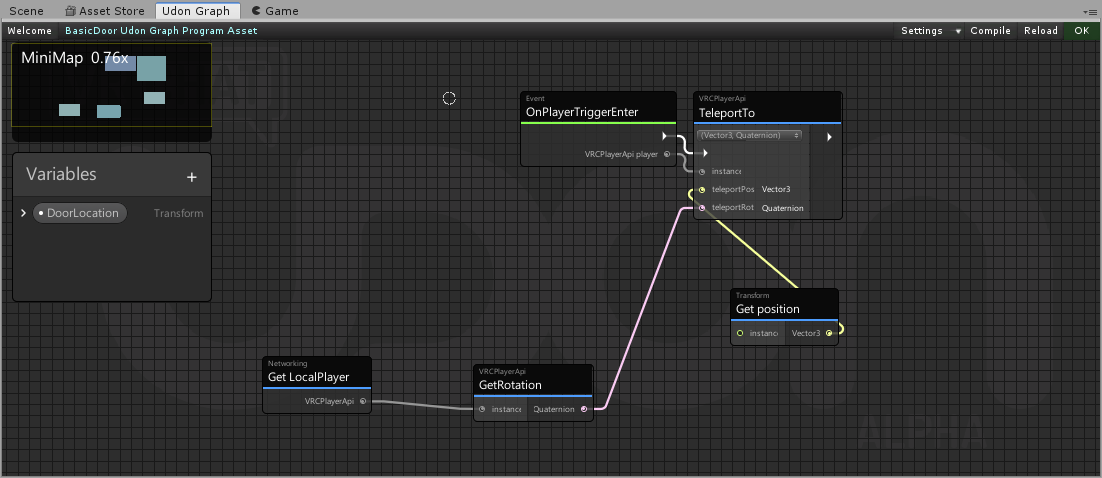
how do i set a teleportation pad to teleport to a certain one?

im extremely new to udon so 
dapper lion
a vrc portal will make a portal to another world. youd need to script a teleporter if youre wanting to teleport inside the world
 ebon basin
udon graph?
 glossy sky
But as literally stated, that's for making a portal to another world. You want to use an Udon graph.
ebon basin
ahhh, i see, yeah i have no idea what im doing XD
glossy sky
If you slap a behavior onto an object, you can get the graph started there. Will look like so--
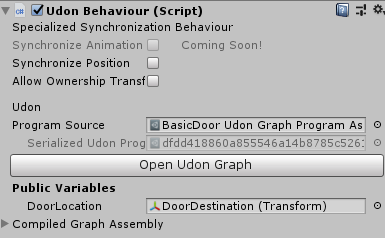
If you're that lost though, should check out the spinning cube tutorial to get started.
dapper lion
may i suggest adding udonsharp. it is very useful
glossy sky
^
dapper lion
i also have a graph prefab for walkin teleporters if you need a reference
ebon basin
ahh okei! thank you so far!
 kind knot
is the Dropdown.AddOptions method not supported yet? Trying to get it working and just having trouble
End goal is to have a dropdown with a list of all users display names
kind knot
Meh using udonsharp now cause it seems to actually somehow support things that nodegraph doesnt
cunning mist
A lot of stuff in U# that isn't in graph is fancy workarounds and it's hilarious. Like, you can pass variables in non-networked functions, but what is actually happening is there's a variable on the target script that gets set just prior to the event being called and then it reads that.
kind knot
welp U# seems broken for me... it wont compile throwing a "User type <nameofscript> could not be found"
cunning mist
U# questions can be better answered in Merlin's Discord. You can find that link by checking out the Github Wiki page for it pinned in this channel.
jaunty schooner
Is it still not possible to toggle IsKinematic in Udon? I know I was told back in October it wouldn't work when I wanted some pickups to stay in place until picked up, like an axe I had embedded in a tree.
I now have some floppies in a disk caddy but I'm running into some performance issues in my world and I'd like to set them all to the player layer so they don't collide with one another, but if I do that then they'll all just flop over and be inside one another inside the disk caddy which will look bad. So my options as far as I can tell are to throw some invisible colliders in there to try to prop them up, or toggle kinematic, or leave them on the pickup layer.
These are synced pickups with gravity btw. The post I'm referencing is here: #udon-general message
I found a canny post about the issue too but it has not been marked as solved: https://vrchat.canny.io/vrchat-udon-closed-alpha-bugs/p/rigidbodyiskinematic-not-toggleable-if-udonbehaviorsynchronizeposition-true
twilit hawk
jaunty schooner
I found a canny post about the issue too but it has not been marked as solved: h...
It works now. I've specifically been setting it for objects, and it works as expected.
jaunty schooner
twilit hawk
It works now. I've specifically been setting it for objects, and it works as exp...
Have you been setting it for synced pickups though? Because synced pickups were what were broken with it.
twilit hawk
jaunty schooner
Have you been setting it for synced pickups though? Because synced pickups were ...
No, not for pickups, but for something like a vehicle (which has a synced position) it's been working fine. I guess pickups break things?
 digital raven
Does anyone know a way to be able to track a player's hand in Udon? like if I wanted to use for example a fishing rod. How could I track where the player's hand is?
void ridge
digital raven
Does anyone know a way to be able to track a player's hand in Udon? like if I wa...
tracking data
VRCPlayerApi.get Trackingdata or something like that. You can choose Head, Right Hand, or Left Hand from a drop down menu on the node if you're using graph
Your other option is to use the position/rotation of hand bones, but that's a worse option because bones vary wildly between different avatars
digital raven
void ridge
`VRCPlayerApi.get Trackingdata` or something like that. You can choose Head, Rig...
OMG thank you so much!!
digital raven
@void ridge Ok how the heck do I use this thing 😥 , I don't really understand how type nodes work
void ridge
digital raven
<@!156942003236634625> Ok how the heck do I use this thing 😥 , I don't really u...
Are you asking a specific question? Because you're making it sound like you're having trouble with Udon graph basics
digital raven
void ridge
Are you asking a specific question? Because you're making it sound like you're h...
For me I'm using Udon Sharp and I'm not really sure how I would code it. Or even how I would use it in graph
void ridge
Oh ok, well then ask about hand tracking data in Merlin's discord, find in the pinned messages
 desert grove
Anyone know how the new universal input event system works? The fact that I cannot just ask if InputMoveHorizontal is frustrating. Side note: whoever does the wiki should consider example formats much like the unity wiki
floral dove
desert grove
Anyone know how the new universal input event system works? The fact that I cann...
Add InputMoveHorizontal event node, use the floatValue to drive whatever you want.
It will trigger every time there's a change in value.
 placid peak
Im trying to make a chair that when i sit it makes you sit in a particular animation, ive been told its broken and wont work, its this true? if so how come theres old worlds with this function working fluently
 flint kite
so i want make move up and down? i use udon
 desert grove
floral dove
Add InputMoveHorizontal event node, use the floatValue to drive whatever you wan...
desert grove
floral dove
Add InputMoveHorizontal event node, use the floatValue to drive whatever you wan...
thank you
 last briar
quick question, can someone send me a link to that udon project which lets you save data in a string?
I forgot the name of it >.>
 dull stream
I'm trying to figure out how to make a jump pad behave in a way where it applies velocity to a player and pushes them away, easy enough to do with playerVelocity = velocityToApply * jumpPad.upVector, this handles the jump pad being rotated so it just pushes away
However what I can't figure out to do since i'm a smooth brain when it comes to vectors and math
I want to reflect the player velocity if they're moving faster than velocityToApply instead of overwriting it
I found Vector3.Reflect(velocity, jumpPadUpVector) that works but I want it to essentially have a minimum that if you're moving slower it would just push you with velocityToApply
I can't figure out how to check the velocity and replace it if it's slower
velocityToApply is just a float
In summary: if you're moving slow, push with preset force, if you're moving fast, push away with same force you're moving but away
 fiery yoke
@dull stream Thats quite a bit of linear algebra :P
So you have a jump pad with a collider? and as soon as you touch that collider you want the player to be acceled with a minimum force when they are not moving fast "towards" the pad, but bounce off if they do?
fiery yoke
Well one key part is knowing how to get how "similar" two vectors are. This is done with the Dot Product
For normalized/unit vectors, the Dot product is 1 if the vectors are equal. 0 if they are orthogonal. And -1 if they are opposite
This is useful when you compare the current players velocity with the up vector of the pad
dull stream
I suspected I needed to do the dot product or cross product but it confused the heck out of me in class
So I could construct a push vector with velocityToApply * jumpPad.upVector, then grab playerVelocity
But how do unit vectors play into this, since these are not
Wouldn't comparing unit vectors just show direction
fiery yoke
Im currently having dinner, so if you want a full run through from me you'll have to give me a few minutes x)

 sacred moat
so i used wolf3d readyplayer.me and downlaoded my avatar file, then opened it into unity for editing and ...WHERE ARE the TeXtUrEs?
cunning mist
sacred moat
so i used wolf3d readyplayer.me and downlaoded my avatar file, then opened it in...
RPM is a 3rd party app so there likely won't be a whole lot of answers here, but you'd have better luck in #avatar-help
 clear bridge
fading cipher
clear bridge
fading cipher
In theory, is there any way to hide all players’ name tags in a world so you could like make a custom name tag system or anything?
I can imagine making a shader that only shows things behind the object, then sticking a sphere above a person’s head with the shader so looking at the person’s name tag would only show what’s behind the name tag
Basically a programmed version of how many people envision a real-life invisibility cloak would work
kind knot
How long we gonna be waiting for synced variables to actually be functional 🤔
dapper lion
@fading cipher there is like a shader that i think covers up any layer like the nameplate which you can then attach it to a head tracking set up that keeps a mesh around the nametag
fading cipher
@dapper lion Cue spongebob I need it
dapper lion
i dont have such a thing. i think i have the shader and a head tracking thing you can kind of set up, but itd be weird to set up
jaunty schooner
I was still running the profiler in Unity the other day when I tried to upload my world and Unity locked up, but not before printing out a message about compressing profiler data or something, and I was wondering... What happens if I have the profiler recording when I upload? I assume it doesn't like, enable logging in VRChat or something... But I also had an issue where people were getting poor framerate in my world the day before yesterday, and today with others it seemed fine, so I'm wondering if like, some data was being logged and causing a slowdown, or what, cause prior tests to that one people were getting good framerates.
 crimson schooner
how would I play an animation while the player's avatar is in a station, for example a dance animation? I kind of got it working but only the lower half dances, so how would i get tracking to disable while in a station so the animation plays?
jaunty schooner
How fast is Udon? Like, not networking wise. I've seen stats for that that put it at a 56K modem for speed. I mean how fast does it run the code? Is it really slow? Is it almost as fast as actual scripting would be? I believe it runs on a virtual machine, so maybe it's 1/2 as fast or 1/10th as fast? I don't actually know how much overhead a virtual machine creates and if that's handled by the CPU to make it fast, or if Udon is even that kind of virtual machine. My real question is whether it would be feasible to write an emulator within Udon. I doubt it, and I have no intention of doing it, but I'm curious to know because folks keep asking about it because I just made a world which displays videos of C=64 games on the screen. 😄
 quartz meadow
jaunty schooner
How fast is Udon? Like, not networking wise. I've seen stats for that that put i...
quartz meadow
jaunty schooner
How fast is Udon? Like, not networking wise. I've seen stats for that that put i...
I was able to do surprisingly large array moves in udon,, however the udonsharp wiki states that udon is 200~3000x times slower than normal c#

GitHub
An experimental compiler for compiling C# to Udon assembly - MerlinVR/UdonSharp
that being said, you can do what I did, code your work in a shader, and use udon as a wrapper to get numbers in and out
its a pain in the ass, but far faster for complex tasks
also, anyone have any word on what the networking patch will bring? Can we finally spawn in items with scripts? Prefabs?
glossy sky
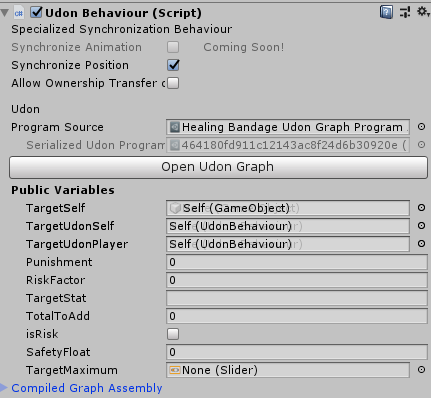
Is there a way to save Udon variables on a prefab? Upon play, mine keeps resetting.
https://i.imgur.com/FHsilR4.png
 jaunty schooner
Try changing one of the transform parameters to 0 and back. There's a bug either with Unity or VRChat's scripts and sometimes, at least with prefabs, that will happen and doing what I said tricks Unity into saving the data you input.
However that issue doesn't happen on play, it happens if you just click another object and go back to it. Which play would also do perhaps, but its possible your issue is something else entirely?
glossy sky
That's what I was thinking but I'm simply playing the scene and it'd zero everything out.
quartz meadow
make sure nothing in your script is actually doing it
 hybrid charm
what is udon
 dusk lance
?whatisudon
 hidden martenBOT
VRChat Udon is a programming language built by the VRChat Development Team for use in VRChat worlds! It enables complex behaviors and logic in VRChat worlds. Read more about Udon in our documentation: https://docs.vrchat.com/docs/what-is-udon
VRChat
What’s this Udon thing anyways? VRChat Udon is a programming language built completely in-house by the VRChat Development Team. It is designed to be secure, performant, and easy to use via the VRChat Udon Node Graph, a built-in visual programming interface that uses nodes and wires (we call them “no...
 lavish sphinx
so im trying to use this script to teleport when you walk into a door instead of pressing a button, and it works but when there are multiple people in the world it teleports everyone

im not really sure how to go about fixing it, im pretty sure im going to have to some how detect a specific player within the script but im new to using udon scripting so its weird on how it works
grand temple
Just plug the playerapi from the event into the instance of the teleportto
right now you're saying "if anybody touches it, teleport the local player" when you just need to change it to "teleport the player that touches it"
lavish sphinx
tyyyyyyy
dull stream
Hey there, are you still up to assist me with that jump pad thing @fiery yoke ?
fiery yoke
dull stream
Hey there, are you still up to assist me with that jump pad thing <@!14022761158...
Yup just a little tired, wanna take it to DMs?
stark adder
quartz meadow
also, anyone have any word on what the networking patch will bring? Can we final...
Pretty much all we know is
this release will include:
- Sync for Arrays
- New "Manual" Sync style where you control when variable updates are sent across the network
- Improved Late Join
- Immediate SetOwner (you can SetOwner and then change variables right away)
- Approve / Reject changes in ownership
 mortal star
Hai, how do one disable player collision in a U# script? (@me if you know si I don't miss it x) )
(PS: I posted that in SDK2 worlds before xD)
harsh magnet
quartz meadow
that being said, you can do what I did, code your work in a shader, and use udon...
Are you using a compute shader in Unity to achieve this?
mortal star
I guess I could disable all colliders for that but having like... loads of colliders in world would make it tedious to do and appearently Physics.IgnoreLayerCollision(0, 10, true); is not supported
twilit hawk
mortal star
Hai, how do one disable player collision in a U# script? (@me if you know si I d...
There are a couple ways you can do this. If you're trying to make a certain object never collide with players, then make a new Unity layer that doesn't collide with Player or LocalPlayer and put it there.
If you're trying to make it not collide with players at certain times, you can toggle IsTrigger on the object's colliders through Udon, as long as the objects themselves don't have OnPlayerTriggerEnter in their Udon components, nothing will happen while they're in that state.
mortal star
I'll probably do that, thanks @twilit hawk (I want to disable player collision when player grabs a bar so he can lift thenself through the object instead of being locked on it)
quartz meadow
harsh magnet
Are you using a compute shader in Unity to achieve this?
Not possible since udon doesn't whitelist all the functions and methods needes (only some of them for some reason). But you can just use a normal shader with a later shader model. Catch is it only runs on gpus from past 2014 or so but that should cover most people
harsh magnet
Thanks for the info!
harsh magnet
quartz meadow
Not possible since udon doesn't whitelist all the functions and methods needes (...
Do you know if Quest 1/2 are supported using this technique as well?
quartz meadow
I believe so
harsh magnet
Nice. I believe the GTX 970 came out in 2014....if it is supported it's probably enough
I think that 1060 is the most popular GPU on the market right now
cunning mist
I was under the impression VRChat didn't support compute shaders at all 🤔
Ah, the channel just updated for me on mobile and this was already stated
Thanks discord
fiery yoke
Yeah I dont think you can dispatch Compute Shaders or use ComputeBuffers. However you can allocate the memory for a ComputeBuffer object and construct it outside of Udon (serializing it into the asset) and load that at runtime. Just cant do anything with it
quartz meadow
fiery yoke
Yeah I dont think you can dispatch Compute Shaders or use ComputeBuffers. Howeve...
this is exactly the case. you can however it is possible to send arrays over to shaders using mat.SetFloatArray
quartz meadow
harsh magnet
Nice. I believe the GTX 970 came out in 2014....if it is supported it's probably...
to be more clear, if you support directx11 fully you should generally be fine
desert grove
So, Udon is slower than c# as is the entire node graph system at which point unity doesnt care what node system you use, the conversion time is too high to make nodes practical and the calculation time are increased if you combine node and C#. Hiding functionality inside a shader can be viewed as malicious and why take the extra steps to hide code if you have access to U# which is not a node and not taxing on the calculation times. Take what you want from that, I'm just suggesting using the appropriate tool for the job.
dusk lance
Udon graph and Udonsharp both compile down to udon assembly. They have the same runtime.
quartz meadow
shaders cant access system resources, wouldnt be a problem security wise
annoying potentially? yes, we all know those avatar shader spam stuff, but not destructive
desert grove
ic
quartz meadow
I mean I guess you could make a map with a shader that causes a game crash at worst
I don't know why you would
but thats the worst you could do
there are other considerations when working with shader code
- shaders are meant for parallel processing, conditional statements completely wreck performance
- getting data in and out of a shader comes with a penalty
 oak trail
Theoretically the worst thing you could do with a shader is cause the graphics driver to crash, which in turn crashes the game, but can also crash the entire system if severe enough.
quartz meadow
so Ideally, you will prep some data in udon, through it ina shader to process, and pull it out
harsh magnet
desert grove
So, Udon is slower than c# as is the entire node graph system at which point uni...
I've got code that is already running up against frame time... So using the GPU would be a good idea
lavish sphinx
t anyone know why QVPens And UdonSharpVideo Player dont work? they go into the world, you can see them in the world, but they just dont work.
i assume its an issue with udon sharp, ive gotten it to work in multiple other worlds the exact way im doing it now but for some reason anything udon sharp related just doesnt work
lavish sphinx
now that i look deeper i cant even open the udon graph for scripting
 verbal socket
@placid spear i need your help with the yeet mechanic i cant seem to get it to work
dapper lion
@lavish sphinx might need to use the updated sdk
polar sail
can we render UI elements to the screen or do they have to exist in world space?
scarlet lake
is there a way to addd an admin panel with udon?
void ridge
polar sail
can we render UI elements to the screen or do they have to exist in world space?
I don't actually know if we can't render UI stuff on screen  what I do know is that a reliable way to do this both for VR and Screen mode is to attach the UI canvas to the player's head tracking and offset it something like 50cm-100cm in front of their face. Use
 LateUpdate
polar sail
sounds good
do i attach the ui canvas by instantiating some sort of canvas whenever they need to render UI or just attach a canvas to the reference camera?
scarlet lake
scarlet lake
is there a way to addd an admin panel with udon?
am i just not gonna get noticed
k
dapper lion
@scarlet lake wdym? like the udon menu system? normal ui? hidden stuff? you kind of asked nothing
scarlet lake
dapper lion
<@456226577798135808> wdym? like the udon menu system? normal ui? hidden stuff? ...
where like only certain people can acsess it and you can fly and kick etc. as long as you have permission
dapper lion
so kicking is for the world master or the acc owner. the flight system is based on the udon menu, i can give you just the fligh script for it if you want
 dapper lion
@frank lily how long it been loading?
scarlet lake
dapper lion
so kicking is for the world master or the acc owner. the flight system is based ...
can i make it so only certain people have it including me?
 frank lily
i dunno like 4 or 5 minutes
dapper lion
@frank lily try cancel and trying again
dapper lion
also, dont update when mitigrations occur
oh weird, then id
@scarlet lake you have udonsharp?
scarlet lake
dapper lion
<@456226577798135808> you have udonsharp?
what dat
frank lily
i was wondering if it was that server stuff they were doing ill just wait then
dapper lion
@scarlet lake its the thing my hidden work off of
scarlet lake
oh
dapper lion
https://github.com/MerlinVR/UdonSharp/wiki import this bad boy
GitHub
An experimental compiler for compiling C# to Udon assembly - MerlinVR/UdonSharp
dapper lion
i have a script that activates for specific people i can send you, but it requires this
dapper lion
you could also try out my udon menu beta, but its somewhat advanced and i do not suggest using it if youre new
polar sail
does U# expose any additional functions that the normal Udon doesn't allow for?
more specifically functions that take input parameters
dapper lion
@polar sail it has "work arounds". i never exposes anything other than real udon. thatd be weird and kind of scary if it did
polar sail
i suppose
perhaps my dreams of being able to generate audio are still too far
but might be worth a shot regardless
dapper lion
technically they added like 3 extra things on midi and exposed more USR or whatever its called now, so id assume you can do whatever at this point except sound fonts
polar sail
well i can't pull the time from the DSP
not that that's a neccessity, but i also have to assume sample rates, which might be crashy
dapper lion
what kind of crazy bitrate we trying to get here?
polar sail
native
could cause stutter if two frames return the same rounded time from Time.time compared to DSP
but also maybe not? idk, i have to try, i have the code working but nothing is calling onAudioFilterRead()
dapper lion
id be very conserned if itd do that
scarlet lake
So, @polar sail what i do is write the data and buffer it
    public void WriteSawWave()
    {

        float[] samples = new float[44000];
        for (int i = 0; i < samples.Length; i++)
            samples[i] = Mathf.Repeat(i * frequency / sampleFreq, 1) * 2f - 1f;

        AudioClip ac = AudioClip.Create("SAW", samples.Length, 1, sampleFreq, false);
        ac.SetData(samples, 0);
        targetAudioSource.clip = ac;
        targetAudioSource.Play();
    }
For example, this writes a saw wave
polar sail
so you made your own sample buffer i see
scarlet lake
Yes
polar sail
then you're using setdata to put that float array into the audio clip?
scarlet lake
Yup!
polar sail
that's awesome! thank you so much, not very used to working in an environment like this, it's quite restrictive not being able to use delegates
scarlet lake
Yeah sadly
polar sail
are you using time.time to delay the audio outputs or just swapping from one sample to the next instantaneously?
scarlet lake
thats why everyone can help by upvoting this ^^ having at least a VRChat replacement function for the delegates would be super nice!
https://vrchat.canny.io/vrchat-udon-closed-alpha-feedback/p/expose-the-full-audioclipcreate-function
polar sail
upvoted ^^
will be nice to be able to have some fancy generators to play with if they allow writing to the stream natively
however this should be solution enough for now, i think!
@scarlet lake do you think it's safer to assume a sample rate of 44100 khz or 48000khz?
my hardware is set to 48000 but i am on desktop so i don't have to worry about it as much
scarlet lake
441
polar sail
alrighty then
scarlet lake
Because, its mostly what people use as their default samplerate
polar sail
yeah that makes sense
mine's usually set higher than 48000 but i have to lower it for games, so i suppose that makes sense
 bright mural
 fiery yoke
There is a more info button...
Also this is the wrong channel for that question. Look in #user-support-old or #avatar-general
flint kite
I not sure work with shader?
stark adder
5th week of excitement for Networking upgrade Open beta:
Excitement is getting lower by every day now.
 quick token
Anyone know of any prefabs for seats where the sitting position is determined by hip rather than ground? Making a world which has slightly bigger seats than standard, and normal height (e.g. 5'6" to 6' tall) avatars just clip through the seat. Looks just fine with a bigger avatar (e.g. 8'-10' tall). World is kinda designed for bigger avatars in mind but didn't want to leave smaller avatars out to dry.
 uncut stirrup
Hello, I've got an issue trying to test my world
Every time I hit build and test, it only takes me to my vrchat home
not my world that I want to test.
How do I fix this?
scarlet lake
Can oculus 2 use animations?
 solid sluice
Any one has a prefab of a button?
 mighty fjord
Is it possible to use the OnPlayerLeft and OnPlayerJoin events to update a list of the players? For some reason when a player has left, the OnPlayerLeft event seems to be called before the PlayerApi array has updated accordingly.
 sand delta
is there any method to trigger haptics without pickup?
paper plinth
quick token
Anyone know of any prefabs for seats where the sitting position is determined by...
I know for a fact I've seen that, have you checked the spreadsheet?
stark adder
mighty fjord
Is it possible to use the OnPlayerLeft and OnPlayerJoin events to update a list ...
Yes it is and its actually probably the only way to update it reliably
mighty fjord
So what should I do about the OnPlayerLeft event being called before the list has updated?
Should I just add some form of timer or delay to the event?
stark adder
No best thing to do is make an array of players with length of max players there will ever be in your world (or just set length to 80 which is maximum players in world overall) And then in OnPlayerJoin add the just joined played into that array on the first null entry and then OnPlayerLeft remove the player that just left from the array
Array.IndexOf(PlayerArray, leftPlayer) gets you index of the player that left and just set that index to = null 🙂
mighty fjord
Ah, was hoping it would've been easier to set it up by just getting the players instead of adding and removing them from the array manually
grand temple
now that isvalid is a thing, it's mostly not necessary to do all that manually. Now you can just do onplayerjoined > getplayers
as long as you check isvalid whenever you try to access any of the elements of the array, you're good
stark adder
Yea that's kinda true yea
grand temple
there are situations where you might want to insert them manually, like if you need a sorted list. But for general purposes, getplayers will work just fine
stark adder
Also not sure what you're using that array for but you should know that the order of the players in GetPlayers is pretty much random.. Each players gets different order for some unknown reason -_-
mighty fjord
This is my current setup, and I send an event to UpdateList whenever a player joins or leaves. However, the issue is that when the OnPlayerLeft event is called the list of players in the world hasn't had time to update accordingly.
 grand temple
that code there is completely unnecessary, you're just running getplayers over and over for however many players there are. It's just gonna give you the same thing every time
mighty fjord
Right
Even if I did fix that, wouldn't I still end up with the same issue in the end?
grand temple
if you try to print out the player list onplayerleft, then yes it will include the player that just left. But any time after that, if you do isvalid you will only capture the people who are valid so it doesn't matter if they're technically still in the array
mighty fjord
So I'd have to call some form of event afterwards to make sure it's completely up to date?
grand temple
or when you're printing out the list of players onplayerleft, just check if not equal to the player that left
mighty fjord
Yeah, could do that too
So should I store the GetPlayers array before I go into the loop and then loop over it btw?
mighty fjord
Thanks for the feedback 👍
 acoustic vale
VRCInstanciate supported over the network yet?
e.g:
- press button to spawn 1000 blocks
- another player joins and sees 1000 blocks
void ridge
not yet 
 broken bear
Is there a script inspector tool for udon behavior in a project to see all behaviors compiled for a package, similar to the world toolkit showing other scene assets?
 verbal sparrow
I'm trying to find a tutorial about using Udon to play a sound (for all players) when someone joins my world, but I can't seem to find any. Is it like a Network Event? What would the Script Graph look like?
floral dove
stark adder
5th week of excitement for Networking upgrade Open beta:
Excitement is getting ...
This is one of the reasons it's not always a good idea to try to give delivery estimates for in-progress features.
floral dove
solid sluice
Any one has a prefab of a button?
Sure, the UdonExampleScene has button prefab examples.
floral dove
scarlet lake
Can oculus 2 use animations?
Absolutely
floral dove
uncut stirrup
How do I fix this?
Check all the steps here, especially the setting of your VRChat exe location
https://docs.vrchat.com/docs/using-build-test
floral dove
sand delta
is there any method to trigger haptics without pickup?
VRChat
You can interact with Players in your world through the VRCPlayerApi. Each Player has a VRCPlayerApi Object, and your world fires the OnPlayerJoined / OnPlayerLeft events on any UdonBehaviours that listen for them when a player joins or leaves. This page includes info on using some general nodes. Si...
uncut stirrup
thanks, it was a path issue!
floral dove
acoustic vale
VRCInstanciate supported over the network yet?
Instantiate is for local objects, use an Object Pool for synced objects: https://docs.vrchat.com/docs/networking#vrcinstantiate
VRChat
There are three ways you can synchronize data and events in your world: 1. Variable Use this when you have a value that you want to synchronize across all players in your world. You will update the value on one player who 'owns' the object with the variable, and listen for the updates on all other ...
sand delta
floral dove
https://docs.vrchat.com/docs/players#playhapticeventinhand
it worked, thank you
floral dove
verbal sparrow
I'm trying to find a tutorial about using Udon to play a sound (for all players)...
Yes, something like OnPlayerJoin > SendCustomNetworkEvent to All > AudioSource.Play
solid sluice
@floral dove
Assets\AudioDeta.cs(28,32): System.Exception: Method UnityEngineMaterial.__GetComponent__T is not exposed in Udon
i can't use Get Component with udon?
floral dove
solid sluice
<@!98313818857275392>
Assets\AudioDeta.cs(28,32): System.Exception: Method Unit...
Don't @ me for new issues, pls. Sure, Udon supports GetComponent, just not the overload you're trying to use.
solid sluice
@floral dove m...
floral dove
solid sluice
<@!98313818857275392>
Assets\AudioDeta.cs(28,32): System.Exception: Method Unit...
For U# support: https://github.com/Merlin-san/UdonSharp/wiki
GitHub
An experimental compiler for compiling C# to Udon assembly - MerlinVR/UdonSharp
solid sluice
Let me show you
Assets\AudioDeta.cs(29,32): System.Exception: Method UnityEngineMaterial.__GetComponent__T is not exposed in Udon
i can't send code here
niuce
 acoustic vale
floral dove
Instantiate is for local objects, use an Object Pool for synced objects: https:/...
acoustic vale
floral dove
Instantiate is for local objects, use an Object Pool for synced objects: https:/...
Ah okey I'll give that a go, thanks 🙂
floral dove
solid sluice
Try the U# Discord for support, linked in the wiki.
acoustic vale
Quick way to mass assign an array of gameObjects 🤔
 stark adder
floral dove
This is one of the reasons it's not always a good idea to try to give delivery e...
stark adder
floral dove
This is one of the reasons it's not always a good idea to try to give delivery e...
Yea lol gets people excited and then disappointed when the estimate is not right .. know from experience and usually don't fall for it but in this case I really hoped 
floral dove
acoustic vale
Quick way to mass assign an array of gameObjects 🤔
Your best bet is probably an Editor script, assign them using UdonBehaviour.publicVariables.TrySetVariable
acoustic vale
Ah okey i'll try now
stark adder
acoustic vale
Quick way to mass assign an array of gameObjects 🤔
Or lock inspector and then select what you want to assign in hierarchy and then drag if I there
Can assign basically infinite amount of objects at once
And wow .. 10000 game objects ? That's extreme I'd say 
floral dove
stark adder
Or lock inspector and then select what you want to assign in hierarchy and then ...
Unfortunately, I don't believe that will work if those are variables on an UdonBehaviour. If they're regular serialized properties on a MonoBehaviour then you can drag and drop
stark adder
floral dove
Unfortunately, I don't believe that will work if those are variables on an UdonB...
It does I think. I do that often but not sure if it's Udon thing or something that UdonSharp adds 🤔
broken bear
I believe it’s from oriels udon toolkit that allows the mass array population
stark adder
I don't have that I think 🤔
broken bear
https://gyazo.com/252752cb3ce45ec4d82f6d39e295986a this? The toolkit does this but there may be another that gives similar function
 stark adder
Oh NIICE
🤔
Nope I don't have that
Then its just Unity/Udon thing
what I use
If my unity fixes I will show what I mean
 stark adder
broken bear
https://gyazo.com/252752cb3ce45ec4d82f6d39e295986a this? The toolkit does this...
stark adder
broken bear
https://gyazo.com/252752cb3ce45ec4d82f6d39e295986a this? The toolkit does this...
You can do this with normal unity
Less pretty though
And I actually have WorldToolkit I found out
acoustic vale
I think I've asked this before but it's peaking my interest again. What would be the best way to build a programmable screen. E.g: in the Udon behaviour setting the colour for each individual pixel and having it refresh at around 24fps? 🤔
The best I could do before was a RendererTexture/Texture2D ( can't remember it was ages ago) that could update indivisual pixels but the game would chug for like 3 seconds for each frame
The other thing i'd like to do is just fake a screen, like apply a pixelated shader over the top of everything so it looks like a fake screen. But that doesn't seem as cool than actually emulating the device 😛
frank lily
when can i update my world again i'm still getting the cleaning up previous version issue
starting to think its just me for some reason i dont see anyone else complaining XD
 fading helm
Hi there, is there a way to rotate a player? i cant access the Gameobject directly, i can get the players rotation thougth. but i cant find a way to change it.
grand temple
frank lily
starting to think its just me for some reason i dont see anyone else complaining...
That's correct, it only affects certain world ids. If this is just a private world, you can simply detach the world descriptor and it will upload under a new world id. If you need to keep the world id or it is public, you can contact support and they will fix it for you
frank lily
heck guess im gonna have to contact support then ;-;
grand temple
fading helm
Hi there, is there a way to rotate a player? i cant access the Gameobject direct...
you can teleport the player to the same position they're already at, but with a different rotation
frank lily
@grand temple you mean in #user-support-old or is there a section on the website or something?
fading helm
grand temple
you can teleport the player to the same position they're already at, but with a ...
o.O seems like a lot of overhead for a simple rotation, but if it works it works 😄 thank you
grand temple
frank lily
<@!84443478817255424> you mean in <#337672341041446912> or is there a section on...
email support@vrchat.com
frank lily
oh oki thank u very much
@grand temple just heads up the email returned with a link telling me to send a ticket, so maybe tell people about that instead of the email?
i go do that now yiss
fading helm
Another question, is there a way to get the "GameObject.transform.up" of the player?
fiery yoke
The player should always be world up
Unless they are sitting in a station thats rotated
stoic mountain
Is it possible to toggle an UdonBehaviour position sync on/off ? If im not mistaken the position is always updated, even if the object doesnt move ?
fading helm
fiery yoke
The player should always be world up
I actually want players to be able to walk up a wall, so i want them to turn when they walk up. i have everything working except rotation the players, but rn i dont see a god way of ding it
stoic mountain
@fading helm I dont think thats possible without heavy trickery
you're trying to do something akin to alien vs predator ?
fading helm
in a sense, more like mario 3D where you can jump from small planets/platforms to the next and walk around them 😉 but i loved the old avp game, i will keep this in mind 😄
my idea atm is to bind an invisible object to the player (like a vehicle you have to get into) and let it face a direction and then move the player just with it, but that seems sooo inconvinient
fiery yoke
This is not supported in VR because rotating the player causes a lot of simulation sickness for a lot of people.
You can do it with some trickery, but youre not supposed to hence it is not supported.
stoic mountain
I dont think you'll have the kind of control you want on the player gameobject, its pretty limited. Im afraid the vehicle approach wont work either as that restricts body movement ... or maybe you could do something based on bones position to detect that movement ? Anyways it sounds really tricky to do with the current tools available
 fading helm
fiery yoke
You can do it with some trickery, but youre not supposed to hence it is not supp...
fading helm
fiery yoke
You can do it with some trickery, but youre not supposed to hence it is not supp...
thats a shame, there are some applications for it that could really use it. Do you know if there could ever be support for it? after all, if you wanted to make a map to make players sick you can do it with the tools available without problems rn ^^
fiery yoke
Yeah you would think that that argumentation makes sense. But I guess it doesnt. The Oculus VR SDK does not support rotating the playspace. So I guess its really a limitation of VR SDKs. Its something thats...mathematically weird. Causes confusion, bugs and other problems.
Could be supported at some point. But I doubt it.
fiery yoke
stark adder
Idk where to post..
Yeah Ive seen that before. Sometimes Unity/VRChat just dies.
Restarting should help
stoic mountain
You dont really need to rotate the player space tough. You get the head & devices positions from it and then you can apply that relative to whatever you want.
But snap rotating could make @fading helm project work tough - i mean motion sickness-wise. If you could point at a wall and "teleport move" there without continuous rotation, that would be fine
fiery yoke
Yeah. But you cant do it in VRChat, because of either VRChat (imposed or not) limitations or Unity/VR SDKs limitations.
At least not "easily"
stoic mountain
Yeah Im affraid that's the bottom line ... doing this in the current state of vrc is just gonna be very tricky, or maybe simply not possible
fading helm
i will see if i can get it working, i will post it in the showoff, if i get it done 😉 thanks for the help 😄
mighty fjord
When you do GetPlayers, the player order isn't random, is it?
fiery yoke
Depends how you define random lol
mighty fjord
That's true
fiery yoke
It is in a specific order. The order however depends on when a player has "connected" to you. Which can seem random and be different every time.
stark adder
mighty fjord
When you do GetPlayers, the player order isn't random, is it?
The order is also different for every player
And also.. You as Local are always first in the array
mighty fjord
Yeah, I saw that
As I'm not interested in the local user, I can just skip over that index
stark adder
Basically you need to order it yourself
Easiest way to order it if you need to is by PlayerId those are same for everyone.. 😄
 fierce verge
So I have a AVPro Video player, how do I modify the udon so it only displays the most dominant color of the video? This is for LED lights 🙂
dapper lion
@fierce verge what you could do is make the videoplayer feed into a 1x1 pixel panel and thatll give you the dominant color
scarlet lake
floral dove
Absolutely
if you don't mind can you tell me
fierce verge
dapper lion
<@!128830635975376896> what you could do is make the videoplayer feed into a 1x1...
thats a good idea, now I have the UV map of the object just very small so it only displays one pixel but this is very flickery ofcourse
fierce verge
dapper lion
<@!128830635975376896> what you could do is make the videoplayer feed into a 1x1...
how would I do this tho? Would I just make a 1x1 texture, and then apply the videoscreen to that? 🤔
is that what you mean @dapper lion ?
I think I got it to work but it displays a lot of black sadly
floral dove
scarlet lake
if you don't mind can you tell me
I'm not sure what you're trying to do, can you try asking another way?
dapper lion
@fierce verge if you change the rendertexture to a 1x1
quick token
paper plinth
I know for a fact I've seen that, have you checked the spreadsheet?
I tried looking for that spreadsheet last night but my google-fu was weak af 🙃 thanks, will have a look now
 trim ibex
Maybe dumb question but what is the appropriate way to remove a player from a chair using udon code? Tried using exit station via custom network event but it doesn't seem to do the trick
stoic mountain
it iseems I have trouble making pickup object non-kinematic again once i've set them to kinematic, is there any tricks to that ?
 night viper
Hi. I seem to be missing a dropdown option on a node. Is there something i have to do to make it show? I dont know how I made the top node to show it. I tried to copile, reload but nothing. Thanks.

Oh nvm, Looks like I just had to enter and exit Play mode for it to show.
cunning mist
If anything goes weird with the graph, hit the Reload button on the top right and hope it works 👍
quick token
I got the UdonCalibratingChairs prefab from the spreadsheet that I was pointed to earlier, now just trying to figure out why using vDirect seats result in pretty much all sizes of avatar going into the floor. u__u
(probably need to try get in touch with the mod author for help tbh)
 stark fiber
Has anyone managed to make moving platforms that move your avatar along with them?
I've tried doing so using teleports but I occasionally get kicked from the world for "unusual client behaviour" with this method
 pallid roost
stark fiber
Has anyone managed to make moving platforms that move your avatar along with the...
pallid roost
stark fiber
Has anyone managed to make moving platforms that move your avatar along with the...
The way I'm aware of doing that is to sit the player on a seat that is attached to the platform.
Is there a quicker way to get a map out of labs? I've got maps through labs before the normal waiting and lots of visits way.
But I have someone who wants a venue for a charity festival, but having it in labs would put a hamper on people getting to join in to it.
 tribal meadow
I know this is really new, but looking at the midi example in the new SDK version, kind of leaves me scratching my head....is there any 'basic' example of how to utilize the midi function as a simple trigger to enable a light or effect?
scarlet lake
floral dove
I'm not sure what you're trying to do, can you try asking another way?
you know how to use animtion on oculs 2
cunning mist
scarlet lake
you know how to use animtion on oculs 2
I believe you are asking about Avatar animations that you can enable and play around with. These are dependent on the avatar they use, but if you want further questions about Avatar related controls and setups, try out #avatar-help
 twilit epoch
Hello guys! I am making now my Avatar World & doing it the first time with sdk3. Are there some good tutorials for Buttons (spawn avatars, music etc) I prefer graphic node.Can't find any.
paper plinth
stark fiber
Has anyone managed to make moving platforms that move your avatar along with the...
You have to teleport network.localplayer and add the last frame's change of the position and rotation of the platform to the player. There's a script on the forums for it.
And it doesn't work up and down, for example like an elevator, you need to turn gravity off on the player before you move him around or he will jitter
But if you want him to be able to be controlled normally, you can't go up and down.
 pallid remnant
i have some doors that open if you interact with the doorhandle, and i'd like to make it so that if one person opens the door, it opens for al other players too (and if someone closes a door, that it closes for all other players too)
i tried checking the "synchronise position" box, but this disables the animations for some reason.
does anyone know how to go about this?
it would be cool to have global object toggles too, but that's less important.
paper plinth
you must use ondeserialization and syncronize animations that wayI think you can get around it just by not using animations and apply your transform directly to the object but I've only been in here for 3 months
something like RotateAround I think isn't an animation and just updates the position but I am not there yet
paper plinth
that's one way
the other way is to learn how to use ondeserialization which will be a relevant skill for less than a month when the networking update comes out
I'm waiting for that and jacking with other stuff in the meantime
fiery yoke
There is always multiple ways to make something work. The easiest for you is to do SendCustomNetworkEvent which tells everyone to open the door, when you interact with it.
paper plinth
a most elegant solution
pallid remnant
fiery yoke
There is always multiple ways to make something work. The easiest for you is to ...
okay, ill try to do that. thank you
how should i go about incorperating this module in the code?
 fiery yoke
First of all thats the wrong node. You want "SendCustomNetworkEvent.
You replace the Interact with a Custom Event and call it something like "OpenDoor" then you connect the Interact node to the SendCustomNetworkEvent and enter the name you gave it
 pallid remnant
okay so instead of the interact i want the custom event
and then in the same graph i put an interact connected to a sendcustomnetworkevent that has the same name as the custom event that replaced the interact
fiery yoke
Yes exactly
pallid remnant
thank you for being patient with me😅
fiery yoke
Everyone starts at 0
paper plinth
Can I send a custom network event when an animation finishes playing to restart the animation and have it synchronize for everyone? I have cars that drive around the block, an animation on a loop.
And I'm not even controlling it, it's alive when the game starts and never dies and never needs any intervention
 waxen breach
twilit epoch
Hello guys! I am making now my Avatar World & doing it the first time with sdk3....
waxen breach
twilit epoch
Hello guys! I am making now my Avatar World & doing it the first time with sdk3....
i think Vowgan's video may help you. i think its this one. https://www.youtube.com/watch?v=ibDu0dCeUE8 you can change what it shows to target other components like animations instead of the object. You just have to change it a bit.
With the recent Udon updates, some of the basics have changed, so here's my most basic tutorial redone with the new editor, and not recorded at 2am! If I get enough requests, I'll redo my "Contextual Buttons" video as well, which will give me an excuse to just rename them "Event Buttons" which actually makes sense.
00:00 - Intro
00:20 - Udon Gr...
cunning mist
👋
scarlet lake
When sync upgrade
dapper lion
7 years
stark adder
scarlet lake
When sync upgrade
Question that I ask myself everyday 🙂 Soon
Probably 7 more months from what one guy said.. Double the amount and up the unit
dapper lion
basically
cunning mist
fiery yoke
Just be patient. Why the hurry? :P
stark adder
fiery yoke
Just be patient. Why the hurry? :P
I am basically stuck with implementing some features until they release it 😄
fiery yoke
But its not like someone is rushing you to do that. Just do something else in the meantime :P
stark adder
😄 noones rushing me only those 650 people on discord are waiting for the feature 😄 But I kinda explained that until Sync Upgrade that feature is nono
pallid remnant
guys i'm making a script that enables a gameobject on of a trigger entry and disables it on exit, but i cant get the exit part to work
since there only seems to be a "setactive" option
void ridge
pallid remnant
since there only seems to be a "setactive" option
GameObject.set Active is short for 'set active state.' You can set active to True or active to False
It sounds like you want to set it to False upon Event.OnPlayerTriggerExit
pallid remnant
yes that's what i want
void ridge
If you post a screenshot of your Udon graph I can help
pallid remnant
there!
 void ridge
pallid remnant
there!
void ridge
pallid remnant
there!
Good, so this little checkbox is how you define True/False on these nodes ||(you could also plug in an input to control it with other code)||
 pallid remnant
ooooooh
void ridge
Check the box for the SetActive node at the end of the Enter flow, then add another SetActive node, put it in the same place at the end of the Exit flow, and make sure that box is unchecked (i.e. False)
pallid remnant
got it
pallid remnant
void ridge
Check the box for the SetActive node at the end of the Enter flow, then add anot...
it works flawlessly!
thanks alot
man i dont know where i would be without this channel lol
void ridge
Check out some of Vowgan's basics tutorials on YouTube if you haven't yet. That, and try clicking the ? button on the top-right of most nodes. Those will open your web browser to documentation pages.
Momo also has some good basics tutorials on the VRChat YT channel https://www.youtube.com/watch?v=IVjEx_H5BZc
pallid remnant
thanks, i will
 dawn forge
No Try/Catch and System Exception access... But I love throwing new exceptions!
floral dove
stark adder
Probably 7 more months from what one guy said.. Double the amount and up the uni...
sometimes but not always 😉
void ridge
floral dove
sometimes but not always 😉
i c wat u did there
 unborn hornet
Schrodinger's updates
 wanton kernel
Why is undon so mean to me ! got my worl up but ooof
unborn hornet
question++;
 minor pine
I have a problem. I wanted to open omegle in VRChat but as soon as i open steam vr menu to open virtual desktop my arms in VRchat go down only my head moves
I have a vive
fiery yoke
@minor pine This is the wrong channel to ask something like this. Try #vrchat-general-2. But you want to use some other VR Overlay software like XSOverlay, OVRToolkit or something like those
minor pine
fiery yoke
<@!547504513138032660> This is the wrong channel to ask something like this. Try...
ok but is it normal my arms just go down as soon as i open my vive menu/steam vr menu @fiery yoke
In game
fiery yoke
Yes that is normal. You cannot use the SteamVR desktop view while in-game
minor pine
fiery yoke
Yes that is normal. You cannot use the SteamVR desktop view while in-game
My friend has a oculus and for him it works /:
fiery yoke
Because they are probably using the Oculus Overlay which is different
Oculus has an in-built overlay that you can use. If you dont want to use that or you dont have Oculus then you need a seperate software.
 shy vortex
is there a way where i can reset my password?
acoustic vale
So i'm getting into writing shaders, would using Udon be the correct way to apply a shader to the users view?
^ an example being a world that has a black and white filter you can enable
cunning mist
You would likely have it be a screenspace shader, and use Udon to hold the sphere or whatever you are projecting it on against the user's view.
While I'm sure greyscale was just an example and you can do lots of other things, greyscale itself can actually be done really easily by animating post processing, just so you know!
 visual grotto
Is there a vrc unity layer that players collide with, but pickups don't?
void ridge
visual grotto
Is there a vrc unity layer that players collide with, but pickups don't?
You can look at the collision matrix any time by going to Edit-->Project Settings-->Physics, scrolling down, and expanding "Layer Collision Matrix"
 visual grotto
rad, thanks
void ridge
Collision layers are a pain to work with. Your situation is a good example; it looks like MirrorReflection would do what you want, but generally that might be a bad idea.
Any renderer on MirrorReflection will not be rendered to the player, except in a mirror. You can get around this by separating your collider to a different GameObject in some parent-child relationship with your renderer, and put the collider on MirrorReflection while the renderer is on Default or some more appropriate layer.
visual grotto
Yeah that should be fine, I want pickups to fall through a certain floor that players can walk on
just putting the collider on mirrorreflection and sticking it on a separate gameobject should work
void ridge
You also have the option of adding a completely new layer and defining the collision settings for it. Caution there is that I've had a little bit of weirdness with those layers as far as colliding with players is concerned.
void ridge
visual grotto
Yeah that should be fine, I want pickups to fall through a certain floor that pl...
In that case, I actually recommend thinking backwards here
Leave your floor as Default, and don't touch it
Instead, change your pickups to the PickupNoEnvironment layer
visual grotto
Well, there are other items I do want pickups to collide with
void ridge
Unless you need those pickups to collide with some other layer at some other time 😛
yep
visual grotto
tables and such
void ridge
haha
visual grotto
yeah
void ridge
By now you can see how much of a pain this stuff is 😂
visual grotto
sounds about right lol
stoic mountain
how would you transmit a SetParent() through network ?
When a object of type A collides with an object of type B, I want A to stick to B (kinematic true, setparent) so I can move the host object B by script and A follows along.
Now I cant really do that detection client side as object A is a rigidbody, and sync is not guaranteed (or rather, its guaranteed not to be in sync). So I need master player to detect the collision, and tell the other players it happened. But I cant transmit values through SendCustomNetworkEvent(), so im not sure how to proceed ...
Or maybe transforms parent are synced along the position when UdonBehavior "sync position" is set to true ?
 willow tartan
I believe object sync uses world position but you'll probably have weird jittery behaviour if the parents are different and you're moving the parents around
You can keep some internal list of potential parents and sync the index into that list
stoic mountain
willow tartan
You can keep some internal list of potential parents and sync the index into tha...
This makes sense. Doesnt sound great but I guess I dont really have other choices. Thanks
willow tartan
With the new sync model you could probably add a child object in manual sync mode to send over the parent identifier. If you don't want to maintain a list of candidates, sending an object path is another (slower) option
stoic mountain
"manual sync mode" ?
scarlet lake
can somoene help me the avatar i uploaded is invisible ;-;
void ridge
scarlet lake
can somoene help me the avatar i uploaded is invisible ;-;
Ask this question in #avatar-help
stoic mountain
I have a weird bug with a simple boolean in an UdonSharpBehaviour.
The boolean is name inContainer. If checked all codes and the only place it can be changed is through a method that logs when it get changed for debug purpose.
I can see the value change and get set to true when the objects is put inside the container, but at some point apparently that boolean switches back to false without that method being called.
I have no idea whats happening there. Testing through CyanEmu, one player.
pallid mango
void ridge
Any renderer on MirrorReflection will not be rendered to the player, except in a...
In my experience that isn’t the case. Putting objects on MirrorReflecrion does not seem to do anything visually except it just makes them not block interact raycasts
void ridge
hmmm I did this just yesterday, unless I'm remembering wrong
pallid mango
I frequently use it to stop objects from blocking laser pointers
void ridge
Right, MirrorReflection does do that, but I think it also stops renderers from rendering outside of mirrors
pallid mango
Does not seem to happen for me, at least not in the editor
stoic mountain
uuugh I hate myself. My script was monobehavior instead of UdonSharpBehaviour
pallid mango
You wrote a C# script by accident?
stoic mountain
accidentally a monobehaviour yes
probably picked "context menu > create > C# script" instead of U#
pallid mango
I’m surprised it compiled
stoic mountain
I suppose CyanEmu doesnt really care as its in editor
grand temple
well if you use cyanemu then it's all running in editor, completely bypassing udon
cyanemu itself is made of monobehaviours
stoic mountain
I cant be mad at CyanEmu tough, its just too helpful
pallid mango
I think CyanEmu has a setting to strip out stuff vrchat would delete, but not sure if that includes mono behaviors
stoic mountain
to be fair there could be some warning somewhere in the console logs, but I have too much debug stuff there
dusk lance
CyanEmu doesn't have anything to check for scripts. It just implements some api callbacks which then can be called from anything.
cunning mist
And it can remove EditorOnly 🙂
void ridge
pallid mango
Does not seem to happen for me, at least not in the editor
Right, it'll only not render in the VRC client

(we should really be dicussing this in #world-development and not here 😛 )
pallid mango
Interesting. It seems coincidental I’ve only been using it on collision triggers that were already invisible so I never noticed
Yeah my bad
void ridge
Nah it's my bad. And for what it's worth, same. I only noticed this yesterday for exactly that reason.
 brave meadow
any idea on how to make something only toggle-able by you (the creator of the world)? I'd like to create an area only I can access for a video player's controls
 mossy anvil
uhm does setnameplatecolor in vrcplayerapi class actually do something? I'm having problems making it work
dapper lion
@brave meadow i have a udonsharp script that might assist you
 normal swallow
Hello! I suppose I might just be missing one small thing but I have a udon script with a trigger event, but the trigger will only activate once? Is there something i have to check to make it repeat?
grand temple
either you're using a trigger that only happens once or the udonbehaviour is crashing
 worldly tapir
Hey, can't find it anywhere, what's Udon's version of the switch statement? Got 128 cases.
Or should I just binary search for the input with if statements? Would take 7 steps though, kinda slow compared to switch's lookup tables
normal swallow
if the behavior is crashing, is that something on my end I can fix (in unity)?
as for the event i have,
its OnTriggerEnter an area, it destroy the object. and then makes it appear at another location.
when i try to take the object back in that area it just does nothing.
I tried setting up another area with a different udonbehavior but after one of them is activated they dont work,
Maybe its not detecting my item anymore?
Also, just as a general practice question should i cram as much as possible into one behavior or should I add multiple component where they all do their little things. ( if that even change anything)
grand temple
there are several reasons why it might crash. The first is that when you do ontriggerenter, it's possible that it will detect protected objects. Protected objects are things like the players or the UI that exist in the world but udon is not allowed to access. When this happens, if you try to do anything with them, the udonbehaviour will crash.
The fix for this is to use Utilities.IsValid to check if it is a valid object before doing anything with it
and the second possibility is that if you try to destroy something, it no longer exists. If your code tries to destroy it again, then it's going to crash the udonbehaviour because you can't destroy something that's already gone.
The fix for this is the same, use IsValid before doing anything with anything that you're not 100% sure is valid already
normal swallow
Is this only on a recent version of Udon? I dont think i have that option, This world i have is using an older version for sure.
grand temple
yeah, isvalid is pretty new
normal swallow
ah, look like im gonna have to do an update..
grand temple
if you're using udonsharp you can also just do != null but it's a bit trickier in graphs, takes like 4 nodes to do the same thing. Also only works on protected objects, not destroyed objects
normal swallow
the behavior i have does have Object Destroy and then it use Instantiate to put it back. Would it still consider the object destroyed?
If I can simply update to the latest ill try that and see if doesnt break any of the other working behavior and I should be good? If it does break stuff well ill have to decide which problem i want to spend time on 😆
grand temple
the destroyed object itself doesn't matter, what matters is the reference to that object. If you say destroy object then set the reference to that object as null, then you can easily just do if (object != null) and you're good.
normal swallow
Thanks, That gives me a couple thing to try, Ill run some test on those tomorrow and see how it goes.
fading cipher
Is there some sort of issue with sprites and/or setting a sprite renderer's sprite to another sprite at runtime in-game? 🤔
This code all executes perfectly in-editor, but I'm getting random nullref errors from the code when in-game
And I'm not sure how to troubleshoot much further since Udon VM errors from in-game only tell you something broke, and not where and why
fading cipher
Fixed, beep boop, kinda sorta operator error
 vernal maple
UI Question. So I'm fairly certain I know how to call a OnValueChanged event for a slider on a canvas, using SendCustomEvent, but uh, the slider itself doesn't appear to be intractable. I've only placed the slider, is there any other component I need to add?
grand temple
you need to add vrc uishape to the canvas and you need to set the canvas and all of it's children to the default layer
vernal maple
Aha. I saw the VRC uishape component, but was trying to add it to the slider. Thanks so much. 💜
Works perfectly! And fortunately everything is working in the build and test as well.
 acoustic delta
worldly tapir
Hey, can't find it anywhere, what's Udon's version of the switch statement? Got ...
acoustic delta
worldly tapir
Hey, can't find it anywhere, what's Udon's version of the switch statement? Got ...
AFAIK UdonSharp translates switches to chained if-else statements under the hood as Udon doesn't support switch natively.
worldly tapir
Oh no. Oh no.
Guess it's binary search time then, don't want to run 128 checks for something that may happen twenty times a sec. Thanks for the info
grand temple
I wonder if it would more efficient to do something like sendcustomevent("Event" + integer);. On the surface that looks dumb because udon on the backend would have to do string comparisons, but udon is way slower than C# so offloading something like that to the backend might actually have an impact
sounds like something that needs to be benchmarked
worldly tapir
I'll do anything if it works as a workaround around a 128 element if else chain. I may not be a professional, but also try not to be a complete yandev codewise
grand temple
does it really need to be 128 unique code execution paths? Could you have a single execution path that accesses various 128 length arrays?
worldly tapir
I'm trying that at the moment. I'm slightly varying the code and values for each, but I might be able to calculate these variables from the int I'd have switched on.
Though with that method it'd be really helpful to be able to define methods/macros or something, is that possible in udon?
 normal lichen
how do i fix this?
 grand temple
worldly tapir
Though with that method it'd be really helpful to be able to define methods/macr...
grand temple
worldly tapir
Though with that method it'd be really helpful to be able to define methods/macr...
That's not something that udon would support, I'm pretty sure what you're referring to would be something built into the IDE instead. Something from here? https://docs.microsoft.com/en-us/visualstudio/ide/visual-csharp-code-snippets?view=vs-2017

Learn how to use code snippets to add commonly-used code to your C# code files.
worldly tapir
Not really, more like functions and macros in UE4.
e.g. making a custom "multiply by two and convert to string" node as an admittedly stupid example
That I can reuse without having dozens of copy/pasted nodes
grand temple
I would not be surprised if visual studio supported something like that. As long as it outputs the final expanded code there's no reason why udonsharp wouldn't accept it just fine
but udon graphs themselves, definitely not
worldly tapir
I started with udon two days ago, only using graphs so far, but I'm slowly beginning to see why most of my friends complain about it so much xd
Thanks for helping tho ^^
grand temple
oh yeah with the stuff you're talking about already I'm sure you would be much better off with udonsharp
GitHub
An experimental compiler for compiling C# to Udon assembly - MerlinVR/UdonSharp
udon doesn't run on the graphs directly, it runs on udon assembly. Udon assembly can be made from many different sources, including graphs and also normal C# code, through the use of udonsharp
vernal maple
I have a crazy question now about UI. Is it possible to attach a Canvas to the camera when a player is in VR?
grand temple
yes, that's exactly what uishape does when it is a camera-space canvas
worldly tapir
Well... I do know c#, I've made unity vr games before, but I think I don't know enough about the limitations of udon assembly. E.g. the switch statements. If I did that in udon sharp, not knowing it'd create a demon spawn of a if else chain, I'd have been in for some trouble. Graphs are at least more "honest" about their current limitations it seems ^^
vernal maple
Lemme give that a shot

Does this look accurate? Or will overlay mode still make things not work?
grand temple
vernal maple
Does this look accurate? Or will overlay mode still make things not work?
yes that should work
not very well, mind you - the canvas will change based on the resolution of the headset
I'd recommend just making a world canvas and have it follow in front of the player tbh, it would be much more consistent
vernal maple
That does certainly make sense. I'm hoping just anchoring it to the bottom left of the player's camera will make things work.
It'll just be join/leave messages, your turn, etc messages.
(For reference)
 grand temple
worldly tapir
Well... I do know c#, I've made unity vr games before, but I think I don't know ...
grand temple
worldly tapir
Well... I do know c#, I've made unity vr games before, but I think I don't know ...
I guess that's one way of looking at it, but being careful what you do in update applies to all game development. It's just that udon has worse performance so you need to be even more careful. How you create that code doesn't matter, and artificially limiting yourself so you don't accidentally go overboard just sounds painful
 strange charm
We can't yet send custom network events with arguments, can we? I just wanna broadcast a client's local value (score) to everyone else, along with that client's ID. I can manage the players and scores on the receiving end. It seems messy to make a whole list of unique synced variables to cover every possible player in the world. Is there a better way to do it?
grand temple
that's correct. If you want to do something like that I would recommend using manual sync in the udon networking beta
manual sync is faster than network events, only syncs exactly when you want it to, and will carry all your synced variables in one burst
strange charm
it doesn't need to be fast, it just feels like im doing it the wrong way making those synced variables
compared to just broadcasting stuff and sorting it on the recieving end
grand temple
as it is on live, yeah pretty much. Everything is synced continuously, which means it will sync 5 times per second and it will have very low priority
when not in use, manual synced variables have zero network cost so you don't need to worry so much about creating synced variables that will sit there taking up bandwidth most of the time
strange charm
will worlds made with the networking beta run on the release client?
grand temple
You'll be able to get into the world but if you use any beta features the udonbehaviours will crash
normal lichen
how do i fix?
 vernal maple
Another small question. Using the TrackingData for the Head, what would I use in order to say, move 0.5 meters from the player's vision then move an object there, followed by LookAt?
dusk lance
normal lichen
how do i fix?
Do you have NoodleBowl from Centauri installed? Delete the button class.
normal lichen
thank you ❤️
scarlet lake
i love being a messenger
a friend needs me to ask here for them
they are adding new ambient sounds to their Infinite Ikea map, and want to know what sounds should be added to add some atmosphere
current additions are for quiet wind, due to the infinite size, it makes sence the ikea has some kind of weather patterns of its own
please give some more suggestions and ill pass them on
world is udon hence why i asked here
ill probrably also ask in world dev
worldly tapir
Yeah I think world dev is a better place for that. Otherwise, don't overdo the sounds if it's meant to feel empty. Too much noise will give the illusion of the place being filled with life, especially in vr.
solid sluice
Hi! i want to send a int to a Animator, how can i do that? i'm using UdonSharp
 half rampart
hello
how i can make in udon hold input button ?

what need add ?
i want add hold press 1 sec on activate
half rampart
ok question out
 spring brook
how come playerhaptics breaks now when it was working?
 scarlet lake
solid sluice
Hi! i want to send a int to a Animator, how can i do that? i'm using UdonSharp
scarlet lake
solid sluice
Hi! i want to send a int to a Animator, how can i do that? i'm using UdonSharp
Animator anim;
anim.SetInteger(id, value);
fading cipher
I’m planning on making a very custom station in the future, and I was wondering if anybody knew if you could allow a person to move all of their limbs freely whilst in/on a station? Can I still have leg tracking on a station?
flint kite
how make move cube use position on udon?
then stop
 misty berry
found an "wareable hat" script on vrcprefabs, trying to make it attach to hips as a belt instead.
found the line where it gets the head, but TrackingDataType only has head, left hand and right hand?
var trackingData = mountedPlayer.GetTrackingData(VRCPlayerApi.TrackingDataType.Head);
tracker.SetPositionAndRotation(trackingData.position, trackingData.rotation);

gameObject.transform.SetParent(tracker); --tracker is public gameobject
Those are controller types. You would have to change it to avatar bones
 ashen ore
anytime i try to load my sdk all i see is this, how do i fix it?
 dawn forge
Anything in your console? Usually compilation errors causes the SDK to half-load its menu.
 dawn forge
That's a lot of errors, anything at the top of it mention SDK or other vital packages?
 dawn forge
Your UdonSharp package looks to be the culprit, made any changes in the package itself? I see you have ASTVisitor which has errors too, but it shouldn't interfere with your SDK loading.
ashen ore
nope, just imported it like 10 mins ago lol
dawn forge
It looks to have errors though, did you get it from the official source or another site?
ashen ore
got it from the source i think
GitHub
An experimental compiler for compiling C# to Udon assembly - MerlinVR/UdonSharp
thats where i got it from
whoop, just reimported it and it worked
lol
dawn forge
That's good, must've been a bad import.
ashen ore
thank ya
 pseudo sonnet
For making grass move, do you have to animate the asset or can you have some udon wind controller?

I have a wind controller script, but obviously does not work in VRchat
unborn hornet
Might be some sort of shader that manipulates the rendered vectors of the grass...
Just speculation on my part tho
dusk lance
You can write it in shader. I suggest looking at your script and trying to convert it to Udon
void ridge
dusk lance
You can write it in shader. I suggest looking at your script and trying to conve...
Wouldn't that require moving the transforms every frame, and with vegetation wouldn't that add up to a big performance cost in Udon? I ask because I've been worrying about the perf costs in Soccer Practice, where I'm billboarding all my vegetation via UdonBehaviours.
Meaning to profile it eventually, just not there yet.
From what I understand (not a lot), shader is the cheaper way to go for something like that
dusk lance
I have written my own simple grass shader and all movement is in shader. Transform never changes.
You can use scripts to pass parameters though
It would be similar to changing the color on a material, except it isn't a color.
void ridge
Oh I see, sounds like a whole other thing I gotta learn about
dusk lance
Shaders is it's own complicated coding system, but amplify can help with that.
willow tartan
having a handful of update scripts isn't the end of the world, as long as you don't do anything too complex in them. but I agree that ideally you'd want to do this in shader
worldly tapir
quick question, not @ pc rn, but is int32 to bool safe in Udon or should i favor an if statement?
grand temple
In what language would that ever be a direct conversion?
dusk lance
c doesn't have a bool type really. Anything that is not null or 0 will evaluate to true.
worldly tapir
Just checked, both int to bool and bool to int seem safe
scarlet lake
dusk lance
Shaders is it's own complicated coding system, but amplify can help with that.
Good God, speaking of which, does anyone have any tips on how to get basic water that comes with unity's standard assets to show up in sdk3? I've spent all day trying to find something that will work...
dapper lion
any shader that worked on standard assets works with sdk3, did you customize it?
scarlet lake
Nope, it renders fine in Unity, but when I hit build and test it looks like a flat plane of darkness.
dapper lion
is the GI applied?
scarlet lake
I'm not sure, I'm pretty new to VRChat and unity
dusk lance
I recommend you use a different water shader instead of the one that comes in standard assets. There might be a script, but there are other shaders made just for vrchat.
dapper lion
its possible. if you go into playmode. is it black?
there are a few cool water shaders now
scarlet lake
No, it's rendering in unity's playmode
scarlet lake
dusk lance
I recommend you use a different water shader instead of the one that comes in st...
Should I look in unity's asset store, or are you speaking of some other source?
dusk lance
Shaders tab in the prefab database
http://www.vrcprefabs.com/browse
scarlet lake
Ahh, thanks!
dusk lance
Do links work?
dapper lion
http
scarlet lake
Great, thank you, I'll pour through these, and see if I can make something work!
void ridge
I'm using UdonBehaviour.SetProgramVariable for the first time, and I want to confirm I understand it right
I need to input the UdonBehaviour on which I'm changing a variable in instance a string that matches the name of the variable in symbolName, and a value that matches the value type of the variable in value, right?

Oh, better question: does the variable to be changed need to be public?
fiery yoke
no
Its confusing. But essentially public just means that you can edit it in the inspector. Other than that there is no private or public with variables (in Udon)
It also has something to do with whether or not they are serialized or not, but that only really matters with custom editors (besides the inspector editing).
 median lava
Hello, I need help. I have created a simple toggle udon code and Idk how to make it global. It works locally
 pallid remnant
median lava
Hello, I need help. I have created a simple toggle udon code and Idk how to make...
pallid remnant
median lava
Hello, I need help. I have created a simple toggle udon code and Idk how to make...
try this!

does anyone know if there is a way to make "ontriggerenter" only react to specific trigger instances?
i have this beer glass i want to fill on collision with the tap, but it also works with every other trigger that exists in the world.
so, if i take the glass through a door with a trigger on it i use to control audio, the glass still fills because that also counts as a trigger.


 paper plinth
Are you looking for gameobject.setactive?
misty berry
hmm?
void ridge
misty berry
hmm?
You usually have to search for the class first (in this case GameObject) and once you're in the class, search for the specific node
You should also check to see if you're accidentally searching on a selected node, which limits the search to nodes that can connect to whatever you have highlighted
Searching is a little fiddly sometimes but once you get used to the shortcuts it's pretty good
 runic mauve
Is anybody having issues with the video player? A bunch of my friends and I, the video players aren't changing the URL and playing (like nothing is syncing)
dapper lion
@runic mauve what videoplayer you using?
you might be using 1 that is designed for local usage
runic mauve
Umm, I've been using one in the popular map Obsidian Tower
This one

I also have it in my world, but it's not syncing with other people
dapper lion
were you updating the world while they were in that instance?
twilit epoch
Helo guys, So my Toggle button for Avatars is working, but i want the pedestals to be off when joining the lobby. Any tips?
 dapper lion
@twilit epoch have the pestadals disabled when you upload world
runic mauve
No, everybody is in a new instance after reloading
 pale whale
Trying to wrap my head around Udon & the graph editor, Would this work for creating a mirror that activates based on distance?
Or am I being naive and stupid :p, It's on a object with a simple box collider
https://awoo.download/4QzPxr5Fa.png

 pallid remnant
pale whale
Trying to wrap my head around Udon & the graph editor, Would this work for creat...
pallid remnant
pale whale
Trying to wrap my head around Udon & the graph editor, Would this work for creat...
i made this code for a mirror that toggles based on proximity, it should work for you too
 pallid remnant
paper plinth
If the name of the object is beer glass
pallid remnant
paper plinth
If the name of the object is beer glass
i tried to implement it, but i got stuck at this point

i dont really know what i'm doing
pale whale
pallid remnant
i made this code for a mirror that toggles based on proximity, it should work fo...
ahhh i was missing the Player part in the TriggerEnter :^)
Thanks
pallid remnant
pale whale
ahhh i was missing the Player part in the TriggerEnter :^)
Thanks
no problem :)
paper plinth
pallid remnant
i tried to implement it, but i got stuck at this point
almost done
connect the gameobject in question to the instance node on get name if it's not the actual game object you're scripting
and then from string you use contains
and then beer
and then connect the bool to the branch
I used translate and not gameobject I think but I can't remember why
pallid remnant
paper plinth
almost done
connect the gameobject in question to the instance node on get name ...
i think i'm almost there but the boolean is wrong
 paper plinth
nah
turn on the search on noodle drop
you need a string contains
not equals anything
pallid remnant
ooh i see
pallid remnant
paper plinth
you need a string contains
so like this?
 paper plinth
looks like it
uhhh wait I'm sorry i didn't look at it closely
you have to come out with collider other, get the gameobject from that and get string contains from there
here I have unity open now lol

so much easier to do graph just by doing it
these u# guys can just tell you
paper plinth
pallid remnant
so like this?
this lol
what I do is put them all in group, and then instead of get name, I get parent and then get name, then I can just reference the entire group wherever I go
pallid remnant
thats a way better idea
paper plinth
like put them all under the same gameobject and then just refer to that one
pallid remnant
paper plinth
so should i still use collider getname? like in this pic
paper plinth
yeah collider get name gets the name of the other collider
the name of the object with the collider on it
if you want its parent, do this:
 runic mauve
Why does my UDONvideo player auto start when i don't have it selected?

Imma kinda lost
dapper lion
if you use the 0.3.0 or 0.2.8ish versions, they auto play if you use the default playlist feature
runic mauve
OHH, okay. In my world, i have preset URL already loaded in the player
pallid remnant
paper plinth
if you want its parent, do this:
i think it works now, thank you!
paper plinth
good show
runic mauve
I would like it not to start until I hit play... there a way to do that? 🤔
dapper lion
@runic mauve theres an updated version been working on that uses a seperated playlist feature instead
runic mauve
I am using 0.3.0 it seems
 dapper lion
use the 0.3.2 or above version that has the playlist feaure
paper plinth
rekt
dapper lion
we need a udonsharp-to-udongraph converter lol. there is so many people using graph still
runic mauve
Is there a beta I am not seeing for 0.3.2?
 dapper lion
i think merlin stopped updating his version. i can send you mine plz hold
runic mauve
OHH, that would make sense
 pastel kite
With Playable Layer Parameters that can be read by Animation Controllers, is the Avatar Descriptor Viewball x/y/z value , or specific (hip) bone height, or any type of variable that is relevant to the Unity 1 unit = 1 meter scale?
Asking because I'm looking at Anim Controllers for Stations and that's a World thing, also asked in the Avatar chats.
pastel kite
pastel kite
With Playable Layer Parameters that can be read by Animation Controllers, is the...
I'm looking for the Unity scale units of [specifically the hips but I figure the avatar descriptor visionball would be more apparent]. A way to figure out if a player's avatar is a 0.4 meter tall person or a 2.0 meter tall person is helpful so that I can design a custom Animation Controller to put on a chair/Station that positions the player differently depending on their height. When someone makes their own avatar, I'm sure they're not taking the time to go "Oh I'm making this avatar to be a twelve foot person" and custom make an animation pose so that they fit in with the "common" (I wish I could say standardized) 0.3m or so height that most chair/Station geometry are built at.
A small person will clip into the chair. A larger person will have their legs through the floor and knees way out past the seat edge. Being able to design a couple 'helper' animations like how the Crouch and Prone locomotion controllers work is how some kind of Unityworld-scale Parameter will let me position someone to fit where they sit.
worldly tapir
Don't know, but maybe try experimenting with skeletonbone.getscale or humanbone.getscale?
"A way to figure out if a player's avatar is a 0.4 meter tall person or a 2.0 meter tall person" also possible by raycasting downwards from a fixed height, though a 1m person with a 40cm hat willl appear as 1.4m
pastel kite
worldly tapir
Don't know, but maybe try experimenting with skeletonbone.getscale or humanbone....
Ohh that's a good idea! Is that an udon variable?
worldly tapir
yes
pastel kite
Thanks, that points me in a lot of good directions
stoic mountain
I have trouble with a gameObject.GetComponentInChildren<SomeUdonSharpBehaviour>() that apparently stopped working recently
anyone knows of recent changes or bugs that could cause this ?
 chilly aspen
I have a floor that rises and need the player to rise with it.
Using localPlayer.TeleportTo(floor.transform) every update statement has the player kicked for "Unusual Client Behavior."
Is there a way to have the player follow the transform of an object every update statement without being kicked?
worldly tapir
Just a hunch, but maybe use a chair (VRC_Station) and move that? Might be possible, don't think e.g. temporarily parenting the player to a gameObject by other means is possible yet
dapper lion
i think theres a way that checks avatar height that can then be used to update theplayer position at a slower rate but im not 100% on that. but eventually therell be an easy animator trick or something thatll reveal itself
worldly tapir
Huh... At some point in my script, every conversion returns null. I set up an int and need to convert it to a float. When I put it at the start of my code, it works. If it's a few nodes in it returns null. Tried to bypass it by going the (very stupid) route of converting int to string and parsing a float from the string, but the tostring node suffers from the same problem.
Does anyone know why this could happen? If not I'll investigate further tomorrow, it's nearly 8am and I should probably sleep a little xd
Also I think literally is right @chilly aspen, have you tried using animations yet? Like in this tutorial? https://youtu.be/95jRByYHE4Y
chilly aspen
haven't tried that yet but may look into that.
 slate vault
I'm wondering if I'm the only one that's having this issue the social menu is not working right and nearest Avatar menu for the quest 2 headset
 serene moat
stoic mountain
I have trouble with a gameObject.GetComponentInChildren<SomeUdonSharpBehaviour>(...
serene moat
stoic mountain
I have trouble with a gameObject.GetComponentInChildren<SomeUdonSharpBehaviour>(...
the GetComponent code hasn't really changed since it was implemented originally, are you getting any errors?
also it's better to ask on the U# discord usually for stuff like that
lilac hatch
Yo, quicky question, do we still have no way of dynamic load pictures from the web ? (Shame on me i didn't read the last patch notes I'm sorry 🙏🏻)
chilly aspen
Any way of telling whether an object is held by the right hand, or whether the right hand is holding an object?
Never mind, found it: udonScript.PICKUP_COMPONENT.currentHand == VRC_Pickup.PickupHand.Right;
paper plinth
chilly aspen
I have a floor that rises and need the player to rise with it.
Using localPlaye...
Get the change in position of the platform and add it to the local player's position and and then teleport the player to it
You can do that every frame without pissing it off
chilly aspen
That's pretty much what I'm doing atm, but observed one frame of a hundred thousand will remove the player from the world.
I've set it up so it only teleports the player every other frame, hopefully that reduces the likelihood.
paper plinth
chilly aspen
That's pretty much what I'm doing atm, but observed one frame of a hundred thous...
I also find that if you're going to move the player up and down like that then you need to disable gravity which you can't set to 0, you have to set it to that one number that's almost zero. Otherwise on the same frame you move the player up, physics will try to move him down and he'll bounce around.
stoic mountain
serene moat
also it's better to ask on the U# discord usually for stuff like that
No errors as far as I can tell, it just doesnt pick up results anymore. Error on my side is still possible tough, im checking stuff.
acoustic vale
Doing some thinking / learning. Would it be worth creating an empty gameObject that is the master object used for syncing variables & have all other udon scripts have a public gameObject that can be assigned to the master so they can read the data?
twilit epoch
How can i connect the text object to theAudio Source, so the are working together as one!
 void ridge
twilit epoch
How can i connect the text object to theAudio Source, so the are working togethe...
void ridge
twilit epoch
How can i connect the text object to theAudio Source, so the are working togethe...
Add a second SetActive chip, connect the execution flow arrow right after that first SetActive chip, and repeat the setup
Be careful, though: don't take the boolean value of that Unary Negation, or else you'll end up with one active when the other is inactive
stoic mountain
is there something specific to do for a pickup to stay kinematic (not falling) ? I tell my pickups to become kinematic in some cases but they seem to just stop for a frame and resume being physics right after that
paper plinth
are they scripted at all?
 vale otter
what is udon?
 harsh pulsar
?whatisudon
hidden martenBOT
VRChat Udon is a programming language built by the VRChat Development Team for use in VRChat worlds! It enables complex behaviors and logic in VRChat worlds. Read more about Udon in our documentation: https://docs.vrchat.com/docs/what-is-udon
VRChat
What’s this Udon thing anyways? VRChat Udon is a programming language built completely in-house by the VRChat Development Team. It is designed to be secure, performant, and easy to use via the VRChat Udon Node Graph, a built-in visual programming interface that uses nodes and wires (we call them “no...
pallid remnant
can i have one script that sends a customevent and another that recieves it? or does that only work in the same script
acoustic vale
I assume player orientation cannot be modified?
^ messing around with zero gravity
 flint urchin
acoustic vale
I assume player orientation cannot be modified?
flint urchin
acoustic vale
I assume player orientation cannot be modified?
Not without hacky station solutions no
flint urchin
pallid remnant
can i have one script that sends a customevent and another that recieves it? or ...
Sure, just set up a variable that takes a udon behaviour and use that to send the event you want to send. Making sure that of course the other behaviour has that said custom event
pallid remnant
im trying to do this, but its not quite working
maybe i'm forgetting something
basically i have this button that sends the event
and i have a seperate script for objects that i want to have react to that button
hold on ill send a pic
pallid remnant
flint urchin
Sure, just set up a variable that takes a udon behaviour and use that to send th...
so this is the buttonscript that sends the event, and i want it to be global so i used networkevent

and this is the script i add to the objects that i want to have affected by the event
 flint urchin
Are both of these pictures on the same behaviour?