#quest-optimization
1 messages · Page 10 of 1
 tired python
 sand mantle
im not sure howmany polies youre at but cutting it out in blender may be a better idea
tired python
ill try to see if it will be optimized enough with 2 meshes
sand mantle
you could also set the material for the whole thing to the additive shader but it might look different and possibly more different in game
tired python
oh alright , additive makes everthing go ghosty
sand mantle
uh oh. seperate meshes option?
i don’t remember exactly thr avatar limit is but i think 2 meshes and 2 materials is at least at min good or medium
 sand mantle
hmm, check if the image is slightly transparent where the cloth is
 sand mantle
im not sure then. ive never had an avatar have transparency like that with any of those shaders so it shouldnt be doing that
tired python
damn
sand mantle
maybe its one of those cases where it looks weird in unity but in game its fine? but I don’t know. might have to go into blender and cut it out if it looks weird ingame
 azure aurora
Can someone help me? I'm trying to convert a pc avatar to a quest avatar, everything is well except for some transparent materials, which I need help converting to non transparent

 late spire
Since there isn't a cutout or transparent shader that can be used on the quest, the common solution is to paint the textures onto the face.
azure aurora
Could you have me do that? Or help remove the lashes entirely along with fixing the hair?
azure aurora
@late spire
late spire
azure aurora
<@!136883399800389633>
The easiest way I've found to do it is to edit the UV map for the face texture and unwrap the eyeline and eyelash meshes into the UV map, then export it into photoshop and manually piece together the face, eyeline and eyelash textures.
Unfortunately I just don't have the time to do that for you, but you might be able to find somebody else who would be willing to help you with it
azure aurora
The thing is that the animation seem to break after editing the model in blender to remove the lash model
 jovial sluice
Can anyone help me with lowering the amount of materials i have it says i have 21 and i need only 4

 jovial sluice

I have done that and when i do it half of it is black and i Usually only do 4 or 3 per one atlas if anyone says do an atlas
 civic gale
@jovial sluice Do you have multiple mesh objects? Your material slots will multiply, for example two materials on three meshes becomes six material slots counted for the whole avatar.
Also you'll need to reduce that polygon count, 38K is like six times the recommended amount for Quest.
 next hearth
I noticed that in the quest rules there cant be any transparency. does that mean there cant be any semi transparent textures or just no alpha channel at all?
sand mantle
no alpha channel and its only a rule for avatars
next hearth
ah ok, thanks
 shadow quiver
heya... im trying to make an avatar cross platform, and it works for most parts on both PC and quest.... except that on quest, the avatar looks black, and since im on Pc I have no idea how to fix it... I switched to different shaders but nothing worked... any tip with that?
shadow quiver
ok, now it won't upload at all, is stuck like this ._.

weird because I was able to upload normaly before...
 autumn violet
I can see the windows error code at the bottom and that one means you don't have enough space on your c drive
shadow quiver
oh?.... oh yeah
I tought this meant I was missing something...
altough that still dosen't tell me why my uploads on the quest platform end up with black textures no matter what shader I use....
autumn violet
https://github.com/oneVR/VRWorldToolkit/releases
Import this and check VRWorld Toolkit > World Debugger from the top bar
shadow quiver
alright, I,ll try it
shadow quiver
... weird... I uploaded it and there are no errors
 autumn violet
You showed a picture of you uploading a world above? 🤔
Is it an avatar or an world you are having the problem with
shadow quiver
an avatar
autumn violet
Can you select one of the textures and show the inspector tab for it
shadow quiver
 autumn violet
That's the material not the texture itself
 autumn violet
Did you just disable the android override on it?
autumn violet
Since you have the tab set to the android overrides I'm wondering if you changed them at any point
 shadow quiver
I only touched the material
autumn violet
Show me the default tab
 sharp bolt
could it just be the world you were testing that quest avatar in not have proper lighting?
sharp bolt
hit the default button
sharp bolt
no, default itself
 sharp bolt
has anyone sent you a screenshot of what it looks like to them?
shadow quiver
no, but most of them said the model looked entirely black... except for the props that I've added, but they all have the same sharers and I didn't touch the textures
no matter what world they were in
civic gale
You should send your blender model and unity project files to someone with experience. The issue seems to be something specific, the project needs combing through.
I don't suggest posting it in the public Discord if you don't want people getting a hold of them.
I do notice your texture has large portions of black in it. You could try changing those areas to a bright pink checkerboard to check if the problem is in UV space somehow.
 jolly lintel
shadow quiver
... weird... I uploaded it and there are no errors
jolly lintel
shadow quiver
... weird... I uploaded it and there are no errors
There's already a little nightmare avatar
shadow quiver
I make 3D models from scratch on blender, and i can confirm bu looking at the UV maps that they are all perfectly aligned, and that the black in the texture is just the transparency
1st- Nightly I know, but There are like, 5 versions of them. Plus I wanted to make a version of it with a nome plushy.
2th- I normally never had issues with my quest avatar's textures, so idk what happended for this one to not work
sand mantle
20k
 weak turret
sand mantle
20k
weak turret
sand mantle
20k
that vert or tri?
sand mantle
poligons in total
weak turret
sand mantle
poligons in total
ik that but i was talking blender wise
 quiet salmon
That would be Tri in Blender
civic gale
VRChat
The Avatar Performance Ranking System allows you to see how much a user's avatar is affecting performance via analysis of the components on that user's avatar. You can also use it on yourself to see how performant your avatar is. This system is provided to inform users what is likely the most perfor...
 tired python
Anyone know why particle additive looks like this ?

 quick solar
Hello hello~
I'm trying to create avatars for Quest users! I can't find an up to date answer for this, but which SDK would be the best to use? Will SDK3 be fine, or should I use SDK2 instead? 😬 (Yes, I read through VRC's Quest Optimization guides)
I have an Index, not a Quest, I'm mostly doing this for a friend! 😚

 lone hawk
quick solar
Hello hello~
I'm trying to create avatars for Quest users! I can't find an up t...
lone hawk
quick solar
Hello hello~
I'm trying to create avatars for Quest users! I can't find an up t...
sdk3
there isn't really much reason to ever use sdk2 for avatars anymore
 sharp zinc
shadow quiver
I make 3D models from scratch on blender, and i can confirm bu looking at the UV...
sharp zinc
shadow quiver
I make 3D models from scratch on blender, and i can confirm bu looking at the UV...
Try removing your Vertex Colours in Blender, all of them, and then just add a new fresh one. That sometimes fixes issues with avatars being dark or coloured wrong.
sharp zinc
Is there any way a texture to have transparency for quest. I have a particle system and its rain but it's just black rectangles
 humble canyon
no way to do transparency on Quest avatars as it's quite expensive for the mobile Hardware to render transparency
 zenith granite
sharp zinc
Is there any way a texture to have transparency for quest. I have a particle sys...
zenith granite
sharp zinc
Is there any way a texture to have transparency for quest. I have a particle sys...
The shader "VRChat > Mobile > Particles > Additive" is the best you're going to get
zenith granite
oh
sharp zinc
From what I seen it doesn't become opaque at run time
Looks fine in game from when I tried it
 wispy epoch
A tiny optimization question about text on canvases...
When looking through the frame debugger these usually show up as transparent, even when using mobile shader.
Is that acceptable, from a performance perspective? I was under the impression that transparency should be avoided, though I suppose there might be something else going on here.
autumn violet
wispy epoch
A tiny optimization question about text on canvases...
When looking through the ...
Transparency mainly becomes a problem when it's overlapped, mobile gpus are worse at handling the transparency draws so it should be avoided but still case dependant whether how bad it is
wispy epoch
autumn violet
Transparency mainly becomes a problem when it's overlapped, mobile gpus are wors...
Perfect! Thank you hindly. So it wasn't a false alarm! 🙂
 uncut bronze
How i can upload my world as a PC AND QUEST ?? from Unity ofc
wispy epoch
uncut bronze
How i can upload my world as a PC AND QUEST ?? from Unity ofc
You'll need to upload a PC version and a Quest version. https://docs.vrchat.com/docs/cross-platform-setup
VRChat
Setting up a cross-platform world or avatar is actually quite straightforward! In short, all you have to do is use a duplicate project to build an Android version of the asset, and upload it to the same content ID as the VRChat PC asset. The client will manage which version it needs to download. If...
#quest-general might be a better place to ask
 mint flicker
You are telling me that no one has made a Blender Plug-In that does what needs to be done to make a avatar Quest compatible yet. I wouldn't care if it comes out janky, it would be easier to fix that then try to make a 68K vert base model to work.
sand mantle
cats plugin is pretty useful
 dim bluff
@mint flicker cats bake does precisely that
mint flicker
dim bluff
<@152308835464249344> cats bake does precisely that
I tried using it but I didn't know what button to use. It's just called 'Bake'
dim bluff
Yeah! There's a 'how to use' button on it...
but generally speaking, for most avatars:
- press 'Autodetect: Quest'
- press 'Bake'
 mint niche
My experience with that has been subpar...
It works but depending on how detailed the model is, it can absolutely destroy it
lone hawk
sometimes i have to bake just UVs and then decimate afterwards
really depends on the model
mint niche
My issue is that a lot of the time it just removes geometry needed for joints to bend, notably fingers and legs
 tawdry lava
My avatar is .47 MB above the max ammount. does anyone have any magical way I can crunch down just that little bit to get it uploaded? I've tried crunching the textures and it didint even change. I tried removing stuff from the avatar but when I remove it, this happens. Does anyone know what I can do to get it uploaded for quest?
 sand mantle
is your textures compression set to “low quality”? when yoy imported this model, did you tell it use legacy blendshapes or imported?
tawdry lava
when I imported the avatar it already had a prefab for it. How could I set them to use legacy blendshapes?
sand mantle
from the fbx file it shouldve came with
lone hawk
tawdry lava
when I imported the avatar it already had a prefab for it. How could I set them ...
 dim bluff
@mint niche I tried to solve that with the 'animation weighting' option, but ymmv... it's really hard to make blender not just give ALL of the geometry to the joints
lone hawk
turn it on
what resolution are your textures?
textures usually make up the overwhelming majority of the filesize
tawdry lava
people said to bring down the max size, so I did, idc if it looks bad like 16 bit games I just want it uploaded.

i think I need to bring down the polygons
ill fix the other problems Im just trying to get rid of that prompt saying its too big
 lone hawk
how many polygons?
lone hawk
yeah you really need to bring that thing into blender and bake it
tawdry lava
problem is, I dont know how to do that. i got this avatar from a friend, and he wont help with the avatar for quest cause he hates quest
lone hawk
ah, do you have CATS blender plugin?
tawdry lava
no but i've been meaning to install that
lone hawk
it has a tool to mostly automate the process of optimizing avatars for quest
i used it on this thing
 lone hawk
yes
so you will have to import your model into blender and set up the materials in blender
then use the bake tab in CATS
tawdry lava
alrighty ill get it setup and to see if I can get it working, ill most likely be back
thanks for your help btw
lone hawk
np
lone hawk
i swear i love cats bake when it works but this is driving me insane

oh shit dev build lets you manually assign a uv map so i can just packmaster to my heart's content
we're reaching uv densities so intense they boggle the mind.
 sharp zinc
And that's why you should manually unwrap UVs 
 dim bluff
lone hawk
oh shit dev build lets you manually assign a uv map so i can just packmaster to ...
dim bluff
lone hawk
oh shit dev build lets you manually assign a uv map so i can just packmaster to ...
Uvp should be in use automatically?
dim bluff
lone hawk
now it says "cats UV super not found"
Mhhhhh
Uh, are you baking normals? Try turning that on
lone hawk
dim bluff
Uh, are you baking normals? Try turning that on
Yes im baking normals, im tired of how hit and miss this things utilization of uvpackmaster is. Not to mention that it seems to ignore whatever settings i choose for packmaster. Now i just want manual to work so i can use UVP my way.
No offense indended btw, i love the work youve done to streamline optimization
lone hawk
;_;

i've tried none, unmirror, and reproject and all but reproject produce greyboi, reproject produces unuseable garbage.

is it because the original model has some 2048x4096 textures instead of perfect square?
dim bluff
That shouldn't matter, is scale applied?
lone hawk
Yes scale is applied, vertices are merged by distance, and custom split normals are cleared
I gave up and baked each texture one at a time by hand
dim bluff
If you pm me a .blend I can try to debug the issue
tawdry lava
anyone know how I can fix this "black facing"? my model's texture for the face is a white dalmation, and including the face is just white textures. it works as intended with any pc shader but when I choose any quest shader like toon, it does this black facing thing?


btw I also tried using a completely white texture to see if the black parts on the original texture is doing it, but it did the same thing with the white texture
sand mantle
try just using standard lite
tawdry lava
same thing happens
every single shader in there except lightmapped does that, but I cant use lightmapped apparently
dim bluff
Are the normals wrong?
tawdry lava
dim bluff
Are the normals wrong?
how could I check that?
dim bluff
If you put the camera like, inside the head, can you see the face?
tawdry lava
kinda? is this what you mean?

only confusing thing is that it works with pc shaders but not quest shaders
 mint iron
tawdry lava
anyone know how I can fix this "black facing"? my model's texture for the face i...
mint iron
tawdry lava
anyone know how I can fix this "black facing"? my model's texture for the face i...
Your avatar might have vertex colors (they show up with mobile shaders but not others). They can be deleted in blender under data properties
 robust current
whats the max limit for quest avatars? 500? 7000? 7500? I I must be blind cus i cant find a solid number in the documentation but ive seen 7000 thrown around and CATS reccomends 5000
humble canyon
VRChat
The Avatar Performance Ranking System allows you to see how much a user's avatar is affecting performance via analysis of the components on that user's avatar. You can also use it on yourself to see how performant your avatar is. This system is provided to inform users what is likely the most perfor...
 dim bluff
robust current
whats the max limit for quest avatars? 500? 7000? 7500? I I must be blind cus i ...
dim bluff
robust current
whats the max limit for quest avatars? 500? 7000? 7500? I I must be blind cus i ...
Dev version has been upped to 7500
which I need to clean up for release at some point...
sharp zinc
can you give me the best avatar creater
 wheat seal
Pls anyone here know how to do uploading of file for quest
lone hawk
god i love ASTC compression. I wonder why it's not the default compression format on android.

 edgy shard
hey does anyone know why vrchat takes forever to load ive had it for awhile now and i contacted their support but nothing worked out for me
sand mantle
try clearing your cache
edgy shard
ive tried that
ive also tried the dmv router thing but that didnt work either and ive also tried reinstalling it entirely
 alpine remnant
Someone can help me how to reduce ping?
 heady wing
alpine remnant
Someone can help me how to reduce ping?
heady wing
alpine remnant
Someone can help me how to reduce ping?
You can’t easily reduce ping unless you physically move closer to the server.
 livid spruce
(quest 2) Would anyone have an idea as to why when I would load vrc via oculus launch - why is it so unplayable once I load into home my fingers are struggling with frames and going very wavey, I'm barely getting a frame per second sometimes to maybe 2 per second (If I'm lucky lol), moving around is chaotic really choppy, moving my head around even has this gross black area lag as well with squiggles - it's extremely unplayable cant do anything from there on. ( Severe stuttering )
- I've done a solid restart, everything is also up to date
- running on 32gb ram + 3700x cpu
- I've attempted to higher up priority of vrchat/oculus related programs in task manager
- Cleared cache
sharp zinc
livid spruce
(quest 2) Would anyone have an idea as to why when I would load vrc via oculus l...
32gb of ram ?
are you using virtual desktop
livid spruce
Hi, uhm oculus app on my desktop itself- launching vrchat from oculus program.
sharp zinc
so your basically still using quest client for vrc
or its just the avatar
making it lagy
livid spruce
Uhhh
I tried other avatars
Even going through default vrc home
Its just horrible
sharp zinc
are you trying to play the pc version of vrc
livid spruce
Vrc on steam without using my quest at all is very much smooth sailing.
Vrc standalone on the quest is smooth sailing
sharp zinc
but quest with pc is cancer ?
livid spruce
Launching via oculus on my pc with my linkcable is where stuttering is hell
Yeeeeep
livid spruce
1060
Yeah ryzen 3700x
Gpus are extremely wack/too many scalpers/out of budget currently but 1060 is smooth sailing with everything else I own.
livid spruce
Someone else who I've encountered in game has same gpu/quest 2 as well with no problems. So idk
Uh
Like purchased?
sharp zinc
oh i forgot that
livid spruce
Or going through the virtual desktop on it via linkcable access
sharp zinc
no i use virtual desktop and its smooth
sharp zinc
the only thing i can think that might work is virtual desktop
livid spruce
Purchasing the app via standalone on quest?
sharp zinc
yes i mean that i all i can think of
it works for me and i have an i9 and 16 gig of ram
livid spruce
I would hope for this to be my very last option as money is tight.
sharp zinc
i wish you luck
livid spruce
Thanks mate.
 cedar cave
Hey how do you give your usb more bandwidth :/
Trying to get my fricken kiwi cable to work. Both the quest 2 and computer register to eachother but the stupid oculus app isn’t picking it up.

It just sits at this forever.
The quest literally asked if I wanted to share files. Computer said to pick what happens to the device. Idk where tf to go from here.
 cold sluice
Are you plugging it into a 3.0 USB port on your pc?
 sharp coyote
cedar cave
sharp coyote
cedar cave
Yep happened to me too
 sacred crater
Every time i start up VrChat on my Oculus Quest 2 it crashes. It loads and tells me it is logging in with my oculus account, but then freezes. I've tried restarting the headset and even uninstaling and reinstalling the game multiple times. Pleas @ mention me if you can help 👍
 hybrid junco
Have you ever used the steamvr version of vrc? If so you might be in a pc only world or using a pc only avatar
sacred crater
i have not used steam vr for vrc
 sick wigeon
My Oculus is having a hard time keeping a steady FPS in certain worlds, any fix to this?
 grizzled dove
sick wigeon
My Oculus is having a hard time keeping a steady FPS in certain worlds, any fix ...
grizzled dove
sick wigeon
My Oculus is having a hard time keeping a steady FPS in certain worlds, any fix ...
it could be certain avatars or anything in background
if you press your menu button in vrc and look at a user it will show avatar stats above them (it's been quite some time since i played vrc so im not quite sure if it does but this is what i've seen from my last experience) if there is a ! surrounded by a red circle above them, it could be the avatar is stealing your frames, if you don't see a user with the ! its most likely just the world or it is a problem with your quest
 fair depot
Vrchat for oculus is having a issue but no one knows why
sharp coyote
sick wigeon
My Oculus is having a hard time keeping a steady FPS in certain worlds, any fix ...
Try lowering the texture quality and try removing some models and use different shaders
sharp zinc
So theres this model i really want to use for quest, but it's vert count are 18k... should i even try to decimate it etc for quest?? I don't even know it it would ruin the model or not, or if i could even get it down to 5,000 at all..
humble canyon

GitHub
:smiley_cat: A tool designed to shorten steps needed to import and optimize models into VRChat. Compatible models are: MMD, XNALara, Mixamo, DAZ/Poser, Blender Rigify, Sims 2, Motion Builder, 3DS M...
you can give this a try for making a quest version
 wooden galleon
is there a way to get particles to work on quest at the moment my particles are appearing as green blocks to quest players and as lightning to PC players
sand mantle
are you using the mobile particle shader vrc provides?
sand mantle
try multiply
wooden galleon
alright
since the particles im using (pngs) are usually white, and i wan't them to be yellow, with multiply they become black
do i Have to edit the textures to make them yellow
sand mantle
yes
wooden galleon
is there any other ways?
 velvet lantern
am i correct in assuming that if an avatar is efficient enough, it is automatically made quest compatible?
sand mantle
@velvet lantern you need to upload on the androi build of unity
velvet lantern
ok
 fading seal
so im trying to upload a 2d image as an avatar and i have it all set but when im about to publish it as android it says avatar uses unsupported shader even tho it is from the path it wants me to use and no matter what shader im using it just will not work
i need some help
lone hawk
fading seal
so im trying to upload a 2d image as an avatar and i have it all set but when im...
Make sure your vrchat SDK is up to date.
fading seal
lone hawk
Make sure your vrchat SDK is up to date.
i did and it still says the same thing and if i change it to any other shader the whole entire builder tab has nothing on it and is greyed out
 slate cradle
sharp zinc
So theres this model i really want to use for quest, but it's vert count are 18k...
slate cradle
sharp zinc
So theres this model i really want to use for quest, but it's vert count are 18k...
5000 is no longer a limit, it is now 7500 for excellent, 10000 for medium and 20000 for poor.
 celest sail
just wondering but on quest 2 shouldn’t dynamic bones at least be a setting?
sand mantle
i think theyre wanting to replace dynamic bones. since most people abuse them heavily
slate cradle
celest sail
just wondering but on quest 2 shouldn’t dynamic bones at least be a setting?
Dynamic bones will soon be replaced with a better VRChat-made feature called Avatar Dynamics. It is over 10 times less laggy, and they might consider allowing them on Quest. Only time will tell.
celest sail
pog
slate cradle
But dynamic bones itself, no never lol
celest sail
makes sense
 amber sonnet
how do i reduce the size of assets in unity?
 left holly
By not uploading a PC grade avatar
 umbral jasper
Hey guys, whenever I am on vrchat I only average around 20 to fps or lower on the oculus quest 1 and always end up crashing or have an experience where the game is unplayable can anyone help me?
sand mantle
thats usually normal on quest 1, you have to go to extremely optimized worlds with low player counts to go above 30
left holly
umbral jasper
Hey guys, whenever I am on vrchat I only average around 20 to fps or lower on th...
By not using a PC grade avatar
hybrid junco
left holly
By not using a PC grade avatar
It is probably due to the weak hardware that is in the quest 1
left holly
Dev tell user the limit. They don't follow it. End User suffer.
 tacit elk
umbral jasper
Hey guys, whenever I am on vrchat I only average around 20 to fps or lower on th...
tacit elk
umbral jasper
Hey guys, whenever I am on vrchat I only average around 20 to fps or lower on th...
Use sidequest and increase gpu/cpu level (I put it to 2 for a good balance between power and battery saving), also lower the texture resolution (I put it to 1024 iirc, lowest you can go without everything looking ugly). I got a few more fps with that, but it still crashes ofc
Also make sure your safety settings in vrchat are on (normal or more)
Furthermore, mirrors require a lot of processing power so use only one at any time and you can use the “low” or “optimized” settings that most mirrors have.
Finally, even if you disable high poly avatars, your own avatar may still make you lag so if changing it makes you gain a lot of fps, you might want to use another avatar.
And as literally#1243 said, go to worlds with a low player count (12 players is the most I do)
And as he also said, go to optimzed worlds (the top worlds are pretty good except murder 4 and amongus which lag like crazy)
tacit elk
Additionally, going to VRchat’s settings and clearing the cache can be good from time to time. And if the game crashes really bad I just restart my Quest completely, but not sure if that helps prevent further crashes (but I still do it)
sand mantle
^^
wispy epoch
By the way... I've been using Unity's unlit shaders in my quest worlds for a while, but they're not whitelisted. Do they actually perform worse than VRChat's suggested shaders?
sand mantle
i believe unlit might actually be worse for performance. but im not sure as to why
ive had people report my worlds with unlit will have worse performance than a version using standardlite or lightmapped
sharp bolt
an unlit texture shader is basically the simplest possible textured shader, i find that highly unlikely
sand mantle
thats what i said
and im still confused by it
does unlit effect other materials somehow?
wispy epoch
here's the performance ranking according to unity

I can definitely understand that there might be quest-specific issues
but that seems unlikely, right? the mobile shader should be optimized for android anyway
and I don't think we can replicated the "Unlit Color" nicely with the whitelisted shaders
sand mantle
i would agree that there shouldnt be. but from my in game testers. if you have 20 materials on 20 cubes (standard mat on the plane for spawn does not change) and you set them to vrcmobile/unlit. you will get 67 fps tops wothout the aid of side quest, but 89 tops if you do use side quest. and if they were standard with reflections and specular highlights on. youd get 60 fps (rprobe was baked at 128) and side quest boosted to 89 again. but standard lite would get the unaided 71 fps, and aided would get 93 fps (all done on q2)
so.... myself and probs everyone in the universe im pretty sure are at a lose
this was done 5 weeks ago. i was doing several “cube” tests to see what does best
autumn violet
wispy epoch
here's the performance ranking according to unity
Unlit is extremely performant because of how simple it is as a shader, for worlds you really don't really need to stick or should to whitelisted stuff as long as you know what you are doing. Only real problems with shaders come with when they use methods not available for mobile or are much more heavy on it which though might not always be that obvious, but something like simple unlit would usually be doing the least amount of work out of anything else.
wispy epoch
autumn violet
Unlit is extremely performant because of how simple it is as a shader, for world...
Thanks for confirming @autumn violet ! Thought as much.
... Though that just makes me wonder why they're not whitelisted already! I'll make a canny for it 😄
autumn violet
wispy epoch
Thanks for confirming <@!165170251758174208> ! Thought as much.
... Though that ...
I mean there prob a bunch of reasons they haven't, like if in the future at some point they do something that will change how shaders are handled because of unity update or anything it'll be easiest to handle their own edited base shaders for example.
It's hard to start whitelisting everything
More of a suggestion for worlds
wispy epoch
Buuuut aren't a lot of the VRChat shaders in the SDK already duplicates of Unity's default mobile shaders?
At least.... the seem very similar!
autumn violet
Yeah that's why I said edited base shaders 😄
wispy epoch
Ah.
autumn violet
You can open them and see
wispy epoch
Well, whitelisting everything would be too much. But a very common scenario is... that a user just wants an object in a solid color.
We can use standard lite, but... eugh
Unlit has a color shader. problem solved!
(A diffuse variant would be nice...)
autumn violet
I honestly prefer there not being unlit in the whitelisted shaders at least for avatars
Because I hate unlit avatars lmao
wispy epoch
Oh I don't think unlit looks nice on avatars either. I agree with that
Hmmm. Maybe the world whitelist should be separate from the avatar whitelist? 🤷♀️
autumn violet
I mean it should be
Since the current 2 world only shaders cause a lot of confusion as it is
wispy epoch
Ah, so we already have something like that. Nice.
@autumn violet Oh, and I know I asked a similar question a while ago...
In the frame debugger text usually shows up as transparent for me, even on Quest...
Is that something that's... accepted? Even mobile text shaders don't seem change the render queue that much.
I'm wondering whether opaque text shaders are a thing...
slate cradle
wispy epoch
Buuuut aren't a lot of the VRChat shaders in the SDK already duplicates of Unity...
Yes, but when you use a mobile VRChat shader, you don’t actually include the shader. VRChat just has its own copy, and uses its own. This way they control exactly the code that is used. Anything else could potentially be a custom shader that is renamed, which isn’t allowed on Quest avatars. Hence, duplicates.
wispy epoch
slate cradle
Yes, but when you use a mobile VRChat shader, you don’t actually include the sha...
Oh yeah, that's exactly what I was trying to imply! 😄
I was wondering why they didn't just copy the unlit shaders as well - because 1 said VRChat might be worried about including built-in shaders.
slate cradle
I thought one of the shaders was effectively unlit
Maybe not exactly in code but definitely in effect
Standard Lite has emissive, my assumption was full emissive is same as unlit
wispy epoch
In appearance they might absolutely be identical! But unlit shaders perform better than any other type of shader. You lose some versatility, of course

 humble canyon
this tool might could help out with that https://github.com/GiveMeAllYourCats/cats-blender-plugin/wiki/Bake
GitHub
:smiley_cat: A tool designed to shorten steps needed to import and optimize models into VRChat. Compatible models are: MMD, XNALara, Mixamo, DAZ/Poser, Blender Rigify, Sims 2, Motion Builder, 3DS M...
 steel tendon
Thx this is my first time ever doing anything like it so I need to learn lol
mint iron
They're included in the VRChat SDK
slate cradle
Ok for real why is there no unlit shader on quest
sand mantle
for avatars or worlds?
dim bluff
slate cradle
Ok for real why is there no unlit shader on quest
You can do something similar: Standard Lite, default color to black, 'emission' enabled and set to whatever texture you want
Same effect
slate cradle
Not working for me, vertex colors are ignored since they are only multiplied with Albeto. I’d have to make textures and a unique material for each texture, instead of just one material for the whole world
sharp bolt
if you're working on a quest world you are free to use your own shaders
slate cradle
True, but as I rarely have access to an actual quest I like to stick with what’s verified for quest
 warm nimbus
Is anyone that could help me with converting your avatar to quest?
sharp zinc

Join channel memberships to get access to perks:
https://www.youtube.com/channel/UCUYWD-LKkslceEK0hDBnlzA/join
 cursive solstice
uh how would I reduce the polygon count from 32000 to le quest limit without the model looking like PS2 Hagrid?
cold sluice
remove props
humble canyon
dissolve Edge loops that aren't contributing much to the silhouette
left holly
I think you refer to PS1 hagrid
 thick stone
How do I get to the legacy option if the shaders are greyed out and I cannot switch them to a seprate one?
Like I changed the other shaders but this one is default
And to do that I know I have to switch to legacy but not remembering how to get there
 peak spoke
thick stone
Like I changed the other shaders but this one is default
And to do that I know I...
peak spoke
thick stone
Like I changed the other shaders but this one is default
And to do that I know I...
If its a grayed out, default shader, odds are you need to specify it in the model itself under Materials.

Selecting this and then applying will create the materials for you to use.
** Note : You will experience duplicates of the material if you leave it like this. Please make sure to set it back to "Use Embedeed Materials"
thick stone
peak spoke
Selecting this and then applying will create the materials for you to use.
```*...
Thank you so much!
left holly
For that I right click the material an extract. The material get move out of the fbx into the folder selected.
civic gale
Is there any way to disable backface culling on a Quest avatar? I don't think I see any options for it in the VRChat mobile shaders.
peak spoke
civic gale
Is there any way to disable backface culling on a Quest avatar? I don't think I ...
Disable back face culling? You mean you intend to not show both side of the avatar ?
civic gale
Disabling back face culling will show both sides.
Cull as in remove, I think you got it mixed up.
peak spoke
Just making sure, you cannot disable it. In order to show both sides for Quest you will have to duplicate the side and turn it inside out.
sand mantle
i think backface culling is the defalt on mobile shaders. not sure how you would disable it more
civic gale
Ugh god, it's like they want us to beg for a higher poly limit jeeees
sand mantle
civic gale
Ugh god, it's like they *want* us to beg for a higher poly limit jeeees
the fact you want more polies scare me
civic gale
N-no...I don't, you didn't get it nvm
sand mantle
also, isnt it "enable" to get both sides? i acc cant remember now
peak spoke
@civic gale It's their fault for not setting the limit higher for Quest.
There is a way to get it to show both sides, but it's considered taboo.
sand mantle
peak spoke
<@!180889562841612288> It's their fault for not setting the limit higher for Que...
thats very incorrect lmao, we are lucky we get 20k polies
peak spoke
@sand mantle We are not lucky at all since I know very well Quest 2 can run more than 1 million
sand mantle
peak spoke
<@!657567702608642078> We are not lucky at all since I know very well Quest 2 ca...
on 20 fps without sidequest maybe lol
peak spoke
I get 50 no problem
sand mantle
also 2018 unity
peak spoke
not sure what your issue is
sand mantle
thats probs with you by yourself
peak spoke
It's not a problem if I'm running better than you apparently?
this was bench tested in a public black cat with 8 people
sand mantle
idk, i deal with q1 and q2 on a daily basis, so my brain is probs on q1. but fucking 20k is sooooo much more lenient th kloukanvr. like vrc is pushing the boundaries a fuck ton
civic gale
Okay I guess, related question is, if we do upload a Quest avatar higher than 20k, are Quest users at least allowed to enable it manually?
sand mantle
peak spoke
Quest 2 is definitely better than that
ye..... still tho
civic gale
I'm aware they get set to Very Poor straight off the bat, I just want to know if it's possible at all even if it requires overriding the safety setting.
peak spoke
yeah they can enable it manually
To give you an idea of how much the Quest 2 can handle, you can handle WITHOUT the need for SteamVR or SideQuest, a public black cat with 8 people that have over 200k poly a piece and particles
Just know that until they change the rules, you're going to be limited unless you know the work arounds which is considered taboo.
and they said they intend to remove Very Poor avatars off Quest entirely in the future.
sand mantle
peak spoke
To give you an idea of how much the Quest 2 can handle, you can handle WITHOUT t...
ye, i refuse to believe this
peak spoke
@sand mantle then get a Quest 2
sand mantle
peak spoke
Just know that until they change the rules, you're going to be limited unless yo...
also, these rules are basically nothing
civic gale
I thought particles were removed from Quest avatars?
sand mantle
civic gale
I thought particles were removed from Quest avatars?
no
peak spoke
@civic gale they aren't but their transparency is the issue as well as putting a single particle will immediately make you Very Poor
sand mantle
peak spoke
and they said they intend to remove Very Poor avatars off Quest entirely in the ...
now this is just what a crasher would say lol
peak spoke
sand mantle
now this is just what a crasher would say lol
they did this because of crashers if im not mistaken
i can literally link you in their manual where it says they will remove very poor avatars
sand mantle
idk, these rules are very leniant imo, other games would ban you for going as high as the medium rank limits
peak spoke
They aren't really lenient at all, they keep limiting Quest more and more
If I can run over a million polys and be just fine, then 20k should be lifted to it's original state at least to when it was allowed to be 100k
sand mantle
bro, dev for another quest game, you will feel either enlightened or literally destroyed
peak spoke
as a Quest 1 i understand completely the way you think
but get a Quest 2 and then we'll talk
sand mantle
quest 2 is stll baby. it is obs like 20x better, but still got quite a few weaknesses
peak spoke
it's always going to have weaknesses sure, but it shouldnt be compared to the Quest 1
thats like saying because i played Playstation 1, we shouldnt allow Playstation 2 to create better content
sand mantle
i think it should. optimizations imo should never be forgotten since everyone on earth loves frames
peak spoke
I'm all for optimizations, however the current specs should be lifted higher
doesnt have to be lifted to PC standards
just higher than it is now
civic gale
Can I ask as well, are there any hard limits on texture sizes uploaded to Quest avatars?
sand mantle
i feel like shader limitations should be lifted. every other mobile game have more shaders to work with
civic gale
Can I atlas a bunch of stuff and make it one big 8K or will it get squashed no matter what?
sand mantle
civic gale
Can I ask as well, are there any hard limits on texture sizes uploaded to Quest ...
if the avatar is above 10 MB. then yes
peak spoke
civic gale
Can I ask as well, are there any hard limits on texture sizes uploaded to Quest ...
You get 10 mb for your avatar's size. As long as you compress your images you're fine. dont leave them uncompressed.
peak spoke
civic gale
Can I atlas a bunch of stuff and make it one big 8K or will it get squashed no m...
yes
civic gale
Okay so it's a filesize thing but not a texture dimension thing. Nice, I can work with this 👍
sand mantle
also another thing: freaking 10 MB is freaking huge
peak spoke
the shader thing should def be lifted.
10MB is small as hell
you got PC avatars going up to 1GB
sand mantle
like AS would ban you for 20 MB stuff
sand mantle
peak spoke
you got PC avatars going up to 1GB
ok, but who is going to sit there waiting for that avatar
peak spoke
you'd be surprised
sand mantle
i wouldnt lol
peak spoke
There are quite a number of people that I could list off that would sit there and wait for a 1GB avatar
For a Quest 2, I would bump it to something like 15MB
not that much, it's to make room for some animations
sand mantle
dude, so many people would finally just leave the game
peak spoke
I wouldn't see how a lot of people would leave the game if the specs rose for Quality of Life.
sand mantle
40 still sounds super bad
peak spoke
Not as bad as Quest 1 at 12 fps by themselves half the time lmao
sand mantle
would rather have 120 fps wherever i go
slate cradle
Can quest do a single directional real-time light if most of the world is static and baked shadowmapped? Or does it still kill FPS? I have no quest.
sand mantle
slate cradle
Can quest do a single directional real-time light if most of the world is static...
if its like actually "1" then it shouldnt be too crazy
if a quest user comes back saying theyre running below 15 fps, then something might need to change lol. but 1 RT light should be ok
 stone valve
you can have multiple RL in your World ..... as long as only 1 is Active at a time.
slate cradle
Right. Thank you
 naive hill
I feel like it should be obvious,, but I can't seem to find out why the controllers are gray upon booting up the game, it wont let me select anything so I'm curious, does anyone know the fix for this?
nvm game just needed a update
 tropic solar
While hopping through worlds, my quest 2 VRchat app suddenly took me out and directed me to the home world with a message that says something like ‘you’ve run out of ram, taking you back’. How and why does this happen? Is there a way I can force or find more ram allocation for VRchat in quest 2? (I.e by shutting down unessacery quest 2 bg processes)
slate cradle
tropic solar
While hopping through worlds, my quest 2 VRchat app suddenly took me out and dir...
All quests are the same. You have as much ram as you have. VRChat is filled with user-made content and not everyone is an expert game designer. Often quest worlds will require more ram than the quest physically possesses, simply due to lack of forethought. These worlds would normally simply crash the quest but VRChat has some exceptions to recover by pulling you out.
The solution is don’t go to that world. Feel free to report it for performance.
Though - make sure you are not crashing due to unhiding - or wearing - laggy avatars. That can make you run out of ram anywhere. Stick with medium or better.
tropic solar
Thank you I’ll keep that in mind 🙂
 strong pendant
How do you get transparency in quest worlds?
tropic solar
slate cradle
All quests are the same. You have as much ram as you have. VRChat is filled with...
Thanks for the explaination, appreciate it!
tropic solar
slate cradle
Though - make sure you are not crashing due to unhiding - or wearing - laggy ava...
Thanks. Although setting settings with medium sometimes makes me feel like im in the I, Robot movie with all the robots at times lol. Guess I have to stick with it.
 smoky heath
Alright so I am a new avatar creator trying to make a particle effect for a Rasengan on quest, and I have been very confused with how to port it to the quest since everytime ive tried, it has come out looking blocky and discolored, this is the kind of effect i want to make, (this version is another avatar that is on quest with the ability, and looks the same on both platforms). also what should I do about shaders?
 peak spoke
smoky heath
Alright so I am a new avatar creator trying to make a particle effect for a Rase...
peak spoke
smoky heath
Alright so I am a new avatar creator trying to make a particle effect for a Rase...
So naturally you won’t be able to make particles transparent because the developers removed the feature for Quest. However there are some tricks to get it to work but you won’t find out how here i’m afraid. You’ll have to find alternatives for now like creating animations with meshes etc.
 paper trout
so why is cash clering broken?
sharp zinc
sharp coyote
paper trout
so why is cash clering broken?
What is cache
 trim wind
@smoky heath @left holly Couldn’t you just use a single additive particle set to billboard? I mean, it’s not going to look fantastic, but it’s a decent compromise.
slate cradle
trim wind
<@676550203305885702> <@251120062163976193> Couldn’t you just use a single addit...
Particle/Additive isn’t actually meant for avatars. Does it actually work? I’d be surprised if it does.
trim wind
It’s a VRC default shader, so I’d assume it works. I’ve never tried it though.
I’ve seen Questies with particles before.
slate cradle
trim wind
It’s a VRC default shader, so I’d assume it works. I’ve never tried it though.
Not everything in the VRChat shader directory works on avatars. Some are meant for worlds
Particles are allowed on quest, but transparency is not. For custom shaped particles you are meant to use a custom mesh shape
There may be workarounds to get transparency working on quest avatars, particle or otherwise, but I don’t think it’s intended and would expect it to magically stop working one day.
Worlds are a different case. Transparency is allowed on quest worlds, as well as full on custom shaders (but it’s easy to lag a quest with custom shaders if they aren’t made with mobile in mind)
trim wind
That's the trick though; Additive & Subtractive particles don't use transparencies; they use Blending Modes.
heady wing
trim wind
That's the trick though; Additive & Subtractive particles don't use transparenci...
They still have to do an extra pass per overlap, which is the same reason why transparency is so bad.
lone hawk
and yet every quest game features additive particles in abundance for stuff like guns and fire. 
slate cradle
lone hawk
and yet every quest game features additive particles in abundance for stuff like...
Which is why it’s allowed on quest VRChat worlds
But try to find one quest game that uses it on player models
lone hawk
whether it's on a character or in the environment is irrelevant
my point is, why even let us use particle systems on quest avatars at all if they wont let us use particle shaders.
humble canyon
particle systems aren't skinned mesh renderers
naive hill
ack, anyone know any shaders that are compatible with quest uploads? the default ones suck and ruin the avatars face structure, some shaders also seem to ruin the shoulders when in vrmode
humble canyon
nope you can only use the provided shaders
naive hill
welp back to blender, this is true pain
sharp zinc
Alas there must be a way for avatars to still look good on quest without the use of special shaders
humble canyon
well for one model your stuff in the way where it's not dependent on shaders to cover up modeling problems
not to tell your model is necessarily bad just a toon lighting setup can hide a lot of inefficient modeling choices
sand mantle
lone hawk
my point is, why even let us use particle systems on quest avatars at all if the...
whenever those moments when particles are done right, are done right. but those moments are rare though
 wind vessel
with the avatars i use and how many assets they have i could cook anything on the top of my oculus
trim wind
@heady wing I've never personally noticed an issue with transparencies; but I'm sure that they've blocked it for a reason. A while ago, I looked into it. I remember reading something about how Android hardware just has a really hard time reading & writing to the stencil buffer. I don't think the performance overhead is wholly related to the additional draw call.
sand mantle
i acc did a cube test with a cutout image of the mute button, and according to the docs and ru, if you over lap them, the system cant correctly keep the transparencies without heavy system usage. so i did a cube test with 10 and 50 overlaps in vrc and kloukan, and there acc is a slight performance hit. but ofc, this is a forced performance test. no one actually overlaps transparencies like this. thats probs why particles are so weird on vrc quest because people might overlap particles
also tested this on iphone 5 and X with the same set up but with apple apk. same thing occured but much worse
slate cradle
sharp zinc
Alas there must be a way for avatars to still look good on quest without the use...
Yeah. Standard lite with half emission looks good. Or Matcap with some well-made directional lit gradient matcap. Can also use matcap for outline shaders
Honestly matcap is all you need in most cases
You just need good Matcaps
sharp zinc
Wait for real? matcap for outline????
HOLY shite thanks for this intel
do u have more tips
sharp zinc
slate cradle
Yeah. Standard lite with half emission looks good. Or Matcap with some well-made...
would the hypothetical matcap need to be made on a per avatar basis or could I just find a good one and use it
Im not even sure what matcaps are to be perfectly honest
sand mantle
matcaps is like applying a reflection probe/cubemap but using a direction eyeclapse (not sure if im using proper terms here) and are usually the best when it comes to avatar creation on quest
im not 100% but theres been talk of being able to do more than 1 matcap and mask for quest avatar shaders but I don’t know. itd bloat the avatar size
slate cradle
sharp zinc
Im not even sure what matcaps are to be perfectly honest
MatCaps are literally a picture of a sphere
And the shader uses that image to shade the object like the sphere
It can look absolutely amazing although the lighting depends on which angle you look at the object but people tend not to care very much about that
Here’s a basic two tone toon lit matcap I made for Mobile/VRChat/Matcap

Put it on a quest Avatar with that shader along with your diffuse texture and you immediately see how it works
It’s like a ramp texture except 2D
sharp zinc
Ill have to try it in practice to fully understand for sure
lone hawk
sharp zinc
Alas there must be a way for avatars to still look good on quest without the use...
standard lite with normal maps and metalic/smoothness maps and ASTC texture compression.

although i gotta say using matcap as a ramp map is pretty clever, i'm just not into toon shading.
 sharp zinc
absolutely pog
 heady stag

my model is certaainly not entirely for quest, but surely it should stsill aallow me to upload it right?
ive done it before on another avatar but it wont budge on this one even if the isssues are the same as the other file
humble canyon
the Avatar has far too many triangles bones and materials
 real leaf
heady stag
real leaf
heady stag
If you have any other avatars in the scene disable them. If just one of them has a SDK error on it; it’ll prevent you from uploading anything else.
As a side note that avatar is really poorly optimized for quest.
heady stag
yea im well aware of the poor optimisation, just more a test of concept
and oooh i haave 2 characters in the scene
ill ssee if that fixes it\
oh! thaanks so muhc
now i can work on optimising and not have to worry about all the rest
heady stag
kinda the best i can do without turning everything off
 humble canyon
you're going to have to take the model into blender to do more optimization
slate cradle
Anything very poor isn’t going to show up for others, only yourself, unless they manually force your avatar to be shown
And they did give a warning that avatars with very poor Quest blueprints may be removed in the future, so keep that in mind.
(I’d assume they’d just remove the quest builds rather than the whole blueprint but who knows)
 subtle rivet
what's the limit for quest?
humble canyon
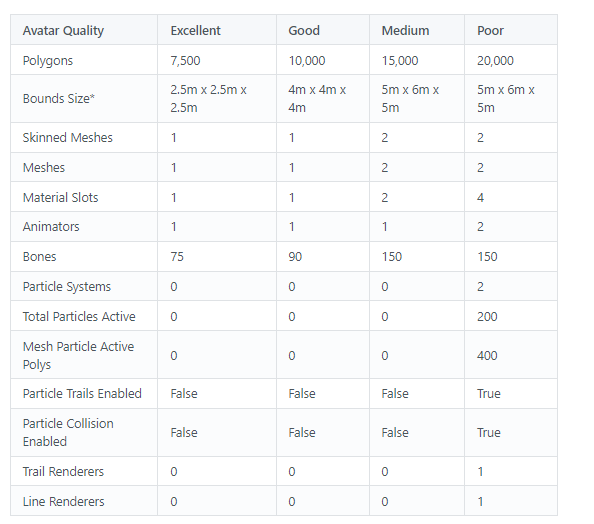
VRChat
The Avatar Performance Ranking System allows you to see how much a user's avatar is affecting performance via analysis of the components on that user's avatar. You can also use it on yourself to see how performant your avatar is. This system is provided to inform users what is likely the most perfor...
subtle rivet
just checked other models i have as favorite. i have some with a huge polycount, so it doesn't seem to matter too much, but i'll try to keep it low anyway. my character has a lot of hidden polygons, and i should get it down pretty far by just removing those
lone hawk
heady stag
kinda the best i can do without turning everything off
take it into blender and join the meshes
subtle rivet
anyone know a quick way to optimize this model? 😅
doing it manually will take a lot of time. it has a lot of hidden geometry as every lego brick is a full on model
 subtle rivet
do the faces, or the tris matter in optimization?
humble canyon
tris
subtle rivet
finally got the model below 20.000 tris
 supple pollen
subtle rivet
anyone know a quick way to optimize this model? 😅
doing it manually will take ...
supple pollen
subtle rivet
anyone know a quick way to optimize this model? 😅
doing it manually will take ...
Hard to tell from looking at the picture on mobile, but that looks like it has a LOT of beveled edges, and the circular parts look like they’re using 32 sides, even for the thin ones. I wouldn’t be surprised if you could get it down to below 5k triangles by using that as a reference and then reblocking over the model, but without making internal faces or adding bevels (and using 16 sides for all the circular parts). Then you could normal bake it against the fancy one and you’d still see all the grooves between pieces, making it still look lego-y
subtle rivet
i got it down to around 20k using the decimate modifier on every block, limiting the angles between faces to 30°
subtle rivet
supple pollen
Shit what was it at before?
before it was like 72k
supple pollen
christ
humble canyon
would you mind showing the wire frame so we could see where there's loupes to dissolve
supple pollen
Or if the model's publically available, just a link to that
humble canyon
but currently having look on the screenshot that appears the cylinders are like 32 sided
slate cradle
supple pollen
Quest guidelines recommend under 5k
Those are old guidelines. New ones are 7500 max for excellent, 10k max for good, 15k medium, 20k max for poor.
And 10K or better to be flagged as a secondary fallback, but that’s not needed for built-in quest versions
supple pollen
Oh! Where’d you read that? Are the developer docs outdated?
sand mantle
most likely
slate cradle
supple pollen
Oh! Where’d you read that? Are the developer docs outdated?
They are up to date from what I see! https://docs.vrchat.com/docs/avatar-performance-ranking-system
VRChat
The Avatar Performance Ranking System allows you to see how much a user's avatar is affecting performance via analysis of the components on that user's avatar. You can also use it on yourself to see how performant your avatar is. This system is provided to inform users what is likely the most perfor...
If your SDK is old from before the new ratings, it will use the old ratings
 mossy grail
Share this to another server lol
 supple pollen
slate cradle
They are up to date from what I see! https://docs.vrchat.com/docs/avatar-perform...
supple pollen
slate cradle
They are up to date from what I see! https://docs.vrchat.com/docs/avatar-perform...
aaaahhhhhh I see that's a different place than where I was looking
VRChat
Creating content for VRChat Quest is a challenge-- you have to create attractive, compelling content all the while keeping the content optimized for a mobile device. These are the same challenges that game developers must deal with while building for mobile. Here, we'll give you some general guidel...
looks like they haven't reflected those changes here
 wooden onyx
i honestly think moving the limit from 10 mb to 15 mb would be very nice and have a minimal effect on performance
i do have a very hard time working on quest models it always kills my mood after making a nice pc avatar
i would like to get better at making quest avatars
real leaf
Have to consider two things there. The 64 GB version of both the Quest 1 and 2, and the limited amount of RAM they both have, particularly with the Quest 1.
With the storage limit, let's say you go to a world and there's about 20 people there that has a Quest compatible avatar that's about 15 MB. Just with that you would use 300 MB of storage, and with VRChat it's not uncommon for people to world hop so this would quickly fill up the available cache.
Now, that may not seem like a lot, but you have to consider the 64 GB is for other apps too. VRChat can't just take up as much as it wants here.
Additionally, it's not uncommon for people to use Crunch Compression for Textures on Quest. People don't tend to understand how this works, here's a explanation. ** And this is just an example**: let's say you have a texture which is about 20 MB in size, and after crunch compression it only takes up about 2 MB.
The problem is that after this texture get's loaded back into RAM / VRAM it then takes up 20 MB again. The 2 MB space is only for downloading it and storing it.
So increasing the limit to 15 MB would cause RAM to fill up faster as well.
wooden onyx
with that in mind my opinion has stayed the ram already fills up very fast but i could be completely wrong. i'm just bad with quest avatars
sand mantle
i think we should be happy that its 10 mb and not the usual 1-2 mb most games give you
wooden onyx
yea vrchat is my favorite quest game
also my textures are under 2 mb my avatar is just to big
sand mantle
how big is the avatar by itself?
wooden onyx
12 mb but i can fix that i was just sharing my opinion
thank you guys for the info tho
sharp zinc
question
I made my model with various objects, to make weightpainting easier and all
however, as you all know, excellent performance quest avatars must only have one object
humble canyon
you can join them before export
sharp zinc
how do I join the meshes together, whilst preserving the weightpaints?
humble canyon
if you combine objects they'll keep all of their weight paints
sharp zinc
i tried using Ctrl+J to combine the objects but it wouldn't let me
what should I be doing instead?
humble canyon
weird it worked for me
sharp zinc
forget it, it worked now
(why it didn't work earlier is a mystery I don't care about enough to find out)
in any case, thanks
ah, also
there's this thing I asked in #avatar-help , but I'll ask here instead
to keep everything with the minimum amount of textures and materials, I put two different skin tones in my texture sheet
I also made two UV maps, one with the skin over to one colour, the other with the second colour
humble canyon
I do not think you can do any UV swapping with the provided shaders
sharp zinc
is there a way to toggle between one UV and the other in Unity? And, if so, is that feature Quest compatible?
sharp zinc
humble canyon
I do not think you can do any UV swapping with the provided shaders
I see...
in that case, is there another way for me to do this?
humble canyon
you might want to just upload 2 different models
sharp zinc
yeah but it's definetly possible to have the skin colour as a toggle
I know because I have used an avatar like that on the quest
humble canyon
I suppose you could toggle blend shapes but that might be a bit heavy doing that with two sets of fully animated faces
sharp zinc
blend shapes? How do I make blend shapes shift colour?
humble canyon
you have two duplicates of the face
sharp zinc
oh, right
humble canyon
but I suppose you could just try a material change animation instead https://www.youtube.com/watch?v=XESsZNcX0NI
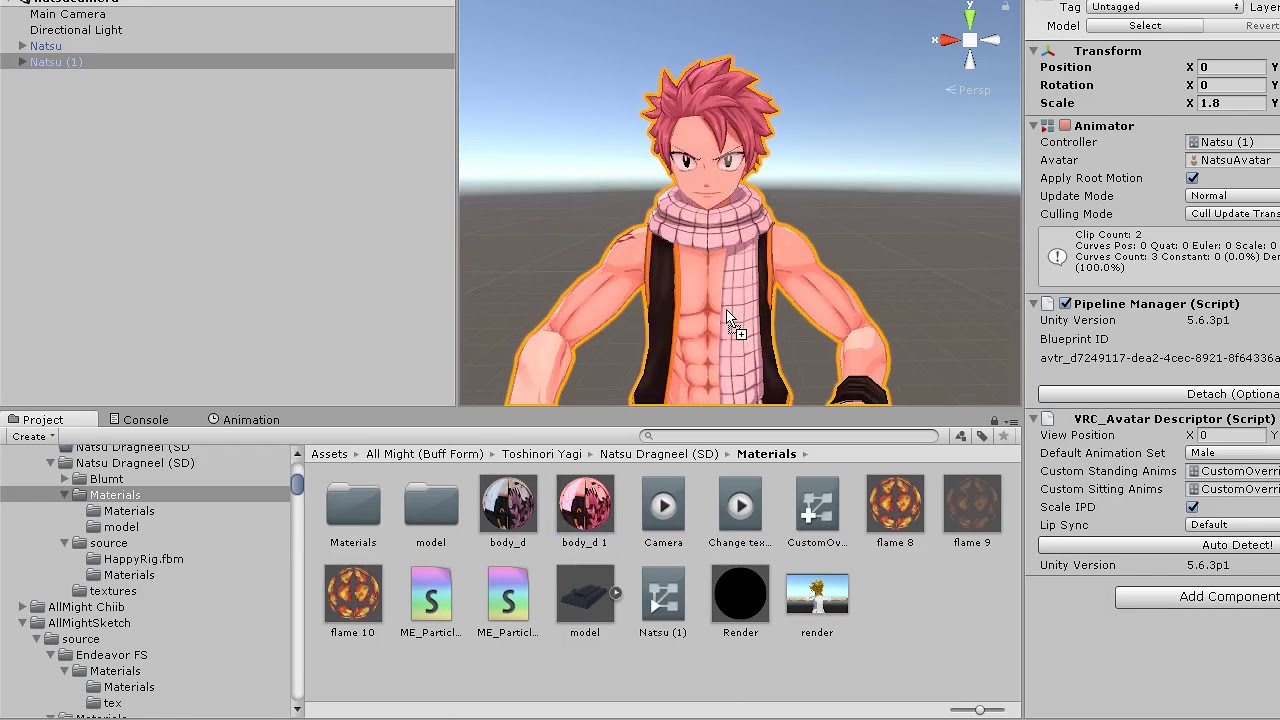
how to change your material through an animation in vrchat
as the blendshape method would be bad for performance
as you're essentially doubling the cost of your face
sharp zinc
I see
but this would need two different materials
I suppose I have no choice, do I?
I can only make bad performance in either possible case
humble canyon
so honestly the two avatars might be the least awful as far as runtime performance
sharp zinc
i suppose so
 whole plank
sharp zinc
is there a way to toggle between one UV and the other in Unity? And, if so, is t...
whole plank
sharp zinc
is there a way to toggle between one UV and the other in Unity? And, if so, is t...
In poiyomi you can select the uv where you select the texture
Poiyomi is pc only tho
slate cradle
It works in worlds, though it’s not the most optimized for mobile
You’ll need to modify
Not recommended regardless
sand mantle
slate cradle
It works in worlds, though it’s not the most optimized for mobile
it does not work period: returns null on android
slate cradle
I found it worked in my world just fine it just was not performant
sand mantle
i would not recommed modifying such a massive shader as well. at this point, making a shader yourself would be easier
was it toon or master or pro?
they should all return null
slate cradle
Free
sand mantle
so toon?
slate cradle
Yes
sand mantle
hmmmm
slate cradle
On avatar SDK they come in as pink
slate cradle
But in my world they remain if they were already locked
No idea if quest actually sees them, 1.) I don’t have a quest 2.) I didn’t use them anyway
sand mantle
plus im pretty sure vrchat worlds have fallback shaders as well. as rero will look like actual meshes in unity, where as in game: completely invisible
sand mantle
slate cradle
No idea if quest actually sees them, 1.) I don’t have a quest 2.) I didn’t use t...
fair
but as far as ik, poi would always return null (which can be used in very stupid ways)
sharp zinc
whole plank
In poiyomi you can select the uv where you select the texture
yeah, I wanted to do it on quest, though
oh well, we'll just have to do with blendshapes
whole plank
sharp zinc
yeah, I wanted to do it on quest, though
I'll be honest I thought I had clicked on the other chat not this one
My b
sharp zinc
no worries, no worries ^^
mint iron
sharp zinc
but this would need two different materials
Material swap animations don't add to the overall material count so you can have color changing without risking performance
sharp zinc
but for the material to swap, shouldn't I have two materials, between which to swap?
mint iron
That 2nd material is only for animating purposes, it's not adding to the main avatar, it's swapping
sharp zinc
I'm not sure I get it
mint iron
Creating a 2nd material in Unity doesn't change the material count of your avatar is what I'm saying
mint iron
Those are the same thing
Either way, a material slot is not added if you create one in Unity for a material swap animation
My most recent avatar allows you to choose between 9 different colors for a mug but the mug performance is still 1 material
whole plank
It's not the same thing. In unity you can have those 9 materials that animations slide into 1 material slot. I feel like we're on the same page on functionality but not on how we define the word
mint iron
If another material is added (not swapped) that would be through Blender
I see what you mean
sharp zinc
ok, I'm reading everything you're saying
I'm a bit confused on the execution, though, but I'm sure I'll eventually figure it out
let me just write here some words to make a marker: skin colour toggle
mint iron
It would work the same as the mug. You'd do a little texture editing (like with photoshop or gimp or something) to change the skin color. That texture with the new skin color would be assigned to the 2nd material to swap during animation
mint iron
A 3D model with bones
sharp zinc
oh, ok
lone hawk
"Optimizing avatars for quest is too hard" they said.

 digital nova
The glitch were you switch to a pc avatar to a quest avatar
And it says perf blocked
sharp zinc
lone hawk
"Optimizing avatars for quest is too hard" they said.
Only the EBoys and EGirls be acting like that because of laziness and how unoptimized their avatars are with their 20 materials to make the avatar look normal because of bad texture work and hundreds of dynamic bones and colliders 
sharp zinc
digital nova
The glitch were you switch to a pc avatar to a quest avatar
The fix to it is to spam show and hide avatar until it works again
 stable blade
sharp zinc
The fix to it is to spam show and hide avatar until it works again
stable blade
sharp zinc
The fix to it is to spam show and hide avatar until it works again
or just rejoin the instance
 craggy hare
digital nova
The glitch were you switch to a pc avatar to a quest avatar
craggy hare
digital nova
The glitch were you switch to a pc avatar to a quest avatar
This is so annoying, whenever you switch from a pc only to a quest/pc it does this, sorry if I'm out of the loop but was there any updates why?
civic gale
Has anyone used VRChat/Mobile/Particles/Additive on a Quest avatar? It works in Unity and on desktop, but shows up as a solid lukewarm yellow when playing in Quest.
I'm trying to get my avatar's blush to render through on top of the cheeks like this...
 humble canyon
you cannot do that as basically no transparency is allowed on Quest avatars
sand mantle
civic gale
best idea i can say is repaint the blush to be the same-ish color as the skin color
so it looks transparent, but its not
civic gale
It's not transparency, it's additive blending. It doesn't make sense why these are included on Quest if they don't behave as they're expected to.
sand mantle
civic gale
It's not transparency, it's additive blending. It doesn't make sense why these a...
its for particles
civic gale
Sooooo...again why are they included if they don't work?
It just doesn't make sense. I know I've seen Particles/Multiplicative work on an avatar in Quest mode. Why not Particles/Additive?
sand mantle
because they are the additive varient
its technically the most dangerous shader you could put on your avatar. if thats what youre getting at
civic gale
🤨
slate cradle
civic gale
It just doesn't make sense. I know I've seen Particles/Multiplicative work on an...
They are for worlds, not avatar. Actually none of the transparent shaders are supposed to be on avatars.
 crystal tiger
Idk if I have sent this in the wrong channel but I asked about it in #avatar-quest and I realized it's about Optimization. So I am asking it here
Hi, I am needing help with uploading an avatar for quest. Is there a tool for unity to optimize the avatar and make the avatar file size less for quest?
humble canyon

GitHub
:smiley_cat: A tool designed to shorten steps needed to import and optimize models into VRChat. Compatible models are: MMD, XNALara, Mixamo, DAZ/Poser, Blender Rigify, Sims 2, Motion Builder, 3DS M...
this blender tool can help you make lower poly quest compatible avatars
crystal tiger
Tried that
@humble canyon
The avatar is still over the size limit for quest which is 10 MB
humble canyon
did you do any texture compression
crystal tiger
Huh?
 west adder
hello I have a problem connecting my vrchat account on my oculus quest 2 an error message tells me that my password or my username is incorrect while on my pc everything works I would like to have help for this problem thank you for advanced
dim bluff
@crystal tiger the Bake page has some details on it, but youlll wanna set your textures to Crunch
 crimson oyster
I have a matchmaking issue with VRChat. basically, I connect my oculus quest 2 to my pc by using virtual desktop. It works and vrchat works, but everytime I join a public server, I always end up in a server with nobody inside. Can Someone explain to me why is this happening?
slate cradle
crimson oyster
I have a matchmaking issue with VRChat. basically, I connect my oculus quest 2 t...
It sounds like you opted into the beta version
Beta testers can only see other beta testers
 sharp ocean
Or they need to update the game because sometimes not updating the game can lead to not seeing other players
 sand mantle
 shell jay
you can go one step further and go to the windows override for textures. and set it to "RGB crunched DXT1" or "DXT5" and thatll compress a lot. for quest, force override -> ASTC 4x4 or 12x12 (12x12 i belive is the most compressed format on 2018)
shell jay
Mhm
sand mantle
in 2019. i think its "DEX" for android but icr if thats the actual name
sharp bolt
do not use DXT compression on quest, it is not compatible on quest hardware
if you want crunch compression use Crunched ETC
sand mantle
for clarification: DXT1/DXT5 is for pc compression
 potent surge
Ya know quest optimization is strange cause everyone has to use less polygons, certain shaders and miss out on alot yet I have an avatar with 800,000 Polys.
Huuuhhh?
heady wing
potent surge
Ya know quest optimization is strange cause everyone has to use less polygons, c...
That means you did something wrong, and will probably crash.
potent surge
Nope it works completely fine
That 15,000 'limit' is bs for the quest platform. Probably summin to do with Quest 1
humble canyon
the current limit is increased from the quest 1
heady wing
potent surge
That 15,000 'limit' is bs for the quest platform. Probably summin to do with Que...
Although triangles aren't that big of an issue, I really feel like you also have 50 materials or something. And Oculus recommends at most 1 millions tris per frame to get 72fps.
And the VRChat recommended limit is 20k.
And file size is also a big issue there.
humble canyon
as there's no way to put SD cards in the quest
heady wing
If it's above 10mb, no one on Quest will see it besides you.
They don't have a choice on that, it's forced.
humble canyon
vrchat has to work on 64GB
heady wing
humble canyon
vrchat has to work on 64GB
Oculus is making 128gb the standard soon, but many do have 64gb already.
humble canyon
yes they probably have like a million or 2 64gb in the wild that are not going to go
dim bluff
ASTC is what quest development docs reccomend anyway. Generally if your smoothness/metallic maps are just one per surface, you can compress as much as you want without reducing quality
whole plank
potent surge
Ya know quest optimization is strange cause everyone has to use less polygons, c...
There is literally no reason for an avatar to be that big. People need to stop putting 50 thousand toggles on an avatar. There is pretty much no time where you need to change outfits more than once where you can't change avatars.
 slate coyote
potent surge
Ya know quest optimization is strange cause everyone has to use less polygons, c...
slate coyote
potent surge
Ya know quest optimization is strange cause everyone has to use less polygons, c...
You need to have no dynamic bones, no shaders, rarely use materials.
It doesn't matter how many polys you use as i have multiple avatars that push 200k+ polys.
That 10k is more of a recommendation more than a limit
humble canyon
vrchat documentation note that anytime they can remove the ability to view very poor avatars at all on Quest so you probably at least want to consider not having a stupid amount of triangles

so pretty soon that might become a hard limit
okay checking the beta SDK for 2019 it appears that's when they're implementing it https://i.gyazo.com/37bdb60cb4d2b2b37ac4b917da4b1dfd.png
 sand mantle
thats not what you want to see lol
humble canyon
personally I'm not surprised
sharp bolt
humble canyon
okay checking the beta SDK for 2019 it appears that's when they're implementing ...
those patch notes are very outdated and havent been updated in years, you're looking at the update that happened in 2019, and not for the Unity 2019 upgrade.
https://docs.vrchat.com/docs/vrchat-201924
and as we know, this behaviour has since been changed to allow quest users to manually show avatars that are very poor
The version numbers references a vrchat update, not the unity version vrchat uses, and the release candidate for the unity 2019 update is 2021.3.2
humble canyon
thanks for the clarification
sand mantle
thank god
 spark mica
any unity plugin that squeezes polygons out of my models?
spark mica
humble canyon
okay checking the beta SDK for 2019 it appears that's when they're implementing ...
holy fuck, half of my quest avas wont render anymore
this is gonna be a blood bath for so many "quest compatible" avatars
humble canyon
okay apparently that was an out-of-date sort of sdk message so you're fine at the moment but probably a good idea to optimize in general
spark mica
Doesnt change the fact that it will come. Phew, dodged a bullet i guess
Thing is most avatar bases i have dont even offer optimized versions for pc. Or have like 15 material slots on the worst ones. If vrc doesnt offer or link a mesh/mat combine tool they shouldnt consider removing the possibility to render those
humble canyon
GitHub
:smiley_cat: A tool designed to shorten steps needed to import and optimize models into VRChat. Compatible models are: MMD, XNALara, Mixamo, DAZ/Poser, Blender Rigify, Sims 2, Motion Builder, 3DS M...
spark mica
Blender 🤷♂️ maybe when the day comes verypoor is dead. And yep ive heard of cats often enough. Thx anyway
 pallid tree
Why would cutout be expensive as a shader type? It would make things a lot better for making quest avatars, it can’t be thaaaaaat bad
It’s just cutout
heady wing
pallid tree
Why would cutout be expensive as a shader type? It would make things a lot bette...
Oh, trust me. It is that bad.
Not if it’s layering once, but it won’t be layering once knowing the nature of avatars on the quest version
heady wing
Every time anything transparent layers, it has to go back over and redraw those pixels, mobile hardware sucks at that for whatever reason.
And if you have a lot of pixels, it slows down a lot
A good example of this is any old-style version of Doom running on the Quest.
Lots of transparency on sprites to make up for a lack of 3D rendering.
It runs at about 30fps, first-hand experience.
pallid tree
Well is there a way to make my stuff cutout without… Making it difficult? Lol
heady wing
pallid tree
Well is there a way to make my stuff cutout without… Making it difficult? Lol
Yes, blender knife tool, adds a few tris but still performs way better.
You literally just cut out the transparent stuff
pallid tree
I could ask someone for that… Thanks for help! :3
heady wing
No problem! Have a nice rest of your day.
pallid tree
You too
 fathom topaz
What doesn't make sense of that the Oculus quest has the capabilities to run a lot of these "very poor" avatars fairly well. I might be missing something but at least as a player i haven't seen any issues running a 170k polygon avatar with many of the extra shit it can do.
I think VRC devs should create a program designed for building avatars and such. That way it can be easily done, shows how the avatar will turn out, and can be used to upload directly to VRC.
sharp zinc
yeah quest 1 would struggle with avatars that big but I would say very poor should be atleast good on pc
Ive seen old mobile games have higher polygon counts running at framerates better than vrchat with all them optimised shitty avatars
yes I have tested them games on old tech to prove
humble canyon
sharp zinc
Ive seen old mobile games have higher polygon counts running at framerates bette...
are you sure this actually higher polygon counts and not just normal Maps
sharp zinc
I rip models from mobile games
Ever wonder why My avatars look good after optimisation?
humble canyon
also question how many characters on the screen are those mobile games pushing
like grabbing a character from a one-on-one the fighting game isn't a fair comparison
sharp zinc
Unreal boxing 1 and 2 are part of my list
I remember 1 was rocky
Example of the game

Yes this is in game graphics from a video from 2015
humble canyon
probably most of those background people are pretty low poly and or cardboard cutouts so that's probably closer to the fighting game example
 sinful eagle
Its bad I'm used to about 15 fps on the quest(2).
Literally anytime in VRC when I get like 25~ fps I just move my arms around surprised by how smooth it is.
sharp zinc
I cant remember, is there a hard cap on material slots on quest?
humble canyon
 sharp zinc
That picture doesn't really tell me if there is a hard cap or not
nvm ill just go to the docs
humble canyon
well probably no one would be seeing you if you're very poor
humble canyon
especially since on Quest you cannot use custom shaders so there's no reason not to Atlas everything
sharp zinc
yeah basically no excuses
humble canyon
especially since these days if you're lazy you can just use vrchat cats baking and have it taken care of in a few steps
sharp zinc
I just dont like using the cats atlas thingy because it tends to squash some textures real small, way smaller than they originally were causing loss of detail
and this is while there is still like so much free space on the atlas
humble canyon
I was more thinking the cats baking than the atlas tool
spark mica
sharp zinc
That picture doesn't really tell me if there is a hard cap or not
There isnt
humble canyon
but everyone would probably have a miserable time if you showed up with a very poor Avatar with 64 materials
 drowsy crow
Are Quest shaders not supposed to cast shadows? I'm making a world rn and when I try to optimize it for Quest the shadows just disappear
sharp zinc
humble canyon
but everyone would probably have a miserable time if you showed up with a very p...
looks like someone hasnt played quest
sharp zinc
drowsy crow
Are Quest shaders not supposed to cast shadows? I'm making a world rn and when I...
not every shader has to be quest ones
sharp zinc
on only avatars
drowsy crow
This is what it looks like rn. The man is just a size reference
 drowsy crow
It looks much nicer now
 sharp zinc
put the real time to about medium
drowsy crow
Does Quest support fog? I want to keep this
 sharp zinc
good
drowsy crow
 spark mica
drowsy crow
Are Quest shaders not supposed to cast shadows? I'm making a world rn and when I...
spark mica
drowsy crow
Are Quest shaders not supposed to cast shadows? I'm making a world rn and when I...
They dont on desktop
slate cradle
sharp zinc
I cant remember, is there a hard cap on material slots on quest?
I don’t believe there are any hard caps except things that are not allowed at all (non-whitelisted components), otherwise being very poor just means only visible to yourself. Going over 10mb also means you can’t even see yourself
The SDK tries to block stuff over 10mb, but it won’t always catch it. If it does get in, it still won’t load
sinful eagle
As someone who has only ever used standalone quest, most quest avatars are very poor quality, everywhere I've been, you join, then allow avatars. As long as it drops less than 6 frames existing most quest users are okay with it. Most of the people I play with seem to have an average of 60k polygons, 5 materials,
and 3-6 meshes and skinned meshes.
also usually about 300 bones.
On average, in quest compatible worlds, mind you, its more rare to see a 'medium' or 'good' avatar than it is to see a person with fbt.
I would love to see some optimized avatars, but the fact is, most aren't.
So don't kill yourself trying to get 'good' performance.
humble canyon
that sounds very frustrating especially since like the cats blender tool that pretty much everybody has installed has a make 'good' Quest Avatar button
sinful eagle
It sucks, but 98% of the people who use those avatars don't know how horrific their character is, and/or they have never had a unity account.
And since they get most, if not all of their avatars free from worlds or others, they can't ask the creator to try to optimize it.
humble canyon
and also I suppose if you're using Quest Standalone you're less likely to have a PC to even run Unity
sinful eagle
I don't have a computer, and nobody with just a quest does. if anything at all they might* have their parents laptop if given permission.
humble canyon
yapping about the only tool for like no pc Quest Avatar generation doesn't do anime style
sinful eagle
yeah.
humble canyon
and unfortunately that's not just something someone can write a Unity editor extension to fix
sinful eagle
Nope, and part of it is that no quest user know that their 770k polygon, 32 material avatar is bad for performance.
It mostly comes down to people not giving a fuck.
That be the creators or the wearers.
humble canyon
then again not surprising considering how many folks are still running around in Mmds
sinful eagle
I have been crashed so many time on accident. just allowing peoples avatars.
humble canyon
I'd suggest checking Avatar stats before turning on avatars
sinful eagle
I wish they would add a hard cap on the models. There is NO FUCKING WAY you need a hundred and thirty-two thousand polygons for any reason.
I already do check stats before allowing.
Although i swear the stat counter lies. Sometimes it says decently optimized and gets me to slideshow mode.
And I have a friend with a 2.6 million polygon avatar that drops no frames.
humble canyon
curious if it's only one or two materials compared to 40 material 70k
sinful eagle
Im not sure whick stat lags exactly, but from what I've seen, skinned and normal meshes, bobes, and materials are big contributors to lag.
bones*
sinful eagle
I have no idea the difference between a c and a g, but that sounds about right.
humble canyon
not that it would be relevant on Quest but on PC it's easier to fix GPU bottleneck than CPU from a user standpoint
as you can just like lower the render resolution
but it's harder to tell it to say have less materials because that's entirely on the creators
sinful eagle
In short: you get fps or avatars, not both.
humble canyon
and CPU bottleneck is the reason there are no Dynamic Bones on Quest
it's possible to make nice avatars that don't take the framerate but that would require you know to actually how to make a model not just glue random MMD Parts together
sinful eagle
dynamic bones are sick, and if they were allowed on quest I think it would handle it. the problem is that people would put six million and lag the shit out of it because laziness or inexperience.
humble canyon

■■オキュラスクエストを想定した2A-7の軽量化版です■■ ――――――――――――――――――――――――――― 3Dのキャラ素材としてご使用ください。 ワールドで使ったり、シェーダーで使ったりして、それを再配布しても問題ありません。 こちらは クリエイティブ・コモンズ・ライセンス の 「CC BY 4.0」です。 (簡単に言うと原作者のクレジット記載さえあれば、何をしてもOK) ワールド作成の賑やかし、ペデスタル、メッシュの改造して再配布などVR創作活動にご利用しても問題ありません。 「CC BY 4.0」の詳細はこちらのサイト参照
like here's an example of an Anime Avatar actually optimized for Quest
sinful eagle
yeah, it's even a default fallback option.
humble canyon
the new Dynamic bones replacement vrchat developing they're looking into it and run on the quest because it is like 10 times faster than Dynamic bones because it can do multiple parallel processes

So one day in the avatar-optimization channel Jamie Vatarga asked me this question:
"Hey Tupper, is there a detailed explanation we can link to people when the topic of dynamic bones and colliders come up? Because since the performance ranking system, we see a lot of people in chat say things like 'they have virtually no effect on performance'....
a video explaining why the current Dynamic bones are bad for framerate
sinful eagle
I feel like in moderation dynamic bones are good. I.E. those dangly straps on the end of hoodie sleeves I see a lot, or something like a skirt.
humble canyon
skirts are places where they can easily go very bad
humble canyon
especially since apparently you can achieve similar results with rotational constraints that are less heavy
sinful eagle
ice seen that a lot in flat screen games.
humble canyon
like even in the video announcing the physic the dynamic bones replacement they're like don't use it for skirts where you put a bone every couple of inches
humble canyon
 humble canyon
hopefully they're compatible with Quest physics bones but even if they're not all be happy as a lot of my friends have their avatars in the very poor stat from Dynamic bone related stuff so their avatars would probably perform a lot nicer with physics bones
as they're mostly furry avatars so it's like one or two materials
sinful eagle
Honestly, I'm not the most furry-friendly person, but every furry I've seen is Al least halfway optimized, so I e grown to enjoy them.
Don't take this as hate, more of a dislike. I don't go out of my way to be an asshole based on appearence.
humble canyon
that's because all the furry models are made from scratch for vrchat not 10 year old models intended for a application that is only rendering like two avatars at once for music videos where it doesn't have to be real time
sinful eagle
yes. I like unity in where you can just put any model in and work from there, but when people blatenly copy and paste, line up the hands to be moved, and hit 'go' it's so annoying.
completely unrelated, my dog just ate a toad.
humble canyon
like vroid studio which also generates anime avatars was actually designed with vrchat in mind so you don't have outrageous triangle counts and it has a built-in material combiner
and poor toad help your dog ok
sinful eagle
she does things like that all the time, she'll spit it back in in a few seconds.
she's a rescue, just go with it.
humble canyon
yes
 marble vale
Did they remove shadows all together on quest?
 raw ore
humble canyon
https://i.redd.it/xts8wnkx2lr41.png
raw ore
humble canyon
https://i.redd.it/xts8wnkx2lr41.png
20k poly 1 shader not compatible (can't lower because it look like nintendo64 if I do)
marble vale
They did they removed shadows and they removed real time reflection probes
 misty path
when will quest get dynamic bones
humble canyon
potentially when they release Avatar Dynamics as they mentioned they were looking into it when they were talking about their new dynamic bones replacements called physics bone but dynamic bones the current Unity add-on are unlikely to ever get on the quest
as they're just too slow for the quest
misty path
ok
heady wing
humble canyon
as they're just too slow for the quest
and pc sometimes
 silk coral
you can go above that but itll be hidden by default
dont know what the hard cap is these days
humble canyon
and the content rating system page has a note that they might hard-cap it whenever they feel like at 20k
heady wing
silk coral
but is no longer
But they might reintroduce it at any moment.
silk coral
true
not sure why ya didn't ping me, prolly cuz of the etiquette, which is appreciated, but next time please turn the pings on so I can see :P
sharp zinc
I think they should have hard caps that are like 5-10x the value of the poor standard
sharp bolt
got on my quest earlier which i rarely do and checked out a random avatar world i saw
was getting 72 fps as it was just a box. picked an avatar and fps dropped to 15 fps
removing the hard caps was a mistake

sand mantle
more customizable safety settings could hopefully fix that. specifically honda style safety settings but not hard
tacit elk
How many draw calls is good? I got 8-9 (depending on a toggle) on Quest
sharp zinc
tacit elk
How many draw calls is good? I got 8-9 (depending on a toggle) on Quest
Not an expert by any means but that seems quite a good amount
Especially when you compare it to all those verypoor avatars quest people tend to use
I dont want to even know how many drawcalls
tacit elk
Thanks lmao. I'm happy to have a "poor" avatar... Anything that isn't verypoor is good imo
sharp zinc
Nah thank you for making quality content
tacit elk
:3
 sour dune
What kind of PC should I get to run the quest 2 optimally?
Mine just stutters and lags a lot and I want to fix it, I run off a GTX 1660 ti and an AMD Ryzen 5 2600 cpu
I was considering just ordering another headset or either just upgrading my PC specs
slate cradle
marble vale
Did they remove shadows all together on quest?
No. Shadows are intensive but can be used if the world is otherwise very optimized
I would not recommend using them unless you actually have a quest and can verify their performance
You can also lower their render resolution
sharp zinc
sour dune
Mine just stutters and lags a lot and I want to fix it, I run off a GTX 1660 ti ...
The next upgrade for the gpu id get would be an upper 20 series gpu or lower 30 series
not very versed with cpus but try to get one with at least 8 cores next
sand mantle
i want to remind yall that vrchat has the highiest quest limits compared to any other social game
iirc. it was a facebook agreement that made vrc go green
humble canyon
out of curiosity did you check vrchat World tool kit if any of the textures are taking up too much space or you just have so many of them
and I guess second question do you have lots of uniquely textured furniture on your map
humble canyon
have you tried making the pictures half-sized on Quest
dim bluff
Are they crunched?
spark mica
does lightmapped work on quest or no
 real leaf
for worlds it does, as that's a world shader
real leaf
Your model likely has vertex colors then
spark mica
i dont even know what that means but thx

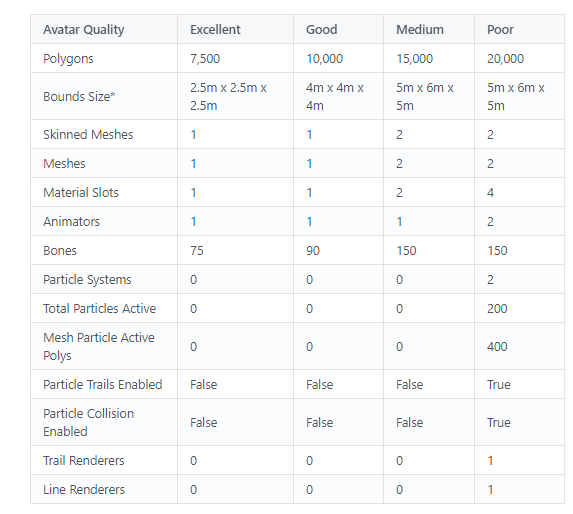
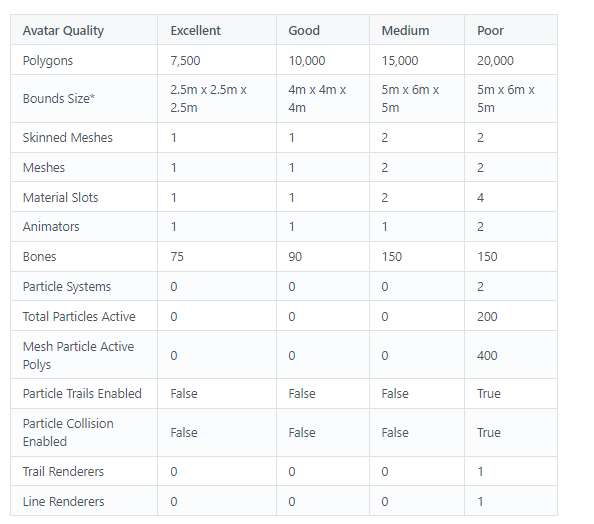

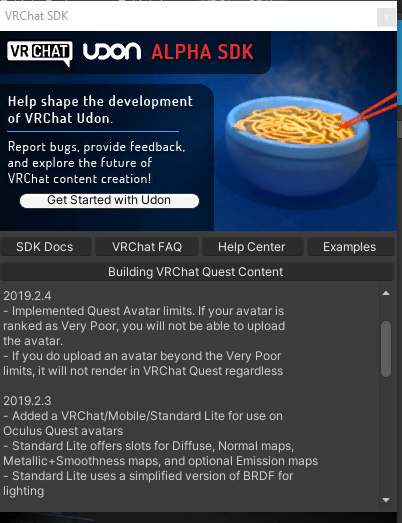
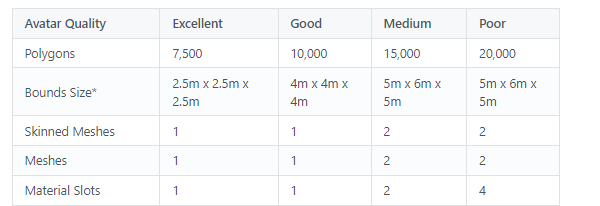
 spark mica
ok ill try to, thx
sharp zinc
When are vertex colors used?
Seems like they are just another nuciance to people but they have to have some practical purpose right
spark mica
Theyre pretty annoying when you use quest shaders
Got them on at least two meshes so far
I just tweaked Standardlite so theyre less green now
spark mica
Since i have no clue how to edit those in blender 🤷♂️
 languid gust
You use them for specific stylistic choices, and can be used in shader for other reasons, just commonly used for color.
 nimble saffron
I've got this for an avatar. It's not quest compatible. I heard that pressing the 'switch build target to Android' button might be necessary, but an error comes up when I try to do that. What's the problem here, if anyone knows off the bat?
 humble canyon
there aren't any problems on display there as that yellow triangle is a just so you know message not stop you must fix that kind of message which are the red icons
spark mica
nimble saffron
I've got this for an avatar. It's not quest compatible. I heard that pressing th...
Whats the error 👀
 exotic shale
nimble saffron
I've got this for an avatar. It's not quest compatible. I heard that pressing th...
exotic shale
nimble saffron
I've got this for an avatar. It's not quest compatible. I heard that pressing th...
you can message or call me for it, ill try my best to help. also watch this video on how to make your avatar quest friendly https://www.youtube.com/watch?v=lGaQxnNhJn0&t=273s

In this VRChat tutorial, I'll show you how to create a version of your PC avatar into a quest compatible avatar. We talk a bit about materials, matcaps, and limitations of quest avatars.
Thank you for watching!
Matcaps and Poiyomi Toon downloads: https://www.ask-amber.com/downloads
Follow me, and support me on Patreon for exclusive assets! h...
humble canyon
that tutorial does not show any Quest optimization just how to get it to upload on the quest as it uploaded with 70,000 triangles and 15 materials
humble canyon
fair point
but still would've preferred a tutorial that actually mentioned how to optimize for the quest like there's no excuse to not like at least make a texture Atlas so you're not running around with like the entire budget for materials for avatars
heady wing
heady wing
Quest compatible != Quest friendly
This statement was more about how Gemua said that the video was how to make a model "quest-friendly", which is not true, while the video said "quest-compatible", which is true. But a tutorial actually telling you how to optimise would be better, yeah.
nimble saffron
I'm pretty sure the problem is that I didn't have the Android Studio SDK for Unity, and couldn't change the target platform.
sharp zinc
nimble saffron
I'm pretty sure the problem is that I didn't have the Android Studio SDK for Uni...
Yeah it just errors that it cant switch when you didn't install the android target module
 dense spear
Im a little confused. I try uploading a quest avatar, but its 12 MB's. So I delete a mesh on the avatar and then thy uploading again but it still says that the avatar is 12 MB's. This mesh had 1 material with 1 texture so my assumption was that removing this mesh would reduce the overall size of the avi
sharp zinc
dense spear
Im a little confused. I try uploading a quest avatar, but its 12 MB's. So I dele...
The majority of the filesize with avatars comes from the TEXTURES
Deleting meshs usually dont do much to filesize at all
That texture needs to be crunch compressed if not already and if its still not below the filesize then you might need to lower the resolution a bit
clicking the texture and looking in the inspector tab on the right will show options to do the actions I was talking about
dense spear
sharp zinc
clicking the texture and looking in the inspector tab on the right will show opt...
I have every texture on crunch and that apparently reduced the size of the avatar by 1 MB. Is there something else here?
sharp zinc
Has to be
If you import WorldToolKit into ur project you can see what exactly is taking up all your filesize
GitHub
Unity Editor extension for making VRChat worlds. Contribute to oneVR/VRWorldToolkit development by creating an account on GitHub.
 fiery garnet
I'm trying to get my avatar to quest as a fallback but i'm having some issues
it shows in blender that it has 20k tris and on sdk at 120k
 heady wing
fiery garnet
I'm trying to get my avatar to quest as a fallback but i'm having some issues
i...
heady wing
fiery garnet
I'm trying to get my avatar to quest as a fallback but i'm having some issues
i...
20k tris is still too much for a fallback avatar, fallback avatars need to be good at least.
You should probably check for other meshes, such as different clothes, under the avatar though.
 magic sable
Who wants to share games I need help I have no games on my oculus at all my brother rebooted it
 charred latch
magic sable
Who wants to share games I need help I have no games on my oculus at all my brot...
charred latch
magic sable
Who wants to share games I need help I have no games on my oculus at all my brot...
wrong channel
magic sable
charred latch
wrong channel
Yo hop off my cock
charred latch
magic sable
Yo hop off my cock
#general-media lol kys
 timid spindle
okay so im trying to get my avatar to quest but this shows up

if i auto fix the mesh vanishes
first time this has happened and i have made quest avatars in the past aswell
heady wing
timid spindle
okay so im trying to get my avatar to quest but this shows up
Is this before or after beginning the upload process (pressing the button to get to the upload UI)?
timid spindle
I uploaded the model to pc and now trying to upload it to quest
heady wing
timid spindle
I uploaded the model to pc and now trying to upload it to quest
Does it show up before, or after pressing the "Build and Upload" button.
timid spindle
before
heady wing
Ok, try updating the SDK, if it's still there, try uploading anyway.
If it doesn't work, make a new project.
heady wing
No problem!
sharp zinc
timid spindle
alright that fixed it
next time that happens just close and reopen the project, seems like it was a malformed avatar error and simply doing that makes it go away
 hard snow
I sometimes get that error when changing build target and deleting the SDK folder and importing it again also fixes it
 wintry plover
hello?
wintry plover
just trying to optimize an avatar in general
humble canyon
what's the current state of the avatar
but if you're wanting something relatively easy to optimize at this tool is quite handy https://github.com/GiveMeAllYourCats/cats-blender-plugin/wiki/Bake
GitHub
:smiley_cat: A tool designed to shorten steps needed to import and optimize models into VRChat. Compatible models are: MMD, XNALara, Mixamo, DAZ/Poser, Blender Rigify, Sims 2, Motion Builder, 3DS M...
wintry plover
its in a state where i reduced polygons but idk what to do next..
humble canyon
probably that would be combining the textures together so it's one big texture
wintry plover
howww.. do i do that>_>
humble canyon

Have any questions ask away
In this video I will be going over how to install addons like cats/material combiner then going over how to make a atlas for your avatar.
blender 2.91.2
LINKS:
blender https://www.blender.org/download/
cats-blender-plugin https://github.com/GiveMeAllYourCats/cats-blender-plugin
material-combiner-addon http...
 warm jackal
I've gotten everything on my avatar optimized for quest except for the shaders. When I switch to the vrchat mobile shaders, my textures get wrecked and I cant find a way to fix it without switching the shaders back. Does anyone have any ideas?
heady wing
warm jackal
I've gotten everything on my avatar optimized for quest except for the shaders. ...
Since the quest shaders don't support transparency, you'll have to take it to blender and manually use the knife tool in edit mode to cut around the transparent parts
warm jackal
Ok, thank you!
 tawny apex
Anyone know why I can't see most people's avatars? I thought it had to do with the safety settings, but after messing around with those, I still can't see them
warm jackal
tawny apex
Anyone know why I can't see most people's avatars? I thought it had to do with t...
if you're on quest, avatars that fall under higher preformance ranks you have to be mannually revealed by clicking on them with your menu open and selecting "Show Avatar"