#quest-optimization
1 messages · Page 6 of 1
 gusty flame
 sharp lodge
Make sure to Use a Ethernet cable on your pc, plug a usb antenna in your motherboard. If you already have all this and your experience in vr is still bad well, just use link.
 sterile wigeon
sharp lodge
Make sure to Use a Ethernet cable on your pc, plug a usb antenna in your motherb...
sterile wigeon
sharp lodge
Make sure to Use a Ethernet cable on your pc, plug a usb antenna in your motherb...
Coxwifi gave a modem I use that emits wifi but its dogshit could that be the culprit
My pc is connected to it by ethernet but the modem also emits wifi
sharp lodge
sterile wigeon
Coxwifi gave a modem I use that emits wifi but its dogshit could that be the cul...
There you have your issue
Wait hold on let me read again
sterile wigeon
Computer is connected via ethernet to my base modem i have n router
sharp lodge
Mhmm
sterile wigeon
Base modem also works as a dog shit wifi
sharp lodge
If is a bad WiFi then that’s the problem
 young citrus
 honest fern
Join meshes in blender?
 long venture
atlas your textures too so you can bring down your materials used if you're using more then one across all those seperated meshes
young citrus
Yeah but how?
This isnt something I've had to deal with before.
I dont know how to do that 
long venture
both would be done in blender, joining meshes is as simple as selecting the two meshes and hitting CTRL+J, atlasing however doesnt have a simple built in trick to my knowledge though theres addon's that make it quicker like https://github.com/Grim-es/material-combiner-addon
GitHub
Blender addon for material combining, uv bounds fixing - Grim-es/material-combiner-addon
 open plinth
young citrus
open plinth
young citrus
It shouldn't stop your upload, if that helps? Lol
young citrus
yeah I got it set lol
I had my physbones all good and
now
my tail keeps dissapearing
I'm gonna keep tweaking the avatar tomorrow
 compact olive
young citrus
Yeah but how?
compact olive
young citrus
Yeah but how?
In Blender, SHIFT-Clicking object will allow you to select multiple objects.
after doing that, ensure that the last object you clicked on has a yellow outline and press CTRL-J to join. 🙂
 ashen valve
does anyone know why the current sdk is doing this
 gusty flame
ashen valve
does anyone know why the current sdk is doing this
gusty flame
ashen valve
does anyone know why the current sdk is doing this
that's normal - you're on the very edge of the 10MB border and it's rounding funny
ashen valve
i mean not rly, ive updated this exact same project for quest so many times without issue
ive made like no changes
if anything the number should go DOWN because i made the textures smaller
gusty flame
well this time you're just past the limt
ashen valve
this isnt rly helping me
gusty flame
the answer either way is to reduce the size of your avatar
ashen valve
 honest fern
ashen valve
does anyone know why the current sdk is doing this
honest fern
ashen valve
does anyone know why the current sdk is doing this
Stop trying to aim for the bare minimum
You shouldnt even be getting close to 10mb
ashen valve
honest fern
Stop trying to aim for the bare minimum
damn dude i didnt say anything to warrant an attitude
chill brah
honest fern
Guess telling you what you shouldnt do is apparently an attitude
gusty flame
makes popcorn
honest fern
You got told how to fix it and apparent thats an attitude lmao
You need to actually go below 10mb not try to get specifically 10mb
ashen valve
ok dude
honest fern
gusty flame
I bet if you hit 10.0000000 it'd be fine 🙂
Anything thats above 10 even if its a singular bit hits that issue
gusty flame
yeah - I'm curious what the actual threshold is - is it <= 10 or < 10?
honest fern
gusty flame
yeah - I'm curious what the actual threshold is - is it <= 10 or < 10?
It needs to be exactly 10
gusty flame
doesn't really matter though, I'm not at this edge.
honest fern
Like exactly
Which it why you should aim for under 10 not 10
Although for a war hammer fan its not surprising they take anything that goes against them even if its just simply giving advice its now suddenly as if its a threat to their entire existence
compact olive
honest fern
Guess telling you what you shouldnt do is apparently an attitude
I saw a cow once.
 pulsar oasis
I fear that when I get a gaming laptop and get unity I’ll have these issues, problems too, but there’s ppl here for a reason too tell you yes or no and what too do and what not too do and how to fix stuff and there’s also always tuts (tutorials) but sometimes ppl aren’t visual learners (me) so explaining is better and smart ppl are better at it, I don’t know why I’m yapping about this, i just fear about it cause i enjoy having my own avatar and such Lolssss 
 olive grail
pulsar oasis
I fear that when I get a gaming laptop and get unity I’ll have these issues, pro...
olive grail
pulsar oasis
I fear that when I get a gaming laptop and get unity I’ll have these issues, pro...
I personally recommend a PC for unity, mainly because it runs a lot smoother.
gusty flame
I often run Unity on a gaming laptop, it works just fine.
 echo shore
gusty flame
echo shore
gusty flame
same. Running both and also a browser I tend to run out of RAM at only 32, but that's no surprise.
I'm sitting on the couch, sipping coffee, with Unity open on the laptop right now 🙂
gusty flame
@last remnant there are lots of factors here, but one common one is that blendshapes take up lots of space, so only have the ones you actually need.
 last remnant
can you put that in goo goo ga ga terms for me? I'm so sorry 😭
This is my first avatar and I'm having alot of trouble please be patient with me, so sorry
gusty flame
again, there's LOTS of discussion here and tutorials, I can't hold your hand on this, I can just nudge you in the right direction.
last remnant
bruh
this is me coming here as a last resort, I've spent 3 days trying to teach myself ts with no help and just what I've seen online, so If you could hold my hand a little bit that would be great
 dawn haven

pulsar oasis
 tacit grove


pulsar oasis

 subtle mason
hello, Can someone help me with my model? I made it in Vroid and imported it into VR, but when I try to publish it, it tells me to delete the blueprint, but when I try to delete it, there's nothing there.
 gusty flame
That error is often a side-effect, and the root cause error is above. Paste the first 2-3 error summaries here.
subtle mason
gusty flame
That error is often a side-effect, and the root cause error is above. Paste the...
that?
 gusty flame
those are the first ones? all the way at the top of the console?
subtle mason
gusty flame
those are the *first* ones? all the way at the top of the console?
Sorry, I don't understand, this is my first time dealing with this.
I'm completely lost.
gusty flame
you understand the words "first" and "top", right?
I'm asking for the first errors in the console window, which are at the top.
usually the root-cause error is one of the first few.
subtle mason
 gusty flame
I'm sorry, I didn't mention : errors are the red ones
subtle mason
So these two appear as errors.

 gusty flame
unfortunately, neither of those says anything useful
 pulsar shale
So my question is; are textured added to the avatar download size even if completely unused?
Because I have every single texture down to a max size of 32 and its STILL not uploading.
honest fern
pulsar shale
So my question is; are textured added to the avatar download size even if comple...
if its actually on the material used on the avatar
pulsar shale
Guess all I can do is atlus the textures.
 void saffron
I'm attempting to get Quest 2 to work with Vive 1.0 Trackers. Is anyone in this chat have it working and running at all?
 green oriole
pulsar shale
Guess all I can do is atlus the textures.
green oriole
pulsar shale
Guess all I can do is atlus the textures.
Try this first https://github.com/Thryrallo/VRC-Avatar-Performance-Tools
You might have some materials referenced by animations or a huge mesh file.
GitHub
Contribute to Thryrallo/VRC-Avatar-Performance-Tools development by creating an account on GitHub.
 open turret
Hi! so im stuck trying to upload an avatar for quest, and i've already stripped it to the bare bone and lowered textures to maniacal amounts. however, i cannot for the life of me, get below 24 Mb let alone 10
green oriole
open turret
Hi! so im stuck trying to upload an avatar for quest, and i've already stripped ...
Use the project I linked above.
If it doesn't help then look for any larger animation files, dances especially take up a ton.
Also, just checking but you have tried to upload after making those changes right, because it doesn't update otherwise.
green oriole
open turret
is there instructions?
It adds a tab at the top of Unity, should just be called Thry.
Everything else should be pretty obvious.
open turret
i use the evaulator??
open turret
So I see this, but after deleting a huge chunk of my Blendshapes, it never changes-
 green oriole
open turret
So I see this, but after deleting a huge chunk of my Blendshapes, it never chang...
green oriole
open turret
So I see this, but after deleting a huge chunk of my Blendshapes, it never chang...
How did you delete them?
Doesn't look like you have enough to really matter though
That VRAM bit is more notable
Click show details on it
open turret
green oriole
How did you delete them?
Went into blender and basically selected them and pressed the minus sign which makes the disappear
open turret
green oriole
Click show details on it
Just left the house, but I’ll do it when I come home. Also, if you’d like to DM about this, that’d be great!
green oriole
open turret
Went into blender and basically selected them and pressed the minus sign which m...
Could have just used VRCFury blendshape optimizer, but of course it is a non-destructive thing so you would only notice it has done something in play mode.
green oriole
open turret
Just left the house, but I’ll do it when I come home. Also, if you’d like to DM ...
DMs are inefficient, talking in a public chat where other people who might know more about something can chime in is better.
open turret
green oriole
Could have just used VRCFury blendshape optimizer, but of course it is a non-des...
I tried that. Couldn’t get past upload though because it would tell me it’s too big
green oriole
open turret
I tried that. Couldn’t get past upload though because it would tell me it’s too ...
Then removing unused blendshapes could only help so much.
open turret
green oriole
Then removing unused blendshapes could only help so much.
Ok. So the VRAM could be the next culprit?
green oriole
If you want an even deeper look on things then the Worldtoolkit addon, that is by default included in VCC, works on avatars too and will tell you everything that is included in the package after you have attempted uploading once (it only updates on trying to upload.)
It is possible you have some animation for swapping materials or just a long animation somewhere that is taking up a lot of space.
green oriole
open turret
Ok. So the VRAM could be the next culprit?
Sort of, VRAM is just the tab to go to in Thry's tool.
open turret
green oriole
If you want an even deeper look on things then the Worldtoolkit addon, that is b...
I did have a dance feature that had like 80 dances, but I got rid of that. Atleast I think I did. Does this picture help?
 green oriole
open turret
I did have a dance feature that had like 80 dances, but I got rid of that. Atlea...
green oriole
open turret
I did have a dance feature that had like 80 dances, but I got rid of that. Atlea...
Yeah, that it is the mesh being the problem.
Generally huge mesh size is because of blendshapes, but if blendshape optimizer (which is better than just removing blendshapes since it also removes/bakes in blendshapes that you have edited and aren't being animated by something).
In this case I am not sure exactly why it would be that large
Unless you have like several hundred thousands of triangles then best guess is that it could be included animations in the FBX itself, think you can just exclude them from being imported by selecting it in the asset window and in the inspector disabling importing of animations.
open turret
Oki. I’ll try that. If that doesn’t work, do you know any methods of lowering the size of the fbx itself?
green oriole
Removing extra UVMaps, color attributes (attributes in general).
Donno, needing to remove that much from a base fbx has always been fixed by blendshape optimizing in my experience.
open turret
Alright. Thanks for letting me know! I’ll check the animations and tris!
open turret
green oriole
Yeah, that it is the mesh being the problem.
Generally huge mesh size is because...
Hi! So i finally got to check again and after disabling animations in the import, i had a little, but not enough of a change in file size, so then i looked at the VRAM tab, and see this. How can i lower the file size of certain meshes?
 gusty flame
excessive amount of blendshapes is usually the first thing to look at
green oriole
open turret
Hi! So i finally got to check again and after disabling animations in the import...
I have already said all the ways I know of that a mesh could be large, if doing that won't fix it then I have no idea.
open turret
green oriole
I have already said all the ways I know of that a mesh could be large, if doing ...
Alright. I've got it in...but i need like 2 More megabytes to kill offff!
 ruby horizon
dose anyone have any like really esay ways to optimize avis like a mess compresser, lowring texters ect
honest fern
This is not a commission server
Go to vrctraders
 jovial fox
Ok
jovial fox
honest fern
This is not a commission server
Go to vrctraders
Who is
 stark dome
?tag scam
 tiny fiberBOT
Hey ho 👋 I see you're looking for commissions.
You will probably receive DM's or friend requests from scammers now (or later) that will try to offer you their services. 😖
🚫 Absolutely DO NOT engage with those, regardless of how competent they might seem or their excuse to why they contact you.
This is unsafe practice used by scammers, and also breaks this Discord's rules. 👮
If you seek a creator, check out VRCTraders and follow their protocols strictly 🥺
(You will get DM from bot to verify your account upon join.)
🌠 It's extremely important to always DEEPLY investigate the account and social media of the person you plan to commission.
Is their social media linked in Discord? Is it legitimate? Are the references stolen? (Try to reverse image search posts to check.) 👀
The quality of fake profiles out there can be crazy good, be aware of that and NEVER engage with DM or friend requests that originate from the artist.
When in the slightest doubt, do not commission them and contact the moderators of the involved communities. 😱
stark dome
jovial fox
Who is
Check link on middle
 shut wagon
Was wondering if I could get some help. I was just unable to load into my homeworld, it said that I had too low of memory. Could this possibly be a hardware problem (not enough RAM) or world loading problems due to it being too demanding for Quest? It is a very detailed world for Quest standalone. Any feedback would be greatly appreciated.
 fringe locust
shut wagon
Was wondering if I could get some help. I was just unable to load into my homewo...
fringe locust
shut wagon
Was wondering if I could get some help. I was just unable to load into my homewo...
Does it lag when you come in?
They might be doing an image downloader to squeeze textures in there
Then u run out of ram cause those textures filled it all up, furality somer had the same issue
shut wagon
fringe locust
Does it lag when you come in?
I never got the chance to get in. It gave me the all white w black text screen (same screen when servers are down) and it ended up loading me into the default vrchat world instead.
Idk. My Vrc is running fine thou thankfully
fringe locust
shut wagon
I never got the chance to get in. It gave me the all white w black text screen (...
Might just be that the creator us buns and didn't test their quest build
shut wagon
fringe locust
Might just be that the creator us buns and didn't test their quest build
Very likely. 😂
Thanks anyways!
 graceful escarp
i’m sure this has been asked countless times but i’ll ask anyway, on my quest all avatars (not all but most) appear in super low quality and are really pixelated any fix for this or nah? also the graphics and stuff also aren’t doing well but i’ve heard that’s just how it is, any help appreciated thanks
honest fern
graceful escarp
i’m sure this has been asked countless times but i’ll ask anyway, on my quest al...
imposters are not a bug
graceful escarp
honest fern
imposters are not a bug
i started today what’s is an imposter
honest fern
graceful escarp
i started today what’s is an imposter
the fake 3d render of the avatar that is hidden by performance restrictions
graceful escarp
honest fern
the fake 3d render of the avatar that is hidden by performance restrictions
so there’s nothing i can do about it right?
honest fern
if there is no quest version of the avatar then you literally cant show it
graceful escarp
oh?
honest fern
its just there to give you an idea of what the avatar even is
instead of just being whatever their fallback is
graceful escarp
no i mean like when i look at avatars 90% of them are in like 180p and are almost like 2D
graceful escarp
honest fern
its just there to give you an idea of what the avatar even is
ah okay
honest fern
you can try force showing people but like
you are on mobile hardware
you will very quickly run into issues trying to force show everyone
graceful escarp
no i only wana see people im talking to properly
idc how others look
it’s jus annoying when i’m talking to someone and it’s like a few pixels
honest fern
then set them to force show
graceful escarp
i feel like an idiot and it’s ok if you don’t have time to explain but
how do i do that 🥺
honest fern
have you never clicked on a person with the menu open?
graceful escarp
i tried to but it didn’t work
honest fern
gives you a full menu of player specific options
honest fern
graceful escarp
i tried to but it didn’t work
if the avatar literally doesnt have a quest version it cant be shown
graceful escarp
idk i’m super new i might be doing it wrong, anyway when i manage to does it just appear as an option?
honest fern
graceful escarp
idk i’m super new i might be doing it wrong, anyway when i manage to does it jus...
is the eye icon
graceful escarp
oh okay thank you
honest fern
you can either force show, hide, or shield setting
graceful escarp
i made it so 20 avatars load and i dont load avatars past 50 metres cuz i thought it’d do something 🙏😭
honest fern
quest is restricted considering its mobile hardware with not a lot of ram
graceful escarp
yes it’s very sad
graceful escarp
honest fern
quest is restricted considering its mobile hardware with not a lot of ram
hi just wana say thanks, the force load thing loads most avatars now well all is good thank you
honest fern
optimize what exactly?
but like
worlds and avatars are user generated content?
like update what?
tell users to make their worlds less laggy for your phone?
but worlds and avatars are ENTIRELY user uploaded
vrchat takes no part in it other than updating the sdk for uploading
and what did you mean then
cause its up to the world creator to add those settings
 unreal pier
I just give up I’m too tired to explain what I mean
Like how am I supposed to suggest something if a world creator doesn’t have any feedback boards or anything in the world maybe they did and I missed it
long venture
i mean if a creator doesnt have a listed way to provide feedback for their content they likely dont want any 
unreal pier
Unfortunately
 solemn flint
 gusty estuary
Can someone ban someone frazzle69 ban for forever
gusty estuary
Can someone ban someone frazzle69 ban for forever
genuinely who are you 🙏
🙏
gusty flame
and what does this have to do with quest content optimization?
 hushed trellis
any tips to lower the uncompressed size? I already lowered all the texturs resolutions, also idk if this matters but they are no bones outside of the standard body bones, no physbones were made, the only toggle are a jacket on/off toggle and a hair mat swap toggle (edit: i deleted the toggles now too but nothing is changing the number)
 hushed trellis
I just tried using the vrcquesttools on it and the warning is still there, the number didn’t change
 fair moat
the easiest way is just to lower the texture sizes in the import settings, like 4096 → 2048, 2048 → 1024
hushed trellis
fair moat
the easiest way is just to lower the texture sizes in the import settings, like ...
I lowered it below 1000, i forgot the numbers but I did the one closer to 500
Im wondering if its a bug with the cc, because no matter how many things I delete or edit, it always says 49.68
I tried restarting the project and nothing changed
fair moat
did you rebuild the avi?
the warning is for the last build
hushed trellis
fair moat
did you rebuild the avi?
the warning is for the *last build*
yes i was changing it in blender and reuploading it
fair moat
what? in blender?
hushed trellis
fair moat
what? in blender?
like I was deleting assets in blender
then i upload the new fbx but it wasnt changing the uncompressed size
I made sure the new version was selected in cc every time I changed it
fair moat
import settings can be found in Unity. click the textures you're using and check the bottom of the Inspector.
i’m not sure about blender, but as far as i know, there isn't a specific setting for texture resolution. it least, i've never used one if it exists.
hushed trellis
fair moat
i’m not sure about blender, but as far as i know, there isn't a specific setting...
Sorry I meant I was changing the texture resolutions in unity but that wasn’t working, so I went into blender to delete unnecessary assets to see if that would help lower the uncompressed size, but neither worked unfortunately
fair moat
alright, so you deleted the mesh, is that correct?
unfortunately, deleting the mesh doesn't reduce the uncompressed size.
also if the deleted parts shared the same materials as the remaining parts, the texture size will remain the same.
hushed trellis
fair moat
alright, so you deleted the mesh, is that correct?
unfortunately, deleting the m...
ok Thats good to know, but Im not sure what to do about it then. Again when I used the vrcquestools, i made it change the materials and textures to be the 500 something option, I also went through and did it manually after the quest tool didn’t work. Im just not understanding why its staying at 49.68 no matter what I do
fair moat
ah ok, i think i misread that
then.. hmm
ok, so how many textures does the avatar have?
hushed trellis
fair moat
ok, so how many textures does the avatar have?
Ill look tomorrow, but i know there is for sure 4 textures (head, body, hair, eyes), the rest are just materials
fair moat
hmm, weird...
hushed trellis
Are there other things besides textures that can be adding to uncompressed size?
long venture
Thry's avatar performance tool can tell you whats taking up the most space on the model
GitHub
Contribute to Thryrallo/VRC-Avatar-Performance-Tools development by creating an account on GitHub.
 astral bear
im so confused what is causing the build failing
 gusty flame
astral bear
im so confused what is causing the build failing
gusty flame
astral bear
im so confused what is causing the build failing
It's the middle one
Look in your Avatar Descriptor, probably the main menu slot has a bad value in it
 gusty flame
check the alerts in the build stats window then
 gusty flame
oh you're doing this in two places. Don't.
Textures aren't the only things, also "the texture" implies one - do you only have one?
check mesh sizes too. Thry's avatar performance tools can help.
gusty flame
do you know what a mesh is?
gusty flame
it's the part of your model you see. Large mesh, many faces, can take up space. But usually it's excess shape keys, each one stores positions of each vertex, so it adds up fast.
 steady sleet
What would I need to type in to find it?
gusty flame
find what?
steady sleet
The things that are mesh
gusty flame
objects with a Mesh Renderer or Skinned Mesh Renderer component in Unity
but you can't see the size there anyway
steady sleet
O
gusty flame
I suggested Thry's performance tool already, that's what I would use if I wanted to find the size of my mesh objects.
steady sleet
Could it be from how complex the avatar is as well?
gusty flame
absolutely
steady sleet
It is a Xenomorph
gusty flame
if you say so
steady sleet
And I realise fixing a broken avatar is hard, especially since I don’t have a skill for it but I’m trying to and I have to
I’m going through every file that I can compress that will let me compress it
gusty flame
actually using compression on textures is not the answer here, and it will cause lag when people load your avatar.
and it only changes the compressed size, not uncompressed size (which is limited to 40MB)
steady sleet
O
Does that mean I’d have to remove something from this avatar?
Because I would not know what to remove without breaking it
gusty flame
I have no idea what you have now so I can't really suggest that with no information.
But if you have "lots of stuff" - sure? maybe?
steady sleet
I’ve had that even add the animation thing to it
The avatar is called zealot DKD xenoserg
I lowered it by 2 MB
😕

Does this mean I’m getting closer to fixing it?
 gusty flame
but yes, it does.

 keen bramble
gusty flame
actually using compression on textures is not the answer here, and it will cause...
keen bramble
gusty flame
actually using compression on textures is not the answer here, and it will cause...
Compression is fine, crunch compression is not
gusty flame
Yes, I should have been specific, thanks
gusty flame
also don't ping me for help, I don't work here.
dude, chill, I'm doing other things, optimize your stuff
read scrollback here, it's been discussed
oh, seems you've been told that already too
 mild prawn
you make it smaller
depending on how high you can go, change the compression

for example, here is an avi on medium & high mesh compression:


^
so, you select the mesh, you then go to the inspector, down to the meshes part, select the dropdown menu and chose the compression you want, then scroll down and press apply
what

no cuz its gonna use mu unity and in doing something rn
its really just three mouse clicks
you select your .fbx, you go on the inspector tab, and in the dropdown menu for mesh compresion you select the type (none, low, medium, high), then you apply the changes and wait for your pc to do the work
no
thats a prefab
mild prawn
send a picture of the asset bar
mild prawn
doesnt have to be a rip i've had the same when i modify some avis
gusty flame
which avatar is it?
mild prawn
anyways can you share you asset bar dr nil
go to mesh or avatar probably in one or both
or search fbx

hu
gusty flame
Typical folder structure from a ripped avatar there.
mild prawn
go back to your prefab and double click it
yeah great
now look at the inspector tab
 ashen current
wtf
mild prawn
no
on the left press some menu any as long as its like a shirt or something
then on the left look at the mesh, where it points at
mild prawn
mild prawn
on the left press some menu any as long as its like a shirt or something
on the right
damn wtf is that name
anyways so press it so it can open in the asset bar on the bottom
wait a second
is that an SS officer avatar?
gusty flame
...
mild prawn
 gusty flame
ripped and hate content, fun.
mild prawn
alright well ill still show you how to compress stuff, but please dont use ss stuff
its just lame
anyways did you press
mild prawn
mild prawn
anyways so press it so it can open in the asset bar on the bottom
;;
press this

uuuh idk man your pfp aint really helping...
alright what does it show
give me a second i have to open one on my side
gusty flame
Yeah - profile pic is an SS officer too
mild prawn
ye.... nothing they do can help them about not knowing the avi was ss
 mild prawn
ill still show them how to compres, but i hope they change ways
mild prawn
@twilit blaze press the mesh icon not the name

alright just wait for my pc to cooperate with me im stuck on a loading

there should be a button or somethign to press and it selects the mesh in your asset browser
try finding it
yo silly guy @twilit blaze press the mesh this should appear

in the asset folder
after pressing body, it appeared in my asset thingy
do the same
and quick cuz i wana finish this to go to sleep
im tired ima go to sleep

follow the unity doc
silly boi @twilit blaze
 rustic onyx
this channel bro
gusty flame
one of the channels of all time?
 ember lark
um can someone help me with my vrc model because I asked someone that modified my model to make it quest compatible they said they did but I paid someone to upload it which they did and here's what it told me when I logged in to check yesterday morning

idk if someone can help me
idk if this is the right place tbh
probably not
long venture
#avatar-help is prolly a better spot to ask but if its uploaded to your own account that looks like it didnt pass the security check/got flagged by it
if its uploaded to someone elses and you've cloned/favourited it then it's was either privated or removed
ember lark
ember lark
um can someone help me with my vrc model because I asked someone that modified m...
don't need this anymore I found someone thanks for all the help
 low crag
hello i need person from poland to help with optimalization meta gest 3 vr
 ivory blade
hi
 trail coyote
So, since the fifth, I've been having issues getting into VRChat. Is anyone else having this issue?
gusty flame
trail coyote
So, since the fifth, I've been having issues getting into VRChat. Is anyone else...
Probably try #1138891887374237706 - this channel is about content optimization
 livid bridge
“My friend got a dermal piercing about two weeks ago and wants to play VR on the Oculus Quest 2, but it hurts or feels uncomfortable when wearing the headset. Is there anything she can do to make it more comfortable? Any tips or tricks?”
 fickle grotto
Someone trying out a bot script?
 fiery loom
livid bridge
“My friend got a dermal piercing about two weeks ago and wants to play VR on the...
fiery loom
livid bridge
“My friend got a dermal piercing about two weeks ago and wants to play VR on the...
Take it off
 soft bobcat
I need to shave 1gb off my avi twt
how can I
long venture
soft bobcat
I need to shave 1gb off my avi twt
how can I
try reading through some of the suggestions in #avatar-optimization + using an add-on (like thry's avatar performance tool) to check whats actually taking up the most space on your model so you can focus on optimizing just that first
soft bobcat
oki ty
 split kettle
Has anyone created a utility for swapping materials with mobile compatible variants? It’s such a hassle having to swap everything over whenever I want to test a world on quest.
split kettle
Nevermind, Ive been made aware of EasyQuestSwitch
 plucky tusk
If I'm using wired connection with my Quest 2, do I still need Horizon Link app running even though I'm using SteamVR? I'm trying to up my performance but I'm new to this VR thing...
 terse frigate
if you use Steam VR, you don't need the Horizion Link app at all.
green oriole
plucky tusk
If I'm using wired connection with my Quest 2, do I still need Horizon Link app ...
The only way to use your headset wired to your computer is with the Horizon Link app, which is decreasing your performance by 10-15%.
So, yes, you do need it.
-# There is one other way but it sometimes doesn't work because of Quest updates and is a bit technical to setup.
I would suggest trying to make wireless work better, Steam Link or Virtual Desktop.
All you really need is that your computer is wired to your wifi router, that the router supports 5Ghz (means it is quick) and that your headset isn't too far away from the wifi.
plucky tusk
terse frigate
if you use Steam VR, you don't need the Horizion Link app at all.
How come? It seems to not run almost at all if I turn off the Horizon Link App.
terse frigate
plucky tusk
How come? It seems to not run almost at all if I turn off the Horizon Link App.
I connect my Quest 2 all the time, and I deleted the app. I use a wireless setup though. I don't know if Steam VR supports wired connection on its own.
plucky tusk
fair. I try to use wired due to my router not having best signal strength lol
terse frigate
Mack seems to know about wired, listen to him
green oriole
terse frigate
I connect my Quest 2 all the time, and I deleted the app. I use a wireless setup...
SteamLink does not support wired, only Meta does because they are the only ones with such low level access.
-# Am still skipping over a technical workaround because it is simply too fragile imo.
terse frigate
green oriole
SteamLink does not support wired, only Meta does because they are the only ones ...
of course a company would want to keep it in their software only. I'm sure meta could make some compatibility with other wired solutions but why do that when you could have people install meta spyware instead and be reliant on the company? Also you have to buy that expensive meta cord.
green oriole
terse frigate
of course a company would want to keep it in their software only. I'm sure meta ...
Nowadays I wouldn't put it like that, Meta has kind of given up on Airlink/Link and you never needed their expensive cable (similarly priced to wired headset cable replacements), any USB cable works, but preferably a thin and 3.0 one.
The entire vr space has also concluded that wireless is the way to go, even if it sometimes will require the user to do extra things.
plucky tusk
I noticed that I'm opening VRChat and no matter how I open, steamVR opens together with it. Is there a chance to make it run only on Meta software then as Meta + SteamVR does kill some bit of performance?
I am running Oculus Link Cable fyi.
And Meta software is set as OpenXR Runtime.
green oriole
plucky tusk
I noticed that I'm opening VRChat and no matter how I open, steamVR opens togeth...
Install VRChat on the Meta Quest PC app instead.
green oriole
plucky tusk
And Meta software is set as OpenXR Runtime.
VRChat doesn't support OpenXR
It uses OpenVR on SteamVR and whatever the Oculus SDK is called (if not exactly that) on the Meta PC app store
If you want full body tracking (excluding OSC trackers which does still work) or overlays then you have to use SteamVR though.
gusty flame
I'd bet if you uninstalled all of the Meta stuff, used Steam and ALVR, you'd have better performance 🙂
plucky tusk
gusty flame
I'd bet if you uninstalled all of the Meta stuff, used Steam and ALVR, you'd hav...
Without Meta I guess it doesn’t work anymore, I’m not sure though.
gusty flame
that would surprise me, you don't need any of that if you use SteamLink or Virtual Desktop.
maybe ALVR ditched the USB connection though? I know I did try it at one point in the past.
 long venture
 tender nest
hey, so i want to shrink this avatar download size from 47 MB to 10 for vrchat
tender nest
hey, so i want to shrink this avatar download size from 47 MB to 10 for vrchat
Thry's avatar performance tool is good for figuring out what on the model needs optimizing so you've got an idea on where to start: https://vpm.thry.dev/
stuff like texture resolution, removing unused blendshapes are the easiest ways to cut down on model size generally and can be done in unity but most other ways require some blender work
tender nest
i dont want to use the quest version of this avatar, as it just looks blocky and looks worse than the now deleted public avi
long venture
Okay?
tender nest
What does the plug-in show up as?
tender nest
tender nest
i dont want to use the quest version of this avatar, as it just looks blocky and...
Ah, sorry, I meant to put that with my post, but it just wouldn't send till now
long venture
after its added in VCC it'll show up as its own tab beside the VRCSDK
 long venture
VRAM'll show you your stats just drag your model in the heirarchy into its dropbox
tender nest
It shows the blocked mouse cursor, I cant drag it in
long venture
hrmm... then hit the little circle and manually find your model that way
tender nest
Is it just the model without the textures?
I just want to reduce my download size for me
I thought thats what this did
long venture
that doesnt manually reduce sizing it tells you your model's stats so you can go and optimize it yourself rather then you trying to fix stuff that's already fine
long venture
you'd be looking for something like Poly tool to do manual work but its a paid program
tender nest
How do I optimize this
long venture
i cant tell you w/o knowing what you're working with stat wise but you're gonna want them to be within the set performance limits https://creators.vrchat.com/avatars/avatar-performance-ranking-system/#mobile-limits
The Avatar Performance Ranking System allows you to see how much a user's avatar is affecting performance via analysis of the components on that user's avatar. You can also use it on yourself to see how performant your avatar is.
tender nest
Do i just send over the unity package
long venture
no???
tender nest
How do I get you to know what im working with then
Im a newbie to unity
I dont know how to do any of this
I have EasyQuestSwitch on, why isn't it replacing the poiyomi texture
long venture
im not here to hand-hold or do the work for you, nor is sharing your model likely allowed. ive shown you the tool that'd give you that answer though it seems like either somethings changed with the program since last used it or theres an issue with your project/model im not sure but this video is a good overview on how the script works: https://www.youtube.com/watch?v=0Nm7I-kCL6Y
Mindpoint Summit (MPSM) (c) 2023
This tutorial is a simple way to install Thry's performance tools using the creator companion. Then how you can quickly open it up in Unity with the top toolbar and quickly get stated using it.
i also have 0 knowledge with easyquestswitch so idk
might wanna ask that one in #avatar-help
 hasty citrus
I kinda forgot to do that for quest... but if you have a lot of menu icons, they still take up space :)
Before After
D: 3.19MB 2.8MB
VRAM: 6.5MB 6.07MB
UC: 15.49MB 14.38MB
I made sure that they are all compressed with 12x12 instead of the default 6x6
got my size down for free basically
all 128x128 ofc
 last pelican
Question - if I want to wire into my pc with my meta quest 3, is meta link or alvr better to use or should I just stick to using steam vr?
green oriole
last pelican
Question - if I want to wire into my pc with my meta quest 3, is meta link or al...
If you want to do it with a cable then Meta link is your only easy option, the others require setup and developer mode (tbf not hard to get).
But if you have a functioning setup with Steam Link then just continue using that, swapping over to Meta link or Airlink will just make VRChat run worse, unless you install VRChat from the Meta PC store and forgo FBT, overlays and some small things.
last pelican
OK thank you!
 lyric pewter
I seen that hack a million times
 silver brook
lets chat here bc the clanka is fukin anoying
silver brook
nvm
 patent anchor
LoL
 crude fable
How do i make vrc run smoother on quest?
 autumn heart
crude fable
How do i make vrc run smoother on quest?
autumn heart
crude fable
How do i make vrc run smoother on quest?
That depends on your
Vrc settings
Which Model of your vr
And
Your internet speed
gusty flame
crude fable
How do i make vrc run smoother on quest?
don't show Very Poor avatars
crude fable
autumn heart
That depends on your
Vrc settings
Which Model of your vr
And
Your internet speed
Quest 3
crude fable
gusty flame
don't show Very Poor avatars
I tried, it still lags
gusty flame
Sorry, didn't mean to imply that was the absolute fix, just that it's one of many factors.
autumn heart
How bout your internet speed?
crude fable
It's fast
autumn heart
I mostly one stand alone quest this past month, I dont experience consist lag or lag spikes or fps drops.
As long as im on a less crowded worlds
If you go like worlds that has more than 7 or 8 players.
You'll eventually start lagging and experiencing frame drop
Try setting up your graphic setting to medium, sometimes putting it to low can also mess up the game for some reason.
gusty flame
I wouldn't think internet speed would be a major factor, it's usually other players
autumn heart
Sometimes it does, for me mainly.
Cuz I have a crappy internet which is sucks.
Bcuz of it I cannot connect my vr to steam link anymore .
Which that is a different issue
crude fable
autumn heart
Try setting up your graphic setting to medium, sometimes putting it to low can a...
I don't have that option
autumn heart
Try going less crowded instances see if there's any difference than the usual ones you go.
If it still didn't help!
Im sorry but that's all the ideas i can get.
Besides cleaning the storage of your Quest
hasty citrus
I managed to reduce one material (from 2 to 1) on my quest/ios model.
My VRAM usage went up slightly as well as the size of the mesh.
Before i used a second material to make my latex warmers on my avatar. This gave me the ability to just material swap, which meant i now had Atlas + Latex material on my avatar.
Instead i used texture packed maps together with the vertex paint for where the latex should be :)
https://blackwolfwoof.com/s/ysbsT2Nz4CFpYAr/preview


-# The black layer is the vertex paint
I wish i could also use vertex paint for some of the masks, but yea
 cursive folio
Can someone make a avatar for me
gusty flame
cursive folio
Can someone make a avatar for me
"can" - yes. "will"? Head over to the VRC Traders discord if you want to commission someone. Beware of scammers from this server.
solemn flint
crude fable
I don't have that option
The XR2 gen 2 can only do so much
the quest 3 is more usually to be fast when in a lobby with smaller player counts
Knowing i use a quest 3, we kinda just have to suffer with the fact that we lag more often
Plus avatars can be a hit or miss soo yeah
 fierce spade
I have a quest 2 and always when i get on vrchat it says low memory and halve the avis aren't loading in, can someone help me fix that or is this normal?
gusty flame
Yes, there's not much memory available in there and avatars can easily fill it
 hasty anvil
Can anyone help I’m going through a problem I can’t add people though meta only a certain few I have ran into. me and my girl want to play with each other on meta but we can’t I search for her name it’s there but no add button and when I message only a ! In a red circle
gusty flame
this channel is for content creation, maybe you want #1138891887374237706
terse frigate
fierce spade
I have a quest 2 and always when i get on vrchat it says low memory and halve th...
you should configure your safety settings and set your shield level to custom. Then, turn off avatars, emoji, stickers, and such for every trust rank except friends. you can keep voice on for all the trust ranks but basically everything else can be off for visitor - trusted. Especially if you are playing on quest 2 you don't want to be loading all the avatars in a lobby. There is also avatar culling, set that to a number 10m or lower. Under prints set them to friends only or off.
as a quest user, you can enable the avatar of the person you are talking to by clicking on them and clicking the eyeball under avatar display, but remember to set the avatar back to off or shield after you are done talking to them.
fierce spade
terse frigate
you should configure your safety settings and set your shield level to custom. T...
Ok thanks im trying my.best
terse frigate
fierce spade
Ok thanks im trying my.best
yeah quest gameplay is rough but at least we can play the game
fierce spade
Yea
gusty estuary
Yo
 craggy bear
Yee
 full kraken
hi
 sacred crow
full kraken
hi
sacred crow
full kraken
hi
your profile about me section is so cool
full kraken
sacred crow
your profile about me section is so cool
?
sacred crow
full kraken
?
the about me section in your profile is/looks cool
full kraken
thanks
 hasty wagon
gusty flame
hasty wagon
gusty flame
aand I failed to reply
 regal cloak
fierce spade
I have a quest 2 and always when i get on vrchat it says low memory and halve th...
regal cloak
fierce spade
I have a quest 2 and always when i get on vrchat it says low memory and halve th...
You can force load stubborn avatars by previewing them in your menu, but you have to do thing for every avatar every person.
 steep spindle
fierce spade
I have a quest 2 and always when i get on vrchat it says low memory and halve th...
steep spindle
fierce spade
I have a quest 2 and always when i get on vrchat it says low memory and halve th...
You’re in luck:
“Just in time for the weekend, here's a small Quest-only hotfix to help with low memory issues on Quest 2.
2026.1.3p2, build 1821 pulls a few levers to create more headroom for content and avoid memory-related disconnects and crashes.
Changes & Fixes
- Anti-aliasing on Quest 2 devices has been changed from MSAA 4x to 2x.
- Object edges will look a bit "crispier" now, but this change alone frees up 210 MB of system RAM.
- Optimized a handful of menu textures as well.”
In theory that’s enough to load an extra 5 avatars.
steep spindle
I personally think that it should be 2x for all of standalone. The visual really isn’t that different and the performance is almost always a bigger problem. I’m glad that it’s at least done for quest 2.
There was a (I believe accidental) very brief update about 2 years ago that gave quest users the ability to view and change the full list of settings like PC. I, on my quest 2, immediately set mine all to low (and they stayed on low even after the patch- I had half lod bias), I thought it would just reduce my lod bias and not too much else, but now that this has my mind on MSAA, I believe low overall settings also force it to 2x (or 0x- whichever one). That completely explains to me why I crashed literally only like 20-30% of the time compared to my friends. It was always confusing to me, because I didn’t expect just lod bias, which usually doesn’t get used, and some other small stuff would give such crash resistance. But if it had also changed my MSAA, and the difference of 4x and 2x is 210MBs of more ram, now it makes total sense to me, the mystery of my unkillable quest 2 from 2 years ago is solved in my mind.
Quest 3 also has 30% more resolution, so the gains would be even larger if changed on all of standalone.
steep spindle
I truly think it would be worth it. Everyone talks performance, 99.5% more than anyone talk about edges looking jagged, or thin emissive objects flickering. Just having 2x in the first place already solves a huge percentage of the visual problems.
gusty flame
this channel is about content creation, not runtime issues.
 lime dust
gusty flame
this channel is about content creation, not runtime issues.
lime dust
gusty flame
this channel is about content creation, not runtime issues.
oh sorry lol
 deep jacinth
Why is the quest 2 so unoptimized when it comes to running vrchat
I run every other game smoothly
But vrchat has a fucking problem with me 😭
gusty flame
Is your avatar Very Poor?
gusty flame
That's a good start.
green oriole
deep jacinth
Why is the quest 2 so unoptimized when it comes to running vrchat
The vast majority of content on VRC is made by people who aren't game developers or really understand optimization.
And it is too dynamic to really be optimized in most cases, an entire world of people can sit in the same spot.
 hazy hornet
im trying to upload an avatar to quest, switched the shaders and unlocked them and tried idk what to do
hasty citrus
hazy hornet
im trying to upload an avatar to quest, switched the shaders and unlocked them a...
You should not have any locked shaders. VRChat mobile shaders don't have that option
I personally use toon standard as mobile shader

 noble zephyr
Is there a limit to rotation constraints?
gusty flame
Yes, details on this page: https://creators.vrchat.com/avatars/avatar-performance-ranking-system
The Avatar Performance Ranking System allows you to see how much a user's avatar is affecting performance via analysis of the components on that user's avatar. You can also use it on yourself to see how performant your avatar is.
 rain compass
How do I combine materials in unity
gusty flame
you'd think these images would be able to be auto-filtered by now.
hasty citrus
gusty flame
you'd think these images would be able to be auto-filtered by now.
Imagine a place, discord™, a place where users are kept safe by the all mighty discord-
You get the joke... they do jackshit
gusty flame
I've lost count how many of those I've reported to them now
stark dome
they need OCR based picture detection to deal with it.
1 of friend's bot manage to detect it that way.
 quartz oracle
I have a question what happened to VR chat???
green oriole
quartz oracle
I have a question what happened to VR chat???
Server issues, they happen.
gusty flame
that's not a question about quest optimization though
quartz oracle
@green oriole thank you for telling me cuz I just got confused
quartz oracle
Are the servers acting up again
gusty flame
see in #server-status
 untold violet
Does anyone have tips on how I can dynamically create a texture atlas for 200 textures? (I have 200+ images for each song and I need to be able to change them every month) If I disable my song triggers, with my baked lighting and batched meshes I can easily get under 50 draw calls and with occlusion culling <50k polys
 slow plover
Probably pretty easily with imagemagick: http://www.imagemagick.org/Usage/montage/#tile
 kind crest
I don’t know how to dynamically do it. But if you want help I can make you a new texture map/atlas
slow plover
Setting up UVs will have to be seperate though.
untold violet
Awesome, here's where I'm at if I turn my songs off
kind crest
Nice
slow plover
There's a lot of other stuff to check. Shaders, texture sizes, etc.
untold violet
And btw, I built this to Go (without the custom scripts) and can run it at 72fps with 1.2 SS
Yep Mobile/Unlit or Unlit/Texture only
 deft schooner
I was testing out my church and I'm on to 700K+ poly's 😢
untold violet
decimate x1000 @deft schooner
deft schooner
Might have to finally make that Lag Free Box Church
untold violet
lol
slow plover
You can have low poly worlds that look pretty amazing 😃
 civic summit
PS1 throwbacks ayy
deft schooner
The Official Quest of Marriage - Coming soon.
slow plover
Considering that most PS1 games targeted 20k polys in a single viewport and we're saying that you should aim for 50k for just a world, you've got quite a bit more room than that 😛
Plus normal maps, specular...
Lightmapping, etc
civic summit
Hey optimization and nostalgia > Actual limits
untold violet
I tried a couple of games on Quest back at OC5 and they looked pretty good. And i've seen some really good stuff on Go so it's definitely possible
 violet ermine
In general: Mobile devices can handle a lot of triangles: But everything has a cost. Having less triangles means more headroom for avatars and other features
slow plover
I think a key part of all this is that your initial design and "style" should scale to low-fi optimization. Lots of amazing looking games are actually pretty light on technical complexity
civic summit
Btw the 10 people in a room is that a soft-cap or hard-cap?
slow plover
Firewatch is a good example of that
that's a recommendation, like the rest of the thigns on that list
civic summit
Oh yes Firewatch was beautiful for what it was
Alright, so it's more soft-caps than actual limits
 pulsar stag
I can't imagine 10 being enforced, there's a lot of popular worlds that are gonna want to be brought to quest with higher player caps
untold violet
Is it fair to say your recommended numbers are conservative? I remember Oculus saying the suggested draw call limit for Go was 200.
pulsar stag
gotta stress optimization even moreso
slow plover
Our recommendations are based on a lot of sources and internal testing
deft schooner
Wonder what the pug will look like on the quest if it works well? Imagine if the minecraft version was the popular version on there xD
slow plover
I would aim for them and don't think "oh they just said this to keep perf high"
The minecraft version is actually significantly less optimized than the actual pug 🤔
 sinful hare
Some of the limits seem to be because Quest literally doesn't have the storage space for a bunch of avatars
civic summit
Yeyeah ofc, was just wondering if it was actual hard-caps or you can go slightly above.
slow plover
@sinful hare Less storage space, more worried about memory usage.
untold violet
Ok 👍 and with your recommendations if there is a world at the highest end of your specs and 10 avatars at the top end is that still expected to run at 72fps?
sinful hare
Okay, that was the impression I got from the deck you guys made
slow plover
@untold violet Don't know, depends on the exact setup and the avatars that users are wearing. Lots of unknowns right now, we just wanna get people started.
 waxen nimbus
i really hope over 10 can be figured out
untold violet
@waxen nimbus I would take 72fps any day over more people
sinful hare
I tend to spend my weekends the opposite
 wooden quail
No @slow plover, The Big Pig always pulls higher framecounts due to its lack of realtime lighting systems.
sinful hare
Large groups, low frames
wooden quail
Material counts are high, but they are instanced. So, 🤷
The building itself only has 5 unique materials.
violet ermine
Yeah, Static Batching and Dynamic batching help with performace a ton. Keep an eye out for the triangle count and vertex attritutes.
So if you have Vert position, Normal, UV0, UV1 and Tangent . . . you're down to only 180 verts
 craggy marsh
You should be enabling GPU Instancing on all of your materials.
But instancing not supported for skinned mesh renderers 🤔
violet ermine
You can see how many Batches you have and how many draw calls are saved in the Render Stats window: https://docs.unity3d.com/Manual/RenderingStatistics.html
 marble stratus
And instancing might not get activated for transparent objects due to sorting. (Since we cant manually call DrawInstanced)
slow plover
You should be really, really, really careful with transparency
pulsar stag
transparency is already hell on PC
violet ermine
It's referred to as overdraw or Alpha Fill rate
Basically, avoid having transparent objects fill up a lot of your view. It's generally okay to have them in the distance, like having clouds moving overhead.
marble stratus
Yup, overdraw on close objects matters even on pc due to VR resolutions
violet ermine
this ^ even one triangle that's semi-transparent . . . but fills up your entire view is bad
 bright leaf
transparancy is the bane of my existance with world building. >.> stupid foliage
 blazing crescent
@bright leaf For PC, not for Quest more than likely, you can optimize foliage quite a bit by doing a depth prepass.
Basically a pass that writes nothing but depth, and uses a very small low res texture to clip with.
You then in the actual pass with your lighting, etc, only write if the depth is equal. This removes 99% of overdraw. A lot of AAA games use it for foliage, and I believe Unity's grass shader for terrain does as well.
Doesn't stop foliage from lagging you entirely, but it definitely helps.
bright leaf
i'll have to look into that
blazing crescent
This is a comparison shot I took from a forest map I had.
https://cdn.discordapp.com/attachments/404845610404020226/513768057307398194/unknown.png
https://cdn.discordapp.com/attachments/404845610404020226/513768197011537930/unknown.png

 pulsar stag
what if
instead of alpha blending, we do noise-dithered cutout
in the texture itself
and use a regular cutout shader
 regal summit
^ That's a really cool idea. I wonder if mipmapping will mess things up for you at a distance
though you could disable mipmapping and accept it being noisy
pulsar stag
embrace the noise
 lament drum
These two addons would significantly optimize 3D&2D Assets to be able to create optimized Worlds and Avatars 🤔
https://assetstore.unity.com/packages/tools/modeling/automatic-lod-43652

Automatic LOD is a powerful Unity extension that allows you to quickly generate and manage multiple levels of detail for your 3D models.
LOD levels are simplified meshes that are generated procedurally by the extension and help optimize your game especially on lower end p...
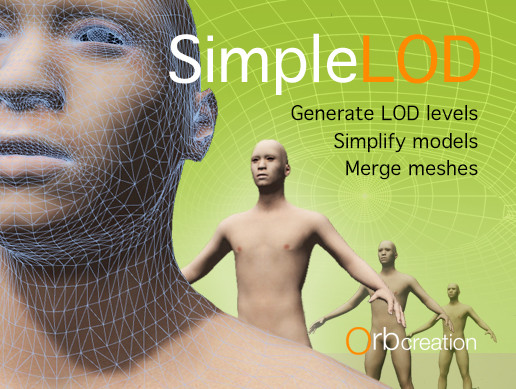
Merge skinned and non-skinned meshes.
Create atlases.
Remove hidden triangles.
Decimate meshes.
Create LOD levels with 1 or 2 mouse clicks.
Recognize this problem?
You downloaded a model. It looks great, but is way too heavy for it's purpose.
SimpleLOD fixes this p...
 humble canyon
that does not look like it generates suitable at all topology at all the first one
looking at the second one all of the reviews from the past year says they don't work on the current version
lament drum
Indeed it looks like the second one might have some issues, but It can still create the meshes and texture atlases needed to optimize the assets. You would just have to do it on an older version and then export it and import it into the VRChat project.
humble canyon
it's okay prosthetic low priority props automated LOD but not good for animated character models at the viewing distances we need
yes but we'd have to see what's topology its output
as if it looks anything like the first one it's unusable
as it butchered the eye Edge Loop and probably the Edge Loop mouth
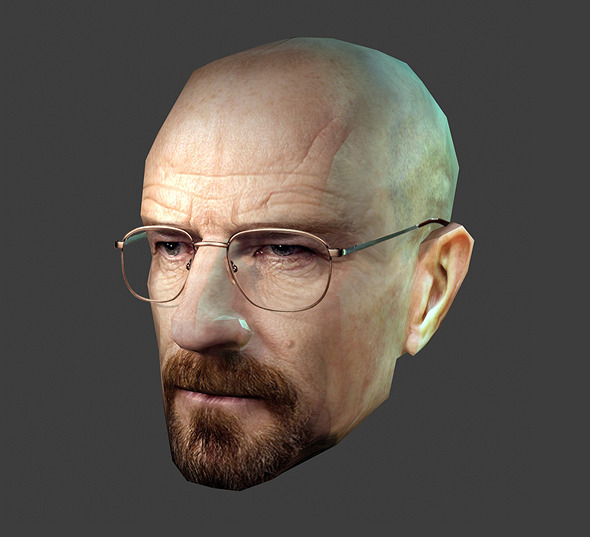
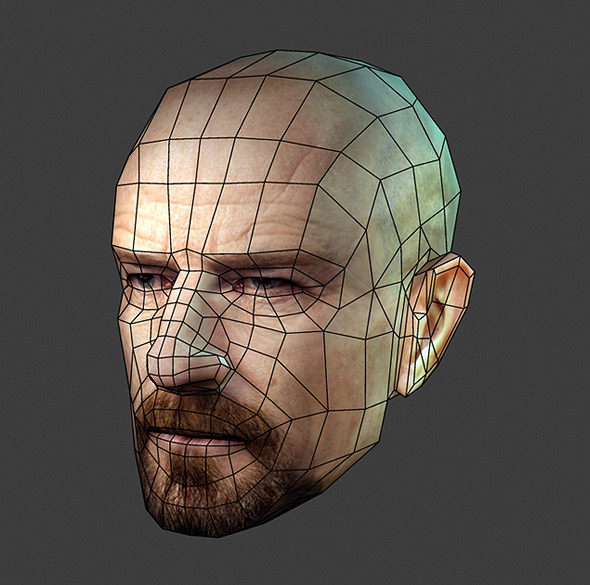
an example of how a low poly face should probably look topology wise
so you can have proper mouth animation
lament drum
yeah thats always the hardest thing when it comes to automated systems. it doesnt take anumations in mind. for that you'll need to get in there and adjust it
humble canyon
seems like you might be better off someone making base for anime characters at the correct polygon density so you're not Reinventing the wheel considering how similar hands and feet and faces are considering it's mostly hair and clothing that's custom
 dire rivet
30 FPS on the Oculus GO for my world with mirror on and 2 people. Guess I did things right
 tribal tartan
you're not counting the music audiosource, animation controllers, props and avatar pedestals.
waxen nimbus

GitHub
Texture atlas creator for Unity. Contribute to maxartz15/MA_TextureAtlasser development by creating an account on GitHub.
posted this in worlds but it deserves posting here too, seems like a nice open source texture atlaser

GitHub
Automatic LOD generation + scene optimization. Contribute to Unity-Technologies/AutoLOD development by creating an account on GitHub.
also found this free one from unity, not sure how good it works
 swift sky
it's worth a try
regal summit
MA Atlasser writes to obj so it doesn't support all mesh features but should get the job done.
 patent mist
Mesh Baker free seems to work also
Oh wait I’m in the quest channel. Should still work though
tribal tartan
at the end of the day the main big difference between quest and pc dev is just the platform you compile assets for and the max numbers, so tools for pc dev should work for quest fine
swift sky
pretty sure you might have some errors opening your Quest optimized world on the Oculus Go build
 lone hawk
so according to oculus' guidelines for mobile development you should aim for a maximum of 150,000 triangles in a scene. assuming the average quest avatar will have a maximum of 5,000 triangles, a world with about 30,000 triangles could fit a grand total of 24 people. but that obviously doesn't take into account unique materials or all the spatialized audio and the IK systems. is this an accurate assesssment? could an extremely low poly world push maybe 15 people without too much lag?
 left holly
I wonder how much triangle my worl have never really check. Probably around 10k max
But i put shader that move on some surface. So it might not work for quest
waxen nimbus
I'm not sure if the 150,000 number applies to the Quest, isn't that number for the Go?
lone hawk
Yes. The quest would theoretically be even higher
 white surge
It's probably so low for VRChat since it's already such a CPU intensive game
 primal rock
From my experience, removing shadows and avoiding mesh colliders will make your world really fast. I don't even bother with occlusion or baked lights
 ebon spade
You should definitely bake your lights.
But
Well generally a realtime directional light will just add a bit of overhead by itself @primal rock
primal rock
I only have the default direcitonal light. If I bake that, won't avatars be completely black?
ebon spade
But in terms of drawcalls, a realtime directional light with no shadows won't be adding any drawcalls. Apparently the Forward Base pass can handle up to one realtime directional light
No, not if you add light probes
But if you have a scene with just a shadowless realtime light, baking the lights will probably increase quality without impacting performance too much
primal rock
It's possible to have a world with no light sources like that?
ebon spade
Yeah, a lot of worlds in this game are baked-only. No realtime lights.
Light probes add light to non-static objects
primal rock
So they affect avatars, interesting. Aren't they lights by themselves then?
ebon spade
Well, Unity feeds data to the shader based on light probe information
Generally a shader will just get the ambient color, and light probes will change what the shader gets to be more accurate.
Or they use specific functions, I haven't delved too much into the specific functions myself yet
primal rock
I'm happy with this world though, I can spawn 200 objects, turn on the mirror, and then reflect myself and those objects and still get 90 fps on min specs. I have yet to see another world run that well for me. And cool, I should read up on that! Would be interesting to have a scene with no light. Is there a way to tell it "just make everything 100% lit, don't bother calculating any shadows"?
ebon spade
No idea, probably by turning up the ambient lighting or using a shadowless directional/spot light?
Baked-only setups are pretty good for this game as they make sure the lighting doesn't have to be recalculated every frame
And baking your lights also makes the world look better
lone hawk
if you set the ambient light color to white it would work, but you should seriously just do baked lighting with baked shadows and light probes because it is virtually the same performance-wise but looks way better.
slow plover
@primal rock I'd suggest looking into Light Probes and how to set them up for Unity. Basically, you pre-calculate the direction, intensity, and color of various locations on the map. When presented with Light Probes, shaders that use them (basically any surface shader with a lighting pass) will apply those properties to the avatar. It will also blend between them based on your position. It is fairly easy to do, and is a huge performance boost.
However, you can't have shadows without doing real-time lights, which is why very few mobile VR applications do real-time shadows. Some do "blobs" or etc which are really just a projected texture or some similar technique.
lone hawk
you can also do projected texture flashlights for horror maps
primal rock
Thanks Tupper, I will look into it! Gotta go fast!
 amber sleet
With great effort
ebon spade
You can't, of course. @spring ibex
I don't see full body tracking happening on the Quest
lone hawk
well there is one way to do fullbody tracking with inside out tracking
but it would have to be the ultrasonic positional tracking and the quest uses cameras
 spring ibex
wait so how would my avatar look if i'm sat on the floor irl
ebon spade
The same as it normally does in the current desktop version? @spring ibex
The game tracks your headset and controller positions and applies IK to "guess" or estimate your IRL body's position
With SteamVR-supported trackers, you can also track the hips and possibly feet. Obviously, that isn't gonna work on the Quest version of the game.
spring ibex
Would the estimations be able to render my avatar while I'm lying down, for example
Or would it end up looking like a crouch
ebon spade
It will end up looking like a crouch
It pretty much only has your head position to work with
spring ibex
Isn't it possible to set up a prone animation for an avatar
Instead of a crouch animation
Like for example the animation triggers when the cameras on the side can see the floor
10cm for example
away
ebon spade
Yeah, prone already happens
ebon spade
Well it triggers a proning animation
But it's a little janky, doesn't track very well
And also won't work if you lay down on your bed. You pretty much have to put your headset on the floor @sharp zinc
It doesn't track your whole body, it just assumes you're laying
 sharp zinc
The Quest will most likely produce the same result the Windows Mixed Reality headsets produce when put on a table or the floor. They both have controllers and both use inside out tracking.
the only difference would occur if they had different animations in the differnt versions of vrchat
i've used an oculus rift, an htc vive, and a windows mixed reality headset, and they all look the same when put on the floor on vrchat
it all depends on the difference in height between where you put your controllers and your headset. also adjusting your floor height wrong will mess the lying down animation up because it will always think your above the ground
at least on outside in tracking
on the quest/wmr inside out tracking i remember floor height still being an issue
 north willow
Please take that discussion to another channel. This is not a place to discuss the pros and cons of the hardware.
north willow
👍
dire rivet
heads up guys! May is a good month to get assets!
 hexed grove
is there a way to tiling textures within an atlas?
 digital thistle
Would probably need a specific shader to do that
patent mist
@hexed grove you can tile to some extent but ive ran into issues when tiling more then 5 times
Actually im wrong. i didnt tile i modified uv's.
So tiling should work will just make atlas bigger
astleast what mesh bake docs say
But it depends on what tyour using to atlas
Since i use mesh baker it say in doc's "If a material uses tiling then that tiling will be baked into the atlas up to the “maximum tiling bake size”."
left holly
Great for the may discound 
 rare apex
Pretty hard to tile within an atlas unless the atlas is very big... Which should not be the case on quest
Let's say you have a 1024x1024 texture, I'd reserve areas as big as 256*256 to the texture you want to tile, sacrifying a bit of the quality
Then I'd split the area you need to tile, e.g. a wide ground, into various squares and map the UVs to the 256*256 square you reserved
Adding a new material is going to be slower than adding some more polygons for tiling
 slate cradle
Quest can’t do full body but PC users can and quest users need to see it properly - make sure quest versions of avatars are full body fixed 😛
 safe fiber
Could Quest users Link their Account With Steam or annything?
patent mist
Realsiticly you should have your steam account linked to your vrchat account
unless you wanted 2 separate accounts
rare apex
Yeah you should link it to the VRChat account
safe fiber
Awesome,Thanks!
sharp zinc
does image size next to the 1024x1024 mater, png or jpg etc?. looking forward to my key for roly poly fat fat avatar
tribal tartan
make sure to generate mipmaps, crunch compression can help, mitchell scaling is much better than bilinear for most atlased avatars. if you wanna go a step further you can bypass Unity's own mipmaps, and bake them in yourself by converting your PNG to a DDS texture, Unity already does that on it's own, but if you want specific scaling for mipmaps it's useful.
sharp zinc
@tribal tartan thanks alot!
tribal tartan
oh, f
rare apex
If you aren't going to edit Mipmaps, you can still use any format you want, JPG, PNG, PSD...
Unity will still convert it internally so no big issue
ebon spade
There's rarely a reason to use DDS yourself unless you know absolutely sure what you're doing
sharp zinc
is there a way to merge eyeblink with extra face expresiobs and main animator which not on the body into one for quest
ebon spade
Yeah, put it in the idle animation
ebon spade
The custom override controller
Custom Standing Anims
The animator controller doesn't matter
sharp zinc
@ebon spade does that stil work? the legacy animations
sharp zinc
@ebon spade how to do that? soundsvery intresting
do they not recomade against costum over ridecontrolers for quest/default avatar submision?
ebon spade
For default avatars then yes, but that mostly seems to apply to gestures. Custom idle movement is probably fine, but don't put too many bones into tails or ears
sharp zinc
any tips how animation baking works
ebon spade
You make an idle animation yourself using one of various Unity or Blender animation tutorials
Make sure to incorporate the blinking and other movements that you want
sharp zinc
thanks
sharp zinc
did do cats , that worked to
 exotic mesa
Trying to use the atlas generation feature in CATS. Installed the additional plugin it requires but now I'm prompted with "Installation complete! Please restart blender", after restarting it still says the same. Restarted it multiple times now.
Anyone else had this?
slow plover
Try running Blender as an admin, that usually fixes it for me.
exotic mesa
I'm actually using Blender in a mac, I don't think it has run as admin. Thanks anyway
 calm mauve
@exotic mesa I encountered the same issue trying to use CATS on Linux. I think either CATS or the Material Combiner addon are just only compatible with Windows.
north willow
I would report that to the CATS author. It may not be a big deal to fix if it just needs to be smarter about checking it's install path or something
exotic mesa
By the way I fixed it on mac. Gotta install pip and then use pip to install Pillow in Blender's python environment
north willow
Oh yeah! 👍
 copper zinc
@exotic mesa I've had the same problem on Mac, my work around was remoting to my desktop for atlasing lol. Interested in your solution though
exotic mesa
It wasn't hard after I found out what was the problem, to do it:
https://blender.stackexchange.com/questions/56011/how-to-install-pip-for-blenders-bundled-python
Follow the instructions in the first answer, then instead of 'install scipy' do 'install Pillow'

Blender Stack Exchange
Blender comes with Python, and includes a stand-alone Python executable.
However pip is not part of the official Python distribution so it needs to be added separately.
How do you setup pip with B...
slate cradle
So idol animations do work on the quest, someone was telling me yesterday that the animation over rider doesn’t work on quest
tribal tartan
animation overrides work on quest, you can see all that's disabled here https://docs.vrchat.com/docs/quest-content-optimization
Creating content for VRChat Quest is a challenge-- you have to create attractive, compelling content all the while keeping the content optimized for a mobile device. These are the same challenges that game developers must deal with while building for mobile. Here, we'll giv...
 dapper chasm
Yeah @slate cradle my info was a little older and wrong. Sorry
slate cradle
Still not sure about hand triggered animations but idle is there. I suspect props work too just no audio allowed
Most quest avatars I see use no props at all and I think quest users are missing out if they are possible
 floral crow
@tribal tartan proof that animation overrides work on quest?
tribal tartan
I havent used them myself yet...
floral crow
Like I can have custom emote animations?
I tend to put alot of Fortnite emotes
in my avatars
tribal tartan
fortnite dances should work fine, but you wont have music on quest
floral crow
Because they're better alternatives to the current ones provided by vrchat
I am not adding music
tribal tartan
yeah, animation overrides work
you can only have one animator tho
so you cant do nested animations, like a gun with a trigger
floral crow
What part of the Quest content optimization that says anything about animation override?
tribal tartan
none, hence why you can use it
floral crow
Oh, I see
rare apex
Yeah yesterday I met a guy (on Quest) with some facial animation made with overrides, you can do it no problem
floral crow
Can't really do facial animations since nearly everything's scuffed
rare apex
Eh well that depends on the model anyways
floral crow
Rare
rare apex
And unfortunately they were basically the original MMD avatars, with automatic decimation
floral crow
oof
rare apex
They looked terrible on Quest because there was basically no work whatsoever from the creator
floral crow
I am mostly using League avatars rn
rare apex
Missing triangles, broken rigging, deformed mesh on many points, no visemes
rare apex
I really hope creators will put some effort in it, instead of trhowing that into decimator and call it a day...
Hm you may use MMD avatars indeed but they need quite some work to look fine on Quest
I believe it's almost faster to model them from scratch : D
tribal tartan
ah, so someone made a scuffed avatars world, Im planning on a world with all those popular MMD models, but ported correctly
rare apex
Oh that would be a great contribution to the community indeed...
I believe the most important thing is to keep the visemes working
tribal tartan
you know, slowly taking your time, applying decimation modifiers to separates parts of the mesh, doing retopo where needed.
rare apex
Yeah
tribal tartan
idk about keeping original visemes, sometimes dropping them completely and creating new ones is a lot cleaner
and not that hard
rare apex
Yeah I mean that basically, "keeping" like, having them working some way or the other
tribal tartan
ah yeah
rare apex
Maybe that's the wrong word, sorry
I tried one of these scuffed MMD x Quest avatars yesterday and in fact, PC users could see visemes, Quest users couldn't
tribal tartan
any avatar should minimum have, blinking, eye tracking, and mouth visemes
rare apex
Indeed
rare apex
About Eye Tracking, I still don't know how that works
floral crow
Vrchat avatars can have quest and non quest version
rare apex
So I'll need some help later, prior to finalizing my avatars
tribal tartan
you boot up cats, give it your 2 eye bones
click the button
and it creates correctly parented and named bones
and vrchat will automatically use those when you dump your model in Unity
rare apex
Hm I could do that manually with C4D I believe (I don't use Blender)
I guess I just have to know the correct bone names after all
tribal tartan
yeah
rare apex
Is there a reference guide for that anyways?
tribal tartan
probably
floral crow
You can do all the avatar creations in C4D but use blender for VRChat avatar preparation only
tribal tartan
also, it's really best to create separate bones with clone weight paints
so you can use the original eye bones in animations
floral crow
CATS is pretty useful to make your avatars work for vrchat
You can simply just use it for that and the avatar creation on c4d
rare apex
Also, I'd love to know if there is a sorta "community approved standard" when talking about visemes... Something like: thumbs up = smile, point index = frown, etc etc
tribal tartan
I always go through CATS before Unity no matter the source of my avatar
it's just way too useful
floral crow
Yep
rare apex
Nice, I believe I'll get Blender and CATS then
floral crow
It can be
Maya -> CATS Blender -> Unity
C4D -> CATS Blender -> Unity
rare apex
Yeah
floral crow
You don't need to be forced to use blender for avatar creation
tribal tartan
generally
✋ = 😃
🖐 = 😄
rare apex
Imho the essential is to keep the visemes that can convey your mood
Otherwise there would be an... "emotional gap"? between Quest and PC users
tribal tartan
sometimes I also do ✌ = 😉
rare apex
And it would look weird
tribal tartan
its mostly for selfies tho, and cameras dont even work on quest....
rare apex
Yeah : C
Thanks for the ref tho
You need to take a pic with the Oculus Sharing tools, not the nicest way but it kinda works
tribal tartan
but, especially for quest users, you want to keep any emote that isn't 🤘 the same finger wise
because of how gestures work with touch controllers
rare apex
Yeah in fact I see people still keeping the finger gestures together with animation overrides
tribal tartan
some youtube videos have the finger gesture templates
you can download them as a zip
rare apex
On a side note, I still need to get used to how VRC animates the fingers while using the controllers, it's different and weird from the First Steps demo (which imho feels like friggin magic the first time you try)
Ah good!
tribal tartan
do the quest controllers also have the sensors on the buttons and stick to tell if youre barely touching them?
tribal tartan
oooooh
rare apex
That's why the first time I tried I was like "this is some black magic stuff"
Actually incredibly stupid tech-wise, but the feeling is so awesome
north willow
 eager gorge
So my model is pretty dang optimized with one mesh and one material, but I can't get the number of tris close to 5k, best I've gotten is 15k, would this be ok until I'm able to find ways to get it even further down?
left holly
if the sdk let you its ok
 solid crown
 split lily
Quest limits aren't in yet, 5k is recommended because that's guaranteed to work
15k is faaaaaaaar from guaranteed
left holly
you can probably do around 7-8k easily
eager gorge
I'd probably be able to get it down to 8k if I retroscope the head in blender from scratch.
retopology*
 livid trellis
The sdk will let u do 60k. Doesnt mean itll be visible for quest users. In the next update there will be a given limit.
Its under 20k but above 5k, according to tupper
eager gorge
Neat, I'll try to get it as low as I possibly can in the meantime
CATs is being really uncooperative with this 😛
tribal tartan
thats because you need to separate your materials, use a mix of auto decimation, decimate modifiers on separate meshes, and just unsubdividing and merging faces by hand to retopo.
eager gorge
I keep forgetting about the dissolve feature
eager gorge
I was able to get it at least down by another 2k now at 13k, should be okay for now until I have the time to retopo and redo all the shapekeys.
 latent pivot
I don't see this in the optimization docs for Quest, but it might be worth mentioning that your import settings for audio can make an impact on performance. VRChat is historically CPU-bound so when it comes to Quest builds - it might be best to use lossless PCM (or even ADPCM) over Vorbis to trade CPU usage for larger audio files, if feasible.
rare apex
That’s a good find, thanks
 urban plume
Audio files are set to decompress on load by default, so it's a matter of prioritizing file size and loading time. You may also need/want to decompress on play for larger files, where you are willing to give up some CPU perf for more available RAM.
latent pivot
^ Le balancing act! I actually have no idea how much RAM the Quest has -- but there's an amazing article online about best practices for dealing with audio clips for mobile and/or PC that I'm gonna try to dig up and post here in a few that I think would be vry helpful.
https://www.gamasutra.com/blogs/ZanderHulme/20190107/333794/Unity_Audio_Import_Optimisation__getting_more_BAM_for_your_RAM.php Super helpful documentation for understanding + optimizing audio import settings

A guide to using Unity's audio import settings to help improve game performance.
sharp zinc
the quest has 4gb ram but it's shared vram so expect about 2gb room for for world assets
that's a LOT ... the xbox 360 has 512mb ram
 tender ore
@sharp zinc There's less than that available for world assets
VRChat can only use about half of the 4GB of RAM, the rest is reserved by the OS, compositor, etc.
sharp zinc
what would you say is a better estimate?
@tender ore how much does the client take up?
tender ore
@sharp zinc From a cold start in my empty "Blue" world, a little under a gigabyte.
tender ore
Cold start is ~670 MB, but it jumps up a bit when you open the menus and the images get loaded. Up to ~750 MB after scrolling around the world menu a bunch.
RAM usage alone isn't the whole problem
There's also memory fragmentation
Singular large assets like long high quality audio files can fail to load even if there's plenty of free RAM
if the file is larger than any contiguous chunk of available RAM.
latent pivot
The issue becomes there's not gonna be a one size fits all solution depending on the audio file. You can use PCM over Vorbis + and have it streaming so it never goes into the RAM at all....but if you have multiple voices playing this way; you'll be increasing CPU usage quite a bit. Decompress on Load will be compressed within the build as whatever you choose but will decompress as "cpu-friendly" lossless into RAM so you'll still get the RAM tax of that.
 sharp flume

swift sky
Creating content for VRChat Quest is a challenge-- you have to create attractive, compelling content all the while keeping the content optimized for a mobile device. These are the same challenges that game developers must deal with while building for mobile. Here, we'll giv...
there's some docs for VRChat on Oculus Quest that might help you
and a page to page doc that shows you some stuff (minus the Oculus Go build) along with the recommended numbers for avatars and worlds
sharp zinc
Mine is Optimized and Ready for the Oculus Quest. It is perfect
rare apex
Edge breaks are a bit messed up though
tribal tartan
Oculus' own docs are actually really good somehow https://developer.oculus.com/documentation/unity/latest/concepts/unity-perf/
and for reference, we're actually given lots of leeway considering the vrchat client overhead, and other factors, seeing as these are Oculus' Unity on Android VR guidelines https://bocchi.is-pretty.cool/8reVyS5.png
 rare apex
With the current VRC Quest specs... If you sum 50k tris per World, plus 5k tris per Avatar, with 10 avatars, you get exactly 100k
I guess draw calls also will be around 100 between World, Avatars, UI
 mossy tulip
if they had avatar distance culling that would be helpful, like.
ebon spade
So avatars turn completely invisible from some distance away?
rare apex
Or maybe just use "2D imposters"
Tested with unity 5.3.5, 5.6, 2017.x, 2018.x, 2019.1
Do not work with HDRP due to HDRP bug
Reduces number of polygons in your scene by converting an 3D objects into a 2D sprites(imposters) without any preprocessing. Uses atlases to render 4000 objects with one draw c...
This thing works magic, we once tested a cheaper version on Android (it was another plugin) and turned a 5 fps scene into a 45 fps one
 fathom nebula
Isn't that basically what Google Seurat does?
ebon spade
Sort of
rare apex
Actually not, very different
Seurat will just delete triangles that are not supposed to be seen, also it's done in the editor, and it's done only once- you then keep the scene as it is
Imposter technique instead works at runtime and converts to a 2D plane every object that is further than some meters (10-20 usually). If you get close, the object goes back to its original 3D form
fathom nebula
Ahhhhh
rare apex
It works on non-static objects too, so a 70.000 triangle avatar will just become a 2 triangles avatar when far away : D
It works by rendering objects every n frames instead of every single frame; the further the object is, the more the "wait" frames
Since objects are very far, you can't really tell the difference, especially if they are static or non animated
ebon spade
Does Seurat work in VRC? Since worlds can have their own shaders even on Quest
Or does it only partially work?
rare apex
Seurat is just a 3D modeling tool after all, so yeah of course it does
But I believe people are highly overstimating what it actually does...
Let's say you may need Seurat if you model a World without thinking much about "blind spots" and just putting objects in mindlessy
In that case, Seurat may help quite much
But a well modeled world won't get any real help from Seurat
Basically it works like this:
You open a Unity scene with your world, load the Seurat plugin. Then you define the areas where you believe the player camera will stay in- ideally, the player won't ever escape these areas
fixed a few messages down
Then Seurat runs... Using a temporary camera, it will position that camera on every single possible spot inside the area you defined, one spot at time of course
And for every spot, it will look at all the geometry around, and mark every triangle as visible or not visible from that spot
At the end of the cycle, every non visible triangle is deleted, and voilà
You have a world that looks very broken from outside, but still as good as the original from the defined area
If a player exits the defined area, he will see the "broken" parts that Seurat deleted
ebon spade
Ah, so that's how it works. Interesting, thanks
Wouldn't that also result in performance increases on desktop?
rare apex
Np! That's what I know about it, hope it's right lol.
ebon spade
Although it may be less important on desktop
rare apex
Yeah, less triangles basically
fathom nebula
Tbh I would always aim for as much optimization as possible without damaging the original
rare apex
Yeah me too... I'm already planning my own World project to not have useless areas
WAIT
It's a bit different than how I explained it, fukk
You still define the visibility area
But then, instead of deleting triangles, it actually creates a mesh that tries to replicate what you see, using a triangle count you define
Well way different... I wasn't remembering this right, sorry
fathom nebula

A short introduction to the powerful Seurat tool by Google which bakes down complex scenes to a single mesh and texture with minimal fidelity loss. Google VR...
Quick overview of how it works and what it does
rare apex
https://developers.google.com/vr/discover/seurat
Yeah the website too explains it fairly quickly

Google Developers
latent pivot
that's really clever, it's kinda like doing photogrammetry with photos from a limited POV but in a digital space
google was like: yo dawg, heard you like creating 3d models from photos so now you can make 3d models from photos of 3d models
humble canyon
I wonder if folks have done photogrammetry using Game screenshots
latent pivot
I think I've seen some people doing that over on SketchFab!
humble canyon

This is a 3D scan made from 22 frames from the movie Beetlejuice.
Original scene:
About the movie:
https://en.wikipedia.org/wiki/Beetlejuice - Beetlejuice - Town model - Download Free 3D model by Patrick (@patrick-)

mp_carentan as seen in COD WW2. - Carentan - COD WW2 Multiplayer map - Download Free 3D model by vrchris (@vrchris)
slow plover
Users have done photogrammetry using in-VRChat screenshots actually 😄 but only for fairly simple two-plane parallax 3D. It does make for cool pictures on the wall.
sharp zinc
any more news on a concrete poly limit for Quest?
livid trellis
below 20k above 5k
 junior light
VRChat [version: Unity 2017.4.15f1 (5d485b4897a7)]
d3d11.dll caused an Access Violation (0xc0000005)
in module d3d11.dll at 0033:868527b0.
y always crash when i run vrc?
only in first roading screen
i fixed it = check admisistrator to vrchat.exe
ebon spade
That's a very bad idea, and also this is probably not the right channel.
There have been instances where an exploit in VRChat could harm other files on your system. Running the game as adminstrator gives it free reign to also do this in "protected" folders (like Windows)
 lean kernel
https://youtu.be/guUpGjEMqa8?t=53 ( its a time stamp) does anyone think they can help me doing this for a quest model ?


 lean kernel
Thanks for the answers guys
lean kernel
Lmao
 tender cloud
Is the 5000 poly limit mostly out of concern from vertex shader evaluations or rasterizer load? That is, should I also be worried about double vertices or UV seams from a perf perspective?
rare apex
I don't think that will hurt performance in general, unless every single triangle is detached from the others (faceted-style like)
But even then, it's 5k... It's pretty low anyways
rare apex
Yeah but they said they will lower it
 wide ridge
Get warnings?
rare apex
As Tupper said, more than 5k, way less than 20k
tribal tartan
wide ridge
Poly count doesent impact performance that much, but quest is a mobile platform so every little thing counts
tribal tartan
bahka, you see? I've been trying to explain that to Nabu
he's a stubborn one
He's so gonna cry when the official limit is 7.5k and he realizes patience is important
rare apex
7.5k is really good imho
tribal tartan
yeah
my avi is at 4.5k rn and it looks great
close to the linked message
tupper shows one at 3.4
 oblique dagger
Just gotta remove the body meshes hidden under outfits 😄
rare apex
The 3.4k one is great
tribal tartan
thats really not the only thing
wide ridge
I say make 7.5k the instance poly cap
rare apex
Just gotta remove the body meshes hidden under outfits
You have to do this anyways, not only on Quest
oblique dagger
Most people do not '-';
tribal tartan
as Ive said 30 times, most people dont even know how to press 3 buttons in CATS
rare apex
That's a total waste of performance
wide ridge
Basically it takes the world poly count and adds all the current avatars poly count. That number needs to be under 7k, newer users won't show up if it's over that cap :smart:
tribal tartan
7k for everyone is way way too small
you do realize worlds are max 50k, oculus recommends max 100k in a scene
you're going way way too small
wide ridge
Optimization! I'm sure they can find a way to cope whit it
tribal tartan
like, everyone is a fucking quad with a png now
wide ridge

tribal tartan
or a PS1 model
oblique dagger
I would love to keep my model under 20k
tribal tartan
keep your model under 7500
rare apex
7.5k for everyone rotfl now that's insane haha
oblique dagger
But... back then I recalled.... I tried uploading Miia.. her snake tail is frigging 19k
Tail ALONE
rare apex
19k for the tail wtf?