#avatar-optimization
1 messages · Page 70 of 1
 hasty sedge
 normal nova
new animation weighting in CATS is now working better, in which I mean that it works at all

quite delighted that it will just... preserve edgeloops as a matter of course

obviously you will still get better results doing it manually, but this takes seconds so... tradeoffs!
 normal nova
 calm spade
Is it looking for overlapping weight paint or bone location ?
calm spade
Is it looking for overlapping weight paint or bone location ?
Overlapping weight paints between every pair of deform bones!
calm spade

normal nova
It used to push this to the decimate modifier but it would just mess things up for decimate. So now it deselects however many vertices you slice off, then decimates everything else
calm spade
Is deform bone based on naming scheme ? I assume cats would complain about it
Or it's literally the deform checkbox
normal nova
It's 'any bone that has an identically named vertex group', in my implementation
calm spade

normal nova
It can also do shapekeys! (normalized vertex movement, in that case)
 buoyant holly
normal nova
new animation weighting in CATS is now working better, in which I mean that it w...
buoyant holly
normal nova
new animation weighting in CATS is now working better, in which I mean that it w...
cool
 ocean ether
@buoyant holly Alright, I'm home now
buoyant holly
Cool
 buoyant holly
okay your main problem is too many materials
you need to combine your materials together in like blender
ocean ether
buoyant holly
you need to combine your materials together in like blender
Is there an easy way to do that without breaking the toggles?
buoyant holly
how would that break the toggles
ocean ether
buoyant holly
how would that break the toggles
Well, the other time I tried it, it broke the toggles for the avi
ocean ether
buoyant holly
and basically you just need to shave 4 materials off
Alright, can you do VC?
I wanna screen share Unity to make things easier
buoyant holly
not really up for walking you through step-by-step
ocean ether
buoyant holly
not really up for walking you through step-by-step
Okay, well, should I use the FBX from the Unity Package or the OG FBX?
ocean ether
@buoyant holly I used CATS and it breaks the avatar
buoyant holly
that's not quite enough info for me to help
and are you able to reload the blender scene
ocean ether
buoyant holly
and are you able to reload the blender scene
Yes
buoyant holly
good
ocean ether
@buoyant holly Before and after using CATS
 buoyant holly
okay so looks like it messes up the material settings on the hair and and the pants
ocean ether
 ocean ether
buoyant holly
okay so looks like it messes up the material settings on the hair and and the p...
ocean ether
buoyant holly
okay so looks like it messes up the material settings on the hair and and the p...
Yeah, exactly
buoyant holly
like maybe it was the material given those color instead of the texture
like maybe change the texture in image editing software to be the colors you want
ocean ether
buoyant holly
like maybe change the texture in image editing software to be the colors you wan...
Nah, it's still red in the texture
Idk what the issue is
buoyant holly
maybe try playing around with the material settings in unity?
but does the Avatar work okay minus the color being weird
ocean ether
buoyant holly
maybe try playing around with the material settings in unity?
I copied and pasted the material settings from the OG and it changed nothing
buoyant holly
question what shaders are you using
ocean ether
buoyant holly
question what shaders are you using
Looks like Poiyomi Toon
buoyant holly
maybe check the original materials settings to see if the pants and hair had the Shader provide the color?
ocean ether
buoyant holly
maybe check the original materials settings to see if the pants and hair had the...
Not sure how to check that
buoyant holly
you still probably have the folder with the materials somewhere in the unity project
ocean ether
buoyant holly
you still probably have the folder with the materials somewhere in the unity pr...
 buoyant holly
that's not the pants or the hair material
ocean ether
buoyant holly
that's not the pants or the hair material
The hair is on that texture
buoyant holly
good to know
but yeah like do some sort of modification to the combined model to make the red reappear
ocean ether
@buoyant holly Yeah, no, it's the same exact material used by the OG model
So I don't have any clue how to fix it
buoyant holly
myself I don't use toon shaders so I don't have any helpful suggestions
ocean ether
Guess just give up then
buoyant holly
have you tried doing any modifications to add the red
as all I was just trying to say is I'm out of suggestions
ocean ether
buoyant holly
have you tried doing any modifications to add the red
I don't even know where to start
I know only the basics of modeling
buoyant holly
then perhaps we should both take a break
ocean ether
buoyant holly
then perhaps we should both take a break
Now my animations are broken
buoyant holly
oh dear
ocean ether
Fixed it
buoyant holly
cool
 sand spire
Heya, guys; just dropping a quick line to let you all know I just got a new automatic texture-packing tool working for Blender--it's a fair bit more advanced than CATS', and, unlike a Cycles bake, supports variable texture quality and non-PBR materials.
You may find the current version here: https://github.com/nights192/fast_pack/releases/tag/Alpha

GitHub
This release rectifies colorspace retention issues and multi-object handling; all should be functional now.
Instructions on general usage are available on the main Github page; godspeed!
 tulip rose
easy auto star lol
sand spire
it's time to become powerful.
 tawdry drift
8 material limit?
sand spire
Nope!
No material limit whatsoever.
It works with any shader node available in Blender.
tawdry drift
👌 🧑🍳 thats sick
sand spire
(It should be noted that this doesn't combine materials for you, as it's meant to be flexible; it'll pack all of your textures, but you will still need to choose what should be its own material vs. a shared material.)
Heeey, thanks a ton, dingus; I appreciate it. ^^
Oh, also--I forgot to mention, it requires having Python's "Pillow" library installed. This is required by CATS' material packer, so if you've used that, it should work fine, but otherwise you'll need to install it onto Blender's Python install. An auto-installer will be present in the next update.
tulip rose
I may take a peek under the hood when I get some time to see if I can learn anything lol.
sand spire
Sure, goof! If you feel like you need help with following any of the internals, let me know.
I've tried to keep the code fairly clean.
tulip rose

buoyant holly
sand spire
Heya, guys; just dropping a quick line to let you all know I just got a new auto...
got this error message when I try to install it
 sand spire
Mhm! Sorry about that, friend; it requires that you install the "Pillow" Python library onto Blender.
sand spire
buoyant holly
got this error message when I try to install it
Here's how ya do that:
Ya go to your Blender install folder, go into the folder labeled with the Blender version name, then the Python folder.
Enter bin, and run the following command in your console:
(Using my path as an example.) cd "C:\Program Files\Blender Foundation\Blender 3.1\3.1\python\bin\" python.exe -m pip install pillow
After that's done, you should be good to go--thanks for letting me know about the issue. ^^
buoyant holly
sand spire
Enter bin, and run the following command in your console:
so do I click on like the python exe
sand spire
You've gotta open cmd.exe with administrative privileges; so that's, like. Just search cmd in your windows bar, right click, run as administrator.
Then copy-paste the commands I wrote in the quote box in.
(Replacing the path I put next to the cd with the path to your version.)
It'll be a bit easier to install for the next update of FastPack, but works flawlessly.
buoyant holly
the with or without the quotation
sand spire
With the quotation. ^^
Yeah, I know the console can be a bit intimidating; I'm sorry that I didn't manage to slot in the automatic installer for this release.
It's a one-time thing; you'll never have'ta do it again. ^^
buoyant holly
"Python was not found; run without arguments to install from the Microsoft Store, or disable this shortcut from Settings > Manage App Execution Aliases."
sand spire
Ah, sorry:
.\python.exe -m pip install pillow```I forgot to include the .\ at the start of python.exe.
buoyant holly
I have to go run some errands real quick so I'll have to try this some more later
sand spire
Haha, sorry for the extra work.
buoyant holly
yeah might be a good idea to get the automatic installing working next version

not quite sure if this means I have it installed or not when I try to put in that command
sand spire
buoyant holly
yeah might be a good idea to get the automatic installing working next version
Ah, I ran into this; if you go to where it lists the thing as already downloaded, you can copy its folder (pillow) and paste it into the Blender 3.1\3.1\python\lib\site-packages folder.
It's because you have another copy of Python installed for something else; for some reason Blender doesn't default to using the normal Python install, and it confuses the system.
Just means we have to copy the folder is all.
buoyant holly
okay don't have the missing module error but I have a different error
 sand spire
What’s your blender version, friend?
@buoyant holly This thing’s built for the latest version of Blender, but making it compatible will only take a few moments; I’ll go do that.
sand spire

Here, the latest version--should support 3.0 as well.
Thanks for going through this with me, Rain; this really demonstrates the points where an install can go wrong.
buoyant holly
it installed correctly now
sand spire
Glad to hear it, Rain! Lemme know how it works for ya!
buoyant holly
about to eat dinner so it'll be a little bit before I can report back
sand spire
Hey, no rush; I'm fairly certain you'll find things satisfactory. ^^
buoyant holly
probably a good idea to put a required Blended version in the add-on description
sand spire
Good call.
buoyant holly
I get this error when I try to make the combined texture
 tulip rose
blend file not saved.
buoyant holly
thanks
sand spire
Alrighty! Just got a release out that that'll greatly simplify installation.

GitHub
FastPack's latest release--now with automated Blender library installation assistance.
You should now be able to install Pillow from within the addon if necessary, pending a restart.
 copper plover
Trying to atlas my model with cats. For some reason in the atlas area it is showing some of my material textures as 32x32 when they are not, and when I run the atlas it just ends up turning those areas white. Any ideas?
buoyant holly
Cool
sand spire
copper plover
Trying to atlas my model with cats. For some reason in the atlas area it is show...
To my knowledge, CATS does not properly support post-3.0 versions of Blender; it may well be an issue with the addon.
I'd use FastPack for it if I were you, honestly--biased though I may be. 😛
 stray tangle
sand spire
To my knowledge, CATS does not properly support post-3.0 versions of Blender; it...
stray tangle
sand spire
To my knowledge, CATS does not properly support post-3.0 versions of Blender; it...
you need to use the Dev version if you plan on using anything past the latest LTS release (2.93.X)
for maximum UV efficiency, the Bake option in CATS is miles better than the Atlas tool
sand spire
Not necessarily; baking tools will result in uniform texture density between different areas, which means prioritizing certain features over others is not very feasible without manual intervention.
Furthermore, sampling errors will impinge upon the image quality. (Not to mention the lack of support for non-PBR materials.)
CATS' atlasing tools are just fairly limited, unfortunately.
stray tangle
the name "Bake" is a little misleading I admit. it's basically re-packing the islands (pretty sure texel density is maintained, but would need to double check). it then samples from the original textures to create the new ones. the only actual "baking" it does is AO and normal, if you select it. it also handles any PBR textures like metallic, roughness, and also emission
sand spire
I'm reading through CATS' source code, and it's definitely using Blender's inbuilt baking system.
This is why it doesn't support non-PBR materials.
(Blender has no analytical texture baking features, to my knowledge.)
buoyant holly
you can provide your own UV unwrap for the cats baking tool
sand spire
Yeah, but at that point, wouldn't it just be better to bake using the Blender features CATS is already using?
buoyant holly
that requires more button presses to use the blender baking
sand spire
More power to ya, friend. ^^
buoyant holly
and when I was testing your packing tool it was about 50-50 about whether it would actually process the model and turn it into an atlas
sand spire
If the maximum res you specify is below what it would be possible to fit the atlas into, it won't pack.
buoyant holly
that'll definitely be helpful next version some indication as to why the packing failed
sand spire
Mhm! There's actually a branch of code that recognizes that the packing failed, but I wasn't able to fit it into the current release without making things kinda clunky.
It'll be in 1.0.
(Along with non-square texture atlases and a couple other goodies you may find useful. ^^)
buoyant holly
got this error message when I try to use a viroid by the texture combiner
 sand spire
Ahhh, I see the problem; I hadn't imagined that anybody would use something other than the default UV map selector.
Would you mind sending me the model so I could take a look at its shaders and see what's happening, @buoyant holly
sand spire
Okay, I found the problem for real; VROID, for some reason, uses the same blank image for nearly every material,
which ties them together in the system and causes it to misunderstand what UV-islands are related to what images.
The next feature update of FastPack will allow you to exclude a set of material input labels to work around this.
 uneven gate
wow
just wow
quad remesh eboy avatar at 160k tris
drops to 50k with no discernible change in quality
do people even know what optimization is
like bruh
calm spade
I would personally not use quad remesh on a model, but hopefully it doesn't turn out too bad 
uneven gate
calm spade
I would personally not use quad remesh on a model, but hopefully it doesn't turn...
turned out fine for what i was using it for
calm spade
also why is it 160k is the question
uneven gate
like basic decimation modifier would probably be better than just letting it burn your pc alive
 errant kindle
50 different separate meshes 🗿
 muted roost
hi, would an avatar with just an 8k texture + normal map be a little too performance sapping compared to most other avatars? the poly count won't be any higher than a human character model from a 2011 game
 languid quartz
muted roost
hi, would an avatar with just an 8k texture + normal map be a little too perform...
languid quartz
muted roost
hi, would an avatar with just an 8k texture + normal map be a little too perform...
You really should avoid the use of 8k textures, as the VRAM cost of them is very high. For PC you shouldn't go higher than 4k, ideally use 2k if possible for what you're doing.
It's not a huge problem when talking about a single avatar, but think of how problematic it could be if everyone you were with was using 8k textures. Even people with like 12 GB of VRAM could run out quickly in such a scenario.
tawdry drift
also you can get away with a really small normal map
without much visual loss if at all
buoyant holly
and you can also use tiling normal detail maps to help out with the perceived detail level


Single material, 3.3k △, using RGBA masked 256px normals in @poiyomi's shader. 🧵👇
Likes
278
 Twitter
·
Twitter
·

Back to shader: Can use seamless tiled normal maps per RGB area - tiny (128/256px) normal maps, but tiled around 50-100 times in the shader, giving you a higher effective TD.
You can combine these with an base nrm map for creases and baked normal details etc: (Blend with Base)
Twitter
·
 weak lodge
I have a question about avatar optimization, is it possible for a pc avatar to be qeust compatible? [Probably by changing the materials etc, right?]
errant kindle
yes
stray tangle
weak lodge
I have a question about avatar optimization, is it possible for a pc avatar to b...
sure. just make sure that it follows all of the performance requirements for quest, which are much stricter than for PC
chances are, you will need to do work on it in blender to get it down to an acceptable level
weak lodge
Okay thank you, I need to watch some YouTube and Google about how to do it, ^^
 peak rivet
Can anyone tell me why the Humanoid shape avatar I put in says it's Non-Humanoid?
 onyx harness
peak rivet
Can anyone tell me why the Humanoid shape avatar I put in says it's Non-Humanoid...
onyx harness
peak rivet
Can anyone tell me why the Humanoid shape avatar I put in says it's Non-Humanoid...
Did you tell unity it’s a humanoid in the file’s Rig import settings?
onyx harness
peak rivet
I don't know, I'm still new to Unity.
Okay, when you select the model file in the Project window it’ll give you a bunch of settings you can modify about have unity handles the import. The categories are Mesh, Rig, Animations and Materials iirc. For this you’ll need to select Rig and set it from Generic to Humanoid.
peak rivet
Okay.
peak rivet
Found it, Thanks.
weak lodge
anyone know what i could do?

 cold yarrow
Delete extra mesh or decrease texture sizes is usually where to start
weak lodge
cold yarrow
Delete extra mesh or decrease texture sizes is usually where to start
i tried doing the texture size thing, but i think i did something wrong because the number didn't change
cold yarrow
weak lodge
i tried doing the texture size thing, but i think i did something wrong because ...
Yeah I'm not sure the best way either, I mostly got lucky, I guess.
onyx harness
weak lodge
i tried doing the texture size thing, but i think i did something wrong because ...
Sometimes the number can be larger than the texture's dimensions so changing it down a step or two might not actually decrease the size.
I have this (Image) set to 1k but the texture's dimensions are actually 256x256. So even if I changed the setting to 512 nothing would change.
If you want a tool to help see what is using the most memory then I'd recommend Markcreator's Size Profiler for the compressed and Thrys Avatar Evaluator for the Vram. Both are available on GitHub last I checked

 glass ibex
weak lodge
anyone know what i could do?
glass ibex
weak lodge
anyone know what i could do?
Quest users don't accept 4k textures, so lowering it to 2k doesn't change it, try going even lower with some parts that are not really visible, or barely noticeable.
weak lodge
Okay I will give that a shot
 stone prairie
I am trying to upload an avatar with many animations to compensate for an Euler equation.
Long story short I am animating a parameter and the final result is that it desyncs quite often since for different people, the parameter doesn’t updates for others at the same time
Any tips to sync everything?
 strong perch
Anyone who tested the performance difference between many materials and many objects can tell me, if it's better to reduce the amount of objects or the amount of materials for a avatar which toggles these?
Also does the material not drain any performance anymore when you disable the object which uses the material?
Please @ me or write me a direct message if you can answer me that.
Currently the avatar toggles just turn the visible material to a transparent one. The Avatar takes some time to load in.
onyx harness
strong perch
Anyone who tested the performance difference between many materials and many obj...
Man I just started typing and never stopped. This is how I understand it, things could be wrong. Lets be real, things probably are wrong
Each mesh generally has at least 1 material. 'A single mesh with 8 materials' and '8 meshes each with 1 material' is about the same. If you can, try to merge meshes and then also merge materials. You'll do better as it's decreasing draw calls.
Yes, when you disable a Renderer it stops the calculations for those materials. Material swapping to a transparent material still renders every polygon. We can't see it but the Pc can. If you're not merging materials, one could argue that above, 8 meshes each with 1 material has the potential for better performance as you can disable them.
Another option is the shader you're using. Recently I've been looking into Poiyomi v8 which has UDIM Discard. For multiple toggles, this seems better than any other method I've tried/been told about. It takes a little bit of setup using the UVMap but it's capable of toggling up to 16 things individually all through 1 material. The Silent Cel Shading Shader also does this if you want another option (It's been linked before so if you search for it you'll get a lot of results). I'm not sure how many toggles it can handle as I've never used it before.
Other common methods are Blendshapes and Bone scaling. Blendshapes are known to get expensive pretty quickly so I'd try to avoid them. This is why people recommend separating the face mesh from everything else; so you're not calculating your visemes on your toe verts. Bone scaling is exactly as it sounds. Things like a hat, necklace, armband, those that are weighted mostly to 1 humanoid bone using an individual bone to scale up/down to toggle them on/off respectively. Both of these methods allow multiple toggles on 1 mesh with 1 material but those affected polygons will still render even if they're hidden below the skin.
Bone scaling in combination with mesh toggles is what I've been using till recently.
.
I'm pretty sure there's a webpage that explains it better than I can but I don't remember it so we're just gonna have to wait for someone to drop by and go, "oh yeah check this out Link"
strong perch
Thank you, I will have a look at the Poiyomi v8 UDIM Discard.
onyx harness
I think I heard there's a site for poi now
onyx harness
strong perch
Thank you, I will have a look at the Poiyomi v8 UDIM Discard.
yeah, check out https://poiyomi.vercel.app/special-fx/udim-discard for the option. I'ma read this too lol
UDIM Discard, or UV Tile Discarding, provides an efficient way to discard portions of a model at runtime. This is done by placing portions of the model on different UV Tiles, and then discarding specific tiles at runtime.
normal nova
glass ibex
Quest users don't accept 4k textures, so lowering it to 2k doesn't change it, tr...
Is this a hard limit? or a vram thing?
glass ibex
normal nova
Is this a hard limit? or a vram thing?
Hard tex res limit is 2k for quest, so better use low quality for items not really needed in HQ, such as weapons, glasses, accessories, just use normal quality and 1 res grade lower for better results.
normal nova
glass ibex
Hard tex res limit is 2k for quest, so better use low quality for items not real...
Heck. I just worked out a way to cram a 4k ASTC into the same vram as a 1x2k default Android compression
buoyant holly
normal nova
Heck. I just worked out a way to cram a 4k ASTC into the same vram as a 1x2k def...
would that be still helpful knowledge for PC avatars
normal nova
Nah, ASTC is specifically for ARM devices
buoyant holly
good to know maybe that would be helpful for worldbuilders with their atlases
normal nova
Testing on Quest 1, 4k ASTC 12x12 appears to be fine? Unless its only loading up to the 2k MIP, which would make sense
buoyant holly
is there a texture you could make that you would be able to tell the different MIP
normal nova
I could buuut
I am also tired |3
but yeah, it was decisively lower
alas
A shame cause it wouldnt really harm performance since the VRAM footprint is identical, but gotta cover 'actually I just crunched an 8k, have fun' case
buoyant holly
normal nova
Heck. I just worked out a way to cram a 4k ASTC into the same vram as a 1x2k def...
out of curiosity what settings did you do for that so I could keep a note for when I try worlds on Quest
normal nova
ASTC 12x12, you can only do it by forcing an android override compression in the texture settings
'Low' just makes it 6x6
It ends up 2.7mb
buoyant holly
that's not too bad size-wise for a 4K texture
normal nova
Yeah, like I said its the same as a 1x2k ESTC
buoyant holly
so I could stuff like 4 4k Textures in the space of a regular 4K texture
normal nova
8, but yeah
Quality is pretty blocky but acceptable
In general I would always set the project to use ASTC by default anyway, on average its half the size with no major quality loss
buoyant holly
normal nova
In general I would always set the project to use ASTC by default anyway, on aver...
what settings menu would I use to do that
normal nova
Its ESTC by default for compatibility, but VRChat targets only Quest which is fine
normal nova
buoyant holly
what settings menu would I use to do that
Project settings, file menu
buoyant holly
I don't see a file menu tab


 sterile summit
Hi, do anyone understand how to use mantis Lod editor?
 silent steeple
do all blendshapes have a performance impact, or just ones that are not zero?
glass ibex
Don't think so, unless you have many blendshapes that'd make your avatar turn into a huge mess, that would weirdly lag the game, so far 1 avatar caused me to lag when it spiked. xD
 ruby isle
silent steeple
do all blendshapes have a performance impact, or just ones that are not zero?
ruby isle
silent steeple
do all blendshapes have a performance impact, or just ones that are not zero?
Only blendshapes that are not 0 will cause performance decrease
silent steeple
cool, thanks
onyx harness
silent steeple
do all blendshapes have a performance impact, or just ones that are not zero?
Blendshapes can inflate your Vram if you have a lot of them. Generally it's good to remove any you're not planning on using.
 grizzled owl
Is there a way to combine meshes in Unity?
stray tangle
why would you use CATS to combine meshes? can just do Ctrl + J in blender
if you're trying to combine materials though, that's a different story
errant kindle
cats does both so its easier
and ctrl+j sometimes just doesnt work for some reason
onyx harness
No offence but that's probably user error. Shortcuts don't just not work
 hexed ferry
Is there’s a way I can make my character have outlines without it being pc only?
buoyant holly
lots of the popular vrchat toon shaders have outline options
stray tangle
errant kindle
and ctrl+j sometimes just doesnt work for some reason
shortcuts in blender depend on where your cursor is on screen
if your cursor is over the modifiers, ctrl + A applies a modifier. if you're over the viewport, ctrl + A is to apply transforms
ctrl + J only works if your cursor is over the viewport
stray tangle
hexed ferry
Is there’s a way I can make my character have outlines without it being pc only...
for your quest version, use Matcap Lit with this matcap

for your PC version, do whatever you want
 marble rain
grizzled owl
Is there a way to combine meshes in Unity?
marble rain
grizzled owl
Is there a way to combine meshes in Unity?
i would recommend use cats plugin in blender and go that route.
marble rain
stray tangle
why would you use CATS to combine meshes? can just do Ctrl + J in blender
it can combine mesh + material + make it a atlas.
 worldly hull
A thing what I don't understand in VRChat, why are more audiosources = worse performance?
Are they in case that the player would run all the audiosources at the same time?
- Because in most cases, the peoples would have a bunch of audiosources for a bunch of audios, but they enable/disable them mostly not at the same time!
Like a avatar with 8 songs in 8 audiosources would not make sense to play them all at the same time. so what would be, if VRChat would make a feature into the SDK, that would allow to change the audio-file inside of the audiosource? so that I can play for example multiple songs with the same audiosource?
(just not at the same time...)
I know that is possible to change the audio inside a audiosource via code, so why they don't intergrate it into the expression menu for example, where you can select in an array your mp3 or ogg files and play tghem with the same audiosource. like a radio changing his channel...
marble rain
worldly hull
A thing what I don't understand in VRChat, why are more audiosources = worse per...
more resource intensive. both networked and well for a user.
and total avatar size.
worldly hull
marble rain
more resource intensive. both networked and well for a user.
this would just increase your avatar size, so no safety issue...
but you would be able to play more than just 8 audio files without having a very poor avatar with more than 8 audio sources
worldly hull
marble rain
more resource intensive. both networked and well for a user.
what exactly? I mean, there is just one audiosource playing...
and they can make a 5 seconds cooldown or something or avoid spamming the audio files though the audio source to avoid lagging.
or to make it more pleasant, make a cooldown, after you spammed 5 audios in 10 seconds so you have to wait 30 seconds, before you can change the audio again from the audiosource...
I personally see no issue there, you can proof on this way, that the peoples are not playing more than 8 audios (at the same time)
marble rain
worldly hull
this would just increase your avatar size, so no safety issue...
download size. is just troublesome. 8 audio files can increase it quite abit.
 heady smelt
nobody actually cares or pays attention to download size
worldly hull
marble rain
download size. is just troublesome. 8 audio files can increase it quite abit.
but there is already a safty feature to avoid to large avatars...
heady smelt
stop spouting garbage, i'm right
marble rain
it's to do with how unity handle audio, and garbage collection etc. there are a few other issues related to it.
heady smelt
i have my download size way bigger than it should have to be and still 80% of avatars end up hidden from the size
worldly hull
if some guys make 200MB avatars, they just will get performance blocked or something if you have your safty only allowed under 70MB Avatars
marble rain
worldly hull
but there is already a safty feature to avoid to large avatars...
there is yep
i block anyone above 100 mb lol.
typically because if someone is that high in mb. it very much reflects to many materials etc. or something else. that i rather avoid
worldly hull
so the players have still to play attention to not overload they avatars with 1000 audio files, because this would explode your avatar size and even IF! vrchat can make via code, that you are only allowed to have max. 16 songs for example for every audiosource in a array
marble rain
well it's also to do with compression etc.
like your pc has to uncompress audio and so on
takes time.
worldly hull
10 audio sources for example will be still enough for every audiosource. and noone would be able to have more than 80 audios. and you can still avoid this peoples with a avatar size limit in your safty
worldly hull
marble rain
like your pc has to uncompress audio and so on
that's don't make sense, because we are already able to have 8 audio source ( at the same time). and the part of changing the audio source is just a tiny moment and even this would be still possible without spamming, if you make a cooldown, that happen if you changed your audios to much into a short time.
so where is the problem with this idea?
marble rain
tbh not fully sure. could also be part of the older restrictions. and how vrchat handles audio sources etc.
worldly hull
older restrictions? the new sdk3 and just a year old
marble rain
and tbh. why 8 audio sources? you can just change the audio in animation. with one audio source. unless you want different ranges, pitches etc
worldly hull
they already made even larger inpacts than this
marble rain
eh some of the ranking stuff has not been changed in a long time.
worldly hull
marble rain
and tbh. why 8 audio sources? you can just change the audio in animation. with o...
they are allready filled up with small single sound effects.
worldly hull
and if you also want to make a few animations with songs, there is no space left without getting into the very poor area
8
more is not allowed without being very ppor
marble rain
wait you got 8 sounds? in total or more? since u said its filled up with sound effects
worldly hull
they are not enough and only a few do sometimes play at the same time, but never all or even the half
things like a knife stab sound, triggered by a contact resiver
marble rain
well the thing is even if they are not being played. those 8 sources are still active. well sorta. they take up resources and memory etc.
worldly hull
but you just change the audio file inside of the audio source, where is the performance inpact? the tiny moment of changing will be avoidable with cooldown to avoid spamming
even having just 5 array slots for every audio source would be way enough to make really sure...
marble rain
thats going even further into how unity works in general.
how it allocates memory, how it uses it
how it finds it and such.
worldly hull
marble rain
how it finds it and such.
audiosource.clip = Resources.Load<AudioClip>("PlayMyAwsomeMP3FromTheResourceFolder");
audiosource.Play();```Thats how to change a audio inside of a audio source
not that hard....
marble rain
nothing to do with how hard or easy. and doing that way is intensive. as it needs to find the Clip first. of that type and then it creates a object. which it well attaches it to etc.
and thats just a simplistic way to look at it
worldly hull
and in case of VRChat, a 5 slot huge array script instead of a resource folder should be good enough.
VRChat can make a script, where you can extend your audiosource Audios... The script have 5 arrays for the Mp3 you want to play and a serializefield, where you have to put your audiosource in, then just attach it into the avatar descriptor or something and you good to go.
it would also be possible to build some cooldowns into it to avoid spamming the "change song button".
marble rain
always through animation you can do a delay if needed. same for worlds.
worldly hull
but I am talking about a spam protection to avoid peoples to spam the button the lower the performance with infinity times pressing the change song button because the changing would take for a second performance
marble rain
eh. tbh they could but i sadly dont think its on their agenda to do atm
worldly hull
I think I am not the only one that want more than 8 audios, the most peoples just give a F about it and just upload their avatar in very poor with 1mio poligons 200 materials and 67 audiosources
and 40k particles
Today I modified my avatar again and today is the day, I can't no longer avoid using less then 17 materials. thats why I am now "poor" ranked instead of "medium". otherwise, I don't want to change always my avatar, only because I missed a feature on there...
SO I want to ask here, how bad is this downgrade from "medium" to "poor" ?
even with atlasing, I can't no longer avoid 17+ mats
Because I fear that most player can no longer see me now and such stuff because of the "Medium" --> to "poor" downgrade...
marble rain
for avatars? its completely not necessory lol.
i can't see a single usecase where you want more then 1 audio source even
worldly hull
marble rain
i can't see a single usecase where you want more then 1 audio source even
if a ambient music is playing, and now you are also some other soudns playing like a stab sound of a knife, so you need one active audiosource for the ambient music and a second for the sound effect and if you have even more stuff like walking sounds, you need a third or more. (and this in case, if we would able to change the audios inside the audiosource, what we currently not can) currently, you need for every audio a special audio source. you want a second song your your second animation? thats need a second audiosource because YOU ARE NOT able to change the audio clip inside of the audiosource.
marble rain
thats still only one. on the person. and the world.
and you can change the Clip via a animation. unless you need different pitches,volume levels for each sound. but even then all of that can be animated.
worldly hull
never heared of it that you can cahnge the AUDIO CLIP inside of the AUDIOSOURCE via animation...
The only way I would know was C#
marble rain
hmm. seems like they removed that ability
worldly hull
but to my other question, how bad is the downgrade from "medium" to "poor" because I have now 17 mats instead of 16
marble rain
eh. the ranking system in general is kinda shit ngl. because each part has different levels of performance hit. and going 1 up in materials may not hard hitting. But it all depends on the complexity of that material. but in general 17 materials is far to many. and causes alot of issues in general frame wise.
worldly hull
marble rain
eh. the ranking system in general is kinda shit ngl. because each part has diffe...
I mean, in case of the censore. like if someone have minimum "medium" allowed in his safty, he will no longer see me, right?
marble rain
true
 solid smelt
I try to stay with medium because then no one has my avatar hidden unless they specifically manually hide my avatar. If your avatar is rated poor then it's possible that they may automatically not see you
I'm actually curious how you got 17 materials and can't find a way to reduce it. I would assume particles
buoyant holly
https://github.com/vrchat-community/LazyOptimiser interesting a avatar Optimizer has popped up in the vrchat GitHub
GitHub
An experimental tool to apply some automatic optimisations to an avatar - GitHub - vrchat-community/LazyOptimiser: An experimental tool to apply some automatic optimisations to an avatar
solid smelt
Seems interesting, I mostly like the blendshape cleaning 👀
buoyant holly
and also cool to have something official so more folks easily notice it's there
solid smelt
People making their entire avatar in unity 😩
marble rain
blendshapes are not really a issue. and wont give more performance. even in unused. plus they dont take that much memory. its mostly Textures that takes up all of it. just one 8k texture is 64 mb and for the download size i dont know 8-12 mb per 8k texture it seems.
buoyant holly

VRChat
Do you want your avatar to be efficient and be loved by everyone because of all the frames you're saving them? Follow these tips and you should be good! Any recommended numbers or limits in this document are subject to change at any time. Although some of the descriptions provided below are not prec...
marble rain
note it says Can be. it's true to an extend. however unused once do not use any important resources. as nothing happens. also more Meshes > way worse performance wise then having blendshapes
solid smelt
To be honest it's less about performance for me and more for just getting rid of shit I'm not using
buoyant holly
marble rain
note it says Can be. it's true to an extend. however unused once do not use any ...
that would depend on triangle count if the the blendshapes or the extra draw call would be worse
solid smelt
Have a model with everything, then before upload you clean a duplicate and upload that instead
marble rain
buoyant holly
that would depend on triangle count if the the blendshapes or the extra draw ca...
Extra draw call is always gonna be worse. but blendshapes do not create more draw calls.
as that is determined by Materials and well lighting etc.
plus majority of models in vrc has below 128 Blendshapes.
marble rain
solid smelt
To be honest it's less about performance for me and more for just getting rid of...
you should care about both lol 😄 but i do agree i clean up my avatars alot. and remove anything unused.
buoyant holly
I doubt the vrchat developers are going to be completely wrong with their benchmarking to make the face separation suggestion
marble rain
eh.
they are
very wrong
the reason why blendshapes can be expensive is if its dynamically adjusted by bones, or animations etc. if that blendshape is in use that is
solid smelt
marble rain
you should care about both lol 😄 but i do agree i clean up my avatars alot. and...
I DO care about performance, but honestly I favor organization more than optimization. But that's in cases like having a bunch of extra gameobjects for hierarchy order. Mostly micro-optimizatoons
marble rain
yuh.
buoyant holly
well that optimization tip was about active blendshapes as it was talking about the Visine
solid smelt
From what I'm aware, blendshapes are fine, active blendshapes is where the performance cost comes from. Having 100 blendshapes at 0 doesn't matter
marble rain
exactly.
only cost is memory.
which honestly.
eh.
does not matter to an extend.
hoooowever
big if
buoyant holly
solid smelt
From what I'm aware, blendshapes are fine, active blendshapes is where the perfo...
good point the one that tends to be the performance killer is using blendshapes as toggles
marble rain
if you have a blendshape affecting a million polygons yeea.. you might be looking into alot of extra memory use
solid smelt
buoyant holly
good point the one that tends to be the performance killer is using blendshapes ...
Where my bone scalers at 😔
marble rain
Blendshape as toggles is a really good way to cut down on material use.
which is why its the best way to combat draw calls
buoyant holly
marble rain
Blendshape as toggles is a really good way to cut down on material use.
it's spikes the CPU cost compared to just doing bones
marble rain
eh. barely
buoyant holly
as you're having active blendshapes constantly so you're having to calculate per triangle every frame
solid smelt
The only time you should use blendshapes to hide something is if that thing does not have a common root bone, but there are shader methods that are more optimized than the blendshape method for that
marble rain
a blendshape is not really active or not.
its weight based.
but once the weight has been set it does not recalculate it again and again.
it acts as if it was normal.
marble rain
solid smelt
The only time you should use blendshapes to hide something is if that thing does...
commonly used for clothes. which is wise.
solid smelt
I tried out the whole "split face from body" thing for a while and it was 100% not worth the effort 😭
marble rain
i am not sure i recognize or know any methods via a shader that is worth doing.
yea dont lol.
you get odd light behaviours 😄
stray tangle
could maybe do a benchmark by making a 1mil poly mesh and animating shape keys on it
marble rain
like different colored head and body
stray tangle
see if the perf impact is only when changing it or if it's always tanking performance
marble rain
ehm no?
buoyant holly
solid smelt
I tried out the whole "split face from body" thing for a while and it was 100% n...
you need a light probe anchor so it looks good
marble rain
thats their inactive state.
solid smelt
marble rain
like different colored head and body
You can fix that via anchor or something in the mesh, still annoying
solid smelt
Why would the anchor cost performance it's basically moving the origin point?
calm spade
Not more than an active blendshape, ie above 0 
marble rain
solid smelt
Why would the anchor cost performance it's basically moving the origin point?
okay only a little bit. due to recalculating the origin point etc.
solid smelt
Yeah everything costs something. It's really just a battle to cost as little as possible
marble rain
yuh.
solid smelt
I say this while using Final IK on every avatar so just ignore those costs 😎
solid smelt
At the very least it kicks the shit outta dyn bones
marble rain
considering its not using Jobs/Dots
well Dyn bones were not ment for that kind of scale 😄
solid smelt
Trust me I am very used to the "that's not how you're supposed to use that" statement
marble rain
cant Jobs were not a thing til 2020.3
calm spade
It is using the Job system, and the burst compiler
marble rain
nvm its just not supported. says on unity's documents
solid smelt
2019 gang ✊ 😔
solid smelt
Now that physbones is out and good I can't wait for the Final IK replacement :))))
marble rain
lol
hexed ferry
Is there a way to make transparent textures? For quest
onyx harness
nope
 fickle stratus
trying to lower my physbone transforms for quest, any help?
marble rain
fickle stratus
trying to lower my physbone transforms for quest, any help?
what kind of help do you need? and how many physbones atm?

 fickle stratus
i do have 2 of these, but idk if itll fuck something up, they both have physbones on them

thats how it came when i bought it
marble rain
8 PhysBone components
64 PhysBones affected transforms
16 PhysBones colliders
64 PhysBones collider checks
16 Avatar Dynamics Contacts
right.
ehm you might not only be limited by bones.
but also polygons
materials etc.
marble rain
https://docs.vrchat.com/docs/avatar-performance-ranking-system go bottom almost you can see the actual requirements.
VRChat
The Avatar Performance Ranking System allows you to see how much a user's avatar is affecting performance via analysis of the components on that user's avatar. You can also use it on yourself to see how performant your avatar is. This system is provided to inform users what is likely the most perfor...
fickle stratus
and the transforms
marble rain
well
fickle stratus
i found the standard shader but I cant edit it in anyway
marble rain
you would have to do some blender work to remove alot of bones or limit what you want to have physbones on.
i recommend removing the hair physbone components fully.
seems like its taking alot
other then that depending on what else the avatar has physbones for. well.
fickle stratus
i removed all the other physbones but the ears and hair
the thing thats most concerning me
its the standard shader, what do I do there? I cant edit the shader?
 fickle stratus
can you not remove them
marble rain
you can put on a new material or change the current materials shader to what it says
vrchat/mobile
fickle stratus
how its all greyed out
marble rain
uhm try and remove the hair physbones. cause that one seem to be taking up all your budget
fickle stratus
 marble rain
Right. you want to make a new material and put it on there.
fickle stratus
how do I do that
marble rain
right click anywhere in the folder in your project and there should be a New Material option.. should be under Create > Material
fickle stratus
ah ok
is there anyway for me to expand my entire hierarchy without manually clicking them?
 radiant shadow
one way to get material out of fbx if is has one (ctrl+d) , other one is inspector -> click fbx , extract texture & materials out of it
marble rain
Hold down alt when clicking on the group.
marble rain
when you make a new material you should be able to just drag it on the avatar
fickle stratus
ah you see heres thing with that
for example with this cross bag, its all one thing

and it wont let me drag anything onto my avatar anyway
marble rain
replace the Metal material with the new one.
marble rain
ehm? per chance when you imported the fbx. did you import with the embedded materials?. all through even then it should be replaceable
and are you sure you made a Material?
marble rain
https://docs.unity3d.com/2019.3/Documentation/Manual/Materials.html @fickle stratus 😄 that should tell you how
 fickle stratus
ye iv made a material
i just cant apply
it
i was able to before I closed unity earlier
fickle stratus
plus if i was able to apply it, itll change the entire bag to that material
marble rain
well no. cause the Metal one is just a standard shader. it seems to be doing nothing.
its the metal shader you want to replace
but the most likely problem you have @fickle stratus is that you need to extract the materials.
marble rain
cant atm sadly. somewhat busy
fickle stratus
right, well idk what im doing, its not letting me drag nothing to the mesh
marble rain
this is what i am talking about. the imported file

if you click on the actual top object for the avatar.
fickle stratus
how do I get there
marble rain
you should see Animator in the Inspector
and you can click the Avatar in that animator which shows you were the Fbx is located.
fickle stratus
found it
fickle stratus
 marble rain
no need to be in the muscle section just make sure the inspector shows material section instead
just click Done/Apply or whatever it says down below the inspector.
The Unity Manual helps you learn and use the Unity engine. With the Unity engine you can create 2D and 3D games, apps and experiences.
 marble rain
thats because you need to be on the top object in the FBX. it needs to be a actual object file.
should be in the XO folder
fickle stratus
 marble rain
in the FBX. make sure to make the icons smaller
fickle stratus
 marble rain
i can already tell that that avatar wont be able to do quest. to many materials. but u can try. but you need to extract materials.
marble rain
yee
fickle stratus
right theyve been extracted
marble rain
should be able to change em all now
fickle stratus
right, the standard materials dont show up anymore, but the error is still there
nevermind it shows up on "plane"
marble rain
hmm?
 marble rain
yea
fickle stratus
oh thank god its gone
the onyl thing im struggling with now
is an eye texture
i put one on but its just a solid color

i dont want to wear you out like, but the help would be appreciated
heady smelt
fickle stratus
was that eye texture made for that model
 chilly fox
VRChats viseme detection is kinda sucky, particularly if you have a high voice or are a performer... they're jittery and don't always respond too well. But hey, it is what it isss~
But what if they could be better? Well, then an unnecessarily complicated animation controller will fix all of your viseme woes that you didn't even know you had!
The most noticeable difference is at around 2:05, where high-pitched sustained notes just aren't even detected at all. While still not perfect, I think this is big improvement.
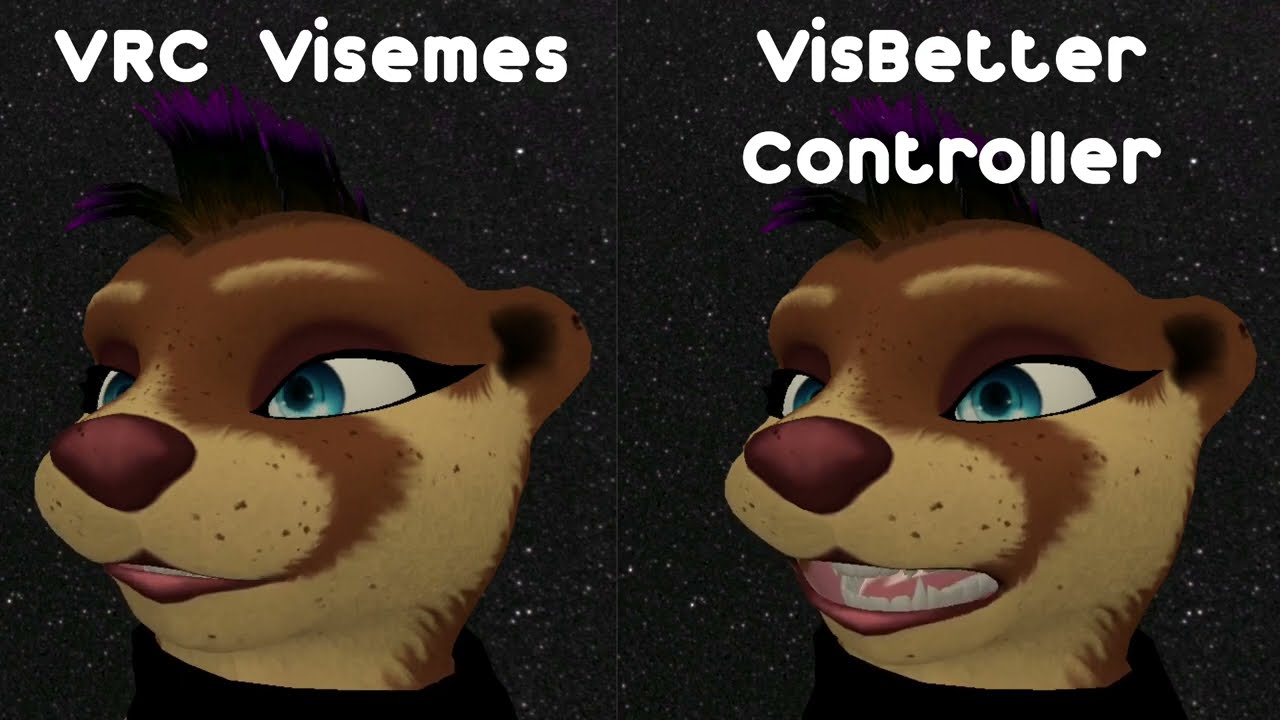
Test of a better viseme controller for VRChat.
This fixes a couple of issues that the standard VRChat viseme system has - namely jittery movements, and inability to detect higher pitched sustained notes.
In addition, complete control over how your visemes appear using anims instead of plain blendshapes.
marble rain
fickle stratus
i dont want to wear you out like, but the help would be appreciated
soz. its a bigger project. if you want that avatar to work for Vrc quest. you have to look for a quest version of a avatar. cause i can tell you that avatar willl not work
fickle stratus
heady smelt
not okay
Where do you see that
fickle stratus
marble rain
soz. its a bigger project. if you want that avatar to work for Vrc quest. you ha...
Ye it didn’t lmao, I got rid of all the problems but the file size was 3x over the allowed amount
ruby isle
chilly fox
VRChats viseme detection is kinda sucky, particularly if you have a high voice o...
This seems a bit broken, as the VRC visemes never use the Ah viseme. Either configured wrongly, or a bug in VRC?
chilly fox
ruby isle
This seems a bit broken, as the VRC visemes never use the Ah viseme. Either conf...
Each of the visemes have a detection range, so if the audio falls into that range, it triggers the viseme. Audio that doesn't fall into ANY of those ranges, just has you sitting on the SIL viseme 0. I noticed the problem when looking at the debug menu, and that it sat on viseme 0 a lot of the time.
I made another demo video... this shows that happening even more:

Quick demo of the VisBetter controller using an old public v8.1 Corpse Shiba. This model doesn't have all of the visemes, but the viseme response is still improved.
 trim mortar
Anyone available to learn with me/teach blender and unity avatar optimization and things.
 opaque barn
trim mortar
Anyone available to learn with me/teach blender and unity avatar optimization an...
opaque barn
trim mortar
Anyone available to learn with me/teach blender and unity avatar optimization an...
https://www.youtube.com/playlist?list=PL2EEbgwoJzdt5kFVDyY2lliNqf7cWJeD3 this tutorial is an excellent place to start

YouTube
Want to make your own Anime style avatar? For Things like VRChat, Vtubing/streaming and game creation? Stick around, I'm going to let you in on all my secret...
trim mortar
opaque barn
https://www.youtube.com/playlist?list=PL2EEbgwoJzdt5kFVDyY2lliNqf7cWJeD3 this tu...
Thank you Tristan. I have watch videos for a few weeks now. I was really interested in a guiding hand or someone who is an eager learner too. You know. . .Liked screen shares and working together on stuff. . .
radiant shadow
quest av good or better, upload as fallback, get a pc avatar good or better use the same blueprint as the quest uploaded one , now you have a quest+pc fallback you can use on any other avatar if their setting i strict they will see those instead
 hallow spindle
chilly fox
VRChats viseme detection is kinda sucky, particularly if you have a high voice o...
hallow spindle
chilly fox
VRChats viseme detection is kinda sucky, particularly if you have a high voice o...
holy cow this is great! thanks so much
radiant shadow
probably , all my quest fallbacks are good+ rating
buoyant holly
VRChat
Setting up a cross-platform world or avatar is actually quite straightforward! In short, all you have to do is use a duplicate project to build an Android version of the asset, and upload it to the same content ID as the VRChat PC asset. The client will manage which version it needs to download. If ...
 fierce finch
Think this'd be the right area to ask. I'm being requested to make this for an avatar model. I don't think it's feasible to model all these shapes so I was going to pursue using alpha textures. I believe I heard that alpha textures won't actually work because of mobile shaders not supporting see-through textures like that. Is this true and if so, is there a better way around this? Or should I just say no to that request

 zealous wigeon
fierce finch
Think this'd be the right area to ask. I'm being requested to make this for an a...
zealous wigeon
fierce finch
Think this'd be the right area to ask. I'm being requested to make this for an a...
Yes, Quest does not support the use of any kind of transparency.
Modelling it is the only way you could do something this detailed on Quest.
fierce finch
Hmm, for PC, what's likely to happen if I expand my current personal limits of 40k triangles to the 75k cap? Is it likely to start breaking for some users between those two points or is 75k the point where things start degrading enough to be a problem?
zealous wigeon
fierce finch
Hmm, for PC, what's likely to happen if I expand my current personal limits of 4...
The cap is 70k which is when it instantly turns to "very poor" ranked, which means unless a PC user has changed it then it won't automatically be shown. There is nothing that starts breaking at that point or even over it, but the avatar is just ranked "very poor" (the line for "very poor" on Quest starts after 20k polys).
Performance wise however at some point, which I think was 50k, you should separate the face mesh (basically the mesh which has blendshapes) from the rest of the body because at 50k or something the performance gained from having only 1 skinned mesh is outweighed by having blendshapes in use on the skinned mesh.
I do not know why the cap is at 70k, hopefully it is increased at some point, but it is verry common for creators to jump past it by 2-3 times, having a "very poor" avatar is incredibly common in VRChat, I don't, but it is what it is.
fierce finch
I see, I appreciate the detailed response
I think I'll stick to my current limits and reject that request as I'd rather have something that can be shown off to many people than something that can only be used in Blender
zealous wigeon
fierce finch
I see, I appreciate the detailed response
Found the actual count, at 32k polygons is where you should keep a separate mesh for shapekeys https://docs.vrchat.com/docs/avatar-optimizing-tips#-except-when-youre-using-shapekeys.
VRChat
Do you want your avatar to be efficient and be loved by everyone because of all the frames you're saving them? Follow these tips and you should be good! Any recommended numbers or limits in this document are subject to change at any time. Although some of the descriptions provided below are not prec...
 wheat rock
So I was having an issue where parts of the face were whited out, I figured out that I could assign the texture to that separate material. But now the teeth, tongue and eyelashes are all gray for some reason. I'm a noob with unity, any ideas?

 zealous wigeon
wheat rock
So I was having an issue where parts of the face were whited out, I figured out ...
zealous wigeon
wheat rock
So I was having an issue where parts of the face were whited out, I figured out ...
Texture must be making them gray.
Also wrong channel for this, #avatar-help is where questions like this should go.
wheat rock
Oops! I didn't see what channel I was in
 rose sequoia
I want to add some textured orbs to an avatar but I dont want to need to use a large number of polys just to include a few small orbs. Is there some fancy way to achieve this with maybe a shader? Ive seen shaders add a lot of fake depth detail to objects but not sure if I could do something like make a low-poly cube appear like an orb/ball? (with semi-detailed texture on it)
One side of each orb needs to have a little face textured on it, so it cant just be like, a 2d sprite that always faces the camera (i think...)
(this feels like an optimization question because im trying to find some way to be super reserved with polygon usage)
ruby isle
rose sequoia
I want to add some textured orbs to an avatar but I dont want to need to use a l...
You can just make a low poly sphere and use that
rose sequoia
How low poly can you make a sphere and it still look like a ball?
And not a squarey/blocky hexagon-like object. (That's a legit question - how low can you go before people tend to notice it's not really a sphere shape)
ruby isle
rose sequoia
How low poly can you make a sphere and it still look like a ball?
Depends on the orb size but you can get away with very little
calm spade
rose sequoia
How low poly can you make a sphere and it still look like a ball?
There's a low poly sphere object you can create in blender with Shift + A
rose sequoia
calm spade
There's a low poly sphere object you can create in blender with Shift + A
Ooo really? Nice I'll try that out!