
#world-quest
1 messages · Page 12 of 1
 coarse grail
 bronze willow
Question: Are QV Pens compatible with the quest?
 plain moth
@bronze willow QVPen needs a modification to work on the Quest. The Author made a tweet explaining how to do this.
~~ https://twitter.com/aivrc/status/1249114559006179328 ~~
UPDATED: Download the updated asset from booth and then follow the instructions here to#world-quest message


UPDATED: Download the updated asset from booth and then follow the instructions here to#world-quest message
The japanese parts read
Open "Assets/QvPen/Material/Ink" in your project.Select all the materials.In the Inspector, change the Shader to "Unlit/Color"- In the Hierarchy, search for "Ink" and select all the "Ink" objects.
(there is no 5)Drag the Ink_Quest from assets into the material slot.
- In the Inspector, Change increase the Trail Renderer Width to about 0.005 (see the picture)
The picture is out of date. I edited with updated steps.
bronze willow
Thanks
bronze willow
Now I'm pretty sure video players aren't supported for quest right?
 quartz scaffold
@bronze willow they’re not
bronze willow
That's what I thought, thanks
 remote marten
I've noticed there is more than this avatar with different hair color and different pajama color. Does anyone know if this avatar has words? If yes, then what's the name of the world? (Ping me if you have an answer)
bronze willow
I'm having a problem with pens not syncing between quest and pc users, they do sync between pc users but not quest and pc users. How do I fix this?
plain moth
@bronze willow that could indicate a problem with how your world was ported from PC to quest
what I've found is you want to take the PC scene, and only disable objects, not completely remove objects in the scene or start scratch
bronze willow
Oh okay, I'll try that
plain moth
does it work on quest, just not sync to pc
bronze willow
Yes
plain moth
do two quest users sync
bronze willow
I believe so
plain moth
ok
yeah VRC has some internal object ids and stuff that depend on what order things are in the scene, and their names
so anything that messes with the order, like adding or removing objects could renumber them
bronze willow
Oh okay
plain moth
I've also seen worlds where quest users have objects mixed up
or you sit in a chair near the lobby and everyone else sees you teleport into a bathroom and nobody can hear you any more :-p
bronze willow
Oh wow
plain moth
I'd suggest picking up a tool called EasyQuestSwitch by Jordo
though I don't know if it can do all the little things like fix the QvPen and stuff
and always make backups 🙂
bronze willow
I'll try reporting it
Right
I have a video player in the pc version but not the quest version
Could I just disable it for the quest version?
plain moth
could be the issue. try disabling it instead of deleting it maybe
or keep it enabled, not sure :-p
I know it won't work, but... you don't want the objects mixed up
bronze willow
I'll try just disabling it first
Then gotta find someone to test it with
Cause I don't have vr
 jovial river
If anyone could help me i want a tutorial or something on how to optomize worlds for quest
Would be important since i wana create some content for quests
 quiet shuttle
Is there anything that could cause the headsets to be in split screen for the Quest? The world is in the left eye and seperate in the right eye.
 rain star
@quiet shuttle Some shaders may not be able to work correctly in VR so maybe its your shader? Try changing to something else
rain star
Guess its something else if it works in different world but I don't know what it could be then
quiet shuttle
It works now, somehow worked after deleting the maincamera and adding it back
 vital grove
Im having an issue reguarding making a quest world, the issue is when i try and and upload a map on quest, 1 there is no skybox, 2 only one eye actually can see the world. is anyone having this issue and if so is there a solution.
this is on sdk 2 im trying sdk 3 rn
i have fixed the issue myself.
 ancient lotus
So, been pulling my hair out trying to solve this so I'm here to see if anyone else has encountered this problem. I updating the quality of the lighting in the Quest version of my homeworld. When I check it out on my Quest 2 any movement of the head causes everything to flicker rapidly. It almost looks like it's all disappearing for a fraction of a second and showing the terrain. Had a friend on their Quest look at it too and had the same experience. Any tips or potential fixes would be appreciated. Thanks all!
coarse grail
are you using real-time lighting or baked
ancient lotus
just baked
ancient lotus
neeevermind, figured out the problem
 vital lance
That’s good. If you need any other playtesters for your world, hit me up
bronze willow
How do I make the Rainbow QV pen work on quest?
It looks like i need a different shader to make it work
plain moth
yeah unlit color will make a single color. it's not too hard to make a custom shader if you go to right click -> Create -> Shader -> New unlit shader
you'll have to make sure the custom shader supports stereo instancing with some all caps macros and stuff that hopefully unity's default template has
bronze willow
Oof, creating shaders is not my thing
bronze willow
I did put the unlit texture shader on it and attached a texture with the rainbow spectrum and that made it work, I just don't know if it works on the quest yet
bronze willow
Yeah that appears to have worked
 sacred perch
Any good board game/ table top game worlds?
 pliant granite
guys im confused when looking around my world it bends and is seperated between eyes does anyone have a solution
 split robin
I'm having a similar issue except its like one eye in the headset is fine and the other eye is just a grey void except my avatar and the menu. Don't see anything about it from searching online
 past shell
be sure to use mobile shader.
to switch to android go in File/Build Setting
then select android from there
if still problem. delete your reference camera and create a new one
that you drag in the world descriptor
split robin
Thank you @past shell , I'll have to give that a shot in a bit. I hadn't heard anything about setting a reference camera in the world descriptor, so that might be the issue.
pliant granite
thank you my good man
split robin
deleting the reference camera and assigning a new one worked for me. I hadnt assigned one originally but did have a camera. Simply assigning that camera didn't do anything. Bizarre that you have to make a new one.
 signal arch
Sometimes rebaking your reflection probes in your lighting panel solves this issue as well.
 short turtle
World I’ve been working on for a while, but I just won’t finish due to not understanding Udon...
Gave me too much of a headache
 dusk field
Is there any way i can just skip the usage of lights and lighting, and have the world be uniformly visible like this screenshot?
dusk field
anyone?
I keep trying settings, and deleting the lightmaps, but every time on build it automaticly creates new ones
 dusk field
it is already unchecked currently
"auto generate"
it doesn't auto generate, only on build
coarse grail
weird
and honestly I wouldn't recommend having no lighting like that as it looks like 2004 Second Life
dusk field
just trying to get it as intermediary phase
i want quest users to have an experience at all before i try slaying the dragon that seems to be baking lighting for quest
cant find any documentation and everything looked aboslutely horrendous using the settings i'm normally used to
coarse grail
set everything to unlit and let it generate a quick lightmap so it has one
dusk field
as in shader unlit or?
dusk field
hope so too, thanks for the help
textures are extremely overbright now
thats not what i was looking for
coarse grail
that's what you get when you turn off all of the lighting
dusk field
Does anybody know a tutorial for Quest lighting? all settings i tried cause terribly blocky and ugly lightmaps that take an extremely long time to generate
 misty meadow
@dusk field Android build lighting is per vertex instead of per pixel for optimization purposes. So you're not gonna get the nice smooth lighting that the Windows build of Unity has
Also, make sure "generate lightmap UVs" is checkmarked on all imported assets for your world
 naive pagoda
Just change the texture format on quest lightmaps like so
Fixes the blocky lookines
@dusk field ^^
misty meadow
👀
coarse grail
udon doesn't affect lighting at all
dusk field
@naive pagoda @misty meadow thanks so much for your insights!
i wouldnt have known how to find this information otherwise, that's really great stuff i haven't heard about yet in days of google search
if anyone here could make a video or text tutorial from A to Z about the more obscure things of Quest world creation, you would do the community a fantastic service
naive pagoda
@dusk field you can check out my world toolkit which is basically that but as an unity editor extension I'm most likely still missing some quest specific warnings but I'm constantly working to improve it and adding more things based on feedback
https://github.com/oneVR/VRWorldToolkit
 wet valley
Issue building quest world, only one eye renders in VR
Is there a way to fix this?
naive pagoda
Did you use the button in the sdk to switch between pc and android building?
wet valley
Yes I did. Should I try undoing/doing it again?
naive pagoda
There's a bug with that button often where using it breaks the rendering, you should use the built in button in Unity
wet valley
File/build settings?
naive pagoda
Yeah
Also if you have shaders doing a grabpass that can also cause the issue on quest
If you check my world tools I linked above it includes a warning when you have shaders doing a grabpass on quest ^^
wet valley
Ok awesome, ill check it out
 grand arch
How do I add vrc_trigger in the world sdk3 version?
 plucky mauve
trying to get the qv pens working in vrchat on quest i tried all the particle shaders what shader do i use for the pens
 sharp glen
Hello guys! Wondering if it possible to insert player that would be crossplatform. I know that in SDK2 was used VRC_SyncVideoPlayer, which was disabled on Quest, but now there are two new udon players. There is no mention about them being disabled on Quest... So... Are they working on Quest 😮
sharp glen
Ok, i tried to insert udon video player in my Quest world and it showed me 1st frame of the mp4 file 😄
It wont react with url input UI, so i'm confused 😮 How can i put url in player from Quest and not from builtin link? Should i create togglable ui-keyboard or smth?
 neon barn
How do I add vrc_trigger in the world sdk3 version?
@grand arch SDK3 works using UDON scripting lang
 inner surge
If I have a world that is PC only atm and I want to make it cross platform but shaders in the pc version that i need are making that impossible, when i make a duplicate version of the project for quest, is it possible to just change the shaders for the quest version but keep the pc version intact?
 scenic tapir
@inner surge you could do that but if you plan on updating the world you'd have to do things twice each time or you would need to make a new duplicate every time for quest
inner surge
hmmmm true, that would suck
scenic tapir
You'd be better off bringing the world over to quest and just swapping out shaders to quest ones
inner surge
but idk i dont really plan on updating it thaaat much
yeah but the pc version needs external shaders
theres special little sprite animations that some things need to have
and i dont think quest shaders support sprite animations
scenic tapir
I mean the main thing you really need to worry about is just performance, you can technically use some pc shaders on quest (I don't mess with custom shaders so I don't know how well it would go) but it might have a performance hit on the world
As long as your world isn't over 50mb and you can get at least 40 frames on quest it should be alright
inner surge
oh damn yeah i just saw that, I didnt know you could use pc shaders
then i guess i should be fine ?
the world is only 13 mb
scenic tapir
It should be fine then
Best thing is to change stuff to quest shaders unless it really does need a pc shader
vital lance
Anyone know if there's a good under water or ocean world for quest?
vital lance
Wal's Underwater World
inner surge
For some reason in my cross platform world, quest users have been saying that they can only see the world out of their left eye, but in the right eye its just black with only world particles being visible ?? could it be the pc shaders causing that or is it something else?
vital lance
Is it possible to make a normal world that is also compatible with quests?
scenic tapir
@inner surge Do you have any VRChat chairs from the sdk in the world that you haven't changed the mesh of?
That is a really common issue that breaks quest versions of worlds with the testing I've done and having other people have the same issue. Removing/hiding chairs usually fixes it if its a chair straight from the sdk
rain star
Yes @vital lance . Both versions should have the same functionality, triggers and colliders, you can have different looking assets and shaders though
 sour dagger
how do i get more avatars
scenic tapir
@sour dagger what do you mean?
sour dagger
some dudes have among us ect how do i get that?
vital lance
You find worlds with those avatars, you click on the avatar pedestal to use it, and then you can go to your avatar section and favorite it to use it whenever you want, though you can only have up to 16 favorite avatars at one time
scenic tapir
@sour dagger if you are looking for among us avatars try going to tony's among us avatar world
There are others though, that's just the one I know well enough
vital lance
Is this too complex for a collision?
 latent comet
how do i fix the effect where it looks ok in the left eye but not the right?
scenic tapir
For your world? @latent comet
scenic tapir
Alright do you have chairs from the sdk that do not have the meshes changed? That usually can cause that issue randomly on quest worlds
My suggestion would be to hide them on the quest version
If that doesn't fix it check your shaders, some pc shaders use grabpass which can also cause the effect
latent comet
i dont have any chairs and it wont let me change the shader on the ground
it say unsupported shader "standard"
scenic tapir
That shouldn't cause any issues if its just standard I don't think and are you using a prefab world?
scenic tapir
I would suggest making all shaders quest shaders, if you cannot swap the shader a material is using then make a new one and throw it onto the object with the material that's shader that won't change and re add the texture for it and then you can change the shader to a quest one
latent comet
ok i think i got it. and how do i make one of my avatars reserved for a friend.
ive seen some avatars say that they were reserved for somone
scenic tapir
Those usually are private avatars
I would recommend giving them a unity package of the avatar rather then logging in for them and they can upload it themselves
latent comet
ok i will thx for all the help
 flint pulsar
How do I fix when I join my world there is 2 of everything
scenic tapir
Make sure for the quest version you are using quest only shaders for anything that doesn't completely require a pc shader or that use grabpass and then try hiding all chairs on the quest version that do not have the meshes changed.@flint pulsar
flint pulsar
Ty
flint pulsar
How do I tell if it has a grabpass?
naive pagoda
https://github.com/oneVR/VRWorldToolkit/releases
If you import this and go VRWorld Toolkit > World Debugger it shows a message if the current scene has any grabpass shaders
scenic tapir
I've been noticing some issues with mirrors on quest 2 with the framerate after the last update, just wanted to let people know in case some issues arise
Please come here if you are having any issues at all with mirrors as well
 lusty vault
Add the build number in the title like [1010] (that’s not the build number anymore) you can see it on bottom of your square menu
scenic tapir
Alright I'll do that next time I get on
I'll test it out with more mirrors too
Maybe it's just an issue with the worlds I went to and tested? But they were pretty bare bone worlds (cause they are my own lol)
But I'll try a few others and see what happens
Maybe the resolution got a bump that I wasn't aware of or something which would explain the extremely low frames
I'll attempt lowering it too and see if it works
plain moth
plucky mauve
trying to get the qv pens working in vrchat on quest i tried all the particle sh...
I'd suggest changing them to Unlit/Color.
There's a quest material you can download from here. https://booth.pm/ja/items/1555789 but not sure what that does or if it is useful.

VRChatのワールド用のペンセットです。 消しゴム機能も付いています。 Quest向けマテリアルに差し替えた場合はTrailRendererのWidthの値を0より大きい値にしてください(0.005など) 完璧に同期が取れるというわけではなく、速めにペンを運ぶと同期が取れにくくなります。その場合はゆっくり書くなどしてください。 Presentation RoomなどのようなLate Joinerへの同期は取れません。 デスクトップモードの人が書いた文字はVRモードに比べるとあまり同期しません。 ※ExMenu用最小限アセット ExMenu(拡張メニュー) (
@plucky mauve the important thing is:
Set the TrailRenderer Width to 0.005 on all the objects named Ink (you can type the word Ink into the Hierarchy search bar, and shift select all of them, then change the width)
I know I replied 9 days late. Better late than never...maybe??
Width set to 0 breaks on quest, so that's why you need to increase it
 burnt hazel
Does anyone have a recommendation of what to buy in the unity offers?
plucky mauve
@plain moth thank you i was using the material from there but i will try the shift sellect everyting one and change the setting and see if that was what was wrong
i thought shaders that weren't the vrchat ones dident work on quest though
rain star
There is only a couple shaders available for Quest avatars but you can use any shaders for worlds I believe, it's just better to stick to mobile ones
latent comet
how do i add a pic to the sky so its not just the default sky
rain star
Plug in skybox to Window->Lighting->Environment->Skybox Material
latent comet
when i do that nothing happens
latent comet
my music wont work
i have everything set up but when i press the button nothing happens
 zealous sleet
anyone know of any good party worlds
 frail cove
Is it possible to use text mesh pro in the quest version of the world? it keeps warning me that the text mesh pro material is not supported.
I am reading more past messages about text mesh pro and people are saying it doesnt work for vrc at all(?) (even though the docs say it does!) If so, What is everyone using as a solution for text then?
scenic tapir
@latent comet if you are using a trigger make sure it's set to local and then it's set to toggle and not false
latent comet
Thank you all for the help and making my world better than it would of been
 green granite
Oh nice, I use one of your avatars
 fluid hemlock
Anyone know if the Unity Video Player will work on Quest? Like just a small 1mb file on loop. Can I put it on a render texture and slap that on a Quad?
naive pagoda
With SDK2 you should be technically be able to do that yeah, but I don't have a quest so I haven't been able to test personally
fluid hemlock
Cool. Any thoughts on what video formats VRChat supports itself? Assuming h264 mp4 is the gold standard?
naive pagoda
Formats that Quest can decode best and Unity supports
Don't have a straight answer for that from the top of my head
If you do test something do report back
A person had some problems while testing it a couple days ago so I would like to hear how it went
scenic tapir
I tested everything I could think of and nothing worked
Even got a custom link that went straight to a video
naive pagoda
It's weird I don't really see any reason why it would have suddenly stopped working 🤔
fluid hemlock
Yeah unfortunately I couldn't get anything to play on the Quest. I created a Quad with a Render Texture and while it displays in Unity (note the video of the globe), in game it's just a black screen
@1 @scenic tapir ^^
scenic tapir
Yep same thing happened to me, worked In unity but not quest
fluid hemlock
Truly annoying... I wish I could debug it further but I don't know how to get in game logs, see if there is an exception or error output
I understand why VRChat folks are concerned about supporting VRC_SyncVideoPlayer but the Quest can easily render a video on screen, and it could be from a local file or m3u8 stream.
I'm researching getting Quest logs with ADB right now, I'll let you know if it bears fruit
 cinder isle
I have an sdk2 world with a looping video that works on quest, though I have it as a remote mp4 rather than embedded in the map itsellf. If I had to guess its probably an encoding issue.
if you're using sdk3 then the default unity video player components are disabled by default, and you'll have to do it through udon, even for local files
scenic tapir
@cinder isle what encoding did you use? I tried out a few for a three second video and none worked
naive pagoda
Udon doesn't support local files yet
cinder isle
oh, i stand corrected
cinder isle
scenic tapir
<@57330469510840320> what encoding did you use? I tried out a few for a three se...
h264 8bit video with 2 channel aac audio
for the original quest you'll want encoding that matches the snapdragon 835 https://nyanpa.su/i/xAp01PRU.png
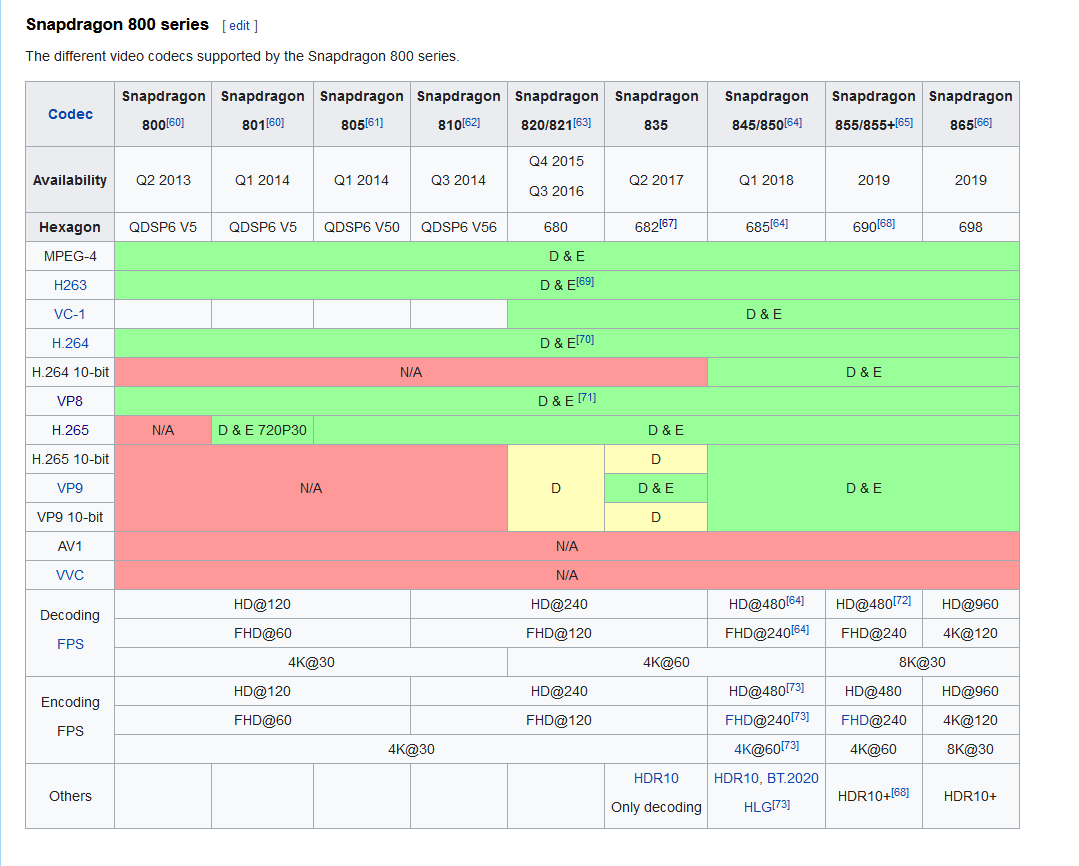
the quest 2 should support whatever the original did
scenic tapir
Alright I'll text it out later then
cinder isle
ffmpeg -i input.mp4 -c:v libx264 -crf 19 -preset slow -movflags faststart -codec:a aac -ar 48000 output.mp4
i've encoded a lot of videos and have them playing on quest with those ffmpeg options
resampling to 48khz is for an obscure bug where some people cant hear video audio related with audio device settings, can probably ignore that
vital lance
Is there a avatar world that has a lot of different anime?
 paper lake
Like pretty much every one
coarse grail
by volume vrchat is mostly anime girls
quartz scaffold
coarse grail
by volume vrchat is mostly anime girls
and furries
both of them make up 90%+ of the user base
i think
coarse grail
yep and the rest of the 10% is memes
fluid hemlock
cinder isle
I have an sdk2 world with a looping video that works on quest, though I have it ...
I'm using SDK2 at this time, but I'll look at the encoding settings you listed and see if that makes a difference. The end goal here is to actually stream in an m3u8 file so that Quest can support watching a stream with my PCVR friends. I know Sync Video player is disabled on the quest but a real time stream doesn't require syncing, nor (hopefully) any VRChat scripts that are stripped out on the Quest platform.
cinder isle
the default unity player doesnt support m3u8 files
though i believe someone else has had success getting an mpeg2 ts livestream to play on both quest + pc
fluid hemlock
m3u8 is definitely supported by VRC_SyncVideoPlayer on PC, which itself is using a Unity Video Player component. I wonder what the breakage on Quest would be specifically.
cinder isle
are you sure? if i'm not mistaken thats handled by the VRC_SyncVideoStream component, which is handled with AVPro, which supports m3u8 among other things
m3u8 is just a text file, and its likely if syncvideoplayer supports it, the script is just reading it to retrieve the url to the actual video stream
in that case you could probably just use the url directly
 fluid hemlock
I very well may be mistaken, I'll need to dig in deeper on this.
fluid hemlock
@cinder isle You were right!! Switching over to a TS stream works just fine. The video is dark, but I'm rebaking the lighting in hopes that'll fix it
I'm using Mist Server as my streaming server, and OBS to share my desktop... voila, insta-movie room, PCVR + Quest Compatible!
I'm using default OBS encoding, so x264 and AAC 48khz audio
fluid hemlock
@cinder isle Well unfortunately an MPEG-TS file only manages to display like 3-5fps, whereas if I put an .mp4 in the URL field it runs flawlessly
fluid hemlock
It's definitely not the stream, same stream works great on PC. I'll try the same .ts file on PCVRchat and see how it does
cinder isle
fluid hemlock
<@!57330469510840320> Well unfortunately an MPEG-TS file only manages to display...
on the quest? you'll probably have to fiddle with the encoding settings as its a lot harder on a mobile chipset vs pc. use cbr instead of vbr, lower bitrate etc
fluid hemlock
yeah I went down to 500kbps CBR, 96khz audio and it didn't make any difference
I even took the RenderTexture down to something ludicrous like 256x256 and it still only refreshed a few times a second
What's weird is it has no issues with a 1080p mp4 file. I don't know much about the MPEG2-TS format, other than it's a container format. The codec is always H264, so the Quest should have hardware decoding available.
I'm getting a Quest 2 soon, curious if it has any better performance. But alas... kinda stuck at this point. There aren't any decoding tweaks I can make to the video player since VRChat strips out all scripts
cinder isle
just a hunch. try it without audio?
fluid hemlock
Only thing I tried to do was disable Multi threaded rendering in the Player settings in Unity, Google suggested that might help but it didn't make a difference.
fluid hemlock
cinder isle
just a hunch. try it without audio?
Hrmm... interesting idea... my audio is coming in at 48khz
cinder isle
also while they might be both h264, and i'm not to clear on differences in the mpeg-ts container
typically i believe in mp4 files, the video stream is written as one block, and the audio stream is another block after?
fluid hemlock
Trying no audio now...
cinder isle
I read some optimization techniques for streaming mp4s and one of them involving interlacing the video and audio tracks every 500ms
in the case of mpeg-ts, i imagine its doing something like that
but you're sure you're serving it as h264 right?
fluid hemlock
Ok without audio I'm getting more like 8-10fps
cinder isle
sounds like its doing software decode
cinder isle
hm, but if you're running it through obs i doubt mist server is doing any transcoding
fluid hemlock
This is from Mist Server management console
OBS settings are as such:
So OBS is encoding my desktop in x264 codec, MistServer is wrapping that in an MPEG2-TS stream
Quest should have hardware decoding available for that
cinder isle
yeah, odd
fluid hemlock
Hang on, looks like OBS is still generating audio even though I removed the audio stream
YOu can see in the screenshot above Mist Server is getting audio data
let me try and pull that out entirely
cinder isle
do you have a nvidia card? also try using the nvenc encoder
fluid hemlock
Yeah I do... let me try that
fascinating... Mist Server can't even preview it when I switch to NVENC
oh DUH
It's because my machine is a laptop, has iGPU and NVIDIA
I'm sure desktop capture is only on iGPY
*iGPU... let me switch that out (or try)
That won't work, since Desktop capture isn't using GPU, I have to use x264 encoder for iGPU display
I just changed Player settings in Unity to auto pick the graphics API
Can't find anything about hardware decoding
cinder isle
hmm obs doesnt have settings for other encodes does it
fluid hemlock
Naa it's all h264
cinder isle
try setting profile to baseline and tune fastdecode
fluid hemlock
k
cinder isle
i honestly cant think of any reason other than the quest not liking obs encoder settings
fluid hemlock
Yeah you may be right... those changes didn't affect the performance unfortunately
cinder isle
but to really rule that out, you could use obs to record an mp4 and see how that plays
fluid hemlock
Good point... record it, host it, then pull it down.
I'll try that next. Really do need to figure out if it's my encoding, or if it's some busted quirk of Unity
This shouldn't be VRChat related at all honestly
I tried to google any live .ts streams but didn't come up with anything
cinder isle
I think most livestreams have a dynamic m3u8 endpoint which has a playlist of .ts endpoints updating every couple of seconds
fluid hemlock
True... I also thought about switching my efforts over to ffmpeg instead of OBS
Although that would be a bit of a pain
cinder isle
do you actually need to livestream for your use case though?
fluid hemlock
Well the use case is I play a movie on my desktop and my friends can watch it in a small world I built for us
One of my friends has a Quest 2 but no PC... so trying to include them
Since there is no sync video player capabilities on the Quest my options are very limited if we want to synchronize
cinder isle
while I havent had time myself to go around updating my world for udon, I believe it works for quest
the caveat being it can only play direct url links with the unity video player
but you can have it sync'd
fluid hemlock
That is interesting... but there isn't any scrubbing control though is there?
If I want to back the movie up or something. Couldn't do that (even on PCVR)
cinder isle
udon players do
well, you'll have to find a prefab that can do it or make it yourself
also you can do that on PCVR
sdk2 as well
fluid hemlock
Ok that is news to me... that would be a game changer if you could control the video in game
The only prefabs I've seen that have controls (like Jetdog,etc) can't scrub within a file. They can only pause and resume
This is why livestream is really the way to go for now.
cinder isle
there are 2 video players components for sdk2
the one with livestream support has rpc's for fastforward and rewind
fluid hemlock
true... sync video and sync livestream
oh nice...
And those two components have been ported to Udon?
cinder isle
not exactly
fluid hemlock
I saw that Udon got video support last month, so it's very very new right?
cinder isle
udon has 2 video player components as well
one that uses unity video player, and the other avpro
quest only supports the former, and can only handle direct url links
but for your case, i imagine its enough
fluid hemlock
Well let me think through this real quick... using the Quest as the lowest common denominator
cinder isle
that said i dont have first hand experience working with them yet so i can say for certain
fluid hemlock
yeah... my concern is, since the Unity Player is the underlying tech that's decoding, I'd have the exact same problem even if I used Udon
cinder isle
though i do watch a lot of videos with friends in vrchat, and a few times i had a couple of friends who could only come on their quest, and i just had the default unity video player on the quest version with the hard coded url for the show we're watching, and press start at the same time lol
fluid hemlock
haha yeah I thought of the "3...2...1...GO" approach but it's so low tech
cinder isle
but quest can certainly play standard h264 mp4 files without issue, so i see no reason it'll have any issues with the udon implementation
all udon does is add hooks to the video player component allowing you to sync a persons video timestamp to the video master anyway
fluid hemlock
yeah I thought about hosting the mp4 file and doing it that way but you lose scrubbing...
Ironically BigScreen solves all these problems ... but I have a couple friends that are PC only... so that's why I built the VRChat world in the first place
I really appreciate all the help you've given me so far. I think my next move is going to be to try ffmpeg and see if I can get deeper into the actual encoding/decoding
I do wonder if there are any scripts that are whitelisted in VRChat I could piggy back off of... to get some debug output.
cinder isle
yeah no worries, seeing i do this often myself its always good to know more about the quirks of it
fluid hemlock
I might hook up a debugger through ADB and see what the quest is saying... maybe there is more info there
Yeah VRChat is so frustrating... I'm a software engineer but they won't let me write a lick of C#.
fluid hemlock
Like I created a local jukebox... but the easiest way to get it to work was to use timers ... it was SO ANNOYING. Took 10x as long to develop
yeah I saw the C# transpiler. That's what I'd use.
cinder isle

GitHub
An experimental compiler for compiling C# to Udon assembly - MerlinVR/UdonSharp
fluid hemlock
yeah it might be time for me to tinker with Udon... SDK2 is really at the end of life now
I'll keep you posted if I make any breakthroughs since you'll benefit as well.
If I end up making something in Udon I'll get you a prefab. Fingers crossed.
cinder isle
haha its fine, i have plans on making a pretty extensive one myself
fluid hemlock
I guess the race is on! 🙂
Take it easy, talk to you later. Feel free to friend me, https://vrchat.com/home/user/usr_6eda21ad-23b7-46d9-9a37-5d0f5f3b4187
VRChat user OhGeezCmon
fluid hemlock
@cinder isle Looks like Merlin may have beaten us to it: https://github.com/MerlinVR/USharpVideo

GitHub
A basic video player made for VRChat using Udon and UdonSharp - MerlinVR/USharpVideo
I'm going to look at stripping this down for Quest, removing the Sync Video portion and only leaving stream
 carmine girder
heyo!~ can any quest user test my world out for me? i do not have a quest vr so i cannot see things from quest side.
https://vrchat.com/home/launch?worldId=wrld_9ea35e42-d021-4727-8509-c3fb6770daee

Diluc's Tavern from Genshin Impact․ The Angel's Share․
if you can't go through this link, try searching Angels Share in vrchat search bar.
let me know if the world feels janky, any frame drops elsewhere or broken stuff
scenic tapir
I'll test it once I get on @carmine girder
carmine girder

 elder narwhal
Is the the correct place to ask questions about uploading world's?
misty meadow
yeah
cinder isle
fluid hemlock
I'm going to look at stripping this down for Quest, removing the Sync Video port...
you cant, the live stream mode uses avpro which is not available on quest. you're limited to the udon unity video player, and only direct file links, since quest also does not have youtube-dl.
And yeah, i'm aware of a number of udon video prefabs out there, but none of them have the extent of features i want, and I also prefer doing things myself anyway whenever I can lol. I'll update my public map with it one day.
 worthy crescent
j
latent comet
How do i teleport a player when they press a button
jovial river
What is the max size limit for quest worlds btw ?
latent comet
50.00 mb
latent comet
can anyone help e make a world for my girl. itsa suprise but i cant get anything to work
jovial river
btw can you check where and how big your world is on each system taht would help me a lot
since i dont have a quest
latent comet
hm?
latent comet
i need help, im getting the weird eye effect and idk how to fix it
plain moth
It means you are not using a quest compatible shader. What skybox do you use? Try making your whole world standard lite or standard
latent comet
every shader i have for everything is either toon lit or standard lit
scenic tapir
@latent comet You have any chairs from the sdk?
If so that could be an issue also, just hide or change the mesh and that usually fixes it
latent comet
i have a a chair put i never put it in the scene
all i have is 15 cubes that make up the 2 rooms, vrc mirror, vrc world, a heart fbx, a 3d text and main camera
and i have 5 materials and all have quest compatible shaders
naive pagoda
latent comet
all i have is 15 cubes that make up the 2 rooms, vrc mirror, vrc world, a heart ...
Did you swap to android building using the button in the sdk? Using that can cause problems you should generally always use the build options from unitys own menu.
latent comet
ill try that that thank you'
latent comet
i have one more question. when i set a light it doesnt work, is there a fix to this?
naive pagoda
That question is missing a whole lot of information
latent comet
im so new to this
naive pagoda
Though if you are using the quest toon shaders from the sdk they don't support realtime lights I don't think
Generally shouldn't use real time lights on quest
Toon shaders don't support lightmapping either to answer that possible future question
latent comet
is their any way to get lights cause i dont want it to jus be black
naive pagoda
You would bake them and I would suggest using the lightmapped shader where you are using toon lit rn
naive pagoda

You can support me on my pateron
https://www.patreon.com/mcphersonsound
This is a longer tutorial than normal and there is a lot to cover so here are time stamps for your convivence.
00:00 what is baked lighting
00:35 setting up lights
1:23 preparing meshes to bake
2:30 generate lightmap UV
3:28 light probes
5:10 reflection probes
6:00 emissive ...
@latent comet watch that ^^
elder narwhal
I'm having issues with a map I created within unity and how do I set my spawn points correctly to have at least 20 people and how do I get to upload to VR chat. But when I had it uploaded for some reason it would load up blackout load up again blackout and then send me back to my home world has anybody else had that issue
naive pagoda
elder narwhal
I'm having issues with a map I created within unity and how do I set my spawn po...
There's some server trouble so it could be that
But to see if there's any other issues with your world import this and check VRWorld Toolkit > World Debugger
https://github.com/oneVR/VRWorldToolkit/releases
By default any spawn point setup would support 20 players unless you want to have all the 20 players to spawn in different spots
 valid goblet
What’s the best world for a winter wonderland world to show my family in VR Chat in the quest?
elder narwhal
@naive pagoda the debugger worked! Thank you so much!
 sick cedar
Can anyone recommend some world's optimized for the Quest 2 to hang out in?
green granite
sick cedar
Can anyone recommend some world's optimized for the Quest 2 to hang out in?
This is a cool world
https://www.vrchat.com/home/world/wrld_7f944d54-cda4-4225-9dfe-bb4a1d908178

ImBratty#2020 any issues message me here
 rapid ledge
If anyone joins my world please let me know if it has the double eye issue. The one with my name on it and the chomper from Mario.
jovial river
if i make a world quest compatiable and upload only the quest version can PC people join aswell ????
 pastel nebula
@jovial river you still have to upload it twice, but if you start out quest-compatible it's easy to make the PC version work too
 minor glen
are you essentially seeing double? if so: close unity, go to your project folder, delete the library folder, reopen the project
 winter bronze
I found a really beautiful scene from the asset store, and I'd like to publish it so I can enjoy it in VR, but it feels weird to have my username on something that I didn't build myself. What is the proper way to do this? Is this common to do? Am I supposed to put credit to the asset creator? The only thing I have changed is that I've made it VRC-intractable (item pickup, seats, etc)
minor glen
winter bronze
I found a really beautiful scene from the asset store, and I'd like to publish i...
It's not necessary but it is polite :) lots of people have a little spot where they just list people they're thanking and for what. Check rest and sleep (the world) for an example.
winter bronze
Okay, thank you @minor glen ! I will check that out and I will also find a nice space to list the scene creator 💘
 cobalt marsh
im making my first world and idk how to make a volume slider for my music and rain effects can anyone help lol
green granite
Is there a way to upload a world but not public, only you can see? Just to like see if anything needs changing
naive pagoda
By default uploaded worlds are private as long as you don't submit it to community labs
green granite
Oh okay
coarse grail
vital lance
@cobalt marsh in the world 3.0 sdk package, there are some examples in the sample scene and I believe one is a slider prefab. Tag me me after you've played around with that for a bit and maybe I can help with the rest.
And actually, if that is a shader (for the rain) will that even work in Quest? Sorry, just realized what channel I am in.
 worthy saffron
My world has different rendering on each eye on the quest version. What can cause that?
cobalt marsh
@vital lance thx
 quick panther
Does anyone know about a world that’s just green like green room
winter bronze
quick panther
Does anyone know about a world that’s just green like green room
no but i can make you one if you want
quick panther
How long would that take I’m asking cuz I need it for a friends that’s doing a prophet using vrchat
Project *
 tired obsidian
can someone explain why people in quest see items completely different than pc users?
i am on pc holding a sword and my friend on quest sees me holding toilet paper -_-
past shell
That funny
scenic tapir
tired obsidian
can someone explain why people in quest see items completely different than pc u...
If it was in a world then object sync for the world is probably messed up, but if it was on an avatar then probably just a joke
plain moth
@tired obsidian it's because the quest world deleted or moved objects around in a different order.
When converting a pc world to quest, it's good to take the same scene and disable, not delete, the PC only objects
I highly recommend downloading EasyQuestSwitch by Jordo if you are maintaining PC&Quest cross platform worlds
elder narwhal
Ok I've been searching to no avail. I'm looking for a dark souls 3 bonfire like I've seen in 2 worlds. Does anyone have a unity file or some link to one? Please and thank you
tired obsidian
Thanks for the info
short turtle
Does anybody know of really good winter hangout worlds that are compatible with Quest? I’m looking for a world for some of my friends, and I can’t find any... All I’m finding is PC worlds.
pastel nebula
@short turtle I believe Winter Lake House got ported, that one was always my favorite pc one
short turtle
Unfortunately it has the double vision glitch that the creator doesn’t seem to care about
 elfin forge
Well at least I'm not the only one that happened to lol
tired obsidian
short turtle
Does anybody know of really good winter hangout worlds that are compatible with ...
Christmas Town by VR_Jen is amazing! perfect christmas world
flint pulsar
When I upload my world it says “Last built VRChat scene could not be found” What should I do?
 rancid dove


Enter this fabled town of Eventide in #VRChat, where at first you start out in your own vibrant room.
It will run and look just as well on the Quest, using 16 Drawcalls only (28 on PC)
https://t.co/FPxgU1FQ0m #VRChat_world紹介 https://t.co/LevFydOeth
 Twitter
·
Twitter
·
this is hard optimized for the quest, 16 drawcalls you can expect 72 fps
 eternal tiger
looks great
scenic tapir
rancid dove
https://twitter.com/Maebbie/status/1337459755401564161
Def wanna check this out on quest 2 and see how many frames I get
rancid dove
scenic tapir
Def wanna check this out on quest 2 and see how many frames I get
you will be very pleased!
scenic tapir
rancid dove
you will be very pleased!
I checked It out on quest and it was really nice!
rancid dove
thanks, great to hear 
 edgy pebble
i apologize for this being a double post but this channel especially needs to see this: https://vrchat.canny.io/sdk-bug-reports/p/switch-build-target-to-quest-breaks-shaders
tired obsidian
rancid dove
thanks, great to hear <:vrcFire:585749770170269717>
Are u the author of the avatar that has the finger pen? It's amazing and has helped me communicate with my mute friend. Thank you
rancid dove
tired obsidian
Are u the author of the avatar that has the finger pen? It's amazing and has hel...
hehe yeah its yours truly. i didnt make the avatar model (its a mmd of mayu the vocaloid) but i did make snails marker drawing pen quest ready!
tired obsidian
rancid dove
hehe yeah its yours truly. i didnt make the avatar model (its a mmd of mayu the ...
once again thanks for doing that, i wish to find more avatars like that. they help so much 😭
 severe thorn
Hey cold sombady meby help me why i can not find the world The Spider-Lair tnx
scenic tapir
severe thorn
Hey cold sombady meby help me why i can not find the world The Spider-Lair tnx
Spider-lair is a pc only world
severe thorn
Realy ? Rip
 ashen spire
Hey guys, just wanted to plug a world. Pen Pals is quest friendly. Always looking for more people to play games with there. Discord inv. Is in the worlds description.
 nocturne dock
yo whats that one bdsm world called
ashen spire
Undon dungeon or something along those lines?
short turtle
I’m trying to look for a world that has a lot of open space but has a sci-if theme and is quest compatiable
Does anybody have a good world?
scenic tapir
Not that I can think of but a good idea for a future world
 tender fractal
Is it me or for some reason Bakery standard shader isn't compatible for Quest.
I remember it used to work.
pastel nebula
Quest has a set few shaders that work with it
tender fractal
I remember that Bakery shader works with quest, I started to notice that it doesn't.
It becomes Invisible for quest users if I have any material set to Bakery.
 jolly scarab
I’m looking for a chill world but not one that is very popular, just somewhere to chill with a few people in a nice calm homey home.
 onyx sable
Are standard shaders usable with quest or are those mobile vrchat shaders the ones to be used?
scenic tapir
jolly scarab
I’m looking for a chill world but not one that is very popular, just somewhere t...
Could try the new serena bar
jolly scarab
Ooh alrighty
plain moth
Any mobile compatible shader should work. Doesn't have to be one of the approved ones but do note that the shader must be written with stereo Instancing support, not use geometry shaders, and generally have good performance. @onyx sable
The shaders are only whitelisted on avatars
edgy pebble
i just wanted to ask rq before i start work on a world. is transparency supported for worlds at all? ive never had a situation where ive needed it on quest but im gonna need to make a semi transparent floor and im not sure what workarounds i could really do for it.
 grand comet
edgy pebble
i just wanted to ask rq before i start work on a world. is transparency supporte...
grand comet
edgy pebble
i just wanted to ask rq before i start work on a world. is transparency supporte...
i’ve seen worlds with transparent stuff but i know nothing about making worlds
so i’m pretty sure you can do that
edgy pebble
yeah i have too. was just curious if anyone knew if it was officially supported or not since ive seen people glitch out shaders to do transparency on quest avatars.
grand comet
ooh i see
scenic tapir
edgy pebble
yeah i have too. was just curious if anyone knew if it was officially supported ...
Yeah things like cut out work on worlds, just make sure any transparent shaders aren't too intensive
edgy pebble
neat. do you have any recommendations for any specific shaders? its going to be a super simple world anyway but i thought it would be a neat project.
scenic tapir
I mean if you're just looking for transparency and it's simple then probably just use the standard shader for unity and use cut out or fade
It should get the job done
edgy pebble
Okie
cinder isle
hm, porting a map over to quest, not the first quest port ive done but
for some reason, this particular one the Uber shader from post processing is getting bundled in the build, and i'm pretty sure i've removed all traces of it in the scene
cinder isle
some animators that are no longer in the scene are being packaged too, interesting
cinder isle
restarting unity fixed it, shrug
 jolly harbor
Any quest world where i can find winter avatars please?
 tidal moth
Hi
scenic tapir
jolly harbor
Any quest world where i can find winter avatars please?
Ask in #quest-general not here. This chat is meant for development of quest worlds not where to find worlds
 stiff seal
when will presentation world officially be out for quest? not just the remakes.
it shouldn’t be that big should it?
jolly scarab
scenic tapir
Ask in <#587692666507100181> not here. This chat is meant for development of que...
that’s a bit misleading
thanks for the heads up though.
quartz scaffold
jolly scarab
that’s a bit misleading
It's not really though.
 pine belfry
for quest worlds every single material shader needs to be VRC Mobile correct? I have a few that are legacy and standard tucked into fbx's i presume i need to extract them all and convert to vrc mobile?
quartz scaffold
pine belfry
for quest worlds every single material shader needs to be VRC Mobile correct? I ...
You don't have to use VRC Mobile, but you really should because they are optimised for Quest.
pine belfry
im running into an issue where quest users can see everything fine in the mirror but their right eye does not load
only have standard and a legacy diffuse texture im sorting through every fbx tryna find
quartz scaffold
pine belfry
im running into an issue where quest users can see everything fine in the mirror...
That's a shader issue, I know that only.
pine belfry
time to sort through 150 fbx files and change all the shaders ffs
quartz scaffold
rip
pine belfry
@quartz scaffold know anyway of detecting a specific shader? I can't remember using a diffuse and i've gone through every fbx
cinder isle
if you swapped your platform using the button in the vrcsdk, theres a known issue where it'll cause one eyed rendering issues
the fix is to just reimport all your assets in the project
you can just right click reimport all in the file browser
pine belfry
reimport the original unity package over the file -> build settings -> switch platform?
pine belfry
done already dont know if that fixed it
should i republish and have my quest friends try it?
cinder isle
yeah, cant really make it worse if its having that issue lol
pine belfry
i still have these issues unfortunately
also for quest do you need to rebake when youve exported an already baked world into a new project for quest?
cinder isle
no
pine belfry
thank god
cinder isle
for the .hdr file you want to use RGB Compressed ASTC 4x4 block
pine belfry
i cant find the diffuse at all be i did reimport all via assets
cinder isle
otherwise baked lights will have pretty ugly artifacts on quest
pine belfry
@cinder isle didnt fix the issue, quest users can only see in right eye
cinder isle
how long did the reimport take?
pine belfry
they said its better
and like 20 mins
its not as bad for them
but its still pretty bad
cinder isle
hm, not sure, that issue aside its usually caused by incompatible shaders
reimporting should fix it assuming that was the cause, though i see others have suggested swapping platform in the unity settings to pc and back
pine belfry
i might try that i guess
pine belfry
@cinder isle im presuming i need to upload a pc version of this as well for myself since i dont actually have a quest
cinder isle
well yeah
scenic tapir
pine belfry
i might try that i guess
If you have chairs straight from the sdk that could screw things up too, has happened to me and others many of times.
If you do have chairs straight from the sdk I'd recommend hiding them and or hiding the parts of the chair since that has worked for me in the past but it's kind of a 50/50 thing on the last option
 bitter belfry
When I update a cross compatible world, do I have to upload it on both Quest and PC for both versions to be updated?
misty meadow
bitter belfry
When I update a cross compatible world, do I have to upload it on both Quest and...
Yes
bitter belfry
thanks
scenic tapir
Anyone notice the lighting has changed on quest again? I feel like worlds are way darker then they used to be now and specially my bar world after I updated it, I tried making the lighting brighter but nothing really changed other then in mirrors
Actually feels like a lot of stuff got darker
 wide swan
Did the update just come out?
 sly birch
scenic tapir
Anyone notice the lighting has changed on quest again? I feel like worlds are wa...
sly birch
scenic tapir
Anyone notice the lighting has changed on quest again? I feel like worlds are wa...
There was an update last week i think, @wide swan.
I've also been noticing issues with textures and lighting from a user perspective (textures glitching, rendering low quality unless my face is pressed against the surface, dark lighting, etc.)
wide swan
Oh, I've definitely noticed the low quality until you move closer. Especially when theres like a board of rules or directions
sly birch
Some textures aren't even loading properly at all. One of the spotlight worlds, the Japanese Shrine, has an ad for an avatar that you can't even read (ironically, the one thing you can read is "low poly"), and the QR code is mush.
That same world also doesn't load structures or assets until you're standing almost right in front of them, a few feet away.
Something definitely changed in how VRC renders on Quest with the update.
wide swan
I was wondering about that but I have never really been to that world before. I was just thinking "look how beautiful everything is here. The ground... 180p. The building... Disappeared. The words... Unreadable. Ah, I love VRChat"
sly birch
I didn't look at it before the update, granted, but i noticed similar issues in a number of worlds. The Japanese Shrine just seems to encapsulate all of them.
onyx sable
Would Moble post-processing work on quest?
cinder isle
there is no post processing on quest what so ever
pine belfry
scenic tapir
If you do have chairs straight from the sdk I'd recommend hiding them and or hid...
i fixed everything for now but i have chairs disabled on a toggle by default
can quest worlds hear audio sources?
scenic tapir
pine belfry
can quest worlds hear audio sources?
Yeah but not in avatars
pine belfry
so if i throw music into an mp3 file on a vrc trigger on an audio source they can turn on the music and hear it
just wanna know if its worth the time setting that up on the quest version or not lol
because "Audio sources are restricted in worlds in VRChat Quest." im unsure specifically what that means
pine belfry
@scenic tapir ^
scenic tapir
pine belfry
so if i throw music into an mp3 file on a vrc trigger on an audio source they ca...
They are restricted on avatars not worlds
pine belfry
oh okay tyty
awesome now the blueprint ID got corrupted somehow and the PC version wont update
 woven thistle
what are some really cool worlds
 river folio
sly birch
river folio
sly birch
Please put questions or general discussion on Worlds, Avatars, and the Quest version of VRC in #quest-general please.
pine belfry
any reason my initial android build was 57mbs and im forced to follow the 50mb quota now?
sly birch
I don't know but I'm suspecting that the quota is new.
A major convention recently uploaded their map as Quest compatible but trying to visit it throws an error saying it exceeds 50MB and can't be displayed.
Guessing that the system doesn't actually catch it on first upload.
sly birch
pine belfry
any reason my initial android build was 57mbs and im forced to follow the 50mb q...
In general, even if it uploads, Quest users will be unable to visit it. The client blocks Quest worlds exceeding this quota.
Though IDK the point of it. Seems fairly low for a bundle of assets (including Music, textures, models, etc.)
cinder isle
the 50MB limit has been there from the start
VRChat
Creating content for VRChat Quest is a challenge-- you have to create attractive, compelling content all the while keeping the content optimized for a mobile device. These are the same challenges that game developers must deal with while building for mobile. Here, we'll give you some general guidel...
You should be aiming for a maximum of 30-40 MB. You cannot upload or access worlds that exceed 50MB in size after build-time compression for VRChat Quest.
I suspect one of the reasons is ram, the oculus quest only has so much, and once assets are decompressed, along with the avatars in the world and everything else, the budget is kind of tight
naive pagoda
Unity won't really know the build size before actually building once
sly birch
cinder isle
the 50MB limit has been there from the start
Then why do some worlds upload with 50+ MB sizes? Shouldn't it reject them all from the start?
sly birch
cinder isle
I suspect one of the reasons is ram, the oculus quest only has so much, and once...
Wouldn't it only be loading relevant parts at any given time? Surely it's not loading the entire world at once into RAM. That seems horribly inefficient, depending on the size and scope of the world.
Though you are mostly right about a tight budget. Despite having 6GB, ODH reports my Oculus as only having roughly 2GB free RAM at any given time.
2/3 the memory is used just to power VR services and the system,
cinder isle
I think the current sdk should stop you from uploading worlds exceeding the size, but the older ones may not, and a lot of people tend to neglect updating their sdk, which for most cases doesnt really matter for world compatibility, as the game client just uses references to static values you put in any vrc scripted components in your build, and load it into the ones built into the client itself.
I can't say for certain how much the entire world is loaded at once, as i am not too familiar with the inner workings of the unity game engine, but it does need to load the asset bundle, decompress it and extract/parse its contents.
Also there is some elements in the world that creators have some control of that can affect memory usage, such as import settings for audio https://blog.theknightsofunity.com/wrong-import-settings-killing-unity-game-part-2/

Learn how correctly set up Audio Clip Import Settings to make your Unity game consume less memory and CPU.
At the end of the day, I also imagine that vrchat on quest was not intended to run large complicated worlds, and 50mb is a reasonable limit to ensure authors, especially those who may not be so adept at optimizing their world, to not cause significant issues on quest.
And even if there are worlds uploaded that exceed 50mb, the client on the quest will automatically reject loading those worlds.
unfortunately I think some of those quest ports by those who don't own a quest probably don't even realize their world doesnt work on quest
pine belfry
is there any reason quest users can't find a vrc trigger thats setup for an audio source toggle?
😐
 slim ravine
 pearl radish
Any good vrchat horror games
vital lance
Yeah is there good horror games for quest
 dull vigil
Is the issue where one eye doesn't render common on here?
I just posted my first quest world and people are saying one of their eyes has lag, or something
cinder isle
yeah its a known issue that happens when you switch platform via the vrchat sdk
You'll want to switch to PC and back to android via the unity build settings, rather than through the sdk
dull vigil
Thank you
 clear flame
pls help me
wide swan
clear flame
pls help me
What do you need help with?
clear flame
how to get pc avatars on quest
coarse grail
it is not physically possible as PC avatars haven't been compiled for Android
 sleek tinsel
Hey anyone know any pretty worlds for the quest??
(Preferably with some players)
 fringe girder
@sleek tinsel search for _Asylum and check out their worlds. There's like 30 of them, all Quest compatible and run super smooth
sleek tinsel
Thx
fringe girder
"Summer Mountain" is probably my favorite so far
~~I have question about uploading worlds. I probably should have put it here, but it's in ~~#quest-general got it nvm
vital lance
Get ready as more then 35 new worlds for the quest and pc are coming soon with great detail amazing proformance and a even better vrchat experience.
 austere phoenix
Where can I read the detailed restrictions for the quest? The VRChat site says not to use a texture larger than 1024 pixels. Is that for the whole world, or is it for one material? How much material can the device handle? What if there are a lot of materials in the world without textures just with color
cinder isle
https://docs.vrchat.com/docs/quest-content-optimization
https://docs.vrchat.com/docs/quest-content-limitations
A material is still a draw call, even if its without any textures, so you will want to try to keep those as low as possible.
VRChat
Creating content for VRChat Quest is a challenge-- you have to create attractive, compelling content all the while keeping the content optimized for a mobile device. These are the same challenges that game developers must deal with while building for mobile. Here, we'll give you some general guidel...
VRChat
This page will describe various limits in place for the Oculus Quest version of VRChat. These limitations are in place in the interest of performance, user safety, and discouraging malicious behavior. Find more information about limited components on our Quest Content Optimization page.Although the ...
you can definitely use more than one 1k texture in a quest world, but try not to use too many, and atlas materials together if you can when it makes sense
the quest has only so much ram, and using large textures can easily cause it to run out
austere phoenix
So i can use whatever texture i want the limit is the ram of quest? What is that limit to get good fps and is all textures loading in ram from start? So the only limit is the original size of the picture before crunch?
If the only limit is file size what is influence to the fps like whats going on inside quest when younlook at something. Is objects loading from ram?
 clear mulch
austere phoenix
If the only limit is file size what is influence to the fps like whats going on ...
clear mulch
austere phoenix
If the only limit is file size what is influence to the fps like whats going on ...
Processing power. If you look at an area with a lot of different objects, then unless optimized really well there will likely be a lot more draw calls when looking in that direction.
austere phoenix
clear mulch
Processing power. If you look at an area with a lot of different objects, then u...
Is it possible to check this using a profiler?
cinder isle
yes, the unity profiler
ctrl+7
you'll want to optimize your quest world as much as you can
a good general rule of thumb is to keep the maximum amount of polygons rendered at any one time between 50k-100k tops, below 50k preferably
draw calls, i'd say try to aim for 20-50
always bake your lights and use light probes rather than real time lights
austere phoenix
Thanks because I'm new to Unity and didn't know how to use the profiler
 chrome holly
Hi Guys, I'm pretty new to VRChat but i am very interested in the world creation aspects of the game. I just wanted to ask which SDK i should use between SDK2 and SDK3? I'm wanting to just make a simple world, probably like a little house, and i don't intend to add any complicated features such as games or the like. Thank You, CozzaExtreme.
 stark mason
is da new years worlds and stuff coming to the quest 2?
scenic tapir
Should be
 upper grove
My PC version of my world works fine but the quest version is messed up https://media.discordapp.net/attachments/770353472024477727/793593741545570324/com.vrchat.oculus.quest-20201229-133531.jpg?width=676&height=676

I set the textures to the quest shader and i don't know what is going on
there is also double vision
 quaint dagger
Hi Quest gamers, I've released a map for Quest but I don't own one. Can someone visit "Ajis Kugu" and tell me if it runs okay?
quaint dagger
 night fiber
How much of a difference does it make to use quest 2 in vrc vs quest original? There has to be some kind of difference, its more powerful.
I would think the world size limit can be higher for example.
 west hornet
Any world the Quest 2 can join the original Quest can also enter. It still is best to develop with the original Quest in mind as well as most documentation being written with its spec in mind. You can always include toggles in a world that may increase load and quality as an optional thing.
But in my experience with me having the Quest and my friend having the Quest 2 there really is no difference in some places. We struggle most of the time with 20~ fps when there are tons of people even when perf blocked. I dont think a bigger world even if the Quest 2 is more suited to handle it would be worth it.
scenic tapir
Probably udon worlds or worlds with ridiculous amounts of people in them
 loud vapor
Looking for suggestions for good Quest compatible worlds to explore for my 28 students for an upcoming VRchat-based narrative co-op escape room course I am co-teaching in January.
We are using a wide range of Synty Lowpoly Asset Packs so that the students can focus on creating a compelling visual story and good intuitive interaction design. This should make it more likely we will have a good number of high production value experiences by the end of the course.
If anyone wants to volunteer to help test these experiences as they are being developed feel free to send me a message. I will be happy to post the URLs to the 8 or 9 final deliverables here early February 2021.
 coral magnet
Does anyone know why my Quest-ready world isn't showing up for Quest users? It already says it's available for "Android" on my vrchat world page. And also shows the Quest icon in game. But So far 2-3 Quest users told me they were unable to find it. Please help.
Please tag @coral magnet when responding, thank you!
https://vrchat.com/home/launch?worldId=wrld_f5e85e36-66fd-444f-8b54-32dd91378a21

Here you have the full library of ALL vocabulary‚ grammar‚ kanji‚ hiragana‚ and katakana all in the form of randomized cardsǃ Yes this is an Udon world․ Also Quest version now available
wide swan
I can try to look for it after I eat here if you want
 sly birch
coral magnet
Does anyone know why my Quest-ready world isn't showing up for Quest users? It a...
sly birch
coral magnet
Does anyone know why my Quest-ready world isn't showing up for Quest users? It a...
Have they tried accessing the world directly via the url? I've found that the search in VRChat Quest is horribly buggy and will sometimes fail to display all results.
sly birch
 fading bay
Who recommends me minigames worlds
fading bay
Who recommends me minigames worlds
Please ask in #quest-general
sly birch
fading bay
Sorry, I’m new here
It's ok just try to read the channel descriptions, not just the names.
The Quest channels are for development and technical discussion, not support or general discussion. Only exception is #quest-general. Otherwise it's best to put your request in an appropriate non-quest channel with a note you're looking for Quest compatible content.
Since sometimes the search won't populate the results despite being valid (at least on Quest) @coral magnet it may just be a search error.
Have you confirmed it can load on Quest and is under 50MB?
coral magnet
I don't have a Quest to test that, and the world is 17MB @sly birch
Literally the above conversation says to go to #quest-general for general quest discussion, this channel is about Quest world development
 trail hearth
Apologies
wide swan
coral magnet
I don't have a Quest to test that, and the world is 17MB <@!261384026114228226>
You don't have a quest and you're making a quest only world?
sly birch
wide swan
You don't have a quest and you're making a quest only world?
They're making a cross compatible world. I've never heard of "Quest only" worlds as that wouldn't accomplish much.
It's a good thing; more developers need to work on bringing their worlds to Quest and i applaud @coral magnet efforts.
sly birch
coral magnet
I don't have a Quest to test that, and the world is 17MB <@!261384026114228226>
I'll check later today. Since it was recently uploaded it may be in a "labs" state (new worlds that have few visits and little traction) so IDK how that effects search either.
I'll try to both look it up via search, and accessing it via an invite from the vrc web dashboard.
wide swan
I wasn't sure if there was such thing as quest only worlds mostly because i think i saw someone talk about it somewhere before. I am glad that more worlds are being brought to the quest though
sly birch
wide swan
I wasn't sure if there was such thing as quest only worlds mostly because i thin...
I suppose it's theoretically possible. But a Quest compatible world by default will be PC compatible so i have no idea why you would just change bulls target and submit.
wide swan
sly birch
I'll check later today. Since it was recently uploaded it may be in a "labs" sta...
wait... you can access worlds from a hub invite in the quest? do you use the quest's explorer?
sly birch
wide swan
wait... you can access worlds from a hub invite in the quest? do you use the que...
If it's a Quest compatible world, you can use https://vrchat.com/home to create a new instance and send yourself an invite. It'll show above your menu as an invite from yourself.
They also have the option to directly load into it, but that's via URL scheme so it won't work with Quest (it's trying to launch the desktop version).
If you accept an invite to a Desktop only world it'll just take you back home.
sly birch
wide swan
wait... you can access worlds from a hub invite in the quest? do you use the que...
The launch page has a button to invite yourself
sly birch
wide swan
you definitely are a mad genius misutaaurufu
Nah. I just try to read up and learn this stuff.
wide swan
mate, if i ever be 1% of your level, i'd be surprised
wide swan
wait, @sly birch is there a search bar for worlds on the quest? i've never noticed one before (but then again im kinda blind to some things)
sly birch
wide swan
wait, <@!261384026114228226> is there a search bar for worlds on the quest? i've...
In the Quest you open the menu, select Worlds and there is a search bar at the top right. — It's really bad though and will sometimes just not show some results or will glitch out and hide results until you scroll.
On the web dashboard, search is "mixed". — I've not found a way to filter worlds by compatibility so you just have to view a world's page and look for "Android" in the list of supported platforms.
wide swan
alright master, I shall check it out
sly birch
Lmao. I have much to learn.
wide swan
oh really? I'm here helping people in quest-general not know 90% of the answers and instead looking practically everything up while you are in all the quest channels slapping god tier information at anyone who needs it
 winter minnow
wide swan
oh really? I'm here helping people in quest-general not know 90% of the answers ...
winter minnow
wide swan
oh really? I'm here helping people in quest-general not know 90% of the answers ...
Maybe he's referring to the x-jobs response header 😁🤓
 crystal haven
Heya I have a question
Im interested in hosting tabletop games in vrchat
Is there any world that has things like dice or grids
sly birch
crystal haven
Is there any world that has things like dice or grids
Please ask in #quest-general. 🤦
vital lance
Any idea why my right eye is black in my world?
rain star
Did you switch platform using vrc sdk @vital lance ?
rain star
Switch to PC and back to android using Unitys build settings instead
vital lance
kk
 sonic swan
How do I search for certain worlds again? I'm tryna play in an AoT world
vital lance
There aren’t really any for quest I’m afraid
wide swan
sonic swan
How do I search for certain worlds again? I'm tryna play in an AoT world
The search bars in the top right of the world's menu
fringe girder
Is it safe to use "Unlit" as a shader for Quest worlds? Last time I went to build with an Unlit/Texture material, it warned me that it's not supported.
Am I understanding "Unlit" wrong? Sounds to me like it'd be a really fast shader 🤔
naive pagoda
The whitelist only contains the shaders the devs have verified themselves if you know what you are doing you can use other shaders.
fringe girder
but ||I don't know what I am doing xD||
rancid dove
I have released my world Eventide last month. Its a fully quest ready world that looks the same on Quest/PC and will run at full possible frames (when you are with a few friends only ofc). It features a large environment to explore and always has public instances too.
You will find it by searching Eventide ingame
https://vrchat.com/home/launch?worldId=wrld_1ac5fb7f-bd37-426f-9d19-5bfc6fb066a5

A vibrant room within a town blessed by fate․ As you venture out you will find your perception expanding․ 16 Drawcalls on Quest‚ 28 on PC․
Please also have a look at this 30 second overview video:
https://twitter.com/Maebbie/status/1337459755401564161
Enter this fabled town of Eventide in #VRChat, where at first you start out in your own vibrant room.
It will run and look just as well on the Quest, using 16 Drawcalls only (28 on PC)
https://t.co/FPxgU1FQ0m #VRChat_world紹介 https://t.co/LevFydOeth
Twitter
·
scenic tapir
rancid dove
I have released my world Eventide last month. Its a fully quest ready world that...
I dunno why but the map runs flawlessly for me on quest but lags bad on pc
But my pc does suck
coarse grail
does the PC version the world have more extra rendering features or is it pretty much the same between two
rancid dove
coarse grail
does the PC version the world have more extra rendering features or is it pretty...
the only thing you are missing out on is a little bit of a subtle bloom effect. It is optimized so hard the visuals remain the same.
rancid dove
scenic tapir
I dunno why but the map runs flawlessly for me on quest but lags bad on pc
your quest might have more processing power, its also you need to create a seperate binary for the quests version, so that version is optimized for quests hardware from the get go.
past shell
Something weird happen Eventide. I was in desktop mode. and somehow my crouch and stand up got switch. When crouching my view was up and when stand up my view was in my hips. Not sure how that happen. with different 3,0 avatar . I might have sit in a chair or get teleport not sure how to replicate that behavior @rancid dove
rancid dove
hmm weird, maybe you had seated mode on (or it turned on automatically)
 pseudo eagle
@everyone which world is the giant skeleton with just the ribs arms and head with red glowing eyes in? like that skeleton that is as huge as the maps
 polar drift
...
vital lance
They tried, But have failed.
vital lance
pseudo eagle
@everyone which world is the giant skeleton with just the ribs arms and head wit...
why tf did u ping everyone
signal arch
@rancid dove Your world is stellar, congratulations. One of the first places I take newbies on Quest tours. It blows my mind that you managed to keep everything well optimized. My best guess is that you’re tiling textures, baking lightmaps in blender and using heavy occlusion, but even then...There’s something magic about it.
rancid dove
thx! glad you get good use out of the world
vital lance
swapped the build to android and my options vanished, any help?
 versed sparrow
severe thorn
versed sparrow
severe thorn
Hi can sombady help me why i can't find a attack on titan world ?
wide swan
severe thorn
Hi can sombady help me why i can't find a attack on titan world ?
Firstly, you should ask this in #quest-general. Secondly, did you try searching it in the world search bar?
 steady patio
vital lance
swapped the build to android and my options vanished, any help?
steady patio
vital lance
swapped the build to android and my options vanished, any help?
it does that normally you just have to wait and it should fix, don't click the x
vital lance
i mean, the option to upload the world isnt there, and it hasn't come back
severe thorn
wide swan
Firstly, you should ask this in <#587692666507100181>. Secondly, did you try sea...
Yeah i Already dit dat :'' Search in de bar'' but i can't find une
vital lance
it says something is using the standard shader, but all my materials are using standard lite, any help?
 still pasture

I go hard wit' it no matter how dark it is
↓
Instagram:
https://www.instagram.com/lil.elmo_54/
Soundcloud:
https://soundcloud.com/lilelmo54
Discord:
https://discord.gg/phcsyKz
Music:
What's Up Danger - Blackway & Black Caviar: https://www.youtube.com/watch?v=Y88LVU7MAe4
Subscribe for more
can anyone make a crane to climb in VR chat please?
🤔
vital lance
wait, is this even possible?
I mean is it possible to climb?
because i never tried, saw in vrchat
vital lance
It is, there is actually a prefab for them. They are called climbers, they are invisible balls that float behind each of your shoulders. Simply reach over your shoulders, grab them, then go up to any surface that you cam climb, and start climbing using the trigger
vital lance
So I have so been having this problem for a while now, whenever I have the sdk in my unity project, no matter what version, what sdk, whenever I try to switch to android build it just crashes. And whenever I try to put the sdk in a project that is on android as its target platform, it also crashes. All I've been doing to fix it is go into the vrchat sdk that I imported into unity, go into VRCSDK, go to dependencies, go to vrchat, go to textures, and delete all the files named damageGreyNoAlpha,and all the files named damageGRNoAlpha and that just fixed it. Do you have any idea why this is?
naive pagoda
vital lance
So I have so been having this problem for a while now, whenever I have the sdk i...
https://forum.unity.com/threads/5-6-0xb3-gets-stuck-on-loading-png-resources-deadlock-of-some-sort.449371/
https://forum.unity.com/threads/crash-when-switching-build-targets.449175/
This is pretty old but might be related
Unity Forum
The PNG file that triggers this is always random. 5.5 did this also, but then moving the project from HDD to SSD made it relload resources MOST of the...
Unity Forum
For reference:
https://forum.unity3d.com/threads/5-6-0xb3-gets-stuck-on-loading-png-resources-deadlock-of-some-sort.449371/ seems to be the same...
I can't really repro the crash myself so I can't investigate much
 jaunty yacht
I have been working on new world and having it quest ready from day 1. Quest version is only 2.4MB but I dont have any way of testing if everything looks okey and world is running smooth for quest users. If anyone could give me feedback into DM so we dont spam here, it would be appreciated. https://vrchat.com/home/launch?worldId=wrld_66694951-8237-4b07-b14d-4b22ea905453

Moody Cafeteria‚ ideal meeting place for all your friends․ Optimized world‚ video player‚ mirror․
rancid dove
jaunty yacht
I have been working on new world and having it quest ready from day 1. Quest ver...
rock solid, well done ill send you a dm with some minor things to polish it a bit, but this runs at 72 fps on my quest 1
 violet trench
jaunty yacht
I have been working on new world and having it quest ready from day 1. Quest ver...
violet trench
jaunty yacht
I have been working on new world and having it quest ready from day 1. Quest ver...
Ill check it out in a few hours when i get on its cover looks great i might have to invite my friends if i like it!
vital lance
Hey. Wasn't sure which chanters goes in so I'll put it here and in quest avatars.
I want to make a quest-friendly digimon avatar world but my learning difficulties and dyspraxia make it impossible.
As ridiculous as this sounds, would anyone be willing to create one with me? All I can really do is get you the models for it, though...
vital lance
So, a commission
polar drift
Hey I’m kinda new to VRchat, I’m on quest, I was wondering if anyone had any suggestions for cool space ship worlds to hang out in. I really like that vibe and I can’t seem to find many good ones. Thank you if you got anything
 patent bloom
Hi im new to vr chat and i am trying to find the LPD anyone know where it is or if the are any LPD members hear
 hardy wind
I have a question, how do I make working guns and swords for quest players to use in a world? mainly because im making a halo server and want our server to have working guns and I know nothing about how to maybe someone here can help me?
vital lance
how do you fix the one eye glitch in your quest world?
steady patio
It will automatically fix after you update the world a couple more times
 midnight void
Anyone know where I can find attack on titan worlds for the quest
tender fractal
I notice that in my worlds that some people when they pickup objects they do not sync between Quest and PC ver.
cinder isle
your scene hierarchy on the quest and pc version needs to be identical otherwise you can get desync issues like this
for things that do not exist in either version, you can use empty game objects to match them
tender fractal
They're both identical, it just seems that they desync for some reason, I kinda notice this on Pickup objects.
cinder isle
this includes all the child objects in the hierarchy too
tender fractal
Yep
cinder isle
even 1 thing missing can throw it off
tender fractal
Oh yeh in one of my worlds I had my friend test it and what he sees is on his left eye he sees normal but on his right it's just blue.
Not sure what's causing that though.
cinder isle
if you switched platform through the sdk you wanna switch to pc and back to android via unity build settings
otherwise, it might be an incompatible shader in the map causing it
tender fractal
Yeh I switched platform through SDK
naive pagoda
Never trust the button in the sdk
tender fractal
I see
pine belfry
for some reason im uploading a world thats already built on pc w the proper blueprint ID however i keep being prompted for a new world creation menu?
 stone bear
Does anyone know any aot worlds for quest?
pine belfry
to publish it for android
@stone bear this is more for development id recommend #quest-general
stone bear
Oh sorry
 elfin jackal
Anyone know any good worlds where people talk? Like actually talk?
elfin jackal
👍
 smoky bison
do u want to go online right now?
smoky bison
@elfin jackal
let me join u
smoky bison
i already send u a friend request
 slow gulch
If you need a place to vibe go visit the Club Nox world. Its pc and quest compatible. They host live music events on certain days. I can advertise link but their discord is in the map if you’re into that stuff.
jovial river
any tipps or maybe even experience with working with Unity terrain in VRC for quest, and how to make it stable and get the worlds under 50mb ? still having functions etc.
 royal vine
Can someone help me pls
how do you join a map that you can see on the web on the quest
to make it specific i want to play on 2fort
is the problem with the pc only thing
wide swan
royal vine
is the problem with the pc only thing
If the map is pc only you can't join it unless you use link
royal vine
yeah already got an answer but thanks
 storm robin
Does any body know any attack on titan worlds
 cursive vessel
Does anyone know how to make a Quest compatiable world
 stuck prairie
Does anyone know any maps that have a wesker or leon kennedy avatar for the quest?
hardy wind
how do I make flying ships in worlds
 fleet elm
@vital lance in pc worlds 
vital lance
Thanks kye
 dull vault
Can I use standard shader on Quest worlds? It gives a warning but not an error, and still allows me to upload it
 misty ginkgo
yo
Can anyone help me plz
Bc I need help
by chance can we vc or sum bc u prob have more experiencand thats what I need
fluid hemlock
Repost into correct channel: I'm having an issue with the VRC AVPro Video player on Quest1/2. The video is playing just fine, but (I've tried multiple files) the audio is nonexistent. I've tried both the UdonSyncPlayer (AVPro) version with and without the Udon behavior stripped. I've also tried creating my own simple player on one Quad. Nothing works
Link to current test video: http://commondatastorage.googleapis.com/gtv-videos-bucket/sample/BigBuckBunny.mp4
The Audio Script is part of a .DLL so I can't see the source code, kinda black box. No idea why it's failing. I know it's possible, since VRCon folks had a Twitch stream on video that worked on the Quest and sound was fine.
 old gull
does anyone know what LOD bias is set to for quest?
rancid dove
0.5
edgy pebble
i never went to vrcon but afaik videoplayers arent supported on quest at all..
hardy wind
excuse me I have a question
how do I make working swords in VRchat that kill people if they touch the players avatar and do damage
fluid hemlock
edgy pebble
i never went to vrcon but afaik videoplayers arent supported on quest at all..
They are in Udon
Also the video works flawlessly, just no audio to go along with it
edgy pebble
hmm
fluid hemlock
Exactly. The audio codec is AAC 160kbit so nothing exotic
Tried two different files... No audio on either
Perhaps I need to try a different codec for audio but sounds crazy it would decode H264 video and not AAC audio
cinder isle
just a hunch, try resampling it to 48khz
avpro sometimes has issues with 44.1khz audio on pc too depending on audio device
probably unlikely but thats the only thing i can think of
fluid hemlock
I've tried both but yeah I'll try again just to double check
Also, any thoughts on how a quest user can input text in VRChat... Like a URL for a video?
cinder isle
I don't believe they can
fluid hemlock
Yeah that was my concern as well, no onboard keyboard available. Gotta use buttons to trigger the player I guess. It's slow to rebuild the entire scene just to change a URL in the playlist.
Next step would be to login with one account on PC and have second account in quest... That should work
cinder isle
you could have a preset of playlist that just leads to redirect links you have control of
fluid hemlock
Yeah the preset is one route but it's not super convenient either. I'll try the 2 account approach
Which will only work for sync video player but that's fine just to troubleshoot audio issues
Failing that I'll file a support ticket to VRChat staff, see if they can give guidance. The Udon Sync Player docs aren't explicit about what is and isn't supported quest wise
 limber helm
Hello Folks, Why can't I see community labs WOrlds on Oculus QUest 2??
 unkempt rampart
limber helm
Hello Folks, Why can't I see community labs WOrlds on Oculus QUest 2??
unkempt rampart
limber helm
Hello Folks, Why can't I see community labs WOrlds on Oculus QUest 2??
you have to enable it in the settings menu
 halcyon meadow
I saw you mess up
unkempt rampart
no u didnt
halcyon meadow
Yes
unkempt rampart
shhhh....
halcyon meadow
Give me a hug in vrchat to make me shush
halcyon meadow
Luck sent the same message twice
limber helm
thankyou @unkempt rampart
unkempt rampart
limber helm
thankyou <@!401175311036973058>
Np
 sleek silo
in my quest (lol) to see what kind of graphical fidelity the quest 2 can handle. I've made a world that is 100% pbr materials with a mixed directional light. no realtime shadows, baked GI, and honestly pretty good performance. never dropped below 72 fps. I hope to achieve graphics on par with the game red matter at some point.
i think next i'll try an environment that has a lot more shiney metalic stuff in it to really take advantage of having a realtime light for specular highlights.
 silver fern
Anyone kno a bunch of cool worlds for quest?
 hardy gate
how yall fix the right eye from being black?
edgy pebble
ive seen that happen in a world before. only because whoever uploaded it completely broke the whole damn thing. have you tried visiting any other worlds?
hardy gate
im trying to make my world not have that lol. im not sure what causes it
 copper flower
how do i make a quest compatable world?
I have the world made but dont know how to upload it.
hardy gate
@copper flower set it to android
copper flower
thank you.
 north latch
Hello! I am trying to make one of my worlds quest compatible. I was wondering if it's mandatory to switch all the material's shaders to VrChat/Mobile or I can just leave the default ones
hardy gate
@north latch id change them to mobile shaders as much as you can for optimal performance
bronze willow
so I'm working on a quest world, and quest users are telling me their vision is doubled. I've looked at several things and i can't find the cause. What could be causing this?
naive pagoda
If you used the button inside the sdk that can cause it use the built in build manager menu instead
bronze willow
which button?
naive pagoda
Use this to switch between android and pc to avoid the problems the sdk button can have
 ionic jetty
When developing a quest version of a world, will it cause problems if I leave some objects enabled on the PC version and remove those objects for performance purposes on the Quest version?
naive pagoda
It will cause problems with object sync between the versions
I just ended up disabling the objects
This is SDK2 though it might be better on SDK3
ionic jetty
Mostly referencing real time lighting and some taxing udon items that are not synced
naive pagoda
Yeah I had some static windows set to editor only 😅
And that broke object sync
These windows were also completely separate part of the hierarchy than the object sync stuff
Just my experience with the matter
ionic jetty
Interesting. I am going to try and make one of my worlds compatible here tonight. Only issue is that I don't own a Quest so can't really test much
naive pagoda
I feel that
If you are social enough you can jump into a black cat or something and just ask quest people to come test it out
cinder isle
I really hope you don't need identical hierarchy's for udon cross-platform worlds like sdk2
ionic jetty
I'm about to find out lol
ionic jetty
To my genuine surprise, it uploaded.
 umbral spindle

Coming January 30th, 2021
Join our discord to see more! discord.gg/spiderlair
Swing into the scifi city of 2099!
For anyone interested in a fun physics based grappling experience for the quest, this world is made just for you! 25mb and uber super duper ultra optimized!
Not sure if this belongs here but it looks like the right spot to me since there isn't a quest showcase channel. Let me know if this needs to be moved.
 candid arch
This looks amazing @umbral spindle The youtube description says January 30th
Anyway... The reason I joined is because I'm dabbling a little with unity for world creation. I started with a project for Windows and tested it with SteamVR over VirtualDesktop WLAN. Now I stumbled across the documentation where it explains differences for publishing to quest.
Before I dive deeper: Can I actually test a project setup for Quest (Android) directly on the quest? The "Build & Test" is disabled and even if I could (I need to actually use VRChat some more) I'm still trying the basics so I wouldn't want to upload this online.
 livid crow
HEY GUYS CAN SOMEONE HELP ME CHANGE MY AVATAR IM NEW TO THIS PLACE
SEND TO ME A FRIEND REQUEST IF U CAN HELP
wide swan
livid crow
HEY GUYS CAN SOMEONE HELP ME CHANGE MY AVATAR IM NEW TO THIS PLACE
Lmao, settle down there mate. No need to shout
rancid dove
Put the see through temporal mirror into Eventide and it runs great on the quest. The world runs at full 72 fps and this mirror only bumps it down to 50 fps.
vital lance
i need to find and aot world
fluid hemlock
bronze willow
so I'm working on a quest world, and quest users are telling me their vision is ...
Make sure all of your shaders are switched over to quest compatible shaders and any custom ones you have need to go. That usually fixes it
 prime forge
does anyone know any avatar worlds that includue like femboys or like boys in croptops? dont ask just lemme know xDDD or any scary horror maps in vr chat for quest ?
candid arch
rancid dove
Put the see through temporal mirror into Eventide and it runs great on the quest...
From my limited understanding: this is really great. The whole world runs really nice and has awesome features.
(I really liked the "where is the mirror" button, because... I was looking for the mirror 😋 )
rancid dove
candid arch
From my limited understanding: this is really great. The whole world runs really...
thanks! yeah the Mirror Guidance System started out as a bit of a meme but now its actually kind of useful
 marsh adder
Any of y’all wanna play vrc
 granite silo

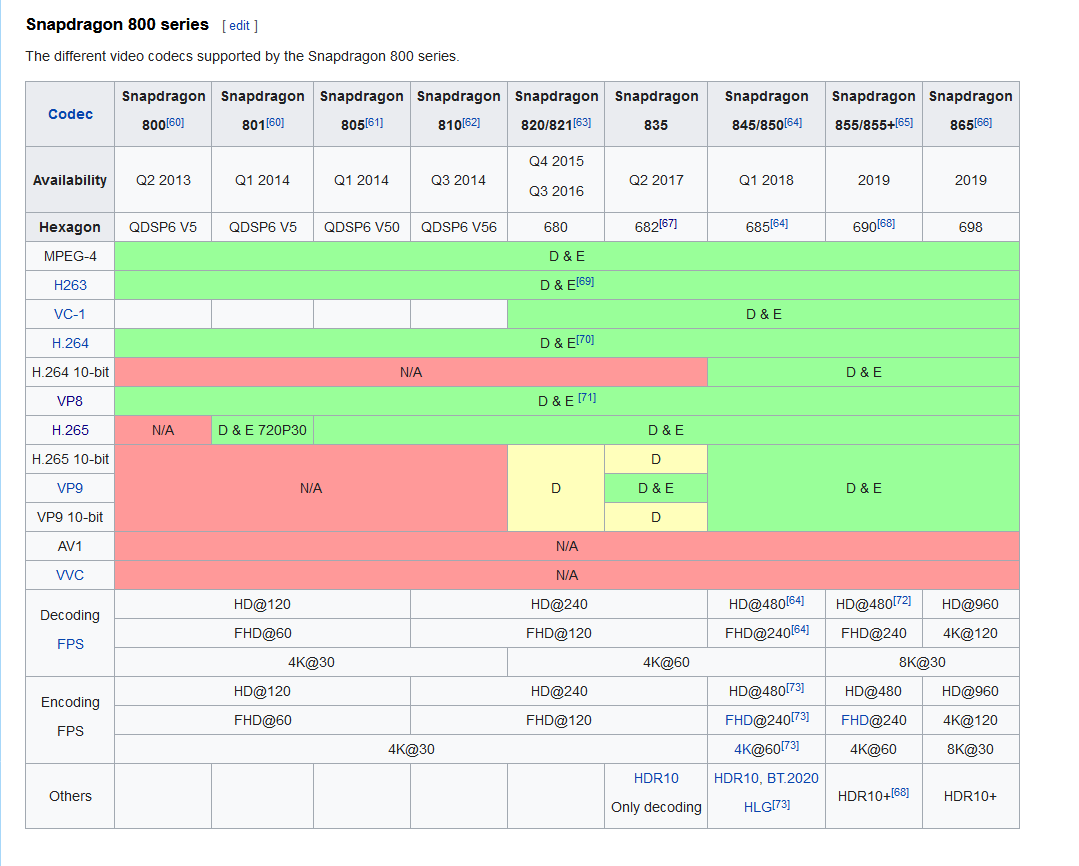
 plain moth
Note for setting up QvPen in quest worlds, I updated the instructions now that there is an official Udon and updated SDK2 package with a Quest Material download.
The latest version can be downloaded here: https://booth.pm/en/items/1555789 - For Udon, get the Udon / SDK3 download. For SDK2, get theSDK2 download and the Quest向けマテリアル (Material) downloads and import both of them. Then follow the above directions for quest.
dull vault
Hey, what compression format should I use for Bumpmaps, regular textures, and lightmaps for quest?
prime forge
does anyone know any avatar worlds that includue like femboys or like boys in croptops? dont ask just lemme know xDDD or any scary horror maps in vr chat for quest ?(edited)
Message #avatar-quest
still pasture

This is my first time to climb a crane and i felt insane.
↓
Instagram:
https://www.instagram.com/lil.elmo_54/
Soundcloud:
https://soundcloud.com/lilelmo54
Discord:
https://discord.gg/phcsyKz
Music:
XXXTENTACION - Fuck Love (feat. Trippie Redd):
https://www.youtube.com/watch?v=JcWOSgImiRw
demxntia - idk who i am w/ guardin:
https://www....
crane world please
dull vault
So when I changed the bild target from PC to Quest on my project the size of the build actually increased by about 7mb XD
 spiral ridge
xxxddddxxxx;'
dull vault
So Unity won't let me upload because it it saying my world is too big. I've completely altered the scene. but when I hit build & upload it immediately says the scene is too large and lists the same file size as before. Is there a way to clear this cached world build that it is trying to use?
naive pagoda
Depends highly what message you are exactly getting but just restarting unity can fix certain things
 umbral dirge
any body reccomend any good worlds
limber helm
@umbral dirge Malaclypse Gallery - I just built it 😆
 granite hazel
Can you look in VRCHAT log in quest? I want track down why some scripts are already crashed in Quest side world.
or are there no log files?
now i am strugging with udonsharp code why its not working...
hardy gate
ask in udon
has anyone in the history of vrc, has seen a working mobile based videoplayer? like an acc moving texture surface of any kind or option to view a working screen
pastel nebula
I believe there were some in the new years world
hardy gate
update: found system to allow quest users to watch videos in vrc. should be possible with manual conversion
 royal goblet
How would we view videos
hardy gate
manually convert the video, you need a pc user to input the link tho
limber helm
@hardy gate do you have a link to what you found please? This could be just what I'm looking for
 thorn dirge
hardy gate
update: found system to allow quest users to watch videos in vrc. should be poss...
thorn dirge
hardy gate
update: found system to allow quest users to watch videos in vrc. should be poss...
u saying i could watch videos with my friends who have quests? (im on PCVR)
hardy gate
@limber helm i could send an example link i used to figure this out, but you need a desktop user to input the acc link
@thorn dirge yea, but only on certain video players
thorn dirge
hardy gate
<@!234718035020087296> yea, but only on certain video players
what players and which worlds can i find them in
hardy gate
avpro, im trying to perfect a method for converting quest videos
if anyone wants to come check out whats going on, just dm and ill send instructions on how to get to me
and how to do it
vital lance
im trying to find fun interactive quest worlds for my friends and I! Also trying to find good avatars if anyone knows worlds
vital lance
slow gulch
If you need a place to vibe go visit the Club Nox world. Its pc and quest compat...
Nox is great! Used to work there and everybody is super friendly. The DJ's are dope too
slow gulch
Aye was poppin squiddy
vital lance
sup XD
dull vault
Question, does quest support lookattarget script from unity standard assets? Or FinalIK?
plain moth
yes to both
dull vault
Well the two handed weapons I have on quest are reportedy just pointing at the ground, any idea whats going on here?
cinder isle
dull vault
Well the two handed weapons I have on quest are reportedy just pointing at the g...
wait a minute, the issues you have been describing
is your world cross platform, and you've been testing with users on different platforms?
because that would be the answer to all the issues you have been experiencing
for cross platform worlds, your scene hierarchy must be 100% identical
anything that is not in either version should have empty game object place holders
because of how network sync is handled on sdk2 worlds, network id's are generated for sync'd objects in your hierarchy, but the order in which the id's are generated are affected by your scene hierarchy
any differences in scene hierarchy will cause desync issues between PC and Quest
dull vault
The prefabs on quest and PC are the same, so the aiming thing doesn't make any sense to me
cinder isle
your scene hierarchy must be identical, not just sync'd objects in them
dull vault
So what do I do about the videosync then, since they say to remove it for quest
cinder isle
leave it there disabled
hardy gate
the sync is in quest by default when instanced
dull vault
Even then, I'm still having issues with the ownership thing
cinder isle
you can remove the video component, but keep the empty game object
dull vault
though I think that may be related to the front grip having a sendRPC trigger for setownership
cinder isle
thats the thing, if your scene hierarchy is not 100% identical
you will get desync issues
where certain sync'd objects on PC are sync'd with the wrong objects on Quest
this affects everything, including pick ups, triggers, rpc's, etc
the most common result is someone picking up object A on PC would show them as picking up object B on Quest
but if you have more complicated trigger setups, more things can happen, such as some triggers not going off for people on the other platform and vice versa
dull vault
Wouldn't that mean it would be broken at all times though? the only time I see this issue is with people who join after the object has been spawned and moved
cinder isle
the setownership rpc might be firing off for the wrong object on the other platform for example
yeah, thats because if they join on a different platform, the network id's on their client do not match up
naive pagoda
I had couple completely static windows that weren't there on my quest build and only on windows
Which broke half of my pickups from syncing between versions
And this was after multiple experiments on trying to optimise to some degree by not having everything included on quest build
So I just gave up and had 100% identical hierarchies in the end
dull vault
Why is this information not pinned or stated somewhere?
hardy gate
because no one does quest worlds really and all public info is old or incoorect
naive pagoda
Except for the fact that all the most popular worlds are cross platform worlds
VRChat
Setting up a cross-platform world or avatar is actually quite straightforward! In short, all you have to do is use a duplicate project to build an Android version of the asset, and upload it to the same content ID as the VRChat PC asset. The client will manage which version it needs to download. If...
cinder isle
Admittedly the documentation is a bit vague on that and intuitively it doesn't make sense to require 100% matching hierarchies.
I think it's not an issue on SDK3 worlds because of how network sync is handled with Udon but i'm not entirely sure.
naive pagoda
Yeah I agree the documentation could be better because that is pretty vague
slow gulch
Club Nox... chill place to vibe both pc and quest compatible...
Events are located in their discord.... you can find it in the world....
hardy gate
parallexure is currently able to stream quest videos without lag so far. if anyone would like to come and see/test, just dm me
signal arch
Club Nox is great; there is a big update on the way. Definitely a good place to start visiting right now, especially if you’re on Quest.
rancid dove
vital lance
Dose any one have a world name for a house
Eventide
vital lance
Thanks
vital lance
nice one @rancid dove
rancid dove
we met him ingame earlier actually
vital lance
I remember hahaha
royal goblet
vital lance
Can’t find a good one
Cozy apartment
vital lance
Thx
@vital lance I was in your game I was the black Spider-Man
And the Kermit
And the no no guy
Yeah I remember you. :)
 mystic veldt
Hey y'all 🤠 so i've noticed that in Quest (as opposed to the same worlds in PC) when planes are too close to each other, they do that hooorrible clipping flicker thing. and the farteraway the two objects are in the distance, the more/worse it flickers. I'm experiencing so much of this in my world and it's making me sad inside. I know the simple solution is to just not have the objects so close to each other, but there isn't always an option. say for instance I have a long hallway, and a poster on the wall at the end of it. in order for that poster not to flicker, I have to pull it 5 inches from the wall. which is fine from a distance, but when you get up to it, it's dumb obviously. are there any overall secrets to reducing flicker (hopefully globally) or is this just something quest worlds have to deal with?
rancid dove
mystic veldt
Hey y'all 🤠 so i've noticed that in Quest (as opposed to the same worlds in PC...
the quest has one floating point less, which is why these flickers happen, as distance is less accurate. What you can do to mitigate that besides moving things a bit further out is to either reduce the far clip plane on your reference camera or increase the near clip plane
mystic veldt
cool! thank you 😄
 fast drum
an hour or two ago i went to the world where there is bar right? there i was having a drink but couldn't talk cause i didn't have a microphone yet. someone was sitting next to me and i suddenly had a great idea and decided to take his drink several times. after that he started to get mad and chased me ;-;. i mean i was gonna get it soon enough. minutes later i was bored so i decided i was bring all the drinks into a corner and wait till he finds it. as soon as he did he brought the cops over while i was crouching on the drinks, then suddenly my computer turned off due to low battery. i was so sad that i couldn't see his reaction but boi i knew i made him hella angy lol. if he sees this i hope i could talk to him again 🤣
vital lance
Does anyone know of a world where I could get Stella vermilion as an avatar
 ivory oyster
If anyone has the vrchat hangout house for quest plz dm me
vital lance
Hello all
limber helm
HI folks, which cross-platform worlds allow the most users?
 tranquil juniper
no idea @limber helm
limber helm
same 'ere😂
limber helm
cheers @tranquil juniper , yeah thats biggest ive seen too
tranquil juniper
lag :/
vital lance
Any one have any cool avatar worlds for quest? Preferably girl avatars
vital lance
@vital lance idk go to quest worlds