#open-beta-discussion
19 messages · Page 15 of 1
 timber jewel
 wintry notch
yeah
 subtle wharf
man i still really want a viewpoint rotation parameter so we can look around and have custom animations for generic avatars
 warm cedar
I'd recommend to re-install or verify the integrity of the game files
timber jewel
I did that
wintry notch
timber jewel
Pumbkin doesn't work anymore
Do I delete it?
timber jewel
wintry notch
Do I delete it?
just delete the PumbkinTools folder yeah
wintry notch
That fixed it
 stable mantle
timber jewel
what should I do?
stable mantle
timber jewel
what should I do?
Reinstall the Visual C++ Runtime. This is something verifying won't fix.
That's my idea, anyways.
 sullen elk
why are we all calling it pumbkin??
 raven laurel
timber jewel
what should I do?
raven laurel
timber jewel
what should I do?
check if restarting your pc will fix it first
timber jewel
it only does that in vr, desktop is fine
timber jewel
raven laurel
check if restarting your pc will fix it first
nope, it didn't
raven laurel
timber jewel
nope, it didn't
https://aka.ms/vs/17/release/vc_redist.x64.exe check if you can reinstall it
 fallen oxide
did dynamic bone have inside colliders? I rarely used DB
raven laurel
fallen oxide
did dynamic bone have inside colliders? I rarely used DB
yes they did
timber jewel
raven laurel
https://aka.ms/vs/17/release/vc_redist.x64.exe check if you can reinstall it
still does that
raven laurel
timber jewel
still does that
it installed or told you it's already installed tho?
timber jewel
it tolled me it was installed and I pressed Repair
nope nothing works
at least in VR
warm cedar
Discord just freaking died lol
raven laurel
timber jewel
does VR not work for anyone else?
someone have same problem in #user-support-old hmmm
timber jewel
OOOOO maybe it is steamVR
raven laurel
yeah could be
timber jewel
testing it right now
it is
the new SteamVR beta that came out at the same time broke it
I suggest everyone to stay away from SteamVR 1.22.2 for now😅
 limber quartz
timber jewel
I suggest everyone to stay away from SteamVR 1.22.2 for now😅
limber quartz
timber jewel
I suggest everyone to stay away from SteamVR 1.22.2 for now😅
v1.22.2*
timber jewel
whoops
 keen nova
Is steam vr beta broke? Lol
keen nova
Good to know, I'll have to uninstall it and go back to live.
i say knowing I spend 90% of my time on vrc in desktop lol
timber jewel
lol
 dapper scarab
timber jewel
I suggest everyone to stay away from SteamVR 1.22.2 for now😅
dapper scarab
timber jewel
I suggest everyone to stay away from SteamVR 1.22.2 for now😅
Seems to only be triggered by Index controllers
timber jewel
yeah ik
 mossy python
I only vaguely experimented with them before, what exactly do inside colliders do
 slender ocean
anyone figured out a fix for the hand colliders being way too long in game?
er sorry, finger colliders that is
 gritty salmon
slender ocean
anyone figured out a fix for the hand colliders being way too long in game?
gritty salmon
slender ocean
anyone figured out a fix for the hand colliders being way too long in game?
you can adjust them in the avatar descriptor
slender ocean
the options in the descriptor don't seem to actually effect how they are in game
I think radius works, but length seems to be ignored
I made a canny but it hasn't gained much traction so wondering if I'm just doing something wrong or everyone already knows a workaround
 twin musk
What's the best way to quickly test the leg movements for my skirt physics? Right now I'm just rotating the bones with the mouse and that feels really jank so there's probably a much more rational way to do this
warm cedar
twin musk
What's the best way to quickly test the leg movements for my skirt physics? Righ...
Grab the object of the avatar
select the rotation tool
Oops, well I was making an elongated spin joke
Just, use the rotation tool and or transformation tool, it does wonders to test these components
twin musk
warm cedar
Just, use the rotation tool and or transformation tool, it does wonders to test ...
In that case maybe it's my physics that's the jank thing ><
warm cedar
Had to make a phone, couldn't help myself
warm cedar
twin musk
In that case maybe it's my physics that's the jank thing ><
Could well be
 onyx pivot
Anyone know how to get back to live realease
 hard pond
onyx pivot
Anyone know how to get back to live realease
hard pond
onyx pivot
Anyone know how to get back to live realease
on quest?
flip back to live on app, then reinstall.
 stone rapids
I am curious, any recent talks or news of when the beta update will be publicly released out of beta?
 molten cobalt
stone rapids
I am curious, any recent talks or news of when the beta update will be publicly ...
molten cobalt
stone rapids
I am curious, any recent talks or news of when the beta update will be publicly ...
nope and there's unlikely to ever be a announcement before it releases
 wheat fjord
Thanks for VRChat for your totally professional and not at all amateur quality assurance. I'm so glad to send $10 every month to you for your awesome totally not at all buggy work. Keep it up. If it's not broke, you'll fix it until it is!

 sick creek
wheat fjord
Thanks for VRChat for your totally professional and not at all amateur quality a...
sick creek
wheat fjord
Thanks for VRChat for your totally professional and not at all amateur quality a...
what
this isn't VRChat's fault, its 100% on Valve
also SteamVR is Beta is a Beta aka subject to stuff breaking
wheat fjord
sick creek
what
this isn't VRChat's fault, its 100% on Valve
Yep totally, I totally agree and am def not being sarcastic. Passing the responsibility on to the totally guilty party.
Cause we all know that index controllers do not work at all in any game
And you can't get them to work
Yep, it's just all busted
 shrewd estuary
warm cedar
Had to make a phone, couldn't help myself
shrewd estuary
warm cedar
Had to make a phone, couldn't help myself
me when i walk into a room and forget why i went in there

 astral sinew
shrewd estuary
me when i walk into a room and forget why i went in there
astral sinew
shrewd estuary
me when i walk into a room and forget why i went in there
adhd moment
sick creek
wheat fjord
Yep totally, I totally agree and am def not being sarcastic. Passing the respons...
chill a bit, sarcasm doesn't always translate well through text
back in my day people used /s and damn it, it worked!
astral sinew
sick creek
chill a bit, sarcasm doesn't always translate well through text
*back in my day...
what do you mean sarcasm translates perfectly through text /s
wheat fjord
sick creek
chill a bit, sarcasm doesn't always translate well through text
*back in my day...
But I'm totally not at all being sarcastic I'm agreeing with you
I totally am not completely pissed off by this new not at all
astral sinew
i take back what i said
sick creek
astral sinew
i take back what i said
I'm just confused now
oh well back to being productive
astral sinew
yeah so am i, that's why i took back what i said
yeah, did they fix the float capsules issue?
actually wait lemme be specific, i had an issue where i couldn't use the proximity contact receiver if it was a capsule
it would bug out, no register any float value when contacted and weirdly made all debug contact visuals disappear while it's in contact haha
i just fixed it by using a sphere instead but a capsule still might be more useful in other cases, was wondering if that was still a problem
sick creek
and its fixed
 astral sinew
sick creek
and its fixed
astral sinew
sick creek
and its fixed
they're quick with that
shrewd estuary
woo
sick creek
time for a "welp Valve just fixed it already" ping from Tupper

If you encounter issues with this update, please post in the SteamVR Bug Report forum. If possible, please include a system report to aid in tracking down your issue. Replies to this post are not tracked for bug reporting purposes. Please use the forum linked above to report issues. SteamVR: Fixed a regression that caused VRChat to crash on laun...
hard pond
unbeliebablly quick
shrewd estuary
speedrun
 umbral apex
Inside colliders pog
twin musk
Now that we have Inside Colliders, does anyone have a link to a tutorial on how to make this kind of physics?
keen nova
Bug got fixed before I got home from work lol
wintry notch
how do you grab bones in the editor
 twin fossil
wintry notch
how do you grab bones in the editor
twin fossil
wintry notch
how do you grab bones in the editor
need to be in play mode
 lunar helm
How do you return to the main branch on quest?
 stiff acorn

 eager otter
Has anyone experienced issues with collision senders? I have a working send receive in unity for the index finger but attempting it with my avi in game it fails. All collider groups are properly rigged
 tough abyss
yikes
eager otter
lmao
sick creek

eager otter
thats a good one ngl
sick creek
oh no this is funny af
 inner kayak
huh
 mystic venture
If someone could help me get back into live I would appreciate it
I tried this already multiple times

Still it says I’m on live in the app but I’m stuck in beta
 gusty gale
?
mystic venture
gusty gale
?

wheat fjord
eager otter
Has anyone experienced issues with collision senders? I have a working send rece...
had the same issue with one of the demo avatars. Think it's a bug can't report it properly since I have not created any content using them yet
wheat fjord
mystic venture
Still it says I’m on live in the app but I’m stuck in beta
I don't understand why this is happening to some Quest users. I have 7 friends on Quest I've instructed step by step on how to get in and out and all 7 were successful at both. They got back on their own. I just told them to reverse the process to get back in.
mystic venture
Reverse?
wheat fjord
Yeah I told them how to opt in. Just said to go back to the same page on their phone hit the version number again, select live and uninstall and reinstall.
All were able to get back on live.
Since I'm not present to see what's happening, I can't really help in a full capacity.
It's possible people do not have their quests paired to the phone app or something
Or their quest isn't connecting to their phone when going back to live
timber jewel
Hm I thought that it might have something to do with Auto Conversion, but since that isn't even a thing on Quest, this shouldn't happen
 gloomy dagger
 timber jewel
I would really appreciate if we could get an "IsPosed" parameter:
https://feedback.vrchat.com/open-beta/p/1185-isposed-parameter-for-phys-bones

 dim cloak
timber jewel
I would really appreciate if we could get an "IsPosed" parameter:
https://feedba...
dim cloak
timber jewel
I would really appreciate if we could get an "IsPosed" parameter:
https://feedba...
Gave you an upvote because I do think it'd be useful to have, but I think you could substitute "Stretched" in for the time being and I imagine it'd work just as well for you.
timber jewel
Yeah it probably would, but with Stretch I don't really get a a pull over the had
Since it would first go up to get over the had and then back down to its end position
Using the Angle works better in that situation
But IsPosed would be really useful in general
It probably also wouldn't be hard to implement
warm cedar
Uurrhh...
softwaregore moment?

So I'm getting a cloth warning for using contacts.
Yes, this... this makes sense
timber jewel
wtf
Random question, but what do inside colliders actually do / how do they work? Ik people missed them a lot with Phys Bones but I don't really know how they work, what they do and what they are used for.
I also didn't really find any documentation for them online with a quick google search
ahhh now I get it xD
 near grove
How has the performance enhancements been due to physbones?
 grim glacier
how is the max angle on the bones supposed to work? cus my bones are still rotating past that angle
that's the tail

yet they're supposed to have a max angle of this

i think it's going under instead of just clipping through..
is there a way to offset the max angle? so e.g. it can't move left much but it can move right more
timber jewel
grim glacier
that's the tail
Max Angle applies to every bone in the chain which is also why it can do that
You can use a line graph though to define it on a per bone basis
grim glacier
oh nice
grim glacier
grim glacier
is there a way to offset the max angle? so e.g. it can't move left much but it c...
is this possible btw?
timber jewel
grim glacier
is this possible btw?
not at the moment no
There is canny post about that though:
https://feedback.vrchat.com/open-beta/p/1181separate-axis-of-max-angle
timber jewel
For some reason I don't see when Quest players are moving a few of my bones. My Ears and my hoodie cap work (both are on my head) but my Tail etc doesn't.
grim glacier
hey what happens when you upload an avatar with the beta sdk? / update an avatar with the beta sdk, does it break the avi on non beta branches?
or does it only show the beta update on the beta branch, which i think is what they did for the unity 2019 update
 small surge
Can still be worn in live, just it will be stiff if using physbones 🔨
grim glacier
is there any documentation on the performance rank details for physbones?
do they differ to dynamic bones?
small surge
pc got a bump, quest just got 'em since they had nothing | https://docs.vrchat.com/v2022.1.2/docs/avatar-performance-ranking-system#pc-limits
VRChat
The Avatar Performance Ranking System allows you to see how much a user's avatar is affecting performance via analysis of the components on that user's avatar. You can also use it on yourself to see how performant your avatar is. This system is provided to inform users what is likely the most perfor...
Did this cause thats mostly what i care about, easier to see

1 component / root = 1 cpu core, so multiple is good
warm cedar
 bright jungle
lmao
 pliant hornet
warm cedar
pliant hornet
warm cedar
I feel that
warm cedar
Everyone does with the way the system is set up xD
shrewd estuary
warm cedar
this is what the rank looks like for my 12 million poly cube
(don't worry im not uploading that monstrosity)
keen nova
warm cedar
"Let me just add these assets and prefabs I found."
warm cedar
I had to fix an entire phone, it had 34 MATERIAL SLOTS.
Just joined the entire thing in blender and now it's just 1 mat.
shrewd estuary
you got any more of them material slots
warm cedar
Nah but you can ask the e-avatar creators
 muted brook
I could see a working phone needing 34 mats. But a static one???
warm cedar
It was a working one, but it didn't need to be animated
keen nova
warm cedar
I had to fix an entire phone, it had 34 MATERIAL SLOTS.
This is me yelling at a friend of mine every time he uploads anything. Lol
warm cedar
Don't tell me they create e-avatars
keen nova
No, but they only know how to retexture and kitbash prefabs onto an avatar
shrewd estuary
shoutouts to those avatars with the x and o glasses
they're all made by the same guy
warm cedar
Every time I even think about showing them my mind even lags
shrewd estuary
they're probably less performant than my 12 million poly cube
shrewd estuary
my cubes just got a shit ton of polygons nothing else
zuvali made a really high poly quad and it was just 2 gb worth of polygons
 dusty canopy
Um just a question are there any new ways to get out of the beta with the new update I have tried the set to live and delete and reinstall thing I have tried downloading the past apk for the live version I have tried factory reseting non of it works
bright jungle
Yes, switch to Live, uninstall the game, and reinstall - if that doesn't work, wait a couple hours before reinstalling
 old rock
 hearty ore
Can some one explain endpoints to me?
pliant hornet
hearty ore
Can some one explain endpoints to me?
its where it ends
pliant hornet
a end point is used to define where it ends the phys-bone
you just need to move the end point game object if end ponit no work
hearty ore
Ok
warm cedar
pliant hornet
its where it ends
Wulf. mind the sarcasm you ligth-saber wielding animal
We still need to do that bonk battle.
stable mantle
wheat fjord
I don't understand why this is happening to some Quest users. I have 7 friends o...
It happens because the Quest seems to sometimes rely on cached data and not update properly, so you'll opt-out or opt-in but the Quest won't immediately acknowledge it. I've posted some more thorough step by steps on how to ensure you exit but until those same steps come from VRChat team themselves, people are still gonna make common mistakes (due to an oversight by Meta).
wheat fjord
stable mantle
It happens because the Quest seems to sometimes rely on cached data and not upda...
I thought the team made this clear.
It's just never been a problem for me or other users I have supported
stable mantle
wheat fjord
I thought the team made this clear.
Not really no. "Uninstall & Reinstall" to most is an immediate thing. No one is waiting for their Quest to refresh nor checking the listing in the store on Quest to ensure the version numbers match; 2 very important steps that can make a difference between success and failure.
stable mantle
dusty canopy
Um just a question are there any new ways to get out of the beta with the new up...
You need to contact Meta support, not VRChat because your issue is outside the scope of the bug.
If you developer unlocked your quest, and tried sideloading the APK for 117[X], without VRChat being previously installed, and the install returns a failure? Then your Quest account seems borked.
wheat fjord
stable mantle
Not really no. "Uninstall & Reinstall" to most is an immediate thing. No one is ...
So I take people aren't following instructions?
stable mantle
wheat fjord
So I take people aren't following instructions?
More like VRChat team have left a few steps out.
Their steps will work for the majority of people.
dusty canopy
bright jungle
Yes, switch to Live, uninstall the game, and reinstall - if that doesn't work, w...
Been there done that
wheat fjord
stable mantle
More like VRChat team have left a few steps out.
Did they?
 stable mantle
wheat fjord
Did they?
wheat fjord
stable mantle
wheat fjord
Did they?
wheat fjord
Is this not correct, it's worked for everyone I've help my old quest included
stable mantle
I literally mention what they fail to include between steps "Uninstall" & "Reinstall".
Like I said, their steps will work for the majority of unbugged users.
dusty canopy
Yea my headsets so bugged it wouldn't let me install the live apk
wheat fjord
stable mantle
https://discord.com/channels/189511567539306508/449386885299830794/9591494515728...
 stable mantle
wheat fjord
stable mantle
wheat fjord
That's not the same.
wheat fjord
stable mantle
https://discord.com/channels/189511567539306508/449386885299830794/9591494515728...
I mean I guess I just don't understand what's tripping people up
stable mantle
That's the website or app.
wheat fjord
Ok?
stable mantle
Not on the Quest.
Users with the synchronization bug need to wait until the store listing inside the Quest matches their store listing on the Web or App.
dusty canopy
Good for you but you can't figure out a bug
 crisp copper
ofc you can
dusty canopy
Not when the bug prevents you from doing anyform of install of the live version thru apk or download
dusty canopy
stable mantle
You need to contact Meta support, not VRChat because your issue is outside the s...
Hey how would I go about contacting them
wheat fjord
Sounds like this an issue on Oculus/Meta side.
This is why I jump ship as quickly as I could from them
stable mantle
-
Because most modern technology doesn't require you to literally dog the store listing to check if it's giving you the correct version number after switching that version on a separate platform. — Meta's update channel workflow is atrocious.
-
Many Quest users are joining the beta to try physbones for a laugh, then quit out to play with friends. — Be realistic, the Quest channels are inundated with people asking "how do I make an avatar, I downloaded the SDK but clicking it does nothing" and "How do I show PC avatars" and "Why can't I go to my friend's world?"
crisp copper
it is. as the devs have stated
small surge
*always has been
wheat fjord
stable mantle
1. Because most modern technology doesn't require you to literally dog the store...
No I get that. and you're right meta has so many issues
stable mantle
wheat fjord
Sounds like this an issue on Oculus/Meta side.
It is, my point was there's additional steps that can help ensure the right channel installs. — They're not normally necessary, but if you have a bugged account these steps can make the difference between a successful switch and being stuck on a channel.
dusty canopy
dusty canopy
Hey how would I go about contacting them
Can someone answer this
stable mantle
dusty canopy
Hey how would I go about contacting them
dusty canopy
stable mantle
https://support.oculus.com/articles/contact-us/contact-us/index-contact-us
Tysm
stable mantle
YMMV because I get
Sorry, this content isn't available right now
On all Oculus sites lmao
On it
dusty canopy
Now I wait for meta to respond which we all know I will be six feat under before then
stable mantle
dusty canopy
stable mantle
<https://feedback.vrchat.com/open-beta/p/quest-provide-advanced-channel-switchin...
If only it was that easy
stable mantle
dusty canopy
If only it was that easy
You're experiencing a sever variant of the bug, and some other bug preventing a developer-unlocked Quest from sideloading.
Double check though that you have developer mode enabled via the mobile app, and try sideloading the apk using adb from command prompt or terminal with your quest connected via USB: adb install -r -d "[path to APK]"
Examples:
Mac: adb install -r -d "/users/zitic/downloads/2022-03-13T03-16-29.842Z_1036.apk"
Windows: adb install -r -d "C:\Users\zitic\Downloads\2022-03-13T03-16-29.842Z_1036.apk"
—
Being said: https://feedback.vrchat.com/open-beta/p/quest-host-beta-as-a-separate-listing
If VRChat did this, the bug woudn't even be an issue.
dusty canopy
stable mantle
You're experiencing **a sever variant of the bug, and some other bug preventing ...
Been there done that
 noble bramble
- Fixed issue of some VRCPhysBoneCollider's not updating values while in play mode
looks like its more broken than before
small surge
switching camera in playmode now make touching them break for me
warm cedar
OSC mixed with avatar dynamics is so powerful oml
molten cobalt
like folks have already got to have haptic vest working with it
onyx pivot
Does anyone know how to get out of the open beta back to live
I’m stuck trying to reinstall it (quest) and it will not reinstall after I changed it back
It will only reinstall when I have open beta selected
 lucid jacinth
Tbh open beta has gotten better for quest sense day 1 of open beta launch it used to break the avatars not just the phys bones but also the other ones as well just switching your avatar and the game would break so honestly it’s getting better still some small bugs but it’s definitely better then the avatars being broken all the time
lucid jacinth
onyx pivot
It will only reinstall when I have open beta selected
Delete the game reinstall also if that doesn’t work switch it back to ik beta and delete and reinstall again
shrewd estuary
i don't believe the ik beta is on quest
uninstall game, switch to live branch, wait a bit, and reinstall.
lucid jacinth
The ik beta is is on quest ik is the live beta
 lucid jacinth
Do you mean no dynamic’s?
shrewd estuary
"live" is the live channel of the game
"openbeta" is the avatar dynamics beta.
lucid jacinth
Because the open beta is the phy bone beta
shrewd estuary
physics bones are part of avatar dynamics
lucid jacinth
Yea I know that every one that is here in this chat knows that
The server is literally called avatar open dynamics
shrewd estuary
yes
you just said
"do you mean no dynamics?"
"because the open beta is the phy bone beta"
wording counts
shrewd estuary
as I said, physics bones are part of dynamics.
lucid jacinth
You didn’t put the correct grammar and I got confused
As In you didn’t really didn’t say which one
shrewd estuary
dynamics is physics bones and avatar to avatar interaction, while physics bones are just.. physics bones.
shrewd estuary
i don't?
physics bones are a component in avatar dynamics.
dynamics aren't a component of physics bones.
lucid jacinth
Dynamic bones can’t be messed with other players like grabbed
shrewd estuary
lucid jacinth
Dynamic bones can’t be messed with other players like grabbed
and?
lucid jacinth
They can be smacked around
shrewd estuary
physics bones can, that's part of avatar dynamics.
that's avatar to avatar interaction.
lucid jacinth
Phys bones can however be grabbed and messed with making them player interaction
lucid jacinth
shrewd estuary
that's avatar to avatar interaction.
To a degree
shrewd estuary
lucid jacinth
Phys bones can however be grabbed and messed with making them player interaction
which is a part of avatar dynamics
if physics bones can be grabbed that's avatar to avatar interaction, as one avatar is interacting with another's physics bones. that's part of why it's called "avatar dynamics".
small surge
Love seeing auto converted avatars with a collider bigger then the room, enable debug mode and all i see is that
lucid jacinth
The normal Dynamic bone don’t have that
shrewd estuary
dynamic bones are older, and aren't part of avatar dynamics
on top of that, dynamic bones are an entirely separate thing. they're just able to be used in vrchat.
molten cobalt
and dynamic bones are also getting deprecated
shrewd estuary
their replacement is the physics bones.
lucid jacinth
ok but you literally have been saying that they are apart of the avatar dynamics
shrewd estuary
i was saying physics bones are part of dynamics, not dynamic bones.
lucid jacinth
shrewd estuary
their replacement is the physics bones.
Yeah I know that
No this entire time you haven’t actually said until now that it physic bones
shrewd estuary
shrewd estuary
i was saying physics bones are part of dynamics, not dynamic bones.
they're two separate things
shrewd estuary
shrewd estuary
as I said, physics bones are part of dynamics.
read
 hexed tide
avatar dynamics =/= Dynamic bones
lucid jacinth
i am aware of that
shrewd estuary
shrewd estuary
physics bones are part of avatar dynamics
read
lucid jacinth
shrewd estuary
read
I have been reading
 lucid jacinth
Because You haven’t
molten cobalt
maybe we should move on to a new subject
shrewd estuary
good christ
lucid jacinth
I have already said your not specifying what your talking about
shrewd estuary
i am specifically talking about physics bones and how they're part of avatar dynamics
shrewd estuary
shrewd estuary
physics bones are part of avatar dynamics
this was my second message in the entire conversation.
bro
lucid jacinth
In your words “dynamic is physic bones and avatar to avatar interaction” meaning some one with reading disabilities could easily get the wrong idea which I did until you said that your talking about Phys bones on their own
shrewd estuary
let me make this message for reference, then.
dynamic bones - old and deprecated, not used in Avatar dynamics. dynamic bones are also an entirely separate thing that were just able to be used for vrchat.
avatar dynamics - avatar interaction and physics bones.
instead, avatar dynamics uses physics bones, which are exclusively made for vrchat. not dynamic bones. names are weird.
hope this helps
 glad we came to a conclusion.
lucid jacinth
I mean it would help if you said Phys bones dynamics seem like your talking about the other bones
shrewd estuary
yeah that's why i hate naming
shrewd estuary
lucid jacinth
I mean it would help if you said Phys bones dynamics seem like your talking abou...
wish i could just go "EÊÈÉĒ" and people would know what im taking about
stable mantle
Why not just say AD?
shrewd estuary
i hate ads (advertisements)
but i don't hate ad (avatar dynamics)
you see what i mean?
lucid jacinth
Sorry but everyone I have talked to here have called the bones Phys or physical interaction bones
stable mantle
shrewd estuary
you see what i mean?
AD capital. Or AviDyn.
shrewd estuary
phys is just short for physics and physical interaction is just long for physics
lucid jacinth
I know that
shrewd estuary
names are dumb and stupid let's all just screech and make weird noises like how we did when we were caveman
stable mantle
lucid jacinth
Sorry but everyone I have talked to here have called the bones Phys or physical ...
Avatar Dynamics is more than just PhysBones. — PhysBones are just a part of it. There's also avatar contacts.
lucid jacinth
I am just trying to say I am really used to calling them Phys bones
lucid jacinth
There not an issue
 lime yarrow
There seems to be
lucid jacinth
Just got confused
I thought earlier that they were talking about the normal bones
But they meant Phys bones
lime yarrow
But it was pretty obvious to everybody else that that wasn't the case
lucid jacinth
“Dynamic bones” is what I thought you meant
lime yarrow
Well now that we've cleared that up, we can move past it
shrewd estuary
yea
lucid jacinth
Agreed
lucid jacinth
I was about to say the same thing
shrewd estuary
great minds think alike
apparently so does my phone because it auto suggested i say this.
shrewd estuary
shrewd estuary
let me make this message for reference, then.
dynamic bones - old and deprecate...
tbh i could've just said this earlier and you would've gotten what i mean faster
we both done goofed lmao
lucid jacinth
Agreed
shrewd estuary
lucid jacinth
Your phone is just a chad
it's a motorola from 2016
lucid jacinth
Sorry for the miss understanding
 lucid jacinth
It’s ok pal
lucid jacinth
shrewd estuary
it's a motorola from 2016
Then it has a mind of its own
shrewd estuary
hey someone's gonna look back at that conversation and have a good laugh at the both of us
as long as everyone's happy
lucid jacinth
Anyways bye for now
shrewd estuary
cya
lucid jacinth
Cya
 tender dome
says how at the top
if you set it to OpenBeta then just wait for it to prompt an update
reboot your headset perhaps
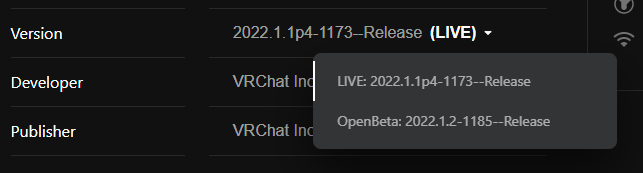
on the store page
 tender dome
anyway, back to typing what i came here for
shrewd estuary
yee
tender dome
hey yall, im trying to see what settings people like to set for forces on their physbones components. I'd like to know what settings you set for:
-Hair
-Tails
-Chest
-Chains
-Skirts
if youve set up physbone components on any avatars for these things please let me know what you set for forces c:
stable mantle
VRChat for the love of all things holy just make the beta a second (meta) store listing, please.
 marble glen
They’re aren’t worlds
small surge
Same i did with dynamic bones , just slap physbone on parts, then go to playmode, wobble avatar around edit values until it looks alright, copy/paste value after
grim glacier
is there a parameter for detecting if a physbone is being collided with? closest i see is for grabbing but that isn't the same
tender dome
small surge
Same i did with dynamic bones , just slap physbone on parts, then go to playmode...
so do i but i'd like to know what other people prefer to set for them
grim glacier
does anyone know why the default physbone values are so big?? like this is with the radius 1 on a reciever..


 small surge
Put a cube near it, thats 1m
grim glacier
 small surge
They are big to start i guess, edit them small 🤷 like physbone radius start at 0.025~ majority of my avs
 sullen elk
Gravity is as strong as it looks in Unity editor because holy god my hair hangs like a brick
timber jewel
sullen elk
Gravity is as strong as it looks in Unity editor because holy god my hair hangs ...
I mean you can just use like 0.0001 gravity if you want to xD
sullen elk
True
I'm a tiny bit confused, my contacts that had worked previously in the past are no longer now after updating SDK.
onyx pivot
shrewd estuary
uninstall game, switch to live branch, wait a bit, and reinstall.
It didn’t work
onyx pivot
lucid jacinth
Delete the game reinstall also if that doesn’t work switch it back to ik beta an...
Yeah it didn’t seem to work
shrewd estuary
how long did you wait
onyx pivot
Good 15 mins
tender dome
wait for it to prompt an update
onyx pivot
So install it on beta, switch it and then leave it?
onyx pivot
So I wait but I don’t have it installed?
I’m sorry for being difficult but I’ve be trying for 2 days now
 tight patrol
Kinda sad you can only interact with other people with beta on if you have the beta on.
tender dome
thats the case with most beta's
stable mantle
onyx pivot
So I wait but I don’t have it installed?
Leave it uninstalled, and occasionally check VRChat's version number on the Store inside the quest to see if it matches LIVE. — After it matches you can uninstall.
RN LIVE versions are 117[X] & betas are 118[X]
 drowsy elbow
Can someone ping me to the message that tells you how to leave beta pls
shrewd estuary
drowsy elbow
Can someone ping me to the message that tells you how to leave beta pls
select live branch, uninstall, wait a while, reinstall
drowsy elbow
Ok thanks
 charred tree
im tryna get into open beta
shrewd estuary
charred tree
im tryna get into open beta
charred tree
ive tried
hard pond
Which platform?
charred tree
Oculus quest 2
hard pond
and which beta
charred tree
open beta
hard pond
there is 2 open beta in operation actually.
You meant for PhysBone or IK?
charred tree
hold on lemme check smth
hard pond
yeap, just in case.
drowsy elbow
shrewd estuary
select live branch, uninstall, wait a while, reinstall
Is 10 to 20mins a good wait time
shrewd estuary
try longer
hard pond
anyway, if it physbone beta, toggle on app then reinstall be quickest way.
Maybe need to leave like 10-20 minutes between at least.
drowsy elbow
40mins
stable mantle
Ive had to wait 24 hours for a build channel to change once, and Ive heard of 48 hour + happening.
Anybody know what to do with an "The asset bundle is out of date" error?
Tried building my avi with the beta SDK and uploading updates to existing avis work, but trying to upload a new avatar results in it giving a blueprint ID error... even though theres no blueprint id on the model. — It hasnt been uploaded yet.

This doubly makes no sense because this looks like a world SDK error... for a Quest avatar build.
NVM. — Somehow it's like the Pipeline script attached to my avatar was broken. Deleting it caused a new one to be added (even though they were both empty) and it builds.
 unique fiber
So, potentially stupid question, and I may have just missed finding the answer in my various searches ... but how exactly do I get the Avatar 3 Open Beta SDK? I've only just started out with making an avatar, and I'd like to just start with physbones now rather than doing dynamic bones then having to convert later
I have the 2022.2.16.19.13 SDK, but I'm not seeing physbones in Unity
stable mantle
unique fiber
So, potentially stupid question, and I may have just missed finding the answer i...
It's posted as a download link in #open-beta-announcements
wintry notch
Ik I already asked that but how do you grab physbones in the editor?
I am on play mode but idk what I'm doing
stable mantle
wintry notch
I am on play mode but idk what I'm doing
Game mode window, main camera, drag with the pointer.
 static iris
Does anyone have a list of good physbones settings for hair, breast, tails, etc..?
wintry notch
stable mantle
Game mode window, main camera, drag with the pointer.
I am dragging them
no effect
static iris
That happens to me to idk why I :(
 hollow hatch
If you haven't updated to the latest release of the beta SDK you could be getting stopped by the error pause option in the console. Until this last release it would error when trying to drag a bone.
wintry notch
I am up to date
static iris
Me too
wintry notch
wait nvm I wasnt
hollow hatch
If you get errors when trying to drag bones, you aren't updated
static iris
static iris
Does anyone have a list of good physbones settings for hair, breast, tails, etc....
No?
 glossy token
Does anyone know where to get any boy avis with phsybones?
static iris
Look around public avatar dynamics servers and if you see one ou like, ask the person wearing it to clone it
Or use a site like gumroad if you know how to upload/add physbones yourself
sullen elk
Wanted to show off weapon/RP potential of my WIP public model using AD.
Misfires intentional ;)
near grove
sullen elk
Wanted to show off weapon/RP potential of my WIP public model using AD.
Misfires...
Was you actually grabbing the sword or are you just good at using the emote wheel and lining it up
near grove
Any news yet on a estimate of when it may go live. Im thinking 2 months but not too sure
Am excited 😁
 lapis urchin
sullen elk
Wanted to show off weapon/RP potential of my WIP public model using AD.
Misfires...
lapis urchin
sullen elk
Wanted to show off weapon/RP potential of my WIP public model using AD.
Misfires...
if that is you actually grabbing it, how did you do that?
 fallow rock
@near grove @lapis urchin If I were to guess the sheath would have a receiver looking for Hand L and the sword's handle a second receiver looking for Hand R both set to Constant with their own Params. Transitions in Fx would be checking for the respective param value as well as a Gesture value like 1 for fist to which it's entering an animation to change the source weights of parent constraints for both the sword and sheath objects/bones.
That's the train of thought you'd go with for particle drivers so makes sense to me to be something similar for contacts
Super cool stuff and 100x easier than using particles for grabbing things xD
lapis urchin
could it be done for other users? like have objects on my avatar other people can grab?
 signal condor
 lapis urchin
man I wish I knew about this before it was removed, like I get why but I'm still upset
 sullen elk
near grove
Was you actually grabbing the sword or are you just good at using the emote whee...
sullen elk
near grove
Was you actually grabbing the sword or are you just good at using the emote whee...
Actually grabbing it using avatar dynamics
 primal scaffold
Heya, has anyone tried to put avatar dynamics on their avatars arm or similar. Tried to do a quick test of it just now on my left arm. Works well when I'm standing still, but when I move the arm with grabbable AD on it is really shaky. Is this just how it will be with AD so I need to make a toggle for my arm to be grabbable or am I just missing something?
 sullen elk
primal scaffold
Heya, has anyone tried to put avatar dynamics on their avatars arm or similar. T...
sullen elk
primal scaffold
Heya, has anyone tried to put avatar dynamics on their avatars arm or similar. T...
Did you raise the immobile stat to 1 so it won't move?
primal scaffold
Yes
I have the current settings on it

It's attached to my upper arm.
I was thinking about immobile first aswell. But didn't seem to help.
small surge
physbone on humanoid bones did wierd things last time i tried it
Had one on my head and couldnt look up/down anymore
primal scaffold
Yeah. Had that problem in the beginning aswell. But I think that specific problem should be fixed now. I have my hair components on my head bone without any problems.
 small surge
i know, it was for testing all my physbones are rooted
It the same when you attach something to head you want constraint it to somewhere instead or it get culled to 0
 restive tapir
primal scaffold
Heya, has anyone tried to put avatar dynamics on their avatars arm or similar. T...
restive tapir
primal scaffold
Heya, has anyone tried to put avatar dynamics on their avatars arm or similar. T...
Yes i have the same issue is there a canny already?
 shrewd heron
One big question. Avatar dynamics. They work on quest correct? Do I have to go on the new version or am I okay on the normal live
raven laurel
shrewd heron
One big question. Avatar dynamics. They work on quest correct? Do I have to go o...
for now you need use beta version
shrewd heron
raven laurel
for now you need use beta version
Is that the live or is that a different version from open beta on quest
primal scaffold
restive tapir
Yes i have the same issue is there a canny already?
Been looking for a bit now and I can't find a canny on it. You or me?
raven laurel
shrewd heron
Is that the live or is that a different version from open beta on quest
open beta not ik beta if you choose beta version
small surge
keep in mind quest never had dynbones, so they need to be updated to have physbones, auto convert does nothing for them
shrewd heron
raven laurel
open beta not ik beta if you choose beta version
Okay
restive tapir
primal scaffold
Been looking for a bit now and I can't find a canny on it. You or me?
You please, im away from my pc
primal scaffold
restive tapir
You please, im away from my pc
Done :)
 graceful storm
near grove
sullen elk
Actually grabbing it using avatar dynamics
graceful storm
near grove
sullen elk
Actually grabbing it using avatar dynamics
That’s cool
near grove
sullen elk
Actually grabbing it using avatar dynamics
If the avatar is on quest can you slide it??
restive tapir
primal scaffold
Done :)
Nice
near grove
Give it like, a moment please. Trust me, no need to rush.
 plush loom
Ok
near grove
plush loom
Why is the beta gone on quest 2
Maybe it’s coming out 😱😱😱
plush loom
near grove
Maybe it’s coming out 😱😱😱
Hello
shrewd estuary
plush loom
Is there not a date that it will be coming out again?
there is no current date of when the update will go live
plush loom
Ok do you know if it will be soon tho?
plush loom
Is there a dev online right now
shrewd estuary
several
plush loom
Can you @ one for me please
shrewd estuary
they aren't gonna tell you the release date if you ask them lol
shrewd estuary
confidential information
shrewd estuary
thanks you too
sullen elk
near grove
If the avatar is on quest can you slide it??
I will have a Quest version eventually, gotta remodel the entire thing specifically for Quest
shrewd estuary
evil facebook be like "i am good at managing betas"
near grove
sullen elk
I will have a Quest version eventually, gotta remodel the entire thing specifica...
Ohh ok ok well whenever you do it you remember could you dm me
Cause honestly grabbing the sword pretty cool
sullen elk
near grove
Ohh ok ok well whenever you do it you remember could you dm me
For sure! I already have a Quest thing out but it seems to scare everyone off because I’m too realistic lol
 muted bloom
I would not look at Quest’s beta behavior as any indication of anything. It is known to be unpredictable
Just because a beta vanishes does not mean anything is coming. It could just be Meta being dumb.
stable mantle
primal scaffold
I was thinking about immobile first aswell. But didn't seem to help.
Any bones attached to the hands that are grabable will behave this way, in my experience. — Since every model has default colliders and contacts, it's basically in a state of constant interaction.
I tried throwing a PhysBone on my sword (idea was that people could stop it mid swing) and it just constantly wobbled.
muted bloom
You can disable self interact on phys bones
stable mantle
I can't recall if i tried that or not but I want to say i did and it still misbehaved. Though that could just be beta buggy behavior.
muted bloom
It might be a good idea to have bool on the actual phys bone script that disables self interact regardless of the user preference setting however
Maybe someone should feature request it
stable mantle
It'd actually be useful if PhysBones connected to the hand would block self-interaction for just that side.
That way you could still interact with them on the opposite hand.
near grove
sullen elk
For sure! I already have a Quest thing out but it seems to scare everyone off be...
Where can I get it?
twin musk
Will physics bones collide with collider components that are in the same gameobject? I'm giving the colliders different parent transforms, of course
lapis urchin
I know a bunch of people made grabable objects for themselves, but is it possible to have an object other people can grab off of me?
timber jewel
lapis urchin
I know a bunch of people made grabable objects for themselves, but is it possibl...
yes and no
You could also people to grab stuff and with stretch you could make it look like they are holding it
twin musk
twin musk
Will physics bones collide with collider components that are in the same gameobj...
Nevermind this was easy af to test, I don't know why I asked. Downside is you can't see the colliders while rotating the parent transform
timber jewel
but only for the max stretch range
lapis urchin
welp, time to find where I can request features, a component that lets a specified object be picked up off my avatar would be nice
bright jungle
https://feedback.vrchat.com/open-beta - but as mentioned above, that's kinda covered by the physbone stretch option, to an extent
lapis urchin
yeah but I want them to be able to grab it off and just go wherever with it, and also tether it to a specific direction and not just whatever direction they grab it off of me with
feels inefficient to make a chain of like 50 bones just so someone can grab something off of me (mostly because its one of those things people would grab then run away with)
grim glacier
does anyone know why my phsybones don't seem to be interactable? they also don't highlight as blue with avatar overlay turned on
 primal scaffold
stable mantle
Any bones attached to the hands that are grabable will behave this way, in my ex...
primal scaffold
stable mantle
Any bones attached to the hands that are grabable will behave this way, in my ex...
Sadly I get this behaviour even if colissions is disabled. And if I don't close my hand it won't be interacting. Right? 
stable mantle
primal scaffold
Sadly I get this behaviour even if colissions is disabled. And if I don't close ...
I had this behavior too with my sword. I think the issue is that the hands have both contacts and colliders. So turning off grabbing still leaves room for collision.
Collision, unlike colliders, cannot be toggled just for self-interaction since that's the only thing they're used for.
So it'll be better depending on your use case, but it'll still be wrong.
primal scaffold
Hmm. OK.
stable mantle
You can toggle off collision. But it'll be fully for that bone and its children. Which I doubt is desirable.
If you don't need collision it might be worth trying though?
E.G. If all you want is for it to be grabable by others.
I honestly havent seen what happens if you toggle collision off alongside self-interaction.
primal scaffold
Yes. That is what I've tried to do. No real reason for anyone to be able to poke my arm around with their finger collider. Only grab and pose is desirable.
I still get the same jitter in my arm while moving
Everything works just fine when I'm standing still. Even with colissions on.
near grove
Are these console warnings normal for the test Avatar Dynamic Robot example provided in the SDK? I can't get the said controller parameters to activate either, so I'm assuming that I messed something up and I need to make a new project.
 small surge
ignore, for some reason it says that if you dont have em in controller, any parameter you add to physbone sorta expect em
_Prox one i dont know about
near grove
OK, thanks. I'm still confused on why I'm having issues, but this makes it easier to troubleshoot
small surge
prox must be a custom thing, IsGrabbed / Stretch / Angle is normal
sullen elk
Think it’s the proximity float for contacts?
stable mantle
sullen elk
Think it’s the proximity float for contacts?
Was about to say this.
small surge
Could be
stable mantle
_Prox is used with contacts when set to proximity, providing a float between 0 & 1 of how close to contact center it is.
timber jewel
(only works with spheres btw)
sullen elk
And apparently offsets are broken as hell too
So am I gonna have to add all these parameters to my animators even if I’m not using them?
stable mantle
timber jewel
(only works with spheres btw)
That'd make sense, the way it's design. Capsule would be harder to gauge distance to the center without additional calculations, vs "is it in contact? y/n"
timber jewel
Yup it's by design
stable mantle
sullen elk
So am I gonna have to add all these parameters to my animators even if I’m not u...
It's a ⚠️ not a 🛑 so I assume no
It's just the SDK saying "Hey a script is looking for these, and I checked the back and we have none in stock."
sullen elk
stable mantle
It's a ⚠️ not a 🛑 so I assume _no_
I know but it still bugs my heart 
stable mantle
sullen elk
I know but it still bugs my heart <:vrcTupCry:826890325313454100>
The SDK in general is a bundle of bugs, atop an already buggy Unity editor, so I've learned to be numb to ⚠️
I've even gotten an 🛑 ... that's just a manually pushed error giving you the Microsoft Visual C++ version.
near grove
OK so I am still really confused on making this work. I made a new project, imported the beta SDK and that's it.
Imported the Dynamic Robot scene from the example folder. Added a cube object to the scene with a Sender script attached, set to "sphere", as pictured.
I hit play, and move the cube towards the receiver button, and it just won't activate. What am I doing wrong here?

 stable mantle
near grove
OK so I am still really confused on making this work. I made a new project, impo...
stable mantle
near grove
OK so I am still really confused on making this work. I made a new project, impo...
-
Make sure your objects have VRCAvatarDescriptors on them — for some reason PhysBones wont fire in the editor without them for me.
-
Make sure everything is animated properly — I had to tweak the example, personally, to get it to work.
—
Others here might have more succinct analysis of issues too.
near grove
Oh, I did not think to double check the example before I tested this
OK, so setting the robot's Animator controller to "FX" fixed the problem
stable mantle
near grove
Oh, I did not think to double check the example before I tested this
Do you have the Luma AV3 emulator?
near grove
I do
stable mantle
Ok just checking cause without the emulator the way the robot is set up it doesn't fire at all for me without it. — To be clear, you can test contacts without it (I've done it), but certain configurations seem not to fire with the SDK alone.
stable mantle
near grove
OK, so setting the robot's Animator controller to "FX" fixed the problem
And ye the demo scene it comes with already has the FX layer set up
near grove
Yeah I'm not sure what was going on with my original project. It wasn't working for the longest while but I removed the avatar emulator and now it's working
For some reason, changing the debug selection to "FX" in the emulator didn't work, but removing the emulator and manually setting the controller works
Thanks for the help btw. Would've taken me forever to think to start messing with the emulator
stable mantle
near grove
For some reason, changing the debug selection to "FX" in the emulator didn't wor...
I dont mess with the emulators debug options personally. If I need to test specific layers I'll swap out my avi with a duplicate that has the specific animator controller set in its animator property.
near grove
I see
grim glacier
is there a way to detect the movement / velocity of a contact sender constantly? like i wanna detect if the player is getting headpats and currently it triggers whenever the hand just stays inside the collider even if it doesn't move at all
stable mantle
grim glacier
is there a way to detect the movement / velocity of a contact sender constantly?...
I know OnEnter has a velocity value but it only triggers on the enter frame and immediately resets to 0 next frame, so you'd probably have to combine it with a second collider to get what you want.
IDK for sure. Just brainstorming here.
grim glacier
but if i had 2 colliders i'd still only be checking if they're moving there hand at a certain speed on enter, and not constantly moving their hand
stable mantle
I meant like combining a proximity collider and a entrance collider, and using the two values and some complex animator logic.
bright jungle
grim glacier
is there a way to detect the movement / velocity of a contact sender constantly?...
probably Constant detection on the contact receiver
stable mantle
What you want would be trivial if animators could compare values; e.g. "if value_a greater than value_b, but that's not seemingly possible.
grim glacier
i could use a proximity then check if the value is constantly changing?
stable mantle
bright jungle
probably Constant detection on the contact receiver
Constant is just on/off.
They're wanting to detect movement.
bright jungle
they said "even if it doesn't move at all"
stable mantle
bright jungle
~~they said "even if it doesn't move at all"~~
They said "currently it triggers ... even if it doesn't move at all"
stable mantle
Proximity will give a float from 0.0 - 1.0 based on how close to center the contact is, which could work with a blend tree if the animation is simple enough.
0 being the no movement state and 1 being the movement state. But it'd still trigger without movement if the hand rested at the center.
OnEnter sounds right, but it'd take pretty complex logic plus a second constant or proximity receiver to get that going right.
stable mantle
grim glacier
i could check if the proximity is constantly changing
That's what I was thinking but that requires comparing two values, which is, afaik, outside the scope of the animator's abilities.
OH WAIT
I have a crazy idea.
Have two contacts, but spaced slightly apart, and small enough that they don't touch completely.
"Play ping pong"
E.G. Have two identical "on" state animators. Then when contact is received, transition to one. Then have two state transitions for each:
The first one will have no conditions and an exit time.
The second one will be if the opposite contact has a value.
So if you don't move between the two contacts fast enough, it'll reset the animation state.
—
Im actually working up a demo
grim glacier
well that relies on the user patting a specific part of the head
that being in between the receivers
if they pat the left or right of the head for example it won't activate
stable mantle
grim glacier
if they pat the left or right of the head for example it won't activate
Depends on how you space the colliders
You could use 2 capsules, and if you use OnEnter they can have some overlap.
This is a quick example I whipped up.
The gist is:
The Exit Time to Idle determines how fast you have to be bouncing from collider to collider.
The contacts use OnEnter which prevents you from resting between both colliders to trigger it.
—
Note that it seems "Exit Time" is based on the length of the animation, expressed as a percentage. Not seconds.
wheat fjord
has interia been implemented yet?
 vague wolf
wheat fjord
has interia been implemented yet?
vague wolf
wheat fjord
has interia been implemented yet?
What’s that?
Im new to the whole avatar making and the Avatar Dynamics so don’t mind me asking
wheat fjord
vague wolf
What’s that?
Something in physbones doesn't have. It breaks older things you could do with dyn bones.It's in the tracker
Like this knife system I'm trying to fix
vague wolf
Ah ok
vague wolf
Oh ok ok
wheat fjord
Also collisions are affected because they don't create momentum
Not really a physics system without the 3rd law of motion
You can see the effect here

Google Docs
 peak rivet
Got a script error while trying to convert my avatar to PhysBones.

 peak rivet
I'll try re-importing the SDK
 hazy linden
Btw, don't delete the sdk from the project to re-import or it'll sometime purge all your state behaviors. Make sure to follow the instructions on the docs https://docs.vrchat.com/docs/updating-the-sdk
VRChat
If you need to update your SDK, it is important that you follow these steps to ensure the update proceeds properly and you don't have any old/conflicting files. Version Control If you know how to use it, you may find it beneficial to use version control software like Git to manage your project. You ...
Yes, it messes up a lot
On all layers in my experience.
Just open up your animators and 3.0 menus. And see if anything is missing
peak rivet
This is a fresh project, btw. Not 30 minutes old.
I am basically starting from scratch with the avatar base and my textures.
hazy linden
Huh, that's good atleast
That's normal for unity. A material property has to be animated the same for all materials on a mesh
No way using quest shaders to my knowledge
Poiyomi has built in ways around it, but custom shaders aren't supported on quest
grim glacier
hazy linden
Btw, don't delete the sdk from the project to re-import or it'll sometime purge ...
I think thats only the case if you put the animator controllers in the vrcsdk folder which is where the default ones are tho?
gritty salmon
while you can't animate one material property, you can replace materials in an animation
onyx pivot
stable mantle
Leave it uninstalled, and occasionally check VRChat's version number on the Stor...
It didn’t work and I’m still stuck
onyx pivot
Would anyone be willing to vc to help me redownload vrchat?
bright jungle
Switch to Live, uninstall the game, wait a couple hours and reinstall
Oculus/Meta/etc's handling of branches goes brrr
 near bobcat
is it possible to get the open beta with the rift software? i use a quest with link
 stable wagon
near bobcat
is it possible to get the open beta with the rift software? i use a quest with l...
stable wagon
near bobcat
is it possible to get the open beta with the rift software? i use a quest with l...
Yes. It hard to set up
slender ocean
anyone else having this problem? https://feedback.vrchat.com/open-beta/p/1183-avatar-descriptor-collider-customizations-dont-reflect-in-game
shrewd estuary
excited to say that my avatar does not have really large contacts.

because apparently that is an issue some people have been having
i don't think neetroo's vrcat is very fond of physics bones.
look at the ears
stable mantle
onyx pivot
It didn’t work and I’m still stuck
If you installed VRChat before the build number matches then you didn't read very well.
You have to leave it uninstalled until the Quest realizes your on the live branch if you have the bug.
onyx pivot
I can try again but it did say117
stable mantle
Also double check via the mobile app that you are on LIVE. The website will sometimes let you change branches even if you're logged out (lmao) so its an easy mistake to make.
If all else fails, contact Oculus/Meta customer service.
onyx pivot
Ok so I’m checking rn I have it uninstalled and it says 2022.1.1p4-1173—Release
 runic jewel
spark is typing...
onyx pivot
stable mantle
If all else fails, contact Oculus/Meta customer service.
I made a ticket on vrchat website
 open blade
Update!
shrewd estuary
fear
stable mantle
onyx pivot
Ok so I’m checking rn I have it uninstalled and it says 2022.1.1p4-1173—Release
That is correct for LIVE. If the store on the Quest itself says that it should install live.
 modern flame
favorite caching bug gone thank god
onyx pivot
Ok I’ll try installing
shrewd estuary
favorites bugs fixed?!?!
 sudden basalt
GOODBYE FAVORITE ISSUES
shrewd estuary

molten cobalt
also yay we can use more than floats on Contacts
stable mantle
onyx pivot
I made a ticket on vrchat website
VRChat cant fix that, and beta feedback is via Canny. — The bug is an Oculus/Meta issue not a VRChat issue.
hearty ore
Some one ping me when we are out of beta
shrewd estuary
sudden basalt
GOODBYE FAVORITE ISSUES

tender dome
POG
stable mantle
"World Favorite Rows may have paging issues on Quest" — Lmao even LIVE has this issue.
tender dome
finally no more "i cant favorite/unfavorite avatars" in general-1
shrewd estuary
awesome update thx team
shrewd estuary
tender dome
finally no more "i cant favorite/unfavorite avatars" in general-1
about time
 humble pulsar
Finally that bug was a huge pain in the ass
onyx pivot
stable mantle
VRChat cant fix that, and beta feedback is via Canny. — The bug is an Oculus/Met...
It didn’t install, so ur saying I contact oculus/meta?
humble pulsar
I thought we’d have to wait until the new UI came out but glad I was proven wrong
tender dome
same
stable mantle
onyx pivot
It didn’t install, so ur saying I contact oculus/meta?
Yes. app installation issues is not anything VRChat can help with. It's an issue with Meta/Oculus servers and the Quest OS.
shrewd estuary
humble pulsar
I thought we’d have to wait until the new UI came out but glad I was proven wron...
yeah same
really exciting stuff
tender dome
now fix index root motion pls
onyx pivot
Ty
shrewd estuary
tender dome
~~now fix index root motion pls~~
yes god please 
shrewd estuary
sudden basalt
GOODBYE FAVORITE ISSUES
@marble loom EY
 inner creek
Wait... does that patch note mean we can use triggers?
shrewd estuary
perchance
slender ocean
uh oh thats not a good sign, a new patch and almost no dynamics related fixes
shrewd estuary
pretty sure that is a good sign
 vague vine
slender ocean
uh oh thats not a good sign, a new patch and almost no dynamics related fixes
vague vine
slender ocean
uh oh thats not a good sign, a new patch and almost no dynamics related fixes
The last patch before this one was... two days ago.
shrewd estuary
less bugs to fix = larger chance upd goes live
 winter dragon
- Contacts will now accept a parameter and send an according value instead of requiring the use of a float
So we can no longer set the parameter to a specific value?
slender ocean
shrewd estuary
less bugs to fix = larger chance upd goes live
no thats a bad thing lol
shrewd estuary

stable mantle
winter dragon
> - Contacts will now accept a parameter and send an according value instead of ...
We no longer have to. If you set it to int, it's int. Set it to float? It's float.
stable mantle
Previously if you didn't use float it'd break.
winter dragon
yes but i had a contact that when touched set the float to 0.2
slender ocean
it still has tons of bugs, and if they are fixing non-dynamics stuff thats a sign that they think its fine as is
winter dragon
can't do that anymore
stable mantle
winter dragon
yes but i had a contact that when touched set the float to 0.2
That should still work?
winter dragon
not from what i'm seeing
stable mantle
It's not removing floats.
dim cloak
winter dragon
yes but i had a contact that when touched set the float to 0.2
I think you can still do that fine or you can just use a bool for on/off
shrewd estuary
slender ocean
it still has tons of bugs, and if they are fixing non-dynamics stuff thats a sig...
what are the bugs if you dont mind me asking
havent purposely looked for them
stable mantle
winter dragon
not from what i'm seeing
It's supposed to be removing the requirement for floats. If you're using _Prox with a float it should still work unless its a bug.
dim cloak
I'm loading the new SDK into my project and will test and see if it's bugged or something.
winter dragon
i was using a constant that would set the float to a float to a specific value
stable mantle
winter dragon
i was using a constant that would set the float to a float to a specific value
So you were using a parameter driver?
winter dragon
nope but thats probably what i'll have to do now
stable mantle
???
What?
Contact is on/off (1/0), and so is OnEnter.
If you could make it set any other value it was probably a bug.
Is there a reason you need it to be 0.2? Instead of 1.0?
winter dragon
it was really niche having to do with volume and an instrument i'll just have to setup the contact to use a parameter driver instead but there were many use cases if you wanted to set specific things to happen at points on a float
dim cloak
I'm not actually seeing the ability to pick different parameters in the receivers, not set values.
Like if I set the receiver to affect a int, I don't see anything saying that I can set the int to X
just that it will be set to 1, otherwise the value is 0.
winter dragon
thats what i mean theres not way of setting the values anymore
dim cloak
I see now
stable mantle
winter dragon
it was really niche having to do with volume and an instrument i'll just have to...
If Im getting this correct, you were basically tying it in to an existing parameter that triggered under other instances?
dim cloak
Maybe they accidentally took out that line for setting the value?
stable mantle
So there is a float that needs to be 0.2 at some point, and you were purposefully using the contact to drive that value?
winter dragon
yeah basically
dim cloak
Yes, you can trigger multiple different animations with that one float based on different values along that float. Although an int would be just as viable for the now, I think?
But you already had it working with a float, so no point in converting it to work with ints now.
winter dragon
yeah but can't set anything now its just 1 or 0
dim cloak
^ I'm having the same problem
stable mantle
I see. So in fixing the forced float issue they introduce another bug.
dim cloak
Seems more like they just forgot to add in a part of the UI for the receiver, but yeah basically lol.
tender dome

stable mantle
dim cloak
Seems more like they just forgot to add in a part of the UI for the receiver, bu...
I mean it was part of the receiver, so that seems to suggest they either broke it or removed it.
dim cloak
I imagine if any of the devs are reading this chat at the moment, they're probably looking into a hotfix for it quickly right now.
shrewd estuary
tender dome
<:despair:817147980342624286>

dim cloak
Assuming it is incorrect
shrewd estuary

winter dragon
yeah i don't see the point in using a int in the contacts without being able to set a value
tender dome
so the problem is you cant set a value?
dim cloak
Being able to drive other parameters besides floats is definitely one of the implementations that they needed to have in before full release though. Hopefully they get the UI fixed soon.
winter dragon
yes
stable mantle
tender dome
so the problem is you cant set a value?
You cant specify the value set.
 past dock
is this beta related to physic bones or ik?
tender dome

stable mantle
It's now hardcoded to 1/0.
dim cloak
winter dragon
yeah i don't see the point in using a int in the contacts without being able to ...
Ints are pretty much entirely unusable with the current implementation of not being able to set a value.
stable mantle
It's possible this was done to be compatible with Bool
tender dome
past dock
is this beta related to physic bones or ik?
this channel is for physbones, #ik-2 for ik
tender dome
oh, this is for physbones
past dock
ty
shrewd estuary
dim cloak
Ideally, they just let us define a parameter type in the receiver and then the UI changes accordingly to the parameter type for the values it can change. I.e. if you choose bool then nothing needs to be displayed, it's either on/off how it is now. Floats, we are allowed to change the value from 0 and in between to 1. Ints are then obviously 1, 2, 3... and so on.
tender dome

stable mantle
For contact, that'd make sense. OnEnter a simple 0/1 makes more sense and likewise with Parameter, only a float will do.
But yeah, smarter contact inference would be good. I imagine the option was removed to make it compliant with bool and float. — Hopefully a future SDK update would then add back setting a value.
Heck, even something as simple as a "Use Custom Value" checkbox could work, forcing Int (or float if there's a decimal). Unchecking it would make it 0/1 and work as any value type.
dim cloak
You would still want the option for Ints for OnEnter. If you use OnEnter receivers for a UI's buttons, then ideally it would drive to different int values depending on which receiver is being hit.
Simplicity would just be allowing us to pick the parameter type, receiver type, and then display the according parameter info to whichever parameter you picked.
I imagine they'll have some sort of fix for the UI out soon
vague vine
It's a good idea to create a canny post detailing your thoughts
stable mantle
dim cloak
You would still want the option for Ints for OnEnter. If you use OnEnter receive...
With OnEnter though it's only set for a frame and immediately resets to 0 though. It's intended to function more like a "tripswitch" than a button or contact sensor.
I would think you'd want to use either not OnEnter or use animator logic for any particular values.
dim cloak
https://feedback.vrchat.com/open-beta/p/1186-option-to-select-parameter-type-and-display-parameter-info-accordingly here is the canny for the request to rework the receiver ui a bit to make it easier for people to use and simpler.
 worn crater
If I'm reading the latest notes correctly, I can use Booleans for PhysBone Contacts now?
dim cloak
They should work, yes.
 warm silo
My Unity project broke after updating to the 3/30 then todays sdk
the avatar builder is gone
fallow rock
what console errors do you have?
stable mantle
warm silo
the avatar builder is gone
Delete the VRCSDK folder and import the latest package. Ive found upgrading the beta SDKs breaks it.
My controlpanel disables the performance ranking system if I upgrade.
Gotta fresh import. All new files.
stable mantle
Not too bad at least. Not a full re-import. Just delete the SDK folder and import the unitypackage for the latest SDK.
stable mantle
warm silo
Didn't work
Right click the root Assets folder and "Re-import All"
Then restart unity when it finishes.
warm silo
ok
stable mantle
If that doesn't work your project is possibly damaged. You can drag the assets from it to a new project.
warm silo
Yeah, I think it's just broken
fallow rock
no. It's a community shader based asset. I highly doubt it'll ever get official support
warm silo
It's reimporting everything and it's gonna take a real long time
I'll just wait and hope for the best
stable mantle
fallow rock
no. It's a community shader based asset. I highly doubt it'll ever get official ...
Only way anything custom will come to Quest is if custom shaders come to Quest.
They do have the fallback shader system now. In theory this could allow for custom shaders down the road (shaders blocked by default) but for now, Quest cant do transparency with supported shaders letalone anything custom.
sullen elk
Hihi, quick question about how this update works.
Will the Contacts drive any parameter that has the specified name, whether it's a Bool, Int or Float?
It'll send a value that corresponds to the value of the parameter?
winter dragon
anyone else having trouble uploading avatars in new Beta sdk that is?
 glass cloud
wait hold on is the open beta almost ready for live considering the most recent open beta announcment
 drowsy quiver
i hope not, there's still a lot to do...
warm silo
I feel like they're planning on releasing both betas as one big update
 covert jetty
struggling to find the phys bones recommended limits, can someone give me a poke with it?
molten cobalt
covert jetty
struggling to find the phys bones recommended limits, can someone give me a poke...
VRChat
The Avatar Performance Ranking System allows you to see how much a user's avatar is affecting performance via analysis of the components on that user's avatar. You can also use it on yourself to see how performant your avatar is. This system is provided to inform users what is likely the most perfor...
 wheat fjord
How do I get the beta tester role?
molten cobalt
 covert jetty
ok now im getting a bunch of compiler errors for stuff
 glad cape
Oh boy looks like I'm not uploading any time soon. Even after reinstalling the new SDK. Error saving blueprint upon upload attempt... (which... still saves a blueprint to the avatar...?)
Update's nice and all, but it'd be nice to be able to use the SDK 🤷♀️
winter dragon
yep new SDK can't upload new avatars currently only update existing ones just got done testing even happens in a new project tested with both Last SDK and The New one
 glad cape
Well there goes the day. Thanks for the confirmation.
winter dragon
i've been testing different things for the past 2hrs to try and see what was causing it
glad cape
...Idea. Searches for an avatar ID to reuse
covert jetty
winter dragon
yep new SDK can't upload new avatars currently only update existing ones just go...
does this apply to existing pc ones too? can i make a shell pc av and then upload a quest update or do i need to upload a quest shell and then update
winter dragon
no idea don't have a quest so never uploaded them
covert jetty
fairs
from a brief test this does indeed seem to be the case
used shell pc avs then uploaded full quest avs on the new sdk and got no error
 hushed schooner
What is IK-Beta
 final ferry
Inverse kinematics Beta build
Basically a system where program tries to figure out the positions of your joints and bones
warm cedar
Or for those who still don't get it:
Black magic mathematics for your body
 alpine pivot
does anyone have any idea somewhat of when beta will release to live? /nm
 arctic flare
alpine pivot
does anyone have any idea somewhat of when beta will release to live? /nm
arctic flare
alpine pivot
does anyone have any idea somewhat of when beta will release to live? /nm
Your guess is as good as everyone else's. No announcement was made. Some think maybe middle of next month but we can't be sure
alpine pivot
arctic flare
Your guess is as good as everyone else's. No announcement was made. Some think m...
someone said it was coming out today?? im just confused lol
arctic flare
They just released a new beta SDK (which is broken) so the chances are nearly 0% of that happening
alpine pivot
aww mannn, i got so excited
arctic flare
We all are I guess. Can't wait for it either. Done and seen so much fun stuff already in the beta 😖
timber jewel
So I guess I should now use a bool?
 timber jewel
Well I just found out why my stretch value isn't / wasn't working
keen nova
Contacts components can only use floats, but you can bundle all your contacts together if you only plan on one contact triggering at a time.
Like this:
 timber jewel
keen nova
Contacts components can only use floats, but you can bundle all your contacts to...
timber jewel
keen nova
Contacts components can only use floats, but you can bundle all your contacts to...
I think you have not read the patch notes from yesterday :p
keen nova
Wait what
timber jewel

 timber jewel
the docs have not been update since 30 days xD
keen nova
keen nova
Contacts components can only use floats, but you can bundle all your contacts to...
Fair enough, this is good if you want more than 8 states per pram. Just to save on bits. ;p
timber jewel
I finally now where all my problems came from.....
shrewd estuary
keen nova
Was looking at the out of date docs lol
shout-out to the docs pages that use pictures of like
2018 vrchat ui
timber jewel
The bones on my hooddie are at scale 100
 shrewd estuary

timber jewel
and all the child bones were at scale 1
which didn't really work that well
now since I put my stuff on an extra bone with scale 1 it works flawless
warm cedar
congrats on that
timber jewel
idk why the hell that stupid hoodie was made with everything at scale 100
fallow rock
Things having an Armature scale of 100 is commonly due to the Apply Scalings in the fbx export settings. Setting it to be Fbx All should export with scale 1.
timber jewel
Then I think I should make a canny about it
The bones them self work fine at scale 100 btw only the parameters get a bit wonky
 quartz fractal
so we can add typing on avatar sdk?
timber jewel
quartz fractal
so we can add typing on avatar sdk?
what?
timber jewel
fallow rock
Things having an Armature scale of 100 is commonly due to the Apply Scalings in ...
I made a canny for it.
quartz fractal
seems like new version of sdk let you typing with your avatar idk tho
timber jewel
typing with your Avatar?
quartz fractal
yea im seeing my avatar friend can typing with his avatar
 cursive bridge
Hey does anyone know if we can animate Gravity value yet on physbones
gritty salmon
timber jewel
The bones on my hooddie are at scale 100
Your issue might also be that you have a non-uniform scale (Z is different from X and Y)
which means bones change their base length as they rotate, which isn't really compatible with physics
timber jewel
gritty salmon
Your issue might also be that you have a non-uniform scale (Z is different from ...
going to try that out real quick
I hate my life
I changed my canny for it
Thanks for you help @gritty salmon
I'm feeling really dumb right now ngl 😅
timber jewel
I'm even more confused now
timber jewel
Why I'm confused:
https://youtu.be/jEcIGkxIpWY


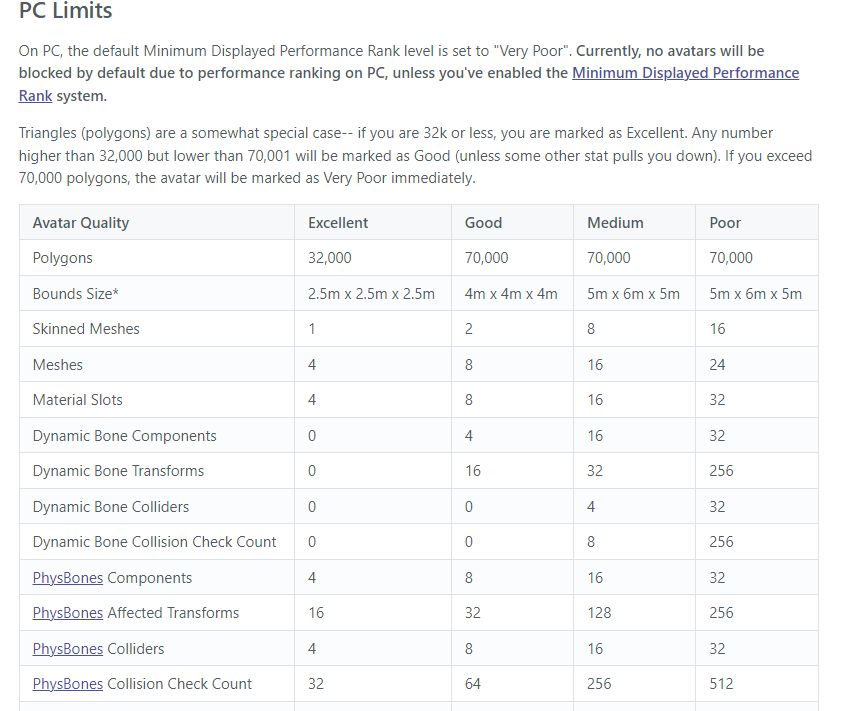
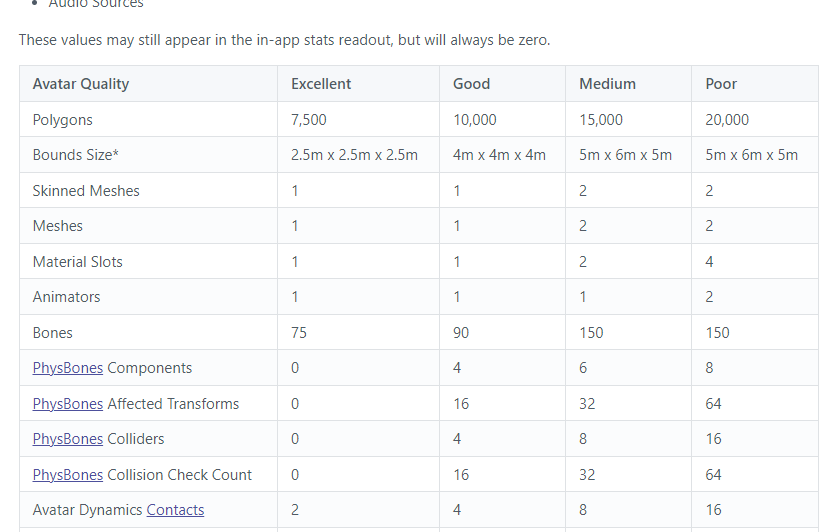 sullen elk
Did you duplicate these to make them? Copy/Paste component?
I heard from a friend recently that copying and pasting gameobjects and components is broken with phys bones/contacts and makes them break.
So you need to recreate them.
 astral otter
I am getting this error. And when I went to upload it, it wanted to delete the descriptor

I remade the descriptor, and then it got deleted. Along with the Skinned Mesh Renderer
nvm I got it
Well, I tried to go back to VRC SDK, but the builder wouldn't load so I restarted and now the Descriptor looks like this:

And I can't access the builder anymore
 timber jewel
sullen elk
Did you duplicate these to make them? Copy/Paste component?
I heard from a frien...
timber jewel
sullen elk
Did you duplicate these to make them? Copy/Paste component?
I heard from a frien...
nope they arent
I also updated my canny a bit:
https://feedback.vrchat.com/open-beta/p/1186-phys-bone-paramters-wont-work-corectly-in-some-weird-situations
 quasi bramble
astral otter
And I can't access the builder anymore
quasi bramble
astral otter
And I can't access the builder anymore
You need to delete the whole vrcsdk files and reimport with the unity package
astral otter
quasi bramble
You need to delete the whole vrcsdk files and reimport with the unity package
Thank you for the reply! I tried it with a different avatar that I have it didn't break anything, so I gave up on the avatar. I am now just going to use the Robot Avatar that comes with the SDK because it's just for testing purposes
quasi bramble
Alr!
 patent tapir
So I just got the new SDK today and now I can’t upload anything. I keep getting the same error. I reimport project, error. I delete the blueprint id and put a new one, error. I don’t know what to do anymore
 winter dragon
Yeah it a bug atm with the new sdk can't upload new avatars. You can update avatars but not upload new ones. A way around it is to Upload an avatar with another SDK and use its blueprint id in the SDK to override it.
patent tapir
yikes....thanks for the info
winter dragon
yeah figured that out after like 2-3hrs of trying to hunt down the bug XD
patent tapir
winter dragon
yeah figured that out after like 2-3hrs of trying to hunt down the bug XD
dedication ♥️
stable mantle
winter dragon
Yeah it a bug atm with the new sdk can't upload new avatars. You can update ava...
Is this just with the latest SDK? I used an older build fine just a couple days ago.
timber jewel
Only with the new SDK
 balmy oyster
When is the beta getting released? Does anyone know?
timber jewel
balmy oyster
When is the beta getting released? Does anyone know?
there is no ETA
maybe next week, maybe in 2 months
balmy oyster
Okay
hollow hatch
Rule 5 of the server. You have to report people correctly, not on Discord, #moderation-reports
 harsh bay
patent tapir
So I just got the new SDK today and now I can’t upload anything. I keep getting ...
harsh bay
patent tapir
So I just got the new SDK today and now I can’t upload anything. I keep getting ...
Just detach the blueprint.
It’ll be fine, I’ve had that a few times.
stable mantle
harsh bay
Just detach the blueprint.
It’ll be fine, I’ve had that a few times.
I was having a similar error with an older beta SDK. The Pipeline Manager script was borked preventing it from creating a model. Kept giving an error from what I assume was the world's SDK because it was telling me to click "New Build" "on" the "scene".
Though Ive also seen this kind of blueprint issue if the VRCCam object is deleted from the scene or replaced during upload.
 naive zodiac
What is the open beta steam acsses code

i get this screen
Hello?
i Am very confused
raven laurel
you already have open beta.
naive zodiac
but it will not let me continue
o
wait hol uup
i fixed it
im stupid sometimes
 lusty marsh
is the being stuck in beta around still for quest?
raven laurel
lusty marsh
is the being stuck in beta around still for quest?
it should be ok now
patent tapir
harsh bay
Just detach the blueprint.
It’ll be fine, I’ve had that a few times.
I switched to an older SDK and it works fine
stable mantle
lusty marsh
is the being stuck in beta around still for quest?
It's on a per-user basis and its a Oculus Meta bug. Though its been happening less lately so perhaps Meta fixed the issue.
 bright arch
does anyone have any avatar world suggestions?
i’ve been trying to find some but i’m having a hard time
stable mantle
bright arch
does anyone have any avatar world suggestions?
For Avatar Dynamics? Just the AD world at the moment, to my knowledge. Probably wont see a lot of AD avatar worlds until its live.
wheat fjord
Does anyone else feel like we might be somewhat close to final release given what was said in the release notes of the last version?
stable mantle
I think we're "getting there" — There's still bugs to be ironed out before launch, and I have a feeling some of the removed features (setting custom values) was done for stability and reliability purposes (you lose setting custom values but gain Bool compatibility and less to go wrong).
It might be a case where we reach a state where base features can go live, but they keep the beta around for changes and additions to AD & PB.
 granite ibex
Is there a way I can use open beta on a air linked quest 2?
molten cobalt
granite ibex
Is there a way I can use open beta on a air linked quest 2?
https://i.gyazo.com/d20fa3590f84b09218a9449cadf9e543.png basically just use the rift url
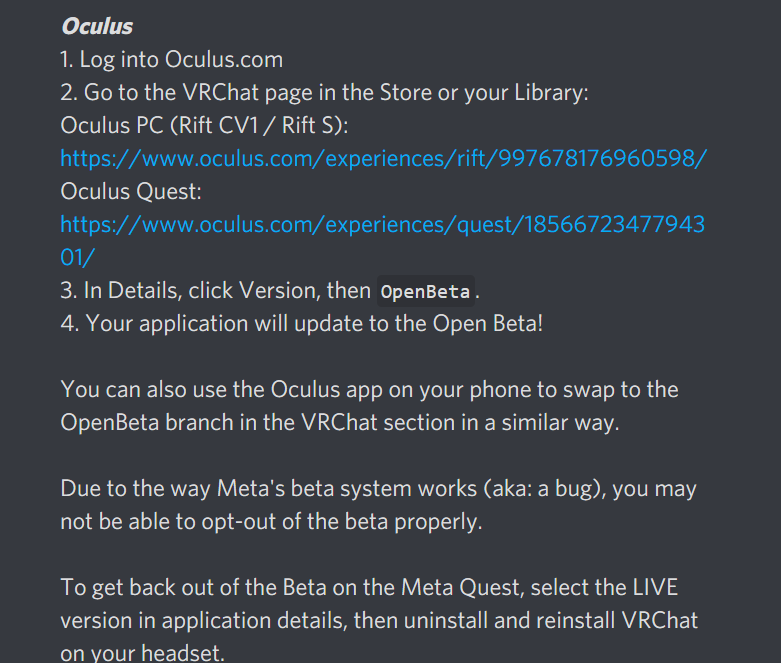
 granite ibex
Ah alright thanks man
molten cobalt
or following the steam instructions works depending on which you normally use on pc vr vrchat
stable mantle
molten cobalt
https://i.gyazo.com/d20fa3590f84b09218a9449cadf9e543.png basically just use the...
You can use Steam VR with AirLink
AirLink is just using a Quest as a Rift S so it should be whichever version they use, preferably (Steam or Oculus)
molten cobalt
given the trouble everybody's been having on Quest yeah perhaps better idea to use steam VR version as that pretty much instantaneously swaps versions
stable mantle
I half wonder if all the issues with Quest betas is pushing them to prioritize stability over functionality and boot it out the door.
So many people ||with no business installing any kind of beta|| having issues and filing with customer support just because Avatar Dynamics is so hyped a feature.
Be easier on them to get something stable out the door, and add features in the beta later on.
muted brook
they need to be basically on feature parity before they push dynamics if they dont want people to have a hissy fit
stable mantle
muted brook
they need to be basically on feature parity before they push dynamics if they do...
DynamicBones will still work for now, so if they get a basic implementation "out the door", but keep the beta open and add features, then it'd quell all the e-kid avi wearers and the other Quest users who joined the beta to try avatars that don't exist and then got upset they can't play on live in a beta that fundamentally changes how the avatars work.
And devs needing feature parity could continue to implement features in the beta.
lime yarrow

Anybody know how to fix this error?
Installed the latest beta SDK and I'm getting this and I can't upload.

also my receivers are all missing their parameter values
 minor flax
@lime yarrow The receivers have been turned into booleans unless you use proximity (but the avlues are then set automatically).
The upload issue has been answered in an earlier message I cannot seem to find, but basically the SDK does not seem to be able to write new avatar blueprint IDs, so you need to use an older SDK to make the initial upload (mainly just to prepare the ID) then go back to the beta SDK project to replace said avatar with your new one
lime yarrow
minor flax
<@!206163542187966464> The receivers have been turned into booleans unless you u...
they're strictly Booleans?
It doesn't say that anywhere in the patch notes
and it also doesn't make any sense
And this is also not a new blueprint ID
it's an existing one
minor flax
They're strcitly booleans yes, or more specifically they always send 1 as the value
lime yarrow
And a minute ago, I was able to set a custom value
after updating
then suddenly this happened
minor flax
That might be why you can't upload then
It broke
Hold on lemme find an earlier message that mentions this
minor flax
I've tried it personally despite having way too many contacts and behaviors
It does until you reinstall it
Unity's pretty smart when it comes to finding missing things when they get readded
lime yarrow
okay I'll try it