#world-development
39 messages · Page 71 of 1
 last granite
honestly i'd be willing to post a properly made show in that format if someone want to have it play. it would be cool to port some actual shows made at festivals.. to a small degree using it
 dusk sapphire
you'll want to look up how to do vertex displacement based on a depth texture
last granite
will do! will that shader group also be usefull to get started or to find someone (and compensate) for that kind of work. im not doing it as a business
but i just wanna bring that experience a bit closer to the users!
 whole plover
Hello I am trying to Loop a MP4 video on a plane via a Render Texture. It works in Unity Play mode but it does not work when I build and test in VRchat. Does someone know why?
 dusk sapphire
are you on sdk2 or 3
whole plover
udon
dusk sapphire
on sdk3 you can't use the built in unity video players
dusk sapphire
and unfortunately that also means you cant play local videos
whole plover
So I need to upload it somewhere?
dusk sapphire
yeah
whole plover
Is there a replacement component for the Video Player?
that allows me to loop it directly from a URL
dusk sapphire
yeah, you need to use the udon based video players
dusk sapphire
VRChat
Using the Prefabs The easiest way to put a Video Player in your Udon world is by using one of the Prefabs, which you can find in Assets/VRChat Examples/Prefabs/VideoPlayers.Both of these prefabs will play a video of your choosing, synchronized for everyone in your world. They won't loop - the graph ...
 elder bear
can you use a world made in blender for vrchat?
 short gulch
Yup
 wary token
elder bear
can you use a world made in blender for vrchat?
wary token
elder bear
can you use a world made in blender for vrchat?
Yes you can, but use FBX if you are able to. .blend files have some weird issues inside of Unity even though they are supported.
elder bear
oke thank you
 lilac plaza
Does anyone know anything about making a movie world like Gen's or Root's?
 outer oxide
i have been trying to port my world to android but i keep getting this error can any one help ?


 silent furnace
I've run into a bit of a bug with a control panel in my world. In Unity, and for the Instance owner, everything appears correctly, but for anyone else, the buttons are all skewed in different directions. Curious if anyone else has run into this problem and what the fix might be (if there is one) It's really frustrating.
Instance Owner

Not Instance Owner
 dusk sapphire
that is weird, skewing usually happens when you have objects in a hierarchy and the parents are scaled unevenly on one axis
is this a pick up object?
 bold ibex
outer oxide
i have been trying to port my world to android but i keep getting this error can...
bold ibex
outer oxide
i have been trying to port my world to android but i keep getting this error can...
copy the dll manually to the Library folder then delete the Temp folder .dll

Am I doing this right here?
outer oxide
Where can i find the dll?
bold ibex
it literally specified it in the logs
outer oxide
I started over my project and its working now somehow
bold ibex
Your Project folder:
Temp/Unity.TextMeshPro.Editor.dll
and copy it to Library/ScriptAssemblies/Unity
Oh
Oh well
outer oxide
Thank You ❤️
bold ibex
question does anyone know how to make a particle impact sound?
i have the particle setup but i want it to make a sound on impact
asking for a friend
 nocturne mirage
where i can find this player prefab? please

 random owl
nocturne mirage
where i can find this player prefab? please
random owl
nocturne mirage
where i can find this player prefab? please

Ready-made TV Prefab for VRChat w/ Udon. Requires SDK3.0[Udon] (last tested w/ v2020.4.4p1) and UdonSharp[U#] (last tested w/ v0.18.8). View the README.md file in the package for more information. UPDATE V1.2: - Added proper support for programmatically switching the TV's active video from other
nocturne mirage
random owl
https://architechvr.booth.pm/items/2536209
thank you
 left temple
Hey yall, any beginner tips or videos for Udon world creation ?
 near escarp
 eager garnet
anyone know where i can get a working url video player for my sdk2 world?
silent furnace
dusk sapphire
is this a pick up object?
no just buttons on a control panel...it's just weird it is normal for the instance owner, and skewed for everyone else
 gloomy heart
there seems to be an issue with updating worlds it updated my picture to the world but not the content in it
 primal echo
Would anyone be willing to help me set up a lightmap swapping system for SDK2? I looked at maebbie's tutorial and it's just going right over my head honestly, would be great if someone could walk me through it
@ me if you can help, would greatly appreciate it
 echo rapids
Why is my world using a new ID? I've updated the SDK from an old world. How do I go about using my original ID?
dusk sapphire
echo rapids
Why is my world using a new ID? I've updated the SDK from an old world. How do I...
in the vrcsdk go to content manager, you can grab the id's from your existing uploads there, and insert it into the pipeline manager component
echo rapids
@dusk sapphire Hi there. There's no option to insert the ID into the Pipeline Manager Component. Do I edit the script?
dusk sapphire
hit the detach blueprint button to remove the current id there
echo rapids
@dusk sapphire Thank you. Very much appreciated 😄
bold ibex
I've been making a Board game world that is for both PC and Quest. Everything has been fine, but a world breaking bug suddenly showed up.
The objects that were Kinematic on PC now have gravity on the quest version, and the objects that had gravity are now kinematic. I never touched the settings on the quest version, and when I checked, everything seemed perfectly normal inside of Unity. Does anybody have a clue as to what's happening?
dusk sapphire
is this happening when you're alone, or when you're testing with another person on the other platform?
bold ibex
When I'm with the Quest user
dusk sapphire
then its likely that you have desync issues, which can happen when your scene hierarchy between the pc and quest versions are not identical
I would also check to see if the two of you see the same objects being picked up
bold ibex
We do see the same objects, I checked that immediately
dusk sapphire
well, you can rule it out if it happens when you're alone in the instance and it still happens i suppose
bold ibex
Nothing weird happens when I'm alone in the instance, so
dusk sapphire
if the quest user is alone do they see those kinematic and non-kinematic objects switch behaviors?
bold ibex
I'll get them to check that really quick
bold ibex
dusk sapphire
if the quest user is alone do they see those kinematic and non-kinematic objects...
They said that the Objects behave normally when he's alone on quest
dusk sapphire
it does sound like desync then
you said you see the same objects, but i'm guessing they're your board game pieces
are each piece distinct so you can tell each one apart?
bold ibex
Yes, they are all different characters
There is a character piece and a character card behind that piece. The pieces are supposes to be non-kinematic and the Cards are. When one person loads into the instance after the other, the cards spawn where the pieces are supposed to, and vice versa
dusk sapphire
are you on sdk2 or 3
bold ibex
sdk2
dusk sapphire
is your scene hierarchy between pc and quest identical? and when i say identical i do mean 100% identical down to every last game object
bold ibex
It's not, not anymore
dusk sapphire
just a single game object missing can cause desync issues, i've never seen something like yours happen, but i wouldnt rule out that being the cause
bold ibex
And after testing more objects, there are some objects that aren't the same on pc to quest
dusk sapphire
yeah its definitely that then
in unity, the scene hierarchy must match 100%
if you are omitting things on the quest version, leave them as disabled game objects or an empty game object as a place holder
bold ibex
I haven't had the hierarchy identical throughout the entire process, and I've never actually had an issue
dusk sapphire
In vrchat worlds, things are assigned a network id which is used to sync them between players
the problem is the network id's are assigned based on the hierarchy of your scene
if it doesn't match, the id's dont line up, and you get issues like this
sometimes you get lucky and the network id's turn up the same even with a bit different hierarchies
bold ibex
That's why I'm confused as to why I've not had any issues up to now
dusk sapphire
but keeping them matched is the only real sure fire way to make sure this doesn't happen
bold ibex
Well, I'll certainly give it a shot
dusk sapphire
good luck
this is probably the biggest pain with creating cross-platform worlds with sync'd content
bold ibex
It's really unfortunate, I was just about to finally make the world public as well
 void bison
Hello, I noticed that 2 FBX models in each other create a big loss of mrays/sec, so an impact on the performance, it would have an impact on the performance in the game also the fact that FBX models are one in the other?
 bitter lintel
Hi I’m wondering about the various rpgs found here. I’m not sure if this is the right place to talk about it. There are 3 that I can give examples of. Ascension Acadamy, one that has a bigger world similar to AA, and a more school based one that I have seen. Can anyone tell me more info about these “games”?
gloomy heart
i literally cant figure out why it wont update the content in my map but updates the picture?
 errant beacon
Try importing https://github.com/oneVR/VRWorldToolkit/releases and see what it's debugger reports? o:
 night merlin
Would adding more ram to my system help Unity Editor performance? I currently have 16gb but thinking of upgrading to either 24gb or 32gb
 winged crane
hey, i'm having trouble uploading a world, when i hit the build and publish button, everything works fine. when i type all the info for the world then hit upload, nothing happens
the vrc cam also won't update the position, but thats not my main concern
can anyone help?
this is what it looks like on my end

the upload button turns grey but nothing pops up
near escarp
Is that your first upload ?
random owl
https://github.com/oneVR/VRWorldToolkit/releases
Import this and check VRWorld Toolkit > World Debugger from the top bar
winged crane
near escarp
Is that your first upload ?
yes
near escarp
Are you using the most recent SDK ?
winged crane
Yes i downloaded the most recent sdk from the website
winged crane
random owl
https://github.com/oneVR/VRWorldToolkit/releases
Import this and check VRWorld T...
it says i have multiple pipeline managers, that's probably the problem right
random owl
Yeah
winged crane
yeah that added the community labs option i believe it worked
yes it is fixed
thank you both
 simple arrow
So I'm having an issue with the video player. Whenever i enter a link and press enter the video plays as normal. However pressing ESC or clicking outside of the text box (for entering links) immediately stops the video. Any reason why that may happen?

This is for the Enter button

Ping me if you do respond please!
 serene pike
How do I use a UI canvas without there being a big collider? I have a tiny world
 desert python
are you using VR_UI_shape? (a component close to that name?)
serene pike
Yes
desert python
ok, so you have to add the box collider component and then set it to convex/is trigger (pretty sure its "is trigger")
and then you should be able to walk thru it
desert python
on whatever has "VR_UI_shape". as that component acts as a collider by default, and it needs to be told to use a "is trigger" collider
serene pike
How do I fix users not being able to click on my UI elements in my canvas without being really far away?
I tried adding a box collider and setting isTrigger true
dusk sapphire
make sure the box colliders thickness is as thin as a flat plane more or less
serene pike
What if I just make the collider tiny or move it to far far away?
dusk sapphire

you want it to line up with your UI
because the collider is where the raycast detection will hit for pressing buttons
make sure you have no other colliders in the area that is between the menu and the players
if you need some for enter/exit triggers, put them on mirror reflection layer

 hollow quail
so im having issues. i've tried testing a world through the unity test build and i've tried uploading a priv version of the world to vrc, but when i try to load into either version, it downloads and tries to load in, but immediately send me back to my home world, any workarounds?
serene pike
Should it be on a specific layer?
dusk sapphire
hollow quail
so im having issues. i've tried testing a world through the unity test build and...
https://github.com/oneVR/VRWorldToolkit grab this, it'll check for common issues that can cause that
dusk sapphire
serene pike
i'd make the box smaller so that it just covers the ui
 serene pike
Does it have to be on the UI layer or default?
dusk sapphire
default
hollow quail
dusk sapphire
https://github.com/oneVR/VRWorldToolkit grab this, it'll check for common issues...
Alright, second issue, is there any way to change world id's? My original world wont allow me to see the sdk control panel
dusk sapphire
if you put it on UI, the menu will only be clickable when you have your submenu open
serene pike
Ah ok
dusk sapphire
hollow quail
Alright, second issue, is there any way to change world id's? My original world ...
if you cant see the sdk control panel, you likely have compile errors, check your console
serene pike
Now I cant click on it at all
Do I need to add anything to any of the UI elements or do it all on the canvas?
dusk sapphire
can you show a screenshot of your canvas object in the inspector
 dusk sapphire
what does the collider look like in the scene view?


 dusk sapphire
like i said before, you can go thinner
you say the collider is too thick, is your raycast colliding with where the surface of that collider looks like or something else?
serene pike
Something else
I have no other colliders except the walls/ceiling/floor
Could it be vrchat spawn?
serene pike
No
dusk sapphire
and theres no other colliders?
serene pike
No I made it
Ill try turning off everything else in the world except the floor
My cursor is colliding with something

I forgot to turn off the walls so Ill do that
Is the UI system supposed to work when you are standing right next to it?
Does it have a minimum range?
My world is 1m x 1m to start
dusk sapphire
not really, it should work fine .
i'd search the scene for colliders in the search box on top of your hierarchy
just type in box collider
and it should show which objects have one
 dusk sapphire
and are these trigger colliders covering the ui?...
serene pike
No they are relatively far away
dusk sapphire
set all trigger colliders to mirror reflection layer
serene pike
 hollow quail
any way to fix this? i've tried re-importing the vrc sdk and it doesnt fix it
 dusk sapphire
hollow quail
any way to fix this? i've tried re-importing the vrc sdk and it doesnt fix it
dusk sapphire
hollow quail
any way to fix this? i've tried re-importing the vrc sdk and it doesnt fix it
you have compile errors
serene pike
The thing is when I turned off the walls with those colliders it was still happening
dusk sapphire
check your console
hollow quail
idk how to fix that tho, it broke just by loading it a little while ago
it worked just fine prior to loading it
"Assets\VRCSDK\Dependencies\VRChat\Editor\ControlPanel\VRCSdkControlPanelBuilder.cs(50,74): error CS0246: The type or namespace name 'PerformanceRating' could not be found (are you missing a using directive or an assembly reference?)"
dusk sapphire
the sdk doesnt break by itself, its usually other scripts in the project that are not compatible
hollow quail
i have 19 errors but they're pretty similar
so
i dont have much in the world at all
dusk sapphire
what you have in the world is irrelevant, its whats you imported into the project
and those 19 errors might tell what script is causing the issues
hollow quail
i reimported the sdk and now only ave 6 errors
have*
"Assets\Plugins\HxVolumetricLighting\Scripts\HxVolumetricLight.cs(1486,27): error CS0246: The type or namespace name 'HxDensityVolume' could not be found (are you missing a using directive or an assembly reference?)"
all dealing with Hx
dusk sapphire
whatever that is, its not compatible with the current version of unity
delete it, you cant use custom scripts in vrchat anyway
hollow quail
idk where it came from though is the problem
i hadnt tampered with the map prior to the working on it just recently, and the reason i restarted the project is due to the control panel disappearing
i found that lighting folder and deleted it, its reloading some stuff rn
if you cant tell, im not the most unity savy
yea, its fixed
idk what went wrong before
but its fine now
dusk sapphire
HxVolumetricLighting looks like a very old unity asset for unity 5.1.4
its most likely not compatible with unity 2018.4.20f1
hollow quail
must have been one of the materials i imported then
you've saved me so much suffering lmao. may be...13 hours late but 🤷♂️
 atomic prawn
would vrchat work with the VRLRP?
 dusk sapphire
no, you can only use the standard pipeline
hollow quail
im gonna scream if i cant update the world
 celest bramble
Can someone help me I would like to incorporate the function in my world that e.g. when you open the VRChat menu, a second menu of the world opens which then contains the world settings. (No Udon)
dusk sapphire

[English] Here is the extension menu prefab. It includes Combat System, if your world has it, use ExMenu/Events/CombatSystem instead. You have to install Standard Assets, Iwashibox, Toybox, and Qv Pen beforehand, links are below. このパッケージはワールドに拡張メニューを追加できるプレハブになります! ※
 gentle inlet
So im trying to do post processing with a collider on it. but for some reason the post processing only works when the collider is on meaning no one can walk into the post Processing zone? anyone know how to fix this ? "sorry im derpy and its probs a really quick fix"
dusk sapphire
set the collider to isTrigger, and put it on the mirror reflection layer
gentle inlet
Thanks brudda
dusk sapphire
wait nevermind on the layer
gentle inlet
i was bout to say it stopped working XD
dusk sapphire
it should be on the same layer as what you set on your reference camera post process layer script
gentle inlet
Right But adding is trigger should fix me not being able to go into the box collider correct?
dusk sapphire
yeah
gentle inlet
ok cheers
 dapper knot
Hi, just a quick one: Is Spatial audio rolloff working? I've tried using the audiosource rolloff and the vrc spatial audio rolloff. On most recent sdk3. I was about to write my own then thought to ask first. ty (radii/radiuses are set seemingly correct)
 honest spade
I have a simple question. How can I make the UI show on player display in VR mode? Now it's working on desktop mode only.
 nova wraith
how can I launch VRChat with the --enable-debug-gui flag when doing 'build & test' from Unity?
ah never mind, I found a Steam thread
actually, the method in the steam forum isn't working, it's making me start in my home instead of in the map I'm testing
dapper knot
@nova wraith I half remember adding the flags to my launch.bat but this was over a year ago and I have debug from build and test
nova wraith
yeah it looks like there's a way that used to work...
 civic ibex
Has anyone done much gui stuff? I'm looking to have a main menu sort of deal that can be summoned in VR and Desktop. I'll be broadcasting events to my Udon# script and it'll mainly show arranged teams, team points and health.
I haven't seen much of this in VRChat worlds so I'm still researching if there are specific restrictions?
hollow quail
Is there a way to update a world throigh a new unity project?
dapper knot
@hollow quail in the VRCSDK control panel under content manager you can copy the ID of the old world and paste/attach it to the pipeline manager 'near' the scene descriptor. if you publish it will essentially overwrite the old world
hollow quail
dapper knot
<@!326210870042427392> in the VRCSDK control panel under content manager you can...
if i publish it publicly? or does it not matter if its a private pub
dapper knot
doesn't matter. if you've uploaded any world you may change/update it
hollow quail
dapper knot
doesn't matter. if you've uploaded any world you may change/update it
i mean like, if i upload it privately that way, does it auto change the public one?
dapper knot
hollow quail
i mean like, if i upload it privately that way, does it auto change the public o...
if you uploaded to that ID and selected private it would probably set the public world to private. Treat anything uploaded with the same ID as the same world.
I see what you meant now. if you did what you described it would update the public world and set it to private. you can update already public worlds without the community labs 1 per week limit if thats the reason for choosing private
hollow quail
dapper knot
if you uploaded to that ID and selected private it would probably set the public...
i had to restart the project because my sdk completely broke, until i realized i had to reimport it. but now whenever i go to upload it under the reimported SDK, it tried to go to a new project, so i obv have to change the id in order to update my already pub world, get me? i'll see what happens tho
thisis how it looks once uploaded to vrc from the vrc home
 dapper knot
hollow quail
i had to restart the project because my sdk completely broke, until i realized i...
dapper knot
hollow quail
i had to restart the project because my sdk completely broke, until i realized i...
ahh yes. You should be fine in that case. just double check the world without publishing case it broke anything
hollow quail
dapper knot
ahh yes. You should be fine in that case. just double check the world without pu...
it seems to just make a new world itself
 dapper knot
hollow quail
it seems to just make a new world itself
dapper knot
hollow quail
it seems to just make a new world itself
Sorry. I wasn't that clear. did you detach when pasting in the ID? (not much sleep)
hollow quail
dapper knot
Sorry. I wasn't that clear. did you detach when pasting in the ID? (not much sle...
no, i reattached it
so im not completely sure
dapper knot
same here. checkout https://docs.vrchat.com/docs/vrcpipelinemanager and double check the ID you're using. when you go upload the world it should already contain the old title/description/thumbnail. else I'm stumped sorry (check for duplicate pipeline managers)
dapper knot
weeeird. np
hollow quail
you dont understand i was literally gonna scream
hollow quail
how do i add mirrors by chance
 thorny zodiac
hey guys want ask anyone do anyone no how to make 8Ball pool table
hollow quail
most guides seem kinda outdated for mirrors atm
thorny zodiac
and any cool games
 grand remnant
is there a way to export a bunch of gameobjects (cubes & meshes) to a single mesh ?
dapper knot
grand remnant
is there a way to export a bunch of gameobjects (cubes & meshes) to a single mes...
I'm still learning unity workflows but my method is to export from unity using fbxeporter or GLTF into blender and join/clean up. blender is where I feel safe so it's maybe not the best method
grand remnant
dapper knot
I'm still learning unity workflows but my method is to export from unity using f...
i just took a look at unity asset store. Which one are you using ? Some are pricy :s
dapper knot
grand remnant
i just took a look at unity asset store. Which one are you using ? Some are pric...
in unity package manager (not asset store) if you select advanced->show preview packages fbxexporter is free. my GLTF is opensouce from github
grand remnant
nice, ill try that. Thank you. What's GLTF ?
dapper knot
https://en.wikipedia.org/wiki/GlTF just a really nice and modern universal format I wish all applications adopt natively one day. one that doesn't mess up armature weighting. p.s once fbxexporter is installed select all items and right click in hierarchy
errant beacon
Get Lots of Tasty Fennel™
actually though lmao that looks interesting! o:
dapper knot
Grab Loads of Toe Fluff: confirmed. need sleep
errant beacon
lmao
grand remnant
dapper knot
<https://en.wikipedia.org/wiki/GlTF> just a really nice and modern universal for...
Unfortunately the fbx export fails, giving me a null exception. Any idea what could cause this ? Im selecting only passive geometry, no lights or such.
dapper knot
grand remnant
Unfortunately the fbx export fails, giving me a null exception. Any idea what co...
I've had problems exporting packed prefabs before but else couldn't say sorry
grand remnant
dapper knot
I've had problems exporting packed prefabs before but else couldn't say sorry
Well at least it works for smaller groups of objects so ill just have multiple tries to figure out what it doesnt like. Thanks for the tool that will help a lot.
echo rapids
@hollow quail Did you know you can copy the old ID of your world and paste it into the new one?
hollow quail
echo rapids
<@!326210870042427392> Did you know you can copy the old ID of your world and pa...
Yea i figured it out
thorny zodiac
errant beacon
<https://github.com/FairlySadPanda/vrcbce> c:
This is download or coding make 8ball? And thanks
errant beacon
There's a release page on the github that has the unitypackage - https://github.com/FairlySadPanda/vrcbce/releases
and yw! c:
thorny zodiac
errant beacon
There's a release page on the github that has the unitypackage - <https://github...
the whole table and scripts for it?
errant beacon
afaik, yup!
thorny zodiac
errant beacon
afaik, yup!
ty sooo much
errant beacon
yw! c:
thorny zodiac
errant beacon
afaik, yup!
im making world for house and asking everyone what best games people like to play all say 8ball lol
dapper knot
https://github.com/Terri00/vrc8ball I'm a fan of this version
errant beacon
eeh, Terri's is kinda controversial lol, and may result in your world being taken down
the Community Version one has an udon networking patch too o:
dapper knot
oh. first I heard about it. darn. I read most of the code out of interest and it's sending network events sensibly after balls come to rest once. not sure what the problem is
errant beacon
it was a whole thing lol, the community version one is based off Xiexe's fork of Terri's project though, just without the controversy/DMCA stuff
thorny zodiac
im use one that zuvali use its new world i made not finish it yet so dont want my world be taken down ><
just got it in public finally
1 month competely finish it because it was so much pain do then i had help so half the work goes to person to. Just house world because i was thinking making horror map dont no how to do horror stuff love scare people :3
errant beacon
congrats on getting the world in public! c:
thorny zodiac
ya ty im just not done with it yet tho because we find alot of unfinish parts and then its not in some ways but u can look at my new world just use my user name with out the 98 u see it
omg u guys are the best
im going upload it to world try it out
near escarp
void bison
Sorry, but it's actually good I found out how
echo rapids
@hollow quail A lot of my old worlds were corrupt because of the SDK 2. But I did manage to salvage them, through a few hours of headache.
 strong jungle
how can i upload a picture as a server picture?
 subtle horizon
Im getting errors trying to upload to the vrchat servers. Its hanging on Preparing file for upload (generating signature) and then I get errors when it says "creating file version record"
Unity package upload failed

it says the file is much too big, but its only 108 mb when I build and test?
thorny zodiac
errant beacon
congrats on getting the world in public! c:
is this pool table SDK 3
desert python
the popular 8 ball pool table is sdk3
errant beacon
yus it is, Udon is an SDK3 thing
thorny zodiac
im going have delete sdk 2
errant beacon
Migrating between SDKs isn't super recommended, be careful o:
thorny zodiac
ya i know i use it for my worlds
thorny zodiac
errant beacon
Migrating between SDKs isn't super recommended, be careful o:
so what should i do
redo the map
and then put SDK 3 in
errant beacon
preferably yus o:
thorny zodiac
ok
 jaunty scroll
Hello was just wondering if I could speak with someone by DM from the VRC team I have a quick question and don’t really want it public, thanks! 😄 It’s about a world
errant beacon
jaunty scroll
It’s not really an issue it’s more a question about something
I don’t feel that’s ticket worthy
It would only take a few seconds to answer so hopefully someone from the team can just contact when they get a moment
random owl
Support is the only route for official correspondence
jaunty scroll
The support isn’t just for issues? That’s all it talks about for making a ticket
It’s not an issue
desert python
what is it?
near escarp
you can use the hello inbox
jaunty scroll
@near escarp I’m just wondering if I have to go through community labs to get my world public since it was public for 2 years already but had to rename it and reupload since I crossed it over from 5.6 to 2018, that’s all
It has a new world ID now so it’s private again
near escarp
Yeah that'd be the easiest solution
jaunty scroll
From what I was reading there’s a good chance it won’t ever be public again through Labs though
random owl
Why didn't you just upload it to the old world id?
jaunty scroll
The new SDK didn’t have a way to change the ID just copy the existing one
From what I saw
random owl
It works exact same way as in 5.6 as far I remember you just attach what id you want to upload to in the pipeline manager
jaunty scroll
We’ll I guess I don’t have that world ID now it’s been deleted from my manager, don’t know how I could get it now
random owl
Well if you already deleted the old world there's no old id to upload to
jaunty scroll
Oof
desert python
website has the id right?
jaunty scroll
Awh well I have the old project in 5.6 but can’t get the ID from it because I need to log into the SDK but I can’t since it’s not 2018
Anyway thanks for the help~
@near escarp any idea on how I can get the old blueprint ID? Or is it gone? :0
desert python
if the world is stl public. the id should be there right?
jaunty scroll
It’s not I deleted it when I crossed it over to 2018 and had to rename the world and reupload it with a few fixed issues
Didn’t want like 3 versions of the same world I guess but it was public for two years
near escarp
Does it not show up in your content manager ?
jaunty scroll
No I deleted it when I was having issues uploading t.t
near escarp
then it's gone
desert python
then it is probs gone
jaunty scroll
Alright thank you, any idea how long it can take to go public in Labs? It’s it like a set time or just whenever it happens?
Or if it happens
desert python
if it is popular and constently busy in labs. itll get out. if not: youll probs have to bring friends and portal hubbing to get it out
jaunty scroll
Alright that’s heart breaking, thanks for your time everyone
 dapper swan
hello one question I can import a .glb file into unity?
 drifting patrol
is the standard shader compatible for quest?
desert python
yes
drifting patrol
what may not compatible for quest, most case?
desert python
anything that is pink when set to the android build will also be pink for quest
drifting patrol
what does pink mean?
desert python
when shader is broken
drifting patrol
it appears in the world?
desert python
yes. so basically any shader works for worlds on quest unless it breaks in unity/turns pink
however- it is best to use mobile/android-made shaders since they are usually much more optimized
drifting patrol
okay, thank youu
dusk sapphire
that's not entirely true, a shader can look perfectly fine in unity and show up pink on quest
or in most cases for incompatible shaders, show up with double or distortion vision
but look perfectly fine in unity
desert python
preferibly use shaders made for android/vrc-quest
 idle jolt
How do the chairs work? I’m trying to make a couch and bench you can sit on, but the bench makes you hover and the couch turns you 90 degrees. I don’t get it...
The bench uses the prefab, while the couch uses the actual components
desert python
you need to turn them 90 degrees and lower the
theres a fancy way to do chairs but i would make an invisible cube have the station component
idle jolt
Okay...
Also, what determines the selection? I’m trying to get it the fit the bench, but it keeps going way too far out. I have the proximity set to 1...
drifting patrol
desert python
preferibly use shaders made for android/vrc-quest
is the default mobile shader good enough?
desert python
the shaders provided by the vrcsdk should be good
idle jolt
Any shader that is not custom is compatiable for quest worlds now
For standard, you can make transparent shaders, which is helpful for holograms and what not
desert python
@idle jolt proximity is for how close/far you are from clickinfb the chair
idle jolt
Oh
Then how do I make the actual selection smaller?
desert python
hey, lets not crash people now lol
drifting patrol
eh?
idle jolt
Quest avatars can’t use other shaders yet
desert python
the simplest chair method i can tell you to do is make a cube, add all of the components to make a chair. and use the cube instead of the couches
quest avatars can use very rare custom shaders iirc
idle jolt
I have all of the components and scripts attached to the cushions to make them seats. I copied everything the prefab had.
desert python
those cushins were most likely made differently and mostly not for vrc station
idle jolt
It has VRC Station on it...
dusk sapphire
idle jolt
Oh
Then how do I make the actual selection smaller?
the selection is based on the mesh thats part of the hierarchy of the gameobject that has the vrc station on it
idle jolt
dusk sapphire
the selection is based on the mesh thats part of the hierarchy of the gameobject...
That makes sense, as when I squished it the selection was only squished. But when I shrunk it, the selection didn’t. Any thoughts as to why?
dusk sapphire
if there is no mesh it uses the collider
idle jolt
Alright..,
I’ll try that. If I don’t get anything, I’ll be back here
dusk sapphire
personally, i prefer to keep my chairs as a separate hierarchy from the actual seat meshes
that way you also only need to just toggle the parent game object for them to turn chairs on and off
the vrc_station doesn't require any mesh renderers on it, just a box collider you define to act as the interact trigger
idle jolt
Okay I don’t understand what is making me hover in the air
The enter point is exactly on the chair base.
desert python
is the collider above it in any way?
idle jolt
It shouldn’t be...
Either way, it doesn’t look like I can control where the collider is...
The entry point is on the exact same Y level as the base...
dusk sapphire
the unfortunate thing about chairs is that your seating position is also dependent on how tall your avatar is
this can result in your avatar looking like they're in the chair or hovering above it
if you're on sdk3 the vrcprefabs database pinned in this channel has a prefab that mitigates this by adjusting based on avatar height
on sdk2, momoma's vrc starter kit has a chair prefab that lets you adjust yourself after sitting
idle jolt
I guess I’ll look into that...
https://booth.pm/ja/items/979837
This is it right?

VRChatのワールド制作スターターキットです。ワールド作成でまずほしいPrefabをたくさん同梱しています。 サンプルワールドはこちら↓ https://www.vrchat.com/home/world/wrld_c3f3dd70-2306-4bd4-a74b-6a6ee8d5df6c あらかじめVRCSDK2(2020.08.07.18.21以上)のImportが必要です。 Package ManagerからText Mesh Pro, Post Processing, Pro Builderを導入しておくこと推奨。 GitLabで管理しているので随時更新したい方は導入してみてください。
dusk sapphire
yeah thats the one
strong jungle
can i use a normal picture as the preview picture of a map
 ornate turret
you will still have to place it in the world and point the vrc camera at it
what i tend to do is import the image and turn it to a sprite in import settings
then once in upload phase, I'll drag it into scene as a 2d sprite renderer and position vrc camera at it
since it was only added during the upload phase, the image itself wont be visible in the world
just as thumbnail only
 dapper silo
question if you upload a world for pc and you have a copy of it for quest and you added music to pc version will it upload to the quest version too
dapper silo
ok will do
drifting patrol
idle jolt
https://booth.pm/ja/items/979837
This is it right?
is free?
 lyric acorn
Are there any good tutorials or resources on player/object collision, like how to set force/inertia of interactions and such
errant beacon
could make a massive sphere with the normals facing in, and change the material on that sphere with the buttons? o:
bold ibex
Anyone here know how to add a underwater post processing?

 jolly gazelle
With a major error out of the way (thank you @random owl and @stoic fractal ), All I have to do now is animate huge land masses to simulate movement. Any tips from the veterans here are totally welcomed.
 cyan crypt
Hello! Just have a question. I recently revisited a world I was making in unity, but when I go to build & test option I just get taken to the main VRChat spawn area. What can I do to fix? Thanks!
random owl
cyan crypt
Hello! Just have a question. I recently revisited a world I was making in unity,...
https://github.com/oneVR/VRWorldToolkit/releases
Import this and check VRWorld Toolkit > World Debugger from the top bar
 muted dove
Sorry i send before i was finish with the message Sorry
 hazy plover
Testing the flames out in the world :)

 regal dune
Heya, i have a little question, i'm currently using SDK2 in Unity but i want to swap to SDK3, do i just drag in the SDK3 files into the asset folder or do i have to get rid of SDK2 first? And if yes, do i just delete the files in the Assets folder?
 half bane
Is there anygood basic world prefabs I can edit just need one for a simple avatar world
desert python
@half bane https://tinyurl.com/vrcprefabs
 marsh mauve
I most likely forgot to do something, but I got a problem where my world is moving with my VR Headset, Like I look to the left and the world looks to the left, and it looks like im infinitely falling
jaunty scroll
@near escarp hey sorry to bother but I found the world ID for my public world that got deleted I was talking about it yesterday to you, is it possible to use that ID again and have it upload with the new fixed world version if it’s not in my content manager anymore? :0
near escarp
If it's deleted from the content manager i don't believe so
jaunty scroll
Ughhh
Is there anyway I can get it put to public again I can supply the old Id, it’s the same world just updated with some fixes and in 2018 unity
I even have the email showing it was public if needed
near escarp
If it's in labs people can find it through your user page, but going through labs shouldn't take that long
jaunty scroll
Do all worlds get made public eventually in labs or is it like selected by popularity? Sorry last question @near escarp
near escarp
 hexed pond
Strange question. I have a sort of "team" in vrchat, and i'd like to be able to plan things with them. Is there a way to display some sort of document, or whiteboard, with some permanence? Something we could write on, and all of use see.. and it remains even after we leave? Something sourced on a website like google docs or one of the group drawing places would be fine, but i wonder if there's a way to display and interact with such a thing inside vrchat?
Like, to come back to it later, and be able to interact again
dusk sapphire
hexed pond
Strange question. I have a sort of "team" in vrchat, and i'd like to be able to...
your best bet would be to set up a small web server that converts whatever documents your team writes on into an image, which can be loaded in vrchat on sdk2 with the vrc_panorama component that loads remote images. On SDK3 there is no equivalent yet, except for the video player, which some have used to do the same thing by encoding a calendar etc as an image in a video.
there's no real way to send information back to the server. on sdk2 some have used video players to send small arbitrary amounts of information as part of the url for video players, but you cannot do this anymore in sdk3 as you are not allowed to create and modify url's used by the video player through sdk3's scripting system.
hexed pond
ah..
jolly gazelle
I'm getting another error when I try to upload. It's this:
Asset bundle upload failed: Failed to upload file. (C:/Users/grizd/AppData/Local/Temp/DefaultCompany/Secret Railway v_1_2/wrld_cd926bd8-e352-4781-9e38-cd2e22f8570e_6_2018.4.20f1_4_standalonewindows_Release.vrcw) => [id: file_ab6dd2f5-b202-468f-b771-904165e3e243; name: World - Secret Railway - Asset bundle - 2018․4․20f1_4_standalonewindows_Release; mimeType: application/x-world; extension: .vrcw; ownerId: usr_7b9aa183-23e8-4060-a195-2171d4dee30a]
UnityEngine.Debug:LogError(Object)
VRCSDK2.<>c__DisplayClass34_0:<UploadFile>b__1(ApiFile, String) (at Assets/VRCSDK/Dependencies/VRChat/Scripts/RuntimeAPICreation.cs:264)
VRC.Core.ApiFileHelper:Error(OnFileOpError, ApiFile, String, String) (at Assets/VRCSDK/Dependencies/VRChat/Scripts/ApiFileHelper.cs:1427)
VRC.Core.<>c__DisplayClass22_0:<UploadFile>b__23(String) (at Assets/VRCSDK/Dependencies/VRChat/Scripts/ApiFileHelper.cs:853)
VRC.Core.<uploadFileComponentVerifyRecord>d__38:MoveNext() (at Assets/VRCSDK/Dependencies/VRChat/Scripts/ApiFileHelper.cs:1999)
UnityEngine.SetupCoroutine:InvokeMoveNext(IEnumerator, IntPtr) (at C:/buildslave/unity/build/Runtime/Export/Coroutines.cs:17)
jolly gazelle
jolly gazelle
I'm getting another error when I try to upload. It's this:
Asset bundle upload...
Yeah, I've gotten past this. Now I'm on the "Failed to clean up previous version" spamming the console issue. Did they ever come up with a fix for that, or do I have to wait for tech support? I submitted a ticket, but I'd like to fix this here if I can, please.
random owl
jolly gazelle
Yeah, I've gotten past this. Now I'm on the "Failed to clean up previous versio...
Failed to clear previous version just means the id is borked server side either upload to a different id or wait for support to help you
 proven oasis
could also be the servers not working properly as they've had some issues recently
random owl
Well yeah that's what causes the issue
jolly gazelle
random owl
Failed to clear previous version just means the id is borked server side either ...
What do you mean by using a different id?
Do you mean a different account?
random owl
You select your vrcworld/scene descriptor and detach the id from it
Then upload again
This will upload it into a new separate id as a separate world basically
random owl
The "Failed to clean up previous version" happens when the upload gets interrupted one way or another server side without it being properly handled during the server problems
Then next upload on the server side it's trying to delete something that doesn't actually exist and gets stuck
jolly gazelle
random owl
The "Failed to clean up previous version" happens when the upload gets interrupt...
Well, shit. That seems to have worked. I still need to go see it on the server in-game, but I see nothing that indicates that won't work. Thank you again!!
I guess I can just delete the old version from the "mine" section myself?
random owl
Yeah the id unusable unless you get support to fix it
 copper compass
anyone ever get this before? tried build and test earlier and didnt work, now i get this
 random owl
copper compass
anyone ever get this before? tried build and test earlier and didnt work, now i ...
random owl
copper compass
anyone ever get this before? tried build and test earlier and didnt work, now i ...
Check the latest pin on this channel
dapper silo
can someone help me with unity it says my vrchat scene descriptor shpuld only contain one scene descriptor
but i only do have one
drifting patrol
how to make qv pen work on quest? can grab but the ink not appear
random owl
dapper silo
can someone help me with unity it says my vrchat scene descriptor shpuld only co...
So what shows up if you type "t:vrc_scenedescriptor" into the hierarchy search?
random owl
drifting patrol
how to make qv pen work on quest? can grab but the ink not appear
On quest they need the special quest materials which are on the booth page
https://booth.pm/ja/items/1555789
random owl
https://github.com/oneVR/VRWorldToolkit/releases
Import this and check VRWorld Toolkit > World Debugger from the top bar
I can't really get on a call rn
dapper silo
never mind i fixed it
 slow orbit
random owl
Check the latest pin on this channel
slow orbit
random owl
Check the latest pin on this channel
Oh hey, remember when I was getting that error for no clearly observable reason?
Of Course It Was Case Sensitivity 🤦♂️ l
slow orbit
random owl
That was on Linux if I remember right?
Yup. It would also happen on windows in the rare case someone has their unity temp dir on a drive with case sensitivity. 😡
slow orbit
Only for the sdk3 worlds too
the avatars sdk3 is fine 🤣
C O N S I ST E N C Y
random owl
Fun
slow orbit
drifting patrol
is there any prefab that can play youtube video with link for sdk2?
random owl
copper compass
and now my textmeshpro is broken
Depending on how it's broken you should just restart unity couple times and it should be working again
copper compass
random owl
Depending on how it's broken you should just restart unity couple times and it s...
made a new project
just gonna reimport things
 opaque flax
How do I make a mesh not go through objects or walls? I'm using a cone mesh for some lighting beams, but it's going through walls and stuff.
dusk sapphire
drifting patrol
is there any prefab that can play youtube video with link for sdk2?
any video player prefab can do that, as the youtube part is handled by vrchat, prefabs just make a nice interface to access the bits vrchat provides to world creators
Popular ones for sdk2 are iwasync which you can find in momoma's starter kit, or ahzkid's video player, take a look at the vrcprefabs database in pins
drifting patrol
thank youu
sometimes i feel like my quest version bit laggy, but sometimes not. no pink or anything tho
dusk sapphire
oh, if you're on quest the sdk2 video players will not work
and on sdk3, video players cant load youtube on quest
dusk sapphire
not that i'm aware of
you can still play videos on quest, they just need to be direct video links
on sdk2, you have to use unity's video player components directly, but this means no syncing
 tight charm
I forgot what the 'black fog' thingy to transfer between areas is called, similar to what happens in the Void Club. I think it was an unity asset, or shader, or something?
desert python
sdk2 can technically play media on quest, its just 9x harder
there is also a way to operate quest enabled videoplayers (since the keyboard is apparrently disabled) using side quest
dusk sapphire
check your console for errors in case there are any errors which may have caused your last build to fail, which will result in uploading the last thing that was successfully built, which i presume was before you added all that background.
if thats not the case, check the tags on all those environment assets and make sure they're not editor only
dusk sapphire
nah untagged is default and thats fine
drifting patrol
any idea to delete this blue-ish shadow. its not like this before.
 dusk sapphire
that looks like the reflection from skybox reflection probe
you'll want to bake a reflection probe in the room so it looks correct, or turn off reflection on the floor material
on the top right of the console do you have errors shown?
also grab 1s vrworldtoolkit https://github.com/oneVR/VRWorldToolkit
and see if it spots any issues
what happens if you try to build and upload?
nothing? you get to the upload screen just fine?
grab that toolkit i linked and see if it spots anything, it checks for common issues
also those errors say it cant resolve the url the sdk connects to, so thats weird but if you say you can build and upload i dunno
also shift + windows key + s
lets you snip your screen for screenshots
drifting patrol
so i just need to import the ink material for qv pen quest? no need to change anything in the prefabs to make it work?
 dusk sapphire
drifting patrol
so i just need to import the ink material for qv pen quest? no need to change an...
dusk sapphire
drifting patrol
so i just need to import the ink material for qv pen quest? no need to change an...
the instructions translated to english say
If you want to use the material in the Quest world, please use the Quest material.
If you replace the material with the Quest material, set the TrailRenderer's Width value to a value greater than 0 (e.g. 0.005).
you might have to change the material in each trail renderer in each pen object
or i suppose its easier to change the original material to match the imported material
its just using a builtin shader
drifting patrol
oh yeah i remember now
 leaden lion
Anyone know if there's a good way to sync objects with physics between players? I'm particularly interested in players being able to throw/catch things, and making sure different users see objects take the same paths for sports-type things. I've tried the VRC Pickup script with position sync, but it doesn't seem to sync nearly quickly enough
desert python
eventually, the network update will be out and syncing would be faster, but in good practice: try having synced objects disabled and only enabled for people who enable them so theres not like 20 synced objects going between 5 players. when you can have 5 synced objects for 3/5 players
 tepid carbon
hey anyone know how to set post processing local for each player
ive been trying to figure it out for like 2 days
leaden lion
@desert python so as in using a UI button to turn on object syncing? Would you just enable that option on the VRC pickup script?
desert python
nah, just a simple disable/enable toggle is enough
thats how you should do everything
 royal bay
Aye, anybody who is familliar with UI components, I have a pretty hard thing I can't seem to figure out.. shoot me a DM if you're familliar with UI systems and animations.
desert python
@royal bay before i try to help, this sdk2 or 3?
royal bay
ah, sdk2. my bad.
I'm looking to set up a way to control a blend tree through a slider, essentially. I've been super stumped by it.
desert python
thats out of my expertise then sorry
leaden lion
@desert python I'm not exactly sure what you mean by disable/enable in this case. Do you mean on the entire object itself, or the Udon Behaviour script that does the position synchronization?
desert python
entire object, the idea is to have all sync behaviours not exist when you spawn in the world and can choose what is enabled
leaden lion
Ah ok I see, thanks a lot. Would it maybe also work in this case to manually send a position/velocity update on release? I was thinking that this might let different players locally see the same object path since they'd be calculating the physics independently. It'd obviously have them see that with delay, but I don't think that'd be a problem for what I'm trying to put together
desert python
locally might work but latency wise, it might not work but the concept you have isnt exactly bad either
royal bay
So... is there anybody else who's willing to help me through controlling an animation through a slider?
leaden lion
@desert python well since it's not immediately obviously terrible, I'll try it out. I can let you know how it goes if you're curious
bold ibex
Anyone know why this keeps happening when i try to build and test
i think it is something to do with the spawn point but i am not sure
random owl
https://github.com/oneVR/VRWorldToolkit/releases
Import this and check VRWorld Toolkit > World Debugger from the top bar
bold ibex
thanks i will have a look
marsh mauve
I still have a issue where I can't move on Desktop in my world, can only look up and down and it looks like im infinitely falling in one spot, any help?, I most likely just forgot to add something, haven't made a world in a few months
bold ibex
random owl
https://github.com/oneVR/VRWorldToolkit/releases
Import this and check VRWorld T...
i am confused about the ToolKit how do i use the world debugger
 grim jungle
ohh someone please help. I have this world ive been working on, when i build and test it the world looks the same as before
so if i changed a texture or added an object the new version isnt the one coming up
grim jungle
if i did i i didnt mean to. in unity
 bold ibex
Anyone know why this keeps happening when i try to build and test
bold ibex
bold ibex
Anyone know why this keeps happening when i try to build and test
i still have no idea why this is happening
grim jungle
it does look like that
bold ibex
wdym
grim jungle
i am not in play mode haha
bold ibex
👍
grim jungle
but i still have the issue 
bold ibex
i dont know then
i am am also having issues i cant build and test it just takes me to my vrchat home rather than the world and i dont know why
grim jungle
it says script has compiler issues
bold ibex
like this i get it as well i dont know what is cousing it eaither
 grim jungle
yes i have that
bold ibex
i have tried the VRtoolkit but i have no idea how to use it
grim jungle
Assets\VRCSDK\SDK2\Editor\AvatarValidation.cs(115,33): warning CS0414: The field 'AvatarValidation.CombinedComponentTypeWhiteListSdk3' is assigned but its value is never used
this is my issue
bold ibex
im sorry i have no idea how to fix that
random owl
bold ibex
im sorry i have no idea how to fix that
Oh sorry I missed your ping
After importing it you should get the vrworld toolkit menu at the top bar
The from there open world debugger
And look around for the red errors
random owl
bold ibex
like this i get it as well i dont know what is cousing it eaither
Latest pin on this channel has a guide on how to solve this
grim jungle
Assets\AllSkyFree\AllSkyFree_Menu.cs(10,4): error CS0246: The type or namespace name 'MenuItem' could not be found (are you missing a using directive or an assembly reference?)
i get this
Error building Player because scripts had compiler errors
and this
random owl
grim jungle
random owl
https://github.com/oneVR/VRWorldToolkit/wiki/Fixing-Build-Problems#allsky-free--...
thx man. u deserve happiness
bold ibex
random owl
Oh sorry I missed your ping
i imported it it is at the bottom but not on the top bar

 random owl
Then you have compile errors need to check your console after pressing clear on if once

 random owl
Might wanna just restart first in case unity just decided to break things
bold ibex
ah alright i will start from scratch but i will keep the origanal as a rafrence so i can remake it
random owl
bold ibex
ah alright i will start from scratch but i will keep the origanal as a rafrence ...
I mean just restart unity
Not the project 😅
 bold ibex
sorry
how do i do that
this is only the second one i have made so i am kinda bad at making worlds
random owl
Right click on something in your assets and press show in windows explorer
Then close unity
Then delete Udon folder, Udon.meta file, VRCSDK folder and VRCSDK.meta file
Reopen unity and import the latest worlds sdk in
 random owl
Yeah go into the assets folder and then delete the folders/files listed above
Make sure unity is closed while doing it
bold ibex
so i installed it and got errors and now the sdk dosent appear at the top bar
random owl
Are the errors the same
bold ibex
think so
 random owl
Those errors would still tell me that the sdk was imported badly
But it doesn't really tell me why
 coarse swan
Huhu
bold ibex
yeah i am not sure why this is happening i even made a new project and tested it and the same thing happend from that clip i put
random owl
I see a lot of assets in the video most likely one of those is breaking things
bold ibex
yeah but i dont think that is it i tried it with just a cube and nothing else and it still didnt work maybe it is something with ther sdk itself
random owl
So a project where you imported just the sdk and nothing else?
bold ibex
yes
nothing but the sdk and a cube
its wierd becuse avatars work fine when uploading
random owl
What version of the sdk are you importing?
random owl
Version number
bold ibex
they both didnt work
not sure just the one on the website

VRChat lets you create, publish, and explore virtual worlds with other people from around the world.
random owl
Alright
bold ibex
thank you for all the help
i might come off for a bit
and have another look tomorrow
thank you tho
random owl
If I'm around I can have another look it's hard to type in vr
 silent tartan
Does anybody know how to pose shit like this?
 marsh mauve
Anyone know how to fix this? On the video it might seem like im looking around normally but the world actually moves with my Headset, I look left and the world turns left, or something like that. Im also infinitely falling
bold ibex
Heyyy, how can I create buttons to put different urls in the video player? My plan is to have a record cabinet with my favourite albums ready to play off youtube.
desert python
theres a few in sdk3 if youre using sdk3
bold ibex
I have no clue what Im doing, am I gonna have to learn udon stuff like this? https://youtu.be/6fqFmqBDSNU
JOIN MY DISCORD! https://discord.gg/nS3x5Pr
Time to get some control over your video players! This one took a bit more time for me to figure out the simplest way to convey everything and condense it down, plus the time of moving back to college. The recording for this started at 45 minutes, so this is by far my most edited video.
All in all, th...
I am sdk3
 mild canopy
Hey, just wanted to know if its possible to have subtitles on videos through AVPRO in worlds. any pointers would help
 gleaming glade
Will VRChat come on PSVR anytime this year maybe?
bold ibex
So when I go to update my world its recognized as a unpublished world when its not and I got the same ID set too. How do I fix this?
 green lagoon
gleaming glade
Will VRChat come on PSVR anytime this year maybe?
green lagoon
gleaming glade
Will VRChat come on PSVR anytime this year maybe?
unlikely to happen as I doubt Sony would allow vrchat on the platform
drifting patrol
so i have this render issue. this is quest version.
https://cdn.discordapp.com/attachments/557378489905577994/826664478296899624/unknown.png
 dusk sapphire
huh, do you have LoDs on those chairs?
dusk sapphire
if its only happening to the chairs, i'd look at them and see if they have any LoDs, shaders or anything that stands out I suppose

 dusk sapphire
whats on the actual chair object in the hierarchy, and what shader?

 dusk sapphire
and it only happens for the black seat part of the chair?
drifting patrol
yeah
dusk sapphire
no idea, same components on the root object? "Kursi Siswa"
drifting patrol
dusk sapphire
no idea, same components on the root object? "Kursi Siswa"
yeah same component, same setting
 rain shadow
@drifting patrol Create a custom material and give it one of the included VRChat quest shaders?
 leaden sphinx
If I update two worlds within a week from eachother, will only one show up in the "Updated Recently" tab, or both?
desert python
both should
leaden sphinx
Cool, just checking.
 gray sleet
hello, im wanting to make a simple world for characters. I have unity hub downloaded version 2018.4.20f1 and i got the Sdk3 world downloaded and installed. can someone help me out from there?
desert python
make plane, then in assets-search for “vrcworld” and drag it over the plane. then go back to assets and search for “pedestal” and drag the pedestals onto the plane and add the avatar ID-which can be found in the content manager. and paste those IDs into the pedestals inspector
gray sleet
make plane? dm me if you want. i got 0 clue on what you just said
desert python
under “make object” or whatever its called. its a basic unity building block
gray sleet
wher eis make object
gray sleet
found it under game object. then 3d object. yep. got a plane
desert python
huzzah
gray sleet
now wut
gray sleet
how do i search that. there is an assets tab
nvm found it
what vrcworld do i use
there are 2
nvm that. i found it. what do i do with it
desert python
put in scene
desert python
thats a good sign. then back to assets-search for “pedestal” and put those on the plane as well and add any avatar IDs to them
drifting patrol
rain shadow
<@!588292310039527444> Create a custom material and give it one of the included ...
still not solved. is it okay to put vrc chair prefab in another prefabs?
desert python
also make sure that vrcworld is above the plane
gray sleet
desert python
also make sure that vrcworld is above the plane
yep. its on it. also what pedestal do i want. there are a lot
desert python
@drifting patrol as long at they are set to convex
um, idrk. i can’t remember what pedestals that sdk offers
find the most default looking 1
drifting patrol
desert python
<@!588292310039527444> as long at they are set to convex
where can i set to convex?
gray sleet
ok. ill just sellect hte first one. it looks basic. what do i do with it
desert python
@drifting patrol collider component
drifting patrol
desert python
<@!588292310039527444> collider component
the mother object or the child object i should set to convex?
desert python
@gray sleet click on them in the hierarchy and then go to inspector and there should be an “avatar ID” or something close to that
@drifting patrol child. or both if you want to walk thru the object
gray sleet
blueprint id?
desert python
yesh, that sounds right
gray sleet
ok so i found that. what now
desert python
go to the sdk control panel and copy your avatar IDs into those pedestals
gray sleet
how do i do that. -find the avatar id and what area of the control panel.
i can send photos if you need
gray sleet
ok. nothing is there other than a search bar
desert python
ok, send picture now cus that weird lol
gray sleet
accept friend
 worthy stone
I know this might sound crazy and this might sound really dumb but.... with the new song by Lil Nas x montero
, I want to try to re-create it.. I only know so much about 3-D modeling and world development because I barely got into the unity software but I know enough to at least start somewhere...
gray sleet
how do i add player mod jump to my world? im following a video but i cant figure it out
desert python
sdk 2 or 3?
gray sleet
but besides that. Im trying to make a mirror button. watching the video they have me add Vrc trigger. and edit that. But there is no edit options on it
desert python
you have to add the vrc trigger component via the inspector
gray sleet
yep. did that. buit still no other options. ill dm you
gray sleet
nvm im dumb. its under parameter objects
drifting patrol
im getting this warning and my baking progress is not moving. ive generated the UV tho

 primal mica
anyone know where i can find the spreadsheet with all the prefabs? i need a url input video player and the popular pool table prefab :C
dusk sapphire
its in the pins in this channel
gray sleet
trying to add a gif to my world. i have a sprite sheet. but not sure what to do after that
gray sleet
anyone know how to do that?
gray sleet
ping me if anyone does
 cedar trout
hello so ive added some textures to my cubes and added a skybox to my world on unity but its not showing up on vrchat any idea on what might be causing that?
gray sleet
How do I give spheres texures? anything i give them it seems to be somewhat misshaped / off a little
near escarp
cedar trout
hello so ive added some textures to my cubes and added a skybox to my world on u...
which shaders are you using ?
near escarp
gray sleet
How do I give spheres texures? anything i give them it seems to be somewhat mis...
what are the uvs of the spheres ?
gray sleet
near escarp
what are the uvs of the spheres ?
uvs?
near escarp
you might have to google what the UV of the unity sphere to see how your texture would fit on it
gray sleet
what is uv.
near escarp
Unity is the ultimate game development platform. Use Unity to build high-quality 3D and 2D games, deploy them across mobile, desktop, VR/AR, consoles or the Web, and connect with loyal and enthusiastic players and customers.
gray sleet
distortion? thats not really the issue. when i put something on it, part of the white from the sphere itself pops out
gray sleet
is there a way to change the avatar pedestal model?
dapper knot
short of getting a quest just to test quest performance for worlds is there anything I can do? I've been getting positive feedback but never seeing it for myself
dusk sapphire
you could use the unity profiler to see how much your scene costs in terms of polygons, drawcalls and frametimes and use that as a rough indicator of performance relative to that experienced by actual quest users to have an idea of what effects further changes you make could have to expected performance I suppose.
dapper knot
good call. I use that as a metric to performance already. I've just always been curious what it looks like on quest. Might dive deep and create an android viewer since I have the week off or just buy a stupid quest
dusk sapphire
making an android viewer probably wouldnt be an accurate assessment as you'd mainly test the graphical load
dapper knot
true
dusk sapphire
unless your map is relatively light on interactivity and or udon scripts i suppose, and theres also the overhead from vrchat itself to consider
and you'd need an equivalent android device with snapdragon 835 or 865 to be on par with quest/quest2 performance
dapper knot
I was getting pickups confused in quest today and wanted to debug
dapper knot
yes. vastly different it seemed. I decimated my world for quest
both in poly and meshes
dusk sapphire
yeah... about that.
on cross-platform worlds, the scene hierarchy between the PC and the Quest version needs to be 100% identical otherwise you can end up with desync issues.
Network IDs are used to sync networked components, and they are generated on map load based on the scene hierarchy, so any small differences can and will cause network IDs to mismatch.
dapper knot
aah I suspected. ty for confirming
dusk sapphire
what you can do is use empty game objects as place holders in lieu of things you removed on the quest version and vice versa
dapper knot
good idea
I have a semi popular world that really has nothing special but want the user experience to be cohesive and cross platform. Once the world was bug free and mostly normal I would start on a more interactive game but it's kicking my ass
dusk sapphire
yeah with cross-platform worlds desync is the biggest headache
dapper knot
I thought I could just 'yeet' static non interactive objects and be happy. ty for confirming
dusk sapphire
good luck
funfact: this can also happen when you update a world and you have people in the same instance who are on different versions of the world
dapper knot
i was with a quest user and they thought everything was a teacup :) at this point in saw what you confirmed
I'm oddly aware of different versions as I update my world probably way tooo much. people be pointing out the errors each night I join
cedar trout
near escarp
which shaders are you using ?
I'm using everything on default i believe as in i haven't really changed anything much
near escarp
What does your unity scene look like ?
 cobalt cypress
Is the local testing of udon worlds supposed to actually work? If I press "Build & Test" it just launches me to my homeworld
gray sleet
anyone know where I can find POkeball models or textures? Also anyone know if there is a way to add third person?
gray sleet
Also, Is there a way to Name avatar pedestals or change their Model?
desert python
try cgtrader or sketchfab to find the pokeballs. for 3rd person- im not sure how you would do that in sdk3
sdk2^
gray sleet
alright. any idea on the avatar pedestal stuff?
desert python
um. iirc. you can put the pedestal component on anything and it that new object will be the pedestal
but i could be completely wrong. ive never done an avatar world
gray sleet
iirc?
gray sleet
also when making my world now, I cannot tell the front of an object. not sure why. any ideas?
 split smelt
Hiii
I for some reason can't upload my world
In play test everything works as it should and i can't figure out what the problem is
 errant beacon
Check to see if you have multiple pipeline managers in your project? o:
gray sleet
errant beacon
Check to see if you have multiple pipeline managers in your project? o:
who were you rreplying to?
errant beacon
The one directly above my post, on not being able to upload the world
gray sleet
ahh. rip. ok.
split smelt
errant beacon
Check to see if you have multiple pipeline managers in your project? o:
Thanks a lot! That fixed my problem! 😄 Apparently when i moved the scene descriptor i forgot to delete the pipeline manger as well
errant beacon
cool! and yw c:
errant beacon
gray sleet
also when making my world now, I cannot tell the front of an object. not sure w...
To clarify, what do you mean by not being able to tell the front of an object? o:
gray sleet
I place an object, like an avatar pedistal. The collors arrows seem to be facing the wrong way or not correctly. not facing the front or sides.
errant beacon
You might have switched to or from Global/Local positioning - there should be two buttons near the top of the viewport that says "Center | Local" or "Pivot | Global" or something similar, try clicking the right button of those two o:
gray sleet
oh. that fixed that. ty. though am i just making stuff up or for avatar pedestals was there another indicator for the front?
errant beacon
yw! and can't remember unfortunately lol
gray sleet
if you find out or remember please let me know
gray sleet
Anyone know how to help me with these Text Buttons? Please ping me if you can help
I can get the button to set an object active. but now idk how to get it to set it to inactive. (a toggle)
 main coral
is there a way to make a texture tile instead of stretching in unity
cuz i cant find it
desert python
in the material editor, there should be a way to tile the texture
gray sleet
anyone know how i can make this toggle botton work? Its a text button
gray sleet
anyone? lol. I can click the button once to enable the object, but i cant click it again to disable the object
bold ibex
hello, having an issue uploading my world. it seems to work fine and starts to open vr chat then it doesn’t take me to the world I created (any suggestions) very new to unity
marsh mauve
Still never got a answer for this, I feel like I'm defiantly forgetting to do something but I just can't remember what: Anyone know how to fix this? On the video it might seem like im looking around normally but the world actually moves with my Headset, I look left and the world turns left, or something like that. Im also infinitely falling
 gilded totem
Im here 🙂
 sinful folio
So, what seems to be the problem uploading the world?
gilded totem
Build and publish, saying I am not trusted.
Also, when I use build and test it ask me to open and app, Un able to open it in Vrchat
sinful folio
Ohhhh! You need to hit New User first before uploading any content!
gilded totem
I have a account tho
sinful folio
New accounts start out as a Visitor
gilded totem
Log out?
sinful folio
You earn higher trust ranks through playing the game, and New user usually takes around 10 hours of playtime to get
gilded totem
Ok, what is the best way to go about this. My apologies super new
gray sleet
so is anyone able to help me with my button?
gilded totem
Which button for the mirror?
gray sleet
not a mirror.
gilded totem
You need a toggle tho?
gilded totem
Easy I got a video for you! 🙂
sinful folio
gilded totem
Ok, what is the best way to go about this. My apologies super new
So, basically continue to play the game! Eventually, you will see a notification on the bottom of your screen saying you're allowed to upload content.
gilded totem
Ok 🙂 I can do that! We are working with Facebook Partners and want to make the best with VrCHat! We love the content we are able to make! ❤️ 🙂
sinful folio
Ohhhhhh, yeah Cookie. Let me show you the settings I use to make a toggle button, simply copy them and see if it works.
gray sleet
If someone knows how to fix this please help.
I have a Canvus with a Text Button on it to toggle an object. However it only toggles the object on and wont toggle it off.
sinful folio
gray sleet
If someone knows how to fix this please help.
I have a Canvus with a Text Butt...
I've got you buddy
gray sleet
dm me please.
gilded totem
@sinful folio Keep playing and I should be good to upload soon?
sinful folio
gilded totem
<@!221078515066339328> Keep playing and I should be good to upload soon?
Yep!
gilded totem
Also, super quick. Am I really able to take my 3dMax Work and upload it to Unity?
Or just texture etc.
desert python
you should export the model first before importing something into unity
especially 3d max
desert python
ye
desert python
ye, but dont spam or anything. and if its like 3d modeling. id send them to #3d-modeling
gilded totem
Ok that makes sense
desert python
looks good
gilded totem
Fully understand 🙂
 calm gulch
im having an issue with uploading my world. when i build and test it everything works fine, but when i try to upload it nothing happens? it just changes to a different camera view. im really new to unity does anyone know what i can do to fix this?
 sinful folio
calm gulch
im having an issue with uploading my world. when i build and test it everything ...
sinful folio
calm gulch
im having an issue with uploading my world. when i build and test it everything ...
Servers are going BRRRRR rn
near escarp
calm gulch
im having an issue with uploading my world. when i build and test it everything ...
Check the console ?
calm gulch
@bold ibex i have no idea what any of this means
 near escarp
Those errors are fine
you can fix them with this #world-development message
Try making the main Unity window full size as well
marsh mauve
Tried working on a Fix for my issue, now my world just throws me back into the Home world when I Press Go
sinful folio
near escarp
Those errors are fine
you can fix them with this https://discord.com/channels/1...
I was unable to upload as well, it was simply the server hiccups
And uploading is going insanely slow as well
near escarp

gray sleet
does anyone know how to make 3d text actually 3d? its just 2d
 south elk
Hello, is it possible to add a video into the world that plays automatically to the player that joins?
gilded totem
sinful folio
And uploading is going insanely slow as well
Hey so it only takes 10 hours to become trusted? Trying to upload a map
sinful folio
gilded totem
Hey so it only takes 10 hours to become trusted? Trying to upload a map
Trusted isn't needed to upload worlds. You only need to achieve New User, which on average takes around 10 hours total playtime
gilded totem
I'm user tho
sinful folio
Then you should be able to upload now. What's your VRChat user name?
gilded totem
thecoltonjohn
sinful folio
gilded totem
thecoltonjohn
You're using a steam account. You must upgrade to a VRChat account to upload content
sinful folio
VRChat+ and a VRChat account are two separate things.
gilded totem
How can I make this?
sinful folio
simply log into VRChat, go into your Settings menu, and click the "Upgrade Account" button. Follow the steps as prompted, and you'll soon be logging in with a full VRChat account, with all your friends, favorites, groups, and the ability to earn Content Uploading capability!
gilded totem
Bad Request: The source account is invalid for merging
Oh wait
I think it worked.
desert python
@south elk sdk 2 or 3?
south elk
mind if i DM you?
desert python
what sdk tho?
south elk
That's kinda what i wanted to tell you, idk much about creating stuff in vrchat, i just wanted to do a little project in it, i know that i need to do an sdk and unity to do it though
so i mean, either i suppose?
desert python
you cant do either. that will break the project
south elk
alright well lets say sdk 2
but i haven't started or downloaded anything yet, just wanted to know if it's possible : )
desert python
sdk2, i think its possible. sdk3 is def possible and easier imo to have find a good videoplayer for
 elder nymph
anyone know if custom postprocessing shaders are still possible in vrchat, like how treehouse in the shade does it?
desert python
they should be
elder nymph
I've never done them in unity before, my shader programming experience is from shadertoy - any suggestions about where to start looking to understand how to do them?
gilded totem
Any way to get this walls to stick to each other? Maybe a hot key?
drifting patrol
when i play on quest and grab a cylindrical object and i rotate it, suddenly it turns into a weird looking oval object. it only happened with this object tho.
near escarp
Your object's parent transform scales aren't uniform
grim jungle
So my vrchat world I’m making... the lighting looks awesome but...
It’s like my character glows... like BRIGHT
I illuminate. I turned all the lights off and the work is dark... and i still turn extremelyyyyy bright
Any fix ?
near escarp
Did you bake your lighting ?
grim jungle
how do i do or not do that?
near escarp

You can support me on my pateron
https://www.patreon.com/mcphersonsound
This is a longer tutorial than normal and there is a lot to cover so here are time stamps for your convivence.
00:00 what is baked lighting
00:35 setting up lights
1:23 preparing meshes to bake
2:30 generate lightmap UV
3:28 light probes
5:10 reflection probes
6:00 emissive ...
grim jungle
so... theres not a simple solution to not making my character 100 times bringter than the world:(((
near escarp
Did you enable post processing ?
grim jungle
how do i do that?
grim jungle
im still glowing lol\
near escarp
Can you post screenshots from vrc and your unity scene ?
grim jungle
 near escarp
alright, now your lighting setup in unity
 near escarp
is that from another world ?
 near escarp
Ok, can you also show your lights ?
grim jungle
its just a firectional light. that all just 1 intensity
even when i disable all lights and the world is black
i look that bright
near escarp

Did you try looking down to see if it wasn't just the mirror ?
type t:light in the hierarchy search bar
grim jungle
dude thank you
im over here dying laughing with my friend
i realized there was a light shining up from the bottom of my world
unity at 1 am moment

 tired pumice
i need some help i have a whole house built i just need to add an sdk and upload can someone tell me how to do that
near escarp
tired pumice
i need some help i have a whole house built i just need to add an sdk and upload...
VRChat
Before getting started, ensure you have a Unity project with the SDK set up. If you want a great intro to creating your first world with pre-created assets, a tutorial video, and detailed steps, check out the VRChat Home Kit! Step 1 - Setting up a scene The first thing you need is a scene. This can ...
 kind tide
So I have been developing a world the past 2 days and have been tearing my hair out today with it simply not initializing in game. It is relatively simple, I have just a directional light setup for it right now, all the models and textures are pretty simple. I have just the playermods udon graph thing on (the one that lets you jump). Its all standard shader and I'm on the latest version of the SDK 3.0
I uploaded it fine, no issues
It loads in game fine, no issues
But once it instances I get met with a black screen and am kicked back to my homeworld
I have basically slaughtered my file removing anything I doubt to find the source of the issue yet it still does the same thing over and over.
I'm grasping at straws and I cannot surmise the root of the issue, I seriously need some help/ guidance.
The only thing I currently think that could possibly be causing the issue is that I did some black magic with UDIMs when texturing but I don't see how it could cause an issue without causing any unity hiccups before
dusk sapphire
I'd start with grabbing 1's vrworldtoolkit if you havent, it can check for common issues that may cause this https://github.com/oneVR/VRWorldToolkit
your vrchat logs could also potentially contain the error indicating why you got kicked
I have a parser than can filter for errors/exceptions if you'd rather not look through it manually https://nyanpa.su/vrchatlog/
A simple VRChat output log parser that shows you user activity in maps you have visited, as well as basic trigger, warning, error and exception summaries
kind tide
ooooo many thanks!
I'm still clueless to what is going wrong. all seems well with it. guess it must be something I'm not thinking of. I can always just export the thing as a prefab and work from there I guess

I just wanna get this in game
dusk sapphire
nothing in your logs?
kind tide
 dusk sapphire
I mean, vrchat's logs
kind tide
ok dumb question but how do I get the logs?
dusk sapphire
they're in C:\Users\%USERNAME%\AppData\LocalLow\VRChat\vrchat
kind tide
should I dm them to you or would they be the kind of thing that would be ok to put here?
dusk sapphire
just dm to me if you'd like
kind tide
ok, also thank you for all your help so far. I very much appreciate it
 neat blade
can someone help me with making gravity on this twisted corridor pls?
 near escarp
neat blade
near escarp
neat blade
sorry then
bold ibex
i am asking once again on how to make an underwater post processing pls
 marsh pier
how i fix dis
 dusk sapphire
check your console for errors and see the first pin in this channel
 low quest
Can you use custom shaders in Quest worlds?
Also I'm having an issue where even with the objects set as environment with mesh colliders, they're still not solid
Also every time I build and test, it launches in VR even tho I ticked "force non-VR"
dusk sapphire
you can use custom shaders in quest worlds, as long as they are single pass stereo compatible, but don't go too crazy on transparency/cutout.
if your pick up objects are using mesh colliders, make sure the mesh collider is set as convex
as for build and test, check the vrcsdk settings and make sure its pointing directly to vrchat.exe
low quest
No like, the world geometry isn't solid
Not working on pickups rn
And it is pointing towards vrchat.exe
dusk sapphire
check if the mesh collider component contains the mesh you're using as the mesh collider
low quest
It does
 topaz basin
Does anybody knows the ID for the Pug? I want to make some portals in my world so everybody can check out other peoples creation. I tried it with tags, but didnt worked out
 real leaf
Hey All, I'm a bit of a new world developer. Just a quick question, is there a limit on how big a world can be ?
topaz basin
real leaf
Hey All, I'm a bit of a new world developer. Just a quick question, is there a l...
There is no limit
real leaf
@topaz basin Cheers mate 🙂
topaz basin
real leaf
<@!265579650816671754> Cheers mate 🙂
If its a large download (lets say 300-400mb+) its recommended to mention that in the title or thumbnail so players know before hand. Not everybody can handle it. So yeah. have Fun!
real leaf
topaz basin
If its a large download (lets say 300-400mb+) its recommended to mention that in...
Ahh I see, I will keep that in mind. I have an idea that I reckons good and should give a ton of replayability. I was concerned though of file size, I will see how big it is after when im done.
 quasi tusk

everything in the scene dissapeared after hitting ctrl z (unless I misclicked). Not sure how to undo

Luckily it was in play mode though. It started after using an old fur shader from 2018
near escarp
Your object is disabled ?
 solid nymph
how do i form terrain?
low quest
Working on my first map :)
 short gulch
solid nymph
how do i form terrain?
short gulch
solid nymph
how do i form terrain?
You can either model it in blender or something, or you could go up to the game objects drop-down at the top and add Terrain
kind tide
low quest
Working on my first map :)
oo I like it. kinda reminds me of the default bank from payday
gray sleet
anyone know how to have a button animate on click?
 gilded shuttle

 cinder pagoda
Hey there, I have a question. Can a world or an avatar designed for VRChat be uploaded on other VR games like Neos VR ?
gray sleet
I can get something to animate, but how can i toggle an animation or have it animat eon click
kind tide
cinder pagoda
Hey there, I have a question. Can a world or an avatar designed for VRChat be up...
I mean if you have and have rights to the model and texture I see no reason why it wouldn’t be possible. You would just have to set it up for the respective SDK to whatever game. I assume you are asking if there are any “exclusivity rules” and I’m quite certain there aren’t any unless specifically stated by the model authors that “you may only use my model in VRchat”
 glacial yew
anyone an expert on triggers and object scripting? PM Me please
desert python
@glacial yew whatre you attempting to do?
glacial yew
buttons triggering object destory and object spawn
basic probably but cant find much on youtube
pm me if you have any experience even remotely haha
real leaf
@glacial yew Is the button a Game Object like a cube ? or is it one of VRC prefabs ?
glacial yew
cube with trigger, have followed cyans vid on object spawns and destroy, i cant seem to get it working
real leaf
I'll DM you
 humble kettle
I'm trying to place an avatar in my world to share, but I can't make it to work... How do I set things, so that a player can change to a displayed avatar by interacting with it?
(I tried first by copying the settings of an Avatar Pedestal object in VRCSDK3 World but didn't work)

Here is what I've set for the avatar object
 south elk
I have added this but it seems to not be showing up within vrchat

im new to unity also
 tawny slate
@frigid estuary how did you make your planetairum world
 frigid estuary
@tawny slate thats not easy to sum up in short
tawny slate
Do you have the video player for that world bc I’m also making a planetarium world that I’m making as well


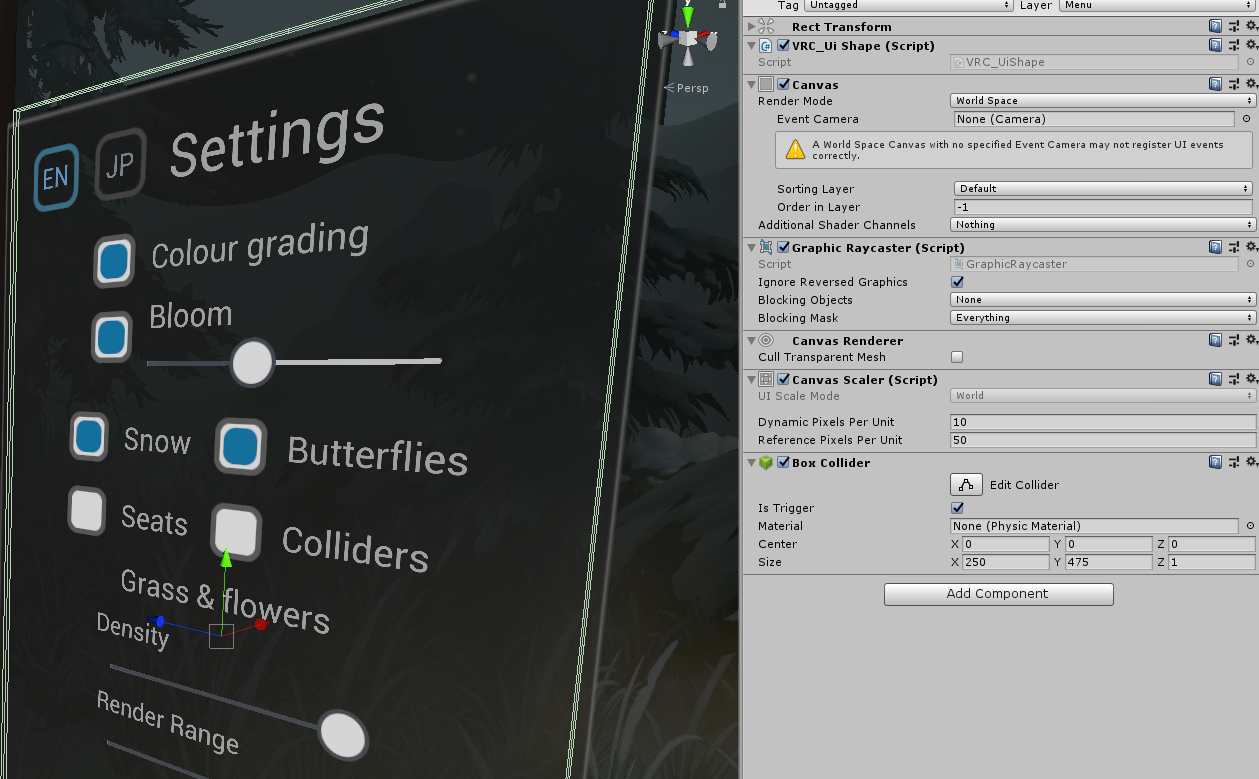

 desert python
its flush with the wall. bring it out slightly and see if it helps
atomic prawn
yeah, i didnt have problems with it on my machine but friends did, guess floating point accuracy is different machine to machine
tawny slate
frigid estuary
<@!469508905773301760> thats not easy to sum up in short
you can just dm me the full details
frigid estuary
tawny slate
you can just dm me the full details
if you have a specific question it would be much easier, making a world contains about a hundred different issues which i am not willing to write an essay about