#development-advanced
1 messages · Page 49 of 1
 near nymph
 warm niche
Yes it’s possible but I don’t teach that field
 zenith osprey
Is it possible to somehow disable the assignment of the photon viewID to the object? When creating an object via Instantiate, the duplicate viewID warning is misleading.
 sly sigil
Hi, I'm doing a short play in VRChat, and I was wondering if there is a way to trigger a global audio Fade-Out? I already set up a toggled trigger to play or silence the music, but I'd rather fade it out if possible.
 spiral otter
Not sure where to put SDK3 World questions... Anyone know a quick way to hit "Auto Fix" on about 2000 of these warnings?
 burnt zephyr
@spiral otter bro id just ignore thos, also #udon-general is for sdk3
spiral otter
oh ok. I'm not using Udon at all so the channel seems pretty offtopic even if it is still technically SDK3
thanks though
Problem with the warnings is there's so many of them I cant even scroll past to see the rest of the possible warnings or errors
burnt zephyr
@spiral otter should be at the top, thos are the ones to worry about
spiral otter
ok
even so... they're super annoying, would be great to clear em out either by fixing or ignoring them
burnt zephyr
@spiral otter try 1's vrworldkit, i believe it acc has something that auto fixes everything the sdk says you can with 1-2 clicks of a button
 shadow ruin
@spiral otter @burnt zephyr as a small correction I haven't yet added that functionality from the sdk because of performance concerns
burnt zephyr
oh woops, sorry about that then
spiral otter
thank you!
Each of these literally takes about 2 minutes after clicking for the build window to re-populate the list
spiral otter
if you ever get the "auto fix all" feature working please let me know 😅
shadow ruin
It is on my list
 upper plover
spiral otter
Not sure where to put SDK3 World questions... Anyone know a quick way to hit "Au...
upper plover
spiral otter
Not sure where to put SDK3 World questions... Anyone know a quick way to hit "Au...
Unless those objects are being animated there is no harm in leaving them unfixed
As long as you don’t have to receive any updates on them
spiral otter
1 helped me out with a temporary script to do that one change all at once :)
cause they're awesome
spiral otter
So it would seem a 6GB VRChat world is maybe a bit too much
is there an actual hard cap?
shadow ruin
I think assetbundles themselves will cap at 4 gigs 😅
For a public world it should be under 200 mb unless you have a really good reason
 hexed shell
Imagine trying to load a vrchat world and having to wait 20min-4hours
shadow ruin
And just to clarify having a public world over 200 mb will risk it getting made private
spiral otter
oh thats ok it was gonna be private anyways. in no way am I making this to be a usable and enjoyed world
its more of a test :P
test complete I guess
 unkempt frost
where can i find jump function in SDK3?
tried looking for playermods but apparently its old method and there is no info about the new one
burnt zephyr
@unkempt frost #udon-general aslo its in the scene descriptor
unkempt frost
thnx
 remote valley
near nymph
is it possible to make sound proof rooms in VRChat? so people inside can hear ea...
remote valley
near nymph
is it possible to make sound proof rooms in VRChat? so people inside can hear ea...
maybe with udon it might do something
 safe kernel
Apologies if this is the wrong channel, I am making a world w/ physics game and it runs great locally but networked it is a lil jumpy and rubber bandy. In the Creating Your First World doc. it mentions on the VRC_SceneDescriptor has an option for "Update Time in MS" but I can literally not find this on the latest version of VRCSDK3-WORLD-2020.12.09.04.44_Public.unitypackage . Anyone got any tips? I think reducing the tick rate from 33ms will dramatically help! Fyi this is a cross Quest / PC world that will be optimized to work well on Quest.
 pine depot
@safe kernel that documentation would be very old as update time hasn't been a thing since like three years ago afaik
safe kernel
so there is no ms update then? Is there perhaps a tutorial or documentation for info on physics? Working on casual game experiments, like cornhole, beer pong, etc.
pine depot
Because of the way networking functions in VRC such things will always have issues if you are trying to do it directly with object sync
safe kernel
The most important thing is the quality, is there an alternative to object sync?
pine depot
not without arguably even lower quality sync
There is a network overhaul update on the horizon that I guess could improve such things but not sure
safe kernel
Gotcha, so just have "Synchronize Position" enabled on the Udon Behavior for whatever object is being tracked and "Allow Ownership Transfer on Collision" so two people can play with it?
 wooden arrow
I'm not sure if this is the right place to put this but I wanted to ask questions about programming development in connection to VRChat. Currently one of my peers have developed a speech to talk application that allows a streamer who does not want to display their voice, the ability to directly translate what they're saying into text that immediatly gets displayed in OBS as an Overlay. I began talking to this Dev into the possibility of taking this technology and developing an application that VRChat could use to display this text somehow so that other users could see what this person is saying without actually hearing their voice. They told me that it wouldn't be possible due to fact VRChat functions primarily through network calls, and I'm sure it would not allow 3rd party network calls due to malicious intent possibilities. My question to any Devs who work on this game or make things for this game, is any of this possible. I feel like this could be a great accessibility feature and I just want direction or to be told that it isnt possible. Apologies if this isnt the right channel, and I would greatly appreciate anyones help on this.
hexed shell
vrchat does not allow custom c# scripts
so the only way would be for the vrchat devs to implement it as a functionality in-game
wooden arrow
he mentioned theoretically implementing it into an avatar but that it would be a headache
the guy I talked with
wooden arrow
I mean i've seen avatars with keyboards that they manually type in text through some interface, that must have been developed by someone, are you saying I can't accomplish any of this without C# scripts? i've read things about Udon but i'm not quite sure what exactly it allows me to program
hexed shell
wooden arrow
I mean i've seen avatars with keyboards that they manually type in text through...
Yes I think you can't do that without c# scripts
Udon is for worlds not for avatars
wooden arrow
so any external mods created for VRChat are completely against TOS?
ah, yeah I read that about udon, that makes sense
hexed shell
wooden arrow
so any external mods created for VRChat are completely against TOS?
yes you can be banned for mods
wooden arrow
Gotcha
hexed shell
And displaying something manually like a keyboard is simpler than translating voice to text
but it would be a cool feature to have
wooden arrow
simplicity is not really my issue here, rather possibility
I just feel like something like this could be so useful for so many people
but the dev path feels like a headache here
the problem is even if I could get it working in a custom avatar, only people with that custom avatar could use it, i'd want it to work for anyones avatar
wooden arrow
I think it wouldn't be worth their dev time tbh, it's too niche and I think complex
hexed shell
didn't you just say the opposite of "it's too niche"?
the dev path is a headache for users
but not for the dev team
wooden arrow
you're right that's contradictory, but I feel strongly in trying to get this working myself
I don't see why I can't
hexed shell
of course there is no guarantee that they'd do it, but if you don't suggest it then it is practically guaranteed they wont
and you can't do it because no custom c# scripts
IF there is a speech to text function in Udon then you might be able to do it in a specialized world, but is there?
wooden arrow
yes a custom world is completely possible, it's just not quite what i'm looking for. it is a possibility though, something to think about
hexed shell
then I'm afraid you can't
 stoic tapir
wooden arrow
I mean i've seen avatars with keyboards that they manually type in text through...
stoic tapir
wooden arrow
I mean i've seen avatars with keyboards that they manually type in text through...
Yeah this is possible, but its not done through a scripting means per say, but usually a rather convoluted work around. One way of doing it is through particle systems to "type" out text, where a collider on the hand triggers a collision with a particle, and using particle triggers you can sort of have a some what usable keyboard.
For your use case however, I don't think any clever use of systems available to avatars can do that
the closest you can come to it is with AV3 to use viseme detection to drive certain behaviors, but it will never be accurate enough to transcribe speech into text
There has been some proof of concepts of using visemes to trigger behaviors on avatars, but they're for more simpler things, like detection of an approximation of certain words to activate certain things on an avatar
wooden arrow
I was looking into killfrenzy's keyboard for that reason
for the speech to text I would be utilizing an azure server, I just need to be able to display the text from an avatar I guess
stoic tapir
its entirely possible you could use said method to detect base syllables and use it to construct a word letter by letter but, heh
but no, integration an external service into vrchat is not possible at the moment, for both worlds or avatars
wooden arrow
yeah that seems to be the complication
I would love for there to be a way to opt into a dev program to be able to allow for something like this, but I understand the complications
 lapis rune
Hey, this might be the wrong place to ask, but I'm trying to show a RTMP (or HLS) stream from a server machine in my house in a vrchat world. As far as I can tell, none of the video players that world builders can implement are compatible with RTMP, but AVPro is compatible with HLS. However, streaming with HLS (and a signed URI address) is much more difficult, and I'd really rather use RTMP. Should I just give up on that, and slog through signing the URI for HLS, or am I missing something for RTMP streaming?
 cerulean rapids
Not sure if this is the best place to ask this but not sure where to put this question. Using the pickup script VRChat provides along with appropriate rigidbodies and colliders how to normalize throwing? What I mean is throwing on desktop is fine but as soon as I get in VR for throwing these objects they become rockets. Not sure how to fix this exactly. I'm assuming it has to do with the Momentum Transfer Method from the VRChat pickup script.
burnt zephyr
@cerulean rapids sounds like throw velocity boost is set too high
cerulean rapids
It's on the defaults of 1. Should that be even lower?
burnt zephyr
usually one is fine, how fast/boosted does the object seem to go?
cerulean rapids
Like a ROCKET/BULLET. On desktop it's fine when you do the click-hold-release force. It
seems like when you do a-> rotate your camera and release force on desktop it goes crazy. On VR it's anytime you throw it really.
My only other thing it could possibly be is I never set up the exact grip transform for the objects. So it could be freaking out because the place it puts the object to grab is to close to the players collision?
burnt zephyr
possibly
cerulean rapids
Can't find any material to setup the grip transform. Does it have anything to do with the VRC descriptor object?
cerulean rapids
I might have figured out my problem with the grip transform. If anyone is interested this tutorial explained a couple things: https://youtu.be/y7mKZqgmmck

This tutorial shows you how to make a pickup object and respond to the 4 events on the pickup object: On Pickup, On Pickup Use Down, On Pickup Use Up, and On Pickup Drop.
Official VRChat discord:
https://discord.gg/VRChat
Have questions or want to see a specific tutorial? Ask in the comments or join my discord:
https://discord.gg/pAtnDyr
CyanL...
 verbal lark
Having Issues with making post processing sliders and for the life of my cant work out whats going wrong here. Have tried both setups in the image and included is a lil image of my simpler 0 - 1 wight animation of the volume (the animation works fine) The sliders are sliding but not effecting the post processing in anyway.
Edit: Extra note when I set the elements to runtime and editor then slide them out of play mode it works in play mode and build no work.
cerulean rapids
@verbal lark are you using SDK2 or SDK3? I think that looks like the SDK2 right?
Not sure if this will help but check this video out when you get the chance: https://www.youtube.com/watch?v=FWU7ckfkUrw&t=834s

Interacting with modeled buttons is fine, but when you have a lot of buttons and such all in one place, you may want to integrate them with Unity's UI system. Here's how you go about doing a basic UI setup with custom events!
00:00 - Intro
00:35 - UI Canvas Setup
05:40 - U# Slider Script
10:24 - Slider in VRChat
12:30 - U# Button Script
15:27 ...
verbal lark
sdk3 but as its ui shouldn't matter and as far as I know udon no like post processing stack
i'll take a quick look anyway
Yha unsure what this is suppose to being showing me seems like its just how to udon with UI sadly that wont help my case. Im not haveing a issue with sliders as my all my other UI and sliders work my issue is specific to the post processing V2
burnt zephyr
if i can recall, theres a varible for altering post processing tools. but i believe it works with the 2018 default pp and not the stacks that are easier to edit
but theres probably a tutorial somewhere that better explains how to use thos varibles
verbal lark
if there is a away or a tutorial a link would be lovely as from going thru the channels it seems theres no way with the current VRC setup to effect post processing values the only variable we can mess with is the wight.
stoic tapir
just to be sure, you have set up a reference camera with the post processing layer on it right?
verbal lark
the post processing works fine
changeing is the issue
messing with the wight sliders via animation also works fine. Getting the slider to offset the animation is where it all falls down and its annoying as its something ive done in the past and am clearly missing something soo small.
verbal lark
soo least im not going crazy on that part dident think you could change anything else
stoic tapir
hm, on first glance those sliders look correct to me
shadow ruin
What is the actual problem here? I'm a bit half a sleep lol
stoic tapir
the sliders are not affecting the animator
shadow ruin
In the picture they are animating the bloom value? Which just won't work.
verbal lark
Soo when set to editor and runtim its all happy and will change the wight as expected but when I enter playmode or and build nouthing.
stoic tapir
oh
verbal lark
no im editing the wight of the post processing volume
also with that just runtime still no work
shadow ruin
Ahh it's the name
verbal lark
bloom controll is just the name of the animator
shadow ruin
I'm just reading it wrong I'll go back to sleep now, good luck though 😄
stoic tapir
uh, dont think this is it but make sure the animator is disabled by default, and in the animation select both keyframes, right click and select Auto
verbal lark
animator is off and the animation curves are set to liner will try on auto
No luck on auto aswell
stoic tapir
oh, if you have multiple sliders acting on the same animator they might be fighting over it
and it looks like you have 2 test sliders for it?
verbal lark
Have sliders for 3 animators. One for bloom, one for eye adaption (fake gama) and one of color grading temperature. With all UI elements other than the bloom slider disabled the issue still persists. Also tested with my eye adaption slider.
stoic tapir
well i'm stumped, looks identical to my setup
verbal lark
Well ty for trying I'll make a quick vid of my pain and see if the next poor soul can work it it.
Video of the issue if it helps the next brave warrior that may try to send aid. https://www.youtube.com/watch?v=kYh-9bU1-wk&feature=youtu.be
 stoic tapir
okay i see why its happening
but i'm not sure what causes it
in play mode all the on values changed options for your slider disappear
verbal lark
I thought that was normal for play mode? my audio ones do the same but they still work.
stoic tapir
they're still there for me
verbal lark
In fact let me check something
ok its not a run time editor thing. well 1 step closer I guess but not there yet
Guess i'll try duplicating a audio slider and re adding stuff
yep the fields still vanish... unity madness
stoic tapir
oh
VRChat
You can use Unity UI events to directly call methods for simple interactions, rather than building an UdonBehaviour.However, we've limited what can be called to this list: Animator PlayPlayInFixedTimeRebindSetBoolSetFloatSetIntegerSetTriggerResetTriggerspeed AudioSource PausePlayPlayDelayedPlayOne...
looks like Animator enabled and update might not be available on sdk3
verbal lark
in my mind tho.. if that was the case no udon world would have post processing sliders... but they do...
stoic tapir
you can probably call it from an udon behavior still, this is just for ui events
but I havent really touched on that area in udon so i cant say for certain
I assumed there wouldnt be any difference in ui elements between sdk2 and 3 though
verbal lark
And with just the values below the field still emptys but yha will get udon to handle turning the animator on and off and see if it makes a difference
Infact even more so ignoring udon it should still work at runtime (playmode) and then only not work ingame
Yep still not luck 😦
stoic tapir
update isnt available either
verbal lark
Again in my mind tho should work at runtime and just not ingame for that case
might be wrong tho also unsure if udon can force a update will have a look
uno what theres a even simpler way to test this rather than spending 10 days trying to find the update refrance. Just make a copy of the project and remove the sdk. Then test it at runtime
ok soo it is the sdk clearing those fields
tested in a new project with just the sdk and the current project without the sdk
Guess i'll move to just calling it all with udon. For the next poor soul that runs into this issue if you are runing SDK3 and want to make some post processing sliders the normal method will not work as some of the needed events cannot be called with ui sliders (https://docs.vrchat.com/docs/ui-events). Untested but the solution in my mind would be to call those events with udon instead. (here have some tags soo this madness is easier to find if your ever traveling thru this mess like I was. UDON, Post processing, Slider, UI, UI slider)
Also ty for all the help playing spot the difference temporal now off to work out how to pull those events with udon. P.S. Udon is slow this is icky
 modern jolt
I hope this is the right place to ask but I need some help getting a trigger to play an animation more than once. The problem is that I click the trigger to make the animation play, I let it play, but then it doesn't play again after I click on the trigger again. Does anyone know how to fix this? I do have an idle animation to make sure it doesn't play on awake and looping is off.
Here’s a picture of the animator
stoic tapir
thats because once its in the play state, it has no way to transition back to the idle state
you want to add a transition back to idle, in this case an empty transition is fine, so it'll return to idle after its done playing
modern jolt
Okay. Also since it's in Bool should I set the condition to True or False on the way back to Idle?
stoic tapir
if you want to be able to turn it off then, yeah false on the way back to idle
modern jolt
Okay I'm gonna try that out. Thanks!
stoic tapir
make 2 transitions back actually
one with false, and one that's just empty
so you can either force it to stop with a false bool animation trigger, or it returns to idle naturally after the animations done
modern jolt
Okay. Also should the Has Exit Time be checked or unchecked.
stoic tapir
unchecked
modern jolt
Okay
 glass blaze
i have a follow up question on exit time that may or may not solve an issue i may be having
I wonder if it may be whats causing my issue on quest
sorry to interupt,
i just have a theory ,
in quest my facial expressions are getting kinda stuck and overlapping eachother
would exit time be the cause of this?
stoic tapir
sounds like write defaults
glass blaze
should write defaults be checked on or off because they are set on
stoic tapir
vrchat's "official" stance is that you should be using write defaults off for av3
glass blaze
Ohhh, mabie it is, write defaults then, i will get it a shot
stoic tapir
its not wrong to use write defaults on, but you have to plan for it accordingly, and even then it can cause weird behaviors because sometimes the animators don't write the "default" state correctly
but with write defaults off, you need to make animations for every state, including your default state
glass blaze
i will try it and see what happens,
modern jolt
Real quick, I got the animation to play but it just repeats itself and gets stuck in a loop. I have the loop turned off through the inspector tab : P
stoic tapir
did you add the 2nd empty transition?
modern jolt
Yes
stoic tapir
also disable loop time on the animation itself
stoic tapir
oh
right sorry with triggers theres no way for the parameter to reset to false
hmm
modern jolt
Damn I'm not sure what to do then.
modern jolt
How do I do that
stoic tapir
from TestCylinder to Testwait
stoic tapir
yeah
delete the empty transition back to idle
and put it to the wait state instead
modern jolt
Okay
stoic tapir
and then from Wait to Idle have the transition back to idle on false
this way, when the animation ends naturally, it will go there and wait, and only when you switch the trigger to go to false again, it'll go back in the wait state
actually hang on i think i'm dumb
what are your controls like
modern jolt
Ah okay. How does the trigger switch to false?
Hold on I'll get a pic of the trigger script as well
modern jolt
It’s one trigger. I’m hoping to make it one trigger that plays the animation and when it’s done you can click it again and it plays again
stoic tapir
uh
honestly the simplest way
just have the animation you want to play as the default state and no other state
and on the trigger just toggle the animator component on and off
animator off by default
triggering it will start it, trigger it again will stop it, and again to start it
modern jolt
Okay, I’ll try that then.
stoic tapir
if you just want one button
modern jolt
Yeah. I’ll see if that works if not I guess I’ll just go for an on and off button
Oh!! It worked! The wait state worked! Thank you so much!
stoic tapir
if you plan on delving into these things a bit more, you wanna learn how to use animation events
you can add animation events into an animation, which can do things like interact with a trigger via a ui button
so that it can for example, use a trigger to change an animator parameter to a different value at the end of an animation
could have done that in your case, but i figured toggling the animator on and off was simpler for what you wanted
modern jolt
Yeah. I'm gonna be replicating the same thing a few more times in the world so I needed a very fast and simple method although yeah I'll totally be experimenting more and seeing what other things I can do
warm niche
I have this script that allows me to place a countdown timer. It works in unity but doesn't work in VRChat. Does anyone know if I can make it VRChat Friendly?
using System.Collections.Generic;
using UnityEngine;
using UnityEngine.UI;
using TMPro;

public class CountDownTimer : MonoBehaviour
{
    [SerializeField] float startTime = 5f;
    [SerializeField] TextMeshProUGUI timerText1;

    float timer = 0f;

    // Start is called before the first frame update
    void Start()
    {
        StartCoroutine(Timer1());
    }

    private IEnumerator Timer1()
    {
         timer = startTime;

        do
        {
            timer -= Time.deltaTime;
            FormatText1();
            yield return null;
        }
        while (timer > 0);
    }

    private void FormatText1()
    {
        int min = (int)(timer / 60) % 60;
        int sec = (int)(timer % 60);

        timerText1.text = "";
        if (min > 0) { timerText1.text += min + "m "; }
        if (sec > 0) { timerText1.text += sec + "s "; }

    }

}
Custom c# scripts aren't supported best you could do is write it into udon sharp with sdk3
https://github.com/MerlinVR/UdonSharp

GitHub
An experimental compiler for compiling C# to Udon assembly - MerlinVR/UdonSharp
warm niche
Dang ok. Just finished making everything in SDK 2 and this is the final thing 🙃
shadow ruin
Yeah sadly not gonna work in sdk2 😅
warm niche
Would you know if there would be a way to emulate a countdown timer?
shadow ruin
You could use an animator with an animation
warm niche
How so?
shadow ruin
Just animate the numbers changing manually and play it back when needed
 dense bear
Hello everyone, does anyone know how to add a weapons system that has guns in the world that shoot cubes that kill players? I've seen it be done and would like to learn how to do it
 cobalt sigil
Hey guys, have a bit of a unique question. In nonVR Desktop Mode, how does VRChat handle mouse inputs to manipulate view in 1st person mode?
I am attempting to use a head tracker, OpenTrack, that outputs to DirectInput mouse emulation. When I use it in-game, it will work in the static Settings menu, but not in the first-person view in-game.
https://github.com/opentrack/opentrack
Anyone have suggestions? Who would be the right person to ask?

GitHub
Head tracking software for MS Windows, Linux, and Apple OSX - opentrack/opentrack
 dapper sky
Not sure where else to post this (already posted on several forums with no response), but I've been having an issue for months now where if I have a dynamic bone chain that splits off in any way (ie. any of the chain's bones have child gameobjects), then the flow of the dynamic bone chain becomes completely disconnected and seems to do something akin to ignoring weight painting. This is hard to explain through text, so I've linked images of before and after I added a child gameobject to one of the bones in a dynamic bone chain. I'll post pics in a sec
Behavior without gameobjects in the chain
Behavior with a single empty gameobject created under ONE of the bones in the dynamic bone chain
I have no idea what's wrong, I'm at a complete loss.
dapper sky
I thought it might have been related to whether or not the model was a prefab, but that proved to not be the issue after some quick testing
hexed shell
dapper sky
I thought it might have been related to whether or not the model was a prefab, b...
try adding the new gameobject to the Exclusions of the dynamic bone
dapper sky
Already tried, no difference
No difference on either the Prefab or NonPrefab versions
Position in Hierarchy didn't change it either
dapper sky
Has nobody else run into this problem before?
 velvet plank
hay i was wondering if you can add a blue screen because when i stream my avatar is is also green so it makes it a little more difficult it be cool to have
 cobalt mist
how do I make working swords in VRchat that kill people if they touch the players avatar and do damage
dapper sky
They'd only kill in worlds that support it, but I'm pretty sure it's just based on either number/speed of particles that collide and that the particle system needs to have Send Collision Messages checked
 tropic blaze
Hello,
Sorry if this is the wrong place to ask but is there a way to make sure you upload a model in the Builder onto a new slot?
I want to try some stuff but I'm afraid it will replace my current upload which is already working.
Even if I create a whole new Unity Project it keeps the old name when uploading in the VRChat SDK.
Could someone help me? 👀
shadow ruin
You just need to press the detach id button on the pipeline manager at the root of the avatar
tropic blaze
Oh nice! I did it but even though now the name still says the old one it will create a new one for sure?
Or should I restart Unity or something? I don't wanna mess up 😅
shadow ruin
If you don't have anything in the id field it can't upload to old id when you press build & publish
tropic blaze
Oh yea I restarted to be sure and now it says "Unpublished Avatar" so that's perfect; thank you so much 😁
 stable crest
is there a way to use interactions in VRC externally? Say if you have a clickable feature or colider on your avatar that has been touched it sends a message on say discord or something.
shadow ruin
With avatars you would need to have some special shader displaying a special pixel on your screen read by some screenreader program that fires the message on discord, so not easily
stable crest
Dang.. was hoping it would be easier than that or something a little more elegant.
thanks
dapper sky
Interaction between an avatar and anything else that isn’t on the avatar is very hard, mostly be design so people can’t troll with it. That being said, I wish we had more options, like being able to opt in/out of it
 jagged ruin
My unity builds vrc avatars and compiles shader variants twice. And the last bit of compression takes a long time, both times it builds. Any ideas?
I only have dx11 set in project settings and only windows supported builds
 lean pivot
Unity Build & Test button not doing nothing for me, please help!e
jagged ruin
Double check you are using Unity version 2018.4.20f1 and the latest version of Avatar VRCSDK for your type of avatar (2 or 3).
Make sure the title bar of unity says Windows, OSX, Linux (DX11)
or something similar
@lean pivot
 polar wagon
Anybody know specifically what causes huge lag spikes when an avatar is loaded?
I have a "Feature rich" avatar, and while it doesn't cause framerate loss in-game, it causes the game to freeze for most people when I switch into it. Trying to find the solution without stripping it.
shadow ruin
Amount of textures especially "beefy" textures will most likely be biggest lag spike, then meshes and so on
warm niche
i want to use these beat saber katana models on my protogen can someone help me 😓 send me a dm if possible
 past frigate
i'm getting a lot of errors that referenced scripts are missing when trying to build and publish a map, I'm using Unity 2018.4.20f1 and the current world sdk, the builder will hang and nothing happens and I have to reopen the project, i'm not sure what i'm missing or need to add or remove.
I'm mostly concerned about the Game Object 'VRC_PlayerVisualDamage message because I don't have one of those on any of my objects or brushes
jagged ruin
Why does VRCSDK Build have to do the process two times? Including processing shader variants, Future Proofing, and Building/Compiling
jagged ruin

0:09 to 3:40 is first time building; 3:50 to 6:57 is second time building.
So my primary question is, why might i be experiencing this situation where my builds to run two times?
sly sigil
Hey, I set up a trigger to play an audio clip, but I want to fade it out with another trigger instead of just turning it off. I've read the Unity Manual and looked all over youtube, but I don't know what components to add to the trigger. Any ideas?
 noble lodge
I work as a Unity VR developer and just starting to play around with VRChat for fun. Trying to get my head around what can and can't be done within the confines of the SDK.
I'm used to being able to use assets like GPUInstancer, or MagicaCloth to handle things like cloth physics or help with optimisation of a scene. Looking at the VRChat dev site it seems that this may not be possible. Did I understand correctly, only a few third party assets (i.e. AVPro) are supported? i.e. I need to strip out anything I've used (like MeshCombineStudio or MeshBaker)?
Does that include libraries like DOTween or waypoint systems, or pooling systems? The kinds of utilities that mean you don't have to code everything from scratch or re-invent the wheel each time you make a VR app.
Also in terms of my own programming or basic game dev, is there anything i should not be doing? For example, can I do additive scene loading? Loading of resources? Scriptable objects? Playerprefs? Bread and butter Unity stuff that perhaps doesn't work in VRChat?
I guess I'm just wondering what exactly is being uploaded to the VRChat servers... The VRChat window appears to push a build, but in the tutorials I've seen there are never any scenes in the main Unity Build Settings. Also no one seems to pay attention to the Player settings or graphics settings. Is that because it isn't picked up by VRChat? (i.e the main game runs its own settings and all you're including is geometry and a few utility scripts like seating/triggers/pickup objects etc.)?
Would really appreciate any advice from experienced Unity developers working with VRChat.
 near bronze
@noble lodge you can use editor scripts as much as you want, as long as they don't need scripts to function ingame. Meshcombinestudio and bakery are very common, for example. You don't necessarily need to strip them out since the components will be removed automatically, but if you want to avoid having hundreds of error messages you can just set all your bakery lights to editoronly.
When you make a script with udonsharp it's worth knowing that in many ways, it's not really c#. It's just c# that gets assembled into udon assembly. so you can only ever work with whatever udon assembly has available. And it's only purpose right now is to emulate monobehaviours, so nothing like scriptable objects. However you can use a .txt file to store data in assets in a format that udon can pull.
Basically everything has to be done from scratch since the chances are high that if you just copy code from the internet, they're going to include something that udon can't do, like lists. Though for small pieces of code like a single function, you can get away with it sometimes.
noble lodge
thanks @near bronze that's really helpful. So all scripting has to be done with udon, DOTween is out, nothing else at runtime apart from the vrchat SDK components, udon, geometry, Unity stuff like UI, baked lightmaps, etc.? I see Cinemachine is supported. Do you know if Timeline can be used?
hexed shell
Dynamic Bone and FinalIk are allowed
Bu besides what's on the official whitelist, no other c# scripts
 scarlet pagoda
Has anyone else had issues with Cards Against Humanity recently?
Last night I was unable to pick up any of the cards I spawned, or see anyone move any of the cards they spawned. I also could not see when others were changing the skin of their station. I could however move the eraser and pen, and see people using those.
I tried literally everything I could think of to get it to work. I cleared my cache and restarted the game, created a new world instance, changed avatars , cleared the cache again and cleared the avatar cache and restarted the game, I cleared the cache rebooted my PC then restarted the game, and I even tried playing the game on desktop!
I'm asking here in the dev forum because I assume that's an SDK 2 world and there was some issue with the event system, but I don't know what could possibly make this happen. The game was working fine for everyone else in the instance, and I have had no other problems with the game, though that was the last world I visited last night, so it's possible when I hop on again tonight I could see similar issued in other worlds, though I'm not sure of any specific ones that would be good to test with.
 pure flicker
scarlet pagoda
Has anyone else had issues with Cards Against Humanity recently?
Last night I ...
pure flicker
scarlet pagoda
Has anyone else had issues with Cards Against Humanity recently?
Last night I ...
Change your home world to default. Don't ask how that would fix it.
noble lodge
Does anyone know if there's a 'market' or easy way to reach out to experienced VRChat developers for paid contract work?
hexed shell
the VRCTraders discord check the community servers channel
noble lodge
thanks @hexed shell
scarlet pagoda
pure flicker
Change your home world to default. Don't ask how that would fix it.
Thanks! That seems to have worked. The world I was using for my home was End of Traditions, which is the island with the tree with red falling leaves and a japanese shrine. And I gotta say, for a moment I thought the idea of my home world having any effect on another world was crazy, but then I thought about it, and well, I suppose its entirely possible that that world is doing something which is not unloaded by VRChat when I change worlds which is then breaking others! So I've changed my homeworld now. I should probably post a canny thing about this world breaking others, because that's a bug that should probably be fixed!
pure flicker
scarlet pagoda
Thanks! That seems to have worked. The world I was using for my home was End of ...
It's a bug with home worlds in general. Sometimes, having a non-default home world just fucks things up. Not sure why
near nymph
is VRC_Panorama still a thing in SDK3?
 quiet quiver
i dont know if this is the right place for this but is it possible to use VRC_Pickup for a video player? like is it possible to pick up and move a video player in a world like a T.v?
burnt zephyr
yes
 tame wigeon
A while back, I remember seeing that somebody made an editor script to help with editing multiple dynamic bones at once. Does anybody know what I'm talking about, and if so, what the name is?
 vocal violet
So.. I can't help but notice that Unity 2018.4.20f is reaching end-of-support soon. (Spring 2021) Any idea when 2019 LTS is due? (Looked into it, and 2019 LTS is needed before going to 2020, for asset database updates, as 2020 LTS doesn't support the old asset database version)
 green trout
after update to vrchat i think they will work on it
also you can force even on newest unity sdk but its buggy
vocal violet
green trout
also you can force even on newest unity sdk but its buggy
Yeah, it's not exactly buggy if you know how to fix the issues. (I have only imported it and convinced it to stop complaining so far, haven't messed with anything past that yet)
green trout
for me it works fine too. i use 2020 version
vocal violet
And the Assets work fine in VRChat?
green trout
actually some doesn't
vocal violet
Most likely the Asset DB version causing problems then
vocal violet
Well.. I'm hoping 2019 is a transitional one, so we can jump to another new version fairly soon.. instead of waiting for 2019's LTS to end, before updating again.
warm niche
anyone know how to make a game object World bound instead of Local?
 urban willow
I know VRCPortalMaker is used to go to other worlds but how is this used to go from one part of my world to another?
urban willow
I see, that answers that then. Thank ya ^_^
 limber peak
anyone know how to import an audio system that i could stream music directly from my desktop audio?
im trying to setup my dj board irl to host live sets
burnt zephyr
uh theres a few ways, the most common method is twitch, but you can use like topaz where its just audio or cdn or even korg inside vrc
limber peak
Awesome. I’ll check those out, thank you!
limber peak
So i tried to setup topaz, but i don't speak Japanese making the instructions very unclear on how to import / set up the udon behaviors
burnt zephyr
could try out vrcdn
limber peak
okay, ill check that out, are these free?
burnt zephyr
i dont think think so, i think twitch is the only free method
limber peak
hmm yeah, okay, well maybe the best option is to import a video player to use twitch, and download some sort of DJ table for show
I seen some rooms with dj controllers / light controllers, are these all created or is there some sort of prefab i could import
 solar dock
Hello everyone!
I had read in the past that VRChat said VRChat supports RTMP streams ( https://store.steampowered.com/news/app/438100/view/2792752124090137690 )
I have not been able to get RTMP streams to play on any players. I have been able to get HLS streams to play, but there are some issues with it.
Curious to know if there's anything someone has done to get these to work? Welcome to DM me, or chat here either one works well for me. (I hope this is posted in the right spot)

We've just released VRChat 2020.3.3p1, build 994. Here's the changes. You can also see them on our changelog page in our docs. Client Fixes SyncVideoStream should now auto-start properly Remote user camera lens will now show up in the proper location Avatars loaded from cache will now show their file size instead of 0MB Some fixes to missing ava...
remote valley
So I wanted to ask how would I fix the issue with the spring joint ball prefab where it appears 10 meters away from the player when you press play in unity?
 mortal blade
remote valley
So I wanted to ask how would I fix the issue with the spring joint ball prefab w...
mortal blade
remote valley
So I wanted to ask how would I fix the issue with the spring joint ball prefab w...
did you put the ball outside of the armature in the hierarchy?
remote valley
ye
 proud comet
@remote valley did you make sure to put the anchor onto the finger instead of where it moves to in the scene?
scarlet pagoda
How do those worlds that make a mirror clone of your avatar work?
There's the cyan colored world which makes like four copies, and there's the gray box world that makes just one. I assume those worlds use some kind of shader, though I don't understand how such a shader would work or interact properly with whatever shaders you have on your avatar already. It doesn't seem to be a camera trick either. There's a world which allows you to shrink or grow, which does seem to use a camera trick because there's something weird about the way it renders that I can't put my finger on.
Anyway I was wondering if one could use a shader like that to do the same kinda shrinking and growing thing, but without whatever weirdness is going on in that one shrink/grow world.
 quiet atlas
I look up theme park names and nothing comes up some worlds don’t come up and i’m putting the right names for theme parks if you know a name dm me i’ll try it
warm niche
Try my Funland.. if it doesn't come up then it's broke.. but I'm remaking it so it's a wip for the sixth time lols.
 swift steeple
Does anyone know if there are any plans to bring bhaptics support to VRC anytime soon? The x16 and x40 are starting to ship next month, and it would be awesome to eventually see native support.
hexed shell
it would be kind of fun I agree
I know there's a post in the canny for this
you can always go there and upvote it so it gets more attention
hexed shell
swift steeple
Does anyone know if there are any plans to bring bhaptics support to VRC anytim...
.
 wintry snow
Does anyone of anyway to make a working bicycle in SDK2?
 severe olive
wintry snow
Does anyone of anyway to make a working bicycle in SDK2?
severe olive
wintry snow
Does anyone of anyway to make a working bicycle in SDK2?
Wouldnt it be that you first make the model of said bicycle, then you rig it in a way that you make the wheels as a separate bone that you then animate to roll around so the wheels move the right way and thats it? Unless you want to make someone sit on said bicycle... 🤔 Obviously you need to animate the whole thing on your own since VR Chat does not provide you with animations on bicycles...
Dats a lot of work and a lot of stuff to figure out but if you really want it im pretty sure its doable ^_^
wintry snow
severe olive
Wouldnt it be that you first make the model of said bicycle, then you rig it in ...
There’s a world called Concord Dawn that has these speeder bikes that hover off the ground. You click on one handle bar to get in, click a button to start it, and then use your analog stick to move around
I’m assuming the world is SDK2 since the guy basically copied another world he made and literally slapped mandalorian stuff on it
severe olive
wintry snow
I’m assuming the world is SDK2 since the guy basically copied another world he m...
Ahh... You mean that stuff.. Well unfortunately to that I cannot give you an answer to since im not a world creator :3 I thought you meant a bicycle avatar X3
I was all like... "I wonder why this dude wants a bicycle avatar" but then I remember that perhaps for another "mama... oooh.." meme
wintry snow
Oh I get it
Haha
But yeah...
I tried talking to a friend of his, but he was super stingy and wanted a prefab to trade with
I offered him some Star Wars guns from battlefront and even a way to make custom flying vehicles but he wasn’t interested
 sand canyon
Dr Fluff I pointed you to the NotBadCars prefab in another channel—note that you will have to have 4 wheel colliders for the bicycle, they will just be invisible.
severe olive
sand canyon
Dr Fluff I pointed you to the NotBadCars prefab in another channel—note that you...
Fionna to the rescue ❤️
wintry snow
Sorry about that
Just trying to expand my questions everywhere I can
wintry snow
Okay, I found out they the prefab used was Not Bad Cars
But now I’m super confused as to how to make a custom vehicle
Is there a tutorial anyone can give or has?
 dapper mountain
wintry snow
Okay, I found out they the prefab used was Not Bad Cars
But now I’m super confu...
dapper mountain
wintry snow
Okay, I found out they the prefab used was Not Bad Cars
But now I’m super confu...
You can use the car prefab that comes with the Standard Asset in Unity (you need that asset anyways to make it work) All you need to do is enable the scripts "Car controller" and "car use control" locally for the person who will use the car in VRChat. Also, i believe "take ownership" of the car is very important too (and VRC sync if you want it synced with others)
wintry snow
dapper mountain
You can use the car prefab that comes with the Standard Asset in Unity (you need...
I’m an absolute noob, lol
I’ll try to see what I can do
wintry snow
dapper mountain
You can use the car prefab that comes with the Standard Asset in Unity (you need...
Okay, so all I do is add the scripts you mentioned to a mesh I imported in, correct?
dapper mountain
wintry snow
Okay, so all I do is add the scripts you mentioned to a mesh I imported in, corr...
Would work better if you import the car prefab, and just replace the car mesh with your own. Then make a button to enable those components locally as well as give the ownership of the car to the one driving it. And if you want, you can put a chair and immobilize the player for 1st person driving.
wintry snow
You lost me
Again, I know little to nothing
dapper mountain
In the standard assets, there is a prefab of a car under "vehicles" You can drag that to your scene and only change their meshes as needed. There are 2 components that need to be OFF for everyone, but be turned ON locally for the one controlling it (a button) "car controller" and "Car use control" That will allow the player to use their controller to move the car around, but because they will also move, it is better to put them in a chair and not let them out when they move.
wintry snow
I am still so confused...
What I did was unpack the prefab and then I took the car empty object and just put it on the mesh that I want to turn into a vehicle
Do you just have a video or something I can use instead?
dapper mountain
The car prefab under vehicles from the standard assets?
wintry snow
Do I need to use that? Can I just take an existing mesh I have and just add components onto it?..
dapper mountain
You could, but that would require some extra work, since i think wheel colliders are required too. That one is already set up for you. Found this video that shows you how you can change the mesh to fit your vehicle. https://www.youtube.com/watch?v=WyPgJ5scclM

Hey Guys! This is ABQ a today you will learn how to change the mesh of the standard assets car
Donate me money via Paypal: https://www.paypal.me/ScorpionFlame
Download this car: http://www.mediafire.com/folder/ilbgo08oi5y8i/CAR
How to download Playmaker for free: https://www.youtube.com/watch?v=cCjm4...
Download the animation package: https:...
wintry snow
Do I need wheel meshes?? I vehicles I want to use don’t use wheels...
This is all way too confusing for my brain...
dapper mountain
if you have separated meshes for wheels they will spin and move around when the car moves. It is not necessary. Basically, you just place your car mesh on top of the car and delete the old car. Can be confusing at first.
wintry snow
And delete other stuff thst is unnessecsry, like smoke trails and lights?
dapper mountain
Yes. i think you only need the one called "coliderBottom" under colliders, "WheelHubs" and the components on the main car
wintry snow
And so then I drag my vehicle model to the car object and then set aoo if the car controller settings to default?
dapper mountain
hmm, I dont think I understand what you are saying, I am sorry what do you mean by "aoo"?
wintry snow
*all sorry
I’m noticing though that there are no car seats...
Okay, so I just kept the bottom collider and all the wheel hubs while getting rid of the audio sources and trails
Now what?
dapper mountain
You can test it in play mode. You can control the car with WASD
wintry snow
This is for a quest world.
dapper mountain
What you do next, is up to you, depending what you are planning to do on your world.
wintry snow
That is literally the least helpful thing you could have said.
dapper mountain
well, do you want to control it in 1st person? 3rd person?
Be inside? It depends.
wintry snow
Fuck it. This is getting me no where. I’ll just ask a friend for a favor.
dapper mountain
There is a prefav of cars ready on the #world-development pins that contains everything you need for it to work on VRChat. Like enter button and exit. You could use that instead of creating one. If it helps, you can see how the button works and try to recreate it from 0. But if you are still confused, you can ping me anytime for help.
 violet owl
wintry snow
Fuck it. This is getting me no where. I’ll just ask a friend for a favor.
violet owl
wintry snow
Fuck it. This is getting me no where. I’ll just ask a friend for a favor.
You're getting too caught up on the idea that it's too hard. It's actually quite simple as far as game design goes. You need to be more open to learning new ideas. People are trying to help you here yet you're scorning them at every opportunity. Try to be more accepting of their advice.
wintry snow
A friend of mine was able to give me the prefab for a bike he made using Not Bad Cars, but I’m noticing a lot of issues.
One is that there are two seats.
Secondly, whenever I turn the ignition key it doesn’t let me use my analog stick to move around.
Third, the vehicle keeps moving backwards.
Fourth, whenever I get out of the vehicle it disappears.
Fifth, the handlebar for getting into the vehicle doesn’t work.
 sharp delta
Anyone have an expierence with substance painter? I'm having an issue where a generator on a fill layer is applying the generator to every object in my file, despite having out a black mask on the layer.
urban willow
anyone know how to make a book with pages that flip? I was visiting a world that had this and thought it was cool but don't see a tutorial or anything for it anywhere. Suggestions?
 sharp meteor
Still searching Discord and online, but looking for reliable source if VRChat team is OK with interacting with the VRC API outside of the game without malicious attempt. I am wanting to write a bot for my server that basically queries world's and users when one searches, and provide hyperlinks to join the world or a chosen instance. The bot would ot course respect "cooldowns" to not overload or spam the API. Thanks!
polar wagon
Not sure where to ask this, but does anybody know if it's safe to delete these files in my assets folder? I assume they're built prefabs for upload.
 shadow ruin
Yeah those would only stay normally if you had a error during the upload process
shadow ruin
sharp meteor
Still searching Discord and online, but looking for reliable source if VRChat te...
polar wagon
shadow ruin
Yeah those would only stay normally if you had a error during the upload process
Ayyy thanks
 dense raft
I just got done creating a new avatar but i can’t find vrc_avatardescriptor on unity, anyone know a link to download it?
hexed shell
download the offical sdk from vrchat
 silent hatch
Guys Do you know where to change the video player prefab in order to let anyone paste links to be playable? or does anyone have a prefab of a nice working video player?
stoic tapir
sdk2 or 3?
 zinc hill
how long do u need to play for to be able to upload avatars?
warm niche
40 hours about @zinc hill
 warm lava
It's less about hours and more about doing stuff
visit worlds, make friends. Show that you're somewhat invested in the community 🙂
 astral wagon
@sterile cipher Greetings, I have a scientific related request, where I can best ask this question?
I can't really find a suitable channel for it
Hope you don't mind me tagging you btw, I selected you based on your activity in the discord haha 😅
zinc hill
are u able to purchase vr chat plus to instantly be able to upload characters?
hexed shell
zinc hill
are u able to purchase vr chat plus to instantly be able to upload characters?
yes
urban willow
Posted that in the wrong spot, glad I caught that(my bad >.<) - I asked about it this past week but think it got lost in the sea, but was curious if anyone knew how to make a mesh behave like a book - ie: take it off the shelf, flip through pages, etc.. probably for PC since I don't have a headset.
 pulsar haven
urban willow
Posted that in the wrong spot, glad I caught that(my bad >.<) - I asked about it...
pulsar haven
urban willow
Posted that in the wrong spot, glad I caught that(my bad >.<) - I asked about it...

Obj Sequencer is a VRChat UdonSharp Prefab for playing "Obj Sequences" from Blender or other programs. Essentially, you give this prefab an array of Models and it will rapidly replace its Mesh in order of that list to play through an animation.
Download Here:
https://vrcprefabs.com/browse
https://vowgan.booth.pm/items/2784370
https://www.patreo...
This is an obvious approach, otherwise you'll need to have a rigged mesh that you can animate.
 golden sky
@astral wagon Tupper is the community manager, he’s unlikely to answer. Mostly just relays updates from the dev team and tries to smooth things over with the user base when things go wrong with the game.
 steel swallow
Honestly I have no clue where to ask this. Does anyone have more info on the grounded layer changes?
I assume it's referring to the grounded check for jumping and the av3 parameter
 potent tinsel
Is there support for data stores?
near bronze
steel swallow
Honestly I have no clue where to ask this. Does anyone have more info on the gro...
That's referring to the behavior where if you set a custom layer to not collide with playerlocal, you will fall through it slowly because your player controller will consider that layer as grounded. This is fixed now so you will properly fall through custom layers
steel swallow
Ahh okay that's cool then
I have a couple maps where that occurs, never bothered to try and fix it lol
 stuck valley

 stuck token
is there a way to reference the onaudiofilterread event from within udon
i can't get a reference to a datastream to write info to
near nymph
does anyone know where i can find Unity Cache Server windows download? For some reason i keep being directed to a github page but there are no releases there only source code
stuck token
near nymph
does anyone know where i can find Unity Cache Server windows download? For some ...
It's JavaScript.
It doesn't need to be compiled
Install from the source or with nuget, instructions are at the bottom of the github repo for all platforms
near nymph
oh huh thanks
stuck token
near nymph
oh huh thanks
Oh, you'll need node.js installed as well.
near nymph
ahh i see so this is my first time hearing abotu that
its just a matter of install, open command, and go ?
are there any tutorials on this?
i have no idea where to start
 summer berry
near nymph
are there any tutorials on this?
summer berry
near nymph
are there any tutorials on this?
There is an easy way to setup a local cache server directly in unity without needing to download anything else. It’s in the unity preferences. The default option is disabled but switching to local cache server helps a lot. Are you sure you need the remote versions?
near nymph
thanks @summer berry this went over my head
i thought local version also required install
👍
summer berry
No problem. And local cache server saves so much time switching between android and pc builds.
 fresh plaza
vrchat team, where is your website protection?
 shadow ruin
The hello page is managed by squarespace tell it to them 🤷
fresh plaza
all websites have this
shadow ruin
And I mean looking trough the "errors" it's not like any of them are critical problems
Make a canny if you want to report them
Not sure why you censored the page name when you can just google it in seconds lmao
fresh plaza
not everyone has to know what tools I use xD
shadow ruin
Tools 😂
You literally just put scan your site now in google and it's the first result
fresh plaza
vrchat is so broke, you don't want to help them anymore
shadow ruin
lol
fresh plaza
they neither use their resources properly nor do they have a plan how to configure and protect servers
sharp delta
Is there a way in particle systems to set a particle to follow the path of the particle infront of it?
I'm trying to replicate the sort of whispy effect of cigarette smoke
stoic tapir
you could have particle trails that look just like the following particle so it looks like it follows it i suppose
or using the noise function, it should sort of look like the particles are following a randomized path that's slowly changing
sharp delta
yeah I used noise, but I couldn't figure out how to get them to follow each other. They would come out of the base, and flew in a random direction instead of following each other
stoic tapir
you wanna lower the frequency scrollspeed
sharp delta
yeah that might work, I'll give that a try when I get home and give an update
thanks!
stoic tapir
well both, freq and scrollspeed of 0.1 seems like it would give that effect
warm niche
i want to get a list of my friends in json format. i tried using the following API endpoint https://api.vrchat.cloud/api/1/auth/user/friends, but the it responds that it is temporarily disabled. What would you recommend me to do?
shadow ruin
Read trough the last messages in #announcements if it's disabled again it's because of that
If you want to use it you need to wait until it's enabled again
urban willow
Evening folks, is it possible to link a private world to a public world? ie: i make a hub but that hub has worlds that can only be visited if you visit the hub first. I supose I could try it, but thought I'd ask about it first before I jumped into seeing.
burnt zephyr
@urban willow you can put portals to private world in public worlds
pretty sure this is a technique used to get labbed worlds out of labs almost instantly
urban willow
cool ty
sharp delta
Is there a way to have a particle in a particle system die quicker the further it is away from its source?
warm niche
@sharp delta there’s a few ways but I would just make a invisible plane with coilders and when detects the play it change the life time lower as you step on that coilder and higher as you step on the next one off you get my idea I have a better method of doing it but I will not share my perfed method but it should work Note edit the life time in animations files via components and make the couldn’t trigger a animation to lower the particles or you could have copies of it pasted and disable and enable on collider but have to edit particle for each collider to get smaller and dissper better
Hope this helps
sharp delta
Thank you. If anyone else has a better way, please let me know.
sharp delta
 true garden
There that ribbon trail one
true garden
There that ribbon trail one
no yeah I had it set to that. I didn't see an option about particle life in it tho
true garden
Put a collider above your hand so it will hit
sharp delta
with an animation? I think itll have a hard time hitting it is I move the source left and right as opposed to up. tho now that you mention it,I may be able to create a particle system where it only renders inside a sphere around my hands
stoic tapir
if you want the particles to die past a certain area you can just use trigger volumes so that particles will die the moment they exit say, a sphere collider around your hands
sharp delta
yeah, but I also really like the fade to alpha bit I have with the smoke, rather than they suddenly disappearing
but I guess if you're moving, that'll be really hard to notice?
hm
might have to just settle when it comes to that
that's why I wanted it to sort of go through its life cycle faster, instead of simply just disappearing
stoic tapir
wonder if you could set it up so that on death have it spawn the same particle that dies a few seconds later
might not look consistent
 split terrace
Hello ! I didn't really know where to post this message, I judged that this room was the most suitable, suddenly, I like the new server status service that you have set up, but to my taste it is not not as detailed, as for example that of Discord, and I find it a shame not to have the exact data, well after it's nothing, but there you go.

 manic zealot
split terrace
Hello ! I didn't really know where to post this message, I judged that this room...
manic zealot
split terrace
Hello ! I didn't really know where to post this message, I judged that this room...
I feel like the main reason why the official server status site exists is to better communicate to the players when VRChat is experiencing issues.
More info would be nice, but it's better then not having a site for it at all. As not everyone follows twitter, or joins the VRChat discord to see the tweet or announcement that there are issues going on.
If it helps any you could look at this instead https://status.vrch.at/
split terrace
The link does not work :/
manic zealot
What does it say?
split terrace
This website is inaccessible
manic zealot
huh, because when I click it I get this.

 manic zealot
I guess check your DNS like it suggests?
 swift karma
split terrace
I did not know that this page existed, in any case thank you! 😄
swift karma
split terrace
I did not know that this page existed, in any case thank you! 😄
Out of curiosity, are you still unable to access it or did the issue resolve itself?
split terrace
swift karma
Out of curiosity, are you still unable to access it or did the issue resolve its...
Hello, and my problem is solved, thanks in advance!
sharp delta
I saw this option when going through triggers on my particle system, what does callback mean?

Can't seem to find documentation on it on unity
Im seeing similar stuff for collisions, is that it?
stoic tapir

Callback: Allows you to access the particle in the OnParticleTrigger() callback function.
I dont think this method is exposed in Udon, so you cant take advantage of it
warm niche
how can i get the ID of an avatar i uploaded with readyplayer.me ?
i want to hide it from my avatars menu.
I need the ID to call DELETE https://api.vrchat.cloud/api/1/avatars/[ID]
i can not list my private avatars with GET https://api.vrchat.cloud/api/1/avatars?releaseStatus=private it responds that only admins are allowed to browse private avatars
swift karma
warm niche
how can i get the ID of an avatar i uploaded with readyplayer.me ?
i want to hid...
You need to give it a userId as well, otherwise you are trying to list private avatars of all users e.g.
https://vrchat.com/api/1/avatars?releaseStatus=private&userId=usr_8273f98e-36ec-4d42-877d-d16b6a5e5967
split terrace
Hello, does anyone know if the Nvidia Super 1650s are supported by Virtual Desktop?
warm niche
thanks Foorack
the api does not list the avatar from readyplayer.me when i use releaseStatus=private or all, but it still appears on my vrchat menu in the avatars 'other' section. i don't understand..
swift karma
warm niche
thanks Foorack
the api does not list the avatar from readyplayer.me when i use r...
Try releaseStatus=all? Otherwise you can switch into the avatar in-game, then call /api/1/auth/user and find the avatar ID via the currentAvatar parameter.
warm niche
nice, i could find the avatar ID via currentAvatar : D
thanks Foorack!
 viscid night
Is there a way to see what kind of error happens onVideoError
I checked the Video's encoding is supported (x264) but alas
swift karma
viscid night
http://46.36.41.152:5080/LiveApp/streams/output.mp4
When opening that link on browser I get a browser error "Video cannot be played back because it is damaged"
Suggesting this is not a VRChat issue but a general issue with the video itself.
viscid night
It plays in every Browser but Firefox and Discord
Apparently neither support x264 due to licencing reasons
But regardless we discarded this route
-,-' VRC apparently loses data out of videos regardless of how carefully we construct it
So well we can't do anything with it
swift karma
viscid night
-,-' VRC apparently loses data out of videos regardless of how carefully we cons...
What specific data are you referring to? And I remember playing around with video players before and you can only detect if it crashed, there is no way of getting the error message itself.
viscid night
Video data
We attempted to see if we could input custom data dynamically through video
We then found VRC compressed video data arbitrarily when rendering to the texture
swift karma
!!
I have also been wanting to play around with this as I have a project where I need to get a large amount of data dynamically into a world. Yes, I've heard that VRChat applies some kind of compression but haven't found exactly what it is. AFAIK they are just using youtube-dl under the hood, so as long as your render texture is the correct size it should display in high quality. It also depends on how you construct the video file itself. But yes data transfer this way is unreliable so you would need heavy error/data correction.
viscid night
Is there a particular reason that a ReadPixels from a RBG (Linear Space) RenderTexture to a Normal RGB (Linear Space) Texture will cause it to get converted to SRGB
 coarse comet
preliminary search shows that some render texture formats will automatically perform sRGB conversions for you when calling readPixels (https://docs.unity3d.com/ScriptReference/RenderTextureReadWrite.html) i'm pretty sure this happens during readpixels, even though the related pages only talk about use in shaders. and by "linear space" do you mean that they have the https://docs.unity3d.com/ScriptReference/RenderTextureReadWrite.Linear.html set?
i barely use unity anymore but i hope this is what you mean
viscid night
Is there a list of which forms won't do that?
As far as the Rendertexture, it shows up in Game Accurately
Its the copy that seems "Janked"
coarse comet
you can set that mode when you create the rendertexture, so you can force it regardless of format
im still trying to hunt down the list of formats that do it implicitly
there's https://docs.unity3d.com/ScriptReference/RenderTextureFormat.html but i dunno if it lists whether or not unity considers it for srgb first
viscid night
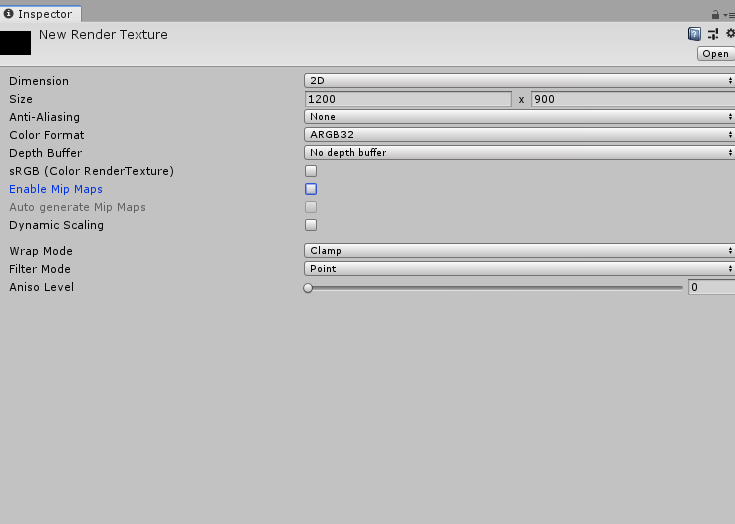 coarse comet
i think "color render texture format" implies that it will, while "render texture format" (notice how there's no color in the description) is not
viscid night
I have it in ARGB32
coarse comet
ah it's not exposed in the UI then
viscid night
If its not exposed in UI i'm not confident Udon will like it
Unless I can set it in editor and it stays
viscid night
I have it ticked off
coarse comet
so it was already unchecked but it's still converting?
viscid night
Yes
coarse comet
im not too familiar with how udon interacts with unity, are you certain it's calling Texture2D.ReadPixels as in the same function linked above or is it a different, udon-vrchat-specific thing?
at worst you can just convert it back to linear lol and be on your merry way
sounds like a pretty weird issue then
viscid night

Yes I'm pretty sure its calling the right thing
Issue I have is that the conversion to SRGB is causing banding
Aka some data loss
coarse comet
i would definitely raise this issue with the devs (support ticket i think?) because you're doing everything right on the unity side it seems
viscid night
So raise a Canny?
viscid night
Gotcha
sharp delta
stoic tapir
https://docs.unity3d.com/Manual/PartSysTriggersModule.html
thank you!
 wicked smelt
Is there any way you can get ahold of a debug version of the windows client?
im hoping theres some way to suss out and better report what appears to be client-side memory leaks
swift karma
wicked smelt
Is there any way you can get ahold of a debug version of the windows client?
Very unlikely. VRChat is closed source and they don't want people modifying the client. Having an unobfuscated version floating around would make that even worse.
wicked smelt
it'd be very helpful if one was made available via NDA. I could damn near demonstrate both system and vram leaks at will if i had the debug headers to figure out whats triggering it
 lament mango
Yo I'd like some tips on organizing my projects.
I have an avatar with 3 "different models" that are basically resized version of each others with different features on them (like seaters on my giant one).
I also have 3 more that are exactly the same but converted to Quest projects.
SO, when I update my project, I have to go through 6 different projects and update all of them.
Any ideas on how to optimize that process?
burnt zephyr
you could technically put all 6 models and their features into 1 project and put each model into their own seperated scene
lament mango
@burnt zephyr even the android versions?
burnt zephyr
so label the scenes on whether they need to be on the pc build and which ones need to be android and change accordingly
if you want, you could do 2 projects: 1 being pc and the other android. but to me that doesnt make too much sence but it might make sence to you
lament mango
would I have to convert the project to android when uploading the android ones?
burnt zephyr
yes
if you have like an avatar that is completely different compared to the pc version. then having 2 projects should be slightly more efficient
lament mango
theyre really not that much different rn so I'll set up my environment in the same project
is it possible to share the same shader settings/materials across my different avatars?
lament mango
yeah the android ones can stick their shitty ones
It's just that when I change the emission settings on one of my avatar, I would like the emission settings to update on all 3 of my pc ones. That's possible?
burnt zephyr
yep
lament mango
is there documentation on how to do that?
burnt zephyr
no, maybe but most likely no since it is basically using the same material on 3 models. which will always be the same unless each model has a different material
lament mango
oh I see I get it now. Thanks a lot that'll save me a lot of time
burnt zephyr
yesh
 vague girder
lament mango
Yo I'd like some tips on organizing my projects.
I have an avatar with 3 "diff...
vague girder
lament mango
Yo I'd like some tips on organizing my projects.
I have an avatar with 3 "diff...
you can just use 2 projects; one windows, and one android. you can have the 3 variants of your models use all the same assets, and you can have them either in separate Scenes, or in the same Scene, with the others disabled when you're not working on them
lament mango
I think ill do the same scene with disable/enable then :)
split terrace
Hello, For VR, do you recommend GPUs from Nvidia or AMD?
burnt zephyr
nvidia
split terrace
Yet I was told that SteamVR was having trouble with the 3000 series
burnt zephyr
steamvr doesnt like any of them. but youre basically asking for rendering/shadering features. i personally like nvidia for having many rendering features and resourcing, AMD however uses a different architecture that can help in other use cases
in reality, you could go either way for VR. but from what i heard quality wise would be nvidia
shadow ruin
split terrace
Yet I was told that SteamVR was having trouble with the 3000 series
The rtx 3000 series stutter bug should have gotten fixed in january though it was a issue for a long time
burnt zephyr
im not 100% on this. but a long time ago, amd had some issues rendering a lot of shaders in vr
people would tell me that my water would be animating differently in each eye
split terrace
I still want to clarify, I have an RX 580, I have up to 3x more FPS than my friend who has a 3090
not laptop
burnt zephyr
what is the resolution they play on? and compared to you
near bronze
if someone has a 3090 and they're getting less than 30 fps in a situation where someone else is getting 90, then they have something wrong with their computer that can probably be solved by changing something in software, not hardware
assuming their CPU was made any time in the last 5 years
burnt zephyr
they probs do what i do have 9000 browsers opened at once
near bronze
they might also have accidentally cranked vr resolution up to something crazy like 300%. That's just a waste
split terrace
My friend has an I9 7980XE CPU
in graphics card in a 3090 and in ram 64Go 2666Mhz
and in front of 20 people it is at 60fps in vr
it's not phew for a 3090
near bronze
Generally, hardware differences don't account for the largest gaps in performance. If everybody's struggling at 20FPS then it doesn't matter if you have a 3090 or a 1070. The biggest difference is the performance of the world and the avatars of the people you hang out with
split terrace
Yes I noticed that too, but there wouldn't be a way to make the change of avatar smoother? because the change of avatar is very brutal in VR
near bronze
for the most part, changing avatars has been improved a lot. One case I know of that can still present issues is very complex shaders because it has to compile them when they load in. If you use a simple shader, compiling is easier, and if you use a standard shader, it's been compiled already.
split terrace
I thought of one thing, when an avatar loads, its dynamics bones activate for example 5 seconds after the avatar is finished loading, it would impact less I think
near bronze
dynamic bones don't have anything to do with the load-in cost
if you have a lot of dynamic bones they can absolutely hurt your frame rate, but they're going to be doing so every frame, not just on the one frame when it first loads in
split terrace
Yes it is true, but the loading of the dynamics at the same time of the avatar creates at certain times freezes or sacadations of images, I think that if we load the avatar then that the dynamics are activated afterwards this one the sacadations would be less present
near bronze
that's not the problem
when you're talking about avatar loading hitches, that's usually on the order of 100 to 300 milliseconds. Sure, dynamic bones are expensive but they are maybe at MOST 10 milliseconds. They're only expensive because they happen every frame, while the avatar loading only happens once. Removing 10 milliseconds from 300 milliseconds wouldn't do much
split terrace
And why not limit the DBs on SDK3?
near bronze
dynamic bones are limited if you want them to be. They're part of safety settings and they even have their own limiter in advanced settings
split terrace
Hmmm i see
At worst, you prohibit the change of avatar for 30s for example, it prevents spamming of avatar changes and encourages members to keep the same avatar longer.
And you authorize the timer ByPass on VRC +
:]
burnt zephyr
thats actually a good idea. (exept the random vrc + feature but vrc+ doesnt have much I guess 🤔 )#feature-requests
split terrace
Yes well my last idea on VRC + was more of a joke than anything else xD
But the slowmode function on avatars would greatly optimize VRChat, both graphically but also with the API, the API would be less spam and therefore less saturation problems
burnt zephyr
yes, especially if you have 80+ players in an instance and some dude desides to change into a very poor and kills half the instance lol. however i think the limit should less for avatar worlds since they are avatar worlds and thats what people do in avatar worlds: chabge avatars
split terrace
Yes xD
@near bronze Maybe do a poll on this or give your opinion, what do you think? #development-advanced message
 slow galleon
is there aaaany way possible to create an invite only instance where, even if people have the instance link, they cant invite themselves?
the goal is to stop people with a client from getting a link and sneaking their friends in
Reposted from user support
near bronze
They shouldn't be able to join unless they know the instance ID. The only way to know the instance ID is if you leak the link or someone is streaming without streamer mode enabled.
 final wigeon
split terrace
At worst, you prohibit the change of avatar for 30s for example, it prevents spa...
final wigeon
split terrace
At worst, you prohibit the change of avatar for 30s for example, it prevents spa...
There are so so many ways this could go wrong. While I agree something to slow down the serial swappers would be nice, locking you into an avatar for 30 seconds after change is not a good idea.
split terrace
Hmmmm 🤔
Very well then I have another solution, Instead of forcing slowmode, why not add an option for example "avatar freeze" and by activating this option its keeps everyone's avatars that we loaded before l 'activation of this option and the avatars no longer change for the person who has activated this option, and if this one decides to update the avatar of his friend, he targets him, and chooses the option for example "refresh avatar"
This option would be available in the safety
 dull hollow
Thats just a fancy way of using the hide avatar feature we already have
burnt zephyr
dont quote how the quest works on us lol
lament mango
How can we make clothes that change color dynamically ? Kinda like an emission but the entire clothes color changes?
tame wigeon
I've got an avatar I want to make where they put on a belt. The idea is that they'll hold it at one end and grab onto the other the other to put it around their waist.
The model I have already has a mesh for the belt fully on the waist, so my plan is to make a prop of some sort that I can manipulate with my hands and swap out the fitted belt as part of the animation. My original plan was to use a dynamic bone chain for the prop belt and 'grab' the other end to bring them together. Unfortunately, I don't know if this is even possible with dynamic bones. Does anybody have any ideas for a possible ways to grab two ends of a chain of some sort and still have physics allowing it to sway and be affected by gravity?
tame wigeon
Nevermind, I figured it out, Final IK's FABRIK solver seems to do exactly this.
 arctic gazelle
I want to do projection mapping to the wall/environment geometry to override the texture with my animated texture. Once I get that figured it will be tweaking the radius of effect to be bound to pressure sensitivity to amplify it out/into the avatar.
 tropic jewel
Was wondering if anyone here knows any optimisation tips for render textures, beyond just reducing the resolution.
Leaving anti-aliasing off by default is an obvious one. I'm not sure about the rest.
 worn latch
Does anybody works with C4D? The last time i worked with it was like 10 Years ago. I put texture on the model and exported in fbx fomar. But in Unity it shows no texture and the model has like holes in it. some parts are white some are transparent
warm niche
worn latch
Does anybody works with C4D? The last time i worked with it was like 10 Years ag...
I'm a semi recent user of C4D.. i had no choice but to use it as i bought a model that was in its format.. i noted that some older files of c4d refused to be read by the newer program, and thus the newest c4d gave me a warning that the file was made in 2008.. yet it provided absolutely no links for me to get the program made around that date.. it was a total nightmare to find a link for but i did eventually..
I also noted that for some insane reason.. that the 2015 version displayed a model completely different than previous years before it.. however got i working eventually, Also i have to say that when i initially exported my model with everything on it textures included over to .FBX it completely failed when i imported it over to unity.. so i just exported as .obj and it was successful for some unknown reason.. neither formats had animation baked so absolutely no idea how it initially happened.. but overall yeah.. i had it happen and the fix was simply to dump as another format.
 lunar needle
Trying to version control my avatar in unity but seems like non of the files have consistent line endings. Has anyone figured out how to set up git for unity/vrchat?
 limpid dust
hi guys, how do i make my vrc video player "global" so anyone in the room can play a video? Im trying to modify the prefab example
lunar needle
. . . warning: LF will be replaced by CRLF in Packages/manifest.json. The file will have its original line endings in your working directory
viscid night
tropic jewel
Leaving anti-aliasing off by default is an obvious one. I'm not sure about the r...
Making sure it renders the bare minimum possible, adjusting how far out it renders, what render layers it observes (Via cutouts)
Depends on what purposes you wanna use em for
Also ideally lowering how often they update (Unless you need a constant frame for frame render)
 trail marlin
lunar needle
. . . ```warning: LF will be replaced by CRLF in Packages/manifest.json.
The fil...
trail marlin
lunar needle
. . . ```warning: LF will be replaced by CRLF in Packages/manifest.json.
The fil...
I believe this is just diffence in line endings between Windows (CRLF) and linux (LF). because the file format is JSON it doesnt matter anyway and I'd just ignore this..
infact, Im pretty sure I have the same error with a npm-generated package.json in one of my projects.
lunar needle
trail marlin
I believe this is just diffence in line endings between Windows (CRLF) and linux...
I also have ```*.assets LF will be replaced by CRLF
LF will be replaced by CRLF in Assets/csc.rsp
LF will be replaced by CRLF in .gitattributes.
LF will be replaced by CRLF in .gitignore.
LF will be replaced by CRLF in *.overrideController.
LF will be replaced by CRLF in *.shader
@trail marlin Sorry for the ping but if offhand would you know if it matters for these files. I only posting one thinking it would be constant but I see its mixing line endings on lots of file.
lunar needle
yea Im going to make a file in the editor and see what it does default
trail marlin
if you push your files to a repo and then git clone somewhere else, then try opening that
trail marlin
really you can just do something like git stage *
your local files are left unmodified
lunar needle
I am pretty new to git; I've just been using it solo and doing the git add and git commit
pwd
lol wrong window
... They really do mix the line endings the meta files are unix line endings... and everything else seems to be using windows line endings...
trail marlin
im pretty sure it doesnt matter and youre safe to ignore those warnings.
 marsh snow
Can someone tell me what the file/pixel size limit of the VRChat+ icon above the player head is? What type of compression, if at all, is used to save VRC server storage from those millions of high-res icons?
Ah, well...
 viscid night
marsh snow
Can someone tell me what the file/pixel size limit of the VRChat+ icon above the...
viscid night
marsh snow
Can someone tell me what the file/pixel size limit of the VRChat+ icon above the...
If I'm going off my experiance with Avatar photos
Absolutely no compression
However you'll find some inaccuracies due to SRGB conversion if you attempt to copy this data
lament mango
How do I make my sitting emote "fly" instead of trying to forcefully connect my feet to the ground?
lament mango
Adding a y offset to my animation fixed it
 verbal forge
Is it possible to control two parameter values with both left and right hand expression controls simultaneously? Think dual stick done movement.
 vapid valve
I have dual-stick on the drone setup I use but I re-use other floats with a separate mode integer, using the same floats in both layers with an integer parameter set in the menu potentially can work but I’ve never tried it. Syncing doesn’t really work with constraint systems that it would need so an observer not reading the mode with the float right isn’t critical, it’s more about the local animator being able to run the blendtree correctly with the same variable being adjusted
verbal forge
thank you
 uneven idol
As a world dev, is there anything I can do to stop users with custom clients from moving all synced objects throughout the world into one location, which pretty much ruins the instance?
sharp meteor
@uneven idol Put "_" at the start of each event name and method name you have.
lunar needle
Nifty counter to script kiddies.
sharp meteor
Ye, I believe it applies to networked events and local.. But I wish someone from VRC can confirm this is the actual case that it prevents unauthorized running of the events.
I heard from a few people that have dissected these custom clients, that the mod knows if the events starts with "_" and it will warn the user if it can or cannot be ran.
I think it makes sense because typically the two default methods in UdonBehavior and MonoBehavior Start and Update is referenced by _Start and _Update, and is always protected. So if you name your methods with _ at the start, you'll get the same treatment.
Do not take this as the official answer, but I've had luck with having protected Udon events from being triggered by the malicious clients.
lunar needle
I would guess adding any other valid character would work as a prefix to mitigate such things?
uneven idol
sharp meteor
<@!400089462387900426> Put "_" at the start of each event name and method name y...
I've heard of this but would like details. This will work for my custom functions, as well as built in Unity functions? Network and local?
Also, this sounds like it will stop unwanted method calls, but what about the movement of udon synced objects?
sharp meteor
As far as I understand, yes it will. You don't need to worry about variables or sync'd objects. The malicious client can only execute events, and not modify variables or objects.
Your events and methods will not be target-able. I write my Udon Scripts with _ at the start just to be sure anyways. VRC really needs to address this because I've experienced the worst cases with modders running methods in JustB. Not to mention that they can crash the Udon system, rendering the map inoperable until you rejoin.
sharp meteor
lunar needle
I would guess adding any other valid character would work as a prefix to mitigat...
Nope, it's gotta start with "_" since that seems to break the execution of events by a malicious client.
uneven idol
sharp meteor
As far as I understand, yes it will. You don't need to worry about variables or ...
I can change all events to do this, but for a synced object it's just a checkbox in the udon behaviour. There's no function I can prepend with an underscore for this. This is the most common crash I'm seeing
sharp meteor
You don't need to worry about that.
Sometimes the malicious users will spam events over and over so fast that Udon engine will shut down. It doesn't crash everyone's Udon or game, but some people will lose their Udon engine and need to re-join the world.
uneven idol
sharp meteor
You don't need to worry about that.
this is literally the only thing i'm actually worried about because its the only thing I've been seeing. someone comes in, and teleports all movable objects in the world to one xyz coordinate which ruins the instance & causes a lot of lag
sharp meteor
Unfortunately that isn't Udon related unless a creator added an event to do that and is exposed. I've seen Blackcat have these incidents and I don't think its running Udon at all.
viscid night
uneven idol
As a world dev, is there anything I can do to stop users with custom clients fro...
For this specifically, the next network update will allow you to disregard ownership changes
uneven idol
viscid night
For this specifically, the next network update will allow you to disregard owner...
hmm, how would I know when someone is taking ownership maliciously?
viscid night
Potentially if they own every object and aren't the original instance owner
Or take ownership of multiple objects in a short period of time
uneven idol
that would imply some meta-object/script thats watching everything. even then, what can you do? VRC has basically no moderation tools
 tribal bridge
I uploaded a map to labs a few days ago named Plague's Space Base and now I'm working on getting turrets setup to shoot down asteroids as they pass by. I have the asteroids spawning in and what not, but I'm not sure how I can do the user interaction with the turret so they can position the turret and shoot at the asteroids. Would anybody be willing to help me out with this or have any idea how I can accomplish this?

btw I split the turret model into sections in blender so the base legs can stay still, the middle section can rotate on the y-axis, and the top-gun section can rotate on the x and y axis
tribal bridge
sorry I didn't realize vrchat disables custom C# scripts so I'm back to square 1 trying to get the asteroids to spawn in with the horrible udon graph setup. So any help with that would be appreciated as well lol
 tardy folio
@tribal bridge https://github.com/MerlinVR/UdonSharp
GitHub
An experimental compiler for compiling C# to Udon assembly - MerlinVR/UdonSharp
tribal bridge
@tardy folio thanks for the tip. I already looked into it though and unfortunately from what I read udonsharp doesn't cover a lot of the c# functionality that I'm used to. I guess I could try to work around it somehow because it would be better than trying to figure out the udon graph stuff
tardy folio
Yeah, UdonSharp isn't really C#, it's just (older) C# syntax for Udon Assembly.
tribal bridge
yeah I guess I'll have to look into it more and see if I can work it out
 shadow dock
tribal bridge
yeah I guess I'll have to look into it more and see if I can work it out
shadow dock
tribal bridge
yeah I guess I'll have to look into it more and see if I can work it out
we have #udon-general for udon questions and with #udon-networking it has a vrcobjectpool component to better sync objects in a pool.
tribal bridge
thanks I appreciate it
 west elk
if i'm messing with scripts relating to audio sources for maps, how would I get them to respect vrchat's audio sliders?
because as is, the one I'm currently messing about with ignores basically every vrchat volume slider. Which is obviously unwanted behavior
near bronze
PlayClipAtPoint will ignore sliders, but any other function will respect them, like PlayOneshot
west elk
the script doesnt really specify either, really. just source.Play(); but that's about all i can really see.
All i can think is that the issue is that the script generates the audio sources at runtime, so maybe that would be why?
near bronze
that would be another way to bypass it, sure
That's exactly what playclipatpoint does anyway
west elk
well that's unfortunate
 tough raptor
any help w walls i have sum no matter what i do dont line up w the rest?????
tribal bridge
I'm working on an in-game joystick that a user can interact with. I put the VRC Pickup script on it and I set orientation to Grip, and Pickupable to false. Now I think I might need to write my own custom script to get the joystick to actually move/rotate with the players hand motion. Does anyone have an idea on how I could do that?
 proud belfry
Joints might be the solution. You could have an (invisible) pickup the player moves, and a joint or spring might move the actual joystick.
Other people have implemented doors which you can swing open, as though they're on a hinge. If you look into that you might be able to borrow some ideas
 autumn hatch
 cobalt isle
How i can upload my world as a PC AND QUEST ??
cobalt isle
How i can upload my world as a PC AND QUEST ??
VRChat
Setting up a cross-platform world or avatar is actually quite straightforward! In short, all you have to do is use a duplicate project to build an Android version of the asset, and upload it to the same content ID as the VRChat PC asset. The client will manage which version it needs to download. If...
tribal bridge
I've already imported other 3D .fbx models into my scene and they worked out fine but I have a joystick model that won't appear in the scene. I tried changing the default materials and that didn't work either. Any ideas why I'm having trouble with this model?
It shows up in Unity but not in VrChat
tribal bridge
So the issue was that there was some unknown bug that was preventing me from updating the world through VrChat. I tried fixing it but made things worse. I am now going to a backup that still works and I don't have a lot of changes to make so that's good. So a lesson for anyone reading this, make frequent backups and replace them as you progress. It's the only true way to know you're not going to get screwed by some mystery issue
lament mango
how do I fix this glue between my pants?
 violet owl
tribal bridge
violet owl
tribal bridge
I want to post this for others that may not know. I was told by a few different people that an Oculus build for the map needs to be tested on the Oculus and I was testing it on PC. I had no idea that the builds were separate like that. So I guess I need to make changes to two different copies for both builds to allow cross-platform consistency
lament mango
violet owl
<#390924372782612480>
my rigging works fine
violet owl
Clearly not if you're having weight paint issues like that tearing
lament mango
also got this issue
 lament mango
violet owl
Clearly not if you're having weight paint issues like that tearing
lament mango
violet owl
Clearly not if you're having weight paint issues like that tearing
ill look up weight painting ty
 cobalt oxide
Yo- has anybody had an issue lately involving the "Hex-Editor Dark Mode Method" for the 2018.4.20f1 build that VRC uses? I've had my EXE "hacked" to dark mode for about a year but all of a sudden it stopped working. Reinstalling the entire unity editor doesn't fix it either. That blinding grey is getting annoying...
@ me if u know, thx :D
viscid night
cobalt oxide
Yo- has anybody had an issue lately involving the "Hex-Editor Dark Mode Method" ...
I don't know, but I will warn the unity-2019 upgrade pending does have darkmode support, so worst case thats something to look forward to
cobalt oxide
viscid night
I don't know, but I will warn the unity-2019 upgrade pending does have darkmode ...
Ya thats what i was thinking, just a random "bug" or whatever error comin outta nowhere, bright is bright tho so i might still look for a fix
 kind sequoia
just want to say this
this site still exists....

original

pls make a way vrchat...
if your going to ask me...if i am using to download stuff hell no.
manic zealot
I have no idea how this all of a sudden became a complaint from users who aren't confirming shit about what's actually happening.
As just an example from that regulus avatar you gave an example of, basically all of them are private avatars which cannot be downloaded from that site, when you try to it says "Private Avatar (No Credits)"
 kind sequoia
manic zealot
I have no idea how this all of a sudden became a complaint from users who aren't...
kind sequoia
manic zealot
I have no idea how this all of a sudden became a complaint from users who aren't...
exactly!
manic zealot
kind sequoia
exactly!
I don't think you understood what I meant. That site has two buttons for downloading, one that works and one that doesn't.
The one that does nothing / downloads nothing is red and says "Private Avatar (No Credits)" the one that does appear to work is in Green and says "Download (Public)"
kind sequoia
oh ok
manic zealot
Now I don't actually know if the green button downloads a legitmate avatar as I've only tried it to see if it even downloaded anything. Saw it did and just deleted whatever it downloaded.
 weary condor
I have noticed a new option in API appearing out of nowhere and I'm not sure what it's supposed to do... Developer API version or something?
 kind sequoia
you earn credits by uploading avatars into the site to buy the private avatars lol
weary condor
😂
kind sequoia
manic zealot
I don't think you understood what I meant. That site has two buttons for downloa...
 manic zealot
Only step then is to verify if the downloaded file is actually the avatar.
Though nobody can do that without breaking the community guidelines so
Also their credit system doesn't fucking work lmao.
 sinful verge
marsh snow
Can someone tell me what the file/pixel size limit of the VRChat+ icon above the...
sinful verge
marsh snow
Can someone tell me what the file/pixel size limit of the VRChat+ icon above the...
10mb
manic zealot
Typed up an entire paragraph talking about how VRChat is the one doing this, not realizing it's Oculus / SteamVR doing it. lmao
In Oculus you may want to disable Asynchronous Spacewarp, with SteamVR ensure something called motion smoothing is off
These technologies immediately cut your FPS in half in VR the moment your system cannot deliver the headset's refresh rate. (Even if it's off by like 1 FPS)
As I just stated it's a default software feature in Oculus / SteamVR.
VRChat is not the one cutting the FPS in half deliberately.
FPS variability is horrible in VR, not so much in desktop mode.
To note: These software are not just limiting the FPS they are also interpolating frames to make the perceived FPS higher
It's why you may sometimes get a warping effect of objects when in VR
Also you can read Steam's statement about it on Motion smoothing.
What it means for you
From the player’s perspective, what was previously a game that would hitch and drop frames producing judder is now a game that constantly runs smoothly at 90 Hz.

Today we are introducing a new feature in SteamVR called Motion Smoothing. This feature enables more players on more PCs to play high-fidelity VR games and experiences. How it works If you have a flatscreen TV, you may be familiar with the term Motion Smoothing. TVs apply Motion Smoothing by interpolating between two existing frames to create a ...
The FPS being cut directly in half of the headset's refresh rate of 72 Hz sounds exactly what those technologies do.
And yes, they exist. As the SteamVR post states it's to "improve" the player experience by making the game feel consistently smooth.
stoic tapir
Just because you are able to maintain 90 fps in desktop, doesn't mean you would be able to maintain 72 fps in VR, as rendering in VR is a lot more costly than just desktop.
if you have something like fpsVR it can be useful to see what your cpu and gpu frame times are in VR
manic zealot
I have never seen nor heard of a VR wrapper deliberately lowering the framerate so their interpolation works better- that sounds like some of the worst software engineering you could ever create, and you'd see millions of complaints about it if that were true.
Also, no. You wouldn't hear millions of complaints about it. As most people don't even notice it when it happens, the entire point of the technology is to make it look like to the user that the FPS has not changed while dramatically reducing the system processing requirements.
 normal aurora
has anyone ever managed to enable cloth self-collision?
 split hull
dropping to 45 from 90 is very much what SteamVR does https://www.roadtovr.com/steamvr-motion-smoothing-asw-alex-vlachos/

Valve today introduced Motion Smoothing to SteamVR in beta. Similar to Oculus’ Asynchronous Spacewarp (ASW), the feature uses previous frames to synthesize new frames on the fly, allowing VR applications to continue to run smoothly and comfortably even when dropping frames. PC VR headset demand relatively powerful gaming hardware because games n...
manic zealot
split hull
dropping to 45 from 90 is very much what SteamVR does https://www.roadtovr.com/s...
Considering they were given multiple explanations, sources, names of these features, etc and still doesn't think these software would do it because of their stupid confirmation bias of "It's dumb so any reason I find that proves it's dumb further proves it's dumb with no exceptions." I don't think that's going to convince them.
 iron isle
HEy up everyone, I'm on the hunt for something. I saw an implementation of Full IK in the browser for a VR chat style model and was wondering if they knew where I could find it?
split hull
manic zealot
Considering they were given multiple explanations, sources, names of these featu...
Aware, mostly just posting it for other people. It's worth noting that while the motion smoothing does the halving on frame rate, interleaved reprojection will do the same. If you want to disable the halving, you need to disable both motion smoothing and interleaved reprojection, which you'll realize is a pretty bad idea once you try it. https://www.reddit.com/r/SteamVR/comments/croo0o/how_do_you_turn_off_async_reprojection/ex7nl4a/ for if you want to try.
Some more detail on what each thing does if anyone is curious: https://uploadvr.com/reprojection-explained/
 austere breach
Does anyone know offhand if there's a way to make a Camera output black-and-white, or would that be something I'd have to meddle with on the shader governing the material of the render texture?
 robust forum
austere breach
Does anyone know offhand if there's a way to make a Camera output black-and-whit...
robust forum
austere breach
Does anyone know offhand if there's a way to make a Camera output black-and-whit...
Are you talking about the reference camera displaying the world as black and white? Probably a post processing thing.
austere breach
No just a camera component outputting to a render texture.
robust forum
Yeah id think it would be a shader setting for the texture your rendering.
stoic tapir
you could just attach a post process layer to that camera with a colour grading profile for greyscale
 sly cloud
anyone know how to limit the range of ui?
so that you can't select the button from across the map?
 scarlet wasp
audio on quest 1 and 2 when?
burnt zephyr
for avatars?
burnt zephyr
quest doesnt allow that because there was spam
 sweet crystal
I have this world that has a lot going on but with minimal batches and drawcalls- literally in the 500's in some areas
500 is a lot
 valid fern
I hope this is a really basic question for an advanced channel. I'm trying to set a breakpoint in my Udon behavior using Visual Studio (2019Pro). I start the Unity game by pressing the Play button, then in Visual Studio I go to attach to the process. Only the Editor process is available and I can attach to that and stop Unity itself, but not the game separately. It turns out that I probably need a Player process to attach to but I don't know how to start one of those. I've tried CyanEmu in hopes that it would create one for me but I found no Player process that way either.
I think I've setup my build settings correctly, but no joy:

Am I just barking up the wrong tree here?
near bronze
depending on what you actually need from breakpoint, you might be able to just do Debug.LogError and then enable error pause in the unity console
valid fern
Oh, didn't know that was a thing. Thanks! I'll give it a try.
But still, is there something inherently wrong about what I'm trying to do? Does the VRChat process not create a Player for me to attach to? Has anyone successfully set a breakpoint in an Udon behavior? I haven't tried it, but I assume I would be able to set a breakpoint in the Editor code and stop there if needed, since it's straight C# and not a level deeper into Udon..
near bronze
I doubt it runs raw C#, even in editor. Udonsharp adds "proxies" which allow you to do editor scripting and custom inspectors, but those don't actually run in play mode
valid fern
hmmm, yes. It may be the hard way around to debug to use the debugger. 😏 It's an interesting problem. Think I'll check with Merlin...
near bronze
if you need a full stacktrace, you can forcibly crash the udonbehaviour and it will dump everything to logs
valid fern
omg, I'm gonna try to draw the line at combing stack traces. hehe
I'm really just trying to find a way to get myself back to familiar debugging ground with VS.
 barren estuary
I've been having weird issues with temporary pose space on one specific avatar for ages and after countless hours trying different things I'm at my wit's end with it. One of them is that the first attempt at entering pose space seems to always fail, seems like it tries to enter at the wrong time and the body ends up becoming a pretzel. The second one which is new as of a recent client update is that instead of moving the avatar up like a metre to sit on some pillows, the avatar will sometimes get blasted way up in the sky, like the height of the pug map. Maybe framerate dependent?
Would anyone who's really comfortable with SDK3 and has used pose space be willing to put an extra set of eyes on it for me sometime, over screen share? See if you can spot anything about this specific avatar's setup that might be causing it? Just have no idea what else to try at this point, I've tried so many different iterations of the pose space stuff but it always happens without fail.
 fallen surge
When VRC applies an animator to an avatar on a station, is the avatar root also placed as a child of that station?
I'm trying to reference a particular component of an avatar i have the heirarchy of, from a component of the main avatar
Essentially to synchronize custom avatars and allow them to interact
fallen surge
I'm still not quite sure about how to set constraints to an instanced object, but end goal is to use the animator (either) to set the constraint object to be the other avatar's root
 sharp oasis
Facial tracker support would be solid. Anyone know if they have said anything on it?
polar wagon
sharp oasis
Facial tracker support would be solid. Anyone know if they have said anything on...
No word on if they play to implement it officially, but they showed a demo of it working with OSC support during the latest dev stream
 queen hearth
That would be amazing, pls do VRC 😂
 silk wave
polar wagon
No word on if they play to implement it officially, but they showed a demo of it...
silk wave
polar wagon
No word on if they play to implement it officially, but they showed a demo of it...
Yeah, it can be watched here: https://youtu.be/QBQnCxtDaso?t=7274

[ OVERVIEW ]
In our April 2021 Developer Stream, we brought on lots of VRChat team members to talk about what we've been working on, what's coming soon, and what to look forward to for VRChat!
[ STREAM TOPICS ]
Intro - Music by GRIMECRAFT 00:00
Welcome 10:22
Server Stuff 16:42
Bug Squashing 27:33
New UI 35:18
Avatar Dynamics 55:00
Identity Up...
 shell axle
I want to edit text collaboratively with finger tracking: is there a smaller fine position solution than e.g. https://www.youtube.com/watch?v=nmP8iGaPbeI ? Is Oculus hand tracking good enough to type in world yet?

This is the journey of how I decided to make my own VR Haptic Gloves and the first 3 prototypes on the way to making VR Haptics affordable for everyone.
Access glove resources here:
http://lucidvrtech.com/
Live glove progress updates:
https://www.tiktok.com/@lucas_vrtech
Join our discord server!
https://discord.gg/RjV9T8jN2G
Thank you to all...
I ask because someone recommend I look at Oculus Quest 2 hand-tracking as a non-glove solution, and I wonder if anyone has used it?
I should just ask on general
hexed shell
shell axle
I want to edit text collaboratively with finger tracking: is there a smaller fin...
The Valve Index controllers are better probably
Otherwise you can get the 3,000 dollar gloves
Those on the video you posted don't really seem to track very well
Valve index is also not perfect of course
The 3000 dollar gloves are better
Also oculus quest hand tracking is not supported in vrchat
hexed shell
shell axle
I ask because someone recommend I look at Oculus Quest 2 hand-tracking as a non-...
MANUS is developer of high-end finger tracking gloves for Motion Capture and VR. We offer the world's leading Data Gloves for Mocap & VR applications, with full warranty.
hexed shell
hexed shell
Those on the video you posted don't really seem to track very well
But if you try them do let us know
warm niche
having an issue where with a toggle object using sdk3 most people are not able to see the object im holding. idk what im doing wrong
shell axle
hexed shell
But if you try them do let us know
Thank you so much for your kind help. I'm experimenting with a very large inworld keyboard with grapefruit sized keys which I am finding as easy for basic two hand controllers as it is to type on a tablet with two thumbs, if somewhat slower. The important part is being able to edit, select, cut/copy/paste, and type control and similar special characters collaboratively with others
As soon as I get it working I'll open source it
warm niche
Hello Im trying to make my avatar quest compatible and im not sure how to do that any tips
silk wave
VRChat
Want to get started making some content for VRChat on the Oculus Quest? You've come to the right place! This page will consist of navigation to various other pages concerning content creation for Quest, cross-platform setup, and other related guides. Our documentation on creating content for the Ocu...
There is also entire Oculus Quest category on this server, where you can ask more questions.
warm niche
Thx
 meager radish
hi, is there somebody here that I can ask a few questions about unity vrm?
 frank mason
When i upload an avatar to unity it always says missing monoscript what should i do
pls help
limber peak
Hey, so i accidentally downloaded an sdk2 unity package into my sdk3 world, and it seems to have lost everything... am i screwed?
it downloaded the sdk2 in to my project and i now have nothing in the world
cobalt mist
Question is there any SDK 2 weapons that i can use, I wanna make a halo map that has working guns and stuff and idk how to code or understand how to make them, what I want to do is download a unity package that has a auto rifle and a pistol and sniper rifle then use the halo weapon prefabs as the body of the gun and be able to change the shooting and reloading noise for the gun, I doubt theres a package or if there is it will probably cost me money but id figured id ask as this is a world project I really want to do
 iron needle
I'm having some issues getting a spawnable object to sync across multiple clients. I've added my spawnable prefab to the VRC_Scene_Descriptor.dynamic_prefabs, however, each client can only see their own spawned objects, and only the first client to connect can actually interact with the spawned objects that they spawned (the second client can spawn items, but can't interact with them). Does anyone have any ideas?
I'm using an udon graph to instantiate the spawned items into the world using VRChat.Instantiate, then moving the position just using transform.setPosition.
near nymph
How do i detect when the VRChat menu opens? Is it possible to do this with a keypress or something like that?
 distant current
Good day everyone.
I want to ask for your help, since I have no ideas myself.
I have a wire/cable/chain, that i want to attach at both ends to different bones of my avatar. Also (if possible) i want this wire/cable/chain to be affected by gravity. But here's where problems come...
I've made such a setup using Final IK's FABRIK + Dynamic Bones + Parent constraints in unity editor and here it works as it should [screenshot 1]. But when i've uploaded my avatar into vrc, i've noticed, that all bones stopped being driven by FABRIK and just falls through the ground [screenshot 2]. But at the same time, when i enable dynamic bones limit right in vrc, FABRIK starts working again [screenshot 3].
Any tips or workarounds of how else i can do this? Thank you in advance.
https://media.discordapp.net/attachments/518831660133908490/848696123774599208/unknown.png
https://media.discordapp.net/attachments/518831660133908490/848695973085839360/unknown.png?width=1202&height=676
https://media.discordapp.net/attachments/518831660133908490/848695852175196210/unknown.png?width=1202&height=676


 lament swallow
Is there a best practice for getting water into a VRchat world? Is it even possible? We're trying to use Aquas and it doesn't seem to want to render the underwater textures.
distant current
lament swallow
Is there a best practice for getting water into a VRchat world? Is it even possi...

VRCat: Community-Run VRChat Forums
Silent's Clear Water Shader
Hi everyone! I made a simple water shader. I had a specific look in mind that the other ones I found didn't really fill, so...
queen hearth
iron needle
I'm using an udon graph to instantiate the spawned items into the world using VR...
In case nobody ever told you, spawning prefabs is not syncable over the network because VRChat doesn’t apply the same network ID to the objects
polar wagon
Anybody know a good way to Properly align a mesh particle (on an avatar) with a wall on collision? (By properly, I mean sticking straight out from the face's normal direction)
This is something I've been trying to solve for years by myself
near nymph
In the Unity Editor i can see UI elements through walls
is there anything i can do to turn that off?
stoic tapir
That usually happens when you first load up unity, going into play mode and out should fix it
near nymph
epic, that worked
took only a year to figure this out 😄
also i have a dynamic light that shows up in editor, but not in game. Any ideas for this?
dull hollow
distant current
Good day everyone.
I want to ask for your help, since I have no ideas myself.
I ...
Make sure all Final IK is not a child of the humanoid armature. In your situation you would have a fabrik and fabrik root as siblings of your main avatar gameobject, and then anytime you want to target the humanoid armature, use constraints
distant current
dull hollow
Make sure all Final IK is not a child of the humanoid armature. In your situatio...
Thanks for the response!
I did everything exactly as described above - placed both of hands and chest attachment points outside of an armature, and connected it to bones through Unity's Parent Constraints. But here's the problem - Final IK's FABRIK, does work in VRChat correctly, but only when Dynamic Bones for same object are turned off. So i wonder if Dynamic Bones somehow overrides all transforms of controlled bones.
P.S. For now i solved a problem, thru connecting all the bones with a help of Configurable Joints. Doesn't look so great, but at least it works.
dull hollow
distant current
Thanks for the response!
I did everything exactly as described above - placed bo...
Yeah should have mentioned something about that. Dynamic bones is a greedy script and doesnt update the transform component of the object it is effecting. Final IK and Constraints work together because they both edit the transform component, so they can talk with each other. Since dynamic bones doesnt edit this component, nothing else knows where it is.
The first workaround is to use constraints to "find" where the dynamic bone chain is, and then work around that information. Otherwise, you can wait and see what the devs will do with physics bones, since they mentioned that it will edit the transform component IIRC
distant current
dull hollow
Yeah should have mentioned something about that. Dynamic bones is a greedy scrip...
Yes, Avatar Dynamics (I assume that's what physics bones is), looks promising, I think it would be a good idea to wait for its release.
Sorry to bother you, but I'm curious to know more details about this "workaround".
Am I right understanding that if i'll create a copy of "chain" (Let's call it [Chain1]) with dynamic bones applied to it, and in the original object [Chain0], apply Parent Constraint script to each bone referencing [Chain1] bones and also apply Final IK to [Chain0], then everything should work?
dull hollow
How Ive done is is 3 chains, Chain1 is a dynamic bone script doing its thing, Chain2 is the FIK script doing whatever, and then Chain3 is you actual visible chain that is constrained to both Chain1 and Chain2 for each bone, you can then edit the percentages to get different mediums between the two chains
Doing legitimate gravity isnt really possible since you can change the dynamic bones position to where the fabrik is at run time consistently, but you can try to fake it
distant current
Aha, so Parent Constraint is used here just to get some average decent looking transform between Chain1 and Chain2
distant current
dull hollow
How Ive done is is 3 chains, Chain1 is a dynamic bone script doing its thing, Ch...
Thanks you, for your answers! You really helped me a lot
dull hollow
Nothing is documented, glad I could guide you along 👍
 shadow ruin
You might have imported avatars and worlds sdk into the same project
 midnight rain
suggestion for the next update

This UI is quite ugly and can be misclick easily. especially unfriend, report user and moderate user buttons are too close to the back button.
Request and invite buttons are completely change from right to left. Will make some peoples confuss for awhile.
Current world is quite hard to see where they are. too small
 long edge
unfriend shouldn’t be right next to the favorite button. that right-hand panel seems decently well thought-out
People start to develop muscle memory after only a few hours….”back” is a single-click, non-confirmable. the buttons placed next to it pop up prompts and are things that you do when “backing away” from a situation. IDK why someone would think putting “unfriend” right next to “favorite” is a good idea since you could muscle-memory the confirm by mistake on either button
midnight rain
I mean not too close to those buttons. just have some space between them.
long edge

near nymph
Are there any prefabs for giving items held items a trace drawing effect?
 sturdy dragon
Hi, I got prototype of camera-based full body tracking – basically a pose estimation by phone on a tripod and streaming joints data to Quest 2 in realtime. Demo: https://www.youtube.com/watch?v=EiA2mr3LhEY
I was wondering how could I get this data into the VRchat. I know that on PCVR/Steam there are some techniques, but I haven’t seen anything for a standalone headsets like Quest 2. Could you please point me at the right direction? (I am afraid it would have to be implemented directly in the VRchat as some people told me before.)

Phone and headset automatically pair to each other (they have to be on the same local network) and phone is streaming all joints info to the headset in realtime. No PCs are involved.
The large cubes are controllers from the first-person view. Skeleton contains 91 joints and is projected in front of the person, so they can see themselves as in a...
 plucky raft
Not necessarily, I believe the kinect fbt just acts as an emulator for the steamvr trackers
If that's open source you can look at how that's done, but I haven't looked at that much myself
Oh I skimmed over the fact you were talking about Quest 2
nvm
 candid owl
if you're talking quest Standalone there's not anything you can do to add additional tracking for the time being
fallen surge
Question for vrc mechanics as they stand right now: what approaches are currently available for interavatar interaction that is global? I remember hearing of particle toggle systems that would interact with users' capsules, which supposedly doesnt work anymore.
Theres also blacklight shader interactions, which are not what im looking for in this instance
Avatar dynamics would be a fine workaround, but they aren't out yet.
The objective includes me designing both avatars, so I have control over what components are present in the avs
Also, if anyone know's vrchat's approach to avatar instancing and unity's ability to dynamically assign constraints, i wonder if its possible to attatch a constraint to another avatar that you know all of the heirarchy/etc of.
 summer grotto
Your best option atm is Udon. You can't do anything to another avatar like affecting objects in its hierarchy, no matter whether you know its hierarchy or not. You simply don't have that sort of access to anything from an avatar. You'll have to use Udon in a world if you want to do any sort of inter-avatar interactions like you seem to be implying.
plucky raft
One other option is the way audiolink exports a material property using a grab pass. There's also geometry shaders I've seen source for that link collars or rings together. I've lost those links so I'm not sure if it used the same technique.
Here's the chain link one https://github.com/konchannyan/LeadShader. I've seen similar techniques for sale on booth, so you'll want to google translate and read the licensing.
explanation here https://twitter.com/konchannyan/status/1122847816202637313

「Lead Shader」 原理解説
~ 他のアバターの座標を取るシェーダー ~
Unityの挙動を完全に把握しているわけではないので、
確認できた挙動から可能な限りUnityの実装を推測しました。
その挙動を用い、#LeadShader を実装しています。
#VRChat #VRC #Shader https://t.co/cHRjzroUiO
Likes
144
 Twitter
·
near nymph
Twitter
·
near nymph
anyone that knows how i can change the line shape/color of the QVPen asset?
burnt zephyr
@near nymph wdym? like a stamp pen?
near nymph
The qvpen asset (the popular set of colored pens you see) draws normal even lines, i wanna make it so it draws odd lightning like stuff instead
candid owl
still currently break terms of service
 wraith atlas
<@&397642795457970181> Scam link. They've posted it in every channel.
near bronze
somebody keeps posting in here and then deleting 😩
shadow ruin
The spam bots 
viscid night
ree
 obsidian silo
Can relate, it's really sad that things are this way.
 proven moon
Can anyone please help me with setting up the OVRLipSync script / components correctly for my world? (I couldn't find any useful tutorial online)
Script in question : https://developer.oculus.com/documentation/unity/audio-ovrlipsync-precomputed-unity/
It works perfectly in Unity, visemes are perfect in combination with the audio, but once I upload the world and activate the NPC it doesn't work...
Describes how to save a processing power by pre-computing the visemes for recorded audio instead of generating the visemes in real-time in Unity.
viscid night
proven moon
Can anyone please help me with setting up the OVRLipSync script / components cor...
Unity Scripts get stripped away from the game when uploaded, only approved component types and udon scripts can exist
TLDR: No unity scripts only udon scripts
proven moon
viscid night
Unity Scripts get stripped away from the game when uploaded, only approved compo...
I was told the component was whitelisted
viscid night
Shrug
proven moon
do you know any alternative?
proven moon
@viscid night(sorry for ping)
https://docs.vrchat.com/docs/whitelisted-world-components
VRChat
The following is the complete list of scripts usable within worlds. Components that are not in this list will not work. Unity Components WindZoneVideoPlayerTilemapTilemapRendererTerrainTreeSpriteMaskParticleEmitterEllipsoidParticleEmitterMeshParticleEmitterParticleAnimatorParticleRendererWorldParti...
 viscid night
No idea why its being stripped
but it clearly is, so perhaps it got removed from whitelist accidentally
proven moon
K, I went by the guide on the page, still nothing on VRchat... Is this broken?
summer berry
Ovr lip sync has been broken for years. They should add a comment to that if it’s still on the whitelist…
proven moon
summer berry
Ovr lip sync has been broken for years. They should add a comment to that if it’...
do you know an alternative for this?
Like, is there a way to auto generate "animation files" for models with the visemes (kinda in the same way, but as animation)
summer berry
proven moon
do you know an alternative for this?
Like, is there a way to auto generate "anim...
You would have to bake them into an animation. Use OVRLipsync in editor and something like the Unity Recorder to record the animation.
Depending on your goal, you could also look into Lox's shader motion system for recording avatars (full ik + lip sync) in vrchat itself.
proven moon
summer berry
You would have to bake them into an animation. Use OVRLipsync in editor and some...
doesn't work either
 rare condor
i have made a github for people that dont want to go through the trouble of making a config file just follow the instructions in the repo https://github.com/K0Y0INU/VRC-config-files-for-cache
GitHub
one of these files are to be put into your VRchat localnow folder to expand in game cache for avatars and worlds - K0Y0INU/VRC-config-files-for-cache
this ranges from 1 gig (as a joke) to 500 gigs
 steel ibex
Stupid question, but. Why LODGroup is not a whitelisted Avatar component?
I've been optimising polygon heavy world and found this: https://github.com/Unity-Technologies/AutoLOD which works wonders and makes it easy to create low poly version and automatic logdgroup for basically any mesh in a unity scene. Why not avatars?

GitHub
Automatic LOD generation + scene optimization. Contribute to Unity-Technologies/AutoLOD development by creating an account on GitHub.
steel ibex
I'm not saying automatically create LODs in game, but why not allow users add the lodgroups for avatars, as performance enhancing feature?
long edge
probably limitations of unity 2018 or the the vrc technology stack. “performance enhancing feature” sounds naughty
steel ibex
yes, you could potentially put something naughty as a lod group
like even higher poly model, or a NSFW picture/screamer that only shows at some given small distance
maybe reducing polygons over distance won't give any performance for avatars in VRChat
that's why I'm just wondering. Why LODGroup is not a whitelisted Avatar component?
shadow ruin
People have been requesting it a lot over the years, I would honestly assume there is something blocking from allowing their use on avatars. No idea what that would be though.
steel ibex
I see issues like blendshape animations being broken on lods
because it's seperate mesh
but still, I wonder why
and why not
final wigeon
shadow ruin
People have been requesting it a lot over the years, I would honestly assume the...
I do recall you could use LODs on avatars some years ago, with the main issue being all LOD meshes would appear in mirrors.
upper plover
steel ibex
I'm not saying automatically create LODs in game, but why not allow users add th...
Lod groups, even in worlds, are bad as VRLow and DesktopLow will use lower LODs at very close distances
 hasty heath
hey so, did anyone else notice udon synced events will hit other users on the same lan sometimes, perticularly with livestream video?
this is pretty weird, but I'm noticing with avpro, livestreams on HLS will fail for one (but not both) users
viscid night
Question: For creating an A* Algorithm, what storage medium would be most efficient for node information
I was debating Arrays, but I've been introduced to deactivated components (Text Components) that could store data, as well as a finite set of udonsharp scripts pretending to be node objects
long edge
trying to search info on other deactivated text component uses but coming up short. how big can the nodes get? sounds unoptimal, but maybe not 
viscid night
long edge
trying to search info on other deactivated text component uses but coming up sho...
I mean for a typical A* algorithm likely only storing a reference to a connected node, and it’s current weight, so a string and a int orobably
If a nonactivated script isn’t that expensive I might use that but idk
 acoustic token
i dont know were to put this but i would love to see vrchat get a button on keyboard to go 3d person it would be very nice for people that are on only desktop to see and fix the avatar or animations
near nymph
How do i keep pickups from being taken outside of a certain room?
viscid night
near nymph
How do i keep pickups from being taken outside of a certain room?
Have a trigger in the door and one that reacts when the user does onRespawn, make it so whoever triggers it has to drop all pickups
You'd check if the trigger is detecting a person, if the person being detected is the local player, then force drop of all pickups they are holding
 tawny nebula
Is it possible to have an avatar adjust player volume? I’m trying to have a “deaf” avatar. I’ve seen things like blind avatars, hoping to make one who is deaf.
long edge
don't think so....p sure you'd need access to the audio listener component and that isn't allowed on avatars https://docs.vrchat.com/docs/whitelisted-avatar-components
VRChat
Here is a list of the components permitted on avatars. Any component not on this list will be removed at runtime, and may prevent upload. Custom scripts/components are not permitted on avatars, and will be removed at upload and runtime.VRChat VRC_AvatarDescriptor VRC_IKFollower - Deprecated! You sh...
tawny nebula
long edge
don't think so....p sure you'd need access to the audio listener component and t...
Thanks for your response! I’m quite a noob with unity so here is hoping I can phrase this idea correctly.
Is it possible to maybe attach an invisible game object to the players head, that encompasses their head, and this object emits a sound (such as a ringing, or silence, etc) that is “loud” enough to silence all the external audio the player hears? I’m not sure if that is possible
long edge
you can probably do something a lot better if you put it in a world
can't figure out why you'd wanna do this 
 tribal elbow
anyone know if vr chat avatars in blender require inverse kinamatics?
long edge
tribal elbow
anyone know if vr chat avatars in blender require inverse kinamatics?
not if it's a humanoid....just the correct bone order and skin weights https://docs.vrchat.com/docs/rig-requirements
VRChat
Export Settings When exporting your rig from your 3D editor of choice, ensure your coordinate settings are correct. Most of the time, the defaults are correct. For Blender, ensure that your rest X rotation is 90 degrees.Unity will flag your humanoid rig configuration if it does not meet the Mecanim ...
warm niche
Hey can anyone help me get the model of Ford from boneworks with a good rig? I'm making a demo atm and I've got a pretty good physics system but all I need is his model with bones
warm niche
never mind Ive got it myself
 violet willow
anyone know if theres a project file somewhere that has all the needed things for a vrchat world, while still being minimal (like all of the example things removed etc)?
warm niche
violet willow
anyone know if theres a project file somewhere that has all the needed things fo...
the sdk has a world prefab for spawn in it just search for 'world' in the project and youlll find it
technically thats all you need and maybe a cube or a plane for a floor
upper plover
acoustic token
i dont know were to put this but i would love to see vrchat get a button on keyb...
That is already possible; some worlds allow you to toggle to third person. it is up to the world creator to allow it. They get to decide how their world is experienced.
warm niche
@shy otter hey my man can you add your smash contest on quest
 floral topaz
Has anyone figured out how to work around the VRC Stations script bug introduced back in May, to get 6 stations on an SDK3 avatar, without freezing for others in worlds like the Black Cat? Older worlds and desktop users seem immune, and you look normal to yourself, so it's a hard thing to test.
floral topaz
PC VR players are frozen for others in SDK3 Worlds on SDK3 Avatars (Current SDK), if using any Humanoid Rig with 6 Stations. The issue didn't happen if the user was on Quest (mobile) or Desktop mode. Reducing to 5 stations fixes it, or you can use 6 Stations/seats again if you import the March Avatar SDK3 2021.03.22.18.27 and reupload. I think an SDK change late in Spring is the cause. Many people use older SDKs, so this has only been noticed by players on the current SDK who have asked me for help so far. If anyone can vote on the Canny it would be appreciated: https://feedback.vrchat.com/bug-reports/p/1095-avatars-with-chairs-cause-players-to-be-stuck-on-spawnorigin-for-late-joine Also I have uploaded 2 examples
March SDK with 6 Stations: avtr_a7dc5902-2d66-4148-838a-ce3110499243 and Current SDK with 6 Stations: avtr_fa6ea3e4-e104-4371-a623-1ac736cb5e5a (this was a fresh project with only Dynamic Bones, Xiexes Shader, and VRCSDK3 imported)
The avatars are the old tutorial avatar from the SDK, and 6 cubes flatted and with a basic station script added
Test world was Black Cat
upper plover
Have there been any custom VRCMirror shaders that let you offset/rotate the mirror's reference point? Aka using VRCMirrors for visual portals? Is such a thing even possible using the VRC Mirror script and a custom shader?
upper plover
If not, are there any prefabs for non-euclidean portals? You know, like Valve's Portal.
long edge
upper plover
If not, are there any prefabs for non-euclidean portals? You know, like Valve's ...
there is a live portal world that exists
upper plover
long edge
there is a live portal world that exists
Yeah but I think that world creator kept how they did it under their hat
I don’t know if there’s any prefabs or shaders available?
 earnest owl
with vrchat if I wanted to experiment with custom full body motion capture is the only way to integrate by simulating steamvr trackers - or is there maybe some other common interface we can use for integrating?
upper plover
earnest owl
with vrchat if I wanted to experiment with custom full body motion capture is th...
Specifically, VRChat expects one or three OpenVR Objects, one for hip and two for feet. These are usually controlled by vive trackers or similar products. This is the only method, from VRChat’s perspective, of inputting fullbody. Anything that does not initialize natively as a vr object, like kinect, simply emulates the three of them with custom drivers. With varying degrees of success.
In the future we will be able to pull and push OSC data which among many other applications should be able to control avatars limbs with more direct control
We will have to wait to hear more details about OSC support
earnest owl
okey, yeah that was my rough understanding. i'd seen that officially the docs say only openvr trackers are supported and seen other projects emulating trackers but figured I'd try and check in case there was a nicer intergration point which would e.g. work with quest also
what does OSC stand for?
upper plover
Open Sound Control, but it’s never unabbreviated anymore - the standard has grown far beyond its original name originating with audio.
earnest owl
oh, I just googled it and saw Open Sound Control and assumed it must be something else 🙂
ah okey, maybe inspired by the experiments here: https://bristolbathcreative.org/article/mediapipe-to-osc-camera-based-motion-tracking-for-expanded-performance

Bristol & Bath Creative R&D
upper plover
OSC is just a parameter control format, similar to MIDI, it has its origin in audio
But it was just so useful it started being used elsewhere
candid owl
earnest owl
yeah, I was initially guessing it might be referring to something else, and then wondered why pick OSC in particular and thought it was coincidental that there was a mocap project that integrated with OSC so maybe that's what inspired vrchat devs to be considering it. I mean it's kinda arbtirary, OSC is probably generic enough / fine but then there are tons of other simple protocols that would probably equally reasonable. but yeah I guess some kind of way to pipe in a standard serialization of mocap data could be cool to have instead of depending on openvr tracker.
upper plover
For pulling/pushing arbatrary sensor data between unknown devices that will most likely be player-made drivers, you're gonna go with something like MIDI or OSC. It's just coincidence both of them started as audio protocols
Because electronic instruments were probably the first devices that needed a solution like taht


 upper plover
Probably #avatar-general
near nymph
So it turns out there are now Quest worlds popping up with working youtube players, how does this work? Does anyone have info how to replicate ?
pulsar haven
near nymph
So it turns out there are now Quest worlds popping up with working youtube playe...
I think they're faking it... Hosting the YouTube file as an MP4 elsewhere. Not like quest allows you to put in your own URL so there is a finite list of videos they could have.
What indication is there that it's YouTube?
 tranquil sail
There is no difference between hosting an mp4 on google drive or playing it direct from youtube. Both are delivered basically the same way. The onyl way to "fake" it would be to have the video file in the project which youed know instantly.
stoic tapir
There is a difference, quest builds of vrchat do not have youtube-dl, and cannot load youtube url's directly unless the file is downloaded and rehosted elsewhere, or use youtubedl on pc to get the direct mp4 endpoint and using that link instead. You also can't enter a url into an input field on quest as there is no virtual keyboard when clicking vrcurl input fields, so a pc user in the instance would have to enter the link, or the map already has a url playlist set up before hand.
tranquil sail
the link is nothing more than an encrypted file name with play instructions. A player removes the play instructions and uses the decryted file name turning youtube into a cloud based server for videos. Same method you use when downloading youtube videos.
player=video player not physical player
How am I right? because Quest can hear the video you just cant see it.
its shader/texture related not link
stoic tapir
A link doesn't have any thing encrypted on it. Its just a link. A direct link refers to a url that points directly to an mp4 file. When you have a link from Youtube for example, it is not a direct link to an mp4 file, but to the youtube page with youtube's video player on it etc. An external program, Youtube-dl is used to parse the html page to retrieve the direct mp4 file link on it, which is necessary for the video player to actually load and play the video. The quest does not have youtube-dl, and thus all video links for quest users have to be direct links to mp4 files.
tranquil sail
OK, so if Quest users cant use youtube links how is it they hear the music just cant see the video? If the audio and the video are in the same mp4?
stoic tapir
What are you referring to when you say that? A particular worlds video player?
tranquil sail
So I have a real problem talking about my own worlds, so im leaving the names out. But the only quest complaint i receive is that they cannot see the video, they can only hear it. Using one of the prefabs from the vrc prefab list.
stoic tapir
might just be an incompatible shader on quest for that prefab
tranquil sail
stoic tapir
might just be an incompatible shader on quest for that prefab
oh Im sure. The issue, and the basis for my point is that the video player is setup with youtube links.
golden sky
upper plover
Have there been any custom VRCMirror shaders that let you offset/rotate the mirr...
I might be completely wrong, but I think Merlin's Camera Test world works in a similar fashion.
upper plover
is it publicly available / for sale?
upper plover
why does this channel always have new messages when it doesn’t
burnt zephyr
most channels do, its a popular trend to post a message and then delete now
shadow ruin
upper plover
*why does this channel always have new messages when it doesn’t*
Spam bots getting banned