#development-advanced
1 messages · Page 52 of 1
 rocky terrace
 vague girder
@toxic trench out of curiosity, what made you interested in VRChat?
rocky terrace
Also regarding this, it is more like you write in a C#-like language, which is compiled to assembly to run in Udon VM. It is not native C#
also regarding that article, that is very interesting, because pretty sure there's no way to open webcams or such lol. Need more detail of the exploit but it sounds fake as hell
try making something in vrchat, you cant just do that stuff with udon
 toxic trench
vague girder
<@243398079892422656> out of curiosity, what made you interested in VRChat?
toxic trench
vague girder
<@243398079892422656> out of curiosity, what made you interested in VRChat?
My friends play it, so i started playing it too
today
And i noticed this youtube reproducer
vague girder
I see, in that case, welcome!
toxic trench
So i guessed you can code stuff for vr chat
rocky terrace
if anything it would be a steamvr vulnerability, not a vrchat one
toxic trench
I hope
rocky terrace
you can yeah, but it does not run as native code so there are many many limitations
you cannot like, call windows API and stuff, which would be possible if it was just plain unity C#
toxic trench
I mean, it wouldn't be the first time that there is a vulnerability in an online game that allowes a hacker to pwn your computer by just joining a server
remember log4j?

This video shows clips of BGP using the new exploit CAEC found to troll random people in Minecraft lol. This bug/exploit allows you to get remote code execution and open remote shell inside of anyone's computer who is online in the Minecraft server, including the server itself.
rocky terrace
yeah but that's nothing to do with udon anymore
even if there's no Udon, it would be possible to do the exploit
toxic trench
rocky terrace
yeah but that's nothing to do with udon anymore
yeah, it has nothing to do with udon, its just an example
vague girder
toxic trench
yeah, it has nothing to do with udon, its just an example
I recommend giving this a watch https://www.youtube.com/watch?v=hVWlgh8QP5s

Join me on my one year journey descending deep into the world of VRChat. It was an incredible insight into the lives of hundreds of thousands of people who call this digital world their home.
Maplist Below
Please do your own research before purchasing equipment!
Join the VRChat Discord here: https://discord.gg/vrchat
Join my Discord here: h...
 knotty abyss
hey so, im having an interesting dilemma. when i use most models and i sit on a chair, such as in the movie and chill world, if i lean backwards, the hips and legs stay put and the body bonds at the hips to show leaning backwards.
my model in all other aspects seems to work correctly, save for this. when i am sitting in a seat/chair.... my character sits in the sitting position, correct height, etc. all seems normal, however when i move my head when i lean back, my character does not bend at the hips. instead the hips follow my head position. here is visual aid for what is happening (reconstructed in unity) just to help understand what i mean.

and clues what might cause this?
lol. on that note. i might have figured it out. massive oops.
toxic trench
vague girder
I recommend giving this a watch https://www.youtube.com/watch?v=hVWlgh8QP5s
I am watching the video, i noticed this "english to japanese translator" i guess it is using some API to translate, so wouldn't that bring back the IP logging problem?
besides that, vrc is amazing lol
vague girder
it's not using any kind of API
again, avatars can't use custom scripts
the whole neural network is done using shaders running on the GPU
aswell as cameras, custom render textures, etc
 tranquil roost
I think I did something in unity now I cant move around in the scene at all. Any suggestions?
vague girder
tranquil roost
I think I did something in unity now I cant move around in the scene at all. Any...
you sure you're not in the Game view rather than the Scene view?
tranquil roost
yeah its scene view
toxic trench
vague girder
again, avatars can't use custom scripts
But you can use custom scripts in worlds, that's what i am worried about
vague girder
right, but those are written in U#, which as mentioned yesterday, gets compiled to Udon assembly, which then runs in a VM https://cdn.discordapp.com/attachments/336764732482650112/963706846445711360/unknown.png

that whole translator thing was on an avatar, not part of the world
it's possible to make "world locked objects" on avatars, which is what SCRN did. they can basically just spawn in their UI and leave in the world so people can mess with it
toxic trench
Well, that translator is pretty cool tbh, specially if it isn't using any API to translate
how the fuck?
lol
its really cool, i need to find the sourcecode
tranquil roost
Lol I somehow got moved so far from the middle that I moved so slow It seemed like I wasn't moving at all
I pushed f on an object to get closer and now its fine
tranquil roost
also sacred your the best always helping people out
toxic trench
I have only been here for like 12 hours, but i already love this community so much
 sly pond
toxic trench
But you can use custom scripts in worlds, that's what i am worried about
sly pond
toxic trench
But you can use custom scripts in worlds, that's what i am worried about
I'm not a programming or security expert, but from what I understand U# is just sort of a heavily limited version of Unity C#. Your custom scripts can only access whitelisted components and methods: https://docs.vrchat.com/docs/whitelisted-world-components
VRChat
The following is the complete list of scripts usable within worlds. Components that are not in this list will not work. Unity Components WindZoneVideoPlayerTilemapTilemapRendererTerrainTreeSpriteMaskParticleEmitterEllipsoidParticleEmitterMeshParticleEmitterParticleAnimatorParticleRendererWorldPartic...
And yeah, doing web request stuff is pretty much impossible besides playing mp4 video. There are gonna be vulnerabilities like any system of course but for someone like me it's a solid wall between things I can and can't do
AFAIK v2 of the world SDK did allow web requests in certain ways that people were able to exploit though. Which is why we can't do that now haha. I was hoping to pull a bunch of jpg's from a website into my world on runtime, to use as textures, but couldn't make it happen. People are doing all sorts of hacky stuff though, and I think VRChat really wants to give creators more control but it's so tough to balance, been really interesting to see how it all progresses and evolves
toxic trench
sly pond
And yeah, doing web request stuff is pretty much impossible besides playing mp4 ...
Interesting, is the compiler open source? i want to check if the whitelist is bypassable
toxic trench
sly pond
AFAIK v2 of the world SDK did allow web requests in certain ways that people wer...
Sounds like you guys are having fun finding ways to do stuff
sly pond
toxic trench
Interesting, is the compiler open source? i want to check if the whitelist is by...
I believe the Udon# > Udon compiler is open source, but the VRchat Udon > C# compiler is not
toxic trench
sly pond
I believe the Udon# > Udon compiler is open source, but the VRchat Udon > C# com...
hmmmm
interesting
i am going to search the source code for Udon#
GitHub
An experimental compiler for compiling C# to Udon assembly - GitHub - vrchat-community/UdonSharp: An experimental compiler for compiling C# to Udon assembly
I guess its this one
sly pond
toxic trench
Sounds like you guys are having fun finding ways to do stuff
Well, I think if you want to do tricky things like that you have to find tricky ways to make it work, or accept the limitations. But there are tons of more ordinary things (like pvp shooter mechanics, networked ai, etc) that you would program in the same way that you would if you were making your own game- which is super cool to me. Cuz a lot of other social VR/metaverse apps (rec room, fb/meta horizon for example),have everything self contained within their own creation systems. With VRChat and the unity sdk, the more you learn to create, the more you learn real life Unity game dev skills, and if you make something you like, you could pretty easily port it to a standalone Unity game/app
sly pond
toxic trench
I guess its this one
Yep
rocky terrace
There are a lot of limitations, those who want to do more experimental stuff (like controlling light settings in a club environment externally, displaying text from external sources) had to embed it in video data, or think creatively. One of the questionable one is the world that you can do youtube searches from internally, and that runs using an external server that caches query results and do many other things. It is questionable because URL cannot be modified in runtime.
However, vrchat would be providing OSC support for world sometime, which would allow more external data to be inserted in a safe way. New tracking solutions for avatars already supported via OSCs now, so even face tracking is possible
I find it amusing how much work is being done to implement cool stuff that wasn't easily possible because vrchat did not allow it lol...
Note that even with OSC being supported, you'll need to have someone in each of the instances to send the OSC data into that instance. A new instance created by anyone would not be able to do anything.
tranquil roost
I got a problem where when I try to change the blendshape states in the vrc descriptor it just stays at the one it started as. Any suggestions?
I get something saying the skinnedmeshrenderer has been destroyed
but I can see it
 thorn tapir
vague girder
I recommend giving this a watch https://www.youtube.com/watch?v=hVWlgh8QP5s
thorn tapir
vague girder
I recommend giving this a watch https://www.youtube.com/watch?v=hVWlgh8QP5s
Cool video. He hangs out with a few devs in the video
tranquil roost
if your ram is faster then your pcie you could upgrade but I wouldn't bother personally if your not feeling any latency.
I guess it depends on how crazy you want to be
as far as ssd its always going to be faster then a hard disk as read write speeds are always an issue with them
As long as you got decent ram (I use 16gb), a reasonable graphics card(im still on my 1050), a solid state and have a decent internet connection you should be fine.
Some of this stuff you could even ommit if you don't mind playing on a lower quality.
I play on max graphics on my pc and I am fine
tranquil roost
Im making toggles for accessories. When I test them in unity it works but in vr they dont toggle. Which playable layer should togglable meshes be in? Right now I've tried action and fx with them also as a controler.
think I got it forgot to set the weight again
 toxic falcon
as a world creator, avatar creator, and even a vtuber that films in vrchat, i have 2 big suggestions, one that honestly needs to be addressed, as i see more and more creator leaving, we the content creators are making your worlds, we are the ones making you money, and the whole of vrchat, please do something about world and avatar thieves, i spend a lot of money, buying assets, and hundreds of hours creating for vrchat. please protect your creators, better encryption, actually going after and prosecuting thieves, as it is a crime under vara and the millennium act. make it not worth . the people of this metaverse can do a lot ourselves, but this is one thats not as easy for us, there are deterrents, but you go after us, with vengeance, for using those system, but less interest in world and avatar thieves . many of us have put hundreds of dollars in assets avatars and more, just to have some loser living in some basement grab it, and flaunt it around, and have nothing done. have you seen how cocky they are at a particular website , with no regard to anyone, not even vrchat, they say vrchat doesn't care, so they dont either. we make vrchat, we make your worlds, your avatars, all the spice. and i for one will not even have any new worlds or avatars put in, and i know a lot of creators doing the same. we ask for better encryption, and protection.
 timid jay
toxic falcon
as a world creator, avatar creator, and even a vtuber that films in vrchat, i ha...
timid jay
toxic falcon
as a world creator, avatar creator, and even a vtuber that films in vrchat, i ha...
vrchat staff doesn't look at the channels. your point is valid but they know ripping is an issue. if you want someone to look post it at https://feedback.vrchat.com/

Give feedback to the VRChat team so we can make more informed product decisions. Powered by Canny.
and from what i understand, its not up to vrchat to prosecute rippers
 shut bane
you can't really easily encrypt information going to your GPU for rendering anyways. GL instructions are always the same, and so the raw data that makes up a 3D model (the mesh and textures) can pretty much always be ripped
that's why you see rips from video games all the time.
timid jay
plus ripping has been a thing for years. world of warcraft changed their entire file system + new encryption a few years back and it was cracked within 3 days on something that probably took them a year to do
 candid owl
and like no AAA studio with there infinitely bigger budget than vrchat has been able to make rip-proof 3D models
 torn lake
I was curious if there was a way to host an older vrchat server on my own computer just to try out the older versions of vrchat bc ik you can't just run it due to the newer servers
candid owl
torn lake
I was curious if there was a way to host an older vrchat server on my own comput...
nope that is not possible at all
 crystal oxide
Does an avatar parameter have to be bound to an animator in order to be synced over OSC?
 near bronze
no, but it does need to be added to the parameter list in your avatar descriptor
crystal oxide
Maybe I should specify, this is for reading. I added the parameter to my parameter list and also to my expression menu so I can change its value. This parameter does not get synced over OSC, but my other float values which controls different things does
Here's a recorded video of the occurrence.
crystal oxide
It seems like I got more parameters not syncing, I added the locomotion ones alittle over a week ago and those aren't syncing either, but all older ones are. Maybe I should just try updating the VRC SDK and see if it's gonna work
 wraith atlas
You should ALWAYS update your SDK when a new one becomes available. There are times that things break with older SDK versions after updates.
 halcyon rose
hi all! is it possible to remap WASD keys to other keys? I tried keytweaks and it’s not working…😭
crystal oxide
crystal oxide
It seems like I got more parameters not syncing, I added the locomotion ones ali...
This wasn't it. For some reason I got three parameters (the last 3 I've added) not being synced over OSC. While all other old ones being sent.
I'd actually love some input on this. They are obviously being set as can be seen from this screenshot. They are just not getting synced to OSC for some reason 😮 Anyone got any ideas?

Okay, a series of events within vrchat fixed it 😄
- Disable OSC
- Reset Config
- Enable OSC
It didn't work to just reset OSC 🤦♀️
 young iron
For whatever reason while importing stuff to upload a model. I keep getting a error in Unity saying requires a team license- not too sure what it means but I would grately appreciate some help- tried googling it but only one result and didnt really explain anything 😦
It says exactly "MethodAccessException: Requires team license"; when I start off from fresh it doesnt happen- only after adding the sdk to the scene. I cant see anything in inspector when selecting my avatar and get my console spammed with messages
If anyone has experienced this and knows a solution id be more than happy; willing to send the error code / screenshots
 past storm
Hey guys I want to make a UdonSharp system I wrote open source. Publishing it on github. At first I thought I could just push only the contents of the folder containing all the items to a repository but now I want to add an automaticly packaging pipeline when I push a tag to github and for that I need the .meta file of the parent folder.
That would mean I would need to create the git repository inside Assets but I would have to ignore anything else that is there which would make it impossible to wrap the project as a hole for a private repository to create a little test room for myself.
So now I was thinking about just pushing the whole thing. So that devs could more easily work with it and the packaging would probably work fully. So now I have been searching for the info about which files I should gitignore so that I do not push my vrchat world id or have it overwritten by accepting a pull request. Do you guys maybe have like a vrchat world gitignore file? I couldn't find anything on google.
And how would I go about the integration of the vrchat sdk? I saw that Udon sharp has a MIT license so that shouldn't be a problem (even though I'm still not going to include it to not bloat the repository) Should I just tell the user that he has to localy insert a vrchat sdk?
shut bane
you definitely don't want to include other packages like the SDK. list them as prerequisites in your readme.md
tranquil roost
I have a quick question. Do these colliders already stop hair cliping ect without setting one myself?

 shut crane
Is it possible to be a part of the package manager beta? I'm developing an editor tool for use with VRChat as a graduate project and would like to give it a try. Hope it's okay to tag you, @thick walrus
 thick walrus
shut crane
Is it possible to be a part of the package manager beta? I'm developing an edito...
thick walrus
shut crane
Is it possible to be a part of the package manager beta? I'm developing an edito...
pls don't tag me when we're not in an active conversation. The beta is currently closed, but will be opening to the public soon.
shut crane
Alright, that's fine! Thank you. Sorry for the tag!
thick walrus
np
 ruby wedge
So I have a weird issue where my avatar "glitches out" in a way where it looks like the model is... compressing itself? every 5 or 10 seconds? It happens on 2 separate models of mine too, and the only thing they share is a locomotion controller. But Im not sure what would be causing it?
The basics of the locomotion controller is the base layer initializes the avatar, then on the second layer, all the actual locomotion is handled. Locomotion itself, when not in any custom modes, is handled by a simple blend-tree that takes the upright float and blends between vrc_proneLocomotion (0.4), vrc_crouchingLocomotion (0.7), and vrc_standingLocomotion (1.0).
Is there any ideas on what to look for? It's like my avatar is getting sucked into a "vortex", but only for a frame or two, then resetting. It's worse in heavier worlds too. As if the animator logic is being interfered with.
ruby wedge
Actually... does Upright have a tendency to glitch out on Quest systems or other similar headsets? That is, can the value briefly "jump" up or down erroneously?
 cinder grotto
ruby wedge
So I have a weird issue where my avatar "glitches out" in a way where it looks l...
cinder grotto
ruby wedge
So I have a weird issue where my avatar "glitches out" in a way where it looks l...
Sorta like the avatar goes through the ground when you move for a split second?
 west elk
not sure where this might go, but I noticed a weird issue lately. when in play mode, feels as if everything in the scene is going too fast. animations seem to play at light speed, but physbones do too. i was wondering why i couldnt seem to test them properly but thats why.
any idea why this is happening?
 pine depot
west elk
not sure where this might go, but I noticed a weird issue lately. when in play m...
pine depot
west elk
not sure where this might go, but I noticed a weird issue lately. when in play m...
Either high framerate or your Project Settings > Time values are off
 deft bough
I accidentally unpacked the world SDK into my avatar project. I tried to delete everything, but I must have missed something because the #define for UDON is still triggering and causing an error.
Does anyone know where UDON is set so I can figure out what file I missed?

Or is there something I can do to fix this project so I don't need to start a whole new project
I'm just gonna comment the line out since it works without it
 rough crater
I believe in the unity project config it adds a keyword you might need to remove, but I dont remeber exactly where that is
vague girder
deft bough
I accidentally unpacked the world SDK into my avatar project. I tried to delete ...
go to Edit > Project settings > Player > Other settings > Scripting define symbols and remove any mentions of the worlds SDK or UDON
rough crater
That's the one.
deft bough
Thanks!
west elk
pine depot
Either high framerate or your Project Settings > Time values are off
late reply but changing timescale did the trick.
although, it was set to 1, which should be default. I had to lower it to .01 for it to be normal.
 glass cosmos
I'm having an issue where it seems using any blendtrees is causing other actions on my avatar to stop working. On entering the blendtree again it'll update everything else.
 eternal quartz
I'm having a really weird problem with synced variables. I have a vehicle, and I want to sync it's position in local space instead of world space. I have it giving out two synced varaibles: A Vector3 for its position, and a quaternion for its rotation. However, in testing, I'm finding that these variables aren't updating unless I open up the debug window for the second player.
Is there some kinda networking/ game optimization happening here? I'm a little confused, and unsure as to what to test next
 eternal quartz
Feel free to throw out any suggestions on what I could look at, even if you don't want to follow up and help me troubleshoot it fully
pine depot
eternal quartz
Feel free to throw out any suggestions on what I could look at, even if you don'...
Just looking your code uses right shift which is a key you press for opening the debug menus
So try press right shift without actually opening any of the debug menus and see if it's still the same result of it actually being related to the debug menus
 grand lagoon
What's the right way to go about packaging prefab assets that need animations so that they work as expected when imported and placed on an avatar? Should the prefab have an animator component and I provide a controller?
Last time I distributed an asset I wrote a script to build the animations and add them and the parameters they used to the avatar's FX controller as a new layer. I'm guessing (hoping?) there's a better way that still lets people use the prefab with minimal effort on their part.
eternal quartz
pine depot
So try press right shift without actually opening any of the debug menus and see...
(it really was right there in the image...)
Thanks so much for your comment!!
Turns out it was even worse than that, requiring both Rshift + 3 to fix (or any other number except 0).
Thought that part of the code was being overridden... but clearly not. Thanks for saving me from a wild goose chase! ^^
 cosmic radish
Hi, I'm curious if there is an "official" way to create portals on the fly programmatically. After a quick search I came across VRC_PortalMarker but the use-case for that seems more like a pre-set portal location/destination tied to a specific world. If there is no "official" way to programmatically create a portal on the fly, what is the general consensus on reverse engineering the VRChat client to do such a thing via a mod? Is it generally acceptable if it's for creative/non-malicious purposes, or are there hard rules against such a thing?
Thanks
cosmic radish
cosmic radish
Hi, I'm curious if there is an "official" way to create portals on the fly progr...
After some more googling I've discovered it breaks the ToS but mods that are non-harmful and improve user experience don't typically receive bans. Have also discovered that there have been people doing the exact thing I'm looking for in a malicious manner so just want to make it crystal clear that's not what I'm looking to do. Sort of found the answers to my own questions.
timid jay
cosmic radish
After some more googling I've discovered it breaks the ToS but mods that are non...
doesn't really matter if its malicious or not. even talking about it in the disc makes mods upset lol
its advised to not use them regardless of intended purposes
also maybe im just misunderstanding but we can make portals to go wherever, whenever we want with whatever private option we need to use already?
cosmic radish
timid jay
also maybe im just misunderstanding but we can make portals to go wherever, when...
It was more just a way of replicating how you manually make portals in VRChat just programmatically so it could be tied to cool creative ideas.
timid jay
might be good to put that on https://feedback.vrchat.com/ maybe?
Give feedback to the VRChat team so we can make more informed product decisions. Powered by Canny.
cosmic radish
timid jay
doesn't really matter if its malicious or not. even talking about it in the disc...
This makes sense imo, they can't tolerate or allow "specific" mods just because they're "good/non-malicious", because it opens a can of worms of people debating x or y is a "safe" mod, so easier for them to just say no to everything and avoid all of the overhead that comes with the alternative. Although I imagine it's not worth any of their effort to ban someone for a mod that like... does nothing malicious and only increases someones fps a tiny amount... so that's probably why the communities surrounding those are fine.
cosmic radish
timid jay
might be good to put that on https://feedback.vrchat.com/ maybe?
Yeah good idea, though now I think of it there are very little use-cases that aren't malicious.
timid jay
shrug, i just turn badly optimized avatars off or don't go in public but probably a good idea to canny it before our chats get deleted lol
candid owl
yeah I fall back all very poor avatars
cosmic radish
My use case if you were curious was to query the API for worlds and get a random one... so essentially just a button to spawn a random portal to a random world, nothing malicious at all... though with the capabilities of doing that programmatically would introduce uh... yeah people exploiting it.
cosmic radish
timid jay
shrug, i just turn badly optimized avatars off or don't go in public but probabl...
Yeah good idea, if it's not an acceptable topic to discuss then we should can it. Though it's not like we're advertising or anything, I'm just not involved in the community and curious on the consensus on the topic is all. Thanks for the answers btw.
timid jay
no i understand. im old enough to understand a conversation but theres a lot of kids in here that see "mod" and start drooling
 signal pelican
 slate mango
Anyone know of a way to constrain a bone to rotate twice as much as another bone?
 karmic marsh
I have been looking for this feature and can't find out if it exists. Is there any way to host a virtual desktop on a screen in a world?
 warm niche
tranquil roost
I have a quick question. Do these colliders already stop hair cliping ect withou...
warm niche
tranquil roost
I have a quick question. Do these colliders already stop hair cliping ect withou...
wrong channel, try #avatar-help or #avatar-dynamics
tranquil roost
got it lol
warm niche
Darn...wrong channel...I'll move it
 scenic zinc
I've understood that there's a limit of gameplay before you can create stuff in VRChat.
What is that limit?
I come from sourcepawn ( Valve games like CSGO, L4D2, TF2 ) how similar is programming in VRChat to Sourcepawn?
 stark bramble
I’m not sure if it’s actually a specific amount of play time before being able to publish avatars and worlds, but it seems to be around 12 hours for most
You can also get vrc+ and instantly go up to the next trust rank so you don’t need to wait
vague girder
scenic zinc
I've understood that there's a limit of gameplay before you can create stuff in ...
as for your "programming" question, are you looking into making worlds or avatars?
since it's quite different
scenic zinc
vague girder
as for your "programming" question, are you looking into making worlds or avatar...
Worlds.
vague girder
scenic zinc
Worlds.
alright, so disclaimer: I don't make worlds, so I only know so much. logic in worlds is done using VRChat's system called Udon, which is like a node based programming system. there's a community made system called U# which allows you to write C#-like code instead, which will then just get compiled to Udon
scenic zinc
Is there a discord server more specific to it?
 near nymph
does VRChat support use of SVG images in UI ?
so far it seems like it can only use like svg sprite shapes for a single color
 scarlet pagoda
Does anyone know what settings VRChat uses for physics simulation?
I have some boxes that are stacked and leaning on one another, and I'd like to keep them physically simulated instead of kinematic, but with the default settings in Unity the minute I hit play, the boxes that are stacked slide around a bit, and interpenetrate even though they only have box colliders. I've tried different collision modes without much luck, and I know if I change the physics simulation step size that's not going to change VRChat's settings, but I don't know what the default settings are so I can set up Unity the same way. Though I suspect it's just using the default values.
sly pond
scarlet pagoda
Does anyone know what settings VRChat uses for physics simulation?
I have some ...
Late reply here, but I'm pretty sure what you see for physics settings in Unity is what VRchat uses, and the SDK will revert any changes you try to make. I have a similar situation in one of my games and the way I fixed it is by pressing play, letting the group of boxes settle, then copying all of them, then exiting play mode and replacing the boxes with the ones I copied. That way, they will be already in a position that the physics simulation has resolved
 solar ether
Trying to use the Unity package manager to add VRC base, world and ClientSim packages. But I get this error. What am I doing wrong?

I have installed git using scoop, and it seems to try to fetch using that. Is that potentially a problem?
scarlet pagoda
sly pond
Late reply here, but I'm pretty sure what you see for physics settings in Unity ...
That wouldn't really solve my problem though. I'm not concerned about the boxes settling initially. I'm concerned that when they do settle, they're interpenetrating and the ones that were leaning on the stack have pushed it over.
solar ether
solar ether
Trying to use the Unity package manager to add VRC base, world and ClientSim pac...
googling around it seems indeed my problem is related to unity and the git shim not working nicely together
 tranquil palm
Is there any way at all, yet, to publish a project and push it to VRC servers from the command line, instead of having to open it up in unity and manually run it and click a button by hand?
I have nearly 100 projects and many share resources so if I slightly tweak a resource, I would have to sit and republish all those worlds by hand, which would take hours, so that quickly just makes me go "forget about it"
Is there any solution for this yet?
 sinful sparrow
tranquil palm
Is there any way at all, yet, to publish a project and push it to VRC servers fr...
sinful sparrow
tranquil palm
Is there any way at all, yet, to publish a project and push it to VRC servers fr...
https://vcc.docs.vrchat.com/vpm/cli
I think this is what you are looking for
The VRChat Package Manager is available as a Command Line Interface application, for advanced users and automation.
it just went into beta today though
tranquil palm
sinful sparrow
https://vcc.docs.vrchat.com/vpm/cli
I think this is what you are looking for
yeh, it currently doesnt have commands to publish a project but momo mentioned its on the roadmap
sinful sparrow
tranquil palm
yeh, it currently doesnt have commands to publish a project but momo mentioned i...
mmhm, I also didn't realize that channel existed until after sending this message xD
 full cosmos
I wasn't sure if this is the best place to put this since there isn't a channel for unity. I just wanted to see if anyone else has had this problem.
Whenever I start a completely fresh project, the timeline manager in the package manager isn't updating to the newest one and I can't work on worlds because you need that package for world validation. Anyway, I am stuck on the timeline package 1.2.18, and when I try to update it to 1.7.1, it downloads it, refreshes unity, and then redownloads the older 1.2.18. Like it refuses to download the newer version.
 dry rampart
I've noticed in the debug logs that, when you're an instance owner and you kick someone, an https call is made to do so. Emulating this call exactly returns a JSON object with an ID containing a v4 uuid, but the kick itself doesn't actually happen.
I was wondering if it were possible to know how to do this, so it does successfully kick the user? There are server-side checks for if you are the instance owner when making this call, so it's not something that could be used to remove users from worlds in a malicious manner. I'm wanting to use it to automate calls from outside of VRC if I'm pulled away from a private instance IRL but need to moderate it.
If said last step with this uuid is handled through Photon, then nevermind~ (but it would be nice to know if indeed that is the case or not)
west elk
are there any good addons that might let me handle multiple of a same problem all at once?
I wanted to test upload a map, and I have multiple of that "siblings share same path" error.
I recall there was a unity addon that would log all errors and let you fix them all at once... I forget now though
 brisk otter
how do I create sound for theatrical productions where their voice needs to travel through the room without proximaty effect
I imagine this function is needed for every public presentation or meetings where crowds need to hear the main speaker
in altspace.. mods can grant a user a megaphone or mic function
rough crater
brisk otter
how do I create sound for theatrical productions where their voice needs to trav...
Udon let's you change the distance at which the players voice is heard very simpily, so you just need to turn that distance up for the people on the stage
brisk otter
rough crater
Udon let's you change the distance at which the players voice is heard very simp...
yes I was reading about that here.... but i cant find any tutorial that actually walks me through how to do that.. or where I make the adjustments? can anyone show me a screenshot of where i would make these adjustments I created a box collider... but i dont know how to connect it to the volume control
rough crater
brisk otter
yes I was reading about that here.... but i cant find any tutorial that actually...
You'd need to setup a udon graph to do it. Which you could ask about in #udon-general . And to know which to change if you search for "player voice" on the vrchat docs website it'll have all the info there.
Or if you want to skip that there are some prefabs around
 prisma onyx
Hello everyone by any chance have you been in to charming show world? and if you did go there by any chance you know how to make your pov like a camera angle?
 civic belfry
I know that there's a certificate problems that often occurs by VRChat client youtubedl, because that the domain uses Let's Encrypt certificate. To solve this problem, the user needs to install the certificate on their PC manually, but I want a simplicity. What certificate should I get, to make VRChat Video players able to get videos from my web server? I don't mind if it's paid or free, but cheap ones would be good. Currently using Buypass Free certificate, but they also doesn't seems to be working.
Related article from official VRChat: https://help.vrchat.com/hc/en-us/articles/4408619131795-Video-Players-failing-with-CERTIFICATE-VERIFY-FAILED-in-output-logs

VRChat
To verify if this issue is something you are experiencing, check for output logs that appear similar to this:
[Video Playback] ERROR: Unable to download webpage:
 gleaming bane
Hey, so cameras set to None (Main Display) no longer work and instead render to the VR view. Did something change? Is there a different setting that we should be using for it to work as intended again? I am trying to output to only the desktop window and not the VR view.
All of my old avatars / worlds that uses this no longer work, so I know VRChat changed something.
pine depot
gleaming bane
Hey, so cameras set to None (Main Display) no longer work and instead render to ...
Likely happens because they switched to stacking cameras to render the UI
Tried it myself and it seems like the issue is having a camera with None (Main Display) messes with the rendering in VR of either the Main Camera or UI Camera
gleaming bane
pine depot
Tried it myself and it seems like the issue is having a camera with None (Main D...
Yep! That is the same issue I am having.
Looking for a fix, no luck so far.
pine depot
Will probably need a canny for this
Not sure if this is something that can be worked around on the user end
Supposedly changing depth to 100 fixes it but that didn't appear to work when I tried
Time to test again I guess
Okay so depth 100 does work.
gleaming bane
No VR oddness? 😮
pine depot
Seems like it behaves as expected
gleaming bane
Omg im going to be so happy if this works for me now
you have no idea how many people are going to be excited to hear this is dooable again, thank you so much.
❤️
 keen silo
Quick question, using a camera and a render texture I made a "fake mirror", and it works for me but my friends sees it as a black texture. Is there any way to fix that? Thank you
vague girder
keen silo
Quick question, using a camera and a render texture I made a "fake mirror", and ...
cameras are only visible to friends, and pretty sure you still need to click Show avatar
 silent ridge
I need some help with an avatar that had Dynamic bones and on the old SDK. Before you would touch the belly and it would jiggle, but with this new update that doesn't work anymore. I talked to the creator and he said the Phybones would replace Dynamic Bones. And it did in the SDK before publishing it in windows, but still nothing. The belly changed to a Phybones collider but the hands got their colliders removed, adding new Phybones colliders still did nothing, at this point the creator and I are lost, any help appreciated.
silent ridge
I don't understand if Phybones completely replaces Dynamic bones and doesn't need em anymore, or if they are both needed
Ping me if you can help
vague girder
silent ridge
I don't understand if Phybones completely replaces Dynamic bones and doesn't nee...
Physbone completely replaces dynamic bones. you also don't need hand colliders, as every avatar gets them by default
make sure that the physbone for the belly has a radius that is not 0, and that Allow collision is enabled
if you want someone else to touch it, make sure you both have avatar interaction enabled
you can check by opening the quick menu and looking for the yellow hand icon under their nameplate
silent ridge
So change the size to 0?

 royal slate
how do I add sound to movement
silent ridge
vague girder
Physbone completely replaces dynamic bones. you also don't need hand colliders, ...
Still did not work, I don't know what I am doing wrong
 woven spade
Well I’m gonna try to implement it so the when I pull my avatars ear a hidden door opens
Would that be Theoretically possible
silent ridge
vague girder
make sure that the physbone for the belly has a radius that is not 0, and that A...
What should the radius be? I had it set to ".004" am I supposed to see a sphere show up in Unity? Because nothing shows up
Edit: Never mind, guy who made the model said that it was made for SDK2 and forgot how he even set it up. I'm gonna assume this model is basically dead in the water. Thanks for all your help, greatly appreciate it.
vague girder
silent ridge
What should the radius be? I had it set to ".004" am I supposed to see a sphere ...
"made for SDK2" means jack shit
a model is a model, the SDK is just how you get it uploaded to VRChat
there are some things that are different from SDK versions, such as SDK2 requiring a left blink/right blink, while SDK3 uses a combined blink
 dull reef
this is an absolute crapshoot but does anyone know if VRChat supports splay for finger tracking, or alternatively, if it uses the steamVR skeletal input system?
also, if VRC does not support splay, does anyone more well-versed in OSC than me know whether or not it would be possible to mod splay tracking into the game through OSC?
near bronze
it does not support that, but OSC could definitely do that. Not sure if I've seen anybody do that though
dull reef
gotcha. thanks!
near bronze
should be much more feasible since the parameter limit was doubled just yesterday so there may be some people still working on stuff to fully take advantage of that
dull reef
what's the parameter limit, if I might ask? I'm not too familiar with VRC's sdk much at all, just unity
candid owl
the stuff vrchat uses to store synchronized variables
near bronze
it used to be 128 bits, and each float is 8 bits so you could have 16 floats. It is now 256 bits or 32 floats
dull reef
and that's for all of OSC or just for one OSC plugin?
near bronze
That's what OSC in general is used to affect
dull reef
damn that might not actually be enough bandwidth lmao
candid owl
any synchronized Avatar parameter uses those bits
dull reef
i gotta talk to my gloves guy but I think we have like, 36 sensors on the gloves in total
each joint is tracked
candid owl
like you could use some bits if you have a outfit toggle that you want to stay synchronized
near bronze
so you send an OSC message saying "this parameter's value is x" and then it will synchronize that parameter over the network. And everyone will see that parameter affecting your avatar
dull reef
does OSC have any latency? if so, how significant?
near bronze
same latency as regular body movement. Anywhere from a couple hundred ms to a second ish
vague girder
don't forget about the update rate
about 8hz
unless you enforce IK sync by having the parameters in a 4 axis puppet
near bronze
that doesn't increase the update rate, it just adds interpolation
which increases latency
the target update rate is 10hz, which it usually hits unless there's some heavy networking going on
 winged socket
Has anyone ever made a custom controller that could work with vrchat?
I have a bunch of materials and just wondering if itd be possible to create a form of faked finger tracking where i can use more buttons for individual finger control
gleaming bane
@dull reef@near bronze Finger splay via OSC was done by someone before, I remember seeing it somewhere on Twitter I think being released by someone. It took a lot of parameters though i remember.
Lemme see if i can find it.
It used Leap Motion i think
dull reef
awesome! do you know if it tracked more than just splay or if it also tracked the rotations of each bone?
gleaming bane
dull reef
awesome! do you know if it tracked more than just splay or if it also tracked th...
I found it! 😄


I made finger tracking with VRC OSC!
4 axes instead of 1 axis of Index. 1 axis of each joint + opening of the root (because of Unity muscle compliance). If you have PC + Quest2, you can add animation to your avatar and it will work!
Try it!
https://t.co/037jAWcnx0
#VRChat #OSC
 Twitter
·
Twitter
·
Hope it helps you :3
dull reef
is it possible to track objects with, say, a tundra tracker in VRChat or will it just get confused and mistake it as being part of a fullbody setup?
vague girder
possible, but not straightforward at all
basically will need to use an OSC app, set it up on your avatar, run a calibration, and then toggle it on in VRC
dull reef
i figured it'd probably go through osc
vague girder
I wouldn't buy a tracker just for that
but if you have on on hand, go for it I guess
look up VRCTrackedObject on github
 dull reef
ah, this is the type of thing I was looking for
vague girder
it will be pretty jittery in VRC though
it's relative to one of your controllers
the further your hand from the object, the more jitter
dull reef
hmm
the object i'm trying to track is a guitar... is there any way that it can be done in such a way that it's relative to the waist tracker?
vague girder
maybe? it could drift if you're not using lock hips or lock all though. plus, the calibration would be really annoying to do
you basically align a SteamVR overlay cube onto the cube on the avatar
 dull reef
gleaming bane
https://twitter.com/A3_yuu/status/1499944323093176320
dull reef
gleaming bane
https://twitter.com/A3_yuu/status/1499944323093176320
hmm... well the fact that it's even possible is news to me. that, plus the finger tracking i'd asked about the other day
 restive grove
Dupe from #avatar-help : Hello, I'm having an issue with a world constraint placing an object differently for me and for remote players. The offset is always the same and always in the same direction so it doesn't seem to be related with desync or framerate. Anybody has an idea of what could be causing the issue?


 wild briar
Do you have udonsharp installed?
warm niche
wild briar
Do you have udonsharp installed?
Yes
I installed this

Do I need anything else?
wild briar
Was this installed before or after everything else?
warm niche
wild briar
Was this installed before or after everything else?
It was installed prior, but when I tried importing it again it only had the check marks on the examples folder meaning everything else was imported already
warm niche
?
warm niche
@wild briar
thick walrus
Try the item VRChat SDK > Reload SDK from the menu bar.
warm niche
thick walrus
Try the item VRChat SDK > Reload SDK from the menu bar.
Tried and same errors
thick walrus
warm niche
Tried and same errors
How about if you right-click on Assets\VRCSDK\Plugins\VRCSDKBase.dll and choose "Reimport"?
thick walrus
Hm, that either worked or it blew up your computer entirely
warm niche
I'm making a Custom Editor, it requires a certain package from the Package Manager, how do I call it on import?
What's the used method?
thick walrus
You should always ask the user if they want to install something. If you make your tool compatible with the VPM package format, you can declare a 'dependency' on the target package to include it when the user installs your tool: https://vcc.docs.vrchat.com/vpm/packages#package-format
(note that the VPM format is in Open Beta at the moment but this is the best path, long-term)
warm niche
thick walrus
How about if you right-click on `Assets\VRCSDK\Plugins\VRCSDKBase.dll` and choos...
I tried your instructions but this issue still persist. This issue kind of started after I cleared the blacked lighting and rebaked
 warm niche
Can someone help me with this ☝️
Who is willing to get paid to help me get this Sh1t resolved

F
cinder grotto
warm niche
Not much we can do without seeing code
shut bane
warm niche
Who is willing to get paid to help me get this Sh1t resolved
remove the skee-ball prefab and asset from your project entirely. delete all files associated with it. then make sure your SDK version is the latest, and your unity version is the exact one specified by the SDK, it has to be exact. once that's done, install the Udonsharp package. This has to be installed BEFORE any fancy prefabs like your skeeball table. Read the instructions for that prefab carefully and install any required packages first. Then install your prefab.
installing a package before installing any required packages pretty much guarantees shit will break
warm niche
shut bane
installing a package before installing any required packages pretty much guarant...
F
I think that might have caused the issue. Ok but how can I fix this?
shut bane
follow the instructions i gave you
warm niche
Ok I already deleted the skeeball assets and it removed all skeeball errors, only problem is all udonsharp video still exist
shut bane
remove anything that you imported that uses U#
just delete it all from the project entirely
warm niche
By just deleting the folder?
shut bane
yes
warm niche
from the assets tree?
ok
I am using Unity 2019.4.31f1 and VRC SDK3
is it compatible?
shut bane
that's the right unity version, so you should be fine
just get everything that uses u# completely out of your project, then install the latest u# package from github
warm niche
is it this one? https://github.com/MerlinVR/UdonSharp

GitHub
An experimental compiler for compiling C# to Udon assembly - GitHub - MerlinVR/UdonSharp: An experimental compiler for compiling C# to Udon assembly
shut bane
then you can try to reimport your custom packages. just read the instructions carefully first
yes that's the one
warm niche
Ok I will give it a try, thanks
warm niche
shut bane
yes that's the one
Does this include the latest Udon?
 shut bane
udon yes, udonsharp no
shut bane
u# is a third party wrapper around udon graph that lets you code udon like you would C#, it's a lot easier for people who already know how to code
update the sdk first if it's outdated, then install u#
warm niche
Ok right on
 empty gyro
Should I be concerned about any of this?

On build I get a bunch of the same error and specific parts of a prefab I'm using do not function

No errors when in game though
 glacial isle
is mounting vrchat avatars as a hard drive against TOS?
 fervent mural
Wait what
What do you mean mounting them as a hard drive
How would you even do that and for what purpose
 proud falcon
hi avatar error asking is here?
glacial isle
fervent mural
What do you mean mounting them as a hard drive
yes...
i got bored, so i got the idea to mount vrchat avatars as a hard drive
so i did
turns out avatar parameters don't make a very good hard drive
 fluid linden
glacial isle
i got bored, so i got the idea to mount vrchat avatars as a hard drive
fluid linden
glacial isle
i got bored, so i got the idea to mount vrchat avatars as a hard drive
I desperately need more details about this…
glacial isle
what do you want to know?
proud falcon
always showing a error of missing credentials how to fix it this error?
glacial isle
rip my creations tab
warm niche
Could someone help diagnose why the hanging bulbs are not emitting light to the billiard table and ambient?

Do I have the lighting settings wrong?


Entire scene is a indoor club. No outside lights
glacial isle
don't you think this would go under #world-lighting ?
 olive sigil
Not sure where else to put this~
I remember seeing quite a bit ago an editor script for unity to sync the Scene and game view's cameras.
Does anyone know who made it, or know where i can find it?
 median venture
I'm not sure what you mean by synching the two. You ultimately care about the game view window's output. If you mean being able to walk around, you can import cyanemu or clientsim for that.
warm niche
That's a yikes!

 fervent wasp
@fallow pilot Hate to bug you again about this, but:
● SDK Base
● SDK World
● UdonSharp
● Reload the SDK and then import TVPro, correct?
I'm gonna reimport the entire project so I can replicate the errors I've gotten, but these appear when Unity crashes. One moment...

Here we go:

 fallow pilot
Try going to the Assets menu -> Open C# Project, wait a bit for the window that opens to settle (it should attempt to build any missing assemblies at this point). Then once it looks settled, close that window and then save, close and reopen the project.
fervent wasp
It just opens a new Explorer window in the project directory, is that supposed to happen?

Project reopened with no compile errors so far...
Forgot to mention that every game object in the prefab that uses Udon just has an empty Udon Behavior script attached:
 fallow pilot
In the prefab asset itself or in the hierarchy?
fallow pilot
fervent wasp
It just opens a new Explorer window in the project directory, is that supposed t...
Tangentially, you can go to Edit->Preferences->ExternalTools and view which External Editor Tool you have assigned.
(not related to the problem, just thought I'd point it out)
fervent wasp
In the hierarchy, save for Unity Video Player, AV Player, Ui Shape and VRC Input URL.
fallow pilot
Did you have a non-empty scene open when you imported ProTV?
fervent wasp
fallow pilot
Did you have a non-empty scene open when you imported ProTV?
I'm gonna say a hard no:

Oddly enough, despite this, Wolfe's player (only the mini player tho) compiled no errors
fallow pilot
During the upgrade process for U# 1.0.0, it's advised to have an empty scene open during import.
fervent wasp
I can upgrade to 1.0 without Creator Companion right?
fallow pilot
Mainly because upgrading of nested prefabs is wonky.
fallow pilot
fervent wasp
I can upgrade to 1.0 without Creator Companion right?
There is an older beta available in package form, but that doesn't have the latest fixes and whatnot.
fervent wasp
fallow pilot
Tangentially, you can go to Edit->Preferences->ExternalTools and view which Exte...
0.20.3?
Oh, that wasn't meant to be a reply, woops
fallow pilot
lol
fervent wasp
I have Script Inspector but I'll set the editor back to Visual Studio if need be
fallow pilot
No, a beta for U# 1.x. But again it's outdated and not advised to use.
fervent wasp
Okay, right off the bat (sorry for the late reply)
UnityEngine.Debug:LogWarning (object)
UdonSharp.UdonSharpUtils:LogWarning (object) (at Library/PackageCache/com.vrchat.udonsharp@c486a16ab9/Editor/UdonSharpUtils.cs:306)
UdonSharp.Compiler.Udon.CompilerUdonInterface:AssemblyCacheInit () (at Library/PackageCache/com.vrchat.udonsharp@c486a16ab9/Editor/Compiler/Udon/CompilerUdonInterface.cs:170)
UdonSharp.Compiler.Udon.CompilerUdonInterface:get_UdonSharpAssemblyDefinitions () (at Library/PackageCache/com.vrchat.udonsharp@c486a16ab9/Editor/Compiler/Udon/CompilerUdonInterface.cs:53)
UdonSharp.Compiler.CompilationContext:IsUdonSharpAssembly (string) (at Library/PackageCache/com.vrchat.udonsharp@c486a16ab9/Editor/Compiler/CompilationContext.cs:230)
UdonSharp.Compiler.CompilationContext:GetAllFilteredSourcePaths (bool) (at Library/PackageCache/com.vrchat.udonsharp@c486a16ab9/Editor/Compiler/CompilationContext.cs:207)
UdonSharp.Compiler.CompilationContext:GetAllFilteredScripts (bool) (at Library/PackageCache/com.vrchat.udonsharp@c486a16ab9/Editor/Compiler/CompilationContext.cs:220)
UdonSharp.UdonSharpProgramAsset:IsAnyScriptDirty () (at Library/PackageCache/com.vrchat.udonsharp@c486a16ab9/Editor/UdonSharpProgramAsset.cs:256)
UdonSharp.UdonSharpProgramAsset:CompileAllCsPrograms (bool,bool) (at Library/PackageCache/com.vrchat.udonsharp@c486a16ab9/Editor/UdonSharpProgramAsset.cs:292)
UdonSharpEditor.UdonSharpEditorManager:RunPostAssemblyBuildRefresh () (at Library/PackageCache/com.vrchat.udonsharp@c486a16ab9/Editor/UdonSharpEditorManager.cs:124)
UnityEditor.AssemblyReloadEvents:OnAfterAssemblyReload ()
I'm gonna take a wild guess and say this should not happen
Upgrades finished...
@fallow pilot Scripts compiled no error so far...
Nothing.
fallow pilot
If you check the prefab asset itself (in the project panel) does it have the scripts attached?
fervent wasp
Yes, TV Manager is clearly running
But I go to build and test
Try and enter a URL
and nothing
not even the buttons are interactable
fallow pilot
Try adding a copy of the prefab to a clean empty scene (with a plane and VRCWorld obviously)
fervent wasp
That's the first thing I did
fallow pilot
hmm
fervent wasp
Gonna try with Wolfe's player to see if it's only TVPro giving issue
Looks like it unfortunately, but I wanna keep troubleshooting because I am interested in some of TVPro's features that Wolfe ain't got
 fallow pilot
Yea, the sucky part is that when I did my initial upgrade test using VCC for ProTV, I quite literally ran into no issues. I need to test other scenarios once I get done with the next beta 😔
For now sleep tho. Will follow up later. Hit me up on my assets server if you want since this seems to be specific to ProTV.
 warped merlin
an odd quirk occuring- in unity play mode, physbones (and dynamicbones) do not preview like normal. they're completely rigid. hoping theres just a checkbox or option i dont have turned on
no errors in console either. everything seems to be business as usual, and i can upload just fine and everything works, including the bones. i just need to somehow turn back on the previewing of them in play mode??
 silk wave
Having cameras with rendertextures assigned in scene will do that.
But in my case even a camera without rendertexture assigned broke it.
warped merlin
i know i called it a quirk, but, wow. thats one hell of a quirk. i just remove cameras that arent the scene camera to test that?
warped merlin
so, that wasnt it, but cloning entire assets folder to a new unity project fixed it. when in doubt....
 grave kraken
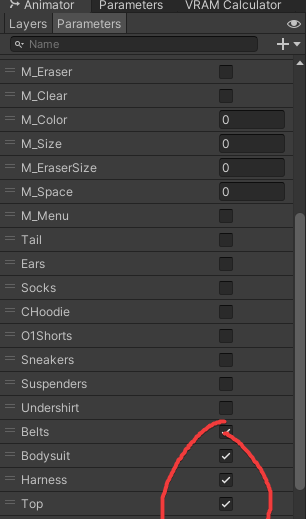
These checkboxes to mark the toggles as off by default are not working in-game, but working fine in unity.. all write-defaults off, all weights set to 1. i really dont know whats going on, cuz those dont work, contact receivers arent working, and my particle systems
 wraith atlas
grave kraken
https://i.hep.gg/uM6ON_UaE
These checkboxes to mark the toggles as off by defau...
wraith atlas
grave kraken
https://i.hep.gg/uM6ON_UaE
These checkboxes to mark the toggles as off by defau...
The toggles default states are handled by the expression menu IIRC, the default that's set there overwrites those.
 stone fjord
Anyone know when "soon" will be?

 light remnant
@stone fjord sadly:
"Tupper - VRChat Head of Community
StormiTheAvali: To be very succinct, contrary to previous belief constraints aren't free, especially at the levels some avatars utilize them (50+).
They have a performance cost which gets to significant levels, especially in a heavily CPU-constrained environment like the Quest-- even if the number of constraints used is quite low.
We've got some alternate solutions we're thinking of, but this isn't in active development yet.
·
June 3, 2022"
Okay so I've figured out how to add Contacts components onto my avatar via script editor by looking at Pumkin's Avatar Tools:
using VRC.SDK3.Dynamics.PhysBone.Components;
using VRC.SDK3.Dynamics.Contact.Components;
at the top, and then you can just say:
CrossContactSender.AddComponent<VRCContactSender>();
But I'd really like to be able to pre-load them with their correct settings. For me that's Radius, Position, Collision Tags, and Receiver Type & Parameter. What syntax do I use for these? Or, are there docs anywhere I could look at?
If I can't figure it out, Pumkin's Avatar Tools can continue to fill in the gaps for me, but... that's rough on inexperienced people who try to use my project. If I can just get this last puzzle piece, my script will generalize to any avatar proportions & be entirely self-contained. 😦
stone fjord
light remnant
<@206950145533673472> sadly:
"Tupper - VRChat Head of Community
StormiTheAvali:...
Thank you!
light remnant
It looks like Pumkin's Avatar Tools, which can handle Contacts components, doesn't get at them "directly" in a way I can crib, it just uses
ComponentUtility.CopyComponent(typeFrom);
ComponentUtility.PasteComponentValues(newComp);
which I'm assuming is the Unity onboard thing... so, yeah, I have reached the limit of things I know how to do to obtain this knowledge on my own (How to add Contact components with specific settings). If the only possible remaining solution is "include a prefab of each Component with the correct settings, and then figure out how to implement CopyComponent/PasteComponentValues yourself," I'd like confirmation on that from someone who knows what they are doing... and maybe some advice for making finding & referencing that prefab as foolproof as possible, since this project is meant for use by other people... anyway thanks for your time, anybody who reads this.
light remnant
@slate mango No, but for VERY limited use case, you can kludge together some stuff based on Aim Constraints that will magnify/exaggerate a small rotation into a larger, faster one. You can also get a larger, faster, opposite one! However there are sooooo many limitations to this approach it’s almost certainly not what you’re after.
fervent wasp
Question: is it possible to translate this into Udon?
And if so, what would be the performance hit?
https://answers.unity.com/questions/1547927/mesh-collider-does-not-change-in-blend-shape.html
Unity is the ultimate game development platform. Use Unity to build high-quality 3D and 2D games, deploy them across mobile, desktop, VR/AR, consoles or the Web, and connect with loyal and enthusiastic players and customers.
near bronze
I think it's possible to use bakemesh, you just can't use new mesh. You need to have a reference to a mesh that already exists that you can bake the data into, then you can reuse that instead of creating a new mesh every time
fervent wasp
near bronze
I think it's possible to use bakemesh, you just can't use new mesh. You need to ...
More or less in the ballpark, or am I doing a step wrong?

Should it be a copy of the same skinned mesh separate from the object that needs the updated collider?
The VM also seems to crash the second it hits SetBlendShapeWeight.
 near bronze
that's on the animatorsetbool, not setblendshapeweight
probably just a null reference to the animator
the second setblendshapeweight does not have a reference plugged in either
fervent wasp
updated screenshot my bad

OH
I SEE IT NOW
one second.
No errors, but collider still won't update.
Should I bake it to a copy of the mesh or should using the same shared mesh as the Skinned Renderer to bake to the Mesh collider work?
near bronze
no, you need to bake it to a different mesh
if you bake it back onto the skinned mesh then you'll only be able to do that once
fervent wasp
GOT IT.
fervent wasp
near bronze
no, you need to bake it to a different mesh
Thank you, good sir.
light remnant
Well, I solved my problem more or less like Pumkin's Avatar Tools did, via those undocumented operators on the Editor side, CopyComponent and PasteComponentValues, combined with LoadAssetAtPath and a prefab. This way I can fill in all the Contact Sender/Receiver things that I need except for position, rotation, and scale, which I handle dynamically at I guess the ordinary transform level based on calculating lengths of relevant avatar bones.
UnityEditorInternal.ComponentUtility.PasteComponentValues(AnyTaurCrossContactReceiverComponent);```
I struggled a lot with syntax and stuff because I'm new, so here are examples for the sake of people in my position.
```GameObject CrossContactReceiverPrefab = (GameObject)AssetDatabase.LoadAssetAtPath("Assets/AnyTaurScript/CrossContactReceiver.prefab", typeof(GameObject));``` waxen parrot
I think there is a problem with vrchat. I can't get a parameter to save correctly when adding 1 to it with the "VRC Avatar Parameter Driver" component.
By default the parameter has a value of "0", I can make it add 1 but it stops working.
Instead, if I remove it from "avatar parameters" it works correctly, but the problem is that the value is not stored and new users who enter the map see the parameter with the value 0.
Sorry if I haven't explained myself well.

If I remove the parameter from "VRCExpressionParameter" it works but isn't stored
The goal is to make that value remain even if I change the world, like when you change clothes and it stays because the value is still there.
 tender tiger
do i ask help with avatars here?
cause i have some weird issue with my mipmap thingy and im confused
everytime i try to autofix my mipmaps my builder menu dissapears, and it doesnt come back until i undo the mipmap, i have a video of it, if anyone needs to see it, atm i have no idea what im doing.
i havent found a single tutorial that explains whats going on either
 small nexus
waxen parrot
I think there is a problem with vrchat. I can't get a parameter to save correctl...
small nexus
waxen parrot
I think there is a problem with vrchat. I can't get a parameter to save correctl...
you try in VRCExpressionParameter menu set save ?
 ocean apex
Need some help with what could be a bug? Using the newest version of the avatar SDK (2022.06.03.00.04) and in the avatar descriptor, I can't see the gesture and additive layers for my avatar after I press customize. Instead they are these weird empty slots:
(and this seems to only be affecting the avatar... I still see all the layers normally if I put a new avatar descriptor on an empty gameobj.

nvm I found out how to fix it right after posting this ww
an extra animator component was interfering with it somehow, and i just removed the animator component
hmmm on a side note, is this why it's usually recommended that you should make animations on a duplicate? Ive heard that it 'breaks your avatar" and now im wondering if this is what breaks? or do a lot of other stuff break too
 untold geyser
I'm trying to write a script that will automatically add an additional parametre to a VRCExpressionParametre as well as add an element to a VRCExpressionMenu for an asset I'm building. Is there an example project by VRC or resources available somewhere that I can use to figure this out?
waxen parrot
small nexus
you try in VRCExpressionParameter menu set save ?
Of course
I'll do a couple of tests now but I'll get the same result.
small nexus
waxen parrot
I'll do a couple of tests now but I'll get the same result.
I think you have a state conflict with the driver parameter in the animator check all and youse not add 1, try set 1 or 0
waxen parrot
small nexus
I think you have a state conflict with the driver parameter in the animator chec...
I think I've already fixed it, the variable is already stored. I will keep doing more tests.
Thanks for the help
small nexus
waxen parrot
I think I've already fixed it, the variable is already stored. I will keep doing...
just if you use add 1 for new peoples everytime when it think and first load anim to 1 add again 1 then have 2
.... it can be your problem..
slate mango
Can rigid bodies be used to make throwables on your avatar?
 next citrus
Ahh only if VRChat had some normal API support where its not hard to make this just work fast without any weird delays because ratelimits and cloudflare blocking dedicated servers soo kekm hosting this pain https://cdn.discordapp.com/attachments/714695929076252742/994234820177698886/funne.mp4
civic belfry
Anyone experiencing this kind of timeout crash? I was monitoring the frametime of the event world I manage, and suddenly this message pops up and force disconnects me. In the log file, this message appears and all the Udon program crash (due to Networking.LocalPlayer = null) right away, then this timeout message pops up. Not only I'm experiencing the crash. Sometimes I can see players disconnecting in the middle of the conversation, and then rejoin after several seconds. Any fix for this?


 sly nova
My uploading of avatars is failing, I already disabled future proofing, on latest SDK
 upper plover
How does VRCX provide Discord Rich Presence that includes things like world thumbnails for the current instance, I thought it wasn't possible for VRChat itself to do? Why can't VRChat do it?
 rich prairie
is anyone experiencing not being able to test senders/receivers by physically moving them in the unity scene with the latest sdk?
upper plover
rich prairie
is anyone experiencing not being able to test senders/receivers by physically mo...
Yes, they end up working fine in VRChat, though
cinder grotto
upper plover
How does VRCX provide Discord Rich Presence that includes things like world thum...
I mean, all the program needs is the world ID and it can download the thumbnail the same way the official website displays it and then use that thumbnail as the discord rich presence icon
 fiery grotto
i hope this is the right channel?
Warning: total beginner to this and checking what are the boundaries of world development.
Ok, so i have been doing some digging in the webs but was unsuccessful and since there doesn't seem to to something like that already i was thinking about looking into DIY it myself.
Short question: Can I do any kind of API requests from VRChat to some other service?
Long question: currently our world is passcode protected, but since the passcodes get leaked quite easily i was thinking of setting up a discord bot to link your vrchat account. that way it can be checked, if the discord account is verified in a certian server and let the user in. But for that the world would need to send a API request, preferably with REST. While my hopes are low, i still wanted to ask, before i look for other solutions how to solve this issue.
candid owl
basically no you cannot access web apis from vrchat outside of being able to call videos
fiery grotto
like... video links? that end with .webm?
candid owl
mp4 webm YouTube and twitch
VRChat
Using the Prefabs The easiest way to put a Video Player in your Udon world is by using one of the Prefabs, which you can find in Assets/VRChat Examples/Prefabs/VideoPlayers. Both of these prefabs will play a video of your choosing, synchronized for everyone in your world. They won't loop - the graph...
fiery grotto
what about the other way around: Send something to the world. Is there something like an emiter that listens?
candid owl
not really besides for using the video player as a data input
fiery grotto
i mean.. you can probably get data out of the world that way.. but back in.. you would need to run a OCR or something
candid owl
basically vrchat worlds are supposed to be self-contained with no web access outside of videos
fiery grotto
or.. maybe different lengths to use them to transfer simple codes back
candid owl
mostly people just read like the video feed as a data texture
fiery grotto
i mean.. im known to try some crazy stuff.. but even that is next level for me xD
 keen hollow
i'm super curious, has anyone ever heard of a machine vision overlay for VRChat? Like a program that scans what you're seeing in VR and overlays HUD callouts on detected things?
a specific example would be a helper for pool tables, which would overlay an estimated trajectory based on where it sees the ball and cue is
slate mango
keen hollow
i'm super curious, has anyone ever heard of a machine vision overlay for VRChat?...
I was tempted to make a shader that did similar.
All it really was going to do is outline player models using postprocess outlines, while not outlining anything that wasn't a player model. Probably via only outlining skinned meshes.
keen hollow
I specifically mean an external program that doesn’t integrate with the vrchat executable. It would purely scan the VRChat window and then draw to some sort of overlay on the VR device
slate mango
That'd be neat, but hella processor intense.
 glacial yacht
fiery grotto
what about the other way around: Send something _to_ the world. Is there somethi...
glacial yacht
fiery grotto
what about the other way around: Send something _to_ the world. Is there somethi...
You can send data into VRChat with OSC: https://docs.vrchat.com/docs/osc-overview
VRChat
Intro to OSC OSC is a way to get different devices and applications to talk to each other. It's a favorite method of creative coders and people making weird interactive things because it's fast, networked, and very open-ended. What does this have to do with VRChat? We're expanding OSC support in VRC...
hmm doesn't seem to be for worlds at the moment though, I'd been looking for Avatar parameters
 valid jewel
Can I move users between word instances using Udon?
fiery grotto
glacial yacht
You can send data into VRChat with OSC: https://docs.vrchat.com/docs/osc-overvie...
isn't there an offical api as well?
glacial yacht
fiery grotto
isn't there an offical api as well?
for?
Oh yes, but I figured that was more for user account stuff, haven't looked there just yet
fiery grotto
getting user details. world details...
fiery grotto
glacial yacht
Oh yes, but I figured that was more for user account stuff, haven't looked there...
well.. a rest api is more approachable to use
glacial yacht
fiery grotto
well.. a rest api is more approachable to use
OSC is really simple, but yeah, if that exists and does what you need, great. I'm going to go glance at overview docs right now, since you reminded me
yeah doesn't seem to do that
fiery grotto
glacial yacht
OSC is really simple, but yeah, if that exists and does what you need, great. I...
the good thing about it is more that it has dependenvies for node, my poisen of choice
fiery grotto
glacial yacht
yeah doesn't seem to do that
do what?
glacial yacht
fiery grotto
do what?
The thing you wanted to do with a world passcode, that's not what this API is for
fiery grotto
yea. it does not..
and the issue im seeing with osc, is that the player needs to run it. it cannot be seeverside
glacial yacht
yep
I think what I'd do is make a bot that you all friend which can invite you to a private instance
fiery grotto
i have been not enough on vrchat to know this.. but private instances you can be only invted to? no link that can bee shared arround?
fiery grotto
glacial yacht
I think what I'd do is make a bot that you all friend which can invite you to a ...
but i think bot accounts on vrchat are against tos
 deft sail
 fiery grotto
12.i
glacial yacht
fiery grotto
but i think bot accounts on vrchat are against tos
I know of a few existing ones, so..
 rich axle
how do i fix this error

 devout lance
i'm curious if it's possible for a general user/creator to use the "avatar granting system", like ready player me, i see great potential for using it to sell avatars one creates (especially when it comes to standalone users who can't upload them themselves) but i can't find any info on even remotely how it functions
candid owl
devout lance
i'm curious if it's possible for a general user/creator to use the "avatar grant...
there's currently no functionality that's General user like that
 jade badger
(sorry for the repost but this might be a better place to ask)
None of my debug logs are showing up in the ingame logs
so i cant tell whats broken
it works in unity, but not ingame.


The goal is a raycast thats follows the players view to grab the UdonBehavior from an object it detects, then send the _Interact custom event on the E key
I have a debug to draw the ray and give me the position/rotation of the playerhead when using the Keypad 0 key