#ue4-general
1 messages · Page 1181 of 1
 drowsy snow
 modern furnace
Hello are we allowed to post a link to our steam game page anywhere? I just listed my first one and I am excited to share it but do no what to break any rules.
 tender pecan
modern furnace
Hello are we allowed to post a link to our steam game page anywhere? I just list...
tender pecan
modern furnace
Hello are we allowed to post a link to our steam game page anywhere? I just list...
#released, and good job
modern furnace
tender pecan
<#479798887247511570>, and good job
Thank you so much!
 muted iron
Is there a way to parent objects from sub sequences in a master sequence?
 sterile acorn
guys
if i used a spot light how i can make it's light more brighter and cover a bigger area
i already maxed it and i see it is not enough for me
if there is a way to increase these values more , or do i need to chose another lighting tool?
 upbeat spoke
Realize i posted in wrong one. Can cloth be impacted by 3rd person character in realtime?
 sterile acorn
also how can i increase the length of the shadow
upbeat spoke
sterile acorn
also how can i increase the length of the shadow
lower lights
lights at a lower angle produce longer shadows
sterile acorn
yeah but the shadow fade faster
cause intensity on not high
i increased it to max but it fades in longer distances
@upbeat spoke
 peak hare
I can't figure out why my character movement component is playing up in a simple level with barely any assets, but in my complex levels it works fine
 mild raptor
can someone help me?
i basically need me ai to move onto the next path point if its blocked (by the door)
im making a fnaf fan game to be specific
 austere scroll
Right now, I'm on the edge between continuing using ue4 or learn unity (I'm still a beginner in ue4 as well) the thing that's causing me being unsure that unreal has a lot less resources for learning ( or it seems to, compared to unity) and I want to continue using unreal because of the blueprint system, what do you think and what are some good ue4 resources ?
 fierce tulip
if you look at the learning tab, along with the dev-hub epic recently-ish released, the documentation, access to the source code, and all the tutorials and what not available on youtube and other websites, you should be able to learn quite a bit.
the pinned messages in this channel already have a lot of getting started stuff, and if you break down the things you want to learn to its smallest pieces, there is almost always a tutorial or guide available for it.
 mental dome
Where can i research the non-technical part of gamedev in depth? stuff related to creating and publishing a game but not related to actually making the game
fierce tulip
i'd go to GDC's youtube channel and take it from there.
 deft zealot
Hey guys, is there a way to quickly bulk resize all static meshes in an asset pack? (within content browser, not as an instance)
 spice ruin
You might try the property editor matrix?
sterile acorn
why when i tick on hidden in game
it is rendered in game?
i tried it on another mesh and it worked
but i dont know why it dont work for this specific mesh?
upbeat spoke
upbeat spoke
Realize i posted in wrong one. Can cloth be impacted by 3rd person character in ...
Turns out it was a simulation bug...had to run an event tick to the simulation running
 bleak dove
Does anyone have experience with saving character data from a character customization screen? I setup a customization screen and now in terms of saving that data on a button click into a save file Im lost.
drowsy snow
bleak dove
Does anyone have experience with saving character data from a character customiz...
It boils down to saving the parameters (usually bunch of floats and integers)
bleak dove
@drowsy snow The way I have it currently is I have a compied ThirdPersonActor holding Custom Events so in particular like being SwitchBodyColor then that branches off into a switch on int and setting the materials on the skeletal mesh. The next would be like beard type, that edits an existing mesh changing it to another one. Im trying to find where I would grab the mesh values and store them, the next issue would be reconstructing them or saving an entire ThirdPersonActor all together
Essentially this is what it looks like @drowsy snow forgive me if it looks atrocious

 sterile acorn
why when i tick on hidden in game
sterile acorn
sterile acorn
why when i tick on hidden in game
. guys can u take a look at my problem?
drowsy snow
sterile acorn
. guys can u take a look at my problem?
Not enough context
sterile acorn
@drowsy snow so i create a first person character and i added the mesh and i just ticked on the hidden in game
this mesh shouldn't be rendered in the scene
 clever marsh
yo so im pretty new to behavior trees, but im setting up an NPC system with dialogue, basically I wanna set up a system where if you steal an apple from him, he gets angry and wont serve you unless your "honor" is above a certain level. Basically all i wanna know is how i can select between 2 options depending on a boolean, and how i can set that boolean in a graph in other instances.

right now i have this set up. it runs a selector where it checks (i believe) if the boolean i set up in the blackboard, is set. If it is, it'll run the code on the right, but if not, itll run the one on the left. I just don't know if this is the right approach and how to set this boolean
i dont think this system currently works at all but it should give a general idea of what i want
I understand blackboards and values and everything, basically what i dont know is how to set a blackboard value in the graph
 hard escarp
Does anyone have any ideas on how to handle something like outside temperature in an open world survival game? I’m not sure what system to look into using. Something that can return a float value based on the location a player is.
clever marsh
unless your game is like procedural i think you could just add box collisions around your biomes setting the float, idk thats all i could think of
 tough hazel
Where does UE4 store backups?
 real heath
hard escarp
Does anyone have any ideas on how to handle something like outside temperature i...
real heath
hard escarp
Does anyone have any ideas on how to handle something like outside temperature i...
Depends. First thought that comes to mind is how controllable and fine grained do you want it? You could set a world default temperature, and then have volumes that override that. You could sample a noise function based on the world coordinates rather than a global world default temp. Those are the places I'd start. But exact approach would depend on how often it'll be sampled (how costly will this get on performance?) and how much control you want to give to your level designers.
real heath
tough hazel
Where does UE4 store backups?
<projectdir>\Saved\Autosaves and <projectdir>\Saved\Backups
tough hazel
real heath
<projectdir>\Saved\Autosaves and <projectdir>\Saved\Backups
Thanks
hard escarp
real heath
Depends. First thought that comes to mind is how controllable and fine grained d...
I understand how it can be done with a global setting or with volumes. I think the thing I’m looking for is related to a texture that can be dynamically drawn on and sampled at runtime with a greyscale representing temperature at any given location.
I’m just not really sure what that is
real heath
So a noise function might be slightly cheaper but won't allow you to draw on it at runtime obviously. Otherwise you can look at texture render targets. But depends on how much you need this on the cpu vs gpu

Announcement Post: https://forums.unrealengine.com/showthread.php?123164
Sam Dieter is on to talk about a powerful new feature from the 4.13 release, Blueprint Drawing to Render Targets! There are limitless applications to such a versatile tool, so Sam will give a basic overview and explain how it can be used for general purposes. Also, be sure...
hard escarp
Thanks, I’ll take a look
real heath
 lean haven
Hey I am trying to make my character move to the direction to my cursor by doing this


Direction is set is called every event tick
since i have a actually working direction indicator
However the character doesn't want to move
 fading wolf
lean haven
However the character doesn't want to move
fading wolf
lean haven
However the character doesn't want to move
Sorry I dont know but I skimmed through this and it seems like what youre after https://youtu.be/FImOJCcwyaw
The Game Dev Pro - Become A Master Game Developer Even If You've Never Written A Line Of Code Before
https://www.awesometuts.com/game-dev-pro?utm_medium=video&utm_source=youtube&utm_campaign=video
Download The Assets For This Tutorial
https://www.awesometuts.com
Blog
https://awesometuts.com/blog/?utm_medium=video&utm_source=youtube&utm_campaig...
hard escarp
Idk how to ask this, but does anyone have any advice or resources on best practices to keep game systems modular and mostly independent from others to avoid everything getting all jumbled together?
real heath
Not really specific to games but more generally there's the SOLID principles about object oriented design. For something specific to unreal, you can look into GAS or Gameplay Features which is all about modular design.

SOLID is an acronym for the first five object-oriented design (OOD) principles by Robert C. Martin. In this article, you will be introduced to each principle…
real heath
hard escarp
Idk how to ask this, but does anyone have any advice or resources on best practi...
^
hard escarp
real heath
^
Thanks
clever marsh
lean haven
Hey I am trying to make my character move to the direction to my cursor by doing...
there is this really cool pack that is free for the month called point and click adventure toolkit, you could check out how they do it in that and implement it in your game
lean haven
why do i get the feeling it's move to location
and
once again
it move to loacation
not move in direction
clever marsh
thats not true? if you hold down the mouse button it changes to moving in the direction
clever marsh
lean haven
not move in direction
just check out what happens when you hold down the mouse button
clever marsh
ill check it out lol
lean haven
not direction
clever marsh
lean haven
it move to location
seems to open a gate so if you just got rid of it stopping movement on location reached you should be able to do what you want?
lean haven
that seems to convulted for a simple move in X direction
 flat turret
Hi everyone, is there any method to save downloaded static mesh into file directory (uasset, fbx, obj etc) in runtime?
lean haven
@clever marsh but figure out problem idk why mouse button won't activate but when i made to axis it works it follows in the mouses direction
Okay yep figure out the problem
it's the input
any suggestion so it keep looping while i hold down left mouse or any key?
because when i change the input to a Axis mapping it works
but if i made it to W key or left mouse button it doesn't
ah well just gonna make a bloody branch and bollean check if mouse is pressed or realeased
now to figure out how to make the movement 6 directional
btw how to "flip" bolleans
or is there no such thing?
 oak patio
A not
 oak patio
Exactly what i said, a logical not
lean haven
oh yeah
real heath
So theres a flipflop node which isn't exactly that, but often is good enough. Or you use a not operator on your boolean
 oak patio
Yup
lean haven
Now to set up so i have a 6 directional movement
can switches be a range?
like for example 1- 30 is case 1, 31-60 is case 2, 61-90 is case 3
( in blueprint)
or do i have to make it to c++?
real heath
no, you'd need to do something like int(floor(a / 30)) to map that to 1,2,3. Switch doesn't natively support ranges like that
lean haven
ahh damnit
real heath
you can do that math in BP though
lean haven
oh
i fear it will look worse then using branchs
so i will just use branches i will keep that tip in mind if i do need it for something else thanks
real heath
yeah, and it only works if you have neat divisions. If you have variable ranges, its a no-go
 fierce agate
Ofc yes, I won’t be able to use water plugin If I disable landmass
 tight crystal
why i use pawn sensing it can see the player fine but ai cant see other ai??
tight crystal
okay ty
 fossil nexus
Hi. Im going to the gym and need to take with me a long tutorial to watch. Are there any other hours long blueprint advanced tutorials like this one: I can only find beginner stuff.

Hello guys and welcome to the Unreal Engine 5, Blueprint for Intermediate Users. This will be a follow up tutorial to my previous tutorial: Unreal Engine 5, Blueprint for Beginners. If you haven't watched that video yet, I would recommend watching it first, as I teach you all the basics of what are blueprints, and how to use them.
In this vide...
 coarse jetty
fossil nexus
Hi. Im going to the gym and need to take with me a long tutorial to watch. Are t...
coarse jetty
fossil nexus
Hi. Im going to the gym and need to take with me a long tutorial to watch. Are t...
check out official unreal streamings
dont konw how advanced it is, but https://www.youtube.com/watch?v=c6Hc_RBA7ww&ab_channel=UnrealEngine

Blueprint isn’t just for programmers, and with just a little know-how, artists can up their game with dynamic actors and simple tools made for their own bespoke needs. Come find out how to get started!
I have just came back from vacation i have this error to the same project i was working and i dont know how to proceed. any idea?

 distant siren
can i limit the exploration of the map with my helicopter?
drowsy snow
distant siren
can i limit the exploration of the map with my helicopter?
Depends on how you want to limit it
GTA V went with killing the engine once you go too far from the map
Some other games went with countdown before teleporting to nearest ground
distant siren
drowsy snow
Some other games went with countdown before teleporting to nearest ground
i am currently using blocking volume, but exists a different method?
 gleaming temple
Is there any way to have any connected controller route its input to the first user, in gameplay and widgets? I currently overrode GameViewportClient's InputKey and InputAxis functions to always interpret inputs as gamepad 0, which seems to work for normal gameplay, but widget input still tries to route to user 1 on the second connected controller
Apparently this is a requirement for steamdeck verification
drowsy snow
gleaming temple
Is there any way to have any connected controller route its input to the first u...
There's a setting for multi controller in the Project Settings, maybe that is what you're looking for?
gleaming temple
drowsy snow
There's a setting for multi controller in the Project Settings, maybe that is wh...
I cant see any setting that mentions that, you sure that's not ue5?
drowsy snow
gleaming temple
I cant see any setting that mentions that, you sure that's not ue5?
4.27 but I doubt it's removed in UE5
gleaming temple
I must be completely blind then, I see no such setting anywhere, nor similarly worded features searching the engine source
drowsy snow
I can't recall the exact name either tbh
gleaming temple
gleaming temple
Is there any way to have any connected controller route its input to the first u...
For anyone that might read this in the future, I ended up creating a class that implements ISlateInputManager and returns 0 as controller ID for all its input methods, and setting it as the input manager in the GameInstance's Init() using FSlateApplication::Get().SetInputManager(MakeShared<YourCustomInputManagerClass>())
 earnest tendon
Hi guys, would anyone know how to create a system where upon completion of a specific event or events, the chance of another event happening increases?
E.g. hitting three buttons increases the chance of an item spawning by 30%?
upbeat spoke
Want a blocking volume to ignore pawn...I select custom/ignore pawn but it's still blocking the pawn. Anyone know if there's something else I need to change.
pawn being third person character
Nm got it...seems I needed to set to physics only to do what I wanted
distant siren
instead about the pilot, how can I do not to make the exit button from the helicopter work while flying? he should only be able to get out of the helicopter when it lands
 lament sonnet
is openexr support on ue4.25?
 plush yew
https://poll-maker.com/QSQ0DLP18
Releasing a game on Steam today but on the fence about pricing. Help me decide.

What is the best price for Qorena?
 thick herald
$1,000,000.000
plush yew
thick herald
$1,000,000.000
Without the jokes please.
I don't want to under-sell or over-sell this game.
Trying to find the right balance.
This is the game in question.
https://store.steampowered.com/app/1049640/Qorena/

WHAT IS QORENA?Qorena is a top-down, bullet hell, action-arena shooter of pure, survival, action! Bundled with a wide variety of multiplayer levels of bullet-raining hell, numerous monsters to fight, and the ability to customize the world!CUSTOMIZE YOUR MANNÉ, WEAPONS, AND WORLDCustomize your mannequin using the Customizer Sprite Editor! Use var...
thick herald
The honest answer is we can't really. Only you know how much work you've put into this, how much game play there is etc etc Pricing is always a highly personal thing for that reason. Ask yourself are there similar games out there already that you'll essentially be competing against. If there is, that's great. You can compare features, game mechanics, all that good stuff. That will give you an indication of popularity which is partly affected by price. That sort of thing, but as I said at the beginning - only you, or whoever is in your team can judge that.
 uneven fossil
Hey, I have an issue when editing default value of blueprints that are already spawned in the level. The values of the instanced actors are not updated and I have to click on "Reset" to the properties. Does someone has an idea how to solve that? thanks
plush yew
thick herald
The honest answer is we can't really. Only you know how much work you've put int...
Fair enough I suppose...
Thing is I am unsure if I can trust myself with pricing. With all the sweat, blood, and tears into this project, if left up to me, I'd prefer it sold for at least $19.99, or at most $39.99. But this may be overkill for some customers.
So I am thinking $14.99 could be a good balance.
drowsy snow
plush yew
So I am thinking $14.99 could be a good balance.
With that trailer? I don't know, but it looks like something that's unintuitive to play. For one, it's hard to see the characters, and by that, I mean very hard to see. I feel like the fun is going to be ruined by the visual unintuitiveness
I think it should be lower than that 
plush yew
drowsy snow
With that trailer? I don't know, but it looks like something that's unintuitive ...
I wish I can afford for a trailer creator. I am broke right now. I was forced by circumstance to make one myself.
Once I can raise funds, I will hire a trailer creator.
To create a new trailer.
drowsy snow
plush yew
I wish I can afford for a trailer creator. I am broke right now. I was forced by...
I'm not talking about the video editing. I'm talking about how the character is hard to see in the level.
plush yew
drowsy snow
I'm not talking about the video editing. I'm talking about how the character is ...
Ah. Yes. As is the nature of classic pure top-down. There is a FOV option to scale down the view if it helps.
 lilac stirrup
Try putting yourself in the mind of a gamer and imagine your game being developed by somebody else, how much would you be willing to pay for it, and how much is too expensive for you.
drowsy snow
plush yew
Ah. Yes. As is the nature of classic pure top-down. There is a FOV option to sca...
Would be better if the characters have more defined silhouette, but eh...
Look into games like Smash TV, how they make the characters have clearer silhouette and make it easier to track.

Follow me on Twitter @ https://twitter.com/Al82_Retro
Get Great Retro Scene News @ http://www.vintageisthenewold.com
Developed and published by Williams in 1990
With its hardcore gameplay and super-fast pace, Smash TV is another classic from Eugene Jarvis and co. Players take part in an ultra-lethal future gameshow, putting their lives on the ...
 plush yew
drowsy snow
Would be better if the characters have more defined silhouette, but eh...
Look i...
plush yew
drowsy snow
Would be better if the characters have more defined silhouette, but eh...
Look i...
Noted. Will implement in next update.
bleak dove
If anyone could potentially help, would be much appreciated! https://forums.unrealengine.com/t/button-to-copy-active-blueprint-character-customization-and-save-as-another-for-save-files/598796
Unreal Engine Forums
Hello, currently I have character customization widget that allows me to edit the skeletal mesh and material to change hair colors and skin color, as well as beards and such. This is the CharacterCreation Widget Character Creator Blue Print posted by anonymous | blueprintUE | PasteBin For Unreal Engine This is the VisualActorBlueprint Visual A...
 honest tartan
Is Unreal Engine 4 Unlocker safe? (UUU Client) https://framedsc.com/GeneralGuides/universal_ue4_consoleunlocker.htm
or is it a virus
real heath
I don't think that sort of stuff is supported around here
The only reason to use that is if you don't have access to the editor, which means you are messing with a published game
honest tartan
Im using it on a private server I made, which has no correlation to the actual game
no server connected
Epic Games has stated they allow it
as long as it isn't connected to a server or giving free cosmetics
real heath
This server is for developers using unreal. Not for modding other games
real heath
honest tartan
my bad im sorry
all g. Just easier to find modding communities for that game in particular so you can get better advice on tools and avoid bad ones etc
 frail portal
yo
i have a question
can unreal engine export glb?
like if i make a small interactive thing where if you scroll down the clouds move?
real heath
There was talk of a plugin I think

Unreal Engine
This Unreal Editor plugin allows exporting selected actors, selected assets or a full level into glTF files (https://www.khronos.org/gltf/).
real heath
frail portal
like if i make a small interactive thing where if you scroll down the clouds mov...
That would require some work in your target engine I'd imagine. But yes you can make your scene in unreal
frail portal
like this example
where if im scrolling down a page and have something like the moon moving
based off how bottom of the page i am on the screen
real heath
You can't export unreal projects to web, only scenes to gltf. You can export animations, but I don't think you can embed any logic like that. You'd need to do some work with threejs or whatever you are using to render the scene in your page
real heath
You could set the animation progress based on the page scroll I'd imagine.
frail portal
how about making an animation, render it as a video, and then export the video by frame where the video's frame changes based off the website position
real heath
You could do that too. Probably scales across platformsnbetter. Apple did something similar with an iphone launch a few years back
frail portal
nice
so it's unreal and technically not unreal that's being exported to the site but a .mp4
or gif
 glacial cairn
Hey guys, is there a way to implement a drop down menu in ue4 with Slate?
or is the combo box the only way?
 static viper
sure
you can do anything with slate
but that comes with a condition.
Slate is not for the lightminded 😛
if you cant handle slate, it will hurt you!
 dusky thorn
Hello fellow slackers, has anyone found a fix for the disappearing/glitching submenus yet?
drowsy snow
dusky thorn
Hello fellow slackers, has anyone found a fix for the disappearing/glitching sub...
If it's NVIDIA, yes.
So common, pinned messages have the links to the solution
 indigo moss
is it possible to manually create mipmaps for textures?
tender pecan
indigo moss
is it possible to manually create mipmaps for textures?
You can probably do it by importing a texture asset with mip maps in them, like DDS or something
https://forums.unrealengine.com/t/how-to-import-custom-mip-maps/336593
 fast grail
I got a quick question, I'm starting to learn unreal and I'm wondering if I should go fully into blueprints or learn C++?
drowsy snow
fast grail
I got a quick question, I'm starting to learn unreal and I'm wondering if I shou...
The answer is always BOTH.
fast grail
time to start studying
Are there any tutorial creators I should avoid that are known to teach bad practices?
drowsy snow
fast grail
Are there any tutorial creators I should avoid that are known to teach bad pract...
I won't name them, but your safest bet is https://learn.unrealengine.com
drowsy snow
I mean, I could name few of them, but it'd be rude to do that here
 wooden quest
Hey everyone!
Got a quick question, maybe someone would have some insight on it.
We are currently making a game for an investor an uploading game builds to Gdrive, I was wondering could we upload and update the game build for him and other testers to the Epic store but so it would not be public? Is there a way to do something like that or not? 🧐 🤔
drowsy snow
wooden quest
Hey everyone!
Got a quick question, maybe someone would have some insight on it...
Just make sure the link is not getting leaked, or use the invite only.
spice ruin
wooden quest
Hey everyone!
Got a quick question, maybe someone would have some insight on it...
Make the price a billion moneys and ask for them to receieve a free key 😄
I don't think the store has private listings.
It's not meant as your personal in-house source control.
wooden quest
We do have a key system in place, so no one without a key would be able to log in and play even if they would download the build. I was thinking of just submitting the game to the store for review, but I didn't find any good documentation about, how will we keep updating the game builds, because the game is still deep in development and can we publish on the epic store a game that's in development with no release date set?
 coral patio
Hey guys! :] I'm testing the cloth tools UE4 provides at the moment and I'm encountering a problem. I want this test strip to bend when thrown around but so far, it just stays stiff with just a few areas deforming a tiny little bit. There's one joint at the root of the cloth strip and the cloth physics weight paint is basically filling the strip except a small area at the root. I've also tried giving it a joint chain going through the strip but that hasn't worked, either. What am I doing wrong? :< None of the tutorials I've watched on this encountered that problem or explained how to prevent it.
https://i.gyazo.com/4bd982328c66bf1af34b93e024c5b1be.mp4
tender pecan
wooden quest
Hey everyone!
Got a quick question, maybe someone would have some insight on it...
Use their intended delivery platform, in the end, how is this game going to be distributed and/or made available to the players? Use that platform and then you can establish your build and deployment pipelines early, and identify pitfalls regarding game updates etc..
wooden quest
tender pecan
Use their intended delivery platform, in the end, how is this game going to be d...
Thanks, that's what I'm thinking of doing. We plan to release on the Epic store anyway. 👍
fierce agate
How do I unzip my project to prevent the black editor screen problem?
drowsy snow
fierce agate
How do I unzip my project to prevent the black editor screen problem?
How are those two even related?
fierce agate
drowsy snow
How are those two even related?
I saw someone say that you have to unzip files to prevent the black screen or landscape problem
drowsy snow
fierce agate
I saw someone say that you have to unzip files to prevent the black screen or la...
Doesn't make any sense whatsoever
dusky thorn
drowsy snow
So common, pinned messages have the links to the solution
Awesome!
Thanks mate
 cunning canyon
hello

does anyone know how to get rid of this yellowish surrounding the screen?
coral patio
It should fade once everything is compiled in your scene 😄
cunning canyon
coral patio
It should fade once everything is compiled in your scene 😄
is it normal for the game to still compile even after it's launched?
how to make it like actual game where u straight jump into the game
drowsy snow
cunning canyon
is it normal for the game to still compile even after it's launched?

Packaging Unreal game projects for distribution.
cunning canyon
drowsy snow
https://docs.unrealengine.com/4.27/en-US/Basics/Projects/Packaging/
thx
glacial cairn
Hi please does anyone know how to implement a dropdown menu of checkboxes in umg?
distant siren
about the pilot, how can I do not to make the exit button from the helicopter work while flying? he should only be able to get out of the helicopter when it lands
tender pecan
distant siren
about the pilot, how can I do not to make the exit button from the helicopter wo...
Check how close you are to the ground, you can use overlap on physics primitives for example, by adding them to the helicopter actor, or by doing physics cast on the action button press for example.
distant siren
tender pecan
Check how close you are to the ground, you can use overlap on physics primitives...
so once I get on the helicopter the character doesn't come out anymore, he should get out of the helicopter when I touch the ground .. what should I do?
 tender pecan
distant siren
so once I get on the helicopter the character doesn't come out anymore, he shoul...
tender pecan
distant siren
so once I get on the helicopter the character doesn't come out anymore, he shoul...
You probably want to check what you are colliding with and if its the ground then you can exit, something like that.
tender pecan
distant siren
so once I get on the helicopter the character doesn't come out anymore, he shoul...
And debug output the results of your hit and see what is it hitting with, also debug a string to the 'False' part so you can see if it is not hitting something. 🙂
distant siren
tender pecan
And debug output the results of your hit and see what is it hitting with, also d...
at the moment after i get on the helicopter don't get off anymore, but it should get off i haven't taken off yet, do you have a screen to understand where to modify?
 calm skiff
So i am very very very new to unreal and animations in general. I am taking a class in college for game design and have found myself as a sort of tech artist even though I have very little experience as one. I have created a character for our game and our teacher suggested using mixamo to create animations seeing as no one on our team has any prior experience with 3D animation.
When I imported the character into Mixamo i noticed the clothing was getting distorted with the animations so i chose to import a new version of the character WITHOUT clothing to avoid the auto rigger thinking the clothing was a part of the character. I have made an animation blueprint in unreal that seems to be working well enough but now I have a major hurdle I cant seem to figure out where to begin accomplishing.
I want to add a baggy robe over this character and use the cloth physics in unreal but I am not sure how or where to add this asset in unreal to drape over the top of this character. If any of you are kind enough to try and embark on this quest with me feel free to DM me lol. I can provide you tons of screenshots or even jump on a call to show you whats up lol
 humble cliff
Hey everyone is there any easier way to select a collision volume in editor window instead of trying to select an edge
tender pecan
humble cliff
Hey everyone is there any easier way to select a collision volume in editor wind...
Select the actor in the scene outliner, then you can select the component there
tender pecan
distant siren
at the moment after i get on the helicopter don't get off anymore, but it should...
You need to add some print/log to see what is happening with your logic, and try to debug it yourself. 🙂
upbeat spoke
Decals don't work on transparent object sright?
 polar sorrel
hello people 🖐, quick question, i know youtube is full of them, but do you have any beginner friendly tutorials which will help understand the blueprint system 🙂 ?
 solar cypress
how do i display the log in a build?
 proud thorn
hello
may i ask what happen if a new controller is plug in to a pc
does it get assigned with a player controller automatically?
 glad flint
when i right-click on the graph
i dont see how i can add this
using valve index
i've tried Make InputAction Key Mapping
that doesnt match

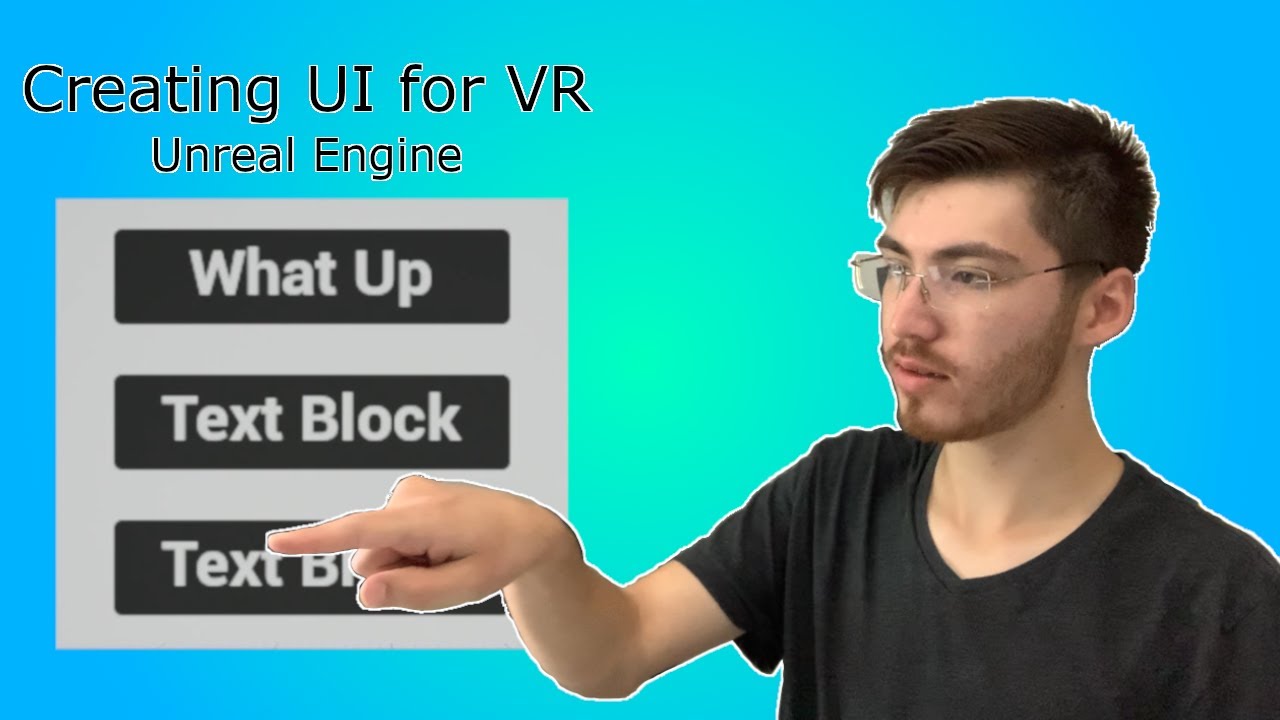
UI is essential for just about any game, in virtual reality it can be a different challenge since you can't design UI and stick it to a display like in many other platforms. In order to help you to create your own UI for your own virtual reality game I will be walking you through how to setup a basic UI that can be placed within your world all w...
using this tutorial to try and interact with a simple widget
 solid aurora
Could anyone tell me if this is good for my horror game? This is some information for a character in my game.
Mr Fizz: Mr Fizz is a clown monster that kidnaps kids and turns them into ice cream, he goes around town in his ice cream van faking giving out ice cream to kids and kidnaps them, he doesn't care if it's in large groups or small groups, he WILL find a way even maybe with his mouth but if he will stay hidden and for most monsters they can appear for people they want to and be invisible for people they want to. He usually carries a bloody rusty old butchers knife around and chops down kids and melts them into ice cream and feeds them to the lucky kids who he can't kill. Ingame Mr Fizz will start coming around outside every 20 or 10 minutes and you will hear a distant distorted ice cream nursery tune or lullaby (Ice cream song) slowly fade in louder and the van comes closer. You have 10 seconds to hide before he sees you while he's passing by, and if he sees you the audio will slowly become more distorted and break down and he will look at you holding his butchers knife and jump out at you through his window and jumpscare you. When his van passes by you need to quickly hide and crouch somewhere he can't see you (usually behind rocks) and then he will pass by and come again the next 10 or 20 minutes if you are outside near a road.
 regal carbon
@drowsy snow found something on Reddit abt the Guilty Gear style, but I'm not sure how the implementation works so I'd like your help

reddit
60 votes and 17 comments so far on Reddit

how do you access the head bone matrix and pass it in as a separate parameter?
fierce tulip
@regal carbon please dont crosspost the same thing in multiple channels
regal carbon
fierce tulip
<@837364429087178872> please dont crosspost the same thing in multiple channels
okay, my mistake
fierce tulip
please pick one channel and remove it from the other one :)
 cloud pagoda
Hello, is there a way to show the spawn location box of a Niagara particle system in Unreal viewport
To see the box that the particles are spawning within
If anyone knows please ping me
 astral heart
Can anyone point me towards a tutorial for making rain in a mobile game that isnt too demanding on the hardware?
Tried a particle system but it lags my quest to oblivion
fierce tulip
rain on quest. daring today, are we.
you basically only want a few drops on screen. might be cheaper to move them up and down trough world position offsetting.
there wont be many tutorials for rain like that though
astral heart
fierce tulip
rain on quest. daring today, are we.
I know its possible as ive seen it on other maps in the game. Just dont know how they accomplished it. Thanks though
drowsy snow
regal carbon
From the same guy who suggested that
 regal carbon
💀
astral heart
heres an example
fierce tulip
astral heart
I know its possible as ive seen it on other maps in the game. Just dont know how...
i sadly dont remember the example or where Ive seen it, but basically they created a few dozen raindrops (tiny raindrop on a tiny mesh) that are attached to the player.
Rain falls down trough WPO, gets collapsed, moved back up, and falls down again.
just a few drops in front of the eyes and some in the background is generally enough.
imma remove that video though, the talk in it is very nono rulewise
astral heart
fierce tulip
just a few drops in front of the eyes and some in the background is generally en...
oh sorry i just found the video didnt listen to it tbh. so i need to find a way to attach it to the player it sounds like
thanks for pointing me in the right direction
fierce tulip
player eyes/head yea.
think the rain in the background is part of the skydome material
that way it doesnt need to be masked/additive/translucent
drowsy snow
regal carbon
💀
I mean, I kinda don't get how that'd solve it.
And considering he's not using UE4 to make that suggestion, I can't tell which part I can improvise from that
regal carbon
drowsy snow
I mean, I kinda don't get how that'd solve it.
I think it'll work for the head, not sure about the other body parts. I've heard similar concepts about it on Blender NPR as well
drowsy snow
Unreal material is a different beast entirely
regal carbon
the main concept is just to adjust the normal rotation based on the relative rotation of the head to the light
in BNPR you can use an object space normal map for this and some transform vectors and dot products but I haven't been able to figure it out
drowsy snow
I mean, yeah, basic maths are applicable to both Blender and Unreal, but some things in Blender aren't exposed in Unreal
Remember that you want the load to be on GPU as much as possible, not involving CPU for cosmetic transformation like that
regal carbon
drowsy snow
Remember that you want the load to be on GPU as much as possible, not involving ...
oh boy, this is a whole nother can of worms I haven't learned yet
fierce tulip
astral heart
oh sorry i just found the video didnt listen to it tbh. so i need to find a way ...
also dont do anything with collision. rain never needs it unless its like the hero-thing in the scene, and even then generally doesnt need collision.
in theory, any tutorial showing you to generate splashes trough collision means the person making the tutorial never shipped a game XD
drowsy snow
regal carbon
oh boy, this is a whole nother can of worms I haven't learned yet
In Blender, you can disregard performance of the material. Not so much with Unreal, where typically you want it to run in real-time, playable frame rate
drowsy snow
regal carbon
I see
As Unreal materials are expected to be applicable on many kind of meshes, bone transforms aren't exposed to it, as you can have many skeletons.
You could, however, pass the transforms to Unreal materials by vector parameters and control it from actor BP/anim BP, but as it's done on CPU, it could impact on performance if you're not careful.
fierce tulip
i think the best approach would be like how it blends metahuman normal maps depending on expression.
lean haven
Hey
soooo
i am trying to make a character that only dashes
I am using Launch Character for now
but it's too fast for my liking
how do i adjust the speed?
 pallid token
glad flint
when i right-click on the graph
i dont see how i can add this
using valve index
...
pallid token
glad flint
when i right-click on the graph
i dont see how i can add this
using valve index
...
try just "trigger"? You may see some that show Gamepad or MotionController, instead of just InputAction. You may also need to be sure to do this from a graph which can be added to the input stack, such as the pawn subclass in that tutorial.
 brisk pollen
what's the right way to pick a random color/etc for an actor that is placed in the level? i want the random value to be picked once and saved with the actor
 coarse turtle
Hi - Any idea what's wrong? If I right click to lunch my project, it tells to me to build it. Eventhough I just built it from source using VS.
 ripe carbon
Can anyone help me with this problem, please?
https://forums.unrealengine.com/t/help-cant-package-ue-4-27/599549
I had the same problem with an earlier version of this project. I tried recreating, copying and pasting and I still get the same problem. You will find a copy of the log in the above forum link.
Unreal Engine Forums
Once again, I’m having difficulty packaging my tech demo. I recreated a new project file, copying and pasting most assets and maps and sequences and recreating a few others. I set UE 4.27 to package and it still fails! I need to get this finished so I can add this to a job application. Here is the link to the log: Demo427Log.txt - Google Drive ...
ripe carbon
I know, but I'm not sure what to do about the errors. Like how I'm supposed to fix them.
 autumn flame
If you can't debug those simple errors, then you probs have to learn more before packaging, but
D:\UE_4.26\My Projects\PuzzleDemo427\Content\Widgets\InstructionScreens\Level2Window4Widget.uasset: [Compiler] In use pin <Unnamed> no longer exists on node Set . Please refresh node or break links to remove pin. from Source: /Game/Widgets/InstructionScreens/Level2Window4Widget.Lev
For example
Tells you the path of the problematic asset and what to do
ripe carbon
That's one part I haven't learned about yet. Most of what I've made in my project I learned on my own.
autumn flame
Just search everything Error and fix like this, will show you what's up
If any doubts you can send here, but can't teach basic text navigation (CTRL+F and search Error)
ripe carbon
Oh, so the log has a Find command like Word and Internet browsers, too?
ripe carbon
I know. I didn't realize the log window in UE had that, too.
autumn flame
Don't ever search in the log window
Even if it had that
Cause it may contain previous logs
ripe carbon
Good point. So it would be pretty confusing, especially after more than one attempted cook or packaging.
autumn flame
Yeah, it tells you where it saves the trace anyways
see C:\Users\d_cur\AppData\Roaming\Unreal Engine\AutomationTool\Logs\D+UE_4.27\Log.txt for full exception trace
for example
at the end
You can send that in here for example too if you ever have problems
ripe carbon
Okay. So basically search the text in Notepad. Though, now that I think about it, I'll need to check every BP in case of any unlinked nodes.
ripe carbon
Okay.
 tight pond
Hey when converting actors in the scene to a BP prefab, what is the best options to use
for SM env items
also someimes shared root is visible other times not, so confused
ripe carbon
After looking at the log, I have adjusted the priorities on the GPU issue, hoping the packaging and cooking won't time out while the GPU catches up. my laptop has an NVIDIA GeForce GTX 1650. Also, it looks like there are several widgets I need to either fix or delete.
And it looks there are missing assets that don't appear to be in the Content Browser. So I'm going to just have to remove any references to those.
 cunning marlin
Does one needs Substance subscription to use .sbsar files bought online, in UE using the Substance plugin?
drowsy snow
cunning marlin
Does one needs Substance subscription to use .sbsar files bought online, in UE u...
No.
cunning marlin
wow! This opens a whole new world! (starts singing that song!)
 full quarry
hi guys, is there an option to set this viewport cliping.....?
 cunning marlin
full quarry
hi guys, is there an option to set this viewport cliping.....?
cunning marlin
full quarry
hi guys, is there an option to set this viewport cliping.....?
long time back I had similar thing. I believe it is somewhere in the editor or project settings
full quarry
Found the solution !!
 cloud pagoda
Hello, is there a way to show the spawn location box of a Niagara particle system in Unreal viewport. Please ping me if anyone knows
pallid token
brisk pollen
what's the right way to pick a random color/etc for an actor that is placed in t...
You can set the random color during construction. If you set the color variable as editable, it should appear in actor details and save when you save the level. I am left-handed. example construction script:

 deep light
Hello People,
I have a little problem with my game
It's a LowLevelFatalError on the game DBZ Kakarot
I tried verifying game files, Disabling antivirus, and Fullscreen optimizations
Could anyone help?
It happens in a cutscene,
sometimes earlier, sometimes later.
Drivers are updated, tooo
tender pecan
Check the log, get a stack trace, make sure you can repro this in a developer build, see if you can repro it in editor. you know, the standard stuff.
deep light
Im not a devloper, sorry.
drowsy snow
deep light
Im not a devloper, sorry.
This server is for developers making stuff with Unreal Engine, not for support for playing UE games.
deep light
Alright, sorry
tender pecan
Maybe you should become one, so you can debug these things next time yourself.
Head on over to https://www.unrealengine.com/en-US/learn and get going. 🙂
drowsy snow
tender pecan
Maybe you should become one, so you can debug these things next time yourself.
Except that the game he's referring to is a commercial AA title.
Not a game his friend made
(except if his friend worked at Bandai Namco that is)
tender pecan
I mean I have debugged AAA games. 🙂 It happens. There are tools that exist to help us do these things, but yeah, I dont know that game, and more people making games means the industry grows so. Good all round
 stark stratus
Heya, quick question. Is it possible when having a take recorder active so its recording a take, to manually start a level sequence in at a given moment? So for example; doors opening. we are filming and director says doors open now. That i start the level sequence and the take recorder records its all?
 umbral pasture
In my first person game, I want the camera to flip 180 degrees when I press the Q key so the character can look behind him quickly. I can't seem to crack it so far, if anyone's got any idea's that would be great please! https://gyazo.com/6b3094d07f9a1a38fb884eb8157b2f78

 wheat jewel
umbral pasture
In my first person game, I want the camera to flip 180 degrees when I press the ...
wheat jewel
umbral pasture
In my first person game, I want the camera to flip 180 degrees when I press the ...
You need a target for view rotation. Just set there a Camera that you are using to move around in game
Move FirstPersonCamera to BP and connect with Target
umbral pasture
wheat jewel
Move FirstPersonCamera to BP and connect with Target
It doesn't seem to be liking that, what do you think I could be doing wrong here? https://gyazo.com/26fc0bcb4f4064472028f11cf0d4f0b9

 analog loom
Is it possible to tick the engine manually?
i.e. not rely on the built in calls for ticking, but sort of "tick" by hand ?
 empty dawn
how do you make something like what the text is saying

progress bar doesnt trigger until the whole vehicle is inside of the blue box
indigo moss
i'd probably have 2 subcomponents and box should check both of them are inside
at front-left-top and behind-right-bottom corners of car
unless there's easier way
 zenith shuttle
Hello everyone. I'm helping someone setup an ocio config for Unreal and running into errors. I will admit, I have very little knowledge in Unreal and wondering if someone could help me with some context on how Unreal / the ocio plugin works.
LogOpenColorIO: Warning: Shader resource was invalid for color transform A to B.
LogOpenColorIO: Warning: Can't apply display look - Couldn't find shader to transform from A to B.
My ociocheck passed the sanity check and everything seems to be fine in other DCC's.
How would this shader be generated? Does it need to live somewhere specific? Any help would be greatly appreciated! Thanks 🙂 (V4.27)
 pseudo fox
Hi, who can help to subscribe to files? (uexp/asset) To keep files active until a certain date?
Look, I made the files on the 25th, for example, and on the 26th they will no longer work
Nothing yet, I just want to do something to make it stop working
ripe carbon
autumn flame
You can check the ones that give Error for now
I fixed all the errors but I still got an error message saying I might have to build the demo with an IDE. So, does anyone have any recommendations for packaging settings? That is, for a playable tech demo?
 heady ridge
as a complete beginner to creating games, would unity or UE4 be a better start?
 dusky scarab
Depends both have a nice library of documentation but unreal loves there indies teams
heady ridge
I see
doess unity also have sth similar to blueprint? that requires little programming
fierce tulip
you know they meant not having to write code, and use nodes instead :p
 thin tendon
@heady ridge what the term is "visual programming language". Unity forums would be the best place to check. I do know cryengine has its own visual language though.
All visual languages eventually hit engine limitations due to developer implementation.
Conversations like this are why creating custom engines used to be really popular. Really you just have to know the needs of your project and decide from there. 1 or two issues might not be a big deal for a lot of developers unity or unreal.
I feel you mate. I was working with a less then ideal engine before unreal. The upside is the more problems I faced the better it made me as a developer.
heady ridge
it is, but you don't have to write out all the code, I guess it's kinda like recording macros with VBA?
@shy nacelle thank you, I will stick to UE4 then
drowsy snow
thin tendon
Conversations like this are why creating custom engines used to be really popula...
Modifying Unreal Engine source code is not uncommon either
ripe carbon
heady ridge
as a complete beginner to creating games, would unity or UE4 be a better start?
I would say UE4/5, since that is free until you start selling games made with either by the millions.
heady ridge
ripe carbon
I would say UE4/5, since that is free until you start selling games made with ei...
arent there a lot of paid objects?
drowsy snow
heady ridge
arent there a lot of paid objects?
Unreal Engine itself is free to use, including source code access
Meaning developers of all size gets the same engine, no tiering.
ripe carbon
heady ridge
arent there a lot of paid objects?
Yes, but there are ones that are free, too.
I tend to avoid buying plugins or downloadables, but I buy a few, every now and then. Aside from that, there are plenty of free items you can get from the Epic Games Megastore. You'll just need to implement them into your Unreal Engine project via the Megastore window. Remember, though, that some objects are not compatible with UE4 or UE5.
That is, implement them under the Library tab.
Oh, and you won't need to restart UE either, once you've done that.
Er, sorry. By Epic Games Megastore, I meant Epic Games Launcher.
heady ridge
ripe carbon
Yes, but there are ones that are free, too.
yeah, but doesnt unity work the same way? you have free stuff, and you unlock all the assets with the premium?
ripe carbon
heady ridge
yeah, but doesnt unity work the same way? you have free stuff, and you unlock al...
If I'm not mistaken, it costs money to get Unity, right away. I might be wrong, though.
heady ridge
ripe carbon
If I'm not mistaken, it costs money to get Unity, right away. I might be wrong, ...
oh, not sure either, but could be the case
drowsy snow
heady ridge
yeah, but doesnt unity work the same way? you have free stuff, and you unlock al...
No, Unreal Engine is free to use, no tiering.
heady ridge
makes sense, ty
drowsy snow
heady ridge
yeah, but doesnt unity work the same way? you have free stuff, and you unlock al...
Most you get from paying for UDN (custom licensing) is premium support, and that's pretty much it
ripe carbon
I hear they start charging you for using Unreal Engine if you've sold any games made with that by the millions. But even then, it's by a small percentage of your profits.
heady ridge
drowsy snow
Most you get from paying for UDN (custom licensing) is premium support, and that...
ik UE is free, was talking about unity
ripe carbon
And that doesn't happen unless/until you make and sell games.
heady ridge
wouldn't mind giving away 5% if earn 1m$ lol
drowsy snow
ripe carbon
I hear they start charging you for using Unreal Engine if you've sold any games ...
Correct, by default it's due once your title's revenue surpasses 1 million USD
The FAQ outlines this
ripe carbon
Does anyone have any recommendations on packaging settings for a tech demo? I plan on playtesting it as a program and sharing it with a few others to have them playtest as well. Once it's ready, I will make a UE5 version of the tech demo as well, and then I plan on sharing both of them as part of a game design application.
I'm really asking because after a cooking/packaging attempt, I got an error window saying I might have to build by IDE.
Let me open the program and try again, so I can get the log. Well, a part of it.
My laptop crashed and restarted on me.
I could copy and paste the whole code and put the .txt file on my Google Drive, if you want.
clever marsh
yo so I have a system set up where i have a generator, you fuel it, then you hold down e to turn on the generator, and everything works up until you turn on the lights, and i cant figure out how to replicate it, could someone help
like i have neon pink light strips that need to set the material and set the point lights to be visible, but for some reason the classic event replicated to server leading to event replicated to client completely ruins the toggle light system so it doesnt work on either side
 cloud pagoda
Hi, I have a mesh in Unreal that keeps flickering, is there a way I can keep it looking normal?
cloud pagoda
cloud pagoda
I feel like its something simple like a setting I'm missing. Please help

 peak vigil
have you solved clipping though wall problem?
 zealous mulch
Hi, does each umap have a unique GUID?
Or rather is there a way to uniquely reference a level even if the name of the level changes?
oak patio
glad flint
a UV has nothing to do with collision, this means that the UV responsible for baked lighting on your mesh has overlapping faces
 dusk void
Hello. I have an issue with my UE4 skeleton where his index fingers are, a little wonky. I have spent a while researching and trying to fix it but nothing works, can anyone help?
ripe carbon
peak vigil
have you solved clipping though wall problem?
Did you click the Simulate Physics check? You might want to check the Linear Damping, as well as the Mass (which is the weight).
Or, if necessary, put in a Set Simulate Physics node if you're programming the actor by BP. The object to be pushed would need a Physics Collision component, though.
dusk void
Can someone help me please?
ripe carbon
I'm not an expert on skeletal meshes, but did you get that as part of Unreal Engine? I wonder if there's some kind of replacement you can find online.
 brittle viper
A custom event of mine suddenly started triggering three times instead of once (level BP)
its binded to when T is pressed in another BP
worked fine until an hour ago
I unfortunately cannot share any pics, and I can sense that the solution is just an overlook
anyone has any idea what might be the problem?
it triggers once in the BP where the on T is pressed node
but in the level BP where it is binded it triggers three times
its driving me crazy
ripe carbon
Here is my forum link, as of tonight/today: https://forums.unrealengine.com/t/help-cant-package-ue-4-27/599549/9
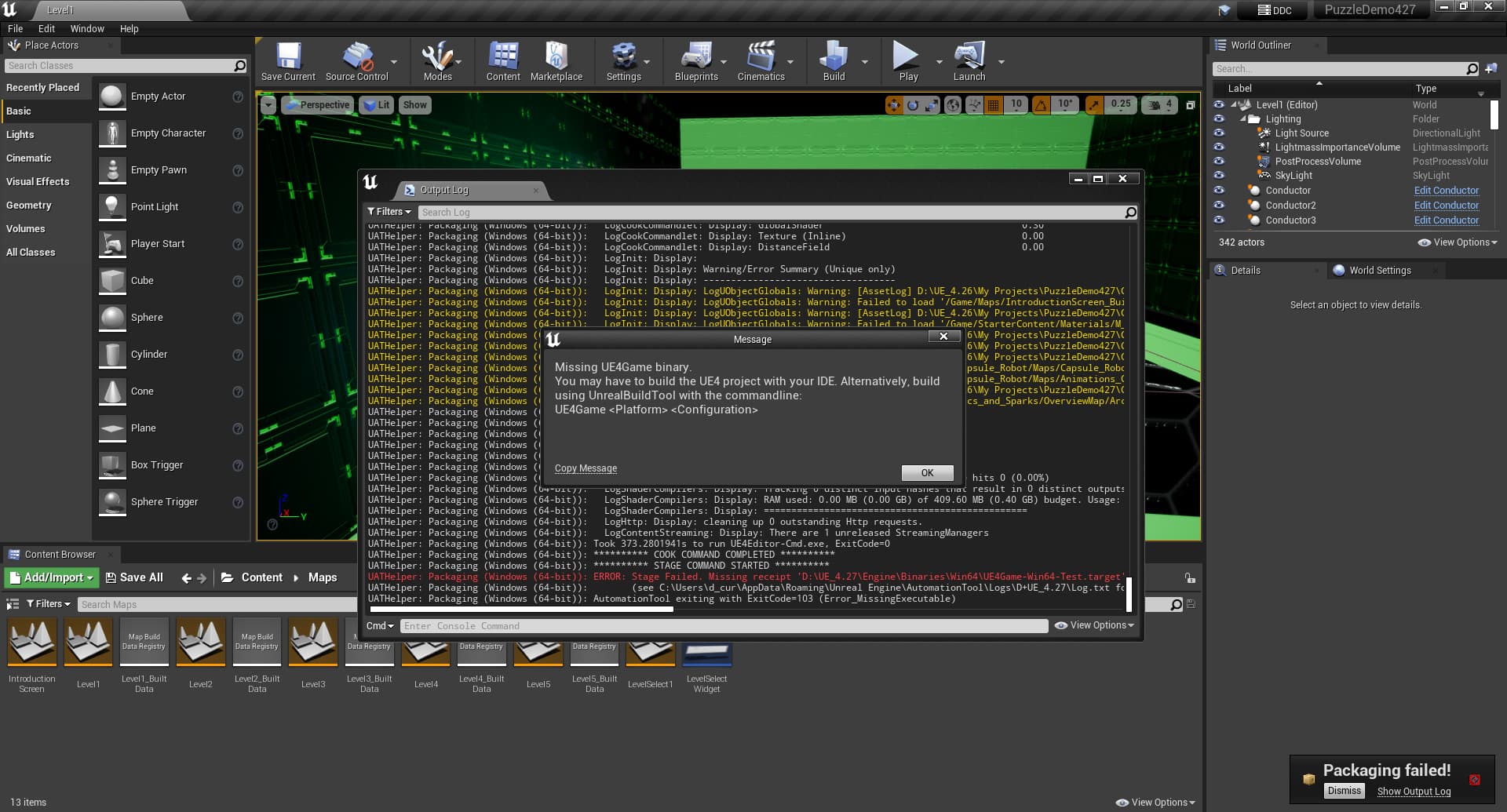
Unreal Engine Forums
Here is what I am seeing, when I try to package and cook: And here is the log, thus far: PuzzleDemo427.log (173.0 KB)
Really to point anyone who can help to the screenshot and log in case anyone missed it here.
 grim ore
how are you doing the package?
ripe carbon
Windows 64-bit, and for a tech demo to share as part of a job application. though i still need to send it to a few friends to help with the playtesting.
Other than that, I'm not sure of the recommended settings.
grim ore
so your not doing a launch or run, but the file -> package option?
ripe carbon
Yep.
grim ore
since this is an upgraded project, have you cleaned out the temporary files in your project folder?
ripe carbon
This is in Unreal Engine 4.27. I'm going to make an Unreal Engine 5.0 version once this one's done. So would I still need to delete temporary files?
grim ore
well your folder shows .26 which is why I am asking
ripe carbon
Oh. That's because 4.26 is where I started, and I upgraded to 4.27 during that process.
grim ore
but you should always delete the temporary folders when having issues like this, intermediate and derived data cache and Binaries then try packaging again
this project has a ton of missing assets according to the log so that is not helping either
ripe carbon
Okay. What would be the best way to do it, since that is one part I haven't touched on? Something tells me it's not as simple as going to the folder by Explorer and deleting that. Come to think of it, I'm not sure which folder to pursge.
grim ore
it is as simple as that
ripe carbon
*purge
grim ore
and the folder this project is in
ripe carbon
Right, but where do I find the stuff within the main folder, which needs to be deleted?
grim ore
those 3 folders I mentioned
ripe carbon
So I can just right-click and delete?
grim ore
yes, they are temporary folders that hold cached data
ripe carbon
And those are Intermediate, Data Cache and Binaries?
grim ore
DerivedDataCache
ripe carbon
Okay. Gonna go look for those.
grim ore
and Binaries will probably be missing if this is not a CPP project
Intermediate is the one that normally causes the problems
ripe carbon
Nope, it's a BP project.
There's no Binaries folder, so I've deleted the other two folders.
Now attempting to package...
grim ore
so I know why its doing wht it is doing, but it shouldnt be doing it
this is from mine LogLauncherProfile: Found promoted target with matching version at ../../../Engine/Binaries/Win64/UE4Game.target UATHelper: Packaging (Windows (64-bit)): Running AutomationTool... UATHelper: Packaging (Windows (64-bit)): Parsing command line: -ScriptsForProject=D:/Projects/tpp427/tpp427.uproject BuildCookRun -nocompileeditor -installed -nop4 -project=D:/Projects/tpp427/tpp427.uproject -cook -stage -archive -archivedirectory=C:/Users/mathew.wadstein/Desktop/test/test2 -package -ue4exe="D:\Epic Games\UE_4.27\Engine\Binaries\Win64\UE4Edi tor-Cmd.exe" -compressed -ddc=InstalledDerivedDataBackendGraph -pak -prereqs -nodebuginfo -targetplatform=Win64 -clientconfig=Development -utf8output
this is from yours [2022.07.08-23.05.41:966][756]LogLauncherProfile: Unable to use promoted target - ../../../Engine/Binaries/Win64/UE4Game-Win64-Test.target does not exist. [2022.07.08-23.05.43:099][756]UATHelper: Packaging (Windows (64-bit)): Running AutomationTool... [2022.07.08-23.05.47:209][ 0]UATHelper: Packaging (Windows (64-bit)): Parsing command line: -ScriptsForProject="D:/UE_4.26/My Projects/PuzzleDemo427/PuzzleDemo427.uproject" BuildCookRun -nocompileeditor -installed -nop4 -project="D:/UE_4.26/My Projects/PuzzleDemo427/PuzzleDemo427.uproject" -cook -stage -archive -archivedirectory="D:/UE_4.26/My Projects/PackageDemo427" -package -ue4exe=D:\UE_4.27\Engine\Binaries\Win64\UE4Editor-Cmd.exe -clean -compressed -ddc=InstalledDerivedDataBackendGraph -pak -prereqs -targetplatform=Win64 -build -clientconfig=Test -utf8output
the first line being the issue that you end up with later, the key being the -Test part
your command line is being told to build for -clientConfig=Test
when it should be Development or Shipping
so maybe toggle your build type here between shipping and back to development if it still has an issue, it shouldnt be doing this unless you made a custom thingy in the project launcher or build settings
 ripe carbon
Okay, I've now set that configuration to Development. Trying again...
grim ore
when its packaging watch the ouput log, you can filter down to just the LogLauncherProfile and UATHelper and you can easily see if its going to fail again
ripe carbon
So far, several warnings, no errors.
ripe carbon
grim ore
when its packaging watch the ouput log, you can filter down to just the LogLaunc...
Good news: the packaging finished successfully. Possibly bad news: there are some warnings. Should I fix those, just in case?
autumn flame
You'll realistically always have warnings, as long as it packaged you're fine
Have a general look at the Warnings if you want, if something seems serious then you can fix it
ripe carbon
Okay. I'll watch for anything strange/suspicious when I playtest.
@autumn flame @grim ore @shy nacelle Thank you for your help, so far!
grim ore
the warnings I saw were for stuff that was probably there and deleted at some point, you might want to delete anything that might have referenced them you arent using anymore and clean up redirectors in all of your folders to try and fix them. you should fix warnings but.... well....
distant siren
I used blocking volume to delimit the area of the map, so that when I fly my helicopter can't go any further. the problem is that when the helicopter collides with the blocking volume it remains hanged . how can it be solved?
 karmic jungle
Hi guys, I'm new to UE4 and I'm doing a small project where I need to create a video game that need not be functional (I just need to show photos of the map). So the thing is, I intend to add some characters to my map from the marketplace but I can't seem to work around the char meshes after downloading them from said place as I have literally 0 experience with this. Tried following online tutorials but the sequence of buttons the ytbers mentioned to click just didn't exist on my interface, doubt it's a version difference but a difference in the file type of the meshes or something.. just about any help is appreciated (preferably on a vc) 
dusk void
hi is anyone able to jump on a vc quickly so i can share my issue. i need some help i have been trying to fix it for HOURS.
if not here is my issue:
my index fingers on retargeted mesh are wonky and distorted
 pallid token
cloud pagoda
Hi, I have a mesh in Unreal that keeps flickering, is there a way I can keep it ...
pallid token
cloud pagoda
Hi, I have a mesh in Unreal that keeps flickering, is there a way I can keep it ...
looks like just z-fighting, can be fixed a few ways... can edit the meshes to remove unseen face areas or maybe just scale up the white band area.
 buoyant graniteBOT
:triangular_flag_on_post: 20Plays#0677 received strike 1. As a result, they were muted for 10 minutes.
dusk void
buoyant granite
:triangular_flag_on_post: **20Plays#0677** received strike 1. As a result, they ...
wat
bro
dusk void
o whoops sorry
peak hare
Is a class a child of itself? If I do 'class is child of' node will it return true for parent class too?
drowsy snow
peak hare
Is a class a child of itself? If I do 'class is child of' node will it return tr...
I don't think it returns true if checking to the same class, and also you can do equals check for classes
peak hare
Yeah its actually a really specific situation where I have a class type A which I change in construction script to class types A1, A2, A3 etc depending on conditions, and in another BP I want to check it is of type Ax but not A
spice ruin
You can always do IsChildOfClass(A) and NotEqualTo(A)
 crimson solstice
So I filled out the UE Trademark License and submitted back to them. The frist time they responded in 30 minutes. I made one error so I fixed it and resubmitted, Now I haven't gotten a response for 12 hours
spice ruin
It's Saturday
drowsy snow
crimson solstice
So I filled out the UE Trademark License and submitted back to them. The frist t...
This is weekend after all
Wait around Monday PST
crimson solstice
I did submit the fixed version yesterday though
drowsy snow
(Or whatever Cary, NC timezone is)
drowsy snow
crimson solstice
I did submit the fixed version yesterday though
Still, wait for workdays.
spice ruin
Epic finishes early on Fridays.
Unless you submitted it at like 9am US time, you'll probably hvae to wait.
crimson solstice
I submitted it yesterday at 2:30pm (CST)
drowsy snow
It's not like the world ends before Monday
crimson solstice
But I'll wait. Can I progress any-further before having a response confirming it's been verified?
spice ruin
That's too late for Fridays.
drowsy snow
crimson solstice
But I'll wait. Can I progress any-further before having a response confirming it...
As far as working on your game goes? Yeah
crimson solstice
Well I'm currently doing the UI and Animations for the startup
Which should display Powered By UE4
drowsy snow
You can put it there in private dev builds or skip it entirely
crimson solstice
I'll progress with it and add it for right now. Not like my game is coming out anytime soon
drowsy snow
Also many devs put the logo for the tools in Credits section these days
crimson solstice
Anyways I'm not good at making complex anims in UE4 that's why most things are handled by Gif's
drowsy snow
crimson solstice
Anyways I'm not good at making complex anims in UE4 that's why most things are h...
Even simple fade in/out?
 drowsy snow
crimson solstice
Stuff like this
drowsy snow
crimson solstice
Stuff like this
Looks like something that can be done with gradient map
crimson solstice
Idk it works the way I'm doing it though
drowsy snow
It'll be far cheaper than flipbooking through GIF frames, and works in high framerate
just a simple small range smoothstep offset by a value in materials and you're good to go
crimson solstice
drowsy snow
It'll be far cheaper than flipbooking through GIF frames, and works in high fram...
Oh I'm not doing it that way
I'm using a simple plugin
plush yew
When I change my shadow quality from low to high the map just become sooooo dark. Doesn anyone know reason why this is happening?

 crimson solstice
 drowsy snow
crimson solstice
Oh I'm not doing it that way
drowsy snow
crimson solstice
Oh I'm not doing it that way
Do it that way, you need at most 2 greyscale texture for in and out.
Once you know how to use materials for UI, it's like unlocking a whole new world
crimson solstice
How much of a difference does it make
drowsy snow
crimson solstice
How much of a difference does it make
HUGE difference. With material using gradient map:
- you'll take much less VRAM real estate with 2 single color greyscale gradient map compared to flipbooking through GIF frame
- Cheaper to render - all you need is a small range smoothstep offset by a scalar parameter you can control in BPs
- Curve clarity - if you don't use compression (or set the compression setting to Grayscale R8 and sRGB disabled), you can get decent curves even with 512x512 texture filling up 4K display.
- Easier to customise - with the smoothstepped gradient map controlling the opacity, you can change the base color with anything, not locked to what the GIF has.
crimson solstice
Well I don't know how to do that
drowsy snow
crimson solstice
Well I don't know how to do that
Pretty easy, really, the prep work is just a greyscale gradient map. It's also common in video editing as well
The idea is to walk through the gradient map from 0.0 (black) to 1.0 (white)
crimson solstice
Also I don't think I'm flipping through gif frame
I'm not sure though. I'm just using a plugin written in CPP
drowsy snow
crimson solstice
Also I don't think I'm flipping through gif frame
A GIF is pretty much a video file, you flipbooking through the frame.
Look into materials and applying it for UI. It works even in mobile, so you don't have to worry about compatibility stuff.
crimson solstice
This plugin also supports mobile and all desktop platforms
dusk void
look dont mean to be rude but i have been messaging on 3 different discord servers and no ones offered to help for the ENTIRE DAY. so can someone pleassssseeeee help me
drowsy snow
crimson solstice
This plugin also supports mobile and all desktop platforms
You do you, I'm just suggesting a better approach 
dusk void
PLEASE CAN SOMEONE HELP ME EVEN IF YOU KNOW LIKE 1% OF WHAT I NEED PLEASE 😞
dusk void
thats not my question
i am trying to fix my retargetd mesh index fingers casue they are broken
drowsy snow
Whoops, I've seen it crossposted, sorry
 chilly gale
Is there a way to get UE 4.26 to bulk export as .PNG please or am I stuck with TGA whic doesn't export packed file correctly
drowsy snow
chilly gale
Is there a way to get UE 4.26 to bulk export as .PNG please or am I stuck with T...
TGA is just an uncompressed RGBA image, what issue do you have with it?
dusk void
@drowsy snow do you know how i can fix it?
chilly gale
it has no layer so the RAOSSS doesn't export
drowsy snow
dusk void
<@325627930484932608> do you know how i can fix it?
Give context.
chilly gale
the file has Red Roughness Green AO and Blue SSS
drowsy snow
chilly gale
the file has Red Roughness Green AO and Blue SSS
Maybe you have it compressed?
dusk void
so i have a retargeted ue4 mesh with mixamo animations. everything is work well besides my charecters index fingers
drowsy snow
Check the texture if it's compressed with DXT1 or something
drowsy snow
dusk void
so i have a retargeted ue4 mesh with mixamo animations. everything is work well ...
Mixamo animations? Yeah...
dusk void
 chilly gale
I just needed to export it in the layer form it's in in UE but tag flatens it
dusk void
drowsy snow
Mixamo animations? Yeah...
yeah
drowsy snow
I'd either blame your retarget settings, or the Mixamo rig.
dusk void
i have checked and tested everything and it still wont work
chilly gale
It's the export that's flattening it, looking at it in UE I have the red Green Blue and Alpha channels to view
drowsy snow
dusk void
i have checked and tested everything and it still wont work
More likely the Mixamo rig source then.
peak vigil
ripe carbon
Did you click the Simulate Physics check? You might want to check the Linear Dam...
this is a problem with the physics handle component 100%, if the wall simulates physics, then grabben component won't go through the wall
 fast grail
is there a good way to automatically generate street clutter like this?

general things like paper, cans, and bottles
better photo of some clutter
 real heath
Depends on performance requirements
But I've seen people use the foliage tool for scatter
It's quick and it works
But there are other ways if there is a tighter performance budget
 mossy ravine
Hi - Is there a way to check if an asset is being used in a project? I'm trying to clean up my project and I'm sure some assets can be deleted but want to be sure
drowsy snow
mossy ravine
Hi - Is there a way to check if an asset is being used in a project? I'm trying ...
A surefire (but can be tricky if you have C++ classes) way is to migrate stuff you need to a clean empty project. It'll bring over referenced assets.
Folder structure is preserved tho, so you could wipe one content folder after migration, and bring back the other content folder with migrated contents
mossy ravine
Thanks - I'll try that 🙂
plush yew
Hey guys I was wonering
Do we need Epic Launcher to download Unreal
Why don't they have a webpage on google like Unity does
I mean i know why but it's kinda stupid
plush yew
yeah i guess
tender pecan
mossy ravine
Hi - Is there a way to check if an asset is being used in a project? I'm trying ...
Just be careful of dynamic references, assets can be spawned from c++ in similar fashion that the GameMode in c++ contains the ThirdPersonCharacter blueprint's c++ class name by default in the ThirdPerson template for example, although it is uncommon but entirely possible, and thus the asset reference finder/gatherer would never detect these.
mossy ravine
tender pecan
Just be careful of dynamic references, assets can be spawned from c++ in similar...
Thanks for the info
tender pecan
Cool. also data driven projects can also have references to assets and their blueprint class names, but it boils down to the same thing. 🙂
 hard fjord
Hey guys, this is a networking question if anyone could share some knowledge. We have a multiplayer game and the server needs reduced collisions to avoid stressing the server, does anyone know the best way to achieve server collisions? I'm investigating fortnite and it seems like their collisions are fairly complex due to the way my charcater walks around objects but I cannot find a good reference point on how heavy collisions should be for multiplayer games (100 player sessions)
astral heart
is it possible for me to cutt off this back half of my landscape that im not using?

 stark talon
My project has become a bloody mess of assets. How can i clean up without accidently deleting stuff thats needed?
Should i create a new project and try to select the stuff that i need? Im afraid things will break.
 lone spire
Hey anyone here that understands c++? need some quick and easy help, that I cant figure it out
ripe carbon
Though I managed to package my tech demo in Unreal Editor 4.27, the packaged game won't launch. Even if I try to run it as an Administrator, it won't open.
What can I do to fix this?
spice ruin
Have you checked the logs?
ripe carbon
Actually, I'm running another package attempt after making a few changes since the last attempt.
No errors but a few warnings.
Hm. Let me try again so I can share the output log in a bit.
 sick cave
For some reason when I'm trying to spawn a character blueprint into a level using a PlayerStart, the camera attached to my character is always facing the same way regardless of which direction the player start is facing
Found a forum post from 2015 saying that if the blueprint is spawned and then possessed by a controller, the players controller rotation overrides the player start?
thin tendon
Is the camera a child of your character in some way?
sick cave
Its attached to a spring arm and the spring arm is attached to the root

so its attached to the capsule compoennt
am i doing the attachment wrong? should it be attached to the skeletal mesh component?
pallid token
stark talon
My project has become a bloody mess of assets. How can i clean up without accide...
try using reference viewer to get a handle on what is needed and what can be reworked/removed?
ripe carbon
Here's the log.
thin tendon
@sick cave Sorry mate what you described sounded like a parent issue. But mine is pretty much set up the same way.
 sick cave
opened a different project and the problem doesnt happen there, gonna dig through it to see what the difference is

fixed it. Had to enable these two settings altho im not sure why it fixed it

can anyone help explain why its doing this? Trying to better understand this. If i have the settings on the left the camera is oriented correctly (facing in the same direction as the PlayerSpawn), but if i have it set to the settings on the right the camera will not be oriented in the same rotation as the player start
ripe carbon
ripe carbon
Here's the log.
Please have a look at the log at your leisure. Once again: the packaging was successful, but I cannot open the packaged program, even if I try to "Run as Administrator."
spice ruin
That would be the packaging log.
What about the log from the game actually trying to start?
sick cave
Nevermind its broken again
 misty rampart
 fringe trout
I am having a hell of a time getting this model to display in game. Is there anyone that has experience with exporting a mesh from blender, to use in an unreal 4 game? Modding .pak files essentially. Any help would be GREATLY appreciated, been stuck on this for legitimately 12 hours
fringe trout
OH leme check rq
Shouldn't be an issue i don't think, it's not for piracy and is supported by the devs since it's all client side
The devs aren't going to walk someone through how to use blender, exporting file bases and how to essentially create character models and file extentions with unreal.
There's a massive difference between "We're okay with client side mods" and "we're going to teach you personally, everything you need to know to modify any unreal 4 game files and models"
Right
fierce tulip
fringe trout
The devs aren't going to walk someone through how to use blender, exporting file...
generally their modding community does though, as there generally is one if the devs support it.
fringe trout
They're usually cooked to be uassets, which is what this is usually
They absolutely do luos
You're correct
I'm just having a hell of a time with someone thing specific that i know would be minor to someone who's experienced in the mattter
I'm getting uassets post cook and when i'm reading the .pak with UE viewer to export specific meshs/files they're all .uassets that the viewer then converts to either .obj or fxb or gltf etc
The good news is, it's not pertaining to that in the slightest
fierce tulip
the bad news is we cant be lenient on modding, while we are community based, we do get support from epic. and game modding is quite dark on the grayscale that is eula
fringe trout
Interesting
Even if it's client side visual modding that's supported by the devs?
So a lot of the other examples i was looking at were simple recolors
Which woulda been easy, but in this case, i wanted to edit the actual mesh of the character
Which, i was also able to do and got it how i wanted it to look, but i'm missing something between how i'm either exporting from blender to ue or how ue recognizes skeletons/meshs causing it to either display incorrect or flat out be invisible
That's why i was wondering if anyone had experience in working with meshs in ue 4, they'd probably have a decent general knowledge of enough related that i could explain was was going on more speficically and they're immediatly notice something small that i'm missing
fierce tulip
I think the ff7r community has quite some tutorials on how its done.
fringe trout
leme try the pure FXB route one more time
drowsy snow
fringe trout
Shouldn't be an issue i don't think, it's not for piracy and is supported by the...
If they really support modding, they should've shipped the Editor through Epic. It's the most legal way to do it.
fringe trout
I don't think the development time to ship an editior that already exists, specifically for thier game that released 10 days ago is going to be one the priority list.
It's the exact same thing as any arcsys game/guilty gear/dbfz/blazeblue.
They're all ue4 that already have an infinite amount of tools related to modding files/systems etc
drowsy snow
Many Unreal Engine 4 games are officially moddable by bringing the editor as mod kit through Epic Games.
Games like Insurgency Sandstorm, ARK Survival Evolved, Mechwarrior 5, etc.
fringe trout
I couldn't imagine even making something more efficient with as much freedoms as the actual in-engine editors have, simply for the sake of reaffirming their already stated views on the matter
drowsy snow
I'm talking about the official capacity. I can talk about the underground method elsewhere.
fringe trout
There's a whole nother can of worms that comes with "official" modding though.
fierce tulip
we can go over these semantics as long as we want, I dont want to keep pointing to the rules we have over and over.
fringe trout
I mean
If it's against the rules i'll absolutely stop
But i haven't seen where it was tbh
drowsy snow
fringe trout
But i haven't seen where it was tbh
If you haven't seen it, underground method can be applicable on other games where the devs didn't give greenlight to modding.
Don't get me wrong, I am a modder at heart.
fringe trout
All i've really seen so far is "Discussing tools for PC mods is OK if they're permitted by the game's creators." Which albeit the devs didn't CREATE modding tools SPECIFICALLY for their game, they did indeed permit them to be used as long as it's client side;
That's where i got confused by the rules
Ah okay.
drowsy snow
fringe trout
All i've really seen so far is "Discussing tools for PC mods is OK if they're pe...
You can use the same method on other UE4 games and that could infringe the EULA and copyright
fringe trout
I was under th4e assumption that i was in a UE4 discord specifically pertaining to using uassets to get a mesh to display
Right "COULD"
This case, does not.
fierce tulip
^
drowsy snow
I feel like you skipped part of my message there 
fringe trout
And if the fxb is invisible? Would the issue be the mesh? or the skeleton?
drowsy snow
The concern behind the rules is that you can apply the underground method elsewhere, and not every devs like it, including some of members in the server.
fringe trout
Idk makoto my guy, i've given you information multiple times that THIS specific dev doesn't mind, they haven't minded in any of thier previous titles, have publicly stated that they're okay with client side modding and have even hosted tournaments with fan/client sided mods active.
I'm not entirely sure why you keep ementioning other devs, other games, other methods, when i've been pretty specific this is for this instance only.
drowsy snow
fringe trout
Idk makoto my guy, i've given you information multiple times that THIS specific ...
Then it should be discussed in their specific community server 
fringe trout
I honestly have, the discord user base ther eisn't the most tech heavy when it comes to the matter of mesh edits, they're super heavy into re-coloring though
Though, the guilty gear community(Same dev) are pretty heavy into that stuff. haven't heard back from anyone there, kinda inactive posting so i figured i'd try here
Make sure it wasn't something super basic i was missing
Right, so when i'm in unreal engine, i can get it to display.
it's when it becomes an uasset that i seem to run into issues
Like the .pak step
That's where my confuion lies
fierce tulip
- I think its quite clear that we are expressing the fact we do not like this kind of content here.
- I mentioned we have to be quite stern about this.
- unless we mods can see black-on-white that the devs are okay with this, we will enforce the dont-talk-about-it rule.
- we already mentioned that their mod-community can probably help out with any issues you have.
- this is a gamedev community, not a game-modding community.
- if I have to repeat any of these, I am going to enforce the rules more stern.
fringe trout
confusion*
Then kick me and ban me bro. The rules very CLEARLY state "Discussing tools for PC mods is OK if they're permitted by the game's creators." I've let you know MULTIPLE times. it's permitted. modding isn't exclusive. It's a form of editing and shipping which aside from the "Creation from scratch" is game dev by literal definition. I also already mentioned that thier community ins't as experienced(guilty gears is(same dev) in mesh edits and actual physical property edits, though that community is a bit on the less active side.
This isn't a "help me mod" request, this is general UE/uasset mesh/skeleton help.
But i guess power trip over it my dude. I'll find help elsewhere
drowsy snow
I guess he skipped me saying underground method can be applied elsewhere... 
fierce tulip
" I've let you know MULTIPLE times. it's permitted."
I just mentioned that if you can show black-on-white the devs allow it, its totally fine.
fringe trout
Sick leme grab a post.
fierce tulip
but the moment it entails tools that can be used to unpack games, I have to put a halt on it.
thin tendon
Talks about power tripping comes of as rude then proceeds to ask for help lol
fierce tulip
¯_(ツ)_/¯
fringe trout
Little bit of a mismatch of events time line there slim
But okayt.
I asked a question about mesh displays in uassets and where it could go wrong and immediately people hard latched onto the rules, and then to the legality, then to hypotheticals, which all of which are irrelevant to the issue
Might be a reading comprehension issue on your part, idk.
thin tendon
I can read fine mate
buoyant graniteBOT
:triangular_flag_on_post: TheyCallMeBird#1343 received strike 1. As a result, they were muted for 10 minutes.
fierce tulip
I'd appreciate it if we can continue in an excellent manner.
cloud pagoda
pallid token
looks like just z-fighting, can be fixed a few ways... can edit the meshes to r...
Already tried both and it hasn't fixed the issue. My mesh is a helix primitive from Maya and none of the faces intersect and there is a empty gap between the helix and the green stick :(
Maybe my only solution would be to fake the helix look using a cylinder and baked high poly, but that seems like an Unecessary workaround for something as simple as a helix primitive
 winged path
I have a question guys, how do u disable having to hold control and alt in order to make selections in the editor viewport window when you hold left mouse down and drag, I have been able to free select for the last year+ on whatever project I was working on, without holding ctrl + alt and without having to ever change a setting until I reformatted the other night when I installed my new processor and mobo
I have been digging through the editor but I can't find the setting, and I don't even really know what it is that I am looking for, setting wise.

 drowsy snow
dusk void
anyone know how to fix?
drowsy snow
dusk void
anyone know how to fix?
Are you not using Vertical Box? Just manually align it in Canvas Panel?
drowsy snow
dusk void
they are buttons
Wrap them in Vertical Box.
dusk void
how?
drowsy snow
Put them all in a Vertical Box widget. Can't get any simpler than that
At least much simpler than manually aligning them all in Canvas Panel
dusk void
im sorry i dont understand what a vertical box is
 old peak
is there a section around here to drop tutorial links? I wrote a tutorial on porting UE2 levels to UE4 the other day.
drowsy snow
dusk void
im sorry i dont understand what a vertical box is
It's a widget, you can add it from the Palette tab in the UMG Editor
dusk void
o ok thanks
old peak
there are lots of really handy things in that list ^^
drowsy snow
old peak
is there a section around here to drop tutorial links? I wrote a tutorial on por...
#released but I don't think many people doing total conversion in UT'04 and remastering it into a standalone game
Often times they rebuilt the levels from the ground up as opposed to porting it as is
old peak
ah fair enough, i'll just leave it floating around the webs then, people who need it will find it ^^
tbh I hate devs that don't port and just rebuild from the ground up lol I can tell when that chair isn't where it used to be!
ripe carbon
Okay, here is the latest version, with only the LogLauncherProfile and UATHelper filters. To recap, I packaged the demo and the packaging finished successfully. But, I can't launch the demo itself, not even if I try the "Run as Administrator" command. What can I do to make the program launch?
 ripe carbon
I wonder if an array-based command or node would help in part.
As well as a Boolean or integer variable to determine if the player is carrying anything or not.
Kinda like a toggle.
thin tendon
Maybe socket the item to the hand. And use something like IK to simulate physics or whatever. So the animation knows where to find the edges of the object. Then make a closed hand animation that would be closed enough that it finds the outer edges of all your objects.
 void iron
hit location is somehow not working what reason are there
or at least the niagara and sound doesnt work
but it does before i copy and paste every sound and niagara to line trace
 spring abyss
Helloo
Does anyone know how to make in app game shops like pubg , fortnite ,free fire
??
And How to make microtransactions?
oak patio
Yes someone does, and you are going to have to look at the specific api documentation for your desired platform
If you don't want it to run through steam, kind of like destiny does with its silver bundles, then you will have to host servers and create your own secure backend for it
drowsy snow
spring abyss
How to make that?
Refer to the API documentation that you use. It's platform specific.
tender pecan
dusk void
**anyone know how to change animation based on what the** *player is holding*
Yes. you have to use animation state machines, to blend between the different locomotion states while holding a specific weapon type, then you can play montages while in those states for specific once off animations like combat/melee etc. Lots of examples out there to do this.
drowsy snow
tender pecan
Yes. you have to use animation state machines, to blend between the different lo...
Alternatively exposing the sequence to play and set it with a variable.
plush yew
is there any way to make the pawnsensing thing longer, so the ai can see further? i can change the vision angle, but i want it to see its sides too, not just what's in front of it

i also tried to change the radius, but the ai will see the player even if he's a pretty big distance above the ai...i guess it has to stay this way
 knotty salmon
Where exactly do I ask questions about the localization system?
real heath
This is a general channel you can ask it. But you could also try UMG maybe I suppose?
Don't know though
UMG isn't a perfect match, but probably dealt with somewhat frequently with umg
 crystal patrol
guys how do i attach the camera from which the player is looking to the head
cuz now when i crouch ingame the camera doesnt follow
character crouches but camera doesnt
 rich kayak
Hey guys. There is a bug that me and a friend is going through that is:
Sometimes for no reason, all dropdown stuff (like when I right click on something, there must show a window with something, like which node I want to insert, which notify, which variable. Etc) it just simply dont show. We need to restart engine to have those stuff back. And we are with different engines, different Graphic cards, different hardwares and software but the same bug.
Does anyone went with this and know how to solve this annoying bug?
PS: I cant show the bug. Because when I print, stuff is there. But on my screen there is nothing there.
rich kayak
crystal patrol
character crouches but camera doesnt
you did this for crouch?
 crystal patrol
rich kayak
you did this for crouch?
crystal patrol
rich kayak
you did this for crouch?
yes
rich kayak
crystal patrol
yes
Where is attached your camera boom?
crystal patrol
what do you mean
crystal patrol
rich kayak
Where is attached your camera boom?
?
rich kayak
crystal patrol
what do you mean
its on capsule or character or head or...?

 rich kayak
attach your camera to the character head then, or create a socket for camera on character head
crystal patrol
 crystal patrol
rich kayak
attach your camera to the character head then, or create a socket for camera on ...
crystal patrol
rich kayak
attach your camera to the character head then, or create a socket for camera on ...
i did make a socket
but now im not able to look up or down
the camera is attached to the socket and follow the head of the character
not my mouse
rich kayak
crystal patrol
i did make a socket

 crystal patrol

 rich kayak
yw mate, but I see you can have more issue with it in future.
This kind of first person is handled by animations and other stuff
crystal patrol
wdym
rich kayak
you may need it in future in some occasions just bare in mind
 rich kayak
crystal patrol
wdym
rich kayak
crystal patrol
wdym
you will see when you get time working on it.
true first person is tough.
crystal patrol
hmmm
another problem for another day i guess
i started with unreal 2 days ago lol
so i have made a map, character movement and animations aswell ass added equip/uneuipp animations
next thing is ADS and bullet physics
Any recommendations on videos=
?
rich kayak
crystal patrol
Any recommendations on videos=
yes buddy, hang on
rich kayak
crystal patrol
Any recommendations on videos=

Unreal Engine
Simple and realistic ballistics simulation plugin.
crystal patrol
is there ads in that too?
rich kayak
You are already fps. The ADS will be related to weapon pose and other stuff. Not setup related
crystal patrol
whaaaaaaat
rich kayak
but this will handle the bullets physics, penetration, damage, collision, etc.
crystal patrol
aaww yeah
thanks
but how do i set up ADS?
ive been watching this but i get lost at 7:30https://www.youtube.com/watch?v=JGs5VP_7l1k&list=PLfCrVJxHeD5biT1gPL0IAsmWLVwOJWVCq&index=10&ab_channel=CyberLOD

This is a tutorial series where i will show you guys how to setup a true FPS character with the following features:
- Camera system.
- Locomotion setup.
- Turn in place mechanic.
- Hand IK system.
- Weapon ADS (Aim down sights) system.
- Weapon sway mechanic.
Link for the TrueFPS_Asset: https://drive.google.com/file/d/1oPU___i1wyp9bGWxu-eiiA0e...
 trim glacier
Hey, I have an in engine map editor which works across multiple platforms and save the map in a simple Json file with the instructions to build the level.
I want to create a cross platform mission portal. How save is ist to upload/download the Json to a database and open/read the file on a other PC/Console.
I would need to check the files for any virus or hijacking code or what else? Anyone dealt with something like this before?
 hollow flax
So for an hour now ive been trying to get UE 4.27.2 to start but it just wont
ripe carbon
Okay, so here is an update on my packaging problem (https://forums.unrealengine.com/t/help-cant-package-ue-4-27/599549/15).
I set the packaging mode to Development, fixed or removed certain widgets and cleared other errors that prevented the program from being packaged. The program packages, but I can't run it, even if I try to run as an administrator. The person who posted replies to this forum suggested missing .dll files and I have two of them, so far; though I could probably find and copy and paste those .dlls from an earlier version of the project.
I'm not sure what he means by saying, "I think the windows exe when run creates a log beside it," though. Oh, and I have several downloaded content, most of which was free. I am allowed to use downloadable, pre-made objects as long as the demo is functional.
 thick roost
Hello I have a problem, my friend turned on his pc and litterally, all his project files are gone, they arent in folders or file explorer, that was like 100's of gb's of project files and assets, does anyone know why, he lost a big project and needs it back badly
 wise trail
Do they use source control?
thick roost
He said hes pretty sure it does
wise trail
Well seems like a strange thing to just happen. Without source control cant imagine youll have much luck recovering your files.
 hollow wyvern
Im not the only person that its happened too
Bro 2 years
2 years of work
GONE
Checking my other drive they deleted everything there as well
fierce tulip
as someone who lost years of work back when back-up hosting was barely a thing and too expensive, and plugging in a new hdd caused a fritz and killed all my drives, i know that feeling.
that is why I back up my work-related drives trough version control and back-up hosting nowadays.
if you know which drive the files where on, in some cases you can use a hdd-recovery service to see if you can re-obtain the files.
if its an ssd, its near impossible and/or super expensive. (at least, last time I checked)
real heath
hollow wyvern
Checking my other drive they deleted everything there as well
Do you have any idea what happened? Has windows recovery run? Was it ransomware? Is anything else missing? Is your hard drive failing? Knowing what happened will make it easier to decide next steps. You can right click a folder, go properties, and with the right edition of windows there is a tab called previous versions, where you might have snapshots.
Version control isn't a backup, but it sure does help in these situations to have it running on a other pc
Definitely checkout those HDD recovery services
Usually around $1-2k, but to save 2 years of work is worth it to me
<@&213101288538374145> ∆
buoyant graniteBOT
:no_entry_sign: RapRap#7006 was banned.
fierce tulip
jfc, the moment I walk away we get discord spam XD
real heath
Lol
They were waiting!
Out of curiosity how high is the verification level on this server? Does it need a verified phone?
fierce tulip
i think one lower, not sure. @maiden swift knows.
.Strike Luos for cold-at-ing an admin
 maiden swift
It's set to High.
real heath
Lol
fierce tulip
whistles
real heath
Yeah right, just curious how effective the levels are
fierce tulip
we have had a few moments where we set it higher, but mainly when we had uhm what are they called?
raids
maiden swift
And it's not a guaranteed defense against raids. Bots can have verified phones.
fierce tulip
captcha's count for nothing XD
real heath
I'm sure it helps with the less sophisticated hits though. Better than nothing
fading wolf
I can't figure why the variable isn't the same on all clients if that variable is replicated.
I thought it was because of the variable determining the tpye wasn't replicated, but that didnt fix it. Any ideas>?
 thin tendon
My best guess without more information. Is that you just fired a damage event to deal 10 damage. The server is showing the adjusted value of 20 but the clients have not tried to update the value yet as they are both showing 30.
fading wolf
thin tendon
My best guess without more information. Is that you just fired a damage event to...
The only 2 numbers are 20 and 30. The light attack doe 20. That's the attack I'm performing but it sounds like my clients think its a heavy attack and take 30 damage? but that attack type variable is also replicated
 thin tendon
ok so as I understand it now. You are dealing 20 damage. The server says its 20 damage. But the client reads it as 30 damage?
What I would do to trouble shoot a problem like that. Is use print strings (bread crumbing). To show the value on its journey. So after being called to deal damage print. After being sent the other actor print. Anywhere its used print. So you can see the exact point at which it changes.
fading wolf
thin tendon
What I would do to trouble shoot a problem like that. Is use print strings (brea...
Thanks that was it. I adjusted the numbers to make but yea it was to do the fact that the client was doign a light attack but the server thinks its a heavy attack
 thin tendon
Perfect. I am glad you figured it out mate
 bronze crane
I'm getting jerky movement when I move an actor or component along a spline. I changed from using "get location at distance along spline" to "Get location at time" but this didn't seem to help. This event is run on a timer with an interval of .01

I also set the spline's reperam steps to 50 and even 100 but no such luck
 lusty dew
should I buy a course for studying Unreal?
drowsy snow
lusty dew
should I buy a course for studying Unreal?
https://learn.unrealengine.com is free.
lusty dew
drowsy snow
https://learn.unrealengine.com is free.
the course bundle is 96% off, from $850 (for 5 courses, each costs around $190) to $34
I was thinking that it's a great deal, and I should try to get it before the sale ends
drowsy snow
lusty dew
the course bundle is 96% off, from $850 (for 5 courses, each costs around $190) ...
Udemy?
It's a fake sale.
drowsy snow
lusty dew
it's from stacksocial
Still, $850 for a course is ABSURD.
lusty dew
why is it if it's from udemy, then it's a fake sale anyway?
lusty dew
drowsy snow
Still, $850 for a course is ABSURD.
for 5 courses, each costs $190
drowsy snow
Not just udemy, many sellers tend to fake sales by extrapolating the price to make it seem that it's on high sale.
drowsy snow
lusty dew
for 5 courses, each costs $190
https://learn.unrealengine.com and you'll save up money on other things, because it's free.
lusty dew
drowsy snow
https://learn.unrealengine.com and you'll save up money on other things, because...
does that include things like learning how to code in C++ though?
what about things like multiplayer development and cut-scene designing?
drowsy snow
lusty dew
does that include things like learning how to code in C++ though?
Yes, and yes.
I know you haven't really looked at it.
lusty dew
yay!
real heath
No course will cover everything in great detail, some courses will give a quick intro to a lot of different areas, while others will deep dive specific topics. That's why learn.unrealengine.com and dev.epicgames.com are so good. You can deep dive lots of the areas with many courses
Then, you can buy a course on a specific path if you feel you want it
lusty dew
real heath
Then, you can buy a course on a specific path if you feel you want it
mmm, those courses I talked about before are for beginners though. Also, can you buy specific courses for specific types of games on learn.unrealengine.com?
nevermind, that is a no
real heath
you can't buy anything on learn.unrealengine.com, it's free
and the newer site https://dev.epicgames.com/community/learning?industry=games also has lots more, community and epic created ones

Epic Developer Community
Epic Developer Community Learning offers tutorials, courses, demos, and more created by Epic Games and the developer community.Learn UE and start creating today.
Anyway, it's up to you whether to buy a course, we're just highlighting there are a lot of great free resources to learn from
fierce agate
I’m making a shiny material but why is there black thing on it?
Like it supposed to be all shiny

I tried it on plane object
It’s full of black
dusk void
HELP. i have a third person gun system atm but when i shoot the bullet goes straight out the gun. i want the bullet to go in the direction the player is looking for the VERTICLE axis only
dusk void
fierce agate
I’m making a shiny material but why is there black thing on it?
Like it supposed...

 dusk void
r u using lumen?
fierce agate
dusk void
r u using lumen?
What’s that?
fierce agate
dusk void
actual play the game
Same thing
dusk void
put something like a cube where the black is in the reflections and see if u can see it
fierce agate


 fierce agate
dusk void
do this
fierce agate
dusk void
do this
It didn't work
Imma try turning on the planar in a project settings
dusk void
it might be an issue with ur settings
pallid token
bronze crane
I'm getting jerky movement when I move an actor or component along a spline. I c...
test it in tick instead of a 0.01s timer? if it is smooth in tick, then you may just need to replace delta world seconds for your interp with your real delta time which could be something like 0.01s?
 tawny shard
When i do SetGamePaused, what exactly happaning? Is it just block Actor's Tick method? If i have function that is called through TimeManager, will it still run?
 sleek fable
Hello guys I replaced some of my textures in my project but still when I try to delete the old folders I'm still getting the references

How can I fix this without getting redirectory error in the build thx in advance
sleek fable
sleek fable
Hello guys I replaced some of my textures in my project but still when I try to ...
Update on the problem: I used fix up redirectors in folder and all the reference warnings have gone, I hope it was a healthy operation otherwise I'm gonna delete my workspace and take the project from source control again
fierce tulip
rightclick on the content folder in the content browser, and fix up redirectors.
something you should do whenever you move files.
sleek fable
fierce tulip
rightclick on the content folder in the content browser, and fix up redirectors.
Thx much appreciated, Do you think it will give me a problem while building the project?
sleek fable
Ok thx for the help I wish you great week sir
fierce tulip
likewise
pallid token
tawny shard
When i do SetGamePaused, what exactly happaning? Is it just block Actor's Tick m...
there is a bool called tickwhilepaused? which you may need to experiment with. I use it to allow a hud menu to be able to unpause.
tawny shard
I do set it
so that's where comes the question
i have an Actor on scene who should pause and unpause game
but when i do pause - it seems rather his functions stops to work, or TimeManager just pause any functions
 pearl abyss
OK I'm a bit stumped about this one - in UE4, there's the PhysX vehicle system, but the API documentation says it's deprecated starting with 4.27. Documentation tells me to use Chaos Vehicles instead. But those are marked experimental by Epic and may break at any moment.
Is there no stable/supported vehicle system in 4.27 by consequence?
real heath
Physx vehicles is the one to use in ue4.27
It's deprecated as they knew it was changing to chaos physics in 5.0
When you upgrade your project to 5.0 you'll need to update your animbp and your vehicle blueprints
You can also optionally use the ue4.27 chaos build, but chaos saw significant improvements in the 5.0 release afaik
pearl abyss
OK but it's gonna work correctly as long as I stay with 4.27?
real heath
Yes
pearl abyss
the docs feel a bit ambiguous about this, but I may be misreading
gotcha. thanks for the info! have a cookie 🍪
real heath
No, there were a few false starts with the cutover to chaos, so it got a bit muddy
pearl abyss
oh one last thing
the naming "PhysX" is just an artifact, those vehicles don't require an nvidia driver present, right?
real heath
pearl abyss
the naming "PhysX" is just an artifact, those vehicles don't require an nvidia d...
It's not an artifact, it uses the physx library. But no, it does not require an NVIDIA card. Physx has very wide compatibility across platforms
 vague jay
I have question about TCHAR_TO_UTF8, it returns an empty string in a packaged version of the game, and it's working in the debug build, is there any workaround for that?
 latent sentinel
Hey guys,i'm having an issue with the buoyancy. I want my boat to float smoothly. I've set the pontoons bunch of times,i've been playing with the rest of the numbers as damping and stuff,tried the default ones,none of those works for my boat. Basically when i drop him in the water it flips and stays flipped. Here's the issue
 night birch
Any idea why does it pop up?
 tawny shard
night birch
Any idea why does it pop up?
tawny shard
night birch
Any idea why does it pop up?
maybe u didn't include module in dependency?
bronze crane
pallid token
test it in tick instead of a 0.01s timer? if it is smooth in tick, then you may...
Hmm, solid suggestion but that didn't seem to work. I used a simple branch with a boolean to gate the events in the event tick, but I still get pretty jittery movement across a straight line. I tried using just one spline point and multiple but the result is the same.
heady ridge
anyone got some good beginners guide for the basics concepts of UE4?
not those "create this game step by step" ones, not a fan of learning that way
heady ridge
drowsy snow
https://learn.unrealengine.com
thank you!
astral heart
unreal 4.27 keeps crashing on start up. I get to 45% initializing then crashes. Was working fine yesterday but UE crashed over night and wont open now.
 crystal patrol
Guys, i have aplugin called AGR dowloaded and activated but all the content isnt there
Does anyone know why
 shy brook
hello
new to ue4
i made a gun and it's working fine except i can only turn it sideways
i cant aim up or down
drowsy snow
crystal patrol
Guys, i have aplugin called AGR dowloaded and activated but all the content isnt...
Typically plugins from marketplace don't come with content/asset files, but make sure you have plugin contents visible.
Also check the store page if there's a link for example project files for the plugin
crystal patrol
shy brook
hello
bro im new too but i think you can make a socket in your hand so that i follows your hand or head if the camera is attached to the head
crystal patrol
drowsy snow
Also check the store page if there's a link for example project files for the pl...
ok
shy brook
crystal patrol
bro im new too but i think you can make a socket in your hand so that i follows ...
the socket for the gun is the right hand
it follows the movement side to side but not up and down
apparently i gotta change the spine rotation in animation bp
crystal patrol
but you can move your camera up and down?
bro i started w ue 2 days ago
you prob know more than me
astral heart
astral heart
unreal 4.27 keeps crashing on start up. I get to 45% initializing then crashes. ...
disregard... if anyone comes across this error "assertion failed" try this
Delete
Intermediate/CachedAssetRegistry.bin
drowsy snow
astral heart
disregard... if anyone comes across this error "assertion failed" try this
Dele...
Not "assertion failed" by itself because it's from check(false)
What assertion is failing should be the focus
drowsy snow
drowsy snow
shy brook
where do guys get animations from?
I make one myself from scratch
crystal patrol
does anyone know why the skeletons are not compatible
drowsy snow
Well, not necessarily from scratch, but keyframed by hand with loose reference
crystal patrol
