#ue4-general
1 messages · Page 1172 of 1
 real heath
Do you have previous assignments or something you can cobble together into a portfolio and talk about what each demonstrated?
 plush yew
I have a few environments made in unity
one is an interior house and other is a terrain
and 1 game I made in unreal
real heath
Surely you can leverage some of that to demonstrate a broader knowledge, experience with other engines, blah blah blah.
 oak patio
rip if your company is in this discord btw
real heath
in some of the captions and blurbs around your images talk about the challenges with adapting to the new engine, what you learned
 timber yacht
Hello
what does LogTemp mean?
when your trying to display something in the output log
real heath
You log under categories, so you can filter error messages
timber yacht
oh ok
real heath
LogTemp is a catchall for when you haven't setup a suitable category yet, and just need to bash something out
timber yacht
oh I see
 fallow hornet
Anyone have an idea why dlss would suddenly stop working?
 flat turret
what's the difference between Hierarchical Instanced static mesh vs Instanced static mesh?
 unique kraken
Didn't check that yet
 tender pecan
flat turret
what's the difference between ***Hierarchical Instanced static mesh*** vs ***Ins...
tender pecan
flat turret
what's the difference between ***Hierarchical Instanced static mesh*** vs ***Ins...
HISM is more reliable when it comes to per instance LOD and culling. and is used widely for procedural foliage placement. It also yields better performance with large amounts of instances, specially if you disable them being able to be selected in the editor ( if adding instances using an editor tool for example )
 floral cliff
Just in case... your gpu is rtx, right ?
 azure reef
Hi guys! When using AR after a few seconds the app crashes and I see this warnings.

OpenXR plugin is installed though
 polar sorrel
guys random question, if you do answer please tag me, why did you choose Unreal Engine 4 over other engines, I myself have to work in it because of University, but i'm slowly moving to unity seems like, whats making you stay with UE4 ? Pros and cons if you have the time
oak patio
polar sorrel
guys random question, if you do answer please tag me, why did you choose Unreal ...
pros: free for the month assets on the store, less installing tons of packages, faster prototyping, access to source code, easier UI, lots of cool new innovations in new engines
cons: sometimes random crashes, useless crash messages without the 20smthn GB debug symbols, large engine size, poor documentation
 drowsy snow
polar sorrel
guys random question, if you do answer please tag me, why did you choose Unreal ...
drowsy snow
polar sorrel
guys random question, if you do answer please tag me, why did you choose Unreal ...
Pros
- Great graphics out of the box
- Blueprints! (way more robust than Bolt)
- Material graph similar to BPs, allows for creating cool materials without much HLSL knowledge
- Built in tools that in Unity you would have to get it from Asset Store
- Built in optimisation tools
- Robust animation system
- CONTROL RIG!!
- Engine source code available at no extra cost
- Freebies every month
- Dark mode built in since 2014
- Robust networking
- No tiering - Everyone got the same access to the engine and its source code
Cons:
- C++ can be scary for Unity C# dwellers because it require closing the editor to compile properly.
- You have to defenestrate pretty much anything you know about Unity
- Making custom lower level shaders can be tougher than it should be
- Lackustre documentations
oak patio
FWIW unity also has a node based material graph fyi
honestly there the biggest one for me is the dark mode lmaoo
drowsy snow
oak patio
honestly there the biggest one for me is the dark mode lmaoo
Imagine having Dark mode only for Tier 1 sub until user pressure/hacks
Oh yeah, tiers
polar sorrel
I was thinking of doing a pixel gqme in Ue4, and I'm a newbie, so I don't think there are a lot of tutorials for that, and it seems like for pixel games unity is better
drowsy snow
polar sorrel
I was thinking of doing a pixel gqme in Ue4, and I'm a newbie, so I don't think ...
Yes(n't)
You can still use UE4 for pixel 2D game, but things might be a bit overkill (e.g. the app size)
And I think if you're using UE4 for pixel type game, might as well go for 2.5D
polar sorrel
But yet again, not enough documentation online for that
drowsy snow
There's still Godot for more lightweight 2D games, so yeah
polar sorrel
You think godot is better than unity?
drowsy snow
polar sorrel
You think godot is better than unity?
Yes, because Godot is free open source
polar sorrel
drowsy snow
Yes, because Godot is free open source
Sorry but what does that mean
oak patio
you get the code of the engine
and you dont have to pay
unity you have to pay past a certain earnings threshhold, godot you dont
and you get the engine code with godot
polar sorrel
oooh thank you i get it now
 fresh pulsar
Okay so I'm using like vinterp to and stuff I just I have a problem, my enemies are straight up clipping through walls, not sure how to deal with that
also they slow down the closer they get to the player which I don't like
is there like an alternative way to track the player and move towards them within a certain range maybe?
as opposed to checking 2d vectors and then using vinterp
 spice ruin
A navmesh?
fresh pulsar
spice ruin
A navmesh?
That seems like a lot more work than it's worth, surely there would be something way simpler
or maybe idk a way this could work without the enemies clipping through the wall collision
spice ruin
Well, it's the simple way to not have to implement navigation yourself...
spice ruin
Or you could do a capsule trace from your enemy to your character, if it fints a blocking hit, don't move towards the player.
fresh pulsar
Also for some reason vector2d is completely ignoring like up and down distance
spice ruin
fresh pulsar
also they slow down the closer they get to the player which I don't like
And this is probably because you divide the distance by a set amount (enemy-to-player / 100 say) instead, you should do enemy-to-player.normalise * speed / delta time
Well vector2d only has 2 dimensions, it's right there in the name.
(though the d here stands for double)
fresh pulsar
@spice ruin this is the exact code
 fresh pulsar
spice ruin
Well vector2d only has 2 dimensions, it's right there in the name.
fresh pulsar
spice ruin
Well vector2d only has 2 dimensions, it's right there in the name.
Which should be like, left/right, and up/down right?
spice ruin
No, I believe that node would be left/right and forward/backward.
fresh pulsar
spice ruin
No, I believe that node would be left/right and forward/backward.
That's... weird is there a way I can force it to be up/down and left/right? it's sorta what I need for a 2d game
spice ruin
Just do 3d instead of 2d...
fresh pulsar
oh and also.. need to fix the collision still on top of that
fresh pulsar
spice ruin
Just do 3d instead of 2d...
okay
spice ruin
If it's 2d, the depth will be the same anyway
As in, if your game is 2d, everything is probably on the same vertical plane.
spice ruin
🙂
fresh pulsar
spice ruin
🙂
big thanks
spice ruin
No worries.
 gusty ruin
Have a question, like if i cooked a material asset in 4.26 , is it possible to use it directly in a shipping project built with 4.27 ? Any ideas will be appreciate.
 gilded mason
Heya, looking for some help with post processing and just trying to figure out where to start - it's kind of a lidar/scan lines effect (ref attached)

 real heath
gilded mason
Heya, looking for some help with post processing and just trying to figure out w...
real heath
gilded mason
Heya, looking for some help with post processing and just trying to figure out w...
Maybe try starting with clamping scene depth, a bit like celshading? Interesting effect idea thiugh
gilded mason
real heath
Maybe try starting with clamping scene depth, a bit like celshading? Interesting...
oooh good shout!
- googles clamping scene depth *
😄
real heath
Look into cell shading. That clamps color. Same idea but clamp scene depth
It'll be a start, but won't be exactly what you are after
gilded mason
I've been researching it for a while - at one point i was even converting the 3d objects into LCD and feeding it through the built in plugin
boy, did that go wrong hah
real heath
If it absolutely has to be a post process effect, you could try reprojecting a screen coord back to world space and then running something like triplanar mapping of a grid texture
Might be expensive though
gilded mason
ooh i remember reading something about that - yeah might've been the weight of it that put me off
but i've decided to do everything to make it work first and THEN optimize
real heath
You could make it a material function and add it to your master materials. Then turn it on and off with a material parameter collection
Rather than post process
I dunno. A million ways to start tackling it.
But each has limits and cost
I wonder if you could do something with the scene distance field
gilded mason
all brilliant shouts - I owe you a beer already 🙂
real heath
Lol all good
gilded mason
real heath
I wonder if you could do something with the scene distance field
ooh looking into it that might be good
i wonder if that + some post processing would work
 scarlet folio
What type of admob ads are working in UE4 without plugins?!
 shell harbor
gilded mason
Heya, looking for some help with post processing and just trying to figure out w...
shell harbor
gilded mason
Heya, looking for some help with post processing and just trying to figure out w...
ok, not gonna be useful what I am gonna say
BUT MAN, that looks amazing!
gilded mason
shell harbor
ok, not gonna be useful what I am gonna say
BUT MAN, that looks amazing!
Right?! It's from a guy called ryoichi kurokawa. I found the actual post processing effects he used, albeit for after effects :/
shell harbor
hmmm
now I want to know how to make it as well 😂
 thin tendon
Does anyone know where I can find a list of all the available console commands?
 cinder cargo
how can i look at all content at the same time
 ashen delta
I can't open up any of my projects! over £40,000 worth of commissions I can't access. It crashes on loading up! PLEASE HELP
Unhandled Exception: 0xe06d7363
KERNELBASE
VCRUNTIME140
UE4Editor_ImageWrapper
UE4Editor_ImageWrapper
UE4Editor_ImageWrapper
UE4Editor_ImageWrapper
UE4Editor_ImageWrapper
UE4Editor_ImageWrapper
UE4Editor_ImageWrapper
UE4Editor_ImageWrapper
UE4Editor_ImageWrapper
UE4Editor_Engine
UE4Editor_Engine
UE4Editor_Engine
UE4Editor_Engine
UE4Editor_Engine
UE4Editor_Engine
UE4Editor_Core
UE4Editor_Core
UE4Editor_Core
kernel32
ntdll
ashen delta
I did a windows update yesterday and updated the plugin pro instance. I then wen to open the project I was working on the day before and it crashed on booting up. I then tried other projects. same issue but those other projects are on 4.26 & 4.27
ashen delta
 fierce tulip
without installing the symbols, that crash error is useless.
fierce tulip
without installing the symbols, that crash error is useless.
I'll install them now.
 fierce tulip
good, now wait (or find) someone who can help you go trough those errors. if it was something basic I could point the issue out, but this is beyond my knowhow
ashen delta
fierce tulip
good, now wait (or find) someone who can help you go trough those errors. if it ...
ok thank you.
Unhandled Exception: 0xe06d7363
KERNELBASE
VCRUNTIME140
UE4Editor_ImageWrapper!FPngImageWrapper::user_error_fn() [D:\Build++UE4\Sync\Engine\Source\Runtime\ImageWrapper\Private\Formats\PngImageWrapper.cpp:516]
UE4Editor_ImageWrapper!png_error() [D:\Dev-Enterprise\Engine\Source\ThirdParty\libPNG\libPNG-1.5.2\pngerror.c:86]
UE4Editor_ImageWrapper!png_chunk_error() [D:\Dev-Enterprise\Engine\Source\ThirdParty\libPNG\libPNG-1.5.2\pngerror.c:206]
UE4Editor_ImageWrapper!png_chunk_benign_error() [D:\Dev-Enterprise\Engine\Source\ThirdParty\libPNG\libPNG-1.5.2\pngerror.c:236]
UE4Editor_ImageWrapper!png_crc_finish() [D:\Dev-Enterprise\Engine\Source\ThirdParty\libPNG\libPNG-1.5.2\pngrutil.c:239]
UE4Editor_ImageWrapper!png_handle_IHDR() [D:\Dev-Enterprise\Engine\Source\ThirdParty\libPNG\libPNG-1.5.2\pngrutil.c:564]
UE4Editor_ImageWrapper!png_read_info() [D:\Dev-Enterprise\Engine\Source\ThirdParty\libPNG\libPNG-1.5.2\pngread.c:295]
UE4Editor_ImageWrapper!FPngImageWrapper::LoadPNGHeader() [D:\Build++UE4\Sync\Engine\Source\Runtime\ImageWrapper\Private\Formats\PngImageWrapper.cpp:438]
UE4Editor_ImageWrapper!FPngImageWrapper::SetCompressed() [D:\Build++UE4\Sync\Engine\Source\Runtime\ImageWrapper\Private\Formats\PngImageWrapper.cpp:211]
UE4Editor_Engine!FTextureSource::GetMipData() [D:\Build++UE4\Sync\Engine\Source\Runtime\Engine\Private\Texture.cpp:1180]
UE4Editor_Engine!FTextureSourceData::GetSourceMips() [D:\Build++UE4\Sync\Engine\Source\Runtime\Engine\Private\TextureDerivedDataTask.cpp:206]
UE4Editor_Engine!FTextureSourceData::GetAsyncSourceMips() [D:\Build++UE4\Sync\Engine\Source\Runtime\Engine\Private\TextureDerivedDataTask.cpp:229]
UE4Editor_Engine!FTextureCacheDerivedDataWorker::DoWork() [D:\Build++UE4\Sync\Engine\Source\Runtime\Engine\Private\TextureDerivedDataTask.cpp:572]
UE4Editor_Engine!FAsyncTask<FTextureCacheDerivedDataWorker>::DoWork() [D:\Build++UE4\Sync\Engine\Source\Runtime\Core\Public\Async\AsyncWork.h:272]
UE4Editor_Engine!FAsyncTask<FTextureCacheDerivedDataWorker>::DoThreadedWork() [D:\Build++UE4\Sync\Engine\Source\Runtime\Core\Public\Async\AsyncWork.h:296]
UE4Editor_Core!FQueuedThread::Run() [D:\Build++UE4\Sync\Engine\Source\Runtime\Core\Private\HAL\ThreadingBase.cpp:996]
UE4Editor_Core!FRunnableThreadWin::Run() [D:\Build++UE4\Sync\Engine\Source\Runtime\Core\Private\Windows\WindowsRunnableThread.cpp:86]
does anyone here have any idea why I'm getting this?! I can't open up any of my projects!!! PLEASE HELP
plush yew
gilded mason
Heya, looking for some help with post processing and just trying to figure out w...
Have you looked into Niagara? If you're gonna create VJ material i guess performance wouldn't matter that much and i trieda while back in niagara to achieve kinda of a wireframe effects but with points from the geo of a mesh
gilded mason
plush yew
Have you looked into Niagara? If you're gonna create VJ material i guess perform...
i did look into it but it felt that for a whole environment the performance was gonna be abysmal so it meant chopping stuff up...
plush yew
gilded mason
i did look into it but it felt that for a whole environment the performance was ...
yeah for sure would do it in parts. Also dont know what you want to animate etc. there is a video i saw a long time ago with a breakdown of lidar visuals, ill try to find it.
gilded mason
pretty much the whole environment, hence the good people talking about post processing over anything else
plush yew

Turn anything into a 3D space with photogrammetry/photo scanning!
...
More info in desc.
Special thanks to Rami:
https://www.instagram.com/rami.jayd/
https://twitter.com/ramijayd
https://www.youtube.com/user/HDSonar
◆◇◆ TIMESTAMPS ◆◇◆
────────────────────────────────────
Intro: 0:20 - 0:51
Source Footage: 0:52 - 3:09
Creating Frames: 3:10 - 5:...
gilded mason
god i love this stuff so much
plush yew
okay well just trynna help
gilded mason
plush yew
okay well just trynna help
thank you regardless, I will crack it for all our sakes!
 foggy orbit
Hi, Any idea, I have no more reflections in my VR preview or in game) but everything's ok in the editor (it was working fine yesterday)
oak patio
plush yew
where should I build my portfolio
i like artstation personally
now for a portfolio, wordpress is harder to learn, but gives you more autonomy, wix is easier to use, but locks you into using wix
plush yew
I think ill just use wix
plush yew
gilded mason
i did look into it but it felt that for a whole environment the performance was ...
Im still curious tho about what kind of elements you are trying to create the effect on. Is is Geometry you build inside UE? or is it 3D models then re-lit inside UE?
foggy orbit
pfffff what a moron, just forgot to rebuild reflections captures.... Time to take a break 😫
 autumn flame
ashen delta
Unhandled Exception: 0xe06d7363
KERNELBASE
VCRUNTIME140
UE4Editor_ImageWrapper!...
autumn flame
ashen delta
Unhandled Exception: 0xe06d7363
KERNELBASE
VCRUNTIME140
UE4Editor_ImageWrapper!...
Check where you are using the ImageWrapper module in your project
gilded mason
plush yew
Im still curious tho about what kind of elements you are trying to create the ef...
3D models build inside ue. Just please do not assume i know what i am doing 😂
drowsy snow
 median ferry
drowsy snow
<#402958499660955658>
median ferry
drowsy snow
<#402958499660955658>
Sorry my bad
polar sorrel
hello guys i dont know if this is fully relatable with ue4 but, the unreal engine is eating me a lot of space from the drive C, like when i open it and work in it from 20 gb free in the C drive i go down to 2 or smth like that (even if the project and all the epic store related stuff are located in the D driver) , and so i want to expand the free space that my C drive has, I know that you can take space from other drivers, but if my C driver is an SSd and my D driver is a HDD can i still do this ? extend memory from D to C ?
 tacit flare
What is a pawn class?
tacit flare
I’m trying to add movement input in an event graph and its shouting at me that self is not a pawn and target must have a connection
Whys something as simple as wasd movement so difficult to setup
drowsy snow
tacit flare
What is a pawn class?
Pawn is an Actor that you control
tacit flare
How do I make a model I imported an actor?
drowsy snow
tacit flare
Whys something as simple as wasd movement so difficult to setup
How long have you been using Unreal Engine?
tacit flare
Not long
drowsy snow
I'd recommend taking the time to learn the engine basics, tutorials are in the pinned messages of this channel.
tacit flare
I dont really have the time for this project but I can check them out later
drowsy snow
Because that is one of the basics that has been repeatedly explained over time.
tacit flare
Which tutorial then?
I tried using one online but I ran into issues
I couldnt even run it to begin with because of the pawn error
drowsy snow
tacit flare
Which tutorial then?
Particularly Your First Hour in UE4 course
#ue4-general message
 sage coral
I have a physics object that simulates physics for example its an arm but when my thirdperspn character stands on top of it they both spin/fly crazy until landing when it shouldn't be going airborne.
drowsy snow
sage coral
I have a physics object that simulates physics for example its an arm but when m...
That's one of the most common game physics jank. Is your game a platformer?
Consider faking the weight physics whenever possible
tacit flare
How do I get movement working with a static mesh
The tutorials are using a character
 cedar wave
tacit flare
How do I get movement working with a static mesh
cedar wave
tacit flare
How do I get movement working with a static mesh
For all those people who find it more convenient to bother you with their question rather than to Google it for themselves.
tacit flare
…
sage coral
@drowsy snow Its like viscera clean up detail
tacit flare
I appreciate the help but just telling me to google stuff isn’t going to help, I’ve already tried a ton which is why I’m asking here
cedar wave
You need to learn how to google in gamedev. No one is going to sit there and spoonfeed you answers. If you've done you're research and still don't understand a concept, people are more willing to help. Because it shows that you've actually put forth effort. I'm not saying this to be mean or rude or anything of the sort, it's the reality.
cedar wave
tacit flare
I appreciate the help but just telling me to google stuff isn’t going to help, I...
What have you tried? Where is your code
What doesn't work?
Have you set up input?
Are you trying to hardcode W specifically?
tacit flare
I setup input
cedar wave
Are you getting any errors? Are you using the right player controller? Are you trying to move a possessed pawn? Are you trying to move a component? Are you using the right GameMode?
Saying "it doesn't work" is not helpful to anyone.
tacit flare
Im getting pawn error because its a static mesh but I have no clue how to move a static mesh, google is showing stuff like using timelines and such and I’m confused and lost

 cedar wave
You're not possessing the actor, and you can't, because it is not a pawn; as it tells you
tacit flare
how do I possess the actor? thats all I need to know
cedar wave
Make the actor of type Pawn
If the parent class is a static mesh actor, it is not a pawn
tacit flare
Google didnt really show any results when I tried googling how to turn a static mesh into an actor
I know its the issue but I dont know how to fix it
cedar wave
Google how to change the parent class in Blueprint
 muted iron
I am working on an unreal scene and lighting it and using the built in GPU lightmass tool, which works great. But the moment I add a foliage actor and try and build the lighting, unreal crashes. Any ideas? Ive tried using the foliage tool to place just 1 piece of grass, or just white boxes, dosnt seem to matter. Its the foliage actor itself it seems to be the issue
 tacit flare
That… broke it oh well
cedar wave
Once you turn it into a pawn, your controller can now possess it. So you'll need to set that up.
You can do this through some gameplay scripting, or you can set it as the default pawn in your gamemode and let UE handle it.
If you're trying to move it without possessing it - that is a different thing. You'd need a reference to it and then add a world offset to it. In the simple way that is.
 zealous juniper
how can i make a scene look unlit once packaged? I tried some stuff and nothing really worked.
tried using console command, which doesn't work when I package it. tried setting material to unlit, but the colors are not properly defined and appears to have a tint to it. not sure what to do.
cedar wave
@tacit flare My overall advice would be to forego w/e you're doing and follow along an actual tutorial series. Start from scratch/basics. There are people out there who do some questionable things, but at your stage, I'd say it doesn't really matter. What matters more is learning the basics.
tacit flare
Where do I get the set default pawn class?
 tacit flare
cedar wave
<@157652445600677890> My overall advice would be to forego w/e you're doing and ...
tacit flare
cedar wave
<@157652445600677890> My overall advice would be to forego w/e you're doing and ...
I mean I plan to watch tutorials to get the basics down but I dont really have the time right now for this project
cedar wave
tacit flare
Where do I get the set default pawn class?
In the GameMode.
cedar wave
tacit flare
I mean I plan to watch tutorials to get the basics down but I dont really have t...
If you don't have the time for the project, why are you working on the project?
tacit flare
Because its an assignment
They didnt teach unreal engine despite so unfortunately I have to figure things out on my own
cedar wave
Sounds like you're going to have to make time for the project then.
tacit flare
Well I’m trying right now
I set the default pawn class as the blueprint is that right?
 lapis ore
Can I bake out a material that is using a World Aligned Texture? I tried and failed....
cedar wave
tacit flare
I set the default pawn class as the blueprint is that right?
In your game mode, you set it as w/e pawn you want to control initially
 cedar wave
Now, when you press play, the player controller that gets created will automatically posses that pawn.
tacit flare
It doesnt
cedar wave
If you don't have a camera set up - you won't be able to see it really.
tacit flare
Its just using a 2dsidescrollercharacter
Despite it not being the default pawn anymore
cedar wave
The smaller your screenshots, the less information that exists in them; thus the less useful they are.
tacit flare
 cedar wave
Need to make sure that it is using the right game mode and all that stuff. I don't have the time to dig into it further (have some work shenanigans to handle), but if you're still stuck in a few hours, ping me.
tacit flare
Alright
Im not sure what the right game mode would be since I chose 2d since its suppose to be a side camera
But I’ll try looking

 tribal oak
Hello, I'm profilling occlusion to optimize it (because Oculus Quest hardware), I noticed that the landscape seems to occlude itself

why is that?
its like occluding subpart of itself
 rain harness
Sup guys
I need to make an API inside Unreal. This App need to have a mechanic to the user add some furniture assets to it outside the UE editor, he needs to do it in the API itself. Anyone has a clue on how to do it?
drowsy snow
rain harness
Sup guys
I need to make an API inside Unreal. This App need to have a mechanic t...
So basically runtime mesh importer?
rain harness
exactly. For an architecture company. They want me to make this API (something like fallout4 building system) but only with furnitures so they can make room plans to their clients. But they want to be able to add furniture assets by themselfs inside the api
drowsy snow
rain harness
exactly. For an architecture company. They want me to make this API (something l...
You can look into Assimp library (yes, it's the actual name) that allows you to import meshes in runtime. There's also UE4 implementation of it somewhere on GitHub.
Of course you'd have to have something to remember the path next time the "scene" is loaded, not to mention handling the materials, but I'll leave it to you.
rain harness
I'll take a look on that
thanks a lot!
ashen delta
autumn flame
Check where you are using the ImageWrapper module in your project
Hi, thanks for the reply. I can't open the project. I can't open other projects either. If I could open it I'd see what the ImageWrapper is. Any suggestions without being able to open it?
drowsy snow
ashen delta
Hi, thanks for the reply. I can't open the project. I can't open other projects ...
Have you tried reinstalling the engine?
AFAIK only the editor's Slate UI that directly uses PNG image files for the elements
autumn flame
You could try verifying the installation too
drowsy snow
I don't think verifying the installation tries to match the checksums of the engine files
autumn flame
Worth a try, saw this issue being fixed by verifying, guess if not then directly reinstall indeed
ashen delta
drowsy snow
Have you tried reinstalling the engine?
I've verified both 2.26 & 2.27...
ashen delta
drowsy snow
I don't think verifying the installation tries to match the checksums of the eng...
I'll also try this. Thanks
 proud abyss
hey, ive just noticed i have a ~4gb update available for version 4.27, is it something i should do or would that just mean its going to update to ue5? which i already have installed
have some games i make stuff for that requires 4.27 so want to have them both available
 trim pike
hello
my directional light shadows are way too soft
and it seems changing the settings wont reduce the softness enough
is there a way to get really solid shadows?
 tender peak
I just loaded up my project and everything is super screwed up
Everything is semi translucent or doesnt show up at all
New actors dont show at all
Loading different or new maps doesnt help
somebody save me from this mind melting hell

 tacit flare
@cedar wave still stuck
cinder cargo
hey how do i get the all assets option??

 untold plank
Need help
My first person character only shows up in the world outliner when I start the game
It's prob because it's in a different level but I want that level to be the default one, I made it the default one in project settings but it still does it
 dapper hatch
Any Maya guru here? 😃
 red wigeon

Hello can any one please help me to solve this on google play console.
I cant seem to find anything on how to integrate play game services sdk on to my game project.
thin tendon
I have a question about the HLOD system. When I was reading the documentation it says that it combines static meshes in a scene. Does it work on blueprinted static meshes? Like for example if I have a blueprint for a house (combining several static meshes to create a house). Will the HLOD system work on my houses and house pieces ?
Ohh and what about instanced foliage meshes?
 valid inlet
Is it even worth making a ai behaviour tree and all that instead of a simple chase and attack code if I'm making a simple game with only one enemy type and no verticality or complex level geometry?
ashen delta
Can someone please help? Can you please tell me what this is?! I can't open up my £20,000 project! client is needing an update! I can't open it! I don't understand this error... There is nothing I can find on Google! Unhandled Exception: 0xe06d7363
KERNELBASE
VCRUNTIME140
UE4Editor_ImageWrapper!FPngImageWrapper::user_error_fn() [D:\Build++UE4\Sync\Engine\Source\Runtime\ImageWrapper\Private\Formats\PngImageWrapper.cpp:516]
UE4Editor_ImageWrapper!png_error() [D:\Dev-Enterprise\Engine\Source\ThirdParty\libPNG\libPNG-1.5.2\pngerror.c:86]
UE4Editor_ImageWrapper!png_chunk_error() [D:\Dev-Enterprise\Engine\Source\ThirdParty\libPNG\libPNG-1.5.2\pngerror.c:206]
UE4Editor_ImageWrapper!png_chunk_benign_error() [D:\Dev-Enterprise\Engine\Source\ThirdParty\libPNG\libPNG-1.5.2\pngerror.c:236]
UE4Editor_ImageWrapper!png_crc_finish() [D:\Dev-Enterprise\Engine\Source\ThirdParty\libPNG\libPNG-1.5.2\pngrutil.c:239]
UE4Editor_ImageWrapper!png_handle_IHDR() [D:\Dev-Enterprise\Engine\Source\ThirdParty\libPNG\libPNG-1.5.2\pngrutil.c:564]
UE4Editor_ImageWrapper!png_read_info() [D:\Dev-Enterprise\Engine\Source\ThirdParty\libPNG\libPNG-1.5.2\pngread.c:295]
UE4Editor_ImageWrapper!FPngImageWrapper::LoadPNGHeader() [D:\Build++UE4\Sync\Engine\Source\Runtime\ImageWrapper\Private\Formats\PngImageWrapper.cpp:438]
UE4Editor_ImageWrapper!FPngImageWrapper::SetCompressed() [D:\Build++UE4\Sync\Engine\Source\Runtime\ImageWrapper\Private\Formats\PngImageWrapper.cpp:211]
UE4Editor_Engine!FTextureSource::GetMipData() [D:\Build++UE4\Sync\Engine\Source\Runtime\Engine\Private\Texture.cpp:1180]
UE4Editor_Engine!FTextureSourceData::GetSourceMips() [D:\Build++UE4\Sync\Engine\Source\Runtime\Engine\Private\TextureDerivedDataTask.cpp:206]
UE4Editor_Engine!FTextureSourceData::GetAsyncSourceMips() [D:\Build++UE4\Sync\Engine\Source\Runtime\Engine\Private\TextureDerivedDataTask.cpp:229]
UE4Editor_Engine!FTextureCacheDerivedDataWorker::DoWork() [D:\Build++UE4\Sync\Engine\Source\Runtime\Engine\Private\TextureDerivedDataTask.cpp:572]
UE4Editor_Engine!FAsyncTask<FTextureCacheDerivedDataWorker>::DoWork() [D:\Build++UE4\Sync\Engine\Source\Runtime\Core\Public\Async\AsyncWork.h:272]
UE4Editor_Engine!FAsyncTask<FTextureCacheDerivedDataWorker>::DoThreadedWork() [D:\Build++UE4\Sync\Engine\Source\Runtime\Core\Public\Async\AsyncWork.h:296]
UE4Editor_Core!FQueuedThread::Run() [D:\Build++UE4\Sync\Engine\Source\Runtime\Core\Private\HAL\ThreadingBase.cpp:996]
UE4Editor_Core!FRunnableThreadWin::Run() [D:\Build++UE4\Sync\Engine\Source\Runtime\Core\Private\Windows\WindowsRunnableThread.cpp:86]
 stone stump
hey guys is there a way to make post process not affect a particular mesh?
ashen delta
is this line having an issue somewhere in my "D:" drive? my project is not and has not been in my D drive. Its in my documents folder in C drive... Is the project trying to access something from the wrong drive? Would updating the pro instance plugin cause this?? PLEASE HELP
real heath
stone stump
hey guys is there a way to make post process not affect a particular mesh?
Mask it with custom depth might work
real heath
ashen delta
is this line having an issue somewhere in my "D:\" drive? my project is not and ...
Looks like a texture is corrupt. What's immediately before that callstack in the log?
Something is happening in the DDC looks like. Maybe delete your DDC and open it again. I've very occasionally had a corruption in the DDC
ashen delta
real heath
Looks like a texture is corrupt. What's immediately before that callstack in the...
thank you for your reply,.. sorry but what is a DDC?
real heath
derived data cache, it's the actual runtime data built from your source meshes and textures etc. Editor builds it on demand or on import
It'll either be in your project directory in a folder called LocalDerivedDataCache or DerivedDataCache, or in the user folder here...
C:\Users<YOUR USER>\AppData\Local\UnrealEngine\Common\DerivedDataCache
ashen delta
real heath
derived data cache, it's the actual runtime data built from your source meshes a...
ah, yes. thanks. This is a list of things I've tried but haven't worked:
I’ve deleted the cache folders. Didn’t work
I created a new project and copied all the content from the old project into the new one. Didn’t work (Project opens but the project level crashes with the above error when I try to load it)
I’ve verified my UE4 installations. Didn’t work
Updated to the latest graphics drivers. Didn’t work
I undated windows. Didn’t work
Other older projects are both in UE4.26 & UE4.27 neither open after the plugin update. (pro instance)
real heath
ok, so whats immediately before the callstack in the log?
ashen delta
real heath
ok, so whats immediately before the callstack in the log?
Unhandled Exception: 0xe06d7363
??
ashen delta
oh ok
I'm just doing a reinstall... I thought the details before were just my UE4 id...
ashen delta
real heath
not just the crash window, in the actual log file
where would I find this log file?
ashen delta
 real heath
open the most recent one in a text editor, like notepad
and right near the bottom you'll see that call stack, and copy and paste 10-20 lines above that
ashen delta
[2022.05.04-10.57.17:156][ 0]LogAudio: Display: Audio Device unregistered from world 'None'.
[2022.05.04-10.57.17:160][ 0]LogUObjectHash: Compacting FUObjectHashTables data took 0.72ms
[2022.05.04-10.57.17:701][ 0]LogOutputDevice: Warning:
Script Stack (0 frames):
[2022.05.04-10.57.17:701][ 0]LogWindows: Windows GetLastError: The operation completed successfully. (0)
[2022.05.04-10.57.18:480][ 0]LogWindows: Error: === Critical error: ===
[2022.05.04-10.57.18:480][ 0]LogWindows: Error:
[2022.05.04-10.57.18:480][ 0]LogWindows: Error: Assertion failed: Tag.Size == Loaded [File:D:/Build/++UE4/Sync/Engine/Source/Runtime/CoreUObject/Private/UObject/Class.cpp] [Line: 1499]
[2022.05.04-10.57.18:480][ 0]LogWindows: Error:
[2022.05.04-10.57.18:480][ 0]LogWindows: Error:
[2022.05.04-10.57.18:480][ 0]LogWindows: Error:
real heath
[2022.05.04-10.57.17:149][  0]Cmd: MAP LOAD FILE="../../../../../../Users/rober/OneDrive/Documents/VH/Clients/Caerleon/UE4/CaerleonExplorer 4.27/Content/VirtualHistories/Maps/Caerleon.umap" TEMPLATE=0 SHOWPROGRESS=1 FEATURELEVEL=3
[2022.05.04-10.57.17:149][  0]LightingResults: New page: Lighting Build
[2022.05.04-10.57.17:150][  0]LogWorld: UWorld::CleanupWorld for Untitled, bSessionEnded=true, bCleanupResources=true
[2022.05.04-10.57.17:150][  0]LogSlate: InvalidateAllWidgets triggered.  All widgets were invalidated
[2022.05.04-10.57.17:150][  0]MapCheck: New page: Map Check
[2022.05.04-10.57.17:150][  0]LightingResults: New page: Lighting Build
looking at that, i'd guess maybe the lightmaps are corrupt?
ashen delta
 real heath
before you do my next idea, make sure you have a backup of your project as-is
you can find your map file under the Content folder in your project. Next to your map file should be an identically named file with _BuiltData or something in the name
try moving that out and opening again
if that works, just rebuild lighting
if that doesn't work, i'm out of easy ideas
ashen delta
I have no lights other than sun light... I don't build lighting in this project. All dynamic..
real heath
Do you see a BuiltData file?
 real heath
rename that, or move it to another folder
real heath
ok, well i'm stepping away for a while. If that doesn't work, heres some next steps
- Move that file back
- Open your project but DON'T open that map. If it's your start up map you can remove the line "EditorStartupMap" from your DefaultEngine.ini
- Create a new map and load all your sublevels into that. If one crashes, you've narrowed it down to that map, or an asset used in that map
- Create a new map and start adding one of each asset to it, if one crashes, it's that asset.
ashen delta
ok
real heath
lemme know how it works out, good luck!
ashen delta
cheers, and thanks again
cedar wave
@tacit flare I just got home. Have you been able to figure it out?
tacit flare
I got it
 toxic lily
question, pardon the messy code, im trying to set up a system where a single AI blueprint has different weapon types store, and depending on the weapon type, he will fire a different projectile based on that weapon. cant seem to get it down, any ideas on how?

 solemn sundial
Hum any game developer welling to work until the game gets released then gets payed

Have a great idea
 glacial needle
Anyone know why my boat keeps flipping over at 180 with the buoyancy feature in the water plugin? could it be an issue with the plugin in 4.27?
oak patio
solemn sundial
Have a great idea
Everyone says that, post to the job boards with a little more info
solemn sundial
Job board ?
real heath
ashen delta
real heath
lemme know how it works out, good luck!
I changed the "EditorStartupMap" and the project opens!! I loaded up the sub levels and most open without crashing. The one that don't are the main, persistent level, Caerleon, Fortress, Buildings & Docks (levels) the other load up fine...
ashen delta
real heath
lemme know how it works out, good luck!
what all of the levels have in common is that I use the pro instance plugin in those.... I did update the plugin just yesterday.. what I don't understand is that it looks like its looking in drive D... am I reading this correctly?? my project is in drive C and has always been there..
 autumn flame
Perhaps your Engine installation is in the D drive
ashen delta
nope.. just done a fresh install too
autumn flame
If you remove the plugin, do the maps open?
ashen delta
what does this mean?? UE4Editor_ImageWrapper!png_error() [D:\Dev-Enterprise\Engine\Source\ThirdParty\libPNG\libPNG-1.5.2\pngerror.c:86]
ashen delta
autumn flame
If you remove the plugin, do the maps open?

I've unticked it and when I click on those levels to open.. it crashes with the same error..
real heath
ashen delta
what all of the levels have in common is that I use the pro instance plugin in t...
I think those paths are more likely referenckng the source files when it was built. Unless those directories match your install location
real heath
Those paths don't mean much
The crash indicates maybe a bad texture
I don't know what proinstance is or how it may factor in
You know what 2 maps may have problems
Start placing your assets into a new level and see if it crashes
If it does, that asset may be bad
Narrow it down
ashen delta
ok... but I was told to download the icons so that the crash report made sense to everyone I shared it with on here... 30GB+ of additional files and still nothing makes sense 😦
real heath
Yeah the symbols help, because it gives function names
Rather than just memory locations
Those function names indicate it's decoding a PNG file from the derived data cache
autumn flame
And if you have a IDE you can always catch the assertion
See what's in memory and such
ashen delta
this is the project... its HUGE... those sublevels took months to build... I don't know what to do.. https://www.youtube.com/watch?v=Rup0O4u--e8

Caerleon Roman Fortress and Baths
The location of one of only three permanent Roman legionary fortresses in Britain. The headquarters for Legio II Augusta from about 75 to 300 AD, and on the hill above was the site of an Iron Age hillfort. The Romans called the site Isca after the River Usk (Welsh Wysg).
Substantial excavated Roman remains can ...
real heath
Well you could keep narrowing it down like I said
autumn flame
If you value your project so much you should source control it in the first place
For this exact reason
ashen delta
autumn flame
If you value your project so much you should source control it in the first plac...
so the project is lost..
real heath
@ashen delta go back to my message about derived data cache. Make sure you deleted the right folder
autumn flame
Not lost, but would have been way easier to just revert to a working state, lol
And god forbid if let's say your disk breaks
No backup
Lost forever
ashen delta
autumn flame
Not lost, but would have been way easier to just revert to a working state, lol
none of them work since I updated the plugin... none of my projects open!! I have copies
 autumn flame
Of course
real heath
I've told you what to do. The error is loading an image from your derived data cache. Delete your cache, and keep loading smaller and smaller parts of your project until you narrow down the bad asset(s). You indicated 2 sub maps that crash, the assets are used in those maps
ashen delta
to confirm the location of this projects derived data cache is that in the project settings or editor pref?
real heath
Unless you want to throw on a debugger and learn that, narrowing it down is the only way
autumn flame
It could be in your project or appdata based on your storage settings for them
real heath
ashen delta
to confirm the location of this projects derived data cache is that in the proje...
Editor I believe, and you can check the common locations I posted
autumn flame
And yeh, Engine has it too
ashen delta
real heath
Editor I believe, and you can check the common locations I posted
thanks, I'll try it again.
real heath
In future, it'd be advisable to backup your engine and plugin versions with your project to make returning to it easier. And version ontrol is king, but is not a backup replacement
autumn flame
Azure is nice to store your entire project actually
No real size limit, just gotta pay if more than 5 users using it

 autumn flame
So then narrow down what causes the crash
ashen delta
yeah it is..
autumn flame
If it's not a big map you can even use the reference viewer to see what's in the map
ashen delta
its huge... crazy big.
autumn flame
And this happened only after updating the plugin?
Try enabling it and placing a instance of the plugin, save and try to load the map
ashen delta
there is 17 lines in that crash.. does it mean 17 items have issues?
autumn flame
it's the stack trace
so no
Just shortly gives a wider perspective on how you reached the exception
ashen delta
ok, thanks
@real heath @autumn flame oh... just remembered. The day before I was using bulk edit property matrix and reducing loads of image files using the Maximum Texture Size... Can using the property matrix cause this kind of crash??
autumn flame
I did that too and never had a problem
 dusky sparrow
Any common reason why I might get 3fps average in editor? I was just making some widget yesterday and suddenly started getting incredibly low frame rates specifically on unreal (version 4.26.2). Checking task manager its got normal usage on everything and my other projects run normally. I doubt its the widget I was making since its the entire project that is affected, not even at runtime; if I'm just trying to view a testmap or an empty level I get 3fps. Moving the camera does not work cause of it and doing anything else is quite painful.
Just wanna make sure there isn't something I can try before I'm forced to revert to a previous version source control and lose my changes?
(Solved. The widget I was adjusting was video settings page and apparently just connecting up some nodes set max fps to 3 even though I wasn't messing around with that at all lmao)
ashen delta
but before the end of the day everything was working fine.. saved and closed it for the day.. following morning I did the plugin update and then all my projects wouldn't open..
real heath
Well it might have corrupted one of those textures. It shouldn't, but things happen, and considering the stack trace indicates a texture loading issue, yeah I'd guess it's one of those
autumn flame
Never know indeed, lol
real heath
So, keep narrowing it down by loading assets
 vernal ermine
Greetings. I'm thinking of staying on UE4 4.27.2 until I finish my game, as I don't want to deal with synchronizing stuff, and the maintenance cost of new updates. Am I missing much in not upgrading to UE5 now? Thank you
drowsy snow
vernal ermine
Greetings. I'm thinking of staying on UE4 4.27.2 until I finish my game, as I do...
No, you're not missing much, apart from the new rendering features and new crashes
 true ridge
vernal ermine
Greetings. I'm thinking of staying on UE4 4.27.2 until I finish my game, as I do...
true ridge
vernal ermine
Greetings. I'm thinking of staying on UE4 4.27.2 until I finish my game, as I do...
There's no reason to upgrade unless you specifically need a new feature in UE5 itself or a plugin you're using gets depreciated and has some critical fix in the UE5 version.
vernal ermine
thank you
 night oar
Hi, Guys. Need some help creating a plugin for ue4 the main thing I want is that my plugin variables are present as nodes in the editor any guide on how I can do that..
thin tendon
So I have this issue. Just wondering if anyone else has encountered it. When I turn the scalability settings down for visual effect quality. My character starts acting weird. Like it keeps getting stuck on a collision thats not there. Or pushed around by something thats not there. Or stuck inside something thats not there.
drowsy snow
thin tendon
So I have this issue. Just wondering if anyone else has encountered it. When I t...
Scalability shouldn't affect collision... Have you checked the collision view?
thin tendon
Yeah I did. I don't know what the issue is. There are no collisions showing. But it behaves like a collision in that it blocks my player.
fresh pulsar
Okay I'm back here again to fix broken collision
Flying enemy drone is clipping through walls (2d)
They move by calculating the distance vector checking its within a certain range and then vinterping to the player
The collision on the walls is just default pretty much nothing special being done on them
 gray kindle
Hey, i tried to look about it online but there was not a lot of information about this specific problem, so:
is the "canvasdrawtile" strictly UI problem, or can something else impact it this much? it literally eats more gpu ms than the rest of the game combined 😄
by something else i mean stuff like RVT or rendertargets
 drowsy snow
gray kindle
Hey, i tried to look about it online but there was not a lot of information abou...
drowsy snow
gray kindle
Hey, i tried to look about it online but there was not a lot of information abou...
Canvas Draw Tile is render target's.
Slate uses different canvas, which isn't as taxing as render target canvases.
gray kindle
thats good to know, thank you!
 tranquil imp
Hello everyone, does the Multi-view enabled on the mobile VR side conflict with the screenshot command "HighResShot 1" and SceneCaptureComponent2D.
foggy orbit
Hi, I am encoutering 5 errors (all linked to megascan plugin) when cooking that prevents cooked version to be succesful : UATHelper: Cooking (Windows (64-bit)): LogInit: Display: LogPackageName: Error: DoesPackageExist: DoesPackageExist FAILED: '/MegascansPlugin/MSPresets/MSTextures/noise_mask' is not a standard unreal filename or a long path name. Reason: Path does not start with a valid root. Path must begin with: '/Engine/', '/Game/', '/Paper2D/', '/OpenColorIO/', '/Geomet
ryMode/', '/MeshEditor/', '/SpeedTreeImporter/', '/DatasmithContent/', '/DataprepEditor/', '/StaticMeshEditorExtension/', '/ChaosClothEditor/', '/ChaosNiagara/', '/ChaosSolverPlugin/', '/GeometryProcessing/', '/GeometryCollectionPlugin/', '/Niagara/', '/MotoSynth/', '/PythonScriptPlugin/', '/AnimationSharing/', '/MagicLeap/', '/MagicLeapPassableWorld/', '/Me
diaCompositing/', '/MovieRenderPipeline/', '/SequencerScripting/', '/EditorTests/', '/AudioSynesthesia/', '/Takes/', '/OpenXREyeTracker/', '/OpenXR/', '/OpenXRHandTracking/', '/PostSplashScreen/', '/SunPosition/', '/Synthesis/', '/OculusAudio/', '/OculusVR/', '/SteamVR/', '/Engine/DataprepCore/Transient/', '/Config/', '/Script/', '/Extra/', '/Memory/', or '/
Temp/'
I tested in a previous version of my project and I do not have these errors. Due to the work already been done in the new version, I need to solve these errors to keep going but do not know where to start . If any of you can help ...
The megascan errors might be due to the fact that I had to rebuild my PC and forgot to reinstall bridge and the plugins in UE 4.27 maybe ?
Also, After cleaning a project, and fixing redirectors (which generally is not an exact science... ) Do u think it would do any good to migrate to a blank project ?
spice ruin
It looks like the megascans plugin isn't being linked to your project.
Have you tried adding it to your uproject file?
Or build.cs maybe
foggy orbit
Well it's not in the working project either... What's about build.cs ?
spice ruin
blueprint project or c++?
foggy orbit
How do I check this (I am not on the darkside of the code 😉 )
foggy orbit
I did start it but I have a pretty basic comprehension of code. Using blueprints generally without problems since it's not too difficult. It might be due to a cleaning I've done to the project though since it works in a 4 month old backup
spice ruin
You'd know if you'd started a c++ project.
foggy orbit
I know 😉 I can assure you I did not 😄 (even though I wish I could)
well... Migrated the bugged project to a blank project... ANd it's working again...
 scarlet anvil
Hey friends i am getting error saying cook failed while packaging unreal project for VR oculus quest 2 . Can you guys suggest me what should I do 😟
 spice ruin
I suggest you read all the other errors.
 quick heath

my post process volume dosent follow the spline
how do i add [post process to entire river
** river flows down the mountain
 fiery flax
does anyone know why the navmesh generates a little bit hovering in the air? not on the ground for some reason?
foggy orbit
@spice ruin https://help.quixel.com/hc/en-us/community/posts/4687886615709-when-I-export-from-bridge-it-tells-me-that-Plugin-is-not-installed-but-it-is?sort_by=votes Finally solved the problem (apart migrating to a blank project) and was due to the megascan installation bug explained in the link...
spice ruin
Ah ha.
foggy orbit
The path error was pretty logical 😉
 fallow elk
<@&213101288538374145> sorry for the ping guys, just wanting to see who's online and available. I'm dealing with a problematic member and I'm hoping I can elaborate in a DM?
fierce tulip
sup?
fallow elk
fierce tulip
sup?
how's it goin man. mind if I DM you the details?
fierce tulip
sure
fallow elk
cheers man.
fiery flax
then why do i get spawned in the air and fall back down, every time i teleport around? with the default vr template project teleportation
 errant gorge
hi guys, is there any way to take screenshot with path like this? ** HighResShot filename="../test.png"**
i would like to put screenshot one folder before the current path
fiery flax
The teleportation works on brushes but for some reason it puts me in the air when i teleport on models, is there a way to fix that easily?
tacit flare
how come nothing happens?

it doesnt even get input
Im trying to change its rotation by pressing A
autumn flame
Are you possessing it?
autumn flame
Unless you possess it, it won't receive inputs unless you specifically tell it to start listening for your inputs
cedar wave
tacit flare
So I need to put it on the default actor?
Input from the user gets processed through your player controller. If that doesn't handle it, w/e the player controller is possessing will then receive the input.
https://docs.unrealengine.com/4.26/en-US/InteractiveExperiences/Input/
If you scroll down to the InputComponent part, it explains the processing order.

The Input object is responsible for converting input from the player into data in a form Actors can understand and make use of.
 clever axle
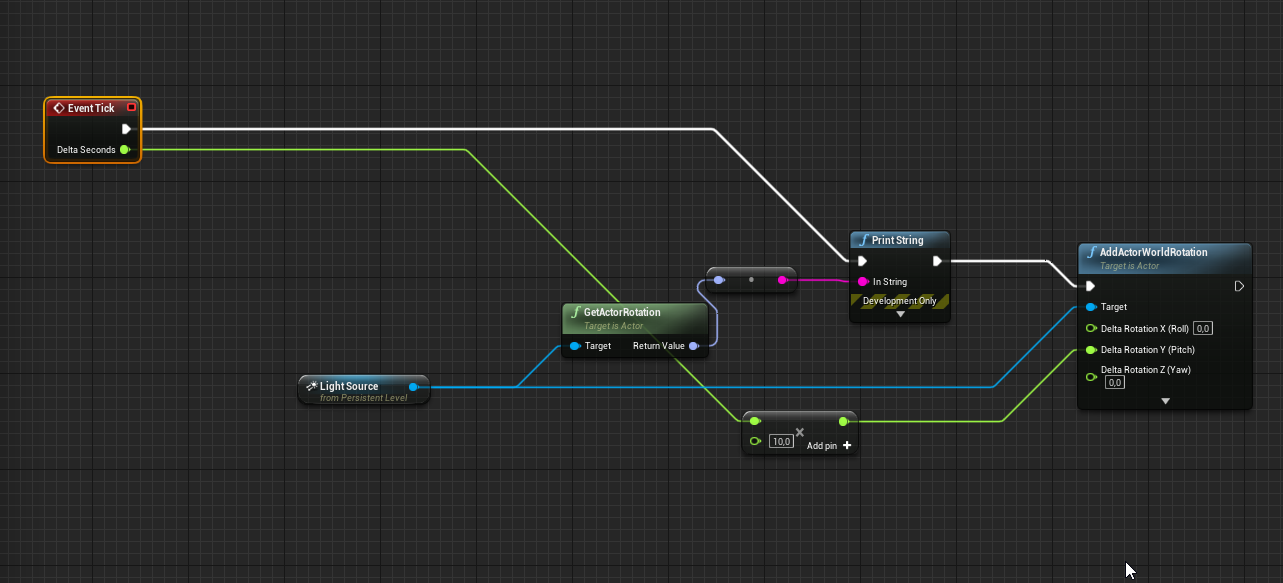
hey guys! anyone know how to rotate a directional light by blueprint?
When I do it, it doesn't update
https://i.imgur.com/MnQGJ4x.png this for example always gives the same readings
 quartz ore
clever axle
hey guys! anyone know how to rotate a directional light by blueprint?
When I do ...
quartz ore
clever axle
hey guys! anyone know how to rotate a directional light by blueprint?
When I do ...
Is the light set to movable?
clever axle
@quartz ore yes
@quartz ore I'm using DirectionalLight, SkyAtmosphere and SkyLight. It seems like some of that overwrites the rotation or something like that
quartz ore
Is your skylight movable as well? Those two work in tandem.
clever axle
yes. both are movable
quartz ore
The only other thing I can think of is that the directional light and the sky sphere also work together, so maybe the sky sphere would need to be rotated as well? Unfortunately, I've never attempted this before.
clever axle
well, I don't know.. In the editor, I only have to rotate the directionallight but doing it via blueprint doesn't do anything
glacial needle
Hey guys, can anyone help me with this issue, for months I haven't been able to get the pontoons on the buoyancy component to keep any item upright, they only go sideways and upside down.
 opaque oriole
Hey, does anyone know how can I get mouse position in a VR spectator window? I would like to add UI widget to it, but it seems it does not behave like normal viewport 🤔
quartz ore
clever axle
well, I don't know.. In the editor, I only have to rotate the directionallight b...
is this within the level BP?
clever axle
@quartz ore yes
quartz ore
clever axle
<@227231800144035840> yes
Have you tried having an actor that contains the directional light and doing it through that actor BP? I'm not sure if that would make a difference but I'm spitballin' here.
quartz ore
clever axle
<@227231800144035840> damn, dude! that worked! thanks so much! :D
Ah glad to hear it! Must have been something in the level logic, glad I could be of help! 👍
glacial needle
Hey guys, can anyone help me with this issue, for months I haven't been able to get the pontoons on the buoyancy component to keep any item upright, they only go sideways and upside down.
 bitter citrus
Hi everyone, is there a way to make cloth physics on mobile?
untold plank
yo help
How do I put textures with the mesh
like
I have a structure that requires a mesh but I want the material to go on the mesh too
the mesh and material comes seperate
Is there a way I can make a mesh that has the material with it
nvm I found out how to put the material with it
but if I wanted to resize it, how would I do that without actually resizing the mesh
so like every time I put that mesh in, it would be the size I set it to
ashen delta
@real heath & @autumn flame I found the issue! Took so many hours but I found it! This one file caused the project to crash! I'll need to go through everything on my other projects. These also crash on booting up.
Could you kindly advise on what solution would be best for "source control". I've not used this for UE4 before and would like to know what you guys use so that I can protect my projects in the future from these kind of errors. Thanks again, for both your help and patience, it saved my project!
 autumn flame
Look into Microsoft Azure
ashen delta
autumn flame
Look into Microsoft Azure
free for one user, you said, is that right?
 rugged harbor
I recall seeing a class that provided saving assets as plain text (XML or JSON, one of those). Is there a setting or command line argument to enable this?
 blazing hatch
Hello all, I'm in need of some help currently with my ue4 (version 4.27) project and my AI made in behaviour trees. Currently I have it so it finds the player's location and then travels to it, but the AI won't persistently follow the player so if the player moves whilst the ai is traveling to the players found location then they wont travel to the players new location and instead will wait until they have stopped moving and will then will find the players location
many thanks
im following Ryan Laley's tutorial for reference (https://youtu.be/o0pD0gYBV5I)
In this series we will be going through how to create a melee based AI enemy, and go through how to get a group of these enemies to attack you as a team, often seen in many third-person action/adventure games.
In Part 2 we begin the process of making the AI for the enemy. The first step is the setup for the AI and getting it to run up to the pl...
fiery flax
Help! This is a disaster!
So I put some models from Blender into Unreal, and everything is great, but then I realized their collisions are giant capsules, which is devastating. How do I give them proper collision, preferably easily all at once, because there's a lot of them? They're all static
thin tendon
@fiery flax There are a few options I know of. You can create the collision for each object in blender by naming the object UCX_<object name>. You can create the simplified mesh for each one in Unreal window by adding spheres boxes etc until you get the shape of each one. In unreal under collision you could Auto convex for a very rough collision. Or you could set them under the settings yo use complex instead of simplified collision. But I don't think there is a way you can do multiple meshes at once. I am pretty sure its a one by one thing.
 hasty epoch
Hi. My Media Texture is not working. Is the way how can fix it?
thin tendon
@blazing hatch From a quick glance. It looks to be intentional design when he made the tutorial. If you want to to move directly to the player. Instead of storing a location. Then moving. And repeating. You need to store a value for the actor. And move to the actor (not a stored location).
blazing hatch
thin tendon
<@971450063794634792> From a quick glance. It looks to be intentional design whe...
ahh ok, thankyou so much for the response. I really appreciate it 🙂
 tiny arch
just wondering do behaviour tree's work even if you arent using a character blueprint? I started doing my own character using c++ and was wondering how a custom pawn could be included in the behaviour tree stuff if possible
 amber delta
Hello Everyone, i've got some problem with my lighting can someone help me maybe ?
shadow doesn't work as intended with object once a make a lighting build

 quartz ore
amber delta
shadow doesn't work as intended with object once a make a lighting build
quartz ore
amber delta
shadow doesn't work as intended with object once a make a lighting build
#graphics might be better for this, but it looks like you might want to increase the lightmap resolution on the meshes with poor shadow quality in your scene.
amber delta
quartz ore
<#221799195806400512> might be better for this, but it looks like you might want...
Thank you that was it
thin tendon
Ok so yesterday I posted that I had an issue. Where if I turned my effects setting down. My player would be blocked by invisible physics that wouldn't be shown by the engine. Using the various show commands.
I just discovered. This issue only happens outside of the world bounds ( the yellow box in the level map window, the one that shows all your sub levels).
If I am inside the world bounds. Everything is fine. The second I am outside of it broken and can't move.
tacit flare
How to put a niagara emitter into a scene?
It says to drag into view port
But wont let me
drowsy snow
tacit flare
How to put a niagara emitter into a scene?
Put it in a Niagara System.
real heath
ashen delta
Thanks you!
Just remember, source control helps track changes and revert them, but it IS NOT a backup replacement. You should still backup to an external HDD regularly, and especially when you put down the project for a while
But glad you sorted it
drowsy snow
fiery flax
Help! This is a disaster!
So I put some models from Blender into Unreal, and ev...
Static mesh or skeletal mesh?
drowsy snow
fiery flax
Help! This is a disaster!
So I put some models from Blender into Unreal, and ev...
You mention "giant capsules" which is physics asset, so I assume it's a skelmesh.
Make sure your Blender scene has unit scaling set to 0.01, and compensate everything in the scene to the new scale (usually by scaling things up x100 from dead centre). Don't forget to apply scales before animating and exporting.
thin tendon
When using world origin rebasing. How can I get the original origin of 0,0,0. I have save and load functions. Of my player etc. But I don't wish to use the new origin. I wan't so get the coordinates relative to the original 0,0,0 origin.
 steel frost
hey, not sure where else to ask this but i was hoping someone could help identify a crash error for some unreal engine games on my pc, they appear to be consistent with games that are running updated builds of unreal engine 4, like deep rock galactic, ready or not and fortnite, and i cant quite figure out what it is
i get crashes on startup that displays "EXCEPTION_ACCESS_VIOLATION reading address 0x0000000000000138" for directx 12, but for directx 11 it says 0x0000000000000038. ive picked up this might be a ram problem?
drowsy snow
steel frost
i get crashes on startup that displays "EXCEPTION_ACCESS_VIOLATION reading addre...
Consider installing debug symbols so the error message is less vague than that.
steel frost
do i need the actual engine editor to be able to do that
drowsy snow
steel frost
do i need the actual engine editor to be able to do that
No, you can install it via the launcher. It'll take up significant amount of disk space tho
steel frost
alright, im not too versed in engine stuff but how will this work with launching games via steam?
drowsy snow
steel frost
alright, im not too versed in engine stuff but how will this work with launching...
Oh, I thought you're working with the Unreal Editor.
steel frost
yeah, i apologize if this is not the right place to ask about it but ive looked around and found this place to be best with helping with these crashes in terms of what these errors actually mean
drowsy snow
steel frost
yeah, i apologize if this is not the right place to ask about it but ive looked ...
Unfortunately we only deal with developers using the Unreal Editor, not particularly running UE4 games as it can vary by game.
steel frost
thats alright, thanks anyways
 surreal eagle

 wispy hollow
would someone be willing to help me figure out how to take my rokoko mocap data and put it on another character
ive tried like every tutorial i can find nothings working
 lone socket
Anyone know how to unlight multiple materials all at once? I have loaded a bunch of textured meshes from photogrammetry into a scene with cesium providing 3D terrain. The photogrammetry textured meshes are lit from the real sun, and looks washed out when the rest of the level is lit. But the cesium scene needs to be lit underneath. I know you can turn lighting off at the material level, but I have over 2,000 materials for just this one photogrammetry scene. Am I able to batch turn of lighting in all selected materials?
thin tendon
Does anyone know where I can find a guide or some documentation on world origin shifting? I need help figuring co-ordinates out for my save and load functions. I need to be able to get coordinates relative to the original origin not the new world origin once its shifted.
I have done a lot of googling and can't find anything helpful
 dark briar
I'm not sure what to google, when i import this mesh, the adjustment point is way off, how do i fix this?

or what do i google*
drowsy snow
dark briar
I'm not sure what to google, when i import this mesh, the adjustment point is wa...
Pivot point.
If you're using Blender, center the object to the scene first before exporting (though not sure if there's any option to remedy that without having to center the object)
dark briar
drowsy snow
Pivot point.
If you're using Blender, center the object to the scene first befor...
thank you!!
 buoyant graniteBOT
:no_entry_sign: ERROR#1167 was banned.
 glad breach
Hi all! Any idea what might be causing this? My png exports from the sequencer come out with full black alpha channels, that is completely transparent. however when i pull into after effects and increase the alpha, the color data is all there. Any idea how to fix this? I'm in 4.27.2 on a mac mini m1.
stone stump
Hey guys is there a way to animate a static mesh to go around in circles like a AI in a game
drowsy snow
stone stump
Hey guys is there a way to animate a static mesh to go around in circles like a ...
Move the static mesh component location by code.
stone stump
drowsy snow
Move the static mesh component location by code.
is there a tutorial that helps?
plush yew
split gates
 ornate leaf
is there a way to rebuild navigation / navmesh based on a keyboard shortcut ? as opposed to the automatic update.
I couldn't find the command or even a button to rebuild the navmesh manually.
I found an old "solution" on the UE forum to just move the navmesh volume up into the sky and move it back down when you want to rebuild the navmesh 😆
 dire kernel

 candid imp
Hi! I'm trying to capture the depth of a landscape in UE to a render target texture, but I can't seem to figure out how to do it. Any ideas?
 oblique tangle
Hi all, just need some opinions on this! If Spidey was skating down an asphalt street on a manhole cover, would it make more sense for sparks to ricochet off the manhole like this, or for the actual ground to be ripped up? Thanks https://i.gyazo.com/d8ce7c71b6329ac6b4fa372519f2047f.mp4
real heath
Bit of both? Sparks should come up, and the ground should be damaged but not ripped up that heavily. More like heavy scratching
Needs the sparks for the spectacle though
fierce tulip
@oblique tangle generally we use #work-in-progress for these kind of more opinion-question-based things.
clever axle
hey guys.. anyone know where I can get colored dummy materials like this? http://amplify.pt/MiscWikiImages/AmplifyAnimationPack/bp_3.jpg

 exotic elbow
Hello. What is the persistent level and why is it called persistent?
Thanks
How can I create one? I'm newbie.
clever axle
@plush yew cool, thanks
exotic elbow
Thanks. I'm not asking to have only one. I'm asking how to create a persistent level. One refers to persistent level. By the way, I don't understand: can't not.
OK. Thank you.
 fleet sparrow
Transition from one animation state to another animation state after some time inside AnimBP ?
ok solved it !
 honest ivy
Hey anyone know why my animbp works without physics simulating but not with it ticked?
 clever marsh
how do i run a branch to ask if a controller is connected?
 rich kayak
clever marsh
how do i run a branch to ask if a controller is connected?
rich kayak
clever marsh
how do i run a branch to ask if a controller is connected?
which kind of branch is that? Bcz you can use "Is controlled pawn " or AI as well. But it will request a actor. You can know if a joystick is connected?
rich kayak
clever marsh
yeah like whether or not a joystick is connected
C++ or blueprint?
clever marsh
blueprint
rich kayak
may not be the best solution but there is "Is Input Key Down"
you can check for either for keyboard related (any key) or joystick
clever marsh
I’m using that to check if it’s down
so basically
i need to throw a right or a left hook in my game
so i run that, but if the controller isn’t connected, the keyboard inputs don’t work
there are two keys for each hook on keyboard, but on controller, it depends on what shoulder you’re pressing
rich kayak
Then you will need to handle it on c++, I think there is no solution for it on this way on blueprints
or you would need to have lot branches with this "IsInputKeyDown"
clever marsh
dang i hate c++
rich kayak
feel you mate. But sometimes are necessary.
drowsy snow
clever marsh
so i run that, but if the controller isn’t connected, the keyboard inputs don’t ...
Do you have the input action mapping set up to use both keyboard keys and gamepad shoulder button?
clever marsh
no, but i have no idea how to do that, so i’m just using is input down
drowsy snow
clever marsh
no, but i have no idea how to do that, so i’m just using is input down
Project Settings -> Input
clever marsh
the left hook input is J and the B button
drowsy snow
Define the action mapping there, and then call the matching input action event in your BP. Can take both keyboard and gamepads.
clever marsh
the right hook input is K and the B button
when you press the b button it needs to check which shoulder you have pressed
clever marsh
drowsy snow
Define the action mapping there, and then call the matching input action event i...
I already know how to do thag lol that’s not what i’m asking
drowsy snow
Though if you want it to be hardcoded, and potentially make your scripting difficult, then it's up to you.
¯_(ツ)_/¯
clever marsh
?
actually if i just set up a separate input for the b button and then when that is run, run two branches on if the shoulder button is pressed and play the punch event based on those branches thag might work
gonna test that when i get hom
oak patio
drowsy snow
Though if you want it to be hardcoded, and potentially make your scripting diffi...
i feel bad for if they decide to make controller mappings in settings
 drowsy snow
Maybe related to the Target.cs file
 ancient lotus
not sure, nothing out of the ordinary there and the build settings are set in it
ancient lotus
drowsy snow
Maybe related to the Target.cs file
fixed, somehow had a few other files get put in the source folder so you were right, didnt try looking outside of my IDE in that folder for it
toxic lily
is thee a way to enable / disable physics or collisions of a child actor through a blueprint without editing the actual parent or child actor BPs
example, i have a weapon the player and enemy can use, i want to set it to have no collision until dropped by the enemy
oak patio
set collision and simulate physics node
 oak patio
thats because child actor components dont have collision
- dont use them
- you need to set the collision on the actual thing that has it
toxic lily
so there is no way the player and enemy AI can use the same item? ( in terms of class)
 subtle iron
did you ever find a solution for the package remain 1 issue?
drowsy snow
That's quite far of a necro lol
oak patio
i was expecting like 3 weeks ago
nope 2 whole years ago
i would have forgotten i even had the problem by then lmao
clever marsh
yo so I am running just a debug on character changing, and I need to replicate something, I have a replicated event at the start, where it picks a random character out of 8 for the character, but when it is replicated, it picks one of the 8 for each running client.
I explained that pretty badly but basically instead of picking one, and that being your character on both players screens, it picks one for the opposing player aswell.
idk if it is even possible to do that, and if its not its fine because im not using it in the final product, but if there is a simple way please lmk
clever marsh
subtle iron
did you ever find a solution for the package remain 1 issue?
dawg i found you on the ue4 forums youve been trying to solve this problem for a month 😭
 deft zealot
random question? does anyone knock why the standard naming convention for structures is "F_"?
drowsy snow
deft zealot
random question? does anyone knock why the standard naming convention for struct...
Because in Unreal C++, F prefix for structs is a must.
 charred shadow
looking for someone that will work for free on a simple game
drowsy snow
charred shadow
looking for someone that will work for free on a simple game
See #instructions on how to post to #volunteer-projects
plush yew
why does load async primary data asset not work?
I have some assets referenced in a uobject that are replicated to client, it doesnt replicate unless I fix up redirectors/resave or have a hard reference already elsewhere
stone stump
Hey guys my pc crashed and i cant open my file

please i need help weeks of work
Please help me with this
how can i revert?
what is version control?
you mean a extra saved version?
i dont know these terms iam new
i have a saved versio
@plush yew in the Project files where are the level Data at?
in the editor we saves Level right is there a file for that in content browser?
drowsy snow
stone stump
in the editor we saves Level right is there a file for that in content browser?
.umap files
stone stump
drowsy snow
.umap files
where is it at?
drowsy snow
stone stump
where is it at?
It's in the directory where you saved it yourself.
 modest trench
fancy font
 frozen pond
Hi, any idea how to make a knowledge system? I was thinking of making all entries in data table, and then adding it to array in player controller, then i would check that array against specific row ?
candid imp
Hi! I'm trying to make a somewhat realistic "light house beam" material for my lighthouse, and I managed to make something which sort of works, but the material is still not "fuzzy" enough around the edges, making the beam look way too sharp. I've tried adding Fresnel and depth fade but I can't figure out how they work, any help would be much appreciated!

*Nevermind I figured it out! 😉
Here's the fixed version, if anyone ever needs it;
 fierce tulip
@candid imp you can just set it to unlit, as a lightbeam does not need to be lighted by external sources
 ebon linden
When should I use an AnimNotify vs a SkeletonNotify? Is the difference that an anim notify is just more dynamic as you have access to the mesh component and animation as pins?
 green canopy
Hi is there any good tutorial on procedural generation?
 warm valve
Hi! I have a blueprint script which follows character from the camera as soon as it hits the collision box (Like in the resident evil games ) but when i start the game it doesn’t register collision . I have to get out of the collision box and get in back to trigger it.
How can I make it that as soon as i press PLAY this blueprint script triggers ( meaning as soon as i press play the view is my camera with the blueprint script where it follows the character)

 warm valve
plush yew
anybody here use artstation?
warm valve
plush yew
anybody here use artstation?
yea
plush yew
@warm valve
warm valve
plush yew
how do i rid of these logos?
where is the logo at?
plush yew
social media logos
warm valve
It's there so you can share your posts on other websites
plush yew
ya but its gonna be on my portfolio
warm valve
no one else can see it
plush yew
and recruiters can see them
warm valve
plush yew
and recruiters can see them
ik i use artstation too
It's just a SHARE feature of artstation
drowsy snow
plush yew
how do i rid of these logos?
Shouldn't even a big deal
Also don't crosspost plz
plush yew
I posted it 10 hours ago nobody answered
drowsy snow
According to my chat log it's 30 minutes ago
Also again, those shouldn't be a huge dealbreaker. Pretend the social media buttons don't exist.
plush yew
what extension
unique kraken
okey boys, im ready to port my project to ue5, why does it still say early accsess 2 for me
nvm
plush yew
Should i buy prenium?
drowsy snow
Jeez, so much worry on something so benign and recruiters likely won't give a crap about
plush yew
plush yew
Should i buy prenium?
I think you are misunderstanding those icons, they are to share a post on social media, they are not links to your personal social media channels.
plush yew
plush yew
I think you are misunderstanding those icons, they are to share a post on social...
oh I know that
 lost fractal
@drowsy snow Ive started doing tests for getting those Post Process edgelines to work. But they only work properly on other materials but not the one my Mio model uses... I can explain more in-depth in DMs if you have the time.
 thick herald
drowsy snow
According to my chat log it's 30 minutes ago
Also again, those shouldn't be a hu...
thick herald
drowsy snow
According to my chat log it's 30 minutes ago
Also again, those shouldn't be a hu...
Your chat time must be borked 😄
drowsy snow
lost fractal
<@325627930484932608> Ive started doing tests for getting those Post Process edg...
Sure thing.
lost fractal
thank you
 open igloo
Yo guys
drowsy snow
See #instructions on how to post to #volunteer-projects
open igloo
fierce tulip
and read the <#809148428922781737> when you are new <@930323654775017534>
Ok
 rocky coral
Where do I go to ask questions
fierce tulip
almost all channels are question-focused ones, just pick the one you think fits best in relation to the question you have.
rocky coral
Oh okay ty
Im a blender dude coming into ue4 cause unreal engine looks awesome. And I want to know how to pose a character
I'm trying to make a scene and want to know how to pose
drowsy snow
rocky coral
Im a blender dude coming into ue4 cause unreal engine looks awesome. And I want...
Have you looked into Control Rig?
rocky coral
I've heard of it but I have not. What's that?
drowsy snow
rocky coral
I've heard of it but I have not. What's that?
Basically additional rig on top of existing skeleton that allows you to do tech anim things, and make animations right inside the editor.
See pinned message on #animation where I linked a getting started video on it
 carmine nimbus
Hello guys, I want to do the final degree project in UE4 and my teacher gave me the idea to create a Tool that creates procedural roads with traffic signs and everything, how could I start with that? Is there any good tuts on it?
rocky coral
drowsy snow
Basically additional rig on top of existing skeleton that allows you to do tech ...
Thanks I'll definitely check it
drowsy snow
carmine nimbus
Hello guys, I want to do the final degree project in UE4 and my teacher gave me ...
Start by looking into Spline Mesh components.
Do note however that it doesn't support branching by itself, so for intersections and roundabouts, you can put in premade meshes at the end of the spline.
carmine nimbus
drowsy snow
Start by looking into Spline Mesh components.
Do note however that it doesn't su...
Okay, thanks!
rocky coral
You know how in blender you can render a scene as a image any idea how to do that in ue4?
drowsy snow
rocky coral
You know how in blender you can render a scene as a image any idea how to do tha...
Movie Render Queue
Don't use High Res Screenshot, as using higher resolution with it will break many effects
rocky coral
Okay I'll use movie render queue
What do you mean by a high resolution screenshot like literally just print screen?
rocky coral
drowsy snow
Movie Render Queue
Don't use High Res Screenshot, as using higher resolution wit...
Gotcha. Also is rtx default or is that enabled?
I got a bunch of assets and wanted to do stuff
Oh wow I didn't know that
Yeah I'll probably use movie render
Oh okay
rocky coral
What do you guys think of reallusion
 night iron
Hey 👋 I'm very new to UE, i was hoping to make couple of camera animations.
I put Camera Rig Rail and Cine Camera Actor under it.
I created a LevelSequence and there i started to track the Rail.
There i'm animating the "Current Position on Rail" from 0 to 1.
With that, i put an extra cube which i animate in the map so i can visibly see that the sequence is running.
And when i'm trying to Render it via this icon ... i don't get the camera feed from Cine Camera Actor, but rather from some sort of a pawn??
Same happens in PIE / viewport.
Any clues how to set the Cine Camera Actor to render to screen? Any help much appreciated 👍
 plush yew
Is there a way to only have a specific set of gameplay tags in a tag container? (in bp)
 polar turret
I have click on my camera but in sockets parameters there's only None and SpringEndPoint please help me


 amber shuttle
it has to be a child of the mesh if you want to put camera on it
 charred bramble
Quick question:
Does anyone know the reason why we get FPS drop when having any active BP open while playing in PIE mode.
(It doesn't really bother me but I always wondered why.)
warm valve
warm valve
Hi! I have a blueprint script which follows character from the camera as soon as...
Anybody?
charred bramble
warm valve
Anybody?
Have you tried using "Event Begin Play" instead of a trigger box?
warm valve
charred bramble
Have you tried using "Event Begin Play" instead of a trigger box?
I did it still doesn't work
charred bramble
warm valve
I did it still doesn't work
Hmmm.. What if you implement this script in your character blueprint? (using "Event Begin Play")
warm valve
 warm valve
warm valve
warm valve
if i replace it with event begin play i can't put an object reference in the cast to character
wait idea
nope doesn't work
 charred bramble
What if you make a custom event with inputs?
And just fire it from your character blueprint with "event begin play"
like so.
 warm valve
Lemme try that
charred bramble
or maybe try to use Event Dispatchers? see if that works. (that fire from your character BP)
warm valve
charred bramble
What if you make a custom event with inputs?
And just fire it from your characte...
Can you explain me how can i fire it from my character blueprint ? 😅 I am learning blueprints kinda newbie
added this
 charred bramble
@warm valve No worries, I am no expert myself.
Question: Do you really need the casting in this occasion?
What if you just do it with "Event Begin Play" and on your Get Actor Location you can just drag and type "Get Player Pawn".
try and see if this works.

 split delta
Why can't I DM the manny bot anymore?
It just says "Your message could not be delivered."
warm valve
charred bramble
<@386409378174992394> No worries, I am no expert myself.
Question: Do you reall...
Lemme give it a try
I did all this following a video tutorial and did few changes
LET"S GOOOOOOO IT WORKS
THANK YOU SOO MUCh
split delta
split delta
Why can't I DM the manny bot anymore?
??
warm valve
Now i have to just add trigger overlap too for it to work when i get back to the room from the other room
warm valve
split delta
??
No idea
Maybe it's not made to dm?
yeah just write ! help he will dm you
with no gap
split delta
nope
 charred bramble
warm valve
THANK YOU SOO MUCh
charred bramble
warm valve
THANK YOU SOO MUCh
I am happy it worked! 🙂
 faint cedar
hey i was told to try and ask here. Im making a map for a game and today it just started crashing when i load in the level and i get this error anyone know what this could be?

 stray crystal
Hey hi i am new to ue and i am learning blueprints how ever i am a bit confused can some one tell me any great tuturials?(are tuturials from 5 years ago still good to use?)thanks so much
fierce tulip
hey hey @stray crystal check the pinned messages in this channel, it has some good getting started links
deft zealot
drowsy snow
Because in Unreal C++, F prefix for structs is a must.
What does it stand for tho
drowsy snow
deft zealot
What does it stand for tho
Don't ask mkay
rocky coral
is movie render just sequencer now? i enabled the addon but dont see it in cinematic
clever marsh
dude i literally wanna die. I am trying to set up a blocking anim, and i have everything set up like normal but for some reason its not being replicated, I have everything replicated that I would normally need but something is stopping it from being replicated and i cannot find out why
modest trench
deft zealot
What does it stand for tho
20+ years ago it meant float vector
Fvector!
Then things spiralled out of control
deft zealot
@modest trench Yeah I thought so but one of my devs got into a debate about it lol - He was saying well it can store more variables than floats so its confusing
So is your name FMegafunk because youre a structure too?

honest ivy
Is there a way to make a bone transform rotate in world space for Z but parent bone space for X and Y
 fiery harbor
I was looking for if anyone ever talked about tick.AllowAsyncTickDispatch in this discord, and that is the only mention! is there any reason to not enable it? I see it improve my GT time by 2 %

 tulip obsidian
Hi! What is a good channel to discuss procedural generation inside ue4?
plush yew
Did anyone watch the Lyra Walkthrough Q&A and get lost with the language? Developers talk in a way that I don't understand!
I'm watching it now and I'm lost 🙂
I imagine a game company in the lounge talking about the game they're working on... and talking so passionately
"what? I don't follow"
plush yew
"xyz... abc... yellow... omega... top down..."
 sand spear
Hello guys.
Every time I run my level inside the editor freezes for a few seconds and then everything goes normal and this error is in the log...
This is happening just the first time I open the editor If I play multiple times I don't have that problem again, also there's no problem when I launch the standalone!
LogOutputDevice: Warning: Script Stack (0 frames):
LogStats: FPlatformStackWalk::StackWalkAndDump - 0.313 s
LogOutputDevice: Error: === Handled ensure: ===
LogOutputDevice: Error: Ensure condition failed: !(bDuplicateForPIE && DupObjectInfo.DuplicatedObject->HasAnyFlags(RF_Standalone)) [File:D:/Build/++UE4/Sync/Engine/Source/Runtime/CoreUObject/Private/UObject/UObjectGlobals.cpp] [Line: 2147]
LogOutputDevice: Error: Stack:
LogOutputDevice: Error: [Callstack] 0x00007ffca4dd7c59 UE4Editor-CoreUObject.dll!UnknownFunction []
LogOutputDevice: Error: [Callstack] 0x00007ffca4cff6b7 UE4Editor-CoreUObject.dll!UnknownFunction []
LogOutputDevice: Error: [Callstack] 0x00007ffc9f25f314 UE4Editor-Engine.dll!UnknownFunction []
LogOutputDevice: Error: [Callstack] 0x00007ffc9cc8b2d4 UE4Editor-UnrealEd.dll!UnknownFunction []
LogOutputDevice: Error: [Callstack] 0x00007ffc9e61e2af UE4Editor-Engine.dll!UnknownFunction []
LogOutputDevice: Error: [Callstack] 0x00007ffc9cc892ce UE4Editor-UnrealEd.dll!UnknownFunction []
LogOutputDevice: Error: [Callstack] 0x00007ffc9ccacd6f UE4Editor-UnrealEd.dll!UnknownFunction []
LogOutputDevice: Error: [Callstack] 0x00007ffc9cc8aedd UE4Editor-UnrealEd.dll!UnknownFunction []
LogOutputDevice: Error: [Callstack] 0x00007ffc9ccc8c42 UE4Editor-UnrealEd.dll!UnknownFunction []
LogOutputDevice: Error: [Callstack] 0x00007ffc9cccc1d1 UE4Editor-UnrealEd.dll!UnknownFunction []
LogOutputDevice: Error: [Callstack] 0x00007ffc9cccba98 UE4Editor-UnrealEd.dll!UnknownFunction []
LogOutputDevice: Error: [Callstack] 0x00007ffc9c728c38 UE4Editor-UnrealEd.dll!UnknownFunction []
LogOutputDevice: Error: [Callstack] 0x00007ffc9d0450e6 UE4Editor-UnrealEd.dll!UnknownFunction []
LogOutputDevice: Error: [Callstack] 0x00007ff70dfd9bc2 UE4Editor.exe!UnknownFunction []
LogOutputDevice: Error: [Callstack] 0x00007ff70dff117c UE4Editor.exe!UnknownFunction []
LogOutputDevice: Error: [Callstack] 0x00007ff70dff125a UE4Editor.exe!UnknownFunction []
LogOutputDevice: Error: [Callstack] 0x00007ff70e0052bd UE4Editor.exe!UnknownFunction []
LogOutputDevice: Error: [Callstack] 0x00007ff70e007fea UE4Editor.exe!UnknownFunction []
LogOutputDevice: Error: [Callstack] 0x00007ffcfad854e0 KERNEL32.DLL!UnknownFunction []
LogOutputDevice: Error: [Callstack] 0x00007ffcfcbc485b ntdll.dll!UnknownFunction []
LogStats: SubmitErrorReport - 0.000 s
LogStats: SendNewReport - 0.598 s
LogStats: FDebug::EnsureFailed - 0.914 s
LogPlayLevel: PIE: StaticDuplicateObject took: (0.947153s)
plush yew
Hey, lets say you have a double barrel and want to eject the shells on reload, how do you do this? with an animation or physics or particle system?
 toxic hawk
Not sure how to solve this but i noticed that when i slow down global time, my actor's timers are affected even though its custom time dilation supposdely sets it back to normal. this is affecting timers on my dash reset and i'm not sure what exactly to do
 jaunty matrix
anyone know how to make lighting build shadows less dark
 sleek fable
Hello guys I'm trying to create a landscape master material for my map but because of the 16 texture sample limit I'm having issues, is there anyway to optimize the material thx in advance

Each material function is like this
 split delta
my friend said this looks a lot like the backrooms, thoughts? 🤣
 drowsy snow
sleek fable
Hello guys I'm trying to create a landscape master material for my map but becau...
drowsy snow
sleek fable
Hello guys I'm trying to create a landscape master material for my map but becau...
Make the texture samplers shared.
drowsy snow
split delta
my friend said this looks a lot like the backrooms, thoughts? 🤣
#work-in-progress
sleek fable
drowsy snow
Make the texture samplers shared.
Thx I'll look into it
@drowsy snow you mean the SamplerSource dropdown settings right
drowsy snow
sleek fable
<@325627930484932608> you mean the SamplerSource dropdown settings right
Can't recall the exact name of the settings
sleek fable
@drowsy snow KK thx I already googled it, asked for just in case, u're awesome
 tawny shard
I have strange behavior

i copied my source engine from AMD laptop to Intel
It's write "skipped", thought i rebuilded Engine from it's sln project
everything seems to work, but that red dot bother me
maybe i should clean entire solution and rebuild from scratch
drowsy snow
If Intellisense is able to pick up Unreal typenames and whatnot, you can ignore it
tawny shard
The mystery solved - that dot was from source control versions
that is enabled by default
and it picked up my credits from another program
 clever timber
Hmm trying to find UE4 docs on the project settings -> input -> ensble gesture recognizer ? Does UE4 include a mobile inpute gesture recognizer since i can only find engine UInputSettings doc .. is there any more docs i can read up on it. Or is this setting only if i want to enable external plugins
Like dueing development?
During*
Like im thinking of Plastic but if its not just development im drawing blanks w/o example
bitter citrus
hi guys i'm trying to use chaos phisics on mobile.I already have one instance of ue 4.27 installed and running. Do i need to build another verison of the editor from source to make it work?
 cursive pecan
Hi , does anyone know how to do a spherical navmesh? I cant find info anywhere
 devout mason
 severe schooner
hi, im making a level and i built it, but it made the engine really laggy because of the lights, is there a way to reverse what i did?
 uneven tundra
When sharing scenes or things built inside unreal engine, what is the easiest way to share my scene? I.e, if I built a scene with a few asset and textures and want to deliver it to someone. Whats the best way to go about it.
 north bane
Getting flickering on spotlights. Anyone know what might be up?
fierce tulip
uneven tundra
When sharing scenes or things built inside unreal engine, what is the easiest wa...
if they are going to contribute to your work, version control. if they are just going to take a look at it and be done, just zip it up and send it.
 next carbon
Does anybody know of any feature or plugin that would allow to hide or lock Materials or Material functions, so that you can't access or copy them? We work on very complex shader graphs that are for very specific edge cases outside of Game Development!
 raw oak
plush yew
Hey, lets say you have a double barrel and want to eject the shells on reload, h...
raw oak
plush yew
Hey, lets say you have a double barrel and want to eject the shells on reload, h...
Particle system
plush yew
How could I save string as .json file?
 rapid geyser
Hey guys, build an ADS system
Looks fine in my demo project, but im trying to set it up in my current project but the gun mesh becomes partially invisible when i ADS.
In both screenshots the same Character Model, Weapon Model, and Camera System are used
In screenshot 1 the model becomes partially transparent, in** screenshot 2** it looks fine.
Is there anyone that can point me in the right direction?
Thanks in advance🤝
 raw oak
Set camera clip in project settings to a lower value and restart the engine
rapid geyser
@raw oak That did it! You saved me another 3-4 hours of knocking my head against the wall, thanks alot.
 lavish shoal
is a radiant ai system practical like the one in oblivion?
i was gonna procedurally have my npcs go to their jobs, eat food ect
 grand epoch
Hi! My game doesn't have a character to be controlled by the player. It will consist in a fixed camera and the player dropping objects in the map according to mouse clicks or touchs on the screen. I have a camera added to the map but when I hit play that camera view isn't being shown. How to set this static camera as the main camera?
 tender swallow
Hello guys. I'm having a problem uploading mixer assets from bridge into UE4. Bridge states that export is successful and then UE4 immediately crashes? What's going on here?


 cloud pagoda
Is there a way to do a high resolution video render in Unreal?
I want to render an asset in a similar manner to substance painter's built in render, but I need some of Unreals blueprints so I have to find a way to render in Unreal if that's possible
Also possibly a turntable
fierce tulip
@plush yew please be patient and read the #rules, asking in multiple channels/directing to others is frowned upon.
plush yew
sry
 neon bough
cloud pagoda
Is there a way to do a high resolution video render in Unreal?
neon bough
cloud pagoda
Is there a way to do a high resolution video render in Unreal?
realtime (scene capture) or like a movie (sequencer)?
cloud pagoda
neon bough
realtime (scene capture) or like a movie (sequencer)?
Real time I think? I want to render a sequence of the asset rotating slowly and the grass around it that's being affected in real time by wind etc etc (from its blueprint)
As a way to showcase an asset
real heath
You can get real nice quality with movie render queue if you make the camera rotation in sequencer
Or you can just screen record with OBS
Movie render queue allows you to really dial up AA and motion blur quality though
But renders a fair bit slower than realtime if you dial it all up
But your grass and everything will movie correctly
@cloud pagoda
cloud pagoda
real heath
You can get real nice quality with movie render queue if you make the camera rot...
How would I do a movie render queue? Also I could rotate the objects instead of the camera, right?
Oh wait, I forget the background won't be a solid color
Actually, is there a way to make only a certain asset render and keep the background invisible? So that I'd comp in a solid color similarly to substance painter's built in render with solid color? Or add the solid color directly into Unreal
real heath
Yep. William Faucher has a tut on yt for layered render with MRQ I believe
cloud pagoda
I'll look that up, thank you
 toxic haven
hello there! Not sure if this is the proper channel for my question, but here it is:
I have a button mashing mechanic that works great on a small, testing map. Once I open the big map with lots of actors and systems functioning, the button mashing sometimes fails to detect gamepad inputs. On keyboard it still works fine, but when using gamepad (Xbox controller), it becomes much more difficult since it detects between 50 and 75% of the button inputs. Any idea what could be causing that problem?
 junior siren
I just installed ue4.27 and the background color is red

is that a glitch or what, i opened a copy of 4.25 project
and Render Target transparency doesnt work anymore
These errors are unrelated
Ive tried to change scene capture format and render target format, still no opacity
If packaged project will be the same ill go back to 4.25
junior siren
Red background gone but RT have no opacity
and procedural mesh collision doesnt work
oof
lmfao ive closed the engine and it crashed
i got broken engine ffff
 heady quartz

Unreal Engine Forums
Artifacts appeared in umg animations after the transition from version 4.17.2 to 4.18.2. I’m using a forward rendering and MSAA. Before: After: What could have caused this issue?
fresh pulsar
Oh lord
I need to figure out >how to lock something a certain distance away from the player, >how to make it rotate based on the mouse position relative to the player, and >how to make it spawn another object based on a button input
how tf am I even supposed to begin doing that
(for context, 2d game)
 final bluff
Hey guys i asked in the other chats for help but no one wasn't really be able to help me so i came here for you as my last resrot😔 how can i import these assets into my folder

 fallow jackal
should you develop the map first or the characters first? (regarding size, because one will be larger or smaller and will require resize)
final bluff
fallow jackal
should you develop the map first or the characters first? (regarding size, becau...
Oh no bro it's for cinematic
fallow jackal
final bluff
Oh no bro it's for cinematic
Cinematic? Im making a game
final bluff
fallow jackal
Cinematic? Im making a game
I don't know.. guess i asumed this because you said "Should you develop the map..."
But now if i'm thinking about it it does not make sense so forgive me
fresh pulsar
this isn't.. working?

 rugged heath
Hey, noob question here, is there a way to install a previous version of the engine, I am working on version 4.27 and I need to check some stuff with the 4.26 version, but I can't find other verions on the launcher or anywhere else, thank you in advance!🥲
Yes, but it only adds version 5
And the button turns gray
Oh I found it!!!!
Thank you
I'm actually noob, but I don't regret asking
 sacred bough
U dont know if u dont ask! :)
rocky coral
true that
im also a noob so it is al good, im having fun learning about ue4 and finally using all the assets they gave lol
 arctic pebble
Hello
true ridge
Are Timelines only usable in Actor BPs? I can't use one in a GameInstance or BPFunctionLibrary?
 lunar turret
Hey, I've got a set of cubes (the grey "carpet") is just a set of 16*16 cubes, but it's not smooth. By that I mean that making the sphere roll on the carpet will make it bounce sometimes, because of the edges of the cubes ig

If you zoom in you can see the edges of the "cubes", it forms a grid
well sometimes my sphere bounce on those edges, whereas it's supposed to be smooth
Any idea on how to fix this?
 errant blade
can anybody help me make sense of this?
that's the crash report. it works fine in the editor
 north pewter
how do you select the mannequin in the editor to change material and stuff? all i have in my Outliner window is Player Start
like I need to be able to see it in the editor to make visual changes to the material
charred bramble
north pewter
how do you select the mannequin in the editor to change material and stuff? all ...
Just drag and drop your ThirdPersonCharacter (mannequin) from the Content Browser into the level. Delete the Player Start.
 cyan cargo
Is there any reason my properly formatted video files won't play on my material on Android? plays fine in PIE with same render settings
drowsy snow
cyan cargo
Is there any reason my properly formatted video files won't play on my material ...
Define "properly formatted"
drowsy snow
Oh, I thought you're using Bink.
cyan cargo
I don't even know how to use Bink yet lol
drowsy snow
The converter tool is included in 4.27 onwards for free, it's designed to be cross platform video codec in-game.
drowsy snow
It's fairly simple to use, just put in a video file and convert it to Bink 2 format.
(Also make sure your UE project have Bink Media plugin enabled)
cyan cargo
ok thanks, I'll give it a go 😄
 night yew
I have a time of day system set up with a bunch of timeline nodes. Most of them work as expected, but some of them that use the timeline value with "Set Scalar Parameter Value" are behaving really strangely. I have two of these setting variables for brightness, but they both ignore every keyframe in the timeline besides the first and last. None of my other timelines do this so it's very confusing. I've tried remaking the timelines and even remaking the blueprint but nothing seems to work.
I'm printing the value of the timeline and it's correct, but it's being ignored by the dynamic material instance. Other Scalar and Vector parameters are set correctly with the exact same timeline, except for two of them.
clever marsh
final bluff
Hey guys i asked in the other chats for help but no one wasn't really be able to...
drag them into your content folder in the file explorer and that should work
clever marsh
lunar turret
Hey, I've got a set of cubes (the grey "carpet") is just a set of 16*16 cubes, b...
just make a plane or landscape dont use those cubes
cyan cargo
Ok so I've got bink video files and it's not playign when running the game
ie. it's not showing on the material that has the rendered Bink texture in it

It seems to load the video and work while in Editor mode, but when simulating it dosn't work
uneven tundra
If I want to share a project with all content, textures models etc. Do I just zip the project folder? Will that include everything?
drowsy snow
uneven tundra
If I want to share a project with all content, textures models etc. Do I just zi...
What you need to include:
- the .uproject file
- Contents folder
- Config folder (if necessary)
- Plugins folder (if any)
Everything else can be skipped, but if your project have a Source folder, which contains C++ code of your project, consider using source control.
 proven mauve
Hey all, I was hoping somebody here had some insight into using string table localization for a project that uses plugins.
Oh wow Lorash, new profi I didn't even notice that was you lmaoo
But yes, VCS is king. Use it.
 worthy plaza
Hello, there is a safe way for move epic launcher from a drive to another drive? running out of space
 fossil light
Hi guys i'm really new to UE and I'm having troubles packaging to android. I installed engine from source code ue 4.27 chaos, not sure it went all well, logs showed me no errors but i always recieve an error message coming from automation tools. That's the output:
Seems to me that Unreal is unable to locate sdks
btw found this possible solution: https://forums.unrealengine.com/t/unreal-engine-version-4-27-2-i-get-an-error-when-trying-to-package-any-project/270627/3
but i can't seem to find AutomationTool.cs i can't try to recompile

Unreal Engine Forums
Hey team! Can you please advise if you have full support of VS 2022 for 4.27 version? Thanks
fossil light
Ok guys i managed to recompile automation tools
lunar turret
clever marsh
just make a plane or landscape dont use those cubes
Well that's not really a solution then
lunar turret
lunar turret
Hey, I've got a set of cubes (the grey "carpet") is just a set of 16*16 cubes, b...
I've got this issue, if anyone knows...
bitter citrus
Hi guys i get theese 2 errors while packaging. It seems the're due to chaos physics.
I'm currently using ue 4.27.2 and building for android (Quest 2) using packaging method astc.


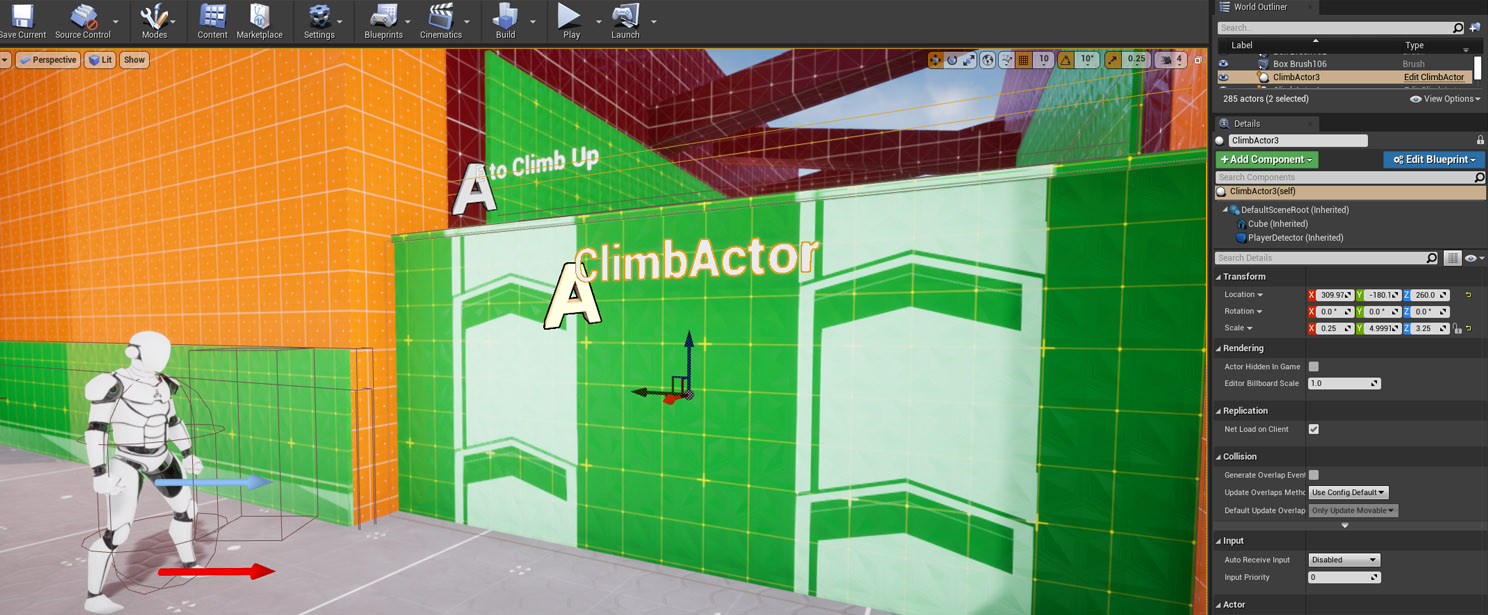 bitter citrus
nice
I installed 4.27 chaos version from source code
So it should be ok
i got no errors while compiling the editor from ue4.snl file
okok, ty, i'm considering switching to ue5 for that
Btw i'm really new to Unreal, been working on Unity for a year and a half
ty for your help Lorash 😄
oh now i see
@plush yew can I send u friend request?
ok man 😢
 errant dagger
hi, did you resolve it?
tawny shard
There is free asset/project in EGS "FactoryEnvironmentCollect". When i try to migrate it to another project, if i choose any folder in content, not root - all refferance broke
is there a way to migrate it to folder in content, not root
if i first migrate to root, and then try to move it to folder - it leaves "empty" folders in engine, but with some files explorer
and it's still ruin everything
how to do it?
let me try, thx
Thx, that helped
 karmic jacinth
How do I get cut off Autosave? I tried doing it in the files in the engine settings but it automatically changes it back to true.
lunar turret
If anyone could help me with this... https://www.reddit.com/r/unrealengine/comments/umggde/floor_made_of_cubes_is_not_smooth_sphere_bounces/

reddit
0 votes and 0 comments so far on Reddit
I'd be thankful
drowsy snow
lunar turret
I'd be thankful
I suppose... you could make a box collision and dynamically adjust the transform to the size of the floor, but maybe that's not an option.
proven mauve
Hey, I'm struggling to understand the relationship between String Tables and Localization Dashboard. The docs say that string tables are just treated as a normal Localizable source. Does that mean that I should create my targets to only read from the content folder where my CSV is located?
Or do I need to make my target read from assets using the string table.
lunar turret
drowsy snow
I suppose... you could make a box collision and dynamically adjust the transform...
Thing is the cubes are supposed to be able to be broken at some point
exotic elbow
Hi! How can change the movement's speed of a pawn? This doesn't work: AddMovementInput(FRotationMatrix(control_rot).GetScaledAxis(EAxis::X), axis_value * m_free_movement_speed);
drowsy snow
exotic elbow
Hi! How can change the movement's speed of a pawn? This doesn't work: ```AddMove...
You might looking for Character Movement Component's Max Walk Speed.
exotic elbow
drowsy snow
You might looking for Character Movement Component's Max Walk Speed.
The pawn uses UPawnMovementComponent.
Max Speed is 1200. I don't know why I have to look to Max Speed. It is not a character, it is a pawn, as I said in the question.
proven mauve

Unreal Engine Forums
I’ve set up a CSV localization file that I load in C++ (following [this guide][1]) via LOCTABLE_FROMFILE_GAME("UIWeaponTable", "UIWeapons", "Localization/UIWeaponTable.csv"); The strings in that table appear as valid options for FText localization However, the keys and source text in that CSV file do not appear when I gather in the Localiza...
Anyone have a soluton here?
 mellow turret
why does searching a plugin on the Epic Games Launcher opens my browser 🙃
proven mauve
What the heck is the point of LOCTABLE_FROMFILE_GAME if the Localization Dashboard can't even read the keys from the CSV file??
 hollow cairn
what is the unit of measurement for velocity in unreal engine?
hollow cairn
u sure?
proven mauve
Pretty sure?
hollow cairn
that seems like its too fast
drowsy snow
It's (most likely) cm/s
Unreal unit equates to centimetre
hollow cairn
sounds more likely
 robust marten
Is there a limit to how long a Datatable can be? Or can I really just have an infinite list?
drowsy snow
Likely unsigned 32-bit integer.
tawny shard
@plush yew sorry for ping. That seems to work with map from that project. When i save it to my game folder - and trying to rebuild - i got this

nah, opened the map from that project - and it looks like it

this is the one i saved from that project to my folder (they both in one project)

and trying to get something - i found this

 hollow basin
Hi, is there anyone who know the way how to execute the ctrl + v to paste copied phrase in Pixel Streaming?
 vivid ether
Anyone know how to get hit location from landscape ? work on every object beside landscapes
 pulsar nimbus
Does anyone know how to get niagara sims to work properly with movie render queue exports? Been looking around online and a lot of people have said its a problem but not sure if there's a fix
cyan cargo
I'm using a ton of ribbon particles to create a laser beam and was wandering if it'd be cheaper resource wise to just have stretched out planes or stick with the ribbons?
It doesn't even need to be transparent
 grim tendon
Has anyone ever had an issue where you can't call certain methods and functions from an anim BP? I'm trying to call a C++ function I have on my GameState subclass and its not showing up in the "Context Aware" search. When i try to just paste the node in I get Cannot use the editor function "HandleAnimationEvent" in this runtime Blueprint. Only for use in Editor Utility Blueprints and Blutilities. Does anyone know what can cause this?
i also tried just making a blueprint subclass with a new custom event and that isn't showing up in the context aware search either. am i missing something that you have to tick on to use functions in an anim BP?
lol nvm i figured it out 1 minute after i posted this. the problem was my class is in an "Editor" Plugin, it needed to be "Runtime"
fierce tulip
cyan cargo
It doesn't even need to be transparent
if they are straight or close to straight, stretched planes is the way to go.
 stark stratus
Heya!
im getting this wierd thing on my grass

when i move the cam forward or backwards my grass seems to not catch any shadows no more
like there is a distance for the shadow to be shown or something
cyan cargo
fierce tulip
if they are straight or close to straight, stretched planes is the way to go.
Thanks, that's what I was guessing
stark stratus
i turned off all lod-ing
LIke this..
the line is also there in unlit mode
Ah got it
It was this command\
r.Raytracing.Geometry.InstancedStaticMeshes.Culling 0
 desert python
hey guys, I'm trying to make a reusable blueprint component/interface that I can just attach to any actor and it will work - without having to recreate everything again, e.g.: just a simple sprint functionality (when holding down a button the character walks faster) how would you go about doing that? have you done it before?
It gets annoying having to recreate constantly and copypaste BP bode and fix stuff.... there has to be a better way but couldn't find anything specific online
fierce tulip
"child blueprints" come to mind
desert python
ok so like inheritance - could the child blueprint have multiple parents then or like in more standard programming: class inheriting from multiple interfaces?
 sick topaz
hey guys!
I have a question, I dont understand why one part of this helmet (the mesh was divided in 3 parts) looks like that, I already checked the double sided option in the mesh and in the materials, but is still looking like that
 quartz ore
sick topaz
hey guys!
I have a question, I dont understand why one part of this helmet (the...
quartz ore
sick topaz
hey guys!
I have a question, I dont understand why one part of this helmet (the...
What do you mean by 'Looks like that'?
quartz ore
sick topaz
half of it is black
Ah okay. Is it just the other side but mirrored over, or is its own mesh?
sick topaz
quartz ore
Ah okay. Is it just the other side but mirrored over, or is its own mesh?
its onw mesh
quartz ore
sick topaz
its onw mesh
You may want to check your modeling software and ensure that mesh's normals are correct. If it's using the same materials as the other side, but now they are black, I can't imagine it is a problem with your materials, but the mesh itself.
sick topaz
It was a bought mesh 🥲
sick topaz
quartz ore
You may want to check your modeling software and ensure that mesh's normals are ...
Thanks for the help reeze!
quartz ore
sick topaz
Thanks for the help reeze!
Did you solve it?
sick topaz
quartz ore
Did you solve it?
no, i dont know how the mesh was made, bought it from turbosquid so i dont know whats wrong whit it 😦
quartz ore
sick topaz
no, i dont know how the mesh was made, bought it from turbosquid so i dont know ...
Then don't thank me, I did nothing lol. If you double-click the mesh in the browser to open the mesh editor, does it look correct there?
sick topaz
quartz ore
Then don't thank me, I did nothing lol. If you double-click the mesh in the brow...
you pointed out what was wrong, thats something 🙂
its looks.. weird
 quartz ore
Oh....yea it's normals are fucked up lmao
sick topaz
the other side looks good
 quartz ore
I'd go straight to the creator of the mesh if you can and tell them. That's not correct. I'm super sorry if you can't fix that yourself.
sick topaz
no idea how to do normals 😦
quartz ore
Do you have and modelling software? If you have Blender I can show you how to fix this really easily.
sick topaz
I have cinema 4d
quartz ore
I'd look for a tutorial like 'Cinema 4D flipped normals.' Open the helmet mesh in there, flip the normals around, export it, overwriting the old one, then right click the screwy asset's icon in UE and select 'reimport.'
sick topaz
quartz ore
I'd look for a tutorial like 'Cinema 4D flipped normals.' Open the helmet mesh i...
thanks! wish me luck 😛
quartz ore
sick topaz
thanks! wish me luck 😛
Let me know if you get it working!
 elfin rune
Lately I've been trying to make a game in Ue4, but it runs like complete dogshit. It's painfully slow, and it's impossible to get any work done. I have a GTX 1050 Ti, equipped with an i7-7700HQ. Somebody please tell me how to fix this, whether the solution is to simply get a better PC, or optimize settings. And yes, I did change all of the graphics settings to the lowest possible.
sick topaz
quartz ore
Let me know if you get it working!
I was not able to solve it. I opened the mesh in cinema, and flipped the normals (they were in the correct way, but I flipped them anyway to see something diferent happen), but it keeps looking the same
 rich bough
Hello