#ue4-general
1 messages · Page 1157 of 1
 calm widget
Your best bet is quixel megascans if you want realistic graphics. Other than that making games takes time and can be quite hard depending on what you want to do.

Introductory information for developers starting out creating games with Unreal Engine.
Good place to start
 zinc flume
Alr
 pine siren
Can ExponentialHeightFog be configured to work in a different direction than Z?

 plush yew
hey any reason this object is still visible after turning off all light sources?

 copper holly
Anyone know where this "Level Streaming Volume Previs" button on the perspective viewport toolbar is I can't seem to find it
 copper holly
Is your object emitting in material/texture?
calm widget
plush yew
these are my settings
Maybe it's emissive material?
plush yew
its not 😛
plush yew
its just a blank scene with a point light in a closed off room
pine siren
calm widget
Not sure this is the right way to go about things. But cant really get that work...
Probably not, no. Your problem is likely somewhere else. You can't extract information that doesn't exist in your given data. If your rotation for some reason goes from 0-180-0 without flipping the sign then you don't have enough information to turn it into 360. I haven't messed around with rotations so I don't know, but maybe ActorRotation isn't the one you want? Or maybe you're doing something to it somewhere that flips it from negative to positive? idk
plush yew
hm
its reflecting the stuff outside

thats the skybox
and texture
🤔
I did have 2 errors importing the model tho
zero binormals and degenarate tangent bases
calm widget
pine siren
Probably not, no. Your problem is likely somewhere else. You can't extract infor...
Hmm yeah, i figured out i was using absolute value when printing it. so it goes -180 - 180. Figured i could use the map range to just get it between -180-0 to be 180-360 in that case
plush yew
@calm widgetfound the issue, SphereReflectionCapture
Has there been any knew updates in UE4? I haven't been doing much in it for almost a year so I was just wondering cause I want to try and get back into it, ha been using Java and godot for games because unreal was getting a little common
calm widget
plush yew
Has there been any knew updates in UE4? I haven't been doing much in it for almo...
Well there's UE5
pine siren
calm widget
Hmm yeah, i figured out i was using absolute value when printing it. so it goes ...
Oh right. Well then I guess you could just use modulo. Dunno what it's really called or if there's a node for it in BP. Something that lets you do rotation % 360
calm widget
pine siren
Oh right. Well then I guess you could just use modulo. Dunno what it's really ca...
Oh? I'll check it out it's probably more elegant than my solution. This is what i did
 plush yew
Ha I know about ue5 haha I meant has anything changw with eu4 like new bp to use or some what better ui etc
Maybe some new landscape default tools
Bugs is a big one, anything fixed there
pine siren
calm widget
Oh? I'll check it out it's probably more elegant than my solution. This is what ...
Yikes.
Yeah, I mean, mathematically,
   0 % 360 = 0
 180 % 360 = 180
-180 % 360 = 180
-179 % 360 = 181
 -90 % 360 = 270
  -1 % 360 = 359```
if that fits your offset tho, I didn't really check. But you'll probably figure out:)I guess it should fit, since your numbers matched at 0-180.
@calm widget So try something like this
 calm widget
pine siren
<@!242402697016246274> So try something like this
calm widget
pine siren
<@!242402697016246274> So try something like this
Thanks i'll check it out. Haha that would save me from having to look at that mess i made
calm widget
pine siren
Yikes.
Yeah, I mean, mathematically,
```
0 % 360 = 0
180 % 360 = 180
-18...
I'm not sure if that did anything at all. I think i'm confused
pine siren
calm widget
I'm not sure if that did anything at all. I think i'm confused
well, you gotta use the output of that node and put it into your RInterp somehow.
But keep in mind that even though it may work, this doesn't feel like the correct approach. The problem may lie elsewhere, as it sounds weird to me that ActorRotation and ControlRotation (both FRotator?) are outputting different ranges. But again, I haven't really worked a lot with it..
calm widget
pine siren
well, you gotta use the output of that node and put it into your RInterp somehow...
Yeah, what got me most confused was that setting actor rotation to lets say 260(because lets say that's what the control rotation float was at the time) somehow made it set the actor rotation to 100. Which would be the correct value for the actors rotation to be in that different range. I have no idea how that works but setting the actor rot to control rot apparently works by doing it that way. I guess that's the natural way of how they work. Probably if you set 180 + some value out of that range it just goes to the other end + that value
pine siren
calm widget
Yeah, what got me most confused was that setting actor rotation to lets say 260(...
yea it's a conversion, you can't give it back to the actor without converting it back first. You never mentioned setting actor rotation.
Am too tired for math right now so going to bed, but I'm sure you'll figure it out, or that someone else can help you:)
calm widget
pine siren
yea it's a conversion, you can't give it back to the actor without converting it...
Yeah, good night man. Thanks for helping me out though. Gave me some insight
 worldly spear
where is Get AIControl in Unreal 4.27? Im trying to connect my Event BeginPlay to it
 grim ore
should still be there, it's a pure node so its not an event you hook up to another event node with the white wire
 acoustic plover
Which channel should I ask about the Rendering Dependency Graph (RDG) in? I feel like #cpp, #engine-source and #plugin-dev all apply.
worldly spear
so im trying to create a sim where the character runs to an object based on aicontroller and it looks like this:

i dont know how to get these connections
grim ore
right click anywhere in the graph and do the get ai controller
worldly spear
okay done
grim ore
the rest should work as expected
worldly spear
ahh so i dont need the event begin play at all?
grim ore
you do, do you not have one?
worldly spear
i do but i cant connect it to anything or rather i dont know what to connect it to
grim ore
well in that video its connected to a delay node
then your get ai controller, then a cast, then the set target location
worldly spear
right but i cant connect the delay node to the get AI controller
grim ore
you can go delay, then cast, then set target
correct, you dont need to anymore, you would go right to the cast
worldly spear
thank you sir
 marsh sparrow
HI. Is there a channel specific to game distribution? I have a question about steam.
 ruby wyvern
Is there a way to actually make new objects go into the current outliner folder?
I create a folder and it's selected, but when I create a new object it just... goes into the main folder instead
 versed star
So I have a top down shooter I'm trying to make, and I'm trying to implement a dual gun aiming system. The idea I had is that when you right click the aiming reticle splits in two, and an invisible line is drawn down the screen from where the character is facing to the edge, then any cursor movement is reflected on the opposite side of the line until you stop dual firing. Basically I want to know how I could draw a line from my character to the side of the screen they're facing, and make that line turn around with the character when they move. Then get the cursor position relative to that line. Idk if it's even really possible but it sounds doable.
 fierce tulip
 dusk nebula
versed star
So I have a top down shooter I'm trying to make, and I'm trying to implement a d...
dusk nebula
versed star
So I have a top down shooter I'm trying to make, and I'm trying to implement a d...
It's difficult to tell exactly what you're asking, but if it's a set distance in front of the character, you'd use the forward vector of the control rotation to produce an end point "x" distance away. Then you line trace between the two points
Most of your solutions for whatever the problem may be are going to involve screen positions and basic vector math. Line traces are almost free to run, so that's definitely a key component of something like that
I've never done a top-down, but I assume that there's some way to get the mouse position in relation to the character's position pretty easily
 dreamy zenith
where's a good place to learn how to make a strategy game similar to becastled or diplomacy is not a option?
dusk nebula
dreamy zenith
where's a good place to learn how to make a strategy game similar to becastled o...
Did you check youtube for tutorials?
Part of the thing about UE or content creation in general is the reality that you're going to want to do something unique, and there won't be a set of tutorials specifically catered to your goals, unless it is an unoriginal idea. You can find a lot of basic conceptual stuff, but a lot of it will just have to be figured out
dreamy zenith
dusk nebula
Part of the thing about UE or content creation in general is the reality that yo...
I see
Thanks for the input
dusk nebula
As you look into it, you're gonna find a lot of the basic stuff, be it rts controls, or a city builder system, but the really definitive things will have to be self-made in most cases
That's not to say that you shouldn't use tutorials, especially not when starting out, but learning the methods rather than copying the outcome is the best way to be able to develop ideas independently
dreamy zenith
dusk nebula
That's not to say that you shouldn't use tutorials, especially not when starting...
completely agree
dusk nebula
That, and a lot of the more complex tutorials, especially the ones that are specific like "modular skill tree system" are just poorly made, whether it's through bad implementation or lack of explanation
 pine remnant
how do i use brush editins to flatten a cube, can i post the tutorial im using?
 vocal sorrel
Hey guys, I am using an imported tile landscape and it doesnt line up on the Z value correctly. How can I change it so it is higher up in my world?
 thin carbon
anyone know of a good multiplayer video for creating a scoreboard for kills
 tropic magnet
What are generally the most demanding things you could make? So far I've noticed the multiple point lights slow down the game quite a lot
 thin tendon
@vocal sorrel In select mode you can just click on the landscape and move it using the transform tool or the transform section in the details window.
 waxen tundra
Hi guys 👋🏻, I’m having issues installing ue 5 on my Mac, the button for the download simply wouldn’t show up, do someone have the same problem?
Does anybody have any suggestions?
 iron wadi
Can I disable "Load the Most Recently Loaded Project at Startup" in some ini file?
The map is crashing my editor on startup
 modest trench
iron wadi
Can I disable "Load the Most Recently Loaded Project at Startup" in some ini fil...
modest trench
iron wadi
Can I disable "Load the Most Recently Loaded Project at Startup" in some ini fil...
DefaultEngine.ini default maps
plush yew
waxen tundra
Hi guys 👋🏻, I’m having issues installing ue 5 on my Mac, the button for the do...
https://www.reddit.com/r/unrealengine/comments/nmocas/cant_seem_to_install_unreal_the_install_engine/ look at the replies, if what they say doesn't work then it may not be compatible or something else is wrong

reddit
6 votes and 29 comments so far on Reddit
 astral verge
Hello Guys , In the collab viewer template anyone knows to to change the viewer menu UI ? because I can't find the Widget in the blueprints
 real gust
Can someone please help me make a soft reference to a door blueprint in another level within the same project?
I create new variable, I’ve tried actor soft reference, it doesn’t show my door blueprint, I can’t figure it out, there’s only one tutorial and it’s of a skeletal mesh.
 mossy temple
Hello, do you know what's the best online course or book, free or paid for learning UE4?
tropic magnet
so I've sent a link to download and play my game in my discord, but later realised that it looks a lot like a classic discord scam lol
what's the best way to upload it so everyone knows for sure it's not a scam?
tropic magnet
thanks, I did
 drowsy snow
mossy temple
Hello, do you know what's the best online course or book, free or paid for learn...
drowsy snow
mossy temple
Hello, do you know what's the best online course or book, free or paid for learn...

Unreal Engine
Unreal Online Learning is a free learning platform that offers hands-on video courses and guided learning paths.
 vast willow
hey guys i want to create a blocking volume with the feature that when a player get close to it, it sho a hologram blocking thing like AC games when you get close to the edge of the city or something
anyone have an idea how to do that ?
i did thought of a regular box model with blocking collision and making that kind of material for it
 tender fiber
Can't open Unreal engine editor both 4.27 & 5 but it shows in the task manager

 tame marsh
vast willow
i did thought of a regular box model with blocking collision and making that kin...
tame marsh
vast willow
i did thought of a regular box model with blocking collision and making that kin...
suonds like a good approach
plush yew
Help pls, projectile through walls even with collision active
 quiet island
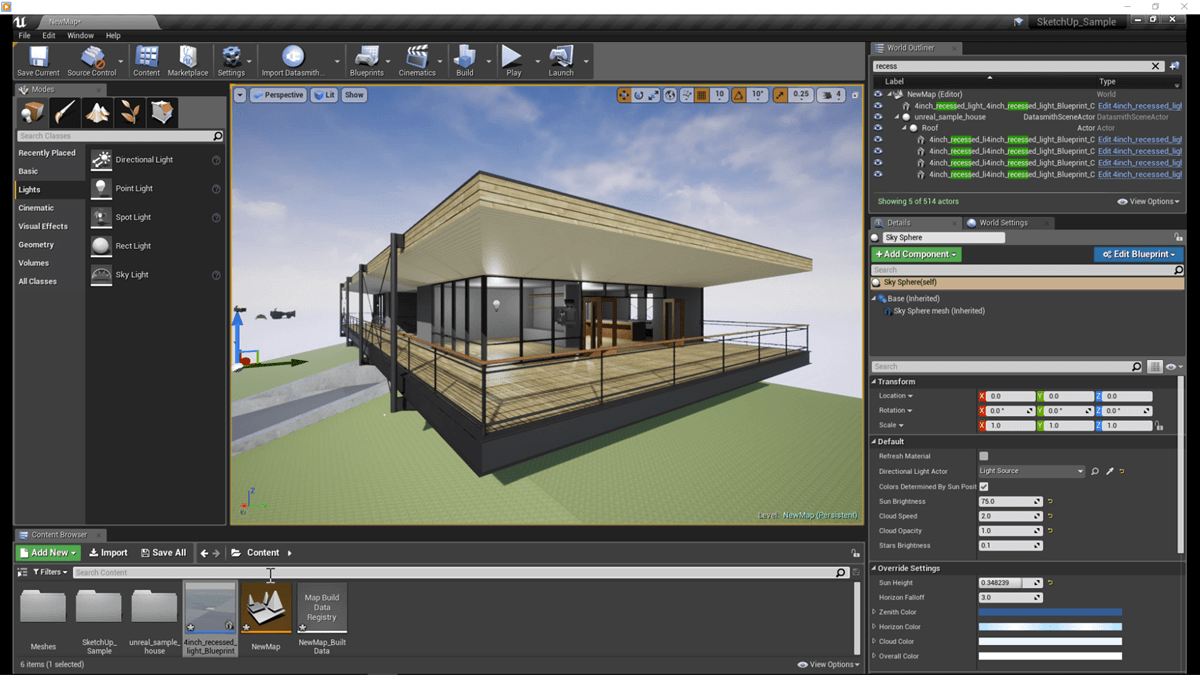
hi guys, I am trying to import a sketchup environment into unreal engine does anyone know if this is possible ?
 pearl minnow
i just realised EVERYTHING in my homescreen is off by x=8, Y=33... you can see where the keyboard is now after being correctly positioned. Is there a way i can move everything by that certain amount to get everything back into the correct position? 🥺
 quiet island
Im wondering if its possible to build an environment of our actual home area that I got in sketchup
 drowsy snow
quiet island
Im wondering if its possible to build an environment of our actual home area tha...
drowsy snow
quiet island
Im wondering if its possible to build an environment of our actual home area tha...
#aec-visualization
(Though the channel isn't crowded)
astral verge
Anyone has experience in creating digital twins in unreal engine ?
drowsy snow
astral verge
Anyone has experience in creating digital twins in unreal engine ?
Yes, through genetical cloning
 wanton violet
I was uploading my game in Play Store today...but in Play console it says only app bundles less than 150 mb are allowed. My app size is 400mb. Does any one know any solution?...is there any way I can reduce my app size...or how to upload apk and obb files seperate?
astral verge
drowsy snow
Yes, through genetical cloning
Sorry can you explain more ? , If I have sensor data and apis and I want to link it with an airport model of example , how do I start
 spice ruin
A common trick is to only ship the required data on the store and have all of your other assets download once the app is installed
drowsy snow
astral verge
Sorry can you explain more ? , If I have sensor data and apis and I want to link...
Sample the cell of the airport and make the clone 
Honestly I'm not sure what "digital twin" really means.
 shadow ravine
So I'm trying to create a blend from two different rotations of my actor, normally I'd use animations for this but the project has a deadline and as been built using BPs for most of the animations. Does anyone know of an simple method to blend from one rotation to another over x time in blueprints?
drowsy snow
shadow ravine
So I'm trying to create a blend from two different rotations of my actor, normal...
Timelines.
shadow ravine
drowsy snow
Timelines.
Oh of course!! It's too early for me 😂
 calm crow
Hi, how would i import custom merged proxy actor in ue4 to display instead of a group of actor based on distance ?
 ember cypress
quiet island
hi guys, I am trying to import a sketchup environment into unreal engine does an...
ember cypress
quiet island
hi guys, I am trying to import a sketchup environment into unreal engine does an...
https://www.unrealengine.com/en-US/onlinelearning-courses/sketchup-to-unreal-fundamentals Totally doable. The back half of this course should have everything you need.
Unreal Engine
In this course, we walk through the steps for leveraging SketchUp designs in Unreal Engine, including a look at the tools and techniques that can improve the process.
ember cypress
mossy temple
Hello, do you know what's the best online course or book, free or paid for learn...
https://www.unrealengine.com/en-US/onlinelearning-courses/welcome-to-unreal-engine As @drowsy snow said, the learning portal has a ton of content for getting started with UE. I would recommend having a look at this learning path~

Unreal Engine
In this course, you’ll learn the basic concepts and techniques for using Unreal Engine, including how to manage projects, organize assets, and utilize features.
plush yew
I need someone smart to lay this out for me, imagine this you use a external program like world machine to create your maps for generating terrain
you get it in game and you arent happy with it, you then go back to world machine and edit the terrain a bit
can you bring the updated terrain in without breaking anything?
or is it good practice to delete the landscape and re generate it
modest trench
I believe you can just import from file again?
modest trench
plush yew
or is it good practice to delete the landscape and re generate it

Learn how to import and export landscape heightmaps in UE4.
Full UE4 Quick Tip Playlist: https://www.youtube.com/playlist?list=PL_c7yiTIRI8rPQfsNytgjgJh-bssWUczX
Get the "UE4 Fundamentals Vol.2: Landscape Essentials" Tutorial Course: https://www.worldofleveldesign.com/sto...
Not 100% sure you can do it consecutively
plush yew
thanks
 uncut forum
a little question here: does UE uses relative or full path with project files?
I need to sync a game project in two different computers in two different locations, so I was wondering if project has to be in the same path in both computers or it doesn't matter, because UE uses the path starting from project main folder.
Thank you
modest trench
relative from what to the project files?
 modest trench
definitely keep those folders/files in the same relative places to each other
but the entire project folder can be anywhere
the engine is can be anywhere too, it's just a GUID to the registry list of engines
uncut forum
modest trench
definitely keep those folders/files in the same relative places to each other
yeap, that's for sure
modest trench
how are you syncing these?
uncut forum
eh eh, working on something atm, didn't see if there's something free for that
modest trench
I mean, just git + gitlfs should be good enough
that's the "default" free option in my mind
some crazy people even use onedrive somehow
 oak patio
If I wanted to create a custom folder, for music, where would /Game/Music evaluate to in a packaged and non packaged build
uncut forum
modest trench
I mean, just git + gitlfs should be good enough
is git limited in gb?!?!
modest trench
it has to be hosted somewhere to get sent over the network
it could be one of the two computers if you set it up
okay, what did I miss?
I've been awake too long
uncut forum
I thought git was only for coding, so it's very light to host a project like that, because it's just text, not a huge (but wonderful) ue project folder
modest trench
git is a version control program, you are thinking of github
uncut forum
so I could be the server, then I need to send my global dynamic IP to the other one, so he can sync to my computer....
why?
ah, ok
modest trench
in the non-hosted git setup do you only send commit changes over the network? how do you clone?
perhaps my definition of "hosted" is wrong
don't do that to him lol
he's gonna get fleeced
are you serious? that must be one monster email chain
wait, really?
wtf, maybe that's a thing then
I have never googled azure devops faster in my life
usually azure is very expensive
 cedar wave
Yes. Unlimited for 5 people. Then you start paying on the 6th person. I currently have multiple projects on it, with the biggest being 30 GB.
modest trench
nice
uncut forum
versioning is beyond my needs, despite being very important in a project
cedar wave
And unlike P4, you only pay for that 6th person, not all 6.
modest trench
yeah, unless you plan on stopping this project now versioning is kind of a "must have"
even if you are just messing around
uncut forum
I will see that
uncut forum
sure, I know
I mean, I understand
but I have to see if something free is available
oak patio
Yup i learnt that lesson
uncut forum
 modest trench
so, how does he get the repo to the other machine?
 uncut forum
cough cough... internet... cough cough...
modest trench
is there some way to directly just send commits to the other pc?
I've honestly only used hosted and local-only repos
oh, yeah
I guess the networking fun part is up to him then (getting the machines to see each other)
I suppose it isn't "hosted" in a sense as much as just a network share at that point
drowsy snow
uncut forum
but I have to see if something free is available
The only thing that paid from git is hosting the repo, and you can cut the middleman by setting up your own git server.
modest trench
here we go again
hosting the repo on an online cloud service like github or gitlab to be specific
drowsy snow
uncut forum
but I have to see if something free is available
The Git system itself is free.
Unlike Perforce, which is only free (under terms) for 5 or less people
drowsy snow
I tried Perforce once and it feel like they're watching how I'm using it, even though it's only myself.
modest trench
I mean, yeah but between two machines in this case
drowsy snow
Maybe it'll be a necessity once I had a full time studio
modest trench
of course if it's just seeing a folder in the local network I guess it will just go
okay, let me be specific and say what you were mentioning before ~wasnt~ a fileshare but just a network url to the other machine's repo? edit: already answered thanks
drowsy snow
I think in theory one could have a Linux host serving as the git server, and Windows KVM cloning from it
uncut forum
anyway, it's just a silly videogame demo between two guys, I mean, I know (a bit) of what are you talking about, but versioning is too much, especially because I won't touch/modify things on his part of the project, which is the main project, I will only upload my assets in my separate folder and download his changes on the game
drowsy snow
uncut forum
anyway, it's just a silly videogame demo between two guys, I mean, I know (a bit...
Still, source control is going to ease both of your lives by a huge margin
modest trench
oh, just trying to think of how thinkinmonkey would set this git repo up just over the network without actual hosting (and not a windows shared folder)
modest trench
uncut forum
anyway, it's just a silly videogame demo between two guys, I mean, I know (a bit...
just being able to see wtf the other guy changed in a commit is going to be a helping hand honestly
drowsy snow
uncut forum
anyway, it's just a silly videogame demo between two guys, I mean, I know (a bit...
Using Google Drive or regular cloud storage service or networked folder to exchange project files is just asking for trouble.
modest trench
yeah, sorry. I'll look into it on my own time later
thanks for the explanation anyways
uncut forum
yeap, thanks, I'll take in consideration what all of you said till now
modest trench
oh lol, you just ssh to the other machine
$ git pull username@host:path/to/repository.git master
done
github desktop client protects me from this dark knowledge
I am safe in my giant "commit" button cocoon
yeah I had to switch to gitextensions
I still use it for one-click clones from github
that's it
are we going to enter yet another eternal programming tools conflict?
modest trench
seems like I named my azure cloud something before

alright, sorry for the offtopic
back to actual #ue4-general
 acoustic idol
Hi all. I hope someone can help me out here? I nowhere else can find the info that I need anymore. I want to load and run an external map/level package from within the main game program on a multiplayer server. Much like the Unreal1 game servers back then handled the map/level selection during game play. And so that, without repackaging and redistributing the whole game again, I can add a new level to a game by ONLY packaging that level separately and load/run it from the main game file. I believe that even the UE 3.15 version of UnrealTournament can do this from within their HUB's. But I lost all info on that and cannot find it anymore
 red condor
I have an editor utility blueprint that errors if I run it on too many actors because it thinks its in an infinite loop - can I somehow disable the check for this particular blueprint?
 hybrid mortar
any suggestions on how i could simulate vehicle movement on the server and then replicate it to all clients?
 broken heath
Whats the shortcut for duplicating in scene beside copy pasting
red condor
thank you, that's a general setting right? I was hoping that it might be possible to override the limit just for this blueprint, since I'd never want to run close to that many iterations in game.
I do wonder if this could use less iterations though?

a loop within a loop should be avoided where possible, I'm sure 😅
I'm running this on thousands of actors, by the way
(or rather trying to)
but only as a one-off editor action, not in game of course
To save people deciphering the blueprint, I'm storing an array of assets, then looping through the selected actors. Within that loop I'm looping through the stored array to check their label against the asset names. When a match is found, the mesh is set. Can this be done without so many iterations?
 earnest pawn
does anyone know some good courses to learn about maths for games?
 thick herald
That BP has given me a headache 😄
red condor
oh, is it saying its reached an infinite loop while trying to run the loop just once?
I assumed it was because I'm running it on so many actors at the same time, like the accumulated iterations for all the times its being run was over 1m. (it seems to work when i just run it on less assets)
if it's possibly just referring to one 'run' of the blueprint function I'll investigate more thoroughly 👍
(in this case i'm assigning 8 assets to around 3,800 actors btw)
 scenic bolt
Hello guys. Does it make sense in the context of optimizing the game level to move reflection capture actors on a sublevels?
idk which chat is better for this type of questions, so sorry if it's wrong place
 remote flame
Anyone has problems with ue4 launching, showing in processes but the editor is not opening? As in, the engine spins up but nothing shows up. No errors nothing
red condor
@plush yew I've worked it out, I think. It works for up to 459 actors, regardless of which are selected, then throws the error. I didn't realise that the asset folder check was recursive, around 600 assets are being checked against and so there are actually over 2,000,000 expected total loops when running on 3,600 actors. By increasing the limit in the project settings I can process all of the actors, it just chugs for a while. So based on this I think I can conclude that the infinite loop error is just happening because of how many actors I have selected and how many assets are being looped, and not because of an error in my logic. Please tell me if you think I'm talking rubbish though 😁 Eventually there will be far more actors and assets, and it may be that I just have to do it in chunks, but the less chunks the better for me. Do you think it's possible to achieve that logic with just one loop somehow? Or am I already using the least amount of iterations possible to do this?
 brisk galleon
hey, does anybody know is it possible to save/export the green navmesh as out as a static mesh?
it does build a simple mesh but is there any way to access it..
red condor
I don't know any c++ sadly, maybe I could learn enough to do just that though. So do you think my loop within a loop is as optimal (in terms of iterations) as blueprint logic gets?
I think I might have miscommunicated, I just meant are both loops necessary in my blueprint above, or could the second loop somehow be avoided. I can't think of a way, but this is the first editor utility I've made and my unreal knowledge in general is pretty limited. If it could I'd be running up far less iterations overall so I just thought it was worth asking.
 faint mesa
Hey all, I am attempting to build a crowd simulation in UE based on this tutorial https://www.youtube.com/watch?v=TAAzbv3-aqo
When following along i notice a couple things. First thing is that the behavior tree done in the tutorial (left) is numbered different from what I tried to do (right), despite following the same procedure. Anyone happen to know why that is the case?


Part one of a four part tutorial series on Unreal Engine crowd technology
Secondly, the tutorial sets up the event graph to have an Input with a grid icon instead of a pill (left). I find myself (right) only able to get the grid if I switch to array but doing so prevents me from connecting the SetTargetLocation to Set Value as Vector.

 red condor
Thank you, and also sorry, I think I understand what you meant now. My approach is perhaps 'optimal' for what it is, but a programmer could have a much better solution. I really appreciate all the advice on this. I might well end up learning a little c++ later, but I'll make sure the rest of my process works and see how far this gets me for now. Thanks again 👍
you can make nodes?!! woah
no it wasn't
sorry xD
cedar wave
BP nodes are just calling backing C++ functions.
red condor
I was blown away by editor utility blueprints
I am easily impressed I guess, but I didn't realise that c++ could hook into bp like that
cedar wave
I'd say it's more BP hooking into C++
red condor
That's awesome. Unreal is really amazing, I find it so much more intuitive and flexible than engines I've used before. Appreciate the primer 👍 I 'wrote' (cobbled together from examples) my first python script yesterday actually so I should take a closer look :)
oh sweet, yeah I could maybe try replicating some simpler stuff in my project first, get a feeling for it while knowing what results to expect
never heard of it, taking a look now 😁
nice, GAS (smirk) sounds perfect for one of my too many 'make it later' ideas
I'm definitely more of a designer, but I can see now how a bit of c++ could be really helpful. I thought it had to be the whole game, and always imagined sitting down with a huge slightly out of date book lol.
I'm curious, would/could c++ be used for bridges/pipelines? Like bringing stuff in from external applications. Is that stuff even handled in Unreal or is there always some kind of go between application?
cedar wave
With a ridiculous learning curve to boot!
 atomic arch
hi everyone need help switching between widgets. I used the remove from paretn and create widget methos but it wont work any ideas
red condor
atomic arch
hi everyone need help switching between widgets. I used the remove from paretn a...

Here we take a look at how we can switch between widget blueprints to allow the player to switch between screens within their main menu.
We cover the cover code to close a widget and open it, alongside setting up a button for switching.
UI Resources: https://drive.google.com/open?id=1TuyvuG4lSHyJXjdCCw81dwR26-26yOCH
♥ Subscribe for new episod...
there you go 😁
(if that's not what you mean, describe what you do mean in more detail and post a screenshot of your current attempt)
atomic arch
red condor
(if that's not what you mean, describe what you do mean in more detail and post ...
that is the method I used originally. but after switching back and forth between widgets it begins to impact fps heavily. I want to switch between widgets with the same effect the video has but minus the frame rate drop
red condor
are you saying its smooth the first few times and then gets choppy?
atomic arch
the only issue I have with using the widget switcher is that it may over complicate my code as i have over 5 widget each with its own semi complex code
atomic arch
red condor
are you saying its smooth the first few times and then gets choppy?
yes , the more i switch back and form through widgets the more choppy the fps gets
red condor
you should post your blueprint, it sounds like something is being created over and over instead of being reused maybe but it's hard to say
atomic arch
red condor
you should post your blueprint, it sounds like something is being created over a...

thats the code for switching between widgets
red condor
how about the code for clicking on buttons?
atomic arch
red condor
how about the code for clicking on buttons?
its just an on clicked event
red condor
yes, but what's in it? 🙃 I have to go, but I don't know much about widgets anyway. If you show us all the logic, including the on clicked event, I suspect the problem will be obvious
atomic arch
red condor
yes, but what's in it? 🙃 I have to go, but I don't know much about widgets anyw...


anyone else got any solutions ?
red condor
is this the set up from that video? the one that gets choppy after a while? I haven't watched the whole thing but it looks pretty different
atomic arch
red condor
is this the set up from that video? the one that gets choppy after a while? I ha...
this is basically the set up the only difference is the function
and inside the function is the code from the video so yeh
 rain ingot
accidently deleted the tab with the contents, what is it called in window tab to bring it back?

its called content browser nvm
 cold otter
Hi All, I would be interested to know more about some UE4 console commands like by example exposure and how to manipulate it.
And I don't know if I am posting in the good channel.
 bleak zodiac
cold otter
Hi All, I would be interested to know more about some UE4 console commands like ...
cold otter
bleak zodiac
<#479798946793783307>
bleak zodiac
cold otter
Hi All, I would be interested to know more about some UE4 console commands like ...
cold otter
bleak zodiac
<#479798946793783307>
Thank you
rain ingot
does anyone know whats up with my viewport? I can't click anything and there's this white box in it

how do I disable whatever I enabled
 bronze saddle
I need help with filters
How I filter folders, instead of specific words
For example, if folder is named Stats but the file is called Modifier, I want to filter the folder and have those files as results as well, so I highlight the path name too, instead of the file
 rocky epoch
cheers :)
bronze saddle
Please DM me if anyone knows how to do this

 brisk obsidian
bronze saddle
I need help with filters
How I filter folders, instead of specific words
For ex...
brisk obsidian
bronze saddle
I need help with filters
How I filter folders, instead of specific words
For ex...
You can just do Path=YourPathName i.e. in your case you can just do Path=Stats There's docs on all the things you can do in the search here: https://docs.unrealengine.com/4.27/en-US/Basics/ContentBrowser/AdvancedSearchSyntax/
A reference for advanced search syntax when performing searches in the Content Browser.
atomic arch
atomic arch
anyone else got any solutions ?
sorry to bother anyone got any solutions for this
atomic arch
from looking online i think the issue is that its created i remove from parent and it gets recreated to open it again, hense the frame dips but i cant find a method to show and hide widgets
i tried this but for some reason it wasnt working
 hollow cairn
is there a good way to select alot of surfaces together?

like in maya you can doubleclick the one next to the one you chose, and it will select every surface in the line
ah never mind, it's shift+B
 surreal eagle
hollow cairn
surreal eagle
hollow cairn
also, I made this curved wall using subtracting geometry, can I turn it into its own actor so I can reuse it properly?

 robust marten
How do you prevent a checkbox from being unchecked OR how can you make it so that one set of checkboxes MUST be checked? I start the game off with male checked but I can uncheck it. Even when I set the checkbox state to Checked when it's checked, that doesn't work.

Thank you
 unborn bolt
Can we get a channel for shaders / materials, or does that already exist (Can't seem to find it)?
I know we have a channel for Graphics but it's a very overarching title that covers a whole lot of stuff.
Cool, thanks for the information! 🙂
 modern sinew
How do I change the name of my project? The one that shows up on the windows? I thought it was the one in Project Settings but it's not
hollow cairn
how do this?
broken heath
How to generally get highest framerate , and lowest ghosting … even if the price is the quality
 modern tree
Quick question, after importing different projects and assets should I split them into corresponding folders (meshes, blueprints, and such) or is it fine for them to be in the folder they came in and put them in a big 'Imported' folder until I actually need them?
I'm asking since I just started cleaning up my project and reorganizing, but moving items is terribly slow even with unused assets, so I'm unsure what'd be the best organization atm
drowsy snow
broken heath
How to generally get highest framerate , and lowest ghosting … even if the price...
Use FXAA (or MSAA if you use forward rendering)
broken heath
drowsy snow
Use FXAA (or MSAA if you use forward rendering)
Tbh its for mobile and im not concerned about resolution, or quality… just the speed and i cant find the optimal settings for speed
And i dont know whats forward rendering
😇
Will try fxaa thanks
drowsy snow
broken heath
And i dont know whats forward rendering
Well, if it's mobile, chances are you're already in forward rendering
broken heath
Is there a non AA option? Which would be even faster
drowsy snow
broken heath
Is there a non AA option? Which would be even faster
r.PostProcessAAQuality 0
Project Settings should have option to disable it completely
broken heath
Alright , so u advice MSAA for mobile
What about resolutions i dont find it in project setting
 lunar kiln
i want to dampen controller pitch/yaw input based on how different my camera's world rotation is from my head socket's world rotation. any math wizards know what nodes i'd use to compare those rotators and scale my axis value based on the differential?
drowsy snow
See #instructions on how to post to job board channels
fierce tulip
@shadow osprey please follow the #rules and do not post job offers besides in the job channels. as @drowsy snow said, read the #instructions
def. read the rules, because looking at your log, you are breaking quite a few of them.
 mental shale
yo, what channels should we ask about unreal crashes in?
mental shale
ah, okay.
 mental shale
modest trench
Make sure you have debug symbols
mental shale
modest trench
Make sure you have debug symbols
(I think I have them?)
grim ore
you do not
mental shale
ah
grim ore
there would be actual information in that crash
mental shale
I can get them from the visual studio installer, right?
grim ore
is that engine version a source build or a launcher build?
mental shale
(im not too sure what that is, but I havent compiled the engine if that's what you mean)
modest trench
You need to click the little arrow beside you engine version in the launcher
mental shale
ah
grim ore
then you install the symbols from the launcher ^^
mental shale
aah, nope I dont
lemme do that
(will my project be okay if Im working on this on perforce?)
(like, will everyone else need to install the debug symbols too if I do?)
grim ore
they are part of the engine, so no
mental shale
is that the same with plugins?
grim ore
depends on the plugin
mental shale
ah
modest trench
Depends if they are engine plugins or installed to the project's plugin folder
modest trench
which plugins are enabled is determined by the .uproject just to be clear
Mist people disable VR stuff and other misc stuff that epic leaves on
mental shale
yea
 still island
Has any one dealt with serializing objects placed in a level with a member that is of type FGameplayTagQuery? When the default object is edited the placed instance does not have its FGameplayTagQuery member updated. This seems like a bug in delta serialization - it does not behave like any other UStruct/UClass members.
modest trench
Weird... How is the query defined?
still island
modest trench
Weird... How is the query defined?
Not sure what you mean? Its a member in my UActorComponent in c++ and then setting the default query using BP.
So when I update the BP default values, the instances placed in the level still have the stale old values with the yellow revert arrow, indicating the instance made overriding changes.
 sleek spear
i need some help with combining two textures that are made with render targets 2d. i want to have one texture filling the top half of the rendered texture and the other one the bottom half and then im going to write those textures to disk. can someone help? i know this makes little sense, i can give more info
mental shale
modest trench
Make sure you have debug symbols
ok, now i've got it!

(i havent done anything in cpp for this project btw)
It just crashed again, it listed the same statements as the screenshot again
it seems to only occur if I interact with my enemy character
grim ore
what engine version?
one of the components is being destroyed and unregistered at the same time it looks like, so an actor component on that enemy if that enemy is causing it.
so maybe look at the logic on that character to see what happens when it is destroyed. Or try making a duplicate and test with it with some of the components removed
 arctic pier
Hey
Im a hobbyist dev so im not working on any real projects but i would like to work on a project with a friend on mine for multi user editing. any leads?
oak patio
if you wanna edit in real time, then unreal has something built in but it needs a LAN connection. other than that you should be looking at various source control options
mental shale
grim ore
so maybe look at the logic on that character to see what happens when it is dest...
ah I see! I'll try that
mental shale
grim ore
what engine version?
and 4.26.2 btw
(I just looked, I'm guessing this is probably the culprit)

ill try only using one of those execs to destroy
arctic pier
oak patio
if you wanna edit in real time, then unreal has something built in but it needs ...
Thank you
mental shale
mental shale
(I just looked, I'm guessing this is probably the culprit)
ey! seems to be working for now, no crashes after some testing. thanks!
(btw, I assume if I really wanted to use all those execs, some IsValids would probably help)
plush yew
could someone smart crack this mystery for me and possibly help others in the right direction
many games are being praised for this https://www.pcgamesn.com/icarus/nvidia-rtxgi-infinite-scrolling-volumes

PCGamesN
The alien worlds of survival game Icarus are made even more awesomely beautiful thanks to a new Nvidia RTXGI feature, which should really push GPUs
yet when you search the rtxgi documentation
and the unreal engine docs
no such thing exists
 velvet magnet
It's available as a separate plugin
plush yew
is it just a term they are using or is infinite scrolling volumes an actual thing with raytracing in unreal
@velvet magnet this requires the rtxgi plugin
velvet magnet
also, this is nvidia technology
plush yew
yep
velvet magnet
oh
plush yew
were all on the same page lol
i am asking if this is a made up term to promote this game or if this is the name of a feature that exists with the plugin for unreal engine
velvet magnet
If I had to guess
it just looks like it's new to rtxgi
so new that it hasn't been implemented in the plugin yet and is only available from nvidia
but I wouldn't know for sure
oh wait

In the final part of this multi-part video walkthrough, we will look at an in-development feature of RTXGI called Infinite Scrolling Volumes or ISV’s for short. ISV’s allow you to have GI move with the player. You’ll see a working example of this feature, and learn how to set it up for your own scenes. RTXGI uses ray tracing to create real-ti...
 wild hemlock
is there a way to view what a camera sees in a blueprint viewport?
trying to adjust the position of hands in a FPS character
 feral patio
Is there a UE4 series that teaches quick tutorials? I'm in dire need for small wins rn.
 remote badge
wild hemlock
is there a way to view what a camera sees in a blueprint viewport?
remote badge
wild hemlock
is there a way to view what a camera sees in a blueprint viewport?
you can parent the camera to a socket and move the socket while the game is playing
so is it possible to blend two layers by alpha? Material blend works fine but I need to use the grass output node which only considers actual layers
 plush yew
https://www.reddit.com/r/unrealengine/comments/bv1dou/objects_only_smoothly_push_my_character_when/
This seems like an absurdly common issue but I can't find a solution and neither could this guy or the thread he references
reddit
5 votes and 3 comments so far on Reddit
remote badge
The answer is in the reply.
plush yew
Force a small movement on my character? Or dig around in c++? I'm in UE5 prerelease I'd rather not mess with c++ rn
surely there's a boolean or something.
I also can't force movement in this project it just won't work in certain contexts
 storm parcel
Hi, please help:
When a user opens my app.exe I want it to check if their computer has DirectX installed, and if it's not then it should go ahead and install it and then launch the app.
How can I do this?
modest trench
package with the prereq installer
 late rover
Hello
Is it possible to use path tracing only during rendering and not in real time?
UE4
storm parcel
modest trench
package with the prereq installer
thank you please tell me how to do so
modest trench
storm parcel
thank you please tell me how to do so
storm parcel
modest trench
<https://forums.unrealengine.com/t/no-prerequisite-in-packaged-game/419744>
thanks
plush yew
Does unreal engine autodetect and flip OpenGL normals?
most of the maps I use are opengl and they all import and work fine
but back in 2018 they didnt
is this a new thing or did i get lucky
 acoustic vault
Hope this isn't a wasteful post, but.. Epic Games are vague and their website doesn't make sense, and I've tried to spend an hour figuring this out. How do I DL UE5, and what can it do? Right now I'm using an engine called idtech5 for my first 3d game, and it has no documentation and support, but I've still been able to figure it out over a couple years. That being said, I don't mind if there is little resources or a high learning curve... but can I make an original map that I can walk around in with original assets? I've tried to dl ue5 early access or preview but it redirects me to 4.27.. Do I need 4.27 as a base?
modest trench
acoustic vault
Hope this isn't a wasteful post, but.. Epic Games are vague and their website d...
you have to use the epic games launcher to download different versions
you can absolutely make your own maps with your own assets
4.27 is more stable as it's a released version so we direct most people to try that out first
acoustic vault
Will they be relevant moving forward? My friend said I should learn 4, and that what you create in 5 early access may not work in the future.. but why not just start on 5 now if it can make levels, and stay ahead of the curve?
Ah
Let me see if I can find it on the Epic Launcher, but all I could find was a yellow DL button for 4.27, brb
 acoustic vault
modest trench
acoustic vault
modest trench
I don't have that option in epic launcher, or atleast I can't find it. Do I need unreal 4? I haven't dled anything, but just want the newest version of UE5 to make a level with
 acoustic vault
This is what I have, I've tried all the sections. That's why I'm wondering if I need a version of 4 as a base:
 modest trench
try "Library"
acoustic vault
Alright
modest trench
I should have screencapped the whole window, my bad
acoustic vault
I figured it out
Interesting how hidden it is
When I clicked on the plus of the currently dling 4.27, it added another box, then I could modify it
Strange
Thanks for your help
I'm dling 5.0 preview 1
modest trench
it should be preview 2 unless something weird happened
modest trench
just keep in mind that while Ue5 is not a huge departure from 4 you might see somethings are moved around
acoustic vault
I've never used 4
modest trench
so the UI might be confusing if you are following a ue4 tutorial
modest trench
95% of features will work the same though
acoustic vault
Any idtech engine has less community support, so this should be a walk in the park
Cool
I'll use 4 tutorials and modify them
Going to redo a level from duke nukem 3d as practice
Take care
 tiny kernel
Zurich are you experienced or new to unreal engine?
acoustic vault
Completely new
tiny kernel
Welcome
acoustic vault
I've used Game Maker and Idtech engines
modest trench
you should get acclimated pretty fast if you are familiar with something else
acoustic vault
But Idtech is getting old, and I want my new game to be up to date and using new tech
Seems ue5 is the newest out there
And industry standard
Yeah, same plant, different environment
Or opposite
But yeah
Ue5 is interesting
I'd like to see if it can compare to the dark lighting or shadows
I'll have to see if there are filters or post processing
The UE5 videos are nice, but the lighting and shadows seems a bit bland
Anyways
Dling 5 now
Gnight
acoustic vault
tiny kernel
Welcome
Thanks for the welcome
storm parcel
Hi, I made a simple batch file to execute Unreal's prereq exe for first time install, and then the user can proceed to open app.exe to play the game.
What I want to do is make a batch file that checks if the user has DirectX installed already, if yes then run app.exe // if no then run prereq exe and then run app.exe
any help?
storm parcel
modest trench
I'm not sure about unreal's though
i tried, it gives a variety of different outputs on different machines. Some get DLL error, some get option to install the runtime.
Manually running the prereq exe fixes all this and installs everything
But my boss has told me I need to do what I have written above, in a single batch file
has asked me to find out if its possible actually and if yes then do it
but they'd really prefer to make that happen for reasons that are too long to explain
rain ingot
quick question, so I can run Rainbow Six Siege, Apex Legends and etc at 60-80 fps. Does that mean I can import something of that quality into unreal engine and it'll also run perfectly fine? or does unreal engine take up a lot more of your computer
drowsy snow
rain ingot
quick question, so I can run Rainbow Six Siege, Apex Legends and etc at 60-80 fp...
Depends on your project.
modest trench
generally development stuff will be heavier than the shipping build of that product
drowsy snow
rain ingot
quick question, so I can run Rainbow Six Siege, Apex Legends and etc at 60-80 fp...
If in doubt, always pull out the stats and profilers.
storm parcel
rain ingot
quick question, so I can run Rainbow Six Siege, Apex Legends and etc at 60-80 fp...
it does not directly mean that, however it doesn't mean yes or no.
It depends on your project's optimization. Someone can make a simple game but horribly optimize it and it might run shit compared to a slightly more complex but well optimized game. R6 Siege is built on some engine called Anchor or whatever and it will have different performance compared to Unreal but the final performance of 2 games depends on a lot more than that.
Your question has a lot of unanswered variables so its not possible to draw a direct conclusion. hope it helps.
acoustic vault
45 minutes later and Unreal 5 Preview 2 still says 'Please Wait'
Any idea how to get the download to work?
 opaque bone
Hey guys I have a problem with my landscape in Unreal engine 4, is there a particular channel for such questions?
wild hemlock
does anyone know how to create sockets in blender for import into unreal skeletal meshes?
literally willing to pay for help.
can't figure this out for the life of me >_<
oak patio
opaque bone
Hey guys I have a problem with my landscape in Unreal engine 4, is there a parti...
It depends on the problem really
opaque bone
oak patio
It depends on the problem really
I used blueprint mode to create mountains in my scene, but when I tried to add a new component to the landscape all off a sudden they went flat
the settings stayed the same and they are still there but they dissapeared in the scene
oak patio
wild hemlock
does anyone know how to create sockets in blender for import into unreal skeleta...
Look at the documentation on it, its smthn like an empty object that you rename to SCK_Meshname but not exactly sure
wild hemlock
oak patio
Look at the documentation on it, its smthn like an empty object that you rename ...
that only works for static meshes
oak patio
Why not just add them in the editor, as it seems they rely on bones
wild hemlock
aye that seems to be the workaround the posts on the forum are using since blender has no concept of sockets
the problem i'm running into is the transform of my bones are incorrect for some reason
i'm using mr mannequin to create the rig, then simply extruded a bone from the hand
when i export the bone

into unreal, the transform is whack


 jagged cliff
Hey! So I'm using the UnrealEngine VR Template to make a really easy room in VR. And everything seems to be working fine inside Unreal when I play it there on my Quest 2. But when I build the game and play it on my computer my eyes are floor level. Like I'm really short. tracking work fine in the Quest 2 connected to the Computer on other VR programs. I'm using Unreal Version 4.27.2. can anyone help me? 🙂
 true island
Hello Guys! Can I get some help how can I resolve this error?
 oak patio
opaque bone
I used blueprint mode to create mountains in my scene, but when I tried to add a...
oak patio
opaque bone
I used blueprint mode to create mountains in my scene, but when I tried to add a...
Not sure how to help with this, sorry
storm parcel
Hi, is the following possible?
- When a user opens my unreal app.exe for the first time on their computer, it should install the prereq.exe first then open app.exe
- If its not their second time, it should directly open app.exe
Any solution is welcome (project settings, batch file, etc)
drowsy snow
wild hemlock
into unreal, the transform is whack
So you think the bone is positioned the wrong way?
Or is it just wrong rotation?
drowsy snow
storm parcel
Hi, is the following possible?
1. When a user opens my unreal app.exe for the fi...
No, but if you distribute it through Steam or Epic, it usually automate prerequisite installs.
storm parcel
drowsy snow
No, but if you distribute it through Steam or Epic, it usually automate prerequi...
thank you, we cannot distribute it through anyone as its a client-specific app and only they will get it
drowsy snow
storm parcel
thank you, we cannot distribute it through anyone as its a client-specific app a...
You could make your own installer to have it installs the prerequisites first before copying the rest of the stuff
storm parcel
drowsy snow
You could make your own installer to have it installs the prerequisites first be...
Thanks, any terms I could google to learn to make my own installer?
drowsy snow
storm parcel
Thanks, any terms I could google to learn to make my own installer?
You can just use NSIS or InnoSetup to quickly put together an installer.
storm parcel
drowsy snow
You can just use NSIS or InnoSetup to quickly put together an installer.
Thanks!
 burnt quest
[Advice needed on choosing engine]
I plan to make top-down space shooter like Galaga with 3d character.
I have heard that UE is not good on dealing with 2D. For my plan, I will create space shooter with 2d axis but with 3d characters.
In this situation, using UE is good choice?
drowsy snow
burnt quest
**[Advice needed on choosing engine]**
I plan to make top-down space shooter li...
Depends on which engine you're most comfortable with (and to some extent your target platform)
UE's 2D tools are not exactly elegant, but making 2.5D / 3D game is what UE excels on.
 azure nimbus
Any reason doing the command PlayersOnly stops my game input?
burnt quest
drowsy snow
Depends on which engine you're most comfortable with (and to some extent your ta...
Great. As I am about to start new, I don't have comfortable engine yet (But comfortable with csharp and cpp both also).
So, game with 3d graphic but with 2d axis seems ok to UE right? (As it is not complete 2D)
drowsy snow
burnt quest
Great. As I am about to start new, I don't have comfortable engine yet (But comf...
Yes, and it could be doable with just BPs
||That is until you're getting into bullet hell territory, C++ is going to be required for more performance||
burnt quest
drowsy snow
Yes, and it could be doable with just BPs
||That is until you're getting into bu...
Oh, it is great point. As my game will use so so so many bullets, I will find information about it.
Thanks for letting me catch it!
storm parcel
anyone know how to use InnoSetup to run Unreal prereq exe during its setup and then finish setup after prereq is finished
 stark stratus
Hey everyone, i have a question: when i alt + drag to copy a datasmith imported actor it only copys the root actor. not the whole thing any idea why?

And whn i select with all decendants it does work just wondering why it doenst when i select the root
 real heath
Because the other actors aren't really "within" that actor, just attached. If you select all of them in the world outliner by holding shift and clicking, then alt dragging will duplicate all
stark stratus
ahyeah, wierd tho that they arent "connected" while it looks that way cause its made in c4d
its in the hieracy so there it moves with it
same goes for ue4 it moves but not copys hahae
real heath
It's helpful to not think of it as ownership or containing, but just as an attachment
You are just pinning transforms
stark stratus
yeah thats a good one!
is there a way tho to make it that way so i copy the root and the rest copys with?
real heath
Only if you collapse all of those actors into one actor. If you represented that same hierarchy but with components in the actor, it would work as you expect
stark stratus
but that not the way to work commenlly?
real heath
There's also the concept of sub actors, which I think you can add as a component, but I haven't really touched that much
real heath
stark stratus
but that not the way to work commenlly?
Depends on what you are doing, and the scale of it. If you are doing a car configurator, that will likely be all components. If you are doing a very detailed building or city, you probably want multiple actors for scene management.
Basically, it depends
stark stratus
Hm okay! cool thanks for anwsering!
real heath
No problem
wild hemlock
drowsy snow
So you think the bone is positioned the wrong way?
i think the rotation is wrong
atomic arch
So I've been using this method to switch between widgets and it works well but after a while of switching between widgets, the game fps takes a massive dip. Any ideas on a method that wouldn't affect the fps so majorly.

 drowsy snow
wild hemlock
i think the rotation is wrong
drowsy snow
wild hemlock
i think the rotation is wrong
That's axis complications for you.
 warped falcon
Hi, new here. Which channel to talk about a UE4 editor bug that i'm experiencing?
oak patio
atomic arch
So I've been using this method to switch between widgets and it works well but a...
Use a widget switcher
In terms of fps drops, it doesnt look like you are ever destroying the old menus, but yeah, use a widget switcher
atomic arch
ok thankyou
red condor
warped falcon
Hi, new here. Which channel to talk about a UE4 editor bug that i'm experiencing...
I think this channel is fine for that
drowsy snow
warped falcon
Hi, new here. Which channel to talk about a UE4 editor bug that i'm experiencing...
Editor bug...
NVIDIA user?
atomic arch
oak patio
Use a widget switcher
So I tried using the widget switcher but it begins to over complicate the code any ideas on a solution to switch without having so much code. or at least a method to make the code a little less scrambled.
 drowsy snow
atomic arch
So I tried using the widget switcher but it begins to over complicate the code a...
drowsy snow
atomic arch
So I tried using the widget switcher but it begins to over complicate the code a...
You could have the child of the widget switcher to be their own user widgets, though depending on what you're doing, it can either make it easy or difficult for reading values from actor references
warped falcon
drowsy snow
Editor bug...
NVIDIA user?
Yes, double click behaviour issues on menus and with right click on viewport, visual glitches when hovering over menus, my mouse is fine.. is this an nvidia issue?
atomic arch
drowsy snow
You could have the child of the widget switcher to be their own user widgets, th...
the only thing the widget cast to are the keyboard bp actor in which it call an event from it, and also it cast to the game instance to get variables
drowsy snow
warped falcon
Yes, double click behaviour issues on menus and with right click on viewport, v...
Yes. It's a common NVIDIA issue with Unreal Editor, so much so that pinned messages has some posts on it.
warped falcon
drowsy snow
Yes. It's a common NVIDIA issue with Unreal Editor, so much so that pinned messa...
ok, thanks, will check pinned messages, is this problem fixed for people? it can be nvidia's driver issue i guess
drowsy snow
warped falcon
ok, thanks, will check pinned messages, is this problem fixed for people? it can...
Blame Jensen Huang and his leather jacket.
AMD users have no such problem with Unreal Editor, even with latest drivers.
warped falcon
hmm...
atomic arch
drowsy snow
You could have the child of the widget switcher to be their own user widgets, th...
how would I do that ? and is there a way to have other widget appear on a seperate widget like have a widget switcher on one widget and use it to switch the others.
drowsy snow
atomic arch
how would I do that ? and is there a way to have other widget appear on a sepera...
Make a new widget and move the contents and BPs there
atomic arch
drowsy snow
Make a new widget and move the contents and BPs there
ill try but the individual widgets have about 5 functions and 4 widgets each
 azure lance
Hello
wild hemlock
is there a way to see from the perspective of a camera in a blue pritn editor?
i want to position my arms correctly but

i dont know how it looks like haha
drowsy snow
wild hemlock
is there a way to see from the perspective of a camera in a blue pritn editor?
No, you really have to either move the viewport to the camera or adjust the transform in the main level viewport.
 tribal river
Here something I can’t seem to wrap my head around, if the unreal character is 6ft tall and I make a 4by4 km landscape that is just 2.5 miles in a straight line….is this correct because that’s huge in unreal but that’s not so huge at the same time
thick herald
If you make your character 1 foot all and a landscape 4 by 4 km, it's still 2.5 miles... 😄
 tribal river
thick herald
If you make your character 1 foot all and a landscape 4 by 4 km, it's still 2.5...
tribal river
thick herald
If you make your character 1 foot all and a landscape 4 by 4 km, it's still 2.5...
Yeah but how can 4km look so huge when it’s only 2.5 miles it takes an hour to get a cross the map just regular speed lol
 wary sail
how do I easily lighten billboard sprites in a landscape?
red condor
tribal river
Yeah but how can 4km look so huge when it’s only 2.5 miles it takes an hour to g...
average human walking speed is about 3 miles an hour
wary sail
no matter what I do the landscape is wayyy bright than the billboard sprites
no idea why the discrepancy, even with sky light
I guess because the sun is coming from overhead so it doesn't hit their front face?
tribal river
wary sail
no matter what I do the landscape is wayyy bright than the billboard sprites
Have you gone into the post process and go to exposure and set the min and max to 1?
wary sail
nah that just overexposes the landscape
tribal river
It shouldn’t
wary sail
it's how the foliage billboards and being struck by the angle over overhead light
tribal river
It should actually dim everything
wary sail
aight let me try
tribal river
red condor
average human walking speed is about 3 miles an hour
This hurts my head I suck at measuring
drowsy snow
tribal river
This hurts my head I suck at measuring
It hurts even more because it's not metric
tribal river
drowsy snow
It hurts even more because it's not metric
It’s not?
red condor
drowsy snow
It hurts even more because it's not metric
i'm in the uk so everything is stupid here anyway
drowsy snow
tribal river
It’s not?
Miles (±1.6km) isn't metric, so does inches (2.54 cm)
Though it could be worse cough freedom imperial units
drowsy snow
At least UE use metric by default despite being made in the US
IIRC Source unit is an inch
red condor
Am I correct that a higher resolution heightmap will give me a more accurate representation of the original geometry, but that only the resolution of the Landscape itself will affect performance in game?
 dusky gate
please can someone help. I have an unreal project where I'm creating a building from models I've made in Maya and at home, I can open the unreal project all fine works perfectly but as soon as I put the project on my hard drive and take it into the university classroom I try and open it on the computers there and the project has turned itself into a text file I come home and its an unreal file but at uni, its a text file please could someone help I'm really confused.
tribal river
dusky gate
please can someone help. I have an unreal project where I'm creating a building ...
Probably not the right version?
dusky gate
there both un real engine 4 i think
tribal river
dusky gate
there both un real engine 4 i think
4.xx
dusky gate
???
tribal river
dusky gate
???
Well you need to know what version is at your school
tribal river
dusky gate
???
Most schools actually don’t have unreal installed so that’s probably the problem
dusky gate
tribal river
Most schools actually don’t have unreal installed so that’s probably the problem
they do have unreal
tribal river
dusky gate
they do have unreal
Well if it’s the same version it should open up have you tried open with?
tribal river
drowsy snow
At least UE use metric by default despite being made in the US
So your saying because I’m a dumb American I can’t measure correctly lmao
dusky gate
next time i go in i'll check what version is on there computers
drowsy snow
tribal river
So your saying because I’m a dumb American I can’t measure correctly lmao
No, but Imperial measurement is complicated.
I'm not going to attack your nationality
oak patio
A lot of large institutions dont install the software on every computer, but instead page it from a server, try launchung unreal then opening the uproject
@dusky gate
dusky gate
what do u mean by page it from the server
red condor
dusky gate
what do u mean by page it from the server
It means the software is stored on one machine, and accessed by the others. Launching Unreal and then opening the project from inside unreal will work, if the uni version is the same. If their version is newer you will have an option to make a copy of your project and upgrade it to the new version. If it is older however you will not be able to open your project, so hopefully they keep up with the new versions.
@dusky gate also to clarify your file didn't 'turn into a text file' - the computer probably just opens -any file- it doesn't recognise in notepad
Hope that makes sense 👍
drowsy snow
dusky gate
please can someone help. I have an unreal project where I'm creating a building ...
.uproject files are essentially JSON text files, and if the file association don't work even with Unreal installed, you can open UE4Editor.exe and look for the project file in the project selection window.
dusky gate
ok thanks this is really helpful
 unborn ingot
okay I'm probably doing something dumb wrong but why is this cast failing?
 tame marsh
Is there a way to start a project and ignore all plugins installed for the engine?
So just use the project's plugin folder?
fierce tulip
if you open the uproject in a text editor you can disable any active (used) plugin iirc.
thick herald
I'm still happy that VR is no longer default enabled. I'll still be happy about that in years to come.
atomic arch
used the collet garbage node in a widget to try void frame drops from creating widgets any idea what i could use instead to delete widgets
oak patio
You need to remove from parent, of you havent changed any nodes then you still arent removing created widgets
Use a widget switcher and then you dint need this mess
It is what it is made for
tame marsh
fierce tulip
if you open the uproject in a text editor you can disable any active (used) plug...
I guess I can do that and cross-reference to what's in the project's plug-in folder. I just had the issue where I sent a project over to a teammate and I thought I had ALL plugins included but there was still one being loaded at the engine-level
 unkempt stone
Hihi, didn't really know where to send it but I have an suggestion for epic games launcher. I would love to see that we can also give our projects categories. At the moment its all piling up and I dont know what project to open sometimes 😅 (also a me problem but I think this would be a handy feature)
 tardy flower
Anyone having issues with UE5 versions the last day or two? Me and my partner both use preview 2 but it claims things are different versions:
Please @tardy flower if you have a solution or idea
 remote badge
uninstall the older version
remote badge
unborn ingot
okay I'm probably doing something dumb wrong but why is this cast failing?
you literally print the debug string even if the cast is successful
 spark leaf
Hi all, I've started experiencing some crashes with UE4 when running my project in StandAlone mode.... its not pretty much consistently happening everytime. It's generating some error logs/files, not entirely sure how to garner much information from that. The best I could find was searching the file for <IsCrashed>true</IsCrashed> - this found an entry in the log which stated the "Render Thread 1" has crashed. I have no idea why, or what's causing it.
Weirdly, it was killing the standalone version of the game, at the moment, the game runs, on the main menu UE4 throws the crashed window (options to report it etc), but the game will actually continue to run/play. When I close the game, UE4 has closed in the background.
I've run the project through a "Cook for Windows" and there are no errors reported. Noticed this happening as of yesterday after setting a custom mouse cursor in the project settings to use a UMG Widget, but I dont often run it in StandAlone mode, so could have been happening for a while. Using 4.26.2 (can't upgrade that as its for a uni project that has to be submitted using that version).
Anyone have any ideas? If I share the logs/files on here from the error report, would anyone be able/willing to take a look and shed some light on this for me please?
I should add... running the game in the Viewport, no issues at all... although there's an odd little delay at the beginning, and I'm wondering whether the same issue is occuring, but perhaps its getting caught by the editor somehow?
 rotund scroll
could be some sort of assert or ensure failing
I'd try and add visual studio to the project and see if you can catch any info from behind the scenes
drowsy snow
spark leaf
Hi all, I've started experiencing some crashes with UE4 when running my project ...
If it's a C++ project, you can open the .sln file and try debugging Development or Shipping configuration (not to be confused with Development Editor)
spark leaf
I'm actually wondering if its related to graphics drivers at the moment... don't think its actually the game itself....
I recently updated the nvidia drivers to 511.79.. since doing so I get a lot of issues trying to launch Fortnite... eventually it will run, but crashes many times first... now UE4 is doing the same thing... in the list of dll's it shows in the initial crash window, the first is this:
nvwgf2umx
When I searched for that, lots of posts appear about updating graphics drivers etc....
The project itself is just showing UMG on the main menu, doesn't do anything clever at all etc...
Unhandled Exception: EXCEPTION_ACCESS_VIOLATION reading address 0x0000000000000000
nvwgf2umx
nvwgf2umx
nvwgf2umx
nvwgf2umx
nvwgf2umx
d3d11
d3d11
dxgi
dxgi
dxgi
dxgi
dxgi
UE4Editor_D3D11RHI
UE4Editor_D3D11RHI
UE4Editor_D3D11RHI
UE4Editor_RHI
UE4Editor_RHI
UE4Editor_RHI
UE4Editor_RHI
UE4Editor_RHI
UE4Editor_SlateRHIRenderer
UE4Editor_SlateRHIRenderer
UE4Editor_SlateRHIRenderer
UE4Editor_Core
UE4Editor_Core
UE4Editor_RenderCore
UE4Editor_RenderCore
UE4Editor_Core
UE4Editor_Core
kernel32
ntdll
drowsy snow
spark leaf
I'm actually wondering if its related to graphics drivers at the moment... don't...
Oh yeah, NVIDIA drivers are oddballs. See pinned message for some posts on that regard.
spark leaf
will take a look-see now...
tame marsh
Has this issue been fixed in the last NVidia drivers? #ue4-general message
drowsy snow
I won't be surprised if it wasn't.
(I'm team Red btw)
spark leaf
tame marsh
Has this issue been fixed in the last NVidia drivers? https://discord.com/channe...
Yeah... that was resolved a while ago.... it was a p.i.t.a that one.... there is a setting you could turn off... I forget what it was called now... but that resolved it... or you could use the studio drivers...
I can't seem to find these pinned posts you mentioned @drowsy snow ?
drowsy snow
This might be related
#ue4-general message
spark leaf
I think I might have discovered why it seemingly only just started affecting my project....
...I updated the Play button on the UI yesterday, its using overlay, image, text and button widgets to create the actual button. I noticed that I had made the visual bigger, but not the button widget... when I changed that I noted that I had the Draw As set to "Image", so changed it to "None"... just changed that back to "Box" instead, and I get no more crashes....
...that would explain why its from the main menu,..
...and why it didn't start until yesterday...
might explain the access violation also..
hmm... utter red hearing... it just crashed again... f00k...
think I'll roll back the drivers and see if that helps.
 sly vine
guys i want to ask something i hope you can help and answer me
i see in unreal doc intersting thinig that now the engine can read cooked assets
An overview of using cooked content in the Editor.
i have a game made with ue4.17 and i want to put his assets in ue4.26 it does show the assets , but i can open them to read it , not edit , just to see and read them
cant , its crash the editor
oak patio
Why not port the uassets over from your 4.17 project
sly vine
its old project that i was lost and try to recover my blueprints
so i saw the engine can attach them but none of them cant be open as its crash
oak patio
The docs say there are issues with using that system for blueprints
sly vine
yes i see , maybe theay i will improve it in the feature
 hexed otter
I am looking at what I need to do to create a harvesting/gathering system for a project I am working on.
One thing I'm trying to research is changing a static mesh to a movable/dynamic mesh that can be interacted with as the player approaches. Is this possible?
Is there a better way?
I plan to have a very large map, and as a multiplayer survival game, and would like most vegitation to be interactable.
I very much appreciate any thoughts/posts/links!
 eternal knoll
ammm quick question how worried should i be if i cant use unreal blueprint editor in full screen and when i try to use right click it like passes through the window and shows the backround?
grim ore
restart the editor, try again
eternal knoll
i did that and it still hapends
grim ore
so what do you mean by full screen?
eternal knoll
like when you press the litle square for the window to fill the screen
grim ore
weird, it should default to full screen
seems like a pc issue and not the editor, it should default to full screen
atomic arch
any place to post in progress projects ?
oak patio
#work-in-progress
 shut nova
where do I plug-in my billboard material into my final LOD without changing all the LOD materials?
 upbeat spoke
Is there an easy way to rename stuff in the world outliner?
red condor
upbeat spoke
Is there an easy way to rename stuff in the world outliner?
i think F2 should work for a selected item
upbeat spoke
yea, that works great... hoping there's a way to rename in bulk
drowsy snow
upbeat spoke
yea, that works great... hoping there's a way to rename in bulk
You could make an Editor Utility Widget in BP
Though haven't checked if you can actually for each loop on assets in a folder.
red condor
not sure if there's a native way, it can be done by creating an editor utility blueprint (or in c++)
ninja'd
red condor
drowsy snow
You could make an Editor Utility Widget in BP
Though haven't checked if you can...
you can 👍
Get Assets By Path will array a specific folder, or work recursively
shut nova
So you make a 3rd element slot as the billboard mat first , and then apply that element 2 to the LOD?
red condor
btw @upbeat spoke its worth knowing that widgets aren't actually required to use editor utility blueprints, but if this is something you want to be able to reuse with different names/asset paths then the widget will mean you don't have to go editing the blueprint every time you want to change the path/name, instead you can create a simple interface in the widget to let you do that.
upbeat spoke
Thanks. What I'm really trying to do is get the wrold outliner labels to match the names of the assets (they were renamed)
red condor
upbeat spoke
Thanks. What I'm really trying to do is get the wrold outliner labels to match t...
yeah, you can do that. You'd loop through selected actors, get the mesh name, extract the part of the string you need if necessary, then rename the actor using that string
(if you have multiple actors using the same mesh you'd want to add in an increasing number, unless Unreal would just do that for you)
 zealous galleon
can someone help me with something really simple?
it's a medkit similar to Duke Nukem 3D and other games
I just to find out how like
let's say the medkit have 100HP
player has 96
when the player uses it, his health gets adds to 100 and the medkit goes HP down to 96
I just can't figure out the math behind it
any help would be greatly appreciated
drowsy snow
zealous galleon
can someone help me with something really simple?
it's a medkit similar to Duke ...
Clamp.
zealous galleon
that's not what I'm looking for
drowsy snow
Oh shit, sorry, just reread your question. I play Doom more than Duke3D, forgive me.
drowsy snow
TBH I never really play Build games 😂
zealous galleon
it's fine 😂
drowsy snow
My brain is too tired for math rn, maybe someome else will do the algo later lol
Sorry 😅
zealous galleon
hopefully, my brain is a bit fried as well
zealous galleon
drowsy snow
Sorry 😅
no worries! 🍻
thick herald
[Health pack - [Player Max Health - Player Current health] ]
rain ingot
I want to make it so that when the player is not in sight the tanks won't rotate or shoot. Right now I'm just having it check if the tank is in the distance and if it is then it rotates to the pawn position and fires a projectile. How can I go about doing this?
 drowsy snow
rain ingot
I want to make it so that when the player is not in sight the tanks won't rotate...
drowsy snow
rain ingot
I want to make it so that when the player is not in sight the tanks won't rotate...
A simple line trace towards player should do.
rain ingot
alr I was thinking of that too but I was also thinking that I needed to get the region or something
but I can just have a line follow the tank every frame right
and if something is in the way then it wont do anything
drowsy snow
rain ingot
but I can just have a line follow the tank every frame right
Yeah, it's pretty cheap.
If you want to micro optimise, you might want to not do the line trace if player's out of the turret's firing range/distance
rain ingot
drowsy snow
If you want to micro optimise, you might want to not do the line trace if player...
alr ill do that
 winter stream
for some reason the player can go through this wall specifically in the red square i think this is because of the negative static mesh scale is there a solution ?
 drowsy snow
winter stream
for some reason the player can go through this wall specifically in the red squa...
drowsy snow
winter stream
for some reason the player can go through this wall specifically in the red squa...
Have you tried viewing the collisions?
calm widget
I don't think this is very optimal. But i couldn't figure out a better way to do it. Pretty sure it lags because of the flip flop i have. Any suggestions?

Tried to make it clear to read
winter stream
drowsy snow
Have you tried viewing the collisions?
Is this what you mean?
 drowsy snow
winter stream
Is this what you mean?
drowsy snow
winter stream
Is this what you mean?
Yes.
winter stream
drowsy snow
Yes.
well what does this color mean?

 lilac owl
I am having a few rigged models on blender. when i import them into unreal the model returns to its "normal" state without the edits i've made to the skeleton. I haven't really imported any FBXs with an armature before to be honest. can anyone clear things out please?

 drowsy snow
lilac owl
I am having a few rigged models on blender. when i import them into unreal the m...
drowsy snow
lilac owl
I am having a few rigged models on blender. when i import them into unreal the m...
Make an animation keyframe of it. Even with just 1 frame.
 haughty hound
Hi. Do u guys use some Chrome extension to avoid getting interrupted in youtube when ur following a tutorial? Currently using uBlock Origin but i get interrupted too
lilac owl
drowsy snow
Make an animation keyframe of it. Even with just 1 frame.
on blender or unreal?
drowsy snow
haughty hound
Hi. Do u guys use some Chrome extension to avoid getting interrupted in youtube ...
drowsy snow
lilac owl
on blender or unreal?
Blender.
lilac owl
oookay i will try that and hope it will work out. Thank you in advance
haughty hound
drowsy snow
<#221796616653373441>
ta
lilac owl
drowsy snow
Blender.
sorry for the ping but i made a simple keyframe with the location of the object on blender, i export it as an FBX and i am getting the same"problem" on UE
drowsy snow
lilac owl
sorry for the ping but i made a simple keyframe with the location of the object ...
Do you have the animation imported to UE?
 hushed stag
hi, does anyone know how to specify console variables project-wide? I can specify them in DefaultDeviceProfiles.ini but then i need to add the variable to each existing device (Android, Windows, iOS, etc.).
drowsy snow
lilac owl
sorry for the ping but i made a simple keyframe with the location of the object ...
Also don't just right click on the skelmesh asset and click Reimport
lilac owl
hmm when i import it on UE i get 3 contents, the mesh the skeleton and the physics

i guess i need to check the import animation on the bottom
rain ingot
drowsy snow
If you want to micro optimise, you might want to not do the line trace if player...
I'm having trouble with the collision channels, which one should I be using?
for it to hit all the objects in the world
drowsy snow
rain ingot
I'm having trouble with the collision channels, which one should I be using?
Visible
spark leaf
Hi all, wasn't entirely sure which channel this fitted best in...
I have added a custom mouse cursor via the project settings, setting the "Default" cursor to use a widget blueprint. Appears to be working - but...
Since adding it, and one other change (that I'm aware of), sometimes when you click a button it doesn't seem to fire... its triggering the different states like hover/unhover etc, and pressed appears to be triggering when I click on the button with a mouse, but it can take 4 or 5 attempts before a clicked is registered... I'm not entirely sure why this is...
Its only happening on one button, and this button also had another change made to it in the same period of time, I noticed that the actual Button widget was smaller than the actual image (horizontally), so I increased its width. In additon, the draw type was set to "image" from memory, and I set it to "box" like all of the others...
I'm having difficulties trying to establish why the "clicked" even isn't triggering but pressed is?
Diagnosing... I've removed the custom cursor and added PRINT nodes for the onClicked and onPressed events, both for the Play and Options buttons...
Options triggers Pressed and Clicked immediately afterwards, consistently, every time...
Play triggers Pressed consistently every time but Clicked seems to be utterly random... doesn't seem to be related to the position of the mouse over the button... or how many times it gets pressed..
mental shale
oh boy, anyone know why a project would start crashing like this on startup? Ive already tried reinstalling my graphics drivers
 drowsy snow
mental shale
oh boy, anyone know why a project would start crashing like this on startup? Ive...
drowsy snow
mental shale
oh boy, anyone know why a project would start crashing like this on startup? Ive...
Or rather, have you compiled C++ code without closing the editor?
 vernal dock
does ue4 support xcode 13
mental shale
drowsy snow
Or rather, have you compiled C++ code without closing the editor?
I dont think so, I only work in blueprints
it crashed before while working with a blueprint
 frozen zinc
has anyone packed up games in snapcraft kind of packages?
mental shale
mental shale
it crashed before while working with a blueprint
then when i tried restarting, it gave me this
 hidden oar
Gut check.... Learning Unreal.
Using the "landscape grass type" for random tree placements.... Good idea? bad idea? Assuming keeping the density very low?
drowsy snow
 fast moon
drowsy snow
<#221799478364078081>
fast moon
drowsy snow
<#221799478364078081>
thanx
drowsy snow
hidden oar
Gut check.... Learning Unreal.
Using the "landscape grass type" for random tre...
I'm not really sure about performance, but I don't think it's a good idea, considering trees are large enough for more manual placement
spark leaf
#ue4-general message <- anyone? 😕
thick herald
landscape grass types won't have collision though at least I'm sure I read that somewhere, so your trees would be ghost trees 😄
 obtuse lotus
Is there a command similar to Show Collision that shows physics assets while playing?
hidden oar
drowsy snow
I'm not really sure about performance, but I don't think it's a good idea, consi...
hmm, ok.
hidden oar
drowsy snow
I'm not really sure about performance, but I don't think it's a good idea, consi...
I'm building a flight sim style game, so manually plaing that many trees would be extremely tedious. It does seem to work pretty well with a density of like.. 0.05, but wondering if there are any other downfalls I should be aware of.
drowsy snow
Flight sim, so the ghost trees might be justified there 🤔
hidden oar
yea...
It actually looks surprisingly good

Just upped the ground fog to help hide the fade out
drowsy snow
Well, if it works then go for it.
hidden oar
eh, in game, not so great. Hmm... back to the drawing board
shut nova
I just did LOD auto and set it to 3 LODs. Should it show up then?
hidden oar
I guess it will depend on the asset
 thick herald
hidden oar
I'm building a flight sim style game, so manually plaing that many trees would b...
thick herald
hidden oar
I'm building a flight sim style game, so manually plaing that many trees would b...
Try the procedural foliage volume, it's very powerful and can distribute foliage assets in a similar way to the landscape grass functions. Probably better really.
hidden oar
thick herald
Try the procedural foliage volume, it's very powerful and can distribute foliage...
Hmm.... ok 🙂 Thank you! I'm guessing it works the same as the grass node (ie, can tie to a landscape layer)
thick herald
yup, it will also give you more control over placement.
hidden oar
thick herald
yup, it will also give you more control over placement.
Amazing, thanks so much for the help!
thick herald
I've used it for trees, grasses, rocks etc. It may take a bit of time to understand how it all works of course but it should help you get what you need.
hidden oar
thick herald
I've used it for trees, grasses, rocks etc. It may take a bit of time to underst...
Thanks! I'll try it now
 hearty verge
I've played several indie/gamejam games made with UE4 and one thing that always seems to be the case is that they very often make the computer work very hard - even though it's low poly and lightweight in terms of diskspace.
Theres rarely any FPS issues or stuttering, the computer simply runs really hot or fans are working at high speed.
Any general tips to avoid this?
thin tendon
@hearty verge I found if you just optimise properly and turn the settings down you can get your games running extremely low end.
 flat pewter
is there a channel for performance/unreal insights related topics?
drowsy snow
hearty verge
I've played several indie/gamejam games made with UE4 and one thing that always ...
Lower down the scalability settings by console command or config files, and forgive the developers.
Game jams are made in a very short amount of time (from just a couple of days to a couple of weeks), and they have to have gameplay working within the small time frame. They won't have enough time to implement scalability settings or fully fledged options menu.
 lime gull
Quick question, im making a turn based RPG and would like to have multiple enemies in the battle at some point. I would like to cast to the specific enemies hp, without having to cast to every enemy in the game
So how would I go about knowing which enemy to cast to ( No idea if that makes any sense )
 dire fjord
Apparently some mod is going through mass archiving posts on the forums, because as we know, no one ever replies to a post a month after the last activity... 🤪
drowsy snow
lime gull
Quick question, im making a turn based RPG and would like to have multiple enemi...
Simply pick one enemy from the array of enemies in the current battle, and apply damage to it.
For quality of life, you could also do a check if the targeted enemy died and removed from the array before doing the attack, if yes, then pick another enemy in the array.
lime gull
Id also need to be able to get access to other stats ( like status effects, or buffs / debuffs )
Hence why Id need to get a reference to the variables inside the individual actors
drowsy snow
lime gull
Id also need to be able to get access to other stats ( like status effects, or b...
Same thing applies. Just get an enemy in the selected index and fetch the ailments it has.
Turn based could be easier as you don't have to worry much about getting/setting at all times.
Btw, you can make array out of almost anything, even object references.
lime gull
Im just having an issue with figuring out how to edit specific actor variables without casting to every enemy I made
For instance, id like enemies to have an HP stat, Attack, Defense, etc
When choosing an enemy to attack id like that specific character to reference those variables and edit them. Like if a character uses an attack that decreases defense, id like to get access to the HP and Defense stats
Not sure if im explaining this correctly at all
Like when I get the actor in the array, I cant just break the actor into the variables because different blueprints may have different variables to reference
 nimble crater
Can someone point me in the direction on how to change the ID Name of an Actor to match the Display Name like this?
 plush yew
whats the node to change the base color?
i dont know whats its called but basically i just want to change the cubes color
 muted plinth
Hello community,
I wanted to reach out with a question/issue regarding baked lighting and level loading.
Currently I'm building a VR demo and having a hard time with lightmass importance volumes. When I load a baked SL the importance volumes seem to disappear.
Is there a way to keep them from disappearing so I don't have bake all my levels at the same time?
Any insight or help on how to solve this would be greatly appreciated.
plush yew
how come i cant post in #freelance-jobs or anything of that section here?
 tribal leaf
lime gull
Im just having an issue with figuring out how to edit specific actor variables w...
tribal leaf
lime gull
Im just having an issue with figuring out how to edit specific actor variables w...
Make all your characters derive from the same base class.
lime gull
Yea thats what I was thinking, I gotta figure out how to set that up. Never worked with it before
tribal leaf
That's how I have it in my game. I have a Base Class where I store a struct that has all of the stats, HP, MP, HPMAX, MPMAX, etc etc. Then, we you get the array of the Base Class, you can check all the variables no matter what kind of subclass it is.
plush yew
plush yew
how come i cant post in <#780559987143213056> or anything of that section here?
ahem
tribal leaf
It's pretty easy to set up. The reason why I used a struct is so I could save the character stats when I saved the game. I found it easier to just save the struct, which has all the variables in it..
lime gull
Thats exactly how I was thinking of doing it haha
When you set up subclasses did you create child actors from a main actor? Or how did you set that up?
tribal leaf
That's correct. The main actor doesn't really do much, though. For my "main" actor, which I call BaseBattleUnit, it is nothing but a holder of those variables and it has an actor attached to the RSocket and LSocket for the weapons/shields
It also has a skeletalMesh for the character, of course.
So after you create the child, you can just change the skeletalMesh
tribal leaf
Right
lime gull
Do child classes not just automatically inherit the parents variables? ( Again, never worked with child actors so im not sure )
lime gull
Its weird cause in the child class I have set up the variables arent showing up, but I cant make a variable with the same name as one in the parent
And exposing on spawn and making it instance editable doesnt make it appear either
rotund scroll
hidden oar
Gut check.... Learning Unreal.
Using the "landscape grass type" for random tre...
no collision
and no reason, you don't gain anything
hidden oar
rotund scroll
and no reason, you don't gain anything
Makes sense... thanks for the reply
tribal leaf
lime gull
Its weird cause in the child class I have set up the variables arent showing up,...
The variables in the parent class should show up in the child class but you definitely can't create the same variable with the same name.
lime gull
Yea I can call on the parent class variable in the event graph ( And even change it independently from the parent class which is perfect ) But it doesnt show up in the variables list
Which I guess isnt all that bad cause I still have a reference to the parent variables
hidden oar
Does anyone know why this keeps happening when painting? It doesn't load... it just stays the alpha/hex pattern 😦
 tribal leaf
Oh, I see... I don't think it would show up in the variable list. Think of if you created this in C++, you wouldn't see the parent variables in the .h file of the child class.
I think it's working as designed.
rotund scroll
hidden oar
Does anyone know why this keeps happening when painting? It doesn't load... it j...
too many texture samplers perhaps?
lime gull
Aah okay, thank you for the help though, I do believe thats exactly what I need
hidden oar
Just one texture sampler 😦
rotund scroll
hidden oar
Just one texture sampler 😦
dunno then, probably better to ask in #graphics
hidden oar
rotund scroll
dunno then, probably better to ask in <#221799195806400512>
Thanks 🙂
tribal leaf
lime gull
Aah okay, thank you for the help though, I do believe thats exactly what I need
Great. Good Luck. Sounds like we are making a similar game. Let me know how you handle your AI. I use the Gambit system from FFXII.
- a modified version of it.
lime gull
Im probably just gonna do random integers that control everything
Pure RNG
tribal leaf
Nice
plush yew
in blender you have the color ramp to change the color, whats the node called in ue4?
rotund scroll
plush yew
in blender you have the color ramp to change the color, whats the node called in...
what's a color ramp?
plush yew
a node that lets you change the texture color
rotund scroll
hmm looking at it I don't think there is a direct equivalent
but a lerp node can do some of that
in combination with other nodes
 devout whale
Hello, is there a channel where I can post a Google form link? It's for a school project and would help me alot for the information gathered.
bleak zodiac
devout whale
Hello, is there a channel where I can post a Google form link? It's for a school...
 lavish smelt
As someone just coming into unreal engine, should i learn on UE4 or download the UE5 and start with that?
modest trench
lavish smelt
As someone just coming into unreal engine, should i learn on UE4 or download the...
they are 95% the same except for some UI buttons got moved around/resized
it won't matter too much if you are just learning
most ue4 learning resources will apply to 5
normally we say start with 4 first just because it is more stable though
 winter zenith
"UATHelper: Packaging (Windows (64-bit)): ERROR: (GAMENAMe) modifies the value of GlobalDefinitions. This is not allowed, as (GAMENAME) has build products in common with UE4Game.
Does anyone know why this is giving this error? Thanks
 grim violet
Is it possible to see the time/duration of the current camera cut in sequencer?
All I can see is frames but I want to know how long my sequence is before I render it
 hybrid sorrel
I'm using 5.0.0 Preview 2, I don't see the Fetch Class API Node. Anyone?
hybrid sorrel
Had to manually import the Plugin from Github.
 past pumice
what are some good character creators. Ones that give a model with a skeletal mesh and all. Dont need to be high fidelity or anything
would be a big help
 fallen marten
Does anyone have a good trick to delete an asset reference In the asset reference viewer? The link won't break, and hitting delete doesnt do shit
fallen marten
past pumice
what are some good character creators. Ones that give a model with a skeletal me...
Try MakeHuman - it's free and open source
 rose sleet
Hey quick question, I know you're able to add 2 different heightmaps into 1 level but im sure how to actually add the 2nd one. Does anyone else know?
 thick mist
Has anyone tried Generate Optimized Blueprint Component Data option?
 hexed heron
Hello guys Does ultra dynamic sky works good in UE5 ?
 astral phoenix
Hello, im wondering if some1 can help me? Im trying to change the starter player model inside the ''TPS Multiplayer Pack'' to a different model, but im stuck in a T-Pose how can i fix that? i changed the animations inside the blueprint of the blendspace, but still nothing :/
please help 🙂
 pallid olive
hi if i want to use gamelift from amezon do i need to do any code in Vs19?
red condor
rose sleet
Hey quick question, I know you're able to add 2 different heightmaps into 1 leve...
did you click 'create' (i think that's the option) at the bottom of the landscape create panel? If you can still see the rough green wireframe then the first landscape hasn't been created yet, so going to landscape mode will just return to the creation. Once you've clicked that option you'll be able to add the second landscape
rose sleet
red condor
did you click 'create' (i think that's the option) at the bottom of the landscap...
I’ve already made a landscape and I pressed imported the file for the height map because I already had one but I can’t seem to find how to add another one
 fresh pulsar
Hey guys!
I'm using unreal for a 2d game project so I thought I'd come here to get advice along the way lol
It'll be my first time finishing a game project
fierce tulip
hello and good luck :)
fresh pulsar
fierce tulip
hello and good luck :)
Thanks I'll need it lol
Making an entire 2d platformer by the end of may
In UE4 at that
fierce tulip
plenty of 2d platformers being made in ue4, it just takes a little to get used to :)
fresh pulsar
fierce tulip
plenty of 2d platformers being made in ue4, it just takes a little to get used t...
Yeah, I do hear its one of the weaker parts of UE though
I'm used to just making basic 3d projects in UE
fierce tulip
the only thing weaker is the handholding.
fresh pulsar
fierce tulip
the only thing weaker is the handholding.
Idk people tell me specialised 2D engines are usually a better pick
Even my game dev teacher
fierce tulip
because of more handholding :p
fresh pulsar
Hm
Okay
Wow all the moderators seem to work at actual game studios, dang
@fierce tulip have you worked anywhere cool?
fierce tulip
I only freelance, but https://www.mobygames.com/developer/sheet/view/developerId,349688/
and those only mention finished games

MobyGames
Yoeri Vleer has been credited on games developed by the following companies: Grip Digital, s.r.o., Hourences, Teotl Studios, Slipgate Ironworks ApS, Layopi Games LLC, Greylock Games Studio LLC, Spellborn Works B.V., Terrible Posture Games LLC, Invader Studios srl and One More Level S.A.. This does ...
 buoyant graniteBOT
:triangular_flag_on_post: Raphael Hassell#8364 received strike 1. As a result, they were muted for 10 minutes.
fresh pulsar
fierce tulip
I only freelance, but https://www.mobygames.com/developer/sheet/view/developerId...
Oooo cool
red condor
rose sleet
I’ve already made a landscape and I pressed imported the file for the height map...
after creating the first landscape, in landscape mode, change from sculpt to manage tab and then click new
now you can import another heightmap 👍
 tender ember
Hello I have a problem. My model looks white although the materials are fine. I asked quixel support and it didn't work. The model itself looks much better but it is still white. If my model looks white but the material looks fine what else can I do to fix it?

 past pumice
fallen marten
Try MakeHuman - it's free and open source
past pumice
fallen marten
Try MakeHuman - it's free and open source
thanks so much for the recommendation. This was just what i needed
plush yew
Is Unreal 2D even a thing? I’ve never heard of it lol
 charred briar
Anybody know how I set element 1 to None

I've tried clearing it and that just restores it to the UE4 chest logo
fierce tulip
need to create a mask material that is 100% masked out, and use that as a replacement.
rotund scroll
charred briar
Anybody know how I set element 1 to None
if you click on the drop down, there should be an option for Clear
fierce tulip
clear doesnt result in it not being visible though :p
astral phoenix
Can someone help me? Im trying to change the starter player model inside the ''TPS Multiplayer Pack'' to a different model, but im stuck in a T-Pose how can i fix that? i tried google and youtube nothing works :/
rose sleet
red condor
after creating the first landscape, in landscape mode, change from sculpt to man...
Ah ok, I’ll have a look soon. Thank you!
 exotic thicket
Anyone know of a good method for enabling/disabling certain sets of actors from your level without having to actually delete them? Are sublevels good for this, since you can have them always loaded normally, and then set it to blueprint loaded if you want to turn the actors on that off?
charred briar
rotund scroll
if you click on the drop down, there should be an option for `Clear`
doesn't make in invisible though
charred briar
fierce tulip
clear doesnt result in it not being visible though :p
yea that's the problem
charred briar
fierce tulip
hence me telling you how to do it
Oh thanks didn't see that
theres no way to just remove the element all together?
fierce tulip
not unless you import it into your dcc and remove it.
charred briar
fierce tulip
not unless you import it into your dcc and remove it.
alr thanks
thick herald
modeling tools maybe - there are material options there
fierce tulip
not sure they allow you to edit skelmeshes
thick herald
ah, skelies - missed that.
 dapper orchid
does anyone know why when i reload my project my BP with media players/ footage playing load as a solid white or black? its being really strange


 opal cedar
dapper orchid
does anyone know why when i reload my project my BP with media players/ footage ...
opal cedar
dapper orchid
does anyone know why when i reload my project my BP with media players/ footage ...
Hmmm, I'm not sure but have you redirected the footages before from one folder to another? Things could go wrong during that process (To solve it, simply just fix up redirectors)
Thats all I can think of
opal cedar
but it doesnt have the import mesh option, does that matter?

Export the mesh in what way?
Cant export meshes other than fbx right?
Hmmmm, that might be the case
Thanks, I'll get right back to it
It appears I have un-parented some parts from that model, causing fbx errors
Thanks man! @plush yew
hollow cairn
hey, I made a static mesh from some geometry brush I had in the level but now it doesn't have collision?
pine siren
Should it matter where in a level a SkyLight is placed?
red condor
pine siren
Should it matter where in a level a SkyLight is placed?

Unreal Engine Forums
I get the impression that they are designed to give some sort of extra, dim illumination on top of that provided by the other light types but please assume I do not know what a skylight is at all. The documentation states, “The Sky Light captures the distant parts of your level and applies that to the scene as a light.” Would anyone like to expa...
(normally, it doesn't matter)
red condor
plush yew
Is Unreal 2D even a thing? I’ve never heard of it lol
It is, look up Paper2d if you're interested in learning more
(unreal is definitely more geared towards 3d though)
plush yew
Alright cool! I’ll check this out sometime
 lapis ore
I have a gun with a light that turns off/on when firing. I am seeing specular reflection, maybe lighting, leaking through a wall. What would cause that?
red condor
lapis ore
I have a gun with a light that turns off/on when firing. I am seeing specular r...
you should post a screenshot
 acoustic tangle
If I wanted to add voice recognition to my project, what are my options and how complicated it could get?
lapis ore
It's work stuff, I don't want to risk getting in NDA trouble, sorry.
red condor
I understand 👍 If you don't get any answers maybe just quickly make the same setup with a light and a cube in a blank level/project so people can see what's happening, or to help you diagnose further
lapis ore
thanks, I will keep trouble-shooting
astral phoenix
Hey can some1 help me with this white screen? when i try to play my game in local, ''player 2'' get white screen but ''player 1'' is normal, how can i fix that? 🙂
https://gyazo.com/51333b430548386e35e50d6f0883d458

 heady quartz
Does anyone know if it’s possible to create a similar system in unreal engine as the “lattice” modifier in blender?
 thick herald
There is one in the modelling tools.
heady quartz
Does it work during runtime?
 runic grail
I have a question,
why doesnt "advanced copy" with generate dependencies not copy over texture that the material uses if they are in the plugins folder
 drifting geode
i am generating lights via construction script but those don't seem to be visible for light baking. is there anything i am missing?
 grave isle
astral phoenix
Hey can some1 help me with this white screen? when i try to play my game in loca...
grave isle
astral phoenix
Hey can some1 help me with this white screen? when i try to play my game in loca...
Looks like it’s to do with exposure compensation on your camera(s) - my guess is you’re applying the same automatic exposure adjustment to two scenes with very different luminance values. Try setting exposure to ‘manual’ on all of your cameras, and see if that helps you troubleshoot.
thick herald
heady quartz
Does it work during runtime?
nope, editor only.
grave isle
drifting geode
i am generating lights via construction script but those don't seem to be visibl...
By default a light component in a construction script is ‘movable’. Is it possible they still are?
rotund scroll
heady quartz
Does it work during runtime?
if you want any kind of editor esque functionality during runtime you'd have to make it yourself
drifting geode
grave isle
By default a light component in a construction script is ‘movable’. Is it possi...
thx Alex, yeah made sure mobility is set to static. currently checking if there are any other settings which might need to be set, but I am wondering if this is a limitation of the engine. maybe the light baker only collects the actual present lights in the outliner..
grave isle
drifting geode
thx Alex, yeah made sure mobility is set to static. currently checking if there ...
I don’t remember running into that as a limitation in the past, but I’m about to kick off a bake that has lights in a construction script, so I can check. Are you using CPU or GPU lightmass?
drifting geode
CPU lightmass
strangely the editor also does not tell me that lighing has to be rebuild when generating lights via construction script
 livid pecan
Hi all, i'm stuck on a problem: i have a pawn with a static mesh component. clicking on it doesn't fire On Clicked events. Any clue what i should check? (collision boxes have been generated. i have another actor with a different mesh and it works. if i try to click on the actor, it actually click the actor behind, like it's invisible)
grave isle
drifting geode
strangely the editor also does not tell me that lighing has to be rebuild when g...
I just made a fresh blueprint actor, added a point light component, set it to ‘static’, and dragged it into a new empty scene. Working as expected in 4.27.1 - I get the flag that the lighting needs to be rebuilt, and it builds as expected with CPU lightmass. For your sanity, might be worth duplicating that test, since it’ll only take a minute or so.
Is your construction script in a level set to ‘Blueprint’ or ‘always loaded’?
drifting geode
hmmm strange

just did that... where do I set the load option?
oh, seems like "manual attachment" enabled does something. checked it, and now I get the message that lighting needs to rebuild
plush yew
Hi anyone knows why in the retarget menu my character doesn't appear?

any lightning tricks for night scenes to make them look dark but at the same time bright? like applying overall layer to the whole scene and make it look alive (fixing pitch black places)
drifting geode
grave isle
I just made a fresh blueprint actor, added a point light component, set it to ‘s...
ok no it works exactly as you decribed... strange 🙂
but thanks a lot
astral phoenix
grave isle
Looks like it’s to do with exposure compensation on your camera(s) - my guess is...
do u mean my player camera?
 glacial wyvern
Does anyone remember this I think UE4 (possibly unity i cant remember) project where it was first person melee horde survival against hundereds or possibly thousands of enemies? I think I remember seeing it on youtube a couple times maybe 3 or 4 years back. I cant seem to find it now
 shadow osprey
Does anyone know if you can make a DLL using Unreal Engine? Only information regarding DLL's that I see is importing them... Like for example, can I make a new Unreal Engine project, open up the project in Visual Studio, create a new DLL project, and somehow use Unreal Engine code inside of there (for example use FString and UE_LOG)?
@plush yew hmmm okay I'll look into it... If I was to make one of these "modules" would I then be able to load the resulting DLL through a non UE solution (such as C++ command prompt solution) and call the exported functions?
Thanks!
brisk obsidian
shadow osprey
Does anyone know if you can make a DLL using Unreal Engine? Only information reg...
Assuming you're looking for making dlls that you can use outside of Unreal, there's bShouldCompileAsDLL which you can set in your target.cs. It's not particularly well documented but you can find an example of where I compile a subsection of unreal as a dll to create a plugin for MotionBuilder here: https://github.com/ue4plugins/MobuLiveLink/tree/master/Source

GitHub
Plugin for MotionBuilder that send data to Unreal Engine - MobuLiveLink/Source at master · ue4plugins/MobuLiveLink
shadow osprey
Thanks, that's exactly what I want to do! I'm looking at that page... I don't see "bShouldCompileAsDLL" in the Target.cs files though @brisk obsidian
brisk obsidian
shadow osprey
Thanks, that's exactly what I want to do! I'm looking at that page... I don't se...
There's multiple target.cs in that project as we allow it compile for different versions of MotionBuilder. The 2017 one is the base one which contains that option: https://github.com/ue4plugins/MobuLiveLink/blob/master/Source/MobuLiveLinkPlugin2017.Target.cs
GitHub
Plugin for MotionBuilder that send data to Unreal Engine - MobuLiveLink/MobuLiveLinkPlugin2017.Target.cs at master · ue4plugins/MobuLiveLink
shadow osprey
Haha I guess I skipped that one on accident. Thanks, looking at it now!
pine remnant
is there anything that lets me buidl a 2d house on a flt land or a lv before i start tryign to use the unreal engine 4?
oak patio
What exactly are you wanting to do
You can do pretty much anything if you put the work in
shadow osprey
Hey @brisk obsidian I've been looking at the Git project you sent me and trying to setup a blank dll for starters, but running into two issues. The "RequiredProgramMainCPPInclude" file doesn't seem to be in the repo, what's in it?... and I can't seem to use "IMPLEMENT_APPLICATION" macro, I'm guessing because the "RequiredProgramMainCPPInclude.h" file imports it? In addition to the one line change in Target, this is what I have... https://puu.sh/IPv5W/11116bb748.png


 fallow hornet
anyone know of a way to replace master materials with material instances
brisk obsidian
shadow osprey
Hey <@!324964355471048714> I've been looking at the Git project you sent me and ...
IMPLEMENT_APPLICATION is in ModuleManager.h and RequireProgramMainCPPInclude is part of the engine: Engine/Source/Runtime/Launch/Public/RequiredProgramMainCPPInclude.h
You can see the Runtime/Launch folder is added as part of the build.cs
You know RequiredProgramMainCPPInclude is a fun header when it includes a comment that starts with "this is highly sketchy"
shadow osprey
Thanks, I started to clue in with the ModuleManager part... but it still says IMPLEMENT_APPLICATION doesn't exist and that RequiredProgramMainCPP can't be opened.
https://puu.sh/IPvb8/3f640cd42e.png


ah Build.cs, will look there thanks
brisk obsidian
The full ModuleManager include is #include "Modules/ModuleManager.h"
shadow osprey
Yah neither thing works still, even after that change and adding the includes to build... hmmm
 harsh garden
I created a test map that uses "FunctionalTestGameMode" as the overridden gamemode class. I have an automation test that opens this map and gets the world.
I've seen examples online where they are able to "exit" the map/world at the end of the test, but it doesn't seem to work for me because apparently there is no PlayerController in the world, so UGameplayStatics::GetPlayerController(World, 0)) returns null.
Does anyone know why that would be?
 crystal robin
My favorite error : Unreal Engine is exiting due to D3D device being lost. (Error: 0x887A0020 - 'INTERNAL_ERROR')
 pliant kayak
Hi, were would I ask questions about collision?
spice ruin
#legacy-physics maybe?
pliant kayak
ok, thank you!
pine remnant
oak patio
You can do pretty much anything if you put the work in
i want a flat peice of land i can place tiles on to prototype a level
shadow osprey
@brisk obsidian so I got it down to having a bunch of errors, that I believe is from importing "RequiredProgramMainCPPInclude"... Is this needed for the DLL?
 sturdy trench
Anyone knows if previous versions of engine folders used?

Can I remove everything except 4.27 and 5.0?
pine siren
It appears SkyLight doesn't support spherical worlds.. The SkyAtmosphere works so incredibly great for spherical worlds, wouldn't it make sense for the SkyLight to support it too, seeing as they're tightly connected? Is it a bug, or intended?
sturdy trench
Gotcha ,thankss
red condor
pine siren
It appears SkyLight doesn't support spherical worlds.. The SkyAtmosphere works s...
are you using an addon? I didn't think unreal did spherical worlds by default
 livid walrus
Hey! Quick question