#ue4-general
1 messages · Page 1035 of 1
 drowsy snow
drowsy snow
drowsy snow
I think mine was topped at 30 GB or so.
Granted, out of 6 different UE copies that I have, 3 of them are variant of 4.26
 wary wave
drowsy snow
I think mine was topped at 30 GB or so.
Granted, out of 6 different UE copies th...
wary wave
drowsy snow
I think mine was topped at 30 GB or so.
Granted, out of 6 different UE copies th...
 wary wave
I think I'm up to about 140GB on the current project 😂
drowsy snow
 plush yew
only speack french spanish portugues
plush yew
only speack french spanish portugues
IIRC DeepL also have French
plush yew
ok tkans
 uncut pebble
oui
 young quartz
wary wave
https://tenor.com/view/modern-dads-amateurs-come-on-get-it-together-lame-gif-598...
young quartz
wary wave
https://tenor.com/view/modern-dads-amateurs-come-on-get-it-together-lame-gif-598...

 drowsy gull
plush yew
drowsy gull
plush yew
yoo
i need little help in unreal enf
soo i did main menu but im not done with my map, i can just come to the map while pressing play and then when i build smthng it removes
 spare kernel
Anyone know why my Scalable float table will not import?

LogFactory: Error: Failed to load file 'Z:/KaosGame/Spreadsheets/AlterationCurveTable.csv' to string``` north shadow
When you use desactivate movement what is the node to activate movement ?
 regal ravine
I have a BP_class1 which is placed in the map. So, i am creating instances of BP_Class2 by clicking on a button. the location of new created instance of BP_Class2 is set on the location of instance of BP_Class1.
BP_Class1 = "static"
BP_Class2 = "Movable"
But my question when i am creating the new instance of BP_Class2, its not in the position of BP_Class1 in the map
when i change BP_Class2 to "stationary", its created on the exactly placed position of BP_Class1
Can anyone help me out of this problem?
 fresh shoal
#blueprint komrad
 brave lark
doesn't hide the cube which is a transparent object with opacity of 1
 fresh shoal
how to respond to a question very late
ok some random question
but by looking at the unreal executables
regal ravine
i am with my problem about 1 day :/
fresh shoal
which one executes when you launch unreal from epic games launcher let's say?
is it UE4Editor?
or UnrealVersionSelector
regal ravine
fresh shoal
is it UE4Editor?
UE4editor
 magic cedar
Anyone else experience this issue? I have a slope based material plugged into a layer blend. When I paint my path color onto the landscape, the paint size is huge, even with a small brush and 0 fall off.
 magic cedar
plush yew
somene
magic cedar
plush yew
somene
? O.o
plush yew
soo i did main menu but im not done with my map, i can just come to the map while pressing play and then when i build smthng it removes
fresh shoal
magic cedar
Anyone else experience this issue? I have a slope based material plugged into a ...
try painting in blender like
seems that all the traignles are mapped at the same place on the texture
fresh shoal
plush yew
soo i did main menu but im not done with my map, i can just come to the map whil...
can you be less precise please? <sarcasm>
plush yew
please
plush yew
so look
i want to build
forest
...
cause im doing survival game]
that will be good
but free
and i already did some things like
added charachter
2 animations
fresh shoal
k good
fresh shoal
you can come to the map when you play
plush yew
yes
fresh shoal
what happens when you build something
fresh shoal
try double clicking your map in the file selector
plush yew
wait a sec
magic cedar
fresh shoal
seems that all the traignles are mapped at the same place on the texture
Lets see! Thanks for the tip!
fresh shoal
XD
magic cedar
I built everything in world engine. I can try to increase the resolution there, but I imagine it will be based on import settings. I would love something like dynamic topology from Blender
fresh shoal
UV mapping I guess?
magic cedar
fresh shoal
UV mapping I guess?
You are a genius. Thank you!
 plush yew
what to press now
 magic cedar
Hahahahaha rip

To edit your game, you could just change your game mode override to something other than the map? Maybe?
 frosty osprey
I got this really weird lighting, how do I fix it?
 fresh shoal
magic cedar
You are a genius. Thank you!
fresh shoal
magic cedar
You are a genius. Thank you!
nope I'm a blender noob
plush yew
ANNORMAL
can i see the map without starting the game while having main menu
i need to edit itt
 cedar wave
To what? Computers?
You just double click wherever you saved the map
You're just opening the asset. Like any other.
plush yew
can u come into the voice and show me im dumb man
 vague falcon
please suggest me a youtube video that can help to understand Xsolla Login and account system
 vocal herald
Any idea how to visualise characters Line of Sight considering that level is not flat and has some hills and ravines? I know how to do that on a flat world with some obstacles but have no idea how to do it with verticality
Can I somehow get Post Process Material result from characters camera that masks everything in line of sight in a certain radius and give it to top down Scene Capture 2d so it masks visible area in Render Target?
north shadow
the preview mesh hierarchy doesn't match with skeleton anymore ??????'??????????????????????
The hell is that ?
My mesh doesn't match anymore for what ???
Jeez.
gosh my game is broken now ?? For over nothing.
 dreamy zenith
is multiplayer achievable with bllueprints?
dreamy zenith
north shadow
the preview mesh hierarchy doesn't match with skeleton anymore ??????'??????????...
try retargeting your mesh to reestablish your hierachy
north shadow
dreamy zenith
try retargeting your mesh to reestablish your hierachy
How can i do that ? I'm new
dreamy zenith
go to your skeleton
dreamy zenith
north shadow
How can i do that ? I'm new
https://youtu.be/xy9aLbZLdeA just do the first part don't continue with the rest

In this video we take a look at how we can share animations between two Skeletal Meshes that are using different Skeleton assets. We go through the setup and retargeting process and pass an animation between two different Skeleton assets.
(00:05) - Recap
(01:14) - Creating & Animating a Rig
(07:21) - Changing the Character's Pose
hope this helps
north shadow
Thanks mate
plush yew
yo guys
how do i disable going trought walls? i forget it
idk how i did it in my last project
 honest vale
create collision models for your meshes
plush yew
box collision?
drowsy snow
Do you have the RVT volume in your scene?

 fluid ginkgo
Ahoy there maties!!!!
Now, my epic games launcher crushed and on restart my engines where disconnected, that means I can’t update them and add content from my market place store.
Any idea how i can get back the engines into the launcher?
 next badger
brave lark
doesn't hide the cube which is a transparent object with opacity of 1
next badger
brave lark
doesn't hide the cube which is a transparent object with opacity of 1
transparent = translucent?
 halcyon flame
@wary wave what the heck are you working on?
 halcyon flame
😬
fresh shoal
he's working for the kgb
brave lark
next badger
transparent = translucent?
got it working. didn't have separate translucency and sort order. Need to check in oculus quest now
 zinc cipher
When you setup a custom collision channel, is there a way to change the default behavior of OverlapAllDynamic? It's set to Block by default, but I sort of need it to overlap.

Oh lord, the Preset was collapsed in the Editor Settings window.
 scenic prawn
Does unreal engine have any support for integrating with existing cmake projects?
(lmk if there's a bertter channel for this Q)
 hazy lake
cmake projects is a pretty abstract question @scenic prawn
What exactly are you trying to do
scenic prawn
I have an existing cmake project (at work) and I want to be able to some how build it with UE
hazy lake
And are you trying to add Unreal to an existing project using the CMake build system
scenic prawn
Adding the existing project to UE seems more feasible so that was my first approach
hazy lake
I'm guessing it's a C/C++ CMake project?
scenic prawn
yes
Basically wondering if there's any tool that would magically let me just "include existing cmake project'
(might be a long shot)
scenic prawn
I've looked into that, we have a bunch of dependencies, so I know that route would be super painful
might need to just bit the bullet
hazy lake
Basically compile the CMake project seperately, get the libraries out of it, add them to your unreal project, and then use the article above to link into your custom library
It shouldn't be too bad
On Linux the Unreal build system does generate CMake files, but they're all autogenerated and it would likely be a nightmare trying to convert them to Windows and other platforms, or integrate them into another build
Here's an example https://github.com/AlexeyTaranov/UE4_Gumbo
The 3rdparty library used (gumbo-parser) doesn't actually build using CMake, but the build system used is irrelevant for your problem
 south oar
hey so if i wanted to spawn a fireball projectile randomly in the sky of my world how would i do that
 vale grove
I encountered the following error - https://answers.unrealengine.com/questions/590336/view.html
The solution says to do "make" in the unreal root directory
What does the root directory mean?
scenic prawn
hazy lake
Here's an example https://github.com/AlexeyTaranov/UE4_Gumbo
Thanks checking it out
scenic prawn
vale grove
What does the root directory mean?
The directory where UE is installed
vale grove
scenic prawn
The directory where UE is installed
Thank you for the reply!
The problem is I am using Linux while I am a Windows user
So I cannot understand this stuff ... haha
Should I look for a file to know where Unreal is installed
Also, I didn't install UE. I pulled a Docker file that should have UE inside it @scenic prawn
scenic prawn
I would assume if you're pulling a dockerized version its prebuilt?
(IE you shouldn't have a reason to rebuild)
(run make that is)
 flat forum
Can you make multiplayer games using unreal engine?
scenic prawn
Do you know how to code?
flat forum
No
scenic prawn
If you really want to make game(s) I would recommending learning coding basics + some before jumping into game-dev (lots of game-devving is coding).
Though you can technically make games without coding
flat forum
oh
scenic prawn
UE is more likely friendlier (in some ways) than the other game-engines for non-coders as it does contain blueprints (which abstract a lot of conventional coding away)
flat forum
How long does it take to learn coding and ok
I think my friend knows how to code he might be able to teach me
scenic prawn
Learning to code is like learning an instrument, you never really stop
flat forum
I quit after 6 months of learning a instrument
scenic prawn
1-3 months of learning to code and you can prolly make fairly simple games (2-d platformers, ballrolling games)
if you want to make like... FPS shooter a bit longer
scenic prawn
Well I wouldn't let that stop you, coding in of itself is fairly enjoyable for lots of people
flat forum
What coding languages work
scenic prawn
UE specifically uses C++. Though I would recommend learning java/c# first
Unity (another popular game engine) uses C# as well
 frail sail


 minor grove
Hi folks, when I teleport the player to a different tile in World Composition, their pawn gets unloaded. Does anyone know why? I even try loading the level beforehand.

 winter gate
minor grove
Hi folks, when I teleport the player to a different tile in World Composition, t...
winter gate
minor grove
Hi folks, when I teleport the player to a different tile in World Composition, t...
Is BP_Mission the correct target? Maybe you need to cast to the player?
 lusty lance
hello all - I don't really know UE that well so learning the basics. I'm working on a collab project with a friend, if I have some models and textures with materials in a scene and want to package it up in one file to send to him, is it possible to do this with all the assets, meshes, textures, etc. in tact, so he can just grab them?
minor grove
@winter gate It is teleporting BP_WalkingShell, which is an actor (vehicle) that the player's possessed pawn is inside of (its cockpit)

And this is BP_WalkingShell::TeleportTo

I think the sublevel isnt being streamed in before the player is being teleported
I assume I am doing it incorrectly
White arrow is the player, the yellow-highlighted tile is where I'm trying to teleport to

I think I need to turn off streaming distances? maybe its unloading immediately because I am too far
minor grove
Works! Turns out the character was owned by the sublevel. I deleted the character and recreated it being owned by the persistent level!
scenic prawn
Anyone know how to prevent engine-rebuilds via hot-reload? (I know hot reload is bad, Linux doesn't have live coding).
IE if their are source changes to UE just ignore them
drowsy snow
scenic prawn
Anyone know how to prevent engine-rebuilds via hot-reload? (I know hot reload is...
Make "Installed Build" out of your engine source clone.
Procedure would be different from doing the same thing in Windows, obviously.
"Installed Build" wlll make binary build out of your source clone, in a similar fashion to builds provided from Epic Launcher. Source code will be read-only, and cannot be rebuilt no matter what.
The risk of doing Unreal Engine development on Linux is that anything isn't properly documented, so yeah.
 idle mantle
hey in search bar in content browser how can I sarch folder lol?
 idle mantle
Thanks! 🙂
 jade surge
Is there an easy way to test voice chat in ue4?
drowsy snow
jade surge
Is there an easy way to test voice chat in ue4?
Accidentally replaced Roboto Bold font with Barlow Bold Italic.
It was a happy accident so I keep it that way XD
If you want to replace the editor font, replace all Roboto font files in \Engine\Content\Slate\Fonts
The file names have to be exactly the same, but the glyphs inside it doesn't matter.

Basically fooling the editor Slate to thinking that it loads Roboto fonts per usual, when in reality it's something else.
This is quite common trick within the modding activity.

 prime willow
he's my hero as well :>
scenic prawn
drowsy snow
Make "Installed Build" out of your engine source clone.
Procedure would be diffe...
Thanks! Trying it out in a bit
 celest viper

anyone have a n idea why the light wouldnt show ingame?
Also i believe it is my tilemap not receiving light from light sources.
 buoyant isle
okay I have a huge problem, I tryed to import a model on the UE4 base skeleton I was working with and it broke the arms locations on the mesh.So I tryed to reimport the basic "AnimationStarterPack" from the market and it removed all my files so I aint save anything and just close UE4 without any saves.
When I reopened my game files. All My Blueprint and code into the "AnimStarterpack" are gone anyway to load a backup ? plz....
celest viper
no its not ):
i think its something with post proccessing inside the camera
but i cant find it
drowsy snow
celest viper
i think its something with post proccessing inside the camera
Auto Exposure?
celest viper
do i disable ?
celest viper
i just dont get any of the light its so weird
i get the directional light
but no others
sometimes if i walk around the spotlight will apear and reappear
even though its following my player the same distance the entire time
drowsy snow
celest viper
i get the directional light
Check for the directional light.
Time of Day template default can be way too bright (whopping 75K lux) in case you use that.
drowsy snow
17 lux is a bit too bright.
celest viper
ill try 1
drowsy snow
Pi is the sweet spot in my case.
celest viper
even if i have no directiobnal light. and a spotlight is following my character
i should be able to see the spotlight
but there is nothing
no matter if i have it in teh character BP or just placed in the world
drowsy snow
Try make a complete darkness.
buoyant isle
So, anyway to load a backup from somewhere ? plz ^^ I really fucked up my project xD
 drowsy snow
buoyant isle
So, anyway to load a backup from somewhere ? plz ^^ I really fucked up my projec...
drowsy snow
buoyant isle
So, anyway to load a backup from somewhere ? plz ^^ I really fucked up my projec...
Do you have a repo of your project stored?
buoyant isle
I dont have anything else than My broken projetc ATM
drowsy snow
buoyant isle
I dont have anything else than My broken projetc ATM
That's your wake up slap for using source control.
buoyant isle
what is source control ? xD
I'm willing to use whate ever can make me have my project safe from miss understanding the software especially on this kind of 300h work project
prime willow
save several backups
one for each major or important minor change
you can deticate an entire 1tb+ hddd for that
never have issues with broken systems a week later again
 fierce tulip
version control ftw
drowsy snow
Well Source Control is a way to make it more convenient.
You can have origin repo in the same computer or within a LAN.
fierce tulip
i back-up my work-hdd and ssd to a well secured online cloud service, and all the projects are also version-controlled to either a personal online storage, or whatever the client/friends are using for backup
drowsy snow
Source control is like fundamental 101 of software development.
prime willow
idk what it is because im learning unreal from weird angles..
buoyant isle
I think my misstake was to try to mave files from the original folder that broke all the calls into this location
I still got my code but like all my compile is facked and my skeleton is still broken witch was my original problem xD
I think I could just copy past the code to another file, and once repair do multiple backup every day ^^
my"player" reference got broken probably when I moved the files like an *** but I still dont get why closing and re openning UE4 is not making things back in place 😦
I make sure to dont save to avoid this probelm
 arctic path
does anyone know why the shadows are doing this?
 elder crest
do you have multiple light sources? or light source reflections?
arctic path
just ultra dynamic sky
nothing else
:/
ill try with a regular sky box
tgood call tho
elder crest
hmm. it seems like theres an extra light source. you sure you didn't remove the original sun?]
arctic path
yeah nothing else but meshes and UDS
 arctic path
awsome stuff man 🙂
elder crest
i should try to make a gif but im just too lazy atm xD

 covert summit
flickering shadows tend to happen when a directional light source is pointing up
so if UDS is doing that along with one pointing down, that would do it
arctic path
UDS has it built right into the bp itself
covert summit
is it only one directional light in the BP?
arctic path
yeah
covert summit
interesting
I wonder what else would cause it then
tbf looking at your video this is not exactly what you see if you have 2 directional lights fighting
it would literally flicker based on camera position and orientation, this is more of a phasing or something
kind of looks screen space, maybe ssgi thing?
not sure how ssgi and lumen interact in ue5 but shrug
 brisk pollen
butt shrug
frosty osprey
https://youtu.be/PsDVvmr-Q4I
I have this problem
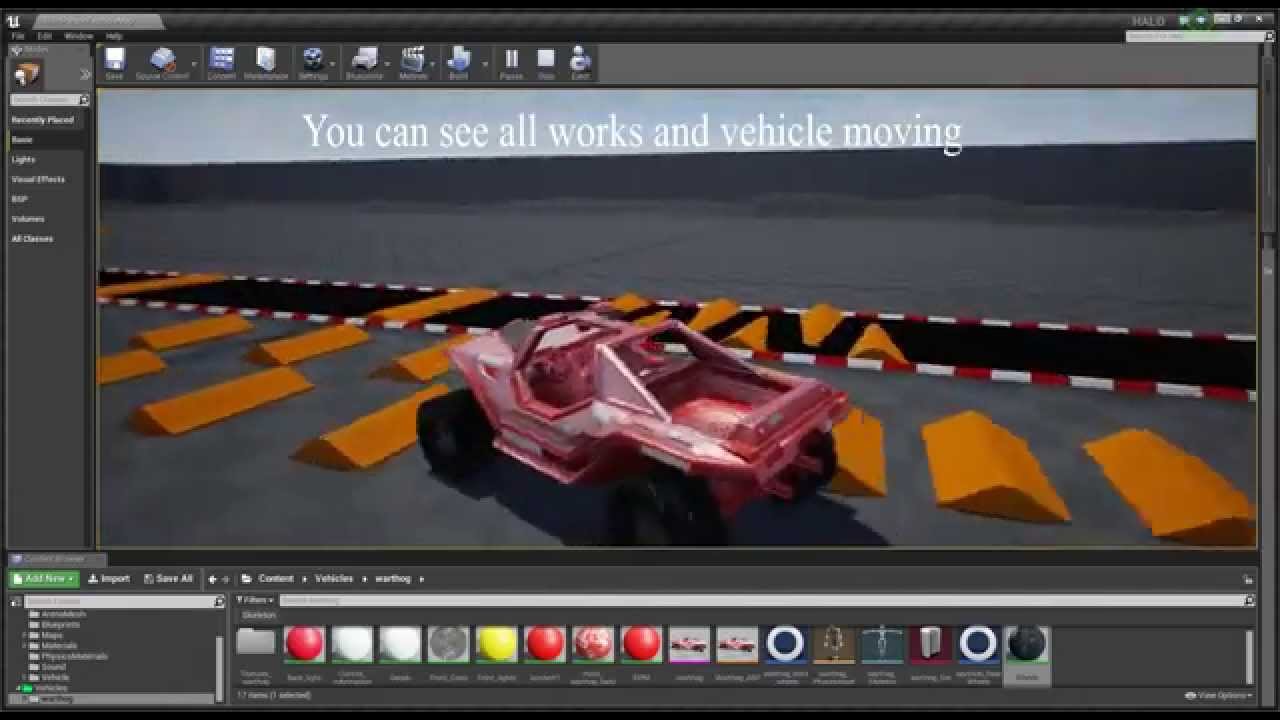
I have magnet bug with my vehicle(halo warthog), maybe some one know how to fix it??
can anyone help fix it?
magic cedar
plush yew
i need to edit itt
Thanks to someone earlier, I was able to get my paths looking "OK"

 unkempt echo
Is c++ hard to learn?
Im new to programming but Im a decent learner, not too bad at math, and have a lot of time on my hands
 olive atlas
Hi. could someone tell me if Ued4 static light with cast shadow On, will still act as Ue2.x or UDK static light which did not cast player shadows? i need light to cast player shadows,
Ah, seems movable point lights with ~500 radius for floodlights, did the trick. cheers.
olive atlas
frosty osprey
https://youtu.be/PsDVvmr-Q4I
I have this problem
can you select from the player controller in the Vehicle BP(controls the players' states) to Player 0 or any override that will attach the player in the vehicle, attached as (pawn)in level. or restricted to spawned.
frosty osprey
🤨
In my case, the character's visibility and collision will be disabled after being unpossessed.
and that glitch happens if I try to enter the car from the top
 ruby robin
Am I the only one, who has no access to AnswerHub? It keeps telling me I have my license expired..
 latent estuary
[EDIT: SOLVED]
Hello group. I'm having a huge issue with the Engine. Since a week I am unable to launch the engine without having it crash before even getting past the splash screen. This happens with any engine version, any project including launching the engine without any project selected. I've tried multiple times to reinstall engines, epic games launcher, update NVIDIA drivers. I haven't changed anything on my system, everything used to work fine but it just stopped working. I'm at a loss. Haven't found any solution online and on forums and now for some reason I cannot even access to the Answer Hub because I get the error message "your license has expired" (?).
I installed debug symbols but I am unable to understand what the problem is. Would anyone please have a look and see if you can understand what is causing the crash? I copied the log from the crash reporter here: https://pastebin.com/KWuehgpZ
And the detailed log here: https://pastebin.com/JZpVe5Fk
[SOLUTION]
After trying everything except OS reinstall, I used DDU to clean completely the video drivers. That didn't help. Then I tried to use DDU to remove Realtek Audio drivers. Magically, that worked, but only until I plugged in again a speaker, which resulted in an instant crash. Ultimately I went to device manager and uninstalled Sonic Studio Virtual Mixer, and now I can run the editor with audio without crashes. Hope this will help someone else.
Pastebin
Pastebin.com is the number one paste tool since 2002. Pastebin is a website where you can store text online for a set period of time.
Pastebin
Pastebin.com is the number one paste tool since 2002. Pastebin is a website where you can store text online for a set period of time.
latent estuary
ruby robin
Am I the only one, who has no access to AnswerHub? It keeps telling me I have my...
Same issue here
ruby robin
Oh, it is Epic Games who has license expired, not me..
latent estuary
That's reassuring. I hope they fix it soon though
vague falcon
License?
 knotty falcon
vague falcon
License?
knotty falcon
vague falcon
License?
AnswerHub is a third party plugin/tool
 late loom
Any1 knows how to make a system tray icon for your game
 oblique loom
im trying to get a reference of ues character for modelling in blender
is there any way to get the default character model?
or maybe someone knows what dimensions itd have in blender?
plush yew
magic cedar
Thanks to someone earlier, I was able to get my paths looking "OK"
Yo can i ask
how did u put grass in
i tried
and theres none
 reef jetty
 brazen root
why my license expired? 😄
brazen root
why my license expired? 😄
It’s Epic’s license that expired
drowsy snow
AnswerHub is about to be phased out.
plush yew
how to put grass in my world?
 candid urchin
Is there any announcement about this anywhere? Will they be moving any answers from there or make them available as some kind of archive?
drowsy snow
plush yew
how to put grass in my world?
Use the foliage tools or add them via material node (landscape only)
 sleek solar
Check the #unreal-news
"Migrate the current content from AnswerHub over to a new Q&A section that would run on the same platform as the forums (Discourse)"
plush yew
drowsy snow
Use the foliage tools or add them via material node (landscape only)
i mean how to? im starter
candid urchin
sleek solar
"Migrate the current content from AnswerHub over to a new Q&A section that would...
Thank you!
sleek solar
or they might setup something else
 obsidian mist
what is the goto plugin for integration with steam lobbies, is the online subsystem steam enough, or i should use advanced steam sessions
reef jetty
Assuming you are using blueprints then both
 drowsy cobalt
Maybe I should take some screenshots for my scrapbook. I have a few cashed Answerhub pages.
obsidian mist
i seem to be unable to create two play standalone windows i have players set to 2 and run dedicatedserver
 weary orbit
I'm using ue5 and my quixel materials keep going to my C drive, does anyone know where i change the download location to? (the project is on my E drive btw)
 nova kayak
I'm having massive issues with my lighting, when I build static lighting my games fps reduces to 10 - 12 fps, if i turn static lighting off and only have dynamic lighting i get around 70 - 90 fps, has anybody had issues like this before or does anybody know what could be happening?
 mint sequoia
If show mouse cursor is enabled and I click anywhere - even in the game viewport, the game loses capture unless I click and drag and cannot regain capture, how do I fix it
nova kayak
there's a node named "Set input mode game" and "set input mode UI" or "set input mode both" make sure you are enabling one of those, more than likely mode ui or mode both
nova kayak
It doesn't sound like it, sounds like normal UE4 behaviour to me.
You just haven't locked your cursor.
mint sequoia
No, it's locked
Then I click anywhere and it becomes unlocked and cannot be locked again
Input is then only detected by clicking and dragging
This only occurs when bShowMouseCursor is true
nova kayak
And are you using any form of input mode?
Im 99% sure I came across this a few years back and solved it with an input mode.
mint sequoia
Game only, but tried them all
nova kayak
And as far as I can remember it wasn't a bug, It was just my set up
mint sequoia
Solution isn't the input mode
Engine bug
There's other reports of it originating in 4.20 and no one has a workaround that isn't setting input mode on tick
Which I'm never going to do
nova kayak
Yeah it's definitely an input issue, looks like the game is going into game and ui input mode or something similar, can you use keyboard presses or does it completely disable all input other than dragging?
mint sequoia
Only affects mouse input
nova kayak
Click + dragging is what happens when you have Both UI and Game mode input enabled, you have to click and drag the screen and you can within the game, anything else goes to UI
I can't say for sure what exactly is happening in your project but my best bet would be input methods, do you have any way of replicating this? so that I can try it from my end?
mint sequoia
You really gotta get past the whole game mode input thing, its a bug with show mouse cursor
nova kayak
Alright, alright, I had the same problem and fixed it a few years back, 90 - 100% sure it was inputs but i'll leave you to it, hope you get it fixed...
 errant mist
I cant use the answerhub. Had this last time a few months ago. Pls fix. 🤗
 fresh shoal
you can try both the forums and here
mint sequoia
Found the bug report, seems it has further regression https://issues.unrealengine.com/issue/UE-29148
latent estuary
latent estuary
[EDIT: SOLVED]
Hello group. I'm having a huge issue with the Engine. Since a we...
I now realized that even packaged games that previously worked are crashing upon launch. I really can't tell what it is. Most possible answers are on the answerhub and therefore unavailable. Does anybody know of known issues related to crashes happening at 83% loading of unreal engine?
 coral shoal
oh no, discourse is terrible i hope they dont replace answerhub with it
arctic path
what is the best gpu for level design, using high quality textures, displacement? I have a 5700 xt right now, i was about to go with the 6700 xt but it seems like 12 gigs would not be good enough for level design, i seem to get a LOT of dx12 crashes with this 5700 xt.
 last loom
does Epic know their TeamHub license is expired for Answer Hub? It's offline https://answers.unrealengine.com
fresh shoal
arctic path
what is the best gpu for level design, using high quality textures, displacement...
what's your budget?
and #hardware
imo in 2021 12gb is the minimum
so if you have a little more budget you can go w/ the 6800(xt maybe)
or even the 69||nice||00xt
arctic path
fresh shoal
what's your budget?
i just odered a XFX Speedster MERC319 AMD Radeon RX 6900 XT Black Gaming Graphics Card with 16GB
fuck it.
lol
fresh shoal
XDDDDD
 grizzled bluff
what on earth is this
 fresh shoal
arctic path
i just odered a XFX Speedster MERC319 AMD Radeon RX 6900 XT Black Gaming Graphic...
fresh shoal
arctic path
i just odered a XFX Speedster MERC319 AMD Radeon RX 6900 XT Black Gaming Graphic...
nice
arctic path
fresh shoal
XDDDDD
i hope this will be good enough with my ryzen 9 3900.
good enough
lol
fresh shoal
yea pretty sure it will
fresh shoal
@teal tulip is running unreal with an i7 4th gen cpu and 3070 ti
pretty sure your cpu wont be a problem
arctic path
but is he doing full level design, no level streaming?
fresh shoal
idk
arctic path
everything being rendered at 1440 lol
fresh shoal
cpu is more for compiling shaders than anything else
arctic path
yeah
 teal tulip
I'm one man army
teal tulip
CPU is terrible to compile shaders past the version 4.18
arctic path

Incredibuild
Incredibuild turbocharges development with Virtualized Distributed Processing™ technology, turning every host into a supercomputer with hundreds of cores.
thats why i used that
fresh shoal
n i c e
teal tulip
also I don't use UE5
don't have use for it at all
the new features don't payoff even on the 3070
teal tulip
the new shadows cost the same of the whole rendering pass of a complex scene
fresh shoal
on low-end you can still get better perf than on ue4
arctic path
in packed game, no
fresh shoal
 arctic path
well. i did it xD
teal tulip
fresh shoal
https://www.reddit.com/r/unrealengine/comments/nn95xh/ue4_vs_ue5_huge_difference...
lmao wtf
fresh shoal
ik
gg

it's not this
but I found something once where someone was on trash computer and there was some big perf improvments
obsidian mist
I use find sessions advanced to search for lobbies but it always returns zero, ue 4.20.3
plush yew
Hi, sorry for the wall of text, but I'm really hoping to get this resolved. I'm trying to run UE4Editor on Ubuntu 21.04 after following the official Linux Quick Start guide. Any time I create a new project, the "Creating Project..." dialog reaches 100%, then the editor hard closes, and the File Manager opens to the location of the new project. If I start the editor again, and try to open the project, I get an error saying
The following modules are missing or built with a different engine version:
MyProject
Would you like to rebuild them now?
If I click Yes, I get this error Engine modules are out of date, and cannot be compiled while the engine is running. Please build through your IDE.
I have rebuilt the engine from source several times, without resolving the issue. It might also be relevant, but after I first compiled the engine, it wouldn't start because the ShaderCompileWorker was missing, which I resolved by running $ ./Engine/Build/BatchFiles/Build.sh ShaderCompileWorker Linux Development -verbose. It makes me think somehow the instructions for building from source are missing something critical. Any ideas what I could do to resolve this?
errant mist
errant mist
I cant use the answerhub. Had this last time a few months ago. Pls fix. 🤗
<@&213101288538374145> Still cant access answerhub. How can I send this to the epic team so they fix it?
 ashen brook
Hey, we don't work at Epic, we're just community members just like you...
I would suggest posting about it on the forums
errant mist
ok thx
ashen brook
maybe contacting the UE community team through social media channels
like @unrealengine on twitter
 light thunder
Gonna be hard to research this if answerhub gives me this everytime - I know they moved it last year but I've still be able to access many of these old ansewrs - I've tried logging in from there but that doesn't work either -

Oh shit, someone literally just asked this
light thunder
I'm just furious that I had a license to TeamHub and no one told me lol
light thunder
ashen brook
Hey, we don't work at Epic, we're just community members just like you...
Fair enough, but I get to yell at the first person who tells me to check answerhub
fresh shoal
nah it's unreal engine license
that is expired
i think they're gonna deprecate it

Unreal Engine Forums
Hi all, With Unreal Engine 5 on the horizon, we are focusing on how to empower and support you better, and build resources that will continue to serve you for years to come. While we are discussing and researching all kinds of things, which we’ll share in due time, right now Amanda and I would love to get your input on AnswerHub. Below, we’ve...
coincidence i think not
ashen brook
light thunder
Fair enough, but I get to yell at the first person who tells me to check answerh...
Haha, only if you do it in a polite and respectful manner, and jestingly 😉
frosty osprey
Guys, how to make something fall if a character or car hits it? like a fence
 mental solar
I hope you dont mind me copy pasting this question here:
 drowsy snow
frosty osprey
Guys, how to make something fall if a character or car hits it? like a fence
drowsy snow
frosty osprey
Guys, how to make something fall if a character or car hits it? like a fence
Enable Simulate Physics on the Hit Actor.
frosty osprey
ok
light thunder
Why would this come back as empty when I am not clearing it ever?

Going to be very difficult to do any linetrace if my collision channel is scanning for nothing
obsidian mist
how to install subversions of unreal engine that are not listed
last loom
Victor Lerp has got the right people on the Answer Hub Licence thing
frosty osprey
which BP class should I use for this fence?

I mean actor/pawn that stuff
I used actor
 stark tinsel
anyone know how to send variables to a control rig? From, say, a player blueprint or anim blueprint?
frosty osprey
currently, it only works if a person hits it, how do i add car too?
 arctic path
you never made a base bp?
frosty osprey
what is base bp 😅
arctic path
you should always make a base and childrn from it
you make a Main BP and make children from it
frosty osprey
never done that
arctic path
that way the base can have certian settings you dont have to dupe over and over again
here ill show ya
frosty osprey
ok

 frosty osprey
oh
arctic path
but when i add a child with everything in it
 cinder panther
hi, anyone using FMOD with the source engine ? i get a compile error, i want to know if anyone got the same error
 frosty osprey
I "definitely" know what children means
frosty osprey
character or car?
arctic path
you should make a base car bp
frosty osprey
ok
arctic path
then from that create the child blueprints
it will help you in the long run
easier to replicate too
arctic path
Create child blueprint class
frosty osprey
did
arctic path
the base bp you put the code
then you can just edit the code and call a reference to the code within the child
frosty osprey
what do I drag in viewport then?
arctic path
i got tot go bud
frosty osprey
ok
arctic path
my mother needs me to come over
light thunder
@frosty osprey You need to watch a video on the parent/child relationship to realize what you can do with it
frosty osprey
ok
light thunder

Today I show how we can leverage parent/child relationships.
frosty osprey
light thunder
<@!754031442681528461> You need to watch a video on the parent/child relationshi...
I know a bit about it from roblox studio, idk if its the same
light thunder
Most likely very similar
The issues you will have will likely be more to do with your being newer to Unreal
frosty osprey
I started using it like a month ago.
light thunder
I've been at it for 3 years - my best advice would be to not try to create anything for the sake of building something, meaning, if you want to build an Action RPG, don't try to build that yet, instead, take a care on Udemy, Epic games, skill share, and youtube has many playlists that are "let's build this thing"
frosty osprey
ok
light thunder
That way you know about systems/problems before you start on them
frosty osprey
yeah, that seems like a good idea.
light thunder
ShareX is a good (and free) screenshot/video recording
I am literally typing this down using the video recording hotkey, it's that quick/easy
frosty osprey
crap i type so slowly
light thunder
Makes it a lot easier to get help when you get good at describing the problem and mods/discord likes it because it keeps file size small
frosty osprey
alr going to watch some tutorials
light thunder
frosty osprey
alr going to watch some tutorials
Highly recommend the approach that you say, "I'm going to finish this class or this entire playlist before I try to do anything"
 pearl mortar
Hey guys, I've started from a blank project but then decided I wanted the third person to run around and migrated the ThirdPersonCharacter. However, when I hit play I'm a flying camera instead of the mannequin. How can I play as the mannequin? Thanks
 frosty osprey
light thunder
Highly recommend the approach that you say, "I'm going to finish this class or t...
frosty osprey
light thunder
Highly recommend the approach that you say, "I'm going to finish this class or t...
i did an entire fps game playlist before making anything major
was pretty small
about 50 vids
light thunder
Then you are on a good start
pearl mortar
Where should I ask my question?
light thunder
This is it - because scroll up and see what I told Monstrosity about learning
pearl mortar
me?
frosty osprey
He meant: U can ask questions here and if ur new to Unreal, U can do what he told me to do in above msgs
pearl mortar
is my problem related to parenting?
 autumn flame
Are you possessing the character if you want control direct of it?
Or if you wanna spawn it with PlayerStart, do you even have a custom GameMode with it assigned as Default Pawn?
 white ice
anyone else having many problems with "Unreal Engine is exiting due to D3D device being lost. (Error: 0x887A0020 - 'INTERNAL_ERROR')"
in 4.26? I can use 4.25 all day long and never get a crash, 4.26 crashes every 10 mins
in fact, if i run 4.26 with DirectX12 it'll crash in about 5 seconds
4.25 totally fine always
pearl mortar
autumn flame
Are you possessing the character if you want control direct of it?
Or if you wa...
Yeah I want to run around as the mannequin
autumn flame
Doesn't answer my questions tho
autumn flame
No
I suggest learning the basics of UE framework if you don't have that figured out yet
pearl mortar
okay, but could you tell me a quick fix? @autumn flame
 devout swift
So I got this free character asset that comes with some collision spheres (in orange) already on the mesh (or is it the skeleton that has the collision spheres?)
How do I add more of this collision spheres (or edit existing ones) to the character? (he doesn't have colliders on his legs and forearms so I want to add some there)
I want to have multiple small collision spheres or cylinders to cover the entire character so that the player only does damage when it shoots a body part but not when it shoots the big capsule collider that covers the entire character.


 loud knoll
@white ice Did you make sure the project is set to DX12 in the platform options and then clear the build cache and rebuild it fresh you could have some mixed old and new content which can cause issues.
autumn flame
Better option would be creating the GameMode
pearl mortar
autumn flame
where can I find that menu?
loud knoll
@white ice Also if you are switching back and forth between the engines you need to redo this process every time.
white ice
ah thats good to know
autumn flame
pearl mortar
where can I find that menu?
Character Details
I really suggest learning the basics
white ice
I actually only started trying to switch to dx12 just now as a last resort, from trying to fix 4.26 crashing constantly before
loud knoll
@white ice Also you can go to the app data folder and clear out all the shader cache
@white ice yeah its ok clear everything out and see if stops the crashing
@white ice If 4.26 was crashing for everyone like it is for you then they would have fixed it already right? so it is your project, your machine that is causing it, one shader can cause a crash so its better to have it all clean and rebuild all the shaders, if you tons of megascans or other content you didn't make yourself then it gets harder to debug what is causing the crash, the next step is copy your project and start removing things from it until you find out what is causing the crash, if it is happening with a template project then it could be a hardware issue.
loud knoll
@plush yew this isn't a chat channel man what is your question
light thunder
How can my boxtrace be hitting an object that is NOT one of these object types? Is my understanding wrong?
 white ice
have so far seen it in multiple projects/ multiple pcs and source builds
so thought it might be a known thing
loud knoll
@white ice I didn't say that you did but I am trying to get you to think about it from the perspective of an engineer, engineers / programmers follow logic to solve issues, so logic in this case can help you frame the question, you know the answer to your first question, which is "is anyone blah blah blah" you know if that was true then they would have released a patch.
@white ice part of being a game dev is figuring out the best way to ask a question so you can get solve the issue yourself or get help, so this will help you down the road.
@white ice if you have more trouble I can help you in the stream / voice channels we can get you running smooth today. just let me know.
plush yew
can smvn help?
when im placing smthing with foliage how do i make space between it
?
 vague ivy
Why is there one FPSCharacter outside Play Mode, but there are two FPSControllers in Play Mode?

 arctic path
 devout swift
what do the different colors in the physics asset mean?

 wind cape
So I've been using some animations from Mixamo and this root motion attack I'm using ends up leaving my character couple of degrees rotated on the X and Y once it's finished, what's the best way to deal with it? setting rotation after it's finished gives it a "snappy" feel and I figured there must be a better way
plush yew
wind cape
So I've been using some animations from Mixamo and this root motion attack I'm u...
can you send me an video what happend
 sudden totem
is there a way to work with other people on a single project?
plush yew
how i know no
 digital anchor
sudden totem
is there a way to work with other people on a single project?
digital anchor
sudden totem
is there a way to work with other people on a single project?
How to setup Perforce or SVN so that you can share assets with other on your team.
autumn flame
sudden totem
is there a way to work with other people on a single project?
Source Control
 solid sierra
Anyone know about maze generators and why mine might be looking more like a grid right now lol
plush yew
can some help how do i use foliage with trees, when i add trees they dont have collision anymore and i can go trough them
north shadow
Hey guys do you have a link or something who could help me for a moba games creation?
obsidian mist
how to get debug log console output?
 maiden swift
obsidian mist
how to get debug log console output?
maiden swift
obsidian mist
how to get debug log console output?

Every time I open an Unreal project lately, EGS opens in my web browser automatically. Anyone else experiencing this?
Is it new intended behavior or a bug?
Might be a bug in the latest launcher build.
Seems quite unnecessary. 😞
light thunder
I just want to make a character run to a point - I've got the running animation fine but they are moving slow - I've set the max speed to a high amount, what am I forgetting here?
 thick herald
acceleration?
light thunder
dude's outta shape
 earnest pawn
hey, does anyone know what happened to the additive control rig in ue4.26?
plush yew
thanks, and how do i make space between them?
 vapid umbra
Hey everyone, these days i was looking into Microsoft flight simulator 2020 and how they managed to bring the whole earth in the game.
Earlier this year, cesium for Unreal plugin was also released for free in the marketplace.
So I tried it and it's good but now the next step would be to segment the earth texture into distinct areas like grass, water, trees, barren etc and then spawning foliage and rocks and trees on the suitable areas.
I found some material on it but still don't know how to implement it.
Here's what I've found so far:

Unreal Engine Forums
I created a pipeline using the Unreal Engine and ArcGis Pro to take satellite images and auto-generate the environment. This is similar to what Microsoft did for their newest flight simulator. The main difference here is that it’s geared more towards a First/Third person type of game so it’s a smaller location (50 SqKm instead of the whole world...

Example of using satellite images and digital elevation models to create a photorealistic scene on a massive scale (almost 50 square kilometres). Let me know if you'd like a tutorial.
vapid umbra
Anyone has any ideas on how to do this for the whole globe with cesium?
plush yew
so
idk
i i
i think they had very good team and then they buyed the whole earth and turned it into model
i meant earth like on the mao
p
or smthng
try to email them and askem for an tip
vapid umbra
Well they are using bing maps data for heightmaps and satellite imagery and then using blackshark. ai to populate it with trees and foliage as far as I know. It even takes care of buildings.
 lavish frigate
hi guys
i'm such a noob and don't know anything about UE
i'm trying to install it over EPIC Games
but it doesn't show me anything even if i click that "+" button next to "Engine Versions"

i'm clickin on it still doesn't show
i've logged in etc
 lucid grove
Is is possible to attach mesh to two sockets? For example i have broom and its moving alongside other hand
 prime willow
lucid grove
Is is possible to attach mesh to two sockets? For example i have broom and its m...
prime willow
lucid grove
Is is possible to attach mesh to two sockets? For example i have broom and its m...
i mean you could always attach and angle it proper
and have animations that make it hold itself proper
im spit balling but thats a workaround i believe
lucid grove
prime willow
and have animations that make it hold itself proper
This is broom animation, but probably i cant rotate it properly or they didnt used any stick when moccaped it ha
 obsidian nimbus
no you cant
its goin into local space of 1 socket
so if 2 sockets move and not in the same way how would it behave?
you can add 2 sockets to the broom and use IK
or just 1 socket and have the other hand go for that while 1 hand does the anim
you can attach another socket to the 1st socket, but thats gunna do no good in this case
prime willow
lucid grove
This is broom animation, but probably i cant rotate it properly or they didnt us...
oh by the way
use virtual bones and you can have perfect socketing regardless of mesh using mesh compenent
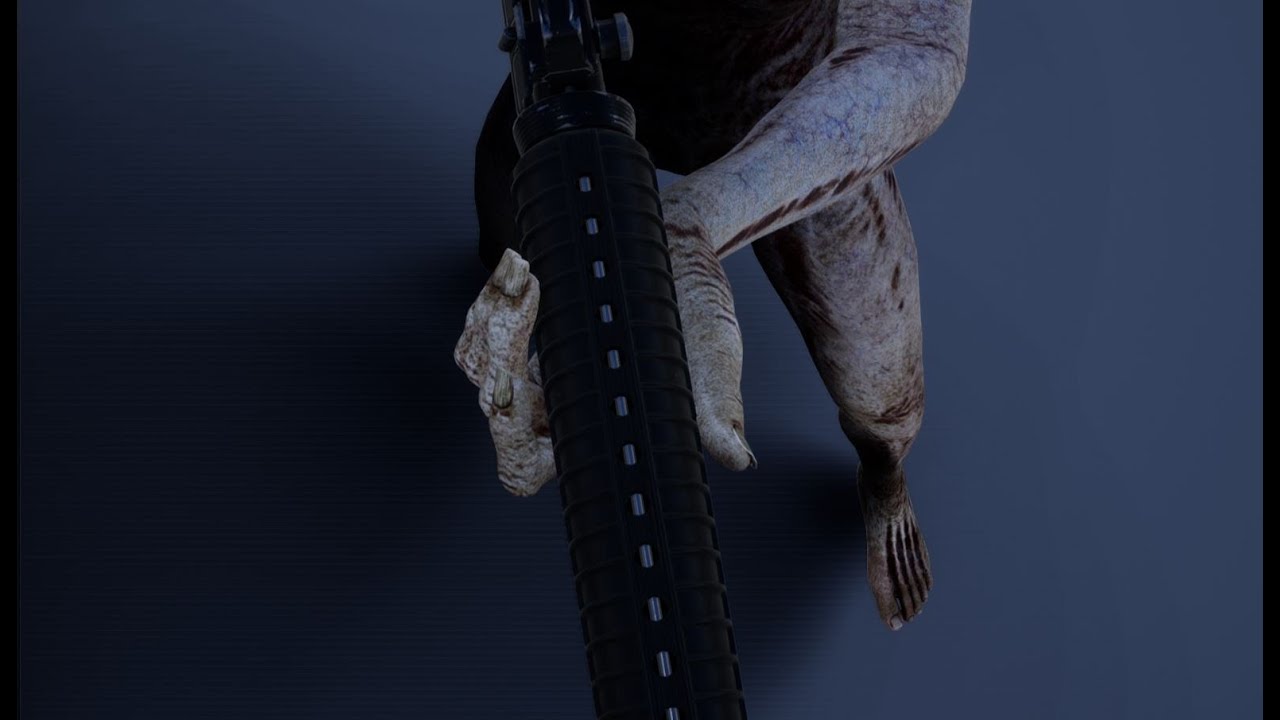
Complete explanation on virtual bones - how they work, what is their function, how to use them to get fast perfect results on different characters, with different proportions sharing the same animations.
content:
0:00 Virtual bones Explained
7:40 Retarget options for feet
11:00 VB IK solver logic
15:05 VB vs IK bones
31:08 Build the new solver...
 stoic geode
two days ago I've started learning UE4, could someone help me?
i think i did something really bad and crashed my project
my whole level went black after i tried to place sky light actor
plush yew
When I set my array to a variable, and I run some array functions on my variable, it doesnt seem to return anything. But doing the same thing with the original array does. Anyone know whats going on?
obsidian nimbus
set b4 get
 sudden cove
stoic geode
two days ago I've started learning UE4, could someone help me?
i think i did som...
sudden cove
stoic geode
two days ago I've started learning UE4, could someone help me?
i think i did som...
Can u explain me more ! Cz i dont understand what you are trying to say.
stoic geode
obsidian nimbus
top left in viewport is set to lit, set to unlit if all else fails 😛
there prolly allready was a skylight in ur scene
i think you can only have 1
 torn dirge
Hi
Im new to unreal engine 4 so srry if i ask a dumb question
so I made a cube and I was wondering where I could find the blueprint for the cube
would I have to create one or is it just there and idk where it is
obsidian nimbus
top right of the details panel .. add script
torn dirge
Where could I find add script?
obsidian nimbus
top right of the details panel
or u can R mouse content browser and create new BP
torn dirge
whats r mouse content browser sorry
obsidian nimbus
right mouse
torn dirge
Oh I see
obsidian nimbus
content browser is on the bottom on default layout
torn dirge
Oh found it
plush yew
obsidian nimbus
set b4 get
Tried to but it doesnt seem to work. For example, Im trying to set an array held by my player to a variable so I can use it later. But when I use the variable, it just doesnt work even though dynamically grabbing the player's array exactly the same way does work.
torn dirge
so I press create blueprint class?
sudden cove
stoic geode
https://i.gyazo.com/0b5dbba9ef5c6d29f0c3614bfd98abc8.mp4 <@!657554335101878292>
Remove everything related to lights and restart project and add aging i hope it will helpful!
obsidian nimbus
yea
torn dirge
obsidian nimbus
content browser is on the bottom on default layout
ok I pressed blueprint class, actor, and how would I connect the blueprint to my cube
obsidian nimbus
top left somewhere add component
static mesh actor
click that and select the cube
torn dirge
so I right click the blueprint class and find add component?
 obsidian nimbus
nah u open the bp class, but a video prolly would do better for you atm
sudden cove
Follow this and u will get ur answers!
sudden cove
@obsidian nimbus hey actually i have issues with dpad vive controller
Hey , I have been trying to get my htc vive controller to act as a virtual camera and I have searched through the whole internet and tried all things but it just doesn't take input from the controller and move the camera. Any help would be much appreciated. Thanks!
stoic geode
@obsidian nimbus Ohh, what a weird thing why it changed my view mode by itself, weird
No i didn't had any skylight, thank you, appreciate
obsidian nimbus
hmm i only have an oculus, the virtual production camera seemed to work for me
if its on runtime just attach the camera to a socket on the controller
sudden cove
Ah no its not working i tried 😕
 runic urchin
After applying a material to the floor in a brand new project while editing in Perspective Viewpoint, I begin to slowly float upwards, into infinity. I cannot stop the floating. I assumed I had accidentally triggered this and quicky hit "Ctrl + Z" to no avail. I keep floating. I can manually reposition or Focus on an Actor and stabilize my position temporarily, but as soon as I release focus or cease manual movement, I begin to float away again. Everything appears fine in "Play" mode. I even closed the Project and opened some of my other Projects. I simply began to float away in those as well. What is going on? lol.
I should mention, I am an absolute beginner, basically living off of tutorials to learn the fundamentals.
obsidian nimbus
do you have a controller connected and is it upside down somewhere?
 stuck crest
Hey, anyone know any good up to date C++ UE tutorials? I was following this one from Devslopes from 2019 and ran into a bunch of compiler problems copying it exactly.
fierce tulip
its generally always best to follow tutorials with the same ue version they use.
while some stuff might be outdated, bug-solving should be done after you understand what you learned.
stuck crest
so in other words you don't know of an updated tutorial you'd recommend
fierce tulip
im not a c++-er, so im not the one that should/could give you advice on those.
stuck crest
thanks
so again, does anyone know any good up to date c++ ue tutorials?
or does someone else want to tell me I should downgrade my UE version
 zealous shard
Do the functions BeginPlay and Tick on your actors and actor components ever need to be public for any reason, or can they remain protected/private. And which is preferred?
fierce tulip
- #rules no asking the same question within a certain time period.
- that sounds plain offensive dude.
stuck crest
fierce tulip
1. <#809148428922781737> no asking the same question within a certain time perio...
alright
zealous shard
stuck crest
alright
udemy has a good c++ unreal course, if you can catch it on sale for like 20 bucks i think, i took that one and the multiplayer one afterward, which got me started on unreal engine tbh
since UE5 is on the horizon, you probably won't find any newer c++ tutorials or courses until it's full production release
stuck crest
@zealous shard thanks for that, do you know who made the course you checked out?
 spice jay
anyone have blnder expirence?
spice jay
i have some issue importing
zealous shard
stuck crest
<@!129430956523126784> thanks for that, do you know who made the course you chec...
Not sure if links allowed here, but here you go 😛
https://www.udemy.com/course/unrealcourse/
spice jay
greystone mesh after removing the sword
 unique kraken
i have no idea what u are talking about
unique kraken
but, for importing you should use either the datasmith, or the ue4 send to ue4 add on
spice jay
 unique kraken
materials do not export properly, the datasmith exportes a lot but even then not all materials
spice jay
it destroyed the mesh
unique kraken
generally speaking materials ALWAYS need to be set up manual in game engines
no, you just dont have materials it seems
wich is relativly normal when u export to ue4
spice jay
i removed all the matrials
unique kraken
bcs u need to set them up first

 spice jay
1 secound
unique kraken
and idk what even is wrong with your character
zealous shard
north shadow
Someone can explain me the node
"try get pawn owner"
returns a pawn object reference, which you can then call functions on that pawn...the name is kind of misleading, what are you trying to do?
https://docs.unrealengine.com/4.26/en-US/BlueprintAPI/Animation/TryGetPawnOwner/


 unique kraken
Okey and wh not just use the working one?
fierce tulip
just give the sword a masked invisible material in the meantime.
prime willow
what should i even be looking into if i wanted to make something like change skin color for said mesh?
something like this for example https://gyazo.com/d6194550c69f450b79275f1475b60a05
 zealous shard
material instances would probably be the easiest way to do that
prime willow
ive already made all of my materials instances of the real one o-o
i mean the term so i can learn how to do it
fierce tulip
for such a basic shader you might get away with storing colors in an array and change depending on selection, and apply the change in a dynamic instance. (said by the non-blueprinter)
prime willow
o.o
zealous shard
cool, so in your blueprint you would do a 'Create Dynamic Material Instance' i believe, and then you can change your material settings at runtime
prime willow
well i want color wheel for clothing but basic shaders for skin color
oh so its different than a sort of regular material instance?
zealous shard
correct
prime willow
so i want to look up create dynamic material instance right o.o
zealous shard
i believe so, ya, i do something similar for my game
prime willow
o.o okie thanksies
zealous shard
prime willow
o.o okie thanksies
Here's a function I'm doing it in, what happens is I have a pre-defined array of Texture2D that is getting a random element from the array and setting it as the texture of the material.
 prime willow
what if my mesh has a material slots like legs arm head body etc and i wanted all skins to change when using a color and nails to be selected seperate and irises and lips to be selected seperately via some runtime creation system
would this format youre showing me work for that ^
o-o
zealous shard
you can do it for as many material slots as you want, you just have to specify on the mesh itself which material instance you're using
what's happening is in that blueprint graph, you're doing the same thing as if you were to open the MI in the editor and change the settings manually:
 prime willow
i see
so you can select who and what changes when a particular single color is selected from the options available
can this be used for clothing and weapons as well?
zealous shard
i don't see why not, as long as its a static mesh you should be good (or skeletal too, but i havent touched skeletal meshes yet)
zealous shard
i think i can show you an example from a game jam i did where i actually changed the color of a mesh using that method
prime willow
Oh i would appreciate that
making a custom character system has been quite the work load
zealous shard
so for your case, you would have all your possible colors listed (skin color, etc) for the player to select, when they click that 'button' it'll call a function, like the one i pasted above, passing in an integer, where you'll get that element from your skin color array, then set the color of the mesh for the player to see the new skin color
(Im still loading the old game jam project)
prime willow
ive setup the mesh, materials for the most part and stuff like eyebrows eyelashes hair etc but the mode where you mess with your character has been quite the journey to make for daz 3d / mannequin like models
also take your time lol im still learning how to navigate this whole thing
zealous shard
hehe nice, i can't wait to get into the character creation stuff
prime willow
the sooner my custom system is done the faster i can make sick combat and movement systems >.<
its just an extreme lack of tutorials on how to even do that..
zealous shard
ok this one's more simple for ya:
firstly the material itself is literally just a color plugged into emissive
 prime willow
o.o
 rancid lynx
theres almost a tutorial for everything.
zealous shard
the instance with the "color" variable
 prime willow
what if i wanted to have a texture with the color
zealous shard
lastly the function where i change it to red
 prime willow
rancid lynx
theres almost a tutorial for everything.
prime willow
rancid lynx
theres almost a tutorial for everything.
ive found pieces of what i need for a creator system to be functional like any other rpg or action game
prime willow
but they dont cover or ellude to pieces needed just the move or change morph and camera angle thing
unique kraken
missread
prime willow
i just learned 3 days i ago i need a datatable setup allegedly..
idek what a data table in unreal is xD
prime willow
zealous shard
the instance with the "color" variable
wait do i need dynamic material for that
or can i do that with normal material instances
and can the list of colors used put on a widget system o.o
zealous shard
you'll always need to do the Create Dynamic Material Instance node if you want to change anything after you press Play
prime willow
ah
so dynamic material
than setup material
than put those variables on a widget
zealous shard
and yes for widgets, i believe you want the FColor or FLinearColor variable type
zealous shard
sounds about right, your widget will need a reference to the actor that has the meshes, which you can do through GetPlayerController()->GetControlledPawn()
 limber cradle
yo guys, does anyone know a good functional video on how to do a grapple hook in ue4?
prime willow
- dynamic material
- setup material colors
- put variables into widget via flinear node
- reference the pawn used
zealous shard
should be, if not you can convert to different variable types, but im pretty sure widgets (i think the struct is FSlateBrush) contain the FLinearColor
prime willow
limber cradle
yo guys, does anyone know a good functional video on how to do a grapple hook in...
tons but i can give you a link with a really good setup that he gives away for free
limber cradle
i would love it, snowie
prime willow

I breakdown how Pathfinder's grappling hook works in Apex Legends and remake it in UE4.
Project Files: https://github.com/DavieTi/GrappleHookComponent_UE4
Second channel: https://www.youtube.com/channel/UChvKv1CiVjDkaxLqztIFRkQ?
Join the Discord! https://discord.com/invite/4dRyJmm
► Follow me!
https://twitter.com/Davie_Ti
https://www.instagram...
there ya go darling~
you can arrange some pieces to apply it to a third or top down game
limber cradle
thanks bro
prime willow
its in the description
zealous shard
now I want a grappling hook in my game 😛
prime willow
i do too :3
zealous shard
i wont pull a star citizen and add way too many features to never implement though 🤣
prime willow
yeah gotta find that balance of complexitiy and depth thats right for your project x3
drowsy snow
zealous shard
now I want a grappling hook in my game 😛
My grappling hook is fairly simple. It was basically meant to replace Final Fantasy XV's Warpstrike, more so than actually for mobility in combat a la Apex Legends.
drowsy snow
limber cradle
yo guys, does anyone know a good functional video on how to do a grapple hook in...

This month, we explored the updated Control Rig system in Unreal Engine 4 and analyzed Sekiro: Shadows Die Twice to bring you the grappling hook mechanic!
https://www.patreon.com/Lucid_Tales_GDP
00:00 Sekiro's Roots
02:39 Game Dynamics
03:46 Grappling Hook Analysis
04:48 Detection System
11:49 Control Rig
17:26 Animations
19:31 Grappling Movem...
zealous shard
nice
limber cradle
drowsy snow
https://www.youtube.com/watch?v=fL8FcQFK7pA
thanks maaaan
 dense knoll
when exporting blender groom fur, the UV maps seem to be messed up
it looks good in blender but in unreal the fur is just stuck on one color of the texture
rancid lynx
when i pick up items in VR using blueprints, using Attach to actor, the items i pick up can pass through walls and other static meshes, even with everything set to block all. how do i stop the items i pick up from moving through static meshes? physics constraints?
ive never learned about physics handle. ill check that out. maybe thats it.
 shadow path
Hey all, just joined. I'm just starting out with unreal engine, and am looking to start some basic prototyping of an idea. I'm interested in all of the new features in UE5, but as it's early access, I'm not sure how stable it is. What has everyone's experience been like with it, and would you recommend using it if I'm starting a new project?
drowsy snow
shadow path
Hey all, just joined. I'm just starting out with unreal engine, and am looking t...
UE5 is still super unstable, and use UE4 in the meantime for starting out and starting a new project.
You don't need the new fancy features for getting started.
zealous shard
^
limber cradle
prime willow
https://www.youtube.com/watch?v=gcXZ4KzBCP8&t=1s
i downloaded this guys's project, but im not having success in making it work. his project actually has some blueprints and a note saying "remember to call this in you character bp" in some personalized event, anyone knows what can I do to make the project in this video work? im lost here
 hidden tendon
How do I move a particle system WITH it's particles rather than just the emitter? My dust doesn't appear to move with the elevator's air the way it's set up right now
hidden tendon
drowsy snow
UE5 is still super unstable, and use UE4 in the meantime for starting out and st...
I've found UE5 to be just about as stable as any other release.
There's always something broken when you need it lol
drowsy snow
hidden tendon
I've found UE5 to be just about as stable as any other release.
If you're making non functional game, yes.
Step into production or actually learning it and you'll encounter exclusive bugs.
hidden tendon
Yeah I'm not in the cool club
drowsy snow
Don't quote me on that, because Epic themselves don't encourage users to use UE5 for production just yet.
hidden tendon
I haven't tried packaging anything yet but from an editing perspective it seems on par with every other release, there're always bugs. Some are worse than others.
A few issues I was having with UE5 were related to World Partition, like not having certain actors always loaded
Like navmesh. My AI was buggy for no reason until I put the navmesh bounds to always loaded
Sounds intuitive but it's a workflow change that left me confused for a bit
limber cradle
https://www.youtube.com/watch?v=gcXZ4KzBCP8&t=1s
guys I downloaded this project and tried to see if it worked, but it didn't. in the bp there is a note saying "remember to call this in your character bp" but i dont know what to do. Any clues? Any help?
I breakdown how Pathfinder's grappling hook works in Apex Legends and remake it in UE4.
Project Files: https://github.com/DavieTi/GrappleHookComponent_UE4
Second channel: https://www.youtube.com/channel/UChvKv1CiVjDkaxLqztIFRkQ?
Join the Discord! https://discord.com/invite/4dRyJmm
► Follow me!
https://twitter.com/Davie_Ti
https://www.instagram...
zealous shard
zealous shard
Do the functions BeginPlay and Tick on your actors and actor components ever nee...
Answered my own question regarding beginplay and tick functions for actors, if anyone cares 😛
https://answers.unrealengine.com/questions/821494/why-is-beginplay-protected-and-tick-public.html
(basically, don't move them from where they are supposed to be in the header files)
 north shadow
wow this is perfect
dreamy zenith
could someone help me with a bug i have with Ai?
light thunder
Had a crash now this blueprint won't compile - refreshing nodes makes the error go way, I save the asset, and when I hit play, I get compilation errors - I've tried fixing up redirectors and that didn't work -

 stoic ridge
do someone knows how to use correctly metahumans?
light thunder
fuck - now there are two of them - somehow one of my temp assets is being pulled up

 desert verge
how would i be able to make a blob-like character with jelly physics?
prime willow
desert verge
how would i be able to make a blob-like character with jelly physics?
give the entire blob actor lushus succulent memorizing breast physics problem solved :3
drowsy snow
I think Unreal Engine 3 was attempting to do that 

Unreal Engine 3 Tech Demo showcased at GDC 2008. High Quality version here:
http://streamingmovies.ign.com/xbox360/article/853/853573/unreal_techdemo_022008_wmvhighwide.wmv
Though considering that Unreal Engine 3 back then were very closed source, maybe Epic used some NVIDIA stuff for that back in the day.
 clever marsh
yo so I have never had this problem before because usually i am using premade official skeletal mesh but I need help here. How do I make this mesh work with the thirdpersonbp anim class, I need to make sure it works before making my own anim class.
 covert summit
hidden tendon
I haven't tried packaging anything yet but from an editing perspective it seems ...
covert summit
hidden tendon
I haven't tried packaging anything yet but from an editing perspective it seems ...
if you know UE4 enough then it's fine, assuming you aren't shipping for awhile. For those who haven't spent a lot of time in UE4 yet though, UE4 is just way better for learning
clever marsh
ive been thinking about using blender as a way to retarget the bones to match the ue4 ones, but I'm not sure if that would work.
covert summit
clever marsh
ive been thinking about using blender as a way to retarget the bones to match th...
if you start with the epic skeleton in blender, with roughly equivalent proportions and bone structure then it should be easy to port animations to any epic skeleton provided you've set up your retarget poses and bone mapping. The AnimBP itself is tied to the skeleton that it is tied to period though; you actually can't reuse that unless you share the exact same skeleton with the character mesh it was built for
I'd love for someone to contradict this, but parent animbp classes with differing skeletons doesn't seem to work in engine at this point, so if you want an animbp to work for another skeleton you need to have one for each skeleton (ie copy/paste a bunch of parameter setting and animation states)
and animations, though the retargetting system can intelligently reuse existing assets if you do it right
drowsy snow
covert summit
I'd love for someone to contradict this, but parent animbp classes with differin...
Anim BP indeed can't be used cross skeleton, which is what Control Rig should be able to build the bridge upon.
Though due to how Control Rig handles bone hierarchies, the bone names must be different especially for complete soft retargeting.
covert summit
drowsy snow
Anim BP indeed can't be used cross skeleton, which is what Control Rig should be...
yeah control rig opens up some interesting possibilities here
 real patrol
is there a way to see all files in the editor, including ones in subfolders(while not showing the folders)?
 crimson peak
Hello everyone. Where is the correct channel to ask for assistance? Thank you
I'm new to unreal. I've imported a model ( it's a Game boy advance SP ) I have the textures also. But it has about 2 textures and 2 materials that I had to import separately. I tried dragging them on it but its a mess 😅
 sullen forge
when I open a ue4 project the epics games store webpage opens as well. how do I make that not happen?
desert verge
could i get soft body physics in unreal?
or do i need to do it un blender then export to unreal?
sudden cove
obsidian nimbus
make sure u got a ref to the left/right hand and attach it
I use anyhand actually i attach vive tracker on PPgun
covert summit
crimson peak
Hello everyone. Where is the correct channel to ask for assistance? Thank yo...
you can ask a question anywhere, but you should ask it in the most appropriate topic channel for what your question is about . You should try #graphics
 turbid pawn
#fuckue4 i give up on making games
unkempt echo
Can you play the ue5 demo? and If so how?
crimson peak
covert summit
you can ask a question anywhere, but you should ask it in the most appropriate t...
I actually figured it out! Thanks tho!
hidden tendon
covert summit
if you know UE4 enough then it's fine, assuming you aren't shipping for awhile. ...
No doubt... I'll be watching UE4 tutorials and reading those docs for some time to come I'm sure.
crimson peak
sullen forge
when I open a ue4 project the epics games store webpage opens as well. how do I ...
Its tied to the Epic Launcher. So it will open.
drowsy snow
sullen forge
when I open a ue4 project the epics games store webpage opens as well. how do I ...
I think I've read somewhere to mitigate this.
 tight prawn
I have an issue with ragdolls in multiplayer, when using the code without being networked it works flawlessly
however when I set replications "properly" and trigger ragdoll, pawns start to fly until I trigger "unragdoll" again
anyone knows about this issue ?
drowsy snow
tight prawn
I have an issue with ragdolls in multiplayer, when using the code without being ...
Try asking in #multiplayer
plush yew
yo can smvn help me?
idk how to fix my distance look
cause
i cant see trees when im
idk 2 foot away
i can see them when i come to the@
m*
someone
please
vague falcon
Which is the good service for Ads
please help
plush yew
Lol how can I get an 'accessed none trying to read property 'AI controller''for this XD

 frigid bear
Even I get one of them for wallrun script of mine
 fresh geode
hey guys! currently I am doing a cinematic and I need a nice and good looking swamp water with reflection like this in unreal engine but I can not make it work... does someone know a good tutorial or how quixel made it look this nicely?

 inland sleet
Im really curious what size an Enum vs an Integer is actually. What i can find, the Enum is using 8 bit -> 256 possibilities (0-255) and an Integer 4 bytes (-2147483648 to 2147483647) is that the case?
latent estuary
latent estuary
[EDIT: SOLVED]
Hello group. I'm having a huge issue with the Engine. Since a we...
[SOLVED]
After trying everything except OS reinstall, I used DDU to clean completely the video drivers. That didn't help. Then I tried to use DDU to remove Realtek Audio drivers. Magically, that worked, but only until I plugged in again a speaker, which resulted in an instant crash. Ultimately I went to device manager and uninstalled Sonic Studio Virtual Mixer, and now I can run the editor with audio without crashes. Hope this will help someone else.
drowsy snow
inland sleet
Im really curious what size an Enum vs an Integer is actually. What i can find, ...
in C++ you can even have this:
UENUM()
enum class EAbsurdlyLongEnum : uint64
{
 None UMETA(DisplayName = "None"),
 // insert absurdly long list of 18446744073709551613 No Man's Sky planets here
 LastPlanet UMETA(DisplayName = "18446744073709551615th Planet")
}
You could use up to 64-bit unsigned integer as your enum and do switch for every single entires, in C++, if you want to.
inland sleet
Great!
In case of network traffic, it would always be better to use enum instead of int right?
 teal badger
https://forums.unrealengine.com/t/project-default-settings/220686
How do I set project default settings? So that I don't have to change them for every single project?
Unreal Engine Forums
I make changes to the project settings. Ray Tracing: On How can I save this as my default settings, so I don’t have to do this on every new project? I can’t click the save button inside the project settings…
drowsy snow
inland sleet
Great!
Just make sure you define it in the header and not inside the cpp file, and also the enum class name must have E prefix, otherwise Unreal refuse to compile it.
teal badger
fierce tulip
we have the <#222730877505896458> channel to discuss such things.
Who are you replying to?
 frozen stratus
Anyone done volumetric clouds from the space? This is from UE docs and sort of what I'm after.

However, when I drag the volumetric clouds actor to my scene I can't see anything. When I increase the Tracing Max Start Distance I see the protoclouds only on the edge of the planet, the shadows are visible on the front. If I decrease the planet radius they still do not draw in front of the mesh itself even though the mesh is completely within the atmosphere

 fierce tulip
teal badger
Who are you replying to?
fierce tulip
teal badger
Who are you replying to?
to someone who was talking about a marketplace pack.
frozen stratus
those dark spots on the ocean are cloud shadows although the clouds making the shadow are not visible
My guess is that I'm just too dumb to figure out some simple setting somewhere
If I fly closer to the planet, under the clouds, then I see them also on the front. But anything above clouds I just see them behind the edge of the planet. It is as if the planet cuts through them, is always on the front although it isn't
drowsy snow
frozen stratus
Anyone done volumetric clouds from the space? This is from UE docs and sort of w...
Spoiler alert
||This is in no way practical, because it's an extreme use case.||
frozen stratus
Practical or not, I still need it for non-realtime cinematics
just having texture layer works from distance but doesn't work for certain angles when close to the planet
drowsy snow
Also consider shrinking down the atmosphere planet size for one shot.
 sharp violet
hi idk why my code is not working pls help
 frozen stratus
Actually shrinking the atmosphere and planet didn't solve this missing clouds on front issue. I tried that before. Funnily though, now it works as in the default cloud noise is there all around the planet. After opening UE once more, I redragged the volumetric clouds in the scene and bam, it's there. I did this before, I also restarted UE many times between and it never worked, until now. You waste hours doing something that just doesn't work until one time it does
 solid oracle
My character went invisible during the mobile preview can anyone tell me y that happened and is there a solution?
 heady quartz
solid oracle
My character went invisible during the mobile preview can anyone tell me y that ...
heady quartz
solid oracle
My character went invisible during the mobile preview can anyone tell me y that ...
too many bones
solid oracle
Now clearing that will destroy the animbp of my character won't it?
heady quartz
you can retarget to the new skeleton
solid oracle
Will a mixamo skeleton work?
drowsy snow
solid oracle
My character went invisible during the mobile preview can anyone tell me y that ...
FYI: For mobiles, skelmeshes can only have at most 75 bones.
solid oracle
drowsy snow
FYI: For mobiles, skelmeshes can only have at most 75 bones.
Thanks for the info... But Will a mixamo skeleton work?
drowsy snow
solid oracle
Thanks for the info... But Will a mixamo skeleton work?
Dunno. Stopped dealing with Mixamo for a long time.
Screw Adobe.
Mixamo is pretty much unsupported at this point.
next badger
I'm so tired of the Launcher opening web page of the store all the time it starts.
solid oracle
drowsy snow
Mixamo is pretty much unsupported at this point.
What do u use now
drowsy snow
Also Mixamo rig is not compatible with Manny standard.
drowsy snow
solid oracle
What do u use now
I used my own rigging workflows and in-house scripts.
solid oracle
next badger
I'm so tired of the Launcher opening web page of the store all the time it start...
So am I
Can you suggest anything else... I don't know rigging yet
next badger
Mixamo works fine in many cases if retargeted.
drowsy snow
solid oracle
Can you suggest anything else... I don't know rigging yet
Heard good things from Auto Rig Pro, which is a paid Blender plugin.
solid oracle
I used the auto rig and it doesn't work in most cases... At least that's what I experienced
 pine glade
oh mb
 dense lotus
Hello, since i migrated assets from one Project (4.25.4) to an other (also 4.25.4) i have issues loading those assets in the editor, it simply takes for ever. I have no idear why.
Thanks in advance for any Help!
If more specific informations are needed just tell.
Please feel free to tag me or send a pm.
plush yew

Hello everyone I have a problem with a road I would like to know if it is possible please to be able to have in but one on the other that it does not have this effect thank you I show you
it trembles !!!
But
Now i have New problème because

Landscape for maker road
I no see when i but play


Why??
Thanks
obsidian mist
is it possible to use vector graphics in umg?
 iron violet
How to fix this completely black shadows?
 plush yew
blender advanced training hard surface modeling
https://www.youtube.com/watch?v=aKK2E-pxg4A&list=PLYKnBP50d35KMOrH1kdptqWyM-nOzWwtz
intermediate to advanced blender free training course
https://www.youtube.com/watch?v=tF6BiHTataI&list=PLYKnBP50d35LX8JKABYRAdzyJnIruOL9b
blender advanced hard surface free modeling training series,
https://www.y...
??
 scenic lance
the more i see my dev play with this stuff... the more amazed i am at this engine
tight prawn

I need help deciphering this performance log
what's the difference between tick and world tick etc..
 regal mulch
Use an actual Profiling Session or even Unreal Insights. Helps a lot more
solid oracle
I tried playing my game in android preview but my character went invisible... I looked up for solutions to this problem and there I came to realise that for mobiles, skelmeshes can only have at most 75 bones. But now my mesh is not being rigged through mixamo nor auto rigger.. I just want it to have a skeleton with bones less than 75... later I'll do the animations through retargetting.. Can Anyone Help Me With This

 tight prawn
regal mulch
Use an actual Profiling Session or even Unreal Insights. Helps a lot more
tight prawn
regal mulch
Use an actual Profiling Session or even Unreal Insights. Helps a lot more
is there a link to a resource for that ?
regal mulch
Probably. Epic's docs should have something