#ue4-general
1 messages · Page 998 of 1
 small basin
This is the handplaced and instanced meshes next to eachother

Is there any way to fix this floating point error?

 grim ore
@small basinwhat if you scaled the instance after placing it?
 fierce tulip
@quaint snow please dont post same questions in multiple channels, thanks. *points to #rules *
 quaint snow
fierce tulip
<@!258736529382309900> please dont post same questions in multiple channels, tha...
quaint snow
fierce tulip
<@!258736529382309900> please dont post same questions in multiple channels, tha...
oh sorry, thanks!
 inner cloak
What i meant is that the horizontal one does not trigger for some reason, see how it is inside the mesh:
 quaint snow
grim ore
<@!203149872210116608>what if you scaled the instance after placing it?
quaint snow
grim ore
<@!203149872210116608>what if you scaled the instance after placing it?
i actually don't have that instance, just got that example image from web
 dusk nebula
is this return value that's promoted to a variable an object reference for the timer or does it contain the time remaining?
 quaint snow
that's exactly it i wanna do but in UE4
oh @grim ore i though you were answering to me, sorry 😅
small basin
grim ore
<@!203149872210116608>what if you scaled the instance after placing it?
Just found it in the issue tracker, apparently it's been a bug since 4.8 and is marked as "won't fix"
grim ore
@dusk nebulaobject reference, you may be able to get the time from it as well I cant remember
small basin
The related answerhub thread has a workaround though, it should work by increasing the instance size by .0001 if the yaw is 0
dusk nebula
grim ore
<@!306937398200369153>object reference, you may be able to get the time from it ...
is there an easier or better way to get a timer effect/ a variable that shows time remaining? I need to do something when it hits zero and also scale the timer onto a progress bar
inner cloak
@dusk nebula In one of my tutorials, the guy used a repeating 1 sec delay
dusk nebula
I'd rather not do that if there's a better way
also, does set timer by even play the event or does it play the timer when the event happens?
inner cloak
delay 1 second, decrement, if 0, finish else loop to decrement again
dusk nebula
this is for a progress bar so I don't want to use integers
 plush yew
can anyone help
 grim ore
@dusk nebulathe timer calls the event/function hooked up to it after the time. The return value is a reference to that "timer object" that is created and is used to check for example if its still running or to cancel it if you dont need it.
if the goal is to count something down for example, you could use a timer that calls an event every X time and then update your ui, or you could do it on the tick as time goes by, or you could perhaps use a timeline that updates the UI as it ticks.
 lime wedge
hello i need assistance, so i added exponential fog and a fog particle system to my level however when it comes to rendering it refuses to render. It renders everything else but the fog

 timid frost
anyone know how to fix this issue

i cannot save the built data

please help me guys
grim ore
is your project open more than once?
timid frost
what do u mean u mean i open my project more then once
i mean twice on same engine
or u mean something else
grim ore
is that file there already? the builtdata
timid frost
yeah it was
i have been saving built data of my map since i am working on that project
 maiden sundial
Lmao, randomly pressed control + tab inside of UE.
Didn't knew such a thing existed xD
fierce tulip
sadly it doesnt flip between tabs properly, but its something
maiden sundial
Seems like it's pretty properly, at least to me xD
grim ore
@timid frostit may be bad now. Try deleting that file, saving all, then rebuilding
timid frost
@grim ore what can be lost from my project if I deleted it
lime wedge
lime wedge
hello i need assistance, so i added exponential fog and a fog particle system to...
can someone help me with this 😢
plush yew
Does GPU lightmass not work yet for AMD cards?
plush yew
Are we ever going to get support for it in UE4 or do we have to wait until UE5?
Is it possible with C++ to create a bake system and bake textures in ue4?
timid frost
@plush yew it's not mentioned on ue platforms yet so I cannot say anything about it
fierce tulip
@plush yew bake in what way?
plush yew
fierce tulip
<@456226577798135808> bake in what way?
Take a high poly and bake a normal map to low poly
fierce tulip
ah, iunno. i bet that it could be a thing but zero experience on how/what exactly to achieve that
timid frost
@grim ore what can be lost from my project if I delete this built data file
grim ore
that file contains the lighting and navigation and you can rebuild it by hitting build
 kindred viper
@plush yewits possible. Just as it's possible in many of the DCC apps. In fact I saw a plugin that added this kind of texture baking support on a project I was meant to work on (I never did) and they let me have a play with it.
plush yew
kindred viper
<@456226577798135808>its possible. Just as it's possible in many of the DCC apps...
Is the plug-in on the market place ?
kindred viper
I believe so. it was for making custom textures
I think it was a pure blueprint system too. It used a specific camera setup which was set to a top down view and took a range of different screenshots to build the textures.
grim ore
see if the files are still there
it just means the browser cant find it and load it, check your output log
so its not gone, its there just not loaded so check out the output log
widnows -> developer -> output log
chances are the .uasset is fine, the output log tells you
 steel shell
how would you switch different light settings of a level fast.. i mean i store some that i like and want to present them by switching fast between them
so i want to store the values of skyatmosphere, volumetric clouds, directional light
and switch between different settings fast
always create a new map?
 deep stump
So i installed 4.26 source and now i get this message: Engine modules cannot be compiled at runtime. Please build through your IDE.
grim ore
when do you get it?
deep stump
when it trys to build a project
grim ore
so you open the .uproject and get that issue?
grim ore
did you compile the engine?
deep stump
Yes
grim ore
did you try opening the project directly in the editor?
deep stump
I thought I did, but let me try again.
grim ore
run ue4editor.exe from your source folder and then browse to that project and open it
deep stump
I figured it might not be through an individual project because It didn't work on a new project
grim ore
also you shouldnt get that error if you open the solution file
lime wedge
how do i fix volumetric fog not showing up when rendering a sequence?
grim ore
what does the output log say is an issue?
you dont get them back unless you have source control
 clever axle
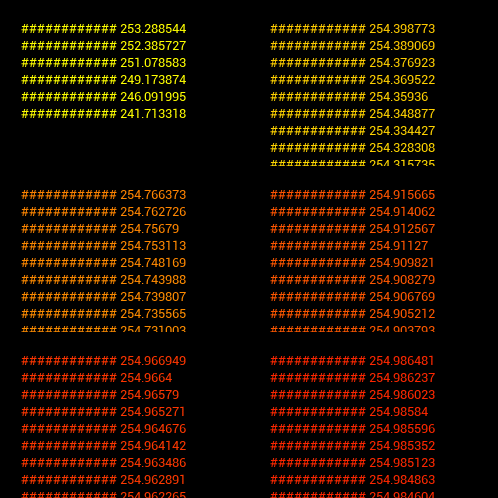
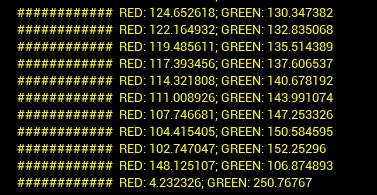
guys, I'm making a linear color by decreasing the green value and increasing the red at the same time. I would expect a gradual change from green to red but it basically immediately goes to yellow and then only around 253 it changes to orange and then red:
https://i.imgur.com/GwDSGEd.gif
what am I missing here?
 deep stump
grim ore
run ue4editor.exe from your source folder and then browse to that project and op...
deep stump
grim ore
run ue4editor.exe from your source folder and then browse to that project and op...
This seems like it's working! Thanks! Just taking a sec to load into editor which is completely normal. Will I have to do this each time?

 grim ore
are you sure your range is not 0..1 instead of 0..255 ?
@deep stumpwell I dont know which fix worked, but try it again from the .uproject and see if it opens. Its possible its trying to load the wrong editor so maybe right click the .uproject and tell it to switch version?
deep stump
grim ore
<@!187239517110009856>well I dont know which fix worked, but try it again from t...
I just opened the ue4 4.26 source and browsed for the project. I've already switched versions and actually created a project in 4.26 source and the same error occurred. I'll give this loading another like 10mins and see if anyhting changes. Thanks ❤️
 keen holly
sorry if out of context but how would i convert unreal light intesdity and range to unitys?
kindred viper
You would presume to look up how the information differs in the first place. Whether it be lumens or some arbitrary figure but asking unity questions around here is likely to get you ignored rather than answered. I understand your predicament because where else would you ask... but the answers lay in the documentation of both and a lot of people here don't use Unity.
timid frost
@grim ore I deleted the build map data and rebuild it again after deleting it then again I rebuild lightning having the same issue
What can be the fix bro
 distant totem
Ahhhh I see! Thank you so much for your reply! Cheers 🍻
 grim nacelle
I'm new. I want to make a asteroid mining game that is 2d. I'm not sure where to start. Its not a side scroller. It'd be more like a management game that is mainly just ui pages with a window where you can interact with the asteroids that get tow'd in. How do I begin?
 merry gazelle
I noticed that if I promote to variable the (Actor Class) on the Get Actor of Class , it no longer finds the actors. Any idea why? If I delete the promoted variable it works fine
clever axle
Is it possible to integrate/play spotify and other streaming services into a game and run them through a submix?
kindred viper
with a virtual I/O it is but I'm not sure the direct stream will work outside of the application streaming it. However they can't stop you taking your audio and mixing it externally. So essentially you become the streaming service by proxy. Legality is an issue though. Read the EULA thoroughly before you put time into coding it.
@clever axle
clever axle
@kindred viper hm.. thing is, I can't make a soundtrack for my game. I don't have the funds/connections/knowhow. So I figured everyone has a spotify/pandora/di.fm anyway
would be cool to just hook it into my game
kindred viper
You can use music that is copyright free/royalty free though. Even if it's temporary to test functionality with, and then get someone interested later, or perhaps afford it later. Lots of musicians do work for cheap these days because it's a tough market to earn in
 narrow mauve
Perforce free for a small team, how much data does it allow before charging
kindred viper
its free to use the software. Where you host it is different. If you host it yourself, its unlimited data
If you want to host it on somewhere like Digital Ocean, they will have pricing structures.
@clever axle we all know bassdrive.fm is the only online radio allowed 😄
they stream on shoutcast too (winamp) so you can hook it via http
kindred viper
if anyone is interested in some quality unreal work music, I've listened to this for the last 11 years or so whilst I code 🙂 http://bassdrive.radioca.st:80
narrow mauve
I see 'industry standard' buzzword lol
kindred viper
its not a buzzword with either. Git and Perforce are the two main source control apps used. And both have their pros and cons
clever axle
@kindred viper bruh. di.fm has 3 different pure dnb channels (dnb, liquid dnb, dark dnb)
and then also jungle, future bass, dubstep, liquid dubsteb etc etc
kindred viper
yeah but do they broadcast from the top of the Empire States Building? I think not 😄
clever axle
haha, good point
kindred viper
I love liquid dnb. Sometimes I like it to go hard, but I love the smooth jazz dnb for working.
clever axle
I like all the liquid channels but rn I'm listening most to deep progressive house
and that's what I'm testing the game with
dusk nebula
I haven't really put anything in my player controller, are there specific advantages to using the controller or is it more of a preference thing?
 dull hatch
How do I combine the data and functions of two levels? I have one level that allows me to use certain things and another that I am trying ti import the stuff from one map to.
 drowsy snow
They nerfed the Unreal blade...
 dusk nebula
dull hatch
How do I combine the data and functions of two levels? I have one level that all...
dusk nebula
dull hatch
How do I combine the data and functions of two levels? I have one level that all...
You can right click on something in your content browser and select the "show on disc" option or however it says it. Then you just navigate from one project to the other and copy-paste the specific things you want to move. Things that reference other things that aren't moved will most likely break
And if you mean combining blueprints you copy-paste what you can in the editor and then work to implement things like your events that might conflict initially
dull hatch
I have the issue where I have two different levels with different called upon functions within one game so would I just correct the functions?
My games all kinds of messed up right now
dusk nebula
My understanding is that you only want to store level-specific things within your level so that you can ensure that you have the things you might need for any given level
dull hatch
Well apperently my main character was running under a different game mode and bp in the first level so thats cool
dusk nebula
Oh do you mean that your default player and stuff was different?
 ember geode
Isn't it funny when people don't wanna use source control and tell you to give them all the assets and they'll do the rest, for an unpaid job.
 prime willow
ok so when i have it unchecked it does export with the morphs i can tell from just looking at the mb size
however blender doesnt pick up the blendshapes when i do via importing to blender
drowsy snow
prime willow
however blender doesnt pick up the blendshapes when i do via importing to blende...
So you want to bring it back to blender for cross checking?
prime willow
well the goal is to export my actor to blender move its morph targets to the clothing give it a shrink wrap than port the clothing into the engine ;-;
drowsy snow
And you're exporting from Unreal? Or something else?
prime willow
exporting from unreal D:
drowsy snow
Luckily I have VRM4U model exported from Unreal, let me check my Blender files
prime willow
it doesnt appear in shape keyys and i dont know what to do to fix that .-.
drowsy snow
Yeah, it doesn't seem to export the morph targets properly...
prime willow
yeah :C
drowsy snow
Let me test things around
prime willow
i couldnt find a work around
which sucks because blender has such good tools for shrink wrapping and moving morph data from mesh to mesh with ease ._.
@drowsy snow PM me if you find a solution im going to lay down until i feel better enough to get back to work..
 wide girder
so is it just me or UE4 doc or editor's font is kind of blury
like, they aren't terrible, but after long time work, it's hard to maintain the focusing

for example i feel the font is kind of weird, also its rendering is not saturated at all
wide girder
wide girder
like, they aren't terrible, but after long time work, it's hard to maintain the ...
alright i take it back, now at here comparing to discord, it is terrible
drowsy snow
wide girder
like, they aren't terrible, but after long time work, it's hard to maintain the ...
If you use Firefox, you can override the fonts.
wide girder
drowsy snow
If you use Firefox, you can override the fonts.
good to know, and what about the editor?
altho it's not a big of deal since i spend most of the time in Visual Studio
but still
drowsy snow
Roboto is nice tbh, but it's difficult to modify.
wide girder
yeah if it's not click and drop, i will just leave it as it is
drowsy snow
(although even the Roboto font used in editor is the older variant and hasn't been updated since)


 median belfry
Just for reference here's what it normally looks like

 maiden swift
median belfry
When your shooter suddenly becomes Silent Hill 1
maiden swift
median belfry
When your shooter suddenly becomes Silent Hill 1
Sounds good to me. 👻
median belfry
maiden swift
Sounds good to me. 👻
Someone needs to do it, especially in VR lol
narrow mauve
Anyone know how to modify the ground contribution for the volumetric cloud without changing the shader code
The ground contribution looks great for lower altitude clouds..but looks garbage at higher altitudes..I would prefer to use a curve
 tender obsidian
I've been having this weird problem where suddenly all popups stop working in the editor, and then things like the blueprint editor still start flickering. I can't get anything to work until i completely restart unreal and I have no clue what is wrong.
narrow mauve
...let me gues you have an Nvidia gpu?
try different drivers..thats how I fixed it for me
narrow mauve
I switched back to game drivers
drowsy snow
Studio Drivers (I think) geared more towards offline rendering as opposed to Game Drivers which geared towards real-time game engine renderer
grim ore
I use older drivers, 460.79
grim ore
technically it's the new design of the Unreal Engine website... no 4
 real pasture
True
grim ore
5 was probably released we just can't find it on the new website lol
Kinda like how the 3xxx series of nvidia cards was shown off, sitting in the background of the video the entire time
narrow mauve
I guess they are behind with their ue5 preview
rider even released an update to support it a couple months ago
but not a blip from ue lol
 brazen venture
can someone help me fix this?

 surreal eagle
anyone know how to make the entire screen greysale
surreal eagle
brazen venture
can someone help me fix this?
protip: use anchors to help alighn the thing in the center
brazen venture
surreal eagle
protip: use anchors to help alighn the thing in the center
no thats not the thing when i press p or esc key pause menu comes up and i want to make it not come up
surreal eagle
brazen venture
no thats not the thing when i press p or esc key pause menu comes up and i want ...
use remove from parent
 paper crest
btw guys, is not visible mesh cost performance? something like a bp, with alot of hidden mesh in it, so i can just visible the mesh i need
 uneven crater
WOAH
projects come preloaded with wasd input?!?!
this is awesome
aight
i'm new to unreal, and programming for that matter
anyone have any advice, tutorials, or anything to tell me about ue4?
paper crest
youtube tutorial, google search, alots of em 😆
uneven crater
lol
 wise trail
Check out my Unreal Engine 4 courses:
►Souls-Like Action RPG with Multiplayer: https://devaddict.teachable.com/p/souls-like-action-rpg-game-with-multiplayer
►Multiplayer First Person Shooter with Dedicated Servers: https://devaddict.teachable.com/p/multiplayer-fps-inspired-by-cs-go
►Multiplayer Top-Down Dungeon...
@uneven crater
uneven crater
does this tutorial use blueprint or c++?
wise trail
Pretty sure he does blueprint I havnt finished it myself ive moved onto a lot of other things but he has lots of good guides
Honestly been just reverse engineering a lot for the most part myself. Learning how things are used and then trying it myself in a similar or even new way.
So far learnt a lot.

 vagrant trench
Hype
uneven crater
when?
 modest trench
you download the other version separately in the launcher and upgrade the project to the other install
after you get 4.26 start it up and open your 4.25 project
 shadow ermine
This looks very interesting regarding ue5, also with the date it has been added 🤔🤞
The top one
Also the brand guide has ue5 now in it
modest trench
it was a day before the 1 year anniversary of the Ue5 reveal
 pulsar badge
When is ue5 coming why some people say like in 40 days?
narrow mauve
ue5 is comnnnnnnnn
shadow ermine
I hope soon, but now with the new branding logos including ue5 and ue5 early access, from a week ago it shouldnt be too long
narrow mauve
TIME FOR THE BIG UPGRADE BOIS AND GURLZ
modest trench
 modest trench
pulsar badge
Really hope I don't need to optimize anymore lol
modest trench
pulsar badge
Really hope I don't need to optimize anymore lol
depends on what you are optimizing
modest trench
I am doubtful the c++ gameplay code side of things will get that much better but I am hopeful something hasn't been shown yet
if Nanite works as advertized on middling gaming pcs then nobody will retopo anything again lol
narrow mauve
From what I've seen it only works on opaque materials
modest trench
that's not a huge sacrifice IMO
 honest vale
and then the new lighting system will probably work like shit on foliage (vertex animated stuff)
and probably with nanite too
narrow mauve
in due time grasshopper
pulsar badge
🤔
honest vale
expect the worst, hope for the best 😛
narrow mauve
Expectations low..never be dissappointed lol
pulsar badge
Just updated to 4.26 today for my project
narrow mauve
got my access to metahuman..wahoo
modest trench
from what they have said most projects won't have big issues porting to UE5
pulsar badge
Should be easy to transfer
modest trench
expect the workflows and knowledge to mostly carry over
pulsar badge
Wym knowledge?
modest trench
the ancient dark arts of Unreal Engine?
honest vale
masters of hall of mirrors
modest trench
like there are experimental plugins in dev right now slated to be used in UE5 you can see on master
so I assume a lot of the ideas about how to make stuff will carry over
the only big thing I can think of that's for sure getting replaced is PhysX
and the Character Movement Component will probably live on for a few versions until the new one gets going
 modest trench
the future one will be easier to extend
basically you just give it an Input struct and a State struct
and a simulation function
modest trench
true, but here you can just send these to the Network Prediction plugin and it Just Works with fixed tick rollback
honest vale
yea I hope
modest trench
it's also not 10k lines of c++ in one file (yet)
I would just keep going with learning stuff
If you are new enough to gamedev as a whole you need to learn more about how to do stuff than the trivia of how a tool works
It's always easier to learn how to do something if you've done something similar before and UE5 is honestly more like UE4.30 than a massive redo
(at least, if what we've seen is true)
that's what we think, yeah
honest vale
nope
modest trench
Overview Here you can find a list of procedure and terminology differences between UDK and Unreal Engine 4 gathered by the community. Keep in mind that some of those may be subject to change in tim...
syntax, numbers change
but how you think about things doesn't change much
vagrant trench
i hope they make the custom model colission making easier
modest trench
I've always wondered
how bad is it really to just use complex as simple on static rocks and stuff?
 pliant junco
guys why does ue mess up my Uvs?

 pliant junco
look between the visor and and moutpiece
 meager stag
What's better resource-wise, one 2k map, or three 1k maps 🤔
modest trench
is that a different LOD?
meager stag
pliant junco
look between the visor and and moutpiece
Looks like different smoothing, is it low poly quads? Maybe engine triangulated it differently on import creating a different edge than blender
vagrant trench
ue4 and blender is not same at shading
pliant junco
meager stag
Looks like different smoothing, is it low poly quads? Maybe engine triangulated ...
Its not that low poly
 honest vale
now the engine front page shows UE 5 stuff 🤔 https://www.unrealengine.com/

Unreal Engine
Unreal Engine is the world’s most open and advanced real-time 3D creation platform for photoreal visuals and immersive experiences.
....that is one annoying page
how did web designers came up with the idea that elements moving about based on mouse scrolling is a good thing?
meager stag
Why would you want to? Blender material system is not directly translateable to UE.
modest trench
Vin Deisel is the UE5 mascot
meager stag
honest vale
how did web designers came up with the idea that elements moving about based on ...
Because it looks dope for most people :P
pliant junco
guys still need help here 🙂
 late loom
is it possible to edit a terrain in runtime??
 untold yacht

hey im trying to show a "widget" when pressing key button
but object wont worlk /Ö
:/
meager stag
honest vale
most people are idiots 🤔
Well it's those idiots that will be buying your games, so eh 🤷♂️
meager stag
pliant junco
guys still need help here 🙂
What does it look like from the side? Have you triangualted before import?
pliant junco
meager stag
What does it look like from the side? Have you triangualted before import?
How do i do that?
honest vale
@untold yacht I guess you need to read about what cast actually does
it doesn't create anything
it asserts that the input you plug into it is of some type
meager stag
pliant junco
How do i do that?
There should be an option for that in blender, you'll have to google since I am a maya user 😅
pliant junco
Side view btw
 honest vale
and if the assertion is true it gives you a reference as that type
vagrant trench
You make a blue material at ue4
meager stag
Use OBJ then and auto-create material on import, it's a checkbox
vagrant trench
It usually comes with the color from blender already
meager stag
Oh, it's also an option for fbx it seems, thought only obj have materials with them
pliant junco
It did absolutely nth anyother fixes?
meager stag
No clue what could be causing it. Feel free to PM me the mesh and I can take a look but no promises it will amount to anything 😅
 ocean pumice
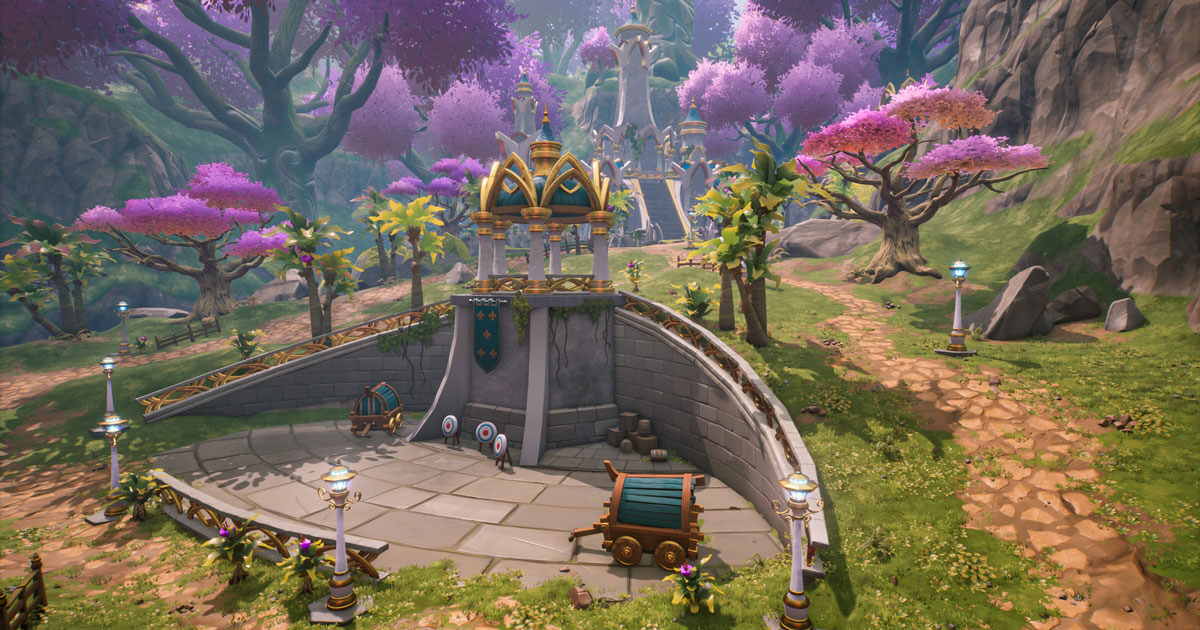
hi ! whats the name of the unreale engine platform with already pre made assets etc.. ?
it was featured on a blog a few months ago but i cant find it
modest trench
ocean pumice
hi ! whats the name of the unreale engine platform with already pre made assets ...
Unreal Engine
Developed by Manticore Games, Core aims to revolutionize game development by making it significantly faster and easier for novices.
 coarse wigeon
Seems like the UE webpage got a massive overhaul
It also starts with a UE5 demo on the splash
 grave briar
Hey guys. Any idea why my virtual textures are white? I've followed the Unreal Sensei tutorial - it worked first time.. now it doesn't and I've started from scratch twice. The only difference is I created a level this time.. I wonder if it's a memory issue??
 ocean pumice
modest trench
https://www.unrealengine.com/en-US/developer-interviews/built-on-unreal-engine-c...
ocean pumice
modest trench
https://www.unrealengine.com/en-US/developer-interviews/built-on-unreal-engine-c...
thanks
grave briar
grave briar
Hey guys. Any idea why my virtual textures are white? I've followed the Unreal S...
Ok I fixed it!! If anyone else has this issue - Unreal Sensei's VT_groundblend material function doesn't work well with some megascans assets that have the "MS_DefaultMaterial_Fuzzy" Parent material. Change it to the "MS_DefaultMaterial" and it should work
drowsy snow
I have two versions of UE 4.26 
 dry marsh
Hey guys, with UE4 still is possible develop game for ios?
modest trench
I'm on 4.28 😎
drowsy snow
Always put UE stuff in D:\ drive.
The derived data cache will consume your C:\ drive pretty quickly.
8 GB of RAM is alright.
Hardware as powerful as the base PS4 is also good for development.
 crimson cliff
Guys help here I'm looking for the best zone to learning unreal's workflow and C++ dev tuts anyone have any best choice?
Yes very possible just go for it
drowsy snow
crimson cliff
Guys help here I'm looking for the best zone to learning unreal's workflow and C...
Reuben Ward's YouTube channel is one good learning resource.
crimson cliff
drowsy snow
Reuben Ward's YouTube channel is one good learning resource.
oow ok thanks lemme go check it out right now
 mossy nymph
@swift basin 8GB RAM will suck, as editor leaks memory left and right
mine, for example, is 5-6GB on start, can get past 15-20 if not closed for a full day
drowsy snow
mossy nymph
<@!665182742702456832> 8GB RAM will suck, as editor leaks memory left and right
Not in my installation.
UE4 always starts at 1 GB of RAM usage.
mossy nymph
it tends to load most of the assets in the project on startup
drowsy snow
I've been using UE4 in 8 GB of ram for years, and the only odd malloc I get is with prolonged control rig usage.
mossy nymph
i worked on what i consider smaller project with 16, and that was a pain
 fierce forge
hello, i have a procedural world generation with chunks, is there a way to make the chunks disappear if there's a big distance between the character and the chunk ?
 lucid grove
Hey fellas, anyone encountered delay before AI got ai move to node and actually moved to target location?
Its simple as it is, but for some reason there is delay before AI actually moves
 plush yew
Yo dudes, did anyone ever figure out a proper way to do faux isometric camera?
Orthographic cam is basically non functional
Also dragging the FOV to <5 messes up with light and shadows on perspective camera
Any other ideas?
honest vale
messes up?
could it simply be a depth buffer precision issue if the fov is really small and camera really far away?
you should be able to help it by adjusting the near clip plane 🤔
 drifting elbow
hello all, there's this "snap to floor" feature by hitting the End key with an actor selected. Can I exclude some specific static mesh component for that calculation? Like, I have a simple mesh component which only draws to a RVT. This mesh component shouldn't be used for calculating the hit when snapping the actor to the floor. Is that possible?
 velvet palm
Any player mobile standarts free models.
 flat tundra
is there a help section in this discord anywhere?
plush yew
Guys, how to get objects in a scene lit by a skybox I create?
 autumn flame
SkyLight with Capture Scene instead of Cube Map
plush yew
I did that and it does't illuminate them.

basically I want to rotate my skybox and illuminate my scene
autumn flame
So your SkyLight doesn't work?
plush yew
It does, but I guess I need to bound my geometry with this parameter to be able to rotate a skybox geometry and the skyLight at the same time.
 flat tundra
so im quite new to unreal engine and im trying to add water (river) to my landscape that i created, and like on the videos i should be able to move the water around and move it above the landscape...except i cant. Also, when i click on the water itself the outline of the water is made of of squares and isnt fine tuned to the shape of the water itself???
like this
 brazen venture
Can anybody help disabling action mapping in a widget?
autumn flame
plush yew
It does, but I guess I need to bound my geometry with this parameter to be able ...
Or you could just scene capture it all so the light always updates based on the SkyBox state if editing the Angle is a problem
You do that in SLS Specified Cubemap section, otherwise i don't really get what you're trying to achieve with that
flat tundra
thanks for the help guys
plush yew
autumn flame
Or you could just scene capture it all so the light always updates based on the ...
I want to rotate an hdri image on the background and illuminate my scene with that 🙂 I don't want it to be static while I play with Source Cube Map angle in SkiLight
brazen venture
Help me fix widget overlapping problem
kindred viper
@brazen venturethere is a Z-Order to widgets. If you look it up you will find more information on it
brazen venture
kindred viper
<@!706536914408177726>there is a Z-Order to widgets. If you look it up you will ...
i didnt explain very much so when i press p button it opens pause menu and then i click option button that opens keybind widget and when i press p key it open pause menu and it overlapps and i want to disable that
 kindred viper
@swift basinInput keybinds can be used to open the menu.
drowsy snow
Also play test it in Standalone, pressing Esc in PIE will quit the game instead
 amber dune
right, i need to create a lookup table for a 3d tile map system, something along the lines of an array containing bitmasks like 00000000 = no surrounding tiles, 10000000 = tile at the front, 01000000 = tile at the back, 11000000 = tile at the front and back, 11111100 = tile at front back left right top and bottom
any idea how to approach this in c++?
actually an array or map where the bitmasks are the indexes
plush yew
What is everyones source control of choice for Unreal?
kindred viper
Perforce and Git. Both have their pros and cons.
plush yew
I have only been using perforce with UE but always git with other stuff. Can you go about locking files to work with to avoid conflicts like perforce in git?
kindred viper
I dont think Git has file locking, it resolves instead I believe (its been a while since I used it in a team so I can't actually remember 🙂 )
@amber duneYou would create an Enum for bitmasks. Then you can label them with your position per member
amber dune
@kindred viper i thought of that, but how do i generate the actual bitmask when checking neighboring tiles?
kindred viper
Im not sure you can generate it as Enums are compiled objects. So you would have to know beforehand
amber dune
i mean when im performing the check on the tile
drowsy snow
drifting elbow
git _can_ have file locking when using git LFS
Nah, we avoid LFS altogether 🤣
amber dune
when generating the mesh
kindred viper
@amber dune I would review this information and see if it suits your purpose. https://www.ue4community.wiki/bitmask-bitflag-enums-kdq2na6w
C++ Usage of Bitmasks and Bitflags
amber dune
the tilemap itself is just a 3d array, im looping and checking x+ 1, x -1 etc, if x+1 has a tile then i want 10000000 then if x-1 has a tile change the second bit* to 1 also, and so on for each tile
yeah its the way i plan on doing it, i just dont know how to generate the bitmask used to pull the correct enum entry
oh i seeee
i missed a bit there
ok i get it now, thanks:)
handcrafting the enum for every possible outcome though:S
actually not hehe
wait, no i dont get it
ok i do, but i dont know how to generate the actual adjacency to tile map
 shut rock
Ok So I have It set up so that you Press a Key It makes horn noise. The issue is If I spam the key itll keep overlapping the sound audio. How can I prevent this from happening and only allow it to play the audio once when pressed the first time.
 frosty veldt
Apologies for the super-general question, but anyone had much exp writing a custom camera player manager? Or even custom controllers? I have a very basic cam manager in place and am tweaking it as i go along, but it's leading me more and more to override a lot of functions in our custom player controller class too, as the standard player controller seems so intertwined with the camera manager and vice versa. So I'm finding myself copying and pasting parent class functions before taking a few lines out here and there so any unwanted calls to SetViewTarget or AutoManageViewTargets (maybe not the correct name) aren't called.
This experience is cool as I'm learning a lot, but on the other hand underlines that in a lot of cases working with general use-case engines like Unreal can be tough when there's not a lot of documentation on how some parts fit together, or "best practice" when overriding some of the more common classes.
 slender island
Hey everyone! I've been thinking about something. So I want players to select an item, think ultimate chicken horse level start UI, then be able to set it down within a selected rectangle and where it's placed it would displace the mesh horizontally making the rectangle wider at that area. Would a spline to able to do that at run time or would I need some sort of voxel system.
kindred viper
you could do it with displacement on a vertex shader but a voxel system would offer an entirely new set of functionality. It depends how complex you want to go
steel shell
what is "Mesh Streaming" in the project settings? https://answers.unrealengine.com/questions/964349/what-does-mesh-streaming-option-in-editor-do.html
clever axle
quick math question: I want to analyze frequencies of a sound file and would need a good representation of the frequency bands. afaik this is log.. how would I create a good log scale that goes from 0 to 20k?
 versed burrow
.
 limber oracle
shut rock
Ok So I have It set up so that you Press a Key It makes horn noise. The issue is...
limber oracle
shut rock
Ok So I have It set up so that you Press a Key It makes horn noise. The issue is...
You can set up a delay.
What I would do (idk if it's the best way) is have a boolean variable 'EmmitingSound' or a more general 'lockedAction'.
When the key is pressed, set the boolean to true, set a delay for as long as the sound plays and set the boolean back to false.
Every time you press the key, check if this value is true or false and branch out accordingly
maiden swift
You also need to set the input mode to UI Only or Game & UI.
Oh, I misunderstood. If you’re already doing that, when you start your game, you need to set the input mode back to Game Only.
 rocky epoch
Hi, I have a tool that I use to generate hierarchical instanced meshes. Works fine, but how can I convert these meshes to a hism actor? When I try to use the merge tool I get an empty actor only.
maiden swift
You want Set Input Mode Game Only to give the player control back.
kindred viper
I would put that code in the player controller or pawn tbh. The level blueprint is generally a bad place to write code. You need to make sure the player is spawned before this code is executed so I would expect it's best to do it there.
 grim ore
looks like broken code
grim ore
it says those 2 variables do not exist on the target
untold yacht
its saying that the "skillpoints/Attributepoints" is not in the ThirdpersonBP
but they do O-o
grim ore
SkillpointsSave and AttributepointSave
grim ore
makes sense 🙂
untold yacht
yeah z)
maybe you know this
When im starting a new 3rd person game when pressinf F1+Esc then it brings out the cursor
where can i find the BP for that ?
grim ore
the release cursor function? its part of the editor
should be shift-f1 to release cursor
 merry bison
I'm stuck in how to restart the level when player dies, because after Destroy Actor it doesn't restart but if i remove Destroy Actor it does restart.. I have no clue how to do it properly.
grim ore
well think thru the process
destroy actor with self as the target destroys the current BP and nothing after it will run
merry bison
That's what I figured out
grim ore
if you are reloading the level, why destroy the actor?
merry bison
well... if the actor falls from the map then he keeps falling and falling.
grim ore
there are a few ways to handle this
the "betterrer" way is to have an event in your game mode that handles all of this stuff
and easierer way is to use the on destroyed function in the actor to do the reload so when you call destroy actor, that part runs and reloads
as for falling off the map if you do the 2nd part (on destroyed -> reload level) and you combine that with the KillZ setting in the map (destroys actors when they hit that low of an area on the map) it can handle itself
I personally would have a "Handle Game Over" or "Handle Player Died" event in the Game Mode that I could call whenever that would take care of "stuff" like destroying the player, saving stuff, resetting stuff, reloading stuff, etc.
merry bison
I'll read through what u said and digest it for a sec.
 unique kraken
is there a reason why my trace wouldnt update in bp´s? iv set up my trace just as i want it but it just doesnt update in the bp?
grim ore
how do you update it?
unique kraken
i mean, i simply try to get a boolean out of it
but its not changing tru/false, no location
did stuff like that befor so im a bit confused why that doesnt work?
start is pelvis,
end is a direction, scaled + pelvis loc.
it does exactly what i want... just doesnt... return what i see in the editor
or anything
grim ore
whats not updating? it looks like its hitting
grim ore
it doesnt always mean its accurate, have you tried pause it and debugging the current value
unique kraken
how would i do that?
grim ore
move it to somewhere where its hitting so it should be a good result
go to the set scalar parameter value node and hit F9 to breakpoint it, it should pause
then mouse over the return pins for the location and blocking hit to see what the tooltip says
alternately PRINT STRING debug it! print string after the trace and print out the variables
unique kraken
f9 does nothing for me, used that breakpoint befor
okey it seems to update but why is every 2. one false lol

ah nvm, had a 2. char bp in
all good
grim ore
is this blueprint duplicated yep
 grim ore
so you were watching the other BP
unique kraken
just was a bit dumb here
well, it jsut seems that this "watch value" doesnt really work
using that a lot in ctrl rig, works better there
grim ore
well...
if you were watching the other one, that never moved then....
the drop down in the top right when playing in the blueprint shows the active instances, you were probably watching the wrong one
unique kraken
probably, seems i just got a bit confusled there
 fallow hornet
Anyone have expereince level streaming the UE4 ocean/river/lakes?
I have a map setup where my ocean and landscape are not in the persistent level and cannot be in the persistent level due to swapping levels for the experience.
narrow mauve
LMAO
Unreal Rick Rolled us hard
Uploads new UE logo...changes name to unreal engine 5.. ..and then proceeds hours later to just continue uploading UE4 stuff...LMAO
uneven crater
Could I make a game and put it on steam for free?
merry bison
uneven crater
Could I make a game and put it on steam for free?
yes
uneven crater
Wait, can I even put it on steam since I'm using unreal and it's owned by epic?
merry bison
uneven crater
Wait, can I even put it on steam since I'm using unreal and it's owned by epic?
ofc you can
uneven crater
Ah ok good
 runic grail
how do i apply material to multiple BSPs?
 light thunder
Half blender question here - refresh my memory, I've applied the origin in Blender to where I want it, but when I send it to unreal it's in the middle of the model - what am I forgetting here? (using blender 2 unreal pipeline tool)

NOW I remember - you have to make the pivot point in Blender be at 0,0,0, just the way Unreal is - so set origin in blender where you want, then set the cursor to 0,0,0, then set object to cursor position and export
future search '
pivot point blender unreal how to set
maiden swift
 radiant yew
How do I access Metahuman again?
radiant yew
How do I access Metahuman again?
Check the pins in #metahumans.
radiant yew
Ok thanks!
merry bison
Where's Righy these days?
light thunder
@swift basin So, there's probably some money for whoever makes a good "hotkey memorizer" mini-game in Blender, or any app, that lets users who don't work in the program but still understand the general concepts get their workflows faster, much more quickly
 mild phoenix
@vapid snow Bro can you help me i have some issue from your tutorial.Pls answer me in direct messagges
@vapid snow
 crystal ginkgo
I'm working with graphics settings and the game user settings. Is it best practice to load and apply the game user settings in the Game Instance init event?
quaint snow
what's the version control software mostly used for UE projects?
 wary ferry
 grim ore
@swift basinadding grass would force the lighting it is using to be dynamic which costs more cpu to process, building might takes those items and build the light so they used textures now and are less cpu to process. so yes that is normal if your project is set to do that
which tutorial was that?
and assuming you are using a max health and current health set of variables it should be fine
@swift basinyou would need to build yes, when you add new items and are using static lighting it defaults to dynamic until you build. you could lower the lighting quality in the editor scalability settings
@ebon lindenugh yeah I hard coded it to 100 didnt I lol. lemme figure this out
its more about making it give a percent and not a value as the correct fix
i dunno yet, trying to fix it on my side. My current thought is adding in 2 new values that we adjust whenever we adjust it, then just making those the new percents its using.
yep I should have it in a few, trying to "fix" it with the least amount of changes
fallow hornet
is it possible to have a mesh ignore the post process volume?

 versed burrow
.
grim ore
what I did was rename the CurrentHealthValue to CurrentHealthPercent since that was more accurate
same with NewHealthValue -> New Health Percent.
then added in 2 new variables, Current Health and Max Health. Set them both to whatever I wanted
then you can see in the first screenshot I adjusted the middle part to use some math to get an actual Percent from the current/max health and use those
 light lagoon
I wanna ask about video playback being choppy, anyone know what channel would be best to ask in for that?
grim ore
also at the top in the begin play should probably set up the current health based on these new numbers so it can start out at the correct health in the event the currenthealth is not the same as the max health

@light lagooncould be #cinematics , could be #virtual-production , could be #ue4-general all just depends on the issue
light lagoon
I'm not really sure where to start debugging. 720p and 1080p videos are choppy for users on decent machines, when they have no trouble playing the videos in VLC. I'm using the standard UE4 Media Player class
grim ore
its stilly but have you tried a lower resolution just to elminate that is the issue? is the % choppiness relative to the size as in the 1080p is much choppier than the 720?
have you tried another video?
is it in fullscreen, windowed, fullscreen exlusive. is it using the start up videos or using the media sytem like on a material
is it on an item in the world, a blank scene, UMG.
light lagoon
grim ore
its stilly but have you tried a lower resolution just to elminate that is the is...
Yeah the resolution does reduce choppiness, 4k is awful, 1080p is choppy, 720p is still choppy but less so. But it kind of sucks that someone with a i7 and good graphics card can't even play a 720p video, seems wrong :S
Media system on a material, the material is shown on a UMG UImage widget that's in a nearly-empty world, it's inside a scalebox. The issue shows up in fullscreen and windowed and fullscreen exclusive
grim ore
ugh
I would personally grab the sample file from epics media page and try that to eliminate the codecs and file. https://docs.unrealengine.com/en-US/WorkingWithMedia/MediaFramework/HowTo/FileMediaSource/index.html
can atleast eliminate your file as the probable issue
light lagoon
@grim ore Good idea! I'll try that. Their sample is only 640x360 so I hope it will work hehe
grim ore
does your sample play back fine in editor?
light lagoon
It runs fine on my machine but it's pretty beefy, it's just on some users and QA that it is choppy so it's quite a long turnaround time for testing, unfortunately
grim ore
and built on your machine its fine as well? my only real thought is bad codecs or they arent tabbed/focused on the game which lowers cpu resources and lowers the fps on the video
light lagoon
I'll double-check but yeah i'm pretty sure they're playing w the window focused. Good idea tho
grim ore
considering the media playback should be fine for mobile it is weird it would have issues on a decent PC
light lagoon
@grim ore how would I check what codecs they have installed? dxdiag?
light thunder
What's the trick to hiding this text so that it's not reflected in surfaces like glass?

that's a 3d widget but i don't want it's reflecting in that cube
 upper notch
hello! i am in dire need of help
im watching a tutorial on hwo to make a start screen and its telling me to grab mainmenu and options menu out of the variables place but i cant find them (they are both vertical boxes)
unique kraken
i wonder, can i change how often a line traces?
i have a line that doesnt need to trace literally every frame
can u elaborate?
thx

ah so this is essentially a tick where i can set how often it ticks?
so if i put in a higher timer it will be more efficent?
 somber quail
Has the editor always locked itself to 30fps when you open an asset editor or has something gone terribly wrong?
mild phoenix
Hello guys who can help I have some issue with collision

 regal mulch
That just means that the Component you enable physics on needs to have the collision also set to physics and not query only or even none
mild phoenix
regal mulch
That just means that the Component you enable physics on needs to have the colli...
Actually i try set it to not query but its not working 😞
 mint raptor
My engine just starts spamming this in output log even if I don't hit Play when I sit in editor for a few minutes LogUObjectArray: Warning: Other object in slot
regal mulch
mild phoenix
Actually i try set it to not query but its not working 😞
That's all i can say. That's what the warning says
 civic ferry
Might sound idiotic, but check if the "damage" set on the weapon is actually 100. To me, it happened multiple times that it straight up does a third higher of damage than the set value
 sour rivet
https://www.youtube.com/watch?v=BcxtpSLMnH4&list=PLZlv_N0_O1gbggHiwNP2JBXGeD2h12tbB&index=135
how can I get the codes for this live stream?
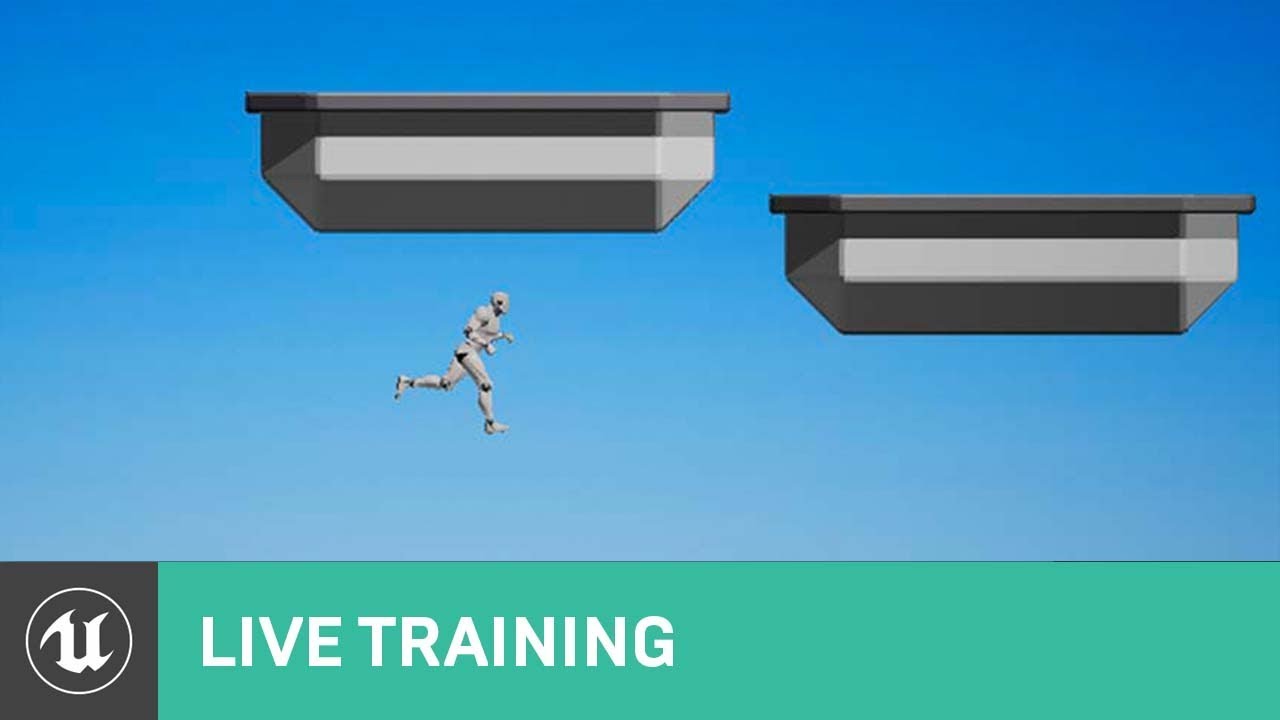
Richard Hinckley, Sr. Learning Resource Engineer, returns to the livestream to discuss data-driven character movement. We'll demonstrate how to use curves to affect the feeling of your game's character controls. Friction, acceleration, jump arcs, and even gravity can all be altered with curves to create a unique feel for your character.
NEWS
...
does anyone know if they have published the codes for this live stream? I could not find any links!
fierce tulip
normally its linked in the "announcement" url, but its so old that the dropbox link no longer works
sour rivet
ah that's bad, the instructor is showing a very little parts of code which is really hard to find out just by taking a look at the video!
have they moved these links to some new directory?
steel shell
is there a setting to make the volumetric clouds move?
 kind dew
what am i missing about this set static mesh node? I made a blueprint class derive from StaticMeshComponent and set static mesh is not doing anything and returning false:

 robust marten
For some reason whenever I open my widgets, they always DPI Scale up to x8. This is incredibly annoying and I dont know why it started doing this. I disabled the DPI Scale in UE4 Properties too. Anyone know how to fix this?
 river crypt
does anyone know if ui video is possible on mobile?
like using video media player on image
uneven crater
What's the process of porting a finished game to a console?
Like what would I have to do to bring a game to xbox?
 runic iron
Get a devkit and follow instructions given I guess
They'll give you the necessary stuff to build your game to whatever format the console uses
drowsy snow
uneven crater
What's the process of porting a finished game to a console?
Register yourself for a development kit, and contact Epic for the necessary platform builds.
If you're going for Xbox, you could pay the entrance fee for developer account and turn your retail Xbox One / SeX into development mode.
If you're going for PlayStation or Switch, you must fill in the paperwork and wait to get approved for enlistment and devkit from Sony/Nintendo.
Once you have officially authorised to have devkits, contact Epic directly for the matching platform build, so that you have the build targets for the engine and build for the consoles.
light lagoon
Every time I start my UE4 game, it seems to default to fullscreen on a particular monitor, and then only after a few seconds it loads the users' preferences and changes to windowed/fullscreen or a specific monitor.
Does anyone know a way of avoiding that initial "grab full black screen on monitor 1" thing? It's just kind of a crappy user experience
 junior nimbus
Taking a poll: Do you prefer putting your character's attacks in Animation Blueprints, or do you prefer putting them directly into the Character's Blueprint? Any reason?
 pliant trench
Figuring out how to get all my controls mapped to a controller was more difficult than I thought it would be.
 sharp kestrel
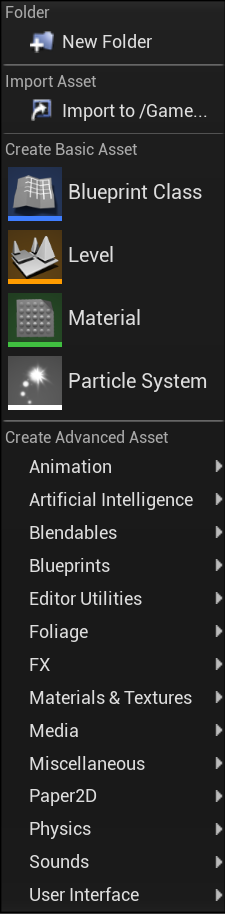
Why is there no "New C++ Class" Option? https://i.gyazo.com/cf740941cbd43fe454f511352441eb75.png
 pliant trench
I think you need to be under the C++ folders.
If you don't have one, then you need to go to File->Refresh Visual Studio Project
Or make new one if you don't have one.
 chilly geyser
Hey so I got a True First Person camera, and would like to reduce the "Head Bob" by lerping the camera location to make is more stable and smooth, Does anyone know of any examples of how to do this?
sharp kestrel
Oh they moved it into files, thanks
pliant trench
@chilly geyserYou probably want to create a camera boom and attach it to the character and not the mesh.
Also you need to add a camera to the boom.
chilly geyser
@pliant trench my player camera manager system is using a skeletal rig and an Anim BP (ALS v4). So it works like a boom (I already have a functioning third person camera). I have a custom camera behavior function im using to control First Person and ADS (which just moves the camera to a socket location) So all I would just need to know how is how to lerp the "raw" camera movement into a "Smoother" average
pliant trench
@chilly geyserOk. And so you know, there is a dedicated ALS community on discord who might know more than me. You can set the "socket" to any bone. Try one of the spine bones and see if that gives you the results you want.
Anything more advanced and I can't really help. I'm still learning ALS4. But it's an amazing project.
 thick herald
chilly geyser
<@!339941132530352130> my player camera manager system is using a skeletal rig a...
thick herald
chilly geyser
<@!339941132530352130> my player camera manager system is using a skeletal rig a...
I take it you've tried lerpping over x amount of time?
chilly geyser
@thick herald thats where Im stumped. Would I need to constantly set a var for the transform of the previous tick to lerp from?
Im not sure what to lerp from and to
pliant trench
ALS discord would be much more helpful.
 wild shadow
Does anyone here have any experience with UnrealGameSync (UGS)?
I have some questions for someone who does.
When you switch streams using UGS it ends up calling p4 client -f -s -S ... .... This updates the client to be on that stream, but when done this way it requires Perforce to basically sync all files again.
Compared to if you switch streams using P4V it calls p4 switch -Rn ...
The difference is huge in terms of files being synced. The switch command results in only the files that have changed being synced versus all files requiring a sync.
Are we crazy? Is this expected? Are we doing something wrong? When our depot has 500k files and everyone is remote this hurts.
chilly geyser
@pliant trench oh im also there, but very few know how to use the ALS camera system. besides, its really just a matter of what to lerp, as I have lerping from third person to first and to ADS working fine
pliant trench
My mistake. Sorry.
chilly geyser
lol no mistake made! here is what I made to lerp between sockets

@plush yew i completely overlooked that
seems you can only add and remove a camera modifier in the camera manager class
oh ok! i will check that out! thanks everyone! Ill post what I came up with later
yeah thats another thing im hoping to lerp or something
 flat pewter
hey, where can I ask some more math-related question? I want to replicate axis movement (grab x axis to move on x axis only), but im having issues with the way the mouse position is translated

(I think) i need to convert the mouse world position to the x axis?
sharp kestrel
Why do I get a error when packaging saying "Missing UE4Game binary"? I already created a C++ class that was opened through VS.
 prisma ice
Heya So i made a character and he just absolutely ignores gravity and objects so i enable physics and now he falls like a ragdoll down (like a slug without bones on the ground basically like a corpse) any idea is welcome
drowsy snow
prisma ice
Heya So i made a character and he just absolutely ignores gravity and objects so...
Please elaborate with video capture of the issue.
prisma ice
i cant video rn but basically if i enable physics collisions work but my character just flops like this
 limber oracle
how is your character rigged?
prisma ice
it supposed to be a normal character that you can control and everything but enabling physics just does this if i dont enable physics then he walks on air doesnt fall and goes through everything so yep
chilly geyser
@plush yew oh heck, thats easy, thank you!
limber oracle
ah weird
I haven't encountered that issue with a controllable character yet
only with an empty character body
prisma ice
also Cookie wdym by that 😄 i used an asset from store and i know collisions used to work perfectly
i would be even fine if the body itself had no collisions but the box or anything around it had but well that doesnt work sadly as well so i am running out of ideas
(By box i mean collision box around the character)
limber oracle
Maybe try to recreate the character step by step to see if there might be something you missed?
prisma ice
i thought about it as a last case scenario it seems like the problem is with the skeleton mesh itself probably since copying the code to another character works but then the question is what setting did i turn on or what did i do wrong i will try to do it i guess tho so i can at least finally go to sleep in peace 😄
limber oracle
What you can try to do is get the thirdpersoncharacter template, add your animation bp, skeletal mesh and character bp to it, see if that fixes it
Otherwise, sorry can't help you further as I'm pretty new to it too.
prisma ice
no problem thanks for trying to help 😄
also an update i tried recreating it and its 100% problem with the skeletal mesh i am using so i somehow just need to find out how to stop it from ragdolling and just falling down like a corpse if i set physics on
 sweet axle
prisma ice
Heya So i made a character and he just absolutely ignores gravity and objects so...
sweet axle
prisma ice
Heya So i made a character and he just absolutely ignores gravity and objects so...
open up your character and check the collisionsettings on the capsule
prisma ice
they should be correct tried using block all and everything and its ok if physics are disabled on the mesh itself right ?
drowsy snow
prisma ice
i cant video rn but basically if i enable physics collisions work but my charact...
Consider using ALS V4 - it has a well made ragdoll functionality.
prisma ice
I am using ALS rn i think
i just need to make it so he doesnt ragdoll and just fall down when i enable physics
autumn flame
Well, it's supposed to do that unless you have a setup for physics driven movement
prisma ice
oh i see then how am i supposed to set up collisions and make it so gravity works ? just using the anim starter pack since i am a begginer also thank you for help everyone
 brave niche
Hey guys, I figure I'll ask this here but it may be a #multiplayer question.
I know that I have to be using a source build of Unreal in order to use the dedicated server method
But do I really have to give up the ability to use any blueprints?
If so, I almost only ever see tutorials for blueprints, is there a site that shows you the methods which appear in blueprint nodes, and how to access them in a C++ IDE?
For example, this node: https://docs.unrealengine.com/en-US/BlueprintAPI/Utilities/GetCommandLine/index.html
Get Command Line
drowsy snow
prisma ice
oh i see then how am i supposed to set up collisions and make it so gravity work...
Isn't ALS has UE4 standard animations built in? You can use set master pose component on the character mesh and hide the blue manny.
autumn flame
Gravity problem sounds weird tho, you using a Character in the first place?
Cause if it just floats around it could be something else
prisma ice
I am using a pawn is that a problem maybe ?
The skeleton mesh i am using is completely done with bones and everything so that should be fine
 sharp kestrel
What do you mean by that?
drowsy snow
prisma ice
The skeleton mesh i am using is completely done with bones and everything so th...
I think you try to make your own character actor from scratch.
sharp kestrel
Do you mean from source?
 quiet raft
the material undo bug is well known i assume?
prisma ice
the weirdest thing is i remember it used to work and collied/fall properly long time ago but i will still try to fix it
autumn flame
Well, thing is, it's a Pawn you're using, CMC handles all of that fun stuff for you
 marble mango
anyone know tuts for mobile , like touch input , swipe camera and drive button? thanks
narrow mauve
Whats that node in bluepritns called where you type in the math
Yep thans\
thanks
 humble yacht
Do we need to wrap const char* E.g. "SomeText" like this TEXT("SomeText")
prisma ice
I realised i was using an asset thats supposed to be for an older version is this maybe the reason for the body just flopping and giving up when i enable physics ?
 drowsy snow
prisma ice
I realised i was using an asset thats supposed to be for an older version is th...
drowsy snow
prisma ice
I realised i was using an asset thats supposed to be for an older version is th...
Mesh asset shouldn't affected by engine version. The whole PBR material systems didn't changed much for the past couple of dozens versions.
Engine version for plugins are more likely to have setbacks on Blueprint/C++ plugins.
prisma ice
then i have absolute no idea what to try next changing the skeletal mesh could work but i need to use this one for this character
drowsy snow
prisma ice
then i have absolute no idea what to try next changing the skeletal mesh could w...
Use the third person template or use ALS V4 (it's free on the Marketplace)
sweet axle
prisma ice
I realised i was using an asset thats supposed to be for an older version is th...
is that the military soldier you trying to use?
 sweet axle
What collision setting does the capsule and the mesh have in the details panel in your actor bp?
 prisma ice
i tried using all combinations but as long as in collision enabled : Physics are enabled it always falls dead no matter the other settings
drowsy snow
It seems like many people wanted to have ball rolling game that has third person controls lately 🤔
sweet axle
But check both mesh and the capsules settings. And i dont think you want physics enabled on capsule just the mesh.
sweet axle
drowsy snow
It seems like many people wanted to have ball rolling game that has third person...
That was like the first thing i did when i followed the ball rolling tut, and also for the endless runeer hahaha
drowsy snow
sweet axle
That was like the first thing i did when i followed the ball rolling tut, and al...
I've been considering to make a free template for that, since I did the same thing for my cancelled game jam project 🤔
prisma ice
btw even with capsule collision removed my character still flops on the ground when i start the game
sweet axle
drowsy snow
I've been considering to make a free template for that, since I did the same thi...
I'm actually still developing mine. I had to ask allover how to fix an issue i had with the ball bouncing when it crossed over an intersection where 2 meshes met and were totally flush. Took like nearly 2 weeks before someone finally solved it.
sweet axle
prisma ice
btw even with capsule collision removed my character still flops on the ground w...
so the meshes collision is still working but why do you want physics enabled?
prisma ice
well without physics it doesnt work no matter what thats what i meant
sweet axle
prisma ice
well without physics it doesnt work no matter what thats what i meant
what do you mean it doesnt work? what do you want it to do?
prisma ice
i want my character not to walk on air and i want him not to go through walls
basically at what height he spawns he walks on even if there is nothing under him he just becomes jesus
and i need to fix it
drowsy snow
Consider using Character Movement Component.
sweet axle
at the moment he doesnt even walk
sweet axle
drowsy snow
Consider using Character Movement Component.
yes, thats what i was gonna say
drowsy snow
Or better, reparent it to Character class.
sweet axle
If he collapse on the floor then his collision is working. Select the wall you want him to walk through and make sure that it has collision or he will walk through it anyway
yes, if you switch the viewport to front view then you can make sure your charcaters feet are at the base of the capsule then he wont float
prisma ice
he collapses on the floor if physics are set on and i cant move him or do anything cause hes like a doll i checked the walls with other characters and they worked
sweet axle
hahaha
prisma ice
??
also i tried increasing the capsule size ( way over the skeleton mesh) and still nothing i honestly have no idea what to do
sweet axle
Delete that blueprint actor. right click in content browser and create blueprint from class, select character. Then add the mesh to that bp and see what happens.
prisma ice
i think i already did that but let me try again 1 min
sweet axle
make sure to select character
prisma ice
Well i guess unreal wants to do everything in its power to stop me from fixing my problem haha well lets hope it doesnt crash again
 autumn flame
Nicee!
sweet axle
prisma ice
Well i guess unreal wants to do everything in its power to stop me from fixing m...
in case you get stuck again this tut is fun to follow https://youtu.be/w4nJ578XP48

In this Unreal Engine 4 tutorial you will learn how to set up a new playable game character from scratch, by creating a game mode, character blueprint and mapping the ability to move, jump, run and crouch to different keyboard keys and mouse buttons. Furthermore, we'll create public variables for jump height and run speed, thus exposing them to ...
prisma ice
also a question isnt there any map setting or anything that could cause it ? since i still think its me setting something wrong in the map or project or idk since it used to work
autumn flame
If it floats it's cause you're Pawning around
Use a Character if you want to stop defying laws of physics
Try that first
prisma ice
Memnoch thx thx but i already my character fully done (the code part) now just to get the collisions working and it should be fully done and yep i am trying that rn when unreal loads
drowsy snow
prisma ice
Memnoch thx thx but i already my character fully done (the code part) now just t...
Again, consider retargeting the blueprint to Character class.
prisma ice
i am doing it by creating the character and then putting the mesh and etc in it
drowsy snow
I don't want to be that one broken vinyl record, but you're creating the blueprint from Pawn class, and Character class is a subclass of Pawn, and has all the things you need for proper movable character logic.
prisma ice
Good news is that without any code gravity is working so thats good
sweet axle
Well i'm off for an hour, gonna do some metahuman creation.😋 good luck and make sure you have fun.
autumn flame
CMC is actual magic confirmed, makes gravity work
prisma ice
btw since i am reimporting my code is there a way to automatically create all the variables without having to click and make 1 by 1 ?
 drowsy snow
prisma ice
drowsy snow
prisma ice
Right click on the variable node. You should have the option to create one
sweet axle
prisma ice
btw since i am reimporting my code is there a way to automatically create all th...
You'd have to right click on each one and create varaible, all other instances will be made variables aswell so only need to do it on each type of variable you have.
prisma ice
oh so i have to do it 1 by 1 like that since i saw on yt some ppl had an option to create all variables or something when they copied
sweet axle
prisma ice
oh so i have to do it 1 by 1 like that since i saw on yt some ppl had an option ...
there is blueprint properties transfer t5hingy but i aint going there.
prisma ice
yep yep np i did most of them already
autumn flame
You can transfer normally too, 1 by 1 sadly
 autumn grail
Hello, what's the way to store data's on the dedicated server? Or will it be include in the eos plugin I will buy? Thanks
autumn flame
Eeh, depends, and don't even know what plugin, am not a fortune teller
You can create a Database of sorts or just use plain old SaveGame
autumn grail
So I can use the same nodes " save to slots" with a " branch has authority" before?
autumn flame
It will be run in GameMode so it will always have Authority in that case
prisma ice
Collisions and everything working thank you just need to fix the Bp itself since when i pasted it only something got pasted for some reason
autumn grail
Ok thanks
autumn flame
As slot name you can use player ID or name for example so each player has own save
autumn grail
Ok I'm very excited to do that
prisma ice
well everything worked and when i was changing the capsule size just poof and again flying in the air well i am going to sleep for now since need to wake up in 3h and then i will just do the character again step by step and it should work thanks everyone for help
 fervent maple
Hello, i implemented voip talker to my game and it works, but I want to give the option to mute other specific player. It works only to the server, the host can mute other players, but on the clients it dont work. I am calling an event on the player controller from the widget when click the mute button. Anyone know how make it work?
 signal jackal
Good evening!
I would like some help if possible
Following a tutorial and I block when he adds a "Table List" in "GameplayTags" but I do not see anything despite having like him to import beforehand the files that he provided. Looking at the folder, the said files are there, but it's as if unreal doesn't recognize them. thank you in advance
autumn grail
@autumn flame you were talking about database, if it is more optimized I'm interested, how to do that?
It's just a data table?
autumn flame
Gives you more control
Look into SQL or JSON
autumn grail
I know SQL, but where we do that in blueprint
autumn flame
You would have to write your own thing in C++ or use a marketplace plugin iirc
plush yew
Good night, anyone knows how to get the user GPU VRAM size?
 pastel latch
I moved my project folder and now I'm getting this error

I deleted the old folder, and I tried to re-generated the project files twice
Any way I can fix?
The project runs fine, this only occurs when I compile the code from VS
kind dew
I'm trying to change the walk speed of a pawn and I need to do it on the server so that it replicates to all clients but when ever I try to run any server custom event I get:
"No owning connection for actor BP_PlayerShip_2. Function SetSpeed_Server will not be processed."
but i don't want the ship to have an owner i want the server to own it so how do i change the speed?
pastel latch
pastel latch
I moved my project folder and now I'm getting this error
Alright so because I didn't find a solution and somebody might search this in the future: I fixed this by deleting all folders in the project save for Source, Content, and Config
Dunno why but hey
 fleet sparrow
What is persistent state?
 paper sphinx
Hey guys, does anyone know a console command or button I can press to display all foliage (or even all meshes) at LOD 0?
brazen venture
how to use Isinviewport node?
 bleak widget
paper sphinx
Hey guys, does anyone know a console command or button I can press to display al...
bleak widget
paper sphinx
Hey guys, does anyone know a console command or button I can press to display al...
console command "r.forcelod 0"
paper sphinx
bleak widget
console command "r.forcelod 0"
I tried that but it doesn't work.
the problem isnt exactly lod
there is no shadows on my foliage after a certain distance. im using raytracing
im trying to make a cinematic so fps doesnt matter
ive also tried r.ForceLODShadow 0, but that didnt do anything
bleak widget
hmmm 🤔 may be need some settings inside foliage type asset, i don't have this issue yet.
paper sphinx
when i go closer to the foliage the shadows re-appear
bleak widget
Do you mean distance cooling ? And distance to show foliage
paper sphinx
bleak widget
Do you mean distance cooling ? And distance to show foliage
Im not sure. I can still see the foliage but there are no shadows. Its almost like they are unlit.
let me show some screenshots
This is the foliage far away.

And this is when im close
 bleak widget
r.Shadow.DistanceScale
r.Shadow.CSM.MaxCascades
r.Shadow.MaxCSMResolution
If performance is not important, last parameter set 8096, second param set 4, and first increasing from 1 to the one you want
 thick nebula
is there any way to expose Defined property flags on uassets?
 paper sphinx
I did all of that and it still looks the same
I set shadow distance scale to 10
I FIXED IT!!!!!!
😄
You just have to put in this console command: r.RayTracing.Geometry.InstancedStaticMeshes.Culling 0
bleak widget
oh, i see. You trying to make cinematic at raw level. A lot of cinematics tricks are post process, DOF, bloom and may be particles noise.
paper sphinx
bleak widget
oh, i see. You trying to make cinematic at raw level. A lot of cinematics tricks...
Thanks for the help 🙂 just another question, how do i set a console variable to the default value?
drowsy snow
thick nebula
is there any way to expose Defined property flags on uassets?
It's UPROPERTY() thing
bleak widget
paper sphinx
Thanks for the help 🙂 just another question, how do i set a console variable to...
i don't know😆 but i think to bring it down to acceptable values
thick nebula
drowsy snow
It's `UPROPERTY()` thing
i cant find any specific examples** regarding epropertyflags. if you know any specific examples i would be curious. i was hoping to do it though BP/graph, but i will try, ty
bleak widget
paper sphinx
I FIXED IT!!!!!!
i stored this issue in my issues base🧐
paper sphinx
bleak widget
i stored this issue in my issues base🧐
Cool 🙂
 severe robin
Are beginners welcome here?
autumn grail
@severe robin if you want on my discord I help beginners
drowsy snow
severe robin
Are beginners welcome here?
Yes. Make sure to adhere to this server's #rules
autumn grail
Please, Can i use the same skeleton on a mesh bigger ( but with the same bones) ?
its two characters
one small and one tall
i want to use the same skeleton system and animation on differetent characters
drowsy snow
autumn grail
its two characters
Yes, you can.
autumn grail
ok , because the second i have imported have the head on the feet
its a ball
maybe i have to apply transform in blender
i ll try
now its like this
 drowsy snow
autumn grail
now its like this
drowsy snow
autumn grail
now its like this
Repurpose it to be siren man monster
autumn grail
rofl
drowsy snow
autumn grail
maybe i have to apply transform in blender
What's your unit scaling in Blender?
autumn grail
ok
now my main char is broken too , i cry
main char repaired , ouf
now the second i try what you say
@drowsy snow i scale the mesh or the skeleton containing the msh in blender?
drowsy snow
autumn grail
<@!325627930484932608> i scale the mesh or the skeleton containing the msh in bl...
Both.
autumn grail
if i do that mesh is 100 times bigger than the skeleton , its that?
in the viewport i mean
because scaling the skeleton scale also the mesh a first time
drowsy snow
autumn grail
if i do that mesh is 100 times bigger than the skeleton , its that?
Not really.
I've been doing that many times, and both the mesh and skeleton shares the same scale, not multiplying them.

 drowsy snow
Select all, and apply the transforms
 drowsy snow
autumn grail
now my second char is
drowsy snow
autumn grail
now my second char is
Try retargeting it instead
 dark thorn
Hi, I am trying to use "Mesh Distance fields" but it is not working for some reason. On docs i found that it is disabled on intel cards. I have intel uhd620. Any one here who has intel card and "Mesh Distance fields" works?
 autumn grail
retargeting the animations? sorry i m lost @drowsy snow
drowsy snow
dark thorn
Hi, I am trying to use "Mesh Distance fields" but it is not working for some rea...
You'd want to have a dedicated GPU to have mesh distance field working instead of intel iGPU.
drowsy snow
autumn grail
retargeting the animations? sorry i m lost <@!325627930484932608>
Describes how retargeted animations can be used with multiple Skeletal Meshes, allowing you to share animations.
autumn grail
great thanks
drowsy snow
dark thorn
Hi, I am trying to use "Mesh Distance fields" but it is not working for some rea...
If you're using PC, having one GPU as powerful as PS4 (like the GTX 780 or 16xx) isn't terribly expensive, even brand new.
dark thorn
drowsy snow
You'd want to have a dedicated GPU to have mesh distance field working instead o...
Thanks :). I was just wondering if there is a way to make it work in intel. Looks like there is no other way but to buy new GPU😅
dark thorn
drowsy snow
If you're using PC, having one GPU as powerful as PS4 (like the GTX 780 or 16xx)...
I mostly work on my laptop. I do have an old PC but I doubt I can get any new GPU to work on that😅
 tranquil rose
Hello
We have a project that runs greatly, we are trying to package it and export for windows, problem is that faceAR is not running, in standalone player or exported exe file. It runs perfectly in viewport play, other than that nowhere.
I use the live link app and iPhone 11
drowsy snow
tranquil rose
Hello
We have a project that runs greatly, we are trying to package it and expor...
#packaging might able to help
tranquil rose
Thank you
radiant yew
Hi!
How do I export my meta human character to blender/maya?
 native bough
I want to make ingame tutorial for
Simple runner game pls help me that how can I achieve this
drowsy snow
native bough
I want to make ingame tutorial for
Simple runner game pls help me that how can I...
If you're able to create events, creating in-game tutorial prompts is easy.
Otherwise, there's so many ways to approach in-game tutorial system.
 clear coyote
hi. is there a way I can change the saved folder location to documents?
stuff that is around on the internet tells me to change source code that I can't even get to
plush yew
Guys, how to set Source Cubemap Angle in BP? I cannot get the parameter

I can only get but not set
 drowsy snow
plush yew
Guys, how to set Source Cubemap Angle in BP? I cannot get the parameter
drowsy snow
plush yew
Guys, how to set Source Cubemap Angle in BP? I cannot get the parameter
I suspect the UPROPERTY of that var is EditAnywhere but BlueprintReadOnly, so I think you have to go modify the class in C++.
plush yew
drowsy snow
I suspect the UPROPERTY of that var is `EditAnywhere` but `BlueprintReadOnly`, s...
Thanks
 olive niche
doas anyone have time to help me i wanna make a third person shooter so like u have a gun and just shoot targets thats it
task manager
run it in a different window
open task manager
and find the process
drowsy snow
You can use Rivatuner to show hardware stats in a cooked/standalone build of your game.
Please note however, that Rivatuner can cause issues with the editor.
olive niche
whoever teaches me how to make a fps game ill pay hm
 spark plank
Hey guys, I've just finished my app in UE4 and I was going to put it on the Windows Store, but... Like... It's weird and I think it still needs to be UWP in 2021?
Does anyone know how I can build in UWP? I was looking around and it looks like it might be a pain in the ass, but most of the things I found were from 2016 😅
 covert onyx
Hi, I'm doing ray-tracing renders on Unreal for one of my projects and I decided to bake the lights to optimize my scene. However when I bake, I have shadows too contrasted/intense, I have enough things but I can't find the problem, can you help me? (I don't think it's due to the AO) here is a picture of the problem, thanks in advance.

 zealous spire
Anyone ever encountered this before? Exporting the skeletal mesh from UE4 to Blender 2.92, export/import settings are the same as the other vehicles which I've had no issue with. Tried exporting from different versions of UE4 (26, 25) but still experiencing it!
 olive niche
how do i make it in a main menu to make a animated image so it changes
 radiant sun
Didn't really know where to put this, so I am asking it here. I imported the ThirdPerson content into my level, Now this untextured pawn appears and after combing through every blueprint I can't find where it's spawning from. Any ideas why this is happening? I was also sensible enough to make a backup in case stuff like this happened, it's just annoying me.
It should be noted that the pawn spawns randomly, as if there was a game mode selected that would try spawn it at player start. I don't have player start as I do not need it.
Edit: Never mind, the project settings were bugged.

 sterile tulip
Hello guys, are we allowed to take the megascan assets and make changes on it or are people only allowed to use them like they are? Thanks in advance
sterile tulip
Thank you very much
 rotund kernel
hey! i have a simple question
im using ue 4.13, but i cannot use any of these options

i assume there is a drop down menu, but clicking it does not do anything
fierce tulip
odd, they should work
rotund kernel
ye
im trying to mod LN1, and this would be my first brush with unreal engine
already running into problems
im using 4.13.2 btw
fierce tulip
version should not matter. no experience with modding though.
rotund kernel
i have a tutorial for modding, so dont worry about that
i just dont want starter content to interfere, but i also don't know what to delete if, for some reason, i cannot disable it
fierce tulip
iirc its just there. if you dont touch it there should be no worries besides some project bloat
rotund kernel
it wont affect exporting uassets?
fierce tulip
I would try to see if it also happens in 4.12 or 4.26 just in case. if it does, might be a weird bug related to hardware or software
it wont
rotund kernel
yeah im trying 4.26 now
works on 4.26.2
hm
can i make the project in 4.26 but open it in 4.13
fierce tulip
sadly no
rotund kernel
frick
yeah, thats why im trying to use 4.13
if starter content wont affect what i want to do, and i can just delete the table and chairs, i'll just go ahead with what im doing
now im confused!

i think changing the setting in 4.26 made no starter content the default in 4.13
rad
fierce tulip
ftw hehe
rotund kernel
ye
olive niche
what video file extension is unreal engine using
kindred viper
mp4 is usually the standard compression but there are options
 upbeat tendon
Hi, I am trying to understand the logic flow on selecting a spawn, i've build a system to allow a player to select a character, now i am looking at how to select the player start, I thought it might be as simple as overriding ChoosePlayerStart_Implementation however that seems to get called before a character has been selected
plush yew
why cant i delete this folder
 fierce tulip
odds are there are still redirectors in it
plush yew
means
fierce tulip
means you have a word you can research :p
(enable show redirectors in the content browser filter)
plush yew
fierce tulip
(enable show redirectors in the content browser filter)

i turned on show redirectors now what
fierce tulip
and inside the explorer?
plush yew
when i rename the folder it creates a new folder
plush yew
fierce tulip
and inside the explorer?
i deleted the folder from explorer
fierce tulip
there is a file in there (which you can probably see in windows explorer) if you are 100% sure its a useless file you could delete it, but in some cases it might remove a reference
plush yew
I could be wrong but is there a hair shader already made for ue4 i should be using because im trying to get transparent hair and i just cant wrap my head around it
olive niche
doas anyone know how do i make my cursor show in one level but the other not?
 grand lava
You could run the editor utility that clears all redirectors. Right click on the folder, and then hit 'fix up all redirectors in directory'. You can do it on the content directory as a whole too, which should fix all redirectors in the content folder. @plush yew
kindred viper
@plush yew there is a hair specific shader yes
@olive nicheGet Current level Name and decided if its a level you want the cursor in
olive niche
in the main menu level
plush yew
grand lava
You could run the editor utility that clears all redirectors. Right click on the...
the folder is now empty then also i cant delete it
olive niche
my game wont turn on please help
i did something with player controls and it wont launch
plush yew
olive niche
my game wont turn on please help
ctrl+z
autumn grail
Hello , i have a first character , he has Gloves , they are skeletal meshes , i want the to use the gloves to the second character who is sharing the same animBP ( for the character mesh and for the gloves)
how to achieve that properly
The second c haracter is taller than the first
so the gloves are not matching the hands however i scale it precisly

 olive niche
plush yew
ctrl+z
olive niche
plush yew
ctrl+z
nothing happend
 dense knoll
nvm
 late stag
can someone help me with collision
runic iron
Ask the question directly, if someone has the knowledge/time to help they'll help 👍
 potent cosmos
In regards to joining levels in world composition... is it better to have the levels tightly packed in a square/rectangle or is this shape reasonable?

 magic lantern
hello @everyone
I need help with collision and physics. my character make glitch after moving to any location because my capsule collision collides with any objects. (I am working on a cover mechanic). I want to explain my problem through an example.
For example, I placed a cube at location 0,0,0. Then I put a mechanic on the character, when I press the C key, my character should move to the location 0,0,0 with move companent to node. In this case, the capsule companent collides with the cube and capsule teleports to a location where it will no longer collides with the cube.
What I want to do is foresee the location which capsule companent will be teleported to. So I can directly move my character to the location where the capsule will be teleported after the glitch. Thus I will be calculate the best location to take cover and glitching problem will be fixed.
Maybe we can create a new node named "calculate new location of collision object (in this case capsule companent) based on physic or something like this.
Thanks for reading. Waiting help
☺️
plush yew
i created a macro library where can i get it to insert
potent cosmos
plush yew
i created a macro library where can i get it to insert
Have you tried right click and "migrate"?
grim ore
@magic lanterndisable collision if that is an issue, or use some of the better AI movement nodes, or yes create your own node to do that you can look for valid paths or get the collision of items you are moving to and get the bounds of it and move your character to that outside
using normal pathfinding tho should try and get you to the closest spot without warping them
plush yew
How do i check if the length is above zero
 grim ore
greater than node?
plush yew
what is impure functions and pure functions
light thunder
Slight confusion here - I thought you didn't need a reference to call an event dispatcher - or is that you only need a reference if you are having it CALLED on a blueprint (the receiver needs no reference) - for some reason I thought you could call them from anywhere but the receiver had to implement the event dispatcher
which, now that I'm reading "dispatcher" makes me feel dumb
plush yew
no for me i saved it and right clicked on event graph and searched the name of the macro and i got it
grim ore
@plush yewthe googles knows, but basically pure means you intended to change nothing inside of the function and the result is unique each time it is ran
unique mean it is ran every time it is used, the data is not cached
plush yew
i was not knowing when i asked
grim ore
one has an execute pin and one does not as well
plush yew
grim ore
one has an execute pin and one does not as well
yeah and impure can affect state
 exotic thicket
I think the pure node just turns it into a node without an exec pin, it doesn't state anything about whether it modifies something... the const checkbox on the other hand means it shouldn't modify. I'm not sure if BP's enforce this on const nodes though
(yeah it's confusing because pure means it shouldn't modify)
 plush yew
pure function probably means
Ask a question and get an answer
kindred viper
@rotund kernelit needs a default object and isn't finding the one defined in the constructor
rotund kernel
default object meaning the character's mesh?
kindred viper
meaning the default sub-object, which every actor generally has. Whether it is a default scene component or an actor component or a skeletal mesh component etc
kindred viper
ok. http://learn.unrealengine.com is the best place to start
rotund kernel
im not planning to get into ue4, this is sort of a pick up then drop thing for me, i just want to mod ln1
kindred viper
this is probably specific to the C++ side but you can set it in blueprints by dragging the object into the actor over the default scene component defined with a new actor
ahh well in that case, good luck 🙂
 plush yew
how do i make this function pure
 rotund kernel
is this not right tho
exotic thicket
@plush yew go into the function and then in the properties panel you should have an option for it
or rather, details panel
plush yew
exotic thicket
<@456226577798135808> go into the function and then in the properties panel you ...
ohh i got it thanks
 exotic thicket
Take a guess lol
kindred viper
@swift basin oh course it's important. Try setting it to a low value and see how bad it looks
exotic thicket
oh sorry the const checkbox is actually not visible by default, you have to expand the options from that little down arrow
kindred viper
yes most likely
there should be a big red warning on your editor viewport if you need to
welcome to baked lighting
timid frost
I am having problem build map data
It says failed to load assets
And even I cannot delete that file
Idk what to do please help me guys


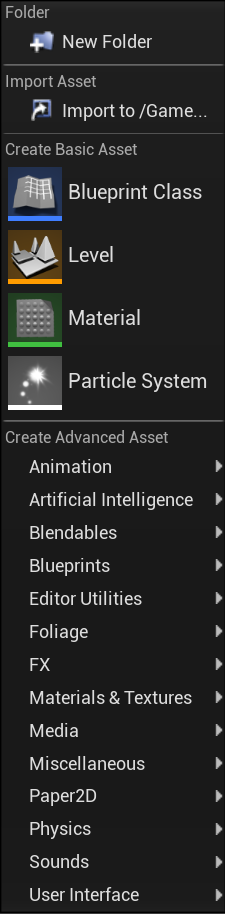
 topaz kelp
There could be any number of Bp Win Volumes in the world, the pin lets you choose which you want to work with
 plush yew
topaz kelp
There could be any number of Bp Win Volumes in the world, the pin lets you choos...
plush yew
topaz kelp
There could be any number of Bp Win Volumes in the world, the pin lets you choos...
means
topaz kelp
when you don't set at target it, it get the remaining crystals from itself
but you could use the node to get the remaining crystals from another actor
plush yew
topaz kelp
but you could use the node to get the remaining crystals from another actor
can i remove it
grim ore
if you want to get this from anywhere you have to use something global like a blueprint function library
otherwise in needs to know where this is at
plush yew
grim ore
if you want to get this from anywhere you have to use something global like a bl...
i have mentioned but
 grim ore
remove the const if you never plan on calling this from outside this blueprint
and that node is not a blueprint function library so no idea why you pasted it
plush yew
grim ore
and that node is not a blueprint function library so no idea why you pasted it
its a blueprint function
grim ore
ok and?
timid frost
Hey my map build light is corrupted
What can I do to fix it
When I left click on on file it says failed to load assets

@grim ore my build light map data is corrupted what can do to fix it
grim ore
what does the message log show?
it also says its building lighting at the same time, maybe it shouldnt be?
 tribal prairie
Friends, I have a new problem) Please help me. When importing to UE4, for some reason, the shading groups from one element are lost. Triangulation is carried out and everything is fine in MAYA, everything is bad in UE4. How can this happen?
 timid frost
@grim ore before building lightning it state the same message . Message log state as : post tag is not valid . File might be corrupted
grim ore
stop building, restart the editor, delete the bad file, open a new blank map, copy the map with this problem to a new map (duplicate or copy/paste) so you have 2 copies of the map, open the new copy, try building
timid frost
@grim ore it got fixed how I did it I build light again and transfered new world map build data into another folder rename it and then saved it and restart the folder I had no problem
kindred viper
@tribal prairietried exporting the smoothing groups from the face? Edge and normals might cause this
 fossil ore
Hello.
I have a huge problem with setting up Android for Quest 2.
I have followed the documentation but IT still gives me error.
I have installed Android Studio 4.0 (proper settings)
I have installed Java 8
Then I have run SetupAndroid.bat (which didn't ask me a permission) and setup project settings.
When I try to pack the game It gives me an error:
ERROR: Platform Android is not a valid platform to build. Check that the SDK is installed properly.
tribal prairie
kindred viper
<@!807721618725404712>tried exporting the smoothing groups from the face? Edge a...
Yes, indeed. Thanks. There was a problem in the edges. Very strange, why MAYA doesn't display this? ))) Makes my life difficult))😅