Then how would I run the loop to end without completing the rest of the loop? Right now in that pic I am running a loop check to see if the player already has that weapon equipped. If they do, I want it to refill their ammo(Which I will replace the print node with), if they don't, then I want them to pick it up (Which runs when the loop is completed)
#ue4-general
1 messages · Page 976 of 1
 robust marten
 glacial dawn
Then you'll have to store that the weapon has been found and the position or whatever and, after the branch, you have to check if you found it
robust marten
I figured I'd have to do that. I thought there would be a simpler way
glacial dawn
@robust marten simpler?? I don't think that's complicated, that's how programming in general works
 fast mica
Hey - has anyone seen any issues with getting the GH org invite? I did some org cleanup a while back and left the epic games org - tried relinking my GH account but not getting any org invite. Epic Games support itself didn't really seem to understand the issue, but sounds like something in the automation failed. 😂
robust marten
Well, for example, I could have 'completed' be empty and just have the true/false run and have them both break when they finish running, right?
fast mica
cc @gleaming narwhal maybe?
glacial dawn
@robust marten No, I'm programming about 20 years (not ue4, programming in general, for my job) and the way you're saying it's counter intuitive
robust marten
glacial dawn
<@150691836560801794> No, I'm programming about 20 years (not ue4, programming i...
Thanks, I'm only 4 months into UE4, didn't know that
glacial dawn
@robust marten don't worry, as long you're programming the basic things it'll be more and more easy.
 short pasture
how can i fix this

 cedar wave
@robust marten Completed execution pin is to be used to do things AFTER the loop is ran. Break is used to exit out of a loop early, so you don't keep looping unnecessarily. Loop Body is what code you want to run on each iteration of the loop.
In your example, of course it still runs the completed pin - because there is code afterwards.
 fallow hornet
Anyone have any good links or guides on Raytracing? Settings/best practices with the Post Process Volume? Mainly focused around automotive.
 sterile tulip
Hello guys. What is the difference between the .h and the .cpp ?
 grim ore
3 letters?
honest answer is technically sorta nothing, honester answerer is one is intended to be a header file and the other the code for organization purposes. more technicaly answer is... thats a general C++ question not an unreal one
 maiden sundial
Hey, i'm still having a very hard time to find a way to avoid any kind of force when two player collide.
This video here should show it pretty good as i think. Hope someone knows a way to avoid it
 granite swift
I have a question I'm not entirely sure where it fits in.
In the unreal scalability menu you have a couple of options

However when you change the settings via the 'Overall quality' buttons at the top.
It also seems to affect the LOD on models.
And I'm not sure where I manually adjust that like I would shading, texture, shadows etc.


 scenic moon
i recall there were a site (from unreal) where they had the live stream videos and details of the same video with written code, anyone knows what im talking about?
grim ore
@granite swift click the scalability presets and look in the output log, you will see all the changes it makes. You can duplicate that by executing those console commands in your game if you want or adjusting the scalability settings in the .ini files for the project
granite swift
Thanks! I freaking love all your tutorials btw.
 random pagoda
I dont see the 4.26.2 branch on git. when i went to update in command prompt it said my for was already up to date. Could someone point me to it if its available
glacial dawn
@maiden sundial be sure the weapons attached have no collision
maiden sundial
glacial dawn
<@446584068746772480> be sure the weapons attached have no collision
Oh wow. I just removed basically everything and it seems like that was my problem all the time 🤦♀️
Thanks, you saved me a lot of time 🙏
 compact vessel
hi, is there any 1 to 1 teachers in this discord? sorry if this is in the wrong chat
maiden sundial
Usually you should just ask questions if you got any.
But if you really wanna have 1 to 1 teaching it should be a paid thing which could fit in the Job Board category in case that nobody goes for it without payment
compact vessel
yeah thats the idea, thanks
maiden sundial
@compact vessel Anything specific you wanna learn ?
compact vessel
i have virtually 0 experience so not really, basics and essentials really
i know it sounds silly i just learn much better with someone showing me the ropes
maiden sundial
There are tons of videos which are covering the pure editor basics on youtube if that's helping you
compact vessel
yeah been through a lot of that tbf
granite swift
There's also this.
https://www.unrealengine.com/en-US/onlinelearning-courses/blueprints-and-gameplay-for-game-designers

Unreal Engine
This course explores how to use the Blueprint visual scripting system along with other Unreal Engine features to create gameplay elements and prototype ideas.
sterile tulip
When I open a thirdperson c++ project, does everything become a c++ class or is the character a blueprint class
granite swift
Nothing just 'becomes' C++ classes, if you create a c++ project the ThirdPersonCharacter controls for example will be in C++
if you created it as a blueprint project the controls will be written using blueprint.
You can always create a BP project and add C++ later.
sterile tulip
When I have a c++ project but create the physics asset of the vehicle in blueprints, are the attributes of this physics asset accesable in the c++ or do I need to create the physics asset as a c++ class to make changes in c++ to it
@granite swift
 faint seal
Hello, anyone using unreal for TV studio ?
granite swift
I don't see why they shouldn't be @sterile tulip, but it's a little beyond my experience.
 maiden sundial
Have you started it via your IDE ?
short pasture
guys i can make a keyboard settings?
maiden sundial
IDE is smth like VS19, Rider for UE and similar @light wigeon
Like the place where you edit your C++ code
 light wigeon
Im using vs19 yeah
maiden sundial
Is it a project you've downloaded from somewhere or have you created an template ?
 maiden sundial
Can you post a pic of the button where you've tried to start it ?
light wigeon

 shadow orchid
Anyone here who can help me with steamworks in 4.25?
maiden sundial
In this case you should open your IDE and press this button here once it's open
 shadow orchid
- what should the steamv folder be called
- how to show overlay in preview/standalone
 light thunder
I found this @grim ore https://youtu.be/eV8oL_vMMiA - could I use this to make a key go back to "listening" for an On Released Event? (i'm having a use case where clicking on a seperate window in Windows (spectator control plugin) switches the input stack quickly, (the plugin activates input again, but it triggers an unintentional ReleasedKey event, and thus, it won't hear the actual real release event because as far as the system is going, it doesn't recognize the button being held down -

What are the Was Input Key Just Pressed/Released Nodes in Unreal Engine 4
Source Files: https://github.com/MWadstein/UnrealEngineProjects/tree/WTF-Examples
Note: You will need to be logged into your Epic approved GitHub account to access these examples files. https://github.com/EpicGames/Signup
I'm wondering if there is way to work around
sterile tulip
How do you make 1 actor follow another actor (position)
granite swift
Sounds like AI
Pretty sure you could learn how to do it from watching this tutorial series.
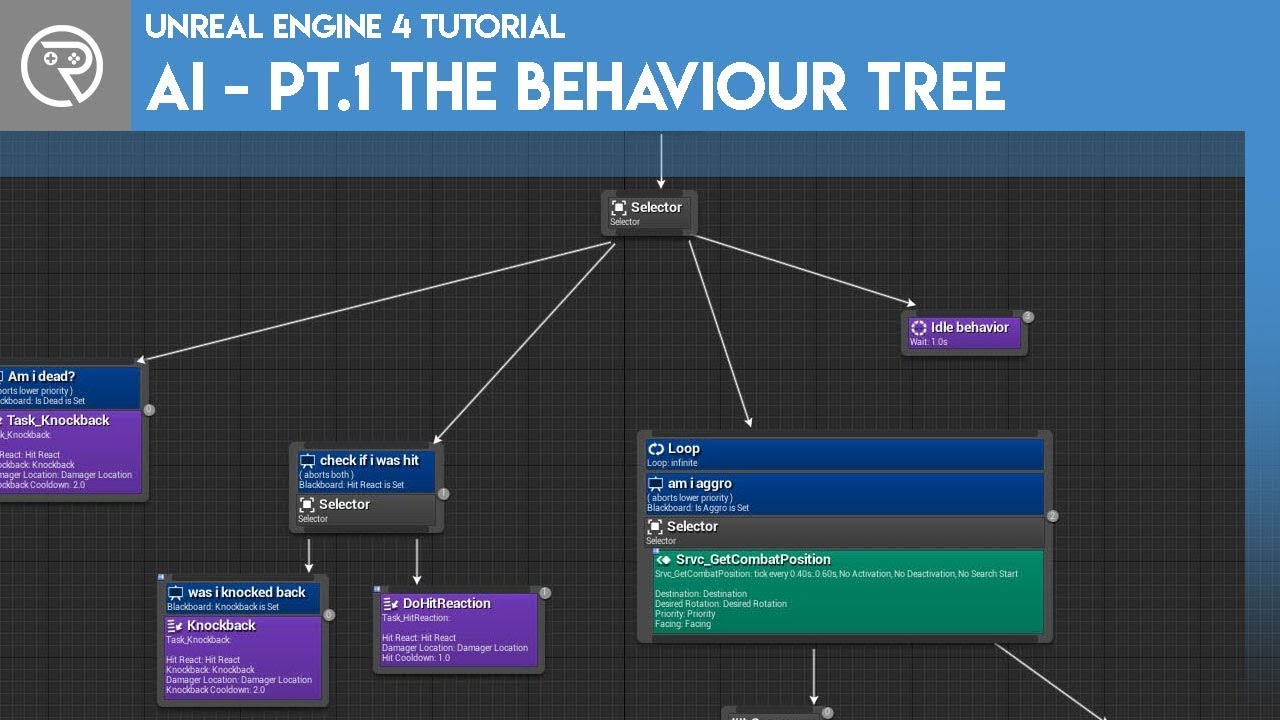
Welcome to the start of a brand new series. This time we are diving into AI for games. This episode introduces the concepts being used in AI design and in particular, the behaviour tree. In this episode we add an NPC that can randomly roam around the level.
Support me on Patreon and get access to videos early, join our developer community on Di...
sterile tulip
No like just follow the position
sterile tulip
The same as having 2 components as 1 actor, but actually as separate actors
if you know what I mean
having it like as if it were 1 actor together, but as separate actors
so they just move together without being 1 actor
 sterile tulip
Do I put the other object in ,,parent actor,,? And how do I get the reference of the other actor
short pasture
what?

 cosmic matrix
@short pasture ??????
 sterile tulip
guys
does anyone know how to fix the collision of the water plugin?
When I walk/drive on it it just floats in the air instead of going into the water
 frosty bloom
Anyone know why changing in-game language to Arabic would make everything start lagging?
sterile tulip


 mortal cedar
thanks
 plush yew
Hello! - Im kinda new here so please tell me if im wrong about anything or if i need to give more information
The case is
Im trying to build my project in order to test it and see if ingame stuff actually work, but everytime i say "Launch" this error comes up in the end of the building progress. Can anybody help me? 🙂

someone can help me to make water?
grim ore
@plush yew check to see if that file is there first
plush yew
grim ore
<@456226577798135808> check to see if that file is there first
Its not.
 fierce tulip
only thing that looks off is that Ø, that could mess up stuff
plush yew
fierce tulip
only thing that looks off is that Ø, that could mess up stuff
I find it very odd too, I can play in the editor fine but as soon as i try to launch it rejects me
fierce tulip
never use weird letterthingies
grim ore
you should not be trying to launch
launch is not what you think it is, thats not playing the game
if you want to test it you would package the project
plush yew
it gives me the same error tho
grim ore
then the next thing might be fixing the character in the project path that it might not like
plush yew
Im going to try and tell y'all how it went 🙂
So far so good
Holy crap, it worked thank you so much @grim ore!
grim ore
welp Luos had the same answer as well 🙂
sterile tulip
plush yew
someone can help me to make water?
you can see in my image I used the water plugin, however the collision is acting weird
plush yew
Thank you so much @fierce tulip Also! 🙂
plush yew
sterile tulip
you can see in my image I used the water plugin, however the collision is acting...
where is that image?
Is there a help server or do you ask here?
grim ore
find the closest #channel to fit your question, or in here if not.
plush yew
I'll ask here
I don't know how to create decent water, because I'm new
Use the new water gersher
._.
i need this effect

that white foam
Yes im not an expert in water but the new water gersher plug in has all those options with foam and bubbles waves etc, watch a tutorial a lot of good ones out there
can you pass me any of those good tutorials?
 meager holly
@grim ore Sorry for tagging you but I just wanted to ask something very specific.
There's a problem in UE4 where if you use saved cached pose, for a non-looping animation the Start Position option doesn't work. Meaning that there's no way to reset the animation unless you loop it which introduces even more problems.
I got this problem recently and when I searched for it, there was a 4 year old thread on the same topic. Would it not be fixed or is that intentional?
plush yew
I exported some plant models from c4d as an fbx but when i import them into ue4 the leaf textures alpha doesn't work and its just flat leaves on plants


It goes the same with other models like trees etc.
grim ore
what does your material look like?
@meager holly if this was reported on answerhub 4 years ago it would have had a reponse by now such as a bug they intend to fix or working as intended
 rigid belfry
whats the new update about? 4.26.1
plush yew
😦
grim ore
@plush yew why not ask the person who did that video what they did?
plush yew
grim ore
what does your material look like?
Its transparent in c4d but ue4 its filled even though it the material instance it appears to be transparent
grim ore
yep so what does your material look like?
plush yew
grim ore
yep so what does your material look like?
Ill just send an image?
because there are almost no good tutorials, or do you know a page to learn how to make water?
grim ore
paste it in here yep otherwise we cant even guess what is wrong? like is your texture bad or your material setup bad or is it in the wrong domain or..
@plush yew what did that have to do with what I said? that video is from UE4 so why not ask them what they did
 grim ore
the material, the actual material. the nodes
the stuff that makes the stuff look like that
plush yew
 sterile tulip
@plush yew https://www.youtube.com/watch?v=mE9jZbhI3Xg

Hello guys welcome back to another video. Today we will be checking out the new Water System in Unreal Engine 4.26! I will show you which parameters to modify to achieve whatever look you want. We go over how to use the new river and lake tools. At the end of the video I show how to setup buoyancy for something like a boat actor.

In this tutorial we go over the basics of the water system in Unreal Engine 4.26
Patreon: https://www.patreon.com/MR3D_Dev
Follow me on Twiter: https://twitter.com/MR3Dev
Join our Discord: https://discord.gg/CJHmxKUb9R
plush yew
I just need this white foam effect, nothing more, no video teaches you how to do that

It doe
plush yew
sterile tulip
<@456226577798135808> https://www.youtube.com/watch?v=mE9jZbhI3Xg
THis one
grim ore
I dont understand. I literally googled "ue4 water foam" and found 4 video hits.. how are there none?
plush yew
plush yew
THis one
Can you tell me in time to teach how to do that?
grim ore
just because someone doesnt hold you hand while you do it does not mean they dont exist
plush yew
11:12
thanks for your help bros
anytime
so about the texture what did i do wrong?
nothing
not you mate
grim ore
@plush yew what does the material look like? the nodes
 plush yew
ye i haven't changed it from importing
grim ore
yep it doesnt magically know you want it to be transparent
in the details panel on the left you have to change the domain to translucent
 halcyon flame
does anyone know if it's possible to manipulate spline handles (tangents) so that they have unequal magnitude?
grim ore
sorry, blend mode lol.

masked works as well, either one. then plug your alpha into the opacity or opacity mask

 rancid bramble
Hey, guys! Just thinking of this and can't figure out how to do it. If I wanted a collision check for a flattened sphere, how would I? Think a sphere scaled 0.5x on it's z axis. If you can help me figure out a way to get something like it for a trace
plush yew
Do i do both or can i just change the blend mode?
grim ore
then you might consider changing the shading model to two sided foliage

and then enabling two sided checkbox
its one or the other, masked is better on performance if your art is ok with it
plush yew
One sec it didnt work ill send a screenshot

wait a second
I think it did
ill check
The textures are weirdly glitched its like its all transparent
grim ore
what does the material look like now?
plush yew
The front is transparent from the side you look at it so like in the screenshot earlier
the facing side is gone and the back is seen and this changes as you move around
 grim ore
what does the material look like now

 grim ore
ok so..
plush yew
different*
grim ore
the material is the material, its this part

usually when someone wants to see the material its the actual stuff that creates it
we dont know what you plugged in where so we dont know what is happening
plush yew
I don't have the opacity connected
grim ore
yours shouldnt look like mine, we want to know what yours looks like to get that result
plush yew
Ok so i send the nodes?
grim ore
you did it before, just take a pic and paste it...
 grim ore
yep... soo thats not any different than before
plug the output of the A on your texture into the opacity node
grim ore
its not dim, I see it white
plush yew
nvm
grim ore
opacity is for translucent, opacity mask is for masked. one will be usable depending on what you chose for the blend mode
 grim ore
compile and save it then look at it on the mesh
plush yew
Ok
grim ore
if its still weird, uncheck two sided
plush yew
Works thanks!
grim ore
now you might want to try it on the masked mode (with it plugged into opacity mask as well) and see if it looks good enough. If it does keep that
plush yew
One second ill import the texture
Something like this its too unnatural how do you make it so the patterns aren't the same?
 grim ore
look at using macro and micro texturing
plush yew
Its like repeated i changed the U and V offset and tilling to fit the shape but the patter is bad
grim ore
its not a one click solution
plush yew
I see
grim ore
and of course its repeated, its one texture at one size in one direction
plush yew
how do you randomize that?
grim ore
you dont use one texture at one size in one direction, you use macro and micro texturing
plush yew
Im not sure what that
grim ore
you can look up texture bombing or texture variable or macro textures or micro textures
plush yew
Ok thanks, im just much better at blender with this stuff so im not very familiar.
plush yew
Its quite advance im not that good at nodes even idk what 99% of it is
ill try following the tutorial
 south ridge
plush yew
Something like this its too unnatural how do you make it so the patterns aren't ...
south ridge
plush yew
Something like this its too unnatural how do you make it so the patterns aren't ...
You can also get a better effect with better crafted textures
There is no real solution for more than 3 repeats of tiling (more than 3x3 repeats visible) beyond what @grim ore suggested
 thick nebula
is this possible? The first interface works but when i try to get the camera working it does not blend
https://i.imgur.com/8AtFiUx.png
https://i.imgur.com/zHBPFUY.png
https://i.imgur.com/3jjuNHR.png

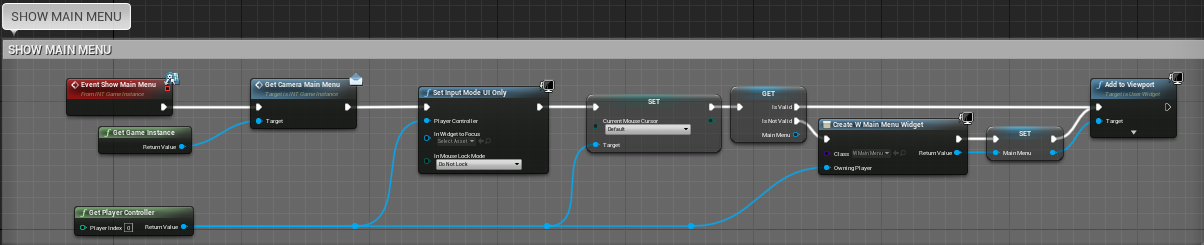
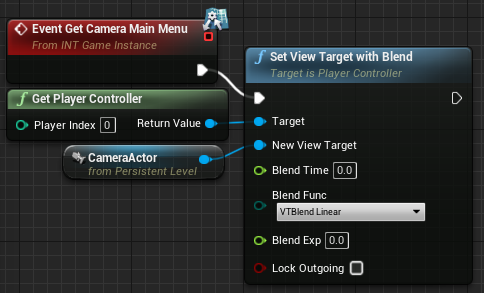
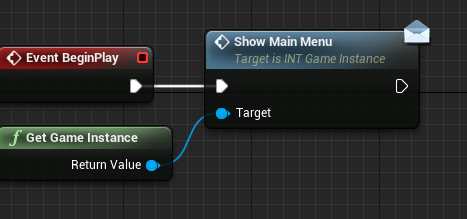 plush yew
well this is quixel bridge so idk how good it is compared to others
south ridge
But for up to ~3 tilings, you can still mostly eliminate perception of tiling by crafting the texture well
Eliminating the patterns that the eye catches on
south ridge
plush yew
well this is quixel bridge so idk how good it is compared to others
This is about crafting the actual tiled texture data
plush yew
Ah ok i see
south ridge
You need to eliminate patterns that the brain notices. By masking out these patterns, you can attain like 3x tiling without it seeming like there's much tiling. But obviously it requires authoring every texture carefully
Then with micro-macro texturing you can multiply it into e.g. 9x tilings without perception of tiling or more
south ridge
plush yew
Something like this its too unnatural how do you make it so the patterns aren't ...
I count about 9 repeats here, so if you want to maintain same texturing, you will need to add a detail texture on top
plush yew
i was planning also adding vertex painting
south ridge
Vertex painting works together with detail textures and such
Vertex painting provides only a very coarse variation - very global changes. You can mix detail texture based on vertex painting to get really good results
Can have multiple detail textures/etc
plush yew
If you have two made materials for vertex painting how can you join them together do you copy and pase the nodes and link it with a lerp?
past*
paste*
south ridge
Pretty much. Or put them into a material function for convenience
Then you don't need to copy and paste and you can still have them as individual materials
plush yew
How is that done wait that can save a lot of time?
grim ore
@thick nebula the code is confusing. your talking to the game instance to call some code, but that code is not in the game instance but in the level?
thick nebula
grim ore
<@!232641180247130112> the code is confusing. your talking to the game instance...
i am trying to follow along with the multiplayer tutorial. they have all the menu options in the "steamserverinstance" game instance. the camera is referenced from the level, and i created a blueprint interface to call both the menu and the camera separately. preferably i want to load the whole level at the beginning of the game and work from there, so it kind of makes sense.
grim ore
I see you calling the interface event "Show Main Menu" while targeting the game instance yes?
thick nebula
this would be the instance of the main menu.
 grim ore
ok so.... thats calling Show Main Menu while targeting the game instance right?
thick nebula
yes it's current instance, i believe
grim ore
ok so then in the game instance, in the Show Main Menu event, you are calling the Get Camera Main Menu event while targeting the game instance right?
thick nebula
i have "get game instance" again linked up, but i guess i could technically pass it through the interface
 thick nebula
this is the level blueprint
 grim ore
yep that was the next step in this process, but your jumping ahead
grim ore
so then jumping ahead your last code is in the level blueprint, not in the game instance, so how are you calling that code?
thick nebula
grim ore
yep that was the next step in this process, but your jumping ahead
sorry, "SteamGameInstance"
grim ore
for this issue it doesnt matter what its called
the issue is your code for the "Get Camera Main Menu" is in your level blueprint, so how are you calling it? all the code you posted is targetting the Game Instance and not the Level Blueprint where this code is
thick nebula
i am sort of following you
im not sure if you are asking me a question or that is dramatic pause
grim ore
not really a question, pointing out the issue
thick nebula
ok, then the answer is i do not know
grim ore
your asking your game instance to run code it doesnt know about
thick nebula
but yes i see now
grim ore
unless I am confused there is no code for "Get Camera Main Menu" in your game instance to run
thick nebula
grim ore
unless I am confused there is no code for "Get Camera Main Menu" in your game in...
that was supposed to be the interface
grim ore
the interface doesnt have code, its a conduit between two things basically
in this case between the thing calling the event and the thing holding the event, your widget and your game instance
thick nebula
so i was trying to put that in between

 prime willow
@grim ore I've decided ill deal with cheaters and all of that mess when it comes i want to make my game offline with the ability to play online i know save editting is garenteed due to it being offline but ill figure something out
i guess so my question is if my game will be offline but have online lobbies of the same playable maps or area which would be considered like a base or main town hub that players can play on would i still follow the same tutorials about basic multiplayer replications or would i need to make some type differences in the settings for when connecting online to play or offline
im not asking for a tutorials or how but the terms i might want to search
so i can go figure it out and burden you less than need be x3
grim ore
@prime willow maybe look for a lobby system? but honestly its going to matter how you want stuff set up, what stuff is "online" and shared, and what is not, and then what the online stuff is actually doing
grim ore
so like if you wanted the exact same game but drop in online and offline, would be it be dedicated servers or is a player a host
prime willow
and than picking whats replicated and whats not
i would prefer deticated servers for lobbies
as i want the town to fill up with a ton of players
i know hosting might be a terrible idea for that
grim ore
if its just community for example and nothing that interacts with the offline component then it should be pretty easy, you just make a virtual space for them to play in and duplicate their "looks" when they go online
prime willow
well i want something like monster hunter world
forr example
where your completely offline
but can go online and everything is the same
grim ore
I want to say monster hunter is a listen server setup for example
prime willow
but your now with players
thick nebula
prime willow
but your now with players
this can not be done with dedicated
grim ore
and monster hunter you cant interact with other players directly
grim ore
your basically going to just have to have the same game running local and multiplayer in the end then
prime willow
but i mean the idea behind how mh world works where its just play offline or connect to a opened lobby or private one and play online
thick nebula
prime willow
yeah my game has pvp
you want to make a party system before you join a dedicated server?
prime willow
so id have to setup the game entirely locally
and than run a backend version for multiplayer when they connect online right?
grim ore
its gonna be a big challenge
prime willow
definitely will be
i know so with my stupid scope but im willing to put in the work if its possible
i just gotta figure out what im doing lol
grim ore
honestly try and find something online where a similar game explains their server setup, or just harass #multiplayer lol
theres like no way to just figure it out 😦
thick nebula
prime willow
definitely will be
are you using bps only?
grim ore
well there is... if you have a decade or two
prime willow
woah we have a multiplayer tab
 winged notch
How to i fix this tessellation glitch ?
#graphics message
prime willow
i know dragon ball xenoverse 2 does exactly what im looking for
but that game uses a hub world and loaded in and out missions its not an open world per say
grim ore
that last part is the important distinction
prime willow
yup thats exactly what i thought too
grim ore
and do they allow player trading
cedar wave
Harassing #multiplayer is my preferred approach currently
prime willow
you have to earn everything yourself
grim ore
most games like this with hub stuff doesnt allow player trading
prime willow
due to duplications?
oh wait
you can trade in xenoverse iirc but its nothing of real value
prime willow
i see
thick nebula
less scams
grim ore
save game locally with awesome item, go online and give item to friend, delete old save game and reload the one with the awesome item, repeat
prime willow
so doing something like monster hunter world and or xenoverse is more feasiable due to its offline structure
cedar wave
- Read docs/blogs/pdfs
- Attempt to implement
- Try multiple approaches
- Question existence
- Ask #multiplayer
☝️ my personal workflow
prime willow
i know sword art online games do it too
i will steal that work flow as soon as this conversation is done lol
my real issue is trying to find the right terms for what i want to implement in my game o.e
sterile tulip
Hello guys. What is new in 4.26.2?
prime willow
somehow im too stupid to figure it out soon enough
grim ore
you sound like you have it right and comparing it to other games is a good start
cedar wave
prime willow
my real issue is trying to find the right terms for what i want to implement in ...
Just explain the best you can, even reference other games, and someone will probably be able to help. Then also tell you the term.
winged notch
sterile tulip
Hello guys. What is new in 4.26.2?
water
prime willow
yesh i like to reference older games to just have an idea of what im doing or what its called
grim ore
I think a hub tends to be what is used for alot of this, guildwars 1 is similar to this
prime willow
some things are a bit harder to figure out though o.e
grim ore
hub based MMO tends to be a term thrown around if its all online
thick nebula
cedar wave
1) Read docs/blogs/pdfs
2) Attempt to implement
3) Try multiple approaches
4) Qu...
@grim ore how do i call the level blueprint to the game instance blueprint without an interface?
prime willow
yup yup
grim ore
@thick nebula you can never call the level blueprint, even with an interface
prime willow
but i want my game to be pretty opened up like botw or new genesis phantasy star online 2
thick nebula
grim ore
<@!232641180247130112> you can never call the level blueprint, even with an inte...
so then how do i access that damn camera
prime willow
and deticated servers more than likely due to pvp
grim ore
pretty much. some games like that basically just start up a server locally and connect to it at all times
it just makes it easier
prime willow
ah
grim ore
so then multiplayer is just redirecting your connection to another connection instead of local
grim ore
@thick nebula you need to get a reference to it somehow using normal blueprint communication. if its the only one in the world, get actor of class works. If its not, you can try and find it using a tag. You could always put the camera in another blueprint and have that blueprint handle the workload. You could have that camera as part of a blueprint tell the game instance or whatever is handling this stuff about itself.
thick nebula
grim ore
<@!232641180247130112> you need to get a reference to it somehow using normal bl...
can i just put the camera in the game instance blueprint? or do i have to make a whole new controller/character?
the latter was what i was trying to avoid, maintain a single topdowncontroller
grim ore
the game instance doesnt exist at design time so no you cannot
what are you trying to do here?
thick nebula
just make a menu with a background of the level.. kind of like overwatch. i assume they have separate levels for menus.. but i would like to just load one level
grim ore

if your just trying to make the camera in the level be the active camera, set it up to do that
thick nebula
as i said, i'm just following along with the tutorial, which uses the instance blueprint for the menus, but also experimenting. i learn a lot like that but its sloppy
ah ok i will try that...
grim ore
there is probably a reason it does things a certain way, the level blueprint is a hole that eats code alive and should be avoided if possible
 willow wyvern
I've come across an odd issue - the asterisks that appears indicating an assets needs to be saves, appears immediately upon loading the map, and will not go away regardless of saving method. It appears to save everything when I close the project and save via that dialogue box, but still a bit unnerving. Any thoughts, or anyone else who has encountered this before?
grim ore
any construction scripts running that might get triggered? have the project open more than once?
willow wyvern
I closed the project completely, and opened just that map. I will double check the level blueprint. I did have some code there that referenced an object that I beleive my partner nuked when he changed up the map.
thick nebula
grim ore
any construction scripts running that might get triggered? have the project ope...
wowwwwwww ty that was much faster than trying to completely learn interfaces but thank you
once again, that reply has nothing to do with original statement, my bad
 stiff sail
so i have 2 questions atm.
- how do i overwrite the "esc" key force quiting the game?
- why does my right click menus stop working after 30ish minutes?
thick nebula
stiff sail
so i have 2 questions atm.
1. how do i overwrite the "esc" key force quiting th...
there was an update today.. i do not know if it addressed it but it seemed to update some things with nvida drivers. are you on nvidia? i have the same issue with the disappearing menus.
stiff sail
aye yeah nividia. is it a driver update or unreal update?
 nova kernel
anyone recommend good AAA Quality or items that can be amped up Vehicles? Ones that can be used as props as well as setup to be driveable?
Also, anyone have any good recommendations for good Characters? or a program/software to create good ones?
 twilit hill
does anyone know if theres a limit or common problems with migrating a huge amount of assets from one project to another?
i basically plan to ready up my project so that i can export it to an ue5 project in the future, which i of course need to prepare with all the plugins i currently use etc.
other than that, its a bit of a stalemate rn cause big topics such as migration, plugin compatibility, render differences etc. are unknown
grim ore
nothing ever indicated that UE5 projects would be "different" than UE4, they said you should be able to open ue4 in ue5. I would just make a copy of the project and open it in 5 when the time comes
twilit hill
they said that? thats good news
i wasnt keeping track in detail, thanks for the info!
grim ore
"We’re designing for forward compatibility, so you can get started with next-gen development now in UE4 and move your projects to UE5 when ready. "
twilit hill
so basically just continue and then eventually open this project in ue5, confirm all possible migration prompts and hope that it wont burst half the stuff
oh yeah, plugins may still be a problem tho
grim ore
I guess move is open for debate, i assumed just opening them in 5
yeah engine plugins might be an issue
I would think project ones not as much
but yeah we really dont know for sure, we have no idea how much of the base code will change
twilit hill
i was away for a couple months now, ue5 have that new mesh culling thingy right off the bat?
grim ore
nanite? the infinite detail? I beleive so. it was presented as such atleast lol
twilit hill
i can imagine there might be an answer to that in one of countless videos
ah ok
cause thats kinda the biggest deal
grim ore
i mean a presentation and reality.... are never the same heh
plus its just preview coming soon, maybe in a year on final release it might be all neato
twilit hill
oh yeah my stuff is all hyper optimized anyway, but i could expand on some territories if mesh detail wouldnt matter that much anymore
kinda to keep it in mind if i continue atm
grim ore
well I assume it will matter somewhat, somehow they still have the handle the data and there has to be some limit
or atleast a bottleneck
twilit hill
ah ok, i remember that wrong then
anyway thanks for the info, would have taken me way longer to find those
if even
grim ore
yep preview soon, update to fornite afterwords, then release later this year
twilit hill
ah i got another super question, pardon me, im a bit out of touch with the latest news, but is the DX12 RHI currently implemented production ready or wouldnt you use that one for ongoing development?
i noticed massive differences in renders by comparing d11/12
grim ore
i would assume it is, nothing seems to indicate otherwise
fortnite has Raytracing now which is DX12 so thats a good enough indication to me
twilit hill
ah good to know
i did some performance tests as well, they are basically the same
so why not rolling with the more recent one, even if its just a wrapper mostly
plush yew
Hi, would anyone happen to know why my HighResScreenshot contains way less reflections in the water than in my viewport ? And the overall look of the water is worse


It's strange isn't it ? All the settings are on "Cinematic", Ray tracing is on... But the high res screenshot looks really bad compared to the editor :/
nova kernel
I keep seeing this truck in UE4 games and other games, anyone know where it comes from?

 chrome crest
Does anyone know if UE4 supports sixaxis/accelerometer input from a ps4 or ps5 controller?
 left terrace
shit my bad
fierce tulip
np
willow wyvern
The asterisks that appears indicating an asset needs to be saved, appears on a map immediately upon loading, and will not go away regardless of saving method. It appears to save everything when I close the project and save via that dialogue box, but still a bit unnerving. Any thoughts, or anyone else who has encountered this before?
 stone bay
Is it possible to use the chaos destruction system on a character?
 rustic panther
how do you convert delta time to frame rate?
scenic moon
1/dt
 kind dew
Someone zipped up their project for me and I am getting this crash when I try to launch it:
"Fatal error: [File:D:/Build/++UE4/Sync/Engine/Source/Runtime/RenderCore/Private/ShaderParameterStruct.cpp] [Line: 285] Shader FHairCardAtlasTextureRectVS, permutation 0 has unbound parameters not represented in the parameter struct: Tile_Coord Tile_Resolution"
stiff sail
damn bug where my right click disappears is back. ue4.26.2 and GeForce drive 465.86
this is getting really annoying.
 jaunty haven
Hey guys I am having a wierd issue with lighting,
all of my roof is black and spoty, this issue came 1 month back, previously thought my lighting is not built or something.
but now i cant even fix this.
I am using 4.25.4 oculus source Engine
 light thunder
How do I execute console commands via launch shortcuts? like on a packaged build exe
light thunder
jaunty haven
Hey guys I am having a wierd issue with lighting,
all of my roof is black and s...
maybe the lightmap uv index is set to a different channel?
jaunty haven
@light thunder actually it worked with 4.25.3 but not with 4.25.4
 idle stump
Is there a better way to disable character movement other than just not adding input? I tried CharacterMovementComponent->DisableMovement() however this freezes you in midair. I don't want to stop the character from falling/being moved. I just want it to ignore any movement from AddMovementInput(). I can just add a boolean which I check before adding the move input but I figured there was probably already a built in way - I just can't find it.
grim ore
try using the disable input node
idle stump
I'm using C++. But i did see that which put me on the right track. I think that functionality actually comes from Pawn, not Movement Component.
grim ore
the player controller actually
it removes the actor from the input stack on that controller
idle stump
Right
 spare kernel
what i do is when a GameplayTag is added that prohibits movement, i just disable the movement inside the controller
if the tag also stops movement, i call CMC->StopMovementImmediately
     * Locks or unlocks movement input, consecutive calls stack up and require the same amount of calls to undo, or can all be undone using ResetIgnoreMoveInput.
     * @param bNewMoveInput    If true, move input is ignored. If false, input is not ignored.
     */
    UFUNCTION(BlueprintCallable, Category=Input)
virtual void SetIgnoreMoveInput(bool bNewMoveInput);``` is a good function@idle stump
this gets blocked in void APawn::Internal_AddMovementInput(FVector WorldAccel, bool bForce /*=false*/) { if (bForce || !IsMoveInputIgnored()) { ControlInputVector += WorldAccel; } }
cedar wave
@grim ore Man - I hate you. I was watching one of your videos and then saw another one that I was curious about, then another one, etc... for about an hour and a half. I was supposed to be working on my project 😛
Just too good of videos
grim ore
lol 🙂 well the good thing is eventually you will run out of them and have to get back to work
idle stump
@spare kernel Thank you. Currently I have my AbilitySystemComponent on my Character but I'm realizing it should probably be somewhere else. Do you keep yours on the Controller or the PlayerState? My game is not multiplayer - although I would like to do a different multiplayer game in the future.
spare kernel
Playerstate
But character is fine
Setpaw in your controller can bind the tag to disable or enable move input.
Setpawn
What I did :p
idle stump
@spare kernel So, override SetPawn in your controller and do what in there?
spare kernel
It the asc and bind the tag that should disable movement
Get
Then if tag is added or removed call setignitemoveinput as required sorry on mobile
idle stump
Like this, right: AbilitySystemComponent->RegisterGameplayTagEvent(FGameplayTag::RequestGameplayTag(FName("State.Debuff.Stun")), EGameplayTagEventType::NewOrRemoved).AddUObject(this, &AGDPlayerState::StunTagChanged);
(taken from tranek/GASDocumentation)
So are you saying you bind a GameplayTagEvent directly to SetIgnoreMoveInput somehow? Or you have some handler in your controller that does the logic in between?
@spare kernel
spare kernel
I have a function that calls it
I don't bind to specific tag I listen for all as I do other stuff
 grim beacon
Can someone send me an engine material screenshot? I've played with it in the past and I want to see how it originally was
It's the default sprite material

 tawdry valve
Can anyone share me a tutorial for sword collisions or impact, so on impact I can create sparks
jaunty haven
is there something wrong with Unreal engine Lighting with 4.25.4 ?
spare kernel
Not that I have noticed what's the issue
 granite creek
grim beacon
It's the default sprite material
granite creek
grim beacon
It's the default sprite material
 grim beacon
@granite creek Thank you!
plush yew
I'm a little rusty sicne its been a few months but I'm having a problem. Make a character. change NOTHING from default. disable gravity on the capsule. thing still falls. google is not helping. I've done this multiple times before what am I missing
had to set gravity scale to 0
but gravity wasn't enabled to begin with?
sterile tulip

I am trying to attach an actor to the possessed vehicle. How do I get the reference of the vehicle which gets possessed at start play? This is in the actors blueprint (self is the actor and in the parent the vehicle reference needs to go to attach it to the vehicle)
granite creek
sterile tulip
is your game offline ? if its override event posses from panel in the left
granite creek
event posses is only called in server
what is actor that you are trying to attach?
granite creek
so why attach it in begin play?
sterile tulip
Why not ?
granite creek
I'm sorry why attach it in on posses ?
sterile tulip
I need it to be attached to the vehicle from the moment it begins to play
granite creek
sterile tulip
I need it to be attached to the vehicle from the moment it begins to play
okay then on posses part is not necessary
I suggest that vehicle spawns door actor in beginplay then attaches it to mesh
sterile tulip
I dont know about posses or anything, I just have created the vehicle project template in the templates and it automatically possseses the vehicle at start
sterile tulip
granite creek
I suggest that vehicle spawns door actor in beginplay then attaches it to mesh
yes thats what Im trying to do
on begin play attach the actor to the mesh
granite creek
sterile tulip
on begin play attach the actor to the mesh
on begin play of "vehicle " Spawn a "Door" then attach it to "Mesh"
 sleek solar
why not just add door as component?
sterile tulip
I need it to be a separate actor for functionality reasons
jaunty haven
@spare kernel using Oculus 4.24.4 branch, HLOD output texture is pink. Lighting has no indirect lighting from skylight
 restive eagle
@spare kernel check the #freelance-jobs someone posted for unity 😦
not sure if thats allowed, curious to see 😄
 dire parcel
this error message, how can i fix this?
 restive eagle
you cant downgrade a project to an older version
only upgrade to a newer one
someone already told you that in another discord....
dire parcel
no they told me to download the newer version to make it work
i got in vc and asked him
restive eagle
he says that its not backwards compatible with older versions
dire parcel
and he said thats how i fix it and then he said he doesn't know than so i came here for help
dire parcel
alright thank you
restive eagle
use the same version that the project was built on
or a newer one
and you'll be fine
dire parcel
alright i appreciate it thank you bro
dire parcel
i could have sworn the guy i was wroking with was on 4.26
thats the thing but i will double check with him
restive eagle
you are getting this error using 4.26?
dire parcel
yes i just downloaded it and it gave me that message
let me fully close it and reset it and try again
restive eagle
would be really weird if you are getting this with 26
other than that you could try rebuilding it from source, but still same rule applies that you can't use older versions than the projects version
to change project version, right click on .uproject file and switch engine version
 drowsy snow
PROTIP: If you want to package/cook your UE4 game without active connection all the time, disabling Usage Data collection before building can help.
For some reason, having usage data logging on prevents the build process from going further in offline mode.
 drowsy snow
restive eagle
<@!341285849301909506> check the <#780559987143213056> someone posted for unity ...
drowsy snow
restive eagle
<@!341285849301909506> check the <#780559987143213056> someone posted for unity ...
There's also one in #volunteer-projects
restive eagle
yeah its a bit weird to look for unity devs in a ue discord
 wintry ravine
Hey, does anyone know how I can get particle system beam with a fresnel effect almost
something like this
 drowsy snow
wintry ravine
Hey, does anyone know how I can get particle system beam with a fresnel effect a...
drowsy snow
wintry ravine
Hey, does anyone know how I can get particle system beam with a fresnel effect a...
Unless you're picky about having 3D cylindrical beam particle, using 2D texture for the beam particle don't hurt.
In case of the former, just divide your emission input with a fresnel node.
 timid spade
im using ccdik to bind an arm to my weapon
and all of a sudden it started lagging behind severely
wintry ravine
drowsy snow
Unless you're picky about having 3D cylindrical beam particle, using 2D texture ...
Thanks for the reply, I've been thinking about just opting for the latter. Ill give it a shot, thanks again!
plush yew
Good Morning, I am in search of a Maya Curve to UE Spline Script, is there any chance anybody could help me with a hint? I am researching since last week and not really found what I was looking for. Thanks in advance!
 rose sun
Hello everyone, is there a channel where I can ask for help regarding a project in working with In Unreal? I'm struggling to find a solution so I thought I'd ask, thanks in advance!
 earnest violet
Anyone know how I get the UE movie logo at the start of my game, where I set set it. Is it in the project settings? Thx! 🙂
 harsh pebble
Can anyone send me server invite where i can find help with UE4 🙂 Thank You
other than this xD
rigid belfry
i traced some boxes inside the construction script which were set to persistent draw time, now they are not disappearing no matter what i try. is there a way to remove them which doesnt involve closing down the engine?

 modest trench
if there is I can't find it
would be simple to set up a console thingy I suppose
can you make custom cvars/console commands in BP? I wonder
that would be neat
oh... it's literally FlushPersistentDebugLines
in World.cpp
rigid belfry
is the box extent the same as the unit's scale?

i need to see which instances are colliding and removing them. anybody has a clue?

 vagrant hornet
will ue5 be out before summer?
restive eagle
Unreal Engine 5 was revealed on May 13, 2020 with expected full launch in late-2021
thats all we know
i wouldnt be surprised if they decide to delay it a bit more
short pasture
guys how can i to back to my map
 restive eagle
click on object and "F"
 grim juniper
either set the camera to move fast in the top right, or select an object in the outliner and hit f
short pasture
restive eagle
click on object and "F"
where the object
restive eagle
in world outliner like fox said
short pasture
i click on it i try click f it not work
 restive eagle
anything else but that......
short pasture
restive eagle
anything else but that......
ok i am to try anything ok
restive eagle
thats how you got here in the first place
by selecting sky sphere and clicking F, thats why nothing happens
grim juniper
Hitting F will focus the camera on the object that's selected. Doing it with the skysphere selected moves the camera really far out to get the whole skysphere into view.
 livid timber
guys, may i ask if i can acess meta human creator tool? or is still a wip?
vagrant hornet
i dont think so no
 mild phoenix
I think not yet
restive eagle
yeah its been a while, doing pretty good. doing some work on the project if you saw my server but lets cut it short since its not the place to discuss it further 😄
mild phoenix
Hey @everyone Who can help I have an error when I packaging my project
ERROR: Failed to create directory 'E:\Unreal Engine Source\Android_Multi
I reinstall engine but it didnt help
Although rebuild my project
 deft raven
Guys I was thinking, how Red dead redemption 2 has this insane draw distance?
I think if someone make this in unreal engine you need the nasa to run the scene
short pasture
hmmm
 fierce tulip
@deft raven just proper lod-ing, culling, and some other tricks
 hexed eagle
If I have an inventory, that has a TArray for a list of weapons the player has, should I use
TArray<class AWeaponBase*>
or
TArray<TSubclassOf<AWeaponBase>>
i'm guessing... the first
then when I run over a pickup which has TSubclassOf property, I cast that to AWeaponBase, and add it to the array if it's not already in there
right?
 astral phoenix
Hey, im wondering if some1 can help me? im trying to do so when i have 3 blue balls i can get a Yellow ball, but the yellow ball destroy the 3 blue balls i allready have, so im left with 1 Yellow ball, but the only way i can get a new Yellow ball is to get 3 new Blue balls, how do i do that? 🙂
deft raven
fierce tulip
<@!342295440462577665> just proper lod-ing, culling, and some other tricks
Nahhh, have his limit, I think is not doable have the same result on unreal engine
Rockstar engine is crazy powerful
fierce tulip
lol, okay
deft raven
“Lol” if you reply with such a basic answer, at least gave a example for your reply
I say you can’t reach rdr2 quality, if you say “not true” make me a example
I can’t find any
deft raven
fierce tulip
lol, okay
Lol
fierce tulip
its not worth my time to argue such things.
deft raven
fierce tulip
its not worth my time to argue such things.
-I can’t prove nothing, I translate to you 🙂
fierce tulip
lol, okay
deft raven
fierce tulip
lol, okay
That’s it, btw why you continue reply? Lol
 next badger
Irony...

 buoyant graniteBOT
:no_entry_sign: CR#4930 was banned.
deft raven
Any news about metahuman release date?
 kindred viper
@deft raven early access opens tomorrow from what I hear on the rumour mill.
next badger
buoyant granite
:no_entry_sign: **CR#4930** was banned.
Was that image crashing the Discord?
fierce tulip
i dont get it, user has been active on slackers for a while and then proceeds to do this. why would a moron do that?
 dense knoll
Someone else got into there ac?
deft raven
kindred viper
<@!342295440462577665> early access opens tomorrow from what I hear on the rumou...
Wow, that’s awesome if true, btw I don’t think we need to wait to much at this point
kindred viper
bear in mind, it might be the case that not everyone gets early access. It would be better for Epic to cherry pick I guess. Get some real feedback instead of people doing things wrong and complaining they are bugs.
dense knoll
Why does the Asset pack "Medival Docks" Like breaking/corupting when upgrading engines?
kindred viper
depends on how much the versions change I guess.
dense knoll
its a good thing that only that and some unused actor got courupted when i upgraded
deft raven
Yeah probably, happy to see reallusion panic hahaha
short pasture
why it not working i trying to put my car 3d model to my unreal engine game
 astral phoenix
Hey, im wondering if some1 can help me? im trying to do so when i have 3 blue balls i can get a Yellow ball, but the yellow ball destroy the 3 blue balls i allready have, so im left with 1 Yellow ball, but the only way i can get a new Yellow ball is to get 3 new Blue balls, how do i do that? 🙂
short pasture
astral phoenix
Hey, im wondering if some1 can help me? im trying to do so when i have 3 blue ba...
it is easy to create 3 new blue balls
 timid pilot
kindred viper
<@!342295440462577665> early access opens tomorrow from what I hear on the rumou...
timid pilot
kindred viper
<@!342295440462577665> early access opens tomorrow from what I hear on the rumou...
Who get access ? Everyone ?
kindred viper
dont know yet
short pasture
short pasture
why it not working i trying to put my car 3d model to my unreal engine game
hmmmm any one can help
astral phoenix
@short pasture i allready have made so i can get 3 blue balls, but my problem is when im trying to get a Yellow ball the 3 blue balls dont go away :/
buoyant graniteBOT
:triangular_flag_on_post: mrprogames#0602 received strike 1. As a result, they were muted for 10 minutes.
astral phoenix
damn thats not good, fell bad for u @short pasture
timid pilot
kindred viper
dont know yet
Certainly Epic 's customer
kindred viper
we are all Epic's customers. But I guess those with a different license might get some favourable attention. However that reels back to what I said earlier about useful feedback. If someone is a partner via license, it makes more sense for them to get it first as they are more likely to be using it rather than the average joe who just wants an autocharacter with no fuss. Metahumans require a LOT of fuss.
spare kernel
@elder escarp you asked in #animation already, i would just wait and give it some more time. Try to keep the discussion to a single channel. If you do decide to change it to a more suitable channel then remove your original message if there is no ongoing discussion. #rules 7.
 scarlet birch
Everything I've seen says access is being given to a selected group of users on 4/15. I filled out the form I found to try and get in but didn't get a response and TBH I wouldn't be my own first choice if I was the one deciding who to give access to.
scarlet birch
deft raven
Nahhh, have his limit, I think is not doable have the same result on unreal engi...
Your statement is incorrect.
spare kernel
UE4 is super powerful, and just like any game engine, its how things are optimized and done.
 elder escarp
@spare kernel Sure, I deleted both, I can ask later. Sorry about that.
spare kernel
i mean you could have just left the question in #animation someone may answer when they come online
elder escarp
I rarely get answered about plugins in #animation so I thought this channel could be better
I'm using Blender and UE4 with the Send To Unreal plugin. How can I have a root bone to create root motion using this plugin? Here is what I have tried:
- Created an Armature (named Armature) with no bone named root. Checked "object name as root bone" in the plugin settings.
- Created an Armature (named Armature) with a root bone (named root). Checked "object name as root bone" in the plugin settings. But now even if I animate the root bone, unreal doesn't recognise it as root.
scarlet birch
The Armature root itself tends to get treated as a root bone in some setups. It's a common problem and any web search should find you a solution quickly.
deft raven
scarlet birch
Your statement is incorrect.
???
next badger
deft raven
???
"not doable" statement is incorrect
short pasture
wow my car 3d model have so much things
 deft raven
next badger
"not doable" statement is incorrect
deft raven
next badger
"not doable" statement is incorrect
Understood thanks, btw what the sense to correct every grammar error on discord, I mean a lot of people like me is not native English, really need to point out every error? Meh grammar nazi 🤷♂️😂
scarlet birch
No one is talking about grammar. The assertion you made is wrong.
deft raven
scarlet birch
No one is talking about grammar. The assertion you made is wrong.
And? I not English so? You talk every language of the world? 🙃
spare kernel
@deft raven no one pointed out about "your grammar" or your "English".
it was your assumption that UE4 is not as powerful as Rockstar Engine and can not do what it can do.
deft raven
I misunderstood, I don’t understand what is wrong
Ahhhhhh ok
Well look like a fAct for me, in this field at least
scarlet birch
Ok, then on what basis is that supported?
deft raven
scarlet birch
Ok, then on what basis is that supported?
From what I see, the best open world on unreal engine I think is the project “boy and his kite” is huge
kindred viper
naah my open world is the best. Its infinite
😄
well infinite upto 64bit. But dont hold it against me
deft raven
Pretty god, but rdr2 is“stupid” , the draw distance is amazing, and I don’t find nothing like this on UE4
scarlet birch
I suggest that maybe it's that you don't have sufficient knowledge of how things are done in UE to make the conclusion you're trying to assert.
deft raven
UE4 look easy photorealistic especially with megascan, but very heavy performance
deft raven
scarlet birch
I suggest that maybe it's that you don't have sufficient knowledge of how things...
How I say, I watch the work from pro, for sure I don’t try personally to make a map like rdr2
How I say even from the demo of this guys who has pro, I don’t think UE reach rdr2
Especially for draw distance
If you can make me a example, I’m very happy to see some work
kindred viper
its compering apples and oranges sir. One engine is dedicated to open world. One is a general engine that covers more.
scarlet birch
The assertion is yours, so to the burden of proof.
deft raven
scarlet birch
The assertion is yours, so to the burden of proof.
I mean rdr2 is a game you can play, more than a proof
kindred viper
There is nothing in RDR2 that I have seen that cannot be done in Unreal.
deft raven
If you can link me a video of UE with a big map with the density of rdr2
I talk about draw distance
Not that you can’t make a landscape
scarlet birch
Best of luck to you. I don't see the benefit of continuing this.
deft raven
scarlet birch
Best of luck to you. I don't see the benefit of continuing this.
I wait for the UE comparizione whenever you want 👋🏻
scarlet birch
kindred viper
draw distance doesn't mean anything. Unreal can draw to it's world bounds if it wants. But you don't want that. You want optimisation and imposters setup to LOD the distance out. RDR2 isn't special in that department. It just had 500million worth of art and dev cost on it.
deft raven
Meh every project on unreal is very hard on performance, even with 1000 people I don’t think you can achieve the same on UE at the same performance
With UE5 maybe change
elder escarp
scarlet birch
The Armature root itself tends to get treated as a root bone in some setups. It'...
It is a common problem that I have solved multiple times. However, things are different with the Send To Unreal plugin, as it is the plugin that controls how the rig is exported and imported into unreal. Please don't make assumptions about the problem unless its constructive.
kindred viper
@deft raven I don't disagree that Unreal performance can be bad, but its not the engine at fault, its the people developing with it. I bet you 90% of projects on this earth don't have a trimmed down engine build. Nor do they optimise properly.
deft raven
kindred viper
<@!342295440462577665> I don't disagree that Unreal performance can be bad, but ...
Possible, for sure rockstar team is something that’s no game or project on unreal have, for sure
fierce tulip
if only there was a list of open world ue4 games
kindred viper
they also use Scaleform for UI though.... so they do have some performance suckers. Because scaleform sucks compered to UMG
deft raven
fierce tulip
if only there was a list of open world ue4 games
Nothing close to rdr2 for what I see 🙂
 digital anchor
didnt someone at epic make a real size planet? im pretty sure thats bigger than rdr2 distance lol
fierce tulip
lol, okay
kindred viper
thats certainly possible Takain, especially now with Cesium plugin
deft raven
digital anchor
didnt someone at epic make a real size planet? im pretty sure thats bigger than ...
Ahahah yep big boy, but is very different
deft raven
fierce tulip
lol, okay
Link me someone master
digital anchor
deft raven
Ahahah yep big boy, but is very different
lol, okay
scarlet birch
@elder escarp The plugin is just a script that handles the export and import. The root problem and issue is the same. Are you using rigify?
deft raven
digital anchor
lol, okay
Rdr2 map is full of meshes of vegetation, trees, animals, the planet look awesome but was very basic, obviously
buoyant graniteBOT
:triangular_flag_on_post: Denny#2812 received strike 1. As a result, they were muted for 10 minutes.
spare kernel
The thing is @deft raven you are just making assumptions without hard proof or facts. You also have the full engine source code, so you can improve the rendering pipeline yourself if needed. UE4 is super powerful, that is why it powers a LOT of games, like Fortnite, Hell blade, Borderlands 3, etc.
elder escarp
scarlet birch
<@!292063112771797002> The plugin is just a script that handles the export and i...
Its a simple low-poly spider that I have rigged myself. Usually, if I name the Armature object as "Armature" and name the first bone as "root", then that bone becomes root in Unreal and allows for root motion. But if I'm using the plugin, this approach doesn't work.
next badger
Should we discuss all engines here? Decima is really nice one. Horizon had huge open spaces, and seamless world navigation.
restive eagle
since hes so obsessed with examples, i would ask for a similar game like rdr2(despite the engine) and nothing comes to my mind
next badger
already mentioned one above
restive eagle
horizon doesnt have mp
which definitely contributes towards performance
i can only think of gta5 but thats not a fair comparison
scarlet birch
@elder escarp You can try using the Armature as the root bone. I'm not sure the plugin was written with what you're doing in mind. There are other plugins and scripts out there that are more widely used for moving rigged models from Blender to UE.
next badger
Horizon Zero had multiplayer. It was not released however.
scarlet birch
You can also just do a standard export to FBX and then import the model to UE.
restive eagle
i'm with you guys btw, just was reading this and laughing a bit 😄
 misty vessel
Snowrunner has a nice dense open world with a lot of terrain deformation as well. UE4 game
fierce tulip
days gone, ethan carter, fortnite, stalker, everwild, absolver, infinitisimals, vampyr, obduction, arkham city, Bro's in arms, we happy vew, dragon quest, tales of arise, and i could go on and on and on and on
spare kernel
@plush yew Discussion is healthy sometimes tho, but there is a limit.
restive eagle
he would still argue that all these games are nothing like rdr2
restive eagle
its mkay
spare kernel
One thing people fail to realize is proprietary engines are built for the type of game that is being created. UE4 is an engine that can support different types of games.
look at call of duty using IW engine (based on ID Tech), its great for FPS, but will suck for other games.
misty vessel
spare kernel
One thing people fail to realize is proprietary engines are built for the type o...
This causes Unreal to have all sorts of overhead those other engines don't have, and ties into the point Marc made about stripping your build to optimise your project.
Not meant as a negative point for Unreal, just meant as a point to keep in mind when developing.
deft raven
spare kernel
One thing people fail to realize is proprietary engines are built for the type o...
Exactly what I was saying but people hate me
elder escarp
scarlet birch
<@!292063112771797002> You can try using the Armature as the root bone. I'm not ...
Really! Could you suggest a few? I had the impression this is the best one out there. I hate doing the standard export/import because there is always an issue with something.
scarlet birch
I use auto rig pro mostly
elder escarp
scarlet birch
<@!292063112771797002> You can try using the Armature as the root bone. I'm not ...
If I use the Armature as the root bone, how would I "animate" the Armature?
deft raven
Rockstar produce open world for years, the engine obviously is perfect for open world
scarlet birch
It has an option to export a model rigged with UE Mannequin bones and rotations.
@deft raven Unless you can provide an argument supported by facts on how the engines work and their rendering works perhaps you should move on. "I feel ...., " " It seems like..., " these things are not useful.
deft raven
scarlet birch
<@!342295440462577665> Unless you can provide an argument supported by facts on ...
I can’t use the rockstar engine 😂
restive eagle
deft raven
Rockstar produce open world for years, the engine obviously is perfect for open ...
wasnt your point that unreal is not capable of making something similar?
just because there isnt a clone of rdr2 doesnt mean it cant be done
deft raven
The only proof I can provide
 deft raven
restive eagle
wasnt your point that unreal is not capable of making something similar?
deft raven
restive eagle
wasnt your point that unreal is not capable of making something similar?
Only talking about landscape and draw distance, not gameplay or other
Btw i love unreal, is a godsend
I don’t know why you act like angry fanboy, only because I think that something “better” can exist
restive eagle
because you kept on demanding proof
deft raven
restive eagle
because you kept on demanding proof
I was curious if someone made something similar, is that bad?
Sorry to be curious
scarlet birch
deft raven
I don’t know why you act like angry fanboy, only because I think that something ...
You continue to devolve to insults. There's an inevitable conclusion to the conversation. I'd move on.
deft raven
scarlet birch
You continue to devolve to insults. There's an inevitable conclusion to the conv...
Insults? Who,
? Where?
spare kernel
@deft raven if unreal engine is not suitable for your game, find an alternative, or modify the engine to suit your needs.
deft raven
spare kernel
<@!342295440462577665> if unreal engine is not suitable for your game, find an a...
Unreal is perfect to me
Only curious about his limits
restive eagle
when your hardware catches fire, thats the limit
deft raven
restive eagle
when your hardware catches fire, thats the limit
Understandable
Unreal is the best sorry guys
Peace
scarlet birch
@elder escarp Sorry, my knowledge is a bit limited. I tend to use Auto-rig pro for rigs in Blender. I would recommend just exporting the model and importing to UE without the script for now, unless you want to look at other plugins.
elder escarp
scarlet birch
<@!292063112771797002> Sorry, my knowledge is a bit limited. I tend to use Auto-...
Thank you very much. I will check out Auto-rig pro!
grim ore
Unreal Engine
Unreal Engine is the world’s most open and advanced real-time 3D creation platform for photoreal visuals and immersive experiences.
drowsy snow
deft raven
I was curious if someone made something similar, is that bad?
Not to the scale of Rockstar, that's for sure.
Besides, sometimes smaller open world can mean more substance in the world.
deft raven
drowsy snow
Not to the scale of Rockstar, that's for sure.
Besides, sometimes smaller open w...
i agree
drowsy snow
grim ore
https://www.unrealengine.com/en-US/metahuman-creator
Oh snap
I gotta make a photorealistic human version of my waifu (Makoto Kikuchi)
deft raven
i can't
dense knoll
SIgnup forum broken
 fierce tulip
they are on it
deft raven
dense knoll
SIgnup forum broken
same, maybe to many people?
dense knoll
Most likely
drowsy snow
Dang, I thought it was my VPN screwing the form up
grim ore
dense knoll
Im guessing theres like 50+ people per seccond signing it
deft raven
probably lmao ahahahha
next badger
DDOS!
 wary ferry
am i the only one having issues with the metahuman creator access application form?
deft raven
@plush yew wow you are like 8 years old right? what a kid hahahaahha
drowsy snow
deft raven
<@456226577798135808> wow you are like 8 years old right? what a kid hahahaahha
No shaming in the hall plz
wary ferry
deft raven
<@456226577798135808> wow you are like 8 years old right? what a kid hahahaahha
yeah wtf Oo
deft raven
drowsy snow
No shaming in the hall plz
sorry, but he say to contact in dm
and the blocked me hahahaha
very mature
wary ferry
doesnt matter now tell me
drowsy snow
deft raven
<@456226577798135808> wow you are like 8 years old right? what a kid hahahaahha
<@&213101288538374145>
wary ferry
if you also have issues applying for metahuman xD
deft raven
drowsy snow
<@&213101288538374145>
bruh
wary ferry
denny you should stop 🙂
fierce tulip
im rather done with all this
wary ferry
just continue dont delve into it
deft raven
wary ferry
denny you should stop 🙂
you read what he have done? come on
scarlet birch
With the Metahuman form even though it says failed several people have told me they received an email afterward confirming it submitted.
buoyant graniteBOT
:no_entry_sign: Denny#2812 was banned.
scarlet birch
and there's that inevitable conclusion.
fierce tulip
no use waiting for two more strikes
wary ferry
scarlet birch
With the Metahuman form even though it says failed several people have told me t...
i got .. 2 xxxD thanks for reminding me xxD

WHAT
WAAAAAT
character artists its OVER now
haha
ffs NOO 😄
drowsy snow
Third time's the charm
 next badger
tried 15...nope...i'm feeling like a DDOSer
 grizzled axle
I got 3 confirmation emails even when my form didn't want to submit 😬
wary ferry
it goes through but sends an error on the website
next badger
@wary ferry HOLY...thank you for that info
spare kernel
it's like the two generals problem
wary ferry
spare kernel
it's like the two generals problem
whats that
spare kernel
i remember when a food delivery app did that 😄
wary ferry
yummi
drowsy snow
Ah yes, Tom Scott reference
next badger
I feel even worse now
 spare kernel
drowsy snow
spare kernel
drowsy snow
Okay, lads and lasses
What kind character would you going to create the first time in MetaHuman Creator?
fierce tulip
i'd try to remake a character from another character builder
scarlet birch
Spongebob
plush yew
can u access marketplace website thru firefox anyone? I can not and not the first time ...
next badger
@fierce tulip yep, i'm interested if it's possible to bring custom character there and make all the face morphs
 rocky epoch
female Tim Sweeny
and sell it for good money
I am sure that is a fetish for someone
drowsy snow
I would make a photorealistic rendition of my waifu, Makoto Kikuchi (as seen in my current PFP)
wary ferry
drowsy snow
Okay, lads and lasses
What kind character would you going to create the first ti...
first thing i will do is check how well you can adjust them, if they have full body, what licencing rules apply and so on
 rocky radish
can't even request access
 drowsy snow
wary ferry
first thing i will do is check how well you can adjust them, if they have full b...
drowsy snow
wary ferry
first thing i will do is check how well you can adjust them, if they have full b...
Nah, I'm going to mess around with it first 🤣
My projects are using anime characters instead of photorealistic digital humans, so it don't have any productive use for now
wary ferry
rocky radish
can't even request access
check mail
 kindred frigate
I still cannot log into my Epic account on my PC. Works on the Mac but I use my PC. Has been going on for a few weeks. So frustrating.
wary ferry
drowsy snow
Nah, I'm going to mess around with it first 🤣
My projects are using anime chara...
you and i need to talk
next badger
@wary ferry
MetaHuman source assets can be downloaded for animating in Autodesk Maya. However, you cannot publish MetaHumans as final content unless rendered with Unreal Engine.
wary ferry
we are also working on anime characters but we are looking at metahuman nontheless
next badger
Characters generated in MetaHuman Creator, including those in the sample project, are licensed for use in Unreal Engine projects. This means that you must render MetaHumans with Unreal Engine; you cannot render them outside of Unreal Engine.
wary ferry
to see if its a replacement for cc3 for starting new characters for other product lines
rocky epoch
but jokes aside, will do what Ephraim will. I am sure for our project that fidelity is overkill. So I am curious about if I can use somehow a lower quality version
plush yew
so anyone succed?
rocky epoch
I got error messages but got the confirmation mail
rocky radish
wary ferry
check mail
nothing there
next badger
No. MetaHuman Creator and the MetaHuman assets may not be used for the purpose of building or enhancing any database; training or testing any artificial intelligence; machine learning; deep learning; neural networks; or similar technologies.
NOOOOOOOOOO
scarlet birch
I could see using it in some creative ways to get to more stylized end results. You can always use LODs and edit the materials. We've already seen some creative things like what Luos was doing with the hair and skin.
wary ferry
maybe someone should make an announcment about the error message but mail still comes? @spare kernel
wary ferry
scarlet birch
I could see using it in some creative ways to get to more stylized end results. ...
we have worked a lot with stylized chars and from my exp you actually get worse results if you start with a human base
since it removes the "style" of stylization
rocky radish
i didn't receive the mail
drowsy snow
wary ferry
you and i need to talk
about the anime style characters? I have some milk tea ready.
wary ferry
noice 😄
scarlet birch
Depends on what you're going for. I'm sure there's a lot that can be done with it.
"Stylized" is an overly broad term.
wary ferry
scarlet birch
Depends on what you're going for. I'm sure there's a lot that can be done with i...
definitly! i was more talking about matching a certain spectrum of style
plush yew
now we need metahuman but stylized
moths ago i wast trying to make a character creator but not succed
wary ferry
plush yew
now we need metahuman but stylized
we have been looking into that and decided its overkill because the facial animation system for metahuman is BONE shape based and that means every face you do needs pretty much the same topo and polycount or your matching will f up real hard
so you have hundreds of bones that have to be placed by code
plush yew
wary ferry
we have been looking into that and decided its overkill because the facial anima...
yep, btw how hard can be create something like sims4?
drowsy snow
plush yew
now we need metahuman but stylized
cough VRoid Studio
I do use VRoid Studio as a basis for the model. Outfit and animations (and some textures) are still handmade, though, the built in stuff is very janky at best.
plush yew
sims4 charcter cretor is a freaking dream
plush yew
drowsy snow
*cough* VRoid Studio
I do use VRoid Studio as a basis for the model. Outfit and...
i know vroid but is limited for me idk, look to similar, but very good base
wary ferry
drowsy snow
*cough* VRoid Studio
I do use VRoid Studio as a basis for the model. Outfit and...
we tested roid but didnt like the resolution too much. might still actually go into a similar direction though since our current look isnt ... just there yet
tested his approach which is quite nice ont he surface level
but still needs a shit ton of work to be production ready
plush yew
drowsy snow
*cough* VRoid Studio
I do use VRoid Studio as a basis for the model. Outfit and...
btw with vroid you can use a app where you have hair model and some clothes, and if i remember correctly is ok for commercial use
scarlet birch
I'm pretty excited about what it means for making movies and shorts with Unreal.
 plush yew
scarlet birch
I'm pretty excited about what it means for making movies and shorts with Unreal.
plush yew
scarlet birch
I'm pretty excited about what it means for making movies and shorts with Unreal.
perfect for background people, imgainge crowd and scene like this, a time saver
scarlet birch
I could see using it for an entire animated cast too.
 dry sigil
 next badger
@dry sigil check the mail
 gray kindle
scarlet birch
I'm pretty excited about what it means for making movies and shorts with Unreal.
gray kindle
scarlet birch
I'm pretty excited about what it means for making movies and shorts with Unreal.
Oh, so thats you!
 plush yew
scarlet birch
I could see using it for an entire animated cast too.
plush yew
scarlet birch
I could see using it for an entire animated cast too.
after see ghibli using 3D models... metahuman can be used for a 3D movie for sure ehehh
drowsy snow
wary ferry
we tested roid but didnt like the resolution too much. might still actually go i...
For me, the lower poly is a "godsend", because I still use the old backface trick for outline which could double the poly count
As for the materials, I create custom ones.
dry sigil
next badger
<@!264401166207549442> check the mail
oh, thanks!
plush yew
senpaiii

 lunar sundial
Does anyone know how to fix this error? I've included the error message and the nodes that are causing it


 plush yew
wary ferry
plush yew
wary ferry
don't flex 😡
wary ferry
plush yew
don't flex 😡

Discover a world of unbounded creativity. Explore a massive asset library, and Quixel’s powerful tools, plus free in-depth tutorials and resources.
plush yew
what they load character on bridge? cool
next badger
50 of premade are there
 next badger
@lunar sundial you're referencing something that is NULL...maybe some actor that is not spawned at the time of the call etc
drowsy snow
I also battle tested the materials in my Million Live machinima project. This way I could spot what needs more work.
Both projects uses the same engine mods, materials, and some codes.
 lunar sundial
next badger
<@!461661485962362908> you're referencing something that is NULL...maybe some ac...
lunar sundial
next badger
<@!461661485962362908> you're referencing something that is NULL...maybe some ac...
ah ok. I think I know how to fix it then
dense knoll
when i package my game it wont launch
drowsy snow
dense knoll
when i package my game it wont launch
Full Rebuild, maybe?
 dense knoll
plush yew
Only me???
dense knoll
plush yew
Only me???
Nope
plush yew
drowsy snow
I also battle tested the materials in my Million Live machinima project. This wa...
you need to look at blue protocol, if i remember on a livestream they show how they make shaders etc etc, the most convincing "anime game" i ever see
fierce tulip
note: submission form will go trough (generally) but will give a false negative. so after submission please be patient hehe
sterile tulip
Guys
plush yew
i think the servers are full of weirdoos, epic need a break ahahahh
drowsy snow
drowsy snow
I also battle tested the materials in my Million Live machinima project. This wa...
I can gosh with how the materials are not a Post FX thing, works with fully dynamic lighting and what not XD
I also learned Control Rig and try to find the limit of it because of the machinima project.

 drowsy snow
plush yew
you need to look at blue protocol, if i remember on a livestream they show how t...
drowsy snow
plush yew
you need to look at blue protocol, if i remember on a livestream they show how t...
Source?
I can't get that specific topic on google so far...
vagrant hornet
yeee
sterile tulip
Which one do I cast to, what is the difference between casting to blueprint vs casting to blueprint class
vagrant hornet
Unreal Engine
Unreal Engine is the world’s most open and advanced real-time 3D creation platform for photoreal visuals and immersive experiences.
early acces
next badger
@sterile tulip casting to * will return an instance of *...for class it will return class reference (used for spawning from class or comparisons)
drowsy snow
sterile tulip
Which one do I cast to, what is the difference between casting to blueprint vs c...
Class is for creating object
sterile tulip
I want to get the vehicle mesh as a reference from this blueprint
So I use the one without the class?
plush yew
drowsy snow
Source?
I can't get that specific topic on google so far...
see months ago idk, pretty sure was on the official channel https://www.youtube.com/channel/UCQitQB5ISPu10a-DW5usIfg

YouTube
『BLUE PROTOCOL(ブループロトコル)』公式チャンネルです。
BLUE PROTOCOLの最新動画を掲載いたします。
本作は、株式会社バンダイナムコオンラインと株式会社バンダイナムコスタジオによる共同プロジェクトチーム
「PROJECT SKY BLUE」の中核を成すコンテンツとして開発中のPC 向けオンラインアクション RPG タイトルです。
劇場アニメに入り込んだような圧倒的グラフィック表現で紡がれる世界と、オンラインゲームの特性を活かしたマルチプレイアクションを突き詰めたゲーム性とを融合させた
完全新作オリジナルタイトルとして Unreal® Engine 4 にて鋭意開発中です。
©BANDAI NAMCO Online Inc. ©BANDAI NAMCO St...
next badger
yep, generally you use it w/o class
wary ferry
plush yew
i think the servers are full of weirdoos, epic need a break ahahahh
no they need more weirdos
 boreal gull
Having trouble getting this float to subtract a percentage off the fuel bar. It decreases by the correct amount the first time, then the entire bar disappears on the second deduction.

Having trouble getting this float to subtract a percentage off the fuel bar. It decreases by the correct amount the first time, then the entire bar disappears on the second deduction.

is there a more reliable/simple method?


 next badger
@vagrant hornet it's bugged on site, check the mail
plush yew
vagrant hornet
write me the same thing 10 times, look the email
drowsy snow
I'm getting confused with both @plush yew and @vagrant hornet due to both sporting kermit PFP 😵
plush yew
vagrant hornet
oof
nice pic
fierce tulip
note: submission form will go trough (generally) but will give a false negative. so after submission please be patient hehe
restive eagle
lol okay
next badger
@boreal gull check the math
plush yew
It says form submitted
restive eagle
in the meantime people can check this
 next badger
@boreal gull
(100-4)/100 = 0.96
(0.96-4)/0.96 = -3.167
@boreal gull

@boreal gull oh...my version may be incorrect too...swap the ui and setter
restive eagle
mine was a fresh install so dont know
plush yew
low conession?
restive eagle
and it will take 1hour to download 1 character
next badger
i think now Epic servers are at heavy load
restive eagle
maybe they dont have servers in eu or just overloaded
plush yew
be patience
boreal gull
next badger
<@!139899613023961089> oh...my version may be incorrect too...swap the ui and se...
It appears to be working!
THANK YOU. You're a life saver.
swapping set and UI fixed a bug where it deducted twice the specified amount on the first instance, and correct after. with your help, it deducts the specified amount every time correctly now.
 next badger
@boreal gull you need to remember that those green nodes ONLY and ALWAYS executed at the time they are plugged to the BLUE ones (or setters)

 heavy sail
I compiled UE on Linux and the project browser loads but it complains about a missing .vscode directory even tho i my distro has no packages for VS Code
next badger
@boreal gull i.e. whole graph result is not stored anywhere
boreal gull
next badger
<@!139899613023961089> you need to remember that those green nodes ONLY and ALWA...
understood! i see the error i made in expecting it to carry a regular number/percent at the same time.
heavy sail
I use arch btw if you ask
heavy sail
next badger
<@!548799873844117515> <#375022233875382274>
I'm pretty sure that's for general Linux talk
vagrant hornet
is ue on linux?
next badger
so the channel hter is about linux build of ue4
@vagrant hornet no...officially - no
drowsy snow
But I think you can cross-compile for Linux from the comfort of Windows
Or set up a Windows KVM and run UE4 inside if you're super nerd about it
scarlet birch
You can build for Linux from Windows using Clang
Download the Linux cross-compile toolchain.
There are people who do it.
Learn how to download, build, and run UE4 on Linux.
I mean, there's a page on the docs covering how to get started with it.
Personally, I have way too many tools that are tied to windows to want to do it. It is nice to be able to compile a headless server for Linux from windows though.
short pasture
boreal gull
Having trouble getting this float to subtract a percentage off the fuel bar. It ...
can you dm me and give me that font
boreal gull
short pasture
can you dm me and give me that font
sent
sterile tulip


guys
what does come in here to the object
I want to change the physics constraint attributes in the blueprint of an actor
glacial dawn
@sterile tulip cast to it's to convert one class in another class, isn't an invoke method. What do you need?
fallow hornet
Is there a way to activate World Displacement and Tessellation Multiplier on a Deffered Decal that is set to Translucent?
 plush meadow
hey guys new to unreal and i am currently making a game for my course and im currently stuck on putting pain volumes in my level, when the character resets from falling off the map, they respawn sideways and i cant seem to figure out why, could anyone help please??
 feral nexus
i've checked high and low all over the internet and haven't found any documentation that covers this anywhere. it's incredibly frustrating. any tips or pointers would be greatly appreciated. 😄
restive eagle
so everyone got access to meta humans or i just got lucky?
 mellow turret
is there a channel to talk about blender?
 knotty slate
how do i prevent this render crash from happening, it occurs at any minute, it dosent matter what the situation im doing. Please, if someone has an idea or solution feel free to ping or dm me.
 knotty slate
restive eagle
so everyone got access to meta humans or i just got lucky?
knotty slate
restive eagle
so everyone got access to meta humans or i just got lucky?
dunno
i cant get access
vagrant hornet
will ue5 have a UI overhaul?
feral nexus
most definitely
 vast raptor
I don't know what I pressed but for some reason whenever I press play now, it won't react to my player input
knotty slate
knotty slate
how do i prevent this render crash from happening, it occurs at any minute, it d...
does anyone know the issue?
vast raptor
ah my bad, I just looked in the extra play options, I was doing "Simulate" and it kept doing that whenever I pressed play
dense knoll
How do you capture what the player sees onto a render texture? Like widgets the players view
winged notch
what do i do i restarted UE4 and my landscape is trashed on


what why is my layer info gone ?
 sterile tulip
did you use landmass
winged notch
no
 raven escarp
Hey! i tried to blend animations earlier today but it did not work