#blueprint
402296 messages · Page 896 of 403
 austere aspen
👍 thanks
 faint pasture
For instance, we use an interaction component instead of interface, and our setup looks like
Input -> MultiSphereTrace -> Select based on distance and dot product (angle) -> Interact
 tranquil gorge
hey i accidentally posted this question in the wrong chat a bit ago. Im having trouble getting my 2nd player to visually spawn durring the game start. i have set up 2 player starts and have set them both to be auto possesed by their respective player inputs. Any idea why player 2 is not visual at start
can provide pics if needed
 late shuttle
Hmmm.. my mouse scroll wheel isn't working. Anyone know how to zoom in/out of a Blueprint without a mouse scroll wheel?
 main pollen
press + and -
late shuttle
Thanks!
 wise tide
Can I still change stuff like the contents of a list or text in a UMG widget switcher if it isnt the active index?
 chrome pine
guys
why is making an inventory such a complicated process
I'm currently 3 videos in a 12 part series
I feel like there has to be a better way or easier way
 mental trellis
L2p and do it yourself.
I could design one in my head in about 10s. If you don't have the experience to know how to do it, you need to learn from somewhere/someone.
chrome pine
mental trellis
L2p and do it yourself.
I feel like I have to watch a tutorial to atleast get a grasp of the idea
mental trellis
Unfortunatley video tutorials take ages. 😦
chrome pine
Cause I tried in my own ways before this, but it um.. failed horribly. Mostly caused I'm used to Unity
mental trellis
What exactly went wrong?
chrome pine
mental trellis
What exactly went wrong?
So my idea was to do it just as how I did it in Unity. In which I would grab the actor/object from the world, store it in the inventory array, then destroy it from the world. This doesn't work because you can store something that is planning to be destroyed, and so the inventory becomes empty.
I thought, "hmm maybe I could do it with classes", but then I realized after trying multiple times that I don't have the skills to do it properly. So I looked online and tutorials, and almost every single one of them incorperated widgets in the beggining, which I wasn't doing.
After like a few weeks of trying and giving up, some advice online said it's easier to do it with widgets and structures as it'll be incredibly complicated with blueprints after you make it without widgets incorperated into the process (like, adding widgets after the fact of making the array and being able to remove stuff).
I found a really good tutorial series, but I'm just wondering if there's possibly an easier way.
mental trellis
You should use structs, definitely.
 icy dragon
chrome pine
I found a really good tutorial series, but I'm just wondering if there's possibl...
icy dragon
chrome pine
I found a really good tutorial series, but I'm just wondering if there's possibl...
I don't know about you, but I'm thinking about array of structs containing item type and amount
mental trellis
Indeed.
icy dragon
Does struct exists in Unity?
mental trellis
You can also make a UI where you don't need to replace widgets at all.
chrome pine
icy dragon
I don't know about you, but I'm thinking about array of structs containing item ...
Yeah, that's what this tutorial is doing. It's using a structure for items, the slot, and then 3 widgets. a HUD widget, an inventory window widget, and a inventory slot widget. I just wish there was a tutorial that didn't incorporate widgets so that I can understand it from the code side bit by it without widgets
muddling up everything.
mental trellis
Just set the item type/count on a widget and it changes itself to display the correct info.
So don't design the UI at all. Ignore everything they say about UI.
chrome pine
mental trellis
So don't design the UI at all. Ignore everything they say about UI.
I could try that
icy dragon
chrome pine
Yeah, that's what this tutorial is doing. It's using a structure for items, the ...
Throw the widget out of the equation, though without it you can't tell if your setup had a fluke
mental trellis
You can always dump it to the console 😄
chrome pine
icy dragon
Throw the widget out of the equation, though without it you can't tell if your s...
I could possible have a debug button that just tells me all the info in console
chrome pine
mental trellis
You can always dump it to the console 😄
ah yeah that's what I was thinking
mental trellis
Or do it in c++ like a boss and just use an IDE debugger.
chrome pine
mental trellis
Or do it in c++ like a boss and just use an IDE debugger.
hah C++ scares me on UE. I was told it's better to start with blueprints
I have knowledge in Java, C#, and Python. So it's not the coding part that worries me. It's more how it's incorperating parts of UE and how I feel like it'll be much more confusing as a begginer to UE4/5 if I try learning it that way
mental trellis
Probably is better.
Just when you create something in BP, try then to create it in c++ as well.
1:1 relation
chrome pine
mental trellis
Just when you create something in BP, try then to create it in c++ as well.
Huh, I never thought of it that way. Ok cool, I'll try that out
you guys have any starter C++ guides you recommend for UE5?
icy dragon
chrome pine
you guys have any starter C++ guides you recommend for UE5?
There have yet any for UE5 specifically, but I'm certain UE4 C++ tutorials is applicable to UE5, at least for the basics
chrome pine
icy dragon
There have yet any for UE5 specifically, but I'm certain UE4 C++ tutorials is ap...
Ah yeah that's what I was assuming. I was just wondering if you guys specifically had any guides you would recommend if you could give yourself tips when you were first starting
icy dragon
chrome pine
Ah yeah that's what I was assuming. I was just wondering if you guys specificall...
Well, for Unreal, I'd say get used to how BP works. In most cases you can translate them to C++ code in rather straightforward manner. (with the exception of certain latent nodes like Timeline)
Also learning the basics of general C++ could help
mental trellis
chrome pine
Ah yeah that's what I was assuming. I was just wondering if you guys specificall...
#cpp pinned messages.
 covert schooner
umg appears dead so asking here. how does umg focus/priority work? (using blueprints). I am totally confused by what is going on and have found zero documentation through google. I have a parent widget which I want to accept up/down keys, and child widgets which accept left/right keys. I override onKeyDown in the child widget to take left/right and return Handled, and return Unhandled for anything else. I was expecting the unhandled event to propogate up to the parent, but that is not happening. So focus is clearly not a tree, what is it? What is supposed to happen when you return unhandled, where is the next handler? How do you get the parent to trap certain things?
mental trellis
covert schooner
umg appears dead so asking here. how does umg focus/priority work? (using bluepr...
There's a "what is consuming my input" option somewhere. Try googling it!
covert schooner
mental trellis
There's a "what is consuming my input" option somewhere. Try googling it!
I have been. I have been browsing every related topic on the unreal forums, I was hoping someone had an actual documentation link discussing how this operates more broadly
mental trellis
Documentation? In UE? Of course 😄
covert schooner
well , I would think there would be at least a broad strokes overview of how its composed, seeing as it clearly deviates from event bubbling in most other engines.
mental trellis
You would think..!
icy dragon
Official documentation about UMG is so sparse, don't hold your breath on it
covert schooner
Has anyone external to epic written something? I mean I have found great resources on multiplayer/networking (Cedric's), I was hoping something similar existed in this area. Guess I was hoping for too much.
icy dragon
covert schooner
Has anyone external to epic written something? I mean I have found great resourc...
Maybe benui's site had something on it, but safe to say you did hoping for too much.
 woeful timber
When I set Show Mouse Cursor = true, the mouse shows and I can select widget items as expected. So now why would Set Input Mode UI Only immediately following lock me out from selecting any widget items? 🤔
covert schooner
icy dragon
Maybe benui's site had something on it, but safe to say you did hoping for too m...
benui is a great resource, but sadly no dice /sigh. I appreciate the suggestion though!
icy dragon
woeful timber
When I set `Show Mouse Cursor = true`, the mouse shows and I can select widget i...
Might be another hit testable widget consuming the click
 pine trellis
where does unreal save these settings"? In what folder of the project folder?
 woeful timber
you could try the project file (*.uproject)
pine trellis
it should be some kind of ini file or something
some place where you can open it with an editor
mental trellis
In your Saved folder? Should be some ini files somewhere.
woeful timber
I knew I saw them somewhere before!
 tall estuary
https://youtu.be/jc7KG5dPjSQ?t=367 How can I achieve a similar effect to this? (this guy does not do a good job of explaining it)
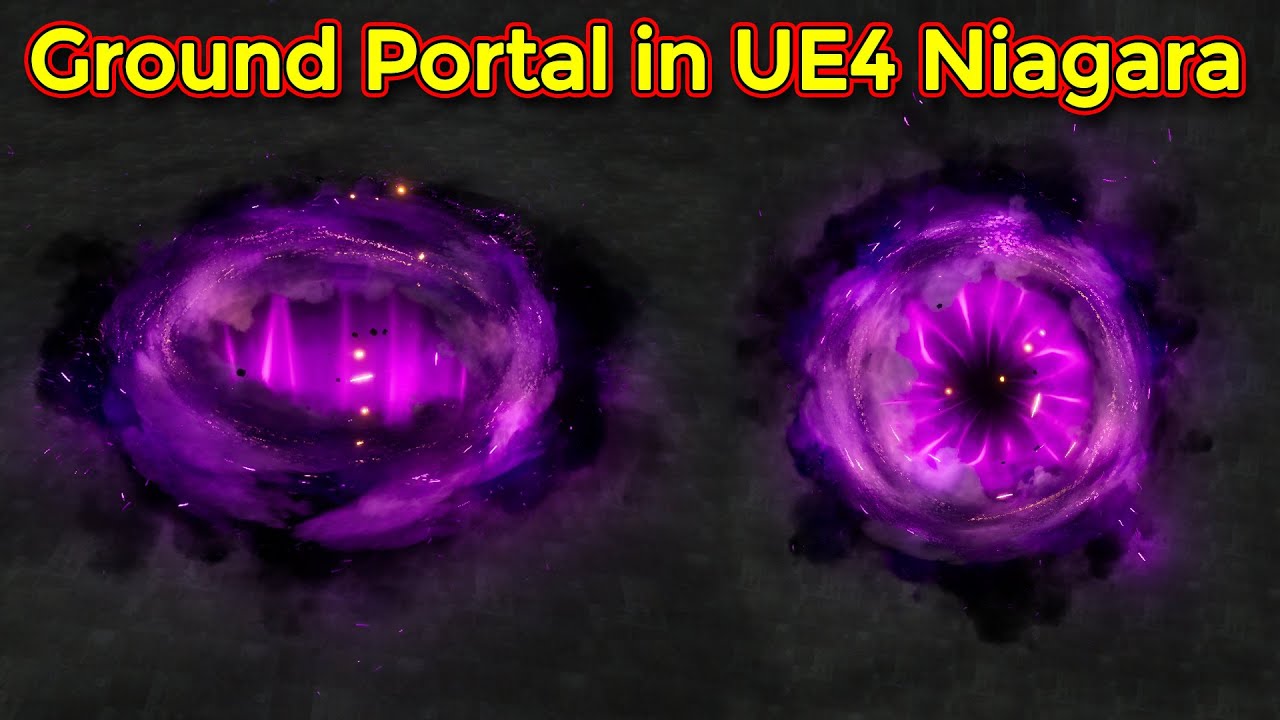
Support me on - https://www.patreon.com/Ashif
Support me on - paypal.me/9953280644
hi guys in this tutorial i will show you how to create a ground portal effect in unreal engine Niagara. i will use my previous 2 tutorials emitters fro this effect you can also follow those videos for better understanding although i will show everything in this v...
late shuttle
haha I've seen his channel before. I think the whole purpose of his channel is to be intentionally difficult so that people just hire him >D
icy dragon
late shuttle
haha I've seen his channel before. I think the whole purpose of his channel is t...
You're not the only one thinking like that. His videos are awfully made.
He does sell some VFX packs and some of the videos assume you have them
late shuttle
He should really change the name of his channel from CGHOW to CGVAGUE
Cuz he ain't explaining HOW to do shit.
 nimble forum
Hi folks. I posted my problem / question to Reddit so rather than posting it redundantly here, I hope you won't mind me posting the link. If anyone is able to assist, I'd be super grateful.. It seems like it is probably something super simple... just that I'm not finding what I need: https://www.reddit.com/r/unrealengine/comments/uh3uyj/how_do_i_feather_the_edge_of_my_material_sadly_my/
reddit
0 votes and 0 comments so far on Reddit
icy dragon
tall estuary
https://youtu.be/jc7KG5dPjSQ?t=367 How can I achieve a similar effect to this? (...
Honestly this is best asked on #visual-fx but this could be a better lead than CGHOW videos
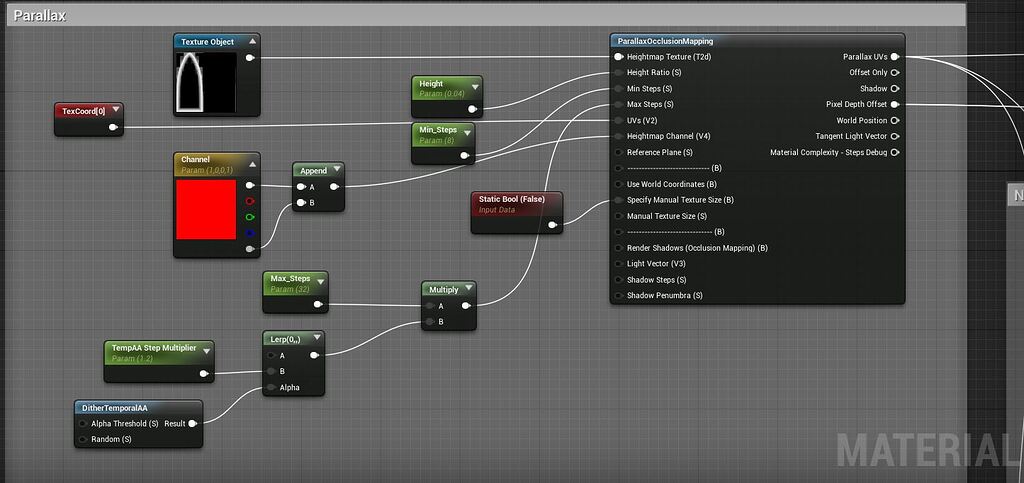
https://forums.unrealengine.com/t/witcher-3-inspired-portal/92583
Unreal Engine Forums
Hello everyone! I got some requests to share this portal material / shader I worked on with some help from the community, Download here: I’ve attached the project download link on my twitter here I’ll be making a lot more content over the coming year and sharing / uploading to marketplace so please keep in touch over twitter if you’re into...
nimble forum
My question has to do with how to remove an edge from my texture, which is applied to a plane. Hoping a Blueprint "feathered edge" or perhaps even repositionining / zooming on the material will work.
icy dragon
nimble forum
My question has to do with how to remove an edge from my texture, which is appli...
I would suggest fixing it in the video file directly.
Also this is more #graphics territory
tall estuary
icy dragon
Honestly this is best asked on <#375020523240816640> but this could be a better ...
I just mean the cutout effect. Still probably a #graphics question though.
or #visual-fx
currently I have a semicircle, but I just want to render the front of it while it's inside a wall
nimble forum
Thanks @icy dragon ... I'd just hoped it would be something I could easily fix with blueprints. You can likely see what I'm thinking here: ... just to get rid of that black line.
 icy dragon
nimble forum
Thanks <@325627930484932608> ... I'd just hoped it would be something I could ea...
icy dragon
nimble forum
Thanks <@325627930484932608> ... I'd just hoped it would be something I could ea...
Material graph is #graphics btw
nimble forum
So yeah... fixing a bajillion individual frames is certainly possible... I just feel like it is definitely doable programmatically though, which would save hours of work.
Oh okay cool, thanks for clarifying. I will post the same there then - don't mind me... just passing through 😄

 late shuttle
try debugging by getting the name of the actor you're overlapping
F = get object name
Print that to a string
late shuttle
Right click on your screen inside the Blueprint and type get object name

 jolly radish
nothing printed
late shuttle
Maybe your collisions on both actors are setup wrong so nothing is overlapping then.
jolly radish
 late shuttle
Check your collisison component properties to make sure there is an Overlap, Collision Enabled, etc
Do that on both actors.
jolly radish
late shuttle
Do that on both actors.
this ok?

ok it works now
mostly
just error messages when spawning emmirot
*emmitor
late shuttle
@jolly radish https://www.youtube.com/watch?v=zZPyMjEWpF8

How do I use Basic Collision options for making stuff interact with other stuff in Unreal Engine 4
Source Files: https://github.com/MWadstein/wtf-hdi-files
^^ Start here
late shuttle
He's a good chap. Great tuts.
jolly radish
the first issue
but now the second past isnt having fdun
i will bookmark vid and watch soon
@late shuttle all is working now apart from the spawn emitter

any idea?
 jolly radish

this seems to work
and the explosion plays
just sometimes not in the right place
idk wtf get actor array bounds does tho lmao
 brazen pike
What are you trying to do with that?
 brazen pike
Could you give a little more detail? What do you want it to do when it overlaps
jolly radish
destroy actor
and play explosion
at blob location
the player is racing blob to the end
brazen pike
Right. Well you probably don't need the first overlap, just the player overlap since it doesn't do anything when the AI overlaps
jolly radish
oh no
i want it to kill player
if AI wins
so i have 2 capsule identical components
brazen pike
Okay, well it doesn't do that currently. So keep the overlap but disconnect everything from it. What you want to do is after the cast to player, get all actors of class parkourAI_BP, then connect the array output into a 'for each loop'
jolly radish
gotcha
brazen pike
then the output from the loop will do a 'get actor location' which is what you'll connect into the location for the next node which is the spawn emitter. Only after that will you then get the output from the for each loop again which connects into a destroy node
that way, it will get every AI in the scene, play an explosion where it is then destroy it
jolly radish
lemme give it a run
thankyou

it is killing the player
when the player collides
brazen pike
I meant you should disconnect everything from the top overlap
then move it all to the bottom overlap in the order I described
 brazen pike
Also, remember that a cast (in this situation) is essentially a check. Something will overlap and no matter what it is, the event will be fired. The cast is simply checking that what collided is what you want
jolly radish
 jolly radish
brazen pike
Also, remember that a cast (in this situation) is essentially a check. Something...
jolly radish
brazen pike
Also, remember that a cast (in this situation) is essentially a check. Something...
okok
thats pretty much how i was taught it
brazen pike
A for loop will take every actor in an array (a kind of list of actors) and run code on each of them one-by-one in order
jolly radish
ok the explosion is happening
at the beginning of the level sequence
not at the blobs current location upon death
jolly radish
brazen pike
A for loop will take every actor in an array (a kind of list of actors) and run ...
okok
brazen pike
yes, so that's probably because there is no cast
You want to make sure this only happens if the player overlaps, right?
jolly radish
yup!
brazen pike
So you want to cast to the player at the beginning. Because a cast is a kind of check. It will take an input and check if that equals whatever you are casting to, and if it is the same it will run the next part of the code

 brazen pike
Can you send another screenshot of the BP
jolly radish
 brazen pike
So the blob doesn't explode, but it does destroy?
jolly radish
it does explode
at the original location
not at its current location
it has a level sequence
brazen pike
Hmmm, can't remember how to get the location if its in a sequence (I'm just assuming that actor location doesn't work like that) so maybe try get world location?
jolly radish
brazen pike
Hmmm, can't remember how to get the location if its in a sequence (I'm just assu...

nope that doesnt work either
i could have it in the blob bp so that it explodes when destroyed??
at its current location?
idkl
brazen pike
Hmmm. I'm sure there is a way to get the current position in the sequence then find the world location of that, but you could try and call an event in the blob bp to explode itself
jolly radish
brazen pike
Hmmm. I'm sure there is a way to get the current position in the sequence then f...

nope this gives me the same problem
 trim matrix
my cooldown doesnt work
 runic parrot
Hi! does anyone remember where the sample project is for a girl that cast skills? i think it was ARPG sample, there girl had a flashy dash and a staff
icy dragon
runic parrot
Hi! does anyone remember where the sample project is for a girl that cast skills...
Did you mean Paragon stuff?
ARPG sample was brute and goblins

 runic parrot
icy dragon
Did you mean Paragon stuff?
runic parrot
icy dragon
Did you mean Paragon stuff?
Not that one, there's one of a girl with a staff that shows how to script abilities.
they show how to put them on cooldown and update the ui and etc.
i just want to take the dash animation from that project, but i can't find it -.-
icy dragon
 zealous moth
what is this called when you have a view around a sphere?
zealous moth
what is this called when you have a view around a sphere?
Reflection Cubemap?
icy dragon
zealous moth
Cube? but it's a sphere
Don't ask why.
It's a cubemap even though it's equirectangular projection
Deal with it.
icy dragon
runic parrot
they show how to put them on cooldown and update the ui and etc.
Your First Hour with UE4?
icy dragon
zealous moth
that's the keyword i needed
I told you it's a cubemap.
 spark steppe
but it's a sphere!
icy dragon

runic parrot
icy dragon
Your First Hour with UE4?
That is the name of the tutorial or a question to me? if it's to me, no. i just want to take one cool animation they have on that tutorial.
icy dragon
Name of the tutorial
runic parrot
hmm no. it's a girl with a staff and a dash with vfx
wise tide
I have a selectable listing and I want to run an event if it gets double clicked. It only has a built in event for when its clicked once though.
I figure there is some way to check if its been clicked twice within X amount of time using logic. I managed to get it working using a variable but surely there's a way to do this without using a variable.
 paper gate
i am attaching a actor to character component at specific socket
But if there are two actor placed in level then both attach to socket ,
Any method to only one attach to socket
icy dragon
runic parrot
hmm no. it's a girl with a staff and a dash with vfx
Other than Paragon stuff, I think you're mixing up with third party stuff
runic parrot
icy dragon
Other than Paragon stuff, I think you're mixing up with third party stuff
Found it, it was on Unity
icy dragon
bruh
 hidden rose
Alright. So, I got my problem figured out in #gameplay-ai, but now I'm having issues with having my coin (Character class, so it can move) be destroyed upon pickup. I have it with this simple code, but when I run up to the coin, it doesn't destroyactor.

 bold shard
Is there a way to get a list of loaded World Partition cells?
 cyan bone
I have been working with timelines to move a group of soldiers.
There was a problem, i cant predict the time it takes for all soldiers to arrive.
So instead of vinterp to, i used lerp, after suggestions from you yesterday.
So i make an if, and if any soldier arrives closer to the destination Z 1000, i stop the timeline, break the loop, and then do the next thing.
Is this well done?
https://blueprintue.com/blueprint/i9jhtv9n/

No description provided
oops the reroutes are bugged there
hidden rose
I figure out this one step, then I should be mostly good.
 unique yoke
I haven't messed with materials much but I was looking to toggle a fresnel material on top of objects in my world that are interactable in blueprint. Figured out how to make the fresnel material but i'm not certain how to actually have it "layer" on top of the existing materials that objects use? Best I can tell is that I can only swap out the existing material slot.
wise tide
I have a UMG containing multiple UMGs (server browser containing server listings). I want to be able to call an event in the browser UMG from inside the listing UMG.
I tried using Get Parent and casting to the browser UMG but it doesn't allow me.
unique yoke
So the listing would be calling an event inside the browser? The way I've done something similar is I'd add an event dispatcher for the listing that is then registered with the browser to listen for when the listings get added
wise tide
I see, I haven't looked at event dispatchers yet. I will check them out, thanks
unique yoke
No problem!
 mystic spire
hey i am trying to incorporate my premade animations into my control rig....i assume its done in a blueprint?
 torpid mulch
Hey guys, can I create a function that I can use from all my other blueprints? Like the default ones from Unreal.
runic parrot
Hi! is it worth it to have 2 different player controllers and swap between them or it's a better practice to just have 1?
runic parrot
torpid mulch
Hey guys, can I create a function that I can use from all my other blueprints? L...
FunctionLibrary
 undone surge
is there a way to swap out a set of animations for another set randomly? i want to make zombies but dont want each zombie to have the same animation so was wondering if i could get different anims but swap each zombies anim on random
runic parrot
torpid mulch
Hey guys, can I create a function that I can use from all my other blueprints? L...
 torpid mulch
That's awesome, thank you so much for the screenshot :)
 teal nexus
Is it possible to get either transforms or sockets off static meshes in the procedural foliage volume ?
I need to spawn particles (leaves) at the crown of the trees of the procedural forest
hidden rose
Alright! I am making a good amount of progress in my project, and I am pumped! Now I just need to have it so that a character (coin) is spawned when the Player Character collects one.
wise tide
do I need to add a widget to viewport before it runs the widget's construct event?
 remote meteor
wise tide
do I need to add a widget to viewport before it runs the widget's construct even...
remote meteor
wise tide
do I need to add a widget to viewport before it runs the widget's construct even...
yes
however there is OnInitialized event that runs on widget creation
 silk cosmos
runic parrot
Hi! is it worth it to have 2 different player controllers and swap between them ...
silk cosmos
runic parrot
Hi! is it worth it to have 2 different player controllers and swap between them ...
That depends entirely on the situation. For different player characters you'd ideally have a parent character class with all of the base stuff that'd be used in all characters, then separate child classes with things specific to that character. The only time you'd really need to swap controllers for your player is if your switching to a different player, with a different mesh or sets of abilities
undone surge
if i play sound at a location shouldnt the sound get lesser and lesser the further awy i am from that location
 dawn gazelle
undone surge
if i play sound at a location shouldnt the sound get lesser and lesser the furth...
dawn gazelle
undone surge
if i play sound at a location shouldnt the sound get lesser and lesser the furth...
You need to mess with attenuation settings.
silk cosmos
undone surge
if i play sound at a location shouldnt the sound get lesser and lesser the furth...
I believe you need to turn spatialization on for the sound. Might be a different thing idk
Yeah attenuation
My b
undone surge
dawn gazelle
You need to mess with attenuation settings.
i will do that in the metasound i made or in the blueprint where i play the sound
dawn gazelle
I think it's normally set up within the component playing the sound.
Though you can create a sound attenuation object to predefine values and use them in multiple components.
undone surge
ok thanks
 bright flower
torpid mulch
bright flower
torpid mulch
Guys, I need a bit of advice, I'm doing this player spring that launches the player up when touching it, but there's this issue where the player is touching the overlap collision more than one tick, so it triggers the spring various times. I though on doing a quick timer so it would only trigger once between the timer cooldown, but then on multiplayer if two players use the spring fast enough, the second one would have to wait the timer cooldown.
Anyone have suggestions?
 runic ore
torpid mulch
Guys, I need a bit of advice, I'm doing this player spring that launches the pla...
runic ore
torpid mulch
Guys, I need a bit of advice, I'm doing this player spring that launches the pla...
Store the cooldown on the player, only use on trigger enter event to launch the jump.
 untold fossil
How can I make a boxtrace from my actor bounds? I can't figure it out. When I do a draw debug box from the actor bounds it works perfectly. But I have no clue whatsoever as to what to input into the boxtrace. The inputs are different from draw debug box where you input the origin, extent and rotation. Why didn't they just ask the same input for the boxtrace??? The input for boxtrade is start, end and half size, what the hell is all that? 😅
The fk is halfsize? xD
runic ore
untold fossil
The fk is halfsize? xD
|------| Size
|---| Halfsize
untold fossil
Ok, but how does that translate to a box?
runic ore
untold fossil
Ok, but how does that translate to a box?
center + halfsize into each direction
untold fossil
I'm a bit dum dum I guess, could you tell me what I put into what? https://gyazo.com/3abd3ee068d107e43c59d5424166b897
 torpid mulch
runic ore
Store the cooldown on the player, only use on trigger enter event to launch the ...
torpid mulch
runic ore
Store the cooldown on the player, only use on trigger enter event to launch the ...
Hm, the spring is not an event trigger, I made an actor for it with a cube object for the collision check, and then I look for overlapping actors of the class of the player on the collision of this cube... Which sounds very bad now that I'm writing this 🤔

The collision object is invisible, I made it this way because well, I tried many other ways and couldn't get it to work :(
 runic ore
untold fossil
I'm a bit dum dum I guess, could you tell me what I put into what? https://gyazo...
runic ore
untold fossil
I'm a bit dum dum I guess, could you tell me what I put into what? https://gyazo...
Well a box trace traces a box along a ray (start to end point)
The size of the box is defined by it's half size.
So if you want a 1 by 1 by 1 box, the half size is 0.5
runic ore
torpid mulch
Hm, the spring is not an event trigger, I made an actor for it with a cube objec...
you can change it to use the event enter for you collision box
untold fossil
So I would have to break the box entent and divide each value of that vector by /2?
 prisma tree
I have 2 box colliders set close to eachother (not overlapping) and when I move from collider 1 to collider 2 the begin overlap of collider 2 fires before the end overlap of collider 1!
Like this:
- enter collider 1
- enter collider 2
- exit collider 1
It is supposed to be like this:
- enter collider 1
2.exit collider 1 - enter collider 2
I have a bool set to if player is in collider and in this case it wrongly says player is not in collider 2 when it is!
It works when the colliders are apart from eachoter by say a meter but I do wish the player to be in a state between colliders in that specific area....
torpid mulch
runic ore
you can change it to use the event enter for you collision box
I'll give it a try. :) Thank you.
runic ore
untold fossil
So I would have to break the box entent and divide each value of that vector by ...
hmm let me check if box extend is the halfsize or not
untold fossil
Ok found it.
runic ore
looks like its the half size so you can just plug it I think
untold fossil
What you do for anyone who wonders is: https://gyazo.com/4fa71725d11db0f01202d4c6364d5d60
 torpid mulch
Quick doubt, aren't event triggers only for triggering level/world events?
untold fossil
start and end is the same as you just want a box, not a box entended to another box (something you can do as well with box trace)
halfsize IS extent
confusing AF ngl, but okay whatevz
 jade prairie
Hi everyone, I'm new to UE 4. Please tell me how to choose objects for downloading the map in lvl streaming, and not create them.
runic ore
torpid mulch
Quick doubt, aren't event triggers only for triggering level/world events?
no?
runic ore
torpid mulch
Quick doubt, aren't event triggers only for triggering level/world events?
I'm talking about BeginOverlap or how it's called
runic ore
untold fossil
start and end is the same as you just want a box, not a box entended to another ...
actually a box trace moves your box along the given direction, so you don't extend the box
torpid mulch
runic ore
I'm talking about BeginOverlap or how it's called
Oh okay, my bad, thank you again
untold fossil
Yeah indeed, I understand why the input is a bit different. It does make sense, was just confused.
runic ore
untold fossil
Yeah indeed, I understand why the input is a bit different. It does make sense, ...
torpid mulch
runic ore
I'm talking about BeginOverlap or how it's called
Thank you again, the method you mentioned is incredible.
 round tulip
Where did the level blueprint go in UE5?
Found it but why did they remove the events section on trigger volumes' context menu?
round tulip

 wild crater
Is there a relatively easy way to have something like a cable that interacts with the environment? The cable component collision doesn't seem great. I'm setting up my own system with anchor points but with debug lines atm but ideally I'd have something with collision...
 jagged stone
Is that a branch blueprint for allowing values instead of exec? So "If X then use Value A, else Value B"
like a "pure" if function i guess it would be called
wild crater
Select?
chrome pine
mental trellis
<#221799439008923648> pinned messages.
So I went ahead and did what you guys said and tried making parts of the inventory without using the tutorial
And I finally got something!
wild crater
jagged stone
Is that a branch blueprint for allowing values instead of exec? So "If X then u...

 wild crater
Provided I have a set of points. What would be the best way to translate them to a ropelike mesh with collision? Are splines an option here? Or do I need to create a procedural mesh completely manually?
 summer jetty
Noob question: Do I need to set all the default values for the savegame slot individually on my character creation blueprint when the savegame blueprint already has those default values? Or do I only need to tell it when the values are NOT the default ones?
🤔
Will it just assume the value is the default one in the save game blueprint if I don't do anything else? Or will the variable be treated as if it doesn't exist at all?
icy dragon
summer jetty
Noob question: Do I need to set all the default values for the savegame slot ind...
BP is pretty safe in that regard, unless you're somehow storing pointers in it
summer jetty
The savegame blueprint just contains a bunch of variables with their default values. Nothing else (not sure what 'pointers' are, so I'm guessing no).
That's cool. I'll just set the ones that are changing on character creation and leave the others alone then.
 true valve
Hi - So when I set transform to my player, my player jumps a little bit to the sides when lands. Do you know what could cause that?
icy dragon
true valve
Hi - So when I set transform to my player, my player jumps a little bit to the s...
Probably IsFalling get switched on when you teleport the character until it detects it hit the land and switched it back off.
Assuming it's the UE4 Third Person template animation just triggering the jump animation
true valve
icy dragon
Probably IsFalling get switched on when you teleport the character until it dete...
thanks
 fickle dune
Hey guys so I recently followed this tutorial to do a loading screen on my game:
https://www.youtube.com/watch?v=lzGcVDUDU5g
my character no longer creates running sounds, I get "accessed none trying to read property Character Reference in my AnimBP".
Also it spawns in different places on the levels even after deleting Player Start and doing an instance of my character with Player set to 0.
Persistent level loads my levels and lags a lot on the viewport wonder if there's a way to fix that as well.
Any help would be extremely appreciated.

Support the channel through donations. Crypto accepted!
PayPal: https://paypal.me/reidschannel?locale.x=en_US
Patreon: https://www.patreon.com/reidschannel
Bitcoin: 1JFwWHr4X6uAeoZadukzqKjzFBj3Qjy7Sk
Ethereum: 0x2B2Bc108F1Cc0fF899959dEF3226637787d8C3dE
Dogecoin: DNQ33YnhpWoTBokBNVkZP5ub8KTLkpyjpv
Join our community discord!
Discord: https://dis...
 solar bison
Given a number n and an array, how do I get n random elements from array in blueprint?
mental trellis
chrome pine
And I finally got something!
Awesome. 🙂
Did you make it in c++ yet? 🙂
brazen pike
fickle dune
Hey guys so I recently followed this tutorial to do a loading screen on my game:...
Can you show what the event graph in your anim BP looks like?
 fiery knoll
solar bison
Given a number n and an array, how do I get n random elements from array in blue...
fiery knoll
solar bison
Given a number n and an array, how do I get n random elements from array in blue...
What sizes of arrays are we talking about?
solar bison
fiery knoll
What sizes of arrays are we talking about?
like 10 elements
I think I found an elegant solution
Shuffle Array -> Pick first n elements
fiery knoll
Yes, that's what I would suggest in that case.
teal nexus
Is it possible to get either transforms or sockets off static meshes in the procedural foliage volume ?
I need to spawn particles (leaves) at the crown of the trees of the procedural forest
 odd ember
fickle dune
Hey guys so I recently followed this tutorial to do a loading screen on my game:...
odd ember
fickle dune
Hey guys so I recently followed this tutorial to do a loading screen on my game:...
I don't know what they are telling you in the tutorial, but there is no way to do a loading screen in BP only
jagged stone
Is there a switch blueprint that would allow you to return a value such as: Input 0 < 1 return 1; input 1<=2 return 10; input 2<=10000 return 20 ?
zealous moth
jagged stone
Is there a switch blueprint that would allow you to return a value such as: Inp...
compare?
 tawdry surge
@teal nexus you do not want to spawn individual leaves on trees, especially a forest full..
Imposters are generally how that is handled
teal nexus
tawdry surge
<@223204723031932929> you do not want to spawn individual leaves on trees, espec...
Indeed I don't want to spawn leaves. I want to spawn particle systems with LODs and distance culling (falling leaves).
Trees (low poly) already have crowns
My forest isn't dense
tawdry surge
Ah then yeah. You can get transform and socket info from the mesh
tawdry surge
All actors of class
 chilly yarrow
Can someone help me 1:1 and look over my code briefly. I'm still a newbie and I've been troubleshooting for hours even though it must be something very obvious
tawdry surge
Get instance transform
It takes a ism component as the target and will let you iterate through the instances
teal nexus
I'll try that, thanks
undone surge
is there an easy way to find where u placed print nodes. i put them for debugging but then cant find them and they keep printing
 slow pewter
undone surge
is there an easy way to find where u placed print nodes. i put them for debuggin...
slow pewter
undone surge
is there an easy way to find where u placed print nodes. i put them for debuggin...
Windows -> Find Result in the BP // and than Type that or the Direct Message and right Side is an Global Search //// https://puu.sh/IYibr/187ea3a8f9.png

 nimble zenith
Does anyone know if there's a way to expose different debug information on mouse over? I have a UClass object that's defined in C++ and when it's used in blueprints it just tells me it''s instance name when I'm debugging and using a mouse over. I'd like to have it spit out a string of some better identifying information if that's possible.
eg when I debug this blueprint and I rollover I'd like to spit out coordinates, type etc
 undone surge
slow pewter
Windows -> Find Result in the BP // and than Type that or the Direct Message and...
undone surge
slow pewter
Windows -> Find Result in the BP // and than Type that or the Direct Message and...
thnx
fickle dune
odd ember
I don't know what they are telling you in the tutorial, but there is no way to d...
Basically using a persistent level and level streaming, that's how its done in the video, but it completely messed things up with my character and that's what I need help with, I'll be posting my animbp once I wake up later
 cobalt gulch
Does anyone know how to make a weapon selection menu, kinda like this

 summer schooner
@cobalt gulch That would probably be easiest to do with widgets. I'll take a look and see if I can find the tutorial I used for my menu.
cobalt gulch
summer schooner
<@213979297000456193> That would probably be easiest to do with widgets. I'll ta...
Ok thx
summer schooner
cobalt gulch
Ok thx
Can't find the tutorial, but it's quite straight forward. Just create a Widget blueprint, setup how it should look and then....

you jsut have to render it to make it show up
 cobalt gulch
summer schooner
Can't find the tutorial, but it's quite straight forward. Just create a Widget b...
cobalt gulch
summer schooner
Can't find the tutorial, but it's quite straight forward. Just create a Widget b...
I was wondering more about what method i should use when switching the weapons, like should i have an arrow to switch weapons or just have a button for each weaponn
summer schooner
I do it by pressing my Right mosue button in my Player Controller node
cobalt gulch
How could I use an arrow to switch to the next weapon in that catagory?
summer schooner
Maybe have the arrows as tiny buttons that would also trigger their script on Key presses?
odd ember
fickle dune
Basically using a persistent level and level streaming, that's how its done in t...
right but that's not real loading, that's just streaming a level in
summer schooner
[QUESTION] Does anyone know how I can get access to a blackboard value when I create an EQS Item generation? I haven't been able to get access to the AI controller.
brazen pike
cobalt gulch
How could I use an arrow to switch to the next weapon in that catagory?
You could have each weapon be pre-defined (even if you can't see them on screen). By that I mean you'd have either an array or potentially a map that you could get a weapon from based on whatever integer you are currently on. I.e. if you haven't clicked the arrow yet, you are on integer zero and the widget would show the weapon associated with integer 0. If you click the arrow one time then it would be integer 1 at which point the image would switch to the weapon associated with integer 1, and so on. I assume you're looking for the logic behind it, but you could have been asking what nodes and such
cobalt gulch
brazen pike
You could have each weapon be pre-defined (even if you can't see them on screen)...
Yeah I guess that makes sense
 fervent raft
Does anyone know if the return value here will be false if there is no intersection?
 mental trellis
Well, yes. That's what it says.
fervent raft
mental trellis
Well, yes. That's what it says.
I thought it might be if the test fails in some other way idk lol
cobalt gulch
brazen pike
You could have each weapon be pre-defined (even if you can't see them on screen)...
How can I make the dots to show how far in u are in selectiing
brazen pike
Same method
You're just increasing/decreasing an integer based on what page you're on, so that integer can tell everything what to display
 marble hollow
Hi, how can i get an actors location and use the location for an image on a widget?
hope someone can help me out
brazen pike
marble hollow
Hi, how can i get an actors location and use the location for an image on a widg...
What do you mean by this? If you're looking for a way to get a picture of the location in game of that object you may have a tough time
cobalt gulch
So I need to have a weapon selection for each operator/hero
Would I need to do a widget for every operator?
brazen pike
cobalt gulch
Would I need to do a widget for every operator?
Almost certainly not
marble hollow
brazen pike
What do you mean by this? If you're looking for a way to get a picture of the lo...
Uhm well yeah, thats what i'm trying. I succeed on a tutorial for a minimap that showed the playerlocation with an image. Next was to get some other icons onto that minimap.
brazen pike
cobalt gulch
Would I need to do a widget for every operator?
Have the same structure (like the image you sent) but everything is based on values you input. Say you want only 3 pages for one operator but 6 for another: you could have a map of the weapons you want to be shown. The length of the map (the number of weapons) will then be used to decide what to do with the widget. For instance, you could have the map be read on construction which determines the number of lines at the bottom (the page selector things). Also, doing it that way would allow you to decide which weapons in the same way. You read the weapon values on construction and that determines what images are shown on each page. That way you can have a single widget for every operator.
marble hollow
I've tried to create a global variable for the location of the object. And wanted to access that variabel with the widget
cobalt gulch
brazen pike
Have the same structure (like the image you sent) but everything is based on val...
So basically make it so it only shows certain weapons/attachments for each op but use the same images widgets etc
brazen pike
marble hollow
Uhm well yeah, thats what i'm trying. I succeed on a tutorial for a minimap that...
Oh that's what you mean. That's way easier than I thought what you meant. It's going to be very specific to your project so it'll be hard to help unless we see the minimap BP or maybe the tutorial you followed
brazen pike
cobalt gulch
So basically make it so it only shows certain weapons/attachments for each op bu...
Yeah. You'd have the exact same widget for every operator but specific variables in that widget that gets set differently depending on the operator
cobalt gulch
brazen pike
Yeah. You'd have the exact same widget for every operator but specific variables...
So to do this correctly i would have to have a variable for each weapon stating if its active ?
brazen pike
Unless you want vastly different layouts. I'm just assuming it looks about the same for every operator, only different weapons, equipment, etc
cobalt gulch
brazen pike
Unless you want vastly different layouts. I'm just assuming it looks about the s...
Yeah
undone surge
@brazen pike im working on the homing projectile. i saw another tutorial. my ai contoller here is my friendly ai who i want to have the homing the projectiles bcuz. in the controller which ever enemy the ai senses it stores in the sensed actor but i cant put it in the homing target pin. it says cant bcuz scene component. what do i do from here
 brazen pike
cobalt gulch
So to do this correctly i would have to have a variable for each weapon stating ...
brazen pike
cobalt gulch
So to do this correctly i would have to have a variable for each weapon stating ...
no no no, you can make a variable called a map. Its a unique type of variable that lets you associate one variable with another. For example, you can have a weapon associated with a float that states how much ammo that weapon would have. Then you can have as many in there as you want. I'd recommend looking up some information on how they work
It'll save you some time and confusion, rather than having a separate variable input for every weapon
cobalt gulch
brazen pike
no no no, you can make a variable called a map. Its a unique type of variable th...
Oh ok i'll check it out looks useful
Isn't a map just an array?
brazen pike
similar
brazen pike
undone surge
<@199709965471055872> im working on the homing projectile. i saw another tutoria...
What type of variable are they both? You can only connect it if its the same
cobalt gulch
If I were to deactivate a weapon with the map variable, would I need to code it to skip over the weapon integer
undone surge
brazen pike
What type of variable are they both? You can only connect it if its the same
the sensed character is an actor i think and the projectile wants a scene component
its not letting me get the capsule component
brazen pike
cobalt gulch
If I were to deactivate a weapon with the map variable, would I need to code it ...
No. if you don't want an operator to have a specific weapon, you won't put that weapon in the map at all.
cobalt gulch
brazen pike
No. if you don't want an operator to have a specific weapon, you won't put that ...
Oh I see, so you'd have a map for each operator with the weapons and value inside
brazen pike
You'll have an empty map on the widget itself, but that map can be set when it gets called. That way you'll create the widget and then, depending on what operator it is, you can set custom weapons in the map
cobalt gulch
And then I suppose a variable for if an operator is selected
brazen pike
You could actually just use an array. If you only want to store the weapon and nothing about it
brazen pike
undone surge
the sensed character is an actor i think and the projectile wants a scene compon...
Why does it want a scene component
brazen pike
Yes, but why. Look at the code which deals with the homing target and see if you can find a reason why it must be a scene component. Otherwise it could easily be changed to an actor from what I remember about your system
marble hollow
brazen pike
Oh that's what you mean. That's way easier than I thought what you meant. It's g...
I'm sorry, yes it is quite project specific. So i'm moving a camera instead of actual body. It is a VR project.
so how it works. The placeholder peach moves around the maze (X&Y) (player icon). And it rotates on the Z. The X&Y are found from a from the player camera and divides / normalizes the location of the camera set the movement of the map is accurate.


 undone surge
brazen pike
Yes, but why. Look at the code which deals with the homing target and see if you...
undone surge
brazen pike
Yes, but why. Look at the code which deals with the homing target and see if you...
its a built in function right for projectile
oh wait
mental trellis
Why are there testicles in that maze?
cobalt gulch
When I open a folder in the unreal editor it crashes the whole editor ...
marble hollow
the rotation of the player icon is done with the player icon widget
 marble hollow
mental trellis
Why are there testicles in that maze?
marble hollow
mental trellis
Why are there testicles in that maze?
Thought it was funny haha, its a peach though
just a placeholder though
The next step would be to get that widget on a second viewport / screen.
But first things first. I need to find a way to get that translation of the object (endgoal) into my widget. I've tried an actor object reference for the end goal but it cant seem to find. When i print screen for location it says the object reference is x0,y0. while the endgoal model does move around the maze.
brazen pike
marble hollow
But first things first. I need to find a way to get that translation of the obje...
did you set that reference
if its just an empty variable, it's not going to work
marble hollow
yes i've set that reference. i've tried to fill it with the actor in the scene
and yes it empty
but I cant seem to fill it
brazen pike
How are you setting it?
marble hollow
within the widget i create a variable. as variable type i set it actor -> object reference
brazen pike
Ah that's not gonna work. You're telling it what it can be filled with, but its referencing nothing in the scene. The reason the player works while that doesn't is that you're using 'get player camera manager' which is finding it in the scene and then giving you a reference to it. You'll need to find the actor in the scene somehow. A simple solution is 'get actor of class' which will find the first object of that class in the scene, then you set that as the reference and it will work. But that will only work if there is one, since it is only finding one
marble hollow
brazen pike
Ah that's not gonna work. You're telling it what it can be filled with, but its ...
Thanks for helping Lemon, I've tried your approach but the message log says: accessed none, trying to read property Goal_Icon. So perhaps there is something wrong with the icon? It an image within a widget
I guess i don't understand whats wrong with it. I'm trying to move the image within the blueprint of the minimap. which works for the player_icon
brazen pike
marble hollow
Thanks for helping Lemon, I've tried your approach but the message log says: acc...
Can you send a screenshot of what you've written?

 brazen pike
yeah you need to create the widget, like with the player. You can see it creates the player icon widget then sets the variable as a reference to what it just created
so its the same problem, you have a reference to the icon. But the icon doesn't exist yet so its referencing nothing
marble hollow
the actor of class works though i've checked the locations with a print screen 🙂
brazen pike
marble hollow
You do NOT want to get actor of class on tick. That is an easy way to get performance problems. Put it on construction and set a variable as the output. Then you can get that variable on tick rather than the actor


You'd only want to put that on tick if it is ever going to change, if it stays the same actor then you can just do it once and have the output as a variable. And even then there are much better ways of doing that
marble hollow
brazen pike
You do NOT want to get actor of class on tick. That is an easy way to get perfor...
thanks. on it. i place it in on tick cause after a certain amount of time the maze resets. and moves the player to another location. also the end goal
brazen pike
marble hollow
thanks. on it. i place it in on tick cause after a certain amount of time the ma...
Yes, but do you destroy the end goal and make a new one? or just change the location
 lucid nebula
Should still work(or atleast put a delay)
marble hollow
brazen pike
Yes, but do you destroy the end goal and make a new one? or just change the loca...
just changing the locaiton
brazen pike
then it is still the same actor, so the reference will work
marble hollow
reference within the construct, you mean
brazen pike
you set the reference on construct, and get it on tick
The reference within construct will work unless you delete the original end goal
then it isn't referencing anything, so obviously won't work
marble hollow
i feel such a newb
haha
the reference is that get actor of class right?
so i should just delete the part of the on tick
brazen pike
what do you mean
marble hollow
So i've got this on construct, not on tick anymore. And the end icon placeholder is build like this

 brazen pike
Right click on the return value of get actor of class, then create a variable from that
marble hollow
brazen pike
Right click on the return value of get actor of class, then create a variable fr...
done
brazen pike
You're creating an actor variable. Thats a reference to something in the scene itself.
You'll see it show up on the left side of the screen under "variables"
marble hollow
got that variable
brazen pike
Now, go to event tick and drag that variable out and into the graph, then choose "get"
you're now getting a reference to what you set that variable as. You can then connect the get into "get actor location"
marble hollow
brazen pike
you're now getting a reference to what you set that variable as. You can then co...
Ah I see now!
brazen pike
that way you aren't looking into the scene, finding the first variable of a specific type and creating a reference to it every frame. Now you are just doing it once and getting the output every frame which is much easier for game performance
marble hollow
now i've got only 1 get actor of class
 neat prairie
hey,
brazen pike
You also won't need to do any of this on tick anyway, but one step at a time. I don't wanna confuse you too much haha
marble hollow
brazen pike
that way you aren't looking into the scene, finding the first variable of a spec...
thanks!
neat prairie
I'm having an issue with my terrain material.
in blueprint, i can get the landscape and make it a variable, i can alter the landscape variables (ie destroy it), but i can't change the Landscape Material?
in this blueprint, i get the landscape and immmediately set its Landscape Material to M_Rock_Basalt however it does nothing.
if i then immediately get the landcape again, and get the Landscape Material value, it's not M_Rock_Basalt
 marble hollow
now i just need to get endgoal widget icon on my viewport
its still mentioning this
 neat prairie
I'm having an issue with my terrain material.
in blueprint, i can get the landsc...
neat prairie
neat prairie
I'm having an issue with my terrain material.
in blueprint, i can get the landsc...
been trying to solve this for like 3 days :[
brazen pike
marble hollow
its still mentioning this
Thats because it doesn't exist yet. Remember you are getting a reference. If there is nothing to reference the engine will get confused and you'll get an error. You need to create the widget and then set the output as your reference
you already do that but with the player icon earlier in the construct
do the same thing but with the end goal widget
brazen pike
neat prairie
I'm having an issue with my terrain material.
in blueprint, i can get the landsc...
Don't crosspost unless someone refers you to a different channel. You are much better off asking in #graphics which you did initially
marble hollow
brazen pike
Thats because it doesn't exist yet. Remember you are getting a reference. If the...
guess im derping, you're right. that the first part. got to focussed on location part
cobalt gulch
I don't have a "show mouse cursor" variable to change?
brazen pike
cobalt gulch
I don't have a "show mouse cursor" variable to change?
from your player controller?
cobalt gulch
brazen pike
from your player controller?
Yeah
brazen pike
if you untick "context sensitive" any change?
neat prairie
brazen pike
Don't crosspost unless someone refers you to a different channel. You are much b...
ok. i was just trying to get more eyes on it
marble hollow
@brazen pike Thanks for helping out. I do not receive errors anymore. The icon is not yet shown on the map. I think this has to do with position of that location of the object. So I need to get those numbers right. Many thanks Lemon!
 flint cypress
hey guys, so im making objects like dressers, stuff like that with line tracing but when i have the array as WorldDynamic is basically breaks all the interactables i have in the world like my doors wont open, is there any way around this?
sorry if its a vague question
but if i remove the dresser from the game, anything not on world dynamic works again
brazen pike
flint cypress
hey guys, so im making objects like dressers, stuff like that with line tracing ...
can you send a screenshot of the linetrace code your using?
flint cypress
yeah


before and after
well like beginning of code
and continued code

end of code - its duplicated above for the open sequence
brazen pike
Are you using line trace for objects for a specific reason?
flint cypress
individual drawers
the door i have works on an overlay event so if theyre in it they can open the door pressing E
but it doesnt work if i put this dresser in the level
brazen pike
Oh this is all done in the dresser? Not the player?
flint cypress
yeah this is the dresser BP
brazen pike
Well... Do you have consume inputs box ticked when you select the input?


 solemn crescent
New to BP.
Successfully triggering and stopping “Spawn Sound 2D” but I can’t find any doc on how to pass Spawn Sound 2D a wav path.
I’m trying to read from a csv with “Runtime Datatable”.
Any tips?
brazen pike
flint cypress
youre the best
Okay, so thats your problem solved. But I have to tell you that this is a very bad way of doing interaction
Your system will have basically the same code in every BP you want to be able to interact with, with minor differences
What you should probably do is move the linetrace to the player character, and then just have it once where it will fire off an event you make custom in the bp, rather than duplicating the line trace code in everything
flint cypress
thanks for the tip, il move it all over
 gusty shuttle
Question: When I fix my redirectors for animations (that aren't in the level) It asks me to "save level as". Why?
 rich jungle
I'm having an issue I've run into a couple times now. I have a player component attached to the game mode that has a variable, and I want to read that variable inside a widget to set a text value. When the player component is created, it changes the value of the variable to something new, and prints it so I can verify that.
But inside the widget, when I reference the variable I always get the default variable value. And I check with print lines, the new variable is created before the widget gets the variable value.
This has been driving me nuts, does anyone know what's causing this? Some kind of scope issue somehow?
 wise mantle
how would i go about starting an animation everytime my player dies?
i currently have a game where i can get jumpscared and teleported to a checkpoint, with the player pawn blueprint used for the jumpscare function. after the jumpscare, i want my character play a camera animation where the character fall down on the ground from mid-air. i have the camera animation already in an fbx, but without any bones. i know that you can import camera animations with the level sequencer, but i want this to be local to the player blueprint, to make it easier in the future. i can see that there's a component called "actor sequence", but i cant import animations with that.
there also seems to be very little documentation online about ue4 sequencers, taken in thought how many games use sequences
chrome pine
mental trellis
Did you make it in c++ yet? 🙂
Hah, no. I'm going to start with baby steps first and convert the basic player movement to c++
mental trellis
chrome pine
Hah, *no*. I'm going to start with baby steps first and convert the basic player...
To be fair, it's probably easier dealing with an inventory system in c++ than it is dealing with the CMC
And just so we're clear on this, don't try to do UI in c++ with umg or slate!
 vapid comet
I'm trying to get the Stamina (and/or) health variable from my actor component but keep running into the "Accessed None" error. Is there some certain way i should try to call the object?

 thin panther
vapid comet
I'm trying to get the Stamina (and/or) health variable from my actor component b...
thin panther
vapid comet
I'm trying to get the Stamina (and/or) health variable from my actor component b...
You have an empty variable there
mental trellis
thin panther
Wait how do you do non c++ slate
What?
thin panther
It will be of the correct type, hence you can access the information, but it will not have a value
You said domt do ui with ung or slate in c++, i took that to mean there was a way to use slate in bp
vapid comet
thin panther
You have an empty variable there
so is something like this the solution?
 thin panther
Not familiar with slate that much, thats all
thin panther
vapid comet
so is something like this the solution?
Yes but you need to set the variable to the component in the player
vapid comet
in the third person character bp?
thin panther
No
You are in the widget
Set the variable in the widget to the component from the player
chrome pine
mental trellis
And just so we're clear on this, don't try to do UI in c++ with umg or slate!
Noted! But um, how else are you supposed to do it? Is there some library I use in c++ instead of UMG or slate?
mental trellis
thin panther
You said domt do ui with ung or slate in c++, i took that to mean there was a wa...
No, I said, "don't do ui in c++ with umg or slate." Not, "don't do slate or umg in c++." Key difference!
faint pasture
vapid comet
oh so instead of casting to thirdperson i cast to the widget?
Do you know what casting is
vapid comet
faint pasture
Do you know what casting is
roughly
thin panther
mental trellis
No, I said, "don't do ui in c++ with umg or slate." Not, "don't do slate or umg ...
Ahh gotcha
chrome pine
mental trellis
No, I said, "don't do ui in c++ with umg or slate." Not, "don't do slate or umg ...
Ah, gotcha. Thank you!
mental trellis
thin panther
You are in the widget
Is this some kind of UE Editor VR experience?
thin panther
Yes, didnt you know the M in UMG stands for matrix
faint pasture
vapid comet
I'm trying to get the Stamina (and/or) health variable from my actor component b...
First off, what is your health and stamina variable?
that looks super weird, typically HP and stamina would be properties on an actor or in a component on an actor.
cobalt gulch
Can someone join my stream, I can't understand why a trap is blowing up the character multiple times
vapid comet
faint pasture
First off, what is your health and stamina variable?
the health and stamina are in a component i had assumed that the variable was a reference to the component.
faint pasture
vapid comet
the health and stamina are in a component i had assumed that the variable was a ...
OK your naming is a bit weird, I'd call the variable MyPawnStatsComponent or whatever your component is called.
So if you need to read data off the component you first need to know what component to read from.
So you'd get the pawn in some way (get owning player pawn should work), cast it to your pawn class, get its statscomponent, and set your variable to be that statscomponent.
Then on update you just get the data you need out of the statscomponent
I would save a ref to your pawn though and not your pawns statscomponent, so you can get other info later if you wanted.
chilly yarrow
Hey Guys. I'm trying to make a player controller mario64 style. My Wallslide code works with Backflip and my Long jump. But it doesn't work with the triple Jump (ExtraJumps) at all. I think it has something to do with their falling states or so. I'm still a newbie so sorry for the mess


 leaden dock
why cant i pass a map as input for a blueprint function?
ah seems like it opens the option when i switch type
 placid steppe
Anyone know what this FUdpMessagingModule_AutoRepair is and why it is causeing my game to stutter ever two seconds

 dusky crane
does this need another actor if i just need to return true if the component is overlapping any actor?
 rich jungle
Has anyone had an issue where referencing an object's variables just gives you default values?
I create them, and with the newly created object I get a variable that during creation is changed, but it always gives me the default

 earnest mango
cobalt gulch
How can I determine if a player is within a meter of a wall with nodes
earnest mango
cobalt gulch
How can I determine if a player is within a meter of a wall with nodes
(PlayerCharacter.GetActorLocation - InvisibleWall.GetActorLocation).VectorLength < 100
Note: This checks if the actors' roots are within 1M of each other, not if any part of the player is within 1M of any part of the wall
 subtle zodiac
Hi all, I was hoping to get some help with an issue.
I am using the Web Browser Plugin in UE4 (4.27.2), however, when I go to use a site like Netflix or Hulu, it says that it is an unsupported browser. Is there anything I can do to enable the browser to play videos from these sites?
Thank you in advance for anyone able to help, or can help point in the right direction :)
 cobalt gulch
earnest mango
(PlayerCharacter.GetActorLocation - InvisibleWall.GetActorLocation).VectorLength...
cobalt gulch
earnest mango
(PlayerCharacter.GetActorLocation - InvisibleWall.GetActorLocation).VectorLength...
How can i connect it?
 earnest mango
cobalt gulch
How can i connect it?
earnest mango
cobalt gulch
How can i connect it?
I goofed and forgot that you need a VectorLength on your subtraction output
 earnest mango
cobalt gulch
Am i doing good so far lol
earnest mango
cobalt gulch
Am i doing good so far lol
lol I'd say you're halfway there
Subtract your locations from each other, then get the Length of the result and check if that length is < 100

 blissful grail
Could also use the distance to node.
cobalt gulch
Because its doing it from the corner of the wall
 onyx token
 mental trellis
You don't like the word Cine?
 earnest mango
cobalt gulch
Can I get the world location of the wall face?
earnest mango
cobalt gulch
Can I get the world location of the wall face?
Sure can! Maybe give your wall actor a SceneComponent there as a marker, and use its location in your distance check. You could probably also do some math related to the size of the wall, but I bet adding a comp as a marker will be easier
summer jetty
Is there some trick to saving a level name to the savegame slot? I keep getting an error 'Failed to load '/Game/LevelMaps/Persistent.Persistent:PersistentLevel.Persistent': Can't resolve asset name' and similar for other level maps when I try to play a saved game. I'm checking it saves the correct levelmap name to the savegame variable. So I'm not sure why it's not loading it when I log back in. I also don't need it to save the persistent level, as that will always be loaded. I need it to just save the current sublevel/s that's open.
I thought maybe it was the variable type being a string instead of name. So I switched all the levelmap variables to name instead. But that made no difference.
trim matrix
hey would anybody have any ideas on how I can make the detection animation smooter and somehow turn towards the player when he moves?
trim matrix
Good evening amazing community! i'm back for more question! and this time about data table (JSON)
how would you input a JSON file with 300 items in. and have a selector that loop each items every 10 seconds?
 winter kettle
I'm getting the CDO of this blueprint, but the BoxCollisionTest component seems to be null

 hollow gorge
Hello, I've got quite a long chain of custom functions that are supposed to play right after another. Does it matter if they're all chained within the functions in terms of performance or should I connect each function in the main blueprint?
faint pasture
hollow gorge
Hello, I've got quite a long chain of custom functions that are supposed to play...
You can make one function that calls all the others if it's something you find yourself doing often
I like to have each function seperately though for testing and debugging
 narrow veldt
Hey, I'm trying to create a Sphere Trace by Channel on my player character when he's inside of the trigger area(in this case close to the Base_NPC), normally the code was checking it all the time but I thought that would hurt the memory, so instead I created an custom event that gets called whenever the player enters the collision box, but sphere trace only gets created once, when the player enters in the collision box and doesnt continue to exist. I want it to exist until player leaves the collision box, any idea how can I do that? pic below is my line of code for sphere trace
 faint pasture
narrow veldt
Hey, I'm trying to create a Sphere Trace by Channel on my player character when ...
faint pasture
narrow veldt
Hey, I'm trying to create a Sphere Trace by Channel on my player character when ...
A trace is just a thing that happens
it doesn't have a duration, you gotta keep tracing. WHat are you trying to implement?
narrow veldt
faint pasture
it doesn't have a duration, you gotta keep tracing. WHat are you trying to impl...
well I want to implement a NPC Interaction system, whenever the trace gets collided with an NPC, it shows up a display message and lets the player interact with that npc, I want the trace being cast only inside of the collision box of the npc, if the player leaves the collision box, trace stops casting
faint pasture
narrow veldt
well I want to implement a NPC Interaction system, whenever the trace gets colli...
Are NPCs the only thing being interacted with or are a lot of thigns?
I'd just add an overlap sphere collider to the player character, and on tick, do your interaction hint display etc
narrow veldt
currently the NPCs are the only thing that shows the message and lets the player interact with it but I want to add objects players can interact with when being looked at
faint pasture
Are the possible interaction things always updating or only when you press the button?
that is, do things glow or show a hotkey etc when you CAN interact with them or do you just walk up and press E and the interaction happens?
hollow gorge
faint pasture
Are NPCs the only thing being interacted with or are a lot of thigns?
Thanks for explaining
ups wrong reply, thanks though lol
narrow veldt
faint pasture
that is, do things glow or show a hotkey etc when you CAN interact with them or ...
things will show a "E" key image when being looked at but I didnt implement that yet
faint pasture
narrow veldt
things will show a "E" key image when being looked at but I didnt implement that...
K then I'd just either do a trace per frame or use an overlap sphere on the character
Either way, on tick, figure out what object is the one you're selecting for interaction and glow it / show E key image etc.
Something like
Get overlapping actors, filter for those with Interaction interface, choose closest
Show E on that thing
narrow veldt
faint pasture
Something like
Get overlapping actors, filter for those with Interaction interf...
Alright man thank you very much!
 quiet basin
Hi all, can I ask what is the best solution for getting data from another bp through collision. I want the player to collide with an object and then the player bp to get data off the collided object. I cannot get a straight answer about casting/interface. I would like to use interfaces in this situation obviously, but you cannot return data from an interface as far as I can see. Its easy to get it working with casting but that is not great in the long run for the usual reasons (e.g. if I want to add different types of objects to collide with). Should I pass a reference to the player in the interface and then get the collided object to send back the data (this seems to long winded). Is there something I am missing here? Appreciate any input.
spark steppe
interface calls can't have return values?!
also i don't see anything wrong with casting
blissful grail
I'm more interested in the assertion about not being able to get a straight answer about casting/interface to be honest.
spark steppe
theres no straight answer
blissful grail
There are a lot of straight answers on BP communication though. Especially surrounding casting/interfaces.
Either way - it's completely up to you on how you want to pass information around. There is no "best" answer. In general though, you should operate on exposed API's instead of getting access to an object directly. Let object's manage their own state.
quiet basin
yes sorry I didnt mean in that way. I understand using casting for inheritance and interfaces are great for one way. I meant is there a way to return a value from an actor that implements an interface that is called from another object?
 quiet basin
Yes I dont want to change anything on the interacted object from the player, I just need the player to read a variable thats stored on the object, and wondered if there is a way without casting
faint pasture
quiet basin
Yes I dont want to change anything on the interacted object from the player, I j...
What level is that variable stored at?
Is it some base class that half your game is a subclass of or something specific?
quiet basin
no just a standard actor object
blissful grail
There ain't nothin' wrong with casting if that is the right answer.
faint pasture
You pretty much either need to
Cast to class and get variable
Interface call
Get Component by class
faint pasture
quiet basin
no just a standard actor object
What are you trying to do?
Specifically what mechanic are you trying to implement
quiet basin
Nothing special, probably over thinking it. Just want to read a variable (eg an integer number) off a box when colliding with it. Just dont like the idea of casting to read the variable
blissful grail
Why not? There is nothing wrong with casting.
faint pasture
All you know coming into this is that you hit an Actor. You can't just reach into the actor class and pull out MyCustomInteger, without knowing it's MyCustomClass
If it's something common on a lot of your actors then just make a component
or an interface
If it's some one off thing then just cast
or do it from the hit actors perspective
quiet basin
But when I try to use an interface it would let me return a value
faint pasture
we don't know because you won't say wtf you're trying to do
blissful grail
They're just trying to read a variable. They've said it like twice now.
quiet basin
Okay sorry, no problem, i'm not explaining well enough. Thanks for the feedback.
pine trellis
I installed UE to another drive and for some reason the laucnher cant find it anymore how can I tell the launcher where it is?
summer jetty
Is there an equivalent to 'get current level name' for saving sub levels? Right now it's only saving my persistent level every time, not the streamed level map names.
summer jetty
aaaaaargh. that's annoying
spark steppe
in BP you are kind of lost
summer jetty
yeah
spark steppe
unless you keep track yourself
summer jetty
I don't have time. Need this done by the weekend.
But will have a go for my next project
 vital idol
Hello. UE noobie (but otherwise fairly seasoned programmer) here. Got a beginner question:
Í am making rudimentary movement in a 2.5d platformer. I am using box trace by channel to obtain collisions along my movement vector (which works). What confuses me is the location in the hit result. Per the docs this seems to be a place where I could place my actor and avoid further collision. However this seems to be placing me in a state of collision anyway. I confirmed this by re-checking the box trace from the resulting location to itself with the same halfsize and it does indeed return a hit.
Im assuming this is due to some sort of float rounding or whatever. Is there a good way to avoid this?
hmm, perhaps this is intended behaviour and I am misunderstanding the meaning of "penetrate"
 empty quail
Location is the position where the trace detected the collision. So you'd have to move just a little further back along the movement vector to avoid it.
But if I understand what you are trying to do, I think performing movement using 'Sweep' does all of this for you.
vital idol
yeah, I went with adding the impact normal. Maybe that causes some funky behaviour with not perfectly horisontal/vertical surfaces, but Im not planning to have that anyway I think
 dawn elk
Hello. Can someone give some directions or hints of how one could achieve something like this?
https://youtu.be/ran_yU65Xmg

I've rebuilt the polaroid effect using mesh slicing so it can handle collisions and multiple photos.
trim matrix
Hey Guys! how can i stop the for each for 1 second ? using a delay?

like a pause of 1 second
between each loop
vital idol
empty quail
But if I understand what you are trying to do, I think performing movement using...
The full disclosure is that I am doing all the speed handling/friction/gravity/collision through my blueprints (built-in character physics were not customizable like I wanted them to). Out of the box sweep movement does not seem to stop at solid meshes. Perhaps it can generate one of those "on hit" events, but it feels like it's easier to check ahead of time rather than trying to figure out how we were moving after we have hit.
tawdry surge
For each happens in 1 frame iicr. You'll have to make your own logic to loop through the list and delay between each iteration @trim matrix
empty quail
vital idol
The full disclosure is that I am doing all the speed handling/friction/gravity/c...
Sounds like a fun project to tackle. Sweep should do what you want, assuming collision is set up properly. https://www.unrealengine.com/en-US/blog/moving-physical-objects?sessionInvalidated=true
Unreal Engine
In 4.9 we’ve exposed the teleport flag to several blueprint nodes, and this seemed like a good opportunity to give some detail on how it all works. Check it out!
But there can be advantages to knowing where you'll end up ahead of time, especially with AI and things.
trim matrix
tawdry surge
For each happens in 1 frame iicr. You'll have to make your own logic to loop thr...
So going into the forEach and adding a delay here right?
 vital idol
empty quail
Sounds like a fun project to tackle. Sweep should do what you want, assuming c...
vital idol
empty quail
Sounds like a fun project to tackle. Sweep should do what you want, assuming c...
that does sound like it should do what I want. it is interesting that it did not already work then, because I was in fact sweep moving towards the location granted by the line trace. I'll examine if letting the engine handle the collisions is better
empty quail
trim matrix
So going into the forEach and adding a delay here right?
There's a good thread here with a bunch of options for this: https://forums.unrealengine.com/t/how-do-i-add-a-delay-to-each-iteration-of-a-foreachloop/284709/23

Unreal Engine Forums
I created two new macros called “For Each Loop With Delay” and “For Loop With Delay” The Macros can be downloaded here: Key thing was that the Macro library had to be based off of “Actor” and not “Object” as you cannot add a Delay node to Object Macros. This means that if you want these nodes in your UMG or Animation Blueprints you will nee...
trim matrix
empty quail
There's a good thread here with a bunch of options for this: https://forums.unre...
awesome!! thank you looking at itç
 desert juniper
Anyone know the reason the impact point is sometimes way off from the 'real' impact point in a line/box trace?

the trace visually still registers as a hit at the correct location, however the output from HitPoint is completely off
tawdry surge
Those values may be garbage. If you want to make sure it's actually giving wrong values, you need to print them, or display them on the hud
faint pasture
dawn elk
Hello. Can someone give some directions or hints of how one could achieve someth...
That is absolutely not trivial
Parts of it are, but the slicing of the copy of the level to fit the frame of the photo would be tough
dawn elk
faint pasture
Parts of it are, but the slicing of the copy of the level to fit the frame of th...
I was looking into procedural slice mesh but I am not sure is suitable
faint pasture
I'd start by just being able to do it without the cuts
You'll need to know your vectors and projection math
Start with being able to take a photo of an object and spawn a copy in the world at the moved/rotated transform
That'll be hard enough
desert juniper
tawdry surge
Those values may be garbage. If you want to make sure it's actually giving wrong...
the values are real

 sonic crest
is it possible to search for a variable in a whole project?
rather than going into every file
desert juniper
sonic crest
is it possible to search for a variable in a whole project?
Go into any BP and press ctrl + f
then click the binoculars

that will search the entire project
alternatively, I think ctrl + shift + f will do the same thing
sonic crest
desert juniper
alternatively, I think `ctrl + shift + f` will do the same thing
that works as well
 obtuse herald
desert juniper
Anyone know the reason the impact point is sometimes way off from the 'real' imp...
obtuse herald
desert juniper
Anyone know the reason the impact point is sometimes way off from the 'real' imp...
Location is where you can place the shape without penetrating the other collision that got hit, Impact Point is the actual real point where the overlap happened, Trace End is the location where the trace ended. See https://docs.unrealengine.com/5.0/en-US/BlueprintAPI/Collision/BreakHitResult/ for more.
Note that everything is in world space
desert juniper
obtuse herald
Location is where you can place the shape without penetrating the other collisio...
I'm trying to figure out why the impact point is completely off
The trace limit is only 1500 units, and I'm right near 0,0,0. It's just a matter of being a couple pixels off whether impact point is giving the real actual impact point, and where it's not
Impact point recording correct value:

vs not

the difference is I moved my mouse down a few pixels or so
obtuse herald
Can you show me your line trace code?
cobalt gulch
Guys
desert juniper
and this is what I mean by visually, the debug looks correct


 desert juniper
obtuse herald
Can you show me your line trace code?
desert juniper
obtuse herald
Can you show me your line trace code?

MaxBuildDistance is set to 1500
desert juniper
cobalt gulch
Why can I only place 1 image in the widget?
add a canvas first. the default UE5 widget no longer has a canvas by default
cobalt gulch
desert juniper
add a canvas first. the default UE5 widget no longer has a canvas by default
ah... whys that lol
cobalt gulch
hm
oh maybe its because of optimization
like if you have a health ui you would only need the health and put that into the in game hud widget
obtuse herald
desert juniper
Is the same happening with a simple line trace?
obtuse herald
desert juniper
add a canvas first. the default UE5 widget no longer has a canvas by default
why would they do that
desert juniper
obtuse herald
Is the same happening with a simple line trace?
Nope, just tested. perfectly fine
obtuse herald
desert juniper
Nope, just tested. perfectly fine
Weird. I know that box trace does some weird stuff when the half size is <= 0.0 but that's clearly not the case here...
obtuse herald
desert juniper
Nope, just tested. perfectly fine
You can try capsule trace as an alternative
desert juniper
yeah, super odd. Willing to write it off as a UE bug, since nothing in my trace code seems wonky.
Will transntion soon to cpp. will be interesting to see if it same problem will persist there if I keep box trace
tawdry surge
Point of the canvas is to lay things out and anchor them.
Your main widgets need one, but individual sub-widgets may not, and if you're procedurally placing ui elements you don't need one either.
@cobalt gulch
obtuse herald
desert juniper
yeah, super odd. Willing to write it off as a UE bug, since nothing in my trace ...
Pretty sure it will stay. You could also try setting the box orientation to the orientation the trace is directed at, maybe that's the issue.
 bold phoenix
Hey ! Is it possible to export a mp4 or avi video from an array of texture 2D ?
desert juniper
obtuse herald
You can try capsule trace as an alternative
can confirm that capsule trace also doesn't have this problem
obtuse herald
tawdry surge
Point of the canvas is to lay things out and anchor them.
Your main widgets need...
But having no canvas when creating a new widget does more harm then good imo
desert juniper
so just a box trace 🤷♂️
bold phoenix
I'd like to record a video in gameplay. So I fell like it's possible to record an image every 1/25 second. And from this to obtain a mp4 video somehow
obtuse herald
bold phoenix
Hey ! Is it possible to export a mp4 or avi video from an array of texture 2D ?
Saving each image to disk and letting ffmpeg handle the conversion is the first thing that comes to my mind. But that feels pretty hacky actually.
earnest mango
bold phoenix
I'd like to record a video in gameplay. So I fell like it's possible to record a...
You could just use a program like OBS to capture and record your game window
obtuse herald
earnest mango
You could just use a program like OBS to capture and record your game window
I think he wants to export the video for the player when you kill someone or something like that.
earnest mango
obtuse herald
I think he wants to export the video for the player when you kill someone or som...
Ah, I can't really help there. Never tried that before
obtuse herald
bold phoenix
I'd like to record a video in gameplay. So I fell like it's possible to record a...
I've researched a bit and it looks like there is no way around doing something with ffmpeg. However note 2 things:
- ffmpeg has a license
- There is no way around cpp
tawdry surge
At best it's a minor growing pain for people used to it being there. In general tho in advanced ui systems you'll often have more widgets without a canvas then with. Probably figured it's more convenient to add to the minority than to remove from the majority
 earnest tangle
Shadowplay or such might also be an option depending on what kind of integration you're looking for
Eg. in PUBG it can automatically capture moments of your gameplay
Not really sure what kind of licensing terms/apis they offer for it though
 still gust
How would you go about frame timing windows for animations be it for the player or another actor's animation?
By that I mean, say an animation that is 60 frames long is playing, and I want frames 15~35 where you can input a button press to do X
earnest tangle
at least with montages you could perhaps do montage states
where you use a montage state to enable/disable some flag which allows the input
obtuse herald
still gust
By that I mean, say an animation that is 60 frames long is playing, and I want f...
I didn't do much with animations, but animation notifies are probably what you need https://docs.unrealengine.com/4.26/en-US/AnimatingObjects/SkeletalMeshAnimation/Sequences/Notifies/.
still gust
Would that still allow it if it wasnt the player's animation and another actor's? I have no idea how I would execute that if it was another actor
But at least for the player character i can see that working
obtuse herald
The animation notify works for every animation regardless of actor. You just need to get a reference somehow to the players pawn inside the animation blueprints to call the corresponding event there
 split ginkgo
I'm looking at designing an equipment system and discovered that Data Assets (DA) would be a good way to handle the data of the items. I found a reddit post that said:
Data Assets allows for function calls implementable per weapon/item type
I'm confused on how it would allow for function calls implementable per weapon and item since in the editor, you can't add functions via blueprint to a DA.
This is the reddit post for reference: https://www.reddit.com/r/unrealengine/comments/ifh2j8/comment/g2npj46/?utm_source=share&utm_medium=web2x&context=3
reddit
9 votes and 2 comments so far on Reddit
desert juniper
split ginkgo
I'm looking at designing an equipment system and discovered that Data Assets (DA...
I'm confused on how it would allow for function calls implementable per weapon and item since in the editor, you can't add functions via blueprint to a DA.
You can if you use the blueprint version of data assets
Primary Data Asset
 faint pasture
So what would a bunch of guns as data assets look like?
A gun actor with a data asset it uses for Fire functions and to pull its mesh and animations and sounds etc?
split ginkgo
@faint pasture This video shows Data assets pretty in a good way: https://www.youtube.com/watch?v=gLWXZ3FXhO8

What is a Data Asset in Unreal Engine 4.
Followup video showing how use Blueprints Only for Data Assets using the Primary Data Asset type: https://youtu.be/hcwo5m8E_1o
Source Files: https://github.com/MWadstein/UnrealEngineProjects/tree/CPP-Examples
Note: You will need to be logged into your Epic approved GitHub account to access these exampl...
Your guess with
A gun actor with a data asset it uses for Fire functions and to pull its mesh and animations and sounds etc?
is pretty much spot on
split ginkgo
desert juniper
> I'm confused on how it would allow for function calls implementable per weapon...
Yeah I know I could do that, but I lose the Asset Manager functionality that writing the base DA in C++ which I would like to have. That also doesn't solve the issue that I'm talking about
faint pasture
split ginkgo
<@127902729677963264> This video shows Data assets pretty in a good way: https:/...
I guess I'm sorta failing to see what BaseClass + data asset gets you that BaseClass -> Blueprint doesn't
split ginkgo
Lets say you have this "inheirtance tree" (not sure what to call it)
- DA_Weapon
  |
  |- DA_Bow
  |- DA_Gun
A gun and a bow are going to have different actions related to something like holstering/putting the weapon away
A bow, you might put it on your back, a small gun you would put it a leg holster or something
Both of those assets will have to run different logic to show the change of where the weapon is stored on the player
split ginkgo
faint pasture
I guess I'm sorta failing to see what BaseClass + data asset gets you that BaseC...

Asset Manager in Unreal Engine lets you asynchronous load game content with soft references and even partially load assets.
If I were to store everything in a blueprint, I would have to instantiate that BP
If I use a data asset, I don't have to create reference to another class or create an actor and get data from it
DAs are somewhat like structs
in the sense that they store data
I think that video I linked above also talks about why use DAs
 plain pewter
I have a SphereComponent on my character and a SphereComponent on MyBPItemDrop. Both have their collision channels set like this: ignore everything but a specific channel with both set to overlap for that. I cannot get any Overlap events from them. What's going on? I can see both colliders when I turn on the visualizer, they're visible overlapping
 bold phoenix
obtuse herald
I've researched a bit and it looks like there is no way around doing something w...
bold phoenix
obtuse herald
I've researched a bit and it looks like there is no way around doing something w...
Hi thank you for your answer ! It seems crazy that there is no way to compile an image sequence to make it a mp4 file. I'll continue searching, if i found nothing i guess i'll have to purchase the ffmpeg license
if anyone else has a potential solution or idea on how to allow the user to record a mp4 video in game though; I'm still interested. But i might have to ask this in the cpp server.
A better way to say it is : how to encode a video and export it on the computer as a video file from the unreal engine camera during gameplay. Or from a sequence of 2D images.
 small halo
why is this opening up like this and not in the normal texture window
 icy dragon
bold phoenix
Hi thank you for your answer ! It seems crazy that there is no way to compile an...
icy dragon
bold phoenix
Hi thank you for your answer ! It seems crazy that there is no way to compile an...
The problem is that MP4 is not necessarily a cross platform media format, unlike Bink (which is cross platform but essentially only games can play it).
If you have no intent on making it cross platform, you can sideload FFmpeg to do the encoding from image sequence.
bold phoenix
icy dragon
The problem is that MP4 is not necessarily a cross platform media format, unlike...
I wasn't aware of that. I said mp4 because i thought it was a standard. But any video format could be good if i decide to make it cross platform later.
does UE allows bink recording ?
icy dragon
bold phoenix
does UE allows bink recording ?
Unfortunately no.
bold phoenix
icy dragon
Unfortunately no.
Here my goal is not to create a cinematic with a mp4 video.
It's to create some kind of camera simulator in unreal engine
icy dragon
Though if you have FFmpeg working on Windows, then you can pretty much stop there.
 pseudo wedge
how do i disable a key for a period of time after it is pressed then enable it again?
bold phoenix
It seems to work on macOS also
I guess you're right, i don't have to allow any device to create a video file
icy dragon
Also you have to specifically sideload it as .exe, because FFmpeg is under GPL licence, and Unreal licence despise GPL and its variant
bold phoenix
Oh okay
icy dragon
So including the source code of FFmpeg as your plugin is a no-go.
bold phoenix
t's not my level of knowledge yet
Thanks !
Yeah exporting video doesn't seems easy
it's weird that it is so easy to export a png on the compter but not compile few png together
icy dragon
Definitely watch out for the licence before using a third party plugin.
GPL require source code of whatever it included to be open source, which is against Unreal's closed source nature.
bold phoenix
I'll be careful about that
 long whale
hello, I have a question about OnLogout event in gamemode. I can still get player state from exiting controller by dragging directly from the pin. But as long as I tried to pass the exiting controller to another event, get PS will return null
bold phoenix
icy dragon
Definitely watch out for the licence before using a third party plugin.
GPL requ...
Thank you for the help
 true marsh
In UE5, is the Convert to Static Mesh removed completely? I had a system that utilized it. I see there is the Merge Actor tool now but it operates it a bit differently and I'm curious if the old way is still around?
Update: Found it - Actor Menu -> Convert To Static Mesh
icy dragon
bold phoenix
I'll be careful about that
A little Googling later, I found this one, licensed under more permissive BSD-2-Clause
Though when it comes to the plugin implementation to Unreal, you're pretty much on your own with C++, so good luck.

GitHub
Open Source H.264 Codec . Contribute to cisco/openh264 development by creating an account on GitHub.
bold phoenix
icy dragon
A little Googling later, I found this one, licensed under more permissive BSD-2-...
Haha thank you ! Seems like I'm gonna have a good time learning c++ then !
runic parrot
Hi! i'm having some troubles with navigation.
I'm trying to spawn one actor that has a Plane, i want this plane to be user for navigation.
I have a nav mesh volume that cover the actor after it's spawned, but movement doesn't work.
Is this posible?
faint pasture
runic parrot
Hi! i'm having some troubles with navigation.
I'm trying to spawn one actor that...
Have you updated the nav mesh?
 arctic cradle
Hello all, hope you are doing fine. So, one of the major disadvantages of sucking at coding and still trying to get good, is you may have access to tons of blueprints others have made, but you can't really combine much.
So, I'm breaking down and asking-- how does one package a blueprint in a way that it can be made into a component you can add to a character? Say you have a player controller that can run jump yadda yadda, but without going into state machines and the like, add in a cover mechanic from a blueprint with stealth? Just as a rough example.
runic parrot
faint pasture
Have you updated the nav mesh?
I just did a 'Build Paths'. is there any other update that needs to be done?
I change the setup so the actor is already placed and it works okey, but if the actor is dynamic and works for nav, that's way better.
Edit- got it working, needed to allow runtime navmesh update
zealous moth
@arctic cradle actor components
cobalt gulch
How can I gradually make the player character go invisible
faint pasture
cobalt gulch
How can I gradually make the player character go invisible
You make the material on their mesh go invisible
faint pasture
cobalt gulch
Can I blend into a material over time
Dynamic material instance, timeline, material parameter
 opaque acorn
uh hello its off topic bu Im kinda pressed with time today can anyone here give me some light on the subject I asked on the #graphics ?
cobalt gulch
How can I do a circular progress bar?
torpid mulch
opaque acorn
uh hello its off topic bu Im kinda pressed with time today can anyone here give ...
As soon as someone know the answer they'll let you know. Trying to rush an answer may lead to someone giving you wrong answers (and I believe asking about a topic in other topics is against the rules). I'm new to UE so unfortunately I don't know how to help, sorry.
icy dragon
cobalt gulch
How can I do a circular progress bar?
With materials.
opaque acorn
torpid mulch
As soon as someone know the answer they'll let you know. Trying to rush an answe...
i did not ask the question here so don't worry I gave the channel link
the material channel got merged with the graphic and also most of WS to LS on google is about BluePrint so I bet my problem could be related with both "material" and "blueprint"
 reef marsh
cobalt gulch
How can I do a circular progress bar?
reef marsh
cobalt gulch
How can I do a circular progress bar?
Matthew Wadstein has a great tutorial on this. Download his stuff on GitHub to make one
https://youtu.be/9NtSfPq95fQ
We will be showing a concept of Dynamic Circular Progress Bars where we can make a circular progress bar without using a texture. We will also be allowing the end user to define a portion of the circle to use as well so we can have half or quarter circles for our bars.
Previous Project Video: https://youtu.be/0Q53V-KreDg
Source Files: https://...
trim matrix
Hi everyone! how would you "switch" the string input node? i can't get it with a switch node

i need to have a boolean on/off that switch the filename input from MakeLiteralString 1 /2
brazen pike
trim matrix
i need to have a boolean on/off that switch the filename input from MakeLiteralS...
"select"
trim matrix
brazen pike
"select"
YES!! thank you @brazen pike !
trim matrix
brazen pike
"select"
working great! thank you! Another question.. i have this variable integer that select the text input. it's working, but when i simulate/play, and i change the variable number, it does not print the text updated... how can i make it print the text on variable change?

 gentle urchin
The event is only called once, so you must change it in editor before play
If thats what you're doing then weird
Theres no dispatchers for a variable change
trim matrix
oh hi @gentle urchin !
gentle urchin
You'd need to set it up yourself
trim matrix
oh i see..
gentle urchin
Like an event called for changing the var, and a dispatcher to inform whoever cares that it has updated
trim matrix
okay! let me see if i can manage that!
 mortal cradle
Is it a common issue in UE5 that on start it doesn't open previously closed blueprints? I've never encountered that in UE4 but I did check "Never ask again" or something similar so BP's would open immediately in the same state as they were before closing the engine, unfortunately they often don't open at all.
trim matrix
gentle urchin
Like an event called for changing the var, and a dispatcher to inform whoever ca...
it's interisting to see is if i plug that setup in the construction script it will work!
summer jetty
When I save/load player transform, is this always specifically within the persistent level? Or does it take into account sublevels that are currently streamed?
brazen pike
trim matrix
working great! thank you! Another question.. i have this variable integer that s...
What replication type is that variable? If its rep notify then you could put it on that
brazen pike
Well it depends on what you want to use it for though, since now you'll be heading into multiplayer territory. Rep-notify variables create a function which is fired whenever the variable changes. but remember if you only want it to change for one person and stay the same for others, this isn't a good idea. I just assumed that variable was already replicated or on rep-notify because of the icon
trim matrix
no you right, i don't need multiplayer thing, just for personal display purpose 🙂
trim matrix
brazen pike
Well it depends on what you want to use it for though, since now you'll be headi...
that's amazing! how can i access to the function fired when the variable change?
brazen pike
If you have made the variable 'rep-notify' then the function will appear on the left side of the screen automatically
trim matrix
brazen pike
If you have made the variable 'rep-notify' then the function will appear on the ...
got it! but it gives me this message when i try to drag it in
 brazen pike
Yes you don't need to call it in the graph
When the variable changes it will be called automatically
trim matrix
oh i see
so i guess then i need to go in this functions and add some stuff to make UE update the all thing isnt it?
cause right now this is the main tree
 brazen pike
Yeah you'd put all that in the new function if you want it to be fired whenever the variable changes. But also remember that it will print for 1000 seconds and you aren't editing the original print, just making a new one with the adjusted variable
If you want it to be on screen the whole time and change dynamically without making a new one: you might as well put it on tick (with delta seconds going into duration on print)
This is just for print btw. if this is just to learn in preparation for making some kind of widget then dont use tick
trim matrix
awesome! trying it now
marble hollow
hi Lemon, thanks for the help from yesterday. the maze works. the end goal moves around
 trim matrix
brazen pike
This is just for print btw. if this is just to learn in preparation for making s...
trim matrix
brazen pike
This is just for print btw. if this is just to learn in preparation for making s...
did it but just does not seems to work when i simulate

do i need to adjust the replication condition too?
 chilly yarrow
Hey Guys. I'm trying to make a player controller mario64 style. My Wallslide code works with Backflip and my Long jump. But it doesn't work with the triple Jump (ExtraJumps) at all. I think it has something to do with their falling states or so. I'm still a newbie so sorry for the mess

 quiet basin
Is there an elegant way to return a value from an interface call? I.e. if BP A sends and interface message which BP B receives, what's the best way of BP A getting data back from BP B? Issue I see with interfaces is that I cannot have an output if the object implements the interface as an event. In general terms I want the player to hit an object and get data back from the object. Obviously I could use a cast but I prefer interfaces so I'm not restricted to a certain class.
Should I send a reference to the player in the interface message, which the object can use as a call back?
summer jetty
Is there a quick way to copy all the variables from the save game slot back to the game instance when the player logs back into the game? Or does it have to be done manually (i.e. get/set every single variable on log in)?
 native falcon
Hi folks! I'm trying to get the Yaw of Actor Rotation work in arbitrary gravity.. Essentially I need to get a float value from the Yaw of the Actor Rotation that would be consistent when standing on for example the wall or the ceiling. Any suggestions on how to get that through blueprints?
In the picture you see how it would work in normal gravity directions.. So I need that code to work in arbitrary gravity to feed into animations.

 tame pecan
Anyone knows how to use "Random Sobol Cell 2D"? There's literally nothing about it
Got it. This works

 serene bramble
Hey, I'm using the third person character and looking to try add some sort of "roll" function
Where the player will drop down and slide forward for about a second
How would I go about adding something like this? Already have keybind set up and ready
^ I'm currently using the built in "Crouch" to crouch (but there's no animation as such) but want to then apply forward movement for x amount of time
tawdry surge
Usually you'd just let root motion handle things like roll or dive
chilly yarrow
@serene bramble Aren't there tutorials for specifically that?
serene bramble
I don't know but it's part of my assessment for school and I have to code a movement type myself
Basically I have crouching, but want to add on a bit where the character will slide forward for a second or so
tawdry surge
@quiet basin You're over complicating it. The player is always loaded anyway so casting to them doesn't cost you anything.
You can always make a second interface function to handle the return info tho if you really want to use interfaces
@serene bramble You can use a timeline and a vector track to program the root motion yourself if that's the assignment
serene bramble
Keeping it simple: can I somehow just apply movement in the direction the character is facing for 1s?
My idea is: crouch, apply movement forward/backward (rotation depending) for 1s, un crouch. Very basic but this is really all I need.
tawdry surge
Apply movement input. Add the forward vector of the actor to the direction pin.
Still need a timeline to drive it tho
serene bramble
Something like this?

I'm not experienced in timelines or anything, we haven't been taught it
tawdry surge
It's works the same as plotting a line graph. You create keys(points) they are connected by a line. Every frame while running it checks the value of the line at the current time and returns the value.
Update pin fires every frame, finished fires at the end
serene bramble
Hm, ok...
quiet basin
tawdry surge
<@228741759767674881> You're over complicating it. The player is always loaded a...
Ah thanks @tawdry surge . So you are saying I should just cast back from the object to the player with the info?
tawdry surge
That would be the simplest way.
You could also make a custom event; call another interface function; or change the variables directly from the cast. Personally, I generally don't set variables from outside their class tho. I use one of the above mentioned methods to pass the info and manipulate it inside the owning BP
quiet basin
Yeh, I dont want to change the data on the target object, I just want to read the data and use the data on the player blueprint
brazen pike
Well... you could do that but if you already have an interface system up and running... just give the interface an output
quiet basin
But I cant seem to get the interface working with an output. If it has an output it won't let me create the interface event on the target object.
I think I am missing how to implement output on interfaces properly
brazen pike
Yeah you wont be able to make it an event, instead its like a kind of function. You'd replace the interface event with a custom event that is called within the function
then you can return any values from that event in the interface and now it will give BP A back any value it needs
tawdry surge
Or just make a return function on the interface and let that handle sending the info back
brazen pike
yeah but I don't see any reason to split it up into two if one would work fine
tawdry surge
It's 3 clicks so it's not like its a task. And personally I don't like having to dig through wrapper functions. Feels cleaner/more readable to me to call one event and have that call the return
brazen pike
You mean like two different interface functions? It seems a little unecessary. Would be like having one function "check if X" and another "return value of check if X". Why not just have the check also give the return?
quiet basin
So its possible for the player to call an interface that an object implements, and that same interface message could return a value?
tawdry surge
Because you still need to make a custom function to call the interface function to get the return value. Why not just have "ask for" and "answered"
It doesn't amount to any more work, nor will it effect performance
brazen pike
Would look something like this. Then when you call it in your player bp it will have the output node you specify. In this screenshot it would give a boolean

 quiet basin
Thanks very much for the feedback. Will give it a try!
serene bramble
Is there some kind of "repeat for duration"?
Like, repeat/continuously run a function or blueprint for say, 5 seconds
icy dragon
serene bramble
Is there some kind of "repeat for duration"?
Timers.
serene bramble
How do I use that? I just want to repeat this function for about 5 seconds at the moment
 tawdry surge
Timeline
Set the length to 5 seconds, string that off update
It's 5 seconds by default
fickle dune
fickle dune
Hey guys so I recently followed this tutorial to do a loading screen on my game:...
Okay so I'm trying to fix the stuff that happens with my problem, figured out that if I use Try Get Pawn Owner on my footstep blueprint logic in my animbp it stops using sound but if I use PlayerController instead it does sound but no longer switches the sound materials when walking on grass/dirt and such, anyone wanna help me out?
serene bramble
How do I do this timeline and stuff then?
icy dragon
tawdry surge
Timeline
Looping timer would be way better IMHO
tawdry surge
Why? Timeline is self contained node that'll update on tick and end at a given time..
serene bramble
I want a while loop maybe? For that 5s I want the movement value constantly changed
tawdry surge
@serene bramble add timeline, update pin -> add movement
serene bramble
I did this and it moves me forward a bit (yay!) but the un crouch is never called
 serene bramble
Do I need to add something additional?
tawdry surge
Shouldn't have to. Finished pin fires as soon as the timeline stops
serene bramble
It seems to never finish and then I slide off my platform and it breaks
Actually it seems to finish after a couple gos if I teleport myself back, but it seems my character gets stuck falling

(pressing Ctrl to start that move code)

Changing the timeline length to 1 fixes it
Okay yeah, think that works actually

Seems pretty good
mental trellis
Why does it get smaller when it starts moving?
serene bramble
I'm using the crouch function and to visibly show the player is crouching I'm changing the scale
As there isn't a built in animation for crouching so I need something to show it's different
mental trellis
Ah ha.
serene bramble
It's not perfect but that's okay
tawdry surge
You can get a crouching animation from the marketplace for free if you want one.
Or the ant man effect works too
serene bramble
I've never used marketplace in a project, is that a link or something?
fickle dune
Anyone wanna help me tackle my issue?
 maiden wadi
fickle dune
Anyone wanna help me tackle my issue?
maiden wadi
fickle dune
Anyone wanna help me tackle my issue?
Generally just ask and try to simple explain your problem. Nearly no one is going to agree to help with an issue they have no idea what the problem is.
fickle dune
maiden wadi
Generally just ask and try to simple explain your problem. Nearly no one is goin...
I replied myself with the issue
icy dragon
fickle dune
I replied myself with the issue
You weren't.
fickle dune
fickle dune
Hey guys so I recently followed this tutorial to do a loading screen on my game:...
This one
maiden wadi
Ah. There's no reply on your message for me.
fickle dune
I did a few posts before the one
but anyway its that issue, basically video says no pawn on project settings thus Player doesn't read my character reference variable, also footstep sounds aren't working and I spawn in random spaces when switching levels
serene bramble
Can I work out when my player's landed on a surface ie. after jumping or falling?
Would like to play a thump sound on landing
 pale anchor
serene bramble
Can I work out when my player's landed on a surface ie. after jumping or falling...
pale anchor
serene bramble
Can I work out when my player's landed on a surface ie. after jumping or falling...
LineTrace from the feet to the ground. When X<Y = Do something
serene bramble
You've lost me at line trace 🙃
Where would I run that?
fickle dune
serene bramble
Would like to play a thump sound on landing
Or create a sound cue in your animbp\
maiden wadi
Character class has a Landed event you can override.
pale anchor
serene bramble
You've lost me at line trace 🙃
Where would I run that?
or the hints from @fickle dune or @maiden wadi
serene bramble
On landed is perfect
My sounds are cringey but they work lol, best I can do with the "record them yourself" requirement. Wonder if footsteps are doable too?
Oh also, can I work out if my character is rotated backwards? Regardless of rotation, my dash code moves me forward as the scale value is hard set to 1.0 (when it should be -1.0 if my character is backwards)
pale anchor
serene bramble
Oh also, can I work out if my character is rotated backwards? Regardless of rota...
Maybe with a Rotator Check on a component. Then you get a reference.. from that you can drive the other values
serene bramble
The movement function gets sent the axis because it's an InputAxis (from wasd basically)

I can't get that is all I think
If I pass it in I have to hold the movement key which isn't what I want
tawdry surge
Easiest way (lil hacky) is to get the key from the action event and use that to set *1 or *-1 for the scale
You'd need an extra branch to make sure the player can't change mid-roll or spam it tho
serene bramble
I just tried that but it doesn't trigger right and stuff
tawdry surge
What do you mean it doesn't trigger right?
serene bramble
You have to hold the key in for it to keep the correct axis
Otherwise it's like it's setting the axis back to 0
tawdry surge
For an axis input event, yes..
If you make an action input event it just fires once and you can get the key that was pressed from it rather than an axis value
serene bramble
Oh, good point
Though I have 2 keys mapped per direction (forward is D and right arrow, backward is A and left arrow)

So, I make 2 new input actions?
tawdry surge
Check both for one direction using an OR node. If it was fired and isn't D or right then it must be the A or left keys that fired it
serene bramble
Okay, sounds cool
Awesome. People will laugh probably but it's perfect for me

Lets me pass my assessment anyway 😅
pale anchor
I also seek the wisdom of the #blueprint Channel. I'm stuck and can't find any hints.
I try to move a component via a timeline from an array of components
As i can't use Macro/Function I can't find a solution.
Any advice?

Currently only the first component of that array is used... And I see the error but can't work around it... :-/
 mellow folio
The order is wrong, the for loop needs to happen after the timeline
mental trellis
Swap the order ofr the for each and the timeline?
pale anchor
oohhh
 novel cradle
Hi who know any trick for using timeline in actor components?So I know timeline is component but who used anyway to use it
pale anchor
@mellow folio @mental trellis That worked flawless... got it... thank you
novel cradle
But not macro library
serene bramble
If I play a sound, can I get a 'finished' event from it?
I want to use Set Game Paused on winning the level but it cuts out playing any sound effects
pale anchor
 brazen pike
fickle dune
but anyway its that issue, basically video says no pawn on project settings thus...
brazen pike
fickle dune
but anyway its that issue, basically video says no pawn on project settings thus...
And you have set the default pawn class on the levels you want a player in?
serene bramble
I'm using play sound at location
pale anchor
serene bramble
I'm using play sound at location
then reference to the bind event
Tooltip gives you the hint what you need.
serene bramble
Uh...?
 opaque acorn
so I have added a gameplay tag to a static mesh actor (the cube, right one). I have attatched a sphere collision to my third p character and when these two overlap I want to display the print string "has tag" . but this set up kept showing me "nothing" which is when there is no gameplay tag to the static mesh actor What im doing wrong
 pale anchor
serene bramble
Uh...?
pale anchor
serene bramble
Uh...?
Create a variable for Sound, set it to "win" and use the bind event with that variable
brazen pike
opaque acorn
so I have added a gameplay tag to a static mesh actor (the cube, right one). I h...
Try connecting it to "other actor" rather than comp
opaque acorn
ok wait
brazen pike
But also you don't need the sequence, just connect it up in order
opaque acorn
?
pale anchor
@serene bramble I'll send you a PM.
opaque acorn
hmm ok checking
opaque acorn
brazen pike
Try connecting it to "other actor" rather than comp
no its still showing "nothing"
😦
brazen pike
opaque acorn
no its still showing "nothing"
Did you remove the sequence?
opaque acorn
yes
brazen pike
Could you send a screenshot?
opaque acorn

its my first time using a GP tag based logic
so I don;t know if Im missing something
brazen pike
try to get the gtag and put a breakpoint on it to see what it is
opaque acorn
can u shw me?
brazen pike

You'll connect this up after the failed print
then click it, and press f9 to put a breakpoint on it
a breakpoint will pause the game whenever it is fired, so you can go in and see what each variable is
you'd be able to hover over the tag container output and check it
serene bramble
One last thing: I have code set to open my pause menu when I hit Esc. Where would I add code to make Esc then hide it again for example?
brazen pike
brazen pike
you'd be able to hover over the tag container output and check it
actually you may have to break it and get before it'll show you
brazen pike
serene bramble
One last thing: I have code set to open my pause menu when I hit Esc. Where woul...
Can you send a screenshot of the code that opens the menu?
serene bramble
Uh, it's a little all over the place. Basically I have an overall "game manager" that manages the game's current state. I call set state which sets the visibility of the Pause UI widget to visible and pause the game
 opaque acorn
@brazen pike I typed "actor has tag" and for some reason it showing me yes" So i guesss the problem is happening with gameplay tags only
serene bramble
So to pause I call that set state function with the 'pause' state