#blueprint
402296 messages · Page 895 of 403
 spring kayak
 open latch

 runic parrot
open latch
runic parrot
open latch
Reset the pawn rotation and try again, most likely it's that because you are using the respawn transform when creating the actor
spring kayak
Like, this is succeeding when the AI is placed, but failing when it's spawned
 open latch
runic parrot
Reset the pawn rotation and try again, most likely it's that because you are usi...
open latch
runic parrot
Reset the pawn rotation and try again, most likely it's that because you are usi...
so after destroying the character > reset pawn rotation and then spawn?
runic parrot
how are you adding the AI? usually i spawn one AI when needed and then use it as a reference to posses a pawn.
 runic parrot
open latch
so after destroying the character > reset pawn rotation and then spawn?
runic parrot
open latch
so after destroying the character > reset pawn rotation and then spawn?
When spawning, make a new transform and split it, to that transform only add the location from the death spawn, let rotation and scale as default.
Wait, i just watched the script and you are destroying the actor and recreating it on itself? why not just change location of actor and reuse that one?
or let another actor handle that so you don't get references errors. Spawn the new actor first and then destroying the old one may work too.
runic parrot
spring kayak
hmm i'm not fresh on AI, i don't think i can help.
spring kayak
No worries, thanks anyway
runic parrot
from the looks of it, you are triggering one method on AI begin play
and trying to use one variable that is only assigned after the character is spawned.
Also the owner is empty on Spawn and is being used "on activation".
 ionic heath
@spring kayak in character BP look for auto possess ai option in class defaults
runic parrot
One question, i'm adding a bunch of static mesh component to one actor in order to create a map.
I want a way to identify each static mesh later, does anyone know of a way to do that?
i tried using the display name of the static mesh, but i can't change it on spawn
 spring kayak
ionic heath
<@207388158562664448> in character BP look for auto possess ai option in class d...
spring kayak
ionic heath
<@207388158562664448> in character BP look for auto possess ai option in class d...
@runic parrot I solved it! I had to change this setting to possess on spawn and also I had to set up the pawn from the actor instead of in the controller for some reason. I also added a small delay before running the behavior tree from the AI Controller. I'm so happy

 runic parrot
nice
open latch
runic parrot
or let another actor handle that so you don't get references errors. Spawn the n...
nothing worked 😛
runic parrot
Can't you just change location instead of destroying it?
open latch
I did
but it keeps its current forward vector even though the visually it is changed to its new transform
on spawn it is changed to its new rotation, but on input it is reverted
 runic parrot
are you changing only the location or the entired transform?
open latch
location & rotation
 undone surge
what is the benfeit of storing a sensed actor in a variable in ai perception
 cyan bone
How do i use the vinterp to without any delay ? It keeps crashing if i remove the delay.

 odd ember
you'll have to do it over time
so a timer or a timeline
or tick
if you are desperate
cyan bone
what if i have instances that i need to animate. should i still use a timeline?
odd ember
cyan bone
what if i have instances that i need to animate. should i still use a timeline?
what kind of instances?
cyan bone
odd ember
what kind of instances?
instance mesh
 fiery swallow
cyan bone
How do i use the vinterp to without any delay ? It keeps crashing if i remove th...
fiery swallow
cyan bone
How do i use the vinterp to without any delay ? It keeps crashing if i remove th...
put a 0.0 delay loop if you want to fire and forget, it'll give you the smooth result you want
cyan bone
fiery swallow
put a 0.0 delay loop if you want to fire and forget, it'll give you the smooth r...
But then that will cause issues in multiplayer, right? Because of frames?
 icy dragon
fiery swallow
put a 0.0 delay loop if you want to fire and forget, it'll give you the smooth r...
icy dragon
fiery swallow
put a 0.0 delay loop if you want to fire and forget, it'll give you the smooth r...
At least this is not the top reason of me wanting to spank someone, Asian parent style.
fiery swallow
not sure what you mean, there is absolutely nothing wrong with using 0.0 delays fam
we can pull up the profiler right now
odd ember
fiery swallow
not sure what you mean, there is absolutely nothing wrong with using 0.0 delays ...
it's not about performance, it's the fact that you're using it in lieu of better options
open latch
runic parrot
are you changing only the location or the entired transform?
my logic works for mixamo characters that gets spawned but not for third person actor 😦
fiery swallow
odd ember
it's not about performance, it's the fact that you're using it in lieu of better...
There's always a better way to do things, but that's not stopping us from using hard references all the time, or casting when we really should be using an Interface 😄 . Just because there's a better way doesn't necessarily mean it's the wrong way
 brazen pike
just because it's not wrong, doesn't mean its good
odd ember
fiery swallow
There's always a better way to do things, but that's not stopping us from using ...
you should never use an interface in lieu of casting
interfaces do a vtable lookup plus an internal cast
whereas the cast just does the cast
fiery swallow
We can go on all day about the right and wrong way to do things, and the best way to do something... but nobody's doing everything right, that's almost guaranteed. So there's no point in nit picking every little thing you can honestly. But to each their own 🤷♂️
 sonic crest
Hello, quick question
so I have an actor as an NPC or "enemy" and it has multiple actors (these actors are the children of that NPC)
each of them have a different attack type, is it ok or smart to use the "Custom Event" on the main character for the chidren to use? those custom event on the main are empty, but they have code in the children actors

this is in the main actor
 odd ember
fiery swallow
We can go on all day about the right and wrong way to do things, and the best wa...
odd ember
fiery swallow
We can go on all day about the right and wrong way to do things, and the best wa...
well if you're going to come and suggest something as a valid solution and you're being questioned for it, you best have some good rationale for picking that solution over other, better solutions
sonic crest
one of the children
odd ember
what do you for yourself is whatever, but if you're teaching people the wrong things you are blindly leading others
brazen pike
sonic crest
Hello, quick question
so I have an actor as an NPC or "enemy" and it has multipl...
Its probably fine, but if melee and ranged attacks are very similar for each child you should probably move the functionality into the parent
sonic crest
brazen pike
Its probably fine, but if melee and ranged attacks are very similar for each chi...
I plan to have the enemies to have different types of attacks, and even planning to add alternative attacks such as stomping and stuff (so also I'll use a Custom Event)
odd ember
sonic crest
I plan to have the enemies to have different types of attacks, and even planning...
tbh this looks like it should go into a state machine or a behavior tree
sonic crest
since this enemy predict it's target's movenemt and will shoot barrels if you are close to them, while another AI attacks the player on his position since he's a hitscanner
fiery swallow
odd ember
well if you're going to come and suggest something as a valid solution and you'r...
Not true, He asked a way to do something and I gave him an alternative to what was already mentioned, and the reason for it was a simple and effective "fire and forget" solution. Nothing wrong with it
sonic crest
odd ember
tbh this looks like it should go into a state machine or a behavior tree
I was thinking about this, but haven't worked on a BT yet. just blueprints
so whenever I stop being lazy and decide to start experimenting on BT I will try it out
I was thinking of calling that custom event from the BT code
odd ember
fiery swallow
Not true, He asked a way to do something and I gave him an alternative to what w...
it is true. while the quick and dirty approach might be with a delay 0.0 it's got a bunch of issues that you're not going to resolve. if it's multiplayer you're not going to ensure consistency. likewise if you've ever suggested something like interfaces over casts then you're in the wrong as well
sonic crest
like when the reactionTime reaches 0 and with other conditions met, it will launch the Ranged Attack event on that AI
fiery swallow
odd ember
it is true. while the quick and dirty approach might be with a delay 0.0 it's go...
You know the difference between subjective and objective?
odd ember
interfaces have very specific use cases that they should not be used outside of
odd ember
fiery swallow
You know the difference between subjective and objective?
yes, and you are objectively wrong
brazen pike
odd ember
it is true. while the quick and dirty approach might be with a delay 0.0 it's go...
I think they meant using casts when you should use interfaces, as in the specific instances where that's true. I doubt they meant every time you use a cast you should use an interface
fiery swallow
like as you just said "this looks like something that belongs in a BT or SM" that's subjective, not objective. It's totally fine where it is, it's totally fine in a BT, it's totally fine in a SM
icy dragon
fiery swallow
Not true, He asked a way to do something and I gave him an alternative to what w...
Timeline is a more reasonable alternative if you don't want to gatekeep Event Tick and it's rather fire and forget.
sonic crest
hmm
odd ember
brazen pike
I think they meant using casts when you should use interfaces, as in the specifi...
there are very very few cases where you should be using interfaces, and interface abuse in BP is rife because people are being taught the wrong things
sonic crest
thanks for the help 🍻
icy dragon
Also I'm pretty sure Timeline is replicated in MP and not too dependant on framerate or much risk of overshooting
sonic crest
odd ember
there are very very few cases where you should be using interfaces, and interfac...
that's why I don't watch tutorials, I prefer experimenting myself
brazen pike
odd ember
there are very very few cases where you should be using interfaces, and interfac...
I suppose that's true comparatively, but using an interface to replace dozens of casts isn't exactly uncommon. Specifically interaction
sonic crest
I only watch when I am totally new to it, even tho I would do it differently
and get tips from professional people
I use Interface for interactions, I don't really use Casts except when I want some specific values
odd ember
brazen pike
I suppose that's true comparatively, but using an interface to replace dozens of...
this is strawmanning though, I don't know the context of the example you're saying. interfaces generally have one use: to bridge functionality across object oriented hierarchies. if you're not using it for that, then you're using it wrong
fiery swallow
You can "guide" these people however you like @odd ember but what you say is often your opinion. Don't pick fights with me because you think your way of doing everything is the best way
sonic crest
or something is intended for that thing
fiery swallow
Feel free to use the block button anytime you don't like what I say bud
odd ember
fiery swallow
You can "guide" these people however you like <@224571781862653952> but what you...
"well that's just like your opinion, man" isn't a valid defense for just blabbering nonsense. back up your opinion with an understanding of the technical side. I've done that. where is your rationale?
sonic crest
odd ember
this is strawmanning though, I don't know the context of the example you're sayi...
that's mainly use of an interface I use actually
fiery swallow
odd ember
"well that's just like your opinion, man" isn't a valid defense for just blabber...
Grow up, I'm not gonna continue to argue with you because you're upset I gave someone an alternate option.
icy dragon
fiery swallow
You can "guide" these people however you like <@224571781862653952> but what you...
Delay as an alternative to Event Tick can be a bitch to get replication, and had more risk of overshooting the values
And I'm just using replication for futureproofing for replay system.
odd ember
fiery swallow
Feel free to use the block button anytime you don't like what I say bud
if you think this is about you then you're missing the point entirely
it's about what you propagate to other people
odd ember
fiery swallow
Grow up, I'm not gonna continue to argue with you because you're upset I gave so...
great rebuttal. if you could stay on topic rather than going the ad hominem route that'd be swell, thanks
odd ember
sonic crest
that's mainly use of an interface I use actually
well you're in luck that you're using them correctly
brazen pike
My understanding is that interfaces are used when you want functionality to fire in one of a number of things, not really caring which one. But casts are used when you do care about what you're checking and want something specific. You'd cast to a controller, animation, etc. But you'd do an interface when you don't want to do too many casts in a row because there are many things you're checking for. I don't know technical terminology, but hopefuly that clears up what I mean
 tawdry surge
I don't understand the logic behind worrying about the vtable look up..
It's one instruction (aka nothing) and every inherted blueprint callable event has one.
It's more about not making an interface when casting will do it fine.
fiery swallow
icy dragon
Delay as an alternative to Event Tick can be a bitch to get replication, and had...
Totally, It's important to know when something is better to use then something else. But I don't agree it's it's a bad idea to always use a 0.0 delay node. Actually we use it frequently in our studio to get small things done without any problem.
sonic crest
brazen pike
My understanding is that interfaces are used when you want functionality to fire...
^^
interactions, for example, buttons, cars, possessing...etc
odd ember
brazen pike
My understanding is that interfaces are used when you want functionality to fire...
I outlined above the use cases for interfaces. that's the reason they exist. there are many cases in what you're saying where you could get away with cheaper, better options such as delegates/event dispatchers - which are often overlooked here
sonic crest
I've used it once
and I think they're used to continue a code or if it's waiting for somethiing to happen to continue
odd ember
tawdry surge
I don't understand the logic behind worrying about the vtable look up..
It's one...
I don't think anyone is worried about the vtable lookup. it's just a point that you hear often that you should be using interfaces instead of casting, and that line of thinking is wrong. again, interfaces have very specific use cases. outside of those you're better off using casts or event dispatchers
brazen pike
odd ember
I outlined above the use cases for interfaces. that's the reason they exist. the...
Hmmm I suppose you could use an event dispatcher, but then surely you'd run into the problem of only being able to send out a call from one thing, if you have multiple possible origins it might be easier to use an interface. But you're right, there are tons of possible cases so its just important to remember the main concepts
odd ember
brazen pike
Hmmm I suppose you could use an event dispatcher, but then surely you'd run into...
if you have a many to many relationship, that sounds like there's something missing in the architecture to centralize that
sonic crest

that's the only time I used a dispatcher
and was just for experimenting and just left it there
not sure if it's correct but eh, it works
and only appears when the player dies
odd ember
sonic crest
not sure if it's correct but eh, it works
I mean it works, but it's predicated on the fact that the widget spawns after the player spawns, for instance
sonic crest
yes true, but I left it there just because (of course later I will change it)
mostly was for experimenting with it and left it there
odd ember
well if you can assert that it will ever only spawn at a point where the player has been spawned (e.g. if the player actually spawns the widget), then it's fine
 hybrid orbit
@undone surge#gameplay-ai
odd ember
there's a lot of conditional cases wherein if you can assert bad cases will never happen you can win a lot
icy dragon
fiery swallow
Totally, It's important to know when something is better to use then something e...
I sure hope your game isn't a multiplayer nor having replay system (that do use demonet and in turn replication)
undone surge
hybrid orbit
<@168627036070346753><#221798778208780288>
srry i couldnt find ai channel last 2 days so i posted here. ill put it there
wait why is ai channel dissapearing when im in blueprint and blueprint dissapears when im in ai
i think my disc broken
odd ember
undone surge
wait why is ai channel dissapearing when im in blueprint and blueprint dissapear...
click on the small arrow next to "programming"
sonic crest
new channels
cyan bone
This is so confusing to me, im sorry. I feel like i have lead in my brain
Im trying to make it vinterp to using a timeline to 5000. But it stops before always.
 odd ember
cyan bone
This is so confusing to me, im sorry. I feel like i have lead in my brain
Im try...
odd ember
cyan bone
This is so confusing to me, im sorry. I feel like i have lead in my brain
Im try...
the timeline duration is probably too short
fiery swallow
icy dragon
I sure hope your game isn't a multiplayer nor having replay system (that do use ...
Of course it's multiplayer, and it's not my game sadly, I just work for the company. But we don't use it for things that would need to be synced up across the board. That wouldn't make sense given that a 0.0 delay node waits for the next tick.
cyan bone
odd ember
the timeline duration is probably too short
Yes. Thats it. But how can i predict how much will be needed? Because it will change according to the situation. Is there a way to just make it unlimited?
 remote meteor
hm you tell it how much time it should take to lerp form value A to B
thats the use of timeline
odd ember
cyan bone
Yes. Thats it. But how can i predict how much will be needed? Because it will ch...
you can use a timer instead in that case. or you could try with a lerp node instead
remote meteor
if you want a constant rate of change
a timer may be more suitable, or even a tick
sonic crest
never tried this but
odd ember
no need for hacky solutions
odd ember
even unreal realizes the futility of this 😅
odd ember
that is true, but the value will still reset
remote meteor
yeah
odd ember
I feel like I've had this exact conversation a few months back
cyan bone
remote meteor
double click inside
Loop [X] ?
remote meteor
hm nevermind that
remote meteor
can you roughly explain what are we trying to do here?
odd ember
if you want infinite looping, a timer is a better alternative
cyan bone
odd ember
if you want infinite looping, a timer is a better alternative
In video tutorial i watched a few minutes ago. Im not sure if i got it very well. But he said that it suffers from the same problem of the delay, in multiplayer
im not very sure. but i was studying the timer before
odd ember
cyan bone
In video tutorial i watched a few minutes ago. Im not sure if i got it very well...
okay then describe your case. I generally would abstain from tutorials
sonic crest
get tips from tutorials, don't copy their work
odd ember
they will teach you the wrong things because the people doing them are doing it for the views/money, not for actually teaching you
most of them, anyway
icy dragon
If you're unexperienced there's no way to tell from charlatan YTers
odd ember
it's very easy to become a "blueprint expert" without credentials and act as if you know stuff and then just do random hacks in a youtube video
icy dragon
cyan bone
In video tutorial i watched a few minutes ago. Im not sure if i got it very well...
In the context of your project, what mechanic do you intend to get working with what you have right now?
odd ember
sonic crest
get tips from tutorials, don't copy their work
also generally only do this if you're at a level where you can tell whether they are hacking something together or doing it for realsies
sonic crest
exactly
fiery swallow
cyan bone
In video tutorial i watched a few minutes ago. Im not sure if i got it very well...
https://gyazo.com/1f6ba52d94fb433b621fe24f81e8f9b3
You can let these guys tell you the supposedly right way all you want. But this way should get you what you want, when it's time to optimize you can easily get back to it later

You'll learn better methods as you continue to program and pick things up, no need to stress for hours to accomplish one small task
odd ember
fiery swallow
https://gyazo.com/1f6ba52d94fb433b621fe24f81e8f9b3
You can let these guys tell ...
if you listened to what they said, they said they're not wanting to use timer or delay because of the issues with multiplayer
remote meteor
I think we probably can omit multiplayer problems since obviously we are not on the scalr
But doing that delay 0.0
cyan bone
icy dragon
In the context of your project, what mechanic do you intend to get working with ...
Im moving instances. Everything is working with Delays. But i want to do it with timelines or as CE said Lerps maybe?
odd ember
remote meteor
But doing that delay 0.0
I mean the above setup is the same as a timer set to frame time
but slightly more expensive due to the setup
icy dragon
odd ember
if you listened to what they said, they said they're not wanting to use timer or...
I'm sure the next reply would be "it works for me, my game is a multiplayer"
Which to be fair if it works for them, strangers on Discord won't have the authority to contest that in their own project.
odd ember
cyan bone
Im moving instances. Everything is working with Delays. But i want to do it with...
timelines with an alpha (0..1 value) into a lerp node will linearly interpolate from one point to another point
if you're e.g. doing door openings, it's one of the best use cases out there
icy dragon
Also it's consistent even in bad framerates
odd ember
icy dragon
I'm sure the next reply would be "it works for me, my game is a multiplayer"
Wh...
"well if it works for me it should work for everyone! also I take no responsibility if you fail, bye"
cyan bone
odd ember
timelines with an alpha (0..1 value) into a lerp node will linearly interpolate ...
Im animating spears back and forth in the direction of the enemies. Its so confusing.
odd ember
cyan bone
Im animating spears back and forth in the direction of the enemies. Its so confu...
spears as in a static trap? or spears as in dynamic on a character?
 ruby glade
ue 5.0.1 update breaks physics cables, anyone have problems?
fiery swallow
Nah you guys are just completely over complicating it, scaring beginner programmers. Making everything hard, and confusing
cyan bone
odd ember
spears as in a static trap? or spears as in dynamic on a character?
spears on characters moving against other characters
odd ember
cyan bone
spears on characters moving against other characters
I would handle that through animations
ruby glade
they are now very unstable
icy dragon
fiery swallow
Nah you guys are just completely over complicating it, scaring beginner programm...
Making curves in timeline, yeah, that's the hardest and most confusing task ever smh
odd ember
ruby glade
ue 5.0.1 update breaks physics cables, anyone have problems?
have you consulted the physics channels?
odd ember
icy dragon
Making curves in timeline, yeah, that's the hardest and most confusing task ever...
delay 0.0 or bust
ruby glade
i have just updated from 5.0.0 to 5.0.1 no changes were made
cyan bone
odd ember
I would handle that through animations
So no vinterp? But its an instanced static mesh?
fiery swallow
evidently it's hard if he's struggling to get it to work
ruby glade
odd ember
have you consulted the physics channels?
i have just updated from 5.0.0 to 5.0.1 no changes were made
odd ember
cyan bone
So no vinterp? But its an instanced static mesh?
I would say use sockets on the characters, attach the spears to the characters and let it be part of the animation
 earnest tangle
Physics-using cables breaking?
In my experience they will break based on the position of the moon and the stars
:P
cyan bone
odd ember
I would say use sockets on the characters, attach the spears to the characters a...
ok will do that. thank you all
icy dragon
fiery swallow
evidently it's hard if he's struggling to get it to work
No contesting that Delay 0.0 is way easier than using Timeline, or in this case, an animation.
odd ember
icy dragon
Making curves in timeline, yeah, that's the hardest and most confusing task ever...
final stages of interview process at a company
"do you have any questions for us?"
yes would you ever use a delay node 0.0 for time delays?
"no we'd use timelines"
walks out of interview
 mental trellis
Lol
remote meteor
Use the correct tools for the job
fiery swallow
Yeah great job though, you guys wasted an hour of his time trying to do something that he was never able to figure out, when the method I gave him would have worked just fine. In the end he ends up going with an entirely different method
great work
odd ember
fiery swallow
Yeah great job though, you guys wasted an hour of his time trying to do somethin...
except it wouldn't because you didn't listen to their problem. but yeah pat yourself on the back for that
mental trellis
What was the problem?
brazen pike
fiery swallow
Yeah great job though, you guys wasted an hour of his time trying to do somethin...
Dude asked for method that didn't impact multiplayer? You decided that they should have a way that impacts multiplayer. Of course everyone thinks thats not a good method
odd ember
mental trellis
What _was_ the problem?
spears moving with a character. they initially wanted to use vinterp to move the spears, but after it was explained that it was part of a character animation they went with a solution that allowed them to piggyback off of the animation movement
mental trellis
Attaching to a socket or something?
odd ember
yep
mental trellis
Surely that's the obvious answer to anyone who's used UE before?!
odd ember
mental trellis
Surely that's the obvious answer to anyone who's used UE before?!
you'd think that, but apparently we must use delay node 0.0 or we're dumdums
fiery swallow
we didn't know what he wanted until way later
he gave more detail much after my response of 0.0 delay, this weirdo left it out as if I responded 0.0 after he mentioned the spears on the character
odd ember
they also gave more details before you gave your solution for why delay 0.0 wouldn't be a good idea, but hey let's ignore that
fiery swallow
Wasn't here for it
I seen he had a problem, I offered a solution, and you threw a fit lol
icy dragon
fiery swallow
we didn't know what he wanted until way later
More like you jumped the gun with the trusty delay 0.0
brazen pike
You also continued tod defend your solution after he said he'd go with something else, after he gave all the information and only just now going back on it
fiery swallow
this discord channel will soon turn into stack overflow nightmare with people like you ruling over it
odd ember
okay buddy
fiery swallow
you'd fit perfect a stack overflow mod dude be honest
downvoting and removing everything that disagree's with you
icy dragon
It wasn't until we probe for in project context that it came to light for the solution.
But nope, you went ahead with Delay 0.0 supremacy.
odd ember
fiery swallow
downvoting and removing everything that disagree's with you
you got multiple people disagreeing with you, trying to rationalize why your solution wouldn't work and yet you go on with ad hominem
maybe I don't know... just let it go?
remote meteor
Hey lets not suppress it with number but, if we are not sure about the asker's context
We can always just ask about it
😅
odd ember
remote meteor
We can always just ask about it
clearly that's too easy
 chilly yarrow
Hey guys. Quick question. I'm following UE4 tutorial in ue5 and the commands Vector * Float and Vector + Vector aren't available. What do I use instead?
odd ember
chilly yarrow
Hey guys. Quick question. I'm following UE4 tutorial in ue5 and the commands Vec...
they have been consolidated into a single node
tawdry surge
Add @chilly yarrow
remote meteor
Add and multiply
tawdry surge
Or multiply
icy dragon
chilly yarrow
Hey guys. Quick question. I'm following UE4 tutorial in ue5 and the commands Vec...
For context, in UE5, all basic math operator nodes have been consolidated to universal node.
I think comparative nodes like equals as well
Though it does have some setbacks compared to ye olde ways in UE4.
chilly yarrow
Okay. Thanks for the quick responses guys.
Does the structure of the code change? I copy and pasted the code I made in ue4 to ue5 and it doesn't seem to translate exactly
remote meteor
I think that part you need to replace them manually
icy dragon
chilly yarrow
Does the structure of the code change? I copy and pasted the code I made in ue4 ...
Shouldn't change that much apart from the math nodes and custom functions with object reference inputs
mental trellis
icy dragon
More like you jumped the gun with the trusty delay 0.0
What does a delay 0.0 even do, effectively? Just activate next tick?
chilly yarrow
Alright. I'll experiment a little. Thanks again 🙂
remote meteor
mental trellis
What does a delay 0.0 even do, effectively? Just activate next tick?
Yeap
tawdry surge
Short cuts the infinite loop error since it technically stopped
mental trellis
Ah. The loop count is pretty "small" from what I remember? Like 10k or something?
odd ember
mental trellis
Ah. The loop count is pretty "small" from what I remember? Like 10k or something...
~300k or so
I believe
remote meteor
You can set it in project setting
mental trellis
Not so small then.
icy dragon
mental trellis
What does a delay 0.0 even do, effectively? Just activate next tick?
Yes, and it's just as not elegant as using looping timers with small value because "Event Tick is bad"
tawdry surge
Everything is bad
remote meteor
I would like more control i guess
Unless you control your flow tightly else its easy to call it twice and unexpected behavior can happen
fiery swallow
mental trellis
What does a delay 0.0 even do, effectively? Just activate next tick?
It waits until the next tick, I initially offered it as a quick way to prototype what he needed as we use it just fine in our multiplayer game with no issues, Admittedly it is wrong for what he ended up wanting. But in that regard we were all wrong, what he needed was the socket attachments. Oops
mental trellis
remote meteor
Unless you control your flow tightly else its easy to call it twice and unexpect...
Much like a toilet, well designed flow is usually a prerequisite of a good program.
odd ember
mental trellis
Much like a toilet, well designed flow is usually a prerequisite of a good progr...
petition to rename the role of "blueprinter" to "plumber"
 dusk flame
Hello friendly people! I am wondering if it will be possible for me to "capture" calls to SetActorHiddenInGame inside of Blueprint?
I have some issue where a BP asset should be hidden, but is instead invisible.
Thus I would like to see which calls are setting actor visibility.
mental trellis
Use VS it's simple!
dusk flame
I know I can do this with an actor child-class in C++, but I was wondering if it's possible BP for quick testing
mental trellis
(or Rider)
mental trellis
You don't need to use a child class in c++, you can breakpoint the engine method
icy dragon
mental trellis
Much like a toilet, well designed flow is usually a prerequisite of a good progr...
As if being an electrical engineer wasn't enough smh
dusk flame
Does rider have conditional breakpoints?
mental trellis
Yes? I think?
tawdry surge
There is a BP call stack
dusk flame
Because if I breakpoint that method, it's going to get hit a LOT
 brittle garnet
dusk flame
Does rider have conditional breakpoints?
brittle garnet
dusk flame
Does rider have conditional breakpoints?
Yes. Right-click on the breakpoint to bring up options.
mental trellis
You could add a log call to see the actor it's being called on and the value of t/f
dusk flame
This is a replication issue, in case anyone was wondering. UE4 should replicate the visibility state natively (see rep condition on the prop), but it's not replicating if I call SetActorHiddenInGame too early
mental trellis
"too early" ?
dusk flame
Within a couple of seconds after BeginPlay
My assumption is world load -> I call setHiddenInGame -> replication from world load arrives, overwriting my call
So maybe I actually need to debug the onRep method for that property.
I can always call setHiddenInGame on all clients + server, but for replicated actors that's technically double-replicating a property UE4 is already handling.
dusk flame
brittle garnet
Yes. Right-click on the breakpoint to bring up options.
Wow! That's very useful. I hadn't realized Rider had that feature.
dusk flame
You mean, I shouldn't worry about setting replicated properties on client?
My assumption is that for a replicated actor, that I only need to switch state on the server (for replicated properties ofc)
mental trellis
What I mean is, if you set hiddeningame to true on an actor in the map, loading the map on the client should happen before any replicated properties are replicated.
Or it's kind of a shit system.
I can't believe Epic would do that.
dusk flame
Ah! This is an interesting point.
OK so I have an Actor, which is visible be default, and I'm hiding it, using some BP logic that runs roughly on BeginPlay (a bit after)
I wonder what happens if I make it invisible by default
Probably that state persists, and my server-call is still thrown away? But it's a good test.
mental trellis
It should replicate the changed property to the client
dusk flame
Yeah that works ""as expected""
mental trellis
Well clearly not lol.
dusk flame
The status of the actor checkbox "is Hidden in Game" is overwriting my call to SetActorHiddenInGame
I mean both directions are consistant.
So it's likely I just cannot rely on the server to replicate this property
It's not the end of the world to call it on clients, it's just an unwanted replication cost
mental trellis
Replication doesn't happen in both directions. Only RPC calls go from client to server.
dusk flame
Right now I'm only calling it on the server
And letting UE4 replicate the property to other actors
You can see in C++ that it's a replicated property, with an onRep
If I call setActorHiddenInGame after a 10 second delay, it works as expected.
mental trellis
It might be that the actor isn't relevant to the client at that point, so properties aren't being replicated for it.
mental trellis
That would be entirely expected behaviour if it's not relevant, I think.
remote meteor
i believe its overriding because the is hidden variable is being replicated by default
your set is called faster than the replicated value
so it kinda "overrides"
then the delay makes it "works"
mental trellis
I'd take a look at the state of sethiddeningame on beginplay on the client and for any onrep calls of hiddeningame
remote meteor
something like that
mental trellis
And also check that your blueprint isn't running on the client as well and unhiding it locally after replication has happened.
dusk flame
remote meteor
i believe its overriding because the is hidden variable is being replicated by d...
Yeah I think this is correct
remote meteor
maybe you can try the construction script ?
dusk flame
Although UE4 replication shouldn't exactly allow this to happen.
I guess that's the penalty of replicated properties Vs. RPCs.
remote meteor
hmm but that would make it hidden in editor too😅
mental trellis
mental trellis
And also check that your blueprint isn't running on the client _as well_ and unh...
Are you sure this isn't happening?
dusk flame
In general yes, I'm sure.
I have logic that deals with both Replicated and Unreplicated actors.
Unreplicated actors must have SetHiddenInGame called on both server and client.
mental trellis
I'd test your logic.
dusk flame
So I've added now this "optimization" for replicated actors, and it's broken if called too early.
mental trellis
Add a debug string to your bp and see if it's called on the client
dusk flame
I wonder if turning tick off disables replication 😮
mental trellis
It shouldn't.
dusk flame
So I'm definitely not calling SetHiddenInGame on the client
I mean, I do for unreped actors
But not for replicated ones.
mental trellis
How did you check?
dusk flame
I mean it's a single if statement 🙂
mental trellis
So you didn't check?
dusk flame
I mean I can place a breakpoint.
mental trellis
Did you add a debug string? Breakpoints can fail if you don't have the right instance selected (I believe?)
remote meteor
blueprint breakpoints can sometime fail outright 😅 i face that alot in 4.27.2, will need to restart editor
dusk flame
OK, I've noticed something funny though. Will need to dig deeper.
You're likely right something is fishy on my end, rather than UE4 being broken 🙂
remote meteor
good lucks 👍
mental trellis
He totally added a debug string and it fired on the client, I bet!
remote meteor
multiplayer can always find some way to screw my mind
dusk flame
mental trellis
He totally added a debug string and it fired on the client, I bet!
No, I didn't.
But I did add a debug point, and it's not getting called. At all :/
So whatever I think my code is doing, it's not doing that lmao
mental trellis
Don't rely on breakpoints!
mental trellis
Oh in Rider? Hmm.
It might be a separate instance it's opening so it's not debugging it.
dusk flame
Either way something is very fishy. I need to do some investigation. If I do track it down to UE4 replication issue I will let yall know 🙂
OK rider is smoking something 
Breakpoint isn't hit, but a breakpoint further up is, and stepping down one call at a time, I eventually reach my original, unhit breakpoint.
So the code is definitely getting executed
remote meteor
the symbols got some issue i guess
mental trellis
Development mode?
Or Debug mode?
If you're using a prebuilt engine, it'll be Development and your breakpoint may not be hit properly.
dusk flame
I was in Development Editor
Maybe Development Game is better?
Also: To the point about the SetHiddenInGame probably being called on the client, this is sort of a miss, because when it's called on the client, then ofc it works.
icy dragon
DebugGame might be better option
dusk flame
But that's just circumventing the replication that UE4 is doing.
dusk flame
icy dragon
DebugGame might be better option
Does that keep more of the symbols in?
icy dragon
dusk flame
Does that keep more of the symbols in?
Probably, heard DebugGame config is even more "exposed" than Development, but I have yet to encounter a scenario where I absolutely need to build in DebugGame myself
dusk flame
It takes a lot longer, sadly.
I don't have a good mental picture yet of which each compile target does. I wonder if there is a list somewhere.
remote meteor
i recall a somesort of a lamba function that i cant manage to get a breakpoint off
but thats engine code, maybe i dont know how
🤷♂️
dusk flame
But the break-point is definitely getting missed, so I need to try something else
mental trellis
dusk flame
Maybe Development Game is better?
You want Debug Editor.
dusk flame
I think that's what I used to use, I can't recall why I would have switched it.
mental trellis
That builds both the engine and your game in Debug configuration.
mental trellis
Well that might be why your breakpoint isn't firing in the engine code.
Unless you created a new c++ actor in your game and are using that.
dusk flame
Breakpoint is in my own code.
mental trellis
Well, you're good then using Debug Game Editor!
dusk flame
Yeah I was using Development Editor
Some branches get trimmed out then I believe
I will do Debug Game, it should be a bit faster to compile.
Although it's taking its sweet time 
 stoic zenith
hey guys, does anybody know how can i implement proper gravity gun?
-
i can ofc do
SetActorLocationwithLerpinComponent Tick, but i guess there are some problems like teleporting through walls and preventing it (settingSweeptotruei guess won't work maybe i'm not right) -
i also can
Add ForcetoSkeletal Mesh ComponentofActori want to grab, but it feels hard to recalculate force
if you would implement gravity gun yourself, what would you choose?
remote meteor
sweep should work
depends how "absolute" the gravity gun should be
if it is very "absolute" addactorlocation should be okay
i would use a timeline for the sucking action i guess
 wheat cloud
maybe a noob question , but why would you have negative value of weight for an animation curve
 sly relic
stoic zenith
hey guys, does anybody know how can i implement proper gravity gun?
1) i can of...
sly relic
stoic zenith
hey guys, does anybody know how can i implement proper gravity gun?
1) i can of...
I would look into using a PhysicsHandle component, it's what I used a few years ago when I tried recreating the gravity gun.
This is a bit of an older video, so hopefully it isn't outdated https://www.youtube.com/watch?v=OltZ-xFz8IQ
stoic zenith
sly relic
I would look into using a `PhysicsHandle` component, it's what I used a few year...
thank you
odd ember
stoic zenith
hey guys, does anybody know how can i implement proper gravity gun?
1) i can of...
since you're writing code, why aren't you asking in #cpp ?
stoic zenith
odd ember
since you're writing code, why aren't you asking in <#221799439008923648> ?
this question is easy to understand for anyone unfamiliar with cxx so i asked it here >:(((
dusk flame
Maybe so, but Blueprint is for Blueprint, not code.
odd ember
I also doubt that anything involving physics is "easy to understand"
dusk flame
Maybe bigger issue is you asked, and got ignored?

Frustrating, for sure, but not something you can help by asking in wrong channel.
stoic zenith
dusk flame
Maybe so, but Blueprint is for Blueprint, not code.
message is edited now
stoic zenith
dusk flame
Frustrating, for sure, but not something you can help by asking in wrong channel...
but i wasn't ignored
dusk flame
By gravity-gun, you mean like long-range grabbing of an actor, that should be physically simulated?
i.e., bumping into walls etc?
remote meteor
a gun that goes succc
stoic zenith
dusk flame
By gravity-gun, you mean like long-range grabbing of an actor, that should be ph...
yes 🙂
stoic zenith
remote meteor
a gun that goes `succc`
exactly
dusk flame
What should the behavior be in this scenario:
remote meteor
basically suck actors towards a single point in space
dusk flame

Are you accepting the 'beam' to travel through solid objects, as long as the grabbed object isn't obstructed?
stoic zenith
dusk flame
i guess it continues sucking object but it couldn't suck it because of the wall (it's not good but it will work for me)
remote meteor
sweep from the set/add location should work
remote meteor
i think it would just stop there 🤔
dusk flame

A sweep will act like this
Sometimes desired, often not.
It will make object "jump" a lot forward and backward, depending on where you're pointing.
stoic zenith
remote meteor
sweep from the set/add location should work
i coded it but it's buggy and if i touch the player with grabbed object he flies the fuck away xd
will try using physics handle rn if distance towards the object is small enough
remote meteor
hmm things shouldnt fly away though
stoic zenith
remote meteor
hmm things shouldnt fly away though
idk i guess maybe collisions with teleportations with passing impulse to player work weird alltogether, but ok, anyway rewriting it
remote meteor
unless your actor are physics enabled then yeah you should use physics based if that is the case
 digital lantern
Hi guys, I'm looking for a wave system where I can decide what to put in certain waves and the number, if you have an old project lying around... or a good YouTube tuto that works feel free to PM me or ping me, thanks a lot 🙂
 serene crown
Hi, sorry for the abrupt entrance but I'm in a game Jam that ends in a few hours and Badly need to "Add C++ source files to the project from the Editor before you can generate project files"
Anyone know what I'm supposed to do? :/
 dark crow
Add a C++ class to the project if it's Blueprint only
serene crown
dark crow
Add a C++ class to the project if it's Blueprint only
I just tried that... Unreal crashed and now it's saying this:


I didn't change the engine version
only use unreal 5
 maiden wadi
if I recall, there is no way to change a BP project to a C++ one in UE5 at the moment. At least that was the answer I got when I started messing with it.
serene crown
maiden wadi
if I recall, there is no way to change a BP project to a C++ one in UE5 at the m...
So my game is just dead now? o.O
maiden wadi
Dunno. Just giving the answer I ended up on. I restarted my project, but it was about twenty minutes old.
serene crown
 hot lotus
No it's ok, just create a c++ file (even empty)
hot lotus
No it's ok, just create a c++ file (even empty)
I tried that and now I can't even open anything anymore
serene crown
I also getting this now:
not possible to find any compatible framework version
The framework 'Microsoft.NETCore.App', version '3.1.0' (x64) was not found.
- The following frameworks were found:
5.0.0 at [C:\Program Files\dotnet\shared\Microsoft.NETCore.App]
5.0.8 at [C:\Program Files\dotnet\shared\Microsoft.NETCore.App]
6.0.4 at [C:\Program Files\dotnet\shared\Microsoft.NETCore.App]
even tho I have it -_-
I'm just needed to do one thing... been working on this game for a game jam for the past 3 days non stop and now this... my spirit is crushed... 😦
serene crown
hot lotus
Open the .sln with your ide and try to build it
How do I do this? I'm very new at this :/
hot lotus
Go to the windows explorer folder of your project
In this folder there should be a .sln file
With your project name
serene crown
I find a .uproject file and a CPP, C or even ini files... but nothing with .sln
hot lotus
Right click on the uproject and generate files something?
serene crown
Yeah, it made the SLN file
hot lotus
Open it and there should be a build somewhere
serene crown
it's loading for days right now, but at least it's doing something 😛
serene crown
hot lotus
Open it and there should be a build somewhere
Build solution?
hot lotus
Yes
serene crown
hot lotus
Yes
We're back in business... thank you so much 😄
hot lotus
Good to hear
 manic hamlet
Hey guys, ive got a Widget Bluepint..lets call it W_Button.
I have another Widget Blueprint(W_Main) that implements this button.
Now I would like to have a reference inside the Button-Widget to the W_Main Widget So that if I hit that button I can RemoveFromParent the W_Main Widget. How do I do that 😄 Probably a newbie question,but I am one LOL
hm,let me check..sec 😄
okay, I basically get what you mean, but how would I "sign up" for that button click event? cause If I click on the W_Button inside the W_Main all I can do is

This is basically my strucutre I have here:

 radiant mural
Can anyone point me to an example of Equipping different armor type based on race/gender? Basically i am looking for a BP of a simple way to determine which armor to equip based on variables
 desert juniper
radiant mural
Can anyone point me to an example of Equipping different armor type based on rac...
desert juniper
radiant mural
Can anyone point me to an example of Equipping different armor type based on rac...
Here's an approach
Have an enum that lists all possible Races
Have another one that lists all possible genders
Create a struct called something like 'EquipRequirements'
In there add an array of accepted genders, and another one for accepted races
Then simply add a 'EquipRequirements' variable to your Item
Now when Equipping, simply check that the character's race & gender matches with one of the items required acceptable race/genders
manic hamlet
@trim matrix
radiant mural
desert juniper
Here's an approach
Have an enum that lists all possible Races
Have another one t...
Interesting. Thanks! THat may work just fine
desert juniper
manic hamlet
?!?!?!
 manic hamlet
I guess. Pretty helpful to make fun/jokes that noone knows whilst someone is totally new to something and trying to figure out if that "joke" is actually part of the help or not.
desert juniper
Says someone that has that avatar 🤷♂️
manic hamlet
hm?
 rose charm
Hello I have a floating platform that simulate physics, this platform can move and the player can walk on it, but when it is moving it keeps going down when the player is on it, what can I do to stop the platform getting pushed down by the player?
the collision, the player can build on it and move it, so i'm using the physics to update the collision when attaching other actors
 sick sapphire

the 2sec is basically the reload time before the gun actually executes the load ammo logic.
i want to have a custom event that can Cancel the reload, so basically stop the delay and everything after it from happening
how do i do this
sick sapphire
yeah but i thought there might be some logic error as some variables may be changed and line of code may need to be executed again within 2 secs
will try the timer and latent action method though
 hollow gorge
How can I see the variables and functions of the parent class within a child class blueprint? I only found "Show inherited variables" so far but nothing for functions...
 tight schooner
hollow gorge
How can I see the variables and functions of the parent class within a child cla...
tight schooner
hollow gorge
How can I see the variables and functions of the parent class within a child cla...
You can override a function/event and include a call to the parent function within the override, but I don't think you'll be able to see the original code without opening the parent class
hollow gorge
would it make sense to put the parent functions in a function library instead?
tight schooner
To see the parent functions as a list I guess you have to click the Override button on the UI
 trim matrix
hey guys
Im trying to get a variable created from my animgraph into my controller


but I keep getting this error

basically if the Boolean is true it will play a small animation
the animation is not playing at all
tight schooner
Not sure what your goal is. The nice thing about inheritance is you have some control over where functions can be used (flowing down to children and being callable from the outside unless marked as "private" or "protected" e.g.) @hollow gorge
Function libraries are nice for truly universal things
trim matrix
what cast do i put in my controller if I want my character to perform the animation
hollow gorge
tight schooner
Not sure what your goal is. The nice thing about inheritance is you have some co...
In my case, I made a parent widget class which holds the functionality to select and deselect keys (functionality + visually) in a widget. I wanted to make make a "MainMenu" or "SettingsMenu" that inherit this functionality. Would it make sense to use function libraries for this or would it be better to just keep the functions on the parent?
Edit: The parent also holds some variables like button array, target index etc.
trim matrix
because before the AI can run after me I want it to play a small animation @trim matrix
so what do i do
tight schooner
hollow gorge
In my case, I made a parent widget class which holds the functionality to select...
It depends how universal it is. If it's something you can picture a disparate smattering of actor classes using then yeah. If it's something that only pertains to a branch of classes in your class hierarchy then... You should try to put things where they "belong" so that your code makes sense as your project becomes more advanced.
I haven't messed with widgets that much, but if class hierarchies are possible, and if it sounds like a family of widgets could use that functionality, then maybe it belongs in some parent class.
 zealous moth
how are you triggering the AI to chase?
AI component?
i mean if you just want to change animation, just use the Anim BP and create a state where the animation goes from whatever -> the anim you want to play -> chase state
hollow gorge
tight schooner
It depends how universal it is. If it's something you can picture a disparate sm...
Ok thanks, that helped
trim matrix
zealous moth
how are you triggering the AI to chase?
ai perception
trim matrix
zealous moth
i mean if you just want to change animation, just use the Anim BP and create a ...
i did that
zealous moth
trim matrix
ai perception
show me anim BP
trim matrix
<
 zealous moth
with the states
 languid quail
im trying to let a car follow a spline, and have its wheel correctly animated
so far everything works fine except the turning aspect
but obviously this doesn't work as its just getting the local rotation, not the rotation in relative to its original path
how would i go about that?
 zealous moth
languid quail
im trying to let a car follow a spline, and have its wheel correctly animated
s...
zealous moth
languid quail
im trying to let a car follow a spline, and have its wheel correctly animated
s...
dot product of the forward vector of the car and the tangent of the spline at point x?
languid quail
i see thanks i will try that, thought about something like this but haven't made much with dot product yet
zealous moth
anything related to physical space should use the dot product
probably the most important operation
anyone who disagrees is wrong
manic hamlet
Hey, ive got a Widget Bluepint..lets call it W_Button.
I have another Widget Blueprint(W_Main) that implements this button.
Now I would like to have a reference inside the Button-Widget to the W_Main Widget So that if I hit that button I can RemoveFromParent the W_Main Widget. How do I do that 😄
With the click on W_Button I would like to close W_Main (RemoveFromParent)
Thanks for you help in advance 🙂
zealous moth
why not put remove from parent within W button once all the logic is done? @manic hamlet
manic hamlet
@zealous moth Thats what I am asking for 😄 but I dont have a reference to W_Main within W_Button 😄 thats what I am confused about ^^
zealous moth
get parent
manic hamlet
That removes the button itself only
 manic hamlet
testing
Nope,let me give you some screenshots so you can "understand" what Ive got:

This is the W_Main
zealous moth
k
manic hamlet
This is the W_Button:
 manic hamlet
If i click "Character1" button I want the W_Main to be gone, its basically going to be a character select window
with this:

 manic hamlet
Only the P_Characters is gone.
languid quail
when doing it without the multiplication the value i get is even in sharper corners something around 0.0001
but a multiplication seems like i am doing something wrong somewhere else

 zealous moth
no no
remove all logic
just keep print string
when you press the button, make it print its parent
manic hamlet
like this?
 zealous moth
remove remove from parent
manic hamlet
ah yeah,ofc..lol ^^
P_Characters
As expected as thats the thing thats being removed
 zealous moth
languid quail
when doing it without the multiplication the value i get is even in sharper corn...
zealous moth
languid quail
when doing it without the multiplication the value i get is even in sharper corn...
uh what?

 lament ginkgo
Is there a way to spawn an actor into a folder in the scene outliner with blueprints?
zealous moth
manic hamlet
As expected as thats the thing thats being removed
get the other parent
lament ginkgo
I know you can do it in C
zealous moth
and so on
manic hamlet
@zealous moth So we basically need get one "level" higher to C_Main
zealous moth
that's how parenting "works"
zealous moth
lament ginkgo
Is there a way to spawn an actor into a folder in the scene outliner with bluepr...
Other than making your own logic to do it, I don't think there is an out of the box solution. Maybe some free widget in marketplace?
lament ginkgo
zealous moth
Other than making your own logic to do it, I don't think there is an out of the ...
I looked into that, didn't find anything 😦
Seems like an odd feature to not expose in the blueprints.
manic hamlet
@zealous moth Now this prints C_Main but it doesnt remove the widget?!

Aka it is printing the right Widget I want to remove
zealous moth
lament ginkgo
I looked into that, didn't find anything 😦
You know what I misread, did you mean this???
 languid quail
zealous moth
uh what?
languid quail
zealous moth
uh what?
when im connecting the X axis i get the same problem, when using all axis my wheel gets crazy
zealous moth
languid quail
when im connecting the X axis i get the same problem, when using all axis my whe...
use a print string to check the value of your dot product. The expectation is that if you are facing forward, it is 1. If you are 90 degrees left or right, it is 0 and if facing backwards it is -1
in between it is [0,1]
you use this as a reference to how much you are facing forward
the direction might be skewed. if your vehicle is rotated towards Y, you may need to adjust
languid quail
the group i get the rotation from is zeroed since its in local space
i will make a straight path and see if its something like 1 or close to 1
zealous moth
hm try world space
zealous moth
lament ginkgo
I looked into that, didn't find anything 😦
doesn't seem possible oob
languid quail
zealous moth
hm try world space
but you may be right when its driving completly straight is zero
zealous moth
then it means there is a 90 degree rotation :/
manic hamlet
manic hamlet
Aka it is printing the right Widget I want to remove
@zealous moth Any new ideas for this? we print the right Name now...aka C_Main.. but it doesnt remove it with the BP above 😦
zealous moth
it technically should unless they made it so that children cannot kill parents.
in which case, make the function in your parent
manic hamlet
Pah..it works IRL.... 😄
manic hamlet
sry i like dark humor hihi
Hm,let me try that... im pretty new but i think i know how to cast to parent...lets see 😄
zealous moth
no friggin way!
remote meteor
or maybe that sets
the asset folder instead
i have no idea
probably used for editor blutilities
there is a way to get spawned actor to be "grouped"
you can attach them to an actor
and they will "grouped" under that actor
 final storm
is there anyway to see splines in runtime or to check if they are there ?
manic hamlet
@zealous moth Well.. I thought I knew.... 😄
 languid quail
zealous moth
then it means there is a 90 degree rotation :/
languid quail
zealous moth
then it means there is a 90 degree rotation :/
yeah than my offset grp is messing this up
 final storm
i'm trying to spawn a spline then add points to it in runtime
remote meteor
manic hamlet
<@383068958221139970> Well.. I thought I knew.... 😄
by the way
GetParent
is not get parent user widget
its the parent of the hierarchy
say a SizeBox containing ur User Widget
manic hamlet
Im open for alternatives 😄
remote meteor
GetParent on UserWidget gets you SizeBox
manic hamlet
Ah,so you never get "UserWidget"?
remote meteor
not the UserWidget the SizeBox resides in
i guess if you want
you can do event dispatcher
relay the message up to the parent
and remove itself
tight schooner
final storm
i'm trying to spawn a spline then add points to it in runtime
Probably not. I suppose you'll have to show them indirectly whether via spline mesh components or by spawning debug spheres (it's a node) all along the spline, or something.
manic hamlet
Unfortunately thats something ive never done :S
remote meteor
are these child runtime created widget or already placed in designer?
zealous moth
remote meteor
its the parent of the hierarchy
try this @remote meteor @manic hamlet
 zealous moth
yeah, would need to use it as a parent style
manic hamlet
nope 😄
 remote meteor
you need to cast
manic hamlet
cast as W_Main?
zealous moth
yes
so in your case, do it twice
like you did with parent
should get you the object
trim matrix
zealous moth
show me anim BP
Hey
trim matrix
Ill show my anim bp soon
zealous moth
where is it?
trim matrix
Something came up
zealous moth

 manic hamlet
@zealous moth My hero ❤️ Youre my batman now woop woop
remote meteor
outer is GameInstance
manic hamlet
nah,it works!
manic hamlet
The newb is doing it better ahn you @remote meteor xD

Thats the Final code..although I could get ride of the print stuff obviously 😄

 zealous moth
remote meteor
zealous moth
remote meteor
do get outer 1 more time
remote meteor
nice parents
 manic hamlet
He only got "horitontal box
zealous moth
??????????????????????????????????
what the heck
do 1 more 😄
I wanna see what contains UE
remote meteor
 manic hamlet
LOL
remote meteor
thats the last
zealous moth
holy sh*t what is this function?!?!!?
 manic hamlet
5.0.1
remote meteor
4.27.2 here
manic hamlet
Im learning...so why not go with the new stuff 😄
trim matrix
You can just create a variable called OwnerWidget inside the WBP widget. In the variables details, set it as instance editable, and expose on spawn.
Then when you create the child WBP Widget, you can set that variable
zealous moth
trim matrix
You can just create a variable called OwnerWidget inside the WBP widget. In the ...
but he manually put the widget, instead of having 1 mega interface or spawning it
manic hamlet
trim matrix
You can just create a variable called OwnerWidget inside the WBP widget. In the ...
ISaka is just "testing" stuff for me. My setup is the "real" one..just fyi 😄
zealous moth
yeah best way would be to have it all in 1 widget or have it spawn when needed
manic hamlet
My Setup is Got a W_Main and a button called W_Button and i put the W_Button inside the W_Main via Designer
zealous moth
remote meteor
4.27.2 here
there was a way, i forget how, to specifically cast to whatever is containing my widget, not necessarily the parent
manic hamlet
Well I will have to change it in the future anyway. Cause these buttons should be created on runtime depending on what characters the player has on the server but thats fuuuuuuuuuuuuture talk
Especially cause I cant find someone that knows how to read data from Json Files 😦
remote meteor
zealous moth
there was a way, i forget how, to specifically cast to whatever is containing my...
you need to know what type of panel your parent is to cast
the Slot As functions
anyway
if you place ur widgets within the designer
its Outer will be a WigetTree, and its Outer will be the Parent UserWidget
if you construct the widgets and add it to some hierachy
The Outer will remain game instance
since you usually dont update Outer
manic hamlet
Yeah but only if i add a 3rd outer 🙂 wich I dont need ^^
remote meteor
Outer's usage is for the level to know what UObject to be cleaned up
languid quail
zealous moth
then it means there is a 90 degree rotation :/
i figured out that my X Axis for the calculation is wrong since its always 0 but using the Y Axis i get the rotation of my Car which seems more like what i should get rather than 0
remote meteor
also
jank af
and if your widget is placed in the designer
just place an Event Dispatcher in the child
click in to the parent
manic hamlet
@remote meteor
The Red marked stuff is W_Button
 remote meteor
add the event
trim matrix
There is also functions you can override.
Maybe check the function overrides on that widget
manic hamlet
I dont know what Event Dispatchers are Im new 😄
trim matrix
They are very helpful
remote meteor
manic hamlet
I dont know what Event Dispatchers are Im new 😄
And you are not here to learn?
manic hamlet
Oh I am 😄 Right now im happy that it works 😄
And ive seen an Inventory Tutorial that i will start tomorrow with this Event Dispatcher thing..so I guess ill learn about it 😄
 full timber
Can anybody help me understand why my inputs wont set boolean variable? I can hold left shift all day long and it wont set the variable to true. What am I doing wrong?
 remote meteor
is the event being fired?
desert juniper
full timber
Can anybody help me understand why my inputs wont set boolean variable? I can ho...
could be something else is consuming your input (or whatever BP you have there isn't set to receive inputs)
select the left shift node and press F9
this will set a breakpoint on it.
Then press play and press Shift
Does it stop the game, and navigate to the BP with the breakpoint?
full timber
the F9 did not do anything when I play the game. The variable still remains false. It also doent matter what input I use, I have tried LMB and a few others.
remote meteor
full timber
the F9 did not do anything when I play the game. The variable still remains fals...
are you possessing the actor?
desert juniper
full timber
the F9 did not do anything when I play the game. The variable still remains fals...
Then likely the BP isn't set to receive input. What is this BP?
manic hamlet
remote meteor
just place an Event Dispatcher in the child
Wait, Ive tried this and this looks interesting, but after I added a "Event Dispatcher" i can not add Functions to it as its "read only". But I see it now in the parent Widget as a "function". how would I go about adding features now to that readOnly?
 remote meteor
amazing ue5 😆
when ur button in ur W_Button is pressed/clicked
called the event dispatcher
in your parent user widget
manic hamlet
I understand that
remote meteor
click the selector button
manic hamlet
u mean this:
remote meteor
there is an add event for the event dispatcher
manic hamlet
 remote meteor
ye
manic hamlet
Yeah i understand that so far 😄
 manic hamlet
But The "Test" function is empty,so nothing will happen,no?
tawdry surge
@drowsy thistle you can truncate your values, but depending how your movement is set up that may be easier said than done
trim matrix
 trim matrix
 remote meteor
when the event dispatcher is called
trim matrix
 manic hamlet
Wait... by just clicking "New Event Dispatcher" does the "Test Event Dispatcher" already know to call the OnClick-Function like this?
 remote meteor

 remote meteor
manic hamlet
Wait... by just clicking "New Event Dispatcher" does the "Test Event Dispatcher"...
remote meteor
manic hamlet
Wait... by just clicking "New Event Dispatcher" does the "Test Event Dispatcher"...
you need to connect them
manic hamlet
ahhh one sec i think i got it...
 zinc plover
im having ths error whenever i try to open the game what should i do
 remote meteor
what did you do last that causes the crash?
zinc plover
i compiled an animated blueprint
i knew it has an error
but i didnt expect it would do that
zealous moth
trim matrix
so here you could make a new state that plays once and you have a new state of walking/running
or you could run a montage each time you play the detection
remote meteor
hm you can try temporary remove the abp.uasset from the content folder in explorer
and try to see if it launches
zinc plover
alright ill try thank you
remote meteor
dont delete it ya 😅
manic hamlet
@remote meteor Thats amazing! Although in my specifc example I will keep the functionality in the Button itself, but for future uses this might be useful!
But it works both ways now.
remote meteor
ye
if you need to tell your parent widget to do something
event dispatcher is the best way to do that, since unreal automatically binds the child user widget event dispatcher
there are no bi-direction reference
manic hamlet
Yeah I see that now... Really useful 😄
remote meteor
it purely depends on how ur parent widget implements the function and the to do
you can have the same button
and place it in different parent
and they behave differently when pressed
hollow gorge
hello, is there an internal difference when placing a get reference from a variable like this?
 trim matrix
zealous moth
or you could run a montage each time you play the detection
trim matrix
zealous moth
or you could run a montage each time you play the detection
ya I tried that already
didnt work
manic hamlet
Yeah you could make a "GeneralButton" Widget.... make a Dispatcher called "OnClickDispatcher" and literally use the GeneralButton ANYWHERE and just call the OnClickDispatcher.
 winter tusk
Guys, how can I create a blueprint actor from selected objects in my scenes ?
remote meteor
winter tusk
Guys, how can I create a blueprint actor from selected objects in my scenes ?
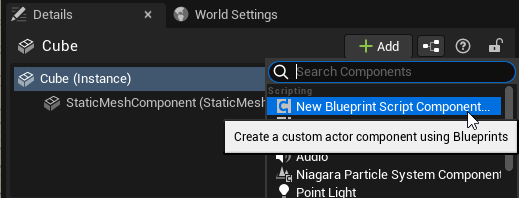
select them, on the detail panel, should have a blue button called add script something
 last swallow
Hey guys need some help, i made a horsecart and trying to rotate it that the wheels are standing on ground. So i made a trace by wheel left and a trace for wheel right and got to hit location vectors, now i want to rotate the x-axis of the cart based of the two vectors i got but i dont now how
remote meteor
that will convert, say a static mesh to a blueprint holding that static mesh
or you can manually create the blueprint youself then add the assets into it
zinc plover
@remote meteor it worked, thank u, really, its really important to me, you just saved all the work ive done
zinc plover
yeah maybe hahaha its okay
zealous moth
trim matrix
ya I tried that already
what happened? did it loop?
winter tusk
remote meteor
select them, on the detail panel, should have a blue button called add script so...
You mean this I think ? https://i.imgur.com/ck8XMj7.png
If yes it tell me to choose a parent class but I don't know what to pick
 remote meteor
winter tusk
You mean this I think ? https://i.imgur.com/ck8XMj7.png
If yes it tell me to cho...
remote meteor
winter tusk
You mean this I think ? https://i.imgur.com/ck8XMj7.png
If yes it tell me to cho...
hm select "Actor" to start with
manic hamlet
@winter tusk you can shift+windows+S...then make a snippet of whatever you wanna show(it automatically is in your memory) so you can ctrl+v in this chatbox in discord and post images.... way more userfriendly for other people who want to help you,as they can see image immediately 🙂
winter tusk
remote meteor
hm select "Actor" to start with
There is no "Actor" parent class
winter tusk
manic hamlet
<@164815343313747969> you can shift+windows+S...then make a snippet of whatever ...
Nice thx
winter tusk
 manic hamlet
winter tusk
Nice thx
manic hamlet
winter tusk
Nice thx
np imgur is so 2010 😄 😄 😄
 winter tusk
"New C++ component"
remote meteor
😅
winter tusk
xD
remote meteor
im not very sure where they hide that button in ue5 but
i think you can create a new blueprint
then add a static mesh in within
and replace the current one
trim matrix
zealous moth
what happened? did it loop?
never played

 winter tusk
it's better but then I have this
 remote meteor
Actor
winter tusk
I can't select it
 remote meteor
Eh really?
trim matrix
😠
winter tusk
remote meteor
Eh really?
When I select it it hides the "select" button
ok found it, I need to select "child Actors"
in the first menu
trim matrix
zealous moth
that should work
didnt work
winter tusk
Thx for your help
trim matrix
maybe its because i dont have the mesh node
remote meteor
Hm check the blueprint after creation
trim matrix
%%
zealous moth
the print string didnt work??
trim matrix
arghhhhhhhhhhhh
trim matrix
zealous moth
the print string didnt work??
no
remote meteor
The staticmeshcompoenent should be the root component
While the base class is an Actor
If yes then yeah thats it
zealous moth
then it isn't getting played at all, somewhere in your logic, this is skipped
 languid quail
i think im giving up for now i don't get it to work sadly
manic hamlet
@remote meteor FYI: thats that button 😄

Done with "work" today though,so thanks again 😄 see ya next time i got a question LOL
trim matrix
zealous moth
then it isn't getting played at all, somewhere in your logic, this is skipped
 zealous moth
trim matrix
zealous moth
trim matrix
oh wow yes
trim matrix
it not right

the object plug?
where

this never works


even this it doesnt work
 vapid comet
if i had a health actor component and a DOT actor component how would i call variables from one to another? Specifically i want to call the actor's current health in the DOT component
trim matrix

 faint pasture
vapid comet
if i had a health actor component and a DOT actor component how would i call var...
faint pasture
vapid comet
if i had a health actor component and a DOT actor component how would i call var...
The DOT component gets attach parent, gets component by class (HPComponent), and applies damage or healing to it during its Apply event
faint pasture
faint pasture
The DOT component gets attach parent, gets component by class (HPComponent), and...
Or whatever the owning actor of a component is, Owner maybe?
trim matrix
so i need to cast
faint pasture
what's with everyone having a boner about casting
where is this coming from, the idea that "cast" is some sort of "reach out and get whatever you need"?
faint pasture
I mean what's the source of all the newbies misusing the term? Is there some big tutorial somewhere that gets everyone off on the wrong foot?
trim matrix
dont understand whats your saying
fiery swallow
Is your mannequin an actor ?
trim matrix
fiery swallow
Is your mannequin an actor ?
its an AI
fiery swallow
Not exactly what I meant :>
trim matrix
 faint pasture
trim matrix
faint pasture
trim matrix
We get that. Where do you put something in that variable? Where do you set it?
fiery swallow
@trim matrix if you wanna try it, use get actor of class to get the first actor in the first mannequin in the world, set it as your mannequin variable and then try to run that code... it'll quickly show you what you're missing
Maybe just put only one actor in the world though if you do try that out, the idea is you need a reference bud.. which is what get actor of class will get you .. it's just not a reliable way when you're going to have many
 spice estuary
I just ran into an issue with a BP child of my new C++ character class
And I resolved it by reparenting it to the ACharacter class and then re-reparenting it back to my C++ character class
And I was wondering if someone could explain why doing this reparenting back and forth somehow "fixes" the initial breakage of the reparenting?
odd ember
spice estuary
I just ran into an issue with a BP child of my new C++ character class
And I res...
probably better to ask in #cpp about that
or on the epic forums
where someone can explain why this bug still persists
spice estuary
Overall it sounds like reparenting a BP is a bit dangerous in general then 😅
I'll post this to #cpp channel and see - thanks!
odd ember
spice estuary
Overall it sounds like reparenting a BP is a bit dangerous in general then 😅
I...
I mean it kind of is, I'm still dealing with a corruption from a time where I reparented something I shouldn't have
 grand wigeon
Does someone know some good tutorials for how to achive this kind of installation with blueprints? https://youtu.be/QIfbRKeB0lI

 barren sonnet
Im trying to snap components down to the ground using a construction script with a specific tag but they are coming in on their side. Any idea why this might be happening ?
 sonic crest
 faint pasture
grand wigeon
Does someone know some good tutorials for how to achive this kind of installatio...
faint pasture
grand wigeon
Does someone know some good tutorials for how to achive this kind of installatio...
?
sonic crest
why does this keep popping up when I save all?
faint pasture
sonic crest
why does this keep popping up when I save all?
Cuz you haven't saved the level
sonic crest
I did
I always save all and I got the level saved, sometimes when I save all this pops up
even saved the level alone
 sonic crest
 jolly radish
I'd use a custom event or from event begin play with a timeline on loop rather than a tick
jolly radish
okok
sonic crest
jolly radish
you need to get what references the cast
who is or what is casting to it
you can get "get actor of class" not sure if that's what you're looking for
faint pasture
jolly radish
anyone got any idea what i can put here?
Anything that'll give you a Target spawner reference. Also why are you doing that on tick with a delay? What are you trying to accomplish there.
jolly radish
faint pasture
Anything that'll give you a Target spawner reference. Also why are you doing tha...

done this
@sonic crest
how do i make it update
faint pasture
jolly radish
how do i make it update
Quick question, why is the text render separate from the spawner?
faint pasture
Why do you have a spawner actor and then a separate render actor that shows the spawn count?
jolly radish
idk :(((
faint pasture
Just add the text render component to the spawner, if that's what you want to have happen. Where do you want the text to be rendered in the world?
jolly radish
gotcha
 radiant grove
Hey hey, anyone here know much about blueprints and level_sequences?
grand wigeon
faint pasture
?
Sorry I forgot the link https://youtu.be/QIfbRKeB0lI
radiant grove
I am trying to figure out , via blueprints, how to get the Camera cut to bind to the MainCam

 austere aspen
why don't my doors open and close independently of each other? they open and close with the Interact input action, and also close when leaving a box collision, but for some reason they both open and close the first door, but only the interact action does, leaving the second door's collision doesn't close the first one.
odd ember
austere aspen
why don't my doors open and close independently of each other? they open and clo...
hard to say without seeing some code
austere aspen
fair. the Get All Actors of Class is on BeginPlay in the Player Character. The Interact InputAction just calls the Open Door custom event and makes the player look at said door. The Open Door custom event itself is more or less the same as this tutorial (https://www.youtube.com/watch?v=hZHj5CtonQA&ab_channel=CobbDev), with the begin and end overlaps being what finds which way to open the door, and also to set if the player can open it or not and to close the door and set the visibility of the widget.


 odd ember
austere aspen
fair. the Get All Actors of Class is on BeginPlay in the Player Character. The I...
odd ember
austere aspen
fair. the Get All Actors of Class is on BeginPlay in the Player Character. The I...
is the get all actors of class just for testing?
austere aspen
I was originally wanting to have a tag or something to mark an actor as "interactable" so the InputAction just calls a function from that specific actor if it's the one the actor is in its collision of, but couldnt find a way of doing it
austere aspen
odd ember
is the get all actors of class just for testing?
yes, I also tried Get Actor of Class but that had the same effect. Changing the index of the Get changes which door is affected
odd ember
my guess is the logic to find which side of the door is borked
austere aspen
dunno why that would be the cause for this, I was under the assumption it'd be the way I was getting the door reference in the Player Character, seeing how the index of the Get changes which door is affected, but I have no idea how else to get the reference aside from casting maybe, but then what to put in the wildcard for that?
 odd ember
austere aspen
dunno why that would be the cause for this, I was under the assumption it'd be t...
odd ember
austere aspen
dunno why that would be the cause for this, I was under the assumption it'd be t...
you have open door twice
once on component end overlap (assuming that's your trigger) and once on interaction
austere aspen
yeah, one for opening, one for closing
odd ember
austere aspen
yeah, one for opening, one for closing
so you don't think that's at the core of your issue?
austere aspen
i mean, even taking away the open door in the end overlap, the interact open door issue still remains
odd ember
try with breakpoints
odd ember
austere aspen
i mean, even taking away the open door in the end overlap, the interact open doo...
at least you've isolated the issue to that point then
you can double check if the inverse is true
 marble tusk
The issue is you're getting all actors of class and only using the first actor in the array
austere aspen
switching back to Get Actor of Class still has this issue
faint pasture
austere aspen
fair. the Get All Actors of Class is on BeginPlay in the Player Character. The I...
You shouldn't be getting door or doors. You should be getting the nearby door if there is one.
aka
some sort of hit/overlap test
odd ember
I don't think I'm seeing the entire picture. most likely the architecture breaks down somewhere. but try with breakpoints and see what happens
faint pasture
When you open a door, you open the one within reach. Not the door or doors that exist on the map, no matter the distance.
austere aspen
using breakpoints just breaks when the action happens, it doesnt say why a door is doing that instead of the other one
faint pasture
austere aspen
using breakpoints just breaks when the action happens, it doesnt say why a door ...
It's because of how you're choosing your door
you're choosing the first one in the world.
instead of the one you're next to
austere aspen
so use a sphere trace or something similar?
austere aspen
doors is currently all there is but I do want to have a general interaction system
faint pasture
OK so I'd start with making a function on your pawn ChooseActorToInteractWith
austere aspen
I did try doing a sphere trace but couldnt get my head around the different kinds and which I should use for a certain list of actors
faint pasture
You can do a line trace instead, however you wanna do it
if you want really accurate aimed interaction like Skyrim that'd be a line
odd ember
I mean the simplest thing is to use the overlap as the one actor that will be interacted with
faint pasture
if you want a more general auto-aimed selection I'd do a sphere trace then do some sort of filtering and selection.
odd ember
that way you don't need get all actors of class or anything else
faint pasture
Just Trace in some way or get overlapping actors or whatever -> select which actor to try to interact with
austere aspen
yeah, I'll do that then, but something I always found odd was in tutorials people would just cast right after a trace, which left me wondering how to do multiple casts and such from one trace
faint pasture
austere aspen
yeah, I'll do that then, but something I always found odd was in tutorials peopl...
Do you know what a cast is
austere aspen
only as much as most people say, a way to get a reference of an actor, though I'm assuming that's not the case
faint pasture
No
Cast is a question. Is Object A of class B?
Is this Animal a Dog? (I want it to bark)
won't make much sense if it's a fish
but you need to check since you were just given an animal
Is this Actor a Door? (I want it to open)
"No, it's a bullet" ok nvm
Since traces etc give you Actors, you sometimes gotta check if they're the class you care about
austere aspen
so is the Cast Failed exec like the False of a Branch?
faint pasture
ye
austere aspen
ahhh
faint pasture
Every day with this casting business lol
ok so
make that function like I said
make a function that just returns an Actor
jolly radish
so this just isnt working how its supposed to

the "head" goes somewhere completely different
faint pasture
call it ChooseActorToInteractWith, and have it return an Actor. Do your work for choosing what to try interact with inside that function.
faint pasture
jolly radish
so this just isnt working how its supposed to
Head location updates as the timeline plays
so you're constantly lerping FROM a different position
resulting in fucky movement
austere aspen
wait what do you mean by "returns an actor"? the actor of which the trace is hitting?
jolly radish
faint pasture
so you're constantly lerping FROM a different position

it supposed to go to the location setout right?
faint pasture
austere aspen
wait what do you mean by "returns an actor"? the actor of which the trace is hit...
Functions can return things. Return an actor reference/pointer (the blue thing)
Either have it be null for a failure or also return a boolean
austere aspen
yeah but like, what goes into the actor return?
faint pasture
austere aspen
yeah but like, what goes into the actor return?
You fill that in. do your sphere tracing or line tracing or whatever (You can start with get actor of class to test it)
That's the whole point. Give yourself the skeleton of the code (a function that returns what you want to interact with), then flesh it out.
jolly radish
faint pasture
so you're constantly lerping FROM a different position
did this in an attempt to fix it by giving it a constant variable, did not fix it :(
 faint pasture
jolly radish
did this in an attempt to fix it by giving it a constant variable, did not fix i...
faint pasture
jolly radish
did this in an attempt to fix it by giving it a constant variable, did not fix i...
What's it doing?
austere aspen
so just to be clear, are you saying to have a function like the first image, or like the second?


 faint pasture
austere aspen
so just to be clear, are you saying to have a function like the first image, or ...
faint pasture
austere aspen
so just to be clear, are you saying to have a function like the first image, or ...
Those are the same, just the 2nd image is less fleshed out
faint pasture
jolly radish
moving here
You're moving to head + Destination, not to destination
faint pasture
faint pasture
You're moving to head + Destination, not to destination
So it's a local move, you'll move the same distance no matter where you start instead of moving to the same spot in the world
jolly radish
faint pasture
You're moving to head + Destination, not to destination
destination is only relative to the head tho no?


those are not the real world locations of it
only the location relative to the head
austere aspen
ah I got it, it works. Thanks
faint pasture
austere aspen
ah I got it, it works. Thanks
So as you develop you'll want to flesh that function out more. You might notice right now you can only return one actor from that trace. You'll eventually wanna do a multi sphere trace (or use an overlap collider) and do some loop selecting which actor you want to talk to. It'll get bigger and more complex but the end result is the same, it returns the actor you want to interact with.
That's a good way to develop your functionality. Start with the function or the data, and fill it in.
austere aspen
when it hits something else first it then doesn't hit the door
 faint pasture
austere aspen
when it hits something else first it then doesn't hit the door
faint pasture
austere aspen
when it hits something else first it then doesn't hit the door
You'll need a multi sphere trace and a loop where you choose what you want to interact with
austere aspen
alright