#blueprint
402296 messages · Page 761 of 403
 rustic sundial
 gentle urchin
relative to the actor that holds it
rustic sundial
OHHHHHHH
so wiat
are you saying the door doesnt teleport to the location i set in the node?
it teleports to those coords RELATIVE to the actor?
gentle urchin
yep

something like this
is what you could do
Or this, with automatic closing 😛 better like this i suppose

OpenOffset is whichever direction you wanna move it
Next level would be the entire transform

making the variable instance editable (the eye)

suddenly you have a relatively versatile door bp
Now when you place the door in the level,

all you have to do is edit its transform offset
gentle urchin
Hover -> drag and drop?
just like any other node
its called a reroute node
double click the wire to create one
or drag and search

 delicate scroll
Hey, quick question. Is there a relatively simple way to scale a widget to the screen size? So it fits regardless of the screen size.
gentle urchin
There's always the scalebox
probably not gonna look nice on all screens tho
i've heard that takes a ton of work
delicate scroll
Hmm... That doesn't sound idea lol
gentle urchin
Nope 😛
 timber knoll
They always scale?
 fiery glen
you define their scaling behavior in the widget designer (corner anchors etc)
timber knoll

Shows how you can set up your UI to scale to different devices automatically using DPI Scaling.
And this
delicate scroll
Oh thanks, I'll check it out. Sorry I didn't see this before.
 sinful gust
Is it possible to have line trace hit then follow the surface geometry of a mesh?
 earnest tangle
Follow it how?
 tawdry mural
probably something to do with "end" trace input
save a hit reference and then change the end trace to it
¯_(ツ)_/¯
gentle urchin
Sounds like he wants the trace to 'bend' along the mesh surface
At a specific height above mesh surface ?
tawdry mural
@sinful gust
sinful gust
Like having the trace 'bend'/bounce to follow right along the faces of the geometry
And ik it's kinda a stretch to ask lol. I'm going to experiment and somehow try to do that when I get back to my pc. Or something like it
sinful gust
I was wondering if there's a way to do real time aerodynamic rendering that can adapt to almost any 3d model. Like faking a fluid sim. But with casting rays
And instead of using hardset values which is the easiest way if I just wanted to do normal planes
sinful gust
Yeah I'm only asking because I know you can simulate realistic projectiles/involves changing direction but having it change and follow multiple edges and faces is a bit much to ask ngl
tawdry mural
because you start a trace from your camera idk what can you do after
sinful gust
Yeah exactly!
 crimson geyser
Hi, I want to have a wall turn 180 degrees when on begin overlap. But I want it to rotate 180 degrees again when the character overlaps the box again. Can someone help with that? Now it only turns around once.
 gentle urchin
Change it to play from start
crimson geyser
That was easy... Thanks haha!
 rugged flame
Hello, BP newb here. Trying to update the plugin Ultra Dynamic Sky (weather) using a UMG combobox. How do I connect the selected item in the combo box to the type of weather in the Change Weather Using Type node?

 sudden iron
hello good evening, i want to ask about the "interface" in blueprint , im still confused about how its work and why we need it
 tight schooner
sudden iron
hello good evening, i want to ask about the "interface" in blueprint , im still ...
tight schooner
sudden iron
hello good evening, i want to ask about the "interface" in blueprint , im still ...
are you talking specifically about "blueprint interfaces"? See: https://youtu.be/EM_HYqQdToE?t=2204
if you're talking about interfaces as a general concept then that's more open-ended
encapsulating various forms of "blueprint communication"
(casting, dispatchers, parent classes, etc.)
 icy dragon
sudden iron
hello good evening, i want to ask about the "interface" in blueprint , im still ...
icy dragon
sudden iron
hello good evening, i want to ask about the "interface" in blueprint , im still ...
Blueprints that declare functions to define an interface between Blueprints.
sudden iron
thanks guys @icy dragon @tight schooner
 slender idol
Any idea why the shader complexity view mode won't work in a packaged game? It just displays the default texture no matter how long I leave it like that.

 faint pasture
sinful gust
I was wondering if there's a way to do real time aerodynamic rendering that can ...
faint pasture
sinful gust
I was wondering if there's a way to do real time aerodynamic rendering that can ...
Yeah nah that's gonna be hard.
You can maybe do some sort of runtime baking of the fluidics but aero is crazy insanely complex.
fiery glen
most physics games these days appear to bake it in the build mode
sinful gust
Yeah that seems to be the best route to take on this. It would probably take me a year to finish it if I did any other method
icy dragon
sinful gust
Yeah that seems to be the best route to take on this. It would probably take me ...
Even God of War had to simplify their 3D aerodynamics a bit. lot.
 halcyon kelp
Hey everyone - wonder if someone can help...
I'm trying to get an actor (default scene root) to move to another location (discard pile) - but it seems to go in a very weird direction (the discard pile is directly ahead, but default scene root goes high up and stops before reaching the discard pile).
This is my blueprint here, I think the problem is that I can't simply just get the location and tell scene root to go there... but I could be wrong? Anyone have some guidance for a poor soul :D?

 drowsy jungle
Hello guys I am new here
Would any1 be able to help me out with a catalog I am making
An archviz related catalog
timber knoll
don't ask to ask, just ask
drowsy jungle
Its about measuring distance between objects
I've created a spawning system. But I need every spawned object to measure distance, Once I get 2 points I can do the rest adding the annotation line
drowsy jungle
Yes
timber knoll
then you would just have to translate that to world space I guess
drowsy jungle
But I need to make a line trace from the center of each face of the bounding box
On Line hit, I would get the second point
But How to do the first part ?
I need it to measure distance in game
timber knoll
center of a face?
fiery glen
if it's just a rectangular (box) shape of the entire actor you could just get the edge and then split height/width to get the center?
timber knoll
that would just be your actor directional vectors
fiery glen
I think we need a diagram to explain this
fiery glen
fine I guess
 trim matrix
Guys, I have an actor that I want to appear first as a trace result, even when behind other actors (it's a Gizmo). What is a good way to do it?
 dim robin
if i have the same clickable actor instanced multiple times in the level, what is the best way to access and reference the specific one that is getting clicked?
halcyon kelp
halcyon kelp
Hey everyone - wonder if someone can help...
I'm trying to get an actor (defaul...
Can anyone help me out here?
 tawdry surge
@dim robin the on click event returns a reference to the clicked actor. Atleast when its assigned as a delegate it does
dim robin
tawdry surge
<@707009049702432870> the on click event returns a reference to the clicked acto...
yes but they alll have the same reference, i need to treat them individually, like i need to know if i click on number 2, number 1 has to go back to it's original place
tawdry surge
No they don't
It returns the ref to the specific one clicked
I literally just made a rail shooter, using point and click mechanics. I promise it works
 trim matrix
Guys, I have an actor that I want to appear first as a trace result, even when b...
trim matrix
trim matrix
Guys, I have an actor that I want to appear first as a trace result, even when b...
Figured it out. For future dudes - just create a specific trace channel for the gizmo, and if it doesn't return a hit, run the regular one.
dim robin
dim robin
let's suppose i click on first cube, and then on second one, i need to put the first cube back in his place, but i can't reference it because the reference is overwritten with the new cube clicked
tawdry surge
You need a branch to determine if the player already has an item selected and another variable to hold the last clicked item so you can put that back b4 grabbing the currently clicked item
dim robin
tawdry surge
You need a branch to determine if the player already has an item selected and an...
yes i know, what i'm trying to say is i can't store that "last clicked" item, because it gets overwritten everytime i click
so basically after a new cube has been clicked i can't get the previous one anymore
tawdry surge
You miss understand. You need two variables one to hold the current variable, which is changed every time you click and another one which is changed after the branch passes the check. If it fails then you put the one you are holding back b4 assigning the new one to the second variable and picking it up
gentle urchin
On click -> check if you have existing valid reference -> if so do what you need to with the old one-> target the new one
I do it with singular variable, but can be done with two if you wanted :p maybe you need two in this specific case, but i'd think not
tawdry surge
You don't NEED 2 but will keep it cleaner
I prefer to assume I will 100% forget what any particular BP does and like to make it as simple to read as possible
gentle urchin
I'd argue that 1 variable is easier to reflect on compared to two , especially with vague namings like 'old' and 'newest' suffix etc , but thats probably more of a preference
Doesnt matter much, both methods work
They basically do the same
dim robin
gentle urchin
Doesnt matter much, both methods work
lucky you can make it work 😆
gentle urchin
Check if the existing variable holds a valid reference before setting it to the new reference
tawdry surge
Don't name things "old"..
LastClickedActor and CurrentlyClickedActor are much more descriptive and accurate
gentle urchin
Heh. Well, last and current is also prefixes which can add confusion to their use imo.
Last ~ old
Poteto tomato
Its all just details, the most important part is consistency 😅
dim robin
gentle urchin
On click -> check if you have existing valid reference -> if so do what you need...
i don't understand, the reference is always valid..
tawdry surge
To a point.. prefix as old or whatever is fine but I mean don't just name it "old"
gentle urchin
In your case you may never invalidate it, but the point still stands. You can check if they're equal. If not equal then reset the existing before selecting the new
If i werent in at a course i'd show some code but
My hands are tied
gentle urchin
tawdry surge
To a point.. prefix as old or whatever is fine but I mean don't just name it "ol...
Ofc, its why i specified suffix altho it can also be prefix :p generally i try to avoid names which can rise a question of a variables current relevance.. why keep track of things you're done with :p
tawdry surge
I'll be on my pc in like 20 mins or so.
I can show you a screen shot then
dim robin
thank you, i would be very grateful, my brain is exploding i can't figure this out
tawdry surge
It's OnClicked event-> set CurrentlyClickedActor->branch->true->set LastClickedActor to be CurrentlyClickedActor-> pick up LastClickedActor
The branch condition should be the result of an == check. Is LastClickedActor == CurrentlyClickedActor.
Off the false pin you then put the LastClickedActor back->set LastClickedActor to be CurrentlyClickedActor-> pick up LastClickedActor
earnest tangle
it would be simpler to just set last clicked actor to current clicked actor first before doing anything else, since then you don't need to repeat the logic in the branch :)
(but yeah the general idea is good)
dim robin
i'm trying now, in the meanwhile thanks a lot
tawdry surge
You can do it with less nodes this is just more descriptive and simpler to follow
After it works then optimize
 supple meadow
is there a way to reference a bone or a socket so it can plug into here? (in character blueprint, not anim one)

I've been bashing my head against this for a full day now, maybe I'm misunderstanding something?
earnest tangle
What exactly are you trying to do?
supple meadow
I'm trying to make it so the character pivots around that particular bone as opposed to the whole scene
earnest tangle
is it one of its own bones or is it another actors bone it's attached to?
earnest tangle
I'm not 100% sure if there's some nice way to do it, but you can rotate around a point with some math
I can never remember the formula for it though, I'm sure you can find it if you google something like "ue4 rotate around point"
supple meadow
won't that cause clipping then?
earnest tangle
How so?
supple meadow
well if it's just slicing the mesh in half and rotating it around an arbitrary point?
or am I missunderstandding
earnest tangle
I'm not entirely sure what slicing the mesh in half has to do with rotating it :)
gentle urchin
Rotate around axis , isnt that a node that could be used here ?
earnest tangle
That's for rotating around a specific axis, it doesn't rotate with a specific pivot point iirc
pivot/origin
earnest tangle
Yeah so there's a formula you can use to do that, it's something like set position = position - pivot, rotate, set position = position + pivot
supple meadow
like this, but make the pivot not a scene but a bone/socket
 earnest tangle
It might not be exactly what I just said but it's something along those lines :P
supple meadow
but I need it to be a scene component for setworldrotation to work no?
earnest tangle
set world rotation's target is the thing you're rotating
so if you say set world rotation(pivot, new rotation), then it rotates pivot
so you'd need to actually do set world rotation(mesh, new rotation)
or move pivot into the pivot point, attach mesh into pivot, rotate pivot
tawdry surge
This sounds alot like a target lock mechanic thats in every melee game ever
earnest tangle
yeah tbh I don't quite follow why he wants to do it, and I'm not quite sure how his actors and components are set up which might be leading into some confusion :)
supple meadow
I'm completely lost honestly
earnest tangle
Maybe you can show what your actor looks like and what the component setup on it is
so that what you want to do is easier to visualize

 sharp rapids
RotateVectorAroundAxis
From what I understand,
You have your "mesh" and a "pivot"
Get direction from "mesh" to "pivot"
Rotate that direction vector about the "pivot" by the required angle
Calculate new position of the "mesh" using the direction vector
supple meadow
I want the pivot to be the location of a specific bone yeah
if that's what you mean
sharp rapids
https://docs.unrealengine.com/4.26/en-US/BlueprintAPI/Components/PoseableMesh/GetBoneLocationbyName/
Get Bone Location by Name
Take a look at this
supple meadow
I tried that already, setworldrotation only accepts scene components though
sharp rapids
Yeah, That's the intended behavior
As @earnest tangle said already, SetWorldRotation sets the rotation of the 'Target'
supple meadow
right, I feel like I'm missing some fundamental, so if I get the bone location how do I feed that into setworldrotation?
sharp rapids
btw I think, You'll need a SetWorldLocation rather than SetWorldRotation
sharp rapids
supple meadow
right, I feel like I'm missing some fundamental, so if I get the bone location h...
You don't
There's going to be some vector mathematics involved
supple meadow
is there really no way to maybe add a scene component and somehow weld it to the pivot point?
because I have no clue how to do this vector thing.
sharp rapids
supple meadow
is there really no way to maybe add a scene component and somehow weld it to the...
There are 'Bone Sockets', but I don't think it's a solution
As far as I'm aware, you'll have to do vector math
faint pasture
@supple meadow what kind of end result do you want to achieve?
supple meadow
I just dont understand how I can translate vector math into character rotation
supple meadow
faint pasture
<@377078201337511948> what kind of end result do you want to achieve?
trying to replicate z-axis rotation on a particular pivot point
faint pasture
Are you trying to move the capsule around or the mesh?
supple meadow
sharp rapids
https://docs.unrealengine.com/4.26/en-US/BlueprintAPI/Components/PoseableMesh/Ge...
on second look it seems I can only do sockets
 faint pasture
Rotate the mesh and then offset it by mesh location - bone location
With z zeroed out
supple meadow
I have no idea how to do that
faint pasture
You should already know how to set the mesh rotation. Then just set the mesh location relative to capsule to mesh location - bone location.
sharp rapids
faint pasture
Rotate the mesh and then offset it by mesh location - bone location
I think that's a better way than what I was saying
 faint pasture
Or just author your animation so you don't need to do this
supple meadow
ok so I understand even less now
I have no idea how to change the rotation of the mesh, only how to change rotation of components
tawdry surge
@dim robin did you get it working or you need to see the BP script?
supple meadow
and what's authoring animations got to do with replication?
faint pasture
Just dragged off a reference to the mesh and type in set rotation.
Also what's any of this got to do with replication? You are asking about being able to pivot a mesh around a bone
supple meadow
yes but specifically to replicate it to other players, I think I mentioned it earlier
which is why I cant use the animation bp to do it I think
faint pasture
You just do the offset everywhere based on the same information. When you're running, you're not replicating the movement of the legs, you're just replicating the fact that the capsule was moving and on every machine, it translates that into the running animation. Same idea.
So exactly what mechanic are you trying to achieve here buy pivoting a mesh around the bone?
supple meadow
replicating the player looking up and down
faint pasture
Yeah you would just replicate the look Direction, and then on every machine the animation will be handled from that information.
So why are you pivoting the whole mesh around that instead of just rotating the bone or using a blendspace or aim offset?
supple meadow
because this is the only way I figured out how to do it
I want to rotate the bone, but that's done within the animation blueprint and I'm working inside the character blueprint
faint pasture
You should do animation stuff in the animation blueprint whenever possible. Replicate the aim direction and on every machine, the animation blueprint will use that to drive the pose. Matching things up.
sharp rapids
supple meadow
I want to rotate the bone, but that's done within the animation blueprint and I'...
Are you manually rotating the bone to make the character look up/down?
 worthy frost
you should use Control Rotation and pull the yaw/pitch from GetBaseAimRotation on the Character
Pitch is replicated, but you need to use GetBaseAimRotation->Pitch
supple meadow
sharp rapids
Are you manually rotating the bone to make the character look up/down?
that was my goal originally
worthy frost
what you doing, making player look left and right?
supple meadow
up and down
worthy frost
sec
 pastel rivet
Is it possible to get a soft object reference name without loading it?
supple meadow
faint pasture
You should do animation stuff in the animation blueprint whenever possible. Repl...
I understand that's what I need to do, and I'd do it if I knew how I just dont know what specific steps I need to take.

 supple meadow
so this is all done within the animation blueprint?
worthy frost
yes
even turn in place is done via animation bp
@supple meadow http://thegames.dev/snaps/gnqOqK1WWZ.mp4 all this is done via anim bp
supple meadow
is that something you create, like a variable?
sharp rapids
https://docs.unrealengine.com/4.27/en-US/AnimatingObjects/SkeletalMeshAnimation/AnimHowTo/AimOffset/
Using an Aim Offset, a character aims a weapon in the direction of your mouse or controller.
supple meadow
right ok I see
dim robin
tawdry surge
<@707009049702432870> did you get it working or you need to see the BP script?
i just can't..
sharp rapids
worthy frost
a 2D blendspace
btw are AimOffset and Blendspace exchangeable?
worthy frost
no
sharp rapids
I mean, Both basically lerp between animation poses
Both have identical setups
worthy frost
Blendspace is more for locomotion
i mean technically you could...
but not tried
i know aim offsets are additive
sharp rapids
worthy frost
Blendspace is more for locomotion
Yeah, But there's no in-build rule, like you should always put only locomotion anims in Blendspace?
What would happen If I just put aiming anims in a Blendspace
supple meadow
worthy frost
http://thegames.dev/snaps/UE4Editor-Win64-DebugGame_rViXJtZLCq.png
so are these screenshots you posted just in the event graph of the animbp?
worthy frost
@sharp rapids nothing really, it might work
just not tested it
@supple meadow event graph and animgraph
i would suggest maybe doing a UE4 course on it
there is one at https://learn.unrealengine.com
supple meadow
I'll definitely take one
worthy frost
Animation and AnimBP is not an easy thing
supple meadow
relying on youtube tutorials has produced very poor results for me
sharp rapids
worthy frost
<@!604222443887919115> nothing really, it might work
hmm
It's possible
Have you tried using an Actor reference?
Instead of the Player Character reference
worthy frost
@swift pewter if its from a overlap detection
two choices: Single player: You can just check if Actor == GetPlayerCharacter, Multiplayer, you will need to cast cause GetPlayerCharacter is not suitable for multiplayer in mostly all cases.
sharp rapids
Or you can use Tags
worthy frost
Tags again is fine if its single player
multiplayer, no

this is the easy way for Single player
no additional checks are needed
you know the overlapped actor is the player
not noticable
people are scared of cast's
unless your doing it every frame
you wont even notice
even doing it every frame, you would hardly notice
sharp rapids
worthy frost
people are scared of cast's
I'm one of those people 🙂
worthy frost
just like people are scared of Tick cause someone once said "Ticks are bad avoid Ticks"
so they make a timer to run at .006......
sharp rapids
worthy frost
just like people are scared of Tick cause someone once said "Ticks are bad avoid...
Nah, I'm not one of those
worthy frost
yes BP ticks are slow, and we tend to avoid BP ticks for classes that there can be a lot of in the world
but we implement it in C++ for the performance boost
Use tick do not abuse tick
some things HAVE to be done on tick
no avoiding.
crimson geyser
worthy frost
some things HAVE to be done on tick
Do you have an example? Just curious
worthy frost
you could never get smooth rotation without tick
sharp rapids
The fear about Casting is it causes it to load the 'casted' blueprint in memory even if it doesn't exist physically in the world
If we don't check it, we can possibly arrive at a place where loading the Main menu will load the final boss in memory.
worthy frost
@sharp rapids this is why you have a base BP
with no assets in
and only cast to that.
@swift pewter no
i also don't see why you would need to do that on tick
BTW, just a heads up, even having a empty Tick node that is active (even if no pins connected to it) will cause the engine to tick the BP, adding cost 🙂

this wont be called cause its like a fake node (hence why its kinda transparent)

this will cause that BP to tick
and add cost, even tho you are not doing anything with it 😛
sharp rapids
sharp rapids
The fear about Casting is it causes it to load the 'casted' blueprint in memory ...
But now that I think about, Isn't casting to Player essentially harmless? Cause the Player BP is going to be loaded all the time anyway
The problem would be casting to other things in the Player BP
worthy frost
not really
what if you are in a main menu
and one of the bp's there has a cast to your player
would load your character even though you are not using it
sharp rapids
worthy frost
and one of the bp's there has a cast to your player
Ah, didn't think about that
worthy frost
not that you would notice
gentle urchin
worthy frost
and add cost, even tho you are not doing anything with it 😛
Is this enough to remove the tick overhead? I thought one had to disable the tick on the actor?
worthy frost
tho if you are calling it alot
it would be benefical to cache
@gentle urchin you still need to disable the actor ticking to avoid ticking the C++ code
but the C++ tick is cheaper than the BP cost
icy dragon
worthy frost
<@!231467939734355969> you still need to disable the actor ticking to avoid tick...
So to just use C++ ticking, but not BP ticking, it's just the matter of deleting Event Tick node?
worthy frost
bp has additional cost of navigating the VM (virtual machine) and stuff
@icy dragon yeah
or leaving it in the disabled state
sharp rapids
worthy frost
<@!231467939734355969> you still need to disable the actor ticking to avoid tick...
Also, Would disabling the 'Actor Ticking' also stop all the components ticking?
Or do the Components tick individually?
gentle urchin
Ah. The more one knows ! Didnt know the c++ tick got disabled by it, tho it makes sense
sharp rapids
Shouldn't that be the intended behavior?
icy dragon
worthy frost
or leaving it in the disabled state
Good to know then. I never disable actor tick on the Class Settings all this time, but always delete all the premade Event nodes if starting from new BP.
worthy frost
@icy dragon BPImplementable events wont transverse the BP vm, if the node does not exist in the BP
@icy dragon those default nodes are disabled, and wont be executed
so they are safe to be left
once you connect a wire to them, they are no longer disabled
sharp rapids
So you reset the references on Player Respawn, no need to check it every tick
icy dragon
worthy frost
so they are safe to be left
It's just one of my own habit that led me to delete them, even if I would use them just few seconds later lol
worthy frost
@swift pewter you could technically cheat n a single player game
you could hold the controller reference
and use Controller->Pawn
Controller never changes if player character is destroyed
why would you need too?
when your AI spawn
you grab the player controller
then you just use PLayer Controller -> Pawn
instead of GetPlayerCharacter
(warning this is only for single player game)
then you cast when you need too
AI in Red Solstice 2 uses a special aggro system, and our monsters choose who it wants to target, either via Perception system or if no one is percepted, it grabs all enemy pawns in the world, and chooses one (via some complex scoring logic)
but for single player game, you can cheat a lot
if the only target is always the player
 hoary knoll
How can I scrub through an animation during runtime by clicking and dragging, for example opening a book by click dragging the cover or a door, or any other animations?
 odd ember
worthy frost
if the only target is always the player
odd ember
worthy frost
if the only target is always the player
I guess even if the target isn't the player, you cheat as long as you know all the targets
icy dragon
hoary knoll
How can I scrub through an animation during runtime by clicking and dragging, fo...
You already posted this on #animation just within a few minutes.
That aside, maybe this node is what you're looking for.

 torn kettleBOT
:triangular_flag_on_post: BilateralBird#2758 received strike 1. As a result, they were muted for 10 minutes.
tawdry mural
might be modifiers
or shape keys
does it have any ? in blender
try exporting it without shape keys
or with it
you never know
export options
go through it
icy dragon
I know how to fix that, but it's a ripped model, and it's one of those underground reverse engineering knowledge.
Better for me to not spoil it here 😉
Also it's not even remotely a BP issue.
icy dragon
tawdry mural
whos talking about bps
This is a #blueprint channel.
hoary knoll
@icy dragon how can I correspond mouse X axis movement (after click hit) to the new position in animation sequence? and does this only work for one animation?
icy dragon
hoary knoll
<@!325627930484932608> how can I correspond mouse X axis movement (after click h...
It's just the matter of float conversions, and I think it only work on Animation Asset mode, not Animation Blueprint mode.
 wary shadow
I would like to move an ball if an event box is triggered by an actor. Inside the ball event graph, how should I call the event triggered?
odd ember
how is the ball and the trigger connected?
faint pasture
wary shadow
I would like to move an ball if an event box is triggered by an actor. Inside t...
Easy/crappy way.
Event box gets actor of class Ball when it's triggered, and calls Move on the ball.
Ball moves.
 sturdy loom
I'm trying to do something with a Camera Actor
I'd like the camera to always align according to two actors on the map
And I wanna know if there is a way to get the "axis" between these two actors so I can put the camera on that axis
Forgive my digusting drawing skills, but here's the general idea

I want the camera to be on the red cross thing
 last abyss
seems like a normals issue, in the top right on blender check this. then select all faces (in edit mode ofcourse) and ALT+N -> recalculate outside. now from the outside all faces should be blue, and from the inside they should be red if they aren't then you have to select the faces that should be blue from the outside and ALT+N -> flip
 worthy frost
@hoary gazelle We don't condone or allow the discussion of using ripped/pirated assets here.
gentle urchin
sturdy loom
Forgive my digusting drawing skills, but here's the general idea
Find look at rotation should help you out
faint pasture
sturdy loom
I want the camera to be on the red cross thing
Distance along that line?
If point A is the far one and point B is the close one, direction vector from A to B is
DirectionVector=Normalize(B-A)
The camera is at
B+DistanceFromB*DirectionVector
And camera orientation is
FindLookAtRotation(B,A)
 spark steppe
here's one for those who love vectors...
gentle urchin
Hit me!
spark steppe
how would i convert a right handed orientation (rotator) to the left handness of unreal
i made too much stupid json stuff in the last hours to activate my last 2 brain cells 😄
spark steppe
gentle urchin
Hit me!
did it hurt?
tawdry surge
Wouldn't you just invert x?
spark steppe
yea for a vector, but does it also apply to rotators?
tawdry surge
Oh Idk. Didn't read rotator, just saw vector up top
spark steppe
maybe yaw + 180?
spark steppe
yes
gentle urchin
Yaw 180 would solve it wouldnt it, as you said
sturdy loom
faint pasture
Distance along that line?
that could be one

 gritty elm
sturdy loom
I'm trying to do something with a Camera Actor
I'd like the camera to always ali...
gritty elm
sturdy loom
I'm trying to do something with a Camera Actor
I'd like the camera to always ali...
use this function to get point distance vector : https://docs.unrealengine.com/4.27/en-US/BlueprintAPI/Math/Vector/GetPointDistancetoLine/
Alternatively you can do line trace from one actor to another, so where trace ends, set your camera location/rotation there
Get Point Distance to Line
sturdy loom
thanks
 worthy carbon
Does someone knows a good tutorial to create an inventory in ue4
odd ember
yes but it requires cpp
 brazen merlin
worthy carbon
Does someone knows a good tutorial to create an inventory in ue4
brazen merlin
worthy carbon
Does someone knows a good tutorial to create an inventory in ue4
what kind of inventory?
 fringe trench
Hello folks. I have an actor component that needs a reference to a primitive component in order to adjust its collision logic (collision profile, collision enabled, etc.). I need the referenced primitive component to be different depending on which blueprint the actor component is on. In Unity, this is laughably easy, as I can literally drag in any collider I want into the exposed reference slot in the inspector. In Unreal, I have not found a way to replicate this important functionality. Any tips?
odd ember
I exposed collision components from cpp and made them blueprintable
but yeah no reason they shouldn't be default exposed
tawdry surge
Or get components by class
odd ember
I mean that doesn't solve the problem
fringe trench
if they are exposed and blueprintable like you suggested, can I assign them from the inspector? Basically I would like to be able to select from a list of components on the same blueprint, in order to specify the one I'm after
gentle urchin
Could you not make some initialize function for it ?
Atleast flexible for the input primitive
fringe trench
that is not the worst idea haha
it's obviously better than getcomponent as I can be sure I'm getting the exact thing I want (if I can spell correctly lol)
It would be even more ideal if I could select that FName from a list of names of components on the blueprint class, but I don't expect that to be too much of an option
 solemn musk
Im using an Any Key to check for which input method is used but it seems to have blocked input from my Keyboard input axis events for other things
this a common issue?
odd ember
fringe trench
if they are exposed and blueprintable like you suggested, can I assign them from...
yes you can. you can even open up the blueprint graph for them
gentle urchin
solemn musk
Im using an Any Key to check for which input method is used but it seems to have...
Select the any key node, uncheck the "consume input"
solemn musk
thank you
odd ember
although I'm a bit iffy about what you mean by inspector
fringe trench
odd ember
yes you can. you can even open up the blueprint graph for them

I mean assigning the variable "Collider" using the dropdown. I need some way to assign the exact specific collision I want from the same blueprint. Currently that dropdown gives me no options, and I cannot drag any component in there from my blueprint.
odd ember
fringe trench
I mean assigning the variable "Collider" using the dropdown. I need some way to ...
I think that only actors can do that
but I may be wrong
fringe trench
I think you'd be right there. This is certainly frustrating coming from Unity, but perhaps the solution of specifying the name directly might be my best bet for what I'm looking for
odd ember
unity cant?!
fringe trench
ya positives and negatives for sure
worthy carbon
brazen merlin
what kind of inventory?
Like an inventory of fortnite
 teal nexus
how can I duplicate a mesh (skeletal or static), flip face normals, offset vertices in Construction script ?
odd ember
you can't perform any graphics operations in blueprint
teal nexus
I only need to do it once, so that I don't have to do it in runtime (which is what material will do, I suppose)
odd ember
 zealous moth
You can make mat functions with public parameters
zealous moth
You can make mat functions with public parameters
yeah but that's not blueprint, that's still in the realm of materials. blueprint for good reason does not expose anything to do with the renderer
zealous moth
I dread the reason forbthis operation
odd ember
sounds like someone wants automatic outlines and doesn't want to invest in making a postprocess filter I suppose
but what do I know
teal nexus
not only don't want to, but can't - platform doesn't allow PP
I could do all that in Blender, but since I've done it in the past I have plenty of reasons not to do that ever again
alright then, not possible via BPs
odd ember
sadly no
teal nexus
thanks
odd ember
teal nexus
I could do all that in Blender, but since I've done it in the past I have plenty...
you could try and see if you can invert a mesh in the mesh editor and spawn it in... not sure how much it's going to save you, but eh
teal nexus
probably less intuitive than doing it in Blender (I don't enjoy UE4's mesh editor a single bit)
zealous moth
teal nexus
not only don't want to, but can't - platform doesn't allow PP
platform doesn't allow PP??? what about shaders or stencils?
odd ember
zealous moth
platform doesn't allow PP??? what about shaders or stencils?
forward rendering
 heavy ibex
Isn't it fun when you're seeing a "Hello" printed to your screen but you have no idea where it's coming from? And if you search all blueprints for "Hello" it shows you every single print string because it's the default value
brazen merlin
heavy ibex
Isn't it fun when you're seeing a "Hello" printed to your screen but you have no...
and today you have learned to take 5 seconds to change the default print string, welcome to the club
heavy ibex
brazen merlin
and today you have learned to take 5 seconds to change the default print string,...
Oh I learned it a while ago but somehow it doesn't stop me from thinking "I'll only need this for a second, it's fine"
Unrelated: would someone be able to help walk me through rotating a static mesh using quats? I think I've been able to at least wrap my head partially around what quaternions are but I can't seem to figure out how to implement it. I want to rotate a mesh 36 degrees, interpolated using a timeline
I've seen some old posts indicating it can't be done in BP and if that's the case I'll happily go to #cpp with this question but .. nothing is really clear at the moment.
brazen merlin
heavy ibex
Unrelated: would someone be able to help walk me through rotating a static mesh ...
so that it rotates from 0 to 36 or you want to add 36 deg to the rotation of something? just one axis? once or more than once?
heavy ibex
brazen merlin
so that it rotates from 0 to 36 or you want to add 36 deg to the rotation of som...
Add 36 degrees, on one axis. It's for a lock, i want it to look nicer
brazen merlin
well it only goes one direction, so that is simple enough
timeline or Rinterp both work, you got a preference?
heavy ibex
I tried doing it with the pitch and it got really wonky
timeline preferred. I honestly don't understand the use cases for rinterp
brazen merlin
ah, there might be confusion between what "XYZ" is relating to pitch, yaw, roll
is each number slot on a cylinder basically?
heavy ibex
It worked going from 0 to 36, then 36 to 72 but then it started falling apart
yeah, 10 faces
brazen merlin
oh... hmm
heavy ibex
I don't understand what was happening but I was told it was due to using euler instead of quats
which .. after doing some research didn't really seem to line up with what I was seeing but .. I'm very uncertain
brazen merlin
yeah, not sure, thinking
all i can think of is telling it to use it at quaternions
i forget, but there is a node in bp to do so
brazen merlin
im trying to remember which is which, i think euler likes to find the shortest rotation distance where quat just adds, maybe i have that backwards
heavy ibex
Weird part is I don't know why it would break down at 72 degrees.. I'd think it would break at 180
makes me think I have something else wrong here
brazen merlin
well, i was gunna ask earlier, these 10-sided cylinders, you rotated them to place them inside the cryptex thing right?
 gusty shuttle
Hey guys, off the top of your head, how does one edit and turn a decal with points?
brazen merlin
gusty shuttle
Hey guys, off the top of your head, how does one edit and turn a decal with poin...
top of my head is off, i dont know what you mean
heavy ibex
brazen merlin
well, i was gunna ask earlier, these 10-sided cylinders, you rotated them to pla...
Their default rotation is 0,0,0
gusty shuttle
brazen merlin
top of my head is off, i dont know what you mean
Off the top of my head, I mean like roads. I think I just need to see how roads are made using decals
brazen merlin
heavy ibex
Their default rotation is 0,0,0
so each cylinder is placed in that cryptex with 000 rot like that, sideways like that?
brazen merlin
gusty shuttle
Off the top of my head, I mean like roads. I think I just need to see how roads ...
i think you can make roads with the spline system, but i dont really know much more
heavy ibex
brazen merlin
so each cylinder is placed in that cryptex with 000 rot like that, sideways like...
Yyyyes. If I'm understanding you correctly.
 brazen merlin
sure thing
odd ember
heavy ibex
Their default rotation is 0,0,0
quaternions?!
brazen merlin
great, very clear, thanks
brazen merlin
odd ember
quaternions?!
if you know more, by all means
heavy ibex
odd ember
quaternions?!
Not yet!
I gave up on them for a while and just set the rotation directly without interpolating so they just 'tick' into place. I told myself it was good enough. But I keep seeing it and I really want it to rotate over a timeline
brazen merlin
well, although you set the rotation, if you saw the values, they could get wonky without knowing
i would think that from 72 +36, is gets weird because it crosses over 90
odd ember
heavy ibex
I gave up on them for a while and just set the rotation directly without interpo...
quaternions
brazen merlin
it might decide 72 in x while 00 in yz, then passing 90, it wants to do 0 in x with 90 in both y and z
heavy ibex
Yeah, quaternions. I got a basic understanding of them but I still have absolutely no idea how to implement them. And online doc for how they can be used in UE4 seems very hard to find
So I'm back for help
brazen merlin
odd ember
quaternions
so yeah
odd ember
heavy ibex
Yeah, quaternions. I got a basic understanding of them but I still have absolute...
they're exposed to blueprint
ask the quik mafs geniuses in #cpp perhaps
brazen merlin
it essentially converts it from euler to quat
heavy ibex
it seems like converting from euler to quat is a bad idea
brazen merlin
confusing, but it exists for a reason, to hurt others
odd ember
heavy ibex
it _seems_ like converting from euler to quat is a bad idea
well you do the calcs in quat then convert back
heavy ibex
I tried to get a better understanding of it by adding 36 degrees to the yaw then converting it to a quat and printing the output to see how it translates which gave me 0.0,-0.309017,0.0,0.951057
which .. isn't nearly as nice of numbers to work with as "36" is .. but .. if it works, I suppose ..
brazen merlin
yeah, that's starting to hurt me
heavy ibex
im sure the rounding will muck things up if people rotate it a couple thousand times but hopefully it doesn't come to that
 lean thistle
When launching multiple standalone instances of a project from the editor, does one GameInstance exist independently for each Standalone window, or does only one exist for the computer?
heavy ibex
nailed it
odd ember
magnificent
brazen merlin
if someone tells me an easy way to make a gif, i think i can show it working without anything truly complex
heavy ibex
lean thistle
When launching multiple standalone instances of a project from the editor, does ...
Should be one per instance
i dunno about gifs, i just record short videos in obs
brazen merlin
yeah i figured
odd ember
I'm sure you can find the math online as well btw
heavy ibex
Reading this now: https://ninepointeightgame.com/game-updates/quick-quaternion-tips but not certain yet how usable it will be for my scenario

9.8
To many developers, quaternions are black magic. In this post I unlock the wonderful world of perfect rotation control.
 maiden wadi
Ew. Quats.
faint pasture
@heavy ibex I couldn't find your original question but you want to use spherical lerp, not rinterp
Rinterp is implemented in Euler for some damn reason
 grave relic
Anyone that can help me with this? Im spawning actors in a volume, linetraceing down from there spawn point. Then i want to use the Impact normal to aline the spawned actor to the normal of the hit mesh
 faint pasture
grave relic
Anyone that can help me with this? Im spawning actors in a volume, linetraceing ...
faint pasture
grave relic
Anyone that can help me with this? Im spawning actors in a volume, linetraceing ...
So what's the problem?
brazen merlin
heavy ibex
Reading this now: https://ninepointeightgame.com/game-updates/quick-quaternion-t...
video comin ur way
grave relic
I dont know how to do the math hehe
faint pasture
grave relic
I dont know how to do the math hehe
Make rotation from z vector
grave relic
Just like this? Couldent get it to work
 maiden wadi
World rotation, also.
Well. Might not make much difference here, but the trace math will be in world.
grave relic
Dient change :c
faint pasture
What does it do?
grave relic
 maiden wadi
You're rotating the component
You need to set the transform's rotation.
You can delete the Set rotation entirely.
I think. Where is that Transform coming from?
brazen merlin
Here's the mockup, trying to get video @heavy ibex

 maiden wadi
Set your MakeRotFromZ there.
Make sure that's orienting them correctly, then we can manage the random yaw rotation later.
grave relic
Hooked the make rot from z into the make transform, nothing has changed
heavy ibex
brazen merlin
Here's the mockup, trying to get video <@!177936597432401920>
This is effectively what I had .. this works for you?
maiden wadi
To be sure if it's the trace or not, make a rotation of 0roll, 0yaw, 45 pitch. Try that in the make transform.
It should rotate them to lean back a little.
If that works, your line trace is returning more or less null, or probably upvector.
odd ember
heavy ibex
Reading this now: https://ninepointeightgame.com/game-updates/quick-quaternion-t...
real easy
 odd ember
all you need for the quat is the axis that goes through the numbers (same for every number)
and the angle you want to rotate
boomski
brazen merlin
yep
grave relic
The linetrace @maiden wadi
 maiden wadi
grave relic
They all get the same rotation
maiden wadi
grave relic
They all get the same rotation
Set the trace to draw for like 20 seconds. See what it is hitting, or what it's not hitting.
grave relic
hmm okey i see, seems like its traceing up
 heavy ibex
brazen merlin
yep
heavy ibex
brazen merlin
yep
Ah haaaa but try it with pitch instead of roll
brazen merlin
ah! great point
odd ember
brazen merlin
this looks faulty
grave relic
 odd ember
you move the problem from 90 to 180
maiden wadi
grave relic
Are you just trying to draw them straight down?
brazen merlin
heavy ibex
Ah haaaa but try it with pitch instead of roll
you are correct, I see it, though now I would say, you should use roll!
maiden wadi
If so, take the start point, and just do + MakeVector 0,0,-1000 and use that for the end point.
brazen merlin
but as a problem solver, this is intruiging
heavy ibex
done. wrap it up
grave relic
Yeah, the original use for the linetrace is to check if the object is inside another object dont spawn it
heavy ibex
ok, enough trying to avoid quats. gonna smash my head into it until it makes sense
odd ember
heavy ibex
ok, enough trying to avoid quats. gonna smash my head into it until it makes sen...
dude
I gave you the solution
it's really simple
 terse goblet
Hiya! I've made drag drop using drag drop operation. I want to make item rotation with right click, but any mouse click does the same as left button release - ends drag drop. If I do it over slots, it does drop to them. But if I do it over nothing, nothing happens. Like drag drop just ends.
heavy ibex
It needs to rotate around the Y axis
odd ember
heavy ibex
You did. But I don't yet understand how to implement that
do you know what an axis is
heavy ibex
odd ember
do you know what an axis is
Yeah
odd ember
heavy ibex
Yeah
do you know what an angle is
heavy ibex
odd ember
do you know what an angle is
Yep
odd ember
heavy ibex
Yep
DeltaRotation = FQuat(Axis, Angle);
maiden wadi
This is getting intense, for rotating a lock component around a single axis. O.o
odd ember
maiden wadi
This is getting intense, for rotating a lock component around a single axis. O.o
sadly euler screws with reality
maiden wadi
Just rotate the thing 90 degrees on yaw, and use Roll.
brazen merlin
maiden wadi
This is getting intense, for rotating a lock component around a single axis. O.o
yeah, i would've change the axis in the 3d software i made it in, but this is kinda fun too
maiden wadi
Or.
heavy ibex
brazen merlin
yeah, i would've change the axis in the 3d software i made it in, but this is ki...
ya, guess that might have worked
maiden wadi
Use pitch, and just keep a float that goes from 0-360. It doesn't gimbal lock that way.
brazen merlin
heavy ibex
done. wrap it up
that's what i was meaning a few minutes ago, but the comedy!
 hallow helm
Hello everyone! I've been running into an issue for the past few days trying to get spline meshes to draw during gameplay. Here is my forum post on the issue: https://forums.unrealengine.com/t/runtime-spline-mesh-component-only-generating-once/261185/10
I'm almost thinking it may be an engine bug of some kind?

Unreal Engine Forums
Thinking this may actually be an engine bug… Anyone have any other advice here? The only way I can generate the meshes is if I move the points by some arbitrary amount before generating the meshes. If I don’t move them, they do not spawn…
gentle urchin
I used splinemesh and had them generating fine the other day , atleast.. i think they were
Can double check tomorrow. Small task to reconnect it
 glossy kraken
hey, my friend keeps getting this error where he set up his character but the default character is showing up instead
does anyone know any solutions?
faint pasture
glossy kraken
hey, my friend keeps getting this error where he set up his character but the de...
Set default Pawn class in the game mode
odd ember
heavy ibex
ya, guess that might have worked
lmao
glossy kraken
faint pasture
Set default Pawn class in the game mode
yeah he already did so thats why we are confused
faint pasture
Are you sure the game mode is being used?
heavy ibex
Is there an instance of the default character in the level?
 glossy kraken
faint pasture
Are you sure the game mode is being used?
glossy kraken
faint pasture
Are you sure the game mode is being used?
what do you mean?
 faint pasture
@odd ember what exactly are you trying to do here? That looks weird
odd ember
faint pasture
<@224571781862653952> what exactly are you trying to do here? That looks weird
rotation is weird now?
faint pasture
No I mean that looks like a weird way to do whatever it is you're trying to do. What's the end result you're trying to achieve?
heavy ibex
odd ember
I believe this is correct:
actually seems to run into the same issues as using euler
odd ember
faint pasture
No I mean that looks like a weird way to do whatever it is you're trying to do. ...
I was showing off a solution. nothing weird about it. it circumvents a euler issue
tight schooner
hallow helm
Hello everyone! I've been running into an issue for the past few days trying to ...
Don't have a solution for you. All I can say is the other day, I couldn't get an editor-only function that adds/adjusts points on a preexisting spline component to work until I manually jiggled one of the points, and then magically my editor only function worked correctly. Inexplicable. UE4.26
odd ember
heavy ibex
actually seems to run into the same issues as using euler
which axis are you trying?
let me see if I can hit the same
faint pasture
@heavy ibex what are you trying to do?
heavy ibex
odd ember
which axis are you trying?
grabbing the right vector from the mesh
faint pasture
On a phone that just tries to open it in the browser lmao
heavy ibex
Trying to rotate 360 degrees, 36 degrees at a time using a timeline so it's smooth
ahhh
it's a combination lock
https://cdn.discordapp.com/attachments/221798862938046464/910267078664130580/2021-11-16_15-35-59.mov does this work at least?
faint pasture
Just do the rotation in local space. I'm assuming you have some sort of component with an axis aligned with the lock right?
heavy ibex
some sort of component with an axis aligned with the lock right? repeating this in my head a couple times to try to figure out what you mean
odd ember
heavy ibex
grabbing the right vector from the mesh
I tried with all 3 axes, and it worked for all of them
faint pasture
Like a mesh or something. I don't know what your blueprint looks like, but this should be as simple as setting relative rotation, only having to change one of the values
Say your combination lock wheel mesh points down local X, just set roll and you're in business
odd ember
faint pasture
Say your combination lock wheel mesh points down local X, just set roll and you'...
you know the initial problem was that that didn't work right?
jumping in halfway through an issue isn't exactly helping
faint pasture
odd ember
you know the initial problem was that that didn't work right?
Well it should, I have a planet and moon and sun light system that is nothing but a set of stacked components being rolled around and it works hundred percent perfectly. If all you need to do is get a combination lock to spin, that will work.
odd ember
"should" and "does" aren't exactly helpful terms
heavy ibex
odd ember
I tried with all 3 axes, and it worked for all of them
ok, yeah it worked. had to weed all the extra garbage I had out first. now i just gotta get it implemented with a timeline
odd ember
finally
heavy ibex
faint pasture
Well it should, I have a planet and moon and sun light system that is nothing bu...
I can't explain why it doesn't work. It hits 90 degrees and starts going backwards
odd ember
well what matters is that you have a solution
and I'm pretty sure that node has a quat on the inside
which is why it works
faint pasture
@heavy ibex either re-import your mash or use a seam component to allow you to use yaw car to rotate those and it'll loop around just fine. Pitch and roll have limits, yaw does not
odd ember
FRotator UKismetMathLibrary::RotatorFromAxisAndAngle(FVector Axis, float Angle)
{
    FVector SafeAxis = Axis.GetSafeNormal(); // Make sure axis is unit length
    return FQuat(SafeAxis, FMath::DegreesToRadians(Angle)).Rotator();
}```boom
QED
maiden wadi
Personally, timeline feels bad for this. I'd just put this thing on tick. You have 10 sides. 36 degrees per side. Your input picks a number. Tick solves interpolating from current rotation to number selected * 36
odd ember
faint pasture
<@177936597432401920> either re-import your mash or use a seam component to allo...
it's solved, let it be
faint pasture
You don't need to bust out quaternions to spin a scene component. That's like trying to drive a nail with a jackhammer.
odd ember
nobody is busting out anything. this is a node that handles quats on the inside
and quats are the defacto best way of getting stable rotation
so I don't know what you're even arguing?
"don't use this node, it's too good"
or alternatively, is your point "EULER MUST WORK"
 spark steppe
ah the smart people are around... guys how to mirror an rotator axis?
heavy ibex
🎉
spark steppe
from right handed rotator (y right) to left handed rotator (y left)
x forward on both, so no 180° yaw turn
faint pasture
spark steppe
from right handed rotator (y right) to left handed rotator (y left)
Negate yaw?
odd ember
heavy ibex
just as an addition, you can use AddWorldRotation to avoid combining rotators. if you want.
spark steppe
faint pasture
Negate yaw?
hmm, sure? Haven't tried much yet as i'm recompiling engine atm
hallow helm
gentle urchin
I used splinemesh and had them generating fine the other day , atleast.. i think...
Yes please do if you get the chance. I am feeling like this shouldn't be happening. I've never messed with splines though until recently.
hallow helm
tight schooner
Don't have a solution for you. All I can say is the other day, I couldn't get an...
Noted.!
maiden wadi
Axis is a vector. Multiply it by -1.f
heavy ibex
odd ember
just as an addition, you can use `AddWorldRotation` to avoid combining rotators....
I don't trust that in combination with a timeline. I don't think I can count on a specific number of ticks
grave relic
@maiden wadi Managed to do it, now i can align with normals thx for the help. Still a bit wonky but its getting there
odd ember
heavy ibex
I don't trust that in combination with a timeline. I don't think I can count on ...
fair enough, no worries
faint pasture
spark steppe
hmm, sure? Haven't tried much yet as i'm recompiling engine atm
@heavy ibex make it stateful. Have some internal State representing the number displayed on each wheel and then convert from that to your rotation. And you probably want to use set rotation, not add, depending on if you're going to have things spinning a whole ton.
odd ember
faint pasture
<@177936597432401920> make it stateful. Have some internal State representing th...
he is using set lol
have you even looked at the setup
heavy ibex
faint pasture
<@177936597432401920> make it stateful. Have some internal State representing th...
Yeah I am tracking the number and will use it, for now I'm just trying to get it functional
 modern musk
Does anyone know if it's possible to dynamically set the radius of a navigation invoker?
faint pasture
As long as your target rotation is always correct whenever you press one of the buttons, you should be fine. It shouldn't bust if you press the buttons faster than the timeline can play, etc.
faint pasture
Typically standalone is much faster but dunno if its just less overhead from editor or bps are faster.
 ashen night
i'm looking for a reliable method to determine if an object can be seen in the frame
heavy ibex
ashen night
i'm looking for a reliable method to determine if an object can be seen in the f...
Have you tried "WasComponentRecentlyRendered"?
ashen night
nice, didn't know about that one
atm i was projecting bounding box points to screen and checking if within screen size
which is ok for if the object is not in the frame, not if it's fully occluded by another object
modern musk
ashen night
i'm looking for a reliable method to determine if an object can be seen in the f...
I think you could do a couple things, you could do several line traces from the camera or you could use "WasRecentlyRendered" like mentioned above.
I was having a problem creating a reliable Marquee Selection system for my project due to a free moving camera and ended up going with a normalized dot product which has worked well so far.
heavy ibex
I'm not certain on the behavior of WasRecentlyRendered, I've never actually tried to use it, just know it exists.
trim matrix
yo any vectorheads here?
ashen night
I'll test WasActorRecentlyRendered if it's better then my current version (which checks if not in frustrum THIS frame basically)
line traces can hit pillars/fences and object can still be seen between them
only method i can think of is stencil masks and reading back the pixels
which is probably too prohibitive
maybe multi box trace and checking every object along the line if it fully occludes and adding up occlusion bounds
nevermind.. WasActorRecentlyRendered works if occluded by another actor
modern musk
Nice!
odd ember
heavy ibex
I'm not certain on the behavior of WasRecentlyRendered, I've never actually trie...
it can render things off screen, it doesn't handle transparency very well especially
best way is trace
 dapper ore
Hey so I made it so that I can move my camera around my 3rd person character while I hold right click. I did it by enabling "Use pawn control Rotation" under "camera settings" on my "Springarm" and some blueprint coding, But in doing so it ignores my default camera position. Is there a way to setup the default camera without running a startup line in a blueprint to manually set the camera to where i want it?
 ashen night

player can still see, even though traces all hit
i'm running into these situations
icy dragon
ashen night
Make the eye closed. They can't see anything.
ashen night
lol
modern musk
ashen night
player can still see, even though traces all hit
I think your solution will depend on how accurate it needs to be. You should be able to figure out what your comfortable with the smallest see through gap being, and then setting up a line trace function that keeps the line traces at that distance from each other. For instance, if your perception is 180 degrees, then figure out how small of a gap is acceptable to ignore and send out a line trace at each degree (it could be every 1 degree if needed).
Alternatively, you could also try the AI perception component?
You could also try doing it by calculating some angles. For instance, line trace from the center of the camera to the object in question, and if that line trace hits an object then get the hit object's bounds and check the angle between the relevant side's bound and the camera center and see if that is greater or less than the angle between the center of the camera and the object?
odd ember
dapper ore
Hey so I made it so that I can move my camera around my 3rd person character whi...
not really. control rotation means that the player controller now controls the camera
 floral carbon
Hi i'm working on a project and i have an idea to implement something would increase/decrease the game speed, I should have probably thought about that earlier because it seems a bit difficult to add this now. I think i have to change the tick interval and change somes float used to delay all of my BP... I don't really know what is the best way to achieve it,
if i have to call an event to every BP or store the game speed somewhere every BP can easily access and adapt the speed based on that. However, if you know any other ways I could do it, please let me know.
 dawn gazelle
floral carbon
Hi i'm working on a project and i have an idea to implement something would incr...
dawn gazelle
floral carbon
Hi i'm working on a project and i have an idea to implement something would incr...
Is everything supposed to be slower, including the player?
floral carbon
Everything expect the player
dawn gazelle
I was thinking time dilation but that also slows down the player...
worthy frost
that is tricky
you could increase the players time dilation multiplier
and all its components
 tiny lynx
hey guys, ive been trying to get my audio working all in a sound class and I have it set to a slider. I am using SetSoundMixClassOverride and I had it working at one point but for some reason now it is not working. Is there a way to call GetSoundMixClass or something like that? I am having trouble debugging it all
worthy frost
UPROPERTY(BlueprintReadWrite, AdvancedDisplay, Category=Actor)
float CustomTimeDilation;``` keen prairie
i'm trying to get an object to move up and down, starting at it's current location in the level, but it just flies into the sky infinitely rather than come back down. what am i doing wrong?

 keen prairie
i mean, it does move tho lol
ashen night
use relative or store starting position and add to that
floral carbon
Thanks you for your answers i will try it @worthy frost @dawn gazelle
dawn gazelle
keen prairie
i'm trying to get an object to move up and down, starting at it's current locati...
It's because you're constantly adding the current height.
worthy frost
i prefer to lerp with an alpha
but that would not work for the lower curve...
@keen prairie store the original location before you start the time line
then you can just do OriginalLocation + that float
or just store the original location Z
keen prairie
how do i do that? sorry, it's been many years since i've used ue @worthy frost
ashen night
on begin play get world location and store it in a variable
then use that variable in your +
 keen prairie
it doesn't seem to move at all now. thank you tho
keen prairie
i changed it to 100 and no change unfortunately
okay, i'm really stupid lmao
i missed something obvious. that's my bad. thank you very much for your help
modern musk
floral carbon
Hi i'm working on a project and i have an idea to implement something would incr...
You could likely use a get all actors of X (e.g., class, with tag, etc.) and then do a "For Each" loop to "Set Custom Time Dilation" on all the actors you want to be effected (you could reduce the number of actors you were sorting through by only getting all the actors in a certain radius near the player).
keen prairie
worthy frost
what was it
i had unplugged the timeline from the setWorldLocation by accident 😅
worthy frost
lol ok 😛
tiny lynx
anybody know more about how to debug a sound mix? first time really working with these. Im trying to use a sound class to have my background music and a separate sound class for my sfx. wondering if theres any way to "get" the sound mix current settings
faint pasture
keen prairie
i'm trying to get an object to move up and down, starting at it's current locati...
Every tick you are adding to world location. Do a direct set NOT based on current. Cache current at begin play or something.
keen prairie
faint pasture
Every tick you are adding to world location. Do a direct set NOT based on curren...
i don't really understand what you're saying. i'm very new to this side of game development
I understand you're saying using every tick is inefficient but i don't know how to cache this information
spark steppe
hit me if i'm wrong, but that should make an nice hop with that float curve
if you add 10 at some point, and add -10 later, you end up at 0
the real problem may be that the change accumulates, so your highest offset isn't 10, but the sum of all positive values
keen prairie
i'm sorry, what? 😂
tawdry surge
@keen prairie he's saying you need to set world location as a variable
keen prairie
tawdry surge
<@364167771480915968> he's saying you need to set world location as a variable
ohh, thank you! yeah, i've done this now
tawdry surge
Getting it with the function every frame is moving the start point
 faint pasture
keen prairie
i don't really understand what you're saying. i'm very new to this side of game ...
faint pasture
keen prairie
i don't really understand what you're saying. i'm very new to this side of game ...
Do
Position = OriginalPosition + TimelineOutput
Not
Position = CurrentPosition + TimelineOutput
Lol beat me to it
 winged sentinel
how can I define a playable area on my map? I want to be able to spawn in enemies on my map in a playable space that I designate
I was thinking of placing multile bps with collison boxes but its not really perfect
Because I want to also get linear progress of the player like the percentage of level completed
brazen merlin
winged sentinel
how can I define a playable area on my map? I want to be able to spawn in enemie...
playable area sounds like you need a nav mesh volume. Not sure if linear progress is related, this a 2d game?
odd ember
yeah the first is solvable by navmesh
percentage of the level completed isn't really. but if it were, it would also be through navmesh
maybe if you do some markup entities for level start and end, then path to them from player position (not too often) and compare ((PlayerPosition - LevelStart) + (PlayerPosition - LevelEnd)) / (LevelEnd - LevelStart)
winged sentinel
brazen merlin
playable area sounds like you need a nav mesh volume. Not sure if linear progres...
by progress i mean in a 3d space where theres a start to my level and an end. But I want to get how far (percentage) a player is through it
brazen merlin
is this sometihng you constantly need to know or do you check it based on some condition? for example, the end of the level
winged sentinel
brazen merlin
is this sometihng you constantly need to know or do you check it based on some c...
constantly, or at least somewhat frequent, as ill be spawning in items and changing difficulty based off of progress
brazen merlin
odd ember
maybe if you do some markup entities for level start and end, then path to them ...
has the formula regardless
winged sentinel
brazen merlin
has the formula regardless
hmm interesting
brazen merlin
you say "Far" so distance check, ie what EFoolType put makes the most sense
odd ember
winged sentinel
constantly, or at least somewhat frequent, as ill be spawning in items and chang...
constantly isn't really feasible
 silk cosmos
I have this interface event set up in an object. The event requires the use of a variable, which is set to be different for each child class of that object. However, when I call the interface event, the variable is read as the value that is set in the parent. What am i doing wrong here?
 winged sentinel
odd ember
constantly isn't really feasible
winged sentinel
odd ember
constantly isn't really feasible
understood, it doesnt necessarly have to be constant but some what frequent as my AI director will rely on it
brazen merlin
tick is as constant as can be
winged sentinel
I like the idea of the makup entity
odd ember
tick won't help here
winged sentinel
Yes true but tick will kill perf
brazen merlin
honestly just thought it would be a measurement from where the player started to their current location
sounds like you want to track their movement regardless
as in "steps"
odd ember
that would imply that each level is a straight line
winged sentinel
odd ember
that would imply that each level is a straight line
i think by linear i meant a linear play style not exactly in a straight line
odd ember
pathing allows for flexible level structure
winged sentinel
like a start and end to my level
odd ember
yeah I'm just explaining why you can't just trace a straight line
winged sentinel
odd ember
pathing allows for flexible level structure
this might be what im looking for
ahhh
i see
odd ember
navmesh is flexible for this, but queries are expensive and take long
there's also a potential for them to return with no path found
brazen merlin
odd idea, but would it be possible to update the distance traveled on each step of the foot?
does that sounds appropraite?
brazen merlin
no nav check, just a distance check from last pos
winged sentinel
i can do several seconds that should be okay
brazen merlin
the check would happen on foot contact with floor
that could be setup with anim notifies
odd ember
you only know your path from start. you may be sidetracking
brazen merlin
probably, def not thinking of using the navmesh to do this
odd ember
no I think you misunderstand
navmesh is the only way of doing this
barring some custom system that requires markup per level
winged sentinel
basically i think because the navmesh is flexible to "bend" the level doesnt have to be in one stright line
winged sentinel
meaning i can track my progress based off of where i am in the nav mesh
brazen merlin
hey that sounds cool
odd ember
sure but that's markup. and what if you have areas that are to the side of the spline?
winged sentinel
well theyll just be side areas, theyll have to exit them to get to back to the main objective
odd ember
you could maybe do something like a really wide spline, but then that limits how the levels can be designed
winged sentinel
only thing i can think of that would trip it is if there were multiple pathways
odd ember
yeah you'd have to account for those as well
easiest thing by far would be to find a different metric to measure progress by
winged sentinel
odd ember
easiest thing by far would be to find a different metric to measure progress by
as in?
odd ember
idk what kind of elements you have in your game
winged sentinel
ah i see
odd ember
if you have AI, maybe it's per amount of AI killed
winged sentinel
come up with my own system
odd ember
per amount of objects picked up
per amount of objectives completed
etc.
if you want your camera to be on your controller, remove pawn cameras and use the player camera manager class
although it's a bit wonky to work with
winged sentinel
odd ember
per amount of objectives completed
thanks for your help
@brazen merlin Thank you too
odd ember
it has a built in method that seems incomplete at best, and no logic otherwise. it's very much DIY
sure you can store transforms
and see if that works
brazen merlin
for third person, it'd be through the swing arm
odd ember
you can get it off the camera itself
brazen merlin
in reading what you are trying to go for, it sounds like each character exists in the world. The controller simply possesses a pawn, so each pawn can have a camera, upon possession it would swap that camera
brazen merlin
ahhh
from a non technical mindset, i would do a fade in/out
fade to black on one camera, switch to the other, the other fades in
camera manager is the culprit though, it's just awful to work with
unfortunately not with cameras... Set view blend is the only node I can think of that handles camera blending, though i dont think it helps here
odd ember
camera is something that is not usually easy to fix
you could try SetViewTargetWithBlend on possess to see if it smoothens it out
 light token

Hello. I'm getting crazy. It's just this blueprint and I can't get why it is doing this. I need somebody out of my tunnel vision to take a look. It's driving me nuts :/
dawn gazelle
What's your tolerance set to?
light token
2500
dawn gazelle
That function is constantly returning false?
light token
yes
it was working before
I didn't even change a thing. I just adjusted the landscape to have more islands
after that it started doing this
dawn gazelle
Mebbe do a breakpoint and see what the values are in those vectors?
light token
yeah that's a good idea
going to do that
but first im going to restart UE4
maybe it's a bug
thanks
Lol
it was a bug
the waypoint reached tolerance is 0
I have to recreate the variable
thanks for the advice
 dense citrus
hi, quick question, i'm trying to make my own enemy, using a list of ifs, the enemy using a pawn blueprint as a base (there's a reason for this i don't wanna get into rn) and i was wondering how i could get the players location if it's overlapping a box collision owned by the enemy?
odd ember
if the enemy owns the box, sure
 bright harbor
weird question, how would one go about making a wall or other object, that only a certain character can walk through?
that's where i was going wrong, thank you so much, i was making trace channels
dense citrus
odd ember
if the enemy owns the box, sure
they do, the idea is basically they're a sorta teleporting beartrap to vaguely think about it
and do you know how that's possible?
 mystic bough
bright harbor
that's where i was going wrong, thank you so much, i was making trace channels
mystic bough
bright harbor
that's where i was going wrong, thank you so much, i was making trace channels
no problem 🙂
bright harbor
mystic bough
no problem 🙂
so wait, on the character and the wall do i just set the collision channel to overlap?
mystic bough
bright harbor
so wait, on the character and the wall do i just set the collision channel to ov...
so make a new collision channel with default block response
give your wall this collision channel. the actor you want to be able to walk through the wall would have ignore for this channel
bright harbor
ohhh i see it now, sorry for being so oblivious, and thank you for your help
mystic bough
bright harbor
ohhh i see it now, sorry for being so oblivious, and thank you for your help
absolutely no problem, glad I could help.
odd ember
dense citrus
and do you know how that's possible?
I don't know what you mean by a teleporting bear trap. but once the player collides with your box it's pretty simple to make them talk
mystic bough
everyone starts somewhere, don't feel bad for asking questions.. I'm pretty far along and completely oblivious on a lot of subjects in ue still
bright harbor
mystic bough
everyone starts somewhere, don't feel bad for asking questions.. I'm pretty far ...
i'm pretty far along, been doing game dev for a long while, but i still find myself asking stupid questions lol
dense citrus
odd ember
I don't know what you mean by a teleporting bear trap. but once the player colli...
how so? i can imagine how to make them talk, but how do i get that initial handshake to happen?
mystic bough
yea lol same here. can't learn parts of unreal I haven't had the experience to deal with yet.
bright harbor
mystic bough
yea lol same here. can't learn parts of unreal I haven't had the experience to d...
random question, but you wouldn't happen to know anywhere good to find playtesters, would you?
odd ember
dense citrus
how so? i can imagine how to make them talk, but how do i get that initial hands...
there are events for this OnComponentBeginOverlap
mystic bough
bright harbor
random question, but you wouldn't happen to know anywhere good to find playteste...
it depends on what you need. reddit is a good place on a few subs I can check later if you'd like, but it's hard to give recommendations because I don't know them personally and do not want to set you up with someone who could potentially leak things/cause problems.
dense citrus
odd ember
there are events for this `OnComponentBeginOverlap`
yee, i'm using that, my main issue is, doesn't there need to be some horta handshake to establish who's talking to who?
bright harbor
mystic bough
it depends on what you need. reddit is a good place on a few subs I can check la...
reddit has never been my strong suit, i'm mainly looking around on discord or whatever because i don't like social media that much
mystic bough
bright harbor
reddit has never been my strong suit, i'm mainly looking around on discord or wh...
If you're comfortable with it, I would recommend looking at reddit.com/r/playtesters or reddit.com/r/playmygame
I've heard positive things about them.
outside of that, I'd do what you're doing, try to find similar games and ask around on discord
bright harbor
aight, thanks!
 frosty berry
I am doing a terrain landscape and with blueprints and have done the LandscapeLayerBlend so I can paint if need be. I would also like to use the WorldAlignBlend to set textures based on height (sandy beaches, snow topped peaks, etc and hard slopes with rock. Can you mix the two blends and how?
odd ember
dense citrus
yee, i'm using that, my main issue is, doesn't there need to be some horta hands...
they both talk to each other. whoever has that event in their graph is the one that you want to do something with the info
 chrome eagle
https://prnt.sc/1zv1xkt https://prnt.sc/1zv2549
I have like a vault door setup where I want to press F to open the doors. Each should be moving apart from eachother when you hit F but no matter what I do it doesn't react. Anyone know why?
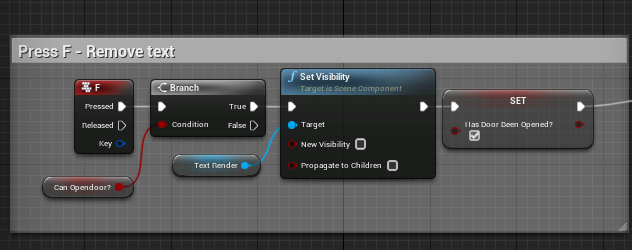
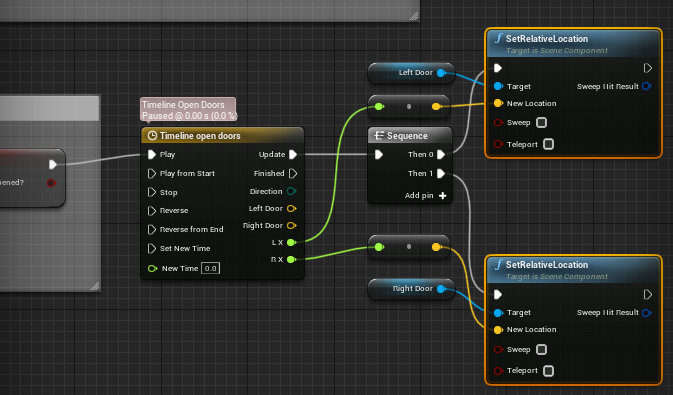 trim matrix
any smart vectorheads?
chrome eagle
No clue what that is ♥
trim matrix
been struggling with this problem all day
i have a free rolling physics object say a head, and I want it to spawn decal always when it hits a wall, floor etc. so far I can only correctly spawn decal on floor or floor+ either left or right wall
how can i align it so it will go always correct face where it hits
im spawning it from a bp
brazen merlin
trim matrix
i have a free rolling physics object say a head, and I want it to spawn decal al...
on the hit result, can't you get the normal?
trim matrix
yes tried that
not working
atleast if i do that some more maths to even have it just work on one wall and floor
brazen merlin
not working as in it doesn't spawn it? wrong rotation? what not work?
trim matrix
well normally you get normal decal when correct rotation
when it dont work it just shows this barcode like thing
like the rotation of decal placement is wrong
brazen merlin
right, it projects and smears the pixels
sounds like wrong rotation, are you getting forward vector or up vector?
 mystic mist
Hey all, looking for a blueprint node that resets the position of my ball when I click on a switch. Does anyone know what that would be called?
trim matrix
xD make a variable of your current ball location of the start.
then on left mouse click set actor location and and insert your variable there
brazen merlin
mystic mist
Hey all, looking for a blueprint node that resets the position of my ball when I...
it would be set position, but yeah, you need to set a variable on begin play
trim matrix
@brazen merlin im getting from event hit set location from hit location
rotation ive tried rotation from xv vector
tried negating also
brazen merlin
trim matrix
atleast if i do that some more maths to even have it just work on one wall and f...
if the get normal method doesn't work, what about getting the direction of travel the "head" has


 mystic mist
(ive got some other commands to run thus the sequence lolz)
trim matrix
get actor fro begin play
i recmmend
and save that as a variable
so you dont have to always get that when clicking
mystic mist
oh I see
brazen merlin
trim matrix
rotation ive tried rotation from xv vector
yeah sorry, id check into this more, but dont have the time tonight
trim matrix
thank you though :p
The scale on the player controller for pitch being a negative value is actually evil. Is there a reason by default it's set to this? Or is it that the person who designed it to be like this for so many years is one of "those".
u wot m8?
mystic mist
got it
ok one more question
so it returns to its target location, but its still moving from the previous action
how would I get it to stop completely?
brazen merlin
the ball is pathing right? using navmesh?
mystic mist
no, its physics.
mystic mist
no. I can set it though, nothing changes, so far as I can tell (if its true or false)
brazen merlin
should be a combination of those two, maybe sweep on and teleport off
chrome eagle
ok I copy/pasted code from 1 door to the next. Door 1 works exactly as expected and door 2 is not even registering that I'm hitting the key to open the door. (I checked and neitehr have "consume input" on the input event)
Any thoughts? x.x
brazen merlin
chrome eagle
ok I copy/pasted code from 1 door to the next. Door 1 works exactly as expected ...
sorry, didn't follow the first post, still don't follow now
chrome eagle
so I've been breaking connections backwords trying to find where the break in the bp is.. at the moment both doors show/hide the text ""F" to open".. The 2nd part of their BP I've shortened so now all pressing F does is remove the text.
both doors have (from what I can tell) the exact same nodes (I copy and pasted them, replaced variables) Door 1 works perfectly fine. The new door doesn’t
tight schooner
@chrome eagle can you show your current graph?
 flat raft
you have to tell the character which door is currently the focus
brazen merlin
chrome eagle
so I've been breaking connections backwords trying to find where the break in th...
really tough to say, you've got two doors, setup in a way i have no idea over, one plays but the other doesnt in a timeline i have no clue how it works
flat raft
i assume you have a box collision
chrome eagle
They have their own box collision. Nodes simply say that if player begins overlap the box then that door is capable of being opened.


The top code is just if player is overlapping collision box, show text "f" to open and make the door openable. and if player leaves collision box, hide text and door is not openable.
Bottom text has been remove from the rest of the nodes so all it does it remove the "f" to open text.
orginal door does exactly that. This door doesn’t seem to register that I'm pressing F at all, though the text is working so collsiion box is working
brazen merlin
alright so now where is the door open code again? and what is inside the timeline?
chrome eagle
I've disconnected the door open code, as well as the timeline to open said door.
At this moment all this door should do is hide the text.
flat raft

In this video we continue inside our interactive Light Blueprint, however we change our script so that when the player is near our light, they can press a button to toggle the light on or off. We also talk about some tips and tricks for clarity when working with Blueprints by using Comment Boxes around our node networks.
Unreal has a very simple tut on this. Follow that, as it might be more visual of an explanation
chrome eagle
I mean my code works... as I setup my first door just fine.
mystic mist
alright for anyone wondering if I got the ball to work, I did. There may be a simpler solution but this is what I did.
brazen merlin
chrome eagle
I mean my code works... as I setup my first door just fine.
the only thing different, i imagine, is the timeline since one is for left and other for right
chrome eagle
My guy, there is no time line I dunno what you're looking at o.o
brazen merlin
mystic mist
alright for anyone wondering if I got the ball to work, I did. There may be a si...
? did you disable physics?
mystic mist
 brazen merlin
chrome eagle
https://prnt.sc/1zv1xkt https://prnt.sc/1zv2549
I have like a vault door setup ...
brazen merlin
chrome eagle
https://prnt.sc/1zv1xkt https://prnt.sc/1zv2549
I have like a vault door setup ...
looking at this post by you of the timeline
chrome eagle
The orginal post? of the nodes I've stated a few times I've disconnected? x.x
brazen merlin
mystic mist
ah spawned a new one
brazen merlin
chrome eagle
The orginal post? of the nodes I've stated a few times I've disconnected? x.x
yeh, because now you say all you got is the text turning off and on
chrome eagle
Correct. That's all I want them to do right now.
brazen merlin
great, glad to help?
flat raft
@chrome eagle ok i'll do a test on my pc. basically, you have 2 collision and when you press F the text appears?
chrome eagle
no o.o am I not explaining this correctly?
The door has 1 collision box. When you overlpap the text appears and the door becomes openable.
When you leave overlap, the text goes away.
While overlaped a boolean variable says that it can be opened. (Can Open door? V)
on 2nd picture, that vairable is pluged into a branch along with the input F.
Pressing F marks the door as openable just so the text will not reappear
brazen merlin
i guess ive been confused, i thought you wanted the doors to open, has it been about this F text the whole time? That it's not appearing on the other door? no sarcasm intended, genuinely id like to help
chrome eagle
You're fine. The ORGINAL problem was yes my door wasn’t opening, but as no one responded to me I troubleshooted on my own and removed all the actual door opening mechanics and found the 2nd door stright up isnt registering when I press F.
The text appearing, and disappearing based on if you're inside the collision bxo or not is working perfectly.
I can steam it in a VC if it'd make it easier?
brazen merlin
i get it now
chrome eagle
yea ignore the first text as the nodes are all different lol
brazen merlin
well forgive the redundancy. the vault collision, that's on one of the doors?
so it's a bp and you have two of these doors?
or are the doors two components part of the same bp?
chrome eagle
There are 2 different BP.
brazen merlin
ok, so there's these two doors then, and overlapping one works but not the other
chrome eagle
ima send full BP in hopes to clear things up.