#blueprint
402296 messages · Page 762 of 403
 brazen merlin
 chrome eagle
 brazen merlin
ah yes, much clearer
chrome eagle
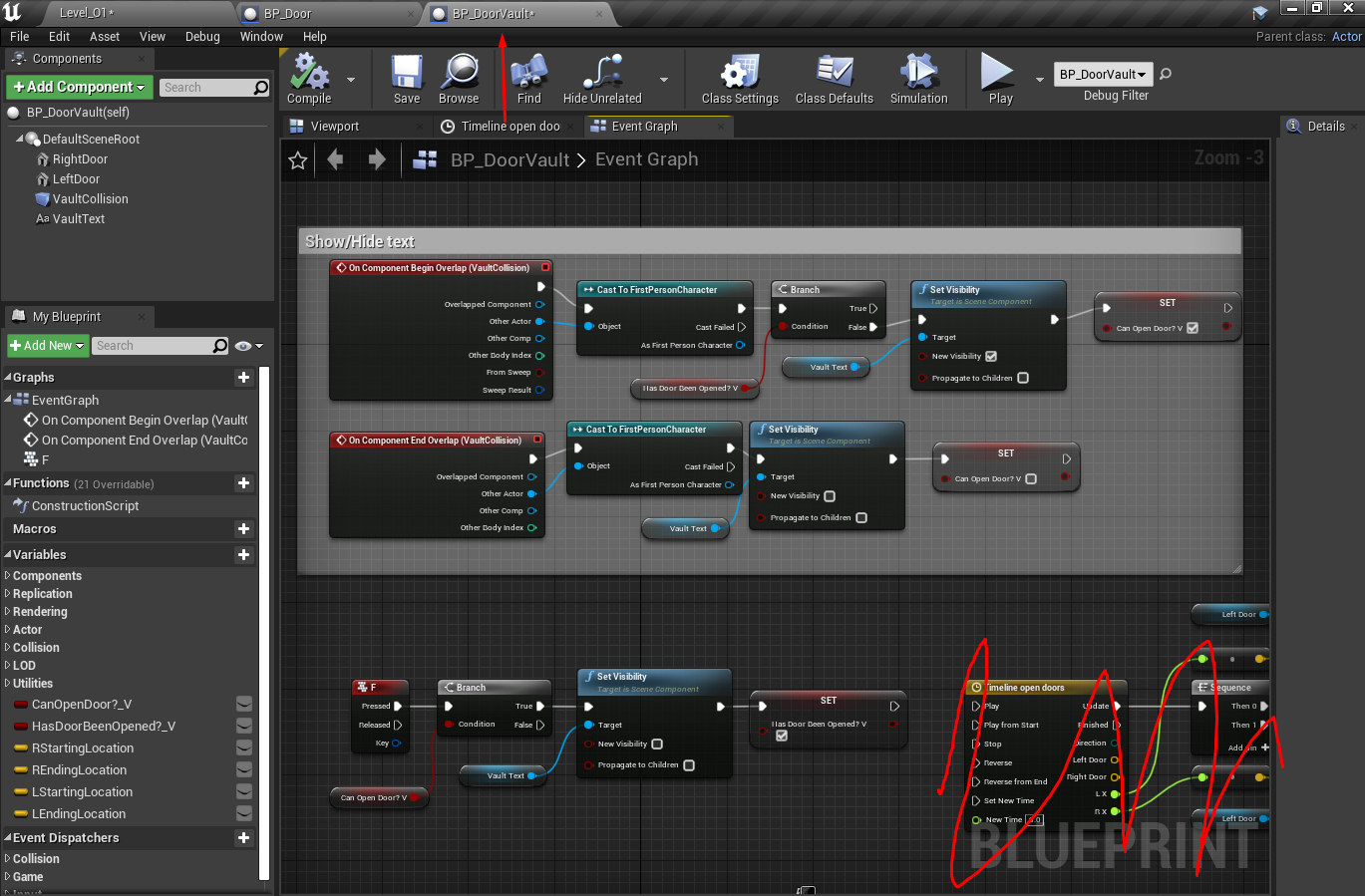
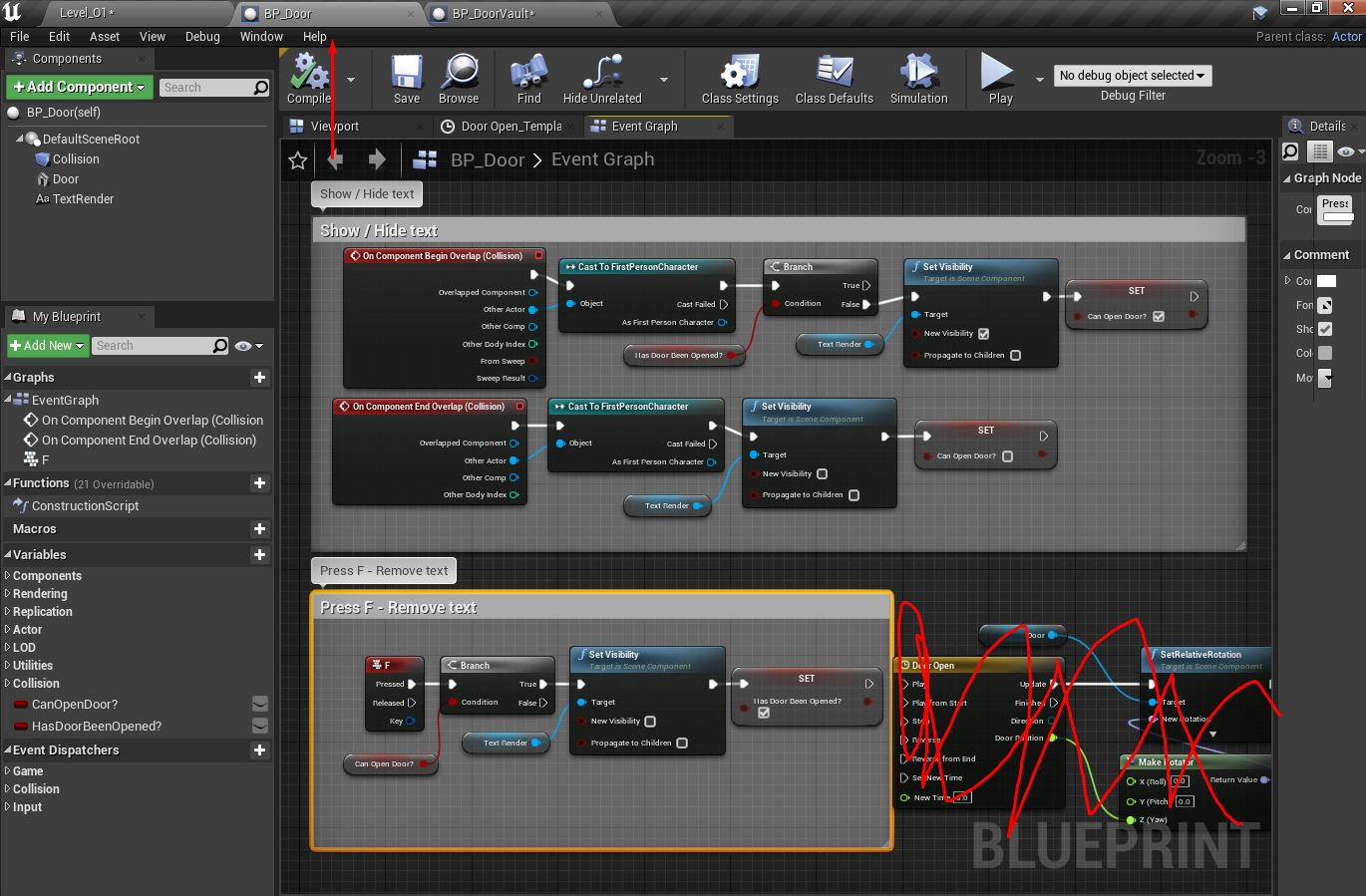
The left door (BP_DOOR) Is the orginal and is working fine. I've copied most the code over to BP_doorvault. Ignoring the actual door opening animations, when I hit F on BP door the text goes away (as it should). When I hit F on the vault is does nothing
At this point I belive I've completely re-built the code for the vault door in fear of me missing something lol
brazen merlin
does the text go away on door vault when you exit the collider?
chrome eagle
Yes
brazen merlin
just not on press?
chrome eagle
Correct
I actually at ont points set the vault door code to ( F node) > (Play 2D sound) and the sound doesn’t work either, so something is stopping vault door from accepting the F input
brazen merlin
chrome eagle
I actually at ont points set the vault door code to ( F node) > (Play 2D sound) ...
well you got me stumped, before i didn't understand the problem, but now im just as confused
chrome eagle
Me to! 😄
brazen merlin
normally, i would handle input events with the player, so on a whim, what if you delete the F input for BP Door
chrome eagle
No change (well besides the text on BP_door doesn’t go away, obviously lol
brazen merlin
expected and gotcha
a restart of the engine could fix something, though im not holding my breathe
brazen merlin
did you happen to copy the F input node into the new bp?
brazen merlin
and both F inputs are the same, the checkboxes?
chrome eagle
Correct, No consume input no modifiers
brazen merlin
and there wasn't any kind of class default you set on BP Door>
chrome eagle
there is something in there! hold plz
yessssss I didn’t set the input "auto receive input" to player 0 it was still disabled
I love you so much
brazen merlin
chrome eagle
I love you so much
pleasure is mine, i can sleep tonight
 modern musk
For functions with "For Loops", does a function that's connected after the function with the "For Loop" wait for a return node or the preceding function to finish, or does it fire immediately?
brazen merlin
modern musk
For functions with "For Loops", does a function that's connected after the funct...
you're calling a for loop in a function, and then in the graph, the function is called followed by another node?
 flat raft
@chrome eagle
 chrome eagle
It's all fixed Thor - A box wasn’t checked
flat raft
 brazen merlin
chrome eagle
It's all fixed Thor - A box wasn’t checked
brazen merlin
chrome eagle
It's all fixed Thor - A box wasn’t checked
its always a checkbox....
flat raft
LOL
modern musk
brazen merlin
you're calling a for loop in a function, and then in the graph, the function is ...
Basically, Function A has a "For Loop" and Function B is connected to Function A's execute pin. I'm just wondering if Function B will wait for Function A's "For Loop" to finish prior to being called?
brazen merlin
brazen merlin
its always a checkbox....
im adding that to my profile after this traumatic endeavor
brazen merlin
modern musk
Basically, Function A has a "For Loop" and Function B is connected to Function A...
yeah, the loop within function A will run, upon the loop Complete, it will fire out to the next node (out of the exec pin)
 gentle urchin
chrome eagle
It's all fixed Thor - A box wasn’t checked
gentle urchin
chrome eagle
It's all fixed Thor - A box wasn’t checked
Shouldn't you enable input on the actor ?
modern musk
brazen merlin
yeah, the loop within function A will run, upon the loop Complete, it will fire ...
Awesome, thanks for the help!!
gentle urchin
Instead of the 'fix'you've got now :p
chrome eagle
gentle urchin
Shouldn't you enable input on the actor ?
I followed a skill share class so a lot of the code isn't elegant it was ussually "look what else we could do"
This is the first I've used UEE
brazen merlin
gentle urchin
Shouldn't you enable input on the actor ?
what would be more appropriate is to have the player character or player controller call the input, but that is a bit tough as the bp's need to communicate with one another
gentle urchin
Well, enabling input solves it all really,
Enable and disable on leave
You can decide if you want it to override functionaloty or not like any override function
chrome eagle
Well I'm terrified to mess with it so ima leave it the way it is xD
gentle urchin
^^
brazen merlin
gentle urchin
Enable and disable on leave
you make a good point, i didnt consider that, but i can see the usefulness
gentle urchin
Current method wouldnt work well with several doors i think
brazen merlin
but if the input were on the player..... then overlapping both doors would work, yes?
flat raft
@chrome eagle the best way is to use a interface, and not have input enabled on the objects
it's best to have all your inputs in the character or controller class.
usually character
brazen merlin
chrome eagle
Well I'm terrified to mess with it so ima leave it the way it is xD
in time helpcooldo, you're getting the hang of things
chrome eagle
Makes sense. Otherwise every object I have that’s interfaceable would need to be enabled, yes?
flat raft
you don't want to mange inputs on the objects. it can get out of hand and you can loose trace of who has consume input on
brazen merlin
chrome eagle
Makes sense. Otherwise every object I have that’s interfaceable would need to be...
that's the beauty of bp interfaces, they simply shoot the message out there, and if there are recievers, they will recieve
gentle urchin
Im not convinced. While i agree with the actor triggering the input events, i dont really see any reason why yoi cant enable it temporarily on other actors. Isnt this also whats done in the new input design? With the input object stuff?
 cursive apex
Hey there. I know how to make a torch that lights up by pressing a button... Well a lamp. But how do I make an actual torch that lights up fire when I cast a spell towards it
flat raft
this way also, you can map "F" or "E" to any amount of objects, and they will do their own things. E on a flashlight will turn it on , E on a door will open it, E on a item will pick it up
gentle urchin
That would work with enable input aswell :p
brazen merlin
cursive apex
Hey there. I know how to make a torch that lights up by pressing a button... Wel...
the spell shot would trigger it
flat raft
gentle urchin
That would work with enable input aswell :p
using Enable input, mean you have to mange it.
cursive apex
brazen merlin
the spell shot would trigger it
You mean pressing the spell key would trigger it?
gentle urchin
flat raft
using Enable input, mean you have to mange it.
You have to manage the interface aswell.
brazen merlin
gentle urchin
That would work with enable input aswell :p
i would say that keeping one place with the inputs desired is less of a mess, especially if input keys change. Inputs from other actors is possible because you are right, in some cases this is less complicated.
gentle urchin
gentle urchin
You have to manage the interface aswell.
Implementation in every actor
Changing input keys would be part of the input settings. Nobody likes hardcoded inputs like that :p
brazen merlin
cursive apex
You mean pressing the spell key would trigger it?
if you shot a spell, ie a projectile, it would need to hit or overlap the collider of the torch, thus triggering it
brazen merlin
gentle urchin
Changing input keys would be part of the input settings. Nobody likes hardcoded ...
If i change the name of my input from "attack" to "smash" the node would not update
gentle urchin
If thats a big concern or issue, you're doing it to often ^^
Theres also global search option. But yes, it could mean updating every actors input event. Troublesome for sure
brazen merlin
gentle urchin
If thats a big concern or issue, you're doing it to often ^^
if the player can possess different actors, or better put, if its a strategy game where certain actors have their own inputs, it's easier to detect which actor than to allow the input
by having the inputs within the player controller, the input is always registered
flat raft
the biggest issue is you'll have to mange ConsumeInput.
gentle urchin
With the interface you're not given the option of consuming tho
flat raft
right
brazen merlin
gentle urchin
With the pros and cons that may have
once again, i see the reasons to have them on actors rather than on player, obviously its possible
flat raft
if you have 5 doors, which door is in focus ? It can quickly get out of hand, and annoying. If for some reason your consume input bugs out, then you can never open a door
gentle urchin
brazen merlin
once again, i see the reasons to have them on actors rather than on player, obvi...
For sure its not universal for any use cade
flat raft
the game DarkSiders had that issue
gentle urchin
flat raft
if you have 5 doors, which door is in focus ? It can quickly get out of hand, an...
Hopefully you dont stack 5 doors 😬
brazen merlin
gentle urchin
Hopefully you dont stack 5 doors 😬
well on that point, ive run into the issue of having multiple pickups in a tight area, where the player overlaps multiples
gentle urchin
But if you do.... rip all 5 doors would be in focus, but only one recieve the input(unless not consume which opens all 5)
gentle urchin
brazen merlin
well on that point, ive run into the issue of having multiple pickups in a tight...
For that use it definetly doesnt work very well
brazen merlin
honestly, im not sure which would, though my input is on the player, i have to sort all that have overlapped to determine which to allow input on
brazen merlin
 timber knoll
Why would you have input on a door or interactable...
timber knoll
Why would you have input on a door or interactable...
because you're learning the engine and trying to understand concepts
gentle urchin
In such scenario i register the items to the player and use math with direction and distance to decide which one to focus
brazen merlin
gentle urchin
In such scenario i register the items to the player and use math with direction...
i actually just did the most recently overlapped, then once it gets picked up, refresh and repeat
brazen merlin
flat raft
i put inputs on objects if they are puzzles
i put inputs in my inputs
flat raft
ok, i'm outta here. Night all!
brazen merlin
gentle urchin
I forward my pc tick to the actor 😂
now we're talking
gentle urchin
Did a design booger, which haunts me still
brazen merlin
flat raft
ok, i'm outta here. Night all!
gn
gentle urchin
Gn!
 wise swan
Hey guys, how can I initialize a profile menu where we can change our pfp from a list of avatars?
currently I'm just manually adding all the buttons inside a scroll box and all the buttons are set to preview the avatar and then when the player click apply, the changed data gets sent to server. how can I implement this dynamically?
 maiden wadi
wise swan
Hey guys, how can I initialize a profile menu where we can change our pfp from a...
maiden wadi
wise swan
Hey guys, how can I initialize a profile menu where we can change our pfp from a...
Make another userwidget with the button. Probably just needs an index integer. Make an onclicked delegate in the widget, call that when the button is clicked. Pass this integer in and set it when you create the button. Make an array of avatars. Iterate over the array, for each one, add a button to whatever list you want and bind the delegate from the button to an event. When the delegate runs, used the returned integer to look up in the same array you used to create the buttons for the avatar data you need to send to server.
gentle urchin
I just exposed the related data to the button directly (buildclass in my case) but same principle. Benefit was buttons can adapt to the class with icons and hover data etc
 mystic mist
hmm... something strange is afoot. I have two blueprints, they are identical minus the actors being called in question
One works fine, the other only part way
this one works

but this one does not

I feel like im missing something? but I dont know what
 hollow cape
define "doesn't work"
hollow cape
what is failing, have you verified the OnClick is actually firing? What/where is spawn transform set?
mystic mist
So the First one - the ball is destroyed, and then respawned to its original location.
The second one - the balls are destroyed, still one BP - and then they dont respawn.
but they should.
hmm
I have not, I will see if the string works
ok! according to the strings, The first part of the code is being called second.

Where Hello should be first, Goodbye is coming in and then Hello
ok so I flipped the sequence, the strings are correct, but the spawn still doesnt work.
found them
they are falling down
which means they are spawning, just not where I want them to
 rough cedar
Anyone have any ideas why duplicating a character bp would stop me from being able to use an anim montage in that bp? everything is exactly the same but anim notifies arent working. i even tried just this super simple line of code and nothing happens.

all other animations work fine but anything that uses the animgraph doesnt seem to be working
i feel like its something with the slots here

 wet wren
hey there so i uh made this thing which spawns a ball 200 times but the loop only plays once
 gentle urchin
You got delay in the loop
wet wren
gentle urchin
You got delay in the loop
yeah bc i dont want them to spawn all at once when i remove the delay it works but how can i add the delay?
 wet wren
i see
gentle urchin
You need a custom forloop which supports custom trigger of the next element
You can make a macro for this
rough cedar
nvm figured it out!
 tranquil hemlock
Hey there, I'm completely new to BP. Been looking at several intro tuts and decided to implement a simple camera perspective swap upon holding down SpaceBar. It works fine except I have two problems.
-
I only need to press space bar once not HOLD it to activate. How do I make it so that the camera stays on first person only while I'm holding space bar?
-
Pressing space bar doesn't work the first time, only from the second time onwards. What's causing that?

 earnest tangle
How are your inputs set up? As in, what is the difference between inputaxis and inputaction Toggle Perspective?
tranquil hemlock
Got both mapped to Space Bar

I was made to believe I need to use both to set up a feature that can get called at any time
gentle urchin
Pressed -> set bool pressed -> delay -> branch (pressed as input) true -> do transition
Released -> set pressed false
You dont need both :p
tranquil hemlock
so no need for the axis one right? just the action mapping
gentle urchin
Correct
tranquil hemlock
would you be okay with explaining why delay is used in this instance?
sry still new and learning
gentle urchin
Delay is for delaying the transition untill timeheld (delaytime) is passed and the button is still pressed (so the bool is still true)
Could do this a million ways. This would not work directly with something like a progressbar but thats another matter :p
tranquil hemlock
thankfully I don't need to set up a widget or anything like that for it just need to have it held down to work
gentle urchin
Not sure if my explanation was worth its salt ^^
tranquil hemlock
gonna give it a go now and see if that works
tranquil hemlock
so I tried that other method and it still only works with a single button press, no need for it to be held down unfortunately. I don't know if I did it right tho
 gentle urchin
You did, altho dont drag from the set node
Grab a fresh get node
Set delay to 1 sec
So it must be held 1 sec
tranquil hemlock
I just used a get node for "IsHeld?" and set the delay to 1, still doesn't work on hold for some reason
gentle urchin
Also you can use the is A to toggle them on and off instead of 2 sets of ndoes^^ dont matter much tho
tranquil hemlock
also has the bug of not working the first time it's pressed, don't know what's causing that
 tight pumice
hello anyone maybe know when exatcly OnPostLoadMap is triggered ?
 worldly pasture
Hey guys, is there a way to use console commands in the shipping build?
I'm currently using 4.27.1
Also, none of my render targets seem to work when packaged. It's just blank, but works fine in editor and standalone.
Any help would be appreciated :)
tranquil hemlock
Squize that second tip about the a and b fixed the second issue with the first tap not working
still don't need to hold spacebar down though
gentle urchin
Screenshot again
tranquil hemlock
let me know if i messed up
 tranquil hemlock
hmm the only thing I can think of is the input for jump set by the default third person project
I've deleted both the input in the settings now and the nodes for the jump event
gentle urchin
You could also try some other input just for testingn
Like hardcoded '1' or something
tranquil hemlock
so a different key press?
 obtuse herald
Why make it harder, connect pressed to set active at the top and released to the set active at the bottom
gentle urchin
Its ment to be held for 1 sec ^
Baffels me that it works by just tapping it
Doesnt make sense
tranquil hemlock
ideally should be instantaneous, wouldn't want a delay transition. as soon as the player holds space FPP cam activates but if they let go they're kicked back to third person
gentle urchin
If so toyb is correct, just connect directly
obtuse herald
Released -> close gate
obtuse herald
Yeah
gentle urchin
Gate would also need sequence i guess
But if the idea is for it to swap while being held, then what you said earlier is correct
Connect activate tp cam on spacebar pressed
And visa versa on released
obtuse herald
It's just, the flipflop does things unnecessary harder
gentle urchin
Very true
tranquil hemlock
omg yay
that worked!

I wonder if I did it a lil messily, I'm still new and not sure if the gate needs an entry to be activated. that's why I put a sequence before it that plugs the delay into both entry and open
but for all intents and purposes it now works just by holding it down 🙂 thanks a bunch to both Squize and ToyB
gentle urchin
Hehe still not correctly setup but oh well 😅
Pressed -> sequence -> delay
-> open gate
Released -> Sequence -> close gate
-> reset cam
With your setup, single tap should also work
tranquil hemlock
should be cleaner now, works fine and dandy. don't wanna have it be messy

makes much more sense this way, cheers for the help again!
gentle urchin
Perfecto
 faint pasture
gentle urchin
Its ment to be held for 1 sec ^
faint pasture
gentle urchin
Its ment to be held for 1 sec ^
Cache time on press, check duration on release. If over 1 second, do thing.
There's a million ways to do the timing but the basic idea is to check duration on key release.
gentle urchin
Yeah its what we set up aswell, but for some reason it didnt work
 vernal tendon
Hi. I'm facing a wired issue in UE 4.27 while developing for mobile. Motion Inputs like Gravity are not working, just returning 0,0,0. The Same thing is working in UE5 EA.
Can anyone please help me ?
faint pasture
gentle urchin
Yeah its what we set up aswell, but for some reason it didnt work
Show what you have.
 icy dragon
vernal tendon
Hi. I'm facing a wired issue in UE 4.27 while developing for mobile. Motion Inpu...
icy dragon
vernal tendon
Hi. I'm facing a wired issue in UE 4.27 while developing for mobile. Motion Inpu...
 gentle urchin
faint pasture
Show what you have.
gentle urchin
faint pasture
Show what you have.
Its not my code or issue, i just suggested the same solution as you did ^^ it got resolved aswell. Ty tho
 heady marlin
Hello all, i want to create a sort of infodisplay when u, with mouse, hovered the component of the actor.
I implemented it with widget interation on camera, and widget component attached to the component of the actor. The widget got a button wich implement the hovered function, and it works.
There's some other suggestion on how to develop it?
 ripe lotus
Does anyone know how to add in-game key bindings, so that the player can change the key bindings themselves? I am struggling to find helpful information regarding this.
faint pasture
ripe lotus
Does anyone know how to add in-game key bindings, so that the player can change ...
It's not super simple right now I don't think but there's the Enhanced Input Plugin.
Otherwise I think you need C++ unless there is an input node that can pass over the key. In that case just use a map to map keys to events
ripe lotus
faint pasture
Otherwise I think you need C++ unless there is an input node that can pass over ...
That's what I was afraid of...thanks for the info.
faint pasture
ripe lotus
That's what I was afraid of...thanks for the info.
Dig around and see if you can find a node that returns the key you're pressing. It'll be doable in BP if you have that.
gentle urchin
In one setup we used any key event mapped to enum , felt a tad hacky but worked okay, atleasy for keyboard only
 devout crow
Guys,how can I slow down my character and disable sprinting when he moving left and right with BluePrint?
gentle urchin
ripe lotus
Does anyone know how to add in-game key bindings, so that the player can change ...
Something like this?
 ripe lotus
gentle urchin
Something like this?
ripe lotus
gentle urchin
Something like this?
Yes, exactly that.
gentle urchin
ripe lotus
Yes, exactly that.
Requires some adjustment if you want it to work with analog events aswell

 odd ember
gentle urchin
Requires some adjustment if you want it to work with analog events aswell
odd ember
gentle urchin
Requires some adjustment if you want it to work with analog events aswell
I don't want to pry but what did you need the AnyKey mapped for?
gentle urchin
No worries, pry away
It's from an older tutorial, pre enhanced input
was a pretty dirty way of mapping inputs to anything you wanted. Based on anykey event + map with enums
in the PC

which after some checks went to a dispatcher

which in turned ended in this massive enum switch

Elegant? Not very. Does it work? Yes
 quasi frost
So I am trying to set up a replicated HP bar. Health itself is working (As you can see from the number) but the progress bar is not moving. Super confused about why this isn't working as I am setting the progress par percentage on the same tick (will change off of tick later) as the text. It only updates when it hits 0


(Value based off of 100 health)
gentle urchin
RepNotify ^
quasi frost
Yes I am using repnotify
odd ember
server has to propagate the info to all clients in this case
quasi frost
I am using the same variable for the text and the progress bar and the text is working though
odd ember
gentle urchin
was this due to BP limitations?
gentle urchin
odd ember
was this due to BP limitations?
Yes, correct
odd ember
quasi frost
I am using the same variable for the text and the progress bar and the text is w...
sounds like a fluke to be honest. I would never do anything like this on tick either. delegates much more elegantly encapsulate these sort of actions and make it easier for server <> client communication
but tbh it may be better to talk about it in #multiplayer
quasi frost
Yeah I had it on tick for debugging. I figured out the issue lol, I forgot to divide by 100 for the progress bar percentage.
 rose elbow
how do you adjust how much a float curve goes up by in the X Axis?
 open crypt
When I spawn an actor of a certain type, I also spawn an item and attach it to a socket on the skeletal mesh actor- later I end up deleting that actor but the item I'm attached is just left floating in air - do I have to create a static mesh variable that's empty on the actor and then populate it when I spawn that item with the item?
faint pasture
gentle urchin
in the PC
Ya this was exactly what I was talking about. Can also use a map to do that. It'll be jank but it'll work until you get a better implementation.
faint pasture
rose elbow
how do you adjust how much a float curve goes up by in the X Axis?
Just set keys where you need them.
rose elbow
faint pasture
Just set keys where you need them.
I have but what I mean is the x axis value I need it to go up by lets say 0.5 but its going up by 300, this is how it looks:

this is how it should look

all points have the same value in both
the documentation is also outdated af
ok i've sorted it Unreal is just poo


 gentle urchin
ah
rose elbow
when it does it properly for the y axis lmao
earnest tangle
Yeah the curve editors seem a bit messy sometimes :P
feels like there's several different ones which all work a bit differently too
which is annoying
rose elbow
maybe if they updated the documentation
its not an issue if you're dealing with small values because it does it automatically
mystic mist
How would I play a spline animation and then reverse it so it loops indefinitely?
faint pasture
@rose elbow that's your tangents.
rose elbow
faint pasture
<@321662188995608586> that's your tangents.
it's just that it doesn't update in real time
if you set your points then close and open it its fine but its still inconvenient
because thats assuming you already know what values you want
faint pasture
rose elbow
I have but what I mean is the x axis value I need it to go up by lets say 0.5 bu...
Oh in your case that's just the view. Zoom to fit
Looks like it defaults to a square view while you want 0-1 on the x and 0-500 on the y or something like that. Just zoom to view all keys.
rose elbow
faint pasture
Oh in your case that's just the view. Zoom to fit
I tried that it did nothing
you just need to close and open it again
 wintry olive
Hiho,
Sorry for interrupting but I am new to unreal and a bit stuck.^^ Is there a way to copy a procedural Mesh I generated via Blueprints?
Because I have a function that puts a procedural Mesh on a position in the world. But I only see it always at the last position I give him with the loop of the call.
Thanks in advance
 faint pasture
wintry olive
Hiho,
Sorry for interrupting but I am new to unreal and a bit stuck.^^ Is there...
faint pasture
wintry olive
Hiho,
Sorry for interrupting but I am new to unreal and a bit stuck.^^ Is there...
I'm assuming you want many meshes, all the same?
icy dragon
wintry olive
Hiho,
Sorry for interrupting but I am new to unreal and a bit stuck.^^ Is there...
Never worked with procedural mesh, but I assume you could make a new component?
wintry olive
faint pasture
I'm assuming you want many meshes, all the same?
yep
faint pasture
You may be able to do a copy in c++ but I'm pretty sure you'll just have to make the mesh many times. What is this?
wintry olive
icy dragon
Never worked with procedural mesh, but I assume you could make a new component?
Well the Idea is that I have a Grid in my Gameworld and show those Meshes as Kind of Unit Range like this...
 wintry olive
icy dragon
Never worked with procedural mesh, but I assume you could make a new component?
wintry olive
icy dragon
Never worked with procedural mesh, but I assume you could make a new component?
I could try that ^^
Oh sry wrong answered^^
faint pasture
Why procedural?
wintry olive
faint pasture
You may be able to do a copy in c++ but I'm pretty sure you'll just have to make...
And normaly the X marked fields should be also this red Mesh^^
 wintry olive
faint pasture
Why procedural?
wintry olive
faint pasture
Why procedural?
idk saw it in a Tutorial 😄 thought this is the way to do. Still learning ^^
gentle urchin
Sounds like ISM would do the job nicely
faint pasture
Yeah ISM
wintry olive
ISM?
wintry olive
So I will create a Mesh (But not in Blueprints) and use this and it should work right?
faint pasture
Show an example of the exact effect you're going for.
wintry olive
Well the EXACT thing should be, I click a Unit and as soon as I clicked it, the Variable MoveRange is read and then, I will see how many red Tiles appear in front of it.
For this test scenario, I gave the Grid locations 0,0 1,1 2,2 and 3,3 to test if they appear^^
faint pasture
If it's just a grid on the ground I would do it in the landscape material. If the grid is meant to go on EVERYTHING do it in the post process.
wintry olive
and only on 3,3 I can see it
faint pasture
wintry olive
Well the EXACT thing should be, I click a Unit and as soon as I clicked it, the ...
For that I'd use decals maybe? Or static meshes can work if you want them to be in 3d. You'll want ISM if you're gonna have TONS of meshes.
gentle urchin
world aligned decal would work
wintry olive
hmm I guess in most Cases I just want to show about maximum 20 of those filled grids
gentle urchin
but i think doing ism's is easier 😛 thats just me not enjoying materials alot
wintry olive
Okay I will try that with ISM. Thank you 🙂
faint pasture
wintry olive
Okay I will try that with ISM. Thank you 🙂
Start with plain static meshes then switch over to ISM once you got it working. Just spawn mesh actor at position and keep track of it.
I'd do all this in the PlayerController probably.
Get SelectedUnit, read Movedistance, spawn meshes at every gridlocation within Movedistance of SelectedUnit.Location```So do I have to make a own Actor Class for this Mesh? Or how else I am going to spawn it?
Sorry for asking that dump^^
 lucid lynx
I've got a third person camera on a spring arm. I'm teleporting the character from one location to another, also changing the actor rotation. I want to reorient the camera behind the player. Changing the spring arm's rotation doesn't seem to do anything. How do I rotate the camera towards a new direction?
faint pasture
wintry olive
So do I have to make a own Actor Class for this Mesh? Or how else I am going to ...
Might not be a bad idea. Then you can wrap up the color/etc behavior and expose it on spawn.
So you just spawn actor MoveVisualizer and pass in the color or even an enum. Depends on your end goals really. Can also just have the PlayerController handle it all.
icy dragon
lucid lynx
I've got a third person camera on a spring arm. I'm teleporting the character fr...
Try setting the control rotation.
 trim matrix
Hello 🙂 Why if i in packaged game set shadow quality to 0 then turning off volumetric fog ? I need separate turning off in game. How can i do that ?
icy dragon
trim matrix
Hello 🙂 Why if i in packaged game set shadow quality to 0 then turning off volu...
Volumetric fog needs the shadow information.
Disabling the shadows of course disabling the volumetric clouds as well.
faint pasture
lucid lynx
I've got a third person camera on a spring arm. I'm teleporting the character fr...
Depends on how you're usually setting rotation but if actor and spring arm are driven by ControlRotation just set that like hoodie said.
lucid lynx
icy dragon
Try setting the control rotation.
That did the trick. Thanks!
trim matrix
icy dragon
Volumetric fog needs the shadow information.
So is impossible separate turning off volumetric fog ?
icy dragon
trim matrix
So is impossible separate turning off volumetric fog ?
Literally impossible. Again, volumetric fog needs shadow information.
https://www.youtube.com/watch?v=Xd7-rTzfmCo
This session by Epic's Sjoerd De Jong covers the latest improvements to Unreal Engine's Volumetric Fog and lighting features.
Within a beautiful nature scene you will learn how to set up these effects, and how you can achieve spectacular results by authoring Volumetric Fog through the Material Editor.
Learn more at http://www.unrealengine.com...
If you don't want shadows but want the fog, might as well use the older height fog method instead, or a simple depth fog post process.
 tight schooner
ripe lotus
Does anyone know how to add in-game key bindings, so that the player can change ...
tight schooner
ripe lotus
Does anyone know how to add in-game key bindings, so that the player can change ...
I'm looking over what I have in my current project. Add a widget called Input Key Selector, which provides an event named On Key Selected. Then there are various useful nodes you can use like Get Input Settings, Get Axis/Action Names, Remove Axis/Action Mapping, Add Axis/Action Mapping, Save Key Mappings
trim matrix
icy dragon
If you don't want shadows but want the fog, might as well use the older height f...
If i set shadow quality to 0 then i see height fog but i set height fog on black color so is invisible. I thinking I'll leave it at that.
either there will be volumetric fog or none at all
wintry olive
faint pasture
Depends on how you're usually setting rotation but if actor and spring arm are d...
HAHA!!! Got it Thank you guys soooooooo much Thousand kisses 😄 😗
wintry olive
gentle urchin
but i think doing ism's is easier 😛 thats just me not enjoying materials alot
❤️
trim matrix
And what about AA method ? how can i set in game different AA Method ?
icy dragon
trim matrix
And what about AA method ? how can i set in game different AA Method ?
Unreal Engine only has either Temporal AA (best for deferred rendering) or FXAA (bad results). There is MSAA, but I think it's just on forward rendering, so I'll ignore that.
Though not sure if r.DefaultFeature.AntiAliasing # still works in 4.27 or not. Oh well, gotta test it later.
 fading jetty
Hey ! How to I create an instance of an object during runtime which is now Actor ? The object that needs to be instanced is imported at runtime.
wintry olive
fading jetty
Hey ! How to I create an instance of an object during runtime which is now Actor...
Don´t know if that helps but i did something like that.

 nova pagoda
Hey guys, is there any way to use the GetClosestPointOnCollision node with Complex Collisions. "use complex as simple" doesn't work so I was wondering if there's a workaround?
faint pasture
nova pagoda
Hey guys, is there any way to use the GetClosestPointOnCollision node with Compl...
If searching doesn't bring up anything I'd say it's not built in. Complex collision makes things much more complicated.
nova pagoda
I am aware. I was just wondering if there's a way of converting the complex collision to simple collision so the engine is forced to use it
 glacial eagle
There's not
nova pagoda
thanks anyway
glacial eagle
barely works properly with simple collision tbh I've found
 brittle plinth
Hello, I have a DOOR BP which has a small jitter and a sound effect when I interact with it and I want to be able to let the whole thing finish until I can interact with it again, meaning that the sound and animation won't be played if press the interact key too fast
nova pagoda
i've found that tracing a line against complex kinda works
faint pasture
nova pagoda
i've found that tracing a line against complex kinda works
That will work just fine. Finding closest point on collision is much tougher. The algorithm probably leverages the collider being convex.
brittle plinth
 faint pasture
@brittle plinth the key is Finished
Have a book that you set false right before the timeline and set true after finished
Only allow entry to the interaction if it's true.
 pale flame
Hey guys. Would anyone be kind enough to answer a few newbie questions for me?
 pale flame
lol
I'm just looking to be pointed in the right direction. I want to dabble in making a turn based rpg battle system in similar style of like dragon quest or final fantasy. However I can't find any tutorials on the matter and it's a bit overwhelming. So could you folks point me in the right direction to a some things I could study to begin to figure these systems out?
icy dragon
pale flame
I'm just looking to be pointed in the right direction. I want to dabble in makin...
If you fancy doing some reverse engineering work, I think jRPG Template on Marketplace might be a good start (not sure if it's permanently free or was a limited time free, but I did get it for free a long while ago)
odd ember
basically turn based systems boil down to stack resolution
which, depending on your experience, might sound difficult and complex
but is really easy
 gusty shuttle
Hey, did you guys ever run into the issue where when you are using a controller, it grabs focus from something random in the widget?
icy dragon
(ended up not using it because my project is action RPG, not turn based)
gusty shuttle
Like I can move down easy, just not up
pale flame
I actually have the JRPG template however I'm still too uneducated to understand reverse engineering it.
I'll go study stack resolution
icy dragon
gusty shuttle
Hey, did you guys ever run into the issue where when you are using a controller,...
Probably issue with widget's focusing, which I know is unreliable as duck.
odd ember
well stack resolution is just that you have a stack data structure, and you keep putting actions on it
and the last thing resolves first
gusty shuttle
icy dragon
Probably issue with widget's focusing, which I know is unreliable as duck.
Aye, everything except buttons are set to non-hit testable, so it's somehow grabbing focus from something hha
faint pasture
@pale flame Just try to keep things procedural and have a central place (GameMode probably?) That is calling the shots as to who's turn it is, what the phase of the turn is, etc.
If you make the system robust and have a nice interface between it and controllers, then making AI is more like making a bot to automate what a player does.
 spark steppe
Adriel, remember that rotator issue from yesterday? inverting yaw doesn't help 😭
faint pasture
spark steppe
Adriel, remember that rotator issue from yesterday? inverting yaw doesn't help �...
You're trying to go from x front y right z up to x front y left z up?
spark steppe
yea
my input is the first, and unreal is the later
maybe i should check how they do it with motion controller like vive, etc.
faint pasture
There can also be variances in the angle bases and ranges
spark steppe
or i should squeeze my brain 😄
gusty shuttle
icy dragon
Probably issue with widget's focusing, which I know is unreliable as duck.
The widget reflector is not pulling up anything. I have no clue what's sapping my dang focus
faint pasture
Like does your input go 0-360 or -180-180 for yaw for example
@spark steppe you really need to map out exactly where your input starts it's angles from, the directions they go, etc.
pale flame
I appreciate the help guys but I think a lot of this advice is still a bit advanced for me. Could you guys recommend some basic things for me to study?
spark steppe
-180 to 180
faint pasture
pale flame
I appreciate the help guys but I think a lot of this advice is still a bit advan...
Don't study, do. Just start with being able to mark who's turn it is and have them take an action (print hello world).
@spark steppe Show an example with 45,45,45 rotation
icy dragon
faint pasture
Don't study, do. Just start with being able to mark who's turn it is and have th...
I don't think that's going to matter much in turn based, menu based JRPG.
I think what matter more is getting the queueing and decision making to work.
Sorry, I mean the rotation one
pale flame
I don't even know how to make turns. Thus I think I need to study.
I was just hoping someone knew of some documentation that could teach this kind of thing.
faint pasture
pale flame
I don't even know how to make turns. Thus I think I need to study.
Do you know what a pawn, actor, controller, GameMode, GameState, component, event, dispatcher, etc are?
icy dragon
pale flame
I was just hoping someone knew of some documentation that could teach this kind ...
Yeah, there's going to be no step by step "docs".
Turn based JRPG comes in a crap ton of flavours.
But at least know the basics of blueprinting and making gameplay code.
pale flame
Yeah, @faint pasture I've followed some basic tutorials
icy dragon
And that's ignoring all the other typical RPG system.
pale flame
blueprints is what I've been studying
I'm not looking for a guide that's like "here's how to make this exact kind of battle system". I'm just looking for the foundation to these kinds of things.
faint pasture
pale flame
I'm not looking for a guide that's like "here's how to make this exact kind of b...
There's a bunch of turn based tutorials, just find one that seems to know what they're doing and you'll be in business.
The good news is that turn based is easy af for networking if that's a thing you're looking towards
You could play civilization by email
Also read this
https://gameprogrammingpatterns.com/command.html
pale flame
Thanks I'll give it a read
gusty shuttle
Quick question, which ref is a widget bp self ref as? Seems like it's not a widget blueprint ref. So what kind is it?


 sharp rapids
It's an Object Reference
gusty shuttle
Aye, but what kind
gusty shuttle
Okay, so the scenario is that I want the options widget to know what widget it was created from
So Im in my main menu, creating the widget, and I want the options widget to know it was the main menu that opened it
I basically just want to pass the information through the options widget so I can ask later on which widget was used to open it, so when I close it, I can open the previous widget
So @sharp rapids How would you go about this?
gusty shuttle
That is not really going to be what I need in this situation
I just need a valid ref for my options to know that it was opened by the main menu
sharp rapids
gusty shuttle
I just need a valid ref for my options to know that it was opened by the main me...
Yeah, What I'm saying is Cast the self reference to a widget
That way, you'll be able to pass it in
 icy dragon
gusty shuttle
icy dragon
gusty shuttle
Aren't cast nodes supposed to have exec in/out pins, not a pure function?
gusty shuttle
I tried both ways
sharp rapids
gusty shuttle
You widget owner variable is a 'Widget Blueprint Object' Reference
It should be a 'Widget' Reference
gusty shuttle
Indeed
OKay I'll tryyyyyy that
I figured Widget Blueprint Object because the main menu widget is a widget blueprint
All good in the hood now, thanks

One would think the Self ref was the Widget Blueprint, but I guess I just needed a regular ass widget object ref
Thanks guys for your help
gentle urchin
Isnt it a tad weird with that input? since Get Parent exist?
odd ember
that'd be too easy
if you're crossing at least 3 rivers to get water, are you even programming then?
 silk hinge
Hey, Is there a way to Replace a Text into a widget, depending on a text saved into data for exemple ?
silk hinge
like Item description into data, Text variable, that is replacing the text of the widget, to make item description pop when hovering Item
odd ember
usually you would store that inside a data widget that is populated inside e.g. an inventory system
then as you hover over each item, the item registers this and displays its own property
you're not replacing references inasmuch as you are just looking at references for each
silk hinge
I got an itemobject that is storing data, no problem about that I can just add a "Text" variable.
But I would like this variable to replace the text of a button on something
odd ember
can you draw your case? or give an image?
silk hinge
yeah One sec
This in my inventory, i'm hovering the Item in the middle, So I know how to make a small widget pop, but I would like this widget to have a text, that is getting replaced by the Item description / name.
 odd ember
object > on hover > spawn widget tooltip (pass itemDescription parameter)
alternatively item tooltip may already do it for you
silk hinge
I guess you can bind the text ?
If I bind it to the Itex description, it should show me the text that I stored into the data, right ?
odd ember
silk hinge
I guess you can bind the text ?
you dont need to? just make the item widget spawn the tooltip
 dawn gazelle
If you're spawning the widget, you can pass in values into the tooltip widget you've made, and directly set the values rather than using binds.
silk hinge
Okay, I see thanks for the tips I'm out of time to work on it RN, Will definitely try that 🙂
 tired pelican
Hey sorry me again, I have a blueprint where a camera shake trigger and fade to sound which someone showed and works amazing 🙂 however because this is the end essentially i would like to know the best way to link back to main menu_or end level widget i did try but it didn't really work ^^; it just kep the menu on screen the whole time. Here the currect level_bp for ref 🙂

 thorn ermine
tired pelican
Hey sorry me again, I have a blueprint where a camera shake trigger and fade to ...
thorn ermine
tired pelican
Hey sorry me again, I have a blueprint where a camera shake trigger and fade to ...
"link back to main menu" you can simply create the widget you want in blueprint, assign it to a variable, get a handle on the player controller, and add it to the viewport.
 thorn ermine
tired pelican
Hey sorry me again, I have a blueprint where a camera shake trigger and fade to ...
thorn ermine
tired pelican
Hey sorry me again, I have a blueprint where a camera shake trigger and fade to ...
remember to first remove any widget that is currently added.
 tired pelican
thorn ermine
"link back to main menu" you can simply create the widget you want in blueprint,...
tired pelican
thorn ermine
"link back to main menu" you can simply create the widget you want in blueprint,...
ah awesome i'll give that ago thanks 🙂
trim matrix
Anyone here who setuping AA method in settings ?
icy dragon
trim matrix
Anyone here who setuping AA method in settings ?
Did the console command I posted a while ago worked?
 plush cove
Hey how to make a bool variable that doesn't need a target
 dusty orbit
Hi guys, im a total noob here. I was hoping to get some advice on creating a FPS. However i want it multiplayer, so i decided to use the TPP Template and try to copy over the FPS Template controls etc
brazen merlin
create variable in the blueprint of the actor?
 brazen merlin
dusty orbit
However i cant control the view with my mouse
brazen merlin
dusty orbit
However i cant control the view with my mouse
the input names in the project settings are the same as what's their on the graph?
dusty orbit

Ill check
I think so yeah
Mouse does nothing but i can turn left / right with A/ D
I thought it would be simple xd
 atomic salmon
dusty orbit
I thought it would be simple xd
atomic salmon
dusty orbit
I thought it would be simple xd
Check if Use Controller Desired Rotation is checked or unchecked within the Character Movement Component
dusty orbit
Sorry where do i find the Character Movement Component?
Is that the Blueprint itself?
 royal kraken
Is there a way to change the height by say 5cm each time a button on the vive is pressed, someone quiet till is nearly going through the ceiling in vr
brazen merlin
dusty orbit
Is that the Blueprint itself?
bottom most component in the bp
dusty orbit
 atomic salmon
dusty orbit
atomic salmon
dusty orbit
Now try checking Use Controller Desired Rotation and try again with your mouse
dusty orbit
Its working thank you very much
atomic salmon
dusty orbit
Its working thank you very much
Np. Now you know that if you set the rotation through the player controller your character has to be set to follow the controller rotation otherwise it won’t rotate.
 knotty sequoia
how can i create expadable list widget?
odd ember
like a list you can keep adding to?
dawn gazelle
ComboBox?
knotty sequoia
dawn gazelle
ComboBox?
yes
 astral cedar
is ther a way i can get in the game objects world location on the screen
dawn gazelle
astral cedar
is ther a way i can get in the game objects world location on the screen

Just get the actor's world location and feed it in to the world location. Target is your player controller.
 charred grove
Hello anyone on here knows how to code a fishing system?
odd ember
is there really an answer to that question?
charred grove
?
odd ember
I don't know how you expect people to answer that. "yes I made a fishing system, here is all the code"
maybe if you specified what you want out of a fishing system then someone could help you
charred grove
and if you dont have an answer that actually helps me why even bother saying anything?
astral cedar
well its a pretty broad question there are hundreds of ways to code a fishing system before you look up how to make one you need to have a plan on how you want it to work
charred grove
once someone answers that they know, then i will specifiy, and if you dont know please dont bother me
charred grove
bro trust me you are not that guy
 unique falcon
charred grove
and if you dont have an answer that actually helps me why even bother saying any...
unique falcon
charred grove
and if you dont have an answer that actually helps me why even bother saying any...
you need to break your question down way way more
odd ember
pretty sure nobody is going to want to help you with that attitude anyway
charred grove
its simple, does someone know how to code it or no? whats the problem?
charred grove
odd ember
pretty sure nobody is going to want to help you with that attitude anyway
bro your attitude gets on my nerves really
unique falcon
the answer is yes, many people on here could easily code a basic fishing system, no they probably haven't all solo-built a fishing system
charred grove
odd ember
I don't know how you expect people to answer that. "yes I made a fishing system,...
you trynna make fun of my question, please dont even talk to me if you dont know what i asked about thanks
unique falcon
what do you actually want though? rather than just to wind people up who might have otherwise helped you
charred grove
i wanted someone to answer yes or no
instead i got whyning about the way i asked my question
thats silly
cant someone just ask?
odd ember
there's been 3 people separately telling you that you question isn't really easy to answer
charred grove
bro you need to understand that someone question cant be formulated to a stranger on one line, please i need to know who knows the fishing system, then i will further explain
odd ember
I'm pretty sure it can and has been before
the more info you give, the easier it is to answer
unique falcon
stop, friend
charred grove
whatever dude you just get on my nerves
charred grove
odd ember
I don't know how you expect people to answer that. "yes I made a fishing system,...
who in their right mind calls this a helping answer
i asked and got bombarded
unique falcon
no-one here wants to be hostile to you, everyone here would be happy to help but if you're not willing to have a reasonable conversation without kicking off then you won't get anything
charred grove
thats funny as hell
charred grove
yea i did
charred grove
odd ember
is there really an answer to that question?
i literally said, anyone in here knows how to code a fishing system? and got answered this
is that normal?
my question is not that hard to catch bro
unique falcon
the answer is obviously yes, there are 14k people in here
odd ember
you assume that's a given
charred grove
unique falcon
the answer is obviously yes, there are 14k people in here
well i was waiting atleast one person from 14k that knows to answer yes
then i will keep asking my doubts
odd ember
you could have said bazooka fishing too you know
charred grove
i dont need to write 2 paragraphs straight out to ask a question
odd ember
we don't know what you know
charred grove
cuz if i do someone will say, "bro are you for real gon write that much?"
i know it cuz thats how it is theres always a reason for yall to contradict
odd ember
damn that's toxic masculinity on a level I haven't seen before
odd ember
but for real, the more detail you give the better answers you get
charred grove
really bro?
astral cedar
charred grove
cuz if i do someone will say, "bro are you for real gon write that much?"
no one will get mad if you ask a detailed long question
odd ember
if you give some details about what you want to do with a fishing system then you're bound to get better answers than "has anyone implemented a fishing system before"
charred grove
odd ember
I don't know how you expect people to answer that. "yes I made a fishing system,...
i just get mad at this type of sentences, with sarcasms and mocking of my question. thats all
odd ember
add in details with what kind of camera, what kind of fishing, etc.
charred grove
odd ember
if you give some details about what you want to do with a fishing system then yo...
i want to use a fishing system so i can hunt boars in antartica
odd ember
I want to understand what hunting boars has to do with fishing
charred grove
odd ember
I want to understand what hunting boars has to do with fishing
exactly
what else fishing has to do about that you need so much explanation?
unique falcon
"hey all, i'm trying to make a fishing mini-game, i've got animations working and my character has a rod but i need to figure out how to get the rod to have a line hanging off the end that uses physics" <- see how this is easier to answer?
brazen merlin
unique falcon
"hey all, i'm trying to make a fishing mini-game, i've got animations working an...
use a line renderer
unique falcon
there you go
charred grove
No, because i didnt do anything yet, i didnt even started making it, i was asking for someone that knows so i can then start informing my self
astral cedar
well just explain how you want your fishing system to work
charred grove
of course i do bro
unique falcon
river fishing?
unique falcon
what bit do you actually need help with next?
charred grove
a line cast, a fish bite, a tug of war between the fish and player, and the catch
brazen merlin
unique falcon
there you go
🏆 I respect the patience
odd ember
but this is already more workable
unique falcon
that is literally infinitely more helpful
charred grove
i already said it
charred grove
charred grove
i want to have my rod in hand, cast a line, catch a fish, period
.
but nvm tho
im not even in the mood anymore to make a game
so dont sweat answering
 tawdry surge
#Commitment
charred grove
odd ember
I don't know how you expect people to answer that. "yes I made a fishing system,...
Sure, i know a little about fishing systems, what do you need to know?
"ehmm i kinda do know something about fishing systems, but could you explain a little more?"
of course i can. tadada tadam
101 social comunication
brazen merlin
people, help me out here.. how do i make myself dinner?
charred grove
brazen merlin
people, help me out here.. how do i make myself dinner?
ohh that was hell of a joke man! clap clap
brazen merlin
charred grove
ohh that was hell of a joke man! clap clap
hey don't need to be rude, im trying to get an answer
charred grove
brazen merlin
hey don't need to be rude, im trying to get an answer
but can you explain more?
dinner as in what?
need more explanation
details
brazen merlin
i just told you, dinner
charred grove
dinner how?
brazen merlin
you know dinner
charred grove
need mroe explanation
brazen merlin
its not hard
charred grove
dont ask just to ask
odd ember
has anyone ever made dinner in here before?
unique falcon
hi all, anyone know how to make breakfast?
brazen merlin
not cook, i want to make dinner
charred grove
unique falcon
hi all, anyone know how to make breakfast?
sure what type of breakfast?
brazen merlin
unique falcon
hi all, anyone know how to make breakfast?
hang on Servus, im trying to get an answer
charred grove
unique falcon
hi all, anyone know how to make breakfast?
idk how you expect people to answer that
brazen merlin
well its been fun, im ending the charade before i get in too deep
unique falcon
charred grove
idk how you expect people to answer that
me neither
charred grove
"yea i made breakfast, here you go grab mine"
charred grove
brazen merlin
well its been fun, im ending the charade before i get in too deep
that was a character?
astral cedar
Anyone know how to make lunch
charred grove
needs a little bit of refining tho but good act
yall talking like people is born coding
do yall really compare programming with cooking?
astral cedar
Im not good at coding
charred grove
you know how to do a fishing system?
odd ember
charred grove
do yall really compare programming with cooking?
Chef is a stack-based language where programs look like cooking recipes. Chef was designed by David Morgan-Mar in 2002.
charred grove
not the same in abillion yeats
 bright harbor
odd ember
> Chef is a stack-based language where programs look like cooking recipes. Chef ...
bright harbor
odd ember
> Chef is a stack-based language where programs look like cooking recipes. Chef ...
ngl that's legit genius
unique falcon
@charred grove the point people are making is that you asked for something hugely broad and with no specification at all from the offset - you got a bit of a sarcastic answer but YOUR response to that tiny bit of sarcasm was wildly disproportionate
charred grove
i bet your mom cooks thats why you just compare withouth really knowing whats the difference
brazen merlin
odd ember
https://esolangs.org/wiki/Chef
omg where has this been all my life
charred grove
unique falcon
<@!414924277310160896> the point people are making is that you asked for somethi...
i already showed how social comunication goes
unique falcon
there's an etiquette when asking for help from people who aren't paid to help you, they're just doing it for free - offer a bit up front and people are more likely to help you
icy dragon
charred grove
you know how to do a fishing system?
You know how to do blueprint and using animation?
 green eagle
Can an admin or mod deal with this.. cause somee of us want to talk about blueprint and not pamper a baby troll
icy dragon
That's the first clue. BP and anim works.
brazen merlin
green eagle
Can an admin or mod deal with this.. cause somee of us want to talk about bluepr...
is the guy still talking? just block him
green eagle
yeah i did too but i still see all the troll food going to them
charred grove
so this is what a cave Full of nerds is like
icy dragon
brazen merlin
is the guy still talking? just block him
I was tasked to make a makeshift fishing system last year, so I'm gonna tease him.
brazen merlin
green eagle
yeah i did too but i still see all the troll food going to them
well ask away, im sure it will detract from it all
 brazen merlin
icy dragon
I was tasked to make a makeshift fishing system last year, so I'm gonna tease hi...
brazen merlin
icy dragon
I was tasked to make a makeshift fishing system last year, so I'm gonna tease hi...
im not your parent and im not a mod, do as you like, im out of it
icy dragon
brazen merlin
im not your parent and im not a mod, do as you like, im out of it
Okay dad.
 unique falcon
im on the fence, thought i could help a legitimately confused person
brazen merlin
icy dragon
Okay dad.
oo that heat, i feel it
charred grove
yall live it too much
i asked a question
and everyone started screaming
like a karen
thats facts
odd ember
look man, if you had swallowed your pride instead of going on a tirade
we'd be having an entirely different conversation
charred grove
 brazen merlin
green eagle
yeah i did too but i still see all the troll food going to them
brazen merlin
green eagle
yeah i did too but i still see all the troll food going to them
so anyways Prox, if you need help go ahead, not sure if i can help but im willing
 icy dragon
charred grove
https://tenor.com/view/oh-omg-fish-shookt-triggered-gif-9720855
icy dragon
charred grove
https://tenor.com/view/oh-omg-fish-shookt-triggered-gif-9720855
You asked for how to make fishing system, right?
Blueprints, cable component, animation, a little bit of physics for bait buoyancy.
odd ember
does the fishing system come with fish?
 icy dragon
As for the reeling in the fish, you could improvise from a battle system. E.g. Decrease the fish HP over time, reckless reeling drains it more, if Fish HP = 0, then it escape.
icy dragon
icy dragon
As for the reeling in the fish, you could improvise from a battle system. E.g. D...
@charred grove Good enough of a clue? I'm sure it is 😏
 icy dragon
charred grove
im already cooking it and all
icy dragon
charred grove
im already cooking it and all
Enjoy your shit. 🙈
charred grove
you do take long for your comebacks huh?
 ripe notch
Hey everyone, wondering if anyone can help. trying to create a seamless travel to a new level with a room and a door. But before the door can close I want to make sure all players are in the box collision. I have the door setup with an event so I can close it. Have a BP setup with component overlap, and I have an array of all of the players. But cannot figure out how to set it up to where it will check to see if all the players are in the box collision.
odd ember
well you can always assert that check on every player who enters the box
dawn gazelle
ripe notch
Hey everyone, wondering if anyone can help. trying to create a seamless travel t...
Every time something overlaps, the server should check the player list on the game state and compare it to an array that you add and remove to onbeingoverlap and onendoverlap.
odd ember
I'd probably add players uniquely to an array, then take the length of the array to equal CurrentAmountOfPlayers
dawn gazelle
Or that ^
icy dragon
ripe notch
Hey everyone, wondering if anyone can help. trying to create a seamless travel t...
I'm thinking this is similar to Left 4 Dead 2's safe room "system", so that's on Event OnBeginOverlap, and accumulate the surviving players.
 odd ember
there's an AddUnique node for the array
for every overlap, cast to PlayerClass, then use the AddUnique to add them to an array, then check if the length is equal to CurrentPlayers
and if it is, do your logic
ripe notch
thank you going to give it a shot
 odd ember
ripe notch
odd ember
ripe notch
you dont need a loop
ripe notch
Thats what my mind came up with
odd ember
and adding integers to an integer array won't help you
the reason you need AddUnique is because you want to ensure that you are only adding unique players to an array of players
ripe notch
even when checking aginst the length of the current players?
odd ember
right now that integer array will only have 1 value filled, and that will be "1"
it's overengineered when it could be much simpler
try and follow what I wrote
that's the solution
ripe notch
If you have a min I would greatly appreciate the help, this is the last thing I need to do and I just cant seem to wrap my head around it
odd ember
ok just to be clear: you do not need to loop over this
you already know all the information from players entering the box
all you need to do is grab the OtherActor pin, cast it to <PlayerClass>, and AddUnique it to an array
then you check that array's length
as long as you do that every time you have an overlap, you will get consistent results
 odd ember
almost
ripe notch
used a BPI instead of a cast
odd ember
it doesn't do the same thing
you need the cast because you want to use it as a filter
unless you wrapped a cast inside the BPI of course
ripe notch
and cast to the class not the object right
odd ember
cast to the object
only reason I said player class is because I don't what your player class is. but we're talking about the object
ripe notch
besides the cast, what else is wrong with what I have?
odd ember
the AddUnique node should go on a permanent variable. Is all players every player you have, or is it an array that you want to fill with players?
ripe notch
All players is the variable that holds all current players in the game and is set in the player state.
odd ember
then create a new array variable called PlayersInBox or something
and use AddUnique on that
and you need to compare the length of the array, not compare arrays themselves
for instance the array comparison will return false if the order is wrong
even if all players are there

 final python
off topic, but how you make the flow lines bend at direct angles, and without having the reroute dots?
never seen it before and it looks clean af
ripe notch
there is a plugin called electronic nodes in the marketplace, its not expensive, and saves my insanity from looking a spaghetti
final python
oh sweet, may have to get it for mine as well lmao
trim matrix
Help! I attached a piece of cloth by making it a skeletal mesh and attaching that to my character mesh. I am dismembering a body part from my character, by hiding it. Problem is that the attached skeletal mesh goes invisible also. What to do?
using a masterpose component
 grand hawk
How does the animation curve's value be determined when it plays blendspace? Is that value determined by average among animations on blendspace?
astral cedar
how can i see what input device is being used
 solemn musk
Hello im trying to have a user hold down a button on a widget to perform an action but the button seems to release itself after a short period of time, is there a way I can remove that?
brazen merlin
solemn musk
Hello im trying to have a user hold down a button on a widget to perform an acti...
try #umg sounds like you need to override a function of the widget
 glass crypt
why would a pawn's on possessed event fire when it is sitting in the level, not being possessed? it's also isn't using auto possess player.
brazen merlin
auto possess player is, as it sounds, for the player. Is this a player or AI pawn?
glass crypt
it's a player pawn
brazen merlin
as in default controller is cleared?
and is this also true in the world settings in the case that game mode would be overridden for the particular level?
glass crypt
yea it happens if i set it to the default player controller too
glass crypt
no game mode override in the world settings
it says can't spawn player if there's no controller
brazen merlin
yes, that makes sense then
this is why the observer controller/pawn exists, which is essentially invisible
need a camera among other things
glass crypt
hrmm
brazen merlin
what are you trying to do?
glass crypt
i'm at a loss. tried everything.
it happens with all pawns in the level that have a on possessed event
brazen merlin
right, but why do you need them to not call this?
glass crypt
well it shouldn't for one, but beside that OnPossessed creates a widget that needs to only be in the viewport when the pawn is possessed.
also, it still lets my player possess it too.
brazen merlin
so all pawns create this widget? i guess i assume that if it is not permitted a controller it would no be possessed, but it sounds like now, that all pawns are being possessed?
glass crypt
ahh i think its being possessed by an AI controller, just noticed the value of the controller while debugging
 solemn zephyr
is there a way to allow character movement component to jump while in flying movement mode
brazen merlin
glass crypt
ahh i think its being possessed by an AI controller, just noticed the value of t...
cool? good then?
brazen merlin
solemn zephyr
is there a way to allow character movement component to jump while in flying mov...
I can't imagine such naturally
glass crypt
not yet. can't figure out why the AI controller is possessing it
brazen merlin
glass crypt
not yet. can't figure out why the AI controller is possessing it
there is a similar setting to have the pawn not be possessed by AI
glass crypt
don't think so
brazen merlin
glass crypt
don't think so
uh? don't think..?
glass crypt
ohh i just cleared AI controller class and that fixed it
solemn zephyr
I'll have to set up an impulse jump script then rip
sharp rapids
solemn zephyr
I'll have to set up an impulse jump script then rip
I think that's what the native Jump function does anyway
Only it checks if you're grounded
brazen merlin
solemn zephyr
I'll have to set up an impulse jump script then rip
you can try launch character if applicable
solemn zephyr
I'll see if launch works
nvm impulse is what I need, I'm sure native jump uses an impulse but I need the character to jump in certain situations where it isn't grounded
thorn ermine
solemn zephyr
nvm impulse is what I need, I'm sure native jump uses an impulse but I need the ...
If you are referring to jump in CharacterMovementComponent it does not actually use impulse. 🙂
They have a complex implementation that uses DeltaTime with Velocity to move the character.
It kinda goes:
UCharacterMovementComponent::PerformMovement
UCharacterMovementComponent::StartNewPhysics
Then it depends on the MovementMode:
  UCharacterMovementComponent::PhysWalking

Here it will perform a lot of checks but uses step updated physics
   Jump is handled the same way and then recurses back into StartNewPhysics, they use Velocity basically, not Impulse. :)
that makes sense because holding jump can achieve higher heights than a tap of jump
thorn ermine
brazen merlin
that makes sense because holding jump can achieve higher heights than a tap of j...
Yeah, I mean they do use Impulse for things like providing the ability to handle collision responses for things like AddRadialImpulse, so they do have the ability to invoke it. Just not for actual usual movement. 🙂
solemn zephyr
that does make sense, variable jump height is why I wanted to use the default jump function
I think overriding the canjump function is what I actually need to do
I haven't done that before, do I just select canjump from the override list and fill in what I want it to do?
brazen merlin
sounds like you want to modify the one part, but overriding it will remove the previous functionality
you'd be writing your own jump function
you can try by overriding it and seeing if jump still works, would assume it wouldnt
solemn zephyr
it just outputs a boolean, would it still be called in the same places if I override it?
solemn zephyr
that's fine, I think that's what I need
brazen merlin
you might need to look at the cpp code to know what parts to recreate unless you're down with making your own complete jump function
brazen merlin
thats not my wheelhouse, i assume you need to download the source code from github to see all the cpp classes then recreate the parts that makes it jump while modifying the part you want
and if this sounds like more work than it is, i would agree, i'd see what you can get done with launch character since that adds/overrides velocity and thats happening after the fact
maiden wadi
You just need a launcher version of UE Installed, and Visual Studio or Rider for UE
You can still read all source without the source code, just can't alter and rebuild it.
solemn zephyr
also why would I have to rewrite the jump function? I only want to change the one that says whether the jump function can be called
maiden wadi
If you want to alter the can jump based on your own things, but also consider the original implementation, you could just call the parent function, then possibly alter it based on your own needs.
brazen merlin
solemn zephyr
also why would I have to rewrite the jump function? I only want to change the on...
well thats one override does, since you want to change parts of it and its written in cpp not bp
solemn zephyr
I only need it to check a few conditions, I should be able to just rewrite it in bp
brazen merlin
maiden wadi
You just need a launcher version of UE Installed, and Visual Studio or Rider for...
you are right, but i think the project needs to be cpp unless this has since changed
maiden wadi
You just need to create a single C++ file from the editor and it'll convert it for you.
 supple bane
how can I make a vector3's direction relative to the direction the player is facing?
would I just use 'get right vector'?
maiden wadi
Is this a point in space, or a directional vector?
brazen merlin
get the players forward vector
supple bane
directional
solemn zephyr
brazen merlin
well thats one override does, since you want to change parts of it and its writt...
I'm fine with rewriting my own canjump function in bp, I was just confused because you were calling it the jump function
brazen merlin
solemn zephyr
I'm fine with rewriting my own canjump function in bp, I was just confused becau...
well there is the "Jump" node, if you double click it it will try to open the cpp for it
you wanted to override it, so you would be changing all the code that is there already for your own
solemn zephyr
I don't need to change the jump node, just canjump
supple bane
if I have a vector 3, how would I change only one axis?
brazen merlin
boolean?
brazen merlin
supple bane
if I have a vector 3, how would I change only one axis?
getting the forward vector will return the player's forward facing direction as 1,0,0
supple bane
brazen merlin
getting the forward vector will return the player's forward facing direction as ...
im using right vector
also i figured it out ty
brazen merlin
solemn zephyr
I don't need to change the jump node, just canjump
i guess im confused with canJump, sounds like a variable. I thought you wanted to access jump while they are "falling" so i assumed that would be changing the function call for Jump
supple bane
brazen merlin
that would be to the right of the player
yes, the dash i am creating is to the right or left
solemn zephyr
brazen merlin
boolean?
I have my solution. the default jump node references this, which is what I need to rewrite.
 brazen merlin
supple bane
yes, the dash i am creating is to the right or left
brazen merlin
supple bane
yes, the dash i am creating is to the right or left
ah, then yeah, right vector. if you want left, multiple the right vector by -1
brazen merlin
solemn zephyr
I have my solution. the default jump node references this, which is what I need ...
i think i see where you're going with it, hope it works 🙂
maiden wadi
GetActorTransform.
@supple bane All GetActor(VectorThing) does is get the actor's root component, and get it's vectory thing. This applies for location, rotations, transforms, etc. In a character for instance, because the capsule is the character's root, this is identical.
 supple bane
got it
im having trouble getting the player's local vector
meaning when I dash, I go in the same direction every time, no matter the rotation
heres my code
 tranquil hemlock
silly question from a beginner but what event should I use to make widgets for the UI like healthbars, crosshairs etc? I don't wanna hook up a million widgets to event begin play and make the project all messy. or is that what you're supposed to do?
brazen merlin
supple bane
actor's***
gameobject? what is this unity? get actor transform
supple bane
brazen merlin
gameobject? what is this unity? get actor transform
ya lol sorry
brazen merlin
ah my bad, didn't read that it was already said
solemn zephyr
is it possible to send a 'target' pin through a function's input node?
brazen merlin
tranquil hemlock
silly question from a beginner but what event should I use to make widgets for t...
might help to watch a tutorial related to what you are trying to do exactly, im not super clear from the question
brazen merlin
solemn zephyr
is it possible to send a 'target' pin through a function's input node?
functions need a target to call it on/from, usually self
what function are you calling and what do you want to feed it?
supple bane
I made it easier to look at, anyone have any ideas?
 tranquil hemlock
brazen merlin
might help to watch a tutorial related to what you are trying to do exactly, im ...
tranquil hemlock
brazen merlin
might help to watch a tutorial related to what you are trying to do exactly, im ...
basically trying to make a crosshair atm, already made a functioning health bar from another tut that uses event begin play. does it make sense to attach code for a dozen of widgets to event begin play or should they fire from their own specific events? to basically keep things neat and not have a million nodes attached to event begin play
solemn zephyr
brazen merlin
functions need a target to call it on/from, usually self
I mean like how you can send a boolean through an output node for its return value
I don't think doing that is necessary for the function I'm writing to work but it'd be nice for organization
brazen merlin
tranquil hemlock
basically trying to make a crosshair atm, already made a functioning health bar ...
begin play fires once at the start of play, so its fine to load as much as you like
brazen merlin
solemn zephyr
I mean like how you can send a boolean through an output node for its return val...
for a function you can add outputs
solemn zephyr
brazen merlin
for a function you can add outputs
I'm asking if I can connect it like this, I'm guessing not because of what it says but I want to make sure
 brazen merlin
yeah, def not that
it says target is nav movement component, is that something you have access to?
solemn zephyr
that's just what it says when you place the node, I'm changing it to character movement
brazen merlin
so for functions, target self means this bp
some functions needs a little more specificity
solemn zephyr
 brazen merlin
the data type to feed into that function is contextual, so if you add an input to the function, it needs to match that context
your good like that
solemn zephyr
I just need to do this, I was wanting to put the character movement reference outside the function
but I can't which is also fine
brazen merlin
its better that way, seems redundant to pipe in when you call the function in places
brazen merlin
solemn zephyr
this is good, this is right
solemn zephyr
I only really wanted to do that because that's how the node was originally but it shouldn't matter
brazen merlin
ah, hmm, well, if you want i suppose you could, you'll find inputs and outputs on one side of the editor, click the + to add it
then change the data type to what it says when you hover over the blue input dot
tranquil hemlock
brazen merlin
begin play fires once at the start of play, so its fine to load as much as you l...
Would I be using a sequence node like this to add different UI elements or general functionality to begin play like this? I just want things to look clean and organised basically
 brazen merlin
tranquil hemlock
Would I be using a sequence node like this to add different UI elements or gener...
brazen merlin
tranquil hemlock
Would I be using a sequence node like this to add different UI elements or gener...
yeah, that's totally fine, sequence nodes are great for organizing what would otherwise be one long chain of nodes
I like this to easily disconnect chains for testing
solemn zephyr
brazen merlin
ah, hmm, well, if you want i suppose you could, you'll find inputs and outputs o...
not for the function's starting node, it doesn't matter though so I'll leave it at that
supple bane
this is still using world position for some reason

all the documents just tell me to use transform location or inverse transform location
but I try that, and nothing seems to work.
maiden wadi
@supple baneChange the transform node to Transform Direction. Inverse is for world to local. normal is for Local to World.
supple bane
I want it to use local
maiden wadi
Launch character does not use local space.
supple bane
maiden wadi
Launch character does not use local space.
is there a replacement that does?
maiden wadi
Not really. Just try it. Convert the right vector via Transform Direction. It'll give you the world direction that is right of the character. Then you can multiply it and use it.
supple bane
I tried it, it would just throw me in the same direction every time
maiden wadi
Er
Sorry, still waking up. Right vector is already world space. You shouldn't have to do anything but multiply it?
maiden wadi
🤷♂️ It works. I just double checked.
This launches my character to it's own right side.
 supple bane
so get actor right is just left and right
brazen merlin
supple bane
this is still using world position for some reason
yeah i think you're doing more than you need to. to invert for left make it -1000 instead of +1000
supple bane
thats where I was confused, ty
brazen merlin
do what Authaer has tho, thats clean
supple bane
Ya I thought actor right was right of the original point, not right of the player's view. So I was trying to just get Y, which messed everything up
tysm, it works now
im falling in love with this enginge already, have a good night/morning
brazen merlin
supple bane
im falling in love with this enginge already, have a good night/morning
awesome, glad its not too rough, gn
supple bane
K im having one more problem, its more of a nitpick but I want to fix it before I leave.
As of now, to dash you have to press shift THEN A or D.
I would like to be able to dash even if you are already holding A or D
by pressing A or D then Shift

heres my blueprint
 surreal peak
Why do you hardcode the keys?
Use bindings and in those you can setup a Sprint Binding for Shift+A
supple bane
surreal peak
Why do you hardcode the keys?
Because I don't know how else to do it
surreal peak
Or either way
Use bindings haha
In your project settings you have an input tab on the left
supple bane
this is my first day coming from unity. so this is new
surreal peak
Axis being -1 to 1 constantly firing where no press gives 0. Mostly used for things like gamepad sticks
Yeah then better google a bit for the bindings
Pretty sure there are tutorials
gentle urchin
As Exi describes, this is what it looks like
 surreal peak
If you want to dash with both orders in your current setup, make the dashing a new event or function
And call it from shift and from the input keys
And check in that function if you booleans are correct
gentle urchin
Tbf this is one of the topics where i find that most tutorials are going about this the wrong way
surreal peak
Movedown triggers me a bit
gentle urchin
atleast, that was the state the last time i checked
being action mappings ..
what to do
not sure why they are there tho tbh

 sharp rapids
That just looks like Axis Mappings with extra steps 🤷♀️
gentle urchin
yep!
sharp rapids
Er, Axis Mappings
gentle urchin
action 😛
supple bane
 gentle urchin
faking axis
supple bane

the same thing is happening
is there A place for more precise control of keybinds?
surreal peak
You don't really need the IsA IsD here or?
supple bane
i guess not now
surreal peak
Also if you click on the event itself
There are options on the top right
There is a boolean called Consume event
brazen merlin
surreal peak
You don't really need the IsA IsD here or?
i think its to determine if it should be a left or right dash
surreal peak
Make sure if you use the same keys for multiple bindings that you disable that
brazen merlin
oh duh, yeah, nvm
surreal peak
Or consume input
Can't recall
Input in UE4 is a stack, so it goes from whoever is first down the line. If someone on the way consumes the event it will not be handed further
Which means only one of your bindings here would call
supple bane
heres what I have

consume input is disabled
Is there anything else that could work?
gentle urchin
i would guess that doesnt work
supple bane
gentle urchin
i would guess that doesnt work
wdym?
gentle urchin
just assuming that the shift pressed event doesnt get tied up to the action input event
shift is just a critera for the action event
supple bane
oh ya
supple bane
the one thing that worked was having isshift be connected to the branch first, but of course, it could only be attached to one side or the other

 brazen merlin
you can use IsInputKeyDown with the other setup coming from the inputs
ie, DashLeft > IsInputKeyDown > True, launch character
check for shift key
gentle urchin
and shift check for A, and shift check for B
one of them always having prio in case both were pressed
but thats fine
brazen merlin
yeah, thats the player's fault 😛
sharp rapids
supple bane
the one thing that worked was having isshift be connected to the branch first, b...
I'm guessing you're using A and D keys for other movement also?
supple bane
sharp rapids
I'm guessing you're using A and D keys for other movement also?
yes
so I use squize's method?
gentle urchin
you can block outside the function, instead of inside
sharp rapids
The way I did it is simply having a 'Dash' Action mapping
timber knoll
ye would you not just have a dash
and then check the key pressed?
instead of checking it on left/right keys
sharp rapids
On pressing the Dash key, you simply check which way your character is currently going and dash that way
maiden wadi
 gentle urchin
^